US9898129B1 - Displays with functional bezels - Google Patents

Displays with functional bezels Download PDF

Info

Publication number
US9898129B1
US9898129B1 US15/006,775 US201615006775A US9898129B1 US 9898129 B1 US9898129 B1 US 9898129B1 US 201615006775 A US201615006775 A US 201615006775A US 9898129 B1 US9898129 B1 US 9898129B1
Authority
US
United States
Prior art keywords
touch
bezel
touch screen
sensitive zone
display
Prior art date
Legal status (The legal status is an assumption and is not a legal conclusion. Google has not performed a legal analysis and makes no representation as to the accuracy of the status listed.)
Active, expires
Application number
US15/006,775
Inventor
John M. Connelly
Talha S. Ansari
Neil C. Johnson
Christopher R. Chapman
Current Assignee (The listed assignees may be inaccurate. Google has not performed a legal analysis and makes no representation or warranty as to the accuracy of the list.)
Rockwell Collins Inc
Original Assignee
Rockwell Collins Inc
Priority date (The priority date is an assumption and is not a legal conclusion. Google has not performed a legal analysis and makes no representation as to the accuracy of the date listed.)
Filing date
Publication date
Application filed by Rockwell Collins Inc filed Critical Rockwell Collins Inc
Priority to US15/006,775 priority Critical patent/US9898129B1/en
Assigned to ROCKWELL COLLINS, INC. reassignment ROCKWELL COLLINS, INC. ASSIGNMENT OF ASSIGNORS INTEREST (SEE DOCUMENT FOR DETAILS). Assignors: ANSARI, TALHA S., CHAPMAN, CHRISTOPHER R., CONNELLY, JOHN M., JOHNSON, NEIL C.
Application granted granted Critical
Publication of US9898129B1 publication Critical patent/US9898129B1/en
Active legal-status Critical Current
Adjusted expiration legal-status Critical

Links

Images

Classifications

    • GPHYSICS
    • G06COMPUTING OR CALCULATING; COUNTING
    • G06FELECTRIC DIGITAL DATA PROCESSING
    • G06F3/00Input arrangements for transferring data to be processed into a form capable of being handled by the computer; Output arrangements for transferring data from processing unit to output unit, e.g. interface arrangements
    • G06F3/01Input arrangements or combined input and output arrangements for interaction between user and computer
    • G06F3/03Arrangements for converting the position or the displacement of a member into a coded form
    • G06F3/041Digitisers, e.g. for touch screens or touch pads, characterised by the transducing means
    • G06F3/0416Control or interface arrangements specially adapted for digitisers
    • GPHYSICS
    • G06COMPUTING OR CALCULATING; COUNTING
    • G06FELECTRIC DIGITAL DATA PROCESSING
    • G06F3/00Input arrangements for transferring data to be processed into a form capable of being handled by the computer; Output arrangements for transferring data from processing unit to output unit, e.g. interface arrangements
    • G06F3/01Input arrangements or combined input and output arrangements for interaction between user and computer
    • G06F3/03Arrangements for converting the position or the displacement of a member into a coded form
    • G06F3/033Pointing devices displaced or positioned by the user, e.g. mice, trackballs, pens or joysticks; Accessories therefor
    • G06F3/0354Pointing devices displaced or positioned by the user, e.g. mice, trackballs, pens or joysticks; Accessories therefor with detection of 2D relative movements between the device, or an operating part thereof, and a plane or surface, e.g. 2D mice, trackballs, pens or pucks
    • G06F3/03547Touch pads, in which fingers can move on a surface
    • GPHYSICS
    • G06COMPUTING OR CALCULATING; COUNTING
    • G06FELECTRIC DIGITAL DATA PROCESSING
    • G06F3/00Input arrangements for transferring data to be processed into a form capable of being handled by the computer; Output arrangements for transferring data from processing unit to output unit, e.g. interface arrangements
    • G06F3/01Input arrangements or combined input and output arrangements for interaction between user and computer
    • G06F3/03Arrangements for converting the position or the displacement of a member into a coded form
    • G06F3/033Pointing devices displaced or positioned by the user, e.g. mice, trackballs, pens or joysticks; Accessories therefor
    • G06F3/038Control and interface arrangements therefor, e.g. drivers or device-embedded control circuitry
    • GPHYSICS
    • G06COMPUTING OR CALCULATING; COUNTING
    • G06FELECTRIC DIGITAL DATA PROCESSING
    • G06F3/00Input arrangements for transferring data to be processed into a form capable of being handled by the computer; Output arrangements for transferring data from processing unit to output unit, e.g. interface arrangements
    • G06F3/01Input arrangements or combined input and output arrangements for interaction between user and computer
    • G06F3/03Arrangements for converting the position or the displacement of a member into a coded form
    • G06F3/041Digitisers, e.g. for touch screens or touch pads, characterised by the transducing means
    • G06F3/045Digitisers, e.g. for touch screens or touch pads, characterised by the transducing means using resistive elements, e.g. a single continuous surface or two parallel surfaces put in contact
    • GPHYSICS
    • G06COMPUTING OR CALCULATING; COUNTING
    • G06FELECTRIC DIGITAL DATA PROCESSING
    • G06F3/00Input arrangements for transferring data to be processed into a form capable of being handled by the computer; Output arrangements for transferring data from processing unit to output unit, e.g. interface arrangements
    • G06F3/01Input arrangements or combined input and output arrangements for interaction between user and computer
    • G06F3/048Interaction techniques based on graphical user interfaces [GUI]
    • G06F3/0487Interaction techniques based on graphical user interfaces [GUI] using specific features provided by the input device, e.g. functions controlled by the rotation of a mouse with dual sensing arrangements, or of the nature of the input device, e.g. tap gestures based on pressure sensed by a digitiser
    • G06F3/0488Interaction techniques based on graphical user interfaces [GUI] using specific features provided by the input device, e.g. functions controlled by the rotation of a mouse with dual sensing arrangements, or of the nature of the input device, e.g. tap gestures based on pressure sensed by a digitiser using a touch-screen or digitiser, e.g. input of commands through traced gestures
    • GPHYSICS
    • G06COMPUTING OR CALCULATING; COUNTING
    • G06FELECTRIC DIGITAL DATA PROCESSING
    • G06F3/00Input arrangements for transferring data to be processed into a form capable of being handled by the computer; Output arrangements for transferring data from processing unit to output unit, e.g. interface arrangements
    • G06F3/01Input arrangements or combined input and output arrangements for interaction between user and computer
    • G06F3/048Interaction techniques based on graphical user interfaces [GUI]
    • G06F3/0487Interaction techniques based on graphical user interfaces [GUI] using specific features provided by the input device, e.g. functions controlled by the rotation of a mouse with dual sensing arrangements, or of the nature of the input device, e.g. tap gestures based on pressure sensed by a digitiser
    • G06F3/0488Interaction techniques based on graphical user interfaces [GUI] using specific features provided by the input device, e.g. functions controlled by the rotation of a mouse with dual sensing arrangements, or of the nature of the input device, e.g. tap gestures based on pressure sensed by a digitiser using a touch-screen or digitiser, e.g. input of commands through traced gestures
    • G06F3/04883Interaction techniques based on graphical user interfaces [GUI] using specific features provided by the input device, e.g. functions controlled by the rotation of a mouse with dual sensing arrangements, or of the nature of the input device, e.g. tap gestures based on pressure sensed by a digitiser using a touch-screen or digitiser, e.g. input of commands through traced gestures for inputting data by handwriting, e.g. gesture or text
    • GPHYSICS
    • G06COMPUTING OR CALCULATING; COUNTING
    • G06FELECTRIC DIGITAL DATA PROCESSING
    • G06F2203/00Indexing scheme relating to G06F3/00 - G06F3/048
    • G06F2203/033Indexing scheme relating to G06F3/033
    • G06F2203/0339Touch strips, e.g. orthogonal touch strips to control cursor movement or scrolling; single touch strip to adjust parameter or to implement a row of soft keys
    • GPHYSICS
    • G06COMPUTING OR CALCULATING; COUNTING
    • G06FELECTRIC DIGITAL DATA PROCESSING
    • G06F2203/00Indexing scheme relating to G06F3/00 - G06F3/048
    • G06F2203/038Indexing scheme relating to G06F3/038
    • G06F2203/0381Multimodal input, i.e. interface arrangements enabling the user to issue commands by simultaneous use of input devices of different nature, e.g. voice plus gesture on digitizer
    • GPHYSICS
    • G06COMPUTING OR CALCULATING; COUNTING
    • G06FELECTRIC DIGITAL DATA PROCESSING
    • G06F2203/00Indexing scheme relating to G06F3/00 - G06F3/048
    • G06F2203/048Indexing scheme relating to G06F3/048
    • G06F2203/04808Several contacts: gestures triggering a specific function, e.g. scrolling, zooming, right-click, when the user establishes several contacts with the surface simultaneously; e.g. using several fingers or a combination of fingers and pen

Definitions

  • a touch screen is an electronic device that is capable of receiving user input through single- or multi-touch gestures by touching the screen with a stylus and/or one or more fingers.
  • resistive touch screens may utilize thinly separated electrically-resistive layers to detect touch gestures. Resistive touch screens are reliable and are resistant to liquids and other contaminants, making them suitable for operating environments such as restaurants, factories, hospitals, and vehicles. However, resistive touch screens are typically implemented to support single touch gestures. Certain functions, such as zoom and scroll, tend to be cumbersome to carry out with only single touch gestures.
  • inventions of the inventive concepts disclosed herein are directed to a display.
  • the display may include a touch screen, a bezel surrounding the touch screen, and a touch-sensitive zone extending along the bezel.
  • the touch-sensitive zone may be configured to define a secondary touch location.
  • the secondary touch location may be configured to operate jointly with the touch screen to support multi-touch operations.
  • inventions of the inventive concepts disclosed herein are directed to a system.
  • the system may include a bezel surrounding a touch screen and a touch-sensitive zone extending along the bezel.
  • the system may also include a controller in communication with the touch screen and the touch-sensitive zone.
  • the touch-sensitive zone may be configured to define a secondary touch location, and the controller may be configured to facilitate multi-touch operations based on interactions of touch gestures received by the touch screen and the touch-sensitive zone.
  • inventions of the inventive concepts disclosed herein are directed to a method.
  • the method may include: associating a touch-sensitive zone to an edge of a touch screen; receiving touch gestures received by the touch screen and the touch-sensitive zone; and facilitating multi-touch operations based on interactions of the touch gestures received by the touch screen and the touch-sensitive zone.
  • FIG. 1 is a front view of a display according to an exemplary embodiment of the inventive concepts disclosed herein;
  • FIG. 2 is a block diagram depicting a display according to an exemplary embodiment of the inventive concepts disclosed herein;
  • FIG. 3 is an illustration depicting a scroll operation that may be engaged using a display according to an exemplary embodiment of the inventive concepts disclosed herein;
  • FIG. 4 is an illustration depicting a zoom operation that may be engaged using a display according to an exemplary embodiment of the inventive concepts disclosed herein;
  • FIG. 5 is an illustration depicting an option menu that may be activated using a display according to an exemplary embodiment of the inventive concepts disclosed herein;
  • FIG. 6 is another illustration depicting a menu option that may be activated using a display according to an exemplary embodiment of the inventive concepts disclosed herein;
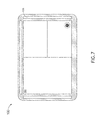
  • FIG. 7 is an illustration depicting a format change that may be carried out using a display according to an exemplary embodiment of the inventive concepts disclosed herein;
  • FIG. 8 is another illustration depicting a format change that may be carried out using a display according to an exemplary embodiment of the inventive concepts disclosed herein;
  • FIG. 9 is another illustration depicting a format change that may be carried out using a display according to an exemplary embodiment of the inventive concepts disclosed herein;
  • FIG. 10 is another illustration depicting a format change that may be carried out using a display according to an exemplary embodiment of the inventive concepts disclosed herein;
  • FIG. 11 is a flow diagram depicting a method for providing multi-touch capabilities to a single-touch screen according to an exemplary embodiment of the inventive concepts disclosed herein;
  • FIG. 12 is a front view of a display according to an exemplary embodiment of the inventive concepts disclosed herein;
  • FIG. 13 is a cross-sectional view depicting a display according to an exemplary embodiment of the inventive concepts disclosed herein;
  • FIG. 14 is a partial isometric view depicting a bezel of a display according to an exemplary embodiment of the inventive concepts disclosed herein;
  • FIG. 15 is another partial isometric view depicting a bezel of a display according to an exemplary embodiment of the inventive concepts disclosed herein;
  • FIG. 16 is a cross-sectional view depicting a display according to an exemplary embodiment of the inventive concepts disclosed herein.
  • inventive concepts are not limited in their application to the details of construction and the arrangement of the components or steps or methodologies set forth in the following description or illustrated in the drawings.
  • inventive concepts disclosed herein may be practiced without these specific details.
  • well-known features may not be described in detail to avoid unnecessarily complicating the instant disclosure.
  • inventive concepts disclosed herein are capable of other embodiments or of being practiced or carried out in various ways. Also, it is to be understood that the phraseology and terminology employed herein is for the purpose of description and should not be regarded as limiting.
  • a letter following a reference numeral is intended to reference an embodiment of the feature or element that may be similar, but not necessarily identical, to a previously described element or feature bearing the same reference numeral (e.g., 1, 1 a, 1 b ).
  • Such shorthand notations are used for purposes of convenience only, and should not be construed to limit the inventive concepts disclosed herein in any way unless expressly stated to the contrary.
  • any reference to “one embodiment,” or “some embodiments” means that a particular element, feature, structure, or characteristic described in connection with the embodiment is included in at least one embodiment of the inventive concepts disclosed herein.
  • the appearances of the phrase “in some embodiments” in various places in the specification are not necessarily all referring to the same embodiment, and embodiments of the inventive concepts disclosed may include one or more of the features expressly described or inherently present herein, or any combination of sub-combination of two or more such features, along with any other features which may not necessarily be expressly described or inherently present in the instant disclosure.
  • Embodiments in accordance with the inventive concepts disclosed herein are directed systems and methods for providing smart bezels to touch screens.
  • the outside frame (referred to as the bezel) around a touch screen may be configured to function as one or more secondary touch locations.
  • the secondary touch locations may be utilized to activate context menus and/or to operate in conjunction with the touch screen and provide support for multi-touch gestures. It is contemplated that providing multi-touch capabilities to single-touch screens may be appreciated for various reasons. For example, by allowing the touch screen itself to remain as a single-touch screen, the complexity and the cost of the touch screen may be reduced.
  • the secondary touch locations provided in accordance with the inventive concepts disclosed herein may be easy to install (compared to replacing a single-touch screen with a multi-touch screen).
  • the touch screen may also implement resistive touch technologies, which may be preferred over other touch technologies, particularly in operating environments (e.g., aircraft flight displays) where false touches and electromagnetic interferences must be avoided.
  • FIG. 1 shows a front view of an exemplary display 100 configured in accordance with an embodiment of the inventive concepts disclosed herein
  • FIG. 2 shows a block diagram depicting the display 100 of FIG. 1
  • the display 100 may include a touch screen 102 surrounded by a bezel 104 .
  • One or more touch-sensitive strips 106 may be positioned on the bezel 104 .
  • the touch-sensitive strips 106 may implement various touch technologies, including resistive touch technologies, allowing the touch-sensitive strips 106 to function as secondary touch locations.
  • the touch-sensitive strips 106 may be configured as embedded components of the bezel 104 or as portable attachments to the bezel 104 . It is contemplated that the placement and quantity of the touch-sensitive strips 106 may be configured based on operational requirements. For example, a single continuous touch-sensitive strip 106 may extend along an entire perimeter of the bezel 104 . Alternatively, multiple individual touch-sensitive strips 106 may extend at least partially along one or more sides/edges of the bezel 104 .
  • a touch-sensitive strip 106 may be partitioned into one or more segments, wherein each segment may be independently activated/deactivated (e.g., using a controller 108 ), allowing the secondary touch locations provided by such a touch-sensitive strip 106 to be configurable without any physical changes to the touch-sensitive strip 106 .
  • touch gestures received by the touch screen 102 and the touch-sensitive strips 106 may be provided via one or more wired or wireless communication interfaces to the controller 108 for processing.
  • the controller 108 may reside in the bezel 104 and/or the touch screen 102 housing.
  • the controller 108 may include one or more dedicated processing devices, application-specific integrated circuits (ASICs), field-programmable gate arrays (FPGAs), or various other types of processors or processing devices configured to process the touch gestures received and provide multi-touch capabilities based on detected interactions of the touch gestures received.
  • FIGS. 3-10 are illustrations depicting some exemplary operations supported by the display 100 .
  • a scroll operation may also be referred to as panning
  • panning may be engaged when a user simultaneously touches and holds the touch screen 102 and one of the horizontal and/or vertical touch-sensitive strips 106 .
  • a zoom operation as shown in FIG. 4 , may be engaged when a user touches and holds the touch screen 102 to define a center point for the zoom operation and drags a touch point along one of the touch-sensitive strips 106 to zoom in/out around the center point.
  • gestures shown in FIGS. 3 and 4 are merely exemplary and are not meant to be limiting. It is contemplated that gestures supported by the display 100 may be defined based on operational requirements and/or user preferences without departing from the broad scope of the inventive concepts disclosed herein. For instance, dragging a touch point along one of the touch-sensitive strips 106 may be configured to engage scroll operations. In another example, a touch point on the touch screen 102 and a touch point on one of the touch-sensitive strips 106 may jointly enable multi-touch gestures such as pinch-to-zoom and the like.
  • the touch-sensitive strips 106 may be utilized to engage other functions in addition to zoom and scroll. For example, as shown in FIGS. 5-6 , a user may touch one of the touch-sensitive strips 106 while touching a display element 110 on the touch screen 102 to enable a secondary/specialized menu option 112 (which may otherwise be hidden from the display interface). The user may then scroll through the menu 112 using the touch screen 102 and/or one of the touch-sensitive strips 106 .
  • a user may utilize the touch-sensitive strips 106 to change the content or the format of a display window. More specifically, the user may touch a predetermined location within a display window to enable the change ( FIG. 7 ). Once the change is enabled, the user may use the touch screen 102 and/or one of the touch-sensitive strips 106 to scroll through different options for the display window ( FIG. 8 ). Alternatively and/or additionally, a segment 106 A of one of the touch-sensitive strips 106 may be dedicated as a predetermined location for enabling content or format changes ( FIG. 9 ). The user may touch the dedicated segment 106 A to enable and carry out the change using one of the touch-sensitive strips 106 ( FIG. 10 ).
  • FIGS. 3-10 are merely exemplary and are not meant to be limiting. It is contemplated that various types of gestures may be supported by the display 100 to carry out various types of operations without departing from the broad scope of the inventive concepts disclosed herein. It is also to be understood that while aircraft and aircraft flight displays are referenced in the examples described above, the exemplary display 100 is not limited to applications in airborne vehicles. It is contemplated that the display 100 may be utilized in various operating environments without departing from the broad scope of the inventive concepts disclosed herein.
  • a flow diagram depicting an exemplary method 200 for providing multi-touch capabilities to a single-touch screen is shown. More specifically, a step 202 may associate one or more touch-sensitive strips to an edge of a touch screen. As illustrated above, the one or more touch-sensitive strips may be positioned to extend at least partially along an edge of the touch screen. A step 204 may receive touch gestures received by the touch screen and the one or more touch-sensitive strips, which may be processed jointly in a step 206 to facilitate multi-touch operations.
  • touch screens referenced in the examples above may be implemented as single-touch screens, such implementations are exemplary and are not meant to be limiting. It is also to be understood that while the touch-sensitive strips may be configured as elongated touch-sensitive components, such configurations are merely exemplary and are not meant to be limiting. It is contemplated that touch-sensitive components of various shapes and/or sizes may be utilized to serve as touch-sensitive strips (may also be referred to as zones) without departing from the broad scope of the inventive concepts disclosed herein.
  • touch-sensitive zones configured in accordance with embodiments of the inventive concepts disclosed herein may be utilized to provide additional touch locations without departing from the broad scope of the inventive concepts disclosed herein. It is further contemplated that displays configured in accordance with the inventive concepts disclosed herein may implement touch technologies in addition to resistive touch technologies referenced in the examples above.
  • the bezel around a touch screen may be configured to function as one or more non-display secondary touch locations, such a configuration is not meant to be limiting. It is contemplated that the bezel around a touch screen may include one or more display elements, allowing the bezel to provide one or more secondary display surfaces in addition to serving as one or more secondary touch locations.
  • the display 300 may include a touch screen 302 at least partially surrounded by a bezel 304 . It is noted that a portion of the bezel (e.g., the inner bezel 304 A) may be configured to provide secondary display surfaces.
  • the inner bezel 304 A and/or the outer bezel 304 B may also implement certain touch technologies, allowing the inner bezel 304 A and/or the outer bezel 304 B to function as secondary touch locations as previously described.
  • the secondary display surfaces provided in this manner may be suitable for displaying secondary display items such as messages, dialog boxes, control menus, and/or other display items that may not need to be displayed on the touch screen 302 at all times.
  • the secondary display surfaces may be user-activated and/or system-activated, and it is contemplated that the secondary display surfaces provided in this manner may help reduce on-screen clutter (e.g., by moving the secondary display items from the touch screen 302 to the bezel 304 ), which in turn may help reduce visual interferences with important information displayed on the touch screen 302 .
  • the inner bezel 304 A may be configured to function as a light guide, which may be positioned to deliver a portion of the image 310 produced on the underlying touch screen 302 to a display surface 308 of the inner bezel 304 A.
  • the display surface 308 is shown to be angled in FIG. 13 , such an implementation is merely exemplary and is not meant to be limiting.
  • anchors 306 may be positioned to support rotational movement of the inner bezel 304 A (e.g., rotate about the anchor 306 ), allowing the inner bezel 304 A to rotate slightly toward the underlying touch screen 302 , effectively enabling the inner bezel 304 A to serve as a button.
  • the inner bezel 304 A may be overlaid with a display layer 312 as shown in FIG. 16 .
  • the display layer 312 may implement various types of thin emissive display technologies, including organic light-emitting diode (OLED) technologies.
  • OLED organic light-emitting diode
  • the display layer 312 may be configured to be touch-sensitive, allowing the inner bezel 304 A to function as secondary touch locations as previously described.
  • bezels 304 shown in FIGS. 12-16 may include inner bezels 304 A and outer bezels 304 B
  • references to the inner bezels 304 A and the outer bezels 304 B are merely exemplary and are not meant to be limiting. It is contemplated that the inner bezels 304 A and the outer bezels 304 B may be implemented as separate components that jointly form the bezels 304 shown in FIGS. 12-16 , or they may be implemented as single-piece constructions without departing from the broad scope of the inventive concepts disclosed herein.
  • displays configured according to embodiments of the inventive concepts disclosed herein may provide multi-touch capabilities to single-touch screens, which may be appreciated for various reasons.
  • Displays configured according to embodiments of the inventive concepts disclosed herein may also provide additional display surfaces, which may help reduce on-screen clutter and visual interferences.
  • embodiments of the methods according to the inventive concepts disclosed herein may include one or more of the steps described herein. Further, such steps may be carried out in any desired order and two or more of the steps may be carried out simultaneously with one another. Two or more of the steps disclosed herein may be combined in a single step, and in some embodiments, one or more of the steps may be carried out as two or more sub-steps. Further, other steps or sub-steps may be carried in addition to, or as substitutes to one or more of the steps disclosed herein.
  • inventive concepts disclosed herein are well adapted to carry out the objects and to attain the advantages mentioned herein as well as those inherent in the inventive concepts disclosed herein. While presently preferred embodiments of the inventive concepts disclosed herein have been described for purposes of this disclosure, it will be understood that numerous changes may be made which will readily suggest themselves to those skilled in the art and which are accomplished within the broad scope and coverage of the inventive concepts disclosed and claimed herein.
  • Such a package may be a computer program product which employs a computer-readable storage medium including stored computer code which is used to program a computer to perform the disclosed function and process of the present invention.
  • the computer-readable medium may include, but is not limited to, any type of conventional floppy disk, optical disk, CD-ROM, magnetic disk, hard disk drive, magneto-optical disk, ROM, RAM, EPROM, EEPROM, magnetic or optical card, or any other suitable media for storing electronic instructions.

Landscapes

  • Engineering & Computer Science (AREA)
  • General Engineering & Computer Science (AREA)
  • Theoretical Computer Science (AREA)
  • Human Computer Interaction (AREA)
  • Physics & Mathematics (AREA)
  • General Physics & Mathematics (AREA)
  • User Interface Of Digital Computer (AREA)

Abstract

Displays with functional bezels and methods for providing functional bezels to displays are disclosed. A display may include a touch screen, a bezel surrounding the touch screen, and a touch-sensitive zone extending along the bezel. The touch-sensitive zone may be configured to define a secondary touch location. The secondary touch location may be configured to operate jointly with the touch screen to support multi-touch operations.

Description

BACKGROUND
A touch screen is an electronic device that is capable of receiving user input through single- or multi-touch gestures by touching the screen with a stylus and/or one or more fingers.
There are various types of touch screens available. Some touch screens, referred to as resistive touch screens, may utilize thinly separated electrically-resistive layers to detect touch gestures. Resistive touch screens are reliable and are resistant to liquids and other contaminants, making them suitable for operating environments such as restaurants, factories, hospitals, and vehicles. However, resistive touch screens are typically implemented to support single touch gestures. Certain functions, such as zoom and scroll, tend to be cumbersome to carry out with only single touch gestures.
SUMMARY
In one aspect, embodiments of the inventive concepts disclosed herein are directed to a display. The display may include a touch screen, a bezel surrounding the touch screen, and a touch-sensitive zone extending along the bezel. The touch-sensitive zone may be configured to define a secondary touch location. The secondary touch location may be configured to operate jointly with the touch screen to support multi-touch operations.
In a further aspect, embodiments of the inventive concepts disclosed herein are directed to a system. The system may include a bezel surrounding a touch screen and a touch-sensitive zone extending along the bezel. The system may also include a controller in communication with the touch screen and the touch-sensitive zone. The touch-sensitive zone may be configured to define a secondary touch location, and the controller may be configured to facilitate multi-touch operations based on interactions of touch gestures received by the touch screen and the touch-sensitive zone.
In another aspect, embodiments of the inventive concepts disclosed herein are directed to a method. The method may include: associating a touch-sensitive zone to an edge of a touch screen; receiving touch gestures received by the touch screen and the touch-sensitive zone; and facilitating multi-touch operations based on interactions of the touch gestures received by the touch screen and the touch-sensitive zone.
It is to be understood that both the foregoing general description and the following detailed description are exemplary and explanatory only and are not restrictive of the inventive concepts disclosed and claimed herein. The accompanying drawings, which are incorporated in and constitute a part of the specification, illustrate embodiments of the inventive concepts and together with the general description, serve to explain the principles and features of the inventive concepts disclosed herein.
BRIEF DESCRIPTION OF THE DRAWINGS
Implementations of the inventive concepts disclosed herein may be better understood when consideration is given to the following detailed description thereof. Such description makes reference to the included drawings, which are not necessarily to scale, and in which some features may be exaggerated and some features may be omitted or may be represented schematically in the interest of clarity. Like reference numerals in the drawings may represent and refer to the same or similar element, feature, or function. In the drawings:
FIG. 1 is a front view of a display according to an exemplary embodiment of the inventive concepts disclosed herein;
FIG. 2 is a block diagram depicting a display according to an exemplary embodiment of the inventive concepts disclosed herein;
FIG. 3 is an illustration depicting a scroll operation that may be engaged using a display according to an exemplary embodiment of the inventive concepts disclosed herein;
FIG. 4 is an illustration depicting a zoom operation that may be engaged using a display according to an exemplary embodiment of the inventive concepts disclosed herein;
FIG. 5 is an illustration depicting an option menu that may be activated using a display according to an exemplary embodiment of the inventive concepts disclosed herein;
FIG. 6 is another illustration depicting a menu option that may be activated using a display according to an exemplary embodiment of the inventive concepts disclosed herein;
FIG. 7 is an illustration depicting a format change that may be carried out using a display according to an exemplary embodiment of the inventive concepts disclosed herein;
FIG. 8 is another illustration depicting a format change that may be carried out using a display according to an exemplary embodiment of the inventive concepts disclosed herein;
FIG. 9 is another illustration depicting a format change that may be carried out using a display according to an exemplary embodiment of the inventive concepts disclosed herein;
FIG. 10 is another illustration depicting a format change that may be carried out using a display according to an exemplary embodiment of the inventive concepts disclosed herein;
FIG. 11 is a flow diagram depicting a method for providing multi-touch capabilities to a single-touch screen according to an exemplary embodiment of the inventive concepts disclosed herein;
FIG. 12 is a front view of a display according to an exemplary embodiment of the inventive concepts disclosed herein;
FIG. 13 is a cross-sectional view depicting a display according to an exemplary embodiment of the inventive concepts disclosed herein;
FIG. 14 is a partial isometric view depicting a bezel of a display according to an exemplary embodiment of the inventive concepts disclosed herein;
FIG. 15 is another partial isometric view depicting a bezel of a display according to an exemplary embodiment of the inventive concepts disclosed herein; and
FIG. 16 is a cross-sectional view depicting a display according to an exemplary embodiment of the inventive concepts disclosed herein.
DETAILED DESCRIPTION
Before explaining at least one embodiment of the inventive concepts disclosed herein in detail, it is to be understood that the inventive concepts are not limited in their application to the details of construction and the arrangement of the components or steps or methodologies set forth in the following description or illustrated in the drawings. In the following detailed description of embodiments of the instant inventive concepts, numerous specific details are set forth in order to provide a more thorough understanding of the inventive concepts. However, it will be apparent to one of ordinary skill in the art having the benefit of the instant disclosure that the inventive concepts disclosed herein may be practiced without these specific details. In other instances, well-known features may not be described in detail to avoid unnecessarily complicating the instant disclosure. The inventive concepts disclosed herein are capable of other embodiments or of being practiced or carried out in various ways. Also, it is to be understood that the phraseology and terminology employed herein is for the purpose of description and should not be regarded as limiting.
As used herein a letter following a reference numeral is intended to reference an embodiment of the feature or element that may be similar, but not necessarily identical, to a previously described element or feature bearing the same reference numeral (e.g., 1, 1a, 1b). Such shorthand notations are used for purposes of convenience only, and should not be construed to limit the inventive concepts disclosed herein in any way unless expressly stated to the contrary.
Further, unless expressly stated to the contrary, “or” refers to an inclusive or and not to an exclusive or. For example, a condition A or B is satisfied by anyone of the following: A is true (or present) and B is false (or not present), A is false (or not present) and B is true (or present), and both A and B are true (or present).
In addition, use of the “a” or “an” are employed to describe elements and components of embodiments of the instant inventive concepts. This is done merely for convenience and to give a general sense of the inventive concepts, and “a” and “an” are intended to include one or at least one and the singular also includes the plural unless it is obvious that it is meant otherwise.
Finally, as used herein any reference to “one embodiment,” or “some embodiments” means that a particular element, feature, structure, or characteristic described in connection with the embodiment is included in at least one embodiment of the inventive concepts disclosed herein. The appearances of the phrase “in some embodiments” in various places in the specification are not necessarily all referring to the same embodiment, and embodiments of the inventive concepts disclosed may include one or more of the features expressly described or inherently present herein, or any combination of sub-combination of two or more such features, along with any other features which may not necessarily be expressly described or inherently present in the instant disclosure.
Reference will now be made in detail to exemplary embodiments of the inventive concepts disclosed herein, examples of which are illustrated in the accompanying drawings.
Embodiments in accordance with the inventive concepts disclosed herein are directed systems and methods for providing smart bezels to touch screens. In some embodiments, the outside frame (referred to as the bezel) around a touch screen may be configured to function as one or more secondary touch locations. The secondary touch locations may be utilized to activate context menus and/or to operate in conjunction with the touch screen and provide support for multi-touch gestures. It is contemplated that providing multi-touch capabilities to single-touch screens may be appreciated for various reasons. For example, by allowing the touch screen itself to remain as a single-touch screen, the complexity and the cost of the touch screen may be reduced. In addition, the secondary touch locations provided in accordance with the inventive concepts disclosed herein may be easy to install (compared to replacing a single-touch screen with a multi-touch screen). The touch screen may also implement resistive touch technologies, which may be preferred over other touch technologies, particularly in operating environments (e.g., aircraft flight displays) where false touches and electromagnetic interferences must be avoided.
Referring generally to FIGS. 1-2. FIG. 1 shows a front view of an exemplary display 100 configured in accordance with an embodiment of the inventive concepts disclosed herein, and FIG. 2 shows a block diagram depicting the display 100 of FIG. 1. The display 100 may include a touch screen 102 surrounded by a bezel 104. One or more touch-sensitive strips 106 may be positioned on the bezel 104. The touch-sensitive strips 106 may implement various touch technologies, including resistive touch technologies, allowing the touch-sensitive strips 106 to function as secondary touch locations.
It is contemplated that the touch-sensitive strips 106 may be configured as embedded components of the bezel 104 or as portable attachments to the bezel 104. It is contemplated that the placement and quantity of the touch-sensitive strips 106 may be configured based on operational requirements. For example, a single continuous touch-sensitive strip 106 may extend along an entire perimeter of the bezel 104. Alternatively, multiple individual touch-sensitive strips 106 may extend at least partially along one or more sides/edges of the bezel 104. Additionally, a touch-sensitive strip 106 may be partitioned into one or more segments, wherein each segment may be independently activated/deactivated (e.g., using a controller 108), allowing the secondary touch locations provided by such a touch-sensitive strip 106 to be configurable without any physical changes to the touch-sensitive strip 106.
It is contemplated that touch gestures received by the touch screen 102 and the touch-sensitive strips 106 may be provided via one or more wired or wireless communication interfaces to the controller 108 for processing. The controller 108 may reside in the bezel 104 and/or the touch screen 102 housing. The controller 108 may include one or more dedicated processing devices, application-specific integrated circuits (ASICs), field-programmable gate arrays (FPGAs), or various other types of processors or processing devices configured to process the touch gestures received and provide multi-touch capabilities based on detected interactions of the touch gestures received. FIGS. 3-10 are illustrations depicting some exemplary operations supported by the display 100.
More specifically, as shown in FIG. 3, a scroll operation (may also be referred to as panning) may be engaged when a user simultaneously touches and holds the touch screen 102 and one of the horizontal and/or vertical touch-sensitive strips 106. A zoom operation, as shown in FIG. 4, may be engaged when a user touches and holds the touch screen 102 to define a center point for the zoom operation and drags a touch point along one of the touch-sensitive strips 106 to zoom in/out around the center point.
It is to be understood that the gestures shown in FIGS. 3 and 4 are merely exemplary and are not meant to be limiting. It is contemplated that gestures supported by the display 100 may be defined based on operational requirements and/or user preferences without departing from the broad scope of the inventive concepts disclosed herein. For instance, dragging a touch point along one of the touch-sensitive strips 106 may be configured to engage scroll operations. In another example, a touch point on the touch screen 102 and a touch point on one of the touch-sensitive strips 106 may jointly enable multi-touch gestures such as pinch-to-zoom and the like.
It is also contemplated that the touch-sensitive strips 106 may be utilized to engage other functions in addition to zoom and scroll. For example, as shown in FIGS. 5-6, a user may touch one of the touch-sensitive strips 106 while touching a display element 110 on the touch screen 102 to enable a secondary/specialized menu option 112 (which may otherwise be hidden from the display interface). The user may then scroll through the menu 112 using the touch screen 102 and/or one of the touch-sensitive strips 106.
In another example, as shown in FIGS. 7-10, a user may utilize the touch-sensitive strips 106 to change the content or the format of a display window. More specifically, the user may touch a predetermined location within a display window to enable the change (FIG. 7). Once the change is enabled, the user may use the touch screen 102 and/or one of the touch-sensitive strips 106 to scroll through different options for the display window (FIG. 8). Alternatively and/or additionally, a segment 106A of one of the touch-sensitive strips 106 may be dedicated as a predetermined location for enabling content or format changes (FIG. 9). The user may touch the dedicated segment 106A to enable and carry out the change using one of the touch-sensitive strips 106 (FIG. 10).
It is to be understood that the various gestures shown in FIGS. 3-10 are merely exemplary and are not meant to be limiting. It is contemplated that various types of gestures may be supported by the display 100 to carry out various types of operations without departing from the broad scope of the inventive concepts disclosed herein. It is also to be understood that while aircraft and aircraft flight displays are referenced in the examples described above, the exemplary display 100 is not limited to applications in airborne vehicles. It is contemplated that the display 100 may be utilized in various operating environments without departing from the broad scope of the inventive concepts disclosed herein.
Referring now to FIG. 11, a flow diagram depicting an exemplary method 200 for providing multi-touch capabilities to a single-touch screen is shown. More specifically, a step 202 may associate one or more touch-sensitive strips to an edge of a touch screen. As illustrated above, the one or more touch-sensitive strips may be positioned to extend at least partially along an edge of the touch screen. A step 204 may receive touch gestures received by the touch screen and the one or more touch-sensitive strips, which may be processed jointly in a step 206 to facilitate multi-touch operations.
It is to be understood that while the touch screens referenced in the examples above may be implemented as single-touch screens, such implementations are exemplary and are not meant to be limiting. It is also to be understood that while the touch-sensitive strips may be configured as elongated touch-sensitive components, such configurations are merely exemplary and are not meant to be limiting. It is contemplated that touch-sensitive components of various shapes and/or sizes may be utilized to serve as touch-sensitive strips (may also be referred to as zones) without departing from the broad scope of the inventive concepts disclosed herein.
It is also contemplated that the touch-sensitive zones configured in accordance with embodiments of the inventive concepts disclosed herein may be utilized to provide additional touch locations without departing from the broad scope of the inventive concepts disclosed herein. It is further contemplated that displays configured in accordance with the inventive concepts disclosed herein may implement touch technologies in addition to resistive touch technologies referenced in the examples above.
Furthermore, it is to be understood that while the bezel around a touch screen may be configured to function as one or more non-display secondary touch locations, such a configuration is not meant to be limiting. It is contemplated that the bezel around a touch screen may include one or more display elements, allowing the bezel to provide one or more secondary display surfaces in addition to serving as one or more secondary touch locations.
Referring now to FIG. 12, an exemplary display 300 configured in accordance with an embodiment of the inventive concepts disclosed herein is shown. The display 300 may include a touch screen 302 at least partially surrounded by a bezel 304. It is noted that a portion of the bezel (e.g., the inner bezel 304A) may be configured to provide secondary display surfaces. The inner bezel 304A and/or the outer bezel 304B may also implement certain touch technologies, allowing the inner bezel 304A and/or the outer bezel 304B to function as secondary touch locations as previously described.
The secondary display surfaces provided in this manner may be suitable for displaying secondary display items such as messages, dialog boxes, control menus, and/or other display items that may not need to be displayed on the touch screen 302 at all times. The secondary display surfaces may be user-activated and/or system-activated, and it is contemplated that the secondary display surfaces provided in this manner may help reduce on-screen clutter (e.g., by moving the secondary display items from the touch screen 302 to the bezel 304), which in turn may help reduce visual interferences with important information displayed on the touch screen 302.
It is contemplated that various display techniques may be utilized to implement the bezel 304. For example, as shown in FIGS. 13-15, the inner bezel 304A may be configured to function as a light guide, which may be positioned to deliver a portion of the image 310 produced on the underlying touch screen 302 to a display surface 308 of the inner bezel 304A. It is to be understood that while the display surface 308 is shown to be angled in FIG. 13, such an implementation is merely exemplary and is not meant to be limiting. It is also to be understood that in certain implementations, anchors 306 may be positioned to support rotational movement of the inner bezel 304A (e.g., rotate about the anchor 306), allowing the inner bezel 304A to rotate slightly toward the underlying touch screen 302, effectively enabling the inner bezel 304A to serve as a button.
Alternatively, the inner bezel 304A may be overlaid with a display layer 312 as shown in FIG. 16. It is contemplated that the display layer 312 may implement various types of thin emissive display technologies, including organic light-emitting diode (OLED) technologies. It is also contemplated that the display layer 312 may be configured to be touch-sensitive, allowing the inner bezel 304A to function as secondary touch locations as previously described.
It is to be understood that while the bezels 304 shown in FIGS. 12-16 may include inner bezels 304A and outer bezels 304B, references to the inner bezels 304A and the outer bezels 304B are merely exemplary and are not meant to be limiting. It is contemplated that the inner bezels 304A and the outer bezels 304B may be implemented as separate components that jointly form the bezels 304 shown in FIGS. 12-16, or they may be implemented as single-piece constructions without departing from the broad scope of the inventive concepts disclosed herein.
As will be appreciated from the above, displays configured according to embodiments of the inventive concepts disclosed herein may provide multi-touch capabilities to single-touch screens, which may be appreciated for various reasons. Displays configured according to embodiments of the inventive concepts disclosed herein may also provide additional display surfaces, which may help reduce on-screen clutter and visual interferences.
It is to be understood that embodiments of the methods according to the inventive concepts disclosed herein may include one or more of the steps described herein. Further, such steps may be carried out in any desired order and two or more of the steps may be carried out simultaneously with one another. Two or more of the steps disclosed herein may be combined in a single step, and in some embodiments, one or more of the steps may be carried out as two or more sub-steps. Further, other steps or sub-steps may be carried in addition to, or as substitutes to one or more of the steps disclosed herein.
From the above description, it is clear that the inventive concepts disclosed herein are well adapted to carry out the objects and to attain the advantages mentioned herein as well as those inherent in the inventive concepts disclosed herein. While presently preferred embodiments of the inventive concepts disclosed herein have been described for purposes of this disclosure, it will be understood that numerous changes may be made which will readily suggest themselves to those skilled in the art and which are accomplished within the broad scope and coverage of the inventive concepts disclosed and claimed herein.
It is to be understood that embodiments of the inventive concepts disclosed herein may be conveniently implemented in forms of a software, hardware or firmware package. Such a package may be a computer program product which employs a computer-readable storage medium including stored computer code which is used to program a computer to perform the disclosed function and process of the present invention. The computer-readable medium may include, but is not limited to, any type of conventional floppy disk, optical disk, CD-ROM, magnetic disk, hard disk drive, magneto-optical disk, ROM, RAM, EPROM, EEPROM, magnetic or optical card, or any other suitable media for storing electronic instructions.
It is believed that the inventive concepts disclosed herein and many of their attendant advantages will be understood by the foregoing description, and it will be apparent that various changes may be made in the form, construction, and arrangement of the components thereof without departing from the broad scope of the inventive concepts or without sacrificing all of their material advantages. The form herein before described being merely an explanatory embodiment thereof, it is the intention of the following claims to encompass and include such changes.

Claims (18)

What is claimed is:
1. A display, comprising:
a touch screen;
a bezel at least partially surrounding the touch screen, the bezel being raised above an outer surface of the touch screen, the bezel including an inner bezel and an outer bezel at least partially surrounding the inner bezel, the inner bezel extending at a non-perpendicular angle from the outer surface of the touch screen toward the outer bezel; and
at least one touch-sensitive zone extending at least partially along the bezel, the at least one touch-sensitive zone configured to define at least one secondary touch location, wherein the at least one secondary touch location is configured to operate jointly with the touch screen to support multi-touch operations, wherein the at least one touch-sensitive zone includes at least one display element, wherein the at least one display element extending at least partially along the bezel implements a light guide positioned to deliver a portion of an image produced by the touch screen to a display surface of the at least one display element of the at least one touch-sensitive zone, the display surface of the at least one display element of the at least one touch-sensitive zone positioned along the bezel.
2. The apparatus of claim 1, wherein the touch screen is a single-touch screen.
3. The apparatus of claim 1, wherein the touch screen implements a resistive touch technology.
4. The apparatus of claim 1, wherein the at least one touch-sensitive zone is configured to display a secondary display item.
5. The apparatus of claim 1, wherein the at least one touch-sensitive zone comprises a plurality of segments.
6. The apparatus of claim 5, wherein each segment of the plurality of segments is independently activated/deactivated based on a specific configuration.
7. The apparatus of claim 1, wherein the display is an aircraft flight display.
8. The apparatus of claim 1, wherein the at least one display element extends at least partially along the inner bezel and implements the light guide positioned to deliver the portion of the image produced by the touch screen to the display surface of the at least one display element of the at least one touch-sensitive zone, the display surface of the at least one display element of the at least one touch-sensitive zone positioned along the inner bezel.
9. A system, comprising:
a bezel at least partially surrounding a touch screen, the bezel being raised above an outer surface of the touch screen, the bezel including an inner bezel and an outer bezel at least partially surrounding the inner bezel, the inner bezel extending at a non-perpendicular angle from the outer surface of the touch screen toward the outer bezel;
at least one touch-sensitive zone extending at least partially along the bezel, the at least one touch-sensitive zone configured to define at least one secondary touch location;
at least one display element extending at least partially along the bezel, wherein the at least one display element extending at least partially along the bezel implements a light guide positioned to deliver a portion of an image produced by the touch screen to a display surface of the at least one display element of the at least one touch-sensitive zone, the display surface of the at least one display element of the at least one touch-sensitive zone positioned along the bezel; and
a controller in communication with the touch screen and the at least one touch-sensitive zone, the controller configured to facilitate multi-touch operations based on interactions of touch gestures received by the touch screen and the at least one touch-sensitive zone.
10. The system of claim 9, wherein the at least one display element is configured to display a secondary display item.
11. The system of claim 9, wherein the at least one display element is implemented on the at least one touch-sensitive zone.
12. The system of claim 9, wherein the at least one touch-sensitive zone comprises a plurality of segments.
13. The system of claim 12, wherein each segment of the plurality of segments is independently activated/deactivated based on a specific configuration.
14. The system of claim 9, wherein the system forms a part of an electronic system onboard an aircraft.
15. A method, comprising:
associating at least one touch-sensitive zone to an edge of a touch screen, wherein a bezel at least partially surrounds the touch screen, the bezel being raised above an outer surface of the touch screen, the bezel including an inner bezel and an outer bezel at least partially surrounding the inner bezel, the inner bezel extending at a non-perpendicular angle from the outer surface of the touch screen toward the outer bezel, wherein the at least one touch-sensitive zone extends at least partially along the bezel, wherein the at least one touch-sensitive zone includes at least one display element, wherein the at least one display element extending at least partially along the bezel implements a light guide positioned to deliver a portion of an image produced by the touch screen to a display surface of the at least one display element of the at least one touch-sensitive zone, the display surface of the at least one display element of the at least one touch-sensitive zone positioned along the bezel;
receiving touch gestures received by the touch screen and the at least one touch-sensitive zone; and
facilitating multi-touch operations based on interactions of the touch gestures received by the touch screen and the at least one touch-sensitive zone.
16. The method of claim 15, wherein the step of associating the at least one touch-sensitive zone to the edge of the touch screen comprises positioning the at least one touch-sensitive zone at least partially along the edge of the touch screen.
17. The method of claim 15, wherein the at least one touch-sensitive zone comprises a plurality of segments.
18. The method of claim 17, wherein each segment of the plurality of segments is independently activated/deactivated based on a specific configuration.
US15/006,775 2016-01-26 2016-01-26 Displays with functional bezels Active 2036-02-21 US9898129B1 (en)

Priority Applications (1)

Application Number Priority Date Filing Date Title
US15/006,775 US9898129B1 (en) 2016-01-26 2016-01-26 Displays with functional bezels

Applications Claiming Priority (1)

Application Number Priority Date Filing Date Title
US15/006,775 US9898129B1 (en) 2016-01-26 2016-01-26 Displays with functional bezels

Publications (1)

Publication Number Publication Date
US9898129B1 true US9898129B1 (en) 2018-02-20

Family

ID=61188135

Family Applications (1)

Application Number Title Priority Date Filing Date
US15/006,775 Active 2036-02-21 US9898129B1 (en) 2016-01-26 2016-01-26 Displays with functional bezels

Country Status (1)

Country Link
US (1) US9898129B1 (en)

Cited By (1)

* Cited by examiner, † Cited by third party
Publication number Priority date Publication date Assignee Title
US20200081603A1 (en) * 2018-09-11 2020-03-12 Ge Aviation Systems Limited Touch screen display assembly and method of operating vehicle having same

Citations (4)

* Cited by examiner, † Cited by third party
Publication number Priority date Publication date Assignee Title
US20100053861A1 (en) * 2008-09-02 2010-03-04 Chi-Young Kim Mobile terminal
US20140055367A1 (en) * 2012-08-21 2014-02-27 Nokia Corporation Apparatus and method for providing for interaction with content within a digital bezel
US20160231772A1 (en) * 2015-02-09 2016-08-11 Mediatek Inc. Wearable electronic device and touch operation method
US20170075442A1 (en) * 2015-09-14 2017-03-16 The Boeing Company Touch Screen Bezel Design for Use in Aviation Operations

Patent Citations (4)

* Cited by examiner, † Cited by third party
Publication number Priority date Publication date Assignee Title
US20100053861A1 (en) * 2008-09-02 2010-03-04 Chi-Young Kim Mobile terminal
US20140055367A1 (en) * 2012-08-21 2014-02-27 Nokia Corporation Apparatus and method for providing for interaction with content within a digital bezel
US20160231772A1 (en) * 2015-02-09 2016-08-11 Mediatek Inc. Wearable electronic device and touch operation method
US20170075442A1 (en) * 2015-09-14 2017-03-16 The Boeing Company Touch Screen Bezel Design for Use in Aviation Operations

Cited By (4)

* Cited by examiner, † Cited by third party
Publication number Priority date Publication date Assignee Title
US20200081603A1 (en) * 2018-09-11 2020-03-12 Ge Aviation Systems Limited Touch screen display assembly and method of operating vehicle having same
CN110888546A (en) * 2018-09-11 2020-03-17 通用电气航空系统有限公司 Touch screen display assembly and method of operating a vehicle having a touch screen display assembly
US10838554B2 (en) * 2018-09-11 2020-11-17 Ge Aviation Systems Limited Touch screen display assembly and method of operating vehicle having same
CN110888546B (en) * 2018-09-11 2023-09-01 通用电气航空系统有限公司 Touch screen display assembly and method of operating a vehicle having a touch screen display assembly

Similar Documents

Publication Publication Date Title
US10579205B2 (en) Edge-based hooking gestures for invoking user interfaces
US8836648B2 (en) Touch pull-in gesture
US9977497B2 (en) Method for providing haptic effect set by a user in a portable terminal, machine-readable storage medium, and portable terminal
US9965141B2 (en) Movable selection indicators for region or point selection on a user interface
EP2732362B1 (en) Launcher for context based menus
CN103649875B (en) Manage content through actions on context-based menus
EP2463768B1 (en) Method and system for displaying screens on the touch screen of a mobile device
JP5474974B2 (en) Activate internal scrolling and cursor decoration
TW201246034A (en) Touch screen and method for providing stable touches
US20130222431A1 (en) Method and apparatus for content view display in a mobile device
EP2669786A2 (en) Method for displaying item in terminal and terminal using the same
US20120278755A1 (en) Elastic over-scroll
CN110262677A (en) UI for manipulating UI objects
EP2706449B1 (en) Method for changing object position and electronic device thereof
TW201421346A (en) Display control device, display control method and program
KR101726576B1 (en) Display device having splitable display, controlling method thereof and recording medium for performing the method
US9880726B2 (en) Fragmented scrolling of a page
US9898129B1 (en) Displays with functional bezels
CN108089643B (en) Electronic device and method for enhancing interaction with electronic device
US9324130B2 (en) First image and a second image on a display
US20150220156A1 (en) Interface system for a computing device with visual proximity sensors and a method of interfacing with a computing device
TWI512592B (en) Electronic device and method for displaying a user interface thereof
US9733806B2 (en) Electronic device and user interface operating method thereof
US12353671B2 (en) Virtual mouse for electronic touchscreen display
US10936110B1 (en) Touchscreen cursor offset function

Legal Events

Date Code Title Description
AS Assignment

Owner name: ROCKWELL COLLINS, INC., IOWA

Free format text: ASSIGNMENT OF ASSIGNORS INTEREST;ASSIGNORS:CONNELLY, JOHN M.;ANSARI, TALHA S.;JOHNSON, NEIL C.;AND OTHERS;SIGNING DATES FROM 20160122 TO 20160125;REEL/FRAME:037587/0805

STCF Information on status: patent grant

Free format text: PATENTED CASE

MAFP Maintenance fee payment

Free format text: PAYMENT OF MAINTENANCE FEE, 4TH YEAR, LARGE ENTITY (ORIGINAL EVENT CODE: M1551); ENTITY STATUS OF PATENT OWNER: LARGE ENTITY

Year of fee payment: 4

MAFP Maintenance fee payment

Free format text: PAYMENT OF MAINTENANCE FEE, 8TH YEAR, LARGE ENTITY (ORIGINAL EVENT CODE: M1552); ENTITY STATUS OF PATENT OWNER: LARGE ENTITY

Year of fee payment: 8