US9483658B2 - Display device - Google Patents
Display device Download PDFInfo
- Publication number
- US9483658B2 US9483658B2 US14/422,156 US201314422156A US9483658B2 US 9483658 B2 US9483658 B2 US 9483658B2 US 201314422156 A US201314422156 A US 201314422156A US 9483658 B2 US9483658 B2 US 9483658B2
- Authority
- US
- United States
- Prior art keywords
- data items
- displayed
- category
- display
- information
- Prior art date
- Legal status (The legal status is an assumption and is not a legal conclusion. Google has not performed a legal analysis and makes no representation as to the accuracy of the status listed.)
- Expired - Fee Related
Links
Images




Classifications
-
- G—PHYSICS
- G06—COMPUTING OR CALCULATING; COUNTING
- G06F—ELECTRIC DIGITAL DATA PROCESSING
- G06F21/00—Security arrangements for protecting computers, components thereof, programs or data against unauthorised activity
- G06F21/60—Protecting data
- G06F21/62—Protecting access to data via a platform, e.g. using keys or access control rules
- G06F21/6218—Protecting access to data via a platform, e.g. using keys or access control rules to a system of files or objects, e.g. local or distributed file system or database
- G06F21/6245—Protecting personal data, e.g. for financial or medical purposes
-
- G—PHYSICS
- G06—COMPUTING OR CALCULATING; COUNTING
- G06F—ELECTRIC DIGITAL DATA PROCESSING
- G06F21/00—Security arrangements for protecting computers, components thereof, programs or data against unauthorised activity
- G06F21/60—Protecting data
-
- G—PHYSICS
- G06—COMPUTING OR CALCULATING; COUNTING
- G06F—ELECTRIC DIGITAL DATA PROCESSING
- G06F21/00—Security arrangements for protecting computers, components thereof, programs or data against unauthorised activity
- G06F21/70—Protecting specific internal or peripheral components, in which the protection of a component leads to protection of the entire computer
- G06F21/82—Protecting input, output or interconnection devices
- G06F21/84—Protecting input, output or interconnection devices output devices, e.g. displays or monitors
-
- G—PHYSICS
- G06—COMPUTING OR CALCULATING; COUNTING
- G06F—ELECTRIC DIGITAL DATA PROCESSING
- G06F3/00—Input arrangements for transferring data to be processed into a form capable of being handled by the computer; Output arrangements for transferring data from processing unit to output unit, e.g. interface arrangements
- G06F3/01—Input arrangements or combined input and output arrangements for interaction between user and computer
- G06F3/03—Arrangements for converting the position or the displacement of a member into a coded form
- G06F3/041—Digitisers, e.g. for touch screens or touch pads, characterised by the transducing means
-
- G—PHYSICS
- G06—COMPUTING OR CALCULATING; COUNTING
- G06F—ELECTRIC DIGITAL DATA PROCESSING
- G06F3/00—Input arrangements for transferring data to be processed into a form capable of being handled by the computer; Output arrangements for transferring data from processing unit to output unit, e.g. interface arrangements
- G06F3/01—Input arrangements or combined input and output arrangements for interaction between user and computer
- G06F3/048—Interaction techniques based on graphical user interfaces [GUI]
- G06F3/0481—Interaction techniques based on graphical user interfaces [GUI] based on specific properties of the displayed interaction object or a metaphor-based environment, e.g. interaction with desktop elements like windows or icons, or assisted by a cursor's changing behaviour or appearance
- G06F3/0482—Interaction with lists of selectable items, e.g. menus
-
- G—PHYSICS
- G06—COMPUTING OR CALCULATING; COUNTING
- G06F—ELECTRIC DIGITAL DATA PROCESSING
- G06F3/00—Input arrangements for transferring data to be processed into a form capable of being handled by the computer; Output arrangements for transferring data from processing unit to output unit, e.g. interface arrangements
- G06F3/01—Input arrangements or combined input and output arrangements for interaction between user and computer
- G06F3/048—Interaction techniques based on graphical user interfaces [GUI]
- G06F3/0484—Interaction techniques based on graphical user interfaces [GUI] for the control of specific functions or operations, e.g. selecting or manipulating an object, an image or a displayed text element, setting a parameter value or selecting a range
- G06F3/04842—Selection of displayed objects or displayed text elements
-
- G—PHYSICS
- G06—COMPUTING OR CALCULATING; COUNTING
- G06F—ELECTRIC DIGITAL DATA PROCESSING
- G06F3/00—Input arrangements for transferring data to be processed into a form capable of being handled by the computer; Output arrangements for transferring data from processing unit to output unit, e.g. interface arrangements
- G06F3/01—Input arrangements or combined input and output arrangements for interaction between user and computer
- G06F3/048—Interaction techniques based on graphical user interfaces [GUI]
- G06F3/0487—Interaction techniques based on graphical user interfaces [GUI] using specific features provided by the input device, e.g. functions controlled by the rotation of a mouse with dual sensing arrangements, or of the nature of the input device, e.g. tap gestures based on pressure sensed by a digitiser
- G06F3/0488—Interaction techniques based on graphical user interfaces [GUI] using specific features provided by the input device, e.g. functions controlled by the rotation of a mouse with dual sensing arrangements, or of the nature of the input device, e.g. tap gestures based on pressure sensed by a digitiser using a touch-screen or digitiser, e.g. input of commands through traced gestures
-
- G—PHYSICS
- G06—COMPUTING OR CALCULATING; COUNTING
- G06F—ELECTRIC DIGITAL DATA PROCESSING
- G06F3/00—Input arrangements for transferring data to be processed into a form capable of being handled by the computer; Output arrangements for transferring data from processing unit to output unit, e.g. interface arrangements
- G06F3/01—Input arrangements or combined input and output arrangements for interaction between user and computer
- G06F3/048—Interaction techniques based on graphical user interfaces [GUI]
- G06F3/0487—Interaction techniques based on graphical user interfaces [GUI] using specific features provided by the input device, e.g. functions controlled by the rotation of a mouse with dual sensing arrangements, or of the nature of the input device, e.g. tap gestures based on pressure sensed by a digitiser
- G06F3/0488—Interaction techniques based on graphical user interfaces [GUI] using specific features provided by the input device, e.g. functions controlled by the rotation of a mouse with dual sensing arrangements, or of the nature of the input device, e.g. tap gestures based on pressure sensed by a digitiser using a touch-screen or digitiser, e.g. input of commands through traced gestures
- G06F3/04883—Interaction techniques based on graphical user interfaces [GUI] using specific features provided by the input device, e.g. functions controlled by the rotation of a mouse with dual sensing arrangements, or of the nature of the input device, e.g. tap gestures based on pressure sensed by a digitiser using a touch-screen or digitiser, e.g. input of commands through traced gestures for inputting data by handwriting, e.g. gesture or text
-
- G—PHYSICS
- G06—COMPUTING OR CALCULATING; COUNTING
- G06F—ELECTRIC DIGITAL DATA PROCESSING
- G06F3/00—Input arrangements for transferring data to be processed into a form capable of being handled by the computer; Output arrangements for transferring data from processing unit to output unit, e.g. interface arrangements
- G06F3/01—Input arrangements or combined input and output arrangements for interaction between user and computer
- G06F3/048—Interaction techniques based on graphical user interfaces [GUI]
- G06F3/0487—Interaction techniques based on graphical user interfaces [GUI] using specific features provided by the input device, e.g. functions controlled by the rotation of a mouse with dual sensing arrangements, or of the nature of the input device, e.g. tap gestures based on pressure sensed by a digitiser
- G06F3/0488—Interaction techniques based on graphical user interfaces [GUI] using specific features provided by the input device, e.g. functions controlled by the rotation of a mouse with dual sensing arrangements, or of the nature of the input device, e.g. tap gestures based on pressure sensed by a digitiser using a touch-screen or digitiser, e.g. input of commands through traced gestures
- G06F3/04886—Interaction techniques based on graphical user interfaces [GUI] using specific features provided by the input device, e.g. functions controlled by the rotation of a mouse with dual sensing arrangements, or of the nature of the input device, e.g. tap gestures based on pressure sensed by a digitiser using a touch-screen or digitiser, e.g. input of commands through traced gestures by partitioning the display area of the touch-screen or the surface of the digitising tablet into independently controllable areas, e.g. virtual keyboards or menus
-
- G06F9/4443—
-
- G—PHYSICS
- G06—COMPUTING OR CALCULATING; COUNTING
- G06F—ELECTRIC DIGITAL DATA PROCESSING
- G06F9/00—Arrangements for program control, e.g. control units
- G06F9/06—Arrangements for program control, e.g. control units using stored programs, i.e. using an internal store of processing equipment to receive or retain programs
- G06F9/44—Arrangements for executing specific programs
- G06F9/451—Execution arrangements for user interfaces
Definitions
- the invention relates to a display device, a method of using and operating a display device, and the user interface of a display device or computing device.
- the invention especially relates to a mobile computing device such as a tablet.
- the invention is especially concerned with mobile banking, but is relevant to other applications involving sensitive information.
- Mobile computing devices are well known.
- a problem with using a mobile computing device in a public location, such as on a train, is that information displayed on the device can be seen by others. This is especially a problem with devices with relatively large screens, such as tablets, and where sensitive information, such as bank account information, such as statements, is displayed.
- the invention provides a method of operating or controlling a display device comprising displaying a plurality of covers corresponding to respective different data items, the method comprising displaying the corresponding data item or data items, in response to selection of the at least one respective cover, for example, by a user selecting a cover, for example, by touching a cover on the screen.
- the invention also provides a method of operating or controlling a display device comprising displaying on a display device a plurality of covers representing data items in a plurality of different categories, for example, in a predetermined array, and/or a of plurality of data items in a plurality of different categories, preferably in a predetermined array, wherein data items, or data items in different categories, are selectively hidden or revealed (covered or uncovered) using the covers in response to selection, for example, by a user selecting a cover, for example, by touching a cover on the screen.
- the invention also provides a corresponding display device, or apparatus, and computer program arranged to operate the method or such a display device or apparatus.
- the invention relates to a method and apparatus for selectively revealing sensitive information on a tablet.
- the invention provides a interaction pattern for selectively revealing sensitive information on tablet devices, and more specifically to an interaction patterns that allows users to mask information and selectively reveal it, either at an individual data item level, or at a data category level.
- Data items are displayed replaced (or concealed, masked or hidden) by covers, and the respective data items are displayed only on selection.
- the covers either by markings, or labels, or location (such as location in a headed table or array) can indicate the type of data item covered, but do not include details of the data item.
- Each cover is preferably essentially the same size and shape as the respective covered data item, as displayed without the cover, or as displayed, for example, superimposed on or in relation to a cover. If a data item is selected and displayed, only the selected data item or items is or are displayed, and other data items remain covered. Thus, display is selective and partial. The other covers continue to be displayed.
- the display of data items defaults to “covered”, and selected data items or categories of data items are displayed.
- data items can initially be displayed, and selected data items or categories or data items can be selected to be covered. The covered data items can then subsequently be selectively displayed.
- the display of possibly sensitive information can be controlled, so that the user can see the information while concealing the information from others.
- the user can choose to display certain categories of information, for example, that is less sensitive, and/or to improve ease of use, for example, making it easier to browse.
- information is not displayed until desired by the user. Accordingly, information is not displayed to others.
- Information can be displayed on selection by the user, so display is controlled by the user.
- the user can choose partial display, thereby limiting the information that can be viewed, for example, by others, and also the size of information being viewed, thereby reducing the risk of information being viewed by others.
- the information can be shielded by the user, for example, using the hand that selects the information.
- FIGS. 1 to 18 show a tablet according to an embodiment of the invention, with different displays.
- FIG. 19 is a block diagram of a device and network according to an embodiment of the invention.
- FIG. 1 shows a tablet device 1 including a touch screen 3 , which is a display for displaying information and also a sensor for sensing contact at different locations across the screen.
- Contact may be, for example, by digits, usually one or more fingers, or by a contact device such as a stylus.
- the display and sensor 3 are connected to a processor 5 , for processing instructions.
- the processor is connected to transceiver 7 for transmitting and receiving information.
- the transceiver 7 transmits and receives information wirelessly, across a wi-fi or mobile phone network.
- information is transmitted to and received from a remote server 9 , in a bank.
- the device displays an account statement.
- the displayed account statement includes displays of data items 11 in the form of details of transactions including date, description, amount and balance, and other information such as a summary of account details, and a summary of the account statement.
- the display of the tablet device has a touch screen 3 that is relatively large. Thus, displayed information may be easily visible to others. The user may wish to keep sensitive information such as account information private and hidden from others.
- FIG. 1 also shows a menu button 13 in the bottom right hand corner of the display.
- FIG. 2 corresponds to FIG. 1 , but with the menu button selected, and a menu bar 15 displayed.
- the menu bar includes category buttons 17 for numbered categories, in particular: 1 Personal; 2 Account 3 Descriptions; 4 Amounts and 5 Balances, corresponding to categories of data items, an “All” button, and an options button 19 , indicated by an arrow, discussed in more detail below.
- buttons are “deselected”, as indicated by a dark border.
- FIG. 3 shows a display in which certain displayed data items in the form of account information are replaced (that is, masked, hidden or covered) by covers 23 .
- covers 23 In particular, for each transaction, each of the description, money in or money out, and balance is covered by a respective cover.
- Account details and account summary also have respective covers.
- the covers correspond in size and location to the respective hidden data items.
- the covers also include a label in the form of a number indicating the category of hidden data item, as described in more detail below.
- the display includes display includes displayed information and hidden information.
- FIG. 3 all the categories of data items available to be covered are covered.
- the display in FIG. 3 corresponds to the selection of the “All” button 19 , or selection of all of the category buttons 17 .
- the “All” button 19 and each of the category buttons 17 are shown as selected, indicated by a light border.
- the display of FIG. 4 corresponds to the display of FIG. 3 with the menu bar hidden and replaced by the menu button in the bottom right hand corner, achieved by selection of the menu button when the menu bar is displayed.
- the user selects information to be displayed by contacting the screen in the relevant position, using a finger or stylus.
- a cover is selected by touching the cover on the screen.
- a cover is selected by a finger 25 of a right hand 27 .
- the corresponding data item is revealed and displayed, in a predetermined display format.
- sensors in the touch screen identify a contact location.
- the contact location is compared with the locations of the covers to identify the nearest cover in the display.
- the data item corresponding to the nearest cover is retrieved, and displayed at a display location, as described in more detail below.
- the selected cover 23 is highlighted, and the data item is displayed at the same time, below (in the plane of the screen in the orientation being viewed) the selected cover, displayed within a rectangular label 29 with a visible link to the selected cover.
- the location of the display of the hidden data item is predetermined.
- it is set to display the hidden data item below the cover and to the right hand side, using a predetermined offset.
- the centre of the label is offset from the centre of the respective cover by a predetermined value.
- the offset is selected so that when a cover is selected and a hidden data item is displayed, the data item can be shielded by a user's hand 27 .
- the offset is such that, when a finger 25 contacts a cover, the displayed data item is shielded by the hand of the finger contacting the cover.
- the displayed data item is shifted down and to the right, with respect to the cover, for right-handed operation, that is, displayed below the finger so the hand can be used as a shade. This is illustrated in FIGS. 8 to 10 , for one, two and three data items.
- the data item is displayed. After the selection, that is, contact, is removed, the data item continues to be displayed for a predetermined period of time. Alternatively, the data item can be hidden again by selecting again the cover when the data item is displayed.
- FIG. 6 shows two covers 23 selected and the corresponding data items displayed in respective labels 25
- FIG. 7 three covers 23 are selected and the corresponding data items displayed.
- FIGS. 5 to 7 the same type of data item (amount; money out) are selected and displayed. These belong to the same category: 4 Amounts. The content (value) of the data items are different.
- a further cover 23 is selected, which is a different type of data item (description), belongs to a different category: 3 Descriptions. The cover is highlighted and the data item displayed.
- the covers 23 are highlighted and the data items displayed at the same time.
- the hidden information continues to be displayed for a certain predetermined period after selection.
- the predetermined period of time may be zero, that is, the hidden information is displayed only as long as there is contact, or greater than zero, which can permit multiple data items to be displayed at the same time.
- Other options are possible, such as displaying multiple items for the same period of time after the last item is selected.
- the data items are no longer displayed and only the cover is displayed.
- the hidden information can be displayed only as long as the respective cover is selected, that is, as long as the cover is contacted by a finger or stylus or the like.
- the offset is the same for all data items, but different offsets can be used.
- Covers that have not been selected continue to be displayed, hiding the unselected information from view.
- One or more data items can be selected by contact and displayed at the same time, as shown in FIGS. 9 to 11 .
- the selecting hand can be used to shield the revealed data.
- FIGS. 9 to 11 also show the menu bar 15 displayed.
- all data items in a given category can be displayed at the same time by selecting (or deselecting) a category.
- category 3 Descriptions is selected, by contacting the button 17 in the menu bar 15 , and all the covers of the description items are removed and the description items displayed. The covers for the remaining data items remain displayed, and those data items can be selectively displayed, for example, as described above.
- the display is arranged for a right-handed person (that is, the hidden data items are displayed to be screened by a right hand selecting a cover).
- the device and the display can be adapted for use by a left-handed person, using an option in the menu bar, as shown in FIGS. 13 and 14 .
- FIG. 13 corresponds to FIG. 12
- the display is arranged for a right-handed person.
- the left-handed person selects the options button 21 , indicated by an arrow.
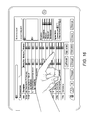
- the buttons in the menu bar are reordered ( FIG. 14 ) and information is displayed differently so as to be shielded by the left hand ( FIG. 15 ).
- the menu button, options button and “All” button are displayed in the bottom left hand cover, and the category buttons to the right of those buttons, rather than to the left, as in the right-handed option.
- a different offset is used. More specifically, the offset displays the information to the left hand side of the cover. Typically, the offset is the same as for the right hand option, apart from reversing the direction of the horizontal offset.
- FIG. 16 shows selection and display of multiple items, similar to FIGS. 6 to 8, 10 and 11 described above. Unless otherwise described, other operations in the left-handed option are as described above for the right-handed option.
- a left or right hand option can be selected depending on whether there is a person to the left or right hand side to hide information from.
- the hidden data items are displayed to be shielded by the handed selecting the respective cover
- other display options are possible.
- the data item can be displayed when the respective cover is selected by a finger of one hand, and shielded by the other hand.
- selected information can be viewed by the user, but shielded from others. The remaining information is covered, until selected, so that information is kept private. Accordingly viewing of all the information can be controlled to be seen only by the user.
- FIG. 18 illustrates elements of the display.
- the menu bar 15 is revealed and hidden using a small menu icon or button 13 .
- An options button 21 hides or reveals options including options for selecting left or right hand operation.
- An “All” button 19 hides or reveals the covers of all of the categories.
- Each category has a button 17 to reveal or hide all data items in that category.
- the borders around each button indicate if the button is “selected” or “deselected”.
- a white border (shown as light in the Figures) indicates “selected” and a blue border (shown as dark in the Figures) indicates “deselected”.
- a white border means “cover” is selected, that is, all data items in that category are covered, subject to individual selection by the user.
- a blue border means “cover” is deselected, that is, all data items in that category are uncovered and displayed.
- a blue border means the options are not presented for selection, and a white border corresponds to selection of the options button and display of the available options.
- a white border means that all covers are displayed.
- a blue border means either that data items of all categories are displayed, by deselecting the “All” button, or that data items of at least one category are displayed, by selecting one of the category buttons.
- Each cover 23 has a category number displayed on the cover, to help the user understand what will be revealed if a category button is deselected, or if the individual cover is selected.
- the hidden information is displayed in a label 29 , and the cover and label, or data item as displayed, are essentially the same shape and size. Other display options are possible.
- the data item is displayed offset from the cover, but this is not essential.
- the data item can be displayed partially or fully superimposed on the cover, or otherwise linked or related to the cover.
- account information is initially transmitted and displayed as shown in FIG. 1 , and all the data items are covered by selection of the “All” button, as shown in FIG. 3 .
- account information can initially be displayed with all data items covered, as shown in FIG. 3 .
- Data is transmitted and displayed using known techniques for mobile banking, such as using a website, or by using programs and data stored on the device, or a combination.
- Categories of data items for including in the covers and for control of display of categories of items, may be identified, for example, from location in an array, or by metadata associated with the data items.
- the server may only send the selected information, that is, data item, to the device when the respective cover is selected, thus increasing security, or all data items may be transmitted to the device and only displayed when the respective cover is selected.
- the location, including the offset, of the information displayed when a cover is selected is predetermined.
- the location can be adjusted using a second finger of the user. In this way, the location of the displayed information can be set to be hidden by the user's hand according to the user. This offset can be saved and used and applied to future interactions.
- multiple items can be displayed at the same time by displaying items for a predetermined period of time after selection, or by selecting a category or categories.
- Other ways of displaying multiple items are possible, such as selecting multiple items by sliding a finger over the screen.
- the invention can be implemented using suitable software and/or hardware form.
- the invention is applicable to any software application that displays sensitive information, that a user may wish to conceal from others, on a computing device, especially a mobile and/or large screen device such as a tablet.
- the embodiment involves a mobile computing device
- the invention is not limited to mobile computing devices.
- the invention is also applicable to fixed devices, for example, where information is to be shielded from others nearby, such as computers in public locations such as internet cafes.
- the embodiment involves a touch screen device, but the invention is not so limited. By defaulting to covering sensitive information, and selectively controlling what information is displayed, the user has more control, and limits what is displayed, which is beneficial in public locations.
Landscapes
- Engineering & Computer Science (AREA)
- Theoretical Computer Science (AREA)
- General Engineering & Computer Science (AREA)
- General Physics & Mathematics (AREA)
- Physics & Mathematics (AREA)
- Software Systems (AREA)
- Human Computer Interaction (AREA)
- General Health & Medical Sciences (AREA)
- Health & Medical Sciences (AREA)
- Bioethics (AREA)
- Computer Hardware Design (AREA)
- Computer Security & Cryptography (AREA)
- Medical Informatics (AREA)
- Databases & Information Systems (AREA)
- User Interface Of Digital Computer (AREA)
Abstract
Description
Claims (16)
Applications Claiming Priority (3)
| Application Number | Priority Date | Filing Date | Title |
|---|---|---|---|
| GB1214572.8A GB2505405A (en) | 2012-08-15 | 2012-08-15 | Display device for shielding sensitive information |
| GB1214572.8 | 2012-08-15 | ||
| PCT/GB2013/052157 WO2014027195A1 (en) | 2012-08-15 | 2013-08-14 | Display device |
Publications (2)
| Publication Number | Publication Date |
|---|---|
| US20150242651A1 US20150242651A1 (en) | 2015-08-27 |
| US9483658B2 true US9483658B2 (en) | 2016-11-01 |
Family
ID=46981568
Family Applications (1)
| Application Number | Title | Priority Date | Filing Date |
|---|---|---|---|
| US14/422,156 Expired - Fee Related US9483658B2 (en) | 2012-08-15 | 2013-08-14 | Display device |
Country Status (3)
| Country | Link |
|---|---|
| US (1) | US9483658B2 (en) |
| GB (1) | GB2505405A (en) |
| WO (1) | WO2014027195A1 (en) |
Families Citing this family (5)
| Publication number | Priority date | Publication date | Assignee | Title |
|---|---|---|---|---|
| US10474345B2 (en) * | 2014-04-04 | 2019-11-12 | Shawn SHEY | User interfaces and methods for displaying content |
| CN104050422B (en) * | 2014-06-10 | 2018-01-05 | 腾讯科技(深圳)有限公司 | Show the method and device of the information content |
| JP7289661B2 (en) * | 2019-01-31 | 2023-06-12 | キヤノン株式会社 | Information processing device, control method, and its program |
| US11397519B2 (en) * | 2019-11-27 | 2022-07-26 | Sap Se | Interface controller and overlay |
| WO2022070380A1 (en) * | 2020-10-01 | 2022-04-07 | 日本電気株式会社 | Information display device, information display method, and recording medium |
Citations (5)
| Publication number | Priority date | Publication date | Assignee | Title |
|---|---|---|---|---|
| US20040193910A1 (en) * | 2003-03-28 | 2004-09-30 | Samsung Electronics Co., Ltd. | Security filter for preventing the display of sensitive information on a video display |
| US20070006316A1 (en) * | 2005-07-01 | 2007-01-04 | Veselova Olga Y | Lightweight privacy cover for displayed sensitive information |
| US7779475B2 (en) * | 2006-07-31 | 2010-08-17 | Petnote Llc | Software-based method for gaining privacy by affecting the screen of a computing device |
| US20130215044A1 (en) * | 2012-02-17 | 2013-08-22 | Lg Electronics Inc. | Property modification of an application object |
| US20130321267A1 (en) * | 2012-06-04 | 2013-12-05 | Apple Inc. | Dynamically changing a character associated with a key of a keyboard |
Family Cites Families (4)
| Publication number | Priority date | Publication date | Assignee | Title |
|---|---|---|---|---|
| US20060056626A1 (en) * | 2004-09-16 | 2006-03-16 | International Business Machines Corporation | Method and system for selectively masking the display of data field values |
| US8754856B2 (en) * | 2009-09-30 | 2014-06-17 | Ncr Corporation | Multi-touch surface interaction |
| JP4865063B2 (en) * | 2010-06-30 | 2012-02-01 | 株式会社東芝 | Information processing apparatus, information processing method, and program |
| US8986118B2 (en) * | 2010-11-02 | 2015-03-24 | Novomatic Ag | Method and system for secretly revealing items on a multi-touch interface |
-
2012
- 2012-08-15 GB GB1214572.8A patent/GB2505405A/en not_active Withdrawn
-
2013
- 2013-08-14 WO PCT/GB2013/052157 patent/WO2014027195A1/en not_active Ceased
- 2013-08-14 US US14/422,156 patent/US9483658B2/en not_active Expired - Fee Related
Patent Citations (5)
| Publication number | Priority date | Publication date | Assignee | Title |
|---|---|---|---|---|
| US20040193910A1 (en) * | 2003-03-28 | 2004-09-30 | Samsung Electronics Co., Ltd. | Security filter for preventing the display of sensitive information on a video display |
| US20070006316A1 (en) * | 2005-07-01 | 2007-01-04 | Veselova Olga Y | Lightweight privacy cover for displayed sensitive information |
| US7779475B2 (en) * | 2006-07-31 | 2010-08-17 | Petnote Llc | Software-based method for gaining privacy by affecting the screen of a computing device |
| US20130215044A1 (en) * | 2012-02-17 | 2013-08-22 | Lg Electronics Inc. | Property modification of an application object |
| US20130321267A1 (en) * | 2012-06-04 | 2013-12-05 | Apple Inc. | Dynamically changing a character associated with a key of a keyboard |
Non-Patent Citations (1)
| Title |
|---|
| The above references were cited in an International Search Report issued on Dec. 2, 2013, that issued in the corresponding International Application No. PCT/GB2013/052157. |
Also Published As
| Publication number | Publication date |
|---|---|
| WO2014027195A1 (en) | 2014-02-20 |
| GB201214572D0 (en) | 2012-09-26 |
| GB2505405A (en) | 2014-03-05 |
| US20150242651A1 (en) | 2015-08-27 |
Similar Documents
| Publication | Publication Date | Title |
|---|---|---|
| US20250265558A1 (en) | User interface for loyalty accounts and private label accounts for a wearable device | |
| US20220236867A1 (en) | Context-specific user interfaces | |
| US11169830B2 (en) | Account management user interfaces | |
| CN113139165B (en) | User interface for managing access to credentials used in operation | |
| US9965116B1 (en) | Tactile overlay for touchscreen device | |
| US20220027176A1 (en) | Account management user interfaces | |
| US8782565B2 (en) | System for selecting objects on display | |
| JP2012508936A5 (en) | ||
| EP4113411A1 (en) | User interface for loyalty accounts and private label accounts | |
| US20150242651A1 (en) | Display device | |
| MX2014003535A (en) | User interface for editing a value in place. | |
| JP2017167952A (en) | Display device | |
| US11385790B2 (en) | Touchscreen with three-handed gestures system and method | |
| JP5194096B2 (en) | Try-on system and program | |
| JP7273313B2 (en) | Information processing system, information processing method, and information processing program | |
| JP7277779B2 (en) | Information processing system, information processing method, and information processing program | |
| JP2014182655A (en) | Information display unit and information display program | |
| JP6857055B2 (en) | Payment terminal equipment and programs | |
| TWI711021B (en) | Method and device for displaying electronic document | |
| JP2021086335A (en) | Information processing system, information processing method, and information processing program | |
| JP2017182583A (en) | Information processing equipment, method and program | |
| WO2015019396A1 (en) | Screen display program |
Legal Events
| Date | Code | Title | Description |
|---|---|---|---|
| AS | Assignment |
Owner name: BARCLAYS BANK PLC, UNITED KINGDOM Free format text: ASSIGNMENT OF ASSIGNORS INTEREST;ASSIGNOR:LOADER, MALCOLM STEPHEN;REEL/FRAME:035229/0646 Effective date: 20150315 |
|
| STCF | Information on status: patent grant |
Free format text: PATENTED CASE |
|
| AS | Assignment |
Owner name: BARCLAYS SERVICES LIMITED, ENGLAND Free format text: ASSIGNMENT OF ASSIGNORS INTEREST;ASSIGNOR:BARCLAYS BANK PLC;REEL/FRAME:047400/0169 Effective date: 20170829 |
|
| AS | Assignment |
Owner name: BARCLAYS EXECUTION SERVICES LIMITED, UNITED KINGDO Free format text: CHANGE OF NAME;ASSIGNOR:BARCLAYS SERVICES LIMITED;REEL/FRAME:051085/0309 Effective date: 20190507 Owner name: BARCLAYS EXECUTION SERVICES LIMITED, UNITED KINGDOM Free format text: CHANGE OF NAME;ASSIGNOR:BARCLAYS SERVICES LIMITED;REEL/FRAME:051085/0309 Effective date: 20190507 |
|
| MAFP | Maintenance fee payment |
Free format text: PAYMENT OF MAINTENANCE FEE, 4TH YEAR, LARGE ENTITY (ORIGINAL EVENT CODE: M1551); ENTITY STATUS OF PATENT OWNER: LARGE ENTITY Year of fee payment: 4 |
|
| FEPP | Fee payment procedure |
Free format text: MAINTENANCE FEE REMINDER MAILED (ORIGINAL EVENT CODE: REM.); ENTITY STATUS OF PATENT OWNER: LARGE ENTITY |
|
| LAPS | Lapse for failure to pay maintenance fees |
Free format text: PATENT EXPIRED FOR FAILURE TO PAY MAINTENANCE FEES (ORIGINAL EVENT CODE: EXP.); ENTITY STATUS OF PATENT OWNER: LARGE ENTITY |
|
| STCH | Information on status: patent discontinuation |
Free format text: PATENT EXPIRED DUE TO NONPAYMENT OF MAINTENANCE FEES UNDER 37 CFR 1.362 |
|
| FP | Lapsed due to failure to pay maintenance fee |
Effective date: 20241101 |