US9237217B2 - Docking station for simultaneously establishing connections from a smartphone to an external display and USB device - Google Patents
Docking station for simultaneously establishing connections from a smartphone to an external display and USB device Download PDFInfo
- Publication number
- US9237217B2 US9237217B2 US13/896,282 US201313896282A US9237217B2 US 9237217 B2 US9237217 B2 US 9237217B2 US 201313896282 A US201313896282 A US 201313896282A US 9237217 B2 US9237217 B2 US 9237217B2
- Authority
- US
- United States
- Prior art keywords
- docking station
- connector
- relay
- controller
- coupled
- Prior art date
- Legal status (The legal status is an assumption and is not a legal conclusion. Google has not performed a legal analysis and makes no representation as to the accuracy of the status listed.)
- Expired - Fee Related, expires
Links
Images


Classifications
-
- H—ELECTRICITY
- H04—ELECTRIC COMMUNICATION TECHNIQUE
- H04M—TELEPHONIC COMMUNICATION
- H04M1/00—Substation equipment, e.g. for use by subscribers
- H04M1/72—Mobile telephones; Cordless telephones, i.e. devices for establishing wireless links to base stations without route selection
- H04M1/724—User interfaces specially adapted for cordless or mobile telephones
- H04M1/72403—User interfaces specially adapted for cordless or mobile telephones with means for local support of applications that increase the functionality
- H04M1/72409—User interfaces specially adapted for cordless or mobile telephones with means for local support of applications that increase the functionality by interfacing with external accessories
- H04M1/72412—User interfaces specially adapted for cordless or mobile telephones with means for local support of applications that increase the functionality by interfacing with external accessories using two-way short-range wireless interfaces
-
- H04M1/7253—
-
- G—PHYSICS
- G06—COMPUTING OR CALCULATING; COUNTING
- G06F—ELECTRIC DIGITAL DATA PROCESSING
- G06F1/00—Details not covered by groups G06F3/00 - G06F13/00 and G06F21/00
- G06F1/16—Constructional details or arrangements
- G06F1/1613—Constructional details or arrangements for portable computers
- G06F1/1632—External expansion units, e.g. docking stations
-
- H—ELECTRICITY
- H04—ELECTRIC COMMUNICATION TECHNIQUE
- H04M—TELEPHONIC COMMUNICATION
- H04M1/00—Substation equipment, e.g. for use by subscribers
- H04M1/02—Constructional features of telephone sets
- H04M1/04—Supports for telephone transmitters or receivers
Definitions
- the invention relates to docking stations, particularly to docking stations between a portable electronic device and peripherals.
- a smartphone is a mobile phone built on a mobile operating system, with more advanced computing capability connectivity than a conventional cellular phone.
- a smartphone is a computer-based cellular phone.
- more and more users treat a smartphone as a mixture of a cellular phone and a laptop or tablet computer.
- a rechargeable battery There must be a rechargeable battery, a touchscreen panel and a connection port in a smartphone.
- a smartphone When a smartphone is used as a laptop computer at home or office, a docking station is needed for charging battery, data communication and connecting human interface devices (HIDs) such as a keyboard and mouse.
- HIDs human interface devices
- an external display much larger than the touchscreen panel of a smartphone is required by most users.
- a smartphone is provided with only one communication port, for example, a micro-USB port.
- a micro-USB port For both input/output bidirectional data communication and audio/video unidirectional data transmission, some smartphones are provided with a micro-USB port with a built-in mobile audio/video interface such as the Mobile High-Definition Link (MHL) or the Mobility DisplayPort (MyDP) interface.
- MHL Mobile High-Definition Link
- MyDP Mobility DisplayPort
- MHL-enabled or MyDP-enabled micro-USB port has to cease its USB functions while the MHL or MyDP function is being activated, and vice versa.
- a user cannot use the MHL-enabled or MyDP-enabled micro-USB port to connect a keyboard, mouse or any other USB-HIDs when the port is connected to an external display.
- the only solution to simultaneously connect an external display and HIDs is to wirelessly connect HIDs via BLUETOOTH and to wiredly connect an external display via the MHL-enabled or MyDP-enabled micro-USB port. This is inconvenient and complicated for users.
- BLUETOOTH HIDs are much more expensive than general USB-HIDs.
- An object of the invention is to provide a dock station which can simultaneously operatively link an external display and USB devices.
- the docking station of the invention includes a controller with a switch, a wireless communication module, a universal serial bus (USB) hub, a relay, a first connector, an audio/video (AV) converter, and a second connector.
- a controller with a switch, a wireless communication module, a universal serial bus (USB) hub, a relay, a first connector, an audio/video (AV) converter, and a second connector.
- USB universal serial bus
- AV audio/video
- the wireless communication module is coupled to the controller and capable of establishing a wireless link with an external portable electronic device.
- the USB hub is coupled to the controller.
- the relay has a control terminal and multiple rows of change-over contacts. Each row of change-over contact has a common terminal, a normally-open contact and a normally-closed contact, and the control terminal and the normally-open contacts are coupled to the controller.
- the first connector is coupled to the common terminals of the relay for connecting the external portable electronic device.
- the AV converter is coupled to the normally-closed contacts of the relay for converting first AV data into second AV data.
- the second connector is coupled to the AV converter for outputting the second AV data.
- the relay normally connects the first connector to the AV converter for transferring the first AV data from the external portable electronic device to the second connector.
- the controller makes the relay switch through the control terminal while the switch is being operated, and then the controller links the USB hub, the first connector and the wireless communication module and the wireless communication module establishes the wireless link with the external portable electronic device.
- FIG. 1 is a schematic view of the invention in use
- FIG. 2 is a block diagram of the invention
- FIG. 3 is a schematic view of a first embodiment of the relay
- FIG. 4 is a schematic view of a second embodiment of the relay
- FIG. 5 is a schematic view showing the data flow of the invention.
- FIG. 6 is a block diagram of another embodiment of the invention.
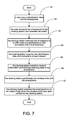
- FIG. 7 is a flowchart of a method for linking a USB device to a smartphone via the docking station according to the invention.
- FIG. 1 depicts topology of the docking station of the invention in use.
- the docking station 1 is materially connected with a portable electronic device such as a smartphone 2 , a display 4 and USB devices 3 such as a keyboard 31 , mouse 32 , hard disk drive 33 and Wi-Fi access point 34 .
- the docking station 1 can simultaneously output audio/video (AV) data to the display 4 and access the USB devices 3 .
- the smartphone 2 must be provided with a micro-USB connector with a mobile AV interface such as the Mobile High-Definition Link (MHL) standard or the Mobility DisplayPort (MyDP) standard.
- MHL Mobile High-Definition Link
- MyDP Mobility DisplayPort
- FIG. 2 shows a block diagram of the docking station 1 of the invention.
- the docking station 1 includes a controller 11 with a switch 111 , a wireless communication module 12 , a universal serial bus (USB) hub 13 , a relay 14 , a first connector 15 , an audio/video (AV) converter 16 , and a second connector 17 .
- USB universal serial bus
- the controller 11 may be an ARM SoC (System-on-Chip) processor.
- the switch 111 connected to the controller 11 may be a normally-open push-button switch.
- the wireless communication module 12 is coupled to the controller 11 and capable of establishing two wireless links with the smartphone 2 .
- the wireless communication module 12 is provided with a BLUETOOTH interface and a Wi-Fi interface. Accordingly, the two wireless links are compliant with the BLUETOOTH standard and the Wi-Fi standard.
- the USB hub 13 is coupled to the controller 11 for linking the USB devices 3 .
- the USB devices 3 can be categorized into human interface devices (HIDs) and storages.
- the HIDs may be a keyboard and mouse, and the storages may be a hard disk drive and flash drive.
- the two wireless links are used for separately connecting the HIDs and storages.
- the relay 14 has a control terminal 141 and multiple rows of change-over contacts.
- the multiple rows are two or three in number because there are two or three pins that are needed to be switched when the first connector is a USB connector, namely, D+ and D ⁇ pins or D+, D ⁇ and ID pins.
- the relay 14 is of a double pole double throw (DPDT) type or a three pole double throw (3PDT) type.
- FIGS. 3 and 4 show the 3PDT typed relay 14 and the 2PDT typed relay 14 , respectively.
- Each row of change-over contacts includes a common terminal 142 a , 142 b and 142 c , a normally-open contact 143 a , 143 b and 143 c , and a normally-closed contact 144 a , 144 b and 144 c .
- the control terminal 141 and the normally-open contacts 143 a , 143 b and 143 c are coupled to the controller 11 .
- the first connector 15 is a USB receptacle and coupled to the common terminals 142 a , 142 b and 142 c for connecting the smartphone 2 .
- the AV converter 16 is coupled to the normally-closed contacts 144 a , 144 b and 144 c of the relay 14 for converting first AV data into second AV data.
- the first AV data comes from the mobile AV interface abovementioned and from the smartphone 2 .
- the second AV data is compliant with the High-Definition Multimedia Interface (HDMI) standard.
- the second connector 17 is coupled to the AV converter 16 for outputting the second AV data and can be used for linking the display 4 with a connector corresponding to the second connector 17 .
- the relay 14 When the smartphone 2 and the display 4 have been connected to the first connector 15 and the second connector 17 , respectively, the relay 14 normally connects the first connector 15 to the AV converter 16 for transferring the first AV data from the smartphone 2 to the second connector 17 . That is, the first AV data from the smartphone 2 can be constantly shown on the display 17 . At this time, the first connector 15 serves as an AV input port.
- the USB devices 3 When a user wants to link USB devices 3 with the smartphone 2 , the USB devices 3 have to be connected to the USB hub 13 .
- the controller 11 sends a control signal to the relay 14 through the control terminal 141 to switch the relay 14 while the switch 111 is being operated.
- the controller 11 links the smartphone 2 connected to the first connector 15 and functions as a USB device of the smartphone 2 to obtain information of the smartphone 2
- the wireless communication module 12 establishes the two wireless links 51 , 52 with the smartphone 2 .
- One of the two wireless links 51 , 52 namely, the BLUETOOTH, serves as an exclusive communication channel for USB HIDs.
- the other one of the wireless links 51 , 52 namely, the Wi-Fi, serves as another exclusive communication channel for USB storages.
- the first connector 15 is switched to serve as a USB port
- the controller 11 temporarily serves as a USB device of the smartphone 2 to obtain information of the smartphone 2
- the wireless communication module 12 makes data transfer between the USB devices 3 and the smartphone 2 through the wireless links 51 and 52 .
- the relay 14 connects the first connector 15 to the AV converter 16 again.
- the docking station 1 may further include a touchscreen module 18 connected to the controller 11 .
- the touchscreen module 18 may associate with the display 4 to provide a touching input function.
- one of the wireless interfaces of the wireless communication module 12 can be divided from the wireless communication module 12 to be an independent module such as a USB dongle.
- a wireless adapter 6 which is a Wi-Fi adapter or a BLUETOOTH adapter, is coupled to the USB hub 13 .
- FIG. 7 shows a flowchart of a method for linking a USB device 3 to a smartphone 2 via the docking station 1 .
- a user inputs identification data into the smartphone 2 .
- the identification data includes service set identification (SSID) and a password.
- SSID service set identification
- the user connects the smartphone 2 to the docking station 1 and operates the switch 111 .
- the docking station 1 switches the smartphone 2 to a USB mode and establishes a USB connection with the smartphone 2 .
- the docking station 1 acquires the identification data and connects to a local network.
- the docking station 1 transfers network information and wireless matching data to the smartphone 2 .
- step S 6 the docking station 1 establishes two wireless link 51 or 52 with the smartphone 2 .
- step S 7 the docking station switches the smartphone 2 to an audio/video output mode when the wireless link 51 or 52 has been verified by the docking station 1 .
Landscapes
- Engineering & Computer Science (AREA)
- Signal Processing (AREA)
- Computer Networks & Wireless Communication (AREA)
- Human Computer Interaction (AREA)
- Theoretical Computer Science (AREA)
- Computer Hardware Design (AREA)
- Physics & Mathematics (AREA)
- General Engineering & Computer Science (AREA)
- General Physics & Mathematics (AREA)
- Telephone Function (AREA)
Abstract
Description
Claims (14)
Priority Applications (3)
| Application Number | Priority Date | Filing Date | Title |
|---|---|---|---|
| US13/896,282 US9237217B2 (en) | 2013-05-16 | 2013-05-16 | Docking station for simultaneously establishing connections from a smartphone to an external display and USB device |
| US13/937,161 US9383772B2 (en) | 2013-05-16 | 2013-07-08 | Docking station with KVM switch |
| US13/943,815 US20140344495A1 (en) | 2013-05-16 | 2013-07-17 | Docking station with hooking function |
Applications Claiming Priority (1)
| Application Number | Priority Date | Filing Date | Title |
|---|---|---|---|
| US13/896,282 US9237217B2 (en) | 2013-05-16 | 2013-05-16 | Docking station for simultaneously establishing connections from a smartphone to an external display and USB device |
Related Child Applications (1)
| Application Number | Title | Priority Date | Filing Date |
|---|---|---|---|
| US13/937,161 Continuation-In-Part US9383772B2 (en) | 2013-05-16 | 2013-07-08 | Docking station with KVM switch |
Publications (2)
| Publication Number | Publication Date |
|---|---|
| US20140342669A1 US20140342669A1 (en) | 2014-11-20 |
| US9237217B2 true US9237217B2 (en) | 2016-01-12 |
Family
ID=51896142
Family Applications (1)
| Application Number | Title | Priority Date | Filing Date |
|---|---|---|---|
| US13/896,282 Expired - Fee Related US9237217B2 (en) | 2013-05-16 | 2013-05-16 | Docking station for simultaneously establishing connections from a smartphone to an external display and USB device |
Country Status (1)
| Country | Link |
|---|---|
| US (1) | US9237217B2 (en) |
Cited By (4)
| Publication number | Priority date | Publication date | Assignee | Title |
|---|---|---|---|---|
| US20170366923A1 (en) * | 2016-06-16 | 2017-12-21 | I/O Interconnect, Ltd. | Method for making a host personal computer act as an accessory in bluetooth piconet |
| US10165612B2 (en) * | 2016-06-16 | 2018-12-25 | I/O Interconnected, Ltd. | Wireless connecting method, computer, and non-transitory computer-readable storage medium |
| US11537546B2 (en) | 2016-08-22 | 2022-12-27 | Hewlett-Packard Development Company, L.P. | Concurrent communications via a connector |
| US12423047B2 (en) | 2024-01-03 | 2025-09-23 | Wenfeng LUO | Multifunctional docking station |
Families Citing this family (22)
| Publication number | Priority date | Publication date | Assignee | Title |
|---|---|---|---|---|
| BR112014008271B1 (en) * | 2011-10-10 | 2021-02-17 | Koninklijke Philips N.V. | docking station for wireless docking with a dockee in a shared radio spectrum environment, and method for providing a docking station |
| US9904323B2 (en) | 2014-10-28 | 2018-02-27 | Targus International Llc | Power and data adapter, and related systems and methods |
| US9900420B2 (en) | 2014-12-15 | 2018-02-20 | Targus International Llc | Power and data adapter |
| US10001807B2 (en) * | 2015-11-03 | 2018-06-19 | Hcs Audio Technology Limited | Computing device and computing system using same |
| KR102471497B1 (en) | 2016-04-01 | 2022-11-28 | 삼성전자주식회사 | Power supplying system and power module |
| US10705566B2 (en) | 2016-09-09 | 2020-07-07 | Targus International Llc | Systems, methods and devices for native and virtualized video in a hybrid docking station |
| US11231448B2 (en) | 2017-07-20 | 2022-01-25 | Targus International Llc | Systems, methods and devices for remote power management and discovery |
| US10663498B2 (en) | 2017-07-20 | 2020-05-26 | Targus International Llc | Systems, methods and devices for remote power management and discovery |
| US11074024B2 (en) | 2017-12-15 | 2021-07-27 | Samsung Electronics Co., Ltd. | Mobile device for interacting with docking device and method for controlling same |
| US11726525B2 (en) | 2018-09-24 | 2023-08-15 | Hewlett-Packard Development Company, L.P. | Docking stations |
| CN109491493B (en) * | 2018-11-15 | 2022-03-04 | 环旭(深圳)电子科创有限公司 | Dynamic power control technique and docking station with dynamic power control technique |
| EP3899688A4 (en) | 2018-12-19 | 2022-08-31 | Targus International LLC | Display and docking apparatus for a portable electronic device |
| US11360534B2 (en) | 2019-01-04 | 2022-06-14 | Targus Internatonal Llc | Smart workspace management system |
| US11017334B2 (en) | 2019-01-04 | 2021-05-25 | Targus International Llc | Workspace management system utilizing smart docking station for monitoring power consumption, occupancy, and usage displayed via heat maps |
| EP4018644B1 (en) | 2019-08-22 | 2025-10-08 | Targus International LLC | Systems and methods for participant-controlled video conferencing |
| AU2020346791A1 (en) | 2019-09-09 | 2022-03-24 | Targus International Llc | Systems and methods for docking stations removably attachable to display apparatuses and docking stand assemblies |
| JP7057409B1 (en) | 2020-11-09 | 2022-04-19 | Necプラットフォームズ株式会社 | Relay connector |
| US12073205B2 (en) | 2021-09-14 | 2024-08-27 | Targus International Llc | Independently upgradeable docking stations |
| CN114245417B (en) * | 2021-12-24 | 2024-09-24 | 太仓市同维电子有限公司 | Test system for wireless base station |
| GB2617088B (en) | 2022-03-28 | 2024-04-03 | Maraveyas George | Auxiliary device for an electronic communication device |
| US12333095B2 (en) * | 2022-05-20 | 2025-06-17 | Pixart Imaging Inc. | Wireless communication system having multiple host computers |
| US12326989B2 (en) * | 2022-05-20 | 2025-06-10 | Pixart Imaging Inc. | Wireless communication system capable of switching control between different host computers |
Citations (13)
| Publication number | Priority date | Publication date | Assignee | Title |
|---|---|---|---|---|
| US20030033452A1 (en) * | 2001-08-09 | 2003-02-13 | International Business Machines Corporation | Wireless system bus |
| US20030222848A1 (en) * | 2002-05-31 | 2003-12-04 | Solomon Mark C. | System and method of switching viewing orientations of a display |
| US20030222149A1 (en) * | 2002-05-31 | 2003-12-04 | Solomon Mark C. | Tablet computer protective display cover and system and method incorporating same |
| US20060203758A1 (en) * | 2005-03-11 | 2006-09-14 | Samsung Electronics Co., Ltd. | Mobile terminal for relaying multimedia data to an external display device |
| US20070077784A1 (en) * | 2005-08-01 | 2007-04-05 | Universal Electronics Inc. | System and method for accessing a user interface via a secondary device |
| US20110125601A1 (en) * | 2009-11-24 | 2011-05-26 | Microsoft Corporation | Invocation of accessory-specific user experience |
| US20110126005A1 (en) * | 2009-11-24 | 2011-05-26 | Microsoft Corporation | Dynamic configuration of connectors for system-level communications |
| US20120203949A1 (en) * | 2011-02-03 | 2012-08-09 | Targus Group International, Inc. | Portable electronic device docking station |
| US20140019653A1 (en) * | 2012-07-11 | 2014-01-16 | Silicon Image, Inc. | Transmission of multiple protocol data elements via a connector utilizing a data tunnel |
| US20140337556A1 (en) * | 2012-03-14 | 2014-11-13 | Huawei Device Co., Ltd. | Docking station and external device control method and system utilizing the docking station |
| US20140344494A1 (en) * | 2013-05-16 | 2014-11-20 | I/O Interconnect Inc. | Docking station with kvm switch |
| US20140344495A1 (en) * | 2013-05-16 | 2014-11-20 | I/O Interconnect Inc. | Docking station with hooking function |
| US20150016417A1 (en) * | 2011-09-13 | 2015-01-15 | Koninklijke Philips N.V. | Wireless lan connection handover by docking system and generic network device driver |
-
2013
- 2013-05-16 US US13/896,282 patent/US9237217B2/en not_active Expired - Fee Related
Patent Citations (13)
| Publication number | Priority date | Publication date | Assignee | Title |
|---|---|---|---|---|
| US20030033452A1 (en) * | 2001-08-09 | 2003-02-13 | International Business Machines Corporation | Wireless system bus |
| US20030222848A1 (en) * | 2002-05-31 | 2003-12-04 | Solomon Mark C. | System and method of switching viewing orientations of a display |
| US20030222149A1 (en) * | 2002-05-31 | 2003-12-04 | Solomon Mark C. | Tablet computer protective display cover and system and method incorporating same |
| US20060203758A1 (en) * | 2005-03-11 | 2006-09-14 | Samsung Electronics Co., Ltd. | Mobile terminal for relaying multimedia data to an external display device |
| US20070077784A1 (en) * | 2005-08-01 | 2007-04-05 | Universal Electronics Inc. | System and method for accessing a user interface via a secondary device |
| US20110126005A1 (en) * | 2009-11-24 | 2011-05-26 | Microsoft Corporation | Dynamic configuration of connectors for system-level communications |
| US20110125601A1 (en) * | 2009-11-24 | 2011-05-26 | Microsoft Corporation | Invocation of accessory-specific user experience |
| US20120203949A1 (en) * | 2011-02-03 | 2012-08-09 | Targus Group International, Inc. | Portable electronic device docking station |
| US20150016417A1 (en) * | 2011-09-13 | 2015-01-15 | Koninklijke Philips N.V. | Wireless lan connection handover by docking system and generic network device driver |
| US20140337556A1 (en) * | 2012-03-14 | 2014-11-13 | Huawei Device Co., Ltd. | Docking station and external device control method and system utilizing the docking station |
| US20140019653A1 (en) * | 2012-07-11 | 2014-01-16 | Silicon Image, Inc. | Transmission of multiple protocol data elements via a connector utilizing a data tunnel |
| US20140344494A1 (en) * | 2013-05-16 | 2014-11-20 | I/O Interconnect Inc. | Docking station with kvm switch |
| US20140344495A1 (en) * | 2013-05-16 | 2014-11-20 | I/O Interconnect Inc. | Docking station with hooking function |
Cited By (5)
| Publication number | Priority date | Publication date | Assignee | Title |
|---|---|---|---|---|
| US20170366923A1 (en) * | 2016-06-16 | 2017-12-21 | I/O Interconnect, Ltd. | Method for making a host personal computer act as an accessory in bluetooth piconet |
| US9906893B2 (en) * | 2016-06-16 | 2018-02-27 | I/O Interconnect, Ltd. | Method for making a host personal computer act as an accessory in bluetooth piconet |
| US10165612B2 (en) * | 2016-06-16 | 2018-12-25 | I/O Interconnected, Ltd. | Wireless connecting method, computer, and non-transitory computer-readable storage medium |
| US11537546B2 (en) | 2016-08-22 | 2022-12-27 | Hewlett-Packard Development Company, L.P. | Concurrent communications via a connector |
| US12423047B2 (en) | 2024-01-03 | 2025-09-23 | Wenfeng LUO | Multifunctional docking station |
Also Published As
| Publication number | Publication date |
|---|---|
| US20140342669A1 (en) | 2014-11-20 |
Similar Documents
| Publication | Publication Date | Title |
|---|---|---|
| US9237217B2 (en) | Docking station for simultaneously establishing connections from a smartphone to an external display and USB device | |
| US9383772B2 (en) | Docking station with KVM switch | |
| US8904056B2 (en) | Multi-host wireless input device | |
| US10127181B2 (en) | Port disconnect charging function for USB hub | |
| US10001807B2 (en) | Computing device and computing system using same | |
| US20200151129A1 (en) | Usb signal switch circuitry using standard usb hub and method of operation the same | |
| CN110879792B (en) | Electronic equipment and interface control method thereof | |
| US20160195897A1 (en) | Multi-device docking station | |
| CN103927015B (en) | A kind of wireless input-output system and its implementation towards multiple terminals | |
| US8935445B2 (en) | Multi-computers network sharing system having plug-and-play interfaces | |
| JP2015076100A (en) | Serial communication via communication control pin | |
| TW201544960A (en) | Universal serial bus dock and associated method for charging a portable device | |
| CN208623682U (en) | The network access device that can be extended | |
| US20140059257A1 (en) | Keyboard-video-mouse system and method of providing and using the same | |
| US8533500B2 (en) | Providing power to a communication device via a device switch | |
| US20140344495A1 (en) | Docking station with hooking function | |
| CN212809197U (en) | Multifunctional docking station supporting multi-USB-C switching | |
| US9747243B2 (en) | Electronic equipment for the replication of ports and the routing of digital signals | |
| TWI799131B (en) | Electronic device with connection function and display method | |
| EP4280072B1 (en) | Data transmission method of electronic device, electronic device, and interface circuit | |
| CN212391792U (en) | Display with TYPEC input interface adapts to screen projection of intelligent mobile phone with multiple interfaces | |
| TWI621950B (en) | Electronic device connecting system and method | |
| CN208421780U (en) | receiving end, intelligent pen and intelligent pen system | |
| CN116560736A (en) | A display system, electronic device and communication control method | |
| CN102857626A (en) | Mobile communication terminal |
Legal Events
| Date | Code | Title | Description |
|---|---|---|---|
| AS | Assignment |
Owner name: I/O INTERCONNECT INC., TAIWAN Free format text: ASSIGNMENT OF ASSIGNORS INTEREST;ASSIGNORS:ZEUNG, PING-SHUN;CHEN, JOHNNY;REEL/FRAME:030432/0965 Effective date: 20130501 |
|
| AS | Assignment |
Owner name: I/O INTERCONNECT, LTD., CALIFORNIA Free format text: ASSIGNMENT OF ASSIGNORS INTEREST;ASSIGNOR:I/O INTERCONNECT INC.;REEL/FRAME:037162/0598 Effective date: 20151101 |
|
| STCF | Information on status: patent grant |
Free format text: PATENTED CASE |
|
| FEPP | Fee payment procedure |
Free format text: MAINTENANCE FEE REMINDER MAILED (ORIGINAL EVENT CODE: REM.); ENTITY STATUS OF PATENT OWNER: SMALL ENTITY |
|
| LAPS | Lapse for failure to pay maintenance fees |
Free format text: PATENT EXPIRED FOR FAILURE TO PAY MAINTENANCE FEES (ORIGINAL EVENT CODE: EXP.); ENTITY STATUS OF PATENT OWNER: SMALL ENTITY |
|
| STCH | Information on status: patent discontinuation |
Free format text: PATENT EXPIRED DUE TO NONPAYMENT OF MAINTENANCE FEES UNDER 37 CFR 1.362 |
|
| FP | Lapsed due to failure to pay maintenance fee |
Effective date: 20200112 |