US8510543B1 - Firmware supporting multiple boot paths - Google Patents
Firmware supporting multiple boot paths Download PDFInfo
- Publication number
- US8510543B1 US8510543B1 US12/786,973 US78697310A US8510543B1 US 8510543 B1 US8510543 B1 US 8510543B1 US 78697310 A US78697310 A US 78697310A US 8510543 B1 US8510543 B1 US 8510543B1
- Authority
- US
- United States
- Prior art keywords
- boot path
- boot
- computer
- firmware
- configuration
- Prior art date
- Legal status (The legal status is an assumption and is not a legal conclusion. Google has not performed a legal analysis and makes no representation as to the accuracy of the status listed.)
- Expired - Fee Related, expires
Links
Images


Classifications
-
- G—PHYSICS
- G06—COMPUTING OR CALCULATING; COUNTING
- G06F—ELECTRIC DIGITAL DATA PROCESSING
- G06F9/00—Arrangements for program control, e.g. control units
- G06F9/06—Arrangements for program control, e.g. control units using stored programs, i.e. using an internal store of processing equipment to receive or retain programs
- G06F9/44—Arrangements for executing specific programs
- G06F9/4401—Bootstrapping
- G06F9/4406—Loading of operating system
- G06F9/441—Multiboot arrangements, i.e. selecting an operating system to be loaded
Definitions
- BIOS Basic Input/Output System
- BIOS firmware may require the BIOS firmware to perform a different system initialization prior to booting.
- WINDOWS XP from MICROSOFT CORPORATION may require the BIOS firmware to initialize a graphics device before the operating system takes control.
- LINUX can support initializing the graphics devices during kernel initialization.
- LINUX does not require the BIOS firmware to initialize the graphics devices before the operating system takes control.
- Other operating systems such as real-time operating systems (RTOS) may require the BIOS firmware to initialize very few system components prior to booting.
- RTOS real-time operating systems
- BIOS basic input/output system
- BIOS firmware can take different boot paths depending on the operating system that a user selects to boot within a computer system. Each boot path can handle initialization differently based upon the needs of the operating system and overall project design.
- a method for supporting multiple boot paths on a computer includes receiving a boot path indicator that indicates a boot path to be executed. Once the boot path indicator is received, the boot path corresponding to the boot path indicator is executed and an operating system corresponding to the boot path indicator is booted.
- FIG. 1 is a computer software and hardware architecture diagram showing an illustrative operating environment along with several software components provided in embodiments disclosed herein;
- FIG. 2 is a data structure diagram showing one aspect of configuration tables provided in embodiments disclosed herein;
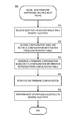
- FIG. 3 is a flow diagram showing one illustrative process presented herein for a BIOS firmware supporting multiple boot paths
- FIG. 4 is a computer architecture diagram showing an illustrative computer architecture that might be utilized to implement a computing system that embodies the various concepts and technologies presented herein.
- BIOS basic input/output system
- BIOS firmware can take different boot paths depending on the operating system that a user selects to boot within a computer system. Each boot path can handle initialization differently based upon the needs of the operating system and overall project design.
- the BIOS firmware may perform a full system initialization.
- the full system initialization may include initializing all or most of the system components capable of being initialized by the BIOS firmware, providing options such as booting an operating system from any of several different device types, and/or allowing the user to enter a BIOS setup mode.
- the full featured firmware configuration path may be more suited for operating systems, such as MICROSOFT WINDOWS, that may take control after a wide variety of system components are initialized by the BIOS firmware.
- an alternately configured firmware path is a fast-boot firmware configuration path, which is configured to decrease the time taken to boot to an operating system.
- the fast-boot firmware configuration path may initialize a reduced number of system components in order to improve speed and decrease boot time.
- some operating systems can initialize universal serial bus (USB) devices during operating system runtime.
- USB universal serial bus
- the BIOS firmware may skip the USB initialization when the fast-boot firmware configuration path is taken, thereby substantially decreasing the time taken to initialize the computer prior to launching the operating system.
- program modules include routines, programs, components, data structures, and other types of structures that perform particular tasks or implement particular abstract data types.
- program modules include routines, programs, components, data structures, and other types of structures that perform particular tasks or implement particular abstract data types.
- program modules include routines, programs, components, data structures, and other types of structures that perform particular tasks or implement particular abstract data types.
- the subject matter described herein may be practiced with other computer system configurations, including hand-held devices, multiprocessor systems, microprocessor-based or programmable consumer electronics, minicomputers, mainframe computers, and the like.
- FIG. 1 shows aspects of a computer 100 with a BIOS firmware 110 supporting multiple boot paths according to one or more embodiments presented herein.
- the computer may also include components 112 , which may include one or more devices, modules, and subsets of modules, amongst other hardware and software system components well known in the art. According to embodiments, some components 112 may be stored within the BIOS firmware 110 .
- the computer 100 may also include an instruction store 113 for storing component initialization instructions 114 for initializing one or more of the components 112 .
- the instruction store 113 may be within the BIOS firmware 110 of the computer 100 , or outside of the BIOS firmware 100 .
- the BIOS firmware 110 may be configured to support a boot path selector 115 .
- the boot path selector 115 may define multiple boot paths, such as a boot path one 117 A, a boot path two 117 B, and a boot path N 117 C, for the computer 100 .
- the boot paths 117 A- 117 C may be referred to collectively, or generally, as boot paths 117 .
- Each of the boot paths 117 associated with the BIOS firmware 110 may be configured to guide the BIOS firmware 110 to perform a corresponding system configuration, such as a configuration one 120 A, a configuration two 120 B, and a configuration N 120 C.
- the configurations 120 A- 120 C may be referred to collectively, or generally, as configurations 120 .
- Each of the configurations 120 may include a set of component initialization instructions 114 executed by the BIOS firmware 110 that initialize one or more of the components 112 of the computer 100 .
- the BIOS firmware 110 initializes one or more of the components 112 of the computer 100 corresponding to the particular configuration 120 .
- the boot path one 117 A may guide the BIOS firmware 110 to perform a corresponding configuration one 120 A in order to initialize a first set of the components 112 as specified by the configuration one 120 A.
- the boot path two 117 B may guide the BIOS firmware 110 to perform a corresponding configuration two 120 B in order to initialize a second set of the components 112 as specified by the configuration two 120 B.
- the boot path N 117 C may guide the BIOS firmware 110 to perform a configuration N 120 C in order to initialize a third set of the component 112 as specified by the configuration N 120 C.
- the BIOS firmware 110 may follow a particular boot path 117 according to a boot path indicator 130 .
- the boot path selector 115 within the BIOS firmware 110 may receive a boot path indicator 130 indicating the particular boot path 117 that should be followed for a given instance of booting the computer 100 .
- each of the boot paths 117 may guide the BIOS firmware 110 to perform a system configuration, such as the configurations 120 or any other configuration capable of being performed by a boot path 117 associated with the BIOS firmware 110 .
- the boot path 117 may then guide the BIOS firmware 110 to launch an operating system, such as operating system one 160 A, operating system two 160 B, or operating system N 160 C.
- the operating systems 160 A- 160 C may be referred to in general, or collectively, as operating systems 160 .
- each of the boot paths 117 may be configured to guide the BIOS firmware 110 to perform a corresponding configuration 120 that is compatible with the particular operating system 160 launched via each of the booth paths 117 .
- the configurations 120 may differ depending on the particular operating system 160 .
- the system configuration 120 A associated with the operating system 160 A may be different from the system configuration 120 B associated with the operating system 160 B.
- the computer 100 may comprise a standard notebook, laptop, or desktop computing system capable of executing the operating systems 160 A- 160 C. It should be appreciated, however, that the computer 100 may comprise other types of computing devices, including a multimedia internet device (MID), a netbook, or other type of small form factor computing device.
- the BIOS firmware 110 associated with the computer 100 may be a BIOS, a legacy BIOS, an extensible firmware interface (EFI) firmware, a unified EFI (UEFI) firmware, or any other firmware configured to support operation of the computer 100 .
- EFI extensible firmware interface
- UEFI unified EFI
- the operating systems 160 A- 160 C may be any operating system configured to provide functionality to a desktop or laptop computing system.
- the operating systems 160 A- 160 C may comprise one of the WINDOWS family of operating systems from MICROSOFT CORPORATION, the MAC OS X operating system from APPLE INC., the LINUX operating system, or another type of computer operating system known in the art.
- the operating systems 160 , or boot loaders configured to load at least one of the operating systems 160 may be stored in flash memory, USB devices, hard drives, drive partitions, drive images, virtual machine images, other storage devices, or any combination thereof.
- the boot path indicator 130 may be provided by a user input 140 .
- the user input 140 may include a hotkey, switch, button, or other input operated by the user at, or prior to, boot time of the computer 100 .
- depressing a particular number of a keyboard at boot time may indicate to the BIOS firmware 110 to select the boot path 117 associated with that number.
- the keyboard button for the number one may indicate following boot path one 117 A while the keyboard button for number five may indicate following boot path five.
- a switch or set of dedicated buttons on the computer 100 may be operated at boot time to provide the boot path indicator 130 for selecting the particular boot path 117 for that instance of booting the computer 100 .
- a boot path selector application 165 may run in association with the BIOS firmware 110 or the operating system 160 .
- the boot path selector application 165 may be configured to select the boot path 117 to follow upon rebooting the computer 100 .
- the boot path selector application 165 may select a boot path 117 to follow upon receiving an input from a user.
- the boot path selector application 165 may select a boot path 117 based on an event occurring in the operating system 160 . For instance, the operating system 160 may fail to successfully install an application causing a portion of the operating system to crash. In such an event, the boot path selector application 165 may select a boot path 117 configured to boot the same operating system 160 in a safe mode upon rebooting the computer 100 .
- the boot path selector application 165 may set a value that indicates the boot path 117 that the boot path selector 115 should select upon rebooting the computer 100 .
- the boot path selector application 165 may set the value within a non-volatile memory or battery-backed memory within the computer 110 . This value may be retrieved as the boot path indicator 130 upon subsequent booting of the computer 100 .
- the boot path selector application 165 may place information associated with the boot path indicator 130 into a specific volatile memory location for retrieval upon the next boot instance or reset of the computer 100 where power is not lost to the volatile memory.
- boot path one 117 A and boot path two 117 B may both boot the identical operating system 160 A from an identical partition image or volume.
- boot path one 117 A and boot path two 117 B may invoke different configurations 120 .
- boot path one 117 A may guide the BIOS firmware 110 to perform configuration one 120 A, which includes a full initialization of underlying video hardware
- boot path two 117 B may guide the BIOS firmware 110 to perform configuration two 120 B, which includes initializing a limited subset of video support in comparison to configuration one 120 A.
- Each boot path 117 may guide the BIOS firmware 110 to perform a particular configuration 120 , such that the computer presents a suitable platform for launching the operating system 160 targeted by the respective boot path.
- a first boot path having a configuration 120 defining a full system configuration may invoke initializing all, or most, components defined within the computer 100 .
- Such a full configuration boot path may, for example, be associated with a first type of operating system, such as a single-user, multi-tasking operating system such as MICROSOFT WINDOWS.
- a single-user, multi-tasking operating systems allow a user to have several different programs operating at the same time.
- a second boot path may guide the BIOS firmware 110 to perform a partial configuration 120 that avoids configuring video or video option ROM support.
- the partial configuration 120 is of a slightly more limited nature relative to the full system configuration corresponding to the first boot path that avoids configuring video or video option ROM support.
- the second boot path may support a second type of operating system, such as a single-user, single task operating system such as PALM OS. Single-user, single task operating systems may be designed to manage the computer so that one user can effectively do one thing at a time.
- a third boot path may support a configuration 120 of an even more limited nature wherein support for USB devices, file systems, file system partitions, and video are not provided within the configuration 120 .
- the third boot path of a more limited nature may support a third type of operating system, such as a real-time operating system, an embedded operating system, or a smart phone operating system.
- the three types of operating systems may provide initialization and low level support for all components, including devices and modules used in conjunction with the respective operating system.
- a separate boot path may define a diagnostic configuration where the associated configuration 120 is of a limited nature but still launches a full operating system 160 , such a MICROSOFT WINDOWS. Such a boot path may be used for diagnostic purposes or safe mode operation.
- Each boot path 117 may be configured to guide the BIOS firmware 110 to perform a configuration 120 that corresponds to a respective configuration table 150 .
- the configuration table 150 associated with each configuration 120 may include configuration information that specifies components 112 of the computer 100 to be initialized within the respective boot path.
- the configuration information may also specify a particular operating system 160 to launch upon initializing the components included in the respective boot path.
- the components 112 may include one or more devices and/or one or more modules or subsets of modules within the BIOS firmware 110 .
- each configuration table 150 may specify components to exclude from initialization or execution during the respective boot path.
- Each of the components 112 within the configuration tables 150 may be identified by a unique identifier or a global unique identifier (GUID).
- GUID global unique identifier
- the BIOS firmware 110 may utilize the boot path indicator 130 directly to generate the configuration 120 A.
- the boot path indicator 130 may be checked and used as a gating mechanism as the boot path 117 A guides the BIOS firmware 110 to perform the corresponding configuration 120 A.
- a BIOS firmware module for identifying option ROMs to be loaded may skip loading option ROMs with the specific exception of a video BIOS (VBIOS) according to the boot path indicator 130 . This may be possible by configuring the boot path indicator 130 to indicate the components 112 of the computer 100 that are to be initialized.
- VBIOS video BIOS
- the boot path indicator 130 may include information contained in the configuration table 150 .
- the BIOS firmware 110 may be able to perform the configuration 120 without having to access the configuration table 150 .
- Such gating may support a finer granularity of inclusion or exclusion within a boot path configuration 120 in comparison to using GUIDs to include or exclude entire BIOS firmware modules 112 .
- the BIOS firmware 110 may also check the boot path indicator 130 to vary operation of the BIOS firmware 110 based on the boot path indicator 130 .
- a normal boot path and a diagnostic boot path may each have separate boot path indicators 130 and may both support a user entering into a setup mode.
- the setup mode may be configured to allow a user to alter the settings of the BIOS firmware and/or the computer 100 . This may include allowing the user to select booting an operating system from a CD-ROM or from a memory location of the computer 100 .
- a setup interface may display different information and setup options for the normal boot mode than while in the diagnostic boot mode.
- a diagnostic mode setup configuration mode may be displayed or a normal setup configuration mode may be displayed.
- Various other examples of gating, varying, or modifying operation of the BIOS firmware 110 based on the boot path indicator 130 , a configuration table 150 , or both may be supported.
- BIOS firmware 110 may be selectively invoked depending upon the operating system 160 being launched.
- the computer 100 may also include more than one BIOS firmware.
- each BIOS firmware may be programmed to follow a single boot path 117 corresponding to the requirements of the operating system 160 that may be booted by the BIOS firmware.
- the computer 100 may invoke a particular BIOS firmware corresponding to the operating system 160 .
- the BIOS firmware may be programmed to follow more than one boot paths 117 corresponding to the requirements of one or more operating systems 160 that may be booted by the BIOS firmware.
- the computer 100 may execute a particular boot path 117 of a particular BIOS firmware according to a selection made through a user input or the boot path selector application 165 .
- FIG. 2 a data structure diagram illustrates three configuration tables 150 A, 150 B, 150 C according to one or more embodiments presented herein.
- Each column within the data structure 200 may represent a configuration table 150 associated with a particular configuration 120 .
- the configuration tables 150 A- 150 C may be referred to collectively, or generally, as configuration table 150 . While three columns or three configuration tables 150 are illustrated, it should be appreciated that any number of configuration tables 150 may be stored within the data structure 200 .
- Each column, or configuration table 150 may correspond to a configuration 120 associated with a particular boot path 117 of the BIOS firmware 110 .
- the entries, or rows, within the configuration tables 150 may specify one or more of the components 112 , such as devices, modules, and/or subsets of modules.
- the components 112 may be identified by unique identifiers 250 .
- the configuration table 150 B associated with boot path two 117 B may specify identifiers 0001 , 0003 , and 0009 , which identify three of the components 112 . These three components may be specified within the configuration table 150 B associated with boot path two 117 B in order to indicate the components to be included within the configuration 120 .
- the unique identifiers 250 may indicate the components to be skipped, or excluded, when the boot path 118 performs the respective configuration 120 .
- the data structure 200 may be formed as a matrix of columns, each of which is associated with a boot path and rows each associated with one of the firmware modules 220 .
- Each entry of the matrix may be populated with an identifier having at least a first value or a second value.
- the first value may specify that the respective component is included.
- the second value may specify that the respective component is excluded
- the data structure 200 may be formed according to any other data structure for storing the unique identifiers 250 associated with each respective configuration table 150 .
- the data structure may be a matrix, an array, an array of arrays, a linked list, an array of linked lists, a linked list of linked lists, or any other possible static or dynamic data structure as understood in the art.
- FIG. 3 is a flow diagram illustrating aspects of the operation of a process 300 presented herein for selecting multiple boot paths in association with a BIOS firmware 110 in the manner disclosed herein.
- the logical operations described herein are implemented (1) as a sequence of computer implemented acts or program modules running on a computing system and/or (2) as interconnected machine logic circuits or circuit modules within the computing system. The implementation is a matter of choice dependent on the performance and other requirements of the computing system. Accordingly, the logical operations described herein are referred to variously as states operations, structural devices, acts, or modules. These operations, structural devices, acts and modules may be implemented in software, in firmware, in special purpose digital logic, and any combination thereof. It should also be appreciated that more or fewer operations may be performed than shown in the figures and described herein. These operations may also be performed in a different order than those described herein.
- the routine 300 begins at operation 310 where the boot path selector 115 may receive a boot path indicator 130 .
- the boot path indicator 130 may indicate to the boot path selector 115 within the BIOS firmware 110 the boot path that should be followed for a given instance of booting the computer 100 .
- the boot path indicator 130 may be received as a user input 140 .
- the boot path indicator 130 may be provided by a boot path selector application 165 .
- the boot path selector 115 may receive the boot path indicator 130 at boot time.
- the BIOS firmware 110 may access a configuration table 150 associated with the desired boot path and retrieve configuration information from the configuration table 150 .
- the configuration table 150 may be stored within the computer 100 .
- the BIOS firmware 110 may be instructed to access the configuration table 150 A associated with the boot path 117 A in order to retrieve configuration information specifying the components 112 to initialize.
- the desired boot path may be specified by the boot path indicator 130 as discussed with respect to operation 310 .
- the configuration table 150 associated with the desired boot path may include configuration information that specifies the components 112 , such as devices, modules or subsets of modules for inclusion in the configuration 120 associated with the respective boot path. Alternatively, the configuration table 150 may specify components 112 to be excluded from the configuration 120 .
- the BIOS firmware 110 utilizes the configuration information retrieved from the configuration table 150 to generate a configuration corresponding to the configuration table 150 .
- the BIOS firmware 110 may generate the configuration by retrieving component initialization instructions 114 from the instruction store 113 .
- the component initialization instructions 114 retrieved from the instruction store 113 may correspond to the components 112 specified by the configuration information associated with the configuration table 150 for inclusion in the configuration 120 .
- the routine 300 proceeds to operation 340 , where the BIOS firmware 110 performs the configuration 120 associated with the configuration table 150 .
- the configuration 120 may include a set of component initialization instructions 114 corresponding to the components 112 indicated in the configuration table 150 for inclusion in the configuration 120 . Accordingly, the BIOS firmware 110 executes these sets of component initialization instructions 114 corresponding to the configuration table 150 . In this way, the BIOS firmware 110 initializes one or more components within the BIOS firmware 110 such that the computer 100 is initialized according to the configuration 120 .
- the BIOS firmware 110 may mount and launch a boot device containing an operating system 160 according to the specified boot path 117 .
- the operating system 160 or associated boot device, may be specified within the configuration table 150 , in association with the configuration table 150 , or in other information associated with each particular boot path.
- FIG. 4 shows an illustrative computer architecture for a computer 400 that may be utilized in the implementations described herein.
- the architecture shown in FIG. 4 may be utilized to embody the computer 100 shown in FIG. 1 and described above.
- the computer 400 includes a baseboard, or “motherboard”, which is a printed circuit board to which a multitude of components or devices may be connected by way of a system bus or other electrical communication path.
- a CPU 422 operates in conjunction with a chipset 452 .
- the CPU 422 is a standard central processor that performs arithmetic and logical operations necessary for the operation of the computer.
- the computer 400 may include a multitude of CPUs 422 .
- the chipset 452 includes a north bridge 424 and a south bridge 426 .
- the north bridge 424 provides an interface between the CPU 422 and the remainder of the computer 400 .
- the north bridge 424 also provides an interface to a random access memory (RAM) used as the main memory 454 in the computer 400 and, possibly, to an on-board graphics adapter 430 .
- the north bridge 424 may also include functionality for providing networking functionality through a gigabit Ethernet adapter 428 .
- the gigabit Ethernet adapter 428 is capable of connecting the computer 400 to another computer via a network. Connections which may be made by the network adapter 428 may include LAN or WAN connections. LAN and WAN networking environments are commonplace in offices, enterprise-wide computer networks, intranets, and the internet.
- the north bridge 424 is connected to the south bridge 426 .
- the south bridge 426 is responsible for controlling many of the input/output functions of the computer 400 .
- the south bridge 426 may provide one or more universal serial bus (USB) ports 432 , a sound adapter 446 , an Ethernet controller 460 , and one or more general purpose input/output (GPIO) pins 434 .
- the south bridge 426 may also provide a bus for interfacing peripheral card devices such as a graphics adapter 462 .
- the bus comprises a peripheral component interconnect (PCI) bus, but other types of busses may be utilized.
- PCI peripheral component interconnect
- the south bridge 426 is also operative to provide one or more interfaces for connecting mass storage devices to the computer 400 .
- the south bridge 426 includes a serial advanced technology attachment (SATA) adapter for providing one or more serial ATA ports 436 and an ATA 100 adapter for providing one or more ATA 100 ports 444 .
- the serial ATA ports 436 and the ATA 100 ports 444 may be, in turn, connected to one or more mass storage devices storing an operating system 440 and application programs, such as the SATA disk drive 438 .
- an operating system 440 comprises a set of programs that control operations of a computer and allocation of resources.
- An application program is software that runs on top of the operating system software, or other runtime environment, and uses computer resources to perform application specific tasks desired by the user.
- the computer 400 may be configured in the manner described above in conjunction with a firmware supporting multiple boot paths.
- the mass storage devices connected to the south bridge 426 , and their associated computer-readable media, provide non-volatile storage for the computer 400 .
- computer-readable media can be any available media that can be accessed by the computer 400 .
- Computer-readable media includes volatile and non-volatile, removable and non-removable media implemented in any method or technology for storage of information such as computer-readable instructions, data structures, program modules or other data.
- computer-readable media includes, but is not limited to, RAM, ROM, EPROM, EEPROM, flash memory or other solid state memory technology, CD-ROM, DVD, HD-DVD, BLU-RAY, or other optical storage, magnetic cassettes, magnetic tape, magnetic disk storage or other magnetic storage devices, or any other medium which can be used to store the desired information and which can be accessed by the computer.
- a low pin count (LPC) interface may also be provided by the south bridge 426 for connecting a “Super I/O” device 470 .
- the Super I/O device 470 is responsible for providing a number of input/output ports, including a keyboard port, a mouse port, a serial interface 472 , a parallel port, and other types of input/output ports.
- the LPC interface may also connect a computer storage media such as a ROM or a flash memory such as a NVRAM 448 for storing the BIOS firmware 110 that includes program code containing the basic routines that help to start up the computer 400 and to transfer information between elements within the computer 400 .
- the BIOS firmware 110 may support multiple boot paths.
- the computer 400 may be implemented as a conventional computer system, an embedded control computer, a laptop, or a server computer, a mobile device, a set-top box, a kiosk, a vehicular information system, a mobile telephone, a customized machine, or other hardware platform.
- the CPU 422 may be a general purpose processor, a processor core, a multiprocessor, a multi-core processor, a graphics processor, a digital signal processing (DSP) processor, a customized computing device implemented within an application specific integrated circuit (ASIC), a customized computing device implemented within a field programmable gate array (FPGA), a customized computing device implemented within any type of programmable logic, a state machine, a reconfigurable processor, any other processing unit, or any combination or multiplicity thereof.
- DSP digital signal processing
- the BIOS firmware 110 may comprise program modules firmware configured for supporting multiple boot paths.
- the program modules may include software instructions that, when loaded into the CPU 422 and executed, transform a general-purpose computing system into a special-purpose computing system customized to facilitate all, or part of, the multiple boot path firmware techniques disclosed herein.
- the program modules may provide various tools or techniques by which the computer 400 may participate within the overall systems or operating environments using the components, logic flows, and/or data structures discussed herein.
- the CPU 422 may be constructed from any number of transistors or other circuit elements, which may individually or collectively assume any number of states. More specifically, the CPU 422 may operate as a state machine or finite-state machine. Such a machine may be transformed to a second machine, or specific machine by loading executable instructions contained within the program modules. These computer-executable instructions may transform the CPU 422 by specifying how the CPU 422 transitions between states, thereby transforming the transistors or other circuit elements constituting the CPU 422 from a first machine to a second machine, wherein the second machine may be specifically configured to support multiple boot path firmware.
- the states of either machine may also be transformed by receiving input from one or more user input devices, network interfaces 460 , 428 , other peripherals, other interfaces, or one or more users or other actors.
- Either machine may also transform states, or various physical characteristics of various output devices such as printers, speakers, video displays, or otherwise.
- Encoding the program modules may also transform the physical structure of the storage media.
- the specific transformation of physical structure may depend on various factors, in different implementations of this description. Examples of such factors may include, but are not limited to: the technology used to implement the storage media, whether the storage media are characterized as primary or secondary storage, and the like.
- the program modules may transform the physical state of the semiconductor memory 454 , 448 when the software is encoded therein.
- the software may transform the state of transistors, capacitors, or other discrete circuit elements constituting the semiconductor memory.
- the storage media may be implemented using magnetic or optical technology such as hard drives or optical drives.
- the program modules may transform the physical state of magnetic or optical media, when the software is encoded therein. These transformations may include altering the magnetic characteristics of particular locations within given magnetic media. These transformations may also include altering the physical features or characteristics of particular locations within given optical media, to change the optical characteristics of those locations. It should be appreciated that various other transformations of physical media are possible without departing from the scope and spirit of the present description.
- the computer 400 may comprise other types of computing devices, including hand-held computers, netbooks, MIDs, embedded computer systems, personal digital assistants, and other types of computing devices known to those skilled in the art. It is also contemplated that the computer 400 may not include all of the components shown in FIG. 4 , may include other components that are not explicitly shown in FIG. 4 , or may utilize an architecture completely different than that shown in FIG. 4 .
Landscapes
- Engineering & Computer Science (AREA)
- Software Systems (AREA)
- Theoretical Computer Science (AREA)
- Computer Security & Cryptography (AREA)
- Physics & Mathematics (AREA)
- General Engineering & Computer Science (AREA)
- General Physics & Mathematics (AREA)
- Stored Programmes (AREA)
Abstract
Description
Claims (20)
Priority Applications (1)
| Application Number | Priority Date | Filing Date | Title |
|---|---|---|---|
| US12/786,973 US8510543B1 (en) | 2009-05-28 | 2010-05-25 | Firmware supporting multiple boot paths |
Applications Claiming Priority (2)
| Application Number | Priority Date | Filing Date | Title |
|---|---|---|---|
| US18184609P | 2009-05-28 | 2009-05-28 | |
| US12/786,973 US8510543B1 (en) | 2009-05-28 | 2010-05-25 | Firmware supporting multiple boot paths |
Publications (1)
| Publication Number | Publication Date |
|---|---|
| US8510543B1 true US8510543B1 (en) | 2013-08-13 |
Family
ID=48916794
Family Applications (1)
| Application Number | Title | Priority Date | Filing Date |
|---|---|---|---|
| US12/786,973 Expired - Fee Related US8510543B1 (en) | 2009-05-28 | 2010-05-25 | Firmware supporting multiple boot paths |
Country Status (1)
| Country | Link |
|---|---|
| US (1) | US8510543B1 (en) |
Cited By (8)
| Publication number | Priority date | Publication date | Assignee | Title |
|---|---|---|---|---|
| US20130159690A1 (en) * | 2011-12-19 | 2013-06-20 | Lenovo (Singapore) Pte, Ltd. | Method of starting a computer using a biometric authentication device |
| US9665469B2 (en) * | 2015-07-24 | 2017-05-30 | American Megatrends, Inc. | System and method of runtime downloading of debug code and diagnostics tools in an already deployed baseboard management controller (BMC) devices |
| WO2019241003A1 (en) * | 2018-06-11 | 2019-12-19 | Google Llc | Enabling multiple secure boot paths on a hardware platform |
| CN113608926A (en) * | 2021-07-29 | 2021-11-05 | 联想开天科技有限公司 | Backup recovery method and device and electronic equipment |
| US11281471B2 (en) * | 2020-02-14 | 2022-03-22 | Dell Products L.P. | Systems and methods for minimizing boot time and minimizing unauthorized access and attack surface in basic input/output system |
| CN116049215A (en) * | 2022-12-29 | 2023-05-02 | 苏州浪潮智能科技有限公司 | Option query method, device, electronic device and medium |
| WO2024174739A1 (en) * | 2023-02-23 | 2024-08-29 | 中兴通讯股份有限公司 | Method and apparatus for installing multiple operating systems |
| US12130926B2 (en) | 2020-10-02 | 2024-10-29 | Hewlett-Packard Development Company, L.P. | Bios safe mode update with secure authentication when implementing modified bios or original bios |
Citations (8)
| Publication number | Priority date | Publication date | Assignee | Title |
|---|---|---|---|---|
| US6138234A (en) * | 1997-11-25 | 2000-10-24 | Electronics And Telecommunications Research Institute | Node booting method in high-speed parallel computer |
| US20040143729A1 (en) * | 2000-04-29 | 2004-07-22 | Bouchier Paul H. | System and method for managing a computer system having a plurality of partitions |
| US7117302B2 (en) * | 2005-02-28 | 2006-10-03 | Hewlett-Packard Development Company, L.P. | Boot techniques involving tape media |
| US7234051B2 (en) * | 2002-08-09 | 2007-06-19 | Intel Corporation | Method and apparatus for booting from a selection of multiple boot images |
| US7451302B2 (en) * | 2004-03-10 | 2008-11-11 | Hewlett-Packard Development Company, L.P. | System and method for managing configuration data for a multi-cell computer system |
| US7516315B2 (en) * | 2005-03-18 | 2009-04-07 | Research In Motion Ltd. | Electronic device having an alterable configuration and methods of manufacturing and configuring the same |
| US7669048B2 (en) * | 2005-12-09 | 2010-02-23 | Microsoft Corporation | Computing device limiting mechanism |
| US7886140B2 (en) * | 2007-08-16 | 2011-02-08 | International Business Machines Corporation | Booting a computer using a boot list when a non-volatile memory on the computer does not contain the boot list |
-
2010
- 2010-05-25 US US12/786,973 patent/US8510543B1/en not_active Expired - Fee Related
Patent Citations (8)
| Publication number | Priority date | Publication date | Assignee | Title |
|---|---|---|---|---|
| US6138234A (en) * | 1997-11-25 | 2000-10-24 | Electronics And Telecommunications Research Institute | Node booting method in high-speed parallel computer |
| US20040143729A1 (en) * | 2000-04-29 | 2004-07-22 | Bouchier Paul H. | System and method for managing a computer system having a plurality of partitions |
| US7234051B2 (en) * | 2002-08-09 | 2007-06-19 | Intel Corporation | Method and apparatus for booting from a selection of multiple boot images |
| US7451302B2 (en) * | 2004-03-10 | 2008-11-11 | Hewlett-Packard Development Company, L.P. | System and method for managing configuration data for a multi-cell computer system |
| US7117302B2 (en) * | 2005-02-28 | 2006-10-03 | Hewlett-Packard Development Company, L.P. | Boot techniques involving tape media |
| US7516315B2 (en) * | 2005-03-18 | 2009-04-07 | Research In Motion Ltd. | Electronic device having an alterable configuration and methods of manufacturing and configuring the same |
| US7669048B2 (en) * | 2005-12-09 | 2010-02-23 | Microsoft Corporation | Computing device limiting mechanism |
| US7886140B2 (en) * | 2007-08-16 | 2011-02-08 | International Business Machines Corporation | Booting a computer using a boot list when a non-volatile memory on the computer does not contain the boot list |
Cited By (10)
| Publication number | Priority date | Publication date | Assignee | Title |
|---|---|---|---|---|
| US20130159690A1 (en) * | 2011-12-19 | 2013-06-20 | Lenovo (Singapore) Pte, Ltd. | Method of starting a computer using a biometric authentication device |
| US9230080B2 (en) * | 2011-12-19 | 2016-01-05 | Lenovo (Singapore) Pte. Ltd. | Method of starting a computer using a biometric authentication device |
| US9665469B2 (en) * | 2015-07-24 | 2017-05-30 | American Megatrends, Inc. | System and method of runtime downloading of debug code and diagnostics tools in an already deployed baseboard management controller (BMC) devices |
| WO2019241003A1 (en) * | 2018-06-11 | 2019-12-19 | Google Llc | Enabling multiple secure boot paths on a hardware platform |
| US10802834B2 (en) | 2018-06-11 | 2020-10-13 | Google Llc | Enabling multiple secure boot paths on a hardware platform |
| US11281471B2 (en) * | 2020-02-14 | 2022-03-22 | Dell Products L.P. | Systems and methods for minimizing boot time and minimizing unauthorized access and attack surface in basic input/output system |
| US12130926B2 (en) | 2020-10-02 | 2024-10-29 | Hewlett-Packard Development Company, L.P. | Bios safe mode update with secure authentication when implementing modified bios or original bios |
| CN113608926A (en) * | 2021-07-29 | 2021-11-05 | 联想开天科技有限公司 | Backup recovery method and device and electronic equipment |
| CN116049215A (en) * | 2022-12-29 | 2023-05-02 | 苏州浪潮智能科技有限公司 | Option query method, device, electronic device and medium |
| WO2024174739A1 (en) * | 2023-02-23 | 2024-08-29 | 中兴通讯股份有限公司 | Method and apparatus for installing multiple operating systems |
Similar Documents
| Publication | Publication Date | Title |
|---|---|---|
| US8028155B1 (en) | Initiating an operating system boot from firmware | |
| US20100306774A1 (en) | Instant-On Computing System | |
| US10055218B2 (en) | System and method for adding and storing groups of firmware default settings | |
| US10732986B2 (en) | Computing platform with interface based error injection | |
| US8468334B1 (en) | Efficient initial RAM disk creation | |
| US20100211769A1 (en) | Concurrent Execution of a Smartphone Operating System and a Desktop Operating System | |
| US20160188345A1 (en) | Method of a UEFI firmware and Computer System thereof | |
| US9274804B2 (en) | Overlapped boot task fetches and boot task execution to reduce boot time in an electrical device | |
| US9250919B1 (en) | Multiple firmware image support in a single memory device | |
| US9417886B2 (en) | System and method for dynamically changing system behavior by modifying boot configuration data and registry entries | |
| US8539214B1 (en) | Execution of a program module within both a PEI phase and a DXE phase of an EFI firmware | |
| US11106457B1 (en) | Updating firmware runtime components | |
| US10402204B1 (en) | Multi-platform firmware support | |
| US8370618B1 (en) | Multiple platform support in computer system firmware | |
| US7984282B2 (en) | Evasion of power on self test during an operating system initiated reboot | |
| US9672047B1 (en) | Systems and methods for accessing a bootable partition on a serial peripheral interface device | |
| US20130117549A1 (en) | Method for executing multiple operating systems and electronic apparatus | |
| US10871970B1 (en) | Memory channel storage device detection | |
| US10558468B2 (en) | Memory channel storage device initialization | |
| US8499142B1 (en) | UEFI boot loader for loading non-UEFI compliant operating systems | |
| US7356684B2 (en) | Booting system and/or method for initializing peripherals | |
| US10838737B1 (en) | Restoration of memory content to restore machine state | |
| US11023217B2 (en) | Systems and methods for support of selective processor microcode updates | |
| US10628309B1 (en) | Loading a serial presence detect table according to jumper settings | |
| US10282235B1 (en) | Single-click ejection of peripheral devices associated with virtual machines |
Legal Events
| Date | Code | Title | Description |
|---|---|---|---|
| AS | Assignment |
Owner name: AMERICAN MEGATRENDS, INC., GEORGIA Free format text: ASSIGNMENT OF ASSIGNORS INTEREST;ASSIGNORS:SHANKAR, SUBRAMONIAN;NAREY, JACOB;GYSIN, WILL;SIGNING DATES FROM 20100520 TO 20100525;REEL/FRAME:024437/0607 |
|
| STCF | Information on status: patent grant |
Free format text: PATENTED CASE |
|
| FPAY | Fee payment |
Year of fee payment: 4 |
|
| AS | Assignment |
Owner name: AMERICAN MEGATRENDS INTERNATIONAL, LLC, GEORGIA Free format text: ENTITY CONVERSION;ASSIGNOR:AMERICAN MEGATRENDS, INC.;REEL/FRAME:049091/0973 Effective date: 20190211 |
|
| AS | Assignment |
Owner name: MIDCAP FINANCIAL TRUST, AS COLLATERAL AGENT, MARYL Free format text: SECURITY INTEREST;ASSIGNOR:AMERICAN MEGATRENDS INTERNATIONAL, LLC;REEL/FRAME:049087/0266 Effective date: 20190401 Owner name: MIDCAP FINANCIAL TRUST, AS COLLATERAL AGENT, MARYLAND Free format text: SECURITY INTEREST;ASSIGNOR:AMERICAN MEGATRENDS INTERNATIONAL, LLC;REEL/FRAME:049087/0266 Effective date: 20190401 |
|
| AS | Assignment |
Owner name: AMZETTA TECHNOLOGIES, LLC, GEORGIA Free format text: ASSIGNMENT OF ASSIGNORS INTEREST;ASSIGNOR:AMERICAN MEGATRENDS INTERNATIONAL, LLC;REEL/FRAME:052395/0287 Effective date: 20190308 |
|
| MAFP | Maintenance fee payment |
Free format text: PAYMENT OF MAINTENANCE FEE, 8TH YEAR, LARGE ENTITY (ORIGINAL EVENT CODE: M1552); ENTITY STATUS OF PATENT OWNER: LARGE ENTITY Year of fee payment: 8 |
|
| AS | Assignment |
Owner name: AMERICAN MEGATRENDS INTERNATIONAL, LLC, GEORGIA Free format text: RELEASE BY SECURED PARTY;ASSIGNOR:MIDCAP FINANCIAL TRUST;REEL/FRAME:069205/0795 Effective date: 20241017 Owner name: AMERICAN MEGATRENDS INTERNATIONAL, LLC, GEORGIA Free format text: RELEASE OF SECURITY INTEREST;ASSIGNOR:MIDCAP FINANCIAL TRUST;REEL/FRAME:069205/0795 Effective date: 20241017 |
|
| FEPP | Fee payment procedure |
Free format text: MAINTENANCE FEE REMINDER MAILED (ORIGINAL EVENT CODE: REM.); ENTITY STATUS OF PATENT OWNER: LARGE ENTITY |
|
| LAPS | Lapse for failure to pay maintenance fees |
Free format text: PATENT EXPIRED FOR FAILURE TO PAY MAINTENANCE FEES (ORIGINAL EVENT CODE: EXP.); ENTITY STATUS OF PATENT OWNER: LARGE ENTITY |
|
| STCH | Information on status: patent discontinuation |
Free format text: PATENT EXPIRED DUE TO NONPAYMENT OF MAINTENANCE FEES UNDER 37 CFR 1.362 |
|
| FP | Lapsed due to failure to pay maintenance fee |
Effective date: 20250813 |