US5701499A - Method and system for automatically entering a data series into contiguous cells of an electronic spreadsheet program or the like - Google Patents
Method and system for automatically entering a data series into contiguous cells of an electronic spreadsheet program or the like Download PDFInfo
- Publication number
- US5701499A US5701499A US07/857,534 US85753492A US5701499A US 5701499 A US5701499 A US 5701499A US 85753492 A US85753492 A US 85753492A US 5701499 A US5701499 A US 5701499A
- Authority
- US
- United States
- Prior art keywords
- data
- cells
- source
- user
- pointer
- Prior art date
- Legal status (The legal status is an assumption and is not a legal conclusion. Google has not performed a legal analysis and makes no representation as to the accuracy of the status listed.)
- Expired - Lifetime
Links
Images


Classifications
-
- G—PHYSICS
- G06—COMPUTING OR CALCULATING; COUNTING
- G06F—ELECTRIC DIGITAL DATA PROCESSING
- G06F40/00—Handling natural language data
- G06F40/10—Text processing
- G06F40/166—Editing, e.g. inserting or deleting
- G06F40/177—Editing, e.g. inserting or deleting of tables; using ruled lines
- G06F40/18—Editing, e.g. inserting or deleting of tables; using ruled lines of spreadsheets
Definitions
- This invention relates generally to data manipulation and particularly to the direct manipulation of cells by a user of an electronic spreadsheet system or the like.
- application programs available that "computerize" information processing tasks that were previously performed manually.
- One such application program is Microsoft Excel, an accounting program for personal or business use.
- a worksheet is the primary document used to store and manipulate data.
- One commonly used type of worksheet is a spreadsheet, which is a two or more-dimensional, rectangular grid of a finite number of columns and rows. The intersection of each column and row is a cell, the basic unit of a worksheet in which a user may enter and store data. In order to enter data in a cell or edit the contents of data already stored in a cell, a user must begin by selecting the appropriate cell.
- the selected cell also called the active cell
- the selected cell is highlighted in some way to inform the user that the cell is selected.
- the next data the user types after selecting a cell will be entered into the selected cell or the next command the user chooses will be applied to the selected cell. If more than one cell is selected at a time, the group of cells is highlighted in a uniform manner.
- the first cell selected in the group of cells is still referred to as the active cell.
- an electronic spreadsheet The purpose of an electronic spreadsheet is to allow a user to manipulate large amounts of data with relative ease. At some point in time, however, the data needs to be entered into the worksheet. This data entry can take a considerable amount of time and it may involve entering some repetitious data.
- spreadsheet programs such as Microsoft Excel, help users create a series of dates, text, or numbers. Such series are helpful if a user is entering dates, text, or numbers in consecutive cells and each date, text, or number always increases or decreases by a constant amount or factor.
- Microsoft Excel's Data Series command helps users to enter a data series into the worksheet. The Data Series command is especially useful for creating a series of column or row titles based on incremental time periods, such as weekly or monthly increments, and for creating data tables.
- the user must select the cells in the row or column that are to be filled with the series, including the starting value as the first cell in the selection.
- the user must select a type of series from the dialog box, such as linear or date. If the date option is selected, the user must also specify the date unit, i.e., day, weekday, month, year, the user wishes to increment or decrement.
- a type of series such as linear or date. If the date option is selected, the user must also specify the date unit, i.e., day, weekday, month, year, the user wishes to increment or decrement.
- step value increment or decrement
- the present invention contemplates a method and system for automatically entering a data series into an electronic spreadsheet program or the like. After the user has selected source cells containing the start of the data series, the manipulation may be carried out with little effort on the part of the user.
- the user merely positions the cursor over a predefined location on the outside border of the source cells, depresses and holds down a predefined mouse button, drags the border to a new location, and then releases the mouse button.
- the data series is created based on the contents of the source cells and predetermined criteria.
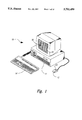
- FIG. 1 shows a computer system running an electronic spreadsheet program, the computer system having a mouse, keyboard, and display screen.
- FIG. 1A shows a prior art spreadsheet.
- FIG. 2 shows a typical electronic spreadsheet window where the worksheet is arranged in columns and rows, and a pointer as they are seen on the display screen of FIG. 1.
- FIGS. 3, 7, and 10 show the electronic spreadsheet window displayed on the display screen of FIG. 1 after a user has made a source cell selection.
- FIG. 4 shows the new shape of the pointer after it has been positioned over the fill handle of the source cell selection in the electronic spreadsheet window on the display screen of FIG. 1.
- FIGS. 5, 8, and 11 show the electronic spreadsheet window displayed on the display screen of FIG. 1 after a user has selected the destination cells by enlarging the border of the source cells to include additional cells.
- FIGS. 6, 9, and 12 show the electronic spreadsheet window displayed on the display screen of FIG. 1 after a user has enlarged the border of the source cells and released the mouse button to create a data series.
- FIG. 13 shows an overview flow diagram of a preferred embodiment of the present invention.
- FIG. 14 shows the electronic spreadsheet window displayed on the display of FIG. 1 after a user has positioned the pointer over the fill handle, depressed the mouse button, and then dragged the fill handle back into the selection.
- FIGS. 1-14 The present invention is best understood with reference to the preferred embodiment illustrated in FIGS. 1-14.
- FIG. 1 illustrates a computer system 10 running an electronic spreadsheet program.
- the computer system 10 comprises a CPU 11, a mouse input device 12, including a control input button 13, and keyboard 14, and a display screen 15.
- the control input button 13 actuates a contact switch to generate selection signals and other commands.
- the user moves the mouse along a flat surface to generate pointer position input commands, which are supplied to the CPU 11.
- Mouse movement is translated into x-y coordinates on the display screen 15 in a known manner.
- a pointer 16 on the display screen 15 moves in connection with the mouse 12.
- FIG. 1A shows a prior art spreadsheet in the process of creating a data series.
- the cell selection 17 will contain the data series after it is created.
- the user chooses options in the dialog box 18 to define the series.
- the steps discussed above in the background section describe the cumbersome way a data series is created in prior art systems.
- FIG. 2 shows a typical electronic spreadsheet window 20 and a pointer 16 as they are seen on the display screen 15 of FIG. 1.
- the worksheet contains a grid of columns and rows, the intersection of which is referred to as a cell.
- the currently selected cell 21 is referred to as the active cell.
- the active cell 21 is surrounded by a dark border 22.
- the mouse 12 is used to position the pointer 16, normally in the shape of a plus sign, over the cells displayed in the spreadsheet window 20. When the mouse button 13 is depressed, the cell under the pointer 16 is given a dark border 22 and it becomes the new active cell. If the mouse 12 is moved while the mouse button 13 is depressed, the selection is continued and additional cells are surrounded by the dark border as the pointer 16 is dragged over them to signify the selection.
- a dark border 22 will appear around the contiguous cells as they are selected.
- a fill handle 23 is located in the lower right hand corner of the dark border 22.
- all of the selected cells are highlighted except for the first cell in the selection, still called the active cell, which remains white.
- a multiple cell selection begins with the cell over which the pointer was positioned when the mouse button was depressed, and continues to the cell over which the pointer was positioned when the mouse button was released.
- FIGS. 3-12 are screen prints which illustrate a preferred embodiment of this invention.
- FIG. 3 shows a single user-selected cell 21.
- the cell 21 will be the source cell for the creation of the data series. Note the fill handle 23 in the lower right hand corner of the border 22.
- the pointer 16 is in the shape of a plus sign while the cell selection is being made. After a selection is made, if the mouse button 13 is depressed when the pointer 16 is not over any part of the dark border 22 of the cell selection 21, the selection is cancelled and a new active cell is created under the pointer.
- FIG. 4 shows the new shape of the pointer 16 after it has been positioned over the fill handle 23 of the cell selection 21. In the preferred embodiment described herein, the pointer 16 takes the shape of a small, thin plus sign while it is positioned over the fill handle 23 of a cell selection 21, indicating to the user that a data series can be created.
- FIG. 5 shows the electronic spreadsheet window 20 after the user has selected the destination cells 51 which will contain the data series.
- the user selected the destination cells by enlarging the source cell selection 21.
- the user enlarged the source cell selection 21 by depressing the mouse button 13 while the pointer 16 was positioned over the fill handle 23, and then moving the pointer 16 to a new location in the worksheet while holding down the mouse button 13. This procedure is also known as "dragging" the fill handle. (The user has not yet released the mouse button.)
- a fuzzy border 52 is created to surround the destination cells 51.
- the system also provides visual feedback 52 to the user regarding the stopping value of the data series as the user is expanding the source cell selection.
- FIG. 6 shows the electronic spreadsheet window 20 after the user has selected the destination cells 51 and released the mouse button 13.
- the destination cells 51 now contain a data series beginning with the month of January, ending with the month of October and having a month increment.
- the system took what was in the source cell 31 and created the data series without requiring the user to specify numerous parameters.
- the destination cells 51 become new source cells, with a dark border 22 and fill handle 23 in case the user wants to extend the data series even further.
- the user could have created a data series by extending the border of the source selection in any direction.
- FIG. 7 shows the electronic spreadsheet window 20 after the user has selected a plurality of cells to be the source cells 21.
- the first cell in the source selection 21 contains text and a number, while the second cell is blank.
- FIG. 8 shows the electronic spreadsheet window 20 after the user has selected the destination cells 51 in the manner described above.
- a fuzzy border 52 surrounds the destination cells 51.
- FIG. 9 shows the electronic spreadsheet window 20 after the user has selected the destination cells 51 and released the mouse button 13.
- the data series Widget 1, (blank cell), Widget 2, (blank cell), Widget 3, (blank cell), etc., has been automatically created and entered into the spreadsheet.
- FIG. 10 shows the electronic spreadsheet window 20 after a user has made a two-dimensional source selection 21.
- the fill handle 23 is once again located in the bottom right corner of the source selection border 22.
- FIG. 11 shows the electronic spreadsheet window 20 after a user has selected the destination cells 51 in the manner described above.
- FIG. 12 shows the two-dimensional data series created and entered into the destination cells 51 after the user has selected the destination cells and released the mouse button 13. Note that the data series ended with "Widget 6, Sales" rather than "(blank cell), Expenses.” The data series ended this way because the system only continues to series to the end of the destination cells 51, even if it means cutting off the series.
- FIG. 13 illustrates an overview flow diagram of the present invention.
- the user selects one or more source cells, where at least one cell contains data.
- the data in the source cells will be the beginning of the data series.
- the process continues on to block 132, where the user then selects the destination cells that will contain the data series.
- the system automatically creates a data series and enters the data series into the destination cells.
- the creation of the data series depends on a comparison of the contents of the source cells with predetermined criteria. In a preferred embodiment of the present invention, Table A contains such predetermined criteria.
- a user may override the predetermined criteria by using control keys in addition to the mouse. For example, a user could depress the control key while dragging the fill handle to indicate that the source cells should be replicated instead of made into a linear series.
- the system first determines how many cells are in the source selection, and then what data types are contained in each of the source cells. For example, if the source cell selection consisted of one cell, which contained a number, the data series would merely be a replication of the number in the source cell. If the source cell selection consisted of two cells, with each cell containing unique numbers, the data series would be a linear series beginning with the two numbers in the source cells. In accordance with the preferred embodiment described herein, Table B contains examples of source cell selections, their data types, and the corresponding data series that would be entered into the destination cells.
- FIG. 14 illustrates this feature.
- the user merely has to drag the fill handle into the selection 21 and over cell A6 and then release the mouse button.
- FIG. 14 shows the electronic spreadsheet window 20 after a user has dragged the fill handle back into the selection 21, but before the user has released the mouse button 13.
- the cells about to be cleared are blocked out. As soon as the user releases the mouse button, the blocked-out cells will be cleared.
- control keys could be used in combination with mouse buttons to give the user other options, such as removing the cells from the worksheet instead of just clearing the contents.
Landscapes
- Engineering & Computer Science (AREA)
- Theoretical Computer Science (AREA)
- Health & Medical Sciences (AREA)
- Artificial Intelligence (AREA)
- Audiology, Speech & Language Pathology (AREA)
- Computational Linguistics (AREA)
- General Health & Medical Sciences (AREA)
- Physics & Mathematics (AREA)
- General Engineering & Computer Science (AREA)
- General Physics & Mathematics (AREA)
- User Interface Of Digital Computer (AREA)
Abstract
Description
              TABLE A
______________________________________
         Source = 1              Source > 2
Data Type
         cell       Source = 2 cells
                                 cells
______________________________________
Text     Replicate  Replicate    Replicate
                    pattern      pattern
Number   Replicate  Linear       Linear fit
Special Text
         Linear     Linear       Replicate
                                 pattern/Linear
Text +   Linear     Linear       Replicate
Number                           pattern/Linear
Dates &  Linear     Linear       Replicate
Times                            pattern/Linear
Mixed    N/A        Replicate    Replicate
                    pattern/Linear
                                 pattern/Linear
Formulas Replicate  Replicate    Replicate
                    pattern      pattern
______________________________________
              TABLE B
______________________________________
Source Cells
          Data Type Destination Cells
______________________________________
1, 2      Numeric   1, 2, 3, . . .
1, 1      Numeric   1, 1, 1, . . .
2, 4      Numeric   2, 4, 6, . . .
2         Numeric   2, 2, 2, . . .
a         Text      a, a, a, . . .
a, b,     Text      a, b, a, b, . . .
a, b, c,  Text      a, b, c, a, b, c, . . .
1/1/90    Dates/Times
                    1/1/90, 1/2/90, 1/3/90
Jan-90    Dates/Times
                    Jan-90, Feb-90, Mar-90
1/90      Dates/Times
                    1/90, 2/90, 3/90
1/5/90, 2/5/90
          Dates/Times
                    1/5/90, 2/5/90, 3/5/90, . . .
1/30/92   Dates/Times
                    1/30/92, 2/28/92, 3/30/92, . . .
1/90, 1/92
          Dates/Times
                    1/90, 1/92, 1/94, . . .
Mon.      Special Text
                    Mon., Tue., Wed., . . .
Mon., Mon.
          Special Text
                    Mon., Mon., Mon., . . .
Monday,   Special Text
                    Monday, Wednesday, Friday, . . .
Wednesday
Sunday, Saturday
          Special Text
                    Sunday, Saturday, Friday,
                    Thursday, . . .
qtr 1     Special Text
                    qtr 1, qtr 2, qtr 3, qtr 4,
                    qtr 1, . . .
Quarter 1 Special Text
                    Quarter 1, Quarter 2, Quarter
                    3, Quarter 4, . . .
WIDGET 1  Text/Number
                    WIDGET 1, WIDGET 2, WIDGET 3,
                    WIDGET 4, WIDGET 5, . . .
1a, 2a    Text/Number
                    1a, 2a, 1a, 2a, . . .
WIDGET, 1 Text/Number
                    WIDGET, 1, WIDGET, 2, WIDGET,
                    3, . . .
Monday, 1 Text/Number
                    Monday, 1, Tuesday, 2,
                    Wednesday, 3, . . .
+A1+A3    Formula   +A1+A3, +B1+B3, +C1+C3, . . .
                    (when destination cells are to
                    the right of source cell)
+A1+A3    Formula   +A1+A3, +A2+A4, +A3+A5, . . .
                    (when destination cells are
                    under Source cell)
SUM(A1:A8)
          Formula   SUM(B1:B8), SUM(C1:C8), . . .
______________________________________
Claims (20)
Priority Applications (2)
| Application Number | Priority Date | Filing Date | Title |
|---|---|---|---|
| US07/857,534 US5701499A (en) | 1992-03-25 | 1992-03-25 | Method and system for automatically entering a data series into contiguous cells of an electronic spreadsheet program or the like |
| US08/484,287 US5685001A (en) | 1992-03-25 | 1995-06-07 | Method and system for automatically entering a data series into contiguous cells of an electronic spreadsheet program or the like |
Applications Claiming Priority (1)
| Application Number | Priority Date | Filing Date | Title |
|---|---|---|---|
| US07/857,534 US5701499A (en) | 1992-03-25 | 1992-03-25 | Method and system for automatically entering a data series into contiguous cells of an electronic spreadsheet program or the like |
Related Child Applications (1)
| Application Number | Title | Priority Date | Filing Date |
|---|---|---|---|
| US08/484,287 Continuation US5685001A (en) | 1992-03-25 | 1995-06-07 | Method and system for automatically entering a data series into contiguous cells of an electronic spreadsheet program or the like |
Publications (1)
| Publication Number | Publication Date |
|---|---|
| US5701499A true US5701499A (en) | 1997-12-23 |
Family
ID=25326216
Family Applications (2)
| Application Number | Title | Priority Date | Filing Date |
|---|---|---|---|
| US07/857,534 Expired - Lifetime US5701499A (en) | 1992-03-25 | 1992-03-25 | Method and system for automatically entering a data series into contiguous cells of an electronic spreadsheet program or the like |
| US08/484,287 Expired - Lifetime US5685001A (en) | 1992-03-25 | 1995-06-07 | Method and system for automatically entering a data series into contiguous cells of an electronic spreadsheet program or the like |
Family Applications After (1)
| Application Number | Title | Priority Date | Filing Date |
|---|---|---|---|
| US08/484,287 Expired - Lifetime US5685001A (en) | 1992-03-25 | 1995-06-07 | Method and system for automatically entering a data series into contiguous cells of an electronic spreadsheet program or the like |
Country Status (1)
| Country | Link |
|---|---|
| US (2) | US5701499A (en) |
Cited By (33)
| Publication number | Priority date | Publication date | Assignee | Title |
|---|---|---|---|---|
| US5995984A (en) * | 1996-07-03 | 1999-11-30 | Sun Microsystem Inc. | Apparatus and method for zoom-in entry of an element in a table |
| US6279150B1 (en) * | 1997-09-01 | 2001-08-21 | Siemens Nixdorf Informationssysteme Aktiengesellschaft | Method for converting an object code into a program code |
| US20020007372A1 (en) * | 2000-07-13 | 2002-01-17 | International Business Machines Corporation | Method and system in an electronic spreadsheet for managing and handling user-defined options |
| US20020169799A1 (en) * | 2001-01-17 | 2002-11-14 | Voshell Perlie E. | Systems and methods providing dynamic spreadsheet functionality |
| US6610102B1 (en) * | 1995-07-29 | 2003-08-26 | International Business Machines Corporation | Data conferencing system with distributed electronic sheet |
| US6625499B2 (en) * | 2000-01-07 | 2003-09-23 | Mitel Knowledge Corporation | Tabular range editing mechanism |
| US6640234B1 (en) * | 1998-12-31 | 2003-10-28 | Microsoft Corporation | Extension of formulas and formatting in an electronic spreadsheet |
| US20060080595A1 (en) * | 2004-10-07 | 2006-04-13 | Chavoustie Michael D | Methods, systems and computer program products for processing cells in a spreadsheet |
| US20060095447A1 (en) * | 2004-02-19 | 2006-05-04 | Microsoft Corporation | Offline multi-table data editing and storage |
| US20060111992A1 (en) * | 2004-11-23 | 2006-05-25 | Bank Of America | Bankruptcy relief calculator |
| US20060161533A1 (en) * | 2004-02-19 | 2006-07-20 | Microsoft Corporation | Data source task pane |
| US7146561B2 (en) | 2000-07-13 | 2006-12-05 | International Business Machines Corporation | Method and system in an electronic spreadsheet for comparing series of cells |
| US20070005635A1 (en) * | 2005-07-01 | 2007-01-04 | Microsoft Corporation | Importing database data to a non-database program |
| US20070005634A1 (en) * | 2005-06-29 | 2007-01-04 | Microsoft Corporation | Templates in a schema editor |
| US7178098B2 (en) | 2000-07-13 | 2007-02-13 | International Business Machines Corporation | Method and system in an electronic spreadsheet for handling user-defined options in a copy/cut—paste operation |
| US7225189B1 (en) | 2004-02-19 | 2007-05-29 | Microsoft Corporation | Data source write back and offline data editing and storage in a spreadsheet |
| US20070130503A1 (en) * | 2001-01-16 | 2007-06-07 | Voshell Perlie E | Systems and methods providing dynamic spreadsheet functionality |
| US7243096B2 (en) | 2003-04-29 | 2007-07-10 | International Business Machines Corporation | Method and system in an electronic data table for managing order oriented criteria |
| US7716168B2 (en) | 2005-06-29 | 2010-05-11 | Microsoft Corporation | Modifying table definitions within a database application |
| US7743026B2 (en) | 2006-01-31 | 2010-06-22 | Microsoft Corporation | Redirection to local copies of server-based files |
| US8745483B2 (en) | 2004-10-07 | 2014-06-03 | International Business Machines Corporation | Methods, systems and computer program products for facilitating visualization of interrelationships in a spreadsheet |
| WO2014058682A3 (en) * | 2012-10-09 | 2014-06-19 | Microsoft Corporation | User interface elements for content selection and extended content selection |
| USD712429S1 (en) * | 2012-06-15 | 2014-09-02 | Microsoft Corporation | Display screen with animated graphical user interface |
| US9069747B2 (en) | 2010-08-26 | 2015-06-30 | Sap Se | Methods, apparatus, systems and computer readable mediums for use in association with electronic spreadsheets |
| US9122665B2 (en) | 2011-10-10 | 2015-09-01 | Microsoft Technology Licensing, Llc | Rich formatting for a data label associated with a data point |
| USD755204S1 (en) * | 2014-05-29 | 2016-05-03 | Comcast Cable Communications, Llc | Display screen with animated graphical user interface |
| USD755807S1 (en) * | 2014-05-29 | 2016-05-10 | Comcast Cable Communications, Llc | Display screen with animated graphical user interface |
| US10013413B2 (en) | 2013-06-14 | 2018-07-03 | Microsoft Technology Licensing, Llc | Smart fill |
| US20190163734A1 (en) * | 2017-11-27 | 2019-05-30 | Microsoft Technology Licensing, Llc | Dynamic pattern recognition in spreadsheets |
| US10409892B2 (en) | 2011-01-26 | 2019-09-10 | Microsoft Technology Licensing, Llc | Formatting data by example |
| US10824799B2 (en) | 2014-06-30 | 2020-11-03 | Microsoft Technology Licensing, Llc | Summary data autofill |
| USD918242S1 (en) * | 2019-09-27 | 2021-05-04 | Fiddler Labs Inc | Display screen or portion thereof with graphical user interface |
| US12602691B2 (en) | 2023-08-01 | 2026-04-14 | Bank Of America Corporation | Systems and methods for maintaining data integrity and security during data transfer between electronic devices |
Families Citing this family (10)
| Publication number | Priority date | Publication date | Assignee | Title |
|---|---|---|---|---|
| US5933638A (en) * | 1996-04-04 | 1999-08-03 | Cencik; Peter | Method and apparatus for creating application computer programs using an objects evaluation matrix |
| US6055548A (en) * | 1996-06-03 | 2000-04-25 | Microsoft Corporation | Computerized spreadsheet with auto-calculator |
| TW498221B (en) * | 1999-08-20 | 2002-08-11 | Ibm | Method and system in an electronic spreadsheet for introducing new elements in a cell named range according to different modes |
| US6801226B1 (en) * | 1999-11-01 | 2004-10-05 | Ita Software, Inc. | Graphical user interface for travel planning system |
| US7197696B1 (en) | 2003-06-05 | 2007-03-27 | Pavan Vidyadhar Muzumdar | System, method and computer program product to populate data into spreadsheets and execute functions and programs within the same |
| US8335993B1 (en) * | 2008-10-24 | 2012-12-18 | Marvell International Ltd. | Enhanced touch sensitive interface and methods and software for making and using the same |
| US9594735B2 (en) | 2011-09-12 | 2017-03-14 | Microsoft Technology Licensing, Llc | Automatic highlighting of formula parameters for limited display devices |
| US20140245195A1 (en) * | 2013-02-25 | 2014-08-28 | International Business Machines Corporation | Duplicating graphical widgets |
| US9317182B2 (en) | 2013-04-11 | 2016-04-19 | Apple Inc. | Pop-up menu interface |
| US10387558B2 (en) * | 2016-02-23 | 2019-08-20 | International Business Machines Corporation | Provision of a separate input interface for user interaction with a spreadsheet |
Family Cites Families (1)
| Publication number | Priority date | Publication date | Assignee | Title |
|---|---|---|---|---|
| US5546525A (en) * | 1989-11-13 | 1996-08-13 | Lotus Development Corporation | Computer user interface with multimode selection of displayed controls |
-
1992
- 1992-03-25 US US07/857,534 patent/US5701499A/en not_active Expired - Lifetime
-
1995
- 1995-06-07 US US08/484,287 patent/US5685001A/en not_active Expired - Lifetime
Non-Patent Citations (14)
| Title |
|---|
| "Creating a Series of Dates or Numbers," Microsoft Excel Version 3.0 User's Guide, 1990, pp. 261-264. |
| Cobb et al; Works Companion: The Definitive Guide to Microsoft Works; 1988; pp. 196 197, 341 362. * |
| Cobb et al; Works Companion: The Definitive Guide to Microsoft Works; 1988; pp. 196-197, 341-362. |
| Creating a Series of Dates or Numbers, Microsoft Excel Version 3.0 User s Guide, 1990, pp. 261 264. * |
| Lawrence, Lotus, v7 n4, pp. 54 57, Apr. 1991. * |
| Lawrence, Lotus, v7 n4, pp. 54-57, Apr. 1991. |
| Lotus 1 2 3 User s Guide ( For Windows Release 1.0 ); 1991; pp. 4 5, 37 72, 249 261. * |
| Lotus 1-2-3 User's Guide (For Windows Release 1.0); 1991; pp. 4-5, 37-72, 249-261. |
| Microsoft Excel User s Guide version 3.0; 1990; pp. 34 35, 76 79, 204 205, 167 169. * |
| Microsoft Excel User's Guide version 3.0; 1990; pp. 34-35, 76-79, 204-205, 167-169. |
| Microsoft Works for Windows version 2.0; 1991; pp. 93 174. * |
| Microsoft Works for Windows version 2.0; 1991; pp. 93-174. |
| Milenbach, "Improv Spreadsheet Takes Next Step", PC Week, v8 n15, pp. 79-83, Apr. 1991. |
| Milenbach, Improv Spreadsheet Takes Next Step , PC Week, v8 n15, pp. 79 83, Apr. 1991. * |
Cited By (47)
| Publication number | Priority date | Publication date | Assignee | Title |
|---|---|---|---|---|
| US6610102B1 (en) * | 1995-07-29 | 2003-08-26 | International Business Machines Corporation | Data conferencing system with distributed electronic sheet |
| US5995984A (en) * | 1996-07-03 | 1999-11-30 | Sun Microsystem Inc. | Apparatus and method for zoom-in entry of an element in a table |
| US6279150B1 (en) * | 1997-09-01 | 2001-08-21 | Siemens Nixdorf Informationssysteme Aktiengesellschaft | Method for converting an object code into a program code |
| US6640234B1 (en) * | 1998-12-31 | 2003-10-28 | Microsoft Corporation | Extension of formulas and formatting in an electronic spreadsheet |
| US6625499B2 (en) * | 2000-01-07 | 2003-09-23 | Mitel Knowledge Corporation | Tabular range editing mechanism |
| US7146561B2 (en) | 2000-07-13 | 2006-12-05 | International Business Machines Corporation | Method and system in an electronic spreadsheet for comparing series of cells |
| US7178098B2 (en) | 2000-07-13 | 2007-02-13 | International Business Machines Corporation | Method and system in an electronic spreadsheet for handling user-defined options in a copy/cut—paste operation |
| US20020007372A1 (en) * | 2000-07-13 | 2002-01-17 | International Business Machines Corporation | Method and system in an electronic spreadsheet for managing and handling user-defined options |
| US7272783B2 (en) * | 2000-07-13 | 2007-09-18 | International Business Machines Corporation | Method and system in an electronic spreadsheet for managing and handling user-defined options |
| US8275974B2 (en) | 2001-01-16 | 2012-09-25 | Outlooksoft Corporation | Systems and methods providing dynamic spreadsheet functionality |
| US20070130503A1 (en) * | 2001-01-16 | 2007-06-07 | Voshell Perlie E | Systems and methods providing dynamic spreadsheet functionality |
| US7082569B2 (en) * | 2001-01-17 | 2006-07-25 | Outlooksoft Corporation | Systems and methods providing dynamic spreadsheet functionality |
| US20020169799A1 (en) * | 2001-01-17 | 2002-11-14 | Voshell Perlie E. | Systems and methods providing dynamic spreadsheet functionality |
| US7243096B2 (en) | 2003-04-29 | 2007-07-10 | International Business Machines Corporation | Method and system in an electronic data table for managing order oriented criteria |
| US7225189B1 (en) | 2004-02-19 | 2007-05-29 | Microsoft Corporation | Data source write back and offline data editing and storage in a spreadsheet |
| US20060161533A1 (en) * | 2004-02-19 | 2006-07-20 | Microsoft Corporation | Data source task pane |
| US7546291B2 (en) | 2004-02-19 | 2009-06-09 | Microsoft Corporation | Data source task pane |
| US7546286B2 (en) | 2004-02-19 | 2009-06-09 | Microsoft Corporation | Offline multi-table data editing and storage |
| US20060095447A1 (en) * | 2004-02-19 | 2006-05-04 | Microsoft Corporation | Offline multi-table data editing and storage |
| US10180933B2 (en) * | 2004-10-07 | 2019-01-15 | International Business Machines Corporation | Methods, systems and computer program products for facilitating visualization of interrelationships in a spreadsheet |
| US11036930B2 (en) | 2004-10-07 | 2021-06-15 | International Business Machines Corporation | Methods, systems and computer program products for facilitating visualization of interrelationships in a spreadsheet |
| US8745483B2 (en) | 2004-10-07 | 2014-06-03 | International Business Machines Corporation | Methods, systems and computer program products for facilitating visualization of interrelationships in a spreadsheet |
| US9047266B2 (en) | 2004-10-07 | 2015-06-02 | International Business Machines Corporation | Methods, systems and computer program products for processing cells in a spreadsheet |
| US20140223276A1 (en) * | 2004-10-07 | 2014-08-07 | International Business Machines Corporation | Methods, systems and computer program products for facilitating visualization of interrelationships in a spreadsheet |
| US20060080595A1 (en) * | 2004-10-07 | 2006-04-13 | Chavoustie Michael D | Methods, systems and computer program products for processing cells in a spreadsheet |
| US20060111992A1 (en) * | 2004-11-23 | 2006-05-25 | Bank Of America | Bankruptcy relief calculator |
| US8352339B2 (en) * | 2004-11-23 | 2013-01-08 | Bank Of America Corporation | Bankruptcy relief calculator |
| US7716168B2 (en) | 2005-06-29 | 2010-05-11 | Microsoft Corporation | Modifying table definitions within a database application |
| US20070005634A1 (en) * | 2005-06-29 | 2007-01-04 | Microsoft Corporation | Templates in a schema editor |
| US8135755B2 (en) | 2005-06-29 | 2012-03-13 | Microsoft Corporation | Templates in a schema editor |
| US20070005635A1 (en) * | 2005-07-01 | 2007-01-04 | Microsoft Corporation | Importing database data to a non-database program |
| US7743026B2 (en) | 2006-01-31 | 2010-06-22 | Microsoft Corporation | Redirection to local copies of server-based files |
| US9069747B2 (en) | 2010-08-26 | 2015-06-30 | Sap Se | Methods, apparatus, systems and computer readable mediums for use in association with electronic spreadsheets |
| US10409892B2 (en) | 2011-01-26 | 2019-09-10 | Microsoft Technology Licensing, Llc | Formatting data by example |
| US9122665B2 (en) | 2011-10-10 | 2015-09-01 | Microsoft Technology Licensing, Llc | Rich formatting for a data label associated with a data point |
| US10204080B2 (en) | 2011-10-10 | 2019-02-12 | Microsoft Technology Licensing, Llc | Rich formatting for a data label associated with a data point |
| USD712429S1 (en) * | 2012-06-15 | 2014-09-02 | Microsoft Corporation | Display screen with animated graphical user interface |
| US9355086B2 (en) | 2012-10-09 | 2016-05-31 | Microsoft Technology Licensing, Llc | User interface elements for content selection and extended content selection |
| WO2014058682A3 (en) * | 2012-10-09 | 2014-06-19 | Microsoft Corporation | User interface elements for content selection and extended content selection |
| US10013413B2 (en) | 2013-06-14 | 2018-07-03 | Microsoft Technology Licensing, Llc | Smart fill |
| US10229101B2 (en) | 2013-06-14 | 2019-03-12 | Microsoft Technology Licensing, Llc | Smart fill |
| USD755807S1 (en) * | 2014-05-29 | 2016-05-10 | Comcast Cable Communications, Llc | Display screen with animated graphical user interface |
| USD755204S1 (en) * | 2014-05-29 | 2016-05-03 | Comcast Cable Communications, Llc | Display screen with animated graphical user interface |
| US10824799B2 (en) | 2014-06-30 | 2020-11-03 | Microsoft Technology Licensing, Llc | Summary data autofill |
| US20190163734A1 (en) * | 2017-11-27 | 2019-05-30 | Microsoft Technology Licensing, Llc | Dynamic pattern recognition in spreadsheets |
| USD918242S1 (en) * | 2019-09-27 | 2021-05-04 | Fiddler Labs Inc | Display screen or portion thereof with graphical user interface |
| US12602691B2 (en) | 2023-08-01 | 2026-04-14 | Bank Of America Corporation | Systems and methods for maintaining data integrity and security during data transfer between electronic devices |
Also Published As
| Publication number | Publication date |
|---|---|
| US5685001A (en) | 1997-11-04 |
Similar Documents
| Publication | Publication Date | Title |
|---|---|---|
| US5685001A (en) | Method and system for automatically entering a data series into contiguous cells of an electronic spreadsheet program or the like | |
| US5535324A (en) | Method and system for dragging and plotting new data onto an embedded graph | |
| US5515496A (en) | Computer system with direct manipulation interface and method of operating same | |
| US5588108A (en) | System and method for generating graphics charts | |
| US5623282A (en) | Method and system for the direct manipulation of cells in an electronic spreadsheet program or the like | |
| US5023851A (en) | Method for presenting electronic calendar information in an interactive information handling system | |
| US5333247A (en) | Scrolling tool for text and graphics in a display system | |
| US5867163A (en) | Graphical user interface for defining and invoking user-customized tool shelf execution sequence | |
| EP0615200B1 (en) | System and methods for management of electronic modelling systems | |
| US6411310B1 (en) | Software notes | |
| US5247438A (en) | Personal time management system and method | |
| US5721847A (en) | Method and system for linking controls with cells of a spreadsheet | |
| US5602981A (en) | Quickselect icon button on a computer display which redisplays the last view style activated by the icon button | |
| CA1313419C (en) | Valuator menu for use as a graphical user interface tool | |
| US5570109A (en) | Schedule and to-do list for a pen-based computer system | |
| US6271863B1 (en) | Interactive method for operating a computer so as to graphically display the results of a computation | |
| US6055548A (en) | Computerized spreadsheet with auto-calculator | |
| US5594847A (en) | System and method for selecting free form objects associated with a selection region displayed by a computer | |
| US20100058250A1 (en) | Editing numeric charts | |
| JP3565441B2 (en) | Data processing system | |
| US6583786B2 (en) | Method for dimensioning graphical objects displayed on a display device | |
| US5381517A (en) | Fuzzy spreadsheet data processing system | |
| EP0342140B1 (en) | Method for presenting compressed electronic day calendar information in an interactive information handling system | |
| US6211857B1 (en) | Interaction support system and method | |
| EP0348031B1 (en) | Display system |
Legal Events
| Date | Code | Title | Description |
|---|---|---|---|
| AS | Assignment |
Owner name: MICROSOFT CORPORATION, A CORP. OF DE, WASHINGTON Free format text: ASSIGNMENT OF ASSIGNORS INTEREST.;ASSIGNORS:CAPSON, BRIAN;CHERRY, WES;DEVAAN, JON;AND OTHERS;REEL/FRAME:006147/0518;SIGNING DATES FROM 19920527 TO 19920610 |
|
| STCF | Information on status: patent grant |
Free format text: PATENTED CASE |
|
| FEPP | Fee payment procedure |
Free format text: PAYOR NUMBER ASSIGNED (ORIGINAL EVENT CODE: ASPN); ENTITY STATUS OF PATENT OWNER: LARGE ENTITY |
|
| FPAY | Fee payment |
Year of fee payment: 4 |
|
| FPAY | Fee payment |
Year of fee payment: 8 |
|
| FPAY | Fee payment |
Year of fee payment: 12 |
|
| AS | Assignment |
Owner name: MICROSOFT TECHNOLOGY LICENSING, LLC, WASHINGTON Free format text: ASSIGNMENT OF ASSIGNORS INTEREST;ASSIGNOR:MICROSOFT CORPORATION;REEL/FRAME:034541/0001 Effective date: 20141014 |