US12207920B2 - User interface for an audiological test system - Google Patents
User interface for an audiological test system Download PDFInfo
- Publication number
- US12207920B2 US12207920B2 US16/092,199 US201816092199A US12207920B2 US 12207920 B2 US12207920 B2 US 12207920B2 US 201816092199 A US201816092199 A US 201816092199A US 12207920 B2 US12207920 B2 US 12207920B2
- Authority
- US
- United States
- Prior art keywords
- display screen
- audiological
- switch
- display
- patient
- Prior art date
- Legal status (The legal status is an assumption and is not a legal conclusion. Google has not performed a legal analysis and makes no representation as to the accuracy of the status listed.)
- Active
Links
Images




Classifications
-
- A—HUMAN NECESSITIES
- A61—MEDICAL OR VETERINARY SCIENCE; HYGIENE
- A61B—DIAGNOSIS; SURGERY; IDENTIFICATION
- A61B5/00—Measuring for diagnostic purposes; Identification of persons
- A61B5/12—Audiometering
-
- A—HUMAN NECESSITIES
- A61—MEDICAL OR VETERINARY SCIENCE; HYGIENE
- A61B—DIAGNOSIS; SURGERY; IDENTIFICATION
- A61B5/00—Measuring for diagnostic purposes; Identification of persons
- A61B5/12—Audiometering
- A61B5/121—Audiometering evaluating hearing capacity
-
- A—HUMAN NECESSITIES
- A61—MEDICAL OR VETERINARY SCIENCE; HYGIENE
- A61B—DIAGNOSIS; SURGERY; IDENTIFICATION
- A61B5/00—Measuring for diagnostic purposes; Identification of persons
- A61B5/68—Arrangements of detecting, measuring or recording means, e.g. sensors, in relation to patient
- A61B5/6887—Arrangements of detecting, measuring or recording means, e.g. sensors, in relation to patient mounted on external non-worn devices, e.g. non-medical devices
- A61B5/6888—Cabins
-
- A—HUMAN NECESSITIES
- A61—MEDICAL OR VETERINARY SCIENCE; HYGIENE
- A61B—DIAGNOSIS; SURGERY; IDENTIFICATION
- A61B5/00—Measuring for diagnostic purposes; Identification of persons
- A61B5/74—Details of notification to user or communication with user or patient; User input means
- A61B5/742—Details of notification to user or communication with user or patient; User input means using visual displays
- A61B5/7435—Displaying user selection data, e.g. icons in a graphical user interface
-
- A—HUMAN NECESSITIES
- A61—MEDICAL OR VETERINARY SCIENCE; HYGIENE
- A61B—DIAGNOSIS; SURGERY; IDENTIFICATION
- A61B5/00—Measuring for diagnostic purposes; Identification of persons
- A61B5/74—Details of notification to user or communication with user or patient; User input means
- A61B5/742—Details of notification to user or communication with user or patient; User input means using visual displays
- A61B5/7445—Display arrangements, e.g. multiple display units
-
- G—PHYSICS
- G06—COMPUTING OR CALCULATING; COUNTING
- G06F—ELECTRIC DIGITAL DATA PROCESSING
- G06F3/00—Input arrangements for transferring data to be processed into a form capable of being handled by the computer; Output arrangements for transferring data from processing unit to output unit, e.g. interface arrangements
- G06F3/01—Input arrangements or combined input and output arrangements for interaction between user and computer
- G06F3/048—Interaction techniques based on graphical user interfaces [GUI]
- G06F3/0481—Interaction techniques based on graphical user interfaces [GUI] based on specific properties of the displayed interaction object or a metaphor-based environment, e.g. interaction with desktop elements like windows or icons, or assisted by a cursor's changing behaviour or appearance
- G06F3/04817—Interaction techniques based on graphical user interfaces [GUI] based on specific properties of the displayed interaction object or a metaphor-based environment, e.g. interaction with desktop elements like windows or icons, or assisted by a cursor's changing behaviour or appearance using icons
-
- G—PHYSICS
- G06—COMPUTING OR CALCULATING; COUNTING
- G06F—ELECTRIC DIGITAL DATA PROCESSING
- G06F3/00—Input arrangements for transferring data to be processed into a form capable of being handled by the computer; Output arrangements for transferring data from processing unit to output unit, e.g. interface arrangements
- G06F3/01—Input arrangements or combined input and output arrangements for interaction between user and computer
- G06F3/048—Interaction techniques based on graphical user interfaces [GUI]
- G06F3/0487—Interaction techniques based on graphical user interfaces [GUI] using specific features provided by the input device, e.g. functions controlled by the rotation of a mouse with dual sensing arrangements, or of the nature of the input device, e.g. tap gestures based on pressure sensed by a digitiser
- G06F3/0488—Interaction techniques based on graphical user interfaces [GUI] using specific features provided by the input device, e.g. functions controlled by the rotation of a mouse with dual sensing arrangements, or of the nature of the input device, e.g. tap gestures based on pressure sensed by a digitiser using a touch-screen or digitiser, e.g. input of commands through traced gestures
-
- G—PHYSICS
- G06—COMPUTING OR CALCULATING; COUNTING
- G06F—ELECTRIC DIGITAL DATA PROCESSING
- G06F3/00—Input arrangements for transferring data to be processed into a form capable of being handled by the computer; Output arrangements for transferring data from processing unit to output unit, e.g. interface arrangements
- G06F3/14—Digital output to display device ; Cooperation and interconnection of the display device with other functional units
- G06F3/1423—Digital output to display device ; Cooperation and interconnection of the display device with other functional units controlling a plurality of local displays, e.g. CRT and flat panel display
-
- G—PHYSICS
- G06—COMPUTING OR CALCULATING; COUNTING
- G06F—ELECTRIC DIGITAL DATA PROCESSING
- G06F3/00—Input arrangements for transferring data to be processed into a form capable of being handled by the computer; Output arrangements for transferring data from processing unit to output unit, e.g. interface arrangements
- G06F3/14—Digital output to display device ; Cooperation and interconnection of the display device with other functional units
- G06F3/1454—Digital output to display device ; Cooperation and interconnection of the display device with other functional units involving copying of the display data of a local workstation or window to a remote workstation or window so that an actual copy of the data is displayed simultaneously on two or more displays, e.g. teledisplay
-
- G—PHYSICS
- G09—EDUCATION; CRYPTOGRAPHY; DISPLAY; ADVERTISING; SEALS
- G09G—ARRANGEMENTS OR CIRCUITS FOR CONTROL OF INDICATING DEVICES USING STATIC MEANS TO PRESENT VARIABLE INFORMATION
- G09G2380/00—Specific applications
- G09G2380/08—Biomedical applications
Definitions
- a new user interface for an audiological test system comprising a first and a second display screen.
- the audiological test system is used to diagnose and manage a patient with an ear problem by performing various audiological tests of the hearing mechanism; typically these tests are performed in a sound booth.
- PC-based audiological test systems have gained widespread market penetration.
- Many hearing clinics have started using a touch screen next to the patient when performing audiological tests, e.g. in a sound booth.
- the touch screen is typically used for controlling the PC-based audiological test system and for presenting information to the patient.
- the PC itself is typically placed outside the sound booth or, in absence of the sound booth at a distance from the patient, with a computer screen placed outside the field of view of the patient.
- the PC-based audiological test system is operated by a trained operator, and the operator performs at least some of the audiological tests sitting at a desk with the computer screen placed in the field of view of the operator and outside the field of view of the patient. Typically, tone and speech audiometry and hearing aid fitting are performed while the operator is sitting at the desk.
- the operator has to invoke the operating system of the PC, e.g. Windows®, to set the monitor mode of the PC; e.g. in order to operate the PC in the “duplicate monitor mode” wherein the touch screen at the patient and the computer screen display the same information in the same way, i.e. information displayed on the computer screen is copied and also displayed on the touch screen next to the patient.
- the operator is allowed to control the PC-based audiological test system from the touch screen next to the patient.
- the operator may use the operating system of the PC, e.g. Windows®, to set the PC to operate in the “extended monitor mode” wherein the touch screen at the patient is used to show stimuli to the patient while the computer screen is used by the operator to control, e.g., an audiometer of the audiological test system.
- Windows® the operating system of the PC
- an audiological test system with an improved user interface that facilitates control of two display screens that are placed with a mutual distance so that they cannot be viewed simultaneously from a test location used for audiological testing of a patient.
- an audiological test system for audiological testing of a patient situated at a test location
- the audiological test system comprising a first display screen for monitoring of the audiological test system and that is positioned outside a viewing field of the patient when the patient is situated at the test location, a second display screen positioned within the viewing field of the patient when the patient is situated at the test location, a first switch located at the first display screen and adapted for control of the second display screen in such a way that predetermined information relating to operation of the audiological test system is not displayed on the second display screen upon activation of the first switch, and a second switch located at the second display screen and adapted for control of the second display screen in such a way that the predetermined information relating to operation of the audiological test system is displayed on the second display screen upon activation of the second switch.
- the second switch may be adapted for control of the second display screen in such a way that the predetermined information relating to operation of the audiological test system is alternatingly displayed and not displayed on the second display screen upon activation of the second switch.
- the first switch may be a conventional mechanical switch, such as a push button switch, e.g. mounted in a separate housing proximate the first display screen; or mounted in a housing of the first display screen, e.g. at one of the sides of the first display screen.
- the first switch may be realized by an icon displayed on the first display screen and activated by positioning of a cursor on top of the icon and clicking on it using a mouse, a trackball, or a touchpad as is well-known in the art of computer interfaces.
- the second switch may be a conventional mechanical switch, such as a push button switch, e.g. mounted in a separate housing proximate the second display screen; or mounted in a housing of the second display screen, e.g. at one of the sides of the second display screen.
- the second switch may be realized by an icon displayed on the second display screen and activated by positioning a cursor on top of the icon and clicking on it using a mouse, a trackball, or a touchpad as is well-known in the art of computer interfaces.
- the first display screen may be a first touch screen.
- the first switch may be constituted by a specific touch sensitive area of the first touch screen, e.g. indicated by display of a specific icon at the specific touch sensitive area, and activated by pressing on the specific touch sensitive area with a finger or a stylus.
- the second display screen may be a second touch screen.
- the second switch may be constituted by a specific touch sensitive area of the second touch screen, e.g. indicated by display of a specific icon at the specific touch sensitive area, and activated by pressing on the specific touch sensitive area with a finger or a stylus.
- the first and second switches may of the same type; or may be of different types.
- the first switch may accommodate an indicator for indication of whether the predetermined information relating to operation of the audiological test system is displayed and not displayed on the second display screen.
- the operator of the audiological test system may press the second switch at the second display screen to duplicate the entire display of the first display screen on the second display screen and thereby allowing the operator to control the audiological test system from a position next to the patient.
- the audiological test system may include equipment for performing one of, some of, or all of the following audiological tests and patient related applications: pure tone audiometry, speech audiometry, Bekesy Audiometry, tympanometry, ipsi and contra acoustic reflex measurements, otoacoustic emission measurements, lip reading test, measurement of ability to discriminate between different sound intensities, recognize pitch, distinguish speech from background noise, evoked potential measurements, e.g. auditory brainstem response audiometry, cortical response audiometry, auditory steady state response audiometry, wideband acoustic immittance measurements, probe microphone measurements, e.g. for in-situ hearing aid verification, hearing aid fitting, etc., hearing counseling and education applications, tinnitus assessment of pitch, loudness and maskability, and filling out questionnaires and interview forms on the screen.
- pure tone audiometry e.g. auditory brainstem response audiometry, cortical response audiometry, auditory steady state response audiometry, wideband acoustic immitt
- the audiological test system may comprise a processor that is adapted to individually control the first and second display screens.
- the processor may be adapted to control special purpose audiological test apparatuses with the required measurement circuitry and devices for performing the audiological tests.
- the processor may be adapted for recording of results of the audiological tests.
- the processor may form part of a computer, such as a PC, a laptop computer, a tablet computer, a PDA, a smartphone, a dedicated audiological device, such as a stand-alone audiometer, etc., etc.
- a computer such as a PC, a laptop computer, a tablet computer, a PDA, a smartphone, a dedicated audiological device, such as a stand-alone audiometer, etc., etc.
- the operating system of the processor is set to the “extended monitor mode” whereby the processor is adapted to individually control the first and second display screens.
- the processor is adapted to selectively control, e.g. in response to operator input and/or during performance of selected audiological tests, the first and second display screens so that they display the same information in the same way, i.e. what is displayed on the first display screen is copied or moved to be displayed on the second display screen next to the patient, and optionally allow the operator to control the audiological test system from the location of the second display screen, e.g. a touch screen, next to the patient.
- the processor is further adapted to selectively control the second display screen at the patient to show stimuli to the patient, e.g. during a lip reading test, while controlling the first display screen to be used for control of the audiological test system by the operator.
- the processor may be adapted to indicate on the first display screen only when the operator presents a tone to the patient.
- the operator is relieved from the task of turning off the second display screen next to the patient to make sure that the patient does not receive any visual cues relating to the audiological test.
- the operator is relieved from the task of invoking the operating system of the processor of the audiological test system to ensure proper control of the first and second display screens.
- the new audiological test system is PC-based, e.g. with a Windows® operating system
- the PC operates in the “extended monitor mode” when audiological tests are performed and the audiological test software executed when the audiological tests are performed duplicates or moves the screen layout as required so that the first display screen and the second display screen present identical information when required, or the second display screen alone presents the information to the operator of the audiological test system when needed and controls the first and second display screens individually when needed.
- the processor of the audiological test system may be adapted to display desired visual cues, control panels, counseling tools, etc. in individual windows that are automatically opened and closed on the second display screen as needed, e.g. as the audiological test progresses and/or based on navigation by the operator on the first display screen or on the second display screen and/or based on activation of the first and second switches.
- processor central processor
- signal processor central processor
- controller central processor
- system central processor
- a “processor”, “signal processor”, “controller”, “system”, etc. may be, but is not limited to being, a process running on a processor, a processor, an object, an executable file, a thread of execution, and/or a program.
- processor central processor
- signal processor central processor
- controller central processor
- system designate both an application running on a processor and a hardware processor.
- processors central processors
- signal processors central processors
- controllers controllers
- system and the like, or any combination hereof, may reside within a process and/or thread of execution, and one or more “processors”, “central processors”, “signal processors”, “controllers”, “systems”, etc., or any combination hereof, may be localized in one hardware processor, possibly in combination with other hardware circuitry, and/or distributed between two or more hardware processors, possibly in combination with other hardware circuitry.
- a processor may be any component or any combination of components that is capable of performing data processing.
- the processor may be an ASIC processor, a FPGA processor, a general purpose processor, a microprocessor, a circuit component, or an integrated circuit.
- FIGS. 1 - 7 schematically illustrate an exemplary work flow of performing audiological tests with a prior art PC-based audiological test system
- FIGS. 8 - 12 schematically illustrate an exemplary work flow of performing audiological tests with the new audiological test system
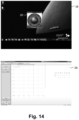
- FIGS. 13 A- 16 B show various exemplary screen dumps of the first display screen and the second display screen of the new audiological test system.
- FIG. 1 schematically illustrates a prior art PC-based audiological test system 10 wherein the Personal Computer (PC) (not shown) is situated at a desk 12 which is intended to be the main working place for the operator 14 of the PC-based audiological test system 10 during performance of audiological test(s) on a patient 16 .
- the PC (not shown) has a user interface comprising a computer screen 18 , a keyboard 20 , and a mouse 22 as is very well known in the art.
- the audiological tests are performed inside a sound booth with the desk 12 located outside the sound booth.
- the patient 16 is not able to see what is displayed on the computer screen 18 when seated in the sound booth.
- FIG. 1 a window 24 of the sound booth is schematically illustrated.
- a touch screen 26 is also installed inside the sound booth and controlled by the PC (not shown). In FIG. 1 , the touch screen 26 is wall mounted.
- the operator 14 invokes the operating system of the PC, e.g. Windows®, to set-up how the PC controls two computer monitors, namely the computer screen 18 and the touch screen 26 .
- the operating system allows two monitor modes, the “duplicate monitor mode” and the “extended monitor mode”.
- the PC displays the same information with the same layout in the computer screen 18 and the touch screen 26 , i.e. one of the screens 18 , 26 shows a duplicate of what the other screen 26 , 18 shows.
- the PC controls the computer screen 18 and the touch screen 26 individually so that the software executed on the PC and the operator of the PC can individually control what information is displayed on the computer screen 18 and what information is displayed on the touch screen 26 .
- the operator of the prior art PC-based audiological test system 10 has to go to the desk 12 from time to time to invoke the operating system of the PC (not shown) to switch between the “duplicated monitor mode” and the “extended monitor mode” as the requirements of what to display on the touch screen 26 changes between the various types of audiological tests.
- the PC (not shown) is adapted to selectively control the touch screen 26 so that the operator 14 of the PC-based audiological test system 10 can control different features of the audiological test software executed by the PC from inside the sound booth depending on the current set-up of the PC.
- the PC (not shown) is also adapted to selectively control the touch screen 26 so that the touch screen 26 can be used for presenting visual stimuli, such as video, to the patient 16 .
- the PC (not shown) is also adapted to selectively control the touch screen 26 so that the touch screen 26 can be used by the patient 16 to enter response alternatives or enter ratings, e.g. on visual analogue scales.
- some of the audiological tests require that the operator 14 is close to the patient 16 , e.g. in order to perform tympanometry.
- the PC is set to the “duplicate monitor mode” for duplicate control of the touch screen 26 inside the sound booth and the computer screen 18 outside the sound booth.
- the operator 14 may recognize, e.g. after having positioned an ear probe appropriately in the desired ear of the patient, that he or she has not selected the correct monitor mode of the PC.
- the operator 14 in this situation has to move away from the patient to the desk 12 with the computer screen 18 and invoke the operating system of the PC to perform selection of the “duplicate monitor mode”.
- the operator Upon returning to the sound booth, the operator typically has to check or even re-establish the desired positioning of the ear probe in the selected ear of the patient. However, this is not desirable.
- the operator 14 desires to maintain focus on the patient and the patient's reactions and wants to minimize disturbing activities, such as moving away from the patient.
- pure tone audiometry the most common audiological test, it is imperative that the patient 16 does not receive any visual clues that may reveal whether or not the operator 14 presents a pure tone to the patient 16 , and/or at what level the pure tone is presented.
- the operator 14 performs pure tone audiometry from the desk 12 and controls when, and at what frequency, and at what level, to present a pure tone to the patient 16 with the user interface of the PC, including the computer screen 18 as is well-known in the art of pure tone audiometry.
- the PC must not duplicate what is displayed on the computer screen 18 onto the touch screen 26 .
- the operator 14 of the prior art PC-based audiological test system 10 simply turns off the touch screen 26 inside the sound booth to make sure that the patient 16 does not receive any visual indications on when the operator 14 presents a pure to the patient 16 .
- the operator 14 of the prior art PC-based audiological test system 10 may invoke the operating system of the PC to switch the monitor mode to the “extended monitor mode” and control the touch screen 26 to display something that does not include any visual indications on when the operator 14 presents a pure to the patient 16 , such as a black screen, a still image, etc.
- FIG. 2 schematically illustrates what should not happen during a pure tone audiometry test, namely that the PC is inadvertently set to the “duplicate monitor mode” so that, inadvertently, the patient 16 does indeed receive visual cues from the touch screen 26 , e.g. when a pure tone is presented during the test.
- the operator 14 of the an audiological test system may recognize, after having been seated at the desk 12 that he or she did not turn the touch screen 26 off before leaving the sound booth.
- FIG. 3 schematically illustrates how the operator 14 has to go back into the sound booth to switch off the touch screen 26 to make certain that the touch screen 26 does not present visual cues to the patient that may lead to false responses to the next audiological test.
- the operator 14 has to invoke the operating system of the PC to toggle the monitor mode to the “extended monitor mode”. Today, it is most common to turn off the touch screen 26 .
- FIG. 4 schematically illustrates that the touch screen 26 has been turned off and presents a black screen to the patient 16 .
- the pure tone audiometry test is in progress without the patient 16 being presented with visual cues on when the operator 14 presents a tone.
- FIG. 5 schematically illustrates that the operator 14 has to enter the sound booth again to switch on the touch screen 26 in order to use the touch screen 26 to present video stimulus to the patient 16 .
- FIG. 6 schematically illustrates that the operator 14 then has to go back to the desk 12 to invoke the operating system of the PC to make sure that the “extended monitor mode” is selected and not the “duplicate monitor mode” in order to use the touch screen 26 to present video to the patient 16 inside the sound booth.
- FIG. 7 schematically illustrates that a lip read test is performed using the touch screen 26 to present video stimulus to the patient 16 .
- FIGS. 1 - 7 illustrate how the prior art PC-based audiological test system 10 requires the operator 14 to perform the task of maintaining a part of his or her attention to the fact which monitor mode the PC is currently set to in order to make sure that the touch screen 26 only presents the desired information to the patient 16 .
- the operator 14 is required to invoke the operating system of the PC to set the desired monitor mode instead of maintaining his or her mental attention to the audiological tests and the patient. This distracts the operator 14 from the primary tasks of correctly preparing and performing the desired audiological tests and disrupts the operator work flow of the tests. This makes the audiological tests more time consuming and increases the risk of errors.
- the PC is set to the “extended monitor mode” whenever the audiological test software is executed by the PC so that the first display screen 18 , namely the computer screen 18 in FIGS. 8 - 12 , and the second display screen 26 , namely the touch screen 26 in FIGS. 8 - 12 , can display different information to the operator 14 and the patient 16 , respectively.
- the first display screen 18 namely the computer screen 18 in FIGS. 8 - 12
- the second display screen 26 namely the touch screen 26 in FIGS. 8 - 12
- a separate window is opened in the touch screen 26 for display of the lip-reading test video to the patient 16 inside the sound booth.
- icon 28 is displayed on the second display screen 26 and icon 30 is displayed on the first display screen 18 , and the areas at the respective icons 30 , 28 constitute the first and the second switch, respectively.
- touching the icon 28 on the touch screen 26 will duplicate or move what is displayed on the computer screen 28 onto the touch screen 26 , whereby the operator 14 can control the audiologic test system with the touch screen 26 inside the sound booth so that the operator 14 is relieved from the task of the leaving the sound booth during preparation or conductance of audiological tests that require the operator 14 to be close to the patient 16 as for example when preparing and performing tympanometry.
- the operator can select to control the operation of the new audiological test system 10 from the touch screen 26 inside the sound booth; or, from the computer screen 18 outside the sound booth at the desk 12 .
- the operator selection is performed by the operator pressing of clicking on the respective icon 28 , 30 on the display screen 18 , 26 that the operator desires to control the audiological test system 10 from, and the operator 14 does not need to re-configure or switch off the touch screen 26 at any time.
- FIG. 8 schematically illustrates an audiological test where the operator needs to be close to the patient, e.g. in order to position an ear probe appropriately in a desired ear of the patient 16 and to be able to record the test results together with identification of the selected ear, e.g. when performing tympanometry.
- FIG. 8 illustrates that the operator 14 touches the icon 28 , illustrated as a circle, on the touch screen 26 to duplicate, or move, to the touch screen 26 what is otherwise displayed to the operator 14 on the computer screen 18 by the audiological test software.
- the operator 14 controls the audiological test system 10 utilizing the touch screen 26 .
- FIG. 9 what is otherwise displayed to the operator 14 on the computer screen 18 by the audiological test software has been moved to the touch screen 26 .
- An icon 30 illustrated as a circle, is displayed on the computer screen 18 . If the operator 14 clicks on the icon 30 , the control panel displayed on the touch screen 26 is moved back for display on the computer screen 18 , and the touch screen 26 does not duplicate what is displayed on the computer screen 18 .
- FIG. 10 schematically illustrates performing the next audiological test, e.g. pure tone audiometry.
- the patient 16 does not receive visual cues from the touch screen 26 .
- the operator 14 uses the mouse 22 and a cursor (not shown) in a way well-known in the art to click on the icon 30 to move the control panel displayed on the touch screen 26 back to the computer screen 18 .
- FIG. 11 schematically illustrates an audiological test in progress, in the illustrated example pure tone audiometry, where the patient 16 must not receive visual cues from the touch screen 26 on when the operator 14 presents a pure tone to the patient 16 .
- the touch screen 26 solely displays the icon 28 that makes it possible for the operator 14 to go to the touch screen 26 and move or duplicate to the touch screen 26 what is currently displayed to the operator 14 on the computer screen 18 by the audiological test software.
- FIG. 12 schematically illustrates an audiological test, e.g. a lip reading test, where the touch screen 26 in the sound booth is used to present video to the patient 16 .
- the test can be started without requiring the operator to interrupt the work flow of audiological testing, e.g. by leaving the desk in order to turn-on the touch screen 26 , or by invoking the operating system of the PC to change monitor mode setting.
- FIGS. 13 A- 16 B show various exemplary screen dumps of the computer screen 18 and the touch screen 26 of the new audiological test system.
- FIG. 13 A-B show a screen dump of the computer screen 18 ( FIG. 13 A ) and of the touch screen 26 ( FIG. 13 B ) before the operator of the system has launched the audiological test software.
- touching the icon 28 on the touch screen 26 will open the audiological test software on the touch screen 26 , i.e. a graphical user interface of the audiological test software will be displayed on the touch screen 26 , whereby the operator (not shown) can control the audiologic test system with the touch screen 26 inside the sound booth so that the operator is relieved from the task of the leaving the sound booth during preparation or conductance of audiological tests that require the operator to be close to the patient (not shown) as for example when preparing and performing tympanometry.
- a mouse with a screen cursor (not shown) to click on the corresponding icon 30 on the computer screen 18 will open the audiological test software on the computer screen 18 , i.e. a graphical user interface of the audiological test software will be displayed on the computer screen 26 so that the patient is not presented with visual information on tasks performed by the operator.
- the operator can select to control the operation of the new audiological test system 10 from the touch screen 26 inside the sound booth (not shown); or, from the computer screen 18 outside the sound booth at the desk (not shown).
- the operator selection is performed by the operator pressing of clicking on the respective icon 28 , 30 of the respective one of the computer screen 18 and the touch screen 26 that the operator desires to control the audiological test system 10 from, and the operator does not need to re-configure or switch off the touch screen 26 at any time.
- FIGS. 14 A and B the operator has opened the audiological test software on the touch screen 26 .
- FIGS. 15 A and B the operator has opened the audiological test software on the computer screen 18 .
- FIGS. 16 A and B the operator has opened the audiological test software on the computer screen 18 and has selected a lip-reading test wherein the PC of the audiological test system controls the touch screen 26 to show a lip-reading test video with a speaking person to be lip-read by the patient.
- the operator 14 never has to worry about the current state of the touch screen 26 in the sound booth. Further, the operator 14 can control the audiological test system 10 from the computer screen 18 or the touch screen 26 as desired. The operator 14 may simply touch or click on the icon 28 , 30 displayed on the respective display screen 28 , 26 from which the operator 14 desires to control the audiological test system 10 . In this way, the operator 14 saves time and effort and the risk of errors is decreased. The operator 14 is relieved from the task of maintaining part of his or her attention on which monitor mode the audiological test system is currently set to, and from having to invoke an operating system of the audiological test system to set the desired monitor mode. Instead, the operator 14 is allowed to focus on the primary tasks of correctly preparing and performing the desired audiological tests.
Landscapes
- Engineering & Computer Science (AREA)
- Health & Medical Sciences (AREA)
- Life Sciences & Earth Sciences (AREA)
- Physics & Mathematics (AREA)
- Theoretical Computer Science (AREA)
- General Engineering & Computer Science (AREA)
- Medical Informatics (AREA)
- Animal Behavior & Ethology (AREA)
- Biophysics (AREA)
- Pathology (AREA)
- Biomedical Technology (AREA)
- Heart & Thoracic Surgery (AREA)
- Human Computer Interaction (AREA)
- Molecular Biology (AREA)
- Surgery (AREA)
- Veterinary Medicine (AREA)
- General Health & Medical Sciences (AREA)
- Public Health (AREA)
- General Physics & Mathematics (AREA)
- Audiology, Speech & Language Pathology (AREA)
- Acoustics & Sound (AREA)
- Multimedia (AREA)
- Otolaryngology (AREA)
- Measuring And Recording Apparatus For Diagnosis (AREA)
- User Interface Of Digital Computer (AREA)
Abstract
Description
Claims (20)
Applications Claiming Priority (4)
| Application Number | Priority Date | Filing Date | Title |
|---|---|---|---|
| EP17159624 | 2017-03-07 | ||
| EP17159624.0 | 2017-03-07 | ||
| EP17159624.0A EP3372147A1 (en) | 2017-03-07 | 2017-03-07 | User interface for an audiological test system |
| PCT/EP2018/055450 WO2018162466A1 (en) | 2017-03-07 | 2018-03-06 | User interface for an audiological test system |
Publications (2)
| Publication Number | Publication Date |
|---|---|
| US20210267496A1 US20210267496A1 (en) | 2021-09-02 |
| US12207920B2 true US12207920B2 (en) | 2025-01-28 |
Family
ID=58265807
Family Applications (1)
| Application Number | Title | Priority Date | Filing Date |
|---|---|---|---|
| US16/092,199 Active US12207920B2 (en) | 2017-03-07 | 2018-03-06 | User interface for an audiological test system |
Country Status (3)
| Country | Link |
|---|---|
| US (1) | US12207920B2 (en) |
| EP (1) | EP3372147A1 (en) |
| WO (1) | WO2018162466A1 (en) |
Families Citing this family (1)
| Publication number | Priority date | Publication date | Assignee | Title |
|---|---|---|---|---|
| GB202114005D0 (en) * | 2021-09-30 | 2021-11-17 | Witana Jaika | Hearing test apparatus |
Citations (16)
| Publication number | Priority date | Publication date | Assignee | Title |
|---|---|---|---|---|
| US20020076056A1 (en) * | 2000-12-14 | 2002-06-20 | Pavlakos Chris M. | Internet-based audiometric testing system |
| US20020165466A1 (en) * | 2001-02-07 | 2002-11-07 | Givens Gregg D. | Systems, methods and products for diagnostic hearing assessments distributed via the use of a computer network |
| US20040152998A1 (en) * | 2002-05-23 | 2004-08-05 | Tympany | User interface for automated diagnostic hearing test |
| US20040212610A1 (en) * | 2003-04-25 | 2004-10-28 | Dell Products L.P. | Method and apparatus for associating display configuration information with respective displays of an information handling system |
| US20050033193A1 (en) * | 2003-05-15 | 2005-02-10 | Wasden Christopher L. | Computer-assisted diagnostic hearing test |
| US20080034038A1 (en) * | 2006-08-04 | 2008-02-07 | Jean-Pierre Ciudad | Sharing Application Output In Chat Environment |
| US20080165080A1 (en) * | 2005-06-28 | 2008-07-10 | Degapudi Janardhana Reddy | Back to Back Lcd Flat Panel Display |
| US20120050260A1 (en) * | 2010-08-31 | 2012-03-01 | Ati Technologies Ulc | Method and apparatus for accommodating display migration among a plurality of physical displays |
| US20120117156A1 (en) * | 2010-11-05 | 2012-05-10 | LogMeln, Inc. | Network-based quick connect meeting service |
| US20120284197A1 (en) * | 2011-05-06 | 2012-11-08 | David H. Sitrick | System And Method For Collaboration Via Team And Role Designation And Control And Management Of Annotations |
| US20130120251A1 (en) | 2011-11-15 | 2013-05-16 | Samsung Electronics Co. Ltd. | System and method for mutually controlling electronic devices |
| US20140325432A1 (en) | 2013-04-30 | 2014-10-30 | Microsoft | Second screen view with multitasking |
| US20150154749A1 (en) * | 2012-06-11 | 2015-06-04 | Sony Corporation | Information processing apparatus, information processing system, information processing method, and program |
| US20160110152A1 (en) * | 2014-10-17 | 2016-04-21 | Samsung Electronics Co., Ltd. | Method for sharing screen between devices and device using the same |
| US20160119388A1 (en) * | 2011-05-06 | 2016-04-28 | David H. Sitrick | Systems and methodologies providing collaboration among a plurality of computing appliances, utilizing a plurality of areas of memory to store user input as associated with an associated computing appliance providing the input |
| US20160330268A1 (en) * | 2013-12-25 | 2016-11-10 | Beijing Kingsoft Office Software Co., Ltd. | Method and system for file sharing browse |
-
2017
- 2017-03-07 EP EP17159624.0A patent/EP3372147A1/en not_active Withdrawn
-
2018
- 2018-03-06 US US16/092,199 patent/US12207920B2/en active Active
- 2018-03-06 WO PCT/EP2018/055450 patent/WO2018162466A1/en not_active Ceased
Patent Citations (16)
| Publication number | Priority date | Publication date | Assignee | Title |
|---|---|---|---|---|
| US20020076056A1 (en) * | 2000-12-14 | 2002-06-20 | Pavlakos Chris M. | Internet-based audiometric testing system |
| US20020165466A1 (en) * | 2001-02-07 | 2002-11-07 | Givens Gregg D. | Systems, methods and products for diagnostic hearing assessments distributed via the use of a computer network |
| US20040152998A1 (en) * | 2002-05-23 | 2004-08-05 | Tympany | User interface for automated diagnostic hearing test |
| US20040212610A1 (en) * | 2003-04-25 | 2004-10-28 | Dell Products L.P. | Method and apparatus for associating display configuration information with respective displays of an information handling system |
| US20050033193A1 (en) * | 2003-05-15 | 2005-02-10 | Wasden Christopher L. | Computer-assisted diagnostic hearing test |
| US20080165080A1 (en) * | 2005-06-28 | 2008-07-10 | Degapudi Janardhana Reddy | Back to Back Lcd Flat Panel Display |
| US20080034038A1 (en) * | 2006-08-04 | 2008-02-07 | Jean-Pierre Ciudad | Sharing Application Output In Chat Environment |
| US20120050260A1 (en) * | 2010-08-31 | 2012-03-01 | Ati Technologies Ulc | Method and apparatus for accommodating display migration among a plurality of physical displays |
| US20120117156A1 (en) * | 2010-11-05 | 2012-05-10 | LogMeln, Inc. | Network-based quick connect meeting service |
| US20120284197A1 (en) * | 2011-05-06 | 2012-11-08 | David H. Sitrick | System And Method For Collaboration Via Team And Role Designation And Control And Management Of Annotations |
| US20160119388A1 (en) * | 2011-05-06 | 2016-04-28 | David H. Sitrick | Systems and methodologies providing collaboration among a plurality of computing appliances, utilizing a plurality of areas of memory to store user input as associated with an associated computing appliance providing the input |
| US20130120251A1 (en) | 2011-11-15 | 2013-05-16 | Samsung Electronics Co. Ltd. | System and method for mutually controlling electronic devices |
| US20150154749A1 (en) * | 2012-06-11 | 2015-06-04 | Sony Corporation | Information processing apparatus, information processing system, information processing method, and program |
| US20140325432A1 (en) | 2013-04-30 | 2014-10-30 | Microsoft | Second screen view with multitasking |
| US20160330268A1 (en) * | 2013-12-25 | 2016-11-10 | Beijing Kingsoft Office Software Co., Ltd. | Method and system for file sharing browse |
| US20160110152A1 (en) * | 2014-10-17 | 2016-04-21 | Samsung Electronics Co., Ltd. | Method for sharing screen between devices and device using the same |
Also Published As
| Publication number | Publication date |
|---|---|
| WO2018162466A1 (en) | 2018-09-13 |
| US20210267496A1 (en) | 2021-09-02 |
| EP3372147A1 (en) | 2018-09-12 |
Similar Documents
| Publication | Publication Date | Title |
|---|---|---|
| US9721065B2 (en) | Interactive medical diagnosing with portable consumer devices | |
| US20040212601A1 (en) | Method and apparatus for improving accuracy of touch screen input devices | |
| KR100990000B1 (en) | Method and device for providing color overlay to relieve visual stress | |
| AU2013201418A1 (en) | Aircrew training system | |
| WO2016082379A1 (en) | Multi-screen interaction operation method and system for ultrasonic device | |
| US8839116B2 (en) | User interface in an information technology (IT) system | |
| CN108292194A (en) | device for displaying data | |
| US20170027445A1 (en) | Terminal device, non-transitory storage medium having stored thereon terminal control program, and optometry system | |
| Narasimha et al. | An investigation of the usability issues of home-based video telemedicine systems with geriatric patients | |
| EP3014566B1 (en) | Method and apparatus for managing medical data | |
| EP1812881A1 (en) | Method and system of visualisation, processing and analysis of medical images | |
| Holden et al. | Methodological problems with online concussion testing | |
| Zhu et al. | A novel gaze-supported multimodal human–computer interaction for ultrasound machines | |
| CN109313524B (en) | Operation control of wireless sensor | |
| US12207920B2 (en) | User interface for an audiological test system | |
| Secrest et al. | Incorporating patient-reported outcomes as a vital sign for dermatologic clinical care and clinical investigations | |
| JP2009268589A (en) | Medical image diagnostic apparatus and its control program | |
| KR101194294B1 (en) | Ultrasound diagnostic method and device that provides a user interface through the screen | |
| CN209301337U (en) | Medical display device and medical image diagnostic equipment thereof | |
| JP6675744B1 (en) | Medical general-purpose display program, medical general-purpose display system, and medical general-purpose display method | |
| KR101860910B1 (en) | A displaying apparatus, a method controlling the same and a medical apparatus | |
| US12224060B2 (en) | Modality controlling apparatus and non-volatile computer-readable storage medium storing therein display controlling program | |
| Campos et al. | Development of a graphical interface for continuous and holistic care providers | |
| JPWO2006022327A1 (en) | Ultrasound diagnostic system | |
| Chourasia et al. | Effects of activation method and mental effort on touchscreen task performance for users with and without upper extremity motor control disabilities |
Legal Events
| Date | Code | Title | Description |
|---|---|---|---|
| FEPP | Fee payment procedure |
Free format text: ENTITY STATUS SET TO UNDISCOUNTED (ORIGINAL EVENT CODE: BIG.); ENTITY STATUS OF PATENT OWNER: LARGE ENTITY |
|
| STPP | Information on status: patent application and granting procedure in general |
Free format text: NON FINAL ACTION MAILED |
|
| STPP | Information on status: patent application and granting procedure in general |
Free format text: RESPONSE TO NON-FINAL OFFICE ACTION ENTERED AND FORWARDED TO EXAMINER |
|
| STPP | Information on status: patent application and granting procedure in general |
Free format text: FINAL REJECTION MAILED |
|
| STPP | Information on status: patent application and granting procedure in general |
Free format text: DOCKETED NEW CASE - READY FOR EXAMINATION |
|
| STPP | Information on status: patent application and granting procedure in general |
Free format text: NON FINAL ACTION MAILED |
|
| AS | Assignment |
Owner name: JEFFERIES FINANCE LLC, NEW YORK Free format text: SECURITY INTEREST;ASSIGNOR:NATUS MEDICAL INCORPORATED;REEL/FRAME:060799/0430 Effective date: 20220721 |
|
| STPP | Information on status: patent application and granting procedure in general |
Free format text: RESPONSE TO NON-FINAL OFFICE ACTION ENTERED AND FORWARDED TO EXAMINER |
|
| STPP | Information on status: patent application and granting procedure in general |
Free format text: FINAL REJECTION MAILED |
|
| STCV | Information on status: appeal procedure |
Free format text: NOTICE OF APPEAL FILED |
|
| STCV | Information on status: appeal procedure |
Free format text: EXAMINER'S ANSWER TO APPEAL BRIEF MAILED |
|
| STCV | Information on status: appeal procedure |
Free format text: ON APPEAL -- AWAITING DECISION BY THE BOARD OF APPEALS |
|
| STCV | Information on status: appeal procedure |
Free format text: BOARD OF APPEALS DECISION RENDERED |
|
| STCB | Information on status: application discontinuation |
Free format text: ABANDONED -- AFTER EXAMINER'S ANSWER OR BOARD OF APPEALS DECISION |
|
| STCC | Information on status: application revival |
Free format text: WITHDRAWN ABANDONMENT, AWAITING EXAMINER ACTION |
|
| STPP | Information on status: patent application and granting procedure in general |
Free format text: DOCKETED NEW CASE - READY FOR EXAMINATION |
|
| STPP | Information on status: patent application and granting procedure in general |
Free format text: NOTICE OF ALLOWANCE MAILED -- APPLICATION RECEIVED IN OFFICE OF PUBLICATIONS |
|
| ZAAB | Notice of allowance mailed |
Free format text: ORIGINAL CODE: MN/=. |
|
| STPP | Information on status: patent application and granting procedure in general |
Free format text: AWAITING TC RESP., ISSUE FEE NOT PAID |
|
| STPP | Information on status: patent application and granting procedure in general |
Free format text: NOTICE OF ALLOWANCE MAILED -- APPLICATION RECEIVED IN OFFICE OF PUBLICATIONS |
|
| STPP | Information on status: patent application and granting procedure in general |
Free format text: PUBLICATIONS -- ISSUE FEE PAYMENT VERIFIED |
|
| STCF | Information on status: patent grant |
Free format text: PATENTED CASE |
|
| AS | Assignment |
Owner name: NATUS ACQUISITION II, LLC, ILLINOIS Free format text: ASSIGNMENT OF ASSIGNORS INTEREST;ASSIGNOR:NATUS MEDICAL INCORPORATED;REEL/FRAME:069859/0113 Effective date: 20240106 Owner name: NATUS ACQUISITION II, LLC, ILLINOIS Free format text: ASSIGNMENT OF ASSIGNOR'S INTEREST;ASSIGNOR:NATUS MEDICAL INCORPORATED;REEL/FRAME:069859/0113 Effective date: 20240106 |
|
| AS | Assignment |
Owner name: MIDCAP FINANCIAL TRUST, AS COLLATERAL AGENT, MARYLAND Free format text: SECURITY INTEREST;ASSIGNOR:NATUS ACQUISITION II LLC;REEL/FRAME:071119/0458 Effective date: 20250107 |
|
| AS | Assignment |
Owner name: NATUS MEDICAL INCORPORATED, WISCONSIN Free format text: RELEASE BY SECURED PARTY;ASSIGNOR:JEFFERIES FINANCE LLC;REEL/FRAME:071285/0658 Effective date: 20250528 |
|
| AS | Assignment |
Owner name: NATUS ACQUISITION II, LLC, ILLINOIS Free format text: CORRECTIVE ASSIGNMENT TO CORRECT THE EXECUTION DATE FROM 01-06-2024 TO 01-06-2025 PREVIOUSLY RECORDED UNDER REEL AND FRAME 069859/0113. ASSIGNOR(S) HEREBY CONFIRMS THE ASSIGNMENT OF ASSIGNOR'S INTEREST;ASSIGNOR:NATUS MEDICAL INCORPORATED;REEL/FRAME:071943/0858 Effective date: 20250106 Owner name: NATUS ACQUISITION II, LLC, ILLINOIS Free format text: CORRECTIVE ASSIGNMENT TO CORRECT THE EXECUTION DATE FROM 01-06-2024 TO 01-06-2025 PREVIOUSLY RECORDED UNDER REEL AND FRAME 069859/0113. ASSIGNOR(S) HEREBY CONFIRMS THE ASSIGNMENT OF ASSIGNORS INTEREST;ASSIGNOR:NATUS MEDICAL INCORPORATED;REEL/FRAME:071943/0858 Effective date: 20250106 |
|
| AS | Assignment |
Owner name: NATUS MEDICAL INCORPORATED, WISCONSIN Free format text: ASSIGNMENT OF ASSIGNORS INTEREST;ASSIGNOR:LANTZ, JOHANNES;REEL/FRAME:072902/0677 Effective date: 20251110 |