US11651527B2 - Augmented reality based image protection in enterprise settings - Google Patents
Augmented reality based image protection in enterprise settings Download PDFInfo
- Publication number
- US11651527B2 US11651527B2 US17/469,931 US202117469931A US11651527B2 US 11651527 B2 US11651527 B2 US 11651527B2 US 202117469931 A US202117469931 A US 202117469931A US 11651527 B2 US11651527 B2 US 11651527B2
- Authority
- US
- United States
- Prior art keywords
- protected
- camera
- managed
- image
- client device
- Prior art date
- Legal status (The legal status is an assumption and is not a legal conclusion. Google has not performed a legal analysis and makes no representation as to the accuracy of the status listed.)
- Active, expires
Links
Images




Classifications
-
- G—PHYSICS
- G06—COMPUTING OR CALCULATING; COUNTING
- G06F—ELECTRIC DIGITAL DATA PROCESSING
- G06F21/00—Security arrangements for protecting computers, components thereof, programs or data against unauthorised activity
- G06F21/60—Protecting data
- G06F21/62—Protecting access to data via a platform, e.g. using keys or access control rules
- G06F21/6218—Protecting access to data via a platform, e.g. using keys or access control rules to a system of files or objects, e.g. local or distributed file system or database
- G06F21/6245—Protecting personal data, e.g. for financial or medical purposes
-
- G—PHYSICS
- G06—COMPUTING OR CALCULATING; COUNTING
- G06T—IMAGE DATA PROCESSING OR GENERATION, IN GENERAL
- G06T11/00—2D [Two Dimensional] image generation
-
- G—PHYSICS
- G01—MEASURING; TESTING
- G01C—MEASURING DISTANCES, LEVELS OR BEARINGS; SURVEYING; NAVIGATION; GYROSCOPIC INSTRUMENTS; PHOTOGRAMMETRY OR VIDEOGRAMMETRY
- G01C21/00—Navigation; Navigational instruments not provided for in groups G01C1/00 - G01C19/00
- G01C21/20—Instruments for performing navigational calculations
- G01C21/206—Instruments for performing navigational calculations specially adapted for indoor navigation
-
- G—PHYSICS
- G06—COMPUTING OR CALCULATING; COUNTING
- G06F—ELECTRIC DIGITAL DATA PROCESSING
- G06F21/00—Security arrangements for protecting computers, components thereof, programs or data against unauthorised activity
- G06F21/60—Protecting data
- G06F21/62—Protecting access to data via a platform, e.g. using keys or access control rules
-
- G—PHYSICS
- G06—COMPUTING OR CALCULATING; COUNTING
- G06T—IMAGE DATA PROCESSING OR GENERATION, IN GENERAL
- G06T11/00—2D [Two Dimensional] image generation
- G06T11/60—Editing figures and text; Combining figures or text
-
- G—PHYSICS
- G06—COMPUTING OR CALCULATING; COUNTING
- G06V—IMAGE OR VIDEO RECOGNITION OR UNDERSTANDING
- G06V10/00—Arrangements for image or video recognition or understanding
- G06V10/20—Image preprocessing
- G06V10/22—Image preprocessing by selection of a specific region containing or referencing a pattern; Locating or processing of specific regions to guide the detection or recognition
-
- G—PHYSICS
- G06—COMPUTING OR CALCULATING; COUNTING
- G06V—IMAGE OR VIDEO RECOGNITION OR UNDERSTANDING
- G06V20/00—Scenes; Scene-specific elements
- G06V20/20—Scenes; Scene-specific elements in augmented reality scenes
-
- H—ELECTRICITY
- H04—ELECTRIC COMMUNICATION TECHNIQUE
- H04N—PICTORIAL COMMUNICATION, e.g. TELEVISION
- H04N23/00—Cameras or camera modules comprising electronic image sensors; Control thereof
- H04N23/60—Control of cameras or camera modules
- H04N23/61—Control of cameras or camera modules based on recognised objects
-
- H—ELECTRICITY
- H04—ELECTRIC COMMUNICATION TECHNIQUE
- H04N—PICTORIAL COMMUNICATION, e.g. TELEVISION
- H04N23/00—Cameras or camera modules comprising electronic image sensors; Control thereof
- H04N23/60—Control of cameras or camera modules
- H04N23/63—Control of cameras or camera modules by using electronic viewfinders
- H04N23/633—Control of cameras or camera modules by using electronic viewfinders for displaying additional information relating to control or operation of the camera
- H04N23/635—Region indicators; Field of view indicators
-
- H—ELECTRICITY
- H04—ELECTRIC COMMUNICATION TECHNIQUE
- H04N—PICTORIAL COMMUNICATION, e.g. TELEVISION
- H04N23/00—Cameras or camera modules comprising electronic image sensors; Control thereof
- H04N23/60—Control of cameras or camera modules
- H04N23/64—Computer-aided capture of images, e.g. transfer from script file into camera, check of taken image quality, advice or proposal for image composition or decision on when to take image
-
- H04N5/23218—
-
- H04N5/232945—
-
- H—ELECTRICITY
- H04—ELECTRIC COMMUNICATION TECHNIQUE
- H04N—PICTORIAL COMMUNICATION, e.g. TELEVISION
- H04N5/00—Details of television systems
- H04N5/222—Studio circuitry; Studio devices; Studio equipment
- H04N5/262—Studio circuits, e.g. for mixing, switching-over, change of character of image, other special effects ; Cameras specially adapted for the electronic generation of special effects
- H04N5/272—Means for inserting a foreground image in a background image, i.e. inlay, outlay
-
- G—PHYSICS
- G06—COMPUTING OR CALCULATING; COUNTING
- G06T—IMAGE DATA PROCESSING OR GENERATION, IN GENERAL
- G06T2200/00—Indexing scheme for image data processing or generation, in general
- G06T2200/24—Indexing scheme for image data processing or generation, in general involving graphical user interfaces [GUIs]
Definitions
- FIG. 4 is a flowchart illustrating another example of functionalities implemented by components of the networked environment for augmented reality based image protection.
- FIGS. 5 A and 5 B are drawings illustrating an example of functionalities implemented by components of the networked environment and rendered for display on a client device.
- FIGS. 7 A and 7 B are drawings illustrating another example of functionalities implemented by components of the networked environment and rendered for display on a client device.
- Augmented reality can allow a client device to overlay digital images on top of views of the real world.
- the present disclosure includes processes that can bring enterprise information into the physical world by enabling actions based on enterprise user permissions and the locations, objects, and devices in the physical environment. Information about the physical environment, locations, objects, and devices can be overlaid using the client device.
- information technology (IT) administrators can use a management service to implement image protections.
- the image protections can use a management service integrated augmented reality camera application to prevent unauthorized and unprotected capture of images that include confidential or otherwise protected objects 114 in an enterprise environment.
- the protected objects 114 can include any object that includes or shows protected character strings that are defined as confidential or protected.
- a management service integrated viewer application can prevent unauthorized viewing of images that include confidential or otherwise protected objects 114 in an enterprise environment.
- the networked environment 100 can include a management system 106 , a client device 109 , a proximity device 113 , and other components in communication with one another over a network 112 .
- the network 112 can include the Internet, intranets, extranets, wide area networks (WANs), local area networks (LANs), wired networks, wireless networks, other suitable networks, or any combination of two or more such networks.
- the networks can include satellite networks, cable networks, Ethernet networks, telephony networks, and other types of networks.
- the management system 106 can include a server computer or any other system providing computing capability. While referred to in the singular, the management system 106 can include a plurality of computing devices that are arranged in one or more server banks, computer banks, or other arrangements. The management system 106 can include a grid computing resource or any other distributed computing arrangement. The management system 106 can be customer or enterprise-specific. In some embodiments, the management system can be part of a local network and can be local to at least one of the other components of the networked environment, for example, as shown in FIG. 1 . In other embodiments, the management system 106 can be remote from the other components, or the computing devices of the management system 106 can be located in a single installation or can be distributed among many different geographical locations local and/or remote from the other components.
- the components executed on the management system 106 can include a management service 120 as well as other applications, services, processes, systems, engines, or functionality not discussed in detail herein.
- the management service 120 can be stored in the data store 123 of the management system 106 .
- the data store 123 can include any storage device or medium that can contain, store, or maintain the instructions, logic, or applications described herein for use by or in connection with the instruction execution system.
- the data store 123 can be a hard drive or disk of a host, server computer, or any other system providing storage capability. While referred to in the singular, the data store 123 can include a plurality of storage devices that are arranged in one or more hosts, server banks, computer banks, or other arrangements.
- the data store 123 can include any one of many physical media, such as magnetic, optical, or semiconductor media. More specific examples include solid-state drives or flash memory.
- the data store 123 can include memory of the management system 106 , mass storage resources of the management system 106 , or any other storage resources on which data can be stored by the management system 106 .
- Client devices 109 , proximity devices 113 , and protected objects 114 can be identified within the device data 125 by one or more of a device identifier, a unique device identifier (UDID), a media access control (MAC) address, an internet protocol (IP) address, or another globally unique identifier that uniquely identifies a device or protected object 114 with respect to other protected objects 114 that are managed and tracked by the management service 120 .
- a device identifier a unique device identifier (UDID), a media access control (MAC) address, an internet protocol (IP) address, or another globally unique identifier that uniquely identifies a device or protected object 114 with respect to other protected objects 114 that are managed and tracked by the management service 120 .
- UDID unique device identifier
- MAC media access control
- IP internet protocol
- Device data 125 can include data associated with a configuration of each client device 109 and can include an identifier of the client device 109 .
- the identifier can be a serial number, media access control (MAC) address, other network address, or another device identifier.
- the device data 125 can include an enrollment status indicating whether each client device 109 is enrolled with or managed by the management service 120 .
- a client device 109 designated as “enrolled” can be permitted to access the enterprise data 126 , while a client device 109 designated as “not enrolled,” or having no designation, can be denied access to the enterprise data 126 including protected image data 155 .
- Device data 125 can include credentials associated with user accounts of the management service 120 that enable or permit communications with the management service 120 .
- gateway credentials can be credentials associated with gateway accounts and can enable or permit communications with the management service 120 .
- the credentials are provided for authentication with the management service 120 for management operations. In some situations, gateway credentials are not provided to or exposed to any user during the enrollment process.
- the credentials can include one or more of a username, a password, an HMAC token, and/or a certificate, for authentication.
- device data 125 can include indications of the state of devices including the client devices 109 .
- these indications can specify applications that are installed on the client devices 109 , configurations or settings that are applied to each of the devices, user accounts, gateway accounts, or service accounts associated with each of the devices, the physical locations of each of the devices, the network to which each of the devices is connected, and other information describing the current state of each of the devices.
- a user account can be associated with a particular person, in some cases a user account can be unassociated with any particular person, and can nevertheless be utilized for client devices 109 that provide certain functionalities, such as automatic functionalities.
- Device data 125 can also include data pertaining to organizational groups.
- An administrator can specify one or more of the client devices 109 as belonging to an organizational group.
- the organizational group can refer to a group of user accounts, which can be associated with the client devices 109 .
- the organizational group can also indicate protected objects 114 and protected character strings as belonging to a particular organizational group or department. Any physical object that includes a protected character string in an enterprise environment can be considered a protected object 114 , including permanent lettering as well as displays or screens that are showing the protected character string.
- Organizational groups can be created by an administrator of the management service 120 such that a batch of client devices 109 can be configured and assigned permissions according to common settings.
- an enterprise can create an organizational group for the marketing department and another for the sales department, where client devices 109 in the marketing department are configured and provided permissions differently from the client devices 109 in the sales department.
- Device data 125 can include data associated with a gateway account or user account.
- User accounts can also be assigned organizational subgroups. Some organizational subgroups can be assigned different permissions than the general permissions of the organizational group.
- User accounts can also associated with an enterprise role. In some cases, a role can refer to the organizational group and subgroup of a user account. In other cases, the enterprise role can be defined in addition to the organizational group and subgroup.
- Compliance rules 127 can include, for example, configurable criteria that must be satisfied for an enrolled one of the client devices 109 to be in compliance with the management service 120 .
- the compliance rules 127 can be based on a number of factors, including geographical location, activation status, enrollment status, and authentication data including authentication data obtained by a device registration system, time, and date, and network properties, among other factors associated with each device.
- the compliance rules 127 can also be determined based on a user account associated with a user.
- Compliance rules 127 can include predefined constraints that must be met in order for the management service 120 , or other applications, to permit access to the enterprise data 126 .
- the management service 120 can communicate with the management agent 139 , or other applications to determine whether states exist on the client device 109 that do not satisfy one or more compliance rules 127 .
- States can include, for example, a virus or malware being detected on the device; installation or execution of a blacklisted application; a device being “rooted” or “jailbroken,” where root access is provided to a user of the device.
- Additional states can include the presence of particular files, questionable device configurations, vulnerable versions of applications, vulnerable states of devices or other vulnerability, as can be appreciated.
- Image protection rules 128 can include rules for protecting protected objects 114 in the enterprise environment.
- the image protection rules 128 can specify compliance rules 127 to enable usage of the managed camera application 142 and viewing protected image areas of a protected image.
- the image protection rules 128 can also specify protection types and protection levels for protected objects 114 and protected characters, character strings, and sysmbols.
- the image protection rules 128 can include permissions to view protected images or protected image areas that depict protected objects 114 and protected character strings.
- the permissions can map specific user accounts, enterprise roles, organizational groups, and organizational subgroups to permit or deny viewing protected images or protected image areas associated with one or more protection types and protection levels, based on the protected objects 114 and character strings depicted on objects.
- Image protection rules 128 can also include protected object recognition rules 129 and protected character recognition rules 130 .
- the protected object recognition rules 129 can include object recognition instructions such as machine learning object recognition code that is trained to identify protected objects 114 that are defined as protected or confidential within the management service 120 according to an enterprise administrator.
- the management service 120 can generate a user interface through which a user can upload or provide network locations or uniform resource links (URLs) for images, three dimensional models, and trained object recognition models for a protected object.
- the images can include images that are labelled with particular views and orientations relative to each other such as a top view, a bottom view, and lateral or side views including a front view, a back view, and so on.
- Three dimensional models can be provided, such as a computer aided design (CAD) models including solid three dimensional models, wireframe three dimensional models, and surface three dimensional models.
- CAD computer aided design
- the management service 120 can train a recognition model of the protected object recognition rules 129 to identify the protected object 114 using one or more of the provided images and three dimensional models and a verification data set. Manual verification can also be used.
- the management service 120 can also receive pre-trained object recognition models that are uploaded or linked using a network location.
- Image protection rules 128 can also include protected character recognition rules 130 .
- the protected character recognition rules 130 can include user-defined characters and character strings that can be detected in an image.
- the characters can include machine-readable symbols like quick response (QR) codes, bar codes, and others.
- the protected character recognition rules 130 can include rules that enable optical character recognition that can include perspective recognition so that the characters can be recognized on flat and curved surfaces, and surfaces that are at angles (i.e., non-parallel), with the camera device of the client device 109 .
- the management service 120 can include a console user interface through which a user can define protected character strings to include in the protected character recognition rules 130 .
- the management service 120 can include a console user interface through which a user can define permissions to view protected objects 114 and objects that include a particular protected character or character string.
- the image protection rules 128 can include the permissions.
- Permissions can include enterprise role-based permissions.
- the enterprise role can refer to a role associated with a user account with the management service 120 .
- the enterprise role can refer to a position or occupation with the enterprise, such as administrator, manager, developer, scientist, janitor, student, professor, researcher, and so on.
- Each enterprise role can be assigned permissions to capture and view protected objects 114 and protected character strings corresponding to one or more protection type or protection level.
- the management service 120 can oversee the management of devices including the client devices 109 .
- the management service 120 can oversee the operation of the devices enrolled with the management service 120 as well as manage enrollment and un-enrollment operations for the devices.
- the management service 120 can provide functionality using application program interfaces (APIs).
- APIs application program interfaces
- an API of the management service 120 can provide enrollment information regarding a device, such as whether the device is enrolled with the management service 120 .
- APIs or API calls can be provided for other functionalities of the management service 120 as discussed herein.
- the management service 120 can transmit various software components to the client device 109 which can be installed, configured, implemented and enforced by the management agent 139 .
- Such software components can include, for example, additional client applications 136 , resources, libraries, drivers, device configurations, or other similar components that require installation on the client device 109 as specified by an administrator of the management service 120 .
- the management service 120 can further cause compliance rules 127 to be implemented on a managed and enrolled client device 109 . Compliance rules 127 can include, for example, restrictions or permissions pertaining to capabilities of a client device 109 .
- the compliance rules 127 can specify that hardware or software functions of the client device 109 are to be enabled or be disabled during a certain time period or when the client device 109 is physically located at a particular location.
- the management service 120 can place at least one command to implement compliance rules 127 in a command queue of the client device 109 .
- the client device 109 can check in with the management service 120 , retrieve the command from the command queue provided by the management service 120 , and implement the command using the management agent 139 .
- the management agent 139 can retrieve compliance rules 127 that disable or blacklist native camera applications 136 and third party camera applications 136 when the client device 109 is identified to be in a protected location 131 such as a protected indoor area defined by the management service 120 .
- the compliance rules 127 can also include rules and commands to install, enable, and whitelist, the managed camera application 142 . In other words, the compliance rules 127 can enforce usage of the managed camera application 142 when the client device 109 is within a predefined area or areas corresponding to protected locations 131 .
- the management service 120 , the management agent 139 , the managed camera application 142 , and the managed viewer application 145 can identify, based on position data 158 of the client device 109 , that the device is in a protected location 131 .
- the managed camera application 142 , and the managed viewer application 145 can be components of the management agent 139 , and in other cases, they can include standalone or separate applications.
- the management service 120 can include a console user interface through which a user can define protected locations 131 for an enterprise, including indoor locations where protected objects 114 and protected character devices are likely to be found.
- the protected locations 131 can be defined using global positioning service (GPS) location data and other information including one or more indoor positioning system (IPS) technologies.
- GPS global positioning service
- IPS indoor positioning system
- the IPS technologies can include WiFi position data 158 , Bluetooth low energy (BLE) beacon position data, Visual Positioning System (VPS) position data, LiFi and other visual or visible light communication (VLC) position data.
- GPS can also be used in addition to IPS technologies to define and identify an indoor position.
- the IPS technologies can be used in order to more accurately define a position of protected locations 131 , and to detect the position of the client devices 109 .
- Enterprises can include multiple-level (e.g., multiple-story) and underground structures where traditional GPS technologies can lack accuracy or fail.
- An indoor protected location 131 can nevertheless be defined, and an indoor position of the client device 109 can be detected using an IPS utilized by the management service 120 and the managed camera application 142 .
- the IPS can define or identify a location using distance measurements to nearby anchor nodes with known fixed positions.
- Anchor nodes can include WiFi, Bluetooth, BLE, VPS, VLC, LiFi, and other types of proximity devices 113 .
- the IPS can utilize proximity devices that are placed for position detection purposes as well as proximity devices that are placed in association with a protected object 114 . Multiple types of devices can be used concurrently using the various IPS technologies. Further, the known locations for protected objects 114 and protected character strings or text can also be defined using GPS position data 158 , and IPS technologies.
- the protected locations 131 and locations for protected objects 114 can be compared to the position data 158 for the client device 109 .
- the client device 109 can include capability to use GPS as well as the IPS technologies such as WiFi, Bluetooth, BLE, VPS, LiFi, VLC and others. These technologies can identify an indoor location of the client device 109 .
- the client device 109 can also identify an orientation including azimuthal angle and elevation angle using accelerometer, gyroscope, and compass orientation data using corresponding devices of the client device 109 .
- the position data 158 for the protected objects 114 and the client device 109 can be analyzed by the management service 120 , the managed camera application 142 , and the management agent 139 , to determine whether the client device 109 is in a protection location, whether the client device 109 is facing a protected object 114 or known location of a protected character string.
- the management service 120 can also request that the client device 109 check-in using a notification service like APPLE® Push Notification Service (APNS), GOOGLE® Cloud Messaging (GCM), WINDOWS® Push Notification Services (WNS), or AirWatch® Cloud Messaging (AWCM).
- APNS APPLE® Push Notification Service
- GCM GOOGLE® Cloud Messaging
- WPS WINDOWS® Push Notification Services
- AWCM AirWatch® Cloud Messaging
- the management service 120 can transmit a request to the notification service, which requests that the client device 109 check-in with the management service 120 .
- the notification service can push or otherwise route a notification to the client device 109 .
- the management agent 139 can cause the client device 109 to check-in with the management service 120 .
- the management agent 139 can retrieve any commands from the command queue.
- a proximity device 113 can be associated with a protected object 114 .
- Protected objects 114 can include managed devices like the client device 109 , as well as rooms, fields, paintings, machinery, and other protected objects 114 in the enterprise environment.
- Protected objects 114 can be items that an enterprise defines as confidential or protected.
- a proximity device 113 can generate a beacon or another signal that can be detected by the client device 109 and identified by the managed camera application 142 .
- the proximity device 113 can include a Bluetooth or BLE device, which can generate a Bluetooth beacon.
- the beacon can include a universally unique identifier of the proximity device 113 itself or a protected object 114 that is managed by the management service 120 .
- the proximity device 113 or the protected object 114 can be associated with a protection level as discussed. As a result, the managed camera application 142 can accurately identify the protected object 114 and proximity to the protected object 114 . This information can be transmitted as position data 158 , enabling the management service 120 to identify the protected object 114 and the proximity to the protected object 114 .
- the client device 109 can be representative of one or more client devices 109 .
- the client device 109 can include a processor-based system, such as a computer system, that can include a desktop computer, a laptop computer, a personal digital assistant, a cellular telephone, a smartphone, a set-top step, a music player, a tablet computer system, a game console, an electronic book reader, a smartwatch, or any other device with like capability.
- the client device 109 can have an operating system that can perform functionalities and execute applications.
- the operating system can be stored in a data store 133 that also includes client applications 136 , a management agent 139 , a managed camera application 142 , a managed viewer application 145 , and protected images 151 .
- Protected images 151 can include unencrypted image data 153 and protected image data 155 .
- the client device 109 can also be equipped with networking capability or networking interfaces, including a localized networking or communication capability, such as a near-field communication (NFC) capability, radio-frequency identification (RFID) read or write capability, Bluetooth communication capability, GPS capability, WiFi communication capability, VPS position capability, LiFi capability and VLC position capability, accelerometer capability, gyroscope capability, compass capability, camera or image detection capability, and other localized communication, location, and orientation detection capabilities.
- NFC near-field communication
- RFID radio-frequency identification
- Bluetooth communication capability GPS capability
- WiFi communication capability VPS position capability
- LiFi capability and VLC position capability LiFi capability and VLC position capability
- accelerometer capability gyroscope capability
- compass capability camera or image detection capability
- camera or image detection capability and other localized communication, location, and orientation detection capabilities.
- the client device 109 is mobile where the client device 109 is easily portable from one location to another, such as a smart phone, tablet, or laptop computer.
- the client device 109 can include
- client applications 136 can include a browser or a dedicated application, and a user interface can include a network page, an application screen, or other interface.
- the client device 109 can also access web applications using the browser application.
- other client applications 136 can include device management agents, enterprise applications, social networking applications, word processors, spreadsheet applications, media player applications, or other applications.
- the management agent 139 can perform actions as directed by the management service 120 , for instance, by checking in with the management service 120 , retrieving a command from the command queue, and implementing the command as discussed above.
- the managed camera application 142 can use AR technologies to provide a user interface overlay that directs a user a specific direction to reposition the camera to avoid or reduce the amount of protected image areas that are in the field of view.
- the repositioning direction can be identified as the direction corresponding to a minimum repositioning or change of angle, such as an azimuthal angle, an elevation angle, or angle that affects azimuth and elevation.
- the various operation types of the managed camera application 142 can correspond to administratively defined options that are enforced as compliance rules 127 , or as user selected modes of operation if multiple modes are allowed according to the compliance rules.
- the managed camera application 142 can identify protected objects 114 are depicted in the user interface of the managed camera application 142 or are in a field of view of the client device 109 .
- the managed camera application 142 can utilize position data 158 for the client device 109 and known location data for protected objects 114 to identify whether the client device 109 is facing a protected object 114 .
- the managed camera application 142 can also determine a protected image area based on the position data 158 for the client device 109 and known location data for protected objects 114 .
- the managed camera application 142 can identify that the client device 109 is in a protected location 131 such as an indoor room or outdoor field, and can then use image analysis to identify protected objects in the field of view of the camera of the client device 109 .
- the image analysis can include analysis according to the protected object recognition rules 129 to identify protected objects 114 based on images and three dimensional models.
- the image analysis can also include analysis according to the protected character recognition rules 130 to identify protected objects 114 that depict a protected character string.
- Position data 158 for the client device 109 can include a location of the client device 109 and an orientation of the client device 109 in order to determine that a protected object 114 is in a field of view of the client device 109 .
- the location of the client device 109 can be determined using GPS, WiFi, VPS, LiFi, VLC, or a combination of techniques.
- the orientation of the client device 109 can be determined using accelerometer, gyroscope, magnetometer, compass, camera, and orientation detection devices of the client device 109 .
- the managed camera application 142 can also communicate with the management service 120 in order to determine protected objects 114 that are in the field of view of the camera of the client device 109 . In some cases, the managed camera application 142 can transmit the image data along with position data 158 of the client device 109 to the management service.
- the management service 120 can identify a protected object 114 or device in the field of view of the client device 109 .
- the management service 120 can return image protection data 159 that identifies protected image areas.
- the bounds, perimeter, or area of the protected image areas can be defined using image coordinates of an image coordinate system, polygons defined in the image coordinate system, image pixels, or another manner.
- the managed camera application 142 can use the image protection data 159 to provide on-screen AR objects that obscure or specify the protected locations 131 .
- the managed camera application 142 can also use the image protection data 159 to indicate a direction to reposition the camera to eliminate or minimize the protected image areas from the field of view of the camera.
- a user interface element can indicate that the image is prepared for capture, and the image capture user interface element can be enabled.
- the managed camera application 142 can also generate a protected image 151 .
- a protected image 151 can include one or more files or data structures that include unencrypted image data 153 .
- the protected image 151 can also include protected image data 155 .
- the unencrypted image data 153 can include an image that includes at least one obscured protected image area.
- the obscured protected image areas can be stored such that the protected images areas are replaced with a replacement area with a single color such as black, white, green, red, gray, or another color. The color can be selected as the average, mean, or mode of colors in the protected image area, according to user preference, or in another manner.
- the obscured protected image areas can be stored such that the protected images areas are replaced with a processed version of the protected image areas, such as a gaussian blurred replacement area.
- the unencrypted image data 153 can be viewed using a standard image viewing application, using the managed viewer application 145 , or through a user interface of the management service 120 .
- the unencrypted image data 153 can include an image file in any image format.
- the unencrypted image data 153 can be accessed by any user with any permissions or no permissions can view the unencrypted image data 153 . Even if no encrypted or protected image data 155 is included in the protected image 151 , the unencrypted image data 153 can be considered protected since the protected image areas are replaced and unrecoverable using the unencrypted image data 153 alone.
- the protected image data 155 can alternatively include location, orientation, and other position data 158 for the client device 109 at capture time. This can enable the management service 120 or the managed viewer application 145 to reproduce or regenerate the protected locations 131 of an image based on previously collected images taken from a similar position and stored in the data store 123 . In some examples, the protected image data 155 can be stenographically embedded in the protected image 151 .
- the management service 120 can generate the notification in a console user interface of the management service 120 , identify administrative approval or disproval, and return an approval status that indicates the administrative approval or disproval.
- the managed viewer application 145 can unlock or unencrypt the protected image areas if approval is indicated.
- the management service 120 can also generate the protected image 151 in response to a request to generate the protected image 151 using image data 157 and position data 158 . In some cases, the management service 120 can return the protected image 151 or a link to view the protected image in a managed viewer application 145 , or in a web application or other user interface provided by the management service 120 .
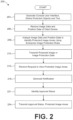
- FIG. 2 shows a flowchart 200 that illustrates functionality performed by components of the networked environment 100 . While the actions are discussed with respect to the management service 120 , certain aspects are performed by other components of the networked environment.
- the management service 120 can generate a console user interface to define protected locations 131 , protected objects 114 , and protected text or character strings.
- the protected locations 131 can be defined using one or more of GPS location data, WiFi position data, BLE beacon position data, VPS position data, LiFi position data, and VLC position data. This can include associating a protected location 131 with one or more proximity devices 113 .
- Known locations for protected objects 114 and character strings can also be defined.
- Protected objects 114 and character strings can also be associated with a nearby or specifically-assigned and located proximity device 113 .
- the console user interface of the management service 120 can further include user interface elements to define protected object recognition rules 129 and protected character recognition rules 130 .
- the protected object recognition rules 129 and protected character recognition rules 130 can include rules that are used in conjunction with image analysis techniques including optical character recognition to identify protected objects 114 and character strings using image data 157 and position data 158 captured and collected using the client device 109 .
- the management service 120 can generate a user interface through which a user can upload or provide network locations or uniform resource links (URLs) for images, three dimensional models, and trained object recognition models for a protected object.
- the management service 120 can train a recognition model of the protected object recognition rules 129 to identify the protected object 114 .
- the management service 120 can also receive pre-trained object recognition models that are uploaded or linked using a network location.
- the management service 120 can include a console user interface through which a user can define protected character strings to include in the protected character recognition rules 130 .
- the management service 120 can receive image data 157 and position data 158 of the client device.
- the image data 157 and position data 158 can be received as a request to identify protected objects 114 and protected image areas.
- the managed camera application 142 can transmit the request so it can generate a live AR based camera user interface.
- the management service 120 can receive image data 157 and position data 158 as part of a request to generate and return a protected image 151 .
- the management service 120 can analyze the image data 157 and position data 158 to identify protected image areas.
- the management service 120 can analyze the image data 157 and position data 158 according to the image protection rules 128 that are defined for the enterprise.
- the management service 120 can use the image data 157 , and in some examples the position data 158 , as inputs to the protected object recognition rules 129 to generate outputs that indicate protected image areas that depict protected objects 114 in a portion of an image.
- the management service 120 can use the image data 157 , and in some examples the position data 158 , as inputs to the protected character recognition rules 130 to generate outputs that indicate protected image areas that depict protected character strings in a portion of the image.
- the management service 120 can generate a protected image 151 that protects the protected image areas as described.
- the protected image 151 can include unencrypted image data 153 that obscures protected image areas.
- the protected image 151 can also include protected image data 155 .
- the protected image data 155 can include encrypted image data corresponding to a protected version of the protected image areas, along with an associated protection type or level for each protected image area.
- the protected image data 155 can include position data 158 and other information that can be used to simulate or regenerate the protected image area based on previously captured and stored images stored in the data store 123 .
- the management service 120 can transmit the protected image 151 or image protection data 159 to the client device 109 .
- the managed camera application 142 can receive the image protection data 159 , including a specification of protected image areas that depict protected character strings in a portion of the image.
- the managed camera application 142 can use the information to generate an AR based camera user interface.
- the AR based camera user interface can also generate a protected image 151 using the information received from the management service 120 .
- the protected image 151 can be transmitted to another user of another client device 109 .
- the management service 120 can receive a request to view protected image areas of a protected image 151 .
- a managed viewer application 145 executed on a client device 109 can transmit the request.
- the management service 120 can automatically respond, such as situations where the managed viewer application 145 is confirming that it includes up-to-date the permissions, role, organizational group and subgroups for a user account of a user logged into the client device 109 .
- the management service 120 can generate a notification of the request to view protected image areas of the protected image 151 .
- the notification can be generated and transmitted as a notification message to a client device 109 of an administrative or other user that has authority to approve or disapprove the request.
- the notification can also be generated as an update to a console user interface that is accessible to the administrative user.
- the notification and notification message can identify a protected location 131 associated with the protected image areas, a particular protected object 114 , and any protected character strings or text that is depicted in the protected image 151 .
- the notification and notification message can include the protected image 151 .
- the protected image 151 included in the notification can show, or enable the administrative user to reveal, the decrypted protected image areas as originally captured.
- the notification message can also include a link to view the notification within the console user interface of the management service 120 .
- the management service 120 can identify an approval status for the request to view protected image areas of the protected image 151 .
- the approval status can indicate approval or disapproval of the request.
- the management service 120 can identify that the administrative user has selected a user interface element through the console user interface that indicates administrative approval or disapproval of the request.
- the management service 120 can transmit the approval status to the managed viewer application 145 .
- the management service 120 can also transmit protected image areas to the managed viewer application 145 .
- the protected image areas transmitted can include the protected image areas as originally captured or can include reproduced protected image areas that are reproduced based on the location of the protected image.
- the request to view protected image areas can include position data 158 including location and orientation data for the client device 109 , and the unencrypted image data 153 .
- the management service 120 can regenerate, based on a history of images captured and stored in the data store 123 , or the protected image areas.
- the originally captured protected image areas can be identified based on a globally unique image identifier of the protected image 151 .
- the globally unique identifier can be unique among other images taken by all client devices 109 of the enterprise.
- the managed camera application 142 can generate the unique image identifier, and in other examples, the managed camera application 142 can request a unique image identifier from the management service 120 .
- the managed camera application 142 can transmit all images captured to the management service 120 . These can include protected images 151 and images that are captured and unprotected (for example, those without any protected image areas).
- Each protected image 151 can be stored by the management service 120 in the data store 123 in association with a unique image identifier.
- the protected image data 155 is stored on the management service 120 and only provided to the managed viewer application 145 for temporary viewing.
- the client device 109 can prevent or disable screenshotting of the managed viewer application 145 , or generally for the client device 109 .
- FIG. 3 shows a flowchart 300 that illustrates functionality performed by components of the networked environment 100 . While the actions are discussed with respect to the managed camera application 142 , certain aspects are performed by other components of the networked environment.
- the managed camera application 142 can generate an AR camera user interface.
- the AR camera user interface can update constantly or periodically on a display of the client device 109 .
- the managed camera application 142 can generate the AR camera user interface to include a number of overlays or AR user interface elements.
- the AR user interface elements can be generated relative to a protected image area. For example, to obscure the protected image area, or reduce or eliminate it from view.
- the managed camera application 142 can be the only camera application that is permitted to be used on the client device 109 , according to the compliance rules 127 enforced using the management agent 139 .
- the management agent 139 can disable all other camera applications.
- the management agent 139 can also intercept a request to launch another camera application, such as, a native camera application and instead can launch the managed camera application 142 .
- the managed camera application 142 can capture image data 157 and position data 158 for the client device 109 .
- the AR camera user interface can be generated using a field of view of the camera of the client device 109 .
- the managed camera application 142 can include all data and rules required to generate the AR camera user interface, including the image protection rules 128 , compliance rules 127 , and other information.
- Some client devices 109 may have insufficient storage or processor capacity to process the image data using the image protection rules 128 .
- Some implementations can rely on the management service 120 for aspects of image processing using the image protection rules 128 .
- Other implementations involve both the managed camera application 142 and the management service 120 . While certain aspects of image recognition are discussed as performed by either the managed camera application 142 or the management service 120 , the task can be separated such that each performs any predetermined set of the functionalities discussed while the other performs another set of functionalities, among the various embodiments.
- the managed camera application 142 can receive the protected image 151 or image protection data 159 from the management service 120 .
- the managed camera application 142 can receive the image protection data 159 , including a specification of protected image areas that depict protected character strings in a portion of the image.
- the managed camera application 142 can update the AR camera user interface to include AR user interface elements.
- the managed camera application 142 can use AR user interface elements as an overlay on the protected image areas in a live camera view as the client device 109 is repositioned.
- the AR user interface elements can outline or otherwise indicate protected image areas, partially obscure protected image areas, or completely obscure protected image areas in the live camera view of the managed camera application 142 . This can provide a preview of what the captured protected image 151 will look like if the viewing user does not have sufficient permissions to view the protected image area.
- the protected image areas can be shown to include a protection level, protection type, role, organizational group, or subgroup that is required in order to either capture the image as an unmodified image and/or view the protected locations 131 once captured as a protected image 151 .
- the managed camera application 142 can disable capture of any image until the protected image areas are no longer in the image, at which point, the capture user interface element can be enabled, and an unmodified image can be captured.
- the managed camera application 142 can capture and store a protected image 151 .
- a user can select an image capture element or a button in the AR camera user interface.
- the managed camera application 142 can generate a protected image 151 based on the image or view shown at the point of capture.
- a protected image 151 can include one or more files or data structures that include unencrypted image data 153 .
- the protected image 151 can also include protected image data 155 .
- the unencrypted image data 153 can include an image that includes at least one obscured protected image area.
- the obscured protected image areas can be stored such that the protected image area is replaced with a replacement area with a particular color, a processed version of the protected image area, or another replacement area.
- the unencrypted image data 153 can be viewed using a standard image viewing application, using the managed viewer application 145 , or through a user interface of the management service 120 . Even if no protected image data 155 is included in the protected image 151 , the unencrypted image data 153 can be considered protected since the protected image areas are replaced and unrecoverable using the unencrypted image data 153 alone.
- the protected image data 155 can include an encrypted version of a protected image area that is encrypted using a predetermined cipher or key. Asymmetrical or symmetrical encryption can be used.
- the protected image data 155 can be included in the protected image 151 so that the managed viewer application 145 and the management service 120 can enforce permissions according to the image protection rules 128 . For example, the managed viewer application 145 can determine that a user is authorized to view a protected image area, decrypt the encrypted protected image area, and regenerate the protected image 151 to include the originally captured and unedited protected image area.
- the protected image data 155 can alternatively include location, orientation, and other position data 158 for the client device 109 at capture time. This can enable the management service 120 or the managed viewer application 145 to reproduce or regenerate the protected locations 131 of an image based on previously collected images taken from a similar position and stored in the data store 123 .
- the protected image 151 can be transmitted to another client device 109 for viewing using any viewing application for unencrypted image data 153 portions.
- FIG. 4 shows a flowchart 400 that illustrates functionality performed by components of the networked environment 100 . While the actions are discussed with respect to the managed viewer application 145 , certain aspects are performed by other components of the networked environment.
- the managed viewer application 145 can determine whether a user is authorized to view a protected image area. For example, the user or user account can be authorized to view the protected image area if the organizational group, subgroup, and role of the user account is mapped to a protection level or protection type indicated for a protected image area, according to the permissions, the compliance rules 127 , and a compliance status of the client device 109 . If the user is authorized to view protected image areas, the process moves to step 415 . Otherwise the process moves to step 412 .
- the managed viewer application 145 can retrieve and decrypt protected image data 155 for the protected image areas.
- the protected image 151 includes the protected image data 155 as encrypted data. Encrypted protected image data 155 can be stored in the data store 123 of the management service 120 such that the managed viewer application 145 can request and receive this data from the management service 120 .
- the managed camera application 142 can disable an image capture user interface element 512 until the client device 109 is repositioned to exclude the protected object 114 from the field of view.
- the image capture user interface element 512 can be enabled, and a user of the client device 109 can take a picture.
- an icon or indicator is provided relative to the image capture user interface element 512 indicating that the image capture is disabled.
- the image capture user interface element 512 can be removed, hidden, or can have decreased opacity to indicate that the image capture is disabled.
- the indicator icon can change, for example from an X to a check mark or another type of icon, indicating that the image capture is enabled.
- FIG. 6 A illustrates another example of an AR camera user interface of a managed camera application 142 , which is rendered for display on a client device 109 .
- the field of view of the camera of the client device 109 is reproduced along with AR user interface elements.
- AR objects 606 and 609 indicate the protected image areas without obscuring them or providing a preview of what a captured protected image 151 will look like.
- the AR object 606 can be generated in response to detecting a character, character string, or symbol according to the protected character recognition rules 130 .
- the character string can be written on a whiteboard, blackboard, a display device, or any object. In some examples, only the screen area of the protected character string is designated a protected image area.
- the managed camera application 142 can identify that the character string is shown on a protected object 114 that corresponds to a whiteboard, blackboard, television, monitor, or another protected object 114 based on image analysis and object detection, and can designate the larger image area of the whole protected object 114 as the protected image area.
- FIG. 6 B illustrates another example of an AR camera user interface of a managed camera application 142 , which is rendered for display on a client device 109 .
- the field of view of the camera of the client device 109 is reproduced along with AR user interface elements.
- AR objects 612 and 615 indicate protected image areas using a processed version of the originally captured protected image areas.
- the AR objects 612 and 615 can obscure the protected image areas without having a jarring or distracting object in the image. This can provide a preview of what a captured protected image 151 will look like.
- the AR object 615 can indicate a protection level that is applied to the protected image area based on the obscured protected object 114 .
- the AR object 615 can also indicate a list of one or more roles, organizational groups, or subgroups that can view the protected image area.
- FIG. 7 A illustrates an example of a user interface of a managed viewer application 145 , which is rendered for display on a client device 109 .
- the managed viewer application 145 can view a protected image 151 .
- the protected image 151 is shown including an obscured protected image area 706 .
- the managed viewer application 145 can determine that an account of a viewer or user of the managed viewer application 145 is unauthorized to view the protected image area 706 , so the protected image area 706 can remain obscured.
- the managed viewer application 145 determines that an account of a viewer or user of the managed viewer application 145 is authorized to view the protected image area 706 , then the managed viewer application 145 can show an unobscured protected image area 706 .
- the managed viewer application 145 can determine that an account of a viewer or user of the managed viewer application 145 is unauthorized to view the protected image area 706 , so the protected image area 706 can remain obscured. However, if the managed viewer application 145 determines that an account of a viewer or user of the managed viewer application 145 is authorized to view the protected image area 706 , then the managed viewer application 145 can show an unobscured protected image area 706 .
- executable means a program file that is in a form that can ultimately be run by the processor.
- executable programs can be, for example, a compiled program that can be translated into machine code in a format that can be loaded into a random access portion of one or more of the memory devices and run by the processor, code that can be expressed in a format such as object code that is capable of being loaded into a random access portion of the one or more memory devices and executed by the processor, or code that can be interpreted by another executable program to generate instructions in a random access portion of the memory devices to be executed by the processor.
- each block can represent a module, segment, or portion of code that can include program instructions to implement the specified logical function(s).
- the program instructions can be embodied in the form of source code that can include human-readable statements written in a programming language or machine code that can include numerical instructions recognizable by a suitable execution system such as a processor in a computer system or other system.
- the machine code can be converted from the source code.
- each block can represent a circuit or a number of interconnected circuits to implement the specified logical function(s).
Landscapes
- Engineering & Computer Science (AREA)
- Physics & Mathematics (AREA)
- General Physics & Mathematics (AREA)
- Theoretical Computer Science (AREA)
- Multimedia (AREA)
- Radar, Positioning & Navigation (AREA)
- Remote Sensing (AREA)
- Signal Processing (AREA)
- Health & Medical Sciences (AREA)
- Bioethics (AREA)
- General Health & Medical Sciences (AREA)
- Automation & Control Theory (AREA)
- Computer Hardware Design (AREA)
- Computer Security & Cryptography (AREA)
- Software Systems (AREA)
- General Engineering & Computer Science (AREA)
- Medical Informatics (AREA)
- Databases & Information Systems (AREA)
- Processing Or Creating Images (AREA)
Abstract
Description
Claims (20)
Applications Claiming Priority (2)
| Application Number | Priority Date | Filing Date | Title |
|---|---|---|---|
| IN202141033002 | 2021-07-22 | ||
| IN202141033002 | 2021-07-22 |
Publications (2)
| Publication Number | Publication Date |
|---|---|
| US20230022133A1 US20230022133A1 (en) | 2023-01-26 |
| US11651527B2 true US11651527B2 (en) | 2023-05-16 |
Family
ID=84977504
Family Applications (1)
| Application Number | Title | Priority Date | Filing Date |
|---|---|---|---|
| US17/469,931 Active 2041-09-09 US11651527B2 (en) | 2021-07-22 | 2021-09-09 | Augmented reality based image protection in enterprise settings |
Country Status (1)
| Country | Link |
|---|---|
| US (1) | US11651527B2 (en) |
Families Citing this family (1)
| Publication number | Priority date | Publication date | Assignee | Title |
|---|---|---|---|---|
| WO2025073366A1 (en) * | 2023-10-05 | 2025-04-10 | Telefonaktiebolaget Lm Ericsson (Publ) | Methods and devices for protecting sensitive data |
Citations (5)
| Publication number | Priority date | Publication date | Assignee | Title |
|---|---|---|---|---|
| US20080030588A1 (en) * | 2006-08-04 | 2008-02-07 | Boss Gregory J | Disablement of Camera Functionality For a Portable Device |
| US20130142384A1 (en) * | 2011-12-06 | 2013-06-06 | Microsoft Corporation | Enhanced navigation through multi-sensor positioning |
| US20190128676A1 (en) * | 2017-11-02 | 2019-05-02 | Sony Corporation | Augmented reality based electronic device to provide location tagging assistance in an indoor or outdoor area |
| US20200077035A1 (en) * | 2018-08-28 | 2020-03-05 | Baidu Online Network Technology (Beijing) Co., Ltd. | Video recording method and apparatus, electronic device and readable storage medium |
| US20200134222A1 (en) * | 2018-10-30 | 2020-04-30 | Citrix Systems, Inc. | Protecting Screenshots of Applications Executing in a Protected Workspace Container Provided in a Mobile Device |
-
2021
- 2021-09-09 US US17/469,931 patent/US11651527B2/en active Active
Patent Citations (5)
| Publication number | Priority date | Publication date | Assignee | Title |
|---|---|---|---|---|
| US20080030588A1 (en) * | 2006-08-04 | 2008-02-07 | Boss Gregory J | Disablement of Camera Functionality For a Portable Device |
| US20130142384A1 (en) * | 2011-12-06 | 2013-06-06 | Microsoft Corporation | Enhanced navigation through multi-sensor positioning |
| US20190128676A1 (en) * | 2017-11-02 | 2019-05-02 | Sony Corporation | Augmented reality based electronic device to provide location tagging assistance in an indoor or outdoor area |
| US20200077035A1 (en) * | 2018-08-28 | 2020-03-05 | Baidu Online Network Technology (Beijing) Co., Ltd. | Video recording method and apparatus, electronic device and readable storage medium |
| US20200134222A1 (en) * | 2018-10-30 | 2020-04-30 | Citrix Systems, Inc. | Protecting Screenshots of Applications Executing in a Protected Workspace Container Provided in a Mobile Device |
Also Published As
| Publication number | Publication date |
|---|---|
| US20230022133A1 (en) | 2023-01-26 |
Similar Documents
| Publication | Publication Date | Title |
|---|---|---|
| US10936274B2 (en) | Selective screen sharing | |
| US10964110B2 (en) | Managed actions using augmented reality | |
| US10114968B2 (en) | Proximity based content security | |
| US9270678B2 (en) | Mediating resource access based on a physical location of a mobile device | |
| US10306315B2 (en) | Video streaming augmenting | |
| US10068071B2 (en) | Screen shot marking and identification for device security | |
| US8510814B2 (en) | Method and apparatus for network authentication of human interaction and user identity | |
| US20180091856A1 (en) | Video censoring | |
| US9172692B2 (en) | Systems and methods for securely transferring authentication information between a user and an electronic resource | |
| US20180144110A1 (en) | Multi-input user interaction and behavioral based authentication system for context aware applications | |
| JP2015508257A (en) | Security policy for device data | |
| US9576123B2 (en) | Pattern-based password with dynamic shape overlay | |
| CN103577761A (en) | Method and device for processing privacy data in mobile equipment | |
| Slocum et al. | That doesn't go there: Attacks on shared state in {Multi-User} augmented reality applications | |
| US20180173867A1 (en) | Method and electronic device for providing multi-level security | |
| US12321438B2 (en) | Multi-factor authentication via mixed reality | |
| US10250642B2 (en) | System, method and apparatus for fine-grained privacy specification and verification | |
| US11651527B2 (en) | Augmented reality based image protection in enterprise settings | |
| Prasada et al. | Employee attendance system using face recognition and GPS using local binary pattern histogram | |
| US11601276B2 (en) | Integrating and detecting visual data security token in displayed data via graphics processing circuitry using a frame buffer | |
| US10530762B2 (en) | Electing whether to unify passcodes | |
| US12463972B2 (en) | System and method to identify and reverse tampering of virtual images | |
| US10055599B2 (en) | Processing method for making electronic documents secure | |
| JP2022081071A (en) | Remote work information protection system | |
| US20170024125A1 (en) | Selective touch screen disablement for user interface control |
Legal Events
| Date | Code | Title | Description |
|---|---|---|---|
| AS | Assignment |
Owner name: VMWARE, INC., CALIFORNIA Free format text: ASSIGNMENT OF ASSIGNORS INTEREST;ASSIGNOR:SHETTY, ROHIT PRADEEP;REEL/FRAME:057419/0668 Effective date: 20210729 |
|
| FEPP | Fee payment procedure |
Free format text: ENTITY STATUS SET TO UNDISCOUNTED (ORIGINAL EVENT CODE: BIG.); ENTITY STATUS OF PATENT OWNER: LARGE ENTITY |
|
| STCF | Information on status: patent grant |
Free format text: PATENTED CASE |
|
| AS | Assignment |
Owner name: VMWARE LLC, CALIFORNIA Free format text: CHANGE OF NAME;ASSIGNOR:VMWARE, INC.;REEL/FRAME:067102/0395 Effective date: 20231121 |
|
| AS | Assignment |
Owner name: UBS AG, STAMFORD BRANCH, CONNECTICUT Free format text: SECURITY INTEREST;ASSIGNOR:OMNISSA, LLC;REEL/FRAME:068118/0004 Effective date: 20240701 |
|
| AS | Assignment |
Owner name: OMNISSA, LLC, CALIFORNIA Free format text: PATENT ASSIGNMENT;ASSIGNOR:VMWARE LLC;REEL/FRAME:068327/0365 Effective date: 20240630 |