US11651178B2 - Non-transitory storage medium storing plurality of instructions and print data generating apparatus - Google Patents
Non-transitory storage medium storing plurality of instructions and print data generating apparatus Download PDFInfo
- Publication number
- US11651178B2 US11651178B2 US17/514,189 US202117514189A US11651178B2 US 11651178 B2 US11651178 B2 US 11651178B2 US 202117514189 A US202117514189 A US 202117514189A US 11651178 B2 US11651178 B2 US 11651178B2
- Authority
- US
- United States
- Prior art keywords
- bitmap data
- printing
- bitmap
- condition
- image
- Prior art date
- Legal status (The legal status is an assumption and is not a legal conclusion. Google has not performed a legal analysis and makes no representation as to the accuracy of the status listed.)
- Active
Links
Images



Classifications
-
- H—ELECTRICITY
- H04—ELECTRIC COMMUNICATION TECHNIQUE
- H04N—PICTORIAL COMMUNICATION, e.g. TELEVISION
- H04N1/00—Scanning, transmission or reproduction of documents or the like, e.g. facsimile transmission; Details thereof
- H04N1/0035—User-machine interface; Control console
- H04N1/00405—Output means
- H04N1/00408—Display of information to the user, e.g. menus
- H04N1/0044—Display of information to the user, e.g. menus for image preview or review, e.g. to help the user position a sheet
-
- G—PHYSICS
- G06—COMPUTING OR CALCULATING; COUNTING
- G06K—GRAPHICAL DATA READING; PRESENTATION OF DATA; RECORD CARRIERS; HANDLING RECORD CARRIERS
- G06K15/00—Arrangements for producing a permanent visual presentation of the output data, e.g. computer output printers
- G06K15/02—Arrangements for producing a permanent visual presentation of the output data, e.g. computer output printers using printers
- G06K15/10—Arrangements for producing a permanent visual presentation of the output data, e.g. computer output printers using printers by matrix printers
- G06K15/102—Arrangements for producing a permanent visual presentation of the output data, e.g. computer output printers using printers by matrix printers using ink jet print heads
-
- G—PHYSICS
- G06—COMPUTING OR CALCULATING; COUNTING
- G06K—GRAPHICAL DATA READING; PRESENTATION OF DATA; RECORD CARRIERS; HANDLING RECORD CARRIERS
- G06K15/00—Arrangements for producing a permanent visual presentation of the output data, e.g. computer output printers
- G06K15/02—Arrangements for producing a permanent visual presentation of the output data, e.g. computer output printers using printers
- G06K15/18—Conditioning data for presenting it to the physical printing elements
- G06K15/1827—Accessing generic data, e.g. fonts
- G06K15/1831—Accessing generic data, e.g. fonts characterized by the format of the data
- G06K15/1832—Compressed bitmaps
-
- H—ELECTRICITY
- H04—ELECTRIC COMMUNICATION TECHNIQUE
- H04N—PICTORIAL COMMUNICATION, e.g. TELEVISION
- H04N1/00—Scanning, transmission or reproduction of documents or the like, e.g. facsimile transmission; Details thereof
- H04N1/0035—User-machine interface; Control console
- H04N1/00405—Output means
- H04N1/0048—Indicating an illegal or impossible operation or selection to the user
Definitions
- the following disclosure relates to a technique configured to control a print executing device.
- an ink-jet type serial printer configured to print by executing a plurality of scanning of a printer head
- a technique in which printing is executed on a sheet a length of which in a conveying direction in printing is greater than that of a normal printing medium such as the A4, B5, or L size, and the sheet may be hereinafter referred to as “an elongated sheet”.
- an ink-jet printer configured to print without creating margins of pages, so-called borderless printing, on a roll sheet.
- a size of bitmap data used in generating print data may increase. Due to this, when an application does not expect, in the middle of generating print data, generating a size of the bitmap data corresponding to the elongated sheet, there is a possibility of being unable to appropriately execute a bitmap generating process in which the bitmap data is generated by using vector data generated by the application. In this case, there is a possibility of being unable to appropriately generate the print data based on the vector data.
- An aspect of the disclosure relates to a technique capable of appropriately generating the print data based on the vector data generated by the application.
- a non-transitory storage medium stores a plurality of instruction readable by a computer of an information processing apparatus.
- the plurality of instruction When executed by the computer, the plurality of instruction cause the information processing apparatus to determine a generating condition for generating first bitmap data indicating a bitmap image such that a number of pixels of the bitmap image in a particular direction is less than or equal to a particular number, obtain the first bitmap data satisfying the generating condition by using the generating condition, the obtained first bitmap data being data generated based on vector data generated by an application program, determine a magnification condition for magnifying the first bitmap data based on condition information indicating a printing condition, obtain second bitmap data by using the magnification condition, the obtained second bitmap data being data generated by magnifying the first bitmap data based on the magnification condition, and generate print data by using the second bitmap data.
- a print data generating apparatus includes a display; and a controller.
- the controller is configured to determine a generating condition for generating first bitmap data indicating a bitmap image such that a number of pixels of the bitmap image in a particular direction is less than or equal to a particular number, obtain the first bitmap data satisfying the generating condition by using the generating condition, the obtained first bitmap data being data generated based on vector data generated by an application program, determine a magnification condition for magnifying the first bitmap data based on condition information indicating a printing condition, obtain second bitmap data by using the magnification condition, the obtained second bitmap data being data generated by magnifying the first bitmap data based on the magnification condition, and generate print data by using the second bitmap data.
- FIG. 1 is a block diagram illustrating a printing system of a first embodiment
- FIG. 2 A is a schematic diagram illustrating the printing system
- FIG. 2 B is a schematic diagram illustrating a printer head
- FIG. 3 is a flowchart of a printing process of the first embodiment
- FIG. 4 A illustrates one example of a UI screen for inputting printing instructions
- FIG. 4 B illustrates one example of a UI screen for inputting a size defined by a user
- FIG. 5 is a flowchart of a printing process of a second embodiment
- FIG. 6 A illustrates one example of a UI screen for printing settings of the second embodiment
- FIG. 6 B illustrates one example of a UI screen for detail settings of the second embodiment
- FIG. 7 A illustrates one example of a UI screen for an elongated sheet printing of the second embodiment
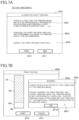
- FIG. 7 B illustrates one example of a UI screen for displaying a warning message of the second embodiment
- FIG. 8 illustrates one example of a preview recommendation screen of a third embodiment
- FIG. 1 is a block diagram illustrating a printing system 1000 of a first embodiment.
- the printing system 1000 includes a printing system 200 and a terminal device 300 as an image processing apparatus of the present embodiment.
- the printing system 200 and the terminal device 300 are connected to each other so as to be communicatable through a wired or wireless network NW.
- the terminal device 300 is a computer, for example, a personal computer or a smart phone, used by a user of the printing system 200 .
- the terminal device 300 comprises a CPU 310 as a controller of the terminal device 300 , a non-transitory storage medium 320 such as a hard disk drive, a transitory storage medium 330 such as a RAM, an operating unit 360 such as a mouse or a keyboard, a display 370 such as a liquid crystal display, and a communication unit 380 .
- the communication unit 380 includes a wired or wireless interface for connecting the network NW.
- the transitory storage medium 330 provides a buffer area 331 for the CPU 310 .
- a plurality of computer programs specifically, an application program AP, a printer driver program DP, a rasterizing program RP, and an OS program OP are stored.
- the application program AP is a program configured to cause the CPU 310 to execute a function of processing image data, for example, a program capable of executing a word processing function, or a program capable of executing a document viewer function.
- the application program AP includes a program that executes a function in which the program starts the printer driver program DP and instructs the printer driver program DP to print an image indicated by the image data processed by the application.
- a function executed by the CPU 310 by executing the application program AP may be hereinafter referred to as “an application”
- the application program AP is provided by a manufacture of the application program AP in the manner of, for example, downloading from a server, or being stored in DVD-ROM, and so on.
- the printer driver program DP is a program causes, in accordance with an instruction of the application, the CPU 310 to execute a function in which the CPU 310 causes the printing system 200 to print images by using image data obtained from the application the application.
- a function executed by the CPU 310 by executing the printer driver program DP may be hereinafter referred to as “a printer driver”
- the printer driver program DP is provided by a manufacture of the printing system 200 in the manner of, for example, downloading from a server, or being stored in DVD-ROM, and so on.
- the OS program OP is a program causes the CPU 310 to execute a function as an operating system (OS).
- OS is Windows (registered trademark).
- the OS program may be Android (registered trademark), iOS (registered trademark), or other programs.
- the rasterizing program RP is a program that causes the CPU 310 to execute a function in which the CPU 310 executes a process of converting image data (referred to as a vector data) written in a predetermined description language to bitmap data such as RGB image data (rasterizing).
- the vector data is a set of rendering commands.
- the rasterizing program RP is GDI (Graphic Device Interface) provided as a component of Windows OS.
- the rasterizing program RP may be a program corresponding to other OS programs.
- a function executed by the CPU 310 by executing the rasterizing program RP may be referred to as “a rasterizer”.
- the OS program OP and the rasterizing program RP are provided by a manufacture of the OS program OP in the manner of, for example, being installed on a non-transitory storage medium 320 when the terminal device 300 is manufactured.
- the OS program OP and the rasterizing program RP may be provided in the manner of downloading from a server, or being stored in DVD-ROM and so on.
- the printing system 200 comprises, for example, a printing mechanism 100 as a print executing device, a CPU 210 as a controller for the printing mechanism 100 , the non-transitory storage medium 220 such as a hard disk drive, a transitory storage medium 230 such as a hard disk, or a flash memory, an operating unit 260 such as a button, or a touch screen for receiving user operations, a display 270 such as a liquid crystal display, and a communication unit 280 .
- the printing system 200 is connected to external devices, for example, a terminal device of a user (which is not illustrated) through the communication unit 280 so as to be communicatable with the external devices.
- the transitory storage medium 230 provides a buffer area 231 in which various kinds of intermediate image data generated when the CPU 210 executes processes is temporary stored.
- the non-transitory storage medium 220 stores a computer program CP.
- the computer program CP is a control program for controlling the printing system 200 .
- the computer program CP may be provided in a state in which the computer program CP is stored in the non-transitory storage medium 220 when the printing system 200 is shipped. Alternatively, the computer program CP may be provided in the manner of downloading from a server, or being stored in DVD-ROM and so on.
- the CPU 210 controls the printing mechanism 100 so as to execute a printing process, which is described below, by executing the computer program CP.
- the printing mechanism 100 executes printing by ejecting ink (liquid droplets) of cyan (C), magenta (M), yellow (Y), and black (K).
- the printing mechanism 100 comprises a printer head 110 , a head driver 120 , a main scanning unit 130 , and a conveying unit 140 .
- FIG. 2 A is a diagram illustrating a schematic configuration of the printing mechanism 100 .
- the main scanning unit 130 includes a carriage 133 mounting the printer head 110 , a slidable shaft 134 that supports the carriage 133 such that the carriage 133 can reciprocate in a main scanning direction (a X-axis direction in FIG. 2 A ).
- the main scanning unit 130 puts the carriage 133 into reciprocation movement along the slidable shaft 134 by a power of a main scanning motor, which is not illustrated.
- main scanning in which the printer head 110 is reciprocated with respect to a sheet M in the main scanning direction is executed.
- the conveying unit 140 conveys the sheet M in the conveying direction (+Y orientation in FIG. 2 ), intersecting the main scanning direction, while supporting the sheet M.
- the conveying unit 140 comprises a platen 145 , an upstream roller pair 142 , a downstream roller pair 141 .
- an upstream side in the conveying direction ( ⁇ Y orientation) will be simply referred to as “the upstream side”
- a downstream side in the conveying direction (+Y orientation) will be simply referred to as “the downstream side”.
- the upstream roller pair 142 support the sheet M at an upstream side ( ⁇ Y orientation) of the printer head 110
- the downstream roller pair 141 support the sheet M at a downstream side (+Y orientation) of the printer head 110
- the platen 145 is disposed at a position between the upstream roller pair 142 and the downstream roller pair 141 , and the position opposing a nozzle forming surface 111 of the printer head 110 .
- the sheet M is conveyed by driving the downstream roller pair 141 and the upstream roller pair 142 by a conveying motor, which is not illustrated.
- the head driver 120 ( FIG. 1 ) drives the printer head 110 by supplying a driving signal to the printer head 110 in the middle of main scanning of the printer head 110 by the sheet scanning unit 130 .
- the printer head 110 ejects ink on the sheet conveyed by the conveying unit 140 in accordance with the driving signal so as to form dots on the sheet.
- FIG. 2 B illustrates a configuration of the printer head 110 which is viewed from ⁇ Z orientation (from a lower side in FIG. 2 A ).
- a plurality of nozzle rows each constituted by a plurality of nozzles, which are, a nozzle row NC, a nozzle row NM, a nozzle row NY, and a nozzle row NK respectively eject ink of cyan (C), magenta (M), yellow (Y) and black (K) are formed on the nozzle forming surface 111 of the printer head 110 .
- Each of the nozzle rows NC, NM, NY, and NK includes the plurality of nozzles NZ arranged in the conveying direction.
- the plurality of nozzles NZ are arranged in the conveying direction with a predetermined nozzle spacing NT such that positions of any two of the plurality of nozzles NZ in the conveying direction (+Y orientation) are different from each other.
- the nozzle spacing NT is a length in the conveying direction AR between two adjacent nozzles in the conveying direction of the plurality of nozzles NZ.
- the CPU 210 controls the printing mechanism 100 described above to execute printing. That is, the CPU 210 executes partial printing to form dots on the sheet M in which the CPU 210 controls the printer head 110 to eject ink while controlling the main scanning unit 130 to execute main scanning, and sub canning in which the CPU 210 controls the conveying unit 140 to convey the sheet M in the conveying direction, and the CPU 210 executes the partial printing and the sub scanning alternately and a plurality of times so as to print a printing image on the sheet M.
- the user inputs a printing instruction to the application when printing the image based on image data being processed by the application being executed in the terminal device 300 .
- the application starts a printer driver. That is, the CPU 310 executes the printer driver program DP.
- the printer driver i.e., the CPU 310 ) starts the printing process.
- FIG. 3 is a flowchart of the printing process of a first embodiment.
- the printer driver displays a user interface screen (a UI screen) on the display 370 .
- FIGS. 4 A and 4 B each illustrates one example of the UI screen for inputting the printing instruction.
- a UI screen WI 1 in FIG. 4 A includes input elements for designating one effective selection, among a plurality of selections, corresponding to each of a plurality of setting items related to printing.
- the UI screen WI 1 includes a pull-down menu PM 1 for inputting condition information related to printing among a plurality of selections, a plurality of radio buttons RB 1 -RB 6 , and a plurality of buttons, BTS, BT 1 , BT 2 .
- the pull-down menu PM 1 is an inputting element for inputting designation of a size of the sheet M as a printing medium.
- the user can input, as a selection, a standard sized shortened sheet such as A4, A3, an elongated sheet (for example, a sheet having a size of 297 mm ⁇ 1200 mm), and a sheet having a size defined by the user.
- the sheet having the size defined by the user is a sheet having the size that has been registered in advance by the user.
- the user can register a sheet having any sizes through a UI screen WI 2 , which is described below ( FIG. 4 B ), that is displayed when the buttons BTs is pushed.
- the radio buttons RB 1 , RB 2 are inputting elements for inputting an instruction of whether the sheet is printed vertically, or horizontally.
- Radio buttons RB 3 , RB 4 are inputting elements for inputting designation of a color mode in printing. In the present embodiment, selection of the color mode is selected among two kinds of modes, a monochrome mode and a color mode.
- Radio buttons RB 5 , RB 6 are inputting elements for inputting designation of printing mode. In the present embodiment, selection of the printing mode is selected among two kinds of modes, a normal quality mode and a high quality mode. Image quality of an image printed by the high quality mode is higher that of an image printed by the normal quality mode.
- the UI screen WI 2 in FIG. 4 B is a screen for registering a size of the sheet M by the user.
- the UI screen WI 2 includes two radio buttons RB 7 , RB 8 , two input fields IS 1 , IS 2 , and two buttons BT 3 , BT 4 .
- the radio buttons RB 7 , RB 8 are inputting elements for inputting designation of a unit used when inputting a size of the sheet M. In the present embodiment, selection of the unit is selected among two kinds of units, a millimeter and an inch.
- the input field IS 1 is an inputting element for inputting a value of a width of the sheet.
- the input field IS 2 is an inputting element for inputting a value of a height of the sheet.
- the printer driver obtains printing condition information indicating conditions related to printing through the UI screen WI 1 .
- Information indicating selections designated on the UI screen WI 1 at a time when the printing button BT 1 is pushed is obtained as the effective printing condition information corresponding to the setting items.
- the printing condition information includes information indicating a size of the sheet M, information indicating a printing direction of the sheet, and information indicating the printing mode.
- the printer driver specifies a length B of the sheet M in the conveying direction AR based on the printing condition information.
- the length B of the sheet M in the conveying direction AR is specified based on the information indicating the size of the sheet M and the information indicating the printing direction of the sheet (printing vertically, or horizontally).
- a height of the sheet M is the length B of the sheet in the conveying direction AR
- a width of the sheet M is the length B of the sheet in the conveying direction AR.
- a value indicating the length B of the sheet in the conveying direction AR among memorized heights or widths (the unit of length is, for example, a millimeter) of each standard sized printing medium in advance is specified.
- a value indicating the length B of the sheet in the conveying direction AR among the height and the width of the sheet registered by the user is specified.
- the printer driver determines whether the specified length B of the sheet M in the conveying direction AR is greater than a reference length A.
- the reference length A is a length of the sheet M in the conveying direction AR corresponding to an upper limit of a length in the conveying direction AR of a printing image to be printed on the sheet M (the unit is, for example, a pixel).
- the upper limit is a maximum value (32767) of an integer that can be expressed by 2 bytes.
- the reference length A is a value in accordance with printing resolution C in the conveying direction, and each reference length A corresponding to printing resolution C is stored in advance.
- the printer driver determines printing resolution in the conveying direction based on the selected printing mode, and determines whether the length B of the sheet M in the conveying direction AR is greater than the reference length A corresponding to the determined printing resolution of the selected printing mode.
- the reference length A is about 1400 mm.
- the fact that the length of the sheet M in the conveying direction AR is greater than the reference length A means that a length of a printing image in the conveying direction AR is greater than the upper limit.
- the rasterizing conditions include other conditions, for example, resolution for rasterizing in the main scanning direction, sizes (the numbers of pixels in the main scanning direction and the conveying direction), the number of colors (the number of levels of gray/color, and the like). These conditions are determined based on the printing condition information obtained at S 15 .
- the printer driver causes the OS program OP to generate intermediate image data based on the determined rasterizing conditions.
- the intermediate image data is vector data written in rendering commands interpretable by the rasterizer.
- the intermediate image data is a file in EMF (Enhanced Metafile) format.
- the printer driver passes the rasterizing conditions to the OS program OP, and instructs the OS program OP to generate intermediate image data.
- the OS program OP obtains the vector data (a set of rendering commands) indicating an image to be printed from the application, generates intermediate image data by using the vector data and the rasterizing conditions obtained from the printer driver.
- the printer driver causes the rasterizer to generate bitmap data based on the intermediate image data generated by the OS program OP.
- the rasterizer converts the intermediate image data into bitmap data in accordance with an instruction from the printer driver.
- bitmap data is RGB image data in which each of pixels includes a RGB value.
- the RGB value is, for example, a color value of RGB color system including three component values of red, green and blue.
- the number of pixels in the conveying direction of the bitmap image indicated by the generated bitmap data is equal to or less than the above described upper limit.
- the printer driver determines the rasterizing conditions including resolution for rasterizing. In this case, when the printer driver executes rasterizing by using the original printing resolution corresponding to the printing mode, the number of pixels of the generated bitmap image in the conveying direction becomes greater than the upper limit. Accordingly, the printer driver determines resolution for rasterizing such that the number of pixels of the generated bitmap image in the conveying direction does not become greater than the upper limit.
- the reduced bitmap image that is reduced in the conveying direction AR by (A/B) is generated, comparing with rasterizing by using the original printing resolution.
- resolution for rasterizing in the main scanning direction is determined such that the bitmap image is also reduced in the main scanning direction by (A/B), comparing with rasterizing by using the original printing resolution.
- the printer driver causes the OS program OP to generate intermediate image data based on the determined rasterizing conditions.
- the printer driver causes the rasterizer to generate bitmap data based on the intermediate image data generated by the OS program OP.
- the rasterizer converts the intermediate image data into the bitmap data (in the present embodiment, the RGB image data) in accordance with an instruction from the printer driver.
- a size of the bitmap image indicated by the generated bitmap data is less than that of an image to be printed.
- the number of pixels of the bitmap image in each of the conveying direction and the main scanning direction is calculated by multiplying the number of pixels of the image to be printed in each of the conveying direction and the main scanning direction by (A/B).
- the number of pixels in the conveying direction of the reduced bitmap image is identical with the upper limit described above.
- the printer driver determines a magnification factor E of the generated bitmap data.
- the magnification factor E is determined such that a size of the enlarged bitmap data is identical with a size of the image to be printed.
- the printer driver generates enlarged bitmap data that is generated by enlarging the original bitmap data by using the determined magnification factor E.
- a size of the enlarged bitmap image indicated by the enlarged bitmap data is a size of the image to be printed.
- a magnifying process is executed by using interpolation operation, for example, Bicubic interpolation, Bilinear interpolation, and so on.
- the printer driver generates print data indicating the printing image by using the bitmap data generated at S 40 , or the enlarged bitmap data generated at S 65 .
- the printer driver executes a color conversion process with respect to the bitmap data (the RGB image data).
- the color conversion process is a process of converting RGB values of a plurality of pixels included in the RGB image data into CMYK values.
- the CMYK values are color values of CMYK color system including component values corresponding to ink used in printing (in the present embodiment, component values of C, M, Y, K).
- the color conversion process is executed by referring a well-known look-up table establishing a relationship between, for example, the RGB value and the CMYK value.
- the printer driver generates print data (which may be referred to as dot data) by executing a halftone process with respect to the image data to which the color conversion process has been processed.
- the print data is data representing a dot-forming state of each of the color components of CMYK for each of the pixels.
- a value of each of the pixels of the print data represents the dot-forming state such as two levels of “no dots” and “with dots”, or four levels of “no dots”, “small dots”, “medium dots”, and “large dots”.
- the halftone process is executed by using a well-known method, such as a dither method and an error diffusion method.
- the printer driver causes the printing system 200 to print by using the print data. For example, the printer driver generates a plurality of pieces of partial print data by dividing the print data such that the printer driver causes the printing system 200 to execute the partial printing a plurality of times.
- the printer driver transmits, to the printing system 200 , control data indicating a conveyance amount of the sheet M, a speed of main scanning, and so on in addition to the partial print data.
- the printing system 200 prints the image on the sheet M in accordance with the partial print data and the control data.
- the printer driver program DP causes the CPU 310 to executes a function of determining the rasterizing conditions (the process executed at S 45 in FIG. 3 ), a function of obtaining the bitmap data satisfying the rasterizing conditions by using the rasterizer (the process executed at S 50 , S 55 in FIG. 3 ), a function of determining a magnifying condition for magnifying the bitmap data based on the printing condition information (the process executed at S 60 in FIG. 3 ), a function of obtaining the enlarged bitmap data by using the magnifying condition (the process executed at S 65 in FIG. 3 ), and a function of generating the print data by using the enlarged bitmap data (the process executed at S 70 in FIG. 3 ) such that the number of pixels of the bitmap image in the conveying direction becomes equal to or less than the upper limit.
- bitmap data of the bitmap image there is a possibility of being unable to appropriately generate the bitmap data of the bitmap image, the number of pixels in the conveying direction of which becomes greater than the upper limit due to specifications of any of the application program AP, the OS program OP, and the rasterizing program RP, or any combination of the application program AP, the OS program OP, and the rasterizing program RP.
- the number of pixels in the conveying direction corresponding to the elongated sheet becomes greater than the upper limit.
- the rasterizing program RP when the rasterizing program RP generates the bitmap data of the bitmap image having pixels corresponding to the elongated sheet, there is a possibility of causing a problem such as a chip in a part of the bitmap image indicated by the generated bitmap data.
- the rasterizing conditions are determined such that the number of pixels of the bitmap image in the conveying direction becomes equal to or less than the upper limit, the number of pixels in the conveying direction of the bitmap data generated by the rasterizing program RP is suppressed equal to or less than the upper limit. Accordingly, it is possible to prevent occurrence of the problem.
- the print data is generated by using the enlarged bitmap data generated by magnifying the bitmap data, it is possible to appropriately generate the print data based on the vector data generated by the application.
- the printer driver determines a generating condition such that the number of pixels of the bitmap image in the conveying direction is identical with the upper limit.
- the printer driver determines a generating condition such that the number of pixels of the bitmap image in the conveying direction is identical with the upper limit.
- the printing condition information obtained at S 15 includes information indicating the length of the sheet M in the conveying direction AR ( FIG. 4 A ).
- the printer driver determines the rasterizing conditions such that the number of pixels of the bitmap image in the conveying direction is equal to or less than the upper limit at S 45 in FIG. 3 .
- the printer driver determines the magnifying condition at S 60 in FIG. 3 such that the enlarged bitmap data, the number of pixels in the conveying direction of which corresponds to the length in the conveying direction AR of the printing image to be printed.
- the rasterizing conditions determined at S 45 in FIG. 3 includes the resolution D in the conveying direction for generating the bitmap data
- the magnifying condition determined at S 60 in FIG. 3 includes the magnification factor E for magnifying the bitmap data.
- the printer driver causes the rasterizing program RP that is an external conversion program configured to convert the vector data into the bitmap data to generate the bitmap data, and obtains the bitmap data at S 50 in FIG. 3 .
- the rasterizing program RP is an external conversion program configured to convert the vector data into the bitmap data to generate the bitmap data, and obtains the bitmap data at S 50 in FIG. 3 .
- the printer driver generates the enlarged bitmap data by executing, by itself, the magnifying process of magnifying the bitmap data generated the rasterizing program RP, and obtains the enlarged bitmap data.
- the printer driver generates the enlarged bitmap data by executing, by itself, the magnifying process of magnifying the bitmap data generated the rasterizing program RP, and obtains the enlarged bitmap data.
- bitmap data generated at S 55 in FIG. 3 of the present embodiment is an example of a first bitmap data
- the enlarged bitmap data generated at S 65 in FIG. 3 is an example of a second bitmap data.
- conveying direction of the present embodiment is an example of a particular direction
- the upper limit of the number of pixels in the conveying direction is an example of a particular number.
- FIG. 5 is a flowchart of a printing process of a second embodiment.
- FIGS. 6 A, 6 B and FIGS. 7 A, 7 B are diagrams illustrating examples UI screens of the second embodiment. Details are described below, however, the printer driver can obtain various instructions input by the user through the UI screens.
- the printing process in FIG. 5 is executed.
- Other configurations in the second embodiment for example, configurations in FIG. 1
- the printing process is executed by the CPU 310 of the terminal device 300 as similar to the first embodiment.
- the printer driver displays the UI screen on the display 370 .
- a main screen WI 1 b in FIG. 6 A is displayed on the display 370 .
- the main screen WI 1 b includes the pull-down menu PM 1 that is an inputting element for inputting condition information related to printing among a plurality of selections, the plurality of radio buttons RB 1 -RB 6 , and the plurality of buttons BTs, BT 1 , BT 2 .
- the UI screen WI 2 is FIG. 4 B is displayed.
- the user can register a sheet having any sizes as the sheet having the size defined by the user through the UI screen WI 2 ( FIG. 4 B ) that is displayed when the button BTs is pushed.
- the main screen WI 1 b in FIG. 6 A further includes a details setting button BTd and a checkbox CB 1 .
- the printer driver displays a details setting screen WI 3 b in FIG. 6 B on the display 370 .
- the checkbox CB 1 is an inputting element for inputting an instruction of whether a function (which is also referred to as a preview function) for displaying a preview screen WI 5 b ( FIG. 7 B ) that is a UI screen for displaying a print preview, which is described below and displayed before actual printing, is set to enable or disable.
- the details setting screen WI 3 b in FIG. 6 B is a UI screen for inputting detailed settings related to printing.
- the details setting screen WI 3 b includes an item list LS, a details setting area SA and an OK button BTS.
- the item list LS is a list including a plurality of setting items (for example, item lists IT 1 , IT 2 in FIG. 6 B ).
- In the details setting area SA inputting elements for inputting detailed settings and messages with respect to setting items set by using a selection field SF in the item list LS are displayed.
- the setting item IT 1 is an item for setting whether a resolution adjustment function for adjusting resolution is set to enabled or disabled.
- the resolution adjustment function is a function of executing S 20 -S 65 in FIG. 3 described in the first embodiment when the bitmap data is generated.
- the rasterizing conditions including the resolution D in the conveying direction for rasterizing are determined such that the number of pixels of the bitmap image in the conveying direction does not become greater than the upper limit, when the length B of the sheet M in the conveying direction AR is greater than the reference length A (S 25 in FIG. 3 : YES).
- the bitmap data indicating an image smaller than the image to be printed by a rasterizing process based on the rasterizing conditions is generated at S 50 , S 55 in FIG. 3
- the bitmap data indicating a size of the bitmap image to be printed by magnifying the bitmap data in accordance with the magnification factor E is generated at S 60 , S 65 in FIG. 3 .
- the bitmap data is generated by the processes in S 30 -S 40 in FIG. 3 even when the length B of the sheet M in the conveying direction AR is greater than the reference length A. Accordingly, in the case where the resolution adjustment function is set to disabled, there is a possibility that the number of pixels in the conveying direction of the bitmap image indicated by the bitmap data generated by the rasterizing process becomes greater than the upper limit. Accordingly, in the case where the resolution adjustment function is set to disabled, there is a possibility of causing a problem such as a chip in a part of the bitmap image indicated by the generated bitmap data when the length B of the sheet M in the conveying direction AR is greater than the reference length A, according to the application.
- FIG. 6 B illustrates a state in which a setting item IT 1 is selected in the item list LS.
- the details setting area SA includes the checkboxs CB 1 , CB 2 and the messages MS 1 , MS 2 .
- the checkbox CB 2 is an inputting element for inputting an instruction of whether the resolution adjustment function is set to enabled or disabled.
- the checkbox CB 1 is an inputting element for inputting an instruction of whether the preview function is set to enabled or disabled, and the inputting element which coincides with the checkbox CB 1 included in the main screen WI 1 b .
- the message MS 1 is a message for explaining the resolution adjustment function.
- the message MS 2 is a message for indicating that enabling the resolution adjustment function can solve the problem such as the chip in the part of the bitmap image.
- the printer driver sets each of the preview function and the resolution adjustment function to enabled or disabled in accordance with an input state of the checkboxs CB 1 , CB 2 in the details setting area SA at that time.
- the printer driver further dismisses the details setting screen WI 3 b , and returns the display 370 to a state in which the main screen WI 1 b is displayed.
- the printer driver determines whether the sheet having the size defined by the user is newly registered through the UI screen WI 2 . For example, when numerical values are input to the input fields IS 1 , IS 2 in the UI screen WI 2 ( FIG. 4 B ) and the OK button BT 3 in the UI screen WI 2 is pushed, it is determined that the sheet having the size defined by the user is registered. When it is determined that the sheet having the size defined by the user is not newly registered (S 105 :NO), the flow goes to S 130 .
- the printer driver determines whether the length B in the conveying direction AR of the registered sheet having the size defined by the user is greater than the reference length A.
- the reference length A is a length of the sheet M in the conveying direction AR corresponding to an upper limit of a length in the conveying direction AR of a printing image to be printed on the sheet M (the unit is, for example, a pixel).
- the printer driver displays a preview recommendation screen WI 4 B ( FIG. 7 A ) on the display 370 .
- the preview recommendation screen WI 4 b in FIG. 7 A is a UI screen for recommending the user to enable the preview function.
- the preview recommendation screen WI 4 b includes, for example, messages MS 3 -MS 5 , a YES button BT 6 , and a NO button BT 7 .
- the message MS 3 is a message for warning of a possibility of occurrence of a problem in the image to be printed when the length of the sheet M B in the conveying direction AR is greater than the reference length A.
- the message MS 4 is a message for recommending the user to check the image to be printed before printing by enabling the preview function.
- the message MS 5 is a message for confirming whether the preview function is set to enabled or disabled.
- the printer driver sets the preview function to enabled.
- the printer driver sets the preview function to disabled.
- the printer driver determines whether the printing instruction is input. For example, when the printing button BT 1 is pushed in the main screen WI 1 b , it is determined that the printing instruction is input. When the printing instruction is not input (S 130 :NO), the flow goes to S 100 , and the printer driver continues to display the UI screen such as the main screen WI 1 b . When the printing instruction is input (S 130 :YES), the flow goes to S 135 .
- the printer driver obtains the printing condition information indicating conditions related to printing through the UI screens such as the main screen WI 1 b.
- the printer driver determines whether the resolution adjustment function is set to enabled or disabled.
- the printer driver obtains the bitmap data based on the vector data generated by the application by executing S 20 -S 65 in FIG. 3 . That is, in this case, as described above, when the length B of the sheet M in the conveying direction AR is greater than the reference length A (S 25 in FIG. 3 :YES), the bitmap data is generated by processes of S 45 -S 65 in FIG. 3 , and when the length B of the sheet M in the conveying direction AR is equal to or less than the reference length A (S 25 in FIG. 3 :NO), the bitmap data is generated by processes of S 30 -S 40 in FIG. 3 . When the bitmap data is generated, the flow goes to S 180 .
- the printer driver obtains the bitmap data based on the vector data generated by the application by executing S 30 -S 40 in FIG. 3 . That is, in this case, as described above, even when the length B of the sheet M in the conveying direction AR is greater than the reference length A, or equal to or less than the reference length A, the bitmap data is generated by processes of S 30 -S 40 in FIG. 3 .
- the printer driver determines whether the preview function is set to enabled or disabled. When the preview function is set to disabled (S 150 :NO), the flow goes to S 180 .
- the printer driver displays a preview screen WI 5 b in FIG. 7 B on the display 370 . It is noted that a warning screen WI 6 b in FIG. 7 B is not displayed at this time point.
- the preview screen WI 5 b in FIG. 7 B includes a bitmap image RI as a preview image, a printing button BTB, and a cancel button BT 9 .
- the bitmap image RI is a screen displayed by the bitmap data obtained at S 145 .
- the 7 B includes a normal area NS and a white color area WS.
- the normal area NS is a hatched area in FIG. 7 B , and an area including objects such as letters, pictures, and graphics.
- the white color area WS is a not-hatched area in FIG. 7 B , and a white monochrome area (which may be referred to as white space).
- the white color area WS is an area appears in the case where the chip in the image occurs due to a problem of the rasterizing process, and does not appear in a case where the rasterizing process does not have the problem.
- the printer driver analyzes the bitmap data. For example, the printer driver searches a white raster line WL from a first end (a lower end in FIG. 7 B ) of the bitmap image RI in the conveying direction when printing to a second end of the bitmap image RI in the conveying direction.
- the white raster line WL is a raster line extending from one end to the other end of the bitmap image RI in a direction orthogonal to the conveying direction when printing (a left and right direction in FIG. 7 B ), and is the raster line L constituted by only white pixels.
- the white color area WS is an area constituted by a plurality of white raster line WL arranged in the conveying direction.
- the printer driver determines whether the bitmap image RI includes the white color area WS based on a result of analysis executed at S 160 .
- the printer driver determines that the bitmap image RI includes the white color area WS when a predetermined number or more of the white raster lines WL are detected on the lower end of the bitmap image RI.
- the printer driver determines that the bitmap image RI does not includes the white color area WS when the predetermined number or more of the white raster lines WL are not detected on the lower end of the bitmap image RI.
- the printer driver displays the warning screen WI 6 b in FIG. 7 B on the display 370 .
- S 170 is skipped. That is, in this case, the warning screen WI 6 b is not displayed.
- the warning screen WI 6 b in FIG. 7 B is displayed together with, for example, the preview screen WI 5 b .
- the warning screen WI 6 b in FIG. 7 B includes messages MS 6 , MS 7 and an OK button BT 10 .
- the message MS 6 is a message for indicating that the white color area WS is detected on the lower end of the bitmap image RI.
- the message MS 7 is a message for prompting the user to check the bitmap image RI in the preview screen WI 5 b , and to print again with the resolution adjustment function which is set to enabled when the bitmap image RI includes the problem.
- the OK button BT 10 is pushed in the warning screen WI 6 b , the printer driver dismisses the warning screen WI 6 b from the display 370 .
- the printer driver determines whether a print continuation instruction or a print interruption instruction is input.
- the printing button BT 8 is pushed in the preview screen WI 5 b , it is determined that the print continuation instruction is input.
- the cancel button BT 9 is pushed in the preview screen WI 5 b , it is determined that the print interruption instruction is input.
- the printer driver When the print continuation instruction is input (S 175 :YES), at S 180 , the printer driver generates the print data indicating the printing image by using the bitmap data generated at S 145 or S 147 .
- a generating process of the print data includes, for example, the color conversion process and the halftone process, as similar to S 70 in FIG. 3 .
- the printer driver causes the printing system 200 to execute printing by using the print data, as similar to S 75 in FIG. 3 . Specifically, the printer driver transmits, to the printing system 200 , control data in addition to partial print data for causing the printing system 200 to execute the partial printing a plurality of times, and ends the printing process.
- the terminal device 300 returns to a state in which the application is started and the printer driver is not started.
- the user for example, can start the printer driver again by inputting the printing instruction to the application. Then, the user, for example, can cause the printer driver to execute printing again by enabling the resolution adjustment function.
- the printer driver can obtain two kinds of the bitmap data, the generating condition of which are different from each other based on whether the resolution adjustment function is set to enabled or disabled. For example, when the length B of the sheet M in the conveying direction AR is greater than the reference length A, and the resolution adjustment function is set to enabled, at S 147 in FIG. 5 , the bitmap data is obtained by S 45 -S 55 in FIG. 3 . When the resolution adjustment function is set to disabled, at S 145 in FIG. 5 , the bitmap data is obtained by S 30 -S 40 in FIG. 3 .
- the bitmap data obtained when the resolution adjustment function is set to disabled has resolution higher than (in other words, having more pixels) that of the bitmap data obtained when the resolution adjustment function is set to enabled, and the magnifying process (s 60 , S 65 in FIG. 3 ) is not required.
- the magnifying process s 60 , S 65 in FIG. 3
- the printer driver obtains an instruction from the user whether the resolution adjustment function is set to enabled or disabled by displaying the details setting screen WI 3 b in FIG. 6 B . Then, at S 140 , S 145 , S 147 in FIG. 5 , the printer driver generates the print data by obtaining one of two kinds of the bitmap data, the generating condition of which are different from each other in accordance with the obtained instruction. It is possible to appropriately generate the print data based on the vector data generated by the application in accordance with the instruction of the user.
- the printer driver obtains an instruction of whether the preview function is set to enabled or disabled, in other words, an instruction of whether the preview screen WI 5 b in FIG. 7 B is displayed before printing, by displaying the preview recommendation screen WI 4 b in FIG. 7 A .
- the length B of the sheet M in the conveying direction AR is greater than the reference length A, as described above, there is a case in which the problem such as the chip in the bitmap image occurs.
- the printer driver obtains the instruction of whether the preview function is set to enabled or disabled, it is possible to prompt advance confirmation of the user in the case where there is a possibility of the occurrence of the problem such as the chip in the bitmap image. Accordingly, it is possible to appropriately prevent the possibility that the image in which the problem such as the chip occurs is actually printed.
- the printer driver determines whether there is the white color area WS is on the lower end of the bitmap image RI in the particular direction AR, the length of which in the particular direction AR is greater than the predetermined length by analyzing the bitmap data.
- the printer driver displays the warning screen WI 6 b including the message MS 6 for warning the user, when the white color area WS, the length of which in the particular direction AR is greater than the predetermined length, is in the bitmap image RI (S 165 in FIG. 5 :YES).
- the white color area WS the length of which in the particular direction AR is greater than the predetermined length
- the bitmap image RI there is a strong possibility that the problem such as the chip in the image occurs.
- the warning screen WI 6 b is displayed together with the preview screen WI 5 b .
- the user can check the bitmap image RI in the preview screen WI 5 b after watching the message MS 6 for warning.
- the user can handle the problem, for example, interrupting the printing. Accordingly, it is possible to appropriately prevent the possibility that the image in which the problem such as the chip occurs is printed by mistake.
- the details setting screen WI 3 b of the present embodiment includes the checkbox CB 1 for inputting the instruction of whether the preview function is set to enabled or disabled in addition to the checkbox CB 2 for inputting the instruction of whether the resolution adjustment function is set to enabled or disabled.
- the resolution adjustment function is set to disabled, since there is a possibility that the problem such as the chip in the image occurs, as described above, it is preferable that the preview function is set to enabled.
- the user since the user can input the instruction for enabling the preview function in addition to the instruction for disabling the resolution adjustment function through the one details setting screen WI 3 b , it is possible to improve convenience of the user.
- the bitmap data generated at S 55 in FIG. 3 included in S 147 FIG. 5 of the present embodiment is an example of a first bitmap data
- the enlarged bitmap data generated at S 65 in FIG. 3 included in S 147 in FIG. 5 is an example of a second bitmap data
- the bitmap data generated at S 40 in FIG. 3 included in S 145 in FIG. 5 is an example of a third bitmap data.
- the details setting screen WI 3 b of the present embodiment is an example of a first screen
- the UI screen WI 2 is an example of a second screen
- the preview screen WI 5 b is an example of a third screen.
- the preview recommendation screen WI 4 b of the present embodiment is an example of a fourth screen.
- FIG. 8 illustrates an example of a preview recommendation screen WI 4 c of a third embodiment.
- the third embodiment instead of the preview recommendation screen WI 4 b in FIG. 7 A , displaying the preview recommendation screen WI 4 c in FIG. 8 at S 125 in FIG. 5 is different from the second embodiment.
- Other configurations in the third embodiment coincide with the first embodiment.
- the preview recommendation screen WI 4 c in FIG. 8 includes the messages MS 3 , MS 4 , MS 8 , the checkboxs CB 1 , CB 2 , and an OK button BT 11 .
- the messages MS 3 , MS 4 in FIG. 8 coincide with the same referenced messages MS 3 , MS 4 included in the preview recommendation screen WI 4 b in FIG. 7 A .
- the message MS 8 is a message for indicating that enabling the resolution adjustment function can solve the problem such as the chip in the part of the bitmap image.
- the checkbox CB 1 is an inputting element for inputting an instruction of whether the preview function is set to enabled or disabled.
- the checkbox CB 2 is an inputting element for inputting an instruction of whether the resolution adjustment function is set to enabled or disabled.
- the third embodiment it is possible to allow the user to input the instruction of whether the preview function is set to enabled or disabled and allow the user to input the instruction of whether the resolution adjustment function is set to enabled or disabled through the preview recommendation screen WI 4 c . As a result of this, it is possible to further improve convenience of the user.
- the printer driver can obtain the instruction of whether the resolution adjustment function is set to enabled or disabled through the preview recommendation screen WI 4 c at S 125 in FIG. 5 .
- the problem such as the chip in the bitmap image occurs in a case where the resolution adjustment function is set to disabled.
- the preview recommendation screen WI 4 c which allows the user to input the instruction for enabling the resolution adjustment function is displayed, the user can input the instruction for enabling the resolution adjustment function so as to solve the problem such as the chip in the image at the timing of a possibility of occurrence of the problem such as the chip in the image. Accordingly, the printer driver can obtain the instruction from the user at the appropriate timing, and it is possible to appropriately prevent the occurrence of the problem such as the chip in the image.
- the length of the sheet M in the conveying direction AR is specified at S 20 in FIG. 3 .
- the length of the printing image in the conveying direction AR may be specified at S 20 .
- a value calculated by subtracting a length of a margin of the sheet from the length of the sheet M in the conveying direction AR is specified as the length of the printing image in the conveying direction AR.
- a unit of the length of the printing image in the conveying direction AR may be a millimeter or a pixel.
- the reference length A used at S 25 , S 45 , and S 60 is the upper limit of the length of the printing image in the conveying direction AR.
- the rasterizing conditions is determined at S 45 such that the number of pixels in the conveying direction of the bitmap image generated at S 55 in FIG. 3 is identical with the upper limit.
- the rasterizing conditions may be determined at S 45 such that the number of pixels in the conveying direction of the bitmap image generated at S 55 becomes just less than the upper limit.
- the rasterizing conditions includes the resolution D for rasterizing.
- the rasterizing conditions may be appropriately changed in accordance with specifications of the rasterizing program RP.
- the rasterizing conditions may only designate the number of pixels in a height direction of the bitmap data and a horizontal direction of the bitmap data.
- the printer driver causes the OS program OP to generate the intermediate image data at S 50 in FIG. 3 , and causes the rasterizer to generate the bitmap data based on the intermediate image data at S 55 .
- the printer driver may generate the bitmap data by analyzing, by itself, the vector data and executing the rasterizing process. Then, at S 65 , the printer driver may magnify the bitmap data generated by the printer driver.
- the printer driver generates the enlarged bitmap data by executing, by itself, the magnifying process with respect to the bitmap data generated by the rasterizer.
- the printer driver may obtain the enlarged bitmap data by causing another program that is different from the printer driver (for example, an image processing application) to execute the magnifying process.
- sheet M instead of the sheet M, other medium, for example, films for OHP, CD-ROM, and, DVD-ROM may be applied as printing medium.
- films for OHP, CD-ROM, and, DVD-ROM may be applied as printing medium.
- the printing system 200 comprises the ink-jet type printing mechanism 100 .
- the printing system 200 may comprise an electrophotography type printing mechanism 100 configured to form images by using toner.
- a device executing the printing process in FIG. 3 is the CPU 310 of the terminal device 300 .
- the device executing the printing process in FIG. 3 may be the CPU 210 of the printing system 200 .
- the device executing the printing process in FIG. 3 may be, for example, a server configured to generate print job by obtaining image data from the printer and the terminal device and using the obtained image data.
- the server may be a plurality of computers communicatable with each other through the network.
- a part of configurations constituted by hardware may be replaced by software, and, conversely, a part or an entire of configurations constituted by software may be replaced by hardware.
- the magnifying process of the bitmap data (executed at S 65 in FIG. 3 ) of the printing process in FIG. 3 , and the halftone process and the color conversion process of the generation process of the print data (executed at S 70 in FIG. 3 ) may be, for example, executed by a specialized hardware circuit (for example, ASIC) operated by instructions of the CPU 310 .
- a specialized hardware circuit for example, ASIC
- the printer driver may determine whether the length of the printing image in the conveying direction AR is greater than a predetermined reference length.
- a value calculated by subtracting a length of a margin of the sheet from the length in the conveying direction AR of the registered sheet having the size defined by the user through the UI screen WI 2 may be specified as the length of the printing image in the conveying direction AR.
- the size defined by the user registered through the UI screen WI 2 may be, instead of the length of the sheet, a length of the printing image. In this case, the length in the conveying direction AR of the printing image registered through the UI screen WI 2 is used as the length of the printing image in the conveying direction AR.
- Each of manners of the UI screens of the second embodiment is one example, and may be changed appropriately.
- a radio button configured to select one of a first rasterizing mode and a second rasterizing mode, resolution of which is lower than that of the first rasterizing mode, may be applied.
- the processes which are executed when the resolution adjustment function is set to disabled in the embodiments are executed, and in a case where the second rasterizing mode is selected, the processes which are executed when the resolution adjustment function is set to enabled in the embodiments are executed.
- the checkbox CB 2 for inputting the instruction of whether the resolution adjustment function is set to enabled or disabled may be included in the main screen WI 1 b , instead of being included in the detail setting screen WI 3 b.
- the message MS 6 included in the warning screen WI 6 b may be displayed in the preview screen WI 5 b.
- the warning screen WI 6 b may be displayed even when the preview screen WI 5 b is not displayed, that is, even when the preview function is set to disabled.
- the preview recommendation screen WI 4 b is displayed at the timing when the sheet having the size defined by the user is registered through the UI screen WI 2 , the length in the conveying direction AR of which is greater than the reference length A.
- the preview recommendation screen WI 4 b may be displayed at the timing when the printing button BT 1 is pushed.
- One or more of the UI screens displayed in the second embodiment may be omitted appropriately.
- either of or both of the display of the preview recommendation screens WI 4 b and the display of the warning screen WI 6 b may be omitted.
Landscapes
- Engineering & Computer Science (AREA)
- Physics & Mathematics (AREA)
- Multimedia (AREA)
- Signal Processing (AREA)
- General Engineering & Computer Science (AREA)
- General Physics & Mathematics (AREA)
- Theoretical Computer Science (AREA)
- Human Computer Interaction (AREA)
- Mathematical Physics (AREA)
- Record Information Processing For Printing (AREA)
Abstract
Description
D=(A/B)×C (1)
E=(B/A) (2)
Claims (14)
D=(A/B)×C
E=(B/A).
Applications Claiming Priority (6)
| Application Number | Priority Date | Filing Date | Title |
|---|---|---|---|
| JPJP2020-181908 | 2020-10-29 | ||
| JP2020181908 | 2020-10-29 | ||
| JP2020-181908 | 2020-10-29 | ||
| JP2021094818A JP7698238B2 (en) | 2020-10-29 | 2021-06-04 | Computer program and print data generating device, |
| JP2021-094818 | 2021-06-04 | ||
| JPJP2021-094818 | 2021-06-04 |
Publications (2)
| Publication Number | Publication Date |
|---|---|
| US20220138517A1 US20220138517A1 (en) | 2022-05-05 |
| US11651178B2 true US11651178B2 (en) | 2023-05-16 |
Family
ID=81380161
Family Applications (1)
| Application Number | Title | Priority Date | Filing Date |
|---|---|---|---|
| US17/514,189 Active US11651178B2 (en) | 2020-10-29 | 2021-10-29 | Non-transitory storage medium storing plurality of instructions and print data generating apparatus |
Country Status (1)
| Country | Link |
|---|---|
| US (1) | US11651178B2 (en) |
Citations (4)
| Publication number | Priority date | Publication date | Assignee | Title |
|---|---|---|---|---|
| US20020054343A1 (en) * | 2000-08-18 | 2002-05-09 | Koji Nagata | Print control apparatus, print control method, and memory medium |
| JP2005115528A (en) | 2003-10-06 | 2005-04-28 | Seiko Epson Corp | Printing system, printer host, printing support program, and printing method |
| US20110176172A1 (en) * | 2010-01-21 | 2011-07-21 | Canon Kabushiki Kaisha | Information processing apparatus, information processing method, and storage medium |
| US20220006918A1 (en) * | 2020-07-03 | 2022-01-06 | Seiko Epson Corporation | Image processing method, image processing appratus, and recording system |
-
2021
- 2021-10-29 US US17/514,189 patent/US11651178B2/en active Active
Patent Citations (5)
| Publication number | Priority date | Publication date | Assignee | Title |
|---|---|---|---|---|
| US20020054343A1 (en) * | 2000-08-18 | 2002-05-09 | Koji Nagata | Print control apparatus, print control method, and memory medium |
| JP2005115528A (en) | 2003-10-06 | 2005-04-28 | Seiko Epson Corp | Printing system, printer host, printing support program, and printing method |
| US20050200861A1 (en) | 2003-10-06 | 2005-09-15 | Eiji Kubota | Print system, printer host, print support program and print method |
| US20110176172A1 (en) * | 2010-01-21 | 2011-07-21 | Canon Kabushiki Kaisha | Information processing apparatus, information processing method, and storage medium |
| US20220006918A1 (en) * | 2020-07-03 | 2022-01-06 | Seiko Epson Corporation | Image processing method, image processing appratus, and recording system |
Also Published As
| Publication number | Publication date |
|---|---|
| US20220138517A1 (en) | 2022-05-05 |
Similar Documents
| Publication | Publication Date | Title |
|---|---|---|
| KR101520151B1 (en) | Image processing apparatus, image processing method and computer-readable storage medium | |
| US10315436B2 (en) | Control device and method for printing first image and second image | |
| US20170282591A1 (en) | Control device and method for printing object image and additional image | |
| US10511741B2 (en) | Image processing apparatus, image processing method, and non-transitory computer-readable medium | |
| JP2013186319A (en) | Image processing apparatus, image processing method, and program | |
| JP6917285B2 (en) | Image forming device | |
| US9715362B2 (en) | Print controlling apparatus, image forming apparatus, method of controlling print, method of image forming and computer-readable recording medium | |
| US11416722B2 (en) | Recording control device, recording device, and recording control method | |
| US11368599B2 (en) | Image processing method, apparatus, and recording system determining when to generate black dots after resolution reduction | |
| US11479051B2 (en) | Image processing apparatus controlling printing according to unidirectional printing method or bidirectional printing method | |
| US11651178B2 (en) | Non-transitory storage medium storing plurality of instructions and print data generating apparatus | |
| JP6464695B2 (en) | Image processing apparatus and computer program | |
| JP2012199669A (en) | Image processing apparatus, image processing method, image processing program, and printer | |
| US8035835B2 (en) | Print control apparatus and print controlling method | |
| JP7698238B2 (en) | Computer program and print data generating device, | |
| JP7492195B2 (en) | Control device, computer program | |
| US8675246B2 (en) | Image processing device and program | |
| JP7528722B2 (en) | Control device, computer program | |
| US8792133B2 (en) | Rendering data processing apparatus, rendering data processing method, print apparatus, print method, and computer-readable medium | |
| JP2010016647A (en) | Image processing apparatus, method and program | |
| US20200410187A1 (en) | Image processing method and image processing apparatus | |
| JP5807346B2 (en) | Print control apparatus, print control method, and print control program | |
| JP2021158626A (en) | Image processing method and image processing equipment | |
| JP2014123810A (en) | Image processing apparatus, image forming apparatus, and program | |
| JP2022065485A (en) | Computer programs and information processing equipment |
Legal Events
| Date | Code | Title | Description |
|---|---|---|---|
| AS | Assignment |
Owner name: BROTHER KOGYO KABUSHIKI KAISHA, JAPAN Free format text: ASSIGNMENT OF ASSIGNORS INTEREST;ASSIGNORS:KAKITSUBA, RYOTA;MURATA, MAREYUKI;ICHIKAWA, YUSHI;SIGNING DATES FROM 20211025 TO 20211027;REEL/FRAME:057960/0335 |
|
| FEPP | Fee payment procedure |
Free format text: ENTITY STATUS SET TO UNDISCOUNTED (ORIGINAL EVENT CODE: BIG.); ENTITY STATUS OF PATENT OWNER: LARGE ENTITY |
|
| STPP | Information on status: patent application and granting procedure in general |
Free format text: DOCKETED NEW CASE - READY FOR EXAMINATION |
|
| STPP | Information on status: patent application and granting procedure in general |
Free format text: NON FINAL ACTION MAILED |
|
| STPP | Information on status: patent application and granting procedure in general |
Free format text: RESPONSE TO NON-FINAL OFFICE ACTION ENTERED AND FORWARDED TO EXAMINER |
|
| STCF | Information on status: patent grant |
Free format text: PATENTED CASE |
|
| CC | Certificate of correction |