US11012588B2 - Information processing device, file processing method for information processing device, and non-transitory recording medium - Google Patents
Information processing device, file processing method for information processing device, and non-transitory recording medium Download PDFInfo
- Publication number
- US11012588B2 US11012588B2 US16/556,009 US201916556009A US11012588B2 US 11012588 B2 US11012588 B2 US 11012588B2 US 201916556009 A US201916556009 A US 201916556009A US 11012588 B2 US11012588 B2 US 11012588B2
- Authority
- US
- United States
- Prior art keywords
- file
- character string
- additional
- additional character
- processing device
- Prior art date
- Legal status (The legal status is an assumption and is not a legal conclusion. Google has not performed a legal analysis and makes no representation as to the accuracy of the status listed.)
- Active
Links
Images


Classifications
-
- H—ELECTRICITY
- H04—ELECTRIC COMMUNICATION TECHNIQUE
- H04N—PICTORIAL COMMUNICATION, e.g. TELEVISION
- H04N1/00—Scanning, transmission or reproduction of documents or the like, e.g. facsimile transmission; Details thereof
- H04N1/21—Intermediate information storage
- H04N1/2166—Intermediate information storage for mass storage, e.g. in document filing systems
- H04N1/2179—Interfaces allowing access to a plurality of users, e.g. connection to electronic image libraries
-
- H—ELECTRICITY
- H04—ELECTRIC COMMUNICATION TECHNIQUE
- H04N—PICTORIAL COMMUNICATION, e.g. TELEVISION
- H04N1/00—Scanning, transmission or reproduction of documents or the like, e.g. facsimile transmission; Details thereof
- H04N1/32—Circuits or arrangements for control or supervision between transmitter and receiver or between image input and image output device, e.g. between a still-image camera and its memory or between a still-image camera and a printer device
- H04N1/32101—Display, printing, storage or transmission of additional information, e.g. ID code, date and time or title
- H04N1/32106—Display, printing, storage or transmission of additional information, e.g. ID code, date and time or title separate from the image data, e.g. in a different computer file
- H04N1/32122—Display, printing, storage or transmission of additional information, e.g. ID code, date and time or title separate from the image data, e.g. in a different computer file in a separate device, e.g. in a memory or on a display separate from image data
-
- G—PHYSICS
- G06—COMPUTING OR CALCULATING; COUNTING
- G06F—ELECTRIC DIGITAL DATA PROCESSING
- G06F16/00—Information retrieval; Database structures therefor; File system structures therefor
- G06F16/10—File systems; File servers
- G06F16/16—File or folder operations, e.g. details of user interfaces specifically adapted to file systems
-
- G—PHYSICS
- G06—COMPUTING OR CALCULATING; COUNTING
- G06F—ELECTRIC DIGITAL DATA PROCESSING
- G06F16/00—Information retrieval; Database structures therefor; File system structures therefor
- G06F16/10—File systems; File servers
- G06F16/11—File system administration, e.g. details of archiving or snapshots
-
- G—PHYSICS
- G06—COMPUTING OR CALCULATING; COUNTING
- G06F—ELECTRIC DIGITAL DATA PROCESSING
- G06F16/00—Information retrieval; Database structures therefor; File system structures therefor
- G06F16/10—File systems; File servers
- G06F16/17—Details of further file system functions
- G06F16/176—Support for shared access to files; File sharing support
-
- G—PHYSICS
- G06—COMPUTING OR CALCULATING; COUNTING
- G06F—ELECTRIC DIGITAL DATA PROCESSING
- G06F3/00—Input arrangements for transferring data to be processed into a form capable of being handled by the computer; Output arrangements for transferring data from processing unit to output unit, e.g. interface arrangements
- G06F3/12—Digital output to print unit, e.g. line printer, chain printer
- G06F3/1201—Dedicated interfaces to print systems
- G06F3/1223—Dedicated interfaces to print systems specifically adapted to use a particular technique
- G06F3/1237—Print job management
-
- G—PHYSICS
- G06—COMPUTING OR CALCULATING; COUNTING
- G06F—ELECTRIC DIGITAL DATA PROCESSING
- G06F3/00—Input arrangements for transferring data to be processed into a form capable of being handled by the computer; Output arrangements for transferring data from processing unit to output unit, e.g. interface arrangements
- G06F3/12—Digital output to print unit, e.g. line printer, chain printer
- G06F3/1201—Dedicated interfaces to print systems
- G06F3/1278—Dedicated interfaces to print systems specifically adapted to adopt a particular infrastructure
- G06F3/1285—Remote printer device, e.g. being remote from client or server
-
- H—ELECTRICITY
- H04—ELECTRIC COMMUNICATION TECHNIQUE
- H04N—PICTORIAL COMMUNICATION, e.g. TELEVISION
- H04N1/00—Scanning, transmission or reproduction of documents or the like, e.g. facsimile transmission; Details thereof
- H04N1/00002—Diagnosis, testing or measuring; Detecting, analysing or monitoring not otherwise provided for
- H04N1/00071—Diagnosis, testing or measuring; Detecting, analysing or monitoring not otherwise provided for characterised by the action taken
- H04N1/00074—Indicating or reporting
- H04N1/00079—Indicating or reporting remotely
-
- H—ELECTRICITY
- H04—ELECTRIC COMMUNICATION TECHNIQUE
- H04N—PICTORIAL COMMUNICATION, e.g. TELEVISION
- H04N1/00—Scanning, transmission or reproduction of documents or the like, e.g. facsimile transmission; Details thereof
- H04N1/00002—Diagnosis, testing or measuring; Detecting, analysing or monitoring not otherwise provided for
- H04N1/00071—Diagnosis, testing or measuring; Detecting, analysing or monitoring not otherwise provided for characterised by the action taken
- H04N1/00082—Adjusting or controlling
-
- H—ELECTRICITY
- H04—ELECTRIC COMMUNICATION TECHNIQUE
- H04N—PICTORIAL COMMUNICATION, e.g. TELEVISION
- H04N1/00—Scanning, transmission or reproduction of documents or the like, e.g. facsimile transmission; Details thereof
- H04N1/00127—Connection or combination of a still picture apparatus with another apparatus, e.g. for storage, processing or transmission of still picture signals or of information associated with a still picture
- H04N1/00204—Connection or combination of a still picture apparatus with another apparatus, e.g. for storage, processing or transmission of still picture signals or of information associated with a still picture with a digital computer or a digital computer system, e.g. an internet server
- H04N1/00209—Transmitting or receiving image data, e.g. facsimile data, via a computer, e.g. using e-mail, a computer network, the internet, I-fax
-
- H—ELECTRICITY
- H04—ELECTRIC COMMUNICATION TECHNIQUE
- H04N—PICTORIAL COMMUNICATION, e.g. TELEVISION
- H04N1/00—Scanning, transmission or reproduction of documents or the like, e.g. facsimile transmission; Details thereof
- H04N1/0035—User-machine interface; Control console
- H04N1/00405—Output means
- H04N1/00408—Display of information to the user, e.g. menus
- H04N1/00411—Display of information to the user, e.g. menus the display also being used for user input, e.g. touch screen
-
- H—ELECTRICITY
- H04—ELECTRIC COMMUNICATION TECHNIQUE
- H04N—PICTORIAL COMMUNICATION, e.g. TELEVISION
- H04N1/00—Scanning, transmission or reproduction of documents or the like, e.g. facsimile transmission; Details thereof
- H04N1/00912—Arrangements for controlling a still picture apparatus or components thereof not otherwise provided for
- H04N1/00938—Software related arrangements, e.g. loading applications
- H04N1/00944—Software related arrangements, e.g. loading applications using hot folders, i.e. folders or directories which trigger an action when written to or accessed
-
- H—ELECTRICITY
- H04—ELECTRIC COMMUNICATION TECHNIQUE
- H04N—PICTORIAL COMMUNICATION, e.g. TELEVISION
- H04N2201/00—Indexing scheme relating to scanning, transmission or reproduction of documents or the like, and to details thereof
- H04N2201/0077—Types of the still picture apparatus
- H04N2201/0094—Multifunctional device, i.e. a device capable of all of reading, reproducing, copying, facsimile transception, file transception
-
- H—ELECTRICITY
- H04—ELECTRIC COMMUNICATION TECHNIQUE
- H04N—PICTORIAL COMMUNICATION, e.g. TELEVISION
- H04N2201/00—Indexing scheme relating to scanning, transmission or reproduction of documents or the like, and to details thereof
- H04N2201/32—Circuits or arrangements for control or supervision between transmitter and receiver or between image input and image output device, e.g. between a still-image camera and its memory or between a still-image camera and a printer device
- H04N2201/3201—Display, printing, storage or transmission of additional information, e.g. ID code, date and time or title
- H04N2201/3225—Display, printing, storage or transmission of additional information, e.g. ID code, date and time or title of data relating to an image, a page or a document
- H04N2201/3226—Display, printing, storage or transmission of additional information, e.g. ID code, date and time or title of data relating to an image, a page or a document of identification information or the like, e.g. ID code, index, title, part of an image, reduced-size image
- H04N2201/3228—Display, printing, storage or transmission of additional information, e.g. ID code, date and time or title of data relating to an image, a page or a document of identification information or the like, e.g. ID code, index, title, part of an image, reduced-size image further additional information (metadata) being comprised in the identification information
- H04N2201/3229—Display, printing, storage or transmission of additional information, e.g. ID code, date and time or title of data relating to an image, a page or a document of identification information or the like, e.g. ID code, index, title, part of an image, reduced-size image further additional information (metadata) being comprised in the identification information further additional information (metadata) being comprised in the file name (including path, e.g. directory or folder names at one or more higher hierarchical levels)
-
- H—ELECTRICITY
- H04—ELECTRIC COMMUNICATION TECHNIQUE
- H04N—PICTORIAL COMMUNICATION, e.g. TELEVISION
- H04N2201/00—Indexing scheme relating to scanning, transmission or reproduction of documents or the like, and to details thereof
- H04N2201/32—Circuits or arrangements for control or supervision between transmitter and receiver or between image input and image output device, e.g. between a still-image camera and its memory or between a still-image camera and a printer device
- H04N2201/3201—Display, printing, storage or transmission of additional information, e.g. ID code, date and time or title
- H04N2201/3273—Display
Definitions
- the present disclosure relates to an information processing device, a file processing method for the information processing device, and a non-transitory recording medium.
- Japanese Unexamined Patent Application Publication No. 2012-168721 discloses that a file server stores department unit folders for respective departments of a company, each department unit folder including a folder for documents under application, a folder for documents under circulation, and a folder for finally approved documents, such that when a draft document file is obtained from a client terminal, a file name is set in accordance with the workflow and the draft document file is stored in the folder for documents under application.
- an information processing device including a display and a controller.
- the controller displays, on the display, a display screen having a first display region that displays a list of files, and a second display region that displays an operation button; selects one or more files from among the displayed list of files; and in response to selection of the operation button after a file is selected, renames the file in accordance with additional information associated with the operation button.
- a file processing method for an information processing device includes displaying, on a display of the information processing device, a display screen having a first display region that displays a list of files, and a second display region that displays an operation button; selecting one or more files from among the displayed list of files; and in response to selection of the operation button after a file is selected, renaming the file in accordance with additional information associated with the operation button.
- a non-transitory recording medium storing a program that, when executed by a computer including a display and a controller, causes the computer to execute displaying, on the display, a display screen having a first display region that displays a list of files, and a second display region that displays an operation button; selecting one or more files from among the displayed list of files; and in response to selection of the operation button after a file is selected, renaming the file in accordance with additional information associated with the operation button.
- FIG. 1 is a diagram illustrating the overall configuration of a system according to a first embodiment
- FIG. 2A is a diagram illustrating the configuration of a terminal device according to the first embodiment
- FIG. 2B is a diagram illustrating the configuration of an additional information storage area in a storage unit of the terminal device according to the first embodiment
- FIG. 3 is a diagram illustrating the configuration of a multifunction peripheral according to the first embodiment
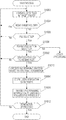
- FIG. 4 is a flowchart illustration an operation of a main process according to the first embodiment
- FIG. 5A is a diagram illustrating an example operation (example screen) according to the first embodiment
- FIG. 5B is a diagram illustrating an example operation (example screen) according to the first embodiment
- FIG. 6 is a diagram illustrating an example operation (example screen) according to the first embodiment
- FIG. 7 is a flowchart illustrating an operation of a first setting process according to a second embodiment
- FIG. 8A is a diagram illustrating an example operation (example screen) according to the second embodiment
- FIG. 8B is a diagram illustrating an example operation (example screen) according to the second embodiment.
- FIG. 9A is a diagram illustrating an example operation according to a third embodiment
- FIG. 9B is a diagram illustrating an example operation according to the third embodiment.
- FIG. 9C is a diagram illustrating an example operation according to the third embodiment.
- FIG. 9D is a diagram illustrating an example operation according to the third embodiment.
- FIG. 10 is a diagram illustrating the overall configuration of a system according to a fourth embodiment.
- FIG. 11 is a diagram illustrating the configuration of a terminal device according to the fourth embodiment.
- FIG. 12 is a diagram illustrating the configuration of a user management server according to the fourth embodiment.
- FIG. 13 is a flowchart illustrating an operation of a main process according to the fourth embodiment.
- FIG. 14 is a diagram illustrating an example operation (example screen) according to the fourth embodiment.
- FIG. 15 is a flowchart illustrating an operation of a main process according to a fifth embodiment
- FIG. 16 is a flowchart illustrating an operation of a second setting process according to the fifth embodiment
- FIG. 17A is a diagram illustrating an example operation (example screen) according to the fifth embodiment.
- FIG. 17B is a diagram illustrating an example operation (example screen) according to the fifth embodiment.
- FIG. 18A is a diagram illustrating an example operation (example screen) according to the fifth embodiment.
- FIG. 18B is a diagram illustrating an example operation (example screen) according to the fifth embodiment.
- FIG. 19 is a flowchart illustrating another operation of the second setting process according to the fifth embodiment.
- FIG. 20A is a diagram illustrating an example operation (example screen) according to the fifth embodiment.
- FIG. 20B is a diagram illustrating an example operation (example screen) according to the fifth embodiment.
- FIG. 20C is a diagram illustrating an example operation (example screen) according to the fifth embodiment.
- FIG. 21A is a diagram illustrating an example operation (example screen) according to the fifth embodiment.
- FIG. 21B is a diagram illustrating an example operation (example screen) according to the fifth embodiment.
- FIG. 21C is a diagram illustrating an example operation (example screen) according to the fifth embodiment.
- FIG. 1 is a diagram illustrating the overall configuration of a system 1 according to a first embodiment.
- a terminal device 10 that is an information processing device
- a multifunction peripheral 20 that is an image forming device
- a file management device 25 that is a device capable of storing files are connected to a network NW.
- One or more devices of each type are connected to the network NW.
- a plurality of terminal devices 10 , a plurality of multifunction peripherals 20 , and a plurality of file management devices 25 may be connected to the network NW.
- the terminal device 10 is a computer or the like that serves as an information processing device.
- the terminal device 10 may be implemented as any other device such as a tablet terminal or a smartphone.
- a server device may further be connected, and the server device may execute an application service provider (ASP) tool and provide the ASP tool to the terminal device 10 .
- ASP application service provider
- the multifunction peripheral 20 is an image forming device having a plurality of functions, and functions as, for example, a copying machine, a printing device (printer), a facsimile machine, and a scanner.
- the multifunction peripheral 20 is referred to as a digital multifunction peripheral (MFP) or the like.
- the multifunction peripheral 20 in the system 1 may be a multifunction peripheral manufactured by the same vendor as a vendor that is a service provider or a multifunction peripheral manufactured by a vendor that is not a service provider. Even when the multifunction peripheral 20 is a multifunction peripheral manufactured by the same vendor as a vendor that is a service provider, the multifunction peripheral 20 supports or does not support the service in some cases.
- the service provided in this embodiment is described as a file-sharing service, by way of example. While the multifunction peripheral 20 is described as an example of an image forming device, a device that implements a function by itself, such as a printer or a facsimile machine (fax) may also be used.
- a printer or a facsimile machine fax
- the file management device 25 is connected as a device that provides the file-sharing service.
- the file management device 25 is a device capable of providing the file-sharing service by using, for example, the Server Message Block (SMB) protocol, the Common Internet File System (CIFS), the AppleTalk Filing Protocol (AFP), or the File Transfer Protocol (FTP).
- SMB Server Message Block
- CIFS Common Internet File System
- AFP AppleTalk Filing Protocol
- FTP File Transfer Protocol
- the file management device 25 may be implemented as, instead of a server device, for example, a Network Attached Storage (NAS) device.
- NAS Network Attached Storage
- Any one of the multifunction peripheral 20 and the file management device 25 may be connected to the network NW, or none of them may be connected to the network NW. Additionally, a cloud server 28 may be connected to the system 1 via an external network. The cloud server 28 is also capable of managing files.
- the terminal device 10 is capable of accessing a shared folder via the file-sharing service in a way similar to that when accessing a local folder.
- the terminal device 10 is also capable of executing file processing on both a local folder and a shared folder in a similar way.
- the configurations of the devices included in the system 1 will be described with reference to the drawings.
- the configurations of the devices are examples, and each of the devices may have any desired configuration, as necessary.
- FIG. 2A is a diagram illustrating the configuration of the terminal device 10 .
- the terminal device 10 includes a control unit 100 , a storage unit 110 , a network communication unit 120 , a display unit 130 , and an operation unit 140 .
- the control unit 100 controls the overall operation of the terminal device 10 .
- the control unit 100 reads and executes various programs stored in the storage unit 110 to implement various functions.
- the control unit 100 is constituted by one or more arithmetic units (e.g., central processing units (CPUs)).
- control unit 100 reads a program from the storage unit 110 and executes the program to function as a file management unit 102 .
- the file management unit 102 implements a function of managing files in response to reading and executing of a file management program 116 stored in the storage unit 110 .
- the file management unit 102 executes various processes such as displaying a list of files in a folder (shared folder) and assigning a shared folder for other devices as accessible.
- the file management unit 102 also implements a function of executing various processes for a file.
- the file management unit 102 is capable of copying, deleting, moving, renaming, or opening a file.
- the storage unit 110 is a function unit that stores various programs used for the operation of the terminal device 10 , and various data.
- the storage unit 110 is constituted by, for example, a solid state drive (SSD) that is a semiconductor memory, a hard disk drive (HDD) that is a magnetic disk, or the like.
- the storage unit 110 may be a Universal Serial Bus (USB) connected external storage device or a network-accessible cloud area, for example.
- SSD solid state drive
- HDD hard disk drive
- USB Universal Serial Bus
- the storage unit 110 has a file storage area 112 that can store various files, and an additional information storage area 114 . Further, the storage unit 110 stores the file management program 116 .
- the file storage area 112 can store various files such as text files, data files, and image files of users.
- the control unit 100 is capable of transmitting a file stored in the file storage area 112 to the multifunction peripheral 20 or storing a file received from the multifunction peripheral 20 in the file storage area 112 .
- a file stored in the file storage area 112 is referred to as a “local file”, if necessary.
- the additional information storage area 114 stores, as additional information, information used to perform a file renaming process by the file management unit 102 .
- An example data configuration of the additional information storage area 114 is illustrated in FIG. 2B .
- the additional information storage area 114 stores, as additional information, an “item” and “content” set for the item in association with each other.
- the beginning or end of a file name is stored as a position of an additional character string (additional character string position).
- a character string to be actually added is also stored.
- the “beginning of a file name” is stored as the position of the additional character string, and “confirmed” is stored as a specific example of the additional character string.
- the file management program 116 is a program capable of implementing file management.
- the control unit 100 reads and executes the file management program 116 to implement various processes described below.
- the network communication unit 120 communicates with another device, the multifunction peripheral 20 , or a server device via the network NW.
- the network NW may be a wired or wireless network.
- the network communication unit 120 may be connected to an access point using a wireless local area network (WLAN) and may be connected to the network NW.
- WLAN wireless local area network
- a typical LAN is described as an example.
- the display unit 130 is capable of displaying various types of information and is implementable as a device such as a liquid crystal display (LCD) or an organic electroluminescent (EL) display.
- the operation unit 140 accepts operation input from a user.
- the operation unit 140 may be implemented using hardware keys or software keys, or may be implemented as an external input device such as a keyboard or a mouse.
- the display unit 130 and the operation unit 140 may be integrated into a touch panel.
- the configuration of the multifunction peripheral 20 will be described with reference to FIG. 3 .
- the multifunction peripheral 20 includes a control unit 200 , a storage unit 210 , a network communication unit 220 , a display unit 230 , an operation unit 240 , a fax communication unit 250 , a document reading unit 260 , and a print output unit 270 .
- the control unit 200 controls the overall operation of the multifunction peripheral 20 .
- the control unit 200 reads and executes various programs stored in the storage unit 210 to implement various functions.
- the control unit 200 is constituted by one or more arithmetic units (e.g., CPUs).
- control unit 200 reads a program stored in the storage unit 210 and executes the program to function as a file-sharing service unit 202 and a web service unit 204 .
- the file-sharing service unit 202 provides a file-sharing service.
- the file-sharing service unit 202 provides the service of being able to access files stored in a shared-file storage area 214 to the terminal device 10 that has been authenticated or an authenticated user.
- the files stored in the shared-file storage area 214 are referred to as “shared files”, if necessary.
- the web service unit 204 provides a web service to other devices.
- the web service unit 204 provides, when accessed from another device, a settings screen or the like in form of web page.
- the web service unit 204 is capable of setting the permission or prohibition of provision of a shared folder by the file-sharing service unit 202 .
- the web service unit 204 is capable of providing a screen on which various settings of the multifunction peripheral 20 are made in form of web page.
- the storage unit 210 is a function unit that stores various programs used for the operation of the multifunction peripheral 20 , and various data.
- the storage unit 210 is constituted by, for example, an SSD that is a semiconductor memory, an HDD that is a magnetic disk, or the like.
- the storage unit 210 may be a USB connected external storage device or a network-accessible cloud area, for example.
- the storage unit 210 has a file storage area 212 and the shared-file storage area 214 as areas that can store various files.
- the file storage area 212 and the shared-file storage area 214 can store various files such as text files, data files, and image files of users.
- the control unit 200 stores a document file received from the terminal device 10 via the network communication unit 220 .
- the control unit 200 may also store an image file received by the fax communication unit 250 and an image file of image data of a document read by the document reading unit 260 .
- a file stored in the shared-file storage area 214 can be accessed by the terminal device 10 as a shared file.
- accessing a file is used to indicate being able to read, write, or delete a file.
- being able to access a folder is used to indicate being able to read files stored (or contained) in the folder or being able to display the files as a list.
- being able to access a folder also used to indicate being able to create, delete, or rename a sub-folder.
- the network communication unit 220 communicates with another device or a server device via the network NW.
- the network NW may be a wired or wireless network.
- the network communication unit 220 may be connected to an access point using a WLAN and may be connected to the network NW.
- a typical LAN is described as an example.
- WAN technologies such as LTE, 4G, and 5G may be used.
- the display unit 230 is capable of displaying various types of information and is implementable as a device such as an LCD or an organic EL display.
- the operation unit 240 accepts operation input from a user.
- the operation unit 240 may be implemented using hardware keys or software keys, or may be implemented as an external input device such as a keyboard or a mouse.
- the display unit 230 and the operation unit 240 may be integrated into a touch panel.
- the fax communication unit 250 implements a fax transmission function. For example, image data received via an Integrated Services Digital Network (ISDN) line or via the Internet is stored in the file storage area 212 or the shared-file storage area 214 . Further, a file stored in the file storage area 212 or the shared-file storage area 214 may be transmitted to another fax device.
- ISDN Integrated Services Digital Network
- the document reading unit 260 reads a document. Specifically, the document reading unit 260 is constituted by a scanner. The read document is output to the file storage area 212 or the shared-file storage area 214 as image data.
- the print output unit 270 performs a print output operation based on a text file, image data, or the like. For example, the print output unit 270 outputs image data onto a print sheet.
- the print output unit 270 is constituted by a laser printer, for example.
- a main process executed by the file management unit 102 (the control unit 100 ) will be described with reference to FIG. 4 .
- the file management unit 102 displays a list of files in a target folder (step S 1002 ).
- the target folder indicates the current folder.
- the current folder may be at an initially set folder position or the last accessed folder position.
- the file management unit 102 moves the folder and displays a list of files in the folder (step S 1002 ).
- the folder is a folder selected by a user, and may be a local folder or a shared folder. Alternatively, the folder may be a folder on the cloud.
- step S 1006 When one or more files are selected from among the displayed list of files by the user (step S 1006 : Yes), the file management unit 102 determines whether a Rename File button is selected (step S 1008 ).
- step S 1008 If the file management unit 102 determines that the Rename File button is selected by the user (step S 1008 : Yes), a file renaming process is executed based on additional information stored in the additional information storage area 114 (step S 1010 ).
- the additional information indicates whether to add an additional character string at the beginning or end of the file name.
- the additional information also specifically indicates the additional character string.
- the “beginning of the file name” indicating the position of the additional character string and the additional character string indicating “confirmed” are stored.
- the file management unit 102 executes a file renaming process on a file with the name “test.pdf”, the file is renamed to “confirmed_test.pdf”.
- the file name may be changed to “[confirmed]test.pdf”, for example.
- an additional character string is to be added to the end of the name, it is desirable to add the additional character string to a portion except for the extension.
- the file described above is renamed to “test_confirmed.pdf” or “test[confirmed].pdf”.
- the additional character string may be simply added to the end of the file name to rename the file to “test.pdf[confirmed]”.
- step S 1012 If termination of the process is selected by the user, the process ends (step S 1012 : Yes), or, otherwise, the process is repeatedly executed from step S 1002 .
- the control unit 100 may execute various processes such as copying and editing the file (step S 1008 : No).
- FIG. 5A illustrates a display screen W 100 that is an example display screen indicating the initial state in a file management process according to this embodiment.
- the display screen W 100 includes a folder area (R 102 ) that displays folders, a list view area (R 104 ) that displays a list of files, and an operation area (R 106 ) where operation input can be made.
- types of accessible folders are displayed.
- access to a predetermined local folder e.g., a Desktop folder
- a predetermined local folder e.g., a Desktop folder
- network drive folders, shared folders for the multifunction peripheral 20 , and folders on the cloud are further displayed.
- the folders can be displayed as trees. A user is able to select a sub-folder as well as a root folder.
- the control unit 100 displays the files included in the selected folder in list view in the area R 104 .
- the files can be displayed in a plurality of ways such as detailed view in which the thumbnails, names, dates, types, and sizes of the files are displayed, and simple view in which only the file names are displayed.
- the area R 106 is an operation area where operation buttons, each of which is used to accept one of various operation inputs, are displayed.
- the area R 106 is usually called a toolbar.
- operation buttons used to perform operations for a folder such as an Add/Select Device button and a Select MFP button
- operation buttons used to perform operations such as creating a new folder are displayed.
- buttons such as a Search button to search for a file, an Arrange By button to change the sort order of files, and a Thumbnail View button to switch the display method, are displayed. Additionally, operation buttons available when a desired file is selected as appropriate, such as an Edit button, an Enhance Image button, an Attach to Email button, and a Convert by OCR button, are displayed. In FIG. 5A , these buttons are grayed out and are not selectable since no file is selected.
- the operation buttons may be displayed as menu text instead of as graphical objects, marks, pictograms, or icons.
- operation buttons are displayed using both graphical objects (icons) and text.
- FIG. 5B indicates that a file in an area R 110 has been selected. At this time, a single file may be selected or a plurality of files may be selected.
- operation buttons displayed in the operation area are changed.
- An initially displayed operation button may be made selectable, or a new operation button may be displayed.
- an operation button available for operation input to rename a file (R 112 ) is newly displayed.
- the control unit 100 refers to additional information and executes a file renaming process.
- the selected file “Fax Data.docx” is renamed such that the additional character string “confirmed” is added to the beginning of the file name.
- a delimiter may further be added to indicate the additional character string, or the additional character string may be identified in parentheses or in any other suitable way.
- a user is only required to select a file and then select the “Rename File” operation button to easily rename the file such that an additional character string is added to the file name.
- an information processing device serving as the terminal device 10 described above allows the user to easily check the status of a file by renaming the file with a simple operation.
- the user is able to rename a file with a simple operation without using any dedicated workflow system.
- the second embodiment is an embodiment in which a user is able to set additional information.
- the function configuration and the process flow are the same as those in the first embodiment, and a description will be given focusing on the difference from the first embodiment.
- control unit 100 is capable of executing a first setting process in addition to the process according to the first embodiment.
- the first setting process executed by the control unit 100 will be described with reference to an operation flow illustrated in FIG. 7 .
- the control unit 100 displays a setting dialog (step S 2002 ).
- the setting dialog may be displayed as a window or in a separate screen.
- control unit 100 selects the beginning or end of the file name as the position where an additional character string is to be added (step S 2004 ). Further, the control unit 100 receives a character string entered by the user as an additional character string (step S 2006 ).
- the entered additional character string is an arbitrary character string.
- the additional character string is a character string that allows the user to understand the content of the process once they view the file name.
- a character string such as the suffix -ed, “confirmed”, “processed”, “under confirmation”, “yet to be processed”, “requested”, or “internal use only”, is preferable.
- a character string containing the suffix -ed is used as the additional character string.
- the character string may be a character string selected by the user from among predetermined character strings.
- control unit 100 updates the additional information with the selected and entered content described above (step S 2008 ). That is, the control unit 100 updates the additional information stored in the additional information storage area 114 or stores new additional information.
- FIGS. 8A and 8B illustrate example screens according to this embodiment.
- a User Settings button is displayed in an operation area R 202 .
- the display screen W 210 is a screen on which various settings are made.
- thumbnail settings or settings for specifying the display style or the like of the toolbar displayed in the operation area can be made.
- additional information can be set in an area R 210 . The content entered by the user in the area R 210 is used to update the additional information.
- a user is able to enter or set a desired additional character string and to select the position to which the additional character string is to be added.
- the third embodiment is an embodiment in which as additional character string is changed or deleted each time an operation button for the file renaming process is selected.
- the function configuration and the process flow are the same as those in the first embodiment, and a description will be given focusing on the difference from the first embodiment.
- an additional character string is added in a different manner.
- an additional character string has already been added to the beginning (or end) of the target file (selected file) name.
- the file name is changed such that a number in parentheses is added after the additional character string without adding any character string.
- the file name is changed to “[confirmed](2) Order.pdf”.
- the user who sees the changed file name, is able to easily understand the number of times the target file has been conflrmed.
- an additional character string has already been added to the beginning (or end) of the target file (selected file) name.
- the file name is changed such that the additional character string is deleted.
- control unit 100 changes the file name “[confirmed]Order.pdf” to the original file name before the additional character string is added, that is, “Order.pdf”.
- a user is able to easily add and remove or delete an additional character string by selecting the “Rename File” operation button.
- an additional character string is set so as to be changed from one to another.
- an additional character string is set to a first additional character string “under confirmation”, a second additional character string “confirmed”, and a third additional character string “rejected”.
- the file name is changed such that the additional character string is changed to the next additional character string. For example, as illustrated in FIG. 9C , a user repeatedly selects the “Rename File” operation button, thereby changing the file name to different ones. Finally, the additional character string may be deleted (or erased).
- a user is able to switch among a plurality of additional character strings with a single operation and add one of them.
- the user is able to easily check the current status of the file.
- a plurality of “Rename File” operation buttons may be disposed. For example, a first operation button is assigned the additional character string “rejected”. A second operation button is assigned the additional character string “confirmed”. As described above, with the use of a plurality of “Rename File” operation buttons, a user is able to rename a file such that the desired additional character string is easily added to the file name.
- the fourth embodiment is an embodiment in which user management is performed.
- substantially the same devices, components, and steps as those in the first embodiment are assigned the same numerals and will not be described, and a description will be given focusing on the difference from the first embodiment.
- FIG. 10 is a diagram illustrating the overall configuration of a system 4 according to the fourth embodiment.
- a user management server 40 is further connected to the network NW.
- a terminal device 12 is connected in place of the terminal device 10 in the system 1 .
- FIG. 11 is a diagram illustrating the function configuration of the terminal device 12 .
- the control unit 100 functions as the file management unit 102 and a user authentication unit 104 .
- the user authentication unit 104 performs user authentication. For example, the user authentication unit 104 authenticates a user when the user logs in to the terminal device 12 or authenticates a user when the user executes the file management program 116 (file management system) with the file management unit 102 .
- the file management program 116 file management system
- the user authentication unit 104 performs user authentication by using the user management server 40 on the basis of a user ID and password entered by the user.
- a user currently using the terminal device 12 can be authenticated.
- User authentication may be performed at an appropriate timing.
- user authentication is performed when the terminal device 12 is started (such as at the time of turning power on or at the time of login to an operating system (OS)), when the file management program 116 is executed, or when the file management system is used.
- OS operating system
- user authentication may be performed at the time of access to a shared folder on a network or at the time of login to a cloud service.
- the user authentication unit 104 may perform user authentication on the terminal device 12 or using a user authentication server (e.g., the user management server 40 ).
- the user authentication unit 104 may utilize authentication using an external service (such as OAuth authentication).
- the content of the file storage area 112 in the terminal device 12 is illustrated. That is, the file storage area 112 stores a file 112 a and metadata 112 b.
- the metadata 112 b is data associated with the file 112 a , and includes information on a user who has added an additional character string.
- FIG. 12 is a diagram illustrating the function configuration of the user management server 40 .
- the user management server 40 includes a control unit 400 , a storage unit 410 , and a network communication unit 420 .
- the control unit 400 controls the overall operation of the user management server 40 .
- the control unit 400 reads and executes various programs stored in the storage unit 410 to implement various functions.
- the control unit 400 is constituted by one or more arithmetic units (e.g., CPUs).
- the storage unit 410 is a function unit that stores various programs used for the operation of the user management server 40 , and various data.
- the storage unit 410 is constituted by, for example, an SSD that is a semiconductor memory, an HDD that is a magnetic disk, or the like.
- the storage unit 410 may be a USB connected external storage device or a network-accessible cloud area, for example.
- the storage unit 410 stores a user management database (DB) 412 .
- the user management DB 412 is a DB that manages information concerning users. For example, when the user management DB 412 is accessed from the terminal device 12 or the like, the current user can be authenticated.
- the user management DB 412 also manages privileges that can be granted to the users. For example, the user management DB 412 manages, for each user, the ability to rename a file.
- the network communication unit 120 communicates with another device, the multifunction peripheral 20 , or a server device via the network NW.
- the network NW may be a wired or wireless network.
- the network communication unit 120 may be connected to an access point using a WLAN and may be connected to the network NW.
- a typical LAN is described as an example.
- WAN technologies such as LTE, 4G, and 5G may be used.
- FIG. 13 is a diagram illustrating a process flow that replaces the process flow according to the first embodiment illustrated in FIG. 4 . Substantially the same steps are assigned the same numerals, and will not be described.
- control unit 100 determines whether the current user has a privilege to rename the file (step S 3002 ).
- Examples of the method for determining whether a user has a privilege to rename a file include the following methods.
- control unit 100 refers to the user management DB 412 and determines whether the login user of the terminal device 12 or the login user of the file management system has the privilege. In this case, the control unit 100 may access the user management server 40 each time the determination is made, or each user may be granted a privilege at the time of login and the terminal device 12 may manage granting privileges. That is, for each user, the ability to rename a file is managed.
- permission of renaming the file or files is determined. For example, a folder or a file is selected, and a user or user group who is allowed to rename the file or files is designated. Accordingly, users allowed to rename files are managed.
- each file it is determined whether a user has a privilege to rename the file. For example, when the multifunction peripheral 20 scans a file or receives a file via fax, information on a user having a privilege to rename the file is added to metadata of the file. In this case, the multifunction peripheral 20 refers to the user management server 40 , obtains information on a user allowed to rename the file, and stores the information as metadata.
- the privilege to rename a file may be set by a user or an administrator.
- a file renaming privilege setting screen may be used to manage users allowed to rename a file.
- control unit 100 executes a file renaming process based on additional information (step S 1010 ).
- information on a user who has renamed the file is stored as metadata (meta-information) associated with the renamed file (step S 3004 ). If user information has already been stored as metadata (e.g., if information on a user who last renamed the file is stored), the control unit 100 notifies a person of the renaming of the file on the basis of the user information (step S 3006 ).
- any other person such as the author of the file or the owner of the file, may be notified.
- Examples of the method by which a user is notified of the renaming of a file include sending an email, displaying a message, and presenting a pop-up window.
- a mail application in response to renaming of a file, a mail application is started. Then, the file is attached to a new email message on a new email sending screen.
- the destination address or the like may be entered by a user, or may be entered based on user information obtained from the user management server 40 .
- a user associated by the user management server 40 may be notified of the renaming of the file.
- a supervisor or a person with decision making authority may be notified of the renaming of the file in the workflow.
- step S 3002 is not executed (i.e., as in the first embodiment, a file can be renamed).
- the fifth embodiment is an embodiment in which a setting dialog is invoked and an additional character string can be selected or an additional character string can be edited with a simple operation.
- substantially the same devices, components, and steps as those in the first embodiment are assigned the same numerals and will not be described, and a description will be given focusing on the difference from the first embodiment.
- FIG. 15 is a diagram illustrating a process flow that replaces the process flow according to the first embodiment illustrated in FIG. 4 . Substantially the same steps are assigned the same numerals, and will not be described.
- step S 1002 When files in the target folder to be processed by a user are displayed as a list (step S 1002 ⁇ step S 1004 : No), the control unit 100 determines whether a pull-down has been selected (step S 1006 : No ⁇ step S 4002 , or step S 1008 : No ⁇ step S 4002 ).
- pull-down refers to a button or an area used to display a dialog on a display screen to execute a process such as selecting or changing an additional character string.
- a button for a pull-down view (pull-down button) is di played next to the Rename File button.
- any other display style may be used.
- the button for a pull-down view operates as a designation button used to designate an additional character string.
- the button for a pull-down view and the Rename File button among the operation buttons are associated with each other and are integrated into a designation button.
- the display of the designation button allows the user to intuitively understand the meaning of the pull-down button, which is the designation button.
- the button for a pull-down view may be displayed in any other area as an operation button, or a different operation such as pressing and holding or double clicking (or double tapping) the Rename File button may be performed to perform the same operation as that when the button for a pull-down view is selected.
- step S 4004 when the pull-down button is selected (step S 4002 : Yes), the control unit 100 (the file management unit 102 ) executes a second setting process (step S 4004 ).
- step S 4004 When the pull-down button is not selected (step S 4002 : No), the control unit 100 executes other processing, or after the second setting process is executed (step S 4004 ), the control unit 100 returns to the process described above. The control unit 100 executes appropriate processing.
- the file management unit 102 may execute the processing of step S 1006 again. If the pull-down button is selected in the state where a file is selected, the file management unit 102 may return to step S 1008 . Alternatively, the file management unit 102 may execute the process again from step S 1004 .
- control unit 100 executes the second setting process as interrupt processing and, after the completion of the second setting process, returns to and executes the usual process.
- FIG. 16 illustrates the operation flow of the second setting process
- FIGS. 17A, 17B, 18A, and 18B are diagrams illustrating example operations.
- additional information is updated in the second setting process.
- steps described in the first setting process e.g., the position at which an additional character string is to be added
- steps described in the first setting process will not be described, and a description will be given focusing on the difference from the first setting process.
- the file management unit 102 displays a setting dialog on the display unit 130 (step S 5002 ).
- the setting dialog will be described with reference to an example of a display screen W 500 illustrated in FIG. 17A .
- a pull-down button B 502 is displayed next to a Rename File button B 500 .
- a pull-down menu M 500 is displayed near the pull-down button B 502 (on the display screen W 500 , below the Rename File button B 500 and/or the pull-down button B 502 , for example).
- the pull-down menu M 500 shows one or more additional candidate character strings as options of an additional character string.
- the additional candidate character string or strings are each a candidate selected as an additional character string and may be stored in the system in advance or stored and updated by a user.
- a number of additional candidate character strings equal to a predetermined upper limit (such as three, five, or ten) may be stored. This number may be equal to the number of additional candidate character strings that can be d splayed in the pull-down menu as a list or may be equal to the number of additional candidate character strings that can be displayed through scrolling.
- the additional candidate character string or strings may be stored in an additional candidate character string storage area disposed in the storage unit 110 or may be temporarily stored in the storage unit 110 .
- an additional candidate character string table or an additional candidate character string file may be generated, or an additional candidate character string may be stored as a set value (e.g., a registry value) in the system.
- the additional candidate character string or strings may be stored in an external server or on the cloud.
- step S 5004 when a user selects an additional character string from among the additional candidate character string(s) displayed in the setting dialog (step S 5004 : Yes), the additional information is updated based on the selected additional character string (step S 5010 ).
- a user selects “rejected” as an additional character string (area R 510 ) from among the additional candidate character strings in the dialog menu displayed on the display screen W 510 .
- the additional information is updated so as to add “rejected” as an additional character string. That is, in FIG. 17B , when the Rename File button B 500 is selected after the OK button B 510 is selected, the character string “rejected” is added to the file name. As in the embodiment described above, when the character string “rejected” is added, a delimiter may also be inserted or a character string for identifying the additional character string may also be added.
- the control unit 100 may close the dialog menu. That is, the second setting process may be stopped.
- step S 5004 When a process for entering an additional character string is selected without selecting any additional character string (step S 5004 : No ⁇ step S 5006 : Yes) the file management unit 102 accepts input of an additional candidate character string and stores the input additional candidate character string (step S 5008 ).
- a lower area R 520 of the dialog menu shows a text box for entering an additional candidate character string.
- a character string entered in the text box by the user is stored as an additional candidate character string.
- any recently entered additional candidate character string may also be displayed and may be available as an option.
- a list of recently entered additional candidate character strings is displayed in an area R 530 .
- Several (e.g., three or five) most recently entered additional candidate character strings may be displayed as a list, or frequently used additional candidate character strings may be displayed as a list.
- no further additional candidate character string may be added, or additional candidate character strings may be deleted from the oldest additional candidate character string.
- an additional candidate character string that is not to be deleted may be protected, and additional candidate character strings other than the protected additional candidate character string may be deleted.
- additional candidate character strings added by a user may be deleted.
- a process for further enabling editing of an additional candidate character string is illustrated as a second setting process illustrated in FIG. 19 .
- the second setting process illustrated in FIG. 19 is different from the second setting process illustrated in FIG. 16 , and a description will be given focusing on the difference from the second setting process illustrated in FIG. 16 .
- the file management unit 102 is capable of editing a selected additional character string (step S 5004 : Yes ⁇ step S 5100 : Yes ⁇ step S 5102 ).
- FIGS. 20A to 20C and 21A to 21C are diagrams illustrating the operation in the setting process illustrated in FIG. 19 .
- a display screen W 600 illustrated in FIG. 20A displays a dialog menu M 600 available to select an additional character string and the position at which the additional character string is to be added.
- the display screen W 600 displays an Add button B 600 , which is selected by a user to obtain a display screen W 610 illustrated in FIG. 20B .
- an Add button B 610 is distinguishably displayed as being selected.
- the file management unit 102 displays a text box in an area R 620 of the dialog menu.
- the user enters an additional candidate character string in the text box and selects a button B 620 , the entered additional candidate character string is stored as an additional character string.
- a Cancel button B 622 is selected, the file management unit 102 does not store the additional candidate character string.
- FIG. 21A illustrates a display screen W 630 on which “updated” is entered as an additional candidate character string.
- a Set button B 630 is selected, a transition to a screen illustrated in FIG. 21B occurs.
- FIG. 21B illustrates a display screen W 640 on which a list of additional candidate character strings containing the additional candidate character string “updated”, which is newly stored in the dialog menu, displayed in an area R 640 .
- the additional candidate character string is displayed with an Edit button B 640 and a Delete button B 642 .
- the file management unit 102 makes the additional candidate character string editable. Specifically, the file management unit 102 makes a transition from the display screen W 640 illustrated in FIG. 21B to the display screen W 630 illustrated in FIG. 21A again to make the additional candidate character string editable.
- the Delete button B 642 is selected, the file management unit 102 deletes the additional candidate character string associated with the Delete button B 642 .
- FIG. 21C illustrates an example of a display screen W 650 on which a dialog menu is generated by repeatedly performing the process described above.
- the user is able to select an additional character string from among a plurality of additional candidate character strings in the displayed dialog menu.
- the user may be able to select a plurality of additional character strings.
- the user may perform a drag operation or a swipe operation to rearrange the additional candidate character strings.
- no further additional candidate character string may be added, or additional candidate character strings may be deleted from the oldest additional candidate character string.
- an additional candidate character string that is not to be deleted may be protected, and additional candidate character strings other than the protected additional candidate character string may be deleted.
- additional candidate character strings added by a user may be deleted.
- dialog For convenience of description, additional character strings are displayed in pull-down view in this embodiment. It is sufficient to display a dialog, and a dialog may be displayed in a separate window, for example. A dialog may be separately displayed on a display screen of a user's terminal device, for example.
- the operation according to the fifth embodiment may be added to the operation according to the third embodiment such that an additional character string can be easily edited. Accordingly, any combination of embodiments may be carried out.
- a program operating on each of the devices in the embodiments is a program for controlling an arithmetic unit such as a CPD (a program for causing a computer to function) to implement the functions of the embodiments described above.
- Information handled in these devices is temporarily accumulated in a temporary storage device (e.g., a random access memory (RAM)) when the information is processed. Thereafter, the information is stored in various storage devices, such as a read-only memory (ROM), an HDD, and an SSD, and is read by the CPU, as necessary, for modification or writing.
- the program When distributed to the market, the program can be stored and distributed on a portable recording medium or transferred to a server computer connected via a network such as the Internet.
- a storage device in the server computer is also included in the present disclosure.
Landscapes
- Engineering & Computer Science (AREA)
- Theoretical Computer Science (AREA)
- General Engineering & Computer Science (AREA)
- Signal Processing (AREA)
- Multimedia (AREA)
- Physics & Mathematics (AREA)
- General Physics & Mathematics (AREA)
- Human Computer Interaction (AREA)
- Databases & Information Systems (AREA)
- Data Mining & Analysis (AREA)
- Health & Medical Sciences (AREA)
- Biomedical Technology (AREA)
- General Health & Medical Sciences (AREA)
- Library & Information Science (AREA)
- Computing Systems (AREA)
- Information Retrieval, Db Structures And Fs Structures Therefor (AREA)
Abstract
Description
-
- <Original file name> Order.pdf
- <First time>[confirmed]Order.pdf
- <Second time>[confirmed][confirmed]Order.pdf
Claims (17)
Applications Claiming Priority (6)
| Application Number | Priority Date | Filing Date | Title |
|---|---|---|---|
| JP2018-166360 | 2018-09-05 | ||
| JPJP2018-166360 | 2018-09-05 | ||
| JP2018166360 | 2018-09-05 | ||
| JPJP2019-084264 | 2019-04-25 | ||
| JP2019-084264 | 2019-04-25 | ||
| JP2019084264A JP7403235B2 (en) | 2018-09-05 | 2019-04-25 | Information processing device, file processing method and program in the information processing device |
Publications (2)
| Publication Number | Publication Date |
|---|---|
| US20200076981A1 US20200076981A1 (en) | 2020-03-05 |
| US11012588B2 true US11012588B2 (en) | 2021-05-18 |
Family
ID=69639120
Family Applications (1)
| Application Number | Title | Priority Date | Filing Date |
|---|---|---|---|
| US16/556,009 Active US11012588B2 (en) | 2018-09-05 | 2019-08-29 | Information processing device, file processing method for information processing device, and non-transitory recording medium |
Country Status (2)
| Country | Link |
|---|---|
| US (1) | US11012588B2 (en) |
| CN (1) | CN110879690B (en) |
Families Citing this family (2)
| Publication number | Priority date | Publication date | Assignee | Title |
|---|---|---|---|---|
| JP7484278B2 (en) * | 2020-03-19 | 2024-05-16 | 富士フイルムビジネスイノベーション株式会社 | Information processing device and program |
| JP2023112475A (en) * | 2022-02-01 | 2023-08-14 | 株式会社リコー | Information processing device, information processing system, information processing method, and program |
Citations (8)
| Publication number | Priority date | Publication date | Assignee | Title |
|---|---|---|---|---|
| US20020093582A1 (en) * | 2001-01-12 | 2002-07-18 | Taizou Aoki | Data communication terminal and camera |
| US20060085474A1 (en) * | 2003-04-07 | 2006-04-20 | Seiko Epson Corporation | Image storage apparatus and program therefor |
| US20060174054A1 (en) * | 2005-01-31 | 2006-08-03 | Canon Kabushiki Kaisha | File Management Apparatus and Its Control Method |
| US7370065B1 (en) * | 2002-08-21 | 2008-05-06 | Adobe Systems Incorporated | Renaming multiple files |
| US7577985B1 (en) * | 2005-02-01 | 2009-08-18 | Symantec Corporation | Trusted handler and data association |
| JP2012168721A (en) | 2011-02-14 | 2012-09-06 | Mizuho Information & Research Institute Inc | Application management system, application management method, and application management program |
| US20140137027A1 (en) * | 2012-11-14 | 2014-05-15 | Canon Kabushiki Kaisha | Information processing apparatus, method for controlling the same, and storage medium therefor |
| US20150281149A1 (en) * | 2014-03-31 | 2015-10-01 | Microsoft Corporation | Electronic communication-based storage of documents to support multiple workflows |
Family Cites Families (9)
| Publication number | Priority date | Publication date | Assignee | Title |
|---|---|---|---|---|
| JP2004213314A (en) * | 2002-12-27 | 2004-07-29 | Hitachi Ltd | Resource management device and storage medium storing resource information list screen display processing program |
| KR100860961B1 (en) * | 2006-01-10 | 2008-09-30 | 삼성전자주식회사 | Apparatus and method for providing a user interface for file retrieval |
| JPWO2008041357A1 (en) * | 2006-09-29 | 2010-02-04 | 株式会社Access | Document processing apparatus and program |
| JP4191239B2 (en) * | 2008-03-10 | 2008-12-03 | Sky株式会社 | Access authority control system |
| JP5391309B2 (en) * | 2012-05-23 | 2014-01-15 | みずほ情報総研株式会社 | Information management system, information management method, and information management program |
| JP5868893B2 (en) * | 2013-04-26 | 2016-02-24 | 京セラドキュメントソリューションズ株式会社 | Image processing device |
| JP5907624B2 (en) * | 2013-09-13 | 2016-04-26 | シャープ株式会社 | Information processing device |
| JP6362452B2 (en) * | 2014-07-03 | 2018-07-25 | キヤノン株式会社 | Information processing apparatus, information processing apparatus control method, and program |
| JP6881991B2 (en) * | 2017-01-30 | 2021-06-02 | キヤノン株式会社 | Image processing device and its control method and program |
-
2019
- 2019-08-27 CN CN201910793691.8A patent/CN110879690B/en active Active
- 2019-08-29 US US16/556,009 patent/US11012588B2/en active Active
Patent Citations (8)
| Publication number | Priority date | Publication date | Assignee | Title |
|---|---|---|---|---|
| US20020093582A1 (en) * | 2001-01-12 | 2002-07-18 | Taizou Aoki | Data communication terminal and camera |
| US7370065B1 (en) * | 2002-08-21 | 2008-05-06 | Adobe Systems Incorporated | Renaming multiple files |
| US20060085474A1 (en) * | 2003-04-07 | 2006-04-20 | Seiko Epson Corporation | Image storage apparatus and program therefor |
| US20060174054A1 (en) * | 2005-01-31 | 2006-08-03 | Canon Kabushiki Kaisha | File Management Apparatus and Its Control Method |
| US7577985B1 (en) * | 2005-02-01 | 2009-08-18 | Symantec Corporation | Trusted handler and data association |
| JP2012168721A (en) | 2011-02-14 | 2012-09-06 | Mizuho Information & Research Institute Inc | Application management system, application management method, and application management program |
| US20140137027A1 (en) * | 2012-11-14 | 2014-05-15 | Canon Kabushiki Kaisha | Information processing apparatus, method for controlling the same, and storage medium therefor |
| US20150281149A1 (en) * | 2014-03-31 | 2015-10-01 | Microsoft Corporation | Electronic communication-based storage of documents to support multiple workflows |
Also Published As
| Publication number | Publication date |
|---|---|
| CN110879690A (en) | 2020-03-13 |
| CN110879690B (en) | 2024-05-28 |
| US20200076981A1 (en) | 2020-03-05 |
Similar Documents
| Publication | Publication Date | Title |
|---|---|---|
| US20230252171A1 (en) | Collection folder for collecting file submissions in response to a public file request | |
| US20100281085A1 (en) | File management apparatus | |
| US10885209B2 (en) | Collection folder for collecting file submissions in response to a public file request | |
| US20090313304A1 (en) | Systems and Methods for Capturing, Organizing, and Sharing Data | |
| US9116927B2 (en) | Methods and apparatuses for publication of unconsciously captured documents | |
| CN114127732A (en) | System and method for generating a design based on a design template and an additional design | |
| RU2600545C2 (en) | Information processing device and information processing method | |
| US12373633B2 (en) | Systems and methods for displaying digital forensic evidence | |
| US8913271B2 (en) | Information processing apparatus, display control method, and storage medium storing program | |
| US20170052927A1 (en) | System for Transferring Annotations between Documents Displayed Side by Side | |
| US10452722B2 (en) | Processing electronic data in computer networks with rules management | |
| US20230007132A1 (en) | Information processing apparatus, control method thereof, and storage medium | |
| US20060248155A1 (en) | Managing digital documents in a computer system | |
| US9013740B2 (en) | Information processing apparatus, control method therefor and computer-readable storage medium | |
| US11012588B2 (en) | Information processing device, file processing method for information processing device, and non-transitory recording medium | |
| US20070038313A1 (en) | Systems and methods for modifying multi-function device settings | |
| CN115801963A (en) | Server, method of controlling server, and storage medium | |
| JP7403235B2 (en) | Information processing device, file processing method and program in the information processing device | |
| US20190251181A1 (en) | Information processing apparatus, information processing system, and non-transitory computer readable medium | |
| JP6852390B2 (en) | Information management equipment and programs | |
| US9584697B2 (en) | Apparatus, system, and method for editing and delivering data files | |
| JP2014215983A (en) | Information processing device, condition display method, and program | |
| US20140310323A1 (en) | Storage device permitting file storage according to extension, method of controlling the same, program, and storage medium | |
| US20200076983A1 (en) | Information processing apparatus, display method in information processing apparatus, and recording medium | |
| US20140101210A1 (en) | Image processing apparatus capable of easily setting files that can be stored, method of controlling the same, and storage medium |
Legal Events
| Date | Code | Title | Description |
|---|---|---|---|
| AS | Assignment |
Owner name: SHARP KABUSHIKI KAISHA, JAPAN Free format text: ASSIGNMENT OF ASSIGNORS INTEREST;ASSIGNORS:MURATA, RYOHJI;MATSUO, ATSUSHI;OHNISHI, AKINORI;AND OTHERS;REEL/FRAME:050217/0378 Effective date: 20190823 |
|
| FEPP | Fee payment procedure |
Free format text: ENTITY STATUS SET TO UNDISCOUNTED (ORIGINAL EVENT CODE: BIG.); ENTITY STATUS OF PATENT OWNER: LARGE ENTITY |
|
| STPP | Information on status: patent application and granting procedure in general |
Free format text: RESPONSE TO NON-FINAL OFFICE ACTION ENTERED AND FORWARDED TO EXAMINER |
|
| STPP | Information on status: patent application and granting procedure in general |
Free format text: NOTICE OF ALLOWANCE MAILED -- APPLICATION RECEIVED IN OFFICE OF PUBLICATIONS |
|
| STPP | Information on status: patent application and granting procedure in general |
Free format text: PUBLICATIONS -- ISSUE FEE PAYMENT RECEIVED |
|
| STPP | Information on status: patent application and granting procedure in general |
Free format text: PUBLICATIONS -- ISSUE FEE PAYMENT VERIFIED |
|
| STCF | Information on status: patent grant |
Free format text: PATENTED CASE |
|
| MAFP | Maintenance fee payment |
Free format text: PAYMENT OF MAINTENANCE FEE, 4TH YEAR, LARGE ENTITY (ORIGINAL EVENT CODE: M1551); ENTITY STATUS OF PATENT OWNER: LARGE ENTITY Year of fee payment: 4 |