US10956028B2 - Portable device and method for providing user interface mode thereof - Google Patents
Portable device and method for providing user interface mode thereof Download PDFInfo
- Publication number
- US10956028B2 US10956028B2 US15/973,030 US201815973030A US10956028B2 US 10956028 B2 US10956028 B2 US 10956028B2 US 201815973030 A US201815973030 A US 201815973030A US 10956028 B2 US10956028 B2 US 10956028B2
- Authority
- US
- United States
- Prior art keywords
- proximity
- portable device
- input
- touch
- mode
- Prior art date
- Legal status (The legal status is an assumption and is not a legal conclusion. Google has not performed a legal analysis and makes no representation as to the accuracy of the status listed.)
- Expired - Fee Related
Links
Images




Classifications
-
- G—PHYSICS
- G06—COMPUTING OR CALCULATING; COUNTING
- G06F—ELECTRIC DIGITAL DATA PROCESSING
- G06F3/00—Input arrangements for transferring data to be processed into a form capable of being handled by the computer; Output arrangements for transferring data from processing unit to output unit, e.g. interface arrangements
- G06F3/01—Input arrangements or combined input and output arrangements for interaction between user and computer
- G06F3/048—Interaction techniques based on graphical user interfaces [GUI]
- G06F3/0487—Interaction techniques based on graphical user interfaces [GUI] using specific features provided by the input device, e.g. functions controlled by the rotation of a mouse with dual sensing arrangements, or of the nature of the input device, e.g. tap gestures based on pressure sensed by a digitiser
- G06F3/0488—Interaction techniques based on graphical user interfaces [GUI] using specific features provided by the input device, e.g. functions controlled by the rotation of a mouse with dual sensing arrangements, or of the nature of the input device, e.g. tap gestures based on pressure sensed by a digitiser using a touch-screen or digitiser, e.g. input of commands through traced gestures
- G06F3/04883—Interaction techniques based on graphical user interfaces [GUI] using specific features provided by the input device, e.g. functions controlled by the rotation of a mouse with dual sensing arrangements, or of the nature of the input device, e.g. tap gestures based on pressure sensed by a digitiser using a touch-screen or digitiser, e.g. input of commands through traced gestures for inputting data by handwriting, e.g. gesture or text
-
- G—PHYSICS
- G06—COMPUTING OR CALCULATING; COUNTING
- G06F—ELECTRIC DIGITAL DATA PROCESSING
- G06F3/00—Input arrangements for transferring data to be processed into a form capable of being handled by the computer; Output arrangements for transferring data from processing unit to output unit, e.g. interface arrangements
- G06F3/01—Input arrangements or combined input and output arrangements for interaction between user and computer
- G06F3/017—Gesture based interaction, e.g. based on a set of recognized hand gestures
-
- G—PHYSICS
- G06—COMPUTING OR CALCULATING; COUNTING
- G06F—ELECTRIC DIGITAL DATA PROCESSING
- G06F3/00—Input arrangements for transferring data to be processed into a form capable of being handled by the computer; Output arrangements for transferring data from processing unit to output unit, e.g. interface arrangements
- G06F3/01—Input arrangements or combined input and output arrangements for interaction between user and computer
- G06F3/048—Interaction techniques based on graphical user interfaces [GUI]
- G06F3/0481—Interaction techniques based on graphical user interfaces [GUI] based on specific properties of the displayed interaction object or a metaphor-based environment, e.g. interaction with desktop elements like windows or icons, or assisted by a cursor's changing behaviour or appearance
-
- G—PHYSICS
- G06—COMPUTING OR CALCULATING; COUNTING
- G06F—ELECTRIC DIGITAL DATA PROCESSING
- G06F3/00—Input arrangements for transferring data to be processed into a form capable of being handled by the computer; Output arrangements for transferring data from processing unit to output unit, e.g. interface arrangements
- G06F3/01—Input arrangements or combined input and output arrangements for interaction between user and computer
- G06F3/048—Interaction techniques based on graphical user interfaces [GUI]
- G06F3/0481—Interaction techniques based on graphical user interfaces [GUI] based on specific properties of the displayed interaction object or a metaphor-based environment, e.g. interaction with desktop elements like windows or icons, or assisted by a cursor's changing behaviour or appearance
- G06F3/0482—Interaction with lists of selectable items, e.g. menus
-
- G—PHYSICS
- G06—COMPUTING OR CALCULATING; COUNTING
- G06F—ELECTRIC DIGITAL DATA PROCESSING
- G06F3/00—Input arrangements for transferring data to be processed into a form capable of being handled by the computer; Output arrangements for transferring data from processing unit to output unit, e.g. interface arrangements
- G06F3/01—Input arrangements or combined input and output arrangements for interaction between user and computer
- G06F3/048—Interaction techniques based on graphical user interfaces [GUI]
- G06F3/0481—Interaction techniques based on graphical user interfaces [GUI] based on specific properties of the displayed interaction object or a metaphor-based environment, e.g. interaction with desktop elements like windows or icons, or assisted by a cursor's changing behaviour or appearance
- G06F3/0483—Interaction with page-structured environments, e.g. book metaphor
-
- G—PHYSICS
- G06—COMPUTING OR CALCULATING; COUNTING
- G06F—ELECTRIC DIGITAL DATA PROCESSING
- G06F3/00—Input arrangements for transferring data to be processed into a form capable of being handled by the computer; Output arrangements for transferring data from processing unit to output unit, e.g. interface arrangements
- G06F3/01—Input arrangements or combined input and output arrangements for interaction between user and computer
- G06F3/048—Interaction techniques based on graphical user interfaces [GUI]
- G06F3/0487—Interaction techniques based on graphical user interfaces [GUI] using specific features provided by the input device, e.g. functions controlled by the rotation of a mouse with dual sensing arrangements, or of the nature of the input device, e.g. tap gestures based on pressure sensed by a digitiser
- G06F3/0488—Interaction techniques based on graphical user interfaces [GUI] using specific features provided by the input device, e.g. functions controlled by the rotation of a mouse with dual sensing arrangements, or of the nature of the input device, e.g. tap gestures based on pressure sensed by a digitiser using a touch-screen or digitiser, e.g. input of commands through traced gestures
- G06F3/04886—Interaction techniques based on graphical user interfaces [GUI] using specific features provided by the input device, e.g. functions controlled by the rotation of a mouse with dual sensing arrangements, or of the nature of the input device, e.g. tap gestures based on pressure sensed by a digitiser using a touch-screen or digitiser, e.g. input of commands through traced gestures by partitioning the display area of the touch-screen or the surface of the digitising tablet into independently controllable areas, e.g. virtual keyboards or menus
-
- G—PHYSICS
- G06—COMPUTING OR CALCULATING; COUNTING
- G06F—ELECTRIC DIGITAL DATA PROCESSING
- G06F2203/00—Indexing scheme relating to G06F3/00 - G06F3/048
- G06F2203/048—Indexing scheme relating to G06F3/048
- G06F2203/04808—Several contacts: gestures triggering a specific function, e.g. scrolling, zooming, right-click, when the user establishes several contacts with the surface simultaneously; e.g. using several fingers or a combination of fingers and pen
-
- H—ELECTRICITY
- H04—ELECTRIC COMMUNICATION TECHNIQUE
- H04M—TELEPHONIC COMMUNICATION
- H04M2250/00—Details of telephonic subscriber devices
- H04M2250/12—Details of telephonic subscriber devices including a sensor for measuring a physical value, e.g. temperature or motion
-
- H—ELECTRICITY
- H04—ELECTRIC COMMUNICATION TECHNIQUE
- H04M—TELEPHONIC COMMUNICATION
- H04M2250/00—Details of telephonic subscriber devices
- H04M2250/22—Details of telephonic subscriber devices including a touch pad, a touch sensor or a touch detector
Definitions
- the present invention relates generally to a User Interface (UI) mode, and more particularly to a portable device and a method for providing a UI mode.
- UI User Interface
- a capacitive touch screens have been primarily used for this purpose, which detects a touch point such that a charge field is spread over the surface of the touch screen, and if a user's finger, which is a kind of conductor, touches the charge field, the touch screen senses the charge passing through the user's finger.
- a non-conductive object touches the capacitive screen such a touch is not recognized.
- the touch screen may be commonly operated by a gloved hand, and the capacitive touch screen is unable to recognize such a gloved hand that is not a conductor. Accordingly, despite the cold weather, a user must pull off the gloves in order to operate the capacitive touch, which is inconvenient for the user.
- an aspect of the present invention provides portable device and a method of providing a UI thereof, which can release a standby mode and output a UI mode screen that corresponds to the type of a motion if the motion is sensed by a sensor unit.
- a portable device comprises a display unit; a sensor unit for sensing a user's motion; and a processor configured to control, if the user's motion is sensed by the sensor unit, the display unit to release a standby mode of the portable device and output a User Interface (UI) mode screen corresponding to a type of the sensed motion.
- UI User Interface
- a method for providing a User Interface (UI) mode in a portable device by determining whether a user's motion is sensed; releasing, if the user's motion is sensed, a standby mode of the portable device; and outputting a UI mode screen corresponding to a type of the sensed motion.
- UI User Interface
- FIG. 1 is a schematic block diagram illustrating the configuration of a portable device according to an embodiment of the present invention
- FIG. 2 is a diagram illustrating a portable device explaining a proximity sensor according to an embodiment of the present invention
- FIGS. 3A and 3B are diagrams illustrating a touch User Interface (UI) mode in accordance with a touch input according to an embodiment of the present invention
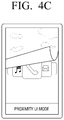
- FIGS. 4A to 4D are diagrams illustrating a proximity UI mode in accordance with a proximity input according to an embodiment of the present invention
- FIG. 5 is a diagram illustrating a proximity input method according to an embodiment of the present invention.
- FIG. 6 is a flowchart illustrating a method of providing a UI mode of a portable device according to an embodiment of the present invention.
- FIG. 1 is a schematic block diagram illustrating the configuration of a portable device according to an embodiment of the present invention.
- a portable device 100 includes a sensor unit 110 , a display unit 120 , and a control unit 13 .
- the portable device 100 may be a device that can perform a touch input through a touch screen, such as a smart phone, a cellular phone, a PMP, a tablet Personal Computer (PC), an Motion Picture experts' group audio layer-3 (MP3) device, etc.
- the sensor unit 110 senses a user's motion to input a specified command to the portable device 100 .
- the sensor unit 110 includes at least one of a touch screen for sensing a touch input, a proximity sensor for sensing a proximity input, an acceleration sensor for sensing an acceleration change of the portable device 100 , and a gyro sensor for sensing rotation of the portable device 100 .
- the touch screen senses the touch input that is made by a user's direct touch of the screen with a user's finger.
- the touch screen may be a capacitive touch screen, but, others types touch screen such as a resistive touch screen may also be used in accordance with embodiments of the present invention.
- the portable device 100 can sense the touch input through a general touch screen operation.
- the proximity sensor senses the proximity input generated by a user's movement over the screen in a state where a user's finger or an object is spaced apart from the screen. Specifically, if the object or the user's finger moves over the proximity sensor while being spaced apart for a specified range, such as 1 to 3 cm, from the screen, the proximity sensor senses the proximity input.
- An Infra-Red (IR) sensor may be used as the proximity sensor.
- IR sensors 210 - 1 , 210 - 2 , 210 - 3 , and 210 - 4 may be provided at each corner of one surface of the portable device 100 . Accordingly, the portable device 100 can sense the direction of the user's proximity input. For example, if the object moves from the IR sensor 210 - 1 that is provided at the left upper end to the direction of the IR sensor 210 - 2 that is provided at the right upper end, the portable device 100 recognizes that the proximity input in the right direction is sensed.
- three IR sensors may be provided at each corner in a manner that two of the three IR sensors emit an IR signal and one remaining IR sensor receives the reflected IR signal. Accordingly, the IR sensors can sense whether the object has moved over the sensors.
- proximity sensors are merely provided as examples, and different types of proximity sensors such as a Radio Frequency (RF) sensor may also be used in accordance with embodiments of the present invention.
- RF Radio Frequency
- positions of the proximity sensors are merely provided as examples, and proximity sensors may be positioned other position, such as at the center point of each side of the portable device 100 .
- the number of areas in which the above-described proximity sensors are positioned, as well as the number of proximity sensors themselves, are merely provided as examples, and the proximity sensors may alternatively be provided in five or more areas, for example, in accordance with embodiments of the present invention.
- the acceleration sensor senses the change of acceleration of the portable device 100 . Specifically, the acceleration sensor senses the direction of the acceleration input by sensing the acceleration change that occurs when a user shakes or hits the portable device 100 . For example, if the user shakes the portable device 100 in the leftward direction or hits the left side surface of the portable device 100 , the acceleration sensor senses the increase of the acceleration in the left direction. Accordingly, the portable device 100 can recognize that the acceleration input in the left direction has been sensed.
- the gyro sensor senses the rotation of the portable device 100 . Specifically, the gyro sensor senses the rotation that occurs when the user shakes or hits the portable device 100 . At this time, the rotation direction includes at least one of pitch, roll, and yaw directions of the portable device. For example, if the user shakes the portable device 100 so that the left side surface of the portable device 100 is moved downward, the gyro sensor senses that the portable device 100 is moved in the counterclockwise direction based on the roll direction of the portable device 100 . Accordingly, the portable device 100 can recognize that the rotation input in the left direction has been sensed.
- the sensor unit 110 receives an input of the user's motion through diverse sensors.
- the sensor unit 110 is not limited to the above-described examples, and the user's motion may be sensed by another sensor such as a geomagnetic sensor in accordance with embodiments of the present invention.
- the display unit 120 displays various kinds of mode screens under the control of the control unit 130 .
- the display unit 120 can display a standby mode screen that corresponds to a state where the user does not use the portable device.
- the display unit 120 can display one of a touch UI mode that operates according to the touch input, a proximity UI mode that is operated by the proximity input, an acceleration UI mode that operates according to the acceleration input, and a rotation UI mode that operates according to the rotation input.
- the control unit 130 controls functions of the portable device 100 in accordance with the user's motion input by the sensor unit 110 .
- the control unit 130 controls the display unit 120 to release the standby mode of the portable device 100 and to output a UI mode screen that corresponds to the type of the user's motion.
- the control unit 130 provides at least one mode selected from among the touch UI mode, the proximity UI mode, the acceleration UI mode, and the rotation UI mode in accordance with the type of the motion input by the user.
- FIGS. 3A and 3B are diagrams illustrating a touch UI mode in accordance with a touch input according to an embodiment of the present invention.
- the screen of the portable device 100 is in an off state. If a specified button that is provided on the outside of the portable device 100 is pressed, the portable device 100 provides a standby mode screen.
- the “standby mode screen” refers to a screen on which a menu for executing a specified application is not displayed, but only simple information such as date and time is displayed.
- an icon 310 is displayed on the touch screen of the portable device as illustrated in FIG. 3A .
- the control unit 130 releases the standby mode of the portable device 100 and provides a touch UI mode. Further, the control unit 130 controls the display unit 120 to convert the standby mode screen into the touch UI mode screen and to display the touch UI mode screen as illustrated in FIG. 3B .
- the term “touch UI mode” refers to a mode for performing the function of the portable device 100 through the sensing of the user's touch input through the touch screen. Accordingly, the control unit 130 controls the portable device 100 using the touch input sensed by the touch screen.
- the touch UI mode screen provides general functions of the portable device 100 as well as diverse application menus. For example, as illustrated in FIG. 2B , the touch UI mode screen provides menus for providing the basic functions of the portable device 100 (e.g., a phone menu, a photo menu, a text menu, etc.), as well as menus for providing application functions such as an E-book application, a news application, a stock application, a game application, and an Internet application.
- the standby mode can be released by moving the icon 310 to a specified area.
- the standby mode can also be released by other methods in accordance with embodiments of the present invention.
- the standby mode can be released by another method using the touch screen such as inputting of a password through the touch screen.
- FIGS. 4A and 4B are diagrams illustrating a proximity UI mode in accordance with a proximity input according to an embodiment of the present invention.
- the control unit 130 senses the user's proximity input through the proximity sensor, and as illustrated in FIG. 3B , controls the display unit 120 to display a screen to which an effect of removing the standby mode screen upward is applied. Then, if the user's hand makes another round trip in the left and right directions, the control unit 130 controls the display unit 120 to display a screen to which an effect of removing the standby mode screen as illustrated in FIG.
- FIG. 4C illustrates output provided on the display unit 120 based on the another round trip in the left and right directions.
- the control unit 130 controls the display unit 120 to display the proximity UI mode screen as illustrated in FIG. 4D .
- FIG. 4D illustrates display provided on the display unit 120 of the proximity UI mode screen based on the user making still another round trip in the left and right directions.
- the control unit 130 provides the proximity UI mode screen only when continuous proximity input (i.e., the left/right round trip) has been performed three times. Specifically, if the proximity input in the left and right directions is not sensed within a specified time (for example, 2 seconds) after a first proximity input in the left and right directions is made, the control unit 130 provides the display screen in the previous step. For example, if the proximity input in the left and right directions is not sensed within two seconds in a state where the two times proximity input in the left and right directions are sensed and the screen as illustrated in FIG. 4C is displayed on the screen, the control unit 130 controls the display unit 120 to converts the screen as illustrated in FIG. 4C into the screen as illustrated in FIG. 4B . Further, the control unit 130 releases the standby mode and provides the proximity UI mode only when the proximity input in the left and right directions is performed twice in a state where the screen as illustrated in FIG. 4B is displayed on the screen.
- a specified time for example, 2 seconds
- the control unit 130 controls the display
- control unit 130 releases the standby mode and provides the proximity UI mode.
- the term “proximity UI mode” refers to a mode in which the proximity input according to the user's movement, which is spaced apart from the touch screen, is sensed and the function of the portable device 100 is performed. Accordingly, the control unit 130 controls the portable device 100 using the proximity input sensed by the proximity sensor.
- the proximity input according to the user's action and a method of controlling the portable device 100 accordingly is described.
- “up/down sweeping” refers to the movement of the user's hand in the upward and downward directions relative to the touch screen. Specifically, the “up sweeping” refers to the movement of the user's hand from the lower surface of the touch screen to the upper surface thereof. If the up sweeping action is input, the control unit 130 performs an action such as an action corresponding to a “ ⁇ ” button for converting the menu display in the upward direction. The “down sweeping” refers to the movement of the user's hand from the upper surface of the touch screen to the lower surface thereof. If the down sweeping action is input, the control unit 130 performs an action such as an action corresponding to a “ ⁇ ” button for converting the menu display in the downward direction.
- “left/right sweeping” refers to the movement of the user's hand in the left and right directions relative to the touch screen. Specifically, the “left sweeping” refers to the movement of the user's hand from the right surface of the touch screen to the left surface thereof. If the left sweeping action is input, the control unit 130 performs an action such as an action corresponding to a “ ” button for converting the menu display in the left direction. The “right sweeping” refers to the movement of the user's hand from the left surface of the touch screen to the right surface thereof. If the right sweeping action is input, the control unit 130 performs an action such as an action corresponding to a “ ” button for converting the menu display in the right direction.
- cover refers a movement covering the whole touch screen. If the cover action is input over a specified time, the control unit 130 operates to finish the proximity UI mode and to turn off the screen of the display unit 120 .
- space tap refers a movement for a short time from upper to lower positions in the screen direction of the touch screen or a movement for a short time from lower to upper positions in the screen direction of the touch screen.
- the control unit 130 performs a function of adjusting a volume of the portable device 100 . For example, if the hover action slowly moving from upper to lower positions is input, the control unit 130 lowers the volume of the portable device 100 . If the hover action slowly moving from lower to upper positions is input, the control unit 130 raises the volume of the portable device 100 .
- various actions according to the proximity input correspond to operations such as menu display conversion, and selection, cancellation.
- these movement actions and corresponding operations are merely provided as examples, and various other actions according to the proximity input may be performed to correspond to the respective menus in accordance with embodiments of the present invention.
- the control unit 130 selects the first menu and performs a function that corresponds to the first menu, and if the motion is performed in a second direction, the control unit 130 selects the second menu and performs a function that corresponds to the second menu. For example, if the left sweeping action is input, the control unit 130 selects a phone call menu to perform a call function, and if the right sweep action is input, the control unit 130 selects a photographing menu to perform a photographing function.
- the proximity UI mode screen displays a menu for a general function such as a phone call menu and a text menu provided by the portable device 100 .
- the proximity UI mode screen can provide menus the number of which is smaller than the number of menus provided by the touch UI mode screen, because when the proximity UI mode, the input method is limited in comparison to the input method of the touch UI mode, and thus it is necessary to display menus for essential functions.
- the proximity UI mode screen also provides the menu arrangement and menu size, which are different from those of the touch UI mode screen. For example, as illustrated in FIGS. 3B and 4D , the proximity UI mode screen may be larger than the menu that is provided on the touch UI mode screen. Further, on the proximity UI mode screen, menus are arranged only in the left and right directions, whereas on the touch UI mode screen, menus can be arranged in all directions, that is, in up, down, left, and right directions.
- the portable device can provide an acceleration UI mode and a rotation UI mode. Specifically, if the portable device 100 is shaken three times in a standby mode screen state, the control unit 130 releases the standby mode and provides the acceleration UI mode.
- the acceleration UI mode means a mode in which the acceleration input according to the acceleration sensor is sensed and the portable device 100 is controlled accordingly.
- the control unit 130 releases the standby mode and provides the rotation UI mode.
- the rotation UI mode refers to a mode in which the rotation input according to the gyro sensor is sensed and the portable device 100 is controlled accordingly.
- the portable device 100 can be controlled even in the case where the capacitive touch screen is unable to be used due to climatic conditions or specified circumstances.
- the control unit 130 if a specified command is input in another UI mode except for the touch UI mode, the control unit 130 operates to convert the other UI mode into the touch UI mode. For example, if a touch UI mode conversion icon is selected in the proximity UI mode, the control unit 130 may operate to convert the proximity UI mode into the touch IO mode. Further, if a mode conversion button provided on the case of the portable device 100 is pressed, the control unit 130 may convert the proximity UI mode into the touch UI mode.
- FIG. 6 is a flowchart illustrating a method of providing a UI mode of a portable device according to an embodiment of the present invention.
- the portable device 100 senses the user's motion using the sensor unit 110 , in step S 605 . If the user's motion is sensed, the portable device 100 confirms whether the sensed motion is a touch input, in step S 610 . If the sensed motion is determined to be the touch input in step S 610 ), the portable device 100 determines whether the input motion is a standby mode release motion, in step S 620 . Specifically, the portable device 100 determines whether the input motion is a motion that moves the icon 310 displayed on the touch screen, which corresponds to the standby mode release motion by the touch input, to the specified area.
- the portable device If the motion input to the portable device 100 is determined to be the standby mode release motion by the touch input in step S 620 , the portable device outputs the touch UI mode screen, in step S 625 . Then, the portable device 100 converts the present mode into the touch UI mode, and performs the function of the portable device 100 according to the touch input, in step S 630 .
- the portable device 100 determines whether the input motion is the standby mode release motion according to the proximity input, in step S 635 . Specifically, the portable device 100 determines whether the input motion is a motion that including three round trips in the left and right directions while being spaced apart from the touch screen, which is defined as the standby mode release motion according to the proximity input.
- the portable device 100 If the motion input to the portable device 100 is determined to be the standby mode release motion according to the proximity input in step S 635 , the portable device 100 outputs the proximity UI mode screen in step S 640 .
- the number of proximity UI mode screens may be less than the number of menus that are displayed on the touch UI mode screen, and the size and arrangement of the proximity UI mode screen may be different from the size and arrangement of the menu that is displayed on the touch UI mode screen.
- the portable device 100 determines whether there is an input for changing the present mode to the touch UI mode, in step S 645 . Specifically, the portable device 100 determines whether a touch UI mode change icon that is displayed on the proximity UI mode screen or a touch UI mode change button that is positioned on the outside of the case of the portable device 100 , and determines whether to change the proximity UI mode to the touch UI mode.
- step S 645 the portable device 100 outputs the touch UI mode screen in step S 625 , and perform the function of the portable device by the touch input in step S 630 .
- step S 645 the portable device 100 performs the function of the portable device by the proximity input in step S 650 .
- the portable device 100 provides the touch UI mode and the proximity UI mode.
- the portable device 100 may further provide other UI modes such as the acceleration UI mode and the rotation UI mode except for the touch UI mode and the proximity UI mode.
- a portable device can be controlled even when the touch screen is unable to be used due to climatic conditions or other specified circumstances.
Landscapes
- Engineering & Computer Science (AREA)
- General Engineering & Computer Science (AREA)
- Theoretical Computer Science (AREA)
- Human Computer Interaction (AREA)
- Physics & Mathematics (AREA)
- General Physics & Mathematics (AREA)
- User Interface Of Digital Computer (AREA)
- Position Input By Displaying (AREA)
- Telephone Function (AREA)
Abstract
Description


Claims (18)
Priority Applications (1)
| Application Number | Priority Date | Filing Date | Title |
|---|---|---|---|
| US15/973,030 US10956028B2 (en) | 2010-11-29 | 2018-05-07 | Portable device and method for providing user interface mode thereof |
Applications Claiming Priority (4)
| Application Number | Priority Date | Filing Date | Title |
|---|---|---|---|
| KR10-2010-0120025 | 2010-11-29 | ||
| KR1020100120025A KR101932688B1 (en) | 2010-11-29 | 2010-11-29 | Portable Device and Method for Providing User Interface Mode thereof |
| US13/242,697 US9965168B2 (en) | 2010-11-29 | 2011-09-23 | Portable device and method for providing user interface mode thereof |
| US15/973,030 US10956028B2 (en) | 2010-11-29 | 2018-05-07 | Portable device and method for providing user interface mode thereof |
Related Parent Applications (1)
| Application Number | Title | Priority Date | Filing Date |
|---|---|---|---|
| US13/242,697 Continuation US9965168B2 (en) | 2010-11-29 | 2011-09-23 | Portable device and method for providing user interface mode thereof |
Publications (2)
| Publication Number | Publication Date |
|---|---|
| US20180253227A1 US20180253227A1 (en) | 2018-09-06 |
| US10956028B2 true US10956028B2 (en) | 2021-03-23 |
Family
ID=46127491
Family Applications (2)
| Application Number | Title | Priority Date | Filing Date |
|---|---|---|---|
| US13/242,697 Active 2034-02-01 US9965168B2 (en) | 2010-11-29 | 2011-09-23 | Portable device and method for providing user interface mode thereof |
| US15/973,030 Expired - Fee Related US10956028B2 (en) | 2010-11-29 | 2018-05-07 | Portable device and method for providing user interface mode thereof |
Family Applications Before (1)
| Application Number | Title | Priority Date | Filing Date |
|---|---|---|---|
| US13/242,697 Active 2034-02-01 US9965168B2 (en) | 2010-11-29 | 2011-09-23 | Portable device and method for providing user interface mode thereof |
Country Status (3)
| Country | Link |
|---|---|
| US (2) | US9965168B2 (en) |
| KR (1) | KR101932688B1 (en) |
| WO (1) | WO2012074256A2 (en) |
Families Citing this family (25)
| Publication number | Priority date | Publication date | Assignee | Title |
|---|---|---|---|---|
| KR101932688B1 (en) * | 2010-11-29 | 2018-12-28 | 삼성전자주식회사 | Portable Device and Method for Providing User Interface Mode thereof |
| US9195349B2 (en) * | 2011-10-20 | 2015-11-24 | Nokia Technologies Oy | Apparatus, method and computer program using a proximity detector |
| US9582083B2 (en) * | 2011-12-22 | 2017-02-28 | Apple Inc. | Directional light sensors |
| AU343508S (en) * | 2012-01-09 | 2012-07-26 | Samsung Electronics Co Ltd | Display screen for an electronic device |
| US9928562B2 (en) | 2012-01-20 | 2018-03-27 | Microsoft Technology Licensing, Llc | Touch mode and input type recognition |
| USD689071S1 (en) * | 2012-05-30 | 2013-09-03 | Microsoft Corporation | Display screen with user interface |
| USD687456S1 (en) * | 2012-06-13 | 2013-08-06 | Microsoft Corporation | Display screen with user interface |
| USD705261S1 (en) * | 2012-06-13 | 2014-05-20 | Microsoft Corporation | Display screen with icon set |
| USD705243S1 (en) * | 2012-06-13 | 2014-05-20 | Microsoft Corporation | Display screen with graphical user interface |
| USD687455S1 (en) * | 2012-06-13 | 2013-08-06 | Microsoft Corporation | Display screen with user interface |
| USD706798S1 (en) | 2012-06-13 | 2014-06-10 | Microsoft Corporation | Display screen with graphical user interface |
| KR101984154B1 (en) * | 2012-07-16 | 2019-05-30 | 삼성전자 주식회사 | Control method for terminal using touch and gesture input and terminal thereof |
| USD741895S1 (en) * | 2012-12-18 | 2015-10-27 | 2236008 Ontario Inc. | Display screen or portion thereof with graphical user interface |
| KR101407645B1 (en) * | 2013-04-26 | 2014-06-13 | 권홍미 | The apparatus and method of game payment with rock-scissors-paper application module |
| KR102302233B1 (en) * | 2014-05-26 | 2021-09-14 | 삼성전자주식회사 | Method and apparatus for providing user interface |
| US10719132B2 (en) * | 2014-06-19 | 2020-07-21 | Samsung Electronics Co., Ltd. | Device and method of controlling device |
| KR101981667B1 (en) * | 2014-06-20 | 2019-05-24 | 삼성전자주식회사 | Display apparatus and control method of display apparatus |
| KR102214194B1 (en) * | 2014-08-19 | 2021-02-09 | 삼성전자 주식회사 | A display device having rf sensor and method for detecting a user of the display device |
| CN104407768B (en) * | 2014-10-28 | 2019-05-17 | 深圳市金立通信设备有限公司 | A kind of terminal |
| US10048856B2 (en) | 2014-12-30 | 2018-08-14 | Microsoft Technology Licensing, Llc | Configuring a user interface based on an experience mode transition |
| CN106102144B (en) * | 2016-05-31 | 2017-09-01 | 广东欧珀移动通信有限公司 | A sensor processing method and device based on a mobile terminal |
| JP6266833B1 (en) * | 2017-07-28 | 2018-01-24 | 京セラ株式会社 | Electronic device, program, and control method |
| JP7159636B2 (en) * | 2018-06-20 | 2022-10-25 | カシオ計算機株式会社 | Electronic device, control method and program |
| US11714543B2 (en) * | 2018-10-01 | 2023-08-01 | T1V, Inc. | Simultaneous gesture and touch control on a display |
| CN109814796A (en) * | 2018-12-29 | 2019-05-28 | 新奥特(北京)视频技术有限公司 | A kind of method and system for simulating touch-control |
Citations (55)
| Publication number | Priority date | Publication date | Assignee | Title |
|---|---|---|---|---|
| US20010015718A1 (en) | 1998-09-14 | 2001-08-23 | Hinckley Kenneth P. | Method for displying information responsive to sensing a physical presence proximate to a computer input device |
| KR20020083961A (en) | 2002-08-19 | 2002-11-04 | 박민수 | A contact approach acting generation cellular phone |
| US20020175896A1 (en) | 2001-05-16 | 2002-11-28 | Myorigo, L.L.C. | Method and device for browsing information on a display |
| US6704032B1 (en) | 2000-10-27 | 2004-03-09 | Microsoft Corporation | Methods and arrangements for interacting with controllable objects within a graphical user interface environment using various input mechanisms |
| US20040056870A1 (en) | 2001-03-13 | 2004-03-25 | Canon Kabushiki Kaisha | Image composition apparatus and method |
| US20050068337A1 (en) * | 2003-09-29 | 2005-03-31 | Matias Duarte | Multipurpose data input/output and display configurations for a data processing apparatus |
| US20050091574A1 (en) | 2003-10-27 | 2005-04-28 | Jussi Maaniitty | Multimedia presentation editor for a small-display communication terminal or computing device |
| US20050237310A1 (en) | 2004-04-23 | 2005-10-27 | Nokia Corporation | User interface |
| US20060101338A1 (en) | 2004-11-08 | 2006-05-11 | Lawrence Kates | Touch-screen remote control for multimedia equipment |
| US20060101354A1 (en) | 2004-10-20 | 2006-05-11 | Nintendo Co., Ltd. | Gesture inputs for a portable display device |
| US20070057912A1 (en) * | 2005-09-14 | 2007-03-15 | Romriell Joseph N | Method and system for controlling an interface of a device through motion gestures |
| US20070113111A1 (en) | 2005-11-14 | 2007-05-17 | Franck Dahan | Standby Mode for Power Management |
| US20070145132A1 (en) | 2003-09-22 | 2007-06-28 | Matsushita Electric Industrial Co., Ltd. | Secure device and information processing unit |
| US20070259717A1 (en) | 2004-06-18 | 2007-11-08 | Igt | Gesture controlled casino gaming system |
| US20070287541A1 (en) * | 2001-09-28 | 2007-12-13 | Jeffrey George | Tracking display with proximity button activation |
| KR20080049911A (en) | 2006-12-01 | 2008-06-05 | 삼성전자주식회사 | How to unlock a mobile terminal and its keypad |
| JP2008140064A (en) | 2006-11-30 | 2008-06-19 | Toshiba Corp | Information processing device |
| US20080165022A1 (en) | 2007-01-07 | 2008-07-10 | Scott Herz | Portable Electronic Device with Alert Silencing |
| US20080170042A1 (en) | 2007-01-17 | 2008-07-17 | Samsung Electronics Co., Ltd. | Touch signal recognition apparatus and method and medium for the same |
| EP1991832A2 (en) | 2006-03-08 | 2008-11-19 | TomTom International B.V. | Navigation device comprising a touch sensitive screen for switching menu options and method thereof |
| KR20090005796A (en) | 2007-07-10 | 2009-01-14 | 삼성전자주식회사 | Key input device and method of a mobile terminal having a touch key |
| US20090064055A1 (en) | 2007-09-04 | 2009-03-05 | Apple Inc. | Application Menu User Interface |
| US20090138194A1 (en) | 2003-06-02 | 2009-05-28 | Pieter Geelen | Personal GPS navigation device |
| US20090184933A1 (en) | 2008-01-22 | 2009-07-23 | Yang Wei-Wen | Touch interpretive architecture and touch interpretive method by using multi-fingers gesture to trigger application program |
| KR20090100320A (en) | 2009-04-28 | 2009-09-23 | 엘지전자 주식회사 | User interface of mobile terminal and its control method |
| US20090244019A1 (en) * | 2008-03-26 | 2009-10-01 | Lg Electronics Inc. | Terminal and method of controlling the same |
| US20090322691A1 (en) | 2008-06-26 | 2009-12-31 | Chi Mei Communication Systems, Inc. | Method and system for adjusting orientations of user interfaces by detecting gravity acceleration values |
| KR20100001601A (en) | 2008-06-27 | 2010-01-06 | 엘지전자 주식회사 | Portable terminal capable of sensing proximity touch |
| US20100007613A1 (en) | 2008-07-10 | 2010-01-14 | Paul Costa | Transitioning Between Modes of Input |
| US7653883B2 (en) | 2004-07-30 | 2010-01-26 | Apple Inc. | Proximity detector in handheld device |
| US20100020035A1 (en) | 2008-07-23 | 2010-01-28 | Hye-Jin Ryu | Mobile terminal and event control method thereof |
| KR20100013420A (en) | 2008-07-31 | 2010-02-10 | 엘지전자 주식회사 | Digital camera and portable terminal comprising it |
| KR20100052378A (en) | 2008-11-10 | 2010-05-19 | 삼성전자주식회사 | Motion input device for portable device and operation method using the same |
| US20100123664A1 (en) | 2008-11-14 | 2010-05-20 | Samsung Electronics Co., Ltd. | Method for operating user interface based on motion sensor and a mobile terminal having the user interface |
| US20100138037A1 (en) | 2008-10-22 | 2010-06-03 | Newzoom, Inc. | Vending Store Inventory Management and Reporting System |
| US20100162109A1 (en) * | 2008-12-22 | 2010-06-24 | Shuvo Chatterjee | User interface having changeable topography |
| US20100229125A1 (en) | 2009-03-09 | 2010-09-09 | Samsung Electronics Co., Ltd. | Display apparatus for providing a user menu, and method for providing user interface (ui) applicable thereto |
| US20100235732A1 (en) | 2009-03-13 | 2010-09-16 | Sun Microsystems, Inc. | System and method for interacting with status information on a touch screen device |
| US20100251152A1 (en) * | 2009-03-31 | 2010-09-30 | Seong Yoon Cho | Mobile terminal and controlling method thereof |
| US20100261505A1 (en) * | 2009-04-14 | 2010-10-14 | Elan Microelectronics Corporation | Control method for a cell phone |
| US20100299635A1 (en) | 2009-05-21 | 2010-11-25 | Lg Electronics Inc. | Method for executing menu in mobile terminal and mobile terminal using the same |
| US20100306702A1 (en) | 2009-05-29 | 2010-12-02 | Peter Warner | Radial Menus |
| US20110003621A1 (en) | 2008-03-07 | 2011-01-06 | Kyocera Corporation | Mobile Communication Device |
| US20110043826A1 (en) | 2009-08-21 | 2011-02-24 | Seiko Epson Corporation | Optical information input device, electronic device with optical input function, and optical information input method |
| US20110099524A1 (en) * | 2009-10-27 | 2011-04-28 | Lg Electronics Inc. | Method for controlling icon display in mobile terminal and mobile terminal thereof |
| US20110102464A1 (en) | 2009-11-03 | 2011-05-05 | Sri Venkatesh Godavari | Methods for implementing multi-touch gestures on a single-touch touch surface |
| US20110102345A1 (en) * | 2009-10-30 | 2011-05-05 | Samsung Electronics Co., Ltd. | Mobile device and method for providing user interface (ui) thereof |
| US20110124369A1 (en) | 2008-07-29 | 2011-05-26 | Kyocera Corporation | Portable terminal device |
| US20110256019A1 (en) | 2010-04-19 | 2011-10-20 | Microsoft Corporation | Self-sterilizing user input device |
| US20110316679A1 (en) | 2010-06-24 | 2011-12-29 | Nokia Corporation | Apparatus and method for proximity based input |
| US8125312B2 (en) | 2006-12-08 | 2012-02-28 | Research In Motion Limited | System and method for locking and unlocking access to an electronic device |
| US8375315B2 (en) * | 2009-05-04 | 2013-02-12 | Lg Electronics Inc. | Managing a calendar through a touch interface and graphically displaying the change history |
| US8560020B2 (en) | 2007-04-10 | 2013-10-15 | Samsung Electronics Co., Ltd. | Apparatus and method for controlling a touchscreen in a wireless terminal |
| US9600139B2 (en) | 2008-12-17 | 2017-03-21 | Samsung Electronics Co., Ltd. | Electronic device and method for implementing user interfaces associated with touch screens |
| US9965168B2 (en) * | 2010-11-29 | 2018-05-08 | Samsung Electronics Co., Ltd | Portable device and method for providing user interface mode thereof |
-
2010
- 2010-11-29 KR KR1020100120025A patent/KR101932688B1/en not_active Expired - Fee Related
-
2011
- 2011-09-23 US US13/242,697 patent/US9965168B2/en active Active
- 2011-11-28 WO PCT/KR2011/009123 patent/WO2012074256A2/en not_active Ceased
-
2018
- 2018-05-07 US US15/973,030 patent/US10956028B2/en not_active Expired - Fee Related
Patent Citations (60)
| Publication number | Priority date | Publication date | Assignee | Title |
|---|---|---|---|---|
| US20010015718A1 (en) | 1998-09-14 | 2001-08-23 | Hinckley Kenneth P. | Method for displying information responsive to sensing a physical presence proximate to a computer input device |
| US6704032B1 (en) | 2000-10-27 | 2004-03-09 | Microsoft Corporation | Methods and arrangements for interacting with controllable objects within a graphical user interface environment using various input mechanisms |
| US20040056870A1 (en) | 2001-03-13 | 2004-03-25 | Canon Kabushiki Kaisha | Image composition apparatus and method |
| US20020175896A1 (en) | 2001-05-16 | 2002-11-28 | Myorigo, L.L.C. | Method and device for browsing information on a display |
| US20070287541A1 (en) * | 2001-09-28 | 2007-12-13 | Jeffrey George | Tracking display with proximity button activation |
| KR20020083961A (en) | 2002-08-19 | 2002-11-04 | 박민수 | A contact approach acting generation cellular phone |
| US20090138194A1 (en) | 2003-06-02 | 2009-05-28 | Pieter Geelen | Personal GPS navigation device |
| US20070145132A1 (en) | 2003-09-22 | 2007-06-28 | Matsushita Electric Industrial Co., Ltd. | Secure device and information processing unit |
| US20050068337A1 (en) * | 2003-09-29 | 2005-03-31 | Matias Duarte | Multipurpose data input/output and display configurations for a data processing apparatus |
| US20050091574A1 (en) | 2003-10-27 | 2005-04-28 | Jussi Maaniitty | Multimedia presentation editor for a small-display communication terminal or computing device |
| US20050237310A1 (en) | 2004-04-23 | 2005-10-27 | Nokia Corporation | User interface |
| US20070259717A1 (en) | 2004-06-18 | 2007-11-08 | Igt | Gesture controlled casino gaming system |
| US7653883B2 (en) | 2004-07-30 | 2010-01-26 | Apple Inc. | Proximity detector in handheld device |
| US20060101354A1 (en) | 2004-10-20 | 2006-05-11 | Nintendo Co., Ltd. | Gesture inputs for a portable display device |
| US20060101338A1 (en) | 2004-11-08 | 2006-05-11 | Lawrence Kates | Touch-screen remote control for multimedia equipment |
| US20070057912A1 (en) * | 2005-09-14 | 2007-03-15 | Romriell Joseph N | Method and system for controlling an interface of a device through motion gestures |
| US20070113111A1 (en) | 2005-11-14 | 2007-05-17 | Franck Dahan | Standby Mode for Power Management |
| EP1991832A2 (en) | 2006-03-08 | 2008-11-19 | TomTom International B.V. | Navigation device comprising a touch sensitive screen for switching menu options and method thereof |
| JP2008140064A (en) | 2006-11-30 | 2008-06-19 | Toshiba Corp | Information processing device |
| KR20080049911A (en) | 2006-12-01 | 2008-06-05 | 삼성전자주식회사 | How to unlock a mobile terminal and its keypad |
| US8125312B2 (en) | 2006-12-08 | 2012-02-28 | Research In Motion Limited | System and method for locking and unlocking access to an electronic device |
| US20080165022A1 (en) | 2007-01-07 | 2008-07-10 | Scott Herz | Portable Electronic Device with Alert Silencing |
| US20080170042A1 (en) | 2007-01-17 | 2008-07-17 | Samsung Electronics Co., Ltd. | Touch signal recognition apparatus and method and medium for the same |
| KR20080067885A (en) | 2007-01-17 | 2008-07-22 | 삼성전자주식회사 | Touch signal recognition device and method |
| US8560020B2 (en) | 2007-04-10 | 2013-10-15 | Samsung Electronics Co., Ltd. | Apparatus and method for controlling a touchscreen in a wireless terminal |
| KR20090005796A (en) | 2007-07-10 | 2009-01-14 | 삼성전자주식회사 | Key input device and method of a mobile terminal having a touch key |
| US20090064055A1 (en) | 2007-09-04 | 2009-03-05 | Apple Inc. | Application Menu User Interface |
| US20090184933A1 (en) | 2008-01-22 | 2009-07-23 | Yang Wei-Wen | Touch interpretive architecture and touch interpretive method by using multi-fingers gesture to trigger application program |
| US20110003621A1 (en) | 2008-03-07 | 2011-01-06 | Kyocera Corporation | Mobile Communication Device |
| US20090244019A1 (en) * | 2008-03-26 | 2009-10-01 | Lg Electronics Inc. | Terminal and method of controlling the same |
| US20090322691A1 (en) | 2008-06-26 | 2009-12-31 | Chi Mei Communication Systems, Inc. | Method and system for adjusting orientations of user interfaces by detecting gravity acceleration values |
| KR20100001601A (en) | 2008-06-27 | 2010-01-06 | 엘지전자 주식회사 | Portable terminal capable of sensing proximity touch |
| US20100007613A1 (en) | 2008-07-10 | 2010-01-14 | Paul Costa | Transitioning Between Modes of Input |
| KR20100010860A (en) | 2008-07-23 | 2010-02-02 | 엘지전자 주식회사 | Mobile terminal and event control method thereof |
| US8363008B2 (en) | 2008-07-23 | 2013-01-29 | Lg Electronics Inc. | Mobile terminal and event control method thereof |
| US20100020035A1 (en) | 2008-07-23 | 2010-01-28 | Hye-Jin Ryu | Mobile terminal and event control method thereof |
| US20110124369A1 (en) | 2008-07-29 | 2011-05-26 | Kyocera Corporation | Portable terminal device |
| KR20100013420A (en) | 2008-07-31 | 2010-02-10 | 엘지전자 주식회사 | Digital camera and portable terminal comprising it |
| US20100138037A1 (en) | 2008-10-22 | 2010-06-03 | Newzoom, Inc. | Vending Store Inventory Management and Reporting System |
| KR20100052378A (en) | 2008-11-10 | 2010-05-19 | 삼성전자주식회사 | Motion input device for portable device and operation method using the same |
| US20110053641A1 (en) | 2008-11-10 | 2011-03-03 | Samsung Electronics Co., Ltd. | Motion input device for portable terminal and operation method using the same |
| KR20100054290A (en) | 2008-11-14 | 2010-05-25 | 삼성전자주식회사 | Method for operating user interface based on motion sensor and mobile terminal using the same |
| US20100123664A1 (en) | 2008-11-14 | 2010-05-20 | Samsung Electronics Co., Ltd. | Method for operating user interface based on motion sensor and a mobile terminal having the user interface |
| US9600139B2 (en) | 2008-12-17 | 2017-03-21 | Samsung Electronics Co., Ltd. | Electronic device and method for implementing user interfaces associated with touch screens |
| US20100162109A1 (en) * | 2008-12-22 | 2010-06-24 | Shuvo Chatterjee | User interface having changeable topography |
| US20100229125A1 (en) | 2009-03-09 | 2010-09-09 | Samsung Electronics Co., Ltd. | Display apparatus for providing a user menu, and method for providing user interface (ui) applicable thereto |
| US20100235732A1 (en) | 2009-03-13 | 2010-09-16 | Sun Microsystems, Inc. | System and method for interacting with status information on a touch screen device |
| US20100251152A1 (en) * | 2009-03-31 | 2010-09-30 | Seong Yoon Cho | Mobile terminal and controlling method thereof |
| US20100261505A1 (en) * | 2009-04-14 | 2010-10-14 | Elan Microelectronics Corporation | Control method for a cell phone |
| KR20090100320A (en) | 2009-04-28 | 2009-09-23 | 엘지전자 주식회사 | User interface of mobile terminal and its control method |
| US8375315B2 (en) * | 2009-05-04 | 2013-02-12 | Lg Electronics Inc. | Managing a calendar through a touch interface and graphically displaying the change history |
| US20100299635A1 (en) | 2009-05-21 | 2010-11-25 | Lg Electronics Inc. | Method for executing menu in mobile terminal and mobile terminal using the same |
| US20100306702A1 (en) | 2009-05-29 | 2010-12-02 | Peter Warner | Radial Menus |
| US20110043826A1 (en) | 2009-08-21 | 2011-02-24 | Seiko Epson Corporation | Optical information input device, electronic device with optical input function, and optical information input method |
| US20110099524A1 (en) * | 2009-10-27 | 2011-04-28 | Lg Electronics Inc. | Method for controlling icon display in mobile terminal and mobile terminal thereof |
| US20110102345A1 (en) * | 2009-10-30 | 2011-05-05 | Samsung Electronics Co., Ltd. | Mobile device and method for providing user interface (ui) thereof |
| US20110102464A1 (en) | 2009-11-03 | 2011-05-05 | Sri Venkatesh Godavari | Methods for implementing multi-touch gestures on a single-touch touch surface |
| US20110256019A1 (en) | 2010-04-19 | 2011-10-20 | Microsoft Corporation | Self-sterilizing user input device |
| US20110316679A1 (en) | 2010-06-24 | 2011-12-29 | Nokia Corporation | Apparatus and method for proximity based input |
| US9965168B2 (en) * | 2010-11-29 | 2018-05-08 | Samsung Electronics Co., Ltd | Portable device and method for providing user interface mode thereof |
Non-Patent Citations (3)
| Title |
|---|
| Korean Office Action dated Dec. 27, 2016 issued in counterpart application No. 10-2010-0120025, 9 pages. |
| Korean Office Action dated Jun. 29, 2016 issued in counterpart application No. 10-2010-0120025, 8 pages. |
| Korean Office Action dated Sep. 4, 2017 issued in counterpart application No. 10-2010-0120025, 9 pages. |
Also Published As
| Publication number | Publication date |
|---|---|
| KR101932688B1 (en) | 2018-12-28 |
| US9965168B2 (en) | 2018-05-08 |
| WO2012074256A2 (en) | 2012-06-07 |
| KR20120058308A (en) | 2012-06-07 |
| WO2012074256A3 (en) | 2012-10-04 |
| US20120137253A1 (en) | 2012-05-31 |
| US20180253227A1 (en) | 2018-09-06 |
Similar Documents
| Publication | Publication Date | Title |
|---|---|---|
| US9965168B2 (en) | Portable device and method for providing user interface mode thereof | |
| US9671880B2 (en) | Display control device, display control method, and computer program | |
| EP2508972B1 (en) | Portable electronic device and method of controlling same | |
| US11269486B2 (en) | Method for displaying item in terminal and terminal using the same | |
| US9977497B2 (en) | Method for providing haptic effect set by a user in a portable terminal, machine-readable storage medium, and portable terminal | |
| US9348458B2 (en) | Gestures for touch sensitive input devices | |
| US8427445B2 (en) | Visual expander | |
| JP5759660B2 (en) | Portable information terminal having touch screen and input method | |
| WO2018082269A1 (en) | Menu display method and terminal | |
| US20140362119A1 (en) | One-handed gestures for navigating ui using touch-screen hover events | |
| US20130201131A1 (en) | Method of operating multi-touch panel and terminal supporting the same | |
| KR20140035870A (en) | Smart air mouse | |
| CN106527904A (en) | Method for adjusting display interface and mobile terminal | |
| JP2016515747A (en) | Grip force sensor array for one-handed and multimodal interaction with handheld devices and methods | |
| KR102367184B1 (en) | Method and apparatus for inputting information by using a screen keyboard | |
| WO2013046046A2 (en) | Touch and non touch based interaction of a user with a device | |
| CN107643867A (en) | A kind of display methods and mobile terminal | |
| US20140009403A1 (en) | System and Method for Creating Optimal Command Regions for the Hand on a Touch Pad Device | |
| US20160026309A1 (en) | Controller | |
| US20170075453A1 (en) | Terminal and terminal control method | |
| KR101725253B1 (en) | Portable terminal having mouse function | |
| JP5492627B2 (en) | Information display device and information display method | |
| US20140085340A1 (en) | Method and electronic device for manipulating scale or rotation of graphic on display | |
| CN105892918A (en) | Mobile terminal with touch screen and control method of mobile terminal | |
| KR20110011845A (en) | Mobile communication terminal with touch screen and control method thereof |
Legal Events
| Date | Code | Title | Description |
|---|---|---|---|
| FEPP | Fee payment procedure |
Free format text: ENTITY STATUS SET TO UNDISCOUNTED (ORIGINAL EVENT CODE: BIG.); ENTITY STATUS OF PATENT OWNER: LARGE ENTITY |
|
| STPP | Information on status: patent application and granting procedure in general |
Free format text: DOCKETED NEW CASE - READY FOR EXAMINATION |
|
| STPP | Information on status: patent application and granting procedure in general |
Free format text: NON FINAL ACTION MAILED |
|
| STPP | Information on status: patent application and granting procedure in general |
Free format text: RESPONSE TO NON-FINAL OFFICE ACTION ENTERED AND FORWARDED TO EXAMINER |
|
| STPP | Information on status: patent application and granting procedure in general |
Free format text: FINAL REJECTION MAILED |
|
| STPP | Information on status: patent application and granting procedure in general |
Free format text: DOCKETED NEW CASE - READY FOR EXAMINATION |
|
| STPP | Information on status: patent application and granting procedure in general |
Free format text: NON FINAL ACTION MAILED |
|
| STPP | Information on status: patent application and granting procedure in general |
Free format text: RESPONSE TO NON-FINAL OFFICE ACTION ENTERED AND FORWARDED TO EXAMINER |
|
| STPP | Information on status: patent application and granting procedure in general |
Free format text: NOTICE OF ALLOWANCE MAILED -- APPLICATION RECEIVED IN OFFICE OF PUBLICATIONS |
|
| STCF | Information on status: patent grant |
Free format text: PATENTED CASE |
|
| FEPP | Fee payment procedure |
Free format text: MAINTENANCE FEE REMINDER MAILED (ORIGINAL EVENT CODE: REM.); ENTITY STATUS OF PATENT OWNER: LARGE ENTITY |
|
| LAPS | Lapse for failure to pay maintenance fees |
Free format text: PATENT EXPIRED FOR FAILURE TO PAY MAINTENANCE FEES (ORIGINAL EVENT CODE: EXP.); ENTITY STATUS OF PATENT OWNER: LARGE ENTITY |
|
| STCH | Information on status: patent discontinuation |
Free format text: PATENT EXPIRED DUE TO NONPAYMENT OF MAINTENANCE FEES UNDER 37 CFR 1.362 |
|
| FP | Lapsed due to failure to pay maintenance fee |
Effective date: 20250323 |