US10951683B2 - Systems and methods for remote interaction - Google Patents
Systems and methods for remote interaction Download PDFInfo
- Publication number
- US10951683B2 US10951683B2 US15/696,170 US201715696170A US10951683B2 US 10951683 B2 US10951683 B2 US 10951683B2 US 201715696170 A US201715696170 A US 201715696170A US 10951683 B2 US10951683 B2 US 10951683B2
- Authority
- US
- United States
- Prior art keywords
- server
- customer
- agent
- application
- browser
- Prior art date
- Legal status (The legal status is an assumption and is not a legal conclusion. Google has not performed a legal analysis and makes no representation as to the accuracy of the status listed.)
- Active - Reinstated
Links
Images



Classifications
-
- H—ELECTRICITY
- H04—ELECTRIC COMMUNICATION TECHNIQUE
- H04L—TRANSMISSION OF DIGITAL INFORMATION, e.g. TELEGRAPHIC COMMUNICATION
- H04L67/00—Network arrangements or protocols for supporting network services or applications
- H04L67/01—Protocols
- H04L67/02—Protocols based on web technology, e.g. hypertext transfer protocol [HTTP]
- H04L67/025—Protocols based on web technology, e.g. hypertext transfer protocol [HTTP] for remote control or remote monitoring of applications
-
- G—PHYSICS
- G06—COMPUTING OR CALCULATING; COUNTING
- G06F—ELECTRIC DIGITAL DATA PROCESSING
- G06F21/00—Security arrangements for protecting computers, components thereof, programs or data against unauthorised activity
- G06F21/30—Authentication, i.e. establishing the identity or authorisation of security principals
- G06F21/305—Authentication, i.e. establishing the identity or authorisation of security principals by remotely controlling device operation
-
- G—PHYSICS
- G06—COMPUTING OR CALCULATING; COUNTING
- G06F—ELECTRIC DIGITAL DATA PROCESSING
- G06F21/00—Security arrangements for protecting computers, components thereof, programs or data against unauthorised activity
- G06F21/30—Authentication, i.e. establishing the identity or authorisation of security principals
- G06F21/31—User authentication
-
- G—PHYSICS
- G06—COMPUTING OR CALCULATING; COUNTING
- G06F—ELECTRIC DIGITAL DATA PROCESSING
- G06F9/00—Arrangements for program control, e.g. control units
- G06F9/06—Arrangements for program control, e.g. control units using stored programs, i.e. using an internal store of processing equipment to receive or retain programs
- G06F9/44—Arrangements for executing specific programs
- G06F9/451—Execution arrangements for user interfaces
- G06F9/452—Remote windowing, e.g. X-Window System, desktop virtualisation
-
- H—ELECTRICITY
- H04—ELECTRIC COMMUNICATION TECHNIQUE
- H04L—TRANSMISSION OF DIGITAL INFORMATION, e.g. TELEGRAPHIC COMMUNICATION
- H04L65/00—Network arrangements, protocols or services for supporting real-time applications in data packet communication
- H04L65/1066—Session management
- H04L65/1083—In-session procedures
- H04L65/1089—In-session procedures by adding media; by removing media
-
- H—ELECTRICITY
- H04—ELECTRIC COMMUNICATION TECHNIQUE
- H04L—TRANSMISSION OF DIGITAL INFORMATION, e.g. TELEGRAPHIC COMMUNICATION
- H04L65/00—Network arrangements, protocols or services for supporting real-time applications in data packet communication
- H04L65/40—Support for services or applications
- H04L65/401—Support for services or applications wherein the services involve a main real-time session and one or more additional parallel real-time or time sensitive sessions, e.g. white board sharing or spawning of a subconference
- H04L65/4015—Support for services or applications wherein the services involve a main real-time session and one or more additional parallel real-time or time sensitive sessions, e.g. white board sharing or spawning of a subconference where at least one of the additional parallel sessions is real time or time sensitive, e.g. white board sharing, collaboration or spawning of a subconference
-
- H—ELECTRICITY
- H04—ELECTRIC COMMUNICATION TECHNIQUE
- H04L—TRANSMISSION OF DIGITAL INFORMATION, e.g. TELEGRAPHIC COMMUNICATION
- H04L65/00—Network arrangements, protocols or services for supporting real-time applications in data packet communication
- H04L65/40—Support for services or applications
- H04L65/403—Arrangements for multi-party communication, e.g. for conferences
-
- H—ELECTRICITY
- H04—ELECTRIC COMMUNICATION TECHNIQUE
- H04L—TRANSMISSION OF DIGITAL INFORMATION, e.g. TELEGRAPHIC COMMUNICATION
- H04L67/00—Network arrangements or protocols for supporting network services or applications
- H04L67/01—Protocols
- H04L67/131—Protocols for games, networked simulations or virtual reality
-
- H04L67/38—
Definitions
- the present invention is directed to displaying information from a first computing device on the screen of a second computing device and providing remote control options to enable shared viewing, operation, technical support, or other functions.
- the inventors have determined that there is a need for improved systems and methods for remotely viewing a device's screen, interacting with the remote user, and controlling the remote device.
- techniques for improved methods of sharing screen views and application functions with a person at another location are implemented using a novel server-based system.
- the disclosed system provides a method for conducting an electronic interaction by receiving an image of a desktop, screen, or application at a computing device (desktop, laptop, tablet or smartphone) with a streamlined connection process that does not require specialized software at the viewer location.
- the user's screen image is viewed through a standard web browser (for example, Chrome, Firefox, or later versions of Internet Explorer).
- novel systems and methods according to the present invention are implemented in a remote interaction system.
- the system and methods disclosed are useful for information technology support, e-commerce, sales presentations, and other functions.
- the present systems and methods allow an agent to remotely view a user's screen display from a standard browser. With the user's permission, the agent can guide the user with a pointer controlled by the agent and displayed on the user's screen.
- the agent can also take over control of the user's device and remotely control its functions through the user's operating system. For example, the agent can remotely select items displayed on a touch screen in iOS or Android OS, or remotely control a mouse in MacOS or Windows.
- customer support agents using the system can view and remote-control the customer's screen directly in their web browser, without installing any special software or plug-in.
- the user activates a link transmitted by the agent or enters a session ID code into a web page or mobile application.
- the server identifies the user's operating platform and initiates remote support for the user device.
- the system preferably encrypts communications between the customer device and the server, and the server and the agent browser.
- 256-bit SSL is used.
- the system When used for technical support, in some disclosed embodiments the system generates a one-time key for the encrypted session. This method provides secure one-time access to the customer's device without compromising device security.
- the disclosed system and method provides a variety of significant unobvious advantages.
- the example system is easier to use and maintain because it requires no desktop software for agents. This is a significant feature because customer support agents may be teleworking from home or another location that may not be in the same area or nation as the company they are supporting. In these situations, in-person information technology support and maintenance may not be available to customer support or customer service agents.
- the ability to sign in to a support workspace and provide support to customers through an ordinary browser significantly reduces potential technical problems for support agents.
- the disclosed system is more reliable because it does not require installation of software updates at the agent computer.
- the process used in the example embodiment shortens the time required to connect. Fast resolution of issues is one of the most important factors contributing to a positive customer support experience.
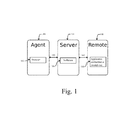
- FIG. 1 is a block schematic diagram showing an example embodiment
- FIG. 2 is a flow chart showing a process for transmitting screen display information to enable remote viewing according to an example embodiment
- FIG. 3 is a flow chart of a preferred embodiment of a process for operating a browser to efficiently receive image tile updates from a server;
- FIG. 4 is a flow chart of an example embodiment of a process for conducting remote technical support
- FIG. 5 is an example screen image of a connection initiation screen in a browser-based remote support embodiment
- FIG. 6 is a screen image of an example embodiment of a browser-based remote support application configured for Android support;
- FIG. 7 is an example screen image of an Android system information display associated with the configuration of FIG. 6 ;
- FIG. 8 is an example screen image of a browser-based remote support application configured for Windows support
- FIG. 9 is a more detailed image of an example remote control overlay used in the configuration of FIG. 8 ;
- FIG. 10 is an example screen image of a browser-based remote support application configured for Chromebook support.
- Embodiments of the invention may be implemented in hardware, firmware, software, or any combination thereof. Embodiments of the invention may also be implemented as instructions stored on a machine-readable medium, which may be read and executed by one or more processors.
- a machine-readable medium may include any mechanism for storing or transmitting information in a form readable by a machine (e.g. a computing device).
- a machine-readable medium may include read only memory (ROM); random access memory (RAM); hardware memory in notebook and handheld computers, PDAs, smart phones, tablets, and other portable devices; magnetic disk storage media; optical storage media; thumb drives and other flash memory devices; electrical, optical, acoustical, or other forms of propagated signals (e.g.
- firmware, software, routines, and instructions may be described herein as performing certain actions. However, it should be appreciated that such descriptions are merely for convenience and that such actions in fact result from computing devices, processors, controllers or other devices executing the firmware, software, routines, instructions, etc.
- An example embodiment of the present invention provides the ability to transmit an image of a desktop or application to an agent's computing device (desktop, laptop, tablet or smartphone) without requiring the agent to download specialized software.
- the image is viewed by the agent through a standard web browser (for example, Chrome, Firefox, or later versions of Internet Explorer).
- Embodiments disclosed herein are particularly useful for enabling e-commerce support and assistance, sales presentations, information technology support, and other functions that will be apparent to those skilled in the art upon review of the specification.
- Example embodiments will be presented generally in terms of a technical support use case that allows an “agent” to access the device of a “customer,” but these functional labels are for convenience, and are not intended to imply any limit on the range of uses of the system and methods disclosed herein.
- the “agent” may be acting as a salesman, e-commerce telephone support person, trainer, teacher, parent, or engaged in any other activity or status where it is desirable to view the remote user's screen and/or interact with the remote device.
- the “customer” may be acting as a client, user, buyer, trainee, student, child, or engaged in any other activity or status where it is useful to allow others to view the person's screen and/or interact with his device.
- FIG. 1 is a block schematic diagram showing an implementation of an example embodiment.
- an agent computing device 100 is supplied with an HTML5 viewer application 102 .
- Viewer application 102 can be a function-specific viewing application, but preferably is a conventional web browser (HTML5 or its successors) with appropriate standard plug-ins.
- HTTP HyperText Markup Language
- For convenience viewer application 102 will be referred to herein as a “browser,” but is not limited to browsers.
- a server 104 is connected via a communications network 103 , such as the internet, to agent computing device 100 .
- Customer computing device 108 is connected via a communications network 107 , such as the Internet, to server 104 .
- Server 104 is provided with software 106 to perform agent account maintenance and control, transmit and receive screen displays, operating, and control information to and from a customer (or user) computing device 108 .
- Software 106 may also perform other desired functions and may implement any features described or suggested herein.
- Software 106 in server 104 preferably provides a function of downloading (as needed), or helping to arrange the download of, an interaction application 110 to the customer computing device 108 .
- Interaction application 110 transmits screen displays to, and exchanges operating and control information with, server 104 .
- a software development kit is provided to developers of one or more applications for the customer computing device 108 , to facilitate embedding the interaction functions described herein into an application used by the customer.
- SDK software development kit
- the desired interactions of the interaction application 110 with the server 104 are embedded in the developed application.
- interaction application 110 does not need to be separately installed prior to initiating an interaction session with agent computing device 100 .
- Communications networks 103 and 107 can be the same or different networks.
- Each network can be any type of known network, including without limitation a local wired or wireless network, a private network, or a public network such as the Internet.
- FIG. 2 is a flow chart showing an example embodiment of an operating process using the system shown in FIG. 1 .
- step 200 the agent (for example, a person providing remote technical support to customers) is provided with an agent account and the agent's host computing device 100 is provided with software application 102 .
- the agent for example, a person providing remote technical support to customers
- the agent's host computing device 100 is provided with software application 102 .
- the agent invites the customer to allow remote viewing of the customer's screen.
- the invitation may take various forms.
- the invitation includes transmitting a web link to the customer. Opening the web link connects the customer's device 108 to server 104 , which identifies the operating system of the customer computing device 108 and offers the customer a download of a version of the interaction application that is compatible with customer computing device 108 .
- the agent may use his/her browser interface to the server 104 to request from software 106 a “code” identifying a new interaction session.
- the customer may then be instructed to access a web page, or to access a technical support function of an application having an embedded interaction function.
- the customer enters the session ID code provided by the agent on the web page or in the embedded application.
- the ID code can have any desired form; in a preferred example embodiment, the session ID is a six-digit number.
- agent computing device 100 uses viewer application 102 (typically a browser) operating on agent computing device 100 .
- server 104 provides an executable script to the browser 102 in response to access by the browser (for example, in HTML5, Java, or other standard scripting language that can be interpreted by the browser).
- the script preferably defines a process of interaction with the server that enables the viewing processes described in detail herein.
- step 203 the customer approves the download of interaction application 110 and grants permission to the agent to view the customer's screen images (where required by the operating system of the customer computing device 108 ).
- interaction application 110 performs a process loop during the period where the customer desires to provide a remote display of the screen or window image to the agent. This loop begins with step 204 , where interaction application 110 captures an image frame from the screen, desktop or window that is being shared.
- a conventional Node-Webkit API such as “ChooseDesktopMedia” may be used to obtain a video stream of the host's desktop.
- N and K may be varied based on functional considerations, for example, the proportions of the host screen or window, the resolution of the host screen or window, the size, resolution, or speed characteristics of one or more remote display devices, and network bandwidth and other network performance characteristics.
- the inventors have determined that a 10 ⁇ 10 grid provides good functionality in many cases.
- the example embodiment will therefore be described in terms of a 10 ⁇ 10 grid (defining an array of 100 “tiles”) although it will be understood that other values of N and K can be selected to optimize functions for particular host, remote device, and network characteristics.
- each grid tile is compared to the tile from the previous frame.
- the frame In processing the first frame received, the frame is compared to a blank “previous frame” memory so all of the tiles will register as having changed.
- step 210 image information for any changed tiles is transmitted to the server.
- the entire image will be transmitted to the server for display on the remote device.
- image data in those areas of the screen where the image has changed will be transmitted. This approach reduces bandwidth requirements and data usage since data will not be transmitted for static regions of the screen.
- step 212 the server confirms to the interaction application 110 that it has received the changed image content.
- the confirmation of data receipt in step 212 as described herein acts as a natural bandwidth throttle, as the system preferably waits for the server to indicate receipt before new content is broadcast. This approach allows dynamic adjustment of the transmitted frame rate to accommodate the network bandwidth available to the customer device.
- the transmitted frames are cached in storage in the server along with timestamps applied by the server (or by the interaction software if desired).
- the remote viewing browser may provide to the server (either via standard functions or a script) information about the last confirmed time stamp when image data was received.
- the customer device is a personal computer, such as a PC or Apple desk or notebook computer.
- the interaction application 106 is designed to be compatible with the operating system available on the host computing device, such as MAC OS®, Microsoft Windows®, Linux, or others.
- the customer computing device 108 is a smartphone, tablet, watch, or other small device operating system.
- the interaction application may be designed to run under Apple iOS, various versions of the Android operating system, Windows Phone, BlackBerry, or other operating systems that become popular enough to warrant release of a custom version of the interaction application.
- the customer when the customer is using a computer such as a PC or Mac with a large display area, the customer can elect to share their entire desktop or limit the image transmission to a selected application window.
- a computer such as a PC or Mac with a large display area
- the customer can elect to share their entire desktop or limit the image transmission to a selected application window.
- an iOS-based device the customer may, if desired, be provided with options to share web browsing, pictures and videos from the device, as well as documents accessible via iOS from the cloud such as iCloud, Dropbox, and other storage mechanisms.
- an Android version of the hosting software is configured to allow sharing any content that is visible on the Android screen. This can be accomplished under Android version 5.0 or higher, similar to “sharing the desktop” from a PC.
- an Android API is used to capture bitmap data that contains the image of the screen. The resulting bitmap is then divided into tiles and processed through the same screen synchronization algorithm as described herein for desktop screen sharing, allowing the agent to see the contents of the customer's Android device screen.
- the software application 106 operating in server 104 preferably maintains accounts for agents and requires the agent to sign in with a password or other appropriate authentication to use the system.
- Application 106 may, if desired, maintain a history record of the sessions performed by each agent.
- Server 104 while shown for simplicity as a single device in the example embodiment of FIG. 1 , can be implemented using multiple servers and the functions described herein for the server can be divided between different devices as desired.
- any of the functions described as being performed by the interaction application or the server application in the example embodiments herein can be reassigned to the other device.
- the customer computing device could, if desired, periodically send full frame data to the server and the server could perform the analysis described herein to determine which tiles had changed, instead of this function being performed in the interaction application in the customer computing device.
- the server 104 provides secure socket connections between the customer interaction application 110 and server 104 , and between the browser 102 and server 104 . These web sockets enable real-time communication.
- the server transcodes the image data it receives from the host into multiple resolutions and compression qualities.
- the server dynamically sets an optimal resolution and compression rate based on the screen size of the customer device and its observed rate of acknowledging the transmission of data, indicating actual available throughput. This enables optimizing bandwidth while providing a high fidelity viewing experience. Further, if the server's receipt of transmitted data is slow, indicating that there is a bandwidth limitation in the channel to the customer's device, the interaction application may increase compression of the image data to reduce the amount of data required to maintain substantially live frame updates.
- the agent may be provided with a manual adjustment control in the browser display to remotely increase or decrease the bandwidth of the screen data transmitted by the interaction application 110 .
- the server transmits tile data to the browser via the authenticated socket connection.
- the browser can then render and display the tile data with an HTML5 application that runs in its native JavaScript engine.
- the script operating in association with the agent's browser makes a request to the server for tiles, which it then renders on the agent's browser and converts into an image that is the representation of the customer's screen content.
- the script may also provide zoom and pan functions to assist in viewing detailed images on smaller screens.
- the request from the agent browser script carries a timestamp for the last tile that it received from the server.
- the time stamp is set to zero.
- the browser script indicates the last time it received content from the server.
- the server application preferably sends only tiles that have changed since that time stamp. This approach optimizes the refresh rate to available bandwidth.
- the browser performs a handshake routine and establishes a secure connection with the server.
- the system and the access provided to customer devices is secured by encryption and other best-practices security procedures.
- all data throughout the system (including data between the customer device and the server and between the server and the agent browser) is SSL encrypted using TLS 1.2 transport security with AES-256-bit encryption.
- each session is assigned a unique, one-time key that expires when the session is complete, and is therefore not reusable.
- the interaction application may also be programmed to auto-delete itself when the session ends, so there is no possibility of starting another session without the end-users' contemporaneous consent and intent.
- a continuous loop for processing received image data begins at step 304 , where the browser starts listening for “new_frame” events from the server.
- a new frame event transmitted to the browser indicates that new image content is available on the server. This event also carries a time-stamp for the frame.
- step 306 the “last available frame” timestamp on the browser is set to that of the time-stamp received for the new_frame.
- step 308 the process determines whether the timestamp associated with the last available frame is later than the timestamp associated with the last rendered frame. If so, the process continues with step 309 , where the browser queries the server with a “get_frames” call which also carries a the “last rendered” time-stamp for the server. If the browser has already received the frame associated with the new_frame event, the process continues at step 304 to await the next frame event.
- step 310 the browser receives changed tiles from the server.
- the server responds to the frame request by transmitting the set of tiles (sections of the host's screen image) that have changed since the time-stamp provided by the browser client. In other words, the server will respond by transmitting all the sections of the screen that have changed since the last time the browser client updated.
- Each tile object preferably consists of metadata providing positioning information (width, height, x offset, and y offset), and JPEG image data.
- the JPEG data is preferably encoded in the then-current standard encoding format, depending on the capabilities of the browser. For older browsers, JPEG data may be transmitted as base64 encoded (requiring slightly more bandwidth).
- each tile is rendered in the browser.
- the tiles are rendered to hidden HTML5 Canvas objects according to specifications provided by Mozilla (see https://developer.mozilla.org/en-US/docs/Web/HTML/Element/canvas).
- the tiles preferably have the same dimensions as the interaction application's stream.
- the tile metadata is used to position the JPEG image of the tile in the correct position on the Canvas object.
- step 314 the final composed image from the hidden canvas object is copied over to a second canvas object that is used to display the image to the viewer in the browser.
- This second canvas will be referenced herein as the “display canvas.”
- step 316 if the process has not been cancelled (for example, at the end of the session, or when the agent or customer withdraws or is removed from the session), the processing loop restarts beginning with step 304 .
- the processing loop maintains the browser's view in sync with the display on the customer computing device while minimizing latency.
- FIG. 4 is a flow chart showing the operation of an example embodiment of a technical support process employing some of the novel processes and systems disclosed herein.
- the agent logs in through a browser.
- the agent navigates to the web address of server 104 , obtaining (for example) the screen view of FIG. 5 , and selects “start new session” in step 402 .
- the agent may optionally select a session name and select how the agent's name should be displayed to the customer.
- step 406 the agent is provided with a session URL to which the customer should navigate, and conveys it to the customer verbally, or by text or email. If there is an active communications channel between the agent and the customer that allows the agent to present the customer with a text Session URL link that can be “clicked” on to begin the session, the process continues at step 412 , in which the customer clicks on the link and follows onscreen prompts to activate the interaction application 110 . If the customer cannot directly receive and click on the session URL, in step 410 , the agent provides the customer with the session URL and the session ID, and the customer enters these manually to initiate download of the appropriate version of the interaction application for the customer device operating system.
- step 416 the agent can remotely view the customer's screen display and advise the customer on operation of the customer's application or device.
- step 418 if the agent does not need additional access to the device, the process continues at step 426 .
- step 420 the agent activates a request for the desired function via the browser.
- step 422 the server conveys the access request to the device, and depending on the interaction application and operating system requirements, the customer may be asked to explicitly authorize access to the function.
- the agent can use the function and the process proceeds to step 426 .
- step 426 if the session is complete, the process ends. Otherwise, the remote screen display on the browser is updated by the server in step 424 and the process begins again with step 416 . The process continues to operate in the loop shown in the lower portion of FIG. 4 , until either the agent or the customer terminates the session.
- the agent can preferably use either the mouse, touch gestures, or button controls in the menu to manipulate the display canvas, and can zoom and pan the image on the display canvas.
- mouse and touch gestures that happen on the display canvas are transmitted back to the server and then relayed back to the interaction application.
- the interaction application will then translate those events into native device input and display commands in the customer computing device. For example, if the “laser pointer” function is activated, the agent can use his local pointing device to select a point on the displayed copy of the customer's device screen, display a bright red (or other colored) dot at that location, and move the dot with the local pointing device to draw the customer's attention to a desired area or function.
- the agent can move his local pointing device to any region of the displayed customer screen copy and then actuate a mouse or touch function that will be transmitted to the server and replicated on the customer computing device.
- FIG. 5 shows an image of an example connection initiation screen 500 generated by the server and transmitted for display in the agent's browser.
- a touch/click button 502 that initiates a new remote viewing session.
- two active sessions are listed in session list 504 , each identified by a six-digit number generated by the server software 106 and displayed for the agent: 855333 and 492512.
- the right side of the screen in the embodiment of FIG. 5 provides four quadrants, each containing instructions for a method of connecting to a specified remote device operating system.
- the elements of these instructions and the configuration of the system may be adjusted based on the customers and customer devices to be supported and the available methods of customer contact.
- Android email/chat instructions 506 PC & Mac email/chat instructions 508 , Android telephone support instructions 510 , and PC & Mac telephone instructions 512 are displayed.
- an example process for Android email/chat in this example embodiment is described on-screen in instruction area 506 .
- the agent will send the customer (user) the install URL for the interaction application. This is preferably accomplished by clicking on the “send” button. Depending on the type of support connection between the agent and customer, the agent may enter the user's email address or telephone number to send the URL as an email or an SMS message. Alternatively, if the agent is connected to the customer via a text support application, preferably the install URL is transmitted as a message in the text support application. In another embodiment, clicking on the button copies the install URL into the agent computing device copy-and-paste buffer so that the URL can be transferred to the customer. In an example embodiment, after the customer installs the interaction application, the agent asks the user to enter the unique session ID (in the example, 855333) and tap to proceed.
- the unique session ID in the example, 855333
- an example process for Android telephone support in the example embodiment is described on-screen in instruction area 510 .
- the agent preferably provides the customer with a link to access the interaction application at the Google Play Store, (in this example, “ScreenMeetTM Support”) and install and open the interaction application.
- the agent may instruct the customer to manually access and locate the application in the Google Play Store.
- the agent may then prompt the user to enter the unique session ID (in the example, 855333) which will securely connect the user to the agent.
- An example process for PC & Mac email/chat support is shown in instruction area 508 .
- Two buttons are provided, one to text a support URL to the user's device or copy the URL to a copy-and-paste buffer in the same manner described previously, and the other to open a pre-populated email to send the URL to the user.
- the support URL points to a web page that queries the PC or Mac to identify the active operating system, and then allows the user to download a compatible version of the interaction application.
- the agent then instructs the user to open the support URL, download the application, and enter the session ID.
- An example process for PC & Mac telephone instructions is shown in instruction area 512 .
- the customer is instructed to enter a URL (for example, “myhelpscreen.com” in their browser and enter the session code to initiate a download of the interaction application.
- the customer then runs the downloaded application to start the session.
- a URL for example, “myhelpscreen.com”
- the session ID is imbedded in the session URL to streamline downloading and activation of the interaction application; the resulting download file may be pre-configured to work only with the session ID transmitted in the download request.
- the session ID code is a one-time code specific to the current session, so that the downloaded copy of the interaction application will be functional only for the currently active session ID and not for any other future session.
- the right side of the screen can be divided into a larger or smaller number of areas, each providing instructions for a different supported customer device operating system.
- the target operating system may be selected from a menu, with the instructions for connecting to that device displayed on a subsequently generated browser screen.
- FIG. 6 is a screen image of an example embodiment of a browser-based remote support application screen 600 configured for Android device support.
- this screen is generated by the server to display the current screen view 602 of the customer's device.
- a tool panel 604 allows the agent to select desired functions. Zoom and pan controls may be provided.
- Selection button 606 transmits a request to the interaction application to authorize use of the “laser pointer” function. If the customer accepts this request when displayed for the customer by the interaction application, the agent can “point” to areas of interest by moving a pointer cursor provided for that purpose, using the agent computing device's pointing device (such as a mouse or touchpad).
- the browser script transmits the desired location of the pointer to the server, which communicates this information to the interaction application in the customer device.
- the customer device displays a distinctively colored circle (or other shape if desired) at the indicated location.
- the agent can change the size and color of the pointer spot displayed on the customer's screen in addition to its position.
- the server obtains device information from the interaction application and displays the type of device used by the customer.
- the customer has a Motorola Moto G(5) Plus running an Android 7.0 operating system and this information is displayed in the tool panel 604 .
- Selection buttons 608 allow the agent to selectively display system information (see FIG. 7 ) and a list of installed applications on the device.
- Region 610 of the tool panel 604 provides an on-screen slider function allowing the agent to increase or decrease the quality of the screen display stream. The quality of the stream can be reduced to compensate for slow transmission speeds. Button 612 terminates the session.
- FIG. 7 is an example screen image of an Android system information display associated with the configuration of FIG. 6 .
- the information shown in FIG. 7 is retrieved from the customer's device and transmitted via the server as a popup on the agent computing device.
- FIG. 8 is an example screen image of a browser-based remote support application screen 800 configured for Microsoft® Windows device support.
- Popup 802 allows the agent to exchange text messages with the customer and to switch between screens if the customer's operating system is configured for multiple displays.
- FIG. 8 incorporates a tool panel 604 which is comparable to tool panel 604 in the embodiment of FIG. 6 , but includes additional available functions as illustrated in FIG. 8 .
- Pan and zoom controls, laser pointer request function 606 , stream quality 610 , and session end button 612 operate in a manner similar to the tool panel in FIG. 6 .
- the embodiment of FIG. 8 also has a “request remote control” button 804 that, when selected and authorized by the customer on his device, gives the agent control over the customer's mouse functions as well as providing the additional function selections shown in FIG. 9 .
- Region 806 displays the type of device and includes a “system info” button that the agent can activate to display available Windows system information.
- Button 808 when selected, allows the agent to switch source monitors.
- FIG. 9 is a view of an example tool panel image displayed when the remote control function is active in the embodiment of FIG. 8 .
- the agent when the agent has been authorized to “remote control” the customer's device, the agent can access Request UAC permission, Reboot and Reconnect, and Reboot in Safe Mode functions.
- a button to terminate the remote-control function is also provided.
- FIG. 10 is a view of a screen display in an example embodiment configured to support Chromebook devices.
- a software development kit is provided to enable developers to incorporate one or more functions of the disclosed system into a standalone application or cloud-based application.
- the functions of the server disclosed herein may be accessed via function calls and the calling application can selectively receive server output in data form that can be processed and formatted for display as desired in the standalone or cloud-based application.
- the SDK preferably also enables the disclosed system to activate features of the standalone or cloud-based application and exchange information with such applications.
- the disclosed system may be integrated with systems that receive and track technical support requests.
- the disclosed system may also be integrated with applications that provide a web-based chat interface to customers, so that the links and messages transmitted in text form as disclosed herein can be sent via an already-active chat interface with the customer.
Landscapes
- Engineering & Computer Science (AREA)
- Theoretical Computer Science (AREA)
- Software Systems (AREA)
- Computer Networks & Wireless Communication (AREA)
- Signal Processing (AREA)
- Computer Security & Cryptography (AREA)
- Multimedia (AREA)
- Physics & Mathematics (AREA)
- General Engineering & Computer Science (AREA)
- General Physics & Mathematics (AREA)
- Computer Hardware Design (AREA)
- Business, Economics & Management (AREA)
- General Business, Economics & Management (AREA)
- Human Computer Interaction (AREA)
- Information Transfer Between Computers (AREA)
Abstract
Description
Claims (4)
Priority Applications (2)
| Application Number | Priority Date | Filing Date | Title |
|---|---|---|---|
| US15/696,170 US10951683B2 (en) | 2015-07-13 | 2017-09-05 | Systems and methods for remote interaction |
| US16/055,759 US10826791B2 (en) | 2015-07-13 | 2018-08-06 | Systems and methods for remote device viewing and interaction |
Applications Claiming Priority (3)
| Application Number | Priority Date | Filing Date | Title |
|---|---|---|---|
| US201562191661P | 2015-07-13 | 2015-07-13 | |
| US14/968,648 US9756096B1 (en) | 2015-07-13 | 2015-12-14 | Methods for dynamically transmitting screen images to a remote device |
| US15/696,170 US10951683B2 (en) | 2015-07-13 | 2017-09-05 | Systems and methods for remote interaction |
Related Parent Applications (1)
| Application Number | Title | Priority Date | Filing Date |
|---|---|---|---|
| US14/968,648 Continuation-In-Part US9756096B1 (en) | 2015-07-13 | 2015-12-14 | Methods for dynamically transmitting screen images to a remote device |
Related Child Applications (1)
| Application Number | Title | Priority Date | Filing Date |
|---|---|---|---|
| US16/055,759 Continuation-In-Part US10826791B2 (en) | 2015-07-13 | 2018-08-06 | Systems and methods for remote device viewing and interaction |
Publications (2)
| Publication Number | Publication Date |
|---|---|
| US20180234479A1 US20180234479A1 (en) | 2018-08-16 |
| US10951683B2 true US10951683B2 (en) | 2021-03-16 |
Family
ID=63105554
Family Applications (1)
| Application Number | Title | Priority Date | Filing Date |
|---|---|---|---|
| US15/696,170 Active - Reinstated US10951683B2 (en) | 2015-07-13 | 2017-09-05 | Systems and methods for remote interaction |
Country Status (1)
| Country | Link |
|---|---|
| US (1) | US10951683B2 (en) |
Cited By (1)
| Publication number | Priority date | Publication date | Assignee | Title |
|---|---|---|---|---|
| US11630994B2 (en) * | 2018-02-17 | 2023-04-18 | Advanced Micro Devices, Inc. | Optimized asynchronous training of neural networks using a distributed parameter server with eager updates |
Families Citing this family (11)
| Publication number | Priority date | Publication date | Assignee | Title |
|---|---|---|---|---|
| US10951683B2 (en) * | 2015-07-13 | 2021-03-16 | Projector.Is, Inc. | Systems and methods for remote interaction |
| JP6883196B2 (en) * | 2017-01-24 | 2021-06-09 | 富士フイルムビジネスイノベーション株式会社 | Processing equipment, information processing equipment, processing systems, processing programs and information processing programs |
| CN107360424B (en) * | 2017-07-28 | 2019-10-25 | 深圳岚锋创视网络科技有限公司 | A kind of bit rate control method based on video encoder, device and video server |
| US20190121602A1 (en) * | 2017-10-19 | 2019-04-25 | David Ray Burritt | User interface for the remote control of a mechanical music machine |
| US11437045B1 (en) * | 2017-11-09 | 2022-09-06 | United Services Automobile Association (Usaa) | Virtual assistant technology |
| US11853423B2 (en) * | 2018-01-19 | 2023-12-26 | SunStone Information Defense, Inc. | Methods and apparatus for interfering with malware using displaced display elements |
| US11786694B2 (en) | 2019-05-24 | 2023-10-17 | NeuroLight, Inc. | Device, method, and app for facilitating sleep |
| CN112911190A (en) * | 2019-12-04 | 2021-06-04 | 华为技术有限公司 | A method, electronic device and system for remote assistance |
| CN112925494A (en) * | 2021-03-17 | 2021-06-08 | 众安信息技术服务有限公司 | Method and device for realizing same-screen demonstration, computer equipment and storage medium |
| CN113189920A (en) * | 2021-05-28 | 2021-07-30 | 重庆长安汽车股份有限公司 | Android-based remote control method for vehicle-mounted entertainment information system |
| CN115514750B (en) * | 2021-06-21 | 2025-04-29 | 北京字节跳动网络技术有限公司 | Electronic device remote control method, server, system, medium and device |
Citations (3)
| Publication number | Priority date | Publication date | Assignee | Title |
|---|---|---|---|---|
| US5918012A (en) * | 1996-03-29 | 1999-06-29 | British Telecommunications Public Limited Company | Hyperlinking time-based data files |
| US20060224941A1 (en) * | 2005-03-31 | 2006-10-05 | Michael Bateman | Information display system |
| US20180234479A1 (en) * | 2015-07-13 | 2018-08-16 | Benjamin Howard Lilienthal | Systems and methods for remote interaction |
-
2017
- 2017-09-05 US US15/696,170 patent/US10951683B2/en active Active - Reinstated
Patent Citations (3)
| Publication number | Priority date | Publication date | Assignee | Title |
|---|---|---|---|---|
| US5918012A (en) * | 1996-03-29 | 1999-06-29 | British Telecommunications Public Limited Company | Hyperlinking time-based data files |
| US20060224941A1 (en) * | 2005-03-31 | 2006-10-05 | Michael Bateman | Information display system |
| US20180234479A1 (en) * | 2015-07-13 | 2018-08-16 | Benjamin Howard Lilienthal | Systems and methods for remote interaction |
Cited By (1)
| Publication number | Priority date | Publication date | Assignee | Title |
|---|---|---|---|---|
| US11630994B2 (en) * | 2018-02-17 | 2023-04-18 | Advanced Micro Devices, Inc. | Optimized asynchronous training of neural networks using a distributed parameter server with eager updates |
Also Published As
| Publication number | Publication date |
|---|---|
| US20180234479A1 (en) | 2018-08-16 |
Similar Documents
| Publication | Publication Date | Title |
|---|---|---|
| US10951683B2 (en) | Systems and methods for remote interaction | |
| US10826791B2 (en) | Systems and methods for remote device viewing and interaction | |
| US11172042B2 (en) | Platform-independent application publishing to a front-end interface by encapsulating published content in a web container | |
| EP4156620B1 (en) | Interaction method and apparatus, and electronic device | |
| US11611633B2 (en) | Systems and methods for platform-independent application publishing to a front-end interface | |
| US9986012B2 (en) | Remote access to an application program | |
| US20140053085A1 (en) | Methods and systems for collaborative browsing | |
| US12476839B2 (en) | Interaction method and apparatus, and electronic device | |
| US9756096B1 (en) | Methods for dynamically transmitting screen images to a remote device | |
| US9769256B2 (en) | Directing data in a web browser from a portable electronic device | |
| JP2015529878A (en) | Providing access to remote applications via a web client | |
| CN104412542A (en) | Electronic tools and methods for meetings | |
| US20250286980A1 (en) | Object Interaction During A Contact Center Engagement Video Conference | |
| CN113741765A (en) | Page jump method, device, equipment, storage medium and program product | |
| JP2020042631A (en) | Information processing system, information processing apparatus, information processing method and program | |
| CN111586042A (en) | Multi-screen interaction method, terminal and storage medium | |
| US20250348421A1 (en) | Multisession mode in remote device infrastructure | |
| JP2022515702A (en) | Providing virtual desktops within a computing environment | |
| JP2018538619A (en) | Synchronization of server-side keyboard layout and client-side keyboard layout in virtual sessions | |
| JP2019121812A (en) | Information process system, control method of the same, and program | |
| CN115240821A (en) | Image display method, device, computer equipment and storage medium | |
| WO2022250642A1 (en) | Method and system for co-browsing a web page | |
| CN112218144A (en) | Screen projection control method, device, electronic device, and computer-readable medium | |
| WO2018117956A1 (en) | Method and system for displaying data | |
| US10291674B1 (en) | Cloudboard news |
Legal Events
| Date | Code | Title | Description |
|---|---|---|---|
| FEPP | Fee payment procedure |
Free format text: ENTITY STATUS SET TO UNDISCOUNTED (ORIGINAL EVENT CODE: BIG.); ENTITY STATUS OF PATENT OWNER: SMALL ENTITY |
|
| FEPP | Fee payment procedure |
Free format text: ENTITY STATUS SET TO SMALL (ORIGINAL EVENT CODE: SMAL); ENTITY STATUS OF PATENT OWNER: SMALL ENTITY |
|
| AS | Assignment |
Owner name: PROJECTOR.IS, INC., CALIFORNIA Free format text: ASSIGNMENT OF ASSIGNORS INTEREST;ASSIGNORS:LILIENTHAL, BENJAMIN HOWARD;ABOVSKY, EUGENE;REEL/FRAME:046633/0152 Effective date: 20180807 |
|
| STPP | Information on status: patent application and granting procedure in general |
Free format text: NON FINAL ACTION MAILED |
|
| STPP | Information on status: patent application and granting procedure in general |
Free format text: NOTICE OF ALLOWANCE MAILED -- APPLICATION RECEIVED IN OFFICE OF PUBLICATIONS |
|
| STCB | Information on status: application discontinuation |
Free format text: ABANDONED -- FAILURE TO PAY ISSUE FEE |
|
| STCF | Information on status: patent grant |
Free format text: PATENTED CASE |
|
| FEPP | Fee payment procedure |
Free format text: MAINTENANCE FEE REMINDER MAILED (ORIGINAL EVENT CODE: REM.); ENTITY STATUS OF PATENT OWNER: SMALL ENTITY |
|
| LAPS | Lapse for failure to pay maintenance fees |
Free format text: PATENT EXPIRED FOR FAILURE TO PAY MAINTENANCE FEES (ORIGINAL EVENT CODE: EXP.); ENTITY STATUS OF PATENT OWNER: SMALL ENTITY |
|
| PRDP | Patent reinstated due to the acceptance of a late maintenance fee |
Effective date: 20250509 |
|
| FEPP | Fee payment procedure |
Free format text: PETITION RELATED TO MAINTENANCE FEES FILED (ORIGINAL EVENT CODE: PMFP); ENTITY STATUS OF PATENT OWNER: SMALL ENTITY Free format text: PETITION RELATED TO MAINTENANCE FEES GRANTED (ORIGINAL EVENT CODE: PMFG); ENTITY STATUS OF PATENT OWNER: SMALL ENTITY Free format text: SURCHARGE, PETITION TO ACCEPT PYMT AFTER EXP, UNINTENTIONAL. (ORIGINAL EVENT CODE: M2558); ENTITY STATUS OF PATENT OWNER: SMALL ENTITY |
|
| MAFP | Maintenance fee payment |
Free format text: PAYMENT OF MAINTENANCE FEE, 4TH YR, SMALL ENTITY (ORIGINAL EVENT CODE: M2551); ENTITY STATUS OF PATENT OWNER: SMALL ENTITY Year of fee payment: 4 |
|
| STCF | Information on status: patent grant |
Free format text: PATENTED CASE |
|
| FP | Lapsed due to failure to pay maintenance fee |
Effective date: 20250316 |