US10862840B2 - Inline message composing with visible list view - Google Patents
Inline message composing with visible list view Download PDFInfo
- Publication number
- US10862840B2 US10862840B2 US15/959,526 US201815959526A US10862840B2 US 10862840 B2 US10862840 B2 US 10862840B2 US 201815959526 A US201815959526 A US 201815959526A US 10862840 B2 US10862840 B2 US 10862840B2
- Authority
- US
- United States
- Prior art keywords
- message
- draft
- displaying
- selection
- receiving
- Prior art date
- Legal status (The legal status is an assumption and is not a legal conclusion. Google has not performed a legal analysis and makes no representation as to the accuracy of the status listed.)
- Active
Links
Images




Classifications
-
- H04L51/16—
-
- G—PHYSICS
- G06—COMPUTING OR CALCULATING; COUNTING
- G06F—ELECTRIC DIGITAL DATA PROCESSING
- G06F40/00—Handling natural language data
- G06F40/10—Text processing
- G06F40/166—Editing, e.g. inserting or deleting
-
- G—PHYSICS
- G06—COMPUTING OR CALCULATING; COUNTING
- G06F—ELECTRIC DIGITAL DATA PROCESSING
- G06F16/00—Information retrieval; Database structures therefor; File system structures therefor
- G06F16/90—Details of database functions independent of the retrieved data types
- G06F16/95—Retrieval from the web
- G06F16/957—Browsing optimisation, e.g. caching or content distillation
- G06F16/9577—Optimising the visualization of content, e.g. distillation of HTML documents
-
- G—PHYSICS
- G06—COMPUTING OR CALCULATING; COUNTING
- G06F—ELECTRIC DIGITAL DATA PROCESSING
- G06F3/00—Input arrangements for transferring data to be processed into a form capable of being handled by the computer; Output arrangements for transferring data from processing unit to output unit, e.g. interface arrangements
- G06F3/01—Input arrangements or combined input and output arrangements for interaction between user and computer
- G06F3/048—Interaction techniques based on graphical user interfaces [GUI]
- G06F3/0481—Interaction techniques based on graphical user interfaces [GUI] based on specific properties of the displayed interaction object or a metaphor-based environment, e.g. interaction with desktop elements like windows or icons, or assisted by a cursor's changing behaviour or appearance
- G06F3/0482—Interaction with lists of selectable items, e.g. menus
-
- G—PHYSICS
- G06—COMPUTING OR CALCULATING; COUNTING
- G06F—ELECTRIC DIGITAL DATA PROCESSING
- G06F3/00—Input arrangements for transferring data to be processed into a form capable of being handled by the computer; Output arrangements for transferring data from processing unit to output unit, e.g. interface arrangements
- G06F3/01—Input arrangements or combined input and output arrangements for interaction between user and computer
- G06F3/048—Interaction techniques based on graphical user interfaces [GUI]
- G06F3/0484—Interaction techniques based on graphical user interfaces [GUI] for the control of specific functions or operations, e.g. selecting or manipulating an object, an image or a displayed text element, setting a parameter value or selecting a range
- G06F3/04842—Selection of displayed objects or displayed text elements
-
- G—PHYSICS
- G06—COMPUTING OR CALCULATING; COUNTING
- G06F—ELECTRIC DIGITAL DATA PROCESSING
- G06F3/00—Input arrangements for transferring data to be processed into a form capable of being handled by the computer; Output arrangements for transferring data from processing unit to output unit, e.g. interface arrangements
- G06F3/01—Input arrangements or combined input and output arrangements for interaction between user and computer
- G06F3/048—Interaction techniques based on graphical user interfaces [GUI]
- G06F3/0484—Interaction techniques based on graphical user interfaces [GUI] for the control of specific functions or operations, e.g. selecting or manipulating an object, an image or a displayed text element, setting a parameter value or selecting a range
- G06F3/04847—Interaction techniques to control parameter settings, e.g. interaction with sliders or dials
-
- G—PHYSICS
- G06—COMPUTING OR CALCULATING; COUNTING
- G06F—ELECTRIC DIGITAL DATA PROCESSING
- G06F40/00—Handling natural language data
- G06F40/10—Text processing
- G06F40/103—Formatting, i.e. changing of presentation of documents
-
- H—ELECTRICITY
- H04—ELECTRIC COMMUNICATION TECHNIQUE
- H04L—TRANSMISSION OF DIGITAL INFORMATION, e.g. TELEGRAPHIC COMMUNICATION
- H04L51/00—User-to-user messaging in packet-switching networks, transmitted according to store-and-forward or real-time protocols, e.g. e-mail
-
- H—ELECTRICITY
- H04—ELECTRIC COMMUNICATION TECHNIQUE
- H04L—TRANSMISSION OF DIGITAL INFORMATION, e.g. TELEGRAPHIC COMMUNICATION
- H04L51/00—User-to-user messaging in packet-switching networks, transmitted according to store-and-forward or real-time protocols, e.g. e-mail
- H04L51/21—Monitoring or handling of messages
- H04L51/216—Handling conversation history, e.g. grouping of messages in sessions or threads
-
- H—ELECTRICITY
- H04—ELECTRIC COMMUNICATION TECHNIQUE
- H04L—TRANSMISSION OF DIGITAL INFORMATION, e.g. TELEGRAPHIC COMMUNICATION
- H04L67/00—Network arrangements or protocols for supporting network services or applications
- H04L67/01—Protocols
- H04L67/02—Protocols based on web technology, e.g. hypertext transfer protocol [HTTP]
Definitions
- Users routinely compose messages to other users. For example, a user may create a new message, respond to a received message, or forward a message.
- a user may create a new message, respond to a received message, or forward a message.
- users of an email client are moved to another screen and lose the context in which they previously were working.
- a compose form for drafting a message is presented inline within a window along with a message list. For example, instead of overlaying the message application's user interface (UI) with a new window for composing a message, the compose form is displayed within a portion of the window reserved for viewing content of messages. While composing the message using the compose form, the rest of the message application's UI remains visible and accessible to the user. For example, the user may navigate to another folder and/or move to another message/conversation by interacting with the tree view/message list view. A draft of the message being composed may be automatically saved when the user navigates away from the compose form (e.g. by selecting another conversation in the list view).
- UI user interface
- FIG. 1 illustrates an exemplary computing environment
- FIG. 2 shows a system for composing a message using an inline composing form
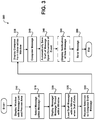
- FIG. 3 shows an illustrative process for displaying and interacting with a compose form that is displayed inline with a message list
- FIG. 4 shows a display of messaging window that includes an option used to display an inline compose form:
- FIG. 5 shows a display of messaging window that includes a compose form that is displayed inline within the preview area
- FIG. 6 shows a display of a messaging window that includes a compose form including a previously saved draft that has not been sent
- FIG. 7 shows a display of a messaging window that includes a notification that a new message has been received in the conversation while the user is composing a draft
- FIG. 8 shows a messaging window that includes a preview area that illustrated selecting a compose option
- FIG. 9 shows a messaging window that includes a preview area that includes an inline compose form.
- FIG. 1 and the corresponding discussion are intended to provide a brief, general description of a suitable computing environment in which embodiments may be implemented.
- program modules include routines, programs, components, data structures, and other types of structures that perform particular tasks or implement particular abstract data types.
- Other computer system configurations may also be used, including hand-held devices, multiprocessor systems, microprocessor-based or programmable consumer electronics, minicomputers, mainframe computers, and the like.
- Distributed computing environments may also be used; wherein tasks are performed by remote processing devices that are linked through a communications network.
- program modules may be located in both local and remote memory storage devices.
- the computer environment shown in FIG. 1 includes computing devices that each may be configured as a mobile computing device (e.g. phone, tablet, netbook, laptop), a server, a desktop, or some other type of computing device and includes a central processing unit 5 (“CPU”), a system memory 7 , including a random access memory 9 (“RAM”) and a read-only memory (“ROM”) 10 , and a system bus 12 that couples the system memory 7 to the central processing unit (“CPU”) 5 .
- a mobile computing device e.g. phone, tablet, netbook, laptop
- CPU central processing unit 5
- system memory 7 including a random access memory 9 (“RAM”) and a read-only memory (“ROM”) 10
- system bus 12 that couples the system memory 7 to the central processing unit (“CPU”) 5 .
- the computer 100 further includes a mass storage device 14 for storing an operating system 16 , messaging application(s) 24 , Web Browser 25 , and inline composing manager 26 , which will be described in greater detail below.
- the mass storage device 14 is connected to the CPU 5 through a mass storage controller (not shown) connected to the system bus 12 .
- the mass storage device 14 and its associated computer-readable media provide non-volatile storage for the computer 100 .
- computer-readable media can be any available media that can be accessed by the computer 100 .
- Computer-readable media may comprise computer storage media and communication media.
- Computer storage media includes volatile and non-volatile, removable and non-removable media implemented in any method or technology for storage of information such as computer-readable instructions, data structures, program modules or other data.
- Computer storage media includes, but is not limited to, RAM, ROM, Erasable Programmable Read Only Memory (“EPROM”), Electrically Erasable Programmable Read Only Memory (“EEPROM”), flash memory or other solid state memory technology, CD-ROM, digital versatile disks (“DVD”), or other optical storage, magnetic cassettes, magnetic tape, magnetic disk storage or other magnetic storage devices, or any other medium which can be used to store the desired information and which can be accessed by the computer 100 .
- Computer 100 operates in a networked environment using logical connections to remote computers through a network 18 , such as the Internet.
- the computer 100 may connect to the network 18 through a network interface unit 20 connected to the system bus 12 .
- the network connection may be wireless and/or wired.
- the network interface unit 20 may also be utilized to connect to other types of networks and remote computer systems.
- the computer 100 may also include an input/output controller 22 for receiving and processing input from a number of other devices, including a keyboard, a mouse, a touch input device, or an electronic stylus (not shown in FIG. 1 ).
- an input/output controller 22 may provide input/output to a display screen 23 , a printer, or other type of output device.
- a touch input device may utilize any technology that allows single/multi-touch input to be recognized (touching/non-touching).
- the technologies may include, but are not limited to: heat, finger pressure, high capture rate cameras, infrared light, optic capture, tuned electromagnetic induction, ultrasonic receivers, transducer microphones, laser rangefinders, shadow capture, and the like.
- the touch input device may be configured to detect near-touches (i.e. within some distance of the touch input device but not physically touching the touch input device).
- the touch input device may also act as a display.
- the input/output controller 22 may also provide output to one or more display screens, a printer, or other type of output device.
- a camera and/or some other sensing device may be operative to record one or more users and capture motions and/or gestures made by users of a computing device. Sensing device may be further operative to capture spoken words, such as by a microphone and/or capture other inputs from a user such as by a keyboard and/or mouse (not pictured).
- the sensing device may comprise any motion detection device capable of detecting the movement of a user.
- a camera may comprise a MICROSOFT KINECT® motion capture device comprising a plurality of cameras and a plurality of microphones.
- Embodiments of the invention may be practiced via a system-on-a-chip (SOC) where each or many of the components/processes illustrated in the FIGURES may be integrated onto a single integrated circuit.
- SOC system-on-a-chip
- Such a SOC device may include one or more processing units, graphics units, communications units, system virtualization units and various application functionality all of which are integrated (or “burned”) onto the chip substrate as a single integrated circuit.
- a number of program modules and data files may be stored in the mass storage device 14 and RAM 9 of the computer 100 , including an operating system 16 suitable for controlling the operation of a computer 100 , such as the WINDOWS PHONE 7®, WINDOWS 7®, or WINDOWS SERVER® operating systems from MICROSOFT CORPORATION of Redmond, Wash.
- the mass storage device 14 and RAM 9 may also store one or more program modules.
- the mass storage device 14 and the RAM 9 may store one or more application programs, including one or more messaging application(s) 24 and Web browser 25 .
- a user interface 15 is used by a user to interact with applications and messages.
- Messaging application(s) 24 may be one or more different messaging applications.
- computer 100 may include an email application, an Instant Messaging (IM) application, an SMS application, an MMS application, a real-time information network (e.g. Twitter® interface), a social networking application, and the like.
- messaging application 24 is an email application, such as MICROSOFT OUTLOOK®.
- the messaging application(s) may be client based and/or web based.
- a network based message service 17 may be used, such as: MICROSOFT WINDOWS LIVE® or some other network based email and messaging service.
- Network share 27 is configured to store content (e.g. documents, spreadsheets, messages, Web content, and the like) that are accessible to one or more users through network 18 .
- content e.g. documents, spreadsheets, messages, Web content, and the like
- network share 27 may store content that is accessible by users located at one or more locations.
- Electronic messages may access/reference content within network share 27 .
- Inline composing manager 26 is configured to display a composing form inline with a display of a message list within a window for composing an electronic message.
- Inline composing manager 26 may be located externally from an application, e.g. messaging application 24 , as shown or may be a part of an application. Further, all/some of the functionality provided by inline composing manager 26 may be located internally/externally from a messaging application. More details regarding the inline composing manager are disclosed below.
- FIG. 2 shows a system for composing a message using an inline composing form.
- system 200 includes computing device 1 ( 210 ), computing device 2 ( 220 ), computing device 3 ( 225 ), network share 230 and messaging service 240 .
- the computing devices may be any type of computing device that is configured to perform the operations relating to composing, sending and receiving electronic messages.
- some of the computing devices may be: mobile computing devices (e.g. cellular phones, tablets, smart phones, laptops, and the like), desktop computing devices and servers.
- Some computing devices may be arranged to provide an online service (e.g. messaging service 240 that is configured for composing, sending and receiving electronic messages), some may be arranged as data shares, some may be arranged in local networks, some may be arranged in networks accessible through the Internet, and the like.
- Network 18 may be many different types of networks.
- network 18 may be an IP network, a carrier network for cellular communications, and the like.
- network 18 is used to transmit data between computing devices, such as computing device 1 ( 210 ), computing device 2 ( 220 ), computing device 3 ( 225 ), network share 230 and messaging service 240 .
- Computing device 1 ( 210 ) includes messaging application 212 and user interface 216 . As illustrated, computing device 1 ( 210 ) is used by a user to interact with electronic messages, content in a network share (e.g. content 232 ) and the like.
- content in a network share e.g. content 232
- User interface (UI) 216 is used to interact with an application and content, such as messaging application 212 and content 232 .
- One or more user interfaces of one or more types may be used to interact with the content.
- UI 216 may include the use of a context menu, a menu within a menu bar, a menu item selected from a ribbon user interface, a graphical menu, and the like.
- UI 216 is configured such that a user may easily compose and interact with content and electronic messages. For example, a user may simply select an option within UI 216 that creates an inline composing form within a window to draft a new electronic message that may/may not include one or more links to content.
- the term “link” refers to an address that represents a location of content.
- a link may be in the form of a Uniform Resource Locator (URL) that specifies a network location of where the content is stored. Selecting the link generally retrieves the content that is pointed to by the link.
- URL Uniform Resource Locator
- Messaging application 212 may be a client based application, such as an email application, an Instant Messaging Application, a social media application, and the like. Generally, messaging application 212 is used to send and receive electronic messages of one or more types.
- a network based messaging service 240 may be used in addition to messaging application 212 or instead of one or more of the different messaging applications. For example, a web interface may be used to access messaging service 240 .
- Messaging service 240 may be used to process electronic messages between one or more computing devices, such as computing device 1 ( 210 ) and computing device 2 ( 220 ). Messaging service 240 may be configured to process different message types, such as SMS, MMS, email, messages for social networks and the like. Messaging service 240 may be configured with functionality of inline composing manager 26 and one or more message types may be used to communicate the electronic messages.
- Computing device 2 includes one or more applications, such as a web browser ( 222 ) that may be configured to access a messaging service 240 , such as a web based email service and to compose messages and interact with content.
- a web browser may be used to access an electronic message through an email service and then compose a new message that is displayed inline within a window that also displays a list view of messages.
- Network share 230 may be used to store content.
- the content 232 may be any type of content such as word processing documents, spreadsheets, slides, website content and the like.
- the content 232 may/may not be included (e.g. linked/attached) to an electronic message).
- Network share 230 is accessible by the computing devices that interact with the content 232 .
- the network share may be associated with an online service that supports online access/interaction with content 232 .
- Computing device 3 ( 225 ) is configured as a mail server.
- messaging application 212 on computing device 1 ( 210 ) may be used to compose a message that is sent to one or more recipients.
- computing device 3 ( 225 ) may be configured to perform various mail processing actions and to deliver the message to the one or more recipients.
- Inline composing manager 26 is configured to provide functionality for displaying and interacting with a compose form that is displayed inline and used for drafting a message.
- the compose form is presented inline within a window along with a list display of other messages. For example, instead of overlaying the message application's user interface (UI) with a separate new window for composing a message, the compose form is displayed within a portion of the window reserved for viewing content of messages. While composing the message using the compose form, the rest of the message application's UI remains visible and accessible to the user. For example, the user may navigate to another folder and/or move to another message/conversation by interacting with the tree view/list view. A draft of the message being composed may be automatically saved when the user navigates away from the compose form (e.g. by selecting another conversation in the list view).
- UI user interface
- FIG. 3 shows an illustrative process for displaying and interacting with a compose form that is displayed inline with a message list.
- process 300 moves to operation 310 , where a graphical window is displayed that includes a display of a message list including electronic messages and a preview area that displays content obtained from one or more of the messages that are contained within the list of electronic messages.
- a graphical window is displayed that includes a display of a message list including electronic messages and a preview area that displays content obtained from one or more of the messages that are contained within the list of electronic messages.
- Other information/panes may be displayed within the window.
- a folder tree, calendar view, task view, contact view, social network view, formatting options and other menu options may be displayed within the window.
- the preview area is a reading pane that displays the selected message and any other messages that are within the thread of the message.
- a message/message thread is selected within the display of the list of messages within the window. For example, the user may use a mouse input/touch input to select the message. Other selection methods may also be used.
- the selected message/message thread is displayed within the preview area. For example, in response to selecting a message the content of the message and any other messages in the thread (when a thread is selected) is displayed within the preview area.
- One or more selectable compose options are also displayed for composing a new message.
- the selectable compose options comprise one or more of: a reply option, a reply all option, a forward option and a new option.
- the compose options may be displayed in different locations. For example, the compose options may be shown near the top of the display of options.
- the compose options may also be shown in response to a user moving a pointing device near a message. For example, when the user moves the pointing device over a message within the message thread, the selectable compose options may be displayed using an alpha blend such that the user can still see the message content that is underneath the display of the selectable compose options.
- a draft message that was previously saved is automatically loaded when a draft message already exists. For example, a user may have previously started to draft a message and then navigated away from the message (see operation 350 ).
- a selection to compose a draft message is received.
- the user selects one of the compose options that is displayed within the preview area of the window.
- an option may be displayed requesting the user to select an option to proceed with editing of the saved draft message (See FIG. 6 ).
- the compose form for creating/editing a message is displayed inline within the window that is also used to display the list of messages.
- the compose form that is displayed comprises fields for addressing, editing, formatting and sending the message (See FIGURES below for example compose forms).
- One or more animations may also be performed to illustrate that the originally selected message transforms from a read-only message to an editable draft message.
- the animation may appear to transform the draft message such that the user has added confidence that the reply, reply all or forward action is being performed on the correct message.
- a draft of the message is automatically saved upon the occurrence of an event.
- the event may be many different types of event.
- the event may be an expiration of a timer (e.g. the draft is saved every 1, 2, 5 minutes and the like) and/or some other event.
- the draft is saved when the user navigates away from the currently selected message. For example, a user may select another message within the message list.
- a notification may be displayed to the user that is composing the draft message indicating that a new electronic message is received that is related to the message/message thread.
- the message is sent.
- the message is sent in response to receiving a selection to send the message composed within the compose form.
- the process then flows to an end block and returns to processing other actions.
- FIGS. 4-9 show exemplary windows for composing electronic messages using an inline compose form.
- FIGS. 4-9 are for exemplary purposes and are not intended to be limiting.
- FIG. 4 shows a display of messaging window that includes an option used to display an inline compose form.
- window 400 includes a folder list 410 , a message list 420 and a preview area 430 . More or fewer areas may be included within window 400 .
- Window 400 may be a window that is associated with a desktop application, a mobile application and/or a web-based application (e.g. displayed by a browser). For example, a web browser may access an electronic mail service, an email application on a computing device may be configured to compose/send/receive emails from one or more different services, and the like.
- Folder list 410 shows different folders that may be selected to populate message list 420 .
- the Inbox folder may be selected to show the messages currently in the user's inbox.
- an arrow indicator is displayed that may be used to expand/compress the display of the folders.
- Message list 420 shows the messages that are contained within the selected folder from folder list 410 .
- the messages illustrated within message list 420 may be arranged in different manners. For example, the messages may be arranged by date, thread, sender, size, subject, attachments, importance, to: categories, type, flag(s), and the like. As illustrated, the messages in message list 420 are displayed by date and conversation.
- Message list 420 shows single messages and message threads. The messages in a message thread may be expanded by selecting the expand/collapse icon before the message thread.
- Preview area 430 shows message content that is associated with a selected message/message thread.
- a graphical indicator such as an icon and/or coloring/highlighting, may be displayed to indicate a selected message (e.g. a check mark shown to indicate message thread 425 is selected).
- preview area shows two ( 440 , 442 ) of the three messages within message thread 425 .
- Preview area 430 also shows compose options 435 .
- Compose options 435 are used to start composing a new message.
- the compose options 435 comprise a reply option, a reply all option, and a forward option.
- FIG. 5 shows a display of messaging window that includes a compose form that is displayed inline within the preview area.
- the messaging window 500 of FIG. 5 is similar to the messaging window 400 of FIG. 4 .
- messaging window 500 includes compose form 510 that is displayed inline within messaging window 500 in response to a selection of a compose option, such as a compose option displayed within compose options 435 as shown in FIG. 4 .
- compose form 510 comprises a send option, a save and close option, a close option 512 , a pop-out option 514 , message addressing options (e.g. To . . . , Cc . . . ), subject option, attachment option, message formatting options and an edit area to compose the body of the draft message 630 .
- message addressing options e.g. To . . . , Cc . . .
- subject option e.g. To . . .
- attachment option e.g. To . . .
- message formatting options e.g. To . . .
- the space used to display thread message 440 is used to display the compose option 510 .
- Message formatting options may display various options for formatting the message.
- a contextual ribbon is displayed that includes functionality used when composing a message.
- More or fewer options may be displayed within the compose form 510 .
- the addressing options/subject/attachment options may be collapsed.
- a user may select the options that they would like displayed within the compose form 510 .
- a user may add messages from message list 420 as attachments. For example, a user may drag and drop a message as an attachment, use a gesture to attach the message, and the like. Displaying the message list 420 within the same window as the draft message alleviates the user from having to switch between application windows, using copy/paste operations, and/or using a file chooser dialog.
- the compose form 510 is displayed within a new window and the display of the preview area would return to displaying the message content.
- FIG. 6 shows a display of messaging window that includes a compose form including a previously saved draft that has not been sent.
- the messaging window 600 of FIG. 6 is similar to the messaging window 500 of FIG. 5 .
- messaging window 600 shows a draft of a message that has been saved and reloaded within the compose form but has not been sent yet.
- Message list 420 shows an expanded view 610 of message thread 425 .
- message thread 425 includes a space for the draft message that is currently displayed within the compose form.
- a user may select the draft message at any point to return to editing the draft message.
- a user may be provided with a notification 620 that the current draft message has not been sent.
- the user selects the “Select to Continue Working on Message” link, the user is returned to the editing experience as described herein (e.g. See FIG. 5 ).
- FIG. 7 shows a display of messaging window that includes a notification that a new message has been received in the conversation while the user is composing a draft.
- the messaging window 700 of FIG. 7 is similar to the messaging window 600 of FIG. 6 .
- Notification 710 displays a notification that informs the user of the new item.
- the draft message is saved and the view is updated within the message list and preview area to display the new item within the message thread.
- FIG. 8 shows a messaging window that includes a preview area that illustrated selecting a compose option.
- preview area 810 shows a list of messages from a selected message thread 425 .
- Compose options 830 are displayed in response to moving to a message within the preview area 820 .
- compose options 830 may be displayed in response to a cursor 840 moving to a message.
- the compose options 830 may be displayed alpha blended before selection, such that other content below the display of the compose options 830 may also be seen by the user.
- FIG. 9 shows a messaging window that includes a preview area that includes an inline compose form.
- the messaging window 900 of FIG. 9 is similar to the messaging window 800 of FIG. 8 .
- preview area 810 shows a list of messages from a selected message thread 425 .
- Compose form 910 is displayed in response to selecting a compose option, such as one of the compose options 830 illustrated in FIG. 8 .
Landscapes
- Engineering & Computer Science (AREA)
- Theoretical Computer Science (AREA)
- General Engineering & Computer Science (AREA)
- Physics & Mathematics (AREA)
- General Physics & Mathematics (AREA)
- Human Computer Interaction (AREA)
- General Health & Medical Sciences (AREA)
- Computational Linguistics (AREA)
- Audiology, Speech & Language Pathology (AREA)
- Artificial Intelligence (AREA)
- Databases & Information Systems (AREA)
- Health & Medical Sciences (AREA)
- Computer Networks & Wireless Communication (AREA)
- Signal Processing (AREA)
- Data Mining & Analysis (AREA)
- User Interface Of Digital Computer (AREA)
- Information Transfer Between Computers (AREA)
Abstract
Description
Claims (24)
Priority Applications (1)
| Application Number | Priority Date | Filing Date | Title |
|---|---|---|---|
| US15/959,526 US10862840B2 (en) | 2011-09-29 | 2018-04-23 | Inline message composing with visible list view |
Applications Claiming Priority (3)
| Application Number | Priority Date | Filing Date | Title |
|---|---|---|---|
| US13/249,065 US9043411B2 (en) | 2011-09-29 | 2011-09-29 | Inline message composing with visible list view |
| US14/720,946 US9954806B2 (en) | 2011-09-29 | 2015-05-25 | Inline message composing with visible list view |
| US15/959,526 US10862840B2 (en) | 2011-09-29 | 2018-04-23 | Inline message composing with visible list view |
Related Parent Applications (1)
| Application Number | Title | Priority Date | Filing Date |
|---|---|---|---|
| US14/720,946 Continuation US9954806B2 (en) | 2011-09-29 | 2015-05-25 | Inline message composing with visible list view |
Publications (2)
| Publication Number | Publication Date |
|---|---|
| US20180241710A1 US20180241710A1 (en) | 2018-08-23 |
| US10862840B2 true US10862840B2 (en) | 2020-12-08 |
Family
ID=47993687
Family Applications (3)
| Application Number | Title | Priority Date | Filing Date |
|---|---|---|---|
| US13/249,065 Active US9043411B2 (en) | 2011-09-29 | 2011-09-29 | Inline message composing with visible list view |
| US14/720,946 Active US9954806B2 (en) | 2011-09-29 | 2015-05-25 | Inline message composing with visible list view |
| US15/959,526 Active US10862840B2 (en) | 2011-09-29 | 2018-04-23 | Inline message composing with visible list view |
Family Applications Before (2)
| Application Number | Title | Priority Date | Filing Date |
|---|---|---|---|
| US13/249,065 Active US9043411B2 (en) | 2011-09-29 | 2011-09-29 | Inline message composing with visible list view |
| US14/720,946 Active US9954806B2 (en) | 2011-09-29 | 2015-05-25 | Inline message composing with visible list view |
Country Status (1)
| Country | Link |
|---|---|
| US (3) | US9043411B2 (en) |
Cited By (6)
| Publication number | Priority date | Publication date | Assignee | Title |
|---|---|---|---|---|
| US11429922B2 (en) * | 2018-06-21 | 2022-08-30 | Raquel Holatz | Cluster-based container lifecycle tracker |
| US11637798B2 (en) * | 2021-05-27 | 2023-04-25 | Microsoft Technology Licensing, Llc | Controlled display of related message threads |
| US11652773B2 (en) | 2021-05-27 | 2023-05-16 | Microsoft Technology Licensing, Llc | Enhanced control of user interface formats for message threads based on device form factors or topic priorities |
| US11716302B2 (en) | 2021-05-27 | 2023-08-01 | Microsoft Technology Licensing, Llc | Coordination of message thread groupings across devices of a communication system |
| US12041022B1 (en) * | 2023-09-27 | 2024-07-16 | Microsoft Technology Licensing, Llc | Messaging multi-reply |
| US12124990B2 (en) | 2018-06-21 | 2024-10-22 | Raquel Holatz | Cluster-based item lifecycle tracker |
Families Citing this family (29)
| Publication number | Priority date | Publication date | Assignee | Title |
|---|---|---|---|---|
| US9043411B2 (en) | 2011-09-29 | 2015-05-26 | Microsoft Technology Licensing, Llc | Inline message composing with visible list view |
| US9922309B2 (en) * | 2012-05-25 | 2018-03-20 | Microsoft Technology Licensing, Llc | Enhanced electronic communication draft management |
| US9383913B2 (en) * | 2012-05-30 | 2016-07-05 | Sap Se | Touch screen device data filtering |
| KR20140035183A (en) * | 2012-09-13 | 2014-03-21 | 엘지전자 주식회사 | Mobile terminal and control method thereof |
| US9495075B2 (en) | 2013-05-17 | 2016-11-15 | Microsoft Technology Licensing, Llc | Presenting action menus in viewing panes |
| KR102138515B1 (en) | 2013-10-01 | 2020-07-28 | 엘지전자 주식회사 | Mobile terminal and method for controlling thereof |
| KR20150051816A (en) * | 2013-11-05 | 2015-05-13 | 삼성전자주식회사 | Method for operating message application and electronic device implementing the same |
| USD753144S1 (en) * | 2013-12-30 | 2016-04-05 | Samsung Electronics Co., Ltd. | Display screen or portion thereof with icon |
| CN111488112B (en) * | 2014-01-23 | 2024-03-08 | 苹果公司 | virtual computer keyboard |
| US10230675B2 (en) | 2014-01-23 | 2019-03-12 | Microsoft Technology Licensing, Llc | Deriving atomic communication threads from independently addressable messages |
| US10587539B2 (en) | 2014-03-13 | 2020-03-10 | Microsoct Technology Licensing, LLC | Identifying relationships between message threads |
| CN104142784B (en) * | 2014-06-20 | 2017-07-07 | 腾讯科技(深圳)有限公司 | The interim storage method and apparatus of input content |
| US9998415B1 (en) | 2014-07-25 | 2018-06-12 | Google Llc | Immediate communication mode for email conversations |
| US10282705B2 (en) * | 2014-09-23 | 2019-05-07 | Dropbox, Inc. | Highlighting message addresses |
| US20160344677A1 (en) | 2015-05-22 | 2016-11-24 | Microsoft Technology Licensing, Llc | Unified messaging platform for providing interactive semantic objects |
| US10360287B2 (en) | 2015-05-22 | 2019-07-23 | Microsoft Technology Licensing, Llc | Unified messaging platform and interface for providing user callouts |
| US20160357357A1 (en) * | 2015-06-07 | 2016-12-08 | Apple Inc. | Device, Method, and Graphical User Interface for Manipulating Related Application Windows |
| US10277539B2 (en) | 2015-07-31 | 2019-04-30 | International Business Machines Corporation | Intelligent messaging reply system and method |
| US10097364B2 (en) | 2016-08-19 | 2018-10-09 | International Business Machines Corporation | System for differential notification |
| US9906471B1 (en) * | 2016-08-26 | 2018-02-27 | Ringcentral, Inc. | System, device, and method for managing composition of electronic messages using temporary suspensions |
| US10547580B2 (en) | 2016-10-05 | 2020-01-28 | Microsoft Technology Licensing, Llc | Dynamically re-parenting email messages based on updated conversations |
| US20180217848A1 (en) * | 2017-01-27 | 2018-08-02 | Blackberry Limited | Enhanced message composition and management on a communication device |
| US11199944B2 (en) * | 2018-09-24 | 2021-12-14 | Salesforce.Com, Inc. | System and method for navigation within widget-sized browser panels |
| US11050835B2 (en) | 2018-09-27 | 2021-06-29 | International Business Machines Corporation | Generating contextual user responses |
| US20210173493A1 (en) * | 2019-12-04 | 2021-06-10 | Slack Technologies, Inc. | Method and apparatus configured to manage draft messaging communications and draft message interfaces in a group-based communication system |
| CN112769848B (en) * | 2021-01-18 | 2022-12-20 | 中国民航信息网络股份有限公司 | A message sending method and device |
| KR20220109170A (en) * | 2021-01-28 | 2022-08-04 | 라인플러스 주식회사 | Method and system for providing mini-map in chatroom |
| US12282731B2 (en) | 2023-03-03 | 2025-04-22 | Microsoft Technology Licensing, Llc | Guardrails for efficient processing and error prevention in generating suggested messages |
| US11962546B1 (en) * | 2023-03-03 | 2024-04-16 | Microsoft Technology Licensing, Llc | Leveraging inferred context to improve suggested messages |
Citations (33)
| Publication number | Priority date | Publication date | Assignee | Title |
|---|---|---|---|---|
| CN1521667A (en) | 2003-01-29 | 2004-08-18 | 联想(北京)有限公司 | Mail transmitting-receiving system and method |
| US20050193067A1 (en) | 2004-02-27 | 2005-09-01 | Research In Motion Limited | Method and system for synchronizing a drafts folder |
| KR20060019863A (en) | 2004-08-30 | 2006-03-06 | 삼성전자주식회사 | Text message transmission method using nonvolatile memory |
| US20070143699A1 (en) | 2004-01-13 | 2007-06-21 | Denny Jaeger | System and method for sending and receiving electronic messages using graphic directional indicators |
| US7243298B2 (en) | 2004-09-30 | 2007-07-10 | Microsoft Corporation | Method and computer-readable medium for previewing and performing actions on attachments to electronic mail messages |
| US20080104227A1 (en) | 2006-11-01 | 2008-05-01 | Yahoo! Inc. | Searching and route mapping based on a social network, location, and time |
| US20090049140A1 (en) | 2007-08-17 | 2009-02-19 | International Business Machines Corporation | Analyzing email content to determine potential intended recipients |
| US20090164923A1 (en) | 2007-12-21 | 2009-06-25 | Nokia Corporation | Method, apparatus and computer program product for providing an adaptive icon |
| US20090216843A1 (en) | 2008-02-26 | 2009-08-27 | Willner Barry E | System and method for collaborative email review |
| KR20100000753A (en) | 2008-06-25 | 2010-01-06 | 주식회사 케이티 | Method for managing status of message processing in mobile terminal and mobile terminal therefor |
| US7657523B2 (en) | 2006-03-09 | 2010-02-02 | Customerforce.Com | Ranking search results presented to on-line users as a function of perspectives of relationships trusted by the users |
| US20100162168A1 (en) | 2008-12-24 | 2010-06-24 | Research In Motion Limited | Methods and systems for managing memory and processing resources for the control of a display screen to fix displayed positions of selected items on the display screen |
| US7818394B1 (en) | 2004-04-07 | 2010-10-19 | Cisco Techology, Inc. | Social network augmentation of search results methods and apparatus |
| US7886000B1 (en) | 2006-06-27 | 2011-02-08 | Confluence Commons, Inc. | Aggregation system for social network sites |
| US20110035329A1 (en) | 2009-08-07 | 2011-02-10 | Delli Santi James W | Search Methods and Systems Utilizing Social Graphs as Filters |
| US7908647B1 (en) | 2006-06-27 | 2011-03-15 | Confluence Commons, Inc. | Aggregation system |
| US7925306B2 (en) | 2007-01-12 | 2011-04-12 | Research In Motion Limited | System and method for providing a preview of message content on a mobile device |
| US7966325B2 (en) | 2008-09-24 | 2011-06-21 | Yahoo! Inc. | System and method for ranking search results using social information |
| KR20110102938A (en) | 2008-12-31 | 2011-09-19 | 모토로라 모빌리티, 인크. | E-mail processing method and system |
| US20110231499A1 (en) | 2010-03-22 | 2011-09-22 | Research In Motion Limited | Management and display of grouped messages on a communication device |
| US20110258559A1 (en) | 2010-04-14 | 2011-10-20 | Lg Electronics Inc. | Mobile terminal and message list displaying method therein |
| US20110264655A1 (en) | 2010-04-22 | 2011-10-27 | Microsoft Corporation | Location context mining |
| US20110302162A1 (en) | 2010-06-08 | 2011-12-08 | Microsoft Corporation | Snippet Extraction and Ranking |
| US20110320423A1 (en) | 2010-06-25 | 2011-12-29 | Microsoft Corporation | Integrating social network data with search results |
| US20120023085A1 (en) | 2010-07-22 | 2012-01-26 | Bellerive Luc | Social graph search system |
| US8108414B2 (en) | 2006-11-29 | 2012-01-31 | David Stackpole | Dynamic location-based social networking |
| CN102355529A (en) | 2011-09-29 | 2012-02-15 | 汉王科技股份有限公司 | Method for unified display of short message and mail and device and mobile terminal |
| US20120078916A1 (en) | 2010-09-24 | 2012-03-29 | Erick Tseng | Ranking search results by social relevancy |
| US8150844B2 (en) | 2010-08-18 | 2012-04-03 | Facebook, Inc. | Location ranking using social graph information |
| US20120166416A1 (en) | 2010-12-23 | 2012-06-28 | Yahoo! Inc. | Method and system to identify geographical locations associated with queries received at a search engine |
| US20130036080A1 (en) | 2011-08-02 | 2013-02-07 | Alcatel-Lucent Usa Inc. | Method And Apparatus For A Predictive Tracking Device |
| US20130086175A1 (en) | 2011-09-29 | 2013-04-04 | Microsoft Corporation | Inline message composing with visible list view |
| US9922309B2 (en) | 2012-05-25 | 2018-03-20 | Microsoft Technology Licensing, Llc | Enhanced electronic communication draft management |
Family Cites Families (17)
| Publication number | Priority date | Publication date | Assignee | Title |
|---|---|---|---|---|
| US7139800B2 (en) | 2002-01-16 | 2006-11-21 | Xerox Corporation | User interface for a message-based system having embedded information management capabilities |
| US8032597B2 (en) * | 2002-09-18 | 2011-10-04 | Advenix, Corp. | Enhancement of e-mail client user interfaces and e-mail message formats |
| US7657838B2 (en) | 2002-10-08 | 2010-02-02 | At&T Intellectual Property I, L.P. | Preventing execution of programs that are embedded in email messages |
| US7395500B2 (en) | 2003-08-29 | 2008-07-01 | Yahoo! Inc. | Space-optimizing content display |
| US8694589B2 (en) * | 2005-03-31 | 2014-04-08 | Google Inc. | Methods and systems for saving draft electronic communications |
| US20080147818A1 (en) * | 2006-12-14 | 2008-06-19 | Itzchak Sabo | Email enhancement |
| US7921176B2 (en) * | 2007-01-03 | 2011-04-05 | Madnani Rajkumar R | Mechanism for generating a composite email |
| US7756936B2 (en) * | 2007-02-23 | 2010-07-13 | Yahoo! Inc. | User interface for transitioning between chat and email |
| US9665850B2 (en) | 2008-06-20 | 2017-05-30 | Microsoft Technology Licensing, Llc | Synchronized conversation-centric message list and message reading pane |
| US8028032B2 (en) * | 2008-09-04 | 2011-09-27 | Microsoft Corporation | Email messages |
| US10747952B2 (en) * | 2008-09-15 | 2020-08-18 | Palantir Technologies, Inc. | Automatic creation and server push of multiple distinct drafts |
| US20100070880A1 (en) * | 2008-09-17 | 2010-03-18 | International Business Machines Corporation | User interface for improving the use of notes with email messages that provides a static visual relationship between notes and email messages and a note incorporation capability |
| US9009612B2 (en) * | 2009-06-07 | 2015-04-14 | Apple Inc. | Devices, methods, and graphical user interfaces for accessibility using a touch-sensitive surface |
| US8612883B2 (en) * | 2009-06-08 | 2013-12-17 | Apple Inc. | User interface for managing the display of multiple display regions |
| US8984068B2 (en) * | 2010-04-16 | 2015-03-17 | International Business Machines Corporation | Email-read status |
| US20120084644A1 (en) * | 2010-09-30 | 2012-04-05 | Julien Robert | Content preview |
| US8689116B2 (en) * | 2011-01-14 | 2014-04-01 | Apple Inc. | Email user interface |
-
2011
- 2011-09-29 US US13/249,065 patent/US9043411B2/en active Active
-
2015
- 2015-05-25 US US14/720,946 patent/US9954806B2/en active Active
-
2018
- 2018-04-23 US US15/959,526 patent/US10862840B2/en active Active
Patent Citations (33)
| Publication number | Priority date | Publication date | Assignee | Title |
|---|---|---|---|---|
| CN1521667A (en) | 2003-01-29 | 2004-08-18 | 联想(北京)有限公司 | Mail transmitting-receiving system and method |
| US20070143699A1 (en) | 2004-01-13 | 2007-06-21 | Denny Jaeger | System and method for sending and receiving electronic messages using graphic directional indicators |
| US20050193067A1 (en) | 2004-02-27 | 2005-09-01 | Research In Motion Limited | Method and system for synchronizing a drafts folder |
| US7818394B1 (en) | 2004-04-07 | 2010-10-19 | Cisco Techology, Inc. | Social network augmentation of search results methods and apparatus |
| KR20060019863A (en) | 2004-08-30 | 2006-03-06 | 삼성전자주식회사 | Text message transmission method using nonvolatile memory |
| US7243298B2 (en) | 2004-09-30 | 2007-07-10 | Microsoft Corporation | Method and computer-readable medium for previewing and performing actions on attachments to electronic mail messages |
| US7657523B2 (en) | 2006-03-09 | 2010-02-02 | Customerforce.Com | Ranking search results presented to on-line users as a function of perspectives of relationships trusted by the users |
| US7886000B1 (en) | 2006-06-27 | 2011-02-08 | Confluence Commons, Inc. | Aggregation system for social network sites |
| US7908647B1 (en) | 2006-06-27 | 2011-03-15 | Confluence Commons, Inc. | Aggregation system |
| US20080104227A1 (en) | 2006-11-01 | 2008-05-01 | Yahoo! Inc. | Searching and route mapping based on a social network, location, and time |
| US8108414B2 (en) | 2006-11-29 | 2012-01-31 | David Stackpole | Dynamic location-based social networking |
| US7925306B2 (en) | 2007-01-12 | 2011-04-12 | Research In Motion Limited | System and method for providing a preview of message content on a mobile device |
| US20090049140A1 (en) | 2007-08-17 | 2009-02-19 | International Business Machines Corporation | Analyzing email content to determine potential intended recipients |
| US20090164923A1 (en) | 2007-12-21 | 2009-06-25 | Nokia Corporation | Method, apparatus and computer program product for providing an adaptive icon |
| US20090216843A1 (en) | 2008-02-26 | 2009-08-27 | Willner Barry E | System and method for collaborative email review |
| KR20100000753A (en) | 2008-06-25 | 2010-01-06 | 주식회사 케이티 | Method for managing status of message processing in mobile terminal and mobile terminal therefor |
| US7966325B2 (en) | 2008-09-24 | 2011-06-21 | Yahoo! Inc. | System and method for ranking search results using social information |
| US20100162168A1 (en) | 2008-12-24 | 2010-06-24 | Research In Motion Limited | Methods and systems for managing memory and processing resources for the control of a display screen to fix displayed positions of selected items on the display screen |
| KR20110102938A (en) | 2008-12-31 | 2011-09-19 | 모토로라 모빌리티, 인크. | E-mail processing method and system |
| US20110035329A1 (en) | 2009-08-07 | 2011-02-10 | Delli Santi James W | Search Methods and Systems Utilizing Social Graphs as Filters |
| US20110231499A1 (en) | 2010-03-22 | 2011-09-22 | Research In Motion Limited | Management and display of grouped messages on a communication device |
| US20110258559A1 (en) | 2010-04-14 | 2011-10-20 | Lg Electronics Inc. | Mobile terminal and message list displaying method therein |
| US20110264655A1 (en) | 2010-04-22 | 2011-10-27 | Microsoft Corporation | Location context mining |
| US20110302162A1 (en) | 2010-06-08 | 2011-12-08 | Microsoft Corporation | Snippet Extraction and Ranking |
| US20110320423A1 (en) | 2010-06-25 | 2011-12-29 | Microsoft Corporation | Integrating social network data with search results |
| US20120023085A1 (en) | 2010-07-22 | 2012-01-26 | Bellerive Luc | Social graph search system |
| US8150844B2 (en) | 2010-08-18 | 2012-04-03 | Facebook, Inc. | Location ranking using social graph information |
| US20120078916A1 (en) | 2010-09-24 | 2012-03-29 | Erick Tseng | Ranking search results by social relevancy |
| US20120166416A1 (en) | 2010-12-23 | 2012-06-28 | Yahoo! Inc. | Method and system to identify geographical locations associated with queries received at a search engine |
| US20130036080A1 (en) | 2011-08-02 | 2013-02-07 | Alcatel-Lucent Usa Inc. | Method And Apparatus For A Predictive Tracking Device |
| CN102355529A (en) | 2011-09-29 | 2012-02-15 | 汉王科技股份有限公司 | Method for unified display of short message and mail and device and mobile terminal |
| US20130086175A1 (en) | 2011-09-29 | 2013-04-04 | Microsoft Corporation | Inline message composing with visible list view |
| US9922309B2 (en) | 2012-05-25 | 2018-03-20 | Microsoft Technology Licensing, Llc | Enhanced electronic communication draft management |
Non-Patent Citations (31)
| Title |
|---|
| "Final Office Action Issued in Korean Patent Application No. 10-2014-7032904", dated Jun. 20, 2019, 6 Pages. |
| "Final Office Action Issued in U.S. Appl. No. 13/617,755", dated Apr. 17, 2015, 15 Pages. |
| "Final Office Action Issued in U.S. Appl. No. 13/617,755", dated Jun. 16, 2016, 14 Pages. |
| "First Office Action and Search Report Issued in Chinese Patent Application No. 201380027401.X", dated Oct. 9, 2016, 16 Pages. |
| "Gmail Draft Email", Retrieved From https://www.youtube.com/watch?v=i3kFLiMbEsY, Apr. 27, 2012, 1 Page. |
| "Gmail to roll out new inbox sorting options", Retrieved From: https://thenextweb.com/google/2011/07/08/google-to-roll-out-new-inbox-sorting-options/ ,Jul. 8, 2011, 3 Pages. |
| "International Search Report and Written Opinion Issued in PCT Application No. PCT/US2013/041481", dated Jul. 16, 2014, 12 Pages. |
| "Non-Final Office Action Issued in U.S. Appl. No. 13/617,755", dated Jun. 2, 2017, 13 Pages. |
| "Non-Final Office Action Issued in U.S. Appl. No. 13/617,755", dated Nov. 17, 2015, 14 Pages. |
| "Non-Final Office Action Issued in U.S. Appl. No. 13/617,755", dated Oct. 7, 2014, 13 Pages. |
| "Office Action Issued in Chinese Patent Application No. 201380027401.X", dated Jan. 2, 2018, 6 Pages. |
| "Office Action Issued in European Patent Application No. 13726949.4", dated Aug. 1, 2016, 6 Pages. |
| "Office Action Issued in Japanese Patent Application No. 2015-514066", dated Jan. 22, 2018, 6 pages. |
| "Office Action Issued in Japanese Patent Application No. 2015-514066", dated May 26, 2017, 11 Pages. |
| "Office Action Issued in Korean Patent Application No. 10-2014-7032904", dated Aug. 12, 2019, 6 Pages. |
| "Office Action Issued in Korean Patent Application No. 10-2014-7032904", dated Dec. 19, 2018, 12 Pages. |
| "Quick Save plugin for SquirrelMail", Retrieved From: https://bugs.debian.org/cgi-bin/bugreport.cgi?bug=468964 , Mar. 2, 2008, 3 Pages. |
| "Second Office Action Issued in Chinese Patent Application No. 201380027401.X", dated Jul. 5, 2017, 9 Pages. |
| "Summon to Attend Oral Hearing Proceedings Issued in European Patent Application No. 13726949.4", Mailed Date: Mar. 10, 2017, 7 Pages. |
| "Supplementary Search Report Issued in European Patent Application No. 13726949.4", dated Nov. 24, 2015, 6 Pages. |
| Composing and Sending Messages published Sep. 23, 2010 https://sites.google.com/a/georgiasouthern.edu/google-apps-fac-staff/learn-more/gmail/gmail-sig (Year: 2010). * |
| Comwell, Jason, "A Preview of Gmail's New Look", Retrieved From http://gmailblog.blogspot.in/2011/06/preview-of-gmails-new-look.html, Jun. 30, 2011, 6 Pages. |
| Durpal "Prevent accidentally navigating away from pages where content has changed" published Sep. 1, 2005 https://www.drupal.org/project/drupal/issues/30220 (Year: 2005). * |
| Hara, Yukihiro, "More Convenient Utilization of Gmail˜ From Basics to Applications", in Nikkei Personal Computer, Published by Nikkei BP, Apr. 5, 2012, 3 Pages. |
| How to Use email on the BlackBerry PlayBook, Retrieved from https://www.knowyourmobile.com/blackberry/12372/how-use-email-blackberry-playbook, Feb. 24, 2011, 8 Pages. |
| Nowakowski, Maciek, "New in Labs: Preview Pane", Retrieved from: https://gmail.googleblog.com/2011/08/new-in-labs-preview-pane.html, Aug. 4, 2011, 3 Pages. |
| RIM BlackBerry Bold 9000 review 1 of 2-Design, Keyboard, Email, Retrieved from https://www.youtube.com/watch?v=R0V5i6ujHf4, Nov. 2, 2008, 3 Pages. |
| RIM BlackBerry Bold 9000 review 1 of 2—Design, Keyboard, Email, Retrieved from https://www.youtube.com/watch?v=R0V5i6ujHf4, Nov. 2, 2008, 3 Pages. |
| Sharp, Phil, "Introducing the new compose in Gmail", Retrieved From: https://gmail.googleblog.com/2012/10/introducing-new-compose-in-gmail.html, Oct. 30, 2012, 4 Pages. |
| Tsuchida, Yoneichi, "Talented Pocket+ Gmail", Published by Impress Japan, First Edition, Sep. 21, 2009, 7 Pages. |
| Yamaji, et al., "Gmail Super Business Skills", Published by Kiminari Takahira, First Edition, Jun. 8, 2009, 3 Pages. |
Cited By (8)
| Publication number | Priority date | Publication date | Assignee | Title |
|---|---|---|---|---|
| US11429922B2 (en) * | 2018-06-21 | 2022-08-30 | Raquel Holatz | Cluster-based container lifecycle tracker |
| US12124990B2 (en) | 2018-06-21 | 2024-10-22 | Raquel Holatz | Cluster-based item lifecycle tracker |
| US11637798B2 (en) * | 2021-05-27 | 2023-04-25 | Microsoft Technology Licensing, Llc | Controlled display of related message threads |
| US11652773B2 (en) | 2021-05-27 | 2023-05-16 | Microsoft Technology Licensing, Llc | Enhanced control of user interface formats for message threads based on device form factors or topic priorities |
| US11716302B2 (en) | 2021-05-27 | 2023-08-01 | Microsoft Technology Licensing, Llc | Coordination of message thread groupings across devices of a communication system |
| US20230328022A1 (en) * | 2021-05-27 | 2023-10-12 | Microsoft Technology Licensing, Llc | Controlled display of related message threads |
| US11949642B2 (en) * | 2021-05-27 | 2024-04-02 | Microsoft Technology Licensing, Llc | Controlled display of related message threads |
| US12041022B1 (en) * | 2023-09-27 | 2024-07-16 | Microsoft Technology Licensing, Llc | Messaging multi-reply |
Also Published As
| Publication number | Publication date |
|---|---|
| US20150256495A1 (en) | 2015-09-10 |
| US9954806B2 (en) | 2018-04-24 |
| US20130086175A1 (en) | 2013-04-04 |
| US20180241710A1 (en) | 2018-08-23 |
| US9043411B2 (en) | 2015-05-26 |
Similar Documents
| Publication | Publication Date | Title |
|---|---|---|
| US9954806B2 (en) | Inline message composing with visible list view | |
| US9455939B2 (en) | Most recently used list for attaching files to messages | |
| US10552799B2 (en) | Upload of attachment and insertion of link into electronic messages | |
| JP6178928B2 (en) | Dynamic filter generation for message management systems | |
| US9536227B2 (en) | Restoring deleted items with context | |
| US20240089338A1 (en) | Activation of dynamic filter generation for message management systems through gesture-based input | |
| US20120278402A1 (en) | Presenting links to content as attachments in electronic messages | |
| US20120278403A1 (en) | Presenting link information near links within electronic messages | |
| US8903931B1 (en) | Methods for generating e-mail message interfaces | |
| US20220231978A1 (en) | Smart attachment of cloud-based files to communications | |
| US20130159877A1 (en) | Stealth mode for interacting with electronic messages |
Legal Events
| Date | Code | Title | Description |
|---|---|---|---|
| AS | Assignment |
Owner name: MICROSOFT CORPORATION, WASHINGTON Free format text: ASSIGNMENT OF ASSIGNORS INTEREST;ASSIGNORS:CLAUX, DAVID PIERRE MARCEL;FAORO, MICHAEL ANTHONY;GIBBON, JOHN LESLIE;AND OTHERS;SIGNING DATES FROM 20110927 TO 20110928;REEL/FRAME:045610/0666 Owner name: MICROSOFT TECHNOLOGY LICENSING, LLC, WASHINGTON Free format text: ASSIGNMENT OF ASSIGNORS INTEREST;ASSIGNOR:MICROSOFT CORPORATION;REEL/FRAME:045610/0730 Effective date: 20141014 |
|
| FEPP | Fee payment procedure |
Free format text: ENTITY STATUS SET TO UNDISCOUNTED (ORIGINAL EVENT CODE: BIG.); ENTITY STATUS OF PATENT OWNER: LARGE ENTITY |
|
| STPP | Information on status: patent application and granting procedure in general |
Free format text: DOCKETED NEW CASE - READY FOR EXAMINATION |
|
| STPP | Information on status: patent application and granting procedure in general |
Free format text: NON FINAL ACTION MAILED |
|
| STPP | Information on status: patent application and granting procedure in general |
Free format text: RESPONSE TO NON-FINAL OFFICE ACTION ENTERED AND FORWARDED TO EXAMINER |
|
| STPP | Information on status: patent application and granting procedure in general |
Free format text: FINAL REJECTION MAILED |
|
| STPP | Information on status: patent application and granting procedure in general |
Free format text: RESPONSE AFTER FINAL ACTION FORWARDED TO EXAMINER |
|
| STPP | Information on status: patent application and granting procedure in general |
Free format text: ADVISORY ACTION MAILED |
|
| STCV | Information on status: appeal procedure |
Free format text: NOTICE OF APPEAL FILED |
|
| STCV | Information on status: appeal procedure |
Free format text: APPEAL BRIEF (OR SUPPLEMENTAL BRIEF) ENTERED AND FORWARDED TO EXAMINER |
|
| STPP | Information on status: patent application and granting procedure in general |
Free format text: NOTICE OF ALLOWANCE MAILED -- APPLICATION RECEIVED IN OFFICE OF PUBLICATIONS |
|
| STPP | Information on status: patent application and granting procedure in general |
Free format text: NOTICE OF ALLOWANCE MAILED -- APPLICATION RECEIVED IN OFFICE OF PUBLICATIONS |
|
| STCF | Information on status: patent grant |
Free format text: PATENTED CASE |
|
| MAFP | Maintenance fee payment |
Free format text: PAYMENT OF MAINTENANCE FEE, 4TH YEAR, LARGE ENTITY (ORIGINAL EVENT CODE: M1551); ENTITY STATUS OF PATENT OWNER: LARGE ENTITY Year of fee payment: 4 |