US10715688B2 - Display device capable of notifying display object by voice, image processing apparatus, notifying method, process executing method - Google Patents
Display device capable of notifying display object by voice, image processing apparatus, notifying method, process executing method Download PDFInfo
- Publication number
- US10715688B2 US10715688B2 US16/202,717 US201816202717A US10715688B2 US 10715688 B2 US10715688 B2 US 10715688B2 US 201816202717 A US201816202717 A US 201816202717A US 10715688 B2 US10715688 B2 US 10715688B2
- Authority
- US
- United States
- Prior art keywords
- display
- voice
- objects
- shielded area
- display objects
- Prior art date
- Legal status (The legal status is an assumption and is not a legal conclusion. Google has not performed a legal analysis and makes no representation as to the accuracy of the status listed.)
- Expired - Fee Related
Links
Images


Classifications
-
- H—ELECTRICITY
- H04—ELECTRIC COMMUNICATION TECHNIQUE
- H04N—PICTORIAL COMMUNICATION, e.g. TELEVISION
- H04N1/00—Scanning, transmission or reproduction of documents or the like, e.g. facsimile transmission; Details thereof
- H04N1/0035—User-machine interface; Control console
- H04N1/00405—Output means
- H04N1/00408—Display of information to the user, e.g. menus
- H04N1/00411—Display of information to the user, e.g. menus the display also being used for user input, e.g. touch screen
-
- G—PHYSICS
- G06—COMPUTING OR CALCULATING; COUNTING
- G06F—ELECTRIC DIGITAL DATA PROCESSING
- G06F3/00—Input arrangements for transferring data to be processed into a form capable of being handled by the computer; Output arrangements for transferring data from processing unit to output unit, e.g. interface arrangements
- G06F3/16—Sound input; Sound output
- G06F3/167—Audio in a user interface, e.g. using voice commands for navigating, audio feedback
-
- H—ELECTRICITY
- H04—ELECTRIC COMMUNICATION TECHNIQUE
- H04N—PICTORIAL COMMUNICATION, e.g. TELEVISION
- H04N1/00—Scanning, transmission or reproduction of documents or the like, e.g. facsimile transmission; Details thereof
- H04N1/0035—User-machine interface; Control console
- H04N1/00352—Input means
- H04N1/00403—Voice input means, e.g. voice commands
-
- H—ELECTRICITY
- H04—ELECTRIC COMMUNICATION TECHNIQUE
- H04N—PICTORIAL COMMUNICATION, e.g. TELEVISION
- H04N1/00—Scanning, transmission or reproduction of documents or the like, e.g. facsimile transmission; Details thereof
- H04N1/0035—User-machine interface; Control console
- H04N1/00405—Output means
- H04N1/00488—Output means providing an audible output to the user
-
- H—ELECTRICITY
- H04—ELECTRIC COMMUNICATION TECHNIQUE
- H04N—PICTORIAL COMMUNICATION, e.g. TELEVISION
- H04N1/00—Scanning, transmission or reproduction of documents or the like, e.g. facsimile transmission; Details thereof
- H04N1/00795—Reading arrangements
- H04N1/00798—Circuits or arrangements for the control thereof, e.g. using a programmed control device or according to a measured quantity
- H04N1/00824—Circuits or arrangements for the control thereof, e.g. using a programmed control device or according to a measured quantity for displaying or indicating, e.g. a condition or state
-
- G—PHYSICS
- G06—COMPUTING OR CALCULATING; COUNTING
- G06F—ELECTRIC DIGITAL DATA PROCESSING
- G06F3/00—Input arrangements for transferring data to be processed into a form capable of being handled by the computer; Output arrangements for transferring data from processing unit to output unit, e.g. interface arrangements
- G06F3/01—Input arrangements or combined input and output arrangements for interaction between user and computer
- G06F3/048—Interaction techniques based on graphical user interfaces [GUI]
- G06F3/0481—Interaction techniques based on graphical user interfaces [GUI] based on specific properties of the displayed interaction object or a metaphor-based environment, e.g. interaction with desktop elements like windows or icons, or assisted by a cursor's changing behaviour or appearance
- G06F3/04817—Interaction techniques based on graphical user interfaces [GUI] based on specific properties of the displayed interaction object or a metaphor-based environment, e.g. interaction with desktop elements like windows or icons, or assisted by a cursor's changing behaviour or appearance using icons
-
- G—PHYSICS
- G06—COMPUTING OR CALCULATING; COUNTING
- G06F—ELECTRIC DIGITAL DATA PROCESSING
- G06F3/00—Input arrangements for transferring data to be processed into a form capable of being handled by the computer; Output arrangements for transferring data from processing unit to output unit, e.g. interface arrangements
- G06F3/01—Input arrangements or combined input and output arrangements for interaction between user and computer
- G06F3/048—Interaction techniques based on graphical user interfaces [GUI]
- G06F3/0487—Interaction techniques based on graphical user interfaces [GUI] using specific features provided by the input device, e.g. functions controlled by the rotation of a mouse with dual sensing arrangements, or of the nature of the input device, e.g. tap gestures based on pressure sensed by a digitiser
- G06F3/0488—Interaction techniques based on graphical user interfaces [GUI] using specific features provided by the input device, e.g. functions controlled by the rotation of a mouse with dual sensing arrangements, or of the nature of the input device, e.g. tap gestures based on pressure sensed by a digitiser using a touch-screen or digitiser, e.g. input of commands through traced gestures
Definitions
- the present disclosure relates to a display device, an image processing apparatus including the display device, a notifying method executed in the display device, and a process executing method.
- a display portion such as a liquid crystal display may be provided.
- a shielding object such as a document sheet may be placed on the display portion, and a portion of a screen displayed on the display portion may be shielded.
- a display device that can, when a shielded area is detected in the display portion, reduce the screen displayed on the display portion, and display the reduced screen outside the shielded area in the display portion.
- a display device includes a display portion, a display processing portion, a detecting portion, and a notification processing portion.
- the display processing portion displays one or more predetermined display objects on the display portion.
- the detecting portion is configured to detect a shielded area in the display portion shielded by a shielding object.
- the notification processing portion is configured to notify by voice, among the one or more display objects, a display object that includes an area partially or completely overlapped with the shielded area detected by the detecting portion.
- An image processing apparatus includes the display device, and either or both of an image reading portion configured to read image data of a document sheet, and an image forming portion configured to form an image based on image data.
- a notifying method executed in a display device including a display portion and a detecting portion configured to detect a shielded area covered by a shielding object, and includes: displaying one or more predetermined display objects on the display portion; and notifying by voice, among the one or more display objects, a display object that includes an area partially or completely overlapped with the shielded area detected by the detecting portion.
- a process executing method executed in a display device including a display portion and a detecting portion configured to detect a shielded area in the display portion covered by a shielding object, including: displaying one or more display objects including an operation icon corresponding to a predetermined process on the display portion; notifying by voice, among the one or more display objects, a display object that includes an area partially or completely overlapped with the shielded area detected by the detecting portion; executing the process in response to a touch operation on the operation icon that corresponds to the process; and executing the processes in response to an identification operation performed in a manner different from the touch operation on the display portion, that identifies the operation icon when the operation icon is overlapped with the shielded area.
- FIG. 1 is a diagram showing a configuration of an image processing apparatus according to an embodiment of the present disclosure.
- FIG. 2 is a block diagram showing a system configuration of the image processing apparatus according to the embodiment of the present disclosure.
- FIG. 3 is a diagram showing a configuration of an operation/display portion of the image processing apparatus according to the embodiment of the present disclosure.
- FIG. 4 is a diagram showing an example of a screen displayed on the operation/display portion of the image processing apparatus according to the embodiment of the present disclosure.
- FIG. 5 is a diagram showing an example of screen data used to display a screen in the image processing apparatus according to the embodiment of the present disclosure.
- FIG. 6 is a diagram showing an example of read-aloud data used to read aloud a display object in the image processing apparatus according to the embodiment of the present disclosure.
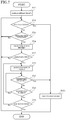
- FIG. 7 is a flowchart showing an example of a notifying process executed in the image processing apparatus according to the embodiment of the present disclosure.
- FIG. 1 is a schematic cross-sectional diagram showing the configuration of the image processing apparatus 10 .
- FIG. 3 is a plan diagram showing a configuration of an operation/display portion 6 . It is noted that a two-dot chain line in FIG. 3 indicates a shielded area Z 1 .
- the image processing apparatus 10 is a multifunctional peripheral having a plurality of functions, such as a scanning function for reading image data from a document sheet, a printing function for forming an image based on image data, a facsimile function, and a copying function. It is noted that the image processing apparatus 10 may be a scanner apparatus, a printer apparatus, a facsimile apparatus, or a copier.
- the image processing apparatus 10 includes an ADF (Automatic Document Feeder) 1 , an image reading portion 2 , an image forming portion 3 , a sheet feeding portion 4 , a control portion 5 , an operation/display portion 6 , and a storage portion 7 .
- ADF Automatic Document Feeder
- the ADF 1 conveys a document sheet to be read by the image reading portion 2 .
- the ADF 1 includes a document sheet setting portion, a plurality of conveyance rollers, a document sheet holder, and a sheet discharge portion.
- the image reading portion 2 can read image data from the document sheet.
- the image reading portion 2 includes a document sheet table, a light source, a plurality of mirrors, an optical lens, and a CCD.
- the image forming portion 3 is configured to electrographically form a color or monochrome image based on the image data read by the image reading portion 2 .
- the image forming portion 3 may be configured to form an image based on image data input from an information processing apparatus such as an external personal computer.
- the image forming portion 3 includes a plurality of image forming units corresponding to C (cyan), M (magenta), Y (yellow), and K (black), a laser scanning unit (LSU), an intermediate transfer belt, a secondary transfer roller, a fixing device, and a sheet discharge tray. It is noted that the image forming portion 3 may form an image by another image forming method, such as an ink jet method.
- the sheet feeding portion 4 supplies a sheet to the image forming portion 3 .
- the sheet feeding portion 4 includes a sheet feeding cassette and a plurality of conveyance rollers.
- the image processing apparatus 10 the color or monochrome image is formed on the sheet supplied from the sheet feeding portion 4 , and the sheet on which the image has been formed is discharged to the sheet discharge tray.
- the control portion 5 includes control devices such as a CPU, a ROM, a RAM, and an EEPROM, all of which are not shown.
- the CPU is a processor for executing various types of arithmetic processing.
- the ROM is a nonvolatile storage device in which information, such as a control program for the CPU to execute the various types of processing, is preliminarily stored.
- the RAM is a volatile storage device, and the EEPROM is a nonvolatile storage device.
- the RAM and the EEPROM are used as temporary storage memory (work area) for the various types of processing executed by the CPU.
- various types of control programs, preliminarily stored in the ROM are executed by the CPU.
- control portion 5 may be constituted by an electronic circuit such as an integrated circuit (ASIC), and may be provided separately from a main control portion that integrally controls the image processing apparatus 10 .
- ASIC integrated circuit
- the operation/display portion 6 is a user interface of the image processing apparatus 10 . As shown in FIG. 2 and FIG. 3 , the operation/display portion 6 includes an operation key portion 61 , a display portion 62 , an operation detecting portion 63 , a speaker 64 , a microphone 65 , and a shield detecting portion 66 .
- the operation key portion 61 includes a plurality of hard keys for inputting various types of information to the control portion 5 in response to a user operation.
- the operation key portion 61 may include a power key used for controlling power supply to the devices in the image processing apparatus 10 , a start key used for commanding execution of various jobs, and a ten-key used for inputting numeric information (see FIG. 3 ).
- the display portion 62 displays various types of information in response to a control command from the control portion 5 .
- the display portion 62 may be a liquid crystal display.
- the display portion 62 may display a screen G 10 (see FIG. 4 ) used for setting operations of a copy job executed in the image processing apparatus 10 .
- the operation detecting portion 63 is a touch panel configured to detect an operation by a user on the display portion 62 . For example, when an object such as a user's finger comes in contact with the display portion 62 , the operation detecting portion 63 detect a contact position (touch position) of the object on the display portion 62 by a resistive film system. It is noted that the operation detecting portion 63 may detect contact of the object with the display portion 62 using another detection system, such as an electrostatic capacitance system.
- the speaker 64 is used for sounding an alarm, outputting voice data, or the like.
- the microphone 65 is used for inputting a voice to the image processing apparatus 10 .
- the shield detecting portion 66 can detect a shielded area in the display portion 62 that is covered by a shielding object.
- the shield detecting portion 66 is an example of a detecting portion in the present disclosure.
- the shield detecting portion 66 is disposed adjacently to an edge portion of the display portion 62 , and includes a plurality of sensors 66 A provided side by side along the edge portion.
- the sensors 66 A are reflective optical sensors with light emitting portions and light receiving portions.
- the shield detecting portion 66 detects the shielded area based on positions of the sensors 66 A with the light receiving portions that have received light of a quantity exceeding the threshold.
- the shield detecting portion 66 detects a rectangular area surrounded by the straight lines connecting the position P 1 and the position P 2 , the position P 2 and the position P 3 , the position P 3 and the position P 4 , and the position P 4 and the position P 1 , as the shielded area Z 1 (see FIG. 3 ).
- the shield detecting portion 66 may detect a rectangular area whose corners include the position P 1 , the position P 2 , and the position P 3 as the shielded area. In addition, the shield detecting portion 66 may detect a rectangular area whose corners include the position P 2 , the position P 3 , and the position P 4 as the shielded area.
- the shield detecting portion 66 detects a triangular area surrounded by the straight lines connecting the position P 1 and the position P 2 , the position P 2 and the position P 5 , and the position P 5 and the position P 1 , as the shielded area. It is noted that the shield detecting portion 66 may detect a rectangular area whose corners include the position P 1 , the position P 2 , and the position P 5 as the shielded area.
- the shield detecting portion 66 detects, as the shielded area, a square area overlapped with a display area of the display portion 62 , whose one side is the straight line connecting the position P 1 and the position P 6 . It is noted that the shield detecting portion 66 may detect, as the shielded area, a rectangular area overlapped with the display area of the display portion 62 , whose one side is the straight line connecting the position P 1 and the position P 6 .
- the sensors 66 A may be optical sensors having only light receiving portions.
- the sensors 66 A may be pressure-sensitive sensors.
- the operation detecting portion 63 may also serve as the shield detecting portion 66 .
- the shield detecting portion 66 may detect the shielded area by a method different from the methods described above.
- the storage portion 7 is a nonvolatile storage device.
- the storage portion 7 may be a flash memory, an SSD (Solid State Drive), or an HDD (Hard Disk Drive).
- the storage portion 7 stores image data that is read by the image reading portion 2 . It is noted that the storage portion 7 may be the EEPROM of the control portion 5 .
- the image processing apparatus 10 when the shielding object such as a document sheet is placed on the display portion 62 , a portion of a screen displayed on the display portion 62 may be shielded.
- a display device that is configured to reduce the screen displayed on the display portion 62 , and display the reduced screen outside the shielded area in the display portion 62 when the shielded area is detected.
- the display content that had been displayed outside the shielded area before the shielded area was detected becomes less visible.
- the display content in the shielded area can be made recognizable by a user without reducing the visibility of the display content outside the shielded area.
- a notification program configured to make the CPU of the control portion 5 execute a notifying process (see flowchart in FIG. 7 ) described below, is preliminarily stored in the ROM of the control portion 5 .
- the notification program is stored in a computer-readable recording medium such as a CD, a DVD, and a flash memory, and may be installed from the recording medium into a storage device such as the storage portion 7 .
- the control portion 5 includes a display processing portion 51 , a first process executing portion 52 , a notification processing portion 53 , and a second process executing portion 54 .
- the CPU of the control portion 5 executes the notification program stored in the ROM. This allows for the control portion 5 to function as the display processing portion 51 , the first process executing portion 52 , the notification processing portion 53 , and the second process executing portion 54 .
- the structure including the control portion 5 and the operation/display portion 6 is an example of a display device in the present disclosure.
- the display processing portion 51 is configured to display one or more predetermined display objects on the display portion 62 .
- the display objects may include an operation icon corresponding to a predetermined process.
- the display objects may include a message image showing a message to a user. It is noted that the display objects may include a digital clock showing the current time.
- the display processing portion 51 displays, on the display portion 62 , a screen including one or more display objects and corresponding to the predetermined display condition.
- the image processing apparatus 10 multiple pieces of screen data are preliminarily stored in the ROM of the control portion 5 respectively in correspondence to a plurality of the display conditions.
- the display processing portion 51 displays a screen based on one of the multiple pieces of screen data corresponding to the satisfied display condition.
- FIG. 4 shows a screen G 10 that is an example of the screen displayed on the display portion 62 by the display processing portion 51 .
- the screen G 10 includes a plurality of display objects T 11 to T 16 .
- the display object T 11 and the display objects T 13 to T 16 are operation icons.
- the display object T 12 is a message image. It is noted that the screen G 10 is displayed when a copy job is chosen on a job selection screen displayed on the display portion 62 when, for example, the image processing apparatus 10 is turned on.
- FIG. 5 shows screen data D 10 that is an example of the screen data used by the display processing portion 51 to display the screen G 10 .
- the screen data D 10 includes type information, address information, and coordinate information for the display objects T 11 to T 16 .
- the type information indicates types of the display objects T 11 to T 16 .
- the address information indicates addresses of image data of the display objects T 11 to T 16 that are preliminarily stored in the ROM of the control portion 5 .
- the coordinate information indicates display positions of the display objects T 11 to T 16 in the display portion 62 .
- the display processing portion 51 when displaying the screen G 10 on the display portion 62 , the display processing portion 51 first reads the screen data D 10 from the ROM of the control portion 5 . Next, the display processing portion 51 acquires the image data of the display objects T 11 to T 16 based on the address information included in the screen data D 10 . Then, the display processing portion 51 displays the acquired image data at positions specified by the coordinate information included in the screen data D 10 on the display portion 62 .
- the first process executing portion 52 executes a process corresponding to the one operation icon on which the touch operation was performed.
- the first process executing portion 52 determines whether or not an operation icon is displayed at a position where the touch operation was detected, based on the type information and the coordinate information included in the screen data. When it is determined that an operation icon is displayed at the position where the touch operation was detected, the first process executing portion 52 executes the process corresponding to the operation icon whose operation was detected.
- the first process executing portion 52 executes the copy job.
- the first process executing portion 52 displays a density setting screen used for setting a print density on the display portion 62 .
- the notification processing portion 53 is configured to, when some of the display objects are partially or completely overlapped with the shielded area detected by the shield detecting portion 66 , notify the overlapped display objects by voice.
- the notification processing portion 53 may notify, by voice, one or more display objects that each have a percentage of area overlapped with the shielded area that is greater than or equal to a predetermined threshold.
- the threshold may be 30 percent. It is noted that the threshold may be an arbitrarily set value.
- the notification processing portion 53 determines whether or not each of the display objects are overlapped with the shielded area based on the coordinate information and image data of the display objects. In addition, with respect to each of the display objects determined to be overlapped with the shielded area, the notification processing portion 53 determines whether or not a percentage of area overlapped with the shielded area is greater than or equal to the predetermined threshold. Then, the notification processing portion 53 notifies, by voice, the display objects that each have a percentage of area overlapped with the shielded area that is greater than or equal to the predetermined threshold. It is noted that when there is more than one display object to be notified by voice, the notification processing portion 53 notifies the display objects sequentially.
- read-aloud data is preliminarily stored in the storage portion 7 , wherein the read-aloud data includes a plurality of pieces of notification information which respectively correspond to the display objects and each indicate a piece of voice notification content.
- the notification processing portion 53 acquires a piece of the notification information corresponding to the display object from the read-aloud data. Then, after converting the acquired notification information to a voice signal, the notification processing portion 53 outputs the signal to the speaker 64 .
- the notification processing portion 53 identifies the display object T 11 , the display object T 12 , the display object T 14 , and the display object T 16 as the display objects overlapped with the shielded area Z 1 .
- the notification processing portion 53 determines that the display object T 12 , the display object T 14 , and the display object T 16 are display objects that each have a percentage of area overlapped with the shielded area that is greater than or equal to the predetermined threshold. Then, the notification processing portion 53 acquires the notification information corresponding to the display object T 12 , the display object T 14 , and the display object T 16 from the read-aloud data, and performs voice notification based on the acquired notification information.
- FIG. 6 shows read-aloud data D 20 that is an example of read-aloud data.
- the notification information may include type information and text information, the type information indicating the type of each of the display objects, and the text information indicating characters included in the image data of each of the display objects (see FIG. 4 ).
- the notification processing portion 53 may notify, by voice, all of the display objects overlapped with the shielded area.
- the second process executing portion 54 is configured to execute a process corresponding to the operation icon identified by an identification operation that is performed in a different manner from the touch operation to identify the operation icon overlapped with the shielded area.
- the second process executing portion 54 executes the process corresponding to the operation icon identified by the identification operation, in response to the identification operation. It is noted that the second process executing portion 54 may execute the process corresponding to the operation icon identified by the identification operation in response to the identification operation, even when the shielded area is not detected by the shield detecting portion 66 .
- the identification operation may include an operation input by voice to the image processing apparatus 10 .
- the identification operation may be an operation of inputting, by voice, a predetermined word such as “OK” or “yes” during a predetermined waiting time starting from a time when the operation icon to be operated is finished being read aloud by the notification processing portion 53 .
- the identification operation may be an operation of inputting, by voice, a portion or all of the text information corresponding to the operation icon to be operated.
- the identification operation may be an operation on a predetermined operation key.
- the identification operation may be an operation on a predetermined operation key of the operation key portion 61 performed during the predetermined waiting time starting from the time when the operation icon to be operated is finished being read aloud by the notification processing portion 53 .
- the identification operation may be an operation on a ten-key of a number indicating an order in which the operation icon to be operated is to be read aloud by the notification processing portion 53 .
- the identification operation may include both the input operation by voice to the image processing apparatus 10 , and the operation on the predetermined operation key.
- the notification processing portion 53 notifies the display object as well as a method of the identification operation by voice. It is noted that the notification processing portion 53 may not notify the identification operation by voice.
- control portion 5 may not include the first process executing portion 52 and the second process executing portion 54 .
- steps S 11 , S 12 . . . indicate the numbers of processing procedures (steps) executed by the control portion 5 . It is noted that the notifying process executed when the control portion 5 determines that the display condition has been satisfied.
- step S 11 the control portion 5 displays the display object on the display portion 62 .
- processing in step S 11 is executed by the display processing portion 51 of the control portion 5 .
- control portion 5 displays the screen on the display portion 62 based on the screen data corresponding to the display condition that was determined to be satisfied immediately before execution of the notifying process.
- step S 12 the control portion 5 , using the operation detecting portion 63 , determines whether or not the touch operation has been performed on the operation icon included in the screen displayed in step S 11 .
- the control portion 5 determines whether or not the operation icon is displayed at a position where the touch operation was detected, based on the type information and coordinate information included in the screen data. When the control portion 5 determines that the operation icon is displayed at the position where the touch operation was detected, the control portion 5 determines that the touch operation has been performed on the operation icon.
- control portion 5 determines that the touch operation has been performed on the operation icon (Yes in S 12 )
- the control portion 5 moves the process to step S 121 .
- the control portion 5 determines that the touch operation has not been performed on the operation icon (No in S 12 )
- the control portion 5 moves the process to step S 13 .
- step S 121 the control portion 5 executes the process corresponding to the operation icon on which the touch operation was determined to have been performed in step S 12 . Then, the control portion 5 ends the notifying process.
- steps S 12 and S 121 are executed by the first process executing portion 52 of the control portion 5 . It is noted that when a new screen including the display object is displayed in accordance with the execution of the process corresponding to the operation icon, the control portion 5 determines that the display condition has been satisfied, and executes the notifying process corresponding to the new screen. On the other hand, when a new screen not including the display object is displayed on the display portion 62 in accordance with the execution of the process corresponding to the operation icon, since the display condition is not satisfied, the notifying process is not executed.
- step S 13 the control portion 5 determines whether or not the shielded area has been detected by the shield detecting portion 66 .
- control portion 5 determines that the shielded area has been detected by the shield detecting portion 66 (Yes in S 13 )
- the control portion 5 moves the process to step S 14 .
- the control portion 5 determines that the shielded area has not been detected by the shield detecting portion 66 (No in S 13 )
- the control portion 5 moves the process to step S 12 , and waits for the detection of the touch operation on the operation icon and the detection of the shielded area.
- step S 14 the control portion 5 executes an object specifying process for specifying the display object to be notified.
- the object specifying process it is determined whether or not the shielded area detected in step S 13 is overlapped with each of the display objects, based on the coordinate information and image data of the display objects.
- it is determined with respect to one or more display objects determined to be overlapped with the shielded area whether or not a percentage of area overlapped with the shielded area is greater than or equal to the predetermined threshold. Then, in the object specifying process, one or more display objects that have been determined to each have a percentage of area overlapped with the shielded area that is greater than or equal to the predetermined threshold are specified as the display objects to be notified.
- the notifying process only the one or more display objects determined to each have a percentage of area overlapped with the shielded area that is greater than or equal to the predetermined threshold are notified by voice. With this configuration, it is possible to avoid performing voice notification even of a display object with a small area shielded by the shielding object.
- step S 15 the control portion 5 determines whether or not the display object to be notified has been specified by the object specifying process executed in step S 14 .
- control portion 5 determines that the display object to be notified has been specified by the object specifying process (Yes in S 15 )
- the control portion 5 moves the process to step S 16 .
- the control portion 5 determines that the display object to be notified has not been specified by the object specifying process (No in S 15 )
- the control portion 5 moves the process to step S 12 .
- step S 16 the control portion 5 notifies one of the display objects specified as the display object to be notified in the object specifying process executed in step S 14 .
- processing in steps S 14 to S 16 are executed by the notification processing portion 53 of the control portion 5 .
- control portion 5 may acquire the notification information corresponding to the display object to be notified included in the read-aloud data. Then, the control portion 5 converts the acquired notification information to the voice signal, and outputs the voice signal to the speaker 64 .
- control portion 5 may notify the method of the identification operation before the first display object is notified. This allows for a user to recognize the method of the identification operation.
- step S 17 the control portion 5 determines whether or not the identification operation has been performed.
- the control portion 5 determines that the identification operation has been performed.
- step S 121 a process corresponding to the display object notified immediately before the identification operation is executed in step S 121 .
- processing in steps S 17 and S 121 following the execution of processing in step S 16 is executed by the second process executing portion 54 of the control portion 5 .
- the control portion 5 moves the process to step S 18 .
- step S 18 the control portion 5 determines whether or not the waiting time has elapsed.
- control portion 5 determines that the waiting time has elapsed (Yes in S 18 )
- the control portion 5 moves the process to step S 19 .
- the control portion 5 moves the process to step S 17 , and waits for the identification operation and for the waiting time to elapse.
- step S 19 the control portion 5 determines whether or not processing in step S 16 has been executed for all of the display objects specified in the object specifying process executed in step S 14 .
- step S 16 when the control portion 5 determines that the processing in step S 16 has been executed for all of the display objects (Yes in step S 19 ), the control portion 5 moves the process to step S 12 . In addition, when the processing in step S 16 has not been executed for all of the display objects (No in step S 19 ), the control portion 5 moves the process to step S 16 . In this case, in step S 16 , notification of the one or more display objects that have not been notified yet is performed.
- the display object(s) partially or completely overlapped with the shielded area is notified by voice. This allows for the display content in the shielded area to be recognized by a user without reducing visibility of the display content outside the shielded area.
- a process corresponding to the operation icon identified by the identification operation is executed, in response to the identification operation performed in a manner different from the touch operation. This allows for the user to perform an operation on the operation icon overlapped with the shielded area without removing the shielding object.
Landscapes
- Engineering & Computer Science (AREA)
- Multimedia (AREA)
- Signal Processing (AREA)
- Human Computer Interaction (AREA)
- Theoretical Computer Science (AREA)
- General Engineering & Computer Science (AREA)
- Physics & Mathematics (AREA)
- General Physics & Mathematics (AREA)
- General Health & Medical Sciences (AREA)
- Audiology, Speech & Language Pathology (AREA)
- Health & Medical Sciences (AREA)
- User Interface Of Digital Computer (AREA)
- Accessory Devices And Overall Control Thereof (AREA)
- Controls And Circuits For Display Device (AREA)
Abstract
Description
Claims (10)
Applications Claiming Priority (2)
| Application Number | Priority Date | Filing Date | Title |
|---|---|---|---|
| JP2017-229089 | 2017-11-29 | ||
| JP2017229089A JP6911730B2 (en) | 2017-11-29 | 2017-11-29 | Display device, image processing device, processing execution method, processing execution program |
Publications (2)
| Publication Number | Publication Date |
|---|---|
| US20190166267A1 US20190166267A1 (en) | 2019-05-30 |
| US10715688B2 true US10715688B2 (en) | 2020-07-14 |
Family
ID=66633778
Family Applications (1)
| Application Number | Title | Priority Date | Filing Date |
|---|---|---|---|
| US16/202,717 Expired - Fee Related US10715688B2 (en) | 2017-11-29 | 2018-11-28 | Display device capable of notifying display object by voice, image processing apparatus, notifying method, process executing method |
Country Status (3)
| Country | Link |
|---|---|
| US (1) | US10715688B2 (en) |
| JP (1) | JP6911730B2 (en) |
| CN (1) | CN109905556B (en) |
Families Citing this family (3)
| Publication number | Priority date | Publication date | Assignee | Title |
|---|---|---|---|---|
| JP2021078001A (en) * | 2019-11-08 | 2021-05-20 | 京セラドキュメントソリューションズ株式会社 | Image processing apparatus and image processing method |
| CN110968326B (en) * | 2019-11-22 | 2024-01-30 | 连尚(新昌)网络科技有限公司 | Function processing method, device and computer storage medium |
| JP2023165289A (en) * | 2022-05-02 | 2023-11-15 | 東芝テック株式会社 | Image forming device and input device |
Citations (6)
| Publication number | Priority date | Publication date | Assignee | Title |
|---|---|---|---|---|
| JP2002229546A (en) | 2001-02-05 | 2002-08-16 | Sharp Corp | Display device |
| US20130031516A1 (en) * | 2011-07-26 | 2013-01-31 | Konica Minolta Business Technologies, Inc. | Image processing apparatus having touch panel |
| US20150265920A1 (en) * | 2014-03-21 | 2015-09-24 | Samsung Electronics Co., Ltd. | Method and apparatus for preventing a collision between subjects |
| US20160085188A1 (en) * | 2014-09-24 | 2016-03-24 | Toshiba Tec Kabushiki Kaisha | Fixing device and image forming apparatus |
| US20190009773A1 (en) * | 2015-10-29 | 2019-01-10 | Mitsubishi Electric Corporation | Driving assistance device |
| US20190026011A1 (en) * | 2015-12-31 | 2019-01-24 | Samsung Electronics Co., Ltd. | Method for displaying contents on basis of smart desktop and smart terminal |
Family Cites Families (8)
| Publication number | Priority date | Publication date | Assignee | Title |
|---|---|---|---|---|
| JP2001028383A (en) * | 1999-07-15 | 2001-01-30 | Matsushita Electric Ind Co Ltd | Surface foreign matter inspection method and surface foreign matter inspection device |
| JP2001255999A (en) * | 2000-03-10 | 2001-09-21 | Oki Electric Ind Co Ltd | Touch panel input device |
| KR20120063982A (en) * | 2010-12-08 | 2012-06-18 | 한국전자통신연구원 | Apparatus and method of man-machine interface for invisible user |
| US20150348555A1 (en) * | 2013-01-08 | 2015-12-03 | Clarion Co., Ltd. | Voice Recognition Device, Voice Recognition Program, and Voice Recognition Method |
| JP6237034B2 (en) * | 2013-09-20 | 2017-11-29 | カシオ計算機株式会社 | Speech learning support apparatus, character string registration method, and speech learning support program |
| KR20150110283A (en) * | 2014-03-21 | 2015-10-02 | 삼성전자주식회사 | Method and apparatus for preventing a collision between objects |
| CN108140356A (en) * | 2015-09-17 | 2018-06-08 | 富士胶片株式会社 | Projection display device and method for controlling projection |
| US9794443B2 (en) * | 2016-01-29 | 2017-10-17 | Kabushiki Kaisha Toshiba | Proximity-based user interface system and method for multifunction devices |
-
2017
- 2017-11-29 JP JP2017229089A patent/JP6911730B2/en not_active Expired - Fee Related
-
2018
- 2018-11-27 CN CN201811424826.5A patent/CN109905556B/en not_active Expired - Fee Related
- 2018-11-28 US US16/202,717 patent/US10715688B2/en not_active Expired - Fee Related
Patent Citations (6)
| Publication number | Priority date | Publication date | Assignee | Title |
|---|---|---|---|---|
| JP2002229546A (en) | 2001-02-05 | 2002-08-16 | Sharp Corp | Display device |
| US20130031516A1 (en) * | 2011-07-26 | 2013-01-31 | Konica Minolta Business Technologies, Inc. | Image processing apparatus having touch panel |
| US20150265920A1 (en) * | 2014-03-21 | 2015-09-24 | Samsung Electronics Co., Ltd. | Method and apparatus for preventing a collision between subjects |
| US20160085188A1 (en) * | 2014-09-24 | 2016-03-24 | Toshiba Tec Kabushiki Kaisha | Fixing device and image forming apparatus |
| US20190009773A1 (en) * | 2015-10-29 | 2019-01-10 | Mitsubishi Electric Corporation | Driving assistance device |
| US20190026011A1 (en) * | 2015-12-31 | 2019-01-24 | Samsung Electronics Co., Ltd. | Method for displaying contents on basis of smart desktop and smart terminal |
Also Published As
| Publication number | Publication date |
|---|---|
| CN109905556A (en) | 2019-06-18 |
| JP6911730B2 (en) | 2021-07-28 |
| CN109905556B (en) | 2020-10-27 |
| US20190166267A1 (en) | 2019-05-30 |
| JP2019101550A (en) | 2019-06-24 |
Similar Documents
| Publication | Publication Date | Title |
|---|---|---|
| JP2008276693A (en) | Image forming device and program | |
| US9516182B2 (en) | Image forming apparatus that enhances operability on screen displayed as split screens | |
| US10715688B2 (en) | Display device capable of notifying display object by voice, image processing apparatus, notifying method, process executing method | |
| US9185257B2 (en) | Information processing apparatus and method for job setting within or outside range of use authority of users | |
| EP2579562A1 (en) | Image Forming Apparatus, Image Forming Method and Computer-Readable Recording Medium | |
| US10708455B2 (en) | Operation input device capable of notifying operation icon by voice, image processing apparatus, notifying method, process executing method | |
| JP2006094023A (en) | Image processor, its control method, and control program | |
| US10209860B2 (en) | Display input device capable of detecting operation performed on display portion, image processing apparatus, display input method | |
| US10795621B2 (en) | Image forming apparatus detects human body to lift suspension on printing process for executing a print job | |
| EP3648107A1 (en) | Image processing apparatus | |
| US9854114B2 (en) | Display device for displaying character information, information processing apparatus including display device, and character information display method | |
| JP2020201332A (en) | Display unit, image forming apparatus, and method for displaying remaining amount of consumable item | |
| US10757278B2 (en) | Image forming apparatus that executes first job and second job in parallel | |
| US10326902B2 (en) | Image forming apparatus | |
| JP6493329B2 (en) | Electronic apparatus and image forming apparatus | |
| JP5380521B2 (en) | Operating device and image forming apparatus | |
| US20250190155A1 (en) | Image forming apparatus, image forming method, and storage medium | |
| US11836313B2 (en) | Input device, input method, and image forming device having touchscreen with variable detection area | |
| US11082574B2 (en) | Image forming apparatus capable of avoiding mixture of prints, image forming method | |
| JP2013168023A (en) | Image formation device and control program of image formation device | |
| JP6508121B2 (en) | Image processing apparatus, method of setting functions of image processing apparatus | |
| JP2017157118A (en) | Image processing device, display input device, process execution method | |
| JP2025075270A (en) | Information processing system, information processing program | |
| JP2016165063A (en) | Image reading device, image forming apparatus, and image reading method | |
| JP2018074530A (en) | Image processing apparatus and image output method |
Legal Events
| Date | Code | Title | Description |
|---|---|---|---|
| AS | Assignment |
Owner name: KYOCERA DOCUMENT SOLUTIONS INC., JAPAN Free format text: ASSIGNMENT OF ASSIGNORS INTEREST;ASSIGNOR:MINAMIDE, HAYATO;REEL/FRAME:047607/0803 Effective date: 20181116 |
|
| FEPP | Fee payment procedure |
Free format text: ENTITY STATUS SET TO UNDISCOUNTED (ORIGINAL EVENT CODE: BIG.); ENTITY STATUS OF PATENT OWNER: LARGE ENTITY |
|
| STPP | Information on status: patent application and granting procedure in general |
Free format text: DOCKETED NEW CASE - READY FOR EXAMINATION |
|
| STPP | Information on status: patent application and granting procedure in general |
Free format text: NON FINAL ACTION MAILED |
|
| STPP | Information on status: patent application and granting procedure in general |
Free format text: RESPONSE TO NON-FINAL OFFICE ACTION ENTERED AND FORWARDED TO EXAMINER |
|
| STPP | Information on status: patent application and granting procedure in general |
Free format text: FINAL REJECTION MAILED |
|
| STPP | Information on status: patent application and granting procedure in general |
Free format text: NOTICE OF ALLOWANCE MAILED -- APPLICATION RECEIVED IN OFFICE OF PUBLICATIONS |
|
| STPP | Information on status: patent application and granting procedure in general |
Free format text: PUBLICATIONS -- ISSUE FEE PAYMENT VERIFIED |
|
| STCF | Information on status: patent grant |
Free format text: PATENTED CASE |
|
| FEPP | Fee payment procedure |
Free format text: MAINTENANCE FEE REMINDER MAILED (ORIGINAL EVENT CODE: REM.); ENTITY STATUS OF PATENT OWNER: LARGE ENTITY |
|
| LAPS | Lapse for failure to pay maintenance fees |
Free format text: PATENT EXPIRED FOR FAILURE TO PAY MAINTENANCE FEES (ORIGINAL EVENT CODE: EXP.); ENTITY STATUS OF PATENT OWNER: LARGE ENTITY |
|
| STCH | Information on status: patent discontinuation |
Free format text: PATENT EXPIRED DUE TO NONPAYMENT OF MAINTENANCE FEES UNDER 37 CFR 1.362 |
|
| FP | Lapsed due to failure to pay maintenance fee |
Effective date: 20240714 |