US10659648B2 - Printing apparatus and text input program - Google Patents
Printing apparatus and text input program Download PDFInfo
- Publication number
- US10659648B2 US10659648B2 US16/240,851 US201916240851A US10659648B2 US 10659648 B2 US10659648 B2 US 10659648B2 US 201916240851 A US201916240851 A US 201916240851A US 10659648 B2 US10659648 B2 US 10659648B2
- Authority
- US
- United States
- Prior art keywords
- character
- size
- text box
- characters
- outer frame
- Prior art date
- Legal status (The legal status is an assumption and is not a legal conclusion. Google has not performed a legal analysis and makes no representation as to the accuracy of the status listed.)
- Active
Links
Images




Classifications
-
- H—ELECTRICITY
- H04—ELECTRIC COMMUNICATION TECHNIQUE
- H04N—PICTORIAL COMMUNICATION, e.g. TELEVISION
- H04N1/00—Scanning, transmission or reproduction of documents or the like, e.g. facsimile transmission; Details thereof
- H04N1/32—Circuits or arrangements for control or supervision between transmitter and receiver or between image input and image output device, e.g. between a still-image camera and its memory or between a still-image camera and a printer device
- H04N1/32101—Display, printing, storage or transmission of additional information, e.g. ID code, date and time or title
- H04N1/32144—Display, printing, storage or transmission of additional information, e.g. ID code, date and time or title embedded in the image data, i.e. enclosed or integrated in the image, e.g. watermark, super-imposed logo or stamp
- H04N1/32149—Methods relating to embedding, encoding, decoding, detection or retrieval operations
- H04N1/32203—Spatial or amplitude domain methods
- H04N1/32219—Spatial or amplitude domain methods involving changing the position of selected pixels, e.g. word shifting, or involving modulating the size of image components, e.g. of characters
-
- G—PHYSICS
- G06—COMPUTING OR CALCULATING; COUNTING
- G06F—ELECTRIC DIGITAL DATA PROCESSING
- G06F40/00—Handling natural language data
- G06F40/10—Text processing
- G06F40/103—Formatting, i.e. changing of presentation of documents
- G06F40/109—Font handling; Temporal or kinetic typography
-
- G06K9/348—
-
- G—PHYSICS
- G06—COMPUTING OR CALCULATING; COUNTING
- G06V—IMAGE OR VIDEO RECOGNITION OR UNDERSTANDING
- G06V30/00—Character recognition; Recognising digital ink; Document-oriented image-based pattern recognition
- G06V30/10—Character recognition
- G06V30/14—Image acquisition
- G06V30/148—Segmentation of character regions
- G06V30/158—Segmentation of character regions using character size, text spacings or pitch estimation
-
- H—ELECTRICITY
- H04—ELECTRIC COMMUNICATION TECHNIQUE
- H04N—PICTORIAL COMMUNICATION, e.g. TELEVISION
- H04N1/00—Scanning, transmission or reproduction of documents or the like, e.g. facsimile transmission; Details thereof
- H04N1/0035—User-machine interface; Control console
- H04N1/00352—Input means
- H04N1/00384—Key input means, e.g. buttons or keypads
Definitions
- the present invention relates to a printing apparatus and a text input program used for a character printing with an appropriate character arrangement.
- a printing area of the addressee is one fixed area, and within the fixed area, each character which constitutes a last name, a first name, and an honorific title is connected together and printed as one line.
- the last name is “ ”
- the first name is “ ”
- the honorific title is “ ”, combine each of these characters and make one line like “ ”.
- the width of the fixed area is not sufficient, accordingly, the joint addressees cannot fit in the fixed area with a default font size (character size). Therefore, a character size in the fixed area may be calculated and the font size may be reduced uniformly.
- FIG. 12 shows a relationship between a reference frame and a virtual body in font data generally used in Japanese.
- the font data includes data indicating whether or not rendering is performed inside the reference frame corresponding to a character size.
- the outermost frame of an area to be rendered matches with the reference frame, and the rendering does not occur outside the reference frame.
- the outermost rendering position is a position of the reference frame.
- the character size indicates the reference frame size.
- inter-line 0
- a small area is secured around the character by the virtual body set outside the reference frame in a font rendering specification, and if it is printed as it is, a small gap is formed between adjacent characters as joint addressees.
- An advantage of some aspects of the invention is to provide an apparatus and a text input program for inserting a character larger than a specified area.
- a printing apparatus including an input unit that receives an input from a user, a printing mechanism, and a processor, in which the processor receives an input of a character string from the user, allocates characters of the character string to at least two text boxes so that an adjacent character is inserted in a separate text box, sets a character size and an inter-character size in the text box so that a part of an outer frame of the adjacent character is placed inside an outer frame of a character, and controls the printing mechanism so that the text box is superimposed and printed to place the part of the outer frame of the adjacent character inside the outer frame.
- a text input program causes a computer to realize a function of receiving an input from a user, a function of controlling a printing mechanism, and a processor function, in which the function is to receive an input of a character string from the user, to allocate characters of the character string to at least two text boxes so that an adjacent character is inserted in a separate text box, to set a character size and an inter-character size in a text box so that a part of an outer frame of the adjacent character is placed inside an outer frame of a character, and to control the printing mechanism so that the text box is superimposed and printed to place the part of the outer frame of the adjacent character inside the outer frame.
- control of the printing mechanism includes control by instructing a driver program separately provided in the computer.
- FIG. 1 is a schematic block diagram of a printing apparatus to which the invention is applied.
- FIG. 2 is a flowchart of a main processing of the printing apparatus.
- FIG. 3 is a flowchart of a determination processing of a character size and an inter-character size in a horizontal direction of an addressee area by the printing apparatus.
- FIG. 4A , FIG. 4B , FIG. 4C , and FIG. 4D are schematic diagrams showing a specific image of the determination processing of the character size and the inter-character size of the addressee area.
- FIG. 5 is a flowchart showing a superimposition processing.
- FIG. 6A and FIG. 6B are diagrams showing a comparison of printing results of the addressee area.
- FIG. 7A , FIG. 7B , FIG. 7C , and FIG. 7D are schematic diagrams showing a specific image of the determination processing of the character size and the inter-character size of the addressee area in a vertical direction.
- FIG. 8 is a flowchart of a determination processing of a character size and an inter-character size relating to English characters or the like.
- FIG. 9 is a diagram showing a relationship between font data of a European language typeface and a reference line.
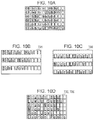
- FIG. 10A , FIG. 10B , FIG. 10C , and FIG. 10D are schematic diagrams showing a specific image of the determination processing of the character size and the inter-character size of English characters.
- FIG. 11 is a diagram showing a part of a flowchart of a processing according to Modification Example 4 and showing differences from FIG. 8 .
- FIG. 12 is a schematic diagram showing a relationship between a reference frame and a virtual body in font data.
- FIG. 1 is a block diagram showing a printing apparatus according to an embodiment of the invention.
- the printing apparatus 10 includes a main body 20 , a liquid crystal panel 30 , and a keyboard 40 .
- the main body 20 further includes a control unit 21 , an input control unit 22 , a printing mechanism 23 , and an addressee database 24 .
- the control unit 21 acquires the operation via the input control unit 22 .
- the control unit 21 adds, updates, and deletes the addressee database 24 .
- the control unit 21 displays the input addressee on the liquid crystal panel 30 and controls the printing mechanism 23 in accordance with a predetermined operation from the keyboard 40 to execute an addressee writing on a postcard or an envelope.
- the control unit 21 includes a CPU, a ROM, a RAM, an interface, or the like configuring a computer and a processor in order to realize various controls, and these are realized as integrated circuits.
- the control unit 21 stores a text input program 26 in a predetermined memory 25 such as a ROM.
- the liquid crystal panel 30 , the keyboard 40 , the input control unit 22 , and the printing mechanism 23 also have their own control circuits and interfaces, respectively.
- FIG. 2 is a flowchart of a main processing of the printing apparatus 10 .
- control unit 21 waits for power on in step S 101 , and when the power is turned on, the control unit 21 displays a menu on the liquid crystal panel 30 in step S 102 .
- the control unit 21 acquires and determines the operation in step S 103 , and in a subsequent step S 104 , it is determined whether the input completed addressee is to be acquired by referring to the addressee database 24 or an operation to newly add the addressee. In the latter case, an operation input from the keyboard 40 is received in step S 105 , and reflected in the addressee database 24 in step S 106 .
- step S 108 the control unit 21 inquires of a user whether or not to display a preview of the addressee that received the input, and if the user wishes to display the preview, the control unit 21 displays the preview in step S 109 . Thereafter, in step S 110 , the control unit 21 inquires of the user whether or not to terminate the addressee input, and if the user wishes not to terminate the addressee input, the processing returns to step S 105 to receive an operation input of the addressee. If the user wishes to terminate the addressee input, the processing returns to step S 102 to display the menu.
- control unit 21 may display a pop-up to make an inquiry or display buttons corresponding to each operation, and may detect the presence or absence of an operation such as clicking the button.
- the control unit 21 When it is selected referring to the addressee database 24 to acquire the input completed addressee, the control unit 21 refers to the addressee database 24 and acquires predetermined addressee data in step S 107 .
- predetermined addressee data As an example, it is possible to display a search menu, list the corresponding items, and allow the user to select from among the listed addressee data.
- the selected addressee data is subjected to the preview display in the same manner as the input completed addressee data as described above.
- the addressee data may be edited in step S 105 .
- the control unit 21 detects the selection in step S 111 and displays the preview in step S 112 . In this state, when the user further selects to start printing, the control unit 21 detects the selection of the start of printing in step S 113 , and performs a printing in step S 115 . That is, the control unit 21 controls the printing mechanism 23 to cause the printing mechanism 23 to execute printing. When start printing is not selected, the processing returns to step S 102 to display the menu.
- control unit 21 detects the selection through the determination in steps S 103 and S 111 , and performs the printing in step S 115 .
- the addressee input, the preview, and the print may be made to move each other.
- the control unit 21 inputs the addressee in step S 105 , previews the addressee in step S 109 , and returns to the addressee input in step S 105 in order to correct the addressee, however, preview may be performed again in step S 109 , and in that state, if the user selects to start printing, the printing in step S 115 may be executed. Further, when the preview is performed in step S 112 , the addressee data may be edited in step S 105 without starting printing, and then the printing may be performed via the preview.
- step S 115 the control unit 21 needs to create a printing image.
- a processing for displaying and a processing for printing are not exactly the same but they are almost the same, so in the following description, description will be given as common processing for the sake of convenience.
- a character size to be rendered in a predetermined printing area When rendering the printing image, it is necessary to determine a character size to be rendered in a predetermined printing area.
- the printing area is a certain area on a printing medium such as a postcard, a text box overlapping the area is set in order to print a character, and font data is expanded in the text box to render the printing image.
- One text box may be set for one printing area, or a plurality of text boxes may be prepared for a superimposition printing.
- FIG. 3 is a flowchart of a determination processing of a character size and an inter-character size in a horizontal direction of an addressee area. Note that, the following processing corresponds to a processing of inputting characters of an addressee and is realized by a text input program 26 . In each step, an individual processing of inputting the characters of the addressee corresponds to an input unit.
- the addressee area corresponds to an addressee input filed, and when it is a postcard or an envelope as a printing medium, it is an area that is suitable for writing an addressee and indicates a portion in which the above-described printing area is set.
- the printing area one or more text boxes are prepared.
- the text box may protrude from the printing area.
- the text box is made larger by the difference between the virtual body and the reference frame for the printing area, as the virtual body is larger than the reference frame. Since the virtual body is also a frame, the virtual body may be expressed as a virtual body frame.
- the reference frame corresponds to an inner frame of a character, and the virtual body corresponds to an outer frame of the character.
- step S 202 the control unit 21 calculates a necessary frame size.
- the necessary frame size is a size of the text box necessary when adopting a default size as a character size.
- the character size matches the reference frame
- the font data is expanded such that the frames of the virtual body larger than the reference frame do not overlap each other between adjacent characters. Therefore, in step S 202 , the necessary frame size in the horizontal direction of the addressee area is, the number of joint addressees ⁇ virtual body size (1).
- the reference frame size is a square area of side 20 mm and the virtual body size is 22 mm which is 10 percent increased.
- the reference frame size is a length of one side of the reference frame, and the virtual body size is a length of one side of the virtual body. Note that, increasing by 10 percent is only an example, and the virtual body size is at least larger than the reference frame size.
- step S 204 the control unit 21 determines whether the necessary frame size as the calculation result is larger than the horizontal frame size of the text box corresponding to the printing area. In this case, since the necessary frame size is 132 mm and the horizontal frame size of the text box is 122 mm, the control unit 21 determines YES in step S 204 and executes a character size recalculation processing in step S 206 .
- the character size recalculation processing calculates the virtual body size by a technique different from the technique of the related art. Then, the character size is specified later from the virtual body size.
- (virtual body size) (frame size of printing area/number of joint addressees)+(virtual body size ⁇ reference frame size) (2).
- the virtual body size calculated in step S 206 is also referred to as a calculated virtual body size.
- the control unit 21 divides addressee data of the joint addresses into odd-numbered columns and even-numbered columns, and inserts into separate text boxes, in step S 208 .
- the control unit 21 may calculate the virtual body size as follows based on a general ratio between the virtual body size and the reference frame size.
- (virtual body size) (frame size of printing area/number of characters) ⁇ ((virtual body size)/(reference frame size)) (3).
- the ratio, (virtual body size)/(reference frame size) which is the ratio on the right side of the expression (3) is, for example, 1.1.
- the (number of characters) in the expression (3) is the number of characters to be accommodated in the printing area in a direction corresponding to the character size and the inter-character size to be obtained (horizontal direction) in the flowchart of FIG. 3 , and according to the explanation so far, the number of joint addressees corresponds.
- FIG. 4A , FIG. 4B , FIG. 4C , and FIG. 4D are schematic diagrams showing a specific image of the determination processing of the character size and the inter-character size of the addressee area.
- the number of joint addressees of the addressee data is 6, means there are 6 joint addressees.
- the last name is common for “ ”, it is rendered only in the first column, however, the rules for displaying the last name can be changed as appropriate.
- “ ” is the first column
- “ ” is the second column
- “ ” is the third column
- “ ” is the fourth column
- “ ” is the fifth column
- “ ” is the sixth column.
- Dividing into odd-numbered columns and even-numbered columns means that in step S 208 , the control unit 21 takes the columns of “ ”, “ ”, and “ ” out of the first column, the third column, and the fifth column which are odd columns and inserts into the first text box with three columns, and also the control unit 21 takes the columns of “ ”, “ ”, and “ ” out of the second column, the fourth column, and the sixth column which are even columns and inserts into the second text box with three columns.
- step S 210 the control unit 21 calculates the character size and the inter-column size using the virtual body size calculated in step S 206 .
- character size (calculated virtual body size) ⁇ (virtual body size ⁇ reference frame size) (4)
- inter-column size (calculated virtual body size) ⁇ (virtual body size ⁇ reference frame size) (5).
- the inter-column size is a gap between a character and a character, however in this example it is based on the reference frame size, so the inter-column size indicates a gap between a reference frame of a character of a certain column and a reference frame of a character of an adjacent column for adjacent inter-column in one text box.
- the character size is 20 mm according to the expression (4)
- inter-column is just an example of an inter-character size.
- the expressions (4) and (5) are merely examples of calculation expressions for determining the character size and the inter-column size.
- the control unit 21 may simply set a value obtained by dividing a frame size of the printing area by the number of joint addressees as a character size and an inter-column size.
- the control unit 21 reflects the character size and the inter-character size (inter-column size) in properties of each text box. If it is reflected in the properties of each text box, fonts are expanded with the specified character size and inter-character size when characters are inserted into the text box thereafter.
- FIG. 5 is a flowchart showing a superimposition processing to be executed after the control unit 21 has completed the flowchart of FIG. 3 through step S 210 .
- a predetermined superimposition processing can be realized by using properties set in each text box.
- step S 301 the control unit 21 sets a position and a size of each text box. Since the virtual body is inevitably set for the font data having the reference frame, in order to adjust the printing position of the reference frame, it is necessary to set the position and the size of the text box after considering the influence of the virtual body. Specifically, the position and the size of the text box are set so that the reference frame is arranged at the corner of the printing area and the text box is larger than the printing area by the difference between the virtual body and the reference frame.
- step S 302 the control unit 21 sets the character size calculated in step S 210 in the property of each text box.
- Setting the character size calculated in step S 210 to the property of each text box eventually means that, in each text box, a reference frame corresponding to the character size calculated in step S 210 and a virtual body having a predetermined size ratio or a predetermined size difference with respect to this reference frame are set.
- step S 304 the control unit 21 sets the inter-character size calculated in step S 210 in the property of each text box so that characters do not overlap between text boxes.
- step S 306 the control unit 21 performs a superimposition printing for each text box.
- the text box When characters are not overlapped between text boxes, the text box is superimposed so that the reference frames of adjacent characters are in contact with each other. In other words, when the text box is superimposed so that the reference frames of adjacent characters are in contact with each other, the characters do not overlap between the text boxes.
- an inter-column When setting the inter-character size, an inter-column may be placed on the left of the character as usual for the odd-numbered column. The result is shown in FIG. 4B . However, assuming that each text box is overlapped and set at the same position, if an inter-column also placed on the left of the character for the even-numbered column, the characters of the odd-numbered column and the characters of the even-numbered column overlap each other. Therefore, in order to set the inter-character size in the property to avoid overlapping of characters between text boxes, set the property so that a margin part between characters (inter-column) is placed on the right of the character for the even-numbered column. The result is shown in FIG. 4C .
- a plurality of rectangles in character units in each of the text boxes TB 1 and TB 2 indicate a reference frame having a horizontal width corresponding to the character size set in the property of the text box in step S 302 , that is, the character size calculated in step S 210 .
- the text box itself may be offset in addition to place inter-columns to the left or right of the characters in each text box.
- inter-columns to the left or right of the characters in each text box.
- it is sufficient to offset the text box inserting characters of the even-numbered column to the left by the inter-column size with respect to the text box inserted characters of the odd-numbered column. This also makes it possible to “prevent characters from overlapping between text boxes.”
- the processor that is, the control unit 21 receives an input of a character string from a user and allocates characters of the character string to at least two text boxes so that adjacent characters are inserted in separate text boxes.
- the character string is divided into an odd-numbered column and an even-numbered column, one of the odd-numbered column and the even-numbered column is allocated to a first text box, and the other is allocated to a second text box.
- the control unit 21 sets the character size and the inter-character size in the text box so that the reference frame of the character of the odd-numbered column and the reference frame of the character of the even-numbered column adjacent to each other are in contact with each other.
- the character size and the inter-character size are set so that the inter-character matches the reference frame size, that is, the character size.
- the control unit 21 superimposes a plurality of text boxes so that the reference frames of adjacent characters are in contact with each other, and causes the printing mechanism 23 to print a superimposition result.
- the control unit 21 may superimpose such that the character portion of one text box overlaps the inter-column portion of the other text box.
- an inter-column size is set to be zero, there is a gap between adjacent characters due to an influence of the virtual body, and since a character size that fits in a printing area is determined on the premise that a gap is secured, accordingly, it is often not possible to use characters of the expected size (for example, character of a default size).
- every other line or every other character in the original character string is inserted into each text box, so it becomes unnecessary to size down the character size due to an influence of the virtual body in each text box. Therefore, it is possible to print with characters of the expected size or characters as close as possible to the expected size.
- FIG. 6A and FIG. 6B are diagrams showing a comparison of printing results of the addressee area.
- FIG. 6B shows a result when printing with enlarged characters in a limited printing area by using the technique of the embodiment. In this way, it is possible to set the character size in a state in which adjacent characters are maximally close to each other without being affected by a gap generated between the virtual body and the reference frame.
- the embodiment also includes a mode in which a gap is generated between reference frames of adjacent characters when text boxes are superimposed.
- the control unit 21 sets the character size and inter-character size in each text box so that a part of the virtual body of the other character is placed inside the virtual body of one adjacent character when each text box is superimposed.
- the control unit 21 further sets the calculated character size to a value that is smaller than the calculated inter-character size by a predetermined amount, so that a part of the virtual body of the other character can be placed inside the virtual body of one adjacent character when each text box is superimposed.
- the fact that a part of the virtual body of the other character is placed inside the virtual body of one adjacent character means that a part of the virtual body of one adjacent character and a part of the virtual body of the other character overlap each other.
- the control unit 21 provides a concept of allocating characters of a character string to at least two text boxes so that adjacent characters are placed in separate text boxes, setting a character size and an inter-character size in the text box so that a part of an outer frame of an adjacent character is placed inside an outer frame of a character, superimposing the text box so that the part of the outer frame of the adjacent character is placed inside the outer frame, and controlling the printing mechanism 23 to print.
- the control unit 21 provides a configuration in which the text boxes are superimposed so that the inner frames of adjacent characters are in contact with each other.
- control unit 21 may allocate characters of a character string to at least two text boxes so that adjacent characters are placed in separate text boxes, set a character size and an inter-character size in the text box so that a part of an inner frame of an adjacent character is placed inside an outer frame of a character, superimpose the text box so that the part of the inner frame of the adjacent character is placed inside the outer frame, and control the printing mechanism 23 to print.
- characters are inserted into two text boxes separately based on the length of the horizontal width.
- the problem of whether or not to be accommodated in a predetermined printing area also occurs in a vertical direction. That is, the vertical direction is a normal character alignment direction.
- the above-described column alignment direction and the character alignment direction of an addressee are orthogonal directions.
- step S 208 instead of the processing in which the joint addressee is divided into odd-numbered columns and even-numbered columns and inserted into separate text boxes, each character data constituting the addressee is divided into odd-numbered rows and even-numbered rows and inserted into separate text boxes, and the character size and the inter-character size calculated in step S 210 may be calculated in the same way.
- FIG. 7A , FIG. 7B , FIG. 7C , and FIG. 7D are schematic diagrams showing a specific image of the determination processing of the character size and the inter-character size of the addressee area in a vertical direction.
- FIG. 7A the number of characters (number of rows) in the vertical direction of the addressee data is 9 rows
- FIG. 7B shows a state in which odd-numbered rows are inserted in the first text box TB 3
- FIG. 7C shows a state in which even-numbered rows are inserted in the second text box TB 4 so that characters do not overlap. Since the text box TB 3 shown in FIG. 7B and the text box TB 4 shown in FIG. 7C are superimposed at the same position, when printing, as shown in FIG. 7D , the text boxes TB 3 and TB 4 are superimposed and printed while the reference frames of the characters of the odd-numbered rows and the even-numbered rows adjacent each other are in contact with each other.
- the control unit 21 can independently apply a horizontal direction processing and a vertical direction processing, respectively.
- the horizontal direction processing the control unit 21 allocates the input character string to two text boxes as shown in FIGS. 4B, 4C , and 4 D, determines the character size and the inter-character size in the horizontal direction of the printing area, and superimposes the text boxes.
- the vertical direction processing the control unit 21 allocates the input character string to two text boxes as shown in FIGS. 7B, 7C, and 7D , determines the character size and the inter-character size in the vertical direction of the printing area, and superimposes the text boxes.
- the control unit 21 executes the horizontal direction processing and then further executes the vertical direction processing, on the input character string. In this manner, when both of the horizontal direction processing and the vertical direction processing are performed, it is allocated in four alignment directions in the character alignment direction of the addressee and the orthogonal direction.
- the control unit 21 determines whether or not the necessary frame size is larger than the horizontal frame size of the text box corresponding to the printing area.
- the necessary frame size is larger than the horizontal frame size of the text box
- the character size is reduced, unless the above-described processing is executed. Therefore, in a case where the necessary frame size is larger than the horizontal frame size of the text box, the character size when the addressee is placed in one text box becomes smaller. For this reason, attention is paid to the character size in a case where the addressee is inserted in one text box in advance, the control unit 21 may determine whether the character size in the case where the addressee is inserted in one text box is less than a threshold value or greater than or equal to the threshold value.
- the control unit 21 may perform a processing of allocating the characters of the addressee to at least two text boxes.
- the control unit 21 allocates the addressee to one text box.
- FIG. 8 is a flowchart showing the determination processing of the character size and the inter-character size of English characters or the like in the printing area.
- the processing of FIG. 8 is also realized by the text input program 26 .
- the printing area is an addressee area, and the addressee is rendered with joint addressees in the addressee area.
- step S 402 the control unit 21 determines whether or not character strings, that is, all characters constituting the addressee data to be rendered correspond to English characters or the like.
- the English characters or the like mean, for example, capital characters, lowercase characters of 26 kinds of alphabets, symbols used in English sentences, and characters used in each language of Latin language.
- the control unit 21 calculates the necessary frame size in step S 404 .
- the control unit 21 determines NO in step S 402 and terminates the flowchart of FIG. 8 .
- the control unit 21 calculates the necessary frame size by the following expression (7).
- necessary frame size number of joint addressees ⁇ body size (7). Comparing the expression (7) with the expression (1), the virtual body size is merely replaced by the body size.
- FIG. 9 shows the relationship between the font data of the European language typeface such as the alphabet and the reference lines L 1 to L 5 .
- an ascender line L 1 is a reference line indicating the uppermost position such as, for example, the lowercase characters “b”, “d”, “f”, “h”, “k”, “l”, “t”.
- the cap line L 2 is a reference line indicating the uppermost position of the capital characters.
- the mean line L 3 is a reference line indicating the height of lowercase characters.
- the base line L 4 is a reference line of the European language typeface and indicates the position of the bottom of capital characters and a lot of the bottom of lowercase characters.
- the height from the base line L 4 to the mean line L 3 is called x-height.
- the height from the base line L 4 to the cap line L 2 is called a cap height.
- a part of lowercase characters and above the mean line L 3 is called an ascender.
- a part of lowercase characters and below the base line L 4 is called a descender.
- the descender line L 5 is a reference line indicating the lowermost position such as, for example, the lowercase characters “f”, “g”, “j”, “p”, “q”, “y”.
- the height from the descender line L 5 to the ascender line L 1 is the body size.
- a predetermined default value for such a body size is used as a body size in expression (7).
- step S 406 the control unit 21 determines whether or not the necessary frame size calculated in step S 404 is larger than the horizontal frame size of the text box having a predetermined size corresponding to the printing area.
- the text box corresponding to the printing area may be the same size as the printing area.
- character strings based on English characters are printed on a printing medium such as postcards or envelopes after being rotated by 90 degrees.
- the control unit 21 determines YES in step S 406 , and proceeds to step S 408 .
- step S 408 the control unit 21 calculates the body size by the following expression (8).
- body size (frame size of printing area/number of joint addressees) (8).
- the body size calculated in step S 408 is 20 mm.
- the body size calculated in step S 408 is referred to as a calculated body size. The calculated body size is smaller than the body size (default value of the body size) used in the expression (7).
- the default value of the body size is 25 mm. Also, in the default value of the body size, it is assumed that the cap height is 20 mm, the height from the cap line L 2 to the ascender line L 1 is 1 mm, and the height from the descender line L 5 to the base line L 4 is 4 mm.
- a frame in which the ascender line L 1 and the descender line L 5 are both ends in the height direction of the character is referred to as an outer frame of the character.
- a frame in which the cap line L 2 and the base line L 4 are both ends in the height direction of the character is called an inner frame of the character. That is, the frame having the body size as the width in the height direction of the character is the outer frame of the character, and the frame having the cap height as the width in the height direction of the character is the inner frame of the character.
- step S 410 the control unit 21 determines whether or not a predetermined first character group that the ascender passes the cap line L 2 toward the ascender line L 1 is included in the characters constituting the addressee data to be rendered.
- the first character group includes characters such as the above-described lowercase characters “b”, “d”, “f”, “h”, “k”, “l”, “t”. However, specific examples of the first character group are not limited to above-described lowercase characters.
- the control unit 21 determines NO and proceeds to step S 412 .
- step S 410 determines YES, skips step S 412 , and proceeds to step S 414 .
- the determination in step S 410 is also referred to as an ascender line check.
- step S 412 the control unit 21 adds the height from the cap line L 2 to the ascender line L 1 in the calculated body size to the addition character size.
- the height from the cap line L 2 to the ascender line L 1 in the calculated body size is referred to as a first addition size for convenience.
- the value of the addition character size is reset to 0. Since the ratio of the distance between the reference lines L 1 , L 2 , L 3 , L 4 , and L 5 in the body size is predetermined, the control unit 21 can calculate the first addition size by multiplying the calculated body size by the ratio of the distance between the cap line L 2 and the ascender line L 1 to the body size.
- step S 414 executed after step S 410 or step S 412 , the control unit 21 determines whether or not a descender includes a predetermined second character group that passes the base line L 4 toward the descender line L 5 in the characters constituting the addressee data to be rendered.
- the second character group includes characters such as the above-described lowercase characters “f”, “g”, “j”, “p”, “q”, “y”. However, specific examples of the second character group are not limited to above-described lowercase characters.
- the control unit 21 determines NO and proceeds to step S 416 .
- step S 414 determines YES, skips step S 416 , and proceeds to step S 418 .
- the determination in step S 414 is also referred to as descender line check.
- step S 416 the control unit 21 adds the height from the descender line L 5 to the base line L 4 in the calculated body size to the addition character size.
- the height from the descender line L 5 to the base line L 4 in the calculated body size is referred to as a second addition size for convenience.
- the control unit 21 can calculate the second addition size by multiplying the calculated body size by the ratio of the distance between the descender line L 5 and the base line L 4 to the body size.
- step S 418 executed after step S 414 or step S 416 , the control unit 21 divides the addressee data of the joint addressees into odd-numbered rows and even-numbered rows and inserts divided rows into separate text boxes.
- FIG. 10A , FIG. 10B , FIG. 10C , and FIG. 10D are schematic diagrams showing a specific image of the determination processing of the character size and the inter-character size of the addressee area in Modification Example 3.
- the direction orthogonal to the character alignment direction corresponds to the horizontal direction of the addressee area (printing area).
- Dividing into odd-numbered rows and even-numbered rows means that in step S 418 , the control unit 21 takes the rows of “Braian Ace”, “Aran Ness”, and “Bon Jovi” out of the first row, the third row, and the fifth row which are odd rows and inserts into the first text box with three rows, and also the control unit 21 takes the rows of “Luwis Senna”, “Nico Lovin”, and “Lauren Panis” out of the second row, the fourth row, and the sixth row which are even columns and inserts into the second text box with three rows.
- step S 420 the control unit 21 calculates the character size and the inter-row size based on the addition character size and the calculated body size. Specifically, the control unit 21 sets a value obtained by adding the addition character size to the height of the cap height in the calculated body size, that is, the height from the base line L 4 to the cap line L 2 as the calculated character size in step S 420 .
- the cap height in the calculated body size is referred to as basic character size.
- the addition character size at the time of step S 420 is either 0, first addition size, second addition size, first addition size+second addition size. Therefore, the character size obtained as the calculation result in step S 420 is either basic character size, basic character size+first addition size, basic character size+second addition size, basic character size+first addition size+second addition size. Basic character size+first addition size+second addition size is equal to the calculated body size.
- the inter-row size is larger than the character size, and is the value obtained by adding the second addition size to the calculated body size.
- the inter-row size is larger than the character size, and is the value obtained by adding the first addition size to the calculated body size.
- character size basic character size
- the inter-row size is also larger than the character size, and is the value obtained by adding the first addition size and the second addition size to the calculated body size.
- the control unit 21 executes basically the same processing as the superimposition processing shown in FIG. 5 .
- the control unit 21 may set each text box having the same size as the printing area so that the outer frame of the character is arranged at the corner of the printing area.
- the control unit 21 sets the character size calculated in step S 420 as the cap height in the property of each text box. Setting the character size calculated in step S 420 to the cap height in the property of each text box means that in each text box, the cap height corresponding to the character size calculated in step S 420 and the body size of a predetermined ratio to the cap height are set, at the same time.
- the default value of the body size is 25 mm
- the cap height at the default value is 20 mm
- the setting of the cap height in each text box is set to 20 mm by the processing of step S 302 , and it is a value equivalent to the cap height in the body size of the default value.
- step S 304 the control unit 21 sets the inter-row size, that is, the inter-character size calculated in step S 420 in the property of each text box so that characters do not overlap between text boxes.
- the inter-row size indicates the distance between the inner frame of the character of a certain row and the inner frame of the character of the row adjacent thereto in one text box. That is, within one text box, a gap which is the same as the cap height or wider than the cap height is set between the cap height of a certain row and the cap height of the next row.
- step S 306 the control unit 21 performs a superimposition printing for each text box.
- FIG. 10A illustrates a state in which the addressee data of six joint addressees is arranged by adjusting the outer frame of each character, that is, body size to be all within the text box corresponding to the printing area.
- a rectangle in character unit in FIG. 10A indicates a frame in which the inner frame of the character, that is, the width in the height direction of the character is set as the cap height.
- Broken lines in FIG. 10A indicates a boundary between adjacent rows. The broken lines may be regarded as combining the descender line of one adjacent row and the ascender line of the other adjacent row. That is, a gap between the broken line and the broken line shown in FIG. 10A is the body size for each row in FIG. 10A . More specifically, the gap between the broken line and the broken line shown in FIG. 10A corresponds to the calculated body size in step S 408 .
- FIG. 10B shows the text box TB 5 which has been subjected to the processing up to the step S 304 after inserting the addressee of the odd-numbered rows
- FIG. 10C shows the text box TB 6 which has been subjected to the processing up to the step S 304 after inserting the addressee of the even-numbered rows.
- FIGS. 10B and 10C are diagrams assuming that the character sizes and the inter-row sizes calculated in step S 420 are equal.
- a rectangle in character unit in FIGS. 10B and 10C indicates a frame in which the inner frame of the character, that is, the width in the height direction of the character is set as the cap height set in step S 302 . According to the example of FIGS.
- the inner frame of the character is enlarged in the height direction of the character rather than the cap height in the calculated body size, and is a frame having a gap (distance between the broken line and the broken line shown in FIG. 10A ) corresponding to the calculated body size.
- step S 420 If the character size calculated in step S 420 is, basic character size+first addition size, a gap corresponding to the second addition size is generated between one inner frame of character and the other inner frame of character adjacent to each other when the text boxes are superimposed. However, since the descender of the above-mentioned one character is rendered with respect to the gap, eventually, when a text box is superimposed, there is no unnecessary gap between one character and the other character adjacent to each other. If the character size calculated in step S 420 is, basic character size+second addition size, a gap corresponding to the first addition size is generated between one inner frame of character and the other inner frame of character adjacent to each other when the text boxes are superimposed. However, since the ascender of the above-mentioned the other character is rendered with respect to the gap, eventually, when a text box is superimposed, there is no unnecessary gap between one character and the other character adjacent to each other.
- the control unit 21 determines, by the ascender line check, whether or not the character string includes the first character group which is necessary for rendering an area from the cap line L 2 to the ascender line L 1 , and the control unit 21 also determines, by the descender line check, whether or not the character string includes the second character group which is necessary for rendering an area from the descender line L 5 to the base line L 4 .
- the control unit 21 adds the first addition size, which is the height from the cap line L 2 to the ascender line L 1 , to the addition character size, and if the second character group is not included in the character string, the control unit 21 adds the second addition size, which is the height from the descender line L 5 to the base line L 4 , to the addition character size.
- the control unit 21 determines the value obtained by adding the addition character size to the basic character size corresponding to the cap height as the character size, and determines the inter-row size according to the character size. Then, the character size and inter-row size are set to the cap height and inter-row size in the property of each text box to which characters are allocated.
- the inner frame that is, the size of the cap height in the unnecessary area (area of the gap between the cap height and the body size) depending on the content of the English character or the like constituting the character string, it is possible to print large sized characters.
- Modification Example 3 when each text box is superimposed, the inner frames of the characters are not necessarily in contact with each other, and in the state shown in FIG. 10D , there may be a gap between the inner frame of the character of odd-numbered rows and the inner frame of the character of even-numbered rows. That is, in Modification Example 3, the control unit 21 also sets the character size and inter-character size in the text box so that a part of the outer frame or inner frame of the adjacent character is placed inside the outer frame of the character.
- Modification Example 4 is a modified example on the premise of Modification Example 3.
- FIG. 11 is a part of a flowchart of the determination processing of the character size and the inter-character size relating to Modification Example 4, mainly showing differences from the flowchart of FIG. 8 .
- differences from Modification Example 3 will be described with reference to FIGS. 8, 9 , and 11 .
- a reference line L 0 indicated by the broken line in FIG. 9 is assumed.
- the reference line L 0 is a reference line placed above the ascender line L 1 in the height direction of the character and indicates the uppermost position to be added above the characters such as the alphabet, for example, pronunciation symbols called a hat or a caret and accent marks.
- Symbols added above characters are referred to as specific symbols in Modification Example 4.
- the specific symbol is a symbol that requires an area from the ascender line L 1 to the reference line L 0 to be rendered.
- the height from the descender line L 5 to the ascender line L 1 is set as the body size of the character.
- the height from the descender line L 5 to the reference line L 0 is taken as the body size of the character. Therefore, in Modification Example 4, a frame in which the reference line L 0 and the descender line L 5 are both ends in the height direction of the character is referred to as an outer frame of the character.
- step S 409 the control unit 21 determines whether or not the specific symbol is included in the addressee data to be rendered. When no specific symbol is included in the addressee data, the control unit 21 determines NO and proceeds to step S 410 .
- the processing of step S 410 is as described above.
- the control unit 21 determines YES, skips steps S 410 and S 413 , and proceeds to step S 414 .
- the determination in step S 409 is also referred to as virtual line check.
- step S 413 When the determination in step S 410 is NO, the control unit 21 executes step S 413 .
- step S 413 is executed instead of step S 412 in FIG. 8 .
- step S 413 the control unit 21 adds the height from the cap line L 2 to the reference line L 0 in the calculated body size to the addition character size.
- the height from the cap line L 2 to the reference line L 0 in the calculated body size is referred to as a third addition size for convenience.
- control unit 21 can calculate the third addition size by multiplying the calculated body size by the ratio of the distance between the cap line L 2 and the reference line L 0 to the body size.
- the control unit 21 determines, by the virtual line check, whether or not the character string includes the specific symbol which is necessary for rendering an area from the ascender line L 1 to the reference line L 0 which is a character height above the ascender line L 1 . If the specific symbol and first character group are not included in the character string, the control unit 21 adds the third addition size, which is the height from the cap line L 2 to the reference line L 0 , to the addition character size, and if the second character group is not included in the character string, the control unit 21 adds the second addition size, which is the height from the descender line L 5 to the base line L 4 , to the addition character size.
- the control unit 21 determines the value obtained by adding the addition character size to the basic character size corresponding to the cap height as the character size, and determines the inter-row size according to the character size. Then, the character size and inter-row size are set to the cap height and inter-row size in the property of each text box to which characters are allocated. That is, by enlarging the inner frame, that is, the size of the cap height in the unnecessary area according to the condition such as the absence of a specific symbol, it is possible to print large sized characters. As described above, according to the embodiment, the control unit 21 provides a configuration for determining the inner frame in accordance with the presence or absence of a character or symbol requiring an area between the inner frame and the outer frame in the character string and superimposing text boxes.
- the reference line L 0 above the character height than the ascender line L 1 is adopted in Modification Example 4.
- An idea similar to the third addition size replacing the first addition size is that when assuming a symbol to be added below the character, it can be adopted as the reference line below the character height than the descender line L 5 and an addition size below the base line L 4 replacing the second addition size.
- the invention is not limited to the above embodiment. Although it is apparent to those skilled in the art, it is disclosed as one embodiment in the invention: to apply to characters (including numerals) used in any language, although not the characters disclosed in the above-mentioned embodiment; to realize the plurality of members disclosed in the above-mentioned embodiment by a single member, to realize a single member by a plurality of members, or to realize a plurality of apparatuses in cooperation with each other; to apply modifications in which mutually substitutable members and configurations and the like disclosed in the above-mentioned embodiment are appropriately combined; to appropriately replace members and configurations and the like, disclosed in the above-mentioned embodiments which are well-known technologies and not disclosed in the above-mentioned embodiment, with mutually substitutable members and configurations and the like, and modify the combination and apply; to appropriately replace members and configurations and the like, disclosed in the above-mentioned embodiment by those skilled in the art based on known technology and not disclosed in the above-mentioned embodiment, with
Landscapes
- Engineering & Computer Science (AREA)
- Multimedia (AREA)
- Theoretical Computer Science (AREA)
- Signal Processing (AREA)
- Physics & Mathematics (AREA)
- General Physics & Mathematics (AREA)
- General Health & Medical Sciences (AREA)
- Health & Medical Sciences (AREA)
- General Engineering & Computer Science (AREA)
- Computational Linguistics (AREA)
- Audiology, Speech & Language Pathology (AREA)
- Artificial Intelligence (AREA)
- Computer Vision & Pattern Recognition (AREA)
- Document Processing Apparatus (AREA)
Abstract
Description


the number of joint addressees×virtual body size (1).
(virtual body size)=(frame size of printing area/number of joint addressees)+(virtual body size−reference frame size) (2).
The virtual body size calculated in step S206 is also referred to as a calculated virtual body size. By applying the above example, the calculated virtual body size is, 120 mm (frame size of printing area)/6 (number of joint addressees)+(22 mm−20 mm)=22 mm. If the calculated virtual body size is 22 mm then the character size is 20 mm. As a matter of course, it will exceed the horizontal width of the printing area as it is. The
(virtual body size)=(frame size of printing area/number of characters)×((virtual body size)/(reference frame size)) (3).
In the embodiment, the ratio, (virtual body size)/(reference frame size) which is the ratio on the right side of the expression (3) is, for example, 1.1. Further, the (number of characters) in the expression (3) is the number of characters to be accommodated in the printing area in a direction corresponding to the character size and the inter-character size to be obtained (horizontal direction) in the flowchart of


(character size)=(calculated virtual body size)−(virtual body size−reference frame size) (4),
(inter-column size)=(calculated virtual body size)−(virtual body size−reference frame size) (5).
(virtual body size)=(frame size of printing area/number of rows in vertical direction)+(virtual body size−reference frame size) (6).
That is, the difference from expression (2) is that the number of joint addressees corresponding to the number of columns has been replaced by the number of rows in the vertical direction.
necessary frame size=number of joint addressees×body size (7).
Comparing the expression (7) with the expression (1), the virtual body size is merely replaced by the body size.
(body size)=(frame size of printing area/number of joint addressees) (8).
Also in Modification Example 3, if the frame size of the printing area, that is, the horizontal width of the printing area is 120 mm and the number of joint addressees is 6, as in the above-described embodiment, the body size calculated in step S408 is 20 mm. For the sake of convenience, the body size calculated in step S408 is referred to as a calculated body size. The calculated body size is smaller than the body size (default value of the body size) used in the expression (7). As an example, assume that the default value of the body size is 25 mm. Also, in the default value of the body size, it is assumed that the cap height is 20 mm, the height from the cap line L2 to the ascender line L1 is 1 mm, and the height from the descender line L5 to the base line L4 is 4 mm.
(character size)=(basic character size+addition character size) (9).
Further, the
(inter-row size)=2×(calculated body size)−(character size) (10).
Claims (10)
(virtual body size)=(frame size of printing area/number of characters)×((virtual body size)/(reference frame size)).
(virtual body size)=(frame size of printing area/number of characters)×((virtual body size)/(reference frame size)).
(inter-character size)=(calculated virtual body size)−((virtual body size)−(reference frame size)).
(virtual body size)=(frame size of printing area/number of characters)×((virtual body size)/(reference frame size)).
Applications Claiming Priority (4)
| Application Number | Priority Date | Filing Date | Title |
|---|---|---|---|
| JP2018-001112 | 2018-01-09 | ||
| JP2018001112 | 2018-01-09 | ||
| JP2018-108058 | 2018-06-05 | ||
| JP2018108058A JP7067285B2 (en) | 2018-01-09 | 2018-06-05 | Printing device and text input program |
Publications (2)
| Publication Number | Publication Date |
|---|---|
| US20190215416A1 US20190215416A1 (en) | 2019-07-11 |
| US10659648B2 true US10659648B2 (en) | 2020-05-19 |
Family
ID=67139917
Family Applications (1)
| Application Number | Title | Priority Date | Filing Date |
|---|---|---|---|
| US16/240,851 Active US10659648B2 (en) | 2018-01-09 | 2019-01-07 | Printing apparatus and text input program |
Country Status (1)
| Country | Link |
|---|---|
| US (1) | US10659648B2 (en) |
Families Citing this family (1)
| Publication number | Priority date | Publication date | Assignee | Title |
|---|---|---|---|---|
| US10817677B2 (en) * | 2018-08-28 | 2020-10-27 | Read Twogether Ltd | Single-line display of composite-text |
Citations (4)
| Publication number | Priority date | Publication date | Assignee | Title |
|---|---|---|---|---|
| US3675203A (en) * | 1969-04-09 | 1972-07-04 | Dwight M B Baumann | Automatic pattern recognition with weighted area scanning |
| US5287487A (en) * | 1990-08-31 | 1994-02-15 | Sun Microsystems, Inc. | Predictive caching method and apparatus for generating a predicted address for a frame buffer |
| US20070100492A1 (en) * | 2005-10-21 | 2007-05-03 | Mamoru Idaka | Three dimensional processing data setting system, method for setting three-dimensional processing data, computer program for setting three-dimensional processing data, medium with three-dimensional processing data stored therein that is readable by computer and laser processing equipment operated by the three-dimensional data |
| US20080117448A1 (en) * | 2006-11-17 | 2008-05-22 | Money Mailer, Llc | Template-based art creation and information management system for advertising |
-
2019
- 2019-01-07 US US16/240,851 patent/US10659648B2/en active Active
Patent Citations (4)
| Publication number | Priority date | Publication date | Assignee | Title |
|---|---|---|---|---|
| US3675203A (en) * | 1969-04-09 | 1972-07-04 | Dwight M B Baumann | Automatic pattern recognition with weighted area scanning |
| US5287487A (en) * | 1990-08-31 | 1994-02-15 | Sun Microsystems, Inc. | Predictive caching method and apparatus for generating a predicted address for a frame buffer |
| US20070100492A1 (en) * | 2005-10-21 | 2007-05-03 | Mamoru Idaka | Three dimensional processing data setting system, method for setting three-dimensional processing data, computer program for setting three-dimensional processing data, medium with three-dimensional processing data stored therein that is readable by computer and laser processing equipment operated by the three-dimensional data |
| US20080117448A1 (en) * | 2006-11-17 | 2008-05-22 | Money Mailer, Llc | Template-based art creation and information management system for advertising |
Non-Patent Citations (1)
| Title |
|---|
| "Virtual Body" retrieved at http://www.morisawa.co.jp/culture/dictionary/1964. |
Also Published As
| Publication number | Publication date |
|---|---|
| US20190215416A1 (en) | 2019-07-11 |
Similar Documents
| Publication | Publication Date | Title |
|---|---|---|
| JPS59177676A (en) | Balancing of column | |
| WO2008018977A2 (en) | Diacritics positioning system for digital typography | |
| US20090276695A1 (en) | Automatic document generator | |
| US9665326B2 (en) | Image display control device for displaying a print preview for borderless printing | |
| JPH0687203A (en) | Method and apparatus for replacing characters and displaying characters | |
| JP2001101435A (en) | Document image processing apparatus Document image processing method | |
| US10659648B2 (en) | Printing apparatus and text input program | |
| US10497274B2 (en) | Question generating device, question generating method, and image forming apparatus | |
| US20080014002A1 (en) | Print control apparatus that controls printing device performing printing using print sheet having tab | |
| JP2014081753A (en) | Image processor | |
| JP7067285B2 (en) | Printing device and text input program | |
| JP7009793B2 (en) | Print control device, print control program and print control method | |
| US20210203797A1 (en) | Display device and non-transitory computer-readable storage medium storing program | |
| JPH0242073B2 (en) | ||
| JP3433428B2 (en) | Line editing device | |
| JP2014021694A (en) | Portable information terminal, table display method for portable information terminal and table display program for portable information terminal | |
| JP2014063439A (en) | Plotting processor and method for controlling the same | |
| US8707165B2 (en) | Information processing apparatus, control method, and storage medium for adjustment of alternate document layers to reduce printed pages | |
| JPH09185603A (en) | Document creating apparatus and character string form control method | |
| JP6708061B2 (en) | Image processing device, image reading device, and image forming device | |
| JP2000238227A (en) | Material placement device | |
| JPS63209964A (en) | Word processor | |
| JP2010003140A (en) | Business form design device, business form design method, and program | |
| JPH06162005A (en) | Document preparing method | |
| Hart-Davis | Formatting and Laying Out Your Documents |
Legal Events
| Date | Code | Title | Description |
|---|---|---|---|
| AS | Assignment |
Owner name: SEIKO EPSON CORPORATION, JAPAN Free format text: ASSIGNMENT OF ASSIGNORS INTEREST;ASSIGNOR:HAMAGUCHI, YOSHIHIRO;REEL/FRAME:047914/0629 Effective date: 20181109 |
|
| FEPP | Fee payment procedure |
Free format text: ENTITY STATUS SET TO UNDISCOUNTED (ORIGINAL EVENT CODE: BIG.); ENTITY STATUS OF PATENT OWNER: LARGE ENTITY |
|
| STPP | Information on status: patent application and granting procedure in general |
Free format text: FINAL REJECTION MAILED |
|
| STPP | Information on status: patent application and granting procedure in general |
Free format text: NON FINAL ACTION MAILED |
|
| STPP | Information on status: patent application and granting procedure in general |
Free format text: NOTICE OF ALLOWANCE MAILED -- APPLICATION RECEIVED IN OFFICE OF PUBLICATIONS |
|
| STPP | Information on status: patent application and granting procedure in general |
Free format text: PUBLICATIONS -- ISSUE FEE PAYMENT VERIFIED |
|
| STCF | Information on status: patent grant |
Free format text: PATENTED CASE |
|
| MAFP | Maintenance fee payment |
Free format text: PAYMENT OF MAINTENANCE FEE, 4TH YEAR, LARGE ENTITY (ORIGINAL EVENT CODE: M1551); ENTITY STATUS OF PATENT OWNER: LARGE ENTITY Year of fee payment: 4 |