US10521872B2 - Watermark adjustment method and device - Google Patents
Watermark adjustment method and device Download PDFInfo
- Publication number
- US10521872B2 US10521872B2 US15/787,118 US201715787118A US10521872B2 US 10521872 B2 US10521872 B2 US 10521872B2 US 201715787118 A US201715787118 A US 201715787118A US 10521872 B2 US10521872 B2 US 10521872B2
- Authority
- US
- United States
- Prior art keywords
- watermark
- interface
- user
- display
- parameter setting
- Prior art date
- Legal status (The legal status is an assumption and is not a legal conclusion. Google has not performed a legal analysis and makes no representation as to the accuracy of the status listed.)
- Active, expires
Links
Images




Classifications
-
- G—PHYSICS
- G06—COMPUTING OR CALCULATING; COUNTING
- G06T—IMAGE DATA PROCESSING OR GENERATION, IN GENERAL
- G06T1/00—General purpose image data processing
- G06T1/0021—Image watermarking
- G06T1/0028—Adaptive watermarking, e.g. Human Visual System [HVS]-based watermarking
-
- G—PHYSICS
- G06—COMPUTING OR CALCULATING; COUNTING
- G06T—IMAGE DATA PROCESSING OR GENERATION, IN GENERAL
- G06T1/00—General purpose image data processing
- G06T1/0021—Image watermarking
-
- G—PHYSICS
- G06—COMPUTING OR CALCULATING; COUNTING
- G06T—IMAGE DATA PROCESSING OR GENERATION, IN GENERAL
- G06T11/00—Two-dimensional [2D] image generation
- G06T11/60—Creating or editing images; Combining images with text
-
- G—PHYSICS
- G11—INFORMATION STORAGE
- G11B—INFORMATION STORAGE BASED ON RELATIVE MOVEMENT BETWEEN RECORD CARRIER AND TRANSDUCER
- G11B27/00—Editing; Indexing; Addressing; Timing or synchronising; Monitoring; Measuring tape travel
- G11B27/02—Editing, e.g. varying the order of information signals recorded on, or reproduced from, record carriers
-
- H—ELECTRICITY
- H04—ELECTRIC COMMUNICATION TECHNIQUE
- H04N—PICTORIAL COMMUNICATION, e.g. TELEVISION
- H04N1/00—Scanning, transmission or reproduction of documents or the like, e.g. facsimile transmission; Details thereof
- H04N1/32—Circuits or arrangements for control or supervision between transmitter and receiver or between image input and image output device, e.g. between a still-image camera and its memory or between a still-image camera and a printer device
- H04N1/32101—Display, printing, storage or transmission of additional information, e.g. ID code, date and time or title
- H04N1/32144—Display, printing, storage or transmission of additional information, e.g. ID code, date and time or title embedded in the image data, i.e. enclosed or integrated in the image, e.g. watermark, super-imposed logo or stamp
- H04N1/32149—Methods relating to embedding, encoding, decoding, detection or retrieval operations
-
- G—PHYSICS
- G06—COMPUTING OR CALCULATING; COUNTING
- G06T—IMAGE DATA PROCESSING OR GENERATION, IN GENERAL
- G06T2200/00—Indexing scheme for image data processing or generation, in general
- G06T2200/24—Indexing scheme for image data processing or generation, in general involving graphical user interfaces [GUIs]
-
- G—PHYSICS
- G06—COMPUTING OR CALCULATING; COUNTING
- G06T—IMAGE DATA PROCESSING OR GENERATION, IN GENERAL
- G06T2201/00—General purpose image data processing
- G06T2201/005—Image watermarking
- G06T2201/0202—Image watermarking whereby the quality of watermarked images is measured; Measuring quality or performance of watermarking methods; Balancing between quality and robustness
Definitions
- the present disclosure generally relates to the field of information processing technology and, more particularly, relates to a watermark adjustment method and a watermark adjustment device.
- certain identification related to or not related to document contents is directly embedded into the document contents.
- the embedded identification may not affect the use of the original document contents, and the embedded identification may not be easily perceived or noticed by a user.
- a “watermark function”, e.g., a “watermark function” of a printer driver, can add a watermark to a to-be-printed document, i.e., a document to be printed, such that the watermark may be embedded into the printed document.
- the watermark may include textual contents, e.g., “copy”, “confidential”, “company secret”, and/or the like.
- a user In order to change a watermark content, to adjust an embedment position of a watermark content in a to-be-printed document, and/or to adjust a font of a watermark, etc., a user generally enters the watermark setting interface of a printer driver, selects or creates a watermark entry, activates the watermark parameter setting interface, and sets the content, font, angle, and/or location coordinates of the watermark, etc.
- the user needs to adjust the angle of the watermark, the size of the watermark, the horizontal position of the watermark content, the vertical position of the watermark content, and/or another parameter of the watermark, it may be difficult for the user to estimate certain parameter values.
- the user needs to repeatedly set parameters and switch between various interfaces back and forth, and such operation can be complex.
- the disclosed watermark adjustment method and watermark adjustment device are directed to solve one or more problems set forth above and other problems.
- One aspect of the present disclosure provides a method of adjusting watermark.
- the method includes determining whether a user clicks on a watermark preview interface in a predetermined manner; when it is determined that the user clicks on the watermark preview interface in the predetermined manner, generating a text box control according to a watermark pattern that is currently displayed to activate a watermark preview editing status; displaying the watermark pattern on the text box control; determining a text box display parameter according to a user setting for the text box control; and when the watermark preview editing status is ended, adjusting the watermark pattern according to the text box display parameter and displaying the adjusted watermark pattern in the watermark preview interface.
- the watermark adjustment device includes a first decision unit configured to determine whether a user clicks on a watermark preview interface in a predetermined manner; a generating unit configured to, when it is determined that the user clicks on the watermark preview interface in the predetermined manner, generate a text box control according to a watermark pattern that is currently displayed to activate a watermark preview editing status; a first display unit configured to display the watermark pattern on the text box control; a determination unit configured to determine a text box display parameter according to a user setting for the text box control; and a second display unit configured to, when the watermark preview editing status is ended, adjust the watermark pattern according to the text box display parameter and display the adjusted watermark pattern in the watermark preview interface.
- FIG. 1 illustrates a flow chart of an exemplary watermark adjustment method consistent with disclosed embodiments
- FIG. 2 illustrates a schematic view of an exemplary display interface related to watermark setting consistent with disclosed embodiments
- FIG. 3 illustrates a flow chart of another exemplary watermark adjustment method consistent with disclosed embodiments
- FIG. 4 illustrates another schematic view of an exemplary display interface related to watermark setting consistent with disclosed embodiments
- FIG. 5 illustrates a flow chart of another exemplary watermark adjustment method consistent with disclosed embodiments
- FIG. 6 illustrates a flow chart of another exemplary watermark adjustment method consistent with disclosed embodiments
- FIG. 7 illustrates another schematic view of an exemplary display interface related to watermark setting consistent with disclosed embodiments
- FIG. 8 illustrates a flow chart of another exemplary watermark adjustment method consistent with disclosed embodiments
- FIG. 9 illustrates another schematic view of an exemplary display interface related to watermark setting consistent with disclosed embodiments.
- FIG. 10 illustrates a flow chart of another exemplary watermark adjustment method consistent with disclosed embodiments
- FIG. 11 illustrates a block diagram of exemplary data communication modules for data communications between an exemplary watermark preview interface and an exemplary watermark parameter setting interface consistent with disclosed embodiments
- FIG. 12 illustrates a block diagram of an exemplary watermark adjustment device consistent with disclosed embodiments
- FIG. 13 illustrates a block diagram of another exemplary watermark adjustment device consistent with disclosed embodiments
- FIG. 14 illustrates a block diagram of another exemplary watermark adjustment device consistent with disclosed embodiments
- FIG. 15 illustrates a block diagram of another exemplary watermark adjustment device consistent with disclosed embodiments
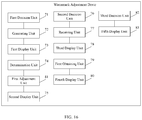
- FIG. 16 illustrates a block diagram of another exemplary watermark adjustment device consistent with disclosed embodiments
- FIG. 17 illustrates a block diagram of another exemplary watermark adjustment device consistent with disclosed embodiments
- FIG. 18 illustrates a block diagram of another exemplary watermark adjustment device consistent with disclosed embodiments
- FIG. 19 illustrates another schematic view of an exemplary display interface related to watermark setting consistent with disclosed embodiments
- FIG. 20 illustrates another schematic view of an exemplary display interface related to watermark setting consistent with disclosed embodiments.
- FIG. 21 illustrates a block diagram of an exemplary hardware configuration of an exemplary watermark adjustment device consistent with disclosed embodiments.
- association relationships for items including any suitable combination of one or more related items listed.
- a and/or B may indicate that A exists alone, B exists alone, or both A and B exist.
- the present disclosure provides a watermark adjustment method applicable to a device that provides watermark editing.
- the present disclosure provides a watermark adjustment method that allows a user to directly edit on a watermark preview interface.
- FIG. 1 illustrates a flow chart of an exemplary watermark adjustment method consistent with disclosed embodiments. With reference to FIG. 1 , the method includes the followings.
- Step 101 it is determined whether the user clicks on a watermark preview interface according to a predetermined manner.
- the predetermined manner may include, for example, directly clicking or double-clicking on a watermark pattern that is displayed in a watermark preview interface, or clicking or double-clicking on a watermark pattern in a watermark list interface, or clicking on a designated function button.
- the above-described predetermined manner is merely for illustrative purposes and does not restrict the present disclosure. In the present disclosure, the predetermined manner may be selected according to various application scenarios, which is not restricted.
- a text box control is generated according to a watermark pattern that is currently displayed, to activate a watermark preview editing status, when it is determined that the user clicks on the watermark preview interface in the predetermined manner.
- the text box control can serve as, for example, an input unit that is displayed to the user and allows the user to modify display contents in the corresponding text box, and that can provide the user with adjustment functions for directly modifying a position of a watermark pattern, a shape of a watermark pattern, and/or the like.
- an operating system application programming interface can be called to call a function such as “new CEdit( )” that is configured to generate a text box control object, such that a text box control may be dynamically generated.
- a position and/or a size of a watermark content a position and/or a size of the text box control may be adjusted, such that the text box control may cover the watermark content and display the watermark content, as shown in the dashed box shown in FIG. 2 , i.e., a watermark window Q.
- Step 103 the watermark pattern that is currently displayed is displayed on the text box control.
- a text box display parameter is determined according to a user setting for the text box control.
- the text box control may include one or more controls, e.g., the control a and/or the control b shown in FIG. 2 .
- an editable status i.e., an editing status
- the user can edit the watermark content directly in the watermark window Q shown in FIG. 2 .
- “Watermark 4” may be changed to “Watermark” or the like.
- a control in the watermark window Q such as the control “a” or the control “b” may be dragged through a mouse, a keyboard, or another input device, to modify a size, an angle, a position of the watermark, etc.
- the operation may be performed, for example, in a touch screen interface.
- the user not only can use an input device such as a mouse or a keyboard to drag a control in the watermark preview interface, thereby modifying a size, an angle, a position of the watermark, etc., but also can use the touch mode to edit the content, the angle, the position, the size of the watermark, etc.
- Step 105 when the watermark preview editing status is ended, the watermark pattern is adjusted according to the text box display parameter, and the adjusted watermark pattern is displayed in the watermark preview interface.
- the user may end the watermark editing by, for example, clicking on a blank position outside the watermark preview interface, etc.
- a plurality of watermarks may be added to the watermark preview interface according to the above-described manner, and the user may edit the plurality of watermarks according to the above-described manner.
- a text box control may be generated.
- a text box display parameter may be determined by setting the text box control.
- the watermark pattern may be displayed in the watermark preview interface according to the text box display parameter.
- the parameters may need to be adjusted repeatedly, and the user may need to switch to different interfaces repeatedly to realize editing and result viewing.
- the present disclosure provides a method that is intuitive and quick, thereby reducing user workload in a watermark printing process.
- the method of the present disclosure may further include following steps. With reference to FIG. 3 , the steps are described below.
- Step 201 a watermark pattern inputted by the user in a watermark list interface and a watermark parameter inputted by the user in a watermark parameter setting interface are obtained.
- the watermark pattern may include various types of marking languages, e.g., “Confidential,” “Watermark,” “112,” “112 ⁇ 1,” “112 ⁇ 2,” “11,” “watermark 4,” etc.
- the watermark parameter may include, for example, at least one of a display position, a size, a tilt angle, or other parameters of the watermark used for displaying the watermark.
- the watermark pattern is displayed in the watermark preview interface according to the watermark parameter.
- the watermark list interface, the watermark parameter setting interface, and the watermark preview interface may be configured in in a same display interface, such that the user can complete selecting watermark, setting one or more watermark parameters, and previewing a result in a same display interface.
- the watermark list interface 12 , the watermark parameter setting interface 14 , and the watermark preview interface 13 are configured in the same display interface 11 .
- Step 106 may be executed. With reference to FIG. 5 , Step 106 is described below.
- a display content in the watermark parameter setting interface is adjusted according to the text box display parameter.
- the display content in the watermark parameter setting interface may include, for example, display parameters for the watermark and a watermark content in the watermark parameter setting interface.
- the display parameters for the watermark in the watermark parameter setting interface may include, for example, “Font” 15 shown in FIG. 4 .
- the watermark content in the watermark parameter setting interface may include, for example, “Content” 16 shown in FIG. 4 .
- a self-drawing function may be provided to the user, in order to meet more user needs. Accordingly, the present disclosure provides a watermark adjustment method including a watermark drawing method. With reference to FIG. 6 , the watermark drawing method is described below.
- Step 301 it is determined whether the user starts a watermark drawing mode.
- the user can start the watermark drawing mode by, for example, clicking on a designated function control such as a “draw” button 871 shown in FIG. 7 .
- Step 302 when is it determined that the user starts the watermark drawing mode, a user inputted watermark pattern is received in a designated region.
- the designated region can include, for example, a preset blank region or the watermark preview interface. If a watermark pattern already exists in the watermark preview interface, the original watermark pattern may be hidden or deleted, and a new watermark pattern may be captured by following a track inputted by the user.
- a function such as an operating system API function may be called to capture the track that the user inputs.
- the operating system API function may include, for example, a function LineTo( ) for drawing lines and/or the like.
- the watermark pattern drawn by the user in the watermark preview interface may include, for example, a text-type pattern.
- the text-type pattern may be converted into a standard font format or a standard pattern style for displaying, in order to facilitate a follow-up adjustment, and the converted content may server as a basis for the follow-up adjustment.
- Step 303 when the watermark drawing mode is ended, the watermark pattern inputted by the user is displayed in the watermark preview interface.
- the watermark pattern inputted by the user may be displayed in the watermark preview interface, and the user can directly click on the watermark preview interface to generate a text box control and activate the watermark preview editing status, and adjust the watermark pattern. Further, when the watermark drawing mode is ended, the watermark pattern inputted by the user may be displayed in the watermark preview interface, and the user can adjust the watermark pattern by inputting watermark parameter values in the watermark parameter setting interface after turning on the watermark parameter setting interface.
- the watermark preview interface not only may display, various types of marking languages, e.g., “Confidential”, “Watermark”, “112”, “112 ⁇ 1”, “112 ⁇ 2”, “11”, “Watermark 4”, etc., but also may display image-type watermarks.
- the present disclosure provides a watermark adjustment method. The watermark adjustment method is described below.
- Step 1 it is determined whether the user starts an image watermark editing mode.
- the user may click on a designated function control, e.g., an “insert” button 191 shown in FIG. 19 , to trigger the user to further select an “insert local image” option or an “insert online image” option.
- a designated function control e.g., an “insert” button 191 shown in FIG. 19 .
- Step 2 based on the user's selection, a watermark image chosen by the user is displayed in the watermark preview interface.
- a local picture/photo selection interface is visited, and based on the user's selection, an image or photo stored in a computer, a mobile phone, or another terminal may be displayed in the watermark preview interface.
- an image or photo stored in a computer, a mobile phone, or another terminal may be displayed in the watermark preview interface.
- a search application program control installed on a computer, a mobile phone, or another terminal may be called, and a desired image may be searched and selected according to a keyword inputted by the user, and then displayed in the watermark preview interface.
- the image or photo selected by the user can be displayed in an editable status, i.e., an editing status, in the watermark preview interface.
- An image editing status may be activated in response to a user's operation such as clicking, double clicking, etc.
- the user can drag a control in the watermark preview interface to edit a position, a size, or an angle of the image or the photo, etc. That is, when the user selected image or photo is displayed in the text box control, the user can drag a control in the watermark preview interface to edit a position, a size, or an angle of the image or the photo, etc.
- the user can also edit a position, a size, or an angle of the image or the photo, etc., through a manual touch manner.
- the present disclosure also provides a watermark adjustment method.
- the watermark adjustment method may include converting a watermark, e.g., a watermark displayed in the watermark preview interface, to a target language and displaying the converted watermark in the watermark preview interface, according to the target language selected by the user.
- the language of the watermark displayed in the watermark preview interface may be automatically changed to the target language selected by the user.
- the user may select the target language in, for example, a drop-down option list such as the drop-down option list S containing multiple language options in the watermark setting interface shown in FIG. 20 .
- translation may be performed by calling a translation application program control installed on a mobile phone, a computer, or another terminal.
- a driver program such as a printer driver program may obtain the translated watermark and display the translated watermark in the watermark preview interface. That is, the driver program may obtain the translated watermark and display the translated watermark in the text box control in the watermark preview interface.
- the user can drag a control in the watermark preview interface to edit the size of watermark, angle of watermark, position of watermark, etc.
- the watermark parameter setting interface may be configured to hide by default, and a clickable edit control may be provided for user to start the watermark parameter setting interface. Accordingly, the present disclosure provides a process. With reference to FIG. 8 , the process is described below.
- Step 401 it is determined whether the user clicks on the edit control.
- the edit control can include, for example, a switch for turning on the watermark parameter setting interface.
- the edit control can be display as, for example, a function key, a designated graph, or a button in another form.
- FIG. 9 illustrates an exemplary display interface that is not displaying the watermark parameter setting interface consistent with disclosed embodiments.
- the edit control may include, for example, the “open-edit” button 891 shown in FIG. 9 . Effect before and after the watermark parameter setting interface is turned on can be observed by comparing FIG. 9 and FIG. 4 .
- the edit control may be clicked on in a manner such as a clicking, i.e., a single clicking, a double clicking, or another similar designated action, which is not restricted in the present disclosure.
- Step 402 when the user clicks on the edit control, the watermark parameter setting interface is displayed at a designated position.
- the designated position can be configured in advance by a designer, and may also be adjusted dynamically by a user having a modification permission, according to various application scenarios.
- Step 403 one or more watermark parameter setting controls are displayed in the watermark parameter setting interface.
- the one or more watermark parameter setting controls may at least include, for example, a watermark font setting control, a watermark size setting control, a watermark tilt angle control, and/or a watermark position setting control.
- a watermark font setting control for example, a watermark font setting control, a watermark size setting control, a watermark tilt angle control, and/or a watermark position setting control.
- the above-described functions, i.e., the above-described controls are merely for illustrative purposes and do not limit the present disclosure. Controls may be modified, deleted, or added according to various application scenarios, which are not restricted in the present disclosure.
- the present disclosure also provides a parameter determination method.
- the parameter determination method is described below.
- a watermark font selected by the user on the watermark font setting control is obtained.
- a watermark font for use when displaying the watermark in the watermark preview interface is determined according to the user selected watermark font.
- the watermark font setting control may have options including, for example, a Xingkai font, a Songti font, and/or other appropriate fonts.
- the options may be displayed to the user through, for example, a list, a drop-down menu, or another appropriate form.
- FIG. 4 illustrates an exemplary drop-down menu display for a watermark font.
- a watermark size parameter set by the user on the watermark size setting control is obtained.
- a watermark size for use when displaying the watermark in the watermark preview interface is determined according to the user selected watermark size parameter.
- the watermark size setting control may have options including, for example, a small-II (i.e., 12-point) font size, a II (i.e., 22-point) font size, a small-III (i.e., 15-point) font size, a III (i.e., 16-point) font size, etc.
- the options may be displayed to the user through, for example, a parameter bar, a progress bar, or another appropriate form.
- FIG. 2 illustrates an exemplary progress bar display for a watermark size parameter.
- a watermark tilt angle set by the user on the watermark tilt angle control is obtained.
- a watermark tilt angle for use when displaying the watermark in the watermark preview interface is determined according to the user selected watermark tilt angle.
- the adjustment range provided by the watermark tilt angle control can be, for example, from approximately ⁇ 90 degrees to approximately 90 degrees, and may be displayed to the user through, for example, a parameter bar, a progress bar, or another appropriate form.
- FIG. 4 illustrates an exemplary progress bar display for a watermark tilt angle.
- a watermark position parameter selected by the user on the watermark position setting control is obtained.
- a display position of the watermark in the watermark preview interface is determined according to the user selected watermark position parameter.
- the watermark position setting control may be displayed to the user through, for example, a coordinate group, or an independent progress bar in X direction and an independent progress bar in Y direction, or another appropriate form.
- FIG. 4 illustrates an exemplary display manner using independent progress bars in X and Y directions.
- the watermark pattern may need to be displayed in the watermark preview interface according to the set watermark parameters.
- the watermark parameter setting interface may be turned on by clicking on an edit control, such that the watermark parameter setting interface, the watermark preview interface, and the watermark list interface may be displayed in a same interface, i.e., a same watermark setting interface.
- the user can observe the watermark preview result after changing the watermark parameter setting in the same interface, thereby reducing the number of operations of switching between interfaces.
- the watermark parameter setting interface can be hidden after the watermark parameter setting is completed. Accordingly, the present disclosure provides a process. With reference to FIG. 10 , the process is described below.
- Step 501 it is determined whether the user clicks on the edit control, when the watermark parameter setting interface is at the display status.
- Step 502 if it is determined that the user clicks on the edit control when the watermark parameter setting interface is at the display status, the watermark parameter setting interface is hidden.
- a print setting interface may be displayed at a display position of the watermark parameter setting interface, e.g., a previous display position of the watermark parameter setting interface.
- the print setting interface may include, for example, a print resolution setting, a print orientation setting, etc. Accordingly, the use of the print interface may be optimized, the number of operations of switching between interfaces may be reduced, and convenient operations may be provided to users.
- FIG. 11 illustrates a block diagram of exemplary data communication modules for data communications between an exemplary watermark preview interface and an exemplary watermark parameter setting interface consistent with disclosed embodiments.
- exemplary data communication modules include a sliding module 60 , a data notification module 61 , and an input module 62 .
- the sliding module 60 may be configured to adjust watermark parameters in a watermark window.
- the sliding module 60 may be configured to adjust parameters such as a size, an angle, or a position of a watermark in a watermark window by using, for example, a mouse, a keyboard, or another appropriate input method.
- the input module 62 may be configured to perform parameter setting in a watermark parameter setting interface.
- the input module 62 may be configured to perform parameter setting in the watermark parameter setting interface by, for example, using provided data or adjusting one or more progress bars.
- the data notification module 61 may be configured to receive data from the input module 62 or the sliding module 60 and transmit the data.
- an interface function Slider_setWMInfo( ) of the data notification module 61 transmits data from the sliding module 60 to the data notification module 61 .
- Another interface function Inputer_SetWMInfo( ) of the data notification module 61 transmits data from the input module 62 to the data notification module 61 .
- Functions Refresh_Inputer( ) and Refresh_Slider( ) are configured to refresh an interface of the input module 62 and an interface of the sliding module 60 according to watermark parameter setting transmitted from the data notification module 61 , respectively.
- the function Refresh_Inputer( ) is configured to adjust, for example, a parameter input value and/or a progress bar in the watermark parameter setting interface according to the watermark parameter setting transmitted from the data notification module 61 .
- the function Refresh_Slider( ) is configured to adjust, for example, a watermark in a watermark window, according to the watermark parameter setting transmitted from the data notification module 61 .
- the sliding module 60 calls the interface function Slider_setWMInfo( ) of the data notification module 61 to send a latest watermark parameter setting to the data notification module 61 . Further, the data notification module 61 executes the function Refresh_Inputer( ) to update one or more parameter values in the watermark parameter setting interface, e.g. inputted parameter values and/or progress bars in the watermark parameter setting interface.
- parameters in the watermark parameter setting interface e.g., inputted parameter values and/or progress bars in the watermark parameter setting interface
- parameters in the watermark parameter setting interface may be updated accordingly, as an input device such as a mouse or a keyboard is used to adjust the watermark in the watermark window.
- the input module 62 calls the interface function Inputer_SetWMInfo( ) of the data notification module 61 to send a latest watermark parameter setting to the data notification module 61 for storing. Then Refresh_Slider( ) is called to refresh one or more parameter values in a sliding setting region, i.e., a watermark window. Accordingly, watermark parameter adjustment may be achieved by inputting parameters in the watermark parameter setting interface.
- FIG. 12 illustrates a block diagram of an exemplary watermark adjustment device consistent with disclosed embodiments.
- the exemplary watermark adjustment device includes a first decision unit 71 , a generating unit 72 , a first display unit 73 , a determination unit 74 , and a second display unit 75 .
- the first decision unit 71 may be configured to determine whether the user clicks on the watermark preview interface in a predetermined manner.
- the generating unit 72 may be configured to generate a text box control according to a watermark pattern that is currently displayed, to activate a watermark preview editing status, if it is determined that the user clicks on the watermark preview interface in the predetermined manner.
- the first display unit 73 may be configured to display the currently displayed watermark pattern (i.e., the watermark pattern that is currently displayed) on the text box control.
- the determination unit 74 may be configured to determine a text box display parameter according to a user setting for the text box control.
- the second display unit 75 may be configured to, when the watermark preview editing status is ended, adjust the watermark pattern according to the text box display parameter, and display the adjusted watermark pattern in the watermark preview interface.
- the watermark adjustment device may further include other units as shown in FIG. 13 .
- FIG. 13 illustrates a block diagram of another exemplary watermark adjustment device consistent with disclosed embodiments.
- the exemplary watermark adjustment device further includes a second decision unit 76 , a receiving unit 77 , and a third display unit 78 , in addition to the first decision unit 71 , the generating unit 72 , the first display unit 73 , the determination unit 74 , and the second display unit 75 .
- the second decision unit 76 may be configured to determine whether the user starts a watermark drawing mode
- the receiving unit 77 may be configured to receive a user inputted watermark pattern in a designated region, when it is determined that the user starts the watermark drawing mode.
- the third display unit 78 may be configured to display the user inputted watermark pattern in the watermark preview interface, when the watermark drawing mode is ended.
- the watermark adjustment device may further include other units as shown in FIG. 14 .
- FIG. 14 illustrates a block diagram of another exemplary watermark adjustment device consistent with disclosed embodiments.
- the exemplary watermark adjustment device further includes a first obtaining unit 79 and a fourth display unit 80 , in addition to the first decision unit 71 , the generating unit 72 , the first display unit 73 , the determination unit 74 , the second display unit 75 , the second decision unit 76 , the receiving unit 77 , and the third display unit 78 .
- the first obtaining unit 79 may be configured to obtain a watermark pattern inputted by the user through a watermark list interface, and a watermark parameter inputted by the user through a watermark parameter setting interface.
- the fourth display unit 80 may be configured to display the watermark pattern in the watermark preview interface according to the watermark parameter.
- the watermark list interface, the watermark parameter setting interface, and the watermark preview interface may be configured in in a same display interface
- the watermark adjustment device may further include one or more other units as shown in FIG. 15 .
- FIG. 15 illustrates a block diagram of another exemplary watermark adjustment device consistent with disclosed embodiments.
- the exemplary watermark adjustment device further includes a first adjustment unit 81 , in addition to the first decision unit 71 , the generating unit 72 , the first display unit 73 , the determination unit 74 , the second display unit 75 , the second decision unit 76 , the receiving unit 77 , the third display unit 78 , the first obtaining unit 79 , and the fourth display unit 80 .
- the first adjustment unit 81 may be configured to adjust a display content in the watermark parameter setting interface according to the text box display parameter.
- the display content in the watermark parameter setting interface may include, for example, display parameters for the watermark and a watermark content in the watermark parameter setting interface.
- the display parameters for the watermark in the watermark parameter setting interface may include, for example, “Font” 15 shown in FIG. 4 .
- the watermark content in the watermark parameter setting interface may include, for example, “Content” 16 shown in FIG. 4 .
- the watermark adjustment device may further include other units as shown in FIG. 16 .
- FIG. 16 illustrates a block diagram of another exemplary watermark adjustment device consistent with disclosed embodiments.
- the exemplary watermark adjustment device further includes a third decision unit 82 and a fifth display unit 83 , in addition to the first decision unit 71 , the generating unit 72 , the first display unit 73 , the determination unit 74 , the second display unit 75 , the second decision unit 76 , the receiving unit 77 , the third display unit 78 , the first obtaining unit 79 , the fourth display unit 80 , and the first adjustment unit 81 .
- the third decision unit 82 may be configured to determine whether the user clicks on an edit control.
- the fifth display unit 83 may be configured to, when it is determined that the user clicks on the edit control, display the watermark parameter setting interface at a designated position, and display one or more watermark parameter setting controls in the watermark parameter setting interface.
- the one or more watermark parameter setting controls may at least include, for example, a watermark font setting control, a watermark size setting control, a watermark tilt angle control, and/or a watermark position setting control.
- the first obtaining unit 79 may be configured to obtain a watermark font selected by the user on the watermark font setting control, and determine a watermark font for use when displaying the watermark in the watermark preview interface according to the user selected watermark font; and/or to obtain a watermark size parameter set by the user on the watermark size setting control, and determine a watermark size for use when displaying the watermark in the watermark preview interface according to the user selected watermark size parameter; and/or to obtain a watermark tilt angle set by the user on the watermark tilt angle control, and determine a watermarking tilt angle for use when displaying the watermark in the watermark preview interface according to the user selected watermark tilt angle; and/or to obtain a watermark position parameter selected by the user on the watermark position setting control, and determine a display position of the watermark in the watermark preview interface according to the user selected watermark position parameter.
- the watermark adjustment device may further include one or more other units as shown in FIG. 17 .
- FIG. 17 illustrates a block diagram of another exemplary watermark adjustment device consistent with disclosed embodiments.
- the exemplary watermark adjustment device further includes a fourth decision unit 84 , in addition to the first decision unit 71 , the generating unit 72 , the first display unit 73 , the determination unit 74 , the second display unit 75 , the second decision unit 76 , the receiving unit 77 , the third display unit 78 , the first obtaining unit 79 , the fourth display unit 80 , the first adjustment unit 81 , the third decision unit 82 , and the fifth display unit 83 .
- a fourth decision unit 84 in addition to the first decision unit 71 , the generating unit 72 , the first display unit 73 , the determination unit 74 , the second display unit 75 , the second decision unit 76 , the receiving unit 77 , the third display unit 78 , the first obtaining unit 79 , the fourth display
- the fourth decision unit 84 may be configured to, when the watermark parameter setting interface is at a display status, determine whether the user clicks on the edit control.
- the fifth display unit 83 may be further configured to, when it is determined that the user clicks on the edit control and the watermark parameter setting interface is at the display status, hide the watermark parameter setting interface.
- the watermark adjustment device may further include one or more other units as shown in FIG. 18 .
- FIG. 18 illustrates a block diagram of another exemplary watermark adjustment device consistent with disclosed embodiments.
- the exemplary watermark adjustment device further includes a sixth display unit 85 , in addition to the first decision unit 71 , the generating unit 72 , the first display unit 73 , the determination unit 74 , the second display unit 75 , the second decision unit 76 , the receiving unit 77 , the third display unit 78 , the first obtaining unit 79 , the fourth display unit 80 , the first adjustment unit 81 , the third decision unit 82 , the fifth display unit 83 , and the fourth decision unit 84 .
- the sixth display unit 85 may be configured to display a print setting interface at a display position of the watermark parameter setting interface, e.g., a previous display position of the watermark parameter setting interface.
- FIG. 21 illustrates a block diagram of an exemplary hardware configuration of an exemplary watermark adjustment device consistent with disclosed embodiments.
- the exemplary watermark adjustment device includes a processor 901 , a memory 902 , a storage device 903 , and a user-input apparatus 904 .
- the processor 901 can include, for example, a microprocessor.
- the memory 902 can include, for example, a read only memory (ROM) and a random access memory (RAM).
- the storage device 903 can be, for example, a hard disk drive.
- the user-input apparatus 904 can include, for example, a mouse and a keyboard.
- the memory 902 may be, for example, configured to store instructions for controlling the processor 901 to perform functions consistent with the present disclosure.
- the exemplary hardware configuration of the exemplary watermark adjustment device shown in FIG. 21 is for illustrative purposes and does not limit the present disclosure.
- a text box control when the watermark preview interface is clicked on in a predetermined manner, a text box control may be generated.
- a text box display parameter may be determined by setting the text box control, i.e., a display of the text box control.
- the watermark pattern may be displayed in the watermark preview interface according to the text box display parameter.
- the parameters may need to be adjusted repeatedly, and the user may need to switch to different interfaces repeatedly to realize editing and result viewing.
- the present disclosure provides a method that is intuitive and quick, thereby reducing user workload in the watermark printing process.
- the present disclosure provides a method and a device for watermark adjustment, which can reduce the amount of operations in a watermark editing process.
- the method may include determining whether a user clicks on a watermark preview interface according to a predetermined manner; generating a text box control according to a watermark pattern that is currently displayed, to activate a watermark preview editing status, when it is determined that the user clicks on the watermark preview interface in the predetermined manner; displaying the watermark pattern on the text box control; determining a text box display parameter according to a user setting for the text box control; and adjusting the watermark pattern according to the text box display parameter and displaying the adjusted watermark pattern in the watermark preview interface, when the watermark preview editing status is ended.
- the disclosed system, apparatus, and method may be implemented in other modes.
- the above-described apparatus embodiments are merely exemplary.
- the units are merely divided according to logical functions and can be divided in other manners in actual implementation.
- multiple units or components can be combined or integrated into another system, or some features can be ignored or not performed.
- the mutual coupling or direct coupling or communication connection shown or discussed may include a direct connection or an indirect connection or communication connection through one or more interfaces, devices, or units, which may be electrical, mechanical, or in other form.
- the units described as separate parts may or may not be physically separated, and parts displayed as units may or may not be physical units. That is, the units described as separate parts may be integrated in one place or distributed to multiple network elements. A part or all of the units may be selected according to the actual needs to achieve the objectives of the solutions of the embodiments.
- functional units in the embodiments of the present disclosure may be integrated into one processing unit or exist as separate physical units, or two or more units are integrated into one unit.
- the integrated unit may be implemented through hardware, or may also be implemented in a form of hardware plus a software functional unit.
- the integrated unit implemented in the form of the software functional unit may be stored in a computer readable storage medium.
- the software functional unit may be stored in a storage medium, and may contain several instructions used to instruct computer equipment (for example, a personal computer, a server, or network equipment) or a processor to perform a part of the steps of the methods according to the embodiments of the present disclosure.
- the storage medium may be any medium that can store program codes, such as a universal-serial-bus (USB) flash drive, a removable hard disk, a read-only memory (ROM), a random access memory (RAM), a magnetic disk, or an optical disk.
- USB universal-serial-bus
- ROM read-only memory
- RAM random access memory
- magnetic disk or an optical disk.
Landscapes
- Engineering & Computer Science (AREA)
- Physics & Mathematics (AREA)
- General Physics & Mathematics (AREA)
- Theoretical Computer Science (AREA)
- Multimedia (AREA)
- Signal Processing (AREA)
- Editing Of Facsimile Originals (AREA)
- Document Processing Apparatus (AREA)
Abstract
Description
Claims (16)
Applications Claiming Priority (3)
| Application Number | Priority Date | Filing Date | Title |
|---|---|---|---|
| CN201610928579 | 2016-10-31 | ||
| CN201610928579.7 | 2016-10-31 | ||
| CN201610928579.7A CN106485645A (en) | 2016-10-31 | 2016-10-31 | A kind of method and device of watermark adjustment |
Publications (2)
| Publication Number | Publication Date |
|---|---|
| US20180122034A1 US20180122034A1 (en) | 2018-05-03 |
| US10521872B2 true US10521872B2 (en) | 2019-12-31 |
Family
ID=58271198
Family Applications (1)
| Application Number | Title | Priority Date | Filing Date |
|---|---|---|---|
| US15/787,118 Active 2038-06-01 US10521872B2 (en) | 2016-10-31 | 2017-10-18 | Watermark adjustment method and device |
Country Status (2)
| Country | Link |
|---|---|
| US (1) | US10521872B2 (en) |
| CN (1) | CN106485645A (en) |
Families Citing this family (18)
| Publication number | Priority date | Publication date | Assignee | Title |
|---|---|---|---|---|
| CN107885565B (en) * | 2017-10-31 | 2019-02-19 | 平安科技(深圳)有限公司 | Watermark embedding method, device, equipment and the storage medium at the financial interface APP |
| CN110120003B (en) * | 2018-02-07 | 2023-01-20 | 上海诺亚投资管理有限公司 | Method and system for acquiring webpage with watermark |
| US11038946B2 (en) * | 2018-03-30 | 2021-06-15 | Ricoh Company, Ltd. | Approach for providing access to cloud services on end-user devices using local management of third-party services and conflict checking |
| US10999349B2 (en) | 2018-03-30 | 2021-05-04 | Ricoh Company, Ltd. | Approach for providing access to cloud services on end-user devices using direct link integration |
| US11609723B2 (en) | 2018-03-30 | 2023-03-21 | Ricoh Company, Ltd. | Approach for providing access to cloud services on end-user devices using local management of third-party services |
| CN109190338B (en) * | 2018-08-22 | 2021-12-07 | 广东微云科技股份有限公司 | Method and system for generating virtual desktop screen watermark |
| CN110874456B (en) * | 2018-08-31 | 2022-04-26 | 浙江大学 | Watermark embedding method, watermark extracting method, watermark embedding device, watermark extracting device and data processing method |
| CN110929235B (en) * | 2018-09-19 | 2024-06-11 | 珠海金山办公软件有限公司 | A method, device, computer storage medium and terminal for processing watermarks |
| CN109544437B (en) * | 2018-11-06 | 2023-05-30 | 北京指掌易科技有限公司 | Method for adding watermark to IOS application |
| CN111428210B (en) * | 2019-01-10 | 2024-03-26 | 北京金山办公软件股份有限公司 | Method and device for editing watermark and electronic equipment |
| CN110069757A (en) * | 2019-04-25 | 2019-07-30 | 上海遇图网络科技有限公司 | Special efficacy word edit methods and equipment |
| WO2021080592A1 (en) * | 2019-10-24 | 2021-04-29 | Hewlett-Packard Development Company, L.P. | Printing image-independent print data based on pixel characteristics |
| CN112750065B (en) * | 2019-10-31 | 2022-12-09 | 阿里巴巴(中国)网络技术有限公司 | Carrier object processing and watermark embedding method, device and electronic equipment |
| CN111402109A (en) * | 2020-03-07 | 2020-07-10 | 北京北信源软件股份有限公司 | Method and device for setting digital watermark of instant messaging user interface |
| CN111783003A (en) * | 2020-06-30 | 2020-10-16 | 北京海泰方圆科技股份有限公司 | Method and device for displaying watermark of browser and electronic equipment |
| CN113821771B (en) * | 2021-11-24 | 2022-02-18 | 天津联想协同科技有限公司 | Dynamic watermark adding method, device, network disk and storage medium |
| CN114265566A (en) * | 2021-12-24 | 2022-04-01 | 上海汉图科技有限公司 | Printing method, printing device, electronic equipment and readable storage medium |
| WO2025234838A1 (en) * | 2024-05-10 | 2025-11-13 | 삼성전자 주식회사 | Electronic device for controlling display of watermark and control method therefor |
Citations (24)
| Publication number | Priority date | Publication date | Assignee | Title |
|---|---|---|---|---|
| US20060083403A1 (en) * | 2004-08-05 | 2006-04-20 | Xiao-Ping Zhang | Watermark embedding and detecting methods, systems, devices and components |
| CN1830665A (en) | 2006-04-21 | 2006-09-13 | 中国印钞造币总公司 | Method of making water print masterplate using three-dimensional design |
| KR100675859B1 (en) | 2005-03-14 | 2007-02-02 | 삼성전자주식회사 | Watermark printing method and host device using same |
| US20080089552A1 (en) * | 2005-08-04 | 2008-04-17 | Nippon Telegraph And Telephone Corporation | Digital Watermark Padding Method, Digital Watermark Padding Device, Digital Watermark Detecting Method, Digital Watermark Detecting Device, And Program |
| CN101261569A (en) | 2006-12-07 | 2008-09-10 | 三星电子株式会社 | Method for controlling printer driver and network printing system using the method |
| CN101611620A (en) | 2007-02-20 | 2009-12-23 | 索尼爱立信移动通讯股份有限公司 | Copy protection information distribution |
| CN102103736A (en) | 2009-12-18 | 2011-06-22 | 北京闻言科技有限公司 | A technology for flexibly setting watermark parameters |
| US20120082337A1 (en) * | 2010-10-04 | 2012-04-05 | Sharp Kabushiki Kaisha | Image processing apparatus, image forming apparatus, recording medium and image processing method |
| CN102574404A (en) | 2009-09-28 | 2012-07-11 | Csr技术公司 | Previewing and modifying printable components of a document at a printing device |
| CN102881034A (en) | 2012-05-14 | 2013-01-16 | 珠海金山办公软件有限公司 | System and method for inserting watermarks into application document |
| US20130170695A1 (en) * | 2010-08-27 | 2013-07-04 | Fujitsu Limited | Digital watermark embedding apparatus, digital watermark embedding method, and digital watermark detection apparatus |
| US20140118793A1 (en) * | 2012-10-31 | 2014-05-01 | Canon Kabushiki Kaisha | Method, system and apparatus for determining position of a watermark annotation |
| US20140241568A1 (en) * | 2013-02-25 | 2014-08-28 | Hitachi Solutions, Ltd. | Digital watermark embedding method and digital watermark detection method |
| CN104144297A (en) | 2014-08-19 | 2014-11-12 | 诚迈科技(南京)股份有限公司 | System and method for automatically adding watermarks to shot pictures |
| CN104835105A (en) | 2014-02-12 | 2015-08-12 | 腾讯科技(深圳)有限公司 | Picture processing method and device |
| US20160198064A1 (en) * | 2014-08-12 | 2016-07-07 | Digimarc Corporation | Spot color substitution for digital watermarking |
| US20160196630A1 (en) * | 2013-12-05 | 2016-07-07 | Tls Corp. | Extracting and modifying a watermark signal from an output signal of a watermarking encoder |
| US20160210971A1 (en) * | 2015-01-15 | 2016-07-21 | Gopro, Inc. | Audio watermark in a digital video |
| US20160210717A1 (en) * | 2015-01-15 | 2016-07-21 | Gopro, Inc. | Watermarking digital images to increase bit depth |
| US20160212441A1 (en) * | 2015-01-15 | 2016-07-21 | Gopro, Inc. | Inter frame watermark in a digital video |
| US20170006182A1 (en) * | 2015-07-01 | 2017-01-05 | Dmitri Marinkin | Method for protecting the authenticity of an object, item, document, packaging and/or a label from imitation, forgery and theft |
| US20170024845A1 (en) * | 2015-05-29 | 2017-01-26 | Digimarc Corporation | Serialized digital watermarking for variable data printing |
| US20170329943A1 (en) * | 2016-05-12 | 2017-11-16 | Markany Inc. | Method and apparatus for embedding and extracting text watermark |
| US20180113659A1 (en) * | 2016-10-21 | 2018-04-26 | Fuji Xerox Co., Ltd. | Printing managing apparatus and computer readable medium storing printing managing program |
-
2016
- 2016-10-31 CN CN201610928579.7A patent/CN106485645A/en active Pending
-
2017
- 2017-10-18 US US15/787,118 patent/US10521872B2/en active Active
Patent Citations (24)
| Publication number | Priority date | Publication date | Assignee | Title |
|---|---|---|---|---|
| US20060083403A1 (en) * | 2004-08-05 | 2006-04-20 | Xiao-Ping Zhang | Watermark embedding and detecting methods, systems, devices and components |
| KR100675859B1 (en) | 2005-03-14 | 2007-02-02 | 삼성전자주식회사 | Watermark printing method and host device using same |
| US20080089552A1 (en) * | 2005-08-04 | 2008-04-17 | Nippon Telegraph And Telephone Corporation | Digital Watermark Padding Method, Digital Watermark Padding Device, Digital Watermark Detecting Method, Digital Watermark Detecting Device, And Program |
| CN1830665A (en) | 2006-04-21 | 2006-09-13 | 中国印钞造币总公司 | Method of making water print masterplate using three-dimensional design |
| CN101261569A (en) | 2006-12-07 | 2008-09-10 | 三星电子株式会社 | Method for controlling printer driver and network printing system using the method |
| CN101611620A (en) | 2007-02-20 | 2009-12-23 | 索尼爱立信移动通讯股份有限公司 | Copy protection information distribution |
| CN102574404A (en) | 2009-09-28 | 2012-07-11 | Csr技术公司 | Previewing and modifying printable components of a document at a printing device |
| CN102103736A (en) | 2009-12-18 | 2011-06-22 | 北京闻言科技有限公司 | A technology for flexibly setting watermark parameters |
| US20130170695A1 (en) * | 2010-08-27 | 2013-07-04 | Fujitsu Limited | Digital watermark embedding apparatus, digital watermark embedding method, and digital watermark detection apparatus |
| US20120082337A1 (en) * | 2010-10-04 | 2012-04-05 | Sharp Kabushiki Kaisha | Image processing apparatus, image forming apparatus, recording medium and image processing method |
| CN102881034A (en) | 2012-05-14 | 2013-01-16 | 珠海金山办公软件有限公司 | System and method for inserting watermarks into application document |
| US20140118793A1 (en) * | 2012-10-31 | 2014-05-01 | Canon Kabushiki Kaisha | Method, system and apparatus for determining position of a watermark annotation |
| US20140241568A1 (en) * | 2013-02-25 | 2014-08-28 | Hitachi Solutions, Ltd. | Digital watermark embedding method and digital watermark detection method |
| US20160196630A1 (en) * | 2013-12-05 | 2016-07-07 | Tls Corp. | Extracting and modifying a watermark signal from an output signal of a watermarking encoder |
| CN104835105A (en) | 2014-02-12 | 2015-08-12 | 腾讯科技(深圳)有限公司 | Picture processing method and device |
| US20160198064A1 (en) * | 2014-08-12 | 2016-07-07 | Digimarc Corporation | Spot color substitution for digital watermarking |
| CN104144297A (en) | 2014-08-19 | 2014-11-12 | 诚迈科技(南京)股份有限公司 | System and method for automatically adding watermarks to shot pictures |
| US20160210971A1 (en) * | 2015-01-15 | 2016-07-21 | Gopro, Inc. | Audio watermark in a digital video |
| US20160210717A1 (en) * | 2015-01-15 | 2016-07-21 | Gopro, Inc. | Watermarking digital images to increase bit depth |
| US20160212441A1 (en) * | 2015-01-15 | 2016-07-21 | Gopro, Inc. | Inter frame watermark in a digital video |
| US20170024845A1 (en) * | 2015-05-29 | 2017-01-26 | Digimarc Corporation | Serialized digital watermarking for variable data printing |
| US20170006182A1 (en) * | 2015-07-01 | 2017-01-05 | Dmitri Marinkin | Method for protecting the authenticity of an object, item, document, packaging and/or a label from imitation, forgery and theft |
| US20170329943A1 (en) * | 2016-05-12 | 2017-11-16 | Markany Inc. | Method and apparatus for embedding and extracting text watermark |
| US20180113659A1 (en) * | 2016-10-21 | 2018-04-26 | Fuji Xerox Co., Ltd. | Printing managing apparatus and computer readable medium storing printing managing program |
Also Published As
| Publication number | Publication date |
|---|---|
| US20180122034A1 (en) | 2018-05-03 |
| CN106485645A (en) | 2017-03-08 |
Similar Documents
| Publication | Publication Date | Title |
|---|---|---|
| US10521872B2 (en) | Watermark adjustment method and device | |
| CN102622223B (en) | Method and device for customizing desktop backgrounds | |
| US8984426B2 (en) | Screen editing apparatus, screen editing method and computer-readable information recording medium | |
| JP6402826B2 (en) | Information processing apparatus, image display method, and program | |
| US20150277571A1 (en) | User interface to capture a partial screen display responsive to a user gesture | |
| US8863036B2 (en) | Information processing apparatus, display control method, and storage medium | |
| JP5882779B2 (en) | Image processing apparatus, image processing apparatus control method, and program | |
| US20170277393A1 (en) | Information processing apparatus, information processing method, and non-transitory computer readable medium | |
| WO2017110505A1 (en) | Image processing device, image display method, and program | |
| EP2750029B1 (en) | Display processing apparatus, image forming apparatus, display processing system of a remote screen, and display processing method | |
| US8527872B1 (en) | Multiple output device association | |
| WO2017051687A1 (en) | Digital blackboard, digital blackboard image processing method, and recording medium whereupon digital blackboard program is recorded | |
| US10628386B2 (en) | Methods and systems to customize printable information | |
| EP4722881A1 (en) | Methods and apparatus for page interaction, device and storage medium | |
| US8843823B2 (en) | Document display system, document display device, and computer-readable storage medium for computer program | |
| JP6102317B2 (en) | Image processing apparatus, control method therefor, program, and image processing system | |
| CN102970453B (en) | Image forming apparatus and the control method thereof of actual size preview can be shown | |
| US9323350B2 (en) | Display control device, display control method, and recording medium | |
| CN111857503A (en) | Display method, display device, and electronic device | |
| JP6517445B2 (en) | INFORMATION PROCESSING APPARATUS, INFORMATION PROCESSING METHOD, PROGRAM, AND STORAGE MEDIUM | |
| US10785376B2 (en) | Image processing apparatus for sending user interface data | |
| WO2023093809A1 (en) | File editing processing method and apparatus, and electronic device | |
| CN114020223A (en) | Method and device for adjusting display parameters of display screen and computer readable medium | |
| US12411593B2 (en) | Information processing system for providing file image information, information processing method, and non-transitory computer readable medium | |
| US12444341B2 (en) | Data processing method, device, and system |
Legal Events
| Date | Code | Title | Description |
|---|---|---|---|
| AS | Assignment |
Owner name: ZHUHAI SEINE TECHNOLOGY CO., LTD., CHINA Free format text: ASSIGNMENT OF ASSIGNORS INTEREST;ASSIGNORS:WANG, HENG;XIONG, DAN;REEL/FRAME:043895/0154 Effective date: 20171017 |
|
| FEPP | Fee payment procedure |
Free format text: ENTITY STATUS SET TO UNDISCOUNTED (ORIGINAL EVENT CODE: BIG.); ENTITY STATUS OF PATENT OWNER: LARGE ENTITY |
|
| STPP | Information on status: patent application and granting procedure in general |
Free format text: DOCKETED NEW CASE - READY FOR EXAMINATION |
|
| STPP | Information on status: patent application and granting procedure in general |
Free format text: NON FINAL ACTION MAILED |
|
| STPP | Information on status: patent application and granting procedure in general |
Free format text: RESPONSE TO NON-FINAL OFFICE ACTION ENTERED AND FORWARDED TO EXAMINER |
|
| STPP | Information on status: patent application and granting procedure in general |
Free format text: PUBLICATIONS -- ISSUE FEE PAYMENT RECEIVED |
|
| STCF | Information on status: patent grant |
Free format text: PATENTED CASE |
|
| AS | Assignment |
Owner name: ZHUHAI PANTUM ELECTRONICS CO., LTD., CHINA Free format text: ASSIGNMENT OF ASSIGNORS INTEREST;ASSIGNOR:ZHUHAI SEINE TECHNOLOGY CO., LTD.;REEL/FRAME:054187/0189 Effective date: 20201027 |
|
| MAFP | Maintenance fee payment |
Free format text: PAYMENT OF MAINTENANCE FEE, 4TH YEAR, LARGE ENTITY (ORIGINAL EVENT CODE: M1551); ENTITY STATUS OF PATENT OWNER: LARGE ENTITY Year of fee payment: 4 |