US10423702B2 - Character input device and non-transitory computer-readable recording medium for character input - Google Patents
Character input device and non-transitory computer-readable recording medium for character input Download PDFInfo
- Publication number
- US10423702B2 US10423702B2 US15/438,706 US201715438706A US10423702B2 US 10423702 B2 US10423702 B2 US 10423702B2 US 201715438706 A US201715438706 A US 201715438706A US 10423702 B2 US10423702 B2 US 10423702B2
- Authority
- US
- United States
- Prior art keywords
- input
- character
- characters
- terminal device
- word
- Prior art date
- Legal status (The legal status is an assumption and is not a legal conclusion. Google has not performed a legal analysis and makes no representation as to the accuracy of the status listed.)
- Active
Links
Images


Classifications
-
- G—PHYSICS
- G06—COMPUTING OR CALCULATING; COUNTING
- G06F—ELECTRIC DIGITAL DATA PROCESSING
- G06F1/00—Details not covered by groups G06F3/00 - G06F13/00 and G06F21/00
- G06F1/16—Constructional details or arrangements
- G06F1/1613—Constructional details or arrangements for portable computers
- G06F1/163—Wearable computers, e.g. on a belt
-
- G06F17/2223—
-
- G—PHYSICS
- G06—COMPUTING OR CALCULATING; COUNTING
- G06F—ELECTRIC DIGITAL DATA PROCESSING
- G06F40/00—Handling natural language data
- G06F40/10—Text processing
- G06F40/12—Use of codes for handling textual entities
- G06F40/126—Character encoding
- G06F40/129—Handling non-Latin characters, e.g. kana-to-kanji conversion
-
- G06F17/2863—
-
- G—PHYSICS
- G06—COMPUTING OR CALCULATING; COUNTING
- G06F—ELECTRIC DIGITAL DATA PROCESSING
- G06F3/00—Input arrangements for transferring data to be processed into a form capable of being handled by the computer; Output arrangements for transferring data from processing unit to output unit, e.g. interface arrangements
- G06F3/01—Input arrangements or combined input and output arrangements for interaction between user and computer
- G06F3/018—Input/output arrangements for oriental characters
-
- G—PHYSICS
- G06—COMPUTING OR CALCULATING; COUNTING
- G06F—ELECTRIC DIGITAL DATA PROCESSING
- G06F3/00—Input arrangements for transferring data to be processed into a form capable of being handled by the computer; Output arrangements for transferring data from processing unit to output unit, e.g. interface arrangements
- G06F3/01—Input arrangements or combined input and output arrangements for interaction between user and computer
- G06F3/048—Interaction techniques based on graphical user interfaces [GUI]
- G06F3/0481—Interaction techniques based on graphical user interfaces [GUI] based on specific properties of the displayed interaction object or a metaphor-based environment, e.g. interaction with desktop elements like windows or icons, or assisted by a cursor's changing behaviour or appearance
- G06F3/0482—Interaction with lists of selectable items, e.g. menus
-
- G—PHYSICS
- G06—COMPUTING OR CALCULATING; COUNTING
- G06F—ELECTRIC DIGITAL DATA PROCESSING
- G06F3/00—Input arrangements for transferring data to be processed into a form capable of being handled by the computer; Output arrangements for transferring data from processing unit to output unit, e.g. interface arrangements
- G06F3/01—Input arrangements or combined input and output arrangements for interaction between user and computer
- G06F3/048—Interaction techniques based on graphical user interfaces [GUI]
- G06F3/0487—Interaction techniques based on graphical user interfaces [GUI] using specific features provided by the input device, e.g. functions controlled by the rotation of a mouse with dual sensing arrangements, or of the nature of the input device, e.g. tap gestures based on pressure sensed by a digitiser
- G06F3/0488—Interaction techniques based on graphical user interfaces [GUI] using specific features provided by the input device, e.g. functions controlled by the rotation of a mouse with dual sensing arrangements, or of the nature of the input device, e.g. tap gestures based on pressure sensed by a digitiser using a touch-screen or digitiser, e.g. input of commands through traced gestures
- G06F3/04883—Interaction techniques based on graphical user interfaces [GUI] using specific features provided by the input device, e.g. functions controlled by the rotation of a mouse with dual sensing arrangements, or of the nature of the input device, e.g. tap gestures based on pressure sensed by a digitiser using a touch-screen or digitiser, e.g. input of commands through traced gestures for inputting data by handwriting, e.g. gesture or text
-
- G—PHYSICS
- G06—COMPUTING OR CALCULATING; COUNTING
- G06F—ELECTRIC DIGITAL DATA PROCESSING
- G06F3/00—Input arrangements for transferring data to be processed into a form capable of being handled by the computer; Output arrangements for transferring data from processing unit to output unit, e.g. interface arrangements
- G06F3/01—Input arrangements or combined input and output arrangements for interaction between user and computer
- G06F3/048—Interaction techniques based on graphical user interfaces [GUI]
- G06F3/0487—Interaction techniques based on graphical user interfaces [GUI] using specific features provided by the input device, e.g. functions controlled by the rotation of a mouse with dual sensing arrangements, or of the nature of the input device, e.g. tap gestures based on pressure sensed by a digitiser
- G06F3/0488—Interaction techniques based on graphical user interfaces [GUI] using specific features provided by the input device, e.g. functions controlled by the rotation of a mouse with dual sensing arrangements, or of the nature of the input device, e.g. tap gestures based on pressure sensed by a digitiser using a touch-screen or digitiser, e.g. input of commands through traced gestures
- G06F3/04886—Interaction techniques based on graphical user interfaces [GUI] using specific features provided by the input device, e.g. functions controlled by the rotation of a mouse with dual sensing arrangements, or of the nature of the input device, e.g. tap gestures based on pressure sensed by a digitiser using a touch-screen or digitiser, e.g. input of commands through traced gestures by partitioning the display area of the touch-screen or the surface of the digitising tablet into independently controllable areas, e.g. virtual keyboards or menus
-
- G—PHYSICS
- G06—COMPUTING OR CALCULATING; COUNTING
- G06F—ELECTRIC DIGITAL DATA PROCESSING
- G06F40/00—Handling natural language data
- G06F40/40—Processing or translation of natural language
- G06F40/53—Processing of non-Latin text
-
- G06K9/00268—
-
- G—PHYSICS
- G06—COMPUTING OR CALCULATING; COUNTING
- G06V—IMAGE OR VIDEO RECOGNITION OR UNDERSTANDING
- G06V40/00—Recognition of biometric, human-related or animal-related patterns in image or video data
- G06V40/10—Human or animal bodies, e.g. vehicle occupants or pedestrians; Body parts, e.g. hands
- G06V40/16—Human faces, e.g. facial parts, sketches or expressions
- G06V40/168—Feature extraction; Face representation
-
- G—PHYSICS
- G10—MUSICAL INSTRUMENTS; ACOUSTICS
- G10L—SPEECH ANALYSIS TECHNIQUES OR SPEECH SYNTHESIS; SPEECH RECOGNITION; SPEECH OR VOICE PROCESSING TECHNIQUES; SPEECH OR AUDIO CODING OR DECODING
- G10L15/00—Speech recognition
- G10L15/08—Speech classification or search
- G10L15/18—Speech classification or search using natural language modelling
- G10L15/1815—Semantic context, e.g. disambiguation of the recognition hypotheses based on word meaning
-
- G—PHYSICS
- G10—MUSICAL INSTRUMENTS; ACOUSTICS
- G10L—SPEECH ANALYSIS TECHNIQUES OR SPEECH SYNTHESIS; SPEECH RECOGNITION; SPEECH OR VOICE PROCESSING TECHNIQUES; SPEECH OR AUDIO CODING OR DECODING
- G10L15/00—Speech recognition
- G10L15/26—Speech to text systems
Definitions
- the embodiments discussed herein are related to a character input device and a non-transitory computer-readable recording medium for character input.
- Characters are input to portable type terminal devices such as smartphones by way of, for example, a software keyboard or handwritten input.
- characters may be input with a software keyboard in which a user inputs a character string indicating the pronunciation of a desired word or the like and selects the desired word from a list of conversion candidates based on the input character string (see, for example, Japanese Laid-Open Patent Publication No. 10-154144).
- Wearable type terminal devices such as smartwatches tend to have smaller display screens compared to the display screens of smartphones or the like. Therefore, wearable type terminal devices tend to have low character input efficiency.
- the user may have difficulty in inputting a character string indicating the pronunciation of a desired word into the character input area. Accordingly, the user may input an erroneous character (erroneous input). This may lead to reduction of character input speed and degradation of character input efficiency.
- a character input device including a memory that stores one or more conversion candidates, and a processor that executes a process including receiving input of a first character of a word and the number of characters of the word, extracting a conversion candidate including the first character from the one or more conversion candidates stored in the memory according to the number of characters of the word, and displaying the extracted conversion candidate.
- FIG. 1 is a schematic diagram illustrating an entire configuration of a terminal device according to the first embodiment of the present invention
- FIG. 2 is a schematic diagram for describing a character input process according to the first embodiment of the present invention
- FIG. 3 is a schematic diagram illustrating a hardware configuration of the terminal device according to the first embodiment of the present invention
- FIG. 4 is a schematic diagram illustrating a configuration of a dictionary database according to the first embodiment of the present invention.
- FIG. 5 is a schematic diagram illustrating a functional configuration of a character input process unit according to the first embodiment of the present invention
- FIG. 6 is a flowchart of a character input process according to the first embodiment of the present invention.
- FIG. 7 is a schematic diagram illustrating an operation of inputting a character by using a software keyboard
- FIG. 8 is a schematic diagram illustrating an example of extracting dictionary data and aligning dictionary data
- FIG. 9 is a schematic diagram illustrating an applied example of alphabet input
- FIG. 10 is a schematic diagram illustrating an applied example for a smartphone
- FIG. 11 is a schematic diagram for describing a character input process according to the second embodiment of the present invention.
- FIG. 12 is a schematic diagram illustrating a functional configuration of a character input process unit according to the second embodiment of the present invention.
- FIG. 13 is a schematic diagram illustrating a configuration of a dictionary database according to the second embodiment of the present invention.
- FIG. 14 is a flowchart of a character input process according to the second embodiment of the present invention.
- FIG. 15 is a schematic diagram for describing a character input process according to the third embodiment of the present invention.
- FIG. 16 is a schematic diagram illustrating a first part of an operation of inputting the number of characters according to an embodiment of the present invention.
- FIG. 17 is a schematic diagram illustrating a second part of the operation of inputting the number of characters according to an embodiment of the present invention.
- FIG. 18 is a schematic diagram illustrating a third part of the operation of inputting the number of characters according to an embodiment of the present invention.
- FIG. 19 is a schematic diagram illustrating a fourth part of the operation of inputting the number of characters according to an embodiment of the present invention.
- FIG. 20 is a schematic diagram illustrating a functional configuration of a character input process unit according to the fourth embodiment of the present invention.
- FIG. 21 is a schematic diagram for illustrating an operation of inputting the first character and the number of characters according to an embodiment of the present invention.
- FIG. 1 is a schematic diagram illustrating the entire configuration of the terminal device 10 of the first embodiment.
- the terminal device 10 illustrated in FIG. 1 is a wearable terminal (e.g., smartwatch) having a touch panel.
- the terminal device 10 includes a character input process unit 100 and a dictionary database (hereinafter referred to as “dictionary DB”) 200 .
- dictionary DB dictionary database
- the character input process unit 100 that performs a character input process includes an input/output part 110 and a candidate extraction part 120 .
- a user performs an operation of inputting a first character of a word desired to be input by the user (first character input operation) and an operation of inputting the number of characters of the word (character number input operation).
- first character input operation an operation of inputting a first character of a word desired to be input by the user
- character number input operation an operation of inputting the number of characters of the word
- the candidate extraction part 120 extracts dictionary data from the dictionary DB 20 based on the first character and the number of characters that are input.
- the extracted dictionary data includes one or more words that is are candidates for converting the first character (conversion candidates).
- the input/output part 110 displays a list of words included in the extracted dictionary data as conversion candidates.
- a user can select a desired conversion candidate from the list of conversion candidates displayed on the touch panel, so that the first character is converted into the conversion candidate selected by the user. That is, according to the terminal device 10 of the first embodiment, a word corresponding to a selected conversion candidate can be input when the user selects a single conversion candidate from the list of conversion candidates.
- conversion candidate refers to a word included in dictionary data extracted from the dictionary DB 20 based on the first character and the number of characters.
- word not only includes a word but also a phrase, a clause, or a sentence that is expressed with one or more characters.
- the dictionary DB 200 is a database stored with dictionary data including words that are to be conversion candidates. Note that the dictionary DB 200 stores the dictionary data in units of words that are conversion candidates.
- FIG. 2 is a schematic diagram for describing the character input process of the first embodiment.
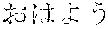
- the example of FIG. 2 is a case where the user desires to input a Japanese word “ (O-HA-YO-U)”.
- the terminal device 10 receives input of a first character by way of the input/output part 110 (Step S 1 ). That is, the user performs an input operation on the input/output part 110 by which the first character “ (O)” of the word “ (O-HA-YO-U)” desired to be input is received. Note that the user may input the first character, for example, by hand.
- the terminal device 10 receives the input of the number of characters by way of the input/output part 110 (Step S 2 ).
- the character number input operation is assumed to be a tapping operation. Therefore, each time the user performs a tapping operation on the terminal device 10 , the input/output part 110 assumes that the tapping operation is an input operation corresponding to the number of characters.
- the number of taps by the user may be the number of characters excluding the first character of the word desired to be input. That is, the user may tap the terminal device 10 in a number equivalent to the remaining number of characters excluding the first character “ (O)” from the word “ (O-HA-YO-U)” (i.e., three characters “ (HA)”, “ (YO)”, and “ (U)”).
- the terminal device 10 extracts, by way of the candidate extraction part 120 , dictionary data from the dictionary DB based on the first character and the number of characters. Then, the terminal device 10 displays, by way of the input/output part 110 , a list of conversion candidates indicating the words included in the extracted dictionary data (Step S 3 ).
- the candidate extraction part 120 extracts dictionary data including a word having the character “ (O)” as its first character and consisting of four characters. Then, the input/output part 110 displays a list of conversion candidates including the words included in the extracted dictionary data. The reason that the number of characters is “four” is because the number of tapping operations performed on the terminal device 10 after the input of the first character “ (O)” is three times (input operations performed in a number equivalent to three characters).
- the input/output part 110 of the terminal device 10 converts the first character into a conversion candidate selected from the list of conversion candidates by the user (Step S 4 ). Accordingly, when the user selects the conversion candidate “ (O-HA-YO-U)” from the list of conversion candidates, the word “ (O-HA-YO-U)” is displayed on the terminal device 10 . That is, the word “ (O-HA-YO-U)” is input to the terminal device 10 .
- the list of conversion candidates is displayed based on the first character of the word desired to be input by the user and the number of characters of the desired word. That is, the user of the terminal device 10 of the first embodiment allows the display of the list of conversion candidates by inputting the first character of the desired word and tapping the terminal device 10 in a number equivalent to the number of characters excluding the first character.
- the terminal device 10 of the first embodiment a desired word can be input with few character input operations. Accordingly, the probability of the user erroneously inputting characters can be reduced and the efficiency of character input can be improved by using the terminal device 10 of the first embodiment.
- the list of conversion candidates are displayed after the first character input operation and the character number input operation according to the example illustrated in FIG. 2 . It is, however, to be noted that the list of conversion candidates may be displayed each time the first character input operation or the character number input operation is performed as described below.
- the character number input operation is not limited to the tapping operation illustrated in FIG. 2 .
- an operating of inputting a numeral indicating the number of characters may be performed as the character number input operation. That is, in a case where the user desires to input the word “ (O-HA-YO-U)”, the user is to input the first character “ (O)” and the numeral “4” indicating the number of characters.
- the tapping operation is performed in a number equivalent to the number of characters excluding the first character of the word desired to be input by the user.
- the tapping operation may be performed in a number equivalent to the total number of characters of the word desired to be input by the user. That is, in a case where the user desires to input the word “ (O-HA-YO-U)”, the user may perform the tapping operation in a number equivalent to the total number of characters of the desired word (i.e., four times) after inputting the first character “ (O)”.
- FIG. 3 is a schematic diagram illustrating a hardware configuration of the terminal device 10 of the first embodiment.
- the terminal device 10 illustrated in FIG. 3 includes an input device 11 , a display device 12 , a RAM (Random Access Memory) 13 , a ROM (Read-Only Memory) 14 , and a CPU (Central Processing Unit) 15 . Further, the hardware of the terminal device 10 are connected to each other by a bus B.
- the input device 11 is a touch panel or the like.
- the input device 11 is used for inputting various operations such as the character input operation.
- the display device 12 is, for example, a display.
- the display device 12 displays the results of various processes of the terminal device 10 such as the list of conversion candidates.
- the RAM 13 is a volatile semiconductor memory that temporarily stores program and data.
- the ROM 14 is a non-volatile semiconductor memory (e.g., Flash ROM) that can store data even when the electric power of the terminal device 10 is turned off.
- the CPU 15 is an arithmetic device that reads out programs and data stored in, for example, the ROM 14 , loads the programs and data, and executes various processes of the terminal device 10 based on the programs and data.
- the terminal device 10 of the first embodiment implements the below-described various processes by using the hardware configuration illustrated in FIG. 3 .
- FIG. 4 is a schematic diagram illustrating the data configuration of the dictionary DB 200 of the first embodiment.
- the dictionary DB 200 can be implemented by using, for example, the ROM 14 .
- the dictionary data stored in the dictionary DB 200 includes items such as, “word”, “pronunciation”, “first character”, “number of characters”, and “number of times selected”. That is, the dictionary DB 200 stores dictionary data in association with each of these items.
- the item “word” is a word that is a conversion candidate and is expressed with one or more characters.
- the item “pronunciation” expresses the “word” in, for example, Japanese Hiragana characters.
- the item “first character” is a first character of the “pronunciation”.
- the item “number of characters” is the number of characters of the “pronunciation”.
- the item “number of times selected” is the number of times in which the “word” is converted into a word included in the dictionary data. That is, the number of times in which a word is selected from the list of conversion candidates and input as the selected conversion candidate.
- the dictionary DB 200 of FIG. 4 has words stored in the form of Japanese Hiragana characters, Japanese Katakana characters, Chinese characters, or a combination thereof
- the dictionary DB 200 may also store words in other forms.
- words expressed in various characters e.g., Roman characters, numerals, Japanese Hiragana characters, Japanese Katakana characters, Chinese characters, or a combination thereof
- the symbol “-” i.e., macron or prolonged sound mark
- the symbol “-” i.e., macron or prolonged sound mark
- a word in the pronunciation may be counted without counting the symbol “-” (i.e., macron or prolonged sound mark) as a character equivalent to a single character.
- a word in the pronunciation may be counted without counting a character of a contracted sound or a double consonant as a character equivalent to a single character.
- the sonant mark and the p-sound consonant mark may be counted as a character equivalent to a single character.
- each of the characters “ (DA)” and “ (PA)” may be counted as characters equivalent to two characters.
- the data item “first character” and the data item “number of characters” indicate the first character of the data item “pronunciation” and the number of characters of the data item “pronunciation”, respectively.
- the data item “first character” and the data item “number of characters” may indicate the first character of the data item “word” and the number of characters of the data item “word”, respectively.
- the data item “pronunciation” need not be included in the dictionary DB 200 .
- FIG. 5 is a schematic diagram illustrating the functional configuration of the character input process unit 100 of the first embodiment. Note that the functions (functional parts) of the character input process unit 100 are implemented by the CPU 15 that executes the processes according to the one or more programs installed in the terminal device 10 .
- the character input process unit 100 includes an input/output part 110 and a candidate extraction unit 120 .
- the input/output part 110 receives various operations performed on the terminal device 10 by the user and displays various process results on the display device 12 .
- the input/output part 110 includes an input reception part 111 and a display control part 112 .
- the candidate extraction unit 120 extracts dictionary data to be used for displaying the list of conversion candidates and sorts the extracted dictionary data in a predetermined order.
- the candidate extraction unit 120 includes an extraction part 121 , an alignment part 122 , and a update part 123 .
- the input reception part 111 receives various operations performed on the terminal device 10 by the user and obtains input information. For example, when the input reception part 111 receives an operation of inputting (input operation) a first character, the input reception part 111 obtains information of the character (character information) input by the input operation. Further, when the input reception part 111 receives a tapping operation (operation of inputting the number of characters), the input reception part 111 obtains information indicating that the tapping operation is performed (tapping information).
- the display control part 112 displays various process results on the display device 12 .
- the display control part 112 displays words included in the dictionary data aligned by the alignment part 122 (described in detail below).
- the words displayed by the display control part 112 are displayed as conversion candidates.
- the extraction part 121 extracts dictionary data from the dictionary DB 200 based on the input information obtained by the input reception part 111 . That is, the extraction part 121 extracts, from the dictionary DB 200 , dictionary data including the first character indicated by the character information obtained from the input reception part 111 and the number of characters (character number) indicating the number of times of obtaining the input information from the input reception part 111 .
- the alignment part 122 aligns (sorts) the dictionary data extracted from the extraction part 121 according to the number of times in which the dictionary data is selected. For example, the alignment part 122 aligns the extracted dictionary data according to the number of times in which the dictionary data is selected in a descending order (i.e., sorted in an order from the largest value of the selected number of times to the smallest value of the selected number of times).
- the update part 123 updates the number of times in which the dictionary data corresponding to the selected conversion candidate is selected. For example, the update part 123 adds “1” to the value of the number of times of selecting the dictionary data including the word that is indicated by the conversion candidate selected from the list of conversion candidates, and updates the dictionary data stored in the dictionary DB 200 .
- FIG. 6 is a flowchart illustrating an example of the character input process of the first embodiment.
- the input/output part 110 sets the value of the character number counter “i” to 0 for counting the number of times in which input information is obtained (i.e., counting the number of times of receiving the character input operation and the character number input operation) (Step S 601 ).
- the input/output part 110 obtains input information “m” by receiving a character input operation or a tapping operation byway of the input reception part 111 (Step S 602 ). That is, in a case where the input reception part 111 receives a character input operation, the input information m obtained by the input reception part 111 is character information indicating the characters input by the character input operation. Further, in a case where the input reception part 111 receives a tapping operation (character number input operation), the input information m obtained by the input reception part 111 is tapping information indicating the number of characters input by the tapping operation.
- the character input operation is not limited to inputting characters by hand.
- the character input operation may include character input by using a software keyboard or character input by voice recognition.
- FIG. 7 is a schematic diagram illustrating the example of the character input operation using a software keyboard.
- the column “ (A)” including the character “ (O)” is selected from the software keyboard displayed on the display device 12 of the terminal device 10 as illustrated in FIG. 7 .
- the character “ (O)” is selected from the column “ (A)” consisting of a group of characters “ (A)”, “ (I)”, “ (U)”, and “ (E)” displayed in response to the selection of the column “ (A)”.
- the user can perform an input operation for the character “ (O)” by using the software keyboard.
- the input/output part 110 adds “1” to the character number counter i after Step S 602 (Step S 603 ). That is, the input/output part 110 . That is, when the input/output part 110 receives input information m from the input reception part 111 , the input/output part 110 set the value of the character number counter i to “i+1”. Accordingly, whenever input information m is obtained, the input/output part 110 adds (increments) to the character number counter. Thereby, the number of characters can be counted.
- the input/output part 110 determines whether the value of the character number counter i is “1” (Step S 604 ).
- the input/output part 110 determines whether the input information “m” obtained by the input reception part 111 in Step S 602 is character information (Step S 605 ). That is, the input/output part 110 determines whether the character input operation is received by the input reception part 111 in Step S 602 .
- Step S 604 the character input process unit 100 proceeds to the process of Step S 607 .
- the input/output part 110 assumes that the first character “a” is a character indicating the input information m (Step S 606 ).
- the character input process unit 100 returns to the process of Step S 601 . That is, in a case where an operation other than the character input operation (e.g., tapping operation, swiping operation, flicking operation) is received by the input reception part 111 in Step S 602 , the character input process unit 100 returns to the process of Step S 601 .
- the “operation other than the character input operation” may also include an operation that is performed when a character could not be recognized by hand input or voice recognition input.
- the candidate extraction part 120 extracts dictionary data including the first character “a” and the character number (number of characters) “i” from the dictionary data stored in the dictionary DB 200 (Step S 607 ).
- the candidate extraction part 120 extracts the dictionary data including the first character and the character number “1” from the dictionary DB 200 . Then, the candidate extraction part 120 extracts the dictionary data including the first character and the character number sequentially added with “1” from the dictionary DB 200 whenever a tapping operation is received. That is, the candidate extraction part 120 extracts the dictionary data including the character input operation and the number of times of receiving the tapping operation from the dictionary DB 200 .
- the candidate extraction part 120 aligns (sorts) the dictionary data extracted from the dictionary DB 200 by way of the alignment part 122 (Step S 608 ).
- the dictionary data is sorted based on, for example, the number of times in which characters are selected in a descending order.
- FIG. 8 is a schematic diagram illustrating an example of extracting dictionary data and aligning the dictionary data.
- the extraction part 121 extracts dictionary data from the dictionary DB 200 (Step S 607 ) in which the extracted data item “first character” is the data value “ (O)” and the data item “number of characters” is “4” as illustrated in FIG. 8 . Then, the alignment part 122 aligns (sorts) the dictionary data extracted by the extraction part 121 according to the data item “number of times selected” in a descending order.
- the alignment part 122 is not limited to sorting the dictionary data according to the data item “number of times selected” in a descending order.
- the alignment part 122 may sort the dictionary data according to the time/date in which the word included in the dictionary data was input (order beginning from newest input). Thereby, a list of conversion candidates can be displayed in an order beginning from the newest input date.
- the input/output part 110 displays the list of words included in the aligned dictionary data (list of conversion candidates) byway of the display control part 112 after Step S 608 (Step S 609 ). That is, the display control part 112 displays a list of characters or character strings (words) that are the data values of the date item “words” of the aligned dictionary data (list of conversion candidates).
- a list of conversion candidates can be displayed whenever a character input operation or a character number input operation is performed on the terminal device 10 . That is, when a first character is input to the terminal device 10 of the first embodiment, the terminal device 10 displays a list of conversion candidates based on the input first character and the number of characters “1”. Then, each time a tapping operation (inputting of the number of characters) is performed on the terminal device of the first embodiment, a list of conversion candidates is displayed based on the first character and the number of characters derived by sequentially adding “1” to the number of characters (i.e., based on the number of times in which the character input operation and the tapping operation are performed).
- the input/output part 110 waits for a conversion candidate to be selected from the list of conversion candidates by way of the input reception part 111 (Step S 610 ). That is, the input reception part 111 waits for receiving a selection operation in which a conversion candidate is selected from the list of conversion candidates.
- Step S 610 the character input control unit 100 returns to the process of Step S 602 . That is, in a case where the input reception unit 111 receives, for example, a character number input operation (tapping operation), the character input control unit 100 returns to the process of Step S 602 .
- the candidate extraction part 120 updates the number of times in which the dictionary data corresponding to the selected conversion candidate is selected by way of the update part 123 (Step S 611 ). That is, the update part 123 updates the dictionary data stored in the dictionary DB 200 by adding “1” to the data value of the data item “number of times selected” of the dictionary data including the word indicated by the conversion candidate selected from the list of conversion candidates.
- the input/output part 110 converts the first character with the selected conversion candidate and displays the conversion candidate by way of the display control unit 112 . Thereby, the word indicated by the conversion candidate selected by the user can be input.
- the user can display the list of conversion candidates by inputting the first character of the word desired to be input (character input operation) and tapping the terminal device 10 according to the number of characters of the desired word (tapping operation).
- the terminal device 10 of the first embodiment the user can input the desired word by inputting only a few characters. Therefore, the possibility of inputting an erroneous word can be reduced by using the terminal device 10 of the first embodiment.
- the terminal device 10 of the first embodiment increases the efficiency of character input.
- the input/output part 110 adds “1” to the character number counter i in Step S 603 when the input reception part 111 obtains character information as the input information m in Step S 602 . That is, in a case where, for example, one character is input after the first character is input, “1” is added to the value “1” of the character number counter “i” in Step S 603 .
- the input/output part 110 may set the character number counter “i” to be “1” when the input reception part 111 obtains character information as the input information m in Step S 602 . Thereby, in a case where characters are consecutively input, the last (most recent) input character can be assumed as the first character.
- the first embodiment is described by illustrating a case where a list of conversion candidates is displayed based on the first character input in Japanese Hiragana characters and the number of characters, the first embodiment is not limited to this case.
- the first embodiment may also be applied to a case where alphabet letters, Japanese Katakana characters, or Chinese characters are input.
- FIG. 9 is a schematic diagram illustrating a modified example in which alphabet letters are input. A case where the user desires to input the word “Hello” is described as an example of the modified example.
- the terminal device 10 receives an operation of selecting a first character (first character selection operation) performed on the software keyboard displayed on the display device 12 by way of the input/output part 110 (Step S 11 ). That is, an area that surrounds a character desired to be input as the first character is selected, and the selection is received by the input/output part 110 . Accordingly, a group of characters (character group) located within a predetermined range of the selected area can be selectively displayed on the display device 12 of the terminal device 10 by way of the input/output 110 .
- the terminal device 10 receives an input operation of selecting the first character from the displayed character group byway of the input/output part 110 (Step S 12 ). That is, the input/output part 110 receives an input operation of the first character “H” of the word “Hello” desired to be input by the user.
- the terminal device 10 receives an input operation of the number of characters (character number input operation) by way of the input/output part 110 (Step S 13 ). Similar to the above-described embodiment, the character number input operation may be performed by a tapping operation.
- the user may tap the terminal device 10 in a number equivalent to the remaining number of characters excluding the first character “H” from the word “Hello” (i.e., four characters “e”, “l”, “l” and “o”). That is, the user taps the terminal device 10 four times.
- the terminal device 10 extracts dictionary data from the dictionary DB 200 based on the first character and the number of characters by way of the candidate extraction part 120 . Then, the terminal device 10 displays a list of conversion candidates indicating the words included in the extracted dictionary data (Step S 14 ).
- the candidate extraction part 120 extracts dictionary data including the first character “H” and the number of characters “4” from the dictionary data stored in the dictionary DB 200 . Then, the input/output part 110 displays a list of conversion candidates indicating the words included in the extracted dictionary data.
- the terminal device 10 converts the first character into the conversion candidate selected from the list of conversion candidates by the user by way of the input/output part 110 (Step S 15 ).
- the word “Hello” is displayed on the terminal device 10 when the user selects the conversion candidate “Hello” from the list of conversion candidates. That is, the word “Hello” is input to the terminal device 10 .
- the terminal device 10 of the first embodiment can also be applied to a case where the user desired to input a word in English.
- the first embodiment is not limited to a case of inputting English.
- the terminal device 10 of the first embodiment can also be applied to a case of inputting words expressed in other various languages such as Chinese, Korean, German, and French.
- the terminal device 10 of the first embodiment is not limited to a wearable terminal such as a smart watch.
- the terminal device of the first embodiment may also be applied to, for example, a smartphone or a tablet terminal.
- FIG. 10 is a schematic diagram illustrating the modified example in which the terminal device 10 is a smartphone.
- the terminal device 10 receives an operation of selecting a first character (first character selection operation) performed on the software keyboard displayed on the display device 12 by way of the input/output part 110 (Step S 21 ).
- the software keyboard is displayed in a relatively small area compared to the entire display area because an application screen is displayed on the display device 12 as illustrated in FIG. 10 .
- the terminal device 10 receives an operation of inputting the number of characters (character number input operation) by way of the input/output part 110 .
- a particular display area may be displayed on the display device 12 of the terminal device 10 for receiving the character number input operation.
- an unintended process can be prevented from being executed in response to a character number input operation (tapping operation) performed on the display area of the software keyboard or the application screen.
- the terminal device 10 extracts dictionary data from the dictionary DB 200 based on the first character and the number of characters by way of the candidate extraction part 120 . Then, the terminal device 10 displays a list of conversion candidates indicating the words included in the extracted dictionary data by way of the input/output part 110 (Step S 23 ).
- the first embodiment can also be applied in a case where the terminal device 10 is, for example, a smartphone or a tablet terminal.
- the terminal device 10 is, for example, a smartphone or a tablet terminal.
- high character input efficiency can be achieved particularly in a case where an input area of, for example, a software keyboard of the terminal device 10 is relatively small compared to the entire display area of the terminal device 10 .
- the second embodiment of the present invention is described.
- the list of conversion candidates is displayed based on not only the first character and number of characters but also the last character of the word desired to be input by the user.
- like parts and processes are denoted with like reference numerals as those of the first embodiment and are not described in further detail.
- FIG. 11 is a schematic diagram for describing the character input process of the second embodiment.
- the terminal device 10 receives input of a first character byway of the input/output part 110 (Step S 31 ). That is, similar to the first embodiment, the user performs an input operation on the input/output part 110 by which the first character “ (O)” of the word “ (O-HA-YO-U)” desired to be input is received.
- the terminal device 10 receives the input of the number of characters by way of the input/output part 110 (Step S 32 ).
- the number of taps by the user may be the number of characters excluding the first and last characters of the word desired to be input. That is, the user may tap the terminal device 10 in a number equivalent to the remaining number of characters excluding the first character “ (O)” and the last character “ (U)” from the word “ (O-HA-YO-U)” (i.e., two characters “ (HA)” and “ (YO)”).
- the terminal device 10 receives input of the last character by way of the input/output part 110 (Step S 33 ). That is, the user performs an input operation on the input/output part 110 by which the last character “ (U)” of the word “ (O-HA-YO-U)” desired to be input is received.
- the terminal device 10 extracts, by way of the candidate extraction part 120 , the dictionary data from the dictionary DB based on the first character, the number of characters, and the last character. Then, the terminal device 10 displays, by way of the input/output part 110 , a list of conversion candidates indicating the words included in the extracted dictionary data (Step S 34 ).
- the candidate extraction part 120 extracts dictionary data including a word having the character “ (O)” as its first character, consisting of four characters, and having the character “ (U)” as its last character. Then, the input/output part 110 displays a list of conversion candidates including the words included in the extracted dictionary data.
- the reason that the number of characters is “four” is because the number of tapping operations performed on the terminal device 10 after the input of the first character “ (O)” is two times (input operations performed in a number equivalent to two characters) and the last character “ (U)” is input after tapping the terminal device 10 two times.
- the terminal device 10 converts, byway of the input/output part 110 , the first and last characters into a conversion candidate selected from the list of conversion candidates by the user (Step S 35 ). Accordingly, when the user selects the conversion candidate “ (O-HA-YO-U)” from the list of conversion candidates, the word “ (O-HA-YO-U)” is displayed on the terminal device 10 . That is, the word “ (O-HA-YO-U)” is input to the terminal device 10 .
- the list of conversion candidates is displayed based on the first and last characters of the word desired to be input by the user and the number of characters of the desired word. Therefore, with the terminal device 10 of the second embodiment, a desire word can be input more easily, and the efficiency of character input can be improved.
- FIG. 12 is a schematic diagram illustrating the functional configuration of the character input process unit 100 of the second embodiment. Note that the functions (functional parts) of the character input process unit 100 are implemented by the CPU 15 that executes the processes according to the one or more programs installed in the terminal device 10 .
- the candidate extraction unit 120 includes an extraction part 121 A.
- the extraction part 121 A extracts dictionary data from a dictionary DB 200 A based on the input information obtained by the input reception part 111 . That is, the extraction part 121 A extracts, from the dictionary DB 200 A, dictionary data that includes the first and last characters indicating the character information obtained by the input reception part 111 and the number of characters indicating the number of times the input information is obtained by the input reception part 111 .
- FIG. 13 is a schematic diagram illustrating the data configuration of the dictionary DB 200 A of the second embodiment.
- the dictionary DB 200 A can be implemented by using, for example, the ROM 14 .
- the dictionary data stored in the dictionary DB 200 A includes items such as, “last character” in addition to “word”, “pronunciation”, “first character”, “number of characters”, and “number of times selected”.
- the item “last character” is a last character of the “pronunciation”.
- the dictionary DB 200 A stores dictionary data in association with each of these items.
- the terminal device 10 of the second embodiment can extract dictionary data from the dictionary DB 200 A based on the first character, the number of characters, and the last character.
- FIG. 14 is a flowchart illustrating an example of the character input process of the second embodiment. Because steps S 601 to S 612 of FIG. 14 are the same as steps S 601 to S 612 of FIG. 6 , further description thereof is omitted.
- the input/output part 110 determines whether the input information “m” obtained by the input reception part 111 in Step S 601 is character information (Step S 1401 ). That is, the input/output part 110 determines whether the character input operation is received by the input reception part 111 in Step S 602 .
- the input/output part 110 assumes that the last character “b” is a character indicating the input information m (Step S 1402 ).
- the candidate extraction part 120 extracts, by way of the extraction part 121 A, dictionary data including the first character “a”, the last character “b”, and the character number (number of characters) “i” from the dictionary data stored in the dictionary DB 200 A (Step S 1403 ).
- the character input process unit 100 returns to the process of Step S 607 .
- the terminal device 10 of the second embodiment performs the same actions or processes as the terminal device 10 of the first embodiment whenever a tapping operation (i.e. operation of inputting the number of characters) is performed after the first character is input. Further, when the last character is input, a list of conversion candidates can be displayed, the terminal device 10 displays a list of conversion candidates based on the first character, the number of characters indicating the number of times of the character input operation and the tapping operation, and the last character.
- a tapping operation i.e. operation of inputting the number of characters
- a desired word can be input with few character input operations.
- the number of conversion candidates included in the displayed list of conversion candidates can be reduced by inputting the last character.
- the terminal device 10 of the second embodiment enables easy input of, for example, a word in a case where a few characters counted from the first character of the word are the same as those of another word but the last character of the word is different from the last character of the other word.
- the terminal device 10 of the second embodiment enables easy input of a specific word “ ” in which the first number of characters “ ” are the same as those of another word “ ” and the last character “ ” of the specific word is different from the last character “ ” of the another word.
- the character number input operation is described to be a tapping operation.
- the terminal device 10 of the third embodiment is described in a case where various character number input operations are performed on the terminal device 10 .
- like parts and processes are denoted with like reference numerals as those of the first and second embodiments and are not described in further detail.
- FIG. 15 is a schematic diagram illustrating the functional configuration of the character input process unit 100 of the third embodiment.
- the input/output part 110 of the third embodiment includes an input reception part 111 A.
- the input reception part 111 A receives various operations of the user and obtains input information.
- the input reception part 111 A receives various operations including the character number input operation and obtains input information.
- the character number input operation received by the input reception part 111 A is described below.
- FIG. 16 is a schematic diagram illustrating the example of the character number input operation (part 1 ).
- the user depicts a polygonal line having three vertices as illustrated in FIG. 16 .
- the input reception part 111 A detects the vertices of the polygonal line depicted by the input operation and obtains input information m indicating the detection of the vertices.
- the terminal device 10 is to perform the processes on and after Step S 603 of FIG. 6 whenever the input reception part 111 A obtains input information m indicating the detection of the vertices.
- the straight line included in the polygonal line may be input in an arbitrary direction such as a vertical direction, a lateral direction, or a diagonal direction.
- FIG. 17 is a schematic diagram illustrating the example of the character number input operation (part 2 ).
- the user depicts a polygon having four vertices (quadrangle) as illustrated in FIG. 17 .
- the input reception part 111 A detects the vertices of the polygon depicted by the input operation and obtains input information m indicating the detection of the vertices.
- the terminal device 10 is to perform the processes on and after Step S 603 of FIG. 6 whenever the input reception part 111 A obtains input information m indicating the detection of the vertices.
- the polygon may also be, for example, a triangle, a pentagon, or a hexagon.
- the shape that is input by the input reception part 111 A is not limited to a polygon.
- the shape that is input by the input reception part 111 A may be the shape of a star.
- FIG. 18 is a schematic diagram illustrating the example of the character number input operation (part 3 ).
- the terminal device 10 is to perform the processes on and after Step S 603 of FIG. 6 whenever the input reception part 111 A obtains input information m indicating the detection of the single rotation.
- FIG. 19 is a schematic diagram illustrating the example of the character number input operation (part 4 ).
- the input reception part 111 A obtains input information m after a predetermined time has elapsed after the first character is input.
- the input information m that is obtained by the input reception part 19 indicates that the predetermined time has elapsed.
- the input reception part 111 A further obtains input information m after the predetermined time has elapsed.
- the input information m that is obtained by the input reception part 111 A indicates that the predetermined time has elapsed.
- the input reception part 111 A obtains input information m whenever the predetermined time elapses after the first character is input.
- the terminal device 10 need only to performed the process on and after Step S 603 of FIG. 6 each time of obtaining the input information m indicating that the predetermined time has elapsed.
- the “predetermined time” may be, for example, approximately 0.5 seconds to 1 second.
- the character number input operation can be performed by various operations. Accordingly, the user can, for example, select a desired operation for inputting the number of characters from the various character number input operations.
- the terminal device 10 according to the fourth embodiment is described in a case where the character input operation and the character number operation are performed with a predetermined UI (User Interface).
- UI User Interface
- FIG. 20 is a schematic diagram illustrating the functional configuration of the character input process unit 100 of the fourth embodiment. Note that the functions (functional parts) of the character input process unit 100 are implemented by the CPU 15 that executes the processes according to the one or more programs installed in the terminal device 10 .
- the input/output part 110 includes an input reception part 111 B and a display control part 112 A.
- the display control part 112 A displays a predetermined UI on the display device 12 for enabling the user to perform a character input operation and a character number input operation.
- the input reception part 111 B obtains input information by receiving the character input operation and the character number input operation performed on the predetermined UI displayed by the display control part 112 A.
- FIG. 21 is a schematic diagram illustrating a character input operation and a character number input operation according to the fourth embodiment of the present invention.
- the display device 12 of the terminal device 10 displays, by way of the display control part 112 A, a UI on which a set of characters (e.g., Japanese Hiragana characters in columns “ (A)”, “ (KA)”, . . . , and “ (WA)” of the Japanese 50 syllable table) are arranged in a ring shape.
- a set of characters e.g., Japanese Hiragana characters in columns “ (A)”, “ (KA)”, . . . , and “ (WA)” of the Japanese 50 syllable table
- the input reception part 111 B receives the selection operation of the user (Step S 41 ).
- the display control part 112 A displays, on the display device 12 , a UI that has each of character included in the selected column being arranged inside the ring shape. That is, the display control part 112 A displays, on the display device 12 , a UI that has the characters “ (A)”, “ (I)”, “ (U)”, “ (E)”, and “ (O)” of the user-selected column of Step S 41 arranged inside the ring shape. Then, when the user performs an operation of selecting, for example, the character “ (O)” as the first character, the input reception part 111 B receives the selection operation (Step S 42 ). Thereby, the input reception operation 111 B obtains input information indicating the first character “ (O)”.
- the user swipes the selected first character along the ring including Japanese Hiragana characters indicating the columns “ (A)”, “ (KA)”, . . . , and “ (WA)” of the Japanese 50 syllable table.
- the user may perform the swiping operation in, for example, in a clockwise direction or a counterclockwise direction.
- the input reception part 111 B receives a character number input operation (Step S 43 ). That is, whenever the swiping operation crosses over a position of each of the characters arranged in the ring shape, the input reception part 111 B obtains input information indicating that the swiping operation has crossed over the position of the character.
- Step S 42 when the first character “ (O)” is selected in Step S 42 in a case where the user desires to input the word “ (O-HA-YO-U)”, the user swipes the first character along the ring shape in a manner that the selected first character crosses over the character indicating one or more columns of the Japanese syllable table in a number equivalent to three characters.
- the candidate extraction part 120 extracts dictionary data from the dictionary DB 200 based on the first character and the number of characters. Then, the display control part 112 A displays a list of conversion candidates indicating the words included in the extracted dictionary data (Step S 44 ).
- the list of conversion candidates can be displayed by performing the first character and the number of characters by using the predetermined UI displayed on the display control part 112 A. Accordingly, the user can input characters with high efficiency.
Landscapes
- Engineering & Computer Science (AREA)
- Theoretical Computer Science (AREA)
- General Engineering & Computer Science (AREA)
- Physics & Mathematics (AREA)
- General Physics & Mathematics (AREA)
- Human Computer Interaction (AREA)
- Health & Medical Sciences (AREA)
- Computational Linguistics (AREA)
- Artificial Intelligence (AREA)
- Audiology, Speech & Language Pathology (AREA)
- Computer Hardware Design (AREA)
- General Health & Medical Sciences (AREA)
- Multimedia (AREA)
- Oral & Maxillofacial Surgery (AREA)
- Acoustics & Sound (AREA)
- Computer Vision & Pattern Recognition (AREA)
- Input From Keyboards Or The Like (AREA)
- User Interface Of Digital Computer (AREA)
- Document Processing Apparatus (AREA)
- Machine Translation (AREA)
Abstract
Description




Claims (10)
Applications Claiming Priority (2)
| Application Number | Priority Date | Filing Date | Title |
|---|---|---|---|
| JP2016-041478 | 2016-03-03 | ||
| JP2016041478A JP6677415B2 (en) | 2016-03-03 | 2016-03-03 | Character input device and character input program |
Publications (2)
| Publication Number | Publication Date |
|---|---|
| US20170255598A1 US20170255598A1 (en) | 2017-09-07 |
| US10423702B2 true US10423702B2 (en) | 2019-09-24 |
Family
ID=59723700
Family Applications (1)
| Application Number | Title | Priority Date | Filing Date |
|---|---|---|---|
| US15/438,706 Active US10423702B2 (en) | 2016-03-03 | 2017-02-21 | Character input device and non-transitory computer-readable recording medium for character input |
Country Status (2)
| Country | Link |
|---|---|
| US (1) | US10423702B2 (en) |
| JP (1) | JP6677415B2 (en) |
Families Citing this family (5)
| Publication number | Priority date | Publication date | Assignee | Title |
|---|---|---|---|---|
| JP7263857B2 (en) * | 2019-03-14 | 2023-04-25 | オムロン株式会社 | Character input device, character input method, and character input program |
| JP7615841B2 (en) * | 2021-01-29 | 2025-01-17 | 株式会社アイシン | Voice recognition program and voice recognition device |
| JP7771608B2 (en) * | 2021-09-30 | 2025-11-18 | 株式会社リコー | Information processing device, information processing method, and program |
| KR102459508B1 (en) * | 2021-11-01 | 2022-10-28 | 이종헌 | Japanese characters inputting device and method for inputting the same |
| JP7797880B2 (en) * | 2022-01-07 | 2026-01-14 | オムロン株式会社 | Character input device, character input method, and character input program |
Citations (20)
| Publication number | Priority date | Publication date | Assignee | Title |
|---|---|---|---|---|
| JPH09146688A (en) | 1995-11-16 | 1997-06-06 | Sharp Corp | Password input device |
| JPH10154144A (en) | 1996-11-25 | 1998-06-09 | Sony Corp | Text input device and method |
| US5802381A (en) * | 1995-02-21 | 1998-09-01 | Fuji Xerox Co., Ltd. | Text editor for converting text format to correspond to an output method |
| US20030061031A1 (en) * | 2001-09-25 | 2003-03-27 | Yasuo Kida | Japanese virtual dictionary |
| US6636162B1 (en) * | 1998-12-04 | 2003-10-21 | America Online, Incorporated | Reduced keyboard text input system for the Japanese language |
| US20030233615A1 (en) * | 2002-04-16 | 2003-12-18 | Fujitsu Limited | Conversion processing system of character information |
| US20050182794A1 (en) * | 1999-10-29 | 2005-08-18 | Toshiyuki Masui | Computer program for executing document editing processing on a computer system |
| JP2006236201A (en) | 2005-02-28 | 2006-09-07 | Omron Corp | Character input method, character input program, and information processing apparatus |
| US7165021B2 (en) * | 2001-06-13 | 2007-01-16 | Fujitsu Limited | Chinese language input system |
| US20080300012A1 (en) * | 2007-06-04 | 2008-12-04 | An Mun Hak | Mobile phone and method for executing functions thereof |
| US20080310724A1 (en) * | 2007-06-14 | 2008-12-18 | Oki Electric Industry Co., Ltd. | Text conversion apparatus capable of relieving inputting load and a method therefor |
| US20090018832A1 (en) * | 2005-02-08 | 2009-01-15 | Takeya Mukaigaito | Information communication terminal, information communication system, information communication method, information communication program, and recording medium recording thereof |
| US20090327284A1 (en) * | 2007-01-24 | 2009-12-31 | Fujitsu Limited | Information search apparatus, and information search method, and computer product |
| JP2010277276A (en) | 2009-05-27 | 2010-12-09 | Kyocera Corp | Character input device |
| US20110040908A1 (en) * | 2009-08-14 | 2011-02-17 | Fujitsu Limited | Mobile terminal, character conversion apparatus, character conversion process, computer program, and computer usable medium |
| US20110090151A1 (en) | 2008-04-18 | 2011-04-21 | Shanghai Hanxiang (Cootek) Information Technology Co., Ltd. | System capable of accomplishing flexible keyboard layout |
| US20130204891A1 (en) | 2010-07-30 | 2013-08-08 | Wai-Lin Maw | Fill in the blanks word completion system |
| US20140348400A1 (en) * | 2013-05-23 | 2014-11-27 | Omron Corporation | Computer-readable recording medium storing program for character input |
| KR20150043195A (en) | 2013-10-12 | 2015-04-22 | 봉래 박 | Apparatus and method for inputting number character |
| US20150261741A1 (en) * | 2014-03-14 | 2015-09-17 | Omron Corporation | Information processing system and information processing method for character input prediction |
-
2016
- 2016-03-03 JP JP2016041478A patent/JP6677415B2/en active Active
-
2017
- 2017-02-21 US US15/438,706 patent/US10423702B2/en active Active
Patent Citations (27)
| Publication number | Priority date | Publication date | Assignee | Title |
|---|---|---|---|---|
| US5802381A (en) * | 1995-02-21 | 1998-09-01 | Fuji Xerox Co., Ltd. | Text editor for converting text format to correspond to an output method |
| JPH09146688A (en) | 1995-11-16 | 1997-06-06 | Sharp Corp | Password input device |
| JPH10154144A (en) | 1996-11-25 | 1998-06-09 | Sony Corp | Text input device and method |
| US6002390A (en) | 1996-11-25 | 1999-12-14 | Sony Corporation | Text input device and method |
| US6636162B1 (en) * | 1998-12-04 | 2003-10-21 | America Online, Incorporated | Reduced keyboard text input system for the Japanese language |
| US20050182794A1 (en) * | 1999-10-29 | 2005-08-18 | Toshiyuki Masui | Computer program for executing document editing processing on a computer system |
| US7165021B2 (en) * | 2001-06-13 | 2007-01-16 | Fujitsu Limited | Chinese language input system |
| US20030061031A1 (en) * | 2001-09-25 | 2003-03-27 | Yasuo Kida | Japanese virtual dictionary |
| US20030233615A1 (en) * | 2002-04-16 | 2003-12-18 | Fujitsu Limited | Conversion processing system of character information |
| US20090018832A1 (en) * | 2005-02-08 | 2009-01-15 | Takeya Mukaigaito | Information communication terminal, information communication system, information communication method, information communication program, and recording medium recording thereof |
| US8126712B2 (en) * | 2005-02-08 | 2012-02-28 | Nippon Telegraph And Telephone Corporation | Information communication terminal, information communication system, information communication method, and storage medium for storing an information communication program thereof for recognizing speech information |
| JP2006236201A (en) | 2005-02-28 | 2006-09-07 | Omron Corp | Character input method, character input program, and information processing apparatus |
| US20090327284A1 (en) * | 2007-01-24 | 2009-12-31 | Fujitsu Limited | Information search apparatus, and information search method, and computer product |
| US9087118B2 (en) * | 2007-01-24 | 2015-07-21 | Fujitsu Limited | Information search apparatus, and information search method, and computer product |
| US20080300012A1 (en) * | 2007-06-04 | 2008-12-04 | An Mun Hak | Mobile phone and method for executing functions thereof |
| US8107731B2 (en) * | 2007-06-14 | 2012-01-31 | Oki Electric Industry Co., Ltd. | Text conversion apparatus capable of relieving inputting load and a method therefor |
| US20080310724A1 (en) * | 2007-06-14 | 2008-12-18 | Oki Electric Industry Co., Ltd. | Text conversion apparatus capable of relieving inputting load and a method therefor |
| JP2015028784A (en) | 2008-04-18 | 2015-02-12 | シャンハイ チュラ(クーテク)インフォーメーション ティクノロージ シーオー., エルティーディー. | Input method based on keyboard input |
| US20110090151A1 (en) | 2008-04-18 | 2011-04-21 | Shanghai Hanxiang (Cootek) Information Technology Co., Ltd. | System capable of accomplishing flexible keyboard layout |
| JP2010277276A (en) | 2009-05-27 | 2010-12-09 | Kyocera Corp | Character input device |
| US8140722B2 (en) * | 2009-08-14 | 2012-03-20 | Fujitsu Limited | Mobile terminal, character conversion apparatus, character conversion process, computer program, and computer usable medium |
| US20110040908A1 (en) * | 2009-08-14 | 2011-02-17 | Fujitsu Limited | Mobile terminal, character conversion apparatus, character conversion process, computer program, and computer usable medium |
| US20130204891A1 (en) | 2010-07-30 | 2013-08-08 | Wai-Lin Maw | Fill in the blanks word completion system |
| US20140348400A1 (en) * | 2013-05-23 | 2014-11-27 | Omron Corporation | Computer-readable recording medium storing program for character input |
| KR20150043195A (en) | 2013-10-12 | 2015-04-22 | 봉래 박 | Apparatus and method for inputting number character |
| US20150261741A1 (en) * | 2014-03-14 | 2015-09-17 | Omron Corporation | Information processing system and information processing method for character input prediction |
| US9552351B2 (en) * | 2014-03-14 | 2017-01-24 | Omron Corporation | Information processing system and information processing method for character input prediction |
Non-Patent Citations (1)
| Title |
|---|
| Office Action dated Jul. 9, 2019, issued in counterpart JP application No. 2016-041478, with English translation. (6 pages). |
Also Published As
| Publication number | Publication date |
|---|---|
| US20170255598A1 (en) | 2017-09-07 |
| JP2017157101A (en) | 2017-09-07 |
| JP6677415B2 (en) | 2020-04-08 |
Similar Documents
| Publication | Publication Date | Title |
|---|---|---|
| US20170255598A1 (en) | Character input device and non-transitory computer-readable recording medium for character input | |
| JP5703331B2 (en) | Technology to assist users in text entry of entity names in different languages on user devices | |
| US20120296647A1 (en) | Information processing apparatus | |
| CN101286094A (en) | Multimodal input method editor | |
| KR20050038441A (en) | Apparatus and method for recognizing the chractor | |
| US20130151234A1 (en) | Techniques for input of a multi-character compound consonant or vowel and transliteration to another language using a touch computing device | |
| CN104699265A (en) | Text input method and text input device | |
| US20190286702A1 (en) | Display control apparatus, display control method, and computer-readable recording medium | |
| CN104991657A (en) | Chinese and Japanese katakana integrated input method and input method system | |
| CN107765888A (en) | A kind of Chinese character input method and terminal | |
| US20110131488A1 (en) | Word input method | |
| US10386935B2 (en) | Input method editor for inputting names of geographic locations | |
| US20160078013A1 (en) | Fault-tolerant input method editor | |
| KR20170132643A (en) | Method for displaying character and Apparatus thereof | |
| KR101426643B1 (en) | Device for inputting japanese character | |
| KR20130122437A (en) | Method and system for converting the english to hangul | |
| CN104571586B (en) | Character input method and device | |
| US11188715B2 (en) | Methods for displaying a string of text and wearable devices | |
| CN105373235B (en) | A method of entering diacritic letters | |
| US9766805B2 (en) | System and method for textual input | |
| KR20160054751A (en) | System for editing a text and method thereof | |
| CN104267830B (en) | One-to-one correspondence computer Chinese character input method | |
| CN104731358A (en) | Jianpin Chinese character input method | |
| JP5580767B2 (en) | Handwritten character input method and handwritten character input device | |
| Feild et al. | Using a probabilistic syllable model to improve scene text recognition |
Legal Events
| Date | Code | Title | Description |
|---|---|---|---|
| AS | Assignment |
Owner name: FUJITSU LIMITED, JAPAN Free format text: ASSIGNMENT OF ASSIGNORS INTEREST;ASSIGNORS:SENDAI, SHIMPEI;KOHEI, TORU;SIGNING DATES FROM 20170117 TO 20170208;REEL/FRAME:041336/0251 |
|
| AS | Assignment |
Owner name: FUJITSU CONNECTED TECHNOLOGIES LIMITED, JAPAN Free format text: ASSIGNMENT OF ASSIGNORS INTEREST;ASSIGNOR:FUJITSU LIMITED;REEL/FRAME:047609/0349 Effective date: 20181015 |
|
| STPP | Information on status: patent application and granting procedure in general |
Free format text: RESPONSE TO NON-FINAL OFFICE ACTION ENTERED AND FORWARDED TO EXAMINER |
|
| STPP | Information on status: patent application and granting procedure in general |
Free format text: NOTICE OF ALLOWANCE MAILED -- APPLICATION RECEIVED IN OFFICE OF PUBLICATIONS |
|
| STPP | Information on status: patent application and granting procedure in general |
Free format text: WITHDRAW FROM ISSUE AWAITING ACTION |
|
| STPP | Information on status: patent application and granting procedure in general |
Free format text: PUBLICATIONS -- ISSUE FEE PAYMENT VERIFIED |
|
| STCF | Information on status: patent grant |
Free format text: PATENTED CASE |
|
| MAFP | Maintenance fee payment |
Free format text: PAYMENT OF MAINTENANCE FEE, 4TH YEAR, LARGE ENTITY (ORIGINAL EVENT CODE: M1551); ENTITY STATUS OF PATENT OWNER: LARGE ENTITY Year of fee payment: 4 |
|
| AS | Assignment |
Owner name: FCNT LIMITED, JAPAN Free format text: CHANGE OF NAME;ASSIGNOR:FUJITSU CONNECTED TECHNOLOGIES LIMITED;REEL/FRAME:066832/0399 Effective date: 20210401 |
|
| AS | Assignment |
Owner name: YAMATO KANZAI LIMITED, JAPAN Free format text: CHANGE OF NAME;ASSIGNOR:FCNT LIMITED;REEL/FRAME:066854/0942 Effective date: 20231001 |
|
| AS | Assignment |
Owner name: FCNT LLC, JAPAN Free format text: ASSIGNMENT OF ASSIGNORS INTEREST;ASSIGNOR:YAMATO KANZAI LIMITED;REEL/FRAME:066908/0856 Effective date: 20240305 |