EP4485951A1 - Bullet screen adding method and apparatus, electronic device and storage medium - Google Patents
Bullet screen adding method and apparatus, electronic device and storage medium Download PDFInfo
- Publication number
- EP4485951A1 EP4485951A1 EP23773672.3A EP23773672A EP4485951A1 EP 4485951 A1 EP4485951 A1 EP 4485951A1 EP 23773672 A EP23773672 A EP 23773672A EP 4485951 A1 EP4485951 A1 EP 4485951A1
- Authority
- EP
- European Patent Office
- Prior art keywords
- bullet screen
- target
- video
- response
- preview
- Prior art date
- Legal status (The legal status is an assumption and is not a legal conclusion. Google has not performed a legal analysis and makes no representation as to the accuracy of the status listed.)
- Pending
Links
Images




Classifications
-
- H—ELECTRICITY
- H04—ELECTRIC COMMUNICATION TECHNIQUE
- H04N—PICTORIAL COMMUNICATION, e.g. TELEVISION
- H04N21/00—Selective content distribution, e.g. interactive television or video on demand [VOD]
- H04N21/40—Client devices specifically adapted for the reception of or interaction with content, e.g. set-top-box [STB]; Operations thereof
- H04N21/47—End-user applications
- H04N21/475—End-user interface for inputting end-user data, e.g. personal identification number [PIN], preference data
-
- H—ELECTRICITY
- H04—ELECTRIC COMMUNICATION TECHNIQUE
- H04N—PICTORIAL COMMUNICATION, e.g. TELEVISION
- H04N21/00—Selective content distribution, e.g. interactive television or video on demand [VOD]
- H04N21/40—Client devices specifically adapted for the reception of or interaction with content, e.g. set-top-box [STB]; Operations thereof
- H04N21/47—End-user applications
- H04N21/478—Supplemental services, e.g. displaying phone caller identification, shopping application
- H04N21/4788—Supplemental services, e.g. displaying phone caller identification, shopping application communicating with other users, e.g. chatting
-
- H—ELECTRICITY
- H04—ELECTRIC COMMUNICATION TECHNIQUE
- H04N—PICTORIAL COMMUNICATION, e.g. TELEVISION
- H04N21/00—Selective content distribution, e.g. interactive television or video on demand [VOD]
- H04N21/20—Servers specifically adapted for the distribution of content, e.g. VOD servers; Operations thereof
- H04N21/23—Processing of content or additional data; Elementary server operations; Server middleware
- H04N21/242—Synchronisation processes, e.g. processing of PCR [Programme Clock References]
-
- G—PHYSICS
- G11—INFORMATION STORAGE
- G11B—INFORMATION STORAGE BASED ON RELATIVE MOVEMENT BETWEEN RECORD CARRIER AND TRANSDUCER
- G11B27/00—Editing; Indexing; Addressing; Timing or synchronising; Monitoring; Measuring tape travel
- G11B27/02—Editing, e.g. varying the order of information signals recorded on, or reproduced from, record carriers
- G11B27/031—Electronic editing of digitised analogue information signals, e.g. audio or video signals
-
- G—PHYSICS
- G11—INFORMATION STORAGE
- G11B—INFORMATION STORAGE BASED ON RELATIVE MOVEMENT BETWEEN RECORD CARRIER AND TRANSDUCER
- G11B27/00—Editing; Indexing; Addressing; Timing or synchronising; Monitoring; Measuring tape travel
- G11B27/10—Indexing; Addressing; Timing or synchronising; Measuring tape travel
- G11B27/34—Indicating arrangements
-
- H—ELECTRICITY
- H04—ELECTRIC COMMUNICATION TECHNIQUE
- H04N—PICTORIAL COMMUNICATION, e.g. TELEVISION
- H04N21/00—Selective content distribution, e.g. interactive television or video on demand [VOD]
- H04N21/40—Client devices specifically adapted for the reception of or interaction with content, e.g. set-top-box [STB]; Operations thereof
- H04N21/43—Processing of content or additional data, e.g. demultiplexing additional data from a digital video stream; Elementary client operations, e.g. monitoring of home network or synchronising decoder's clock; Client middleware
- H04N21/4302—Content synchronisation processes, e.g. decoder synchronisation
- H04N21/4307—Synchronising the rendering of multiple content streams or additional data on devices, e.g. synchronisation of audio on a mobile phone with the video output on the TV screen
-
- H—ELECTRICITY
- H04—ELECTRIC COMMUNICATION TECHNIQUE
- H04N—PICTORIAL COMMUNICATION, e.g. TELEVISION
- H04N21/00—Selective content distribution, e.g. interactive television or video on demand [VOD]
- H04N21/40—Client devices specifically adapted for the reception of or interaction with content, e.g. set-top-box [STB]; Operations thereof
- H04N21/43—Processing of content or additional data, e.g. demultiplexing additional data from a digital video stream; Elementary client operations, e.g. monitoring of home network or synchronising decoder's clock; Client middleware
- H04N21/431—Generation of visual interfaces for content selection or interaction; Content or additional data rendering
- H04N21/4312—Generation of visual interfaces for content selection or interaction; Content or additional data rendering involving specific graphical features, e.g. screen layout, special fonts or colors, blinking icons, highlights or animations
-
- H—ELECTRICITY
- H04—ELECTRIC COMMUNICATION TECHNIQUE
- H04N—PICTORIAL COMMUNICATION, e.g. TELEVISION
- H04N21/00—Selective content distribution, e.g. interactive television or video on demand [VOD]
- H04N21/40—Client devices specifically adapted for the reception of or interaction with content, e.g. set-top-box [STB]; Operations thereof
- H04N21/47—End-user applications
- H04N21/488—Data services, e.g. news ticker
- H04N21/4884—Data services, e.g. news ticker for displaying subtitles
-
- H—ELECTRICITY
- H04—ELECTRIC COMMUNICATION TECHNIQUE
- H04N—PICTORIAL COMMUNICATION, e.g. TELEVISION
- H04N21/00—Selective content distribution, e.g. interactive television or video on demand [VOD]
- H04N21/80—Generation or processing of content or additional data by content creator independently of the distribution process; Content per se
- H04N21/83—Generation or processing of protective or descriptive data associated with content; Content structuring
- H04N21/845—Structuring of content, e.g. decomposing content into time segments
- H04N21/8456—Structuring of content, e.g. decomposing content into time segments by decomposing the content in the time domain, e.g. in time segments
-
- H—ELECTRICITY
- H04—ELECTRIC COMMUNICATION TECHNIQUE
- H04N—PICTORIAL COMMUNICATION, e.g. TELEVISION
- H04N21/00—Selective content distribution, e.g. interactive television or video on demand [VOD]
- H04N21/80—Generation or processing of content or additional data by content creator independently of the distribution process; Content per se
- H04N21/85—Assembly of content; Generation of multimedia applications
- H04N21/854—Content authoring
- H04N21/8547—Content authoring involving timestamps for synchronizing content
Definitions
- the present disclosure relates to the field of information technology, in particular to a bullet screen adding method and apparatus, an electronic device and a storage medium.
- the user may watch videos through video application clients. During the process of watching videos, the user may also post bullet screen (bullet comments) for the video content.
- bullet screen bullet comments
- the embodiment of the present disclosure provides a bullet screen adding method.
- the method comprises: displaying a bullet screen editing interface in response to an adding request for a target bullet screen for a target video, wherein a video preview picture of the target video is displayed on the bullet screen editing interface; and displaying the preview information of the target bullet screen on the video preview picture displayed on the bullet screen editing interface in response to a target bullet screen editing operation, wherein the target bullet screen is an associated bullet screen of a target object in the target video.
- the embodiment of the present disclosure also provides a bullet screen adding apparatus.
- the apparatus comprises: a first display module configured to display a bullet screen editing interface in response to an adding request for a target bullet screen for a target video, wherein a video preview picture of the target video is displayed on the bullet screen editing interface; and a second display module configured to display the preview information of the target bullet screen on the video preview picture displayed on the bullet screen editing interface in response to a target bullet screen editing operation, wherein the target bullet screen is an associated bullet screen of a target object in the target video.
- the embodiment of the present disclosure also provides an electronic device.
- the electric device comprises: one or more processors; and a storage means for storing one or more programs that, when executed by the one or more processors, cause the one or more processors to implement the bullet screen adding method as described above.
- the embodiment of the present disclosure also provides a computer program product.
- the computer program product comprises a computer program or instructions that, when executed by a processor, implement the bullet screen adding method as described above.
- the term “comprise” and its variants are open-ended inclusion, that is, “comprise but not limited to”.
- the term “based on” means “at least partially based on”.
- the term “one embodiment” means “at least one embodiment”; the term “another embodiment” means “at least one additional embodiment”; and the term “some embodiments” means “at least some embodiments”.
- the related definitions of other terms will be given in the following description.
- the interactive function of bullet screen is relatively simple and impossible to meet diversified needs of the user, so that the user experience is affected.
- the embodiments of the present disclosure provides a bullet screen adding method and apparatus, an electronic device and a storage medium, so as to realize a new solution to add bullet screen, which is conductive to improving the bullet screen adding effect and the use experience of the user.
- Fig. 1 is a flowchart of a bullet screen adding method in an embodiment of the present disclosure.
- the bullet screen adding method may be performed by a bullet screen adding apparatus, which may be implemented by software and/or hardware, and which may be configured in an electronic device.
- the electronic device comprises, for example, terminals, which specifically comprise, but are not limited to, a smart phone, a palmtop computer, a tablet computer, a portable wearable device, a smart home device (for example, a desk lamp), and the like.
- the bullet screen adding method specifically comprises the following steps.
- Step 110 a bullet screen editing interface is displayed in response to an adding request for a target bullet screen for a target video, wherein a video preview picture of the target video is displayed on the bullet screen editing interface.
- the adding request for the target bullet screen may be triggered by operating a target bullet screen adding control, which may be displayed on a playback picture or video detail page of the target video, so that the user may conveniently trigger the target bullet screen adding control when watching the target video, so as to call up the bullet screen editing interface of the target bullet screen (which may be referred to as the first bullet screen editing interface for editing the target bullet screen).
- the target bullet screen is added on the target video through the bullet screen editing interface of the target bullet screen.
- the target bullet screen in the embodiments of the present disclosure is an associated bullet screen of the target object in the target video.
- the target bullet screen is a monologue bullet screen, that is, the target object in the target video as a speaker to express the monologue information corresponding to the target object.
- the target object is an airplane, and the target bullet screen may be "airplane: I am so cool”.
- the target object is a disk of lemons, and the target bullet screen may be "lemon: I am so sour!.
- the target bullet screen is to simulate the monologue of the target object in the target video, so as to intensify the fun of the bullet screen and enhance the interactive experience of the user.
- the target user may choose the target object independently, for example, the target object is "sofa", “lemon”, “pet kitty”, “gourmet dishes", "clothes” and the like in the playback picture of the target video.
- the step of displaying the bullet screen editing interface of the target bullet screen in response to an adding request for the target bullet screen for the target video comprises: displaying a target bullet screen control in response to a target user having an access to add the target bullet screen; displaying a bullet screen editing interface of the target bullet screen in response to a trigger operation for a target bullet screen control.
- the target user may obtain an access to add the target bullet screen, which of course is not only limited thereto. Thus, it is conductive to enhancing the interactive atmosphere without affecting the live viewing atmosphere of the target video.
- a prompt message is displayed to guide the user to take part in the bullet screen interaction and enrich the interaction experience. For example, based on the prompt message, it is possible to directly jump to the bullet screen editing interface of the target bullet screen or jump to the interface where the target bullet screen adding control is displayed, so as to simplify the operation path and improve the operation efficiency.
- a target video playback interface (or a video details page) as shown in Fig. 2 , it comprises a playback window 210 of the target video and a bullet screen switch identifier 220.
- the bullet screen function is enabled and the bullet screen entrance 230 is displayed.
- a bullet screen editing panel (which may be referred to as the second bullet screen editing interface for editing a conventional bullet screen) as shown in Fig. 3 may be displayed. Based on the bullet screen editing panel, the conventional bullet screen may be edited, but the target bullet screen cannot be edited.
- the target bullet screen adding control 310 is displayed on the bullet screen editing panel. By triggering the target bullet screen adding control 310, the bullet screen editing interface of the target bullet screen is displayed.
- the target bullet screen adding control 310 may also be directly displayed on the video details page or the video playback page.
- Step 120 in response to the target bullet screen editing operation (the target bullet screen editing operation for the target video), the preview information of the target bullet screen is displayed on the video preview picture displayed on the bullet screen editing interface, wherein the target bullet screen is an associated bullet screen of the target object in the target video.
- the display effect of the bullet screen may be previewed in real time through the video preview picture of the bullet screen editing interface during the bullet screen editing process before the bullet screen is sent, so as to facilitate the user to make an adjustment in time before the bullet screen is sent, which is conductive to better satisfying the needs of the user and improving the experience of the user.
- a bullet screen editing box is also displayed on the bullet screen editing interface of the target bullet screen, wherein the bullet screen editing box is configured to edit the target bullet screen.
- the target bullet screen is an associated bullet screen of the target object, and the target bullet screen may be a bullet screen having an associated relationship with the target object.
- the target bullet screen may be displayed at an associated position of the target object, or the target bullet screen comprises the associated identification information of the target object, for example, the bullet screen content in the bullet screen box comprises the name of the target object, or the target bullet screen is directed to the target object when displayed, for example, the target bullet screen has a bullet screen box which is directed to the target object.
- a plurality of style options are also displayed on the bullet screen editing interface; in response to a trigger operation for a target style option among the plurality of style options, a style corresponding to the target style option is taken as a display style of the target bullet screen. That is, the display style of the target bullet screen may be set by triggering the target style option, thereby improving the visual effect of the target bullet screen, reducing the editing difficulty of the target bullet screen and enhancing the interactive experience.
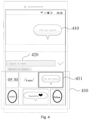
- a video preview picture 410 of the target video, a bullet screen editing box 420 and a plurality of style options 430 are displayed on the bullet screen editing interface.
- a style corresponding to the target style option 431 is displayed on the video preview picture 410.
- the text edited in advance (the text may be used as the target bullet screen) comprised in the target style option 431 may also be displayed on the video preview picture 410.
- the target style option 431 does not comprise a text edited in advance
- the target bullet screen may be edited through the bullet screen editing box 420
- the target bullet screen edited in the bullet screen editing box 420 will be displayed in the video preview picture 410 synchronously with a style corresponding to the target style option 431.
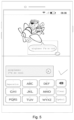
- the bullet screen content in the bullet screen box comprises the name "airplane” of the target object and "I'm so cool” for expressing the monologue of the airplane, in which the symbol ":” is used to further simulate the scene where the airplane expresses the monologue.
- the preview information of the target bullet screen comprises a bullet screen preview box and/or a bullet screen preview content
- the bullet screen preview box is displayed according to an adjusted style in response to an adjustment operation for a style of the target bullet screen and/or the bullet screen preview content is displayed according to an adjusted content in response to an adjustment operation for a content of the target bullet screen.
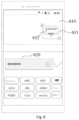
- a bullet screen editing interface of a target bullet screen as shown in Fig. 6 , it comprises a video preview picture 610 of the target video, a bullet screen editing box 620 and the preview information of the target bullet screen displayed on the video preview picture 610, and the preview information of the target bullet screen comprises a bullet screen preview box 631 and a bullet screen preview content 632.
- the user may drag the bullet screen preview box 631 to change the size of the bullet screen preview box 631, move the bullet screen preview box 631 to change a position of the bullet screen preview box 631 on the video preview picture 610, or delete the bullet screen preview box 631.
- the user may also edit the bullet screen preview content 632, such as deleting, adding or setting the font, font size, color and the like of the bullet screen preview content 632.
- the video track of the target video and the bullet screen track of the target bullet screen are displayed on the bullet screen editing interface; a target video frame corresponding to the target bullet screen is determined in response to an adjustment operation for the bullet screen track to display the target bullet screen on a video playback picture corresponding to the target video frame during a playback process of the target video.
- the bullet screen track is displayed on the video track by at least partially covering the video track, and the bullet screen track is displayed differently from the video track.
- a bullet screen editing interface as shown in Fig. 7 , it comprises a video preview picture 710 of the target video, a bullet screen editing box 720, the preview information of the target bullet screen displayed on the video preview picture 710, a video track 730 of the target video, and a bullet screen track 740 of the target bullet screen.
- the bullet screen track 740 is displayed on the video track 730 by at least partially covering the video track 730, and the bullet screen track 740 is different from the video track 730.
- the adding position of the target bullet screen in the target video may be adjusted by adjusting the position of the bullet screen track 740 on the video track 730, and the display duration of the target bullet screen in the target video may be adjusted by adjusting the length of the bullet screen track 740.
- the target video is a landscape video
- the bullet screen editing interface is a landscape full-screen playback (or pause) page of the video
- the bullet screen preview box is displayed at an associated position of the target object of the landscape full-screen playback (or pause) page.
- the associated position may be a position of the target object (that is, the bullet screen preview box is superimposed on the target object for display) or within a preset area range except for a position of the target object.
- the associated position is within an area at a distance from a peripheral contour of the target object that is less than a preset length.
- the bullet screen track and the video track are displayed on the horizontal full-screen playback (or pause) page.
- the bullet screen track is displayed on the video track by at least partially covering the video track, and the bullet screen track is displayed differently from the video track.
- it is not only convenient to determine a corresponding relationship between the bullet screen and the video, but also reduces the blocking of the full-screen playback page by the bullet screen and the video track.
- due to the fusion of the video full-screen page and the bullet screen editing page it is possible to realize the target bullet screen editing and adding and full-screen preview at the same time in the landscape full-screen playback scene without performing zoom-out and page jump on the video picture area, which may improve the interactive experience of the user.
- bullet screen track may also be displayed outside the video track and displayed in parallel with the video track.
- a video preview picture 810 of the target video a time axis 820 consisting of video frame sequences of the target video are displayed on the bullet screen editing interface; the video preview picture 810 is switched to a screen of a video frame corresponding to a cursor 830 to change the adding position of the target bullet screen in the target video in response to a first operation of dragging the cursor 830 on the time axis 820; wherein the cursor 830 is associated with a duration track 840, and the display duration of the target bullet screen on the target video picture may be changed by changing the length of the duration track 840.
- the bullet screen adding method further comprises: displaying the target bullet screen on a video playback picture during the target video playback process in response to completed adding of the target bullet screen.
- the target bullet screen comprises a bullet screen box and a bullet screen content in the bullet screen box, wherein the display style of the bullet screen box is the same as that of the bullet screen preview box, and the bullet screen content is the same as the bullet screen preview content.
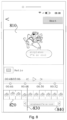
- the scene of the playback picture of the target video comprises: the target object is a butterfly that dances gracefully, and the target bullet screen is "butterfly: I am so beautiful!.
- the bullet screen adding method further comprises: displaying a control for sending a same bullet screen in response to a trigger operation for the target bullet screen on the video playback picture; and displaying a target bullet screen adding control in response to a trigger operation for the control for sending a same bullet screen (template application control).
- the bullet screen editing panel as shown in Fig. 3 comprises a target bullet screen adding control 310.
- the template application control is a control that applies a bullet screen template.
- a control for sending a same bullet screen is displayed to apply the same bullet screen template as the target bullet screen.
- a trigger operation such as a click operation
- the target bullet screen adding control of the target bullet screen is displayed, or the step of directly jumping to the target bullet screen editing interface of the target bullet screen is performed.
- a deletion control in response to a trigger operation for the target bullet screen on the video playback picture, may also be displayed in addition to displaying a control for sending a same bullet screen and a like control, and the target bullet screen may be deleted in response to a trigger operation for the deletion control.
- the step of displaying the target bullet screen on a video playback picture during a playback process of the target video in response to completed adding of the target bullet screen comprises: displaying the target bullet screen at an associated position of the target object on the video playback picture in response to completed adding of the target bullet screen in the case where the video playback picture comprises the target object; and canceling displaying the target bullet screen in the target video frame to ensure that the target bullet screen is associated with the target object and both of them appear at the same time in response to the video playback picture not comprising the target object.
- Fig. 10 is a schematic structural view of a bullet screen adding apparatus in an embodiment of the present disclosure.
- the bullet screen adding apparatus specifically comprises: a first display module 1010 and a second display module 1020.
- the first display module 1010 is configured to display a bullet screen editing interface in response to an adding request for a target bullet screen for a target video, wherein a video preview picture of the target video is displayed on the bullet screen editing interface; and the second display module 1020 is configured to display the preview information of the target bullet screen on the video preview picture displayed on the bullet screen editing interface in response to a target bullet screen editing operation, wherein the target bullet screen is an associated bullet screen of the target object in the target video.
- a plurality of style options are displayed on the bullet screen editing interface; and the bullet screen adding apparatus further comprises: an application module configured to take a style corresponding to a target style option as a display style of the target bullet screen in response to a trigger operation for the target style option among the plurality of style options.
- the video track of the target video and the bullet screen track of the target bullet screen are displayed on the bullet screen editing interface; and the bullet screen adding apparatus further comprises: a determining module configured to determine a target video frame corresponding to the target bullet screen in response to an adjustment operation for the bullet screen track to display the target bullet screen on a video playback picture corresponding to the target video frame during a playback process of the target video.
- the bullet screen track is displayed on the video track by at least partially covering the video track, and the bullet screen track is displayed differently from the video track.
- the bullet screen adding apparatus further comprises: a third display module configured to display the target bullet screen on a video playback picture during the target video playback process in response to completed adding of the target bullet screen.
- the third display module is specifically configured to: display the target bullet screen at an associated position of the target object on the video playback picture in response to completed adding of the target bullet screen and the video playback picture comprises the target object; and canceling displaying the target bullet screen in the target video frame in response to the video playback picture does not comprise the target object.
- the target bullet screen is an associated bullet screen of the target object
- the target bullet screen and the target object are displayed synchronously on the video picture, thereby enhancing the display effect of the target bullet screen and the user's cognition of the target bullet screen.
- the bullet screen adding apparatus further comprises: a fourth display module configured to display a control for sending a same bullet screen in response to a trigger operation for the target bullet screen on the video playback picture; and a fifth display module configured to display the target bullet screen adding control or directly jump to the bullet screen editing interface of the target bullet screen in response to a trigger operation for the control for sending a same bullet screen.
- the first display module 1010 is specifically configured to display a target bullet screen adding control in response to the target user having access to add the target bullet screen; and display a bullet screen editing interface of the target bullet screen in response to a trigger operation for the target bullet screen adding control.
- the bullet screen adding apparatus provided by the embodiment of the disclosure realizes a novel bullet screen adding solution, which is conductive to improving the bullet screen adding effect and the user experience.
- the bullet screen adding apparatus provided by the embodiment of the present disclosure may perform the steps in the bullet screen adding method provided by the method embodiments of the present disclosure, which will not be described in detail here for the implementing steps and the beneficial effects.
- Fig. 11 is a schematic structural view of an electronic device in an embodiment of the present disclosure.
- Fig. 11 shows a schematic structural view of an electronic device 1100 suitable for implementing the embodiment of the present disclosure.
- the electronic device 1100 in the embodiment of the present disclosure may comprise, but is not limited to, mobile terminals such as mobile phones, notebook computers, digital broadcast receivers, PDA (personal digital assistant), PAD (pad computer), PMP (Portable Multimedia Player), in-vehicle terminals (for example, in-vehicle navigation terminals) and wearable electronic devices; and fixed terminals such as digital TVs, desktop computers and smart home devices.
- PDA personal digital assistant
- PAD pad computer
- PMP Portable Multimedia Player
- in-vehicle terminals for example, in-vehicle navigation terminals
- wearable electronic devices and fixed terminals such as digital TVs, desktop computers and smart home devices.
- the electronic device shown in Fig. 11 which is only an example, shall not limit the functions and application range of the embodiments of the
- the electronic device 1100 may comprise a processing device (for example, a central processing unit, a graphic processor, and the like) 1101, which may perform various suitable actions and processing according to a program stored in a Read-only Memory (ROM) 1102 or a program loaded from a storage device 1108 into a Random Access Memory (RAM) 1103 to implement the method in an embodiment according to the present disclosure.
- a processing device for example, a central processing unit, a graphic processor, and the like
- RAM Random Access Memory
- various programs and data required for the operation of the electronic device 1100 are also stored.
- the processing device 1101, the ROM 1102 and the RAM 1103 are connected to each other through a bus 1104.
- the input/output (I/O) interface 1105 is also connected to the bus 1104.
- the following devices may be connected to the I/O interface 1105: an input device 1106 including, for example, a touch screen, a touch pad, a keyboard, a mouse, a camera, a microphone, an accelerometer, a gyroscope, and the like; an output device 1107 including, for example, a Liquid Crystal Display (LCD), a speaker, a vibrator, and the like; a storage device 1108 including, for example, a magnetic tape, a hard disk, and the like; and a communication device 1109.
- the communication device 1109 may allow the electronic device 1100 to be in wireless or wired communication with other devices to exchange data.
- Fig. 11 shows the electronic device 1100 with various devices, it should be understood that there is no requirement to implement or have all the devices shown. It is possible to alternatively implement or possess more or less devices.
- the process described above with reference to the flowchart may be implemented as a computer software program.
- a computer program product which comprises a computer program carried on a non-transient computer-readable medium, wherein the computer program contains program codes for performing the method shown in the flowchart so as to implement the method described above.
- the computer program may be downloaded and installed from the network through the communication device 1109, installed from the storage device 1108, or installed from the ROM 1102.
- the processing device 1101 the above-described functions defined in the method of the embodiment of the present disclosure are performed.
- the above-described computer-readable medium of the present disclosure may be a computer-readable signal medium, a computer-readable storage medium or any combination thereof.
- the computer-readable storage medium may be, for example, but is not limited to: an electrical, magnetic, optical, electromagnetic, infrared, or semiconductor system, device, or apparatus, or a combination thereof.
- a computer-readable storage medium may comprise, but is not limited to: an electrical connection having one or more wires, a portable computer disk, a hard disk, a random access memory (RAM), a read-only memory (ROM), an erasable programmable read-only memory (EPROM or flash memory), an optical fiber, a portable compact disk read-only memory (CD-ROM), an optical storage device, a magnetic storage device, or any suitable combination thereof.
- a computer-readable storage medium may be any tangible medium that contains or stores a program which may be used by an instruction execution system, apparatus, or device or used in combination therewith.
- the computer-readable signal medium may comprise a data signal propagated in a baseband or as a part of a carrier wave, wherein a computer-readable program code is carried. Such propagated data signal may take many forms, including but not limited to an electromagnetic signal, an optical signal, or any suitable combination thereof.
- the computer-readable signal medium may also be any computer-readable medium other than the computer-readable storage medium.
- the computer-readable signal medium may send, propagate, or transmit a program for use by an instruction execution system, apparatus, or device or in combination with therewith.
- the program code contained on the computer-readable medium may be transmitted by any suitable medium, including but not limited to: a wire, an optical cable, radio frequency (RF), and the like, or any suitable combination thereof.
- RF radio frequency
- the client and the server may communicate using any currently known or future developed network protocol such as HTTP (HyperText Transfer Protocol), and may be interconnected with digital data communication in any form or medium (for example, communication network).
- HTTP HyperText Transfer Protocol
- Examples of communication networks comprise a Local Area Network ("LAN”), a Wide Area Network ("WAN”), an extranet (for example, Internet) and an end-to-end network (for example, an ad hoc end-to-end network), as well as any currently known or future developed network.
- LAN Local Area Network
- WAN Wide Area Network
- extranet for example, Internet
- end-to-end network for example, an ad hoc end-to-end network
- the above-described computer-readable medium may be comprised in the above-described electronic device; or may also exist alone without being assembled into the electronic device.
- the above-described computer-readable medium carries one or more programs that, when executed by the electronic device cause the electronic device to: display a bullet screen editing interface in response to an adding request for a target bullet screen for a target video, wherein a video preview picture of the target video is displayed on the bullet screen editing interface; displaying the preview information of the target bullet screen on the video preview picture displayed on the bullet screen editing interface in response to a target bullet screen editing operation, wherein the target bullet screen is an associated bullet screen of a target object in the target video.
- the computer program code for performing the operations of the present disclosure may be written in one or more programming languages or a combination thereof.
- the above-described programming languages comprise but are not limited to object-oriented programming languages, such as Java, Smalltalk, and C++, and also comprise conventional procedural programming languages, such as "C" language or similar programming languages.
- the program code may be executed entirely on the user's computer, partly on the user's computer, executed as an independent software package, partly on the user's computer and partly executed on a remote computer, or entirely executed on the remote computer or server.
- the remote computer may be connected to the user's computer through any kind of network (including a local area network (LAN) or a wide area network (WAN)), or may be connected to an external computer (for example, connected through Internet using an Internet service provider).
- LAN local area network
- WAN wide area network
- each block in the flowchart or block view may represent a module, a program segment, or a part of code, wherein the module, the program segment, or the part of code contains one or more executable instructions for realizing a specified logic function.
- the functions marked in the block may also occur in a different order from the order marked in the accompanying drawings. For example, two blocks shown in succession which may actually be executed substantially in parallel, may sometimes also be executed in a reverse order, depending on the functions involved.
- each block in the block view and/or flowchart, and a combination of the blocks in the block view and/or flowchart may be implemented by a dedicated hardware-based system that performs the specified functions or operations, or may be implemented by a combination of dedicated hardware and computer instructions.
- the units involved in the described embodiments of the present disclosure may be implemented in software or hardware. Wherein, the names of the units do not constitute a limitation on the units themselves under certain circumstances.
- the functions described hereinabove may be performed at least in part by one or more hardware logic components.
- the hardware logic components of a demonstrative type comprise: a Field Programmable Gate Array (FPGA), an Application Specific Integrated Circuit (ASIC), an Application Specific Standard Product (ASSP), a System on Chip (SOC), a Complex Programmable Logical device (CPLD) and the like.
- FPGA Field Programmable Gate Array
- ASIC Application Specific Integrated Circuit
- ASSP Application Specific Standard Product
- SOC System on Chip
- CPLD Complex Programmable Logical device
- a machine-readable medium may be a tangible medium, which may contain or store a program for use by the instruction execution system, apparatus, or device or use in combination with the instruction execution system, apparatus, or device.
- the machine-readable medium may be a machine-readable signal medium or a machine-readable storage medium.
- the machine-readable medium may comprise, but is not limited to, an electronic, magnetic, optical, electromagnetic, infrared, or semiconductor system, device or device, or any suitable combination thereof.
- machine-readable storage medium may comprise an electrical connection based on one or more wires, a portable computer disk, a hard disk, a random access memory (RAM), a read-only memory (ROM), an erasable programmable read-only memory (EPROM or flash memory), an optical fiber, a portable compact disk read-only memory (CD-ROM), an optical storage device, a magnetic storage device, or any suitable combination thereof.
- RAM random access memory
- ROM read-only memory
- EPROM or flash memory erasable programmable read-only memory
- CD-ROM compact disk read-only memory
- magnetic storage device or any suitable combination thereof.
- the present disclosure provides a bullet screen adding method, comprising: displaying a bullet screen editing interface in response to an adding request for a target bullet screen for a target video, wherein a video preview picture of the target video is displayed on the bullet screen editing interface; and displaying the preview information of the target bullet screen on the video preview picture displayed on the bullet screen editing interface in response to a target bullet screen editing operation, wherein the target bullet screen is an associated bullet screen of a target object in the target video.
- the method further comprises: displaying a plurality of style options on the bullet screen editing interface; and taking a style corresponding to a target style option as a display style of the target bullet screen in response to a trigger operation for the target style option among the plurality of style options.
- the preview information of the target bullet screen comprises a bullet screen preview box and/or a bullet screen preview content, wherein the bullet screen preview box is displayed according to an adjusted style in response to an adjustment operation for a style of the target bullet screen, and/or the bullet screen preview content is displayed according to an adjusted content in response to an adjustment operation for a content of the target bullet screen.
- the method further comprises: displaying a video track of the target video and a bullet screen track of the target bullet screen on the bullet screen editing interface; and determining a target video frame corresponding to the target bullet screen in response to an adjustment operation for the bullet screen track to display the target bullet screen on a video playback picture corresponding to the target video frame during a playback process of the target video.
- the bullet screen track is displayed on the video track by at least partially covering the video track, and the bullet screen track is different from the video track display.
- the method further comprises: displaying the target bullet screen on a video playback picture during a playback process of the target video in response to completed adding of the target bullet screen.
- the step of displaying the target bullet screen on a video playback picture during a playback process of the target video in response to completed adding of the target bullet screen comprises: displaying the target bullet screen at an associated position of the target object on the video playback picture in response to completed adding of the target bullet screen; and canceling displaying the target bullet screen in the target video frame and the video playback picture not comprising the target object.
- the method further comprises: displaying a control for sending a same bullet screen in response to a trigger operation for the target bullet screen on the video playback picture; and displaying the target bullet screen adding control or directly jumping to the bullet screen editing interface of the target bullet screen in response to a trigger operation for the control for sending a same bullet screen.
- the step of displaying a bullet screen editing interface in response to an adding request for a target bullet screen for a target video comprises: displaying a target bullet screen adding control in response to the target user having an access to add the target bullet screen; and displaying a bullet screen editing interface of the target bullet screen in response to a trigger operation for the target bullet screen adding control.
- the present disclosure provides a bullet screen adding apparatus, comprising: according to one or more embodiments of the present disclosure, in the bullet screen adding apparatus provided by the present disclosure, alternatively, a first display module configured to display a bullet screen editing interface in response to an adding request for a target bullet screen for a target video, wherein a video preview picture of the target video is displayed on the bullet screen editing interface; and a second display module configured to display the preview information of the target bullet screen on the video preview picture displayed on the bullet screen editing interface in response to a target bullet screen editing operation, wherein the target bullet screen is an associated bullet screen of a target object in the target video.
- the present disclosure provides an electronic device, comprising: one or more processors; and a memory for storing one or more programs that, in response to being executed by the one or more processors, cause the one or more processors to implement the bullet screen adding method as provided in any of the present disclosure.
- the present disclosure provides a computer-readable storage medium having a computer program stored thereon that, in response to being executed by a processor, implements the bullet screen adding method as provided in any of the present disclosure.
- the embodiment of the present disclosure also provides a computer program product including a computer programs or instructions that, in response to being executed by a processor, implement the bullet screen adding method as described above.
- the embodiment of the present disclosure also provides a computer program including instructions that, in response to being executed by a processor, cause the processor to perform the bullet screen adding method as described above.
- a bullet screen editing interface is displayed in response to an adding request for a target bullet screen for a target video, wherein a video preview picture of the target video is displayed on the bullet screen editing interface; and the preview information of the target bullet screen is displayed on the video preview picture displayed on the bullet screen editing interface in response to a target bullet screen editing operation, wherein the target bullet screen is a technical means of an associated bullet screen of the target object in the target video, thereby enriching the bullet screen interaction scenes and contributing to improving the interactive experience of the user.
Landscapes
- Engineering & Computer Science (AREA)
- Multimedia (AREA)
- Signal Processing (AREA)
- General Engineering & Computer Science (AREA)
- Human Computer Interaction (AREA)
- Computer Security & Cryptography (AREA)
- User Interface Of Digital Computer (AREA)
- Television Signal Processing For Recording (AREA)
Abstract
Description
- The present disclosure is based on and claims the priority to
CN Patent Application No. 202210281115.7 titled "BULLET SCREEN ADDING METHOD AND APPARATUS, ELECTRONIC DEVICE AND STORAGE MEDIUM" and filed on March 21, 2022 - The present disclosure relates to the field of information technology, in particular to a bullet screen adding method and apparatus, an electronic device and a storage medium.
- With the continuous development of terminal technology and network technology, more and more application clients emerge. The user may carry out different online activities through different types of application clients.
- For example, the user may watch videos through video application clients. During the process of watching videos, the user may also post bullet screen (bullet comments) for the video content.
- In a first aspect, the embodiment of the present disclosure provides a bullet screen adding method. The method comprises: displaying a bullet screen editing interface in response to an adding request for a target bullet screen for a target video, wherein a video preview picture of the target video is displayed on the bullet screen editing interface; and displaying the preview information of the target bullet screen on the video preview picture displayed on the bullet screen editing interface in response to a target bullet screen editing operation, wherein the target bullet screen is an associated bullet screen of a target object in the target video.
- In a second aspect, the embodiment of the present disclosure also provides a bullet screen adding apparatus. The apparatus comprises: a first display module configured to display a bullet screen editing interface in response to an adding request for a target bullet screen for a target video, wherein a video preview picture of the target video is displayed on the bullet screen editing interface; and a second display module configured to display the preview information of the target bullet screen on the video preview picture displayed on the bullet screen editing interface in response to a target bullet screen editing operation, wherein the target bullet screen is an associated bullet screen of a target object in the target video.
- In a third aspect, the embodiment of the present disclosure also provides an electronic device. The electric device comprises: one or more processors; and a storage means for storing one or more programs that, when executed by the one or more processors, cause the one or more processors to implement the bullet screen adding method as described above.
- In a fourth aspect, the embodiment of the present disclosure also provides a computer program product. The computer program product comprises a computer program or instructions that, when executed by a processor, implement the bullet screen adding method as described above.
- The above-described and other features, advantages and aspects of embodiments of the present disclosure will become more apparent in conjunction with the accompanying drawings and with reference to the following detailed description. Throughout the accompanying drawings, the same or similar reference numerals indicate the same or similar elements. It should be understood that the accompanying drawings are schematic, and the members and elements are not necessarily drawn to scale.
-
Fig. 1 is a flowchart of a bullet screen adding method in an embodiment of the present disclosure; -
Fig. 2 is a schematic view of a target video playback interface in an embodiment of the present disclosure; -
Fig. 3 is a schematic view of a bullet screen editing interface in an embodiment of the present disclosure; -
Fig. 4 is a schematic view of a bullet screen editing interface in an embodiment of the present disclosure; -
Fig. 5 is a schematic view of a bullet screen editing interface in an embodiment of the present disclosure; -
Fig. 6 is a schematic view of a bullet screen editing interface in an embodiment of the present disclosure; -
Fig. 7 is a schematic view of a bullet screen editing interface in an embodiment of the present disclosure; -
Fig. 8 is a schematic view of a bullet screen editing interface in an embodiment of the present disclosure; -
Fig. 9 is a schematic view of a playback picture of a target video added with a target bullet screen in an embodiment of the present disclosure; -
Fig. 10 is a schematic structural view of a bullet screen adding apparatus in an embodiment of the present disclosure; -
Fig. 11 is a schematic structural view of an electronic device in an embodiment of the present disclosure. - The embodiments of the present disclosure will be described in more detail with reference to the accompanying drawings below. Although the accompanying drawings illustrate some embodiments of the present disclosure, it should be understood that the present disclosure may be implemented in various forms, and should not be construed as being limited to the embodiments set forth herein. Rather, these embodiments are intended for a more thorough and complete understanding of the present disclosure. It should be understood that the accompanying drawings and embodiments of the present disclosure are only for illustrative purposes, rather than for limiting the protection scope of the present disclosure.
- It should be understood that the various steps recited in the method embodiments of the present disclosure may be performed according to different sequences and performed in parallel. In addition, the method embodiments may comprise additional steps and/or omit to perform the illustrated steps. The scope of the present disclosure is not limited in this respect.
- As used herein, the term "comprise" and its variants are open-ended inclusion, that is, "comprise but not limited to". The term "based on" means "at least partially based on". The term "one embodiment" means "at least one embodiment"; the term "another embodiment" means "at least one additional embodiment"; and the term "some embodiments" means "at least some embodiments". The related definitions of other terms will be given in the following description.
- It should be noted that the concepts such as "first" and "second" mentioned in the present disclosure are only used to distinguish different devices, modules or units, but not to limit the order or interdependence of functions performed by these devices, modules or units.
- It should be noted that the modifications of "one" and "a plurality of" mentioned in the present disclosure are illustrative rather than restrictive, and those skilled in the art should understand that they should be understood as "one or more" unless contextually specified otherwise.
- The names of messages or information exchanged between multiple devices in the embodiments of the present disclosure are only used for illustrative purposes, but not for limiting the scope of these messages or information.
- At present, the interactive function of bullet screen is relatively simple and impossible to meet diversified needs of the user, so that the user experience is affected.
- In order to solve the above-described technical problem or at least partially solve the above-described technical problem, the embodiments of the present disclosure provides a bullet screen adding method and apparatus, an electronic device and a storage medium, so as to realize a new solution to add bullet screen, which is conductive to improving the bullet screen adding effect and the use experience of the user.
-
Fig. 1 is a flowchart of a bullet screen adding method in an embodiment of the present disclosure. The bullet screen adding method may be performed by a bullet screen adding apparatus, which may be implemented by software and/or hardware, and which may be configured in an electronic device. The electronic device comprises, for example, terminals, which specifically comprise, but are not limited to, a smart phone, a palmtop computer, a tablet computer, a portable wearable device, a smart home device (for example, a desk lamp), and the like. - As shown in
Fig. 1 , the bullet screen adding method specifically comprises the following steps. - In
Step 110, a bullet screen editing interface is displayed in response to an adding request for a target bullet screen for a target video, wherein a video preview picture of the target video is displayed on the bullet screen editing interface. - The adding request for the target bullet screen may be triggered by operating a target bullet screen adding control, which may be displayed on a playback picture or video detail page of the target video, so that the user may conveniently trigger the target bullet screen adding control when watching the target video, so as to call up the bullet screen editing interface of the target bullet screen (which may be referred to as the first bullet screen editing interface for editing the target bullet screen). The target bullet screen is added on the target video through the bullet screen editing interface of the target bullet screen.
- Different from a conventional bullet screen, the target bullet screen in the embodiments of the present disclosure is an associated bullet screen of the target object in the target video. In some embodiments, the target bullet screen is a monologue bullet screen, that is, the target object in the target video as a speaker to express the monologue information corresponding to the target object. For example, the target object is an airplane, and the target bullet screen may be "airplane: I am so cool". For another example, the target object is a disk of lemons, and the target bullet screen may be "lemon: I am so sour!". In other words, the target bullet screen is to simulate the monologue of the target object in the target video, so as to intensify the fun of the bullet screen and enhance the interactive experience of the user. It may be understood that, the target user may choose the target object independently, for example, the target object is "sofa", "lemon", "pet kitty", "gourmet dishes", "clothes" and the like in the playback picture of the target video.
- In some embodiments, the step of displaying the bullet screen editing interface of the target bullet screen in response to an adding request for the target bullet screen for the target video comprises: displaying a target bullet screen control in response to a target user having an access to add the target bullet screen; displaying a bullet screen editing interface of the target bullet screen in response to a trigger operation for a target bullet screen control. For example, when the target user becomes a fan club member of a poster of the target video, the target user may obtain an access to add the target bullet screen, which of course is not only limited thereto. Thus, it is conductive to enhancing the interactive atmosphere without affecting the live viewing atmosphere of the target video.
- In some embodiments, in response to the user obtaining an access to add the target bullet screen, a prompt message is displayed to guide the user to take part in the bullet screen interaction and enrich the interaction experience. For example, based on the prompt message, it is possible to directly jump to the bullet screen editing interface of the target bullet screen or jump to the interface where the target bullet screen adding control is displayed, so as to simplify the operation path and improve the operation efficiency.
- In some embodiments, referring to a schematic view of a target video playback interface (or a video details page) as shown in
Fig. 2 , it comprises aplayback window 210 of the target video and a bulletscreen switch identifier 220. When the target user triggers the bulletscreen switch identifier 220, the bullet screen function is enabled and thebullet screen entrance 230 is displayed. In response to triggering thebullet screen entrance 230, a bullet screen editing panel (which may be referred to as the second bullet screen editing interface for editing a conventional bullet screen) as shown inFig. 3 may be displayed. Based on the bullet screen editing panel, the conventional bullet screen may be edited, but the target bullet screen cannot be edited. If the target user has an access to add the target bullet screen, the target bulletscreen adding control 310 is displayed on the bullet screen editing panel. By triggering the target bulletscreen adding control 310, the bullet screen editing interface of the target bullet screen is displayed. The target bulletscreen adding control 310 may also be directly displayed on the video details page or the video playback page. - In
Step 120, in response to the target bullet screen editing operation (the target bullet screen editing operation for the target video), the preview information of the target bullet screen is displayed on the video preview picture displayed on the bullet screen editing interface, wherein the target bullet screen is an associated bullet screen of the target object in the target video. - Compared with the related art in which the display effect of the bullet screen may only be viewed after the bullet screen is sent, the display effect of the bullet screen may be previewed in real time through the video preview picture of the bullet screen editing interface during the bullet screen editing process before the bullet screen is sent, so as to facilitate the user to make an adjustment in time before the bullet screen is sent, which is conductive to better satisfying the needs of the user and improving the experience of the user.
- In some embodiments, a bullet screen editing box is also displayed on the bullet screen editing interface of the target bullet screen, wherein the bullet screen editing box is configured to edit the target bullet screen.
- The target bullet screen is an associated bullet screen of the target object, and the target bullet screen may be a bullet screen having an associated relationship with the target object. In some embodiments, the target bullet screen may be displayed at an associated position of the target object, or the target bullet screen comprises the associated identification information of the target object, for example, the bullet screen content in the bullet screen box comprises the name of the target object, or the target bullet screen is directed to the target object when displayed, for example, the target bullet screen has a bullet screen box which is directed to the target object.
- In some embodiments, a plurality of style options are also displayed on the bullet screen editing interface; in response to a trigger operation for a target style option among the plurality of style options, a style corresponding to the target style option is taken as a display style of the target bullet screen. That is, the display style of the target bullet screen may be set by triggering the target style option, thereby improving the visual effect of the target bullet screen, reducing the editing difficulty of the target bullet screen and enhancing the interactive experience.
- For example, referring to a schematic view of a bullet screen editing interface of a target bullet screen as shown in
Fig. 4 , avideo preview picture 410 of the target video, a bulletscreen editing box 420 and a plurality ofstyle options 430 are displayed on the bullet screen editing interface. In response to thetarget style option 431 being triggered, a style corresponding to thetarget style option 431 is displayed on thevideo preview picture 410. In response to thetarget style option 431 comprising a text edited in advance, in addition to a style corresponding to thetarget style option 431, the text edited in advance (the text may be used as the target bullet screen) comprised in thetarget style option 431 may also be displayed on thevideo preview picture 410. In this way, it is possible to simplify the editing operation of the user and improve the bullet screen adding efficiency. If thetarget style option 431 does not comprise a text edited in advance, in response to thetarget style option 431 is triggered, only a style corresponding to thetarget style option 431 will be displayed on thevideo preview picture 410, and the target bullet screen may be edited through the bulletscreen editing box 420, the target bullet screen edited in the bulletscreen editing box 420 will be displayed in thevideo preview picture 410 synchronously with a style corresponding to thetarget style option 431. In the bullet screen editing interface of the target bullet screen as shown inFig. 5 , the bullet screen content in the bullet screen box comprises the name "airplane" of the target object and "I'm so cool" for expressing the monologue of the airplane, in which the symbol ":" is used to further simulate the scene where the airplane expresses the monologue. - In some embodiments, the preview information of the target bullet screen comprises a bullet screen preview box and/or a bullet screen preview content, and the bullet screen preview box is displayed according to an adjusted style in response to an adjustment operation for a style of the target bullet screen and/or the bullet screen preview content is displayed according to an adjusted content in response to an adjustment operation for a content of the target bullet screen. For example, referring to a schematic view of a bullet screen editing interface of a target bullet screen as shown in
Fig. 6 , it comprises avideo preview picture 610 of the target video, a bulletscreen editing box 620 and the preview information of the target bullet screen displayed on thevideo preview picture 610, and the preview information of the target bullet screen comprises a bulletscreen preview box 631 and a bulletscreen preview content 632. The user may drag the bulletscreen preview box 631 to change the size of the bulletscreen preview box 631, move the bulletscreen preview box 631 to change a position of the bulletscreen preview box 631 on thevideo preview picture 610, or delete the bulletscreen preview box 631. The user may also edit the bulletscreen preview content 632, such as deleting, adding or setting the font, font size, color and the like of the bulletscreen preview content 632. - In order to facilitate the user to adjust an adding position of the target bullet screen in the target video and a display duration of the target bullet screen in the target video, in some embodiments, the video track of the target video and the bullet screen track of the target bullet screen are displayed on the bullet screen editing interface; a target video frame corresponding to the target bullet screen is determined in response to an adjustment operation for the bullet screen track to display the target bullet screen on a video playback picture corresponding to the target video frame during a playback process of the target video.
- In some embodiments, the bullet screen track is displayed on the video track by at least partially covering the video track, and the bullet screen track is displayed differently from the video track. For example, in a schematic view of a bullet screen editing interface as shown in
Fig. 7 , it comprises avideo preview picture 710 of the target video, a bulletscreen editing box 720, the preview information of the target bullet screen displayed on thevideo preview picture 710, avideo track 730 of the target video, and abullet screen track 740 of the target bullet screen. Thebullet screen track 740 is displayed on thevideo track 730 by at least partially covering thevideo track 730, and thebullet screen track 740 is different from thevideo track 730. - In some embodiments, the adding position of the target bullet screen in the target video may be adjusted by adjusting the position of the
bullet screen track 740 on thevideo track 730, and the display duration of the target bullet screen in the target video may be adjusted by adjusting the length of thebullet screen track 740. - In some embodiments, the target video is a landscape video, the bullet screen editing interface is a landscape full-screen playback (or pause) page of the video, and the bullet screen preview box is displayed at an associated position of the target object of the landscape full-screen playback (or pause) page. The associated position may be a position of the target object (that is, the bullet screen preview box is superimposed on the target object for display) or within a preset area range except for a position of the target object. For example, the associated position is within an area at a distance from a peripheral contour of the target object that is less than a preset length. The bullet screen track and the video track are displayed on the horizontal full-screen playback (or pause) page. The bullet screen track is displayed on the video track by at least partially covering the video track, and the bullet screen track is displayed differently from the video track. Thus, it is not only convenient to determine a corresponding relationship between the bullet screen and the video, but also reduces the blocking of the full-screen playback page by the bullet screen and the video track. Moreover, due to the fusion of the video full-screen page and the bullet screen editing page, it is possible to realize the target bullet screen editing and adding and full-screen preview at the same time in the landscape full-screen playback scene without performing zoom-out and page jump on the video picture area, which may improve the interactive experience of the user.
- In addition, the bullet screen track may also be displayed outside the video track and displayed in parallel with the video track.
- In other embodiments, referring to a schematic view of a bullet screen editing interface as shown in
Fig. 8 , avideo preview picture 810 of the target video, atime axis 820 consisting of video frame sequences of the target video are displayed on the bullet screen editing interface; thevideo preview picture 810 is switched to a screen of a video frame corresponding to acursor 830 to change the adding position of the target bullet screen in the target video in response to a first operation of dragging thecursor 830 on thetime axis 820; wherein thecursor 830 is associated with a duration track 840, and the display duration of the target bullet screen on the target video picture may be changed by changing the length of the duration track 840. - In some embodiments, the bullet screen adding method further comprises: displaying the target bullet screen on a video playback picture during the target video playback process in response to completed adding of the target bullet screen. The target bullet screen comprises a bullet screen box and a bullet screen content in the bullet screen box, wherein the display style of the bullet screen box is the same as that of the bullet screen preview box, and the bullet screen content is the same as the bullet screen preview content. For example, in a schematic view of a playback picture of the target video with a target bullet screen as shown in
Fig. 9 , the scene of the playback picture of the target video comprises: the target object is a butterfly that dances gracefully, and the target bullet screen is "butterfly: I am so beautiful!". - In some embodiments, the bullet screen adding method further comprises: displaying a control for sending a same bullet screen in response to a trigger operation for the target bullet screen on the video playback picture; and displaying a target bullet screen adding control in response to a trigger operation for the control for sending a same bullet screen (template application control). The bullet screen editing panel as shown in
Fig. 3 comprises a target bulletscreen adding control 310. The template application control is a control that applies a bullet screen template. - During the target video playback process, in response to the target bullet screen being displayed on the video playback picture and a trigger operation, such as a long press operation, for the target bullet screen on the video playback picture, a control for sending a same bullet screen is displayed to apply the same bullet screen template as the target bullet screen. In response to a trigger operation, such as a click operation, for the control for sending a same bullet screen, the target bullet screen adding control of the target bullet screen is displayed, or the step of directly jumping to the target bullet screen editing interface of the target bullet screen is performed. Thus, the interactive atmosphere of the bullet screen comments between the users is enhanced, and the interactive path of applying a bullet screen template by the live viewing user is shortened, thereby improving the user experience.
- In addition, in addition to displaying a control for sending a same bullet screen, it is also possible to display a like control, and give a like to the target bullet screen by triggering the like control.
- In some embodiments, in response to a trigger operation for the target bullet screen on the video playback picture, a deletion control may also be displayed in addition to displaying a control for sending a same bullet screen and a like control, and the target bullet screen may be deleted in response to a trigger operation for the deletion control.
- In some embodiments, the step of displaying the target bullet screen on a video playback picture during a playback process of the target video in response to completed adding of the target bullet screen comprises: displaying the target bullet screen at an associated position of the target object on the video playback picture in response to completed adding of the target bullet screen in the case where the video playback picture comprises the target object; and canceling displaying the target bullet screen in the target video frame to ensure that the target bullet screen is associated with the target object and both of them appear at the same time in response to the video playback picture not comprising the target object.
-
Fig. 10 is a schematic structural view of a bullet screen adding apparatus in an embodiment of the present disclosure. As shown inFig. 10 , the bullet screen adding apparatus specifically comprises: afirst display module 1010 and asecond display module 1020. - The
first display module 1010 is configured to display a bullet screen editing interface in response to an adding request for a target bullet screen for a target video, wherein a video preview picture of the target video is displayed on the bullet screen editing interface; and thesecond display module 1020 is configured to display the preview information of the target bullet screen on the video preview picture displayed on the bullet screen editing interface in response to a target bullet screen editing operation, wherein the target bullet screen is an associated bullet screen of the target object in the target video. - In some embodiments, a plurality of style options are displayed on the bullet screen editing interface; and the bullet screen adding apparatus further comprises: an application module configured to take a style corresponding to a target style option as a display style of the target bullet screen in response to a trigger operation for the target style option among the plurality of style options.
- In some embodiments, the video track of the target video and the bullet screen track of the target bullet screen are displayed on the bullet screen editing interface; and the bullet screen adding apparatus further comprises: a determining module configured to determine a target video frame corresponding to the target bullet screen in response to an adjustment operation for the bullet screen track to display the target bullet screen on a video playback picture corresponding to the target video frame during a playback process of the target video.
- In some embodiments, the bullet screen track is displayed on the video track by at least partially covering the video track, and the bullet screen track is displayed differently from the video track.
- In some embodiments, the bullet screen adding apparatus further comprises: a third display module configured to display the target bullet screen on a video playback picture during the target video playback process in response to completed adding of the target bullet screen.
- In some embodiments, the third display module is specifically configured to: display the target bullet screen at an associated position of the target object on the video playback picture in response to completed adding of the target bullet screen and the video playback picture comprises the target object; and canceling displaying the target bullet screen in the target video frame in response to the video playback picture does not comprise the target object. In other words, since the target bullet screen is an associated bullet screen of the target object, the target bullet screen and the target object are displayed synchronously on the video picture, thereby enhancing the display effect of the target bullet screen and the user's cognition of the target bullet screen.
- In some embodiments, the bullet screen adding apparatus further comprises: a fourth display module configured to display a control for sending a same bullet screen in response to a trigger operation for the target bullet screen on the video playback picture; and a fifth display module configured to display the target bullet screen adding control or directly jump to the bullet screen editing interface of the target bullet screen in response to a trigger operation for the control for sending a same bullet screen.
- In some embodiments, the
first display module 1010 is specifically configured to display a target bullet screen adding control in response to the target user having access to add the target bullet screen; and display a bullet screen editing interface of the target bullet screen in response to a trigger operation for the target bullet screen adding control. - The bullet screen adding apparatus provided by the embodiment of the disclosure realizes a novel bullet screen adding solution, which is conductive to improving the bullet screen adding effect and the user experience.
- The bullet screen adding apparatus provided by the embodiment of the present disclosure may perform the steps in the bullet screen adding method provided by the method embodiments of the present disclosure, which will not be described in detail here for the implementing steps and the beneficial effects.
-
Fig. 11 is a schematic structural view of an electronic device in an embodiment of the present disclosure. Next, specifically refer toFig. 11 , which shows a schematic structural view of anelectronic device 1100 suitable for implementing the embodiment of the present disclosure. Theelectronic device 1100 in the embodiment of the present disclosure may comprise, but is not limited to, mobile terminals such as mobile phones, notebook computers, digital broadcast receivers, PDA (personal digital assistant), PAD (pad computer), PMP (Portable Multimedia Player), in-vehicle terminals (for example, in-vehicle navigation terminals) and wearable electronic devices; and fixed terminals such as digital TVs, desktop computers and smart home devices. The electronic device shown inFig. 11 which is only an example, shall not limit the functions and application range of the embodiments of the present disclosure. - As shown in
Fig. 11 , theelectronic device 1100 may comprise a processing device (for example, a central processing unit, a graphic processor, and the like) 1101, which may perform various suitable actions and processing according to a program stored in a Read-only Memory (ROM) 1102 or a program loaded from astorage device 1108 into a Random Access Memory (RAM) 1103 to implement the method in an embodiment according to the present disclosure. In theRAM 1103, various programs and data required for the operation of theelectronic device 1100 are also stored. Theprocessing device 1101, theROM 1102 and theRAM 1103 are connected to each other through abus 1104. The input/output (I/O)interface 1105 is also connected to thebus 1104. - Generally, the following devices may be connected to the I/O interface 1105: an
input device 1106 including, for example, a touch screen, a touch pad, a keyboard, a mouse, a camera, a microphone, an accelerometer, a gyroscope, and the like; anoutput device 1107 including, for example, a Liquid Crystal Display (LCD), a speaker, a vibrator, and the like; astorage device 1108 including, for example, a magnetic tape, a hard disk, and the like; and acommunication device 1109. Thecommunication device 1109 may allow theelectronic device 1100 to be in wireless or wired communication with other devices to exchange data. AlthoughFig. 11 shows theelectronic device 1100 with various devices, it should be understood that there is no requirement to implement or have all the devices shown. It is possible to alternatively implement or possess more or less devices. - In particular, according to an embodiment of the present disclosure, the process described above with reference to the flowchart may be implemented as a computer software program. For example, in an embodiment of the present disclosure, there comprises a computer program product, which comprises a computer program carried on a non-transient computer-readable medium, wherein the computer program contains program codes for performing the method shown in the flowchart so as to implement the method described above. In such embodiment, the computer program may be downloaded and installed from the network through the
communication device 1109, installed from thestorage device 1108, or installed from theROM 1102. When the computer program is executed by theprocessing device 1101, the above-described functions defined in the method of the embodiment of the present disclosure are performed. - It is to be noted that, the above-described computer-readable medium of the present disclosure may be a computer-readable signal medium, a computer-readable storage medium or any combination thereof. The computer-readable storage medium may be, for example, but is not limited to: an electrical, magnetic, optical, electromagnetic, infrared, or semiconductor system, device, or apparatus, or a combination thereof. More specific examples of the computer-readable storage medium may comprise, but is not limited to: an electrical connection having one or more wires, a portable computer disk, a hard disk, a random access memory (RAM), a read-only memory (ROM), an erasable programmable read-only memory (EPROM or flash memory), an optical fiber, a portable compact disk read-only memory (CD-ROM), an optical storage device, a magnetic storage device, or any suitable combination thereof. In the present disclosure, a computer-readable storage medium may be any tangible medium that contains or stores a program which may be used by an instruction execution system, apparatus, or device or used in combination therewith. In the present disclosure, the computer-readable signal medium may comprise a data signal propagated in a baseband or as a part of a carrier wave, wherein a computer-readable program code is carried. Such propagated data signal may take many forms, including but not limited to an electromagnetic signal, an optical signal, or any suitable combination thereof. The computer-readable signal medium may also be any computer-readable medium other than the computer-readable storage medium. The computer-readable signal medium may send, propagate, or transmit a program for use by an instruction execution system, apparatus, or device or in combination with therewith. The program code contained on the computer-readable medium may be transmitted by any suitable medium, including but not limited to: a wire, an optical cable, radio frequency (RF), and the like, or any suitable combination thereof.
- In some embodiments, the client and the server may communicate using any currently known or future developed network protocol such as HTTP (HyperText Transfer Protocol), and may be interconnected with digital data communication in any form or medium (for example, communication network). Examples of communication networks comprise a Local Area Network ("LAN"), a Wide Area Network ("WAN"), an extranet (for example, Internet) and an end-to-end network (for example, an ad hoc end-to-end network), as well as any currently known or future developed network.
- The above-described computer-readable medium may be comprised in the above-described electronic device; or may also exist alone without being assembled into the electronic device.
- The above-described computer-readable medium carries one or more programs that, when executed by the electronic device cause the electronic device to: display a bullet screen editing interface in response to an adding request for a target bullet screen for a target video, wherein a video preview picture of the target video is displayed on the bullet screen editing interface; displaying the preview information of the target bullet screen on the video preview picture displayed on the bullet screen editing interface in response to a target bullet screen editing operation, wherein the target bullet screen is an associated bullet screen of a target object in the target video.
- The computer program code for performing the operations of the present disclosure may be written in one or more programming languages or a combination thereof. The above-described programming languages comprise but are not limited to object-oriented programming languages, such as Java, Smalltalk, and C++, and also comprise conventional procedural programming languages, such as "C" language or similar programming languages. The program code may be executed entirely on the user's computer, partly on the user's computer, executed as an independent software package, partly on the user's computer and partly executed on a remote computer, or entirely executed on the remote computer or server. In the case of a remote computer, the remote computer may be connected to the user's computer through any kind of network (including a local area network (LAN) or a wide area network (WAN)), or may be connected to an external computer (for example, connected through Internet using an Internet service provider).
- The flowcharts and block views in the accompanying drawings illustrate the possibly implemented architectures, functions, and operations of the system, method, and computer program product according to various embodiments of the present disclosure. In this regard, each block in the flowchart or block view may represent a module, a program segment, or a part of code, wherein the module, the program segment, or the part of code contains one or more executable instructions for realizing a specified logic function. It should also be noted that, in some alternative implementations, the functions marked in the block may also occur in a different order from the order marked in the accompanying drawings. For example, two blocks shown in succession which may actually be executed substantially in parallel, may sometimes also be executed in a reverse order, depending on the functions involved. It should also be noted that each block in the block view and/or flowchart, and a combination of the blocks in the block view and/or flowchart, may be implemented by a dedicated hardware-based system that performs the specified functions or operations, or may be implemented by a combination of dedicated hardware and computer instructions.
- The units involved in the described embodiments of the present disclosure may be implemented in software or hardware. Wherein, the names of the units do not constitute a limitation on the units themselves under certain circumstances.
- The functions described hereinabove may be performed at least in part by one or more hardware logic components. For example, without limitation, the hardware logic components of a demonstrative type that may be used comprise: a Field Programmable Gate Array (FPGA), an Application Specific Integrated Circuit (ASIC), an Application Specific Standard Product (ASSP), a System on Chip (SOC), a Complex Programmable Logical device (CPLD) and the like.
- In the context of the present disclosure, a machine-readable medium may be a tangible medium, which may contain or store a program for use by the instruction execution system, apparatus, or device or use in combination with the instruction execution system, apparatus, or device. The machine-readable medium may be a machine-readable signal medium or a machine-readable storage medium. The machine-readable medium may comprise, but is not limited to, an electronic, magnetic, optical, electromagnetic, infrared, or semiconductor system, device or device, or any suitable combination thereof. More specific examples of the machine-readable storage medium may comprise an electrical connection based on one or more wires, a portable computer disk, a hard disk, a random access memory (RAM), a read-only memory (ROM), an erasable programmable read-only memory (EPROM or flash memory), an optical fiber, a portable compact disk read-only memory (CD-ROM), an optical storage device, a magnetic storage device, or any suitable combination thereof.
- According to one or more embodiments of the present disclosure, the present disclosure provides a bullet screen adding method, comprising: displaying a bullet screen editing interface in response to an adding request for a target bullet screen for a target video, wherein a video preview picture of the target video is displayed on the bullet screen editing interface; and displaying the preview information of the target bullet screen on the video preview picture displayed on the bullet screen editing interface in response to a target bullet screen editing operation, wherein the target bullet screen is an associated bullet screen of a target object in the target video.
- According to one or more embodiments of the present disclosure, in the bullet screen adding method provided by the present disclosure, alternatively, the method further comprises: displaying a plurality of style options on the bullet screen editing interface; and taking a style corresponding to a target style option as a display style of the target bullet screen in response to a trigger operation for the target style option among the plurality of style options.
- According to one or more embodiments of the present disclosure, in the bullet screen adding method provided by the present disclosure, alternatively, the preview information of the target bullet screen comprises a bullet screen preview box and/or a bullet screen preview content, wherein the bullet screen preview box is displayed according to an adjusted style in response to an adjustment operation for a style of the target bullet screen, and/or the bullet screen preview content is displayed according to an adjusted content in response to an adjustment operation for a content of the target bullet screen.
- According to one or more embodiments of the present disclosure, in the bullet screen adding method provided by the present disclosure, alternatively, the method further comprises: displaying a video track of the target video and a bullet screen track of the target bullet screen on the bullet screen editing interface; and determining a target video frame corresponding to the target bullet screen in response to an adjustment operation for the bullet screen track to display the target bullet screen on a video playback picture corresponding to the target video frame during a playback process of the target video.
- According to one or more embodiments of the present disclosure, in the bullet screen adding method provided by the present disclosure, alternatively, the bullet screen track is displayed on the video track by at least partially covering the video track, and the bullet screen track is different from the video track display.
- According to one or more embodiments of the present disclosure, in the bullet screen adding method provided by the present disclosure, alternatively, the method further comprises: displaying the target bullet screen on a video playback picture during a playback process of the target video in response to completed adding of the target bullet screen.
- According to one or more embodiments of the present disclosure, in the bullet screen adding method provided by the present disclosure, alternatively, the step of displaying the target bullet screen on a video playback picture during a playback process of the target video in response to completed adding of the target bullet screen comprises: displaying the target bullet screen at an associated position of the target object on the video playback picture in response to completed adding of the target bullet screen; and canceling displaying the target bullet screen in the target video frame and the video playback picture not comprising the target object.
- According to one or more embodiments of the present disclosure, in the bullet screen adding method provided by the present disclosure, alternatively, the method further comprises: displaying a control for sending a same bullet screen in response to a trigger operation for the target bullet screen on the video playback picture; and displaying the target bullet screen adding control or directly jumping to the bullet screen editing interface of the target bullet screen in response to a trigger operation for the control for sending a same bullet screen.
- According to one or more embodiments of the present disclosure, in the bullet screen adding method provided by the present disclosure, alternatively, the step of displaying a bullet screen editing interface in response to an adding request for a target bullet screen for a target video comprises: displaying a target bullet screen adding control in response to the target user having an access to add the target bullet screen; and displaying a bullet screen editing interface of the target bullet screen in response to a trigger operation for the target bullet screen adding control.
- According to one or more embodiments of the present disclosure, the present disclosure provides a bullet screen adding apparatus, comprising: according to one or more embodiments of the present disclosure, in the bullet screen adding apparatus provided by the present disclosure, alternatively, a first display module configured to display a bullet screen editing interface in response to an adding request for a target bullet screen for a target video, wherein a video preview picture of the target video is displayed on the bullet screen editing interface; and a second display module configured to display the preview information of the target bullet screen on the video preview picture displayed on the bullet screen editing interface in response to a target bullet screen editing operation, wherein the target bullet screen is an associated bullet screen of a target object in the target video.
- According to one or more embodiments of the present disclosure, the present disclosure provides an electronic device, comprising: one or more processors; and a memory for storing one or more programs that, in response to being executed by the one or more processors, cause the one or more processors to implement the bullet screen adding method as provided in any of the present disclosure.
- According to one or more embodiments of the present disclosure, the present disclosure provides a computer-readable storage medium having a computer program stored thereon that, in response to being executed by a processor, implements the bullet screen adding method as provided in any of the present disclosure.
- The embodiment of the present disclosure also provides a computer program product including a computer programs or instructions that, in response to being executed by a processor, implement the bullet screen adding method as described above.
- The embodiment of the present disclosure also provides a computer program including instructions that, in response to being executed by a processor, cause the processor to perform the bullet screen adding method as described above.
- Compared with the related art, the technical solution provided by the embodiment of the present disclosure has at least the following advantages:
In the bullet screen adding method provided by the embodiment of the disclosure, a bullet screen editing interface is displayed in response to an adding request for a target bullet screen for a target video, wherein a video preview picture of the target video is displayed on the bullet screen editing interface; and the preview information of the target bullet screen is displayed on the video preview picture displayed on the bullet screen editing interface in response to a target bullet screen editing operation, wherein the target bullet screen is a technical means of an associated bullet screen of the target object in the target video, thereby enriching the bullet screen interaction scenes and contributing to improving the interactive experience of the user. - The above description is only an explanation of preferred embodiments of the present disclosure and the applied technical principles. Those skilled in the art should understand that the scope of disclosure involved in this disclosure is not limited to the technical solutions formed by the specific combination of the above technical features, and at the same time should also cover other technical solutions formed by arbitrarily combining the above-described technical features or equivalent features without departing from the above disclosed concept. For example, the above-described features and the technical features disclosed in the present disclosure (but not limited thereto) having similar functions are replaced with each other to form a technical solution.
- In addition, although the operations are depicted in a specific order, this should not be understood as requiring these operations to be performed in the specific order shown or performed in a sequential order. Under certain circumstances, multitasking and parallel processing might be advantageous. Likewise, although several specific implementation details are contained in the above discussion, these should not be construed as limiting the scope of the present disclosure. Certain features that are described in the context of individual embodiments may also be implemented in combination in a single embodiment. On the contrary, various features described in the context of a single embodiment may also be implemented in multiple embodiments individually or in any suitable sub-combination.
- Although the present subject matter has been described in language specific to structural features and/or methodological actions, it should be understood that the subject matter defined in the appended claims is not necessarily limited to the specific features or actions described above. On the contrary, the specific features and actions described above are only exemplary forms of implementing the claims.
Claims (20)
- A bullet screen adding method, comprising:displaying a bullet screen editing interface in response to an adding request for a target bullet screen for a target video, wherein a video preview picture of the target video is displayed on the bullet screen editing interface; anddisplaying the preview information of the target bullet screen on the video preview picture displayed on the bullet screen editing interface in response to a target bullet screen editing operation, wherein the target bullet screen is an associated bullet screen of a target object in the target video.
- The bullet screen adding method according to claim 1, further comprising:displaying a plurality of style options on the bullet screen editing interface; andtaking a style corresponding to a target style option as a display style of the target bullet screen in response to a trigger operation for the target style option among the plurality of style options.
- The bullet screen adding method according to claim 1 or 2, wherein:the preview information of the target bullet screen comprises a bullet screen preview box, and the bullet screen preview box is displayed according to an adjusted style in response to an adjustment operation for a style of the target bullet screen; and/orthe preview information of the target bullet screen comprises a bullet screen preview content, and the bullet screen preview content is displayed according to an adjusted content in response to an adjustment operation for a content of the target bullet screen.
- The bullet screen adding method according to claim 3, wherein:the style adjustment operation comprises at least one of changing the size of the bullet screen preview box, moving the bullet screen preview box and deleting the bullet screen preview box; and/orthe content adjustment operation comprises at least one of the following:deleting the preview content of the bullet screen;adding the preview content of the bullet screen; andsetting at least one of the font, font size and color of the bullet screen preview content.
- The bullet screen adding method according to any of claims 1 to 4, further comprising:displaying a video track of the target video and a bullet screen track of the target bullet screen on the bullet screen editing interface; anddetermining a target video frame corresponding to the target bullet screen in response to an adjustment operation for the bullet screen track to display the target bullet screen on a video playback picture corresponding to the target video frame during a playback process of the target video.
- The bullet screen adding method according to claim 5, wherein:the bullet screen track is displayed on the video track by at least partially covering the video track, and the bullet screen track is displayed differently from the video track; orthe bullet screen track is displayed outside the video track and displayed in parallel with the video track.
- The bullet screen adding method according to claim 5 or 6, wherein the determining a target video frame corresponding to the target bullet screen in response to an adjustment operation for the bullet screen track comprises:adjusting an adding position of the target bullet screen in the target video in response to the adjustment operation for the bullet screen track; andadjusting a display duration of the target bullet screen in the target video in response to the adjustment operation for the bullet screen track.
- The bullet screen adding method according to any of claims 1 to 4, wherein:the bullet screen editing interface displays a time axis consisting of video frame sequences of the target video; andthe bullet screen adding method further comprises at least one of the following:switching the video preview picture to a picture of a video frame corresponding to a cursor to change an adding position of the target bullet screen in the target video in response to the operation of dragging the cursor on the time axis; andchanging a display duration of the target bullet screen on the target video picture in response to the cursor being associated with a duration track and changing a length of a duration track.
- The bullet screen adding method according to any of claims 1 to 8, further comprising:
displaying the target bullet screen on a video playback picture during a playback process of the target video in response to completed adding of the target bullet screen. - The bullet screen adding method according to claim 9, wherein the displaying the target bullet screen on a video playback picture during a playback process of the target video in response to completed adding of the target bullet screen comprises:displaying the target bullet screen at an associated position of the target object on a video playback picture in response to completed adding of the target bullet screen and the video playback picture comprising the target object; andcanceling displaying the target bullet screen in the target video frame in response to the video playback picture not comprising the target object.
- The bullet screen adding method according to claim 9 or 10, further comprising:displaying a control for sending a same bullet screen in response to a trigger operation for the target bullet screen on the video playback picture; anddisplaying a target bullet screen adding control or directly jumping to the bullet screen editing interface of the target bullet screen in response to a trigger operation for the control for sending a same bullet screen.
- The bullet screen adding method according to any of claims 9 to 11, further comprising:displaying at least one of a like control and a deletion control in response to a trigger operation for the target bullet screen on the video playback picture;giving a like to the target bullet screen in response to a trigger operation for the like control; anddeleting the target bullet screen in response to a trigger operation for the deletion control.
- The bullet screen adding method according to any of claims 1 to 12, wherein the displaying a bullet screen editing interface in response to an adding request for a target bullet screen for a target video comprises:displaying a target bullet screen adding control in response to a target user having an access to add the target bullet screen; anddisplaying a bullet screen editing interface of the target bullet screen in response to a trigger operation for a target bullet screen adding control.
- The bullet screen adding method according to claim 13, wherein a prompt message is displayed to guide a user to take part in the target bullet screen interaction in response to the user obtaining the access to add the target bullet screen.
- The bullet screen adding method according to claim 14, wherein the prompt message is used to directly jump to the bullet screen editing interface of the target bullet screen or jump to an interface displaying the target bullet screen adding control, and the target bullet screen adding control is configured to trigger the adding request for the target bullet screen.
- The bullet screen adding method according to any of claims 1 to 15, wherein the adding request for the target bullet screen is triggered by operating a target bullet screen adding control displayed on a playback picture or video detail page of the target video.
- A bullet screen adding apparatus, comprising:a first display module configured to display a bullet screen editing interface in response to an adding request for a target bullet screen for a target video, wherein a video preview picture of the target video is displayed on the bullet screen editing interface; anda second display module configured to display the preview information of the target bullet screen on the video preview picture displayed on the bullet screen editing interface in response to a target bullet screen editing operation, wherein the target bullet screen is an associated bullet screen of a target object in the target video.
- An electronic device, comprising:one or more processors; anda storage for storing one or more programs that, in response to being executed by the one or more processors, cause the one or more processors to implement a bullet screen adding method according to any of claims 1 to 16.
- A computer program product including a computer program or instructions that, in response to being executed by a processor, implement a bullet screen adding method according to any of claims 1 to 16.
- A computer program including instructions that, in response to being executed by a processor, cause the processor to perform a bullet screen adding method according to any of claims 1 to 16.
Applications Claiming Priority (2)
| Application Number | Priority Date | Filing Date | Title |
|---|---|---|---|
| CN202210281115.7A CN114679628B (en) | 2022-03-21 | 2022-03-21 | Bullet screen adding method and device, electronic equipment and storage medium |
| PCT/CN2023/081628 WO2023179424A1 (en) | 2022-03-21 | 2023-03-15 | Bullet screen adding method and apparatus, electronic device and storage medium |
Publications (2)
| Publication Number | Publication Date |
|---|---|
| EP4485951A1 true EP4485951A1 (en) | 2025-01-01 |
| EP4485951A4 EP4485951A4 (en) | 2025-04-09 |
Family
ID=82074548
Family Applications (1)
| Application Number | Title | Priority Date | Filing Date |
|---|---|---|---|
| EP23773672.3A Pending EP4485951A4 (en) | 2022-03-21 | 2023-03-15 | METHOD AND APPARATUS FOR ADDING SCROLLING TEXT SCREEN, ELECTRONIC DEVICE AND STORAGE MEDIUM |
Country Status (4)
| Country | Link |
|---|---|
| US (1) | US12356046B2 (en) |
| EP (1) | EP4485951A4 (en) |
| CN (1) | CN114679628B (en) |
| WO (1) | WO2023179424A1 (en) |
Families Citing this family (8)
| Publication number | Priority date | Publication date | Assignee | Title |
|---|---|---|---|---|
| CN114679628B (en) | 2022-03-21 | 2024-04-16 | 北京字跳网络技术有限公司 | Bullet screen adding method and device, electronic equipment and storage medium |
| CN115243093B (en) * | 2022-07-04 | 2023-08-22 | 网易(杭州)网络有限公司 | Video bullet screen processing method and device, storage medium and electronic device |
| CN115665499A (en) * | 2022-10-14 | 2023-01-31 | 中国联合网络通信集团有限公司 | A video display method, device and computer-readable storage medium |
| CN115767167B (en) * | 2022-12-02 | 2025-02-25 | 广州虎牙科技有限公司 | Bullet screen motion control method, device and server |
| CN115793909A (en) * | 2022-12-20 | 2023-03-14 | 上海哔哩哔哩科技有限公司 | Page interaction method and system |
| CN116074568A (en) * | 2023-02-06 | 2023-05-05 | 北京字跳网络技术有限公司 | Control method, device and storage medium of video barrage |
| CN118945411A (en) * | 2024-08-29 | 2024-11-12 | 上海哔哩哔哩科技有限公司 | Method and device for sending bullet screen |
| CN119861994A (en) * | 2024-12-31 | 2025-04-22 | 北京字跳网络技术有限公司 | Information display method, apparatus, electronic device, storage medium, and program product |
Family Cites Families (25)
| Publication number | Priority date | Publication date | Assignee | Title |
|---|---|---|---|---|
| JP2010124179A (en) * | 2008-11-19 | 2010-06-03 | Axis Web Japan Inc | Content providing system |
| CN101930779B (en) * | 2010-07-29 | 2012-02-29 | 华为终端有限公司 | A video annotation method and video player |
| US9354763B2 (en) * | 2011-09-26 | 2016-05-31 | The University Of North Carolina At Charlotte | Multi-modal collaborative web-based video annotation system |
| US20130328932A1 (en) * | 2012-06-08 | 2013-12-12 | Samsung Electronics Co., Ltd | Add social comment keeping photo context |
| CN104811816B (en) * | 2015-04-29 | 2018-04-13 | 北京奇艺世纪科技有限公司 | A kind of is the method, apparatus and system that the object in video pictures plays barrage label |
| US20180132007A1 (en) * | 2016-11-09 | 2018-05-10 | International Business Machines Corporation | Crowdsourced text captioning corrections and augmentation |
| CN108076374B (en) * | 2016-11-10 | 2020-06-09 | 阿里巴巴集团控股有限公司 | Method and device for processing comment information of playback object |
| CN108347640A (en) * | 2017-01-22 | 2018-07-31 | 北京康得新创科技股份有限公司 | Information processing method based on video and device |
| CN107613402A (en) * | 2017-09-07 | 2018-01-19 | 咪咕音乐有限公司 | A barrage adjustment method, device and storage medium |
| CN109558018B (en) * | 2017-09-27 | 2022-05-17 | 腾讯科技(深圳)有限公司 | A content display method, device and storage medium |
| CN108235105B (en) * | 2018-01-22 | 2020-11-13 | 上海硬创投资管理有限公司 | Barrage presenting method, recording medium, electronic device and information processing system |
| CN108419140B (en) * | 2018-03-01 | 2019-07-23 | 广州虎牙信息科技有限公司 | Living broadcast interactive method, apparatus, server, terminal and storage medium |
| CN108810642B (en) * | 2018-04-10 | 2020-11-06 | 北京奇艺世纪科技有限公司 | Bullet screen display method and device and electronic equipment |
| CN110351593A (en) * | 2019-06-28 | 2019-10-18 | 维沃移动通信有限公司 | Information processing method, device, terminal device and computer readable storage medium |
| US12120377B2 (en) * | 2019-12-17 | 2024-10-15 | Tencent Technology (Shenzhen) Company Limited | Video playing method and apparatus, electronic device, and storage medium |
| CN111246275B (en) * | 2020-02-07 | 2021-04-23 | 北京字节跳动网络技术有限公司 | Comment information display and interaction method and device, electronic equipment and storage medium |
| CN111294663B (en) * | 2020-02-10 | 2022-01-07 | 腾讯科技(深圳)有限公司 | Bullet screen processing method and device, electronic equipment and computer readable storage medium |
| CN112804582A (en) * | 2020-03-02 | 2021-05-14 | 腾讯科技(深圳)有限公司 | Bullet screen processing method, device, electronic device and storage medium |
| US11295782B2 (en) * | 2020-03-24 | 2022-04-05 | Meta Platforms, Inc. | Timed elements in video clips |
| CN111479157A (en) * | 2020-04-07 | 2020-07-31 | 北京字节跳动网络技术有限公司 | Bullet screen display method and device, electronic equipment and computer storage medium |
| CN111601174A (en) * | 2020-04-26 | 2020-08-28 | 维沃移动通信有限公司 | Method and device for adding subtitles |
| CN111866596A (en) * | 2020-07-28 | 2020-10-30 | 游艺星际(北京)科技有限公司 | Bullet screen publishing and displaying method and device, electronic equipment and storage medium |
| CN112328091B (en) | 2020-11-27 | 2022-03-25 | 腾讯科技(深圳)有限公司 | Barrage display method and device, terminal and storage medium |
| CN113542854B (en) * | 2021-07-20 | 2023-01-10 | 北京字跳网络技术有限公司 | Video processing method, device, electronic device and storage medium |
| CN114679628B (en) * | 2022-03-21 | 2024-04-16 | 北京字跳网络技术有限公司 | Bullet screen adding method and device, electronic equipment and storage medium |
-
2022
- 2022-03-21 CN CN202210281115.7A patent/CN114679628B/en active Active
-
2023
- 2023-03-15 EP EP23773672.3A patent/EP4485951A4/en active Pending
- 2023-03-15 WO PCT/CN2023/081628 patent/WO2023179424A1/en not_active Ceased
-
2024
- 2024-09-20 US US18/892,094 patent/US12356046B2/en active Active
Also Published As
| Publication number | Publication date |
|---|---|
| CN114679628B (en) | 2024-04-16 |
| EP4485951A4 (en) | 2025-04-09 |
| WO2023179424A1 (en) | 2023-09-28 |
| US20250016423A1 (en) | 2025-01-09 |
| US12356046B2 (en) | 2025-07-08 |
| CN114679628A (en) | 2022-06-28 |
Similar Documents
| Publication | Publication Date | Title |
|---|---|---|
| US12356046B2 (en) | Comment adding method and apparatus, electronic device and storage medium | |
| US11887630B2 (en) | Multimedia data processing method, multimedia data generation method, and related device | |
| EP4310652A1 (en) | Video-based interaction method and apparatus, storage medium, and electronic device | |
| US12573429B2 (en) | Video processing method and apparatus, electronic device and storage medium | |
| CN109640188B (en) | Video preview method and device, electronic equipment and computer readable storage medium | |
| EP4131981A1 (en) | Video processing method and device, readable medium and electronic device | |
| CN114154012B (en) | Video recommendation method, device, electronic device and storage medium | |
| US20250355544A1 (en) | Association information display method and apparatus, device, storage medium and program product | |
| EP4344222A1 (en) | Video processing method and apparatus, electronic device, and storage medium | |
| US20250123739A1 (en) | Interaction method and apparatus, electronic device, and storage medium | |
| US12524478B2 (en) | Method, apparatus, device and storage medium for content display | |
| EP4344229A1 (en) | Video processing method and apparatus, device, and storage medium | |
| CN113867579A (en) | Horizontal screen interaction method, device, electronic device and storage medium | |
| EP4344235A1 (en) | Video interaction method and apparatus, and device and medium | |
| JP2023523067A (en) | Video processing method, apparatus, equipment and medium | |
| US12405992B2 (en) | Content posting method and apparatus, information display method and apparatus, electronic device, and medium | |
| US20240171801A1 (en) | Video processing method and apparatus, and electronic device and storage medium | |
| JP2024528462A (en) | Video processing method, device, electronic device and storage medium | |
| US12200351B2 (en) | Photographing method and apparatus, electronic device, and storage medium | |
| EP4428718A1 (en) | Video processing method and apparatus, electronic device, and storage medium | |
| US20260072576A1 (en) | Media content processing method, apparatus, device, readable storage medium and product | |
| JP2025520026A (en) | PAGE DISPLAY METHOD, APPARATUS, DEVICE, COMPUTER-READABLE STORAGE MEDIUM AND PRODUCT | |
| US20240289141A1 (en) | Resource playing method and apparatus, electronic device, and storage medium | |
| JP2025540813A (en) | Interaction method, device, equipment, storage medium, and computer program | |
| CN115639934A (en) | Content sharing method, device, equipment, computer-readable storage medium and product |
Legal Events
| Date | Code | Title | Description |
|---|---|---|---|
| STAA | Information on the status of an ep patent application or granted ep patent |
Free format text: STATUS: THE INTERNATIONAL PUBLICATION HAS BEEN MADE |
|
| PUAI | Public reference made under article 153(3) epc to a published international application that has entered the european phase |
Free format text: ORIGINAL CODE: 0009012 |
|
| STAA | Information on the status of an ep patent application or granted ep patent |
Free format text: STATUS: REQUEST FOR EXAMINATION WAS MADE |
|
| 17P | Request for examination filed |
Effective date: 20240924 |
|
| AK | Designated contracting states |
Kind code of ref document: A1 Designated state(s): AL AT BE BG CH CY CZ DE DK EE ES FI FR GB GR HR HU IE IS IT LI LT LU LV MC ME MK MT NL NO PL PT RO RS SE SI SK SM TR |
|
| A4 | Supplementary search report drawn up and despatched |
Effective date: 20250307 |
|
| RIC1 | Information provided on ipc code assigned before grant |
Ipc: H04N 21/8547 20110101ALI20250303BHEP Ipc: H04N 21/845 20110101ALI20250303BHEP Ipc: H04N 21/488 20110101ALI20250303BHEP Ipc: H04N 21/43 20110101ALI20250303BHEP Ipc: H04N 21/242 20110101ALI20250303BHEP Ipc: G11B 27/00 20060101ALI20250303BHEP Ipc: H04N 21/4788 20110101ALI20250303BHEP Ipc: H04N 21/431 20110101ALI20250303BHEP Ipc: H04N 21/475 20110101AFI20250303BHEP |
|
| DAV | Request for validation of the european patent (deleted) | ||
| DAX | Request for extension of the european patent (deleted) | ||
| STAA | Information on the status of an ep patent application or granted ep patent |
Free format text: STATUS: EXAMINATION IS IN PROGRESS |
|
| 17Q | First examination report despatched |
Effective date: 20251023 |