EP4485186A1 - Method and apparatus for adjusting interface layout, device and storage medium - Google Patents
Method and apparatus for adjusting interface layout, device and storage medium Download PDFInfo
- Publication number
- EP4485186A1 EP4485186A1 EP22929624.9A EP22929624A EP4485186A1 EP 4485186 A1 EP4485186 A1 EP 4485186A1 EP 22929624 A EP22929624 A EP 22929624A EP 4485186 A1 EP4485186 A1 EP 4485186A1
- Authority
- EP
- European Patent Office
- Prior art keywords
- screen
- interface
- information guidance
- application interface
- width
- Prior art date
- Legal status (The legal status is an assumption and is not a legal conclusion. Google has not performed a legal analysis and makes no representation as to the accuracy of the status listed.)
- Pending
Links
Images





Classifications
-
- G—PHYSICS
- G06—COMPUTING OR CALCULATING; COUNTING
- G06F—ELECTRIC DIGITAL DATA PROCESSING
- G06F3/00—Input arrangements for transferring data to be processed into a form capable of being handled by the computer; Output arrangements for transferring data from processing unit to output unit, e.g. interface arrangements
- G06F3/01—Input arrangements or combined input and output arrangements for interaction between user and computer
- G06F3/048—Interaction techniques based on graphical user interfaces [GUI]
- G06F3/0481—Interaction techniques based on graphical user interfaces [GUI] based on specific properties of the displayed interaction object or a metaphor-based environment, e.g. interaction with desktop elements like windows or icons, or assisted by a cursor's changing behaviour or appearance
-
- G—PHYSICS
- G06—COMPUTING OR CALCULATING; COUNTING
- G06F—ELECTRIC DIGITAL DATA PROCESSING
- G06F3/00—Input arrangements for transferring data to be processed into a form capable of being handled by the computer; Output arrangements for transferring data from processing unit to output unit, e.g. interface arrangements
- G06F3/01—Input arrangements or combined input and output arrangements for interaction between user and computer
- G06F3/048—Interaction techniques based on graphical user interfaces [GUI]
- G06F3/0484—Interaction techniques based on graphical user interfaces [GUI] for the control of specific functions or operations, e.g. selecting or manipulating an object, an image or a displayed text element, setting a parameter value or selecting a range
- G06F3/04845—Interaction techniques based on graphical user interfaces [GUI] for the control of specific functions or operations, e.g. selecting or manipulating an object, an image or a displayed text element, setting a parameter value or selecting a range for image manipulation, e.g. dragging, rotation, expansion or change of colour
-
- G—PHYSICS
- G06—COMPUTING OR CALCULATING; COUNTING
- G06F—ELECTRIC DIGITAL DATA PROCESSING
- G06F3/00—Input arrangements for transferring data to be processed into a form capable of being handled by the computer; Output arrangements for transferring data from processing unit to output unit, e.g. interface arrangements
- G06F3/01—Input arrangements or combined input and output arrangements for interaction between user and computer
- G06F3/048—Interaction techniques based on graphical user interfaces [GUI]
- G06F3/0481—Interaction techniques based on graphical user interfaces [GUI] based on specific properties of the displayed interaction object or a metaphor-based environment, e.g. interaction with desktop elements like windows or icons, or assisted by a cursor's changing behaviour or appearance
- G06F3/0482—Interaction with lists of selectable items, e.g. menus
-
- G—PHYSICS
- G06—COMPUTING OR CALCULATING; COUNTING
- G06F—ELECTRIC DIGITAL DATA PROCESSING
- G06F9/00—Arrangements for program control, e.g. control units
- G06F9/06—Arrangements for program control, e.g. control units using stored programs, i.e. using an internal store of processing equipment to receive or retain programs
- G06F9/44—Arrangements for executing specific programs
- G06F9/451—Execution arrangements for user interfaces
Definitions
- FIG. 1 is a diagram of a system architecture in which the embodiments of this application is applicable.
- the system architecture includes at least a terminal device 101 and a server 102. There may be one or more terminal devices 101. There also may be one or more servers 102. Numbers of terminal devices 101 and servers 102 are not limited in this application.
- An application to be displayed is pre-installed in the terminal device 101.
- the application to be displayed can be a client application, a web version application, an applet application, or the like in type.
- the application to be displayed can be, for example, a map application, a car networking application, an instant messaging application, a shopping application, etc.
- the terminal device 101 may be a smart phone, a tablet computer, a notebook computer, a desktop computer, a smart home appliance, an intelligent voice interaction device, an intelligent vehicle-mounted device, etc., which is not limited thereto.
- the server 102 is a back-end server of the application to be displayed.
- the server 102 can be an independent physical server, can be a server cluster or a distributed system composed of multiple physical servers, or can also be a cloud server providing basic cloud computing services such as cloud service, cloud database, cloud computing, cloud function, cloud storage, network service, cloud communication, middleware service, domain name service, security service, Content Delivery Network (CDN), big data and artificial intelligence platform.
- the terminal device 101 and the server 102 can be directly or indirectly connected by wired or wireless communication, which is not limited in this application.
- the method for adjusting the interface layout in the embodiments of this application may be executed by the terminal device 101, the server 102, or interactively executed by the terminal device 101 and the server 102.
- the method includes following steps.
- the application to be displayed is pre-installed in the terminal device 101, and the terminal device 101 acquires a trigger operation for an application to be displayed on a first screen and displays an adapted application interface of the application to be displayed through the first screen in response to the trigger operation.
- the adapted application interface includes multiple interface elements, and for each of the multiple interface elements, a first physical size of the interface element presented in the adapted application interface is the same as a second physical size presented in a reference application interface.
- the first physical size of the interface element is determined based on an adapted virtual pixel size of the interface element in the adapted application interface and a first dot density of the first screen, and the adapted virtual pixel size is the same as a reference virtual pixel size of the interface element in the reference application interface.
- the method for adjusting the interface layout in the embodiments of this application can be applied to interface layout adjustment of a map application, a car networking application, an instant messaging application, a shopping application and other applications.
- the reference application interface is displayed on the reference screen.
- a reference resolution of the reference screen is 1280 px*720 px, and dpi of the reference screen is 160.
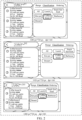
- the interface element 201 is a text "coffee", and a physical size of the interface element 201 presented in the reference application interface is set to be 5 cm*2 cm.
- the first adapted application interface is displayed on the first first screen.
- a reference resolution of the first first screen is 1920 px*720 px, and the dpi of the reference screen is 160.
- a physical size of an interface element 202 corresponding to the interface element 201 presented in the first adapted application interface is 5 cm*2 cm, that is, the same interface element has same physical size on two screens with different resolutions and with same dpi.
- a second adapted application interface displayed on a second first screen is 1280 px*720 px, and dpi of the reference screen is 320.
- a physical size of the interface element 203 corresponding to the interface element 201 presented in the second adapted application interface is 5 cm*2 cm, that is, the same interface element has same physical size on two screens with same resolutions and different dpi.
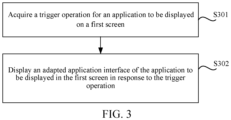
- a flow of the method for adjusting the interface layout is provided in the embodiments of this application.
- the flow of the method is executed by a computer device, which may be the terminal device 101 and/or the server 102 shown in FIG. 1 , and includes following steps.
- S301 Acquire a trigger operation for an application to be displayed on a first screen.
- interface elements related to different services are located at different service levels, and in adjusting physical sizes of the interface elements, it is only necessary to adjust the service levels associated with the interface elements without adjusting all of the service levels, thus improving flexibility of adjustment of the interface elements and coupling of application interfaces.
- the map application is divided into five service levels, namely, a notification layer 401, a branch layer 402, a mainline layer 403, a control layer 404 and a base map layer 405 from top to bottom.
- the branch layer 402 mainly bears temporarily occurring branch tasks.
- the branch tasks are usually a single task flow with an independent operation page, which can be evoked from any scenario, and exit a current branch page after the branch task is completed.
- the mainline layer 403 also called a function layer or a scenario layer, bears functions in different service scenarios.
- it can be a navigation function in a navigation scenario or a path planning function in a path planning scenario.
- the control layer 404 mainly bears an interacting function through controls.
- the control layer provides controls such as base map overview and base map zoom. In the navigation scenario, it provides navigation-related controls.
- the base map layer 405 mainly bears basic map information and guidance information, such as a road network, road conditions and navigation routes.
- the application to be displayed is subjected to service layering to obtain multiple independent service levels, which reduces service coupling. Therefore, in adjusting physical sizes of the interface elements, it is only necessary to adjust the service levels associated with the interface elements without adjusting all of the service levels, thus improving flexibility of adjustment of the interface elements.
- a clear procedure of service logic is improved, implementing of basic components on a technical level can be facilitated, and maintenance cost on the technical level can be reduced, thus achieving a purpose of reducing cost and increasing efficiency.
- the trigger operation can be an operation that can trigger displaying of the application to be displayed, for example, the trigger operation can be a click operation, a double click operation, a slide operation or the like.
- S302 Display an adapted application interface of the application to be displayed through the first screen in response to the trigger operation.
- the adapted application interface includes multiple interface elements, and for each of the multiple interface elements, a first physical size of the interface element presented in the adapted application interface is the same as a second physical size presented in a reference application interface.
- the first physical size of the interface element is determined based on an adapted virtual pixel size of the interface element in the adapted application interface and a first dot density of the first screen, and the adapted virtual pixel size is the same as a reference virtual pixel size of the interface element in the reference application interface.
- a first resolution (or alternatively, to-be-adapted resolution) of the first screen may be the same as or different from a reference resolution of the reference screen.
- a first dot density of the first screen may be the same as or different from a reference dot density of the reference screen.
- the interface elements may be text, images, videos, etc.
- Each of the first physical sizes is determined based on an adapted virtual pixel size of the interface element in the adapted application interface and a first dot density of the first screen, and the adapted virtual pixel size is the same as a reference virtual pixel size of the interface element in the reference application interface.
- the reference virtual pixel size of the interface element is obtained by substituting the pixel size of the interface element and the reference dot density of the reference application interface (or, of the reference screen) into the above formula (2).
- the first physical size of the interface element in the adapted application interface is determined by combining a relationship among the virtual pixel size, a pixel size and a dot density of the interface element, so as to ensure that a first physical size of each interface element in the adapted application interface presented in the adapted application interface is the same as a second physical size of a corresponding interface element correspondingly presented in the reference application interface, thereby facilitating the improvement of efficiency human-machine interaction in case of the uer switching between different devices.
- Step S302 the first physical size of each of the interface elements presented in the adapted application interface is determined in a following way.
- a corresponding adapted pixel size of the interface element in the adapted application interface is determined based on the adapted virtual pixel size of the interface element and the first dot density of the adapted application interface. Then, the first physical size of the interface element presented in the adapted application interface is determined based on the adapted pixel size of the interface element.
- a virtual pixel is also called a device-independent pixel. Because respective interface elements in the reference application interface are designed with the virtual pixel as a measuring unit, that is, a reference virtual pixel size of the interface element in the reference application interface determines the second physical size of the interface element presented in the reference application interface.
- the adapted virtual pixel size of the interface element in the adapted application interface needs to be the same as the reference virtual pixel size of the interface elements in the reference application interface.
- the corresponding adapted pixel size of the interface element in the adapted application interface can be obtained.
- the first physical size of the interface element presented in the adapted application interface can be obtained based on a physical size of a unit pixel and the adapted pixel size of the interface element.
- the reference application interface is displayed on the reference screen.
- a reference resolution of the reference screen is 1280 px*720 px, and dpi of the reference screen is 160, and the physical size of the unit pixel is 1/160*1/160 (in feet).
- the interface element 501 is a text "range”
- the reference virtual pixel size of the interface element 501 in the reference application interface is 10 dp* 10 dp
- the reference pixel size is 10 px * 10 px
- the second physical size of the interface element 501 presented in the reference application interface is 1/16* 1/16 (in feet).
- the adapted application interface is displayed on the first screen.
- the first resolution of the first screen is 1920 px*720 px
- dpi of the first screen is 160
- the physical size of the unit pixel is 1/160* 1/160 (in feet).
- the adapted virtual pixel size of the interface element 502 corresponding to the interface element 501 in the adapted application interface is the same as the reference virtual pixel size of the interface element 501, that is, 10 dp* 10 dp.
- the adapted pixel size of the interface element 502 is obtained to be 10 px* 10 px.
- the first physical size of the interface element in the adapted application interface is obtained to be 1/16* 1/16 (in feet) based on the physical size of the unit pixel (1/160*1/160) and the adapted pixel size (10 px* 10 px), that is, the first physical size of the interface element 501 presented in the adapted application interface is the same as the second physical size of the corresponding interface element 502 correspondingly presented in the reference application interface.
- the reference application interface is displayed on the reference screen.
- a reference resolution of the reference screen is 1280 px*720 px, and dpi of the reference screen is 160, and the physical size of the unit pixel is 1/160*1/160 (in feet).
- the interface element 501 is a text "range”
- the reference virtual pixel size of the interface element 501 in the reference application interface is 10 dp* 10 dp
- the reference pixel size is 10 px * 10 px
- the second physical size of the interface element 501 presented in the reference application interface is 1/16* 1/16 (in feet).
- the adapted application interface is displayed on the first screen.
- a reference resolution of the first screen is 1280 px*720 px
- dpi of the first screen is 320
- a physical size of each pixel is 1/320*1/320 (in feet).
- the adapted virtual pixel size of the interface element 503 corresponding to the interface element 501 in the adapted application interface is the same as the reference virtual pixel size of the interface element 501, that is, 10 dp* 10 dp.
- the adapted pixel size of the interface element 503 in the adapted application interface can be obtained to be 20 px*20 px.
- the first physical size of the interface element in the adapted application interface is obtained to be 1/16* 1/16 (in feet) based on the physical size of the unit pixel (1/320*1/320) and the adapted pixel size (20 px*20 px) of the interface element 503, that is, the first physical size of the interface element 501 presented in the adapted application interface is the same as the second physical size of the corresponding interface element 503 correspondingly presented in the reference application interface.
- the adapted virtual pixel size of the interface element is set as the corresponding reference virtual pixel size of the interface element in the reference application interface so as to ensure that the physical size of the interface element presented in the adapted application interface is the same as the physical size of the interface element presented in the reference application interface, and then a number of pixels occupied by the interface element is determined based on the adapted virtual pixel size of the interface element and the first dot density of the first screen. Then, the first physical size of the interface element presented in the adapted application interface is determined based on the number of pixels and the physical size of the unit pixel, thereby improving efficiency of adjusting the physical size of the interface element and facilitating human-machine interaction of the user when operating the device.
- one type is a screen with a large width such as a tablet computer screen and a car screen, and a screen width of this type of screen ranges from 600 dp to 1080 dp.
- the other type is a screen with a small width such as a mobile phone screen, a screen width of this type of screen ranges from 300 dp to 500 dp.
- content may be out of range horizontally or vertically.
- an original dot density of the first screen can be standardized to obtain the first dot density, so as to ensure that the reference application interface can be adapted to the first screen.
- the first dot density for the first screen is determined in the following ways.
- An effective width and effective height of the first screen are determined based on the first resolution of the first screen and an original screen density of the first screen. Then, a standardization direction of the first screen is determined based on a first difference degree between the effective width and a reference width of the reference screen and a second difference degree between the effective height and a reference height of the reference screen. An original pixel density of the first screen is adjusted to obtain the first dot density based on the standardization direction.
- the first resolution of the first screen involves a first width (or alternatively, to-be-adapted width) and a first height (or alternatively, to-be-adapted height).
- the first width represents a number of pixels of the first screen in a width direction and the first height represents a number of pixels of the first screen in a height direction.
- a ratio of the first width to the original screen density of the first screen is taken as the effective width, and a ratio of the first height of the first screen to the original screen density is taken as the effective height.
- the effective width and effective height of the first screen constitute the adapted virtual pixel size of the first screen.
- the first resolution of the first screen is set to be 1920 px*720 px and the original screen density to be 1, the first width of the first screen is 1920 px, a first height of the first screen is 720 px, the effective width of the first screen is 1920 dp and the effective height of the first screen is 720 dp.
- the first screen is standardized and adjusted, so that screens with different widths can be adapted to one reference application interface, thus avoiding resource waste caused by repeatedly designing the reference application interface, ensuring uniformity of physical sizes of interface elements displayed on different first screens, and thereby facilitating the human-machine interaction in case of the uer switching between different devices.
- a first difference degree is determined based on a ratio of the effective width to the reference width.
- a second difference degree is determined based on a ratio of the effective height to the reference height.
- the reference resolution of the reference screen involves a reference width and a reference height of the reference screen.
- the reference width represents a number of pixels of the reference screen in the width direction and the reference height represents a number of pixels of the first screen in the height direction. Since the reference screen density of the reference screen is 1 by default, the reference width of the reference screen is the same as the effective width of the reference screen and the reference height of the reference screen is the same as the effective height of the reference screen.
- the effective width and the effective height of the reference screen constitute the reference virtual pixel size of the reference screen.
- the first difference degree or the second difference degree is less than 1, it indicates that the first screen cannot be directly adapted to the reference application interface, and the first screen needs to be standardized in advance, that is, the standardization direction of the first screen is determined based on the first difference degree and the second difference degree, and the original pixel density of the first screen is adjusted based on the standardization direction to obtain the first dot density.
- first difference degree or the second difference degree is greater than 1, it indicates that the first screen can be directly adapted to the reference application interface, so there is no need to standardize the first screen.
- this application at least provides the following implementations.
- the height direction is taken as the standardization direction of the first screen. If the first difference degree is less than or equal to the second difference degree, the width direction is taken as the standardization direction of the first screen.
- the first screen it is determined whether the first screen can be adapted to the reference application interface based on a size relationship of the effective width of the first screen and the reference width of the reference screen and a size relationship between the effective height of the first screen and the reference height of the reference screen, and if not, a direction with a greater difference from the width direction and the length direction is selected as the standardization direction, so as to ensure that when the adapted application interface is displayed in the first screen, content is not out of range horizontally or vertically.
- the embodiments of this application at least provide the following implementations.
- a number of first pixels (or alternatively, to-be-adapted pixels) of the first screen in the standardization direction is determined based on the first resolution. Then, the original screen density is adjusted to obtain a first screen density based on the number of first pixels and a number of reference pixels corresponding to the reference screen in the standardization direction. Then, the original pixel density is adjusted to determine the first dot density based on the first screen density and the reference dot density of the reference screen.
- the first screen density and the first dot density There are many ways to determine the first screen density and the first dot density. For example, a ratio of the number of the first pixels to the number of reference pixels can be used as the first screen density. Then a product of the first screen density and the reference dot density is taken as the first dot density.
- the reference resolution of the reference screen is set to be 1280 px*720 px, the dpi of the reference screen to be 160, and the reference screen density of the reference screen to be 1.
- the first resolution of the first screen is 3200 px* 1440 px, the dpi of the first screen is 480, and the original screen density of the first screen is 3.
- the ratio of the first width to the original screen density of the first screen is calculated to obtain the effective width of the first screen to be 1066 dp.
- the ratio of the first height to the original screen density of the first screen is calculated to obtain the effective height of the first screen to be 480 dp.
- a ratio of the effective width of the first screen to the reference width of the reference screen is calculated to obtain a first difference degree to be 0.833.
- a ratio of the effective height of the first screen to the reference height of the reference screen is calculated to obtain a second difference degree to be 0.667. Since both the first difference degree and the second difference degree are less than 1, it is necessary to standardize the first screen. Since the first difference degree is greater than the second difference degree, the height direction is taken as the standardization direction.
- a ratio of the number of the first pixels in the height direction of the first screen to the number of reference pixels of the reference screen in the height direction is calculated to obtain the first screen density to be 2.
- the product of the first screen density and the reference dot density is calculated to obtain the first dot density of the first screen to be 320.
- an effective width of the adjusted first screen is 1600 dp
- an effective height of the adjusted first screen is 720 dp. Accordingly, after the adjusted first difference degree and second difference degree are calculated based on the adjusted effective width and effective height, in this case, the adjusted first difference degree and second difference degree are both greater than 1, that is, the first screen in this case can be adapted to the reference application interface to obtain an adapted application interface.
- the first screen is standardized and adjusted, so that screens with different widths can be adapted to one reference application interface, thus avoiding resource waste caused by repeatedly designing the reference application interface, ensuring uniformity of physical sizes of interface elements displayed on different first screens, and improving the efficiency of human-machines interaction for users.
- the adapted application interface further includes multiple adapted information guidance areas, and each of the adapted information guidance areas is used to display interface elements associated with a type of guidance information.
- a physical width of the adapted information guidance area presented in the adapted application interface is determined according to an initial pixel size of the adapted information guidance area and the first width of the first screen.
- the initial pixel size of the adapted information guidance area is determined based on a reference virtual pixel size of a corresponding reference information guidance area in the reference application interface and the first dot density.
- Physical heights of the adapted information guidance areas presented in the adapted application interface and an adapted number of interface elements respectively displayed in the multiple adapted information guidance areas are determined according to the initial pixel size of the adapted information guidance area and the first height of the first screen.
- the application interface can be divided into multiple functional areas in advance according to functional modules.
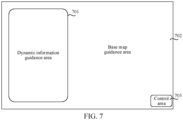
- the functional areas refer to information containers that bear the interface elements in the application interface, and the multiple functional areas include a control area and multiple information guidance areas, and the multiple information guidance areas include a dynamic information guidance area and a base map guidance area. Positions of multiple functional areas in the application interface can be set according to actual situation.
- the application interface includes a dynamic information guidance area 701, a base map guidance area 702 and a control area 703.
- respective reference functional areas in the reference application interface is adjusted in a same way to obtain respective adapted functional areas in the adapted application interface corresponding to the initial pixel size.
- the adapted functional area includes the adapted information guidance areas, an adapted control area and so on.
- An initial pixel size of the adapted functional area is determined based on a reference virtual pixel size of the reference functional area and the first dot density of the first screen. Then, the initial pixel size of the adapted functional area is dynamically adjusted to obtain a final adapted functional area in the adapted application interface.
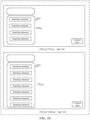
- a height adjustment value of the initial pixel height and the adjustable number of elements of the adapted information guidance area are both 0.
- the height adjustment value of the initial pixel height and the adjustable number of elements of the adapted information guidance area are both 0.
- the height adjustment value is added to the initial pixel height of the adapted information guidance area to determine the final pixel height of this adapted information guidance area in the adapted application interface, and then the final pixel height of the adapted information guidance area is multiplied with the physical height of the unit pixel to obtain the presented physical height of the adapted information guidance area.
- the adjustable number of elements is added to the reference number of interface elements of the reference information guidance area displayed in the reference application interface, and an adapted number of interface elements of this information guidance area displayed in the adapted application interface is determined.
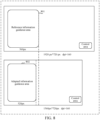
- the first resolution of the first screen is set to be 1920 px* 1080 px, the dpi of the first screen to be 160. Since the first dot density is the same as the reference dot density, the initial pixel height of the adapted information guidance area 1002 is the same as a reference pixel height of the reference information guidance area 1001.
- the display state information of the reference information guidance area 1001 indicates that the reference information guidance area 1001 does not display all of the interface elements
- the adapted information guidance area 1002 with the initial pixel height can be displayed for the first height of the adapted application interface, and there is an extra blank area available for displaying the adapted information guidance area
- the height adjustment value of the initial pixel height is determined to be 300 px and the adjustable number of elements of the adapted information guidance area to be 3.
- the height adjustment value is added to the initial pixel height of the adapted information guidance area 1002 to determine the final pixel height of the adapted information guidance area in the adapted application interface 1002 to be 700 px, and then the final pixel height of the adapted information guidance area is multiplied with the physical height of the unit pixel to obtain the presented physical height of the adapted information guidance area 1002.
- the adjustable number of elements is added to the reference number of the interface elements of the reference information guidance area 1001 displayed in the reference application interface, and an adapted number of interface elements of the adapted information guidance area 1002 displayed in the adapted application interface is determined to be 7. When up-down adaptation is performed and the adapted information guidance area 1002 is displayed, a spacing between the interface elements in the height direction may not change and the information container may vary with the height to increase displayed content.
- up-down height adaptation is performed on the adapted information guidance area presented in the adapted application interface, so that a number of interface elements displayed in the adapted information guidance area can be accordingly adjusted according to the first height of the first screen, and thus a space of the adapted application interface can be fully utilized, which not only avoids space waste, but also ensures the improvement of the efficiency of human-machines interaction for users.
- the adapted application interface further includes an adapted control area for displaying interface elements associated with operation controls, and the multiple adapted information guidance areas include an adapted dynamic information guidance area.
- a final display position of the adapted control area in the adapted application interface is determined based on a pixel size of the blank area, and the blank area is a blank area between a lower boundary of the adapted dynamic information guidance area and a lower boundary of the adapted application interface.
- the initial pixel size of the adapted control area can be determined based on a reference virtual pixel size of a reference control area and the first dot density of the first screen.
- the initial pixel size of the adapted control area can directly serve as the adapted pixel size of the adapted control area for displaying, or the adapted pixel size of the adapted control area can be determined in a similar way to that of determining the adapted pixel size of the adapted information guidance area.
- the physical size of the adapted control area presented in the adapted application interface is determined based on the initial pixel size of the adapted control area and the physical size of the unit pixel.
- the adapted control area is located in the control layer among various service levels of the application to be displayed, and the final display position of the adapted control area in the adapted application interface is in the control layer and determined based on the pixel size of the blank area between the lower boundary of the adapted dynamic information guidance area and the lower boundary of the adapted application interface.
- the reference dynamic information guidance area is generally displayed at a leftmost side, and the reference control area is generally displayed on a right side of the reference dynamic information guidance area.
- a left side of the reference application interface is proximate to a driver, which is a golden area for operation and display. Therefore, in a process of interface adaptation, if there is still a blank area on the left side of the adapted application interface after displaying the adapted dynamic information guidance area, the adapted control area can be moved below the adapted dynamic information guidance area for displaying, which can make good use of the golden area in the adapted application interface and facilitate the driver's operations.
- the blank area is taken as the final display position of the adapted control area in the adapted application interface. If the pixel size of the blank area is less than or equal to the preset threshold, the final display position of the adapted control area in the adapted application interface is determined based on a display position relationship between the reference dynamic information guidance area and the reference control area in the reference application interface and the display position of the adapted dynamic information guidance area in the adapted application interface.
- the pixel size of the blank area when the pixel size of the blank area is larger than the preset threshold, it indicates that the blank area between the lower boundary of the adapted dynamic information guidance area and the lower boundary of the adapted application interface can also display the adapted control area, and thus this blank area is taken as the final display position of the adapted control area in the adapted application interface.
- the pixel size of the blank area is less than or equal to the preset threshold, it indicates that the blank area between the lower boundary of the adapted dynamic information guidance area and the lower boundary of the adapted application interface cannot display the adapted control area, then a display position relationship between the adapted dynamic information guidance area and the adapted control area in the adapted application interface is determined based on the display position relationship between the reference dynamic information guidance area and the reference control area in the reference application interface, and then the final display position of the adapted control area in the adapted application interface is determined based on the display position relationship between the adapted dynamic information guidance area and the adapted control area in the adapted application interface and the display position of the adapted dynamic information guidance area in the adapted application interface.
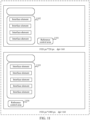
- the reference resolution of the reference screen is set to 1920 px*720 px, the dpi of the reference screen is 160, and the reference control area 1101 is located in a lower right corner of the reference dynamic information guidance area 1102.
- the first resolution of the first screen is 1920 px* 1080 px, and the dpi of the first screen is 160.
- the adapted control area 1104 is displayed below the adapted dynamic information guidance area 1103.
- the adapted control area 1104 is displayed in a lower right corner of the adapted dynamic information guidance area 1103.
- the display position of the adapted control area in the adapted application interface is dynamically adjusted, and control of interface details is increased in terms of individual differences of the screen, so that the space of the application interface is more reasonably utilized, and convenience of operation is also improved.
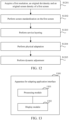
- a flow of this method can be executed by the terminal device 101 shown in FIG. 1 , or executed by the server 102, or interactively executed by the terminal device 101 and the server 102.
- the method includes following steps, as shown in FIG. 12 :
- an effective width and effective height of the first screen are determined based on the first resolution of the first screen and the original screen density of the first screen.
- a ratio of the effective width to the reference width is taken as the first difference degree.
- a ratio of the effective height to the reference height is taken as the second difference degree.
- both the first difference degree and the second difference degree is greater than 1, there is no need to perform screen standardization on the first screen, and the original dot density of the first screen is directly taken as the first dot density.
- screen standardization is required for the first screen.
- a process of screen standardization for the first screen is as follows: If the first difference degree is greater than the second difference degree, the height direction is taken as the standardization direction of the first screen. If the first difference degree is less than or equal to the second difference degree, the width direction is taken as the standardization direction of the first screen. A number of first pixels of the first screen in the standardization direction is determined based on the first resolution of the first screen. A ratio of the number of the first pixels to the number of reference pixels of the reference screen in the standardization direction is taken as the first screen density. Then a product of the first screen density and the reference dot density of the reference screen is taken as the first dot density.
- the application to be displayed is divided into multiple service levels, the multiple independent service levels include a notification layer, a branch layer, a mainline layer, a control layer and a base map layer, and each service level bears a different service function, with jumping logic and public relations among the service levels being preset.
- the reference virtual pixel size of the interface element can be taken as the adapted virtual pixel size of the interface element in the adapted application interface, and then the adapted pixel size of the interface element in the adapted application interface can be determined based on the adapted virtual pixel size of the interface element and the first dot density of the first screen.
- the physical size of the interface element presented in the adapted application interface is determined based on the adapted pixel size of the interface element and the physical size of the unit pixel in the first screen. In this case, the physical size of the interface element presented in the adapted application interface is the same as the physical size of the interface element presented in the reference application interface.
- the functional area refers to an information container bearing interface elements in the application interface, and one functional area includes one or more interface elements, and the functional area can be an information guidance area, a control area or the like.
- the reference virtual pixel size of the reference information guidance area is taken as an adapted virtual pixel size of a corresponding adapted information guidance area in the adapted application interface, and then the initial pixel size of the adapted information guidance area in the adapted application interface is determined based on the adapted virtual pixel size of the adapted information guidance area and the first dot density of the first screen.
- a method of physical adaptation for other functional areas is the same as the method of physical adaptation for the information guidance area, which is not repeatedly described here again.
- the adapted functional area includes the adapted information guidance area and the adapted control area.
- the initial pixel width and the initial pixel height of the adapted information guidance area are determined based on the initial pixel size.
- a width adjustment range of the adapted information guidance area is determined based on the reference width of the reference screen, the reference dot density of the reference screen and the first dot density of the first screen.
- the initial pixel width is adjusted based on the first width and the width adjustment range of the first screen to obtain the final pixel width of the adapted information guidance area.
- the height adjustment value of the initial pixel height and the adjustable number of elements of the adapted information guidance area are determined based on the first height of the first screen and the display state information of the reference information guidance area.
- the final pixel height of the adapted information guidance area is determined based on the height adjustment value and the initial pixel height. Then, the adapted pixel size of the adapted information guidance area is obtained based on the final pixel width and the final pixel height of the adapted information guidance area.
- the physical size of the adapted information guidance area presented in the adapted application interface is determined based on the adapted pixel size of the adapted information guidance area and the physical size of the unit pixel in the first screen. In this case, because the adapted pixel size of the adapted information guidance area and the initial pixel size of the adapted information guidance area may be different, the physical size of the adapted information guidance area presented in the adapted application interface may also be different from the physical size of the adapted information guidance area presented in the reference application interface.
- the adjustable number of elements of the adapted information guidance area is determined based on the first height of the first screen and the display state information of the reference information guidance area. Then, the adapted number of interface elements of the adapted information guidance area displayed in the adapted application interface is determined based on the adjustable number of elements and the reference number of interface elements of the reference information guidance area displayed in the reference application interface, and interface elements of the adapted number are displayed in the adapted information guidance area.
- the adapted control area After determining the adapted pixel size of the adapted control area in the same way as determining the adapted pixel size of the adapted information guidance area as described above, if a pixel size of a blank area between a lower boundary of the adapted dynamic information guidance area at a leftmost side of the first screen and a lower boundary of the adapted application interface is greater than the preset threshold, the adapted control area is displayed below the adapted dynamic information guidance area.
- the adapted control area In dynamically adjusting the adapted control area, only the pixel size of the adapted control area, an information container, is adjusted, but the pixel size of the interface element in the adapted control area is not adjusted. Since the adapted control area is located in the control layer 403 among various service levels shown in FIG. 4 , in dynamically adjusting the adapted control area, it is only necessary to adjust the adapted control area in the control layer 403 without adjusting other service layers.
- the apparatus 1300 includes:
- processing module 1301 is further configured to:
- processing module 1301 is further configured to:
- the adapted application interface further includes multiple adapted information guidance areas, and each of the adapted information guidance areas is used to display interface elements associated with a type of guidance information;
- processing module 1301 is further configured to:
- processing module 1301 is further configured to:
- processing module 1301 is further configured to:
- processing module 1301 is further configured to:
- the adapted application interface further includes an adapted control area for displaying interface elements associated with operation controls, and the multiple adapted information guidance areas include an adapted dynamic information guidance area; and a final display position of the adapted control area in the adapted application interface is determined based on a pixel size of the blank area, and the blank area is between a lower boundary of the adapted dynamic information guidance area and a lower boundary of the adapted application interface.
- processing module 1301 is further configured to:
- the application includes multiple independent service levels, and the multiple independent service levels include a notification layer, a branch layer, a mainline layer, a control layer and a base map layer.
- the multiple adapted information guidance areas are located at the mainline layer;
- the adapted control area is located at the control layer; the final display position of the adapted control area in the adapted application interface is determined in the control layer based on the pixel size of the blank area, and the blank area is between the lower boundary of the adapted dynamic information guidance area and the lower boundary of the adapted application interface.
- the first physical size of the interface element in the adapted application interface is determined by combining a relationship among the virtual pixel size, a pixel size and a dot density of the interface element, so as to ensure that a first physical size of each interface element in the adapted application interface presented in the adapted application interface is the same as a second physical size of a corresponding interface element correspondingly presented in the reference application interface, thereby improving the efficiency of human-machines interaction for users.
- a computer device which can be the terminal device and/or the server as shown in FIG. 1 , and as shown in FIG. 14 , includes at least one processor 1401 and a memory 1402 connected with the at least one processor.
- a specific connection medium between the processor 1401 and the memory 1402 is not limited in the embodiments of this application, and a bus connection between the processor 1401 and the memory 1402 is taken as an example in FIG. 14 .
- the bus may be classified as an address bus, a data bus, a control bus, or the like.
- the memory 1402 stores instructions that can be executed by the at least one processor 1401, and the at least one processor 1401 can execute the steps of the method for adapting the application interface by executing the instructions stored in the memory 1402.
- the processor 1401 is a control center of computer device, which can connect various parts of computer device with various interfaces and lines, and realize application interface adaptation by running or executing instructions stored in the memory 1402 and calling data stored in memory 1402.
- the processor 1401 may include one or more processing units.
- the processor 1401 may integrate an application processor and a modem processor.
- the application processor mainly processes an operating system, a user interface, an application program, and the like.
- the modem processor mainly processes wireless communication. It is to be understood that the modem described above may either not be integrated into the processor 1401.
- the processor 1401 and the memory 1402 can be implemented on a same chip, and in some embodiments, they can also be implemented separately on independent chips.
- the processor 1401 may be a general-purpose processor, such as a central processing unit (CPU), a digital signal processor, an application specific integrated circuit (ASIC), a field programmable gate array or other programmable logic device, a discrete gate or transistor logic device, and a discrete hardware component, and may implement or execute the methods, steps and logic block diagrams disclosed in the embodiments of this application.
- the general-purpose processor may be a microprocessor or any conventional processor, or the like. The steps of the methods disclosed with reference to the embodiments of this application may be directly performed and completed by a hardware processor, or may be performed and completed by using a combination of hardware and software modules in the processor.
- the memory 1402 can be used to store nonvolatile software programs, nonvolatile computer-executable programs and modules.
- the memory 1402 may include at least one type of storage media, and for example may include a flash memory, a hard disk, a multimedia card, a card memory, a Random Access Memory (RAM), a Static Random Access Memory (SRAM), a Programmable Read Only Memory (PROM), a Read Only Memory (ROM), an electrically erasable programmable read-only memory (EEPROM), a magnetic memory, a magnetic disk, an optical disk and so on.
- RAM Random Access Memory
- SRAM Static Random Access Memory
- PROM Programmable Read Only Memory
- ROM Read Only Memory
- EEPROM electrically erasable programmable read-only memory
- the memory 1402 is any other medium that can be used to carry or store desired program codes in a form of instructions or data structures and can be accessed by the computer devices, but is not limited thereto.
- the memory 1402 in the embodiments of this application can also be a circuit or any other device that can realize the storage function, and is used for storing program instructions and/or data.
- a computer-readable storage medium is provided in an embodiment of this application with a computer program executable by a computer device stored, which, when executed on the computer device, causes the computer device to execute steps of the method for adapting the application interface described above.
- a computer program product is provided in the embodiments of this application, which includes a computer program stored on a computer-readable storage medium, and the computer program includes program instructions, which, when executed by a computer device, cause the computer device to perform steps of the method for adapting the application interface described above.
- this application may be provided as a method, or a computer program product. Therefore, this application may use a form of hardware-only embodiments, software-only embodiments, or embodiments combining software and hardware. Moreover, this application may use a form of a computer program product that is implemented on one or more computer-usable storage media (including but not limited to a disk memory, a CD-ROM, an optical memory, and the like) that include computer-usable program code.
- a computer-usable storage media including but not limited to a disk memory, a CD-ROM, an optical memory, and the like
- These computer program instructions may alternatively be stored in a computer-readable memory that can instruct a computer or another programmable data processing device to operate in a specific manner, so that the instructions stored in the computer-readable memory generate an artifact that includes an instruction apparatus.
- the instruction apparatus implements a specific function in one or more procedures in the flowcharts and/or in one or more blocks in the block diagrams.
- These computer program instructions may further be loaded onto a computer or another programmable data processing device, so that a series of operations and steps are performed on the computer or other programmable device, thereby generating computer-implemented processing. Therefore, the instructions executed on the computer or other programmable device provide steps for implementing a specific function in one or more procedures in the flowcharts and/or in one or more blocks in the block diagrams.
Landscapes
- Engineering & Computer Science (AREA)
- Theoretical Computer Science (AREA)
- General Engineering & Computer Science (AREA)
- Human Computer Interaction (AREA)
- Physics & Mathematics (AREA)
- General Physics & Mathematics (AREA)
- Software Systems (AREA)
- User Interface Of Digital Computer (AREA)
- Digital Computer Display Output (AREA)
Abstract
Description
- This application claims priority to
Chinese Patent Application No. 202210207998.7, entitled "METHOD AND APPARATUS FOR ADJUSTING INTERFACE LAYOUT, DEVICE, AND STORAGE MEDIUM" filed in China National Intellectual Property Administration, March 04, 2022 - Embodiments of this application relate to the field of front-end technology, and in particular, to a method and an apparatus for adjusting an interface layout, and a device, and a storage medium.
- With development of terminal devices, demand for the terminal devices is increasing. In order to meet different requirements, various applications can be installed on the terminal devices. An interface layout of an application greatly affects use experience of an object on the application.
- In related art, a reference application interface of an application generally corresponds to a reference resolution of a reference screen, for example, 1280 px*720 px, and to-be-adapted resolutions corresponding to to-be-adapted screens of different terminal devices may be different. Therefore, in order to adapt to the different terminal devices, in related art, physical sizes of interface elements presented in the reference application interface are adjusted correspondingly based on proportional relationships between the reference resolution and respective different to-be-adapted resolutions, so as to obtain adapted application interfaces displayed on the different terminal devices.
- Because to-be-adapted resolutions corresponding to the different terminal devices are different, proportional relationships between the different to-be-adapted resolutions and the reference resolution are also different. Therefore, the adapted application interfaces obtained by adjusting the physical sizes of the interface elements in the same reference application interface using the different proportional relationships are also different, that is, the physical sizes of the interface elements in the adapted application interfaces presented on the different terminal devices are different, which further affects efficiency of human-machine interaction for users.
- A method and an apparatus for adjusting an interface layout, and a device, and a storage medium are provided in embodiments of this application, for improving efficiency of human-machine interaction for a user.
- In an aspect, a method for adjusting an interface layout is provided in the embodiments of this application, which is performed by a computer device and includes:
- acquiring a trigger operation for displaying the application interface on a first screen, the application interface comprising an interface element having a first pixel size when displayed on the first screen;
- determining a referece virtual pixel size of the interface element when displayed in a reference application interface on a reference screen, with a second pixel size of the interface element when displayed on the reference screen and a reference dot density of the reference screen;
- setting a first virtual pixel size of the interface element to be equal to the reference virtual pixel size;
- calculating the first pixel size of the interface element when displayed on the first screen from the first virtual pixel size as determined and a first dot density of the first screen; and
- adapting the application interface on the first screen according to the calculated first pixel size of the interface element, for display on the first screen.
- In another aspect, an apparatus for adapting an application interface is provided in an embodiment of this application, which is deployed on a computer device and includes:
- a processing module, configured to acquire a trigger operation for displaying the application interface on a first screen, the application interface comprising an interface element having a first pixel size when displayed on the first screen; determine a referece virtual pixel size of the interface element when displayed in a reference application interface on a reference screen, with a second pixel size of the interface element when displayed on the reference screen and a reference dot density of the reference screen; set a first virtual pixel size of the interface element to be equal to the reference virtual pixel size; calculate the first pixel size of the interface element when displayed on the first screen from the first virtual pixel size as determined and a first dot density of the first screen; and
- a display module, configured to adapt the application interface on the first screen according to the calculated first pixel size of the interface element, for display on the first screen.
- In an aspect, a computer device is provided in an embodiment of this application, which includes a memory, a processor, and a computer program stored in the memory and that can be run in the processor, and the processor implements steps of the method for adapting the application interface described above when executing the program.
- In an aspect, a computer-readable storage medium is provided in an embodiment of this application with a computer program executable by a computer device stored, which, when executed on the computer device, causes the computer device to execute steps of the method for adapting the application interface described above.
- In an aspect, a computer program product is provided in the embodiments of this application, which includes a computer program stored on a computer-readable storage medium, and the computer program includes program instructions, which, when executed by a computer device, cause the computer device to perform steps of the method for adapting the application interface described above.
- In the embodiments of this application, with a reference of the reference virtual pixel size of the interface element being equal to the adapted virtual pixel size of the interface element, the first physical size of the interface element in the adapted application interface is determined by combining a relationship among the virtual pixel size, a pixel size and a dot density of the interface element, so as to ensure that a first physical size of each interface element in the adapted application interface presented in the adapted application interface is the same as a second physical size of a corresponding interface element correspondingly presented in the reference application interface, thereby facilitating the human-machine interaction in case of the uer switching between different devices. Secondly, by standardizing the first screen, a set of reference application interfaces can meet adaptation requirements of different screens such as those in cars, tablets and mobile phones, and avoid resource waste caused by repeated design of the reference application interfaces. In addition, after physical adaptation of an information guidance area and a control area in the application interface, the information guidance area and the control area are further dynamically adjusted (including left-right adapted and up-down adapted). Meanwhile, a displaying position of the control area in the application interface is adjusted, which increases control of details and makes more reasonable use of space of the application interface.
- To describe the technical solutions of the embodiments of this application more clearly, the following briefly introduces the accompanying drawings required for describing the embodiments. Apparently, the accompanying drawings in the following description show only some embodiments of this application, and a person of ordinary skill in the art may still derive other drawings from these accompanying drawings without creative efforts.
-
FIG. 1 is a schematic diagram of a system architecture according to an embodiment of this application. -
FIG. 2 is a schematic diagram of an application scenario according to an embodiment of this application. -
FIG. 3 is a schematic flowchart of a method for adapting an application interface according to an embodiment of this application. -
FIG. 4 is a schematic diagram of a service layering according to an embodiment of this application. -
FIG. 5 is a schematic diagram of a reference application interface and an adapted application interface according to an embodiment of this application. -
FIG. 6 is another schematic diagram of a reference application interface and an adapted application interface according to an embodiment of this application. -
FIG. 7 is a schematic diagram of a function area according to an embodiment of the present application. -
FIG. 8 is yet another schematic diagram of a reference application interface and an adapted application interface according to an embodiment of this application. -
FIG. 9 is still another schematic diagram of a reference application interface and an adapted application interface according to an embodiment of this application. -
FIG. 10 is still another schematic diagram of a reference application interface and an adapted application interface according to an embodiment of this application. -
FIG. 11 is still another schematic diagram of a reference application interface and an adapted application interface according to an embodiment of this application. -
FIG. 12 is a schematic flowchart of a method for adapting an application interface according to an embodiment of this application. -
FIG. 13 is a schematic structural diagram of an apparatus for adapting an application interface according to an embodiment of this application. -
FIG. 14 is a schematic structural diagram of a computer device according to an embodiment of this application. - To make the objectives, technical solutions, and beneficial effects of this application clearer, the following further describes this application in detail with reference to the accompanying drawings and the embodiments. It is to be understood that the specific embodiments described herein are merely used to explain this application but are not intended to limit this application.
- To facilitate understanding, the following explains terms involved in the embodiments of this application.
- Application interface: it can also be called a User Interface (UI), which is a medium for interaction and information exchange between the system and users, with a purpose of enabling the users to operate hardware conveniently and efficiently to achieve two-way interaction and complete work desired to accomplish with aid of hardware.
- dpi: dot per inch, namely a number of dots per inch, also known as a dot density, which is a measure unit of a resolution of a printer, a mouse or other devices, that is, pixel per inch. A calculation formula of dpi is as shown as formula (1) in the following:

- where X and Y represent a width and a height in a screen resolution, respectively, and C represents a diagonal length of the screen in feet.
- ppi: point per pnch, a number of pixels per foot, that is, the pixel density.
- density: which refers to a screen density, and density = dpi of a screen /160.
- dp: which is a virtual pixel unit, 1 dp refers to 1 pixel on a screen with dpi of 160, 2 pixels on a screen with dpi of 320 and 3 pixels on a screen with dpi of 480.
- A relationship between the pixel size of an interface element, a virtual pixel size and a dot density of the screen is shown in the following formula (2):

- Pixel size: which refers to a size characterized by a number of occupied pixels. For example, if an interface element in the application interface occupies 3 pixels in a width direction and 3 pixels in a height direction, a pixel size of the interface element is 3 px*3 px.
- Physical size: which refers a size measured by a physical method, which is a visible size. For example, by physically measuring an interface element displayed on the screen, a physical size of the interface element is obtained as: 0. lft*0. 1ft.
- Design concept of the embodiments of this application is introduced below.
- In related art, a reference application interface of an application generally corresponds to a reference resolution of a reference screen, for example, 1280 px*720 px, and to-be-adapted resolutions corresponding to to-be-adapted screens of different terminal devices may be different. Therefore, in order to adapt to the different terminal devices, in related art, physical sizes of interface elements presented in the reference application interface are adjusted correspondingly based on proportional relationships between the reference resolution and respective different to-be-adapted resolutions, so as to obtain adapted application interfaces displayed on the different terminal devices.
- Because to-be-adapted resolutions corresponding to the different terminal devices are different, proportional relationships between the different to-be-adapted resolutions and the reference resolution are also different. Therefore, the adapted application interfaces obtained by adjusting the physical sizes of the interface elements in the same reference application interface using the different proportional relationships are also different, that is, the physical sizes of the interface elements in the adapted application interfaces presented on the different terminal devices are different, which further affects efficiency of human-machine interaction for users.
- Considering that a to-be-adapted screen often corresponds to two properties, namely, a to-be-adapted resolution and a to-be-adapted dot density. When the adapted application interface is displayed with the to-be-adapted screen, physical sizes of interface elements in the adapted application interface are not only related to the to-be-adapted resolution, but also related to the to-be-adapted dot density. Therefore, it is necessary to adjust the physical sizes of the interface elements in combination with association between the to-be-adapted resolution and a reference resolution and association between the to-be-adapted dot density and a reference dot density, so as to ensure that physical sizes of the interface elements presented in the adapted application interface are the same as those of the interface elements correspondingly presented in the reference application interface, and further realize an effect that physical sizes of the interface elements in the adapted application interfaces presented on different terminal devices are the same.
- In order to further simplify a process of adjusting physical sizes of the interface elements, a virtual pixel size is obtained based on two parameters, namely, a resolution and a dot density. For example, a reference virtual pixel size of the interface element when displayed on a reference screen is calculated from a pixel size of the interface element when displayed on the reference screen and a dot density of the reference screen. Then, for each interface element, with a reference virtual pixel size of the interface element being equal to an a first virtual pixel size (or alternatively, adapted virtual pixel size) of the interface element, a physical size of the interface element of the reference application interface is adjusted to obtain the adapted application interface, so as to realize that physical sizes of the interface elements presented in the adapted application interface are the same as those of the interface elements correspondingly presented in the reference application interface.
- Based on above concept, a method for adapting an application interface of an application is provided in an embodiment of this application. The method includes: acquiring a trigger operation for an application to be displayed on a first screen; and displaying an adapted application interface of the application to be displayed through the first screen in response to the trigger operation, the adapted application interface including multiple interface elements, and for each of the multiple interface elements, a first physical size of the interface element presented in the adapted application interface being the same as a second physical size presented in a reference application interface; and the first physical size of the interface element being determined based on an adapted virtual pixel size of the interface element in the adapted application interface and a first dot density of the first screen, and the adapted virtual pixel size being the same as a reference virtual pixel size of the interface element in the reference application interface.
- In the embodiments of this application, with a reference of the reference virtual pixel size of the interface element being equal to the adapted virtual pixel size of the interface element, the first physical size of the interface element in the adapted application interface is determined by combining a relationship among the virtual pixel size, a pixel size and a dot density of the interface element, so as to ensure that a first physical size of each interface element in the adapted application interface presented in the adapted application interface is the same as a second physical size of a corresponding interface element correspondingly presented in the reference application interface, so that the interface elements in the adapted application interface presented on different terminal devices has the same physical size, thereby facilitating the human-machine interaction in case of the user switching between different devices. For example, the interface element can be displayed with a suitable size for touch of the user even if it is displayed on a high-dpi screen.
- Referring to
FIG. 1 , which is a diagram of a system architecture in which the embodiments of this application is applicable. The system architecture includes at least aterminal device 101 and aserver 102. There may be one or moreterminal devices 101. There also may be one ormore servers 102. Numbers ofterminal devices 101 andservers 102 are not limited in this application. - An application to be displayed is pre-installed in the
terminal device 101. The application to be displayed can be a client application, a web version application, an applet application, or the like in type. The application to be displayed can be, for example, a map application, a car networking application, an instant messaging application, a shopping application, etc. Theterminal device 101 may be a smart phone, a tablet computer, a notebook computer, a desktop computer, a smart home appliance, an intelligent voice interaction device, an intelligent vehicle-mounted device, etc., which is not limited thereto. - The
server 102 is a back-end server of the application to be displayed. Theserver 102 can be an independent physical server, can be a server cluster or a distributed system composed of multiple physical servers, or can also be a cloud server providing basic cloud computing services such as cloud service, cloud database, cloud computing, cloud function, cloud storage, network service, cloud communication, middleware service, domain name service, security service, Content Delivery Network (CDN), big data and artificial intelligence platform. Theterminal device 101 and theserver 102 can be directly or indirectly connected by wired or wireless communication, which is not limited in this application. - The method for adjusting the interface layout in the embodiments of this application may be executed by the
terminal device 101, theserver 102, or interactively executed by theterminal device 101 and theserver 102. - For example, an example in which the method for adjusting the interface layout in the embodiments of this application is executed by the
terminal device 101 is taken for illustration, the method includes following steps. - The application to be displayed is pre-installed in the
terminal device 101, and theterminal device 101 acquires a trigger operation for an application to be displayed on a first screen and displays an adapted application interface of the application to be displayed through the first screen in response to the trigger operation. The adapted application interface includes multiple interface elements, and for each of the multiple interface elements, a first physical size of the interface element presented in the adapted application interface is the same as a second physical size presented in a reference application interface. The first physical size of the interface element is determined based on an adapted virtual pixel size of the interface element in the adapted application interface and a first dot density of the first screen, and the adapted virtual pixel size is the same as a reference virtual pixel size of the interface element in the reference application interface. - In practical applications, the method for adjusting the interface layout in the embodiments of this application can be applied to interface layout adjustment of a map application, a car networking application, an instant messaging application, a shopping application and other applications.
- Taking the map application as an example and as shown in
FIG. 2 , the reference application interface is displayed on the reference screen. A reference resolution of the reference screen is 1280 px*720 px, and dpi of the reference screen is 160. Taking an interface element 201 as an example, the interface element 201 is a text "coffee", and a physical size of the interface element 201 presented in the reference application interface is set to be 5 cm*2 cm. - The first adapted application interface is displayed on the first first screen. A reference resolution of the first first screen is 1920 px*720 px, and the dpi of the reference screen is 160. In this case, a physical size of an
interface element 202 corresponding to the interface element 201 presented in the first adapted application interface is 5 cm*2 cm, that is, the same interface element has same physical size on two screens with different resolutions and with same dpi. - A second adapted application interface displayed on a second first screen. A reference resolution of the second first screen is 1280 px*720 px, and dpi of the reference screen is 320. In this case, a physical size of the
interface element 203 corresponding to the interface element 201 presented in the second adapted application interface is 5 cm*2 cm, that is, the same interface element has same physical size on two screens with same resolutions and different dpi. - It is to be understood that in scenario description of the above embodiment, only the interface element 201 in the reference application interface is taken as an example, and other interface elements can be adjusted in a same way as the interface element 201. In addition, the physical size of the same interface element on two screens with different resolutions and dpi is also the same, which is not repeatedly described here again.
- Based on the system architecture diagram shown in
FIG. 1 , a flow of the method for adjusting the interface layout is provided in the embodiments of this application. As shown inFIG. 3 , the flow of the method is executed by a computer device, which may be theterminal device 101 and/or theserver 102 shown inFIG. 1 , and includes following steps. - S301: Acquire a trigger operation for an application to be displayed on a first screen.
- In the embodiments of this application, the application to be displayed can be a map application, a car networking application, an instant messaging application, a shopping application, etc. In some embodiments, in order to bear services and reduce page coupling of the application to be displayed, the application to be displayed is divided into multiple service levels in the embodiments of this application, that is, the application to be displayed includes multiple independent service levels, which include a notification layer, a branch layer, a mainline layer, a control layer and a base map layer, and each service level bears a different service function, with jumping logic and public relations among the service levels being preset.
- In the embodiments of this application, interface elements related to different services are located at different service levels, and in adjusting physical sizes of the interface elements, it is only necessary to adjust the service levels associated with the interface elements without adjusting all of the service levels, thus improving flexibility of adjustment of the interface elements and coupling of application interfaces.
- Taking the application to be displayed as a map application as an example and as shown in
FIG. 4 , the map application is divided into five service levels, namely, anotification layer 401, abranch layer 402, amainline layer 403, acontrol layer 404 and abase map layer 405 from top to bottom. - The
notification layer 401 mainly bears notifications and functions with global attributes, and floats above the branch layer without affecting layout of other service layers. Thenotification layer 401 is represented in a form of a dialog box, a movable pop-up window, or the like. - The
branch layer 402 mainly bears temporarily occurring branch tasks. The branch tasks are usually a single task flow with an independent operation page, which can be evoked from any scenario, and exit a current branch page after the branch task is completed. - The
mainline layer 403, also called a function layer or a scenario layer, bears functions in different service scenarios. For example, it can be a navigation function in a navigation scenario or a path planning function in a path planning scenario. - The
control layer 404 mainly bears an interacting function through controls. For example, in a base map interactive function, the control layer provides controls such as base map overview and base map zoom. In the navigation scenario, it provides navigation-related controls. - The
base map layer 405 mainly bears basic map information and guidance information, such as a road network, road conditions and navigation routes. - In the embodiments of this application, the application to be displayed is subjected to service layering to obtain multiple independent service levels, which reduces service coupling. Therefore, in adjusting physical sizes of the interface elements, it is only necessary to adjust the service levels associated with the interface elements without adjusting all of the service levels, thus improving flexibility of adjustment of the interface elements. Secondly, with the service layering of the application to be displayed, a clear procedure of service logic is improved, implementing of basic components on a technical level can be facilitated, and maintenance cost on the technical level can be reduced, thus achieving a purpose of reducing cost and increasing efficiency.
- It can be understood that the trigger operation can be an operation that can trigger displaying of the application to be displayed, for example, the trigger operation can be a click operation, a double click operation, a slide operation or the like.
- S302: Display an adapted application interface of the application to be displayed through the first screen in response to the trigger operation.
- The adapted application interface includes multiple interface elements, and for each of the multiple interface elements, a first physical size of the interface element presented in the adapted application interface is the same as a second physical size presented in a reference application interface. The first physical size of the interface element is determined based on an adapted virtual pixel size of the interface element in the adapted application interface and a first dot density of the first screen, and the adapted virtual pixel size is the same as a reference virtual pixel size of the interface element in the reference application interface.
- A first resolution (or alternatively, to-be-adapted resolution) of the first screen may be the same as or different from a reference resolution of the reference screen. A first dot density of the first screen may be the same as or different from a reference dot density of the reference screen.
- In some embodiments, the interface elements may be text, images, videos, etc. Each of the first physical sizes is determined based on an adapted virtual pixel size of the interface element in the adapted application interface and a first dot density of the first screen, and the adapted virtual pixel size is the same as a reference virtual pixel size of the interface element in the reference application interface. The reference virtual pixel size of the interface element is obtained by substituting the pixel size of the interface element and the reference dot density of the reference application interface (or, of the reference screen) into the above formula (2).
- In the embodiments of this application, with a reference of the reference virtual pixel size of the interface element being equal to the adapted virtual pixel size of the interface element, the first physical size of the interface element in the adapted application interface is determined by combining a relationship among the virtual pixel size, a pixel size and a dot density of the interface element, so as to ensure that a first physical size of each interface element in the adapted application interface presented in the adapted application interface is the same as a second physical size of a corresponding interface element correspondingly presented in the reference application interface, thereby facilitating the improvement of efficiency human-machine interaction in case of the uer switching between different devices.
- In a possible implementation, in Step S302 above, the first physical size of each of the interface elements presented in the adapted application interface is determined in a following way.
- A corresponding adapted pixel size of the interface element in the adapted application interface is determined based on the adapted virtual pixel size of the interface element and the first dot density of the adapted application interface. Then, the first physical size of the interface element presented in the adapted application interface is determined based on the adapted pixel size of the interface element.
- It is to be understood that, a virtual pixel is also called a device-independent pixel. Because respective interface elements in the reference application interface are designed with the virtual pixel as a measuring unit, that is, a reference virtual pixel size of the interface element in the reference application interface determines the second physical size of the interface element presented in the reference application interface.
- In order to ensure that the first physical size of the interface element presented in the adapted application interface is the same as the second physical size presented in the reference application interface, the adapted virtual pixel size of the interface element in the adapted application interface needs to be the same as the reference virtual pixel size of the interface elements in the reference application interface. By substituting the adapted virtual pixel size and the first dot density of the first screen into the above formula (2), the corresponding adapted pixel size of the interface element in the adapted application interface can be obtained. Then, the first physical size of the interface element presented in the adapted application interface can be obtained based on a physical size of a unit pixel and the adapted pixel size of the interface element.
- Taking the map application as an example and as shown in
FIG. 5 , the reference application interface is displayed on the reference screen. A reference resolution of the reference screen is 1280 px*720 px, and dpi of the reference screen is 160, and the physical size of the unit pixel is 1/160*1/160 (in feet). In this case, if theinterface element 501 is a text "range", the reference virtual pixel size of theinterface element 501 in the reference application interface is 10 dp* 10 dp, and the reference pixel size is 10 px * 10 px, then the second physical size of theinterface element 501 presented in the reference application interface is 1/16* 1/16 (in feet). - The adapted application interface is displayed on the first screen. The first resolution of the first screen is 1920 px*720 px, dpi of the first screen is 160, and the physical size of the unit pixel is 1/160* 1/160 (in feet). In this case, the adapted virtual pixel size of the
interface element 502 corresponding to theinterface element 501 in the adapted application interface is the same as the reference virtual pixel size of theinterface element 501, that is, 10 dp* 10 dp. By substituting the adapted virtual pixel size of theinterface element 502 and the dpi of the first screen into the above formula (2), the adapted pixel size of theinterface element 502 is obtained to be 10 px* 10 px. - The first physical size of the interface element in the adapted application interface is obtained to be 1/16* 1/16 (in feet) based on the physical size of the unit pixel (1/160*1/160) and the adapted pixel size (10 px* 10 px), that is, the first physical size of the
interface element 501 presented in the adapted application interface is the same as the second physical size of the correspondinginterface element 502 correspondingly presented in the reference application interface. - Taking the map application as an example and as shown in
FIG. 6 , the reference application interface is displayed on the reference screen. A reference resolution of the reference screen is 1280 px*720 px, and dpi of the reference screen is 160, and the physical size of the unit pixel is 1/160*1/160 (in feet). In this case, if theinterface element 501 is a text "range", the reference virtual pixel size of theinterface element 501 in the reference application interface is 10 dp* 10 dp, and the reference pixel size is 10 px * 10 px, then the second physical size of theinterface element 501 presented in the reference application interface is 1/16* 1/16 (in feet). - The adapted application interface is displayed on the first screen. A reference resolution of the first screen is 1280 px*720 px, dpi of the first screen is 320, and a physical size of each pixel is 1/320*1/320 (in feet). In this case, the adapted virtual pixel size of the
interface element 503 corresponding to theinterface element 501 in the adapted application interface is the same as the reference virtual pixel size of theinterface element 501, that is, 10 dp* 10 dp. By substituting the adapted virtual pixel size of theinterface element 503 and the dpi of the first screen into the above formula (2), the adapted pixel size of theinterface element 503 in the adapted application interface can be obtained to be 20 px*20 px. - The first physical size of the interface element in the adapted application interface is obtained to be 1/16* 1/16 (in feet) based on the physical size of the unit pixel (1/320*1/320) and the adapted pixel size (20 px*20 px) of the
interface element 503, that is, the first physical size of theinterface element 501 presented in the adapted application interface is the same as the second physical size of the correspondinginterface element 503 correspondingly presented in the reference application interface. - In the embodiments of this application, the adapted virtual pixel size of the interface element is set as the corresponding reference virtual pixel size of the interface element in the reference application interface so as to ensure that the physical size of the interface element presented in the adapted application interface is the same as the physical size of the interface element presented in the reference application interface, and then a number of pixels occupied by the interface element is determined based on the adapted virtual pixel size of the interface element and the first dot density of the first screen. Then, the first physical size of the interface element presented in the adapted application interface is determined based on the number of pixels and the physical size of the unit pixel, thereby improving efficiency of adjusting the physical size of the interface element and facilitating human-machine interaction of the user when operating the device.
- In a possible implementation, there are two types of screens with completely different screen widths in practical application scenarios, one type is a screen with a large width such as a tablet computer screen and a car screen, and a screen width of this type of screen ranges from 600 dp to 1080 dp. The other type is a screen with a small width such as a mobile phone screen, a screen width of this type of screen ranges from 300 dp to 500 dp. In these two types of screens with completely different screen width ranges, if they are adapted with one reference application interface, content may be out of range horizontally or vertically. In this case, in order to avoid resource waste when designing different reference application interfaces for screens with different screen widths, in this embodiment of the application, before adapting the application interface for the first screen, an original dot density of the first screen can be standardized to obtain the first dot density, so as to ensure that the reference application interface can be adapted to the first screen. The first dot density for the first screen is determined in the following ways.
- An effective width and effective height of the first screen are determined based on the first resolution of the first screen and an original screen density of the first screen. Then, a standardization direction of the first screen is determined based on a first difference degree between the effective width and a reference width of the reference screen and a second difference degree between the effective height and a reference height of the reference screen. An original pixel density of the first screen is adjusted to obtain the first dot density based on the standardization direction.
- In a possible implementation, the first resolution of the first screen involves a first width (or alternatively, to-be-adapted width) and a first height (or alternatively, to-be-adapted height). The first width represents a number of pixels of the first screen in a width direction and the first height represents a number of pixels of the first screen in a height direction. A ratio of the first width to the original screen density of the first screen is taken as the effective width, and a ratio of the first height of the first screen to the original screen density is taken as the effective height. The effective width and effective height of the first screen constitute the adapted virtual pixel size of the first screen.
- For example, if the first resolution of the first screen is set to be 1920 px*720 px and the original screen density to be 1, the first width of the first screen is 1920 px, a first height of the first screen is 720 px, the effective width of the first screen is 1920 dp and the effective height of the first screen is 720 dp.
- In the embodiments of this application, the first screen is standardized and adjusted, so that screens with different widths can be adapted to one reference application interface, thus avoiding resource waste caused by repeatedly designing the reference application interface, ensuring uniformity of physical sizes of interface elements displayed on different first screens, and thereby facilitating the human-machine interaction in case of the uer switching between different devices.
- In a possible embodiment, a first difference degree is determined based on a ratio of the effective width to the reference width. A second difference degree is determined based on a ratio of the effective height to the reference height.
- The reference resolution of the reference screen involves a reference width and a reference height of the reference screen. The reference width represents a number of pixels of the reference screen in the width direction and the reference height represents a number of pixels of the first screen in the height direction. Since the reference screen density of the reference screen is 1 by default, the reference width of the reference screen is the same as the effective width of the reference screen and the reference height of the reference screen is the same as the effective height of the reference screen. The effective width and the effective height of the reference screen constitute the reference virtual pixel size of the reference screen.
- If the first difference degree or the second difference degree is less than 1, it indicates that the first screen cannot be directly adapted to the reference application interface, and the first screen needs to be standardized in advance, that is, the standardization direction of the first screen is determined based on the first difference degree and the second difference degree, and the original pixel density of the first screen is adjusted based on the standardization direction to obtain the first dot density.
- If the first difference degree or the second difference degree is greater than 1, it indicates that the first screen can be directly adapted to the reference application interface, so there is no need to standardize the first screen.
- In selecting the standardization direction based on the first difference degree and the second difference degree, this application at least provides the following implementations.
- If the first difference degree is greater than the second difference degree, the height direction is taken as the standardization direction of the first screen. If the first difference degree is less than or equal to the second difference degree, the width direction is taken as the standardization direction of the first screen.
- In the embodiments of this application, it is determined whether the first screen can be adapted to the reference application interface based on a size relationship of the effective width of the first screen and the reference width of the reference screen and a size relationship between the effective height of the first screen and the reference height of the reference screen, and if not, a direction with a greater difference from the width direction and the length direction is selected as the standardization direction, so as to ensure that when the adapted application interface is displayed in the first screen, content is not out of range horizontally or vertically.
- In a possible implementation, when the original pixel density of the first screen is adjusted to obtain the first dot density based on the standardization direction, the embodiments of this application at least provide the following implementations.
- A number of first pixels (or alternatively, to-be-adapted pixels) of the first screen in the standardization direction is determined based on the first resolution. Then, the original screen density is adjusted to obtain a first screen density based on the number of first pixels and a number of reference pixels corresponding to the reference screen in the standardization direction. Then, the original pixel density is adjusted to determine the first dot density based on the first screen density and the reference dot density of the reference screen.
- There are many ways to determine the first screen density and the first dot density. For example, a ratio of the number of the first pixels to the number of reference pixels can be used as the first screen density. Then a product of the first screen density and the reference dot density is taken as the first dot density.
- For example, the reference resolution of the reference screen is set to be 1280 px*720 px, the dpi of the reference screen to be 160, and the reference screen density of the reference screen to be 1. The first resolution of the first screen is 3200 px* 1440 px, the dpi of the first screen is 480, and the original screen density of the first screen is 3.
- The ratio of the first width to the original screen density of the first screen is calculated to obtain the effective width of the first screen to be 1066 dp. The ratio of the first height to the original screen density of the first screen is calculated to obtain the effective height of the first screen to be 480 dp.
- A ratio of the effective width of the first screen to the reference width of the reference screen is calculated to obtain a first difference degree to be 0.833. A ratio of the effective height of the first screen to the reference height of the reference screen is calculated to obtain a second difference degree to be 0.667. Since both the first difference degree and the second difference degree are less than 1, it is necessary to standardize the first screen. Since the first difference degree is greater than the second difference degree, the height direction is taken as the standardization direction.
- A ratio of the number of the first pixels in the height direction of the first screen to the number of reference pixels of the reference screen in the height direction is calculated to obtain the first screen density to be 2. Then, the product of the first screen density and the reference dot density is calculated to obtain the first dot density of the first screen to be 320. In this case, an effective width of the adjusted first screen is 1600 dp, and an effective height of the adjusted first screen is 720 dp. Accordingly, after the adjusted first difference degree and second difference degree are calculated based on the adjusted effective width and effective height, in this case, the adjusted first difference degree and second difference degree are both greater than 1, that is, the first screen in this case can be adapted to the reference application interface to obtain an adapted application interface.
- In the embodiments of this application, the first screen is standardized and adjusted, so that screens with different widths can be adapted to one reference application interface, thus avoiding resource waste caused by repeatedly designing the reference application interface, ensuring uniformity of physical sizes of interface elements displayed on different first screens, and improving the efficiency of human-machines interaction for users.
- In a possible implementation, the adapted application interface further includes multiple adapted information guidance areas, and each of the adapted information guidance areas is used to display interface elements associated with a type of guidance information.
- For each of the adapted information guidance areas, a physical width of the adapted information guidance area presented in the adapted application interface is determined according to an initial pixel size of the adapted information guidance area and the first width of the first screen. The initial pixel size of the adapted information guidance area is determined based on a reference virtual pixel size of a corresponding reference information guidance area in the reference application interface and the first dot density.
- Physical heights of the adapted information guidance areas presented in the adapted application interface and an adapted number of interface elements respectively displayed in the multiple adapted information guidance areas are determined according to the initial pixel size of the adapted information guidance area and the first height of the first screen.
- Usually, the application interface can be divided into multiple functional areas in advance according to functional modules. The functional areas refer to information containers that bear the interface elements in the application interface, and the multiple functional areas include a control area and multiple information guidance areas, and the multiple information guidance areas include a dynamic information guidance area and a base map guidance area. Positions of multiple functional areas in the application interface can be set according to actual situation.
- For example, as shown in
FIG. 7 , the application interface includes a dynamicinformation guidance area 701, a basemap guidance area 702 and acontrol area 703. - In a process of adjusting the interface elements in the reference application interface to obtain the interface elements in the adapted application interface, respective reference functional areas in the reference application interface is adjusted in a same way to obtain respective adapted functional areas in the adapted application interface corresponding to the initial pixel size. The adapted functional area includes the adapted information guidance areas, an adapted control area and so on. An initial pixel size of the adapted functional area is determined based on a reference virtual pixel size of the reference functional area and the first dot density of the first screen. Then, the initial pixel size of the adapted functional area is dynamically adjusted to obtain a final adapted functional area in the adapted application interface.
- It is to be understood that, a process of determining the initial pixel size of the adapted functional area based on the reference virtual pixel size of the reference functional area and the first dot density of the first screen is similar to a method of determining the adapted pixel size of the interface elements based on the reference virtual pixel size of the interface elements in the reference application interface and the first dot density of the first screen, which may not be repeatedly described here again. In dynamically adjusting the initial pixel size of the adapted functional area, only a pixel size of the information container, namely, the adapted functional area, is adjusted, in which pixel sizes of the interface elements in the adapted functional area are not adjusted. Therefore, a physical size of the adapted functional area may be different from that of a corresponding reference function area, but physical sizes of the interface elements in the adapted functional area are always the same as physical sizes of the interface elements in the corresponding reference functional area.
- In the embodiments of this application, in a process of adjusting the interface elements in the reference application interface to obtain the interface elements in the adapted application interface, the reference information guidance area in the reference application interface is adjusted accordingly to obtain the initial adapted information guidance area in the adapted application interface, and then the initial adapted information guidance area is dynamically adjusted to make the adapted information guidance area more compatible with the adapted application interface, thereby improving the efficiency of human-machines interaction for users.
- In some embodiments, a physical width of each adapted information guidance area presented in the adapted application interface is determined in the following way.
- A width adjustment range of the adapted information guidance area is determined based on a reference width range and the reference dot density of the reference screen. An initial pixel width of the adapted information guidance area is determined based on the initial pixel size. Then, the initial pixel width is adjusted to obtain a final pixel width of the adapted information guidance area based on the first width and the width adjustment range of the first screen, and the physical width of the adapted information guidance area presented in the adapted application interface is determined based on the final pixel width.
- In a possible implementation, the reference width range can be set, which corresponds to a preset dot density, such as dpi being preset to be 160. Then a ratio of the preset dot density corresponding to the reference width range to the reference dot density of the reference screen is taken as an adjustment ratio of the reference width range. Then, upper and lower boundary values of the reference width range are respectively multiplied by the adjustment ratio to obtain the width adjustment range of the adapted information guidance area.
- A width value is selected from the width adjustment range based on the first width of the first screen according to a preset selection rule as a final pixel width of the adapted information guidance area in the adapted application interface. Then, the final pixel width is multiplied by the physical size of the unit pixel to obtain a physical width of the adapted information guidance area presented in the adapted application interface. The smaller the first width of the first screen, the smaller the physical width of the adapted information guidance area presented in the adapted application interface. The larger the first width of the first screen, the larger the physical width of the adapted information guidance area presented in the adapted application interface.
- For example, as shown in
FIG. 8 , the reference resolution of the reference screen is set to be 1920 px*720 px, the reference dot density of the reference screen to be 160, the reference width range is 480 px to 560 px, and the preset dot density corresponding to the reference width range to be 160. - Since the reference dot density of the reference screen is the same as the preset dot density corresponding to the reference width range, the adjustment ratio of the reference width range is 1, and based on the adjustment ratio, a corresponding width adjustment range may be obtained to be 480 px to 560 px, and the pixel width of the reference
information guidance area 801 is 560 px. - The preset selection rule is as follows.
- When a screen width is less than 1440 px, the final pixel width of the adapted information guidance area in the adapted application interface is a minimum width MinN2 of the width adjustment range.
- When the screen width is greater than or equal to 1440 px and less than 1660 px, the final pixel width of the adapted information guidance area in the adapted application interface is an average of the minimum width MinN2 and a maximum width MaxN2 of the width adjustment range.
- When the screen width is greater than or equal to 1660 px, the final pixel width of the adapted information guidance area in the adapted application interface is the maximum width MaxN2 of the width adjustment range.
- The first resolution of the first screen is set to be 1560 px*720 px, and the first dot density of the first screen is set to be 160. Since the first dot density of the first screen is the same as the reference dot density of the reference screen, the initial pixel size of the adapted information guidance area is the same as the reference pixel size of the reference information guidance area.
- Since the first width of the first screen is 1560 px, the final pixel width of the adapted
information guidance area 802 in the adapted application interface can be determined to be 520 px according to the above selection rule, the initial pixel width of 560 px of the adaptedinformation guidance area 802 is adjusted to the final pixel width of 520 px, and finally the final pixel width is multiplied by the physical width of the unit pixel to obtain the physical width of the adapted information guidance area presented in the adapted application interface. - For example, as shown in
FIG. 9 , the reference resolution of the reference screen is set to be 1920 px*720 px, the reference dot density of the reference screen to be 200, the reference width range is 480 px to 560 px, and the preset dot density corresponding to the reference width range to be 160. - Since a ratio of the reference dot density of the reference screen to the preset dot density corresponding to the reference width range is 1.25, an adjustment ratio of the reference width range is 1.25. Based on the adjustment ratio, the width adjustment range can be obtained to be 600 px to 700px and the pixel width of the reference
information guidance area 901 to be 700 px. The preset selection rule is as follows. - When the screen width is less than 1440 px, the final pixel width of the adapted information guidance area in the adapted application interface is a minimum width MinN of the width adjustment range.
- When the screen width is greater than or equal to 1440 px and less than 1660 px, the final pixel width of the adapted information guidance area in the adapted application interface is an average of the minimum width MinN and a maximum width MaxN of the width adjustment range.
- When the screen width is greater than or equal to 1660 px, the final pixel width of the adapted information guidance area in the adapted application interface is the maximum width MaxN of the width adjustment range.
- The first resolution of the first screen is set to be 1560 px*720 px and the dpi of the first screen to be 200. Since the first dot density of the first screen is the same as the reference dot density of the reference screen, the initial pixel size of the adapted information guidance area is the same as the reference pixel size of the reference information guidance area.
- Since the first width of the first screen is 1560 px, the final pixel width of the adapted
information guidance area 902 in the adapted application interface can be determined to be 650 px according to the above selection rule, the initial pixel width of 700 px of the adaptedinformation guidance area 902 is adjusted to the final pixel width of 650 px, and finally the final pixel width is multiplied by the physical width of the unit pixel to obtain the physical width of the adapted information guidance area presented in the adapted application interface. - In the embodiments of this application, left-right width adaptation can be performed on the adapted information guidance area presented in the adapted application interface based on association between the reference width of the reference screen and the first width of the first screen, so that a size of the adapted information guidance area is more matched with the adapted application interface, thereby improving the efficiency of human-machines interaction for users.
- In some embodiments, the multiple adapted information guidance areas described above are located at the mainline layer among various service levels of the application to be displayed. A physical width of each adapted information guidance area presented in the adapted application interface is determined in the mainline layer according to the initial pixel size of the adapted information guidance area and the first width of the first screen.
- The physical height of each adapted information guidance area presented in the adapted application interface and an adapted number of interface elements displayed in each adapted information guidance area are determined in the mainline layer according to the initial pixel size of the adapted information guidance area and the first height of the first screen.
- In some embodiments, the physical height of each adapted information guidance area presented in the adapted application interface is determined in the following way.
- An initial pixel height of the adapted information guidance area is determined based on the initial pixel size. Then, a height adjustment value of the initial pixel height is determined based on the first height of the first screen and display state information of the reference information guidance area. The final pixel height of the adapted information guidance area is determined based on the height adjustment value and the initial pixel height, and the physical height of the adapted information guidance area presented in the adapted application interface is determined based on the final pixel height.
- In some embodiments, the apdated number of interface elements displayed in each adapted information guidance area is determined in the following way.
- An adjustable number of element in the adapted information guidance area is determined based on the first height and the display state information of the reference information guidance area. The adjustable number of element refers to the quantity of elements that may be added or removed from the adapated information guidance area depending on the first height and the display state information. Then, an adapted number of interface elements of the adapted information guidance area displayed in the adapted application interface is determined based on the adjustable number of element and a reference number of interface elements of the reference information guidance area displayed in the reference application interface.
- If the display state information of the reference information guidance area indicates that the reference information guidance area does not display all of the interface elements, a corresponding adapted information guidance area can display more interface elements by increasing a display area.
- In a possible implementation, when an adapted information guidance area with an initial pixel height can be displayed for the first height of the adapted application interface, and there is an extra blank area available for displaying the adapted information guidance area, then the height adjustment value of the initial pixel height and the adjustable number of elements of the adapted information guidance area are determined based on a pixel height of the blank area, and in this case, both the height adjustment value and the adjustable number of elements are greater than 0.
- When the adapted information guidance area of the initial pixel height can be displayed for the first height of the adapted application interface and there is no extra blank area available for displaying the blank area of the adapted information guidance area, a height adjustment value of the initial pixel height and the adjustable number of elements of the adapted information guidance area are both 0.
- When all of adapted information guidance areas of the initial pixel height can't be displayed for the first height of the adapted application interface, the height adjustment value of the initial pixel height and the adjustable number of elements of the adapted information guidance area are determined based on pixel heights that can't be displayed in the adapted information guidance area, and in this case, both the height adjustment value and the adjustable number of elements are less than 0.
- If the display state of the reference information guidance area indicates that all of the interface elements have been displayed in the reference information guidance area, the height adjustment value of the initial pixel height and the adjustable number of elements of the adapted information guidance area are both 0.
- The height adjustment value is added to the initial pixel height of the adapted information guidance area to determine the final pixel height of this adapted information guidance area in the adapted application interface, and then the final pixel height of the adapted information guidance area is multiplied with the physical height of the unit pixel to obtain the presented physical height of the adapted information guidance area. The adjustable number of elements is added to the reference number of interface elements of the reference information guidance area displayed in the reference application interface, and an adapted number of interface elements of this information guidance area displayed in the adapted application interface is determined.
- For example, as shown in
FIG. 10 , the reference resolution of the reference screen is set to be 1920 px*720 px, the dpi of the reference screen to be 160, a pixel height of the referenceinformation guidance area 1001 is 400 px, and a reference number of interface elements in the referenceinformation guidance area 1001 is 4. - The first resolution of the first screen is set to be 1920 px* 1080 px, the dpi of the first screen to be 160. Since the first dot density is the same as the reference dot density, the initial pixel height of the adapted
information guidance area 1002 is the same as a reference pixel height of the referenceinformation guidance area 1001. - Assuming that the display state information of the reference
information guidance area 1001 indicates that the referenceinformation guidance area 1001 does not display all of the interface elements, and the adaptedinformation guidance area 1002 with the initial pixel height can be displayed for the first height of the adapted application interface, and there is an extra blank area available for displaying the adapted information guidance area, then based on a pixel height of the blank area, the height adjustment value of the initial pixel height is determined to be 300 px and the adjustable number of elements of the adapted information guidance area to be 3. - The height adjustment value is added to the initial pixel height of the adapted
information guidance area 1002 to determine the final pixel height of the adapted information guidance area in the adaptedapplication interface 1002 to be 700 px, and then the final pixel height of the adapted information guidance area is multiplied with the physical height of the unit pixel to obtain the presented physical height of the adaptedinformation guidance area 1002. The adjustable number of elements is added to the reference number of the interface elements of the referenceinformation guidance area 1001 displayed in the reference application interface, and an adapted number of interface elements of the adaptedinformation guidance area 1002 displayed in the adapted application interface is determined to be 7. When up-down adaptation is performed and the adaptedinformation guidance area 1002 is displayed, a spacing between the interface elements in the height direction may not change and the information container may vary with the height to increase displayed content. - In the embodiments of this application, based on the first height of the first screen and the display state information in the reference information guidance area, up-down height adaptation is performed on the adapted information guidance area presented in the adapted application interface, so that a number of interface elements displayed in the adapted information guidance area can be accordingly adjusted according to the first height of the first screen, and thus a space of the adapted application interface can be fully utilized, which not only avoids space waste, but also ensures the improvement of the efficiency of human-machines interaction for users.
- In a possible implementation, the adapted application interface further includes an adapted control area for displaying interface elements associated with operation controls, and the multiple adapted information guidance areas include an adapted dynamic information guidance area. A final display position of the adapted control area in the adapted application interface is determined based on a pixel size of the blank area, and the blank area is a blank area between a lower boundary of the adapted dynamic information guidance area and a lower boundary of the adapted application interface.
- In a possible implementation, the initial pixel size of the adapted control area can be determined based on a reference virtual pixel size of a reference control area and the first dot density of the first screen. Generally, the initial pixel size of the adapted control area can directly serve as the adapted pixel size of the adapted control area for displaying, or the adapted pixel size of the adapted control area can be determined in a similar way to that of determining the adapted pixel size of the adapted information guidance area. The physical size of the adapted control area presented in the adapted application interface is determined based on the initial pixel size of the adapted control area and the physical size of the unit pixel.
- In some embodiments, the adapted control area is located in the control layer among various service levels of the application to be displayed, and the final display position of the adapted control area in the adapted application interface is in the control layer and determined based on the pixel size of the blank area between the lower boundary of the adapted dynamic information guidance area and the lower boundary of the adapted application interface.
- In the reference application interface, the reference dynamic information guidance area is generally displayed at a leftmost side, and the reference control area is generally displayed on a right side of the reference dynamic information guidance area. However, in a vehicle application scenario, a left side of the reference application interface is proximate to a driver, which is a golden area for operation and display. Therefore, in a process of interface adaptation, if there is still a blank area on the left side of the adapted application interface after displaying the adapted dynamic information guidance area, the adapted control area can be moved below the adapted dynamic information guidance area for displaying, which can make good use of the golden area in the adapted application interface and facilitate the driver's operations.
- In view of this, in the embodiments of this application, if the pixel size of the blank area is greater than a preset threshold, the blank area is taken as the final display position of the adapted control area in the adapted application interface. If the pixel size of the blank area is less than or equal to the preset threshold, the final display position of the adapted control area in the adapted application interface is determined based on a display position relationship between the reference dynamic information guidance area and the reference control area in the reference application interface and the display position of the adapted dynamic information guidance area in the adapted application interface.
- In a possible implementation, when the pixel size of the blank area is larger than the preset threshold, it indicates that the blank area between the lower boundary of the adapted dynamic information guidance area and the lower boundary of the adapted application interface can also display the adapted control area, and thus this blank area is taken as the final display position of the adapted control area in the adapted application interface.
- If the pixel size of the blank area is less than or equal to the preset threshold, it indicates that the blank area between the lower boundary of the adapted dynamic information guidance area and the lower boundary of the adapted application interface cannot display the adapted control area, then a display position relationship between the adapted dynamic information guidance area and the adapted control area in the adapted application interface is determined based on the display position relationship between the reference dynamic information guidance area and the reference control area in the reference application interface, and then the final display position of the adapted control area in the adapted application interface is determined based on the display position relationship between the adapted dynamic information guidance area and the adapted control area in the adapted application interface and the display position of the adapted dynamic information guidance area in the adapted application interface.
- For example, as shown in
FIG. 11 , the reference resolution of the reference screen is set to 1920 px*720 px, the dpi of the reference screen is 160, and thereference control area 1101 is located in a lower right corner of the reference dynamicinformation guidance area 1102. The first resolution of the first screen is 1920 px* 1080 px, and the dpi of the first screen is 160. - Assuming that after the first screen shows all of contents of a adapted dynamic
information guidance area 1103 corresponding to the reference dynamicinformation guidance area 1102, there is the blank area between the lower boundary of the adapted dynamicinformation guidance area 1103 and the lower boundary of the adapted application interface, and the pixel size of the blank area is greater than the preset threshold, then the adaptedcontrol area 1104 is displayed below the adapted dynamicinformation guidance area 1103. - It is to be understood that, if the pixel size of the blank area between the lower boundary of the adapted dynamic
information guidance area 1103 and the lower boundary of the adapted application interface is less than or equal to the preset threshold, the adaptedcontrol area 1104 is displayed in a lower right corner of the adapted dynamicinformation guidance area 1103. - In the embodiments of this application, based on a situation of the adapted application interface displaying the adapted information guidance area, the display position of the adapted control area in the adapted application interface is dynamically adjusted, and control of interface details is increased in terms of individual differences of the screen, so that the space of the application interface is more reasonably utilized, and convenience of operation is also improved.
- In order to better illustrate the embodiments of this application, a method for adapting an application interface according to the embodiments of this application is described below in combination with specific implementation scenarios. A flow of this method can be executed by the
terminal device 101 shown inFIG. 1 , or executed by theserver 102, or interactively executed by theterminal device 101 and theserver 102. The method includes following steps, as shown inFIG. 12 : - S1201: Acquire a first resolution, an original dot density and an original screen density of a first screen.
- S1202: Perform screen standardization on the first screen.
- Specifically, an effective width and effective height of the first screen are determined based on the first resolution of the first screen and the original screen density of the first screen. A ratio of the effective width to the reference width is taken as the first difference degree. A ratio of the effective height to the reference height is taken as the second difference degree.
- If both the first difference degree and the second difference degree is greater than 1, there is no need to perform screen standardization on the first screen, and the original dot density of the first screen is directly taken as the first dot density. If the first difference degree or the second difference degree is less than 1, screen standardization is required for the first screen. A process of screen standardization for the first screen is as follows:
If the first difference degree is greater than the second difference degree, the height direction is taken as the standardization direction of the first screen. If the first difference degree is less than or equal to the second difference degree, the width direction is taken as the standardization direction of the first screen. A number of first pixels of the first screen in the standardization direction is determined based on the first resolution of the first screen. A ratio of the number of the first pixels to the number of reference pixels of the reference screen in the standardization direction is taken as the first screen density. Then a product of the first screen density and the reference dot density of the reference screen is taken as the first dot density. - S1203: Perform service layering.
- Specifically, the application to be displayed is divided into multiple service levels, the multiple independent service levels include a notification layer, a branch layer, a mainline layer, a control layer and a base map layer, and each service level bears a different service function, with jumping logic and public relations among the service levels being preset.
- S 1204: Perform physical adaptation.
- For the interface elements in the application interface, the reference virtual pixel size of the interface element can be taken as the adapted virtual pixel size of the interface element in the adapted application interface, and then the adapted pixel size of the interface element in the adapted application interface can be determined based on the adapted virtual pixel size of the interface element and the first dot density of the first screen. The physical size of the interface element presented in the adapted application interface is determined based on the adapted pixel size of the interface element and the physical size of the unit pixel in the first screen. In this case, the physical size of the interface element presented in the adapted application interface is the same as the physical size of the interface element presented in the reference application interface.
- In a possible implementation, for the functional area in the application interface, the functional area refers to an information container bearing interface elements in the application interface, and one functional area includes one or more interface elements, and the functional area can be an information guidance area, a control area or the like. Taking the information guidance area for detailed description, the reference virtual pixel size of the reference information guidance area is taken as an adapted virtual pixel size of a corresponding adapted information guidance area in the adapted application interface, and then the initial pixel size of the adapted information guidance area in the adapted application interface is determined based on the adapted virtual pixel size of the adapted information guidance area and the first dot density of the first screen. A method of physical adaptation for other functional areas is the same as the method of physical adaptation for the information guidance area, which is not repeatedly described here again.
- S1205: Perform dynamic adjustment.
- After the initial pixel size of the adapted functional area is obtained through the physical adaptation, and the initial pixel size of the adapted functional area need to be dynamically adjusted to obtain the adapted pixel size of the adapted functional area, and the adapted functional area includes the adapted information guidance area and the adapted control area.
- Taking the adapted information guidance area for detailed description, the initial pixel width and the initial pixel height of the adapted information guidance area are determined based on the initial pixel size. A width adjustment range of the adapted information guidance area is determined based on the reference width of the reference screen, the reference dot density of the reference screen and the first dot density of the first screen. Then, the initial pixel width is adjusted based on the first width and the width adjustment range of the first screen to obtain the final pixel width of the adapted information guidance area. Then, the height adjustment value of the initial pixel height and the adjustable number of elements of the adapted information guidance area are determined based on the first height of the first screen and the display state information of the reference information guidance area. The final pixel height of the adapted information guidance area is determined based on the height adjustment value and the initial pixel height. Then, the adapted pixel size of the adapted information guidance area is obtained based on the final pixel width and the final pixel height of the adapted information guidance area.
- The physical size of the adapted information guidance area presented in the adapted application interface is determined based on the adapted pixel size of the adapted information guidance area and the physical size of the unit pixel in the first screen. In this case, because the adapted pixel size of the adapted information guidance area and the initial pixel size of the adapted information guidance area may be different, the physical size of the adapted information guidance area presented in the adapted application interface may also be different from the physical size of the adapted information guidance area presented in the reference application interface.
- It is to be understood that, in dynamically adjusting the adapted information guidance area, only the pixel size of the adapted information guidance area, an information container, is adjusted, but the pixel size of the interface element in the adapted information guidance area is not adjusted. In addition, since the adapted information guidance area is located in the
mainline layer 403 among various service levels shown inFIG. 4 , in dynamically adjusting the adapted information guidance area, it is only necessary to adjust the adapted information guidance area in themainline layer 403 without adjusting other service layers. - In addition, when adjusting the initial pixel height of the adapted information guidance area, the adjustable number of elements of the adapted information guidance area is determined based on the first height of the first screen and the display state information of the reference information guidance area. Then, the adapted number of interface elements of the adapted information guidance area displayed in the adapted application interface is determined based on the adjustable number of elements and the reference number of interface elements of the reference information guidance area displayed in the reference application interface, and interface elements of the adapted number are displayed in the adapted information guidance area.
- For the adapted control area, after determining the adapted pixel size of the adapted control area in the same way as determining the adapted pixel size of the adapted information guidance area as described above, if a pixel size of a blank area between a lower boundary of the adapted dynamic information guidance area at a leftmost side of the first screen and a lower boundary of the adapted application interface is greater than the preset threshold, the adapted control area is displayed below the adapted dynamic information guidance area.
- In dynamically adjusting the adapted control area, only the pixel size of the adapted control area, an information container, is adjusted, but the pixel size of the interface element in the adapted control area is not adjusted. Since the adapted control area is located in the
control layer 403 among various service levels shown inFIG. 4 , in dynamically adjusting the adapted control area, it is only necessary to adjust the adapted control area in thecontrol layer 403 without adjusting other service layers. - In the embodiments of this application, with a reference of the reference virtual pixel size of the interface element being equal to the adapted virtual pixel size of the interface element, the first physical size of the interface element in the adapted application interface is determined by combining a relationship among the virtual pixel size, a pixel size and a dot density of the interface element, so as to ensure that a first physical size of each interface element in the adapted application interface presented in the adapted application interface is the same as a second physical size of a corresponding interface element correspondingly presented in the reference application interface, thereby improving the efficiency of human-machines interaction for users . Secondly, by standardizing the first screen, a set of reference application interfaces can meet adaptation requirements of different screens such as those in cars, tablets and mobile phones, and avoid resource waste caused by repeated design of the reference application interfaces. In addition, after the physical adaptation of the functional area in the application interface, the functional area is further dynamically adjusted (including left-right adaptation and up-down adaptation), and display positions of some functional areas in the application interface are adjusted, which increases control of details and makes more reasonable use of space of the application interface.
- Based on the same technical concept, an apparatus for adapting an application interface is provided in an embodiment of this application. As shown in
FIG. 13 , theapparatus 1300 includes: - a
processing module 1301, configured to acquire a trigger operation for displaying the application interface on a first screen, the application interface comprising an interface element having a first pixel size when displayed on the first screen; determine a referece virtual pixel size of the interface element when displayed in a reference application interface on a reference screen, with a second pixel size of the interface element when displayed on the reference screen and a reference dot density of the reference screen; set a first virtual pixel size of the interface element to be equal to the reference virtual pixel size; calculate the first pixel size of the interface element when displayed on the first screen from the first virtual pixel size as determined and a first dot density of the first screen; and - a
display module 1302, configured to adapt the application interface on the first screen according to the calculated first pixel size of the interface element, for display on the first screen. - In a possible implementation, the
processing module 1301 is further configured to: - determine a first physical size of the interface element displayed in the adapted application interface based on the first pixel size of the interface element,
- wherein the first physical size of the interface element displayed in the adapted application interface is the same as a second physical size of the interface element when displayed in the reference application interface.
- In a possible implementation, the
processing module 1301 is further configured to: - determine an effective width and effective height of the first screen based on a first resolution of the first screen and an original screen density of the first screen;
- determine a standardization direction of the first screen based on a first difference degree between the effective width and a reference width of the reference screen and a second difference degree between the effective height and a reference height of the reference screen; and
- adjust an original pixel density of the first screen to obtain the first dot density based on the standardization direction.
- In a possible implementation, the
processing module 1301 is further configured to: - determine the first difference degree based on a ratio of the effective width to the reference width before determining a standardization direction of the first screen based on a first difference degree between the effective width and a reference width of the reference screen and a second difference degree between the effective height and a reference height of the reference screen; determine a second difference degree based on a ratio of the effective height to the reference height; and
- determine that the first difference degree or the second difference degree is less than 1.
- In a possible implementation, the
processing module 1301 is further configured to: - take the height direction as the standardization direction of the first screen if the first difference degree is greater than the second difference degree; and
- take the width direction as the standardization direction of the first screen if the first difference degree is less than or equal to the second difference degree.
- In a possible implementation, the
processing module 1301 is further configured to: - determine a number of first pixels of the first screen in the standardization direction based on the first resolution;
- adjust the original screen density to obtain a first screen density based on the number of the first pixels and a number of reference pixels of the reference screen in the standardization direction; and
- adjust the original pixel density to determine the first dot density based on the first screen density and the reference dot density of the reference screen.
- In a possible implementation, the adapted application interface further includes multiple adapted information guidance areas, and each of the adapted information guidance areas is used to display interface elements associated with a type of guidance information;
- for each of the adapted information guidance areas, a physical width of the adapted information guidance area in the adapted application interface is determined according to an initial pixel size of the adapted information guidance area and the first width of the first screen, the initial pixel size of the adapted information guidance area is determined based on a reference virtual pixel size of a corresponding reference information guidance area in the reference application interface and the first dot density; and
- physical heights of the adapted information guidance areas presented in the adapted application interface and an adapted number of interface elements displayed in the adapted information guidance areas are determined according to the initial pixel size of the adapted information guidance area and the first height of the first screen.
- In a possible implementation, the
processing module 1301 is further configured to: - determine a width adjustment range of the adapted information guidance area based on a reference width range and the reference dot density of the reference screen;
- determine an initial pixel width of the adapted information guidance area based on the initial pixel size; and
- adjust the initial pixel width to obtain a final pixel width of the adapted information guidance area based on the first width and the width adjustment range of the first screen, and determine the physical width of the adapted information guidance area in the adapted application interface based on the final pixel width.
- In a possible implementation, the
processing module 1301 is further configured to: - take a ratio of the preset dot density corresponding to the reference width range to the reference dot density of the reference screen as an adjustment ratio of the reference width range; and
- multiply upper and lower boundary values of the reference width range respectively by the adjustment ratio to obtain the width adjustment range of the adapted information guidance area.
- In a possible implementation, the
processing module 1301 is further configured to: - determine an initial pixel height of the adapted information guidance area based on the initial pixel size;
- determine a height adjustment value of the initial pixel height based on the first height and the display state information of the reference information guidance area; and
- determine the final pixel height of the adapted information guidance area based on the height adjustment value and the initial pixel height, and determine the physical height of the adapted information guidance area in the adapted application interface based on the final pixel height.
- In a possible implementation, the
processing module 1301 is further configured to: - determine an adjustable number of elements in the adapted information guidance area based on thefirst height and the display state information of the reference information guidance area; and
- determine an adapted number of interface elements of the adapted information guidance area displayed in the adapted application interface based on the adjustable number of elements and a referece number of interface elements of the reference information guidance area displayed in the reference application interface.
- In a possible implementation, the adapted application interface further includes an adapted control area for displaying interface elements associated with operation controls, and the multiple adapted information guidance areas include an adapted dynamic information guidance area; and
a final display position of the adapted control area in the adapted application interface is determined based on a pixel size of the blank area, and the blank area is between a lower boundary of the adapted dynamic information guidance area and a lower boundary of the adapted application interface. - In a possible implementation, the
processing module 1301 is further configured to: - take the blank area as the final display position of the adapted control area in the adapted application interface if the pixel size of the blank area is greater than a preset threshold;
- determine the final display position of the adapted control area in the adapted application interface based on a display position relationship between the reference dynamic information guidance area and the reference control area in the reference application interface and a display position of the adapted dynamic information guidance area in the adapted application interface, if the pixel size of the blank area is less than or equal to the preset threshold.
- In a possible implementation, the application includes multiple independent service levels, and the multiple independent service levels include a notification layer, a branch layer, a mainline layer, a control layer and a base map layer.
- In a possible implementation, the multiple adapted information guidance areas are located at the mainline layer;
- a physical width of each adapted information guidance area presented in the adapted application interface is determined in the mainline layer according to the initial pixel size of the adapted information guidance area and the first width of the first screen; and
- the physical height of each adapted information guidance area in the adapted application interface and an adapted number of interface elements displayed in each adapted information guidance area are determined in the mainline layer according to the initial pixel size of the adapted information guidance area and the first height of the first screen.
- In a possible implementation, the adapted control area is located at the control layer;
the final display position of the adapted control area in the adapted application interface is determined in the control layer based on the pixel size of the blank area, and the blank area is between the lower boundary of the adapted dynamic information guidance area and the lower boundary of the adapted application interface. - In the embodiments of this application, with a reference of the reference virtual pixel size of the interface element being equal to the adapted virtual pixel size of the interface element, the first physical size of the interface element in the adapted application interface is determined by combining a relationship among the virtual pixel size, a pixel size and a dot density of the interface element, so as to ensure that a first physical size of each interface element in the adapted application interface presented in the adapted application interface is the same as a second physical size of a corresponding interface element correspondingly presented in the reference application interface, thereby improving the efficiency of human-machines interaction for users.
- Based on the same technical concept, a computer device is provided in an embodiment of this application, which can be the terminal device and/or the server as shown in
FIG. 1 , and as shown inFIG. 14 , includes at least oneprocessor 1401 and amemory 1402 connected with the at least one processor. A specific connection medium between theprocessor 1401 and thememory 1402 is not limited in the embodiments of this application, and a bus connection between theprocessor 1401 and thememory 1402 is taken as an example inFIG. 14 . The bus may be classified as an address bus, a data bus, a control bus, or the like. - In the embodiments of this application, the
memory 1402 stores instructions that can be executed by the at least oneprocessor 1401, and the at least oneprocessor 1401 can execute the steps of the method for adapting the application interface by executing the instructions stored in thememory 1402. - The
processor 1401 is a control center of computer device, which can connect various parts of computer device with various interfaces and lines, and realize application interface adaptation by running or executing instructions stored in thememory 1402 and calling data stored inmemory 1402. Optionally, theprocessor 1401 may include one or more processing units. Theprocessor 1401 may integrate an application processor and a modem processor. The application processor mainly processes an operating system, a user interface, an application program, and the like. The modem processor mainly processes wireless communication. It is to be understood that the modem described above may either not be integrated into theprocessor 1401. In some embodiments, theprocessor 1401 and thememory 1402 can be implemented on a same chip, and in some embodiments, they can also be implemented separately on independent chips. - The
processor 1401 may be a general-purpose processor, such as a central processing unit (CPU), a digital signal processor, an application specific integrated circuit (ASIC), a field programmable gate array or other programmable logic device, a discrete gate or transistor logic device, and a discrete hardware component, and may implement or execute the methods, steps and logic block diagrams disclosed in the embodiments of this application. The general-purpose processor may be a microprocessor or any conventional processor, or the like. The steps of the methods disclosed with reference to the embodiments of this application may be directly performed and completed by a hardware processor, or may be performed and completed by using a combination of hardware and software modules in the processor. - As a nonvolatile computer-readable storage medium, the
memory 1402 can be used to store nonvolatile software programs, nonvolatile computer-executable programs and modules. Thememory 1402 may include at least one type of storage media, and for example may include a flash memory, a hard disk, a multimedia card, a card memory, a Random Access Memory (RAM), a Static Random Access Memory (SRAM), a Programmable Read Only Memory (PROM), a Read Only Memory (ROM), an electrically erasable programmable read-only memory (EEPROM), a magnetic memory, a magnetic disk, an optical disk and so on. Thememory 1402 is any other medium that can be used to carry or store desired program codes in a form of instructions or data structures and can be accessed by the computer devices, but is not limited thereto. Thememory 1402 in the embodiments of this application can also be a circuit or any other device that can realize the storage function, and is used for storing program instructions and/or data. - Based on the same inventive concept, a computer-readable storage medium is provided in an embodiment of this application with a computer program executable by a computer device stored, which, when executed on the computer device, causes the computer device to execute steps of the method for adapting the application interface described above.
- Based on the same inventive concept, a computer program product is provided in the embodiments of this application, which includes a computer program stored on a computer-readable storage medium, and the computer program includes program instructions, which, when executed by a computer device, cause the computer device to perform steps of the method for adapting the application interface described above.
- A person skilled in the art can understand that the embodiments of this application may be provided as a method, or a computer program product. Therefore, this application may use a form of hardware-only embodiments, software-only embodiments, or embodiments combining software and hardware. Moreover, this application may use a form of a computer program product that is implemented on one or more computer-usable storage media (including but not limited to a disk memory, a CD-ROM, an optical memory, and the like) that include computer-usable program code.
- This application is described with reference to flowcharts and/or block diagrams of the method, the device (system), and the computer program product according to the embodiments of this application. It is to be understood that computer program instructions can implement each procedure and/or block in the flowcharts and/or block diagrams and a combination of procedures and/or blocks in the flowcharts and/or block diagrams. These computer program instructions may be provided to a general-purpose computer, a special-purpose computer, an embedded processor, or a processor of another programmable data processing device to generate a machine, so that an apparatus configured to implement functions specified in one or more procedures in the flowcharts and/or one or more blocks in the block diagrams is generated by using instructions executed by the computer or the processor of another programmable data processing device.
- These computer program instructions may alternatively be stored in a computer-readable memory that can instruct a computer or another programmable data processing device to operate in a specific manner, so that the instructions stored in the computer-readable memory generate an artifact that includes an instruction apparatus. The instruction apparatus implements a specific function in one or more procedures in the flowcharts and/or in one or more blocks in the block diagrams.
- These computer program instructions may further be loaded onto a computer or another programmable data processing device, so that a series of operations and steps are performed on the computer or other programmable device, thereby generating computer-implemented processing. Therefore, the instructions executed on the computer or other programmable device provide steps for implementing a specific function in one or more procedures in the flowcharts and/or in one or more blocks in the block diagrams.
- Although preferred embodiments of this application have been described, once a person skilled in the art know the basic creative concept, they can make additional changes and modifications to these embodiments. Therefore, the following claims are intended to be construed as to cover the preferred embodiments and all changes and modifications falling within the scope of this application.
- Obviously, a person skilled in the art can make various modifications and variations to this application without departing from the spirit and scope of this application. In this case, if the modifications and variations made to this application fall within the scope of the claims of this application and their equivalent technologies, this application is intended to include these modifications and variations.
Claims (20)
- A method for adapting an application interface of an application performed by a computer device, comprising:acquiring a trigger operation for displaying the application interface on a first screen, the application interface comprising an interface element having a first pixel size when displayed on the first screen;determining a referece virtual pixel size of the interface element when displayed in a reference application interface on a reference screen, with a second pixel size of the interface element when displayed on the reference screen and a reference dot density of the reference screen;setting a first virtual pixel size of the interface element to be equal to the reference virtual pixel size;calculating the first pixel size of the interface element when displayed on the first screen from the first virtual pixel size as determined and a first dot density of the first screen; andadapting the application interface on the first screen according to the calculated first pixel size of the interface element, for display on the first screen.
- The method according to claim 1, further comprising:determining a first physical size of the interface element displayed in the adapted application interface based on the first pixel size of the interface element,wherein the first physical size of the interface element displayed in the adapted application interface is the same as a second physical size of the interface element when displayed in the reference application interface.
- The method according to claim 1, wherein the first dot density of the first screen is determined by:determining an effective width and effective height of the first screen based on a first resolution of the first screen and an original screen density of the first screen;determining a standardization direction of the first screen based on a first difference degree between the effective width and a reference width of the reference screen and a second difference degree between the effective height and a reference height of the reference screen; andadjusting an original pixel density of the first screen to obtain the first dot density based on the standardization direction.
- The method according to claim 3, further comprising: before determining the standardization direction of the first screen based on the first difference degree between the effective width and the reference width of the reference screen and the second difference degree between the effective height and the reference height of the reference screen,determining the first difference degree based on a ratio of the effective width to the reference width; determining a second difference degree based on a ratio of the effective height to the reference height; anddetermining that the first difference degree or the second difference degree is less than 1.
- The method according to claim 4, wherein the determining the standardization direction of the first screen based on the first difference degree between the effective width and the reference width of the reference screen and the second difference degree between the effective height and the reference height of the reference screen comprises:taking the height direction as the standardization direction of the first screen in a case that the first difference degree is greater than the second difference degree; andtaking the width direction as the standardization direction of the first screen in a case that the first difference degree is less than or equal to the second difference degree.
- The method according to claim 3, wherein the adjusting the original pixel density of the first screen to obtain the first dot density based on the standardization direction comprises:determining a number of first pixels of the first screen in the standardization direction based on the first resolution;adjusting the original screen density to obtain a first screen density based on the number of the first pixels and a number of reference pixels of the reference screen in the standardization direction; andadjusting the original pixel density to determine the first dot density based on the first screen density and the reference dot density of the reference screen.
- The method according to claim 1, wherein the adapted application interface further comprises a plurality of adapted information guidance areas, and each of the adapted information guidance areas is used for displaying interface elements associated with a type of guidance information;for each of the adapted information guidance areas, a physical width of the adapted information guidance area in the adapted application interface is determined according to an initial pixel size of the adapted information guidance area and the first width of the first screen, the initial pixel size of the adapted information guidance area is determined based on a reference virtual pixel size of a corresponding reference information guidance area in the reference application interface and the first dot density; andphysical heights of the adapted information guidance areas presented in the adapted application interface and an adapted number of interface elements displayed in the adapted information guidance areas are determined according to the initial pixel size of the adapted information guidance area and the first height of the first screen.
- The method according to claim 7, wherein the physical width of the adapted information guidance area in the adapted application interface is determined by:determining a width adjustment range of the adapted information guidance area based on a reference width range and the reference dot density of the reference screen;determining an initial pixel width of the adapted information guidance area based on the initial pixel size; andadjusting the initial pixel width to obtain a final pixel width of the adapted information guidance area based on the first width and the width adjustment range of the first screen, and determine the physical width of the adapted information guidance area in the adapted application interface based on the final pixel width.
- The method according to claim 8, wherein the determining the width adjustment range of the adapted information guidance area based on the reference width range and the reference dot density of the reference screen comprises:taking a ratio of the preset dot density corresponding to the reference width range to the reference dot density of the reference screen as an adjustment ratio of the reference width range; andmultiplying upper and lower boundary values of the reference width range respectively by the adjustment ratio to obtain the width adjustment range of the adapted information guidance area.
- The method according to claim 7, wherein the physical height of each adapted information guidance area in the adapted application interface is determined by:determine an initial pixel height of the adapted information guidance area based on the initial pixel size;determining a height adjustment value of the initial pixel height based on the first height and the display state information of the reference information guidance area; anddetermining the final pixel height of the adapted information guidance area based on the height adjustment value and the initial pixel height, and determine the physical height of the adapted information guidance area in the adapted application interface based on the final pixel height.
- The method according to claim 7, wherein the adapted number of interface elements displayed in each adapted information guidance area are determined by:determining an adjustable number of elements in the adapted information guidance area based on the first height and the display state information of the reference information guidance area; anddetermining the adapted number of interface elements of the adapted information guidance area displayed in the adapted application interface based on the adjustable number of elements and a reference number of interface elements of the reference information guidance area displayed in the reference application interface.
- The method according to claim 7, wherein the adapted application interface further comprises an adapted control area for displaying interface elements associated with operation controls, and the plurality of adapted information guidance areas comprise an adapted dynamic information guidance area; and
a final display position of the adapted control area in the adapted application interface is determined based on a pixel size of the blank area, and the blank area is between a lower boundary of the adapted dynamic information guidance area and a lower boundary of the adapted application interface. - The method according to claim 12, wherein the final display position of the adapted control area in the adapted application interface is determined by:taking the blank area as the final display position of the adapted control area in the adapted application interface in a case that the pixel size of the blank area is greater than a preset threshold;determining the final display position based on a display position relationship between the reference dynamic information guidance area and the reference control area in the reference application interface and a display position of the adapted dynamic information guidance area in the adapted application interface, in a case that the pixel size of the blank area is less than or equal to the preset threshold.
- The method according to any one of claims 7 to 13, wherein the application comprises a plurality of independent service levels, and the plurality of independent service levels comprise a notification layer, a branch layer, a mainline layer, a control layer and a base map layer.
- The method according to claim 14, wherein the plurality of adapted information guidance areas are located at the mainline layer;a physical width of each adapted information guidance area presented in the adapted application interface is determined in the mainline layer according to the initial pixel size of the adapted information guidance area and the first width; andthe physical height of each adapted information guidance area in the adapted application interface and an adapted number of interface elements displayed in each adapted information guidance area are determined in the mainline layer according to the initial pixel size of the adapted information guidance area and the first height.
- The method according to claim 14, wherein the adapted control area is located at the control layer;
the final display position of the adapted control area in the adapted application interface is determined in the control layer based on the pixel size of the blank area, and the blank area between the lower boundary of the adapted dynamic information guidance area and the lower boundary of the adapted application interface. - An apparatus for adapting an application interface of an application deployed on a computer device, comprising:a processing module, configured to acquire a trigger operation for displaying the application interface on a first screen, the application interface comprising an interface element having a first pixel size when displayed on the first screen; determine a referece virtual pixel size of the interface element when displayed in a reference application interface on a reference screen, with a second pixel size of the interface element when displayed on the reference screen and a reference dot density of the reference screen; set a first virtual pixel size of the interface element to be equal to the reference virtual pixel size; calculate the first pixel size of the interface element when displayed on the first screen from the first virtual pixel size as determined and a first dot density of the first screen; anda display module, configured to adapt the application interface on the first screen according to the calculated first pixel size of the interface element, for display on the first screen.
- A computer device, comprising a memory, a processor, and a computer program stored in the memory and that can be run in the processor, and the processor implements steps of the method according to any one of claims 1 to 16 when executing the program.
- A computer readable storage medium, with a computer program executable by a computer device stored, which, when executed on the computer device, causes the computer device to execute steps of the method according to any one of claims 1 to 16.
- A computer program product, comprising a computer program stored on a computer-readable storage medium, the computer program comprising program instructions, which, when executed by a computer device, cause the computer device to perform steps of the method according to any one of claims 1 to 16.
Applications Claiming Priority (2)
| Application Number | Priority Date | Filing Date | Title |
|---|---|---|---|
| CN202210207998.7A CN114610426B (en) | 2022-03-04 | 2022-03-04 | Method, device, equipment and storage medium for adjusting interface layout |
| PCT/CN2022/136168 WO2023165197A1 (en) | 2022-03-04 | 2022-12-02 | Method and apparatus for adjusting interface layout, device and storage medium |
Publications (2)
| Publication Number | Publication Date |
|---|---|
| EP4485186A1 true EP4485186A1 (en) | 2025-01-01 |
| EP4485186A4 EP4485186A4 (en) | 2025-05-21 |
Family
ID=81861578
Family Applications (1)
| Application Number | Title | Priority Date | Filing Date |
|---|---|---|---|
| EP22929624.9A Pending EP4485186A4 (en) | 2022-03-04 | 2022-12-02 | Method and device for adapting the interface layout, device and storage medium |
Country Status (4)
| Country | Link |
|---|---|
| US (1) | US12487735B2 (en) |
| EP (1) | EP4485186A4 (en) |
| CN (1) | CN114610426B (en) |
| WO (1) | WO2023165197A1 (en) |
Families Citing this family (8)
| Publication number | Priority date | Publication date | Assignee | Title |
|---|---|---|---|---|
| CN114610426B (en) | 2022-03-04 | 2023-09-08 | 腾讯科技(深圳)有限公司 | Method, device, equipment and storage medium for adjusting interface layout |
| USD1031748S1 (en) * | 2022-05-23 | 2024-06-18 | Salesforce, Inc. | Display screen or portion thereof with animated graphical user interface |
| CN115080174B (en) * | 2022-08-01 | 2025-02-07 | 佛山市星曼信息科技有限公司 | Interface adaptation method, device, computer equipment and computer readable storage medium |
| CN116107570A (en) * | 2023-02-22 | 2023-05-12 | 成都赛力斯科技有限公司 | Interface generation method and device, storage medium and computer equipment |
| CN117435570A (en) * | 2023-03-14 | 2024-01-23 | 深圳市Tcl云创科技有限公司 | Operational sharing methods, devices, computer equipment and storage media for applications |
| CN116821990A (en) * | 2023-08-31 | 2023-09-29 | 中国电子科技集团公司第十五研究所 | Situation unified modeling method based on human engineering, server and storage medium |
| CN119002377B (en) * | 2024-10-23 | 2025-03-07 | 昱源宁海环保科技股份有限公司 | Centralized monitoring method and system based on ceramsite production line |
| CN119739455B (en) * | 2025-03-05 | 2025-05-23 | 浙江大华技术股份有限公司 | Page layout method, electronic device and computer-readable storage medium |
Family Cites Families (27)
| Publication number | Priority date | Publication date | Assignee | Title |
|---|---|---|---|---|
| US5796401A (en) * | 1996-08-09 | 1998-08-18 | Winer; Peter W. | System for designing dynamic layouts adaptable to various display screen sizes and resolutions |
| US20070266335A1 (en) * | 2006-05-12 | 2007-11-15 | Microsoft Corporation | Providing a standard user interface (UI) across disparate display interfaces |
| JP5448576B2 (en) * | 2008-06-03 | 2014-03-19 | キヤノン株式会社 | Display control apparatus, display control method, and program |
| US8933971B2 (en) * | 2011-09-12 | 2015-01-13 | Microsoft Corporation | Scale factors for visual presentations |
| CN102662563B (en) * | 2012-03-14 | 2015-03-25 | 广东威创视讯科技股份有限公司 | Window resolution self-adaption processing method and device |
| US9626146B2 (en) * | 2013-07-24 | 2017-04-18 | Kabushiki Kaisha Toshiba | Electronic apparatus, configuration setting method for adjusting display size and storage medium |
| CN103473044A (en) * | 2013-08-20 | 2013-12-25 | 广东明创软件科技有限公司 | Application program interface drawing method adapted to mobile terminals with different resolutions |
| DE102013221086A1 (en) * | 2013-10-17 | 2015-04-23 | Volkswagen Aktiengesellschaft | Method and arrangement for displaying a display element |
| CN103823620B (en) * | 2014-03-04 | 2017-01-25 | 飞天诚信科技股份有限公司 | Screen adaption method and device |
| JP6569415B2 (en) * | 2015-09-15 | 2019-09-04 | 株式会社リコー | Display input device, image forming apparatus, electronic apparatus, display control method, and program |
| CN105389149A (en) * | 2015-11-03 | 2016-03-09 | 惠州Tcl移动通信有限公司 | Method and system for implementing multi-screen operation of smart device |
| KR102608997B1 (en) * | 2016-08-01 | 2023-12-06 | 삼성전자주식회사 | Screen controlling method and electronic device supporting the same |
| JP2018116559A (en) * | 2017-01-19 | 2018-07-26 | 富士通株式会社 | Terminal device, display position control program, and display position control method |
| CN107273000B (en) * | 2017-06-14 | 2020-04-14 | 电子科技大学 | A screen multi-resolution adaptation method of intelligent oscilloscope |
| CN108363604A (en) * | 2018-02-06 | 2018-08-03 | 四川虹美智能科技有限公司 | A kind of resolution adaptation method, apparatus and operation system |
| CN108415754A (en) * | 2018-03-15 | 2018-08-17 | 万帮充电设备有限公司 | Android UI adaptation methods and device |
| CN109542550A (en) * | 2018-10-19 | 2019-03-29 | 新博卓畅技术(北京)有限公司 | A kind of screen adaptation method, system and equipment based on dynamic setting screen density |
| CN109522539A (en) * | 2018-11-26 | 2019-03-26 | 常诚 | Mobile device-based PDF academic paper reset system and method |
| CN109783181B (en) * | 2019-01-31 | 2019-12-20 | 掌阅科技股份有限公司 | Screen adaptive display method, electronic device and computer storage medium |
| US10971114B2 (en) * | 2019-02-05 | 2021-04-06 | Dell Products L.P. | Dynamic resolution scaling |
| CN110007919A (en) * | 2019-04-08 | 2019-07-12 | 深圳市多翼电智科技有限公司 | A kind of dynamic density screen adaptation method and system for the automatic airport of unmanned plane |
| CN111443974A (en) * | 2020-03-26 | 2020-07-24 | 中国农业银行股份有限公司 | Android device screen adapting method, related device and readable storage medium |
| CN114115769B (en) * | 2020-08-31 | 2023-09-29 | 华为技术有限公司 | A display method and electronic device |
| CN114115619B (en) * | 2020-08-31 | 2024-07-05 | 华为技术有限公司 | Method and electronic device for displaying application program interface |
| CN113556598A (en) * | 2020-09-10 | 2021-10-26 | 华为终端有限公司 | Multi-window screen projection method and electronic device |
| CN113900763A (en) * | 2021-11-23 | 2022-01-07 | 四川长虹电器股份有限公司 | Method for adapting horizontal and vertical screen interfaces of waterfall flow application on smart television |
| CN114610426B (en) * | 2022-03-04 | 2023-09-08 | 腾讯科技(深圳)有限公司 | Method, device, equipment and storage medium for adjusting interface layout |
-
2022
- 2022-03-04 CN CN202210207998.7A patent/CN114610426B/en active Active
- 2022-12-02 EP EP22929624.9A patent/EP4485186A4/en active Pending
- 2022-12-02 WO PCT/CN2022/136168 patent/WO2023165197A1/en not_active Ceased
-
2023
- 2023-10-14 US US18/487,075 patent/US12487735B2/en active Active
Also Published As
| Publication number | Publication date |
|---|---|
| US20240036718A1 (en) | 2024-02-01 |
| CN114610426A (en) | 2022-06-10 |
| CN114610426B (en) | 2023-09-08 |
| WO2023165197A1 (en) | 2023-09-07 |
| US12487735B2 (en) | 2025-12-02 |
| EP4485186A4 (en) | 2025-05-21 |
Similar Documents
| Publication | Publication Date | Title |
|---|---|---|
| EP4485186A1 (en) | Method and apparatus for adjusting interface layout, device and storage medium | |
| US9195637B2 (en) | Proportional font scaling | |
| US20210173550A1 (en) | Method for icon display, terminal, and storage medium | |
| US9110573B2 (en) | Personalized viewports for interactive digital maps | |
| US20180374250A1 (en) | Method and apparatus for contextually varying imagery on a map | |
| CN109254813B (en) | Screen adaptation method, device, computer equipment and storage medium | |
| KR102257948B1 (en) | Displaying applications on a fixed orientation display | |
| US9401007B2 (en) | Image providing system, apparatus for same, and image providing method | |
| US20140237421A1 (en) | Intelligent window placement with multiple windows using high dpi screens | |
| US11908050B2 (en) | Graphical user interface | |
| CN104360847A (en) | Method and equipment for processing image | |
| CN104240273B (en) | The processing method and processing device of grille picture | |
| DE202014010894U1 (en) | System for disambiguation of the object selection | |
| US8237717B2 (en) | Vector image drawing device, method for vector image drawing, and computer readable recording medium | |
| CN109101144B (en) | Thermodynamic diagram drawing method and device | |
| CN104951186B (en) | A kind of information processing method and electronic equipment | |
| CN111767492B (en) | Picture loading method and device, computer equipment and storage medium | |
| KR20220014326A (en) | GIS point data rendering method, apparatus, computer device and storage medium | |
| JP5230281B2 (en) | Map hierarchy notification method, map hierarchy notification program, and map hierarchy notification system | |
| CN114925303B (en) | A method, apparatus, and electronic device for determining page rendering completion | |
| HK40068134A (en) | Method and apparatus for adjusting interface layout, device, and storage medium | |
| HK40068134B (en) | Method and apparatus for adjusting interface layout, device, and storage medium | |
| CN112286576A (en) | Cross-platform rendering method, client and medium | |
| JP2014235329A (en) | System, method, map server, terminal and program for controlling display of split map image according to magnification | |
| US20220261529A1 (en) | Automatic Font Value Distribution for Variable Fonts |
Legal Events
| Date | Code | Title | Description |
|---|---|---|---|
| STAA | Information on the status of an ep patent application or granted ep patent |
Free format text: STATUS: THE INTERNATIONAL PUBLICATION HAS BEEN MADE |
|
| PUAI | Public reference made under article 153(3) epc to a published international application that has entered the european phase |
Free format text: ORIGINAL CODE: 0009012 |
|
| STAA | Information on the status of an ep patent application or granted ep patent |
Free format text: STATUS: REQUEST FOR EXAMINATION WAS MADE |
|
| 17P | Request for examination filed |
Effective date: 20240926 |
|
| AK | Designated contracting states |
Kind code of ref document: A1 Designated state(s): AL AT BE BG CH CY CZ DE DK EE ES FI FR GB GR HR HU IE IS IT LI LT LU LV MC ME MK MT NL NO PL PT RO RS SE SI SK SM TR |
|
| A4 | Supplementary search report drawn up and despatched |
Effective date: 20250422 |
|
| RIC1 | Information provided on ipc code assigned before grant |
Ipc: G06F 3/0482 20130101ALI20250415BHEP Ipc: G06F 3/0481 20220101ALI20250415BHEP Ipc: G06F 9/451 20180101AFI20250415BHEP |
|
| DAV | Request for validation of the european patent (deleted) | ||
| DAX | Request for extension of the european patent (deleted) |