EP4474969A1 - Mobile device and input method - Google Patents
Mobile device and input method Download PDFInfo
- Publication number
- EP4474969A1 EP4474969A1 EP23199695.0A EP23199695A EP4474969A1 EP 4474969 A1 EP4474969 A1 EP 4474969A1 EP 23199695 A EP23199695 A EP 23199695A EP 4474969 A1 EP4474969 A1 EP 4474969A1
- Authority
- EP
- European Patent Office
- Prior art keywords
- image
- input method
- barcode
- character string
- module
- Prior art date
- Legal status (The legal status is an assumption and is not a legal conclusion. Google has not performed a legal analysis and makes no representation as to the accuracy of the status listed.)
- Granted
Links
Images






Classifications
-
- G—PHYSICS
- G06—COMPUTING OR CALCULATING; COUNTING
- G06F—ELECTRIC DIGITAL DATA PROCESSING
- G06F3/00—Input arrangements for transferring data to be processed into a form capable of being handled by the computer; Output arrangements for transferring data from processing unit to output unit, e.g. interface arrangements
- G06F3/01—Input arrangements or combined input and output arrangements for interaction between user and computer
- G06F3/048—Interaction techniques based on graphical user interfaces [GUI]
- G06F3/0487—Interaction techniques based on graphical user interfaces [GUI] using specific features provided by the input device, e.g. functions controlled by the rotation of a mouse with dual sensing arrangements, or of the nature of the input device, e.g. tap gestures based on pressure sensed by a digitiser
-
- G—PHYSICS
- G06—COMPUTING OR CALCULATING; COUNTING
- G06V—IMAGE OR VIDEO RECOGNITION OR UNDERSTANDING
- G06V30/00—Character recognition; Recognising digital ink; Document-oriented image-based pattern recognition
- G06V30/10—Character recognition
- G06V30/22—Character recognition characterised by the type of writing
- G06V30/224—Character recognition characterised by the type of writing of printed characters having additional code marks or containing code marks
-
- G—PHYSICS
- G06—COMPUTING OR CALCULATING; COUNTING
- G06V—IMAGE OR VIDEO RECOGNITION OR UNDERSTANDING
- G06V30/00—Character recognition; Recognising digital ink; Document-oriented image-based pattern recognition
- G06V30/10—Character recognition
-
- G—PHYSICS
- G06—COMPUTING OR CALCULATING; COUNTING
- G06F—ELECTRIC DIGITAL DATA PROCESSING
- G06F3/00—Input arrangements for transferring data to be processed into a form capable of being handled by the computer; Output arrangements for transferring data from processing unit to output unit, e.g. interface arrangements
- G06F3/01—Input arrangements or combined input and output arrangements for interaction between user and computer
- G06F3/048—Interaction techniques based on graphical user interfaces [GUI]
- G06F3/0481—Interaction techniques based on graphical user interfaces [GUI] based on specific properties of the displayed interaction object or a metaphor-based environment, e.g. interaction with desktop elements like windows or icons, or assisted by a cursor's changing behaviour or appearance
-
- G—PHYSICS
- G06—COMPUTING OR CALCULATING; COUNTING
- G06F—ELECTRIC DIGITAL DATA PROCESSING
- G06F3/00—Input arrangements for transferring data to be processed into a form capable of being handled by the computer; Output arrangements for transferring data from processing unit to output unit, e.g. interface arrangements
- G06F3/01—Input arrangements or combined input and output arrangements for interaction between user and computer
- G06F3/048—Interaction techniques based on graphical user interfaces [GUI]
- G06F3/0481—Interaction techniques based on graphical user interfaces [GUI] based on specific properties of the displayed interaction object or a metaphor-based environment, e.g. interaction with desktop elements like windows or icons, or assisted by a cursor's changing behaviour or appearance
- G06F3/04817—Interaction techniques based on graphical user interfaces [GUI] based on specific properties of the displayed interaction object or a metaphor-based environment, e.g. interaction with desktop elements like windows or icons, or assisted by a cursor's changing behaviour or appearance using icons
-
- G—PHYSICS
- G06—COMPUTING OR CALCULATING; COUNTING
- G06F—ELECTRIC DIGITAL DATA PROCESSING
- G06F3/00—Input arrangements for transferring data to be processed into a form capable of being handled by the computer; Output arrangements for transferring data from processing unit to output unit, e.g. interface arrangements
- G06F3/01—Input arrangements or combined input and output arrangements for interaction between user and computer
- G06F3/048—Interaction techniques based on graphical user interfaces [GUI]
- G06F3/0484—Interaction techniques based on graphical user interfaces [GUI] for the control of specific functions or operations, e.g. selecting or manipulating an object, an image or a displayed text element, setting a parameter value or selecting a range
-
- G—PHYSICS
- G06—COMPUTING OR CALCULATING; COUNTING
- G06F—ELECTRIC DIGITAL DATA PROCESSING
- G06F3/00—Input arrangements for transferring data to be processed into a form capable of being handled by the computer; Output arrangements for transferring data from processing unit to output unit, e.g. interface arrangements
- G06F3/01—Input arrangements or combined input and output arrangements for interaction between user and computer
- G06F3/048—Interaction techniques based on graphical user interfaces [GUI]
- G06F3/0484—Interaction techniques based on graphical user interfaces [GUI] for the control of specific functions or operations, e.g. selecting or manipulating an object, an image or a displayed text element, setting a parameter value or selecting a range
- G06F3/04842—Selection of displayed objects or displayed text elements
-
- G—PHYSICS
- G06—COMPUTING OR CALCULATING; COUNTING
- G06F—ELECTRIC DIGITAL DATA PROCESSING
- G06F3/00—Input arrangements for transferring data to be processed into a form capable of being handled by the computer; Output arrangements for transferring data from processing unit to output unit, e.g. interface arrangements
- G06F3/01—Input arrangements or combined input and output arrangements for interaction between user and computer
- G06F3/048—Interaction techniques based on graphical user interfaces [GUI]
- G06F3/0487—Interaction techniques based on graphical user interfaces [GUI] using specific features provided by the input device, e.g. functions controlled by the rotation of a mouse with dual sensing arrangements, or of the nature of the input device, e.g. tap gestures based on pressure sensed by a digitiser
- G06F3/0488—Interaction techniques based on graphical user interfaces [GUI] using specific features provided by the input device, e.g. functions controlled by the rotation of a mouse with dual sensing arrangements, or of the nature of the input device, e.g. tap gestures based on pressure sensed by a digitiser using a touch-screen or digitiser, e.g. input of commands through traced gestures
-
- G—PHYSICS
- G06—COMPUTING OR CALCULATING; COUNTING
- G06F—ELECTRIC DIGITAL DATA PROCESSING
- G06F3/00—Input arrangements for transferring data to be processed into a form capable of being handled by the computer; Output arrangements for transferring data from processing unit to output unit, e.g. interface arrangements
- G06F3/01—Input arrangements or combined input and output arrangements for interaction between user and computer
- G06F3/048—Interaction techniques based on graphical user interfaces [GUI]
- G06F3/0487—Interaction techniques based on graphical user interfaces [GUI] using specific features provided by the input device, e.g. functions controlled by the rotation of a mouse with dual sensing arrangements, or of the nature of the input device, e.g. tap gestures based on pressure sensed by a digitiser
- G06F3/0488—Interaction techniques based on graphical user interfaces [GUI] using specific features provided by the input device, e.g. functions controlled by the rotation of a mouse with dual sensing arrangements, or of the nature of the input device, e.g. tap gestures based on pressure sensed by a digitiser using a touch-screen or digitiser, e.g. input of commands through traced gestures
- G06F3/04886—Interaction techniques based on graphical user interfaces [GUI] using specific features provided by the input device, e.g. functions controlled by the rotation of a mouse with dual sensing arrangements, or of the nature of the input device, e.g. tap gestures based on pressure sensed by a digitiser using a touch-screen or digitiser, e.g. input of commands through traced gestures by partitioning the display area of the touch-screen or the surface of the digitising tablet into independently controllable areas, e.g. virtual keyboards or menus
-
- G—PHYSICS
- G06—COMPUTING OR CALCULATING; COUNTING
- G06F—ELECTRIC DIGITAL DATA PROCESSING
- G06F9/00—Arrangements for program control, e.g. control units
- G06F9/06—Arrangements for program control, e.g. control units using stored programs, i.e. using an internal store of processing equipment to receive or retain programs
- G06F9/46—Multiprogramming arrangements
- G06F9/54—Interprogram communication
-
- G—PHYSICS
- G06—COMPUTING OR CALCULATING; COUNTING
- G06K—GRAPHICAL DATA READING; PRESENTATION OF DATA; RECORD CARRIERS; HANDLING RECORD CARRIERS
- G06K7/00—Methods or arrangements for sensing record carriers, e.g. for reading patterns
- G06K7/10—Methods or arrangements for sensing record carriers, e.g. for reading patterns by electromagnetic radiation, e.g. optical sensing; by corpuscular radiation
- G06K7/14—Methods or arrangements for sensing record carriers, e.g. for reading patterns by electromagnetic radiation, e.g. optical sensing; by corpuscular radiation using light without selection of wavelength, e.g. sensing reflected white light
- G06K7/1404—Methods for optical code recognition
- G06K7/1408—Methods for optical code recognition the method being specifically adapted for the type of code
-
- G—PHYSICS
- G06—COMPUTING OR CALCULATING; COUNTING
- G06V—IMAGE OR VIDEO RECOGNITION OR UNDERSTANDING
- G06V30/00—Character recognition; Recognising digital ink; Document-oriented image-based pattern recognition
- G06V30/10—Character recognition
- G06V30/14—Image acquisition
- G06V30/1444—Selective acquisition, locating or processing of specific regions, e.g. highlighted text, fiducial marks or predetermined fields
- G06V30/1456—Selective acquisition, locating or processing of specific regions, e.g. highlighted text, fiducial marks or predetermined fields based on user interactions
-
- G—PHYSICS
- G06—COMPUTING OR CALCULATING; COUNTING
- G06F—ELECTRIC DIGITAL DATA PROCESSING
- G06F1/00—Details not covered by groups G06F3/00 - G06F13/00 and G06F21/00
- G06F1/16—Constructional details or arrangements
- G06F1/1613—Constructional details or arrangements for portable computers
- G06F1/1633—Constructional details or arrangements of portable computers not specific to the type of enclosures covered by groups G06F1/1615 - G06F1/1626
- G06F1/1684—Constructional details or arrangements related to integrated I/O peripherals not covered by groups G06F1/1635 - G06F1/1675
- G06F1/1686—Constructional details or arrangements related to integrated I/O peripherals not covered by groups G06F1/1635 - G06F1/1675 the I/O peripheral being an integrated camera
Definitions
- the camera lens of the mobile device when used to perform image recognition to convert an image into text(s) (such as barcode decoding, QR code decoding, OCR character recognition, and license plate recognition), the user usually needs to open the camera in a specific application installed in the mobile device, perform image capture and recognition in the application, and then manually copy and paste the recognized text to the desired text input field.
- image recognition such as barcode decoding, QR code decoding, OCR character recognition, and license plate recognition
- the user usually needs to open the camera in a specific application installed in the mobile device, perform image capture and recognition in the application, and then manually copy and paste the recognized text to the desired text input field.
- the operation is not intuitive, the steps of the operation are numerous, and the user usually has to switch the operations between the applications in the mobile device, which thus affects the user's experience.
- a mobile device comprises a general camera module, a touch display module, a barcode scanning module, a character recognition engine, and a control module.
- the general camera module is configured to generate an image.
- the touch display module is configured to display a text input field and an overlapping window with a virtual keyboard of a system default input method and a preview pane of an image conversion input method at the same time.
- the barcode scanning module is configured to scan at least one first barcode to obtain at least one first character string represented by the at least one first barcode, wherein the image conversion input method is linked to the barcode scanning module.
- the character recognition engine is coupled to the general camera module and is configured to perform a character recognition on the image to obtain at least one second character string, wherein the image conversion input method is linked to the character recognition engine.
- the control module is coupled to the general camera module, the touch display module, the barcode scanning module, and the character recognition engine, wherein the control module is configured to activate one of the barcode scanning module and the character recognition engine and control the touch display module to display one of the at least one first character string and the at least one second character string in the text input field.
- the barcode scanning module is further configured to generate a preview image having at least one barcode image
- the control module is further configured to display the preview image in the preview pane in a real-time manner.
- the barcode scanning module comprises a specific camera module and a barcode decoding module.
- the specific camera module is configured to photograph the at least one first barcode to obtain the at least one barcode image and the preview image.
- the barcode decoding module is coupled to the specific camera module and the control module and is configured to decode the at least one barcode image into the at least one first character string.
- the overlapping window further comprises a candidate field.
- the candidate field is above the virtual keyboard and the preview pane, and the control module is further configured to display one of the at least one first character string and the at least one second character string as an input option of the text input field in the candidate field.
- control module is further configured to display the image in the preview pane in a real-time manner after the character recognition engine is activated.
- the overlapping window further comprises a selection button group
- the control module is further configured to correspondingly activate the barcode scanning module or the character recognition engine according to a trigger event occurring on the selection button group.
- the image comprises at least one character string image
- each of the at least one character string image is generated by using the general camera module to photograph at least one character
- the character recognition engine is further configured to recognize and convert each of the at least one character string image into at least one of the at least one second character string.
- the image further comprises at least one barcode image
- the at least one barcode image is generated by using the general camera module to photograph at least one second barcode
- the character recognition engine is further configured to recognize and decode the at least one barcode image of the at least one second barcode in the image as at least one of the at least one second character string.
- the preview pane further comprises an enlargement button
- the control module is further configured to enlarge and display the preview pane on the touch display module according to a trigger event occurring on the enlargement button.
- an input method comprises: enabling a system default input method and an image conversion input method by a text input field to display the text input field and an overlapping window at the same time, wherein the overlapping window comprises a virtual keyboard of a system default input method and a preview pane of an image conversion input method; generating at least one character string by using one of the system default input method and the image conversion input method; and displaying one of the at least one character string in the text input field.
- the image conversion input method comprises a barcode scanning input method
- the steps of generating the at least one character string by using one of the system default input method and the image conversion input method comprises: detecting an activation signal of the barcode scanning input method; activating a barcode scanning module in response to the activation signal; scanning at least one barcode through the activated barcode scanning module to obtain at least one barcode image of the at least one barcode; and decoding the at least one barcode image into the at least one character string through the barcode scanning module.
- the input method further comprises generating a preview image with the at least one barcode image and displaying the preview image in the preview pane in a real-time manner in response to that the barcode scanning module obtains the at least one barcode image.
- the overlapping window further comprises a candidate field
- the candidate field is above the virtual keyboard and the preview pane
- the steps of generating the at least one character string by using one of the system default input method and the image conversion input method further comprises: displaying the at least one character string in the candidate field as an input option of the text input field.
- the image conversion input method further comprises a character recognition input method
- the steps of generating the at least one character string by using one of the system default input method and the image conversion input method further comprises: detecting another activation signal of the character recognition input method; generating an image by using a general camera module according to the another activation signal, wherein the image comprises at least one character string image, and each of the at least one character string images is generated by using the general camera module to photograph at least one character; displaying the image in the preview pane in a real-time manner; and recognizing and converting the at least one character string image into the at least one character string.
- the image further comprises at least one barcode image
- the at least one barcode image is generated by using the general camera module to photograph at least one second barcode
- the steps of generating the at least one character string by using one of the system default input method and the image conversion input method further comprises: recognizing and converting the at least one barcode image into at least one of the at least one character string.
- the preview pane further comprises an enlargement button
- the input method further comprises enlarging and displaying the preview pane according to a trigger event occurring on the enlargement button.
- the mobile device and input method can be applied to the mobile device, so that in addition to the system default input method, the basic input function of the mobile device can use other input methods (e.g., the image conversion input method which uses images to obtain character strings), thereby improving the convenience and efficiency of text input.
- the image conversion input method can obtain the character string of the text input field by capturing and analyzing the optical images, so that the operation procedure of text input can be simplified to improve the convenience and efficiency of text input, thereby greatly improving the user's experience.
- the image conversion input method provides two image analysis methods to improve the applicable scope of the image conversion input method.
- the user when the user wants to input a character string into the text input field, the user can take a picture of the object with barcode or text in the mobile device so as to execute the barcode scanning input method or the character recognition input method to obtain the character string, and the obtained character string will be directly displayed in the text input field. Therefore, when the user inputs contents in the text input field, the user does not need to manually copy and paste the decoded or recognized character string to the text input field and does not need to switch the operations between the applications in the mobile device.
- FIG. 1 illustrates a schematic block diagram of an embodiment of a mobile device 1. Please refer to FIG. 1 .
- the mobile device 1 comprises a general camera module 12, a touch display module 15, a barcode scanning module 11, a character recognition engine 13, and a control module 14.
- the character recognition engine 13 is coupled to the general camera module 12.
- the control module 14 is coupled to the general camera module 12, the touch display module 15, the barcode scanning module 11, and the character recognition engine 13.
- FIG. 2 illustrates a flowchart of an embodiment of an input method.
- FIG. 3 illustrates a front view of an embodiment of the mobile device 1. Please refer to FIG. 1 through FIG. 3 .
- the general camera module 12 is configured to photograph to generate an image P.
- the touch display module 15 is configured to display the text input field CIF (the step S01).
- the display screen D displayed by the touch display module 15 comprises a text input field CIF, and the text input field CIF may be configured to receive the character string S input by the user.
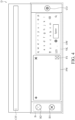
- FIG. 4 illustrates a schematic view of an embodiment of a display screen D after performing the step S03 in FIG. 2 .
- the control module 14 in response to a trigger event (hereinafter, referred to as the input trigger event) which occurs in the text input field CIF, the control module 14 enables the system default input method and the image conversion input method (the step S02), so that the control module 14 displays the text input field CIF and an overlapping window OW on the display screen D at the same time (the step S03), wherein the overlapping window OW comprises a virtual keyboard VK of the system default input method and a preview pane PW of the image conversion input method.
- the overlapping window OW is configured to provide the user interface of the input method for the user's operation to generate the character string S accordingly.
- no user interface of input method such as the overlapping window OW
- the user interface i.e., the overlapping window OW
- the enabled input method i.e., the system default input method and the image conversion input method
- the input trigger event may be that the user clicks the position where the text input field CIF appears in the display screen D to enable the text input field CIF to activate the input function.
- the system default input method and the image conversion input method are enabled, and the overlapping window OW will appear on the lower half portion of the display screen D after the system default input method and the image conversion input method are enabled.
- control module 14 correspondingly controls one of the virtual keyboard VK, the barcode scanning module 11, and the character recognition engine 13 according to the currently activated input method (i.e., one of the system default input method and the image conversion input method) to generate at least one character string S (the step S04).
- currently activated input method i.e., one of the system default input method and the image conversion input method
- control module 14 controls the touch display module 15 to display one of the generated character strings S in the text input field CIF (the step S05).
- the image conversion input method comprises a barcode scanning input method and a character recognition input method.
- the overlapping window OW further comprises a selection button group B.
- the selection button group B is arranged on the left half portion of the overlapping window OW and is on the left side of the virtual keyboard VK and the preview pane PW.
- the control module 14 is configured to correspondingly activate the barcode scanning module 11 or the character recognition engine 13 according to the trigger event occurring on the selection button group B (hereinafter referred to as the selection trigger event) or according to the trigger event occurring on the virtual keyboard VK to activate the virtual keyboard VK.
- the selection button group has at least two types of selection trigger events (hereinafter respectively referred to as a first selection trigger event and a second selection trigger event).
- the first selection trigger event corresponds to the barcode scanning module 11 (the step S43)
- the second selection trigger event corresponds to the character recognition engine 13 (the step S45).
- the first selection trigger event can cause the selection button group B to generate the activation signal of the barcode scanning input method
- the second selection trigger event can cause the selection button group B to generate the activation signal of the character recognition input method.
- the trigger event occurring on the virtual keyboard VK can cause the virtual keyboard VK to generate the activation signal of the system default input method (the step S41).
- the selection button group B comprises two buttons (hereinafter respectively referred to as the selection button B1 and the selection button B2).
- the selection button B1 corresponds to the first selection trigger event.
- the selection button B2 corresponds to the second selection trigger event.
- the control module 14 executes the barcode scanning input method according to the trigger event occurring on the selection button B1, and the control module 14 executes the character recognition input method according to the trigger event occurring on the selection button B2.
- the virtual keyboard VK is normally activated.
- the control module 14 when the overlapping window OW appears, the control module 14 only activates the virtual keyboard VK, and neither the barcode scanning module 11 nor the text recognition engine 13 is activated. The control module 14 does not activate the barcode scanning module 11 until the first selection trigger event occurs, and the control module 14 does not activate the character recognition engine 13 until the second selection trigger event occurs.
- the virtual keyboard VK may be activated along with the activation of the barcode scanning module 11 or the character recognition engine 13 at the same time.
- FIG. 5 illustrates a flowchart of an embodiment of the step S43 in FIG. 2 .
- the control module 14 detects the activation signal of the barcode scanning input method (the step S431), and thus the control module 14 activates the barcode scanning module 11 in response to the first selection trigger event occurring on the selection button B1 (that is, the control module 14 activates the barcode scanning module 11 in response to the activation signal of the barcode scanning input method) (the step S432). Then, the control module 14 starts to execute the barcode scanning input method.
- the control module 14 scans at least one barcode (hereinafter referred to as the first barcode) through the barcode scanning module 11 to obtain at least one first barcode image BC1 of the at least one barcode (the step S433).
- the barcode scanning module 11 then decodes the at least one first barcode image BC1 into the at least one character string S (the step S434).
- the character string S generated by the barcode scanning module 11 decoding the first barcode image BC1 is referred to as the first character string S1.
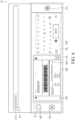
- FIG. 6 illustrates a schematic view of an embodiment of the display screen after performing the step S43 in FIG. 5 .
- the control module 14 detects the activation signal of the barcode scanning input method, thus activating the barcode scanning module 11 in response to the first selection trigger event occurring on the selection button B1. Then the control module 14 starts to execute the barcode scanning input method.
- the control module 14 scans the first barcode through the barcode scanning module 11 to obtain the first barcode image BC1.
- the barcode scanning module 11 then decodes the first barcode image BC1 into the first character string S1.
- the decoded first character string S1 is 72527273037. Therefore, the control module 14 displays the first character string S1 (i.e., 72527273037) in the text input field CIF.
- the overlapping window OW further comprises a candidate field C, and the candidate field C is above the virtual keyboard VK and the preview pane PW.
- the control module 14 is further configured to display multiple first character strings S1 as input options of the text input field CIF in the candidate field C and display a first character string S1 in the text input field CIF, wherein the first character string S1 corresponds to the trigger event occurring on the candidate field C.
- FIG. 7 illustrates a schematic view of another embodiment of the display screen D after performing the step S43 in FIG. 5 .
- the control module 14 scan two first barcodes through the barcode scanning module 11 to obtain two first barcode images BC1 (hereinafter referred to as the first barcode image BC11 and the first barcode image BC12, respectively).
- the barcode scanning module 11 then decodes the first barcode image BC11 and the first barcode image BC 12 into two first character strings S1 (hereinafter referred to as the first character string S11 and the first character string S12, respectively).
- the decoded first character string S11 is 72527273037
- the decoded first character string S12 is 72527273038.
- the control module 14 displays the first character string S11 (i.e., 72527273037) and the first character string S12 (i.e., 72527273038) as the input options of the text input field CIF in the first input option area O1 and the second input option area O2 of the candidate field C.
- the first character string S11 is displayed in the first input option area O1
- the first character string S12 is displayed in the second input option area O2.
- the control module 14 displays the first character string S11 (i.e., 72527273037) in the text input field CIF.
- the barcode scanning module 11 is further configured to generate a preview image PD having the at least one first barcode image BC1 and the control module 14 is further configured to display the preview image PD in the preview pane PW in a real-time manner.
- FIG. 8 illustrates a schematic block diagram of another embodiment of the mobile device 1.
- the barcode scanning module 11 comprises a specific camera module 111 and a barcode decoding module 112.
- the specific camera module 111 is configured to photograph the at least one first barcode to obtain the preview image PD having the at least one first barcode image BC 1.
- the barcode decoding module 112 is coupled to the specific camera module 111 and the control module 14, and the barcode decoding module 112 is configured to decode the at least one first barcode image BC1 into the at least one first character string S1.
- the barcode scanning module 11 can also directly photograph the first barcode through the general camera module 12 to generate the preview image PD having the at least one first barcode image BC1.
- FIG. 9 illustrates a rear view of an embodiment of the mobile device 1 in FIG. 3 .
- the mobile device 1 comprises a casing 20, wherein the touch display module 15 is embedded in the front surface of the casing 20 (as shown in FIG. 3 ), and the general camera module 12 and the specific camera module 111 are embedded in the rear surface of the casing 20 (as shown in FIG. 9 ).
- the general camera module 12 and the specific camera module 111 may also be embedded in the front surface or the side surface of the casing 20 (not shown).
- the character string S1 analyzed by the barcode scanning module 11 will be directly displayed in the text input field CIF. Therefore, the user does not need to manually copy and paste the recognized character string to the text input field CIF and/or switch the operations between the applications in the mobile device 1, thereby greatly improving the user's experience.
- FIG. 10 illustrates a flowchart of an embodiment of the step S45 in FIG. 2 .
- the control module 14 detects the activation signal of the character recognition input method (hereinafter referred to as another activation signal) (the step S451), and thus the control module 14 activates the character recognition engine 13 in response to the another activation signal of the selection button group B (the step S452), and then the control module 14 starts to execute the character recognition input method.
- another activation signal hereinafter referred to as another activation signal
- the control module 14 drives the general camera module 12 in response to the another activation signal, so that the general camera module 12 generates the image P by photographing at least one character (the step S453), wherein the image P comprises at least one character string image of the at least one character.
- control module 14 controls the touch display module 15 to display the image P in the preview pane PW in a real-time manner (the step S454).
- the character recognition engine 13 recognizes and converts the at least one character string image into the at least one character string S (the step S455).
- the character string S generated by the character recognition engine 13 recognizing and converting the character string image is referred to as the second character string S2.
- control module 14 is further configured to display the at least one second character string S2 in the candidate field C as the input option of the text input field CIF and display a second character string S2 in the text input field CIF, wherein the second character string S2 corresponds to the trigger event occurring on the candidate field C.
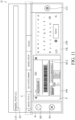
- FIG. 11 illustrates a schematic view of an embodiment of the display screen D after performing the step S45 in FIG. 10 .
- the control module 14 detects the activation signal of the character recognition input method, thus activating the character recognition engine 13 in response to the second selection trigger event occurring on the selection button B2.
- the control module 14 then starts to execute the character recognition input method.
- the control module 14 generates the image P through the general camera module 12, wherein the image P comprises multiple character string images, and each of the character string images is generated through the general camera module 12 by photographing the at least one character.
- the control module 14 displays the image P in the preview pane PW in a real-time manner, and the character recognition engine 13 recognizes and converts the multiple character string images into multiple second character strings S2.
- the control module 14 displays the multiple second character strings S2 as input options in the text input field CIF in the candidate field C, and the control module 14 displays a second character string S2 in the text input field CIF, wherein the second character string S2 corresponds to the trigger event occurring on the candidate field C.
- the second character string S2 displayed in the text input field CIF is MODEL:P15F v2.
- the second character string S2 analyzed by the character recognition engine 13 is directly displayed in the text input field CIF. Therefore, when the user wants to input the second character string S2 in the text input field CIF, the user does not need to manually copy and paste the recognized character string to the text input field CIF and/or switch the operations between the applications in the mobile device 1, thereby greatly improving the user's experience.
- the character recognition engine 13 can also be configured to scan and decode the at least one barcode (hereinafter referred to as the second barcode) to obtain the character string represented by the second barcode.
- the general camera module 12 can generate the image P of at least one second barcode image BC2 having the at least one second barcode by photographing the at least one second barcode.
- the character recognition engine 13 is further configured to recognize and decode the at least one second barcode image BC2 in the image P into at least one of the at least one second character string S2.
- the image P further comprises the second barcode image BC2 of the second barcode.
- the character recognition engine 13 is further configured to recognize and decode the second barcode image BC2 of the second barcode in the image P as one of multiple second character strings S2.
- the image P will have the character string image and the barcode image at the same time. In some other implementations, if the general camera module 12 only photographs the at least one character, the image P will only have the character string image. In some other implementations, if the general camera module 12 only photographs the at least one second barcode, the image P will only have the barcode image.
- the selection button group B can be a single physical button or multiple physical buttons (i.e., selection buttons), or a single virtual button or multiple virtual buttons (i.e., selection buttons), or a combination thereof.
- the first selection trigger event and the second selection trigger event can be distinguished by the continuous number or continuous time of enabling (such as pressing and electric shock) the button or the odd and even times of enabling the button.
- the number of buttons included in the selection button group B is the same as the number of types of the selection trigger event, and the buttons included in the selection button group B correspond to the different type of the selection trigger event in a one-to-one correspondence.
- the buttons of the selection button group B corresponding to the first selection trigger event and the second selection trigger event are both physical buttons.
- the buttons of the selection button group B corresponding to the first selection trigger event are one of the physical buttons and the virtual buttons
- the buttons of the selection button group B corresponding to the second selection trigger event are the other one of the physical buttons and the virtual buttons.
- the buttons of the selection button group B corresponding to the first selection trigger event and the second selection trigger event are virtual buttons.
- the preview pane PW further comprises an enlargement button FS.
- the control module 14 is further configured to enlarge and display the preview pane PW on the display screen D according to the trigger event occurring on the enlargement button FS.
- FIG. 12 illustrates a schematic view of an embodiment of a display screen D after the preview pane PW is enlarged and displayed. Please refer to FIG. 6 and FIG. 12 .
- the control module 14 detects the trigger event, and thus the control module 14 enlarges and displays the preview pane PW on the display screen D in response to the trigger event.
- the control module 14 displays the preview pane PW on the display screen D in full screen.
- the preview pane PW further comprises a return button FS2 and does not comprise the enlargement button FS.
- the control module 14 is further configured, according to the trigger event occurring on the return button FS2, to display the preview pane PW on the display screen D with the size of the preview pane PW before the preview pane PW is displayed in full screen.
- the overlapping window OW further comprises a control option button CO.
- the control option button CO is configured to open and close the setting window for setting or adjusting various functions of the image conversion input method and various functions of the overlapping window OW.
- the mobile device 1 may be but not limited to a smart phone, a tablet or a notebook.
- the barcode scanning module 11 is an independent component, such as but not limited to a barcode scanner (also known as a barcode engine), wherein the barcode scanner may be but not limited to a laser scanner, a CCD scanner or a photographic scanner.
- a barcode scanner also known as a barcode engine
- the barcode scanner may be but not limited to a laser scanner, a CCD scanner or a photographic scanner.
- each of the general camera module 12 and the specific camera module 111 can be implemented using a combination of a photosensitive element and a lens, wherein the photosensitive element is configured to capture images (including barcode images and character string images) and convert the images from optical signals into electrical signals.
- the photosensitive element may be, for example but not limited to, a charge-coupled device (CCD) or a complementary metal oxide semiconductor sensor (CMOS sensor).
- the character recognition engine 13 may be but not limited to Tesseract, Azure, Real-Time Recognition SDK, or Ocr Space.
- each of the barcode decoding module 112, the character recognition engine 13, and the control module 14 is implemented using one or more hardware devices executing software or firmware implementing corresponding computing functions.
- the barcode decoding module 112 is implemented using a hardware device executing software or firmware implementing corresponding computing functions, while the character recognition engine 13 and the control module 14 are implemented using another hardware device executing software or firmware implementing corresponding computing functions.
- the barcode decoding module 112, the character recognition engine 13, and the control module 14 are implemented using a single hardware component executing software or firmware implementing corresponding computing functions.
- each of the hardware components may be, for example but not limited to, a central processing unit (CPU), a microprocessor, a digital signal processor (DSP), a complex programmable logic device (CPLD), Field Programmable Gate Array (FPGA), Application Specific Integrated Circuits (ASIC), or microcontroller unit.
- CPU central processing unit
- DSP digital signal processor
- CPLD complex programmable logic device
- FPGA Field Programmable Gate Array
- ASIC Application Specific Integrated Circuits
- the text input field CIF may be a desktop widget constantly resident on the desktop provided by the operating system or application of the mobile device 1 (such as but not limited to the search bar on the main screen of the mobile device 1), a field for search engines in applications or webpages (such as but not limited to App Store search engine or Google search engine), or a text input page or a field in applications or webpages (such as but not limited to Word input page or Facebook create post field)
- a desktop widget constantly resident on the desktop provided by the operating system or application of the mobile device 1 (such as but not limited to the search bar on the main screen of the mobile device 1)
- a field for search engines in applications or webpages such as but not limited to App Store search engine or Google search engine
- a text input page or a field in applications or webpages such as but not limited to Word input page or Facebook create post field
- the mobile device 1 can execute the image conversion input method in addition to the system default input method so as to improve the convenience and efficiency of text input.
- the image conversion input method can directly obtain the character string S input in the text input field CIF by capturing and analyzing the preview image PD or image P, so that the operation procedure of text input can be simplified to improve the convenience and efficiency of text input, and further greatly improve user's experience.
- the image conversion input method provides two image analysis methods, the barcode scanning input method and the character recognition input method, which can further enhance the applicable scope of the image conversion input method.
- the user can use the mobile device 1 to take pictures of objects with barcodes or texts so as to execute the barcode scanning input method or the character recognition input method to obtain the character string S, and the obtained character string S will be directly displayed in the text input field CIF. Therefore, when the user inputs contents in the text input field CIF, the user does not need to manually copy and paste the decoded or recognized character string S to the text input field CIF, and does not need to switch the operations between the applications in the mobile device 1.
Landscapes
- Engineering & Computer Science (AREA)
- Theoretical Computer Science (AREA)
- General Engineering & Computer Science (AREA)
- Physics & Mathematics (AREA)
- General Physics & Mathematics (AREA)
- Human Computer Interaction (AREA)
- Computer Vision & Pattern Recognition (AREA)
- Multimedia (AREA)
- Software Systems (AREA)
- Health & Medical Sciences (AREA)
- Electromagnetism (AREA)
- General Health & Medical Sciences (AREA)
- Toxicology (AREA)
- Artificial Intelligence (AREA)
- User Interface Of Digital Computer (AREA)
Abstract
Description
- As to a mobile device known to the inventor, when the camera lens of the mobile device is used to perform image recognition to convert an image into text(s) (such as barcode decoding, QR code decoding, OCR character recognition, and license plate recognition), the user usually needs to open the camera in a specific application installed in the mobile device, perform image capture and recognition in the application, and then manually copy and paste the recognized text to the desired text input field. The operation is not intuitive, the steps of the operation are numerous, and the user usually has to switch the operations between the applications in the mobile device, which thus affects the user's experience.
- In some embodiments, a mobile device comprises a general camera module, a touch display module, a barcode scanning module, a character recognition engine, and a control module. The general camera module is configured to generate an image. The touch display module is configured to display a text input field and an overlapping window with a virtual keyboard of a system default input method and a preview pane of an image conversion input method at the same time. The barcode scanning module is configured to scan at least one first barcode to obtain at least one first character string represented by the at least one first barcode, wherein the image conversion input method is linked to the barcode scanning module. The character recognition engine is coupled to the general camera module and is configured to perform a character recognition on the image to obtain at least one second character string, wherein the image conversion input method is linked to the character recognition engine. The control module is coupled to the general camera module, the touch display module, the barcode scanning module, and the character recognition engine, wherein the control module is configured to activate one of the barcode scanning module and the character recognition engine and control the touch display module to display one of the at least one first character string and the at least one second character string in the text input field.
- In some embodiments, the barcode scanning module is further configured to generate a preview image having at least one barcode image, and the control module is further configured to display the preview image in the preview pane in a real-time manner.
- In some embodiments, the barcode scanning module comprises a specific camera module and a barcode decoding module. The specific camera module is configured to photograph the at least one first barcode to obtain the at least one barcode image and the preview image. The barcode decoding module is coupled to the specific camera module and the control module and is configured to decode the at least one barcode image into the at least one first character string.
- In some embodiments, the overlapping window further comprises a candidate field. The candidate field is above the virtual keyboard and the preview pane, and the control module is further configured to display one of the at least one first character string and the at least one second character string as an input option of the text input field in the candidate field.
- In some embodiments, the control module is further configured to display the image in the preview pane in a real-time manner after the character recognition engine is activated.
- In some embodiments, the overlapping window further comprises a selection button group, and the control module is further configured to correspondingly activate the barcode scanning module or the character recognition engine according to a trigger event occurring on the selection button group.
- In some embodiments, the image comprises at least one character string image, each of the at least one character string image is generated by using the general camera module to photograph at least one character, and the character recognition engine is further configured to recognize and convert each of the at least one character string image into at least one of the at least one second character string.
- In some embodiments, the image further comprises at least one barcode image, the at least one barcode image is generated by using the general camera module to photograph at least one second barcode, and the character recognition engine is further configured to recognize and decode the at least one barcode image of the at least one second barcode in the image as at least one of the at least one second character string.
- In some embodiments, the preview pane further comprises an enlargement button, and the control module is further configured to enlarge and display the preview pane on the touch display module according to a trigger event occurring on the enlargement button.
- In some embodiments, an input method comprises: enabling a system default input method and an image conversion input method by a text input field to display the text input field and an overlapping window at the same time, wherein the overlapping window comprises a virtual keyboard of a system default input method and a preview pane of an image conversion input method; generating at least one character string by using one of the system default input method and the image conversion input method; and displaying one of the at least one character string in the text input field.
- In some embodiments, the image conversion input method comprises a barcode scanning input method, and the steps of generating the at least one character string by using one of the system default input method and the image conversion input method comprises: detecting an activation signal of the barcode scanning input method; activating a barcode scanning module in response to the activation signal; scanning at least one barcode through the activated barcode scanning module to obtain at least one barcode image of the at least one barcode; and decoding the at least one barcode image into the at least one character string through the barcode scanning module.
- In some embodiments, the input method further comprises generating a preview image with the at least one barcode image and displaying the preview image in the preview pane in a real-time manner in response to that the barcode scanning module obtains the at least one barcode image.
- In some embodiments, the overlapping window further comprises a candidate field, the candidate field is above the virtual keyboard and the preview pane, and the steps of generating the at least one character string by using one of the system default input method and the image conversion input method further comprises: displaying the at least one character string in the candidate field as an input option of the text input field.
- In some embodiments, the image conversion input method further comprises a character recognition input method, and the steps of generating the at least one character string by using one of the system default input method and the image conversion input method further comprises: detecting another activation signal of the character recognition input method; generating an image by using a general camera module according to the another activation signal, wherein the image comprises at least one character string image, and each of the at least one character string images is generated by using the general camera module to photograph at least one character; displaying the image in the preview pane in a real-time manner; and recognizing and converting the at least one character string image into the at least one character string.
- In some embodiments, the image further comprises at least one barcode image, and the at least one barcode image is generated by using the general camera module to photograph at least one second barcode, and the steps of generating the at least one character string by using one of the system default input method and the image conversion input method further comprises: recognizing and converting the at least one barcode image into at least one of the at least one character string.
- In some embodiments, the preview pane further comprises an enlargement button, and the input method further comprises enlarging and displaying the preview pane according to a trigger event occurring on the enlargement button.
- To sum up, according to one or some embodiments, the mobile device and input method can be applied to the mobile device, so that in addition to the system default input method, the basic input function of the mobile device can use other input methods (e.g., the image conversion input method which uses images to obtain character strings), thereby improving the convenience and efficiency of text input. In some embodiments, the image conversion input method can obtain the character string of the text input field by capturing and analyzing the optical images, so that the operation procedure of text input can be simplified to improve the convenience and efficiency of text input, thereby greatly improving the user's experience. In addition, the image conversion input method provides two image analysis methods to improve the applicable scope of the image conversion input method.
- For example, when the user wants to input a character string into the text input field, the user can take a picture of the object with barcode or text in the mobile device so as to execute the barcode scanning input method or the character recognition input method to obtain the character string, and the obtained character string will be directly displayed in the text input field. Therefore, when the user inputs contents in the text input field, the user does not need to manually copy and paste the decoded or recognized character string to the text input field and does not need to switch the operations between the applications in the mobile device.
- The following will describe the detailed features and advantages of the instant disclosure in detail in the detailed description. The content of the description is sufficient for any person skilled in the art to comprehend the technical context of the instant disclosure and to implement it accordingly. According to the content, claims and drawings disclosed in the instant specification, any person skilled in the art can readily understand the goals and advantages of the instant disclosure.
-
-
FIG. 1 illustrates a schematic block diagram of an embodiment of a mobile device. -
FIG. 2 illustrates a flowchart of an embodiment of an input method. -
FIG. 3 illustrates a front view of an embodiment of the mobile device. -
FIG. 4 illustrates a schematic view of an embodiment of a display screen after performing the step S03 inFIG. 2 . -
FIG. 5 illustrates a flowchart of an embodiment of the step S43 inFIG. 2 . -
FIG. 6 illustrates a schematic view of an embodiment of the display screen after performing the step S43 inFIG. 5 . -
FIG. 7 illustrates a schematic view of another embodiment of the display screen after performing the step S43 inFIG. 5 . -
FIG. 8 illustrates a schematic block diagram of another embodiment of the mobile device. -
FIG. 9 illustrates a rear view of an embodiment of the mobile device inFIG. 3 . -
FIG. 10 illustrates a flowchart of an embodiment of the step S45 inFIG. 2 . -
FIG. 11 illustrates a schematic view of an embodiment of the display screen after performing the step S45 inFIG. 10 . -
FIG. 12 illustrates a schematic view of an embodiment of a display screen after the preview pane is enlarged and displayed. -
FIG. 1 illustrates a schematic block diagram of an embodiment of amobile device 1. Please refer toFIG. 1 . Themobile device 1 comprises ageneral camera module 12, atouch display module 15, abarcode scanning module 11, acharacter recognition engine 13, and acontrol module 14. - The
character recognition engine 13 is coupled to thegeneral camera module 12. Thecontrol module 14 is coupled to thegeneral camera module 12, thetouch display module 15, thebarcode scanning module 11, and thecharacter recognition engine 13. -
FIG. 2 illustrates a flowchart of an embodiment of an input method.FIG. 3 illustrates a front view of an embodiment of themobile device 1. Please refer toFIG. 1 through FIG. 3 . Thegeneral camera module 12 is configured to photograph to generate an image P. Thetouch display module 15 is configured to display the text input field CIF (the step S01). Specifically, in some embodiments, the display screen D displayed by thetouch display module 15 comprises a text input field CIF, and the text input field CIF may be configured to receive the character string S input by the user. -
FIG. 4 illustrates a schematic view of an embodiment of a display screen D after performing the step S03 inFIG. 2 . Please refer toFIG. 4 . In some embodiments, in response to a trigger event (hereinafter, referred to as the input trigger event) which occurs in the text input field CIF, thecontrol module 14 enables the system default input method and the image conversion input method (the step S02), so that thecontrol module 14 displays the text input field CIF and an overlapping window OW on the display screen D at the same time (the step S03), wherein the overlapping window OW comprises a virtual keyboard VK of the system default input method and a preview pane PW of the image conversion input method. In other words, in some embodiments, the overlapping window OW is configured to provide the user interface of the input method for the user's operation to generate the character string S accordingly. Before the system default input method and the image conversion input method are enabled, no user interface of input method (such as the overlapping window OW) appears on the display screen D of thetouch display module 15; on the other hand, after the system default input method and the image conversion input method are enabled, the user interface (i.e., the overlapping window OW) of the enabled input method (i.e., the system default input method and the image conversion input method) will appear on the display screen D of thetouch display module 15, wherein the input trigger event may be that the user clicks the position where the text input field CIF appears in the display screen D to enable the text input field CIF to activate the input function. - For example, when the input trigger event occurs at the position where the text input field CIF appears on the display screen D (for example, the user clicks the text input field CIF so that a cursor appears in the text input field CIF), the system default input method and the image conversion input method are enabled, and the overlapping window OW will appear on the lower half portion of the display screen D after the system default input method and the image conversion input method are enabled.
- In some embodiments, the
control module 14 correspondingly controls one of the virtual keyboard VK, thebarcode scanning module 11, and thecharacter recognition engine 13 according to the currently activated input method (i.e., one of the system default input method and the image conversion input method) to generate at least one character string S (the step S04). - Last, the
control module 14 controls thetouch display module 15 to display one of the generated character strings S in the text input field CIF (the step S05). - In some embodiments, the image conversion input method comprises a barcode scanning input method and a character recognition input method.
- In some embodiments, the overlapping window OW further comprises a selection button group B. In some embodiments, the selection button group B is arranged on the left half portion of the overlapping window OW and is on the left side of the virtual keyboard VK and the preview pane PW.
- In some embodiments, the
control module 14 is configured to correspondingly activate thebarcode scanning module 11 or thecharacter recognition engine 13 according to the trigger event occurring on the selection button group B (hereinafter referred to as the selection trigger event) or according to the trigger event occurring on the virtual keyboard VK to activate the virtual keyboard VK. Specifically, in some embodiments, the selection button group has at least two types of selection trigger events (hereinafter respectively referred to as a first selection trigger event and a second selection trigger event). The first selection trigger event corresponds to the barcode scanning module 11 (the step S43), and the second selection trigger event corresponds to the character recognition engine 13 (the step S45). The first selection trigger event can cause the selection button group B to generate the activation signal of the barcode scanning input method, and the second selection trigger event can cause the selection button group B to generate the activation signal of the character recognition input method. The trigger event occurring on the virtual keyboard VK can cause the virtual keyboard VK to generate the activation signal of the system default input method (the step S41). - In some embodiments, the selection button group B comprises two buttons (hereinafter respectively referred to as the selection button B1 and the selection button B2). The selection button B1 corresponds to the first selection trigger event. The selection button B2 corresponds to the second selection trigger event. Specifically, in some embodiments, the
control module 14 executes the barcode scanning input method according to the trigger event occurring on the selection button B1, and thecontrol module 14 executes the character recognition input method according to the trigger event occurring on the selection button B2. - In some embodiments, after the system default input method and the image conversion input method are enabled, the virtual keyboard VK is normally activated. In some embodiments, when the overlapping window OW appears, the
control module 14 only activates the virtual keyboard VK, and neither thebarcode scanning module 11 nor thetext recognition engine 13 is activated. Thecontrol module 14 does not activate thebarcode scanning module 11 until the first selection trigger event occurs, and thecontrol module 14 does not activate thecharacter recognition engine 13 until the second selection trigger event occurs. In some embodiments, the virtual keyboard VK may be activated along with the activation of thebarcode scanning module 11 or thecharacter recognition engine 13 at the same time. -
FIG. 5 illustrates a flowchart of an embodiment of the step S43 inFIG. 2 . Please refer toFIG. 5 . In some embodiments, in the step S43, when the first selection trigger event occurs on the selection button B1 (that is, the selection button group B generates the activation signal of the barcode scanning input method), thecontrol module 14 detects the activation signal of the barcode scanning input method (the step S431), and thus thecontrol module 14 activates thebarcode scanning module 11 in response to the first selection trigger event occurring on the selection button B1 (that is, thecontrol module 14 activates thebarcode scanning module 11 in response to the activation signal of the barcode scanning input method) (the step S432). Then, thecontrol module 14 starts to execute the barcode scanning input method. - After the step S432, the
control module 14 scans at least one barcode (hereinafter referred to as the first barcode) through thebarcode scanning module 11 to obtain at least one first barcode image BC1 of the at least one barcode (the step S433). Thebarcode scanning module 11 then decodes the at least one first barcode image BC1 into the at least one character string S (the step S434). For the sake of convenience, the character string S generated by thebarcode scanning module 11 decoding the first barcode image BC1 is referred to as the first character string S1. -
FIG. 6 illustrates a schematic view of an embodiment of the display screen after performing the step S43 inFIG. 5 . Please refer toFIG. 6 . For example, when the first selection trigger event occurs on the selection button B1 (for example, the user clicks the selection button B1 to generate the activation signal of the barcode scanning input method), thecontrol module 14 detects the activation signal of the barcode scanning input method, thus activating thebarcode scanning module 11 in response to the first selection trigger event occurring on the selection button B1. Then thecontrol module 14 starts to execute the barcode scanning input method. Thecontrol module 14 scans the first barcode through thebarcode scanning module 11 to obtain the first barcode image BC1. Thebarcode scanning module 11 then decodes the first barcode image BC1 into the first character string S1. The decoded first character string S1 is 72527273037. Therefore, thecontrol module 14 displays the first character string S1 (i.e., 72527273037) in the text input field CIF. - When the number of the at least one first barcode is multiple, the number of the first barcode image BC1 obtained by scanning the at least one first barcode with the
barcode scanning module 11 when thecontrol module 14 executes the barcode scanning input method is also multiple, and the number of the at least one first character string S1 obtained by decoding the at least one first barcode image BC1 through thebarcode scanning module 11 is also multiple. Therefore, in some embodiments, the overlapping window OW further comprises a candidate field C, and the candidate field C is above the virtual keyboard VK and the preview pane PW. Thecontrol module 14 is further configured to display multiple first character strings S1 as input options of the text input field CIF in the candidate field C and display a first character string S1 in the text input field CIF, wherein the first character string S1 corresponds to the trigger event occurring on the candidate field C. -
FIG. 7 illustrates a schematic view of another embodiment of the display screen D after performing the step S43 inFIG. 5 . Please refer toFIG. 7 . When thecontrol module 14 scan two first barcodes through thebarcode scanning module 11 to obtain two first barcode images BC1 (hereinafter referred to as the first barcode image BC11 and the first barcode image BC12, respectively). Thebarcode scanning module 11 then decodes the first barcode image BC11 and the first barcode image BC 12 into two first character strings S1 (hereinafter referred to as the first character string S11 and the first character string S12, respectively). The decoded first character string S11 is 72527273037, and the decoded first character string S12 is 72527273038. At this time, thecontrol module 14 displays the first character string S11 (i.e., 72527273037) and the first character string S12 (i.e., 72527273038) as the input options of the text input field CIF in the first input option area O1 and the second input option area O2 of the candidate field C. The first character string S11 is displayed in the first input option area O1, and the first character string S12 is displayed in the second input option area O2. At this moment, if a trigger event occurs on the first input option area O1 (for example, the user clicks on the first input option area O1 to select the first character string S11 as the character string displayed in the text input field CIF), thecontrol module 14 then displays the first character string S11 (i.e., 72527273037) in the text input field CIF. - Please refer to
FIG. 6 . In some embodiments, thebarcode scanning module 11 is further configured to generate a preview image PD having the at least one first barcode image BC1 and thecontrol module 14 is further configured to display the preview image PD in the preview pane PW in a real-time manner. -
FIG. 8 illustrates a schematic block diagram of another embodiment of themobile device 1. Please refer toFIG. 8 . In some embodiments, thebarcode scanning module 11 comprises aspecific camera module 111 and abarcode decoding module 112. Thespecific camera module 111 is configured to photograph the at least one first barcode to obtain the preview image PD having the at least one firstbarcode image BC 1. Thebarcode decoding module 112 is coupled to thespecific camera module 111 and thecontrol module 14, and thebarcode decoding module 112 is configured to decode the at least one first barcode image BC1 into the at least one first character string S1. In some embodiments, thebarcode scanning module 11 can also directly photograph the first barcode through thegeneral camera module 12 to generate the preview image PD having the at least one first barcode image BC1. -
FIG. 9 illustrates a rear view of an embodiment of themobile device 1 inFIG. 3 . Please refer toFIG. 9 . In some embodiments, themobile device 1 comprises acasing 20, wherein thetouch display module 15 is embedded in the front surface of the casing 20 (as shown inFIG. 3 ), and thegeneral camera module 12 and thespecific camera module 111 are embedded in the rear surface of the casing 20 (as shown inFIG. 9 ). In some embodiments, thegeneral camera module 12 and thespecific camera module 111 may also be embedded in the front surface or the side surface of the casing 20 (not shown). - In some embodiments, the character string S1 analyzed by the
barcode scanning module 11 will be directly displayed in the text input field CIF. Therefore, the user does not need to manually copy and paste the recognized character string to the text input field CIF and/or switch the operations between the applications in themobile device 1, thereby greatly improving the user's experience. -
FIG. 10 illustrates a flowchart of an embodiment of the step S45 inFIG. 2 . Please refer toFIG. 10 . In some other embodiments, when the second selection trigger event occurs on the selection button group B (that is, the selection button group B generates the activation signal of the character recognition input method), thecontrol module 14 detects the activation signal of the character recognition input method (hereinafter referred to as another activation signal) (the step S451), and thus thecontrol module 14 activates thecharacter recognition engine 13 in response to the another activation signal of the selection button group B (the step S452), and then thecontrol module 14 starts to execute the character recognition input method. - The
control module 14 drives thegeneral camera module 12 in response to the another activation signal, so that thegeneral camera module 12 generates the image P by photographing at least one character (the step S453), wherein the image P comprises at least one character string image of the at least one character. - At the same time, the
control module 14 controls thetouch display module 15 to display the image P in the preview pane PW in a real-time manner (the step S454). Moreover, thecharacter recognition engine 13 recognizes and converts the at least one character string image into the at least one character string S (the step S455). For the sake of convenience, the character string S generated by thecharacter recognition engine 13 recognizing and converting the character string image is referred to as the second character string S2. - In some embodiments, the
control module 14 is further configured to display the at least one second character string S2 in the candidate field C as the input option of the text input field CIF and display a second character string S2 in the text input field CIF, wherein the second character string S2 corresponds to the trigger event occurring on the candidate field C. -
FIG. 11 illustrates a schematic view of an embodiment of the display screen D after performing the step S45 inFIG. 10 . Please refer toFIG. 11 . For example, when the second selection trigger event occurs on the selection button B2 (for example, the user clicks the selection button B2 to generate the activation signal of the character recognition input method), thecontrol module 14 detects the activation signal of the character recognition input method, thus activating thecharacter recognition engine 13 in response to the second selection trigger event occurring on the selection button B2. Thecontrol module 14 then starts to execute the character recognition input method. Thecontrol module 14 generates the image P through thegeneral camera module 12, wherein the image P comprises multiple character string images, and each of the character string images is generated through thegeneral camera module 12 by photographing the at least one character. Thecontrol module 14 displays the image P in the preview pane PW in a real-time manner, and thecharacter recognition engine 13 recognizes and converts the multiple character string images into multiple second character strings S2. Thecontrol module 14 displays the multiple second character strings S2 as input options in the text input field CIF in the candidate field C, and thecontrol module 14 displays a second character string S2 in the text input field CIF, wherein the second character string S2 corresponds to the trigger event occurring on the candidate field C. In the embodiment ofFIG. 11 , the second character string S2 displayed in the text input field CIF is MODEL:P15F v2. - In some embodiments, the second character string S2 analyzed by the
character recognition engine 13 is directly displayed in the text input field CIF. Therefore, when the user wants to input the second character string S2 in the text input field CIF, the user does not need to manually copy and paste the recognized character string to the text input field CIF and/or switch the operations between the applications in themobile device 1, thereby greatly improving the user's experience. - In some embodiments, the
character recognition engine 13 can also be configured to scan and decode the at least one barcode (hereinafter referred to as the second barcode) to obtain the character string represented by the second barcode. Specifically, in some embodiments, thegeneral camera module 12 can generate the image P of at least one second barcode image BC2 having the at least one second barcode by photographing the at least one second barcode. - The
character recognition engine 13 is further configured to recognize and decode the at least one second barcode image BC2 in the image P into at least one of the at least one second character string S2. For example, please refer toFIG. 5 , in addition to multiple character string images, the image P further comprises the second barcode image BC2 of the second barcode. In addition to recognizing and converting multiple character string images in the image P into multiple character strings S2, thecharacter recognition engine 13 is further configured to recognize and decode the second barcode image BC2 of the second barcode in the image P as one of multiple second character strings S2. - In some implementations, if the
general camera module 12 photographs the at least one character and the at least one second barcode at the same time, the image P will have the character string image and the barcode image at the same time. In some other implementations, if thegeneral camera module 12 only photographs the at least one character, the image P will only have the character string image. In some other implementations, if thegeneral camera module 12 only photographs the at least one second barcode, the image P will only have the barcode image. - In some embodiments, the selection button group B can be a single physical button or multiple physical buttons (i.e., selection buttons), or a single virtual button or multiple virtual buttons (i.e., selection buttons), or a combination thereof. In some implementations, if the selection button group B is a single button, the first selection trigger event and the second selection trigger event can be distinguished by the continuous number or continuous time of enabling (such as pressing and electric shock) the button or the odd and even times of enabling the button.
- In some implementations, the number of buttons included in the selection button group B is the same as the number of types of the selection trigger event, and the buttons included in the selection button group B correspond to the different type of the selection trigger event in a one-to-one correspondence. In an example, the buttons of the selection button group B corresponding to the first selection trigger event and the second selection trigger event are both physical buttons. In another example, the buttons of the selection button group B corresponding to the first selection trigger event are one of the physical buttons and the virtual buttons, and the buttons of the selection button group B corresponding to the second selection trigger event are the other one of the physical buttons and the virtual buttons. In yet another example, the buttons of the selection button group B corresponding to the first selection trigger event and the second selection trigger event are virtual buttons.
- In some embodiments, the preview pane PW further comprises an enlargement button FS. The
control module 14 is further configured to enlarge and display the preview pane PW on the display screen D according to the trigger event occurring on the enlargement button FS. -
FIG. 12 illustrates a schematic view of an embodiment of a display screen D after the preview pane PW is enlarged and displayed. Please refer toFIG. 6 andFIG. 12 . For example, when the trigger event occurs on the enlargement button FS (for example, the user clicks the enlargement button FS to enlarge and display the preview pane PW), thecontrol module 14 detects the trigger event, and thus thecontrol module 14 enlarges and displays the preview pane PW on the display screen D in response to the trigger event. In some embodiments, thecontrol module 14 displays the preview pane PW on the display screen D in full screen. In some embodiments, after the preview pane PW is displayed on the display screen D in full screen, the preview pane PW further comprises a return button FS2 and does not comprise the enlargement button FS. Thecontrol module 14 is further configured, according to the trigger event occurring on the return button FS2, to display the preview pane PW on the display screen D with the size of the preview pane PW before the preview pane PW is displayed in full screen. - In some embodiments, the overlapping window OW further comprises a control option button CO. The control option button CO is configured to open and close the setting window for setting or adjusting various functions of the image conversion input method and various functions of the overlapping window OW.
- In some embodiments, the
mobile device 1 may be but not limited to a smart phone, a tablet or a notebook. - In some embodiments, the
barcode scanning module 11 is an independent component, such as but not limited to a barcode scanner (also known as a barcode engine), wherein the barcode scanner may be but not limited to a laser scanner, a CCD scanner or a photographic scanner. - In some embodiments, each of the
general camera module 12 and thespecific camera module 111 can be implemented using a combination of a photosensitive element and a lens, wherein the photosensitive element is configured to capture images (including barcode images and character string images) and convert the images from optical signals into electrical signals. The photosensitive element may be, for example but not limited to, a charge-coupled device (CCD) or a complementary metal oxide semiconductor sensor (CMOS sensor). - In some embodiments, the
character recognition engine 13 may be but not limited to Tesseract, Azure, Real-Time Recognition SDK, or Ocr Space. - In some embodiments, each of the
barcode decoding module 112, thecharacter recognition engine 13, and thecontrol module 14 is implemented using one or more hardware devices executing software or firmware implementing corresponding computing functions. - In some other embodiments, the
barcode decoding module 112 is implemented using a hardware device executing software or firmware implementing corresponding computing functions, while thecharacter recognition engine 13 and thecontrol module 14 are implemented using another hardware device executing software or firmware implementing corresponding computing functions. - In some other embodiments, the
barcode decoding module 112, thecharacter recognition engine 13, and thecontrol module 14 are implemented using a single hardware component executing software or firmware implementing corresponding computing functions. - In some embodiments, each of the hardware components may be, for example but not limited to, a central processing unit (CPU), a microprocessor, a digital signal processor (DSP), a complex programmable logic device (CPLD), Field Programmable Gate Array (FPGA), Application Specific Integrated Circuits (ASIC), or microcontroller unit.
- In some embodiments, the text input field CIF may be a desktop widget constantly resident on the desktop provided by the operating system or application of the mobile device 1 (such as but not limited to the search bar on the main screen of the mobile device 1), a field for search engines in applications or webpages (such as but not limited to App Store search engine or Google search engine), or a text input page or a field in applications or webpages (such as but not limited to Word input page or Facebook create post field)
- To sum up, in some embodiments, the
mobile device 1 can execute the image conversion input method in addition to the system default input method so as to improve the convenience and efficiency of text input. The image conversion input method can directly obtain the character string S input in the text input field CIF by capturing and analyzing the preview image PD or image P, so that the operation procedure of text input can be simplified to improve the convenience and efficiency of text input, and further greatly improve user's experience. Moreover, the image conversion input method provides two image analysis methods, the barcode scanning input method and the character recognition input method, which can further enhance the applicable scope of the image conversion input method. The user can use themobile device 1 to take pictures of objects with barcodes or texts so as to execute the barcode scanning input method or the character recognition input method to obtain the character string S, and the obtained character string S will be directly displayed in the text input field CIF. Therefore, when the user inputs contents in the text input field CIF, the user does not need to manually copy and paste the decoded or recognized character string S to the text input field CIF, and does not need to switch the operations between the applications in themobile device 1.
Claims (15)
- A mobile device comprising:a general camera module (12) configured to generate an image (P);a touch display module (15) configured to display a text input field (CIF) and an overlapping window (OW) with a virtual keyboard (VK) of a system default input method and a preview pane (PW) of an image conversion input method at the same time;a barcode scanning module (11) configured to scan at least one first barcode to obtain at least one first character string (S 1) represented by the at least one first barcode, wherein the image conversion input method is linked to the barcode scanning module (11);a character recognition engine (13) coupled to the general camera module (12), the character recognition engine (13) is configured to perform a character recognition on the image (P) to obtain at least one second character string (S2), wherein the image conversion input method is linked to the character recognition engine (13); anda control module (14) coupled to the general camera module (12), the touch display module (15), the barcode scanning module (11), and the character recognition engine (13), wherein the control module (14) is configured to activate one of the barcode scanning module (11) and the character recognition engine (13) and control the touch display module (15) to display one of the at least one first character string (S1) and the at least one second character string (S2) in the text input field (CIF).
- The mobile device according to claim 1, wherein the barcode scanning module (11) is further configured to generate a preview image (PD) having at least one barcode image, and the control module (14) is further configured to display the preview image (PD) in the preview pane (PW) in a real-time manner.
- The mobile device according to claim 2, wherein the barcode scanning module (11) comprises:a specific camera module (111) configured to photograph the at least one first barcode to obtain the at least one barcode image and the preview image (PD); anda barcode decoding module (112) coupled to the specific camera module (111) and the control module (14), wherein the barcode decoding module (112) is configured to decode the at least one barcode image into the at least one first character string (S1).
- The mobile device according to claim 1, wherein the overlapping window (OW) further comprises a candidate field (C), the candidate field (C) is above the virtual keyboard (VK) and the preview pane (PW), and the control module (14) is further configured to display one of the at least one first character string (S1) and the at least one second character string (S2) as an input option of the text input field (CIF) in the candidate field (C).
- The mobile device according to claim 1, wherein the control module (14) is further configured to display the image in the preview pane (PW) in a real-time manner after the character recognition engine (13) is activated.
- The mobile device according to claim 1, wherein the overlapping window (OW) further comprises a selection button group (B), and the control module (14) is further configured to correspondingly activate the barcode scanning module (11) or the character recognition engine (13) according to a trigger event occurring on the selection button group (B).
- The mobile device according to claim 1, wherein the image (P) comprises at least one character string image, each of the at least one character string image is generated by using the general camera module (12) to photograph at least one character, and the character recognition engine (13) is further configured to recognize and convert each of the at least one character string image into at least one of the at least one second character string (S2).
- The mobile device according to claim 7, wherein the image (P) further comprises at least one barcode image, the at least one barcode image is generated by using the general camera module (12) to photograph at least one second barcode, and the character recognition engine (13) is further configured to recognize and decode the at least one barcode image of the at least one second barcode in the image (P) as at least one of the at least one second character string (S2).
- An input method, comprising:enabling a system default input method and an image conversion input method by a text input field (CIF) to display the text input field (CIF) and an overlapping window (OW) at the same time, wherein the overlapping window (OW) comprises a virtual keyboard (VK) of a system default input method and a preview pane (PW) of an image conversion input method;generating at least one character string (S) by using one of the system default input method and the image conversion input method; anddisplaying one of the at least one character string (S) in the text input field (CIF).
- The input method according to claim 9, wherein the image conversion input method comprises a barcode scanning input method, and the steps of generating the at least one character string (S) by using one of the system default input method and the image conversion input method comprises:detecting an activation signal of the barcode scanning input method;activating a barcode scanning module (11) in response to the activation signal;scanning at least one barcode through the activated barcode scanning module (11) to obtain at least one barcode image of the at least one barcode; anddecoding the at least one barcode image into the at least one character string (S) through the barcode scanning module (11).
- The input method according to claim 10, further comprising:
generating a preview image (PD) with the at least one barcode image and displaying the preview image (PD) in the preview pane (PW) in a real-time manner in response to that the barcode scanning module (11) obtains the at least one barcode image. - The input method according to claim 9, wherein the overlapping window (OW) further comprises a candidate field (C), the candidate field (C) is above the virtual keyboard (VK) and the preview pane (PW), and the steps of generating the at least one character string (S) by using one of the system default input method and the image conversion input method further comprises:
displaying the at least one character string (S) in the candidate field (C)as an input option of the text input field (CIF). - The input method according to claim 11, wherein the image conversion input method further comprises a character recognition input method, and the steps of generating the at least one character string (S) by using one of the system default input method and the image conversion input method further comprises:detecting another activation signal of the character recognition input method;generating an image (P) by using a general camera module (12) according to the another activation signal, wherein the image (P) comprises at least one character string image, and each of the at least one character string images is generated by using the general camera module (12) to photograph at least one character;displaying the image (P) in the preview pane (PW) in a real-time manner; andrecognizing and converting the at least one character string image into the at least one character string (S).
- The input method according to claim 9, wherein the image conversion input method further comprises a character recognition input method, and the steps of generating the at least one character string (S) by using one of the system default input method and the image conversion input method further comprises:detecting another activation signal of the character recognition input method;generating an image (P) by using a general camera module (12) in response to the another activation signal, wherein the image (P) comprises at least one character string image, and each of the at least one character string images is generated by using the general camera module (12) to photograph at least one character;displaying the image (P) in the preview pane (PW) in a real-time manner; andrecognizing and converting the at least one character string image into at least one of the at least one character string (S).
- The input method according to claim 14, wherein the image (P) further comprises at least one barcode image, and the at least one barcode image is generated by using the general camera module (12) to photograph at least one second barcode, and the steps of generating the at least one character string (S) by using one of the system default input method and the image conversion input method further comprises:
recognizing and converting the at least one barcode image into at least one of the at least one character string (S).
Applications Claiming Priority (1)
| Application Number | Priority Date | Filing Date | Title |
|---|---|---|---|
| CN202310667740.XA CN119107649A (en) | 2023-06-07 | 2023-06-07 | Mobile device and input method |
Publications (2)
| Publication Number | Publication Date |
|---|---|
| EP4474969A1 true EP4474969A1 (en) | 2024-12-11 |
| EP4474969B1 EP4474969B1 (en) | 2026-02-18 |
Family
ID=88204149
Family Applications (1)
| Application Number | Title | Priority Date | Filing Date |
|---|---|---|---|
| EP23199695.0A Active EP4474969B1 (en) | 2023-06-07 | 2023-09-26 | Mobile device and input method |
Country Status (4)
| Country | Link |
|---|---|
| US (1) | US20240412545A1 (en) |
| EP (1) | EP4474969B1 (en) |
| CN (1) | CN119107649A (en) |
| AU (1) | AU2023251462B1 (en) |
Citations (3)
| Publication number | Priority date | Publication date | Assignee | Title |
|---|---|---|---|---|
| US20130234945A1 (en) * | 2012-03-06 | 2013-09-12 | Nuance Communications, Inc. | Multimodal Text Input by a Keyboard/Camera Text Input Module Replacing a Conventional Keyboard Text Input Module on a Mobile Device |
| CN103513892A (en) * | 2012-06-29 | 2014-01-15 | 北京三星通信技术研究有限公司 | Input method and device |
| EP3133801A1 (en) * | 2015-08-20 | 2017-02-22 | Lg Electronics Inc. | Mobile terminal and method of controling the same |
Family Cites Families (6)
| Publication number | Priority date | Publication date | Assignee | Title |
|---|---|---|---|---|
| US6561428B2 (en) * | 1997-10-17 | 2003-05-13 | Hand Held Products, Inc. | Imaging device having indicia-controlled image parsing mode |
| US6782144B2 (en) * | 2001-03-12 | 2004-08-24 | Multiscan Corp. | Document scanner, system and method |
| US6834807B2 (en) * | 2001-07-13 | 2004-12-28 | Hand Held Products, Inc. | Optical reader having a color imager |
| WO2010122549A1 (en) * | 2009-04-20 | 2010-10-28 | Metaform Ltd. | A multiple barcode detection system and method |
| US10216286B2 (en) * | 2012-03-06 | 2019-02-26 | Todd E. Chornenky | On-screen diagonal keyboard |
| CN111176506A (en) * | 2019-12-25 | 2020-05-19 | 华为技术有限公司 | Screen display method and electronic equipment |
-
2023
- 2023-06-07 CN CN202310667740.XA patent/CN119107649A/en active Pending
- 2023-08-16 US US18/234,444 patent/US20240412545A1/en active Pending
- 2023-09-26 EP EP23199695.0A patent/EP4474969B1/en active Active
- 2023-10-18 AU AU2023251462A patent/AU2023251462B1/en active Active
Patent Citations (3)
| Publication number | Priority date | Publication date | Assignee | Title |
|---|---|---|---|---|
| US20130234945A1 (en) * | 2012-03-06 | 2013-09-12 | Nuance Communications, Inc. | Multimodal Text Input by a Keyboard/Camera Text Input Module Replacing a Conventional Keyboard Text Input Module on a Mobile Device |
| CN103513892A (en) * | 2012-06-29 | 2014-01-15 | 北京三星通信技术研究有限公司 | Input method and device |
| EP3133801A1 (en) * | 2015-08-20 | 2017-02-22 | Lg Electronics Inc. | Mobile terminal and method of controling the same |
Also Published As
| Publication number | Publication date |
|---|---|
| US20240412545A1 (en) | 2024-12-12 |
| CN119107649A (en) | 2024-12-10 |
| AU2023251462B1 (en) | 2024-09-19 |
| EP4474969B1 (en) | 2026-02-18 |
Similar Documents
| Publication | Publication Date | Title |
|---|---|---|
| US11574115B2 (en) | Method of processing analog data and electronic device thereof | |
| EP3661187B1 (en) | Photography method and mobile terminal | |
| US9250712B1 (en) | Method and application for scanning a barcode with a smart device while continuously running and displaying an application on the smart device display | |
| US10078376B2 (en) | Multimodel text input by a keyboard/camera text input module replacing a conventional keyboard text input module on a mobile device | |
| CN101609505B (en) | Method and apparatus for recognizing characters | |
| CN105393244B (en) | information processing device | |
| US20180213147A1 (en) | Information processing apparatus having camera function and producing guide display to capture character recognizable image, control method thereof, and storage medium | |
| CN102034081B (en) | Calculator devices using images as data sources | |
| EP4474969B1 (en) | Mobile device and input method | |
| JP2000032111A (en) | Portable information reading processing device and control method | |
| TWI884461B (en) | Mobile device and input method | |
| JP7581306B2 (en) | CLIENT TERMINAL, CONTROL METHOD AND PROGRAM FOR CLIENT TERMINAL | |
| TWI853600B (en) | Mobile device and switching method of input method thereof | |
| US12422980B2 (en) | Mobile device and operating method of input method thereof | |
| CN106066979A (en) | One operates in specialty bar code scanning method and system on cell phone platform | |
| US12182365B1 (en) | Mobile device and switching method of input method thereof | |
| TWI851268B (en) | Mobile device and operating method of input method thereof | |
| CN116469104A (en) | Display method, device, handheld reader, electronic device and storage medium | |
| US9852335B2 (en) | Method of processing a visual object | |
| US20250078539A1 (en) | Method of phone number recognition and system for using the same | |
| TWI411952B (en) | Displaying system for zoom content of document and method thereof | |
| CN110969027A (en) | Real-time translation method, intelligent equipment and device with storage function | |
| KR100753216B1 (en) | Portable terminal with virtual keypad and text input method |
Legal Events
| Date | Code | Title | Description |
|---|---|---|---|
| PUAI | Public reference made under article 153(3) epc to a published international application that has entered the european phase |
Free format text: ORIGINAL CODE: 0009012 |
|
| STAA | Information on the status of an ep patent application or granted ep patent |
Free format text: STATUS: REQUEST FOR EXAMINATION WAS MADE |
|
| 17P | Request for examination filed |
Effective date: 20240603 |
|
| AK | Designated contracting states |
Kind code of ref document: A1 Designated state(s): AL AT BE BG CH CY CZ DE DK EE ES FI FR GB GR HR HU IE IS IT LI LT LU LV MC ME MK MT NL NO PL PT RO RS SE SI SK SM TR |
|
| GRAP | Despatch of communication of intention to grant a patent |
Free format text: ORIGINAL CODE: EPIDOSNIGR1 |
|
| STAA | Information on the status of an ep patent application or granted ep patent |
Free format text: STATUS: GRANT OF PATENT IS INTENDED |
|
| RIC1 | Information provided on ipc code assigned before grant |
Ipc: G06F 3/0487 20130101AFI20251016BHEP Ipc: G06V 30/14 20220101ALI20251016BHEP Ipc: G06F 1/16 20060101ALN20251016BHEP |
|
| INTG | Intention to grant announced |
Effective date: 20251103 |
|
| GRAS | Grant fee paid |
Free format text: ORIGINAL CODE: EPIDOSNIGR3 |
|
| GRAA | (expected) grant |
Free format text: ORIGINAL CODE: 0009210 |
|
| STAA | Information on the status of an ep patent application or granted ep patent |
Free format text: STATUS: THE PATENT HAS BEEN GRANTED |
|
| AK | Designated contracting states |
Kind code of ref document: B1 Designated state(s): AL AT BE BG CH CY CZ DE DK EE ES FI FR GB GR HR HU IE IS IT LI LT LU LV MC ME MK MT NL NO PL PT RO RS SE SI SK SM TR |
|
| REG | Reference to a national code |
Ref country code: CH Ref legal event code: F10 Free format text: ST27 STATUS EVENT CODE: U-0-0-F10-F00 (AS PROVIDED BY THE NATIONAL OFFICE) Effective date: 20260218 Ref country code: GB Ref legal event code: FG4D |
|
| REG | Reference to a national code |
Ref country code: DE Ref legal event code: R096 Ref document number: 602023012139 Country of ref document: DE |
|
| REG | Reference to a national code |
Ref country code: IE Ref legal event code: FG4D |