EP4404550A1 - Image forming device and data communication system - Google Patents
Image forming device and data communication system Download PDFInfo
- Publication number
- EP4404550A1 EP4404550A1 EP22870051.4A EP22870051A EP4404550A1 EP 4404550 A1 EP4404550 A1 EP 4404550A1 EP 22870051 A EP22870051 A EP 22870051A EP 4404550 A1 EP4404550 A1 EP 4404550A1
- Authority
- EP
- European Patent Office
- Prior art keywords
- data
- display
- image forming
- forming apparatus
- information processing
- Prior art date
- Legal status (The legal status is an assumption and is not a legal conclusion. Google has not performed a legal analysis and makes no representation as to the accuracy of the status listed.)
- Pending
Links
Images










Classifications
-
- B—PERFORMING OPERATIONS; TRANSPORTING
- B41—PRINTING; LINING MACHINES; TYPEWRITERS; STAMPS
- B41J—TYPEWRITERS; SELECTIVE PRINTING MECHANISMS, i.e. MECHANISMS PRINTING OTHERWISE THAN FROM A FORME; CORRECTION OF TYPOGRAPHICAL ERRORS
- B41J29/00—Details of, or accessories for, typewriters or selective printing mechanisms not otherwise provided for
- B41J29/42—Scales and indicators, e.g. for determining side margins
-
- G—PHYSICS
- G06—COMPUTING OR CALCULATING; COUNTING
- G06F—ELECTRIC DIGITAL DATA PROCESSING
- G06F16/00—Information retrieval; Database structures therefor; File system structures therefor
- G06F16/10—File systems; File servers
- G06F16/13—File access structures, e.g. distributed indices
-
- G—PHYSICS
- G06—COMPUTING OR CALCULATING; COUNTING
- G06F—ELECTRIC DIGITAL DATA PROCESSING
- G06F3/00—Input arrangements for transferring data to be processed into a form capable of being handled by the computer; Output arrangements for transferring data from processing unit to output unit, e.g. interface arrangements
- G06F3/12—Digital output to print unit, e.g. line printer, chain printer
- G06F3/1201—Dedicated interfaces to print systems
- G06F3/1202—Dedicated interfaces to print systems specifically adapted to achieve a particular effect
- G06F3/1203—Improving or facilitating administration, e.g. print management
-
- G—PHYSICS
- G06—COMPUTING OR CALCULATING; COUNTING
- G06F—ELECTRIC DIGITAL DATA PROCESSING
- G06F3/00—Input arrangements for transferring data to be processed into a form capable of being handled by the computer; Output arrangements for transferring data from processing unit to output unit, e.g. interface arrangements
- G06F3/12—Digital output to print unit, e.g. line printer, chain printer
- G06F3/1201—Dedicated interfaces to print systems
- G06F3/1223—Dedicated interfaces to print systems specifically adapted to use a particular technique
- G06F3/1237—Print job management
- G06F3/1267—Job repository, e.g. non-scheduled jobs, delay printing
-
- G—PHYSICS
- G06—COMPUTING OR CALCULATING; COUNTING
- G06F—ELECTRIC DIGITAL DATA PROCESSING
- G06F3/00—Input arrangements for transferring data to be processed into a form capable of being handled by the computer; Output arrangements for transferring data from processing unit to output unit, e.g. interface arrangements
- G06F3/12—Digital output to print unit, e.g. line printer, chain printer
- G06F3/1201—Dedicated interfaces to print systems
- G06F3/1278—Dedicated interfaces to print systems specifically adapted to adopt a particular infrastructure
- G06F3/1285—Remote printer device, e.g. being remote from client or server
- G06F3/1287—Remote printer device, e.g. being remote from client or server via internet
-
- H—ELECTRICITY
- H04—ELECTRIC COMMUNICATION TECHNIQUE
- H04N—PICTORIAL COMMUNICATION, e.g. TELEVISION
- H04N1/00—Scanning, transmission or reproduction of documents or the like, e.g. facsimile transmission; Details thereof
- H04N1/00127—Connection or combination of a still picture apparatus with another apparatus, e.g. for storage, processing or transmission of still picture signals or of information associated with a still picture
- H04N1/00129—Connection or combination of a still picture apparatus with another apparatus, e.g. for storage, processing or transmission of still picture signals or of information associated with a still picture with a display device, e.g. CRT or LCD monitor
-
- H—ELECTRICITY
- H04—ELECTRIC COMMUNICATION TECHNIQUE
- H04N—PICTORIAL COMMUNICATION, e.g. TELEVISION
- H04N1/00—Scanning, transmission or reproduction of documents or the like, e.g. facsimile transmission; Details thereof
- H04N1/00127—Connection or combination of a still picture apparatus with another apparatus, e.g. for storage, processing or transmission of still picture signals or of information associated with a still picture
- H04N1/00281—Connection or combination of a still picture apparatus with another apparatus, e.g. for storage, processing or transmission of still picture signals or of information associated with a still picture with a telecommunication apparatus, e.g. a switched network of teleprinters for the distribution of text-based information, a selective call terminal
- H04N1/00307—Connection or combination of a still picture apparatus with another apparatus, e.g. for storage, processing or transmission of still picture signals or of information associated with a still picture with a telecommunication apparatus, e.g. a switched network of teleprinters for the distribution of text-based information, a selective call terminal with a mobile telephone apparatus
-
- H—ELECTRICITY
- H04—ELECTRIC COMMUNICATION TECHNIQUE
- H04N—PICTORIAL COMMUNICATION, e.g. TELEVISION
- H04N1/00—Scanning, transmission or reproduction of documents or the like, e.g. facsimile transmission; Details thereof
- H04N1/0035—User-machine interface; Control console
- H04N1/00405—Output means
- H04N1/00408—Display of information to the user, e.g. menus
- H04N1/00411—Display of information to the user, e.g. menus the display also being used for user input, e.g. touch screen
-
- H—ELECTRICITY
- H04—ELECTRIC COMMUNICATION TECHNIQUE
- H04N—PICTORIAL COMMUNICATION, e.g. TELEVISION
- H04N1/00—Scanning, transmission or reproduction of documents or the like, e.g. facsimile transmission; Details thereof
- H04N1/0035—User-machine interface; Control console
- H04N1/00501—Tailoring a user interface [UI] to specific requirements
- H04N1/00506—Customising to the data to be displayed
-
- G—PHYSICS
- G06—COMPUTING OR CALCULATING; COUNTING
- G06F—ELECTRIC DIGITAL DATA PROCESSING
- G06F3/00—Input arrangements for transferring data to be processed into a form capable of being handled by the computer; Output arrangements for transferring data from processing unit to output unit, e.g. interface arrangements
- G06F3/12—Digital output to print unit, e.g. line printer, chain printer
- G06F3/1201—Dedicated interfaces to print systems
- G06F3/1278—Dedicated interfaces to print systems specifically adapted to adopt a particular infrastructure
- G06F3/1292—Mobile client, e.g. wireless printing
-
- Y—GENERAL TAGGING OF NEW TECHNOLOGICAL DEVELOPMENTS; GENERAL TAGGING OF CROSS-SECTIONAL TECHNOLOGIES SPANNING OVER SEVERAL SECTIONS OF THE IPC; TECHNICAL SUBJECTS COVERED BY FORMER USPC CROSS-REFERENCE ART COLLECTIONS [XRACs] AND DIGESTS
- Y02—TECHNOLOGIES OR APPLICATIONS FOR MITIGATION OR ADAPTATION AGAINST CLIMATE CHANGE
- Y02D—CLIMATE CHANGE MITIGATION TECHNOLOGIES IN INFORMATION AND COMMUNICATION TECHNOLOGIES [ICT], I.E. INFORMATION AND COMMUNICATION TECHNOLOGIES AIMING AT THE REDUCTION OF THEIR OWN ENERGY USE
- Y02D10/00—Energy efficient computing, e.g. low power processors, power management or thermal management
Definitions
- the present invention relates to an image forming apparatus and a data communication system.
- Servers are used for storing a large amount of data. It is being considered to allow a user to perform printing with a multi-function machine at an arbitrary place when necessary by uploading or downloading data with respect to a server (refer to Patent Literature 1).
- Patent Literature 1 discloses an image inputting apparatus that prints image data under printing conditions according to image data and attribute information stored in a file management server.
- image data acquired through scanning and attribute information related to secondary use of the image data are uploaded on the file management server from a multi-function machine, and the file management server stores the image data and the attribute information.
- a multi-function machine or a personal computer on a network downloads image data from the file management server and prints the downloaded image data, image data is printed under printing conditions according to the attribute information of the image data (an output paper size, an output color mode, hidden printing, and the like).
- Patent Literature 1 Japanese Unexamined Patent Application Publication No. 2006-94027
- Patent Literature 1 an operation panel of an image forming apparatus is relatively large, but a display panel of the image forming apparatus may be relatively small. Particularly, printers for household use often have a relatively small display screen. For this reason, even if a server stores a large amount of display data related to print data, only a part of the display data can be displayed in a display screen of an image forming apparatus, and display of the remaining display data may be limited.
- the present invention has been made in consideration of the foregoing problems, and an object thereof is to provide an image forming apparatus and a data communication system in which limitation of displaying display data related to print data can be curbed.
- An image forming apparatus includes a forming device forming an image on a sheet in accordance with print data, a communication device receiving first display data and second display data included in display data related to print data from a data management apparatus, and a display device displaying the display data.
- the display device separately displays the first display data and the second display data in separate screens.
- a data communication system includes an image forming apparatus forming an image on a sheet in accordance with print data, and an information processing terminal capable of communicating with the image forming apparatus.
- the information processing terminal has a communication device receiving first display data and second display data included in display data related to print data from a data management apparatus, and a display device displaying the display data.
- the display device separately displays the first display data and the second display data in separate screens.
- FIG. 1 is a schematic view of the data communication system 10 including the image forming apparatuses 100.
- the data communication system 10 includes the image forming apparatus 100.
- the image forming apparatus 100 communicates with a data management apparatus 300.
- the image forming apparatus 100 communicates with a data management apparatus 300.
- the data communication system 10 may include the data management apparatus 300.
- the image forming apparatus 100 forms an image on a sheet.
- the image forming apparatus 100 is a printer, a copying machine, or a multi-function machine.
- the image forming apparatus 100 may have a function of a facsimile.
- the image forming apparatus 100 is an inkjet type.
- the image forming apparatus 100 may be an electrophotographic type.
- the image forming apparatus 100 and the data management apparatus 300 are connected to each other via a network.
- the image forming apparatus 100 and the data management apparatus 300 are connected to each other via the Internet, a local area network (LAN), or a wide area network (WAN) such that communication can be performed therebetween.
- LAN local area network
- WAN wide area network
- the data management apparatus 300 manages data.
- the data management apparatus 300 manages print data and display data related to the print data.
- the data management apparatus 300 is a so-called server.
- the data management apparatus 300 may be a cloud server.
- the data management apparatus 300 transmits print data to the image forming apparatus 100 in response to a request from the image forming apparatus 100. In addition, the data management apparatus 300 transmits display data to the image forming apparatus 100 before or after print data is transmitted to the image forming apparatus 100 or together with print data.
- the image forming apparatus 100 forms an image on a sheet in accordance with print data.
- the image forming apparatus 100 displays display data related to print data before or at the same time as an image is formed on a sheet.
- the image forming apparatus 100 may display display data related to print data after an image is formed on a sheet in accordance with print data.
- the image forming apparatus 100 may transmit data to the data management apparatus 300, and the data management apparatus 300 may manage data received from the image forming apparatus 100.
- FIG. 2 is a block diagram of the data communication system 10.
- the data communication system 10 includes the image forming apparatus 100.
- the image forming apparatus 100 communicates with the data management apparatus 300.
- the image forming apparatus 100 has a controller 110, a storage device 120, a forming device 130, an operation device 140, a display device 150, and a communication device 160.
- the controller 110 controls the storage device 120, the forming device 130, the operation device 140, the display device 150, and the communication device 160.
- the controller 110 includes a computing element.
- the computing element includes a processor.
- the processor includes a central processing unit (CPU).
- the storage device 120 stores data and computer programs.
- the storage device 120 includes a storage element.
- the storage device 120 includes a main storage element such as a semiconductor memory, and an auxiliary storage element such as a semiconductor memory and/or a hard disk drive.
- the storage device 120 may include a removable medium.
- the processor of the controller 110 controls the constituents of the image forming apparatus 100 by executing the computer program stored in the storage element of the storage device 120.
- the computer program is stored in a non-transitory computer readable storage medium.
- the non-transitory computer readable storage medium include a read only memory (ROM), a random access memory (RAM), a CD-ROM, a magnetic tape, a magnetic disk, and an optical data storage apparatus.
- the forming device 130 forms an image on a sheet in accordance with print data.
- the forming device 130 may form an image on a sheet using a toner.
- the sheet is plain paper, recycled paper, thin paper, cardboard, or coated paper.
- the forming device 130 is an inkjet-type image forming mechanism including an inkjet head or is an electrophotographic-type image forming mechanism including a photoreceptor drum, an electrification apparatus, an exposure apparatus, a developing apparatus, a transfer apparatus, an anchoring apparatus, and the like.
- the operation device 140 receives an operation of an operator. If the operation device 140 receives an operation of the operator, the controller 110 controls the storage device 120, the forming device 130, the display device 150, and the communication device 160 in accordance with details of an operation.
- the operation device 140 includes buttons or a keyboard. Alternatively, the operation device 140 may include a touch sensor.
- the display device 150 displays an operation screen or results of various kinds of processing.
- the display device 150 includes a liquid crystal display (LCD), an organic electro-luminescence (EL) display, or a plasma display.
- the operation device 140 and the display device 150 may be integrated together in a touch panel.
- the display device 150 may display an image in accordance with print data. In this case, the operator can visually recognize print data before the forming device 130 forms an image on a sheet. In addition, the display device 150 displays an image in accordance with display data related to print data.
- the communication device 160 includes a network interface and communicates with external equipment.
- the communication device 160 communicates with the data management apparatus 300.
- the communication device 160 receives print data from the data management apparatus 300.
- the communication device 160 receives display data from the data management apparatus 300.
- the communication device 160 may transmit data to the data management apparatus 300.
- the image forming apparatus 100 may further have a reading device 170.
- the reading device 170 is a scanner including a contact image sensor (CIS), a charge coupled device (CCD), and the like.
- the reading device 170 generates scan data by reading a sheet.
- the storage device 120 stores scan data generated by the reading device 170 reading paper.
- the communication device 160 may transmit scan data to the data management apparatus 300.
- the data management apparatus 300 stores print data and display data related to the print data.
- Display data has first display data and second display data.
- the data management apparatus 300 has a controller 310, a storage device 320, and a communication device 330.
- the controller 310 includes a computing element.
- the computing element includes a processor.
- the processor includes a central processing unit (CPU).
- the processor may include an application specific integrated circuit (ASIC).
- the storage device 320 stores various kinds of data.
- the storage device 320 stores a control program.
- the controller 310 controls computation of the data management apparatus 300 by executing the control program.
- the processor of the controller 310 controls the constituents of the data management apparatus 300 by executing the computer program stored in the storage element of the storage device 320.
- the computer program is stored in a non-transitory computer readable storage medium.
- the non-transitory computer readable storage medium include a read only memory (ROM), a random access memory (RAM), a CD-ROM, a magnetic tape, a magnetic disk, and an optical data storage apparatus.
- the storage device 320 stores print data.
- the storage device 320 includes a main storage element such as a semiconductor memory, and an auxiliary storage element such as a semiconductor memory and/or a hard disk drive.
- the image forming apparatus 100 forms an image on a sheet in accordance with print data.
- the storage device 320 also stores display data.
- Display data indicates data related to print data. Display data is stored in association with print data.
- the display data includes the first display data and the second display data.
- the first display data indicates printing conditions for print data. Examples of printing conditions include the number of printing sheets, the paper size at the time of printing, printing setting conditions (single-sided printing, double-sided printing), necessity of layout change, and the magnification.
- the second display data indicates a print data deadline or precautions related to print data.
- the print data deadline includes a deadline for printing print data and a deadline for requesting an answer to print data.
- Caution information includes matters that an operator should pay attention to related to print data. For example, the caution information may be matters that an operator should pay attention to when printed matter is scanned or uploaded after print data is printed.
- the communication device 330 includes a network interface and communicates with external equipment.
- the communication device 330 receives a particular signal from at least the image forming apparatus 100 and transmits a particular signal to the image forming apparatus 100.
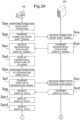
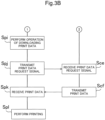
- FIGS. 3A and 3B are flowcharts showing downloading of print data in the image forming apparatus 100.
- Step Spa the image forming apparatus 100 receives a download mode shift operation.
- the controller 110 shifts to a download mode.
- Step Spb the image forming apparatus 100 transmits a download mode shift signal indicating a shift to the download mode to the data management apparatus 300.
- the communication device 160 transmits a download mode shift signal to the data management apparatus 300.
- Step Sca the data management apparatus 300 receives a download mode shift signal from the image forming apparatus 100.
- the communication device 330 receives a download mode shift signal from the image forming apparatus 100.
- Step Scb the data management apparatus 300 transmits a hierarchical structure display signal to the image forming apparatus 100.
- the communication device 330 transmits a hierarchical structure display signal to the image forming apparatus 100.
- Step Spc the image forming apparatus 100 receives a hierarchical structure display signal from the data management apparatus 300.
- the communication device 160 receives a hierarchical structure display signal from the data management apparatus 300.
- the image forming apparatus 100 displays a hierarchical structure of folders in the storage device 320 in accordance with a hierarchical structure display signal.
- the display device 150 displays the hierarchical structure of folders of the data management apparatus 300 in accordance with a hierarchical structure display signal.
- the operation device 140 receives an operation of the operator, the display device 150 displays the hierarchical structure of folders of the data management apparatus 300.
- Step Spe the image forming apparatus 100 receives an operation of designating print data stored in the hierarchical structure of folders in the storage device 320.
- the operation device 140 receives an operation of designating print data from a particular folder of the hierarchical structure of folders.
- Step Spf the image forming apparatus 100 transmits a print data designation signal to the data management apparatus 300.
- the communication device 160 transmits a print data designation signal to the data management apparatus 300.
- Step Scc the data management apparatus 300 receives a print data designation signal from the image forming apparatus 100.
- the communication device 330 receives a print data designation signal from the image forming apparatus 100.
- the data management apparatus 300 transmits display data corresponding to print data designated by a print data designation signal to the image forming apparatus 100.
- the controller 310 identifies print data designated in a print data designation signal from a folder of the storage device 320 and reads display data related to the identified print data.
- the communication device 330 transmits display data related to print data to the image forming apparatus 100.
- Step Spg display data related to print data designated in a print data designation signal is received.
- the communication device 160 receives display data related to print data selected in Step Spe from the data management apparatus 300. For example, if selection of print data is performed in the operation device 140, the communication device 160 receives display data related to print data.
- Step Sph1 display data is displayed. Specifically, when the communication device 160 receives display data, the display device 150 displays a part of the display data included in the display data. For example, the display device 150 displays the first display data.
- Step Sph2 display data is switched and displayed.
- the display device 150 displays the second display data in place of the first display data.
- the display device 150 displays display data different from the display data displayed in Step Sph1.
- the display device 150 displays the second display data in Step Sph2.
- the display device 150 displays the second display data which has changed from the first display data.
- Step Spi the image forming apparatus 100 receives an operation of downloading print data.
- the operation device 140 receives an operation of downloading print data.
- Step Spj the image forming apparatus 100 transmits a print data request signal for requesting downloading of print data to the data management apparatus 300.
- the communication device 160 transmits a print data request signal to the data management apparatus 300.
- the data management apparatus 300 receives a print data request signal from the image forming apparatus 100.
- the communication device 330 receives a print data request signal from the image forming apparatus 100.
- Step Scf the data management apparatus 300 transmits print data designated in a print data designation signal to the image forming apparatus 100 in response to a print data request signal.
- the communication device 330 transmits print data to the image forming apparatus 100.
- Step Spk the image forming apparatus 100 receives print data from the data management apparatus 300.
- the communication device 160 receives print data from the data management apparatus 300.
- Step Spl the image forming apparatus 100 forms an image on a sheet in accordance with print data.
- the forming device 130 forms an image on a sheet in accordance with print data.
- display data related to print data is separately displayed into the first display data and the second display data. Therefore, regardless of a display screen of the display device 150, limitation of display according to display data related to print data can be curbed. That is, even if the display screen of the display device 150 is a small screen in which display data cannot be displayed at once, limitation of displaying display data related to print data can be avoided.
- the display device 150 displays the first display data and the second display data of display data in separate screens. For example, the display device 150 displays the first display data in the display screen and displays "a forward button" for a change to another display screen displaying the second display data. If the operator operates "the forward button", the display device 150 displays the second display data in the display screen. When the display device 150 displays the second display data in the display screen, it is preferable to display "a return button” for returning to the original display screen displaying the first display data.
- display data other than the first display data and the second display data may be displayed in the display device 150 of the image forming apparatus 100 by the operator operating the operation device 140.
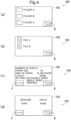
- FIGS. 4(a) to 4(d) are schematic views of the display device 150 when print data is downloaded in the image forming apparatus 100.
- the display device 150 has a display screen 152.
- the display device 150 displays the hierarchical structure of folders of the storage device 320 in accordance with a hierarchical structure display signal.
- the display device 150 displays a return button R for returning the display screen 152 to an immediately previous screen.
- the return button R is located at the lower right in the display screen 152.
- the display device 150 displays the hierarchical structure of folders in accordance with a hierarchical structure display signal.
- folders a folder A, a folder B, and a folder C are managed in the same level.
- the operator can select the folder A, the folder B, and the folder C using the operation device 140.
- the display device 150 displays a file or a folder inside the selected folder. For example, while the display device 150 displays the hierarchical structure of folders, if the operation device 140 receives an operation of the operator selecting the folder A, the display device 150 displays a file A and a file B included in the selected folder A. The operation device 140 receives an operation of the operator selecting the file A and the file B.
- the communication device 160 transmits a print data designation signal for designating the selected files to the data management apparatus 300. Thereafter, the communication device 160 receives display data related to the selected files from the data management apparatus 300. The display device 150 performs display in accordance with the display data.
- the display device 150 displays the first display data related to the file in accordance with the display data.
- the first display data indicates printing conditions.
- the display device 150 displays printing conditions in accordance with the first display data. Printing conditions include the number of printing sheets, the paper size at the time of printing, the kind of paper, necessity of layout change, and printing setting conditions (single-sided printing, double-sided printing).
- the return button R is located at the lower right in the display screen 152.
- the return button R is a button for returning to a previous display screen. If the return button R is operated, the display screen changes to the previous display screen.
- a forward button F is located at the lower left in the display screen 152.
- the forward button F is a button for proceeding to a next display screen. If the forward button F is operated, the display screen changes to the next display screen.
- the display device 150 displays the second display data as a next display screen.
- the display device 150 displays a deadline related to print data.
- the forward button F is located at the lower left in the display screen 152.
- the forward button F is a button for proceeding to a next display screen. If the forward button F is operated, the display screen changes to the next display screen.
- the return button R is located at the lower right in the display screen 152.
- the return button R is a button for returning to a previous display screen. If the return button R is operated, the display screen changes to the previous display screen.
- the first display data and the second display data can be displayed in the display screen 152 in a switchable manner by means of an operation of the forward button or the return button. For this reason, even if the display screen 152 of the display device 150 is relatively small, the display device 150 can display a sizable amount of display data.
- FIG. 5 is a schematic view of the data communication system 10 including the image forming apparatus 100.
- the information processing apparatus 800 has a display screen relatively larger than the display device 150 of the image forming apparatus 100.
- the data communication system 10 includes the image forming apparatus 100 and the information processing apparatus 800.
- the image forming apparatus 100 communicates with the data management apparatus 300.
- the information processing apparatus 800 communicates with the image forming apparatus 100 and/or the data management apparatus 300.
- the data communication system 10 may include the data management apparatus 300 in addition to the image forming apparatus 100 and the information processing apparatus 800.
- An application program which operates in association with the image forming apparatus 100 may be installed in the information processing apparatus 800.
- a general-purpose information processing apparatus in which an application program that operates in association with the image forming apparatus 100 is installed, can be used as the information processing apparatus 800.
- the information processing apparatus functions as the information processing apparatus 800.
- the information processing apparatus 800 has a display screen larger than the display device of the image forming apparatus 100.
- the information processing apparatus 800 is a so-called personal computer.
- the image forming apparatus 100 displays the first display data and the second display data included in display data in separate screens within the display screen.
- the information processing apparatus 800 displays the first display data and the second display data included in display data at the same time within the same display screen.
- the image forming apparatus 100 and the data management apparatus 300 are connected to each other via a network.
- the image forming apparatus 100 and the data management apparatus 300 are connected to each other via the Internet, a local area network (LAN), or a wide area network (WAN) such that communication can be performed therebetween.
- LAN local area network
- WAN wide area network
- the data management apparatus 300 may transmit data to the information processing apparatus 800. In addition, the data management apparatus 300 may manage data received from the information processing apparatus 800.
- FIG. 6 is a block diagram of the data communication system 10.
- the data communication system 10 includes the image forming apparatus 100 and the information processing apparatus 800.
- the data communication system 10 may include the data management apparatus 300 in addition to the image forming apparatus 100 and the information processing apparatus 800.
- the information processing apparatus 800 has a controller 810, a storage device 820, a display device 830, an operation device 840, and a communication device 850.
- the controller 810 controls the storage device 820, the display device 830, the operation device 840, and the communication device 850.
- the controller 810 includes a computing element.
- the computing element includes a processor.
- the processor includes a central processing unit (CPU).
- the processor may include an application specific integrated circuit (ASIC).
- ASIC application specific integrated circuit
- the storage device 820 stores various kinds of data.
- the storage device 820 includes a main storage element such as a semiconductor memory, and an auxiliary storage element such as a semiconductor memory and/or a hard disk drive.
- the storage device 820 stores a control program for driving the information processing apparatus 800.
- the controller 810 controls operation of the information processing apparatus 800 by executing the control program.
- the processor of the controller 810 controls the constituents of the information processing apparatus 800 by executing the computer program stored in the storage element of the storage device 820.
- the display device 830 displays an operation screen or results of various kinds of processing.
- the display device 830 includes a liquid crystal display or an organic EL display.
- the operation device 840 may include a touch sensor.
- the display device 830 and the operation device 840 may be integrated together in a touch panel.
- the touch panel displays various keys for instructing the kind of job and the details of job.
- the operation device 840 may include buttons or a keyboard.
- the operation device 840 outputs a signal indicating an instruction corresponding to operation of the buttons, the keyboard, or the touch panel to the controller 810 or the like.
- the communication device 850 includes a network interface and communicates with external equipment.
- the communication device 850 transmits a particular signal to at least the image forming apparatus 100.
- the communication device 850 may receive a particular signal from at least the image forming apparatus 100.
- the communication device 850 may be able to communicate with the data management apparatus 300.
- FIGS. 7(a) to 7(c) are schematic views of the display device 830 of the information processing apparatus 800 when print data is downloaded in the image forming apparatus 100.
- the information processing apparatus 800 is used for designating print data for forming an image on a sheet in the image forming apparatus 100.
- the display device 830 has a display screen 832.
- the display device 830 displays the hierarchical structure of folders of the data management apparatus 300 in accordance with a hierarchical structure display signal.
- the display device 830 displays the hierarchical structure of folders in accordance with a hierarchical structure display signal.
- the operation device 140 receives an operation of the operator selecting any of the folder A, the folder B, and the folder C, here, if an operation of selecting the folder A is received, as shown in FIG. 7(b) , the display device 830 displays the hierarchical structure of the folder A, and while the display device 830 is displaying the hierarchical structure, the operation device 840 receives an operation of designating print data.
- the display device 830 displays a file or a folder inside the selected folder.
- the display device 830 is displaying the hierarchical structure of folders
- the display device 830 displays the file A and the file B included in the selected folder A together with the folder A, the folder B, and the folder C. The operator can select the file A and the file B using the operation device 140.
- the communication device 850 transmits a print data designation signal for designating a selected file to the data management apparatus 300.
- the communication device 850 may transmit a print data designation signal to the data management apparatus 300 via the image forming apparatus 100.
- the display device 830 displays the display data related to the file.
- the display device 830 displays details indicated by display data in accordance with the display data.
- the display device 830 collectively displays the first display data and the second display data included in display data.
- the display device 830 displays printing conditions in accordance with the first display data and displays a deadline related to print data in accordance with the second display data.
- the display device 830 displays printing conditions according to the first display data on the left side in the display screen 832. At the same time, the display device 830 displays a deadline related to print data according to the second display data on the right side in the display screen 832.
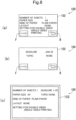
- FIGS. 8(a) and 8(b) are schematic views showing display data displayed in the display device 150 of the image forming apparatus 100 in the data communication system 10 of the present embodiment.
- FIG. 8(c) is a schematic view showing display data displayed in the display device 830 of the information processing apparatus 800 in the data communication system 10 of the present embodiment.
- the display device 150 displays the first display data related to a file in accordance with display data.
- the first display data indicates printing conditions.
- the display device 150 displays printing conditions in accordance with the first display data.
- the display screen 152 displays the first display data.
- the forward button F is located at the lower left in the display screen 152.
- the forward button F is a button for proceeding to a next display screen. If the forward button F is operated, the display screen changes to the next display screen.
- the display device 150 displays the second display data.
- the display device 150 displays a deadline related to print data.
- the forward button F is located at the lower left in the display screen 152.
- the forward button F is a button for proceeding to a next display screen. If the forward button F is operated, the display screen changes to the next display screen.
- the display device 830 collectively displays the first display data and the second display data.
- the display device 830 displays printing conditions in accordance with the first display data and displays a deadline related to print data in accordance with the second display data.
- the display device 830 displays printing conditions according to the first display data on the left side in the display screen 832 and displays a deadline related to print data according to the second display data on the right side in the display screen 832.
- Display data stored in the data management apparatus 300 may be displayed by an apparatus other than the image forming apparatus 100 and the information processing apparatus 800.
- the apparatus other than the image forming apparatus 100 being different from the information processing apparatus 800, may display a plurality of pieces of display data in separate screens.
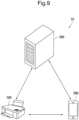
- FIG. 9 is a schematic view of the data communication system 10.
- the data communication system 10 of the present embodiment includes the image forming apparatus 100 and an information processing terminal 200.
- the image forming apparatus 100 communicates with the data management apparatus 300.
- the information processing terminal 200 communicates with the image forming apparatus 100 and/or the data management apparatus 300.
- the data communication system 10 may further include the data management apparatus 300 in addition to the image forming apparatus 100 and the information processing terminal 200.
- the information processing terminal 200 operates in association with the image forming apparatus 100.
- the information processing terminal 200 receives display data related to print data for forming an image on a sheet in the image forming apparatus 100 from the data management apparatus 300.
- the information processing terminal 200 may receive display data from the data management apparatus 300 via the image forming apparatus 100.
- the information processing terminal 200 receives display data stored in the data management apparatus 300 directly or indirectly from the data management apparatus 300 and displays the display data.
- the information processing terminal 200 may be a so-called smartphone, a mobile phone, or a tablet.
- An application program which operates in association with the image forming apparatus 100 may be installed in the information processing terminal 200.
- a general-purpose information processing terminal in which an application program that operates in association with the image forming apparatus 100 is installed, can be used as the information processing terminal 200.
- the information processing terminal functions as the information processing terminal 200.
- the information processing terminal 200 may communicate with the image forming apparatus 100. For example, the information processing terminal 200 may transmit a signal to the image forming apparatus 100. In addition, the information processing terminal 200 may receive a signal from the image forming apparatus 100. Moreover, the information processing terminal 200 may transmit data to the data management apparatus 300. In addition, the information processing terminal 200 may receive data from the data management apparatus 300.
- Both the image forming apparatus 100 and the information processing terminal 200 may be able to display display data.
- the display screen of the display device is not relatively large in the information processing terminal 200, similar to the display device 150 of the image forming apparatus 100, the display device of the information processing terminal 200 may display a plurality of pieces of display data in separate screens.
- the way of dividing a plurality of pieces of display data in the image forming apparatus 100 may differ from the way of dividing a plurality of pieces of display data in the information processing terminal 200.
- the information processing terminal 200 may be used for authenticating data communication between the image forming apparatus 100 and the data management apparatus 300. Alternatively, the information processing terminal 200 may be used for supplementation or substitution for the operation device and/or the display device of the image forming apparatus 100.
- FIG. 10 is a block diagram of the data communication system 10.
- the data communication system 10 includes the image forming apparatus 100 and the information processing terminal 200.
- the information processing terminal 200 has a controller 210, a storage device 220, a display device 230, an operation device 240, and a communication device 250.
- the controller 210 controls the storage device 220, the display device 230, the operation device 240, and the communication device 250.
- the controller 210 includes a computing element.
- the computing element includes a processor.
- the processor includes a central processing unit (CPU).
- the processor may include an application specific integrated circuit (ASIC).
- ASIC application specific integrated circuit
- the display device 230 displays an operation screen or results of various kinds of processing.
- the display device 230 includes a liquid crystal display or an organic EL display.
- the display device 230 may display an image in accordance with print data. In this case, the operator can visually recognize print data before the image forming apparatus 100 forms an image on a sheet. In addition, the display device 230 may display an image in accordance with display data related to print data.
- the operation device 240 may include a touch sensor.
- the display device 230 and the operation device 240 may be integrated together in a touch panel.
- the touch panel displays various keys for instructing the kind of job and the details of job.
- the operation device 240 may include buttons or a keyboard.
- the operation device 240 outputs a signal indicating an instruction corresponding to operation of the buttons, the keyboard, or the touch panel to the controller 110 or the like.
- the information processing terminal 200 may further have an image capturing device 260 capable of capturing images.
- the image capturing device 260 includes an image capturing element.
- the image capturing element is a charge coupled device (CCD) image sensor, or a complementary metal oxide semiconductor (CMOS) image sensor.
- CCD charge coupled device
- CMOS complementary metal oxide semiconductor
- display data related to print data can displayed in both the image forming apparatus 100 and the information processing terminal 200. For this reason, display data can be visually recognized from either the image forming apparatus 100 or the information processing terminal 200 in accordance with convenience of the operator.
- the image forming apparatus 100 when the image forming apparatus 100 operates in association with the data management apparatus 300, it is preferable for the image forming apparatus 100 to be authenticated by the data management apparatus 300. In addition, it is preferable that authentication of the image forming apparatus 100 be performed using the information processing terminal 200.
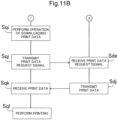
- FIGS. 11A and 11B are flowcharts showing downloading of print data in the data communication system 10.
- Step Sqa the image forming apparatus 100 shifts to the download mode. If the operation device 140 receives an operation of the operator for a shift to the download mode, the controller 110 shifts to the download mode.
- Step Sqb the image forming apparatus 100 displays authentication information.
- the display device 150 displays authentication information unique to the image forming apparatus 100.
- Authentication information is information indicating that the image forming apparatus 100 has been authenticated with respect to the data management apparatus 300.
- authentication information is two-dimensional code information.
- Authentication information may be a password.
- Step Sma the information processing terminal 200 acquires authentication information.
- the image capturing device 260 captures an image of authentication information displayed in the display device 150 of the image forming apparatus 100.
- the operation device 240 receives an operation of the operator inputting authentication information displayed in the display device 150.
- Step Smb the information processing terminal 200 transmits an authentication signal to the data management apparatus 300 on the basis of authentication information.
- the communication device 250 transmits an authentication signal to the data management apparatus 300. Specifically, the communication device 250 transmits an authentication signal to the data management apparatus 300.
- An authentication signal indicates that the image forming apparatus 100 is scheduled to download print data from the data management apparatus 300.
- Step Sda the data management apparatus 300 receives an authentication signal from the information processing terminal 200.
- the communication device 330 receives an authentication signal from the information processing terminal 200.
- Step Sdb the data management apparatus 300 transmits a hierarchical structure display signal indicating the hierarchical structure of folders in the storage device 320 to the image forming apparatus 100.
- the communication device 330 transmits a hierarchical structure display signal to the image forming apparatus 100.
- Step Sqc the image forming apparatus 100 receives a hierarchical structure display signal from the data management apparatus 300.
- the communication device 160 receives a hierarchical structure display signal from the data management apparatus 300.
- Step Sqd the image forming apparatus 100 displays the hierarchical structure of folders in the storage device 320 in accordance with a hierarchical structure display signal.
- the display device 150 displays the hierarchical structure of folders of the data management apparatus 300 in accordance with a hierarchical structure display signal.
- the operation device 140 receives an operation of the operator, the display device 150 displays the hierarchical structure of folders of the data management apparatus 300.
- Step Sqe the image forming apparatus 100 receives an operation of designating a folder for storing print data in the hierarchical structure of folders in the storage device 320.
- the operation device 140 receives an operation of designating a folder for storing print data in the hierarchical structure of folders.
- Step Sqf the image forming apparatus 100 transmits a print data designation signal for designating data stored in the folder to the data management apparatus 300.
- the communication device 160 transmits a print data designation signal to the data management apparatus 300.
- Step Sdc the data management apparatus 300 receives a print data designation signal from the image forming apparatus 100.
- the communication device 330 receives a print data designation signal from the image forming apparatus 100.
- Step Sdd the data management apparatus 300 reads display data related to print data indicated by a print data designation signal and transmits it to the image forming apparatus 100.
- the controller 310 reads display data related to print data indicated by a print data designation signal from the storage device 320. Thereafter, a communication device 340 transmits display data to the image forming apparatus 100.
- Step Sqg the image forming apparatus 100 receives display data from the data management apparatus 300. Specifically, the communication device 160 receives display data transmitted from the communication device 330. As necessary, the storage device 120 stores display data.
- Step Sqh1 display data is displayed. Specifically, when the communication device 160 receives display data, the display device 150 displays a part of the display data included in the display data. For example, the display device 150 displays the first display data.
- Step Sqh2 display data is switched and displayed. Specifically, in Step Sqh2, the display device 150 displays display data different from the display data displayed in Step Sqh1. For example, when the display device 150 displays the first display data in Step Sqh1, the display device 150 displays the second display data.
- Step Sqi in the image forming apparatus 100, the operation device 140 receives an operation for executing downloading of print data.
- the image forming apparatus 100 receives an instruction of executing downloading of print data.
- Step Sqj the image forming apparatus 100 transmits a print data request signal to the data management apparatus 300.
- the communication device 160 transmits a print data request signal to the data management apparatus 300.
- Step Sde the data management apparatus 300 receives a print data request signal from the image forming apparatus 100.
- the communication device 340 receives a print data request signal from the image forming apparatus 100.
- Step Sdj the data management apparatus 300 reads print data designated by a print data designation signal in response to a print data request signal and transmits it to the image forming apparatus 100.
- the controller 310 reads print data designated by a print data designation signal from the storage device 320.
- the communication device 340 transmits print data to the image forming apparatus 100.
- Step Sqk the image forming apparatus 100 receives print data from the data management apparatus 300. Specifically, the communication device 160 receives print data transmitted from the communication device 330.
- Step Sql the image forming apparatus 100 forms an image on a sheet in accordance with print data.
- the forming device 130 forms an image on a sheet in accordance with print data.
- print data can be downloaded from a predetermined folder of the data management apparatus 300 and an image can be formed on a sheet in accordance with print data.
- processing may not be performed regarding an input and a transmission of authentication information, and a constitution required for an input and a transmission of authentication information may not be provided.
- the image forming apparatus 100 may transmit scan data generated by reading a sheet to the data management apparatus 300.
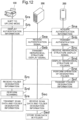
- FIG. 12 is a flowchart showing uploading of scan data in the data communication system 10 of the present embodiment.
- Step Sra the image forming apparatus 100 shifts to an upload mode. Specifically, if the operation device 140 receives an operation of the operator, the controller 110 shifts to the upload mode.
- Step Srb the image forming apparatus 100 displays authentication information.
- the display device 150 displays authentication information unique to the image forming apparatus 100.
- Authentication information is information indicating that the image forming apparatus 100 has been authenticated with respect to the data management apparatus 300.
- authentication information is two-dimensional code information.
- Authentication information may be a password.
- Step Sna the information processing terminal 200 acquires authentication information. Specifically, the image capturing device 260 captures an image of authentication information displayed in the display device 150 of the image forming apparatus 100. Alternatively, the operation device 240 receives an operation of the operator inputting authentication information displayed in the display device 150.
- Step Snb the information processing terminal 200 transmits an authentication signal to the data management apparatus 300 on the basis of authentication information.
- the communication device 250 transmits an authentication signal to the data management apparatus 300.
- An authentication signal indicates that the image forming apparatus 100 is scheduled to upload scan data on the data management apparatus 300.
- the data management apparatus 300 receives an authentication signal from the information processing terminal 200.
- the communication device 330 receives an authentication signal from the information processing terminal 200.
- the controller 310 allows uploading of scan data from the image forming apparatus 100 in accordance with an authentication signal.
- Step Seb the data management apparatus 300 transmits a hierarchical structure display signal indicating the hierarchical structure of folders in the storage device 320 to the information processing terminal 200.
- the communication device 330 transmits a hierarchical structure display signal to the information processing terminal 200.
- Step Snc the information processing terminal 200 receives a hierarchical structure display signal from the data management apparatus 300.
- the communication device 250 receives a hierarchical structure display signal from the data management apparatus 300.
- Step Snd the information processing terminal 200 displays the hierarchical structure of folders in the storage device 320 in accordance with a hierarchical structure display signal.
- the display device 230 displays the hierarchical structure of folders of the data management apparatus 300 in accordance with a hierarchical structure display signal.
- the operation device 240 receives an operation of the operator, the display device 230 displays the hierarchical structure of folders of the data management apparatus 300.
- the operation device 240 receives an operation of designating a folder in the hierarchical structure of folders as a storage location. Accordingly, the information processing terminal 200 receives designation of a folder for storing scan data. In addition, the operation device 240 receives an operation of executing scanning of a sheet in the image forming apparatus 100.
- Step Snf the information processing terminal 200 transmits folder designation information designating a folder for storing scan data in the hierarchical structure of folders of the data management apparatus 300 to the image forming apparatus 100.
- the communication device 250 transmits folder designation information to the image forming apparatus 100.
- Step Src the image forming apparatus 100 receives folder designation information from the information processing terminal 200. Specifically, the communication device 160 receives folder designation information transmitted from the communication device 250.
- Step Srd the image forming apparatus 100 scans a sheet. Specifically, the reading device 170 generates scan data by scanning a sheet. As necessary, the storage device 120 may store scan data.
- Step Sre the image forming apparatus 100 transmits scan data and folder designation information to the data management apparatus 300.
- the communication device 160 transmits scan data and folder designation information to the data management apparatus 300.
- the data management apparatus 300 receives scan data and folder designation information from the information processing terminal 200. Specifically, the communication device 330 receives scan data and folder designation information from the image forming apparatus 100.
- Step Sed the data management apparatus 300 stores scan data in the folder designated in folder designation information.
- a folder for storing scan data can be simply designated. Accordingly, the image forming apparatus 100 can upload scan data on the data management apparatus 300.
- processing may not be performed regarding an input and a transmission of authentication information, and a constitution required for an input and a transmission of authentication information may not be provided.
- the hierarchical structure of folders may not be displayed, and a constitution required for the display may not be provided.
- the data management apparatus 300 stores print data and display data, but the present embodiment is not limited to this.
- the data management apparatus 300 may further store printing condition limitation information in addition to print data and display data.
- FIG. 13 is a schematic view of the data communication system 10 of the present embodiment.
- the data communication system 10 shown in FIG. 13 has a constitution similar to that of the data communication system 10 in FIG. 2 except that the storage device 320 further stores printing condition limitation information in the data management apparatus 300, and duplicate description will be omitted for the purpose of avoiding redundancy.
- the storage device 320 stores printing condition limitation information in addition to print data and display data.
- Printing condition limitation information indicates printing conditions limited when print data is downloaded and printed.
- Printing condition limitation information is stored in association with print data.
- printing condition limitation information may be set to a folder for storing print data.
- this print data is set in the image forming apparatus 100 such that printing cannot be performed by intensive printing after downloading.
- this print data is set in the image forming apparatus 100 such that printing can only be performed in a particular size even after downloading.
- printing conditions when print data is printed can be limited by printing condition limitation information.
- printing conditions when print data is downloaded and printed can be partially limited.
- printing condition limitation information may be transmitted to the image forming apparatus 100 before, after, or at the same time as the data management apparatus 300 transmits print data.
- FIG. 14 is a schematic view of the data communication system 10.
- the data communication system 10 in FIG. 14 has a constitution similar to that of the data communication system 10 shown in FIG. 1 except that a plurality of image forming apparatuses 100 and a plurality of information processing terminals 200 are provided, and duplicate description will be omitted for the purpose of avoiding redundancy.
- the data communication system 10 of the present embodiment includes a plurality of image forming apparatuses 100a to 100c and a plurality of information processing terminals 200a to 200c.
- the image forming apparatus 100a operates in association with the information processing terminal 200a.
- the image forming apparatus 100b operates in association with the information processing terminal 200b.
- the image forming apparatus 100c operates in association with the information processing terminal 200c.
- the image forming apparatuses 100a to 100c may be generically described as the image forming apparatuses 100.
- the information processing terminals 200a to 200c may be generically described as the information processing terminals 200.
- the information processing terminal 200 may be used for authenticating data communication between the image forming apparatus 100 and the data management apparatus 300. Alternatively, the information processing terminal 200 may be used for supplementation or substitution for the operation device 140 and/or the display device 230 of the image forming apparatus 100.
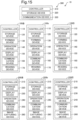
- FIG. 15 is a block diagram of the data communication system 10.
- the data communication system 10 includes a plurality of image forming apparatuses 100a to 100c and a plurality of information processing terminals 200a to 200c.
- the data communication system 10 may include the data management apparatus 300.
- Each of the image forming apparatuses 100a to 100c has the controller 110, the storage device 120, the forming device 130, the operation device 140, the display device 150, and the communication device 160.
- the controller 110 controls the storage device 120, the forming device 130, the operation device 140, the display device 150, and the communication device 160.
- Each of the image forming apparatuses 100a to 100c may further have the reading device 170.
- Each of the information processing terminals 200a to 200c has the controller 210, the storage device 220, the display device 230, the operation device 240, and the communication device 250.
- the controller 210 controls the storage device 220, the display device 230, the operation device 240, and the communication device 250.
- Each of the information processing terminals 200a to 200c may have the image capturing device 260.
- the data communication system 10 shown in FIGS. 14 and 15 includes a plurality of image forming apparatuses 100, but the functions of the plurality of image forming apparatuses 100 may not be equivalent to each other.
- the data communication system 10 shown in FIGS 14 and 15 includes a plurality of information processing terminals 200 in addition to the plurality of image forming apparatuses 100, but the functions of the plurality of information processing terminals 200 may not be equivalent to each other.
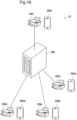
- FIG. 16 is a schematic view of the data communication system 10.
- the data communication system 10 in FIG. 16 has a constitution similar to that of the data communication system 10 shown in FIGS. 10 to 15 except that the functions of the image forming apparatus 100 and the information processing terminal 200 are different, and duplicate description will be omitted for the purpose of avoiding redundancy.
- the data communication system 10 of the present embodiment has a plurality of image forming apparatuses 100.
- the plurality of image forming apparatuses 100 include the image forming apparatuses 100a to 100c and an image forming apparatus 100t.
- the functions of the image forming apparatuses 100a to 100c are equivalent to each other.
- the function of the image forming apparatus 100t differs from the functions of the image forming apparatuses 100a to 100c.
- the image forming apparatus 100t has a function that is not allowed to the image forming apparatuses 100a to 100c.
- the data communication system 10 of the embodiment may include a plurality of information processing terminals 200 which operate in association with the plurality of image forming apparatuses 100.
- the plurality of information processing terminals 200 include the information processing terminals 200a to 200c and an information processing terminal 200t.
- the functions of the information processing terminals 200a to 200c are equivalent to each other.
- the function of the information processing terminal 200t differs from the functions of the information processing terminals 200a to 200c.
- the information processing terminal 200t has a function that is not allowed to the information processing terminals 200a to 200c.
- the image forming apparatus 100t or the information processing terminal 200t may be able to set printing conditions in a case of downloading and printing scan data when the scan data is uploaded on the data management apparatus 300.
- the image forming apparatuses 100a to 100c or the information processing terminals 200a to 100c may not be able to set printing conditions in a case of downloading and printing scan data when the scan data is uploaded on the data management apparatus 300.
- the data communication system 10 of the present embodiment is favorably utilized for distribution of assignments, collection of answers, evaluation of answers, and return of evaluation results.
- the image forming apparatus 100t and the information processing terminal 200t are favorably used by an assignment distributor who distributes assignments.
- an assignment distributor include a manager, a teacher, and an instructor.
- the image forming apparatuses 100a to 100c and the information processing terminals 200a to 200c are favorably used by answerers who answer an assignment.
- Examples of answerers include persons to be managed, pupils, and students.
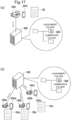
- FIGS. 17(a) to 19(b) are schematic explanatory views of uploading of scan data and downloading of print data utilizing the folders in the data communication system 10 of the present embodiment.
- an operator of the image forming apparatus 100t and the information processing terminal 200t will be regarded as an operator T.
- an operator of the image forming apparatus 100a and the information processing terminal 200a will be regarded as an operator A
- an operator of the image forming apparatus 100b and the information processing terminal 200b will be regarded as an operator B
- an operator of the image forming apparatus 100c and the information processing terminal 200c will be regarded as an operator C.
- the image forming apparatus 100t As shown in FIG. 17(a) , the image forming apparatus 100t generates assignment scan data SSD by scanning an assignment sheet SS. Thereafter, the image forming apparatus 100t transmits the assignment scan data SSD to the data management apparatus 300.
- the data management apparatus 300 has an assignment folder and a submission folder as folders.
- the assignment folder is used for distributing the assignment sheet SS.
- the submission folder is used when an answer sheet RS made by writing an answer in the assignment sheet SS is submitted.
- the assignment folder and the submission folder may be created in the data management apparatus 300 using the image forming apparatus 100t or the information processing terminal 200t.
- the image forming apparatus 100t transmits the assignment scan data SSD to the data management apparatus 300 together with folder designation information designating the assignment folder.
- the image forming apparatus 100t or the information processing terminal 200t may set printing conditions when downloading is performed from the assignment folder. Printing conditions may be set by the operator T operating the image forming apparatus 100t.
- a print data deadline can also be able to be set by an operation of the image forming apparatus 100t, and the set print data deadline may be transmitted from the image forming apparatus 100t to the data management apparatus 300.
- the printing condition limitation information described above may be generated by an operation of the information processing terminal 200t, and the printing condition limitation information may be transmitted from the information processing terminal 200t to the data management apparatus 300.
- the data management apparatus 300 receives the assignment scan data SSD together with folder designation information designating the assignment folder.
- the data management apparatus 300 stores the assignment scan data SSD inside the assignment folder of the hierarchical structure. Accordingly, the assignment scan data SSD is uploaded on the assignment folder of the hierarchical structure in the data management apparatus 300.
- the image forming apparatuses 100a to 100c read and receive the assignment scan data SSD from the assignment folder of the hierarchical structure in the data management apparatus 300. Accordingly, the assignment scan data SSD is downloaded from the assignment folder of the hierarchical structure of folders of the data management apparatus 300 to the image forming apparatuses 100a to 100c.
- the image forming apparatus 100a forms an image corresponding to the assignment scan data SSD on a sheet. Accordingly, the image forming apparatus 100a can form an assignment sheet SSa.
- the image forming apparatus 100b and the image forming apparatus 100c form images corresponding to the assignment scan data SSD on sheets. Accordingly, the image forming apparatus 100b and the image forming apparatus 100c can form assignment sheets SSb and SSc. Typically, the assignment sheets SSa to SSc of the image forming apparatuses 100a to 100c are the same.
- the operator A writes an answer in the assignment sheet SSa. Accordingly, the assignment sheet SSa becomes an answer sheet RSa.
- the operator B writes an answer in the assignment sheet SSb. Accordingly, the assignment sheet SSb becomes an answer sheet RSb.
- the operator C writes an answer in the assignment sheet SSc. Accordingly, the assignment sheet SSc becomes an answer sheet RSc.
- the image forming apparatus 100a generates answer scan data RSDa obtained by scanning the answer sheet RSa and transmits it to the data management apparatus 300.
- the image forming apparatus 100a designates a submission folder of the hierarchical structure in the data management apparatus 300 for storing the answer scan data RSDa and transmits the answer scan data RSDa.
- the answer scan data RSDa is uploaded on the submission folder of the hierarchical structure in the data management apparatus 300 from the image forming apparatus 100a.
- the image forming apparatus 100c generates answer scan data RSDc obtained by scanning the answer sheet RSc and transmits it to the data management apparatus 300.
- the image forming apparatus 100c designates a submission folder of the hierarchical structure in the data management apparatus 300 for storing the answer scan data RSDc and transmits the answer scan data RSDc. Accordingly, the answer scan data RSDc is uploaded on the submission folder of the hierarchical structure in the data management apparatus 300 from the image forming apparatus 100c.
- the image forming apparatus 100t forms images on sheets by reading the answer scan data RSDa to the answer scan data RSDc from the submission folder in the data management apparatus 300. Accordingly, the answer scan data RSDa to the answer scan data RSDc are downloaded from the submission folder of the hierarchical structure of folders of the data management apparatus 300 to the image forming apparatus 100t.
- the image forming apparatus 100t forms images corresponding to the answer scan data RSDa to the answer scan data RSDc on sheets. Accordingly, the image forming apparatus 100t can form the answer sheets RSa to RSc.
- the image forming apparatus 100t may perform display by extracting only data in which the date and time when each piece of answer scan data is transmitted to the data management apparatus 300 are included in a time zone designated by the operator.
- the image forming apparatus 100t may perform display excluding data which has been marked by the operator T (which will be described below). Even with these, data desired by the operator T can be preferentially displayed, and therefore limitation of display according to display data related to print data can be curbed.
- the operator T writes evaluations on the answer sheets RSa to RSc.
- the operator T marks the answer sheets RSa to RSc. Accordingly, as shown in FIG. 19 (a) , the answer sheets RSa to RSc become evaluation result sheets ESa to ESc.
- the image forming apparatus 100t generates evaluation result scan data ESDa to a evaluation result scan data ESDc by scanning the evaluation result sheets ESa to ESc. Thereafter, as shown in FIG. 19 (a) , the image forming apparatus 100t transmits the evaluation result scan data ESDa to the evaluation result scan data ESDc to the data management apparatus 300.
- the data management apparatus 300 has a return folder as a folder in addition to the assignment folder and the submission folder.
- the return folder is used for returning the evaluation result sheets ESa to ESc.
- the return folder may be created in the data management apparatus 300 using the image forming apparatus 100t or the information processing terminal 200t.
- the image forming apparatus 100t transmits the evaluation result scan data ESDa to the evaluation result scan data ESDc to the data management apparatus 300 together with folder designation information designating a return folder.
- the data management apparatus 300 receives the evaluation result scan data ESDa to the evaluation result scan data ESDc together with folder designation information designating a return folder.
- the data management apparatus 300 stores the evaluation result scan data ESDa to the evaluation result scan data ESDc in the return folder of the hierarchical structure. Accordingly, the evaluation result scan data ESDa to the evaluation result scan data ESDc are uploaded on the return folder of the hierarchical structure in the data management apparatus 300.
- the image forming apparatus 100a forms an image corresponding to the evaluation result scan data ESDa on a sheet. Accordingly, the image forming apparatus 100a can form the evaluation result sheet ESa. Similarly, the image forming apparatus 100b and the image forming apparatus 100c form images corresponding to the evaluation result scan data ESDb and the evaluation result scan data ESDc on sheets. Accordingly, the image forming apparatus 100b and the image forming apparatus 100c can form the assignment sheets ESb and ESc.
- the image forming apparatuses 100a to 100c download the assignment scan data SSD and form the assignment sheets SSa to SSc.
- the data management apparatus 300 may create a download list indicating the image forming apparatuses 100a to 100c or the operators A to C that have downloaded the assignment scan data SSD by checking the image forming apparatuses 100a to 100c or the operators A to C that have downloaded the assignment scan data SSD.
- the download list can be accessed from the image forming apparatus 100t and/or the information processing terminal 200t, and it is preferable that the display device 150 of the image forming apparatus 100t and/or the display device 230 of the information processing terminal 200t be able to display the download list. On the other hand, it may not be able to be accessed from the image forming apparatuses 100a to 100c and/or the information processing terminals 200a to 200c.
- the image forming apparatus 100t forms the answer sheets RSa to RSc on the basis of the answer scan data RSDa to the answer scan data RSDc.
- the image forming apparatus 100t or the information processing terminal 200t may sort the answer scan data RSDa to the answer scan data RSDc in accordance with upload times of the answer scan data RSDa to the answer scan data RSDc.
- the display device 150 of the image forming apparatus 100t and/or the display device 230 of the information processing terminal 200t be able to display a sorted list.
- the image forming apparatus 100t downloads a plurality of pieces of answer scan data included in the answer folder a plurality of times
- the image forming apparatus 100t or the information processing terminal 200t perform display such that answer scan data which has already been downloaded and answer scan data which has not yet been downloaded can be visually recognized.
- the display device 150 or the display device 230 display answer scan data in different forms depending on whether or not it has been downloaded.
- the image forming apparatuses 100a to 100c generate the answer scan data RSDa to the answer scan data RSDc by scanning the answer sheets RSa to RSc having different sizes, it is preferable that the image forming apparatus 100t form the answer sheets RSa to RSc having the same size.
- the download list can be accessed from the image forming apparatus 100t and/or the information processing terminal 200t, and it is preferable that the display device 150 of the image forming apparatus 100t and/or the display device 230 of the information processing terminal 200t be able to display the download list. On the other hand, it may not be able to be accessed from the image forming apparatuses 100a to 100c and/or the information processing terminals 200a to 200c.
- a constitution indicating a deadline related to print data has been mainly described as an example of the second display data, but the present embodiment is not limited to this.
- a constitution indicating precautions that require attention regarding handling of print data may be adopted as the second display data.
- the precautions that require attention regarding handling of print data may be matters that an operator should pay attention to when printed matter is scanned or uploaded after the print data is printed.
- the present invention is favorably used for a data communication system and a data communication method.
Landscapes
- Engineering & Computer Science (AREA)
- Theoretical Computer Science (AREA)
- Human Computer Interaction (AREA)
- Physics & Mathematics (AREA)
- General Engineering & Computer Science (AREA)
- General Physics & Mathematics (AREA)
- Multimedia (AREA)
- Signal Processing (AREA)
- Data Mining & Analysis (AREA)
- Databases & Information Systems (AREA)
- Facsimiles In General (AREA)
- Accessory Devices And Overall Control Thereof (AREA)
Abstract
Description
- The present invention relates to an image forming apparatus and a data communication system.
- Servers are used for storing a large amount of data. It is being considered to allow a user to perform printing with a multi-function machine at an arbitrary place when necessary by uploading or downloading data with respect to a server (refer to Patent Literature 1).
-
Patent Literature 1 discloses an image inputting apparatus that prints image data under printing conditions according to image data and attribute information stored in a file management server. In the image inputting apparatus ofPatent Literature 1, image data acquired through scanning and attribute information related to secondary use of the image data are uploaded on the file management server from a multi-function machine, and the file management server stores the image data and the attribute information. Further, when a multi-function machine or a personal computer on a network downloads image data from the file management server and prints the downloaded image data, image data is printed under printing conditions according to the attribute information of the image data (an output paper size, an output color mode, hidden printing, and the like). - [Patent Literature 1]
Japanese Unexamined Patent Application Publication No. 2006-94027 - In
Patent Literature 1, an operation panel of an image forming apparatus is relatively large, but a display panel of the image forming apparatus may be relatively small. Particularly, printers for household use often have a relatively small display screen. For this reason, even if a server stores a large amount of display data related to print data, only a part of the display data can be displayed in a display screen of an image forming apparatus, and display of the remaining display data may be limited. - The present invention has been made in consideration of the foregoing problems, and an object thereof is to provide an image forming apparatus and a data communication system in which limitation of displaying display data related to print data can be curbed.
- An image forming apparatus according to the present invention includes a forming device forming an image on a sheet in accordance with print data, a communication device receiving first display data and second display data included in display data related to print data from a data management apparatus, and a display device displaying the display data. The display device separately displays the first display data and the second display data in separate screens.
- A data communication system according to the present invention includes an image forming apparatus forming an image on a sheet in accordance with print data, and an information processing terminal capable of communicating with the image forming apparatus. The information processing terminal has a communication device receiving first display data and second display data included in display data related to print data from a data management apparatus, and a display device displaying the display data. The display device separately displays the first display data and the second display data in separate screens.
- According to the present invention, it is possible to curb limitation of display according to display data related to print data.
-
-
FIG. 1 is a schematic view of a data communication system including an image forming apparatus of the present embodiment. -
FIG. 2 is a block diagram of the data communication system including the image forming apparatus of the present embodiment. -
FIG. 3A is an explanatory flowchart of printing of print data in the data communication system of the present embodiment. -
FIG. 3B is an explanatory flowchart of printing of print data in the data communication system of the present embodiment. -
FIGS. 4(a) to 4(d) are schematic views showing change in a display screen when print data is printed in the image forming apparatus of the present embodiment. -
FIG. 5 is a schematic view of the data communication system including the image forming apparatus of the present embodiment. -
FIG. 6 is a block diagram of the data communication system including the image forming apparatus of the present embodiment. -
FIGS. 7(a) to 7(c) are schematic views showing change in a display screen when print data is printed in the image forming apparatus of the present embodiment. -
FIGS. 8(a) and 8(b) are schematic views showing display data displayed in the image forming apparatus of the data communication system of the present embodiment, andFIG. 8(c) is a schematic view showing display data displayed in an information processing apparatus of the data communication system of the present embodiment. -
FIG. 9 is a schematic view of the data communication system of the present embodiment. -
FIG. 10 is a schematic block diagram of the data communication system of the present embodiment. -
FIG. 11A is a flowchart of printing of print data in the data communication system of the present embodiment. -
FIG. 11B is a flowchart of printing of print data in the data communication system of the present embodiment. -
FIG. 12 is a flowchart of uploading scan data in the data communication system of the present embodiment. -
FIG. 13 is a block diagram of the data communication system including the image forming apparatus of the present embodiment. -
FIG. 14 is a schematic view of the data communication system of the present embodiment. -
FIG. 15 is a block diagram of the data communication system of the present embodiment. -
FIG. 16 is a schematic view of the data communication system of the present embodiment. -
FIGS. 17(a) and 17(b) are schematic explanatory views of uploading of scan data and downloading of print data utilizing folders in the data communication system of the present embodiment. -
FIGS. 18(a) and 18(b) are schematic explanatory views of uploading of scan data and downloading of print data utilizing folders in the data communication system of the present embodiment. -
FIGS. 19(a) and 19(b) are schematic explanatory views of uploading of scan data and downloading of print data utilizing folders in the data communication system of the present embodiment. - Hereinafter, an embodiment of an image forming apparatus and a data communication system according to the present invention will be described with reference to the drawings. In the diagrams, the same reference signs are applied to parts which are the same or corresponding, and description will not be repeated.
- First, with reference to
FIG. 1 , a constitution of adata communication system 10 includingimage forming apparatuses 100 of the present embodiment will be described.FIG. 1 is a schematic view of thedata communication system 10 including theimage forming apparatuses 100. In the present embodiment, thedata communication system 10 includes theimage forming apparatus 100. Theimage forming apparatus 100 communicates with adata management apparatus 300. Theimage forming apparatus 100 communicates with adata management apparatus 300. Thedata communication system 10 may include thedata management apparatus 300. - The
image forming apparatus 100 forms an image on a sheet. In the present embodiment, for example, theimage forming apparatus 100 is a printer, a copying machine, or a multi-function machine. Theimage forming apparatus 100 may have a function of a facsimile. Here, theimage forming apparatus 100 is an inkjet type. Theimage forming apparatus 100 may be an electrophotographic type. - In the
data communication system 10, theimage forming apparatus 100 and thedata management apparatus 300 are connected to each other via a network. For example, theimage forming apparatus 100 and thedata management apparatus 300 are connected to each other via the Internet, a local area network (LAN), or a wide area network (WAN) such that communication can be performed therebetween. - The
data management apparatus 300 manages data. For example, thedata management apparatus 300 manages print data and display data related to the print data. Thedata management apparatus 300 is a so-called server. Thedata management apparatus 300 may be a cloud server. - The
data management apparatus 300 transmits print data to theimage forming apparatus 100 in response to a request from theimage forming apparatus 100. In addition, thedata management apparatus 300 transmits display data to theimage forming apparatus 100 before or after print data is transmitted to theimage forming apparatus 100 or together with print data. - The
image forming apparatus 100 forms an image on a sheet in accordance with print data. Theimage forming apparatus 100 displays display data related to print data before or at the same time as an image is formed on a sheet. Theimage forming apparatus 100 may display display data related to print data after an image is formed on a sheet in accordance with print data. Theimage forming apparatus 100 may transmit data to thedata management apparatus 300, and thedata management apparatus 300 may manage data received from theimage forming apparatus 100. - Next, with reference to
FIGS. 1 and2 , a constitution of thedata communication system 10 will be described.FIG. 2 is a block diagram of thedata communication system 10. - As shown in
FIG. 2 , thedata communication system 10 includes theimage forming apparatus 100. Theimage forming apparatus 100 communicates with thedata management apparatus 300. - The
image forming apparatus 100 has acontroller 110, astorage device 120, a formingdevice 130, anoperation device 140, adisplay device 150, and acommunication device 160. Thecontroller 110 controls thestorage device 120, the formingdevice 130, theoperation device 140, thedisplay device 150, and thecommunication device 160. - The
controller 110 includes a computing element. The computing element includes a processor. As an example, the processor includes a central processing unit (CPU). - The
storage device 120 stores data and computer programs. Thestorage device 120 includes a storage element. Thestorage device 120 includes a main storage element such as a semiconductor memory, and an auxiliary storage element such as a semiconductor memory and/or a hard disk drive. Thestorage device 120 may include a removable medium. The processor of thecontroller 110 controls the constituents of theimage forming apparatus 100 by executing the computer program stored in the storage element of thestorage device 120. - For example, the computer program is stored in a non-transitory computer readable storage medium. Examples of the non-transitory computer readable storage medium include a read only memory (ROM), a random access memory (RAM), a CD-ROM, a magnetic tape, a magnetic disk, and an optical data storage apparatus.
- The forming
device 130 forms an image on a sheet in accordance with print data. Alternatively, the formingdevice 130 may form an image on a sheet using a toner. For example, the sheet is plain paper, recycled paper, thin paper, cardboard, or coated paper. For example, the formingdevice 130 is an inkjet-type image forming mechanism including an inkjet head or is an electrophotographic-type image forming mechanism including a photoreceptor drum, an electrification apparatus, an exposure apparatus, a developing apparatus, a transfer apparatus, an anchoring apparatus, and the like. - The
operation device 140 receives an operation of an operator. If theoperation device 140 receives an operation of the operator, thecontroller 110 controls thestorage device 120, the formingdevice 130, thedisplay device 150, and thecommunication device 160 in accordance with details of an operation. - The
operation device 140 includes buttons or a keyboard. Alternatively, theoperation device 140 may include a touch sensor. - The
display device 150 displays an operation screen or results of various kinds of processing. Thedisplay device 150 includes a liquid crystal display (LCD), an organic electro-luminescence (EL) display, or a plasma display. Theoperation device 140 and thedisplay device 150 may be integrated together in a touch panel. - The
display device 150 may display an image in accordance with print data. In this case, the operator can visually recognize print data before the formingdevice 130 forms an image on a sheet. In addition, thedisplay device 150 displays an image in accordance with display data related to print data. - For example, the
communication device 160 includes a network interface and communicates with external equipment. For example, thecommunication device 160 communicates with thedata management apparatus 300. Thecommunication device 160 receives print data from thedata management apparatus 300. In addition, thecommunication device 160 receives display data from thedata management apparatus 300. Thecommunication device 160 may transmit data to thedata management apparatus 300. - The
image forming apparatus 100 may further have areading device 170. Thereading device 170 is a scanner including a contact image sensor (CIS), a charge coupled device (CCD), and the like. Thereading device 170 generates scan data by reading a sheet. Thestorage device 120 stores scan data generated by thereading device 170 reading paper. For example, thecommunication device 160 may transmit scan data to thedata management apparatus 300. - The
data management apparatus 300 stores print data and display data related to the print data. Display data has first display data and second display data. - The
data management apparatus 300 has acontroller 310, astorage device 320, and acommunication device 330. Thecontroller 310 includes a computing element. The computing element includes a processor. As an example, the processor includes a central processing unit (CPU). The processor may include an application specific integrated circuit (ASIC). - The
storage device 320 stores various kinds of data. For example, thestorage device 320 stores a control program. Thecontroller 310 controls computation of thedata management apparatus 300 by executing the control program. Specifically, the processor of thecontroller 310 controls the constituents of thedata management apparatus 300 by executing the computer program stored in the storage element of thestorage device 320. - For example, the computer program is stored in a non-transitory computer readable storage medium. Examples of the non-transitory computer readable storage medium include a read only memory (ROM), a random access memory (RAM), a CD-ROM, a magnetic tape, a magnetic disk, and an optical data storage apparatus.
- The
storage device 320 stores print data. Thestorage device 320 includes a main storage element such as a semiconductor memory, and an auxiliary storage element such as a semiconductor memory and/or a hard disk drive. Theimage forming apparatus 100 forms an image on a sheet in accordance with print data. - The
storage device 320 also stores display data. Display data indicates data related to print data. Display data is stored in association with print data. - The display data includes the first display data and the second display data. For example, the first display data indicates printing conditions for print data. Examples of printing conditions include the number of printing sheets, the paper size at the time of printing, printing setting conditions (single-sided printing, double-sided printing), necessity of layout change, and the magnification.
- The second display data indicates a print data deadline or precautions related to print data. The print data deadline includes a deadline for printing print data and a deadline for requesting an answer to print data. Caution information includes matters that an operator should pay attention to related to print data. For example, the caution information may be matters that an operator should pay attention to when printed matter is scanned or uploaded after print data is printed.
- For example, the
communication device 330 includes a network interface and communicates with external equipment. Here, thecommunication device 330 receives a particular signal from at least theimage forming apparatus 100 and transmits a particular signal to theimage forming apparatus 100. - Next, with reference to
FIGS. 1 to 3B , printing of print data in theimage forming apparatus 100 will be described.FIGS. 3A and3B are flowcharts showing downloading of print data in theimage forming apparatus 100. - As shown in
FIG. 3A , in Step Spa, theimage forming apparatus 100 receives a download mode shift operation. Typically, if theoperation device 140 receives a download mode shift operation of the operator, thecontroller 110 shifts to a download mode. - In Step Spb, the
image forming apparatus 100 transmits a download mode shift signal indicating a shift to the download mode to thedata management apparatus 300. Specifically, thecommunication device 160 transmits a download mode shift signal to thedata management apparatus 300. - In Step Sca, the
data management apparatus 300 receives a download mode shift signal from theimage forming apparatus 100. Specifically, thecommunication device 330 receives a download mode shift signal from theimage forming apparatus 100. - In Step Scb, the
data management apparatus 300 transmits a hierarchical structure display signal to theimage forming apparatus 100. Specifically, thecommunication device 330 transmits a hierarchical structure display signal to theimage forming apparatus 100. - In Step Spc, the
image forming apparatus 100 receives a hierarchical structure display signal from thedata management apparatus 300. Specifically, thecommunication device 160 receives a hierarchical structure display signal from thedata management apparatus 300. - In Step Spd, the
image forming apparatus 100 displays a hierarchical structure of folders in thestorage device 320 in accordance with a hierarchical structure display signal. Specifically, thedisplay device 150 displays the hierarchical structure of folders of thedata management apparatus 300 in accordance with a hierarchical structure display signal. Typically, if theoperation device 140 receives an operation of the operator, thedisplay device 150 displays the hierarchical structure of folders of thedata management apparatus 300. - In Step Spe, the
image forming apparatus 100 receives an operation of designating print data stored in the hierarchical structure of folders in thestorage device 320. Typically, in a state in which thedisplay device 150 displays at least one piece of print data stored in thedata management apparatus 300, theoperation device 140 receives an operation of designating print data from a particular folder of the hierarchical structure of folders. - In Step Spf, the
image forming apparatus 100 transmits a print data designation signal to thedata management apparatus 300. Specifically, thecommunication device 160 transmits a print data designation signal to thedata management apparatus 300. - In Step Scc, the
data management apparatus 300 receives a print data designation signal from theimage forming apparatus 100. Specifically, thecommunication device 330 receives a print data designation signal from theimage forming apparatus 100. - In Step Scd, the
data management apparatus 300 transmits display data corresponding to print data designated by a print data designation signal to theimage forming apparatus 100. Specifically, thecontroller 310 identifies print data designated in a print data designation signal from a folder of thestorage device 320 and reads display data related to the identified print data. Thecommunication device 330 transmits display data related to print data to theimage forming apparatus 100. - In Step Spg, display data related to print data designated in a print data designation signal is received. The
communication device 160 receives display data related to print data selected in Step Spe from thedata management apparatus 300. For example, if selection of print data is performed in theoperation device 140, thecommunication device 160 receives display data related to print data. - In Step Sph1, display data is displayed. Specifically, when the
communication device 160 receives display data, thedisplay device 150 displays a part of the display data included in the display data. For example, thedisplay device 150 displays the first display data. - In Step Sph2, display data is switched and displayed. The
display device 150 displays the second display data in place of the first display data. Specifically, in Step Sph2, thedisplay device 150 displays display data different from the display data displayed in Step Sph1. For example, when thedisplay device 150 displays the first display data in Step Sph1, thedisplay device 150 displays the second display data in Step Sph2. Typically, if the first display data is selected in theoperation device 140, thedisplay device 150 displays the second display data which has changed from the first display data. - As shown in
FIG. 3B , in Step Spi, theimage forming apparatus 100 receives an operation of downloading print data. Typically, in a state in which thedisplay device 150 has displayed at least display data, theoperation device 140 receives an operation of downloading print data. - In Step Spj, the
image forming apparatus 100 transmits a print data request signal for requesting downloading of print data to thedata management apparatus 300. Specifically, thecommunication device 160 transmits a print data request signal to thedata management apparatus 300. - In Step Sce, the
data management apparatus 300 receives a print data request signal from theimage forming apparatus 100. Specifically, thecommunication device 330 receives a print data request signal from theimage forming apparatus 100. - In Step Scf, the
data management apparatus 300 transmits print data designated in a print data designation signal to theimage forming apparatus 100 in response to a print data request signal. Specifically, thecommunication device 330 transmits print data to theimage forming apparatus 100. - In Step Spk, the
image forming apparatus 100 receives print data from thedata management apparatus 300. Specifically, thecommunication device 160 receives print data from thedata management apparatus 300. - In Step Spl, the
image forming apparatus 100 forms an image on a sheet in accordance with print data. Specifically, the formingdevice 130 forms an image on a sheet in accordance with print data. - In the
image forming apparatus 100 of the present embodiment, display data related to print data is separately displayed into the first display data and the second display data. Therefore, regardless of a display screen of thedisplay device 150, limitation of display according to display data related to print data can be curbed. That is, even if the display screen of thedisplay device 150 is a small screen in which display data cannot be displayed at once, limitation of displaying display data related to print data can be avoided. - Typically, since the display screen of the
display device 150 is relatively small, in theimage forming apparatus 100 of the present embodiment, thedisplay device 150 displays the first display data and the second display data of display data in separate screens. For example, thedisplay device 150 displays the first display data in the display screen and displays "a forward button" for a change to another display screen displaying the second display data. If the operator operates "the forward button", thedisplay device 150 displays the second display data in the display screen. When thedisplay device 150 displays the second display data in the display screen, it is preferable to display "a return button" for returning to the original display screen displaying the first display data. In addition, display data other than the first display data and the second display data may be displayed in thedisplay device 150 of theimage forming apparatus 100 by the operator operating theoperation device 140. - Next, with reference to
FIGS. 1 to 4 , printing of print data in theimage forming apparatus 100 will be described.FIGS. 4(a) to 4(d) are schematic views of thedisplay device 150 when print data is downloaded in theimage forming apparatus 100. - As shown in
FIG. 4(a) , in theimage forming apparatus 100, thedisplay device 150 has adisplay screen 152. Thedisplay device 150 displays the hierarchical structure of folders of thestorage device 320 in accordance with a hierarchical structure display signal. In addition, thedisplay device 150 displays a return button R for returning thedisplay screen 152 to an immediately previous screen. The return button R is located at the lower right in thedisplay screen 152. - The
display device 150 displays the hierarchical structure of folders in accordance with a hierarchical structure display signal. Here, regarding folders, a folder A, a folder B, and a folder C are managed in the same level. The operator can select the folder A, the folder B, and the folder C using theoperation device 140. - As shown in
FIG. 4(b) , if theoperation device 140 receives an operation of the operator selecting a folder, thedisplay device 150 displays a file or a folder inside the selected folder. For example, while thedisplay device 150 displays the hierarchical structure of folders, if theoperation device 140 receives an operation of the operator selecting the folder A, thedisplay device 150 displays a file A and a file B included in the selected folder A. Theoperation device 140 receives an operation of the operator selecting the file A and the file B. - As described above, if the file A and the file B are selected, the
communication device 160 transmits a print data designation signal for designating the selected files to thedata management apparatus 300. Thereafter, thecommunication device 160 receives display data related to the selected files from thedata management apparatus 300. Thedisplay device 150 performs display in accordance with the display data. - If the
operation device 140 receives an operation of the operator selecting a file and transmits a print data designation signal to thedata management apparatus 300, and if thecommunication device 160 receives the foregoing display data from thedata management apparatus 300, as shown inFIG. 4(c) , thedisplay device 150 displays the first display data related to the file in accordance with the display data. Here, the first display data indicates printing conditions. Thedisplay device 150 displays printing conditions in accordance with the first display data. Printing conditions include the number of printing sheets, the paper size at the time of printing, the kind of paper, necessity of layout change, and printing setting conditions (single-sided printing, double-sided printing). - The return button R is located at the lower right in the
display screen 152. The return button R is a button for returning to a previous display screen. If the return button R is operated, the display screen changes to the previous display screen. - A forward button F is located at the lower left in the
display screen 152. The forward button F is a button for proceeding to a next display screen. If the forward button F is operated, the display screen changes to the next display screen. - If the forward button F is operated, as shown in
FIG. 4(d) , thedisplay device 150 displays the second display data as a next display screen. Thedisplay device 150 displays a deadline related to print data. - The forward button F is located at the lower left in the
display screen 152. The forward button F is a button for proceeding to a next display screen. If the forward button F is operated, the display screen changes to the next display screen. - The return button R is located at the lower right in the
display screen 152. In this case, the return button R is a button for returning to a previous display screen. If the return button R is operated, the display screen changes to the previous display screen. - In this manner, in the
image forming apparatus 100 of the present embodiment, the first display data and the second display data can be displayed in thedisplay screen 152 in a switchable manner by means of an operation of the forward button or the return button. For this reason, even if thedisplay screen 152 of thedisplay device 150 is relatively small, thedisplay device 150 can display a sizable amount of display data. - When the display screen is relatively large, it is preferable that a plurality of pieces of data included in display data be displayed in one display screen.
- Next, with reference to
FIGS. 5 to 8 , a constitution of thedata communication system 10 including theimage forming apparatus 100 and aninformation processing apparatus 800 will be described.FIG. 5 is a schematic view of thedata communication system 10 including theimage forming apparatus 100. Theinformation processing apparatus 800 has a display screen relatively larger than thedisplay device 150 of theimage forming apparatus 100. - In the present embodiment, the
data communication system 10 includes theimage forming apparatus 100 and theinformation processing apparatus 800. Theimage forming apparatus 100 communicates with thedata management apparatus 300. Theinformation processing apparatus 800 communicates with theimage forming apparatus 100 and/or thedata management apparatus 300. Thedata communication system 10 may include thedata management apparatus 300 in addition to theimage forming apparatus 100 and theinformation processing apparatus 800. - An application program which operates in association with the
image forming apparatus 100 may be installed in theinformation processing apparatus 800. For example, a general-purpose information processing apparatus, in which an application program that operates in association with theimage forming apparatus 100 is installed, can be used as theinformation processing apparatus 800. For example, when an application program is installed in an information processing apparatus from thedata management apparatus 300, the information processing apparatus functions as theinformation processing apparatus 800. - The
information processing apparatus 800 has a display screen larger than the display device of theimage forming apparatus 100. Theinformation processing apparatus 800 is a so-called personal computer. - The
information processing apparatus 800 operates in association with theimage forming apparatus 100. Theinformation processing apparatus 800 receives display data related to print data for forming an image on a sheet in theimage forming apparatus 100 from thedata management apparatus 300. Theinformation processing apparatus 800 receives display data stored in thedata management apparatus 300 directly or indirectly from thedata management apparatus 300 and displays the display data. - As described above, the
image forming apparatus 100 displays the first display data and the second display data included in display data in separate screens within the display screen. On the other hand, theinformation processing apparatus 800 displays the first display data and the second display data included in display data at the same time within the same display screen. - In the
data communication system 10, theimage forming apparatus 100 and thedata management apparatus 300 are connected to each other via a network. For example, theimage forming apparatus 100 and thedata management apparatus 300 are connected to each other via the Internet, a local area network (LAN), or a wide area network (WAN) such that communication can be performed therebetween. - The
data management apparatus 300 may transmit data to theinformation processing apparatus 800. In addition, thedata management apparatus 300 may manage data received from theinformation processing apparatus 800. - Next, with reference to
FIGS. 5 and6 , a constitution of thedata communication system 10 will be described.FIG. 6 is a block diagram of thedata communication system 10. - As shown in
FIG. 6 , thedata communication system 10 includes theimage forming apparatus 100 and theinformation processing apparatus 800. Thedata communication system 10 may include thedata management apparatus 300 in addition to theimage forming apparatus 100 and theinformation processing apparatus 800. - The
information processing apparatus 800 has acontroller 810, astorage device 820, adisplay device 830, anoperation device 840, and acommunication device 850. Thecontroller 810 controls thestorage device 820, thedisplay device 830, theoperation device 840, and thecommunication device 850. - The
controller 810 includes a computing element. The computing element includes a processor. As an example, the processor includes a central processing unit (CPU). The processor may include an application specific integrated circuit (ASIC). - The
storage device 820 stores various kinds of data. For example, thestorage device 820 includes a main storage element such as a semiconductor memory, and an auxiliary storage element such as a semiconductor memory and/or a hard disk drive. For example, thestorage device 820 stores a control program for driving theinformation processing apparatus 800. Thecontroller 810 controls operation of theinformation processing apparatus 800 by executing the control program. Specifically, the processor of thecontroller 810 controls the constituents of theinformation processing apparatus 800 by executing the computer program stored in the storage element of thestorage device 820. - The
display device 830 displays an operation screen or results of various kinds of processing. Thedisplay device 830 includes a liquid crystal display or an organic EL display. - The
operation device 840 may include a touch sensor. Thedisplay device 830 and theoperation device 840 may be integrated together in a touch panel. For example, the touch panel displays various keys for instructing the kind of job and the details of job. Alternatively, theoperation device 840 may include buttons or a keyboard. Theoperation device 840 outputs a signal indicating an instruction corresponding to operation of the buttons, the keyboard, or the touch panel to thecontroller 810 or the like. - For example, the
communication device 850 includes a network interface and communicates with external equipment. Here, thecommunication device 850 transmits a particular signal to at least theimage forming apparatus 100. In addition, thecommunication device 850 may receive a particular signal from at least theimage forming apparatus 100. Alternatively, thecommunication device 850 may be able to communicate with thedata management apparatus 300. - Next, with reference to
FIGS. 1 to 7 , printing of print data in theimage forming apparatus 100 will be described.FIGS. 7(a) to 7(c) are schematic views of thedisplay device 830 of theinformation processing apparatus 800 when print data is downloaded in theimage forming apparatus 100. Theinformation processing apparatus 800 is used for designating print data for forming an image on a sheet in theimage forming apparatus 100. - As shown in
FIG. 7(a) , in theinformation processing apparatus 800, thedisplay device 830 has adisplay screen 832. Thedisplay device 830 displays the hierarchical structure of folders of thedata management apparatus 300 in accordance with a hierarchical structure display signal. Thedisplay device 830 displays the hierarchical structure of folders in accordance with a hierarchical structure display signal. - Here, regarding folders, the folder A, the folder B, and the folder C are managed in the same level. The
operation device 140 receives an operation of the operator selecting the folder A, the folder B, and the folder C. - If the
operation device 140 receives an operation of the operator selecting any of the folder A, the folder B, and the folder C, here, if an operation of selecting the folder A is received, as shown inFIG. 7(b) , thedisplay device 830 displays the hierarchical structure of the folder A, and while thedisplay device 830 is displaying the hierarchical structure, theoperation device 840 receives an operation of designating print data. - That is, as shown in
FIG. 7(a) , thedisplay device 830 displays a file or a folder inside the selected folder. Here, for example, while thedisplay device 830 is displaying the hierarchical structure of folders, if theoperation device 140 receives an operation of the operator selecting the folder A, as shown inFIG. 7(b) , thedisplay device 830 displays the file A and the file B included in the selected folder A together with the folder A, the folder B, and the folder C. The operator can select the file A and the file B using theoperation device 140. - Specifically, if the
operation device 840 receives an operation of the operator selecting a file, thecommunication device 850 transmits a print data designation signal for designating a selected file to thedata management apparatus 300. Thecommunication device 850 may transmit a print data designation signal to thedata management apparatus 300 via theimage forming apparatus 100. Thereafter, if thecommunication device 850 receives display data related to a selected file from thedata management apparatus 300, as shown inFIG. 7(c) , thedisplay device 830 displays the display data related to the file. Thedisplay device 830 displays details indicated by display data in accordance with the display data. - Here, the
display device 830 collectively displays the first display data and the second display data included in display data. Thedisplay device 830 displays printing conditions in accordance with the first display data and displays a deadline related to print data in accordance with the second display data. - The
display device 830 displays printing conditions according to the first display data on the left side in thedisplay screen 832. At the same time, thedisplay device 830 displays a deadline related to print data according to the second display data on the right side in thedisplay screen 832. - Next, with reference to
FIG. 8 , display of display data in theimage forming apparatus 100 and theinformation processing apparatus 800 in thedata communication system 10 of the present embodiment will be described.FIGS. 8(a) and 8(b) are schematic views showing display data displayed in thedisplay device 150 of theimage forming apparatus 100 in thedata communication system 10 of the present embodiment.FIG. 8(c) is a schematic view showing display data displayed in thedisplay device 830 of theinformation processing apparatus 800 in thedata communication system 10 of the present embodiment. - As shown in
FIG. 8(a) , in theimage forming apparatus 100, thedisplay device 150 displays the first display data related to a file in accordance with display data. Here, the first display data indicates printing conditions. Thedisplay device 150 displays printing conditions in accordance with the first display data. - The
display screen 152 displays the first display data. The forward button F is located at the lower left in thedisplay screen 152. The forward button F is a button for proceeding to a next display screen. If the forward button F is operated, the display screen changes to the next display screen. - As shown in
FIG. 8(b) , thedisplay device 150 displays the second display data. Thedisplay device 150 displays a deadline related to print data. The forward button F is located at the lower left in thedisplay screen 152. The forward button F is a button for proceeding to a next display screen. If the forward button F is operated, the display screen changes to the next display screen. - As shown in
FIG. 8(c) , in theinformation processing apparatus 800, being different from theimage forming apparatus 100, thedisplay device 830 collectively displays the first display data and the second display data. Thedisplay device 830 displays printing conditions in accordance with the first display data and displays a deadline related to print data in accordance with the second display data. Here, thedisplay device 830 displays printing conditions according to the first display data on the left side in thedisplay screen 832 and displays a deadline related to print data according to the second display data on the right side in thedisplay screen 832. - In the
information processing apparatus 800, since thedisplay screen 832 is large, printing conditions and the printing deadline can be displayed at the same time without switching. - In the description with reference to
FIGS. 4 to 8 , a form of thedata communication system 10 in which display data stored in thedata management apparatus 300 is displayed by theimage forming apparatus 100 and theinformation processing apparatus 800 has been described, but the present embodiment is not limited to this. Display data stored in thedata management apparatus 300 may be displayed by an apparatus other than theimage forming apparatus 100 and theinformation processing apparatus 800. In addition, when display data stored in thedata management apparatus 300 is displayed by an apparatus other than theimage forming apparatus 100, the apparatus other than theimage forming apparatus 100, being different from theinformation processing apparatus 800, may display a plurality of pieces of display data in separate screens. - Next, with reference to
FIG. 9 , a constitution of thedata communication system 10 of the present embodiment will be described.FIG. 9 is a schematic view of thedata communication system 10. - As shown in
FIG. 9 , thedata communication system 10 of the present embodiment includes theimage forming apparatus 100 and aninformation processing terminal 200. Theimage forming apparatus 100 communicates with thedata management apparatus 300. Theinformation processing terminal 200 communicates with theimage forming apparatus 100 and/or thedata management apparatus 300. Thedata communication system 10 may further include thedata management apparatus 300 in addition to theimage forming apparatus 100 and theinformation processing terminal 200. - The
information processing terminal 200 operates in association with theimage forming apparatus 100. Theinformation processing terminal 200 receives display data related to print data for forming an image on a sheet in theimage forming apparatus 100 from thedata management apparatus 300. Theinformation processing terminal 200 may receive display data from thedata management apparatus 300 via theimage forming apparatus 100. Theinformation processing terminal 200 receives display data stored in thedata management apparatus 300 directly or indirectly from thedata management apparatus 300 and displays the display data. Theinformation processing terminal 200 may be a so-called smartphone, a mobile phone, or a tablet. - An application program which operates in association with the
image forming apparatus 100 may be installed in theinformation processing terminal 200. For example, a general-purpose information processing terminal, in which an application program that operates in association with theimage forming apparatus 100 is installed, can be used as theinformation processing terminal 200. For example, when an application program is installed in the information processing terminal from thedata management apparatus 300, the information processing terminal functions as theinformation processing terminal 200. - The
information processing terminal 200 may communicate with theimage forming apparatus 100. For example, theinformation processing terminal 200 may transmit a signal to theimage forming apparatus 100. In addition, theinformation processing terminal 200 may receive a signal from theimage forming apparatus 100. Moreover, theinformation processing terminal 200 may transmit data to thedata management apparatus 300. In addition, theinformation processing terminal 200 may receive data from thedata management apparatus 300. - Both the
image forming apparatus 100 and theinformation processing terminal 200 may be able to display display data. When the display screen of the display device is not relatively large in theinformation processing terminal 200, similar to thedisplay device 150 of theimage forming apparatus 100, the display device of theinformation processing terminal 200 may display a plurality of pieces of display data in separate screens. - When the
image forming apparatus 100 and theinformation processing terminal 200 display a plurality of pieces of display data in separate screens, the way of dividing a plurality of pieces of display data in theimage forming apparatus 100 may differ from the way of dividing a plurality of pieces of display data in theinformation processing terminal 200. - The
information processing terminal 200 may be used for authenticating data communication between theimage forming apparatus 100 and thedata management apparatus 300. Alternatively, theinformation processing terminal 200 may be used for supplementation or substitution for the operation device and/or the display device of theimage forming apparatus 100. - Next, with reference to
FIGS. 9 and10 , a constitution of thedata communication system 10 will be described.FIG. 10 is a block diagram of thedata communication system 10. - As shown in
FIG. 10 , thedata communication system 10 includes theimage forming apparatus 100 and theinformation processing terminal 200. - The
information processing terminal 200 has acontroller 210, astorage device 220, adisplay device 230, anoperation device 240, and acommunication device 250. Thecontroller 210 controls thestorage device 220, thedisplay device 230, theoperation device 240, and thecommunication device 250. - The
controller 210 includes a computing element. The computing element includes a processor. As an example, the processor includes a central processing unit (CPU). The processor may include an application specific integrated circuit (ASIC). - The
storage device 220 stores various kinds of data. Thestorage device 220 includes a main storage element such as a semiconductor memory, and an auxiliary storage element such as a semiconductor memory and/or a hard disk drive. For example, thestorage device 220 stores a control program for driving theinformation processing terminal 200. Thecontroller 210 controls operation of theinformation processing terminal 200 by executing the control program. Specifically, the processor of thecontroller 210 controls the constituents of theinformation processing terminal 200 by executing the computer program stored in the storage element of thestorage device 220. - The
display device 230 displays an operation screen or results of various kinds of processing. Thedisplay device 230 includes a liquid crystal display or an organic EL display. - The
display device 230 may display an image in accordance with print data. In this case, the operator can visually recognize print data before theimage forming apparatus 100 forms an image on a sheet. In addition, thedisplay device 230 may display an image in accordance with display data related to print data. - The
operation device 240 may include a touch sensor. Thedisplay device 230 and theoperation device 240 may be integrated together in a touch panel. For example, the touch panel displays various keys for instructing the kind of job and the details of job. Alternatively, theoperation device 240 may include buttons or a keyboard. Theoperation device 240 outputs a signal indicating an instruction corresponding to operation of the buttons, the keyboard, or the touch panel to thecontroller 110 or the like. - For example, the
communication device 250 includes a network interface and communicates with external equipment. Here, thecommunication device 250 communicates with at least theimage forming apparatus 100. For example, thecommunication device 250 receives a signal from theimage forming apparatus 100 and transmits a signal to theimage forming apparatus 100. Alternatively, thecommunication device 250 may be able to directly communicate with thedata management apparatus 300. - The
information processing terminal 200 may further have animage capturing device 260 capable of capturing images. Theimage capturing device 260 includes an image capturing element. For example, the image capturing element is a charge coupled device (CCD) image sensor, or a complementary metal oxide semiconductor (CMOS) image sensor. - According to the present embodiment, in both the
image forming apparatus 100 and theinformation processing terminal 200, display data related to print data can displayed. For this reason, display data can be visually recognized from either theimage forming apparatus 100 or theinformation processing terminal 200 in accordance with convenience of the operator. - As described above with reference to
FIGS. 9 and10 , when theimage forming apparatus 100 operates in association with thedata management apparatus 300, it is preferable for theimage forming apparatus 100 to be authenticated by thedata management apparatus 300. In addition, it is preferable that authentication of theimage forming apparatus 100 be performed using theinformation processing terminal 200. - Next, with reference to
FIGS. 9 to 11B , printing of print data in thedata communication system 10 will be described.FIGS. 11A and11B are flowcharts showing downloading of print data in thedata communication system 10. - As shown in
FIG. 11A , in Step Sqa, theimage forming apparatus 100 shifts to the download mode. If theoperation device 140 receives an operation of the operator for a shift to the download mode, thecontroller 110 shifts to the download mode. - In Step Sqb, the
image forming apparatus 100 displays authentication information. Thedisplay device 150 displays authentication information unique to theimage forming apparatus 100. Authentication information is information indicating that theimage forming apparatus 100 has been authenticated with respect to thedata management apparatus 300. For example, authentication information is two-dimensional code information. Authentication information may be a password. - In Step Sma, the
information processing terminal 200 acquires authentication information. Theimage capturing device 260 captures an image of authentication information displayed in thedisplay device 150 of theimage forming apparatus 100. Alternatively, theoperation device 240 receives an operation of the operator inputting authentication information displayed in thedisplay device 150. - In Step Smb, the
information processing terminal 200 transmits an authentication signal to thedata management apparatus 300 on the basis of authentication information. Thecommunication device 250 transmits an authentication signal to thedata management apparatus 300. Specifically, thecommunication device 250 transmits an authentication signal to thedata management apparatus 300. An authentication signal indicates that theimage forming apparatus 100 is scheduled to download print data from thedata management apparatus 300. - In Step Sda, the
data management apparatus 300 receives an authentication signal from theinformation processing terminal 200. Specifically, thecommunication device 330 receives an authentication signal from theinformation processing terminal 200. - In Step Sdb, the
data management apparatus 300 transmits a hierarchical structure display signal indicating the hierarchical structure of folders in thestorage device 320 to theimage forming apparatus 100. Specifically, thecommunication device 330 transmits a hierarchical structure display signal to theimage forming apparatus 100. - In Step Sqc, the
image forming apparatus 100 receives a hierarchical structure display signal from thedata management apparatus 300. Specifically, thecommunication device 160 receives a hierarchical structure display signal from thedata management apparatus 300. - In Step Sqd, the
image forming apparatus 100 displays the hierarchical structure of folders in thestorage device 320 in accordance with a hierarchical structure display signal. Specifically, thedisplay device 150 displays the hierarchical structure of folders of thedata management apparatus 300 in accordance with a hierarchical structure display signal. Typically, if theoperation device 140 receives an operation of the operator, thedisplay device 150 displays the hierarchical structure of folders of thedata management apparatus 300. - In Step Sqe, the
image forming apparatus 100 receives an operation of designating a folder for storing print data in the hierarchical structure of folders in thestorage device 320. Typically, theoperation device 140 receives an operation of designating a folder for storing print data in the hierarchical structure of folders. - In Step Sqf, the
image forming apparatus 100 transmits a print data designation signal for designating data stored in the folder to thedata management apparatus 300. Specifically, thecommunication device 160 transmits a print data designation signal to thedata management apparatus 300. - In Step Sdc, the
data management apparatus 300 receives a print data designation signal from theimage forming apparatus 100. Specifically, thecommunication device 330 receives a print data designation signal from theimage forming apparatus 100. - In Step Sdd, the
data management apparatus 300 reads display data related to print data indicated by a print data designation signal and transmits it to theimage forming apparatus 100. Specifically, thecontroller 310 reads display data related to print data indicated by a print data designation signal from thestorage device 320. Thereafter, a communication device 340 transmits display data to theimage forming apparatus 100. - In Step Sqg, the
image forming apparatus 100 receives display data from thedata management apparatus 300. Specifically, thecommunication device 160 receives display data transmitted from thecommunication device 330. As necessary, thestorage device 120 stores display data. - In Step Sqh1, display data is displayed. Specifically, when the
communication device 160 receives display data, thedisplay device 150 displays a part of the display data included in the display data. For example, thedisplay device 150 displays the first display data. - In Step Sqh2, display data is switched and displayed. Specifically, in Step Sqh2, the
display device 150 displays display data different from the display data displayed in Step Sqh1. For example, when thedisplay device 150 displays the first display data in Step Sqh1, thedisplay device 150 displays the second display data. - As shown in
FIG. 11B , in Step Sqi, in theimage forming apparatus 100, theoperation device 140 receives an operation for executing downloading of print data. Theimage forming apparatus 100 receives an instruction of executing downloading of print data. - In Step Sqj, the
image forming apparatus 100 transmits a print data request signal to thedata management apparatus 300. Specifically, thecommunication device 160 transmits a print data request signal to thedata management apparatus 300. - In Step Sde, the
data management apparatus 300 receives a print data request signal from theimage forming apparatus 100. Specifically, the communication device 340 receives a print data request signal from theimage forming apparatus 100. - In Step Sdj, the
data management apparatus 300 reads print data designated by a print data designation signal in response to a print data request signal and transmits it to theimage forming apparatus 100. Specifically, thecontroller 310 reads print data designated by a print data designation signal from thestorage device 320. Thereafter, the communication device 340 transmits print data to theimage forming apparatus 100. - In Step Sqk, the
image forming apparatus 100 receives print data from thedata management apparatus 300. Specifically, thecommunication device 160 receives print data transmitted from thecommunication device 330. - In Step Sql, the
image forming apparatus 100 forms an image on a sheet in accordance with print data. Specifically, the formingdevice 130 forms an image on a sheet in accordance with print data. - In the
image forming apparatus 100 of the present embodiment, print data can be downloaded from a predetermined folder of thedata management apparatus 300 and an image can be formed on a sheet in accordance with print data. In theimage forming apparatus 100, processing may not be performed regarding an input and a transmission of authentication information, and a constitution required for an input and a transmission of authentication information may not be provided. - In the
data communication system 10, theimage forming apparatus 100 may transmit scan data generated by reading a sheet to thedata management apparatus 300. - Next, with reference to
FIGS. 1 to 12 , uploading of scan data in thedata communication system 10 of the present embodiment will be described.FIG. 12 is a flowchart showing uploading of scan data in thedata communication system 10 of the present embodiment. - As shown in
FIG. 12 , in Step Sra, theimage forming apparatus 100 shifts to an upload mode. Specifically, if theoperation device 140 receives an operation of the operator, thecontroller 110 shifts to the upload mode. - In Step Srb, the
image forming apparatus 100 displays authentication information. Specifically, thedisplay device 150 displays authentication information unique to theimage forming apparatus 100. Authentication information is information indicating that theimage forming apparatus 100 has been authenticated with respect to thedata management apparatus 300. For example, authentication information is two-dimensional code information. Authentication information may be a password. - In Step Sna, the
information processing terminal 200 acquires authentication information. Specifically, theimage capturing device 260 captures an image of authentication information displayed in thedisplay device 150 of theimage forming apparatus 100. Alternatively, theoperation device 240 receives an operation of the operator inputting authentication information displayed in thedisplay device 150. - In Step Snb, the
information processing terminal 200 transmits an authentication signal to thedata management apparatus 300 on the basis of authentication information. Specifically, thecommunication device 250 transmits an authentication signal to thedata management apparatus 300. An authentication signal indicates that theimage forming apparatus 100 is scheduled to upload scan data on thedata management apparatus 300. - In Step Sea, the
data management apparatus 300 receives an authentication signal from theinformation processing terminal 200. Specifically, thecommunication device 330 receives an authentication signal from theinformation processing terminal 200. Thecontroller 310 allows uploading of scan data from theimage forming apparatus 100 in accordance with an authentication signal. - In Step Seb, the
data management apparatus 300 transmits a hierarchical structure display signal indicating the hierarchical structure of folders in thestorage device 320 to theinformation processing terminal 200. Specifically, thecommunication device 330 transmits a hierarchical structure display signal to theinformation processing terminal 200. - In Step Snc, the
information processing terminal 200 receives a hierarchical structure display signal from thedata management apparatus 300. Specifically, thecommunication device 250 receives a hierarchical structure display signal from thedata management apparatus 300. - In Step Snd, the
information processing terminal 200 displays the hierarchical structure of folders in thestorage device 320 in accordance with a hierarchical structure display signal. Specifically, thedisplay device 230 displays the hierarchical structure of folders of thedata management apparatus 300 in accordance with a hierarchical structure display signal. Typically, if theoperation device 240 receives an operation of the operator, thedisplay device 230 displays the hierarchical structure of folders of thedata management apparatus 300. - In Step Sne, in the
information processing terminal 200, theoperation device 240 receives an operation of designating a folder in the hierarchical structure of folders as a storage location. Accordingly, theinformation processing terminal 200 receives designation of a folder for storing scan data. In addition, theoperation device 240 receives an operation of executing scanning of a sheet in theimage forming apparatus 100. - In Step Snf, the
information processing terminal 200 transmits folder designation information designating a folder for storing scan data in the hierarchical structure of folders of thedata management apparatus 300 to theimage forming apparatus 100. For example, if theoperation device 240 receives an operation of executing scanning of theimage forming apparatus 100, thecommunication device 250 transmits folder designation information to theimage forming apparatus 100. - In Step Src, the
image forming apparatus 100 receives folder designation information from theinformation processing terminal 200. Specifically, thecommunication device 160 receives folder designation information transmitted from thecommunication device 250. - In Step Srd, the
image forming apparatus 100 scans a sheet. Specifically, thereading device 170 generates scan data by scanning a sheet. As necessary, thestorage device 120 may store scan data. - In Step Sre, the
image forming apparatus 100 transmits scan data and folder designation information to thedata management apparatus 300. Specifically, thecommunication device 160 transmits scan data and folder designation information to thedata management apparatus 300. - In Step Sec, the
data management apparatus 300 receives scan data and folder designation information from theinformation processing terminal 200. Specifically, thecommunication device 330 receives scan data and folder designation information from theimage forming apparatus 100. - In Step Sed, the
data management apparatus 300 stores scan data in the folder designated in folder designation information. - According to the
image forming apparatus 100 of the present embodiment, a folder for storing scan data can be simply designated. Accordingly, theimage forming apparatus 100 can upload scan data on thedata management apparatus 300. In theimage forming apparatus 100, processing may not be performed regarding an input and a transmission of authentication information, and a constitution required for an input and a transmission of authentication information may not be provided. Moreover, in theimage forming apparatus 100, the hierarchical structure of folders may not be displayed, and a constitution required for the display may not be provided. - In the foregoing description, the
data management apparatus 300 stores print data and display data, but the present embodiment is not limited to this. Thedata management apparatus 300 may further store printing condition limitation information in addition to print data and display data. - Next, with reference to
FIGS. 1 to 13 , thedata communication system 10 of the present embodiment will be described.FIG. 13 is a schematic view of thedata communication system 10 of the present embodiment. Thedata communication system 10 shown inFIG. 13 has a constitution similar to that of thedata communication system 10 inFIG. 2 except that thestorage device 320 further stores printing condition limitation information in thedata management apparatus 300, and duplicate description will be omitted for the purpose of avoiding redundancy. - As shown in
FIG. 13 , in thedata management apparatus 300, thestorage device 320 stores printing condition limitation information in addition to print data and display data. Printing condition limitation information indicates printing conditions limited when print data is downloaded and printed. Printing condition limitation information is stored in association with print data. Alternatively, printing condition limitation information may be set to a folder for storing print data. - For example, when printing condition limitation information indicates that printing of target print data by intensive printing is limited, this print data is set in the
image forming apparatus 100 such that printing cannot be performed by intensive printing after downloading. Alternatively, when printing condition limitation information indicates that printing of target print data using a sheet other than that having a particular size is limited, this print data is set in theimage forming apparatus 100 such that printing can only be performed in a particular size even after downloading. - In this manner, printing conditions when print data is printed can be limited by printing condition limitation information. For example, when data is uploaded as print data, printing conditions when print data is downloaded and printed can be partially limited.
- When print data is designated, printing condition limitation information may be transmitted to the
image forming apparatus 100 before, after, or at the same time as thedata management apparatus 300 transmits print data. - Next, with reference to
FIG. 14 , theimage forming apparatus 100 of the present embodiment will be described.FIG. 14 is a schematic view of thedata communication system 10. Thedata communication system 10 inFIG. 14 has a constitution similar to that of thedata communication system 10 shown inFIG. 1 except that a plurality ofimage forming apparatuses 100 and a plurality ofinformation processing terminals 200 are provided, and duplicate description will be omitted for the purpose of avoiding redundancy. - As shown in
FIG. 14 , thedata communication system 10 of the present embodiment includes a plurality ofimage forming apparatuses 100a to 100c and a plurality ofinformation processing terminals 200a to 200c. Theimage forming apparatus 100a operates in association with theinformation processing terminal 200a. Theimage forming apparatus 100b operates in association with theinformation processing terminal 200b. Theimage forming apparatus 100c operates in association with theinformation processing terminal 200c. - In this specification, the
image forming apparatuses 100a to 100c may be generically described as theimage forming apparatuses 100. In addition, in this specification, theinformation processing terminals 200a to 200c may be generically described as theinformation processing terminals 200. - The
information processing terminal 200 may be used for authenticating data communication between theimage forming apparatus 100 and thedata management apparatus 300. Alternatively, theinformation processing terminal 200 may be used for supplementation or substitution for theoperation device 140 and/or thedisplay device 230 of theimage forming apparatus 100. - Next, with reference to
FIGS. 14 and15 , a constitution of thedata communication system 10 will be described.FIG. 15 is a block diagram of thedata communication system 10. - As shown in
FIG. 15 , thedata communication system 10 includes a plurality ofimage forming apparatuses 100a to 100c and a plurality ofinformation processing terminals 200a to 200c. Thedata communication system 10 may include thedata management apparatus 300. - Each of the
image forming apparatuses 100a to 100c has thecontroller 110, thestorage device 120, the formingdevice 130, theoperation device 140, thedisplay device 150, and thecommunication device 160. Thecontroller 110 controls thestorage device 120, the formingdevice 130, theoperation device 140, thedisplay device 150, and thecommunication device 160. Each of theimage forming apparatuses 100a to 100c may further have thereading device 170. - Each of the
information processing terminals 200a to 200c has thecontroller 210, thestorage device 220, thedisplay device 230, theoperation device 240, and thecommunication device 250. Thecontroller 210 controls thestorage device 220, thedisplay device 230, theoperation device 240, and thecommunication device 250. Each of theinformation processing terminals 200a to 200c may have theimage capturing device 260. - The
data communication system 10 shown inFIGS. 14 and15 includes a plurality ofimage forming apparatuses 100, but the functions of the plurality ofimage forming apparatuses 100 may not be equivalent to each other. In addition, thedata communication system 10 shown inFIGS 14 and15 includes a plurality ofinformation processing terminals 200 in addition to the plurality ofimage forming apparatuses 100, but the functions of the plurality ofinformation processing terminals 200 may not be equivalent to each other. - Next, with reference to
FIGS. 1 to 16 , thedata communication system 10 of the present embodiment will be described.FIG. 16 is a schematic view of thedata communication system 10. Thedata communication system 10 inFIG. 16 has a constitution similar to that of thedata communication system 10 shown inFIGS. 10 to 15 except that the functions of theimage forming apparatus 100 and theinformation processing terminal 200 are different, and duplicate description will be omitted for the purpose of avoiding redundancy. - As shown in
FIG. 16 , thedata communication system 10 of the present embodiment has a plurality ofimage forming apparatuses 100. The plurality ofimage forming apparatuses 100 include theimage forming apparatuses 100a to 100c and animage forming apparatus 100t. The functions of theimage forming apparatuses 100a to 100c are equivalent to each other. On the other hand, the function of theimage forming apparatus 100t differs from the functions of theimage forming apparatuses 100a to 100c. Theimage forming apparatus 100t has a function that is not allowed to theimage forming apparatuses 100a to 100c. - The
data communication system 10 of the embodiment may include a plurality ofinformation processing terminals 200 which operate in association with the plurality ofimage forming apparatuses 100. The plurality ofinformation processing terminals 200 include theinformation processing terminals 200a to 200c and aninformation processing terminal 200t. The functions of theinformation processing terminals 200a to 200c are equivalent to each other. On the other hand, the function of theinformation processing terminal 200t differs from the functions of theinformation processing terminals 200a to 200c. Theinformation processing terminal 200t has a function that is not allowed to theinformation processing terminals 200a to 200c. - For example, the
image forming apparatus 100t or theinformation processing terminal 200t may be able to set printing conditions in a case of downloading and printing scan data when the scan data is uploaded on thedata management apparatus 300. Meanwhile, theimage forming apparatuses 100a to 100c or theinformation processing terminals 200a to 100c may not be able to set printing conditions in a case of downloading and printing scan data when the scan data is uploaded on thedata management apparatus 300. - The
data communication system 10 of the present embodiment is favorably utilized for distribution of assignments, collection of answers, evaluation of answers, and return of evaluation results. In this case, theimage forming apparatus 100t and theinformation processing terminal 200t are favorably used by an assignment distributor who distributes assignments. Examples of an assignment distributor include a manager, a teacher, and an instructor. - The
image forming apparatuses 100a to 100c and theinformation processing terminals 200a to 200c are favorably used by answerers who answer an assignment. Examples of answerers include persons to be managed, pupils, and students. - Next, with reference to
FIGS. 1 to 19 , thedata communication system 10 of the present embodiment will be described.FIGS. 17(a) to 19(b) are schematic explanatory views of uploading of scan data and downloading of print data utilizing the folders in thedata communication system 10 of the present embodiment. Here, an operator of theimage forming apparatus 100t and theinformation processing terminal 200t will be regarded as an operator T. In addition, an operator of theimage forming apparatus 100a and theinformation processing terminal 200a will be regarded as an operator A, an operator of theimage forming apparatus 100b and theinformation processing terminal 200b will be regarded as an operator B, and an operator of theimage forming apparatus 100c and theinformation processing terminal 200c will be regarded as an operator C. - As shown in
FIG. 17(a) , theimage forming apparatus 100t generates assignment scan data SSD by scanning an assignment sheet SS. Thereafter, theimage forming apparatus 100t transmits the assignment scan data SSD to thedata management apparatus 300. - The
data management apparatus 300 has an assignment folder and a submission folder as folders. The assignment folder is used for distributing the assignment sheet SS. The submission folder is used when an answer sheet RS made by writing an answer in the assignment sheet SS is submitted. The assignment folder and the submission folder may be created in thedata management apparatus 300 using theimage forming apparatus 100t or theinformation processing terminal 200t. - The
image forming apparatus 100t transmits the assignment scan data SSD to thedata management apparatus 300 together with folder designation information designating the assignment folder. Theimage forming apparatus 100t or theinformation processing terminal 200t may set printing conditions when downloading is performed from the assignment folder. Printing conditions may be set by the operator T operating theimage forming apparatus 100t. In addition, a print data deadline can also be able to be set by an operation of theimage forming apparatus 100t, and the set print data deadline may be transmitted from theimage forming apparatus 100t to thedata management apparatus 300. In addition, the printing condition limitation information described above may be generated by an operation of theinformation processing terminal 200t, and the printing condition limitation information may be transmitted from theinformation processing terminal 200t to thedata management apparatus 300. - The
data management apparatus 300 receives the assignment scan data SSD together with folder designation information designating the assignment folder. Thedata management apparatus 300 stores the assignment scan data SSD inside the assignment folder of the hierarchical structure. Accordingly, the assignment scan data SSD is uploaded on the assignment folder of the hierarchical structure in thedata management apparatus 300. - As shown in
FIG. 17(b) , theimage forming apparatuses 100a to 100c read and receive the assignment scan data SSD from the assignment folder of the hierarchical structure in thedata management apparatus 300. Accordingly, the assignment scan data SSD is downloaded from the assignment folder of the hierarchical structure of folders of thedata management apparatus 300 to theimage forming apparatuses 100a to 100c. - The
image forming apparatus 100a forms an image corresponding to the assignment scan data SSD on a sheet. Accordingly, theimage forming apparatus 100a can form an assignment sheet SSa. - Similarly, the
image forming apparatus 100b and theimage forming apparatus 100c form images corresponding to the assignment scan data SSD on sheets. Accordingly, theimage forming apparatus 100b and theimage forming apparatus 100c can form assignment sheets SSb and SSc. Typically, the assignment sheets SSa to SSc of theimage forming apparatuses 100a to 100c are the same. - Thereafter, typically, the operator A writes an answer in the assignment sheet SSa. Accordingly, the assignment sheet SSa becomes an answer sheet RSa.
- Similarly, the operator B writes an answer in the assignment sheet SSb. Accordingly, the assignment sheet SSb becomes an answer sheet RSb. The operator C writes an answer in the assignment sheet SSc. Accordingly, the assignment sheet SSc becomes an answer sheet RSc.
- As shown in
FIG. 18(a) , theimage forming apparatus 100a generates answer scan data RSDa obtained by scanning the answer sheet RSa and transmits it to thedata management apparatus 300. At this time, theimage forming apparatus 100a designates a submission folder of the hierarchical structure in thedata management apparatus 300 for storing the answer scan data RSDa and transmits the answer scan data RSDa. - Accordingly, the answer scan data RSDa is uploaded on the submission folder of the hierarchical structure in the
data management apparatus 300 from theimage forming apparatus 100a. - Similarly, the
image forming apparatus 100b generates answer scan data RSDb obtained by scanning the answer sheet RSb and transmits it to thedata management apparatus 300. At this time, theimage forming apparatus 100b designates a submission folder of the hierarchical structure in thedata management apparatus 300 for storing the answer scan data RSDb and transmits the answer scan data RSDb. Accordingly, the answer scan data RSDb is uploaded on the submission folder of the hierarchical structure in thedata management apparatus 300 from theimage forming apparatus 100b. - Similarly, the
image forming apparatus 100c generates answer scan data RSDc obtained by scanning the answer sheet RSc and transmits it to thedata management apparatus 300. At this time, theimage forming apparatus 100c designates a submission folder of the hierarchical structure in thedata management apparatus 300 for storing the answer scan data RSDc and transmits the answer scan data RSDc. Accordingly, the answer scan data RSDc is uploaded on the submission folder of the hierarchical structure in thedata management apparatus 300 from theimage forming apparatus 100c. - As shown in
FIG. 18(b) , theimage forming apparatus 100t forms images on sheets by reading the answer scan data RSDa to the answer scan data RSDc from the submission folder in thedata management apparatus 300. Accordingly, the answer scan data RSDa to the answer scan data RSDc are downloaded from the submission folder of the hierarchical structure of folders of thedata management apparatus 300 to theimage forming apparatus 100t. Theimage forming apparatus 100t forms images corresponding to the answer scan data RSDa to the answer scan data RSDc on sheets. Accordingly, theimage forming apparatus 100t can form the answer sheets RSa to RSc. - Regarding the answer scan data RSDa to the answer scan data RSDc, the
image forming apparatus 100t may perform display by extracting only data in which the date and time when each piece of answer scan data is transmitted to thedata management apparatus 300 are included in a time zone designated by the operator. In addition, regarding the answer scan data RSDa to the answer scan data RSDc, theimage forming apparatus 100t may perform display excluding data which has been marked by the operator T (which will be described below). Even with these, data desired by the operator T can be preferentially displayed, and therefore limitation of display according to display data related to print data can be curbed. - Thereafter, typically, the operator T writes evaluations on the answer sheets RSa to RSc. For example, the operator T marks the answer sheets RSa to RSc. Accordingly, as shown in
FIG. 19 (a) , the answer sheets RSa to RSc become evaluation result sheets ESa to ESc. - The
image forming apparatus 100t generates evaluation result scan data ESDa to a evaluation result scan data ESDc by scanning the evaluation result sheets ESa to ESc. Thereafter, as shown inFIG. 19 (a) , theimage forming apparatus 100t transmits the evaluation result scan data ESDa to the evaluation result scan data ESDc to thedata management apparatus 300. - Here, the
data management apparatus 300 has a return folder as a folder in addition to the assignment folder and the submission folder. The return folder is used for returning the evaluation result sheets ESa to ESc. The return folder may be created in thedata management apparatus 300 using theimage forming apparatus 100t or theinformation processing terminal 200t. - The
image forming apparatus 100t transmits the evaluation result scan data ESDa to the evaluation result scan data ESDc to thedata management apparatus 300 together with folder designation information designating a return folder. - The
data management apparatus 300 receives the evaluation result scan data ESDa to the evaluation result scan data ESDc together with folder designation information designating a return folder. Thedata management apparatus 300 stores the evaluation result scan data ESDa to the evaluation result scan data ESDc in the return folder of the hierarchical structure. Accordingly, the evaluation result scan data ESDa to the evaluation result scan data ESDc are uploaded on the return folder of the hierarchical structure in thedata management apparatus 300. - As shown in
FIG. 19 (b) , theimage forming apparatuses 100a to 100c read and receive the evaluation result scan data ESDa to the evaluation result scan data ESDc from the return folder of the hierarchical structure in thedata management apparatus 300. Accordingly, the evaluation result scan data ESDa to the evaluation result scan data ESDc are downloaded to theimage forming apparatuses 100a to 100c from the return folder of the hierarchical structure of folders of thedata management apparatus 300. - The
image forming apparatus 100a forms an image corresponding to the evaluation result scan data ESDa on a sheet. Accordingly, theimage forming apparatus 100a can form the evaluation result sheet ESa. Similarly, theimage forming apparatus 100b and theimage forming apparatus 100c form images corresponding to the evaluation result scan data ESDb and the evaluation result scan data ESDc on sheets. Accordingly, theimage forming apparatus 100b and theimage forming apparatus 100c can form the assignment sheets ESb and ESc. - As above, according to the present embodiment, distribution of assignments, collection of answers, evaluation of answers, and transmission of evaluation results can be favorably executed.
- In
FIG. 17(b) , theimage forming apparatuses 100a to 100c download the assignment scan data SSD and form the assignment sheets SSa to SSc. In this case, thedata management apparatus 300 may create a download list indicating theimage forming apparatuses 100a to 100c or the operators A to C that have downloaded the assignment scan data SSD by checking theimage forming apparatuses 100a to 100c or the operators A to C that have downloaded the assignment scan data SSD. - The download list can be accessed from the
image forming apparatus 100t and/or theinformation processing terminal 200t, and it is preferable that thedisplay device 150 of theimage forming apparatus 100t and/or thedisplay device 230 of theinformation processing terminal 200t be able to display the download list. On the other hand, it may not be able to be accessed from theimage forming apparatuses 100a to 100c and/or theinformation processing terminals 200a to 200c. - In
FIG. 18(b) , theimage forming apparatus 100t forms the answer sheets RSa to RSc on the basis of the answer scan data RSDa to the answer scan data RSDc. In this case, theimage forming apparatus 100t or theinformation processing terminal 200t may sort the answer scan data RSDa to the answer scan data RSDc in accordance with upload times of the answer scan data RSDa to the answer scan data RSDc. In addition, it is preferable that thedisplay device 150 of theimage forming apparatus 100t and/or thedisplay device 230 of theinformation processing terminal 200t be able to display a sorted list. - Alternatively, when the
image forming apparatus 100t downloads a plurality of pieces of answer scan data included in the answer folder a plurality of times, it is preferable theimage forming apparatus 100t or theinformation processing terminal 200t perform display such that answer scan data which has already been downloaded and answer scan data which has not yet been downloaded can be visually recognized. For example, it is preferable that thedisplay device 150 or thedisplay device 230 display answer scan data in different forms depending on whether or not it has been downloaded. - In addition, even when the
image forming apparatuses 100a to 100c generate the answer scan data RSDa to the answer scan data RSDc by scanning the answer sheets RSa to RSc having different sizes, it is preferable that theimage forming apparatus 100t form the answer sheets RSa to RSc having the same size. - In addition, in
FIG. 19(b) , theimage forming apparatuses 100a to 100c form the evaluation result sheets ESa to Esc by downloading the evaluation result scan data ESDa to the evaluation result scan data ESDc. In this case, thedata management apparatus 300 may create a download list indicating theimage forming apparatuses 100a to 100c or the operators A to C that have downloaded the evaluation result scan data ESDa to the evaluation result scan data ESDc by checking theimage forming apparatuses 100a to 100c or the operators A to C that have downloaded the evaluation result scan data ESDa to the evaluation result scan data ESDc. - The download list can be accessed from the
image forming apparatus 100t and/or theinformation processing terminal 200t, and it is preferable that thedisplay device 150 of theimage forming apparatus 100t and/or thedisplay device 230 of theinformation processing terminal 200t be able to display the download list. On the other hand, it may not be able to be accessed from theimage forming apparatuses 100a to 100c and/or theinformation processing terminals 200a to 200c. - In the foregoing description, a constitution indicating a deadline related to print data has been mainly described as an example of the second display data, but the present embodiment is not limited to this. A constitution indicating precautions that require attention regarding handling of print data may be adopted as the second display data. The precautions that require attention regarding handling of print data may be matters that an operator should pay attention to when printed matter is scanned or uploaded after the print data is printed.
- Hereinabove, the embodiment of the present invention has been described with reference to the drawings. However, the present invention is not limited to the foregoing embodiment and can be performed in various forms within a range not departing from the gist thereof. In addition, various inventions can be formed by suitably combining a plurality of constituent elements disclosed in the foregoing embodiment. For example, some constituent elements may be deleted from all of the constituent elements described in the embodiment. Moreover, constituent elements from different embodiments may be suitably combined. In order to facilitate the understanding, the drawings schematically show each of the constituent elements independently, and the thickness, the length, the number, the interval, and the like of each of the constituent elements shown in the diagrams may differ from actual values for the convenience of creation of drawings. In addition, the material, the shape, the dimensions, and the like of each of the constituent elements described in the foregoing embodiment are merely examples and are not particularly limited, and various changes can be made within a range not substantially departing from the effects of the present invention.
- The present invention is favorably used for a data communication system and a data communication method.
Claims (7)
- An image forming apparatus comprising:a forming device forming an image on a sheet in accordance with print data;a communication device receiving first display data and second display data included in display data related to print data from a data management apparatus; anda display device displaying the display data,wherein the display device separately displays the first display data and the second display data in separate screens.
- The image forming apparatus according to claim 1 further comprising:an operation device receiving an operation of a user,wherein the display device displays a button for receiving an instruction of switching display to a screen displaying the second display data in a screen displaying the first display data, and displays the second display data which has changed from the first display data when an operation of the button is received by the operation device.
- The image forming apparatus according to claim 1,wherein the first display data indicates printing conditions when an image is formed on a sheet in accordance with the print data, andthe second display data indicates a deadline or precautions related to the print data.
- The image forming apparatus according to claim 1,wherein the communication device receives printing condition limitation information related to the print data, andthe forming device forms an image on the sheet in accordance with the printing condition limitation information.
- The image forming apparatus according to claim 4,
wherein the printing condition limitation information is set to a folder storing the print data in the data management apparatus. - A data communication system comprising:an image forming apparatus forming an image on a sheet in accordance with print data; andan information processing terminal capable of communicating with the image forming apparatus,wherein the information processing terminal hasa communication device receiving a hierarchical structure display signal related to the print data from a data management apparatus, anda display device displaying the display data, andthe display device displays a hierarchical structure regarding the print data indicated by the hierarchical structure display signal.
- The data communication system according to claim 6,wherein the information processing terminal further includes an image capturing device,the display device of the image forming apparatus displays authentication information, andthe information processing terminal acquires authentication information by capturing an image of authentication information displayed in the display device using the image capturing device, and the communication device transmits an authentication signal based on the authentication information to the data management apparatus.
Applications Claiming Priority (2)
| Application Number | Priority Date | Filing Date | Title |
|---|---|---|---|
| JP2021152572 | 2021-09-17 | ||
| PCT/JP2022/034713 WO2023042904A1 (en) | 2021-09-17 | 2022-09-16 | Image forming device and data communication system |
Publications (2)
| Publication Number | Publication Date |
|---|---|
| EP4404550A1 true EP4404550A1 (en) | 2024-07-24 |
| EP4404550A4 EP4404550A4 (en) | 2025-12-03 |
Family
ID=85602954
Family Applications (1)
| Application Number | Title | Priority Date | Filing Date |
|---|---|---|---|
| EP22870051.4A Pending EP4404550A4 (en) | 2021-09-17 | 2022-09-16 | IMAGE GENERATING DEVICE AND DATA COMMUNICATION SYSTEM |
Country Status (5)
| Country | Link |
|---|---|
| US (1) | US12688151B2 (en) |
| EP (1) | EP4404550A4 (en) |
| JP (2) | JP7691083B2 (en) |
| CN (1) | CN117957831A (en) |
| WO (1) | WO2023042904A1 (en) |
Families Citing this family (1)
| Publication number | Priority date | Publication date | Assignee | Title |
|---|---|---|---|---|
| CN117957831A (en) * | 2021-09-17 | 2024-04-30 | 京瓷办公信息系统株式会社 | Image forming device and data communication system |
Family Cites Families (24)
| Publication number | Priority date | Publication date | Assignee | Title |
|---|---|---|---|---|
| JP4518136B2 (en) * | 2000-05-10 | 2010-08-04 | 富士ゼロックス株式会社 | Image processing device |
| US6941160B2 (en) * | 2000-11-30 | 2005-09-06 | Sanyo Electric Co., Ltd. | Dual display portable telephone device and allocation means for display process thereof |
| JP2002351636A (en) * | 2001-03-23 | 2002-12-06 | Seiko Epson Corp | Web page printing program, computer readable medium, web page display device, and web page printing method |
| JP3720736B2 (en) * | 2001-07-02 | 2005-11-30 | キヤノン株式会社 | Image printing apparatus, method, program, and storage medium |
| JP2006054777A (en) | 2004-08-16 | 2006-02-23 | Konica Minolta Business Technologies Inc | Image forming device and copying system |
| JP2006094027A (en) | 2004-09-22 | 2006-04-06 | Fuji Xerox Co Ltd | Image input device, and its image managing method |
| JP2006323456A (en) * | 2005-05-17 | 2006-11-30 | Canon Inc | Image processing apparatus, image processing system, data processing method, computer-readable storage medium storing program, and program |
| JP2007116267A (en) * | 2005-10-18 | 2007-05-10 | Canon Inc | Document transmission method |
| JP5031353B2 (en) * | 2006-12-15 | 2012-09-19 | キヤノン株式会社 | Display device, control method, and program |
| JP4936526B2 (en) | 2007-01-22 | 2012-05-23 | キヤノン株式会社 | Image forming apparatus, control method therefor, computer program, and computer-readable storage medium |
| US20090103138A1 (en) * | 2007-10-18 | 2009-04-23 | Kabushiki Kaisha Toshiba | Image forming indicating terminal and image forming indicating method |
| US20090135438A1 (en) * | 2007-11-28 | 2009-05-28 | Dell Products L.P. | Printing Device With Image Customization |
| US8126904B1 (en) * | 2009-02-09 | 2012-02-28 | Repio, Inc. | System and method for managing digital footprints |
| JP5402782B2 (en) * | 2010-03-31 | 2014-01-29 | ブラザー工業株式会社 | Printer search device, print mediation server, and computer program |
| GB2485893A (en) * | 2010-11-23 | 2012-05-30 | Gerard Skybey | A mobile requisition method |
| US9094547B2 (en) * | 2011-05-30 | 2015-07-28 | Kyocera Document Solutions Inc. | Image forming apparatus displaying information that is received from an external device and is directed to a user |
| CN102857663B (en) * | 2011-06-27 | 2015-08-26 | 株式会社东芝 | Image processing system, information provider unit, information providing method |
| JP2014149707A (en) | 2013-02-01 | 2014-08-21 | Canon Inc | System, image forming apparatus, control method, and program |
| JP6217130B2 (en) * | 2013-05-15 | 2017-10-25 | 富士ゼロックス株式会社 | Authentication system |
| JP2015097070A (en) * | 2013-06-12 | 2015-05-21 | 株式会社リコー | Communication system, information processing apparatus, program |
| KR102109406B1 (en) * | 2013-08-13 | 2020-05-28 | 엘지전자 주식회사 | Display device connected to photo printer and method for controlling the same |
| JP7134711B2 (en) * | 2018-05-24 | 2022-09-12 | キヤノン株式会社 | Printing device, method and program |
| CN112703450B (en) * | 2018-09-13 | 2023-04-04 | 富士胶片株式会社 | Digital camera with printer and display control method thereof |
| CN117957831A (en) * | 2021-09-17 | 2024-04-30 | 京瓷办公信息系统株式会社 | Image forming device and data communication system |
-
2022
- 2022-09-16 CN CN202280062671.3A patent/CN117957831A/en active Pending
- 2022-09-16 EP EP22870051.4A patent/EP4404550A4/en active Pending
- 2022-09-16 JP JP2023548516A patent/JP7691083B2/en active Active
- 2022-09-16 WO PCT/JP2022/034713 patent/WO2023042904A1/en not_active Ceased
- 2022-09-16 US US18/692,454 patent/US12688151B2/en active Active
-
2025
- 2025-05-21 JP JP2025084825A patent/JP2025113386A/en active Pending
Also Published As
| Publication number | Publication date |
|---|---|
| JPWO2023042904A1 (en) | 2023-03-23 |
| WO2023042904A1 (en) | 2023-03-23 |
| US20250123998A1 (en) | 2025-04-17 |
| CN117957831A (en) | 2024-04-30 |
| EP4404550A4 (en) | 2025-12-03 |
| JP7691083B2 (en) | 2025-06-11 |
| JP2025113386A (en) | 2025-08-01 |
| US12688151B2 (en) | 2026-07-21 |
Similar Documents
| Publication | Publication Date | Title |
|---|---|---|
| US7999828B2 (en) | Image processing apparatus, computer program product, and preview image displaying method | |
| US8407591B2 (en) | Image processing apparatus, computer program product, and preview image displaying method | |
| US20160103644A1 (en) | Printer driver that causes a computer to generate a print command to print with decolorable material | |
| US11611668B2 (en) | Image processing system that generates job setting information based on interaction with user of information processing apparatus using chatbot | |
| JP2008181521A (en) | System and method for customizing user interface screen of document processing apparatus | |
| US20080184156A1 (en) | Controlling apparatus, controlling method and computer readable recording medium storing controlling program | |
| JP2025113386A (en) | Image forming apparatus, information processing terminal, and computer program | |
| US10656890B2 (en) | Image forming apparatus, storage medium, and control method | |
| JPWO2023042904A5 (en) | ||
| US10694054B2 (en) | Information processing apparatus, image reading apparatus, image forming apparatus, and non-transitory computer readable medium | |
| JP2020205493A (en) | Information processing apparatus, program, and image forming apparatus | |
| JP2008182698A (en) | System and method for previewing document output media | |
| US11175864B2 (en) | Image forming apparatus and method for displaying image | |
| JP7583506B2 (en) | Image reading device and data communication system | |
| US9922275B2 (en) | Image forming apparatus comprising a punch mechanism forming a punch hole in a sheet on which an image is formed by an image forming unit | |
| JP2016181095A (en) | Information processing apparatus, information processing system, and program | |
| US12050824B2 (en) | Image forming device and image forming method | |
| US12348688B2 (en) | Image forming apparatus | |
| US11720293B2 (en) | Printing apparatus and method of producing printed item | |
| US20160182744A1 (en) | Printing system and printing instruction apparatus | |
| US8467081B2 (en) | System and method for coordinated document processing among devices having differing functionality | |
| JPWO2023042903A5 (en) | ||
| US20110085199A1 (en) | Printer and printing control method | |
| US10013222B2 (en) | Image forming system, control method for the same and recording medium | |
| JP2020043530A (en) | Information processing device and program |
Legal Events
| Date | Code | Title | Description |
|---|---|---|---|
| STAA | Information on the status of an ep patent application or granted ep patent |
Free format text: STATUS: THE INTERNATIONAL PUBLICATION HAS BEEN MADE |
|
| PUAI | Public reference made under article 153(3) epc to a published international application that has entered the european phase |
Free format text: ORIGINAL CODE: 0009012 |
|
| STAA | Information on the status of an ep patent application or granted ep patent |
Free format text: STATUS: REQUEST FOR EXAMINATION WAS MADE |
|
| 17P | Request for examination filed |
Effective date: 20240315 |
|
| AK | Designated contracting states |
Kind code of ref document: A1 Designated state(s): AL AT BE BG CH CY CZ DE DK EE ES FI FR GB GR HR HU IE IS IT LI LT LU LV MC MK MT NL NO PL PT RO RS SE SI SK SM TR |
|
| DAV | Request for validation of the european patent (deleted) | ||
| DAX | Request for extension of the european patent (deleted) | ||
| REG | Reference to a national code |
Ref country code: DE Ref legal event code: R079 Free format text: PREVIOUS MAIN CLASS: H04N0001000000 Ipc: G06F0003120000 |
|
| RIC1 | Information provided on ipc code assigned before grant |
Ipc: G06F 3/12 20060101AFI20250808BHEP Ipc: H04N 1/00 20060101ALI20250808BHEP Ipc: B41J 29/42 20060101ALI20250808BHEP Ipc: G06F 16/16 20190101ALI20250808BHEP |
|
| A4 | Supplementary search report drawn up and despatched |
Effective date: 20251104 |
|
| RIC1 | Information provided on ipc code assigned before grant |
Ipc: G06F 3/12 20060101AFI20251029BHEP Ipc: H04N 1/00 20060101ALI20251029BHEP Ipc: B41J 29/42 20060101ALI20251029BHEP Ipc: G06F 16/16 20190101ALI20251029BHEP |