EP4372536A1 - Application program startup method and electronic device - Google Patents
Application program startup method and electronic device Download PDFInfo
- Publication number
- EP4372536A1 EP4372536A1 EP22866175.7A EP22866175A EP4372536A1 EP 4372536 A1 EP4372536 A1 EP 4372536A1 EP 22866175 A EP22866175 A EP 22866175A EP 4372536 A1 EP4372536 A1 EP 4372536A1
- Authority
- EP
- European Patent Office
- Prior art keywords
- application
- display
- identity verification
- instruction
- entry
- Prior art date
- Legal status (The legal status is an assumption and is not a legal conclusion. Google has not performed a legal analysis and makes no representation as to the accuracy of the status listed.)
- Pending
Links
Images

Classifications
-
- G—PHYSICS
- G06—COMPUTING OR CALCULATING; COUNTING
- G06F—ELECTRIC DIGITAL DATA PROCESSING
- G06F9/00—Arrangements for program control, e.g. control units
- G06F9/06—Arrangements for program control, e.g. control units using stored programs, i.e. using an internal store of processing equipment to receive or retain programs
- G06F9/44—Arrangements for executing specific programs
- G06F9/445—Program loading or initiating
-
- G—PHYSICS
- G06—COMPUTING OR CALCULATING; COUNTING
- G06F—ELECTRIC DIGITAL DATA PROCESSING
- G06F21/00—Security arrangements for protecting computers, components thereof, programs or data against unauthorised activity
- G06F21/30—Authentication, i.e. establishing the identity or authorisation of security principals
- G06F21/31—User authentication
- G06F21/32—User authentication using biometric data, e.g. fingerprints, iris scans or voiceprints
-
- G—PHYSICS
- G06—COMPUTING OR CALCULATING; COUNTING
- G06F—ELECTRIC DIGITAL DATA PROCESSING
- G06F21/00—Security arrangements for protecting computers, components thereof, programs or data against unauthorised activity
- G06F21/30—Authentication, i.e. establishing the identity or authorisation of security principals
- G06F21/31—User authentication
- G06F21/36—User authentication by graphic or iconic representation
-
- G—PHYSICS
- G06—COMPUTING OR CALCULATING; COUNTING
- G06F—ELECTRIC DIGITAL DATA PROCESSING
- G06F3/00—Input arrangements for transferring data to be processed into a form capable of being handled by the computer; Output arrangements for transferring data from processing unit to output unit, e.g. interface arrangements
- G06F3/01—Input arrangements or combined input and output arrangements for interaction between user and computer
- G06F3/048—Interaction techniques based on graphical user interfaces [GUI]
- G06F3/0481—Interaction techniques based on graphical user interfaces [GUI] based on specific properties of the displayed interaction object or a metaphor-based environment, e.g. interaction with desktop elements like windows or icons, or assisted by a cursor's changing behaviour or appearance
- G06F3/04817—Interaction techniques based on graphical user interfaces [GUI] based on specific properties of the displayed interaction object or a metaphor-based environment, e.g. interaction with desktop elements like windows or icons, or assisted by a cursor's changing behaviour or appearance using icons
-
- G—PHYSICS
- G06—COMPUTING OR CALCULATING; COUNTING
- G06F—ELECTRIC DIGITAL DATA PROCESSING
- G06F3/00—Input arrangements for transferring data to be processed into a form capable of being handled by the computer; Output arrangements for transferring data from processing unit to output unit, e.g. interface arrangements
- G06F3/01—Input arrangements or combined input and output arrangements for interaction between user and computer
- G06F3/048—Interaction techniques based on graphical user interfaces [GUI]
- G06F3/0481—Interaction techniques based on graphical user interfaces [GUI] based on specific properties of the displayed interaction object or a metaphor-based environment, e.g. interaction with desktop elements like windows or icons, or assisted by a cursor's changing behaviour or appearance
- G06F3/0482—Interaction with lists of selectable items, e.g. menus
-
- G—PHYSICS
- G06—COMPUTING OR CALCULATING; COUNTING
- G06F—ELECTRIC DIGITAL DATA PROCESSING
- G06F3/00—Input arrangements for transferring data to be processed into a form capable of being handled by the computer; Output arrangements for transferring data from processing unit to output unit, e.g. interface arrangements
- G06F3/01—Input arrangements or combined input and output arrangements for interaction between user and computer
- G06F3/048—Interaction techniques based on graphical user interfaces [GUI]
- G06F3/0484—Interaction techniques based on graphical user interfaces [GUI] for the control of specific functions or operations, e.g. selecting or manipulating an object, an image or a displayed text element, setting a parameter value or selecting a range
-
- G—PHYSICS
- G06—COMPUTING OR CALCULATING; COUNTING
- G06F—ELECTRIC DIGITAL DATA PROCESSING
- G06F9/00—Arrangements for program control, e.g. control units
- G06F9/06—Arrangements for program control, e.g. control units using stored programs, i.e. using an internal store of processing equipment to receive or retain programs
- G06F9/44—Arrangements for executing specific programs
- G06F9/451—Execution arrangements for user interfaces
-
- H—ELECTRICITY
- H04—ELECTRIC COMMUNICATION TECHNIQUE
- H04M—TELEPHONIC COMMUNICATION
- H04M1/00—Substation equipment, e.g. for use by subscribers
- H04M1/72—Mobile telephones; Cordless telephones, i.e. devices for establishing wireless links to base stations without route selection
- H04M1/724—User interfaces specially adapted for cordless or mobile telephones
- H04M1/72448—User interfaces specially adapted for cordless or mobile telephones with means for adapting the functionality of the device according to specific conditions
- H04M1/72463—User interfaces specially adapted for cordless or mobile telephones with means for adapting the functionality of the device according to specific conditions to restrict the functionality of the device
- H04M1/724631—User interfaces specially adapted for cordless or mobile telephones with means for adapting the functionality of the device according to specific conditions to restrict the functionality of the device by limiting the access to the user interface, e.g. locking a touch-screen or a keypad
-
- H—ELECTRICITY
- H04—ELECTRIC COMMUNICATION TECHNIQUE
- H04M—TELEPHONIC COMMUNICATION
- H04M1/00—Substation equipment, e.g. for use by subscribers
- H04M1/72—Mobile telephones; Cordless telephones, i.e. devices for establishing wireless links to base stations without route selection
- H04M1/724—User interfaces specially adapted for cordless or mobile telephones
- H04M1/72469—User interfaces specially adapted for cordless or mobile telephones for operating the device by selecting functions from two or more displayed items, e.g. menus or icons
- H04M1/72472—User interfaces specially adapted for cordless or mobile telephones for operating the device by selecting functions from two or more displayed items, e.g. menus or icons wherein the items are sorted according to specific criteria, e.g. frequency of use
-
- G—PHYSICS
- G06—COMPUTING OR CALCULATING; COUNTING
- G06F—ELECTRIC DIGITAL DATA PROCESSING
- G06F3/00—Input arrangements for transferring data to be processed into a form capable of being handled by the computer; Output arrangements for transferring data from processing unit to output unit, e.g. interface arrangements
- G06F3/01—Input arrangements or combined input and output arrangements for interaction between user and computer
- G06F3/048—Interaction techniques based on graphical user interfaces [GUI]
- G06F3/0487—Interaction techniques based on graphical user interfaces [GUI] using specific features provided by the input device, e.g. functions controlled by the rotation of a mouse with dual sensing arrangements, or of the nature of the input device, e.g. tap gestures based on pressure sensed by a digitiser
- G06F3/0488—Interaction techniques based on graphical user interfaces [GUI] using specific features provided by the input device, e.g. functions controlled by the rotation of a mouse with dual sensing arrangements, or of the nature of the input device, e.g. tap gestures based on pressure sensed by a digitiser using a touch-screen or digitiser, e.g. input of commands through traced gestures
-
- G—PHYSICS
- G06—COMPUTING OR CALCULATING; COUNTING
- G06F—ELECTRIC DIGITAL DATA PROCESSING
- G06F9/00—Arrangements for program control, e.g. control units
- G06F9/06—Arrangements for program control, e.g. control units using stored programs, i.e. using an internal store of processing equipment to receive or retain programs
- G06F9/44—Arrangements for executing specific programs
- G06F9/445—Program loading or initiating
- G06F9/44505—Configuring for program initiating, e.g. using registry, configuration files
Definitions
- the present disclosure relates to the field of human-machine interaction technologies, and in particular, to an application program startup method and electronic device.
- the embodiments of the present disclosure provide an application program startup method and electronic device, which may solve the problem that user experience is affected due to a large number of operation steps required when the user wants to start an application program on a terminal.
- the embodiments of the present disclosure provide an application program startup method, including: acquiring an application display instruction, wherein the application display instruction is an instruction generated in responsive to activation of an application selection entry by an external object; controlling, according to the application display instruction, a display apparatus of an electronic device to display one or more application icons; acquiring an application selection instruction, wherein the application selection instruction indicates that a corresponding application icon is selected; and in a case where identity verification is passed, executing an unlocking operation and starting an application program corresponding to the selected application icon.
- the embodiments of the present disclosure provide an electronic device including a memory and a processor, wherein the memory stores at least one instruction, and the at least one instruction is loaded and executed by the processor to implement the application program startup method provided in the embodiments of the present disclosure.
- an electronic device 100 in the embodiments of the present disclosure may include one or more of the following components: a processor 11, a memory 12, and a display apparatus 13, where the processor 11, the memory 12, and the display apparatus 13 are connected via a bus 14, and the bus is, for example, an Inter-integrated Circuit (I2C) bus.
- the memory 12 stores at least one instruction, where the instruction is loaded and executed by the processor 11 to implement the application program startup method described in the following embodiments.
- the electronic device 100 may be a smart phone, a tablet computer, a notebook computer, a smart bracelet, or the like.
- the processor 11 may include one or more processing cores.
- the processor 11 is connected to each part in the whole terminal (electronic device) 100 via various interfaces and lines, and executes various functions of the terminal (electronic device) 100 and processes data by running or executing an instruction, a program, a code set or an instruction set stored in the memory 12 and by invoking data stored in the memory 12.
- the processor 11 may be integrated with one or a combination of several of a Central Processing Unit (CPU), a Graphics Processing Unit (GPU), a modem, and the like.
- the CPU mainly processes an operating system, an external object interface, an application program, etc.; the GPU is responsible for rendering and graphing of content required to be displayed by the display apparatus 13; and the modem is used to process wireless communications.
- the modem may alternatively be implemented by a separate chip instead of being integrated into the processor 11.
- the memory 12 may include a Random Access Memory (RAM), and may also include a Read-Only Memory (ROM). In an implementation, the memory 12 includes a non-transitory computer-readable storage medium.
- the memory 12 may be used to store instructions, programs, code, sets of code, or sets of instructions.
- the memory 12 may include a program storage area and a data storage area, wherein the program storage area may store instructions for implementing an operating system, instructions for implementing at least one function (such as a touch control function, a voice playing function and an image playing function), instructions for implementing the following method embodiments, etc.; and the data storage area may store data (such as audio data, phonebook) created during the use of the terminal 100, and the like.
- the display apparatus 13 serves to provide a corresponding visual output and to receive a touch operation of an external object on or near the display apparatus 13 using any suitable object, such as a finger, a stylus or the like.
- the display apparatus 13 may detect touch information corresponding to a touch operation of an external object, such as a direction, a duration, and a pressure value, and transmit the corresponding touch information to the processor 11.
- the processor 11 determines a corresponding touch event according to the received touch information, so as to control the display apparatus 13 to provide a corresponding visual output according to the touch event.
- the display apparatus 13 may be a touch display screen, and the display screen may be a capacitive display screen or a resistive display screen, which is not limited in the present disclosure.
- Fig. 1 is only a partial block structure related to the solutions of the embodiments of the present disclosure, and does not limit the electronic device to which the solutions of the embodiments of the present disclosure can be applied.
- a specific electronic device may include more or fewer components, or combine some components, or have different component arrangements than those shown in the figure.
- the memory 12 stores at least one computer-executable instruction
- the processor 11 executes the computer-executable instruction to implement the following functions: acquiring an application display instruction, wherein the application display instruction is an instruction generated in responsive to activation of an application selection entry by an external object; controlling, according to the application display instruction, a display apparatus of an electronic device to display one or more application icons; acquiring an application selection instruction, wherein the application selection instruction indicates that a corresponding application icon is selected; and in a case where identity verification is passed, executing an unlocking operation and starting an application program corresponding to the selected application icon.
- the processor 11, when controlling, according to the application display instruction, the display apparatus of the electronic device to display the one or more application icons, is configured to execute the following operations: acquiring, according to the application display instruction, multiple application icons which are preset, and determining a usage frequency of an application program corresponding to each of the multiple application icons; determining an arrangement order of the multiple application icons according to the usage frequency; and controlling the display apparatus to display the multiple application icons according to the arrangement order.
- each of the one or more application icons is displayed on periphery of an identity verification entry, wherein the identity verification entry, after being continuously triggered by the external object for a preset period of time, generates the application selection instruction.
- the processor 11, before controlling the display apparatus to display the multiple application icons according to the arrangement order, is further configured to execute the following operations: acquiring a preset default application icon, and displaying the default application icon on at least one of a position where the application selection entry is located and a position where the identity verification entry is located, wherein the default application icon is an application icon corresponding to an application program with highest usage frequency or an application icon set by an external object.
- the application selection instruction is an instruction generated after the electronic device detects that the application icon is continuously triggered by the external object for a preset period of time and detects that the external object triggers the identity verification entry.
- the processor 11 is further configured to execute the following operations: controlling, after detecting that the application icon is continuously triggered by the external object for the preset period of time, the display apparatus to display the triggered application icon at a position where the identity verification entry is located.
- the application selection entry is displayed in a first display region of the display apparatus
- the identity verification entry is displayed in a second display region of the display apparatus, wherein a position of the first display region is different from a position of the second display region (e.g., they do not overlap with each other).
- the processor 11 is configured to perform the identity verification in a following manner: acquiring fingerprint information of the external object via a fingerprint collection entry; and performing the identity verification according to the fingerprint information.
- the processor 11 is configured to perform the identity verification in a following manner: controlling the display apparatus to display identity verification information; acquiring verification information provided in response to the identity verification information; and performing the identity verification according to the verification information.
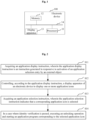
- Fig. 2 is a flowchart of an application program startup method according to the embodiments of the present disclosure, which is applied to an electronic device.
- the application program startup method may include operation S11 to operation S14.
- an application display instruction is acquired, wherein the application display instruction is an instruction generated in responsive to activation of an application selection entry by an external object.
- the electronic device 100 when receiving a screen wake-up instruction, the electronic device 100 may enter a screen-locked state, and display a relevant widget in the screen-locked state.
- the screen wake-up instruction may be generated when a power button of the electronic device 100 is pressed when a screen of the electronic device 100 is not turned on, may alternatively be generated when the display apparatus of the electronic device 100 is double-clicked when the screen of the electronic device 100 is not turned on, may alternatively be generated when the electronic device 100 receives preset voice information, and may alternatively be generated when the electronic device 100 is connected to a charger.
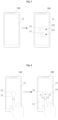
- the display apparatus 13 when the electronic device 100 is in a screen-locked state, the display apparatus 13 is provided with (e.g., displays) the application selection entry 21.
- the appearance, size and arrangement manner of the position where the application selection entry 21 is located may be selected according to specific use conditions, and are not limited in the embodiments of the present disclosure.
- the display apparatus 13 may further display information such as the current time, and the remaining electricity quantity and the network condition of the electronic device 100, which is not limited in the embodiments of the present disclosure.
- the corresponding application display instruction is generated, so that the display apparatus 13 displays one or more corresponding application icons.
- the electronic device 100 detects that the external object continuously triggers a position where the application selection entry 21 is located for a preset period of time, it indicates that the application selection entry 21 is activated.
- the electronic device 100 receives a preset gesture of the external object, it indicates that the application selection entry 21 is activated.
- the embodiments of the present disclosure do not limit the specific condition of activating the application selection entry 21.
- the display apparatus 13 detects that the external object such as a finger or a touch pen contacts a corresponding position, it indicates that the position is triggered.
- a duration of the contact operation may be limited, for example, when the display apparatus 13 detects that the external object contacts the corresponding position for more than a preset period of time, it indicates that the position is triggered.
- a display apparatus of an electronic device is controlled, according to the application display instruction, to display one or more application icons.
- the display apparatus 13 displays one or more corresponding application icons 23.
- the embodiments of the present disclosure do not limit the number, the icon size and the arrangement manner, etc., of the one or more application icons 23.
- the display number or arrangement manner of the one or more application icons 23 is not fixed, and the display number or arrangement manner of the one or more application icons 23 may be determined in advance according to a current running condition of the electronic device 100 or according to the setting of the display number or arrangement manner of the one or more application icons 23 provided by the external object. For example, at 7:00 a.m., the electronic device 100 displays two application icons 23 arranged linearly after the application selection entry 21 is triggered; and at 20:00 p.m., the electronic device 100 displays six application icons 23 arranged in a curve after the application selection entry 21 is triggered.
- the operation of controlling, according to the application display instruction, the display apparatus of the electronic device to display the one or more application icons includes: acquiring, according to the application display instruction, multiple application icons which are preset, and determining a usage frequency of an application program corresponding to each of the multiple application icons; determining an arrangement order of the multiple application icons according to the usage frequency; and controlling the display apparatus to display the multiple application icons according to the arrangement order.
- the selection range of the one or more application icons 23 may include respective icons corresponding to various applications installed on the electronic device, for example, “application A”, “application B”, and “application C”.
- the selection range of the one or more application icons 23 may alternatively or additionally include an icon corresponding to any other function installed on the electronic device, for example, “bus card”, “access card”, and “identity card” simulated by Near Field Communication (NFC).
- NFC Near Field Communication
- the one or more application icons 23 may be determined according to historical usage records of the application programs. When the electronic device 100 receives the application display instruction, a preset number of application icons 23 are determined according to the historical usage record. For example, the one or more application icons 23 may be determined according to the usage time or the number of times of usage of each application program of the electronic device 100 within a preset period of time, and an icon corresponding to an application program of which the usage time or the number of times of usage is greater than a threshold value is taken as the application icon 23.
- the one or more application icons 23 may alternatively be determined according to selection of the external object.
- the external object may set, according to his/her preference, an icon corresponding to a corresponding application program as the application icon 23, for example, the external object may set icons corresponding to a "bus card” and an "access card” as the application icons 23.
- the usage frequency of the application program corresponding to each application icon 23 is determined.
- the usage time of the application program corresponding to each application icon 23 within a preset period of time may be calculated, and a ratio of the usage time corresponding to each application icon 23 to the sum of the usage time corresponding to all application icons 23 may be calculated to acquire the usage frequency of the application program corresponding to each application icon 23.
- the number of times of using the application program corresponding to each application icon 23 within a preset period of time may be acquired, and a ratio of the number of times of using each application icon 23 to the sum of the number of times of using all the application icons 23 may be calculated, so as to acquire the usage frequency of the application program corresponding to each application icon 23.
- the arrangement order of the application icons 23 is determined according to the usage frequency corresponding to each application icon 23, and then the display apparatus is controlled to display the application icons 23 according to the arrangement order.
- the application icons 23 may be displayed in a linear arrangement according to the usage frequency corresponding to each application icon 23, wherein the arrangement order is acquired by arranging an application icon with a higher usage frequency in the middle position, and arranging an application with a lower usage frequency in the edge position. Then, the display apparatus is controlled to display the application icons 23 according to the arrangement order.
- each of the one or more application icons 23 is displayed on periphery of an identity verification entry 22, wherein the identity verification entry 22, after being continuously triggered by the external object for a preset period of time, generates the application selection instruction.
- the appearance, size and arrangement of the identity verification entry 22 may be selected according to the specific usage, and are not limited in the embodiments of the present disclosure.
- the application selection entry 21 is displayed in a first display region 131 of the display apparatus 13, and the identity verification entry 22 is displayed in a second display region 132 of the display apparatus 13, wherein a position of the first display region 131 and a position of the second display region 132 do not overlap with each other.
- the first display region 131 is adjacent to the second display region 132, i.e., the application selection entry 21 is adjacent to the identity verification entry 22, so as to reduce the operation range of the external object when performing a corresponding touch operation, thereby improving the use experience.
- the arrangement manner and the size of the first display region 131 and the second display region 132 may be selected according to specific situations, and are not limited in the embodiments of the present disclosure.
- the periphery of the identity verification entry 22 refers to a range within a preset distance from the identity verification entry 22.
- a moving distance of any suitable object such as a finger or a touch pen when the external object performs a selection operation may be reduced, so that the external object can quickly select the corresponding application icon 23.
- all application icons 23 are sorted according to a usage frequency, so as to determine a distance between each application icon 23 and the identity verification entry 22 according to a sorting result.
- the display apparatus displays the corresponding application icons 23 on the periphery of the identity verification entry 22, the arrangement order of the application icons 23 on the periphery of the identity verification entry 22 is determined according to the distance.
- the application icons 23 include an icon A, an icon B, an icon C and an icon D, and according to the usage frequency, a corresponding descending order of the usage frequency of the application icons 23 is determined as: the icon A, the icon B, the icon C and the icon D.
- the arrangement positions of the application icons 23 on the display apparatus 13 include a position A, a position B, a position C and a position D, in which the distance between the position A and the application selection entry 21 and the distance between the position B and the identity verification entry 22 are both 0.1 mm, the distance between the position C and the application selection entry 21 and the distance between the position D and the application selection entry 21 are both 1.1 mm, and the distance between the position C and the identity verification entry 22 and the distance between the position D and the identity verification entry 22 are both 0.1 mm.
- the arrangement order (ascending order) of the positions may be determined according to the sum of the distances between each arrangement position and the application selection entry 21 and the identity verification entry 22 as: the position A, the position B, the position C and the position D.
- the arrangement order is determined as follows: the icon A is displayed at the position A, the icon B is displayed at the position B, the icon C is displayed at the position B, and the icon D is displayed at the position D.
- the application icons 23 with higher usage frequencies are arranged at locations closer to the identity verification entry 22 and the application selection entry 21, so that the external object can quickly select an application program corresponding to the most frequently used application icon 23, thereby improving the usage experience.
- the one or more corresponding application icons 23 are hidden.
- the case where the application icon 23 is triggered by mistake, and then the corresponding application program is started by mistake is avoided, and when it is not necessary to use a quick start application program, the interface of the electronic device in the screen-locked state is more neat and beautiful, and the use experience of the external object is improved.
- the method before controlling the display apparatus to display the multiple application icons according to the arrangement order, the method further includes: acquiring a preset default application icon, and displaying the default application icon on at least one of a position where the application selection entry is located and a position where the identity verification entry is located, wherein the default application icon is an application icon corresponding to an application program with highest usage frequency or an application icon set by an external object.
- the default application icon is included in the one or more application icons 23 and is used for representing a default currently selected application icon before the external object selects from the one or more application icons 23 displayed by the display apparatus 13.
- the preset default application icon may be an application icon corresponding to an application program set by the external object as a default application icon according to the preference of the external object, for example, the external object may set an application icon corresponding to a "bus card" as the default application icon.
- the preset default application icon may be an application icon corresponding to an application program with highest usage frequency.
- the preset default application icon may be an application icon corresponding to an application program recently used by the external object.
- the display apparatus 13 displays the one or more corresponding application icons 23, and the preset default application icon M is displayed, by default, at the position of at least one of the application selection entry 21 and the identity verification entry 22.
- the electronic device 100 By setting the default application icon, before the external object selects from the one or more application icons 23 displayed by the display apparatus 13, the electronic device 100 automatically selects a default application icon with a relatively high usage probability, so that when the external object needs to use an application program corresponding to the default application icon, operation steps of the external object are further reduced, thereby improving the usage experience of the external object.
- an application selection instruction is acquired, wherein the application selection instruction indicates that a corresponding application icon is selected.
- the electronic device 100 detects whether the application selection instruction is received, so as to determine the corresponding application icon 23 currently selected by the external object when the application selection instruction is received.
- the electronic device 100 detects a touch operation received via the display apparatus 13, so as to determine the selected application icon 23 according to the touch operation.
- a position of an application icon 23 is triggered for a preset period of time
- a pressure received from a position where a certain application icon 23 is located is greater than a preset pressure value
- a position of an application icon 23 is triggered for a preset period of time and a received pressure is greater than a preset pressure value
- the application selection instruction is an instruction generated after the electronic device detects that the application icon is continuously triggered by the external object for the preset period of time, and detects that the external object triggers the position of the identity verification entry.
- the electronic device 100 detects a touch operation received by the display apparatus 13, and when it is detected that a position where a certain application icon 23 is located is triggered for a preset period of time, it indicates that the application icon 23 is currently selected by the external object.
- the display apparatus when it is detected that the application icon is continuously triggered by the external object for a preset period of time, the display apparatus is controlled to display the triggered application icon at the position where the identity verification entry is located.
- the display apparatus 13 displays the application icon B in the identity verification entry 22, and further represents to the external object that the application icon B is currently selected.
- the electronic device 100 detects whether the touch operation of the external object has moved to the display region of the identity verification entry 22.
- the display region of the identity verification entry 22 is triggered for a preset period of time, it indicates that the external object has selected the application icon 23, and then the application selection instruction corresponding to the application icon 23 is generated.
- the steps of selecting the corresponding application icon 23 by the external object can be reduced, and the use experience can be improved.
- the electronic device 100 may directly perform identity verification on the external object, so as to directly display the corresponding default interface after the identity verification is passed.
- the default interface may be an interface displayed before the screen of the electronic device 100 is turned off, and may alternatively be a default main interface of the electronic device 100.
- the operation of triggering the position of the application selection entry 21 by the external object to display the one or more corresponding application icons 23, the operation of triggering the position of an application icon 23 by the external object to perform selection, and the operation of triggering the identity verification entry 23 by the external object may be coherent operations or non-coherent operations, which is not limited in the embodiments of the present disclosure.
- a screen protection function needs to be provided in the electronic device 100, so that when the external object does not use the electronic device 100, the electronic device 100 is in a screen-locked state, and identity verification needs to be performed on the electronic device 100 so as to determine whether to unlock the electronic device 100 according to an identity verification result.
- the unlocking manner of the electronic device 100 may be password unlocking, pattern unlocking, fingerprint unlocking, voice unlocking, face unlocking, and the like. The unlocking manner of the electronic device 100 is not limited in the embodiments of the present disclosure.
- the electronic device 100 When acquiring the application selection instruction, the electronic device 100 acquires identity verification information of the corresponding external object according to the application selection instruction, so as to perform identity verification according to the identity verification information.
- the identity verification is performed in a following manner: acquiring fingerprint information of the external object via a fingerprint collection entry; and performing the identity verification according to the fingerprint information.
- the electronic device 100 is provided with a fingerprint collection apparatus, and the fingerprint collection apparatus may be arranged on the display apparatus 13, for example, the fingerprint collection apparatus may be correspondingly arranged at the identity verification entry 22, i.e., the identity verification entry 22 is the fingerprint collection entry.
- the fingerprint collection apparatus may alternatively be provided separately from the display apparatus 13, for example, provided on a side adjacent to or opposite to the display apparatus 13, and the position where the fingerprint collection apparatus is located is a fingerprint collection entry.
- the collected fingerprint information is matched with pre-recorded fingerprint information, and whether the degree of matching between the collected fingerprint information and the pre-recorded fingerprint information is greater than a threshold degree of matching is detected, and if the degree of matching is greater than the threshold degree of matching, it is determined that the identity verification is passed, and operation S15 is executed; if the degree of matching is not greater than the threshold degree of matching, it is determined that the identity verification fails.
- the identity verification is performed in the following manner: controlling the display apparatus to display identity verification information; acquiring verification information provided in response to the identity verification information; and performing the identity verification according to the verification information.
- the electronic device 100 controls the display apparatus 13 to display corresponding identity verification information.
- the display apparatus 13 displays corresponding identity verification information, so as to display a corresponding pattern unlocking interface, and acquire an input track of the external object on the pattern unlocking interface.
- a starting point of a correct pattern corresponding to the pattern unlocking interface may coincide with an end point of a trigger operation of the external object when the application selection instruction is generated, so that the external object directly draws a pattern to perform unlocking on the pattern unlocking interface, thereby reducing a finger moving distance of the external object, and improving use experience.
- the input track is compared with a preset track to acquire a corresponding matching degree, so as to determine, according to the corresponding matching degree, whether the input track is correct.
- the matching degree is greater than a matching degree threshold value, it is determined that the identity verification is passed, and operation S15 is executed; if the matching degree is less than the matching degree threshold, it is determined that the identity verification fails.
- the display apparatus 13 may display the corresponding identity verification information to display a corresponding password unlocking interface, so as to acquire a digit sequence input by the external object on the password unlocking interface.
- the acquired digit sequence is compared with a preset digit sequence so as to judge whether the acquired digit sequence is consistent with the preset digit sequence, and if the acquired digit sequence is consistent with the preset digit sequence, it is determined that the identity verification is passed, and operation S15 is executed; if the acquired digit sequence is inconsistent with the preset digit sequence, it is determined that the identity verification fails.
- the electronic device 100 when the electronic device 100 adopts face-unlocking, the electronic device 100 is provided with an image collection apparatus 15. After the electronic device 100 receives the application selection instruction, the electronic device 100 controls the corresponding image collection apparatus 15 to acquire face information of the external object, so as to compare the acquired face information with preset face information to determine a corresponding matching degree, and further determine whether the acquired face information is correct according to the corresponding matching degree.
- the matching degree is greater than a matching degree threshold value, it is determined that the identity verification is passed, and operation S15 is executed; when the matching degree is less than the matching degree threshold, it is determined that the identity verification fails.
- the electronic device 100 When identity verification is passed, the electronic device 100, according to the application icon 23 selected by the external object, starts an application program corresponding to the selected application icon 23 while unlocking the electronic device 100, so as to display an interface of the selected application program after unlocking.
- the electronic device 100 give a feedback in a predetermined manner, such as vibration feedback and information prompt, so as to prompt the external object to re-perform identity verification.
- a feedback in a predetermined manner, such as vibration feedback and information prompt, so as to prompt the external object to re-perform identity verification.
- identity verification is re-performed, the application icon 23 previously selected by the external object may be retained, and identity information of the external object is directly acquired for authentication, so as to prevent the external object from performing a selection process of the application icon 23 again.
- an application display instruction is acquired, wherein the application display instruction is an instruction generated in responsive to activation of an application selection entry by an external object; a display apparatus of an electronic device is controlled, according to the application display instruction, to display one or more application icons; an application selection instruction is acquired, wherein the application selection instruction indicates that a corresponding application icon is selected; and in a case where identity verification is passed, an unlocking operation is executed and an application program corresponding to the selected application icon is started.
- the technical solution determines whether to display one or more application icons based on the detection concerning whether the application selection entry is activated, so that after the external object selects a displayed application icon, the identity verification entry is directly triggered to perform identity verification, and after the verification is passed, an application program corresponding to the application icon is started, thereby reducing the operation steps of performing identity verification and starting the application program corresponding to the application icon, and improving the usage experience of the external object.
Landscapes
- Engineering & Computer Science (AREA)
- Theoretical Computer Science (AREA)
- General Engineering & Computer Science (AREA)
- Physics & Mathematics (AREA)
- General Physics & Mathematics (AREA)
- Human Computer Interaction (AREA)
- Software Systems (AREA)
- Computer Security & Cryptography (AREA)
- Computer Hardware Design (AREA)
- Computer Networks & Wireless Communication (AREA)
- Signal Processing (AREA)
- User Interface Of Digital Computer (AREA)
Abstract
Description
- This disclosure claims priority to Chinese Patent Application No.
CN 202111058073.2, filed on September 09, 2021 - The present disclosure relates to the field of human-machine interaction technologies, and in particular, to an application program startup method and electronic device.
- With the advancement of technologies and improvement of intelligence automation, intelligent terminals (such as mobile phones, tablet computers, and smart bracelets) are becoming simpler and lighter to carry. With the ever increasing demand of people for terminal applications, application programs (also referred to as applications) running on terminals are increasing. Generally, when a user wants to start an application, the user needs to unlock the terminal, and then finds and taps on an icon corresponding to the application in the terminal, so as to start the application.
- However, when there are a large number of application programs on the terminal, a user needs to spend a lot of time to search for the corresponding application program after completing identity verification, which means that many operation steps are required for starting the application program, and this seriously affects the use experience.
- In view of the above, the embodiments of the present disclosure provide an application program startup method and electronic device, which may solve the problem that user experience is affected due to a large number of operation steps required when the user wants to start an application program on a terminal.
- The embodiments of the present disclosure provide an application program startup method, including: acquiring an application display instruction, wherein the application display instruction is an instruction generated in responsive to activation of an application selection entry by an external object; controlling, according to the application display instruction, a display apparatus of an electronic device to display one or more application icons; acquiring an application selection instruction, wherein the application selection instruction indicates that a corresponding application icon is selected; and in a case where identity verification is passed, executing an unlocking operation and starting an application program corresponding to the selected application icon.
- The embodiments of the present disclosure provide an electronic device including a memory and a processor, wherein the memory stores at least one instruction, and the at least one instruction is loaded and executed by the processor to implement the application program startup method provided in the embodiments of the present disclosure.
- To describe the technical solutions in the embodiments of the present disclosure more clearly, the following briefly introduces the accompanying drawings required for describing the embodiments. Apparently, the accompanying drawings in the following description show merely some embodiments of the present disclosure, and a person having ordinary skill in the art may still derive other drawings from these accompanying drawings without creative efforts.
-
Fig. 1 is a schematic structural block diagram of an electronic device according to the embodiments of the present disclosure; -
Fig. 2 is a flowchart of an application program startup method according to the embodiments of the present disclosure; -
Fig. 3 is a schematic diagram of a scenario where an electronic device enters a screen-locked state according to the embodiments of the present disclosure; -
Fig. 4 is a schematic diagram of a scenario where an electronic device enters an application icon display state according to the embodiments of the present disclosure; -
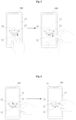
Fig. 5 is a schematic diagram of a scenario where an application icon is selected on an electronic device according to the embodiments of the present disclosure; -
Fig. 6 is a schematic diagram of a scenario where an application icon is selected by an external object according to the embodiments of the present disclosure; and -
Fig. 7 is a schematic diagram of a scenario of identity verification according to the embodiments of the present disclosure. - The following clearly and completely describes the technical solutions in the embodiments of the present disclosure with reference to the accompanying drawings in the embodiments of the present disclosure. Apparently, the embodiments to be described are merely a part rather than all of the embodiments of the present disclosure. All other embodiments acquired by a person having ordinary skill in the art based on the embodiments of the present disclosure without creative efforts shall belong to the scope of protection of the present disclosure.
- The flowchart shown in the figure is merely illustrative, does not necessarily include all of the content and operations/steps, nor do the operations/steps necessarily have to be performed in the shown order. For example, some operations/steps may be broken down, combined, or partially combined, and thus the order of actual execution may vary as desired.
- The terminology used in the description of the present disclosure herein is for the purpose of describing exemplary embodiments only and is not intended to limit the disclosure. As used in this description and the appended claims, the singular forms "a", "an", and "the" are intended to include the plural forms as well, unless the context clearly indicates otherwise.
- Some embodiments of the present disclosure will be described in detail below with reference to the accompanying drawings. Without conflict, the following embodiments and features in the embodiments may be combined with each other.
- Please refer to
Fig. 1 , anelectronic device 100 in the embodiments of the present disclosure may include one or more of the following components: aprocessor 11, amemory 12, and adisplay apparatus 13, where theprocessor 11, thememory 12, and thedisplay apparatus 13 are connected via abus 14, and the bus is, for example, an Inter-integrated Circuit (I2C) bus. Thememory 12 stores at least one instruction, where the instruction is loaded and executed by theprocessor 11 to implement the application program startup method described in the following embodiments. Theelectronic device 100 may be a smart phone, a tablet computer, a notebook computer, a smart bracelet, or the like. - The
processor 11 may include one or more processing cores. Theprocessor 11 is connected to each part in the whole terminal (electronic device) 100 via various interfaces and lines, and executes various functions of the terminal (electronic device) 100 and processes data by running or executing an instruction, a program, a code set or an instruction set stored in thememory 12 and by invoking data stored in thememory 12. Theprocessor 11 may be integrated with one or a combination of several of a Central Processing Unit (CPU), a Graphics Processing Unit (GPU), a modem, and the like. The CPU mainly processes an operating system, an external object interface, an application program, etc.; the GPU is responsible for rendering and graphing of content required to be displayed by thedisplay apparatus 13; and the modem is used to process wireless communications. The modem may alternatively be implemented by a separate chip instead of being integrated into theprocessor 11. - The
memory 12 may include a Random Access Memory (RAM), and may also include a Read-Only Memory (ROM). In an implementation, thememory 12 includes a non-transitory computer-readable storage medium. Thememory 12 may be used to store instructions, programs, code, sets of code, or sets of instructions. Thememory 12 may include a program storage area and a data storage area, wherein the program storage area may store instructions for implementing an operating system, instructions for implementing at least one function (such as a touch control function, a voice playing function and an image playing function), instructions for implementing the following method embodiments, etc.; and the data storage area may store data (such as audio data, phonebook) created during the use of theterminal 100, and the like. - The
display apparatus 13 serves to provide a corresponding visual output and to receive a touch operation of an external object on or near thedisplay apparatus 13 using any suitable object, such as a finger, a stylus or the like. - In an implementation, the
display apparatus 13 may detect touch information corresponding to a touch operation of an external object, such as a direction, a duration, and a pressure value, and transmit the corresponding touch information to theprocessor 11. Theprocessor 11 determines a corresponding touch event according to the received touch information, so as to control thedisplay apparatus 13 to provide a corresponding visual output according to the touch event. - For example, the
display apparatus 13 may be a touch display screen, and the display screen may be a capacitive display screen or a resistive display screen, which is not limited in the present disclosure. - A person having ordinary skill in the art may understand that the structure shown in
Fig. 1 is only a partial block structure related to the solutions of the embodiments of the present disclosure, and does not limit the electronic device to which the solutions of the embodiments of the present disclosure can be applied. A specific electronic device may include more or fewer components, or combine some components, or have different component arrangements than those shown in the figure. - The
memory 12 stores at least one computer-executable instruction, and theprocessor 11 executes the computer-executable instruction to implement the following functions: acquiring an application display instruction, wherein the application display instruction is an instruction generated in responsive to activation of an application selection entry by an external object; controlling, according to the application display instruction, a display apparatus of an electronic device to display one or more application icons; acquiring an application selection instruction, wherein the application selection instruction indicates that a corresponding application icon is selected; and in a case where identity verification is passed, executing an unlocking operation and starting an application program corresponding to the selected application icon. - In some implementations, the
processor 11, when controlling, according to the application display instruction, the display apparatus of the electronic device to display the one or more application icons, is configured to execute the following operations: acquiring, according to the application display instruction, multiple application icons which are preset, and determining a usage frequency of an application program corresponding to each of the multiple application icons; determining an arrangement order of the multiple application icons according to the usage frequency; and controlling the display apparatus to display the multiple application icons according to the arrangement order. - In some embodiments, each of the one or more application icons is displayed on periphery of an identity verification entry, wherein the identity verification entry, after being continuously triggered by the external object for a preset period of time, generates the application selection instruction.
- In some embodiments, the
processor 11, before controlling the display apparatus to display the multiple application icons according to the arrangement order, is further configured to execute the following operations: acquiring a preset default application icon, and displaying the default application icon on at least one of a position where the application selection entry is located and a position where the identity verification entry is located, wherein the default application icon is an application icon corresponding to an application program with highest usage frequency or an application icon set by an external object. - In some embodiments, the application selection instruction is an instruction generated after the electronic device detects that the application icon is continuously triggered by the external object for a preset period of time and detects that the external object triggers the identity verification entry.
- In some embodiments, the
processor 11 is further configured to execute the following operations: controlling, after detecting that the application icon is continuously triggered by the external object for the preset period of time, the display apparatus to display the triggered application icon at a position where the identity verification entry is located. - In some embodiments, the application selection entry is displayed in a first display region of the display apparatus, and the identity verification entry is displayed in a second display region of the display apparatus, wherein a position of the first display region is different from a position of the second display region (e.g., they do not overlap with each other).
- In some embodiments, the
processor 11 is configured to perform the identity verification in a following manner: acquiring fingerprint information of the external object via a fingerprint collection entry; and performing the identity verification according to the fingerprint information. - In some embodiments, the
processor 11 is configured to perform the identity verification in a following manner: controlling the display apparatus to display identity verification information; acquiring verification information provided in response to the identity verification information; and performing the identity verification according to the verification information. - The details and extensions of the functions implemented by the
processor 11 via executing computer-executable instructions are described below. - Please refer to
Fig. 2, Fig. 2 is a flowchart of an application program startup method according to the embodiments of the present disclosure, which is applied to an electronic device. The application program startup method may include operation S11 to operation S14. - At
operation S 11, an application display instruction is acquired, wherein the application display instruction is an instruction generated in responsive to activation of an application selection entry by an external object. - Exemplarily, when receiving a screen wake-up instruction, the
electronic device 100 may enter a screen-locked state, and display a relevant widget in the screen-locked state. The screen wake-up instruction may be generated when a power button of theelectronic device 100 is pressed when a screen of theelectronic device 100 is not turned on, may alternatively be generated when the display apparatus of theelectronic device 100 is double-clicked when the screen of theelectronic device 100 is not turned on, may alternatively be generated when theelectronic device 100 receives preset voice information, and may alternatively be generated when theelectronic device 100 is connected to a charger. - Please refer to
Fig. 3 , when theelectronic device 100 is in a screen-locked state, thedisplay apparatus 13 is provided with (e.g., displays) theapplication selection entry 21. The appearance, size and arrangement manner of the position where theapplication selection entry 21 is located may be selected according to specific use conditions, and are not limited in the embodiments of the present disclosure. When theelectronic device 100 is in the screen-locked state, thedisplay apparatus 13 may further display information such as the current time, and the remaining electricity quantity and the network condition of theelectronic device 100, which is not limited in the embodiments of the present disclosure. - After the
application selection entry 21 is activated by the external object, the corresponding application display instruction is generated, so that thedisplay apparatus 13 displays one or more corresponding application icons. In some exemplary implementations, when theelectronic device 100 detects that the external object continuously triggers a position where theapplication selection entry 21 is located for a preset period of time, it indicates that theapplication selection entry 21 is activated. Alternatively, when theelectronic device 100 receives a preset gesture of the external object, it indicates that theapplication selection entry 21 is activated. The embodiments of the present disclosure do not limit the specific condition of activating theapplication selection entry 21. In the embodiments of the present disclosure, when thedisplay apparatus 13 detects that the external object such as a finger or a touch pen contacts a corresponding position, it indicates that the position is triggered. A duration of the contact operation may be limited, for example, when thedisplay apparatus 13 detects that the external object contacts the corresponding position for more than a preset period of time, it indicates that the position is triggered. - At operation S12, a display apparatus of an electronic device is controlled, according to the application display instruction, to display one or more application icons.
- Please refer to
Fig. 4 , after the position of theapplication selection entry 21 is triggered, thedisplay apparatus 13 displays one or morecorresponding application icons 23. - The embodiments of the present disclosure do not limit the number, the icon size and the arrangement manner, etc., of the one or
more application icons 23. For example, the display number or arrangement manner of the one ormore application icons 23 is not fixed, and the display number or arrangement manner of the one ormore application icons 23 may be determined in advance according to a current running condition of theelectronic device 100 or according to the setting of the display number or arrangement manner of the one ormore application icons 23 provided by the external object. For example, at 7:00 a.m., theelectronic device 100 displays twoapplication icons 23 arranged linearly after theapplication selection entry 21 is triggered; and at 20:00 p.m., theelectronic device 100 displays sixapplication icons 23 arranged in a curve after theapplication selection entry 21 is triggered. - In some embodiments, the operation of controlling, according to the application display instruction, the display apparatus of the electronic device to display the one or more application icons includes: acquiring, according to the application display instruction, multiple application icons which are preset, and determining a usage frequency of an application program corresponding to each of the multiple application icons; determining an arrangement order of the multiple application icons according to the usage frequency; and controlling the display apparatus to display the multiple application icons according to the arrangement order.
- The selection range of the one or
more application icons 23 may include respective icons corresponding to various applications installed on the electronic device, for example, "application A", "application B", and "application C". The selection range of the one ormore application icons 23 may alternatively or additionally include an icon corresponding to any other function installed on the electronic device, for example, "bus card", "access card", and "identity card" simulated by Near Field Communication (NFC). - The one or
more application icons 23 may be determined according to historical usage records of the application programs. When theelectronic device 100 receives the application display instruction, a preset number ofapplication icons 23 are determined according to the historical usage record. For example, the one ormore application icons 23 may be determined according to the usage time or the number of times of usage of each application program of theelectronic device 100 within a preset period of time, and an icon corresponding to an application program of which the usage time or the number of times of usage is greater than a threshold value is taken as theapplication icon 23. - The one or
more application icons 23 may alternatively be determined according to selection of the external object. The external object may set, according to his/her preference, an icon corresponding to a corresponding application program as theapplication icon 23, for example, the external object may set icons corresponding to a "bus card" and an "access card" as theapplication icons 23. - After the one or
more application icons 23 are acquired, the usage frequency of the application program corresponding to eachapplication icon 23 is determined. Exemplarily, the usage time of the application program corresponding to eachapplication icon 23 within a preset period of time may be calculated, and a ratio of the usage time corresponding to eachapplication icon 23 to the sum of the usage time corresponding to allapplication icons 23 may be calculated to acquire the usage frequency of the application program corresponding to eachapplication icon 23. Alternatively, the number of times of using the application program corresponding to eachapplication icon 23 within a preset period of time may be acquired, and a ratio of the number of times of using eachapplication icon 23 to the sum of the number of times of using all theapplication icons 23 may be calculated, so as to acquire the usage frequency of the application program corresponding to eachapplication icon 23. - The arrangement order of the
application icons 23 is determined according to the usage frequency corresponding to eachapplication icon 23, and then the display apparatus is controlled to display theapplication icons 23 according to the arrangement order. - For example, the
application icons 23 may be displayed in a linear arrangement according to the usage frequency corresponding to eachapplication icon 23, wherein the arrangement order is acquired by arranging an application icon with a higher usage frequency in the middle position, and arranging an application with a lower usage frequency in the edge position. Then, the display apparatus is controlled to display theapplication icons 23 according to the arrangement order. - As shown in
Fig. 4 , in some embodiments, each of the one ormore application icons 23 is displayed on periphery of anidentity verification entry 22, wherein theidentity verification entry 22, after being continuously triggered by the external object for a preset period of time, generates the application selection instruction. The appearance, size and arrangement of theidentity verification entry 22 may be selected according to the specific usage, and are not limited in the embodiments of the present disclosure. - In some embodiments, the
application selection entry 21 is displayed in afirst display region 131 of thedisplay apparatus 13, and theidentity verification entry 22 is displayed in asecond display region 132 of thedisplay apparatus 13, wherein a position of thefirst display region 131 and a position of thesecond display region 132 do not overlap with each other. For example, as shown inFig. 3 , thefirst display region 131 is adjacent to thesecond display region 132, i.e., theapplication selection entry 21 is adjacent to theidentity verification entry 22, so as to reduce the operation range of the external object when performing a corresponding touch operation, thereby improving the use experience. The arrangement manner and the size of thefirst display region 131 and thesecond display region 132 may be selected according to specific situations, and are not limited in the embodiments of the present disclosure. - The periphery of the
identity verification entry 22 refers to a range within a preset distance from theidentity verification entry 22. By displaying the one ormore application icons 23 on the periphery of theidentity verification entry 22, a moving distance of any suitable object such as a finger or a touch pen when the external object performs a selection operation may be reduced, so that the external object can quickly select thecorresponding application icon 23. - Exemplarily, all
application icons 23 are sorted according to a usage frequency, so as to determine a distance between eachapplication icon 23 and theidentity verification entry 22 according to a sorting result. When the display apparatus displays thecorresponding application icons 23 on the periphery of theidentity verification entry 22, the arrangement order of theapplication icons 23 on the periphery of theidentity verification entry 22 is determined according to the distance. - For example, the higher the usage frequency of the
application icon 23 is, the shorter the distance between theapplication icon 23 and the preset location is. As shown inFig. 4 , theapplication icons 23 include an icon A, an icon B, an icon C and an icon D, and according to the usage frequency, a corresponding descending order of the usage frequency of theapplication icons 23 is determined as: the icon A, the icon B, the icon C and the icon D. The arrangement positions of theapplication icons 23 on thedisplay apparatus 13 include a position A, a position B, a position C and a position D, in which the distance between the position A and theapplication selection entry 21 and the distance between the position B and theidentity verification entry 22 are both 0.1 mm, the distance between the position C and theapplication selection entry 21 and the distance between the position D and theapplication selection entry 21 are both 1.1 mm, and the distance between the position C and theidentity verification entry 22 and the distance between the position D and theidentity verification entry 22 are both 0.1 mm. Therefore, the arrangement order (ascending order) of the positions may be determined according to the sum of the distances between each arrangement position and theapplication selection entry 21 and theidentity verification entry 22 as: the position A, the position B, the position C and the position D. According to the sorting result of the arrangement positions and the sorting result of theapplication icons 23, the arrangement order is determined as follows: the icon A is displayed at the position A, the icon B is displayed at the position B, the icon C is displayed at the position B, and the icon D is displayed at the position D. - After the location of the
application selection entry 21 is triggered, theapplication icons 23 with higher usage frequencies are arranged at locations closer to theidentity verification entry 22 and theapplication selection entry 21, so that the external object can quickly select an application program corresponding to the most frequently usedapplication icon 23, thereby improving the usage experience. - When the position where the
application selection entry 21 is located is not triggered, the one or morecorresponding application icons 23 are hidden. By displaying the one ormore application icons 23 only when the position where theapplication selection entry 21 is located is triggered in the screen-locked state, the case where theapplication icon 23 is triggered by mistake, and then the corresponding application program is started by mistake is avoided, and when it is not necessary to use a quick start application program, the interface of the electronic device in the screen-locked state is more neat and beautiful, and the use experience of the external object is improved. - In some embodiments, before controlling the display apparatus to display the multiple application icons according to the arrangement order, the method further includes: acquiring a preset default application icon, and displaying the default application icon on at least one of a position where the application selection entry is located and a position where the identity verification entry is located, wherein the default application icon is an application icon corresponding to an application program with highest usage frequency or an application icon set by an external object.
- The default application icon is included in the one or
more application icons 23 and is used for representing a default currently selected application icon before the external object selects from the one ormore application icons 23 displayed by thedisplay apparatus 13. - The preset default application icon may be an application icon corresponding to an application program set by the external object as a default application icon according to the preference of the external object, for example, the external object may set an application icon corresponding to a "bus card" as the default application icon. Alternatively, the preset default application icon may be an application icon corresponding to an application program with highest usage frequency. Alternatively, the preset default application icon may be an application icon corresponding to an application program recently used by the external object.
- As shown in
Fig. 4 , for example, after the external object triggers the position of theapplication selection entry 21, thedisplay apparatus 13 displays the one or morecorresponding application icons 23, and the preset default application icon M is displayed, by default, at the position of at least one of theapplication selection entry 21 and theidentity verification entry 22. - By setting the default application icon, before the external object selects from the one or
more application icons 23 displayed by thedisplay apparatus 13, theelectronic device 100 automatically selects a default application icon with a relatively high usage probability, so that when the external object needs to use an application program corresponding to the default application icon, operation steps of the external object are further reduced, thereby improving the usage experience of the external object. - At operation S13, an application selection instruction is acquired, wherein the application selection instruction indicates that a corresponding application icon is selected.
- When the
display apparatus 13 displays the one or morecorresponding application icons 23, theelectronic device 100 detects whether the application selection instruction is received, so as to determine thecorresponding application icon 23 currently selected by the external object when the application selection instruction is received. - For example, when the
display apparatus 13 displays the one or morecorresponding application icons 23, theelectronic device 100 detects a touch operation received via thedisplay apparatus 13, so as to determine the selectedapplication icon 23 according to the touch operation. In some exemplary implementations, after it is detected that a position of anapplication icon 23 is triggered for a preset period of time, it indicates that theapplication icon 23 is selected. Alternatively, when it is detected that a pressure received from a position where acertain application icon 23 is located is greater than a preset pressure value, it indicates that theapplication icon 23 is selected. Alternatively, when it is detected that a position of anapplication icon 23 is triggered for a preset period of time and a received pressure is greater than a preset pressure value, it indicates that theapplication icon 23 is selected. - In some implementations, the application selection instruction is an instruction generated after the electronic device detects that the application icon is continuously triggered by the external object for the preset period of time, and detects that the external object triggers the position of the identity verification entry.
- Please refer to
Fig. 5 , exemplarily, when thedisplay apparatus 13 displays one or morecorresponding application icons 23, theelectronic device 100 detects a touch operation received by thedisplay apparatus 13, and when it is detected that a position where acertain application icon 23 is located is triggered for a preset period of time, it indicates that theapplication icon 23 is currently selected by the external object. - In some embodiments, when it is detected that the application icon is continuously triggered by the external object for a preset period of time, the display apparatus is controlled to display the triggered application icon at the position where the identity verification entry is located.
- As shown in
Fig. 5 , for example, after the finger of the external object slides from theapplication selection entry 21 into the display region of the application icon B and stays at the display region of the application icon B for a preset period of time, thedisplay apparatus 13 displays the application icon B in theidentity verification entry 22, and further represents to the external object that the application icon B is currently selected. - Please refer to
Fig. 6 , after thecorresponding application icon 23 is selected by the external object, theelectronic device 100 detects whether the touch operation of the external object has moved to the display region of theidentity verification entry 22. When the display region of theidentity verification entry 22 is triggered for a preset period of time, it indicates that the external object has selected theapplication icon 23, and then the application selection instruction corresponding to theapplication icon 23 is generated. - By detecting whether the
identity verification entry 22 is triggered, further determining whether the external object completes the selection of theapplication icon 23, and then performing an identity verification operation on the external object, the steps of selecting thecorresponding application icon 23 by the external object can be reduced, and the use experience can be improved. - When the
electronic device 100 is in the screen-locked state, theelectronic device 100 may directly perform identity verification on the external object, so as to directly display the corresponding default interface after the identity verification is passed. The default interface may be an interface displayed before the screen of theelectronic device 100 is turned off, and may alternatively be a default main interface of theelectronic device 100. - The operation of triggering the position of the
application selection entry 21 by the external object to display the one or morecorresponding application icons 23, the operation of triggering the position of anapplication icon 23 by the external object to perform selection, and the operation of triggering theidentity verification entry 23 by the external object may be coherent operations or non-coherent operations, which is not limited in the embodiments of the present disclosure. - At operation S14, in a case where identity verification is passed, an unlocking operation is executed and an application program corresponding to the selected application icon is started.
- In order to protect privacy of the external object and avoid leakage of information of the external object, a screen protection function needs to be provided in the
electronic device 100, so that when the external object does not use theelectronic device 100, theelectronic device 100 is in a screen-locked state, and identity verification needs to be performed on theelectronic device 100 so as to determine whether to unlock theelectronic device 100 according to an identity verification result. The unlocking manner of theelectronic device 100 may be password unlocking, pattern unlocking, fingerprint unlocking, voice unlocking, face unlocking, and the like. The unlocking manner of theelectronic device 100 is not limited in the embodiments of the present disclosure. - When acquiring the application selection instruction, the
electronic device 100 acquires identity verification information of the corresponding external object according to the application selection instruction, so as to perform identity verification according to the identity verification information. - In some embodiments, the identity verification is performed in a following manner: acquiring fingerprint information of the external object via a fingerprint collection entry; and performing the identity verification according to the fingerprint information.
- In an embodiment, the
electronic device 100 is provided with a fingerprint collection apparatus, and the fingerprint collection apparatus may be arranged on thedisplay apparatus 13, for example, the fingerprint collection apparatus may be correspondingly arranged at theidentity verification entry 22, i.e., theidentity verification entry 22 is the fingerprint collection entry. The fingerprint collection apparatus may alternatively be provided separately from thedisplay apparatus 13, for example, provided on a side adjacent to or opposite to thedisplay apparatus 13, and the position where the fingerprint collection apparatus is located is a fingerprint collection entry. After theelectronic device 100 acquires the application selection instruction or the fingerprint collection entry is triggered for a preset period of time, the fingerprint collection apparatus at the fingerprint collection entry acquires the fingerprint information of the external object. - The collected fingerprint information is matched with pre-recorded fingerprint information, and whether the degree of matching between the collected fingerprint information and the pre-recorded fingerprint information is greater than a threshold degree of matching is detected, and if the degree of matching is greater than the threshold degree of matching, it is determined that the identity verification is passed, and operation S15 is executed; if the degree of matching is not greater than the threshold degree of matching, it is determined that the identity verification fails.
- In some embodiments, the identity verification is performed in the following manner: controlling the display apparatus to display identity verification information; acquiring verification information provided in response to the identity verification information; and performing the identity verification according to the verification information.
- In an implementation, after the
electronic device 100 receives the application selection instruction, theelectronic device 100 controls thedisplay apparatus 13 to display corresponding identity verification information. - Please refer to
Fig. 7 , for example, when theelectronic device 100 adopts pattern unlocking, thedisplay apparatus 13 displays corresponding identity verification information, so as to display a corresponding pattern unlocking interface, and acquire an input track of the external object on the pattern unlocking interface. A starting point of a correct pattern corresponding to the pattern unlocking interface may coincide with an end point of a trigger operation of the external object when the application selection instruction is generated, so that the external object directly draws a pattern to perform unlocking on the pattern unlocking interface, thereby reducing a finger moving distance of the external object, and improving use experience. After the input track is acquired, the input track is compared with a preset track to acquire a corresponding matching degree, so as to determine, according to the corresponding matching degree, whether the input track is correct. When the matching degree is greater than a matching degree threshold value, it is determined that the identity verification is passed, and operation S15 is executed; if the matching degree is less than the matching degree threshold, it is determined that the identity verification fails. - For example, when the
electronic device 100 adopts password unlocking, thedisplay apparatus 13 may display the corresponding identity verification information to display a corresponding password unlocking interface, so as to acquire a digit sequence input by the external object on the password unlocking interface. The acquired digit sequence is compared with a preset digit sequence so as to judge whether the acquired digit sequence is consistent with the preset digit sequence, and if the acquired digit sequence is consistent with the preset digit sequence, it is determined that the identity verification is passed, and operation S15 is executed; if the acquired digit sequence is inconsistent with the preset digit sequence, it is determined that the identity verification fails. - For example, when the
electronic device 100 adopts face-unlocking, theelectronic device 100 is provided with animage collection apparatus 15. After theelectronic device 100 receives the application selection instruction, theelectronic device 100 controls the correspondingimage collection apparatus 15 to acquire face information of the external object, so as to compare the acquired face information with preset face information to determine a corresponding matching degree, and further determine whether the acquired face information is correct according to the corresponding matching degree. When the matching degree is greater than a matching degree threshold value, it is determined that the identity verification is passed, and operation S15 is executed; when the matching degree is less than the matching degree threshold, it is determined that the identity verification fails. - When identity verification is passed, the
electronic device 100, according to theapplication icon 23 selected by the external object, starts an application program corresponding to the selectedapplication icon 23 while unlocking theelectronic device 100, so as to display an interface of the selected application program after unlocking. - In some embodiments, if the identity verification is not passed, the
electronic device 100 give a feedback in a predetermined manner, such as vibration feedback and information prompt, so as to prompt the external object to re-perform identity verification. When identity verification is re-performed, theapplication icon 23 previously selected by the external object may be retained, and identity information of the external object is directly acquired for authentication, so as to prevent the external object from performing a selection process of theapplication icon 23 again. - According to the embodiments of the present disclosure, an application display instruction is acquired, wherein the application display instruction is an instruction generated in responsive to activation of an application selection entry by an external object; a display apparatus of an electronic device is controlled, according to the application display instruction, to display one or more application icons; an application selection instruction is acquired, wherein the application selection instruction indicates that a corresponding application icon is selected; and in a case where identity verification is passed, an unlocking operation is executed and an application program corresponding to the selected application icon is started. The technical solution determines whether to display one or more application icons based on the detection concerning whether the application selection entry is activated, so that after the external object selects a displayed application icon, the identity verification entry is directly triggered to perform identity verification, and after the verification is passed, an application program corresponding to the application icon is started, thereby reducing the operation steps of performing identity verification and starting the application program corresponding to the application icon, and improving the usage experience of the external object.
- The term "and/or" as used in this description and the appended claims refers to and includes combinations of any and all of one or more of the items listed. In this description, the terms "include", "comprise", and any variation thereof are intended to cover a non-exclusive inclusion, so that a process, a method, an article, or a system that includes a series of elements not only includes those elements, but also includes other elements not specified expressly, or further includes elements inherent to such process, method, article, or system. An element limited by "including a..." does not exclude that there are other same elements in the process, method, article, or system that includes the element, unless there are more limitations.
- The serial numbers of the embodiments of the present disclosure are only for description, and do not represent the preference of the embodiments. The foregoing descriptions are merely exemplary embodiments of the present disclosure, but are not intended to limit the scope of protection of the present disclosure. Any equivalent modification or replacement readily obtained by a person having ordinary skill in the art within the technical scope disclosed in the present disclosure shall belong to the scope of protection of the present disclosure. Therefore, the scope of protection of the present disclosure shall be subject to the scope of protection of the claims.
Claims (10)
- An application program startup method, comprising:acquiring an application display instruction, wherein the application display instruction is an instruction generated in responsive to activation of an application selection entry by an external object;controlling, according to the application display instruction, a display apparatus of an electronic device to display one or more application icons;acquiring an application selection instruction, wherein the application selection instruction indicates that a corresponding application icon is selected; andin a case where identity verification is passed, executing an unlocking operation and starting an application program corresponding to the selected application icon.
- The method according to claim 1, wherein controlling, according to the application display instruction, the display apparatus of the electronic device to display the one or more application icons comprises:acquiring, according to the application display instruction, multiple application icons which are preset, and determining a usage frequency of an application program corresponding to each of the multiple application icons;determining an arrangement order of the multiple application icons according to the usage frequency; andcontrolling the display apparatus to display the multiple application icons according to the arrangement order.
- The method according to claim 2, wherein each of the one or more application icons is displayed on periphery of an identity verification entry, wherein the identity verification entry, after being continuously triggered by the external object for a preset period of time, generates the application selection instruction.
- The method according to claim 2, wherein before controlling the display apparatus to display the multiple application icons according to the arrangement order, the method further comprises:
acquiring a preset default application icon, and displaying the default application icon on at least one of a position where the application selection entry is located and a position where the identity verification entry is located, wherein the default application icon is an application icon corresponding to an application program with highest usage frequency or an application icon set by an external object. - The method according to claim 1, wherein the application selection instruction is an instruction generated after the electronic device detects that the application icon is continuously triggered by the external object for a preset period of time and detects that the external object triggers the identity verification entry.
- The method according to claim 5, further comprising:
controlling, after detecting that the application icon is continuously triggered by the external object for the preset period of time, the display apparatus to display the triggered application icon at a position where the identity verification entry is located. - The method according to any one of claims 3 to 6, wherein the application selection entry is displayed in a first display region of the display apparatus, and the identity verification entry is displayed in a second display region of the display apparatus, wherein a position of the first display region and a position of the second display region do not overlap with each other.
- The method according to claim 1, wherein the identity verification is performed in a following manner:acquiring fingerprint information of the external object via a fingerprint collection entry; andperforming the identity verification according to the fingerprint information.
- The method according to claim 1, wherein the identity verification is performed in a following manner:controlling the display apparatus to display identity verification information;acquiring verification information provided in response to the identity verification information; andperforming the identity verification according to the verification information.
- An electronic device, wherein the electronic device comprises a processor and a memory, the memory stores at least one instruction, and the at least one instruction is loaded and executed by the processor to implement the application program startup method according to any one of claims 1 to 9.
Applications Claiming Priority (2)
| Application Number | Priority Date | Filing Date | Title |
|---|---|---|---|
| CN202111058073.2A CN115793930A (en) | 2021-09-09 | 2021-09-09 | Application program starting method and electronic equipment |
| PCT/CN2022/097195 WO2023035699A1 (en) | 2021-09-09 | 2022-06-06 | Application program startup method and electronic device |
Publications (2)
| Publication Number | Publication Date |
|---|---|
| EP4372536A1 true EP4372536A1 (en) | 2024-05-22 |
| EP4372536A4 EP4372536A4 (en) | 2024-12-04 |
Family
ID=85473545
Family Applications (1)
| Application Number | Title | Priority Date | Filing Date |
|---|---|---|---|
| EP22866175.7A Pending EP4372536A4 (en) | 2021-09-09 | 2022-06-06 | APPLICATION PROGRAM STARTING METHOD AND ELECTRONIC DEVICE |
Country Status (6)
| Country | Link |
|---|---|
| US (1) | US20250123853A1 (en) |
| EP (1) | EP4372536A4 (en) |
| JP (1) | JP2024533085A (en) |
| KR (1) | KR20240049795A (en) |
| CN (1) | CN115793930A (en) |
| WO (1) | WO2023035699A1 (en) |
Families Citing this family (1)
| Publication number | Priority date | Publication date | Assignee | Title |
|---|---|---|---|---|
| JP7749071B1 (en) * | 2024-07-05 | 2025-10-03 | 楽天グループ株式会社 | Information processing system, information processing method, and program |
Family Cites Families (10)
| Publication number | Priority date | Publication date | Assignee | Title |
|---|---|---|---|---|
| US8762940B2 (en) * | 2006-08-30 | 2014-06-24 | Ati Technologies Inc. | Drag and drop utilities |
| EP3690623A1 (en) * | 2012-03-02 | 2020-08-05 | NEC Corporation | Information processing device, processing method, and non-transitory recording medium |
| CN103425423A (en) * | 2012-05-25 | 2013-12-04 | 英华达(上海)科技有限公司 | Unlocking method of touch control screen |
| CN103309618A (en) * | 2013-07-02 | 2013-09-18 | 姜洪明 | Mobile operating system |
| CN104077032A (en) * | 2014-06-24 | 2014-10-01 | 深圳市金立通信设备有限公司 | Terminal lock screen control method |
| CN104850433A (en) * | 2015-04-30 | 2015-08-19 | 广东欧珀移动通信有限公司 | Mobile terminal application starting method and mobile terminal |
| CN105446597B (en) * | 2015-12-07 | 2019-04-09 | 魅族科技(中国)有限公司 | The methods of exhibiting of the function introduction information of application program shows device and terminal |
| JP6871846B2 (en) * | 2017-12-20 | 2021-05-19 | 京セラ株式会社 | Electronics and control methods |
| CN110554815B (en) * | 2018-05-30 | 2021-12-28 | 北京小米移动软件有限公司 | Icon awakening method, electronic device and storage medium |
| CN109726539B (en) * | 2019-01-23 | 2023-05-02 | Oppo广东移动通信有限公司 | Application starting method, device, terminal and storage medium |
-
2021
- 2021-09-09 CN CN202111058073.2A patent/CN115793930A/en active Pending
-
2022
- 2022-06-06 WO PCT/CN2022/097195 patent/WO2023035699A1/en not_active Ceased
- 2022-06-06 EP EP22866175.7A patent/EP4372536A4/en active Pending
- 2022-06-06 KR KR1020247002455A patent/KR20240049795A/en active Pending
- 2022-06-06 US US18/689,665 patent/US20250123853A1/en active Pending
- 2022-06-06 JP JP2024513354A patent/JP2024533085A/en active Pending
Also Published As
| Publication number | Publication date |
|---|---|
| WO2023035699A1 (en) | 2023-03-16 |
| KR20240049795A (en) | 2024-04-17 |
| CN115793930A (en) | 2023-03-14 |
| JP2024533085A (en) | 2024-09-12 |
| EP4372536A4 (en) | 2024-12-04 |
| US20250123853A1 (en) | 2025-04-17 |
Similar Documents
| Publication | Publication Date | Title |
|---|---|---|
| EP3779780B1 (en) | Implementation of biometric authentication with first and second form of authentication | |
| CN101464741B (en) | Touch panel and its use method and notebook computer with the same | |
| US9823834B2 (en) | Quick access gesture setting and accessing method for a touch control device | |
| CN107025019B (en) | Virtual key interaction method and terminal equipment | |
| US20130129162A1 (en) | Method of Executing Software Functions Using Biometric Detection and Related Electronic Device | |
| JP6711649B2 (en) | Information processing apparatus, information processing method, and program | |
| EP3379812B1 (en) | Apparatus and method for controlling operation of mobile terminal | |
| CN105630327B (en) | The method of the display of portable electronic device and control optional element | |
| EP2472375A1 (en) | Method and device for identifying and unlocking with contact surface model | |
| US20110246952A1 (en) | Electronic device capable of defining touch gestures and method thereof | |
| CN106980457A (en) | Operating method of touch panel and touch screen terminal | |
| KR20100062899A (en) | Inputting method and device using touch pattern | |
| CN105892927A (en) | Mobile terminal control method and device | |
| CN104318137A (en) | Operating system and/or application program start or switch method, device and terminal | |
| CN106020698A (en) | Mobile terminal and realization method of single-hand mode | |
| EP4372536A1 (en) | Application program startup method and electronic device | |
| CN108683809B (en) | Screen locking method, device and system | |
| EP3660627B1 (en) | Method for opening an application program after fingerprint identification | |
| EP3757831B1 (en) | Fingerprint event processing method, apparatus, and terminal | |
| EP3511813B1 (en) | Force touch method and terminal | |
| EP3528103B1 (en) | Screen locking method, terminal and screen locking device | |
| CN109145570A (en) | Unlocking control method and related device | |
| CN104793854A (en) | Touch screen unlocking method and system | |
| CN103631505B (en) | Information processing equipment and character input display method | |
| CA2593887C (en) | Device and method for improving efficiency of entering a password using a key-limited keyboard |
Legal Events
| Date | Code | Title | Description |
|---|---|---|---|
| STAA | Information on the status of an ep patent application or granted ep patent |
Free format text: STATUS: THE INTERNATIONAL PUBLICATION HAS BEEN MADE |
|
| PUAI | Public reference made under article 153(3) epc to a published international application that has entered the european phase |
Free format text: ORIGINAL CODE: 0009012 |
|
| STAA | Information on the status of an ep patent application or granted ep patent |
Free format text: STATUS: REQUEST FOR EXAMINATION WAS MADE |
|
| 17P | Request for examination filed |
Effective date: 20240213 |
|
| AK | Designated contracting states |
Kind code of ref document: A1 Designated state(s): AL AT BE BG CH CY CZ DE DK EE ES FI FR GB GR HR HU IE IS IT LI LT LU LV MC MK MT NL NO PL PT RO RS SE SI SK SM TR |
|
| REG | Reference to a national code |
Ref country code: DE Ref legal event code: R079 Free format text: PREVIOUS MAIN CLASS: G06F0003048400 Ipc: G06F0009451000 |
|
| A4 | Supplementary search report drawn up and despatched |
Effective date: 20241105 |
|
| RIC1 | Information provided on ipc code assigned before grant |
Ipc: G06F 9/445 20180101ALN20241029BHEP Ipc: G06F 9/451 20180101AFI20241029BHEP |
|
| DAV | Request for validation of the european patent (deleted) | ||
| DAX | Request for extension of the european patent (deleted) | ||
| STAA | Information on the status of an ep patent application or granted ep patent |
Free format text: STATUS: EXAMINATION IS IN PROGRESS |
|
| 17Q | First examination report despatched |
Effective date: 20260204 |