EP4332760A1 - Method for sharing console variable setting of application and system with plurality of electronic devices - Google Patents
Method for sharing console variable setting of application and system with plurality of electronic devices Download PDFInfo
- Publication number
- EP4332760A1 EP4332760A1 EP23158459.0A EP23158459A EP4332760A1 EP 4332760 A1 EP4332760 A1 EP 4332760A1 EP 23158459 A EP23158459 A EP 23158459A EP 4332760 A1 EP4332760 A1 EP 4332760A1
- Authority
- EP
- European Patent Office
- Prior art keywords
- application
- setting
- electronic device
- meta file
- options
- Prior art date
- Legal status (The legal status is an assumption and is not a legal conclusion. Google has not performed a legal analysis and makes no representation as to the accuracy of the status listed.)
- Pending
Links
Images





Classifications
-
- G—PHYSICS
- G06—COMPUTING OR CALCULATING; COUNTING
- G06F—ELECTRIC DIGITAL DATA PROCESSING
- G06F9/00—Arrangements for program control, e.g. control units
- G06F9/06—Arrangements for program control, e.g. control units using stored programs, i.e. using an internal store of processing equipment to receive or retain programs
- G06F9/44—Arrangements for executing specific programs
- G06F9/445—Program loading or initiating
- G06F9/44505—Configuring for program initiating, e.g. using registry, configuration files
-
- G—PHYSICS
- G06—COMPUTING OR CALCULATING; COUNTING
- G06F—ELECTRIC DIGITAL DATA PROCESSING
- G06F3/00—Input arrangements for transferring data to be processed into a form capable of being handled by the computer; Output arrangements for transferring data from processing unit to output unit, e.g. interface arrangements
- G06F3/01—Input arrangements or combined input and output arrangements for interaction between user and computer
- G06F3/048—Interaction techniques based on graphical user interfaces [GUI]
- G06F3/0481—Interaction techniques based on graphical user interfaces [GUI] based on specific properties of the displayed interaction object or a metaphor-based environment, e.g. interaction with desktop elements like windows or icons, or assisted by a cursor's changing behaviour or appearance
- G06F3/04817—Interaction techniques based on graphical user interfaces [GUI] based on specific properties of the displayed interaction object or a metaphor-based environment, e.g. interaction with desktop elements like windows or icons, or assisted by a cursor's changing behaviour or appearance using icons
-
- G—PHYSICS
- G06—COMPUTING OR CALCULATING; COUNTING
- G06F—ELECTRIC DIGITAL DATA PROCESSING
- G06F3/00—Input arrangements for transferring data to be processed into a form capable of being handled by the computer; Output arrangements for transferring data from processing unit to output unit, e.g. interface arrangements
- G06F3/01—Input arrangements or combined input and output arrangements for interaction between user and computer
- G06F3/048—Interaction techniques based on graphical user interfaces [GUI]
- G06F3/0481—Interaction techniques based on graphical user interfaces [GUI] based on specific properties of the displayed interaction object or a metaphor-based environment, e.g. interaction with desktop elements like windows or icons, or assisted by a cursor's changing behaviour or appearance
- G06F3/0482—Interaction with lists of selectable items, e.g. menus
-
- G—PHYSICS
- G06—COMPUTING OR CALCULATING; COUNTING
- G06F—ELECTRIC DIGITAL DATA PROCESSING
- G06F3/00—Input arrangements for transferring data to be processed into a form capable of being handled by the computer; Output arrangements for transferring data from processing unit to output unit, e.g. interface arrangements
- G06F3/01—Input arrangements or combined input and output arrangements for interaction between user and computer
- G06F3/048—Interaction techniques based on graphical user interfaces [GUI]
- G06F3/0484—Interaction techniques based on graphical user interfaces [GUI] for the control of specific functions or operations, e.g. selecting or manipulating an object, an image or a displayed text element, setting a parameter value or selecting a range
- G06F3/04847—Interaction techniques to control parameter settings, e.g. interaction with sliders or dials
-
- G—PHYSICS
- G06—COMPUTING OR CALCULATING; COUNTING
- G06F—ELECTRIC DIGITAL DATA PROCESSING
- G06F3/00—Input arrangements for transferring data to be processed into a form capable of being handled by the computer; Output arrangements for transferring data from processing unit to output unit, e.g. interface arrangements
- G06F3/01—Input arrangements or combined input and output arrangements for interaction between user and computer
- G06F3/048—Interaction techniques based on graphical user interfaces [GUI]
- G06F3/0484—Interaction techniques based on graphical user interfaces [GUI] for the control of specific functions or operations, e.g. selecting or manipulating an object, an image or a displayed text element, setting a parameter value or selecting a range
- G06F3/0485—Scrolling or panning
-
- G—PHYSICS
- G06—COMPUTING OR CALCULATING; COUNTING
- G06K—GRAPHICAL DATA READING; PRESENTATION OF DATA; RECORD CARRIERS; HANDLING RECORD CARRIERS
- G06K19/00—Record carriers for use with machines and with at least a part designed to carry digital markings
- G06K19/06—Record carriers for use with machines and with at least a part designed to carry digital markings characterised by the kind of the digital marking, e.g. shape, nature, code
- G06K19/06009—Record carriers for use with machines and with at least a part designed to carry digital markings characterised by the kind of the digital marking, e.g. shape, nature, code with optically detectable marking
- G06K19/06018—Record carriers for use with machines and with at least a part designed to carry digital markings characterised by the kind of the digital marking, e.g. shape, nature, code with optically detectable marking one-dimensional coding
- G06K19/06028—Record carriers for use with machines and with at least a part designed to carry digital markings characterised by the kind of the digital marking, e.g. shape, nature, code with optically detectable marking one-dimensional coding using bar codes
-
- G—PHYSICS
- G06—COMPUTING OR CALCULATING; COUNTING
- G06K—GRAPHICAL DATA READING; PRESENTATION OF DATA; RECORD CARRIERS; HANDLING RECORD CARRIERS
- G06K19/00—Record carriers for use with machines and with at least a part designed to carry digital markings
- G06K19/06—Record carriers for use with machines and with at least a part designed to carry digital markings characterised by the kind of the digital marking, e.g. shape, nature, code
- G06K19/06009—Record carriers for use with machines and with at least a part designed to carry digital markings characterised by the kind of the digital marking, e.g. shape, nature, code with optically detectable marking
- G06K19/06037—Record carriers for use with machines and with at least a part designed to carry digital markings characterised by the kind of the digital marking, e.g. shape, nature, code with optically detectable marking multi-dimensional coding
-
- G—PHYSICS
- G06—COMPUTING OR CALCULATING; COUNTING
- G06K—GRAPHICAL DATA READING; PRESENTATION OF DATA; RECORD CARRIERS; HANDLING RECORD CARRIERS
- G06K7/00—Methods or arrangements for sensing record carriers, e.g. for reading patterns
- G06K7/10—Methods or arrangements for sensing record carriers, e.g. for reading patterns by electromagnetic radiation, e.g. optical sensing; by corpuscular radiation
- G06K7/14—Methods or arrangements for sensing record carriers, e.g. for reading patterns by electromagnetic radiation, e.g. optical sensing; by corpuscular radiation using light without selection of wavelength, e.g. sensing reflected white light
- G06K7/1404—Methods for optical code recognition
-
- G—PHYSICS
- G06—COMPUTING OR CALCULATING; COUNTING
- G06K—GRAPHICAL DATA READING; PRESENTATION OF DATA; RECORD CARRIERS; HANDLING RECORD CARRIERS
- G06K7/00—Methods or arrangements for sensing record carriers, e.g. for reading patterns
- G06K7/10—Methods or arrangements for sensing record carriers, e.g. for reading patterns by electromagnetic radiation, e.g. optical sensing; by corpuscular radiation
- G06K7/14—Methods or arrangements for sensing record carriers, e.g. for reading patterns by electromagnetic radiation, e.g. optical sensing; by corpuscular radiation using light without selection of wavelength, e.g. sensing reflected white light
- G06K7/1404—Methods for optical code recognition
- G06K7/1408—Methods for optical code recognition the method being specifically adapted for the type of code
- G06K7/1417—2D bar codes
-
- G—PHYSICS
- G06—COMPUTING OR CALCULATING; COUNTING
- G06K—GRAPHICAL DATA READING; PRESENTATION OF DATA; RECORD CARRIERS; HANDLING RECORD CARRIERS
- G06K7/00—Methods or arrangements for sensing record carriers, e.g. for reading patterns
- G06K7/10—Methods or arrangements for sensing record carriers, e.g. for reading patterns by electromagnetic radiation, e.g. optical sensing; by corpuscular radiation
- G06K7/14—Methods or arrangements for sensing record carriers, e.g. for reading patterns by electromagnetic radiation, e.g. optical sensing; by corpuscular radiation using light without selection of wavelength, e.g. sensing reflected white light
- G06K7/1404—Methods for optical code recognition
- G06K7/1439—Methods for optical code recognition including a method step for retrieval of the optical code
- G06K7/1443—Methods for optical code recognition including a method step for retrieval of the optical code locating of the code in an image
Definitions
- the present invention relates to a parameter setting method of a plurality of electronic devices, and in particular, to a method for sharing a console variable setting of an application and a system with a plurality of electronic devices.
- the electronic devices can adapt to different operating environments according to different functional combinations, for example, a point of sale information system (POS) machine of warehouse managers.
- POS point of sale information system
- each POS machine should be equipped with the same operating environment.
- the warehouse staff can use the POS machine without pressure even if a different POS machine from the previous one is obtained. Since related console variable settings of each electronic device need to be set one by one, the setting process takes a lot of labor and time.
- the present invention provides a method for sharing a console variable setting of an application and a system with a plurality of electronic devices, so as to quickly set the console variable settings of the same application of the plurality of electronic devices.
- the method for sharing a console variable setting of an application includes: generating, by a first electronic device, a meta file, where the meta file includes setting parameters for a plurality of first setting options of a first application of the first electronic device; and transforming, by the first electronic device, the meta file into a set coding image, and displaying a display frame with the set coding image.
- the sharing method further includes: capturing, by a second electronic device, the set coding image on the display frame; transforming, by the second electronic device, the captured set coding image into a meta file; and adjusting the setting parameters, by the second electronic device, settings for a plurality of second setting options of a second application according to the meta file.
- the first setting options include a checkbox, a checklist, a group of options (radio or option), a dropdown list, a toggle switch, a label, or a text field, and types and an order of the second setting options are the same as those of the first setting options.
- the meta file further includes program information of the first application.
- the adjusting step includes: selecting and enabling, by the second electronic device, the second application the same as the first application according to the program information, and setting, by the second electronic device, the second setting options of the second application according to the setting parameters in the meta file.
- locations, labels, and a setting order of the first setting options of the first application are recorded in the meta file.
- a method for sharing a console variable setting of an application includes: capturing a set coding image; transforming the captured set coding image into a meta file, where the meta file includes setting parameters for a plurality of first setting options in a first application; and setting a plurality of second setting options of a second application the same as the first application according to the meta file.
- a system with a plurality of electronic devices includes a first electronic device and a second electronic device.
- the first electronic device includes a first processing unit, a first storage unit, and a first display unit.
- the first processing unit is connected to the first storage unit and the first display unit, and the first storage unit is configured to store the first application.
- the first processing unit executes the first application.
- the first processing unit generates a meta file according to a plurality of first setting options of the first application, transform the meta file into a set coding image, and display a display frame with the set coding image on the first display unit.
- the second electronic device includes a second processing unit, a second storage unit, and a photographing unit.
- the second processing unit is connected to the second storage unit and the photographing unit, and the second storage unit is configured to store a second application.
- the second processing unit is configured to capture the display frame on the first display unit through the photographing unit to obtain the set coding image, decode the set coding image to obtain the meta file, and then execute the second application and set a plurality of second setting options of the second application according to the meta file.
- the meta file further includes program information of the first application.
- the second electronic device is configured to select and execute the second application the same as the first application according to the program information, and then set the second setting options according to the setting parameters in the meta file.
- the first setting options include a checkbox, a checklist, a group of options, a dropdown list, a toggle switch, a label, or a text field, and types and an order of the second setting options are the same as those of the first setting options.
- the first processing unit records locations, labels, and a setting order of the first setting options of the first application to the meta file.
- the setting content of the setting option of the application can be conveniently acquired, and the same applications on other electronic devices are quickly set to the same setting parameters.
- a method for sharing a console variable setting of an application is applicable to a system with a plurality of electronic devices (referred to as a processing system 100 below).
- Two electronic devices are used as an example, which are respectively referred to as a first electronic device 110 and a second electronic device 120.
- the first electronic device 110 and the second electronic device 120 may be, but are not limited to, personal computers, notebook computers, tablet computers, mobile phones, bar-code scanner, or the like.
- the first electronic device 110 includes a first processing unit 111, a first storage unit 112, and a first display unit 113.
- the first processing unit 111 is connected to the first storage unit 112 and the first display unit 113.
- the first storage unit 112 stores a plurality of applications 200.
- a user may select one of the plurality of applications 200 through a user interface (not shown) of the first electronic device 110.
- the selected application 200 in the first electronic device 110 is referred to as a first application 210.
- the first processing unit 111 executes the first application 210.
- the first application 210 has a setting panel (referred to as a first setting panel 211 below), as shown in FIG. 2 .
- the first display unit 113 displays the first setting panel 211.
- the first setting panel 211 has a plurality of sets of setting options (referred to as first setting options 212 below), as shown in FIG. 2 .
- a type of the first setting options 212 may be a checkbox, a checklist, a group of options (radio or option), a dropdown list, a toggle switch, a label, or a text field.
- Each of the first setting options 212 has a setting parameter (that is, a set value indicating whether to select and/or a content to be selected) 230.
- the setting parameter 230 of the checkbox is a Boolean variable, that is, a "true value” or a "false value”.
- the setting parameter 230 in the group of options is a group composed of a plurality of sets of Boolean variables.
- the setting parameters 230 of the dropdown list and the text field are text strings.
- the first processing unit 111 reads set values (that is, the setting parameters 230) of the first setting options 212 through the first application 210 and generates a meta file 310 according to the setting parameters 230 of the first setting options 212 (step S410).
- the meta file 310 includes a plurality of first setting options 212 in the first application 210 of the first electronic device 110 and the setting parameters 230.
- the first processing unit 111 transforms the meta file 310 into a set coding image 320 through the first application 210, and displays a display frame with the set coding image 320 on the first display unit 113 (step S420), as shown in FIG. 4 .
- the meta file 310 may be, but is not limited to, an extensible markup language (XML) or a lightweight markup language (Markdown).
- XML extensible markup language
- Markdown a lightweight markup language
- the first processing unit 111 generates the corresponding tree text content in the XML file according to each group or option (that is, the setting parameter 230) in the first setting option 212, and then encodes the XML file into the set coding image 320.
- the content of the XML file in FIG. 3 is the setting parameter 230 corresponding to the first setting option 212 in FIG. 2 .
- the first setting option 212 and the contents of the XML file shown in FIG. 3 are only examples, and are not limited thereto.
- the first processing unit 111 may store the generated meta file 310 in the first storage unit 112.
- the first processing unit 111 may respectively transform different kinds of first setting options 212 to a plurality of set coding images 320. In some other embodiments, the first processing unit 111 may also transform all of the first setting options 212 into a single set coding image 320.
- the set coding image 320 may be a 1D barcode (for example, Code 39, Code 2 of 5 Interleaved, an EAN-13 barcode, an EAN-8 barcode, or Code 128), a 2D barcode (for example, a QR code, PDF417, a composite barcode, or Data Matrix), or a combination thereof.
- 1D barcode for example, Code 39, Code 2 of 5 Interleaved, an EAN-13 barcode, an EAN-8 barcode, or Code 128, a 2D barcode (for example, a QR code, PDF417, a composite barcode, or Data Matrix), or a combination thereof.
- the second electronic device 120 includes a second processing unit 121, a second storage unit 122, a second display unit 123, and a photographing unit 124.
- the second processing unit 121 is connected to the second storage unit 122, the second display unit 123, and the photographing unit 124.
- the second storage unit 122 stores at least one application.
- the second processing unit 121 drives the photographing unit 124, and captures the display frame with the set coding image 320 on the first display unit 113 through the photographing unit 124 to obtain the set coding image 320 (step S430). Since the applications executed by the first electronic device 110 and the second electronic device 120 are the same, in order to distinguish between the two applications, the application executed by the second electronic device 120 is referred to as a second application 220, and the first application 210 and the second application 220 are the same application.
- the second processing unit 121 After obtaining the set coding image 320 (step S430), the second processing unit 121 transforms the set coding image 320 into the meta file 310 (step S440), and adjusts setting parameters 230 of a plurality of second setting options 222 of the second application 220 according to the meta file 310 (step S450).
- the second application 220 has a second setting panel 221. Since the first application 210 and the second application 220 are the same application, a layout of the first setting panel 211 is the same as a layout of the second setting panel 221.
- the second setting panel 221 also has a plurality of setting options.
- the setting options of the second setting panel 221 are referred to as the second setting options 222.
- the items of the first setting options 212 are the same as the items of the second setting options 222.
- the setting content of the second setting options 222 (that is, the setting parameters 230) may be the same as or different from the setting content of the first setting options 212.
- the setting content of the second setting options 222 is the same as the setting content of the first setting options 212, as shown in FIG. 2 and FIG. 8 .
- the first processing unit 111 not only obtains the setting parameters 230 of the first setting options 212, but also obtains program information (for example, a software name and/or version information) of the first application 210, and then generates the meta file 310 with the corresponding text content by using the obtained setting parameters 230 and the program information.
- the first processing unit 111 of the first electronic device 110 may record the program information of the first application 210 to a header of the meta file 310 according to a tree structure of the meta file 310.
- the first processing unit 111 may sequentially generate a tree structure of the corresponding setting parameters 230 according to locations, labels, and a setting order of the first setting options 212, and record the tree structure in the meta file 310.
- the user selects the first application 210 through the user interface of the first electronic device 110 to cause the first processing unit 111 of the first electronic device 110 to run the first application 210.
- the first electronic device 110 provides and displays the first setting panel 211 with the plurality of first setting options 212 on the first display unit 113 (as shown in the upper diagram of FIG. 6 ) for the user to set the operating environment of the first application 210 through the user interface of the first electronic device 110.
- the first processing unit 111 of the first electronic device 110 reads out program data representing the types and set values (that is, the setting parameters 230) of the first setting options 212 in the first setting panel 211, collects and records the program data in the XML file (that is, the meta file 310) with the text content of the tree structure corresponding to the setting parameters 230 (as shown in FIG. 6 ), and also records the program name (that is, program information) of the first application 210 in the header of the meta file 310.
- the first processing unit 111 of the first electronic device 110 transforms the XML file into the QR code (that is, the set coding image 320) and displays the QR code on the screen (that is, the first display unit 113) (as shown in the lower diagram of FIG. 6 ).
- the first processing unit 111 of the first electronic device 110 transforms the XML file into the QR code (that is, the set coding image 320) and displays the QR code on the screen (that is, the first display unit 113) (as shown in the lower diagram of FIG. 6 ).
- all of the first setting options 212 generate a single set coding image 320 by way of example, which is not limited in this way.
- the user may capture a picture of the first electronic device 110 by using the photographing unit 124 of the second electronic device 120 (as shown in the upper left diagram of FIG. 7 ) to obtain the QR code, and then the second processing unit 121 decodes the QR code to obtain an XML file recording the text content of the tree structure corresponding to the setting parameters 230 and the header of the program name. Then, the second processing unit 121 selects the second application 220 according to the program name recorded in the header and executes the second application 220 (as shown in the upper right diagram of FIG. 7 ).
- the second processing unit 121 transforms the text content of the tree structure corresponding to the setting parameters 230 into program data, and adjusts the setting parameters 230 of the second setting options 222 in the second setting panel 221 of the second application 220 (as shown in the bottom right diagram of FIG. 7 ) to be the same as the setting parameters 230 of the first setting options 212 with the program data (as shown in the bottom left diagram of FIG. 7 ).
- the same setting options in the first setting panel 211 and the second setting panel 221 may be the same selected status or selected content.
- the first processing unit 111 may be implemented by one or more processors.
- the second processing unit 121 may also be implemented by one or more processors.
- Each of the processors may be, but is not limited to, a central processing unit (CPU), a System on Chip (SOC), a general-purpose or special-purpose microprocessor, a digital signal processor (DSP), a programmable controller, an application specific integrated circuit (ASIC), a programmable logic device (PLD), other similar processing devices, or a combination of the devices.
- CPU central processing unit
- SOC System on Chip
- DSP digital signal processor
- ASIC application specific integrated circuit
- PLD programmable logic device
- the first storage unit 112 may be implemented by one or more storage elements.
- the second storage unit 122 may also be implemented by one or more storage elements.
- Each of the storage elements may be, but is not limited to, a memory, a memory card, or a register.
- the first display unit 113 may be, but is not limited to, a touch screen or a general display screen (that is, which has no touch function).
- the second display unit 123 may also be, but is not limited to, a touch screen or a general display screen (that is, which has no touch function).
- the user interface may be the display unit, or may be an input device (a non-display unit) such as a keyboard, one or more buttons, a handwriting board, or any combination thereof that is additionally arranged.
- the photographing unit 124 may be implemented by a combination of a camera lens, a lens, and an image processor.
- the method for sharing a console variable setting of an application may be realized by a computer program product.
- the computer program product may be a readable recording medium, and the above program is stored in the readable recording medium for the electronic device to load.
- the program itself may be a computer program product, and is transmitted to the electronic device in a wired or wireless manner.
- the setting content of an application installed in an electronic device can be conveniently acquired, and the same applications on other electronic devices (such as the second electronic device 120) are quickly set to the same setting parameters.
Landscapes
- Engineering & Computer Science (AREA)
- Theoretical Computer Science (AREA)
- Physics & Mathematics (AREA)
- General Engineering & Computer Science (AREA)
- General Physics & Mathematics (AREA)
- Human Computer Interaction (AREA)
- Software Systems (AREA)
- Health & Medical Sciences (AREA)
- Artificial Intelligence (AREA)
- Computer Vision & Pattern Recognition (AREA)
- Toxicology (AREA)
- General Health & Medical Sciences (AREA)
- Electromagnetism (AREA)
- Image Analysis (AREA)
- Stored Programmes (AREA)
- Information Retrieval, Db Structures And Fs Structures Therefor (AREA)
- Closed-Circuit Television Systems (AREA)
- Character Input (AREA)
- Testing Electric Properties And Detecting Electric Faults (AREA)
Abstract
A method for sharing a console variable setting of an application (200) is applied to a plurality of electronic devices. The sharing method includes: generating, by a first electronic device (110), a meta file (310), where the meta file (310) has setting parameters (230) for a plurality of first setting options (212) of a first application (210) of the first electronic device (110); transforming, by the first electronic device (110), the meta file (310) into a set coding image (320); and displaying, by the first electronic device (110), a display frame with the set coding image (320). Therefore, a second electronic device (120) can automatically adjust setting parameters (230) for a plurality of second setting options (222) of a second application (220) into setting parameters (230) the same as those of the first application (210) by capturing the set coding image (320) in the display frame.
Description
- The present invention relates to a parameter setting method of a plurality of electronic devices, and in particular, to a method for sharing a console variable setting of an application and a system with a plurality of electronic devices.
- With the diversification of functions of electronic devices, many electronic devices will be equipped with control setting interfaces to adjust the detailed functions of the electronic devices. The electronic devices can adapt to different operating environments according to different functional combinations, for example, a point of sale information system (POS) machine of warehouse managers. For the warehousing of the same factory, each POS machine should be equipped with the same operating environment. The warehouse staff can use the POS machine without pressure even if a different POS machine from the previous one is obtained. Since related console variable settings of each electronic device need to be set one by one, the setting process takes a lot of labor and time.
- In view of this, the present invention provides a method for sharing a console variable setting of an application and a system with a plurality of electronic devices, so as to quickly set the console variable settings of the same application of the plurality of electronic devices.
- In some embodiments, the method for sharing a console variable setting of an application includes: generating, by a first electronic device, a meta file, where the meta file includes setting parameters for a plurality of first setting options of a first application of the first electronic device; and transforming, by the first electronic device, the meta file into a set coding image, and displaying a display frame with the set coding image.
- In some embodiments, the sharing method further includes: capturing, by a second electronic device, the set coding image on the display frame; transforming, by the second electronic device, the captured set coding image into a meta file; and adjusting the setting parameters, by the second electronic device, settings for a plurality of second setting options of a second application according to the meta file.
- In some embodiments, the first setting options include a checkbox, a checklist, a group of options (radio or option), a dropdown list, a toggle switch, a label, or a text field, and types and an order of the second setting options are the same as those of the first setting options.
- In some embodiments, the meta file further includes program information of the first application.
- In some embodiments, the adjusting step includes: selecting and enabling, by the second electronic device, the second application the same as the first application according to the program information, and setting, by the second electronic device, the second setting options of the second application according to the setting parameters in the meta file.
- In some embodiments, locations, labels, and a setting order of the first setting options of the first application are recorded in the meta file.
- In some embodiments, a method for sharing a console variable setting of an application includes: capturing a set coding image; transforming the captured set coding image into a meta file, where the meta file includes setting parameters for a plurality of first setting options in a first application; and setting a plurality of second setting options of a second application the same as the first application according to the meta file.
- In some embodiments, a system with a plurality of electronic devices includes a first electronic device and a second electronic device. The first electronic device includes a first processing unit, a first storage unit, and a first display unit. The first processing unit is connected to the first storage unit and the first display unit, and the first storage unit is configured to store the first application. The first processing unit executes the first application. During the execution of the first application, the first processing unit generates a meta file according to a plurality of first setting options of the first application, transform the meta file into a set coding image, and display a display frame with the set coding image on the first display unit. The second electronic device includes a second processing unit, a second storage unit, and a photographing unit. The second processing unit is connected to the second storage unit and the photographing unit, and the second storage unit is configured to store a second application. The second processing unit is configured to capture the display frame on the first display unit through the photographing unit to obtain the set coding image, decode the set coding image to obtain the meta file, and then execute the second application and set a plurality of second setting options of the second application according to the meta file.
- In some embodiments, the meta file further includes program information of the first application.
- In some embodiments, the second electronic device is configured to select and execute the second application the same as the first application according to the program information, and then set the second setting options according to the setting parameters in the meta file.
- In some embodiments, the first setting options include a checkbox, a checklist, a group of options, a dropdown list, a toggle switch, a label, or a text field, and types and an order of the second setting options are the same as those of the first setting options.
- In some embodiments, the first processing unit records locations, labels, and a setting order of the first setting options of the first application to the meta file.
- Based on the above, according to the method for sharing a console variable setting of an application and the system with a plurality of electronic devices provided in any of the embodiments, the setting content of the setting option of the application can be conveniently acquired, and the same applications on other electronic devices are quickly set to the same setting parameters.
-
-
FIG. 1 is a functional schematic diagram of a system with a plurality of electronic devices according to an embodiment. -
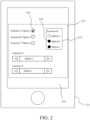
FIG. 2 is a schematic diagram of a first setting panel and setting parameters according to an embodiment. -
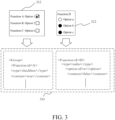
FIG. 3 is a schematic diagram showing transformation between setting parameters and a meta file according to an embodiment. -
FIG. 4 is a schematic flowchart of a method for sharing a console variable setting of an application according to an embodiment. -
FIG. 5 is a schematic diagram of a set coding image according to an embodiment. -
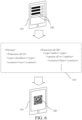
FIG. 6 is a schematic diagram showing that a first electronic device generates a set coding image according to an embodiment. -
FIG. 7 is a schematic diagram showing that a second electronic device adjusts setting parameters by using the set coding image according to an embodiment. -
FIG. 8 is a schematic diagram of a second setting panel and setting parameters according to an embodiment. - Referring to
FIG. 1 , a method for sharing a console variable setting of an application is applicable to a system with a plurality of electronic devices (referred to as aprocessing system 100 below). Two electronic devices are used as an example, which are respectively referred to as a firstelectronic device 110 and a secondelectronic device 120. The firstelectronic device 110 and the secondelectronic device 120 may be, but are not limited to, personal computers, notebook computers, tablet computers, mobile phones, bar-code scanner, or the like. - The first
electronic device 110 includes afirst processing unit 111, afirst storage unit 112, and afirst display unit 113. Thefirst processing unit 111 is connected to thefirst storage unit 112 and thefirst display unit 113. Thefirst storage unit 112 stores a plurality ofapplications 200. A user may select one of the plurality ofapplications 200 through a user interface (not shown) of the firstelectronic device 110. In order to further distinguish between theselected applications 200, theselected application 200 in the firstelectronic device 110 is referred to as afirst application 210. Thefirst processing unit 111 executes thefirst application 210. Thefirst application 210 has a setting panel (referred to as afirst setting panel 211 below), as shown inFIG. 2 . Thefirst display unit 113 displays thefirst setting panel 211. Thefirst setting panel 211 has a plurality of sets of setting options (referred to asfirst setting options 212 below), as shown inFIG. 2 . - A type of the
first setting options 212 may be a checkbox, a checklist, a group of options (radio or option), a dropdown list, a toggle switch, a label, or a text field. Each of thefirst setting options 212 has a setting parameter (that is, a set value indicating whether to select and/or a content to be selected) 230. For example, thesetting parameter 230 of the checkbox is a Boolean variable, that is, a "true value" or a "false value". Thesetting parameter 230 in the group of options is a group composed of a plurality of sets of Boolean variables. Thesetting parameters 230 of the dropdown list and the text field are text strings. - Referring to
FIG. 1 to FIG. 4 , thefirst processing unit 111 reads set values (that is, the setting parameters 230) of thefirst setting options 212 through thefirst application 210 and generates ameta file 310 according to thesetting parameters 230 of the first setting options 212 (step S410). In other words, themeta file 310 includes a plurality offirst setting options 212 in thefirst application 210 of the firstelectronic device 110 and thesetting parameters 230. - Then the
first processing unit 111 transforms themeta file 310 into aset coding image 320 through thefirst application 210, and displays a display frame with theset coding image 320 on the first display unit 113 (step S420), as shown inFIG. 4 . - In some embodiments, the
meta file 310 may be, but is not limited to, an extensible markup language (XML) or a lightweight markup language (Markdown). For example, thefirst processing unit 111 generates the corresponding tree text content in the XML file according to each group or option (that is, the setting parameter 230) in thefirst setting option 212, and then encodes the XML file into theset coding image 320. The content of the XML file inFIG. 3 is thesetting parameter 230 corresponding to thefirst setting option 212 inFIG. 2 . Thefirst setting option 212 and the contents of the XML file shown inFIG. 3 are only examples, and are not limited thereto. - In some embodiments, the
first processing unit 111 may store thegenerated meta file 310 in thefirst storage unit 112. - In some embodiments, the
first processing unit 111 may respectively transform different kinds offirst setting options 212 to a plurality of setcoding images 320. In some other embodiments, thefirst processing unit 111 may also transform all of thefirst setting options 212 into a singleset coding image 320. - In some embodiments, the
set coding image 320 may be a 1D barcode (for example, Code 39,Code 2 of 5 Interleaved, an EAN-13 barcode, an EAN-8 barcode, or Code 128), a 2D barcode (for example, a QR code, PDF417, a composite barcode, or Data Matrix), or a combination thereof. - The second
electronic device 120 includes asecond processing unit 121, asecond storage unit 122, asecond display unit 123, and a photographingunit 124. Thesecond processing unit 121 is connected to thesecond storage unit 122, thesecond display unit 123, and the photographingunit 124. Thesecond storage unit 122 stores at least one application. - When the same application is to be set, the
second processing unit 121 drives the photographingunit 124, and captures the display frame with theset coding image 320 on thefirst display unit 113 through the photographingunit 124 to obtain the set coding image 320 (step S430). Since the applications executed by the firstelectronic device 110 and the secondelectronic device 120 are the same, in order to distinguish between the two applications, the application executed by the secondelectronic device 120 is referred to as asecond application 220, and thefirst application 210 and thesecond application 220 are the same application. - After obtaining the set coding image 320 (step S430), the
second processing unit 121 transforms theset coding image 320 into the meta file 310 (step S440), and adjusts settingparameters 230 of a plurality ofsecond setting options 222 of thesecond application 220 according to the meta file 310 (step S450). - In other words, the
second application 220 has asecond setting panel 221. Since thefirst application 210 and thesecond application 220 are the same application, a layout of thefirst setting panel 211 is the same as a layout of thesecond setting panel 221. Thesecond setting panel 221 also has a plurality of setting options. The setting options of thesecond setting panel 221 are referred to as thesecond setting options 222. The items of thefirst setting options 212 are the same as the items of thesecond setting options 222. Before step S450, the setting content of the second setting options 222 (that is, the setting parameters 230) may be the same as or different from the setting content of thefirst setting options 212. After step S450, the setting content of thesecond setting options 222 is the same as the setting content of thefirst setting options 212, as shown inFIG. 2 andFIG. 8 . - In some embodiments of step S410, the
first processing unit 111 not only obtains the settingparameters 230 of thefirst setting options 212, but also obtains program information (for example, a software name and/or version information) of thefirst application 210, and then generates themeta file 310 with the corresponding text content by using the obtained settingparameters 230 and the program information. In some embodiments, thefirst processing unit 111 of the firstelectronic device 110 may record the program information of thefirst application 210 to a header of themeta file 310 according to a tree structure of themeta file 310. - In some embodiments, during generation of the
meta file 310, thefirst processing unit 111 may sequentially generate a tree structure of thecorresponding setting parameters 230 according to locations, labels, and a setting order of thefirst setting options 212, and record the tree structure in themeta file 310. - For example, the user selects the
first application 210 through the user interface of the firstelectronic device 110 to cause thefirst processing unit 111 of the firstelectronic device 110 to run thefirst application 210. During the execution of the setting function of thefirst application 210, the firstelectronic device 110 provides and displays thefirst setting panel 211 with the plurality offirst setting options 212 on the first display unit 113 (as shown in the upper diagram ofFIG. 6 ) for the user to set the operating environment of thefirst application 210 through the user interface of the firstelectronic device 110. During the execution of the sharing function of thefirst application 210, thefirst processing unit 111 of the firstelectronic device 110 reads out program data representing the types and set values (that is, the setting parameters 230) of thefirst setting options 212 in thefirst setting panel 211, collects and records the program data in the XML file (that is, the meta file 310) with the text content of the tree structure corresponding to the setting parameters 230 (as shown inFIG. 6 ), and also records the program name (that is, program information) of thefirst application 210 in the header of themeta file 310. Then, thefirst processing unit 111 of the firstelectronic device 110 transforms the XML file into the QR code (that is, the set coding image 320) and displays the QR code on the screen (that is, the first display unit 113) (as shown in the lower diagram ofFIG. 6 ). InFIG. 5 andFIG. 6 , all of thefirst setting options 212 generate a singleset coding image 320 by way of example, which is not limited in this way. - During setting of the same application of the second
electronic device 120, the user may capture a picture of the firstelectronic device 110 by using the photographingunit 124 of the second electronic device 120 (as shown in the upper left diagram ofFIG. 7 ) to obtain the QR code, and then thesecond processing unit 121 decodes the QR code to obtain an XML file recording the text content of the tree structure corresponding to the settingparameters 230 and the header of the program name. Then, thesecond processing unit 121 selects thesecond application 220 according to the program name recorded in the header and executes the second application 220 (as shown in the upper right diagram ofFIG. 7 ). After thesecond application 220 is executed, thesecond processing unit 121 transforms the text content of the tree structure corresponding to the settingparameters 230 into program data, and adjusts the settingparameters 230 of thesecond setting options 222 in thesecond setting panel 221 of the second application 220 (as shown in the bottom right diagram ofFIG. 7 ) to be the same as the settingparameters 230 of thefirst setting options 212 with the program data (as shown in the bottom left diagram ofFIG. 7 ). After the adjustment, the same setting options in thefirst setting panel 211 and thesecond setting panel 221 may be the same selected status or selected content. - In some embodiments, the
first processing unit 111 may be implemented by one or more processors. Thesecond processing unit 121 may also be implemented by one or more processors. Each of the processors may be, but is not limited to, a central processing unit (CPU), a System on Chip (SOC), a general-purpose or special-purpose microprocessor, a digital signal processor (DSP), a programmable controller, an application specific integrated circuit (ASIC), a programmable logic device (PLD), other similar processing devices, or a combination of the devices. - In some embodiments, the
first storage unit 112 may be implemented by one or more storage elements. Thesecond storage unit 122 may also be implemented by one or more storage elements. Each of the storage elements may be, but is not limited to, a memory, a memory card, or a register. - In some embodiments, the
first display unit 113 may be, but is not limited to, a touch screen or a general display screen (that is, which has no touch function). Thesecond display unit 123 may also be, but is not limited to, a touch screen or a general display screen (that is, which has no touch function). When the display unit (that is, thefirst display unit 113 and/or the second display unit 123) is a touch screen, the user interface may be the display unit, or may be an input device (a non-display unit) such as a keyboard, one or more buttons, a handwriting board, or any combination thereof that is additionally arranged. - In some embodiments, the photographing
unit 124 may be implemented by a combination of a camera lens, a lens, and an image processor. - In some embodiments, the method for sharing a console variable setting of an application according to any embodiment may be realized by a computer program product. In other words, when an electronic device (that is, the first
electronic device 110 and/or the second electronic device 120) loads and executes a program including a plurality of program codes, the method for sharing a console variable setting of an application in any embodiment can be performed. In some embodiments, the computer program product may be a readable recording medium, and the above program is stored in the readable recording medium for the electronic device to load. In some embodiments, the program itself may be a computer program product, and is transmitted to the electronic device in a wired or wireless manner. - Based on the above, according to the method for sharing a console variable setting of an application and the
processing system 100 with a plurality of electronic devices provided in any of the embodiments, the setting content of an application installed in an electronic device (such as the first electronic device 110) can be conveniently acquired, and the same applications on other electronic devices (such as the second electronic device 120) are quickly set to the same setting parameters.
Claims (12)
- A method for sharing a console variable setting of an application, comprising:generating, by a first electronic device (110), a meta file (310), wherein the meta file (310) comprises a set of setting parameters (230) for a plurality of first setting options (212) in a first application (210) of the first electronic device (110);transforming, by the first electronic device (110), the meta file (310) into a set coding image (320); anddisplaying, by the first electronic device (110), a display frame with the set coding image (320).
- The method for sharing a console variable setting of an application according to claim 1, further comprising:capturing, by a second electronic device (120), the display frame to obtain the set coding image (320);transforming, by the second electronic device (120), the set coding image (320) into the meta file (310); andadjusting the setting parameters (230), by the second electronic device (120), settings for a plurality of second setting options (222) of a second application (220) according to the meta file (310).
- The method for sharing a console variable setting of an application according to claim 2, wherein the first setting options (212) comprise a checkbox, a checklist, a group of options, a dropdown list, a toggle switch, a label, or a text field, and types and an order of the second setting options (222) are the same as those of the first setting options (212).
- The method for sharing a console variable setting of an application according to claim 2, wherein the meta file (310) further comprises program information of the first application (210).
- The method for sharing a console variable setting of an application according to claim 4, wherein the step of adjusting, by the second electronic device (120), the setting parameters (230) for the second setting options (222) of the second application (220) according to the meta file (310) comprises:selecting and enabling, by the second electronic device (120), the second application (220) the same as the first application (210) according to the program information; andsetting, by the second electronic device (120), the second setting options (222) of the second application (220) according to the set of setting parameters (230) in the meta file (310).
- The method for sharing a console variable setting of an application according to claim 1, wherein locations, labels, and a setting order of the first setting options (212) of the first application (210) are recorded in the meta file (310).
- A method for sharing a console variable setting of an application, comprising:capturing, by an electronic device, a display frame of another electronic device to obtain a set coding image (320);transforming, by the electronic device, the set coding image (320) into a meta file (310), wherein the meta file (310) comprises a set of setting parameters (230) for a plurality of first setting options (212) in a first application (210); andsetting, by the electronic device, a plurality of second setting options (222) of a second application (220) the same as the first application (210) according to the meta file (310).
- A system with a plurality of electronic devices, comprising:a first electronic device (110), comprising a first processing unit (111), a first storage unit (112), and a first display unit (113), wherein the first processing unit (111) is connected to the first storage unit (112) and the first display unit (113), the first storage unit (112) is configured to store a first application (210), and the first processing unit (111) is configured to execute the first application (210), wherein during the execution of the first application (210), the first processing unit (111) generates a meta file (310) according to a plurality of first setting options (212) of the first application (210), transform the meta file (310) into a set coding image (320), and display a display frame with the set coding image (320) on the first display unit (113); anda second electronic device (120), comprising a second processing unit (121), a second storage unit (122), and a photographing unit (124), wherein the second processing unit (121) is connected to the second storage unit (122) and the photographing unit (124), the second storage unit (122) is configured to store a second application (220), and the second processing unit (121) is configured to capture the display frame on the first display unit (113) through the photographing unit (124) to obtain the set coding image (320), decode the set coding image (320) to obtain the meta file (310), and then execute the second application (220) and set a plurality of second setting options (222) of the second application (220) according to the meta file (310).
- The system with a plurality of electronic devices according to claim 8, wherein the meta file (310) further comprises program information of the first application (210).
- The system with a plurality of electronic devices according to claim 9, wherein the second electronic device (120) is configured to select and execute the second application (220) the same as the first application (210) according to the program information, and then set the second setting options (222) according to a set of setting parameters (230) in the meta file (310).
- The system with a plurality of electronic devices according to claim 8, wherein the first setting options (212) comprise a checkbox, a checklist, a group of options, a dropdown list, a toggle switch, a label, or a text field, and types and an order of the second setting options (222) are the same as those of the first setting options (212).
- The system with a plurality of electronic devices according to claim 8, wherein the first processing unit (111) records locations, labels, and a setting order of the first setting options (212) of the first application (210) in the meta file (310).
Applications Claiming Priority (1)
| Application Number | Priority Date | Filing Date | Title |
|---|---|---|---|
| US202263402029P | 2022-08-29 | 2022-08-29 |
Publications (1)
| Publication Number | Publication Date |
|---|---|
| EP4332760A1 true EP4332760A1 (en) | 2024-03-06 |
Family
ID=85384408
Family Applications (2)
| Application Number | Title | Priority Date | Filing Date |
|---|---|---|---|
| EP23158459.0A Pending EP4332760A1 (en) | 2022-08-29 | 2023-02-24 | Method for sharing console variable setting of application and system with plurality of electronic devices |
| EP23168958.9A Active EP4332761B1 (en) | 2022-08-29 | 2023-04-20 | Scanning method, electronic device and processing system for multiple barcodes |
Family Applications After (1)
| Application Number | Title | Priority Date | Filing Date |
|---|---|---|---|
| EP23168958.9A Active EP4332761B1 (en) | 2022-08-29 | 2023-04-20 | Scanning method, electronic device and processing system for multiple barcodes |
Country Status (5)
| Country | Link |
|---|---|
| US (3) | US11842033B1 (en) |
| EP (2) | EP4332760A1 (en) |
| CN (2) | CN117632278A (en) |
| AU (2) | AU2023201410B2 (en) |
| TW (2) | TWI835468B (en) |
Families Citing this family (1)
| Publication number | Priority date | Publication date | Assignee | Title |
|---|---|---|---|---|
| DE102023102950B3 (en) * | 2023-02-07 | 2023-11-30 | Sick Ag | Code reading device and method for reading a plurality of codes in parallel |
Citations (4)
| Publication number | Priority date | Publication date | Assignee | Title |
|---|---|---|---|---|
| EP2894931A1 (en) * | 2012-09-07 | 2015-07-15 | NEC CASIO Mobile Communications, Ltd. | Wireless communication system, wireless communication method, mobile terminal, information processing device, and program |
| US9459827B2 (en) * | 2013-03-26 | 2016-10-04 | Sony Corporation | Information processing apparatus, method for processing information, and program |
| US20170317879A1 (en) * | 2016-04-29 | 2017-11-02 | Microsoft Technology Licensing, Llc | Cart Mode Provisioning Of Shared Computing Devices |
| CN114139169A (en) * | 2020-09-04 | 2022-03-04 | 神讯电脑(昆山)有限公司 | Two-dimensional code encryption and decryption method and method for sharing configuration information by multiple electronic devices |
Family Cites Families (16)
| Publication number | Priority date | Publication date | Assignee | Title |
|---|---|---|---|---|
| US20010030662A1 (en) * | 1999-12-20 | 2001-10-18 | Toshihiko Ohkawa | System and method for displaying index information on a computer screen |
| US7536418B2 (en) * | 2003-01-10 | 2009-05-19 | At&T Intellectual Property Ii, Lp | Preload library for transparent file transformation |
| US7528868B2 (en) * | 2003-12-18 | 2009-05-05 | Eastman Kodak Company | Image metadata attachment |
| US8596541B2 (en) * | 2008-02-22 | 2013-12-03 | Qualcomm Incorporated | Image capture device with integrated barcode scanning |
| TWI455034B (en) | 2012-03-27 | 2014-10-01 | Visionatics Inc | Barcode recognion method and a computer product thereof |
| CN106886892A (en) * | 2016-11-18 | 2017-06-23 | 阿里巴巴集团控股有限公司 | Communication means and device based on bar code, the implementation method for paying and device |
| TWI660606B (en) * | 2018-04-17 | 2019-05-21 | 鉅康科技股份有限公司 | Intelligent monitoring system |
| CN109917667B (en) * | 2019-03-31 | 2021-06-22 | 广东美的制冷设备有限公司 | Home appliance and control authority sharing method, control terminal and storage medium |
| CN110287162B (en) * | 2019-06-03 | 2025-09-09 | 北京达佳互联信息技术有限公司 | Content sharing method and device, electronic equipment and storage medium |
| CN112241639B (en) * | 2019-07-18 | 2024-07-16 | 神讯电脑(昆山)有限公司 | Multi-bar code scanning method and system thereof |
| US10853611B1 (en) * | 2019-08-23 | 2020-12-01 | Getac Technology Corporation | Method for scanning multiple barcodes and system thereof |
| CN113051950B (en) * | 2019-12-27 | 2023-07-18 | 华为技术有限公司 | A method for identifying multiple barcodes and related equipment |
| WO2021163295A1 (en) * | 2020-02-13 | 2021-08-19 | Magic Leap, Inc. | Cross reality system with prioritization of geolocation information for localization |
| US11258774B1 (en) * | 2020-08-24 | 2022-02-22 | Juniper Networks, Inc. | Adaptive control of secure sockets layer proxy |
| CN113365153B (en) * | 2021-05-31 | 2023-01-10 | 北京小米移动软件有限公司 | Data sharing method and device, storage medium and electronic equipment |
| CN114554131A (en) * | 2022-01-17 | 2022-05-27 | 浪潮金融信息技术有限公司 | High-security smart screen conference content sharing method, system and medium |
-
2022
- 2022-12-16 CN CN202211623003.1A patent/CN117632278A/en active Pending
- 2022-12-16 TW TW111148598A patent/TWI835468B/en active
-
2023
- 2023-02-16 US US18/170,056 patent/US11842033B1/en active Active
- 2023-02-24 EP EP23158459.0A patent/EP4332760A1/en active Pending
- 2023-03-02 CN CN202310191238.6A patent/CN117634520A/en active Pending
- 2023-03-02 TW TW112107670A patent/TWI854516B/en active
- 2023-03-03 US US18/177,912 patent/US12086385B2/en active Active
- 2023-03-07 AU AU2023201410A patent/AU2023201410B2/en active Active
- 2023-04-20 EP EP23168958.9A patent/EP4332761B1/en active Active
- 2023-04-28 AU AU2023202635A patent/AU2023202635B2/en active Active
- 2023-11-05 US US18/502,022 patent/US12086390B2/en active Active
Patent Citations (4)
| Publication number | Priority date | Publication date | Assignee | Title |
|---|---|---|---|---|
| EP2894931A1 (en) * | 2012-09-07 | 2015-07-15 | NEC CASIO Mobile Communications, Ltd. | Wireless communication system, wireless communication method, mobile terminal, information processing device, and program |
| US9459827B2 (en) * | 2013-03-26 | 2016-10-04 | Sony Corporation | Information processing apparatus, method for processing information, and program |
| US20170317879A1 (en) * | 2016-04-29 | 2017-11-02 | Microsoft Technology Licensing, Llc | Cart Mode Provisioning Of Shared Computing Devices |
| CN114139169A (en) * | 2020-09-04 | 2022-03-04 | 神讯电脑(昆山)有限公司 | Two-dimensional code encryption and decryption method and method for sharing configuration information by multiple electronic devices |
Also Published As
| Publication number | Publication date |
|---|---|
| US20240070418A1 (en) | 2024-02-29 |
| CN117632278A (en) | 2024-03-01 |
| US12086385B2 (en) | 2024-09-10 |
| CN117634520A (en) | 2024-03-01 |
| AU2023201410B2 (en) | 2024-08-29 |
| EP4332761A2 (en) | 2024-03-06 |
| AU2023201410A1 (en) | 2024-03-14 |
| TW202409895A (en) | 2024-03-01 |
| EP4332761A3 (en) | 2024-04-03 |
| AU2023202635A1 (en) | 2024-03-14 |
| TW202409816A (en) | 2024-03-01 |
| EP4332761B1 (en) | 2025-07-09 |
| TWI835468B (en) | 2024-03-11 |
| US11842033B1 (en) | 2023-12-12 |
| AU2023202635B2 (en) | 2024-09-05 |
| US20240069693A1 (en) | 2024-02-29 |
| TWI854516B (en) | 2024-09-01 |
| US12086390B2 (en) | 2024-09-10 |
Similar Documents
| Publication | Publication Date | Title |
|---|---|---|
| US12003584B2 (en) | Mobile computing device with data cognition software | |
| JP4192847B2 (en) | Code reader and program | |
| CN100440141C (en) | User-friendly information processing device and method | |
| US20170293959A1 (en) | Information processing apparatus, shelf label management system, control method, and program | |
| US20170278057A1 (en) | Information processing apparatus, shelf label management system, control method, and program | |
| JP4792421B2 (en) | Product sales registration data processing device | |
| WO2018016494A1 (en) | Inventory management server, inventory management system, inventory management program, and inventory management method | |
| US12086390B2 (en) | Method for sharing a console variable setting of an application and the electronic device and system | |
| US20220292565A1 (en) | Processing device, and processing method | |
| JP5780219B2 (en) | Information terminal and program | |
| US20220230514A1 (en) | Product recognition apparatus, system, and method | |
| WO2019181441A1 (en) | Information processing device, control method, program | |
| CN118586411A (en) | Barcode image recognition method and device | |
| US20250165323A1 (en) | Systems and methods for reporting diagnostic information in a data reading system | |
| US20250077816A1 (en) | Barcode image recognition method and device using the same | |
| US20250229989A1 (en) | Article management system, information processing device and information processing method | |
| US20090327348A1 (en) | Job support system and its method | |
| CN102110266A (en) | Sales timing management device | |
| US20260087476A1 (en) | Devices and Methods Utilizing Machine Learning for Item Identification | |
| WO2019181442A1 (en) | Information processing device, control method, and program | |
| JP3780737B2 (en) | Product code conversion apparatus and method | |
| JP6532114B1 (en) | INFORMATION PROCESSING APPARATUS, INFORMATION PROCESSING METHOD, AND PROGRAM | |
| JP2026059612A (en) | Work process management system, work process management method, and program | |
| JP2021131658A (en) | Code reader, code reading method and program | |
| JP2003067121A (en) | Input instruction and information processor |
Legal Events
| Date | Code | Title | Description |
|---|---|---|---|
| PUAI | Public reference made under article 153(3) epc to a published international application that has entered the european phase |
Free format text: ORIGINAL CODE: 0009012 |
|
| STAA | Information on the status of an ep patent application or granted ep patent |
Free format text: STATUS: REQUEST FOR EXAMINATION WAS MADE |
|
| 17P | Request for examination filed |
Effective date: 20231215 |
|
| AK | Designated contracting states |
Kind code of ref document: A1 Designated state(s): AL AT BE BG CH CY CZ DE DK EE ES FI FR GB GR HR HU IE IS IT LI LT LU LV MC ME MK MT NL NO PL PT RO RS SE SI SK SM TR |
|
| STAA | Information on the status of an ep patent application or granted ep patent |
Free format text: STATUS: EXAMINATION IS IN PROGRESS |
|
| 17Q | First examination report despatched |
Effective date: 20240822 |