EP4262255B1 - Pairing method and pairing system - Google Patents
Pairing method and pairing system Download PDFInfo
- Publication number
- EP4262255B1 EP4262255B1 EP22770173.7A EP22770173A EP4262255B1 EP 4262255 B1 EP4262255 B1 EP 4262255B1 EP 22770173 A EP22770173 A EP 22770173A EP 4262255 B1 EP4262255 B1 EP 4262255B1
- Authority
- EP
- European Patent Office
- Prior art keywords
- stylus
- electronic device
- wireless keyboard
- coil
- wireless
- Prior art date
- Legal status (The legal status is an assumption and is not a legal conclusion. Google has not performed a legal analysis and makes no representation as to the accuracy of the status listed.)
- Active
Links
Images







Classifications
-
- H—ELECTRICITY
- H02—GENERATION; CONVERSION OR DISTRIBUTION OF ELECTRIC POWER
- H02J—ELECTRIC POWER NETWORKS; CIRCUIT ARRANGEMENTS OR SYSTEMS FOR SUPPLYING OR DISTRIBUTING ELECTRIC POWER; SYSTEMS FOR STORING ELECTRIC ENERGY
- H02J7/00—Circuit arrangements for charging or discharging batteries or for supplying loads from batteries
- H02J7/90—Regulation of charging or discharging current or voltage
-
- G—PHYSICS
- G06—COMPUTING OR CALCULATING; COUNTING
- G06F—ELECTRIC DIGITAL DATA PROCESSING
- G06F1/00—Details not covered by groups G06F3/00 - G06F13/00 and G06F21/00
- G06F1/16—Constructional details or arrangements
- G06F1/1601—Constructional details related to the housing of computer displays, e.g. of CRT monitors, of flat displays
- G06F1/1607—Arrangements to support accessories mechanically attached to the display housing
-
- G—PHYSICS
- G06—COMPUTING OR CALCULATING; COUNTING
- G06F—ELECTRIC DIGITAL DATA PROCESSING
- G06F1/00—Details not covered by groups G06F3/00 - G06F13/00 and G06F21/00
- G06F1/16—Constructional details or arrangements
- G06F1/1613—Constructional details or arrangements for portable computers
- G06F1/1626—Constructional details or arrangements for portable computers with a single-body enclosure integrating a flat display, e.g. Personal Digital Assistants [PDAs]
-
- G—PHYSICS
- G06—COMPUTING OR CALCULATING; COUNTING
- G06F—ELECTRIC DIGITAL DATA PROCESSING
- G06F1/00—Details not covered by groups G06F3/00 - G06F13/00 and G06F21/00
- G06F1/16—Constructional details or arrangements
- G06F1/1613—Constructional details or arrangements for portable computers
- G06F1/1633—Constructional details or arrangements of portable computers not specific to the type of enclosures covered by groups G06F1/1615 - G06F1/1626
- G06F1/1684—Constructional details or arrangements related to integrated I/O peripherals not covered by groups G06F1/1635 - G06F1/1675
- G06F1/1698—Constructional details or arrangements related to integrated I/O peripherals not covered by groups G06F1/1635 - G06F1/1675 the I/O peripheral being a sending/receiving arrangement to establish a cordless communication link, e.g. radio or infrared link, integrated cellular phone
-
- G—PHYSICS
- G06—COMPUTING OR CALCULATING; COUNTING
- G06F—ELECTRIC DIGITAL DATA PROCESSING
- G06F1/00—Details not covered by groups G06F3/00 - G06F13/00 and G06F21/00
- G06F1/26—Power supply means, e.g. regulation thereof
- G06F1/266—Arrangements to supply power to external peripherals either directly from the computer or under computer control, e.g. supply of power through the communication port, computer controlled power-strips
-
- G—PHYSICS
- G06—COMPUTING OR CALCULATING; COUNTING
- G06F—ELECTRIC DIGITAL DATA PROCESSING
- G06F3/00—Input arrangements for transferring data to be processed into a form capable of being handled by the computer; Output arrangements for transferring data from processing unit to output unit, e.g. interface arrangements
- G06F3/01—Input arrangements or combined input and output arrangements for interaction between user and computer
- G06F3/02—Input arrangements using manually operated switches, e.g. using keyboards or dials
- G06F3/0202—Constructional details or processes of manufacture of the input device
- G06F3/021—Arrangements integrating additional peripherals in a keyboard, e.g. card or barcode reader, optical scanner
-
- G—PHYSICS
- G06—COMPUTING OR CALCULATING; COUNTING
- G06F—ELECTRIC DIGITAL DATA PROCESSING
- G06F3/00—Input arrangements for transferring data to be processed into a form capable of being handled by the computer; Output arrangements for transferring data from processing unit to output unit, e.g. interface arrangements
- G06F3/01—Input arrangements or combined input and output arrangements for interaction between user and computer
- G06F3/02—Input arrangements using manually operated switches, e.g. using keyboards or dials
- G06F3/023—Arrangements for converting discrete items of information into a coded form, e.g. arrangements for interpreting keyboard generated codes as alphanumeric codes, operand codes or instruction codes
- G06F3/0231—Cordless keyboards
-
- G—PHYSICS
- G06—COMPUTING OR CALCULATING; COUNTING
- G06F—ELECTRIC DIGITAL DATA PROCESSING
- G06F3/00—Input arrangements for transferring data to be processed into a form capable of being handled by the computer; Output arrangements for transferring data from processing unit to output unit, e.g. interface arrangements
- G06F3/01—Input arrangements or combined input and output arrangements for interaction between user and computer
- G06F3/03—Arrangements for converting the position or the displacement of a member into a coded form
- G06F3/033—Pointing devices displaced or positioned by the user, e.g. mice, trackballs, pens or joysticks; Accessories therefor
- G06F3/0354—Pointing devices displaced or positioned by the user, e.g. mice, trackballs, pens or joysticks; Accessories therefor with detection of two-dimensional [2D] relative movements between the device, or an operating part thereof, and a plane or surface, e.g. 2D mice, trackballs, pens or pucks
- G06F3/03545—Pens or stylus
-
- G—PHYSICS
- G06—COMPUTING OR CALCULATING; COUNTING
- G06F—ELECTRIC DIGITAL DATA PROCESSING
- G06F3/00—Input arrangements for transferring data to be processed into a form capable of being handled by the computer; Output arrangements for transferring data from processing unit to output unit, e.g. interface arrangements
- G06F3/01—Input arrangements or combined input and output arrangements for interaction between user and computer
- G06F3/03—Arrangements for converting the position or the displacement of a member into a coded form
- G06F3/033—Pointing devices displaced or positioned by the user, e.g. mice, trackballs, pens or joysticks; Accessories therefor
- G06F3/038—Control and interface arrangements therefor, e.g. drivers or device-embedded control circuitry
-
- G—PHYSICS
- G06—COMPUTING OR CALCULATING; COUNTING
- G06F—ELECTRIC DIGITAL DATA PROCESSING
- G06F3/00—Input arrangements for transferring data to be processed into a form capable of being handled by the computer; Output arrangements for transferring data from processing unit to output unit, e.g. interface arrangements
- G06F3/01—Input arrangements or combined input and output arrangements for interaction between user and computer
- G06F3/03—Arrangements for converting the position or the displacement of a member into a coded form
- G06F3/033—Pointing devices displaced or positioned by the user, e.g. mice, trackballs, pens or joysticks; Accessories therefor
- G06F3/038—Control and interface arrangements therefor, e.g. drivers or device-embedded control circuitry
- G06F3/0383—Signal control means within the pointing device
-
- G—PHYSICS
- G06—COMPUTING OR CALCULATING; COUNTING
- G06F—ELECTRIC DIGITAL DATA PROCESSING
- G06F3/00—Input arrangements for transferring data to be processed into a form capable of being handled by the computer; Output arrangements for transferring data from processing unit to output unit, e.g. interface arrangements
- G06F3/01—Input arrangements or combined input and output arrangements for interaction between user and computer
- G06F3/03—Arrangements for converting the position or the displacement of a member into a coded form
- G06F3/041—Digitisers, e.g. for touch screens or touch pads, characterised by the transducing means
- G06F3/0412—Digitisers structurally integrated in a display
-
- G—PHYSICS
- G06—COMPUTING OR CALCULATING; COUNTING
- G06F—ELECTRIC DIGITAL DATA PROCESSING
- G06F3/00—Input arrangements for transferring data to be processed into a form capable of being handled by the computer; Output arrangements for transferring data from processing unit to output unit, e.g. interface arrangements
- G06F3/01—Input arrangements or combined input and output arrangements for interaction between user and computer
- G06F3/03—Arrangements for converting the position or the displacement of a member into a coded form
- G06F3/041—Digitisers, e.g. for touch screens or touch pads, characterised by the transducing means
- G06F3/0416—Control or interface arrangements specially adapted for digitisers
- G06F3/04162—Control or interface arrangements specially adapted for digitisers for exchanging data with external devices, e.g. smart pens, via the digitiser sensing hardware
-
- G—PHYSICS
- G06—COMPUTING OR CALCULATING; COUNTING
- G06F—ELECTRIC DIGITAL DATA PROCESSING
- G06F3/00—Input arrangements for transferring data to be processed into a form capable of being handled by the computer; Output arrangements for transferring data from processing unit to output unit, e.g. interface arrangements
- G06F3/01—Input arrangements or combined input and output arrangements for interaction between user and computer
- G06F3/03—Arrangements for converting the position or the displacement of a member into a coded form
- G06F3/041—Digitisers, e.g. for touch screens or touch pads, characterised by the transducing means
- G06F3/044—Digitisers, e.g. for touch screens or touch pads, characterised by the transducing means by capacitive means
- G06F3/0441—Digitisers, e.g. for touch screens or touch pads, characterised by the transducing means by capacitive means using active external devices, e.g. active pens, for receiving changes in electrical potential transmitted by the digitiser, e.g. tablet driving signals
-
- G—PHYSICS
- G06—COMPUTING OR CALCULATING; COUNTING
- G06F—ELECTRIC DIGITAL DATA PROCESSING
- G06F3/00—Input arrangements for transferring data to be processed into a form capable of being handled by the computer; Output arrangements for transferring data from processing unit to output unit, e.g. interface arrangements
- G06F3/01—Input arrangements or combined input and output arrangements for interaction between user and computer
- G06F3/03—Arrangements for converting the position or the displacement of a member into a coded form
- G06F3/041—Digitisers, e.g. for touch screens or touch pads, characterised by the transducing means
- G06F3/044—Digitisers, e.g. for touch screens or touch pads, characterised by the transducing means by capacitive means
- G06F3/0442—Digitisers, e.g. for touch screens or touch pads, characterised by the transducing means by capacitive means using active external devices, e.g. active pens, for transmitting changes in electrical potential to be received by the digitiser
-
- G—PHYSICS
- G06—COMPUTING OR CALCULATING; COUNTING
- G06F—ELECTRIC DIGITAL DATA PROCESSING
- G06F3/00—Input arrangements for transferring data to be processed into a form capable of being handled by the computer; Output arrangements for transferring data from processing unit to output unit, e.g. interface arrangements
- G06F3/01—Input arrangements or combined input and output arrangements for interaction between user and computer
- G06F3/048—Interaction techniques based on graphical user interfaces [GUI]
- G06F3/0484—Interaction techniques based on graphical user interfaces [GUI] for the control of specific functions or operations, e.g. selecting or manipulating an object, an image or a displayed text element, setting a parameter value or selecting a range
- G06F3/04842—Selection of displayed objects or displayed text elements
-
- G—PHYSICS
- G06—COMPUTING OR CALCULATING; COUNTING
- G06F—ELECTRIC DIGITAL DATA PROCESSING
- G06F3/00—Input arrangements for transferring data to be processed into a form capable of being handled by the computer; Output arrangements for transferring data from processing unit to output unit, e.g. interface arrangements
- G06F3/01—Input arrangements or combined input and output arrangements for interaction between user and computer
- G06F3/048—Interaction techniques based on graphical user interfaces [GUI]
- G06F3/0487—Interaction techniques based on graphical user interfaces [GUI] using specific features provided by the input device, e.g. functions controlled by the rotation of a mouse with dual sensing arrangements, or of the nature of the input device, e.g. tap gestures based on pressure sensed by a digitiser
- G06F3/0488—Interaction techniques based on graphical user interfaces [GUI] using specific features provided by the input device, e.g. functions controlled by the rotation of a mouse with dual sensing arrangements, or of the nature of the input device, e.g. tap gestures based on pressure sensed by a digitiser using a touch-screen or digitiser, e.g. input of commands through traced gestures
- G06F3/04883—Interaction techniques based on graphical user interfaces [GUI] using specific features provided by the input device, e.g. functions controlled by the rotation of a mouse with dual sensing arrangements, or of the nature of the input device, e.g. tap gestures based on pressure sensed by a digitiser using a touch-screen or digitiser, e.g. input of commands through traced gestures for inputting data by handwriting, e.g. gesture or text
-
- G—PHYSICS
- G06—COMPUTING OR CALCULATING; COUNTING
- G06F—ELECTRIC DIGITAL DATA PROCESSING
- G06F40/00—Handling natural language data
- G06F40/10—Text processing
- G06F40/166—Editing, e.g. inserting or deleting
-
- H—ELECTRICITY
- H02—GENERATION; CONVERSION OR DISTRIBUTION OF ELECTRIC POWER
- H02J—ELECTRIC POWER NETWORKS; CIRCUIT ARRANGEMENTS OR SYSTEMS FOR SUPPLYING OR DISTRIBUTING ELECTRIC POWER; SYSTEMS FOR STORING ELECTRIC ENERGY
- H02J50/00—Circuit arrangements or systems for wireless supply or distribution of electric power
- H02J50/10—Circuit arrangements or systems for wireless supply or distribution of electric power using inductive coupling
-
- H—ELECTRICITY
- H02—GENERATION; CONVERSION OR DISTRIBUTION OF ELECTRIC POWER
- H02J—ELECTRIC POWER NETWORKS; CIRCUIT ARRANGEMENTS OR SYSTEMS FOR SUPPLYING OR DISTRIBUTING ELECTRIC POWER; SYSTEMS FOR STORING ELECTRIC ENERGY
- H02J50/00—Circuit arrangements or systems for wireless supply or distribution of electric power
- H02J50/80—Circuit arrangements or systems for wireless supply or distribution of electric power involving the exchange of data, concerning supply or distribution of electric power, between transmitting devices and receiving devices
-
- H—ELECTRICITY
- H02—GENERATION; CONVERSION OR DISTRIBUTION OF ELECTRIC POWER
- H02J—ELECTRIC POWER NETWORKS; CIRCUIT ARRANGEMENTS OR SYSTEMS FOR SUPPLYING OR DISTRIBUTING ELECTRIC POWER; SYSTEMS FOR STORING ELECTRIC ENERGY
- H02J7/00—Circuit arrangements for charging or discharging batteries or for supplying loads from batteries
- H02J7/02—Circuit arrangements for charging or discharging batteries or for supplying loads from batteries for charging batteries from AC mains by converters
- H02J7/04—Regulation of charging current or voltage
- H02J7/06—Regulation of charging current or voltage using discharge tubes or semiconductor devices
-
- H—ELECTRICITY
- H02—GENERATION; CONVERSION OR DISTRIBUTION OF ELECTRIC POWER
- H02J—ELECTRIC POWER NETWORKS; CIRCUIT ARRANGEMENTS OR SYSTEMS FOR SUPPLYING OR DISTRIBUTING ELECTRIC POWER; SYSTEMS FOR STORING ELECTRIC ENERGY
- H02J7/00—Circuit arrangements for charging or discharging batteries or for supplying loads from batteries
- H02J7/34—Parallel operation in networks using both storage and other DC sources, e.g. providing buffering
- H02J7/342—The other DC source being a battery actively interacting with the first one, i.e. battery to battery charging
-
- H—ELECTRICITY
- H02—GENERATION; CONVERSION OR DISTRIBUTION OF ELECTRIC POWER
- H02J—ELECTRIC POWER NETWORKS; CIRCUIT ARRANGEMENTS OR SYSTEMS FOR SUPPLYING OR DISTRIBUTING ELECTRIC POWER; SYSTEMS FOR STORING ELECTRIC ENERGY
- H02J7/00—Circuit arrangements for charging or discharging batteries or for supplying loads from batteries
- H02J7/40—Circuit arrangements for charging or discharging batteries or for supplying loads from batteries characterised by the exchange of charge or discharge related data
-
- H—ELECTRICITY
- H04—ELECTRIC COMMUNICATION TECHNIQUE
- H04W—WIRELESS COMMUNICATION NETWORKS
- H04W72/00—Local resource management
- H04W72/20—Control channels or signalling for resource management
- H04W72/21—Control channels or signalling for resource management in the uplink direction of a wireless link, i.e. towards the network
-
- H—ELECTRICITY
- H04—ELECTRIC COMMUNICATION TECHNIQUE
- H04W—WIRELESS COMMUNICATION NETWORKS
- H04W72/00—Local resource management
- H04W72/20—Control channels or signalling for resource management
- H04W72/23—Control channels or signalling for resource management in the downlink direction of a wireless link, i.e. towards a terminal
-
- G—PHYSICS
- G06—COMPUTING OR CALCULATING; COUNTING
- G06F—ELECTRIC DIGITAL DATA PROCESSING
- G06F2200/00—Indexing scheme relating to G06F1/04 - G06F1/32
- G06F2200/16—Indexing scheme relating to G06F1/16 - G06F1/18
- G06F2200/163—Indexing scheme relating to constructional details of the computer
- G06F2200/1632—Pen holder integrated in the computer
-
- G—PHYSICS
- G06—COMPUTING OR CALCULATING; COUNTING
- G06F—ELECTRIC DIGITAL DATA PROCESSING
- G06F2200/00—Indexing scheme relating to G06F1/04 - G06F1/32
- G06F2200/16—Indexing scheme relating to G06F1/16 - G06F1/18
- G06F2200/163—Indexing scheme relating to constructional details of the computer
- G06F2200/1633—Protecting arrangement for the entire housing of the computer
-
- G—PHYSICS
- G06—COMPUTING OR CALCULATING; COUNTING
- G06F—ELECTRIC DIGITAL DATA PROCESSING
- G06F2203/00—Indexing scheme relating to G06F3/00 - G06F3/048
- G06F2203/038—Indexing scheme relating to G06F3/038
- G06F2203/0384—Wireless input, i.e. hardware and software details of wireless interface arrangements for pointing devices
-
- G—PHYSICS
- G06—COMPUTING OR CALCULATING; COUNTING
- G06F—ELECTRIC DIGITAL DATA PROCESSING
- G06F3/00—Input arrangements for transferring data to be processed into a form capable of being handled by the computer; Output arrangements for transferring data from processing unit to output unit, e.g. interface arrangements
- G06F3/01—Input arrangements or combined input and output arrangements for interaction between user and computer
- G06F3/02—Input arrangements using manually operated switches, e.g. using keyboards or dials
- G06F3/0202—Constructional details or processes of manufacture of the input device
-
- Y—GENERAL TAGGING OF NEW TECHNOLOGICAL DEVELOPMENTS; GENERAL TAGGING OF CROSS-SECTIONAL TECHNOLOGIES SPANNING OVER SEVERAL SECTIONS OF THE IPC; TECHNICAL SUBJECTS COVERED BY FORMER USPC CROSS-REFERENCE ART COLLECTIONS [XRACs] AND DIGESTS
- Y02—TECHNOLOGIES OR APPLICATIONS FOR MITIGATION OR ADAPTATION AGAINST CLIMATE CHANGE
- Y02B—CLIMATE CHANGE MITIGATION TECHNOLOGIES RELATED TO BUILDINGS, e.g. HOUSING, HOUSE APPLIANCES OR RELATED END-USER APPLICATIONS
- Y02B40/00—Technologies aiming at improving the efficiency of home appliances, e.g. induction cooking or efficient technologies for refrigerators, freezers or dish washers
Definitions
- This disclosure relates to the field of communication technologies, and in particular, the invention relates to a pairing method and a pairing system.
- a user may provide an input to an electronic device by touching a touchscreen of the electronic device by using a finger, or may provide an input to the electronic device by operating the touchscreen of the electronic device by using a stylus.
- the electronic device performs a corresponding operation based on the input of the user.
- the electronic device can detect an input of the stylus.
- the stylus and the electronic device may be paired and connected based on a Bluetooth manner.
- the stylus may broadcast a packet including a media access control (media access control, MAC) address of the stylus, and the electronic device may receive the packet by Bluetooth scanning.
- the electronic device parses the packet to obtain the MAC address of the stylus, and then displays a pairing dialog box, to remind the user to perform pairing and connection between the electronic device and the stylus.
- media access control media access control
- US 2020/103988 A1 relates to a technology for a wireless communication system involving an electronic device and a stylus pen.
- US 2018/176358 A1 relates also to method for automatically pairing a stylus with a companion electronic device such as a tablet or smartphone.
- CN207067941U describes a leather case keyboard integrated with a solar-powered charging pen sleeve.
- US 2015/015492 A1 relates to a keyboard capable of inputting position information via ultrasonic signals from an electronic pen.
- the object of the present invention is to provide a pairing method and a pairing system, so that when an electronic device and a stylus are paired, other electronic devices around the stylus are prevented from displaying a pairing dialog box.
- an embodiment of this application provides a pairing method, applied to a pairing system.
- the pairing system includes: a stylus, a wireless keyboard, and an electronic device.
- the stylus includes a first coil
- the wireless keyboard includes a second coil.
- the wireless keyboard charges the stylus through the second coil and the first coil.
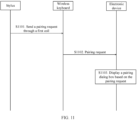
- the stylus sends a pairing request to the wireless keyboard through the first coil and the second coil.
- the wireless keyboard sends the pairing request to the electronic device.
- the electronic device displays a pairing dialog box based on the pairing request, where the pairing dialog box is used to prompt a user to trigger the electronic device and the stylus to perform pairing.
- the pairing request is used to instruct the electronic device to display the pairing dialog box, and the pairing request may include a media access control MAC address of the stylus.
- the pairing request may further include a model of the stylus, factory information, and the like.
- the stylus uses the wireless keyboard as an intermediate apparatus for pairing the electronic device with the stylus, and the wireless keyboard can directionally transmit the pairing request of the stylus to the electronic device, so that the electronic device displays the dialog box while other electronic devices around the stylus are prevented from displaying a dialog box, thereby improving user experience.
- the stylus does not send a pairing request to the wireless keyboard through the first coil and the second coil every time the wireless keyboard charges the stylus through the second coil and the first coil.
- the stylus may obtain a status of connection between the stylus and the electronic device.
- the stylus sends the pairing request to the wireless keyboard through the first coil and the second coil.
- the stylus does not send the pairing request to the wireless keyboard.
- the stylus may intelligently determine, based on a status of connection to the electronic device, whether to send the pairing request to the wireless keyboard, so as to improve intelligence of the stylus.
- the stylus may detect by itself the status of connection to the electronic device.
- the electronic device may detect a status of connection to the stylus and further broadcast the connection status.
- the stylus may receive the connection status from the electronic device.
- the electronic device may broadcast the connection status through a Bluetooth channel, and the stylus may perform scanning over Bluetooth, to obtain the connection status from the electronic device.
- the wireless keyboard may charge the stylus through the second coil and the first coil.
- the wireless keyboard may charge the stylus based on a wireless protocol through the second coil and the first coil.
- the wireless protocol may be a Qi protocol or a private protocol.
- the stylus may send the pairing request to the wireless keyboard based on the wireless protocol.
- the pairing request is included in any data packet exchanged between the stylus and the wireless keyboard based on the wireless protocol.
- the wireless keyboard may charge the stylus based on the Qi protocol, and the stylus may send the pairing request to the wireless keyboard based on the private protocol.
- the wireless keyboard is in a connection for wireless communication to the electronic device, and the connection for wireless communication may be but is not limited to a Bluetooth connection, a Wi-Fi connection, or the like.
- the wireless keyboard may convert the pairing request sent based on the wireless protocol into a pairing request supporting a format for the wireless communication.
- the wireless keyboard may parse the pairing request to obtain the MAC address of the stylus; and encapsulate the MAC address in a data packet in the format for the wireless communication; and the wireless keyboard sends the data packet in the format for the wireless communication to the electronic device.
- the electronic device receives the pairing request from the wireless keyboard based on the connection for wireless communication, and may display the pairing dialog box.
- the wireless keyboard includes a third coil
- the electronic device includes a fourth coil
- the electronic device charges the wireless keyboard through the fourth coil and the third coil, or the wireless keyboard charges the electronic device through the third coil and the fourth coil. In this manner, the wireless keyboard sends the pairing request to the electronic device through the third coil and the fourth coil.
- the wireless keyboard sends the pairing request to the electronic device based on a wireless protocol.
- the wireless protocol may be the same as or different from the wireless protocol used by the stylus to send the pairing request.
- the pairing request is included in any data packet exchanged between the wireless keyboard and the electronic device based on the wireless protocol.
- the electronic device receives the pairing request from the wireless keyboard based on the fourth coil, and can detect whether the electronic device enables a wireless communication function, because the electronic device needs to be paired with and connected to the stylus based on the wireless communication function.
- the wireless communication function may be a Bluetooth function, a Wi-Fi function, or the like. If the electronic device does not enable the wireless communication function, the electronic device may output a prompt dialog box.
- the prompt dialog box is used to prompt the user to enable the wireless communication function of the electronic device. If the electronic device enables the wireless communication function, the electronic device may output the pairing dialog box.
- an embodiment of this application provides a pairing method, applied to a stylus.
- the stylus includes a first coil, and a wireless keyboard includes a second coil.
- the method includes: In response to that the wireless keyboard charges the stylus through the second coil and the first coil, the stylus sends a pairing request to the wireless keyboard through the first coil and the second coil.
- the method before the stylus sends the pairing request to the wireless keyboard through the first coil and the second coil, the method further includes: The stylus obtains a status of connection between the stylus and the electronic device.
- the sending a pairing request to the wireless keyboard includes: In response to that the stylus is not connected to the electronic device, the stylus sends the pairing request to the wireless keyboard through the first coil and the second coil.
- that the stylus obtains a status of connection between the stylus and the electronic device includes: The stylus detects the connection status.
- that the stylus obtains a status of connection between the stylus and the electronic device includes: The stylus receives the connection status broadcast by the electronic device.
- the sending a pairing request to the wireless keyboard includes: The stylus sends the pairing request to the wireless keyboard based on the wireless protocol.
- the pairing request is included in any data packet exchanged between the stylus and the wireless keyboard based on the wireless protocol.
- the pairing request includes a media access control MAC address of the stylus.
- an embodiment of this application provides a pairing method, applied to a wireless keyboard.
- a stylus includes a first coil
- the wireless keyboard includes a second coil.
- the method includes: the wireless keyboard receives a pairing request from the stylus through the second coil, and sends the pairing request to the electronic device.
- that the wireless keyboard charges the stylus through the second coil and the first coil includes: The wireless keyboard charges the stylus based on a wireless protocol through the second coil and the first coil. That the wireless keyboard receives a pairing request from the stylus through the second coil includes: The wireless keyboard receives the pairing request from the stylus based on the wireless protocol through the second coil.
- the pairing request is included in any data packet exchanged between the stylus and the wireless keyboard based on the wireless protocol.
- the pairing request includes a media access control MAC address of the stylus.
- the wireless keyboard is in a connection for wireless communication to the electronic device.
- the method further includes: The wireless keyboard parses the pairing request to obtain the MAC address of the stylus; and encapsulates the MAC address in a data packet in a format for the wireless communication. That the wireless keyboard sends the pairing request to the electronic device includes: The wireless keyboard sends the data packet in the format for the wireless communication to the electronic device.
- the wireless keyboard includes a third coil
- the electronic device includes a fourth coil.
- the electronic device charges the wireless keyboard through the fourth coil and the third coil. That the wireless keyboard sends the pairing request to the electronic device includes: The wireless keyboard sends the pairing request to the electronic device through the third coil and the fourth coil.
- the sending the pairing request to the electronic device includes: The wireless keyboard sends the pairing request to the electronic device based on a wireless protocol.
- the pairing request is included in any data packet exchanged between the wireless keyboard and the electronic device based on the wireless protocol.
- an embodiment of this application provides a pairing method, applied to an electronic device.
- the method includes: the electronic device receives a pairing request from a wireless keyboard; and the electronic device displays a pairing dialog box based on the pairing request, where the pairing dialog box is used to prompt a user to trigger the electronic device and the stylus to perform pairing.
- the electronic device detects the connection status and broadcasts the connection status.
- the wireless keyboard is in a connection for wireless communication to the electronic device. That the electronic device receives a pairing request from a wireless keyboard includes: The electronic device receives a data packet in a format for the wireless communication, where the data packet includes the pairing request.
- the wireless keyboard includes a third coil
- the electronic device includes a fourth coil.
- the electronic device charges the wireless keyboard through the fourth coil and the third coil. That the electronic device receives a pairing request from a wireless keyboard includes: The electronic device receives the pairing request from the wireless keyboard through the fourth coil.
- the pairing request is sent by the wireless keyboard to the electronic device based on a wireless protocol.
- the pairing request is included in any data packet exchanged between the wireless keyboard and the electronic device based on the wireless protocol.
- the method further includes: In response to receiving the pairing request from the wireless keyboard, the electronic device detects whether the electronic device enables a wireless communication function; and if the electronic device does not enable the wireless communication function, the electronic device outputs a prompt dialog box, where the prompt dialog box is used to prompt the user to enable the wireless communication function of the electronic device.
- the pairing request includes a media access control MAC address of the stylus.
- an embodiment of this application provides a stylus, including a processor and a memory, where the memory stores computer executable instructions; and the processor executes the computer executable instructions stored in the memory, so that the processor executes the method according to the second aspect.
- an embodiment of this application provides a wireless keyboard, including a processor and a memory, where the memory stores computer executable instructions; and the processor executes the computer executable instructions stored in the memory, so that the processor executes the method according to the third aspect.
- an embodiment of this application provides an electronic device, including a processor and a memory, where the memory stores computer executable instructions; and the processor executes the computer executable instructions stored in the memory, so that the processor executes the method according to the fourth aspect.
- an embodiment of this application provides a pairing system, where the pairing system includes the stylus according to the fifth aspect, the wireless keyboard according to the sixth aspect, and the electronic device according to the seventh aspect, and the system can execute the method according to the first aspect.
- an embodiment of this application provides a computer program product including instructions, where when the computer program product is run on a computer, the computer is enabled to execute the methods according to the second to the fourth aspects.
- an embodiment of this application provides a computer-readable storage medium, where the computer-readable storage medium stores instructions, and when the instructions are run on a computer, the computer is enabled to execute the methods according to the second to the fourth aspects.
- beneficial effects of the possible implementations of the second aspect to the tenth aspect refer to the beneficial effects brought by the first aspect and the possible implementations of the first aspect. Details are not described herein again.
- the embodiments of this application provide the pairing method and the pairing system.
- the pairing system includes the stylus, the wireless keyboard, and the electronic device.
- the stylus includes the first coil
- the wireless keyboard includes the second coil.
- the method includes: In response to that the wireless keyboard charges the stylus through the second coil and the first coil, the stylus sends the pairing request to the wireless keyboard through the first coil and the second coil.
- the wireless keyboard sends the pairing request to the electronic device.
- the electronic device displays the pairing dialog box based on the pairing request, where the pairing dialog box is used to prompt the user to trigger the electronic device and the stylus to perform pairing.
- the stylus uses the wireless keyboard as an intermediate apparatus for pairing the electronic device with the stylus, and the wireless keyboard can directionally transmit the pairing request from the stylus to the electronic device, so that the electronic device displays the dialog box while other electronic devices around the stylus are prevented from displaying a dialog box, thereby improving user experience.
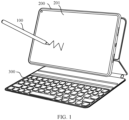
- FIG. 1 is a schematic diagram of a scenario to which the embodiments of this application are applicable.
- the scenario includes a stylus (stylus) 100, an electronic device 200, and a wireless keyboard 300.
- the electronic device 200 is a tablet (tablet) is used for description.
- the stylus 100 and the wireless keyboard 300 each may provide an input to the electronic device 200, and in response to the input, the electronic device 200 performs an operation based on the input of the stylus 100 or the wireless keyboard 300.
- a touch area may be disposed on the wireless keyboard 300.
- the stylus 100 may operate the touch area of the wireless keyboard 300 to provide an input to the wireless keyboard 300, and based on the input of the stylus 100, the wireless keyboard 300 may perform an operation in response to the input.
- the stylus 100 and the electronic device 200, the stylus 100 and the wireless keyboard 300, and the electronic device 200 and the wireless keyboard 300 may be interconnected through a communication network, to implement interaction between wireless signals.
- the communication network may be, but is not limited to, a short-range communication network, such as a Wi-Fi hotspot network, a Wi-Fi peer-to-peer (peer-to-peer, P2P) network, a Bluetooth network, a ZigBee network, or a near field communication (near field communication, NFC) network.
- the stylus 100 may be, but is not limited to, an inductive stylus and a capacitive stylus.
- the electronic device 200 has a touchscreen 201.
- an electromagnetic induction board needs to be integrated on the touchscreen 201 of the electronic device 200 interacting with the stylus 100.
- a coil is distributed on the electromagnetic induction board, and a coil is also integrated in the inductive stylus.
- the inductive stylus can accumulate electric energy with movement of the inductive stylus in a magnetic field range generated by the electromagnetic induction board.
- the inductive stylus can transmit the accumulated electric energy to the electromagnetic induction board through the coil in the inductive stylus and free oscillation.
- the electromagnetic induction board may scan the coil on the electromagnetic induction board based on the electric energy from the inductive stylus, and calculate a location of the inductive stylus on the touchscreen 201.
- the touchscreen 201 of the electronic device 200 may also be referred to as a touch screen, and the stylus 201 may be referred to as a stylus.
- the capacitive stylus may include a passive capacitive stylus and an active capacitive stylus.
- the passive capacitive stylus may be referred to as a passive capacitive stylus
- the active capacitive stylus may be referred to as an active capacitive stylus.
- One or more electrodes may be disposed in the active capacitive stylus (for example, a stylus tip).
- the active capacitive stylus may transmit a signal through the electrode.
- an electrode array needs to be integrated on the touchscreen 201 of the electronic device 200 interacting with the stylus 100.
- the electrode array may be a capacitive electrode array.
- the electronic device 200 may receive a signal from the active capacitive stylus through the electrode array, and when receiving the signal, identify a location of the active capacitive stylus on the touchscreen and an inclination angle of the active capacitive stylus based on a change in a capacitance value on the touchscreen 201.
- FIG. 2A is a schematic diagram of a structure of a stylus according to an embodiment of this application.
- the stylus 100 may include a stylus tip 10, a stylus rod 20, and a rear cover 30.
- the inside of the stylus rod 20 is in a hollow structure.
- the stylus tip 10 and the rear cover 30 are respectively located at two ends of the stylus rod 20.
- the rear cover 30 and the stylus rod 20 may be connected through plugging or snapping.
- FIG. 2B For a fitting relationship between the stylus tip 10 and the stylus rod 20, refer to descriptions in FIG. 2B .
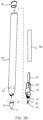
- FIG. 2B is a schematic diagram of a partially split structure of a stylus according to an embodiment of this application.
- the stylus 100 further includes a spindle component 50.
- the spindle component 50 is located in the stylus rod 20, and the spindle component 50 is slidably disposed in the stylus rod 20.
- the spindle component 50 has an external screw thread 51
- the stylus tip 10 includes a writing end 11 and a connecting end 12.
- the connecting end 12 of the stylus tip 10 has an internal screw thread (not shown) fitting the external screw thread 51.
- the spindle component 50 moves with the stylus tip 10
- the part of the pressure sensing component 60 is fixedly connected to the fastener in the stylus rod 20
- movement of the spindle component 50 drives deformation of the pressure sensing component 60
- the deformation of the pressure sensing component 60 is transmitted to a circuit board 70 (for example, the pressure sensing component 60 and the circuit board 70 can be electrically connected through a wire or a flexible circuit board).
- the circuit board 70 detects the pressure of the writing end 11 of the stylus tip 10 based on the deformation of the pressure sensing component 60, and therefore controls a line thickness of the writing end 11 based on the pressure of the writing end 11 of the stylus tip 10.
- detection on the pressure of the stylus tip 10 includes but is not limited to the foregoing method.
- a pressure sensor may be further disposed at the writing end 11 of the stylus tip 10, and the pressure of the stylus tip 10 is detected by the pressure sensor.
- the stylus 100 further includes a plurality of electrodes.
- the plurality of electrodes may be, for example, a first transmitting electrode 41, a ground electrode 43, and a second transmitting electrode 42.
- the first transmitting electrode 41, the ground electrode 43, and the second transmitting electrode 42 are electrically connected to the circuit board 70.
- the first transmitting electrode 41 may be located in the stylus tip 10 and close to the writing end 11.
- the circuit board 70 may be configured to provide a signal control board to each of the first transmitting electrode 41 and the second transmitting electrode 42, and the first transmitting electrode 41 is configured to transmit a first signal.
- a coupling capacitance may be formed between the first transmitting electrode 41 and the touchscreen 201 of the electronic device 200, so that the electronic device 200 can receive the first signal.
- the second transmitting electrode 42 is configured to transmit a second signal, and the electronic device 200 can determine an inclination angle of the stylus 100 based on the received second signal.
- the second transmitting electrode 42 may be located on an inner wall of the stylus rod 20. In an example, the second transmitting electrode 42 may alternatively be located on the spindle component 50.
- the ground electrode 43 may be located between the first transmitting electrode 41 and the second transmitting electrode 42, or the ground electrode 43 may be located at an outer periphery of the first transmitting electrode 41 and the second transmitting electrode 42, and the ground electrode 43 is configured to reduce coupling between the first transmitting electrode 41 and the second transmitting electrode 42.
- the electronic device 200 When the electronic device 200 receives a first signal from the stylus 100, a capacitance value at a corresponding location on the touchscreen 201 changes. Based on this, the electronic device 200 may determine a location of the stylus 100 (or the stylus tip of the stylus 100) on the touchscreen 201 based on the change in the capacitance value on the touchscreen 201. In addition, the electronic device 200 may obtain the inclination angle of the stylus 100 by using a double-tip projection method in an inclination angle detection algorithm. Because locations of the first transmitting electrode 41 and the second transmitting electrode 42 in the stylus 100 are different, when the electronic device 200 receives the first signal and a second signal from the stylus 100, capacitance values at the two locations on the touchscreen 201 change.
- the electronic device 200 may obtain the inclination angle of the stylus 100 based on a distance between the first transmitting electrode 41 and the second transmitting electrode 42 and a distance between the two locations at which the capacitance values on the touchscreen 201 change.
- obtaining the inclination angle of the stylus 100 refer to related descriptions of the double-tip projection method in the conventional technology.
- the stylus 100 further includes a battery assembly 80, where the battery assembly 80 is configured to provide power to the circuit board 70.
- the battery assembly 80 may include a lithium-ion battery, or the battery assembly 80 may include a nickel-chromium battery, an alkaline battery, a nickel-metal hydride battery, or the like.
- the battery included in the battery assembly 80 may be a rechargeable battery or a disposable battery.
- the stylus 100 can charge the battery in the battery assembly 80 through wireless charging.
- the electronic device 200 may send an uplink signal to the stylus 100 through the electrode array integrated on the touchscreen 201.
- the stylus 100 may receive the uplink signal through a receiving electrode, and the stylus 100 transmits a downlink signal through a transmitting electrode (for example, the first transmitting electrode 41 and the second transmitting electrode 42).
- the downlink signal includes the first signal and the second signal.
- the electronic device 200 may determine a location of the stylus tip 10 of the stylus 100 on the touchscreen 201 based on the capacitance value on the touchscreen 201.
- the uplink signal and the downlink signal may be square wave signals.
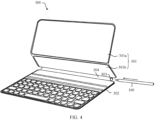
- the wireless keyboard 300 may include a first portion 301 and a second portion 302.
- the wireless keyboard 300 may include a keyboard body and a keyboard cover.
- the first portion 301 may be the keyboard cover, and the second portion 302 is the keyboard body.
- the first portion 301 is configured to place the electronic device 200, and the second portion 302 may be provided with a button, a touchpad, or the like for a user operation.
- the first portion 301 and the second portion 302 of the wireless keyboard 300 need to be opened.
- the first portion 301 and the second portion 302 of the wireless keyboard 300 can be closed.
- the first portion 301 and the second portion 302 of the wireless keyboard 300 are rotatably connected to each other.
- the first portion 301 and the second portion 302 may be connected through a rotating shaft or a hinge.
- the first portion 301 and the second portion 302 are rotatably connected by using a flexible material (for example, a leather material or a cloth material).
- first portion 301 and the second portion 302 may be integrally formed, and a connection part between the first portion 301 and the second portion 302 is thinned, so that the connection part between the first portion 301 and the second portion 302 can be bent.
- a manner of the connection between the first portion 301 and the second portion 302 may include but is not limited to the foregoing rotational connection manners.
- the first portion 301 may include at least two rotatably connected supports.
- the first portion 301 includes a first support 301a and a second support 301b.
- the first support 301a and the second support 301b are rotatably connected to each other.
- the first support 301a and the second support 301b may be used to jointly support the electronic device 200 (for details, refer to FIG. 1 ).
- the first support 301a supports the second support 301b
- the second support 301b supports the electronic device 200.
- the second support 301b and the second portion 302 are rotatably connected to each other.
- the wireless keyboard 300 may be provided with an accommodating portion 303 for accommodating the stylus 100.
- the accommodating portion 303 is a tubular cavity.
- the stylus 100 is inserted into the accommodating cavity along an arrow direction in FIG. 4 .
- the second portion 302 and the second support 301b are rotatably connected to each other through a connecting portion 304, and the accommodating portion 303 is disposed in the connecting portion 304.
- the connecting portion 304 may be a rotating shaft.
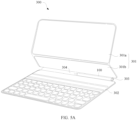
- FIG. 5A is a schematic diagram in which a stylus is accommodated in an accommodating portion of a wireless keyboard according to an embodiment of this application.
- FIG. 5B is a schematic side view obtained when a stylus is accommodated in an accommodating portion of a wireless keyboard according to an embodiment of this application.
- the accommodating portion 303 is a circular cavity, and an inner diameter of the accommodating portion 303 is greater than an outer diameter of the stylus 100.
- a magnetic material may be disposed on an inner wall of the accommodating portion 303, and a magnetic material may be disposed in the stylus 100, to prevent the stylus 100 from falling out of the accommodating portion 303.
- the stylus 100 is attached in the accommodating portion 303 through magnetic adsorption between the magnetic materials.
- the stylus 100 when the stylus 100 is fastened to the accommodating portion 303, the stylus 100 is fastened to the accommodating portion 303 through magnetic adsorption or the like.
- the stylus 100 may also be alternatively to the accommodating portion 303 through snapping.
- an eject structure may be disposed in the accommodating portion 303. For example, one end of the stylus 100 is pressed, so that the eject mechanism can drive one end of the stylus 100 to eject from the accommodating portion 303.
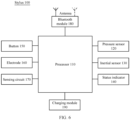
- FIG. 6 is a schematic diagram of a hardware structure of a stylus according to an embodiment of this application.
- the stylus 100 may have a processor 110.
- the processor 110 may include storage and processing circuits configured to support operations of the stylus 100.
- the storage and processing circuits may include a storage apparatus (for example, a flash memory or another electrical programmable read-only memory configured as a solid-state drive) such as a non-volatile memory, a volatile memory (for example, a static or dynamic random access memory), and the like.
- the processing circuit in the processor 110 may be configured to control an operation of the stylus 100.
- the processing circuit may be based on one or more microprocessors, microcontrollers, digital signal processors, baseband processors, power management units, audio chips, application-specific integrated circuits, and the like.
- the stylus 100 may include one or more sensors.
- the sensor may include a pressure sensor 120.
- the pressure sensor 120 may be disposed at the writing end 11 of the stylus 100 (as shown in FIG. 2B ).
- the pressure sensor 120 may alternatively be disposed in the stylus rod 20 of the stylus 100. In this way, after one end of the stylus tip 10 of the stylus 100 is subject to a force, the other end of the stylus tip 10 moves to apply the force to the pressure sensor 120.
- the processor 110 may adjust, based on pressure detected by the pressure sensor 120, a writing line thickness of the stylus tip 10 of the stylus 100.
- the sensor may also include an inertial sensor 130.
- the inertial sensor 130 may include a three-axis accelerometer and a three-axis gyroscope, and/or another component configured to measure movement of the stylus 100.
- a three-axis magnetometer may be included in the sensor in a configuration of a nine-axis inertial sensor.
- the sensor may also include an additional sensor, such as a temperature sensor, an ambient light sensor, an optical proximity sensor, a contact sensor, a magnetic sensor, a pressure sensor, and/or another sensor.
- the stylus 100 may include a status indicator 140 such as a light-emitting diode and a button 150.
- the status indicator 140 is configured to prompt a user with a status of the stylus 100.
- the button 150 may include a mechanical button and a non-mechanical button, and the button 150 may be configured to collect button press information from the user.
- the stylus 100 may include one or more electrodes 160 (for details, refer to the descriptions in FIG. 2B ), one electrode 160 may be located at the writing end of the stylus 100, and one electrode 160 may be located in the stylus tip 10.
- one electrode 160 may be located at the writing end of the stylus 100
- one electrode 160 may be located in the stylus tip 10.
- the stylus 100 may include a microphone, a speaker, an audio generator, a vibrator, a camera, a data port, and another device based on an actual requirement. The user may use these devices to provide commands to control operations of the stylus 100 and the electronic device 200 interacting with the stylus 100, and receive status information and another output.
- the processor 110 may be configured to run software that is on the stylus 100 and that controls an operation of the stylus 100.
- the software running on the processor 110 may process a sensor input, a button input, and an input from another apparatus to monitor movement of the stylus 100 and an input of another user.
- the software running on the processor 110 may detect a user command and may communicate with the electronic device 200.
- the stylus 100 may include a wireless module.
- the wireless module is a Bluetooth module 180
- the wireless module may alternatively be a Wi-Fi hotspot module, a Wi-Fi peer-to-peer module, or the like.
- the Bluetooth module 180 may include a radio frequency transceiver, for example, a transceiver.
- the Bluetooth module 180 may also include one or more antennas.
- the transceiver may transmit and/or receive a wireless signal through the antenna.
- the wireless signal may be a Bluetooth signal, a wireless local area network signal, a remote signal such as a cellular phone signal, a near field communication signal, or another wireless signal based on a type of the wireless module.
- the stylus 100 may further include a charging module 190.
- the charging module 190 may support charging of the stylus 100 to provide power to the stylus 100.
- the electronic device 200 in this embodiment of this application may be referred to as user equipment (user equipment, UE), a terminal (terminal), or the like.
- the electronic device 200 may be a mobile terminal or a fixed terminal including a touchscreen, for example, a tablet (portable android device, PAD), a personal digital assistant (personal digital assistant, PDA), a handheld device having a wireless communication function, a computing device, a vehicle-mounted device, a wearable device, a virtual reality (virtual reality, VR) terminal device, an augmented reality (augmented reality, AR) terminal device, a wireless terminal in industrial control (industrial control), a wireless terminal in self driving (self driving), a wireless terminal in remote medical (remote medical), a wireless terminal in a smart grid (smart grid), a wireless terminal in transportation safety (transportation safety), a wireless terminal in a smart city (smart city), or a wireless terminal in a smart home (smart home).
- a form of the terminal device is not specifically limited in the
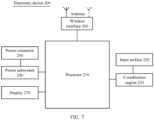
- FIG. 7 is a schematic diagram of a hardware structure of an electronic device according to an embodiment of this application.
- the electronic device 200 may include a plurality of subsystems. The subsystems cooperate to perform, coordinate, or monitor one or more operations or functions of the electronic device 202.
- the electronic device 200 includes a processor 210, an input surface 220, a coordination engine 230, a power subsystem 240, a power connector 250, a wireless interface 260, and a display 270.
- the coordination engine 230 may be configured to: communicate with another subsystem of the electronic device 200 and/or process data; communicate with and/or exchange data with the stylus 100; measure and/or obtain one or more outputs of one or more analog or digital sensors (for example, touch sensors); measure and/or obtain one or more outputs of one or more sensor nodes in a sensor node array (for example, a capacitive sensing node array); receive and position a tip signal and a ring signal from the stylus 100; position the stylus 100 based on locations of a tip signal crossing area and a ring signal crossing area, and the like.
- analog or digital sensors for example, touch sensors
- sensor nodes in a sensor node array for example, a capacitive sensing node array
- receive and position a tip signal and a ring signal from the stylus 100 position the stylus 100 based on locations of a tip signal crossing area and a ring signal crossing area, and the like.
- the coordination engine 230 of the electronic device 200 includes or may be communicatively coupled, in another manner, to a sensor layer located below the input surface 220 or integrated with the input surface.
- the coordination engine 230 uses the sensor layer to position the stylus 100 on the input surface 220, and uses the technology described in this specification to estimate an angular location of the stylus 100 relative to a plane of the input surface 220.
- the input surface 220 may be referred to as a touchscreen 201.
- the sensor layer of the coordination engine 230 of the electronic device 200 is a grid of capacitive sensing nodes arranged in columns and rows. More specifically, a column trace array is set to be perpendicular to a row trace array.
- the sensor layer may be separated from other layers of the electronic device, or the sensor layer may be disposed directly on another layer.
- the other layers are, for example but not limited to: a display stack layer, a force sensor layer, a digitizer layer, a polarizer layer, a battery layer, a structural or decorative shell layer, and the like.
- the sensor layer can operate in various modes. If the sensor layer operates in mutual capacitance mode, a column trace and a row trace form a single capacitive sensing node (for example, a "vertical" mutual capacitance) at each overlapping point. If the sensor layer operates in self-capacitive mode, a column trace and a row trace form two (vertically aligned) capacitive sensing nodes at each overlapping point. In another implementation solution, if the sensor layer operates in mutual capacitance mode, adjacent column traces and/or adjacent row traces each may form a single capacitive sensing node (for example, a "horizontal" mutual capacitance).
- the sensor layer may monitor a change in a capacitance (for example, a mutual capacitance or a self-capacitance) presented at each capacitive sensing node to detect existence of the stylus tip 10 of the stylus 100 and/or touch of a finger of the user.
- the coordination engine 230 may be configured to detect, through capacitive coupling, the tip signal and the ring signal received from the stylus 100 through the sensor layer.
- the tip signal and/or the ring signal may include specific information and/or data that may be used to enable the electronic device 200 to identify the stylus 100. Such information is usually referred to as "stylus identity" information in this specification.
- the information and/or the data may be received by the sensor layer, and interpreted, decoded, and/or demodulated by the coordination engine 230.
- the processor 210 may use the stylus identity information to receive an input from more than one stylus simultaneously.
- the coordination engine 230 may be configured to transmit, to the processor 210, a location and/or an angular location that are/is of each of several styluses and that are/is detected by the coordination engine 230.
- the coordination engine 230 may further transmit, to the processor 210, information about relative locations and/or relative angular locations that are of a plurality of styluses and that are detected by the coordination engine 230.
- the coordination engine 220 may notify the processor 210 of a location of the detected first stylus relative to the detected second stylus.
- the tip signal and/or the ring signal may further include specific information and/or data used to enable the electronic device 200 to identify a specific user.
- Such information is usually referred to as "user identity” information in this specification.
- the coordination engine 230 may forward the user identity information (if the user identity information can be detected and/or can be restored) to the processor 210. If the user identity information cannot be restored from the tip signal and/or the ring signal, the coordination engine 230 may optionally indicate to the processor 210 that the user identity information is unavailable.
- the processor 210 can utilize the user identity information (or absence of such information) in any suitable manner, including but not limited to: accepting or denying an input from the specific user, allowing or denying access to a specific function of the electronic device, and the like.
- the processor 210 may use the user identity information to simultaneously receive an input from more than one user.
- the tip signal and/or the ring signal may include specific information and/or data that may be used to enable the electronic device 200 to identify settings or preferences of the user or the stylus 100.
- Such information is usually referred to as "stylus settings" information in this specification.
- the coordination engine 230 may forward the stylus settings information (if the stylus settings information can be detected and/or can be restored) to the processor 210. If the stylus settings information cannot be restored from the tip signal and/or the ring signal, the coordination engine 230 may optionally indicate to the processor 210 that the stylus settings information is unavailable.
- the electronic device 200 can utilize the stylus settings information (or absence of such information) in any suitable manner, including but not limited to: applying settings to the electronic device, applying settings to a program running on the electronic device, changing a line thickness, a color, a pattern presented by a graphics program of the electronic device, changing settings of a video game operated on the electronic device, and the like.
- the processor 210 may be configured to perform, coordinate, and/or manage functions of the electronic device 200. Such functions may include, but are not limited to, communicating with and/or exchanging data with other subsystems of the electronic device 200; communicating with and/or exchanging data with the stylus 100; performing data communication and/or data exchange over a wireless interface; performing data communication and/or data exchange over a wired interface; facilitating exchange of power through a wireless (for example, inductive or resonant) or wired interface; receiving a location and an angular location of one or more styluses; and so on.
- functions may include, but are not limited to, communicating with and/or exchanging data with other subsystems of the electronic device 200; communicating with and/or exchanging data with the stylus 100; performing data communication and/or data exchange over a wireless interface; performing data communication and/or data exchange over a wired interface; facilitating exchange of power through a wireless (for example, inductive or resonant) or wired interface; receiving a location and an angular location
- the processor 210 may be implemented as any electronic device capable of processing, receiving, or sending data or instructions.
- the processor may be a microprocessor, a central processing unit, an application-specific integrated circuit, a field programmable gate array, a digital signal processor, an analog circuit, a digital circuit, or a combination of these devices.
- the processor may be a single-threaded processor or a multi-threaded processor.
- the processor may be a single-core processor or a multi-core processor.
- the processor 210 may be configured to access a memory that stores instructions.
- the instructions may be configured to enable the processor to perform, coordinate, or monitor one or more operations or functions of the electronic device 200.
- the instructions stored in the memory may be configured to control or coordinate operations of other components of the electronic device 200.
- the components are, for example but not limited to, another processor, an analog or digital circuit, a volatile or nonvolatile memory module, a display, a speaker, a microphone, a rotary input device, a button, or other physical input devices, a biometric authentication sensor and/or system, a force or touch input/output component, a communication module (for example, a wireless interface and/or a power connector), and/or a haptic device or a haptic feedback device.
- the memory may further store electronic data usable by the stylus or the processor.
- the memory may store electronic data or content (such as a media file, a document, and an application), device settings and preferences, a timing signal and a control signal, data, data structures, or databases used for various modules, a file or a configuration related to detection of a tip signal and/or a ring signal, and the like.
- the memory may be configured as any type of memory.
- the memory may be implemented as a random access memory, a read-only memory, a flash memory, a removable memory, another type of storage element, or a combination of these devices.
- the electronic device 200 further includes the power subsystem 240.
- the power subsystem 240 may include a battery or another power supply.
- the power subsystem 240 may be configured to provide power to the electronic device 200.
- the power subsystem 240 may be further coupled to the power connector 250.
- the power connector 250 may be any proper connector or port, and may be configured to receive power from an external power supply and/or configured to provide power to an external load.
- the power connector 250 may be configured to recharge a battery in the power subsystem 240.
- the power connector 250 may be configured to transmit power stored in (or available to) the power subsystem 240 to the stylus 100.
- the electronic device 200 further includes the wireless interface 260 to facilitate electronic communication between the electronic device 200 and the stylus 100.
- the electronic device 200 may be configured to communicate with the stylus 100 through a low energy Bluetooth communication interface or a near field communication interface.
- the communication interface facilitates electronic communication between the electronic device 200 and an external communication network, a device, or a platform.
- the wireless interface 260 may be implemented as one or more wireless interfaces, a Bluetooth interface, a near field communication interface, a magnetic interface, a universal serial bus interface, an inductance interface, a resonant interface, a capacitive coupling interface, a Wi-Fi interface, a TCP/IP interface, a network communication interface, an optical interface, an acoustic interface, or any conventional communication interface.
- the electronic device 200 further includes the display 270.
- the display 270 may be located behind the input surface 220, or may be integrated with the input surface 220.
- the display 270 may be communicatively coupled to the processor 210.
- the processor 210 may present information to a user through the display 270. In many cases, the processor 210 presents, through the display 270, a graphical user interface with which a user can interact. In many cases, the user manipulates the stylus 100 to interact with a graphical user interface.
- FIG. 8 is a schematic diagram of a hardware structure of a wireless keyboard according to an embodiment of this application.
- the wireless keyboard 300 may include a processor 310, a memory 320, a charging interface 330, a charging management module 340, a wireless charging coil 350, a battery 360, a wireless communication module 370, a touchpad 380, and a keyboard 390.
- the processor 310, the memory 320, the charging interface 330, the charging management module 340, the battery 360, the wireless communication module 370, the touchpad 380, the keyboard 390, and the like may all be disposed on a keyboard body (that is, the second portion 302 shown in FIG. 4 ) of the wireless keyboard 300.
- the wireless charging coil 350 may be disposed in the connecting portion 304 (shown in FIG. 4 ) for movably connecting the keyboard body and a support. It can be understood that the structure shown in this embodiment does not constitute a specific limitation on the wireless keyboard 300. In some other embodiments, the wireless keyboard 300 may include more or fewer components than those shown in the figure, or combine some components, or split some components, or have different component arrangements.
- the components shown in the figure may be implemented in hardware, software, or a combination of software and hardware.
- the memory 320 may be configured to store program code, for example, program code used to wirelessly charge the stylus 100.
- the memory 320 may further store a Bluetooth address for uniquely identifying the wireless keyboard 300.
- the memory 320 may further store connection data of an electronic device successfully paired with the wireless keyboard 300.
- the connection data may be a Bluetooth address of the electronic device successfully paired with the wireless keyboard 300.
- the Bluetooth address may be a media access control (media access control, MAC) address.
- the processor 310 may be configured to execute the foregoing application program code, and invoke related modules to implement functions of the wireless keyboard 300 in the embodiments of this application, for example, implement a wired charging function, a reverse wireless charging function, a wireless communication function, and the like of the wireless keyboard 300.
- the processor 310 may include one or more processing units, and different processing units may be separate devices or may be integrated into one or more processors 310.
- the processor 310 may be specifically an integrated control chip, or may include a circuit including various active and/or passive components, and the circuit is configured to perform functions of the processor 310 described in this embodiment of this application.
- the processor of the wireless keyboard 300 may be a microprocessor.
- the wireless communication module 370 may be configured to support data exchange in wireless communication that is between the wireless keyboard 300 and another electronic device and that includes Bluetooth (bluetooth, BT), a global navigation satellite system (global navigation satellite system, GNSS), a wireless local area network (wireless local area networks, WLAN) (for example, a wireless fidelity (wireless fidelity, Wi-Fi) network), frequency modulation (frequency modulation, FM), a near field communication (near field communication, NFC) technology, an infrared (infrared, IR) technology, and the like.
- Bluetooth bluetooth, BT
- GNSS global navigation satellite system
- GNSS global navigation satellite system
- WLAN wireless local area network
- FM frequency modulation
- NFC near field communication
- infrared infrared
- the wireless communication module 370 may be a Bluetooth chip.
- the wireless keyboard 300 may be a Bluetooth keyboard.
- the wireless keyboard 300 may be paired with a Bluetooth chip of another electronic device through the Bluetooth chip and establish a wireless connection, to implement wireless communication between the wireless keyboard 300 and the another electronic device through the wireless connection.
- the wireless communication module 370 may further include an antenna.
- the wireless communication module 370 receives an electromagnetic wave through the antenna, performs frequency modulation and filtering processing on an electromagnetic wave signal, and sends a processed signal to the processor 310.
- the wireless communication module 370 may further receive a to-be-sent signal from the processor 310, perform frequency modulation and amplification on the signal, and convert the signal into an electromagnetic wave for radiation through the antenna.
- the wireless keyboard 300 may support wired charging.
- the charging management module 340 may receive a charging input of a wired charger through the charging interface 330.
- the wireless keyboard 300 may support forward wireless charging.
- the charging management module 340 may receive a wireless charging input through the wireless charging coil 350 of the wireless keyboard 300.
- the charging management module 340 is connected to the wireless charging coil 350 through a matching circuit.
- the wireless charging coil 350 may be coupled to the wireless charging coil of the wireless charger to induce an alternating electromagnetic field emitted by the wireless charging coil 350 of the wireless charger and generate an alternating electrical signal.
- the alternating current signal generated by the wireless charging coil 350 is transmitted to the charging management module 340 through the matching circuit, so as to charge the battery 330 wirelessly.
- the charging management module 340 may further supply power to the wireless keyboard 300 while charging the battery 330.
- the charging management module 340 receives an input of the battery 330, and supplies power to the processor 310, the memory 320, an external memory, the wireless communication module 370, and the like.
- the charging management module 340 may be further configured to monitor parameters such as a battery capacity, a battery cycle count, and a battery health status (such as leakage or impedance) of the battery 360.
- the charging management module 340 may alternatively be disposed in the processor 310.
- the wireless keyboard 300 may support reverse wireless charging.
- the charging management module 340 may further receive an input of the charging interface 330 or the battery 360, and convert a direct electric signal that is input by the charging interface 330 or the battery 360 into an alternating electric signal.
- the alternating electric signal is transmitted to the wireless charging coil 350 through a matching circuit.
- the wireless charging coil 350 may generate an alternating electromagnetic field when receiving the alternating electric signal.
- a wireless charging coil of another mobile terminal induces the alternating electromagnetic field to perform wireless charging.
- the wireless keyboard 300 may also wirelessly charge the another mobile terminal.
- the wireless charging coil 350 may be disposed in the accommodating portion 303 of the wireless keyboard 300, and a wireless charging coil is disposed in the stylus rod 20 of the stylus 100. When the stylus 100 is placed in the accommodating portion 303, the wireless keyboard 300 may charge the stylus 100 through the wireless charging coil 350.
- FIG. 8 is a schematic diagram of a hardware structure of the wireless keyboard 300 by using an example in which the matching circuit may be integrated into the charging management module 340.
- the charging interface 350 may be configured to provide a wired connection for charging or communication between the wireless keyboard 300 and another electronic device (for example, the wired charger of the wireless keyboard 300).
- a touch sensor is integrated into the touchpad 380.
- a notebook computer may receive a user control command on the notebook computer through the touchpad 380 and the keyboard 390.
- the wireless keyboard 300 may have more or fewer components than those shown in FIG. 8 , may combine two or more components, or may have different component configurations.
- a housing of the wireless keyboard 300 may alternatively be provided with an accommodating portion for accommodating the stylus 100.
- the wireless charging coil 350 is disposed in the accommodating portion, and is configured to wirelessly charge the stylus 100 when the stylus 100 is accommodated in the accommodating portion.
- the outer surface of the wireless keyboard 300 may further include components such as a button, an indicator (which may indicate a state such as a battery level, an incoming/outgoing call, and a pairing mode), and a display screen (which may prompt a user with related information).
- the button may be a physical button, a touch key (used in collaboration with the touch sensor), or the like, and is used to trigger an operation such as power-on, power-off, starting charging, or stopping charging.
- the stylus may send a downlink signal to the electronic device. Based on the downlink signal, the electronic device may determine a location and an inclination angle of the stylus, and further display handwriting on the touchscreen based on the location and the inclination angle of the stylus.
- the stylus cannot interact with the electronic device.
- a precondition for wireless connection between the stylus and the electronic device is pairing. Therefore, the stylus needs to be paired with and connected to the electronic device before providing an input to the electronic device.
- a process of pairing between the electronic device and the stylus is a mutual authentication process between the two devices. After the electronic device is paired with the stylus, the electronic device and the stylus may not have to be paired each time for a subsequent connection. For the pairing between the electronic device and the stylus, mutual authentication may be performed through personal identification number (personal identification number, PIN) authentication. After the electronic device is paired with the stylus, the electronic device may establish a connection based on a media access control (MAC) address of the stylus.
- PIN personal identification number
- MAC media access control
- the electronic device and the stylus each have a Bluetooth function.
- the user can perform an operation on the electronic device to enable Bluetooth on the electronic device, so as to scan a Bluetooth-enabled device around.
- the electronic device may display, on a graphical user interface, an identifier of a stylus detected by scanning, and the user taps, on the graphical user interface, on an identifier of a stylus that needs to be paired, to further implement pairing between the electronic device and the stylus.
- a Bluetooth connection may be established between the electronic device and the stylus.
- a process of triggering the pairing between the electronic device and the stylus by the user is complex.
- the stylus may broadcast a packet. Based on the packet, the electronic device can actively discover the stylus, and can be paired with and connected to the stylus when discovering the stylus.
- the stylus may be attached to the electronic device.
- the electronic device may display a pairing dialog box 400.
- a process of displaying the pairing dialog box by the electronic device may be: When the stylus is attached to the electronic device, the stylus broadcasts a packet through a Bluetooth common channel, where the packet includes the MAC address of the stylus.
- the electronic device may scan, through Bluetooth low energy (bluetooth low energy, BLE), the packet broadcast by the stylus, and then parse the packet to obtain the MAC address of the stylus. Based on the MAC address of the stylus, the electronic device displays the pairing dialog box to remind the user to trigger the stylus and the electronic device to perform pairing. The user may operate the dialog box to trigger the electronic device to perform pairing with and connection to the stylus based on the MAC address of the stylus. In this example, pairing and connection are performed synchronously on the stylus and the electronic device. Specifically, with reference to related descriptions of a conventional technology, a precondition for the pairing and connection between the stylus and the electronic device is that the electronic device obtains the MAC address of the stylus and displays the pairing dialog box.
- BLE Bluetooth low energy
- the MAC address of the stylus is broadcast over Bluetooth. If a plurality of Bluetooth-enabled electronic devices exist around the stylus, the plurality of electronic devices each may display a pairing dialog box, causing inconvenience to users.
- the electronic device, the wireless keyboard, and the stylus all have the Bluetooth function.
- the stylus may be paired with and connected to the electronic device by using a broadcast packet. However, this may still lead to a dialog box on other Bluetooth-enabled electronic devices around the stylus.
- This embodiment of this application provides the pairing method for a stylus and an electronic device.
- the stylus uses the wireless keyboard as an intermediate apparatus for transmitting the MAC address of the stylus, to transmit the MAC address of the stylus to the electronic device, thereby enabling the electronic device to display the pairing dialog box. Because the stylus can directionally transmit the MAC address of the stylus to the electronic device by using the wireless keyboard, other Bluetooth-enabled electronic devices around the stylus each can be prevented from displaying a dialog box, thereby improving user experience.
- the pairing method for a stylus and an electronic device may be applied to the first pairing process or a re-pairing process of the electronic device and the stylus.
- the electronic device and the stylus After the electronic device is paired with the stylus, the electronic device and the stylus always maintain a paired state, and the electronic device and the stylus may not have to be paired each time for a subsequent connection.
- the user restarts the electronic device or enables a flight mode of the electronic device, or the stylus is paired with another electronic device, or the electronic device and the stylus are disconnected for a long time, or the like, and the stylus needs to be reconnected to the electronic device, the electronic device and the stylus need to be paired again.
- the stylus rod 20 of the stylus 100 is provided with a first coil 90
- the connecting portion 304 of the wireless keyboard 300 is provided with a second coil 3031.
- the second coil 3031 is located in a space between the connecting portion 304 and the accommodating portion 303, or the second coil 3031 is located in the accommodating portion 303.
- a location of the second coil 3031 is not limited in this embodiment.
- the first coil 90 may be understood as being included in the charging module 190 shown in FIG. 6 . In an embodiment, the first coil 90 may be connected to the processor 110.
- the second coil 3031 is included in the wireless charging coil 350 shown in FIG. 8 . In an embodiment, the second coil 3031 may be connected to the processor 310. It should be understood that, other portions of the wireless keyboard 300 are not shown in FIG. 10A .
- the first support 301a of the wireless keyboard 300 is provided with a third coil 3032
- the electronic device 200 is provided with a fourth coil 202.
- the third coil 3032 overlaps the fourth coil 202, and the electronic device 200 can charge the wireless keyboard 300.
- the third coil 3032 is included in the wireless charging coil 350 shown in FIG. 8 .
- the third coil 3032 may be connected to the processor 310.
- the fourth coil 202 is included in the power subsystem 240 shown in FIG. 7 , and may be connected to the processor 210.
- FIG. 10A A coil is represented by an arc dashed line in both FIG. 10A and FIG. 10B .
- FIG. 11 is a schematic flowchart of an embodiment of a pairing method for a stylus and an electronic device according to an embodiment of this application. As shown in FIG. 11 , the pairing method for a stylus and an electronic device may include the following steps.
- a stylus sends a pairing request to a wireless keyboard through a first coil and a second coil.
- an alternating current exists in the second coil of the wireless keyboard, and the second coil may generate an alternating electromagnetic field based on the alternating current.
- the first coil can sense the alternating electromagnetic field generated by the second coil, and an induced current is generated in the first coil, so that electric energy can be transmitted from the wireless keyboard to the stylus, and the wireless keyboard can charge the stylus.
- the stylus may send the pairing request to the wireless keyboard through the first coil, and the wireless keyboard may receive the pairing request from the first coil through the second coil.
- the pairing request is used to instruct an electronic device to output a pairing dialog box.
- the pairing request may include an identifier of the stylus.
- the identifier is used to uniquely represent the stylus.
- the identifier of the stylus may be a MAC address of the stylus, that is, the pairing request may include the MAC address of the stylus.
- the pairing request may further include a model of the stylus, factory information, and the like.
- the factory information may include a production batch and manufacturer information of the stylus.
- a processor in the stylus is configured to control the first coil to send the pairing request to the wireless keyboard in response to that the wireless keyboard charges the stylus.
- a dashed line is used to represent transmission of electric energy in a of FIG. 12 .
- the processor and a Bluetooth module in the stylus may be respectively understood as the processor 110 and the Bluetooth module 180 in FIG. 6 above; a processor and a Bluetooth module in the wireless keyboard may be respectively understood as the processor 310 and the wireless communication module 370 in FIG. 8 above; and a processor and a Bluetooth module in the electronic device may be respectively understood as the processor 210 and the wireless interface 260 in FIG. 7 above. It should be understood that, in FIG.
- the wireless communication module 370 is used as an example of the Bluetooth module in the wireless keyboard
- the wireless interface 260 is used as an example of the Bluetooth module in the electronic device.
- the Bluetooth modules in FIG. 12 each may be replaced with another wireless communication module.
- the stylus may communicate with the wireless keyboard based on a Qi protocol.
- a process in which the wireless keyboard charges the stylus may include three stages, which are sequentially a ping stage, an identification and configuration stage, and an electric energy transmission stage.
- data packets may be exchanged between the stylus and the wireless keyboard.
- a signal strength data packet and a transmission termination data packet may be exchanged between the stylus and the wireless keyboard.
- a configuration data packet, an identity data packet, and a transmission termination data packet may be exchanged between the stylus and the wireless keyboard.
- a control error data packet and a received power packet may be exchanged between the stylus and the wireless keyboard.
- the stylus may include the pairing request in a data packet at any stage in the foregoing charging process.
- the data packet at any stage in the charging process may include a preamble portion, a header portion, a data portion, and a checksum portion.
- the stylus may include the pairing request in the data portion of the data packet.
- the data portion may carry the pairing request in a form of a field, for example, the field may be "11:22:33:44:55:66", to represent the MAC address of the stylus.
- the stylus may communicate with the wireless keyboard based on a private protocol.
- a process in which the stylus communicates with the wireless keyboard based on the private protocol may include a handshake stage and a pairing stage.
- the stylus may exchange data packets with the wireless keyboard.
- the stylus may include the pairing request in a data packet at any stage of the communication.
- the data packet at any stage of the communication may include a header (header) portion, a command (command) portion, and a data (data) portion.
- the stylus may include the pairing request in the data portion of the data packet, and the data portion may carry the pairing request in a form of a field.
- the stylus in response to that the wireless keyboard charges the stylus, the stylus may obtain a status of connection between the stylus and the electronic device.
- the connection status represents whether the stylus is wirelessly connected to the electronic device.
- the stylus in response to that the wireless keyboard charges the stylus, the stylus may detect whether the stylus is connected to the electronic device, to further obtain the connection status.
- the electronic device may detect the connection status, and if the electronic device is already wirelessly connected to the stylus, the electronic device may send the connection status to the stylus. If the electronic device is not wirelessly connected to the stylus, the electronic device may broadcast the connection status, so that the stylus receives the connection status.
- the electronic device broadcasts the connection status through a Bluetooth channel, and the stylus may receive the connection status.
- a wireless connection between the stylus and the electronic device is a Bluetooth connection is used for description in the following embodiments.
- the stylus may not send the pairing request to the wireless keyboard.
- a pairing button may be provided on the stylus.
- the pairing button is configured to trigger the stylus to send the pairing request.
- the wireless keyboard charges the stylus, if the stylus is not connected to the electronic device over Bluetooth and the stylus detects that the user operates the pairing button, the stylus may send the pairing request to the wireless keyboard through the first coil.
- the stylus may store information about the electronic device.
- the information about the electronic device may include, but is not limited to, a MAC address of the electronic device. It should be understood that, in a process in which the stylus is historically paired with and connected to the electronic device, the electronic device may feed back the MAC address of the electronic device to the stylus.
- the wireless keyboard charges the stylus
- the stylus may determine, based on the information about the electronic device, whether to send the pairing request to the wireless keyboard through the first coil.
- the stylus may send a connection request to the electronic device based on the stored MAC address of the electronic device.
- the stylus may establish a connection to the electronic device, and the stylus does not send the pairing request to the wireless keyboard. If the stylus does not receive a connection response from the electronic device, the stylus determines that the stylus needs to be paired with and connected to the electronic device again, and the stylus may send a pairing request to the wireless keyboard through the first coil.
- the wireless keyboard sends the pairing request to the electronic device.
- the pairing request is used to instruct the wireless keyboard to send the pairing request to the electronic device.
- the wireless keyboard may forward the pairing request to the electronic device.
- the wireless keyboard is already in a connection (for example, a Bluetooth connection) for wireless communication to the electronic device in advance.
- a connection for example, a Bluetooth connection
- a data packet format for carrying the pairing request is a data packet format supported by the Qi protocol or another private protocol.
- the wireless keyboard may convert, based on a manner of connection between the wireless keyboard and the electronic device, a format of a data packet from the stylus into a format of a data packet that can be identified by the electronic device.
- the wireless keyboard may convert the data packet from the stylus into a Bluetooth data packet that can be identified by the electronic device, so as to further send a Bluetooth data packet carrying the pairing request to the electronic device.
- the wireless keyboard may parse the data packet carrying the pairing request from the stylus, to obtain the MAC address of the stylus, the model of the stylus, the factory information, and the like.
- the wireless keyboard may encapsulate the MAC address of the stylus, the model of the stylus, and the factory information into a data packet in Bluetooth format.
- the wireless keyboard may receive the pairing request from the stylus based on the second coil, the processor in the wireless keyboard may send the pairing request to the electronic device by using the Bluetooth module in the wireless keyboard, and the electronic device may receive the pairing request based on the Bluetooth module in the electronic device.
- the wireless keyboard may charge the stylus. Accordingly, the user may alternatively remove the stylus from the accommodating portion, and the wireless keyboard in b of FIG. 12 may not charge the stylus.
- the wireless keyboard when the electronic device is placed in a support B of the wireless keyboard, the electronic device may transmit electric energy to the third coil through the fourth coil, or the wireless keyboard may transmit electric energy to the fourth coil through the third coil.
- the wireless keyboard when the wireless keyboard receives the pairing request from the stylus, the wireless keyboard may not process the pairing request, but directly send the pairing request to the electronic device through the third coil.
- the wireless keyboard may send, to the electronic device through the third coil by using the Qi protocol or another private protocol, the data packet carrying the pairing request from the stylus.
- the stylus sends the pairing request to the wireless keyboard through the first coil.
- the wireless keyboard may receive the pairing request from the stylus based on the second coil, the processor in the wireless keyboard may send the pairing request to the electronic device through the third coil, and the electronic device may receive the pairing request based on the fourth coil.
- the wireless keyboard may receive the pairing request from the stylus based on the second coil, the processor in the wireless keyboard may send the pairing request to the electronic device through the third coil, and the electronic device may receive the pairing request based on the fourth coil.
- the wireless keyboard can be used as an intermediate apparatus to forward the pairing request from the stylus to the electronic device.
- the electronic device in FIG. 12 can forward the pairing request from the stylus to the electronic device, without being placed on the support B of the wireless keyboard.
- the electronic device displays a pairing dialog box based on the pairing request.
- the electronic device receives the pairing request from the wireless keyboard, and may parse the pairing request to obtain the MAC address of the stylus.
- the electronic device receives, based on Bluetooth, the pairing request forwarded from the wireless keyboard, or the electronic device receives, based on the fourth coil, the pairing request forwarded from the wireless keyboard, and the electronic device has enabled Bluetooth.
- the electronic device may display a pairing dialog box 600.
- the pairing dialog box is used to remind the user that there is a stylus to be paired.
- a graphical user interface of the electronic device may display prompt information 601 indicating whether to pair with the stylus, and an "OK" control 602 and a "Cancel" control 603.
- a form of the pairing dialog box displayed by the electronic device is not limited in this embodiment of this application.
- the electronic device may output pairing information based on the pairing request.
- a manner of outputting the pairing information may be, but is not limited to, displaying the pairing dialog box, or prompting, in a voice manner, the user to trigger the electronic device and the stylus to perform pairing.
- a manner of outputting the pairing information by the electronic device is not limited in this embodiment of this application.
- the electronic device may detect, upon receiving the pairing request, whether the electronic device enables Bluetooth. "Whether the electronic device enables Bluetooth" may be understood as whether a Bluetooth function is enabled. If the electronic device does not enable Bluetooth, the electronic device may display a dialog box 500 shown in FIG. 15 for prompting the user to enable Bluetooth, to prompt the user to enable Bluetooth on the electronic device. After the user enables Bluetooth on the electronic device, the electronic device may display the graphical user interface shown in FIG. 14 .
- Bluetooth in this embodiment of this application is an example for description, and may be replaced with another wireless connection function or a wireless connection mode.
- the electronic device may obtain an image of the stylus based on the model of the stylus, and may further display an image 604 of the stylus when displaying the pairing dialog box.
- the electronic device may store a mapping relationship between a model and an image of a stylus. The mapping relationship may include different models of styluses and an image of the stylus of each model. The electronic device may obtain the image of the stylus based on the model of the stylus and the mapping relationship.
- the electronic device may further determine a manufacturer identifier based on the factory information, and further display the manufacturer identifier when displaying the pairing dialog box.
- brand A may represent the manufacturer identifier
- X1 may represent the model of the stylus.
- the user may operate the "OK" control to trigger the electronic device and the stylus to perform pairing.
- the electronic device and the stylus may be paired and connected based on a Bluetooth manner. Details are not described in this embodiment of this application. For details, refer to related descriptions of existing pairing and connection.
- the stylus may send the pairing request to the wireless keyboard through the first coil, the wireless keyboard may forward the pairing request to the electronic device, and the electronic device displays the pairing dialog box based on the pairing request.
- the stylus uses the wireless keyboard as an intermediate apparatus for pairing the electronic device with the stylus, and the wireless keyboard may transmit the pairing request from the stylus to the electronic device, so that the electronic device displays the dialog box and the electronic device can be paired with the stylus.
- the stylus can transmit the MAC address of the stylus to the electronic device by using the wireless keyboard, to achieve a purpose of directionally transmitting the MAC address of the stylus to the electronic device, other electronic devices around the stylus each can be prevented from displaying a dialog box, thereby improving user experience.
- An embodiment of this application further provides a stylus shown in FIG. 6 .
- a processor in the stylus may read a program stored in a memory to execute the actions performed by the stylus in the foregoing pairing method. It should be understood that the memory is not shown in FIG. 6 .
- An embodiment of this application further provides an electronic device shown in FIG. 7 .
- a processor in the electronic device may read a program stored in a memory to execute the actions performed by the electronic device in the foregoing pairing method. It should be understood that the memory is not shown in FIG. 7 .
- An embodiment of this application further provides a wireless keyboard shown in FIG. 8 .
- a processor in the wireless keyboard can read a program stored in a memory to execute the actions performed by the wireless keyboard in the foregoing pairing method. It should be understood that the memory is not shown in FIG. 8 .
- An embodiment of this application further provides a pairing system including a stylus shown in FIG. 6 , an electronic device shown in FIG. 7 , and a wireless keyboard shown in FIG. 8 .
- the pairing system can perform the pairing method in the foregoing embodiments.
- the stylus can execute the actions performed by the stylus in the foregoing pairing method.
- the electronic device can execute the actions performed by the electronic device in the foregoing pairing method.
- the wireless keyboard can execute the actions performed by the wireless keyboard in the foregoing pairing method.
- a plurality of in this specification refers to two or more.
- the term “and/or” in this specification describes only an association relationship for describing associated objects and represents that three relationships can exist. For example, “A and/or B” can represent the following three cases: Only A exists, both A and B exist, and only B exists.
- the character “/” in this specification generally indicates an "or” relationship between the associated objects. In a formula, the character “/” indicates that the associated objects are in a "division" relationship.
- sequence number of each of the foregoing processes does not mean a sequence of execution.
- the sequence of execution of the processes should be determined based on functions and internal logic of the processes, and no limitation should be imposed on an implementation process of the embodiments of this application.
Landscapes
- Engineering & Computer Science (AREA)
- Theoretical Computer Science (AREA)
- General Engineering & Computer Science (AREA)
- Physics & Mathematics (AREA)
- General Physics & Mathematics (AREA)
- Human Computer Interaction (AREA)
- Computer Hardware Design (AREA)
- Power Engineering (AREA)
- Computer Networks & Wireless Communication (AREA)
- Signal Processing (AREA)
- Health & Medical Sciences (AREA)
- Artificial Intelligence (AREA)
- Audiology, Speech & Language Pathology (AREA)
- Computational Linguistics (AREA)
- General Health & Medical Sciences (AREA)
- Position Input By Displaying (AREA)
- User Interface Of Digital Computer (AREA)
- Charge And Discharge Circuits For Batteries Or The Like (AREA)
- Telephone Function (AREA)
Description
- This disclosure relates to the field of communication technologies, and in particular, the invention relates to a pairing method and a pairing system.
- With the development of touch technologies, more and more electronic devices use a touch mode for human-computer interaction. A user may provide an input to an electronic device by touching a touchscreen of the electronic device by using a finger, or may provide an input to the electronic device by operating the touchscreen of the electronic device by using a stylus. The electronic device performs a corresponding operation based on the input of the user.
- Currently, only after a stylus and an electronic device are paired and connected, the electronic device can detect an input of the stylus. The stylus and the electronic device may be paired and connected based on a Bluetooth manner. The stylus may broadcast a packet including a media access control (media access control, MAC) address of the stylus, and the electronic device may receive the packet by Bluetooth scanning. The electronic device parses the packet to obtain the MAC address of the stylus, and then displays a pairing dialog box, to remind the user to perform pairing and connection between the electronic device and the stylus.
- However, if a plurality of Bluetooth-enabled electronic devices exist around the stylus, the plurality of electronic devices each can receive the packet broadcast by the stylus and can display a dialog box, causing disturbance to users.
US 2020/103988 A1 relates to a technology for a wireless communication system involving an electronic device and a stylus pen.
US 2018/176358 A1 relates also to method for automatically pairing a stylus with a companion electronic device such as a tablet or smartphone.
CN207067941U describes a leather case keyboard integrated with a solar-powered charging pen sleeve.
US 2015/015492 A1 relates to a keyboard capable of inputting position information via ultrasonic signals from an electronic pen. - The object of the present invention is to provide a pairing method and a pairing system, so that when an electronic device and a stylus are paired, other electronic devices around the stylus are prevented from displaying a pairing dialog box. This object is solved by the attached independent claims and further embodiments and improvements of the invention are listed in the attached dependent claims. Hereinafter, up to the "brief description of the drawings", expressions like "...aspect according to the invention", "according to the invention", or "the present invention", relate to technical teaching of the broadest embodiment as claimed with the independent claims. Expressions like "implementation", "design", "optionally", "preferably", "scenario", "aspect" or similar relate to further embodiments as claimed, and expressions like "example", "...aspect according to an example", "the disclosure describes", or "the disclosure" describe technical teaching which relates to the understanding of the invention or its embodiments, which, however, is not claimed as such.
- According to a first aspect according to the invention, an embodiment of this application provides a pairing method, applied to a pairing system. The pairing system includes: a stylus, a wireless keyboard, and an electronic device. The stylus includes a first coil, and the wireless keyboard includes a second coil. The wireless keyboard charges the stylus through the second coil and the first coil. In response to that the wireless keyboard charges the stylus through the second coil and the first coil, the stylus sends a pairing request to the wireless keyboard through the first coil and the second coil. The wireless keyboard sends the pairing request to the electronic device. The electronic device displays a pairing dialog box based on the pairing request, where the pairing dialog box is used to prompt a user to trigger the electronic device and the stylus to perform pairing. The pairing request is used to instruct the electronic device to display the pairing dialog box, and the pairing request may include a media access control MAC address of the stylus. In an embodiment, the pairing request may further include a model of the stylus, factory information, and the like.
- In this embodiment of this application, the stylus uses the wireless keyboard as an intermediate apparatus for pairing the electronic device with the stylus, and the wireless keyboard can directionally transmit the pairing request of the stylus to the electronic device, so that the electronic device displays the dialog box while other electronic devices around the stylus are prevented from displaying a dialog box, thereby improving user experience.
- In a possible implementation, the stylus does not send a pairing request to the wireless keyboard through the first coil and the second coil every time the wireless keyboard charges the stylus through the second coil and the first coil. In response to that the wireless keyboard charges the stylus through the second coil and the first coil, the stylus may obtain a status of connection between the stylus and the electronic device. When the stylus is not connected to the electronic device, the stylus sends the pairing request to the wireless keyboard through the first coil and the second coil. When the stylus is connected to the electronic device, the stylus does not send the pairing request to the wireless keyboard.
- In this embodiment of this application, the stylus may intelligently determine, based on a status of connection to the electronic device, whether to send the pairing request to the wireless keyboard, so as to improve intelligence of the stylus.
- In this implementation, the stylus may detect by itself the status of connection to the electronic device. Alternatively, the electronic device may detect a status of connection to the stylus and further broadcast the connection status. Accordingly, the stylus may receive the connection status from the electronic device. For example, the electronic device may broadcast the connection status through a Bluetooth channel, and the stylus may perform scanning over Bluetooth, to obtain the connection status from the electronic device.
- The wireless keyboard may charge the stylus through the second coil and the first coil. In a possible implementation, the wireless keyboard may charge the stylus based on a wireless protocol through the second coil and the first coil. For example, the wireless protocol may be a Qi protocol or a private protocol.
- In such an embodiment, the stylus may send the pairing request to the wireless keyboard based on the wireless protocol. The pairing request is included in any data packet exchanged between the stylus and the wireless keyboard based on the wireless protocol. It should be understood that, in a possible implementation, the wireless keyboard may charge the stylus based on the Qi protocol, and the stylus may send the pairing request to the wireless keyboard based on the private protocol.
- A manner in which the wireless keyboard sends the pairing request to the electronic device is described in the following two possible manners for implementation:
- Manner 1: The wireless keyboard is in a connection for wireless communication to the electronic device, and the connection for wireless communication may be but is not limited to a Bluetooth connection, a Wi-Fi connection, or the like. In this manner, when the wireless keyboard receives the pairing request from the stylus, to enable the electronic device to parse the pairing request, the wireless keyboard may convert the pairing request sent based on the wireless protocol into a pairing request supporting a format for the wireless communication.
- The wireless keyboard may parse the pairing request to obtain the MAC address of the stylus; and encapsulate the MAC address in a data packet in the format for the wireless communication; and the wireless keyboard sends the data packet in the format for the wireless communication to the electronic device.
- In this manner, the electronic device receives the pairing request from the wireless keyboard based on the connection for wireless communication, and may display the pairing dialog box.
- Manner 2: The wireless keyboard includes a third coil, the electronic device includes a fourth coil, and the electronic device charges the wireless keyboard through the fourth coil and the third coil, or the wireless keyboard charges the electronic device through the third coil and the fourth coil. In this manner, the wireless keyboard sends the pairing request to the electronic device through the third coil and the fourth coil.
- The wireless keyboard sends the pairing request to the electronic device based on a wireless protocol. The wireless protocol may be the same as or different from the wireless protocol used by the stylus to send the pairing request. The pairing request is included in any data packet exchanged between the wireless keyboard and the electronic device based on the wireless protocol.
- In this manner, the electronic device receives the pairing request from the wireless keyboard based on the fourth coil, and can detect whether the electronic device enables a wireless communication function, because the electronic device needs to be paired with and connected to the stylus based on the wireless communication function. The wireless communication function may be a Bluetooth function, a Wi-Fi function, or the like. If the electronic device does not enable the wireless communication function, the electronic device may output a prompt dialog box. The prompt dialog box is used to prompt the user to enable the wireless communication function of the electronic device. If the electronic device enables the wireless communication function, the electronic device may output the pairing dialog box.
- According to a second aspect not claimed, an embodiment of this application provides a pairing method, applied to a stylus. The stylus includes a first coil, and a wireless keyboard includes a second coil. The method includes: In response to that the wireless keyboard charges the stylus through the second coil and the first coil, the stylus sends a pairing request to the wireless keyboard through the first coil and the second coil.
- In a possible implementation, before the stylus sends the pairing request to the wireless keyboard through the first coil and the second coil, the method further includes: The stylus obtains a status of connection between the stylus and the electronic device.
- The sending a pairing request to the wireless keyboard includes: In response to that the stylus is not connected to the electronic device, the stylus sends the pairing request to the wireless keyboard through the first coil and the second coil.
- In a possible implementation, that the stylus obtains a status of connection between the stylus and the electronic device includes: The stylus detects the connection status.
- In a possible implementation, that the stylus obtains a status of connection between the stylus and the electronic device includes: The stylus receives the connection status broadcast by the electronic device.
- In a possible implementation, the sending a pairing request to the wireless keyboard includes: The stylus sends the pairing request to the wireless keyboard based on the wireless protocol.
- In a possible implementation, the pairing request is included in any data packet exchanged between the stylus and the wireless keyboard based on the wireless protocol.
- In a possible implementation, the pairing request includes a media access control MAC address of the stylus.
- According to a third aspect not claimed, an embodiment of this application provides a pairing method, applied to a wireless keyboard. A stylus includes a first coil, and the wireless keyboard includes a second coil. The method includes:
the wireless keyboard receives a pairing request from the stylus through the second coil, and sends the pairing request to the electronic device. - In a possible implementation, that the wireless keyboard charges the stylus through the second coil and the first coil includes: The wireless keyboard charges the stylus based on a wireless protocol through the second coil and the first coil. That the wireless keyboard receives a pairing request from the stylus through the second coil includes: The wireless keyboard receives the pairing request from the stylus based on the wireless protocol through the second coil.
- In a possible implementation, the pairing request is included in any data packet exchanged between the stylus and the wireless keyboard based on the wireless protocol.
- In a possible implementation, the pairing request includes a media access control MAC address of the stylus.
- In a possible implementation, the wireless keyboard is in a connection for wireless communication to the electronic device. Before the wireless keyboard sends the pairing request to the electronic device, the method further includes: The wireless keyboard parses the pairing request to obtain the MAC address of the stylus; and encapsulates the MAC address in a data packet in a format for the wireless communication. That the wireless keyboard sends the pairing request to the electronic device includes: The wireless keyboard sends the data packet in the format for the wireless communication to the electronic device.
- In a possible implementation, the wireless keyboard includes a third coil, and the electronic device includes a fourth coil. The electronic device charges the wireless keyboard through the fourth coil and the third coil. That the wireless keyboard sends the pairing request to the electronic device includes: The wireless keyboard sends the pairing request to the electronic device through the third coil and the fourth coil.
- In a possible implementation, the sending the pairing request to the electronic device includes: The wireless keyboard sends the pairing request to the electronic device based on a wireless protocol.
- In a possible implementation, the pairing request is included in any data packet exchanged between the wireless keyboard and the electronic device based on the wireless protocol.
- According to a fourth aspect not claimed, an embodiment of this application provides a pairing method, applied to an electronic device. The method includes:
the electronic device receives a pairing request from a wireless keyboard; and the electronic device displays a pairing dialog box based on the pairing request, where the pairing dialog box is used to prompt a user to trigger the electronic device and the stylus to perform pairing. - In a possible implementation, the electronic device detects the connection status and broadcasts the connection status.
- In a possible implementation, the wireless keyboard is in a connection for wireless communication to the electronic device. That the electronic device receives a pairing request from a wireless keyboard includes: The electronic device receives a data packet in a format for the wireless communication, where the data packet includes the pairing request.
- In a possible implementation, the wireless keyboard includes a third coil, and the electronic device includes a fourth coil. The electronic device charges the wireless keyboard through the fourth coil and the third coil. That the electronic device receives a pairing request from a wireless keyboard includes: The electronic device receives the pairing request from the wireless keyboard through the fourth coil.
- In a possible implementation, the pairing request is sent by the wireless keyboard to the electronic device based on a wireless protocol.
- In a possible implementation, the pairing request is included in any data packet exchanged between the wireless keyboard and the electronic device based on the wireless protocol.
- In a possible implementation, the method further includes: In response to receiving the pairing request from the wireless keyboard, the electronic device detects whether the electronic device enables a wireless communication function; and if the electronic device does not enable the wireless communication function, the electronic device outputs a prompt dialog box, where the prompt dialog box is used to prompt the user to enable the wireless communication function of the electronic device.
- In a possible implementation, the pairing request includes a media access control MAC address of the stylus.
- According to a fifth aspect not claimed, an embodiment of this application provides a stylus, including a processor and a memory, where the memory stores computer executable instructions; and the processor executes the computer executable instructions stored in the memory, so that the processor executes the method according to the second aspect.
- According to a sixth aspect not claimed, an embodiment of this application provides a wireless keyboard, including a processor and a memory, where the memory stores computer executable instructions; and the processor executes the computer executable instructions stored in the memory, so that the processor executes the method according to the third aspect.
- According to a seventh aspect not claimed, an embodiment of this application provides an electronic device, including a processor and a memory, where the memory stores computer executable instructions; and the processor executes the computer executable instructions stored in the memory, so that the processor executes the method according to the fourth aspect.
- According to an eighth aspect according to the invention, an embodiment of this application provides a pairing system, where the pairing system includes the stylus according to the fifth aspect, the wireless keyboard according to the sixth aspect, and the electronic device according to the seventh aspect, and the system can execute the method according to the first aspect.
- According to a ninth aspect not claimed, an embodiment of this application provides a computer program product including instructions, where when the computer program product is run on a computer, the computer is enabled to execute the methods according to the second to the fourth aspects.
- According to a tenth aspect not claimed, an embodiment of this application provides a computer-readable storage medium, where the computer-readable storage medium stores instructions, and when the instructions are run on a computer, the computer is enabled to execute the methods according to the second to the fourth aspects.
- For beneficial effects of the possible implementations of the second aspect to the tenth aspect, refer to the beneficial effects brought by the first aspect and the possible implementations of the first aspect. Details are not described herein again.
- The embodiments of this application provide the pairing method and the pairing system. The pairing system includes the stylus, the wireless keyboard, and the electronic device. The stylus includes the first coil, and the wireless keyboard includes the second coil. The method includes: In response to that the wireless keyboard charges the stylus through the second coil and the first coil, the stylus sends the pairing request to the wireless keyboard through the first coil and the second coil. The wireless keyboard sends the pairing request to the electronic device. The electronic device displays the pairing dialog box based on the pairing request, where the pairing dialog box is used to prompt the user to trigger the electronic device and the stylus to perform pairing. In the embodiments of this application, the stylus uses the wireless keyboard as an intermediate apparatus for pairing the electronic device with the stylus, and the wireless keyboard can directionally transmit the pairing request from the stylus to the electronic device, so that the electronic device displays the dialog box while other electronic devices around the stylus are prevented from displaying a dialog box, thereby improving user experience.
-
-
FIG. 1 is a schematic diagram of a scenario according to an embodiment of this application; -
FIG. 2A is a schematic diagram of a structure of a stylus according to an embodiment of this application; -
FIG. 2B is a schematic diagram of a partially split structure of a stylus according to an embodiment of this application; -
FIG. 3 is a schematic diagram of interaction between a stylus and an electronic device according to an embodiment of this application; -
FIG. 4 is a schematic diagram of assembly of a stylus and a wireless keyboard according to an embodiment of this application; -
FIG. 5A is a schematic diagram in which a stylus is accommodated in an accommodating portion of a wireless keyboard according to an embodiment of this application; -
FIG. 5B is a schematic side view of an electronic device, a stylus, and a wireless keyboard according to an embodiment of this application; -
FIG. 6 is a schematic diagram of a hardware structure of a stylus according to an embodiment of this application; -
FIG. 7 is a schematic diagram of a hardware structure of an electronic device according to an embodiment of this application; -
FIG. 8 is a schematic diagram of a hardware structure of a wireless keyboard according to an embodiment of this application; -
FIG. 9 is a schematic diagram of a current type of pairing between a stylus and an electronic device; -
FIG. 10A is a schematic diagram of a structure of a stylus and a wireless keyboard according to an embodiment of this application; -
FIG. 10B is a schematic diagram of a structure of a stylus, a wireless keyboard, and an electronic device according to an embodiment of this application; -
FIG. 11 is a schematic flowchart of an embodiment of a pairing method for a stylus and an electronic device according to an embodiment of this application; -
FIG. 12 is a schematic diagram of interaction between an electronic device, a stylus, and a wireless keyboard according to an embodiment of this application; -
FIG. 13 is a schematic diagram of interaction between an electronic device, a stylus, and a wireless keyboard according to an embodiment of this application; -
FIG. 14 is a schematic diagram of a graphical user interface of an electronic device according to an embodiment of this application; and -
FIG. 15 is a schematic diagram of another graphical user interface of an electronic device according to an embodiment of this application. - In the following description, features which in the above summary of the invention have been marked as "not claimed" are also hereinafter, when they are described and explained with reference to the drawings, to be understood as "not claimed" or "not part of the invention".
-
FIG. 1 is a schematic diagram of a scenario to which the embodiments of this application are applicable. Referring toFIG. 1 , the scenario includes a stylus (stylus) 100, anelectronic device 200, and awireless keyboard 300. InFIG. 1 , an example in which theelectronic device 200 is a tablet (tablet) is used for description. Thestylus 100 and thewireless keyboard 300 each may provide an input to theelectronic device 200, and in response to the input, theelectronic device 200 performs an operation based on the input of thestylus 100 or thewireless keyboard 300. A touch area may be disposed on thewireless keyboard 300. Thestylus 100 may operate the touch area of thewireless keyboard 300 to provide an input to thewireless keyboard 300, and based on the input of thestylus 100, thewireless keyboard 300 may perform an operation in response to the input. In an embodiment, thestylus 100 and theelectronic device 200, thestylus 100 and thewireless keyboard 300, and theelectronic device 200 and thewireless keyboard 300 may be interconnected through a communication network, to implement interaction between wireless signals. The communication network may be, but is not limited to, a short-range communication network, such as a Wi-Fi hotspot network, a Wi-Fi peer-to-peer (peer-to-peer, P2P) network, a Bluetooth network, a ZigBee network, or a near field communication (near field communication, NFC) network. - The
stylus 100 may be, but is not limited to, an inductive stylus and a capacitive stylus. Theelectronic device 200 has atouchscreen 201. When thestylus 100 is an inductive stylus, an electromagnetic induction board needs to be integrated on thetouchscreen 201 of theelectronic device 200 interacting with thestylus 100. A coil is distributed on the electromagnetic induction board, and a coil is also integrated in the inductive stylus. According to an electromagnetic induction principle, the inductive stylus can accumulate electric energy with movement of the inductive stylus in a magnetic field range generated by the electromagnetic induction board. The inductive stylus can transmit the accumulated electric energy to the electromagnetic induction board through the coil in the inductive stylus and free oscillation. The electromagnetic induction board may scan the coil on the electromagnetic induction board based on the electric energy from the inductive stylus, and calculate a location of the inductive stylus on thetouchscreen 201. Thetouchscreen 201 of theelectronic device 200 may also be referred to as a touch screen, and thestylus 201 may be referred to as a stylus. - The capacitive stylus may include a passive capacitive stylus and an active capacitive stylus. The passive capacitive stylus may be referred to as a passive capacitive stylus, and the active capacitive stylus may be referred to as an active capacitive stylus.
- One or more electrodes may be disposed in the active capacitive stylus (for example, a stylus tip). The active capacitive stylus may transmit a signal through the electrode. When the
stylus 100 is an active capacitive stylus, an electrode array needs to be integrated on thetouchscreen 201 of theelectronic device 200 interacting with thestylus 100. In an embodiment, the electrode array may be a capacitive electrode array. Theelectronic device 200 may receive a signal from the active capacitive stylus through the electrode array, and when receiving the signal, identify a location of the active capacitive stylus on the touchscreen and an inclination angle of the active capacitive stylus based on a change in a capacitance value on thetouchscreen 201. -
FIG. 2A is a schematic diagram of a structure of a stylus according to an embodiment of this application. Referring toFIG. 2A , thestylus 100 may include astylus tip 10, astylus rod 20, and arear cover 30. The inside of thestylus rod 20 is in a hollow structure. Thestylus tip 10 and therear cover 30 are respectively located at two ends of thestylus rod 20. Therear cover 30 and thestylus rod 20 may be connected through plugging or snapping. For a fitting relationship between thestylus tip 10 and thestylus rod 20, refer to descriptions inFIG. 2B . -
FIG. 2B is a schematic diagram of a partially split structure of a stylus according to an embodiment of this application. Referring toFIG. 2B , thestylus 100 further includes aspindle component 50. Thespindle component 50 is located in thestylus rod 20, and thespindle component 50 is slidably disposed in thestylus rod 20. Thespindle component 50 has anexternal screw thread 51, and thestylus tip 10 includes a writingend 11 and a connectingend 12. The connectingend 12 of thestylus tip 10 has an internal screw thread (not shown) fitting theexternal screw thread 51. - When the
spindle component 50 is assembled into thestylus rod 20, the connectingend 12 of thestylus tip 10 extends into thestylus rod 20 and is threadedly connected to theexternal screw thread 51 of thespindle component 50. In some other examples, the connectingend 12 of thestylus tip 10 may alternatively be connected to thespindle component 50 in a detachable manner such as snapping. The connectingend 12 of thestylus tip 10 is detachably connected to thespindle component 50, to implement replacement of thestylus tip 10. - To detect pressure applied to the writing
end 11 of thestylus tip 10, as shown inFIG. 2A , there is agap 10a between thestylus tip 10 and thestylus rod 20. In this way, it can be ensured that when the writingend 11 of thestylus tip 10 is subjected to an external force, thestylus tip 10 can move toward thestylus rod 20, and movement of thestylus tip 10 drives thespindle component 50 to move in thestylus rod 20. To detect the external force, as shown inFIG. 2B , apressure sensing component 60 is disposed on thespindle component 50. A part of thepressure sensing component 60 is fixedly connected to a fastener in thestylus rod 20, and a part of thepressure sensing component 60 is fixedly connected to thespindle component 50. In this way, when thespindle component 50 moves with thestylus tip 10, because the part of thepressure sensing component 60 is fixedly connected to the fastener in thestylus rod 20, movement of thespindle component 50 drives deformation of thepressure sensing component 60, and the deformation of thepressure sensing component 60 is transmitted to a circuit board 70 (for example, thepressure sensing component 60 and thecircuit board 70 can be electrically connected through a wire or a flexible circuit board). Thecircuit board 70 detects the pressure of the writingend 11 of thestylus tip 10 based on the deformation of thepressure sensing component 60, and therefore controls a line thickness of the writingend 11 based on the pressure of the writingend 11 of thestylus tip 10. - It should be noted that detection on the pressure of the
stylus tip 10 includes but is not limited to the foregoing method. For example, a pressure sensor may be further disposed at the writingend 11 of thestylus tip 10, and the pressure of thestylus tip 10 is detected by the pressure sensor. - In this embodiment, as shown in
FIG. 2B , thestylus 100 further includes a plurality of electrodes. The plurality of electrodes may be, for example, afirst transmitting electrode 41, aground electrode 43, and asecond transmitting electrode 42. Thefirst transmitting electrode 41, theground electrode 43, and thesecond transmitting electrode 42 are electrically connected to thecircuit board 70. Thefirst transmitting electrode 41 may be located in thestylus tip 10 and close to the writingend 11. Thecircuit board 70 may be configured to provide a signal control board to each of the first transmittingelectrode 41 and thesecond transmitting electrode 42, and the first transmittingelectrode 41 is configured to transmit a first signal. When the first transmittingelectrode 41 is close to thetouchscreen 201 of theelectronic device 200, a coupling capacitance may be formed between the first transmittingelectrode 41 and thetouchscreen 201 of theelectronic device 200, so that theelectronic device 200 can receive the first signal. Thesecond transmitting electrode 42 is configured to transmit a second signal, and theelectronic device 200 can determine an inclination angle of thestylus 100 based on the received second signal. In this embodiment of this application, thesecond transmitting electrode 42 may be located on an inner wall of thestylus rod 20. In an example, thesecond transmitting electrode 42 may alternatively be located on thespindle component 50. - The
ground electrode 43 may be located between the first transmittingelectrode 41 and thesecond transmitting electrode 42, or theground electrode 43 may be located at an outer periphery of the first transmittingelectrode 41 and thesecond transmitting electrode 42, and theground electrode 43 is configured to reduce coupling between the first transmittingelectrode 41 and thesecond transmitting electrode 42. - When the
electronic device 200 receives a first signal from thestylus 100, a capacitance value at a corresponding location on thetouchscreen 201 changes. Based on this, theelectronic device 200 may determine a location of the stylus 100 (or the stylus tip of the stylus 100) on thetouchscreen 201 based on the change in the capacitance value on thetouchscreen 201. In addition, theelectronic device 200 may obtain the inclination angle of thestylus 100 by using a double-tip projection method in an inclination angle detection algorithm. Because locations of the first transmittingelectrode 41 and thesecond transmitting electrode 42 in thestylus 100 are different, when theelectronic device 200 receives the first signal and a second signal from thestylus 100, capacitance values at the two locations on thetouchscreen 201 change. Theelectronic device 200 may obtain the inclination angle of thestylus 100 based on a distance between the first transmittingelectrode 41 and thesecond transmitting electrode 42 and a distance between the two locations at which the capacitance values on thetouchscreen 201 change. For more detailed descriptions of obtaining the inclination angle of thestylus 100, refer to related descriptions of the double-tip projection method in the conventional technology. - In this embodiment of this application, as shown in
FIG. 2B , thestylus 100 further includes abattery assembly 80, where thebattery assembly 80 is configured to provide power to thecircuit board 70. Thebattery assembly 80 may include a lithium-ion battery, or thebattery assembly 80 may include a nickel-chromium battery, an alkaline battery, a nickel-metal hydride battery, or the like. In an embodiment, the battery included in thebattery assembly 80 may be a rechargeable battery or a disposable battery. When the battery included in thebattery assembly 80 may be the rechargeable battery, thestylus 100 can charge the battery in thebattery assembly 80 through wireless charging. - When the
stylus 100 is an active capacitive stylus, as shown inFIG. 3 , after theelectronic device 200 is wirelessly connected to thestylus 100, theelectronic device 200 may send an uplink signal to thestylus 100 through the electrode array integrated on thetouchscreen 201. Thestylus 100 may receive the uplink signal through a receiving electrode, and thestylus 100 transmits a downlink signal through a transmitting electrode (for example, the first transmittingelectrode 41 and the second transmitting electrode 42). The downlink signal includes the first signal and the second signal. When thestylus tip 10 of thestylus 100 is in contact with thetouchscreen 201, the capacitance value at the corresponding location on thetouchscreen 201 changes, and theelectronic device 200 may determine a location of thestylus tip 10 of thestylus 100 on thetouchscreen 201 based on the capacitance value on thetouchscreen 201. In an embodiment, the uplink signal and the downlink signal may be square wave signals. - In an embodiment, as shown in
FIG. 4 , thewireless keyboard 300 may include afirst portion 301 and asecond portion 302. For example, thewireless keyboard 300 may include a keyboard body and a keyboard cover. Thefirst portion 301 may be the keyboard cover, and thesecond portion 302 is the keyboard body. Thefirst portion 301 is configured to place theelectronic device 200, and thesecond portion 302 may be provided with a button, a touchpad, or the like for a user operation. - When the
wireless keyboard 300 is used, thefirst portion 301 and thesecond portion 302 of thewireless keyboard 300 need to be opened. When thewireless keyboard 300 is not used, thefirst portion 301 and thesecond portion 302 of thewireless keyboard 300 can be closed. In an embodiment, thefirst portion 301 and thesecond portion 302 of thewireless keyboard 300 are rotatably connected to each other. For example, thefirst portion 301 and thesecond portion 302 may be connected through a rotating shaft or a hinge. Alternatively, in some examples, thefirst portion 301 and thesecond portion 302 are rotatably connected by using a flexible material (for example, a leather material or a cloth material). Alternatively, in some examples, thefirst portion 301 and thesecond portion 302 may be integrally formed, and a connection part between thefirst portion 301 and thesecond portion 302 is thinned, so that the connection part between thefirst portion 301 and thesecond portion 302 can be bent. A manner of the connection between thefirst portion 301 and thesecond portion 302 may include but is not limited to the foregoing rotational connection manners. - The
first portion 301 may include at least two rotatably connected supports. For example, as shown inFIG. 4 , thefirst portion 301 includes afirst support 301a and asecond support 301b. Thefirst support 301a and thesecond support 301b are rotatably connected to each other. During use, thefirst support 301a and thesecond support 301b may be used to jointly support the electronic device 200 (for details, refer toFIG. 1 ). Alternatively, thefirst support 301a supports thesecond support 301b, and thesecond support 301b supports theelectronic device 200. Referring toFIG. 4 , thesecond support 301b and thesecond portion 302 are rotatably connected to each other. - As shown in
FIG. 4 , to accommodate thestylus 100, thewireless keyboard 300 may be provided with anaccommodating portion 303 for accommodating thestylus 100. As shown inFIG. 4 , theaccommodating portion 303 is a tubular cavity. During accommodation, thestylus 100 is inserted into the accommodating cavity along an arrow direction inFIG. 4 . In this embodiment, as shown inFIG. 4 , thesecond portion 302 and thesecond support 301b are rotatably connected to each other through a connectingportion 304, and theaccommodating portion 303 is disposed in the connectingportion 304. The connectingportion 304 may be a rotating shaft. -
FIG. 5A is a schematic diagram in which a stylus is accommodated in an accommodating portion of a wireless keyboard according to an embodiment of this application.FIG. 5B is a schematic side view obtained when a stylus is accommodated in an accommodating portion of a wireless keyboard according to an embodiment of this application. Referring toFIG. 5B , theaccommodating portion 303 is a circular cavity, and an inner diameter of theaccommodating portion 303 is greater than an outer diameter of thestylus 100. - In an embodiment, a magnetic material may be disposed on an inner wall of the
accommodating portion 303, and a magnetic material may be disposed in thestylus 100, to prevent thestylus 100 from falling out of theaccommodating portion 303. Thestylus 100 is attached in theaccommodating portion 303 through magnetic adsorption between the magnetic materials. Certainly, in some examples, when thestylus 100 is fastened to theaccommodating portion 303, thestylus 100 is fastened to theaccommodating portion 303 through magnetic adsorption or the like. For example, thestylus 100 may also be alternatively to theaccommodating portion 303 through snapping. - To facilitate removal of the
stylus 100 from theaccommodating portion 303, an eject structure may be disposed in theaccommodating portion 303. For example, one end of thestylus 100 is pressed, so that the eject mechanism can drive one end of thestylus 100 to eject from theaccommodating portion 303. -
FIG. 6 is a schematic diagram of a hardware structure of a stylus according to an embodiment of this application. Referring toFIG. 6 , thestylus 100 may have aprocessor 110. Theprocessor 110 may include storage and processing circuits configured to support operations of thestylus 100. The storage and processing circuits may include a storage apparatus (for example, a flash memory or another electrical programmable read-only memory configured as a solid-state drive) such as a non-volatile memory, a volatile memory (for example, a static or dynamic random access memory), and the like. The processing circuit in theprocessor 110 may be configured to control an operation of thestylus 100. The processing circuit may be based on one or more microprocessors, microcontrollers, digital signal processors, baseband processors, power management units, audio chips, application-specific integrated circuits, and the like. - The
stylus 100 may include one or more sensors. For example, the sensor may include apressure sensor 120. Thepressure sensor 120 may be disposed at the writingend 11 of the stylus 100 (as shown inFIG. 2B ). Certainly, thepressure sensor 120 may alternatively be disposed in thestylus rod 20 of thestylus 100. In this way, after one end of thestylus tip 10 of thestylus 100 is subject to a force, the other end of thestylus tip 10 moves to apply the force to thepressure sensor 120. In an embodiment, theprocessor 110 may adjust, based on pressure detected by thepressure sensor 120, a writing line thickness of thestylus tip 10 of thestylus 100. - The sensor may also include an
inertial sensor 130. Theinertial sensor 130 may include a three-axis accelerometer and a three-axis gyroscope, and/or another component configured to measure movement of thestylus 100. For example, a three-axis magnetometer may be included in the sensor in a configuration of a nine-axis inertial sensor. The sensor may also include an additional sensor, such as a temperature sensor, an ambient light sensor, an optical proximity sensor, a contact sensor, a magnetic sensor, a pressure sensor, and/or another sensor. - The
stylus 100 may include a status indicator 140 such as a light-emitting diode and abutton 150. The status indicator 140 is configured to prompt a user with a status of thestylus 100. Thebutton 150 may include a mechanical button and a non-mechanical button, and thebutton 150 may be configured to collect button press information from the user. - In this embodiment of this application, the
stylus 100 may include one or more electrodes 160 (for details, refer to the descriptions inFIG. 2B ), oneelectrode 160 may be located at the writing end of thestylus 100, and oneelectrode 160 may be located in thestylus tip 10. For details, refer to the foregoing related descriptions. - The
stylus 100 may include asensing circuit 170. Thesensing circuit 170 may sense capacitive coupling between theelectrode 160 and a drive line on a capacitive touch sensor panel interacting with thestylus 100. Thesensing circuit 170 may include an amplifier used to receive capacitive readings from the capacitive touch sensor panel, a clock used to generate a demodulation signal, a phase shifter used to generate a phase-shifted demodulation signal, a mixer used to demodulate capacitive readings by using an in-phase demodulation frequency component, a mixer used to demodulate capacitive readings by using a quadrature demodulation frequency component, and the like. A demodulation result of the mixer may be used to determine an amplitude proportional to a capacitance, so that thestylus 100 can sense contact with the capacitive touch sensor panel. - It can be understood that the
stylus 100 may include a microphone, a speaker, an audio generator, a vibrator, a camera, a data port, and another device based on an actual requirement. The user may use these devices to provide commands to control operations of thestylus 100 and theelectronic device 200 interacting with thestylus 100, and receive status information and another output. - The
processor 110 may be configured to run software that is on thestylus 100 and that controls an operation of thestylus 100. In an operation process of thestylus 100, the software running on theprocessor 110 may process a sensor input, a button input, and an input from another apparatus to monitor movement of thestylus 100 and an input of another user. The software running on theprocessor 110 may detect a user command and may communicate with theelectronic device 200. - To support wireless communication between the
stylus 100 and theelectronic device 200, thestylus 100 may include a wireless module. InFIG. 6 , an example in which the wireless module is a Bluetooth module 180 is used for description. The wireless module may alternatively be a Wi-Fi hotspot module, a Wi-Fi peer-to-peer module, or the like. The Bluetooth module 180 may include a radio frequency transceiver, for example, a transceiver. The Bluetooth module 180 may also include one or more antennas. The transceiver may transmit and/or receive a wireless signal through the antenna. The wireless signal may be a Bluetooth signal, a wireless local area network signal, a remote signal such as a cellular phone signal, a near field communication signal, or another wireless signal based on a type of the wireless module. - The
stylus 100 may further include acharging module 190. Thecharging module 190 may support charging of thestylus 100 to provide power to thestylus 100. - It should be understood that, the
electronic device 200 in this embodiment of this application may be referred to as user equipment (user equipment, UE), a terminal (terminal), or the like. For example, theelectronic device 200 may be a mobile terminal or a fixed terminal including a touchscreen, for example, a tablet (portable android device, PAD), a personal digital assistant (personal digital assistant, PDA), a handheld device having a wireless communication function, a computing device, a vehicle-mounted device, a wearable device, a virtual reality (virtual reality, VR) terminal device, an augmented reality (augmented reality, AR) terminal device, a wireless terminal in industrial control (industrial control), a wireless terminal in self driving (self driving), a wireless terminal in remote medical (remote medical), a wireless terminal in a smart grid (smart grid), a wireless terminal in transportation safety (transportation safety), a wireless terminal in a smart city (smart city), or a wireless terminal in a smart home (smart home). A form of the terminal device is not specifically limited in the embodiments of this application. -
FIG. 7 is a schematic diagram of a hardware structure of an electronic device according to an embodiment of this application. Referring toFIG. 7 , theelectronic device 200 may include a plurality of subsystems. The subsystems cooperate to perform, coordinate, or monitor one or more operations or functions of theelectronic device 202. Theelectronic device 200 includes aprocessor 210, aninput surface 220, a coordination engine 230, apower subsystem 240, apower connector 250, a wireless interface 260, and adisplay 270. - For example, the coordination engine 230 may be configured to: communicate with another subsystem of the
electronic device 200 and/or process data; communicate with and/or exchange data with thestylus 100; measure and/or obtain one or more outputs of one or more analog or digital sensors (for example, touch sensors); measure and/or obtain one or more outputs of one or more sensor nodes in a sensor node array (for example, a capacitive sensing node array); receive and position a tip signal and a ring signal from thestylus 100; position thestylus 100 based on locations of a tip signal crossing area and a ring signal crossing area, and the like. - The coordination engine 230 of the
electronic device 200 includes or may be communicatively coupled, in another manner, to a sensor layer located below theinput surface 220 or integrated with the input surface. The coordination engine 230 uses the sensor layer to position thestylus 100 on theinput surface 220, and uses the technology described in this specification to estimate an angular location of thestylus 100 relative to a plane of theinput surface 220. In an embodiment, theinput surface 220 may be referred to as atouchscreen 201. - For example, the sensor layer of the coordination engine 230 of the
electronic device 200 is a grid of capacitive sensing nodes arranged in columns and rows. More specifically, a column trace array is set to be perpendicular to a row trace array. The sensor layer may be separated from other layers of the electronic device, or the sensor layer may be disposed directly on another layer. The other layers are, for example but not limited to: a display stack layer, a force sensor layer, a digitizer layer, a polarizer layer, a battery layer, a structural or decorative shell layer, and the like. - The sensor layer can operate in various modes. If the sensor layer operates in mutual capacitance mode, a column trace and a row trace form a single capacitive sensing node (for example, a "vertical" mutual capacitance) at each overlapping point. If the sensor layer operates in self-capacitive mode, a column trace and a row trace form two (vertically aligned) capacitive sensing nodes at each overlapping point. In another implementation solution, if the sensor layer operates in mutual capacitance mode, adjacent column traces and/or adjacent row traces each may form a single capacitive sensing node (for example, a "horizontal" mutual capacitance). As described above, the sensor layer may monitor a change in a capacitance (for example, a mutual capacitance or a self-capacitance) presented at each capacitive sensing node to detect existence of the
stylus tip 10 of thestylus 100 and/or touch of a finger of the user. In many cases, the coordination engine 230 may be configured to detect, through capacitive coupling, the tip signal and the ring signal received from thestylus 100 through the sensor layer. - The tip signal and/or the ring signal may include specific information and/or data that may be used to enable the
electronic device 200 to identify thestylus 100. Such information is usually referred to as "stylus identity" information in this specification. The information and/or the data may be received by the sensor layer, and interpreted, decoded, and/or demodulated by the coordination engine 230. - The
processor 210 may use the stylus identity information to receive an input from more than one stylus simultaneously. Specifically, the coordination engine 230 may be configured to transmit, to theprocessor 210, a location and/or an angular location that are/is of each of several styluses and that are/is detected by the coordination engine 230. In another case, the coordination engine 230 may further transmit, to theprocessor 210, information about relative locations and/or relative angular locations that are of a plurality of styluses and that are detected by the coordination engine 230. For example, thecoordination engine 220 may notify theprocessor 210 of a location of the detected first stylus relative to the detected second stylus. - In another case, the tip signal and/or the ring signal may further include specific information and/or data used to enable the
electronic device 200 to identify a specific user. Such information is usually referred to as "user identity" information in this specification. - The coordination engine 230 may forward the user identity information (if the user identity information can be detected and/or can be restored) to the
processor 210. If the user identity information cannot be restored from the tip signal and/or the ring signal, the coordination engine 230 may optionally indicate to theprocessor 210 that the user identity information is unavailable. Theprocessor 210 can utilize the user identity information (or absence of such information) in any suitable manner, including but not limited to: accepting or denying an input from the specific user, allowing or denying access to a specific function of the electronic device, and the like. Theprocessor 210 may use the user identity information to simultaneously receive an input from more than one user. - In another case, the tip signal and/or the ring signal may include specific information and/or data that may be used to enable the
electronic device 200 to identify settings or preferences of the user or thestylus 100. Such information is usually referred to as "stylus settings" information in this specification. - The coordination engine 230 may forward the stylus settings information (if the stylus settings information can be detected and/or can be restored) to the
processor 210. If the stylus settings information cannot be restored from the tip signal and/or the ring signal, the coordination engine 230 may optionally indicate to theprocessor 210 that the stylus settings information is unavailable. Theelectronic device 200 can utilize the stylus settings information (or absence of such information) in any suitable manner, including but not limited to: applying settings to the electronic device, applying settings to a program running on the electronic device, changing a line thickness, a color, a pattern presented by a graphics program of the electronic device, changing settings of a video game operated on the electronic device, and the like. - In general, the
processor 210 may be configured to perform, coordinate, and/or manage functions of theelectronic device 200. Such functions may include, but are not limited to, communicating with and/or exchanging data with other subsystems of theelectronic device 200; communicating with and/or exchanging data with thestylus 100; performing data communication and/or data exchange over a wireless interface; performing data communication and/or data exchange over a wired interface; facilitating exchange of power through a wireless (for example, inductive or resonant) or wired interface; receiving a location and an angular location of one or more styluses; and so on. - The
processor 210 may be implemented as any electronic device capable of processing, receiving, or sending data or instructions. For example, the processor may be a microprocessor, a central processing unit, an application-specific integrated circuit, a field programmable gate array, a digital signal processor, an analog circuit, a digital circuit, or a combination of these devices. The processor may be a single-threaded processor or a multi-threaded processor. The processor may be a single-core processor or a multi-core processor. - During use, the
processor 210 may be configured to access a memory that stores instructions. The instructions may be configured to enable the processor to perform, coordinate, or monitor one or more operations or functions of theelectronic device 200. - The instructions stored in the memory may be configured to control or coordinate operations of other components of the
electronic device 200. The components are, for example but not limited to, another processor, an analog or digital circuit, a volatile or nonvolatile memory module, a display, a speaker, a microphone, a rotary input device, a button, or other physical input devices, a biometric authentication sensor and/or system, a force or touch input/output component, a communication module (for example, a wireless interface and/or a power connector), and/or a haptic device or a haptic feedback device. - The memory may further store electronic data usable by the stylus or the processor. For example, the memory may store electronic data or content (such as a media file, a document, and an application), device settings and preferences, a timing signal and a control signal, data, data structures, or databases used for various modules, a file or a configuration related to detection of a tip signal and/or a ring signal, and the like. The memory may be configured as any type of memory. For example, the memory may be implemented as a random access memory, a read-only memory, a flash memory, a removable memory, another type of storage element, or a combination of these devices.
- The
electronic device 200 further includes thepower subsystem 240. Thepower subsystem 240 may include a battery or another power supply. Thepower subsystem 240 may be configured to provide power to theelectronic device 200. Thepower subsystem 240 may be further coupled to thepower connector 250. Thepower connector 250 may be any proper connector or port, and may be configured to receive power from an external power supply and/or configured to provide power to an external load. For example, in some implementation solutions, thepower connector 250 may be configured to recharge a battery in thepower subsystem 240. In another implementation solution, thepower connector 250 may be configured to transmit power stored in (or available to) thepower subsystem 240 to thestylus 100. - The
electronic device 200 further includes the wireless interface 260 to facilitate electronic communication between theelectronic device 200 and thestylus 100. In an implementation solution, theelectronic device 200 may be configured to communicate with thestylus 100 through a low energy Bluetooth communication interface or a near field communication interface. In another example, the communication interface facilitates electronic communication between theelectronic device 200 and an external communication network, a device, or a platform. - The wireless interface 260 (whether a communication interface between the
electronic device 200 and thestylus 100 or another communication interface) may be implemented as one or more wireless interfaces, a Bluetooth interface, a near field communication interface, a magnetic interface, a universal serial bus interface, an inductance interface, a resonant interface, a capacitive coupling interface, a Wi-Fi interface, a TCP/IP interface, a network communication interface, an optical interface, an acoustic interface, or any conventional communication interface. - The
electronic device 200 further includes thedisplay 270. Thedisplay 270 may be located behind theinput surface 220, or may be integrated with theinput surface 220. Thedisplay 270 may be communicatively coupled to theprocessor 210. Theprocessor 210 may present information to a user through thedisplay 270. In many cases, theprocessor 210 presents, through thedisplay 270, a graphical user interface with which a user can interact. In many cases, the user manipulates thestylus 100 to interact with a graphical user interface. - It is appreciated by a person skilled in the art that some of the foregoing specific details presented by the
electronic device 200 may not be required to practice the particular described implementation solutions or equivalents thereof. Similarly, another electronic device may include more subsystems, modules, components, and the like. In a proper case, some submodules may be implemented as software or hardware. Therefore, it should be understood that, the foregoing descriptions are not intended to be exhaustive or to limit the disclosure to the exact form described in this specification. On the contrary, it is appreciated by a person of ordinary skill in the art that many modifications and variations are possible based on the foregoing teachings. -
FIG. 8 is a schematic diagram of a hardware structure of a wireless keyboard according to an embodiment of this application. Referring toFIG. 8 , thewireless keyboard 300 may include aprocessor 310, amemory 320, a charginginterface 330, acharging management module 340, a wireless charging coil 350, abattery 360, awireless communication module 370, atouchpad 380, and akeyboard 390. - The
processor 310, thememory 320, the charginginterface 330, thecharging management module 340, thebattery 360, thewireless communication module 370, thetouchpad 380, thekeyboard 390, and the like may all be disposed on a keyboard body (that is, thesecond portion 302 shown inFIG. 4 ) of thewireless keyboard 300. The wireless charging coil 350 may be disposed in the connecting portion 304 (shown inFIG. 4 ) for movably connecting the keyboard body and a support. It can be understood that the structure shown in this embodiment does not constitute a specific limitation on thewireless keyboard 300. In some other embodiments, thewireless keyboard 300 may include more or fewer components than those shown in the figure, or combine some components, or split some components, or have different component arrangements. The components shown in the figure may be implemented in hardware, software, or a combination of software and hardware. - The
memory 320 may be configured to store program code, for example, program code used to wirelessly charge thestylus 100. Thememory 320 may further store a Bluetooth address for uniquely identifying thewireless keyboard 300. In addition, thememory 320 may further store connection data of an electronic device successfully paired with thewireless keyboard 300. For example, the connection data may be a Bluetooth address of the electronic device successfully paired with thewireless keyboard 300. Based on the connection data, thewireless keyboard 300 can be automatically paired with the electronic device without configuring a connection between thewireless keyboard 300 and the electronic device, for example, performing validity verification. The Bluetooth address may be a media access control (media access control, MAC) address. - The
processor 310 may be configured to execute the foregoing application program code, and invoke related modules to implement functions of thewireless keyboard 300 in the embodiments of this application, for example, implement a wired charging function, a reverse wireless charging function, a wireless communication function, and the like of thewireless keyboard 300. Theprocessor 310 may include one or more processing units, and different processing units may be separate devices or may be integrated into one ormore processors 310. Theprocessor 310 may be specifically an integrated control chip, or may include a circuit including various active and/or passive components, and the circuit is configured to perform functions of theprocessor 310 described in this embodiment of this application. The processor of thewireless keyboard 300 may be a microprocessor. - The
wireless communication module 370 may be configured to support data exchange in wireless communication that is between thewireless keyboard 300 and another electronic device and that includes Bluetooth (bluetooth, BT), a global navigation satellite system (global navigation satellite system, GNSS), a wireless local area network (wireless local area networks, WLAN) (for example, a wireless fidelity (wireless fidelity, Wi-Fi) network), frequency modulation (frequency modulation, FM), a near field communication (near field communication, NFC) technology, an infrared (infrared, IR) technology, and the like. - In some embodiments, the
wireless communication module 370 may be a Bluetooth chip. Thewireless keyboard 300 may be a Bluetooth keyboard. Thewireless keyboard 300 may be paired with a Bluetooth chip of another electronic device through the Bluetooth chip and establish a wireless connection, to implement wireless communication between thewireless keyboard 300 and the another electronic device through the wireless connection. - In addition, the
wireless communication module 370 may further include an antenna. Thewireless communication module 370 receives an electromagnetic wave through the antenna, performs frequency modulation and filtering processing on an electromagnetic wave signal, and sends a processed signal to theprocessor 310. Thewireless communication module 370 may further receive a to-be-sent signal from theprocessor 310, perform frequency modulation and amplification on the signal, and convert the signal into an electromagnetic wave for radiation through the antenna. - In some embodiments, the
wireless keyboard 300 may support wired charging. Specifically, thecharging management module 340 may receive a charging input of a wired charger through the charginginterface 330. - In some other embodiments, the
wireless keyboard 300 may support forward wireless charging. Thecharging management module 340 may receive a wireless charging input through the wireless charging coil 350 of thewireless keyboard 300. Specifically, thecharging management module 340 is connected to the wireless charging coil 350 through a matching circuit. The wireless charging coil 350 may be coupled to the wireless charging coil of the wireless charger to induce an alternating electromagnetic field emitted by the wireless charging coil 350 of the wireless charger and generate an alternating electrical signal. The alternating current signal generated by the wireless charging coil 350 is transmitted to thecharging management module 340 through the matching circuit, so as to charge thebattery 330 wirelessly. - The
charging management module 340 may further supply power to thewireless keyboard 300 while charging thebattery 330. Thecharging management module 340 receives an input of thebattery 330, and supplies power to theprocessor 310, thememory 320, an external memory, thewireless communication module 370, and the like. Thecharging management module 340 may be further configured to monitor parameters such as a battery capacity, a battery cycle count, and a battery health status (such as leakage or impedance) of thebattery 360. In some other embodiments, thecharging management module 340 may alternatively be disposed in theprocessor 310. - In some other embodiments, the
wireless keyboard 300 may support reverse wireless charging. Specifically, thecharging management module 340 may further receive an input of the charginginterface 330 or thebattery 360, and convert a direct electric signal that is input by the charginginterface 330 or thebattery 360 into an alternating electric signal. The alternating electric signal is transmitted to the wireless charging coil 350 through a matching circuit. The wireless charging coil 350 may generate an alternating electromagnetic field when receiving the alternating electric signal. A wireless charging coil of another mobile terminal induces the alternating electromagnetic field to perform wireless charging. To be specific, thewireless keyboard 300 may also wirelessly charge the another mobile terminal. In an embodiment, the wireless charging coil 350 may be disposed in theaccommodating portion 303 of thewireless keyboard 300, and a wireless charging coil is disposed in thestylus rod 20 of thestylus 100. When thestylus 100 is placed in theaccommodating portion 303, thewireless keyboard 300 may charge thestylus 100 through the wireless charging coil 350. - It should be noted that the matching circuit may be integrated into the
charging management module 340, and the matching circuit may be independent of thecharging management module 340. This is not limited in this embodiment of this application.FIG. 8 is a schematic diagram of a hardware structure of thewireless keyboard 300 by using an example in which the matching circuit may be integrated into thecharging management module 340. - The charging interface 350 may be configured to provide a wired connection for charging or communication between the
wireless keyboard 300 and another electronic device (for example, the wired charger of the wireless keyboard 300). - A touch sensor is integrated into the
touchpad 380. A notebook computer may receive a user control command on the notebook computer through thetouchpad 380 and thekeyboard 390. - It can be understood that the structure shown in this embodiment of this application does not constitute a specific limitation on the
wireless keyboard 300. Thewireless keyboard 300 may have more or fewer components than those shown inFIG. 8 , may combine two or more components, or may have different component configurations. For example, a housing of thewireless keyboard 300 may alternatively be provided with an accommodating portion for accommodating thestylus 100. The wireless charging coil 350 is disposed in the accommodating portion, and is configured to wirelessly charge thestylus 100 when thestylus 100 is accommodated in the accommodating portion. - For another example, the outer surface of the
wireless keyboard 300 may further include components such as a button, an indicator (which may indicate a state such as a battery level, an incoming/outgoing call, and a pairing mode), and a display screen (which may prompt a user with related information). The button may be a physical button, a touch key (used in collaboration with the touch sensor), or the like, and is used to trigger an operation such as power-on, power-off, starting charging, or stopping charging. - Referring to the related descriptions in
FIG. 3 , after the stylus is wirelessly connected to the electronic device, the stylus may send a downlink signal to the electronic device. Based on the downlink signal, the electronic device may determine a location and an inclination angle of the stylus, and further display handwriting on the touchscreen based on the location and the inclination angle of the stylus. When the stylus is not wirelessly connected to the electronic device, the stylus cannot interact with the electronic device. A precondition for wireless connection between the stylus and the electronic device is pairing. Therefore, the stylus needs to be paired with and connected to the electronic device before providing an input to the electronic device. - A process of pairing between the electronic device and the stylus is a mutual authentication process between the two devices. After the electronic device is paired with the stylus, the electronic device and the stylus may not have to be paired each time for a subsequent connection. For the pairing between the electronic device and the stylus, mutual authentication may be performed through personal identification number (personal identification number, PIN) authentication. After the electronic device is paired with the stylus, the electronic device may establish a connection based on a media access control (MAC) address of the stylus. It should be understood that, the process of pairing and connection between the electronic device and the stylus is briefly described herein. For details, refer to related descriptions in a standard protocol for Bluetooth pairing and connection.
- In an embodiment, the electronic device and the stylus each have a Bluetooth function. When the electronic device is paired with the stylus, the user can perform an operation on the electronic device to enable Bluetooth on the electronic device, so as to scan a Bluetooth-enabled device around. The electronic device may display, on a graphical user interface, an identifier of a stylus detected by scanning, and the user taps, on the graphical user interface, on an identifier of a stylus that needs to be paired, to further implement pairing between the electronic device and the stylus. After the pairing between the electronic device and the stylus is completed, a Bluetooth connection may be established between the electronic device and the stylus.
- A process of triggering the pairing between the electronic device and the stylus by the user is complex. At present, the stylus may broadcast a packet. Based on the packet, the electronic device can actively discover the stylus, and can be paired with and connected to the stylus when discovering the stylus. Referring to
FIG. 9 , the stylus may be attached to the electronic device. When the stylus is attached to the electronic device, if the electronic device has enabled the Bluetooth function, the electronic device may display apairing dialog box 400. A process of displaying the pairing dialog box by the electronic device may be: When the stylus is attached to the electronic device, the stylus broadcasts a packet through a Bluetooth common channel, where the packet includes the MAC address of the stylus. The electronic device may scan, through Bluetooth low energy (bluetooth low energy, BLE), the packet broadcast by the stylus, and then parse the packet to obtain the MAC address of the stylus. Based on the MAC address of the stylus, the electronic device displays the pairing dialog box to remind the user to trigger the stylus and the electronic device to perform pairing. The user may operate the dialog box to trigger the electronic device to perform pairing with and connection to the stylus based on the MAC address of the stylus. In this example, pairing and connection are performed synchronously on the stylus and the electronic device. Specifically, with reference to related descriptions of a conventional technology, a precondition for the pairing and connection between the stylus and the electronic device is that the electronic device obtains the MAC address of the stylus and displays the pairing dialog box. - As described above, when the stylus is paired with the electronic device, the MAC address of the stylus is broadcast over Bluetooth. If a plurality of Bluetooth-enabled electronic devices exist around the stylus, the plurality of electronic devices each may display a pairing dialog box, causing inconvenience to users.
- In the scenario shown in
FIG. 1 , the electronic device, the wireless keyboard, and the stylus all have the Bluetooth function. In an embodiment, with reference to the related descriptions ofFIG. 9 , the stylus may be paired with and connected to the electronic device by using a broadcast packet. However, this may still lead to a dialog box on other Bluetooth-enabled electronic devices around the stylus. - This embodiment of this application provides the pairing method for a stylus and an electronic device. In the scenario shown in
FIG. 1 , the stylus uses the wireless keyboard as an intermediate apparatus for transmitting the MAC address of the stylus, to transmit the MAC address of the stylus to the electronic device, thereby enabling the electronic device to display the pairing dialog box. Because the stylus can directionally transmit the MAC address of the stylus to the electronic device by using the wireless keyboard, other Bluetooth-enabled electronic devices around the stylus each can be prevented from displaying a dialog box, thereby improving user experience. - It should be understood that, the pairing method for a stylus and an electronic device provided in this application may be applied to the first pairing process or a re-pairing process of the electronic device and the stylus. After the electronic device is paired with the stylus, the electronic device and the stylus always maintain a paired state, and the electronic device and the stylus may not have to be paired each time for a subsequent connection. In an embodiment, if the user restarts the electronic device or enables a flight mode of the electronic device, or the stylus is paired with another electronic device, or the electronic device and the stylus are disconnected for a long time, or the like, and the stylus needs to be reconnected to the electronic device, the electronic device and the stylus need to be paired again.
- Before describing the pairing method for a stylus and an electronic device provided in this embodiment of this application, structures of the stylus the wireless keyboard, and the electronic device in this embodiment of this application are further described.
- In an embodiment, referring to
FIG. 10A , thestylus rod 20 of thestylus 100 is provided with afirst coil 90, and the connectingportion 304 of thewireless keyboard 300 is provided with asecond coil 3031. In an embodiment, thesecond coil 3031 is located in a space between the connectingportion 304 and theaccommodating portion 303, or thesecond coil 3031 is located in theaccommodating portion 303. A location of thesecond coil 3031 is not limited in this embodiment. When thestylus 100 is accommodated in theaccommodating portion 303, thewireless keyboard 300 may transmit electric energy to thestylus 100 through thesecond coil 3031, and thestylus 100 receives the electric energy from thesecond coil 3031 through thefirst coil 90, thereby enabling thewireless keyboard 300 to charge thestylus 100. For the charging of thestylus 100 by thewireless keyboard 300, refer to related descriptions in the Qi protocol. - The
first coil 90 may be understood as being included in thecharging module 190 shown inFIG. 6 . In an embodiment, thefirst coil 90 may be connected to theprocessor 110. Thesecond coil 3031 is included in the wireless charging coil 350 shown inFIG. 8 . In an embodiment, thesecond coil 3031 may be connected to theprocessor 310. It should be understood that, other portions of thewireless keyboard 300 are not shown inFIG. 10A . - In an embodiment, referring to
FIG. 10B , thefirst support 301a of thewireless keyboard 300 is provided with athird coil 3032, and theelectronic device 200 is provided with afourth coil 202. When theelectronic device 200 is placed on thefirst support 301a, thethird coil 3032 overlaps thefourth coil 202, and theelectronic device 200 can charge thewireless keyboard 300. In an embodiment, thethird coil 3032 is included in the wireless charging coil 350 shown inFIG. 8 . In an embodiment, thethird coil 3032 may be connected to theprocessor 310. Thefourth coil 202 is included in thepower subsystem 240 shown inFIG. 7 , and may be connected to theprocessor 210. It should be understood that, for thefirst coil 90 in thestylus 100 and thesecond coil 3031 in thewireless keyboard 300 shown inFIG. 10B , refer to the related descriptions inFIG. 10A . A coil is represented by an arc dashed line in bothFIG. 10A andFIG. 10B . - The pairing method for a stylus and an electronic device provided in this embodiment of this application is described below with reference to specific embodiments. The following embodiments may be mutually combined, and same or similar concepts or processes may not be repeatedly described in some embodiments.
-
FIG. 11 is a schematic flowchart of an embodiment of a pairing method for a stylus and an electronic device according to an embodiment of this application. As shown inFIG. 11 , the pairing method for a stylus and an electronic device may include the following steps. - S1101. A stylus sends a pairing request to a wireless keyboard through a first coil and a second coil.
- Referring to the related descriptions of
FIG. 8 , an alternating current exists in the second coil of the wireless keyboard, and the second coil may generate an alternating electromagnetic field based on the alternating current. Referring toFIG. 5A , after the stylus is accommodated in the accommodating portion of the wireless keyboard, based on an electromagnetic induction principle, the first coil can sense the alternating electromagnetic field generated by the second coil, and an induced current is generated in the first coil, so that electric energy can be transmitted from the wireless keyboard to the stylus, and the wireless keyboard can charge the stylus. - When the wireless keyboard charges the stylus, the stylus may send the pairing request to the wireless keyboard through the first coil, and the wireless keyboard may receive the pairing request from the first coil through the second coil. The pairing request is used to instruct an electronic device to output a pairing dialog box. In an embodiment, the pairing request may include an identifier of the stylus. The identifier is used to uniquely represent the stylus. For example, the identifier of the stylus may be a MAC address of the stylus, that is, the pairing request may include the MAC address of the stylus. In an embodiment, the pairing request may further include a model of the stylus, factory information, and the like. The factory information may include a production batch and manufacturer information of the stylus.
- In an embodiment, referring to a of
FIG. 12 , a processor in the stylus is configured to control the first coil to send the pairing request to the wireless keyboard in response to that the wireless keyboard charges the stylus. A dashed line is used to represent transmission of electric energy in a ofFIG. 12 . In a ofFIG. 12 , the processor and a Bluetooth module in the stylus may be respectively understood as theprocessor 110 and the Bluetooth module 180 inFIG. 6 above; a processor and a Bluetooth module in the wireless keyboard may be respectively understood as theprocessor 310 and thewireless communication module 370 inFIG. 8 above; and a processor and a Bluetooth module in the electronic device may be respectively understood as theprocessor 210 and the wireless interface 260 inFIG. 7 above. It should be understood that, inFIG. 12 , the wireless communication module 370is used as an example of the Bluetooth module in the wireless keyboard, and the wireless interface 260 is used as an example of the Bluetooth module in the electronic device. In an embodiment, the Bluetooth modules inFIG. 12 each may be replaced with another wireless communication module. - In an embodiment, the stylus may communicate with the wireless keyboard based on a Qi protocol. Currently, based on a wireless charging mode of the Qi protocol, a process in which the wireless keyboard charges the stylus may include three stages, which are sequentially a ping stage, an identification and configuration stage, and an electric energy transmission stage. At each stage, data packets may be exchanged between the stylus and the wireless keyboard. For example, at the ping stage, a signal strength data packet and a transmission termination data packet may be exchanged between the stylus and the wireless keyboard. At the identification and configuration stage, a configuration data packet, an identity data packet, and a transmission termination data packet may be exchanged between the stylus and the wireless keyboard. At the electric energy transmission stage, a control error data packet and a received power packet may be exchanged between the stylus and the wireless keyboard. For the data packets at each stage, refer to related descriptions of the current Qi protocol. In an embodiment, the stylus may include the pairing request in a data packet at any stage in the foregoing charging process.
- In an embodiment, the data packet at any stage in the charging process may include a preamble portion, a header portion, a data portion, and a checksum portion. For example, the stylus may include the pairing request in the data portion of the data packet. The data portion may carry the pairing request in a form of a field, for example, the field may be "11:22:33:44:55:66", to represent the MAC address of the stylus.
- In an embodiment, the stylus may communicate with the wireless keyboard based on a private protocol. A process in which the stylus communicates with the wireless keyboard based on the private protocol may include a handshake stage and a pairing stage. At the handshake stage and the pairing stage, the stylus may exchange data packets with the wireless keyboard. The stylus may include the pairing request in a data packet at any stage of the communication. For example, the data packet at any stage of the communication may include a header (header) portion, a command (command) portion, and a data (data) portion. For example, the stylus may include the pairing request in the data portion of the data packet, and the data portion may carry the pairing request in a form of a field.
- In an embodiment, in response to that the wireless keyboard charges the stylus, the stylus may obtain a status of connection between the stylus and the electronic device. The connection status represents whether the stylus is wirelessly connected to the electronic device. In an embodiment, in response to that the wireless keyboard charges the stylus, the stylus may detect whether the stylus is connected to the electronic device, to further obtain the connection status. Alternatively, the electronic device may detect the connection status, and if the electronic device is already wirelessly connected to the stylus, the electronic device may send the connection status to the stylus. If the electronic device is not wirelessly connected to the stylus, the electronic device may broadcast the connection status, so that the stylus receives the connection status. For example, the electronic device broadcasts the connection status through a Bluetooth channel, and the stylus may receive the connection status. An example in which a wireless connection between the stylus and the electronic device is a Bluetooth connection is used for description in the following embodiments.
- If the stylus detects that the stylus is already connected to the electronic device over Bluetooth, when the wireless keyboard charges the stylus, the stylus may not send the pairing request to the wireless keyboard.
- In an embodiment, a pairing button may be provided on the stylus. The pairing button is configured to trigger the stylus to send the pairing request. When the wireless keyboard charges the stylus, if the stylus is not connected to the electronic device over Bluetooth and the stylus detects that the user operates the pairing button, the stylus may send the pairing request to the wireless keyboard through the first coil.
- In an embodiment, after the stylus is historically paired with and connected to the electronic device, the stylus may store information about the electronic device. The information about the electronic device may include, but is not limited to, a MAC address of the electronic device. It should be understood that, in a process in which the stylus is historically paired with and connected to the electronic device, the electronic device may feed back the MAC address of the electronic device to the stylus. When the wireless keyboard charges the stylus, if the stylus is not connected to the electronic device over Bluetooth, the stylus may determine, based on the information about the electronic device, whether to send the pairing request to the wireless keyboard through the first coil. When the wireless keyboard charges the stylus, the stylus may send a connection request to the electronic device based on the stored MAC address of the electronic device. If the stylus can receive a connection response from the electronic device, the stylus may establish a connection to the electronic device, and the stylus does not send the pairing request to the wireless keyboard. If the stylus does not receive a connection response from the electronic device, the stylus determines that the stylus needs to be paired with and connected to the electronic device again, and the stylus may send a pairing request to the wireless keyboard through the first coil.
- S1102. The wireless keyboard sends the pairing request to the electronic device.
- The pairing request is used to instruct the wireless keyboard to send the pairing request to the electronic device. To be specific, when receiving the pairing request from the stylus the wireless keyboard may forward the pairing request to the electronic device.
- For structures of the wireless keyboard and the electronic device, refer to the illustration in
FIG. 10A . In an embodiment, the wireless keyboard is already in a connection (for example, a Bluetooth connection) for wireless communication to the electronic device in advance. Because the pairing request from the stylus may be sent based on the Qi protocol or another private protocol, a data packet format for carrying the pairing request is a data packet format supported by the Qi protocol or another private protocol. To enable the electronic device to identify the pairing request from the wireless keyboard, the wireless keyboard may convert, based on a manner of connection between the wireless keyboard and the electronic device, a format of a data packet from the stylus into a format of a data packet that can be identified by the electronic device. In an embodiment, if the wireless keyboard is connected to the electronic device over Bluetooth in advance, the wireless keyboard may convert the data packet from the stylus into a Bluetooth data packet that can be identified by the electronic device, so as to further send a Bluetooth data packet carrying the pairing request to the electronic device. In an embodiment, the wireless keyboard may parse the data packet carrying the pairing request from the stylus, to obtain the MAC address of the stylus, the model of the stylus, the factory information, and the like. The wireless keyboard may encapsulate the MAC address of the stylus, the model of the stylus, and the factory information into a data packet in Bluetooth format. - Referring to b of
FIG. 12 , the wireless keyboard may receive the pairing request from the stylus based on the second coil, the processor in the wireless keyboard may send the pairing request to the electronic device by using the Bluetooth module in the wireless keyboard, and the electronic device may receive the pairing request based on the Bluetooth module in the electronic device. It should be understood that, when the wireless keyboard sends the pairing request to the electronic device, as illustrated in b ofFIG. 12 , the wireless keyboard may charge the stylus. Accordingly, the user may alternatively remove the stylus from the accommodating portion, and the wireless keyboard in b ofFIG. 12 may not charge the stylus. - For structures of the wireless keyboard and the electronic device, refer to the illustration in
FIG. 10B . In an embodiment, when the electronic device is placed in a support B of the wireless keyboard, the electronic device may transmit electric energy to the third coil through the fourth coil, or the wireless keyboard may transmit electric energy to the fourth coil through the third coil. For details, refer to a wireless charging principle of the wireless keyboard inFIG. 8 . In this embodiment, when the wireless keyboard receives the pairing request from the stylus, the wireless keyboard may not process the pairing request, but directly send the pairing request to the electronic device through the third coil. For example, the wireless keyboard may send, to the electronic device through the third coil by using the Qi protocol or another private protocol, the data packet carrying the pairing request from the stylus. For details, refer to the related descriptions in which the stylus sends the pairing request to the wireless keyboard through the first coil. - Referring to b of
FIG. 13 , the wireless keyboard may receive the pairing request from the stylus based on the second coil, the processor in the wireless keyboard may send the pairing request to the electronic device through the third coil, and the electronic device may receive the pairing request based on the fourth coil. For a inFIG. 13 , refer to the related descriptions of a inFIG. 12 . - Compared with that in
FIG. 12 andFIG. 13 , the wireless keyboard can be used as an intermediate apparatus to forward the pairing request from the stylus to the electronic device. Compared withFIG. 13 , inFIG. 12 , the electronic device inFIG. 12 can forward the pairing request from the stylus to the electronic device, without being placed on the support B of the wireless keyboard. - S1103. The electronic device displays a pairing dialog box based on the pairing request.
- The electronic device receives the pairing request from the wireless keyboard, and may parse the pairing request to obtain the MAC address of the stylus.
- In an embodiment, the electronic device receives, based on Bluetooth, the pairing request forwarded from the wireless keyboard, or the electronic device receives, based on the fourth coil, the pairing request forwarded from the wireless keyboard, and the electronic device has enabled Bluetooth. When the electronic device can parse the pairing request to obtain the MAC address of the stylus, the electronic device may display a
pairing dialog box 600. The pairing dialog box is used to remind the user that there is a stylus to be paired. As shown inFIG. 14 , a graphical user interface of the electronic device may displayprompt information 601 indicating whether to pair with the stylus, and an "OK"control 602 and a "Cancel"control 603. A form of the pairing dialog box displayed by the electronic device is not limited in this embodiment of this application. - In an embodiment, the electronic device may output pairing information based on the pairing request. A manner of outputting the pairing information may be, but is not limited to, displaying the pairing dialog box, or prompting, in a voice manner, the user to trigger the electronic device and the stylus to perform pairing. A manner of outputting the pairing information by the electronic device is not limited in this embodiment of this application.
- In an embodiment, if the electronic device receives, based on the fourth coil, the pairing request forwarded from the wireless keyboard, the electronic device may detect, upon receiving the pairing request, whether the electronic device enables Bluetooth. "Whether the electronic device enables Bluetooth" may be understood as whether a Bluetooth function is enabled. If the electronic device does not enable Bluetooth, the electronic device may display a
dialog box 500 shown inFIG. 15 for prompting the user to enable Bluetooth, to prompt the user to enable Bluetooth on the electronic device. After the user enables Bluetooth on the electronic device, the electronic device may display the graphical user interface shown inFIG. 14 . For details, refer to the related descriptions above. It should be understood that, "Bluetooth" in this embodiment of this application is an example for description, and may be replaced with another wireless connection function or a wireless connection mode. - In an embodiment, when the pairing request includes the model of the stylus and the factory information, the electronic device may obtain an image of the stylus based on the model of the stylus, and may further display an
image 604 of the stylus when displaying the pairing dialog box. In an embodiment, the electronic device may store a mapping relationship between a model and an image of a stylus. The mapping relationship may include different models of styluses and an image of the stylus of each model. The electronic device may obtain the image of the stylus based on the model of the stylus and the mapping relationship. In an embodiment, the electronic device may further determine a manufacturer identifier based on the factory information, and further display the manufacturer identifier when displaying the pairing dialog box. InFIG. 15 , brand A may represent the manufacturer identifier and X1 may represent the model of the stylus. - When the pairing dialog box is displayed on the graphical user interface of the electronic device, the user may operate the "OK" control to trigger the electronic device and the stylus to perform pairing. In an embodiment, the electronic device and the stylus may be paired and connected based on a Bluetooth manner. Details are not described in this embodiment of this application. For details, refer to related descriptions of existing pairing and connection.
- In the pairing method for a stylus and an electronic device provided in this embodiment of this application, the stylus may send the pairing request to the wireless keyboard through the first coil, the wireless keyboard may forward the pairing request to the electronic device, and the electronic device displays the pairing dialog box based on the pairing request. In this embodiment of this application, the stylus uses the wireless keyboard as an intermediate apparatus for pairing the electronic device with the stylus, and the wireless keyboard may transmit the pairing request from the stylus to the electronic device, so that the electronic device displays the dialog box and the electronic device can be paired with the stylus. Because the stylus can transmit the MAC address of the stylus to the electronic device by using the wireless keyboard, to achieve a purpose of directionally transmitting the MAC address of the stylus to the electronic device, other electronic devices around the stylus each can be prevented from displaying a dialog box, thereby improving user experience.
- An embodiment of this application further provides a stylus shown in
FIG. 6 . A processor in the stylus may read a program stored in a memory to execute the actions performed by the stylus in the foregoing pairing method. It should be understood that the memory is not shown inFIG. 6 . - An embodiment of this application further provides an electronic device shown in
FIG. 7 . A processor in the electronic device may read a program stored in a memory to execute the actions performed by the electronic device in the foregoing pairing method. It should be understood that the memory is not shown inFIG. 7 . - An embodiment of this application further provides a wireless keyboard shown in
FIG. 8 . A processor in the wireless keyboard can read a program stored in a memory to execute the actions performed by the wireless keyboard in the foregoing pairing method. It should be understood that the memory is not shown inFIG. 8 . - An embodiment of this application further provides a pairing system including a stylus shown in
FIG. 6 , an electronic device shown inFIG. 7 , and a wireless keyboard shown inFIG. 8 . The pairing system can perform the pairing method in the foregoing embodiments. The stylus can execute the actions performed by the stylus in the foregoing pairing method. The electronic device can execute the actions performed by the electronic device in the foregoing pairing method. The wireless keyboard can execute the actions performed by the wireless keyboard in the foregoing pairing method. - The term "a plurality of" in this specification refers to two or more. The term "and/or" in this specification describes only an association relationship for describing associated objects and represents that three relationships can exist. For example, "A and/or B" can represent the following three cases: Only A exists, both A and B exist, and only B exists. In addition, the character "/" in this specification generally indicates an "or" relationship between the associated objects. In a formula, the character "/" indicates that the associated objects are in a "division" relationship.
- It can be understood that, in the embodiments of this application, various numeric numbers are distinguished merely for ease of description and are not used to limit the scope of the embodiments of this application,
- It can be understood that, in the embodiments of this application, a sequence number of each of the foregoing processes does not mean a sequence of execution. The sequence of execution of the processes should be determined based on functions and internal logic of the processes, and no limitation should be imposed on an implementation process of the embodiments of this application.
Claims (13)
- A pairing method, applied to a pairing system, wherein the pairing system comprises a stylus (100), a wireless keyboard (300), and an electronic device (200), wherein the stylus (100) comprises a first coil (90), the wireless keyboard (300) comprises an accommodating portion (303) for accommodating the stylus (100) and a second coil (3031) configured to charge the stylus through the first coil (90) when the stylus (100) is accommodated into the accommodating portion (303), and the method comprises:in response to inserting the stylus in the accommodating portion (303) and to the wireless keyboard (300) charging the stylus (100) through the second coil (3031) and the first coil (90), sending (S1101), by the stylus (100), a pairing request to the wireless keyboard (300) through the first coil (90) and the second coil (3031);sending, by the wireless keyboard (300), the pairing request to the electronic device (200);
anddisplaying, by the electronic device (200), a pairing dialog box (400, 600) based on the pairing request, wherein the pairing dialog box (400, 600) is used to prompt a user to trigger the electronic device (200) and the stylus (100) to perform pairing. - The method according to claim 1, wherein before the sending, by the stylus (100), a pairing request to the wireless keyboard (300) through the first coil (90) and the second coil (3031), the method further comprises:obtaining, by the stylus (100), a status of connection between the stylus (100) and the electronic device (200); andthe sending a pairing request to the wireless keyboard (300) comprises:
in response to that the stylus (100) is not connected to the electronic device (200), sending, by the stylus (100), the pairing request to the wireless keyboard (300) through the first coil (90) and the second coil (3031). - The method according to claim 2, wherein the obtaining, by the stylus (100), a status of connection between the stylus (100) and the electronic device (200) comprises:
detecting, by the stylus (100), the connection status. - The method according to claim 2, wherein the obtaining, by the stylus (100), a status of connection between the stylus (100) and the electronic device (200) comprises:detecting, by the electronic device (200), the connection status, and broadcasting the connection status; andreceiving, by the stylus (100), the connection status.
- The method according to any one of claims 1 to 4, wherein that the wireless keyboard (300) charges the stylus (100) through the second coil (3031) and the first coil (90) comprises:charging, by the wireless keyboard (300), the stylus (100) based on a wireless protocol through the second coil (3031) and the first coil (90); andthe sending a pairing request to the wireless keyboard (300) comprises:
sending, by the stylus (100), the pairing request to the wireless keyboard (300) based on the wireless protocol. - The method according to claim 5, wherein the pairing request is comprised in any data packet exchanged between the stylus (100) and the wireless keyboard (300) based on the wireless protocol.
- The method according to any one of claims 1 to 6, wherein the pairing request comprises a media access control, MAC, address of the stylus (100).
- The method according to claim 7, wherein the wireless keyboard (300) is in a connection for wireless communication to the electronic device (200); and before the sending, by the wireless keyboard (300), the pairing request to the electronic device (200), the method further comprises:parsing, by the wireless keyboard (300), the pairing request to obtain the MAC address of the stylus (100);encapsulating the MAC address in a data packet in a format for the wireless communication; andthe sending, by the wireless keyboard (300), the pairing request to the electronic device (200) comprises:
sending, by the wireless keyboard (300), the data packet in the format for the wireless communication to the electronic device (200). - The method according to any one of claims 1 to 7, wherein the wireless keyboard (300) comprises a first support (301a) with a third coil (3032), the electronic device (200) comprises a fourth coil (202), wherein the electronic device (200) charges the wireless keyboard (300) through the fourth coil and the third coil (3032) when the electronic device is placed on the first support (301a), and the sending, by the wireless keyboard (300), the pairing request to the electronic device (200) comprises:
sending, by the wireless keyboard (300), the pairing request to the electronic device (200) through the third coil (3032) and the fourth coil. - The method according to claim 9, wherein the sending the pairing request to the electronic device (200) comprises:
sending, by the wireless keyboard (300), the pairing request to the electronic device (200) based on a wireless protocol. - The method according to claim 10, wherein the pairing request is comprised in any data packet exchanged between the wireless keyboard (300) and the electronic device (200) based on the wireless protocol.
- The method according to any one of claims 9 to 11, wherein the method further comprises:detecting, by the electronic device (200) in response to receiving the pairing request from the wireless keyboard (300), whether the electronic device (200) enables a wireless communication function; andif the electronic device (200) does not enable the wireless communication function, outputting, by the electronic device (200), a prompt dialog box, wherein the prompt dialog box is used to prompt the user to enable the wireless communication function of the electronic device (200).
- A pairing system, comprising a stylus (100), a wireless keyboard (300), and an electronic device (200), wherein the pairing system is configured to implement the method according to any one of claims 1 to 12.
Applications Claiming Priority (3)
| Application Number | Priority Date | Filing Date | Title |
|---|---|---|---|
| CN202110293428 | 2021-03-15 | ||
| CN202110357928.5A CN113271576B (en) | 2021-03-15 | 2021-04-01 | Pairing method and pairing system |
| PCT/CN2022/072016 WO2022193811A1 (en) | 2021-03-15 | 2022-01-14 | Pairing method and pairing system |
Publications (3)
| Publication Number | Publication Date |
|---|---|
| EP4262255A1 EP4262255A1 (en) | 2023-10-18 |
| EP4262255A4 EP4262255A4 (en) | 2024-04-10 |
| EP4262255B1 true EP4262255B1 (en) | 2025-03-12 |
Family
ID=76922827
Family Applications (6)
| Application Number | Title | Priority Date | Filing Date |
|---|---|---|---|
| EP22729405.5A Active EP4089518B1 (en) | 2021-03-15 | 2022-01-14 | Note generation method and system |
| EP22747237.0A Active EP4089511B1 (en) | 2021-03-15 | 2022-01-14 | Electronic device assembly comprising a wireless keyboard and a stylus |
| EP22770176.0A Active EP4266161B1 (en) | 2021-03-15 | 2022-01-14 | Method applied to signal synchronization system, and system, stylus and electronic device |
| EP22770173.7A Active EP4262255B1 (en) | 2021-03-15 | 2022-01-14 | Pairing method and pairing system |
| EP22770211.5A Active EP4123426B1 (en) | 2021-03-15 | 2022-01-27 | Wireless charging system, chip, and wireless charging circuit |
| EP22750989.0A Active EP4092510B1 (en) | 2021-03-15 | 2022-02-09 | Stylus pen and electronic device assembly |
Family Applications Before (3)
| Application Number | Title | Priority Date | Filing Date |
|---|---|---|---|
| EP22729405.5A Active EP4089518B1 (en) | 2021-03-15 | 2022-01-14 | Note generation method and system |
| EP22747237.0A Active EP4089511B1 (en) | 2021-03-15 | 2022-01-14 | Electronic device assembly comprising a wireless keyboard and a stylus |
| EP22770176.0A Active EP4266161B1 (en) | 2021-03-15 | 2022-01-14 | Method applied to signal synchronization system, and system, stylus and electronic device |
Family Applications After (2)
| Application Number | Title | Priority Date | Filing Date |
|---|---|---|---|
| EP22770211.5A Active EP4123426B1 (en) | 2021-03-15 | 2022-01-27 | Wireless charging system, chip, and wireless charging circuit |
| EP22750989.0A Active EP4092510B1 (en) | 2021-03-15 | 2022-02-09 | Stylus pen and electronic device assembly |
Country Status (4)
| Country | Link |
|---|---|
| US (7) | US12050739B2 (en) |
| EP (6) | EP4089518B1 (en) |
| CN (16) | CN113178900B (en) |
| WO (6) | WO2022193814A1 (en) |
Families Citing this family (85)
| Publication number | Priority date | Publication date | Assignee | Title |
|---|---|---|---|---|
| USD1043694S1 (en) * | 2020-05-09 | 2024-09-24 | Xiaojie Zhu | Wireless keyboard for tablet |
| CN113178900B (en) | 2021-03-15 | 2023-02-17 | 荣耀终端有限公司 | Wireless charging system, chip and wireless charging circuit |
| CN115309235B (en) * | 2021-05-07 | 2024-12-03 | 广州视源电子科技股份有限公司 | Stylus pen fixing detection device and intelligent interactive tablet |
| USD1117208S1 (en) * | 2021-06-07 | 2026-03-10 | Honor Device Co., Ltd. | Keyboard cover |
| CN115686244B (en) * | 2021-07-28 | 2026-04-03 | 北京小米移动软件有限公司 | Storage tube, stylus assembly, protective case and tablet assembly |
| CN113629894A (en) * | 2021-07-30 | 2021-11-09 | 荣耀终端有限公司 | Wireless charging system |
| CN115686250A (en) | 2021-07-31 | 2023-02-03 | 荣耀终端有限公司 | Refresh rate switching method, electronic device and system |
| CN115705098A (en) * | 2021-08-10 | 2023-02-17 | 北京小米移动软件有限公司 | Terminal device, stylus for terminal device, and charging method |
| CN113853076A (en) * | 2021-08-16 | 2021-12-28 | 深圳微步信息股份有限公司 | Touch pen assembly structure and electronic equipment |
| CN115904057A (en) * | 2021-08-17 | 2023-04-04 | 华为技术有限公司 | A device control method and electronic device |
| CN114461092B (en) * | 2021-08-19 | 2022-10-11 | 荣耀终端有限公司 | Touch pen connection method and electronic equipment |
| CN113703636B (en) * | 2021-08-31 | 2025-11-21 | 维沃移动通信有限公司 | Parameter adjusting method, parameter adjusting device and touch device |
| CN113970971B (en) | 2021-09-10 | 2022-10-04 | 荣耀终端有限公司 | Data processing method and device based on touch control pen |
| CN116249956A (en) * | 2021-09-15 | 2023-06-09 | 株式会社和冠 | System including pen and touch controller, method performed by pen, pen and touch controller |
| TWI804989B (en) * | 2021-09-16 | 2023-06-11 | 和碩聯合科技股份有限公司 | Test fixture and operation method thereof |
| CN114995590B (en) | 2021-10-11 | 2023-04-07 | 荣耀终端有限公司 | Supporting device |
| CN115993883A (en) * | 2021-10-18 | 2023-04-21 | 荣耀终端有限公司 | Active pen-based interactive method and active pen device |
| CN113969935A (en) * | 2021-10-21 | 2022-01-25 | 凯晖科技股份有限公司 | Rotating shaft mechanism and electronic equipment with same |
| CN116107469B (en) * | 2021-11-11 | 2025-01-03 | 荣耀终端有限公司 | Function mode switching method, electronic equipment and system |
| CN114995665B (en) * | 2021-11-15 | 2024-04-16 | 荣耀终端有限公司 | Method for prompting pen point service life of touch pen, touch pen and electronic equipment |
| CN114356120B (en) * | 2021-11-23 | 2023-08-25 | 中国华能集团清洁能源技术研究院有限公司 | Deformable touch pen |
| CN113917885A (en) * | 2021-11-24 | 2022-01-11 | 沙洲职业工学院 | A touch pen head CCD automatic detection device |
| CN114298000B (en) * | 2021-11-24 | 2025-05-30 | 亿咖通(湖北)技术有限公司 | Application-based note generation method, device, storage medium and program product |
| CN114153770A (en) * | 2021-11-30 | 2022-03-08 | 联想(北京)有限公司 | Control method and electronic equipment |
| CN115016650B (en) * | 2021-12-14 | 2023-05-23 | 荣耀终端有限公司 | Electronic equipment protective sheath and electronic equipment subassembly |
| CN115408317A (en) * | 2021-12-28 | 2022-11-29 | 北京罗克维尔斯科技有限公司 | Control method and device of vehicle-mounted head-mounted display equipment and vehicle-mounted head-mounted display system |
| CN114201062B (en) * | 2021-12-31 | 2025-10-17 | 深圳市欣威智能有限公司 | Electric connection structure and touch pen |
| CN114020164B (en) * | 2022-01-05 | 2022-04-15 | 北京易真学思教育科技有限公司 | Stylus control method and device, electronic equipment and storage medium |
| CN115543105B (en) * | 2022-01-11 | 2023-10-20 | 荣耀终端有限公司 | Information transmission method and device |
| CN114597987A (en) * | 2022-01-12 | 2022-06-07 | 深圳市可信华成通信科技有限公司 | A wireless charging terminal protection clip and its wireless charging control system |
| US12425829B2 (en) * | 2022-01-14 | 2025-09-23 | Htc Corporation | Method for pairing devices, electronic system, and computer readable storage medium |
| CN115549230B (en) * | 2022-01-25 | 2023-06-23 | 荣耀终端有限公司 | A charging control circuit and terminal |
| CN114510075A (en) * | 2022-01-26 | 2022-05-17 | 维沃移动通信有限公司 | Method and device for controlling flight assembly, terminal and readable storage medium |
| CN114143765B (en) * | 2022-02-08 | 2022-07-08 | 荣耀终端有限公司 | Bluetooth connection method, device and storage medium |
| CN115562464B (en) * | 2022-02-14 | 2023-09-12 | 荣耀终端有限公司 | Control method for activation mode of electronic device, electronic device and storage medium |
| CN116736988B (en) * | 2022-03-02 | 2025-09-12 | 荣耀终端股份有限公司 | Stylus pen tip detection method, electronic device and system |
| CN114661175B (en) * | 2022-03-22 | 2023-08-18 | 荣耀终端有限公司 | Stylus and Electronic Devices |
| CN114816086B (en) * | 2022-03-28 | 2025-07-11 | 华为技术有限公司 | Interaction method, stylus pen and electronic device |
| CN116991257A (en) * | 2022-04-01 | 2023-11-03 | 荣耀终端有限公司 | Data transmission method, stylus and storage medium |
| CN116931664A (en) | 2022-04-01 | 2023-10-24 | 荣耀终端有限公司 | Terminal equipment and charging method |
| CN115566747B (en) * | 2022-04-06 | 2023-11-10 | 荣耀终端有限公司 | Wireless charging system |
| CN115543106B (en) * | 2022-04-06 | 2024-04-19 | 荣耀终端有限公司 | Adsorption detection system of handwriting pen |
| CN115602192B (en) * | 2022-04-06 | 2023-11-14 | 荣耀终端有限公司 | Functional accessory detection system |
| CN117093087B (en) * | 2022-05-13 | 2025-12-30 | 华为技术有限公司 | A control method for an electronic device and the electronic device itself. |
| CN114938224B (en) * | 2022-05-17 | 2025-10-31 | 广东瑞德智能科技股份有限公司 | Touch detection method of touch key, operation control device and storage medium |
| TWI857376B (en) | 2022-06-01 | 2024-10-01 | 寶德科技股份有限公司 | Stylus pen and pen core thereof |
| CN116094081B (en) * | 2022-06-16 | 2023-11-07 | 荣耀终端有限公司 | Wireless charging system and wireless charging pen box |
| CN116048242A (en) * | 2022-06-17 | 2023-05-02 | 荣耀终端有限公司 | Active pen and gesture recognition method for active pen |
| CN117616369A (en) * | 2022-06-20 | 2024-02-27 | 北京小米移动软件有限公司 | Touch pen and control method thereof, touch writing system |
| CN115047990B (en) * | 2022-07-01 | 2026-04-10 | 联想(北京)有限公司 | A signal processing method, apparatus and system |
| CN116088696A (en) * | 2022-07-07 | 2023-05-09 | 荣耀终端有限公司 | Stylus and Electronic Device Components |
| CN115037014A (en) * | 2022-07-12 | 2022-09-09 | Oppo广东移动通信有限公司 | Charging seat, touch pen and touch pen assembly |
| US11862986B1 (en) | 2022-07-25 | 2024-01-02 | Avago Technologies International Sales Pte. Limited | Rectifier buck with external fet |
| CN117560022A (en) * | 2022-08-05 | 2024-02-13 | 北京小米移动软件有限公司 | Stylus pen connection method, device and electronic equipment |
| CN117032485B (en) * | 2022-08-09 | 2024-07-23 | 荣耀终端有限公司 | Touch pen-based use method and device |
| CN116736990B (en) * | 2022-09-06 | 2024-10-29 | 荣耀终端有限公司 | Stylus pen and electronic device components |
| CN115407888A (en) * | 2022-09-23 | 2022-11-29 | 维沃移动通信有限公司 | Pen and electronic device |
| CN116680154B (en) * | 2022-09-26 | 2024-06-28 | 荣耀终端有限公司 | Method and device for processing touch pen operation |
| CN115734114B (en) * | 2022-09-30 | 2025-12-19 | 联想(北京)有限公司 | Pickup method, system and equipment |
| JP2024068974A (en) * | 2022-11-09 | 2024-05-21 | 株式会社ワコム | Input system, electronic pen, and electronic pen control method |
| CN218974891U (en) * | 2022-11-17 | 2023-05-05 | 深圳市千分一智能技术有限公司 | Electronic stylus and electronic equipment |
| CN115933894A (en) * | 2022-12-29 | 2023-04-07 | 维沃移动通信有限公司 | Stylus, electronic device, device component, and control method for stylus |
| CN115909342B (en) * | 2023-01-03 | 2023-05-23 | 湖北瑞云智联科技有限公司 | Image mark recognition system and method based on contact movement track |
| CN116007802A (en) * | 2023-01-19 | 2023-04-25 | 联想(北京)有限公司 | Detection device, stylus pen and detection method of detection device |
| CN118693969A (en) * | 2023-03-21 | 2024-09-24 | 荣耀终端有限公司 | Wireless charging circuit, wireless charging chip, system and electronic device |
| CN116257145A (en) * | 2023-03-28 | 2023-06-13 | 联想(北京)有限公司 | A nib assembly, a stylus and a method for making a nib assembly |
| CN116301411B (en) * | 2023-05-25 | 2023-08-04 | 南京湃睿半导体有限公司 | Pressure-sensitive graded sensing device, pressure-sensitive sensing method and electrostatic capacitive stylus |
| EP4621532A4 (en) * | 2023-06-02 | 2025-10-08 | Samsung Electronics Co Ltd | AUGMENTED REALITY DEVICE AND OPERATING METHOD THEREFOR |
| CN119132259A (en) * | 2023-06-13 | 2024-12-13 | 咸阳彩虹光电科技有限公司 | Method, device and display device for improving refresh rate switching screen flashing |
| CN117707286B (en) * | 2023-06-27 | 2025-03-18 | 荣耀终端股份有限公司 | Protective case and terminal device |
| CN119225616A (en) * | 2023-06-28 | 2024-12-31 | 华为技术有限公司 | Touch screen handwriting erasing device and method, electronic handwriting pen and pen cap thereof |
| WO2025014065A1 (en) * | 2023-07-11 | 2025-01-16 | 삼성전자 주식회사 | Electronic device and electronic pen charging method using same |
| WO2025037502A1 (en) * | 2023-08-14 | 2025-02-20 | 株式会社ワコム | Electronic pen |
| CN119516979A (en) * | 2023-08-25 | 2025-02-25 | 华为技术有限公司 | Refresh rate switching method and electronic device |
| TWI865238B (en) * | 2023-12-11 | 2024-12-01 | 宏碁股份有限公司 | Electronic device |
| CN117406290B (en) * | 2023-12-15 | 2024-04-19 | 荣耀终端有限公司 | Adsorption detection system and adsorption detection method |
| CN117930997B (en) * | 2024-03-19 | 2024-07-05 | 基合半导体(宁波)有限公司 | Touch pen and pressure detection method thereof |
| CN118394229B (en) * | 2024-04-22 | 2024-11-29 | 深圳市左木科技有限公司 | Intelligent touch pen interaction method |
| TWI892632B (en) * | 2024-05-10 | 2025-08-01 | 奕力科技股份有限公司 | Touch display device and operation method thereof |
| TWI879588B (en) * | 2024-05-31 | 2025-04-01 | 幸芯科技股份有限公司 | Active stylus |
| CN118567502B (en) * | 2024-08-01 | 2024-12-06 | 深圳市欣威智能有限公司 | Touch pen and electronic equipment assembly |
| TWI893998B (en) * | 2024-09-23 | 2025-08-11 | 樂晴科技有限公司 | Tablet computer protective case device |
| CN119450427A (en) * | 2024-11-11 | 2025-02-14 | 广州宏途数字科技有限公司 | Contact interaction method, device and medium between smart pen and pen box |
| US12282358B1 (en) * | 2024-11-11 | 2025-04-22 | Pioneer Square Brands, Inc. | Enhanced portable electronic device case stand system |
| CN119668417A (en) * | 2024-11-27 | 2025-03-21 | 深圳市欣威智能有限公司 | An electronic pen |
Family Cites Families (263)
| Publication number | Priority date | Publication date | Assignee | Title |
|---|---|---|---|---|
| JPH0635592A (en) * | 1992-07-13 | 1994-02-10 | Fujikura Rubber Ltd | Stylus pen |
| US5375076A (en) * | 1993-09-10 | 1994-12-20 | Compaq Computer Corporation | Combined notepad and notebook computer |
| JP2001074006A (en) * | 1999-09-03 | 2001-03-23 | Amitec:Kk | Stroke sensor |
| US6545577B2 (en) * | 2001-06-18 | 2003-04-08 | Hewlett-Packard Company | Frictionless pen ejector mechanism |
| US7206196B2 (en) * | 2003-09-15 | 2007-04-17 | Intel Corporation | Computer system with detachable display |
| JP2006065757A (en) * | 2004-08-30 | 2006-03-09 | Wacom Co Ltd | Coordinate indicator |
| US7646379B1 (en) * | 2005-01-10 | 2010-01-12 | Motion Computing, Inc. | Wireless and contactless electronic input stylus having at least one button with optical scan and programmable pointer functionality |
| US20070146351A1 (en) * | 2005-12-12 | 2007-06-28 | Yuji Katsurahira | Position input device and computer system |
| US11201500B2 (en) * | 2006-01-31 | 2021-12-14 | Mojo Mobility, Inc. | Efficiencies and flexibilities in inductive (wireless) charging |
| US8169185B2 (en) * | 2006-01-31 | 2012-05-01 | Mojo Mobility, Inc. | System and method for inductive charging of portable devices |
| US20080150917A1 (en) * | 2006-12-20 | 2008-06-26 | 3M Innovative Properties Company | Oscillator circuit for use in an untethered stylus |
| US20080149401A1 (en) * | 2006-12-20 | 2008-06-26 | 3M Innovative Properties Company | Untethered stylus employing separate communication channels |
| US20090167702A1 (en) * | 2008-01-02 | 2009-07-02 | Nokia Corporation | Pointing device detection |
| US9262409B2 (en) * | 2008-08-06 | 2016-02-16 | Abbyy Infopoisk Llc | Translation of a selected text fragment of a screen |
| CN101751160B (en) * | 2008-12-16 | 2013-06-05 | 深圳富泰宏精密工业有限公司 | Touch-control pen |
| CN101539816B (en) * | 2009-04-16 | 2012-10-17 | 台均科技(深圳)有限公司 | Electromagnetic pen, electromagnetic signal processing method, device and equipment |
| US8654524B2 (en) * | 2009-08-17 | 2014-02-18 | Apple Inc. | Housing as an I/O device |
| US20110102979A1 (en) * | 2009-11-03 | 2011-05-05 | Motorola, Inc. | Electronic device including pop-out stylus |
| CN102118932B (en) * | 2009-12-31 | 2013-02-13 | 鸿富锦精密工业(深圳)有限公司 | Electronic device with handwriting input function and stylus pen fixing structure thereof |
| CN102264207A (en) * | 2010-05-28 | 2011-11-30 | 深圳富泰宏精密工业有限公司 | Handwriting pen fixing structure |
| CN201974769U (en) * | 2010-12-03 | 2011-09-14 | 周佳 | Multifunctional handwriting pen and multifunctional handwriting system |
| US8766954B2 (en) * | 2010-12-21 | 2014-07-01 | Motorola Mobility Llc | Active stylus for use with touch-sensitive interfaces and corresponding method |
| CN102622104A (en) * | 2011-01-26 | 2012-08-01 | 汉王科技股份有限公司 | Capacitance stylus capable of sensing pressure |
| JP5732979B2 (en) * | 2011-03-31 | 2015-06-10 | Tdk株式会社 | Ferrite sintered magnet and motor |
| JP5669263B2 (en) * | 2011-04-11 | 2015-02-12 | 株式会社ワコム | Position indicator |
| CN202067235U (en) * | 2011-05-11 | 2011-12-07 | 汉王制造有限公司 | Electromagnetic handwriting pen device |
| US8928635B2 (en) | 2011-06-22 | 2015-01-06 | Apple Inc. | Active stylus |
| US8638320B2 (en) * | 2011-06-22 | 2014-01-28 | Apple Inc. | Stylus orientation detection |
| US9329703B2 (en) | 2011-06-22 | 2016-05-03 | Apple Inc. | Intelligent stylus |
| KR101154541B1 (en) | 2011-07-12 | 2012-06-13 | (주)유니글로브에이치엔티 | Wireless Keyboard For Tablet PC With Stand |
| US9256588B1 (en) * | 2011-09-28 | 2016-02-09 | Amazon Technologies, Inc. | Transferring content to a substantially similar location in a virtual notebook using a stylus enabled device |
| US8872792B2 (en) * | 2011-10-28 | 2014-10-28 | Atmel Corporation | Active stylus with energy harvesting |
| CN102436395A (en) * | 2011-11-22 | 2012-05-02 | 宇龙计算机通信科技(深圳)有限公司 | Content selection copying method and mobile terminal |
| TWI553530B (en) * | 2011-12-05 | 2016-10-11 | 緯創資通股份有限公司 | Touch device, wireless touch system and touch method thereof |
| CN103164053B (en) * | 2011-12-08 | 2016-01-20 | 东友科技股份有限公司 | Optical digital pen and its power trigger mechanism |
| CN102566800B (en) * | 2011-12-29 | 2015-08-12 | 敦泰科技有限公司 | A kind of felt pen, touch detecting method and touch detecting system |
| KR101379357B1 (en) * | 2012-02-17 | 2014-03-28 | 주식회사 피엔에프 | Position information inputting keyboard and keyboard system |
| TWI470485B (en) * | 2012-03-29 | 2015-01-21 | 緯創資通股份有限公司 | Stylus that detects stroke pressure |
| JP5991735B2 (en) * | 2012-04-13 | 2016-09-14 | 株式会社ワコム | Position indicator |
| US9335791B2 (en) * | 2012-04-18 | 2016-05-10 | Gustavo Fotanan Inc. | Stand and drawing-easel attached to a keyboard to use with mobile electronic devices |
| EP2845083A4 (en) * | 2012-04-29 | 2016-01-13 | Jcm Electronic Stylus Llc | Stylus and stylus circuitry for capacitive touch screens |
| US9112303B2 (en) * | 2012-06-04 | 2015-08-18 | Adonit Co., Ltd. | Magnetic connector |
| US9069527B2 (en) * | 2012-07-26 | 2015-06-30 | Brydge Llc | Tablet support apparatus |
| US9176604B2 (en) * | 2012-07-27 | 2015-11-03 | Apple Inc. | Stylus device |
| EP2693310A1 (en) * | 2012-07-31 | 2014-02-05 | BlackBerry Limited | Method and apparatus pertaining to the timing of stylus location transmissions |
| US9164599B2 (en) * | 2012-08-10 | 2015-10-20 | Adobe Systems Incorporated | Multifunctional stylus |
| KR101973634B1 (en) * | 2012-08-23 | 2019-04-29 | 엘지전자 주식회사 | Mobile terminal and control method thereof |
| KR102068604B1 (en) * | 2012-08-28 | 2020-01-22 | 삼성전자 주식회사 | Apparatus and method for recognizing a character in terminal equipment |
| JP5984259B2 (en) * | 2012-09-20 | 2016-09-06 | 株式会社ワコム | Position detection device |
| CN103838490B (en) * | 2012-11-20 | 2018-01-23 | 联想(北京)有限公司 | The method and a kind of electronic equipment of a kind of information processing |
| CN103870142A (en) * | 2012-12-14 | 2014-06-18 | 联想(北京)有限公司 | Stylus pop-up method, electronic device, stylus and accommodating device |
| US9158393B2 (en) * | 2012-12-18 | 2015-10-13 | Logitech Europe S.A. | Active stylus for touch sensing applications |
| US10216402B2 (en) * | 2012-12-21 | 2019-02-26 | Nokia Technologies Oy | Method and apparatus for related user inputs |
| CA2838165A1 (en) * | 2012-12-31 | 2014-06-30 | Smart Technologies Ulc | Method for manipulating tables on an interactive input system and interactive input system executing the method |
| JP6021652B2 (en) * | 2013-01-16 | 2016-11-09 | 東芝メディカルシステムズ株式会社 | Magnetic resonance imaging apparatus and RF coil apparatus |
| US9342162B2 (en) * | 2013-01-29 | 2016-05-17 | Lg Electronics Inc. | Mobile terminal and controlling method thereof |
| US20140218343A1 (en) * | 2013-02-01 | 2014-08-07 | Barnesandnoble.Com Llc | Stylus sensitive device with hover over stylus gesture functionality |
| US20140256250A1 (en) * | 2013-03-11 | 2014-09-11 | Barnesandnoble.Com Llc | Peer-to-peer data transfer using near field communication (nfc)-enabled styluses |
| US9785259B2 (en) * | 2013-03-11 | 2017-10-10 | Barnes & Noble College Booksellers, Llc | Stylus-based slider functionality for UI control of computing device |
| US9448643B2 (en) * | 2013-03-11 | 2016-09-20 | Barnes & Noble College Booksellers, Llc | Stylus sensitive device with stylus angle detection functionality |
| US9367161B2 (en) * | 2013-03-11 | 2016-06-14 | Barnes & Noble College Booksellers, Llc | Touch sensitive device with stylus-based grab and paste functionality |
| US9766723B2 (en) * | 2013-03-11 | 2017-09-19 | Barnes & Noble College Booksellers, Llc | Stylus sensitive device with hover over stylus control functionality |
| US9660477B2 (en) * | 2013-03-15 | 2017-05-23 | Adobe Systems Incorporated | Mobile charging unit for input devices |
| EP2784636A1 (en) * | 2013-03-28 | 2014-10-01 | BlackBerry Limited | Photodetector-based stylus system |
| US9263911B2 (en) * | 2013-04-26 | 2016-02-16 | Lg Chem, Ltd. | Wireless charging apparatus for cable-type secondary battery |
| TWI522850B (en) * | 2013-05-10 | 2016-02-21 | 和碩聯合科技股份有限公司 | Multi-function stylus |
| US9946366B2 (en) * | 2013-06-03 | 2018-04-17 | Apple Inc. | Display, touch, and stylus synchronization |
| KR20140146954A (en) * | 2013-06-18 | 2014-12-29 | 삼성전자주식회사 | Method and device for providing service |
| CN103399632B (en) * | 2013-07-16 | 2018-01-23 | 深圳市金立通信设备有限公司 | The method and mobile terminal of a kind of gesture control |
| US9213423B2 (en) * | 2013-09-13 | 2015-12-15 | Atmel Corporation | Method and system for determining stylus tilt in relation to a touch-sensing device |
| US20150116284A1 (en) * | 2013-10-24 | 2015-04-30 | Livescribe Inc. | Smart Zooming of Content Captured by a Smart Pen |
| US9152254B2 (en) * | 2013-11-21 | 2015-10-06 | Atmel Corporation | Electrical connection for active-stylus electrode |
| US10331777B2 (en) * | 2013-12-31 | 2019-06-25 | Barnes & Noble College Booksellers, Llc | Merging annotations of paginated digital content |
| TW201530964A (en) | 2014-01-17 | 2015-08-01 | Raydium Semiconductor Corp | Touch stylus with wireless charging function and operating method thereof |
| CN203720795U (en) * | 2014-02-12 | 2014-07-16 | 昆盈企业股份有限公司 | Active stylus and its tip structure |
| JP6180621B2 (en) * | 2014-03-17 | 2017-08-16 | 株式会社ワコム | Position detection device |
| US9423826B2 (en) * | 2014-03-28 | 2016-08-23 | Microsoft Technology Licensing, Llc | Mechanical attach and retention feature |
| GB2524735B (en) * | 2014-03-31 | 2017-10-25 | Nicoventures Holdings Ltd | Re-charging pack for an e-cigarette |
| WO2015173653A2 (en) * | 2014-04-28 | 2015-11-19 | Neptune Computer, Inc. | Systems, apparatus, and methods relating to a wearable electronic hub for personal computing |
| US9389708B2 (en) * | 2014-05-08 | 2016-07-12 | Atmel Corporation | Active stylus with force sensor |
| US9454272B2 (en) * | 2014-05-22 | 2016-09-27 | Stmicroelectronics Asia Pacific Pte Ltd | Touch screen for stylus emitting wireless signals |
| US10002709B2 (en) * | 2014-05-30 | 2018-06-19 | Corning Incorporated | Wireless charging device for an electronic device |
| US9569015B2 (en) * | 2014-06-05 | 2017-02-14 | Htc Corporation | Electronic system, touch stylus and data transmission method between electronic apparatus and touch stylus |
| CN104063105B (en) * | 2014-06-11 | 2017-02-15 | 合肥鑫晟光电科技有限公司 | Touch device and touch driving method |
| US9473233B2 (en) * | 2014-06-18 | 2016-10-18 | Samsung Electronics Co., Ltd. | Method and apparatus for transmitting data using relay device |
| CN104049778B (en) * | 2014-06-23 | 2017-11-03 | 吴凯锋 | Active capacitance pen |
| TWM489322U (en) * | 2014-06-27 | 2014-11-01 | Giga Byte Tech Co Ltd | Input system |
| US9430141B1 (en) * | 2014-07-01 | 2016-08-30 | Amazon Technologies, Inc. | Adaptive annotations |
| CN204009786U (en) * | 2014-07-21 | 2014-12-10 | 李睿 | Active pointer |
| WO2016018062A1 (en) | 2014-07-31 | 2016-02-04 | Samsung Electronics Co., Ltd. | Method and device for providing content |
| US9659482B2 (en) | 2014-09-02 | 2017-05-23 | Apple Inc. | Context-based alerts for an electronic device |
| CN204190857U (en) * | 2014-09-05 | 2015-03-04 | 东莞理工学院 | Interactive writing pen and screen writing system for projection |
| US20160070688A1 (en) * | 2014-09-05 | 2016-03-10 | Microsoft Corporation | Displaying annotations of a document by augmenting the document |
| US9424048B2 (en) * | 2014-09-15 | 2016-08-23 | Microsoft Technology Licensing, Llc | Inductive peripheral retention device |
| US9880649B2 (en) * | 2014-09-29 | 2018-01-30 | Apple Inc. | Touch, pen and force sensor operation with variable refresh displays |
| US9400570B2 (en) * | 2014-11-14 | 2016-07-26 | Apple Inc. | Stylus with inertial sensor |
| KR102307692B1 (en) * | 2014-11-28 | 2021-10-05 | 삼성전자 주식회사 | Pen input device, method for correction input coordinate thereof and electronic device for suppoting the same |
| US10488982B2 (en) | 2014-12-09 | 2019-11-26 | Microsoft Technology Licensing, Llc | Stylus with a dynamic transmission protocol |
| US10042439B2 (en) * | 2014-12-11 | 2018-08-07 | Microsft Technology Licensing, LLC | Interactive stylus and display device |
| US9575573B2 (en) | 2014-12-18 | 2017-02-21 | Apple Inc. | Stylus with touch sensor |
| CN104536688A (en) * | 2014-12-26 | 2015-04-22 | 北京奇虎科技有限公司 | Searching method and device based on touch operation |
| JP2016126412A (en) * | 2014-12-26 | 2016-07-11 | レノボ・シンガポール・プライベート・リミテッド | Storage structure and electronic equipment |
| JP5978416B1 (en) * | 2015-01-29 | 2016-08-24 | 株式会社ワコム | Electronic pen |
| US9977519B2 (en) * | 2015-02-25 | 2018-05-22 | Synaptics Incorporated | Active pen with bidirectional communication |
| KR102348672B1 (en) * | 2015-03-20 | 2022-01-10 | 삼성전자주식회사 | Electornic device and controlling method of the same |
| KR102414407B1 (en) * | 2015-03-31 | 2022-06-30 | 가부시키가이샤 와코무 | Electronic pen and electronic pen body |
| JP2016200860A (en) * | 2015-04-07 | 2016-12-01 | キヤノン株式会社 | Information processing apparatus, control method thereof, and program |
| CN113238669B (en) * | 2015-04-09 | 2023-08-08 | 株式会社和冠 | Active stylus |
| US9874966B2 (en) * | 2015-04-28 | 2018-01-23 | Microsoft Technology Licensing, Llc | Electrostatic device having spaced electrodes |
| CN104866306A (en) | 2015-04-30 | 2015-08-26 | 百度在线网络技术(北京)有限公司 | Note-taking realization method, device, mobile terminal and system based on mobile-terminal reading |
| CN106208172B (en) | 2015-04-30 | 2020-06-16 | 微软技术许可有限责任公司 | Wireless charging, communication and authentication technologies for mobile client devices |
| US9924019B2 (en) * | 2015-05-15 | 2018-03-20 | Microsoft Technology Licensing, Llc | Automatic device pairing |
| TWM508060U (en) * | 2015-06-12 | 2015-09-01 | Waltop Int Corp | Capacitive pointer |
| WO2017007800A1 (en) | 2015-07-06 | 2017-01-12 | 3Axisdata, Llc | Pen system with internal pressure tilt rotation |
| KR20170011507A (en) | 2015-07-23 | 2017-02-02 | 삼성전자주식회사 | Operating method of an electronic device and electronic device supporting the same |
| KR101595902B1 (en) * | 2015-07-28 | 2016-02-24 | 채시환 | Touch pen available for controlling the color |
| JP3217279U (en) * | 2015-07-30 | 2018-08-02 | アドニット カンパニー リミテッド | Tip and stylus with it |
| CN106445199A (en) * | 2015-08-13 | 2017-02-22 | 天津三星通信技术研究有限公司 | Touch pen, mobile terminal and method for realizing data continuous application |
| US9830003B2 (en) * | 2015-08-18 | 2017-11-28 | Microsoft Technology Licensing, Llc | Ring button components in electronics |
| US10025401B2 (en) * | 2015-09-08 | 2018-07-17 | Apple Inc. | Active stylus ring electrode |
| US10168804B2 (en) * | 2015-09-08 | 2019-01-01 | Apple Inc. | Stylus for electronic devices |
| CN105468174A (en) * | 2015-11-19 | 2016-04-06 | 业成光电(深圳)有限公司 | Multifunctional active touch pen |
| US20170177098A1 (en) * | 2015-12-17 | 2017-06-22 | Egalax_Empia Technology Inc. | Tethered Active Stylus |
| KR102495652B1 (en) * | 2016-01-14 | 2023-02-06 | 삼성전자주식회사 | Electronic device and method for managing data based on container in the electronic device |
| CN205319805U (en) | 2016-01-20 | 2016-06-15 | 京东方科技集团股份有限公司 | Electric capacity pen, transmission terminal and wireless charging system |
| US20170222456A1 (en) * | 2016-01-29 | 2017-08-03 | Google Inc. | Charging stylus inside hinge of portable computing device |
| CN105607766B (en) * | 2016-03-15 | 2017-12-22 | 深圳市华鼎星科技有限公司 | A kind of adjustable capacitance pressure transducer and true person's handwriting stylus |
| KR102440965B1 (en) * | 2016-03-28 | 2022-09-07 | 삼성전자주식회사 | A stylus pen, an electronic device receiving a signal from the stylus pen, and a control method therefor |
| CN205594600U (en) * | 2016-04-22 | 2016-09-21 | 立迈科技股份有限公司 | Active pressure sensitive capacitive stylus |
| CN105867711B (en) * | 2016-04-28 | 2019-04-09 | 深圳市华鼎星科技有限公司 | A kind of true person's handwriting stylus and touch device |
| CN107368203B (en) * | 2016-05-13 | 2020-04-24 | 群光电子股份有限公司 | Touch control pen device |
| CN105975103B (en) * | 2016-05-22 | 2018-11-06 | 重庆工业职业技术学院 | A kind of Multifunctional ring formula wireless mouse with laser pointer |
| CN107436695A (en) * | 2016-05-28 | 2017-12-05 | 富泰华工业(深圳)有限公司 | Accommodation apparatus |
| US9939930B2 (en) * | 2016-06-09 | 2018-04-10 | Atmel Corporation | Active stylus with multiple sensors for receiving signals from a touch sensor |
| CN107526453B (en) * | 2016-06-20 | 2020-06-05 | 群光电子股份有限公司 | Touch control pen |
| CN106201026B (en) * | 2016-06-29 | 2021-09-14 | 联想(北京)有限公司 | Control method, first electronic device and second electronic device |
| CN206021625U (en) * | 2016-07-13 | 2017-03-15 | 陈育林 | Wireless charging talking pen |
| JP6694347B2 (en) * | 2016-07-25 | 2020-05-13 | 株式会社ワコム | Electronic pen |
| US10025403B2 (en) | 2016-07-25 | 2018-07-17 | Microsoft Technology Licensing, Llc | Stylus communication channels |
| WO2018040009A1 (en) * | 2016-08-31 | 2018-03-08 | 华为技术有限公司 | Method, terminal, handwriting stylus, and system for signature verification |
| JP6824992B2 (en) * | 2016-09-01 | 2021-02-03 | 株式会社ワコム | Stylus, sensor controller, and electronic ruler |
| DK179278B1 (en) * | 2016-09-06 | 2018-03-26 | Apple Inc | Devices, methods and graphical user interfaces for haptic mixing |
| CN206470707U (en) * | 2016-09-07 | 2017-09-05 | 广东虹勤通讯技术有限公司 | A kind of stylus |
| CN114675774B (en) * | 2016-09-23 | 2024-12-06 | 苹果公司 | Device, method and graphical user interface for annotating text |
| KR20180050253A (en) * | 2016-09-29 | 2018-05-14 | 선전 구딕스 테크놀로지 컴퍼니, 리미티드 | Touch stylus pen |
| TWI636383B (en) * | 2016-10-17 | 2018-09-21 | 禾瑞亞科技股份有限公司 | Stylus and its tip structure |
| US10168799B2 (en) * | 2016-10-17 | 2019-01-01 | Uneo Inc. | Hybrid digital analog key switch |
| TWI599919B (en) * | 2016-10-28 | 2017-09-21 | 翰碩電子股份有限公司 | Capacitive stylus with two transmit electrodes |
| US10310636B2 (en) * | 2016-11-04 | 2019-06-04 | Microsoft Technology Licensing, Llc | Active stylus |
| CN106775377B (en) * | 2016-11-23 | 2020-12-18 | 北京小米移动软件有限公司 | Gesture recognition device, device and control method of gesture recognition device |
| CN106775020A (en) * | 2016-12-26 | 2017-05-31 | 汉王科技股份有限公司 | capacitance pen |
| JP6807228B2 (en) * | 2016-12-28 | 2021-01-06 | 株式会社ワコム | Pen tablet, handwriting data recording device, handwriting data drawing method, and handwriting data synthesis method |
| US10031557B1 (en) * | 2017-01-25 | 2018-07-24 | Dell Products, L.P. | Hybrid thermal foot and pen storage well |
| JP6952472B2 (en) | 2017-02-06 | 2021-10-20 | エルジー ディスプレイ カンパニー リミテッド | Tilt derivation device and tilt derivation method |
| US10185415B2 (en) | 2017-02-24 | 2019-01-22 | Microsoft Technology Licensing, Llc | Configurable communication protocol for communication between a stylus device and a host device |
| CN108934180B (en) * | 2017-03-24 | 2021-12-21 | 深圳市汇顶科技股份有限公司 | Capacitance pen system, capacitance pen and capacitance pen control circuit |
| CN107135179B (en) * | 2017-04-10 | 2020-01-14 | 京信通信系统(中国)有限公司 | Equipment frequency calibration method and equipment |
| CN108803900B (en) * | 2017-04-26 | 2021-11-02 | 禾瑞亚科技股份有限公司 | Stylus and its electronic system |
| TWI653555B (en) * | 2017-04-26 | 2019-03-11 | 禾瑞亞科技股份有限公司 | Stylus and electronic system thereof |
| KR101976361B1 (en) * | 2017-05-23 | 2019-05-08 | 마크앤드로우 주식회사 | Wireless charging structure for stylus pen |
| US10671844B2 (en) * | 2017-06-02 | 2020-06-02 | Apple Inc. | Handwritten text recognition |
| WO2019008839A1 (en) * | 2017-07-06 | 2019-01-10 | 株式会社ワコム | Electronic pen |
| CN109308173B (en) * | 2017-07-26 | 2021-10-15 | 腾讯科技(深圳)有限公司 | Display method and device, display terminal and computer storage medium |
| TWI648660B (en) * | 2017-07-31 | 2019-01-21 | Waltop International Corporation | Capacitive pen that provides tilt angle and azimuth detection signals |
| US10664012B1 (en) * | 2017-08-04 | 2020-05-26 | Apple Inc. | Accessories for portable electronic devices |
| CN207067941U (en) * | 2017-08-21 | 2018-03-02 | 深圳市恒怡多精彩科技有限公司 | Leather sheath keyboard with the charging pen cap |
| KR102457894B1 (en) * | 2017-08-22 | 2022-10-25 | 삼성전자주식회사 | Method and device for translating text displayed on display |
| CN111033449B (en) * | 2017-09-05 | 2023-08-08 | 株式会社和冠 | Electronic pens and refills for electronic pens |
| US10642385B1 (en) * | 2017-09-15 | 2020-05-05 | Apple Inc. | Touch input device and keyboard device for electronic devices |
| CN207281719U (en) * | 2017-09-28 | 2018-04-27 | 深圳传音制造有限公司 | A kind of touch control component and the intelligent terminal with the touch control component |
| US10564741B2 (en) * | 2017-10-19 | 2020-02-18 | Microsoft Technology Licensing, Llc | Active stylus pairing with a digitizer |
| CN108008847B (en) * | 2017-12-26 | 2024-02-13 | 汉王科技股份有限公司 | Active capacitance pen and pressure sensor thereof |
| JP7033941B2 (en) | 2018-02-01 | 2022-03-11 | 株式会社ワコム | Sensor system |
| US10496192B2 (en) * | 2018-02-27 | 2019-12-03 | Apple Inc. | Computer stylus having integrated antenna and sensor structures |
| US10678348B2 (en) * | 2018-03-12 | 2020-06-09 | Microsoft Technology Licensing, Llc | Touch detection on an ungrounded pen enabled device |
| CN208094236U (en) | 2018-04-11 | 2018-11-13 | 深圳市立健达精密工业有限公司 | A kind of capacitance pen wireless charging box |
| CN108649672A (en) | 2018-04-26 | 2018-10-12 | Oppo广东移动通信有限公司 | Wireless charging circuit and wearable equipment |
| US12340034B2 (en) * | 2018-06-01 | 2025-06-24 | Apple Inc. | Devices, methods, and graphical user interfaces for an electronic device interacting with a stylus |
| KR102518970B1 (en) * | 2018-06-08 | 2023-04-10 | 삼성전자 주식회사 | Electronic device including stylus pen and method for controlling microphoe thereof |
| KR102488305B1 (en) | 2018-06-11 | 2023-01-13 | 삼성전자주식회사 | Input device and electronic device with the same |
| WO2020009698A1 (en) * | 2018-07-03 | 2020-01-09 | Hewlett-Packard Development Company, L.P. | Receptacles for electronic devices |
| US10254803B1 (en) * | 2018-07-31 | 2019-04-09 | Dell Products, L.P. | Multi-form factor information handling system (IHS) with layered, foldable, bendable, flippable, rotatable, removable, displaceable, and/or slideable component(s) |
| KR102503417B1 (en) * | 2018-07-31 | 2023-02-24 | 삼성전자주식회사 | Method for processing input by stylus pen and electronic device thereof |
| WO2020024180A1 (en) * | 2018-08-01 | 2020-02-06 | 华为技术有限公司 | Bluetooth communication method, and dual-mode bluetooth terminal |
| CN110794977B (en) * | 2018-08-03 | 2023-06-30 | 矽统科技股份有限公司 | Bidirectional active stylus and sensing system |
| KR102477853B1 (en) * | 2018-08-06 | 2022-12-15 | 삼성전자주식회사 | Electronic device and method displaying affordance for providing charge of battery of external device through display |
| KR102262165B1 (en) * | 2018-08-08 | 2021-06-09 | 삼성전자주식회사 | Electronic device for controlling communication connection with input device and method for controlling thereof |
| WO2020034056A1 (en) * | 2018-08-13 | 2020-02-20 | 深圳市汇顶科技股份有限公司 | Signal transmitting method, signal receiving method and device |
| CN109190101B (en) | 2018-08-29 | 2023-06-27 | 北京字节跳动网络技术有限公司 | Reading note generation method, device and electronic device |
| US10921854B2 (en) * | 2018-09-06 | 2021-02-16 | Apple Inc. | Electronic device with sensing strip |
| KR102498813B1 (en) * | 2018-09-28 | 2023-02-13 | 삼성전자주식회사 | Electronic device for pairing with stylus pen and method thereof |
| US11899879B2 (en) * | 2018-09-30 | 2024-02-13 | Huawei Technologies Co., Ltd. | Stylus detection method, system, and related apparatus for switching frequencies for detecting input signals |
| US10635196B1 (en) * | 2018-10-04 | 2020-04-28 | Dell Products L.P. | Information handling system power management with active stylus input device |
| KR102500309B1 (en) * | 2018-10-08 | 2023-02-16 | 삼성전자주식회사 | Electronic device including pen input device and operating method thereof |
| CN208873125U (en) | 2018-11-30 | 2019-05-17 | 东莞市乐鑫光电科技有限公司 | a touch pen |
| US11314288B2 (en) * | 2018-11-30 | 2022-04-26 | Dell Products L.P. | Portable information handling system stylus dock |
| KR102595142B1 (en) * | 2018-12-20 | 2023-10-27 | 엘지디스플레이 주식회사 | Active pen and touch display |
| KR102681717B1 (en) * | 2018-12-28 | 2024-07-05 | 삼성전자주식회사 | Electronic device for performing communication with pen input device having a pluarlity of input buttons and method for controlling thereof |
| CN109683733B (en) | 2019-01-02 | 2021-01-26 | 京东方科技集团股份有限公司 | Touch pen, touch panel, display device and touch sensing method |
| CN109613996B (en) * | 2019-01-16 | 2024-06-18 | 北京汉王鹏泰科技股份有限公司 | Multi-mode stylus and touch system |
| CN109917932A (en) * | 2019-02-03 | 2019-06-21 | 广州视源电子科技股份有限公司 | Control method and device of interactive intelligent equipment and control system of electromagnetic screen |
| CN109871143A (en) | 2019-02-12 | 2019-06-11 | 广州视源电子科技股份有限公司 | Pairing method and device for touch pen and touch equipment |
| CN110007784B (en) * | 2019-02-28 | 2020-07-24 | 华为技术有限公司 | Active stylus calibration method, active stylus and electronic equipment |
| US10739909B1 (en) * | 2019-04-03 | 2020-08-11 | Himax Technologies Limited | Position input system and method |
| JP7508446B2 (en) * | 2019-04-17 | 2024-07-01 | 株式会社ワコム | Ink annotation sharing method and system |
| CN110045880A (en) * | 2019-05-21 | 2019-07-23 | 深圳腾千里科技有限公司 | A kind of writing device |
| CN112135212A (en) * | 2019-06-25 | 2020-12-25 | 上海宽翼通信科技股份有限公司 | Charging box and TWS Bluetooth headset adapting same, and assembly thereof |
| CN209842573U (en) * | 2019-06-28 | 2019-12-24 | 深圳市台冠科技有限公司 | High-strength anti-falling and anti-vibration active capacitance pen |
| CN110446194B (en) * | 2019-07-02 | 2023-05-23 | 广州视睿电子科技有限公司 | Smart pen control method and smart pen |
| CN110515528A (en) * | 2019-07-18 | 2019-11-29 | 同辉佳视(北京)信息技术股份有限公司 | Touch-control pen interaction method, touch screen control method and touch screen |
| CN209895309U (en) * | 2019-07-19 | 2020-01-03 | 东莞市微技电子科技有限公司 | a bluetooth keyboard |
| CN115629730A (en) * | 2019-07-23 | 2023-01-20 | 华为技术有限公司 | Display method and related device |
| KR102780470B1 (en) * | 2019-07-30 | 2025-03-14 | 삼성전자주식회사 | Electronic device for identifying gesture by stylus pen and method for operating thereof |
| KR102781964B1 (en) * | 2019-07-30 | 2025-03-18 | 삼성전자주식회사 | Electronic device for identifying gesture by stylus pen and method for operating thereof |
| US11368038B2 (en) | 2019-08-06 | 2022-06-21 | Microsoft Technology Licensing, Llc | Adaptive wireless charging receiver loading |
| KR102734609B1 (en) * | 2019-08-06 | 2024-11-27 | 삼성전자주식회사 | Stylus pen and electronic device for recognizing stylus pen and method for operating thereof |
| JP2021027712A (en) | 2019-08-06 | 2021-02-22 | ローム株式会社 | Control circuit of wireless power reception device and electronic apparatus |
| CN112346582B (en) * | 2019-08-08 | 2022-07-22 | 华为技术有限公司 | Touch control pen and electronic equipment |
| CN110471546B (en) * | 2019-08-21 | 2023-06-20 | 京东方科技集团股份有限公司 | Touch pen, touch panel, touch system and touch method |
| KR102849261B1 (en) * | 2019-09-23 | 2025-08-22 | 삼성전자주식회사 | Electronic device for detecting stylus pen and method for operating thereof |
| CN110609627A (en) * | 2019-09-26 | 2019-12-24 | 京东方科技集团股份有限公司 | A kind of stylus, touch panel, touch system and touch method |
| US11239710B2 (en) * | 2019-09-30 | 2022-02-01 | Microsoft Technology Licensing, Llc | Charging system including orientation control |
| KR102695029B1 (en) * | 2019-10-17 | 2024-08-13 | 삼성전자 주식회사 | Multi foldable electronic device including electronic pen |
| CN110636403A (en) * | 2019-10-25 | 2019-12-31 | 深圳市科奈信科技有限公司 | Wireless earphone pairing method, system and storage medium |
| US11113449B2 (en) * | 2019-11-10 | 2021-09-07 | ExactNote, Inc. | Methods and systems for creating, organizing, and viewing annotations of documents within web browsers |
| CN110908582A (en) * | 2019-11-26 | 2020-03-24 | 维沃移动通信有限公司 | A control method, touch pen and electronic component |
| CN110968208B (en) * | 2019-11-28 | 2023-06-23 | 京东方科技集团股份有限公司 | Stylus, stylus detection method and touch system |
| CN111225346B (en) | 2019-11-28 | 2022-07-12 | 深圳传音控股股份有限公司 | Connection switching method of wireless earphone, wireless earphone and storage medium |
| CN111105766B (en) | 2019-12-04 | 2022-08-26 | 昆山龙腾光电股份有限公司 | Frequency conversion method, frequency conversion module, time sequence processing device and readable storage medium |
| CN110780758A (en) * | 2019-12-06 | 2020-02-11 | 北京科加触控技术有限公司 | Pen head and capacitance pen |
| CN111158508B (en) * | 2019-12-11 | 2021-06-15 | 华为技术有限公司 | Stylus and terminal equipment |
| CN210691275U (en) * | 2019-12-30 | 2020-06-05 | 深圳市千分一智能技术有限公司 | Touch control pen |
| EP4040272A4 (en) * | 2020-01-22 | 2024-02-21 | Hideep Inc. | PIN, ANTENNA MODULE, TOUCH SENSOR AND ELECTRONIC DEVICE |
| US11275455B2 (en) * | 2020-02-12 | 2022-03-15 | Apple Inc. | Mountable tool computer input |
| US20210265861A1 (en) * | 2020-02-26 | 2021-08-26 | Apple Inc. | Wireless Power System |
| CN111338490B (en) | 2020-02-26 | 2024-04-12 | 京东方科技集团股份有限公司 | Electronic pen, receiving equipment, multi-equipment control system and method |
| KR102745890B1 (en) * | 2020-03-16 | 2024-12-23 | 삼성전자주식회사 | Electronic Device And Method For Remote Interaction Control |
| CN111837095B (en) * | 2020-03-17 | 2024-07-26 | 深圳市汇顶科技股份有限公司 | Active pen |
| CN211787016U (en) * | 2020-03-31 | 2020-10-27 | 深圳市汇顶科技股份有限公司 | Active pen |
| CN111459313B (en) | 2020-03-31 | 2022-03-29 | 维沃移动通信有限公司 | Object control method, touch pen and electronic equipment |
| CN212112420U (en) * | 2020-04-21 | 2020-12-08 | 深圳市欣智旺电子有限公司 | Pen point pressure sensing structure and electronic pen |
| CN111665984A (en) * | 2020-05-29 | 2020-09-15 | 维沃移动通信有限公司 | Information processing method and device, electronic device and readable storage medium |
| CN111813299A (en) * | 2020-05-29 | 2020-10-23 | 维沃移动通信有限公司 | Information sharing method, information sharing device and electronic device |
| CN212661307U (en) * | 2020-06-03 | 2021-03-09 | 广州爱拓电子产品有限公司 | iPad and iPad keyboard protective sleeve |
| CN111813246B (en) * | 2020-06-19 | 2022-01-28 | 维沃移动通信有限公司 | Electronic device |
| US11710984B2 (en) * | 2020-06-19 | 2023-07-25 | Apple Inc. | Wireless charging system with simultaneous wireless power transfer at different frequencies |
| EP4162349A4 (en) * | 2020-07-03 | 2023-07-19 | Huawei Technologies Co., Ltd. | PEN FOR COMMUNICATION WITH A DEVICE |
| CN111899680B (en) | 2020-07-14 | 2023-04-18 | 青岛海信医疗设备股份有限公司 | Display device and setting method thereof |
| KR102804841B1 (en) * | 2020-07-15 | 2025-05-09 | 주식회사 엘엑스세미콘 | Touch Sensing Device for Compensating Phase Error of Active Pen and Method for Compensating Phase Error of Active Pen |
| CN111949146B (en) * | 2020-08-13 | 2025-12-02 | 深圳传音控股股份有限公司 | Methods for accessing shortcut functions of a stylus, devices, stylus, and storage media |
| WO2022046118A1 (en) * | 2020-08-31 | 2022-03-03 | Google Llc | Active stylus with wireless charging |
| US12081035B2 (en) * | 2020-09-23 | 2024-09-03 | Apple Inc. | Docking stations with hinged charging puck |
| CN112214118B (en) * | 2020-10-15 | 2024-01-26 | 维沃移动通信有限公司 | Stylus pen and control method thereof, electronic equipment |
| CN112104243B (en) * | 2020-11-05 | 2021-03-19 | 广东希荻微电子股份有限公司 | Step-down rectification circuit, wireless charging receiving chip and wireless charging receiver |
| US11995129B2 (en) * | 2021-02-16 | 2024-05-28 | Radical Hq Limited | System and method for annotating website content |
| CN113178900B (en) * | 2021-03-15 | 2023-02-17 | 荣耀终端有限公司 | Wireless charging system, chip and wireless charging circuit |
| CN112698733B (en) * | 2021-03-24 | 2021-07-13 | 深圳市智信新信息技术有限公司 | a wireless keyboard |
| CN113922513A (en) * | 2021-03-26 | 2022-01-11 | 荣耀终端有限公司 | Wireless charging device and electronic equipment |
| CN113157189B (en) | 2021-05-20 | 2022-03-11 | 读书郎教育科技有限公司 | Method for adding note content by quickly referring to original text, storage medium and electronic equipment |
| US11662778B2 (en) * | 2021-10-01 | 2023-05-30 | Lenovo (Singapore) Pte. Ltd | Keyboard dock |
| US12355135B2 (en) * | 2022-04-28 | 2025-07-08 | Dell Products Lp | System and method for reducing an antenna window size and enhancing a wireless charging efficiency and performance |
| US20220413547A1 (en) * | 2022-07-08 | 2022-12-29 | Intel Corporation | Detachable keyboard and stand with strap hinge |
| US12026325B2 (en) * | 2022-08-17 | 2024-07-02 | Apple Inc. | Handheld input devices with sleeves |
-
2021
- 2021-03-31 CN CN202110348557.4A patent/CN113178900B/en active Active
- 2021-03-31 CN CN202310122348.7A patent/CN116247766A/en active Pending
- 2021-03-31 CN CN202110351096.6A patent/CN113220144B/en active Active
- 2021-04-01 CN CN202110357928.5A patent/CN113271576B/en active Active
- 2021-04-01 CN CN202110356160.XA patent/CN113220154B/en active Active
- 2021-04-02 CN CN202110363220.0A patent/CN113238609B/en active Active
- 2021-04-02 CN CN202110363733.1A patent/CN113238703B/en active Active
- 2021-04-06 CN CN202110368526.5A patent/CN113238649B/en active Active
- 2021-04-08 CN CN202110379835.2A patent/CN113253855B/en active Active
- 2021-04-08 CN CN202110387246.9A patent/CN113253856B/en active Active
- 2021-04-16 CN CN202110414564.XA patent/CN113268148B/en active Active
- 2021-04-16 CN CN202110412826.9A patent/CN113268173B/en active Active
- 2021-04-16 CN CN202210848035.5A patent/CN115373531B/en active Active
- 2021-04-16 CN CN202110412726.6A patent/CN113268172B/en active Active
- 2021-04-28 CN CN202110468195.2A patent/CN113268175A/en active Pending
- 2021-04-28 CN CN202110466993.1A patent/CN113268174B/en active Active
-
2022
- 2022-01-14 WO PCT/CN2022/072153 patent/WO2022193814A1/en not_active Ceased
- 2022-01-14 EP EP22729405.5A patent/EP4089518B1/en active Active
- 2022-01-14 EP EP22747237.0A patent/EP4089511B1/en active Active
- 2022-01-14 WO PCT/CN2022/072016 patent/WO2022193811A1/en not_active Ceased
- 2022-01-14 EP EP22770176.0A patent/EP4266161B1/en active Active
- 2022-01-14 EP EP22770173.7A patent/EP4262255B1/en active Active
- 2022-01-14 WO PCT/CN2022/072154 patent/WO2022193815A1/en not_active Ceased
- 2022-01-14 US US17/922,402 patent/US12050739B2/en active Active
- 2022-01-14 US US18/262,879 patent/US12141374B2/en active Active
- 2022-01-14 WO PCT/CN2022/072176 patent/WO2022193816A1/en not_active Ceased
- 2022-01-14 US US17/798,037 patent/US12197655B2/en active Active
- 2022-01-14 US US18/273,741 patent/US12216839B2/en active Active
- 2022-01-27 US US17/998,417 patent/US11995251B2/en active Active
- 2022-01-27 WO PCT/CN2022/074400 patent/WO2022193852A1/en not_active Ceased
- 2022-01-27 EP EP22770211.5A patent/EP4123426B1/en active Active
- 2022-02-09 WO PCT/CN2022/075710 patent/WO2022193873A1/en not_active Ceased
- 2022-02-09 EP EP22750989.0A patent/EP4092510B1/en active Active
- 2022-02-09 US US17/801,015 patent/US12216838B2/en active Active
-
2024
- 2024-12-27 US US19/003,169 patent/US20250155992A1/en active Pending
Also Published As
Similar Documents
| Publication | Publication Date | Title |
|---|---|---|
| EP4262255B1 (en) | Pairing method and pairing system | |
| US12169601B2 (en) | Stylus and electronic device assembly with enhanced arrangement of components | |
| CN114465366B (en) | Wireless charging method and electronic equipment | |
| US12547258B2 (en) | Function mode switching method, electronic device, and system | |
| CN116088695B (en) | System upgrading method and related device | |
| HK40078467A (en) | Stylus pen and electronic device assembly comprising the stylus pen | |
| HK40078467B (en) | Stylus pen and electronic device assembly comprising the stylus pen |
Legal Events
| Date | Code | Title | Description |
|---|---|---|---|
| STAA | Information on the status of an ep patent application or granted ep patent |
Free format text: STATUS: THE INTERNATIONAL PUBLICATION HAS BEEN MADE |
|
| PUAI | Public reference made under article 153(3) epc to a published international application that has entered the european phase |
Free format text: ORIGINAL CODE: 0009012 |
|
| STAA | Information on the status of an ep patent application or granted ep patent |
Free format text: STATUS: REQUEST FOR EXAMINATION WAS MADE |
|
| 17P | Request for examination filed |
Effective date: 20230714 |
|
| AK | Designated contracting states |
Kind code of ref document: A1 Designated state(s): AL AT BE BG CH CY CZ DE DK EE ES FI FR GB GR HR HU IE IS IT LI LT LU LV MC MK MT NL NO PL PT RO RS SE SI SK SM TR |
|
| REG | Reference to a national code |
Ref country code: DE Ref legal event code: R079 Free format text: PREVIOUS MAIN CLASS: H04W0004800000 Ipc: G06F0003035400 Ref country code: DE Ref legal event code: R079 Ref document number: 602022011790 Country of ref document: DE Free format text: PREVIOUS MAIN CLASS: H04W0004800000 Ipc: G06F0003035400 |
|
| A4 | Supplementary search report drawn up and despatched |
Effective date: 20240313 |
|
| RIC1 | Information provided on ipc code assigned before grant |
Ipc: H04W 8/00 20090101ALI20240306BHEP Ipc: H04W 4/80 20180101ALI20240306BHEP Ipc: G06F 1/26 20060101ALI20240306BHEP Ipc: G06F 3/038 20130101ALI20240306BHEP Ipc: G06F 1/16 20060101ALI20240306BHEP Ipc: G06F 3/02 20060101ALI20240306BHEP Ipc: G06F 3/0354 20130101AFI20240306BHEP |
|
| DAV | Request for validation of the european patent (deleted) | ||
| DAX | Request for extension of the european patent (deleted) | ||
| GRAP | Despatch of communication of intention to grant a patent |
Free format text: ORIGINAL CODE: EPIDOSNIGR1 |
|
| STAA | Information on the status of an ep patent application or granted ep patent |
Free format text: STATUS: GRANT OF PATENT IS INTENDED |
|
| INTG | Intention to grant announced |
Effective date: 20241008 |
|
| GRAS | Grant fee paid |
Free format text: ORIGINAL CODE: EPIDOSNIGR3 |
|
| GRAA | (expected) grant |
Free format text: ORIGINAL CODE: 0009210 |
|
| STAA | Information on the status of an ep patent application or granted ep patent |
Free format text: STATUS: THE PATENT HAS BEEN GRANTED |
|
| AK | Designated contracting states |
Kind code of ref document: B1 Designated state(s): AL AT BE BG CH CY CZ DE DK EE ES FI FR GB GR HR HU IE IS IT LI LT LU LV MC MK MT NL NO PL PT RO RS SE SI SK SM TR |
|
| REG | Reference to a national code |
Ref country code: GB Ref legal event code: FG4D |
|
| REG | Reference to a national code |
Ref country code: CH Ref legal event code: EP |
|
| REG | Reference to a national code |
Ref country code: DE Ref legal event code: R096 Ref document number: 602022011790 Country of ref document: DE |
|
| REG | Reference to a national code |
Ref country code: NL Ref legal event code: FP Ref country code: IE Ref legal event code: FG4D |
|
| PG25 | Lapsed in a contracting state [announced via postgrant information from national office to epo] |
Ref country code: RS Free format text: LAPSE BECAUSE OF FAILURE TO SUBMIT A TRANSLATION OF THE DESCRIPTION OR TO PAY THE FEE WITHIN THE PRESCRIBED TIME-LIMIT Effective date: 20250612 |
|
| PG25 | Lapsed in a contracting state [announced via postgrant information from national office to epo] |
Ref country code: FI Free format text: LAPSE BECAUSE OF FAILURE TO SUBMIT A TRANSLATION OF THE DESCRIPTION OR TO PAY THE FEE WITHIN THE PRESCRIBED TIME-LIMIT Effective date: 20250312 |
|
| PG25 | Lapsed in a contracting state [announced via postgrant information from national office to epo] |
Ref country code: ES Free format text: LAPSE BECAUSE OF FAILURE TO SUBMIT A TRANSLATION OF THE DESCRIPTION OR TO PAY THE FEE WITHIN THE PRESCRIBED TIME-LIMIT Effective date: 20250312 |
|
| REG | Reference to a national code |
Ref country code: LT Ref legal event code: MG9D |
|
| PG25 | Lapsed in a contracting state [announced via postgrant information from national office to epo] |
Ref country code: NO Free format text: LAPSE BECAUSE OF FAILURE TO SUBMIT A TRANSLATION OF THE DESCRIPTION OR TO PAY THE FEE WITHIN THE PRESCRIBED TIME-LIMIT Effective date: 20250612 |
|
| PG25 | Lapsed in a contracting state [announced via postgrant information from national office to epo] |
Ref country code: HR Free format text: LAPSE BECAUSE OF FAILURE TO SUBMIT A TRANSLATION OF THE DESCRIPTION OR TO PAY THE FEE WITHIN THE PRESCRIBED TIME-LIMIT Effective date: 20250312 |
|
| PG25 | Lapsed in a contracting state [announced via postgrant information from national office to epo] |
Ref country code: LV Free format text: LAPSE BECAUSE OF FAILURE TO SUBMIT A TRANSLATION OF THE DESCRIPTION OR TO PAY THE FEE WITHIN THE PRESCRIBED TIME-LIMIT Effective date: 20250312 |
|
| PG25 | Lapsed in a contracting state [announced via postgrant information from national office to epo] |
Ref country code: GR Free format text: LAPSE BECAUSE OF FAILURE TO SUBMIT A TRANSLATION OF THE DESCRIPTION OR TO PAY THE FEE WITHIN THE PRESCRIBED TIME-LIMIT Effective date: 20250613 Ref country code: BG Free format text: LAPSE BECAUSE OF FAILURE TO SUBMIT A TRANSLATION OF THE DESCRIPTION OR TO PAY THE FEE WITHIN THE PRESCRIBED TIME-LIMIT Effective date: 20250312 |
|
| REG | Reference to a national code |
Ref country code: AT Ref legal event code: MK05 Ref document number: 1775547 Country of ref document: AT Kind code of ref document: T Effective date: 20250312 |
|
| PG25 | Lapsed in a contracting state [announced via postgrant information from national office to epo] |
Ref country code: SE Free format text: LAPSE BECAUSE OF FAILURE TO SUBMIT A TRANSLATION OF THE DESCRIPTION OR TO PAY THE FEE WITHIN THE PRESCRIBED TIME-LIMIT Effective date: 20250312 |
|
| PG25 | Lapsed in a contracting state [announced via postgrant information from national office to epo] |
Ref country code: SM Free format text: LAPSE BECAUSE OF FAILURE TO SUBMIT A TRANSLATION OF THE DESCRIPTION OR TO PAY THE FEE WITHIN THE PRESCRIBED TIME-LIMIT Effective date: 20250312 |
|
| PG25 | Lapsed in a contracting state [announced via postgrant information from national office to epo] |
Ref country code: PT Free format text: LAPSE BECAUSE OF FAILURE TO SUBMIT A TRANSLATION OF THE DESCRIPTION OR TO PAY THE FEE WITHIN THE PRESCRIBED TIME-LIMIT Effective date: 20250714 |
|
| PG25 | Lapsed in a contracting state [announced via postgrant information from national office to epo] |
Ref country code: PL Free format text: LAPSE BECAUSE OF FAILURE TO SUBMIT A TRANSLATION OF THE DESCRIPTION OR TO PAY THE FEE WITHIN THE PRESCRIBED TIME-LIMIT Effective date: 20250312 Ref country code: IT Free format text: LAPSE BECAUSE OF FAILURE TO SUBMIT A TRANSLATION OF THE DESCRIPTION OR TO PAY THE FEE WITHIN THE PRESCRIBED TIME-LIMIT Effective date: 20250312 |
|
| PG25 | Lapsed in a contracting state [announced via postgrant information from national office to epo] |
Ref country code: AT Free format text: LAPSE BECAUSE OF FAILURE TO SUBMIT A TRANSLATION OF THE DESCRIPTION OR TO PAY THE FEE WITHIN THE PRESCRIBED TIME-LIMIT Effective date: 20250312 |
|
| PG25 | Lapsed in a contracting state [announced via postgrant information from national office to epo] |
Ref country code: EE Free format text: LAPSE BECAUSE OF FAILURE TO SUBMIT A TRANSLATION OF THE DESCRIPTION OR TO PAY THE FEE WITHIN THE PRESCRIBED TIME-LIMIT Effective date: 20250312 Ref country code: CZ Free format text: LAPSE BECAUSE OF FAILURE TO SUBMIT A TRANSLATION OF THE DESCRIPTION OR TO PAY THE FEE WITHIN THE PRESCRIBED TIME-LIMIT Effective date: 20250312 |
|
| PG25 | Lapsed in a contracting state [announced via postgrant information from national office to epo] |
Ref country code: RO Free format text: LAPSE BECAUSE OF FAILURE TO SUBMIT A TRANSLATION OF THE DESCRIPTION OR TO PAY THE FEE WITHIN THE PRESCRIBED TIME-LIMIT Effective date: 20250312 |
|
| PG25 | Lapsed in a contracting state [announced via postgrant information from national office to epo] |
Ref country code: SK Free format text: LAPSE BECAUSE OF FAILURE TO SUBMIT A TRANSLATION OF THE DESCRIPTION OR TO PAY THE FEE WITHIN THE PRESCRIBED TIME-LIMIT Effective date: 20250312 |
|
| PG25 | Lapsed in a contracting state [announced via postgrant information from national office to epo] |
Ref country code: IS Free format text: LAPSE BECAUSE OF FAILURE TO SUBMIT A TRANSLATION OF THE DESCRIPTION OR TO PAY THE FEE WITHIN THE PRESCRIBED TIME-LIMIT Effective date: 20250712 |
|
| REG | Reference to a national code |
Ref country code: DE Ref legal event code: R097 Ref document number: 602022011790 Country of ref document: DE |
|
| PGFP | Annual fee paid to national office [announced via postgrant information from national office to epo] |
Ref country code: GB Payment date: 20251204 Year of fee payment: 5 |
|
| PG25 | Lapsed in a contracting state [announced via postgrant information from national office to epo] |
Ref country code: DK Free format text: LAPSE BECAUSE OF FAILURE TO SUBMIT A TRANSLATION OF THE DESCRIPTION OR TO PAY THE FEE WITHIN THE PRESCRIBED TIME-LIMIT Effective date: 20250312 |
|
| PGFP | Annual fee paid to national office [announced via postgrant information from national office to epo] |
Ref country code: NL Payment date: 20251215 Year of fee payment: 5 |
|
| PLBE | No opposition filed within time limit |
Free format text: ORIGINAL CODE: 0009261 |
|
| STAA | Information on the status of an ep patent application or granted ep patent |
Free format text: STATUS: NO OPPOSITION FILED WITHIN TIME LIMIT |
|
| REG | Reference to a national code |
Ref country code: CH Ref legal event code: L10 Free format text: ST27 STATUS EVENT CODE: U-0-0-L10-L00 (AS PROVIDED BY THE NATIONAL OFFICE) Effective date: 20260121 |
|
| 26N | No opposition filed |
Effective date: 20251215 |
|
| PGFP | Annual fee paid to national office [announced via postgrant information from national office to epo] |
Ref country code: DE Payment date: 20251203 Year of fee payment: 5 |