EP4258133A1 - Tutorial-based multimedia resource editing method and apparatus, device, and storage medium - Google Patents
Tutorial-based multimedia resource editing method and apparatus, device, and storage medium Download PDFInfo
- Publication number
- EP4258133A1 EP4258133A1 EP21913493.9A EP21913493A EP4258133A1 EP 4258133 A1 EP4258133 A1 EP 4258133A1 EP 21913493 A EP21913493 A EP 21913493A EP 4258133 A1 EP4258133 A1 EP 4258133A1
- Authority
- EP
- European Patent Office
- Prior art keywords
- tutorial
- editing
- resource
- page
- video
- Prior art date
- Legal status (The legal status is an assumption and is not a legal conclusion. Google has not performed a legal analysis and makes no representation as to the accuracy of the status listed.)
- Pending
Links
Images



Classifications
-
- G—PHYSICS
- G06—COMPUTING OR CALCULATING; COUNTING
- G06F—ELECTRIC DIGITAL DATA PROCESSING
- G06F16/00—Information retrieval; Database structures therefor; File system structures therefor
- G06F16/90—Details of database functions independent of the retrieved data types
- G06F16/95—Retrieval from the web
- G06F16/957—Browsing optimisation, e.g. caching or content distillation
-
- G—PHYSICS
- G09—EDUCATION; CRYPTOGRAPHY; DISPLAY; ADVERTISING; SEALS
- G09B—EDUCATIONAL OR DEMONSTRATION APPLIANCES; APPLIANCES FOR TEACHING, OR COMMUNICATING WITH, THE BLIND, DEAF OR MUTE; MODELS; PLANETARIA; GLOBES; MAPS; DIAGRAMS
- G09B5/00—Electrically-operated educational appliances
- G09B5/06—Electrically-operated educational appliances with both visual and audible presentation of the material to be studied
- G09B5/065—Combinations of audio and video presentations, e.g. videotapes, videodiscs, television systems
-
- H—ELECTRICITY
- H04—ELECTRIC COMMUNICATION TECHNIQUE
- H04N—PICTORIAL COMMUNICATION, e.g. TELEVISION
- H04N21/00—Selective content distribution, e.g. interactive television or video on demand [VOD]
- H04N21/40—Client devices specifically adapted for the reception of or interaction with content, e.g. set-top-box [STB]; Operations thereof
- H04N21/47—End-user applications
- H04N21/472—End-user interface for requesting content, additional data or services; End-user interface for interacting with content, e.g. for content reservation or setting reminders, for requesting event notification, for manipulating displayed content
-
- G—PHYSICS
- G06—COMPUTING OR CALCULATING; COUNTING
- G06F—ELECTRIC DIGITAL DATA PROCESSING
- G06F16/00—Information retrieval; Database structures therefor; File system structures therefor
- G06F16/70—Information retrieval; Database structures therefor; File system structures therefor of video data
- G06F16/74—Browsing; Visualisation therefor
- G06F16/748—Hypervideo
-
- G—PHYSICS
- G06—COMPUTING OR CALCULATING; COUNTING
- G06F—ELECTRIC DIGITAL DATA PROCESSING
- G06F3/00—Input arrangements for transferring data to be processed into a form capable of being handled by the computer; Output arrangements for transferring data from processing unit to output unit, e.g. interface arrangements
- G06F3/01—Input arrangements or combined input and output arrangements for interaction between user and computer
- G06F3/048—Interaction techniques based on graphical user interfaces [GUI]
- G06F3/0484—Interaction techniques based on graphical user interfaces [GUI] for the control of specific functions or operations, e.g. selecting or manipulating an object, an image or a displayed text element, setting a parameter value or selecting a range
- G06F3/04845—Interaction techniques based on graphical user interfaces [GUI] for the control of specific functions or operations, e.g. selecting or manipulating an object, an image or a displayed text element, setting a parameter value or selecting a range for image manipulation, e.g. dragging, rotation, expansion or change of colour
-
- G—PHYSICS
- G06—COMPUTING OR CALCULATING; COUNTING
- G06F—ELECTRIC DIGITAL DATA PROCESSING
- G06F3/00—Input arrangements for transferring data to be processed into a form capable of being handled by the computer; Output arrangements for transferring data from processing unit to output unit, e.g. interface arrangements
- G06F3/01—Input arrangements or combined input and output arrangements for interaction between user and computer
- G06F3/048—Interaction techniques based on graphical user interfaces [GUI]
- G06F3/0484—Interaction techniques based on graphical user interfaces [GUI] for the control of specific functions or operations, e.g. selecting or manipulating an object, an image or a displayed text element, setting a parameter value or selecting a range
- G06F3/04847—Interaction techniques to control parameter settings, e.g. interaction with sliders or dials
-
- G—PHYSICS
- G06—COMPUTING OR CALCULATING; COUNTING
- G06F—ELECTRIC DIGITAL DATA PROCESSING
- G06F3/00—Input arrangements for transferring data to be processed into a form capable of being handled by the computer; Output arrangements for transferring data from processing unit to output unit, e.g. interface arrangements
- G06F3/01—Input arrangements or combined input and output arrangements for interaction between user and computer
- G06F3/048—Interaction techniques based on graphical user interfaces [GUI]
- G06F3/0484—Interaction techniques based on graphical user interfaces [GUI] for the control of specific functions or operations, e.g. selecting or manipulating an object, an image or a displayed text element, setting a parameter value or selecting a range
- G06F3/0486—Drag-and-drop
-
- G—PHYSICS
- G06—COMPUTING OR CALCULATING; COUNTING
- G06F—ELECTRIC DIGITAL DATA PROCESSING
- G06F3/00—Input arrangements for transferring data to be processed into a form capable of being handled by the computer; Output arrangements for transferring data from processing unit to output unit, e.g. interface arrangements
- G06F3/01—Input arrangements or combined input and output arrangements for interaction between user and computer
- G06F3/048—Interaction techniques based on graphical user interfaces [GUI]
- G06F3/0487—Interaction techniques based on graphical user interfaces [GUI] using specific features provided by the input device, e.g. functions controlled by the rotation of a mouse with dual sensing arrangements, or of the nature of the input device, e.g. tap gestures based on pressure sensed by a digitiser
- G06F3/0488—Interaction techniques based on graphical user interfaces [GUI] using specific features provided by the input device, e.g. functions controlled by the rotation of a mouse with dual sensing arrangements, or of the nature of the input device, e.g. tap gestures based on pressure sensed by a digitiser using a touch-screen or digitiser, e.g. input of commands through traced gestures
- G06F3/04883—Interaction techniques based on graphical user interfaces [GUI] using specific features provided by the input device, e.g. functions controlled by the rotation of a mouse with dual sensing arrangements, or of the nature of the input device, e.g. tap gestures based on pressure sensed by a digitiser using a touch-screen or digitiser, e.g. input of commands through traced gestures for inputting data by handwriting, e.g. gesture or text
-
- G—PHYSICS
- G09—EDUCATION; CRYPTOGRAPHY; DISPLAY; ADVERTISING; SEALS
- G09B—EDUCATIONAL OR DEMONSTRATION APPLIANCES; APPLIANCES FOR TEACHING, OR COMMUNICATING WITH, THE BLIND, DEAF OR MUTE; MODELS; PLANETARIA; GLOBES; MAPS; DIAGRAMS
- G09B5/00—Electrically-operated educational appliances
- G09B5/06—Electrically-operated educational appliances with both visual and audible presentation of the material to be studied
-
- G—PHYSICS
- G11—INFORMATION STORAGE
- G11B—INFORMATION STORAGE BASED ON RELATIVE MOVEMENT BETWEEN RECORD CARRIER AND TRANSDUCER
- G11B27/00—Editing; Indexing; Addressing; Timing or synchronising; Monitoring; Measuring tape travel
- G11B27/02—Editing, e.g. varying the order of information signals recorded on, or reproduced from, record carriers
- G11B27/031—Electronic editing of digitised analogue information signals, e.g. audio or video signals
-
- G—PHYSICS
- G11—INFORMATION STORAGE
- G11B—INFORMATION STORAGE BASED ON RELATIVE MOVEMENT BETWEEN RECORD CARRIER AND TRANSDUCER
- G11B27/00—Editing; Indexing; Addressing; Timing or synchronising; Monitoring; Measuring tape travel
- G11B27/10—Indexing; Addressing; Timing or synchronising; Measuring tape travel
- G11B27/11—Indexing; Addressing; Timing or synchronising; Measuring tape travel by using information not detectable on the record carrier
-
- G—PHYSICS
- G11—INFORMATION STORAGE
- G11B—INFORMATION STORAGE BASED ON RELATIVE MOVEMENT BETWEEN RECORD CARRIER AND TRANSDUCER
- G11B27/00—Editing; Indexing; Addressing; Timing or synchronising; Monitoring; Measuring tape travel
- G11B27/10—Indexing; Addressing; Timing or synchronising; Measuring tape travel
- G11B27/34—Indicating arrangements
-
- H—ELECTRICITY
- H04—ELECTRIC COMMUNICATION TECHNIQUE
- H04N—PICTORIAL COMMUNICATION, e.g. TELEVISION
- H04N21/00—Selective content distribution, e.g. interactive television or video on demand [VOD]
- H04N21/40—Client devices specifically adapted for the reception of or interaction with content, e.g. set-top-box [STB]; Operations thereof
- H04N21/43—Processing of content or additional data, e.g. demultiplexing additional data from a digital video stream; Elementary client operations, e.g. monitoring of home network or synchronising decoder's clock; Client middleware
- H04N21/431—Generation of visual interfaces for content selection or interaction; Content or additional data rendering
- H04N21/4312—Generation of visual interfaces for content selection or interaction; Content or additional data rendering involving specific graphical features, e.g. screen layout, special fonts or colors, blinking icons, highlights or animations
- H04N21/4316—Generation of visual interfaces for content selection or interaction; Content or additional data rendering involving specific graphical features, e.g. screen layout, special fonts or colors, blinking icons, highlights or animations for displaying supplemental content in a region of the screen, e.g. an advertisement in a separate window
-
- H—ELECTRICITY
- H04—ELECTRIC COMMUNICATION TECHNIQUE
- H04N—PICTORIAL COMMUNICATION, e.g. TELEVISION
- H04N21/00—Selective content distribution, e.g. interactive television or video on demand [VOD]
- H04N21/40—Client devices specifically adapted for the reception of or interaction with content, e.g. set-top-box [STB]; Operations thereof
- H04N21/43—Processing of content or additional data, e.g. demultiplexing additional data from a digital video stream; Elementary client operations, e.g. monitoring of home network or synchronising decoder's clock; Client middleware
- H04N21/431—Generation of visual interfaces for content selection or interaction; Content or additional data rendering
- H04N21/4318—Generation of visual interfaces for content selection or interaction; Content or additional data rendering by altering the content in the rendering process, e.g. blanking, blurring or masking an image region
-
- H—ELECTRICITY
- H04—ELECTRIC COMMUNICATION TECHNIQUE
- H04N—PICTORIAL COMMUNICATION, e.g. TELEVISION
- H04N21/00—Selective content distribution, e.g. interactive television or video on demand [VOD]
- H04N21/40—Client devices specifically adapted for the reception of or interaction with content, e.g. set-top-box [STB]; Operations thereof
- H04N21/47—End-user applications
- H04N21/472—End-user interface for requesting content, additional data or services; End-user interface for interacting with content, e.g. for content reservation or setting reminders, for requesting event notification, for manipulating displayed content
- H04N21/47217—End-user interface for requesting content, additional data or services; End-user interface for interacting with content, e.g. for content reservation or setting reminders, for requesting event notification, for manipulating displayed content for controlling playback functions for recorded or on-demand content, e.g. using progress bars, mode or play-point indicators or bookmarks
-
- H—ELECTRICITY
- H04—ELECTRIC COMMUNICATION TECHNIQUE
- H04N—PICTORIAL COMMUNICATION, e.g. TELEVISION
- H04N21/00—Selective content distribution, e.g. interactive television or video on demand [VOD]
- H04N21/80—Generation or processing of content or additional data by content creator independently of the distribution process; Content per se
- H04N21/85—Assembly of content; Generation of multimedia applications
- H04N21/854—Content authoring
-
- H—ELECTRICITY
- H04—ELECTRIC COMMUNICATION TECHNIQUE
- H04N—PICTORIAL COMMUNICATION, e.g. TELEVISION
- H04N5/00—Details of television systems
- H04N5/222—Studio circuitry; Studio devices; Studio equipment
- H04N5/262—Studio circuits, e.g. for mixing, switching-over, change of character of image, other special effects ; Cameras specially adapted for the electronic generation of special effects
-
- H—ELECTRICITY
- H04—ELECTRIC COMMUNICATION TECHNIQUE
- H04N—PICTORIAL COMMUNICATION, e.g. TELEVISION
- H04N5/00—Details of television systems
- H04N5/222—Studio circuitry; Studio devices; Studio equipment
- H04N5/262—Studio circuits, e.g. for mixing, switching-over, change of character of image, other special effects ; Cameras specially adapted for the electronic generation of special effects
- H04N5/272—Means for inserting a foreground image in a background image, i.e. inlay, outlay
-
- G—PHYSICS
- G06—COMPUTING OR CALCULATING; COUNTING
- G06F—ELECTRIC DIGITAL DATA PROCESSING
- G06F2203/00—Indexing scheme relating to G06F3/00 - G06F3/048
- G06F2203/048—Indexing scheme relating to G06F3/048
- G06F2203/04806—Zoom, i.e. interaction techniques or interactors for controlling the zooming operation
Definitions
- the present disclosure relates to the field of data processing, and in particular to a method and apparatus for editing multimedia resource based on a tutorial, a device, and a storage medium
- a common learning method to learn is to watch the tutorials.
- video editing techniques can be learned by watching video editing tutorials
- image processing techniques can be learn by watching image processing tutorials.
- the user opens the relevant operating software and learns the operation while watching the tutorial. Therefore, usually the user needs to use one device to play the tutorial while using another device to learn the operation, which is obviously a waste of device resources.
- a method and apparatus for editing multimedia resource based on a tutorial, a device, and a storage medium are provided according to the present disclosure, which can realize a function of learning multimedia resource editing operations while watching tutorials via one device, so as to reduce the occupation of device resources.
- a method for editing multimedia resource based on a tutorial includes:
- the method before the playing the tutorial video on the resource editing page in the form of the floating window, the method further includes: jumping from a tutorial playing page to the resource editing page, in response to a trigger operation for an editing entry on the tutorial playing page.
- the method before the jumping from the tutorial playing page to the resource editing page, the method further includes:
- the method before the jumping from the tutorial playing page to the resource editing page, the method further includes:
- the method further includes:
- the tutorial video includes a first video clip and a second video clip adjacent to each other, and the method further includes:
- the detecting whether the editing operation indicated by the first video clip is completed on the resource editing page, in the process of playing the first video clip further includes: detecting whether a preset operation in the editing operation indicated by the first video clip is completed on the resource editing page, in the process of playing the first video clip.
- the method further includes: displaying a processing result corresponding to the multimedia resource in a user draft list, in response to an editing completion operation for the multimedia resource on the resource editing page, where the processing result carries a tutorial identifier, and the tutorial identifier is used to indicate that the processing result is generated based on a tutorial video.
- an apparatus for editing multimedia resource based on a tutorial includes: an acquisition module and a playing module.
- the acquisition module is configured to acquire a tutorial video.
- the playing module is configured to play the tutorial video on a resource editing page in a form of a floating window; where the tutorial video is used to instruct a user to perform an editing operation on an imported multimedia resource on the resource editing page.
- a computer readable storage medium is provided according to the present disclosure, and instructions are stored in the computer readable storage medium, where the instructions when executed by a terminal device, cause the terminal device to implement the above method.
- a device in a fourth aspect, includes: a memory; a processor; and a computer program stored in the memory and executable on the processor.
- the processor implements the above method.
- the tutorial video is acquired first and then is played on the resource editing page in the form of the floating window, which can instruct a user to perform an editing operation on an imported multimedia resource on the resource editing page.
- the function of learning multimedia resource editing while watching the tutorial video on only one device can be achieved in the embodiments of the present disclosure, which can reduce the occupation of device resources.
- a common method for learning the multimedia resource editing is to watch the tutorials to learn the editing method for multimedia resources.
- at least two devices are required to complete the function of learning multimedia resources editing while watching tutorials. Specifically, one device is used to play the tutorial video, and another device is used to open editing software of the multimedia resource. In this way, the user may operate the editing software of the multimedia resource while watching the tutorial video to finally achieve the purpose of learning multimedia resource editing via the tutorial video.
- a method for editing multimedia resource based on a tutorial is provided according to the present disclosure.
- the tutorial video is acquired, and then the tutorial video is played on a resource editing page in a form of a floating window.
- the tutorial video is used to instruct a user to perform an editing operation on an imported multimedia resource on the resource editing page. In this way, only one device is used to play the tutorial video and edit multimedia resources, which can reduce the occupation of device resources.
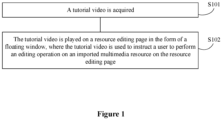
- Figure 1 illustrates a flow chart of a method for editing multimedia resource based on a tutorial according to an embodiment of the present disclosure.
- the method includes steps S101 and S102 as follows.
- the tutorial video refers to display an editing process for a certain effect of a multimedia resource in a form of a video, and the purpose of which is to guide the user to learn.
- the tutorial video may include a tutorial video for audio and video editing, a tutorial video for image effect processing, and the like.
- the tutorial video is played on a resource editing page in a form of a floating window, where the tutorial video is used to instruct a user to perform an editing operation on an imported multimedia resource on the resource editing page.
- the resource editing page may be an audio and video editing operation page, an image effect processing page and the like.
- the acquired tutorial video is played on the resource editing page in the form of the floating window.
- the multimedia resource may include image resource, audio and video resource and the like.
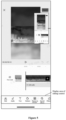
- Figure 2 illustrates a schematic effect diagram of an audio and video editing page according to an embodiment of the present disclosure.
- the tutorial video is played on the audio and video editing page in the form of the floating window.
- the user may perform an editing operation on the imported audio and video resource on the audio and video editing page, based on the tutorial video in the process of playing the tutorial video. In this way, the function of learning the audio and video editing while watching the tutorial video on one device can be achieved.
- the tutorial video is played on the resource editing page in the form of the floating window, which can instruct a user to perform an editing operation on an imported multimedia resource on the resource editing page.
- the function of learning the multimedia resource editing while watching the tutorial video on only one device can be achieved in the embodiment of the present disclosure, which can reduce the occupation of device resources.
- a method for editing multimedia resource based on a tutorial is further provided according to the present disclosure.
- a trigger operation for an editing entry on a tutorial playing page is received, a jump from the tutorial playing page to the resource editing page is performed and the tutorial video played on the tutorial playing page is acquired to play the tutorial video on the resource editing page in the form of the floating window, thereby instructing the user to perform an editing operation on an imported multimedia resource on the resource editing page.
- Figure 3 illustrates a schematic effect diagram of jumping from a tutorial playing page to a resource editing page according to an embodiment of the present disclosure.
- the editing entry is provided on the tutorial playing page.
- the jump from the tutorial playing page to the resource editing page corresponding to the editing entry is triggered, and the tutorial video played on the tutorial playing page is acquired to play the tutorial video on the resource editing page in the form of the floating window.
- the resource editing page can be understood with reference to the schematic effect diagram of the audio and video editing page shown in Figure 2 .
- a method for editing multimedia resource based on a tutorial is further provided according to an embodiment of the present disclosure.
- a tutorial search box is provided on the resource editing page. The user can search for tutorial videos by inputting a keyword in the tutorial search box. Then, a tutorial video is selected from the searched tutorial videos and played on the resource editing page in the form of the floating window. Thus, user requirement of learning multimedia resource editing while watching the tutorial video on the same device is met.
- this embodiment of the present disclosure does not limit the scenario of triggering the tutorial video played on the resource editing page in the form of the floating window.
- the multimedia resource is imported on the resource editing page in advance.
- a material source selection window is first displayed.
- Figure 4 illustrates a schematic effect diagram of displaying a material source selection window after an editing entry is triggered according to an embodiment of the present disclosure.
- the tutorial-associated material refers to multimedia resource carried in the imported tutorial video.
- the user personal resource refers to importing user personal multimedia resource.
- the author of the tutorial video can associate materials with the tutorial before posting the tutorial.
- multimedia resource can be selected from the personal resources of the author, and posted in association with the tutorial video. In this way, users who study the tutorial video can use the associated multimedia resource to perform the editing operation.
- a material source selection window is displayed. If a selection operation for tutorial-associated material on the material source selection window is received from the user, a first material associated with the tutorial video is downloaded, and the first material is imported into the material editing page. If a selection operation for user personal resources on the material source selection window is received from the user, a second material selected from the user personal resources is imported into the resource editing page. Specifically, after a selection operation for user personal resources on the material source selection window is received from the user, a jump from the tutorial playing page to a display page of the user personal resources is performed. The user can select at least one material to import to the resource editing page.
- first material and the second material imported into the resource editing page are used as objects for the user to perform the editing operation on the resource editing page.
- the tutorial playing page after receiving the trigger operation for the editing entry on the tutorial playing page, can be directly jumped to the display page of the user personal resources. After the user selects at least one material on the display page of the user personal resources, the at least one material is imported into the resource editing page, which is used as a multimedia resource to be edited.
- the first material associated with the tutorial video can be directly downloaded, and be imported into the resource editing page.
- the user in the process of playing the tutorial video on the resource editing page in the form of the floating window, the user can perform some operations, such as zooming in on or zooming out on the floating window, to adjust the display of the floating window to meet the user requirements.
- the floating window when a zoom-in operation on the floating window is received, the floating window is zoomed in on the resource editing page.
- a zoom-out operation on the floating window is received, the floating window is zoomed out on the resource editing page.
- the user can also drag the floating window to adjust the display position of the floating window. Specifically, once a dragging operation for the floating window is received, the floating window is displayed in a preset area corresponding to the dragging direction of the dragging operation on the resource editing page.
- the preset area is independent from an area where the editing control is displayed on the resource editing page.
- Figure 5 is taken as an example.
- Figure 5 is a schematic diagram of an audio and video editing page according to an embodiment of the present disclosure.
- the floating window playing the tutorial video is dragged by the user, the dragged floating window cannot cover the display area of the editing control on the resource editing page, so as to ensure that the floating window does not interfere with the editing operation of the user on the imported multimedia resource on the resource editing page.
- the tutorial video includes a first video clip and a second video clip adjacent to each other.
- the editing operation indicated by the first video clip include three editing operations in sequence, which are adding stickers, adding audio and adding special effects. Then, whether the above three editing operations indicated by the first video clip are completed on the resource editing page is detected, in the process of playing the first video clip. On detecting that the above three editing operations indicated by the first video clip have been completed on the resource editing page, the second video clip is played.
- the preset operation in the process of playing the first video clip, it is detected whether a preset operation in the editing operation indicated by the first video clip is completed on the resource editing page.
- the preset operation may be the last operation in the editing operations indicated by the first video clip, such as the above operation of adding special effects. In this case, it is detected whether the above operation of adding special effects is completed on the resource editing page, in the process of playing the first video clip.
- the preset operation may also be the first operation and the last operation in the editing operations indicated by the first video clip.
- a processing result corresponding to the multimedia resource is displayed in a user draft list.
- the processing result carries a tutorial identifier, and the tutorial identifier is used to indicate that the processing result is generated based on a tutorial video.
- the user processes the multimedia resource based on the tutorial video, to obtain a processing result.
- the processing result may be an edited video, an image after an effect operation and the like.
- the processing result of the user can be displayed in the user draft list.
- a tutorial identifier may be marked in the processing result, to indicate that the processing result is generated based on a tutorial video.
- FIG. 6 is a schematic structural diagram of an apparatus for editing multimedia resource based on a tutorial according to an embodiment of the present disclosure.
- the apparatus includes: an acquisition module 601 and a playing module 602.
- the acquisition module 601 is configured to acquire a tutorial video.
- the playing module 602 is configured to play the tutorial video on a resource editing page in a form of a floating window, where the tutorial video is used to instruct a user to perform an editing operation on an imported multimedia resource on the resource editing page.
- the apparatus further includes: a first jumping module configured to jump from a tutorial playing page to the resource editing page, in response to a trigger operation for an editing entry on the tutorial playing page.
- the apparatus further includes: a first display module, a downloading module and a first importing module.
- the first display module is configured to display a material source selection window, in response to the trigger operation for the editing entry on the tutorial playing page.
- the downloading module is configured to download a first material associated with the tutorial video, in a case that a selection operation for a tutorial-associated material on the material source selection window is received, and import the first material into the resource editing page.
- the first importing module is configured to import a second material selected from user personal resources into the resource editing page, in a case that a selection operation for user personal resource on the material source selection window is received.
- the apparatus further includes: a second jumping module and a second importing module.
- the second jumping module is configured to jump from the tutorial playing page to a display page of user personal resource, in response to the trigger operation for the editing entry on the tutorial playing page.
- the second importing module is configured to import at least one material into the resource editing page, in response to a selection operation for the at least one material on the display page of user personal resource.
- the apparatus further includes: a first display module or a second display module.
- the first display module is configured to zoom in on the floating window on the resource editing page in response to a zoom-in operation for the floating window, or zoom out on the floating window on the resource editing page in response to a zoom-out operation for the floating window.
- the second display module is configured to display the floating window in a preset area corresponding to a dragging direction of a dragging operation on the resource editing page, in response to the dragging operation for the floating window, where the preset area is independent from a display area of an editing control on the resource editing page.
- the tutorial video includes a first video clip and a second video clip adjacent to each other, and the apparatus further includes: a detecting module and a triggering module.
- the detecting module is configured to detect whether an editing operation indicated by the first video clip is completed on the resource editing page, in a process of playing the first video clip.
- the triggering module is configured to trigger a play of the second video clip, in response to detecting that the editing operation indicated by the first video clip has been completed on the resource editing page.
- the detecting module is further configured to detect whether a preset operation in the editing operation indicated by the first video clip is completed on the resource editing page, in the process of playing the first video clip.
- the apparatus further includes: a second display module configured to display a processing result corresponding to the multimedia resource in a user draft list, in response to an editing completion operation for the multimedia resource on the resource editing page, where the processing result carries a tutorial identifier, and the tutorial identifier is configured to indicate that the processing result is generated based on a tutorial video.
- a second display module configured to display a processing result corresponding to the multimedia resource in a user draft list, in response to an editing completion operation for the multimedia resource on the resource editing page, where the processing result carries a tutorial identifier, and the tutorial identifier is configured to indicate that the processing result is generated based on a tutorial video.
- the tutorial video is played on the resource editing page in the form of the floating window, so as to instruct the user to perform the editing operation on the imported multimedia resource on the resource editing page.
- the function of learning multimedia resource editing while watching the tutorial video on only one device can be achieved in the embodiments of the present disclosure, which can reduce the occupation of device resources.
- a computer readable storage medium is further provided according to an embodiment of the present disclosure. Instructions are stored in the computer readable storage medium. The instructions, when executed by a terminal device, cause the terminal device to implement the method for editing the multimedia resource based on the tutorial described in the embodiments of the present disclosure.
- the device for editing the multimedia resource based on the tutorial may include: a processor 701, a memory 702, an input apparatus 703 and an output apparatus 704.
- the device for editing the multimedia resource based on the tutorial may include one or more processors 701.
- One processor is taken as an example in Figure 7 .
- the processor 701, the memory 702, the input apparatus 703 and the output apparatus 704 may be connected through a bus or in other manner. In Figure 7 , a connection through the bus is taken as an example.
- the memory 702 may be configured to store a software program and module.
- the processor 701 runs the software program and module stored in the memory 702, to perform various functional applications and data processing of the tutorial-based multimedia resource editing device.
- the memory 702 may mainly include a program memory area and a data memory area. An operating system, an application required by at least one function and the like are stored in the program memory area.
- the memory 702 may include a high-speed random access memory, and may further include a non-volatile memory, such as at least one disk storage device, a flash device or other volatile solid-state storage device.
- the input apparatus 703 may be configured to receive inputted number or character information, and generate a signal related to user settings and function control of the tutorial-based multimedia resource editing device.
- the processor 701 may load an executable file corresponding to the processes of one or more application programs into the memory 702 in response to an instruction.
- the processor 701 runs the application programs stored in the memory 702, thereby realizing various functions in the above tutorial-based multimedia resource editing device.
Landscapes
- Engineering & Computer Science (AREA)
- Theoretical Computer Science (AREA)
- Multimedia (AREA)
- General Engineering & Computer Science (AREA)
- General Physics & Mathematics (AREA)
- Physics & Mathematics (AREA)
- Signal Processing (AREA)
- Human Computer Interaction (AREA)
- Databases & Information Systems (AREA)
- Business, Economics & Management (AREA)
- Educational Administration (AREA)
- Educational Technology (AREA)
- Data Mining & Analysis (AREA)
- Marketing (AREA)
- Computer Security & Cryptography (AREA)
- Television Signal Processing For Recording (AREA)
- Digital Computer Display Output (AREA)
- User Interface Of Digital Computer (AREA)
Abstract
Description
- The present application claims priority to
Chinese Patent Application No. 202011598483.1, titled "METHOD AND APPARATUS FOR ONLINE STREAMING INTERACTION, ELECTRONIC DEVICE, AND STORAGE MEDIUM", filed with the China National Intellectual Property Administration on December 29, 2020 - The present disclosure relates to the field of data processing, and in particular to a method and apparatus for editing multimedia resource based on a tutorial, a device, and a storage medium
- With the rapid development of various technical fields, learning new knowledge and new technologies has become a daily routine for individuals. A common learning method to learn is to watch the tutorials. For example, video editing techniques can be learned by watching video editing tutorials, and image processing techniques can be learn by watching image processing tutorials.
- In an actual learning process, the user opens the relevant operating software and learns the operation while watching the tutorial. Therefore, usually the user needs to use one device to play the tutorial while using another device to learn the operation, which is obviously a waste of device resources.
- In order to solve or at least partly solve the above technical problems, a method and apparatus for editing multimedia resource based on a tutorial, a device, and a storage medium are provided according to the present disclosure, which can realize a function of learning multimedia resource editing operations while watching tutorials via one device, so as to reduce the occupation of device resources.
- In a first aspect, a method for editing multimedia resource based on a tutorial is provided according to the present disclosure. The method includes:
- acquiring a tutorial video; and
- playing the tutorial video on a resource editing page in a form of a floating window; where the tutorial video is used to instruct a user to perform an editing operation on an imported multimedia resource on the resource editing page.
- In an optional implementation, before the playing the tutorial video on the resource editing page in the form of the floating window, the method further includes:
jumping from a tutorial playing page to the resource editing page, in response to a trigger operation for an editing entry on the tutorial playing page. - In an optional implementation, before the jumping from the tutorial playing page to the resource editing page, the method further includes:
- displaying a material source selection window, in response to the trigger operation for the editing entry on the tutorial playing page;
- downloading a first material associated with the tutorial video, in a case that a selection operation for a tutorial-associated material on the material source selection window is received, and importing the first material into the resource editing page; and
- importing a second material selected from user personal resource into the resource editing page, in a case that a selection operation for user personal resource on the material source selection window is received.
- In an optional implementation, before the jumping from the tutorial playing page to the resource editing page, the method further includes:
- jumping from the tutorial playing page to a display page of user personal resource, in response to the trigger operation for the editing entry on the tutorial playing page; and
- importing at least one material into the resource editing page, in response to a selection operation for the at least one material on the display page of user personal resource.
- In an optional implementation, after the playing the tutorial video on the resource editing page in the form of the floating window, the method further includes:
- zooming in on the floating window on the resource editing page in response to a zoom-in operation for the floating window or zooming out on the floating window on the resource editing page in response to a zoom-out operation for the floating window; or
- displaying the floating window in a preset area corresponding to a dragging direction of the dragging operation on the resource editing page, in response to a dragging operation for the floating window; where the preset area is independent from a display area of an editing control on the resource editing page.
- In an optional implementation, the tutorial video includes a first video clip and a second video clip adjacent to each other, and the method further includes:
- detecting whether an editing operation indicated by the first video clip is completed on the resource editing page, in a process of playing the first video clip; and
- triggering a play of the second video clip, in response to detecting that the editing operation indicated by the first video clip has been completed on the resource editing page.
- In an optional implementation, the detecting whether the editing operation indicated by the first video clip is completed on the resource editing page, in the process of playing the first video clip further includes:
detecting whether a preset operation in the editing operation indicated by the first video clip is completed on the resource editing page, in the process of playing the first video clip. - In an optional implementation, after the playing the tutorial video on the resource editing page in the form of the floating window, the method further includes:
displaying a processing result corresponding to the multimedia resource in a user draft list, in response to an editing completion operation for the multimedia resource on the resource editing page, where the processing result carries a tutorial identifier, and the tutorial identifier is used to indicate that the processing result is generated based on a tutorial video. - In a second aspect, an apparatus for editing multimedia resource based on a tutorial is provided according to the present disclosure. The apparatus includes: an acquisition module and a playing module.
- The acquisition module is configured to acquire a tutorial video.
- The playing module is configured to play the tutorial video on a resource editing page in a form of a floating window; where the tutorial video is used to instruct a user to perform an editing operation on an imported multimedia resource on the resource editing page.
- In a third aspect, a computer readable storage medium is provided according to the present disclosure, and instructions are stored in the computer readable storage medium, where the instructions when executed by a terminal device, cause the terminal device to implement the above method.
- In a fourth aspect, a device is provided according to the present disclosure, the device includes: a memory; a processor; and a computer program stored in the memory and executable on the processor. When the computer program executed by the processor, the processor implements the above method.
- Compared with the conventional technology, the technical solutions provided by embodiments of the present disclosure have the following advantages.
- With the method for editing the multimedia resource based on the tutorial according to the present disclosure, the tutorial video is acquired first and then is played on the resource editing page in the form of the floating window, which can instruct a user to perform an editing operation on an imported multimedia resource on the resource editing page. In this way, the function of learning multimedia resource editing while watching the tutorial video on only one device can be achieved in the embodiments of the present disclosure, which can reduce the occupation of device resources.
- The drawings herein are incorporated into the specification and constitute a part of the specification, which show embodiments which comply with the present disclosure. The drawings and the specification are used as a whole to explain the principle of the present disclosure.
- In order to more clearly illustrate the embodiments of the present disclosure or the technical solutions in the conventional technology, the drawings used in the description of the embodiments or the conventional technology are briefly introduced below. It is apparent that, for those skilled in the art, other drawings can be obtained according to the provided drawings without any creative effort.
-
Figure 1 is a flow chart of a method for editing multimedia resource based on a tutorial according to an embodiment of the present disclosure; -
Figure 2 is a schematic effect diagram of an audio and video editing page according to an embodiment of the present disclosure; -
Figure 3 is a schematic effect diagram of jumping from a tutorial playing page to a resource editing page according to an embodiment of the present disclosure; -
Figure 4 is a schematic effect diagram of displaying a material source selection window after an editing entry is triggered according to an embodiment of the present disclosure; -
Figure 5 is a schematic diagram of an audio and video editing page according to an embodiment of the present disclosure; -
Figure 6 is a schematic structural diagram of an apparatus for editing multimedia resource based on a tutorial according to an embodiment of the present disclosure; and -
Figure 7 is a schematic structural diagram of a device for editing multimedia resource based on a tutorial according to an embodiment of the present disclosure. - In order to understand the above purposes, features, and advantage of the present disclosure more clearly, the technical solutions according to the present disclosure will be further described. It should be noted that the embodiments of the present disclosure and the features in the embodiments may be combined with each other if there is no conflict.
- In the following description, numerous specific details are set forth in order to provide thorough understanding of the present disclosure. However, the present disclosure may also be implemented in other ways different from those described here. Obviously, the embodiments in the specification are only a part of the embodiments of the present disclosure, rather than all the embodiments.
- A common method for learning the multimedia resource editing is to watch the tutorials to learn the editing method for multimedia resources. However, in the existing technology, at least two devices are required to complete the function of learning multimedia resources editing while watching tutorials. Specifically, one device is used to play the tutorial video, and another device is used to open editing software of the multimedia resource. In this way, the user may operate the editing software of the multimedia resource while watching the tutorial video to finally achieve the purpose of learning multimedia resource editing via the tutorial video.
- In order to reduce the waste of device resources, a method for editing multimedia resource based on a tutorial is provided according to the present disclosure. Firstly, the tutorial video is acquired, and then the tutorial video is played on a resource editing page in a form of a floating window. The tutorial video is used to instruct a user to perform an editing operation on an imported multimedia resource on the resource editing page. In this way, only one device is used to play the tutorial video and edit multimedia resources, which can reduce the occupation of device resources.
- Based on this, a method for editing multimedia resource based on a tutorial is provided according to an embodiment of the present disclosure. Referring to
Figure 1, Figure 1 illustrates a flow chart of a method for editing multimedia resource based on a tutorial according to an embodiment of the present disclosure. The method includes steps S101 and S102 as follows. - In S101, a tutorial video is acquired.
- In an embodiment of the present disclosure, the tutorial video refers to display an editing process for a certain effect of a multimedia resource in a form of a video, and the purpose of which is to guide the user to learn.
- The tutorial video may include a tutorial video for audio and video editing, a tutorial video for image effect processing, and the like.
- In S 102, the tutorial video is played on a resource editing page in a form of a floating window, where the tutorial video is used to instruct a user to perform an editing operation on an imported multimedia resource on the resource editing page.
- In an embodiment of the present disclosure, the resource editing page may be an audio and video editing operation page, an image effect processing page and the like.
- In practical application, the acquired tutorial video is played on the resource editing page in the form of the floating window. Thus, the user can learn to edit the imported multimedia resource on the resource editing page through the tutorial video being played. The multimedia resource may include image resource, audio and video resource and the like.
- Taking the audio and video editing page as an example,
Figure 2 illustrates a schematic effect diagram of an audio and video editing page according to an embodiment of the present disclosure. As shown inFigure 2 , the tutorial video is played on the audio and video editing page in the form of the floating window. The user may perform an editing operation on the imported audio and video resource on the audio and video editing page, based on the tutorial video in the process of playing the tutorial video. In this way, the function of learning the audio and video editing while watching the tutorial video on one device can be achieved. - In the method for editing the multimedia resource based on the tutorial according to the present disclosure, the tutorial video is played on the resource editing page in the form of the floating window, which can instruct a user to perform an editing operation on an imported multimedia resource on the resource editing page. In this way, the function of learning the multimedia resource editing while watching the tutorial video on only one device can be achieved in the embodiment of the present disclosure, which can reduce the occupation of device resources.
- On the basis of the above embodiments, a method for editing multimedia resource based on a tutorial is further provided according to the present disclosure. In an embodiment, before the tutorial video is played on the resource editing page in the form of the floating window, after a trigger operation for an editing entry on a tutorial playing page is received, a jump from the tutorial playing page to the resource editing page is performed and the tutorial video played on the tutorial playing page is acquired to play the tutorial video on the resource editing page in the form of the floating window, thereby instructing the user to perform an editing operation on an imported multimedia resource on the resource editing page.
-
Figure 3 illustrates a schematic effect diagram of jumping from a tutorial playing page to a resource editing page according to an embodiment of the present disclosure. As shown inFigure 3 , the editing entry is provided on the tutorial playing page. After the user clicks the editing entry, the jump from the tutorial playing page to the resource editing page corresponding to the editing entry is triggered, and the tutorial video played on the tutorial playing page is acquired to play the tutorial video on the resource editing page in the form of the floating window. The resource editing page can be understood with reference to the schematic effect diagram of the audio and video editing page shown inFigure 2 . - In addition, a method for editing multimedia resource based on a tutorial is further provided according to an embodiment of the present disclosure. In the embodiment, a tutorial search box is provided on the resource editing page. The user can search for tutorial videos by inputting a keyword in the tutorial search box. Then, a tutorial video is selected from the searched tutorial videos and played on the resource editing page in the form of the floating window. Thus, user requirement of learning multimedia resource editing while watching the tutorial video on the same device is met.
- It should be noted that this embodiment of the present disclosure does not limit the scenario of triggering the tutorial video played on the resource editing page in the form of the floating window.
- In addition, in an embodiment of the present disclosure, before performing an editing operation on the resource editing page based on the tutorial video, the multimedia resource is imported on the resource editing page in advance.
- In an optional implementation, after receiving a trigger operation for an editing entry on the tutorial playing page, a material source selection window is first displayed.
Figure 4 illustrates a schematic effect diagram of displaying a material source selection window after an editing entry is triggered according to an embodiment of the present disclosure. Referring toFigure 4 , at least two types of material sources are displayed on the material source selection window, which includes "Use material provided by the course", i.e., tutorial-associated material, and "Use my own material", i.e., user personal resource. Specifically, the tutorial-associated material refers to multimedia resource carried in the imported tutorial video. The user personal resource refers to importing user personal multimedia resource. - In an optional implementation, the author of the tutorial video can associate materials with the tutorial before posting the tutorial. In an embodiment, multimedia resource can be selected from the personal resources of the author, and posted in association with the tutorial video. In this way, users who study the tutorial video can use the associated multimedia resource to perform the editing operation.
- In an actual application, in response to the trigger operation for the editing entry on the tutorial playing page, a material source selection window is displayed. If a selection operation for tutorial-associated material on the material source selection window is received from the user, a first material associated with the tutorial video is downloaded, and the first material is imported into the material editing page. If a selection operation for user personal resources on the material source selection window is received from the user, a second material selected from the user personal resources is imported into the resource editing page. Specifically, after a selection operation for user personal resources on the material source selection window is received from the user, a jump from the tutorial playing page to a display page of the user personal resources is performed. The user can select at least one material to import to the resource editing page.
- It should be noted that the first material and the second material imported into the resource editing page are used as objects for the user to perform the editing operation on the resource editing page.
- In another optional implementation, after receiving the trigger operation for the editing entry on the tutorial playing page, the tutorial playing page can be directly jumped to the display page of the user personal resources. After the user selects at least one material on the display page of the user personal resources, the at least one material is imported into the resource editing page, which is used as a multimedia resource to be edited.
- In another optional implementation, after receiving the trigger operation for the editing entry on the tutorial playing page, the first material associated with the tutorial video can be directly downloaded, and be imported into the resource editing page.
- It should be noted that, the manner for importing the multimedia resource to the resource editing page will not be limited in the embodiments of the present disclosure specifically.
- In an embodiment of the present disclosure, in the process of playing the tutorial video on the resource editing page in the form of the floating window, the user can perform some operations, such as zooming in on or zooming out on the floating window, to adjust the display of the floating window to meet the user requirements.
- In an optional implementation manner, when a zoom-in operation on the floating window is received, the floating window is zoomed in on the resource editing page. When a zoom-out operation on the floating window is received, the floating window is zoomed out on the resource editing page.
- In another optional implementation, the user can also drag the floating window to adjust the display position of the floating window. Specifically, once a dragging operation for the floating window is received, the floating window is displayed in a preset area corresponding to the dragging direction of the dragging operation on the resource editing page. The preset area is independent from an area where the editing control is displayed on the resource editing page.
-
Figure 5 is taken as an example.Figure 5 is a schematic diagram of an audio and video editing page according to an embodiment of the present disclosure. When the floating window playing the tutorial video is dragged by the user, the dragged floating window cannot cover the display area of the editing control on the resource editing page, so as to ensure that the floating window does not interfere with the editing operation of the user on the imported multimedia resource on the resource editing page. - In an embodiment of the present disclosure, there are various implementations for performing the editing operation on the multimedia resource on the resource editing page based on the tutorial video played in the form of the floating window. An optional implementation of various implementations is provided according to an embodiment of the present disclosure.
- In an embodiment, the tutorial video includes a first video clip and a second video clip adjacent to each other. In the process of playing the first video clip on the resource editing page in the form of the floating window, it is detected whether the editing operation indicated by the first video clip is completed on the resource editing page. As an example, the editing operation indicated by the first video clip include three editing operations in sequence, which are adding stickers, adding audio and adding special effects. Then, whether the above three editing operations indicated by the first video clip are completed on the resource editing page is detected, in the process of playing the first video clip. On detecting that the above three editing operations indicated by the first video clip have been completed on the resource editing page, the second video clip is played.
- In an optional implementation, in the process of playing the first video clip, it is detected whether a preset operation in the editing operation indicated by the first video clip is completed on the resource editing page. For example, the preset operation may be the last operation in the editing operations indicated by the first video clip, such as the above operation of adding special effects. In this case, it is detected whether the above operation of adding special effects is completed on the resource editing page, in the process of playing the first video clip.
- In addition, the preset operation may also be the first operation and the last operation in the editing operations indicated by the first video clip.
- In addition, in an embodiment of the present disclosure, in response to receiving an editing completion operation for the multimedia resource on the resource editing page, a processing result corresponding to the multimedia resource is displayed in a user draft list. The processing result carries a tutorial identifier, and the tutorial identifier is used to indicate that the processing result is generated based on a tutorial video.
- In practical applications, in the process of playing the tutorial video in the form of the floating window, the user processes the multimedia resource based on the tutorial video, to obtain a processing result. The processing result may be an edited video, an image after an effect operation and the like. After the user triggers the editing completion operation, the processing result of the user can be displayed in the user draft list. A tutorial identifier may be marked in the processing result, to indicate that the processing result is generated based on a tutorial video.
- Based on the same inventive concept as the above method embodiment, an apparatus for editing multimedia resource based on a tutorial is further provided according to the present disclosure. Referring to
Figure 6, Figure 6 is a schematic structural diagram of an apparatus for editing multimedia resource based on a tutorial according to an embodiment of the present disclosure. The apparatus includes: anacquisition module 601 and aplaying module 602. - The
acquisition module 601 is configured to acquire a tutorial video. - The
playing module 602 is configured to play the tutorial video on a resource editing page in a form of a floating window, where the tutorial video is used to instruct a user to perform an editing operation on an imported multimedia resource on the resource editing page. - In an optional implementation, the apparatus further includes: a first jumping module configured to jump from a tutorial playing page to the resource editing page, in response to a trigger operation for an editing entry on the tutorial playing page.
- In an optional implementation, the apparatus further includes: a first display module, a downloading module and a first importing module.
- The first display module is configured to display a material source selection window, in response to the trigger operation for the editing entry on the tutorial playing page.
- The downloading module is configured to download a first material associated with the tutorial video, in a case that a selection operation for a tutorial-associated material on the material source selection window is received, and import the first material into the resource editing page.
- The first importing module is configured to import a second material selected from user personal resources into the resource editing page, in a case that a selection operation for user personal resource on the material source selection window is received.
- In an optional implementation, the apparatus further includes: a second jumping module and a second importing module.
- The second jumping module is configured to jump from the tutorial playing page to a display page of user personal resource, in response to the trigger operation for the editing entry on the tutorial playing page.
- The second importing module is configured to import at least one material into the resource editing page, in response to a selection operation for the at least one material on the display page of user personal resource.
- In an optional implementation, the apparatus further includes: a first display module or a second display module.
- The first display module is configured to zoom in on the floating window on the resource editing page in response to a zoom-in operation for the floating window, or zoom out on the floating window on the resource editing page in response to a zoom-out operation for the floating window.
- The second display module is configured to display the floating window in a preset area corresponding to a dragging direction of a dragging operation on the resource editing page, in response to the dragging operation for the floating window, where the preset area is independent from a display area of an editing control on the resource editing page.
- In an optional implementation, the tutorial video includes a first video clip and a second video clip adjacent to each other, and the apparatus further includes: a detecting module and a triggering module.
- The detecting module is configured to detect whether an editing operation indicated by the first video clip is completed on the resource editing page, in a process of playing the first video clip.
- The triggering module is configured to trigger a play of the second video clip, in response to detecting that the editing operation indicated by the first video clip has been completed on the resource editing page.
- In an optional implementation, the detecting module is further configured to detect whether a preset operation in the editing operation indicated by the first video clip is completed on the resource editing page, in the process of playing the first video clip.
- In an optional implementation, the apparatus further includes: a second display module configured to display a processing result corresponding to the multimedia resource in a user draft list, in response to an editing completion operation for the multimedia resource on the resource editing page, where the processing result carries a tutorial identifier, and the tutorial identifier is configured to indicate that the processing result is generated based on a tutorial video.
- In the apparatus for editing the multimedia resource based on the tutorial according to the embodiments of the present disclosure, the tutorial video is played on the resource editing page in the form of the floating window, so as to instruct the user to perform the editing operation on the imported multimedia resource on the resource editing page. Thus, the function of learning multimedia resource editing while watching the tutorial video on only one device can be achieved in the embodiments of the present disclosure, which can reduce the occupation of device resources.
- In addition to the above methods and apparatuses, a computer readable storage medium is further provided according to an embodiment of the present disclosure. Instructions are stored in the computer readable storage medium. The instructions, when executed by a terminal device, cause the terminal device to implement the method for editing the multimedia resource based on the tutorial described in the embodiments of the present disclosure.
- In addition, a device for editing multimedia resource based on a tutorial is further provided according to an embodiment of the present disclosure. Referring to
Figure 7 , the device for editing the multimedia resource based on the tutorial may include: aprocessor 701, amemory 702, aninput apparatus 703 and anoutput apparatus 704. - The device for editing the multimedia resource based on the tutorial may include one or
more processors 701. One processor is taken as an example inFigure 7 . In some embodiments of the present disclosure, theprocessor 701, thememory 702, theinput apparatus 703 and theoutput apparatus 704 may be connected through a bus or in other manner. InFigure 7 , a connection through the bus is taken as an example. - The
memory 702 may be configured to store a software program and module. Theprocessor 701 runs the software program and module stored in thememory 702, to perform various functional applications and data processing of the tutorial-based multimedia resource editing device. Thememory 702 may mainly include a program memory area and a data memory area. An operating system, an application required by at least one function and the like are stored in the program memory area. In addition, thememory 702 may include a high-speed random access memory, and may further include a non-volatile memory, such as at least one disk storage device, a flash device or other volatile solid-state storage device. Theinput apparatus 703 may be configured to receive inputted number or character information, and generate a signal related to user settings and function control of the tutorial-based multimedia resource editing device. - In the embodiment, the
processor 701 may load an executable file corresponding to the processes of one or more application programs into thememory 702 in response to an instruction. Theprocessor 701 runs the application programs stored in thememory 702, thereby realizing various functions in the above tutorial-based multimedia resource editing device. - It should be noted that the relationship terms "first", "second" and the like herein are used for distinguishing an entity or operation from another entity or operation, but not intended to necessitate or imply an actual relationship or order between these entities or operations. Further, the terms "include", "comprise" or any variant thereof are intended to encompass nonexclusive inclusion such that a process, method, article or device including a series of elements includes not only those elements but also other elements which have not been listed definitely or an element(s) inherent to the process, method, article or device. Unless expressively limited otherwise, a process, method, article or device limited by "comprising/including a(n) ..." does not exclude existence of another identical element in such process, method, article or device.
- The above are only specific implementations of the present disclosure, such that those skilled in the art can understand or implement the present disclosure. It is obvious for those skilled in the art to make many modifications to these embodiments. The general principle defined herein may be applied to other embodiments without departing from the spirit or scope of the present disclosure. Therefore, the present disclosure is not limited to the embodiments illustrated herein, rather, should be defined by the broadest scope consistent with the principle and novel features disclosed herein.
Claims (11)
- A method for editing multimedia resource based on a tutorial, comprising:acquiring a tutorial video; andplaying the tutorial video on a resource editing page in a form of a floating window; wherein the tutorial video is configured to instruct a user to perform an editing operation on an imported multimedia resource on the resource editing page.
- The method according to claim 1, wherein before the playing the tutorial video on the resource editing page in the form of the floating window, the method further comprises:
jumping from a tutorial playing page to the resource editing page, in response to a trigger operation for an editing entry on the tutorial playing page. - The method according to claim 2, wherein before the jumping from the tutorial playing page to the resource editing page, the method further comprises:displaying a material source selection window, in response to the trigger operation for the editing entry on the tutorial playing page;downloading a first material associated with the tutorial video, in a case that a selection operation for a tutorial-associated material on the material source selection window is received, and importing the first material into the resource editing page; andimporting a second material selected from user personal resource into the resource editing page, in a case that a selection operation for the user personal resource on the material source selection window is received.
- The method according to claim 2, wherein before the jumping from the tutorial playing page to the resource editing page, the method further comprises:jumping from the tutorial playing page to a display page of user personal resource, in response to the trigger operation for the editing entry on the tutorial playing page; andimporting at least one material into the resource editing page, in response to a selection operation for the at least one material on the display page of user personal resource.
- The method according to claim 1, wherein after the playing the tutorial video on the resource editing page in the form of the floating window, the method further comprises:zooming in on the floating window on the resource editing page in response to a zoom-in operation for the floating window or zooming out on the floating window on the resource editing page in response to a zoom-out operation for the floating window; ordisplaying the floating window in a preset area corresponding to a dragging direction of a dragging operation on the resource editing page in response to the dragging operation for the floating window, wherein the preset area is independent from a display area of an editing control on the resource editing page.
- The method according to claim 1, wherein the tutorial video includes a first video clip and a second video clip adjacent to each other, and the method further comprises:detecting whether an editing operation indicated by the first video clip is completed on the resource editing page, in a process of playing the first video clip; andplaying the second video clip, in response to detecting that the editing operation indicated by the first video clip has been completed on the resource editing page.
- The method according to claim 6, wherein the detecting whether the editing operation indicated by the first video clip is completed on the resource editing page in the process of playing the first video clip comprises:
detecting whether a preset operation in the editing operation indicated by the first video clip is completed on the resource editing page, in the process of playing the first video clip. - The method according to claim 1, wherein after the playing the tutorial video on the resource editing page in the form of the floating window, the method further comprises:
displaying a processing result corresponding to the multimedia resource in a user draft list, in response to an editing completion operation for the multimedia resource on the resource editing page, wherein the processing result carries a tutorial identifier, and the tutorial identifier is used to indicate that the processing result is generated based on a tutorial video. - An apparatus for editing multimedia resource based on a tutorial, comprising:an acquisition module configured to acquire a tutorial video; anda playing module configured to play the tutorial video on a resource editing page in a form of a floating window, wherein the tutorial video is used to instruct a user to perform an editing operation on an imported multimedia resource on the resource editing page.
- A computer readable storage medium storing instructions, wherein the instructions when executed by a terminal device, cause the terminal device to implement the method according to any one of claims 1 to 8.
- A device, comprising:a memory;a processor; anda computer program stored in the memory and executable on the processor,wherein when the computer program is executed by the processor, the processor implements the method according to any one of claims 1 to 8.
Applications Claiming Priority (2)
| Application Number | Priority Date | Filing Date | Title |
|---|---|---|---|
| CN202011598483.1A CN114692033A (en) | 2020-12-29 | 2020-12-29 | Multimedia resource editing method, device and equipment based on tutorial and storage medium |
| PCT/CN2021/129742 WO2022142750A1 (en) | 2020-12-29 | 2021-11-10 | Tutorial-based multimedia resource editing method and apparatus, device, and storage medium |
Publications (2)
| Publication Number | Publication Date |
|---|---|
| EP4258133A1 true EP4258133A1 (en) | 2023-10-11 |
| EP4258133A4 EP4258133A4 (en) | 2024-04-24 |
Family
ID=82133093
Family Applications (1)
| Application Number | Title | Priority Date | Filing Date |
|---|---|---|---|
| EP21913493.9A Pending EP4258133A4 (en) | 2020-12-29 | 2021-11-10 | METHOD AND DEVICE, DEVICE AND STORAGE MEDIUM FOR PROCESSING TUTORIAL-BASED MULTIMEDIA RESOURCES |
Country Status (5)
| Country | Link |
|---|---|
| US (1) | US20230343233A1 (en) |
| EP (1) | EP4258133A4 (en) |
| JP (1) | JP7602047B2 (en) |
| CN (1) | CN114692033A (en) |
| WO (1) | WO2022142750A1 (en) |
Cited By (2)
| Publication number | Priority date | Publication date | Assignee | Title |
|---|---|---|---|---|
| EP4304185A4 (en) * | 2021-03-26 | 2024-08-28 | Beijing Zitiao Network Technology Co., Ltd. | METHOD AND APPARATUS FOR CLIPPING MULTIMEDIA RESOURCES, DEVICE AND STORAGE MEDIUM |
| US20240402902A1 (en) * | 2021-11-29 | 2024-12-05 | Beijing Zitiao Network Technology Co., Ltd. | Video processing method and apparatus, device, and medium |
Families Citing this family (2)
| Publication number | Priority date | Publication date | Assignee | Title |
|---|---|---|---|---|
| CN116320553A (en) * | 2021-12-20 | 2023-06-23 | 北京字跳网络技术有限公司 | Display method, device, electronic device and readable storage medium of video collection |
| CN115484490B (en) * | 2022-09-15 | 2024-06-11 | 北京字跳网络技术有限公司 | Video processing method, device, equipment and storage medium |
Family Cites Families (16)
| Publication number | Priority date | Publication date | Assignee | Title |
|---|---|---|---|---|
| US5601432A (en) * | 1995-01-20 | 1997-02-11 | Mastery Rehabilitation Systems, Inc. | Educational organizer |
| JP2003167659A (en) * | 2001-11-28 | 2003-06-13 | Fujitsu Ltd | Information processing apparatus and information object display method |
| US7878808B1 (en) * | 2003-09-19 | 2011-02-01 | Sap Ag | Multiple application interactive tutorial player |
| US9449524B2 (en) * | 2010-11-05 | 2016-09-20 | International Business Machines Corporation | Dynamic role-based instructional symbiont for software application instructional support |
| US20100218100A1 (en) * | 2009-02-25 | 2010-08-26 | HNTB Holdings, Ltd. | Presentation system |
| US9665234B2 (en) * | 2013-04-16 | 2017-05-30 | Autodesk, Inc. | Community enhanced tutorials: improving tutorials with multiple demonstrations |
| US10638082B2 (en) * | 2014-08-28 | 2020-04-28 | Gregory A. Pearson, Inc. | Systems and methods for picture-in-picture video conference functionality |
| CN105005430B (en) * | 2015-07-17 | 2019-05-14 | 深圳市金立通信设备有限公司 | A kind of window display method and terminal |
| US20170102938A1 (en) * | 2015-10-09 | 2017-04-13 | Dell Products L.P. | Identifying a potential mentor for a computer-administered test |
| CN105867762A (en) * | 2015-12-31 | 2016-08-17 | 乐视网信息技术(北京)股份有限公司 | Method and apparatus for displaying video being played |
| CN106657601B (en) * | 2016-10-31 | 2019-10-01 | 努比亚技术有限公司 | The guide device and method of intelligent terminal operation |
| CN108108214A (en) * | 2017-12-18 | 2018-06-01 | 维沃移动通信有限公司 | A kind of guiding method of operating, device and mobile terminal |
| CN108307232A (en) * | 2018-02-24 | 2018-07-20 | 北京奇艺世纪科技有限公司 | A kind of video comments online editing and synchronous broadcast method and device |
| US11030796B2 (en) | 2018-10-17 | 2021-06-08 | Adobe Inc. | Interfaces and techniques to retarget 2D screencast videos into 3D tutorials in virtual reality |
| CN111770288B (en) * | 2020-06-23 | 2022-12-09 | Oppo广东移动通信有限公司 | Video editing method, device, terminal and storage medium |
| CN112073649B (en) * | 2020-09-04 | 2022-12-13 | 北京字节跳动网络技术有限公司 | Multimedia data processing method, multimedia data generating method and related equipment |
-
2020
- 2020-12-29 CN CN202011598483.1A patent/CN114692033A/en active Pending
-
2021
- 2021-11-10 JP JP2023539926A patent/JP7602047B2/en active Active
- 2021-11-10 WO PCT/CN2021/129742 patent/WO2022142750A1/en not_active Ceased
- 2021-11-10 EP EP21913493.9A patent/EP4258133A4/en active Pending
-
2023
- 2023-06-28 US US18/343,209 patent/US20230343233A1/en not_active Abandoned
Cited By (4)
| Publication number | Priority date | Publication date | Assignee | Title |
|---|---|---|---|---|
| EP4304185A4 (en) * | 2021-03-26 | 2024-08-28 | Beijing Zitiao Network Technology Co., Ltd. | METHOD AND APPARATUS FOR CLIPPING MULTIMEDIA RESOURCES, DEVICE AND STORAGE MEDIUM |
| US12106778B2 (en) | 2021-03-26 | 2024-10-01 | Beijing Zitiao Network Technology Co., Ltd. | Multimedia resource clipping method and apparatus, device and storage medium |
| US20240402902A1 (en) * | 2021-11-29 | 2024-12-05 | Beijing Zitiao Network Technology Co., Ltd. | Video processing method and apparatus, device, and medium |
| US12346549B2 (en) * | 2021-11-29 | 2025-07-01 | Beijing Zitiao Network Technology Co., Ltd. | Video processing method and apparatus, device, and medium |
Also Published As
| Publication number | Publication date |
|---|---|
| JP2024502804A (en) | 2024-01-23 |
| WO2022142750A1 (en) | 2022-07-07 |
| US20230343233A1 (en) | 2023-10-26 |
| JP7602047B2 (en) | 2024-12-17 |
| EP4258133A4 (en) | 2024-04-24 |
| CN114692033A (en) | 2022-07-01 |
Similar Documents
| Publication | Publication Date | Title |
|---|---|---|
| US20230343233A1 (en) | Tutorial-based multimedia resource editing method and apparatus, device, and storage medium | |
| EP4343514A1 (en) | Display method and apparatus, and device and storage medium | |
| CN106303723B (en) | Video processing method and device | |
| US8826169B1 (en) | Hiding content of a digital content item | |
| CN121743576A (en) | List stream realization method and device, electronic equipment and storage medium | |
| CN117251091A (en) | Information interaction methods, devices, equipment, storage media and program products | |
| EP4679293A1 (en) | Content sharing method and apparatus, device, computer readable storage medium, and product | |
| US20250016420A1 (en) | Information replay method and apparatus, electronic device, computer storage medium, and product | |
| US8276077B2 (en) | Method and apparatus for automatic annotation of recorded presentations | |
| US9152297B2 (en) | Interactive content creation system | |
| EP4668133A1 (en) | Interaction method and apparatus based on media content, device and storage medium | |
| EP4300980A1 (en) | Video processing method and apparatus, and electronic device and storage medium | |
| US20240007718A1 (en) | Multimedia browsing method and apparatus, device and mediuim | |
| EP4344191A1 (en) | Method and apparatus for editing multimedia resource scene, device, and storage medium | |
| EP4538906A1 (en) | Favorites processing method, apparatus and device, and storage medium | |
| CN111859856A (en) | Information display method, device, electronic device and storage medium | |
| EP4543020A1 (en) | Video processing method, apparatus and device, and storage medium | |
| US20240404560A1 (en) | Tutorial-based multimedia resource editing method and apparatus, device, and storage medium | |
| CN114584716A (en) | Picture processing method, device, equipment and storage medium | |
| CN111639154B (en) | Live broadcast question searching method, device, terminal equipment and storage medium | |
| JP2025525782A (en) | Multimedia resource processing method, apparatus, device, and storage medium | |
| US20240295950A1 (en) | Video collection presentation method and apparatus, electronic device, and readable storage medium | |
| Warner et al. | Slidespecs: Automatic and interactive presentation feedback collation | |
| JP7760602B2 (en) | Multimedia content display method, device, equipment, and storage medium | |
| CN105224552B (en) | Network information processing method, device and system |
Legal Events
| Date | Code | Title | Description |
|---|---|---|---|
| STAA | Information on the status of an ep patent application or granted ep patent |
Free format text: STATUS: THE INTERNATIONAL PUBLICATION HAS BEEN MADE |
|
| PUAI | Public reference made under article 153(3) epc to a published international application that has entered the european phase |
Free format text: ORIGINAL CODE: 0009012 |
|
| STAA | Information on the status of an ep patent application or granted ep patent |
Free format text: STATUS: REQUEST FOR EXAMINATION WAS MADE |
|
| 17P | Request for examination filed |
Effective date: 20230705 |
|
| AK | Designated contracting states |
Kind code of ref document: A1 Designated state(s): AL AT BE BG CH CY CZ DE DK EE ES FI FR GB GR HR HU IE IS IT LI LT LU LV MC MK MT NL NO PL PT RO RS SE SI SK SM TR |
|
| REG | Reference to a national code |
Ref country code: DE Ref legal event code: R079 Free format text: PREVIOUS MAIN CLASS: G06F0016957000 Ipc: G06F0016740000 |
|
| DAV | Request for validation of the european patent (deleted) | ||
| DAX | Request for extension of the european patent (deleted) | ||
| A4 | Supplementary search report drawn up and despatched |
Effective date: 20240327 |
|
| RIC1 | Information provided on ipc code assigned before grant |
Ipc: H04N 21/854 20110101ALI20240321BHEP Ipc: H04N 21/472 20110101ALI20240321BHEP Ipc: H04N 5/272 20060101ALI20240321BHEP Ipc: G11B 27/00 20060101ALI20240321BHEP Ipc: G09B 5/06 20060101ALI20240321BHEP Ipc: G06F 3/04883 20220101ALI20240321BHEP Ipc: G06F 3/0486 20130101ALI20240321BHEP Ipc: G06F 3/04847 20220101ALI20240321BHEP Ipc: G06F 3/04845 20220101ALI20240321BHEP Ipc: H04N 21/431 20110101ALI20240321BHEP Ipc: G06F 16/74 20190101AFI20240321BHEP |
|
| STAA | Information on the status of an ep patent application or granted ep patent |
Free format text: STATUS: EXAMINATION IS IN PROGRESS |
|
| 17Q | First examination report despatched |
Effective date: 20250425 |