EP4228226A1 - File sending method and apparatus, and electronic device - Google Patents
File sending method and apparatus, and electronic device Download PDFInfo
- Publication number
- EP4228226A1 EP4228226A1 EP21885136.8A EP21885136A EP4228226A1 EP 4228226 A1 EP4228226 A1 EP 4228226A1 EP 21885136 A EP21885136 A EP 21885136A EP 4228226 A1 EP4228226 A1 EP 4228226A1
- Authority
- EP
- European Patent Office
- Prior art keywords
- file
- target
- input
- interface
- user
- Prior art date
- Legal status (The legal status is an assumption and is not a legal conclusion. Google has not performed a legal analysis and makes no representation as to the accuracy of the status listed.)
- Pending
Links
Images



Classifications
-
- H—ELECTRICITY
- H04—ELECTRIC COMMUNICATION TECHNIQUE
- H04M—TELEPHONIC COMMUNICATION
- H04M1/00—Substation equipment, e.g. for use by subscribers
- H04M1/72—Mobile telephones; Cordless telephones, i.e. devices for establishing wireless links to base stations without route selection
- H04M1/724—User interfaces specially adapted for cordless or mobile telephones
- H04M1/72448—User interfaces specially adapted for cordless or mobile telephones with means for adapting the functionality of the device according to specific conditions
-
- H—ELECTRICITY
- H04—ELECTRIC COMMUNICATION TECHNIQUE
- H04L—TRANSMISSION OF DIGITAL INFORMATION, e.g. TELEGRAPHIC COMMUNICATION
- H04L67/00—Network arrangements or protocols for supporting network services or applications
- H04L67/01—Protocols
- H04L67/06—Protocols specially adapted for file transfer, e.g. file transfer protocol [FTP]
-
- H—ELECTRICITY
- H04—ELECTRIC COMMUNICATION TECHNIQUE
- H04M—TELEPHONIC COMMUNICATION
- H04M1/00—Substation equipment, e.g. for use by subscribers
- H04M1/72—Mobile telephones; Cordless telephones, i.e. devices for establishing wireless links to base stations without route selection
- H04M1/724—User interfaces specially adapted for cordless or mobile telephones
- H04M1/72403—User interfaces specially adapted for cordless or mobile telephones with means for local support of applications that increase the functionality
- H04M1/7243—User interfaces specially adapted for cordless or mobile telephones with means for local support of applications that increase the functionality with interactive means for internal management of messages
-
- G—PHYSICS
- G06—COMPUTING OR CALCULATING; COUNTING
- G06F—ELECTRIC DIGITAL DATA PROCESSING
- G06F3/00—Input arrangements for transferring data to be processed into a form capable of being handled by the computer; Output arrangements for transferring data from processing unit to output unit, e.g. interface arrangements
- G06F3/01—Input arrangements or combined input and output arrangements for interaction between user and computer
- G06F3/048—Interaction techniques based on graphical user interfaces [GUI]
- G06F3/0481—Interaction techniques based on graphical user interfaces [GUI] based on specific properties of the displayed interaction object or a metaphor-based environment, e.g. interaction with desktop elements like windows or icons, or assisted by a cursor's changing behaviour or appearance
- G06F3/04817—Interaction techniques based on graphical user interfaces [GUI] based on specific properties of the displayed interaction object or a metaphor-based environment, e.g. interaction with desktop elements like windows or icons, or assisted by a cursor's changing behaviour or appearance using icons
-
- G—PHYSICS
- G06—COMPUTING OR CALCULATING; COUNTING
- G06F—ELECTRIC DIGITAL DATA PROCESSING
- G06F3/00—Input arrangements for transferring data to be processed into a form capable of being handled by the computer; Output arrangements for transferring data from processing unit to output unit, e.g. interface arrangements
- G06F3/01—Input arrangements or combined input and output arrangements for interaction between user and computer
- G06F3/048—Interaction techniques based on graphical user interfaces [GUI]
- G06F3/0484—Interaction techniques based on graphical user interfaces [GUI] for the control of specific functions or operations, e.g. selecting or manipulating an object, an image or a displayed text element, setting a parameter value or selecting a range
- G06F3/0486—Drag-and-drop
-
- G—PHYSICS
- G06—COMPUTING OR CALCULATING; COUNTING
- G06F—ELECTRIC DIGITAL DATA PROCESSING
- G06F40/00—Handling natural language data
- G06F40/20—Natural language analysis
- G06F40/205—Parsing
-
- H—ELECTRICITY
- H04—ELECTRIC COMMUNICATION TECHNIQUE
- H04L—TRANSMISSION OF DIGITAL INFORMATION, e.g. TELEGRAPHIC COMMUNICATION
- H04L51/00—User-to-user messaging in packet-switching networks, transmitted according to store-and-forward or real-time protocols, e.g. e-mail
- H04L51/04—Real-time or near real-time messaging, e.g. instant messaging [IM]
-
- H—ELECTRICITY
- H04—ELECTRIC COMMUNICATION TECHNIQUE
- H04L—TRANSMISSION OF DIGITAL INFORMATION, e.g. TELEGRAPHIC COMMUNICATION
- H04L51/00—User-to-user messaging in packet-switching networks, transmitted according to store-and-forward or real-time protocols, e.g. e-mail
- H04L51/07—User-to-user messaging in packet-switching networks, transmitted according to store-and-forward or real-time protocols, e.g. e-mail characterised by the inclusion of specific contents
- H04L51/08—Annexed information, e.g. attachments
-
- H—ELECTRICITY
- H04—ELECTRIC COMMUNICATION TECHNIQUE
- H04M—TELEPHONIC COMMUNICATION
- H04M1/00—Substation equipment, e.g. for use by subscribers
- H04M1/247—Telephone sets including user guidance or feature selection means facilitating their use
- H04M1/2478—Telephone terminals specially adapted for non-voice services, e.g. email, internet access
-
- H—ELECTRICITY
- H04—ELECTRIC COMMUNICATION TECHNIQUE
- H04M—TELEPHONIC COMMUNICATION
- H04M1/00—Substation equipment, e.g. for use by subscribers
- H04M1/72—Mobile telephones; Cordless telephones, i.e. devices for establishing wireless links to base stations without route selection
- H04M1/724—User interfaces specially adapted for cordless or mobile telephones
- H04M1/72403—User interfaces specially adapted for cordless or mobile telephones with means for local support of applications that increase the functionality
-
- H—ELECTRICITY
- H04—ELECTRIC COMMUNICATION TECHNIQUE
- H04M—TELEPHONIC COMMUNICATION
- H04M2250/00—Details of telephonic subscriber devices
- H04M2250/64—Details of telephonic subscriber devices file transfer between terminals
Definitions
- This application pertains to the field of communication technologies, and specifically, to a file sending method and apparatus, and an electronic device.
- a chat application program on an electronic device may store these files in a folder in a default path, so that a user can subsequently search the folder for the files when the user needs to use the files.
- the user may first select a storage directory of the chat application program in a setting application program, and then search a plurality of folders in the storage directory for a required folder, to obtain a storage path of the file, so that the user can send the file by using the mail application program based on the obtained storage path.
- the user needs to perform an input for a plurality of times, the user first search a plurality of folders one by one to find a required file, and then sends the file. Consequently, operations of the user are cumbersome and time-consuming, resulting in low file sending efficiency.
- An objective of embodiments of this application is to provide a file sending method and apparatus, and an electronic device, to resolve a problem that file sending efficiency of the electronic device is low.
- an embodiment of this application provides a file sending method, where the file sending method includes: in a case that a conversation interface is displayed, receiving a first input of a user, where the conversation interface includes at least one file, and the first input is an input performed by the user for a target file in the at least one file; updating the conversation interface to a first interface in response to the first input, where the first interface is a desktop or a target interface displayed based on a storage path of the target file, the desktop includes an identifier of the target file, and the target interface includes the target file; receiving a second input of the user, where the second input is an input performed by the user for the target file and a target application program; and in response to the second input, sending the target file by using the target application program.
- an embodiment of this application provides a file sending apparatus, where the file sending apparatus includes: a receiving module, a display module, and a sending module, where the receiving module is configured to: in a case that a conversation interface is displayed, receive a first input of a user, where the conversation interface includes at least one file, and the first input is an input performed by the user for a target file in the at least one file; the display module is configured to update the conversation interface to a first interface in response to the first input received by the receiving module, where the first interface is a desktop or a target interface displayed based on a storage path of the target file, the desktop includes an identifier of the target file, and the target interface includes the target file; the receiving module is further configured to receive a second input of the user, where the second input is an input performed by the user for the target file and a target application program; and the sending module is configured to: in response to the second input received by the receiving module, send the target file by using the target application program.
- an embodiment of the present application provides an electronic device, where the electronic device includes a processor, a memory, and a program or instructions that is or are stored in the memory and executable on the processor, and when the program or the instructions is or are executed by the processor, the steps of the file sending method according to the first aspect are implemented.
- an embodiment of this application provides a readable storage medium, where the readable storage medium stores a program or instructions, and when the program or the instructions is or are executed by a processor, the steps of the file sending method according to the first aspect are implemented.
- an embodiment of this application provides a chip, where the chip includes a processor and a communication interface, the communication interface is coupled to the processor, and the processor is configured to run a program or instructions to implement the file sending method according to the first aspect.
- the electronic device may update, based on the first input of the user, the conversation interface to the desktop or the target interface displayed based on the storage path of the target file, so that the user can perform input for the target file and the target application program, and the electronic device sends the target file by using the target application program.
- the user may directly perform input for the target file in the conversation interface, so that the electronic device jumps to the interface corresponding to the storage path of the target file or the desktop.
- the user may quickly add, for sending, the file to the target application program based on the known storage path of the target file, or may directly perform input for the identifier of the target file on the desktop, to quickly add the file to the target application program for sending.
- the user does not need to send the file by obtaining the storage location of the file by perform searching one by one on the electronic device, thereby reducing time consumed by an operation of the user, and improving file sending efficiency.
- first and second are used to distinguish between similar objects, but are unnecessarily used to describe a specific sequence or order. It should be understood that data terms in such a way is exchangeable in a proper case, so that the embodiments of this application described herein can be implemented in an order other than the order shown or described herein.
- objects distinguished by “first”, “second”, and the like are generally of one type, and a quantity of objects is not limited. For example, there may be one or more first objects.
- “and/or” in this specification and the claims represents at least one of the connected objects, and the character “/" generally represents an "or” relationship between the associated objects.
- an application program for example, a chat application program
- another application program for example, an email application program
- the user may directly perform an input (for example, perform the input through touching and holding or input a file name of a target file) for a target file in a conversation interface of the chat application program, to quickly locate a storage path/location of the target file, so that the user can add the target file to the mail application program based on the storage path of the target file, to quickly send the file.
- the user may directly perform an input (for example, perform the input through dragging) for a target file in a conversation interface of the chat application program, so that the electronic device displays a desktop, generates and displays a temporary identifier of the target file on the desktop.
- the user may drag the temporary identifier of the target file to an area in which an identifier of the mail application program is located on the desktop, to add the target file to the mail application program, so as to quick send the file.
- the electronic device may include a plurality of screens, and the temporary identifier of the target file may be displayed on one screen.
- the user may perform an input by dragging the temporary identifier of the target file displayed on the screen, to drag the temporary identifier of the target file to the identifier of the mail application displayed on another screen, so as to add the target file.
- the embodiments of this application provide a convenient, quick, and easy-to-operate method for adding a file as an attachment of an application program.
- the input may be performed for a file to obtain a storage location of the file, or a file is directly dragged, to add the file to another application program (that is, an application program in which the file can be added as an attachment) as an attachment.
- the user does not need to send the file by obtaining the storage location of the file by perform searching one by one on the electronic device, thereby reducing time consumed by an operation of the user, and improving file sending efficiency.
- FIG. 1 is a flowchart of a file sending method according to an embodiment of this application. The method may be applied to an electronic device. As shown in FIG. 1 , the file sending method provided in this embodiment of this application may include the following steps 201 to 204.
- Step 201 In a case that a conversation interface is displayed, the electronic device receives a first input of a user.
- the conversation interface includes at least one file
- the first input is an input performed by the user for a target file in the at least one file.
- the electronic device displays a conversation interface/a chat interface of an application program (an application program having a message transmission function, such as a chat application program), the user finds a required file in the conversation interface, and then performs input for the file, so that the electronic device displays an interface associated with the file.
- an application program an application program having a message transmission function, such as a chat application program
- the foregoing first input may be input performed by the user by touching and holding the target file in the conversation interface, to trigger the electronic device to display an option box (that is, a prompt window in the following embodiment) corresponding to the target file.
- the option box includes a control used to enter a storage location of a file, so that the user can perform input for the control, and the electronic device jumps to an interface corresponding to the storage location of the file.
- the electronic device is a mobile phone is used as an example for description.
- the mobile phone displays a chat interface.
- the chat interface includes a target file 10.
- the user may perform first input for the target file 10, so that the mobile phone displays an option box 11.
- the option box 11 includes a control "Enter a file location", so that the user can perform input for the control, and the mobile phone jumps to an interface corresponding to a storage location of the target file 10.
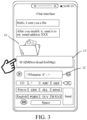
- the foregoing first input may be an input performed by the user for a file name of the target file in an input area (that is, a target input area described in the following embodiment) in the conversation interface, to trigger the electronic device to search the electronic device for a corresponding file based on the file name to obtain a storage location of the file, so as to display a window (that is, a prompt window described in the following embodiment).
- the window includes a storage path of the target file, so that the user can perform input for the storage path (which may be an icon of the storage path) of the target file, and the electronic device jumps to an interface corresponding to the storage location of the file.
- the mobile phone displays a chat interface.
- the chat interface includes a target file 10.
- the user may perform first input (for example, input a file name "file name A") in an input box 12, so that the mobile phone searches for a file corresponding to the "file name A" to obtain a storage location of the target file 10, and displays a window 13.
- the window 13 includes a storage path of the target file 10, so that the user can perform input for an icon of the storage path of the target file 10, and the mobile phone jumps to an interface corresponding to the storage location of the target file 10.
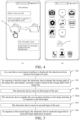
- the foregoing first input may be input (for example, an input of dragging the target file to a screen edge area) performed by the user by dragging the target file in the conversation interface, to trigger the electronic device to jump from the conversation interface to a desktop, and display an identifier (for example, an icon of the target file) of the target file on the desktop.
- an identifier for example, an icon of the target file
- the electronic device may display the identifier of the target file on the desktop in a preset manner.
- the preset manner may be any one of the following: a highlight display manner, a gray display manner, a flicker display manner, a dotted-line box mark display manner, and the like.
- the mobile phone displays a chat interface, and the chat interface includes a target file 10.
- the user may drag the target file 10 to a screen edge area, so that the mobile phone jumps to a desktop shown in (B) in FIG. 4 , so as to display an identifier 14 of the target file 10 on the desktop.
- Step 202 The electronic device updates the conversation interface to a first interface in response to the first input.
- the foregoing first interface is a desktop or a target interface displayed based on a storage path of the target file, the desktop includes an identifier of the target file, and the target interface includes the target file.
- the updating the conversation interface to a first interface may be understood as directly jumping from the conversation interface to the first interface; and the target interface displayed based on the storage path of the target file may be understood as a corresponding interface used to store a storage location of the target file.
- the first interface is the target interface.
- the file sending method provided in this embodiment of this application further includes the following step 301 and step 302, and the foregoing step 202 may be specifically implemented by using the following step 202a.
- Step 301 In response to the first input, the electronic device obtains the storage path of the target file, and displays a prompt window based on the storage path of the target file.
- the foregoing prompt window includes at least one of the following: a first control and the storage path of the target file, where the first control is used to display a storage area of a file on the electronic device.
- the prompt window includes at least the storage path of the target file
- the conversation interface further includes a target input area
- the target input area is used to input a file name of a file
- the first input is an input performed by the user for a file name of the target file in the target input area.
- the foregoing first input may be input performed by the user by touching and holding the target file in the conversation interface, or input for the file name of the target file in the input area in the conversation interface.
- the target input area may be an input-method input box in the conversation interface, and the user may input the file name of the target file in a target manner (for example, input the file name and a target symbol) in the input-method input box, so that the electronic device can search for the target file.
- the target input area may be input performed by the user in the conversation interface, to trigger an input area (the input area is an area specifically used to input a file name) displayed by the electronic device.
- the "obtaining the storage path of the target file" in the foregoing step 301 may be specifically implemented by using the following step 301a.
- Step 301a The electronic device determines, from a storage area on the electronic device based on the file name of the target file, a file corresponding to the file name of the target file, to obtain the storage path of the target file.
- the storage area of the electronic device may be understood as an area that is on the electronic device and that is used to store a file, for example, a file (for example, a file received by using each application program) of an application program or a configuration file.
- the electronic device may perform global searching to find, from all files, a file corresponding to a file name input by the user, thereby determining a storage location/storage path of the file on the electronic device.
- Step 302 The electronic device receives a third input of the user.
- the foregoing third input may be an input performed by the user for the first control in the prompt window.
- the foregoing third input may be an input performed by the user for an identifier of the storage path of the target file in the prompt window.
- Step 202a The electronic device updates the conversation interface to the target interface in response to the third input.
- the user may directly perform input (for example, perform input through touching and holding or input a file name) for the target file in the conversation interface, to quickly obtain the storage location of the file.
- input for example, perform input through touching and holding or input a file name
- the user can quickly add the file to a target application program in a timely manner for sending, to improve file sending efficiency.
- Step 203 The electronic device receives a second input of the user.
- the foregoing second input is an input performed by the user for the target file and the target application program.
- the foregoing second input is an input performed by the user for an identifier of the target application program and the target file.
- the user may perform input for the identifier of the target application program, to open the target application program (for example, an email application program).
- the user may add an attachment to the target application program, that is, enter, based on the storage path of the target file, a file directory corresponding to the target file, to perform selection and input for the target file, so as to add the target file to the target application program to complete file sending.
- the user may edit mail content in the target application program, and then complete mail sending.
- the first interface is the target interface.
- the file sending method provided in this embodiment of this application further includes the following step 401 and step 402.
- Step 401 The electronic device receives a fourth input of the user.
- the foregoing fourth input is an input performed by the user for the target file in the target interface.
- the foregoing fourth input is input (for example, input for a moving control) performed by the user based on a file moving function, to trigger the electronic device to move the target file displayed in the target interface to another folder.
- Step 402 The electronic device moves the target file to a target folder in response to the fourth input.
- the foregoing target folder may be a folder created in advance by the user or a folder created for the target file.
- the user may create a folder at an easy-to-remember storage location in advance and name the folder, so that the user can subsequently move the target file to the newly created folder.
- the user may modify the name of the folder.
- the user may first move the target file to a folder whose storage location is known to the user. Therefore, when the target file is subsequently added to the target application program, the target file may be found more quickly, to quickly add the file.
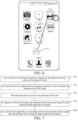
- the desktop further includes an identifier of the target application program, and the second input is input performed by the user by dragging the identifier of the target file to the identifier of the target application program.
- the user may drag the identifier 14 of the target file 10 displayed on the desktop to an icon of the mail application, so that the mobile phone adds the target file 10 to the mail application.
- Step 204 In response to the second input, the electronic device sends the target file by using the target application program.
- the electronic device may add the target file to the target application program based on the second input of the user, to send the target file by using the target application program.
- the foregoing first interface is the desktop.
- the file sending method provided in this embodiment of this application further includes the following step 501, and the foregoing step 204 may be specifically implemented by using the following step 204a.
- Step 501 In response to the second input, the electronic device parses the target file by using the target application program.
- the electronic device may parse the target file to obtain a format of the target file, content of the target file, storage space occupied by the target file, and the like.
- Step 204a In a case that the target file is successfully parsed, the electronic device sends the parsed target file by using the target application program.
- the electronic device may cancel displaying the identifier of the target file on the desktop.
- the electronic device if the electronic device cannot parse the target file or fails to parse the target file, the electronic device does not add the target file to the target application program for sending, and cancels displaying the identifier of the target file on the desktop.
- the electronic device may update, based on the first input of the user, the conversation interface to the desktop or the target interface displayed based on the storage path of the target file, so that the user can perform input for the target file and the target application program, and the electronic device sends the target file by using the target application program.
- the user may directly perform input for the target file in the conversation interface, so that the electronic device jumps to the interface corresponding to the storage path of the target file or the desktop.
- the user may quickly add, for sending, the file to the target application program based on the known storage path of the target file, or may directly perform input for the identifier of the target file on the desktop, to quickly add the file to the target application program for sending.
- the user does not need to send the file by obtaining the storage location of the file by perform searching one by one on the electronic device, thereby reducing time consumed by an operation of the user, and improving file sending efficiency.
- the file sending method provided in this embodiment of this application may be performed by a file sending apparatus, or a control module that is in the file sending apparatus and that is configured to perform the file sending method.
- that the file sending apparatus performs the file sending method is used as an example to describe the file sending apparatus provided in this embodiment of this application.
- FIG. 8 is a schematic diagram of a possible structure of a file sending apparatus according to an embodiment of this application.
- the file sending apparatus 80 may include a receiving module 81, a display module 82, and a sending module 83.
- the receiving module 81 is configured to: in a case that a conversation interface is displayed, receive a first input of a user, where the conversation interface includes at least one file, and the first input is an input performed by the user for a target file in the at least one file.
- the display module 82 is configured to update the conversation interface to a first interface in response to the first input received by the receiving module 81, where the first interface is a desktop or a target interface displayed based on a storage path of the target file, the desktop includes an identifier of the target file, and the target interface includes the target file.
- the receiving module 81 is further configured to receive a second input of the user, where the second input is an input performed by the user for the target file and a target application program.
- the sending module 83 is configured to: in response to the second input received by the receiving module 81, send the target file by using the target application program.
- the first interface is the target interface.
- the file sending apparatus 80 provided in this embodiment of this application further includes an obtaining module.
- the obtaining module is configured to: before the display module 82 updates the conversation interface to the first interface, obtain the storage path of the target file.
- the display module 82 is further configured to display a prompt window based on the storage path that is of the target file and that is obtained by the obtaining module, where the prompt window includes at least one of the following: a first control and the storage path of the target file, where the first control is used to display a storage area of a file on an electronic device.
- the receiving module 81 is further configured to receive a third input of the user.
- the display module 82 is specifically configured to update the conversation interface to the target interface in response to the third input received by the receiving module 81.
- the prompt window includes at least the storage path of the target file
- the conversation interface further includes a target input area
- the target input area is used to input a file name of a file
- the first input is an input performed by the user for a file name of the target file in the target input area.
- the obtaining module is specifically configured to determine, from a storage area on the electronic device based on the file name of the target file, a file corresponding to the file name of the target file, to obtain the storage path of the target file.
- the receiving module 81 is further configured to: before receiving the second input of the user, receive a fourth input of the user, where the fourth input is an input performed by the user for the target file in the target interface.
- the file sending apparatus 80 provided in this embodiment of this application further includes a moving module. The moving module is configured to move the target file to a target folder in response to the fourth input received by the receiving module 81, where the target folder is a folder created by the user.
- the first interface is the desktop
- the desktop further includes an identifier of the target application program
- the second input is input performed by the user by dragging the identifier of the target file to the identifier of the target application program.
- the file sending apparatus 80 provided in this embodiment of this application further includes a parsing module.
- the parsing module is configured to: before the sending module 83 sends the target file by using the target application program, parse the target file by using the target application program.
- the sending module 83 is specifically configured to: in a case that the target file is successfully parsed, send the parsed target file by using the target application program.
- the user may directly perform input for the target file in the conversation interface, so that the electronic device jumps to the interface corresponding to the storage path of the target file or the desktop. Therefore, when the user adds the file, the user may quickly add, for sending, the file to the target application program based on the known storage path of the target file, or may directly perform input for the identifier of the target file on the desktop, to quickly add the file to the target application program for sending.
- the user does not need to send the file by obtaining the storage location of the file by perform searching one by one on the electronic device, thereby reducing time consumed by an operation of the user, and improving file sending efficiency.
- the file sending apparatus in this embodiment of this application may be an apparatus, or may be a component, an integrated circuit, or a chip in a terminal.
- the apparatus may be a mobile electronic device or may be a non-mobile electronic device.
- the mobile electronic device may be a mobile phone, a tablet computer, a notebook computer, a palm computer, an in-vehicle electronic device, a wearable device, an ultra-mobile personal computer (ultra-mobile personal computer, UMPC), a netbook, or a personal digital assistant (personal digital assistant, PDA).
- the non-mobile electronic device may be a server, a network attached storage (Network Attached Storage, NSA), a personal computer (personal computer, PC), a television (television, TV), a teller machine, or an automated machine. This is not specifically limited in this embodiment of this application.
- Network Attached Storage NSA
- PC personal computer
- TV television
- teller machine or an automated machine. This is not specifically limited in this embodiment of this application.
- the file sending apparatus in this embodiment of this application may be an apparatus with an operating system.
- the operating system may be an Android (Android) operating system, may be an iOS operating system, or may be another possible operating system. This is not specifically limited in this embodiment of this application.
- the file sending apparatus provided in this embodiment of this application can implement various processes implemented in the foregoing method embodiments. To avoid repetition, details are not described herein again.
- an embodiment of this application further provides an electronic device 90, including a processor 91, a memory 92, and a program or instructions stored in the memory 92 and executable on the processor 91.
- an electronic device 90 including a processor 91, a memory 92, and a program or instructions stored in the memory 92 and executable on the processor 91.
- the program or the instructions is or are executed by the processor 91, various processes in the foregoing method embodiments are implemented, and a same technical effect can be achieved. To avoid repetition, details are not described herein again.
- the electronic device in this embodiment of this application includes the foregoing mobile electronic device and non-mobile electronic device.
- FIG. 10 is a second schematic diagram of a hardware structure of an electronic device that implements an embodiment of this application.
- the electronic device 100 includes but is not limited to a radio frequency unit 101, a network module 102, an audio output unit 103, an input unit 104, a sensor 105, a display unit 106, a user input unit 107, an interface unit 108, a memory 109, and a processor 110.
- the electronic device 100 may further include a power supply (for example, a battery) that supplies power to each component.
- the power supply may be logically connected to the processor 110 by using a power management system, to manage functions such as charging, discharging, and power consumption by using the power management system.
- the structure of the electronic device shown in FIG. 10 constitutes no limitation on the electronic device, and the electronic device may include more or fewer components than those shown in the figure, or combine some components, or have different component arrangements. Details are not described herein again.
- the user input unit 107 is configured to: in a case that a conversation interface is displayed, receive first input of a user, where the conversation interface includes at least one file, and the first input is an input performed by the user for a target file in the at least one file.
- the display unit 106 is configured to update the conversation interface to a first interface in response to the first input, where the first interface is a desktop or a target interface displayed based on a storage path of the target file, the desktop includes an identifier of the target file, and the target interface includes the target file.
- the user input unit 107 is further configured to receive second input of the user, where the second input is an input performed by the user for the target file and a target application program.
- the network module 102 is configured to: in response to the second input, send the target file by using the target application program.
- the user may directly perform input for the target file in the conversation interface, so that the electronic device jumps to the interface corresponding to the storage path of the target file or the desktop. Therefore, when the user adds the file, the user may quickly add, for sending, the file to the target application program based on the known storage path of the target file, or may directly perform input for the identifier of the target file on the desktop, to quickly add the file to the target application program for sending.
- the user does not need to send the file by obtaining the storage location of the file by perform searching one by one on the electronic device, thereby reducing time consumed by an operation of the user, and improving file sending efficiency.
- the input unit 104 may include a graphics processing unit (Graphics Processing Unit, GPU) 1041 and a microphone 1042.
- the graphics processing unit 1041 processes image data of a still picture or a video obtained by an image capture apparatus (such as a camera) in a video capture mode or an image capture mode.
- the display unit 106 may include a display panel 1061.
- the display panel 1061 may be configured in a form such as a liquid crystal display or an organic light-emitting diode.
- the user input unit 107 may include a touch panel 1071 and another input device 1072.
- the touch panel 1071 is also referred to as a touchscreen.
- the touch panel 1071 may include two parts: a touch detection apparatus and a touch controller.
- the another input device 1072 may include but is not limited to a physical keyboard, a function key (such as a volume control key or an on/off key), a trackball, a mouse, and a joystick. Details are not described herein.
- the memory 109 may be configured to store a software program and various data, including but not limited to an application program and an operating system.
- the processor 110 may integrate an application processor and a modem processor, where the application processor mainly processes an operating system, a user interface, an application program, and the like, and the modem processor mainly processes wireless communication. It may be understood that the modem processor may not be integrated into the processor 110.
- An embodiment of this application further provides a readable storage medium.
- the readable storage medium stores a program or instructions.
- the program or the instructions is or are executed by a processor, various processes in the foregoing method embodiments are implemented, and a same technical effect can be achieved. To avoid repetition, details are not described herein again.
- the processor is a processor in the electronic device in the foregoing embodiment.
- the readable storage medium includes a computer-readable storage medium such as a read-only memory (Read-Only Memory, ROM), a random access memory (Random Access Memory, RAM), a magnetic disk, or an optical disc.
- An embodiment of this application further provides a chip.
- the chip includes a processor and a communication interface.
- the communication interface is coupled to the processor.
- the processor is configured to run a program or instructions to implement various processes in the foregoing method embodiments, and a same technical effect can be achieved. To avoid repetition, details are not described herein again.
- the chip mentioned in this embodiment of this application may also be referred to as a system-level chip, a system chip, a chip system, or a system on chip.
- the scope of the method and apparatus in the embodiments of this application is not limited to performing a function in a sequence shown or discussed, and may further include performing a function in a basically simultaneous manner or in a reverse sequence based on a related function.
- the described method may be performed in an order from the described order, and various steps may be added, omitted, or combined.
- features described with reference to some examples may be combined in other examples.
- the computer software product is stored in a storage medium (for example, a ROM/RAM, a magnetic disk, or an optical disc) including several instructions to enable a terminal (which may be a mobile phone, a computer, a server, a network device, or the like) to perform the methods described in the embodiments of this application.
- a storage medium for example, a ROM/RAM, a magnetic disk, or an optical disc
Landscapes
- Engineering & Computer Science (AREA)
- Signal Processing (AREA)
- Computer Networks & Wireless Communication (AREA)
- Human Computer Interaction (AREA)
- Theoretical Computer Science (AREA)
- General Engineering & Computer Science (AREA)
- Physics & Mathematics (AREA)
- General Physics & Mathematics (AREA)
- Business, Economics & Management (AREA)
- General Business, Economics & Management (AREA)
- Computer Vision & Pattern Recognition (AREA)
- Health & Medical Sciences (AREA)
- Artificial Intelligence (AREA)
- Audiology, Speech & Language Pathology (AREA)
- Computational Linguistics (AREA)
- General Health & Medical Sciences (AREA)
- User Interface Of Digital Computer (AREA)
- Information Transfer Between Computers (AREA)
Abstract
Description
- This application claims priority to
Chinese Patent Application No. 202011174568.7 filed on October 28, 2020 - This application pertains to the field of communication technologies, and specifically, to a file sending method and apparatus, and an electronic device.
- Generally, after receiving some files, a chat application program on an electronic device may store these files in a folder in a default path, so that a user can subsequently search the folder for the files when the user needs to use the files. Specifically, when the user sends a file in the chat application program by using a mail application program, the user may first select a storage directory of the chat application program in a setting application program, and then search a plurality of folders in the storage directory for a required folder, to obtain a storage path of the file, so that the user can send the file by using the mail application program based on the obtained storage path.
- However, in the foregoing method, the user needs to perform an input for a plurality of times, the user first search a plurality of folders one by one to find a required file, and then sends the file. Consequently, operations of the user are cumbersome and time-consuming, resulting in low file sending efficiency.
- An objective of embodiments of this application is to provide a file sending method and apparatus, and an electronic device, to resolve a problem that file sending efficiency of the electronic device is low.
- To resolve the foregoing technical problem, this application is implemented as follows:
- According to a first aspect, an embodiment of this application provides a file sending method, where the file sending method includes: in a case that a conversation interface is displayed, receiving a first input of a user, where the conversation interface includes at least one file, and the first input is an input performed by the user for a target file in the at least one file; updating the conversation interface to a first interface in response to the first input, where the first interface is a desktop or a target interface displayed based on a storage path of the target file, the desktop includes an identifier of the target file, and the target interface includes the target file; receiving a second input of the user, where the second input is an input performed by the user for the target file and a target application program; and in response to the second input, sending the target file by using the target application program.
- According to a second aspect, an embodiment of this application provides a file sending apparatus, where the file sending apparatus includes: a receiving module, a display module, and a sending module, where the receiving module is configured to: in a case that a conversation interface is displayed, receive a first input of a user, where the conversation interface includes at least one file, and the first input is an input performed by the user for a target file in the at least one file; the display module is configured to update the conversation interface to a first interface in response to the first input received by the receiving module, where the first interface is a desktop or a target interface displayed based on a storage path of the target file, the desktop includes an identifier of the target file, and the target interface includes the target file; the receiving module is further configured to receive a second input of the user, where the second input is an input performed by the user for the target file and a target application program; and the sending module is configured to: in response to the second input received by the receiving module, send the target file by using the target application program.
- According to a third aspect, an embodiment of the present application provides an electronic device, where the electronic device includes a processor, a memory, and a program or instructions that is or are stored in the memory and executable on the processor, and when the program or the instructions is or are executed by the processor, the steps of the file sending method according to the first aspect are implemented.
- According to a fourth aspect, an embodiment of this application provides a readable storage medium, where the readable storage medium stores a program or instructions, and when the program or the instructions is or are executed by a processor, the steps of the file sending method according to the first aspect are implemented.
- According to a fifth aspect, an embodiment of this application provides a chip, where the chip includes a processor and a communication interface, the communication interface is coupled to the processor, and the processor is configured to run a program or instructions to implement the file sending method according to the first aspect.
- In the embodiments of this application, in a case that the conversation interface including the at least one file is displayed, the electronic device may update, based on the first input of the user, the conversation interface to the desktop or the target interface displayed based on the storage path of the target file, so that the user can perform input for the target file and the target application program, and the electronic device sends the target file by using the target application program. The user may directly perform input for the target file in the conversation interface, so that the electronic device jumps to the interface corresponding to the storage path of the target file or the desktop. Therefore, when the user adds the file, the user may quickly add, for sending, the file to the target application program based on the known storage path of the target file, or may directly perform input for the identifier of the target file on the desktop, to quickly add the file to the target application program for sending. The user does not need to send the file by obtaining the storage location of the file by perform searching one by one on the electronic device, thereby reducing time consumed by an operation of the user, and improving file sending efficiency.
-
-
FIG. 1 is a first schematic diagram of a file sending method according to an embodiment of this application; -
FIG. 2 is a first schematic diagram of an example of an interface of a mobile phone according to an embodiment of this application; -
FIG. 3 is a second schematic diagram of an example of an interface of a mobile phone according to an embodiment of this application; -
FIG. 4 is a third schematic diagram of an example of an interface of a mobile phone according to an embodiment of this application; -
FIG. 5 is a second schematic diagram of a file sending method according to an embodiment of this application; -
FIG. 6 is a fourth schematic diagram of an example of an interface of a mobile phone according to an embodiment of this application; -
FIG. 7 is a third schematic diagram of a file sending method according to an embodiment of this application; -
FIG. 8 is a schematic diagram of a structure of a file sending apparatus according to an embodiment of this application; -
FIG. 9 is a first schematic diagram of a hardware structure of an electronic device according to an embodiment of this application; and -
FIG. 10 is a second schematic diagram of a hardware structure of an electronic device according to an embodiment of this application. - The following clearly and completely describes the technical solutions in the embodiments of this application with reference to the accompanying drawings in the embodiments of this application. Apparently, the described embodiments are some but not all of the embodiments of this application. All other embodiments obtained by a person of ordinary skill in the art based on the embodiments of this application without making creative efforts shall fall within the protection scope of this application.
- In the specification and claims of this application, the terms "first" and "second" are used to distinguish between similar objects, but are unnecessarily used to describe a specific sequence or order. It should be understood that data terms in such a way is exchangeable in a proper case, so that the embodiments of this application described herein can be implemented in an order other than the order shown or described herein. In addition, objects distinguished by "first", "second", and the like are generally of one type, and a quantity of objects is not limited. For example, there may be one or more first objects. In addition, "and/or" in this specification and the claims represents at least one of the connected objects, and the character "/" generally represents an "or" relationship between the associated objects.
- With reference to the accompanying drawings, the following describes, by using a specific embodiment and an application scenario thereof, in detail a file sending method provided in embodiments of this application.
- In the embodiments of this application, when a user needs to send a file received by an application program (for example, a chat application program) on an electronic device to another device by using another application program (for example, an email application program), there are two manners. In one manner, the user may directly perform an input (for example, perform the input through touching and holding or input a file name of a target file) for a target file in a conversation interface of the chat application program, to quickly locate a storage path/location of the target file, so that the user can add the target file to the mail application program based on the storage path of the target file, to quickly send the file. In the other manner, the user may directly perform an input (for example, perform the input through dragging) for a target file in a conversation interface of the chat application program, so that the electronic device displays a desktop, generates and displays a temporary identifier of the target file on the desktop. In this way, the user may drag the temporary identifier of the target file to an area in which an identifier of the mail application program is located on the desktop, to add the target file to the mail application program, so as to quick send the file.
- It should be noted that, in the embodiments of this application, a multi-screen transfer function is supported. That is, the electronic device may include a plurality of screens, and the temporary identifier of the target file may be displayed on one screen. The user may perform an input by dragging the temporary identifier of the target file displayed on the screen, to drag the temporary identifier of the target file to the identifier of the mail application displayed on another screen, so as to add the target file.
- The embodiments of this application provide a convenient, quick, and easy-to-operate method for adding a file as an attachment of an application program. The input may be performed for a file to obtain a storage location of the file, or a file is directly dragged, to add the file to another application program (that is, an application program in which the file can be added as an attachment) as an attachment. The user does not need to send the file by obtaining the storage location of the file by perform searching one by one on the electronic device, thereby reducing time consumed by an operation of the user, and improving file sending efficiency.
- An embodiment of this application provides a file sending method.
FIG. 1 is a flowchart of a file sending method according to an embodiment of this application. The method may be applied to an electronic device. As shown inFIG. 1 , the file sending method provided in this embodiment of this application may include thefollowing steps 201 to 204. - Step 201: In a case that a conversation interface is displayed, the electronic device receives a first input of a user.
- In this embodiment of this application, the conversation interface includes at least one file, and the first input is an input performed by the user for a target file in the at least one file.
- In this embodiment of this application, in a case that the electronic device displays a conversation interface/a chat interface of an application program (an application program having a message transmission function, such as a chat application program), the user finds a required file in the conversation interface, and then performs input for the file, so that the electronic device displays an interface associated with the file.
- Optionally, in this embodiment of this application, the foregoing first input may be input performed by the user by touching and holding the target file in the conversation interface, to trigger the electronic device to display an option box (that is, a prompt window in the following embodiment) corresponding to the target file. The option box includes a control used to enter a storage location of a file, so that the user can perform input for the control, and the electronic device jumps to an interface corresponding to the storage location of the file.
- For example, that the electronic device is a mobile phone is used as an example for description. As shown in
FIG. 2 , the mobile phone displays a chat interface. The chat interface includes atarget file 10. The user may perform first input for thetarget file 10, so that the mobile phone displays anoption box 11. Theoption box 11 includes a control "Enter a file location", so that the user can perform input for the control, and the mobile phone jumps to an interface corresponding to a storage location of thetarget file 10. - Optionally, in this embodiment of this application, the foregoing first input may be an input performed by the user for a file name of the target file in an input area (that is, a target input area described in the following embodiment) in the conversation interface, to trigger the electronic device to search the electronic device for a corresponding file based on the file name to obtain a storage location of the file, so as to display a window (that is, a prompt window described in the following embodiment). The window includes a storage path of the target file, so that the user can perform input for the storage path (which may be an icon of the storage path) of the target file, and the electronic device jumps to an interface corresponding to the storage location of the file.
- For example, as shown in
FIG. 3 , the mobile phone displays a chat interface. The chat interface includes atarget file 10. The user may perform first input (for example, input a file name "file name A") in aninput box 12, so that the mobile phone searches for a file corresponding to the "file name A" to obtain a storage location of thetarget file 10, and displays awindow 13. Thewindow 13 includes a storage path of thetarget file 10, so that the user can perform input for an icon of the storage path of thetarget file 10, and the mobile phone jumps to an interface corresponding to the storage location of thetarget file 10. - Optionally, in this embodiment of this application, the foregoing first input may be input (for example, an input of dragging the target file to a screen edge area) performed by the user by dragging the target file in the conversation interface, to trigger the electronic device to jump from the conversation interface to a desktop, and display an identifier (for example, an icon of the target file) of the target file on the desktop.
- Optionally, in this embodiment of this application, the electronic device may display the identifier of the target file on the desktop in a preset manner. The preset manner may be any one of the following: a highlight display manner, a gray display manner, a flicker display manner, a dotted-line box mark display manner, and the like.
- For example, as shown in (A) in
FIG. 4 , the mobile phone displays a chat interface, and the chat interface includes atarget file 10. The user may drag thetarget file 10 to a screen edge area, so that the mobile phone jumps to a desktop shown in (B) inFIG. 4 , so as to display anidentifier 14 of thetarget file 10 on the desktop. - Step 202: The electronic device updates the conversation interface to a first interface in response to the first input.
- In this embodiment of this application, the foregoing first interface is a desktop or a target interface displayed based on a storage path of the target file, the desktop includes an identifier of the target file, and the target interface includes the target file.
- It should be noted that, the updating the conversation interface to a first interface may be understood as directly jumping from the conversation interface to the first interface; and the target interface displayed based on the storage path of the target file may be understood as a corresponding interface used to store a storage location of the target file.
- Optionally, in an implementation of this embodiment of this application, the first interface is the target interface. With reference to
FIG. 1 , as shown inFIG. 5 , before the "updating the conversation interface to a first interface" in the foregoingstep 202, the file sending method provided in this embodiment of this application further includes the followingstep 301 and step 302, and the foregoingstep 202 may be specifically implemented by using the followingstep 202a. - Step 301: In response to the first input, the electronic device obtains the storage path of the target file, and displays a prompt window based on the storage path of the target file.
- In this embodiment of this application, the foregoing prompt window includes at least one of the following: a first control and the storage path of the target file, where the first control is used to display a storage area of a file on the electronic device.
- Optionally, in this embodiment of this application, the prompt window includes at least the storage path of the target file, the conversation interface further includes a target input area, the target input area is used to input a file name of a file, and the first input is an input performed by the user for a file name of the target file in the target input area.
- It should be noted that, in this manner, the foregoing first input may be input performed by the user by touching and holding the target file in the conversation interface, or input for the file name of the target file in the input area in the conversation interface.
- Optionally, in this embodiment of this application, the target input area may be an input-method input box in the conversation interface, and the user may input the file name of the target file in a target manner (for example, input the file name and a target symbol) in the input-method input box, so that the electronic device can search for the target file. Alternatively, the target input area may be input performed by the user in the conversation interface, to trigger an input area (the input area is an area specifically used to input a file name) displayed by the electronic device.
- It should be noted that, for specific descriptions of the first control and the storage path of the target file, refer to related descriptions of the foregoing first input. Details are not described herein again.
- Optionally, in this embodiment of this application, the "obtaining the storage path of the target file" in the foregoing
step 301 may be specifically implemented by using the following step 301a. - Step 301a: The electronic device determines, from a storage area on the electronic device based on the file name of the target file, a file corresponding to the file name of the target file, to obtain the storage path of the target file.
- It should be noted that, the storage area of the electronic device may be understood as an area that is on the electronic device and that is used to store a file, for example, a file (for example, a file received by using each application program) of an application program or a configuration file. The electronic device may perform global searching to find, from all files, a file corresponding to a file name input by the user, thereby determining a storage location/storage path of the file on the electronic device.
- Step 302: The electronic device receives a third input of the user.
- Optionally, in this embodiment of this application, the foregoing third input (for example, input performed through tapping) may be an input performed by the user for the first control in the prompt window. Alternatively, the foregoing third input may be an input performed by the user for an identifier of the storage path of the target file in the prompt window.
-
Step 202a: The electronic device updates the conversation interface to the target interface in response to the third input. - In this embodiment of this application, the user may directly perform input (for example, perform input through touching and holding or input a file name) for the target file in the conversation interface, to quickly obtain the storage location of the file. In this way, subsequently, the user can quickly add the file to a target application program in a timely manner for sending, to improve file sending efficiency.
- Step 203: The electronic device receives a second input of the user.
- In this embodiment of this application, the foregoing second input is an input performed by the user for the target file and the target application program.
- Optionally, in this embodiment of this application, in a case that the foregoing first interface is the target interface, the foregoing second input is an input performed by the user for an identifier of the target application program and the target file. Specifically, the user may perform input for the identifier of the target application program, to open the target application program (for example, an email application program). Then, the user may add an attachment to the target application program, that is, enter, based on the storage path of the target file, a file directory corresponding to the target file, to perform selection and input for the target file, so as to add the target file to the target application program to complete file sending.
- Optionally, in this embodiment of this application, after the user triggers the electronic device to add the target file to the target application program, the user may edit mail content in the target application program, and then complete mail sending.
- Optionally, in this embodiment of this application, the first interface is the target interface. Before the foregoing
step 203, the file sending method provided in this embodiment of this application further includes the following step 401 and step 402. - Step 401: The electronic device receives a fourth input of the user.
- In this embodiment of this application, the foregoing fourth input is an input performed by the user for the target file in the target interface.
- In this embodiment of this application, the foregoing fourth input is input (for example, input for a moving control) performed by the user based on a file moving function, to trigger the electronic device to move the target file displayed in the target interface to another folder.
- Step 402: The electronic device moves the target file to a target folder in response to the fourth input.
- Optionally, in this embodiment of this application, the foregoing target folder may be a folder created in advance by the user or a folder created for the target file.
- Optionally, in this embodiment of this application, the user may create a folder at an easy-to-remember storage location in advance and name the folder, so that the user can subsequently move the target file to the newly created folder.
- Optionally, in this embodiment of this application, after the user moves the target file to the created folder, the user may modify the name of the folder.
- In this embodiment of this application, before the target file is added to the target application program, the user may first move the target file to a folder whose storage location is known to the user. Therefore, when the target file is subsequently added to the target application program, the target file may be found more quickly, to quickly add the file.
- Optionally, in this embodiment of this application, in a case that the first interface is the desktop, the desktop further includes an identifier of the target application program, and the second input is input performed by the user by dragging the identifier of the target file to the identifier of the target application program.
- For example, with reference to (B) in
FIG. 4 , as shown inFIG. 6 , the user may drag theidentifier 14 of thetarget file 10 displayed on the desktop to an icon of the mail application, so that the mobile phone adds thetarget file 10 to the mail application. - Step 204: In response to the second input, the electronic device sends the target file by using the target application program.
- In this embodiment of this application, the electronic device may add the target file to the target application program based on the second input of the user, to send the target file by using the target application program.
- Optionally, in another implementation of this embodiment of this application, the foregoing first interface is the desktop. With reference to
FIG. 1 , as shown inFIG. 7 , before the "sending the target file by using the target application program" in the foregoingstep 204, the file sending method provided in this embodiment of this application further includes the followingstep 501, and the foregoingstep 204 may be specifically implemented by using the followingstep 204a. - Step 501: In response to the second input, the electronic device parses the target file by using the target application program.
- Optionally, in this embodiment of this application, the electronic device may parse the target file to obtain a format of the target file, content of the target file, storage space occupied by the target file, and the like.
-
Step 204a: In a case that the target file is successfully parsed, the electronic device sends the parsed target file by using the target application program. - Optionally, in this embodiment of this application, after sending the target file by using the target application program, the electronic device may cancel displaying the identifier of the target file on the desktop.
- Optionally, in this embodiment of this application, if the electronic device cannot parse the target file or fails to parse the target file, the electronic device does not add the target file to the target application program for sending, and cancels displaying the identifier of the target file on the desktop.
- In the file sending method provided in this embodiment of this application, in a case that the conversation interface including the at least one file is displayed, the electronic device may update, based on the first input of the user, the conversation interface to the desktop or the target interface displayed based on the storage path of the target file, so that the user can perform input for the target file and the target application program, and the electronic device sends the target file by using the target application program. The user may directly perform input for the target file in the conversation interface, so that the electronic device jumps to the interface corresponding to the storage path of the target file or the desktop. Therefore, when the user adds the file, the user may quickly add, for sending, the file to the target application program based on the known storage path of the target file, or may directly perform input for the identifier of the target file on the desktop, to quickly add the file to the target application program for sending. The user does not need to send the file by obtaining the storage location of the file by perform searching one by one on the electronic device, thereby reducing time consumed by an operation of the user, and improving file sending efficiency.
- It should be noted that, the file sending method provided in this embodiment of this application may be performed by a file sending apparatus, or a control module that is in the file sending apparatus and that is configured to perform the file sending method. In this embodiment of this application, that the file sending apparatus performs the file sending method is used as an example to describe the file sending apparatus provided in this embodiment of this application.
-
FIG. 8 is a schematic diagram of a possible structure of a file sending apparatus according to an embodiment of this application. As shown inFIG. 8 , thefile sending apparatus 80 may include a receivingmodule 81, adisplay module 82, and a sendingmodule 83. - The receiving
module 81 is configured to: in a case that a conversation interface is displayed, receive a first input of a user, where the conversation interface includes at least one file, and the first input is an input performed by the user for a target file in the at least one file. Thedisplay module 82 is configured to update the conversation interface to a first interface in response to the first input received by the receivingmodule 81, where the first interface is a desktop or a target interface displayed based on a storage path of the target file, the desktop includes an identifier of the target file, and the target interface includes the target file. The receivingmodule 81 is further configured to receive a second input of the user, where the second input is an input performed by the user for the target file and a target application program. The sendingmodule 83 is configured to: in response to the second input received by the receivingmodule 81, send the target file by using the target application program. - In a possible implementation, the first interface is the target interface. The
file sending apparatus 80 provided in this embodiment of this application further includes an obtaining module. The obtaining module is configured to: before thedisplay module 82 updates the conversation interface to the first interface, obtain the storage path of the target file. Thedisplay module 82 is further configured to display a prompt window based on the storage path that is of the target file and that is obtained by the obtaining module, where the prompt window includes at least one of the following: a first control and the storage path of the target file, where the first control is used to display a storage area of a file on an electronic device. The receivingmodule 81 is further configured to receive a third input of the user. Thedisplay module 82 is specifically configured to update the conversation interface to the target interface in response to the third input received by the receivingmodule 81. - In a possible implementation, the prompt window includes at least the storage path of the target file, the conversation interface further includes a target input area, the target input area is used to input a file name of a file, and the first input is an input performed by the user for a file name of the target file in the target input area. The obtaining module is specifically configured to determine, from a storage area on the electronic device based on the file name of the target file, a file corresponding to the file name of the target file, to obtain the storage path of the target file.
- In a possible implementation, the receiving
module 81 is further configured to: before receiving the second input of the user, receive a fourth input of the user, where the fourth input is an input performed by the user for the target file in the target interface. Thefile sending apparatus 80 provided in this embodiment of this application further includes a moving module. The moving module is configured to move the target file to a target folder in response to the fourth input received by the receivingmodule 81, where the target folder is a folder created by the user. - In a possible implementation, the first interface is the desktop, the desktop further includes an identifier of the target application program, and the second input is input performed by the user by dragging the identifier of the target file to the identifier of the target application program. The
file sending apparatus 80 provided in this embodiment of this application further includes a parsing module. The parsing module is configured to: before the sendingmodule 83 sends the target file by using the target application program, parse the target file by using the target application program. The sendingmodule 83 is specifically configured to: in a case that the target file is successfully parsed, send the parsed target file by using the target application program. - According to the file sending apparatus provided in this embodiment of this application, the user may directly perform input for the target file in the conversation interface, so that the electronic device jumps to the interface corresponding to the storage path of the target file or the desktop. Therefore, when the user adds the file, the user may quickly add, for sending, the file to the target application program based on the known storage path of the target file, or may directly perform input for the identifier of the target file on the desktop, to quickly add the file to the target application program for sending. The user does not need to send the file by obtaining the storage location of the file by perform searching one by one on the electronic device, thereby reducing time consumed by an operation of the user, and improving file sending efficiency.
- The file sending apparatus in this embodiment of this application may be an apparatus, or may be a component, an integrated circuit, or a chip in a terminal. The apparatus may be a mobile electronic device or may be a non-mobile electronic device. For example, the mobile electronic device may be a mobile phone, a tablet computer, a notebook computer, a palm computer, an in-vehicle electronic device, a wearable device, an ultra-mobile personal computer (ultra-mobile personal computer, UMPC), a netbook, or a personal digital assistant (personal digital assistant, PDA). The non-mobile electronic device may be a server, a network attached storage (Network Attached Storage, NSA), a personal computer (personal computer, PC), a television (television, TV), a teller machine, or an automated machine. This is not specifically limited in this embodiment of this application.
- The file sending apparatus in this embodiment of this application may be an apparatus with an operating system. The operating system may be an Android (Android) operating system, may be an iOS operating system, or may be another possible operating system. This is not specifically limited in this embodiment of this application.
- The file sending apparatus provided in this embodiment of this application can implement various processes implemented in the foregoing method embodiments. To avoid repetition, details are not described herein again.
- Optionally, as shown in
FIG. 9 , an embodiment of this application further provides anelectronic device 90, including aprocessor 91, amemory 92, and a program or instructions stored in thememory 92 and executable on theprocessor 91. When the program or the instructions is or are executed by theprocessor 91, various processes in the foregoing method embodiments are implemented, and a same technical effect can be achieved. To avoid repetition, details are not described herein again. - It should be noted that, the electronic device in this embodiment of this application includes the foregoing mobile electronic device and non-mobile electronic device.
-
FIG. 10 is a second schematic diagram of a hardware structure of an electronic device that implements an embodiment of this application. - The
electronic device 100 includes but is not limited to aradio frequency unit 101, anetwork module 102, an audio output unit 103, aninput unit 104, asensor 105, adisplay unit 106, auser input unit 107, aninterface unit 108, amemory 109, and aprocessor 110. - A person skilled in the art may understand that the
electronic device 100 may further include a power supply (for example, a battery) that supplies power to each component. The power supply may be logically connected to theprocessor 110 by using a power management system, to manage functions such as charging, discharging, and power consumption by using the power management system. The structure of the electronic device shown inFIG. 10 constitutes no limitation on the electronic device, and the electronic device may include more or fewer components than those shown in the figure, or combine some components, or have different component arrangements. Details are not described herein again. - The
user input unit 107 is configured to: in a case that a conversation interface is displayed, receive first input of a user, where the conversation interface includes at least one file, and the first input is an input performed by the user for a target file in the at least one file. - The
display unit 106 is configured to update the conversation interface to a first interface in response to the first input, where the first interface is a desktop or a target interface displayed based on a storage path of the target file, the desktop includes an identifier of the target file, and the target interface includes the target file. - The
user input unit 107 is further configured to receive second input of the user, where the second input is an input performed by the user for the target file and a target application program. - The
network module 102 is configured to: in response to the second input, send the target file by using the target application program. - According to the electronic device provided in this embodiment of this application, the user may directly perform input for the target file in the conversation interface, so that the electronic device jumps to the interface corresponding to the storage path of the target file or the desktop. Therefore, when the user adds the file, the user may quickly add, for sending, the file to the target application program based on the known storage path of the target file, or may directly perform input for the identifier of the target file on the desktop, to quickly add the file to the target application program for sending. The user does not need to send the file by obtaining the storage location of the file by perform searching one by one on the electronic device, thereby reducing time consumed by an operation of the user, and improving file sending efficiency.
- It should be understood that, in this embodiment of this application, the
input unit 104 may include a graphics processing unit (Graphics Processing Unit, GPU) 1041 and amicrophone 1042. Thegraphics processing unit 1041 processes image data of a still picture or a video obtained by an image capture apparatus (such as a camera) in a video capture mode or an image capture mode. Thedisplay unit 106 may include adisplay panel 1061. Thedisplay panel 1061 may be configured in a form such as a liquid crystal display or an organic light-emitting diode. Theuser input unit 107 may include atouch panel 1071 and anotherinput device 1072. Thetouch panel 1071 is also referred to as a touchscreen. Thetouch panel 1071 may include two parts: a touch detection apparatus and a touch controller. The anotherinput device 1072 may include but is not limited to a physical keyboard, a function key (such as a volume control key or an on/off key), a trackball, a mouse, and a joystick. Details are not described herein. Thememory 109 may be configured to store a software program and various data, including but not limited to an application program and an operating system. Theprocessor 110 may integrate an application processor and a modem processor, where the application processor mainly processes an operating system, a user interface, an application program, and the like, and the modem processor mainly processes wireless communication. It may be understood that the modem processor may not be integrated into theprocessor 110. - An embodiment of this application further provides a readable storage medium. The readable storage medium stores a program or instructions. When the program or the instructions is or are executed by a processor, various processes in the foregoing method embodiments are implemented, and a same technical effect can be achieved. To avoid repetition, details are not described herein again.
- The processor is a processor in the electronic device in the foregoing embodiment. The readable storage medium includes a computer-readable storage medium such as a read-only memory (Read-Only Memory, ROM), a random access memory (Random Access Memory, RAM), a magnetic disk, or an optical disc.
- An embodiment of this application further provides a chip. The chip includes a processor and a communication interface. The communication interface is coupled to the processor. The processor is configured to run a program or instructions to implement various processes in the foregoing method embodiments, and a same technical effect can be achieved. To avoid repetition, details are not described herein again.
- It should be understood that the chip mentioned in this embodiment of this application may also be referred to as a system-level chip, a system chip, a chip system, or a system on chip.
- It should be noted that, the terms "include", "comprise", or any other variation thereof in this specification are intended to cover a non-exclusive inclusion, so that a process, method, article, or apparatus that includes a list of elements includes the elements, and also includes other elements that are not expressly listed, or further includes elements inherent to such a process, method, article, or apparatus. Without more limitations, elements defined by the sentence "including one" does not exclude that there are still other same elements in the processes, methods, objects, or apparatuses that include the elements. In addition, it should be noted that the scope of the method and apparatus in the embodiments of this application is not limited to performing a function in a sequence shown or discussed, and may further include performing a function in a basically simultaneous manner or in a reverse sequence based on a related function. For example, the described method may be performed in an order from the described order, and various steps may be added, omitted, or combined. In addition, features described with reference to some examples may be combined in other examples.
- Based on the descriptions in the foregoing implementations, a person skilled in the art may clearly learn that the method in the foregoing embodiment may be implemented by software in addition to a necessary universal hardware platform or by hardware only. In most circumstances, the former is a better implementation. Based on such an understanding, the technical solutions of this application essentially, or the part contributing to the prior art, may be presented in the form of a software product. The computer software product is stored in a storage medium (for example, a ROM/RAM, a magnetic disk, or an optical disc) including several instructions to enable a terminal (which may be a mobile phone, a computer, a server, a network device, or the like) to perform the methods described in the embodiments of this application.
- The foregoing describes the embodiments of this application with reference to the accompanying drawings. However, this application is not limited to the foregoing specific implementations. The foregoing specific implementations are merely examples, and are not restrictive. Under the enlightenment of this application, many forms may be further made by a person of ordinary skill in the art without departing from the objective of this application and the protection scope of the claims and shall fall within the protection scope of this application.
Claims (15)
- A file sending method, wherein the method comprises:in a case that a conversation interface is displayed, receiving a first input of a user, wherein the conversation interface comprises at least one file, and the first input is an input performed by the user for a target file in the at least one file;updating the conversation interface to a first interface in response to the first input, wherein the first interface is a desktop or a target interface displayed based on a storage path of the target file, the desktop comprises an identifier of the target file, and the target interface comprises the target file;receiving a second input of the user, wherein the second input is an input performed by the user for the target file and a target application program; andin response to the second input, sending the target file by using the target application program.
- The method according to claim 1, wherein the first interface is the target interface; before the updating the conversation interface to a first interface, the method further comprises:obtaining the storage path of the target file, and displaying a prompt window based on the storage path of the target file, wherein the prompt window comprises at least one of the following: a first control and the storage path of the target file, wherein the first control is used to display a storage area of a file on an electronic device; andreceiving a third input of the user; andthe updating the conversation interface to a first interface comprises:
updating the conversation interface to the target interface in response to the third input. - The method according to claim 2, wherein the prompt window comprises at least the storage path of the target file, the conversation interface further comprises a target input area, the target input area is used to input a file name of a file, and the first input is an input performed by the user for a file name of the target file in the target input area; and
the obtaining the storage path of the target file comprises:
determining, from a storage area on the electronic device based on the file name of the target file, a file corresponding to the file name of the target file, to obtain the storage path of the target file. - The method according to claim 2 or 3, wherein before the receiving the second input of the user, the method further comprises:receiving a fourth input of the user, wherein the fourth input is an input performed by the user for the target file in the target interface; andmoving the target file to a target folder in response to the fourth input.
- The method according to claim 1, wherein the first interface is the desktop, the desktop further comprises an identifier of the target application program, and the second input is input performed by the user by dragging the identifier of the target file to the identifier of the target application program;before the sending the target file by using the target application program, the method further comprises:parsing the target file by using the target application program; andthe sending the target file by using the target application program comprises:
in a case that the target file is successfully parsed, sending the parsed target file by using the target application program. - A file sending apparatus, where the file sending apparatus comprises: a receiving module, a display module, and a sending module, whereinthe receiving module is configured to: in a case that a conversation interface is displayed, receive s first input of a user, wherein the conversation interface comprises at least one file, and the first input is an input performed by the user for a target file in the at least one file;the display module is configured to update the conversation interface to a first interface in response to the first input received by the receiving module, wherein the first interface is a desktop or a target interface displayed based on a storage path of the target file, the desktop comprises an identifier of the target file, and the target interface comprises the target file;the receiving module is further configured to receive a second input of the user, wherein the second input is an input performed by the user for the target file and a target application program; andthe sending module is configured to: in response to the second input received by the receiving module, send the target file by using the target application program.
- The apparatus according to claim 6, wherein the first interface is the target interface; andthe file sending apparatus further comprises: an obtaining module, whereinthe obtaining module is configured to: before the display module updates the conversation interface to the first interface, obtain the storage path of the target file;the display module is further configured to display a prompt window based on the storage path that is of the target file and that is obtained by the obtaining module, wherein the prompt window comprises at least one of the following: a first control and the storage path of the target file, wherein the first control is used to display a storage area of a file on an electronic device;the receiving module is further configured to receive a third input of the user; andthe display module is specifically configured to update the conversation interface to the target interface in response to the third input received by the receiving module.
- The apparatus according to claim 7, wherein the prompt window comprises at least the storage path of the target file, the conversation interface further comprises a target input area, the target input area is used to input a file name of a file, and the first input is an input performed by the user for a file name of the target file in the target input area; and
the obtaining module is specifically configured to determine, from a storage area on the electronic device based on the file name of the target file, a file corresponding to the file name of the target file, to obtain the storage path of the target file. - The apparatus according to claim 7 or 8, wherein the receiving module is further configured to: before receiving the second input of the user, receive a fourth input of the user, wherein the fourth input is an input performed by the user for the target file in the target interface; andthe file sending apparatus further comprises: a moving module, whereinthe moving module is configured to move the target file to a target folder in response to the fourth input received by the receiving module, wherein the target folder is a folder created by the user.
- The apparatus according to claim 6, wherein the first interface is the desktop, the desktop further comprises an identifier of the target application program, and the second input is input performed by the user by dragging the identifier of the target file to the identifier of the target application program; andthe file sending apparatus further comprises: a parsing module, whereinthe parsing module is configured to: before the sending module sends the target file by using the target application program, parse the target file by using the target application program; andthe sending module is specifically configured to: in a case that the target file is successfully parsed, send the parsed target file by using the target application program.
- An electronic device, comprising a processor, a memory, and a program or instructions that is or are stored in the memory and executable on the processor, wherein when the program or instructions is or are executed by the processor, the steps of the file sending method according to any one of claims 1 to 5 are implemented.
- A readable storage medium, wherein the readable storage medium stores a program or instructions, and when the program or the instructions is or are executed by a processor, the steps of the file sending method according to any one of claims 1 to 5 are implemented.
- A chip, wherein the chip comprises a processor and a communication interface, the communication interface is coupled to the processor, and the processor is configured to run a program or instructions to implement the file sending method according to any one of claims 1 to 5.
- A computer program product, wherein the computer program product is executed by at least one processor to implement the file sending method according to any one of claims 1 to 5.
- An electronic device, wherein the electronic device is configured to perform the file sending method according to any one of claims 1 to 5.
Applications Claiming Priority (2)
| Application Number | Priority Date | Filing Date | Title |
|---|---|---|---|
| CN202011174568.7A CN112399006B (en) | 2020-10-28 | 2020-10-28 | File transmission method, device and electronic device |
| PCT/CN2021/126341 WO2022089409A1 (en) | 2020-10-28 | 2021-10-26 | File sending method and apparatus, and electronic device |
Publications (2)
| Publication Number | Publication Date |
|---|---|
| EP4228226A1 true EP4228226A1 (en) | 2023-08-16 |
| EP4228226A4 EP4228226A4 (en) | 2024-04-24 |
Family
ID=74598432
Family Applications (1)
| Application Number | Title | Priority Date | Filing Date |
|---|---|---|---|
| EP21885136.8A Pending EP4228226A4 (en) | 2020-10-28 | 2021-10-26 | FILE SENDING METHOD AND APPARATUS, AND ELECTRONIC DEVICE |
Country Status (5)
| Country | Link |
|---|---|
| US (1) | US12477031B2 (en) |
| EP (1) | EP4228226A4 (en) |
| KR (1) | KR102916082B1 (en) |
| CN (1) | CN112399006B (en) |
| WO (1) | WO2022089409A1 (en) |
Families Citing this family (6)
| Publication number | Priority date | Publication date | Assignee | Title |
|---|---|---|---|---|
| CN112399006B (en) * | 2020-10-28 | 2022-09-16 | 维沃移动通信(杭州)有限公司 | File transmission method, device and electronic device |
| CN113282546B (en) * | 2021-04-12 | 2024-08-20 | 维沃移动通信有限公司 | File processing method and device |
| CN113805757B (en) * | 2021-09-24 | 2025-01-24 | 维沃移动通信有限公司 | File processing method and device |
| CN114124931B (en) * | 2021-10-20 | 2024-06-14 | 维沃移动通信有限公司 | File sending method, device, electronic equipment and medium |
| CN115934650A (en) * | 2022-12-09 | 2023-04-07 | 深圳市二一教育股份有限公司 | Resource uploading method and device and related products |
| CN117424889B (en) * | 2023-10-09 | 2026-02-27 | 超聚变数字技术股份有限公司 | A file transfer method, system, computing device, and storage medium |
Family Cites Families (30)
| Publication number | Priority date | Publication date | Assignee | Title |
|---|---|---|---|---|
| US6693729B1 (en) * | 1996-10-15 | 2004-02-17 | Mark C. Bloomfield | Facsimile to E-mail communication system with local interface |
| WO1999042934A2 (en) * | 1998-02-20 | 1999-08-26 | Storm Systems, Llc | File system performance enhancement |
| US7185285B2 (en) * | 2003-02-19 | 2007-02-27 | Microsoft Corporation | User interface and content enhancements for real-time communication |
| US8346803B2 (en) * | 2003-12-12 | 2013-01-01 | Knapp Investment Company Limited | Dynamic generation of target files from template files and tracking of the processing of target files |
| JP4398343B2 (en) * | 2004-10-18 | 2010-01-13 | 富士通株式会社 | E-mail communication device, attached file update device, e-mail communication method, attached file update method, e-mail communication program |
| US7697520B2 (en) * | 2005-04-12 | 2010-04-13 | Tiversa, Inc. | System for identifying the presence of Peer-to-Peer network software applications |
| US7599954B2 (en) * | 2005-08-18 | 2009-10-06 | Microsoft Corporation | Customizing a file open dialog using a namespace extension to allow searching |
| US8627222B2 (en) * | 2005-09-12 | 2014-01-07 | Microsoft Corporation | Expanded search and find user interface |
| EP2095306B1 (en) * | 2006-12-19 | 2011-07-27 | International Business Machines Corporation | System and method for managing files to be attached to or detached from an electronic mail |
| FR2951560B1 (en) * | 2009-10-19 | 2011-11-18 | Alcatel Lucent | METHOD FOR MANAGING PARTS ATTACHED TO AN E-MAIL IN AN ELECTRONIC MAIL APPLICATION |
| US20150193108A1 (en) * | 2010-07-30 | 2015-07-09 | Jian Li | Drag and Drop Downloading of Content Referenced by Displayed Elements |
| US9563555B2 (en) * | 2011-03-18 | 2017-02-07 | Sandisk Technologies Llc | Systems and methods for storage allocation |
| US9152641B2 (en) * | 2011-12-15 | 2015-10-06 | Sandisk Technologies Inc. | Method and system for providing storage device file location information |
| KR101873761B1 (en) * | 2012-04-20 | 2018-07-03 | 엘지전자 주식회사 | Mobile terminal and method for controlling the same |
| JP6143437B2 (en) * | 2012-11-12 | 2017-06-07 | キヤノン株式会社 | Information processing apparatus and information processing method |
| CN104348701A (en) * | 2013-07-31 | 2015-02-11 | 腾讯科技(深圳)有限公司 | Method and device for performing file transmission in instant communication tool |
| US10439967B2 (en) * | 2016-01-25 | 2019-10-08 | Microsoft Technology Licensing, Llc | Attachment reply handling in networked messaging systems |
| US20170308516A1 (en) * | 2016-04-26 | 2017-10-26 | Microsoft Technology Licensing, Llc. | Email image attachment album curation |
| US10852935B2 (en) * | 2016-05-18 | 2020-12-01 | Apple Inc. | Devices, methods, and graphical user interfaces for messaging |
| US9918211B2 (en) * | 2016-06-13 | 2018-03-13 | At&T Mobility Ii Llc | Mobile emergency response network |
| CN106777332B (en) * | 2017-01-12 | 2020-03-20 | 山东大学 | System and method for finding folder where file is located through file identification in Android terminal |
| CN107239199A (en) * | 2017-06-29 | 2017-10-10 | 珠海市魅族科技有限公司 | It is a kind of to operate the method responded and relevant apparatus |
| WO2019061040A1 (en) * | 2017-09-26 | 2019-04-04 | 华为技术有限公司 | File management method and device |
| CN110019058B (en) * | 2017-10-13 | 2022-12-06 | 腾讯科技(深圳)有限公司 | Sharing method and device for file operation |
| US20190121511A1 (en) * | 2017-10-19 | 2019-04-25 | Dittach, LLC, | Method and system for facilitating searching of digital files associated with a storage account |
| US10866963B2 (en) * | 2017-12-28 | 2020-12-15 | Dropbox, Inc. | File system authentication |
| CN109343755B (en) * | 2018-09-21 | 2020-09-29 | 维沃移动通信有限公司 | File processing method and terminal equipment |
| CN110287145A (en) * | 2019-06-19 | 2019-09-27 | 深圳龙图腾创新设计有限公司 | A kind of instant inspection method of file, device, computer equipment and storage medium |
| CN111368151A (en) * | 2020-02-27 | 2020-07-03 | 维沃移动通信有限公司 | Display method and electronic device |
| CN112399006B (en) * | 2020-10-28 | 2022-09-16 | 维沃移动通信(杭州)有限公司 | File transmission method, device and electronic device |
-
2020
- 2020-10-28 CN CN202011174568.7A patent/CN112399006B/en active Active
-
2021
- 2021-10-26 EP EP21885136.8A patent/EP4228226A4/en active Pending
- 2021-10-26 WO PCT/CN2021/126341 patent/WO2022089409A1/en not_active Ceased
- 2021-10-26 KR KR1020237016141A patent/KR102916082B1/en active Active
-
2023
- 2023-04-26 US US18/139,926 patent/US12477031B2/en active Active
Also Published As
| Publication number | Publication date |
|---|---|
| KR102916082B1 (en) | 2026-01-21 |
| WO2022089409A1 (en) | 2022-05-05 |
| US20240089313A1 (en) | 2024-03-14 |
| EP4228226A4 (en) | 2024-04-24 |
| US12477031B2 (en) | 2025-11-18 |
| CN112399006B (en) | 2022-09-16 |
| CN112399006A (en) | 2021-02-23 |
| KR20230088427A (en) | 2023-06-19 |
Similar Documents
| Publication | Publication Date | Title |
|---|---|---|
| US12477031B2 (en) | File sending method and apparatus, and electronic device | |
| US20240012562A1 (en) | Control method applied to screen projection scenario and related device | |
| US11972274B2 (en) | Application management method and apparatus, and electronic device | |
| US9977571B2 (en) | Method and apparatus for sharing contents of electronic device | |
| US10275295B2 (en) | Method and apparatus for presenting clipboard contents on a mobile terminal | |
| EP3678007A1 (en) | Application processing method for terminal device and terminal device | |
| CN113114845B (en) | Notification message display method and device | |
| WO2023056977A1 (en) | Application program start method and apparatus, and electronic device | |
| CN106294290A (en) | A kind of method and apparatus showing document | |
| WO2022161281A1 (en) | Display method and apparatus, and electronic device | |
| WO2022143524A1 (en) | Information display method and apparatus, and electronic device | |
| CN105095161A (en) | Method and device for displaying rich text information | |
| CN114116087B (en) | Interface operation method, device, electronic equipment and medium between dual systems | |
| CN113282546B (en) | File processing method and device | |
| CN113590008A (en) | Chat message display method and device and electronic equipment | |
| US20240089223A1 (en) | Information display method and apparatus, and electronic device | |
| CN112035032B (en) | Expression adding method and device | |
| WO2022161243A1 (en) | Information display method and apparatus, and electronic device | |
| US20120131071A1 (en) | Apparatus and method for providing e-note function in mobile terminal | |
| CN106227829A (en) | A kind of method and apparatus generating wallpaper image | |
| RU2791547C1 (en) | Control method applied to the screen projection scenario and the corresponding device | |
| US10241634B2 (en) | Method and apparatus for processing email in electronic device | |
| CN112578966B (en) | Application program switching method and device and electronic equipment | |
| HK40069831A (en) | Control method applied to screen projection scenario and related device | |
| CN104063388A (en) | Object processing method and device |
Legal Events
| Date | Code | Title | Description |
|---|---|---|---|
| STAA | Information on the status of an ep patent application or granted ep patent |
Free format text: STATUS: THE INTERNATIONAL PUBLICATION HAS BEEN MADE |
|
| PUAI | Public reference made under article 153(3) epc to a published international application that has entered the european phase |
Free format text: ORIGINAL CODE: 0009012 |
|
| STAA | Information on the status of an ep patent application or granted ep patent |
Free format text: STATUS: REQUEST FOR EXAMINATION WAS MADE |
|
| 17P | Request for examination filed |
Effective date: 20230509 |
|
| AK | Designated contracting states |
Kind code of ref document: A1 Designated state(s): AL AT BE BG CH CY CZ DE DK EE ES FI FR GB GR HR HU IE IS IT LI LT LU LV MC MK MT NL NO PL PT RO RS SE SI SK SM TR |
|
| DAV | Request for validation of the european patent (deleted) | ||
| DAX | Request for extension of the european patent (deleted) | ||
| REG | Reference to a national code |
Ref country code: DE Ref legal event code: R079 Free format text: PREVIOUS MAIN CLASS: H04M0001000000 Ipc: H04M0001724300 |
|
| A4 | Supplementary search report drawn up and despatched |
Effective date: 20240327 |
|
| RIC1 | Information provided on ipc code assigned before grant |
Ipc: G06F 3/0486 20130101ALI20240321BHEP Ipc: G06F 3/04817 20220101ALI20240321BHEP Ipc: H04M 1/7243 20210101AFI20240321BHEP |
|
| STAA | Information on the status of an ep patent application or granted ep patent |
Free format text: STATUS: EXAMINATION IS IN PROGRESS |
|
| 17Q | First examination report despatched |
Effective date: 20250508 |