EP4116814A1 - Touch data processing method and apparatus, and device and storage medium - Google Patents
Touch data processing method and apparatus, and device and storage medium Download PDFInfo
- Publication number
- EP4116814A1 EP4116814A1 EP20949457.4A EP20949457A EP4116814A1 EP 4116814 A1 EP4116814 A1 EP 4116814A1 EP 20949457 A EP20949457 A EP 20949457A EP 4116814 A1 EP4116814 A1 EP 4116814A1
- Authority
- EP
- European Patent Office
- Prior art keywords
- touch
- operating system
- display area
- target display
- screen
- Prior art date
- Legal status (The legal status is an assumption and is not a legal conclusion. Google has not performed a legal analysis and makes no representation as to the accuracy of the status listed.)
- Pending
Links
Images






Classifications
-
- G—PHYSICS
- G06—COMPUTING OR CALCULATING; COUNTING
- G06F—ELECTRIC DIGITAL DATA PROCESSING
- G06F3/00—Input arrangements for transferring data to be processed into a form capable of being handled by the computer; Output arrangements for transferring data from processing unit to output unit, e.g. interface arrangements
- G06F3/01—Input arrangements or combined input and output arrangements for interaction between user and computer
- G06F3/048—Interaction techniques based on graphical user interfaces [GUI]
- G06F3/0487—Interaction techniques based on graphical user interfaces [GUI] using specific features provided by the input device, e.g. functions controlled by the rotation of a mouse with dual sensing arrangements, or of the nature of the input device, e.g. tap gestures based on pressure sensed by a digitiser
- G06F3/0488—Interaction techniques based on graphical user interfaces [GUI] using specific features provided by the input device, e.g. functions controlled by the rotation of a mouse with dual sensing arrangements, or of the nature of the input device, e.g. tap gestures based on pressure sensed by a digitiser using a touch-screen or digitiser, e.g. input of commands through traced gestures
-
- G—PHYSICS
- G06—COMPUTING OR CALCULATING; COUNTING
- G06F—ELECTRIC DIGITAL DATA PROCESSING
- G06F9/00—Arrangements for program control, e.g. control units
- G06F9/06—Arrangements for program control, e.g. control units using stored programs, i.e. using an internal store of processing equipment to receive or retain programs
- G06F9/46—Multiprogramming arrangements
- G06F9/54—Interprogram communication
- G06F9/542—Event management; Broadcasting; Multicasting; Notifications
-
- G—PHYSICS
- G06—COMPUTING OR CALCULATING; COUNTING
- G06F—ELECTRIC DIGITAL DATA PROCESSING
- G06F1/00—Details not covered by groups G06F3/00 - G06F13/00 and G06F21/00
- G06F1/16—Constructional details or arrangements
- G06F1/1613—Constructional details or arrangements for portable computers
- G06F1/1633—Constructional details or arrangements of portable computers not specific to the type of enclosures covered by groups G06F1/1615 - G06F1/1626
- G06F1/1637—Details related to the display arrangement, including those related to the mounting of the display in the housing
- G06F1/1643—Details related to the display arrangement, including those related to the mounting of the display in the housing the display being associated to a digitizer, e.g. laptops that can be used as penpads
-
- G—PHYSICS
- G06—COMPUTING OR CALCULATING; COUNTING
- G06F—ELECTRIC DIGITAL DATA PROCESSING
- G06F1/00—Details not covered by groups G06F3/00 - G06F13/00 and G06F21/00
- G06F1/16—Constructional details or arrangements
- G06F1/1613—Constructional details or arrangements for portable computers
- G06F1/1633—Constructional details or arrangements of portable computers not specific to the type of enclosures covered by groups G06F1/1615 - G06F1/1626
- G06F1/1675—Miscellaneous details related to the relative movement between the different enclosures or enclosure parts
-
- G—PHYSICS
- G06—COMPUTING OR CALCULATING; COUNTING
- G06F—ELECTRIC DIGITAL DATA PROCESSING
- G06F1/00—Details not covered by groups G06F3/00 - G06F13/00 and G06F21/00
- G06F1/16—Constructional details or arrangements
- G06F1/1613—Constructional details or arrangements for portable computers
- G06F1/1633—Constructional details or arrangements of portable computers not specific to the type of enclosures covered by groups G06F1/1615 - G06F1/1626
- G06F1/1684—Constructional details or arrangements related to integrated I/O peripherals not covered by groups G06F1/1635 - G06F1/1675
- G06F1/1694—Constructional details or arrangements related to integrated I/O peripherals not covered by groups G06F1/1635 - G06F1/1675 the I/O peripheral being a single or a set of motion sensors for pointer control or gesture input obtained by sensing movements of the portable computer
-
- G—PHYSICS
- G06—COMPUTING OR CALCULATING; COUNTING
- G06F—ELECTRIC DIGITAL DATA PROCESSING
- G06F3/00—Input arrangements for transferring data to be processed into a form capable of being handled by the computer; Output arrangements for transferring data from processing unit to output unit, e.g. interface arrangements
- G06F3/01—Input arrangements or combined input and output arrangements for interaction between user and computer
- G06F3/03—Arrangements for converting the position or the displacement of a member into a coded form
- G06F3/033—Pointing devices displaced or positioned by the user, e.g. mice, trackballs, pens or joysticks; Accessories therefor
- G06F3/0346—Pointing devices displaced or positioned by the user, e.g. mice, trackballs, pens or joysticks; Accessories therefor with detection of the device orientation or free movement in a three-dimensional [3D] space, e.g. 3D mice, 6-DOF [six degrees of freedom] pointers using gyroscopes, accelerometers or tilt-sensors
-
- G—PHYSICS
- G06—COMPUTING OR CALCULATING; COUNTING
- G06F—ELECTRIC DIGITAL DATA PROCESSING
- G06F3/00—Input arrangements for transferring data to be processed into a form capable of being handled by the computer; Output arrangements for transferring data from processing unit to output unit, e.g. interface arrangements
- G06F3/01—Input arrangements or combined input and output arrangements for interaction between user and computer
- G06F3/048—Interaction techniques based on graphical user interfaces [GUI]
- G06F3/0487—Interaction techniques based on graphical user interfaces [GUI] using specific features provided by the input device, e.g. functions controlled by the rotation of a mouse with dual sensing arrangements, or of the nature of the input device, e.g. tap gestures based on pressure sensed by a digitiser
- G06F3/0488—Interaction techniques based on graphical user interfaces [GUI] using specific features provided by the input device, e.g. functions controlled by the rotation of a mouse with dual sensing arrangements, or of the nature of the input device, e.g. tap gestures based on pressure sensed by a digitiser using a touch-screen or digitiser, e.g. input of commands through traced gestures
- G06F3/04883—Interaction techniques based on graphical user interfaces [GUI] using specific features provided by the input device, e.g. functions controlled by the rotation of a mouse with dual sensing arrangements, or of the nature of the input device, e.g. tap gestures based on pressure sensed by a digitiser using a touch-screen or digitiser, e.g. input of commands through traced gestures for inputting data by handwriting, e.g. gesture or text
-
- G—PHYSICS
- G06—COMPUTING OR CALCULATING; COUNTING
- G06F—ELECTRIC DIGITAL DATA PROCESSING
- G06F2200/00—Indexing scheme relating to G06F1/04 - G06F1/32
- G06F2200/16—Indexing scheme relating to G06F1/16 - G06F1/18
- G06F2200/161—Indexing scheme relating to constructional details of the monitor
- G06F2200/1614—Image rotation following screen orientation, e.g. switching from landscape to portrait mode
-
- G—PHYSICS
- G06—COMPUTING OR CALCULATING; COUNTING
- G06F—ELECTRIC DIGITAL DATA PROCESSING
- G06F3/00—Input arrangements for transferring data to be processed into a form capable of being handled by the computer; Output arrangements for transferring data from processing unit to output unit, e.g. interface arrangements
- G06F3/14—Digital output to display device ; Cooperation and interconnection of the display device with other functional units
- G06F3/1423—Digital output to display device ; Cooperation and interconnection of the display device with other functional units controlling a plurality of local displays, e.g. CRT and flat panel display
- G06F3/1431—Digital output to display device ; Cooperation and interconnection of the display device with other functional units controlling a plurality of local displays, e.g. CRT and flat panel display using a single graphics controller
-
- G—PHYSICS
- G06—COMPUTING OR CALCULATING; COUNTING
- G06F—ELECTRIC DIGITAL DATA PROCESSING
- G06F3/00—Input arrangements for transferring data to be processed into a form capable of being handled by the computer; Output arrangements for transferring data from processing unit to output unit, e.g. interface arrangements
- G06F3/14—Digital output to display device ; Cooperation and interconnection of the display device with other functional units
- G06F3/1454—Digital output to display device ; Cooperation and interconnection of the display device with other functional units involving copying of the display data of a local workstation or window to a remote workstation or window so that an actual copy of the data is displayed simultaneously on two or more displays, e.g. teledisplay
Definitions
- the present disclosure relates to the technical field of intelligent devices, and in particular to a touch data processing method, equipment, device and storage medium.
- All types of intelligent display devices are used more and more frequently in life or work.
- Some intelligent display devices have multiple operating systems built therein, or multiple operating systems are built into different devices.
- a screen content of a sending terminal such as Windows, Mac or Chrome Notebook
- a receiving terminal such as a large-sized interactive white board
- the first operating system may be referred to as a main operating system
- the second operating system may be referred to as an external-channel operating system.
- a content of the second operating system e.g. Windows system
- the interactive white board can be exhibited on a display interface of the first operating system (e.g. Android system).
- the present disclosure provides a touch data processing method, equipment, device and storage medium, so as to solve a problem in the prior art that, after a touch screen of a device where a first operating system is located is rotated, the second operating system cannot be controlled to respond to the touch operation by touching the touch screen.
- a touch data processing method is provided.
- a first operating system and a second operating system are operating systems in a same device or in different devices, and the method comprises:
- a touch data processing method is provided.
- a first operating system and a second operating system are operating systems in a same device or in different devices, and the method comprises:
- a touch data processing method is provided.
- a first operating system and a second operating system are operating systems in a same device or in different devices, and the method comprises:
- a touch data processing equipment is provided.
- a first operating system and a second operating system are operating systems in a same device or in different devices, and the equipment comprises:
- a touch data processing equipment is provided.
- a first operating system and a second operating system are operating systems in a same device or in different devices, and the equipment comprises:
- a computer storage medium stores a plurality of instructions, the instructions are adapted to be loaded by a processor and execute steps of any one of the above-mentioned touch data processing methods.
- an electronic device comprises a memory and a processor, wherein the memory stores computer program, and the computer program is adapted to be loaded by the processor and executes steps of any one of the above-mentioned touch data processing methods.
- the display content from the second operating system is displayed on the display interface of the first operating system, and after the touch screen on the device where the first operating system is located is rotated by a preset angle, if the touch operation on the touch screen is detected, whether the touch operation is an operation on the display content in the target display area is determined.
- the touch operation is an operation on the display content in the target display area
- the touch data corresponding to the touch operation can be sent to the second operating system, so that the second operating system responds to the touch operation.
- the present disclosure realizes that even if the touch screen on the device where the first operating system is located is rotated, the second operating system can also be controlled to respond to the touch operation by touching the touch screen.
- first, second, third, etc. may be used in the present disclosure to describe various information, the information should not be limited to these terms. These terms are only used to distinguish the same type of information from each other.
- first information may also be referred to as second information, and similarly, the second information may also be referred to as first information.
- word “if' as used herein can be interpreted as "while” or “when” or "in response to a certainty”.
- Different operating systems can share a same display screen. Different operating systems may refer to a same type or different types of operating systems in a same device, or may refer to a same type or different types of operating systems located in different devices. Screen transmission belongs to a situation where different devices share a same display screen. In scenarios such as work, study, and entertainment, screen transmission operations are widely used to synchronize multimedia data of a source device to a target device, and the target device plays the contents.
- a touch screen of a device where the first operating system is located must be in a specified horizontal or vertical state, so as to ensure that when touching the touch screen of the first operating system, the second operating system can respond accordingly. If the touch screen of the device where the first operating system is located is rotated, the second operating system cannot be controlled to respond by touching the touch screen.
- Fig. 1 it is a schematic diagram of screen projection display in the prior art.
- a terminal device serving as the source device can exhibit multimedia data on its screen on a screen of the intelligent interactive device (target device) in a full-screen manner. In a process of exhibiting the multimedia data of the terminal device by the intelligent interactive device, if the touch screen of the intelligent interactive device is rotated, the terminal device cannot be controlled to respond to the touch operation by touching the touch screen of the intelligent interactive device.
- the present disclosure provides a touch data processing method which realizes that: even if the touch screen on the device where the first operating system is located is rotated, the second operating system can be controlled to respond to the touch operation by touching the touch screen.
- the touch data processing method provided in this embodiment may be executed by software, or by a combination of software and hardware, or by hardware.
- the involved hardware may be composed of two or more physical entities, or may be composed of one physical entity.
- the method of this embodiment can be applied to an electronic device with display and touch functions.
- the electronic device may be an intelligent display device such as an interactive white board and a digital tablet, or may be a tablet computer, notebook computer, desktop computer, PDA (Personal Digital Assistant) and other devices with display and touch functions.
- an execution main body of the touch data processing method may be a processing module in an electronic device, or may be the first operating system.
- the first operating system and the second operating system may be two identical or different operating systems in the same device, or may be a same type or different types of operating systems located in different devices.
- the processing module may be a functional module different from the first operating system.
- the first operating system corresponds to a set of modules (for example, including CPU, GPU, a processor, a memory, etc.), and the processing module herein may be a MCU (Microcontroller Unit) different from the set of modules.
- the electronic device may further include a touch data collection module and a display screen.
- a touch operation interface of the touch data collection module may cover a display screen for detecting a touch operation and generating corresponding touch data.
- a touch data processing method executed by a processing module is illustrated as an example.
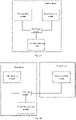
- FIG. 2A it is a schematic diagram of a device to which a touch data processing method according to an exemplary embodiment of the present disclosure is applied.
- the first operating system and the second operating system can be a same operating system or different operating systems in the same device.
- the first operating system can be Android system
- the second operating system can be Windows system.
- a touch data collection module can transmit collected touch data to a processing module, and the processing module determines whether the touch data is transmitted to the first operating system for response or to the second operating system for response.
- FIG. 2B it is a schematic diagram of another device to which the touch data processing method according to an exemplary embodiment of the present disclosure is applied.
- the first operating system and the second operating system may be a same type or different types of operating systems located in different devices.
- a first device may be a display device with a touch display function
- the second device may be a smartphone, a tablet computer, a notebook computer, a desktop computer, and other devices that have screen projection requirements.
- the touch data collection module can transmit the collected touch data of the first device to the processing module, and the processing module determines whether the touch data is transmitted to the first operating system for response or to the second operating system for response.
- an interactive white board is used as an example for illustration.
- the execution main body of the embodiment of the present disclosure may be an interactive white board.
- the interactive white board also referred as interactive intelligent tablet, can be an integrated device that controls a content displayed on a display panel and realizes human-computer interaction through touch technology.
- the integrated device integrates one or more functions such as a projector, an electronic whiteboard, a screen curtain, a sound box, TV and video conference terminal.
- the first operating system and the second operating system perform wired screen transmission. For example, there is no need to pre-install screen transmission software in the first operating system and the second operating system, the first operating system transmits touch data to the second operating system, and the second operating system can transmit the content to the first operating system through standard HDMI, so as to realize wired screen transmission.
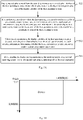
- FIG. 3 it is a flowchart of a touch data processing method according to an exemplary embodiment of the present disclosure.
- the first operating system and the second operating system are operating systems in a same device or different devices, and the method includes:
- the display content from the second operating system is displayed on the display interface of the first operating system, and after the touch screen on the device where the first operating system is located is rotated by a preset angle, if the touch operation on the touch screen is detected, whether the touch operation is an operation on the display content in the target display area is determined. Thus, if yes, the touch data corresponding to the touch operation can be sent to the second operating system, so that the second operating system responds to the touch operation.
- the present disclosure realizes that even if the touch screen on the device where the first operating system is located is rotated, the second operating system can also be controlled to respond to the touch operation by touching the touch screen.
- the method in the embodiment of the present disclosure may be executed by the device where the first operating system is located.
- it may be executed by the first operating system, or may be executed by other processing modules different from the first operating system.
- the target display area may be a full-screen area of the display interface of the first operating system.
- the present disclosure realizes that in the case where the display interface of the first operating system exhibits the display content of the second operating system in full screen, even if the touch screen on the device where the first operating system is located is rotated, the second operating system can also be controlled to respond to a touch operation by touching the touch screen.
- the target display area is defined as a partial area on the display interface of the first operating system.
- the partial area can also be called local area, or non-full-screen area.
- the display interface of the first operating system not only exhibits the content of the interface of the second operating system, but also exhibits the display content of the first operating system in other areas on the display interface of the first operation system since the content of the interface of the second operating system only occupies a partial area, that is, a non-full-screen area on the display interface of the first operating system.
- the display content of the first operating system is exhibited in a non-full-screen area
- a touch operation on the touch screen of the first operating system it is also possible to judge whether the touch operation is an operation on the display content in the target display area, so as to determine whether to send the touch data corresponding to the touch operation to the second operating system, thereby realizing response of the second operating system to the touch operation.
- the display content of the second operating system is displayed on the display interface of the first operating system in a window display manner.
- the target display area is the area where the window is located.
- the target display area is a full-screen area, and when the window is shrunk, the target display area is a non-full-screen area. It can be seen that the display content of the second operating system can be exhibited in full screen or non-full screen on the display interface of the first operating system by zooming the window.
- the target display area is not a specific or preset display area on the display interface of the first operating system, but can be understood as a display area which is in the display interface of the first operating system and displayed the display content from the second operating system.
- the present disclosure realizes that even if the content of the second operating system is exhibited on the display interface of the first operating system in a windowed form, it is also possible to support the touch data to be sent back to the second operating system, so that the second operating system can respond to the touch operation.
- the touch screen on the device where the first operating system is located is a designated horizontal or vertical screen, and it can be considered that the touch screen is in a 0-degree state.
- the user may rotate the touch screen by different preset angles.
- the preset angle may be an angle in a specified angle set, for example, the specified angle set includes: 90 degrees, 180 degrees, 270 degrees, 360 degrees, and the like. If supported by the device, the preset angle can also be any angle.
- a sensor with a motion detection function such as a gyroscope or an angle sensor may be equipped inside the device where the first operating system is located, and the first operating system can judge, by acquiring detection data of the sensor, whether the device rotates and the rotation angle, so that it is possible to determine whether the detected rotation angle of the device is a preset angle, and which preset angle in the specified angle set.
- the touch operation is an operation on the display content in the target display area
- an updated display content will be displayed in the target display area.
- the updated display content may be obtained by the second operating system updating the display content based on the touch operation. After the second operating system responds to the touch operation, a response result can be transmitted to the first operating system, and the updated display content can be displayed in the target display area of the first operating system.
- the updated display content may be obtained by the first operating system updating the display content based on the touch operation, so that the update speed of the display content can be improved.
- a floating window and/or a control for controlling a display state of the target display area may be displayed in the target display area.
- the floating window may be a button for controlling the target display area, or a button for controlling the display interface of the first operating system, or the like.
- the display state of the target display area may be a size state of the area, a position state of the area, and the like.
- the control may be a maximized control, a minimized control, a close control, etc., which is fixed in the target display area.
- a touch operation acting on the floating window and the control is responded to by the first operating system. In this way, the area where the floating window and the control are located can be used as a shielding area, and touch operation on the shielding area is not responded to by the second operating system.
- the display position of the target display area may also be adjusted, based on this, in one embodiment, after a display position of the target display area is adjusted, if the touch operation is an operation on the display content in the adjusted target display area, the touch data of the touch operation is sent to the second operating system, so that the second operating system responds to the touch operation. Therefore, the present disclosure realizes that even if the position of the target display area is changed, the second operating system can also respond to the touch operation.
- Fig. 4 it is a flowchart of another touch data processing method according to an exemplary embodiment of the present disclosure.
- the first operating system and the second operating system are operating systems in the same device or different devices, and the methods includes:
- This embodiment realizes that even if the touch screen on the device where the first operating system is located is rotated, the device where the second operating system is located can still respond to a touch operation on the device where the first operating system is located.
- Fig. 5A it is a flowchart of another touch data processing method according to an exemplary embodiment of the present disclosure.
- the first operating system and the second operating system are operating systems in the same device or different devices, and the method includes:
- the first operating system or other processing modules different from the first operating system can acquire touch-position information, and when detecting a touch operation on the display interface of the first operating system, according to the relationship between the touch operation and the touch-position information, whether the touch operation is an operation on the display content in the target display area is determined, so as to determine whether to send the touch data corresponding to the touch operation to the second operating system, so that the second operating system can also respond to the touch operation on the touch screen of the first operating system.
- the method of this embodiment may be executed by the device where the first operating system is located. For example, it may be executed by the first operating system, or may be executed by other processing modules different from the first operating system, or the like. For example, the method of this embodiment can be applied to the processing module in Fig. 2A or Fig. 2B .
- the full-screen content of the second operating system can be displayed in the target display area of the display interface of the first operating system, so as to achieve display of the content in the second operating system as much as possible.
- a part of the screen content of the second operating system may be displayed in the target display area of the display interface of the first operating system, so as to cope with some special scenarios, thereby making the content of the screen projection more flexible.
- first information such as non-private information
- second information such as private information
- the screen of the second operating system can be divided into at least two areas, one area exhibits the first information, the other area exhibits the second information, and the first information is projected and exhibited in the target display area of the display interface of the first operating system.
- the screen of the second operating system can be divided into two on the left and right, and only the content exhibited in the left area is displayed on the first operating system, and the content exhibited in the right area is not displayed on the display interface of the first operating system.
- the content of which partial area in the second operating system is specifically exhibited can be flexibly configured, and is not limited to the left and right sides, which is not limited herein.
- the target display area may be a full-screen area of the display interface of the first operating system.
- the second operating system can also be controlled to respond to the touch operation by touching the touch screen.
- the target display area is defined as a partial area in the display interface of the first operating system.
- the partial area can also be called local area, or non-full-screen area.
- the display interface of the first operating system not only exhibits the content of the interface of the second operating system, but also exhibits the display content of the first operating system in other areas of the display interface of the first operation system since the content of the interface of the second operating system only occupies a partial area on the display interface of the first operating system.
- the display content of the first operating system is exhibited in a non-full-screen area
- a touch operation on the touch screen of the first operating system is detected, it is also possible to judge whether the touch operation is an operation on the display content in the target display area, so as to determine whether to send the touch data corresponding to the touch operation to the second operating system, thereby realizing response of the second operating system to the touch operation.
- the display content of the second operating system is displayed on the display interface of the first operating system in a window display manner.
- the target display area is an area where the window is located.
- the target display area is a full-screen area, and when the window is shrunk, the target display area is a non-full-screen area. It can be seen that, by zooming the window, the display content of the second operating system can be exhibited in full screen or non-full screen on the display interface of the first operating system.
- the display content of the second operating system on the display interface of the first operating system in a windowed form for example, it may be to encode picture signals of the second operating system into a video data stream, and transmit the video data stream to the first operating system through HDMI/Type/VGA, etc. After the first operating system obtains data, the data stream is decoded, and then zoomed and displayed on the window. It should be understood that other manners are also feasible, which will not be repeated herein.
- the touch-position information is the position information of the target display area under the touch-box coordinate system, which can be obtained by mapping the position information of the target display area under the systematic coordinate system of the first operating system to the touch-box coordinate system of the first operating system.
- the position information of the target display area under the systematic coordinate system of the first operating system can be acquired through a system interface
- the position information is simply referred to as system-position information
- the touch data is the data under the touch-box coordinate system
- the position information of the target display area under the touch-box coordinate system of the first operating system which is referred to as touch-position information
- the first operating system can determines the touch-position information.
- the first operating system may send the data required for calculating the touch-position information to the processing module, and the processing module will perform the calculation.
- the touch-position information can also be determined by the first operating system and sent to the processing module. Since original data of the touch box is reported at a high frequency, calculating the touch-position information through the first operating system can avoid the situation that the processing module cannot keep up with the efficiency and performance due to the low computing capability.
- the touch-position information is updated after the display position of the target display area is adjusted, so as to ensure that the touch data can be correctly allocated and responded.
- the adjustment of the display position of the target display area may be an adjustment that causes change of the touch-position information, for example, one or more operations in which the target display area is moved, zoomed, region maximized, region minimized, region closed, etc.
- the touch-position information may change with a window state.
- the adjustment of the display position of the target display area may be an operation on a container of the content of the second operating system.
- the container can be SurfaceView, and controlling the drag/zoom of the window can control the position of SurfaceView.
- how to determine the touch-position information may be determined by the relationship between the touch-box coordinate system of the first operating system and the systematic coordinate system of the first operating system.
- the relationship between the touch-box coordinate system and the systematic coordinate system may include a conversion relationship between a position of an area under the touch-box coordinate system and a position of an area under the systematic coordinate system.
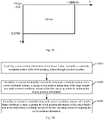
- a width and height of the touch-box coordinate system depend on a precision of the touch screen. For example, if the X-axis precision of the touch box is 0-40000 and the Y-axis precision is 0-40000, the touch-box coordinate system can be as shown in Fig. 5B .
- a width and height of the systematic coordinate system depend on a resolution of the screen, and the systematic coordinate system is determined by an orientation of the system, wherein the orientation of the system can be determined by a rotation direction of the device.
- a width and height of the screen coordinate system depend on the resolution of the screen, the screen coordinate system is fixed, and the origin will not change with a rotation of the device.
- a 4k screen has a width of 3840 and a height of 2160, and the screen coordinate system is as shown in Fig. 5C .
- the preset relationship between the touch-box coordinate system and the systematic coordinate system may include: the preset relationship between the systematic coordinate system and the screen coordinate system, and the preset relationship between the screen coordinate system and the touch-box coordinate system.
- the preset relationship between the systematic coordinate system and the screen coordinate system may include: a conversion relationship between the position of the area under the systematic coordinate system of the first operating system and the position of the area under the screen coordinate system of the first operating system.
- the preset relationship between the screen coordinate system and the touch-box coordinate system may include: a conversion relationship between the position of the area under the screen coordinate system of the first operating system and the position of the area under the touch-box coordinate system of the first operating system.
- the relationship between the touch-box coordinate system and the systematic coordinate system is determined through the relationship between the systematic coordinate system and the screen coordinate system, and the relationship between the screen coordinate system and the touch-box coordinate system, which can improve an accuracy of position conversion.
- Fig. 5D it is a flowchart of determining touch-position information according to an exemplary embodiment of the present disclosure.
- the method describes how to determine touch-position information based on the above-mentioned embodiment.
- the method can include the following steps 5001 to 5003:
- the position information of the target display area under different coordinate systems is named as different names.
- the position information of the target display area in the systematic coordinate system of the first operating system is called system-position information
- the position information of the target display area in the screen coordinate system of the first operating system is called screen-position information
- the position information of the display area in the touch-box coordinate system of the first operating system is called touch-position information.
- system-position information can be acquired through a system interface.
- the coordinates getX() and getY() where the target display area is located can be acquired, and the height getHeight() and width getWidth() of the target display area can be acquired.
- the relationship between the systematic coordinate system and the screen coordinate system includes: the relationship between the systematic coordinate system and the screen coordinate system after the touch screen is rotated by a specified angle in a specified direction.
- the specified angle includes 0 degrees, 90 degrees, 180 degrees and 270 degrees.
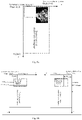
- Fig. 5F it shows a 4k system, which is a systematic coordinate system shown in four rotation directions.
- the target display area may be first mapped from the systematic coordinate system to the screen coordinate system.
- screen-position information (LEFT_screen, TOP_screen, RIGHT_screen, BOTTOM_screen) is system-position information (LEFT_system, TOP_system, RIGHT_system, BOTTOM_system).
- FIG. 5G it is a schematic diagram showing a comparison of target display areas in different coordinate systems after the device is rotated clockwise by 90 degrees according to an exemplary embodiment of the present disclosure. If the system-position information is still used as the screen-position information, the error shown in Fig. 5G will appear.
- the screen-position information of the target display area in the screen coordinate system of the first operating system is acquired by mapping the system-position information. As shown in Fig.
- the screen-position information of the target display area in the screen coordinate system of the first operating system is acquired by mapping the system-position information. As shown in Fig.
- the screen-position information of the target display area in the screen coordinate system of the first operating system is acquired by mapping the system-position information. As shown in Fig.
- LEFT _ touch LEFT _ screen * TOUCH _ X / ScreenWidth
- TOP _ touch TOP _ screen * TOUCH _ Y / ScreenHeight
- RIGHT _ touch RIGHT _ screen * TOUCH _ X / ScreenWidth
- BOTTOM _ touch BOTTOM _ screen * TOUCH _ Y / ScreenHeight
- the conversion relationship between the touch-position information and the system-position information can be acquired, and the system-position information can be acquired from the coordinates getX() and getY() where the target display area is located, and the height getHeight() and width getWidth() of the target display area.Thus, the conversion relationship between the touch-position information and getX(), getY(), getHeight() and getWidth() can be acquired.
- the touch-position information can be acquired.
- the touch-position information After the touch-position information is acquired, if a touch operation on the display interface of the first operating system is detected, according to the relationship between the touch operation and the touch-position information, whether the touch operation is an operation on the display content in the target display area can be determined, so that whether to send the touch data corresponding to the touch operation to the second operating system can be determined according to the judgment result, so that the second operating system can respond to the touch operation.
- the touch data may further include ID of the touch point, the touch state of the touch point, and the like, which is not limited herein.
- the judgment condition may include that the touch operation is an operation on the target display area.
- a touch area in the target display area may also be a touch area in the target display area that is only for the response of the first operating system.
- a floating window and/or a control for controlling a display state of the target display area may be displayed in the target display area.
- the floating window may be a button for controlling the target display area, or a button for controlling the display interface of the first operating system, or the like.
- the display state of the target display area may be a size state of the area, a position state of the area, and the like.
- the control may be a control that is fixed in the target display area, such as a maximized control, a minimized control, or a close control. Touch operations acting on the floating window and the control are responded to by the first operating system. In this way, the area where the floating window and the control are located can be used as a shielding area, and touch operation on the shielding area is not responded to by the second operating system.
- FIG. 5K it is a schematic diagram that shows a window provided with a floating window according to an exemplary embodiment of the present disclosure.
- the schematic diagram takes the first operating system as Android main system and the second system as an external channel system as an example, the display content of the external channel system is exhibited in the window of Android main system, and a close button is floated on the window. It is expected that when the user clicks the button, a touch event is given to Android main system, not to other external channel systems. The user can click the close button on the display interface of Android main system, so as to close the above-mentioned window, and does not expect that the external channel system responds to the touch data.
- the condition of judging that the touch operation is an operation on the display content in the target display area includes: the touch operation is an operation on the target display area, and is not an operation on the shielding area.
- the shielding area is an area where the floating window is located and/or an area where the control for controlling the display state of the target display area is located in the target display area.
- the shielding area may be one area or multiple areas, which are specifically configured according to requirements. How to determine the position information of the shield area is similar to how to acquire the touch-position information.
- the shield area is also an area under the touch-box coordinate system, which can be determined based on the relationship between the touch-box coordinate system and the systematic coordinate system.
- the shielding area may be calculated by the first operating system, or may be calculated by a processing module different from the first operating system. For the specific determination method, reference may be made to the determination method of the touch-position information, which will not be repeated herein.
- This embodiment uses two sub-conditions to define whether the touch operation is an operation on the display content in the target display area, which can deal with the situation where it is expected that the first operating system responds to the touch operation in the target display area while it is not expected that the second operating system responds to the touch operation in the target display area.
- condition of judging whether the touch operation is an operation on the display content in the target display area may also include other conditions, which are configured according to requirements, and will not be repeated herein.
- the judgement can be made according to whether the position of the touch operation is inside the target display area.
- the judgement process may: when detecting that a touch object performs a touch-down event, a touch position of the touch object is inside the target display area.
- the touch-down event is an event that occurs during the touch object performs a continuous touch operation.
- a complete touch operation performed by the touch object may be continuous, which may often include: a touch-down event ( ACTION_DOWN ), multiple continuous touch-move events (ACTION_MOVE ), and a touch-up event ( ACTION_UP ).
- the touch position of the touch object changes and corresponds to multiple touch positions. These touch positions refer to positions of the touch points on the screen generated by the touch object in the process of touching and moving on the screen of the device.
- the touch object may be an operating body that can be recognized by the screen, such as a finger, a palm, or a stylus. In this example, as long as the touch-down event occurs in the target display area, it can be considered that all the current continuous touch operations are operations on the target display area.
- whether the current touch operation is an operation on the target display area may be determined by: whether the touch position of the touch object is inside the target display area when the touch object performs a touch-down event. If the touch position of the touch object is inside the target display area when the touch object performs a touch-down event, it is determined that the current touch operation is an operation on the target display area.
- the touch data may be touch data when a touch-down event, a touch-move event or a touch-up event of the same touch object is detected. In this way, the integrity of one continuous touch operation can be guaranteed.
- the touch data of the touch operation is sent to the first operation system, and the first operating system responds to the touch operation, so that the present disclosure realized that the first operating system responds to the current touch operation when the touch operation is not an operation on the display content in the target display area.
- the present disclosure realizes that a piece of touch data is either sent to the first operating system for response, or sent to the second operating system for response.
- the touch operation which is not an operation on the display content in the target display area may be a touch operation which is not an operation on the target display area, or a touch operation which is an operation on the target display area and is an operation on the shielding area.
- the shielding area is an area where the floating window is located and/or an area where the control for controlling the display state of the target display area is located in the target display area.
- the screen content of the writing software can be projected to the main system, the main system exhibits the content of the writing software in a windowed form, and the user can control the writing software of the external system on the interface of the main system.
- the external system needs to transfer the picture to the main system for display after responding to the touch data, which will be slower than directly displaying on the main system. Therefore, in order to improve the writing speed, the external system and the main system can be written at the same time, that is, the two systems respond to touch data at the same time, so that the handwriting that displays faster on the main system can be seen at the time of writing.
- the touch data can be sent to the first operating system, that is, when the touch data of the current touch operation is acquired, the touch data of the touch operation is directly sent to the first operating system, and the first operating system determines whether to respond to the touch operation.
- whether the first operating system responds to the touch operation is determined based on a preset strategy. It can be seen that whether to respond to the touch operation can be determined by the first operating system.
- the touch data can be copied into two copies, one copy is directly transmitted to the first operating system, and the other copy is determined whether to send it to the second operating system based on whether the judgment condition (the condition of judging that the touch operation is an operation on the display content in the target display area) is satisfied.
- the judgment condition the condition of judging that the touch operation is an operation on the display content in the target display area
- the touch data is converted into data suitable for the second operating system and then sent to the second operating system.
- one complete touch operation may include operations on the target display area and operations on areas other than the target display area. In order to maintain the integrity of the touch data, a complete set of touch data needs to be from Down to Up .
- the touch position of the touch object is inside the target display area when the touch object performs a touch-down event, and there is a touch position inside the target display area in the process of the continuous touch operation, according to the preset relationship between the touch-box coordinate system of the first operating system and the coordinate system of the second operating system, the touch data of the touch position inside the target display area is converted into touch data under the coordinate system of the second operating system.
- the touch data of the touch position outside the target display area is converted into touch data closest to an edge of the target display area to acquire the touch data after the first conversion, and according to the preset relationship between the touch-box coordinate system of the first operating system and the coordinate system of the second operation system, the touch data after the first conversion is converted into touch data under the coordinate system of the second operating system, so as to acquire touch data after the second conversion.
- the second operating system may or may not have a corresponding touch screen. Therefore, the touch data needs to be converted into data suitable for the second operating system for use by the second operating system.
- the conversion process of touch data can be completed by the first operating system or a processing module different from the first operating system, so that the second operating system can directly respond accordingly according to the converted touch data.
- the conversion process of touch data can also be completed by the second operating system, the touch data is directly sent to the second operating system, and the second operating system converts the touch data into touch data under the coordinate system of the second operating system, and respond according to the converted touch data, thereby reducing the burden of the processing module.
- the touch data corresponding to the touch operation is sent to the second operating system, including:
- the actual touch trajectory is represented by a thick dashed line
- the trajectory of the touch data actually received by the second operating system is represented by a thick solid line.
- the touch data of the touch operation is converted into the touch data closest to the edge of the target display area, which can not only ensure the integrity of the data, but also avoid false responses caused by the converted touch data. It should be understood that, in other embodiments, other conversion means may also be used to ensure the integrity of the continuous touch operation, which is specifically set according to requirements.
- the conversion of the touch data may be determined by a zooming relationship between the target display area and the area where the display content is located in the coordinate system of the second operating system. Taking exhibiting the full-screen content in the second operating system on the display interface of the first operating system as an example, the area where the display content is located is the full-screen area of the second operating system.
- x is x-axis data reported by the touch data collection module
- y is y-axis data reported by the touch data collection module
- x_source is touch x-axis data that needs to be reported to the second operating system
- y_source is touch y-axis data that needs to be reported to the second operating system.
- SourceWidth is a width of the screen resolution of the device where the second operating system is located
- SourceHeight is a height of the screen resolution of the device where the second operating system is located.
- x _ source x ⁇ LEFT _ touch * SourceWidth / RIGHT _ touch ⁇ LEFT _ touch
- y _ source y ⁇ TOP _ touch * Source Height / BOTTOM _ touch ⁇ TOP _ touch
- the calculated x_source and y_source can be input into the second operating system.
- the touch data of the touch operation needs to be converted into the touch data closest to the edge of the target display area.
- x and y in the formula can be firstly converted into x1 and y1 , and then substituted into the formula, which will not be repeated herein.
- the second operating system when the second operating system does not display full-screen content, but a part of the content on the screen of the second operating system is exhibited on the display interface of the first operating system, it is called a partial area in this embodiment.
- the relationship between the target display area and the partial area of the screen can be acquired by x_source and y_source .
- the partial area of the screen is an area of the content for screen transmission in the second operating system.
- touch data of touch position inside the target display area is converted into touch data under the coordinate system of the second operating system, wherein the coordinate range of the partial area refers to a coordinate range of the partial area in the coordinate system of the screen corresponding to the second operating system ,
- the full-screen content of the second operating system is displayed in the target display area, it is calculated with the resolution SourceWidth/SourceHeight of the display screen of the second operating system.
- SourceWidth/SourceHeight cannot be directly used for calculation, and the coordinate range of the partial area on the screen of the second operating system should be known.
- the partial area can be obtained by the second operating system and transmitted to the first operating system, and then transmitted to MCU by the first operating system.
- the coordinate range of the partial area on the screen of the second operating system can be composed of the following four coordinate values:
- x _ source x ⁇ LEFT _ touch * RIGHT _ system 2 _ window ⁇ LEFT _ system 2 _ window / RIGHT _ touch ⁇ LEFT _ touch + LEFT _ system 2 _ window
- y _ source y ⁇ TOP _ touch * BOTTOM _ system 2 _ window ⁇ TOP _ system 2 _ window / BOTTOM _ touch ⁇ T O P _ touch + TOP _ touch
- the calculated x_source and y_source can be input into the second operating system.
- the touch data of the touch position inside the target display area can be converted into the touch data under the coordinate system of the second operating system.
- the touch data of the touch operation can be converted into touch data closest to an edge of the target display area, and then according to the above-mentioned calculation means in the embodiment, the converted touch data closest to the edge of the target display area can be converted into touch data under the coordinate system of the second operating system.
- the window of the second operating system is further provided with a button area for switching external channel signals, such as PC, Android box, HDMI, Type-c and the like.
- USB Hub there may be a need to switch the external device, and in view of this, the external device can be switched to the first operating system or the second operating system through the control of USB Hub.
- External devices can be USB flash disks, cameras, microphones, and other devices.
- the first operating system may be Android main system in the display device, and the second operating system may be an external channel system.
- the processing module may be MCU, and the display content from the second operating system is displayed in a window of the display interface of the first operating system.
- Android main system sends the calculated touch-position information of the window to MCU. After the MCU receives the touch data sent by the touch data collection module, it can judged whether the current touch operation is an operation on the display content in the window.
- process is not performed directly; if yes, the touch data is then converted according to the coordinate system of the external channel system, and the converted touch data is sent to the external channel system, so that the display content of the external channel system can be exhibited in the display interface of the first operating system in a windowed form, and a touch return control of the window can be realized.
- the present disclosure further provides embodiments of a touch data processing equipment, an electronic device to which it is applied, and a computer storage medium.
- FIG. 7 it is a block diagram of a touch data processing equipment according to an exemplary embodiment of the present disclosure.
- the first operating system and the second operating system are operating systems in the same device or in different devices, and the equipment includes :
- the target display area is a partial area in the display interface of the first operating system.
- the display content is displayed in the display interface of the first operating system in a window display manner.
- the data display module 72 is further configured to: if the touch operation is an operation on the display content in the target display area, display an updated display content in the target display area.
- the updated display content is obtained by the second operating system updating the display content based on the touch operation, or obtained by the first operating system updating the display content based on the touch operation.
- a floating window, and/or a control for controlling a display state of the target display area is displayed in the target display area, and a touch operation acting on the floating window and the control is responded to by the first operating system.
- the data processing module 76 is further configured to: after a display position of the target display area is adjusted, if the touch operation is an operation on the display content in an adjusted target display area, send the touch data of the touch operation to the second operating system, so that the second operating system responds to the touch operation.
- FIG. 8 it is a block diagram of another touch data processing equipment according to an exemplary embodiment of the present disclosure.
- the first operating system and the second operating system are operating systems in the same device or in different devices, and the equipment includes:
- the target display area is a partial area in the display interface of the first operating system.
- the display content is displayed in the display interface of the first operating system in a window display manner.
- the touch-position information is updated after the display position of the target display area is adjusted.
- the equipment further includes a position calculation module (not shown in Fig. 8 ), configured to:
- an origin of the touch-box coordinate system of the first operating system does not change with a rotation of the touch screen
- an origin of the screen coordinate system of the first operating system does not change with a rotation of the touch screen
- an origin of the systematic coordinate system of the first operating system will change with a rotation of the touch screen
- the touch screen is a touch screen on a device where the first operating system is located
- a relationship between the systematic coordinate system and the screen coordinate system includes: a relationship between the systematic coordinate system and the screen coordinate system after the touch screen is rotated by a specified angle along a specified direction.
- a floating window, and/or a control for controlling a display state of the target display area is displayed in the target display area, and a touch operation acting on the floating window and the control is responded to by the first operating system.
- a judgment condition that the operation determination module 86 determines that the touch operation is an operation on the display content in the target display area includes:
- a process of judging that the touch operation is an operation on the target display area includes: when detecting that a touch object performs a touch-down event, a touch position of the touch object is inside the target display area, wherein the touch-down event is an event that occurs during the touch object performs a continuous touch operation.
- the data processing module 88 specifically configured to: if a full-screen content of the second operating system is displayed in the target display area,
- the data processing module 88 specifically configured to: if a content in the partial area of a screen of the second operating system is displayed in the target display area,
- the data processing module 88 further configured to:
- the equipment further includes a device switch module (not shown in Fig. 8 ), configured to: switch an external device to the first operating system or the second operating system through the control of USB Hub.
- a device switch module (not shown in Fig. 8 ), configured to: switch an external device to the first operating system or the second operating system through the control of USB Hub.
- an embodiment of the present disclosure further provides an electronic device.
- the device includes a memory and a processor.
- the memory stores a computer program
- the computer program is adapted to be loaded by the processor and execute steps of any one of the above-mentioned touch data processing methods.
- the electronic device is an interactive white board
- the first operating system is Android system
- the second operating system is Windows system or a system on an external device connected to the interactive white board.
- an embodiment of the present disclosure further provides a computer storage medium.
- the computer storage medium stores a plurality of instructions, the instructions are adapted to be loaded by a processor and execute steps of any one of the above-mentioned touch data processing methods.
- the present disclosure may adopt the form of a computer program product implemented on one or more storage media containing program codes (including but not limited to disk storage, CD-ROM, optical storage, etc.).
- Computer usable storage media include permanent and non-permanent, removable and non-removable media, and information storage can be achieved by any method or technology.
- the information can be computer-readable instructions, data structures, program modules, or other data.
- Examples of computer storage media include, but are not limited to: phase change memory (PRAM), static random access memory (SRAM), dynamic random access memory (DRAM), other types of random access memory (RAM), read-only memory (ROM), electrically erasable programmable read-only memory (EEPROM), flash memory or other memories, compact disc read-only memory (CD-ROM), digital versatile disc (DVD) or other optical storage, magnetic cassette tape, magnetic disk storage or other magnetic storage devices or any other non-transmission media which can be used to store information capable of being accessed by computing devices.
- PRAM phase change memory
- SRAM static random access memory
- DRAM dynamic random access memory
- RAM random access memory
- ROM read-only memory
- EEPROM electrically erasable programmable read-only memory
- flash memory or other memories
- CD-ROM compact disc read-only memory
- DVD digital versatile disc
- magnetic cassette tape magnetic disk storage or other magnetic storage devices or any other non-transmission media which can be used to store information capable of being accessed by computing devices.
- the equipment embodiments since they basically correspond to the method embodiments, reference may be made to the descriptions of the method embodiments for related parts.
- the equipment embodiments described above are only illustrative, wherein the modules described as separate components may or may not be physically separated, and the components as display modules may or may not be physical modules, that is, they may be located in the same place, or distributed over multiple network modules. Some or all of the modules can be selected according to actual needs to achieve the purpose of the solution of the present disclosure. Those skilled in the art can understand and implement it without creative effort.
- the embodiments of the touch data processing equipment of the present disclosure can be applied to electronic device.
- the equipment embodiment may be implemented by software, or may be implemented by hardware or a combination of software and hardware.
- an equipment in a logical sense is formed by reading the corresponding computer program instructions in the non-volatile memory into the memory for operation through the processor of the electronic device where the equipment is located.
- Fig. 9 it is a hardware structure diagram of the electronic device where the touch data processing equipment of the present disclosure is located.
- the electronic device where the equipment is located in the embodiment may also include other hardware generally according to the actual function of the electronic device, which will not be repeated herein.
Landscapes
- Engineering & Computer Science (AREA)
- Theoretical Computer Science (AREA)
- General Engineering & Computer Science (AREA)
- Physics & Mathematics (AREA)
- General Physics & Mathematics (AREA)
- Human Computer Interaction (AREA)
- Computer Hardware Design (AREA)
- Software Systems (AREA)
- Multimedia (AREA)
- User Interface Of Digital Computer (AREA)
- Two-Way Televisions, Distribution Of Moving Picture Or The Like (AREA)
- Signal Processing For Digital Recording And Reproducing (AREA)
Abstract
Description
- The present disclosure claims the priority of a Chinese patent application with the Application No.
CN202010821331.7 and the invention title of "TOUCH DATA PROCESSING METHOD, EQUIPMENT, DEVICE AND STORAGE MEDIUM", which is filed to CNIPA on August 14, 2020 - The present disclosure relates to the technical field of intelligent devices, and in particular to a touch data processing method, equipment, device and storage medium.
- All types of intelligent display devices, particularly large-screen display devices, are used more and more frequently in life or work. Some intelligent display devices have multiple operating systems built therein, or multiple operating systems are built into different devices. At present, there is often a need to display contents of different operating systems on the same display screen. Taking screen transmission as an example, a screen content of a sending terminal (such as Windows, Mac or Chrome Notebook) with a built-in second operating system can be projected to a receiving terminal (such as a large-sized interactive white board) with a built-in first operating system. At this time, the first operating system may be referred to as a main operating system, and the second operating system may be referred to as an external-channel operating system. Taking a multi-system interactive white board as an example, a content of the second operating system (e.g. Windows system) in the interactive white board can be exhibited on a display interface of the first operating system (e.g. Android system).
- The inventors found that when the content of the second operating system is exhibited on the display interface of the first operating system, a touch screen of the device where the first operating system is located must be in a specified horizontal or vertical state, otherwise, the second operating system cannot be controlled to respond by touching the touch screen of the first operating system.
- The present disclosure provides a touch data processing method, equipment, device and storage medium, so as to solve a problem in the prior art that, after a touch screen of a device where a first operating system is located is rotated, the second operating system cannot be controlled to respond to the touch operation by touching the touch screen.
- According to a first aspect of embodiments of the present disclosure, a touch data processing method is provided. A first operating system and a second operating system are operating systems in a same device or in different devices, and the method comprises:
- displaying a display content from the second operating system on a display interface of the first operating system, wherein the display content is displayed in a target display area of the display interface of the first operating system;
- after a touch screen on a device where the first operating system is located is rotated by a preset angle, if a touch operation on the touch screen is detected, determining whether the touch operation is an operation on the display content in the target display area; and
- if yes, sending touch data corresponding to the touch operation to the second operating system, so that the second operating system responds to the touch operation.
- According to a second aspect of embodiments of the present disclosure, a touch data processing method is provided. A first operating system and a second operating system are operating systems in a same device or in different devices, and the method comprises:
- displaying a display content from the second operating system on a display interface of the first operating system, wherein the display content is displayed in a target display area of the display interface of the first operating system;
- if a touch screen on a device where the first operating system is located is rotated by a preset angle, acquiring touch-position information, wherein the touch-position information is acquired by mapping position information of the target display area under a systematic coordinate system of the first operating system to a touch-box coordinate system of the first operating system;
- when a touch operation on the display interface of the first operating system is detected, according to a relationship between the touch operation and the touch-position information, determining whether the touch operation is an operation on the display content in the target display area; and
- if yes, sending touch data corresponding to the touch operation to the second operating system, so that the second operating system responds to the touch operation.
- According to a third aspect of embodiments of the present disclosure, a touch data processing method is provided. A first operating system and a second operating system are operating systems in a same device or in different devices, and the method comprises:
- a device where the first operating system is located displays a display content from the second operating system on a display interface of the first operating system, wherein the display content is displayed in a target display area of the display interface of the first operating system;
- after a touch screen on a device where the first operating system is located is rotated by a preset angle, if a touch operation on the touch screen is detected, the device where the first operating system is located determines whether the touch operation is an operation on the display content in the target display area; if yes, touch data corresponding to the touch operation is sent to the second operating system; and
- a device where the second operating system is located responds to the touch operation according to received touch data.
- According to a fourth aspect of embodiments of the present disclosure, a touch data processing equipment is provided. A first operating system and a second operating system are operating systems in a same device or in different devices, and the equipment comprises:
- a data display module, configured to display a display content from the second operating system on a display interface of the first operating system, wherein the display content is displayed in a target display area of the display interface of the first operating system;
- an operation determination module, configured to, after a touch screen on a device where the first operating system is located is rotated by a preset angle, if a touch operation on the touch screen is detected, determine whether the touch operation is an operation on the display content in the target display area; and
- a data processing module, configured to, if the touch operation is an operation on the display content in the target display area, send touch data corresponding to the touch operation to the second operating system, so that the second operating system responds to the touch operation.
- According to a fifth aspect of embodiments of the present disclosure, a touch data processing equipment is provided. A first operating system and a second operating system are operating systems in a same device or in different devices, and the equipment comprises:
- a content display module, configured to display a display content from the second operating system on a display interface of the first operating system, wherein the display content is displayed in a target display area of the display interface of the first operating system;
- a position acquisition module, configured to acquire touch-position information, wherein the touch-position information is acquired by mapping position information of the target display area under a systematic coordinate system of the first operating system to the touch-box coordinate system of the first operating system;
- an operation determination module, configured to, when a touch operation on the display interface of the first operating system is detected, according to a relationship between the touch operation and the touch-position information, determine whether the touch operation is an operation on the display content in the target display area; and
- a data processing module, configured to, if the touch operation is an operation on the display content in the target display area, send the touch data corresponding to the touch operation to the second operating system, so that the second operating system responds to the touch operation.
- According to a sixth aspect of embodiments of the present disclosure, a computer storage medium is provided. The computer storage medium stores a plurality of instructions, the instructions are adapted to be loaded by a processor and execute steps of any one of the above-mentioned touch data processing methods.
- According to a seventh aspect of embodiments of the present disclosure, an electronic device is provided. The electronic device comprises a memory and a processor, wherein the memory stores computer program, and the computer program is adapted to be loaded by the processor and executes steps of any one of the above-mentioned touch data processing methods.
- The technical solutions provided by embodiments of the present disclosure may include the beneficial effects as follows.
- In embodiments of the present disclosure, the display content from the second operating system is displayed on the display interface of the first operating system, and after the touch screen on the device where the first operating system is located is rotated by a preset angle, if the touch operation on the touch screen is detected, whether the touch operation is an operation on the display content in the target display area is determined. Thus, if the touch operation is an operation on the display content in the target display area, the touch data corresponding to the touch operation can be sent to the second operating system, so that the second operating system responds to the touch operation. The present disclosure realizes that even if the touch screen on the device where the first operating system is located is rotated, the second operating system can also be controlled to respond to the touch operation by touching the touch screen.
- It should be understood that both the above general description and the following detailed description are exemplary and explanatory only and are not restrictive of the present disclosure.
- The accompanying drawings herein, which are incorporated in and constitute a part of this description, illustrate embodiments consistent with the present disclosure and are used to explain the principles of the present disclosure together with the description.
-
Fig. 1 is a schematic diagram of screen projection display in the prior art. -
Fig. 2A is a schematic diagram of a device to which a touch data processing method according to an exemplary embodiment of the present disclosure is applied. -
Fig. 2B is a schematic diagram of another device to which a touch data processing method according to an exemplary embodiment of the present disclosure is applied. -
Fig. 3 is a flowchart of a touch data processing method according to an exemplary embodiment of the present disclosure. -
Fig. 4 is a flowchart of another touch data processing method according to an exemplary embodiment of the present disclosure. -
Fig. 5A is a flowchart of another touch data processing method according to an exemplary embodiment of the present disclosure. -
Fig. 5B is a schematic diagram of a touch-box coordinate system according to an exemplary embodiment of the present disclosure. -
Fig. 5C is a schematic diagram of a screen coordinate system according to an exemplary embodiment of the present disclosure. -
Fig. 5D is a flowchart of determining touch-position information according to an exemplary embodiment of the present disclosure. -
Fig. 5E is a schematic diagram of system-position information according to an exemplary embodiment of the present disclosure. -
Fig. 5F is a schematic diagram of a systematic coordinate system after a device is rotated by 0 degrees, 90 degrees, 180 degrees, and 270 degrees according to an exemplary embodiment of the present disclosure. -
Fig. 5G is a schematic diagram showing a comparison of target display areas under different coordinate systems after a device is rotated clockwise by 90 degrees according to an exemplary embodiment of the present disclosure. -
Fig. 5H is a schematic diagram showing a comparison between system-position information and screen-position information after a device is rotated by 90 degrees according to an exemplary embodiment of the present disclosure. - Fig. 51 is a schematic diagram showing a comparison between system-position information and screen-position information after a device is rotated by 180 degrees according to an exemplary embodiment of the present disclosure.
-
Fig. 5J is a schematic diagram showing a comparison between system-position information and screen-position information after a device is rotated by 270 degrees according to an exemplary embodiment of the present disclosure. -
Fig. 5K is a schematic diagram that shows a window provided with a floating window according to an exemplary embodiment of the present disclosure. -
Fig. 5L is a schematic diagram of a touch trajectory according to an exemplary embodiment of the present disclosure. -
Fig. 6 is a data flow diagram according to an exemplary embodiment of the present disclosure. -
Fig. 7 is a block diagram of a touch data processing equipment according to an exemplary embodiment of the present disclosure. -
Fig. 8 is a block diagram of another touch data processing equipment according to an exemplary embodiment of the present disclosure. -
Fig. 9 is a hardware structure diagram of an electronic device where a touch data processing equipment is located according to an exemplary embodiment of the present disclosure. - Exemplary embodiments will be described in detail herein, and examples thereof are shown in the accompanying drawings. When the following description refers to the accompanying drawings, unless otherwise indicated, the same numbers in different drawings represent the same or similar elements. The implementation approaches described in exemplary examples hereinafter are not intended to represent all implementation approaches consistent with the present disclosure. On the contrary, they are merely examples of equipment and methods consistent with some aspects of the present disclosure as recited in the appended claims.
- The terms used in the present disclosure are for the purpose of describing particular embodiments only and is not intended to limit the present disclosure. The "a", "said" and "the" in singular form used in the present disclosure and the appended claims are also intended to include plural form, unless the context clearly indicates other meanings. It should also be understood that the term "and/or" as used in the present disclosure refers to and includes any or all possible combinations of one or more associated listed items.
- It should be understood that, although the terms of first, second, third, etc. may be used in the present disclosure to describe various information, the information should not be limited to these terms. These terms are only used to distinguish the same type of information from each other. For example, without departing from the scope of the present disclosure, the first information may also be referred to as second information, and similarly, the second information may also be referred to as first information. Depending on the context, the word "if' as used herein can be interpreted as "while" or "when" or "in response to a certainty".
- Different operating systems can share a same display screen. Different operating systems may refer to a same type or different types of operating systems in a same device, or may refer to a same type or different types of operating systems located in different devices. Screen transmission belongs to a situation where different devices share a same display screen. In scenarios such as work, study, and entertainment, screen transmission operations are widely used to synchronize multimedia data of a source device to a target device, and the target device plays the contents. However, the inventors found that, when a content of a second operating system is exhibited on a display interface of a first operating system, a touch screen of a device where the first operating system is located must be in a specified horizontal or vertical state, so as to ensure that when touching the touch screen of the first operating system, the second operating system can respond accordingly. If the touch screen of the device where the first operating system is located is rotated, the second operating system cannot be controlled to respond by touching the touch screen. As shown in
Fig. 1 , it is a schematic diagram of screen projection display in the prior art. In this schematic diagram, a terminal device serving as the source device can exhibit multimedia data on its screen on a screen of the intelligent interactive device (target device) in a full-screen manner. In a process of exhibiting the multimedia data of the terminal device by the intelligent interactive device, if the touch screen of the intelligent interactive device is rotated, the terminal device cannot be controlled to respond to the touch operation by touching the touch screen of the intelligent interactive device. - In view of this, the present disclosure provides a touch data processing method which realizes that: even if the touch screen on the device where the first operating system is located is rotated, the second operating system can be controlled to respond to the touch operation by touching the touch screen.
- The touch data processing method provided in this embodiment may be executed by software, or by a combination of software and hardware, or by hardware. The involved hardware may be composed of two or more physical entities, or may be composed of one physical entity. The method of this embodiment can be applied to an electronic device with display and touch functions. Thereinto, the electronic device may be an intelligent display device such as an interactive white board and a digital tablet, or may be a tablet computer, notebook computer, desktop computer, PDA (Personal Digital Assistant) and other devices with display and touch functions.
- As an example, an execution main body of the touch data processing method may be a processing module in an electronic device, or may be the first operating system. The first operating system and the second operating system may be two identical or different operating systems in the same device, or may be a same type or different types of operating systems located in different devices. The processing module may be a functional module different from the first operating system. For example, the first operating system corresponds to a set of modules (for example, including CPU, GPU, a processor, a memory, etc.), and the processing module herein may be a MCU (Microcontroller Unit) different from the set of modules. The electronic device may further include a touch data collection module and a display screen. For example, a touch operation interface of the touch data collection module may cover a display screen for detecting a touch operation and generating corresponding touch data. Hereinafter, a touch data processing method executed by a processing module is illustrated as an example.
- As shown in
Fig. 2A , it is a schematic diagram of a device to which a touch data processing method according to an exemplary embodiment of the present disclosure is applied. In this schematic diagram, the first operating system and the second operating system can be a same operating system or different operating systems in the same device. Taking the display device as an interactive white board as an example, the first operating system can be Android system, and the second operating system can be Windows system. A touch data collection module can transmit collected touch data to a processing module, and the processing module determines whether the touch data is transmitted to the first operating system for response or to the second operating system for response. - As shown in
Fig. 2B , it is a schematic diagram of another device to which the touch data processing method according to an exemplary embodiment of the present disclosure is applied. In this diagram, the first operating system and the second operating system may be a same type or different types of operating systems located in different devices. A first device may be a display device with a touch display function, and the second device may be a smartphone, a tablet computer, a notebook computer, a desktop computer, and other devices that have screen projection requirements. The touch data collection module can transmit the collected touch data of the first device to the processing module, and the processing module determines whether the touch data is transmitted to the first operating system for response or to the second operating system for response. - In one embodiment, an interactive white board is used as an example for illustration. The execution main body of the embodiment of the present disclosure may be an interactive white board. Thereinto, the interactive white board, also referred as interactive intelligent tablet, can be an integrated device that controls a content displayed on a display panel and realizes human-computer interaction through touch technology. The integrated device integrates one or more functions such as a projector, an electronic whiteboard, a screen curtain, a sound box, TV and video conference terminal.
- In one embodiment, the first operating system and the second operating system perform wired screen transmission. For example, there is no need to pre-install screen transmission software in the first operating system and the second operating system, the first operating system transmits touch data to the second operating system, and the second operating system can transmit the content to the first operating system through standard HDMI, so as to realize wired screen transmission.
- Sequentially, the embodiments of the present disclosure will be exemplified with reference to the accompanying drawings.
- As shown in
Fig. 3 , it is a flowchart of a touch data processing method according to an exemplary embodiment of the present disclosure. The first operating system and the second operating system are operating systems in a same device or different devices, and the method includes: - in
Step 302, displaying a display content from the second operating system on a display interface of the first operating system, wherein the display content is displayed in a target display area of the display interface of the first operating system, - in
Step 304, after a touch screen on a device where the first operating system is located is rotated by a preset angle, if a touch operation on the touch screen is detected, determining whether the touch operation is an operation on the display content in the target display area, - in
Step 306, if yes, sending touch data corresponding to the touch operation to the second operating system, so that the second operating system responds to the touch operation. - In embodiments of the present disclosure, the display content from the second operating system is displayed on the display interface of the first operating system, and after the touch screen on the device where the first operating system is located is rotated by a preset angle, if the touch operation on the touch screen is detected, whether the touch operation is an operation on the display content in the target display area is determined. Thus, if yes, the touch data corresponding to the touch operation can be sent to the second operating system, so that the second operating system responds to the touch operation. The present disclosure realizes that even if the touch screen on the device where the first operating system is located is rotated, the second operating system can also be controlled to respond to the touch operation by touching the touch screen.
- The method in the embodiment of the present disclosure may be executed by the device where the first operating system is located. For example, it may be executed by the first operating system, or may be executed by other processing modules different from the first operating system.
- In one example, the target display area may be a full-screen area of the display interface of the first operating system. The present disclosure realizes that in the case where the display interface of the first operating system exhibits the display content of the second operating system in full screen, even if the touch screen on the device where the first operating system is located is rotated, the second operating system can also be controlled to respond to a touch operation by touching the touch screen.
- In practical applications, when a content of any operating system is exhibited on the screen, it is exhibited in full screen, and the systems are mutually exclusive, and contents of two operating systems cannot be displayed on the screen at the same time. Taking
Fig. 1 as an example, in a process of exhibiting the multimedia data of the terminal device by the intelligent interactive device, there may be a need to operate the content (such as application programs) in the operating system, while the application programs in the operating system of the intelligent interactive device cannot be operated since the multimedia data of the terminal device needs to be exhibited on the screen of the intelligent interactive device in full screen. - Based on this, in another embodiment, the target display area is defined as a partial area on the display interface of the first operating system. The partial area can also be called local area, or non-full-screen area. In this way, the display interface of the first operating system not only exhibits the content of the interface of the second operating system, but also exhibits the display content of the first operating system in other areas on the display interface of the first operation system since the content of the interface of the second operating system only occupies a partial area, that is, a non-full-screen area on the display interface of the first operating system. In one embodiment, in the case where the display content of the first operating system is exhibited in a non-full-screen area, if a touch operation on the touch screen of the first operating system is detected, it is also possible to judge whether the touch operation is an operation on the display content in the target display area, so as to determine whether to send the touch data corresponding to the touch operation to the second operating system, thereby realizing response of the second operating system to the touch operation.
- In order to achieve the controllability of the target display area, in one embodiment, the display content of the second operating system is displayed on the display interface of the first operating system in a window display manner. The target display area is the area where the window is located. When the window is maximized, the target display area is a full-screen area, and when the window is shrunk, the target display area is a non-full-screen area. It can be seen that the display content of the second operating system can be exhibited in full screen or non-full screen on the display interface of the first operating system by zooming the window.
- It should be noted that, in each embodiment, the target display area is not a specific or preset display area on the display interface of the first operating system, but can be understood as a display area which is in the display interface of the first operating system and displayed the display content from the second operating system.
- In one embodiment, when the display content of the second operating system is displayed in the window of the display interface of the first operating system, if a touch operation on the touch screen of the first operating system is detected, whether the touch operation is an operation on the display content in the target display area is determined; if yes, the touch data corresponding to the touch operation is sent to the second operating system, so that the second operating system responds to the touch operation. The present disclosure realizes that even if the content of the second operating system is exhibited on the display interface of the first operating system in a windowed form, it is also possible to support the touch data to be sent back to the second operating system, so that the second operating system can respond to the touch operation.
- Normally, the touch screen on the device where the first operating system is located is a designated horizontal or vertical screen, and it can be considered that the touch screen is in a 0-degree state. Based on different needs, the user may rotate the touch screen by different preset angles. The preset angle may be an angle in a specified angle set, for example, the specified angle set includes: 90 degrees, 180 degrees, 270 degrees, 360 degrees, and the like. If supported by the device, the preset angle can also be any angle.
- Optionally, in practical applications, a sensor with a motion detection function such as a gyroscope or an angle sensor may be equipped inside the device where the first operating system is located, and the first operating system can judge, by acquiring detection data of the sensor, whether the device rotates and the rotation angle, so that it is possible to determine whether the detected rotation angle of the device is a preset angle, and which preset angle in the specified angle set.
- After the touch screen is rotated, regardless of whether the display content of the second operating system is exhibited in a partial area (non-full-screen area) or a window, if a touch operation on the touch screen is detected, whether the touch operation is an operation on the display content in the target display area can be determined; if yes, the touch data corresponding to the touch operation can be sent to the second operating system, so that the second operating system responds to the touch operation. As for how to judge whether the touch operation is an operation on the display content in the target display area, an example will be described in the following embodiments, and in order to save space, it will not be repeated herein.
- In one embodiment, if the touch operation is an operation on the display content in the target display area, an updated display content will be displayed in the target display area.
- In one example, the updated display content may be obtained by the second operating system updating the display content based on the touch operation. After the second operating system responds to the touch operation, a response result can be transmitted to the first operating system, and the updated display content can be displayed in the target display area of the first operating system.
- In some scenarios, even if the touch operation is an operation on the display content in the target display area, in order to quickly exhibit the updated display content, not only the touch data corresponding to the touch operation is sent to the second operating system, so that the second operating system responds to the touch operation, but also the touch data corresponding to the touch operation can be sent to the first operating system, so that the first operating system directly responds to the touch operation. In view of this, in another example, the updated display content may be obtained by the first operating system updating the display content based on the touch operation, so that the update speed of the display content can be improved.
- In some scenarios, a floating window and/or a control for controlling a display state of the target display area may be displayed in the target display area. The floating window may be a button for controlling the target display area, or a button for controlling the display interface of the first operating system, or the like. The display state of the target display area may be a size state of the area, a position state of the area, and the like. For example, the control may be a maximized control, a minimized control, a close control, etc., which is fixed in the target display area. A touch operation acting on the floating window and the control is responded to by the first operating system. In this way, the area where the floating window and the control are located can be used as a shielding area, and touch operation on the shielding area is not responded to by the second operating system.
- Since the display position of the target display area may also be adjusted, based on this, in one embodiment, after a display position of the target display area is adjusted, if the touch operation is an operation on the display content in the adjusted target display area, the touch data of the touch operation is sent to the second operating system, so that the second operating system responds to the touch operation. Therefore, the present disclosure realizes that even if the position of the target display area is changed, the second operating system can also respond to the touch operation.
- Correspondingly, in order to facilitate understanding, the touch data processing method is also described from the perspective of interaction. As shown in
Fig. 4 , it is a flowchart of another touch data processing method according to an exemplary embodiment of the present disclosure. The first operating system and the second operating system are operating systems in the same device or different devices, and the methods includes: - in
Step 402, a device where the first operating system is located displays a display content from the second operating system on a display interface of the first operating system, wherein the display content is displayed in a target display area of the display interface of the first operating system, - in
Step 404, after a touch screen on the device where the first operating system is located is rotated by a preset angle, if a touch operation on the touch screen is detected, the device where the first operating system is located determines whether the touch operation is an operation on the display content in the target display area; if yes, the device where the first operating system is located sends touch data corresponding to the touch operation to the second operating system, - in
Step 406, a device where the second operating system is located responds to the touch operation according to received touch data. - It should be understood that, the related technology in
Fig. 4 is the same as that inFig. 3 , and in order to save space, details are not repeated herein. - This embodiment realizes that even if the touch screen on the device where the first operating system is located is rotated, the device where the second operating system is located can still respond to a touch operation on the device where the first operating system is located.
- Sequentially, the touch data processing method will also be described from the perspective of how to realize that the second operating system can respond to the touch operation. As shown in
Fig. 5A , it is a flowchart of another touch data processing method according to an exemplary embodiment of the present disclosure. The first operating system and the second operating system are operating systems in the same device or different devices, and the method includes: - in
Step 502, displaying a display content from the second operating system on a display interface of the first operating system, wherein the display content is displayed in a target display area of the display interface of the first operating system, - in
Step 504, if a touch screen on a device where the first operating system is located is rotated by a preset angle, acquiring touch-position information, wherein the touch-position information is acquired by mapping position information of the target display area under a systematic coordinate system of the first operating system to a touch-box coordinate system of the first operating system, - in
Step 506, when a touch operation on the display interface of the first operating system is detected, according to a relationship between the touch operation and the touch-position information, determining whether the touch operation is an operation on the display content in the target display area, - in
Step 508, if yes, sending touch data corresponding to the touch operation to the second operating system, so that the second operating system responds to the touch operation. - In this embodiment, in order that the second operating system can also respond to the touch operation on the touch screen of the first operating system in the case of exhibiting the display content of the second operating system in the target display area, the first operating system or other processing modules different from the first operating system can acquire touch-position information, and when detecting a touch operation on the display interface of the first operating system, according to the relationship between the touch operation and the touch-position information, whether the touch operation is an operation on the display content in the target display area is determined, so as to determine whether to send the touch data corresponding to the touch operation to the second operating system, so that the second operating system can also respond to the touch operation on the touch screen of the first operating system.
- The method of this embodiment may be executed by the device where the first operating system is located. For example, it may be executed by the first operating system, or may be executed by other processing modules different from the first operating system, or the like. For example, the method of this embodiment can be applied to the processing module in
Fig. 2A or Fig. 2B . - Regarding displaying the display content from the second operating system on the display interface of the first operating system, in one example, the full-screen content of the second operating system can be displayed in the target display area of the display interface of the first operating system, so as to achieve display of the content in the second operating system as much as possible.
- In another example, a part of the screen content of the second operating system may be displayed in the target display area of the display interface of the first operating system, so as to cope with some special scenarios, thereby making the content of the screen projection more flexible. For example, it is expected that the display interface of the first operating system exhibits first information (such as non-private information) in the second operating system, but it is not expected that the display interface of the first operating system exhibits second information (such as private information) in the second operating system. In this way, the screen of the second operating system can be divided into at least two areas, one area exhibits the first information, the other area exhibits the second information, and the first information is projected and exhibited in the target display area of the display interface of the first operating system. For example, the screen of the second operating system can be divided into two on the left and right, and only the content exhibited in the left area is displayed on the first operating system, and the content exhibited in the right area is not displayed on the display interface of the first operating system. It should be understood that the content of which partial area in the second operating system is specifically exhibited can be flexibly configured, and is not limited to the left and right sides, which is not limited herein.
- Regarding the target display area, in one example, the target display area may be a full-screen area of the display interface of the first operating system. In the case where the display interface of the first operating system exhibits the display content of the second operating system in full screen, the second operating system can also be controlled to respond to the touch operation by touching the touch screen.
- In practical applications, when a content of any operating system is exhibited on the screen, it is exhibited in full screen, and the systems are mutually exclusive, and contents of two operating systems cannot be displayed on the screen at the same time. Based on this, in another embodiment, the target display area is defined as a partial area in the display interface of the first operating system. The partial area can also be called local area, or non-full-screen area. In this way, the display interface of the first operating system not only exhibits the content of the interface of the second operating system, but also exhibits the display content of the first operating system in other areas of the display interface of the first operation system since the content of the interface of the second operating system only occupies a partial area on the display interface of the first operating system. Moreover, in the case where the display content of the first operating system is exhibited in a non-full-screen area, if a touch operation on the touch screen of the first operating system is detected, it is also possible to judge whether the touch operation is an operation on the display content in the target display area, so as to determine whether to send the touch data corresponding to the touch operation to the second operating system, thereby realizing response of the second operating system to the touch operation.
- In order to achieve the controllability of the target display area, in one embodiment, the display content of the second operating system is displayed on the display interface of the first operating system in a window display manner. The target display area is an area where the window is located. When the window is maximized, the target display area is a full-screen area, and when the window is shrunk, the target display area is a non-full-screen area. It can be seen that, by zooming the window, the display content of the second operating system can be exhibited in full screen or non-full screen on the display interface of the first operating system.
- Regarding how to exhibit the display content of the second operating system on the display interface of the first operating system in a windowed form, for example, it may be to encode picture signals of the second operating system into a video data stream, and transmit the video data stream to the first operating system through HDMI/Type/VGA, etc. After the first operating system obtains data, the data stream is decoded, and then zoomed and displayed on the window. It should be understood that other manners are also feasible, which will not be repeated herein.
- In order to achieve reasonable distribution of touch data, when a touch operation on the display interface of the first operating system is detected in this embodiment, whether the touch operation is an operation on the display content in the target display area can be used to determine whether to send the touch data to the second operating system for response. Since the touch data is data under the touch-box coordinate system, in order to achieve comparability, this embodiment first obtains the touch-position information. The touch-position information is the position information of the target display area under the touch-box coordinate system, which can be obtained by mapping the position information of the target display area under the systematic coordinate system of the first operating system to the touch-box coordinate system of the first operating system. Since the position information of the target display area under the systematic coordinate system of the first operating system can be acquired through a system interface, for the convenience of distinction, the position information is simply referred to as system-position information, and the touch data is the data under the touch-box coordinate system, and thus, the position information of the target display area under the touch-box coordinate system of the first operating system, which is referred to as touch-position information, may be determined by the relationship between the touch-box coordinate system and the systematic coordinate system. In this way, it is possible to solve the problem of not knowing how to make the second operating system respond to the touch operation when the display content of the second operating system is displayed in the target display area of the display interface of the first operating system.
- Regarding the main body for calculating the touch-position information, in one example, if the touch data processing method is executed by the first operating system, the first operating system can determines the touch-position information. In another example, if the touch data processing method is executed by other processing modules different from the first operating system, the first operating system may send the data required for calculating the touch-position information to the processing module, and the processing module will perform the calculation. The touch-position information can also be determined by the first operating system and sent to the processing module. Since original data of the touch box is reported at a high frequency, calculating the touch-position information through the first operating system can avoid the situation that the processing module cannot keep up with the efficiency and performance due to the low computing capability.
- Regarding timing of updating the touch-position information, in one example, the touch-position information is updated after the display position of the target display area is adjusted, so as to ensure that the touch data can be correctly allocated and responded. The adjustment of the display position of the target display area may be an adjustment that causes change of the touch-position information, for example, one or more operations in which the target display area is moved, zoomed, region maximized, region minimized, region closed, etc. Particularly, when the display content is displayed on the display interface of the first operating system in a window display manner, the touch-position information may change with a window state. The adjustment of the display position of the target display area may be an operation on a container of the content of the second operating system. On Android system, the container can be SurfaceView, and controlling the drag/zoom of the window can control the position of SurfaceView.
- It should be understood that other operations are also feasible, as long as the operation causes a change of the touch-position information, which will not be repeated herein.
- As for how to determine the touch-position information, for example, it may be determined by the relationship between the touch-box coordinate system of the first operating system and the systematic coordinate system of the first operating system. The relationship between the touch-box coordinate system and the systematic coordinate system may include a conversion relationship between a position of an area under the touch-box coordinate system and a position of an area under the systematic coordinate system.
- A width and height of the touch-box coordinate system depend on a precision of the touch screen. For example, if the X-axis precision of the touch box is 0-40000 and the Y-axis precision is 0-40000, the touch-box coordinate system can be as shown in
Fig. 5B . A width and height of the systematic coordinate system depend on a resolution of the screen, and the systematic coordinate system is determined by an orientation of the system, wherein the orientation of the system can be determined by a rotation direction of the device. A width and height of the screen coordinate system depend on the resolution of the screen, the screen coordinate system is fixed, and the origin will not change with a rotation of the device. For example, a 4k screen has a width of 3840 and a height of 2160, and the screen coordinate system is as shown inFig. 5C . Based on this, in an example, the preset relationship between the touch-box coordinate system and the systematic coordinate system may include: the preset relationship between the systematic coordinate system and the screen coordinate system, and the preset relationship between the screen coordinate system and the touch-box coordinate system. - Thereinto, the preset relationship between the systematic coordinate system and the screen coordinate system may include: a conversion relationship between the position of the area under the systematic coordinate system of the first operating system and the position of the area under the screen coordinate system of the first operating system. The preset relationship between the screen coordinate system and the touch-box coordinate system may include: a conversion relationship between the position of the area under the screen coordinate system of the first operating system and the position of the area under the touch-box coordinate system of the first operating system.
- In this embodiment, the relationship between the touch-box coordinate system and the systematic coordinate system is determined through the relationship between the systematic coordinate system and the screen coordinate system, and the relationship between the screen coordinate system and the touch-box coordinate system, which can improve an accuracy of position conversion.
- As shown in
Fig. 5D , it is a flowchart of determining touch-position information according to an exemplary embodiment of the present disclosure. The method describes how to determine touch-position information based on the above-mentioned embodiment. The method can include the followingsteps 5001 to 5003: - in
Step 5001, acquiring system-position information of the target display area under the systematic coordinate system of the first operating system through a system interface, - in
Step 5002, according to a preset relationship between a systematic coordinate system and a screen coordinate system, acquiring screen-position information of the target display area under a screen coordinate system of the first operating system by mapping the system-position information, - in
Step 5003, according to a preset relationship between the screen coordinate system and a touch-box coordinate system, acquiring the touch-position information of the target display area in the touch-box coordinate system of the first operating system by mapping the screen-position information. - It can be understood that, for the convenience of distinction, the position information of the target display area under different coordinate systems is named as different names. For example, the position information of the target display area in the systematic coordinate system of the first operating system is called system-position information, the position information of the target display area in the screen coordinate system of the first operating system is called screen-position information, and the position information of the display area in the touch-box coordinate system of the first operating system is called touch-position information.
- In this embodiment, system-position information can be acquired through a system interface. For example, the coordinates getX() and getY() where the target display area is located can be acquired, and the height getHeight() and width getWidth()of the target display area can be acquired. Then, as shown in
Fig. 5E , it is a schematic diagram of system-position information according to an exemplary embodiment of the present disclosure. Assuming that the system-position information is represented by LEFT_system, TOP_system, RIGHT_system, and BOTTOM_system of the target display area, then:


- Since the origin of the coordinate system of the system will change with a rotation of the device, the systematic coordinate system will change after the device is rotated. It will be described by taking the device being rotated by 0 degrees, 90 degrees, 180 degrees, and 270 degrees as examples. The relationship between the systematic coordinate system and the screen coordinate system includes: the relationship between the systematic coordinate system and the screen coordinate system after the touch screen is rotated by a specified angle in a specified direction. Thereinto, the specified angle includes 0 degrees, 90 degrees, 180 degrees and 270 degrees. As shown in
Fig. 5F , it shows a 4k system, which is a systematic coordinate system shown in four rotation directions. In order to acquire touch-position information, when the display content of the second operating system is displayed in the target display area of the display interface of the first operating system, the target display area may be first mapped from the systematic coordinate system to the screen coordinate system. - When the device is not rotated, that is, when the device is rotated by 0 degrees, the screen coordinate system is equal to the systematic coordinate system. Therefore, screen-position information (LEFT_screen, TOP_screen, RIGHT_screen, BOTTOM_screen) is system-position information (LEFT_system, TOP_system, RIGHT_system, BOTTOM_system).
- When the device is rotated clockwise by 90 degrees, the systematic coordinate system is rotated counterclockwise by 90 degrees relative to the screen coordinate system, and as a result, the systematic coordinate system is not equal to the screen coordinate system. As shown in
Fig. 5G , it is a schematic diagram showing a comparison of target display areas in different coordinate systems after the device is rotated clockwise by 90 degrees according to an exemplary embodiment of the present disclosure. If the system-position information is still used as the screen-position information, the error shown inFig. 5G will appear. In order to solve the above errors, the screen-position information of the target display area in the screen coordinate system of the first operating system is acquired by mapping the system-position information. As shown inFig. 5H , the screen-position information (LEFT_screen, TOP_screen, RIGHT_screen, BOTTOM_screen) can be:


wherein ScreenWidth' is a width of the screen when the screen is in a vertical state. For example, a screen resolution is 3840∗2160. When the screen is in a vertical state, the screen has a width of 2160, and when the screen is a horizontal state, the screen is a width of 3840. - When the device is rotated clockwise by 180 degrees, the systematic coordinate system is rotated counterclockwise by 180 degrees relative to the screen coordinate system, and as a result, the systematic coordinate system is not equal to the screen coordinate system. The screen-position information of the target display area in the screen coordinate system of the first operating system is acquired by mapping the system-position information. As shown in Fig. 51, screen-position information (LEFT_screen, TOP_screen, RIGHT_screen, BOTTOM_screen) can be:


wherein ScreenWidth is a width of the screen when the screen is in a horizontal state, and ScreenHeight is a height of the screen when the screen is in a horizontal state. - When the device is rotated clockwise by 270 degrees, the systematic coordinate system is rotated counterclockwise by 270 degrees relative to the screen coordinate system, and as a result, the systematic coordinate system is not equal to the screen coordinate system. The screen-position information of the target display area in the screen coordinate system of the first operating system is acquired by mapping the system-position information. As shown in
Fig. 5J , screen-position information (LEFT_screen, TOP_screen, RIGHT_screen, BOTTOM_screen) can be:


wherein ScreenHeight' is a height of the screen when the screen is in a vertical state. - The display content of the second operating system is displayed in the target display area of the display interface of the first operating system. If touch is to be realized, the position information of the target display area under the screen coordinate system can be mapped to the position information under the touch-box coordinate system. Defining the touch accuracy of the X axis as TOUCH_X and the touch accuracy of the Y axis as TOUCH_Y, since the screen coordinate system and the touch coordinate system are coincident, there is a proportional relationship:



- That is,




- Correspondingly, the conversion relationship between the touch-position information and the system-position information can be acquired, and the system-position information can be acquired from the coordinates getX() and getY() where the target display area is located, and the height getHeight() and width getWidth() of the target display area.Thus, the conversion relationship between the touch-position information and getX(), getY(), getHeight() and getWidth() can be acquired.
- It will be described still by taking the device being rotated by 0 degrees, 90 degrees, 180 degrees, and 270 degrees as examples.
- When the device is not rotated, that is, rotated by 0 degrees, the conversion relationship between the touch-position information and getX(), getY(), getHeight() and getWidth() is:


- When the device is rotated clockwise by 90 degrees, the conversion relationship between the touch-position information and getX(), getY(), getHeight() and getWidth() is:



- When the device is rotated clockwise by 180 degrees, the conversion relationship between the touch-position information and getX(), getY(), getHeight() and getWidth() is:




- When the device is rotated clockwise by 270 degrees, the conversion relationship between the touch-position information and getX(), getY(), getHeight() and getWidth() is:


- Thus, the touch-position information can be acquired.
- After the touch-position information is acquired, if a touch operation on the display interface of the first operating system is detected, according to the relationship between the touch operation and the touch-position information, whether the touch operation is an operation on the display content in the target display area can be determined, so that whether to send the touch data corresponding to the touch operation to the second operating system can be determined according to the judgment result, so that the second operating system can respond to the touch operation.
- It should be understood that, in addition to the position information of the touch point, the touch data may further include ID of the touch point, the touch state of the touch point, and the like, which is not limited herein.
- Regarding a condition of judging that that the touch operation is an operation on the display content in the target display area, in one embodiment, the judgment condition may include that the touch operation is an operation on the target display area.
- However, in some scenarios, there may also be a touch area in the target display area that is only for the response of the first operating system. For example, a floating window and/or a control for controlling a display state of the target display area may be displayed in the target display area. The floating window may be a button for controlling the target display area, or a button for controlling the display interface of the first operating system, or the like. The display state of the target display area may be a size state of the area, a position state of the area, and the like. For example, the control may be a control that is fixed in the target display area, such as a maximized control, a minimized control, or a close control. Touch operations acting on the floating window and the control are responded to by the first operating system. In this way, the area where the floating window and the control are located can be used as a shielding area, and touch operation on the shielding area is not responded to by the second operating system.
- As shown in
Fig. 5K , it is a schematic diagram that shows a window provided with a floating window according to an exemplary embodiment of the present disclosure. The schematic diagram takes the first operating system as Android main system and the second system as an external channel system as an example, the display content of the external channel system is exhibited in the window of Android main system, and a close button is floated on the window. It is expected that when the user clicks the button, a touch event is given to Android main system, not to other external channel systems. The user can click the close button on the display interface of Android main system, so as to close the above-mentioned window, and does not expect that the external channel system responds to the touch data. - For this scenario, the condition of judging that the touch operation is an operation on the display content in the target display area includes: the touch operation is an operation on the target display area, and is not an operation on the shielding area. The shielding area is an area where the floating window is located and/or an area where the control for controlling the display state of the target display area is located in the target display area.
- Thereinto, the shielding area may be one area or multiple areas, which are specifically configured according to requirements. How to determine the position information of the shield area is similar to how to acquire the touch-position information. The shield area is also an area under the touch-box coordinate system, which can be determined based on the relationship between the touch-box coordinate system and the systematic coordinate system. The shielding area may be calculated by the first operating system, or may be calculated by a processing module different from the first operating system. For the specific determination method, reference may be made to the determination method of the touch-position information, which will not be repeated herein.
- This embodiment uses two sub-conditions to define whether the touch operation is an operation on the display content in the target display area, which can deal with the situation where it is expected that the first operating system responds to the touch operation in the target display area while it is not expected that the second operating system responds to the touch operation in the target display area.
- It should be understood that the condition of judging whether the touch operation is an operation on the display content in the target display area may also include other conditions, which are configured according to requirements, and will not be repeated herein.
- Regarding how to judge whether the touch operation is an operation on the target display area, in an example, the judgement can be made according to whether the position of the touch operation is inside the target display area. In another example, the judgement process may: when detecting that a touch object performs a touch-down event, a touch position of the touch object is inside the target display area. The touch-down event is an event that occurs during the touch object performs a continuous touch operation.
- Specifically, a complete touch operation performed by the touch object may be continuous, which may often include: a touch-down event (ACTION_DOWN), multiple continuous touch-move events (ACTION_MOVE), and a touch-up event (ACTION_UP). During the process of one continuous touch operation, the touch position of the touch object changes and corresponds to multiple touch positions. These touch positions refer to positions of the touch points on the screen generated by the touch object in the process of touching and moving on the screen of the device. The touch object may be an operating body that can be recognized by the screen, such as a finger, a palm, or a stylus. In this example, as long as the touch-down event occurs in the target display area, it can be considered that all the current continuous touch operations are operations on the target display area. In other words, whether the current touch operation is an operation on the target display area may be determined by: whether the touch position of the touch object is inside the target display area when the touch object performs a touch-down event. If the touch position of the touch object is inside the target display area when the touch object performs a touch-down event, it is determined that the current touch operation is an operation on the target display area. Thereinto, the touch data may be touch data when a touch-down event, a touch-move event or a touch-up event of the same touch object is detected. In this way, the integrity of one continuous touch operation can be guaranteed.
- Regarding whether the touch data is sent to the first operating system, in one embodiment, if the touch operation is not an operation on the display content in the target display area, the touch data of the touch operation is sent to the first operation system, and the first operating system responds to the touch operation, so that the present disclosure realized that the first operating system responds to the current touch operation when the touch operation is not an operation on the display content in the target display area. Thereby, the present disclosure realizes that a piece of touch data is either sent to the first operating system for response, or sent to the second operating system for response. The touch operation which is not an operation on the display content in the target display area may be a touch operation which is not an operation on the target display area, or a touch operation which is an operation on the target display area and is an operation on the shielding area. The shielding area is an area where the floating window is located and/or an area where the control for controlling the display state of the target display area is located in the target display area.
- In some scenarios, there may be a need for two operating systems to respond to touch data at the same time. For example, when using a writing software of the external system, the screen content of the writing software can be projected to the main system, the main system exhibits the content of the writing software in a windowed form, and the user can control the writing software of the external system on the interface of the main system. The external system needs to transfer the picture to the main system for display after responding to the touch data, which will be slower than directly displaying on the main system. Therefore, in order to improve the writing speed, the external system and the main system can be written at the same time, that is, the two systems respond to touch data at the same time, so that the handwriting that displays faster on the main system can be seen at the time of writing.
- In view of this, in one embodiment, regardless of whether the current touch operation is an operation on the display content in the target display area, the touch data can be sent to the first operating system, that is, when the touch data of the current touch operation is acquired, the touch data of the touch operation is directly sent to the first operating system, and the first operating system determines whether to respond to the touch operation. In the case where the touch operation is an operation on the display content in the target display area, whether the first operating system responds to the touch operation is determined based on a preset strategy. It can be seen that whether to respond to the touch operation can be determined by the first operating system. For example, after MCU as the processing module receives the reported touch data, the touch data can be copied into two copies, one copy is directly transmitted to the first operating system, and the other copy is determined whether to send it to the second operating system based on whether the judgment condition (the condition of judging that the touch operation is an operation on the display content in the target display area) is satisfied. In this way, the requirements of the two systems responding at the same time can be satisfied, and as for whether to respond at the same time, which can be determined by the first operating system.
- Regarding sending the touch data of the touch operation to the second operating system, it may be that the touch data is converted into data suitable for the second operating system and then sent to the second operating system.
- In one embodiment, for a complete touch, in the process from touch down (Down) to touch up (Up), there may or may not be operations such as move (Move). Therefore, as shown in
Fig. 5L , in this schematic diagram, one complete touch operation may include operations on the target display area and operations on areas other than the target display area. In order to maintain the integrity of the touch data, a complete set of touch data needs to be from Down to Up. In view of this, if the touch position of the touch object is inside the target display area when the touch object performs a touch-down event, and there is a touch position inside the target display area in the process of the continuous touch operation, according to the preset relationship between the touch-box coordinate system of the first operating system and the coordinate system of the second operating system, the touch data of the touch position inside the target display area is converted into touch data under the coordinate system of the second operating system. If the touch position of the touch object is inside the target display area when the touch object performs a touch-down event, and there is a touch position outside the target display area in the process of the continuous touch operation, the touch data of the touch position outside the target display area is converted into touch data closest to an edge of the target display area to acquire the touch data after the first conversion, and according to the preset relationship between the touch-box coordinate system of the first operating system and the coordinate system of the second operation system, the touch data after the first conversion is converted into touch data under the coordinate system of the second operating system, so as to acquire touch data after the second conversion. The second operating system may or may not have a corresponding touch screen. Therefore, the touch data needs to be converted into data suitable for the second operating system for use by the second operating system. - In one example, the conversion process of touch data can be completed by the first operating system or a processing module different from the first operating system, so that the second operating system can directly respond accordingly according to the converted touch data.
- In another example, the conversion process of touch data can also be completed by the second operating system, the touch data is directly sent to the second operating system, and the second operating system converts the touch data into touch data under the coordinate system of the second operating system, and respond according to the converted touch data, thereby reducing the burden of the processing module.
- Taking the conversion process of touch data completed by the first operating system or by a processing module different from the first operating system as an example, if the full-screen content of the second operating system is displayed in the target display area, the touch data corresponding to the touch operation is sent to the second operating system, including:
- if the touch position of the touch object is inside the target display area when the touch object performs a touch-down event, and there is a touch position inside the target display area during a process of a continuous touch operation, according to the preset relationship between the touch-box coordinate system of the first operating system and the coordinate system of the second operating system, converting touch data of the touch position inside the target display area into touch data under the coordinate system of the second operating system,
- if the touch position of the touch object is inside the target display area when the touch object performs a touch-down event, and there is a touch position outside the target display area during the process of the continuous touch operation, converting touch data of the touch position outside the target display area into touch data closest to an edge of the target display area, and according to the preset relationship between the touch-box coordinate system of the first operating system and the coordinate system of the second operating system, converting the converted touch data closest to the edge of the target display area into touch data under the coordinate system of the second operating system, and
- sending the converted touch data under the coordinate system of the second operating system to the second operating system.
- As shown in
Fig. 5L , the actual touch trajectory is represented by a thick dashed line, and the trajectory of the touch data actually received by the second operating system is represented by a thick solid line. In this way, the second operating system can receive the touch data generated by the same touch object in one continuous touch operation, thereby ensuring the integrity of the data. - Regarding how to convert the touch data of the touch operation into the touch data closest to the edge of the target display area, in an example, it can be assumed that the touch data reported by the touch data collection module is (x, y), and data after the first convertion is ( x1, y1), then:
- if x< leftmost value (LEFT_touch) of the "target display area", x1=LEFT_touch,
- if x> rightmost value (RIGHT_touch) of "target display area", x1=RIGHT_touch,
- if x<=RIGHT_touch and x>=LEFT_touch, x1=x,
- if y< uppermost value (TOP_touch) of the "target display area", yl=TOP_touch,
- if y> lowest value (BOTTOM_touch) of the "target display area", y1=BOTTOM_touch,
- if y<=BOTTOM_touch and y>=TOP_touch, y1=y.
- In this embodiment, the touch data of the touch operation is converted into the touch data closest to the edge of the target display area, which can not only ensure the integrity of the data, but also avoid false responses caused by the converted touch data. It should be understood that, in other embodiments, other conversion means may also be used to ensure the integrity of the continuous touch operation, which is specifically set according to requirements.
- Regarding how to convert into the touch data under the coordinate system of the second operating system, as an example, the conversion of the touch data may be determined by a zooming relationship between the target display area and the area where the display content is located in the coordinate system of the second operating system. Taking exhibiting the full-screen content in the second operating system on the display interface of the first operating system as an example, the area where the display content is located is the full-screen area of the second operating system. It can be defined that x is x-axis data reported by the touch data collection module, y is y-axis data reported by the touch data collection module, x_source is touch x-axis data that needs to be reported to the second operating system, and y_source is touch y-axis data that needs to be reported to the second operating system. SourceWidth is a width of the screen resolution of the device where the second operating system is located, and SourceHeight is a height of the screen resolution of the device where the second operating system is located.


- That is,


- The calculated x_source and y_source can be input into the second operating system.
- Similarly, if the touch position of the touch operation is not inside the target display area, the touch data of the touch operation needs to be converted into the touch data closest to the edge of the target display area. For example, x and y in the formula can be firstly converted into x1 and y1, and then substituted into the formula, which will not be repeated herein.
- In another example, when the second operating system does not display full-screen content, but a part of the content on the screen of the second operating system is exhibited on the display interface of the first operating system, it is called a partial area in this embodiment. The relationship between the target display area and the partial area of the screen can be acquired by x_source and y_source. Thereinto, the partial area of the screen is an area of the content for screen transmission in the second operating system.
- If the touch position of the touch object is inside the target display area when the touch object performs a touch-down event, and there is a touch position inside the target display area during the process of the continuous touch operation, according to a preset relationship between the touch-box coordinate system of the first operating system and a coordinate range of the partial area, touch data of touch position inside the target display area is converted into touch data under the coordinate system of the second operating system, wherein the coordinate range of the partial area refers to a coordinate range of the partial area in the coordinate system of the screen corresponding to the second operating system ,
- if the touch position of the touch object is inside the target display area when the touch object performs a touch-down event, and there is a touch position outside the target display area during the process of the continuous touch operation, touch data of the touch position outside the target display area is converted into touch data closest to an edge of the target display area, and according to the preset the relationship between the touch-box coordinate system of the first operating system and the coordinate range of the partial area, the converted touch data closest to the edge of the target display area is converted into touch data under the coordinate system of the second operating system,
- the converted touch data under the coordinate system of the second operating system is sent to the second operating system.
- When the full-screen content of the second operating system is displayed in the target display area, it is calculated with the resolution SourceWidth/SourceHeight of the display screen of the second operating system. When only a partial area of the screen of the second operating system is displayed in the target display area of the first operating system, SourceWidth/SourceHeight cannot be directly used for calculation, and the coordinate range of the partial area on the screen of the second operating system should be known. The partial area can be obtained by the second operating system and transmitted to the first operating system, and then transmitted to MCU by the first operating system. The coordinate range of the partial area on the screen of the second operating system can be composed of the following four coordinate values:
- a leftmost coordinate value of the partial area LEFT_system2_window,
- an uppermost coordinate value of the partial area TOP_system2_window,
- a rightmost coordinate value of the partial area RIGHT_system2_window,
- a lowest coordinate value of the partial area BOTTOM_system2_window.
- Calculation formulas are as follows.


- That is,


- The calculated x_source and y_source can be input into the second operating system.
- For the case where the touch position of the touch object is inside the target display area when the touch object performs a touch-down event, and there is a touch position inside the target display area during a process of a continuous touch operation, through the above-mentioned means, the touch data of the touch position inside the target display area can be converted into the touch data under the coordinate system of the second operating system.
- However, for the case where the touch position of the touch object is inside the target display area when the touch object performs a touch-down event, and there is a touch position outside the target display area during the process of the continuous touch operation, according to the above-mentioned calculation means in the embodiment, the touch data of the touch operation can be converted into touch data closest to an edge of the target display area, and then according to the above-mentioned calculation means in the embodiment, the converted touch data closest to the edge of the target display area can be converted into touch data under the coordinate system of the second operating system.
- In a possible embodiment, the window of the second operating system is further provided with a button area for switching external channel signals, such as PC, Android box, HDMI, Type-c and the like.
- In a possible embodiment, there may be a need to switch the external device, and in view of this, the external device can be switched to the first operating system or the second operating system through the control of USB Hub. External devices can be USB flash disks, cameras, microphones, and other devices.
- Various technical features in the above embodiments can be combined arbitrarily, as long as there is no conflict or contradiction between the combinations of the features, but due to space limitations, they are not described one by one, therefore, arbitrary combination of the various technical features in the above embodiments also belongs to the scope of this description. The related technology in
Fig. 3 is the same as that inFig. 5A . In order to save space, no detailed description is given in the embodiment ofFig. 3 . - As an example, taking an example that the first operating system and the second operating system are located on different devices, the first operating system may be Android main system in the display device, and the second operating system may be an external channel system. As shown in
Fig. 6 , it is a data flow diagram according to an exemplary embodiment of the present disclosure. In this schematic diagram, the processing module may be MCU, and the display content from the second operating system is displayed in a window of the display interface of the first operating system. Android main system sends the calculated touch-position information of the window to MCU. After the MCU receives the touch data sent by the touch data collection module, it can judged whether the current touch operation is an operation on the display content in the window. If not, process is not performed directly; if yes, the touch data is then converted according to the coordinate system of the external channel system, and the converted touch data is sent to the external channel system, so that the display content of the external channel system can be exhibited in the display interface of the first operating system in a windowed form, and a touch return control of the window can be realized. - Corresponding to the above-mentioned embodiments of the touch data processing method, the present disclosure further provides embodiments of a touch data processing equipment, an electronic device to which it is applied, and a computer storage medium.
- As shown in
Fig. 7 , it is a block diagram of a touch data processing equipment according to an exemplary embodiment of the present disclosure. The first operating system and the second operating system are operating systems in the same device or in different devices, and the equipment includes : - a
data display module 72, configured to display a display content from the second operating system on a display interface of the first operating system, wherein the display content is displayed in a target display area of the display interface of the first operating system, - an
operation determination module 74, configured to, after a touch screen on a device where the first operating system is located is rotated by a preset angle, if a touch operation on the touch screen is detected, determine whether the touch operation is an operation on the display content in the target display area, and - a
data processing module 76, configured to, if the touch operation is an operation on the display content in the target display area, send touch data corresponding to the touch operation to the second operating system, so that the second operating system responds to the touch operation. - In an optional embodiment, the target display area is a partial area in the display interface of the first operating system.
- In an optional embodiment, the display content is displayed in the display interface of the first operating system in a window display manner.
- In an optional embodiment, the
data display module 72 is further configured to:
if the touch operation is an operation on the display content in the target display area, display an updated display content in the target display area. - Thereinto, the updated display content is obtained by the second operating system updating the display content based on the touch operation, or obtained by the first operating system updating the display content based on the touch operation.
- In an optional embodiment, a floating window, and/or a control for controlling a display state of the target display area is displayed in the target display area, and a touch operation acting on the floating window and the control is responded to by the first operating system.
- In an optional embodiment, the
data processing module 76 is further configured to:
after a display position of the target display area is adjusted, if the touch operation is an operation on the display content in an adjusted target display area, send the touch data of the touch operation to the second operating system, so that the second operating system responds to the touch operation. - As shown in
Fig. 8 , it is a block diagram of another touch data processing equipment according to an exemplary embodiment of the present disclosure. The first operating system and the second operating system are operating systems in the same device or in different devices, and the equipment includes: - a
content display module 82, configured to display a display content from the second operating system on a display interface of the first operating system, wherein the display content is displayed in a target display area of the display interface of the first operating system, - a
position acquisition module 84, configured to if a touch screen on a device where the first operating system is located is rotated by a preset angle, acquire touch-position information of the target display area, wherein the touch-position information is acquired by mapping position information of the target display area under a systematic coordinate system of the first operating system to a touch-box coordinate system of the first operating system, - an
operation determination module 86, configured to, when a touch operation on the display interface of the first operating system is detected, according to a relationship between the touch operation and the touch-position information, determine whether the touch operation is an operation on the display content in the target display area, and - a
data processing module 88, configured to, if the touch operation is an operation on the display content in the target display area, send touch data corresponding to the touch operation to the second operating system, so that the second operating system responds to the touch operation. - In an optional embodiment, the target display area is a partial area in the display interface of the first operating system.
- In an optional embodiment, the display content is displayed in the display interface of the first operating system in a window display manner.
- In an optional embodiment, the touch-position information is updated after the display position of the target display area is adjusted.
- In an optional embodiment, the equipment further includes a position calculation module (not shown in
Fig. 8 ), configured to: - acquire system-position information of the target display area under the systematic coordinate system of the first operating system through a system interface,
- according to a preset relationship between a systematic coordinate system and a screen coordinate system, acquire screen-position information of the target display area in the screen coordinate system of the first operating system by mapping the system-position information, and
- according to a preset relationship between the screen coordinate system and a touch-box coordinate system, acquire the touch-position information of the target display area in the touch-box coordinate system of the first operating system by mapping the screen-position information.
- In an optional embodiment, an origin of the touch-box coordinate system of the first operating system does not change with a rotation of the touch screen, and an origin of the screen coordinate system of the first operating system does not change with a rotation of the touch screen, an origin of the systematic coordinate system of the first operating system will change with a rotation of the touch screen, the touch screen is a touch screen on a device where the first operating system is located,
a relationship between the systematic coordinate system and the screen coordinate system includes: a relationship between the systematic coordinate system and the screen coordinate system after the touch screen is rotated by a specified angle along a specified direction. - In an optional embodiment, a floating window, and/or a control for controlling a display state of the target display area is displayed in the target display area, and a touch operation acting on the floating window and the control is responded to by the first operating system.
- In an optional embodiment, a judgment condition that the
operation determination module 86 determines that the touch operation is an operation on the display content in the target display area includes: - the touch operation is an operation on the target display area, or,
- the touch operation is an operation on the target display area, and is not an operation on a shield area, wherein the shield area is an area where the floating window is located and/or an area where the control for controlling the display state of the target display area is located in the target display area.
- In an optional embodiment, a process of judging that the touch operation is an operation on the target display area includes:
when detecting that a touch object performs a touch-down event, a touch position of the touch object is inside the target display area, wherein the touch-down event is an event that occurs during the touch object performs a continuous touch operation. - In an optional embodiment, the
data processing module 88 specifically configured to: if a full-screen content of the second operating system is displayed in the target display area, - if the touch position of the touch object is inside the target display area when the touch object performs a touch-down event, and there is a touch position inside the target display area during the process of a continuous touch operation, according to the preset relationship between the touch-box coordinate system of the first operating system and the coordinate system of the second operating system, convert touch data of the touch position inside the target display area into touch data under the coordinate system of the second operating system,
- if the touch position of the touch object is inside the target display area when the touch object performs a touch-down event, and there is a touch position outside the target display area during the process of the continuous touch operation, convert touch data of the touch position outside the target display area into touch data closest to an edge of the target display area, and according to the preset relationship between the touch-box coordinate system of the first operating system and the coordinate system of the second operating system, convert the converted touch data closest to the edge of the target display area into touch data under the coordinate system of the second operating system, and
- send the converted touch data under the coordinate system of the second operating system to the second operating system.
- In an optional embodiment, the
data processing module 88 specifically configured to: if a content in the partial area of a screen of the second operating system is displayed in the target display area, - if the touch position of the touch object is inside the target display area when the touch object performs a touch-down event, and there is a touch position inside the target display area during the process of the continuous touch operation, according to a preset relationship between the touch-box coordinate system of the first operating system and a coordinate range of the partial area, convert touch data of touch position inside the target display area into touch data under the coordinate system of the second operating system, wherein the coordinate range of the partial area refers to a coordinate range of the partial area in the coordinate system of the screen corresponding to the second operating system ,
- if the touch position of the touch object is inside the target display area when the touch object performs a touch-down event, and there is a touch position outside the target display area during the process of the continuous touch operation, convert touch data of the touch position outside the target display area into touch data closest to an edge of the target display area, and according to the preset relationship between the touch-box coordinate system of the first operating system and the coordinate range of the partial area, convert the converted touch data closest to the edge of the target display area into touch data under the coordinate system of the second operating system, and
- send the converted touch data under the coordinate system of the second operating system to the second operating system.
- In an optional embodiment, the
data processing module 88 further configured to: - if the touch operation is not an operation on the display content in the target display area, send touch data of the touch operation to the first operating system, and the first operating system will respond to the touch operation, or,
- directly send the touch data of the touch operation to the first operating system, and the first operating system will determine whether to respond to the touch operation, wherein in the case where the touch operation is an operation on the display content in the target display area, whether the first operating system responds to the touch operation is determined based on a preset strategy.
- In an optional embodiment, the equipment further includes a device switch module (not shown in
Fig. 8 ), configured to: switch an external device to the first operating system or the second operating system through the control of USB Hub. - Correspondingly, an embodiment of the present disclosure further provides an electronic device. The device includes a memory and a processor. Thereinto, the memory stores a computer program, and the computer program is adapted to be loaded by the processor and execute steps of any one of the above-mentioned touch data processing methods.
- In an optional embodiment, the electronic device is an interactive white board, the first operating system is Android system, and the second operating system is Windows system or a system on an external device connected to the interactive white board.
- Correspondingly, an embodiment of the present disclosure further provides a computer storage medium. The computer storage medium stores a plurality of instructions, the instructions are adapted to be loaded by a processor and execute steps of any one of the above-mentioned touch data processing methods.
- The present disclosure may adopt the form of a computer program product implemented on one or more storage media containing program codes (including but not limited to disk storage, CD-ROM, optical storage, etc.). Computer usable storage media include permanent and non-permanent, removable and non-removable media, and information storage can be achieved by any method or technology. The information can be computer-readable instructions, data structures, program modules, or other data. Examples of computer storage media include, but are not limited to: phase change memory (PRAM), static random access memory (SRAM), dynamic random access memory (DRAM), other types of random access memory (RAM), read-only memory (ROM), electrically erasable programmable read-only memory (EEPROM), flash memory or other memories, compact disc read-only memory (CD-ROM), digital versatile disc (DVD) or other optical storage, magnetic cassette tape, magnetic disk storage or other magnetic storage devices or any other non-transmission media which can be used to store information capable of being accessed by computing devices.
- For the specific details of the implementation process of the functions and actions of each module in the above device, please refer to the implementation process of the corresponding steps in the above-mentioned method, which will not be repeated herein.
- For the equipment embodiments, since they basically correspond to the method embodiments, reference may be made to the descriptions of the method embodiments for related parts. The equipment embodiments described above are only illustrative, wherein the modules described as separate components may or may not be physically separated, and the components as display modules may or may not be physical modules, that is, they may be located in the same place, or distributed over multiple network modules. Some or all of the modules can be selected according to actual needs to achieve the purpose of the solution of the present disclosure. Those skilled in the art can understand and implement it without creative effort.
- The embodiments of the touch data processing equipment of the present disclosure can be applied to electronic device. The equipment embodiment may be implemented by software, or may be implemented by hardware or a combination of software and hardware. Taking software implementation as an example, an equipment in a logical sense is formed by reading the corresponding computer program instructions in the non-volatile memory into the memory for operation through the processor of the electronic device where the equipment is located. From the perspective of hardware, as shown in
Fig. 9 , it is a hardware structure diagram of the electronic device where the touch data processing equipment of the present disclosure is located. In addition to aprocessor 910, anetwork interface 920, amemory 930, and anon-volatile memory 940 shown inFig. 9 , the electronic device where the equipment is located in the embodiment may also include other hardware generally according to the actual function of the electronic device, which will not be repeated herein. - After considering the description and practicing the embodiments provided herein, those skilled in the art will easily think of other implementing solutions of the present disclosure. The present disclosure is intended to cover any variations, usages or adaptations of the present disclosure which follow the general principles of the present disclosure and which include common knowledge or conventional techniques in the art which are not provided by the present disclosure. The description and embodiments are to be regarded as exemplary only, and the true scope and spirit of the present disclosure are indicated by the claims.
- It should be understood that the present disclosure is not limited to the precise structures described above and illustrated in the accompanying drawings, and that various modifications and changes may be made without departing from its scope. The scope of the present disclosure is limited only by the appended claims.
- The above mention is only preferred embodiments of the present disclosure, and is not intended to limit the present disclosure. Any modifications, equivalent replacements, improvements, etc. made within the spirit and principles of the present disclosure shall be included in the present disclosure, and should be included within the claimed scope of the present disclosure.
Claims (21)
- A touch data processing method, wherein a first operating system and a second operating system are operating systems in a same device or in different devices, and the method comprises:displaying a display content from the second operating system on a display interface of the first operating system, wherein the display content is displayed in a target display area of the display interface of the first operating system;after a touch screen on a device where the first operating system is located is rotated by a preset angle, if a touch operation on the touch screen is detected, determining whether the touch operation is an operation on the display content in the target display area; andif yes, sending touch data corresponding to the touch operation to the second operating system, so that the second operating system responds to the touch operation.
- The method according to claim 1, wherein the method further comprises:if the touch operation is an operation on the display content in the target display area, displaying an updated display content in the target display area; whereinthe updated display content is obtained by the second operating system updating the display content based on the touch operation, or obtained by the first operating system updating the display content based on the touch operation.
- The method according to claim 1, wherein a floating window, and/or a control for controlling a display state of the target display area is displayed in the target display area, and a touch operation acting on the floating window and the control is responded to by the first operating system.
- The method according to claim 1, wherein the method further comprises:
after a display position of the target display area is adjusted, if the touch operation is an operation on the display content in an adjusted target display area, the touch data of the touch operation is sent to the second operating system, so that the second operating system responds to the touch operation. - A touch data processing method, wherein a first operating system and a second operating system are operating systems in a same device or in different devices, and the method comprises:displaying a display content from the second operating system on a display interface of the first operating system, wherein the display content is displayed in a target display area of the display interface of the first operating system;if a touch screen on a device where the first operating system is located is rotated by a preset angle, acquiring touch-position information of the target display area, wherein the touch-position information is acquired by mapping position information of the target display area under a systematic coordinate system of the first operating system to a touch-box coordinate system of the first operating system;when a touch operation on the display interface of the first operating system is detected, according to a relationship between the touch operation and the touch-position information, determining whether the touch operation is an operation on the display content in the target display area; andif yes, sending the touch data corresponding to the touch operation to the second operating system, so that the second operating system responds to the touch operation.
- The method according to claim 5, wherein the touch-position information is updated after a display position of the target display area is adjusted.
- The method according to claim 5, wherein a calculation process of the touch-position information includes:acquiring system-position information of the target display area under the systematic coordinate system of the first operating system through a system interface;according to a preset relationship between the systematic coordinate system and a screen coordinate system, acquiring screen-position information of the target display area under the screen coordinate system of the first operating system by mapping the system-position information; andaccording to a preset relationship between the screen coordinate system and the touch-box coordinate system, acquiring the touch-position information of the target display area in the touch-box coordinate system of the first operating system by mapping the screen-position information.
- The method according to claim 7, wherein an origin of the touch-box coordinate system of the first operating system does not change with a rotation of the touch screen, and an origin of the screen coordinate system of the first operating system does not change with a rotation of the touch screen, an origin of the systematic coordinate system of the first operating system will change with a rotation of the touch screen; the touch screen is a touch screen on the device where the first operating system is located;
a relationship between the systematic coordinate system and the screen coordinate system includes: a relationship between the systematic coordinate system and the screen coordinate system after the touch screen is rotated by a specified angle along a specified direction. - The method according to claim 5, wherein a floating window, and/or a control for controlling a display state of the target display area is displayed in the target display area, and a touch operation acting on the floating window and the control is responded to by the first operating system.
- The method according to claim 5 or 9, wherein a condition of judging that the touch operation is an operation on the display content in the target display area includes:the touch operation is an operation on the target display area; or,the touch operation is an operation on the target display area, and is not an operation on a shield area, wherein the shield area is an area where the floating window is located and/or an area where the control for controlling the display state of the target display area is located in the target display area.
- The method according to claim 10, wherein a process of judging that the touch operation is an operation on the target display area includes:
when detecting that a touch object performs a touch-down event, a touch position of the touch object is inside the target display area; wherein the touch-down event is an event that occurs during the touch object performs a continuous touch operation. - The method according to claim 11, wherein if a full-screen content of the second operating system is displayed in the target display area, sending the touch data corresponding to the touch operation to the second operating system includes:if the touch position of the touch object is inside the target display area when the touch object performs a touch-down event, and there is a touch position inside the target display area during a process of the continuous touch operation, according to a preset relationship between the touch-box coordinate system of the first operating system and the coordinate system of the second operating system, converting touch data of the touch position inside the target display area into touch data under the coordinate system of the second operating system;if the touch position of the touch object is inside the target display area when the touch object performs a touch-down event, and there is a touch position outside the target display area during the process of the continuous touch operation, converting touch data of the touch position outside the target display area into touch data closest to an edge of the target display area, and according to the preset relationship between the touch-box coordinate system of the first operating system and the coordinate system of the second operating system, converting the converted touch data closest to the edge of the target display area into touch data under the coordinate system of the second operating system; andsending the converted touch data under the coordinate system of the second operating system to the second operating system.
- The method according to claim 11, wherein if a content in a partial area of a screen of the second operating system is displayed in the target display area, sending the touch data corresponding to the touch operation to the second operating system includes:if the touch position of the touch object is inside the target display area when the touch object performs a touch-down event, and there is a touch position inside the target display area during the process of the continuous touch operation, according to a preset relationship between the touch-box coordinate system of the first operating system and a coordinate range of the partial area, converting touch data of touch position inside the target display area into touch data under the coordinate system of the second operating system; wherein the coordinate range of the partial area refers to a coordinate range of the partial area in the coordinate system of the screen corresponding to the second operating system ;if the touch position of the touch object is inside the target display area when the touch object performs a touch-down event, and there is a touch position outside the target display area during the process of the continuous touch operation, converting touch data of the touch position outside the target display area into touch data closest to an edge of the target display area, and according to the preset relationship between the touch-box coordinate system of the first operating system and the coordinate range of the partial area, converting the converted touch data closest to the edge of the target display area into touch data under the coordinate system of the second operating system; andsending the converted touch data under the coordinate system of the second operating system to the second operating system.
- The method according to claim 5, wherein the method further comprises:if the touch operation is not an operation on the display content in the target display area, sending touch data of the touch operation to the first operating system, and the first operating system will respond to the touch operation; or,directly sending the touch data of the touch operation to the first operating system, and the first operating system will determine whether to respond to the touch operation; wherein in the case where the touch operation is an operation on the display content in the target display area, whether the first operating system responds to the touch operation is determined based on a preset strategy.
- The method according to claim 5, wherein the method further comprises:
switching an external device to the first operating system or the second operating system through the control of USB Hub. - A touch data processing method, wherein a first operating system and a second operating system are operating systems in a same device or in different devices, and the method comprises:a device where the first operating system is located displays a display content from the second operating system on a display interface of the first operating system, wherein the display content is displayed in a target display area of the display interface of the first operating system;after a touch screen on the device where the first operating system is located is rotated by a preset angle, if a touch operation on the touch screen is detected, the device where the first operating system is located determines whether the touch operation is an operation on a display content in the target display area; if yes, touch data corresponding to the touch operation is sent to the second operating system; anda device where the second operating system is located responds to the touch operation according to received touch data.
- A touch data processing equipment, wherein a first operating system and a second operating system are operating systems in a same device or in different devices, and the equipment comprises:a data display module, configured to display a display content from the second operating system on a display interface of the first operating system, wherein the display content is displayed in a target display area of the display interface of the first operating system;an operation determination module, configured to, after a touch screen on a device where the first operating system is located is rotated by a preset angle, if a touch operation on the touch screen is detected, determine whether the touch operation is an operation on the display content in the target display area; anda data processing module, configured to, if the touch operation is an operation on the display content in the target display area, send touch data corresponding to the touch operation to the second operating system, so that the second operating system responds to the touch operation.
- A touch data processing equipment, wherein a first operating system and a second operating system are operating systems in a same device or in different devices, and the equipment comprises:a content display module, configured to display a display content from the second operating system on a display interface of the first operating system, wherein the display content is displayed in a target display area of the display interface of the first operating system;a position acquisition module, configured to acquire touch-position information, wherein the touch-position information is acquired by mapping position information of the target display area under a systematic coordinate system of the first operating system to a touch-box coordinate system of the first operating system;an operation determination module, configured to, when a touch operation on the display interface of the first operating system is detected, according to a relationship between the touch operation and the touch-position information, determine whether the touch operation is an operation on the display content in the target display area; anda data processing module, configured to, if the touch operation is an operation on the display content in the target display area, send the touch data corresponding to the touch operation to the second operating system, so that the second operating system responds to the touch operation.
- A computer storage medium, wherein the computer storage medium stores a plurality of instructions, and the instructions are adapted to be loaded by a processor and execute steps of a method according to any one of claims 1 to 16.
- An electronic device, wherein the electronic device comprises a memory and a processor; the memory stores a computer program, and the computer program is adapted to be loaded by the processor and execute steps of a method according to any one of claims 1 to 16.
- The device according to claim 20, wherein the electronic device is an interactive white board, the first operating system is Android system, and the second operating system is Windows system or a system on an external device connected with the interactive white board.
Applications Claiming Priority (2)
| Application Number | Priority Date | Filing Date | Title |
|---|---|---|---|
| CN202010821331.7A CN112035048B (en) | 2020-08-14 | 2020-08-14 | Touch data processing method, device, equipment and storage medium |
| PCT/CN2020/139610 WO2022032966A1 (en) | 2020-08-14 | 2020-12-30 | Touch data processing method and apparatus, and device and storage medium |
Publications (2)
| Publication Number | Publication Date |
|---|---|
| EP4116814A1 true EP4116814A1 (en) | 2023-01-11 |
| EP4116814A4 EP4116814A4 (en) | 2023-11-15 |
Family
ID=73577917
Family Applications (1)
| Application Number | Title | Priority Date | Filing Date |
|---|---|---|---|
| EP20949457.4A Pending EP4116814A4 (en) | 2020-08-14 | 2020-12-30 | Touch data processing method and apparatus, and device and storage medium |
Country Status (7)
| Country | Link |
|---|---|
| US (1) | US20230018519A1 (en) |
| EP (1) | EP4116814A4 (en) |
| JP (1) | JP7506761B2 (en) |
| KR (1) | KR102726255B1 (en) |
| CN (1) | CN112035048B (en) |
| AU (1) | AU2020462903A1 (en) |
| WO (1) | WO2022032966A1 (en) |
Families Citing this family (11)
| Publication number | Priority date | Publication date | Assignee | Title |
|---|---|---|---|---|
| CN112035048B (en) * | 2020-08-14 | 2022-03-25 | 广州视源电子科技股份有限公司 | Touch data processing method, device, equipment and storage medium |
| CN115016697A (en) * | 2021-09-08 | 2022-09-06 | 荣耀终端有限公司 | Screen projection method, computer device, readable storage medium, and program product |
| CN113625889B (en) * | 2021-10-11 | 2022-02-08 | 广东新空电子科技股份有限公司 | Touch handwriting generating method and device based on touch screen |
| CN114327129A (en) * | 2021-12-15 | 2022-04-12 | 深圳市鸿合创新信息技术有限责任公司 | Touch method, device and equipment |
| CN114489544A (en) * | 2022-01-27 | 2022-05-13 | 京东方科技集团股份有限公司 | Display method, intelligent interaction all-in-one machine, computer equipment and storage medium |
| CN114779965B (en) * | 2022-05-24 | 2025-06-24 | 江苏铁锚玻璃股份有限公司 | Dual-system platform architecture transparent display screen and setting method thereof |
| CN116311856A (en) * | 2023-03-13 | 2023-06-23 | 广州朗国电子科技股份有限公司 | A remote control device control method and device based on a dual-system working environment |
| CN117435570A (en) * | 2023-03-14 | 2024-01-23 | 深圳市Tcl云创科技有限公司 | Operational sharing methods, devices, computer equipment and storage media for applications |
| KR20250109885A (en) * | 2024-01-11 | 2025-07-18 | 엘지전자 주식회사 | Sink device and operating method thereof |
| KR102672746B1 (en) * | 2024-02-28 | 2024-06-07 | 탐투스 주식회사 | Electronic blackborad mountable with plurality of the operating system |
| CN119415286A (en) * | 2024-10-24 | 2025-02-11 | 广州朗国电子科技股份有限公司 | Touch data conversion module and method in multi-operating system touch display device |
Family Cites Families (38)
| Publication number | Priority date | Publication date | Assignee | Title |
|---|---|---|---|---|
| JP4018855B2 (en) * | 1999-11-22 | 2007-12-05 | Necアクセステクニカ株式会社 | Touch panel input coordinate conversion apparatus and touch panel input coordinate conversion method |
| KR100987289B1 (en) * | 2003-02-26 | 2010-10-12 | 삼성전자주식회사 | A portable terminal capable of displaying data in a forward direction according to a rotational arrangement state of a screen and a method thereof |
| US20060155670A1 (en) * | 2005-01-13 | 2006-07-13 | Forlenza Randolph M | Method for queuing files to be sent to an application |
| US8049740B2 (en) * | 2007-10-26 | 2011-11-01 | Tyco Electronics Corporation | Method and apparatus for laplace constrained touchscreen calibration |
| JP5645059B2 (en) * | 2010-07-02 | 2014-12-24 | カシオ計算機株式会社 | Electronics |
| WO2012048007A2 (en) * | 2010-10-05 | 2012-04-12 | Citrix Systems, Inc. | Touch support for remoted applications |
| CA2820108C (en) * | 2010-12-06 | 2017-03-14 | Douglas Blair Hill | Annotation method and system for conferencing |
| WO2013002766A1 (en) * | 2011-06-28 | 2013-01-03 | Hewlett-Packard Development Company, L.P. | Display of host operating system user interface elements within a guest operating system of a virtual machine |
| US20130298140A1 (en) * | 2012-05-02 | 2013-11-07 | Motorola Mobility, Inc. | Method and Apparatus for Displaying Data from a Plurality of Concurrent Operating System Environments |
| TWI544337B (en) * | 2012-10-25 | 2016-08-01 | 緯創資通股份有限公司 | Dual-operating-system architecture for sharing usb devices, and method for sharing usb devices in a dual-operating-system architecture |
| KR102008512B1 (en) * | 2012-12-10 | 2019-08-07 | 엘지디스플레이 주식회사 | Touch sensing system and compensation method of edge portion thereof |
| JP6071543B2 (en) * | 2012-12-27 | 2017-02-01 | キヤノン株式会社 | Electronic device and control method of electronic device |
| US9310926B2 (en) * | 2013-01-08 | 2016-04-12 | Samsung Electronics Co., Ltd. | Touch event processing methods and apparatus for portable device with multiple operating systems |
| JP2015012512A (en) * | 2013-06-28 | 2015-01-19 | 株式会社東芝 | Information processing apparatus and information processing method |
| JP5802249B2 (en) * | 2013-09-30 | 2015-10-28 | シャープ株式会社 | Display device, source device, and display system |
| CN104598136B (en) * | 2013-10-31 | 2018-07-31 | 纬创资通(昆山)有限公司 | The display picture spinning solution of mobile device and mobile device |
| JP2014149860A (en) * | 2014-04-14 | 2014-08-21 | Nihon Kokoku Media Kyokyu Kk | Information display method of portable multifunctional terminal, information display system using the same, and portable multifunctional terminal |
| JP6280435B2 (en) * | 2014-04-28 | 2018-02-14 | 富士通コンポーネント株式会社 | Program, relay device, and information processing device |
| CN104020989B (en) * | 2014-05-06 | 2017-10-03 | 深信服科技股份有限公司 | Control method and system based on remote application |
| US20170257403A1 (en) * | 2014-11-03 | 2017-09-07 | Huawei Technologies Co., Ltd. | Screen Sharing Method, Sharing Device, and Receiving Device |
| KR102345653B1 (en) * | 2015-02-27 | 2021-12-30 | 삼성전자주식회사 | Device and method thereof for running multiple operating systems |
| US9699411B2 (en) * | 2015-05-09 | 2017-07-04 | Ricoh Company, Ltd. | Integration of videoconferencing with interactive electronic whiteboard appliances |
| US11010542B2 (en) * | 2016-02-03 | 2021-05-18 | Ricoh Company, Ltd. | Interactive electronic whiteboard appliance with adaptive application management |
| CN106095084A (en) * | 2016-06-06 | 2016-11-09 | 乐视控股(北京)有限公司 | Throw screen method and device |
| KR102507114B1 (en) * | 2016-06-08 | 2023-03-07 | 삼성전자주식회사 | method and apparatus for providing composition screen by composing the execution window of a plurality of the operating system |
| US10009933B2 (en) * | 2016-09-02 | 2018-06-26 | Brent Foster Morgan | Systems and methods for a supplemental display screen |
| CN106792012A (en) * | 2016-11-17 | 2017-05-31 | 广州视源电子科技股份有限公司 | Intelligent interaction panel internal channel switching method and device |
| TWI705361B (en) * | 2018-10-29 | 2020-09-21 | 華碩電腦股份有限公司 | Control method, electronic device and non-transitory computer readable storage medium device |
| US20200192539A1 (en) * | 2018-12-13 | 2020-06-18 | Vmware, Inc. | System and method for operating system event redirection |
| US11416205B2 (en) * | 2019-04-16 | 2022-08-16 | Apple Inc. | Systems and methods for initiating and interacting with a companion-display mode for an electronic device with a touch-sensitive display |
| CN110381195A (en) * | 2019-06-05 | 2019-10-25 | 华为技术有限公司 | A kind of throwing screen display methods and electronic equipment |
| CN110377250B (en) * | 2019-06-05 | 2021-07-16 | 华为技术有限公司 | A touch control method and electronic device in a screen projection scenario |
| WO2020262920A1 (en) * | 2019-06-26 | 2020-12-30 | Samsung Electronics Co., Ltd. | Display apparatus and the control method thereof |
| CN110471639B (en) * | 2019-07-23 | 2022-10-18 | 华为技术有限公司 | Display method and related device |
| CN110662095B (en) * | 2019-08-28 | 2021-10-26 | 北京小米移动软件有限公司 | Screen projection processing method and device, terminal and storage medium |
| CN110597474B (en) * | 2019-09-12 | 2022-03-25 | 联想(北京)有限公司 | Information processing method and electronic equipment |
| US11487423B2 (en) * | 2019-12-16 | 2022-11-01 | Microsoft Technology Licensing, Llc | Sub-display input areas and hidden inputs |
| CN112035048B (en) * | 2020-08-14 | 2022-03-25 | 广州视源电子科技股份有限公司 | Touch data processing method, device, equipment and storage medium |
-
2020
- 2020-08-14 CN CN202010821331.7A patent/CN112035048B/en active Active
- 2020-12-30 AU AU2020462903A patent/AU2020462903A1/en active Pending
- 2020-12-30 WO PCT/CN2020/139610 patent/WO2022032966A1/en not_active Ceased
- 2020-12-30 EP EP20949457.4A patent/EP4116814A4/en active Pending
- 2020-12-30 JP JP2022564176A patent/JP7506761B2/en active Active
- 2020-12-30 KR KR1020227025840A patent/KR102726255B1/en active Active
-
2022
- 2022-09-27 US US17/953,331 patent/US20230018519A1/en active Pending
Also Published As
| Publication number | Publication date |
|---|---|
| US20230018519A1 (en) | 2023-01-19 |
| JP7506761B2 (en) | 2024-06-26 |
| CN112035048B (en) | 2022-03-25 |
| EP4116814A4 (en) | 2023-11-15 |
| KR20220113541A (en) | 2022-08-12 |
| WO2022032966A1 (en) | 2022-02-17 |
| AU2020462903A1 (en) | 2023-02-02 |
| JP2023522267A (en) | 2023-05-29 |
| CN112035048A (en) | 2020-12-04 |
| KR102726255B1 (en) | 2024-11-04 |
Similar Documents
| Publication | Publication Date | Title |
|---|---|---|
| US20230018519A1 (en) | Touch data processing method, apparatus, device and storage medium | |
| CN110941383B (en) | Double-screen display method, device, equipment and storage medium | |
| US8117563B2 (en) | Three-dimensional motion graphic user interface and method and apparatus for providing the same | |
| US7761813B2 (en) | Three-dimensional motion graphic user interface and method and apparatus for providing the same | |
| US7486274B2 (en) | Method for stabilizing and precisely locating pointers generated by handheld direct pointing devices | |
| US9335888B2 (en) | Full 3D interaction on mobile devices | |
| US10585581B2 (en) | Controlling display object on display screen | |
| WO2016109749A1 (en) | System and method for interactive projection | |
| US20140267049A1 (en) | Layered and split keyboard for full 3d interaction on mobile devices | |
| US10979700B2 (en) | Display control apparatus and control method | |
| US20220019346A1 (en) | Table processing method, device, interactive white board and storage medium | |
| US9601086B1 (en) | Defining a projector display region | |
| WO2021068405A1 (en) | Element transfer method, apparatus and device, and storage medium | |
| CN116560558A (en) | Interaction method between multiple screens of vehicle and machine, electronic equipment and vehicle | |
| US12242869B1 (en) | Enhancing user experience on moving and resizing windows of remote applications | |
| CN110084797A (en) | Plane monitoring-network method, apparatus, electronic equipment and storage medium | |
| US9367228B2 (en) | Fine object positioning | |
| CN116795273A (en) | Interactive screen display methods, devices, media, and electronic equipment | |
| CN112162800B (en) | Page display method, page display device, electronic equipment and computer readable storage medium | |
| CN110618771B (en) | Content display method, device, terminal and storage medium | |
| CN120234087B (en) | Display adjustment method, device, terminal and medium based on modal window | |
| Liu et al. | Interactive space: a prototyping framework for touch and gesture on and above the desktop | |
| CN119937858A (en) | A display device and a touch track auxiliary line drawing method | |
| CN118796329A (en) | Control method, device, program product and electronic device | |
| KR101700117B1 (en) | Interactive electronic authoring tool, computer apparatus and method for providing the same |
Legal Events
| Date | Code | Title | Description |
|---|---|---|---|
| STAA | Information on the status of an ep patent application or granted ep patent |
Free format text: STATUS: THE INTERNATIONAL PUBLICATION HAS BEEN MADE |
|
| PUAI | Public reference made under article 153(3) epc to a published international application that has entered the european phase |
Free format text: ORIGINAL CODE: 0009012 |
|
| STAA | Information on the status of an ep patent application or granted ep patent |
Free format text: STATUS: REQUEST FOR EXAMINATION WAS MADE |
|
| 17P | Request for examination filed |
Effective date: 20221005 |
|
| AK | Designated contracting states |
Kind code of ref document: A1 Designated state(s): AL AT BE BG CH CY CZ DE DK EE ES FI FR GB GR HR HU IE IS IT LI LT LU LV MC MK MT NL NO PL PT RO RS SE SI SK SM TR |
|
| A4 | Supplementary search report drawn up and despatched |
Effective date: 20231016 |
|
| RIC1 | Information provided on ipc code assigned before grant |
Ipc: G06F 3/14 20060101ALI20231010BHEP Ipc: G06F 1/16 20060101ALI20231010BHEP Ipc: G06F 3/0488 20220101AFI20231010BHEP |
|
| DAV | Request for validation of the european patent (deleted) | ||
| DAX | Request for extension of the european patent (deleted) |