EP4108469A1 - Printing device for transmitting sheet-type information and method for controlling same, and program - Google Patents
Printing device for transmitting sheet-type information and method for controlling same, and program Download PDFInfo
- Publication number
- EP4108469A1 EP4108469A1 EP21757461.5A EP21757461A EP4108469A1 EP 4108469 A1 EP4108469 A1 EP 4108469A1 EP 21757461 A EP21757461 A EP 21757461A EP 4108469 A1 EP4108469 A1 EP 4108469A1
- Authority
- EP
- European Patent Office
- Prior art keywords
- sheet type
- processing apparatus
- information processing
- information
- printing apparatus
- Prior art date
- Legal status (The legal status is an assumption and is not a legal conclusion. Google has not performed a legal analysis and makes no representation as to the accuracy of the status listed.)
- Pending
Links
Images




Classifications
-
- G—PHYSICS
- G06—COMPUTING OR CALCULATING; COUNTING
- G06F—ELECTRIC DIGITAL DATA PROCESSING
- G06F3/00—Input arrangements for transferring data to be processed into a form capable of being handled by the computer; Output arrangements for transferring data from processing unit to output unit, e.g. interface arrangements
- G06F3/12—Digital output to print unit, e.g. line printer, chain printer
- G06F3/1201—Dedicated interfaces to print systems
- G06F3/1202—Dedicated interfaces to print systems specifically adapted to achieve a particular effect
- G06F3/1203—Improving or facilitating administration, e.g. print management
-
- H—ELECTRICITY
- H04—ELECTRIC COMMUNICATION TECHNIQUE
- H04N—PICTORIAL COMMUNICATION, e.g. TELEVISION
- H04N1/00—Scanning, transmission or reproduction of documents or the like, e.g. facsimile transmission; Details thereof
- H04N1/0035—User-machine interface; Control console
- H04N1/00405—Output means
- H04N1/0048—Indicating an illegal or impossible operation or selection to the user
-
- G—PHYSICS
- G03—PHOTOGRAPHY; CINEMATOGRAPHY; ANALOGOUS TECHNIQUES USING WAVES OTHER THAN OPTICAL WAVES; ELECTROGRAPHY; HOLOGRAPHY
- G03G—ELECTROGRAPHY; ELECTROPHOTOGRAPHY; MAGNETOGRAPHY
- G03G15/00—Apparatus for electrographic processes using a charge pattern
- G03G15/50—Machine control of apparatus for electrographic processes using a charge pattern, e.g. regulating differents parts of the machine, multimode copiers, microprocessor control
- G03G15/5016—User-machine interface; Display panels; Control console
-
- B—PERFORMING OPERATIONS; TRANSPORTING
- B41—PRINTING; LINING MACHINES; TYPEWRITERS; STAMPS
- B41J—TYPEWRITERS; SELECTIVE PRINTING MECHANISMS, i.e. MECHANISMS PRINTING OTHERWISE THAN FROM A FORME; CORRECTION OF TYPOGRAPHICAL ERRORS
- B41J29/00—Details of, or accessories for, typewriters or selective printing mechanisms not otherwise provided for
- B41J29/38—Drives, motors, controls or automatic cut-off devices for the entire printing mechanism
-
- G—PHYSICS
- G03—PHOTOGRAPHY; CINEMATOGRAPHY; ANALOGOUS TECHNIQUES USING WAVES OTHER THAN OPTICAL WAVES; ELECTROGRAPHY; HOLOGRAPHY
- G03G—ELECTROGRAPHY; ELECTROPHOTOGRAPHY; MAGNETOGRAPHY
- G03G15/00—Apparatus for electrographic processes using a charge pattern
- G03G15/50—Machine control of apparatus for electrographic processes using a charge pattern, e.g. regulating differents parts of the machine, multimode copiers, microprocessor control
- G03G15/5075—Remote control machines, e.g. by a host
-
- G—PHYSICS
- G03—PHOTOGRAPHY; CINEMATOGRAPHY; ANALOGOUS TECHNIQUES USING WAVES OTHER THAN OPTICAL WAVES; ELECTROGRAPHY; HOLOGRAPHY
- G03G—ELECTROGRAPHY; ELECTROPHOTOGRAPHY; MAGNETOGRAPHY
- G03G21/00—Arrangements not provided for by groups G03G13/00 - G03G19/00, e.g. cleaning, elimination of residual charge
-
- G—PHYSICS
- G06—COMPUTING OR CALCULATING; COUNTING
- G06F—ELECTRIC DIGITAL DATA PROCESSING
- G06F3/00—Input arrangements for transferring data to be processed into a form capable of being handled by the computer; Output arrangements for transferring data from processing unit to output unit, e.g. interface arrangements
- G06F3/12—Digital output to print unit, e.g. line printer, chain printer
- G06F3/1201—Dedicated interfaces to print systems
- G06F3/1202—Dedicated interfaces to print systems specifically adapted to achieve a particular effect
- G06F3/1203—Improving or facilitating administration, e.g. print management
- G06F3/1205—Improving or facilitating administration, e.g. print management resulting in increased flexibility in print job configuration, e.g. job settings, print requirements, job tickets
-
- G—PHYSICS
- G06—COMPUTING OR CALCULATING; COUNTING
- G06F—ELECTRIC DIGITAL DATA PROCESSING
- G06F3/00—Input arrangements for transferring data to be processed into a form capable of being handled by the computer; Output arrangements for transferring data from processing unit to output unit, e.g. interface arrangements
- G06F3/12—Digital output to print unit, e.g. line printer, chain printer
- G06F3/1201—Dedicated interfaces to print systems
- G06F3/1223—Dedicated interfaces to print systems specifically adapted to use a particular technique
- G06F3/1229—Printer resources management or printer maintenance, e.g. device status, power levels
- G06F3/1232—Transmitting printer device capabilities, e.g. upon request or periodically
-
- G—PHYSICS
- G06—COMPUTING OR CALCULATING; COUNTING
- G06F—ELECTRIC DIGITAL DATA PROCESSING
- G06F3/00—Input arrangements for transferring data to be processed into a form capable of being handled by the computer; Output arrangements for transferring data from processing unit to output unit, e.g. interface arrangements
- G06F3/12—Digital output to print unit, e.g. line printer, chain printer
- G06F3/1201—Dedicated interfaces to print systems
- G06F3/1223—Dedicated interfaces to print systems specifically adapted to use a particular technique
- G06F3/1237—Print job management
- G06F3/1253—Configuration of print job parameters, e.g. using UI at the client
-
- G—PHYSICS
- G06—COMPUTING OR CALCULATING; COUNTING
- G06F—ELECTRIC DIGITAL DATA PROCESSING
- G06F3/00—Input arrangements for transferring data to be processed into a form capable of being handled by the computer; Output arrangements for transferring data from processing unit to output unit, e.g. interface arrangements
- G06F3/12—Digital output to print unit, e.g. line printer, chain printer
- G06F3/1201—Dedicated interfaces to print systems
- G06F3/1278—Dedicated interfaces to print systems specifically adapted to adopt a particular infrastructure
- G06F3/1285—Remote printer device, e.g. being remote from client or server
-
- H—ELECTRICITY
- H04—ELECTRIC COMMUNICATION TECHNIQUE
- H04N—PICTORIAL COMMUNICATION, e.g. TELEVISION
- H04N1/00—Scanning, transmission or reproduction of documents or the like, e.g. facsimile transmission; Details thereof
- H04N1/00127—Connection or combination of a still picture apparatus with another apparatus, e.g. for storage, processing or transmission of still picture signals or of information associated with a still picture
- H04N1/00204—Connection or combination of a still picture apparatus with another apparatus, e.g. for storage, processing or transmission of still picture signals or of information associated with a still picture with a digital computer or a digital computer system, e.g. an internet server
- H04N1/00244—Connection or combination of a still picture apparatus with another apparatus, e.g. for storage, processing or transmission of still picture signals or of information associated with a still picture with a digital computer or a digital computer system, e.g. an internet server with a server, e.g. an internet server
-
- H—ELECTRICITY
- H04—ELECTRIC COMMUNICATION TECHNIQUE
- H04N—PICTORIAL COMMUNICATION, e.g. TELEVISION
- H04N1/00—Scanning, transmission or reproduction of documents or the like, e.g. facsimile transmission; Details thereof
- H04N1/0035—User-machine interface; Control console
- H04N1/00405—Output means
- H04N1/00474—Output means outputting a plurality of functional options, e.g. scan, copy or print
-
- H—ELECTRICITY
- H04—ELECTRIC COMMUNICATION TECHNIQUE
- H04N—PICTORIAL COMMUNICATION, e.g. TELEVISION
- H04N1/00—Scanning, transmission or reproduction of documents or the like, e.g. facsimile transmission; Details thereof
- H04N1/0035—User-machine interface; Control console
- H04N1/00405—Output means
- H04N1/00482—Output means outputting a plurality of job set-up options, e.g. number of copies, paper size or resolution
-
- H—ELECTRICITY
- H04—ELECTRIC COMMUNICATION TECHNIQUE
- H04N—PICTORIAL COMMUNICATION, e.g. TELEVISION
- H04N1/00—Scanning, transmission or reproduction of documents or the like, e.g. facsimile transmission; Details thereof
- H04N1/0035—User-machine interface; Control console
- H04N1/00501—Tailoring a user interface [UI] to specific requirements
- H04N1/00506—Customising to the data to be displayed
-
- H—ELECTRICITY
- H04—ELECTRIC COMMUNICATION TECHNIQUE
- H04N—PICTORIAL COMMUNICATION, e.g. TELEVISION
- H04N1/00—Scanning, transmission or reproduction of documents or the like, e.g. facsimile transmission; Details thereof
- H04N1/00962—Input arrangements for operating instructions or parameters, e.g. updating internal software
- H04N1/00973—Input arrangements for operating instructions or parameters, e.g. updating internal software from a remote device, e.g. receiving via the internet instructions input to a computer terminal
-
- H—ELECTRICITY
- H04—ELECTRIC COMMUNICATION TECHNIQUE
- H04N—PICTORIAL COMMUNICATION, e.g. TELEVISION
- H04N1/00—Scanning, transmission or reproduction of documents or the like, e.g. facsimile transmission; Details thereof
- H04N1/23—Reproducing arrangements
- H04N1/2307—Circuits or arrangements for the control thereof, e.g. using a programmed control device, according to a measured quantity
- H04N1/2353—Selecting a particular reproducing medium from amongst a plurality of media or from a particular tray, e.g. paper or transparency
-
- H—ELECTRICITY
- H04—ELECTRIC COMMUNICATION TECHNIQUE
- H04N—PICTORIAL COMMUNICATION, e.g. TELEVISION
- H04N2201/00—Indexing scheme relating to scanning, transmission or reproduction of documents or the like, and to details thereof
- H04N2201/0077—Types of the still picture apparatus
- H04N2201/0094—Multifunctional device, i.e. a device capable of all of reading, reproducing, copying, facsimile transception, file transception
Definitions
- the present invention relates to a printing apparatus configured to transmit sheet type information, a method for controlling the same, and a program.
- Information processing apparatuses in recent years include a plurality of operating systems (OSs) and the OSs use Internet Printing Protocol (IPP) as a standard print function.
- OSs operating systems
- IPP Internet Printing Protocol
- IPP allows an information processing apparatus to display a sheet type notified from a printing apparatus in a selectable way on a print setting screen of the information processing apparatus.
- Non Patent Literature (NPL) 1 discusses a notification format of vendor extension sheet types that is notified as part of capability information from a printing apparatus (IPP-Server) to an information processing apparatus (IPP-Client).
- NPL 2 discusses a method for transferring, from a printing apparatus (IPP-Server) to an information processing apparatus (IPP-Client), a character string for displaying a vendor extension sheet type notified by the printing apparatus on a user interface (UI) of the information processing apparatus.
- NPL 3 discusses a Message Catalog form that is used by a printing apparatus (IPP-Server) to describe a display character string of a vendor extension sheet type to an information processing apparatus (IPP-Client).
- a printing apparatus transmits and receives information to and from an information processing apparatus based on the rules discussed in NPLs 1 to 3 when notification of a vendor extension sheet type as part of capability information is performed.
- a printing apparatus includes a reception unit configured to receive a display mode of a sheet type from an information processing apparatus, and a determination unit configured to determine sheet type information to be transmitted to the information processing apparatus, based on the display mode received by the reception unit.
- IPP Internet Printing Protocol
- a printing apparatus There are two methods for selecting a sheet type in a printing system including an information processing apparatus based on Internet Printing Protocol (IPP) and a printing apparatus.
- the two methods are "standard sheet type (also referred to as “standard attribute sheet type”)” defined in IPP standards and “vendor extension sheet type” based on IPP extension rules.
- IPP standard sheet type the information processing apparatus includes a resource of a display character string that is paired with a sheet type identifier (ID) notified from the printing apparatus.
- ID sheet type identifier
- the printing apparatus provides both the sheet type ID and the resource of the display character string in response to a request from the information processing apparatus.
- Conventional systems among IPP-based printing systems are a printing system using only IPP standard sheet types and a printing system of a hybrid type using IPP standard sheet types and some vendor extension sheet types added to part of the IPP standard sheet types.
- IPP standard sheet types have the same sheet type ID, display character strings corresponding to the IPP standard sheet types do not match exactly between an information processing apparatus and a printing apparatus in a case where an IPP-Client implementor/provider of the information processing apparatus and an IPP-Server implementor/provider of the printing apparatus are different from each other.
- a printing apparatus notifies an information processing apparatus of either vendor extension sheet types only or both IPP standard sheet types and vendor extension sheet types, in accordance with a sheet type display capability of the information processing apparatus. Since the printing apparatus changes a sheet type list in a capability notification as described above, only necessary sheet type information is displayed.
- FIG. 1 is a diagram illustrating a configuration of a printing system according to an aspect of the present invention.
- a printing apparatus (101) is on a local area network (LAN) (100), and an information processing apparatus is connected to the LAN (100) via an access point (AP) (102).
- LAN local area network
- AP access point
- Mobile terminals 103, 104, and 105 such as a tablet, a smartphone, and a personal computer (PC) will be described below as an example of an information processing apparatus in this implementation form.
- the tablet, the smartphone, and the PC are collectively referred to as information processing apparatus.
- the information processing apparatus performs printing using the printing apparatus (101) on the LAN (100).
- the present invention is not limited to the described configuration, and any configurations in which at least one or more information processing apparatuses and a printing apparatus are connected together via a network to communicate with each other can be used.
- the network can be a wireless network or a wired network.
- the printing apparatus (101) includes a print function of printing images on sheets (recording mediums).
- the printing apparatus (101) is capable of printing print data received from the information processing apparatus via a network.
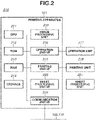
- Fig. 2 is a diagram illustrating a hardware configuration of the printing apparatus.
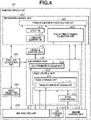
- Fig. 4 is a diagram illustrating a software configuration of the printing apparatus.
- a block diagram (210) in Fig. 2 illustrates a hardware configuration of the printing apparatus (101) according to the present exemplary embodiment. While the printing apparatus is described as an example according to the present exemplary embodiment, a printing apparatus, such as a multi-function peripheral (MFP) including a scanner function and a facsimile function, can be used.
- a control unit (210) including a central processing unit (CPU) (211) controls operations of the entire printing apparatus (101).
- CPU central processing unit
- the CPU 211 loads a program stored in a read-only memory (ROM) (212) or in a storage (214) to a random access memory (RAM) (213) and executes the loaded program to perform various types of control, such as printing control and reading control.
- the ROM (212) stores control programs and boot programs that are executable by the CPU (211).
- the RAM (213) is a main memory of the CPU (211) and is used as a work area or a temporary storage area for loading various control programs.
- the storage (214) stores print data, image data, various programs, and various settings information. While the storage (214) according to the present exemplary embodiment is an auxiliary storage device, such as a hard disk drive HDD, a non-volatile memory, such as a solid state drive (SSD), can be used.
- SSD solid state drive
- any other forms can be used.
- a plurality of CPUs, a plurality of RAMs, a plurality of ROMs, and a plurality of storages can cooperate together to perform the processes in the flowcharts described below.
- part of the processes can be performed using a hardware circuit, such as an application specific integrated circuit (ASIC) or a field-programmable gate array (FPGA).
- ASIC application specific integrated circuit
- FPGA field-programmable gate array
- An operation unit interface (I/F) (216) connects an operation unit (217) and the control unit (210) together.
- the operation unit (217) includes a display unit having a touch panel function and various hardware keys.
- the operation unit (217) functions as a display unit that displays information and as a reception unit that receives user instructions.
- a printing unit I/F (218) connects a printing unit (219) and the control unit (210) together. Image data generated by analyzing a print job received from the information processing apparatus is transferred from the control unit (210) to the printing unit (219) via the printing unit I/F (218).
- the printing unit (219) receives a control command and a print job to be printed via the control unit (210) and prints an image on a sheet fed from a sheet feeding cassette (not illustrated) based on the print job.
- the printing unit (219) can use an electrophotographic method or an inkjet method as a printing method. Further, other printing methods, such as a thermal transfer method, are also applicable.
- the control unit (219) is connected to the LAN (100) via a communication unit I/F (222).
- the communication unit I/F (222) transmits information to the information processing apparatus (103, 104, 105) and receives print jobs and information from the information processing apparatus (103, 104, 105) on the LAN (100).
- An image processing unit (215) has a raster image processor (RIP) function of developing a job received from the information processing apparatus (103, 104, 105) and generating print image data. Further, the image processing unit (215) performs resolution conversion processing and correction processing on image data obtained by developing a print job.
- the image processing unit (2105) is realized by, but not limited to, a hardware circuit (e.g., ASIC or FPGA).
- the printing apparatus (101) can further include a processor for use in image processing, and the processor can execute an image processing program to perform image processing and development processing for the development into print data.
- the processor and the CPU (211) cooperate together to realize the flowcharts described below.
- the CPU (211) can execute a program for performing image processing to perform image processing and development processing for the development into print data. Further, the image processing can be performed by a combination of any of the above.
- a sheet processing unit I/F (220) connects the control unit (210) and a sheet processing unit (221) together.
- the sheet processing unit (220) receives a control command from the control unit (210) and performs post-processing on a sheet printed by the printing unit (219), based on the control command.
- Fig. 4 is a functional block diagram illustrating a software configuration of the printing apparatus (101) according to the first exemplary embodiment. Each functional block illustrated in Fig. 4 is realized by the CPU (211) executing a program loaded to the RAM (213).
- An IPP-Server control unit (401) includes a printer capability notification unit (402).
- the printer capability notification unit (402) receives an inquiry about a capability from the information processing apparatus (103, 104, 105) to the printing apparatus and notifies printer capability information in response to the inquiry. Specific examples of capability information to be notified are,
- An IPP attribute that relates to the sheet type display mode is a new attribute for an inquiry about a sheet type display method from the information processing apparatus to the printing apparatus and is defined in the present specification (none of the above NPLs discuss the new attribute).
- the IPP-Server 401 determines whether an IPP-Client on the information processing apparatus supports displaying of vendor extensions, based on information (IPP-Client name, Client Version, an attribute name included in a request for a capability, a value range of the attribute name) included in the request (i.e., Get-Printer-Attributes-Request) for capability information about the printing apparatus from the information processing apparatus (103, 104, 105).
- the IPP-Server control unit (401) determines to notify (transmit) only capability information about vendor extension sheet types selectively from among sheet information managed by a sheet database (DB) (416). In a case where the IPP-Server control unit (401) determines that displaying of vendor extensions is unsupported, the IPP-Server control unit (401) determines to notify (transmit) capability information about IPP standard sheet types only or capability information about both IPP standard sheet types and vendor extension sheet types.
- DB sheet database
- the information processing apparatus 103, 104, 105 After acquiring the capability of the printer, the information processing apparatus 103, 104, 105 generates a print job suitable for the printer and transmits the generated print job to the printing apparatus.
- the IPP-Server control unit (401) performs processing to receive print data from the information processing apparatus.
- a new job is generated for a job control unit (407) via a print job generation unit (404). Then, a job setting storage/validation unit (403) validates a job attribute specified by the IPP attribute and writes the job attribute to a job attribute storage unit (408).
- the IPP-Server control unit (401) transfers drawing data of job data to a data reception control unit (405) and temporarily stores the data in parallel with the attribute processing.
- the data reception control unit (405) is a buffer area for the print job received by the print job generation unit (404) and stores data for each print job in the storage (214).
- a PDL analysis unit (406) of the printer 101 supports Portable Document Format (PDF) and Printer Working Group (PWG)-Raster format.
- PDF Portable Document Format
- PWG Printer Working Group
- the PDL analysis unit (406) requests print drawing data from the data reception control unit (405), based on an instruction from the job control unit (407) and performs analysis processing.
- a page control unit (409) stores image data on page data generated by the PDL analysis unit (406) in a page storage unit (410) and stores page attribute information about the page data in a page attribute storage unit (411).
- the page control unit (409) controls page analysis processing by the PDL analysis unit (406), RIP processing by a RIP control unit (413), and print control processing by a print control unit (412).
- the print control unit (412) acquires image data having undergone the RIP processing from the page storage unit (410), divides the image data into red, green, and blue (RGB) colors, and transfers the divided RGB image data to an engine control unit (414).
- the engine control unit (414) receives the RGB image data in units of pages from the print control unit (412), controls the print control unit (412), and performs processing to print each page.
- a UI/web UI control unit (415) acquires information about a status of a print job being processed from the job control unit (407) and displays the processing status of the print job on a UI screen.
- FIG. 3 is a diagram illustrating a hardware configuration of the information processing apparatus
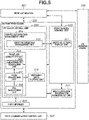
- Fig. 5 is a diagram illustrating a software configuration of the information processing apparatus.
- a control unit (300) including a CPU (311) controls operations of the entire information processing apparatus.
- the CPU (311) loads a program stored in a ROM (314) or in a storage (313) to a RAM (312) and executes the loaded program to perform various types of control to control a print setting screen, to generate print data, and to transfer a print job.
- the ROM (314) stores a control program and a boot program that are executable by the CPU (311).
- the RAM (312) is a main storage memory of the CPU (311) and is used as a work area or as a temporary storage area for loading various programs.
- the storage (313) stores an OS, a print application, an OS print framework, a print job generated by the OS print framework, and various settings information. While the storage (313) according to the present exemplary embodiment is an auxiliary storage device, such as a HDD, a non-volatile memory, such as a SSD, can be used.
- a touch panel (318) is connected to an operation unit I/F (315) and issues not only a notification about screen drawings to an application or the print setting screen but also a notification about touch operations performed by the user to the application operating on the CPU (311).
- Fig 5 is a diagram illustrating a software configuration of the information processing apparatuses (103) to (105). Each functional block is realized by the CPU (311) executing a program loaded to the RAM (312).
- An application (501) is an application that is installed on the information processing apparatus by the user and is a general application, such as a word processor application, a spreadsheet application, a database application, an e-mail application, or a web browser application.
- An OS print framework (502) includes an IPP print client (503), a print spooler (509), and a print screen control unit (510).
- the IPP print client (503) includes a printer information management unit (504) and a print job generation unit (505).
- the printer information management unit (504) transmits an inquiry to the printing apparatus (101) via a data communication control unit (520) to acquire capability information about the printing apparatus (101) and stores the acquired capability information.
- the acquired information contains:
- a sheet selection display unit (511) and the print job generation unit (506) of the print screen control unit (510) refer to the acquired information.
- the print screen control unit (510) displays a print screen in response to a call from the application (501).
- the user sets print settings via the print screen and executes printing.
- the information processing apparatus (103, 104, 105) acquires capability information about functions providable from the printing apparatus (101) and displays a setting screen and setting items within the providable range.
- the print job generation unit (505) includes a job attribute generation unit (506), a page generation unit (507), and a PDL generation unit (508).
- the print job generation unit (505) receives an instruction from the print screen control unit (510) and generates a print job based on the instruction.
- the job attribute generation unit (506) generates a job attribute and a document attribute of an IPP job based on the setting items on the print screen.
- the page generation unit (507) cooperates with the PDL generation unit (508) to convert drawing data generated by the application (501) using an OS drawing engine (530) into PDL data supported by the printing apparatus (101) and transmits the PDL data to the printing apparatus (101).
- the print screen control unit (510) and the print job generation unit (505) acquire sheet sizes and sheet types supported by the printing apparatus 101 from a sheet information management unit (512) of the printer information management unit 504 and designates a sheet size and a sheet type for each job or each page in print data.
- the OS drawing engine (530) draws print page data in OS standard drawing format and transmits the drawn print page data to the page generation unit (507) of the OS print framework (502) based on a request from the application (501).
- the data communication control unit (520) transmits and receives, to and from the printing apparatus (101), messages for communication for printer management, messages for job transmission, and messages for job management that are generated by the IPP client control unit.
- Fig. 6 illustrates a print setting screen of the information processing apparatus.
- the user can select a sheet size and a sheet type in the print setting screen (610) from the sheet sizes and the sheet types that are notified from the printing apparatus.
- the screen 610 is a print setting screen that is called first from the application (501) when the print function is executed.
- a sheet size and a sheet type (611) are settable as setting items, and a sheet type selection list screen (612) is displayed at the press of the sheet type selection menu (611) by the user.
- a display example 613 is an example of a display in which only vendor extension sheet types are listed as sheet types.
- a display example 614 is an example of a display in which only IPP standard sheet types are listed.
- a display example 615 is an example of a display in which both vendor extension sheet types and IPP standard sheet types are listed.
- the sheet type list displays (613, 614, 615) are realized by the sheet selection display unit (511) by transmitting an inquiry to the sheet information management unit (512).
- the sheet selection display unit (511) switches the sheet type list displays (613, 614, 615), based on a sheet type display mode notified from the information processing apparatus.
- the information processing apparatus supports both IPP standard sheet types and vendor extension sheet types.
- the IPP client control unit (503) for acquiring capability information notifies the printing apparatus that the information processing apparatus is an IPP-Client supporting displaying and settings of vendor extension sheet types.
- a list of sheet types that the printing apparatus 101 supports is acquired, and the acquired list is stored in the sheet information management unit (512).
- all the sheet types that are acquired from the printing apparatus 101 are displayed directly in a sheet type selection section of the print setting screen.
- the IPP standard sheet types and the vendor extension sheet types are both displayed.
- the printing apparatus (101) supports both IPP standard sheet types and vendor extension sheet types. Two procedures of generating sheet types that are to be notified to the information processing apparatus by the printing apparatus (101) will be described below.
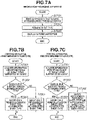
- step S7301 the printing apparatus (101) acquires any form of identification information about a capability of displaying sheet types that the information processing apparatus supports.
- step S7302 whether the information processing apparatus is capable of displaying vendor extensions is determined based on an acquired identifier. In a case where displaying of vendor extensions is supported, only vendor extension sheet types are notified to the information processing apparatus (steps S7302 and S7303). On the other hand, in a case where it is determined that displaying of vendor extensions is unsupported or the acquisition of identification information from the information processing apparatus in step S7301 fails, only IPP standard sheet types are notified (step S7304).
- both standard sheet types and vendor extension sheet types can be notified (step S7305).
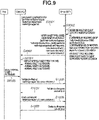
- Fig. 9 illustrates a sequence of acquiring sheet types from the printing apparatus by the information processing apparatus, displaying the sheet types, selecting a sheet type, and generating a job as a print attribute.
- the information processing apparatus transmits a request for capability information to the printing apparatus.
- This request message includes an inquiry about supported sheet types.
- the information processing apparatus includes identification information about a type and a version of the IPP-Client in an IPP header in a User-Agent.
- the IPP-Client of the information processing apparatus can transmit an inquiry for a specific IPP attribute (e.g., media-type-display-mode attribute described below) when acquiring capability information about the printing apparatus, in order to indicate supporting of displaying of vendor extensions.
- a specific IPP attribute e.g., media-type-display-mode attribute described below
- step S9002 the IPP-Server control unit (401) and the printer capability notification unit (402) of the printing apparatus determine whether the information processing apparatus supports displaying of vendor extensions, based on a form (User-Agent information of the IPP header) of the request for capability from the information processing apparatus and attribute information included in the request for capability information.
- the printer capability notification unit (402) cooperates with the sheet DB (418), and in a case where the IPP-Client of the information processing apparatus supports displaying of vendor extensions, a list including vendor extension sheet types only is generated. On the other hand, in a case where it is undeterminable whether displaying of vendor extensions is supported, a list of sheet type information about both vendor extension sheet types and IPP standard sheet types is generated.
- step S9003 the IPP-Server of the printing apparatus transmits a notification of the capability information about the sheet types generated in step S9002 as a Get-Printer-Attributes-Response to the IPP-Client of the information processing apparatus.
- step S9004 the IPP-Client of the information processing apparatus displays the notified sheet types on the print screen.
- step S9005 the user selects a sheet type on the print screen and then selects a print button.
- steps S9006 to S9009 the sheet type selected as a print attribute of the IPP job by the user is added to a print setting validation request (Validate-Job), and a job is transmitted (Print-Job).
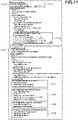
- Fig. 11 illustrates a sample of an IPP communication message according to the present exemplary embodiment.
- a message 1110 is a request for capability information from the information processing apparatus to the printing apparatus
- a message 1120 is a response to (1110) from the printing apparatus to the information processing apparatus.
- a method for acquiring a list of supported sheet types from the printing apparatus by the information processing apparatus is a request (1113) and a response (1121) of a media-supported attribute, and an IPP standard sheet size list is notified.
- a method for acquiring a list of supported sheet types from the printing apparatus by the information processing apparatus is a request (1114) and a response (1122) of a media-type-supported attribute, and one or both of vendor extension sheet types and IPP standard sheet types are listed.
- the printing apparatus determines whether the information processing apparatus supports displaying of vendor extension sheet types, based on the content of the message (1110) of the request from the information processing apparatus. Specifically, for example, the determination is performed based on User-Agent information included in an IPP header (1111). Alternatively, the determination is performed based on whether a capability information inquiry instruction (1112) from the information processing apparatus includes a media-type-display-mode attribute (1115) relating to displaying of vendor extension sheet types.
- the printing apparatus transmits a notification of capability information containing only vendor extension sheet types (1123) in values of the sheet type (1122).
- the phrase "displaying of vendor extensions is supported” means that displaying of vendor extension sheet types only is allowed, i.e., displaying of standard attribute sheet types is optional.
- the phrase "displaying of vendor extensions is unsupported” means that displaying of vendor extension sheet types only is not allowed, i.e., displaying of vendor extension sheet types only cannot be performed, i.e., displaying of standard attribute sheet types is necessary.
- a method for acquiring a message/catalog display language from the printing apparatus by the information processing apparatus is a request (1116) and a response (1125) of a printer-strings-languages-supported attribute.
- the information processing apparatus acquires character strings for displaying vendor extension sheet types by acquiring a message/catalog of the language notified by the method.
- the IPP-Server control unit (401) and the printer capability notification unit (402) of the printing apparatus identify a sheet type display capability of the information processing apparatus and change sheet types to be notified, based on the identification result, as suitable for the information processing apparatus. Specifically, notifying vendor extensions only and notifying both IPP standard sheet types and vendor extension sheet types are switched.
- the information processing apparatus supporting displaying of vendor extensions can provide a designation method consisting of only vendor extension sheet types, in a case of a combination with the printing apparatus that transmits a capability notification of all sheet types as vendor extension sheet types. This realizes a uniform display of sheet types on the printing apparatus and on the information processing apparatus and, furthermore, is a solution to a duplicate display of sheet types, whereby user operability improves.
- the printing apparatus notifies both IPP standard sheet types and vendor extension sheet types to the information processing apparatus, and the information processing apparatus acquires an instruction about a sheet type display method from the printing apparatus separately from the sheet type list.
- the printing apparatus instructs the information processing apparatus to generate either a selection list including vendor extension sheet types only or a selection list including both IPP standard sheet types and vendor extension sheet types according to the present exemplary embodiment.
- Figs. 1 to 3 , 5 , and 6 are similar to those according to the first exemplary embodiment, so that the redundant descriptions are omitted.
- the printer capability notification unit (402) of the printing apparatus notifies both IPP standard sheet types and vendor extension sheet types that are managed by the sheet DB (416) to the information processing apparatus regardless of whether the information processing apparatus supports displaying of vendor extensions. Further, in a case where an inquiry about a sheet type display method is received from the information processing apparatus, the printer capability notification unit (402) transmits an instruction as part of capability information, which causes the information processing apparatus supporting displaying of vendor extension sheet types to display only vendor extension sheet types.
- sheet types to be transmitted are limited. According to the first exemplary embodiment, on the contrary, sheet types to be transmitted are not limited, and all sheet types are transmitted with an instruction indicating a request that only vendor extension sheet types among the transmitted sheet types are displayed.
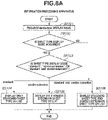
- step S8101 the sheet selection display unit (511) of the information processing apparatus requests a sheet type display mode supported by the printing apparatus 101 from the printing apparatus 101.
- step S8102 in a case where a sheet type display mode is acquired, the processing proceeds to step S8103. On the other hand, in a case where no display mode is acquired, the processing proceeds to step S8106.
- step S8106 both IPP standard sheet types and vendor extension sheet types are included in the selection list.
- step S8103 an operation is changed based on the acquired sheet type display mode.
- the processing proceeds to step S8104, and IPP standard sheets are included in the sheet type selection list.
- the processing proceeds to step S8105, and only vendor extension sheets are included in the sheet type selection list.
- the processing proceeds to step S8106, and both IPP standard sheet types and vendor extension sheet types are included in the selection list.
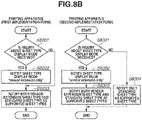
- the printing apparatus supports both IPP standard sheet types and vendor extension sheet types. Two procedures of processing by the printer capability notification unit (402) when capability notification information is notified to the information processing apparatus will be described below.
- the printing apparatus 101 having the first procedure of processing determines whether an inquiry about a sheet type display mode is received from the client. In a case where an inquiry is received, the processing proceeds to step S8202.
- the printing apparatus 101 notifies a sheet type display mode to the information processing apparatus.
- step S8203 both vendor extension sheet types and IPP standard sheet types are notified as sheet types that the printing apparatus supports.
- step S8301 the printing apparatus 101 having the second procedure of processing determines whether an inquiry about a sheet type display mode is received from the client. In a case where an inquiry is received, the processing proceeds to step S8302, and a sheet type display mode is notified. In a case where no inquiry is received, the processing proceeds to step S8304.
- step S8303 both vendor extension sheet types and IPP standard sheet types are notified as sheet types that the printing apparatus supports.
- step S8304 only IPP standard sheet types are notified as sheet types that the printing apparatus supports.
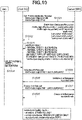
- Fig. 10 illustrates a sequence of acquiring, from the printer, vendor extension sheet types and IPP standard sheet types from the printing apparatus and acquiring a method for displaying sheet types on the print setting screen, by the information processing apparatus.
- step S1001 the information processing apparatus requests supported capability information from the printing apparatus. Specifically, an inquiry about supported sheet types is transmitted to the printing apparatus.
- step S1002 the IPP-Server of the printing apparatus transmits a notification of selectable sheet type list information to the IPP-Client of the information processing apparatus. Furthermore, an instruction on displaying of sheet types is set to the media-type-display-mode attribute, and the set instruction is notified.
- the following three value ranges are settable to the media-type-display-mode attribute:
- step S1002 in a case where the IPP-Client of the information processing apparatus supports vendor extension sheet types, "vendor-extension” is notified as a display mode.
- "standard-and-vendor-extension” or “standard” is notified as a display mode.
- step S1003 in a case where the display mode "standard” is notified, a list of only IPP standard sheet types is notified. For other display modes. such as “vendor-extension” and “standard-and-vendor-extension”, both IPP standard sheet types and vendor extension sheet types are notified as a sheet list.
- step S1004 the IPP-Client of the information processing apparatus displays the notified sheet types on the print screen.
- the IPP-Client that supports instructions based on the media-type-display-mode attribute displays a sheet attribute list as specified in the attribute.
- the IPP-Client that does not support the media-type-display-mode attribute directly displays the sheet type list notified from the printing apparatus.
- step S1005 the user selects a sheet type from the print screen of the information processing apparatus and presses a print button. Then, in steps S1006 to S1009, the sheet type selected by the user is added to a print ticket, and a print settings validation request (Validate-Job) and a job are transmitted (Print-Job).
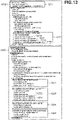
- a message 1210 is a request for capability information from the information processing apparatus to the printing apparatus
- a message 1220 is a response to the 1210 from the printing apparatus to the information processing apparatus.
- a method for acquiring a list of supported sheet types from the printing apparatus by the information processing apparatus is a request (1213) and a response (1221) of the media-supported attribute, and a list of IPP standard sheet sizes is notified.
- a method for acquiring a list of supported sheet types from the printing apparatus by the information processing apparatus is a request (1214) and a response (1222) of the media-type-supported attribute, and both vendor extension sheet types and IPP standard sheet types are notified.
- the media-type-display-mode attribute is defined as a method for selectively switching between displaying of IPP standard sheet types and displaying of vendor extension sheet types by the information processing apparatus.
- the printing apparatus issues the following instruction via a media-type-display-mode attribute (1215) requested from the information processing apparatus and a response (1225) to the request.
- a media-type-display-mode attribute (1215) requested from the information processing apparatus
- a response (1225) to the request is issued.
- An example of a response (1225) in Fig. 12 is an instruction to display vendor extension sheet types only.
- a method for acquiring a message/catalog display language from the printing apparatus by the information processing apparatus is a request (1216) and a response (1225) of the printer-strings-languages-supported attribute, and the information processing apparatus acquires character strings for displaying vendor extension sheet types by acquiring a message/catalog of the language notified in this processing.
- the IPP-Server control unit (401) and the printer capability notification unit (402) of the printing apparatus notify sheet type display mode information to the information processing apparatus in addition to sheet type information containing vendor extension sheet types.
- the information processing apparatus supporting displaying of vendor extension sheet types and display mode designation can provide a designation method including a list of only vendor extension sheet types, in a case of a combination with the printing apparatus that transmits a capability notification of all sheet types as vendor extension sheet types. This realizes a uniform display of sheet types on the printing apparatus and on the information processing apparatus and, furthermore, is a solution to a duplicate display of sheet types, whereby user operability improves.
Landscapes
- Engineering & Computer Science (AREA)
- Theoretical Computer Science (AREA)
- Physics & Mathematics (AREA)
- General Physics & Mathematics (AREA)
- Multimedia (AREA)
- Signal Processing (AREA)
- General Engineering & Computer Science (AREA)
- Human Computer Interaction (AREA)
- Microelectronics & Electronic Packaging (AREA)
- Computing Systems (AREA)
- Accessory Devices And Overall Control Thereof (AREA)
- Control Or Security For Electrophotography (AREA)
Abstract
Description
- The present invention relates to a printing apparatus configured to transmit sheet type information, a method for controlling the same, and a program.
- Information processing apparatuses in recent years include a plurality of operating systems (OSs) and the OSs use Internet Printing Protocol (IPP) as a standard print function. IPP allows an information processing apparatus to display a sheet type notified from a printing apparatus in a selectable way on a print setting screen of the information processing apparatus.
- Non Patent Literature (NPL) 1 discusses a notification format of vendor extension sheet types that is notified as part of capability information from a printing apparatus (IPP-Server) to an information processing apparatus (IPP-Client). NPL 2 discusses a method for transferring, from a printing apparatus (IPP-Server) to an information processing apparatus (IPP-Client), a character string for displaying a vendor extension sheet type notified by the printing apparatus on a user interface (UI) of the information processing apparatus. NPL 3 discusses a Message Catalog form that is used by a printing apparatus (IPP-Server) to describe a display character string of a vendor extension sheet type to an information processing apparatus (IPP-Client).
- According to each exemplary embodiment of the present invention, a printing apparatus transmits and receives information to and from an information processing apparatus based on the rules discussed in
NPLs 1 to 3 when notification of a vendor extension sheet type as part of capability information is performed. -
- NPL 1: PWG Media Standardized Names 2.0 3.2 Vendor Media Type Names
- NPL 2: IPP: Job and Printer Extensions-Set 3 (5100.13-2012) 5.6.37 printer-strings-languages-supported 5.6.38 printer-strings-uri
- NPL 3: IPP Message Catalog Tooltips and Help Extensions Summary of Invention
- As described above, transmitting sheet type information and displaying the transmitted information are discussed in the Non-Patent Literatures.
- According to an aspect of the present invention, a printing apparatus includes a reception unit configured to receive a display mode of a sheet type from an information processing apparatus, and a determination unit configured to determine sheet type information to be transmitted to the information processing apparatus, based on the display mode received by the reception unit.
-
- [
Fig. 1] Fig. 1 is a diagram illustrating a system configuration. - [
Fig. 2] Fig. 2 is a diagram illustrating a hardware configuration of a printing apparatus. - [
Fig. 3] Fig. 3 is a diagram illustrating a hardware configuration of an information processing apparatus. - [
Fig. 4] Fig. 4 is a diagram illustrating a software configuration of the printing apparatus. - [
Fig. 5] Fig. 5 is a diagram illustrating a software configuration of the information processing apparatus. - [
Fig. 6] Fig. 6 is a diagram illustrating a print setting screen of the information processing apparatus. - [
Fig. 7A] Fig. 7A is a flowchart of the information processing apparatus according to a first exemplary embodiment. - [
Fig. 7B] Fig. 7B is a flowchart of the printing apparatus according to the first exemplary embodiment. - [
Fig. 8A] Fig. 8A is a flowchart of an information processing apparatus according to a second exemplary embodiment. - [
Fig. 8B] Fig. 8B is a flowchart of a printing apparatus according to the second exemplary embodiment. - [
Fig. 9] Fig. 9 is a diagram illustrating a sequence of the information processing apparatus and the printing apparatus according to the first exemplary embodiment. - [
Fig. 10] Fig. 10 is a diagram illustrating a sequence of the information processing apparatus and the printing apparatus according to the second exemplary embodiment. - [
Fig. 11] Fig. 11 is a diagram illustrating an example of a message of Internet Printing Protocol (IPP) communication according to the first exemplary embodiment. - [
Fig. 12] Fig. 12 is a diagram illustrating an example of a message of Internet Printing Protocol IPP communication according to the second exemplary embodiment. - [
Fig. 13] Fig. 13 is a diagram illustrating an issue of selecting a sheet type including vendor extension sheet types. - A first exemplary embodiment will be described below.
- There are two methods for selecting a sheet type in a printing system including an information processing apparatus based on Internet Printing Protocol (IPP) and a printing apparatus. The two methods are "standard sheet type (also referred to as "standard attribute sheet type")" defined in IPP standards and "vendor extension sheet type" based on IPP extension rules. In both case of the sheet types, information about supported sheet types is notified from the printing apparatus to the information processing apparatus. However, methods, including interpretations on the information processing apparatus, to realize displaying of a sheet name on a UI are different from each other. With respect to "IPP standard sheet type", the information processing apparatus includes a resource of a display character string that is paired with a sheet type identifier (ID) notified from the printing apparatus. With respect to "vendor extension sheet type", on the other hand, the printing apparatus provides both the sheet type ID and the resource of the display character string in response to a request from the information processing apparatus. Conventional systems among IPP-based printing systems are a printing system using only IPP standard sheet types and a printing system of a hybrid type using IPP standard sheet types and some vendor extension sheet types added to part of the IPP standard sheet types. Although IPP standard sheet types have the same sheet type ID, display character strings corresponding to the IPP standard sheet types do not match exactly between an information processing apparatus and a printing apparatus in a case where an IPP-Client implementor/provider of the information processing apparatus and an IPP-Server implementor/provider of the printing apparatus are different from each other. Furthermore, there are cases where a vendor extension sheet type and an IPP standard sheet type that have the same meaning are displayed doubly, which confuses a user in selecting/setting a sheet (
Fig. 13 ). Thus, according to the first exemplary embodiment, a printing apparatus notifies an information processing apparatus of either vendor extension sheet types only or both IPP standard sheet types and vendor extension sheet types, in accordance with a sheet type display capability of the information processing apparatus. Since the printing apparatus changes a sheet type list in a capability notification as described above, only necessary sheet type information is displayed. -
Fig. 1 will be described below.Fig. 1 is a diagram illustrating a configuration of a printing system according to an aspect of the present invention. A printing apparatus (101) is on a local area network (LAN) (100), and an information processing apparatus is connected to the LAN (100) via an access point (AP) (102).Mobile terminals - First, the printing apparatus (101) will be described below. The printing apparatus (101) includes a print function of printing images on sheets (recording mediums). The printing apparatus (101) is capable of printing print data received from the information processing apparatus via a network.
-
Fig. 2 is a diagram illustrating a hardware configuration of the printing apparatus.Fig. 4 is a diagram illustrating a software configuration of the printing apparatus. A block diagram (210) inFig. 2 illustrates a hardware configuration of the printing apparatus (101) according to the present exemplary embodiment. While the printing apparatus is described as an example according to the present exemplary embodiment, a printing apparatus, such as a multi-function peripheral (MFP) including a scanner function and a facsimile function, can be used. A control unit (210) including a central processing unit (CPU) (211) controls operations of the entire printing apparatus (101). TheCPU 211 loads a program stored in a read-only memory (ROM) (212) or in a storage (214) to a random access memory (RAM) (213) and executes the loaded program to perform various types of control, such as printing control and reading control. The ROM (212) stores control programs and boot programs that are executable by the CPU (211). The RAM (213) is a main memory of the CPU (211) and is used as a work area or a temporary storage area for loading various control programs. The storage (214) stores print data, image data, various programs, and various settings information. While the storage (214) according to the present exemplary embodiment is an auxiliary storage device, such as a hard disk drive HDD, a non-volatile memory, such as a solid state drive (SSD), can be used. - While the single CPU (211) performs processes illustrated in flowcharts described below using a single memory (RAM 213) in the printing apparatus (101) according to the first exemplary embodiment, any other forms can be used. For example, a plurality of CPUs, a plurality of RAMs, a plurality of ROMs, and a plurality of storages can cooperate together to perform the processes in the flowcharts described below. Further, part of the processes can be performed using a hardware circuit, such as an application specific integrated circuit (ASIC) or a field-programmable gate array (FPGA).
- An operation unit interface (I/F) (216) connects an operation unit (217) and the control unit (210) together. The operation unit (217) includes a display unit having a touch panel function and various hardware keys. The operation unit (217) functions as a display unit that displays information and as a reception unit that receives user instructions. A printing unit I/F (218) connects a printing unit (219) and the control unit (210) together. Image data generated by analyzing a print job received from the information processing apparatus is transferred from the control unit (210) to the printing unit (219) via the printing unit I/F (218). The printing unit (219) receives a control command and a print job to be printed via the control unit (210) and prints an image on a sheet fed from a sheet feeding cassette (not illustrated) based on the print job. The printing unit (219) can use an electrophotographic method or an inkjet method as a printing method. Further, other printing methods, such as a thermal transfer method, are also applicable. Further, the control unit (219) is connected to the LAN (100) via a communication unit I/F (222). The communication unit I/F (222) transmits information to the information processing apparatus (103, 104, 105) and receives print jobs and information from the information processing apparatus (103, 104, 105) on the LAN (100).
- An image processing unit (215) has a raster image processor (RIP) function of developing a job received from the information processing apparatus (103, 104, 105) and generating print image data. Further, the image processing unit (215) performs resolution conversion processing and correction processing on image data obtained by developing a print job. According to the present exemplary embodiment, the image processing unit (2105) is realized by, but not limited to, a hardware circuit (e.g., ASIC or FPGA). Alternatively, the printing apparatus (101) can further include a processor for use in image processing, and the processor can execute an image processing program to perform image processing and development processing for the development into print data. In this case, the processor and the CPU (211) cooperate together to realize the flowcharts described below. Furthermore, the CPU (211) can execute a program for performing image processing to perform image processing and development processing for the development into print data. Further, the image processing can be performed by a combination of any of the above.
- A sheet processing unit I/F (220) connects the control unit (210) and a sheet processing unit (221) together. The sheet processing unit (220) receives a control command from the control unit (210) and performs post-processing on a sheet printed by the printing unit (219), based on the control command.
-
Fig. 4 is a functional block diagram illustrating a software configuration of the printing apparatus (101) according to the first exemplary embodiment. Each functional block illustrated inFig. 4 is realized by the CPU (211) executing a program loaded to the RAM (213). - An IPP-Server control unit (401) includes a printer capability notification unit (402). The printer capability notification unit (402) receives an inquiry about a capability from the information processing apparatus (103, 104, 105) to the printing apparatus and notifies printer capability information in response to the inquiry. Specific examples of capability information to be notified are,
- sheet size: media-size,
- sheet type: media-type, and
- sheet type display mode: media-type-display-mode.
- An IPP attribute that relates to the sheet type display mode is a new attribute for an inquiry about a sheet type display method from the information processing apparatus to the printing apparatus and is defined in the present specification (none of the above NPLs discuss the new attribute). The IPP-
Server 401 determines whether an IPP-Client on the information processing apparatus supports displaying of vendor extensions, based on information (IPP-Client name, Client Version, an attribute name included in a request for a capability, a value range of the attribute name) included in the request (i.e., Get-Printer-Attributes-Request) for capability information about the printing apparatus from the information processing apparatus (103, 104, 105). In a case where the IPP-Server control unit (401) determines that displaying of vendor extensions is supported, the IPP-Server control unit (401) determines to notify (transmit) only capability information about vendor extension sheet types selectively from among sheet information managed by a sheet database (DB) (416). In a case where the IPP-Server control unit (401) determines that displaying of vendor extensions is unsupported, the IPP-Server control unit (401) determines to notify (transmit) capability information about IPP standard sheet types only or capability information about both IPP standard sheet types and vendor extension sheet types. - After acquiring the capability of the printer, the
information processing apparatus - In a case where an IPP print job is received from the information processing apparatus (103, 104, 105), a new job is generated for a job control unit (407) via a print job generation unit (404). Then, a job setting storage/validation unit (403) validates a job attribute specified by the IPP attribute and writes the job attribute to a job attribute storage unit (408).
- Examples are the number of copies to be printed, sheet size, sheet type, finishing, and page description language (PDL) format information. The IPP-Server control unit (401) transfers drawing data of job data to a data reception control unit (405) and temporarily stores the data in parallel with the attribute processing. The data reception control unit (405) is a buffer area for the print job received by the print job generation unit (404) and stores data for each print job in the storage (214).
- A PDL analysis unit (406) of the
printer 101 according to the present exemplary embodiment supports Portable Document Format (PDF) and Printer Working Group (PWG)-Raster format. The PDL analysis unit (406) requests print drawing data from the data reception control unit (405), based on an instruction from the job control unit (407) and performs analysis processing. A page control unit (409) stores image data on page data generated by the PDL analysis unit (406) in a page storage unit (410) and stores page attribute information about the page data in a page attribute storage unit (411). - The page control unit (409) controls page analysis processing by the PDL analysis unit (406), RIP processing by a RIP control unit (413), and print control processing by a print control unit (412). The print control unit (412) acquires image data having undergone the RIP processing from the page storage unit (410), divides the image data into red, green, and blue (RGB) colors, and transfers the divided RGB image data to an engine control unit (414). The engine control unit (414) receives the RGB image data in units of pages from the print control unit (412), controls the print control unit (412), and performs processing to print each page. A UI/web UI control unit (415) acquires information about a status of a print job being processed from the job control unit (407) and displays the processing status of the print job on a UI screen.
-
Fig. 3 is a diagram illustrating a hardware configuration of the information processing apparatus, andFig. 5 is a diagram illustrating a software configuration of the information processing apparatus. A control unit (300) including a CPU (311) controls operations of the entire information processing apparatus. The CPU (311) loads a program stored in a ROM (314) or in a storage (313) to a RAM (312) and executes the loaded program to perform various types of control to control a print setting screen, to generate print data, and to transfer a print job. The ROM (314) stores a control program and a boot program that are executable by the CPU (311). The RAM (312) is a main storage memory of the CPU (311) and is used as a work area or as a temporary storage area for loading various programs. The storage (313) stores an OS, a print application, an OS print framework, a print job generated by the OS print framework, and various settings information. While the storage (313) according to the present exemplary embodiment is an auxiliary storage device, such as a HDD, a non-volatile memory, such as a SSD, can be used. A touch panel (318) is connected to an operation unit I/F (315) and issues not only a notification about screen drawings to an application or the print setting screen but also a notification about touch operations performed by the user to the application operating on the CPU (311). -
Fig 5 is a diagram illustrating a software configuration of the information processing apparatuses (103) to (105). Each functional block is realized by the CPU (311) executing a program loaded to the RAM (312). An application (501) is an application that is installed on the information processing apparatus by the user and is a general application, such as a word processor application, a spreadsheet application, a database application, an e-mail application, or a web browser application. An OS print framework (502) includes an IPP print client (503), a print spooler (509), and a print screen control unit (510). The IPP print client (503) includes a printer information management unit (504) and a print job generation unit (505). The printer information management unit (504) transmits an inquiry to the printing apparatus (101) via a data communication control unit (520) to acquire capability information about the printing apparatus (101) and stores the acquired capability information. - The acquired information contains:
- sheet size: media-size,
- sheet type: media-type, and
- sheet type display mode: media-type-display-mode,
- A sheet selection display unit (511) and the print job generation unit (506) of the print screen control unit (510) refer to the acquired information. The print screen control unit (510) displays a print screen in response to a call from the application (501). The user sets print settings via the print screen and executes printing. To display print setting items on the print screen, the information processing apparatus (103, 104, 105) acquires capability information about functions providable from the printing apparatus (101) and displays a setting screen and setting items within the providable range. The print job generation unit (505) includes a job attribute generation unit (506), a page generation unit (507), and a PDL generation unit (508). The print job generation unit (505) receives an instruction from the print screen control unit (510) and generates a print job based on the instruction. The job attribute generation unit (506) generates a job attribute and a document attribute of an IPP job based on the setting items on the print screen. The page generation unit (507) cooperates with the PDL generation unit (508) to convert drawing data generated by the application (501) using an OS drawing engine (530) into PDL data supported by the printing apparatus (101) and transmits the PDL data to the printing apparatus (101).
- The print screen control unit (510) and the print job generation unit (505) acquire sheet sizes and sheet types supported by the
printing apparatus 101 from a sheet information management unit (512) of the printerinformation management unit 504 and designates a sheet size and a sheet type for each job or each page in print data. The OS drawing engine (530) draws print page data in OS standard drawing format and transmits the drawn print page data to the page generation unit (507) of the OS print framework (502) based on a request from the application (501). The data communication control unit (520) transmits and receives, to and from the printing apparatus (101), messages for communication for printer management, messages for job transmission, and messages for job management that are generated by the IPP client control unit. -
Fig. 6 will be described below.Fig. 6 illustrates a print setting screen of the information processing apparatus. The user can select a sheet size and a sheet type in the print setting screen (610) from the sheet sizes and the sheet types that are notified from the printing apparatus. Thescreen 610 is a print setting screen that is called first from the application (501) when the print function is executed. A sheet size and a sheet type (611) are settable as setting items, and a sheet type selection list screen (612) is displayed at the press of the sheet type selection menu (611) by the user. A display example 613 is an example of a display in which only vendor extension sheet types are listed as sheet types. A display example 614 is an example of a display in which only IPP standard sheet types are listed. A display example 615 is an example of a display in which both vendor extension sheet types and IPP standard sheet types are listed. According to the first exemplary embodiment, the sheet type list displays (613, 614, 615) are realized by the sheet selection display unit (511) by transmitting an inquiry to the sheet information management unit (512). According to a second exemplary embodiment, the sheet selection display unit (511) switches the sheet type list displays (613, 614, 615), based on a sheet type display mode notified from the information processing apparatus. -
Fig. 7 will be described below. - First, a procedure of acquiring a sheet type by the information processing apparatus will be described below. The information processing apparatus supports both IPP standard sheet types and vendor extension sheet types. In step S7201, the IPP client control unit (503) for acquiring capability information notifies the printing apparatus that the information processing apparatus is an IPP-Client supporting displaying and settings of vendor extension sheet types. In step S7202, a list of sheet types that the
printing apparatus 101 supports is acquired, and the acquired list is stored in the sheet information management unit (512). In step S7203, all the sheet types that are acquired from theprinting apparatus 101 are displayed directly in a sheet type selection section of the print setting screen. Thus, in a case where the notified sheet types include both IPP standard sheet types and vendor extension sheet types, the IPP standard sheet types and the vendor extension sheet types are both displayed. - Next, a procedure of notifying sheet types by the
printing apparatus 101 will be described below. The printing apparatus (101) supports both IPP standard sheet types and vendor extension sheet types. Two procedures of generating sheet types that are to be notified to the information processing apparatus by the printing apparatus (101) will be described below. - In a first implementation form, in step S7301, the printing apparatus (101) acquires any form of identification information about a capability of displaying sheet types that the information processing apparatus supports. In step S7302, whether the information processing apparatus is capable of displaying vendor extensions is determined based on an acquired identifier. In a case where displaying of vendor extensions is supported, only vendor extension sheet types are notified to the information processing apparatus (steps S7302 and S7303). On the other hand, in a case where it is determined that displaying of vendor extensions is unsupported or the acquisition of identification information from the information processing apparatus in step S7301 fails, only IPP standard sheet types are notified (step S7304).
- In a second implementation form, in a case where it is determined that vendor extension sheet types are unsupported or the acquisition of identification information from the information processing apparatus in step S7301 fails, both standard sheet types and vendor extension sheet types can be notified (step S7305).
-
Fig. 9 illustrates a sequence of acquiring sheet types from the printing apparatus by the information processing apparatus, displaying the sheet types, selecting a sheet type, and generating a job as a print attribute. In step S9001, the information processing apparatus transmits a request for capability information to the printing apparatus. This request message includes an inquiry about supported sheet types. In this process, the information processing apparatus includes identification information about a type and a version of the IPP-Client in an IPP header in a User-Agent. Alternatively, the IPP-Client of the information processing apparatus can transmit an inquiry for a specific IPP attribute (e.g., media-type-display-mode attribute described below) when acquiring capability information about the printing apparatus, in order to indicate supporting of displaying of vendor extensions. In step S9002, the IPP-Server control unit (401) and the printer capability notification unit (402) of the printing apparatus determine whether the information processing apparatus supports displaying of vendor extensions, based on a form (User-Agent information of the IPP header) of the request for capability from the information processing apparatus and attribute information included in the request for capability information. The printer capability notification unit (402) cooperates with the sheet DB (418), and in a case where the IPP-Client of the information processing apparatus supports displaying of vendor extensions, a list including vendor extension sheet types only is generated. On the other hand, in a case where it is undeterminable whether displaying of vendor extensions is supported, a list of sheet type information about both vendor extension sheet types and IPP standard sheet types is generated. Details the processing will be described below with reference to a sample communication message inFig. 11 . In step S9003, the IPP-Server of the printing apparatus transmits a notification of the capability information about the sheet types generated in step S9002 as a Get-Printer-Attributes-Response to the IPP-Client of the information processing apparatus. In step S9004, the IPP-Client of the information processing apparatus displays the notified sheet types on the print screen. In step S9005, the user selects a sheet type on the print screen and then selects a print button. In steps S9006 to S9009, the sheet type selected as a print attribute of the IPP job by the user is added to a print setting validation request (Validate-Job), and a job is transmitted (Print-Job). -
Fig. 11 will be described below.Fig. 11 illustrates a sample of an IPP communication message according to the present exemplary embodiment. Amessage 1110 is a request for capability information from the information processing apparatus to the printing apparatus, and amessage 1120 is a response to (1110) from the printing apparatus to the information processing apparatus. A method for acquiring a list of supported sheet types from the printing apparatus by the information processing apparatus is a request (1113) and a response (1121) of a media-supported attribute, and an IPP standard sheet size list is notified. A method for acquiring a list of supported sheet types from the printing apparatus by the information processing apparatus is a request (1114) and a response (1122) of a media-type-supported attribute, and one or both of vendor extension sheet types and IPP standard sheet types are listed. According to the present exemplary embodiment, the printing apparatus determines whether the information processing apparatus supports displaying of vendor extension sheet types, based on the content of the message (1110) of the request from the information processing apparatus. Specifically, for example, the determination is performed based on User-Agent information included in an IPP header (1111). Alternatively, the determination is performed based on whether a capability information inquiry instruction (1112) from the information processing apparatus includes a media-type-display-mode attribute (1115) relating to displaying of vendor extension sheet types. Specifically, in a case where the media-type-display-mode attribute (1115) is included, it is determined that displaying of vendor extensions is supported, whereas in a case where media-type-display-mode attribute (1115) is not included, it is determined that displaying of vendor extensions is unsupported. Alternatively, the determination is performed based on both of the information. Only in a case where it is determined that displaying of vendor extensions is supported, the printing apparatus transmits a notification of capability information containing only vendor extension sheet types (1123) in values of the sheet type (1122). The phrase "displaying of vendor extensions is supported" means that displaying of vendor extension sheet types only is allowed, i.e., displaying of standard attribute sheet types is optional. Further, the phrase "displaying of vendor extensions is unsupported" means that displaying of vendor extension sheet types only is not allowed, i.e., displaying of vendor extension sheet types only cannot be performed, i.e., displaying of standard attribute sheet types is necessary. - A method for acquiring a message/catalog display language from the printing apparatus by the information processing apparatus is a request (1116) and a response (1125) of a printer-strings-languages-supported attribute. The information processing apparatus acquires character strings for displaying vendor extension sheet types by acquiring a message/catalog of the language notified by the method.
- As described above, the IPP-Server control unit (401) and the printer capability notification unit (402) of the printing apparatus identify a sheet type display capability of the information processing apparatus and change sheet types to be notified, based on the identification result, as suitable for the information processing apparatus. Specifically, notifying vendor extensions only and notifying both IPP standard sheet types and vendor extension sheet types are switched. Thus, the information processing apparatus supporting displaying of vendor extensions can provide a designation method consisting of only vendor extension sheet types, in a case of a combination with the printing apparatus that transmits a capability notification of all sheet types as vendor extension sheet types. This realizes a uniform display of sheet types on the printing apparatus and on the information processing apparatus and, furthermore, is a solution to a duplicate display of sheet types, whereby user operability improves.
- A second exemplary embodiment will be described below.
- According to the second exemplary embodiment, the printing apparatus notifies both IPP standard sheet types and vendor extension sheet types to the information processing apparatus, and the information processing apparatus acquires an instruction about a sheet type display method from the printing apparatus separately from the sheet type list. The printing apparatus instructs the information processing apparatus to generate either a selection list including vendor extension sheet types only or a selection list including both IPP standard sheet types and vendor extension sheet types according to the present exemplary embodiment.
-
Figs. 1 to 3 ,5 , and6 are similar to those according to the first exemplary embodiment, so that the redundant descriptions are omitted. - According to the second exemplary embodiment, the printer capability notification unit (402) of the printing apparatus notifies both IPP standard sheet types and vendor extension sheet types that are managed by the sheet DB (416) to the information processing apparatus regardless of whether the information processing apparatus supports displaying of vendor extensions. Further, in a case where an inquiry about a sheet type display method is received from the information processing apparatus, the printer capability notification unit (402) transmits an instruction as part of capability information, which causes the information processing apparatus supporting displaying of vendor extension sheet types to display only vendor extension sheet types. Specifically, according to the first exemplary embodiment, in a case where the information processing apparatus supports displaying of vendor extensions, sheet types to be transmitted are limited. According to the first exemplary embodiment, on the contrary, sheet types to be transmitted are not limited, and all sheet types are transmitted with an instruction indicating a request that only vendor extension sheet types among the transmitted sheet types are displayed.
-
Fig. 8 will be described below. - First, a procedure in the information processing apparatus will be described below.
- A flow of acquiring sheet types of the information processing apparatus that supports both IPP standard sheet types and vendor extension sheet types will be described below. In step S8101, the sheet selection display unit (511) of the information processing apparatus requests a sheet type display mode supported by the
printing apparatus 101 from theprinting apparatus 101. In step S8102, in a case where a sheet type display mode is acquired, the processing proceeds to step S8103. On the other hand, in a case where no display mode is acquired, the processing proceeds to step S8106. In step S8106, both IPP standard sheet types and vendor extension sheet types are included in the selection list. In step S8103, an operation is changed based on the acquired sheet type display mode. - In a case where the designated display mode is a mode of displaying IPP standard sheet types only, the processing proceeds to step S8104, and IPP standard sheets are included in the sheet type selection list. In a case where the designated display mode is a mode of displaying vendor extension sheet types only, the processing proceeds to step S8105, and only vendor extension sheets are included in the sheet type selection list. In a case where the designated display mode is a mode of displaying both IPP standard sheet types and vendor extension sheet types, the processing proceeds to step S8106, and both IPP standard sheet types and vendor extension sheet types are included in the selection list.
- Next, a procedure in the printing apparatus side will be described below.
- The printing apparatus supports both IPP standard sheet types and vendor extension sheet types. Two procedures of processing by the printer capability notification unit (402) when capability notification information is notified to the information processing apparatus will be described below. In step S8201, the
printing apparatus 101 having the first procedure of processing determines whether an inquiry about a sheet type display mode is received from the client. In a case where an inquiry is received, the processing proceeds to step S8202. In step S8202, theprinting apparatus 101 notifies a sheet type display mode to the information processing apparatus. On the other hand, in a case where no inquiry is received, the processing proceeds to step S8203. In step S8203, both vendor extension sheet types and IPP standard sheet types are notified as sheet types that the printing apparatus supports. In step S8301, theprinting apparatus 101 having the second procedure of processing determines whether an inquiry about a sheet type display mode is received from the client. In a case where an inquiry is received, the processing proceeds to step S8302, and a sheet type display mode is notified. In a case where no inquiry is received, the processing proceeds to step S8304. In step S8303, both vendor extension sheet types and IPP standard sheet types are notified as sheet types that the printing apparatus supports. In step S8304, only IPP standard sheet types are notified as sheet types that the printing apparatus supports. -
Fig. 10 will be described below. -
Fig. 10 illustrates a sequence of acquiring, from the printer, vendor extension sheet types and IPP standard sheet types from the printing apparatus and acquiring a method for displaying sheet types on the print setting screen, by the information processing apparatus. - In step S1001, the information processing apparatus requests supported capability information from the printing apparatus. Specifically, an inquiry about supported sheet types is transmitted to the printing apparatus. In step S1002, the IPP-Server of the printing apparatus transmits a notification of selectable sheet type list information to the IPP-Client of the information processing apparatus. Furthermore, an instruction on displaying of sheet types is set to the media-type-display-mode attribute, and the set instruction is notified. The following three value ranges are settable to the media-type-display-mode attribute:
- standard: an instruction to display IPP standard sheet types only,
- vendor-extension: an instruction to display vendor extension sheet types only, and
- standard-and-vendor-extension: an instruction to display IPP standard sheet types and vendor extension sheet types only.
- In step S1002, in a case where the IPP-Client of the information processing apparatus supports vendor extension sheet types, "vendor-extension" is notified as a display mode. Thus, in a case where there is no notification and it is undeterminable whether the printing apparatus supports vendor extensions, "standard-and-vendor-extension" or "standard" is notified as a display mode. Thus, as described above, in step S1003, in a case where the display mode "standard" is notified, a list of only IPP standard sheet types is notified. For other display modes. such as "vendor-extension" and "standard-and-vendor-extension", both IPP standard sheet types and vendor extension sheet types are notified as a sheet list.
- In step S1004, the IPP-Client of the information processing apparatus displays the notified sheet types on the print screen. The IPP-Client that supports instructions based on the media-type-display-mode attribute displays a sheet attribute list as specified in the attribute. The IPP-Client that does not support the media-type-display-mode attribute directly displays the sheet type list notified from the printing apparatus. In step S1005, the user selects a sheet type from the print screen of the information processing apparatus and presses a print button. Then, in steps S1006 to S1009, the sheet type selected by the user is added to a print ticket, and a print settings validation request (Validate-Job) and a job are transmitted (Print-Job).
-
Fig. 12 will be described below. - This figure illustrates a sample of an IPP communication message according to the second exemplary embodiment. A
message 1210 is a request for capability information from the information processing apparatus to the printing apparatus, and amessage 1220 is a response to the 1210 from the printing apparatus to the information processing apparatus. A method for acquiring a list of supported sheet types from the printing apparatus by the information processing apparatus is a request (1213) and a response (1221) of the media-supported attribute, and a list of IPP standard sheet sizes is notified. A method for acquiring a list of supported sheet types from the printing apparatus by the information processing apparatus is a request (1214) and a response (1222) of the media-type-supported attribute, and both vendor extension sheet types and IPP standard sheet types are notified. According to the second exemplary embodiment, the media-type-display-mode attribute is defined as a method for selectively switching between displaying of IPP standard sheet types and displaying of vendor extension sheet types by the information processing apparatus. The printing apparatus issues the following instruction via a media-type-display-mode attribute (1215) requested from the information processing apparatus and a response (1225) to the request. Specifically, an instruction to display both vendor extension sheet types and IPP standard sheet types or to display vendor extension sheet types only or IPP standard sheet types only on the print setting screen of the information processing apparatus is issued. An example of a response (1225) inFig. 12 is an instruction to display vendor extension sheet types only. A method for acquiring a message/catalog display language from the printing apparatus by the information processing apparatus is a request (1216) and a response (1225) of the printer-strings-languages-supported attribute, and the information processing apparatus acquires character strings for displaying vendor extension sheet types by acquiring a message/catalog of the language notified in this processing. - As described above, the IPP-Server control unit (401) and the printer capability notification unit (402) of the printing apparatus notify sheet type display mode information to the information processing apparatus in addition to sheet type information containing vendor extension sheet types. Thus, the information processing apparatus supporting displaying of vendor extension sheet types and display mode designation can provide a designation method including a list of only vendor extension sheet types, in a case of a combination with the printing apparatus that transmits a capability notification of all sheet types as vendor extension sheet types. This realizes a uniform display of sheet types on the printing apparatus and on the information processing apparatus and, furthermore, is a solution to a duplicate display of sheet types, whereby user operability improves.
- The present invention is not limited to the above-described exemplary embodiments, and various changes and modifications can be made without departing from the spirit and scope of the present invention. The following claims are attached to disclose the scope of the present invention publicly.
- This application claims the benefit of
Japanese Patent Application No. 2020-026534, filed February 19, 2020
Claims (14)
- A printing apparatus comprising:a reception unit configured to receive a display mode of a sheet type from an information processing apparatus; anda determination unit configured to determine sheet type information to be transmitted to the information processing apparatus, based on the display mode received by the reception unit.
- The printing apparatus according to Claim 1, wherein the display mode is a mode notifying whether displaying of only a vendor extension sheet type is allowed or not allowed.
- The printing apparatus according to Claim 1, wherein the display mode is a mode notifying whether displaying of a standard attribute sheet type is necessary or optional.
- The printing apparatus according to Claim 3, wherein in a case where the reception unit receives the display mode notifying that displaying of the standard attribute sheet type is optional, the determination unit determines to transmit, to the information processing apparatus, sheet type information not containing the standard attribute sheet type.
- The printing apparatus according to Claim 3, wherein in a case where the reception unit receives the display mode notifying that displaying of the standard attribute sheet type is optional, the determination unit determines to transmit, to the information processing apparatus, information indicating an instruction to display only a vendor extension sheet type information while transmitting sheet type information containing both the standard attribute sheet type and the vendor extension sheet type.
- A method for controlling a printing apparatus, the method comprising:receiving a display mode of a sheet type from an information processing apparatus; anddetermining sheet type information to be transmitted to the information processing apparatus, based on the received display mode.
- The method according to Claim 6, wherein the display mode is a mode notifying whether displaying of only a vendor extension sheet type is allowed or not allowed.
- The method according to Claim 6, wherein the display mode is a mode notifying that displaying of a standard attribute sheet type is necessary or optional.
- The method according to Claim 8, wherein in a case where the receiving receives the display mode notifying that displaying of the standard attribute sheet type is optional, the determining determines to transmit sheet type information that not containing the standard attribute sheet type to the information processing apparatus.
- The method according to Claim 8, wherein in a case where the receiving receives the display mode notifying that displaying of the standard attribute sheet type is optional, the determining determines to transmit, to the information processing apparatus, information indicating an instruction to display only vendor extension sheet type information while transmitting sheet type information containing both the standard attribute sheet type and the vendor extension sheet type.
- A program for causing a printing apparatus to perform the method according to any one of claims 6 to 10.
- A printing apparatus comprising:a reception unit configured to receive sheet type information on a display target from an information processing apparatus; anda determination unit configured to determine sheet type information to be transmitted to the information processing apparatus, based on the sheet type information received by the reception unit.
- A printing apparatus comprising:a reception unit configured to receive a range of sheet type information on a display target from an information processing apparatus; anda determination unit configured to determine sheet type information to be transmitted to the information processing apparatus, based on the range of the sheet type information received by the reception unit.
- A printing apparatus comprising:a reception unit configured to receive a request for sheet type information from an information processing apparatus; anda total unit configured to transmit standard attribute sheet type information supported by the printing apparatus and vendor extension attribute sheet type information to the information processing apparatus as a response to the received request,wherein the transmission unit further transmits a request to display only the vendor extension attribute sheet type information from among the standard attribute sheet type information and the vendor extension attribute sheet type information.
Applications Claiming Priority (2)
| Application Number | Priority Date | Filing Date | Title |
|---|---|---|---|
| JP2020026534A JP7479867B2 (en) | 2020-02-19 | 2020-02-19 | Printing device, control method thereof, and program |
| PCT/JP2021/004481 WO2021166703A1 (en) | 2020-02-19 | 2021-02-08 | Printing device for transmitting sheet-type information and method for controlling same, and program |
Publications (2)
| Publication Number | Publication Date |
|---|---|
| EP4108469A1 true EP4108469A1 (en) | 2022-12-28 |
| EP4108469A4 EP4108469A4 (en) | 2024-03-20 |
Family
ID=77391121
Family Applications (1)
| Application Number | Title | Priority Date | Filing Date |
|---|---|---|---|
| EP21757461.5A Pending EP4108469A4 (en) | 2020-02-19 | 2021-02-08 | Printing device for transmitting sheet-type information and method for controlling same, and program |
Country Status (6)
| Country | Link |
|---|---|
| US (1) | US12309330B2 (en) |
| EP (1) | EP4108469A4 (en) |
| JP (1) | JP7479867B2 (en) |
| KR (1) | KR102786336B1 (en) |
| CN (1) | CN115135510A (en) |
| WO (1) | WO2021166703A1 (en) |
Families Citing this family (3)
| Publication number | Priority date | Publication date | Assignee | Title |
|---|---|---|---|---|
| CN115576506A (en) * | 2021-06-21 | 2023-01-06 | 东芝泰格有限公司 | Printer driving method and printer driving unit |
| JP2025095809A (en) * | 2023-12-15 | 2025-06-26 | 東芝テック株式会社 | Image forming apparatus, printing system, and printing method |
| JP2025186913A (en) * | 2024-06-12 | 2025-12-24 | キヤノン株式会社 | Printing device, information processing device, and control method and program thereof |
Family Cites Families (18)
| Publication number | Priority date | Publication date | Assignee | Title |
|---|---|---|---|---|
| JP2005031956A (en) * | 2003-07-11 | 2005-02-03 | Canon Inc | Printing control method, printing control apparatus, and printing apparatus |
| US7525676B2 (en) * | 2005-04-20 | 2009-04-28 | Xerox Corporation | System and method for controlling access to programming options of a multifunction device |
| JP2007102328A (en) * | 2005-09-30 | 2007-04-19 | Seiko Epson Corp | Printing system, printing method and program |
| JP4632442B2 (en) * | 2005-11-16 | 2011-02-16 | キヤノン株式会社 | Controller device, control method therefor, and printing system |
| JP4995586B2 (en) * | 2006-03-01 | 2012-08-08 | 株式会社リコー | Printer device |
| JP2007245429A (en) * | 2006-03-14 | 2007-09-27 | Ricoh Co Ltd | Image forming apparatus, program, and recording medium |
| JP2007318519A (en) * | 2006-05-26 | 2007-12-06 | Konica Minolta Business Technologies Inc | Image forming apparatus and print system |
| JP5017083B2 (en) * | 2007-12-26 | 2012-09-05 | キヤノン株式会社 | Printer and its control method |
| US9405497B2 (en) * | 2009-05-15 | 2016-08-02 | Canon U.S.A. Inc. | Custom paper information converter |
| JP5448632B2 (en) * | 2009-08-07 | 2014-03-19 | キヤノン株式会社 | Information processing apparatus, information processing apparatus control method, and program |
| JP5719198B2 (en) * | 2011-03-07 | 2015-05-13 | キヤノン株式会社 | Print system, information processing apparatus, control method, and program |
| JP2014156094A (en) * | 2013-02-18 | 2014-08-28 | Konica Minolta Inc | Image formation device, program and method for controlling the same |
| JP2015232755A (en) * | 2014-06-09 | 2015-12-24 | キヤノン株式会社 | Information processing apparatus, printing apparatus, driver processing method for information processing apparatus, driver processing method for printing apparatus, and program |
| JP6521620B2 (en) * | 2014-12-09 | 2019-05-29 | キヤノン株式会社 | PRINTING DEVICE, PRINTING DEVICE CONTROL METHOD, PROGRAM, AND STORAGE MEDIUM |
| US10133972B2 (en) * | 2015-06-18 | 2018-11-20 | Ricoh Company, Ltd. | Information processing apparatus, information processing method, and information processing system |
| JP6772758B2 (en) * | 2016-10-21 | 2020-10-21 | 富士ゼロックス株式会社 | Print management device and program |
| JP7175618B2 (en) * | 2018-03-27 | 2022-11-21 | キヤノン株式会社 | PRINTING SYSTEM, PRINTING DEVICE AND CONTROL METHOD THEREOF, AND PROGRAM |
| CN110835408B (en) | 2018-08-16 | 2022-06-03 | 长兴材料工业股份有限公司 | Preparation method of polyimide |
-
2020
- 2020-02-19 JP JP2020026534A patent/JP7479867B2/en active Active
-
2021
- 2021-02-08 KR KR1020227031094A patent/KR102786336B1/en active Active
- 2021-02-08 WO PCT/JP2021/004481 patent/WO2021166703A1/en not_active Ceased
- 2021-02-08 EP EP21757461.5A patent/EP4108469A4/en active Pending
- 2021-02-08 CN CN202180015581.4A patent/CN115135510A/en active Pending
-
2022
- 2022-08-15 US US17/888,323 patent/US12309330B2/en active Active
Also Published As
| Publication number | Publication date |
|---|---|
| JP2021130245A (en) | 2021-09-09 |
| US12309330B2 (en) | 2025-05-20 |
| JP7479867B2 (en) | 2024-05-09 |
| KR102786336B1 (en) | 2025-03-26 |
| KR20220137967A (en) | 2022-10-12 |
| US20220394139A1 (en) | 2022-12-08 |
| EP4108469A4 (en) | 2024-03-20 |
| WO2021166703A1 (en) | 2021-08-26 |
| CN115135510A (en) | 2022-09-30 |
Similar Documents
| Publication | Publication Date | Title |
|---|---|---|
| US20240201918A1 (en) | Image forming apparatus having print setting value, printing system, control method, and storage medium | |
| US12309330B2 (en) | Printing apparatus configured to transmit sheet type information, method for controlling the same, and storage medium | |
| JP5763904B2 (en) | Printing system, printing method, print server, control method therefor, and program | |
| US10956095B2 (en) | Server system that improves availability of a plurality of printers, print controller, information processing apparatus, and print service system | |
| JP2020004158A (en) | Information processing apparatus, control method for information processing apparatus, and program | |
| US12517686B2 (en) | Image forming apparatus, control method of the image forming apparatus, and computer-readable storage medium | |
| JP2019175313A (en) | Application program | |
| US20200089443A1 (en) | Printing system, information processing apparatus, method of controlling same, storage medium, external apparatus, method of controlling same, and storage medium | |
| US11093187B2 (en) | Information processing apparatus, and method for generating virtual printer to receive print data and convert the print data into interpretable print data for a printer | |
| US11494146B2 (en) | Information processing apparatus creates virtual printer to transmit print job to associated image forming apparatus which supports predetermined print format | |
| US20210240420A1 (en) | Control method and information processing apparatus | |
| US12386572B2 (en) | Image forming apparatus, and control method for controlling image forming apparatus | |
| US10915283B2 (en) | Communication device, control method, and non-transitory computer-readable storage medium for print job with post-processing | |
| US20230195393A1 (en) | Control method and information processing apparatus | |
| JP2021043547A (en) | Information processing device and control method for information processing device, and program | |
| US11252288B2 (en) | Information processing apparatus for communicating with image forming apparatus and control method for controlling the same | |
| JP7362384B2 (en) | Information processing device, its control method, and program | |
| JP2022116553A (en) | Support program | |
| US20240330488A1 (en) | Transmission apparatus, processing apparatus, transmission method, and processing method | |
| US12248719B2 (en) | Storage medium enabling easy grasping of capabilities of printer by icons, and control method | |
| US20240427530A1 (en) | Printing apparatus capable of improving operability when selecting print setting by using information processing apparatus, control method for printing apparatus, and storage medium | |
| JP7324009B2 (en) | Information processing device, printing device, control method thereof, and program | |
| JP2023019057A (en) | PRINTING SYSTEM, INFORMATION PROCESSING APPARATUS, PRINTING APPARATUS, CONTROL METHOD THEREOF, AND PROGRAM |
Legal Events
| Date | Code | Title | Description |
|---|---|---|---|
| STAA | Information on the status of an ep patent application or granted ep patent |
Free format text: STATUS: THE INTERNATIONAL PUBLICATION HAS BEEN MADE |
|
| PUAI | Public reference made under article 153(3) epc to a published international application that has entered the european phase |
Free format text: ORIGINAL CODE: 0009012 |
|
| STAA | Information on the status of an ep patent application or granted ep patent |
Free format text: STATUS: REQUEST FOR EXAMINATION WAS MADE |
|
| 17P | Request for examination filed |
Effective date: 20220919 |
|
| AK | Designated contracting states |
Kind code of ref document: A1 Designated state(s): AL AT BE BG CH CY CZ DE DK EE ES FI FR GB GR HR HU IE IS IT LI LT LU LV MC MK MT NL NO PL PT RO RS SE SI SK SM TR |
|
| DAV | Request for validation of the european patent (deleted) | ||
| DAX | Request for extension of the european patent (deleted) | ||
| REG | Reference to a national code |
Ref country code: DE Ref legal event code: R079 Free format text: PREVIOUS MAIN CLASS: B41J0029380000 Ipc: G06F0003120000 |
|
| A4 | Supplementary search report drawn up and despatched |
Effective date: 20240216 |
|
| RIC1 | Information provided on ipc code assigned before grant |
Ipc: H04N 1/23 20060101ALN20240213BHEP Ipc: H04N 1/00 20060101ALN20240213BHEP Ipc: G03G 15/00 20060101ALN20240213BHEP Ipc: G06F 3/12 20060101AFI20240213BHEP |