EP4102346A1 - Method, apparatus, device, and storage medium for controlling interface display - Google Patents
Method, apparatus, device, and storage medium for controlling interface display Download PDFInfo
- Publication number
- EP4102346A1 EP4102346A1 EP21874096.7A EP21874096A EP4102346A1 EP 4102346 A1 EP4102346 A1 EP 4102346A1 EP 21874096 A EP21874096 A EP 21874096A EP 4102346 A1 EP4102346 A1 EP 4102346A1
- Authority
- EP
- European Patent Office
- Prior art keywords
- interface
- game
- mobile terminal
- touch
- sub
- Prior art date
- Legal status (The legal status is an assumption and is not a legal conclusion. Google has not performed a legal analysis and makes no representation as to the accuracy of the status listed.)
- Pending
Links
Images









Classifications
-
- A—HUMAN NECESSITIES
- A63—SPORTS; GAMES; AMUSEMENTS
- A63F—CARD, BOARD, OR ROULETTE GAMES; INDOOR GAMES USING SMALL MOVING PLAYING BODIES; VIDEO GAMES; GAMES NOT OTHERWISE PROVIDED FOR
- A63F13/00—Video games, i.e. games using an electronically generated display having two or more dimensions
- A63F13/40—Processing input control signals of video game devices, e.g. signals generated by the player or derived from the environment
- A63F13/42—Processing input control signals of video game devices, e.g. signals generated by the player or derived from the environment by mapping the input signals into game commands, e.g. mapping the displacement of a stylus on a touch screen to the steering angle of a virtual vehicle
-
- A—HUMAN NECESSITIES
- A63—SPORTS; GAMES; AMUSEMENTS
- A63F—CARD, BOARD, OR ROULETTE GAMES; INDOOR GAMES USING SMALL MOVING PLAYING BODIES; VIDEO GAMES; GAMES NOT OTHERWISE PROVIDED FOR
- A63F13/00—Video games, i.e. games using an electronically generated display having two or more dimensions
- A63F13/50—Controlling the output signals based on the game progress
-
- A—HUMAN NECESSITIES
- A63—SPORTS; GAMES; AMUSEMENTS
- A63F—CARD, BOARD, OR ROULETTE GAMES; INDOOR GAMES USING SMALL MOVING PLAYING BODIES; VIDEO GAMES; GAMES NOT OTHERWISE PROVIDED FOR
- A63F13/00—Video games, i.e. games using an electronically generated display having two or more dimensions
- A63F13/20—Input arrangements for video game devices
- A63F13/21—Input arrangements for video game devices characterised by their sensors, purposes or types
- A63F13/214—Input arrangements for video game devices characterised by their sensors, purposes or types for locating contacts on a surface, e.g. floor mats or touch pads
- A63F13/2145—Input arrangements for video game devices characterised by their sensors, purposes or types for locating contacts on a surface, e.g. floor mats or touch pads the surface being also a display device, e.g. touch screens
-
- A—HUMAN NECESSITIES
- A63—SPORTS; GAMES; AMUSEMENTS
- A63F—CARD, BOARD, OR ROULETTE GAMES; INDOOR GAMES USING SMALL MOVING PLAYING BODIES; VIDEO GAMES; GAMES NOT OTHERWISE PROVIDED FOR
- A63F13/00—Video games, i.e. games using an electronically generated display having two or more dimensions
- A63F13/50—Controlling the output signals based on the game progress
- A63F13/52—Controlling the output signals based on the game progress involving aspects of the displayed game scene
-
- G—PHYSICS
- G06—COMPUTING OR CALCULATING; COUNTING
- G06F—ELECTRIC DIGITAL DATA PROCESSING
- G06F3/00—Input arrangements for transferring data to be processed into a form capable of being handled by the computer; Output arrangements for transferring data from processing unit to output unit, e.g. interface arrangements
- G06F3/01—Input arrangements or combined input and output arrangements for interaction between user and computer
- G06F3/011—Arrangements for interaction with the human body, e.g. for user immersion in virtual reality
- G06F3/013—Eye tracking input arrangements
-
- G—PHYSICS
- G06—COMPUTING OR CALCULATING; COUNTING
- G06F—ELECTRIC DIGITAL DATA PROCESSING
- G06F3/00—Input arrangements for transferring data to be processed into a form capable of being handled by the computer; Output arrangements for transferring data from processing unit to output unit, e.g. interface arrangements
- G06F3/01—Input arrangements or combined input and output arrangements for interaction between user and computer
- G06F3/03—Arrangements for converting the position or the displacement of a member into a coded form
- G06F3/033—Pointing devices displaced or positioned by the user, e.g. mice, trackballs, pens or joysticks; Accessories therefor
- G06F3/0346—Pointing devices displaced or positioned by the user, e.g. mice, trackballs, pens or joysticks; Accessories therefor with detection of the device orientation or free movement in a three-dimensional [3D] space, e.g. 3D mice, 6-DOF [six degrees of freedom] pointers using gyroscopes, accelerometers or tilt-sensors
-
- G—PHYSICS
- G06—COMPUTING OR CALCULATING; COUNTING
- G06F—ELECTRIC DIGITAL DATA PROCESSING
- G06F3/00—Input arrangements for transferring data to be processed into a form capable of being handled by the computer; Output arrangements for transferring data from processing unit to output unit, e.g. interface arrangements
- G06F3/01—Input arrangements or combined input and output arrangements for interaction between user and computer
- G06F3/048—Interaction techniques based on graphical user interfaces [GUI]
- G06F3/0481—Interaction techniques based on graphical user interfaces [GUI] based on specific properties of the displayed interaction object or a metaphor-based environment, e.g. interaction with desktop elements like windows or icons, or assisted by a cursor's changing behaviour or appearance
-
- G—PHYSICS
- G06—COMPUTING OR CALCULATING; COUNTING
- G06F—ELECTRIC DIGITAL DATA PROCESSING
- G06F3/00—Input arrangements for transferring data to be processed into a form capable of being handled by the computer; Output arrangements for transferring data from processing unit to output unit, e.g. interface arrangements
- G06F3/01—Input arrangements or combined input and output arrangements for interaction between user and computer
- G06F3/048—Interaction techniques based on graphical user interfaces [GUI]
- G06F3/0484—Interaction techniques based on graphical user interfaces [GUI] for the control of specific functions or operations, e.g. selecting or manipulating an object, an image or a displayed text element, setting a parameter value or selecting a range
- G06F3/04845—Interaction techniques based on graphical user interfaces [GUI] for the control of specific functions or operations, e.g. selecting or manipulating an object, an image or a displayed text element, setting a parameter value or selecting a range for image manipulation, e.g. dragging, rotation, expansion or change of colour
-
- G—PHYSICS
- G06—COMPUTING OR CALCULATING; COUNTING
- G06F—ELECTRIC DIGITAL DATA PROCESSING
- G06F3/00—Input arrangements for transferring data to be processed into a form capable of being handled by the computer; Output arrangements for transferring data from processing unit to output unit, e.g. interface arrangements
- G06F3/01—Input arrangements or combined input and output arrangements for interaction between user and computer
- G06F3/048—Interaction techniques based on graphical user interfaces [GUI]
- G06F3/0487—Interaction techniques based on graphical user interfaces [GUI] using specific features provided by the input device, e.g. functions controlled by the rotation of a mouse with dual sensing arrangements, or of the nature of the input device, e.g. tap gestures based on pressure sensed by a digitiser
-
- G—PHYSICS
- G06—COMPUTING OR CALCULATING; COUNTING
- G06F—ELECTRIC DIGITAL DATA PROCESSING
- G06F3/00—Input arrangements for transferring data to be processed into a form capable of being handled by the computer; Output arrangements for transferring data from processing unit to output unit, e.g. interface arrangements
- G06F3/01—Input arrangements or combined input and output arrangements for interaction between user and computer
- G06F3/048—Interaction techniques based on graphical user interfaces [GUI]
- G06F3/0487—Interaction techniques based on graphical user interfaces [GUI] using specific features provided by the input device, e.g. functions controlled by the rotation of a mouse with dual sensing arrangements, or of the nature of the input device, e.g. tap gestures based on pressure sensed by a digitiser
- G06F3/0488—Interaction techniques based on graphical user interfaces [GUI] using specific features provided by the input device, e.g. functions controlled by the rotation of a mouse with dual sensing arrangements, or of the nature of the input device, e.g. tap gestures based on pressure sensed by a digitiser using a touch-screen or digitiser, e.g. input of commands through traced gestures
-
- G—PHYSICS
- G06—COMPUTING OR CALCULATING; COUNTING
- G06F—ELECTRIC DIGITAL DATA PROCESSING
- G06F3/00—Input arrangements for transferring data to be processed into a form capable of being handled by the computer; Output arrangements for transferring data from processing unit to output unit, e.g. interface arrangements
- G06F3/01—Input arrangements or combined input and output arrangements for interaction between user and computer
- G06F3/048—Interaction techniques based on graphical user interfaces [GUI]
- G06F3/0487—Interaction techniques based on graphical user interfaces [GUI] using specific features provided by the input device, e.g. functions controlled by the rotation of a mouse with dual sensing arrangements, or of the nature of the input device, e.g. tap gestures based on pressure sensed by a digitiser
- G06F3/0488—Interaction techniques based on graphical user interfaces [GUI] using specific features provided by the input device, e.g. functions controlled by the rotation of a mouse with dual sensing arrangements, or of the nature of the input device, e.g. tap gestures based on pressure sensed by a digitiser using a touch-screen or digitiser, e.g. input of commands through traced gestures
- G06F3/04883—Interaction techniques based on graphical user interfaces [GUI] using specific features provided by the input device, e.g. functions controlled by the rotation of a mouse with dual sensing arrangements, or of the nature of the input device, e.g. tap gestures based on pressure sensed by a digitiser using a touch-screen or digitiser, e.g. input of commands through traced gestures for inputting data by handwriting, e.g. gesture or text
-
- G—PHYSICS
- G06—COMPUTING OR CALCULATING; COUNTING
- G06F—ELECTRIC DIGITAL DATA PROCESSING
- G06F3/00—Input arrangements for transferring data to be processed into a form capable of being handled by the computer; Output arrangements for transferring data from processing unit to output unit, e.g. interface arrangements
- G06F3/01—Input arrangements or combined input and output arrangements for interaction between user and computer
- G06F3/048—Interaction techniques based on graphical user interfaces [GUI]
- G06F3/0487—Interaction techniques based on graphical user interfaces [GUI] using specific features provided by the input device, e.g. functions controlled by the rotation of a mouse with dual sensing arrangements, or of the nature of the input device, e.g. tap gestures based on pressure sensed by a digitiser
- G06F3/0488—Interaction techniques based on graphical user interfaces [GUI] using specific features provided by the input device, e.g. functions controlled by the rotation of a mouse with dual sensing arrangements, or of the nature of the input device, e.g. tap gestures based on pressure sensed by a digitiser using a touch-screen or digitiser, e.g. input of commands through traced gestures
- G06F3/04886—Interaction techniques based on graphical user interfaces [GUI] using specific features provided by the input device, e.g. functions controlled by the rotation of a mouse with dual sensing arrangements, or of the nature of the input device, e.g. tap gestures based on pressure sensed by a digitiser using a touch-screen or digitiser, e.g. input of commands through traced gestures by partitioning the display area of the touch-screen or the surface of the digitising tablet into independently controllable areas, e.g. virtual keyboards or menus
-
- A—HUMAN NECESSITIES
- A63—SPORTS; GAMES; AMUSEMENTS
- A63F—CARD, BOARD, OR ROULETTE GAMES; INDOOR GAMES USING SMALL MOVING PLAYING BODIES; VIDEO GAMES; GAMES NOT OTHERWISE PROVIDED FOR
- A63F2300/00—Features of games using an electronically generated display having two or more dimensions, e.g. on a television screen, showing representations related to the game
- A63F2300/10—Features of games using an electronically generated display having two or more dimensions, e.g. on a television screen, showing representations related to the game characterized by input arrangements for converting player-generated signals into game device control signals
- A63F2300/1068—Features of games using an electronically generated display having two or more dimensions, e.g. on a television screen, showing representations related to the game characterized by input arrangements for converting player-generated signals into game device control signals being specially adapted to detect the point of contact of the player on a surface, e.g. floor mat, touch pad
- A63F2300/1075—Features of games using an electronically generated display having two or more dimensions, e.g. on a television screen, showing representations related to the game characterized by input arrangements for converting player-generated signals into game device control signals being specially adapted to detect the point of contact of the player on a surface, e.g. floor mat, touch pad using a touch screen
-
- A—HUMAN NECESSITIES
- A63—SPORTS; GAMES; AMUSEMENTS
- A63F—CARD, BOARD, OR ROULETTE GAMES; INDOOR GAMES USING SMALL MOVING PLAYING BODIES; VIDEO GAMES; GAMES NOT OTHERWISE PROVIDED FOR
- A63F2300/00—Features of games using an electronically generated display having two or more dimensions, e.g. on a television screen, showing representations related to the game
- A63F2300/30—Features of games using an electronically generated display having two or more dimensions, e.g. on a television screen, showing representations related to the game characterized by output arrangements for receiving control signals generated by the game device
- A63F2300/308—Details of the user interface
-
- G—PHYSICS
- G06—COMPUTING OR CALCULATING; COUNTING
- G06F—ELECTRIC DIGITAL DATA PROCESSING
- G06F2203/00—Indexing scheme relating to G06F3/00 - G06F3/048
- G06F2203/048—Indexing scheme relating to G06F3/048
- G06F2203/04806—Zoom, i.e. interaction techniques or interactors for controlling the zooming operation
Definitions
- This application relates to the field of interface display technologies, and in particular, to controlling interface display.
- games run on the mobile terminals mainly include standalone games and online games.
- a user After downloading a game application, a user can play the game on a mobile terminal.
- a game interface is displayed on the mobile terminal in full-screen mode, and the user can operate the game in a display interface of the mobile terminal.
- the mobile terminal not only functions to provide a game service, but also functions to provide many other services.
- the user requires another service to be performed during the game, the user needs to suspend the game or switch running of the game to the background.
- the user is required to start the game application again, which consequently makes the entire operation process more cumbersome and the man-machine interaction frequent and consumes processing resources of the mobile terminal.
- Embodiments of this disclosure provide a method and an apparatus for controlling interface display, a device, and a storage medium, to implement an operation of a user for another service on a mobile terminal while continuing a game progress without requiring the user to switch the interface frequently, thereby simplifying the user operation.
- a quantity of times of human computer interaction is reduced, and consumption of processing resources of the mobile terminal is reduced.
- an aspect of this disclosure provides a method for controlling interface display, the method being applied to a mobile terminal, the method including:
- Another aspect of this disclosure provides an apparatus for controlling interface display, the apparatus being deployed on a mobile terminal, the apparatus including:
- a mobile terminal including: a memory and a processor, the memory being configured to store a program; and the processor being configured to execute the program in the memory, and the processor being configured to perform, according to instructions in the program, the method according to the foregoing aspects.
- Another aspect of this disclosure provides a computer-readable storage medium, including instructions, causing, when run on a computer, the computer to perform the method according to the foregoing aspects.
- Another aspect of this disclosure provides a computer program product or a computer program, including computer instructions, the computer instructions being stored in a computer-readable storage medium.
- a processor of a computer device reads the computer instructions from the computer-readable storage medium.
- the processor executes the computer instructions, to cause the computer device to perform the method according to the foregoing aspects.
- a method for controlling interface display is provided.
- a mobile terminal displays a first game interface and a first virtual key in a main user interface in full-screen mode, creates, in a case that a switch mode is satisfied, a first sub-interface and a first touch interface in the main user interface, the first touch interface being configured to display a virtual key for controlling the first game application, displays, after the first game interface is zoomed out, the first game interface in the first sub-interface, and displays the first virtual key in the first touch interface.
- a sub-interface configured to display a game interface and a touch interface configured to control a game are created in the main user interface, to implement an operation of a user for another service on a mobile terminal while continuing a game progress without requiring the user to switch the interface frequently, thereby simplifying the user operation.
- a quantity of times of human computer interaction is reduced, and consumption of processing resources of the mobile terminal is reduced.
- Embodiments of this disclosure provide a method and an apparatus for controlling interface display, a device, and a storage medium, to implement an operation of a user for another service on a mobile terminal while continuing a game progress without requiring the user to switch the interface frequently, thereby simplifying the user operation.
- a quantity of times of human computer interaction is reduced, and consumption of processing resources of the mobile terminal is reduced.
- this disclosure provides a method for controlling interface display, to implement an operation of a user for another service on a mobile terminal while continuing the game progress without requiring the user to switch the interface frequently, thereby simplifying the user operation.
- a game interface is displayed on the mobile terminal in full-screen mode.
- a sub-interface and a touch interface may be created in a main user interface, the game interface is displayed in the sub-interface after being zoomed out, and at the same time, a virtual key is displayed in the touch interface.
- the user can control the game application using the virtual key. Based on this, an operation of the user for another service on the mobile terminal can be implemented while the user continues a game progress without requiring the user to switch the interface frequently, which simplifies the user operation, thereby improving the user experience.
- a quantity of times of human computer interaction is reduced, and consumption of processing resources of the mobile terminal is reduced.
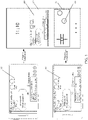
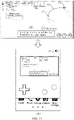
- FIG. 1 is a schematic diagram of an environment of a method for controlling interface display according to an embodiment of this disclosure.
- a system for controlling game interface display includes a mobile terminal.
- applications such as a game application, are deployed on the mobile terminal.
- the mobile terminal involved in this disclosure may be a smartphone, a tablet computer, a palmtop computer, or the like, but this disclosure is not limited thereto.
- the game application is a first game application is used.
- A1 is used for indicating a first game interface in full-screen mode
- A2 is used for indicating a first sub-interface
- A3 is used for indicating the first game interface displayed in the first sub-interface
- A4 is used for indicating a first touch interface
- A5 is used for indicating a first virtual key.
- the mobile terminal runs the first game application
- the first game interface and the first virtual key are displayed in a main user interface in full-screen mode.
- the mobile terminal creates the first sub-interface and the first touch interface in the main user interface, so that the first game interface is zoomed out and then displayed in the first sub-interface, and the first virtual key is displayed in the first touch interface.
- the first virtual key is configured to control the first game application.
- the mobile terminal displays the first game interface and the first virtual key in the main user interface in full-screen mode.
- Descriptions are provided by using an application to game application interface display as an example. Because that a game engine renders an image to a display interface of the mobile terminal requires presentation using the SurfaceView, and because the SurfaceView has an independent drawing surface, that is, the SurfaceView does not share a same drawing surface with its host window, the user interface (UI) of the SurfaceView can be drawn in an independent thread. In addition, since the SurfaceView does not occupy a main thread resource, the SurfaceView can achieve a complex and efficient UI without causing a failure in timely responding to an operation of a user.
- the SurfaceView may be implemented in picture-in-picture mode or floating window mode.
- the picture-in-picture mode is a picture presentation mode.
- the picture-in-picture mode refers to displaying a picture on a mobile terminal while simultaneously displaying another picture in a region with a smaller area in the picture.
- the floating window mode means that a movable window is suspended on a surface of an application. It is to be understood that, to use the floating window mode, the mobile terminal may need to be authorized by the system.
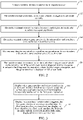
- FIG. 2 is a schematic flowchart of a method for controlling interface display according to an embodiment of this disclosure.
- Step S1 A mobile terminal initiates an authorization request to a user.
- a permission included in the authorization request may be a window-top-layer display permission, a front-camera shooting permission, a gravity sensing permission, an incoming call monitoring permission, and the like.
- Step S2 The mobile terminal determines, in real time, whether to trigger a switch mode currently, and if the switch mode is triggered, performs step S3.
- the switch mode includes, but is not limited to, that the user clicks a virtual key in a game interface, the screen rotates, there is an incoming call, a direction of the user's face is the same as a direction of the screen of the smartphone, and the like.
- Step S3 The mobile terminal creates a sub-interface and a touch region in a main user interface.
- the sub-interface and the touch region may be in floating window mode or picture-in-picture mode, which is not limited herein.
- Step S4 The mobile terminal renders a game interface to the sub-interface and switches the game to the background for running.
- Step S5 The user may drag the sub-interface or perform an operation on the sub-interface, and control a game progress using the touch region.
- Step S6 The mobile terminal determines, in real time, whether to trigger a switch-back mode currently, and if the switch-back mode is triggered, restores the game interface to the foreground for execution, where the touch region disappears, and the game interface is displayed in full-screen mode.
- FIG. 3 is a schematic diagram of a method for controlling interface display according to an embodiment of this disclosure.
- an embodiment of controlling interface display includes the following steps 101 and 102.
- a mobile terminal runs a first game application
- the mobile terminal displays a first game interface and a first virtual key in a main user interface in full-screen mode, the first virtual key being configured to control the first game application.
- the mobile terminal displays the first game interface and the first virtual key in the main user interface in full-screen mode.
- the full-screen mode may be that the mobile terminal displays the first game interface in the entire displayable region of the screen of the mobile terminal, or that the mobile terminal displays the first game interface in most of the displayable region of the screen of the mobile terminal.
- the mobile terminal displays a status bar (for example, information such as an operator, a time, and a battery level) in a small part of displayable region at the top of the screen, and displays the first game interface in the remaining part of the screen.
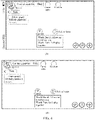
- FIG. 4 is a schematic diagram of displaying a first game interface in full-screen mode according to an embodiment of this disclosure.
- drawing (A) in FIG. 4 shows displaying the first game interface in most of the displayable region of the screen of the mobile terminal
- drawing (B) in FIG. 4 shows displaying the first game interface in the entire displayable region of the screen of the mobile terminal.
- the first game interface in a first sub-interface after the first game interface is zoomed out, and display the first virtual key in a first touch interface, the first sub-interface and the first touch interface being created in the main user interface in a case that the switch mode is triggered, the first touch interface being configured to display a virtual key for controlling the first game application.
- the mobile terminal may create the first sub-interface and the first touch interface in the main user interface.
- the main user interface represents the first user interface that is seen after the mobile terminal is started, usually, the main user interface includes a common application icon, a time, battery level information, operator information, and the like.
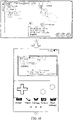
- FIG. 5 is a schematic diagram of creating a first sub-interface and a first touch interface according to an embodiment of this disclosure.
- B 1 is used for indicating a main user interface
- B2 is used for indicating a first sub-interface
- B3 is used for indicating a first touch interface.
- the first sub-interface and the first touch interface may also be in a shape of a circle, a triangle, a square, or the like.
- the first sub-interface and the first touch interface may also be located at other positions, for example, directly above or directly below the main user interface.
- the shapes of the first sub-interface and the first touch interface and the display positions of the first sub-interface and the first touch interface in the main user interface may be adjusted according to an actual case.
- the first touch interface may be located at a display position independent of the first sub-interface in the main user interface, and may also be located at a display position at which the first sub-interface is located, which is not limited herein.
- the mobile terminal may display the first game interface in the first sub-interface after the first game interface is zoomed out. Because the first virtual key is a virtual key for controlling the first game application, the first virtual key may be displayed in the first touch interface.
- the first virtual key displayed in the first touch interface and the first virtual key displayed in full-screen mode are both used for controlling the first game application.
- the first virtual key displayed in the first touch interface and the first virtual key displayed in full-screen mode may be the same or different in terms of the quantity of keys and the shape of the key, which is not limited herein.
- the user may control the first game application by using the first virtual key displayed in the first touch interface, to continue the progress of the first game application.
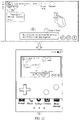
- FIG. 6 is a schematic diagram of switching to a main user interface according to an embodiment of this disclosure.
- drawing (A) in FIG. 6 shows a first game interface that is not zoomed out
- drawing (B) in FIG. 6 shows a first game interface that has been zoomed out
- drawing (C) in FIG. 6 shows a main user interface.
- C1 is used for indicating a first sub-interface
- C2 is used for indicating a first touch interface
- C3 is used for indicating a first virtual key in the first touch interface.
- the first game interface that has been zoomed out is displayed in the first sub-interface
- the first virtual key is displayed in the first touch interface.
- the size of the first game interface after being zoomed out needs to be determined according to the size of the first sub-interface.
- a key shape and a key type of the first virtual key both can be adjusted.
- a method for controlling interface display is provided.
- a sub-interface configured to display a game interface and a touch interface configured to control a game are created in a main user interface, to implement an operation of a user for another service on a mobile terminal while continuing a game progress without requiring the user to switch the interface frequently, thereby simplifying the user operation.
- a quantity of times of human computer interaction is reduced, and consumption of processing resources of the mobile terminal is reduced.
- FIG. 7 is a schematic diagram of a method for controlling interface display according to an embodiment of this disclosure.
- an embodiment of controlling interface display includes the following steps 201 to 203.
- a mobile terminal runs a first game application
- the mobile terminal displays a first game interface and a first virtual key in a main user interface in full-screen mode, the first virtual key being configured to control the first game application.
- the mobile terminal displays, in a case that a switch mode is triggered, the first game interface in a first sub-interface after the first game interface is zoomed out, and displays the first virtual key in a first touch interface, the first sub-interface and the first touch interface being created in the main user interface in a case that the switch mode is triggered, the first touch interface being configured to display a virtual key for controlling the first game application.
- step 201 to step 202 content described in step 201 to step 202 is similar to the content described in step 101 to step 102, and therefore, details are not described herein again.
- the mobile terminal in a case that the switch-back mode is triggered, switches to the full-screen mode to display the first game interface and the first virtual key corresponding to the first game application, and does not display the first touch region separately any more.
- FIG. 8 is a schematic diagram of switching to a first game interface according to an embodiment of this disclosure.
- drawing (A) in FIG. 8 shows a main user interface
- drawing (B) in FIG. 8 shows the first game interface in full-screen mode.
- D1 is used for indicating a first sub-interface
- D2 is used for indicating a first touch interface
- D3 is used for indicating a first virtual key.
- the user may also check the game interface of the first game application using the first sub-interface, and control the first game application by using the first virtual key displayed in the first touch interface.
- the user can change to hold the mobile terminal in landscape screen mode, or click a second virtual key in the first sub-interface, and so on, to switch to the game interface shown in drawing (B) in FIG. 8 .
- a method for controlling interface display is provided.
- a sub-interface configured to display a game interface and a touch interface configured to control a game are created in a main user interface, to implement an operation of a user for another service on a mobile terminal while continuing a game progress without requiring the user to switch the interface frequently, thereby simplifying the user operation.
- the game progress can also be continued in the switching process, the user operation is further simplified while satisfying the needs of the user.
- a quantity of times of human computer interaction is reduced, and consumption of processing resources of the mobile terminal is reduced.
- the following step is further included: determining, by the mobile terminal, to trigger the switch mode in a case that a preset switch operation is triggered, the preset switch operation including at least one of a click operation, a press operation, a slide operation, a double-click operation, or a multi-touch operation.
- a method for determining, through a preset switch operation, to trigger a switch mode is described.
- the mobile terminal displays a first game interface and a first virtual key in a main user interface in full-screen mode
- the user may perform a preset switch operation on the first game interface on the touchscreen. Therefore, when detecting that the touch object performs a preset switch operation for the first game interface on the touchscreen, the mobile terminal determines to trigger the switch mode.
- the touch object may be a finger or a knuckle of the user or another touchable object, which is not specifically limited herein.
- a first sub-interface and a first touch interface may be created on the main user interface.
- a manner of creating the first sub-interface and the first touch interface has been described in step 102, and therefore, details are not described herein again.
- the preset switch operation includes, but is not limited to, a click operation, a press operation, a slide operation, a double-click operation, a multi-touch operation, and the like.
- a method for determining, through a preset switch operation, to trigger a switch mode is provided.
- the user implements an interface switch by using a preset switch operation. Therefore, the implementation feasibility of this solution is improved.
- the preset switch operation may be at least one of various operations, the user may perform an operation according to a requirement, thereby improving the flexibility of this solution.
- the mobile terminal determines to trigger a switch mode, which may include following step:
- FIG. 9 is a schematic diagram of triggering a click operation for a first game interface according to an embodiment of this disclosure.
- drawing (A) in FIG. 9 shows a first game interface.
- E1 is used for indicating a first virtual key.
- drawing (B) in FIG. 9 is entered.
- Drawing (B) in FIG. 9 shows a main user interface including a first sub-interface and a first touch interface.
- the first virtual key may also be in a shape of a circle, an oval, a triangle, a pentagram, or the like.
- a position of the first virtual key may be any position located in the first game interface. Based on this, a specific shape and position of the first virtual key can be flexibly determined according to an actual situation.
- the second manner is a press operation. If a press time period during which the user presses the first game interface is greater than or equal to a first time period threshold, a press operation is triggered.
- the first time period threshold may be set according to an actual requirement, for example, may be 2s, 3s, or the like which is not limited herein.
- FIG. 10 is a schematic diagram of triggering a press operation for a first game interface according to an embodiment of this disclosure.
- drawing (A) in FIG. 10 shows a first game interface.
- a press time period is greater than or equal to a first time period threshold
- the mobile terminal can determine to trigger a switch mode. Based on this, drawing (B) in FIG. 10 is entered.
- Drawing (B) in FIG. 10 shows a main user interface including a first sub-interface and a first touch interface.
- the third manner is a slide operation. If the user performs a slide operation on the first game interface, a sliding trajectory being generated based on a start position of a touch object and an end position of the touch object, a slide operation is triggered.
- a manner of trigging a slide operation may also be that the mobile terminal starts a camera to shoot a touch object (for example, a hand or a stylus) performing a slide operation in the air. This operation does not require contact with the touchscreen.
- a touch object for example, a hand or a stylus
- drawing (A) in FIG. 11 shows a first game interface.
- F1 is used for indicating a start position of the finger on the touchscreen
- F2 is used for indicating an end position of the finger on the touchscreen
- F3 is used for indicating a sliding trajectory of the slide operation.
- drawing (B) in FIG. 11 is entered.
- Drawing (B) in FIG. 11 shows a main user interface including a first sub-interface and a first touch interface.
- the fourth manner is a double-click operation. If a time interval between two successive clicks performed by the user on the first game interface is less than or equal to a second time period threshold, a double-click operation is triggered.
- the second time period threshold may be set according to an actual requirement, for example, may be 0.5s, 1s, or the like, which is not limited herein.
- FIG. 12 is a schematic diagram of triggering a double-click operation for a first game interface according to an embodiment of this disclosure. As shown in the figure, drawing (A) in FIG. 12 shows a first game interface.
- drawing (B) in FIG. 12 shows a main user interface including a first sub-interface and a first touch interface.
- FIG. 13 is a schematic diagram of triggering a multi-touch operation for a first game interface according to an embodiment of this disclosure.
- drawing (A) in FIG. 13 shows a first game interface.
- G1 is used for indicating a touch point A
- G2 is used for indicating a touch point B.
- drawing (B) in FIG. 13 is entered.
- Drawing (B) in FIG. 13 shows a main user interface including a first sub-interface and a first touch interface.
- the preset switch operation includes multiple different operations. Based on this, the user may perform different preset switch operations according to requirements, thereby further improving the flexibility of this solution.
- the mobile terminal displays the first game interface in a first sub-interface after the first game interface is zoomed out, and displays the first virtual key in a first touch interface
- the following step is further included:
- the preset switch-back operation including at least one of a click operation, a press operation, a slide operation, a double-click operation, or a multi-touch operation.
- a method for determining, through a preset switch operation, to trigger a switch-back mode is described.
- the mobile terminal displays the first game interface in a first sub-interface after the first game interface is zoomed out, and displays the first virtual key in a first touch interface
- a preset switch-back operation may be performed on the first sub-interface on the touchscreen. Therefore, when detecting that the touch object performs a preset switch-back operation for the first sub-interface on the touchscreen, the mobile terminal determines to trigger the switch-back operation.
- the touch object may be a finger or a knuckle of the user or another touchable object, which is not specifically limited herein.
- the first game interface is displayed in full-screen mode in a case that a switch-back mode is triggered.
- the manner of displaying a first game interface in full-screen mode has been described in step 204, and therefore, details are not described herein again.
- the preset switch-back operation includes, but is not limited to, a click operation, a press operation, a slide operation, a double-click operation, a multi-touch operation, and the like.
- a method for determining, through a preset switch operation, to trigger a switch-back mode is provided.
- the user implements an interface switch using a preset switch-back operation. Therefore, the implementation feasibility of this solution is improved.
- the preset switch-back operation may be at least one of various operations, the user may perform an operation according to a requirement, thereby improving the flexibility of this solution.
- the mobile terminal determines to trigger a switch-back mode, which may include following step:
- the first manner is a click operation.
- the user may perform a click operation for a second virtual key in the first sub-interface on the touchscreen, and the mobile terminal can detect the click operation.
- the click operation is similar to the example described in FIG. 9 , and details are not described herein again.
- the second manner is a press operation.
- the user may perform a press operation on the first sub-interface.
- a press time period of the press operation is greater than or equal to a first time period threshold
- the mobile terminal can detect the press operation.
- the first time period threshold is set according to an actual requirement, for example, may be 2s, 3s, or the like, which is not limited herein.
- the press operation is similar to the example of FIG. 10 , and details are not described herein again.
- the third manner is a slide operation.
- the user may perform a slide operation on the first sub-interface, a sliding trajectory of the slide operation being generated based on a start position of a touch object and an end position of the touch object, and the mobile terminal can detect the slide operation.
- the specific press operation is similar to the example of FIG. 11 , and details are not described herein again.
- the fourth manner is a double-click operation.
- the user may perform a double-click operation on the first sub-interface, a double-click time interval of the double-click operation being less than or equal to a second time period threshold.
- the mobile terminal can detect the double-click operation.
- the second time period threshold may be set according to an actual requirement, for example, may be 1s, 2s, or the like, which is not limited herein.
- the specific press operation is similar to the example of FIG. 12 , and details are not described herein again.
- FIG. 14 is a schematic diagram of triggering a multi-touch operation for a first sub-interface according to an embodiment of this disclosure.
- drawing (A) in FIG. 14 shows a main user interface.
- H1 is used for indicating a first sub-interface
- H2 is used for indicating a touch point A
- H3 is used for indicating a touch point B.
- drawing (B) in FIG. 14 shows displaying the first game interface in full-screen mode.
- the preset switch-back operation includes multiple different operations. Based on this, the user may perform different preset switch-back operations according to requirements, thereby further improving the flexibility of this solution.
- a method for determining, based on a device usage state, to trigger a switch mode is described.
- a device usage state may be obtained through a gravity sensor, the device usage state being used for describing an attitude of the mobile terminal when the mobile terminal is held.
- the device usage state mainly includes a portrait-screen usage state and a landscape-screen usage state. Because the state of displaying the first game interface in full-screen mode is usually the landscape-screen usage state, when the mobile terminal is in a portrait-screen usage state, the mobile terminal can determine to trigger the switch mode.
- a gravity sensor can determine a state of the mobile terminal by measuring magnitudes of component forces of the gravity of the mobile terminal in two orthogonal directions, that is, obtain a device usage state.
- the device usage state may also be obtained through a gyroscope built in the mobile terminal. Because a rotation axis of a high-speed rotating object tends to be perpendicular to an external force that changes its direction, and when the rotating object is inclined horizontally, the gravity may increase the effect in the inclination direction, while the axis moves toward the perpendicular direction, so that a shaking movement (that is, the precession movement) is generated.
- FIG. 15 is a schematic diagram of switching a device usage state according to an embodiment of this disclosure.
- drawing (A) in FIG. 15 shows a first game interface displayed in full-screen mode in a landscape-screen usage state.
- drawing (B) in FIG. 15 shows a first game interface displayed in full-screen mode in a portrait-screen usage state
- the mobile terminal determines to trigger the switch mode.
- drawing (C) in FIG. 15 is entered.
- Drawing (C) in FIG. 15 shows a main user interface including a first sub-interface and a first touch interface.
- a method for determining, based on a device usage state, to trigger a switch mode is provided.
- determining, by using the device usage state, to trigger the switch mode further clarifies the specific switch mode, thereby improving the feasibility of this solution.
- the mobile terminal displays the first game interface in a first sub-interface after the first game interface is zoomed out, and displays the first virtual key in a first touch interface
- the following step is further included:
- a method for determining, based on a device usage state, to trigger a switch-back mode is described.
- a device usage state may be obtained through a gravity sensor, the device usage state being used for describing an attitude of the mobile terminal when the mobile terminal is held.
- the device usage state mainly includes a portrait-screen usage state and a landscape-screen usage state. Because the state of displaying the first sub-interface and the first virtual key is usually the portrait-screen usage state, when the mobile terminal is in a landscape-screen usage state, the mobile terminal can determine to trigger the switch-back mode.
- FIG. 16 is a schematic diagram of switching a device usage state according to an embodiment of this disclosure.
- drawing (A) in FIG. 16 shows a main user interface including a first sub-interface and a first touch interface.
- drawing (B) in FIG. 16 shows a main user interface including a first sub-interface and a first touch interface in a landscape-screen usage state.
- drawing (C) in FIG. 16 is entered.
- Drawing (C) in FIG. 16 shows a first game interface displayed in full-screen mode in a landscape-screen usage state.
- a method for determining, based on a device usage state, to trigger a switch-back mode is provided.
- the user because when the user adjusts the device usage state, in the landscape-screen usage state, the user usually wants to display the first game interface in full-screen mode, determining, by using the device usage state, to trigger the switch-back mode further clarifies the specific switch-back mode, thereby improving the feasibility of this solution.
- the mobile terminal may further obtain a face image through a front-facing camera, determines, according to the face image, left eye coordinates corresponding to the left eye and right eye coordinates corresponding to the right eye, and then, generates a two-eye coordinate connecting line according to the left eye coordinates and the right eye coordinates.
- the mobile terminal determines to trigger the switch mode in a case that an angle between the two-eye coordinate connecting line and a horizontal direction of the mobile terminal is less than or equal to an angle threshold.
- the horizontal direction of the mobile terminal represents a horizontal direction of the mobile terminal in a portrait-screen usage state.
- the angle threshold may be set according to an actual requirement, for example, may be 30°, and in an actual application, the angle threshold may also be set to another angle such as 45° or 20°, which are not limited herein.
- FIG. 17 is a schematic diagram of an angle between a two-eye coordinate connecting line and a horizontal direction of a mobile terminal according to an embodiment of this disclosure.
- drawing (A) in FIG. 17 shows a mobile terminal in a portrait-screen usage state
- drawing (B) in FIG. 17 shows a mobile terminal in a landscape-screen usage state.
- I1 is used for indicating a horizontal direction of the mobile terminal
- 12 is used for indicating the left eye
- 13 is used for indicating the right eye.
- the connecting line between the left eye and the right eye is parallel to the horizontal direction of the mobile terminal, that is, an angle between the two-eye coordinate connecting line between the left eye coordinates corresponding to the left eye and the right eye coordinates corresponding to the right eye and the horizontal direction of the mobile terminal is 0°.
- the connecting line between the left eye and the right eye is perpendicular to the horizontal direction of the mobile terminal, that is, an angle between the two-eye coordinate connecting line between the left eye coordinates corresponding to the left eye and the right eye coordinates corresponding to the right eye and the horizontal direction of the mobile terminal is 90°.
- FIG. 18 is a schematic diagram of implementing an interface switch based on facial recognition according to an embodiment of this disclosure.
- drawing (A) in FIG. 18 shows a mobile terminal.
- J1 is used for indicating a horizontal direction of the mobile terminal
- J2 is used for indicating the left eye
- J3 is used for indicating the right eye
- J4 is used for indicating an angle between a two-eye coordinate connecting line and the horizontal direction of the mobile terminal.
- drawing (B) in FIG. 18 shows a main user interface including a first sub-interface and a first touch interface.
- a method for triggering a switch mode based on a facial recognition situation is provided.
- the left eye coordinates and the right eye coordinates are determined based on the face image, and further, the two-eye coordinate connecting line is determined. Determining, according to a relationship of the angle between the two-eye coordinate connecting line and the horizontal direction of the mobile terminal, whether to trigger the switch mode clarifies the specific switch mode without requiring the user to perform an active operation. Whether to trigger the switch mode can be determined by only obtaining the face image, which simplifies the user operation.
- the mobile terminal displays the first game interface in a first sub-interface after the first game interface is zoomed out, and displays the first virtual key in a first touch interface
- the following step is further included:
- the mobile terminal may further obtain a face image through a front-facing camera, determines, according to the face image, left eye coordinates corresponding to the left eye and right eye coordinates corresponding to the right eye, and then, generates a two-eye coordinate connecting line according to the left eye coordinates and the right eye coordinates.
- the mobile terminal determines to trigger the switch-back mode in a case that an angle between the two-eye coordinate connecting line and a horizontal direction of the mobile terminal is greater than an angle threshold.
- the horizontal direction of the mobile terminal represents a horizontal direction of the mobile terminal in a portrait-screen usage state.
- the angle threshold may be set according to an actual requirement, for example, may be 30°, and in an actual application, the angle threshold may also be set to another angle such as 45° or 20°, which are not limited herein.
- FIG. 19 is a schematic diagram of implementing an interface switch back based on facial recognition according to an embodiment of this disclosure.
- drawing (A) in FIG. 19 shows a mobile terminal.
- K1 is used for indicating a horizontal direction of the mobile terminal
- K2 is used for indicating the left eye
- K3 is used for indicating the right eye
- K4 is used for indicating an angle between a two-eye coordinate connecting line and the horizontal direction of the mobile terminal.
- Drawing (B) in FIG. 19 shows a first game interface displayed in full-screen mode.
- a method for determining, based on a facial recognition situation, to trigger a switch-back mode is provided.
- the left eye coordinates and the right eye coordinates are determined based on the face image, and further, the two-eye coordinate connecting line is determined. Determining, according to a relationship of the angle between the two-eye coordinate connecting line and the horizontal direction of the mobile terminal, whether to trigger the switch-back mode does not require the user to perform an active operation. Whether to trigger the switch-back mode can be determined by only obtaining the face image, which simplifies the user operation.
- a method for determining, based on an incoming call situation, to trigger a switch mode is described.
- the mobile terminal may monitor an incoming call reminder in real time. When there is an incoming call reminder, if the user chooses to answer the incoming call, the mobile terminal may detect an answering instruction for the incoming call reminder, and therefore, determine to trigger the switch mode.
- An answering operation through which the user chooses to answer the incoming call may be an operation of clicking an answer button.
- FIG. 20 is a schematic diagram of implementing an interface switch based on an incoming call reminder according to an embodiment of this disclosure.
- drawing (A) in FIG. 20 shows a first game interface displayed in full-screen mode.
- drawing (B) in FIG. 20 is entered.
- Drawing (B) in FIG. 20 shows a main user interface including a first sub-interface and a first touch interface.
- a method for determining, based on an incoming call situation, to trigger a switch mode is provided.
- the interface is automatically switched, thereby simplifying the user operation and improving the feasibility of this solution.
- the mobile terminal may further obtain a to-be-detected voice through a microphone in real time, and determines, in a case that the to-be-detected voice successfully matches a first preset voice, to trigger a switch mode.
- the mobile terminal matches the to-be-detected voice with the first preset voice, and determines, in a case that the matching succeeds, to trigger the switch mode.
- the foregoing example is merely for understanding of this solution.
- the first preset voice may also be set according to an actual selection situation.
- a method for determining, based on voice, to trigger a switch mode is provided.
- the user may switch the interface through voice, thereby simplifying the user operation and increasing the application flexibility of the solution.
- the mobile terminal displays the first game interface in a first sub-interface after the first game interface is zoomed out, and displays the first virtual key in a first touch interface
- the following step is further included:
- the mobile terminal may further obtain a to-be-detected voice through a microphone in real time, and determines, in a case that the to-be-detected voice successfully matches a second preset voice, to trigger a switch-back mode.
- the mobile terminal matches the to-be-detected voice with the second preset voice, and determines, in a case that the matching succeeds, to trigger the switch-back mode.
- the foregoing example is merely for understanding of this solution.
- the second preset voice may also be set according to an actual selection situation.
- a method for determining, based on voice, to trigger a switch-back mode is provided.
- the user may switch back the interface through voice, thereby simplifying the user operation and increasing the application flexibility of the solution.
- the first sub-interface and the first touch interface are both embedded interfaces.
- a step that the mobile terminal displays the first game interface in a first sub-interface after the first game interface is zoomed out, and displays the first virtual key in a first touch interface may be include:
- the mobile terminal may create the first sub-interface in a first preset region of the main user interface, the first preset region being a fixed region in the main user interface.
- the mobile terminal may also create the first touch interface in a second preset region of the main user interface, the second preset region being another fixed region in the main user interface. Based on this, the mobile terminal displays, after the first game interface is zoomed out, the first game interface in the first sub-interface in picture-in-picture mode, and displays the first virtual key in the first touch interface in picture-in-picture mode.
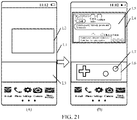
- FIG. 21 is a schematic diagram of implementing interface display based on an embedded interface according to an embodiment of this disclosure.
- L1 is used for indicating a main user interface
- L2 is used for indicating a first preset region
- L3 is used for indicating a second preset region
- L4 is used for indicating a first sub-interface
- L5 is used for indicating a first game interface that has been zoomed out
- L6 is used for indicating a first touch interface
- L7 is used for indicating a first virtual key.
- the first preset region and the second preset region in drawing (A) in FIG. 21 are both fixed regions in the main user interface.
- the first sub-interface is created in the first preset region, and the first touch interface is created in the second preset region L3.
- the first game interface is zoomed out, then, the first game interface that has been zoomed out is covered on the first sub-interface for presentation, and the first virtual key is displayed in the first touch interface.
- a method for implementing interface display based on an embedded interface is provided.
- a sub-interface configured to display a game interface and a touch interface configured to control a game are created in fixed preset regions in a main user interface, to implement an operation of a user for another service on a mobile terminal while continuing a game progress without requiring the user to switch the interface frequently, thereby simplifying the user operation.
- the first sub-interface and the first touch interface are both floating window interfaces.
- a step that the mobile terminal displays the first game interface in a first sub-interface after the first game interface is zoomed out, and displays the first virtual key in a first touch interface may include:
- a method for controlling interface display based on a floating window interface is described.
- At least one of the first sub-interface or the first touch interface may be a floating window interface. Since the floating window interface is not a fixed interface, the mobile terminal may create the first sub-interface at an upper layer of the main user interface, and create the first touch interface at the upper layer of the main user interface. The mobile terminal then displays, after the first game interface is zoomed out, the first game interface in the first sub-interface in floating window mode, and may also display the first virtual key in the first touch interface in floating window mode.
- the floating window interface nay be a non-transparent interface or a translucent interface, which is not limited herein.
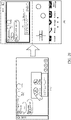
- FIG. 22 is a schematic diagram of implementing interface display based on a floating interface according to an embodiment of this disclosure.
- M1 is used for indicating a main user interface
- M2 is used for indicating a first sub-interface
- M3 is used for indicating a first touch interface
- M4 is used for indicating a first game interface that has been zoomed out
- M5 is used for indicating a first virtual key.
- Both the first sub-interface and the first touch interface are located at the upper layer of the main user interface.
- the first game interface is displayed in the first sub-interface
- the first virtual key is displayed in the first touch interface. Based on this, the interface shown in drawing (B) in FIG. 22 is obtained.
- a method for controlling interface display based on a floating window interface is provided.
- a sub-interface configured to display a game interface and a touch interface configured to control a game are created at an upper layer of a main user interface, to implement an operation of a user for another service on a mobile terminal while continuing a game progress without requiring the user to switch the interface frequently, thereby further simplifying the user operation.
- FIG. 23 is a schematic diagram of performing a drag operation for a first sub-interface according to an embodiment of this disclosure.
- N1 is used for indicating a first sub-interface
- N2 is used for indicating a start position
- N3 is used for indicating an end position.
- Drawing (A) in FIG. 23 shows that the user performs a drag operation from the start position to the end position, a dragging trajectory being from the start position to the end position. Therefore, the mobile terminal can control the first sub-interface to move from the start position to the end position, that is, drawing (B) in FIG. 23 is obtained. It may be understood that, details of performing a drag operation for the first touch interface are not described again.
- FIG. 24 is a schematic diagram of performing a zoom operation for a first sub-interface according to an embodiment of this disclosure. As shown in the figure, O1 is used for indicating a first sub-interface, O2 is used for indicating a first sub-interface that has been zoomed out, and O3 is used for indicating a first sub-interface that has been zoomed in. Drawing (A) in FIG.
- FIG. 24 shows pinching the fingers inward on the touchscreen of the mobile terminal, that is, a zoom-out operation for the first sub-interface is triggered. Therefore, drawing (B) in FIG. 24 is obtained, and the first sub-interface has been zoomed out.
- Drawing (C) in FIG. 24 shows stretching the fingers outward on the touchscreen of the mobile terminal, that is, a zoom-in operation for the first sub-interface is triggered. Therefore, drawing (D) in FIG. 24 is obtained, and the first sub-interface has been zoomed in. It may be understood that, details of performing a zoom operation for the first touch interface are not described again.
- a method for adjusting a position and a size of a floating window is provided.
- positions and sizes of the first sub-interface and the first touch interface may also be adjusted according to user requirements, thereby improving the flexibility of this solution.
- the mobile terminal may obtain a game type of the first game application, and then determine a first touch interface from at least one creatable touch interface according to the game type of the first game application, so as to display a virtual key corresponding to the game type.
- the game type may be a sports game, a leisure game, a role-playing games(RPG), and the like.
- a touch interface corresponding to a sports game may include virtual keys such as "Jump” and "Squat”.
- a touch interface corresponding to a leisure game may include virtual keys such as "Left", “Right”, and "Shoot”.
- a touch interface corresponding to an RPG may include directional virtual keys and the like.
- the user may also customize a parameter of the first touch interface.
- the parameter includes, but is not limited to, interface transparency, an interface background color, an interface pattern, an interface text, shapes and sizes of virtual keys, and the like, which are not limited herein.
- FIG. 25 is a schematic diagram of an embodiment of a first touch interface according to an embodiment of this disclosure.
- Drawing (A) in FIG. 25 shows a main user interface corresponding to an RPG.
- Drawing (B) in FIG. 25 shows a main user interface corresponding to a sports game.
- Drawing (C) in FIG. 25 shows a main user interface corresponding to a leisure game.
- P1 is used for indicating a first touch interface.
- P11 is used for indicating a directional virtual key
- P12 is used for indicating a virtual key of a "Confirm” function
- P13 is used for indicating a virtual key of a "Cancel" function.
- P21 is used for indicating a virtual key of a "Jump” function
- P22 is used for indicating a virtual key of a "Squat” function
- P31 is used for indicating a "Move leftward” virtual key
- P32 is used for indicating a "Move rightward” virtual key
- P33 is used for indicating a virtual key of a "Shoot” function.
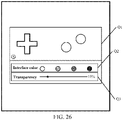
- FIG. 26 is a schematic diagram of selecting a parameter of a first touch interface according to an embodiment of this disclosure.
- Q1 is used for indicating a first touch interface
- Q2 is used for indicating an interface color selection region
- Q3 is used for indicating a transparency selection region. The user may adjust the interface color and the transparency according to requirements.
- a method for adjusting a touch interface based on a game type is provided.
- different touch interfaces may be set for different game types, which helps to control different types of games.
- the parameter of the first touch interface may also be adjusted according to user requirements, thereby increasing the flexibility of this solution.
- the mobile terminal may also run a second game application, and display a second game interface corresponding to the second game application in full-screen mode.
- a second sub-interface and a second touch interface can be created in the main user interface.
- the second game interface is displayed in the second sub-interface after being zoomed out, and a second virtual key is displayed on the second touch interface.
- the second virtual key is configured to control the second game application.
- FIG. 27 is a schematic diagram of a method for controlling interface display according to an embodiment of this disclosure.
- R1 is used for indicating a first sub-interface
- R2 is used for indicating a first touch interface
- R3 is used for indicating a second sub-interface
- R4 is used for indicating a second touch interface.
- a first game interface that has been zoomed out is displayed in the first sub-interface
- a second game interface that has been zoomed out is displayed in the second sub-interface
- a first virtual key corresponding to the first game application is displayed in the first touch interface
- a second virtual key corresponding to the second game application is displayed in the second touch interface.
- Display positions and sizes of the second sub-interface and the second touch interface may be flexibly set according to user requirements.
- a method for displaying multiple game interfaces simultaneously is provided.
- the mobile terminal can display multiple game applications in the main user interface, to implement an operation on another service on the mobile terminal while continuing two game progresses, thereby increasing the convenience of the operation.
- the mobile terminal may also run a video application, and therefore, display a video application interface corresponding to the video application in main user interface.
- a switch mode is triggered, a third sub-interface is created in the main user interface. Therefore, the video application interface is zoomed out and displayed in the third sub-interface.
- a manner of triggering a switch mode and a manner of creating a third sub-interface are similar to those in the foregoing embodiment, and details are not described herein again.
- FIG. 28 is a schematic diagram of a method for controlling interface display according to an embodiment of this disclosure.
- T1 is used for indicating a first sub-interface
- T2 is used for indicating a first touch interface
- T3 is used for indicating a third sub-interface.
- a first game interface that has been zoomed out is displayed in the first sub-interface
- a first virtual key is displayed in the first touch interface
- a video application interface that has been zoomed out is displayed in the third sub-interface.
- FIG. 28 is merely used for understanding this solution.
- a position and a size of the third sub-interface can be flexibly set according to user requirements.
- a method for displaying a game interface and a video interface simultaneously is provided.
- the mobile terminal not only can display a game application in the main user interface, but also can display a video application in the main user interface simultaneously, and in addition, implements an operation of the user for another service on the mobile terminal, thereby satisfying diverse requirements of the user and further simplifying the user operation.
- the mobile terminal displays the first game interface in a first sub-interface after scaling down the first game interface, and displays the first virtual key in a first touch interface
- the following step is further included: displaying, by the mobile terminal in a case that a target application is run, an application interface corresponding to the target application in full-screen mode in the main user interface, and displaying a first sub-interface and a first touch interface in the main user interface, the target application including at least one of a messaging application, an entertainment application, or a tool application.
- the mobile terminal may also display, if running a target application, an application interface of the target application in full-screen mode in the main user interface, and at the same time, continuously display the first sub-interface and the first touch interface in the main user interface.
- the target application includes, but is not limited to, a messaging application, an entertainment application, and a tool application.
- the messaging application includes, but is not limited to, a media instant messaging application of such as Chat, Social, Email, and Community.
- the entertainment application includes, but is not limited to, applications such as Music, Ringtone, Player, Live streaming, Entertainment, and Horoscope.
- the tool application includes, but is not limited to, applications such as Life services, Food, Weather, Calendar, Utilities, Flashlight, Note, Office tools, Network disk storage, and Office software.
- the application interface can be displayed in full-screen mode when the user performs an operation on the target application in the main user interface.
- operations such as replying to a message, checking an email, ordering a takeaway, listening to a song, browsing the microblog, surfing on the Internet, taking a picture, and setting the system may all be displayed in full-screen mode, and the user may also perform the operations while continuing the game progress.
- FIG. 29 is a schematic diagram of a method for controlling interface display according to an embodiment of this disclosure.
- U1 is used for indicating a first sub-interface
- U2 is used for indicating a first touch interface
- U3 is used for indicating a tool application interface.
- a first game interface that has been zoomed out is displayed in the first sub-interface
- a first virtual key is displayed in the first touch interface
- a tool application interface corresponding to the tool application is displayed in full-screen mode.
- a method for displaying a game interface and an information interface simultaneously is provided.
- the mobile terminal displays multiple types of applications in the main user interface, and not only can continue the game progress, but also can perform an operation on another application, to implement operations of the user on multiple types of application services on the mobile terminal, thereby satisfying the diverse requirements of the user.
- FIG. 30 is a schematic diagram of an apparatus for controlling interface display according to an embodiment of this disclosure.
- An apparatus 30 for controlling interface display includes a display module 301.
- the display module 301 is configured to display a first game interface and a first virtual key in a main user interface in full-screen mode in a case that a first game application is run, where the first virtual key is configured to control the first game application.
- the display module 301 is further configured to display, in a case that a switch mode is triggered, the first game interface in a first sub-interface after the first game interface is zoomed out, and display the first virtual key in a first touch interface, where the first sub-interface and the first touch interface are created in the main user interface in a case that the switch mode is triggered, the first touch interface is configured to display a virtual key for controlling the first game application.
- the display module 301 is further configured to display the first game interface in a first sub-interface after the first game interface is zoomed out, and display the first virtual key in a first touch interface; and display the first game interface and the first virtual key in the main user interface in full-screen mode in a case that a switch-back mode is triggered.
- the apparatus 30 for controlling interface display further includes a determining module 302.
- the determining module 302 is configured to determine to trigger the switch mode in a case that a preset switch operation is triggered, the preset switch operation including at least one of a click operation, a press operation, a slide operation, a double-click operation, or a multi-touch operation.
- the determining module 302 is further configured to determine to trigger the switch mode in a case that a click operation is triggered for a first virtual button in the first game interface; or determine to trigger the switch mode in a case that a press operation is triggered for the first game interface, a press time period of the press operation being greater than or equal to a first time period threshold; or determine to trigger the switch mode in a case that a slide operation is triggered for the first game interface, a sliding trajectory of the slide operation being generated based on a start position of a touch object and an end position of the touch object; or determine to trigger the switch mode in a case that a double-click operation is triggered for the first game interface, a double-click time interval of the double-click operation is less than or equal to a second time period threshold; or determine to trigger the switch mode in a case that a multi-touch operation is triggered for the first
- the determining module 302 is further configured to determine to trigger the switch-back mode in a case that a preset switch-back operation is triggered for the first sub-interface, the preset switch-back operation including at least one of a click operation, a press operation, a slide operation, a double-click operation, or a multi-touch operation.
- the determining module 302 is further configured to determine to trigger the switch-back mode in a case that a click operation is triggered for a second virtual button in the first sub-interface; or determine to trigger the switch-back mode in a case that a press operation is triggered for the first sub-interface, a press time period of the press operation being greater than or equal to a first time period threshold; or determine to trigger the switch-back mode in a case that a slide operation is triggered for the first sub-interface, a sliding trajectory of the slide operation being generated based on a start position of a touch object and an end position of the touch object; or determine to trigger the switch-back mode in a case that a double-click operation is triggered for the first sub-interface, a double-click time interval of the double-click operation is less than or equal to a second time period threshold; or determine to trigger the switch-back
- the apparatus 30 for controlling interface display further includes an obtaining module 303.
- the obtaining module 303 is configured to obtain, after the display module 301 displays a first game interface and a first virtual key in a main user interface in full-screen mode, a device usage state through a gravity sensor, the device usage state being used for describing an attitude of the mobile terminal when the mobile terminal is held.
- the determining module 302 is further configured to determine to trigger the switch mode in a case that the device usage state indicates that the mobile terminal is in a portrait-screen usage state.
- the obtaining module 303 is further configured to obtain, after the display module 301 displays the first game interface in a first sub-interface after the first game interface is zoomed out, and displays the first virtual key in a first touch interface, a device usage state may be obtained through a gravity sensor, the device usage state being used for describing an attitude of the mobile terminal when the mobile terminal is held.
- the determining module 302 is further configured to determine to trigger the switch-back mode in a case that the device usage state indicates that the mobile terminal is in a landscape-screen usage state.
- the obtaining module 303 is further configured to obtain a face image through a front-facing camera after the display module 301 displays a first game interface and a first virtual key in a main user interface in full-screen mode.
- the determining module 302 is further configured to determine, according to the face image, left eye coordinates corresponding to the left eye and right eye coordinates corresponding to the right eye.
- the determining module 302 is further configured to determine a two-eye coordinate connecting line according to the left eye coordinates and the right eye coordinates.
- the determining module 302 is further configured to determine to trigger the switch mode in a case that an angle between the two-eye coordinate connecting line and a horizontal direction of the mobile terminal is less than or equal to an angle threshold, the horizontal direction of the mobile terminal representing a horizontal direction of the mobile terminal in a portrait-screen usage state.
- the obtaining module 303 is further configured to obtain a face image through a front-facing camera after the display module displays the first game interface in a first sub-interface after the first game interface is zoomed out, and displays the first virtual key in a first touch interface.
- the determining module 302 is further configured to determine, according to the face image, left eye coordinates corresponding to the left eye and right eye coordinates corresponding to the right eye.
- the determining module 302 is further configured to determine a two-eye coordinate connecting line according to the left eye coordinates and the right eye coordinates.
- the determining module 302 is further configured to determine to trigger the switch-back mode in a case that an angle between the two-eye coordinate connecting line and a horizontal direction of the mobile terminal is greater than an angle threshold, the horizontal direction of the mobile terminal representing a horizontal direction of the mobile terminal in a portrait-screen usage state.
- the apparatus 30 for controlling interface display further includes a monitoring module 304.
- the monitoring module 304 is configured to monitor an incoming call reminder after the display module 301 displays a first game interface and a first virtual key in a main user interface in full-screen mode.
- the determining module 302 is further configured to determine to trigger the switch mode in a case that an answering instruction for the incoming call reminder is triggered.
- the obtaining module 303 is further configured to obtain a to-be-detected voice through a microphone after the display module displays a first game interface and a first virtual key in a main user interface in full-screen mode.
- the determining module 302 is further configured to determine, in a case that the to-be-detected voice successfully matches a first preset voice, to trigger a switch mode.
- the obtaining module 303 is further configured to obtain a to-be-detected voice through a microphone after the display module displays the first game interface in a first sub-interface after the first game interface is zoomed out, and displays the first virtual key in a first touch interface.
- the determining module 302 is further configured to determine, in a case that the to-be-detected voice successfully matches a second preset voice, to trigger a switch-back mode.
- the first sub-interface and the first touch interface are both embedded interfaces.
- the display module 301 is further configured to create the first sub-interface in a first preset region of the main user interface, the first preset region being a fixed region in the main user interface; create the first touch interface in a second preset region of the main user interface, the first touch interface being another fixed region in the main user interface; and display, after the first game interface is zoomed out, the first game interface in the first sub-interface in picture-in-picture mode, and display the first virtual key in the first touch interface in picture-in-picture mode.
- the first sub-interface and the first touch interface are both floating window interfaces.
- the display module 301 is further configured to create the first sub-interface at an upper layer of the main user interface; create the first touch interface at the upper layer of the main user interface; and display, after the first game interface is zoomed out, the first game interface in the first sub-interface in floating window mode, and display the first virtual key in the first touch interface in floating window mode.
- the apparatus 30 for controlling interface display further includes a control module 305.
- the control module 305 is configured to control, in a case that a drag operation is triggered for the first sub-interface, the first sub-interface to move along a dragging trajectory corresponding to the drag operation.
- the control module 305 is further configured to control, in a case that a drag operation is triggered for the first touch interface, the first touch interface to move along a dragging trajectory corresponding to the drag operation.
- the control module 305 is further configured to control, in a case that a zoom operation is triggered for the first sub-interface, the first sub-interface to be zoomed in or zoomed out according to the zoom operation.
- the control module 305 is further configured to control, in a case that a zoom operation is triggered for the first touch interface, the first touch interface to be zoomed in or zoomed out according to the zoom operation.
- the obtaining module 303 is further configured to obtain a game type of the first game application before the display module displays the first game interface in a first sub-interface after the first game interface is zoomed out, and displays the first virtual key in a first touch interface.
- the determining module 302 is further configured to determine a first touch interface from at least one creatable touch interface according to the game type of the first game application, each creatable touch interface displaying a corresponding virtual key.
- the display module 301 is further configured to display, in a case that a switch mode is triggered, the second game interface in a second sub-interface after zooming out the second game interface, and display a second virtual key in a second touch interface, the second virtual key being configured to control the second game application, and the second sub-interface and the second touch interface both being displayed in the main user interface.
- the display module 301 is further configured to display, in a case that a video application is run, a video application interface corresponding to the video application in main user interface.
- the display module 301 is further configured to display, in a case that a switch mode is triggered, the video application interface in a third sub-interface after the video application interface is zoomed out, the third sub-interface being displayed in the main user interface.
- the display module 301 is further configured to: after displaying the first game interface in a first sub-interface after the first game interface is zoomed out, and displaying the first virtual key in a first touch interface, display, in a case that a target application is run, an application interface corresponding to the target application in full-screen mode in the main user interface, and display a first sub-interface and a first touch interface in the main user interface, the target application including at least one of a messaging application, an entertainment application, or a tool application.
- the embodiments of this disclosure further provide another apparatus for controlling interface display. As shown in FIG. 31 , for ease of description, only parts related to this embodiment of this disclosure are shown. For specific undisclosed technical details, reference may be made to the method part in the embodiments of this disclosure. In this embodiment of this disclosure, descriptions are provided by using an example in which the mobile terminal is a smartphone.
- FIG. 31 is a block diagram of a structure of a part of a smartphone related to a mobile terminal according to an embodiment of this disclosure.
- the smartphone includes components such as a radio frequency (RF) circuit 410, a memory 420, an input unit 430, a display unit 440, a sensor 450, an audio circuit 460, a wireless fidelity (Wi-Fi) module 470, a processor 480, and a power supply 490.
- the input unit 430 may include a touch panel 431 and another input device 432.
- the display unit 440 may include display panel 441.
- the audio circuit 460 may include a speaker 461 and a microphone 462.
- the structure of the smartphone shown in FIG. 31 does not constitute a limitation on the smartphone, and the smartphone may include more components or fewer components than those shown in the figure, or some components may be combined, or a different component deployment may be used.
- the processor 480 is a control center of the smartphone, and is connected to various parts of the entire smartphone by using various interfaces and lines. By running or executing the software program and/or the module stored in the memory 420, and invoking data stored in the memory 420, the processor executes various functions of the smartphone and performs data processing, thereby monitoring the entire smartphone.
- the processor 480 may include one or more processing units.
- the processor 480 may integrate an application processor and a modem processor.
- the application processor mainly processes an operating system, a user interface, an application, and the like.
- the modem processor mainly processes wireless communication. It may be understood that the modulation and demodulation processor may not be integrated into the processor 480.
- the smartphone may further include a camera, a Bluetooth module, and the like, and details are not described herein.
- the processor 480 included in the terminal may implement functions in an embodiment corresponding to any one of FIG. 3 to FIG. 29 .
- the embodiments of this disclosure further provide a computer-readable storage medium, storing a computer program, the computer program, when run on a computer, causing the computer to perform the method described in the foregoing embodiments.
- the embodiments of this disclosure further provide a computer program product including instructions, the instructions, when run on a computer, causing the computer to perform the method described in the foregoing embodiments.
Landscapes
- Engineering & Computer Science (AREA)
- Multimedia (AREA)
- General Engineering & Computer Science (AREA)
- Theoretical Computer Science (AREA)
- Human Computer Interaction (AREA)
- Physics & Mathematics (AREA)
- General Physics & Mathematics (AREA)
- User Interface Of Digital Computer (AREA)
Abstract
Description
- This application claims priority to
Chinese Patent Application No. 202011062334.3, entitled "METHOD, APPARATUS, DEVICE, AND STORAGE MEDIUM FOR CONTROLLING INTERFACE DISPLAY" filed with the China National Intellectual Property Administration on September 30, 2020 - This application relates to the field of interface display technologies, and in particular, to controlling interface display.
- With the continuous development of the Internet technologies, types of applications are increasingly diverse, and demands of users for the display function of mobile terminals are growing day by day. Either in people's daily communication or in work and entertainment, the mobile terminal plays a very important role.
- Currently, games run on the mobile terminals mainly include standalone games and online games. After downloading a game application, a user can play the game on a mobile terminal. Usually, a game interface is displayed on the mobile terminal in full-screen mode, and the user can operate the game in a display interface of the mobile terminal.
- However, the mobile terminal not only functions to provide a game service, but also functions to provide many other services. In a case that the user requires another service to be performed during the game, the user needs to suspend the game or switch running of the game to the background. In a case that the user wants to resume the game, the user is required to start the game application again, which consequently makes the entire operation process more cumbersome and the man-machine interaction frequent and consumes processing resources of the mobile terminal.
- Embodiments of this disclosure provide a method and an apparatus for controlling interface display, a device, and a storage medium, to implement an operation of a user for another service on a mobile terminal while continuing a game progress without requiring the user to switch the interface frequently, thereby simplifying the user operation. In addition, a quantity of times of human computer interaction is reduced, and consumption of processing resources of the mobile terminal is reduced.
- In view of this, an aspect of this disclosure provides a method for controlling interface display, the method being applied to a mobile terminal, the method including:
- displaying a first game interface and a first virtual key in a main user interface in full-screen mode in a case that a first game application is run, the first virtual key being configured to control the first game application; and
- displaying, in a case that a switch mode is triggered, the first game interface in a first sub-interface after the first game interface is zoomed out, and displaying the first virtual key in a first touch interface, the first sub-interface and the first touch interface being created in the main user interface in a case that the switch mode is triggered, the first touch interface being configured to display a virtual key for controlling the first game application.
- Another aspect of this disclosure provides an apparatus for controlling interface display, the apparatus being deployed on a mobile terminal, the apparatus including:
- a display module, configured to display a first game interface and a first virtual key in a main user interface in full-screen mode in a case that a first game application is run, the first virtual key being configured to control the first game application,
- the display module being further configured to display, in a case that a switch mode is triggered, the first game interface in a first sub-interface after the first game interface is zoomed out, and display the first virtual key in a first touch interface, the first sub-interface and the first touch interface being created in the main user interface in a case that the switch mode is triggered, the first touch interface being configured to display a virtual key for controlling the first game application.
- Another aspect of this disclosure provides a mobile terminal, including: a memory and a processor, the memory being configured to store a program; and the processor being configured to execute the program in the memory, and the processor being configured to perform, according to instructions in the program, the method according to the foregoing aspects.
- Another aspect of this disclosure provides a computer-readable storage medium, including instructions, causing, when run on a computer, the computer to perform the method according to the foregoing aspects.
- Another aspect of this disclosure provides a computer program product or a computer program, including computer instructions, the computer instructions being stored in a computer-readable storage medium. A processor of a computer device reads the computer instructions from the computer-readable storage medium. The processor executes the computer instructions, to cause the computer device to perform the method according to the foregoing aspects.
- It can be learned from the foregoing technical solutions that the embodiments of this disclosure have the following advantages. In this embodiment of this disclosure, a method for controlling interface display is provided. In a case that a first game application is run, a mobile terminal displays a first game interface and a first virtual key in a main user interface in full-screen mode, creates, in a case that a switch mode is satisfied, a first sub-interface and a first touch interface in the main user interface, the first touch interface being configured to display a virtual key for controlling the first game application, displays, after the first game interface is zoomed out, the first game interface in the first sub-interface, and displays the first virtual key in the first touch interface. In the foregoing manner, a sub-interface configured to display a game interface and a touch interface configured to control a game are created in the main user interface, to implement an operation of a user for another service on a mobile terminal while continuing a game progress without requiring the user to switch the interface frequently, thereby simplifying the user operation. In addition, a quantity of times of human computer interaction is reduced, and consumption of processing resources of the mobile terminal is reduced.
-
-
FIG. 1 is a schematic diagram of an environment of a method for controlling interface display according to an embodiment of this disclosure. -
FIG. 2 is a schematic flowchart of a method for controlling interface display according to an embodiment of this disclosure. -
FIG. 3 is a schematic diagram of a method for controlling interface display according to an embodiment of this disclosure. -
FIG. 4 is a schematic diagram of displaying a first game interface in full-screen mode according to an embodiment of this disclosure. -
FIG. 5 is a schematic diagram of creating a first sub-interface and a first touch interface according to an embodiment of this disclosure. -
FIG. 6 is a schematic diagram of switching to a main user interface according to an embodiment of this disclosure. -
FIG. 7 is a schematic diagram of a method for controlling interface display according to an embodiment of this disclosure. -
FIG. 8 is a schematic diagram of switching to a first game interface according to an embodiment of this disclosure. -
FIG. 9 is a schematic diagram of triggering a click operation for a first game interface according to an embodiment of this disclosure. -
FIG. 10 is a schematic diagram of triggering a press operation for a first game interface according to an embodiment of this disclosure. -
FIG. 11 is a schematic diagram of triggering a slide operation for a first game interface according to an embodiment of this disclosure. -
FIG. 12 is a schematic diagram of triggering a double-click operation for a first game interface according to an embodiment of this disclosure. -
FIG. 13 is a schematic diagram of triggering a multi-touch operation for a first game interface according to an embodiment of this disclosure. -
FIG. 14 is a schematic diagram of triggering a multi-touch operation for a first sub-interface according to an embodiment of this disclosure. -
FIG. 15 is a schematic diagram of switching a device usage state according to an embodiment of this disclosure. -
FIG. 16 is a schematic diagram of switching a device usage state according to an embodiment of this disclosure. -
FIG. 17 is a schematic diagram of an angle between a two-eye coordinate connecting line and a horizontal direction of a mobile terminal according to an embodiment of this disclosure. -
FIG. 18 is a schematic diagram of implementing an interface switch based on facial recognition according to an embodiment of this disclosure. -
FIG. 19 is a schematic diagram of implementing an interface switch back based on facial recognition according to an embodiment of this disclosure. -
FIG. 20 is a schematic diagram of implementing an interface switch based on an incoming call reminder according to an embodiment of this disclosure. -
FIG. 21 is a schematic diagram of implementing interface display based on an embedded interface according to an embodiment of this disclosure. -
FIG. 22 is a schematic diagram of implementing interface display based on a floating interface according to an embodiment of this disclosure. -
FIG. 23 is a schematic diagram of performing a drag operation for a first sub-interface according to an embodiment of this disclosure. -
FIG. 24 is a schematic diagram of performing a drag operation for a first sub-interface according to an embodiment of this disclosure. -
FIG. 25 is a schematic diagram of a first touch interface according to an embodiment of this disclosure. -
FIG. 26 is a schematic diagram of selecting a parameter of a first touch interface according to an embodiment of this disclosure. -
FIG. 27 is a schematic diagram of a method for controlling interface display according to an embodiment of this disclosure. -
FIG. 28 is a schematic diagram of a method for controlling interface display according to an embodiment of this disclosure. -
FIG. 29 is a schematic diagram of a method for controlling interface display according to an embodiment of this disclosure. -
FIG. 30 is a schematic diagram of an apparatus for controlling interface display according to an embodiment of this disclosure. -
FIG. 31 is a schematic structural diagram of a mobile terminal according to an embodiment of this disclosure. - Embodiments of this disclosure provide a method and an apparatus for controlling interface display, a device, and a storage medium, to implement an operation of a user for another service on a mobile terminal while continuing a game progress without requiring the user to switch the interface frequently, thereby simplifying the user operation. In addition, a quantity of times of human computer interaction is reduced, and consumption of processing resources of the mobile terminal is reduced.
- In the specification, claims, and accompanying drawings of this disclosure, the terms "first", "second", "third", "fourth", and so on (if any) are intended to distinguish between similar objects but do not necessarily indicate a specific order or sequence. It is to be understood that the data termed in such a way are interchangeable in proper circumstances so that the embodiments of this disclosure described herein can be implemented in orders except the order illustrated or described herein. In addition, the terms "include", "corresponding to" and any other variants are intended to cover the non-exclusive inclusion. For example, a process, method, system, product, or device that includes a series of steps or units is not necessarily limited to the expressly listed steps or units, but may include other steps or units not expressly listed or inherent to such a process, method, product, or device.
- With the continuous development of the Internet technologies, types of applications are increasingly diverse, and the game application run on a mobile terminal has become one of the most popular applications. To achieve a better game effect, usually, a game interface is displayed on a mobile terminal in full-screen mode, and a user can perform an operation on the game in a display interface of the mobile terminal. However, in consideration of that the mobile terminal provides various services, if the user needs to perform another service during a game, the user needs to suspend the game or switch the game to the background for running, resulting in a relatively cumbersome entire operation process. Based on this, this disclosure provides a method for controlling interface display, to implement an operation of a user for another service on a mobile terminal while continuing the game progress without requiring the user to switch the interface frequently, thereby simplifying the user operation.
- For example, using a game application as an example for description, when a user plays a game using a mobile terminal, a game interface is displayed on the mobile terminal in full-screen mode. When the user needs to perform another service during the game, a sub-interface and a touch interface may be created in a main user interface, the game interface is displayed in the sub-interface after being zoomed out, and at the same time, a virtual key is displayed in the touch interface. The user can control the game application using the virtual key. Based on this, an operation of the user for another service on the mobile terminal can be implemented while the user continues a game progress without requiring the user to switch the interface frequently, which simplifies the user operation, thereby improving the user experience. In addition, a quantity of times of human computer interaction is reduced, and consumption of processing resources of the mobile terminal is reduced.
- To help understanding, reference may be made to
FIG. 1. FIG. 1 is a schematic diagram of an environment of a method for controlling interface display according to an embodiment of this disclosure. As shown in the figure, a system for controlling game interface display includes a mobile terminal. In addition, applications, such as a game application, are deployed on the mobile terminal. The mobile terminal involved in this disclosure may be a smartphone, a tablet computer, a palmtop computer, or the like, but this disclosure is not limited thereto. In this disclosure, an example in which the game application is a first game application is used. A1 is used for indicating a first game interface in full-screen mode, A2 is used for indicating a first sub-interface, A3 is used for indicating the first game interface displayed in the first sub-interface, A4 is used for indicating a first touch interface, and A5 is used for indicating a first virtual key. In a case that the mobile terminal runs the first game application, the first game interface and the first virtual key are displayed in a main user interface in full-screen mode. In a case that a switch mode is triggered, the mobile terminal creates the first sub-interface and the first touch interface in the main user interface, so that the first game interface is zoomed out and then displayed in the first sub-interface, and the first virtual key is displayed in the first touch interface. The first virtual key is configured to control the first game application. When a switch-back mode is triggered, the mobile terminal displays the first game interface and the first virtual key in the main user interface in full-screen mode. - Descriptions are provided by using an application to game application interface display as an example. Because that a game engine renders an image to a display interface of the mobile terminal requires presentation using the SurfaceView, and because the SurfaceView has an independent drawing surface, that is, the SurfaceView does not share a same drawing surface with its host window, the user interface (UI) of the SurfaceView can be drawn in an independent thread. In addition, since the SurfaceView does not occupy a main thread resource, the SurfaceView can achieve a complex and efficient UI without causing a failure in timely responding to an operation of a user. In this disclosure, the SurfaceView may be implemented in picture-in-picture mode or floating window mode. The picture-in-picture mode is a picture presentation mode. The picture-in-picture mode refers to displaying a picture on a mobile terminal while simultaneously displaying another picture in a region with a smaller area in the picture. Moreover, the floating window mode means that a movable window is suspended on a surface of an application. It is to be understood that, to use the floating window mode, the mobile terminal may need to be authorized by the system.
- Based on the foregoing descriptions, to help understanding, reference may be made to
FIG. 2. FIG. 2 is a schematic flowchart of a method for controlling interface display according to an embodiment of this disclosure. - Step S1: A mobile terminal initiates an authorization request to a user. A permission included in the authorization request may be a window-top-layer display permission, a front-camera shooting permission, a gravity sensing permission, an incoming call monitoring permission, and the like.
- Step S2: The mobile terminal determines, in real time, whether to trigger a switch mode currently, and if the switch mode is triggered, performs step S3. The switch mode includes, but is not limited to, that the user clicks a virtual key in a game interface, the screen rotates, there is an incoming call, a direction of the user's face is the same as a direction of the screen of the smartphone, and the like.
- Step S3: The mobile terminal creates a sub-interface and a touch region in a main user interface. The sub-interface and the touch region may be in floating window mode or picture-in-picture mode, which is not limited herein.
- Step S4: The mobile terminal renders a game interface to the sub-interface and switches the game to the background for running.
- Step S5: The user may drag the sub-interface or perform an operation on the sub-interface, and control a game progress using the touch region.
- Step S6: The mobile terminal determines, in real time, whether to trigger a switch-back mode currently, and if the switch-back mode is triggered, restores the game interface to the foreground for execution, where the touch region disappears, and the game interface is displayed in full-screen mode.
- With reference to the foregoing descriptions, a process of switching a first game interface to a first sub-interface is described below.
FIG. 3 is a schematic diagram of a method for controlling interface display according to an embodiment of this disclosure. In the embodiments of this disclosure, an embodiment of controlling interface display includes the followingsteps - 101: In a case that a mobile terminal runs a first game application, the mobile terminal displays a first game interface and a first virtual key in a main user interface in full-screen mode, the first virtual key being configured to control the first game application.
- In this embodiment, in a case that the first game application is run, the mobile terminal displays the first game interface and the first virtual key in the main user interface in full-screen mode. The full-screen mode may be that the mobile terminal displays the first game interface in the entire displayable region of the screen of the mobile terminal, or that the mobile terminal displays the first game interface in most of the displayable region of the screen of the mobile terminal. For example, the mobile terminal displays a status bar (for example, information such as an operator, a time, and a battery level) in a small part of displayable region at the top of the screen, and displays the first game interface in the remaining part of the screen.
- To help understanding, reference may be made to
FIG. 4. FIG. 4 is a schematic diagram of displaying a first game interface in full-screen mode according to an embodiment of this disclosure. As shown in the figure, drawing (A) inFIG. 4 shows displaying the first game interface in most of the displayable region of the screen of the mobile terminal, and drawing (B) inFIG. 4 shows displaying the first game interface in the entire displayable region of the screen of the mobile terminal. - 102: Display, in a case that a switch mode is triggered, the first game interface in a first sub-interface after the first game interface is zoomed out, and display the first virtual key in a first touch interface, the first sub-interface and the first touch interface being created in the main user interface in a case that the switch mode is triggered, the first touch interface being configured to display a virtual key for controlling the first game application.
- In this embodiment, in a case that the switch mode is triggered, the mobile terminal may create the first sub-interface and the first touch interface in the main user interface. The main user interface represents the first user interface that is seen after the mobile terminal is started, usually, the main user interface includes a common application icon, a time, battery level information, operator information, and the like.
- To help understanding, reference may be made to
FIG. 5. FIG. 5 is a schematic diagram of creating a first sub-interface and a first touch interface according to an embodiment of this disclosure. As shown in the figure, B 1 is used for indicating a main user interface, B2 is used for indicating a first sub-interface, and B3 is used for indicating a first touch interface. It is to be understood that, the example ofFIG. 5 is merely used for understanding of this solution. The first sub-interface and the first touch interface may also be in a shape of a circle, a triangle, a square, or the like. In addition, the first sub-interface and the first touch interface may also be located at other positions, for example, directly above or directly below the main user interface. The shapes of the first sub-interface and the first touch interface and the display positions of the first sub-interface and the first touch interface in the main user interface may be adjusted according to an actual case. For example, the first touch interface may be located at a display position independent of the first sub-interface in the main user interface, and may also be located at a display position at which the first sub-interface is located, which is not limited herein. - Based on this, the mobile terminal may display the first game interface in the first sub-interface after the first game interface is zoomed out. Because the first virtual key is a virtual key for controlling the first game application, the first virtual key may be displayed in the first touch interface. The first virtual key displayed in the first touch interface and the first virtual key displayed in full-screen mode are both used for controlling the first game application. The first virtual key displayed in the first touch interface and the first virtual key displayed in full-screen mode may be the same or different in terms of the quantity of keys and the shape of the key, which is not limited herein.
- Therefore, when the user performs an operation on another service on the mobile terminal, the user may control the first game application by using the first virtual key displayed in the first touch interface, to continue the progress of the first game application.
- To help understanding, reference may be made to
FIG. 6. FIG. 6 is a schematic diagram of switching to a main user interface according to an embodiment of this disclosure. As shown in the figure, drawing (A) inFIG. 6 shows a first game interface that is not zoomed out, and drawing (B) inFIG. 6 shows a first game interface that has been zoomed out, and drawing (C) inFIG. 6 shows a main user interface. C1 is used for indicating a first sub-interface, C2 is used for indicating a first touch interface, and C3 is used for indicating a first virtual key in the first touch interface. The first game interface that has been zoomed out is displayed in the first sub-interface, and the first virtual key is displayed in the first touch interface. It is to be understood that, the example ofFIG. 6 is merely used for understanding this solution. The size of the first game interface after being zoomed out needs to be determined according to the size of the first sub-interface. A key shape and a key type of the first virtual key both can be adjusted. - In this embodiment of this disclosure, a method for controlling interface display is provided. In the foregoing manner, a sub-interface configured to display a game interface and a touch interface configured to control a game are created in a main user interface, to implement an operation of a user for another service on a mobile terminal while continuing a game progress without requiring the user to switch the interface frequently, thereby simplifying the user operation. In addition, a quantity of times of human computer interaction is reduced, and consumption of processing resources of the mobile terminal is reduced.
- With reference to the following descriptions, a process of switching back from the first sub-interface to the first game interface is described below.
FIG. 7 is a schematic diagram of a method for controlling interface display according to an embodiment of this disclosure. In the embodiments of this disclosure, an embodiment of controlling interface display includes the followingsteps 201 to 203. - 201: In a case that a mobile terminal runs a first game application, the mobile terminal displays a first game interface and a first virtual key in a main user interface in full-screen mode, the first virtual key being configured to control the first game application.
- 202: The mobile terminal displays, in a case that a switch mode is triggered, the first game interface in a first sub-interface after the first game interface is zoomed out, and displays the first virtual key in a first touch interface, the first sub-interface and the first touch interface being created in the main user interface in a case that the switch mode is triggered, the first touch interface being configured to display a virtual key for controlling the first game application.
- In this embodiment, content described in
step 201 to step 202 is similar to the content described instep 101 to step 102, and therefore, details are not described herein again. - 203: Display the first game interface and the first virtual key in the main user interface in full-screen mode in a case that a switch-back mode is triggered.
- In this embodiment, in a case that the switch-back mode is triggered, the mobile terminal switches to the full-screen mode to display the first game interface and the first virtual key corresponding to the first game application, and does not display the first touch region separately any more.
- To help understanding, reference may be made to
FIG. 8. FIG. 8 is a schematic diagram of switching to a first game interface according to an embodiment of this disclosure. As shown in the figure, drawing (A) inFIG. 8 shows a main user interface, and drawing (B) inFIG. 8 shows the first game interface in full-screen mode. D1 is used for indicating a first sub-interface, D2 is used for indicating a first touch interface, and D3 is used for indicating a first virtual key. While performing an operation on another application, the user may also check the game interface of the first game application using the first sub-interface, and control the first game application by using the first virtual key displayed in the first touch interface. In a case that the user wants to return to the game interface in full-screen mode, the user can change to hold the mobile terminal in landscape screen mode, or click a second virtual key in the first sub-interface, and so on, to switch to the game interface shown in drawing (B) inFIG. 8 . - In this embodiment of this disclosure, a method for controlling interface display is provided. In the foregoing manner, a sub-interface configured to display a game interface and a touch interface configured to control a game are created in a main user interface, to implement an operation of a user for another service on a mobile terminal while continuing a game progress without requiring the user to switch the interface frequently, thereby simplifying the user operation. Secondly, because during switching back from the sub-interface to the full-screen mode, the game progress can also be continued in the switching process, the user operation is further simplified while satisfying the needs of the user. In addition, a quantity of times of human computer interaction is reduced, and consumption of processing resources of the mobile terminal is reduced.
- In a possible implementation, based on the embodiment corresponding to
FIG. 3 , in another optional embodiment provided in the embodiments of this disclosure, after the mobile terminal displays a first game interface and a first virtual key in a main user interface in full-screen mode, the following step is further included:
determining, by the mobile terminal, to trigger the switch mode in a case that a preset switch operation is triggered, the preset switch operation including at least one of a click operation, a press operation, a slide operation, a double-click operation, or a multi-touch operation. - In this embodiment, a method for determining, through a preset switch operation, to trigger a switch mode is described. After the mobile terminal displays a first game interface and a first virtual key in a main user interface in full-screen mode, in a case that the user needs to perform an operation on another application (for example, a video application, an instant messaging application, a shooting application, or a food ordering application), the user may perform a preset switch operation on the first game interface on the touchscreen. Therefore, when detecting that the touch object performs a preset switch operation for the first game interface on the touchscreen, the mobile terminal determines to trigger the switch mode. The touch object may be a finger or a knuckle of the user or another touchable object, which is not specifically limited herein.
- In a case that the switch mode is satisfied, a first sub-interface and a first touch interface may be created on the main user interface. A manner of creating the first sub-interface and the first touch interface has been described in
step 102, and therefore, details are not described herein again. It may be understood that, the preset switch operation includes, but is not limited to, a click operation, a press operation, a slide operation, a double-click operation, a multi-touch operation, and the like. - In this embodiment of this disclosure, a method for determining, through a preset switch operation, to trigger a switch mode is provided. In the foregoing manner, the user implements an interface switch by using a preset switch operation. Therefore, the implementation feasibility of this solution is improved. Secondly, because the preset switch operation may be at least one of various operations, the user may perform an operation according to a requirement, thereby improving the flexibility of this solution.
- In a possible implementation, based on the embodiment corresponding to
FIG. 3 , in another optional embodiment of this disclosure, in a case that a preset switch operation is triggered, the mobile terminal determines to trigger a switch mode, which may include following step: - determining, by the mobile terminal, to trigger the switch mode in a case that a click operation is triggered for a first virtual button in the first game interface;
- or
- determining, by the mobile terminal, to trigger the switch mode in a case that a press operation is triggered for the first game interface, a press time period of the press operation being greater than or equal to a first time period threshold;
- or
- determining, by the mobile terminal, to trigger the switch mode in a case that a slide operation is triggered for the first game interface, a sliding trajectory of the slide operation being generated based on a start position of a touch object and an end position of the touch object;
- or
- determining, by the mobile terminal, to trigger the switch mode in a case that a double-click operation is triggered for the first game interface, a double-click time interval of the double-click operation is less than or equal to a second time period threshold;
- or
- determining, by the mobile terminal, to trigger the switch mode in a case that a multi-touch operation is triggered for the first game interface, the multi-touch operation being generated based on a case that at least two touch points are pinched inward.
- In this embodiment, various methods for triggering a preset switch operation are described. Different types of preset switch operations are described below with reference to specific examples.
- The first manner is a click operation. If the user clicks the first virtual key in the first game interface, a click operation is triggered. To help the understanding of the click operation, reference may be made to
FIG. 9. FIG. 9 is a schematic diagram of triggering a click operation for a first game interface according to an embodiment of this disclosure. As shown in the figure, drawing (A) inFIG. 9 shows a first game interface. E1 is used for indicating a first virtual key. When the user clicks the first virtual key, the mobile terminal can detect a click operation for the first virtual key on touchscreen, and determine to trigger a switch mode. Based on this, drawing (B) inFIG. 9 is entered.Drawing (B) inFIG. 9 shows a main user interface including a first sub-interface and a first touch interface. The example ofFIG. 9 is merely used for understanding of this solution. In an actual application, the first virtual key may also be in a shape of a circle, an oval, a triangle, a pentagram, or the like. A position of the first virtual key may be any position located in the first game interface. Based on this, a specific shape and position of the first virtual key can be flexibly determined according to an actual situation. - The second manner is a press operation. If a press time period during which the user presses the first game interface is greater than or equal to a first time period threshold, a press operation is triggered. The first time period threshold may be set according to an actual requirement, for example, may be 2s, 3s, or the like which is not limited herein. To help the understanding of the press operation, reference may be made to
FIG. 10. FIG. 10 is a schematic diagram of triggering a press operation for a first game interface according to an embodiment of this disclosure. As shown in the figure, drawing (A) inFIG. 10 shows a first game interface. When the user performs a press operation on the touchscreen, and a press time period is greater than or equal to a first time period threshold, the mobile terminal can determine to trigger a switch mode. Based on this, drawing (B) inFIG. 10 is entered.Drawing (B) inFIG. 10 shows a main user interface including a first sub-interface and a first touch interface. - The third manner is a slide operation. If the user performs a slide operation on the first game interface, a sliding trajectory being generated based on a start position of a touch object and an end position of the touch object, a slide operation is triggered. In an actual application, a manner of trigging a slide operation may also be that the mobile terminal starts a camera to shoot a touch object (for example, a hand or a stylus) performing a slide operation in the air. This operation does not require contact with the touchscreen. To help the understanding of the slide operation, descriptions are provided by using an example in which the touch object is a finger.
FIG. 11 is a schematic diagram of triggering a slide operation for a first game interface according to an embodiment of this disclosure. As shown in the figure, drawing (A) inFIG. 11 shows a first game interface. F1 is used for indicating a start position of the finger on the touchscreen, F2 is used for indicating an end position of the finger on the touchscreen, and F3 is used for indicating a sliding trajectory of the slide operation. When the finger of the user slides from the start position to the end position on the touchscreen, and forms the sliding trajectory, the mobile terminal can determine to trigger a switch mode. Based on this, drawing (B) inFIG. 11 is entered.Drawing (B) inFIG. 11 shows a main user interface including a first sub-interface and a first touch interface. - The fourth manner is a double-click operation. If a time interval between two successive clicks performed by the user on the first game interface is less than or equal to a second time period threshold, a double-click operation is triggered. The second time period threshold may be set according to an actual requirement, for example, may be 0.5s, 1s, or the like, which is not limited herein. To help the understanding of the double-click operation, reference may be made to
FIG. 12. FIG. 12 is a schematic diagram of triggering a double-click operation for a first game interface according to an embodiment of this disclosure. As shown in the figure, drawing (A) inFIG. 12 shows a first game interface. When the user performs a double-click operation on the touchscreen, and a double-click time interval is less than or equal to a second time period threshold, the mobile terminal can detect a switch mode. Based on this, drawing (B) inFIG. 12 is entered.Drawing (B) inFIG. 12 shows a main user interface including a first sub-interface and a first touch interface. - The fifth manner is a multi-touch operation. If the user pinches at least two fingers inward at the same time on the first game interface, a multi-touch operation is triggered. To help the understanding of the multi-touch operation, reference may be made to
FIG. 13. FIG. 13 is a schematic diagram of triggering a multi-touch operation for a first game interface according to an embodiment of this disclosure. As shown in the figure, drawing (A) inFIG. 13 shows a first game interface. G1 is used for indicating a touch point A, and G2 is used for indicating a touch point B. When the user touches the touch point A and the touch point B on the touchscreen, and pinches the fingers inward (for example, in directions of two arrows shown in drawing (A) inFIG. 13 ), the mobile terminal can determine to trigger a switch mode. Based on this, drawing (B) inFIG. 13 is entered.Drawing (B) inFIG. 13 shows a main user interface including a first sub-interface and a first touch interface. - In the embodiments of this disclosure, various methods for triggering a preset switch operation are provided. In the foregoing manners, the preset switch operation includes multiple different operations. Based on this, the user may perform different preset switch operations according to requirements, thereby further improving the flexibility of this solution.
- Based on the embodiment corresponding to
FIG. 7 , in another optional embodiment of this disclosure, after the mobile terminal displays the first game interface in a first sub-interface after the first game interface is zoomed out, and displays the first virtual key in a first touch interface, the following step is further included: - determining, by the mobile terminal, to trigger the switch-back mode in a case that a preset switch-back operation is triggered for the first sub-interface, the preset switch-back operation including at least one of a click operation, a press operation, a slide operation, a double-click operation, or a multi-touch operation.
- In this embodiment, a method for determining, through a preset switch operation, to trigger a switch-back mode is described. After the mobile terminal displays the first game interface in a first sub-interface after the first game interface is zoomed out, and displays the first virtual key in a first touch interface, if the user wants to return to the full-screen mode to play the game, a preset switch-back operation may be performed on the first sub-interface on the touchscreen. Therefore, when detecting that the touch object performs a preset switch-back operation for the first sub-interface on the touchscreen, the mobile terminal determines to trigger the switch-back operation. The touch object may be a finger or a knuckle of the user or another touchable object, which is not specifically limited herein.
- The first game interface is displayed in full-screen mode in a case that a switch-back mode is triggered. The manner of displaying a first game interface in full-screen mode has been described in step 204, and therefore, details are not described herein again. It may be understood that, the preset switch-back operation includes, but is not limited to, a click operation, a press operation, a slide operation, a double-click operation, a multi-touch operation, and the like.
- In this embodiment of this disclosure, a method for determining, through a preset switch operation, to trigger a switch-back mode is provided. In the foregoing manner, the user implements an interface switch using a preset switch-back operation. Therefore, the implementation feasibility of this solution is improved. Secondly, because the preset switch-back operation may be at least one of various operations, the user may perform an operation according to a requirement, thereby improving the flexibility of this solution.
- Based on the embodiment corresponding to
FIG. 7 , in another optional embodiment of this disclosure, in a case that a preset switch-back operation for the first sub-interface is triggered, the mobile terminal determines to trigger a switch-back mode, which may include following step: - determining, by the mobile terminal, to trigger the switch-back mode in a case that a click operation is triggered for a second virtual button in the first sub-interface;
- or
- determining, by the mobile terminal, to trigger the switch-back mode in a case that a press operation is triggered for the first sub-interface, a press time period of the press operation being greater than or equal to a first time period threshold;
- or
- determining, by the mobile terminal, to trigger the switch-back mode in a case that a slide operation is triggered for the first sub-interface, a sliding trajectory of the slide operation being generated based on a start position of a touch object and an end position of the touch object;
- or
- determining, by the mobile terminal, to trigger the switch-back mode in a case that a double-click operation is triggered for the first sub-interface, a double-click time interval of the double-click operation is less than or equal to a second time period threshold;
- or
- determining, by the mobile terminal, to trigger the switch-back mode in a case that a multi-touch operation is triggered for the first sub-interface, the multi-touch operation being generated based on a case that at least two touch points are stretched outward.
- In this embodiment, various methods for triggering a preset switch-back operation are described. Different types of preset switch-back operations are described below with reference to specific examples.
- The first manner is a click operation. The user may perform a click operation for a second virtual key in the first sub-interface on the touchscreen, and the mobile terminal can detect the click operation. The click operation is similar to the example described in
FIG. 9 , and details are not described herein again. - The second manner is a press operation. The user may perform a press operation on the first sub-interface. In a case that a press time period of the press operation is greater than or equal to a first time period threshold, the mobile terminal can detect the press operation. The first time period threshold is set according to an actual requirement, for example, may be 2s, 3s, or the like, which is not limited herein. The press operation is similar to the example of
FIG. 10 , and details are not described herein again. - The third manner is a slide operation. The user may perform a slide operation on the first sub-interface, a sliding trajectory of the slide operation being generated based on a start position of a touch object and an end position of the touch object, and the mobile terminal can detect the slide operation. The specific press operation is similar to the example of
FIG. 11 , and details are not described herein again. - The fourth manner is a double-click operation. The user may perform a double-click operation on the first sub-interface, a double-click time interval of the double-click operation being less than or equal to a second time period threshold. In this case, the mobile terminal can detect the double-click operation. The second time period threshold may be set according to an actual requirement, for example, may be 1s, 2s, or the like, which is not limited herein. The specific press operation is similar to the example of
FIG. 12 , and details are not described herein again. - The fifth manner is a multi-touch operation. The user stretches at least two fingers outward at the same time on the first sub-interface, that is, a multi-touch operation is triggered. In this case, the mobile terminal can detect the multi-touch operation. To help the understanding of the multi-touch operation, reference may be made to
FIG. 14. FIG. 14 is a schematic diagram of triggering a multi-touch operation for a first sub-interface according to an embodiment of this disclosure. As shown in the figure, drawing (A) inFIG. 14 shows a main user interface. H1 is used for indicating a first sub-interface, H2 is used for indicating a touch point A, and H3 is used for indicating a touch point B. When the user touches the touch point A and the touch point B on the touchscreen, and pinches the fingers outward (for example, in directions of two arrows shown in drawing (A) inFIG. 14 ), the mobile terminal can determine to trigger a switch-back mode. Based on this, drawing (B) inFIG. 14 is entered.Drawing (B) inFIG. 14 shows displaying the first game interface in full-screen mode. - In the embodiments of this disclosure, various methods for triggering a preset switch-back operation are provided. In the foregoing manners, the preset switch-back operation includes multiple different operations. Based on this, the user may perform different preset switch-back operations according to requirements, thereby further improving the flexibility of this solution.
- Based on the embodiment corresponding to
FIG. 3 , in another optional embodiment of this disclosure, after the mobile terminal displays a first game interface and a first virtual key in a main user interface in full-screen mode, the following steps are further included: - obtaining, by the mobile terminal, a device usage state through a gravity sensor, the device usage state being used for describing an attitude of the mobile terminal when the mobile terminal is held; and
- determining, by the mobile terminal, to trigger the switch mode in a case that the device usage state indicates that the mobile terminal is in a portrait-screen usage state.
- In this embodiment, a method for determining, based on a device usage state, to trigger a switch mode is described. After the mobile terminal displays the first game interface and the first virtual key in the main user interface in full-screen mode, a device usage state may be obtained through a gravity sensor, the device usage state being used for describing an attitude of the mobile terminal when the mobile terminal is held. The device usage state mainly includes a portrait-screen usage state and a landscape-screen usage state. Because the state of displaying the first game interface in full-screen mode is usually the landscape-screen usage state, when the mobile terminal is in a portrait-screen usage state, the mobile terminal can determine to trigger the switch mode.
- For example, a gravity sensor can determine a state of the mobile terminal by measuring magnitudes of component forces of the gravity of the mobile terminal in two orthogonal directions, that is, obtain a device usage state. In an actual application, the device usage state may also be obtained through a gyroscope built in the mobile terminal. Because a rotation axis of a high-speed rotating object tends to be perpendicular to an external force that changes its direction, and when the rotating object is inclined horizontally, the gravity may increase the effect in the inclination direction, while the axis moves toward the perpendicular direction, so that a shaking movement (that is, the precession movement) is generated. Therefore, when a gyro rotation axis of the gyroscope rotates around the horizontal axis, because the gyro rotation axis is subjected to a vertical rotation force because of the rotation of the earth, a rotating body of the gyro generates a precession movement in a direction of the meridian in the horizontal plane, so that the device usage state can be obtained.
- To help understanding, reference may be made to
FIG. 15. FIG. 15 is a schematic diagram of switching a device usage state according to an embodiment of this disclosure. As shown in the figure, drawing (A) inFIG. 15 shows a first game interface displayed in full-screen mode in a landscape-screen usage state. When the user switches the mobile terminal from the landscape-screen mode to the portrait-screen mode, as shown in drawing (B) inFIG. 15 , drawing (B) inFIG. 15 showing a first game interface displayed in full-screen mode in a portrait-screen usage state, the mobile terminal determines to trigger the switch mode. Based on this, drawing (C) inFIG. 15 is entered. Drawing (C) inFIG. 15 shows a main user interface including a first sub-interface and a first touch interface. - In this embodiment of this disclosure, a method for determining, based on a device usage state, to trigger a switch mode is provided. In the foregoing manner, because when adjusting the device usage state, the user may need to perform an operation on another application or have another demand, determining, by using the device usage state, to trigger the switch mode further clarifies the specific switch mode, thereby improving the feasibility of this solution.
- Based on the embodiment corresponding to
FIG. 7 , in another optional embodiment of this disclosure, after the mobile terminal displays the first game interface in a first sub-interface after the first game interface is zoomed out, and displays the first virtual key in a first touch interface, the following step is further included: - obtaining, by the mobile terminal, a device usage state through a gravity sensor, the device usage state being used for describing an attitude of the mobile terminal when the mobile terminal is held; and
- determining, by the mobile terminal, to trigger the switch-back mode in a case that the device usage state indicates that the mobile terminal is in a landscape-screen usage state.
- In this embodiment, a method for determining, based on a device usage state, to trigger a switch-back mode is described. After the mobile terminal displays the first game interface in a first sub-interface after the first game interface is zoomed out, and displays the first virtual key in a first touch interface, a device usage state may be obtained through a gravity sensor, the device usage state being used for describing an attitude of the mobile terminal when the mobile terminal is held. The device usage state mainly includes a portrait-screen usage state and a landscape-screen usage state. Because the state of displaying the first sub-interface and the first virtual key is usually the portrait-screen usage state, when the mobile terminal is in a landscape-screen usage state, the mobile terminal can determine to trigger the switch-back mode.
- To help understanding, reference may be made to
FIG. 16. FIG. 16 is a schematic diagram of switching a device usage state according to an embodiment of this disclosure. As shown in the figure, drawing (A) inFIG. 16 shows a main user interface including a first sub-interface and a first touch interface. When the user switches the mobile terminal from the portrait-screen mode to the landscape-screen mode, as shown in drawing (B) inFIG. 16 , drawing (B) inFIG. 16 showing a main user interface including a first sub-interface and a first touch interface in a landscape-screen usage state, the mobile terminal determines to trigger the switch-back mode. Based on this, drawing (C) inFIG. 16 is entered. Drawing (C) inFIG. 16 shows a first game interface displayed in full-screen mode in a landscape-screen usage state. - In this embodiment of this disclosure, a method for determining, based on a device usage state, to trigger a switch-back mode is provided. In the foregoing manner, because when the user adjusts the device usage state, in the landscape-screen usage state, the user usually wants to display the first game interface in full-screen mode, determining, by using the device usage state, to trigger the switch-back mode further clarifies the specific switch-back mode, thereby improving the feasibility of this solution.
- Based on the embodiment corresponding to
FIG. 3 , in another optional embodiment of this disclosure, after the mobile terminal displays a first game interface and a first virtual key in a main user interface in full-screen mode, the following steps are further included: - obtaining, by the mobile terminal, a face image through a front-facing camera;
- determining, by the mobile terminal according to the face image, left eye coordinates corresponding to the left eye and right eye coordinates corresponding to the right eye;
- determining, by the mobile terminal, a two-eye coordinate connecting line according to the left eye coordinates and the right eye coordinates; and
- determining, by the mobile terminal, to trigger the switch mode in a case that an angle between the two-eye coordinate connecting line and a horizontal direction of the mobile terminal is less than or equal to an angle threshold, the horizontal direction of the mobile terminal representing a horizontal direction of the mobile terminal in a portrait-screen usage state.
- In this embodiment, a method for triggering a switch mode based on a facial recognition situation is described. After displaying the first game interface and the first virtual key in the main user interface in full-screen mode, the mobile terminal may further obtain a face image through a front-facing camera, determines, according to the face image, left eye coordinates corresponding to the left eye and right eye coordinates corresponding to the right eye, and then, generates a two-eye coordinate connecting line according to the left eye coordinates and the right eye coordinates. The mobile terminal determines to trigger the switch mode in a case that an angle between the two-eye coordinate connecting line and a horizontal direction of the mobile terminal is less than or equal to an angle threshold. The horizontal direction of the mobile terminal represents a horizontal direction of the mobile terminal in a portrait-screen usage state. The angle threshold may be set according to an actual requirement, for example, may be 30°, and in an actual application, the angle threshold may also be set to another angle such as 45° or 20°, which are not limited herein.
- To help understanding, reference may be made to
FIG. 17. FIG. 17 is a schematic diagram of an angle between a two-eye coordinate connecting line and a horizontal direction of a mobile terminal according to an embodiment of this disclosure. As shown in the figure, drawing (A) inFIG. 17 shows a mobile terminal in a portrait-screen usage state, and drawing (B) inFIG. 17 shows a mobile terminal in a landscape-screen usage state. I1 is used for indicating a horizontal direction of the mobile terminal, 12 is used for indicating the left eye, and 13 is used for indicating the right eye. As can be seen from drawing (A) inFIG. 17 , the connecting line between the left eye and the right eye is parallel to the horizontal direction of the mobile terminal, that is, an angle between the two-eye coordinate connecting line between the left eye coordinates corresponding to the left eye and the right eye coordinates corresponding to the right eye and the horizontal direction of the mobile terminal is 0°. As can be seen from drawing (B) inFIG. 17 , the connecting line between the left eye and the right eye is perpendicular to the horizontal direction of the mobile terminal, that is, an angle between the two-eye coordinate connecting line between the left eye coordinates corresponding to the left eye and the right eye coordinates corresponding to the right eye and the horizontal direction of the mobile terminal is 90°. - Descriptions are provided by using an example in which the angle threshold is 30°.
FIG. 18 is a schematic diagram of implementing an interface switch based on facial recognition according to an embodiment of this disclosure. As shown in the figure, drawing (A) inFIG. 18 shows a mobile terminal. J1 is used for indicating a horizontal direction of the mobile terminal, J2 is used for indicating the left eye, J3 is used for indicating the right eye, and J4 is used for indicating an angle between a two-eye coordinate connecting line and the horizontal direction of the mobile terminal. As can be seen from drawing (A) inFIG. 18 , there is an angle between the two-eye coordinate connecting line between the left eye coordinates and the right eye coordinates and the horizontal direction of the mobile terminal. If the angle is 20°, then the angle is less than theangle threshold 30°. Therefore, the switch mode is satisfied, so that drawing (B) inFIG. 18 is obtained.Drawing (B) inFIG. 18 shows a main user interface including a first sub-interface and a first touch interface. - In this embodiment of this disclosure, a method for triggering a switch mode based on a facial recognition situation is provided. In the foregoing manner, the left eye coordinates and the right eye coordinates are determined based on the face image, and further, the two-eye coordinate connecting line is determined. Determining, according to a relationship of the angle between the two-eye coordinate connecting line and the horizontal direction of the mobile terminal, whether to trigger the switch mode clarifies the specific switch mode without requiring the user to perform an active operation. Whether to trigger the switch mode can be determined by only obtaining the face image, which simplifies the user operation.
- Based on the embodiment corresponding to
FIG. 7 , in another optional embodiment of this disclosure, after the mobile terminal displays the first game interface in a first sub-interface after the first game interface is zoomed out, and displays the first virtual key in a first touch interface, the following step is further included: - obtaining, by the mobile terminal, a face image through a front-facing camera;
- determining, by the mobile terminal according to the face image, left eye coordinates corresponding to the left eye and right eye coordinates corresponding to the right eye;
- determining, by the mobile terminal, a two-eye coordinate connecting line according to the left eye coordinates and the right eye coordinates; and
- determining, by the mobile terminal, to trigger the switch-back mode in a case that an angle between the two-eye coordinate connecting line and a horizontal direction of the mobile terminal is greater than an angle threshold, the horizontal direction of the mobile terminal representing a horizontal direction of the mobile terminal in a portrait-screen usage state.
- In this embodiment, a method for determining, based on a facial recognition situation, to trigger a switch-back mode is described. After displaying the first game interface in a first sub-interface after the first game interface is zoomed out, and displaying the first virtual key in a first touch interface, the mobile terminal may further obtain a face image through a front-facing camera, determines, according to the face image, left eye coordinates corresponding to the left eye and right eye coordinates corresponding to the right eye, and then, generates a two-eye coordinate connecting line according to the left eye coordinates and the right eye coordinates. The mobile terminal determines to trigger the switch-back mode in a case that an angle between the two-eye coordinate connecting line and a horizontal direction of the mobile terminal is greater than an angle threshold. The horizontal direction of the mobile terminal represents a horizontal direction of the mobile terminal in a portrait-screen usage state. The angle threshold may be set according to an actual requirement, for example, may be 30°, and in an actual application, the angle threshold may also be set to another angle such as 45° or 20°, which are not limited herein.
- To help understanding, descriptions are provided by using an example in which the angle threshold is 30°.
FIG. 19 is a schematic diagram of implementing an interface switch back based on facial recognition according to an embodiment of this disclosure. As shown in the figure, drawing (A) inFIG. 19 shows a mobile terminal. K1 is used for indicating a horizontal direction of the mobile terminal, K2 is used for indicating the left eye, K3 is used for indicating the right eye, and K4 is used for indicating an angle between a two-eye coordinate connecting line and the horizontal direction of the mobile terminal. As can be seen from drawing (A) inFIG. 19 , there is an angle between the two-eye coordinate connecting line between the left eye coordinates and the right eye coordinates and the horizontal direction of the mobile terminal. If the angle is 45°, then the angle is greater than theangle threshold 30°. Therefore, the switch-back mode is satisfied, so that drawing (B) inFIG. 19 is obtained.Drawing (B) inFIG. 19 shows a first game interface displayed in full-screen mode. - In this embodiment of this disclosure, a method for determining, based on a facial recognition situation, to trigger a switch-back mode is provided. In the foregoing manner, the left eye coordinates and the right eye coordinates are determined based on the face image, and further, the two-eye coordinate connecting line is determined. Determining, according to a relationship of the angle between the two-eye coordinate connecting line and the horizontal direction of the mobile terminal, whether to trigger the switch-back mode does not require the user to perform an active operation. Whether to trigger the switch-back mode can be determined by only obtaining the face image, which simplifies the user operation.
- Based on the embodiment corresponding to
FIG. 3 , in another optional embodiment of this disclosure, after the mobile terminal displays a first game interface and a first virtual key in a main user interface in full-screen mode, the following steps are further included: - monitoring, by the mobile terminal, an incoming call reminder; and
- determining, by the mobile terminal, to trigger the switch mode in a case that an answering instruction for the incoming call reminder is triggered.
- In this embodiment, a method for determining, based on an incoming call situation, to trigger a switch mode is described. The mobile terminal may monitor an incoming call reminder in real time. When there is an incoming call reminder, if the user chooses to answer the incoming call, the mobile terminal may detect an answering instruction for the incoming call reminder, and therefore, determine to trigger the switch mode. An answering operation through which the user chooses to answer the incoming call may be an operation of clicking an answer button.
- To help the understanding, reference may be made to
FIG. 20. FIG. 20 is a schematic diagram of implementing an interface switch based on an incoming call reminder according to an embodiment of this disclosure. As shown in the figure, drawing (A) inFIG. 20 shows a first game interface displayed in full-screen mode. When the mobile terminal displays the incoming call reminder, if the user chooses to answer the incoming call, an answer button can be clicked. Therefore, when detecting an answering instruction for the incoming call reminder, the mobile terminal can determine to trigger the switch mode. Based on this, drawing (B) inFIG. 20 is entered.Drawing (B) inFIG. 20 shows a main user interface including a first sub-interface and a first touch interface. - In this embodiment of this disclosure, a method for determining, based on an incoming call situation, to trigger a switch mode is provided. In the foregoing manner, if the user chooses to answer the incoming call, the interface is automatically switched, thereby simplifying the user operation and improving the feasibility of this solution.
- Based on the embodiment corresponding to
FIG. 3 , in another optional embodiment of this disclosure, after the mobile terminal displays a first game interface and a first virtual key in a main user interface in full-screen mode, the following steps are further included: - obtaining, by the mobile terminal, a to-be-detected voice through a microphone; and
- determining, by the mobile terminal in a case that to-be-detected voice successfully matches a first preset voice, to trigger a switch mode.
- In this embodiment, a method for determining, based on voice, to trigger a switch mode is described. After displaying the first game interface and the first virtual key in the main user interface in full-screen mode, the mobile terminal may further obtain a to-be-detected voice through a microphone in real time, and determines, in a case that the to-be-detected voice successfully matches a first preset voice, to trigger a switch mode. For example, assuming that the first preset voice is "Switch the interface", in a case that the user says "Switch the interface" (that is, "Switch the interface" is to-be-detected voice) to the microphone, the mobile terminal matches the to-be-detected voice with the first preset voice, and determines, in a case that the matching succeeds, to trigger the switch mode. It is to be understood that, the foregoing example is merely for understanding of this solution. The first preset voice may also be set according to an actual selection situation.
- In this embodiment of this disclosure, a method for determining, based on voice, to trigger a switch mode is provided. In the foregoing manner, the user may switch the interface through voice, thereby simplifying the user operation and increasing the application flexibility of the solution.
- Based on the embodiment corresponding to
FIG. 7 , in another optional embodiment of this disclosure, after the mobile terminal displays the first game interface in a first sub-interface after the first game interface is zoomed out, and displays the first virtual key in a first touch interface, the following step is further included: - obtaining, by the mobile terminal, a to-be-detected voice through a microphone; and
- determining, by the mobile terminal in a case that the to-be-detected voice successfully matches a second preset voice, to trigger a switch-back mode.
- In this embodiment, a method for determining, based on voice, to trigger a switch-back mode is described. After displaying the first game interface in a first sub-interface after the first game interface is zoomed out, and displaying the first virtual key in a first touch interface, the mobile terminal may further obtain a to-be-detected voice through a microphone in real time, and determines, in a case that the to-be-detected voice successfully matches a second preset voice, to trigger a switch-back mode. For example, assuming that the second preset voice is "Switch back the interface", in a case that the user says "Switch back the interface" (that is, "Switch back the interface" is to-be-detected voice) to the microphone, the mobile terminal matches the to-be-detected voice with the second preset voice, and determines, in a case that the matching succeeds, to trigger the switch-back mode. It is to be understood that, the foregoing example is merely for understanding of this solution. The second preset voice may also be set according to an actual selection situation.
- In this embodiment of this disclosure, a method for determining, based on voice, to trigger a switch-back mode is provided. In the foregoing manner, the user may switch back the interface through voice, thereby simplifying the user operation and increasing the application flexibility of the solution.
- Based on the embodiments corresponding to
FIG. 3 andFIG. 7 , in another optional embodiment of this disclosure, the first sub-interface and the first touch interface are both embedded interfaces. A step that the mobile terminal displays the first game interface in a first sub-interface after the first game interface is zoomed out, and displays the first virtual key in a first touch interface may be include: - creating, by the mobile terminal, the first sub-interface in a first preset region of the main user interface, the first preset region being a fixed region in the main user interface;
- creating, by the mobile terminal, the first touch interface in a second preset region of the main user interface, the first touch interface being another fixed region in the main user interface; and
- displaying, by the mobile terminal after the first game interface is zoomed out, the first game interface in the first sub-interface in picture-in-picture mode, and displaying the first virtual key in the first touch interface in picture-in-picture mode.
- In this embodiment, a method for implementing interface display based on an embedded interface is described. At least one of the first sub-interface or the first touch interface may be an embedded interface. Since the embedded interface is a fixed interface, the mobile terminal may create the first sub-interface in a first preset region of the main user interface, the first preset region being a fixed region in the main user interface. In addition, the mobile terminal may also create the first touch interface in a second preset region of the main user interface, the second preset region being another fixed region in the main user interface. Based on this, the mobile terminal displays, after the first game interface is zoomed out, the first game interface in the first sub-interface in picture-in-picture mode, and displays the first virtual key in the first touch interface in picture-in-picture mode.
- To help understanding, descriptions are provided by using an example in which the mobile terminal is a smartphone.
FIG. 21 is a schematic diagram of implementing interface display based on an embedded interface according to an embodiment of this disclosure. As shown in the figure, L1 is used for indicating a main user interface, L2 is used for indicating a first preset region, L3 is used for indicating a second preset region, L4 is used for indicating a first sub-interface, L5 is used for indicating a first game interface that has been zoomed out, L6 is used for indicating a first touch interface, and L7 is used for indicating a first virtual key. The first preset region and the second preset region in drawing (A) inFIG. 21 are both fixed regions in the main user interface. Therefore, in drawing (B) inFIG. 21 , the first sub-interface is created in the first preset region, and the first touch interface is created in the second preset region L3. In a manner similar to that in the foregoing embodiment, the first game interface is zoomed out, then, the first game interface that has been zoomed out is covered on the first sub-interface for presentation, and the first virtual key is displayed in the first touch interface. - In this embodiment of this disclosure, a method for implementing interface display based on an embedded interface is provided. In the foregoing manner, a sub-interface configured to display a game interface and a touch interface configured to control a game are created in fixed preset regions in a main user interface, to implement an operation of a user for another service on a mobile terminal while continuing a game progress without requiring the user to switch the interface frequently, thereby simplifying the user operation.
- Based on the embodiments corresponding to
FIG. 3 andFIG. 7 , in another optional embodiment of this disclosure, the first sub-interface and the first touch interface are both floating window interfaces. A step that the mobile terminal displays the first game interface in a first sub-interface after the first game interface is zoomed out, and displays the first virtual key in a first touch interface may include: - creating, by the mobile terminal, the first sub-interface at an upper layer of the main user interface;
- creating, by the mobile terminal, the first touch interface at the upper layer of the main user interface; and
- displaying, by the mobile terminal after the first game interface is zoomed out, the first game interface in the first sub-interface in floating window mode, and displaying the first virtual key in the first touch interface in floating window mode.
- In this embodiment, a method for controlling interface display based on a floating window interface is described. At least one of the first sub-interface or the first touch interface may be a floating window interface. Since the floating window interface is not a fixed interface, the mobile terminal may create the first sub-interface at an upper layer of the main user interface, and create the first touch interface at the upper layer of the main user interface. The mobile terminal then displays, after the first game interface is zoomed out, the first game interface in the first sub-interface in floating window mode, and may also display the first virtual key in the first touch interface in floating window mode. The floating window interface nay be a non-transparent interface or a translucent interface, which is not limited herein.
- To help understanding, descriptions are provided by using an example in which the mobile terminal is a smartphone.
FIG. 22 is a schematic diagram of implementing interface display based on a floating interface according to an embodiment of this disclosure. As shown in the figure, M1 is used for indicating a main user interface, M2 is used for indicating a first sub-interface, M3 is used for indicating a first touch interface, M4 is used for indicating a first game interface that has been zoomed out, and M5 is used for indicating a first virtual key. Both the first sub-interface and the first touch interface are located at the upper layer of the main user interface. After being the zoomed out, the first game interface is displayed in the first sub-interface, and the first virtual key is displayed in the first touch interface. Based on this, the interface shown in drawing (B) inFIG. 22 is obtained. - In this embodiment of this disclosure, a method for controlling interface display based on a floating window interface is provided. In the foregoing manner, a sub-interface configured to display a game interface and a touch interface configured to control a game are created at an upper layer of a main user interface, to implement an operation of a user for another service on a mobile terminal while continuing a game progress without requiring the user to switch the interface frequently, thereby further simplifying the user operation.
- Based on the embodiments corresponding to
FIG. 3 andFIG. 7 , in another optional embodiment of this disclosure, the following steps are further included: - controlling, by the mobile terminal in a case that a drag operation is triggered for the first sub-interface, the first sub-interface to move along a dragging trajectory corresponding to the drag operation;
- controlling, by the mobile terminal in a case that a drag operation is triggered for the first touch interface, the first touch interface to move along a dragging trajectory corresponding to the drag operation;
- controlling, by the mobile terminal in a case that a zoom operation is triggered for the first sub-interface, the first sub-interface to be zoomed in or zoomed out according to the zoom operation; and
- controlling, by the mobile terminal in a case that a zoom operation is triggered for the first touch interface, the first touch interface to be zoomed in or zoomed out according to the zoom operation.
- In this embodiment, a method for adjusting a position and a size of a floating window is described. For a floating window interface, the user may also perform a drag operation and a zoom operation.
FIG. 23 is a schematic diagram of performing a drag operation for a first sub-interface according to an embodiment of this disclosure. As shown in the figure, N1 is used for indicating a first sub-interface, N2 is used for indicating a start position, and N3 is used for indicating an end position. Drawing (A) inFIG. 23 shows that the user performs a drag operation from the start position to the end position, a dragging trajectory being from the start position to the end position. Therefore, the mobile terminal can control the first sub-interface to move from the start position to the end position, that is, drawing (B) inFIG. 23 is obtained. It may be understood that, details of performing a drag operation for the first touch interface are not described again. - The user may also perform a zoom operation for the first sub-interface, for example, zoom in or out the first sub-interface. The zoom operation includes a zoom-out operation and a zoom-in operation. The zoom-out operation is pinching at least two touch points inward, and the zoom-in operation is stretching at least two touch points outward.
FIG. 24 is a schematic diagram of performing a zoom operation for a first sub-interface according to an embodiment of this disclosure. As shown in the figure, O1 is used for indicating a first sub-interface, O2 is used for indicating a first sub-interface that has been zoomed out, and O3 is used for indicating a first sub-interface that has been zoomed in. Drawing (A) inFIG. 24 shows pinching the fingers inward on the touchscreen of the mobile terminal, that is, a zoom-out operation for the first sub-interface is triggered. Therefore, drawing (B) inFIG. 24 is obtained, and the first sub-interface has been zoomed out. Drawing (C) inFIG. 24 shows stretching the fingers outward on the touchscreen of the mobile terminal, that is, a zoom-in operation for the first sub-interface is triggered. Therefore, drawing (D) inFIG. 24 is obtained, and the first sub-interface has been zoomed in. It may be understood that, details of performing a zoom operation for the first touch interface are not described again. - In the embodiments of this disclosure, a method for adjusting a position and a size of a floating window is provided. In the foregoing manner, for the floating window interface, positions and sizes of the first sub-interface and the first touch interface may also be adjusted according to user requirements, thereby improving the flexibility of this solution.
- Based on the embodiments corresponding to
FIG. 3 andFIG. 7 , in another optional embodiment of this disclosure, before the mobile terminal creates a first sub-interface and a first touch interface in the main user interface, the following steps are further included: - obtaining, by the mobile terminal, a game type of the first game application;
- determining, by the mobile terminal, a first touch interface from at least one creatable touch interface according to the game type of the first game application, each creatable touch interface displaying a corresponding virtual key.
- In this embodiment, a method for adjusting a touch interface based on a game type is described. Because different game types correspond to different creatable touch interfaces, before displaying the first game interface in a first sub-interface after the first game interface is zoomed out, and displaying the first virtual key in a first touch interface, the mobile terminal may obtain a game type of the first game application, and then determine a first touch interface from at least one creatable touch interface according to the game type of the first game application, so as to display a virtual key corresponding to the game type.
- The game type may be a sports game, a leisure game, a role-playing games(RPG), and the like. For example, a touch interface corresponding to a sports game may include virtual keys such as "Jump" and "Squat". For example, a touch interface corresponding to a leisure game may include virtual keys such as "Left", "Right", and "Shoot". In another example, a touch interface corresponding to an RPG may include directional virtual keys and the like. In an actual application, the user may also customize a parameter of the first touch interface. The parameter includes, but is not limited to, interface transparency, an interface background color, an interface pattern, an interface text, shapes and sizes of virtual keys, and the like, which are not limited herein.
- To help understanding, reference may be made to
FIG. 25. FIG. 25 is a schematic diagram of an embodiment of a first touch interface according to an embodiment of this disclosure. Drawing (A) inFIG. 25 shows a main user interface corresponding to an RPG.Drawing (B) inFIG. 25 shows a main user interface corresponding to a sports game. Drawing (C) inFIG. 25 shows a main user interface corresponding to a leisure game. As shown in the figure, P1 is used for indicating a first touch interface. In drawing (A), P11 is used for indicating a directional virtual key, P12 is used for indicating a virtual key of a "Confirm" function, and P13 is used for indicating a virtual key of a "Cancel" function. In drawing (B), P21 is used for indicating a virtual key of a "Jump" function, and P22 is used for indicating a virtual key of a "Squat" function. In drawing (C), P31 is used for indicating a "Move leftward" virtual key, P32 is used for indicating a "Move rightward" virtual key, and P33 is used for indicating a virtual key of a "Shoot" function. - Descriptions are provided by using an example in which a parameter of the first touch interface includes interface transparency and an interface color.
FIG. 26 is a schematic diagram of selecting a parameter of a first touch interface according to an embodiment of this disclosure. As shown in the figure, Q1 is used for indicating a first touch interface, Q2 is used for indicating an interface color selection region, and Q3 is used for indicating a transparency selection region. The user may adjust the interface color and the transparency according to requirements. - In this embodiment of this disclosure, a method for adjusting a touch interface based on a game type is provided. In the foregoing manner, different touch interfaces may be set for different game types, which helps to control different types of games. In addition, the parameter of the first touch interface may also be adjusted according to user requirements, thereby increasing the flexibility of this solution.
- Based on the embodiments corresponding to
FIG. 3 andFIG. 7 , in another optional embodiment of this disclosure, the following steps are further included: - displaying, by the mobile terminal in a case that a second game application is run, a second game interface corresponding to the second game application in full-screen mode; and
- displaying, by the mobile terminal in a case that a switch mode is triggered, the second game interface in a second sub-interface after zooming out the second game interface, and displaying a second virtual key in a second touch interface, the second virtual key being configured to control the second game application, and the second sub-interface and the second touch interface both being displayed in the main user interface.
- In this embodiment, a method for displaying multiple game interfaces simultaneously is described. The mobile terminal may also run a second game application, and display a second game interface corresponding to the second game application in full-screen mode. In a case that a switch mode is satisfied, a second sub-interface and a second touch interface can be created in the main user interface. In addition, the second game interface is displayed in the second sub-interface after being zoomed out, and a second virtual key is displayed on the second touch interface. The second virtual key is configured to control the second game application. A manner of triggering a switch mode is similar to that in the foregoing embodiment, and details are not described herein again.
- To help understanding, reference may be made to
FIG. 27. FIG. 27 is a schematic diagram of a method for controlling interface display according to an embodiment of this disclosure. As shown in the figure, R1 is used for indicating a first sub-interface, R2 is used for indicating a first touch interface, R3 is used for indicating a second sub-interface, and R4 is used for indicating a second touch interface. In the main user interface, a first game interface that has been zoomed out is displayed in the first sub-interface, a second game interface that has been zoomed out is displayed in the second sub-interface, a first virtual key corresponding to the first game application is displayed in the first touch interface, and a second virtual key corresponding to the second game application is displayed in the second touch interface. It is to be understood that, the example ofFIG. 27 is merely used for understanding this solution. Display positions and sizes of the second sub-interface and the second touch interface may be flexibly set according to user requirements. - In this embodiment of this disclosure, a method for displaying multiple game interfaces simultaneously is provided. In the foregoing manner, the mobile terminal can display multiple game applications in the main user interface, to implement an operation on another service on the mobile terminal while continuing two game progresses, thereby increasing the convenience of the operation.
- Based on the embodiments corresponding to
FIG. 3 andFIG. 7 , in another optional embodiment of this disclosure, the following steps are further included: - displaying, by the mobile terminal in a case that a video application is run, a video application interface corresponding to the video application in main user interface; and
- displaying, by the mobile terminal in a case that a switch mode is triggered, the video application interface in a third sub-interface after the video application interface is zoomed out, the third sub-interface being displayed in the main user interface.
- In this embodiment, a method for displaying a game interface and a video interface simultaneously is described. The mobile terminal may also run a video application, and therefore, display a video application interface corresponding to the video application in main user interface. In a case that a switch mode is triggered, a third sub-interface is created in the main user interface. Therefore, the video application interface is zoomed out and displayed in the third sub-interface. A manner of triggering a switch mode and a manner of creating a third sub-interface are similar to those in the foregoing embodiment, and details are not described herein again.
- To help understanding, reference may be made to
FIG. 28. FIG. 28 is a schematic diagram of a method for controlling interface display according to an embodiment of this disclosure. As shown in the figure, T1 is used for indicating a first sub-interface, T2 is used for indicating a first touch interface, and T3 is used for indicating a third sub-interface. In the main user interface, a first game interface that has been zoomed out is displayed in the first sub-interface, a first virtual key is displayed in the first touch interface, and a video application interface that has been zoomed out is displayed in the third sub-interface. It is to be understood that, the example ofFIG. 28 is merely used for understanding this solution. A position and a size of the third sub-interface can be flexibly set according to user requirements. - In this embodiment of this disclosure, a method for displaying a game interface and a video interface simultaneously is provided. In the foregoing manner, the mobile terminal not only can display a game application in the main user interface, but also can display a video application in the main user interface simultaneously, and in addition, implements an operation of the user for another service on the mobile terminal, thereby satisfying diverse requirements of the user and further simplifying the user operation.
- Based on the embodiments corresponding to
FIG. 3 andFIG. 7 , in another optional embodiment of this disclosure, after the mobile terminal displays the first game interface in a first sub-interface after scaling down the first game interface, and displays the first virtual key in a first touch interface, the following step is further included:
displaying, by the mobile terminal in a case that a target application is run, an application interface corresponding to the target application in full-screen mode in the main user interface, and displaying a first sub-interface and a first touch interface in the main user interface, the target application including at least one of a messaging application, an entertainment application, or a tool application. - In this embodiment, a method for displaying a game interface and an information interface simultaneously is described. After displaying the first game interface in a first sub-interface after the first game interface is zoomed out, and displaying the first virtual key in a first touch interface, the mobile terminal may also display, if running a target application, an application interface of the target application in full-screen mode in the main user interface, and at the same time, continuously display the first sub-interface and the first touch interface in the main user interface. The target application includes, but is not limited to, a messaging application, an entertainment application, and a tool application.
- The messaging application includes, but is not limited to, a media instant messaging application of such as Chat, Social, Email, and Community. The entertainment application includes, but is not limited to, applications such as Music, Ringtone, Player, Live streaming, Entertainment, and Horoscope. The tool application includes, but is not limited to, applications such as Life services, Food, Weather, Calendar, Utilities, Flashlight, Note, Office tools, Network disk storage, and Office software. The application interface can be displayed in full-screen mode when the user performs an operation on the target application in the main user interface. For example, operations such as replying to a message, checking an email, ordering a takeaway, listening to a song, browsing the microblog, surfing on the Internet, taking a picture, and setting the system may all be displayed in full-screen mode, and the user may also perform the operations while continuing the game progress.
- To help understanding, descriptions are provided by using an example in which the target application is a tool application.
FIG. 29 is a schematic diagram of a method for controlling interface display according to an embodiment of this disclosure. As shown in the figure, U1 is used for indicating a first sub-interface, U2 is used for indicating a first touch interface, and U3 is used for indicating a tool application interface. In the main user interface, a first game interface that has been zoomed out is displayed in the first sub-interface, a first virtual key is displayed in the first touch interface, and a tool application interface corresponding to the tool application is displayed in full-screen mode. - In this embodiment of this disclosure, a method for displaying a game interface and an information interface simultaneously is provided. In the foregoing manner, the mobile terminal displays multiple types of applications in the main user interface, and not only can continue the game progress, but also can perform an operation on another application, to implement operations of the user on multiple types of application services on the mobile terminal, thereby satisfying the diverse requirements of the user.
- An apparatus for controlling interface display in this disclosure is described below in detail.
FIG. 30 is a schematic diagram of an apparatus for controlling interface display according to an embodiment of this disclosure. Anapparatus 30 for controlling interface display includes adisplay module 301. Thedisplay module 301 is configured to display a first game interface and a first virtual key in a main user interface in full-screen mode in a case that a first game application is run, where the first virtual key is configured to control the first game application. Thedisplay module 301 is further configured to display, in a case that a switch mode is triggered, the first game interface in a first sub-interface after the first game interface is zoomed out, and display the first virtual key in a first touch interface, where the first sub-interface and the first touch interface are created in the main user interface in a case that the switch mode is triggered, the first touch interface is configured to display a virtual key for controlling the first game application. - In a possible implementation, based on the embodiment corresponding to
FIG. 30 , in another embodiment of theapparatus 30 for controlling interface display provided this disclosure, thedisplay module 301 is further configured to display the first game interface in a first sub-interface after the first game interface is zoomed out, and display the first virtual key in a first touch interface; and display the first game interface and the first virtual key in the main user interface in full-screen mode in a case that a switch-back mode is triggered. - In a possible implementation, based on the embodiment corresponding to
FIG. 30 , in another embodiment of theapparatus 30 for controlling interface display provided in this disclosure, theapparatus 30 for controlling interface display further includes a determiningmodule 302. The determiningmodule 302 is configured to determine to trigger the switch mode in a case that a preset switch operation is triggered, the preset switch operation including at least one of a click operation, a press operation, a slide operation, a double-click operation, or a multi-touch operation. - In a possible implementation, based on the embodiment corresponding to
FIG. 30 , in another embodiment of theapparatus 30 for controlling interface display provided in this disclosure, the determiningmodule 302 is further configured to determine to trigger the switch mode in a case that a click operation is triggered for a first virtual button in the first game interface; or determine to trigger the switch mode in a case that a press operation is triggered for the first game interface, a press time period of the press operation being greater than or equal to a first time period threshold; or determine to trigger the switch mode in a case that a slide operation is triggered for the first game interface, a sliding trajectory of the slide operation being generated based on a start position of a touch object and an end position of the touch object; or determine to trigger the switch mode in a case that a double-click operation is triggered for the first game interface, a double-click time interval of the double-click operation is less than or equal to a second time period threshold; or determine to trigger the switch mode in a case that a multi-touch operation is triggered for the first game interface, the multi-touch operation being generated based on a case that at least two touch points are pinched inward. - In a possible implementation, based on the embodiment corresponding to
FIG. 30 , in another embodiment of theapparatus 30 for controlling interface display provided in this disclosure, the determiningmodule 302 is further configured to determine to trigger the switch-back mode in a case that a preset switch-back operation is triggered for the first sub-interface, the preset switch-back operation including at least one of a click operation, a press operation, a slide operation, a double-click operation, or a multi-touch operation. - In a possible implementation, based on the embodiment corresponding to
FIG. 30 , in another embodiment of theapparatus 30 for controlling interface display provided in this disclosure, the determiningmodule 302 is further configured to determine to trigger the switch-back mode in a case that a click operation is triggered for a second virtual button in the first sub-interface; or determine to trigger the switch-back mode in a case that a press operation is triggered for the first sub-interface, a press time period of the press operation being greater than or equal to a first time period threshold; or determine to trigger the switch-back mode in a case that a slide operation is triggered for the first sub-interface, a sliding trajectory of the slide operation being generated based on a start position of a touch object and an end position of the touch object; or determine to trigger the switch-back mode in a case that a double-click operation is triggered for the first sub-interface, a double-click time interval of the double-click operation is less than or equal to a second time period threshold; or determine to trigger the switch-back mode in a case that a multi-touch operation is triggered for the first sub-interface, the multi-touch operation being generated based on a case that at least two touch points are stretched outward. - In a possible implementation, based on the embodiment corresponding to
FIG. 30 , in another embodiment of theapparatus 30 for controlling interface display provided in this disclosure, theapparatus 30 for controlling interface display further includes an obtainingmodule 303. The obtainingmodule 303 is configured to obtain, after thedisplay module 301 displays a first game interface and a first virtual key in a main user interface in full-screen mode, a device usage state through a gravity sensor, the device usage state being used for describing an attitude of the mobile terminal when the mobile terminal is held. The determiningmodule 302, is further configured to determine to trigger the switch mode in a case that the device usage state indicates that the mobile terminal is in a portrait-screen usage state. - In a possible implementation, based on the embodiment corresponding to
FIG. 30 , in another embodiment of theapparatus 30 for controlling interface display provided in this disclosure, the obtainingmodule 303 is further configured to obtain, after thedisplay module 301 displays the first game interface in a first sub-interface after the first game interface is zoomed out, and displays the first virtual key in a first touch interface, a device usage state may be obtained through a gravity sensor, the device usage state being used for describing an attitude of the mobile terminal when the mobile terminal is held. The determiningmodule 302 is further configured to determine to trigger the switch-back mode in a case that the device usage state indicates that the mobile terminal is in a landscape-screen usage state. - In a possible implementation, based on the embodiment corresponding to
FIG. 30 , in another embodiment of theapparatus 30 for controlling interface display provided in this disclosure, the obtainingmodule 303 is further configured to obtain a face image through a front-facing camera after thedisplay module 301 displays a first game interface and a first virtual key in a main user interface in full-screen mode. The determiningmodule 302 is further configured to determine, according to the face image, left eye coordinates corresponding to the left eye and right eye coordinates corresponding to the right eye. The determiningmodule 302 is further configured to determine a two-eye coordinate connecting line according to the left eye coordinates and the right eye coordinates. The determiningmodule 302 is further configured to determine to trigger the switch mode in a case that an angle between the two-eye coordinate connecting line and a horizontal direction of the mobile terminal is less than or equal to an angle threshold, the horizontal direction of the mobile terminal representing a horizontal direction of the mobile terminal in a portrait-screen usage state. - In a possible implementation, based on the embodiment corresponding to
FIG. 30 , in another embodiment of theapparatus 30 for controlling interface display provided in this disclosure, the obtainingmodule 303 is further configured to obtain a face image through a front-facing camera after the display module displays the first game interface in a first sub-interface after the first game interface is zoomed out, and displays the first virtual key in a first touch interface. The determiningmodule 302 is further configured to determine, according to the face image, left eye coordinates corresponding to the left eye and right eye coordinates corresponding to the right eye. The determiningmodule 302 is further configured to determine a two-eye coordinate connecting line according to the left eye coordinates and the right eye coordinates. The determiningmodule 302 is further configured to determine to trigger the switch-back mode in a case that an angle between the two-eye coordinate connecting line and a horizontal direction of the mobile terminal is greater than an angle threshold, the horizontal direction of the mobile terminal representing a horizontal direction of the mobile terminal in a portrait-screen usage state. - In a possible implementation, based on the embodiment corresponding to
FIG. 30 , in another embodiment of theapparatus 30 for controlling interface display provided in this disclosure, theapparatus 30 for controlling interface display further includes amonitoring module 304. Themonitoring module 304 is configured to monitor an incoming call reminder after thedisplay module 301 displays a first game interface and a first virtual key in a main user interface in full-screen mode. The determiningmodule 302 is further configured to determine to trigger the switch mode in a case that an answering instruction for the incoming call reminder is triggered. - In a possible implementation, based on the embodiment corresponding to
FIG. 30 , in another embodiment of theapparatus 30 for controlling interface display provided in this disclosure, the obtainingmodule 303 is further configured to obtain a to-be-detected voice through a microphone after the display module displays a first game interface and a first virtual key in a main user interface in full-screen mode. The determiningmodule 302 is further configured to determine, in a case that the to-be-detected voice successfully matches a first preset voice, to trigger a switch mode. - In a possible implementation, based on the embodiment corresponding to
FIG. 30 , in another embodiment of theapparatus 30 for controlling interface display provided in this disclosure, the obtainingmodule 303 is further configured to obtain a to-be-detected voice through a microphone after the display module displays the first game interface in a first sub-interface after the first game interface is zoomed out, and displays the first virtual key in a first touch interface. The determiningmodule 302 is further configured to determine, in a case that the to-be-detected voice successfully matches a second preset voice, to trigger a switch-back mode. - In a possible implementation, based on the embodiment corresponding to
FIG. 30 , in another embodiment of theapparatus 30 for controlling interface display provided in this disclosure, the first sub-interface and the first touch interface are both embedded interfaces. Thedisplay module 301 is further configured to create the first sub-interface in a first preset region of the main user interface, the first preset region being a fixed region in the main user interface; create the first touch interface in a second preset region of the main user interface, the first touch interface being another fixed region in the main user interface; and display, after the first game interface is zoomed out, the first game interface in the first sub-interface in picture-in-picture mode, and display the first virtual key in the first touch interface in picture-in-picture mode. - In a possible implementation, based on the embodiment corresponding to
FIG. 30 , in another embodiment of theapparatus 30 for controlling interface display provided in this disclosure, the first sub-interface and the first touch interface are both floating window interfaces. Thedisplay module 301 is further configured to create the first sub-interface at an upper layer of the main user interface; create the first touch interface at the upper layer of the main user interface; and display, after the first game interface is zoomed out, the first game interface in the first sub-interface in floating window mode, and display the first virtual key in the first touch interface in floating window mode. - In a possible implementation, based on the embodiment corresponding to
FIG. 30 , in another embodiment of theapparatus 30 for controlling interface display provided in this disclosure, theapparatus 30 for controlling interface display further includes acontrol module 305. Thecontrol module 305 is configured to control, in a case that a drag operation is triggered for the first sub-interface, the first sub-interface to move along a dragging trajectory corresponding to the drag operation. Thecontrol module 305 is further configured to control, in a case that a drag operation is triggered for the first touch interface, the first touch interface to move along a dragging trajectory corresponding to the drag operation. Thecontrol module 305 is further configured to control, in a case that a zoom operation is triggered for the first sub-interface, the first sub-interface to be zoomed in or zoomed out according to the zoom operation. Thecontrol module 305 is further configured to control, in a case that a zoom operation is triggered for the first touch interface, the first touch interface to be zoomed in or zoomed out according to the zoom operation. - In a possible implementation, based on the embodiment corresponding to
FIG. 30 , in another embodiment of theapparatus 30 for controlling interface display provided in this disclosure, the obtainingmodule 303 is further configured to obtain a game type of the first game application before the display module displays the first game interface in a first sub-interface after the first game interface is zoomed out, and displays the first virtual key in a first touch interface. The determiningmodule 302, is further configured to determine a first touch interface from at least one creatable touch interface according to the game type of the first game application, each creatable touch interface displaying a corresponding virtual key. - In a possible implementation, based on the embodiment corresponding to
FIG. 30 , in another embodiment of theapparatus 30 for controlling interface display provided in this disclosure, thedisplay module 301 is further configured to display, in a case that a switch mode is triggered, the second game interface in a second sub-interface after zooming out the second game interface, and display a second virtual key in a second touch interface, the second virtual key being configured to control the second game application, and the second sub-interface and the second touch interface both being displayed in the main user interface. - In a possible implementation, based on the embodiment corresponding to
FIG. 30 , in another embodiment of theapparatus 30 for controlling interface display provided in this disclosure, thedisplay module 301 is further configured to display, in a case that a video application is run, a video application interface corresponding to the video application in main user interface. Thedisplay module 301 is further configured to display, in a case that a switch mode is triggered, the video application interface in a third sub-interface after the video application interface is zoomed out, the third sub-interface being displayed in the main user interface. - In a possible implementation, based on the embodiment corresponding to
FIG. 30 , in another embodiment of theapparatus 30 for controlling interface display provided in this disclosure, thedisplay module 301 is further configured to: after displaying the first game interface in a first sub-interface after the first game interface is zoomed out, and displaying the first virtual key in a first touch interface, display, in a case that a target application is run, an application interface corresponding to the target application in full-screen mode in the main user interface, and display a first sub-interface and a first touch interface in the main user interface, the target application including at least one of a messaging application, an entertainment application, or a tool application. - The embodiments of this disclosure further provide another apparatus for controlling interface display. As shown in
FIG. 31 , for ease of description, only parts related to this embodiment of this disclosure are shown. For specific undisclosed technical details, reference may be made to the method part in the embodiments of this disclosure. In this embodiment of this disclosure, descriptions are provided by using an example in which the mobile terminal is a smartphone. -
FIG. 31 is a block diagram of a structure of a part of a smartphone related to a mobile terminal according to an embodiment of this disclosure. Referring toFIG. 31 , the smartphone includes components such as a radio frequency (RF)circuit 410, amemory 420, aninput unit 430, adisplay unit 440, asensor 450, anaudio circuit 460, a wireless fidelity (Wi-Fi)module 470, aprocessor 480, and apower supply 490. Theinput unit 430 may include atouch panel 431 and anotherinput device 432. Thedisplay unit 440 may includedisplay panel 441. Theaudio circuit 460 may include aspeaker 461 and amicrophone 462. A person skilled in the art may understand that the structure of the smartphone shown inFIG. 31 does not constitute a limitation on the smartphone, and the smartphone may include more components or fewer components than those shown in the figure, or some components may be combined, or a different component deployment may be used. - The following makes a detailed description of the components of the smartphone with reference to
FIG. 31 :
Theprocessor 480 is a control center of the smartphone, and is connected to various parts of the entire smartphone by using various interfaces and lines. By running or executing the software program and/or the module stored in thememory 420, and invoking data stored in thememory 420, the processor executes various functions of the smartphone and performs data processing, thereby monitoring the entire smartphone. Optionally, theprocessor 480 may include one or more processing units. Preferably, theprocessor 480 may integrate an application processor and a modem processor. The application processor mainly processes an operating system, a user interface, an application, and the like. The modem processor mainly processes wireless communication. It may be understood that the modulation and demodulation processor may not be integrated into theprocessor 480. - Although not shown in the figure, the smartphone may further include a camera, a Bluetooth module, and the like, and details are not described herein.
- In this embodiment of this disclosure, the
processor 480 included in the terminal may implement functions in an embodiment corresponding to any one ofFIG. 3 to FIG. 29 . - The embodiments of this disclosure further provide a computer-readable storage medium, storing a computer program, the computer program, when run on a computer, causing the computer to perform the method described in the foregoing embodiments.
- The embodiments of this disclosure further provide a computer program product including instructions, the instructions, when run on a computer, causing the computer to perform the method described in the foregoing embodiments.
- A person skilled in the art may clearly understand that, for the purpose of convenient and brief description, for a detailed working process of the system, apparatus, and unit described above, refer to a corresponding process in the method embodiments, and details are not described herein again.
- The foregoing embodiments are merely intended for describing the technical solutions of the present disclosure, but not for limiting this disclosure. It is to be understood by a person of ordinary skill in the art that although this disclosure has been described in detail with reference to the foregoing embodiments, modifications can be made to the technical solutions described in the foregoing embodiments, or equivalent replacements can be made to some technical features in the technical solutions, as long as such modifications or replacements do not cause the essence of corresponding technical solutions to depart from the spirit and scope of the technical solutions of the embodiments of this disclosure.
Claims (16)
- A method for controlling interface display, the method being applied to a mobile terminal, the method comprising:displaying a first game interface and a first virtual key in a main user interface in full-screen mode in a case that a first game application is run, the first virtual key being configured to control the first game application; anddisplaying, in a case that a switch mode is triggered, the first game interface in a first sub-interface after the first game interface is zoomed out, and displaying the first virtual key in a first touch interface, the first sub-interface and the first touch interface being created in the main user interface in a case that the switch mode is triggered, the first touch interface being configured to display a virtual key for controlling the first game application.
- The method according to claim 1, wherein after the displaying the first game interface in a first sub-interface after the first game interface is zoomed out, and displaying the first virtual key in a first touch interface, the method further comprises:
displaying the first game interface and the first virtual key in the main user interface in full-screen mode in a case that a switch-back mode is triggered. - The method according to claim 1, wherein after the displaying a first game interface and a first virtual key in a main user interface in full-screen mode, the method further comprises:
determining to trigger the switch mode in a case that a preset switch operation is triggered, the preset switch operation comprising at least one of a click operation, a press operation, a slide operation, a double-click operation, or a multi-touch operation. - The method according to claim 3, wherein the determining to trigger the switch mode in a case that a preset switch operation is triggered comprises:determining to trigger the switch mode in a case that a click operation is triggered for a first virtual button in the first game interface;ordetermining to trigger the switch mode in a case that a press operation is triggered for the first game interface, a press time period of the press operation being greater than or equal to a first time period threshold;ordetermining to trigger the switch mode in a case that a slide operation is triggered for the first game interface, a sliding trajectory of the slide operation being generated based on a start position of a touch object and an end position of the touch object;ordetermining to trigger the switch mode in a case that a double-click operation is triggered for the first game interface, a double-click time interval of the double-click operation is less than or equal to a second time period threshold;ordetermining to trigger the switch mode in a case that a multi-touch operation is triggered for the first game interface, the multi-touch operation being generated based on a case that at least two touch points are pinched inward.
- The method according to claim 2, wherein after the displaying the first game interface in a first sub-interface after the first game interface is zoomed out, and displaying the first virtual key in a first touch interface, the method further comprises:
determining to trigger the switch-back mode in a case that a touch object triggers a preset switch-back operation for the first sub-interface on a touchscreen, the preset switch-back operation comprising at least one of a click operation, a press operation, a slide operation, a double-click operation, or a multi-touch operation. - The method according to claim 1, wherein after the displaying a first game interface and a first virtual key in a main user interface in full-screen mode, the method further comprises:obtaining a device usage state through a gravity sensor, the device usage state being used for describing an attitude of the mobile terminal when the mobile terminal is held; anddetermining to trigger the switch mode in a case that the device usage state indicates that the mobile terminal is in a portrait-screen usage state.
- The method according to claim 2, wherein after the displaying the first game interface in a first sub-interface after the first game interface is zoomed out, and displaying the first virtual key in a first touch interface, the method further comprises:obtaining a device usage state through a gravity sensor, the device usage state being used for describing an attitude of the mobile terminal when the mobile terminal is held; anddetermining to trigger the switch-back mode in a case that the device usage state indicates that the mobile terminal is in a landscape-screen usage state.
- The method according to claim 1, wherein after the displaying a first game interface and a first virtual key in a main user interface in full-screen mode, the method further comprises:obtaining a face image through a front-facing camera;determining, according to the face image, left eye coordinates corresponding to the left eye and right eye coordinates corresponding to the right eye;determining a two-eye coordinate connecting line according to the left eye coordinates and the right eye coordinates; anddetermining to trigger the switch mode in a case that an angle between the two-eye coordinate connecting line and a horizontal direction of the mobile terminal is less than or equal to an angle threshold, the horizontal direction of the mobile terminal representing a horizontal direction of the mobile terminal in a portrait-screen usage state.
- The method according to claim 2, wherein after the displaying the first game interface in a first sub-interface after the first game interface is zoomed out, and displaying the first virtual key in a first touch interface, the method further comprises:obtaining a face image through a front-facing camera;determining, according to the face image, left eye coordinates corresponding to the left eye and right eye coordinates corresponding to the right eye;determining a two-eye coordinate connecting line according to the left eye coordinates and the right eye coordinates; anddetermining to trigger the switch-back mode in a case that an angle between the two-eye coordinate connecting line and a horizontal direction of the mobile terminal is greater than an angle threshold, the horizontal direction of the mobile terminal representing a horizontal direction of the mobile terminal in a portrait-screen usage state.
- The method according to claim 1, wherein after the displaying a first game interface and a first virtual key in a main user interface in full-screen mode, the method further comprises:monitoring an incoming call reminder; anddetermining to trigger the switch mode in a case that an answering instruction for the incoming call reminder is triggered.
- The method according to claim 1, wherein the first sub-interface and the first touch interface are both embedded interfaces; and
the displaying the first game interface in a first sub-interface after the first game interface is zoomed out, and displaying the first virtual key in a first touch interface comprises:creating the first sub-interface in a first preset region of the main user interface, the first preset region being a fixed region in the main user interface;creating the first touch interface in a second preset region of the main user interface, the first touch interface being another fixed region in the main user interface; anddisplaying, after the first game interface is zoomed out, the first game interface in the first sub-interface in picture-in-picture mode, and displaying the first virtual key in the first touch interface in picture-in-picture mode. - The method according to claim 1, wherein the first sub-interface and the first touch interface are both floating window interfaces; and
the displaying the first game interface in a first sub-interface after the first game interface is zoomed out, and displaying the first virtual key in a first touch interface comprises:creating the first sub-interface at an upper layer of the main user interface;creating the first touch interface at the upper layer of the main user interface; anddisplaying, after the first game interface is zoomed out, the first game interface in the first sub-interface in floating window mode, and displaying the first virtual key in the first touch interface in floating window mode. - An apparatus for controlling interface display, the apparatus being deployed on a mobile terminal, the apparatus comprising:a display module, configured to display a first game interface and a first virtual key in a main user interface in full-screen mode in a case that a first game application is run, the first virtual key being configured to control the first game application,the display module being further configured to display, in a case that a switch mode is triggered, the first game interface in a first sub-interface after the first game interface is zoomed out, and display the first virtual key in a first touch interface, the first sub-interface and the first touch interface being created in the main user interface in a case that the switch mode is triggered, the first touch interface being configured to display a virtual key for controlling the first game application.
- A mobile terminal, comprising: a memory and a processor,the memory being configured to store a program; andthe processor being configured to execute the program in the memory, and the processor being configured to perform, according to instructions in the program, the method according to any one of claims 1 to 12.
- A computer-readable storage medium, comprising instructions, causing, when run on a computer, the computer to perform the method according to any one of claims 1 to 12.
- A computer program product, configured to perform, when executed, the method according to any one of claims 1 to 12.
Applications Claiming Priority (2)
| Application Number | Priority Date | Filing Date | Title |
|---|---|---|---|
| CN202011062334.3A CN112121415B (en) | 2020-09-30 | 2020-09-30 | A method, device, equipment and storage medium for controlling interface display |
| PCT/CN2021/112672 WO2022068434A1 (en) | 2020-09-30 | 2021-08-16 | Method, apparatus, device, and storage medium for controlling interface display |
Publications (2)
| Publication Number | Publication Date |
|---|---|
| EP4102346A1 true EP4102346A1 (en) | 2022-12-14 |
| EP4102346A4 EP4102346A4 (en) | 2023-10-11 |
Family
ID=73843555
Family Applications (1)
| Application Number | Title | Priority Date | Filing Date |
|---|---|---|---|
| EP21874096.7A Pending EP4102346A4 (en) | 2020-09-30 | 2021-08-16 | Method, apparatus, device, and storage medium for controlling interface display |
Country Status (5)
| Country | Link |
|---|---|
| US (2) | US12478872B2 (en) |
| EP (1) | EP4102346A4 (en) |
| JP (1) | JP7789695B2 (en) |
| CN (1) | CN112121415B (en) |
| WO (1) | WO2022068434A1 (en) |
Families Citing this family (13)
| Publication number | Priority date | Publication date | Assignee | Title |
|---|---|---|---|---|
| CN112121415B (en) * | 2020-09-30 | 2025-06-27 | 腾讯科技(深圳)有限公司 | A method, device, equipment and storage medium for controlling interface display |
| CN112894857B (en) * | 2021-03-02 | 2024-04-09 | 路邦科技授权有限公司 | Key control method for clinical auxiliary robot in hospital |
| CN115113785B (en) * | 2021-03-17 | 2024-12-03 | 深圳市万普拉斯科技有限公司 | Application program operation method, device, computer equipment and storage medium |
| CN113648649B (en) * | 2021-08-23 | 2024-06-07 | 网易(杭州)网络有限公司 | Game interface control method and device, computer readable medium and terminal equipment |
| CN114225394B (en) * | 2021-12-07 | 2025-02-14 | 网易(杭州)网络有限公司 | Interface conversion method, device, equipment and storage medium in game |
| JP7164750B1 (en) * | 2022-07-07 | 2022-11-01 | 株式会社あかつき | Information processing system, information processing device, program and information processing method |
| CN115047999B (en) * | 2022-07-27 | 2024-07-02 | 北京字跳网络技术有限公司 | Interface switching method, device, electronic device, storage medium and program product |
| CN115509411A (en) * | 2022-10-17 | 2022-12-23 | 北京字跳网络技术有限公司 | Interaction control method and device, computer equipment and storage medium |
| CN116531747A (en) * | 2023-05-08 | 2023-08-04 | 深圳云网雾联科技有限公司 | A method, device, system and equipment for switching front and back of cloud games |
| CN120242451A (en) * | 2024-01-02 | 2025-07-04 | 腾讯科技(深圳)有限公司 | Game screen display method, device, storage medium and electronic device |
| CN118557962A (en) * | 2024-05-11 | 2024-08-30 | 网易(杭州)网络有限公司 | Game interface display method, device, electronic device and storage medium |
| TWI901272B (en) * | 2024-07-18 | 2025-10-11 | 孕龍科技股份有限公司 | Game control device and operation method thereof |
| CN119701339B (en) * | 2024-11-28 | 2026-02-27 | 网易(杭州)网络有限公司 | Game information display method, device and computer readable storage medium |
Family Cites Families (34)
| Publication number | Priority date | Publication date | Assignee | Title |
|---|---|---|---|---|
| JP3909230B2 (en) | 2001-09-04 | 2007-04-25 | アルプス電気株式会社 | Coordinate input device |
| KR101124826B1 (en) * | 2003-10-22 | 2012-03-26 | 교세라 가부시키가이샤 | Mobile telephone apparatus, display method, and computer readable recording medium having program |
| JP4404878B2 (en) * | 2006-07-10 | 2010-01-27 | シャープ株式会社 | Mobile phone |
| US20090094555A1 (en) | 2007-10-05 | 2009-04-09 | Nokia Corporation | Adaptive user interface elements on display devices |
| KR101591552B1 (en) | 2008-09-04 | 2016-02-03 | 사반트 시스템즈 엘엘씨 | Touch-sensitive wireless device and on screen display for remotely controlling a system |
| US20100073303A1 (en) * | 2008-09-24 | 2010-03-25 | Compal Electronics, Inc. | Method of operating a user interface |
| US20100100849A1 (en) | 2008-10-22 | 2010-04-22 | Dr Systems, Inc. | User interface systems and methods |
| US20100277414A1 (en) | 2009-04-30 | 2010-11-04 | Qualcomm Incorporated | Keyboard for a portable computing device |
| KR20100134153A (en) | 2009-06-15 | 2010-12-23 | 삼성전자주식회사 | Touch recognition method of device with touch screen |
| US9411509B2 (en) | 2010-12-29 | 2016-08-09 | Microsoft Technology Licensing, Llc | Virtual controller for touch display |
| JP2012168932A (en) * | 2011-02-10 | 2012-09-06 | Sony Computer Entertainment Inc | Input device, information processing device and input value acquisition method |
| WO2013069796A1 (en) * | 2011-11-10 | 2013-05-16 | 株式会社ニコン | Electronic device, information system and server |
| CN103631467A (en) * | 2012-08-20 | 2014-03-12 | 华为终端有限公司 | Method for regulating display content and mobile terminal |
| US9227141B2 (en) * | 2013-12-31 | 2016-01-05 | Microsoft Technology Licensing, Llc | Touch screen game controller |
| CN105389149A (en) * | 2015-11-03 | 2016-03-09 | 惠州Tcl移动通信有限公司 | Method and system for implementing multi-screen operation of smart device |
| WO2017120894A1 (en) * | 2016-01-15 | 2017-07-20 | 华为技术有限公司 | Display method and terminal |
| CN105867807A (en) * | 2016-03-25 | 2016-08-17 | 乐视控股(北京)有限公司 | Terminal unlocking method and device |
| JP2017199238A (en) * | 2016-04-28 | 2017-11-02 | 株式会社カプコン | Virtual space display system |
| CN106406732A (en) * | 2016-09-05 | 2017-02-15 | 努比亚技术有限公司 | Virtual key processing device and method for terminal equipment |
| CN106681584A (en) * | 2016-12-09 | 2017-05-17 | 深圳市金立通信设备有限公司 | Method for optimizing application display and terminal |
| CN107102801A (en) * | 2017-03-28 | 2017-08-29 | 北京小米移动软件有限公司 | Terminal screen spinning solution and device |
| JP2019070762A (en) * | 2017-10-10 | 2019-05-09 | シャープ株式会社 | Electronic apparatus, controller, method for controlling electronic apparatus, and control program |
| CN107831979A (en) * | 2017-10-20 | 2018-03-23 | 深圳市万普拉斯科技有限公司 | Call processing method, device and user terminal in game |
| CN107870790A (en) * | 2017-10-27 | 2018-04-03 | 广东欧珀移动通信有限公司 | Push message processing method based on game application and related product |
| CN108491127B (en) * | 2018-03-12 | 2020-02-07 | Oppo广东移动通信有限公司 | Input method interface display method, device, terminal and storage medium |
| JP6423974B1 (en) * | 2018-03-29 | 2018-11-14 | 株式会社ドワンゴ | Content processing system, content processing method, timer control server, and timer control program |
| CN108762861A (en) * | 2018-04-27 | 2018-11-06 | 努比亚技术有限公司 | A kind of application interface display methods, terminal and computer readable storage medium |
| CN109117069B (en) * | 2018-06-27 | 2021-08-24 | 努比亚技术有限公司 | Interface operation method, terminal and computer readable storage medium |
| CN109240791B (en) * | 2018-09-25 | 2022-03-11 | Oppo广东移动通信有限公司 | Application program display method, application program display device and mobile terminal |
| CN109165076B (en) * | 2018-10-17 | 2022-03-29 | Oppo广东移动通信有限公司 | Game application display method, device, terminal and storage medium |
| CN110012156B (en) * | 2019-02-28 | 2021-09-14 | 努比亚技术有限公司 | Information display method, mobile terminal and non-transitory computer readable storage medium |
| CN111467803B (en) * | 2020-04-02 | 2023-07-14 | 网易(杭州)网络有限公司 | Display control method and device in game, storage medium and electronic equipment |
| CN111669462B (en) * | 2020-05-30 | 2022-09-02 | 华为技术有限公司 | Method and related device for displaying image |
| CN112121415B (en) * | 2020-09-30 | 2025-06-27 | 腾讯科技(深圳)有限公司 | A method, device, equipment and storage medium for controlling interface display |
-
2020
- 2020-09-30 CN CN202011062334.3A patent/CN112121415B/en active Active
-
2021
- 2021-08-16 EP EP21874096.7A patent/EP4102346A4/en active Pending
- 2021-08-16 WO PCT/CN2021/112672 patent/WO2022068434A1/en not_active Ceased
- 2021-08-16 JP JP2022565833A patent/JP7789695B2/en active Active
-
2022
- 2022-09-20 US US17/949,031 patent/US12478872B2/en active Active
-
2025
- 2025-10-29 US US19/373,310 patent/US20260054165A1/en active Pending
Also Published As
| Publication number | Publication date |
|---|---|
| US20230017694A1 (en) | 2023-01-19 |
| JP7789695B2 (en) | 2025-12-22 |
| US12478872B2 (en) | 2025-11-25 |
| CN112121415A (en) | 2020-12-25 |
| EP4102346A4 (en) | 2023-10-11 |
| CN112121415B (en) | 2025-06-27 |
| WO2022068434A1 (en) | 2022-04-07 |
| JP2023523442A (en) | 2023-06-05 |
| US20260054165A1 (en) | 2026-02-26 |
Similar Documents
| Publication | Publication Date | Title |
|---|---|---|
| US12478872B2 (en) | Method and apparatus for controlling interface display, device, and storage medium | |
| US12056339B2 (en) | Device, method, and graphical user interface for providing and interacting with a virtual drawing aid | |
| US20250123698A1 (en) | Devices, methods, and graphical user interfaces for an electronic device interacting with a stylus | |
| US20240201842A1 (en) | Devices, methods, and graphical user interfaces for providing multitouch inputs and hardware-based features using a single touch input | |
| US12112028B2 (en) | Device, method, and graphical user interface for switching between camera interfaces | |
| KR101691478B1 (en) | Operation Method based on multiple input And Portable device supporting the same | |
| US8860672B2 (en) | User interface with z-axis interaction | |
| US8866776B2 (en) | Information processing device adapted to receiving an input for user control using a touch pad and information processing method thereof | |
| US20150169182A1 (en) | Device, method, and graphical user interface for managing and interacting with concurrently open software applications | |
| WO2014032431A1 (en) | Terminal device and method for quickly starting program | |
| JP2014179877A (en) | Display control method of mobile terminal device | |
| CN117311584A (en) | Control systems, smart terminals and head-mounted display devices for head-mounted display devices | |
| WO2024012136A1 (en) | Display method and apparatus for virtual keyboard, and electronic device and storage medium | |
| CN111813280A (en) | Display interface control method, device, electronic device and readable storage medium | |
| CN103345358A (en) | Display device and information processing method thereof | |
| CN112516582A (en) | Method and device for switching states in game | |
| HK40036306B (en) | Method and device for controlling interface display, apparatus and storage medium | |
| CN107463315B (en) | An information processing method and electronic device | |
| HK40036306A (en) | Method and device for controlling interface display, apparatus and storage medium | |
| CN114780051A (en) | Parameter adjusting method and device |
Legal Events
| Date | Code | Title | Description |
|---|---|---|---|
| STAA | Information on the status of an ep patent application or granted ep patent |
Free format text: STATUS: THE INTERNATIONAL PUBLICATION HAS BEEN MADE |
|
| PUAI | Public reference made under article 153(3) epc to a published international application that has entered the european phase |
Free format text: ORIGINAL CODE: 0009012 |
|
| STAA | Information on the status of an ep patent application or granted ep patent |
Free format text: STATUS: REQUEST FOR EXAMINATION WAS MADE |
|
| 17P | Request for examination filed |
Effective date: 20221007 |
|
| AK | Designated contracting states |
Kind code of ref document: A1 Designated state(s): AL AT BE BG CH CY CZ DE DK EE ES FI FR GB GR HR HU IE IS IT LI LT LU LV MC MK MT NL NO PL PT RO RS SE SI SK SM TR |
|
| REG | Reference to a national code |
Ref country code: DE Ref legal event code: R079 Free format text: PREVIOUS MAIN CLASS: G06F0003048100 Ipc: G06F0003048860 |
|
| A4 | Supplementary search report drawn up and despatched |
Effective date: 20230908 |
|
| RIC1 | Information provided on ipc code assigned before grant |
Ipc: A63F 13/52 20140101ALI20230904BHEP Ipc: A63F 13/50 20140101ALI20230904BHEP Ipc: A63F 13/42 20140101ALI20230904BHEP Ipc: A63F 13/2145 20140101ALI20230904BHEP Ipc: G06F 3/01 20060101ALI20230904BHEP Ipc: G06F 3/0346 20130101ALI20230904BHEP Ipc: G06F 3/0481 20220101ALI20230904BHEP Ipc: G06F 3/0487 20130101ALI20230904BHEP Ipc: G06F 3/0488 20220101ALI20230904BHEP Ipc: G06F 3/04883 20220101ALI20230904BHEP Ipc: G06F 3/04886 20220101AFI20230904BHEP |
|
| DAV | Request for validation of the european patent (deleted) | ||
| DAX | Request for extension of the european patent (deleted) | ||
| STAA | Information on the status of an ep patent application or granted ep patent |
Free format text: STATUS: EXAMINATION IS IN PROGRESS |
|
| 17Q | First examination report despatched |
Effective date: 20250728 |