EP4068082B1 - Information processing method and apparatus, terminal device, and storage medium - Google Patents
Information processing method and apparatus, terminal device, and storage medium Download PDFInfo
- Publication number
- EP4068082B1 EP4068082B1 EP21182257.2A EP21182257A EP4068082B1 EP 4068082 B1 EP4068082 B1 EP 4068082B1 EP 21182257 A EP21182257 A EP 21182257A EP 4068082 B1 EP4068082 B1 EP 4068082B1
- Authority
- EP
- European Patent Office
- Prior art keywords
- app
- file
- null
- terminal device
- icon
- Prior art date
- Legal status (The legal status is an assumption and is not a legal conclusion. Google has not performed a legal analysis and makes no representation as to the accuracy of the status listed.)
- Active
Links
Images





Classifications
-
- G—PHYSICS
- G06—COMPUTING OR CALCULATING; COUNTING
- G06F—ELECTRIC DIGITAL DATA PROCESSING
- G06F8/00—Arrangements for software engineering
- G06F8/60—Software deployment
- G06F8/61—Installation
-
- G—PHYSICS
- G06—COMPUTING OR CALCULATING; COUNTING
- G06F—ELECTRIC DIGITAL DATA PROCESSING
- G06F8/00—Arrangements for software engineering
- G06F8/60—Software deployment
- G06F8/61—Installation
- G06F8/62—Uninstallation
-
- G—PHYSICS
- G06—COMPUTING OR CALCULATING; COUNTING
- G06F—ELECTRIC DIGITAL DATA PROCESSING
- G06F3/00—Input arrangements for transferring data to be processed into a form capable of being handled by the computer; Output arrangements for transferring data from processing unit to output unit, e.g. interface arrangements
- G06F3/01—Input arrangements or combined input and output arrangements for interaction between user and computer
- G06F3/048—Interaction techniques based on graphical user interfaces [GUI]
- G06F3/0481—Interaction techniques based on graphical user interfaces [GUI] based on specific properties of the displayed interaction object or a metaphor-based environment, e.g. interaction with desktop elements like windows or icons, or assisted by a cursor's changing behaviour or appearance
- G06F3/04817—Interaction techniques based on graphical user interfaces [GUI] based on specific properties of the displayed interaction object or a metaphor-based environment, e.g. interaction with desktop elements like windows or icons, or assisted by a cursor's changing behaviour or appearance using icons
-
- G—PHYSICS
- G06—COMPUTING OR CALCULATING; COUNTING
- G06F—ELECTRIC DIGITAL DATA PROCESSING
- G06F3/00—Input arrangements for transferring data to be processed into a form capable of being handled by the computer; Output arrangements for transferring data from processing unit to output unit, e.g. interface arrangements
- G06F3/01—Input arrangements or combined input and output arrangements for interaction between user and computer
- G06F3/048—Interaction techniques based on graphical user interfaces [GUI]
- G06F3/0481—Interaction techniques based on graphical user interfaces [GUI] based on specific properties of the displayed interaction object or a metaphor-based environment, e.g. interaction with desktop elements like windows or icons, or assisted by a cursor's changing behaviour or appearance
- G06F3/0482—Interaction with lists of selectable items, e.g. menus
Definitions
- the disclosure generally relates to the technical field of communications, and more particularly, to an information processing method and apparatus, a terminal device, and a storage medium.
- the disclosure provides an information processing method and apparatus, a terminal device, and a storage medium.
- the icon and null file of the first App are pre-stored, so that the condition that the file of the first App cannot be created because the first App that is deleted from the terminal device may be avoided.
- the pre-stored null file of the first App may be read automatically, and the target file may be created based on the null file. Therefore, in the embodiments of the disclosure, even though a certain App is deleted from the terminal device, some file creation functions of the App are still retained, which enriches functions of the terminal device, and improves the intelligence of the terminal device. Compared with the manner of creating the target file after the first App is installed, the embodiments have the advantage that the creation efficiency of the target file is improved.
- module may include memory (shared, dedicated, or group) that stores code or instructions that can be executed by one or more processors.
- a module may include one or more circuits with or without stored code or instructions.
- the module or circuit may include one or more components that are directly or indirectly connected. These components may or may not be physically attached to, or located adjacent to, one another.
- an embodiment of the disclosure provides an information processing method, which includes the following operations.
- the method may be performed by a terminal device.
- a creation operation is detected on a terminal device.
- a pre-stored null file of a first App is read responsive to that the creation operation points to the first App that is deleted from the terminal device.
- a target file corresponding to the first App is created based on the read pre-stored null file.
- the information processing method may be applied to a terminal device.
- the terminal device may be a terminal device of any form, such as a fixed terminal and/or a mobile terminal.
- the fixed terminal may include a personal computer (PC) and the like.
- the mobile terminal may include a mobile phone, a tablet computer, a wearable device, a two-in-one device of a mobile phone and a pad, a two-in-one device of a pad and a computer, a vehicle-mounted device, and the like.
- the creation operation may be a creation operation acting on an App name of each App, or may be a creation operation acting on an App icon of each App.
- the operation that the creation operation points to the first App can be understood as that a file instructed to be created by the creation operation is a file required to be created by the first App or a file created based on the first App.
- the creation operation may be a creation operation based on a menu bar where an App icon of the first App is displayed, or may be a creation operation based on a dialog box where the App icon of the first App is displayed.
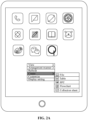
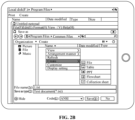
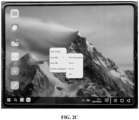
- FIG. 2A and FIG. 2B show two file creation manners.
- the App icon of the first App may be displayed in a stacked pull-down menu.
- the creation operation may be a creation operation acting on menu bars illustrated in FIG. 2A to FIG. 2C , or may be a creation operation acting on a dialog box illustrated in FIG. 2D .
- the creation operations illustrated in FIG. 2A and FIG. 2B are creation operations acting on the App icon.
- the creation operations illustrated in FIG. 2C and FIG. 2D are creation operations acting on the App name.
- the creation operation may be a creation operation acting on the App icon directly displayed on a desktop, a minus one screen or any position under a disk directory.
- a creation operation is detected, and the creation operation is generated based on an App icon, such as a mouse operation acting on the App icon, a keyboard operation acting on the App icon, a touch operation acting on the App icon, and the like.
- the App icon that the present creation operation acts on is the App icon of the App that is deleted from the terminal device, the pre-stored null file of the first App needs to be read.
- the first App that is deleted from the terminal device can be understood as an App that is not installed in the terminal device.
- the null file is a file not edited with any content.
- the null file has been created, and after the file is opened, there is no content that has been edited.
- a type of the null file includes, but is not limited to, various editable files such as office files of various types of office software, and various editable image-format files such as portable document format (PDF) files or files generated by pictures.
- various editable files such as office files of various types of office software
- various editable image-format files such as portable document format (PDF) files or files generated by pictures.
- PDF portable document format
- Common office software may include at least one of: a Word file, an Excel file, a power point (PPT) file or a Visio file.
- a Word file may include at least one of: a Word file, an Excel file, a power point (PPT) file or a Visio file.
- PPT power point
- the pre-stored null file at least stores a file header of the null file, but the file has no contents.
- pre-storage may refer to that the file is stored in a cache space.
- the null file in the cache space may directly be copied to a corresponding disk. Storing the null file in the cache space may achieve the characteristic of high creation efficiency of the target file.
- the null file may be a hidden file and be invisible to the user, for example, stored together with another invisible file in an operating system, so that the user cannot operate the hidden file, and the phenomenon that the null file is detected by a misoperation of the user is reduced.
- null file is a hidden file
- a file attribute of the file is set to be hidden when the file is stored.
- the method further includes: information indicating a corresponding relationship between the App icon of the first App and the null file is stored.
- information indicating a corresponding relationship may include link information between address information of the storage address of the null file and the App icon.
- the information indicating the corresponding relationship may include a corresponding relationship between App identification information of the first App and the address information of the storage address of the null file, and also includes the App icon of the first App and the App identification information of the first App.
- a list of information indicating such corresponding relationships related to the first Apps may be stored in the operating system for unified information management.
- the method further includes: a file icon of the target file is displayed according to a pre-stored App icon of the first App.
- the file icon includes the App icon of the first App, so that the user may know the App that the file is created based on when viewing the file.
- the PPT file illustrated in FIG. 2E is a PPT file that is created based on the dialog box illustrated in FIG. 2D when PPT software is not installed and that is displayed on the desktop.
- the App icon of the first App is stored at the same time of pre-storing the null file of the first App.
- the information processing method may be applied to a terminal device including a foldable screen.
- the terminal device that executes the information processing method includes at least one foldable first screen, and the terminal device may run at least two operating systems. Therefore, the terminal device may also monitor a present posture of the first screen, and the terminal device is controlled according to the present posture of the first screen to run a first operating system or a second operating system.
- the second operating system is different from the first operating system.
- the first operating system and the second operating system are different operating systems.
- a difference between the first operating system and the second operating system may be reflected by any one of the following aspects:
- the first operating system may be a PC operating system that supports multiple tasks and multiple windows
- the second operating system may be a mobile phone operating system that does not support multiple tasks and multiple windows.
- the first operating system may be a mobile phone operating system that supports multiple tasks and multiple windows
- the second operating system may be a mobile phone operating system that does not support multiple tasks and multiple windows.
- a display mode of the mobile phone operating system that supports multiple tasks and multiple windows is like a display mode of the PC operating system that supports multiple tasks and multiple windows, and the system is adapted to a requirement of a mobile phone.
- a task bar and/or a menu bar may usually be displayed directly on a desktop on a system interface of the PC operating system.
- a system interface of the mobile phone operating system may be as illustrated in FIG. 2D , and the task bar and/or the menu bar may usually not be displayed on the desktop directly.
- the operation that the terminal device is controlled according to the present posture of the first screen to run the first operating system or the second operating system includes: the mobile device is controlled to run the first operating system responsive to that the first screen is in an unfolded posture; and/or, the mobile device is controlled to run the second operating system responsive to that the first screen is in a folded posture.
- the mobile device may at least run the first operating system and the second operating system, so that the mobile device may be controlled according to the posture, capable of reflecting a present user requirement, of the first screen to run the first operating system or the second operating system capable of meeting the present user requirement, so as to improve the operational performance of the mobile device and the user satisfaction. Furthermore, in the embodiment of the disclosure, the mobile device may be automatically controlled according to state information of the first screen to run the first operating system or the second operating system to implement adaptive processing for switching the operating systems to adjust the operational performance of the mobile device and the user satisfaction again.
- file creation for the first App that is deleted may be applied to a process that the terminal device runs the first operating system, and may also be applied to a process that the terminal device runs the second operating system.
- the method further includes: responsive to that the first screen is in the unfolded posture, the mobile device is controlled to be switched between the first operating system and the second operating system according to an operation instruction acting on the first screen.
- an operation interface is provided for the user to select the operating system.
- the operation interface may be a displayed virtual control or a specific physical control provided by the mobile device.
- the operation interface may correspond to a certain operation of the user, for example, a touch operation acting on the first screen used as a touch screen and the like.
- the mobile device may also be controlled to be switched between the first operating system and the second operating system according to the operation instruction acting on the first screen.
- the operating system run by the mobile device is the first operating system by default.
- the user is intended to use the second operating system, for example, entering the second operating system to query a specific file, the user may input the operation instruction acting on the first screen, and then the mobile device may switch the operating system presently in running.
- the operation instruction may be a switching instruction, and the switching instruction includes instructions that instruct the mobile device to switch the operating system.
- the operation that the mobile device is controlled to be switched between the first operating system and the second operating system according to the operation instruction acting on the first screen responsive to that the first screen is in the unfolded posture includes at least one of the following:
- the operation instruction includes instructions that instruct the mobile device to enter the corresponding operating system.
- the detected operation instruction is a first instruction that instructs the first operating system to be entered
- the mobile device is controlled according to the first instruction to run the first operating system under the condition that the first screen is in the unfolded posture.
- the detected operation instruction is a second instruction that instructs the second operating system to be entered
- the mobile device is controlled according to the second instruction to run the second operating system under the condition that a second screen is in the unfolded posture.
- the method may further include:
- the operation that the second icon processing operation of eliminating the icon vacancy is executed after the first icon processing operation is executed if it is detected that the icon vacancy exists includes at least one of the following:
- the operation that the second icon processing operation of eliminating the icon vacancy is executed after the first icon processing operation is executed if it is detected that the icon vacancy exists includes:
- the operation S130 may include: the null file is pasted to a position that the creation operation acts on, and the target file is generated at the position that the creation operation acts on. Meanwhile, a file icon of the null file is displayed.
- the operation that the target file corresponding to the first App is created based on the read pre-stored null file includes: a file storage directory is determined according to a position that the creation operation acts on; and the target file corresponding to the first App is created under the file storage directory.
- the file storage directory is determined as the desktop, and the target file is stored on the desktop.
- the method further includes the following operations.
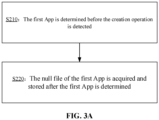
- the first App is determined before the creation operation is detected.
- the null file of the first App is acquired and stored after the first App is determined.
- the first App is predetermined, and when the creation operation is detected, it may be determined rapidly whether the present creation operation requests for creating the file of the first App determined by the terminal device.
- the App icon of the first App is also stored.
- the operation S 120 may include: an installed App in the terminal device is detected, and an uninstalled App in a preset App list is determined as the first App according to the installed App; and
- the operation S220 may include: the null file of the first App is downloaded and stored after the first App is determined.
- the preset App list may be a list that is predetermined by a device manufacturer of the terminal device and includes identification information of Apps, and the list stores identification information of uninstalled Apps that are determined according to empirical values or historical creation records and corresponds to relatively high using frequencies in the terminal device.
- the office software is determined as the first App.
- the terminal device may search for and download the App icon of the first App from a network side, and acquire the null file. If the null file is not downloaded from the network, a non-null file may be downloaded and edited into a null file.
- the App icon of the first App may also be downloaded and stored.
- the operation S210 may include: an App that the mobile device is uninstalling is determined as the first App; and the operation S220 may include: the null file of the first App is created based on the first App before the first App is uninstalled, and the null file of the first App is stored.
- the uninstalled App may directly be determined as the first App.
- the null file of the first App may be created and stored, and the App icon of the first App may also be stored.
- the operation S210 may be as follows: if the mobile device is uninstalling an App of which an App identifier is in the preset App list, the App that is being uninstalled is determined as the first App. Before the first App is uninstalled, the null file is created and stored. Therefore, the App icon and null file of the first App do not need to be downloaded from the network.
- App identifiers in the preset App list only include App identifiers of Apps that allow the user to edit files, and files editable for the user may not be created for Apps such as a game App, a shopping App, a payment App, or the like.
- the method further includes the following operations.
- a response is given to the edition operation using a second App installed in the terminal device, the second App being an App capable of processing the same type of file as the first App.
- the response is given to the edition operation through another App supporting edition of the file provided by the first App, so that the file of the first App may be edited under the condition that the first App is deleted.
- the target file is created based on the null file of the first App
- the target file is opened using the second App
- the edition operation over a content of the target file is detected
- the response is given to the edition operation using the second App to edit the target file, thereby implementing edition of the target file.
- an original file header and file format of the target file may be kept unchanged, namely the target file is kept as a file of the first App.
- the first App may be word
- the second App may be WPS. If word may not or cannot be installed in some terminal devices due to problems about authorization and the like. but the users are intended to use word habitually, the solution provided in the embodiment of the disclosure may be used, a word file may still be created, but a response is given using WPS when responding to an edition operation of the user over the word file. After the response is given to the edition operation, the edited file is still stored as a word file rather than a WPS file according to a file header provided by the null file and the like.
- the target file corresponding to the first App is edited using the second App, the target file is still stored according to the file header and file format provided by the first App, and is just added with the content.
- the edition operation includes at least one of a file name edition operation, a file content edition operation, or a file operation; and the file operation includes a file deletion operation, a file copying operation, a file pasting operation, and a file trimming operation.
- the name of a file may be set and/or modified through the file name edition operation.
- the file content edition operation refers to an edition operation over the file after the file is opened.
- the file operation may be a processing operation over the whole file, such as the file deletion operation, the file copying operation, the file pasting operation, the file trimming operation, and the like.
- file creation and/or any file edition operation may be performed on the first App when the first App is deleted but the second App capable of editing the target file created based on the first App exists.
- the method further includes: an installation prompt of installing the first App, the second App, or the first App and the second App is displayed responsive to that the second App capable of editing the target file is not installed in the terminal device; and the installation prompt includes a downloading entry for acquiring an installation package of the first App, the second App, or the first App and the second App.
- the downloading entry may be various links or interfaces linked to a server that provides the package of the first App and/or the second App for downloading.
- the installation prompt includes a downloading entry for an App that the terminal has a right to download or install, or includes a downloading entry for an App that the terminal device may download and install for free.
- the method further includes: the corresponding App is downloaded if an installation confirmation operation acting on the installation prompt is detected; and the response is given to the edition operation based on the downloaded App.
- the method further includes: responsive to that the terminal device is connected to a server, the edition operation is sent to the server when the second App is not installed in the terminal device; the server responds to the edition operation after the edition operation is sent to the server; and the target file edited by the server is received, and the received target file is displayed on the terminal device.
- the file is edited remotely based on the server under the condition that the first App and the second App are deleted.
- file creation normally refers to creating a new file using a file App.
- the defect is that this function does not work if the file App does not exist.
- some null files are cached, and are directly copied and pasted during creation.
- the user may select another App capable of editing the null file according to the preference to edit the file.
- the word file is edited using WPS.
- an embodiment of the disclosure provides an information processing apparatus, which is applied to UE and includes a first detection module 410, a reading module 420 and a creation module 430.
- the first detection module 410 is configured to detect a creation operation on a terminal device.
- the reading module 420 is configured to read a pre-stored null file of a first App responsive to that the creation operation points to the first App deleted from the terminal device.
- the creation module 430 is configured to create a target file corresponding to the first App based on the read pre-stored null file.
- all the first detection module 410, the reading module 420, and the creation module 430 are program modules. After the program modules are executed by a processor, a file of the first App that is deleted from the terminal device may be created.
- all the first detection module 410, the reading module 420, and the creation module 430 may be combined software and hardware modules.
- the combined software and hardware modules may include various programmable arrays.
- the programmable arrays include, but are not limited to, a complex programmable array and/or a field programmable array.
- all the first detection module 410, the reading module 420, and the creation module 430 may be pure hardware modules.
- the pure hardware module includes, but is not limited to, an application specific integrated circuit (ASIC).
- the creation module 430 is specifically configured to determine a file storage directory according to a position that the creation operation acts on, and create the target file corresponding to the first App under the file storage directory.
- the apparatus further includes a determination module and an acquisition and storage module.
- the determination module is configured to determine the first App before the creation operation is detected.
- the acquisition and storage module is configured to acquire and store the null file of the first App after the first App is determined.
- the determination module is specifically configured to detect an installed App in the terminal device and determine an uninstalled App in a preset App list as the first App according to the installed App; and the acquisition and storage module is specifically configured to download and store the null file of the first App after the first App is determined.
- the determination module is specifically configured to determine an App that the mobile device is uninstalling as the first App; and the acquisition and storage module is specifically configured to create the null file of the first App based on the first App before the first App is uninstalled, and store the null file of the first App.
- the apparatus further includes a second detection module and an edition module.
- the second detection module is configured to detect an edition operation acting on the target file.
- the edition module is configured to respond to the edition operation using a second App installed in the terminal device; and the second App is an App capable of processing the same type of file as the first App.
- the edition operation includes at least one of a file name edition operation, a file content edition operation or a file operation; and the file operation includes a file deletion operation, a file copying operation, a file pasting operation, and a file trimming operation.
- the apparatus further includes: a prompting module, configured to display an installation prompt of installing the first App, the second App, or the first App and the second App responsive to that the second App capable of editing the target file is not installed in the terminal device; and the installation prompt includes a downloading entry for acquiring an installation package of the first App, the second App, or the first App and the second App.
- a prompting module configured to display an installation prompt of installing the first App, the second App, or the first App and the second App responsive to that the second App capable of editing the target file is not installed in the terminal device
- the installation prompt includes a downloading entry for acquiring an installation package of the first App, the second App, or the first App and the second App.
- the apparatus further includes: a display module, configured to display a file icon of the target file according to a pre-stored App icon of the first App.
- An embodiment of the disclosure provides a terminal device, which includes: a memory configured to store instructions executable by a processor; and the processor, coupled to the memory.
- the processor is configured to execute the information processing method provided in any abovementioned technical solution.
- the memory may include various types of storage media, and the storage medium is a non-transitory computer storage medium, and may keep information in a communication device after a power failure of the communication device.
- the processor may be coupled to the memory through a bus and the like, and is configured to read an executable program stored in the memory to implement, for example, at least one of any methods illustrated in FIG. 1 to FIG. 3B .
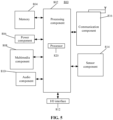
- FIG. 5 is a block diagram of a UE 800, according to an exemplary embodiment.
- the UE 800 may be included in a terminal device such as a mobile phone and a mobile computer or a device such as a server.
- the UE 800 for data processing may be included in any communication device.
- the UE 800 may include one or more of the following components: a processing component 802, a memory 804, a power component 806, a multimedia component 808, an audio component 810, an input/output (I/O) interface 812, a sensor component 814, or a communication component 816.
- a processing component 802 a memory 804, a power component 806, a multimedia component 808, an audio component 810, an input/output (I/O) interface 812, a sensor component 814, or a communication component 816.
- the processing component 802 typically controls overall operations of the UE 800, such as the operations associated with display, telephone calls, data communications, camera operations, and recording operations.
- the processing component 802 may include one or more processors 820 to execute instructions to perform all or part of the steps in the abovementioned method.
- the processing component 802 may include one or more modules which facilitate interaction between the processing component 802 and other components.
- the processing component 802 may include a multimedia module to facilitate interaction between the multimedia component 808 and the processing component 802.
- the memory 804 is configured to store various types of data to support the operation of the UE 800. Examples of such data include instructions for any Apps or methods operated on the UE 800, contact data, phonebook data, messages, pictures, video, etc.
- the memory 804 may be implemented by any type of volatile or non-volatile memory devices, or a combination thereof, such as a static random access memory (SRAM), an electrically erasable programmable read-only memory (EEPROM), an erasable programmable read-only memory (EPROM), a programmable read-only memory (PROM), a read-only memory (ROM), a magnetic memory, a flash memory, and a magnetic or optical disk.
- SRAM static random access memory
- EEPROM electrically erasable programmable read-only memory
- EPROM erasable programmable read-only memory
- PROM programmable read-only memory
- ROM read-only memory
- magnetic memory a magnetic memory
- flash memory and a magnetic or optical disk.
- the power component 806 provides power for various components of the UE 800.
- the power component 806 may include a power management system, one or more power supplies, and other components associated with generation, management and distribution of power for the UE 800.
- the multimedia component 808 includes a screen providing an output interface between the UE 800 and a user.
- the screen may include a liquid crystal display (LCD) and a touch panel (TP). If the screen includes the TP, the screen may be implemented as a touch screen to receive an input signal from the user.
- the TP includes one or more touch sensors to sense touches, swipes and gestures on the TP. The touch sensors may not only sense a boundary of a touch or swipe action, but also detect a period of time and a pressure associated with the touch or swipe action.
- the multimedia component 808 includes a front camera and/or a rear camera.
- the front camera and/or the rear camera may receive external multimedia data when the UE 800 is in an operation mode, such as a photographing mode or a video mode.
- an operation mode such as a photographing mode or a video mode.
- Each of the front camera and the rear camera may be a fixed optical lens system or have focusing and optical zooming capabilities.
- the audio component 810 is configured to output and/or input an audio signal.
- the audio component 810 includes a microphone (MIC), and the MIC is configured to receive an external audio signal when the UE 800 is in an operation mode, such as a call mode, a recording mode, and a voice recognition mode.
- the received audio signal may further be stored in the memory 804 or sent through the communication component 816.
- the audio component 810 further includes a speaker configured to output the audio signal.
- the I/O interface 812 provides an interface between the processing component 802 and peripheral interface modules, such as a keyboard, a click wheel, buttons and the like.
- the buttons may include, but are not limited to: a home button, a volume button, a starting button and a locking button.
- the sensor component 814 includes one or more sensors configured to provide status assessments in various aspects for the UE 800. For instance, the sensor component 814 may detect an on/off status of the UE 800 and relative positioning of components, such as a display and small keyboard of the UE 800, and the sensor component 814 may further detect a change in a position of the UE 800 or a component of the UE 800, presence or absence of contact between the user and the UE 800, orientation or acceleration/deceleration of the UE 800 and a change in temperature of the UE 800.
- the sensor component 814 may include a proximity sensor configured to detect presence of an object nearby without any physical contact.
- the sensor component 814 may also include a light sensor, such as a complementary metal oxide semiconductor (CMOS) or charge coupled device (CCD) image sensor, configured for use in an imaging App.
- CMOS complementary metal oxide semiconductor
- CCD charge coupled device
- the sensor component 814 may also include an acceleration sensor, a gyroscope sensor, a magnetic sensor, a pressure sensor or a temperature sensor.
- the communication component 816 is configured to facilitate wired or wireless communication between the UE 800 and other devices.
- the UE 800 may access a communication-standard-based wireless network, such as a wireless fidelity (WiFi) network, a 2nd-generation (2G) or 3rd-generation (3G) network or a combination thereof.
- the communication component 816 receives a broadcast signal or broadcast associated information from an external broadcast management system through a broadcast channel.
- the communication component 816 further includes a near field communication (NFC) module to facilitate short-range communications.
- the NFC module may be implemented based on a radio frequency identification (RFID) technology, an infrared data association (IrDA) technology, an ultra-wide band (UWB) technology, a Bluetooth (BT) technology, and other technologies.
- RFID radio frequency identification
- IrDA infrared data association
- UWB ultra-wide band
- BT Bluetooth
- the UE 800 may be implemented by one or more ASICs, digital signal processors (DSPs), digital signal processing devices (DSPDs), programmable logic devices (PLDs), field programmable gate arrays (FPGAs), controllers, micro-controllers, microprocessors or other electronic components, and is configured to execute the abovementioned methods.
- DSPs digital signal processors
- DSPDs digital signal processing devices
- PLDs programmable logic devices
- FPGAs field programmable gate arrays
- controllers micro-controllers, microprocessors or other electronic components, and is configured to execute the abovementioned methods.
- non-transitory computer-readable storage medium including instructions, such as included in the memory 804, executable by the processor 820 of the device 800 for performing the abovementioned methods.
- the non-transitory computer-readable storage medium may be a ROM, a random access memory (RAM), a compact disc read-only memory (CD-ROM), a magnetic tape, a floppy disc, an optical data storage device, and the like.
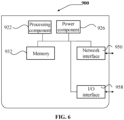
- a base station 900 includes a processing component 922, further including one or more processors, and a memory resource represented by a memory 932, configured to store instructions executable by the processing component 922, for example, an App.
- the App stored in the memory 932 may include one or more than one module of which each corresponds to a set of instructions.
- the processing component 922 is configured to execute the instructions to execute any method applied to an access device in the abovementioned methods, for example, the methods illustrated in FIG. 1 to FIG. 3B .
- the base station 900 may further include a power component 926 configured to execute power management of the base station 900, a wired or wireless network interface 950 configured to connect the base station 900 to a network, and an I/O interface 958.
- the base station 900 may be operated based on an operating system stored in the memory 932, for example, Windows Server TM, Mac OS XTM, UnixTM, LinuxTM, FreeBSDTM, or the like.
- An embodiment of the disclosure provides a non-transitory computer-readable storage medium.
- the UE or a base station may execute an information processing method provided in any abovementioned embodiment, and may execute at least one of any method illustrated in FIG. 1 and/or FIG. 3 .
- the information processing method may be an information processing method executed by the UE.
- the method includes: a creation operation is detected on a terminal device; a pre-stored null file of a first App is read responsive to that the creation operation points to the first App deleted from the terminal device; and a target file corresponding to the first App is created based on the read pre-stored null file.
- the operation that the target file corresponding to the first App is created based on the read pre-stored null file includes: a file storage directory is determined according to a position that the creation operation acts on; and the target file corresponding to the first App is created under the file storage directory.
- the method further includes: the first App is determined before the creation operation is detected; and the null file of the first App is acquired and stored after the first App is determined.
- the operation that the first App is determined includes: an installed App in the terminal device is detected, and an uninstalled App in a preset App list is determined as the first App according to the installed App; and the operation that the null file of the first App is acquired and stored after the first App is determined includes: the null file of the first App is downloaded and stored after the first App is determined.
- the operation that the first App is determined includes: an App that the mobile device is uninstalling is determined as the first App; and the operation that the null file of the first App is acquired and stored after the first App is determined includes: the null file of the first App is created based on the first App before the first App is uninstalled, and the null file of the first App is stored.
- the method further includes: an edition operation acting on the target file is detected; and a response is given to the edition operation using a second App installed in the terminal device, the second App being an App capable of processing the same type of file as the first App.
- the edition operation includes at least one of: a file name edition operation, a file content edition operation, or a file operation; and the file operation includes a file deletion operation, a file copying operation, a file pasting operation, and a file trimming operation.
- the method further includes: an installation prompt of installing the first App, the second App, or the first App and the second App is displayed responsive to that the second App capable of editing the target file is not installed in the terminal device; and the installation prompt includes a downloading entry for acquiring an installation package of the first App, the second App, or the first App and the second App.
- the method further includes: a file icon of the target file is displayed according to a pre-stored App icon of the first App.
Landscapes
- Engineering & Computer Science (AREA)
- General Engineering & Computer Science (AREA)
- Theoretical Computer Science (AREA)
- Software Systems (AREA)
- Physics & Mathematics (AREA)
- General Physics & Mathematics (AREA)
- Human Computer Interaction (AREA)
- User Interface Of Digital Computer (AREA)
- Stored Programmes (AREA)
Description
- The disclosure generally relates to the technical field of communications, and more particularly, to an information processing method and apparatus, a terminal device, and a storage medium.
- With the development of electronic technologies, functions of terminal devices have become more and more powerful, and various applications (Apps) have also emerged. There are many Apps, and thus a user may uninstall some Apps to reduce Apps. Therefore, after the Apps are uninstalled and/or after a device leaves the factory and/or is recovered to a factory setting after used for a period of time, some Apps that may be used by the user may be deleted from the terminal device. In addition, the user may use these deleted Apps, and if the user temporarily needs to manually download the Apps, the terminal device is apparently not so intelligent and cannot respond to operations of the user timely, which may further cause reduction in user satisfaction.
- Related technology is known from
US2021/0055922A1 . - The disclosure provides an information processing method and apparatus, a terminal device, and a storage medium.
- An information processing method and apparatus, as well as a computer-readable storage medium according to the present invention are defined in the independent claims. Advantageous embodiments are the subject matter of the dependent claims..
- The technical solutions provided in the embodiments of the disclosure may have the following beneficial effects.
- Even for the first App that is deleted from the terminal device (i.e., the first App that is not installed), the icon and null file of the first App are pre-stored, so that the condition that the file of the first App cannot be created because the first App that is deleted from the terminal device may be avoided. After the creation operation acting on the App icon of the first App is detected, the pre-stored null file of the first App may be read automatically, and the target file may be created based on the null file. Therefore, in the embodiments of the disclosure, even though a certain App is deleted from the terminal device, some file creation functions of the App are still retained, which enriches functions of the terminal device, and improves the intelligence of the terminal device. Compared with the manner of creating the target file after the first App is installed, the embodiments have the advantage that the creation efficiency of the target file is improved.
- The accompanying drawings, which are incorporated in and constitute a part of this specification, illustrate embodiments consistent with the disclosure and, together with the description, serve to explain the principles of the disclosure.
-
FIG. 1 is a flow chart showing an information processing method, according to an exemplary embodiment. -
FIG. 2A is a schematic diagram illustrating creation of a file, according to an exemplary embodiment. -
FIG. 2B is a schematic diagram illustrating creation of a file, according to an exemplary embodiment. -
FIG. 2C is a schematic diagram illustrating creation of a file, according to an exemplary embodiment. -
FIG. 2D is a schematic diagram illustrating creation of a file, according to an exemplary embodiment. -
FIG. 2E is a schematic diagram illustrating a target file display effect, according to an exemplary embodiment. -
FIG. 3A is a flow chart showing an information processing method, according to an exemplary embodiment. -
FIG. 3B is a flow chart showing an information processing method, according to an exemplary embodiment. -
FIG. 4 is a structure diagram of an information processing apparatus, according to an exemplary embodiment. -
FIG. 5 is a structure diagram of user equipment (UE), according to an exemplary embodiment. -
FIG. 6 is a structure diagram of a base station, according to an exemplary embodiment. - Reference will now be made in detail to exemplary embodiments, examples of which are illustrated in the accompanying drawings. The following description refers to the accompanying drawings in which the same numbers in different drawings represent the same or similar elements unless otherwise represented. The implementations set forth in the following description of exemplary embodiments do not represent all implementations consistent with the disclosure. Instead, they are merely examples of apparatuses consistent with aspects related to the disclosure as recited in the appended claims.
- Reference throughout this specification to "one embodiment," "an embodiment," "an example," "some embodiments," "some examples," or similar language means that a particular feature, structure, or characteristic described is included in at least one embodiment or example. Features, structures, elements, or characteristics described in connection with one or some embodiments are also applicable to other embodiments, unless expressly specified otherwise.
- The terms "module," "sub-module," "circuit," "sub-circuit," "circuitry," "sub-circuitry," "unit," or "sub-unit" may include memory (shared, dedicated, or group) that stores code or instructions that can be executed by one or more processors. A module may include one or more circuits with or without stored code or instructions. The module or circuit may include one or more components that are directly or indirectly connected. These components may or may not be physically attached to, or located adjacent to, one another.
- As illustrated in
FIG. 1 , an embodiment of the disclosure provides an information processing method, which includes the following operations. The method may be performed by a terminal device. - At S110, a creation operation is detected on a terminal device.
- At S120, a pre-stored null file of a first App is read responsive to that the creation operation points to the first App that is deleted from the terminal device.
- At S130, a target file corresponding to the first App is created based on the read pre-stored null file.
- The information processing method may be applied to a terminal device.
- The terminal device may be a terminal device of any form, such as a fixed terminal and/or a mobile terminal. The fixed terminal may include a personal computer (PC) and the like. The mobile terminal may include a mobile phone, a tablet computer, a wearable device, a two-in-one device of a mobile phone and a pad, a two-in-one device of a pad and a computer, a vehicle-mounted device, and the like.
- In some embodiments, the creation operation may be a creation operation acting on an App name of each App, or may be a creation operation acting on an App icon of each App.
- Here, the operation that the creation operation points to the first App can be understood as that a file instructed to be created by the creation operation is a file required to be created by the first App or a file created based on the first App.
- In some embodiments, the creation operation may be a creation operation based on a menu bar where an App icon of the first App is displayed, or may be a creation operation based on a dialog box where the App icon of the first App is displayed.
FIG. 2A andFIG. 2B show two file creation manners. The App icon of the first App may be displayed in a stacked pull-down menu. The creation operation may be a creation operation acting on menu bars illustrated inFIG. 2A to FIG. 2C , or may be a creation operation acting on a dialog box illustrated inFIG. 2D . - The creation operations illustrated in
FIG. 2A andFIG. 2B are creation operations acting on the App icon. - The creation operations illustrated in
FIG. 2C andFIG. 2D are creation operations acting on the App name. - Exemplarily, the creation operation may be a creation operation acting on the App icon directly displayed on a desktop, a minus one screen or any position under a disk directory.
- In some embodiments, a creation operation is detected, and the creation operation is generated based on an App icon, such as a mouse operation acting on the App icon, a keyboard operation acting on the App icon, a touch operation acting on the App icon, and the like.
- When it is found that the App icon that the present creation operation acts on is the App icon of the App that is deleted from the terminal device, the pre-stored null file of the first App needs to be read.
- Here, the first App that is deleted from the terminal device can be understood as an App that is not installed in the terminal device.
- The null file is a file not edited with any content. The null file has been created, and after the file is opened, there is no content that has been edited.
- Here, a type of the null file includes, but is not limited to, various editable files such as office files of various types of office software, and various editable image-format files such as portable document format (PDF) files or files generated by pictures.
- Common office software may include at least one of: a Word file, an Excel file, a power point (PPT) file or a Visio file.
- In the embodiment of the disclosure, the pre-stored null file at least stores a file header of the null file, but the file has no contents. Here, pre-storage may refer to that the file is stored in a cache space. When the target file is created, the null file in the cache space may directly be copied to a corresponding disk. Storing the null file in the cache space may achieve the characteristic of high creation efficiency of the target file.
- In some embodiments, the null file may be a hidden file and be invisible to the user, for example, stored together with another invisible file in an operating system, so that the user cannot operate the hidden file, and the phenomenon that the null file is detected by a misoperation of the user is reduced.
- If the null file is a hidden file, a file attribute of the file is set to be hidden when the file is stored.
- The method further includes: information indicating a corresponding relationship between the App icon of the first App and the null file is stored. In such a manner, after the creation operation acting on the App icon of the first App is detected, a storage address of the null file is determined directly based on the corresponding relationship, and the null file is read from the storage address. For example, the information indicating the corresponding relationship may include link information between address information of the storage address of the null file and the App icon. For another example, the information indicating the corresponding relationship may include a corresponding relationship between App identification information of the first App and the address information of the storage address of the null file, and also includes the App icon of the first App and the App identification information of the first App.
- If there are multiple first Apps, a list of information indicating such corresponding relationships related to the first Apps may be stored in the operating system for unified information management.
- In some embodiments, the method further includes: a file icon of the target file is displayed according to a pre-stored App icon of the first App.
- Exemplarily, the file icon includes the App icon of the first App, so that the user may know the App that the file is created based on when viewing the file.
- The PPT file illustrated in
FIG. 2E is a PPT file that is created based on the dialog box illustrated inFIG. 2D when PPT software is not installed and that is displayed on the desktop. - Therefore, the App icon of the first App is stored at the same time of pre-storing the null file of the first App.
- In some embodiments, the information processing method may be applied to a terminal device including a foldable screen. Exemplarily, the terminal device that executes the information processing method includes at least one foldable first screen, and the terminal device may run at least two operating systems. Therefore, the terminal device may also monitor a present posture of the first screen, and the terminal device is controlled according to the present posture of the first screen to run a first operating system or a second operating system.
- The second operating system is different from the first operating system.
- The first operating system and the second operating system are different operating systems. Exemplarily, a difference between the first operating system and the second operating system may be reflected by any one of the following aspects:
- system kernels of the first operating system and the second operating system are different;
- average resource consumptions for running of the first operating system and the second operating system are different; or
- system interfaces of the first operating system and the second operating system are different. Some system interfaces are applicable to landscape devices, and some system interfaces are applicable to portrait devices. A typical device using a portrait mode more is a mobile phone, and a typical device using a landscape mode more may include a tablet computer and/or a PC.
- Exemplarily, the first operating system may be a PC operating system that supports multiple tasks and multiple windows, and the second operating system may be a mobile phone operating system that does not support multiple tasks and multiple windows.
- In another embodiment, the first operating system may be a mobile phone operating system that supports multiple tasks and multiple windows, and the second operating system may be a mobile phone operating system that does not support multiple tasks and multiple windows. A display mode of the mobile phone operating system that supports multiple tasks and multiple windows is like a display mode of the PC operating system that supports multiple tasks and multiple windows, and the system is adapted to a requirement of a mobile phone.
- In some embodiments, a task bar and/or a menu bar may usually be displayed directly on a desktop on a system interface of the PC operating system. A system interface of the mobile phone operating system may be as illustrated in
FIG. 2D , and the task bar and/or the menu bar may usually not be displayed on the desktop directly. - Exemplarily, the operation that the terminal device is controlled according to the present posture of the first screen to run the first operating system or the second operating system includes: the mobile device is controlled to run the first operating system responsive to that the first screen is in an unfolded posture; and/or, the mobile device is controlled to run the second operating system responsive to that the first screen is in a folded posture.
- In the embodiment of the disclosure, the mobile device may at least run the first operating system and the second operating system, so that the mobile device may be controlled according to the posture, capable of reflecting a present user requirement, of the first screen to run the first operating system or the second operating system capable of meeting the present user requirement, so as to improve the operational performance of the mobile device and the user satisfaction. Furthermore, in the embodiment of the disclosure, the mobile device may be automatically controlled according to state information of the first screen to run the first operating system or the second operating system to implement adaptive processing for switching the operating systems to adjust the operational performance of the mobile device and the user satisfaction again.
- In the embodiment of the disclosure, file creation for the first App that is deleted may be applied to a process that the terminal device runs the first operating system, and may also be applied to a process that the terminal device runs the second operating system.
- In some embodiments, the method further includes: responsive to that the first screen is in the unfolded posture, the mobile device is controlled to be switched between the first operating system and the second operating system according to an operation instruction acting on the first screen.
- When the first screen is in the unfolded posture, an operation interface is provided for the user to select the operating system. In some embodiments, the operation interface may be a displayed virtual control or a specific physical control provided by the mobile device. In some other embodiments, the operation interface may correspond to a certain operation of the user, for example, a touch operation acting on the first screen used as a touch screen and the like.
- In summary, in the embodiment of the disclosure, if the first screen is in the unfolded posture, the mobile device may also be controlled to be switched between the first operating system and the second operating system according to the operation instruction acting on the first screen.
- Exemplarily, in some embodiments, when the first screen is in the unfolded posture, the operating system run by the mobile device is the first operating system by default. However, in some cases, for example, the user is intended to use the second operating system, for example, entering the second operating system to query a specific file, the user may input the operation instruction acting on the first screen, and then the mobile device may switch the operating system presently in running.
- In an embodiment, the operation instruction may be a switching instruction, and the switching instruction includes instructions that instruct the mobile device to switch the operating system. In view of this, exemplarily, the operation that the mobile device is controlled to be switched between the first operating system and the second operating system according to the operation instruction acting on the first screen responsive to that the first screen is in the unfolded posture includes at least one of the following:
- responsive to that the first screen is in the unfolded posture and the mobile device presently runs the first operating system, a switching instruction acting on the first screen is detected, and the mobile device is controlled to be switched to the second operating system; or
- responsive to that the first screen is in the unfolded posture and the mobile device presently runs the second operating system, the switching instruction acting on the first screen is detected, and the mobile device is controlled to be switched to the first operating system.
- In some embodiments, the operation instruction includes instructions that instruct the mobile device to enter the corresponding operating system. In view of this, if the detected operation instruction is a first instruction that instructs the first operating system to be entered, the mobile device is controlled according to the first instruction to run the first operating system under the condition that the first screen is in the unfolded posture. If the detected operation instruction is a second instruction that instructs the second operating system to be entered, the mobile device is controlled according to the second instruction to run the second operating system under the condition that a second screen is in the unfolded posture.
- In some embodiments, the method may further include:
- responsive to detecting a first icon processing operation acting on a desktop displayed by the terminal device, it is determined whether an icon vacancy exists between icons displayed on the desktop after the first icon processing operation is executed; and
- if it is detected that the icon vacancy exists, a second icon processing operation of eliminating the icon vacancy is executed after the first icon processing operation is executed.
- Exemplarily, the operation that the second icon processing operation of eliminating the icon vacancy is executed after the first icon processing operation is executed if it is detected that the icon vacancy exists includes at least one of the following:
- if it is detected that the icon vacancy exists, a rearrangement operation is performed on the icons displayed on the desktop after the first icon processing operation is executed, the icon vacancy between the adjacent icons being eliminated after the icons on the desktop are rearranged; or
- if it is detected that the icon vacancy exists, the icon vacancy is refilled with a preset icon after the first icon processing operation is executed.
- Exemplarily, the operation that the second icon processing operation of eliminating the icon vacancy is executed after the first icon processing operation is executed if it is detected that the icon vacancy exists includes:
- if it is detected that the icon vacancy exists, it is detected whether there is an input operation triggering icon vacancy elimination; and
- responsive to detecting the input operation, the second icon processing operation of eliminating the icon vacancy is executed after the first icon processing operation is executed.
- In some embodiments, the operation S130 may include: the null file is pasted to a position that the creation operation acts on, and the target file is generated at the position that the creation operation acts on. Meanwhile, a file icon of the null file is displayed.
- The operation that the target file corresponding to the first App is created based on the read pre-stored null file includes: a file storage directory is determined according to a position that the creation operation acts on; and the target file corresponding to the first App is created under the file storage directory.
- For example, if the creation operation is detected on the desktop, the file storage directory is determined as the desktop, and the target file is stored on the desktop.
- In some embodiments, as illustrated in
FIG. 3A , the method further includes the following operations. - At S210, the first App is determined before the creation operation is detected.
- At S220, the null file of the first App is acquired and stored after the first App is determined.
- The first App is predetermined, and when the creation operation is detected, it may be determined rapidly whether the present creation operation requests for creating the file of the first App determined by the terminal device.
- In some embodiments, when the null file is stored, the App icon of the first App is also stored.
- In some embodiments, the operation S 120 may include: an installed App in the terminal device is detected, and an uninstalled App in a preset App list is determined as the first App according to the installed App; and
The operation S220 may include: the null file of the first App is downloaded and stored after the first App is determined. - The preset App list may be a list that is predetermined by a device manufacturer of the terminal device and includes identification information of Apps, and the list stores identification information of uninstalled Apps that are determined according to empirical values or historical creation records and corresponds to relatively high using frequencies in the terminal device.
- For example, if it is detected that office software is not installed in a PC operating system run by a foldable device including a foldable screen and the office software is in the preset App list, the office software is determined as the first App.
- If an App that has never been installed in the terminal device is the first App, the terminal device may search for and download the App icon of the first App from a network side, and acquire the null file. If the null file is not downloaded from the network, a non-null file may be downloaded and edited into a null file.
- When the null file of the first App is stored, the App icon of the first App may also be downloaded and stored.
- In another embodiment, the operation S210 may include: an App that the mobile device is uninstalling is determined as the first App; and the operation S220 may include: the null file of the first App is created based on the first App before the first App is uninstalled, and the null file of the first App is stored.
- In the embodiment of the disclosure, if an App installed in the terminal device is uninstalled, the uninstalled App may directly be determined as the first App.
- In the embodiment of the disclosure, before the first App is uninstalled, the null file of the first App may be created and stored, and the App icon of the first App may also be stored.
- In some other cases, the operation S210 may be as follows: if the mobile device is uninstalling an App of which an App identifier is in the preset App list, the App that is being uninstalled is determined as the first App. Before the first App is uninstalled, the null file is created and stored. Therefore, the App icon and null file of the first App do not need to be downloaded from the network.
- App identifiers in the preset App list only include App identifiers of Apps that allow the user to edit files, and files editable for the user may not be created for Apps such as a game App, a shopping App, a payment App, or the like.
- In some embodiments, as illustrated in
FIG. 3B , the method further includes the following operations. - At
S 140, an edition operation acting on the target file is detected. - At S150, a response is given to the edition operation using a second App installed in the terminal device, the second App being an App capable of processing the same type of file as the first App.
- If creating a target file that should be created for an App presently deleted from the terminal device, the user is very likely to edit the target file.
- In the embodiment of the disclosure, the response is given to the edition operation through another App supporting edition of the file provided by the first App, so that the file of the first App may be edited under the condition that the first App is deleted.
- Exemplarily, after the target file is created based on the null file of the first App, if a file operation of opening the target file is detected, the target file is opened using the second App; and after the edition operation over a content of the target file is detected, the response is given to the edition operation using the second App to edit the target file, thereby implementing edition of the target file. After edition, an original file header and file format of the target file may be kept unchanged, namely the target file is kept as a file of the first App.
- Exemplarily, the first App may be word, and the second App may be WPS. If word may not or cannot be installed in some terminal devices due to problems about authorization and the like. but the users are intended to use word habitually, the solution provided in the embodiment of the disclosure may be used, a word file may still be created, but a response is given using WPS when responding to an edition operation of the user over the word file. After the response is given to the edition operation, the edited file is still stored as a word file rather than a WPS file according to a file header provided by the null file and the like. In summary, in the embodiment of the disclosure, after the target file corresponding to the first App is edited using the second App, the target file is still stored according to the file header and file format provided by the first App, and is just added with the content.
- In some embodiments, the edition operation includes at least one of a file name edition operation, a file content edition operation, or a file operation; and the file operation includes a file deletion operation, a file copying operation, a file pasting operation, and a file trimming operation.
- The name of a file may be set and/or modified through the file name edition operation.
- The file content edition operation refers to an edition operation over the file after the file is opened.
- The file operation may be a processing operation over the whole file, such as the file deletion operation, the file copying operation, the file pasting operation, the file trimming operation, and the like. With adoption of the method provided in the embodiment of the disclosure, file creation and/or any file edition operation may be performed on the first App when the first App is deleted but the second App capable of editing the target file created based on the first App exists.
- In some embodiments, the method further includes: an installation prompt of installing the first App, the second App, or the first App and the second App is displayed responsive to that the second App capable of editing the target file is not installed in the terminal device; and the installation prompt includes a downloading entry for acquiring an installation package of the first App, the second App, or the first App and the second App.
- If both the first App and the second App are deleted from the terminal device, no App capable of editing the first App may not be stored in the terminal device, and in such case, the installation prompt may be popped up.
- The downloading entry may be various links or interfaces linked to a server that provides the package of the first App and/or the second App for downloading.
- Providing the downloading entry for the first App or the second App is specifically determined according to a right of the terminal. Specifically, for example, the installation prompt includes a downloading entry for an App that the terminal has a right to download or install, or includes a downloading entry for an App that the terminal device may download and install for free.
- In some embodiments, the method further includes: the corresponding App is downloaded if an installation confirmation operation acting on the installation prompt is detected; and the response is given to the edition operation based on the downloaded App.
- In some embodiments, the method further includes: responsive to that the terminal device is connected to a server, the edition operation is sent to the server when the second App is not installed in the terminal device; the server responds to the edition operation after the edition operation is sent to the server; and the target file edited by the server is received, and the received target file is displayed on the terminal device. In such a manner, the file is edited remotely based on the server under the condition that the first App and the second App are deleted.
- In some embodiments, file creation normally refers to creating a new file using a file App. The defect is that this function does not work if the file App does not exist. In the embodiment of the disclosure, some null files are cached, and are directly copied and pasted during creation. For edition, the user may select another App capable of editing the null file according to the preference to edit the file. For example, the word file is edited using WPS.
- As illustrated in
FIG. 4 , an embodiment of the disclosure provides an information processing apparatus, which is applied to UE and includes afirst detection module 410, areading module 420 and acreation module 430. - The
first detection module 410 is configured to detect a creation operation on a terminal device. - The
reading module 420 is configured to read a pre-stored null file of a first App responsive to that the creation operation points to the first App deleted from the terminal device. - The
creation module 430 is configured to create a target file corresponding to the first App based on the read pre-stored null file. - In some embodiments, all the
first detection module 410, thereading module 420, and thecreation module 430 are program modules. After the program modules are executed by a processor, a file of the first App that is deleted from the terminal device may be created. - In some other embodiments, all the
first detection module 410, thereading module 420, and thecreation module 430 may be combined software and hardware modules. The combined software and hardware modules may include various programmable arrays. The programmable arrays include, but are not limited to, a complex programmable array and/or a field programmable array. - In some other embodiments, all the
first detection module 410, thereading module 420, and thecreation module 430 may be pure hardware modules. The pure hardware module includes, but is not limited to, an application specific integrated circuit (ASIC). - In some embodiments, the
creation module 430 is specifically configured to determine a file storage directory according to a position that the creation operation acts on, and create the target file corresponding to the first App under the file storage directory. - In some embodiments, the apparatus further includes a determination module and an acquisition and storage module.
- The determination module is configured to determine the first App before the creation operation is detected.
- The acquisition and storage module is configured to acquire and store the null file of the first App after the first App is determined.
- In some embodiments, the determination module is specifically configured to detect an installed App in the terminal device and determine an uninstalled App in a preset App list as the first App according to the installed App; and the acquisition and storage module is specifically configured to download and store the null file of the first App after the first App is determined.
- In some embodiments, the determination module is specifically configured to determine an App that the mobile device is uninstalling as the first App; and the acquisition and storage module is specifically configured to create the null file of the first App based on the first App before the first App is uninstalled, and store the null file of the first App.
- In some embodiments, the apparatus further includes a second detection module and an edition module.
- The second detection module is configured to detect an edition operation acting on the target file.
- The edition module is configured to respond to the edition operation using a second App installed in the terminal device; and the second App is an App capable of processing the same type of file as the first App.
- In some embodiments, the edition operation includes at least one of a file name edition operation, a file content edition operation or a file operation; and the file operation includes a file deletion operation, a file copying operation, a file pasting operation, and a file trimming operation.
- In some embodiments, the apparatus further includes: a prompting module, configured to display an installation prompt of installing the first App, the second App, or the first App and the second App responsive to that the second App capable of editing the target file is not installed in the terminal device; and the installation prompt includes a downloading entry for acquiring an installation package of the first App, the second App, or the first App and the second App.
- In some embodiments, the apparatus further includes: a display module, configured to display a file icon of the target file according to a pre-stored App icon of the first App.
- An embodiment of the disclosure provides a terminal device, which includes: a memory configured to store instructions executable by a processor; and the processor, coupled to the memory. The processor is configured to execute the information processing method provided in any abovementioned technical solution.
- The memory may include various types of storage media, and the storage medium is a non-transitory computer storage medium, and may keep information in a communication device after a power failure of the communication device.
- The processor may be coupled to the memory through a bus and the like, and is configured to read an executable program stored in the memory to implement, for example, at least one of any methods illustrated in
FIG. 1 to FIG. 3B . -
FIG. 5 is a block diagram of aUE 800, according to an exemplary embodiment. For example, theUE 800 may be included in a terminal device such as a mobile phone and a mobile computer or a device such as a server. In a word, theUE 800 for data processing may be included in any communication device. - Referring to
FIG. 5 , theUE 800 may include one or more of the following components: aprocessing component 802, amemory 804, apower component 806, amultimedia component 808, anaudio component 810, an input/output (I/O)interface 812, asensor component 814, or acommunication component 816. - The
processing component 802 typically controls overall operations of theUE 800, such as the operations associated with display, telephone calls, data communications, camera operations, and recording operations. Theprocessing component 802 may include one ormore processors 820 to execute instructions to perform all or part of the steps in the abovementioned method. Moreover, theprocessing component 802 may include one or more modules which facilitate interaction between theprocessing component 802 and other components. For instance, theprocessing component 802 may include a multimedia module to facilitate interaction between themultimedia component 808 and theprocessing component 802. - The
memory 804 is configured to store various types of data to support the operation of theUE 800. Examples of such data include instructions for any Apps or methods operated on theUE 800, contact data, phonebook data, messages, pictures, video, etc. Thememory 804 may be implemented by any type of volatile or non-volatile memory devices, or a combination thereof, such as a static random access memory (SRAM), an electrically erasable programmable read-only memory (EEPROM), an erasable programmable read-only memory (EPROM), a programmable read-only memory (PROM), a read-only memory (ROM), a magnetic memory, a flash memory, and a magnetic or optical disk. - The
power component 806 provides power for various components of theUE 800. Thepower component 806 may include a power management system, one or more power supplies, and other components associated with generation, management and distribution of power for theUE 800. - The
multimedia component 808 includes a screen providing an output interface between theUE 800 and a user. In some embodiments, the screen may include a liquid crystal display (LCD) and a touch panel (TP). If the screen includes the TP, the screen may be implemented as a touch screen to receive an input signal from the user. The TP includes one or more touch sensors to sense touches, swipes and gestures on the TP. The touch sensors may not only sense a boundary of a touch or swipe action, but also detect a period of time and a pressure associated with the touch or swipe action. In some embodiments, themultimedia component 808 includes a front camera and/or a rear camera. The front camera and/or the rear camera may receive external multimedia data when theUE 800 is in an operation mode, such as a photographing mode or a video mode. Each of the front camera and the rear camera may be a fixed optical lens system or have focusing and optical zooming capabilities. - The
audio component 810 is configured to output and/or input an audio signal. For example, theaudio component 810 includes a microphone (MIC), and the MIC is configured to receive an external audio signal when theUE 800 is in an operation mode, such as a call mode, a recording mode, and a voice recognition mode. The received audio signal may further be stored in thememory 804 or sent through thecommunication component 816. In some embodiments, theaudio component 810 further includes a speaker configured to output the audio signal. - The I/
O interface 812 provides an interface between theprocessing component 802 and peripheral interface modules, such as a keyboard, a click wheel, buttons and the like. The buttons may include, but are not limited to: a home button, a volume button, a starting button and a locking button. - The
sensor component 814 includes one or more sensors configured to provide status assessments in various aspects for theUE 800. For instance, thesensor component 814 may detect an on/off status of theUE 800 and relative positioning of components, such as a display and small keyboard of theUE 800, and thesensor component 814 may further detect a change in a position of theUE 800 or a component of theUE 800, presence or absence of contact between the user and theUE 800, orientation or acceleration/deceleration of theUE 800 and a change in temperature of theUE 800. Thesensor component 814 may include a proximity sensor configured to detect presence of an object nearby without any physical contact. Thesensor component 814 may also include a light sensor, such as a complementary metal oxide semiconductor (CMOS) or charge coupled device (CCD) image sensor, configured for use in an imaging App. In some embodiments, thesensor component 814 may also include an acceleration sensor, a gyroscope sensor, a magnetic sensor, a pressure sensor or a temperature sensor. - The
communication component 816 is configured to facilitate wired or wireless communication between theUE 800 and other devices. TheUE 800 may access a communication-standard-based wireless network, such as a wireless fidelity (WiFi) network, a 2nd-generation (2G) or 3rd-generation (3G) network or a combination thereof. In an exemplary embodiment, thecommunication component 816 receives a broadcast signal or broadcast associated information from an external broadcast management system through a broadcast channel. In an exemplary embodiment, thecommunication component 816 further includes a near field communication (NFC) module to facilitate short-range communications. For example, the NFC module may be implemented based on a radio frequency identification (RFID) technology, an infrared data association (IrDA) technology, an ultra-wide band (UWB) technology, a Bluetooth (BT) technology, and other technologies. - In an exemplary embodiment, the
UE 800 may be implemented by one or more ASICs, digital signal processors (DSPs), digital signal processing devices (DSPDs), programmable logic devices (PLDs), field programmable gate arrays (FPGAs), controllers, micro-controllers, microprocessors or other electronic components, and is configured to execute the abovementioned methods. - In an exemplary embodiment, there is also provided a non-transitory computer-readable storage medium including instructions, such as included in the
memory 804, executable by theprocessor 820 of thedevice 800 for performing the abovementioned methods. For example, the non-transitory computer-readable storage medium may be a ROM, a random access memory (RAM), a compact disc read-only memory (CD-ROM), a magnetic tape, a floppy disc, an optical data storage device, and the like. - Referring to
FIG. 6 , abase station 900 includes aprocessing component 922, further including one or more processors, and a memory resource represented by amemory 932, configured to store instructions executable by theprocessing component 922, for example, an App. The App stored in thememory 932 may include one or more than one module of which each corresponds to a set of instructions. In addition, theprocessing component 922 is configured to execute the instructions to execute any method applied to an access device in the abovementioned methods, for example, the methods illustrated inFIG. 1 to FIG. 3B . - The
base station 900 may further include apower component 926 configured to execute power management of thebase station 900, a wired orwireless network interface 950 configured to connect thebase station 900 to a network, and an I/O interface 958. Thebase station 900 may be operated based on an operating system stored in thememory 932, for example, Windows Server TM, Mac OS XTM, UnixTM, LinuxTM, FreeBSDTM, or the like. - An embodiment of the disclosure provides a non-transitory computer-readable storage medium. When instructions in the storage medium are executed by a processor of UE, the UE or a base station may execute an information processing method provided in any abovementioned embodiment, and may execute at least one of any method illustrated in
FIG. 1 and/orFIG. 3 . - The information processing method may be an information processing method executed by the UE. The method includes: a creation operation is detected on a terminal device; a pre-stored null file of a first App is read responsive to that the creation operation points to the first App deleted from the terminal device; and a target file corresponding to the first App is created based on the read pre-stored null file.
- It can be understood that the operation that the target file corresponding to the first App is created based on the read pre-stored null file includes: a file storage directory is determined according to a position that the creation operation acts on; and the target file corresponding to the first App is created under the file storage directory.
- It can be understood that the method further includes: the first App is determined before the creation operation is detected; and the null file of the first App is acquired and stored after the first App is determined.
- It can be understood that the operation that the first App is determined includes: an installed App in the terminal device is detected, and an uninstalled App in a preset App list is determined as the first App according to the installed App; and the operation that the null file of the first App is acquired and stored after the first App is determined includes: the null file of the first App is downloaded and stored after the first App is determined.
- It can be understood that the operation that the first App is determined includes: an App that the mobile device is uninstalling is determined as the first App; and the operation that the null file of the first App is acquired and stored after the first App is determined includes: the null file of the first App is created based on the first App before the first App is uninstalled, and the null file of the first App is stored.
- It can be understood that the method further includes: an edition operation acting on the target file is detected; and a response is given to the edition operation using a second App installed in the terminal device, the second App being an App capable of processing the same type of file as the first App.
- It can be understood that the edition operation includes at least one of: a file name edition operation, a file content edition operation, or a file operation; and the file operation includes a file deletion operation, a file copying operation, a file pasting operation, and a file trimming operation.
- It can be understood that the method further includes: an installation prompt of installing the first App, the second App, or the first App and the second App is displayed responsive to that the second App capable of editing the target file is not installed in the terminal device; and the installation prompt includes a downloading entry for acquiring an installation package of the first App, the second App, or the first App and the second App.
- Based on the above solution, the method further includes: a file icon of the target file is displayed according to a pre-stored App icon of the first App.
- Other embodiments of the disclosure will be apparent to those skilled in the art from consideration of the specification and practice of the disclosure disclosed here. It is intended that the specification and examples be considered as exemplary only, with a true scope of the invention being indicated by the following claims.
Claims (15)
- An information processing method, characterized in that the method comprises:detecting (S110) a creation operation acting on an application, App, icon of a first App on a terminal device;reading (S120) a pre-stored null file of the first App responsive to that the creation operation points to the first App deleted from the terminal device; wherein the null file is created, and after the null file is opened, there is no content that has been edited; andcreating (S130) a target file corresponding to the first App based on the read pre-stored null file;further comprising:storing information indicating a corresponding relationship between the App icon of the first App and the null file; anddetermining a storage address of the null file based on the corresponding relationship to read the null file from the storage address.
- The method of claim 1, wherein the creating the target file corresponding to the first App based on the read pre-stored null file comprises:determining a file storage directory according to a position that the creation operation acts on; andcreating the target file corresponding to the first App under the file storage directory.
- The method of claim 1 or 2, further comprising:determining (S210) the first App before the creation operation is detected; andacquiring (S220) and storing the null file of the first App after the first App is determined;wherein the determining the first App (S210) comprises: detecting an installed App in the terminal device, and determining an uninstalled App in a preset App list as the first App according to the installed App; and wherein the acquiring and storing the null file of the first App after the first App is determined (S220) comprises: downloading and storing the null file of the first App after the first App is determined; orwherein the determining the first App (S210) comprises: determining an App that the mobile device is uninstalling as the first App; and wherein the acquiring and storing the null file of the first App after the first App is determined (S220) comprises: creating the null file of the first App based on the first App before the first App is downloaded uninstalled, and storing the null file of the first App.
- The method of claim 1 or 2, further comprising:detecting an edition operation acting on the target file; andresponding to the edition operation using a second App installed in the terminal device, the second App being an App capable of processing a same type of file as the first App.
- The method of claim 4, wherein the edition operation comprises at least one of: a file name edition operation, a file content edition operation or a file operation; wherein the file operation comprises a file deletion operation, a file copying operation, a file pasting operation, and a file trimming operation.
- The method of claim 4 or 5, further comprising:
displaying an installation prompt of installing the first App, the second App, or the first App and the second App responsive to that the second App capable of editing the target file is not installed in the terminal device, the installation prompt including a downloading entry for acquiring an installation package of the first App, the second App, or the first App and the second App. - The method of any one of the preceding claims, further comprising:
displaying a file icon of the target file according to a pre-stored App icon of the first App. - An information processing apparatus, characterized in that the apparatus comprises:a first detection module (410), configured to detect a creation operation acting on an application, App, icon of a first App on a terminal device;a reading module (420), configured to read a pre-stored null file of the first App responsive to that the creation operation points to the first App deleted from the terminal device; wherein the null file is created, and after the null file is opened, there is no content that has been edited; anda creation module (430), configured to create a target file corresponding to the first App based on the read pre-stored null file;further comprising a processor configured to:store information indicating a corresponding relationship between the App icon of the first App and the null file; anddetermine a storage address of the null file based on the corresponding relationship to read the null file from the storage address.
- The apparatus of claim 8, wherein the creation module (430) is further configured to determine a file storage directory according to a position that the creation operation acts on, and create the target file corresponding to the first App under the file storage directory.
- The apparatus of claim 8 or 9, further comprising:a determination module, configured to determine the first App before the creation operation is detected; andan acquisition and storage module, configured to acquire and store the null file of the first App after the first App is determined;wherein the determination module is further configured to detect an installed App in the terminal device and determine an uninstalled App in a preset App list as the first App according to the installed App; and the acquisition and storage module is further configured to download and store the null file of the first App after the first App is determined; orwherein the determination module is further configured to determine an App that the mobile device is uninstalling as the first App; and the acquisition and storage module is further configured to create the null file of the first App based on the first App before the first App is uninstalled, and store the null file of the first App.
- The apparatus of 8 or 9, further comprising:a second detection module, configured to detect an edition operation acting on the target file; andan edition module, configured to respond to the edition operation using a second App installed in the terminal device, the second App being an App capable of processing a same type of file as the first App.
- The apparatus of claim 11, wherein the edition operation comprises at least one of a file name edition operation, a file content edition operation or a file operation; wherein the file operation comprises a file deletion operation, a file copying operation, a file pasting operation, and a file trimming operation.
- The apparatus of claim 11 or 12, further comprising:
a prompting module, configured to display an installation prompt of installing the first App, the second App, or the first App and the second App responsive to that the second App capable of editing the target file is not installed in the terminal device, the installation prompt including a downloading entry for acquiring an installation package of the first App, the second App, or the first App and the second App. - The apparatus of any one of claims 8 - 13, further comprising:
a display module, configured to display a file icon of the target file according to a pre-stored App icon of the first App. - A computer-readable storage medium, instructions in the storage medium being executed by a processor of a computer to cause the computer to execute the information processing method of any one of claims 1 to 7.
Applications Claiming Priority (1)
| Application Number | Priority Date | Filing Date | Title |
|---|---|---|---|
| CN202110334797.9A CN115220609B (en) | 2021-03-29 | 2021-03-29 | Information processing method and device, terminal equipment and storage medium |
Publications (2)
| Publication Number | Publication Date |
|---|---|
| EP4068082A1 EP4068082A1 (en) | 2022-10-05 |
| EP4068082B1 true EP4068082B1 (en) | 2024-04-24 |
Family
ID=76707988
Family Applications (1)
| Application Number | Title | Priority Date | Filing Date |
|---|---|---|---|
| EP21182257.2A Active EP4068082B1 (en) | 2021-03-29 | 2021-06-29 | Information processing method and apparatus, terminal device, and storage medium |
Country Status (3)
| Country | Link |
|---|---|
| US (1) | US20220308853A1 (en) |
| EP (1) | EP4068082B1 (en) |
| CN (1) | CN115220609B (en) |
Family Cites Families (21)
| Publication number | Priority date | Publication date | Assignee | Title |
|---|---|---|---|---|
| US6523166B1 (en) * | 1998-09-21 | 2003-02-18 | Microsoft Corporation | Method and system for on-demand installation of software implementations |
| US20170161050A1 (en) * | 2011-03-06 | 2017-06-08 | Happy Cloud Inc. | Methods for Downloading and Installing Computer Software Applications on Demand |
| US9086937B2 (en) * | 2012-05-16 | 2015-07-21 | Apple Inc. | Cloud-based application resource files |
| US9848046B2 (en) * | 2014-11-13 | 2017-12-19 | Commvault Systems, Inc. | Archiving applications in information management systems |
| US20170060891A1 (en) * | 2015-08-26 | 2017-03-02 | Quixey, Inc. | File-Type-Dependent Query System |
| CN107368345A (en) * | 2016-05-12 | 2017-11-21 | 阿里巴巴集团控股有限公司 | The method and device of application data processing |
| US10824594B2 (en) * | 2016-11-07 | 2020-11-03 | Qualcomm Incorporated | Associating a captured screenshot with application-specific metadata that defines a session state of an application contributing image data to the captured screenshot |
| CN106648373A (en) * | 2016-12-30 | 2017-05-10 | 努比亚技术有限公司 | File processing method and device and terminal |
| CN108694207B (en) * | 2017-04-11 | 2022-04-01 | Tcl科技集团股份有限公司 | Method and system for displaying file icons |
| US10929350B2 (en) * | 2017-12-04 | 2021-02-23 | Microsoft Technology Licensing, Llc | Enhanced techniques for copying cloud stored files |
| CN108563754B (en) * | 2018-04-16 | 2021-09-28 | Oppo广东移动通信有限公司 | File processing method and device, mobile terminal and computer readable storage medium |
| US11010408B2 (en) * | 2018-06-01 | 2021-05-18 | Microsoft Technology Licensing, Llc | Hydration of a hierarchy of dehydrated files |
| CN109407930A (en) * | 2018-10-30 | 2019-03-01 | 维沃移动通信有限公司 | A kind of applied program processing method and terminal device |
| CN109828704B (en) * | 2018-12-28 | 2022-05-17 | 潍坊华瑞网络科技有限公司 | Electronic equipment control method, terminal and computer readable storage medium |
| CN109901976B (en) * | 2019-03-15 | 2023-04-07 | 维沃移动通信有限公司 | Application program management method and terminal equipment |
| CN110209328A (en) * | 2019-05-17 | 2019-09-06 | 北京小米移动软件有限公司 | Information processing method and device, electronic equipment, machine readable storage medium |
| CN117544614A (en) * | 2019-05-20 | 2024-02-09 | 北京小米移动软件有限公司 | File transmission method, device and computer-readable storage medium |
| US11556367B2 (en) * | 2019-08-06 | 2023-01-17 | Microsoft Technology Licensing, Llc | Dynamic image composition for container deployment |
| US11029932B2 (en) * | 2019-08-23 | 2021-06-08 | Microsoft Technology Licensing, Llc | Hydration of applications |
| JP7404738B2 (en) * | 2019-09-25 | 2023-12-26 | 富士フイルムビジネスイノベーション株式会社 | Information processing system, information processing device and program |
| CN112230826B (en) * | 2020-11-23 | 2022-07-12 | 深圳传音控股股份有限公司 | Control method of mobile terminal, mobile terminal and storage medium |
-
2021
- 2021-03-29 CN CN202110334797.9A patent/CN115220609B/en active Active
- 2021-06-28 US US17/361,172 patent/US20220308853A1/en not_active Abandoned
- 2021-06-29 EP EP21182257.2A patent/EP4068082B1/en active Active
Also Published As
| Publication number | Publication date |
|---|---|
| US20220308853A1 (en) | 2022-09-29 |
| EP4068082A1 (en) | 2022-10-05 |
| CN115220609B (en) | 2024-09-10 |
| CN115220609A (en) | 2022-10-21 |
Similar Documents
| Publication | Publication Date | Title |
|---|---|---|
| EP3671406B1 (en) | Method, apparatus and storage medium for displaying shortcut operation panel | |
| EP3337146B1 (en) | Method and apparatus for displaying notification message | |
| US20150333971A1 (en) | Method and device for managing processes of application program | |
| EP3780575B1 (en) | Photographing method and terminal device | |
| KR101712762B1 (en) | Method and device for loading theme application | |
| CN106775709B (en) | Prompt message display method and device | |
| EP3185515B1 (en) | Method and device for inputting information | |
| CN106126488A (en) | Information storage means and device | |
| US11269699B2 (en) | Method and device for processing an application | |
| CN107239307A (en) | The display methods and device of version updating information | |
| US20170220401A1 (en) | Method, device, and computer-readable storage medium for calling a process | |
| EP4068082A1 (en) | Information processing method and apparatus, terminal device, and storage medium | |
| CN114528037B (en) | Application starting method and device, electronic equipment and storage medium | |
| EP3869845B1 (en) | System updating method applied to a mobile terminal and to a test server, a mobile terminal and a test server | |
| EP4020247B1 (en) | Method and device for information processing, and storage medium | |
| CN112000409A (en) | Mobile terminal and display method thereof | |
| CN111240757B (en) | Quick application control method, device and storage medium | |
| EP3929738A1 (en) | Data processing method, apparatus, and medium | |
| CN108776570B (en) | Picture processing method and device | |
| CN112988173A (en) | Method, apparatus and medium for processing system partition application | |
| CN107360315A (en) | Method for information display and device | |
| CN115686651A (en) | Do-not-disturb mode setting method, device, equipment and storage medium | |
| CN120561085A (en) | File management method, device, electronic equipment and medium | |
| CN121364810A (en) | Interactive control method, device, equipment, medium and program product | |
| CN119728833A (en) | Multifunctional key control method, terminal, storage medium and product |
Legal Events
| Date | Code | Title | Description |
|---|---|---|---|
| PUAI | Public reference made under article 153(3) epc to a published international application that has entered the european phase |
Free format text: ORIGINAL CODE: 0009012 |
|
| STAA | Information on the status of an ep patent application or granted ep patent |
Free format text: STATUS: THE APPLICATION HAS BEEN PUBLISHED |
|
| AK | Designated contracting states |
Kind code of ref document: A1 Designated state(s): AL AT BE BG CH CY CZ DE DK EE ES FI FR GB GR HR HU IE IS IT LI LT LU LV MC MK MT NL NO PL PT RO RS SE SI SK SM TR |
|
| STAA | Information on the status of an ep patent application or granted ep patent |
Free format text: STATUS: REQUEST FOR EXAMINATION WAS MADE |
|
| 17P | Request for examination filed |
Effective date: 20230306 |
|
| RBV | Designated contracting states (corrected) |
Designated state(s): AL AT BE BG CH CY CZ DE DK EE ES FI FR GB GR HR HU IE IS IT LI LT LU LV MC MK MT NL NO PL PT RO RS SE SI SK SM TR |
|
| GRAP | Despatch of communication of intention to grant a patent |
Free format text: ORIGINAL CODE: EPIDOSNIGR1 |
|
| STAA | Information on the status of an ep patent application or granted ep patent |
Free format text: STATUS: GRANT OF PATENT IS INTENDED |
|
| RIC1 | Information provided on ipc code assigned before grant |
Ipc: G06F 8/61 20180101AFI20240112BHEP |
|
| INTG | Intention to grant announced |
Effective date: 20240212 |
|
| GRAS | Grant fee paid |
Free format text: ORIGINAL CODE: EPIDOSNIGR3 |
|
| GRAA | (expected) grant |
Free format text: ORIGINAL CODE: 0009210 |
|
| STAA | Information on the status of an ep patent application or granted ep patent |
Free format text: STATUS: THE PATENT HAS BEEN GRANTED |
|
| P01 | Opt-out of the competence of the unified patent court (upc) registered |
Effective date: 20240305 |
|
| AK | Designated contracting states |
Kind code of ref document: B1 Designated state(s): AL AT BE BG CH CY CZ DE DK EE ES FI FR GB GR HR HU IE IS IT LI LT LU LV MC MK MT NL NO PL PT RO RS SE SI SK SM TR |
|
| REG | Reference to a national code |
Ref country code: GB Ref legal event code: FG4D |
|
| REG | Reference to a national code |
Ref country code: CH Ref legal event code: EP |
|
| REG | Reference to a national code |
Ref country code: DE Ref legal event code: R096 Ref document number: 602021012152 Country of ref document: DE |
|
| REG | Reference to a national code |
Ref country code: IE Ref legal event code: FG4D |
|
| REG | Reference to a national code |
Ref country code: LT Ref legal event code: MG9D |
|
| REG | Reference to a national code |
Ref country code: NL Ref legal event code: MP Effective date: 20240424 |
|
| REG | Reference to a national code |
Ref country code: AT Ref legal event code: MK05 Ref document number: 1680341 Country of ref document: AT Kind code of ref document: T Effective date: 20240424 |
|
| PG25 | Lapsed in a contracting state [announced via postgrant information from national office to epo] |
Ref country code: NL Free format text: LAPSE BECAUSE OF FAILURE TO SUBMIT A TRANSLATION OF THE DESCRIPTION OR TO PAY THE FEE WITHIN THE PRESCRIBED TIME-LIMIT Effective date: 20240424 |
|
| PG25 | Lapsed in a contracting state [announced via postgrant information from national office to epo] |
Ref country code: NL Free format text: LAPSE BECAUSE OF FAILURE TO SUBMIT A TRANSLATION OF THE DESCRIPTION OR TO PAY THE FEE WITHIN THE PRESCRIBED TIME-LIMIT Effective date: 20240424 |
|
| PG25 | Lapsed in a contracting state [announced via postgrant information from national office to epo] |
Ref country code: IS Free format text: LAPSE BECAUSE OF FAILURE TO SUBMIT A TRANSLATION OF THE DESCRIPTION OR TO PAY THE FEE WITHIN THE PRESCRIBED TIME-LIMIT Effective date: 20240824 |
|
| PG25 | Lapsed in a contracting state [announced via postgrant information from national office to epo] |
Ref country code: BG Free format text: LAPSE BECAUSE OF FAILURE TO SUBMIT A TRANSLATION OF THE DESCRIPTION OR TO PAY THE FEE WITHIN THE PRESCRIBED TIME-LIMIT Effective date: 20240424 |
|
| PG25 | Lapsed in a contracting state [announced via postgrant information from national office to epo] |
Ref country code: HR Free format text: LAPSE BECAUSE OF FAILURE TO SUBMIT A TRANSLATION OF THE DESCRIPTION OR TO PAY THE FEE WITHIN THE PRESCRIBED TIME-LIMIT Effective date: 20240424 Ref country code: FI Free format text: LAPSE BECAUSE OF FAILURE TO SUBMIT A TRANSLATION OF THE DESCRIPTION OR TO PAY THE FEE WITHIN THE PRESCRIBED TIME-LIMIT Effective date: 20240424 |
|
| PG25 | Lapsed in a contracting state [announced via postgrant information from national office to epo] |
Ref country code: GR Free format text: LAPSE BECAUSE OF FAILURE TO SUBMIT A TRANSLATION OF THE DESCRIPTION OR TO PAY THE FEE WITHIN THE PRESCRIBED TIME-LIMIT Effective date: 20240725 |
|
| PG25 | Lapsed in a contracting state [announced via postgrant information from national office to epo] |
Ref country code: PT Free format text: LAPSE BECAUSE OF FAILURE TO SUBMIT A TRANSLATION OF THE DESCRIPTION OR TO PAY THE FEE WITHIN THE PRESCRIBED TIME-LIMIT Effective date: 20240826 |
|
| PG25 | Lapsed in a contracting state [announced via postgrant information from national office to epo] |
Ref country code: ES Free format text: LAPSE BECAUSE OF FAILURE TO SUBMIT A TRANSLATION OF THE DESCRIPTION OR TO PAY THE FEE WITHIN THE PRESCRIBED TIME-LIMIT Effective date: 20240424 |
|
| PG25 | Lapsed in a contracting state [announced via postgrant information from national office to epo] |
Ref country code: AT Free format text: LAPSE BECAUSE OF FAILURE TO SUBMIT A TRANSLATION OF THE DESCRIPTION OR TO PAY THE FEE WITHIN THE PRESCRIBED TIME-LIMIT Effective date: 20240424 |
|
| PG25 | Lapsed in a contracting state [announced via postgrant information from national office to epo] |
Ref country code: PL Free format text: LAPSE BECAUSE OF FAILURE TO SUBMIT A TRANSLATION OF THE DESCRIPTION OR TO PAY THE FEE WITHIN THE PRESCRIBED TIME-LIMIT Effective date: 20240424 |
|
| PG25 | Lapsed in a contracting state [announced via postgrant information from national office to epo] |
Ref country code: LV Free format text: LAPSE BECAUSE OF FAILURE TO SUBMIT A TRANSLATION OF THE DESCRIPTION OR TO PAY THE FEE WITHIN THE PRESCRIBED TIME-LIMIT Effective date: 20240424 |
|
| PG25 | Lapsed in a contracting state [announced via postgrant information from national office to epo] |
Ref country code: PT Free format text: LAPSE BECAUSE OF FAILURE TO SUBMIT A TRANSLATION OF THE DESCRIPTION OR TO PAY THE FEE WITHIN THE PRESCRIBED TIME-LIMIT Effective date: 20240826 Ref country code: PL Free format text: LAPSE BECAUSE OF FAILURE TO SUBMIT A TRANSLATION OF THE DESCRIPTION OR TO PAY THE FEE WITHIN THE PRESCRIBED TIME-LIMIT Effective date: 20240424 Ref country code: NO Free format text: LAPSE BECAUSE OF FAILURE TO SUBMIT A TRANSLATION OF THE DESCRIPTION OR TO PAY THE FEE WITHIN THE PRESCRIBED TIME-LIMIT Effective date: 20240724 Ref country code: LV Free format text: LAPSE BECAUSE OF FAILURE TO SUBMIT A TRANSLATION OF THE DESCRIPTION OR TO PAY THE FEE WITHIN THE PRESCRIBED TIME-LIMIT Effective date: 20240424 Ref country code: IS Free format text: LAPSE BECAUSE OF FAILURE TO SUBMIT A TRANSLATION OF THE DESCRIPTION OR TO PAY THE FEE WITHIN THE PRESCRIBED TIME-LIMIT Effective date: 20240824 Ref country code: HR Free format text: LAPSE BECAUSE OF FAILURE TO SUBMIT A TRANSLATION OF THE DESCRIPTION OR TO PAY THE FEE WITHIN THE PRESCRIBED TIME-LIMIT Effective date: 20240424 Ref country code: GR Free format text: LAPSE BECAUSE OF FAILURE TO SUBMIT A TRANSLATION OF THE DESCRIPTION OR TO PAY THE FEE WITHIN THE PRESCRIBED TIME-LIMIT Effective date: 20240725 Ref country code: FI Free format text: LAPSE BECAUSE OF FAILURE TO SUBMIT A TRANSLATION OF THE DESCRIPTION OR TO PAY THE FEE WITHIN THE PRESCRIBED TIME-LIMIT Effective date: 20240424 Ref country code: ES Free format text: LAPSE BECAUSE OF FAILURE TO SUBMIT A TRANSLATION OF THE DESCRIPTION OR TO PAY THE FEE WITHIN THE PRESCRIBED TIME-LIMIT Effective date: 20240424 Ref country code: BG Free format text: LAPSE BECAUSE OF FAILURE TO SUBMIT A TRANSLATION OF THE DESCRIPTION OR TO PAY THE FEE WITHIN THE PRESCRIBED TIME-LIMIT Effective date: 20240424 Ref country code: AT Free format text: LAPSE BECAUSE OF FAILURE TO SUBMIT A TRANSLATION OF THE DESCRIPTION OR TO PAY THE FEE WITHIN THE PRESCRIBED TIME-LIMIT Effective date: 20240424 Ref country code: RS Free format text: LAPSE BECAUSE OF FAILURE TO SUBMIT A TRANSLATION OF THE DESCRIPTION OR TO PAY THE FEE WITHIN THE PRESCRIBED TIME-LIMIT Effective date: 20240724 |
|
| PG25 | Lapsed in a contracting state [announced via postgrant information from national office to epo] |
Ref country code: DK Free format text: LAPSE BECAUSE OF FAILURE TO SUBMIT A TRANSLATION OF THE DESCRIPTION OR TO PAY THE FEE WITHIN THE PRESCRIBED TIME-LIMIT Effective date: 20240424 |
|
| PG25 | Lapsed in a contracting state [announced via postgrant information from national office to epo] |
Ref country code: EE Free format text: LAPSE BECAUSE OF FAILURE TO SUBMIT A TRANSLATION OF THE DESCRIPTION OR TO PAY THE FEE WITHIN THE PRESCRIBED TIME-LIMIT Effective date: 20240424 |
|
| PG25 | Lapsed in a contracting state [announced via postgrant information from national office to epo] |
Ref country code: CZ Free format text: LAPSE BECAUSE OF FAILURE TO SUBMIT A TRANSLATION OF THE DESCRIPTION OR TO PAY THE FEE WITHIN THE PRESCRIBED TIME-LIMIT Effective date: 20240424 |
|
| PG25 | Lapsed in a contracting state [announced via postgrant information from national office to epo] |
Ref country code: SK Free format text: LAPSE BECAUSE OF FAILURE TO SUBMIT A TRANSLATION OF THE DESCRIPTION OR TO PAY THE FEE WITHIN THE PRESCRIBED TIME-LIMIT Effective date: 20240424 Ref country code: RO Free format text: LAPSE BECAUSE OF FAILURE TO SUBMIT A TRANSLATION OF THE DESCRIPTION OR TO PAY THE FEE WITHIN THE PRESCRIBED TIME-LIMIT Effective date: 20240424 |
|
| REG | Reference to a national code |
Ref country code: DE Ref legal event code: R097 Ref document number: 602021012152 Country of ref document: DE |
|
| PG25 | Lapsed in a contracting state [announced via postgrant information from national office to epo] |
Ref country code: SM Free format text: LAPSE BECAUSE OF FAILURE TO SUBMIT A TRANSLATION OF THE DESCRIPTION OR TO PAY THE FEE WITHIN THE PRESCRIBED TIME-LIMIT Effective date: 20240424 |
|
| PG25 | Lapsed in a contracting state [announced via postgrant information from national office to epo] |
Ref country code: SM Free format text: LAPSE BECAUSE OF FAILURE TO SUBMIT A TRANSLATION OF THE DESCRIPTION OR TO PAY THE FEE WITHIN THE PRESCRIBED TIME-LIMIT Effective date: 20240424 Ref country code: SK Free format text: LAPSE BECAUSE OF FAILURE TO SUBMIT A TRANSLATION OF THE DESCRIPTION OR TO PAY THE FEE WITHIN THE PRESCRIBED TIME-LIMIT Effective date: 20240424 Ref country code: RO Free format text: LAPSE BECAUSE OF FAILURE TO SUBMIT A TRANSLATION OF THE DESCRIPTION OR TO PAY THE FEE WITHIN THE PRESCRIBED TIME-LIMIT Effective date: 20240424 Ref country code: EE Free format text: LAPSE BECAUSE OF FAILURE TO SUBMIT A TRANSLATION OF THE DESCRIPTION OR TO PAY THE FEE WITHIN THE PRESCRIBED TIME-LIMIT Effective date: 20240424 Ref country code: DK Free format text: LAPSE BECAUSE OF FAILURE TO SUBMIT A TRANSLATION OF THE DESCRIPTION OR TO PAY THE FEE WITHIN THE PRESCRIBED TIME-LIMIT Effective date: 20240424 Ref country code: CZ Free format text: LAPSE BECAUSE OF FAILURE TO SUBMIT A TRANSLATION OF THE DESCRIPTION OR TO PAY THE FEE WITHIN THE PRESCRIBED TIME-LIMIT Effective date: 20240424 Ref country code: MC Free format text: LAPSE BECAUSE OF FAILURE TO SUBMIT A TRANSLATION OF THE DESCRIPTION OR TO PAY THE FEE WITHIN THE PRESCRIBED TIME-LIMIT Effective date: 20240424 |
|
| REG | Reference to a national code |
Ref country code: CH Ref legal event code: PL |
|
| PG25 | Lapsed in a contracting state [announced via postgrant information from national office to epo] |
Ref country code: LU Free format text: LAPSE BECAUSE OF NON-PAYMENT OF DUE FEES Effective date: 20240629 |
|
| PLBE | No opposition filed within time limit |
Free format text: ORIGINAL CODE: 0009261 |
|
| STAA | Information on the status of an ep patent application or granted ep patent |
Free format text: STATUS: NO OPPOSITION FILED WITHIN TIME LIMIT |
|
| 26N | No opposition filed |
Effective date: 20250127 |
|
| PG25 | Lapsed in a contracting state [announced via postgrant information from national office to epo] |
Ref country code: IE Free format text: LAPSE BECAUSE OF NON-PAYMENT OF DUE FEES Effective date: 20240629 |
|
| PG25 | Lapsed in a contracting state [announced via postgrant information from national office to epo] |
Ref country code: SI Free format text: LAPSE BECAUSE OF FAILURE TO SUBMIT A TRANSLATION OF THE DESCRIPTION OR TO PAY THE FEE WITHIN THE PRESCRIBED TIME-LIMIT Effective date: 20240424 Ref country code: BE Free format text: LAPSE BECAUSE OF NON-PAYMENT OF DUE FEES Effective date: 20240630 Ref country code: CH Free format text: LAPSE BECAUSE OF NON-PAYMENT OF DUE FEES Effective date: 20240630 |
|
| REG | Reference to a national code |
Ref country code: BE Ref legal event code: MM Effective date: 20240630 |
|
| PGFP | Annual fee paid to national office [announced via postgrant information from national office to epo] |
Ref country code: DE Payment date: 20250618 Year of fee payment: 5 |
|
| PGFP | Annual fee paid to national office [announced via postgrant information from national office to epo] |
Ref country code: GB Payment date: 20250618 Year of fee payment: 5 |
|
| PGFP | Annual fee paid to national office [announced via postgrant information from national office to epo] |
Ref country code: FR Payment date: 20250627 Year of fee payment: 5 |
|
| PG25 | Lapsed in a contracting state [announced via postgrant information from national office to epo] |
Ref country code: SE Free format text: LAPSE BECAUSE OF FAILURE TO SUBMIT A TRANSLATION OF THE DESCRIPTION OR TO PAY THE FEE WITHIN THE PRESCRIBED TIME-LIMIT Effective date: 20240424 |
|
| PG25 | Lapsed in a contracting state [announced via postgrant information from national office to epo] |
Ref country code: CY Free format text: LAPSE BECAUSE OF FAILURE TO SUBMIT A TRANSLATION OF THE DESCRIPTION OR TO PAY THE FEE WITHIN THE PRESCRIBED TIME-LIMIT; INVALID AB INITIO Effective date: 20210629 |
|
| PG25 | Lapsed in a contracting state [announced via postgrant information from national office to epo] |
Ref country code: IT Free format text: LAPSE BECAUSE OF FAILURE TO SUBMIT A TRANSLATION OF THE DESCRIPTION OR TO PAY THE FEE WITHIN THE PRESCRIBED TIME-LIMIT Effective date: 20240424 |
|
| PG25 | Lapsed in a contracting state [announced via postgrant information from national office to epo] |
Ref country code: HU Free format text: LAPSE BECAUSE OF FAILURE TO SUBMIT A TRANSLATION OF THE DESCRIPTION OR TO PAY THE FEE WITHIN THE PRESCRIBED TIME-LIMIT; INVALID AB INITIO Effective date: 20210629 |