EP4064143A1 - Information processing system, information processing method, and program - Google Patents
Information processing system, information processing method, and program Download PDFInfo
- Publication number
- EP4064143A1 EP4064143A1 EP21190500.5A EP21190500A EP4064143A1 EP 4064143 A1 EP4064143 A1 EP 4064143A1 EP 21190500 A EP21190500 A EP 21190500A EP 4064143 A1 EP4064143 A1 EP 4064143A1
- Authority
- EP
- European Patent Office
- Prior art keywords
- instruction receiving
- display
- document
- displayed
- receiving elements
- Prior art date
- Legal status (The legal status is an assumption and is not a legal conclusion. Google has not performed a legal analysis and makes no representation as to the accuracy of the status listed.)
- Withdrawn
Links
Images





Classifications
-
- G—PHYSICS
- G06—COMPUTING OR CALCULATING; COUNTING
- G06Q—INFORMATION AND COMMUNICATION TECHNOLOGY [ICT] SPECIALLY ADAPTED FOR ADMINISTRATIVE, COMMERCIAL, FINANCIAL, MANAGERIAL OR SUPERVISORY PURPOSES; SYSTEMS OR METHODS SPECIALLY ADAPTED FOR ADMINISTRATIVE, COMMERCIAL, FINANCIAL, MANAGERIAL OR SUPERVISORY PURPOSES, NOT OTHERWISE PROVIDED FOR
- G06Q10/00—Administration; Management
-
- G—PHYSICS
- G06—COMPUTING OR CALCULATING; COUNTING
- G06F—ELECTRIC DIGITAL DATA PROCESSING
- G06F3/00—Input arrangements for transferring data to be processed into a form capable of being handled by the computer; Output arrangements for transferring data from processing unit to output unit, e.g. interface arrangements
- G06F3/01—Input arrangements or combined input and output arrangements for interaction between user and computer
- G06F3/048—Interaction techniques based on graphical user interfaces [GUI]
- G06F3/0481—Interaction techniques based on graphical user interfaces [GUI] based on specific properties of the displayed interaction object or a metaphor-based environment, e.g. interaction with desktop elements like windows or icons, or assisted by a cursor's changing behaviour or appearance
- G06F3/04817—Interaction techniques based on graphical user interfaces [GUI] based on specific properties of the displayed interaction object or a metaphor-based environment, e.g. interaction with desktop elements like windows or icons, or assisted by a cursor's changing behaviour or appearance using icons
-
- G—PHYSICS
- G06—COMPUTING OR CALCULATING; COUNTING
- G06F—ELECTRIC DIGITAL DATA PROCESSING
- G06F3/00—Input arrangements for transferring data to be processed into a form capable of being handled by the computer; Output arrangements for transferring data from processing unit to output unit, e.g. interface arrangements
- G06F3/01—Input arrangements or combined input and output arrangements for interaction between user and computer
- G06F3/048—Interaction techniques based on graphical user interfaces [GUI]
- G06F3/0484—Interaction techniques based on graphical user interfaces [GUI] for the control of specific functions or operations, e.g. selecting or manipulating an object, an image or a displayed text element, setting a parameter value or selecting a range
- G06F3/04845—Interaction techniques based on graphical user interfaces [GUI] for the control of specific functions or operations, e.g. selecting or manipulating an object, an image or a displayed text element, setting a parameter value or selecting a range for image manipulation, e.g. dragging, rotation, expansion or change of colour
-
- G—PHYSICS
- G06—COMPUTING OR CALCULATING; COUNTING
- G06F—ELECTRIC DIGITAL DATA PROCESSING
- G06F16/00—Information retrieval; Database structures therefor; File system structures therefor
- G06F16/10—File systems; File servers
- G06F16/16—File or folder operations, e.g. details of user interfaces specifically adapted to file systems
- G06F16/168—Details of user interfaces specifically adapted to file systems, e.g. browsing and visualisation, 2d or 3d GUIs
-
- G—PHYSICS
- G06—COMPUTING OR CALCULATING; COUNTING
- G06F—ELECTRIC DIGITAL DATA PROCESSING
- G06F3/00—Input arrangements for transferring data to be processed into a form capable of being handled by the computer; Output arrangements for transferring data from processing unit to output unit, e.g. interface arrangements
- G06F3/01—Input arrangements or combined input and output arrangements for interaction between user and computer
- G06F3/048—Interaction techniques based on graphical user interfaces [GUI]
- G06F3/0481—Interaction techniques based on graphical user interfaces [GUI] based on specific properties of the displayed interaction object or a metaphor-based environment, e.g. interaction with desktop elements like windows or icons, or assisted by a cursor's changing behaviour or appearance
- G06F3/04812—Interaction techniques based on cursor appearance or behaviour, e.g. being affected by the presence of displayed objects
-
- G—PHYSICS
- G06—COMPUTING OR CALCULATING; COUNTING
- G06F—ELECTRIC DIGITAL DATA PROCESSING
- G06F3/00—Input arrangements for transferring data to be processed into a form capable of being handled by the computer; Output arrangements for transferring data from processing unit to output unit, e.g. interface arrangements
- G06F3/01—Input arrangements or combined input and output arrangements for interaction between user and computer
- G06F3/048—Interaction techniques based on graphical user interfaces [GUI]
- G06F3/0484—Interaction techniques based on graphical user interfaces [GUI] for the control of specific functions or operations, e.g. selecting or manipulating an object, an image or a displayed text element, setting a parameter value or selecting a range
- G06F3/04842—Selection of displayed objects or displayed text elements
-
- G—PHYSICS
- G06—COMPUTING OR CALCULATING; COUNTING
- G06F—ELECTRIC DIGITAL DATA PROCESSING
- G06F3/00—Input arrangements for transferring data to be processed into a form capable of being handled by the computer; Output arrangements for transferring data from processing unit to output unit, e.g. interface arrangements
- G06F3/01—Input arrangements or combined input and output arrangements for interaction between user and computer
- G06F3/048—Interaction techniques based on graphical user interfaces [GUI]
- G06F3/0484—Interaction techniques based on graphical user interfaces [GUI] for the control of specific functions or operations, e.g. selecting or manipulating an object, an image or a displayed text element, setting a parameter value or selecting a range
- G06F3/0485—Scrolling or panning
-
- G—PHYSICS
- G06—COMPUTING OR CALCULATING; COUNTING
- G06F—ELECTRIC DIGITAL DATA PROCESSING
- G06F3/00—Input arrangements for transferring data to be processed into a form capable of being handled by the computer; Output arrangements for transferring data from processing unit to output unit, e.g. interface arrangements
- G06F3/01—Input arrangements or combined input and output arrangements for interaction between user and computer
- G06F3/048—Interaction techniques based on graphical user interfaces [GUI]
- G06F3/0487—Interaction techniques based on graphical user interfaces [GUI] using specific features provided by the input device, e.g. functions controlled by the rotation of a mouse with dual sensing arrangements, or of the nature of the input device, e.g. tap gestures based on pressure sensed by a digitiser
- G06F3/0488—Interaction techniques based on graphical user interfaces [GUI] using specific features provided by the input device, e.g. functions controlled by the rotation of a mouse with dual sensing arrangements, or of the nature of the input device, e.g. tap gestures based on pressure sensed by a digitiser using a touch-screen or digitiser, e.g. input of commands through traced gestures
- G06F3/04883—Interaction techniques based on graphical user interfaces [GUI] using specific features provided by the input device, e.g. functions controlled by the rotation of a mouse with dual sensing arrangements, or of the nature of the input device, e.g. tap gestures based on pressure sensed by a digitiser using a touch-screen or digitiser, e.g. input of commands through traced gestures for inputting data by handwriting, e.g. gesture or text
-
- G—PHYSICS
- G06—COMPUTING OR CALCULATING; COUNTING
- G06F—ELECTRIC DIGITAL DATA PROCESSING
- G06F3/00—Input arrangements for transferring data to be processed into a form capable of being handled by the computer; Output arrangements for transferring data from processing unit to output unit, e.g. interface arrangements
- G06F3/01—Input arrangements or combined input and output arrangements for interaction between user and computer
- G06F3/048—Interaction techniques based on graphical user interfaces [GUI]
- G06F3/0487—Interaction techniques based on graphical user interfaces [GUI] using specific features provided by the input device, e.g. functions controlled by the rotation of a mouse with dual sensing arrangements, or of the nature of the input device, e.g. tap gestures based on pressure sensed by a digitiser
- G06F3/0488—Interaction techniques based on graphical user interfaces [GUI] using specific features provided by the input device, e.g. functions controlled by the rotation of a mouse with dual sensing arrangements, or of the nature of the input device, e.g. tap gestures based on pressure sensed by a digitiser using a touch-screen or digitiser, e.g. input of commands through traced gestures
- G06F3/04886—Interaction techniques based on graphical user interfaces [GUI] using specific features provided by the input device, e.g. functions controlled by the rotation of a mouse with dual sensing arrangements, or of the nature of the input device, e.g. tap gestures based on pressure sensed by a digitiser using a touch-screen or digitiser, e.g. input of commands through traced gestures by partitioning the display area of the touch-screen or the surface of the digitising tablet into independently controllable areas, e.g. virtual keyboards or menus
-
- G—PHYSICS
- G06—COMPUTING OR CALCULATING; COUNTING
- G06F—ELECTRIC DIGITAL DATA PROCESSING
- G06F9/00—Arrangements for program control, e.g. control units
- G06F9/06—Arrangements for program control, e.g. control units using stored programs, i.e. using an internal store of processing equipment to receive or retain programs
- G06F9/44—Arrangements for executing specific programs
- G06F9/451—Execution arrangements for user interfaces
-
- G—PHYSICS
- G06—COMPUTING OR CALCULATING; COUNTING
- G06Q—INFORMATION AND COMMUNICATION TECHNOLOGY [ICT] SPECIALLY ADAPTED FOR ADMINISTRATIVE, COMMERCIAL, FINANCIAL, MANAGERIAL OR SUPERVISORY PURPOSES; SYSTEMS OR METHODS SPECIALLY ADAPTED FOR ADMINISTRATIVE, COMMERCIAL, FINANCIAL, MANAGERIAL OR SUPERVISORY PURPOSES, NOT OTHERWISE PROVIDED FOR
- G06Q10/00—Administration; Management
- G06Q10/10—Office automation; Time management
Definitions
- the present invention relates to an information processing system, an information processing method, and a program.
- JP-A-2010-165178 discloses a process in which when an object is selected and a history display function is instructed, a snapshot including the selected object at each time point when some operation is performed on the selected object.
- the image showing that an operation is performed merely shows that the operation is performed.
- aspects of non-limiting embodiments of the present disclosure relate to making it easier to grasp the content of the operation performed on the document as compared with a case where a content of a past operation performed on the document are grasped by referring only to a display region when the operation on the document is performed.
- the type of the operation with which the instruction receiving element is associated can be grasped.
- the information about the target document before the change in the content and the information about the target document after the change in the content can be displayed.
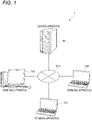
- Fig. 1 is a diagram showing a configuration example of an information processing system 1 of the present exemplary embodiment.
- the information processing system 1 of the present exemplary embodiment includes a server apparatus 50 and plural terminal apparatuses 100 connected to the server apparatus 50.
- the server apparatus 50 and the plural terminal apparatuses 100 are connected via a communication line 400 such as an Internet line.
- a communication line 400 such as an Internet line.
- Each of the server apparatus 50 and the plural terminal apparatuses 100 includes a computer device.
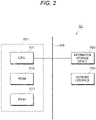
- Fig. 2 is a diagram showing an example of a hardware configuration of the server apparatus 50.
- the server apparatus 50 is provided with an information processing unit 501, an information storage device 502 that stores information, and a network interface 503 that realizes communication via a LAN (Local Area Network) cable, etc.
- LAN Local Area Network
- the information processing unit 501 includes a CPU (Central Processing Unit) 511 as an example of a processor, a ROM (Read Only Memory) 512 in which basic software, a BIOS (Basic Input Output System), and the like are stored, and a RAM (Random Access Memory) 513 used as a work area.
- a CPU Central Processing Unit
- ROM Read Only Memory
- BIOS Basic Input Output System
- RAM Random Access Memory
- the CPU 511 may be multi-core.
- the ROM 512 may be a rewritable non-volatile semiconductor memory.
- the information processing unit 501, the information storage device 502, and the network interface 503 are connected via a bus 506 and a signal line (not shown).
- programs executed by the CPU 511 may be provided to the server apparatus 50 in a state of being stored in a computer-readable recording medium such as magnetic recording medium (magnetic tape, magnetic disk, and the like), an optical recording medium (optical disk, and the like), optical magnetic recording medium, semiconductor memory, and the like.
- a computer-readable recording medium such as magnetic recording medium (magnetic tape, magnetic disk, and the like), an optical recording medium (optical disk, and the like), optical magnetic recording medium, semiconductor memory, and the like.
- the programs executed by the CPU 511 may be provided to the server apparatus 50 by using a communication unit such as the Internet.
- Fig. 3 is a diagram showing an example of a hardware configuration of each terminal apparatus 100.
- Each of the terminal apparatuses 100 is provided with an information processing unit 101, an information storage device 102 that stores information, and a network interface 103 that realizes communication via a LAN (Local Area Network) cable, etc.
- LAN Local Area Network
- Each of the terminal apparatuses 100 is provided with a receiving device 104 that receives operations of an operator and a display device 105 that displays information.
- the receiving device 104 includes devices such as a keyboard and a mouse, a touch panel, and the like, and in the present exemplary embodiment, information to be input by a user to the information processing system 1 are received by the receiving device 104.
- the display device 105 includes a liquid crystal display, an organic EL display, and the like. Various screens described later are displayed on the display device 105.
- the information storage device 102 is realized by an existing information storage device such as a hard disk drive, a semiconductor memory, and a magnetic tape.
- the information processing unit 101 includes a CPU (Central Processing Unit) 111 as an example of a processor, a ROM (Read Only Memory) 112 in which basic software, a BIOS (Basic Input Output System), and the like are stored, and a RAM (Random Access Memory) 113 used as a work area.
- a CPU Central Processing Unit
- ROM Read Only Memory
- BIOS Basic Input Output System
- RAM Random Access Memory
- the CPU 111 may be multi-core.
- the ROM 112 may be a rewritable non-volatile semiconductor memory.
- the information processing unit 101, the information storage device 102, the network interface 103, the receiving device 104, and the display device 105 are connected via a bus 106 and a signal line (not shown).
- programs executed by the CPU 111 may be provided to the terminal apparatus 100 in a state of being stored in a computer-readable recording medium such as magnetic recording medium (magnetic tape, magnetic disk, and the like), an optical recording medium (optical disk, and the like), optical magnetic recording medium, semiconductor memory, and the like.
- a computer-readable recording medium such as magnetic recording medium (magnetic tape, magnetic disk, and the like), an optical recording medium (optical disk, and the like), optical magnetic recording medium, semiconductor memory, and the like.
- the programs executed by the CPU 111 may be provided to the terminal apparatus 100 by using a communication unit such as the Internet.
- the processor refers to a processor in a broad sense, and includes a general-purpose processor (for example, CPU: Central Processing Unit, etc.) or a dedicated processor (for example, GPU: Graphics Processing Unit, ASIC: Application Specific Integrated Circuit, FPGA: Field Programmable Gate Array, programmable logic device, etc.).
- a general-purpose processor for example, CPU: Central Processing Unit, etc.
- a dedicated processor for example, GPU: Graphics Processing Unit
- ASIC Application Specific Integrated Circuit
- FPGA Field Programmable Gate Array, programmable logic device, etc.
- Operations of the processor may be implemented not only by one processor but also by cooperation of plural processors existing at physically separated positions.
- An order of the operations of the processor is not limited to an order described in the present exemplary embodiment, and may also be changed.
- Fig. 4 is a diagram showing a display example in the display device 105 of the terminal apparatus 100.
- the CPU 111 as an example of the processor provided in the terminal apparatus 100 executes programs stored in the ROM 112 or the information storage device 102 provided in the terminal apparatus 100, so that a display process described below is performed.
- the CPU 111 of the terminal apparatus 100 When the user performs a predetermined operation via the terminal apparatus 100, the CPU 111 of the terminal apparatus 100 performs a display shown in Fig. 4 on the display device 105 provided in the terminal apparatus 100.
- the CPU 111 displays documents 80 (a document image which is an image representing a document) and a display region 220 on which plural documents 80 are displayed on the display device 105.
- the display region 220 is a region for the user to perform an estimation work, and the documents 80 related to the estimation are displayed in the display region 220.
- the user performs an operation on each document 80 displayed in the display region 220 displayed on his / her own terminal apparatus 100 via his / her own terminal apparatus 100.
- each of the users performs, for example, addition of the document 80 to the display region 220 displayed on his / her own terminal apparatus 100, operation on a document such as editing the document 80, movement of the document 80 to another display region 220, retrieval of the document 80 from each document storage unit, etc.
- Storage images 250 which are images representing the document storage units, are also displayed in the display region 220, and in the present exemplary embodiment, the documents 80 stored in the document storage units represented by the storage images 250 may also be retrieved.
- a display screen 105A shown in Fig. 4 is also displayed on the display device 105 of the terminal apparatus 100 operated by each of the other users.
- the plural users operate on one common display region 220.
- information about operations performed by the users with respect to the documents 80 displayed on the display region 220 are accumulated in the information storage device 502 of the server apparatus 50 (see Fig. 2 ).
- the information about this operation is accumulated in the information storage device 502 of the server apparatus 50.
- information about the operation a time when the operation is performed, information for specifying the document 80 subjected to the operation, information about the user who performed the operation, and information about content of the operation are accumulated in the information storage devices 502 of the server apparatus 50.
- Fig. 5 is a diagram showing an example of the information accumulated in the information storage device 502 provided in the server apparatus 50.
- the information about the operations performed by the users with respect to the documents 80 displayed on the display region 220 are accumulated in the information storage device 502 of the server apparatus 50.
- Fig. 5 as the information about the operations performed by the users on each document 80, the times when the operations are performed, item names as examples of the information for specifying the documents 80 subjected to the operations, the information about the users who performed the operations, and the information about the contents of the operations are accumulated in the information storage devices 502 of the server apparatus 50.
- the item name information such as a file name is accumulated.
- the information about the document 80 before the change in the content of the document 80 and the information about the document 80 after the change in the content of the document 80 are accumulated in the information storage device 502 of the server apparatus 50.
- the information of the movement source of the document 80 and the information on the movement destination of the document 80 are accumulated in the information storage device 502 of the server apparatus 50 in a state of being associated with the operation of moving the document 80.
- a selection item 85 selected by the user when the user refers to a past state of the display region 220 is displayed.
- a receiving display 86 which is a display that receives the period designation, is displayed on the display device 105 of the terminal apparatus 100.
- the user operates the receiving display 86 to designate a period.
- the CPU 111 of the terminal apparatus 100 displays a state of the display region 220 in the designated period on the display device 105 of the terminal apparatus 100. In other words, the CPU 111 displays a past state of the display region 220 on the display device 105.
- the CPU 111 acquires the past state of the display region 220 from the information storage device 502 of the server apparatus 50 to display the acquired past state on the display device 105 of the terminal apparatus 100.
- the past state of the display region 220 may be displayed on the display device 105 of the terminal apparatus 100. More specifically, in the present exemplary embodiment, the state of the display region 220 during the period designated by the user may be acquired, and the acquired state may be displayed on the display device 105.
- Fig. 7 is a diagram showing a past display region 220 (hereinafter, referred to as "past display region 220A") displayed on the display device 105 of the terminal apparatus 100.
- past display region 220A a past display region 220 displayed on the display device 105 of the terminal apparatus 100.
- the CPU 111 of the terminal apparatus 100 displays the past display region 220A in this period (hereinafter referred to as "designated period") on the display device 105.
- the CPU 111 displays plural instruction receiving elements 200, which are displays that receive instructions to display past operation contents from the user, at a lower part of the display screen 105A displayed on the display device 105.
- the operation content represents a content of an operation, and includes at least one of an operation type, a user who performs the operation, and a document to be operated.
- a horizontally long element region 280 that displays the instruction receiving elements 200 is provided at the lower part of the display screen 105A displayed on the display device 105, and the CPU 111 displays the plural instruction receiving elements 200 on the element region 280.
- the instruction receiving elements 200 are associated with each of the past operations performed on the documents 80 displayed on the display region 220, and the instruction receiving elements 200 are displayed for each past operation performed on the documents 80 displayed in the display region 220.
- each of the instruction receiving elements 200 is displayed side by side in order based on times when operations corresponding to the instruction receiving elements 200 are performed.
- a moving body 290 that moves in the element region 280 from left to right in the figure is displayed, and the moving body 290 moves from left to right according to the passage of time in the above-mentioned designated period.
- an operation display 88 that receives an operation of fast-forwarding or returning the display in the past display region 220A from the user is displayed.
- an explanation 89 of each element displayed on the display screen 105A is displayed.
- the display of the explanations 89 does not have to be performed all the time, and may be performed according to selection of the user.
- an instruction to display the past display region 220A at a specific time point is received from the user via the above-mentioned instruction receiving elements 200.
- the past display region 220A at the time point when the operation associated with the instruction receiving element 200 is performed is displayed.
- the CPU 111 acquires, from the information storage device 502 of the server apparatus 50, the past display region 220A at the time point when the operation corresponding to the instruction receiving element 200 shown by the reference numeral 7A selected by the user is performed. Then, the CPU 111 displays the acquired past display region 220A on the display device 105 of the terminal apparatus 100.
- the CPU 111 displays a display region state, which is a state about the past display region 220 at the time point corresponding to the selected instruction receiving element 200, on the display device 105 of the terminal apparatus 100.
- the display region state which is a state about the past display region 220, is displayed on the display device 105 of the terminal apparatus 100, whereby the display device 105 displays the contents of the operations performed by the user in the past.
- the CPU 111 displays the display region state, which is a state of the display region 220, at the time point when the operation corresponding to the instruction receiving element 200 is performed.
- the user may confirm the past display region 220A when the operation corresponding to the instruction receiving element 200 is performed by visually recognizing the display device 105 of the terminal apparatus 100.
- the past display region 220A at the time point of the selection is similarly displayed on the display device 105 of the terminal apparatus 100.
- the past display region 220A at the time point of the selection is displayed on the display device 105 of the terminal apparatus 100.
- the CPU 111 when displaying the instruction receiving elements 200, the CPU 111 displays the instruction receiving elements 200 according to the contents of the operations with which the instruction receiving elements 200 are associated in a distinguishable manner.
- the CPU 111 displays the plural instruction receiving elements 200 in a distinguishable manner according to types of the operations with which the instruction receiving elements 200 are associated.
- four types are set in advance as the types of the operations.
- the types of the operations the following four types are set in advance: addition of the document 80 to the display region 220, operations on the document 80 such as editing of the document 80, movement of the document 80 to another display region 220, and retrieval of the document 80 from the document storage unit.
- the CPU 111 When displaying the instruction receiving element 200 on the display device 105, the CPU 111 displays such that it may be understood which of these types the type of the operation corresponding to the instruction receiving element 200 corresponds to.
- the CPU 111 displays the plural instruction receiving elements 200 according to the types of the operations in a distinguishable manner by making colors of the instruction receiving elements 200 different for each type of the operations.
- the instruction receiving element 200 corresponding to the addition of the document 80 is displayed in green, and the instruction receiving element 200 corresponding to the operation on the document 80 is displayed in yellow, the instruction receiving element 200 corresponding to the movement of the document 80 is displayed in red, and the instruction receiving element 200 corresponding to the retrieval of the document 80 from the document storage unit is displayed in blue.
- the information about the contents of the operations performed by the users are accumulated in the information storage device 502 of the server apparatus 50.
- the server apparatus 50 determines, when accumulating the information about the contents of the operations performed by the users in the information storage device 502, which of the above-mentioned four types the operation performed by the user corresponds to, and accumulates information about the type determined to be corresponded in the information storage device 502.
- the information about the type determined to be corresponded is accumulated in the information storage device 502 as the information about the content of the operation performed by the user.
- the information about the operation performed by the user is transmitted from the terminal apparatus 100 to the server apparatus 50.
- the server apparatus 50 determines which of the above-mentioned four types the operation specified by the transmitted information about this operation corresponds to. Then, the server apparatus 50 accumulates the information about the corresponding type in the information storage device 502 as the information about the operation performed by the user.
- the server apparatus 50 In addition to accumulating the information about the type, the server apparatus 50 also accumulates information such as the time when the operation is performed, the item name, and the user information in the information storage device 502.
- the above-mentioned “display in a distinguishable manner” refers to a display form that enables the user to grasp the content of the operation with which the instruction receiving element 200 is associated.
- the "instruction receiving element 200" may have any shape and size as long as it is recognizable by the user.
- the instruction receiving elements 200 may have a shape extending in a vertical direction, and is not limited to this, and may have a shape such as a circle, an ellipse, or a polygon.
- Fig. 8 is a diagram showing another display example in the display device 105 of the terminal apparatus 100.
- the display example shown in Fig. 8 illustrates a case where the CPU 111 performs a process of hiding the instruction receiving elements 200 other than the instruction receiving elements 200 corresponding to the specific operation contents.
- Fig. 8 illustrates a case where the pointer 270 is located on the document 80, which is displayed in the past display region 220A and shown by a reference numeral 8A, and the document 80 shown by the reference numeral 8A is selected by the user.
- the CPU 111 displays only the instruction receiving elements 200 shown by the reference numerals 8B and 8C, which are the instruction receiving elements 200 corresponding to the operations on the selected document 80, and hides the instruction receiving elements 200 other than the instruction receiving elements 200 shown by the reference numerals 8B and 8C.
- the plural instruction receiving elements 200 are displayed in a distinguishable manner according to the object on which the operations are performed.
- the instruction receiving elements 200 are distinguishable such that the user may grasp the instruction receiving elements 200 corresponding to the operations performed on the document 80 selected by the user.
- the information about the person who performed the operations corresponding to the instruction receiving elements 200 displayed after the instruction receiving elements 200 are divided is displayed in a state of being associated with the instruction receiving elements 200.
- user A performs an operation of adding this document 80 to the display region 220 in the past, and then user B performs an operation of moving this document 80.
- each instruction receiving element 200 is a color corresponding to the type of operation, and by referring to the instruction receiving element 200, it is possible to grasp the types of the operations performed by each of the user A and the user B.
- Fig. 9 is a diagram showing another display example in the display device 105 of the terminal apparatus 100.
- This display example shows a case where the instruction receiving element 200 represented by a reference numeral 9A is selected by the user.
- the instruction receiving elements 200 other than the instruction receiving element 200 selected by the user is hidden.
- an image showing that "it is the operation target document 210" is displayed at a portion where the operation target document 210 is displayed in the past display region220A.
- a black frame surrounding the operation target document 210 is displayed as shown by a reference numeral 9C.
- the user may grasp the document 80 subjected to the operation corresponding to the instruction receiving element 200 selected by the user.
- the color of the instruction receiving element 200 selected by the user is a color corresponding to the type of the operation, and the user may refer to the instruction receiving element 200 to grasp the type of the operation with which the instruction receiving element 200 is associated.
- Fig. 10 is a diagram showing another display example in the display device 105 of the terminal apparatus 100.
- This display example shown in Fig. 10 illustrates a case where the instruction receiving element 200 represented by a reference numeral 10A is selected by the user.
- an image showing that "it is the operation target document 210" is displayed.
- a black frame surrounding the operation target document 210 is displayed.
- the color of the instruction receiving element 200 selected by the user and shown by the reference numeral 10A is yellow. Accordingly, the user may grasp that the type of operation with which the instruction receiving element 200 selected by the user is associated is an operation on the document 80.
- the CPU 111 performs a display showing a change in the content of the operation target document 210, which is selected by the user, subjected to the operation corresponding to the instruction receiving element 200 shown by the reference numeral 10A, and shown by a reference numeral 10D.
- the CPU 111 displays information about the operation target document 210 before the change in the content and information about the operation target document 210 after the change in the content as a display showing the change in the content.
- pre-change image 261 an image 261 representing the operation target document 210 before the change in the content is performed (hereinafter, referred to as "pre-change image 261") is displayed.
- post-change image 262 an image 262 representing the operation target document 210 after the change in the content is performed (hereinafter, referred to as "post-change image 262") is displayed.
- the pre-change image 261 and the post-change image 262 are displayed side by side.
- the user may easily grasp the change in the content of the operation target document 210 whose content is changed.
- the post-change image 262 may be displayed after hiding the displayed pre-change image 261.
- the pre-change image 261 and the post-change image 262 may be displayed alternately.
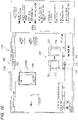
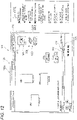
- FIGS. 11 and 12 are diagrams showing a display example of the display device 105 when the storage image 250 displayed in the past display region 220A is selected by the user.
- the storage images 250 which are images representing the storage units of the documents 80, are displayed in the past display region 220A.
- a display showing the instruction receiving elements 200 corresponding to the operations related to the storage image 250 is performed, and a display showing that the operations corresponding to the instruction receiving elements 200 are operations related to the storage image 250 is performed.
- the instruction receiving elements 200 other than the instruction receiving element 200 which corresponds to the operation related to the storage image 250 and is shown by a reference numeral 12A, are hidden.
- the moving body 290 is positioned at a display position of the instruction receiving element 200, which corresponds to the operation related to the storage image 250 and is shown by the reference numeral 12A.
- the operation corresponding to the instruction receiving element 200 shown by the reference numeral 12A in Fig. 12 is an operation related to the storage image 250 shown by a reference numeral 12C.
- the operation corresponding to the instruction receiving element 200 shown by the reference numeral 12A is an operation related to the storage image 250 displayed on an upper side.
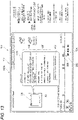
- Fig. 13 is a diagram showing another display example in the display device 105 of the terminal apparatus 100.
- an operation of moving the document 80 to another display region 220 is exemplified as the operations for the document 80 displayed in the display region 220.
- the CPU 111 When the operation corresponding to the instruction receiving element 200 is the operation of moving the document 80 to another display region 220, the CPU 111 performs a display showing information about the movement of the document 80 as a display showing the content of the operation corresponding to the instruction receiving element 200.
- the operation corresponding to the instruction receiving element 200 shown by a reference numeral 13A in Fig. 13 is an operation of moving the document 80, which is displayed in the past display region 220A and shown by a reference numeral 13B, to another display region 220.
- a display showing the content of the operation corresponding to the instruction receiving element 200 as shown by a reference numeral 13D, a display showing the information about the movement of the document 80 shown by the reference numeral 13B is performed.
- information about the document 80 before the movement and information about the document 80 after the movement are displayed.
- a file name of the document 80 before the movement As the information about the document 80 before the movement, as shown by a reference numeral 13E, a file name of the document 80 before the movement, information about the user who operates the document 80 before the movement, and information about the display region 220 on which the document 80 before the movement is displayed, are displayed.
- estimate workspace information called “estimation workspace” is displayed as the information about the display region 220 on which the document 80 before the movement is displayed, and the document 80 before the movement is displayed on the display region 220 named “estimation workspace”.
- a file name of the document 80 after the movement As the information about the document 80 after the movement, as shown by a reference numeral 13F, a file name of the document 80 after the movement, information about the user who operates the document 80 after the movement, and information about the display region 220 on which the document 80 after the movement is displayed, are displayed.
- contract workspace information called "contract workspace" is displayed as the information about the display region 220 on which the document 80 after the movement is displayed, and the document 80 after the movement is displayed on the display region 220 named "contract workspace”.
- a selection item 902 that displays the display region 220 in which the document 80 after the movement is present is displayed.
- the display region 220 in which the document 80 after the movement is present and the document 80 after the movement are displayed.
- Fig. 14 is a diagram showing another display example in the display device 105 of the terminal apparatus 100.
- This display example shows a display example of a case where the moving body 290 reaches a display portion of the instruction receiving element 200.
- each of the instruction receiving elements 200 is displayed side by side in order based on the times when operations corresponding to the instruction receiving elements 200 are performed.
- the CPU 111 displays the content of the operation corresponding to each instruction receiving element 200 reached by the moving body 290.
- a case where the operation corresponding to the instruction receiving element 200 reached by the moving body 290 is an operation of moving the document 80 to the outside is illustrated.
- a case where it is an operation of moving the document 80 to another display region 220 is illustrated.
- a display showing that "it is an operation of moving the document 80 to the outside" is performed to perform a display showing that the operation corresponding to the instruction receiving element 200 reached by the moving body 290 is the movement of the document 80.
- the document 80 subjected to the operation corresponding to the instruction receiving element 200 reached by the moving body 290 is displayed by a dotted line, and the display showing that the operation corresponding to the instruction receiving element 200 reached by the moving body 290 is the movement of the document 80 is performed.
- the color of the instruction receiving element 200 reached by the moving body 290 is red, and also by referring to the color of the instruction receiving element 200, it is clear that the operation corresponding to the instruction receiving element 200 reached by the moving body 290 is the movement of the document 80.
- the display showing that "it is the movement of the document 80" is not limited to this, and character information called "movement" may be displayed, or a dedicated image that shows the movement may be displayed to perform the display showing that "it is the movement of the document 80".
- Fig. 15 is a diagram showing another display example in the display device 105 of the terminal apparatus 100.
- FIG. 15 a display example of a case where the user double-clicks on the instruction receiving element 200 shown by a reference numeral 15A and selects the instruction receiving element 200 shown by the reference numeral 15A is shown.
- this display example illustrates a case where the user selects the instruction receiving element 200 corresponding to the addition of the document 80, and in this case, only the instruction receiving element 200 corresponding to the addition of the document 80 are displayed. Specifically, in this example, only the instruction receiving elements 200 in green are displayed.
- a display for specifying the document 80 subjected to the operations corresponding to each instruction receiving element 200 is performed with corresponding to each of the displayed instruction receiving elements 200.
- a square frame shown by a reference numeral 15B is displayed as a display that specifies the document 80 subjected to the operation corresponding to the instruction receiving element 200 shown by the reference numeral 15A.
- a square frame shown by a reference numeral 15F is displayed as a display that specifies the document 80 subjected to the operation corresponding to the instruction receiving element 200 shown by a reference numeral 15D.
- Fig. 16 is a diagram showing another display example in the display device 105 of the terminal apparatus 100.
- the plural instruction receiving elements 200 are displayed in a distinguishable manner according to the persons who performed the operations.
- information may be added to each of the instruction receiving elements 200, such as adding and displaying the information about each person who performed the operations.
- the display example shown in Fig. 16 shows a case where the information about each person who performed the operations is displayed for all of the instruction receiving elements 200 as an example.
- the information about this user may be displayed in association with only the instruction receiving elements 200 corresponding to the operations performed by some users.
- a display shown in Fig. 17 (a diagram showing another display example in the display device 105 of the terminal apparatus 100) may be performed.
- information about user A is displayed in a state of being associated with only the instruction receiving elements 200 corresponding to the operations performed by the user A.
- the operations corresponding to the instruction receiving elements 200 shown by reference numerals 17C and 17D in Fig. 17 are performed by the user A, and in this example, the information about the user A is displayed in a state of being associated with only the instruction receiving elements 200 shown by the reference numerals 17C and 17D.
- the instruction receiving elements 200 other than the instruction receiving element 200 with which the user information is associated may be hidden. More specifically, the instruction receiving elements 200 other than the instruction receiving elements 200 with which the information about the user A is associated may be hidden.
Landscapes
- Engineering & Computer Science (AREA)
- Theoretical Computer Science (AREA)
- General Engineering & Computer Science (AREA)
- Physics & Mathematics (AREA)
- General Physics & Mathematics (AREA)
- Human Computer Interaction (AREA)
- Business, Economics & Management (AREA)
- Entrepreneurship & Innovation (AREA)
- Strategic Management (AREA)
- Software Systems (AREA)
- Human Resources & Organizations (AREA)
- Data Mining & Analysis (AREA)
- Marketing (AREA)
- Economics (AREA)
- Operations Research (AREA)
- Quality & Reliability (AREA)
- Tourism & Hospitality (AREA)
- General Business, Economics & Management (AREA)
- Databases & Information Systems (AREA)
- User Interface Of Digital Computer (AREA)
- Document Processing Apparatus (AREA)
Abstract
Description
- The present invention relates to an information processing system, an information processing method, and a program.
-
JP-A-2010-165178 - There is a technique of displaying, on a display screen, a past state of a display region in which a document is displayed and an image showing that an operation is performed on the document in this display region.
- The image showing that an operation is performed merely shows that the operation is performed. In order to grasp a target of the operation or specific contents of the operation, it is necessary to refer to a state of the display region at a time point when the operation is performed, which is troublesome.
- Aspects of non-limiting embodiments of the present disclosure relate to making it easier to grasp the content of the operation performed on the document as compared with a case where a content of a past operation performed on the document are grasped by referring only to a display region when the operation on the document is performed.
- [1] According to an aspect of the present disclosure, there is provided an information processing system including a processor configured to: display plural instruction receiving elements each of which is provided for receiving an instruction to display a content of an operation that was performed on a document displayed on a display region; display a state of the display region at a time point corresponding to an instruction receiving element selected by a user among the plural instruction receiving elements; and display the plural instruction receiving elements in a distinguishable manner according to the content of the operation.
- [2] In the information processing system according to [1], the processor may be configured to display the plural instruction receiving elements in a distinguishable manner according to a type of the operation.
- [3] In the information processing system according to [1], the processor may be configured to display an instruction receiving element corresponding to a content of a specific operation among the plural instruction receiving elements, and to hide an instruction receiving element other than the instruction receiving element corresponding to the content of the specific operation among the plural instruction receiving elements.
- [4] In the information processing system according to [1], the processor may be configured to display the plural instruction receiving elements in a distinguishable manner according to a person that performed the operation.
- [5] In the information processing system according to [1], the processor may be configured to display the plural instruction receiving elements in a distinguishable manner according to an object on which the operation was performed.
- [6] In the information processing system according to [5], in response to the document displayed in the display region being selected, the processor may be configured to display an instruction receiving element whose target of the operation is the selected document in a distinguishable manner.
- [7] In the information processing system according to [6], the processor may be configured to further display an indication of a person that performed the operation corresponding to the instruction receiving element.
- [8] In the information processing system according to [1], the processor may be configured to display, in the display region, an indication of a target document of the operation corresponding to the instruction receiving element selected.
- [9] In the information processing system according to [8], the processor may be configured to display, at a portion at which the target document is displayed in the display region, an image to indicate the operation target document is a document subjected to the operation corresponding to the instruction receiving element selected as the indication of the target document of the operation.
- [10] In the information processing system according to [1], the processor may be configured to display an indication of a change in a content of a target document, the target document being a document subjected to the operation corresponding to the instruction receiving element selected.
- [11] In the information processing system according to [10], the processor may be configured to display, as the indication of the change in the content, information about the target document before the change in the content and information about the target document after the change in the content.
- [12] In the information processing system according to [1], in response to a storage image displayed in the display region being selected by the user, the processor may be configured to display an indication of an instruction receiving element corresponding to an operation related to the storage image and an indication that an operation corresponding to the instruction receiving element is an operation related to the storage image, the storage image being an image of a storage of a document.
- [13] In the information processing system according to [1], the plural instruction receiving elements may be displayed in order in a display portion based on a time point when the operation corresponding to each of the plural instruction receiving elements is performed, and, in response to a moving body that is configured to move in the display portion reaching a portion where an instruction receiving element among the plural instruction receiving elements, the processor may be configured to display the content of the operation corresponding to the instruction receiving element displayed at the portion.
- [14] The information processing system according to [1], in a case where the operation corresponding to the instruction receiving element selected is an operation of moving the document displayed in the display region, the processor may be configured to display information about a movement of the document in the display region as the content of the operation corresponding to the instruction receiving element selected.
- [15] According to another aspect of the present disclosure, there is provided an information processing method including: displaying plural instruction receiving elements each of which is provided for receiving an instruction to display a content of an operation that was performed on a document displayed in a display region; displaying a state of the display region at a time point corresponding to an instruction receiving element selected by a user among the plural instruction receiving elements; and displaying the plural instruction receiving elements in a distinguishable manner according to the content of the operation.
- [16] According to another aspect of the present disclosure, there is provided a program causing a computer to execute a process, the process including: displaying plural instruction receiving elements each of which is provided for receiving an instruction to display a content of an operation that was performed on a document displayed in a display region; displaying a state of the display region at a time point corresponding to an instruction receiving element selected by a user among the plural instruction receiving elements; and displaying the plural instruction receiving elements in a distinguishable manner according to the content of the operation.
- According to [1], comparing to a case where a content of a past operation performed on a document are grasped by referring only to a display region when the operation on the document is performed, it is possible to make it easier to grasp the content of the operation performed on the document.
- According to [2], by referring to the instruction receiving elements, the type of the operation with which the instruction receiving element is associated can be grasped.
- According to [3], it is easier to grasp the content of the specific operation as compared with a case where the instruction receiving elements other than each of the instruction receiving elements corresponding to the content of the specific operation is also displayed.
- According to [4], it is possible to grasp the person who performed the operation with which the instruction receiving elements are associated.
- According to [5], by referring to the instruction receiving elements, it is possible to grasp the object subjected to the operation with which the instruction receiving elements are associated.
- According to [6], when the document displayed in the display region is selected, it is possible to grasp the instruction receiving elements for which this document is a target of the operation.
- According to [7], it is possible to grasp the person who performed the operation corresponding to the instruction receiving elements.
- According to [8], it is possible to clarify the document subjected to the operation corresponding to the instruction receiving elements, as compared with the case where the document subjected to the operation corresponding to the instruction receiving elements is not displayed.
- According to [9], it is possible to perform a display of an image showing that it is the operation target document on the portion of the display region on which the operation target document is displayed.
- According to [10], it is possible to perform a display showing a change in a content of a target document, which is a document subjected to the operation corresponding to the instruction receiving elements.
- According to [11], as the display showing the change in the content of the target document, the information about the target document before the change in the content and the information about the target document after the change in the content can be displayed.
- According to [12], it is possible to perform the display showing that the operation corresponding to the instruction receiving elements is the operation related to the storage.
- According to [13], when the moving body reaches the display portion of each instruction receiving element, it is possible to display the content of the operation corresponding to the instruction receiving elements.
- According to [14], when the operation corresponding to the instruction receiving elements is an operation of moving the document displayed in the display region, it is possible to perform a display showing the information about the movement of the document.
- According to [15] or [16], comparing to a case where a content of a past operation performed on a document is grasped by referring only to a display region when the operation on the document is performed, it is possible to make it easier to grasp the content of the operation performed on the document.
- Exemplary embodiment(s) of the present invention will be described in detail based on the following figures, wherein:
-
Fig. 1 is a diagram showing a configuration example of an information processing system; -
Fig. 2 is a diagram showing an example of a hardware configuration of a server apparatus; -
Fig. 3 is a diagram showing an example of a hardware configuration of a terminal apparatus; -
Fig. 4 is a diagram showing a display example in a display device of the terminal apparatus; -
Fig. 5 is a diagram showing an example of information accumulated in an information storage device provided in the server apparatus; -
Fig. 6 is a diagram showing another display example in the display device of the terminal apparatus; -
Fig. 7 is a diagram showing a past display region displayed on the display device of the terminal apparatus; -
Fig. 8 is a diagram showing another display example in the display device of the terminal apparatus; -
Fig. 9 is a diagram showing another display example in the display device of the terminal apparatus; -
Fig. 10 is a diagram showing another display example in the display device of the terminal apparatus; -
Fig. 11 is a diagram showing a display example of the display device when a storage image displayed in the past display region is selected by a user; -
Fig. 12 is a diagram showing a display example of the display device when a storage image displayed in the past display region is selected by a user; -
Fig. 13 is a diagram showing another display example in the display device of the terminal apparatus; -
Fig. 14 is a diagram showing another display example in the display device of the terminal apparatus; -
Fig. 15 is a diagram showing another display example in the display device of the terminal apparatus; -
Fig. 16 is a diagram showing another display example in the display device of the terminal apparatus; and -
Fig. 17 is a diagram showing another display example in the display device of the terminal apparatus. - Hereinafter, an exemplary embodiment of the present invention will be described in detail with reference to the accompanying drawings.
-
Fig. 1 is a diagram showing a configuration example of aninformation processing system 1 of the present exemplary embodiment. - The
information processing system 1 of the present exemplary embodiment includes aserver apparatus 50 andplural terminal apparatuses 100 connected to theserver apparatus 50. Theserver apparatus 50 and theplural terminal apparatuses 100 are connected via acommunication line 400 such as an Internet line. Each of theserver apparatus 50 and theplural terminal apparatuses 100 includes a computer device. -
Fig. 2 is a diagram showing an example of a hardware configuration of theserver apparatus 50. - The
server apparatus 50 is provided with aninformation processing unit 501, aninformation storage device 502 that stores information, and anetwork interface 503 that realizes communication via a LAN (Local Area Network) cable, etc. - The
information processing unit 501 includes a CPU (Central Processing Unit) 511 as an example of a processor, a ROM (Read Only Memory) 512 in which basic software, a BIOS (Basic Input Output System), and the like are stored, and a RAM (Random Access Memory) 513 used as a work area. -
CPU 511 may be multi-core. TheROM 512 may be a rewritable non-volatile semiconductor memory. - The
information processing unit 501, theinformation storage device 502, and thenetwork interface 503 are connected via abus 506 and a signal line (not shown). - Here, programs executed by the
CPU 511 may be provided to theserver apparatus 50 in a state of being stored in a computer-readable recording medium such as magnetic recording medium (magnetic tape, magnetic disk, and the like), an optical recording medium (optical disk, and the like), optical magnetic recording medium, semiconductor memory, and the like. In addition, the programs executed by theCPU 511 may be provided to theserver apparatus 50 by using a communication unit such as the Internet. -
Fig. 3 is a diagram showing an example of a hardware configuration of eachterminal apparatus 100. - Each of the
terminal apparatuses 100 is provided with aninformation processing unit 101, aninformation storage device 102 that stores information, and anetwork interface 103 that realizes communication via a LAN (Local Area Network) cable, etc. - Each of the
terminal apparatuses 100 is provided with a receivingdevice 104 that receives operations of an operator and adisplay device 105 that displays information. - The receiving
device 104 includes devices such as a keyboard and a mouse, a touch panel, and the like, and in the present exemplary embodiment, information to be input by a user to theinformation processing system 1 are received by the receivingdevice 104. - The
display device 105 includes a liquid crystal display, an organic EL display, and the like. Various screens described later are displayed on thedisplay device 105. - The
information storage device 102 is realized by an existing information storage device such as a hard disk drive, a semiconductor memory, and a magnetic tape. - The
information processing unit 101 includes a CPU (Central Processing Unit) 111 as an example of a processor, a ROM (Read Only Memory) 112 in which basic software, a BIOS (Basic Input Output System), and the like are stored, and a RAM (Random Access Memory) 113 used as a work area. -
CPU 111 may be multi-core. TheROM 112 may be a rewritable non-volatile semiconductor memory. - The
information processing unit 101, theinformation storage device 102, thenetwork interface 103, the receivingdevice 104, and thedisplay device 105 are connected via abus 106 and a signal line (not shown). - Here, programs executed by the
CPU 111 may be provided to theterminal apparatus 100 in a state of being stored in a computer-readable recording medium such as magnetic recording medium (magnetic tape, magnetic disk, and the like), an optical recording medium (optical disk, and the like), optical magnetic recording medium, semiconductor memory, and the like. In addition, the programs executed by theCPU 111 may be provided to theterminal apparatus 100 by using a communication unit such as the Internet. - In the present exemplary embodiment above, the processor refers to a processor in a broad sense, and includes a general-purpose processor (for example, CPU: Central Processing Unit, etc.) or a dedicated processor (for example, GPU: Graphics Processing Unit, ASIC: Application Specific Integrated Circuit, FPGA: Field Programmable Gate Array, programmable logic device, etc.).
- Operations of the processor may be implemented not only by one processor but also by cooperation of plural processors existing at physically separated positions. An order of the operations of the processor is not limited to an order described in the present exemplary embodiment, and may also be changed.
-
Fig. 4 is a diagram showing a display example in thedisplay device 105 of theterminal apparatus 100. - In the present exemplary embodiment, the
CPU 111 as an example of the processor provided in theterminal apparatus 100 executes programs stored in theROM 112 or theinformation storage device 102 provided in theterminal apparatus 100, so that a display process described below is performed. - When the user performs a predetermined operation via the
terminal apparatus 100, theCPU 111 of theterminal apparatus 100 performs a display shown inFig. 4 on thedisplay device 105 provided in theterminal apparatus 100. - Specifically, as shown in
Fig. 4 , theCPU 111 displays documents 80 (a document image which is an image representing a document) and adisplay region 220 on whichplural documents 80 are displayed on thedisplay device 105. - In this display example, the
display region 220 is a region for the user to perform an estimation work, and thedocuments 80 related to the estimation are displayed in thedisplay region 220. - In the present exemplary embodiment, the user performs an operation on each
document 80 displayed in thedisplay region 220 displayed on his / her ownterminal apparatus 100 via his / her ownterminal apparatus 100. - Specifically, each of the users, performs, for example, addition of the
document 80 to thedisplay region 220 displayed on his / her ownterminal apparatus 100, operation on a document such as editing thedocument 80, movement of thedocument 80 to anotherdisplay region 220, retrieval of thedocument 80 from each document storage unit, etc. -
Storage images 250, which are images representing the document storage units, are also displayed in thedisplay region 220, and in the present exemplary embodiment, thedocuments 80 stored in the document storage units represented by thestorage images 250 may also be retrieved. - In the present exemplary embodiment, a
display screen 105A shown inFig. 4 is also displayed on thedisplay device 105 of theterminal apparatus 100 operated by each of the other users. In the present exemplary embodiment, the plural users operate on onecommon display region 220. - In the present exemplary embodiment, information about operations performed by the users with respect to the
documents 80 displayed on thedisplay region 220 are accumulated in theinformation storage device 502 of the server apparatus 50 (seeFig. 2 ). - Specifically, in the present exemplary embodiment, every time the user performs an operation on
documents 80 displayed in thedisplay region 220 of theterminal apparatus 100, the information about this operation is accumulated in theinformation storage device 502 of theserver apparatus 50. - Specifically, as the information about the operation, a time when the operation is performed, information for specifying the
document 80 subjected to the operation, information about the user who performed the operation, and information about content of the operation are accumulated in theinformation storage devices 502 of theserver apparatus 50. -
Fig. 5 is a diagram showing an example of the information accumulated in theinformation storage device 502 provided in theserver apparatus 50. - In the present exemplary embodiment, as described above, the information about the operations performed by the users with respect to the
documents 80 displayed on thedisplay region 220 are accumulated in theinformation storage device 502 of theserver apparatus 50. - Specifically, as shown in
Fig. 5 , as the information about the operations performed by the users on eachdocument 80, the times when the operations are performed, item names as examples of the information for specifying thedocuments 80 subjected to the operations, the information about the users who performed the operations, and the information about the contents of the operations are accumulated in theinformation storage devices 502 of theserver apparatus 50. Here, as the item name, information such as a file name is accumulated. - Although not shown, in the present exemplary embodiment, when an operation involving a change in a content of the
document 80 is performed, information before and after the change in the content of thedocument 80 are accumulated, with being associated with this operation, in theinformation storage device 502 of theserver apparatus 50. - Specifically, for example, the information about the
document 80 before the change in the content of thedocument 80 and the information about thedocument 80 after the change in the content of thedocument 80 are accumulated in theinformation storage device 502 of theserver apparatus 50. - In the present exemplary embodiment, when the
document 80 is moved from thedisplay region 220 shown inFig. 4 to anotherdisplay region 220, information of a movement source of thedocument 80 and information of a movement destination of thedocument 80 are accumulated in theinformation storage device 502 of theserver apparatus 50. - Specifically, the information of the movement source of the
document 80 and the information on the movement destination of thedocument 80 are accumulated in theinformation storage device 502 of theserver apparatus 50 in a state of being associated with the operation of moving thedocument 80. - Further, in the present exemplary embodiment, as shown in
Fig. 4 , aselection item 85 selected by the user when the user refers to a past state of thedisplay region 220 is displayed. - When the user selects the
selection item 85, as shown inFig. 6 (a diagram showing another display example in thedisplay device 105 of the terminal apparatus 100), a receivingdisplay 86, which is a display that receives the period designation, is displayed on thedisplay device 105 of theterminal apparatus 100. In the present exemplary embodiment, the user operates the receivingdisplay 86 to designate a period. - When the user designates a period, the
CPU 111 of theterminal apparatus 100 displays a state of thedisplay region 220 in the designated period on thedisplay device 105 of theterminal apparatus 100. In other words, theCPU 111 displays a past state of thedisplay region 220 on thedisplay device 105. - More specifically, the
CPU 111 acquires the past state of thedisplay region 220 from theinformation storage device 502 of theserver apparatus 50 to display the acquired past state on thedisplay device 105 of theterminal apparatus 100. - In the present exemplary embodiment, in addition to accumulating the information about the operation performed by the user in the
information storage device 502 of theserver apparatus 50, each time a predetermined time elapses, an image of thedisplay region 220 itself is accumulated in theinformation storage device 502 of theserver apparatus 50. - Accordingly, in the present exemplary embodiment, the past state of the
display region 220 may be displayed on thedisplay device 105 of theterminal apparatus 100. More specifically, in the present exemplary embodiment, the state of thedisplay region 220 during the period designated by the user may be acquired, and the acquired state may be displayed on thedisplay device 105. -
Fig. 7 is a diagram showing a past display region 220 (hereinafter, referred to as "past display region 220A") displayed on thedisplay device 105 of theterminal apparatus 100. - In the present exemplary embodiment, as described above, when the user designates a period, the
CPU 111 of theterminal apparatus 100 displays thepast display region 220A in this period (hereinafter referred to as "designated period") on thedisplay device 105. - Further, when the user designates a designated period, the
CPU 111 displays pluralinstruction receiving elements 200, which are displays that receive instructions to display past operation contents from the user, at a lower part of thedisplay screen 105A displayed on thedisplay device 105. The operation content represents a content of an operation, and includes at least one of an operation type, a user who performs the operation, and a document to be operated. - More specifically, in the present exemplary embodiment, a horizontally
long element region 280 that displays theinstruction receiving elements 200 is provided at the lower part of thedisplay screen 105A displayed on thedisplay device 105, and theCPU 111 displays the pluralinstruction receiving elements 200 on theelement region 280. - In the present exemplary embodiment, the
instruction receiving elements 200 are associated with each of the past operations performed on thedocuments 80 displayed on thedisplay region 220, and theinstruction receiving elements 200 are displayed for each past operation performed on thedocuments 80 displayed in thedisplay region 220. - In the present exemplary embodiment, when displaying the plural
instruction receiving elements 200 on theelement region 280, each of theinstruction receiving elements 200 is displayed side by side in order based on times when operations corresponding to theinstruction receiving elements 200 are performed. - In the present exemplary embodiment, a moving
body 290 that moves in theelement region 280 from left to right in the figure is displayed, and the movingbody 290 moves from left to right according to the passage of time in the above-mentioned designated period. - In the present exemplary embodiment, it is possible to grasp how much time is passed since the start of the designated period by a position of the moving
body 290. - In the present exemplary embodiment, an
operation display 88 that receives an operation of fast-forwarding or returning the display in thepast display region 220A from the user is displayed. - Further, in a region on a right side of the
display screen 105A, anexplanation 89 of each element displayed on thedisplay screen 105A is displayed. The display of theexplanations 89 does not have to be performed all the time, and may be performed according to selection of the user. - In the present exemplary embodiment, an instruction to display the
past display region 220A at a specific time point is received from the user via the above-mentionedinstruction receiving elements 200. In the present exemplary embodiment, when the user selects aninstruction receiving element 200, thepast display region 220A at the time point when the operation associated with theinstruction receiving element 200 is performed is displayed. - Here, for example, it is assumed that the user moves a
pointer 270 to theinstruction receiving element 200 shown by areference numeral 7A inFig. 7 , or moves the movingbody 290 to thisinstruction receiving element 200 to select theinstruction receiving element 200 shown by thereference numeral 7A. - In this case, the
CPU 111 acquires, from theinformation storage device 502 of theserver apparatus 50, thepast display region 220A at the time point when the operation corresponding to theinstruction receiving element 200 shown by thereference numeral 7A selected by the user is performed. Then, theCPU 111 displays the acquiredpast display region 220A on thedisplay device 105 of theterminal apparatus 100. - In other words, when the user selects the
instruction receiving element 200 shown by thereference numeral 7A, theCPU 111 displays a display region state, which is a state about thepast display region 220 at the time point corresponding to the selectedinstruction receiving element 200, on thedisplay device 105 of theterminal apparatus 100. - When the user performs an operation of selecting the
instruction receiving element 200, the display region state, which is a state about thepast display region 220, is displayed on thedisplay device 105 of theterminal apparatus 100, whereby thedisplay device 105 displays the contents of the operations performed by the user in the past. - In the present exemplary embodiment, when the user selects the
instruction receiving element 200, theCPU 111 displays the display region state, which is a state of thedisplay region 220, at the time point when the operation corresponding to theinstruction receiving element 200 is performed. - Accordingly, in the present exemplary embodiment, the user may confirm the
past display region 220A when the operation corresponding to theinstruction receiving element 200 is performed by visually recognizing thedisplay device 105 of theterminal apparatus 100. - In the present exemplary embodiment, even when the user selects, for example, a portion shown by a
reference numeral 7B inFig. 7 , thepast display region 220A at the time point of the selection is similarly displayed on thedisplay device 105 of theterminal apparatus 100. - In other words, in the present exemplary embodiment, even when the user selects a portion of the
element region 280 where theinstruction receiving element 200 is not displayed, thepast display region 220A at the time point of the selection is displayed on thedisplay device 105 of theterminal apparatus 100. - Further, in the present exemplary embodiment, as shown in
Fig. 7 , when displaying theinstruction receiving elements 200, theCPU 111 displays theinstruction receiving elements 200 according to the contents of the operations with which theinstruction receiving elements 200 are associated in a distinguishable manner. - More specifically, when displaying the plural
instruction receiving elements 200, theCPU 111 displays the pluralinstruction receiving elements 200 in a distinguishable manner according to types of the operations with which theinstruction receiving elements 200 are associated. - Specifically, in the present exemplary embodiment, four types are set in advance as the types of the operations.
- In the present exemplary embodiment, as the types of the operations, the following four types are set in advance: addition of the
document 80 to thedisplay region 220, operations on thedocument 80 such as editing of thedocument 80, movement of thedocument 80 to anotherdisplay region 220, and retrieval of thedocument 80 from the document storage unit. - When displaying the
instruction receiving element 200 on thedisplay device 105, theCPU 111 displays such that it may be understood which of these types the type of the operation corresponding to theinstruction receiving element 200 corresponds to. - Specifically, the
CPU 111 displays the pluralinstruction receiving elements 200 according to the types of the operations in a distinguishable manner by making colors of theinstruction receiving elements 200 different for each type of the operations. - In this example, the
instruction receiving element 200 corresponding to the addition of thedocument 80 is displayed in green, and theinstruction receiving element 200 corresponding to the operation on thedocument 80 is displayed in yellow, theinstruction receiving element 200 corresponding to the movement of thedocument 80 is displayed in red, and theinstruction receiving element 200 corresponding to the retrieval of thedocument 80 from the document storage unit is displayed in blue. - In the present exemplary embodiment, as shown in the rightmost column of
Fig. 5 , the information about the contents of the operations performed by the users are accumulated in theinformation storage device 502 of theserver apparatus 50. - The
server apparatus 50 determines, when accumulating the information about the contents of the operations performed by the users in theinformation storage device 502, which of the above-mentioned four types the operation performed by the user corresponds to, and accumulates information about the type determined to be corresponded in theinformation storage device 502. - In other words, the information about the type determined to be corresponded is accumulated in the
information storage device 502 as the information about the content of the operation performed by the user. - More specifically, in the present exemplary embodiment, every time the user performs an operation on the
document 80, the information about the operation performed by the user is transmitted from theterminal apparatus 100 to theserver apparatus 50. - The
server apparatus 50 determines which of the above-mentioned four types the operation specified by the transmitted information about this operation corresponds to. Then, theserver apparatus 50 accumulates the information about the corresponding type in theinformation storage device 502 as the information about the operation performed by the user. - In addition to accumulating the information about the type, the
server apparatus 50 also accumulates information such as the time when the operation is performed, the item name, and the user information in theinformation storage device 502. - Here, the above-mentioned "display in a distinguishable manner" refers to a display form that enables the user to grasp the content of the operation with which the
instruction receiving element 200 is associated. - As an example of the "display in a distinguishable manner", as described above, a display in which the colors of the
instruction receiving elements 200 are made different for each type of the operation is mentioned. Moreover, a display in which size, shape, and pattern (design) of theinstruction receiving elements 200 are made different for each type of the operation is mentioned. - As the "display in a distinguishable manner", as will be described later, a display in which some
instruction receiving elements 200 are displayed and some otherinstruction receiving elements 200 are hidden is exemplified. - Moreover, as the "display in a distinguishable manner", a display in which the information is displayed in association with each of the plural
instruction receiving elements 200 such that the user may grasp the content of the operation with which eachinstruction receiving element 200 is associated. - The "
instruction receiving element 200" may have any shape and size as long as it is recognizable by the user. - As shown in
Fig. 7 , theinstruction receiving elements 200 may have a shape extending in a vertical direction, and is not limited to this, and may have a shape such as a circle, an ellipse, or a polygon. -
Fig. 8 is a diagram showing another display example in thedisplay device 105 of theterminal apparatus 100. - In the display example of
Fig. 8 , a case where theCPU 111 displays only theinstruction receiving elements 200 corresponding to specific operation contents is illustrated. - In other words, the display example shown in
Fig. 8 illustrates a case where theCPU 111 performs a process of hiding theinstruction receiving elements 200 other than theinstruction receiving elements 200 corresponding to the specific operation contents. -
Fig. 8 illustrates a case where thepointer 270 is located on thedocument 80, which is displayed in thepast display region 220A and shown by areference numeral 8A, and thedocument 80 shown by thereference numeral 8A is selected by the user. - In this case, the
CPU 111 displays only theinstruction receiving elements 200 shown by thereference numerals instruction receiving elements 200 corresponding to the operations on the selecteddocument 80, and hides theinstruction receiving elements 200 other than theinstruction receiving elements 200 shown by thereference numerals - When displaying the plural
instruction receiving elements 200 in a distinguishable manner according to the contents of the operations, in this way, only a part of theinstruction receiving elements 200 may be displayed, and the otherinstruction receiving elements 200 may be hidden. - In this display example, the plural
instruction receiving elements 200 are displayed in a distinguishable manner according to the object on which the operations are performed. - In this display example, only the
instruction receiving elements 200 corresponding to thisdocument 80 are displayed according to the selection of thedocument 80 represented by thereference numeral 8A, and theinstruction receiving elements 200 other than theseinstruction receiving elements 200 are hidden. - In other words, in the display example shown in
Fig. 8 , theinstruction receiving elements 200 are distinguishable such that the user may grasp theinstruction receiving elements 200 corresponding to the operations performed on thedocument 80 selected by the user. - Further, in this display example, information about a person who performed operations corresponding to the displayed
instruction receiving elements 200 is displayed on eachinstruction receiving element 200. - In other words, the information about the person who performed the operations corresponding to the
instruction receiving elements 200 displayed after theinstruction receiving elements 200 are divided is displayed in a state of being associated with theinstruction receiving elements 200. - Specifically, in this display example, "user A" and "user B" are displayed as the information about the person who performed the operations corresponding to the displayed
instruction receiving elements 200. - In this example, regarding one selected
document 80, user A performs an operation of adding thisdocument 80 to thedisplay region 220 in the past, and then user B performs an operation of moving thisdocument 80. - By displaying the information about the "user A" and "user B", it is possible to grasp who operated the selected
document 80. - Further, in this display example, similarly to the above, the color of each
instruction receiving element 200 is a color corresponding to the type of operation, and by referring to theinstruction receiving element 200, it is possible to grasp the types of the operations performed by each of the user A and the user B. -
Fig. 9 is a diagram showing another display example in thedisplay device 105 of theterminal apparatus 100. - This display example shows a case where the
instruction receiving element 200 represented by areference numeral 9A is selected by the user. - In this display example, the
instruction receiving elements 200 other than theinstruction receiving element 200 selected by the user is hidden. - Further, in this display example, a display showing the
document 80 subjected to the operation corresponding to theinstruction receiving element 200 selected by the user is performed. - Specifically, in this example, as a display showing an
operation target document 210 which is thedocument 80 subjected to the operation, an image showing that "it is theoperation target document 210" is displayed at a portion where theoperation target document 210 is displayed in the past display region220A. - Specifically, in this display example, as the image showing that "it is the
operation target document 210", a black frame surrounding theoperation target document 210 is displayed as shown by areference numeral 9C. - Accordingly, the user may grasp the
document 80 subjected to the operation corresponding to theinstruction receiving element 200 selected by the user. - In this display example as well, similar to the above, the color of the
instruction receiving element 200 selected by the user is a color corresponding to the type of the operation, and the user may refer to theinstruction receiving element 200 to grasp the type of the operation with which theinstruction receiving element 200 is associated. - In this display example, a case where the black frame is displayed as the image showing that this is the
operation target document 210 has been described as an example, but, for example, character information such as "It is the operation target document" may be displayed. - In addition, among the
documents 80 displayed in thepast display region 220A, only theoperation target document 210 may be displayed, and theother documents 80 may be hidden. -
Fig. 10 is a diagram showing another display example in thedisplay device 105 of theterminal apparatus 100. - This display example shown in
Fig. 10 illustrates a case where theinstruction receiving element 200 represented by areference numeral 10A is selected by the user. - Also in this display example, as shown by the
reference numeral 10C, an image showing that "it is theoperation target document 210" is displayed. Specifically, also in this display example, a black frame surrounding theoperation target document 210 is displayed. - Further, in this display example, the color of the
instruction receiving element 200 selected by the user and shown by thereference numeral 10A is yellow. Accordingly, the user may grasp that the type of operation with which theinstruction receiving element 200 selected by the user is associated is an operation on thedocument 80. - In this processing example, the
CPU 111 performs a display showing a change in the content of theoperation target document 210, which is selected by the user, subjected to the operation corresponding to theinstruction receiving element 200 shown by thereference numeral 10A, and shown by areference numeral 10D. - Specifically, as shown by a
reference numeral 10E, theCPU 111 displays information about theoperation target document 210 before the change in the content and information about theoperation target document 210 after the change in the content as a display showing the change in the content. - Specifically, in this example, as the information about the
operation target document 210 before the change in the content, animage 261 representing theoperation target document 210 before the change in the content is performed (hereinafter, referred to as "pre-change image 261") is displayed. - Specifically, in this example, as the information about the
operation target document 210 after the change in the content, animage 262 representing theoperation target document 210 after the change in the content is performed (hereinafter, referred to as "post-change image 262") is displayed. - In the present exemplary embodiment, the
pre-change image 261 and thepost-change image 262 are displayed side by side. - Accordingly, the user may easily grasp the change in the content of the
operation target document 210 whose content is changed. - In the present exemplary embodiment, the case where the
pre-change image 261 and thepost-change image 262 are displayed side by side is described as an example, but thepost-change image 262 may be displayed after hiding the displayedpre-change image 261. - The
pre-change image 261 and thepost-change image 262 may be displayed alternately. -
FIGS. 11 and12 are diagrams showing a display example of thedisplay device 105 when thestorage image 250 displayed in thepast display region 220A is selected by the user. - In the present exemplary embodiment, as shown in
Fig. 11 , thestorage images 250, which are images representing the storage units of thedocuments 80, are displayed in thepast display region 220A. - When the
storage image 250 is selected by the user, in the present exemplary embodiment, a display showing theinstruction receiving elements 200 corresponding to the operations related to thestorage image 250 is performed, and a display showing that the operations corresponding to theinstruction receiving elements 200 are operations related to thestorage image 250 is performed. - Specifically, for example, when the user selects the
storage image 250 shown by areference numeral 11A inFig. 11 from a state shown inFig. 11 , as shown inFig. 12 , theinstruction receiving elements 200 other than theinstruction receiving element 200, which corresponds to the operation related to thestorage image 250 and is shown by areference numeral 12A, are hidden. - Further, in this display example, when the
storage image 250 shown by thereference numeral 11A inFig. 11 is selected by the user, as shown inFig. 12 , the movingbody 290 is positioned at a display position of theinstruction receiving element 200, which corresponds to the operation related to thestorage image 250 and is shown by thereference numeral 12A. - Accordingly, in this display example, it is possible to grasp that the operation corresponding to the
instruction receiving element 200 shown by thereference numeral 12A inFig. 12 is an operation related to thestorage image 250 shown by areference numeral 12C. - In the present exemplary embodiment, as shown by
reference numerals Fig. 12 , there are twostorage images 250. - When the display process of the present exemplary embodiment is performed, it is possible to grasp that the operation corresponding to the
instruction receiving element 200 shown by thereference numeral 12A is an operation related to thestorage image 250 displayed on an upper side. -
Fig. 13 is a diagram showing another display example in thedisplay device 105 of theterminal apparatus 100. - In the present exemplary embodiment, as described above, an operation of moving the
document 80 to anotherdisplay region 220 is exemplified as the operations for thedocument 80 displayed in thedisplay region 220. - When the operation corresponding to the
instruction receiving element 200 is the operation of moving thedocument 80 to anotherdisplay region 220, theCPU 111 performs a display showing information about the movement of thedocument 80 as a display showing the content of the operation corresponding to theinstruction receiving element 200. - Here, for example, it is assumed that the operation corresponding to the
instruction receiving element 200 shown by areference numeral 13A inFig. 13 is an operation of moving thedocument 80, which is displayed in thepast display region 220A and shown by areference numeral 13B, to anotherdisplay region 220. - In this case, as a display showing the content of the operation corresponding to the
instruction receiving element 200, as shown by areference numeral 13D, a display showing the information about the movement of thedocument 80 shown by thereference numeral 13B is performed. - Specifically, in this example, information about the
document 80 before the movement and information about thedocument 80 after the movement are displayed. - More specifically, in this example, as the information about the
document 80 before the movement, as shown by areference numeral 13E, a file name of thedocument 80 before the movement, information about the user who operates thedocument 80 before the movement, and information about thedisplay region 220 on which thedocument 80 before the movement is displayed, are displayed. - It is clear that, in this example, information called "estimation workspace" is displayed as the information about the
display region 220 on which thedocument 80 before the movement is displayed, and thedocument 80 before the movement is displayed on thedisplay region 220 named "estimation workspace". - More specifically, in this example, as the information about the
document 80 after the movement, as shown by areference numeral 13F, a file name of thedocument 80 after the movement, information about the user who operates thedocument 80 after the movement, and information about thedisplay region 220 on which thedocument 80 after the movement is displayed, are displayed. - It is clear that, in this example, information called "contract workspace" is displayed as the information about the
display region 220 on which thedocument 80 after the movement is displayed, and thedocument 80 after the movement is displayed on thedisplay region 220 named "contract workspace". - Further, in a display field in which the information about the
document 80 after the movement is displayed, aselection item 902 that displays thedisplay region 220 in which thedocument 80 after the movement is present is displayed. - In the present exemplary embodiment, when the user selects the
selection item 902, thedisplay region 220 in which thedocument 80 after the movement is present and thedocument 80 after the movement are displayed. - Specifically, the
display region 220 called "contract workspace" and thedocument 80 after the movement, which is present in the "contract workspace", are displayed. -
Fig. 14 is a diagram showing another display example in thedisplay device 105 of theterminal apparatus 100. - This display example shows a display example of a case where the moving
body 290 reaches a display portion of theinstruction receiving element 200. - In the present exemplary embodiment, when the moving
body 290 moves by itself and the movingbody 290 reaches the display portion of theinstruction receiving element 200, a display showing the content of the operation corresponding to theinstruction receiving element 200 reached by the movingbody 290 is performed. - In the present exemplary embodiment, each of the
instruction receiving elements 200 is displayed side by side in order based on the times when operations corresponding to theinstruction receiving elements 200 are performed. - When the moving
body 290 moving in theelement region 280 in which each of theinstruction receiving elements 200 is displayed side by side reaches the display portion of eachinstruction receiving element 200, theCPU 111 displays the content of the operation corresponding to eachinstruction receiving element 200 reached by the movingbody 290. - In the example shown in
Fig. 14 , a case where the operation corresponding to theinstruction receiving element 200 reached by the movingbody 290 is an operation of moving thedocument 80 to the outside is illustrated. In other words, a case where it is an operation of moving thedocument 80 to anotherdisplay region 220 is illustrated. - In this display example, as shown by a
reference numeral 14A, a display showing that "it is an operation of moving thedocument 80 to the outside" is performed to perform a display showing that the operation corresponding to theinstruction receiving element 200 reached by the movingbody 290 is the movement of thedocument 80. - Specifically, in this display example, the
document 80 subjected to the operation corresponding to theinstruction receiving element 200 reached by the movingbody 290 is displayed by a dotted line, and the display showing that the operation corresponding to theinstruction receiving element 200 reached by the movingbody 290 is the movement of thedocument 80 is performed. - In the present exemplary embodiment, the color of the
instruction receiving element 200 reached by the movingbody 290 is red, and also by referring to the color of theinstruction receiving element 200, it is clear that the operation corresponding to theinstruction receiving element 200 reached by the movingbody 290 is the movement of thedocument 80. - In this display example, by displaying the
document 80 with a dotted line, thedocument 80 subjected to the operation corresponding to theinstruction receiving element 200 reached by the movingbody 290 is clarified. - In addition, in this display example, by displaying the
document 80 with a dotted line, it is displayed that thedocument 80 is no longer present there to perform the display showing that the operation corresponding to theinstruction receiving element 200 reached by the movingbody 290 is the movement of thedocument 80. - The display showing that "it is the movement of the
document 80" is not limited to this, and character information called "movement" may be displayed, or a dedicated image that shows the movement may be displayed to perform the display showing that "it is the movement of thedocument 80". -
Fig. 15 is a diagram showing another display example in thedisplay device 105 of theterminal apparatus 100. - In this display example shown in
Fig. 15 , a display example of a case where the user double-clicks on theinstruction receiving element 200 shown by areference numeral 15A and selects theinstruction receiving element 200 shown by thereference numeral 15A is shown. - In the present exemplary embodiment, when the user double-clicks to select this
instruction receiving element 200, only theinstruction receiving elements 200 representing the same type of the operation as the operation corresponding to thisinstruction receiving element 200 are displayed. - In other words, when the user performs a specific operation such as double-clicking to select this
instruction receiving element 200, only thisinstruction receiving element 200 and otherinstruction receiving elements 200 associated with the same type of the operation as the operation corresponding to thisinstruction receiving element 200 are displayed. - Specifically, this display example illustrates a case where the user selects the
instruction receiving element 200 corresponding to the addition of thedocument 80, and in this case, only theinstruction receiving element 200 corresponding to the addition of thedocument 80 are displayed. Specifically, in this example, only theinstruction receiving elements 200 in green are displayed. - In this case, only the
instruction receiving elements 200 corresponding to one type are displayed in theelement region 280. - Further, in this display example shown in
Fig. 15 , a display for specifying thedocument 80 subjected to the operations corresponding to eachinstruction receiving element 200 is performed with corresponding to each of the displayedinstruction receiving elements 200. - Specifically, in this example, a square frame shown by a
reference numeral 15B is displayed as a display that specifies thedocument 80 subjected to the operation corresponding to theinstruction receiving element 200 shown by thereference numeral 15A. In this example, a square frame shown by areference numeral 15F is displayed as a display that specifies thedocument 80 subjected to the operation corresponding to theinstruction receiving element 200 shown by areference numeral 15D. -
Fig. 16 is a diagram showing another display example in thedisplay device 105 of theterminal apparatus 100. - In this display example, the plural
instruction receiving elements 200 are displayed in a distinguishable manner according to the persons who performed the operations. - More specifically, in this display example, information about each person who performed the operations associated with the
instruction receiving elements 200 is displayed for eachinstruction receiving element 200. - In order to display the plural
instruction receiving elements 200 in a distinguishable manner, as in this display example, information may be added to each of theinstruction receiving elements 200, such as adding and displaying the information about each person who performed the operations. - The display example shown in
Fig. 16 shows a case where the information about each person who performed the operations is displayed for all of theinstruction receiving elements 200 as an example. - By the way, not limited to this, the information about this user may be displayed in association with only the
instruction receiving elements 200 corresponding to the operations performed by some users. - Specifically, for example, a display shown in
Fig. 17 (a diagram showing another display example in thedisplay device 105 of the terminal apparatus 100) may be performed. - In the display example shown in
Fig. 17 , information about user A is displayed in a state of being associated with only theinstruction receiving elements 200 corresponding to the operations performed by the user A. - In other words, the operations corresponding to the
instruction receiving elements 200 shown byreference numerals Fig. 17 are performed by the user A, and in this example, the information about the user A is displayed in a state of being associated with only theinstruction receiving elements 200 shown by thereference numerals - In this case, the
instruction receiving elements 200 other than theinstruction receiving element 200 with which the user information is associated may be hidden. More specifically, theinstruction receiving elements 200 other than theinstruction receiving elements 200 with which the information about the user A is associated may be hidden. - The foregoing description of the exemplary embodiments of the present invention has been provided for the purposes of illustration and description. It is not intended to be exhaustive or to limit the invention to the precise forms disclosed. Obviously, many modifications and variations will be apparent to practitioners skilled in the art. The exemplary embodiments were chosen and described in order to best explain the principles of the invention and its practical applications, thereby enabling others skilled in the art to understand the invention for various embodiments and with the various modifications as are suited to the particular use contemplated. It is intended that the scope of the invention be defined by the following claims and their equivalents.
Claims (16)
- An information processing system comprising a processor configured to:display a plurality of instruction receiving elements each of which is provided for receiving an instruction to display a content of an operation that was performed on a document displayed in a display region;display a state of the display region at a time point corresponding to an instruction receiving element selected by a user among the plurality of instruction receiving elements; anddisplay the plurality of instruction receiving elements in a distinguishable manner according to the content of the operation.
- The information processing system according to claim 1, wherein
the processor is configured to display the plurality of instruction receiving elements in a distinguishable manner according to a type of the operation. - The information processing system according to claim 1, wherein
the processor is configured to display an instruction receiving element corresponding to a content of a specific operation among the plurality of instruction receiving elements, and to hide an instruction receiving element other than the instruction receiving element corresponding to the content of the specific operation among the plurality of instruction receiving elements. - The information processing system according to claim 1, wherein
the processor is configured to display the plurality of instruction receiving elements in a distinguishable manner according to a person that performed the operation. - The information processing system according to claim 1, wherein
the processor is configured to display the plurality of instruction receiving elements in a distinguishable manner according to an object on which the operation was performed. - The information processing system according to claim 5, wherein,
in response to the document displayed in the display region being selected, the processor is configured to display an instruction receiving element whose target of the operation is the selected document in a distinguishable manner. - The information processing system according to claim 6, wherein
the processor is configured to further display an indication of a person that performed the operation corresponding to the instruction receiving element. - The information processing system according to claim 1, wherein
the processor is configured to display, in the display region, an indication of a target document of the operation corresponding to the instruction receiving element selected. - The information processing system according to claim 8, wherein
the processor is configured to display, at a portion at which the target document is displayed in the display region, an image to indicate the operation target document is a document subjected to the operation corresponding to the instruction receiving element selected as the indication of the target document of the operation. - The information processing system according to claim 1, wherein
the processor is configured to display an indication of a change in a content of a target document, the target document being a document subjected to the operation corresponding to the instruction receiving element selected. - The information processing system according to claim 10, wherein
the processor is configured to display, as the indication of the change in the content, information about the target document before the change in the content and information about the target document after the change in the content. - The information processing system according to claim 1, wherein,
in response to a storage image displayed in the display region being selected by the user, the processor is configured to display an indication of an instruction receiving element corresponding to an operation related to the storage image and an indication that an operation corresponding to the instruction receiving element is an operation related to the storage image, the storage image being an image of a storage of a document. - The information processing system according to claim 1, whereinthe plurality of instruction receiving elements are displayed in order in a display portion based on a time point when the operation corresponding to each of the plurality of instruction receiving elements is performed, andin response to a moving body that is configured to move in the display portion reaching a portion where an instruction receiving element among the plurality of instruction receiving elements, the processor is configured to display the content of the operation corresponding to the instruction receiving element displayed at the portion.
- The information processing system according to claim 1, wherein,
in a case where the operation corresponding to the instruction receiving element selected is an operation of moving the document displayed in the display region, the processor is configured to display information about a movement of the document in the display region as the content of the operation corresponding to the instruction receiving element selected. - An information processing method comprising:displaying a plurality of instruction receiving elements each of which is provided for receiving an instruction to display a content of an operation that was performed on a document displayed in a display region;displaying a state of the display region at a time point corresponding to an instruction receiving element selected by a user among the plurality of instruction receiving elements; anddisplaying the plurality of instruction receiving elements in a distinguishable manner according to the content of the operation.
- A program causing a computer to execute a process, the process comprising:displaying a plurality of instruction receiving elements each of which is provided for receiving an instruction to display a content of an operation that was performed on a document displayed in a display region;displaying a state of the display region at a time point corresponding to an instruction receiving element selected by a user among the plurality of instruction receiving elements; anddisplaying the plurality of instruction receiving elements in a distinguishable manner according to the content of the operation.
Applications Claiming Priority (1)
| Application Number | Priority Date | Filing Date | Title |
|---|---|---|---|
| JP2021054185A JP7782137B2 (en) | 2021-03-26 | 2021-03-26 | Information processing system and program |
Publications (1)
| Publication Number | Publication Date |
|---|---|
| EP4064143A1 true EP4064143A1 (en) | 2022-09-28 |
Family
ID=77465796
Family Applications (1)
| Application Number | Title | Priority Date | Filing Date |
|---|---|---|---|
| EP21190500.5A Withdrawn EP4064143A1 (en) | 2021-03-26 | 2021-08-10 | Information processing system, information processing method, and program |
Country Status (4)
| Country | Link |
|---|---|
| US (1) | US20220308738A1 (en) |
| EP (1) | EP4064143A1 (en) |
| JP (1) | JP7782137B2 (en) |
| CN (1) | CN115129210A (en) |
Families Citing this family (1)
| Publication number | Priority date | Publication date | Assignee | Title |
|---|---|---|---|---|
| JP7790158B2 (en) * | 2022-01-17 | 2025-12-23 | 富士フイルムビジネスイノベーション株式会社 | Information processing device and information processing program |
Citations (5)
| Publication number | Priority date | Publication date | Assignee | Title |
|---|---|---|---|---|
| US20010029521A1 (en) * | 2000-03-29 | 2001-10-11 | Hiroshi Matsuda | Control method for image processing apparatus connectable to computer network |
| JP2010165178A (en) | 2009-01-15 | 2010-07-29 | Konica Minolta Holdings Inc | Information processing method and information processor |
| US20120096341A1 (en) * | 2010-10-15 | 2012-04-19 | Canon Kabushiki Kaisha | Information processing apparatus, information processing method and non-transitory computer-readable storage medium |
| US20150339282A1 (en) * | 2014-05-21 | 2015-11-26 | Adobe Systems Incorporated | Displaying document modifications using a timeline |
| US20200302701A1 (en) * | 2017-09-04 | 2020-09-24 | Kobayashi Manufacture Co., Ltd. | Terminal device, server device, and computer program for recording states of work as image |
Family Cites Families (7)
| Publication number | Priority date | Publication date | Assignee | Title |
|---|---|---|---|---|
| US20080158261A1 (en) * | 1992-12-14 | 2008-07-03 | Eric Justin Gould | Computer user interface for audio and/or video auto-summarization |
| US8078973B1 (en) * | 2002-06-25 | 2011-12-13 | Cypress Semiconductor Corporation | Visual indication of a device connection speed |
| US20110252301A1 (en) | 2009-10-19 | 2011-10-13 | Meisterlabs Gmbh | History view, a graphical user interface for a history view, and a system enabling a history view |
| US20130326323A1 (en) * | 2012-05-30 | 2013-12-05 | Google Inc. | Systems and methods for displaying contextual revision history |
| US20180011627A1 (en) * | 2014-06-16 | 2018-01-11 | Siracusano | Meeting collaboration systems, devices, and methods |
| CN107851244A (en) * | 2015-08-07 | 2018-03-27 | 索尼公司 | Information processor, information processing method and program |
| JP7302146B2 (en) | 2018-07-04 | 2023-07-04 | 富士フイルムビジネスイノベーション株式会社 | Information processing device, information processing system and program |
-
2021
- 2021-03-26 JP JP2021054185A patent/JP7782137B2/en active Active
- 2021-07-16 US US17/378,124 patent/US20220308738A1/en not_active Abandoned
- 2021-08-10 EP EP21190500.5A patent/EP4064143A1/en not_active Withdrawn
- 2021-09-14 CN CN202111073071.0A patent/CN115129210A/en active Pending
Patent Citations (5)
| Publication number | Priority date | Publication date | Assignee | Title |
|---|---|---|---|---|
| US20010029521A1 (en) * | 2000-03-29 | 2001-10-11 | Hiroshi Matsuda | Control method for image processing apparatus connectable to computer network |
| JP2010165178A (en) | 2009-01-15 | 2010-07-29 | Konica Minolta Holdings Inc | Information processing method and information processor |
| US20120096341A1 (en) * | 2010-10-15 | 2012-04-19 | Canon Kabushiki Kaisha | Information processing apparatus, information processing method and non-transitory computer-readable storage medium |
| US20150339282A1 (en) * | 2014-05-21 | 2015-11-26 | Adobe Systems Incorporated | Displaying document modifications using a timeline |
| US20200302701A1 (en) * | 2017-09-04 | 2020-09-24 | Kobayashi Manufacture Co., Ltd. | Terminal device, server device, and computer program for recording states of work as image |
Also Published As
| Publication number | Publication date |
|---|---|
| JP2022151217A (en) | 2022-10-07 |
| US20220308738A1 (en) | 2022-09-29 |
| CN115129210A (en) | 2022-09-30 |
| JP7782137B2 (en) | 2025-12-09 |
Similar Documents
| Publication | Publication Date | Title |
|---|---|---|
| EP1026574B1 (en) | Graphical user interface allowing processing condition to be set by drag and drop | |
| EP1033649A2 (en) | Software interface | |
| JP2010049636A (en) | Information processing device, transmission display element control method and program | |
| EP2500866A1 (en) | Chart drawing device and chart drawing method | |
| US20170115834A1 (en) | Information processing apparatus, method for processing information, and non-transitory computer readable medium storing program | |
| JP2007304669A (en) | Method and program for controlling electronic equipment | |
| EP2897029A1 (en) | Input display control device, thin client system, input display control method, and recording medium | |
| US20150324068A1 (en) | User interface structure (uis) for geographic information system applications | |
| US10534505B2 (en) | Technique for preventing unnecessary overlap of user interfaces | |
| US20200118305A1 (en) | Automatic line drawing coloring program, automatic line drawing coloring apparatus, and graphical user interface program | |
| US20220308738A1 (en) | Information processing system, information processing method, and computer readable medium | |
| JP6550819B2 (en) | Selection support device and program | |
| JP5885892B1 (en) | Data creation device, data creation method, and data creation program | |
| US20130106863A1 (en) | Program creating apparatus and image control system | |
| JP5330714B2 (en) | Search support device and search support program | |
| US11704126B2 (en) | Non-transitory recording medium having computer-readable program recorded thereon, server apparatus, function graph display control apparatus, and function graph display control method | |
| JP7367917B2 (en) | Information processing systems and programs | |
| JP2019003290A (en) | Display control apparatus, display control method and display control program | |
| JP2937275B2 (en) | Figure processing method | |
| CN116860365A (en) | Information processing system, information processing apparatus, storage medium, and information processing method | |
| US20150253948A1 (en) | Non-transitory computer readable medium storing an application program | |
| CN112835665A (en) | Dynamic preview method, system, device and storage medium for taskbar application | |
| JP7614347B2 (en) | Teaching Device | |
| JPS62200421A (en) | Graphical menu selection method | |
| JP2005167459A (en) | Remote operation system, remote operation method, and information recording medium |
Legal Events
| Date | Code | Title | Description |
|---|---|---|---|
| PUAI | Public reference made under article 153(3) epc to a published international application that has entered the european phase |
Free format text: ORIGINAL CODE: 0009012 |
|
| STAA | Information on the status of an ep patent application or granted ep patent |
Free format text: STATUS: REQUEST FOR EXAMINATION WAS MADE |
|
| 17P | Request for examination filed |
Effective date: 20210810 |
|
| AK | Designated contracting states |
Kind code of ref document: A1 Designated state(s): AL AT BE BG CH CY CZ DE DK EE ES FI FR GB GR HR HU IE IS IT LI LT LU LV MC MK MT NL NO PL PT RO RS SE SI SK SM TR |
|
| STAA | Information on the status of an ep patent application or granted ep patent |
Free format text: STATUS: EXAMINATION IS IN PROGRESS |
|
| 17Q | First examination report despatched |
Effective date: 20251113 |
|
| STAA | Information on the status of an ep patent application or granted ep patent |
Free format text: STATUS: THE APPLICATION HAS BEEN WITHDRAWN |
|
| 18W | Application withdrawn |
Effective date: 20260313 |