EP4064004A1 - Screen wakeup method, screen wake-up apparatus and storage medium - Google Patents
Screen wakeup method, screen wake-up apparatus and storage medium Download PDFInfo
- Publication number
- EP4064004A1 EP4064004A1 EP21188831.8A EP21188831A EP4064004A1 EP 4064004 A1 EP4064004 A1 EP 4064004A1 EP 21188831 A EP21188831 A EP 21188831A EP 4064004 A1 EP4064004 A1 EP 4064004A1
- Authority
- EP
- European Patent Office
- Prior art keywords
- screen
- wake
- terminal
- determining
- user
- Prior art date
- Legal status (The legal status is an assumption and is not a legal conclusion. Google has not performed a legal analysis and makes no representation as to the accuracy of the status listed.)
- Granted
Links
Images



Classifications
-
- G—PHYSICS
- G06—COMPUTING OR CALCULATING; COUNTING
- G06F—ELECTRIC DIGITAL DATA PROCESSING
- G06F9/00—Arrangements for program control, e.g. control units
- G06F9/06—Arrangements for program control, e.g. control units using stored programs, i.e. using an internal store of processing equipment to receive or retain programs
- G06F9/44—Arrangements for executing specific programs
- G06F9/4401—Bootstrapping
- G06F9/4418—Suspend and resume; Hibernate and awake
-
- G—PHYSICS
- G06—COMPUTING OR CALCULATING; COUNTING
- G06F—ELECTRIC DIGITAL DATA PROCESSING
- G06F1/00—Details not covered by groups G06F3/00 - G06F13/00 and G06F21/00
- G06F1/16—Constructional details or arrangements
- G06F1/1613—Constructional details or arrangements for portable computers
- G06F1/1626—Constructional details or arrangements for portable computers with a single-body enclosure integrating a flat display, e.g. Personal Digital Assistants [PDAs]
-
- G—PHYSICS
- G06—COMPUTING OR CALCULATING; COUNTING
- G06F—ELECTRIC DIGITAL DATA PROCESSING
- G06F1/00—Details not covered by groups G06F3/00 - G06F13/00 and G06F21/00
- G06F1/16—Constructional details or arrangements
- G06F1/1613—Constructional details or arrangements for portable computers
- G06F1/1633—Constructional details or arrangements of portable computers not specific to the type of enclosures covered by groups G06F1/1615 - G06F1/1626
- G06F1/1637—Details related to the display arrangement, including those related to the mounting of the display in the housing
- G06F1/1647—Details related to the display arrangement, including those related to the mounting of the display in the housing including at least an additional display
-
- G—PHYSICS
- G06—COMPUTING OR CALCULATING; COUNTING
- G06F—ELECTRIC DIGITAL DATA PROCESSING
- G06F1/00—Details not covered by groups G06F3/00 - G06F13/00 and G06F21/00
- G06F1/16—Constructional details or arrangements
- G06F1/1613—Constructional details or arrangements for portable computers
- G06F1/1633—Constructional details or arrangements of portable computers not specific to the type of enclosures covered by groups G06F1/1615 - G06F1/1626
- G06F1/1684—Constructional details or arrangements related to integrated I/O peripherals not covered by groups G06F1/1635 - G06F1/1675
- G06F1/1686—Constructional details or arrangements related to integrated I/O peripherals not covered by groups G06F1/1635 - G06F1/1675 the I/O peripheral being an integrated camera
-
- G—PHYSICS
- G06—COMPUTING OR CALCULATING; COUNTING
- G06F—ELECTRIC DIGITAL DATA PROCESSING
- G06F1/00—Details not covered by groups G06F3/00 - G06F13/00 and G06F21/00
- G06F1/16—Constructional details or arrangements
- G06F1/1613—Constructional details or arrangements for portable computers
- G06F1/1633—Constructional details or arrangements of portable computers not specific to the type of enclosures covered by groups G06F1/1615 - G06F1/1626
- G06F1/1684—Constructional details or arrangements related to integrated I/O peripherals not covered by groups G06F1/1635 - G06F1/1675
- G06F1/1694—Constructional details or arrangements related to integrated I/O peripherals not covered by groups G06F1/1635 - G06F1/1675 the I/O peripheral being a single or a set of motion sensors for pointer control or gesture input obtained by sensing movements of the portable computer
-
- G—PHYSICS
- G06—COMPUTING OR CALCULATING; COUNTING
- G06F—ELECTRIC DIGITAL DATA PROCESSING
- G06F1/00—Details not covered by groups G06F3/00 - G06F13/00 and G06F21/00
- G06F1/26—Power supply means, e.g. regulation thereof
- G06F1/32—Means for saving power
- G06F1/3203—Power management, i.e. event-based initiation of a power-saving mode
- G06F1/3206—Monitoring of events, devices or parameters that trigger a change in power modality
- G06F1/3215—Monitoring of peripheral devices
-
- G—PHYSICS
- G06—COMPUTING OR CALCULATING; COUNTING
- G06F—ELECTRIC DIGITAL DATA PROCESSING
- G06F1/00—Details not covered by groups G06F3/00 - G06F13/00 and G06F21/00
- G06F1/26—Power supply means, e.g. regulation thereof
- G06F1/32—Means for saving power
- G06F1/3203—Power management, i.e. event-based initiation of a power-saving mode
- G06F1/3206—Monitoring of events, devices or parameters that trigger a change in power modality
- G06F1/3231—Monitoring the presence, absence or movement of users
-
- G—PHYSICS
- G06—COMPUTING OR CALCULATING; COUNTING
- G06F—ELECTRIC DIGITAL DATA PROCESSING
- G06F1/00—Details not covered by groups G06F3/00 - G06F13/00 and G06F21/00
- G06F1/26—Power supply means, e.g. regulation thereof
- G06F1/32—Means for saving power
- G06F1/3203—Power management, i.e. event-based initiation of a power-saving mode
- G06F1/3234—Power saving characterised by the action undertaken
- G06F1/325—Power saving in peripheral device
- G06F1/3265—Power saving in display device
-
- G—PHYSICS
- G06—COMPUTING OR CALCULATING; COUNTING
- G06F—ELECTRIC DIGITAL DATA PROCESSING
- G06F1/00—Details not covered by groups G06F3/00 - G06F13/00 and G06F21/00
- G06F1/26—Power supply means, e.g. regulation thereof
- G06F1/32—Means for saving power
- G06F1/3203—Power management, i.e. event-based initiation of a power-saving mode
- G06F1/3234—Power saving characterised by the action undertaken
- G06F1/3287—Power saving characterised by the action undertaken by switching off individual functional units in the computer system
-
- G—PHYSICS
- G06—COMPUTING OR CALCULATING; COUNTING
- G06F—ELECTRIC DIGITAL DATA PROCESSING
- G06F3/00—Input arrangements for transferring data to be processed into a form capable of being handled by the computer; Output arrangements for transferring data from processing unit to output unit, e.g. interface arrangements
- G06F3/01—Input arrangements or combined input and output arrangements for interaction between user and computer
- G06F3/03—Arrangements for converting the position or the displacement of a member into a coded form
- G06F3/0304—Detection arrangements using opto-electronic means
-
- G—PHYSICS
- G06—COMPUTING OR CALCULATING; COUNTING
- G06F—ELECTRIC DIGITAL DATA PROCESSING
- G06F3/00—Input arrangements for transferring data to be processed into a form capable of being handled by the computer; Output arrangements for transferring data from processing unit to output unit, e.g. interface arrangements
- G06F3/01—Input arrangements or combined input and output arrangements for interaction between user and computer
- G06F3/03—Arrangements for converting the position or the displacement of a member into a coded form
- G06F3/041—Digitisers, e.g. for touch screens or touch pads, characterised by the transducing means
-
- G—PHYSICS
- G06—COMPUTING OR CALCULATING; COUNTING
- G06F—ELECTRIC DIGITAL DATA PROCESSING
- G06F3/00—Input arrangements for transferring data to be processed into a form capable of being handled by the computer; Output arrangements for transferring data from processing unit to output unit, e.g. interface arrangements
- G06F3/01—Input arrangements or combined input and output arrangements for interaction between user and computer
- G06F3/03—Arrangements for converting the position or the displacement of a member into a coded form
- G06F3/041—Digitisers, e.g. for touch screens or touch pads, characterised by the transducing means
- G06F3/0416—Control or interface arrangements specially adapted for digitisers
- G06F3/0418—Control or interface arrangements specially adapted for digitisers for error correction or compensation, e.g. based on parallax, calibration or alignment
- G06F3/04186—Touch location disambiguation
-
- G—PHYSICS
- G06—COMPUTING OR CALCULATING; COUNTING
- G06F—ELECTRIC DIGITAL DATA PROCESSING
- G06F3/00—Input arrangements for transferring data to be processed into a form capable of being handled by the computer; Output arrangements for transferring data from processing unit to output unit, e.g. interface arrangements
- G06F3/01—Input arrangements or combined input and output arrangements for interaction between user and computer
- G06F3/048—Interaction techniques based on graphical user interfaces [GUI]
- G06F3/0484—Interaction techniques based on graphical user interfaces [GUI] for the control of specific functions or operations, e.g. selecting or manipulating an object, an image or a displayed text element, setting a parameter value or selecting a range
-
- G—PHYSICS
- G06—COMPUTING OR CALCULATING; COUNTING
- G06F—ELECTRIC DIGITAL DATA PROCESSING
- G06F3/00—Input arrangements for transferring data to be processed into a form capable of being handled by the computer; Output arrangements for transferring data from processing unit to output unit, e.g. interface arrangements
- G06F3/01—Input arrangements or combined input and output arrangements for interaction between user and computer
- G06F3/048—Interaction techniques based on graphical user interfaces [GUI]
- G06F3/0487—Interaction techniques based on graphical user interfaces [GUI] using specific features provided by the input device, e.g. functions controlled by the rotation of a mouse with dual sensing arrangements, or of the nature of the input device, e.g. tap gestures based on pressure sensed by a digitiser
- G06F3/0488—Interaction techniques based on graphical user interfaces [GUI] using specific features provided by the input device, e.g. functions controlled by the rotation of a mouse with dual sensing arrangements, or of the nature of the input device, e.g. tap gestures based on pressure sensed by a digitiser using a touch-screen or digitiser, e.g. input of commands through traced gestures
- G06F3/04883—Interaction techniques based on graphical user interfaces [GUI] using specific features provided by the input device, e.g. functions controlled by the rotation of a mouse with dual sensing arrangements, or of the nature of the input device, e.g. tap gestures based on pressure sensed by a digitiser using a touch-screen or digitiser, e.g. input of commands through traced gestures for inputting data by handwriting, e.g. gesture or text
-
- G—PHYSICS
- G06—COMPUTING OR CALCULATING; COUNTING
- G06F—ELECTRIC DIGITAL DATA PROCESSING
- G06F3/00—Input arrangements for transferring data to be processed into a form capable of being handled by the computer; Output arrangements for transferring data from processing unit to output unit, e.g. interface arrangements
- G06F3/14—Digital output to display device ; Cooperation and interconnection of the display device with other functional units
- G06F3/1423—Digital output to display device ; Cooperation and interconnection of the display device with other functional units controlling a plurality of local displays, e.g. CRT and flat panel display
-
- G—PHYSICS
- G06—COMPUTING OR CALCULATING; COUNTING
- G06V—IMAGE OR VIDEO RECOGNITION OR UNDERSTANDING
- G06V40/00—Recognition of biometric, human-related or animal-related patterns in image or video data
- G06V40/10—Human or animal bodies, e.g. vehicle occupants or pedestrians; Body parts, e.g. hands
- G06V40/16—Human faces, e.g. facial parts, sketches or expressions
- G06V40/172—Classification, e.g. identification
-
- G—PHYSICS
- G06—COMPUTING OR CALCULATING; COUNTING
- G06F—ELECTRIC DIGITAL DATA PROCESSING
- G06F2200/00—Indexing scheme relating to G06F1/04 - G06F1/32
- G06F2200/16—Indexing scheme relating to G06F1/16 - G06F1/18
- G06F2200/163—Indexing scheme relating to constructional details of the computer
- G06F2200/1636—Sensing arrangement for detection of a tap gesture on the housing
Definitions
- the present disclosure relates to the field of electronic technology, and in particular to a screen wake-up method, a screen wake-up apparatus and a storage medium.
- the dual-screen mobile phone in addition to normal display of a main screen on the front side, the dual-screen mobile phone is also equipped with an auxiliary screen on the reverse side.
- a screen of a terminal can be woken up by detecting operations such as tapping performed by the user on the screen of the terminal.
- the related technology can be applied to screen wake-up of a single-screen terminal.
- the present disclosure provides a screen wake-up method, a screen wake-up apparatus and a storage medium.
- a screen wake-up method which is applied to a terminal including a plurality of different screens.
- the screen wake-up method includes: in response to determining a user performing a screen wake-up operation on the terminal, determining a first screen among the plurality of different screens; and waking up the first screen, while keeping other screens except for the first screen among the plurality of different screens in a non-wake-up state.
- the determining the user performing the screen wake-up operation on the terminal may include in response to detecting a double-tap wake-up operation, determining that the screen wake-up operation is performed on the terminal.
- the detecting the double-tap wake-up operation may include in response to detecting that a time interval between occurrences of two consecutive touch events is less than a first time interval threshold, and an absolute value of an abscissa difference and an absolute value of an ordinate difference of touch coordinates of the two consecutive touch events are both less than a coordinate difference threshold, determining that the double-tap wake-up operation is detected.
- the determining the first screen among the plurality of different screens may include: determining touch coordinates corresponding to a last touch event in the two consecutive touch events; and determining a screen to which the touch coordinates corresponding to the last touch event belongs as the first screen.
- the detecting the double-tap wake-up operation may include: in response to detecting two consecutive back tapping operations, and a time interval between occurrences of the two consecutive back tapping operations is less than a second time interval threshold, determining that the double-tap wake-up operation is detected.
- the determining the first screen among the plurality of different screens may include: determining a screen facing the user based on a face recognition component and/or an acceleration sensor of the terminal, and determining the screen facing the user as the first screen.
- the screen facing the user comprises a screen where the face recognition component is located, and/or a screen where an acceleration direction generated by the back tapping operations detected by the acceleration sensor is opposite.
- the terminal further includes a light sensor, and wherein the in response to detecting the double-tap wake-up operation, determining that the screen wake-up operation is performed on the terminal may include: in response to detecting the double-tap wake-up operation, determining whether ambient light intensity detected by the light sensor is greater than or equal to an ambient light intensity threshold; and when the ambient light intensity detected by the light sensor is greater than or equal to the ambient light intensity threshold, determining that the screen wake-up operation is performed on the terminal.
- the screen wake-up method further includes: in response to a running instruction not being detected within a first time threshold, adjusting the first screen to the non-wake-up state after the first time threshold is passed.
- the screen wake-up method further includes: in response to performing a face recognition verification, turning on a camera on the same side as the first screen to perform a face recognition.
- a screen wake-up apparatus which is applied to a terminal including a plurality of different screens.
- the screen wake-up apparatus may include a determining unit configured to, in response to determining a user performing a screen wake-up operation on the terminal, determine a first screen among the plurality of different screens; and a waking-up unit configured to wake up the first screen, and keep other screens except for the first screen among the plurality of different screens in a non-wake-up state.
- the determining unit is configured to determine that the screen wake-up operation is performed on the terminal in following manner: in response to detecting a double-tap wake-up operation, determining that the user has performed the screen wake-up operation on the terminal.
- the determining unit is configured to detect a double-tap wake-up operation in following manner: in response to detecting that a time interval between occurrences of two consecutive touch events is less than a first time interval threshold, and an absolute value of an abscissa difference and an absolute value of an ordinate difference of touch coordinates of the two consecutive touch events are both less than a coordinate difference threshold, determining that the double-tap wake-up operation is detected.
- the determining unit is configured to determine the first screen among the plurality of different screens in following manner: determining touch coordinates corresponding to a last touch event in the two consecutive touch events; and determining a screen to which the touch coordinates corresponding to the last touch event belongs as the first screen.
- the determining unit is configured to detect the double-tap wake-up operation in following manner: in response to detecting two consecutive back tapping operations, and a time interval between occurrences of the two consecutive back tapping operations is less than a second time interval threshold, determining that the double-tap wake-up operation is detected.
- the determining unit is configured to determine the first screen among the plurality of different screens in following manner: determine a screen facing the user based on a face recognition component and/or an acceleration sensor of the terminal, and determining the screen facing the user as the first screen.
- the screen facing the user comprises a screen where the face recognition component is located, and/or a screen where an acceleration direction generated by the back tapping operations detected by the acceleration sensor is opposite.
- the determining unit further includes a light sensor, and the determining unit is configured to, in response to detecting the double-tap wake-up operation, determining that the screen wake-up operation is performed on the terminal in following manner: in response to detecting the double-tap wake-up operation, determining whether ambient light intensity detected by the light sensor is greater than or equal to an ambient light intensity threshold; and when the ambient light intensity detected by the light sensor is greater than or equal to the ambient light intensity threshold, determining that the screen wake-up operation is performed on the terminal.
- the waking-up unit is further configured to: in response to that a running instruction is not detected within a first time threshold, adjust the first screen to the non-wake-up state after the first time threshold is passed.
- the waking-up unit is further configured to: in response to performing a face recognition verification, turn on a camera on the same side as the first screen to perform a face recognition.
- a screen wake-up device may include: a processor; and a memory for storing instructions executable by the processor; wherein the processor is configured to perform the steps in the screen wake-up device described in any one of the above embodiments in the first aspect.
- a computer-readable storage medium having computer programs stored thereon, and when the programs are executed by a processor, the steps in the screen wake-up device described in any one of the above embodiments in the first aspect are implemented.
- the technical solution provided by the embodiments of the present disclosure may include the following beneficial effects: if it is determined that a screen wake-up operation is performed on the terminal, the screen designated by the user is determined and woken up among a plurality of different screens of the terminal. In addition, keep non-user-designated screens in a non-awake state. Through the present disclosure, a single screen of a multi-screen terminal can be woken up, and power consumption can be saved.
- the terminal may include dual-screen mobile terminals such as mobile phones, tablet computers, notebook computers, handheld computers, personal digital assistants (PDAs), portable media players (PMPs), navigation devices, wearable devices, smart bracelets and pedometers, and fixed terminals such as digital TVs and desktop computers.
- dual-screen mobile terminals such as mobile phones, tablet computers, notebook computers, handheld computers, personal digital assistants (PDAs), portable media players (PMPs), navigation devices, wearable devices, smart bracelets and pedometers, and fixed terminals such as digital TVs and desktop computers.
- PDAs personal digital assistants
- PMPs portable media players
- navigation devices wearable devices
- fixed terminals such as digital TVs and desktop computers.
- the screen of the terminal can be determined and woken up by detecting related information of the terminal.
- a touch operation performed by a user can be detected to determine that the terminal needs to perform a screen wake-up function, so as to wake up the screen of the terminal.
- the user can wake up a screen of the terminal by "double-tapping" the screen.
- the double-tapping operation includes, but is not limited to, the tapping operation of knuckles.
- by detecting a motion state of the terminal it is determined that the terminal needs to perform the screen wake-up function, thereby waking up the screen of the terminal.
- the user lifts a stationary terminal, and when the terminal determines using an acceleration sensor that the current motion state of the terminal satisfies a preset condition for waking up the screen, the screen of the terminal is woken up.
- the screen of the terminal can be waked up when the user intends to wake up the screen of the terminal, thereby improving a better user experience.
- the related technology is usually applied to a single-screen terminal, and when it is applied to a multi-screen terminal, there will be a problem of lack of adaptation. For example, when the screen is woken up, all screens of the multi-screen terminal will be woken up, but the screen specified by the user among all the screens cannot be woken up alone. However, when all the screens of the multi-screen terminal are woken up, screens other than the screen intended to be used by the user will increase the electric energy consumption of the terminal, and the content of other screens may be exposed to other people's vision, which will also cause the privacy of the user to be compromised.
- the embodiments of the present disclosure provide a screen wake-up method, which determines and wakes up the screen designated by the user by detecting a screen wake-up operation performed by the user on the terminal and a operation area in which the screen wake-up operation is performed.
- the screen wake-up method provided by the embodiments of the present disclosure can be applied to a terminal with multiple different screens.
- the screen designated by the user among the multiple different screens of the terminal is referred to as a first screen in the following.
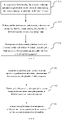
- FIG. 1 is a flowchart showing a screen wake-up method according to an exemplary embodiment. As shown in FIG. 1 , the screen wake-up method is applied in a terminal which includes a plurality of different screens, and includes the following steps.
- step S11 if it is determined that a screen wake-up operation is performed on the terminal by a user, a first screen is determined among the plurality of different screens.
- step S12 the first screen is woken up, and other screens expect for the first screen among the plurality of different screens are kept in a non-wake-up state.
- the first screen by detecting the screen wake-up operation performed by the user on the terminal, the first screen can be determined and woken up among the plurality of different screens of the terminal, and other screens except the first screen can be kept in the non-wake-up state.
- the power consumption of the terminal can be reduced, and the risk of leakage of user privacy can be reduced, thereby improving a better user experience.
- a terminal including a main screen on the front side (which is also called as a front main screen) and an auxiliary screen on the reverse side (which is also called as a reverse auxiliary screen)
- the reverse auxiliary screen of the terminal can be kept in the non-wake-up state.
- the front main screen of the terminal can be kept in a non-wake-up state.
- a light sensor can be used to detect intensity of ambient light of the environment where the terminal is located, so as to determine whether the currently detected double-tap wake-up operation is a false trigger.
- the detected intensity of the ambient light can be compared with a preset ambient light intensity threshold. If it is determined that the detected intensity of the ambient light is greater than or equal to the ambient light intensity threshold (for example, the detected intensity of the ambient light is greater than or equal to 0), it is determined that the detected back tapping operation is not falsely triggered, and furthermore, it is determined that the user has performed a screen wake-up operation on the terminal.
- the detected intensity of the ambient light is less than the ambient light intensity threshold (for example, the detected intensity of the ambient light is less than 0)
- the detected back tapping operation is a false trigger, and no more operation is performed.
- a touch event triggered by a user on the terminal is detected, and the touch event meets a preset condition, it can be determined that the user has performed a double-tap to wake up the terminal. For example, it may be detected that a time interval between occurrences of two consecutive touch events is less than a first time interval threshold, and both an absolute value of an abscissa difference and an absolute value of an ordinate difference of touch coordinates of the two consecutive touch events are less than a coordinate difference threshold, it is determined that a double-tap wake-up operation is detected.
- the first screen is determined among multiple different screens by using related parameters of triggering the touch events. For example, it may be detecting the touch coordinates corresponding to the touch events (for example, the touch coordinates corresponding to the last touch event), and determining a screen to which the touch coordinates belong is the first screen.
- FIG. 2 is a flowchart showing a method for determining a first screen in a plurality of different screens of a terminal according to an exemplary embodiment. As shown in FIG. 2 , the method includes the following steps.
- step S21 if it is detected that a time interval between occurring two consecutive touch events is less than a first time interval threshold, and both an absolute value of an abscissa difference and an absolute value of an ordinate difference of touch coordinates of the two consecutive touch events are less than a coordinate difference threshold, it is determined that a double-tap wake-up operation is detected.
- step S22 if it is determined that a double-tap wake up operation is detected, touch coordinates corresponding to the last touch event in two consecutive touch events are determined.
- step S23 a screen to which the touch coordinates corresponding to the last touch event belong is determined as the first screen.
- the user can perform a touch operation on a main screen area of the front main screen and/or an auxiliary screen area of the reverse auxiliary screen, thereby triggering a touch event.
- the terminal can detect the touch events triggered by the user.
- a second time interval threshold for example, 1 second
- both the absolute value of the abscissa difference and the absolute value of the ordinate difference of the touch coordinates of the two consecutive touch events are less than the coordinate difference threshold (for example, the absolute value of the coordinate difference is less than 20 pixels)
- the coordinate difference threshold for example, the absolute value of the coordinate difference is less than 20 pixels
- the screen wake-up method by detecting touch events triggered by the user, it can be determined that the user has performed a screen wake-up operation on the terminal, so as to wake up the user-designated screen among multiple different screens of the terminal.
- the terminal if it is detected that the user performs a back tapping operation on the terminal, it is determined that the user has performed a double-tap wake-up operation on the terminal. For example, when two consecutive back tapping operations are detected, and the time interval between the occurrences of the two consecutive back tapping operations is less than the second time interval threshold, it may be determined that the double-tap wake-up operation is detected.
- a face recognition component and/or an acceleration sensor are used to determine a screen that the user faces, and the screen that the user faces is determined as the first screen.
- FIG. 5 is a flowchart showing a method for determining a first screen among a multiple different screens of a terminal according to an exemplary embodiment. As shown in FIG. 5 , the method includes the following steps.
- step S31 in response to detecting two consecutive back tapping operations on the terminal, and if the time interval between occurrences of the two consecutive back tapping operations is less than the second time interval threshold, it is determined that the double-tap wake-up operation is detected.
- step S32 the screen facing the user is determined based on a face recognition component and/or an acceleration sensor of the terminal, and the screen facing the user is determined as the first screen.
- the screen that the user faces includes a screen where the face recognition component is located, and/or a screen where the acceleration direction generated by the back tapping operation detected by the acceleration sensor is opposite.
- the user can perform a back tapping operation in a non-screen area on the auxiliary screen of the reverse side (that is, tapping the non-screen area on the auxiliary screen of the reverse side).
- the terminal can detect the back tapping operations performed by the user by a sensing device such as an acceleration sensor.
- the time interval between occurrences of two consecutive back tapping operations is less than the second time interval threshold (for example, 1 second)
- the second time interval threshold for example, 1 second
- the screen that the user is watching can be determined according to the acceleration sensor and/or the face recognition component, and the screen that the user is watching is determined as the first screen.
- face recognition can be performed by using the face recognition component of the terminal.
- the screen where the face recognition component obtaining the facial data of the user is located is determined as the first screen. For example, as shown in FIGS.3 and 4 , for a terminal with a front main screen and a reverse auxiliary screen, after detecting that the user triggers the double-tap wake-up operation through the back tapping operations, a front camera and a rear camera of the terminal are used to collect the facial data of the user. When the user's facial data is obtained through the front camera of the terminal, it is determined that the user is watching the front main screen where the front camera is located.
- the front main screen of the terminal is determined as the first screen.
- the reverse auxiliary screen of the terminal is determined as the first screen.
- the acceleration generated by the back tapping operation can be detected by the acceleration sensor of the terminal, and the screen opposite to an acceleration direction is determined as the first screen.
- the screen opposite to the acceleration direction is the front main screen of the terminal, it is determined that the user is watching the front main screen of the terminal. Furthermore, the front main screen of the terminal is determined as the first screen.
- the ambient light of the environment where the terminal is located can be detected by the light sensor, and whether the back tapping operation is a false trigger is determined based on the detection result of the ambient light. For example, the detected intensity of the ambient light can be compared with the ambient light intensity threshold. If it is determined that the detected intensity is less than the ambient light intensity threshold (for example, the detected intensity of the ambient light is less than 0), it is determined that the detected back tapping operation is a false trigger, and no operation is performed.
- the ambient light intensity threshold for example, the detected intensity of the ambient light is less than 0
- the first screen may be woken up.
- the screen wake-up method it is possible to determine that the user has performed a screen wake-up operation on the terminal by detecting the user's back tapping operation on the terminal, so as to wake up the user- designated screen among multiple different screens of the terminal.
- an interface displayed after waking up the first screen may be a lock screen interface of the terminal or an application desktop of the terminal.
- the interface displayed after waking up the terminal is the lock screen interface of the terminal
- the user can view the display content of the lock screen interface of the terminal by waking up the first screen.
- the displayed content can be content such as time, weather, and chat information. Of course, it can also be a static image, a dynamic image, and/or a video image set by the user.
- the interface displayed after waking up the screen is the application desktop of the terminal, the user can perform operations such as opening an application on the application desktop of the terminal.
- the first screen after the first screen is woken up, the first screen can be adjusted to a non-wake-up state in the case of no further operation performed by the user.
- FIG. 7 is a flowchart showing a method for adjusting the first screen to a non-awake state according to an exemplary embodiment. As shown in FIG. 7 , steps S41 and S42 in the screen wake-up method provided in FIG. 7 are similar to steps S11 and S 12 in the method shown in FIG. 1 , and will not be repeated here.
- step S43 if a running instruction is not detected within a first time threshold, the first screen is adjusted to the non-awake state after the first time threshold is passed.
- the terminal is preset with the first time threshold (for example, 3 seconds) for detecting the running instruction, and if the running instruction is not detected within the first time threshold, the first screen is adjusted to the non-awake state.
- the first time threshold for example, 3 seconds
- the terminal has a face recognition function or is equipped with a face recognition function
- the face recognition authentication can be performed, and the camera on the same side as the first screen can be turned on for the face recognition.
- FIG. 8 is a flowchart showing a method for a terminal to perform a face recognition verification according to an exemplary embodiment. As shown in FIG. 8 , steps S51 and S52 in the screen wake-up method provided in FIG. 8 are similar to steps S11 and S12 in the method shown in FIG. 1 , and will not be repeated here.
- step S53 in response to performing the face recognition verification, the camera on the same side as the first screen is turned on to perform face recognition.
- the front camera of the terminal can be turned on to obtain current facial data of the user and perform face recognition.
- the front camera of the terminal can be turned on to obtain current facial data of the user and perform face recognition.
- the rear camera of the terminal can be turned on to obtain current facial data of the user and perform face recognition.
- the camera on the same side as the wake-up screen can be turned on, so that the user can perform the face recognition verification more conveniently.
- a screen designated by the user after detecting that the user performs a screen wake-up operation, a screen designated by the user can be determined and woken up among multiple different screens of the terminal according to the screen wake-up operation performed by the user. At the same time, non-user-designated screens are kept in the non-woken-up state. If the screen wake-up operation is determined by detecting the touch events, the touch coordinates that triggered the last touch event can be determined, and the screen to which the touch coordinates belong is determined as the first screen. If the screen wake-up operation is determined by detecting the back tapping operation, a screen facing the user can be determined by the acceleration sensor and/or the face recognition component, and the screen facing the user can be determined as the first screen.
- the camera on the same side as the first screen can be called to perform the face recognition, and the first screen can be adjusted to the non-wake-up state after the running instruction is not detected within a preset time.
- the screen wake-up method provided by the present disclosure can wake up a screen designated by a user and turn on the camera on the side of the wake-up screen for the face recognition.
- the wake-up screen can be controlled to turn off the screen when the screen is woken up and the user has no further operation, thereby improving the user experience.
- the terminal can monitor the back tapping operation performed by the user and the touch event triggered by the user. For example, when the trigger time interval of two consecutive touch events is less than 1 second, and the absolute value of the abscissa difference and the absolute value of the ordinate difference of the trigger coordinates corresponding to the two touch events are both less than 20 pixels, it is determined that the user has performed a double-tap wake-up operation on the terminal. Thereafter, the screen to which the trigger coordinates corresponding to the last touch event triggered belong can be determined.
- the front main screen is woken up. If the terminal is equipped with a face unlock function, the front camera is turned on for the face recognition authentication. If the terminal is not equipped with the face unlock function, only the front main screen will be woken up without any other operation. If there is no further operation after the user wakes up the front main screen, and the non-operation time reaches 3 seconds, the front main screen is controlled to be turned off (i.e., be adjusted to the non-wake-up state). If the coordinates are located in the auxiliary screen area of the reverse auxiliary screen, the reverse auxiliary screen will be woken up. If the terminal is equipped with a face unlock function, the rear camera is turned on for face recognition authentication.
- the reverse auxiliary screen is controlled to be turned off (i.e., be adjusted to the non-wake-up state). For another example, when the trigger time interval of two consecutive back tapping operations is less than 1 second, it is determined that the user has performed a double-tap wake-up operation on the terminal. Since the accuracy of the mechanism detecting the back tapping operation is low, false taps may occur in scenes such as the user walking. Therefore, in general, it is necessary to further collect ambient light intensity by using the light sensor.
- the terminal is controlled to not perform any operation. If it is determined that the ambient light intensity is not 0, the acceleration sensor and/or the face recognition component (such as a low-power camera) is used to determine the screen that the user is facing. If it is determined that the screen that the user is facing is the front main screen, the front main screen is woken up. If the terminal is equipped with a face unlock function, the front camera is turned on to perform face recognition verification. Otherwise, if the terminal is not equipped with the face unlock function, only the front main screen is woken up and no any other operation is performed.
- the acceleration sensor and/or the face recognition component such as a low-power camera
- the front main screen is controlled to be turned off (i.e., be adjusted to the non-wake-up state). If it is determined that the screen that the user is facing is the reverse auxiliary screen, the reverse auxiliary screen is woken up. If the terminal is equipped with a face unlock function, the rear camera is turned on for the face recognition authentication. If the terminal is not equipped with a face unlock function, only the reverse auxiliary screen is woken up and no other operation is performed. If there is no further operation after the user wakes up the reverse auxiliary screen, and the non-operation time reaches 3 seconds, the reverse auxiliary screen is controlled to be turned off (i.e., be adjusted to a non-wake-up state).
- the screen wake-up method provided by the embodiments of the present disclosure can determine and wake up a user-designated screen among multiple different screens of the terminal.
- embodiments of the present disclosure also provide a screen wake-up apparatus.
- the screen wake-up apparatus provided in the embodiments of the present disclosure includes hardware structures and/or software modules corresponding to each function.
- the embodiments of the present disclosure can be implemented in the form of hardware or a combination of hardware and computer software. Whether a certain function is executed by hardware or computer software-driven hardware depends on the specific application and design constraint conditions of the technical solution. Those skilled in the art can use different methods for each specific application to implement the described functions, but such implementation should not be considered as going beyond the scope of the technical solutions of the embodiments of the present disclosure.
- FIG. 9 is a block diagram showing a screen wake-up apparatus according to an exemplary embodiment.
- the apparatus 100 includes a determining unit 101 and a waking-up unit 102.
- the determining unit 101 is configured to determine a first screen among the plurality of different screens, in the case that a user has performed a screen wake-up operation on the terminal.
- the waking-up unit 102 is configured to wake up the first screen, and keep other screens except for the first screen among the plurality of different screens in a non-wake-up state.
- the determining unit 101 is configured to determine that the screen wake-up operation is performed on the terminal in following manner: in response to detecting a double-tap wake-up operation, determining that the user has performed the screen wake-up operation on the terminal.
- the determining unit 101 is configured to detect a double-tap wake-up operation in following manner: in response to detecting that a time interval between occurrences of two consecutive touch events is less than a first time interval threshold, and both the absolute value of an abscissa difference and the absolute value of an ordinate difference of touch coordinates of the two consecutive touch events are less than a coordinate difference threshold, determining that the double-tap wake-up operation is detected.
- the determining unit 101 is configured to determine the first screen among the plurality of different screens in following manner: determining touch coordinates corresponding to the last touch event in the two consecutive touch events; and determining the screen to which the touch coordinates corresponding to the last touch event belongs as the first screen.
- the determining unit 101 is configured to detect the double-tap wake-up operation in following manner: in response to detecting two consecutive back tapping operations, and a time interval between occurrences of the two consecutive back tapping operations is less than a second time interval threshold, determining that the double-tap wake-up operation is detected.
- the determining unit 101 is configured to determine the first screen among the plurality of different screens in following manner: determining the screen facing the user based on a face recognition component and/or an acceleration sensor of the terminal, and determining the screen facing the user as the first screen.
- the screen facing the user comprises a screen where the face recognition component is located, and/or a screen where an acceleration direction generated by the back tapping operations detected by the acceleration sensor is opposite.
- the determining unit 101 further comprises a light sensor, and the determining unit 101 is configured to, in response to detecting the double-tap wake-up operation, determine that the screen wake-up operation is performed on the terminal in following manner: in response to detecting the double-tap wake-up operation, determining whether ambient light intensity detected by the light sensor is greater than or equal to an ambient light intensity threshold. When the ambient light intensity detected by the light sensor is greater than or equal to the ambient light intensity threshold, it is determined that the screen wake-up operation is performed on the terminal.
- the waking-up unit 102 is further configured to: after the first screen is woken up, in response to that a running instruction is not detected within the first time threshold, adjust the first screen to the non-wake-up state after the first time threshold is passed.
- the waking-up unit 102 is further configured to: after the first screen is woken up, in response to performing a face recognition verification, turn on a camera on the same side as the first screen to perform a face recognition.
- An embodiment of the present disclosure also proposes an electronic equipment, the electronic equipment includes:
- An embodiment of the present disclosure also proposes a computer-readable storage medium having computer instructions stored thereon, when the instructions are executed by a processor, screen wake-up method according to any one of the foregoing embodiments is implemented.
- FIG. 10 is a block diagram showing a device for waking up a screen according to an exemplary embodiment.
- the device 2100 may be a mobile phone, a computer, a digital broadcasting terminal, a message transceiving device, a game console, a tablet device, medical equipment, fitness equipment, a personal digital assistant, etc.
- the device 200 may include one or more of the following components: a processing component 202, a memory 204, a power supply component 206, a multimedia component 208, an audio component 210, an input/output (I/O) interface 212, a sensor component 214, and a communication component 216
- the processing component 202 generally controls the overall operations of the device 200, such as operations associated with displaying, telephone calls, data communication, camera operations, and recording operations.
- the processing component 202 may include one or more processors 220 to execute instructions to complete all or part of the steps in the above method.
- the processing component 202 may include one or more modules to facilitate interaction between the processing component 202 and other components.
- the processing component 202 may include a multimedia module to facilitate interaction between the multimedia component 208 and the processing component 202.
- the memory 204 is configured to store various types of data to support operations at the device 200. Examples of these data include instructions for any application or method operating on the device 200, contact data, phone book data, messages, pictures, videos, etc.
- the memory 204 may be implemented by any type of volatile or non-volatile storage device or a combination thereof, such as static random access memory (SRAM), electrically erasable programmable read only memory (EEPROM), erasable programmable read only memory (EPROM), programmable read only memory (PROM), read only memory (ROM), magnetic memory, flash memory, magnetic disk or optical disk.
- SRAM static random access memory
- EEPROM electrically erasable programmable read only memory
- EPROM erasable programmable read only memory
- PROM programmable read only memory
- ROM read only memory
- magnetic memory flash memory
- flash memory magnetic disk or optical disk.
- the power supply component 206 provides power to various components of the device 200.
- the power supply component 206 may include a power supply management system, one or more power supplies, and other components associated with generating, managing, and distributing power for the device 200.
- the multimedia component 208 includes a screen that provides an output interface between the device 200 and the user.
- the screen may include a liquid crystal display (LCD) and a touch panel (TP). If the screen includes a touch panel, then that screen may be implemented as a touch screen to receive input signals from the user.
- the touch panel includes one or more touch sensors, to sense touching, swiping, and gestures on the touch panel. The touch sensor may not only sense the boundary of the touching operation or swiping operation, but also detect the duration and pressure related to the touching operation or swiping operation.
- the multimedia component 208 includes a front camera and/or a rear camera. When the device 200 is in an operation mode, such as a shooting mode or a video mode, the front camera and/or the rear camera may receive external multimedia data. Each of the front camera and rear camera may be a fixed optical lens system or have focal length and optical zoom capabilities.
- the audio component 210 is configured to output and/or input audio signals.
- the audio component 210 includes a microphone (MIC).
- the microphone When the device 200 is in an operation mode, such as a call mode, a recording mode, or a voice recognition mode, the microphone is configured to receive an external audio signal.
- the received audio signal may be further stored in the memory 204 or transmitted via the communication component 216.
- the audio component 210 further includes a speaker for outputting audio signals.
- the I/O interface 212 provides an interface between the processing component 202 and a peripheral interface module.
- the peripheral interface module may be a keyboard, a click wheel, a button, etc. These buttons may include, but are not limited to: home button, volume button, start button, and lock button.
- the sensor assembly 214 includes one or more sensors for providing the status assessment of various aspects for the device 200.
- the sensor component 214 can detect the on/off state of the device 200, and the relative positioning of the components, for example, the component is a display and a keypad of the device 200, and the sensor component 214 can also detect the position change of the device 200 or a component of the device 2100, the presence or absence of user contact with the device 200, the orientation or acceleration/deceleration of the device 200, and the temperature change of the device 200.
- the sensor assembly 214 may include a proximity sensor configured to detect the presence of nearby objects without any physical contact.
- the sensor assembly 214 may also include a light sensor, such as a CMOS or CCD image sensor, for use in imaging applications.
- the sensor assembly 214 may also include an acceleration sensor, a gyro sensor, a magnetic sensor, a pressure sensor, or a temperature sensor.
- the communication component 216 is configured to facilitate wired or wireless communication between the device 200 and other devices.
- the device 200 can access a wireless network based on a communication standard, such as WiFi, 2G, or 3G, or a combination thereof.
- the communication component 216 receives a broadcast signal or broadcast related information from an external broadcast management system via a broadcast channel.
- the communication component 216 further includes a near field communication (NFC) module to facilitate short-range communication.
- the NFC module can be implemented based on radio frequency identification (RFID) technology, infrared data association (IrDA) technology, ultra-wideband (UWB) technology, Bluetooth (BT) technology and other technologies.
- RFID radio frequency identification
- IrDA infrared data association
- UWB ultra-wideband
- Bluetooth Bluetooth
- the device 200 may be implemented by one or more application specific integrated circuits (ASICs), digital signal processors (DSPs), digital signal processing devices (DSPDs), programmable logic devices (PLDs), Field programmable gate array (FPGA), controller, microcontroller, microprocessor or other electronic components, to execute the receiving method described in any of the above embodiments.
- ASICs application specific integrated circuits
- DSPs digital signal processors
- DSPDs digital signal processing devices
- PLDs programmable logic devices
- FPGA Field programmable gate array
- controller microcontroller, microprocessor or other electronic components
- non-transitory computer-readable storage medium including instructions, such as a memory 204 including instructions, which can be executed by the processor 220 of the apparatus 200 to complete the above method.
- the non-transitory computer-readable storage medium may be ROM, random access memory (RAM), CD-ROM, magnetic tape, floppy disk, optical data storage device, or the like.
- first, second, etc. are used to describe various information, but the information should not be limited to these terms. These terms are only used to distinguish the same type of information from each other, and do not indicate a specific order or degree of importance. In fact, expressions such as “first” and “second” can be used interchangeably.
- first information may also be referred to as second information
- second information may also be referred to as first information.
- connection includes a direct connection between the two without other components, and also includes an indirect connection between the two with other elements.
Landscapes
- Engineering & Computer Science (AREA)
- Theoretical Computer Science (AREA)
- General Engineering & Computer Science (AREA)
- Physics & Mathematics (AREA)
- General Physics & Mathematics (AREA)
- Human Computer Interaction (AREA)
- Computer Hardware Design (AREA)
- Software Systems (AREA)
- Computing Systems (AREA)
- Computer Security & Cryptography (AREA)
- Health & Medical Sciences (AREA)
- General Health & Medical Sciences (AREA)
- Oral & Maxillofacial Surgery (AREA)
- Multimedia (AREA)
- User Interface Of Digital Computer (AREA)
Abstract
Description
- This application is based upon and claims priority to
Chinese Patent Application No. 202110308767.0, field on March 23, 2021 - The present disclosure relates to the field of electronic technology, and in particular to a screen wake-up method, a screen wake-up apparatus and a storage medium.
- With the development of sciences and technologies, multi-screen terminals have become more and more popular due to their advantages in display functions. Taking a dual-screen mobile phone as an example, in addition to normal display of a main screen on the front side, the dual-screen mobile phone is also equipped with an auxiliary screen on the reverse side.
- In related technologies, a screen of a terminal can be woken up by detecting operations such as tapping performed by the user on the screen of the terminal. The related technology can be applied to screen wake-up of a single-screen terminal.
- In order to overcome the problems in the related art, the present disclosure provides a screen wake-up method, a screen wake-up apparatus and a storage medium.
- According to a first aspect of the embodiments of the present disclosure, there is provided a screen wake-up method, which is applied to a terminal including a plurality of different screens. The screen wake-up method includes: in response to determining a user performing a screen wake-up operation on the terminal, determining a first screen among the plurality of different screens; and waking up the first screen, while keeping other screens except for the first screen among the plurality of different screens in a non-wake-up state.
- In some embodiments of the present disclosure, the determining the user performing the screen wake-up operation on the terminal may include in response to detecting a double-tap wake-up operation, determining that the screen wake-up operation is performed on the terminal.
- In some embodiments of the present disclosure, the detecting the double-tap wake-up operation may include in response to detecting that a time interval between occurrences of two consecutive touch events is less than a first time interval threshold, and an absolute value of an abscissa difference and an absolute value of an ordinate difference of touch coordinates of the two consecutive touch events are both less than a coordinate difference threshold, determining that the double-tap wake-up operation is detected.
- In some embodiments of the present disclosure, the determining the first screen among the plurality of different screens may include: determining touch coordinates corresponding to a last touch event in the two consecutive touch events; and determining a screen to which the touch coordinates corresponding to the last touch event belongs as the first screen.
- In some embodiments of the present disclosure, the detecting the double-tap wake-up operation may include: in response to detecting two consecutive back tapping operations, and a time interval between occurrences of the two consecutive back tapping operations is less than a second time interval threshold, determining that the double-tap wake-up operation is detected.
- In some embodiments of the present disclosure, the determining the first screen among the plurality of different screens may include: determining a screen facing the user based on a face recognition component and/or an acceleration sensor of the terminal, and determining the screen facing the user as the first screen. Wherein, the screen facing the user comprises a screen where the face recognition component is located, and/or a screen where an acceleration direction generated by the back tapping operations detected by the acceleration sensor is opposite.
- In some embodiments of the present disclosure, the terminal further includes a light sensor, and wherein the in response to detecting the double-tap wake-up operation, determining that the screen wake-up operation is performed on the terminal may include: in response to detecting the double-tap wake-up operation, determining whether ambient light intensity detected by the light sensor is greater than or equal to an ambient light intensity threshold; and when the ambient light intensity detected by the light sensor is greater than or equal to the ambient light intensity threshold, determining that the screen wake-up operation is performed on the terminal.
- In some embodiments of the present disclosure, after the first screen is woken up, the screen wake-up method further includes: in response to a running instruction not being detected within a first time threshold, adjusting the first screen to the non-wake-up state after the first time threshold is passed.
- In some embodiments of the present disclosure, after the first screen is woken up, the screen wake-up method further includes: in response to performing a face recognition verification, turning on a camera on the same side as the first screen to perform a face recognition.
- According to a second aspect of the embodiments of the present disclosure, there is provided a screen wake-up apparatus, which is applied to a terminal including a plurality of different screens. The screen wake-up apparatus may include a determining unit configured to, in response to determining a user performing a screen wake-up operation on the terminal, determine a first screen among the plurality of different screens; and a waking-up unit configured to wake up the first screen, and keep other screens except for the first screen among the plurality of different screens in a non-wake-up state.
- In some embodiments of the present disclosure, the determining unit is configured to determine that the screen wake-up operation is performed on the terminal in following manner: in response to detecting a double-tap wake-up operation, determining that the user has performed the screen wake-up operation on the terminal.
- In some embodiments of the present disclosure, the determining unit is configured to detect a double-tap wake-up operation in following manner: in response to detecting that a time interval between occurrences of two consecutive touch events is less than a first time interval threshold, and an absolute value of an abscissa difference and an absolute value of an ordinate difference of touch coordinates of the two consecutive touch events are both less than a coordinate difference threshold, determining that the double-tap wake-up operation is detected.
- In some embodiments of the present disclosure, the determining unit is configured to determine the first screen among the plurality of different screens in following manner: determining touch coordinates corresponding to a last touch event in the two consecutive touch events; and determining a screen to which the touch coordinates corresponding to the last touch event belongs as the first screen.
- In some embodiments of the present disclosure, the determining unit is configured to detect the double-tap wake-up operation in following manner: in response to detecting two consecutive back tapping operations, and a time interval between occurrences of the two consecutive back tapping operations is less than a second time interval threshold, determining that the double-tap wake-up operation is detected.
- In some embodiments of the present disclosure, the determining unit is configured to determine the first screen among the plurality of different screens in following manner: determine a screen facing the user based on a face recognition component and/or an acceleration sensor of the terminal, and determining the screen facing the user as the first screen. The screen facing the user comprises a screen where the face recognition component is located, and/or a screen where an acceleration direction generated by the back tapping operations detected by the acceleration sensor is opposite.
- In some embodiments of the present disclosure, the determining unit further includes a light sensor, and the determining unit is configured to, in response to detecting the double-tap wake-up operation, determining that the screen wake-up operation is performed on the terminal in following manner: in response to detecting the double-tap wake-up operation, determining whether ambient light intensity detected by the light sensor is greater than or equal to an ambient light intensity threshold; and when the ambient light intensity detected by the light sensor is greater than or equal to the ambient light intensity threshold, determining that the screen wake-up operation is performed on the terminal.
- In some embodiments of the present disclosure, after the first screen is woken up, the waking-up unit is further configured to: in response to that a running instruction is not detected within a first time threshold, adjust the first screen to the non-wake-up state after the first time threshold is passed.
- In some embodiments of the present disclosure, after the first screen is woken up, the waking-up unit is further configured to: in response to performing a face recognition verification, turn on a camera on the same side as the first screen to perform a face recognition.
- According to a third aspect of the embodiments of the present disclosure, there is provided a screen wake-up device. The screen wake-up device may include: a processor; and a memory for storing instructions executable by the processor; wherein the processor is configured to perform the steps in the screen wake-up device described in any one of the above embodiments in the first aspect.
- According to a fourth aspect, there is provided a computer-readable storage medium having computer programs stored thereon, and when the programs are executed by a processor, the steps in the screen wake-up device described in any one of the above embodiments in the first aspect are implemented.
- The technical solution provided by the embodiments of the present disclosure may include the following beneficial effects: if it is determined that a screen wake-up operation is performed on the terminal, the screen designated by the user is determined and woken up among a plurality of different screens of the terminal. In addition, keep non-user-designated screens in a non-awake state. Through the present disclosure, a single screen of a multi-screen terminal can be woken up, and power consumption can be saved.
- It should be understood that the above general description and the following detailed description are only exemplary and explanatory, and cannot limit the present disclosure.
- The drawings herein are incorporated into the specification and constitute a part of the specification, show embodiments consistent with the disclosure, and together with the specification are used to explain the principle of the disclosure.
-
FIG. 1 is a flowchart showing a screen wake-up method according to an exemplary embodiment. -
FIG. 2 is a flowchart showing a method for determining a first screen among multiple different screens of a terminal according to an exemplary embodiment. -
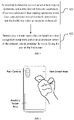
FIG. 3 is a schematic diagram showing a scene of waking up a terminal screen according to an exemplary embodiment. -
FIG. 4 is a schematic diagram showing a scene of waking up a terminal screen according to an exemplary embodiment. -
FIG. 5 is a flowchart showing a method for determining a first screen among multiple different screens of a terminal according to an exemplary embodiment. -
FIG. 6 is a schematic diagram showing a scene of waking up a terminal screen according to an exemplary embodiment. -
FIG. 7 is a flowchart showing a method for adjusting the first screen to a non-awake state according to an exemplary embodiment. -
FIG. 8 is a flowchart showing a method for a terminal to perform a face recognition verification according to an exemplary embodiment. -
FIG. 9 is a block diagram showing a screen wake-up apparatus according to an exemplary embodiment. -
FIG. 10 is a block diagram showing a device for screen wake-up according to an exemplary embodiment. - The exemplary embodiments will be described in detail here, and examples thereof are shown in the accompanying drawings. When the following description refers to the accompanying drawings, unless otherwise indicated, the same numbers in different drawings represent the same or similar elements. The implementation manners described in the following exemplary embodiments do not represent all implementation manners consistent with the present disclosure. Rather, they are merely examples of apparatus and methods consistent with some aspects of the present disclosure as detailed in the appended claims.
- The screen wake-up method provided by the embodiments of the present disclosure can be applied to a scene of waking up the terminal screen. Among them, the terminal may include dual-screen mobile terminals such as mobile phones, tablet computers, notebook computers, handheld computers, personal digital assistants (PDAs), portable media players (PMPs), navigation devices, wearable devices, smart bracelets and pedometers, and fixed terminals such as digital TVs and desktop computers.
- In related technologies, the screen of the terminal can be determined and woken up by detecting related information of the terminal. For example, in a screen wake-up method, a touch operation performed by a user can be detected to determine that the terminal needs to perform a screen wake-up function, so as to wake up the screen of the terminal. For example, the user can wake up a screen of the terminal by "double-tapping" the screen. Wherein, the double-tapping operation includes, but is not limited to, the tapping operation of knuckles. In another screen wake-up method in the related art, by detecting a motion state of the terminal, it is determined that the terminal needs to perform the screen wake-up function, thereby waking up the screen of the terminal. For example, the user lifts a stationary terminal, and when the terminal determines using an acceleration sensor that the current motion state of the terminal satisfies a preset condition for waking up the screen, the screen of the terminal is woken up. Through the above screen woken-up method, the screen of the terminal can be waked up when the user intends to wake up the screen of the terminal, thereby improving a better user experience.
- However, the related technology is usually applied to a single-screen terminal, and when it is applied to a multi-screen terminal, there will be a problem of lack of adaptation. For example, when the screen is woken up, all screens of the multi-screen terminal will be woken up, but the screen specified by the user among all the screens cannot be woken up alone. However, when all the screens of the multi-screen terminal are woken up, screens other than the screen intended to be used by the user will increase the electric energy consumption of the terminal, and the content of other screens may be exposed to other people's vision, which will also cause the privacy of the user to be compromised.
- In view of this, the embodiments of the present disclosure provide a screen wake-up method, which determines and wakes up the screen designated by the user by detecting a screen wake-up operation performed by the user on the terminal and a operation area in which the screen wake-up operation is performed.
- The screen wake-up method provided by the embodiments of the present disclosure can be applied to a terminal with multiple different screens. For ease of description, the screen designated by the user among the multiple different screens of the terminal is referred to as a first screen in the following.
-
FIG. 1 is a flowchart showing a screen wake-up method according to an exemplary embodiment. As shown inFIG. 1 , the screen wake-up method is applied in a terminal which includes a plurality of different screens, and includes the following steps. - In step S11, if it is determined that a screen wake-up operation is performed on the terminal by a user, a first screen is determined among the plurality of different screens.
- In step S12, the first screen is woken up, and other screens expect for the first screen among the plurality of different screens are kept in a non-wake-up state.
- In the embodiments of the present disclosure, by detecting the screen wake-up operation performed by the user on the terminal, the first screen can be determined and woken up among the plurality of different screens of the terminal, and other screens except the first screen can be kept in the non-wake-up state. By using the present disclosure, the power consumption of the terminal can be reduced, and the risk of leakage of user privacy can be reduced, thereby improving a better user experience.
- In an example, for a terminal including a main screen on the front side (which is also called as a front main screen) and an auxiliary screen on the reverse side (which is also called as a reverse auxiliary screen), when the front main screen (i.e., the first screen) of the terminal is woken up, the reverse auxiliary screen of the terminal can be kept in the non-wake-up state. For another example, when the reverse auxiliary screen (i.e., the first screen) of the terminal is woken up, the front main screen of the terminal can be kept in a non-wake-up state.
- In the screen wake-up method of the embodiment of the present disclosure, after the double-tap wake-up operation is detected, it can be determined that the user has performed the screen wake-up operation on the terminal.
- In an example, after the double-tap wake-up operation is detected, a light sensor can be used to detect intensity of ambient light of the environment where the terminal is located, so as to determine whether the currently detected double-tap wake-up operation is a false trigger. In an example, the detected intensity of the ambient light can be compared with a preset ambient light intensity threshold. If it is determined that the detected intensity of the ambient light is greater than or equal to the ambient light intensity threshold (for example, the detected intensity of the ambient light is greater than or equal to 0), it is determined that the detected back tapping operation is not falsely triggered, and furthermore, it is determined that the user has performed a screen wake-up operation on the terminal. If it is determined that the detected intensity of the ambient light is less than the ambient light intensity threshold (for example, the detected intensity of the ambient light is less than 0), it is determined that the detected back tapping operation is a false trigger, and no more operation is performed. By using the present disclosure, power loss caused by false triggering can be prevented.
- In the embodiments of the present disclosure, after a touch event triggered by a user on the terminal is detected, and the touch event meets a preset condition, it can be determined that the user has performed a double-tap to wake up the terminal. For example, it may be detected that a time interval between occurrences of two consecutive touch events is less than a first time interval threshold, and both an absolute value of an abscissa difference and an absolute value of an ordinate difference of touch coordinates of the two consecutive touch events are less than a coordinate difference threshold, it is determined that a double-tap wake-up operation is detected.
- In an example, if it is determined that the user has performed a double-tapping operation to wake up the terminal, the first screen is determined among multiple different screens by using related parameters of triggering the touch events. For example, it may be detecting the touch coordinates corresponding to the touch events (for example, the touch coordinates corresponding to the last touch event), and determining a screen to which the touch coordinates belong is the first screen.
-
FIG. 2 is a flowchart showing a method for determining a first screen in a plurality of different screens of a terminal according to an exemplary embodiment. As shown inFIG. 2 , the method includes the following steps. - In step S21, if it is detected that a time interval between occurring two consecutive touch events is less than a first time interval threshold, and both an absolute value of an abscissa difference and an absolute value of an ordinate difference of touch coordinates of the two consecutive touch events are less than a coordinate difference threshold, it is determined that a double-tap wake-up operation is detected.
- In step S22, if it is determined that a double-tap wake up operation is detected, touch coordinates corresponding to the last touch event in two consecutive touch events are determined.
- In step S23, a screen to which the touch coordinates corresponding to the last touch event belong is determined as the first screen.
- In an example, as shown in
FIGS. 3 and 4 , for a terminal equipped with a front main screen and a reverse auxiliary screen, the user can perform a touch operation on a main screen area of the front main screen and/or an auxiliary screen area of the reverse auxiliary screen, thereby triggering a touch event. When the user triggers touch events on the terminal for successive two times, the terminal can detect the touch events triggered by the user. When it is detected that the time interval between the occurrences of two consecutive touch events is less than a second time interval threshold (for example, 1 second), and both the absolute value of the abscissa difference and the absolute value of the ordinate difference of the touch coordinates of the two consecutive touch events are less than the coordinate difference threshold (for example, the absolute value of the coordinate difference is less than 20 pixels), it is determined that the user has performed a double-tap wake up operation on the terminal. - In the screen wake-up method provided by the embodiments of the present disclosure, by detecting touch events triggered by the user, it can be determined that the user has performed a screen wake-up operation on the terminal, so as to wake up the user-designated screen among multiple different screens of the terminal.
- In the embodiment of the present disclosure, if it is detected that the user performs a back tapping operation on the terminal, it is determined that the user has performed a double-tap wake-up operation on the terminal. For example, when two consecutive back tapping operations are detected, and the time interval between the occurrences of the two consecutive back tapping operations is less than the second time interval threshold, it may be determined that the double-tap wake-up operation is detected.
- In an example, if it is determined that the user has performed the double-tap wake-up operation, a face recognition component and/or an acceleration sensor are used to determine a screen that the user faces, and the screen that the user faces is determined as the first screen.
-
FIG. 5 is a flowchart showing a method for determining a first screen among a multiple different screens of a terminal according to an exemplary embodiment. As shown inFIG. 5 , the method includes the following steps. - In step S31, in response to detecting two consecutive back tapping operations on the terminal, and if the time interval between occurrences of the two consecutive back tapping operations is less than the second time interval threshold, it is determined that the double-tap wake-up operation is detected.
- In step S32, the screen facing the user is determined based on a face recognition component and/or an acceleration sensor of the terminal, and the screen facing the user is determined as the first screen.
- Wherein, the screen that the user faces includes a screen where the face recognition component is located, and/or a screen where the acceleration direction generated by the back tapping operation detected by the acceleration sensor is opposite.
- In one embodiment, as shown in
FIG. 6 , for a terminal having a main screen installed on the front side and an auxiliary screen installed on the reverse side, the user can perform a back tapping operation in a non-screen area on the auxiliary screen of the reverse side (that is, tapping the non-screen area on the auxiliary screen of the reverse side). When the user triggers the back tapping operations for successive two times in the non-screen area of the auxiliary screen on the reverse side of the terminal, the terminal can detect the back tapping operations performed by the user by a sensing device such as an acceleration sensor. When it is detected that the time interval between occurrences of two consecutive back tapping operations is less than the second time interval threshold (for example, 1 second), it is determined that the user has performed a double-tap wake-up operation on the terminal. - In the embodiment of the present disclosure, after detecting that the user triggers the double-tap wake-up operation by the back tapping operations, the screen that the user is watching can be determined according to the acceleration sensor and/or the face recognition component, and the screen that the user is watching is determined as the first screen.
- In one example, after detecting that the user triggers a double-tap wake-up operation through the back tapping operations, face recognition can be performed by using the face recognition component of the terminal. After facial data of the user is detected, the screen where the face recognition component obtaining the facial data of the user is located is determined as the first screen. For example, as shown in
FIGS.3 and 4 , for a terminal with a front main screen and a reverse auxiliary screen, after detecting that the user triggers the double-tap wake-up operation through the back tapping operations, a front camera and a rear camera of the terminal are used to collect the facial data of the user. When the user's facial data is obtained through the front camera of the terminal, it is determined that the user is watching the front main screen where the front camera is located. Furthermore, the front main screen of the terminal is determined as the first screen. When the user's facial data is obtained through the rear camera of the terminal, it is determined that the user is watching the reverse auxiliary screen where the rear camera is located. Furthermore, the reverse auxiliary screen of the terminal is determined as the first screen. - In another example, after detecting that the user triggers the double-tap wake-up operation through the back tapping operations, the acceleration generated by the back tapping operation can be detected by the acceleration sensor of the terminal, and the screen opposite to an acceleration direction is determined as the first screen. For example, if the screen opposite to the acceleration direction is the front main screen of the terminal, it is determined that the user is watching the front main screen of the terminal. Furthermore, the front main screen of the terminal is determined as the first screen.
- In an example, if a back tapping operation is detected, the ambient light of the environment where the terminal is located can be detected by the light sensor, and whether the back tapping operation is a false trigger is determined based on the detection result of the ambient light. For example, the detected intensity of the ambient light can be compared with the ambient light intensity threshold. If it is determined that the detected intensity is less than the ambient light intensity threshold (for example, the detected intensity of the ambient light is less than 0), it is determined that the detected back tapping operation is a false trigger, and no operation is performed. If it is determined that the detected intensity is greater than or equal to the ambient light intensity threshold (for example, the detected intensity of the ambient light is greater than or equal to 0), it is determined that the detected back tapping operation is not falsely triggered, and furthermore, it is determined that the user has performed a screen wake-up operation on the terminal. In an embodiment, after the first screen is determined and it is determined that the detected back tapping operation is not falsely triggered, the first screen may be woken up.
- In the screen wake-up method provided by the embodiments of the present disclosure, it is possible to determine that the user has performed a screen wake-up operation on the terminal by detecting the user's back tapping operation on the terminal, so as to wake up the user- designated screen among multiple different screens of the terminal.
- In the embodiment of the present disclosure, an interface displayed after waking up the first screen may be a lock screen interface of the terminal or an application desktop of the terminal. In an example, if the interface displayed after waking up the terminal is the lock screen interface of the terminal, the user can view the display content of the lock screen interface of the terminal by waking up the first screen. Among them, the displayed content can be content such as time, weather, and chat information. Of course, it can also be a static image, a dynamic image, and/or a video image set by the user. In another example, if the interface displayed after waking up the screen is the application desktop of the terminal, the user can perform operations such as opening an application on the application desktop of the terminal.
- In the embodiment of the present disclosure, after the first screen is woken up, the first screen can be adjusted to a non-wake-up state in the case of no further operation performed by the user.
-
FIG. 7 is a flowchart showing a method for adjusting the first screen to a non-awake state according to an exemplary embodiment. As shown inFIG. 7 , steps S41 and S42 in the screen wake-up method provided inFIG. 7 are similar to steps S11 andS 12 in the method shown inFIG. 1 , and will not be repeated here. - In step S43, if a running instruction is not detected within a first time threshold, the first screen is adjusted to the non-awake state after the first time threshold is passed.
- In an example, the terminal is preset with the first time threshold (for example, 3 seconds) for detecting the running instruction, and if the running instruction is not detected within the first time threshold, the first screen is adjusted to the non-awake state. Through the execution of this example in the present disclosure, the power of the terminal can be further saved.
- In the embodiment of the present disclosure, if the terminal has a face recognition function or is equipped with a face recognition function, after waking up the first screen, the face recognition authentication can be performed, and the camera on the same side as the first screen can be turned on for the face recognition.
-
FIG. 8 is a flowchart showing a method for a terminal to perform a face recognition verification according to an exemplary embodiment. As shown inFIG. 8 , steps S51 and S52 in the screen wake-up method provided inFIG. 8 are similar to steps S11 and S12 in the method shown inFIG. 1 , and will not be repeated here. - In step S53, in response to performing the face recognition verification, the camera on the same side as the first screen is turned on to perform face recognition.
- In an example, as shown in
FIG. 3 , if the first screen being woken up is the main screen of the terminal on the front side of the terminal, when the terminal performs the face recognition verification, the front camera of the terminal can be turned on to obtain current facial data of the user and perform face recognition. In another example, as shown inFIG. 4 , if the first screen woken up is the auxiliary screen on the reverse side of the terminal, when the terminal performs the face recognition verification, the rear camera of the terminal can be turned on to obtain current facial data of the user and perform face recognition. In the embodiments of the present disclosure, when the terminal performs the face recognition verification, the camera on the same side as the wake-up screen can be turned on, so that the user can perform the face recognition verification more conveniently. - In the embodiments of the present disclosure, after detecting that the user performs a screen wake-up operation, a screen designated by the user can be determined and woken up among multiple different screens of the terminal according to the screen wake-up operation performed by the user. At the same time, non-user-designated screens are kept in the non-woken-up state. If the screen wake-up operation is determined by detecting the touch events, the touch coordinates that triggered the last touch event can be determined, and the screen to which the touch coordinates belong is determined as the first screen. If the screen wake-up operation is determined by detecting the back tapping operation, a screen facing the user can be determined by the acceleration sensor and/or the face recognition component, and the screen facing the user can be determined as the first screen. After waking up the first screen, the camera on the same side as the first screen can be called to perform the face recognition, and the first screen can be adjusted to the non-wake-up state after the running instruction is not detected within a preset time. The screen wake-up method provided by the present disclosure can wake up a screen designated by a user and turn on the camera on the side of the wake-up screen for the face recognition. In addition, the wake-up screen can be controlled to turn off the screen when the screen is woken up and the user has no further operation, thereby improving the user experience.
- In an example, as shown in
FIG. 3 and FIG. 4 , for a terminal including a front main screen and a reverse auxiliary screen. When all screens of the terminal are in the non-wake-up state, the terminal can monitor the back tapping operation performed by the user and the touch event triggered by the user. For example, when the trigger time interval of two consecutive touch events is less than 1 second, and the absolute value of the abscissa difference and the absolute value of the ordinate difference of the trigger coordinates corresponding to the two touch events are both less than 20 pixels, it is determined that the user has performed a double-tap wake-up operation on the terminal. Thereafter, the screen to which the trigger coordinates corresponding to the last touch event triggered belong can be determined. If the coordinates are located in the main screen area of the front main screen, the front main screen is woken up. If the terminal is equipped with a face unlock function, the front camera is turned on for the face recognition authentication. If the terminal is not equipped with the face unlock function, only the front main screen will be woken up without any other operation. If there is no further operation after the user wakes up the front main screen, and the non-operation time reaches 3 seconds, the front main screen is controlled to be turned off (i.e., be adjusted to the non-wake-up state). If the coordinates are located in the auxiliary screen area of the reverse auxiliary screen, the reverse auxiliary screen will be woken up. If the terminal is equipped with a face unlock function, the rear camera is turned on for face recognition authentication. If the terminal is not equipped with the face unlock function, only the reverse auxiliary screen will be woken up and no other operation is performed. If there is no further operation after the user wakes up the reverse auxiliary screen, and the non-operation time reaches 3 seconds, the reverse auxiliary screen is controlled to be turned off (i.e., be adjusted to the non-wake-up state). For another example, when the trigger time interval of two consecutive back tapping operations is less than 1 second, it is determined that the user has performed a double-tap wake-up operation on the terminal. Since the accuracy of the mechanism detecting the back tapping operation is low, false taps may occur in scenes such as the user walking. Therefore, in general, it is necessary to further collect ambient light intensity by using the light sensor. If it is determined that the ambient light intensity is 0, it is determined that the back tapping operation is a false trigger, and the terminal is controlled to not perform any operation. If it is determined that the ambient light intensity is not 0, the acceleration sensor and/or the face recognition component (such as a low-power camera) is used to determine the screen that the user is facing. If it is determined that the screen that the user is facing is the front main screen, the front main screen is woken up. If the terminal is equipped with a face unlock function, the front camera is turned on to perform face recognition verification. Otherwise, if the terminal is not equipped with the face unlock function, only the front main screen is woken up and no any other operation is performed. If there is no further operation after the user wakes up the front main screen, and the non-operation time reaches 3 seconds, the front main screen is controlled to be turned off (i.e., be adjusted to the non-wake-up state). If it is determined that the screen that the user is facing is the reverse auxiliary screen, the reverse auxiliary screen is woken up. If the terminal is equipped with a face unlock function, the rear camera is turned on for the face recognition authentication. If the terminal is not equipped with a face unlock function, only the reverse auxiliary screen is woken up and no other operation is performed. If there is no further operation after the user wakes up the reverse auxiliary screen, and the non-operation time reaches 3 seconds, the reverse auxiliary screen is controlled to be turned off (i.e., be adjusted to a non-wake-up state). - The screen wake-up method provided by the embodiments of the present disclosure can determine and wake up a user-designated screen among multiple different screens of the terminal.
- Based on the same concept, embodiments of the present disclosure also provide a screen wake-up apparatus.
- It can be understood that, in order to realize the above-mentioned functions, the screen wake-up apparatus provided in the embodiments of the present disclosure includes hardware structures and/or software modules corresponding to each function. In combination with the units and algorithm steps of the examples disclosed in the embodiments of the present disclosure, the embodiments of the present disclosure can be implemented in the form of hardware or a combination of hardware and computer software. Whether a certain function is executed by hardware or computer software-driven hardware depends on the specific application and design constraint conditions of the technical solution. Those skilled in the art can use different methods for each specific application to implement the described functions, but such implementation should not be considered as going beyond the scope of the technical solutions of the embodiments of the present disclosure.
-
FIG. 9 is a block diagram showing a screen wake-up apparatus according to an exemplary embodiment. Referring toFIG. 9 , theapparatus 100 includes a determiningunit 101 and a waking-upunit 102. - The determining
unit 101 is configured to determine a first screen among the plurality of different screens, in the case that a user has performed a screen wake-up operation on the terminal. The waking-upunit 102 is configured to wake up the first screen, and keep other screens except for the first screen among the plurality of different screens in a non-wake-up state. - In some embodiments, the determining
unit 101 is configured to determine that the screen wake-up operation is performed on the terminal in following manner: in response to detecting a double-tap wake-up operation, determining that the user has performed the screen wake-up operation on the terminal. - In some embodiments, the determining
unit 101 is configured to detect a double-tap wake-up operation in following manner: in response to detecting that a time interval between occurrences of two consecutive touch events is less than a first time interval threshold, and both the absolute value of an abscissa difference and the absolute value of an ordinate difference of touch coordinates of the two consecutive touch events are less than a coordinate difference threshold, determining that the double-tap wake-up operation is detected. - In some embodiments, the determining
unit 101 is configured to determine the first screen among the plurality of different screens in following manner: determining touch coordinates corresponding to the last touch event in the two consecutive touch events; and determining the screen to which the touch coordinates corresponding to the last touch event belongs as the first screen. - In some embodiments, the determining
unit 101 is configured to detect the double-tap wake-up operation in following manner: in response to detecting two consecutive back tapping operations, and a time interval between occurrences of the two consecutive back tapping operations is less than a second time interval threshold, determining that the double-tap wake-up operation is detected. - In some embodiments, the determining
unit 101 is configured to determine the first screen among the plurality of different screens in following manner: determining the screen facing the user based on a face recognition component and/or an acceleration sensor of the terminal, and determining the screen facing the user as the first screen. Wherein, the screen facing the user comprises a screen where the face recognition component is located, and/or a screen where an acceleration direction generated by the back tapping operations detected by the acceleration sensor is opposite. - In some embodiments, the determining
unit 101 further comprises a light sensor, and the determiningunit 101 is configured to, in response to detecting the double-tap wake-up operation, determine that the screen wake-up operation is performed on the terminal in following manner: in response to detecting the double-tap wake-up operation, determining whether ambient light intensity detected by the light sensor is greater than or equal to an ambient light intensity threshold. When the ambient light intensity detected by the light sensor is greater than or equal to the ambient light intensity threshold, it is determined that the screen wake-up operation is performed on the terminal. - In some embodiments, the waking-up
unit 102 is further configured to: after the first screen is woken up, in response to that a running instruction is not detected within the first time threshold, adjust the first screen to the non-wake-up state after the first time threshold is passed. - In some embodiments, the waking-up
unit 102 is further configured to: after the first screen is woken up, in response to performing a face recognition verification, turn on a camera on the same side as the first screen to perform a face recognition. - Regarding the apparatus in the foregoing embodiment, the specific manner in which each module performs operation has been described in detail in the embodiment of the method, and detailed description will not be given here.
- An embodiment of the present disclosure also proposes an electronic equipment, the electronic equipment includes:
- a processor; and
- a memory for storing instructions executable by the processor;
- wherein the processor is configured to perform the steps in the screen wake-up method according to any one of the foregoing embodiments.
- An embodiment of the present disclosure also proposes a computer-readable storage medium having computer instructions stored thereon, when the instructions are executed by a processor, screen wake-up method according to any one of the foregoing embodiments is implemented.
-
FIG. 10 is a block diagram showing a device for waking up a screen according to an exemplary embodiment. For example, the device 2100 may be a mobile phone, a computer, a digital broadcasting terminal, a message transceiving device, a game console, a tablet device, medical equipment, fitness equipment, a personal digital assistant, etc. - Referring to
FIG. 10 , thedevice 200 may include one or more of the following components: aprocessing component 202, amemory 204, apower supply component 206, amultimedia component 208, anaudio component 210, an input/output (I/O)interface 212, asensor component 214, and acommunication component 216 - The
processing component 202 generally controls the overall operations of thedevice 200, such as operations associated with displaying, telephone calls, data communication, camera operations, and recording operations. Theprocessing component 202 may include one ormore processors 220 to execute instructions to complete all or part of the steps in the above method. In addition, theprocessing component 202 may include one or more modules to facilitate interaction between theprocessing component 202 and other components. For example, theprocessing component 202 may include a multimedia module to facilitate interaction between themultimedia component 208 and theprocessing component 202. - The
memory 204 is configured to store various types of data to support operations at thedevice 200. Examples of these data include instructions for any application or method operating on thedevice 200, contact data, phone book data, messages, pictures, videos, etc. Thememory 204 may be implemented by any type of volatile or non-volatile storage device or a combination thereof, such as static random access memory (SRAM), electrically erasable programmable read only memory (EEPROM), erasable programmable read only memory (EPROM), programmable read only memory (PROM), read only memory (ROM), magnetic memory, flash memory, magnetic disk or optical disk. - The
power supply component 206 provides power to various components of thedevice 200. Thepower supply component 206 may include a power supply management system, one or more power supplies, and other components associated with generating, managing, and distributing power for thedevice 200. - The
multimedia component 208 includes a screen that provides an output interface between thedevice 200 and the user. In some embodiments, the screen may include a liquid crystal display (LCD) and a touch panel (TP). If the screen includes a touch panel, then that screen may be implemented as a touch screen to receive input signals from the user. The touch panel includes one or more touch sensors, to sense touching, swiping, and gestures on the touch panel. The touch sensor may not only sense the boundary of the touching operation or swiping operation, but also detect the duration and pressure related to the touching operation or swiping operation. In some embodiments, themultimedia component 208 includes a front camera and/or a rear camera. When thedevice 200 is in an operation mode, such as a shooting mode or a video mode, the front camera and/or the rear camera may receive external multimedia data. Each of the front camera and rear camera may be a fixed optical lens system or have focal length and optical zoom capabilities. - The
audio component 210 is configured to output and/or input audio signals. For example, theaudio component 210 includes a microphone (MIC). When thedevice 200 is in an operation mode, such as a call mode, a recording mode, or a voice recognition mode, the microphone is configured to receive an external audio signal. The received audio signal may be further stored in thememory 204 or transmitted via thecommunication component 216. In some embodiments, theaudio component 210 further includes a speaker for outputting audio signals. - The I/
O interface 212 provides an interface between theprocessing component 202 and a peripheral interface module. The peripheral interface module may be a keyboard, a click wheel, a button, etc. These buttons may include, but are not limited to: home button, volume button, start button, and lock button. - The
sensor assembly 214 includes one or more sensors for providing the status assessment of various aspects for thedevice 200. For example, thesensor component 214 can detect the on/off state of thedevice 200, and the relative positioning of the components, for example, the component is a display and a keypad of thedevice 200, and thesensor component 214 can also detect the position change of thedevice 200 or a component of the device 2100, the presence or absence of user contact with thedevice 200, the orientation or acceleration/deceleration of thedevice 200, and the temperature change of thedevice 200. Thesensor assembly 214 may include a proximity sensor configured to detect the presence of nearby objects without any physical contact. Thesensor assembly 214 may also include a light sensor, such as a CMOS or CCD image sensor, for use in imaging applications. In some embodiments, thesensor assembly 214 may also include an acceleration sensor, a gyro sensor, a magnetic sensor, a pressure sensor, or a temperature sensor. - The
communication component 216 is configured to facilitate wired or wireless communication between thedevice 200 and other devices. Thedevice 200 can access a wireless network based on a communication standard, such as WiFi, 2G, or 3G, or a combination thereof. In an exemplary embodiment, thecommunication component 216 receives a broadcast signal or broadcast related information from an external broadcast management system via a broadcast channel. In an exemplary embodiment, thecommunication component 216 further includes a near field communication (NFC) module to facilitate short-range communication. For example, the NFC module can be implemented based on radio frequency identification (RFID) technology, infrared data association (IrDA) technology, ultra-wideband (UWB) technology, Bluetooth (BT) technology and other technologies. - In an exemplary embodiment, the
device 200 may be implemented by one or more application specific integrated circuits (ASICs), digital signal processors (DSPs), digital signal processing devices (DSPDs), programmable logic devices (PLDs), Field programmable gate array (FPGA), controller, microcontroller, microprocessor or other electronic components, to execute the receiving method described in any of the above embodiments. - In an exemplary embodiment, there is also provided a non-transitory computer-readable storage medium including instructions, such as a
memory 204 including instructions, which can be executed by theprocessor 220 of theapparatus 200 to complete the above method. For example, the non-transitory computer-readable storage medium may be ROM, random access memory (RAM), CD-ROM, magnetic tape, floppy disk, optical data storage device, or the like. - It can be understood that in the present disclosure, "a plurality of" or "multiple" refer to two or more than two, and other quantifiers are similar. "And/or" describes the association relationship of the associated object, indicating that there can be three types of relationships, for example, A and/or B, which can mean: A alone exists, A and B exist at the same time, and B exists alone. The character "/" generally indicates that the associated objects before and after are in an "or" relationship. The singular forms "a", "said" and "the" are also intended to include plural forms, unless the context clearly indicates other meanings.
- It can be further understood that the terms "first", "second", etc. are used to describe various information, but the information should not be limited to these terms. These terms are only used to distinguish the same type of information from each other, and do not indicate a specific order or degree of importance. In fact, expressions such as "first" and "second" can be used interchangeably. For example, without departing from the scope of the present disclosure, the first information may also be referred to as second information, and similarly, the second information may also be referred to as first information.
- It can be further understood that, unless otherwise specified, "connected" includes a direct connection between the two without other components, and also includes an indirect connection between the two with other elements.
- It can be further understood that although the operations in the embodiments of the present disclosure are described in a specific order in the drawings, they should not be understood as requiring these operations to be performed in the specific order shown or in a serial order, or requiring all the operations shown to be performed to get the desired result. In certain circumstances, multitasking and parallel processing may be advantageous.
- Those skilled in the art will easily think of other embodiments of the present disclosure after considering the specification and practicing the invention disclosed herein. This application is intended to cover any variations, uses, or adaptive changes of the present disclosure. These variations, uses, or adaptive changes follow the general principles of the present disclosure and include common knowledge or conventional technical means in the technical field that are not disclosed in the present disclosure.. The description and the embodiments are to be regarded as exemplary only, and the true scope and spirit of the present disclosure are pointed out by the following claims.
- It should be understood that the present disclosure is not limited to the precise structure that has been described above and shown in the drawings, and various modifications and changes can be made without departing from its scope. The scope of the present disclosure is only limited by the appended claims.
Claims (15)
- A screen wake-up method, which is applied to a terminal comprising a plurality of different screens, and the screen wake-up method comprising:in response to determining a user performing a screen wake-up operation on the terminal, determining (S11, S41, S51) a first screen among the plurality of different screens; andwaking up (S12, S42, S52) the first screen while keeping other screens except for the first screen among the plurality of different screens in a non-wake-up state.
- The screen wake-up method according to claim 1, wherein the determining the user performing the screen wake-up operation on the terminal comprises:
in response to detecting a double-tap wake-up operation, determining that the screen wake-up operation is performed on the terminal. - The screen wake-up method according to claim 2, wherein the detecting the double-tap wake-up operation comprises:
in response to detecting that a time interval between occurrences of two consecutive touch events is less than a first time interval threshold, and both an absolute value of an abscissa difference and an absolute value of an ordinate difference of touch coordinates of the two consecutive touch events are less than a coordinate difference threshold, determining (S21) that the double-tap wake-up operation is detected. - The screen wake-up method according to claim 3, wherein the determining the first screen among the plurality of different screens comprises:determining (S22) touch coordinates corresponding to a last touch event in the two consecutive touch events; anddetermining (S23) a screen to which the touch coordinates corresponding to the last touch event belongs as the first screen.
- The screen wake-up method according to claim 2, wherein the detecting the double-tap wake-up operation comprises:
in response to detecting two consecutive back tapping operations, and a time interval between occurrences of the two consecutive back tapping operations is less than a second time interval threshold, determining (S31) that the double-tap wake-up operation is detected. - The screen wake-up method according to claim 5, wherein the determining the first screen among the plurality of different screens comprises:determining (S32) a screen facing the user based on a face recognition component and/or an acceleration sensor of the terminal, and determining the screen facing the user as the first screen;wherein, the screen facing the user comprises a screen where the face recognition component is located, and/or a screen where an acceleration direction generated by the back tapping operations detected by the acceleration sensor is opposite.
- The screen wake-up method according to claim 2, wherein the terminal further comprises a light sensor, and
wherein the in response to detecting the double-tap wake-up operation, determining that the screen wake-up operation is performed on the terminal comprises:in response to detecting the double-tap wake-up operation, determining whether ambient light intensity detected by the light sensor is greater than or equal to an ambient light intensity threshold; andwhen the ambient light intensity detected by the light sensor is greater than or equal to the ambient light intensity threshold, determining that the screen wake-up operation is performed on the terminal. - The screen wake-up method according to claim 1, wherein after the first screen is woken up, the screen wake-up method further comprises:
in response to that a running instruction is not detected within a first time threshold, adjusting (S43) the first screen to the non-wake-up state after the first time threshold is passed. - The screen wake-up method according to claim 1, wherein after the first screen is woken up, the screen wake-up method further comprises:
in response to performing a face recognition verification, turning on (S53) a camera on the same side as the first screen to perform a face recognition. - A screen wake-up apparatus, which is applied to a terminal comprising a plurality of different screens, and the screen wake-up apparatus comprising:a determining unit (101) configured to, in response to determining a user performing a screen wake-up operation on the terminal, determine a first screen among the plurality of different screens; anda waking-up unit (102) configured to wake up the first screen and keep other screens except for the first screen among the plurality of different screens in a non-wake-up state.
- The screen wake-up apparatus according to claim 10, wherein the determining unit is configured to determine that the screen wake-up operation is performed on the terminal in following manner:
in response to detecting a double-tap wake-up operation, determining that the user has performed the screen wake-up operation on the terminal. - The screen wake-up apparatus according to claim 11, wherein the determining unit is configured to detect a double-tap wake-up operation in following manner:
in response to detecting that a time interval between occurrences of two consecutive touch events is less than a first time interval threshold, and both an absolute value of an abscissa difference and an absolute value of an ordinate difference of touch coordinates of the two consecutive touch events are less than a coordinate difference threshold, determining that the double-tap wake-up operation is detected. - The screen wake-up apparatus according to claim 12, wherein the determining unit is configured to determine the first screen among the plurality of different screens in following manner:determining touch coordinates corresponding to a last touch event in the two consecutive touch events; anddetermining a screen to which the touch coordinates corresponding to the last touch event belongs as the first screen.
- The screen wake-up apparatus according to claim 11, wherein the determining unit is configured to detect the double-tap wake-up operation in following manner:
in response to detecting two consecutive back tapping operations, and a time interval between occurrences of the two consecutive back tapping operations is less than a second time interval threshold, determining that the double-tap wake-up operation is detected. - A storage medium having instructions stored thereon, when the instructions are performed by a processor of a terminal, steps of the screen wake-up method described in any one of claims 1 to 9 are implemented by the terminal.
Applications Claiming Priority (1)
| Application Number | Priority Date | Filing Date | Title |
|---|---|---|---|
| CN202110308767.0A CN115129371A (en) | 2021-03-23 | 2021-03-23 | A screen wake-up method, screen wake-up device and storage medium |
Publications (2)
| Publication Number | Publication Date |
|---|---|
| EP4064004A1 true EP4064004A1 (en) | 2022-09-28 |
| EP4064004B1 EP4064004B1 (en) | 2025-09-03 |
Family
ID=77155692
Family Applications (1)
| Application Number | Title | Priority Date | Filing Date |
|---|---|---|---|
| EP21188831.8A Active EP4064004B1 (en) | 2021-03-23 | 2021-07-30 | Screen wakeup method, screen wake-up apparatus and storage medium |
Country Status (3)
| Country | Link |
|---|---|
| US (1) | US20220308818A1 (en) |
| EP (1) | EP4064004B1 (en) |
| CN (1) | CN115129371A (en) |
Families Citing this family (1)
| Publication number | Priority date | Publication date | Assignee | Title |
|---|---|---|---|---|
| CN119229756A (en) * | 2023-06-30 | 2024-12-31 | 华为技术有限公司 | Screen control method, electronic device, and readable storage medium |
Citations (1)
| Publication number | Priority date | Publication date | Assignee | Title |
|---|---|---|---|---|
| WO2020156269A1 (en) * | 2019-02-02 | 2020-08-06 | 华为技术有限公司 | Display method for electronic device having flexible screen and electronic device |
Family Cites Families (19)
| Publication number | Priority date | Publication date | Assignee | Title |
|---|---|---|---|---|
| GB2518788A (en) * | 2012-06-14 | 2015-04-01 | Zone V Ltd | Mobile computing device for blind or low-vision users |
| HK1213661A1 (en) * | 2012-12-07 | 2016-07-08 | 优特设备有限公司 | Coordination of application workflow on a multi-display screen |
| US10126904B2 (en) * | 2013-05-09 | 2018-11-13 | Amazon Technologies, Inc. | Mobile device gestures |
| US9111076B2 (en) * | 2013-11-20 | 2015-08-18 | Lg Electronics Inc. | Mobile terminal and control method thereof |
| EP2916195B1 (en) * | 2014-03-03 | 2019-09-11 | LG Electronics Inc. | Mobile terminal and controlling method thereof |
| US20160127483A1 (en) * | 2014-10-31 | 2016-05-05 | Xiaomi Inc. | Method and device for displaying item content |
| CN106293444B (en) * | 2015-06-25 | 2020-07-03 | 小米科技有限责任公司 | Mobile terminal, display control method and device |
| KR102469566B1 (en) * | 2016-03-31 | 2022-11-22 | 삼성전자주식회사 | An electronic device including an antenna apparatus |
| EP3525075B1 (en) * | 2016-10-25 | 2020-11-25 | Huawei Technologies Co., Ltd. | Method for lighting up screen of double-screen terminal, and terminal |
| CN106873849B (en) * | 2017-01-06 | 2020-06-05 | 普联技术有限公司 | Detection method and device for preventing screen false triggering and mobile terminal |
| JP6664346B2 (en) * | 2017-03-29 | 2020-03-13 | 富士フイルム株式会社 | Touch-type operation device, its operation method and operation program |
| US10459737B2 (en) * | 2017-09-21 | 2019-10-29 | Intel Corporation | Waking and sleeping a display among a plurality of displays using gestures |
| CN108243282A (en) * | 2018-01-15 | 2018-07-03 | 广东欧珀移动通信有限公司 | Message display method and device, mobile terminal and storage medium |
| US10955956B2 (en) * | 2018-05-07 | 2021-03-23 | Apple Inc. | Devices, methods, and graphical user interfaces for interaction with an intensity-sensitive input region |
| US11870922B2 (en) * | 2019-02-19 | 2024-01-09 | Lg Electronics Inc. | Mobile terminal and electronic device having mobile terminal |
| KR102874768B1 (en) * | 2019-04-15 | 2025-10-23 | 삼성전자주식회사 | An foldable electronic device including a sliding module and control method |
| CN114303113B (en) * | 2019-08-19 | 2025-02-28 | 三星电子株式会社 | Electronic device and method of controlling the electronic device |
| US11875013B2 (en) * | 2019-12-23 | 2024-01-16 | Apple Inc. | Devices, methods, and graphical user interfaces for displaying applications in three-dimensional environments |
| US11907342B2 (en) * | 2020-11-20 | 2024-02-20 | Qualcomm Incorporated | Selection of authentication function according to environment of user device |
-
2021
- 2021-03-23 CN CN202110308767.0A patent/CN115129371A/en active Pending
- 2021-07-22 US US17/383,398 patent/US20220308818A1/en not_active Abandoned
- 2021-07-30 EP EP21188831.8A patent/EP4064004B1/en active Active
Patent Citations (2)
| Publication number | Priority date | Publication date | Assignee | Title |
|---|---|---|---|---|
| WO2020156269A1 (en) * | 2019-02-02 | 2020-08-06 | 华为技术有限公司 | Display method for electronic device having flexible screen and electronic device |
| EP3896946A1 (en) * | 2019-02-02 | 2021-10-20 | Huawei Technologies Co., Ltd. | Display method for electronic device having flexible screen and electronic device |
Also Published As
| Publication number | Publication date |
|---|---|
| US20220308818A1 (en) | 2022-09-29 |
| EP4064004B1 (en) | 2025-09-03 |
| CN115129371A (en) | 2022-09-30 |
Similar Documents
| Publication | Publication Date | Title |
|---|---|---|
| US10884473B2 (en) | Methods, electronic devices, and storage mediums for waking up an icon | |
| US10915146B2 (en) | Electronic device, method and apparatus for controlling flexible panel | |
| US10824844B2 (en) | Fingerprint acquisition method, apparatus and computer-readable storage medium | |
| US20190251317A1 (en) | Method and apparatus for fingerprint unlocking | |
| US20160283022A1 (en) | Method and Device for Awakening an Element | |
| US10088889B2 (en) | Method and device for waking up a controller | |
| CN108388786A (en) | Unlocked by fingerprint method and device | |
| CN108073328B (en) | Touch response method and device | |
| US10234924B2 (en) | Method and apparatus for displaying time on mobile device | |
| CN111813062A (en) | Smart home equipment control method, device and storage medium | |
| US11221734B2 (en) | Punch-hole screen display method and apparatus | |
| CN110413148A (en) | False-touch prevention detection method, device, equipment and storage medium | |
| EP3809401A1 (en) | Display control method, device and electronic apparatus | |
| EP4064004B1 (en) | Screen wakeup method, screen wake-up apparatus and storage medium | |
| CN108388864A (en) | Fingerprint collecting method, device and computer readable storage medium | |
| CN108874450B (en) | Method and device for waking up voice assistant | |
| US10691193B2 (en) | Method, apparatus and computer-readable medium for terminal control | |
| CN115620680B (en) | Display control method, display control device, electronic equipment and storage medium | |
| CN107153448B (en) | Display module and control method thereof, electronic device and computer-readable storage medium | |
| CN105188112A (en) | Method and device for controlling dormant state | |
| CN107168631B (en) | Application program closing method and device and terminal electronic equipment | |
| CN111343336B (en) | Mode switching method and device, electronic equipment and computer readable storage medium | |
| CN115437702A (en) | Terminal control method, terminal control device and storage medium | |
| CN117643110A (en) | Screen control method and device, electronic equipment and storage medium | |
| US12164763B1 (en) | Screen split control method and apparatus, and storage medium |
Legal Events
| Date | Code | Title | Description |
|---|---|---|---|
| PUAI | Public reference made under article 153(3) epc to a published international application that has entered the european phase |
Free format text: ORIGINAL CODE: 0009012 |
|
| STAA | Information on the status of an ep patent application or granted ep patent |
Free format text: STATUS: THE APPLICATION HAS BEEN PUBLISHED |
|
| AK | Designated contracting states |
Kind code of ref document: A1 Designated state(s): AL AT BE BG CH CY CZ DE DK EE ES FI FR GB GR HR HU IE IS IT LI LT LU LV MC MK MT NL NO PL PT RO RS SE SI SK SM TR |
|
| STAA | Information on the status of an ep patent application or granted ep patent |
Free format text: STATUS: REQUEST FOR EXAMINATION WAS MADE |
|
| 17P | Request for examination filed |
Effective date: 20230314 |
|
| RBV | Designated contracting states (corrected) |
Designated state(s): AL AT BE BG CH CY CZ DE DK EE ES FI FR GB GR HR HU IE IS IT LI LT LU LV MC MK MT NL NO PL PT RO RS SE SI SK SM TR |
|
| STAA | Information on the status of an ep patent application or granted ep patent |
Free format text: STATUS: EXAMINATION IS IN PROGRESS |
|
| 17Q | First examination report despatched |
Effective date: 20240318 |
|
| GRAP | Despatch of communication of intention to grant a patent |
Free format text: ORIGINAL CODE: EPIDOSNIGR1 |
|
| STAA | Information on the status of an ep patent application or granted ep patent |
Free format text: STATUS: GRANT OF PATENT IS INTENDED |
|
| INTG | Intention to grant announced |
Effective date: 20250326 |
|
| P01 | Opt-out of the competence of the unified patent court (upc) registered |
Free format text: CASE NUMBER: APP_21359/2025 Effective date: 20250506 |
|
| GRAS | Grant fee paid |
Free format text: ORIGINAL CODE: EPIDOSNIGR3 |
|
| GRAA | (expected) grant |
Free format text: ORIGINAL CODE: 0009210 |
|
| STAA | Information on the status of an ep patent application or granted ep patent |
Free format text: STATUS: THE PATENT HAS BEEN GRANTED |
|
| AK | Designated contracting states |
Kind code of ref document: B1 Designated state(s): AL AT BE BG CH CY CZ DE DK EE ES FI FR GB GR HR HU IE IS IT LI LT LU LV MC MK MT NL NO PL PT RO RS SE SI SK SM TR |
|
| REG | Reference to a national code |
Ref country code: CH Ref legal event code: EP |
|
| REG | Reference to a national code |
Ref country code: DE Ref legal event code: R096 Ref document number: 602021037591 Country of ref document: DE |
|
| REG | Reference to a national code |
Ref country code: IE Ref legal event code: FG4D |
|
| REG | Reference to a national code |
Ref country code: NL Ref legal event code: MP Effective date: 20250903 |
|
| PG25 | Lapsed in a contracting state [announced via postgrant information from national office to epo] |
Ref country code: NO Free format text: LAPSE BECAUSE OF FAILURE TO SUBMIT A TRANSLATION OF THE DESCRIPTION OR TO PAY THE FEE WITHIN THE PRESCRIBED TIME-LIMIT Effective date: 20251203 |
|
| REG | Reference to a national code |
Ref country code: LT Ref legal event code: MG9D |
|
| PG25 | Lapsed in a contracting state [announced via postgrant information from national office to epo] |
Ref country code: FI Free format text: LAPSE BECAUSE OF FAILURE TO SUBMIT A TRANSLATION OF THE DESCRIPTION OR TO PAY THE FEE WITHIN THE PRESCRIBED TIME-LIMIT Effective date: 20250903 |
|
| PG25 | Lapsed in a contracting state [announced via postgrant information from national office to epo] |
Ref country code: HR Free format text: LAPSE BECAUSE OF FAILURE TO SUBMIT A TRANSLATION OF THE DESCRIPTION OR TO PAY THE FEE WITHIN THE PRESCRIBED TIME-LIMIT Effective date: 20250903 |
|
| PG25 | Lapsed in a contracting state [announced via postgrant information from national office to epo] |
Ref country code: GR Free format text: LAPSE BECAUSE OF FAILURE TO SUBMIT A TRANSLATION OF THE DESCRIPTION OR TO PAY THE FEE WITHIN THE PRESCRIBED TIME-LIMIT Effective date: 20251204 |
|
| PG25 | Lapsed in a contracting state [announced via postgrant information from national office to epo] |
Ref country code: SE Free format text: LAPSE BECAUSE OF FAILURE TO SUBMIT A TRANSLATION OF THE DESCRIPTION OR TO PAY THE FEE WITHIN THE PRESCRIBED TIME-LIMIT Effective date: 20250903 |
|
| PG25 | Lapsed in a contracting state [announced via postgrant information from national office to epo] |
Ref country code: LV Free format text: LAPSE BECAUSE OF FAILURE TO SUBMIT A TRANSLATION OF THE DESCRIPTION OR TO PAY THE FEE WITHIN THE PRESCRIBED TIME-LIMIT Effective date: 20250903 |
|
| PG25 | Lapsed in a contracting state [announced via postgrant information from national office to epo] |
Ref country code: PL Free format text: LAPSE BECAUSE OF FAILURE TO SUBMIT A TRANSLATION OF THE DESCRIPTION OR TO PAY THE FEE WITHIN THE PRESCRIBED TIME-LIMIT Effective date: 20250903 Ref country code: BG Free format text: LAPSE BECAUSE OF FAILURE TO SUBMIT A TRANSLATION OF THE DESCRIPTION OR TO PAY THE FEE WITHIN THE PRESCRIBED TIME-LIMIT Effective date: 20250903 |
|
| PG25 | Lapsed in a contracting state [announced via postgrant information from national office to epo] |
Ref country code: RS Free format text: LAPSE BECAUSE OF FAILURE TO SUBMIT A TRANSLATION OF THE DESCRIPTION OR TO PAY THE FEE WITHIN THE PRESCRIBED TIME-LIMIT Effective date: 20251203 |
|
| PG25 | Lapsed in a contracting state [announced via postgrant information from national office to epo] |
Ref country code: ES Free format text: LAPSE BECAUSE OF FAILURE TO SUBMIT A TRANSLATION OF THE DESCRIPTION OR TO PAY THE FEE WITHIN THE PRESCRIBED TIME-LIMIT Effective date: 20250903 |
|
| REG | Reference to a national code |
Ref country code: AT Ref legal event code: MK05 Ref document number: 1833829 Country of ref document: AT Kind code of ref document: T Effective date: 20250903 |
|
| PG25 | Lapsed in a contracting state [announced via postgrant information from national office to epo] |
Ref country code: NL Free format text: LAPSE BECAUSE OF FAILURE TO SUBMIT A TRANSLATION OF THE DESCRIPTION OR TO PAY THE FEE WITHIN THE PRESCRIBED TIME-LIMIT Effective date: 20250903 |
|
| PG25 | Lapsed in a contracting state [announced via postgrant information from national office to epo] |
Ref country code: SM Free format text: LAPSE BECAUSE OF FAILURE TO SUBMIT A TRANSLATION OF THE DESCRIPTION OR TO PAY THE FEE WITHIN THE PRESCRIBED TIME-LIMIT Effective date: 20250903 |
|
| PG25 | Lapsed in a contracting state [announced via postgrant information from national office to epo] |
Ref country code: AT Free format text: LAPSE BECAUSE OF FAILURE TO SUBMIT A TRANSLATION OF THE DESCRIPTION OR TO PAY THE FEE WITHIN THE PRESCRIBED TIME-LIMIT Effective date: 20250903 |
|
| PG25 | Lapsed in a contracting state [announced via postgrant information from national office to epo] |
Ref country code: IT Free format text: LAPSE BECAUSE OF FAILURE TO SUBMIT A TRANSLATION OF THE DESCRIPTION OR TO PAY THE FEE WITHIN THE PRESCRIBED TIME-LIMIT Effective date: 20250903 |
|
| PG25 | Lapsed in a contracting state [announced via postgrant information from national office to epo] |
Ref country code: IS Free format text: LAPSE BECAUSE OF FAILURE TO SUBMIT A TRANSLATION OF THE DESCRIPTION OR TO PAY THE FEE WITHIN THE PRESCRIBED TIME-LIMIT Effective date: 20260103 |
|
| PG25 | Lapsed in a contracting state [announced via postgrant information from national office to epo] |
Ref country code: CZ Free format text: LAPSE BECAUSE OF FAILURE TO SUBMIT A TRANSLATION OF THE DESCRIPTION OR TO PAY THE FEE WITHIN THE PRESCRIBED TIME-LIMIT Effective date: 20250903 Ref country code: PT Free format text: LAPSE BECAUSE OF FAILURE TO SUBMIT A TRANSLATION OF THE DESCRIPTION OR TO PAY THE FEE WITHIN THE PRESCRIBED TIME-LIMIT Effective date: 20260105 |
|
| PG25 | Lapsed in a contracting state [announced via postgrant information from national office to epo] |
Ref country code: SK Free format text: LAPSE BECAUSE OF FAILURE TO SUBMIT A TRANSLATION OF THE DESCRIPTION OR TO PAY THE FEE WITHIN THE PRESCRIBED TIME-LIMIT Effective date: 20250903 Ref country code: EE Free format text: LAPSE BECAUSE OF FAILURE TO SUBMIT A TRANSLATION OF THE DESCRIPTION OR TO PAY THE FEE WITHIN THE PRESCRIBED TIME-LIMIT Effective date: 20250903 |