EP4050587A1 - Flight and task management timeline display with absolute and relative time scaling - Google Patents
Flight and task management timeline display with absolute and relative time scaling Download PDFInfo
- Publication number
- EP4050587A1 EP4050587A1 EP22157704.2A EP22157704A EP4050587A1 EP 4050587 A1 EP4050587 A1 EP 4050587A1 EP 22157704 A EP22157704 A EP 22157704A EP 4050587 A1 EP4050587 A1 EP 4050587A1
- Authority
- EP
- European Patent Office
- Prior art keywords
- display
- time
- flight
- timeline display
- waypoint
- Prior art date
- Legal status (The legal status is an assumption and is not a legal conclusion. Google has not performed a legal analysis and makes no representation as to the accuracy of the status listed.)
- Pending
Links
Images






Classifications
-
- G—PHYSICS
- G06—COMPUTING OR CALCULATING; COUNTING
- G06F—ELECTRIC DIGITAL DATA PROCESSING
- G06F3/00—Input arrangements for transferring data to be processed into a form capable of being handled by the computer; Output arrangements for transferring data from processing unit to output unit, e.g. interface arrangements
- G06F3/01—Input arrangements or combined input and output arrangements for interaction between user and computer
- G06F3/048—Interaction techniques based on graphical user interfaces [GUI]
- G06F3/0484—Interaction techniques based on graphical user interfaces [GUI] for the control of specific functions or operations, e.g. selecting or manipulating an object, an image or a displayed text element, setting a parameter value or selecting a range
- G06F3/0485—Scrolling or panning
-
- B—PERFORMING OPERATIONS; TRANSPORTING
- B64—AIRCRAFT; AVIATION; COSMONAUTICS
- B64D—EQUIPMENT FOR FITTING IN OR TO AIRCRAFT; FLIGHT SUITS; PARACHUTES; ARRANGEMENT OR MOUNTING OF POWER PLANTS OR PROPULSION TRANSMISSIONS IN AIRCRAFT
- B64D43/00—Arrangements or adaptations of instruments
-
- G—PHYSICS
- G06—COMPUTING OR CALCULATING; COUNTING
- G06F—ELECTRIC DIGITAL DATA PROCESSING
- G06F3/00—Input arrangements for transferring data to be processed into a form capable of being handled by the computer; Output arrangements for transferring data from processing unit to output unit, e.g. interface arrangements
- G06F3/01—Input arrangements or combined input and output arrangements for interaction between user and computer
- G06F3/03—Arrangements for converting the position or the displacement of a member into a coded form
- G06F3/041—Digitisers, e.g. for touch screens or touch pads, characterised by the transducing means
-
- G—PHYSICS
- G06—COMPUTING OR CALCULATING; COUNTING
- G06F—ELECTRIC DIGITAL DATA PROCESSING
- G06F3/00—Input arrangements for transferring data to be processed into a form capable of being handled by the computer; Output arrangements for transferring data from processing unit to output unit, e.g. interface arrangements
- G06F3/01—Input arrangements or combined input and output arrangements for interaction between user and computer
- G06F3/048—Interaction techniques based on graphical user interfaces [GUI]
- G06F3/0481—Interaction techniques based on graphical user interfaces [GUI] based on specific properties of the displayed interaction object or a metaphor-based environment, e.g. interaction with desktop elements like windows or icons, or assisted by a cursor's changing behaviour or appearance
-
- G—PHYSICS
- G06—COMPUTING OR CALCULATING; COUNTING
- G06F—ELECTRIC DIGITAL DATA PROCESSING
- G06F3/00—Input arrangements for transferring data to be processed into a form capable of being handled by the computer; Output arrangements for transferring data from processing unit to output unit, e.g. interface arrangements
- G06F3/01—Input arrangements or combined input and output arrangements for interaction between user and computer
- G06F3/048—Interaction techniques based on graphical user interfaces [GUI]
- G06F3/0481—Interaction techniques based on graphical user interfaces [GUI] based on specific properties of the displayed interaction object or a metaphor-based environment, e.g. interaction with desktop elements like windows or icons, or assisted by a cursor's changing behaviour or appearance
- G06F3/04817—Interaction techniques based on graphical user interfaces [GUI] based on specific properties of the displayed interaction object or a metaphor-based environment, e.g. interaction with desktop elements like windows or icons, or assisted by a cursor's changing behaviour or appearance using icons
-
- G—PHYSICS
- G06—COMPUTING OR CALCULATING; COUNTING
- G06F—ELECTRIC DIGITAL DATA PROCESSING
- G06F3/00—Input arrangements for transferring data to be processed into a form capable of being handled by the computer; Output arrangements for transferring data from processing unit to output unit, e.g. interface arrangements
- G06F3/01—Input arrangements or combined input and output arrangements for interaction between user and computer
- G06F3/048—Interaction techniques based on graphical user interfaces [GUI]
- G06F3/0484—Interaction techniques based on graphical user interfaces [GUI] for the control of specific functions or operations, e.g. selecting or manipulating an object, an image or a displayed text element, setting a parameter value or selecting a range
- G06F3/04842—Selection of displayed objects or displayed text elements
-
- G—PHYSICS
- G06—COMPUTING OR CALCULATING; COUNTING
- G06F—ELECTRIC DIGITAL DATA PROCESSING
- G06F3/00—Input arrangements for transferring data to be processed into a form capable of being handled by the computer; Output arrangements for transferring data from processing unit to output unit, e.g. interface arrangements
- G06F3/01—Input arrangements or combined input and output arrangements for interaction between user and computer
- G06F3/048—Interaction techniques based on graphical user interfaces [GUI]
- G06F3/0487—Interaction techniques based on graphical user interfaces [GUI] using specific features provided by the input device, e.g. functions controlled by the rotation of a mouse with dual sensing arrangements, or of the nature of the input device, e.g. tap gestures based on pressure sensed by a digitiser
- G06F3/0488—Interaction techniques based on graphical user interfaces [GUI] using specific features provided by the input device, e.g. functions controlled by the rotation of a mouse with dual sensing arrangements, or of the nature of the input device, e.g. tap gestures based on pressure sensed by a digitiser using a touch-screen or digitiser, e.g. input of commands through traced gestures
-
- G—PHYSICS
- G08—SIGNALLING
- G08B—SIGNALLING SYSTEMS, e.g. PERSONAL CALLING SYSTEMS; ORDER TELEGRAPHS; ALARM SYSTEMS
- G08B5/00—Visible signalling systems, e.g. visible personal calling systems or remote indication of seats occupied
- G08B5/22—Visible signalling systems, e.g. visible personal calling systems or remote indication of seats occupied using electric transmission; using electromagnetic transmission
-
- G—PHYSICS
- G08—SIGNALLING
- G08G—TRAFFIC CONTROL SYSTEMS
- G08G5/00—Traffic control systems for aircraft
- G08G5/20—Arrangements for acquiring, generating, sharing or displaying traffic information
- G08G5/21—Arrangements for acquiring, generating, sharing or displaying traffic information located onboard the aircraft
-
- G—PHYSICS
- G08—SIGNALLING
- G08G—TRAFFIC CONTROL SYSTEMS
- G08G5/00—Traffic control systems for aircraft
- G08G5/50—Navigation or guidance aids
-
- G—PHYSICS
- G08—SIGNALLING
- G08G—TRAFFIC CONTROL SYSTEMS
- G08G5/00—Traffic control systems for aircraft
- G08G5/50—Navigation or guidance aids
- G08G5/53—Navigation or guidance aids for cruising
-
- G—PHYSICS
- G08—SIGNALLING
- G08G—TRAFFIC CONTROL SYSTEMS
- G08G5/00—Traffic control systems for aircraft
- G08G5/50—Navigation or guidance aids
- G08G5/55—Navigation or guidance aids for a single aircraft
-
- G—PHYSICS
- G06—COMPUTING OR CALCULATING; COUNTING
- G06F—ELECTRIC DIGITAL DATA PROCESSING
- G06F2203/00—Indexing scheme relating to G06F3/00 - G06F3/048
- G06F2203/048—Indexing scheme relating to G06F3/048
- G06F2203/04806—Zoom, i.e. interaction techniques or interactors for controlling the zooming operation
-
- G—PHYSICS
- G06—COMPUTING OR CALCULATING; COUNTING
- G06F—ELECTRIC DIGITAL DATA PROCESSING
- G06F2203/00—Indexing scheme relating to G06F3/00 - G06F3/048
- G06F2203/048—Indexing scheme relating to G06F3/048
- G06F2203/04808—Several contacts: gestures triggering a specific function, e.g. scrolling, zooming, right-click, when the user establishes several contacts with the surface simultaneously; e.g. using several fingers or a combination of fingers and pen
-
- G—PHYSICS
- G08—SIGNALLING
- G08B—SIGNALLING SYSTEMS, e.g. PERSONAL CALLING SYSTEMS; ORDER TELEGRAPHS; ALARM SYSTEMS
- G08B21/00—Alarms responsive to a single specified undesired or abnormal condition and not otherwise provided for
- G08B21/18—Status alarms
- G08B21/24—Reminder alarms, e.g. anti-loss alarms
Definitions
- Modern aircraft navigation is increasingly not just three-dimensional, but four-dimensional; area navigation (RNAV) or other forms of instrument flight rules (IFR) based navigation along a desired flight path may depend on a series of waypoints, or stationreferenced navigational beacons.
- RNAV area navigation
- IFR instrument flight rules
- a commercial aircraft on approach to land at an airport where its arrival must be coordinated with other aircraft arriving thereat and departing therefrom along other flight paths, may be required to traverse a sequence of waypoints (each waypoint having a particular latitude and longitude) by flying by or over each waypoint both at a predetermined altitude and at a predetermined time.
- Flight management systems may calculate a required time of arrival (RTA) for each waypoint, indicating the earliest and latest times at which the aircraft could arrive at a particular waypoint based on, e.g., aircraft performance and external environmental conditions.
- RTA required time of arrival
- conventional avionics systems may not display this information in sufficiently intuitive, graphic, and non-intrusive fashion (e.g., blending with, rather than supplanting, primary flight and/or navigational displays) to provide pilots and crew with full four-dimensional situational awareness incorporating not only positional awareness, but temporal awareness.
- Embodiments of the inventive concepts disclosed herein are directed to an avionics display system configured for intuitive and interactive display of time-sensitive and time-related events, both as they occur and as the aircraft approaches these events in real time. More efficient task and event management combined with a reduction in mental workload expands situational awareness into the temporal dimension and keeps the pilot and flight crew "ahead of the aircraft" without undue interference with regular primary flight and/or instrumentation displays.
- a system for flight management timeline display includes a primary flight display (PFD), multifunction display (MFD), portable electronic flight bag (EFB), or other like avionics display in communication with an aircraft flight management system (FMS) and other flight deck and/or EFB applications.
- the avionics display generates a timeline display along an edge portion, the timeline display split lengthwise into an absolute time scale and a space scale, e.g., a relative time and distance scale.
- the time scale displays a time range or window that scrolls automatically as time elapses.
- the space scale displays relative times and distances for waypoints and events based on the time (e.g., past time, future time, predicted time) when the aircraft arrives at a waypoint or an event occurs.
- the space scale may show relative times and distances to waypoints based on the current time and the expected time of arrival at the waypoint, the expected time corresponding to an absolute time on the time scale.
- the time scale shows the relative time until events (e.g., alerts, tasks, reminders) will (or should) occur based on the current time and the predetermined or expected times of the said events.
- the timeline display may be manually scrolled (e.g., via touchscreen or multifunction control (MFC) in past or future directions, such that the time display shows a time window partially or fully in the past or future.
- MFC multifunction control
- the scrolled timeline display shows, instead of the current time, a past or future time reference corresponding to the past or future direction in which the timeline display is scrolled.
- the scrolled timeline display includes a time synch box displaying the current time.
- the timeline display can be manually zoomed to expand or contract the time scale, e.g., to a shorter or longer absolute time range.
- the timeline display groups waypoints or events as groups, e.g., when the waypoints or events are sufficiently temporally close together; grouped waypoints or events can be selected to display each individual waypoint or event of the group.
- a waypoint can be selected to display additional information about the waypoint.
- displayable events include, but are not limited to: top of descent (TOD) or other vertical navigation (VNAV) inflection points; weather alerts or other alerts tracked by the FMS; tasks for completion by the flight crew; and reminders set by the flight crew.
- TOD top of descent
- VNAV vertical navigation
- the timeline display shows a task queue alert including any missed events, e.g., that have scrolled by the timeline without action from the flight crew.
- the task queue alert can be selected to show additional task information corresponding to any missed tasks or events.
- display elements are selectable via a touch-sensitive surface of the avionics display or via a multifunction control (MFC), e.g., for cursor-based selection.
- MFC multifunction control
- a letter following a reference numeral is intended to reference an embodiment of the feature or element that may be similar, but not necessarily identical, to a previously described element or feature bearing the same reference numeral (e.g., 1, 1a, 1b).
- reference numeral e.g. 1, 1a, 1b
- Such shorthand notations are used for purposes of convenience only and should not be construed to limit the disclosure in any way unless expressly stated to the contrary.
- any reference to “one embodiment” or “some embodiments” means that a particular element, feature, structure, or characteristic described in connection with the embodiment is included in at least one embodiment disclosed herein.
- the appearances of the phrase “in some embodiments” in various places in the specification are not necessarily all referring to the same embodiment, and embodiments may include one or more of the features expressly described or inherently present herein, or any combination or sub-combination of two or more such features, along with any other features which may not necessarily be expressly described or inherently present in the instant disclosure.
- the avionics display 100 includes a timeline display 102 situated along an edge 104 of the avionics display.
- the timeline display 102 may preferably be situated along a vertical edge 104 of the avionics display 100 and occupy a vertical slice of the avionics display; however, in some embodiments the timeline display 102 may be situated along a horizontal edge 106 of the avionics display.
- the unused portion 108 of the avionics display (e.g., that portion not occupied by the timeline display 102) may be used for normal display of navigational elements, aircraft instrumentation readouts, or other avionics display content.
- the avionics display 100 may poll the FMS (e.g., and/or other flight management/flight guidance applications) for updates as to the current position and speed (e.g., airspeed, groundspeed) of the aircraft. For example, based on this information as well as flight plan data, the avionics display may additionally infer or predict the aircraft position at a future point in time (e.g., based on a current position and a consistent speed over time) or predict the aircraft speed at a future point in time (e.g., based on a deceleration of the aircraft).
- FMS flight management/flight guidance applications
- the space scale 112 may display time-distanced events 120 relative to the time cursor 114, e.g., relative distance or time to and from flight plan waypoints (or, e.g., until events occur, until tasks must be performed).
- flight plan waypoints may be a particular distance from the aircraft at any particular time, and the aircraft may reach the said waypoint by flying by or over it at a destination time (or, e.g., must arrive at the waypoint within a predetermined time window) given its current and/or predicted speed (or, e.g., may have reached the waypoint at a known past time and may be at a particular distance from the waypoint at the current time based on aircraft speed).
- the timeline display 102 may be manually scrollable to display future or past time ranges which may or may not include the current time, to allow the flight crew to inspect or monitor future or past events and tasks.
- the timeline display 102 may be scrolled in a future direction (e.g., "down", top to bottom) such that the time scale 110 may indicate a time range in the future relative to the current time, the time cursor 114 and time cursor readout 114a shifting to indicate the future time range.
- the time cursor 114 may display an "upward" arrow 202 to indicate that the currently displayed time range is a future time range, and the time cursor readout 114a may indicate a future time (e.g., 16:45).
- the timeline display 102 may include a time synch box 204 indicating the actual current time (e.g., 16:37). (It should be noted that the actual current time as reflected by the time cursor 114 may still be within the displayed future time range.)
- the timeline display 102 may be manually scrolled in either direction via the display surface (e.g., if the display surface is touch-sensitive, the pilot may contact the portion of the display surface corresponding to the absolute time scale and drag either upward or downward, e.g., to scroll into the past or future).
- the time scale 110 may be manually scrolled via a multifunction control (MFC) otherwise configured for control of the avionics display 100.
- MFC multifunction control
- the timeline display 102 may be re-synchronized to the current time (e.g., as shown by FIG. 1 ).
- the timeline display 102 may be scrolled in a past direction (e.g., "upward”, or bottom-to-top) to display a past time range, as indicated by the "downward” arrow 206 and its position relative to the time cursor 114.
- a past direction e.g., "upward”, or bottom-to-top
- the timeline display 102 may additionally be manually zoomed 208 (e.g., via a touch-sensitive display surface 210 or via MFC) to lengthen or shorten the absolute time range displayed by the time scale 110.
- expanding the timeline display 102 by zooming in e.g., by moving two fingers 212 further apart on a touch-sensitive display surface 210) may shorten the absolute time range displayed by the time scale 110.
- the timeline display 102 may be zoomed out (208) in the opposite direction to contract the timeline display and lengthen the absolute time range covered by the time scale 110, e.g., from approximately 24 minutes (as shown by FIG. 2B ) to approximately 40 minutes (as shown by FIG. 2C ).
- time scale 110 expands or contracts in response to zooming 208, so may the number of time-distanced events 120 indicated by the space scale 112 increase or decrease.
- proximate time-distanced events 120 or waypoints 214 e.g., having event times or arrival times very close to each other
- groupings 216 may be contracted into groupings 216, as described in more detail below.
- the space scale 112 may include the relative time-distanced positions of waypoints 214 in the flight path/flight plan of the aircraft, based on the anticipated time of aircraft passage by, or over, a particular waypoint (e.g., based on the current or anticipated positions of the aircraft, the known location of the waypoint, and the aircraft speed).
- the timeline display 102 may be scrolled into the future (e.g., and zoomed in to shorten the absolute time range of the time scale 110, as also shown by FIGS. 2A and 2B ).
- the space scale 112 may indicate the relative positions of waypoints 214 with a waypoint symbol 302 positioned on the space scale 112 to indicate the relative time-distancing of the waypoint from the aircraft (e.g., in minutes to arrival, as well as relative distance to or from other waypoints).
- the waypoint symbols 302 may indicate the relative time-distancing of indicated waypoints 214 from the future-scrolled upward arrow 202, itself indicating a future time relative to the current time, as indicated by the time synch box 204.
- the space scale 112 may place a waypoint label 304 identifying the waypoint 214 (e.g., BDF, TRIDE, JUMPN, JUKIC) and extending into the time scale 110 to indicate the approximate time (306) of waypoint passage by the aircraft.
- the aircraft may be expected (e.g., according to current conditions) to pass by or over the waypoint BDF at approximately 17:03, the waypoint TRIDE at approximately 17:10, and the waypoint JUMPN at approximately 17:16.
- selected waypoints 214 may be so close together (e.g., based on relative distance to/from the aircraft or waypoint passage time 306, and based on the current length of the absolute time range shown by the time scale 110) that it may not always be feasible for the space scale 112 to display each waypoint individually.
- the space scale 112 may indicate waypoint groupings 216 (e.g., groups of two or more proximate waypoints) by minimizing the waypoint symbols (302a) and replacing the waypoint label 304 with an alternative waypoint label (308) indicating the number of grouped waypoints.
- the minimized waypoint symbols 302a and alternative waypoint label 308 may still indicate the relative time-distancing of the grouped waypoints.
- the individual waypoints of a waypoint grouping 216 may be identified by zooming (208, FIG. 2B ) the time scale 110 (e.g., zooming into the timeline display 102 to shorten the absolute time range displayed by the time scale).
- the number of waypoints 214 and/or events (120, FIG. 1 ) displayed by the space scale 112 may likewise decrease until the waypoint groupings 216 are replaced by individual waypoint symbols 302 and waypoint labels 304 for each waypoint 214.
- the grouping 216 of two waypoints 214 between the waypoints TRIDE and JUMPN, as shown by FIG. 3A are shown by FIG. 3B as the waypoints RAGGS and SHAIN, each waypoint associated with an individual time (306, FIG. 3A ) of waypoint passage by the aircraft.
- the pilot or flight crew may access additional information for any waypoint 214 displayed by the space scale 112.
- a dialog box 310 may be displayed with any additional information about the JUMPN waypoint known to the FMS, e.g., bearing from the aircraft; distance from the aircraft; estimated time enroute (ETE); estimated time of arrival (ETA).
- the timeline display 102 may provide VNAV information from the FMS for any waypoint 214 under an altitude constraint. For example, by selecting the waypoint symbol 302 or waypoint label 304, the timeline display 102 may provide VNAV altitude constraint information (e.g., via VNAV dialog box 402) indicating that waypoint BDF must be crossed at or above FL 220.
- the VNAV dialog box 402 may allow the pilot or flight crew to modify the altitude constraint, sending the modified value back to the FMS for incorporation into a modified flight plan. For example, once the modified altitude constraint was verified via the FMS, the modified flight plan would be available for execution.
- embodiments of the methods disclosed herein may include one or more of the steps described herein. Further, such steps may be carried out in any desired order and two or more of the steps may be carried out simultaneously with one another. Two or more of the steps disclosed herein may be combined in a single step, and in some embodiments, one or more of the steps may be carried out as two or more sub-steps. Further, other steps or sub-steps may be carried in addition to, or as substitutes to one or more of the steps disclosed herein.
Landscapes
- Engineering & Computer Science (AREA)
- General Engineering & Computer Science (AREA)
- Theoretical Computer Science (AREA)
- Physics & Mathematics (AREA)
- General Physics & Mathematics (AREA)
- Human Computer Interaction (AREA)
- Aviation & Aerospace Engineering (AREA)
- Electromagnetism (AREA)
- Traffic Control Systems (AREA)
- User Interface Of Digital Computer (AREA)
- Navigation (AREA)
Abstract
Description
- Modern aircraft navigation is increasingly not just three-dimensional, but four-dimensional; area navigation (RNAV) or other forms of instrument flight rules (IFR) based navigation along a desired flight path may depend on a series of waypoints, or stationreferenced navigational beacons. For example, a commercial aircraft on approach to land at an airport, where its arrival must be coordinated with other aircraft arriving thereat and departing therefrom along other flight paths, may be required to traverse a sequence of waypoints (each waypoint having a particular latitude and longitude) by flying by or over each waypoint both at a predetermined altitude and at a predetermined time.
- Flight management systems (FMS) may calculate a required time of arrival (RTA) for each waypoint, indicating the earliest and latest times at which the aircraft could arrive at a particular waypoint based on, e.g., aircraft performance and external environmental conditions. However, conventional avionics systems may not display this information in sufficiently intuitive, graphic, and non-intrusive fashion (e.g., blending with, rather than supplanting, primary flight and/or navigational displays) to provide pilots and crew with full four-dimensional situational awareness incorporating not only positional awareness, but temporal awareness.
- Embodiments of the inventive concepts disclosed herein are directed to an avionics display system configured for intuitive and interactive display of time-sensitive and time-related events, both as they occur and as the aircraft approaches these events in real time. More efficient task and event management combined with a reduction in mental workload expands situational awareness into the temporal dimension and keeps the pilot and flight crew "ahead of the aircraft" without undue interference with regular primary flight and/or instrumentation displays.
- A system for flight management timeline display is disclosed. In embodiments, the system includes a primary flight display (PFD), multifunction display (MFD), portable electronic flight bag (EFB), or other like avionics display in communication with an aircraft flight management system (FMS) and other flight deck and/or EFB applications. For example, the avionics display generates a timeline display along an edge portion, the timeline display split lengthwise into an absolute time scale and a space scale, e.g., a relative time and distance scale. The time scale displays a time range or window that scrolls automatically as time elapses. The space scale displays relative times and distances for waypoints and events based on the time (e.g., past time, future time, predicted time) when the aircraft arrives at a waypoint or an event occurs. For example, the space scale may show relative times and distances to waypoints based on the current time and the expected time of arrival at the waypoint, the expected time corresponding to an absolute time on the time scale. Similarly, the time scale shows the relative time until events (e.g., alerts, tasks, reminders) will (or should) occur based on the current time and the predetermined or expected times of the said events.
- In some embodiments, the timeline display may be manually scrolled (e.g., via touchscreen or multifunction control (MFC) in past or future directions, such that the time display shows a time window partially or fully in the past or future.
- In some embodiments, the scrolled timeline display shows, instead of the current time, a past or future time reference corresponding to the past or future direction in which the timeline display is scrolled.
- In some embodiments, the scrolled timeline display includes a time synch box displaying the current time.
- In some embodiments, the scrolled timeline display synchronizes back to the current time (and to the corresponding time window) when the time synch box is selected (e.g., clicked).
- In some embodiments, the timeline display can be manually zoomed to expand or contract the time scale, e.g., to a shorter or longer absolute time range.
- In some embodiments, the timeline display groups waypoints or events as groups, e.g., when the waypoints or events are sufficiently temporally close together; grouped waypoints or events can be selected to display each individual waypoint or event of the group.
- In some embodiments, a waypoint can be selected to display additional information about the waypoint.
- In some embodiments, an event can be selected to display additional information about the event.
- In some embodiments, displayable events include, but are not limited to: top of descent (TOD) or other vertical navigation (VNAV) inflection points; weather alerts or other alerts tracked by the FMS; tasks for completion by the flight crew; and reminders set by the flight crew.
- In some embodiments, the timeline display shows a task queue alert including any missed events, e.g., that have scrolled by the timeline without action from the flight crew.
- In some embodiments, the task queue alert can be selected to show additional task information corresponding to any missed tasks or events.
- In some embodiments, display elements are selectable via a touch-sensitive surface of the avionics display or via a multifunction control (MFC), e.g., for cursor-based selection.
- This Summary is provided solely as an introduction to subject matter that is fully described in the Detailed Description and Drawings. The Summary should not be considered to describe essential features nor be used to determine the scope of the Claims. Moreover, it is to be understood that both the foregoing Summary and the following Detailed Description are example and explanatory only and are not necessarily restrictive of the subject matter claimed.
- The detailed description is described with reference to the accompanying figures. The use of the same reference numbers in different instances in the description and the figures may indicate similar or identical items. Various embodiments or examples ("examples") of the present disclosure are disclosed in the following detailed description and the accompanying drawings. The drawings are not necessarily to scale. In general, operations of disclosed processes may be performed in an arbitrary order, unless otherwise provided in the claims. In the drawings:
-
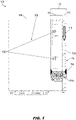
FIG. 1 is a block diagram illustrating an avionics display incorporating a timeline display according to example embodiments of this disclosure; -
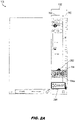
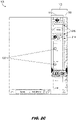
FIGS. 2A through 2C illustrate operations adjusting the absolute time range displayed by the timeline display ofFIG. 1 ; -
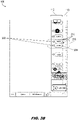
FIGS. 3A through 3C illustrate waypoint displays and information provided by the timeline display ofFIG. 1 ; -
FIGS. 4A and4B illustrate vertical navigation (VNAV) event displays and information provided by the timeline display ofFIG. 1 ; -
FIG. 5 illustrates weather alerts and information provided by the timeline display ofFIG. 1 ; -
FIGS. 6A through 6C illustrate task notification and reminder notification operations of the timeline display ofFIG. 1 ; - and
FIGS. 7A and7B illustrate task queue alert operations of the timeline display ofFIG. 1 . - Before explaining one or more embodiments of the disclosure in detail, it is to be understood that the embodiments are not limited in their application to the details of construction and the arrangement of the components or steps or methodologies set forth in the following description or illustrated in the drawings. In the following detailed description of embodiments, numerous specific details may be set forth in order to provide a more thorough understanding of the disclosure. However, it will be apparent to one of ordinary skill in the art having the benefit of the instant disclosure that the embodiments disclosed herein may be practiced without some of these specific details. In other instances, well-known features may not be described in detail to avoid unnecessarily complicating the instant disclosure.
- As used herein a letter following a reference numeral is intended to reference an embodiment of the feature or element that may be similar, but not necessarily identical, to a previously described element or feature bearing the same reference numeral (e.g., 1, 1a, 1b). Such shorthand notations are used for purposes of convenience only and should not be construed to limit the disclosure in any way unless expressly stated to the contrary.
- Further, unless expressly stated to the contrary, "or" refers to an inclusive or and not to an exclusive or. For example, a condition A or B is satisfied by any one of the following: A is true (or present) and B is false (or not present), A is false (or not present) and B is true (or present), and both A and B are true (or present).
- In addition, use of "a" or "an" may be employed to describe elements and components of embodiments disclosed herein. This is done merely for convenience and "a" and "an" are intended to include "one" or "at least one," and the singular also includes the plural unless it is obvious that it is meant otherwise.
- Finally, as used herein any reference to "one embodiment" or "some embodiments" means that a particular element, feature, structure, or characteristic described in connection with the embodiment is included in at least one embodiment disclosed herein. The appearances of the phrase "in some embodiments" in various places in the specification are not necessarily all referring to the same embodiment, and embodiments may include one or more of the features expressly described or inherently present herein, or any combination or sub-combination of two or more such features, along with any other features which may not necessarily be expressly described or inherently present in the instant disclosure.
- Referring to
FIG. 1 , anavionics display 100 is disclosed. The avionics display may include, but is not limited to, a cockpit-based primary flight display (PFD), aircraft-based multifunction display (MFD), or portable electronic flight bag (EFB; e.g., an avionics display housed in a tablet or other portable processing device) in communication, either physically or wirelessly, with the aircraft flight management system (FMS) or other cockpit-based or EFB-based applications (e.g., smart assistants, schedulers). - In embodiments, the
avionics display 100 includes atimeline display 102 situated along anedge 104 of the avionics display. For example, thetimeline display 102 may preferably be situated along avertical edge 104 of the avionics display 100 and occupy a vertical slice of the avionics display; however, in some embodiments thetimeline display 102 may be situated along ahorizontal edge 106 of the avionics display. Theunused portion 108 of the avionics display (e.g., that portion not occupied by the timeline display 102) may be used for normal display of navigational elements, aircraft instrumentation readouts, or other avionics display content. - In embodiments, the
timeline display 102 may be divided lengthwise (e.g., split vertically) into a time scale 110 (e.g., absolute time scale) and a space scale 112 (e.g., relative time or distance scale). For example, thetime scale 110 may indicate the current time (e.g., as indicated by atime cursor 114 and/ortime cursor readout 114a) according to any desired time reference selected by the pilot or flight crew (e.g., UTC, local time zone, destination time zone). Thetime scale 110 may includetime increment markers 116 and may be configured for automatic edgewise scrolling (118), e.g., from top to bottom according to the current time. In embodiments, as thetime scale 110 represents a time range (e.g., which may or may not include the current time, as disclosed in greater detail below), the time scale may indicate points ahead of and/or behind the current time (e.g., future and past points). - In embodiments, the avionics display 100 may poll the FMS (e.g., and/or other flight management/flight guidance applications) for updates as to the current position and speed (e.g., airspeed, groundspeed) of the aircraft. For example, based on this information as well as flight plan data, the avionics display may additionally infer or predict the aircraft position at a future point in time (e.g., based on a current position and a consistent speed over time) or predict the aircraft speed at a future point in time (e.g., based on a deceleration of the aircraft). In embodiments, the
space scale 112 may display time-distancedevents 120 relative to thetime cursor 114, e.g., relative distance or time to and from flight plan waypoints (or, e.g., until events occur, until tasks must be performed). For example, flight plan waypoints may be a particular distance from the aircraft at any particular time, and the aircraft may reach the said waypoint by flying by or over it at a destination time (or, e.g., must arrive at the waypoint within a predetermined time window) given its current and/or predicted speed (or, e.g., may have reached the waypoint at a known past time and may be at a particular distance from the waypoint at the current time based on aircraft speed). - Referring now to
FIGS. 2A through 2C , in embodiments thetimeline display 102 may be manually scrollable to display future or past time ranges which may or may not include the current time, to allow the flight crew to inspect or monitor future or past events and tasks. - For example, the
timeline display 102 may be scrolled in a future direction (e.g., "down", top to bottom) such that thetime scale 110 may indicate a time range in the future relative to the current time, thetime cursor 114 andtime cursor readout 114a shifting to indicate the future time range. For example, thetime cursor 114 may display an "upward"arrow 202 to indicate that the currently displayed time range is a future time range, and thetime cursor readout 114a may indicate a future time (e.g., 16:45). - In embodiments, when the
timeline display 102 is scrolled in either a future or past direction, thetimeline display 102 may include atime synch box 204 indicating the actual current time (e.g., 16:37). (It should be noted that the actual current time as reflected by thetime cursor 114 may still be within the displayed future time range.) For example, thetimeline display 102 may be manually scrolled in either direction via the display surface (e.g., if the display surface is touch-sensitive, the pilot may contact the portion of the display surface corresponding to the absolute time scale and drag either upward or downward, e.g., to scroll into the past or future). Additionally, or alternatively, thetime scale 110 may be manually scrolled via a multifunction control (MFC) otherwise configured for control of theavionics display 100. In embodiments, by selecting or contacting thetime synch box 204, thetimeline display 102 may be re-synchronized to the current time (e.g., as shown byFIG. 1 ). - Referring also to
FIG. 2B , thetimeline display 102 may be scrolled in a past direction (e.g., "upward", or bottom-to-top) to display a past time range, as indicated by the "downward"arrow 206 and its position relative to thetime cursor 114. - In embodiments, the
timeline display 102 may additionally be manually zoomed 208 (e.g., via a touch-sensitive display surface 210 or via MFC) to lengthen or shorten the absolute time range displayed by thetime scale 110. For example, expanding thetimeline display 102 by zooming in (e.g., by moving twofingers 212 further apart on a touch-sensitive display surface 210) may shorten the absolute time range displayed by thetime scale 110. Similarly, thetimeline display 102 may be zoomed out (208) in the opposite direction to contract the timeline display and lengthen the absolute time range covered by thetime scale 110, e.g., from approximately 24 minutes (as shown byFIG. 2B ) to approximately 40 minutes (as shown byFIG. 2C ). In embodiments, as thetime scale 110 expands or contracts in response to zooming 208, so may the number of time-distancedevents 120 indicated by thespace scale 112 increase or decrease. In some embodiments, proximate time-distancedevents 120 or waypoints 214 (e.g., having event times or arrival times very close to each other) may be contracted intogroupings 216, as described in more detail below. - Referring now to
FIG. 3A , in embodiments thespace scale 112 may include the relative time-distanced positions ofwaypoints 214 in the flight path/flight plan of the aircraft, based on the anticipated time of aircraft passage by, or over, a particular waypoint (e.g., based on the current or anticipated positions of the aircraft, the known location of the waypoint, and the aircraft speed). - In embodiments, the
timeline display 102 may be scrolled into the future (e.g., and zoomed in to shorten the absolute time range of thetime scale 110, as also shown byFIGS. 2A and2B ). Thespace scale 112 may indicate the relative positions ofwaypoints 214 with awaypoint symbol 302 positioned on thespace scale 112 to indicate the relative time-distancing of the waypoint from the aircraft (e.g., in minutes to arrival, as well as relative distance to or from other waypoints). For example, thewaypoint symbols 302 may indicate the relative time-distancing of indicatedwaypoints 214 from the future-scrolledupward arrow 202, itself indicating a future time relative to the current time, as indicated by thetime synch box 204. - In embodiments, directly adjacent to the
waypoint symbol 302 thespace scale 112 may place awaypoint label 304 identifying the waypoint 214 (e.g., BDF, TRIDE, JUMPN, JUKIC) and extending into thetime scale 110 to indicate the approximate time (306) of waypoint passage by the aircraft. For example, the aircraft may be expected (e.g., according to current conditions) to pass by or over the waypoint BDF at approximately 17:03, the waypoint TRIDE at approximately 17:10, and the waypoint JUMPN at approximately 17:16. - In embodiments, selected
waypoints 214 may be so close together (e.g., based on relative distance to/from the aircraft orwaypoint passage time 306, and based on the current length of the absolute time range shown by the time scale 110) that it may not always be feasible for thespace scale 112 to display each waypoint individually. For example, referring in particular toFIG. 3A , thespace scale 112 may indicate waypoint groupings 216 (e.g., groups of two or more proximate waypoints) by minimizing the waypoint symbols (302a) and replacing thewaypoint label 304 with an alternative waypoint label (308) indicating the number of grouped waypoints. The minimizedwaypoint symbols 302a andalternative waypoint label 308 may still indicate the relative time-distancing of the grouped waypoints. - In embodiments, referring also to
FIG. 3B , the individual waypoints of awaypoint grouping 216 may be identified by zooming (208,FIG. 2B ) the time scale 110 (e.g., zooming into thetimeline display 102 to shorten the absolute time range displayed by the time scale). As the time range corresponding to thetime scale 110 shortens, the number ofwaypoints 214 and/or events (120,FIG. 1 ) displayed by thespace scale 112 may likewise decrease until thewaypoint groupings 216 are replaced byindividual waypoint symbols 302 andwaypoint labels 304 for eachwaypoint 214. For example, thegrouping 216 of twowaypoints 214 between the waypoints TRIDE and JUMPN, as shown byFIG. 3A , are shown byFIG. 3B as the waypoints RAGGS and SHAIN, each waypoint associated with an individual time (306,FIG. 3A ) of waypoint passage by the aircraft. - Referring also to
FIG. 3C , the pilot or flight crew may access additional information for anywaypoint 214 displayed by thespace scale 112. For example, by selecting (e.g., via cursor selection or touch-sensitive surface) either thewaypoint symbol 302 orwaypoint label 304 for any displayed waypoint 214 (e.g., JUMPN), adialog box 310 may be displayed with any additional information about the JUMPN waypoint known to the FMS, e.g., bearing from the aircraft; distance from the aircraft; estimated time enroute (ETE); estimated time of arrival (ETA). - Referring to
FIG. 4A , thespace scale 112 may display other time-distancedevents 120 of diverse types and categories. - In embodiments, the avionics display 100 may interrogate the FMS for inflection points in the vertical flight path of the aircraft, e.g., vertical navigation (VNAV) inflection points where the flight path may be modified, e.g., by the Flight Guidance System (FGS). For example, a Top of Descent (TOD) point (e.g., as well as other relevant VNAV inflection points), or a point at which the aircraft abandons its cruising altitude to begin its initial descent to the destination airport, may be indicated by a TOD icon 400 (e.g., a circular icon enclosing an internal arrow indicating the direction of change-down, in the case of an initial descent). By selecting the
TOD icon 400, thetimeline display 102 may further display VNAV inflection point information. For example, VNAV inflection point information may be indicated by aVNAV dialog box 402 showing that the VNAV inflection point associated with theTOD icon 400 is a TOD point at FL 220 (Flight Level 220, e.g., 22,000 feet). - Referring now to
FIG. 4B , in embodiments thetimeline display 102 may provide VNAV information from the FMS for anywaypoint 214 under an altitude constraint. For example, by selecting thewaypoint symbol 302 orwaypoint label 304, thetimeline display 102 may provide VNAV altitude constraint information (e.g., via VNAV dialog box 402) indicating that waypoint BDF must be crossed at or aboveFL 220. In some embodiments, theVNAV dialog box 402 may allow the pilot or flight crew to modify the altitude constraint, sending the modified value back to the FMS for incorporation into a modified flight plan. For example, once the modified altitude constraint was verified via the FMS, the modified flight plan would be available for execution. - Referring now to
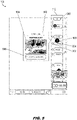
FIG. 5 , in embodiments, thetimeline display 102 may display weatheralert icons 500 within thespace scale 112. For example, theweather alert 500 may be positioned approximately 2 minutes behind theJUMPN waypoint symbol 302 andwaypoint label 304 to warn the flight crew of imminent or potentially hazardous weather conditions at that time (e.g., warnings, cautions, or advisories of various levels of severity or priority), given the present course and speed of the aircraft. In embodiments, selecting theweather alert icon 500 may display a weatheralert dialog box 502 incorporating a thumbnail-sized weather map 504 of the weather conditions ahead as well as alink 506 for displaying a graphical weather map. - In some embodiments, the
timeline display 102 may display similar alerts or notifications based on other timed events, e.g., fuel-reserve alerts, system checks, heading changes, and other like aircraft-based or component-based notifications tracked by the FMS or like applications; frequency changes and other like air traffic control-related events; and or other alerts, notifications, warnings, cautions, or advisories as described below. For example, thetimeline display 102 may include atab 508 indicating the number of alerts (e.g., weather alerts, other alerts) scrolled out of view in the future direction. - Referring to
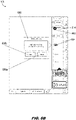
FIG. 6A , in embodiments the time-distancedevents 120 displayed by thetimeline display 102 within thespace scale 112 may include task notifications 600 (e.g., notifications having a lower severity or priority level than weather alerts (500,FIG. 5 ) or other alerts as described above). For example, repetitive tasks may be incorporated into thetimeline display 102 as periodic reminders to the flight crew to ensure these tasks are completed. Thetask notification 600 may, for example, be associated with receiving an Automated Terminal Information System (ATIS) weather report for Chicago O'Hare (ORD) twenty minutes prior to flyover of the Bradford VORTAC (BDF)waypoint 214. In embodiments, detailed information about the associated task may be provided by a tasknotification dialog box 602 displayed upon selection of thetask notification 600 by the flight crew. - Referring now to
FIG. 6B , in embodiments the task notification 604 (e.g., represented by a notepad icon) may be associated with the task of completing the approach briefing ten minutes prior to TOD (TOD icon 400 indicating theEZZRA waypoint 214 as TOD point). For example, an approachbriefing dialog box 606 may be displayed upon selection of thetask notification 604; the dialog box may further provide the opportunity to review (606a) the approach briefing (e.g., via the approach briefing application) or close out (606b) the dialog box. - Referring now to
FIG. 6C , in embodiments thereminder notification 608 may be associated with a reminder, e.g., a type of note entered by the flight crew (e.g., which may be created in a separate application) and set to deploy at a future point. For example, thereminder notification 608 may be set to deploy at a specific absolute time (e.g., 18:30 Z/UTC) per thetime scale 110, or at a specific relative location, e.g., a point in time (or a projected distance from the aircraft) along thespace scale 112. In embodiments, areminder dialog box 610 may be displayed upon selection of thereminder notification 608. For example, thereminder dialog box 610 may provide title, time, and any other information pertinent to the reminder. Thereminder dialog box 610 may further allow the flight crew to close out (610a), delete (610b), or edit (610c) the note associated with thereminder notification 608. - Referring to
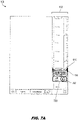
FIG. 7A , one or more task notifications (600,FIG. 6A ; 604,FIG. 6B ) and/orreminder notifications 608 may cross thetime cursor 114 without action or disposition by the flight crew. In embodiments, thetimeline display 102 may display atask queue alert 700 below thetime cursor 114. For example, thetask queue alert 700 may track the number (702) of missedtask notifications 600 andreminder notifications 608. - Referring also to
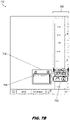
FIG. 7B , in embodiments selecting thetask queue alert 700 may cause thetimeline display 102 to display a taskqueue dialog box 704. For example, the taskqueue dialog box 704 may provideadditional information 706 about each missed task notification (600) orreminder notification 608 as well as links to any associated applications (for, e.g., associated briefings or notes). - It is to be understood that embodiments of the methods disclosed herein may include one or more of the steps described herein. Further, such steps may be carried out in any desired order and two or more of the steps may be carried out simultaneously with one another. Two or more of the steps disclosed herein may be combined in a single step, and in some embodiments, one or more of the steps may be carried out as two or more sub-steps. Further, other steps or sub-steps may be carried in addition to, or as substitutes to one or more of the steps disclosed herein.
- Although inventive concepts have been described with reference to the embodiments illustrated in the attached drawing figures, equivalents may be employed and substitutions made herein without departing from the scope of the claims. Components illustrated and described herein are merely examples of a system/device and components that may be used to implement embodiments of the inventive concepts and may be replaced with other devices and components without departing from the scope of the claims. Furthermore, any dimensions, degrees, and/or numerical ranges provided herein are to be understood as non-limiting examples unless otherwise specified in the claims.
Claims (14)
- A system for flight and task management timeline display, comprising:an avionics display (100) associated with an aircraft and coupled to a flight management system, FMS, of the aircraft, the avionics display configured to generate a timeline display (102) corresponding to an edge portion (104) of the avionics display, the timeline display divided lengthwise into a time scale (110) and a space scale (112);the time scale (110) configured to display to a user a time range, the time range configured for automatic lengthwise scrolling according to a current time;andthe space scale (112) configured to display one or more of:a waypoint (214), the waypoint associated with 1) an arrival time by the aircraft at the waypoint, the arrival time corresponding to an absolute time displayable by the time scale, and 2) a first relative time based on a distance between the arrival time and the current time;andan event, the event associated with 1) an event time corresponding to an absolute time displayable by the time scale and 2) a second relative time based on a distance between the event time and the current time.
- The system for flight and task management timeline display of Claim 1, wherein:
the timeline display (102) is configured for manual scrolling by the user in 1) a past direction for synchronizing the time range to a past time range and 2) a future direction for synchronizing the time range to a future time range. - The system for flight and task management timeline display of Claim 2, wherein the timeline display (102) is configured to display a relative time corresponding to the past direction or the future direction.
- The system for flight and task management timeline display of Claim 2, wherein the timeline display (102) further comprises a time synch box (204) configured to display the current time while the time scale displays the past time range or the future time range.
- The system for flight and task management timeline display of Claim 4, wherein the timeline display (102) is configured to synchronize to the current time upon selection of the time synch box (204) by the user.
- The system for flight and task management timeline display of any preceding Claim, wherein the timeline display (102) is configured for manual zooming by the user for synchronizing the time scale to one of a longer time range and a shorter time range.
- The system for flight and task management timeline display of any preceding Claim, wherein the space scale (112) is configured to display at least one of:a waypoint grouping comprising a plurality of proximate waypoints (214), the waypoint grouping selectable by the user to display each proximate waypoint;andan event grouping comprising a plurality of proximate events, the event grouping selectable by the user to display each proximate event.
- The system for flight and task management timeline display of any preceding Claim, wherein:
each waypoint (214) is configured to be selected by the user, the timeline display (102) configured to display waypoint information corresponding to the selected waypoint. - The system for flight and task management timeline display of any preceding Claim, wherein:
each event is configured to be selected by the user, the timeline display configured to display event information corresponding to the selected event. - The system for flight and task management timeline display of any preceding Claim, wherein the at least one event is selected from a group including:a vertical navigation, VNAV, inflection point, the VNAV inflection point corresponding to a waypoint;an alert;a task for completion by the user;anda reminder set by the user.
- The system for flight and task management timeline display of any preceding Claim, wherein:
the timeline display (102) is configured to display at least one task queue alert corresponding to one or more missed events. - The system for flight and task management timeline display of Claim 11, wherein the at least one task queue alert is selectable by the user to display missed task information corresponding to the one or more missed events.
- The system for flight and task management timeline display of any preceding Claim, wherein the avionics display (100) is selected from:a cockpit-based primary flight display, PFD;an aircraft-based multifunction display, MFD;and an electronic flight bag, EFB.
- The system for flight and task management timeline display of any preceding Claim, wherein the timeline display (102) is configured for interaction with the at least one user via one or more of:a touch-sensitive display surface of the avionics display;anda multifunctional control, MFC, operatively coupled to the avionics display.
Applications Claiming Priority (1)
| Application Number | Priority Date | Filing Date | Title |
|---|---|---|---|
| US17/185,591 US11320980B1 (en) | 2021-02-25 | 2021-02-25 | Flight and task management timeline display with absolute and relative time scaling |
Publications (1)
| Publication Number | Publication Date |
|---|---|
| EP4050587A1 true EP4050587A1 (en) | 2022-08-31 |
Family
ID=80953613
Family Applications (1)
| Application Number | Title | Priority Date | Filing Date |
|---|---|---|---|
| EP22157704.2A Pending EP4050587A1 (en) | 2021-02-25 | 2022-02-21 | Flight and task management timeline display with absolute and relative time scaling |
Country Status (2)
| Country | Link |
|---|---|
| US (1) | US11320980B1 (en) |
| EP (1) | EP4050587A1 (en) |
Families Citing this family (1)
| Publication number | Priority date | Publication date | Assignee | Title |
|---|---|---|---|---|
| FR3121540B1 (en) * | 2021-04-02 | 2023-09-22 | Thales Sa | Electronic system and method for managing the flight of an aircraft, with insertion of section(s) with constraints into a flight plan, associated computer program |
Citations (5)
| Publication number | Priority date | Publication date | Assignee | Title |
|---|---|---|---|---|
| US20140156115A1 (en) * | 2012-11-30 | 2014-06-05 | Thales | Method for displaying an aeronautical flight plan comprising a step of displaying and selecting the tasks to be accomplished before a change of flight phase |
| EP2955484A1 (en) * | 2014-06-09 | 2015-12-16 | Honeywell International Inc. | A system and method for providing enhanced hmi navigation |
| EP2985748A1 (en) * | 2014-08-13 | 2016-02-17 | Honeywell International Inc. | A system and method for integrated time based notification for improved situational awareness |
| EP3142093A1 (en) * | 2015-09-14 | 2017-03-15 | Honeywell International Inc. | Aircraft systems and methods for enhanced waypoint list display |
| US20200168104A1 (en) * | 2018-11-27 | 2020-05-28 | Honeywell International Inc. | Systems and methods for providing deviation assistance on an integrated flight management display |
Family Cites Families (8)
| Publication number | Priority date | Publication date | Assignee | Title |
|---|---|---|---|---|
| US7765061B1 (en) | 2006-05-18 | 2010-07-27 | Rockwell Collins, Inc. | Flight display system with enhanced temporal depiction of navigation information |
| FR2904461B1 (en) | 2006-07-31 | 2008-10-17 | Airbus France Sas | METHOD AND DEVICE FOR DISPLAYING A FLIGHT PLAN OF AN AIRCRAFT |
| US8099201B1 (en) | 2008-08-29 | 2012-01-17 | Rockwell Collins, Inc. | Vertical profile display with enhanced temporal depiction of navigation information |
| US8396614B1 (en) | 2010-05-17 | 2013-03-12 | The Boeing Company | Graphical depiction of four dimensional trajectory based operation flight plans |
| FR2969124A1 (en) | 2010-12-17 | 2012-06-22 | Thales Sa | METHOD OF TIME DISPLAYING THE MISSION OF AN AIRCRAFT |
| FR2984486A1 (en) | 2011-12-20 | 2013-06-21 | Thales Sa | Method for displaying flight plan of aircraft on display device screen of flight management system, involves calculating aircraft position and main values of aircraft parameters at moment corresponding to present or future time of aircraft |
| FR2991094B1 (en) | 2012-05-25 | 2015-02-27 | Thales Sa | DEVICE FOR FLIGHT MANAGEMENT OF AN AIRCRAFT ADAPTED TO CONTROL OF MULTI-TIME CONSTRAINTS AND CORRESPONDING METHOD |
| FR2998959B1 (en) | 2012-11-30 | 2015-11-20 | Thales Sa | METHOD FOR DISPLAYING AN AERONAUTICAL FLIGHT PLAN COMPRISING A FLIGHT DATA PARAMETERING STEP |
-
2021
- 2021-02-25 US US17/185,591 patent/US11320980B1/en active Active
-
2022
- 2022-02-21 EP EP22157704.2A patent/EP4050587A1/en active Pending
Patent Citations (5)
| Publication number | Priority date | Publication date | Assignee | Title |
|---|---|---|---|---|
| US20140156115A1 (en) * | 2012-11-30 | 2014-06-05 | Thales | Method for displaying an aeronautical flight plan comprising a step of displaying and selecting the tasks to be accomplished before a change of flight phase |
| EP2955484A1 (en) * | 2014-06-09 | 2015-12-16 | Honeywell International Inc. | A system and method for providing enhanced hmi navigation |
| EP2985748A1 (en) * | 2014-08-13 | 2016-02-17 | Honeywell International Inc. | A system and method for integrated time based notification for improved situational awareness |
| EP3142093A1 (en) * | 2015-09-14 | 2017-03-15 | Honeywell International Inc. | Aircraft systems and methods for enhanced waypoint list display |
| US20200168104A1 (en) * | 2018-11-27 | 2020-05-28 | Honeywell International Inc. | Systems and methods for providing deviation assistance on an integrated flight management display |
Also Published As
| Publication number | Publication date |
|---|---|
| US11320980B1 (en) | 2022-05-03 |
Similar Documents
| Publication | Publication Date | Title |
|---|---|---|
| US7191406B1 (en) | Avionics display system for memorization of display configuration to phase of flight pushbuttons | |
| US9335917B2 (en) | System and method for providing enhanced HMI navigation | |
| JP5225099B2 (en) | Method and system for displaying procedural information | |
| US9881504B2 (en) | System and method of integrating data link messages with a flight plan | |
| US9593961B2 (en) | System and method for integrated time based notification for improved situational awareness | |
| EP2405417B1 (en) | System for displaying a procedure to an aircraft operator during a flight of an aircraft | |
| EP2679959B1 (en) | Avionics display system providing enhanced flight-plan management | |
| EP2365287B1 (en) | System and method for rendering an onboard aircraft display for use with in-trail procedures | |
| CN106516133B (en) | Aircraft system and method for enhancing waypoint list display | |
| EP2244240B1 (en) | Methods and systems for displaying a vertical profile for an aircraft procedure with nonuniform scaling | |
| US20140188312A1 (en) | Methods, systems, and apparatus for layered and multi-indexed flight management interface | |
| EP2913812A1 (en) | Pilot centered system and method for decluttering aircraft displays | |
| EP2922046A1 (en) | A system and method for providing enhanced flight-plan management | |
| US20130268878A1 (en) | Method for the temporal display of the mission of an aircraft | |
| EP2816540B1 (en) | A system and method for graphically displaying aircraft traffic information | |
| EP2818994A1 (en) | Touch screen and method for adjusting touch sensitive object placement thereon | |
| EP3696512B1 (en) | Correlative display system with decluttered displays for aircraft | |
| EP3657131B1 (en) | Waypoint list presentation methods and systems | |
| EP3023741B1 (en) | System and method for exocentric display of integrated navigation | |
| EP2940674A1 (en) | System and method for displaying context sensitive notes | |
| US11320980B1 (en) | Flight and task management timeline display with absolute and relative time scaling | |
| US20220397918A1 (en) | Vehicular system and method for pre-arming actions according to conditional timeline and associated trigger events | |
| EP4002078B1 (en) | Methods and systems for resolving tactile user input selections | |
| EP3951322B1 (en) | Systems and methods for calibrating a sensor position on an aircraft | |
| US20140132427A1 (en) | Systems and methods for displaying in-flight navigation procedures |
Legal Events
| Date | Code | Title | Description |
|---|---|---|---|
| PUAI | Public reference made under article 153(3) epc to a published international application that has entered the european phase |
Free format text: ORIGINAL CODE: 0009012 |
|
| STAA | Information on the status of an ep patent application or granted ep patent |
Free format text: STATUS: THE APPLICATION HAS BEEN PUBLISHED |
|
| AK | Designated contracting states |
Kind code of ref document: A1 Designated state(s): AL AT BE BG CH CY CZ DE DK EE ES FI FR GB GR HR HU IE IS IT LI LT LU LV MC MK MT NL NO PL PT RO RS SE SI SK SM TR |
|
| STAA | Information on the status of an ep patent application or granted ep patent |
Free format text: STATUS: REQUEST FOR EXAMINATION WAS MADE |
|
| 17P | Request for examination filed |
Effective date: 20230228 |
|
| RBV | Designated contracting states (corrected) |
Designated state(s): AL AT BE BG CH CY CZ DE DK EE ES FI FR GB GR HR HU IE IS IT LI LT LU LV MC MK MT NL NO PL PT RO RS SE SI SK SM TR |
|
| STAA | Information on the status of an ep patent application or granted ep patent |
Free format text: STATUS: EXAMINATION IS IN PROGRESS |
|
| 17Q | First examination report despatched |
Effective date: 20250623 |