EP4042274B1 - Application hub for applications for an analytical services platform - Google Patents
Application hub for applications for an analytical services platform Download PDFInfo
- Publication number
- EP4042274B1 EP4042274B1 EP20793818.4A EP20793818A EP4042274B1 EP 4042274 B1 EP4042274 B1 EP 4042274B1 EP 20793818 A EP20793818 A EP 20793818A EP 4042274 B1 EP4042274 B1 EP 4042274B1
- Authority
- EP
- European Patent Office
- Prior art keywords
- application
- computing device
- user interface
- client computing
- hub
- Prior art date
- Legal status (The legal status is an assumption and is not a legal conclusion. Google has not performed a legal analysis and makes no representation as to the accuracy of the status listed.)
- Active
Links
Images







Classifications
-
- G—PHYSICS
- G06—COMPUTING OR CALCULATING; COUNTING
- G06F—ELECTRIC DIGITAL DATA PROCESSING
- G06F8/00—Arrangements for software engineering
- G06F8/60—Software deployment
- G06F8/61—Installation
-
- G—PHYSICS
- G06—COMPUTING OR CALCULATING; COUNTING
- G06F—ELECTRIC DIGITAL DATA PROCESSING
- G06F8/00—Arrangements for software engineering
- G06F8/60—Software deployment
- G06F8/65—Updates
-
- G—PHYSICS
- G06—COMPUTING OR CALCULATING; COUNTING
- G06F—ELECTRIC DIGITAL DATA PROCESSING
- G06F9/00—Arrangements for program control, e.g. control units
- G06F9/06—Arrangements for program control, e.g. control units using stored programs, i.e. using an internal store of processing equipment to receive or retain programs
- G06F9/44—Arrangements for executing specific programs
- G06F9/451—Execution arrangements for user interfaces
-
- G—PHYSICS
- G06—COMPUTING OR CALCULATING; COUNTING
- G06F—ELECTRIC DIGITAL DATA PROCESSING
- G06F9/00—Arrangements for program control, e.g. control units
- G06F9/06—Arrangements for program control, e.g. control units using stored programs, i.e. using an internal store of processing equipment to receive or retain programs
- G06F9/46—Multiprogramming arrangements
- G06F9/54—Interprogram communication
- G06F9/547—Remote procedure calls [RPC]; Web services
-
- H—ELECTRICITY
- H04—ELECTRIC COMMUNICATION TECHNIQUE
- H04L—TRANSMISSION OF DIGITAL INFORMATION, e.g. TELEGRAPHIC COMMUNICATION
- H04L63/00—Network architectures or network communication protocols for network security
- H04L63/08—Network architectures or network communication protocols for network security for authentication of entities
- H04L63/083—Network architectures or network communication protocols for network security for authentication of entities using passwords
-
- H—ELECTRICITY
- H04—ELECTRIC COMMUNICATION TECHNIQUE
- H04L—TRANSMISSION OF DIGITAL INFORMATION, e.g. TELEGRAPHIC COMMUNICATION
- H04L63/00—Network architectures or network communication protocols for network security
- H04L63/08—Network architectures or network communication protocols for network security for authentication of entities
- H04L63/0884—Network architectures or network communication protocols for network security for authentication of entities by delegation of authentication, e.g. a proxy authenticates an entity to be authenticated on behalf of this entity vis-à-vis an authentication entity
-
- H—ELECTRICITY
- H04—ELECTRIC COMMUNICATION TECHNIQUE
- H04L—TRANSMISSION OF DIGITAL INFORMATION, e.g. TELEGRAPHIC COMMUNICATION
- H04L67/00—Network arrangements or protocols for supporting network services or applications
- H04L67/34—Network arrangements or protocols for supporting network services or applications involving the movement of software or configuration parameters
-
- G—PHYSICS
- G06—COMPUTING OR CALCULATING; COUNTING
- G06F—ELECTRIC DIGITAL DATA PROCESSING
- G06F3/00—Input arrangements for transferring data to be processed into a form capable of being handled by the computer; Output arrangements for transferring data from processing unit to output unit, e.g. interface arrangements
- G06F3/01—Input arrangements or combined input and output arrangements for interaction between user and computer
- G06F3/048—Interaction techniques based on graphical user interfaces [GUI]
- G06F3/0484—Interaction techniques based on graphical user interfaces [GUI] for the control of specific functions or operations, e.g. selecting or manipulating an object, an image or a displayed text element, setting a parameter value or selecting a range
- G06F3/04842—Selection of displayed objects or displayed text elements
Definitions
- Exemplary embodiments described herein provide an application hub for applications of an analytical services platform.
- the analytical services platform may receive data from analytical devices and provide services, such as but not limited to filtering, processing and visualizing of the data.
- the application hub may act as a landing site for users on client devices to launch applications for the analytical services platform.
- the application hub may provide a web page to the client computing devices over a network.
- the web page may provide a user interface listing applications for the analytical services platform. Users may launch the applications through the user interface, such as by selecting user interface elements provided for the applications.
- the user interface may identify what applications have been installed on a client device and what applications have not been installed. For example, visual cues may be provided on the user interface that distinguish between installed applications and uninstalled applications. This provides a quick and easy way for a user to know what applications are available for installation.
- the user interface may also provide a mechanism for a user to install an application that is uninstalled on a client computing device.
- icons are provided for each of the applications and taking an action, such as selection of the icon or otherwise activating the icon, initiates installation of the application on the client computing device.
- the user interface may also identify when an application needs to be upgraded. For instance, visual cues of the need for an upgrade may be provided. An icon associated with the application may have a modified appearance indicating that an upgrade is needed. The need for an upgrade may be automatically determined without the need for user intervention by comparing a version number of the application installed on the client device with a version number of the application that is available for installation. A user may initiate the upgrade of an application through the user interface. In one instance, a user selects an icon associated with the application to initiate the upgrade. The upgrade is realized by installing the upgraded version of the application on the client device.
- the application hub is intended to be a single landing site for all applications, a single login may be provided.
- a user may be prompted to provide their credentials when seeking access to the application hub.
- the user may not need to provide credentials again to launch the applications shown on the user interface. This simplifies the process of launching applications by eliminating the need for the user to login or otherwise demonstrate credentials for each application.
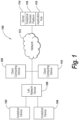
- FIG. 1 shows an example of an environment 100 that may be suitable for practicing exemplary embodiments.
- the depiction is intended to be illustrative and not limiting.
- the environment 100 may include analytical devices 102 and 104.
- the analytical devices may take many different forms. Examples of analytical devices include mass spectrometry (MS) devices, liquid chromatography (LC) devices, an LC-MS system, a mass analyzer system, an ion mobility spectrometer (IMS) system, a high-performance liquid chromatography (HPLC) system, a ultra-performance liquid chromatography (UPLC ® ) system, a ultra-high performance liquid chromatography (UHPLC) system, a solid-phase extraction system, a sample preparation system, a heater (for example, a column heater), a sample manager, a solvent manager, an in vitro device (IVD), combinations thereof, components thereof, variations thereof and more generally devices that perform analytical services.
- MS mass spectrometry
- LC liquid chromatography
- IMS i
- an analytical service may include a process and any process information (for instance, parameters, settings, thresholds, and/or the like) that are required to perform a process, method, analysis, test, and/or the like on an analytical device.
- process information for instance, parameters, settings, thresholds, and/or the like
- an analytical service may be developed, refined, tuned, and/or the like using a primary analytical system.
- the analytical devices 102 and 104 may be present in a laboratory environment in many instances.
- a laboratory network device 106 may be provided to interface with the analytical devices 102 and 104 over a network, such as a local area network (LAN).
- the laboratory network device 106 facilitates communication with the analytical devices and enables data gathered from the analytical devices 102 and 104 to be passed on to the network 112 and accessible by client computing device 108 and 110.
- the client computing devices may be workstations, desktop computers, laptop computers or other types of computing devices. Users of the client devices 108 and 110 may communicate over the network 112 with a server 114.
- the server 114 may be a server computing device and may run computer program code for analytical services platform 116 and application hub 118.
- the analytical services platform 116 and the application hub 118 need not be resident on a single server 114. In addition, the analytical services platform 116 may be spread across multiple servers a in some instances.
- the network 112 may be a wide area network (WAN), such as the internet, and may include wireless networking components as well as har-wired networking components.
- WAN wide area network
- the analytical services platform 116 may perform analytical services on data obtained from the analytical devices 102 and 104.
- the analytical services platform 116 may provide data acquisition, processing, visualization, reporting, and configurable compliance tools within a networked environment.
- An analytical services platform is the UNIFI scientific information systems platform from Waters Corporation of Milford, Massachusetts.
- the applications hub 118 serves as a central hub where users may locate and execute applications on client computing devices for 108 and 110 for the analytical services platform 116.
- FIG. 2A depicts a more detailed view of an illustrative client computing device 200.
- the client computing device includes a processor 202.
- the processor 202 may take many different forms.
- the processor 202 may include a central processing unit (CPU) realized as an integrated circuit, an application specific integrated circuit (ASIC), a programmable logic device (PLD), a digital signal processor (DSP), field programmable gate array (FPGA), a system-on-a-chip (SoC) or electric circuitry.
- the processor 202 may include multiple cores.
- the processor 202 may executes computer-executable instructions stored in the storage 204.
- the storage 204 may include one or more types of storage devices.
- the storage 204 may include various types of computer-readable storage media and/or systems in the form of one or more higher speed memory units, such as read-only memory (ROM), random-access memory (RAM), dynamic RAM (DRAM), Double-Data-Rate DRAM (DDRAM), synchronous DRAM (SDRAM), static RAM (SRAM), programmable ROM (PROM), erasable programmable ROM (EPROM), electrically erasable programmable ROM (EEPROM), flash memory, polymer memory such as ferroelectric polymer memory, ovonic memory, phase change or ferroelectric memory, silicon-oxide-nitride-oxide-silicon (SONOS) memory, magnetic or optical cards, an array of devices such as Redundant Array of Independent Disks (RAID) drives, solid state memory devices (e.g., USB memory, solid state drives (SSD) and any other type of storage media suitable for storing information.
- ROM read-only memory
- RAM random-
- storage 204 may include various types of computer-readable storage media in the form of one or more lower speed memory units, including an internal (or external) hard disk drive (HDD), a magnetic floppy disk drive (FDD), and an optical disk drive to read from or write to a removable optical disk (e.g., a CD-ROM or DVD), a solid state drive (SSD), and/or the like.
- HDD hard disk drive
- FDD magnetic floppy disk drive
- optical disk drive to read from or write to a removable optical disk
- SSD solid state drive
- the storage 204 may hold data, documents and computer programs.
- the storage stores applications 208 and components 206 and 208 that relate to the application hub.
- the components include an application hub client that serves as a client of the application hub and an application hub client services 206 that provides client services and has administrative privileges. These components 206 and 208 will be described in more detail below.
- the client computing device 200 may include a display device 212, such as a liquid crystal display (LCD) or a light emitting diode (LED) display, or the like.
- the client computing device 200 may include a network interface 216 for interfacing with a network and input devices 214, such as a keyboard, mouse, thumbpad, etc.
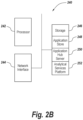
- FIG 2B shows a more detailed view of an illustrative server computing device 240.
- the server computing device 240 may include a processor 240.
- the processor may take numerous different forms, such as those described above for processor 202.
- the server computing device 240 may include a network interface 244 for connecting to a network, like network 112 ( Figure 1 ).
- the server computing device 240 may include storage 246.
- the storage may include different types of storage components and/or devices like those describe above for storage 204.
- the storage 246 is shown storing application store 250 and application hub server 248.
- the application store is an application repository
- the application hub server 248 is a server component for the application hub.
- the storage may also store the analytical services platform 252.
- the application hub may have server-side components and client-side components.
- the application hub may follow a client/server paradigm where the server serves the client.
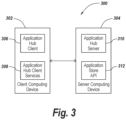
- Figure 3 shows a diagram 300 depicting an illustrative configuration.
- the diagram 300 shows a client computing device 302 and a server computing device 304.
- Application hub client 306 and application hub client services 308 are on the client computing device.
- Application hub server 310 and application store API are on the server computing device 304.
- the application hub facilitates a single login for a user for multiple applications.
- Figure 4 shows a flowchart 400 of steps that may be performed for such a single login functionality.
- the application hub may transmit a login interface to the client computing device (402).
- the user interface may, in some embodiments, be part of a webpage transmitted as an HTML file, XML file or in another format for display at the client computing device.
- Figure 5 shows an example of an illustrative login user interface 500.
- a text box 502 is provided for a used to enter a username.
- a text box 504 is provided for a user to enter a password.
- a login button 506 may be activated (such as by clicking on the login button 506).
- the credentials are then sent and received (404) and send to an identity server (406).
- the identity server may be resident on the server computing system and provided as part of the analytical services platform.
- the identity server determines if a proper username and password were entered (408). If valid credentials were provided, access to the application hub is granted and an access token is provided to the client (410). The access token may be subsequently submitted to show access rights when applications are launched. If valid credentials are not provided, access to the application hub is denied (412).
- FIG. 6 shows a diagram of what steps may be performed.
- the user 602 requests 604 to load the applications.
- a first request 608 may be made to get a list of the applications suitable for the user but is returned as unauthorized 612 as the user is not logged in.
- the user logs in and the credentials are sent to the identity server 616 as mentioned above.
- An access token is returned 618 from the identity server 616 in the case where valid credentials were provided.
- Another request 628 to get applications may be submitted to the application hub server 610.
- a request 622 to get the list of applications from the app store 624 may be sent in response.
- the app store 624 returns the list of applications 626 that are available and suitable for the user.
- the list may include information for each application, such as application ID, application name and icon.
- the list may be transmitted as a JavaScript Object Notation (JSON) file in some exemplary embodiments.
- JSON JavaScript Object Notation
- the information in the list may then be sent 628 to the client and used to display the applications in the list of the application hub user interface 630.
- the applications may include applications installed on the client computing device as well as applications installed on a server and accessible at the client computing device, such as through a web browser over a web interface.
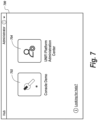
- Figure 7 shows an example of a user interface 700 displaying applications that are available to the user.
- a first icon 702 is displayed for a console demo application and a second icon 704 is displayed for the platform administration center.
- the names of these applications and the information shown in the icons may be derived from the JSON file list of applications.
- the background of the icon 702 is filled in with a solid color to denote that the console demo application has already been installed on the client computing device and that are not server installed.
- a list of installed applications may be maintained and used to determine if an application has been installed or not.
- the background of icon 704 is transparent to indicate that the platform administration center application is available but has not yet been installed.
- Other visual cues may be used to distinguish installed application from uninstalled applications. For instance, different colors for the icons may be used, the shapes of the icons may vary, text may be provided in the icons to identify an application as installed or uninstalled, etc.
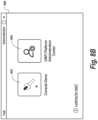
- a user may initiate installation of an application by taking a designated action via the user interface, such as by, for example, pointing a pointer at a cursor at an icon and clicking may trigger installation of an application. It should be appreciated that other actions to select the application icon or activate the icon may be used. Moreover, user interface elements, such as menus and activatable control may be used to initiate application installation. In the example of Figure 7 , clicking on the icon 704 may initiate the installation of the platform application console. Once the icon 704 is selected, the appearance of the icon may be changed to be like that of icon 802 in the user interface shown in Figure 8A to indicate that installation is in progress. The icon 802 for the console demo does not change. Once the installation is complete, the icon 804 ( Figure 8B ) changes to have a solid background rather than a transparent background to indicate that the platform administration console has been installed.
- Figure 9 shows a diagram 900 depicting steps that may be taken to install an application in an exemplary embodiment.
- the installation may be initiated when a user 902 clicks 904 on an icon for an uninstalled application displayed as part of the application hub user interface 906 on the client computing device 904.
- other actions via the user interface may trigger installation of an uninstalled application.
- the application ID 908 for the uninstalled application is provided to the application hub client service administrator 910.
- the hub client services 910 initiates a request 912 to get an installer program for the uninstalled application with the specified application ID via the Appstore API.
- the installer is received 916 by the application hub client services 910.
- the application is then installed locally on the client computing device using the installer and the manifest of installed applications is updated 918.
- the installed application is displayed as installed 920 in the application hub user interface 922.
- Figure 10 depicts actions taken to launch an installed application.
- a user 1002 may take an action, such as clicking on an installed application icon 1004 of the application hub user interface 1006, to initiate the launching of the installed application.
- a request 1008 is sent to get details regarding the application from the Appstore 1010. These details are returned 1012 from the Appstore 1010 and are used in formulating a request for an authorization code for the application 1014 that is sent to the identity server 1016. If the user is authorized, the identity server returns 1018 an authorization code for the application.
- the application is launched, and the authorization code is passed 1020 to the Appstore 1022.
- the Appstore 1022 requests an access token 1024, that is passed 1026 to the Appstore 1022 from the identity server 1016. The authorized services are called using the access token 1028.
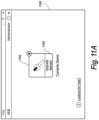
- Figure 11A provides an example of an icon 1102 on the application hub user interface 1100 indicating that the console demo application needs to be updated.
- the icon 1102 includes the text "Upgrade Needed" to provide a visual clue that an update is warranted. Taking an action such as clicking on the icon 1102 may initiate the updating of the application. Other user interface actions may initiate the updating in some embodiments.
- the icon 1102 may change appearance such as shown in Figure 11B to indicate that the update is in progress.
- the update is realized by installing the updated version of the application, such as was described above relative to Figure 9 .
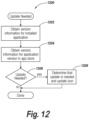
- FIG. 12 provides a flowchart 1200 of steps that may be performed to determine if an installed application on the client computing device is current or not.
- Version information for the installed application on the client computing device is obtained (1202). In some instances, this may entail looking at product codes and upgrade codes for the installed applications. This information may be associated with the manifest in some cases.
- the version information may also be obtained for the version available at the Appstore (1204).
- the version information regarding the applications are compared and a determination is made whether an update of the installed application is needed (1206). If an update is needed, the icon or other user interface element may be modified to note that an update is needed (1208). If no update is needed, no further action is needed.
- an environment 1300 includes the applications: application hub client 1302, application hub clients service administrator 1304 and application hub server 1306, as described above.
- a logger 1308 logs events that occur with the applications 1302, 1304 and 1306.
- the logger 1308 may in some embodiments be realized as a logging library, such as Serilog, that provides the functionality of logging events, filtering and forwarding the log entries regarding events to designated locations. Other logging tools may be used.
- the logger 1308 logs the events into logs 1310. Separate logs may be provided for each application.
- the log entries may be viewed using log viewing tools, such as Glogg or BareTail, for example.
- the logger 1308 may allow the customization of the logging on a per application basis.
- the logging may be customized to specify the level of logging.
- the level specifies how much information and what type of information regarding events is logged.
- This table provides information regarding what may be appropriate log levels and provides examples: Log Level Details Log level example in config file Verbose Very low level debugging / internal info "LogLevel”: “Verbose” Debug Low level control logic, diagnostic info “LogLevel”: “Debug” Informatio n Non internals information - what the system is doing "LogLevel”: "Information” Warning Information about possible problems "LogLevel”: “Warning", Error Unexpected failure - the system can still continue “LogLevel”: “Error”, Fatal Stops the system and cannot continue “LogLevel”: “Fatal” ,
- the messages may include time stamps, level information and textual information regarding the event.
- the logger 1308 may log informational messages debug messages and error messages for the applications in an exemplary embodiment.
- the informational messages provide information regarding events in the application, whereas the error messages provide information regarding errors that occur in the application.
- the debug messages provide diagnostic information and low level control logic.
- the resulting logs 1310 may be monitored to obtain ongoing information regarding the applications 1302, 1304 and 1306. Moreover, alerts may be triggered for errors based on the logging information, in the logs 1310 metrics may be gathered from the logging information in the logs 1310 and useful debugging information may be extracted from the logging information in the logs 1310.
- Each of the logs 1310 may have a size limit, such that when the limit is reached, a new log is created automatically.
Landscapes
- Engineering & Computer Science (AREA)
- General Engineering & Computer Science (AREA)
- Theoretical Computer Science (AREA)
- Software Systems (AREA)
- Physics & Mathematics (AREA)
- General Physics & Mathematics (AREA)
- Computer Security & Cryptography (AREA)
- Computer Networks & Wireless Communication (AREA)
- Signal Processing (AREA)
- Computer Hardware Design (AREA)
- Computing Systems (AREA)
- Human Computer Interaction (AREA)
- Stored Programmes (AREA)
Description
- This application claims the benefit of and priority to
U.S. Provisional Patent Application No. 62/913,603, filed on October 10, 2019 - Users of mass spectrometry systems and liquid chromatography systems have to contend with a disjointed landscape of software tools. There may be separate tools for the different types of systems. Moreover, there may be separate software tools for each type of functionality, such as data acquisition, data processing, visualization, reporting and compliance. In addition, a user must separately login to each of the tools to gain access to the tools.
- A prior art method for installing an offered web application or browser extension in a web browser is known from
US 2013/247030 A1 . - There is a need for an integrated solution for the software tools for analytical devices such as mass spectrometry and liquid chromatography devices. The exemplary embodiments attempt to address this need.
- According to the present invention in a first aspect, there is provided a method as recited by Claim 1. According to the present invention in a further aspect, there is provided a non-transitory computer-readable storage medium as recited by Claim 4. Further, preferable, features are presented in the dependent claims.
-
-
Figure 1 depicts a block diagram of an environment suitable for practicing exemplary embodiments. -
Figure 2A depicts a block diagram of an illustrative client computing device. -
Figure 2B depicts a block diagram of an illustrative server computing device. -
Figure 3 depicts a block diagram of illustrative components of an application hub. -
Figure 4 depicts a flowchart of steps that may be performed for a user to login to an application hub in exemplary embodiments. -
Figure 5 depicts an illustrative login user interface for an application hub. -
Figure 6 depicts actions that may be taken to display applications on an application hub user interface in exemplary embodiments. -
Figure 7 depicts an illustrative user interface for an application hub wherein an application is installed and another application is uninstalled. -
Figure 8A depicts a user interface illustrating the changing appearance of an application icon to indicate that the installation of the application is underway. -
Figure 8B depicts the user interface ofFigure 8A after installation of the previously uninstalled application is completed. -
Figure 9 depicts actions that may be taken to install an application on a client computing device in exemplary embodiments. -
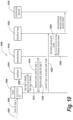
Figure 10 depicts actions that may be taken to launch an application in exemplary embodiments. -
Figure 11A depicts an illustrative icon for an application that needs to be updated. -
Figure 11B depicts a changing appearance of the icon ofFigure 11A to reflect that an update of the application is underway. -
Figure 12 depicts a flowchart of the steps that may be performed to determine is an update is needed for an application in exemplary embodiments. -
Figure 13 depicts a block diagram of an environment for logging log messages for applications in an exemplary embodiment. - Exemplary embodiments described herein provide an application hub for applications of an analytical services platform. The analytical services platform may receive data from analytical devices and provide services, such as but not limited to filtering, processing and visualizing of the data. The application hub may act as a landing site for users on client devices to launch applications for the analytical services platform. In some exemplary embodiments, the application hub may provide a web page to the client computing devices over a network. The web page may provide a user interface listing applications for the analytical services platform. Users may launch the applications through the user interface, such as by selecting user interface elements provided for the applications.
- The user interface may identify what applications have been installed on a client device and what applications have not been installed. For example, visual cues may be provided on the user interface that distinguish between installed applications and uninstalled applications. This provides a quick and easy way for a user to know what applications are available for installation. The user interface may also provide a mechanism for a user to install an application that is uninstalled on a client computing device. In some exemplary embodiments, icons are provided for each of the applications and taking an action, such as selection of the icon or otherwise activating the icon, initiates installation of the application on the client computing device.
- The user interface may also identify when an application needs to be upgraded. For instance, visual cues of the need for an upgrade may be provided. An icon associated with the application may have a modified appearance indicating that an upgrade is needed. The need for an upgrade may be automatically determined without the need for user intervention by comparing a version number of the application installed on the client device with a version number of the application that is available for installation. A user may initiate the upgrade of an application through the user interface. In one instance, a user selects an icon associated with the application to initiate the upgrade. The upgrade is realized by installing the upgraded version of the application on the client device.
- Since the application hub is intended to be a single landing site for all applications, a single login may be provided. In particular, a user may be prompted to provide their credentials when seeking access to the application hub. Once the user is successfully logged in, the user may not need to provide credentials again to launch the applications shown on the user interface. This simplifies the process of launching applications by eliminating the need for the user to login or otherwise demonstrate credentials for each application.
-
Figure 1 shows an example of anenvironment 100 that may be suitable for practicing exemplary embodiments. The depiction is intended to be illustrative and not limiting. Theenvironment 100 may includeanalytical devices - In exemplary embodiments, an analytical service may include a process and any process information (for instance, parameters, settings, thresholds, and/or the like) that are required to perform a process, method, analysis, test, and/or the like on an analytical device. In some embodiments, an analytical service may be developed, refined, tuned, and/or the like using a primary analytical system.
- The
analytical devices laboratory network device 106 may be provided to interface with theanalytical devices laboratory network device 106 facilitates communication with the analytical devices and enables data gathered from theanalytical devices network 112 and accessible byclient computing device client devices network 112 with aserver 114. Theserver 114 may be a server computing device and may run computer program code foranalytical services platform 116 andapplication hub 118. Theanalytical services platform 116 and theapplication hub 118 need not be resident on asingle server 114. In addition, theanalytical services platform 116 may be spread across multiple servers a in some instances. Thenetwork 112 may be a wide area network (WAN), such as the internet, and may include wireless networking components as well as har-wired networking components. - The
analytical services platform 116 may perform analytical services on data obtained from theanalytical devices analytical services platform 116 may provide data acquisition, processing, visualization, reporting, and configurable compliance tools within a networked environment. One non-limiting example of an analytical services platform is the UNIFI scientific information systems platform from Waters Corporation of Milford, Massachusetts. - As was discussed above, the
applications hub 118 serves as a central hub where users may locate and execute applications on client computing devices for 108 and 110 for theanalytical services platform 116. -
Figure 2A depicts a more detailed view of an illustrativeclient computing device 200. The client computing device includes aprocessor 202. Theprocessor 202 may take many different forms. For example, theprocessor 202 may include a central processing unit (CPU) realized as an integrated circuit, an application specific integrated circuit (ASIC), a programmable logic device (PLD), a digital signal processor (DSP), field programmable gate array (FPGA), a system-on-a-chip (SoC) or electric circuitry. Theprocessor 202 may include multiple cores. Theprocessor 202 may executes computer-executable instructions stored in thestorage 204. - The
storage 204 may include one or more types of storage devices. For instance, thestorage 204 may include various types of computer-readable storage media and/or systems in the form of one or more higher speed memory units, such as read-only memory (ROM), random-access memory (RAM), dynamic RAM (DRAM), Double-Data-Rate DRAM (DDRAM), synchronous DRAM (SDRAM), static RAM (SRAM), programmable ROM (PROM), erasable programmable ROM (EPROM), electrically erasable programmable ROM (EEPROM), flash memory, polymer memory such as ferroelectric polymer memory, ovonic memory, phase change or ferroelectric memory, silicon-oxide-nitride-oxide-silicon (SONOS) memory, magnetic or optical cards, an array of devices such as Redundant Array of Independent Disks (RAID) drives, solid state memory devices (e.g., USB memory, solid state drives (SSD) and any other type of storage media suitable for storing information. In addition,storage 204 may include various types of computer-readable storage media in the form of one or more lower speed memory units, including an internal (or external) hard disk drive (HDD), a magnetic floppy disk drive (FDD), and an optical disk drive to read from or write to a removable optical disk (e.g., a CD-ROM or DVD), a solid state drive (SSD), and/or the like. - The
storage 204 may hold data, documents and computer programs. In the depiction inFigure 2A , thestorage stores applications 208 andcomponents hub client services 206 that provides client services and has administrative privileges. Thesecomponents - The
client computing device 200 may include adisplay device 212, such as a liquid crystal display (LCD) or a light emitting diode (LED) display, or the like. Theclient computing device 200 may include anetwork interface 216 for interfacing with a network andinput devices 214, such as a keyboard, mouse, thumbpad, etc. -
Figure 2B shows a more detailed view of an illustrativeserver computing device 240. Theserver computing device 240 may include aprocessor 240. The processor may take numerous different forms, such as those described above forprocessor 202. Theserver computing device 240 may include anetwork interface 244 for connecting to a network, like network 112 (Figure 1 ). Theserver computing device 240 may includestorage 246. The storage may include different types of storage components and/or devices like those describe above forstorage 204. Thestorage 246 is shown storingapplication store 250 andapplication hub server 248. As will be described in more detail below, the application store is an application repository, and theapplication hub server 248 is a server component for the application hub. The storage may also store theanalytical services platform 252. - The application hub may have server-side components and client-side components. The application hub may follow a client/server paradigm where the server serves the client.
Figure 3 shows a diagram 300 depicting an illustrative configuration. The diagram 300 shows aclient computing device 302 and aserver computing device 304.Application hub client 306 and applicationhub client services 308 are on the client computing device.Application hub server 310 and application store API are on theserver computing device 304. - As was mentioned above, the application hub facilitates a single login for a user for multiple applications.
Figure 4 shows aflowchart 400 of steps that may be performed for such a single login functionality. Initially, the application hub may transmit a login interface to the client computing device (402). The user interface may, in some embodiments, be part of a webpage transmitted as an HTML file, XML file or in another format for display at the client computing device.Figure 5 shows an example of an illustrative login user interface 500. Atext box 502 is provided for a used to enter a username. Atext box 504 is provided for a user to enter a password. Once the username and password have been entered, alogin button 506 may be activated (such as by clicking on the login button 506). The credentials (i.e., username and password) are then sent and received (404) and send to an identity server (406). The identity server may be resident on the server computing system and provided as part of the analytical services platform. The identity server determines if a proper username and password were entered (408). If valid credentials were provided, access to the application hub is granted and an access token is provided to the client (410). The access token may be subsequently submitted to show access rights when applications are launched. If valid credentials are not provided, access to the application hub is denied (412). - A number of different steps must be taken in order for the application hub to display a user interface with a list of applications for the analytical services platform to be displayed.
Figure 6 shows a diagram of what steps may be performed. Initially, theuser 602requests 604 to load the applications. Afirst request 608 may be made to get a list of the applications suitable for the user but is returned as unauthorized 612 as the user is not logged in. The user logs in and the credentials are sent to theidentity server 616 as mentioned above. An access token is returned 618 from theidentity server 616 in the case where valid credentials were provided. Anotherrequest 628 to get applications may be submitted to theapplication hub server 610. Arequest 622 to get the list of applications from theapp store 624 may be sent in response. Theapp store 624 returns the list ofapplications 626 that are available and suitable for the user. The list may include information for each application, such as application ID, application name and icon. The list may be transmitted as a JavaScript Object Notation (JSON) file in some exemplary embodiments. The information in the list may then be sent 628 to the client and used to display the applications in the list of the applicationhub user interface 630. The applications may include applications installed on the client computing device as well as applications installed on a server and accessible at the client computing device, such as through a web browser over a web interface. -
Figure 7 shows an example of auser interface 700 displaying applications that are available to the user. In this instance, afirst icon 702 is displayed for a console demo application and asecond icon 704 is displayed for the platform administration center. The names of these applications and the information shown in the icons may be derived from the JSON file list of applications. The background of theicon 702 is filled in with a solid color to denote that the console demo application has already been installed on the client computing device and that are not server installed. A list of installed applications may be maintained and used to determine if an application has been installed or not. In contrast, the background oficon 704 is transparent to indicate that the platform administration center application is available but has not yet been installed. Other visual cues may be used to distinguish installed application from uninstalled applications. For instance, different colors for the icons may be used, the shapes of the icons may vary, text may be provided in the icons to identify an application as installed or uninstalled, etc. - A user may initiate installation of an application by taking a designated action via the user interface, such as by, for example, pointing a pointer at a cursor at an icon and clicking may trigger installation of an application. It should be appreciated that other actions to select the application icon or activate the icon may be used. Moreover, user interface elements, such as menus and activatable control may be used to initiate application installation. In the example of
Figure 7 , clicking on theicon 704 may initiate the installation of the platform application console. Once theicon 704 is selected, the appearance of the icon may be changed to be like that oficon 802 in the user interface shown inFigure 8A to indicate that installation is in progress. Theicon 802 for the console demo does not change. Once the installation is complete, the icon 804 (Figure 8B ) changes to have a solid background rather than a transparent background to indicate that the platform administration console has been installed. -
Figure 9 shows a diagram 900 depicting steps that may be taken to install an application in an exemplary embodiment. The installation may be initiated when auser 902clicks 904 on an icon for an uninstalled application displayed as part of the applicationhub user interface 906 on theclient computing device 904. As was mentioned above, in some exemplary embodiments, other actions via the user interface may trigger installation of an uninstalled application. In response to the clicking on the icon of the uninstalled application, theapplication ID 908 for the uninstalled application is provided to the application hubclient service administrator 910. Thehub client services 910 initiates arequest 912 to get an installer program for the uninstalled application with the specified application ID via the Appstore API. The installer is received 916 by the application hub client services 910. The application is then installed locally on the client computing device using the installer and the manifest of installed applications is updated 918. The installed application is displayed as installed 920 in the applicationhub user interface 922. - Once the application has been installed, it may be launched for use by the user on the client computing device.
Figure 10 depicts actions taken to launch an installed application. Auser 1002 may take an action, such as clicking on an installedapplication icon 1004 of the applicationhub user interface 1006, to initiate the launching of the installed application. Arequest 1008 is sent to get details regarding the application from theAppstore 1010. These details are returned 1012 from theAppstore 1010 and are used in formulating a request for an authorization code for theapplication 1014 that is sent to theidentity server 1016. If the user is authorized, the identity server returns 1018 an authorization code for the application. The application is launched, and the authorization code is passed 1020 to theAppstore 1022. TheAppstore 1022 requests anaccess token 1024, that is passed 1026 to theAppstore 1022 from theidentity server 1016. The authorized services are called using the access token 1028. - As was mentioned above, the user interface from the application hub may indicate that an installed application needs an update.
Figure 11A provides an example of anicon 1102 on the applicationhub user interface 1100 indicating that the console demo application needs to be updated. Theicon 1102 includes the text "Upgrade Needed" to provide a visual clue that an update is warranted. Taking an action such as clicking on theicon 1102 may initiate the updating of the application. Other user interface actions may initiate the updating in some embodiments. Theicon 1102 may change appearance such as shown inFigure 11B to indicate that the update is in progress. The update is realized by installing the updated version of the application, such as was described above relative toFigure 9 . - The displaying of an icon indicating that an upgrade is needed may be prompted by a user selecting the icon or by a process performed regularly to ensure that all applications on the client computing device are current.
Figure 12 provides aflowchart 1200 of steps that may be performed to determine if an installed application on the client computing device is current or not. Version information for the installed application on the client computing device is obtained (1202). In some instances, this may entail looking at product codes and upgrade codes for the installed applications. This information may be associated with the manifest in some cases. The version information may also be obtained for the version available at the Appstore (1204). The version information regarding the applications are compared and a determination is made whether an update of the installed application is needed (1206). If an update is needed, the icon or other user interface element may be modified to note that an update is needed (1208). If no update is needed, no further action is needed. - The exemplary embodiments may support logging of event information from the applications. As shown in
Figure 13 , anenvironment 1300 includes the applications:application hub client 1302, application hubclients service administrator 1304 andapplication hub server 1306, as described above. Alogger 1308 logs events that occur with theapplications logger 1308 may in some embodiments be realized as a logging library, such as Serilog, that provides the functionality of logging events, filtering and forwarding the log entries regarding events to designated locations. Other logging tools may be used. Thelogger 1308 logs the events intologs 1310. Separate logs may be provided for each application. The log entries may be viewed using log viewing tools, such as Glogg or BareTail, for example. - The
logger 1308 may allow the customization of the logging on a per application basis. The logging may be customized to specify the level of logging. The level specifies how much information and what type of information regarding events is logged. This table provides information regarding what may be appropriate log levels and provides examples:Log Level Details Log level example in config file Verbose Very low level debugging / internal info "LogLevel": "Verbose" Debug Low level control logic, diagnostic info "LogLevel": "Debug" Informatio n Non internals information - what the system is doing "LogLevel": "Information" Warning Information about possible problems "LogLevel": "Warning", Error Unexpected failure - the system can still continue "LogLevel": "Error", Fatal Stops the system and cannot continue "LogLevel": "Fatal" , - The messages may include time stamps, level information and textual information regarding the event. The
logger 1308 may log informational messages debug messages and error messages for the applications in an exemplary embodiment. The informational messages provide information regarding events in the application, whereas the error messages provide information regarding errors that occur in the application. As described above, the debug messages provide diagnostic information and low level control logic. - Here are some examples of information and error log messages for the application hub client 1302:
- Client Information Messages:
- Information: "Application is starting"
- Information: "Application has exited"
- Information: "AppClick() called with app id <applicationID>"
- Information: "LaunchDefaultBrowser() called with URL <URL>"
- Information: "Process <ProcessName> has been started"
- Information: "Requested url <Address>"
- Client Error Messages :
- Error: "<AppConfigErrors>" // Failed to read application config
- Error: "Application terminated <Exception details>"
- Error: "Unhandled Exception <Exception details>" //Unhandled Exception on Startup of the waters_connect Hub
- Error: "Communication with application hub failed <Exception details>"
- Error: "Clicked on unknown application type <applicationID>"
- Error: "LaunchDefaultBrowser() error: <Exception details>"
- Error: "AppClick() error: <Exception details> on desktop app"
- Error: "AppClick() error: <Exception details> on web app"
- Error: "Failed to start process <FileOrUrl> <Exception details>"
- Error: "Failed to start process <processName> <Exception details>"
- Error: "AppsPageController.GetApps() error: <Exception details>"
- Error: "Cannot display page; <Exception details>"
- Error: "Requested url: <AbsoluteUri> is not allowed!"
- Here are some examples of the information and error messages that may be logged for the application hub client services:
- Application Hub Client Services Information Messages:
- Information: "Application <applicationID> install status: <IsInstalled>"
- Information: "Starting installing application: <applicationID>"
- Information: "Application <applicationID> install status: <IsInstalled>"
- Information: "Gets the list of installed applications to display in the client"
- Information: "Install app (if not available) and return app details for app id:
<applicationID>" - Information: "Application is starting"
- Information: "Starting server"
- Information: "Configuring services"
- Information: "Configuring Server"
- Warning: "Server is running in developer mode"
- Application Hub Client Services Error Messages:
- Error: "Call to AppStore endpoint GetApplications failed with status: <AppStore Response StatusCode> <Exception details> <Exception details>"
- Error: "Call to AppStore endpoint GetWebApplication for <applicationID> failed with status: <AppStore Response StatusCode> <Exception details>"
- Error: "Call to AppStore endpoint GetDesktopApplication for <applicationID> failed. <Exception details>"
- Error: "Call to AppStore endpoint GetDesktopApplication for <applicationID> failed with status: <AppStore Response StatusCode> <Exception details>"
- Error: "The path to the installer is not correct <installerPath>"
- Error: "The installation failed for <installerPath> <Exception details>"
- Error: "Unable to download installer for app <applicationID> from AppStore. Returned <installerResponseStatusCode>"
- Error: "Error in GetApplications <Exception details>"
- Error: "Error: " AppStore is not available. Contact your system administrator. <Exception details>"
- Error: "Instalation error. Cannot install <ApplicationName> on the hub. Contact your system
administrator. <Exception details>" - Error: "InternalServerError <Exception details>"
- Error: InternalServerError AppStore is not available. <Exception details>"
- Error: "Failed Get the web application: <applicationID> <Exception details>"
- Error: "<AppConfigErrors>" // Failed to read application config
- Here are some examples of the information and error messages that may be logged for the application hub server:
- Application Hub Server Information Messages:
- Information: "Application is starting"
- Information: "Starting server"
- Information: "Configuring services"
- Information: "Configuring Server"
- Warning: "Server is running in developer mode"
- Application Hub Server Error Messages:
- Error: "Failed to get localized resource. File not found"
- Error: "Failed to get localized resource; <Exception details>"
- Error: "<AppConfigErrors>" // Failed to read application config.
- The resulting
logs 1310 may be monitored to obtain ongoing information regarding theapplications logs 1310 metrics may be gathered from the logging information in thelogs 1310 and useful debugging information may be extracted from the logging information in thelogs 1310. - Each of the
logs 1310 may have a size limit, such that when the limit is reached, a new log is created automatically. In addition, there may be a limit as to the number of log files. When the limit is reached, the oldest log file may be deleted and a new one may be created. - While the present invention has been described with reference to exemplary embodiments herein, those skilled in the art will appreciate that various changes in form and detail may be made without departing from the intended scope of the invention as defined in the appended claims.
Claims (6)
- A method performed by an application hub computing device (114), comprising:forwarding a user interface to a client computing device (108, 110) from an application hub (118) running on the application hub computing device (114), wherein the application hub (118) serves as a landing site where a client may launch applications for an analytical services platform (116) on the client computing device (108, 110), wherein the analytical services platform (116) is interfaced with at least one analytical device (102, 104) to receive data from the at least one analytical device (102, 104) and to perform one of filtering the received data or processing the received data, wherein the at least one analytical device (102, 104) comprises a chromatography device or a mass spectrometer, and the user interface identifies a selected one of the applications as not installed on the client computing device (108, 110);receiving input via the user interface on the client computing device indicating a request to install the selected application on the client device;based on the received communication, retrieving the selected application from an application repository; andcausing the retrieved selected application to be installed on the client computing device (108, 110).
- The method of claim 1, wherein the application repository is remote from the client computing device.
- The method of claim 1, wherein the input received via the user interface is indicative of selection of a user interface element of the user interface for the selected application.
- A non-transitory computer-readable storage medium holding computer-executable instructions that cause an application hub computing device (114) to perform the following:forward a user interface to a client computing device (108, 110) from an application hub (118) running on the application hub computing device (114), wherein the application hub (118) serves as a landing site where a client may launch applications for an analytical services platform (116) on the client computing device (108, 110), wherein the analytical services platform (116) is interfaced with at least one analytical device (102, 104) to receive data from the at least one analytical device (102, 104) and to perform one of filtering the received data or processing the received data, wherein the at least one analytical device (102, 104) comprises a chromatography device or a mass spectrometer, and the user interface identifies a selected one of the applications as not installed on the client computing device (108, 110);receive input via the user interface on the client computing device indicating a request to install the selected application on the client device;based on the received communication, retrieve the selected application from an application repository; andcause the retrieved selected application to be installed on the client computing device.
- The non-transitory computer-readable storage medium of claim 4, wherein the application repository is remote from the client computing device.
- The non-transitory computer-readable storage medium of claim 4, wherein the input received via the user interface is indicative of selection of a user interface element of the user interface for the selected application.
Applications Claiming Priority (2)
| Application Number | Priority Date | Filing Date | Title |
|---|---|---|---|
| US201962913603P | 2019-10-10 | 2019-10-10 | |
| PCT/IB2020/059522 WO2021070142A1 (en) | 2019-10-10 | 2020-10-09 | Application hub for applications for an analytical services platform |
Publications (2)
| Publication Number | Publication Date |
|---|---|
| EP4042274A1 EP4042274A1 (en) | 2022-08-17 |
| EP4042274B1 true EP4042274B1 (en) | 2025-06-11 |
Family
ID=72964763
Family Applications (1)
| Application Number | Title | Priority Date | Filing Date |
|---|---|---|---|
| EP20793818.4A Active EP4042274B1 (en) | 2019-10-10 | 2020-10-09 | Application hub for applications for an analytical services platform |
Country Status (4)
| Country | Link |
|---|---|
| US (3) | US11983521B2 (en) |
| EP (1) | EP4042274B1 (en) |
| CN (1) | CN114556280B (en) |
| WO (1) | WO2021070142A1 (en) |
Family Cites Families (17)
| Publication number | Priority date | Publication date | Assignee | Title |
|---|---|---|---|---|
| US8494966B2 (en) * | 2005-06-03 | 2013-07-23 | Adobe Systems Incorporated | Method and apparatus for facilitating the transfer of a software license between computer systems |
| US10298642B2 (en) * | 2016-02-17 | 2019-05-21 | Quickbiz Holdings Limited, Apia | User interface content state synchronization across devices |
| CN103907104B (en) * | 2011-10-27 | 2017-07-18 | 惠普发展公司,有限责任合伙企业 | Application store interface for client device remote management |
| US9135445B2 (en) * | 2012-03-19 | 2015-09-15 | Google Inc. | Providing information about a web application or extension offered by website based on information about the application or extension gathered from a trusted site |
| US20140279550A1 (en) * | 2013-03-14 | 2014-09-18 | Microsoft Corporation | Software Upgrades Using Tokens and Existing Licenses |
| CN103402195B (en) * | 2013-07-29 | 2017-09-26 | 广州供电局有限公司 | The application processing method and enterprise-level mobile solution platform of enterprise-level mobile terminal |
| US9692748B2 (en) * | 2014-09-24 | 2017-06-27 | Oracle International Corporation | Unified provisioning of applications on devices in an enterprise system |
| US11379102B1 (en) * | 2015-10-23 | 2022-07-05 | Perfect Sense, Inc. | Native application development techniques |
| US10749854B2 (en) | 2015-11-12 | 2020-08-18 | Microsoft Technology Licensing, Llc | Single sign-on identity management between local and remote systems |
| US9804834B1 (en) * | 2016-04-19 | 2017-10-31 | Dropbox, Inc. | Automatically updating a hybrid application |
| US10885155B2 (en) * | 2016-06-15 | 2021-01-05 | Shimadzu Corporation | Software license management system and management method |
| US11966560B2 (en) * | 2016-10-26 | 2024-04-23 | Apple Inc. | User interfaces for browsing content from multiple content applications on an electronic device |
| EP3428808A1 (en) * | 2017-07-14 | 2019-01-16 | Vsoft Spolka Akcyjna | Communication between mobile devices and a web application running on a server |
| US10771503B2 (en) | 2018-01-05 | 2020-09-08 | Sap Se | Dissuading stolen password reuse |
| WO2020020443A1 (en) * | 2018-07-24 | 2020-01-30 | Siemens Aktiengesellschaft | Semantics-based internet of things device data processing-related application installation method and apparatus |
| US11176224B2 (en) * | 2018-11-13 | 2021-11-16 | Bank Of America Corporation | Security tool |
| FR3093835B1 (en) * | 2019-03-12 | 2023-01-20 | Amadeus | Computer network for secure access to online applications |
-
2020
- 2020-10-09 EP EP20793818.4A patent/EP4042274B1/en active Active
- 2020-10-09 CN CN202080070871.4A patent/CN114556280B/en active Active
- 2020-10-09 WO PCT/IB2020/059522 patent/WO2021070142A1/en not_active Ceased
- 2020-10-09 US US17/066,726 patent/US11983521B2/en active Active
-
2024
- 2024-04-12 US US18/633,771 patent/US12625695B2/en active Active
- 2024-04-12 US US18/633,881 patent/US12625696B2/en active Active
Also Published As
| Publication number | Publication date |
|---|---|
| WO2021070142A1 (en) | 2021-04-15 |
| EP4042274A1 (en) | 2022-08-17 |
| US12625695B2 (en) | 2026-05-12 |
| US12625696B2 (en) | 2026-05-12 |
| US20210109740A1 (en) | 2021-04-15 |
| CN114556280B (en) | 2025-02-11 |
| US20240256262A1 (en) | 2024-08-01 |
| US11983521B2 (en) | 2024-05-14 |
| CN114556280A (en) | 2022-05-27 |
| US20240256261A1 (en) | 2024-08-01 |
Similar Documents
| Publication | Publication Date | Title |
|---|---|---|
| US11099964B2 (en) | Framework actuator integration | |
| US8868608B2 (en) | System and method for managing a virtual appliance lifecycle | |
| US10177992B2 (en) | Application store interface for remote management of client devices | |
| US20170293496A1 (en) | Dynamic generated web ui for configuration | |
| CN103649949A (en) | Transferring configuration data from a public cloud server and applying onto a mobile client | |
| US12236258B2 (en) | Browser-driven capture of application installations for application virtualization | |
| US20170289281A1 (en) | Systems and Methods for Streamlined Content Download | |
| CN103460204A (en) | Generating and validating custom extensible markup language (XML) configuration on a client embedded image | |
| US10970083B2 (en) | Log in/log out process for EDU mode | |
| US20230403152A1 (en) | Centralization of Authentication Servers for Different Resource Servers | |
| US11614933B2 (en) | Disabling a script based on indications of unsuccessful execution of the script | |
| US10469613B2 (en) | Providing multiple user profiles to a single user | |
| CN108121650B (en) | Method and device for testing page user interface | |
| US12137136B2 (en) | Smart URL integration using serverless service | |
| CA2716218A1 (en) | Methods, apparatuses, and computer program products for facilitating management of a computing system | |
| US12625695B2 (en) | Application hub for applications for an analytical services platform | |
| US9479664B2 (en) | Use of resource server for imaging device application payload | |
| US9354853B2 (en) | Performing administrative tasks associated with a network-attached storage system at a client | |
| US11038988B2 (en) | System and methods for providing user analytics and performance feedback for web applications | |
| US8601175B1 (en) | Managing on-site access to ecosystem features | |
| US12541641B2 (en) | Custom formulas in office cloud platform add-in | |
| US9298597B2 (en) | Automated testing of websites based on mode | |
| Redmond | QlikView Server and Publisher | |
| Vukotic et al. | Using Tomcat’s Manager Web Application |
Legal Events
| Date | Code | Title | Description |
|---|---|---|---|
| STAA | Information on the status of an ep patent application or granted ep patent |
Free format text: STATUS: UNKNOWN |
|
| STAA | Information on the status of an ep patent application or granted ep patent |
Free format text: STATUS: THE INTERNATIONAL PUBLICATION HAS BEEN MADE |
|
| PUAI | Public reference made under article 153(3) epc to a published international application that has entered the european phase |
Free format text: ORIGINAL CODE: 0009012 |
|
| STAA | Information on the status of an ep patent application or granted ep patent |
Free format text: STATUS: REQUEST FOR EXAMINATION WAS MADE |
|
| 17P | Request for examination filed |
Effective date: 20220331 |
|
| AK | Designated contracting states |
Kind code of ref document: A1 Designated state(s): AL AT BE BG CH CY CZ DE DK EE ES FI FR GB GR HR HU IE IS IT LI LT LU LV MC MK MT NL NO PL PT RO RS SE SI SK SM TR |
|
| DAV | Request for validation of the european patent (deleted) | ||
| DAX | Request for extension of the european patent (deleted) | ||
| GRAP | Despatch of communication of intention to grant a patent |
Free format text: ORIGINAL CODE: EPIDOSNIGR1 |
|
| STAA | Information on the status of an ep patent application or granted ep patent |
Free format text: STATUS: GRANT OF PATENT IS INTENDED |
|
| RIC1 | Information provided on ipc code assigned before grant |
Ipc: G06F 9/451 20180101ALI20241213BHEP Ipc: G06F 8/61 20180101AFI20241213BHEP |
|
| INTG | Intention to grant announced |
Effective date: 20250116 |
|
| GRAS | Grant fee paid |
Free format text: ORIGINAL CODE: EPIDOSNIGR3 |
|
| GRAA | (expected) grant |
Free format text: ORIGINAL CODE: 0009210 |
|
| STAA | Information on the status of an ep patent application or granted ep patent |
Free format text: STATUS: THE PATENT HAS BEEN GRANTED |
|
| AK | Designated contracting states |
Kind code of ref document: B1 Designated state(s): AL AT BE BG CH CY CZ DE DK EE ES FI FR GB GR HR HU IE IS IT LI LT LU LV MC MK MT NL NO PL PT RO RS SE SI SK SM TR |
|
| REG | Reference to a national code |
Ref country code: GB Ref legal event code: FG4D |
|
| REG | Reference to a national code |
Ref country code: CH Ref legal event code: EP |
|
| P01 | Opt-out of the competence of the unified patent court (upc) registered |
Free format text: CASE NUMBER: APP_23513/2025 Effective date: 20250516 |
|
| REG | Reference to a national code |
Ref country code: IE Ref legal event code: FG4D |
|
| REG | Reference to a national code |
Ref country code: DE Ref legal event code: R096 Ref document number: 602020052667 Country of ref document: DE |
|
| PG25 | Lapsed in a contracting state [announced via postgrant information from national office to epo] |
Ref country code: ES Free format text: LAPSE BECAUSE OF FAILURE TO SUBMIT A TRANSLATION OF THE DESCRIPTION OR TO PAY THE FEE WITHIN THE PRESCRIBED TIME-LIMIT Effective date: 20250611 Ref country code: FI Free format text: LAPSE BECAUSE OF FAILURE TO SUBMIT A TRANSLATION OF THE DESCRIPTION OR TO PAY THE FEE WITHIN THE PRESCRIBED TIME-LIMIT Effective date: 20250611 |
|
| REG | Reference to a national code |
Ref country code: LT Ref legal event code: MG9D |
|
| PG25 | Lapsed in a contracting state [announced via postgrant information from national office to epo] |
Ref country code: GR Free format text: LAPSE BECAUSE OF FAILURE TO SUBMIT A TRANSLATION OF THE DESCRIPTION OR TO PAY THE FEE WITHIN THE PRESCRIBED TIME-LIMIT Effective date: 20250912 Ref country code: NO Free format text: LAPSE BECAUSE OF FAILURE TO SUBMIT A TRANSLATION OF THE DESCRIPTION OR TO PAY THE FEE WITHIN THE PRESCRIBED TIME-LIMIT Effective date: 20250911 |
|
| REG | Reference to a national code |
Ref country code: NL Ref legal event code: MP Effective date: 20250611 |
|
| PG25 | Lapsed in a contracting state [announced via postgrant information from national office to epo] |
Ref country code: BG Free format text: LAPSE BECAUSE OF FAILURE TO SUBMIT A TRANSLATION OF THE DESCRIPTION OR TO PAY THE FEE WITHIN THE PRESCRIBED TIME-LIMIT Effective date: 20250611 |
|
| PGFP | Annual fee paid to national office [announced via postgrant information from national office to epo] |
Ref country code: GB Payment date: 20250923 Year of fee payment: 6 |
|
| PG25 | Lapsed in a contracting state [announced via postgrant information from national office to epo] |
Ref country code: HR Free format text: LAPSE BECAUSE OF FAILURE TO SUBMIT A TRANSLATION OF THE DESCRIPTION OR TO PAY THE FEE WITHIN THE PRESCRIBED TIME-LIMIT Effective date: 20250611 |
|
| PG25 | Lapsed in a contracting state [announced via postgrant information from national office to epo] |
Ref country code: RS Free format text: LAPSE BECAUSE OF FAILURE TO SUBMIT A TRANSLATION OF THE DESCRIPTION OR TO PAY THE FEE WITHIN THE PRESCRIBED TIME-LIMIT Effective date: 20250911 |
|
| PG25 | Lapsed in a contracting state [announced via postgrant information from national office to epo] |
Ref country code: LV Free format text: LAPSE BECAUSE OF FAILURE TO SUBMIT A TRANSLATION OF THE DESCRIPTION OR TO PAY THE FEE WITHIN THE PRESCRIBED TIME-LIMIT Effective date: 20250611 |
|
| PG25 | Lapsed in a contracting state [announced via postgrant information from national office to epo] |
Ref country code: NL Free format text: LAPSE BECAUSE OF FAILURE TO SUBMIT A TRANSLATION OF THE DESCRIPTION OR TO PAY THE FEE WITHIN THE PRESCRIBED TIME-LIMIT Effective date: 20250611 |
|
| PG25 | Lapsed in a contracting state [announced via postgrant information from national office to epo] |
Ref country code: PT Free format text: LAPSE BECAUSE OF FAILURE TO SUBMIT A TRANSLATION OF THE DESCRIPTION OR TO PAY THE FEE WITHIN THE PRESCRIBED TIME-LIMIT Effective date: 20251013 |
|
| REG | Reference to a national code |
Ref country code: AT Ref legal event code: MK05 Ref document number: 1802806 Country of ref document: AT Kind code of ref document: T Effective date: 20250611 |
|
| PG25 | Lapsed in a contracting state [announced via postgrant information from national office to epo] |
Ref country code: IS Free format text: LAPSE BECAUSE OF FAILURE TO SUBMIT A TRANSLATION OF THE DESCRIPTION OR TO PAY THE FEE WITHIN THE PRESCRIBED TIME-LIMIT Effective date: 20251011 |
|
| PGFP | Annual fee paid to national office [announced via postgrant information from national office to epo] |
Ref country code: DE Payment date: 20250923 Year of fee payment: 6 |
|
| PG25 | Lapsed in a contracting state [announced via postgrant information from national office to epo] |
Ref country code: SM Free format text: LAPSE BECAUSE OF FAILURE TO SUBMIT A TRANSLATION OF THE DESCRIPTION OR TO PAY THE FEE WITHIN THE PRESCRIBED TIME-LIMIT Effective date: 20250611 Ref country code: AT Free format text: LAPSE BECAUSE OF FAILURE TO SUBMIT A TRANSLATION OF THE DESCRIPTION OR TO PAY THE FEE WITHIN THE PRESCRIBED TIME-LIMIT Effective date: 20250611 |
|
| PG25 | Lapsed in a contracting state [announced via postgrant information from national office to epo] |
Ref country code: CZ Free format text: LAPSE BECAUSE OF FAILURE TO SUBMIT A TRANSLATION OF THE DESCRIPTION OR TO PAY THE FEE WITHIN THE PRESCRIBED TIME-LIMIT Effective date: 20250611 |
|
| PG25 | Lapsed in a contracting state [announced via postgrant information from national office to epo] |
Ref country code: PL Free format text: LAPSE BECAUSE OF FAILURE TO SUBMIT A TRANSLATION OF THE DESCRIPTION OR TO PAY THE FEE WITHIN THE PRESCRIBED TIME-LIMIT Effective date: 20250611 |
|
| PG25 | Lapsed in a contracting state [announced via postgrant information from national office to epo] |
Ref country code: EE Free format text: LAPSE BECAUSE OF FAILURE TO SUBMIT A TRANSLATION OF THE DESCRIPTION OR TO PAY THE FEE WITHIN THE PRESCRIBED TIME-LIMIT Effective date: 20250611 |
|
| PG25 | Lapsed in a contracting state [announced via postgrant information from national office to epo] |
Ref country code: SK Free format text: LAPSE BECAUSE OF FAILURE TO SUBMIT A TRANSLATION OF THE DESCRIPTION OR TO PAY THE FEE WITHIN THE PRESCRIBED TIME-LIMIT Effective date: 20250611 |
|
| PG25 | Lapsed in a contracting state [announced via postgrant information from national office to epo] |
Ref country code: RO Free format text: LAPSE BECAUSE OF FAILURE TO SUBMIT A TRANSLATION OF THE DESCRIPTION OR TO PAY THE FEE WITHIN THE PRESCRIBED TIME-LIMIT Effective date: 20250611 |
|
| REG | Reference to a national code |
Ref country code: DE Ref legal event code: R097 Ref document number: 602020052667 Country of ref document: DE |
|
| PG25 | Lapsed in a contracting state [announced via postgrant information from national office to epo] |
Ref country code: DK Free format text: LAPSE BECAUSE OF FAILURE TO SUBMIT A TRANSLATION OF THE DESCRIPTION OR TO PAY THE FEE WITHIN THE PRESCRIBED TIME-LIMIT Effective date: 20250611 |
|
| PG25 | Lapsed in a contracting state [announced via postgrant information from national office to epo] |
Ref country code: IT Free format text: LAPSE BECAUSE OF FAILURE TO SUBMIT A TRANSLATION OF THE DESCRIPTION OR TO PAY THE FEE WITHIN THE PRESCRIBED TIME-LIMIT Effective date: 20250611 |
|
| PLBE | No opposition filed within time limit |
Free format text: ORIGINAL CODE: 0009261 |
|
| STAA | Information on the status of an ep patent application or granted ep patent |
Free format text: STATUS: NO OPPOSITION FILED WITHIN TIME LIMIT |
|
| REG | Reference to a national code |
Ref country code: CH Ref legal event code: L10 Free format text: ST27 STATUS EVENT CODE: U-0-0-L10-L00 (AS PROVIDED BY THE NATIONAL OFFICE) Effective date: 20260423 |