EP4024185A1 - Information input method, device, terminal, and storage medium - Google Patents
Information input method, device, terminal, and storage medium Download PDFInfo
- Publication number
- EP4024185A1 EP4024185A1 EP20859065.3A EP20859065A EP4024185A1 EP 4024185 A1 EP4024185 A1 EP 4024185A1 EP 20859065 A EP20859065 A EP 20859065A EP 4024185 A1 EP4024185 A1 EP 4024185A1
- Authority
- EP
- European Patent Office
- Prior art keywords
- modal view
- information
- input
- response
- instruction
- Prior art date
- Legal status (The legal status is an assumption and is not a legal conclusion. Google has not performed a legal analysis and makes no representation as to the accuracy of the status listed.)
- Granted
Links
Images




Classifications
-
- G—PHYSICS
- G06—COMPUTING OR CALCULATING; COUNTING
- G06F—ELECTRIC DIGITAL DATA PROCESSING
- G06F3/00—Input arrangements for transferring data to be processed into a form capable of being handled by the computer; Output arrangements for transferring data from processing unit to output unit, e.g. interface arrangements
- G06F3/01—Input arrangements or combined input and output arrangements for interaction between user and computer
- G06F3/048—Interaction techniques based on graphical user interfaces [GUI]
- G06F3/0487—Interaction techniques based on graphical user interfaces [GUI] using specific features provided by the input device, e.g. functions controlled by the rotation of a mouse with dual sensing arrangements, or of the nature of the input device, e.g. tap gestures based on pressure sensed by a digitiser
- G06F3/0488—Interaction techniques based on graphical user interfaces [GUI] using specific features provided by the input device, e.g. functions controlled by the rotation of a mouse with dual sensing arrangements, or of the nature of the input device, e.g. tap gestures based on pressure sensed by a digitiser using a touch-screen or digitiser, e.g. input of commands through traced gestures
- G06F3/04883—Interaction techniques based on graphical user interfaces [GUI] using specific features provided by the input device, e.g. functions controlled by the rotation of a mouse with dual sensing arrangements, or of the nature of the input device, e.g. tap gestures based on pressure sensed by a digitiser using a touch-screen or digitiser, e.g. input of commands through traced gestures for inputting data by handwriting, e.g. gesture or text
-
- G—PHYSICS
- G06—COMPUTING OR CALCULATING; COUNTING
- G06F—ELECTRIC DIGITAL DATA PROCESSING
- G06F3/00—Input arrangements for transferring data to be processed into a form capable of being handled by the computer; Output arrangements for transferring data from processing unit to output unit, e.g. interface arrangements
- G06F3/01—Input arrangements or combined input and output arrangements for interaction between user and computer
- G06F3/048—Interaction techniques based on graphical user interfaces [GUI]
- G06F3/0484—Interaction techniques based on graphical user interfaces [GUI] for the control of specific functions or operations, e.g. selecting or manipulating an object, an image or a displayed text element, setting a parameter value or selecting a range
- G06F3/04842—Selection of displayed objects or displayed text elements
-
- H—ELECTRICITY
- H04—ELECTRIC COMMUNICATION TECHNIQUE
- H04M—TELEPHONIC COMMUNICATION
- H04M1/00—Substation equipment, e.g. for use by subscribers
- H04M1/72—Mobile telephones; Cordless telephones, i.e. devices for establishing wireless links to base stations without route selection
- H04M1/724—User interfaces specially adapted for cordless or mobile telephones
- H04M1/72469—User interfaces specially adapted for cordless or mobile telephones for operating the device by selecting functions from two or more displayed items, e.g. menus or icons
-
- G—PHYSICS
- G06—COMPUTING OR CALCULATING; COUNTING
- G06F—ELECTRIC DIGITAL DATA PROCESSING
- G06F3/00—Input arrangements for transferring data to be processed into a form capable of being handled by the computer; Output arrangements for transferring data from processing unit to output unit, e.g. interface arrangements
- G06F3/01—Input arrangements or combined input and output arrangements for interaction between user and computer
- G06F3/048—Interaction techniques based on graphical user interfaces [GUI]
- G06F3/0481—Interaction techniques based on graphical user interfaces [GUI] based on specific properties of the displayed interaction object or a metaphor-based environment, e.g. interaction with desktop elements like windows or icons, or assisted by a cursor's changing behaviour or appearance
-
- G—PHYSICS
- G06—COMPUTING OR CALCULATING; COUNTING
- G06F—ELECTRIC DIGITAL DATA PROCESSING
- G06F3/00—Input arrangements for transferring data to be processed into a form capable of being handled by the computer; Output arrangements for transferring data from processing unit to output unit, e.g. interface arrangements
- G06F3/01—Input arrangements or combined input and output arrangements for interaction between user and computer
- G06F3/048—Interaction techniques based on graphical user interfaces [GUI]
- G06F3/0481—Interaction techniques based on graphical user interfaces [GUI] based on specific properties of the displayed interaction object or a metaphor-based environment, e.g. interaction with desktop elements like windows or icons, or assisted by a cursor's changing behaviour or appearance
- G06F3/0482—Interaction with lists of selectable items, e.g. menus
-
- G—PHYSICS
- G06—COMPUTING OR CALCULATING; COUNTING
- G06F—ELECTRIC DIGITAL DATA PROCESSING
- G06F3/00—Input arrangements for transferring data to be processed into a form capable of being handled by the computer; Output arrangements for transferring data from processing unit to output unit, e.g. interface arrangements
- G06F3/01—Input arrangements or combined input and output arrangements for interaction between user and computer
- G06F3/048—Interaction techniques based on graphical user interfaces [GUI]
- G06F3/0484—Interaction techniques based on graphical user interfaces [GUI] for the control of specific functions or operations, e.g. selecting or manipulating an object, an image or a displayed text element, setting a parameter value or selecting a range
-
- G—PHYSICS
- G06—COMPUTING OR CALCULATING; COUNTING
- G06F—ELECTRIC DIGITAL DATA PROCESSING
- G06F3/00—Input arrangements for transferring data to be processed into a form capable of being handled by the computer; Output arrangements for transferring data from processing unit to output unit, e.g. interface arrangements
- G06F3/01—Input arrangements or combined input and output arrangements for interaction between user and computer
- G06F3/048—Interaction techniques based on graphical user interfaces [GUI]
- G06F3/0484—Interaction techniques based on graphical user interfaces [GUI] for the control of specific functions or operations, e.g. selecting or manipulating an object, an image or a displayed text element, setting a parameter value or selecting a range
- G06F3/04845—Interaction techniques based on graphical user interfaces [GUI] for the control of specific functions or operations, e.g. selecting or manipulating an object, an image or a displayed text element, setting a parameter value or selecting a range for image manipulation, e.g. dragging, rotation, expansion or change of colour
-
- G—PHYSICS
- G06—COMPUTING OR CALCULATING; COUNTING
- G06F—ELECTRIC DIGITAL DATA PROCESSING
- G06F3/00—Input arrangements for transferring data to be processed into a form capable of being handled by the computer; Output arrangements for transferring data from processing unit to output unit, e.g. interface arrangements
- G06F3/01—Input arrangements or combined input and output arrangements for interaction between user and computer
- G06F3/048—Interaction techniques based on graphical user interfaces [GUI]
- G06F3/0484—Interaction techniques based on graphical user interfaces [GUI] for the control of specific functions or operations, e.g. selecting or manipulating an object, an image or a displayed text element, setting a parameter value or selecting a range
- G06F3/0486—Drag-and-drop
-
- G—PHYSICS
- G06—COMPUTING OR CALCULATING; COUNTING
- G06F—ELECTRIC DIGITAL DATA PROCESSING
- G06F3/00—Input arrangements for transferring data to be processed into a form capable of being handled by the computer; Output arrangements for transferring data from processing unit to output unit, e.g. interface arrangements
- G06F3/01—Input arrangements or combined input and output arrangements for interaction between user and computer
- G06F3/048—Interaction techniques based on graphical user interfaces [GUI]
- G06F3/0487—Interaction techniques based on graphical user interfaces [GUI] using specific features provided by the input device, e.g. functions controlled by the rotation of a mouse with dual sensing arrangements, or of the nature of the input device, e.g. tap gestures based on pressure sensed by a digitiser
-
- G—PHYSICS
- G06—COMPUTING OR CALCULATING; COUNTING
- G06F—ELECTRIC DIGITAL DATA PROCESSING
- G06F3/00—Input arrangements for transferring data to be processed into a form capable of being handled by the computer; Output arrangements for transferring data from processing unit to output unit, e.g. interface arrangements
- G06F3/01—Input arrangements or combined input and output arrangements for interaction between user and computer
- G06F3/048—Interaction techniques based on graphical user interfaces [GUI]
- G06F3/0487—Interaction techniques based on graphical user interfaces [GUI] using specific features provided by the input device, e.g. functions controlled by the rotation of a mouse with dual sensing arrangements, or of the nature of the input device, e.g. tap gestures based on pressure sensed by a digitiser
- G06F3/0488—Interaction techniques based on graphical user interfaces [GUI] using specific features provided by the input device, e.g. functions controlled by the rotation of a mouse with dual sensing arrangements, or of the nature of the input device, e.g. tap gestures based on pressure sensed by a digitiser using a touch-screen or digitiser, e.g. input of commands through traced gestures
- G06F3/04886—Interaction techniques based on graphical user interfaces [GUI] using specific features provided by the input device, e.g. functions controlled by the rotation of a mouse with dual sensing arrangements, or of the nature of the input device, e.g. tap gestures based on pressure sensed by a digitiser using a touch-screen or digitiser, e.g. input of commands through traced gestures by partitioning the display area of the touch-screen or the surface of the digitising tablet into independently controllable areas, e.g. virtual keyboards or menus
-
- H—ELECTRICITY
- H04—ELECTRIC COMMUNICATION TECHNIQUE
- H04M—TELEPHONIC COMMUNICATION
- H04M1/00—Substation equipment, e.g. for use by subscribers
- H04M1/26—Devices for calling a subscriber
- H04M1/27—Devices whereby a plurality of signals may be stored simultaneously
- H04M1/274—Devices whereby a plurality of signals may be stored simultaneously with provision for storing more than one subscriber number at a time, e.g. using toothed disc
- H04M1/2745—Devices whereby a plurality of signals may be stored simultaneously with provision for storing more than one subscriber number at a time, e.g. using toothed disc using static electronic memories, e.g. chips
- H04M1/27453—Directories allowing storage of additional subscriber data, e.g. metadata
- H04M1/27457—Management thereof, e.g. manual editing of data
-
- H—ELECTRICITY
- H04—ELECTRIC COMMUNICATION TECHNIQUE
- H04M—TELEPHONIC COMMUNICATION
- H04M1/00—Substation equipment, e.g. for use by subscribers
- H04M1/26—Devices for calling a subscriber
- H04M1/27—Devices whereby a plurality of signals may be stored simultaneously
- H04M1/274—Devices whereby a plurality of signals may be stored simultaneously with provision for storing more than one subscriber number at a time, e.g. using toothed disc
- H04M1/2745—Devices whereby a plurality of signals may be stored simultaneously with provision for storing more than one subscriber number at a time, e.g. using toothed disc using static electronic memories, e.g. chips
- H04M1/27467—Methods of retrieving data
- H04M1/27475—Methods of retrieving data using interactive graphical means or pictorial representations
-
- G—PHYSICS
- G06—COMPUTING OR CALCULATING; COUNTING
- G06F—ELECTRIC DIGITAL DATA PROCESSING
- G06F2203/00—Indexing scheme relating to G06F3/00 - G06F3/048
- G06F2203/048—Indexing scheme relating to G06F3/048
- G06F2203/04803—Split screen, i.e. subdividing the display area or the window area into separate subareas
-
- G—PHYSICS
- G06—COMPUTING OR CALCULATING; COUNTING
- G06F—ELECTRIC DIGITAL DATA PROCESSING
- G06F2203/00—Indexing scheme relating to G06F3/00 - G06F3/048
- G06F2203/048—Indexing scheme relating to G06F3/048
- G06F2203/04806—Zoom, i.e. interaction techniques or interactors for controlling the zooming operation
-
- G—PHYSICS
- G06—COMPUTING OR CALCULATING; COUNTING
- G06F—ELECTRIC DIGITAL DATA PROCESSING
- G06F2203/00—Indexing scheme relating to G06F3/00 - G06F3/048
- G06F2203/048—Indexing scheme relating to G06F3/048
- G06F2203/04809—Textured surface identifying touch areas, e.g. overlay structure for a virtual keyboard
Definitions
- the present disclosure relates to the technical field of computers, in particular to an information input method, an apparatus, a terminal, and a computer-readable storage medium.
- the terminal when a terminal needs information about a new-built contact, the terminal will pop up a full-screen user interface.
- the user interface may include input boxes set for a name, phone numbers, an email, a company, a position, a remark, or a group, and so on.
- the present disclosure provides an information input method, an apparatus, a terminal, and a computer-readable storage medium.
- an information input method includes: displaying a bottom modal view in response to receiving a first instruction configured to indicate a terminal to enter a state for receiving first information, the bottom modal view being a floating layer page displayed on a current user interface, an area of the bottom modal view being less than an area of the current user interface;
- an apparatus for inputting information includes:
- a terminal includes: a processor and a memory connected to the processor and storing program instructions; when the program instructions executed by the processor, causing the processor to perform the information input method described above.
- a computer-readable storage medium configured to store program instructions, and the program instructions being configured to implement the information input method described above when executed by the processor.
- connection may be used in a broad sense, and may include, for example, fixed connections, detachable connections, or integral connections; may also be mechanical, electrical connections; may also be direct connections or indirect connections via intervening structures; the specific meanings of the terms above in the present disclosure can be understood by one skilled in the art depending on specific contexts.
- a plurality of' means two or more, unless specified otherwise.
- An information input method includes the following.
- the input signal being a signal input by a sensor.
- the method further includes the following.
- the method further includes the following.
- the method further includes the following.
- the method further includes the following.
- the method further includes the following.
- the operation of converting the bottom modal view to a full-screen modal view in response to a second instruction being received includes the following.
- the operation of displaying a bottom modal view in response to receiving a first instruction includes the following.
- the operation of displaying the input widget corresponding to each of the n parameters in the bottom modal view includes the following.
- the first instruction is an instruction for selecting a storage path of a target object
- the target object is an object displayed in the current user interface.
- the first information includes at least one of the following.
- Contact information schedule information, note information, timer information, path information, and mail information.
- a bottom modal view is displayed when a first instruction is received.
- the first instruction is used to instruct a terminal to enter a state for receiving first information
- the bottom modal view is a floating layer page displayed on a current user interface, and an area of the bottom modal view is less than an area of the current user interface.
- a first input widget is displayed in the bottom modal view.
- the first information is input based on an input signal when the first input widget is triggered, the input signal is a signal input into the terminal by a sensor of the terminal. Since the bottom modal view may be displayed on the current user interface, and the information may be input into the terminal by the bottom modal view, the efficiency of inputting information may be improved and users may input important information into the terminal quickly.
- a bottom modal view is a floating layer page displayed on a current user interface, an area of the bottom modal view is less than an area of the current user interface.
- the bottom modal view can be displayed when a first instruction is received in a terminal.
- the bottom modal view is capable of covering a bottom of the current user interface without obscuring an upper half part of the current user interface.
- the animation effect may be an animation effect of popping up or fading in from the bottom to the top.
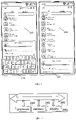
- FIG. 1 is a schematic diagram of a bottom modal view according to some embodiments of the present disclosure.
- a bottom modal view 110 and a bottom modal view 120 are included.
- a bottom modal view 110 is a display state of a bottom modal view with an input keyboard
- a bottom modal view 120 is a display state of a bottom modal view without the input keyboard.
- the bottom modal view 110 is a floating layer page on a current user interface 100
- the bottom modal view 110 obscures content of a lower half of the current user interface 100.
- the bottom modal view 120 also obscures a part of content of the current user interface 100.
- the current user interface 100 is a contact interface, also referred to as an address book interface, and both the bottom modal view 110 and the bottom modal view 120 are creating-contact interfaces.
- First information refers to information input into the terminal through the bottom modal view.
- the first information may include at least one of the following information: contact information, schedule information, note information, timer information, path information, and mail information.
- the bottom modal view can be used to create a new contact or modify a contact.
- the bottom modal view can be used to create an itinerary or modify an itinerary, or create a schedule.
- the bottom modal view can be used to create note information or modify note information.
- the information input method shown in embodiments of the present disclosure can be applied to the terminal with a display, and the terminal has a function of inputting information.
- the terminal can be a mobile phone, a tablet computer, a digital camera, a MP4 player terminal, a MP5 player terminal, a learning machine, a point reading machine, an e-paper, an electronic dictionary, or a vehicle-mounted terminal, and the like.
- FIG. 2 is a structural block diagram of a terminal according to some exemplary embodiments of the present disclosure.
- the terminal includes a processor 220, a memory 240, and a display 260.
- the memory 240 is configured to store at least one instruction, and the instruction is configured to be loaded and executed by the processor 220 to implement the input information method as described in each of method embodiments of the present disclosure.
- the display 260 is used to display image data generated after a process of the processor 220.
- a terminal 200 is an electronic apparatus with the function of inputting information.
- the terminal 200 is capable of displaying the bottom modal view in response to receiving the first instruction configured to indicate the terminal to enter a state for receiving the first information.
- the bottom modal view is the floating layer page displayed on the current user interface, an area of the bottom modal view being less than an area of the current user interface.
- the terminal 200 is also capable of displaying a first input widget in the bottom modal view, and inputting the first information based on an input signal in response to the first input widget being triggered, and the input signal is a signal input by a sensor of the terminal.
- the processor 220 may include one or more processing cores.
- the processor 220 is configured to connect each of parts inside the entire terminal 200 via various interfaces and buses.
- the processor 220 is configured to execute various functions and process data of the terminal 200 by running or executing instructions, programs, code sets, or instruction sets stored in the memory 240 and by calling data stored in the memory 240.
- the processor 220 may adopt at least one hardware form of Digital Signal Processing (DSP), Field-Programmable Gate Array (FPGA), Programmable Logic Array (PLA).
- DSP Digital Signal Processing
- FPGA Field-Programmable Gate Array
- PDA Programmable Logic Array
- the processor 220 may integrate one or a combination of one or more of the Central Processing Unit (CPU), Graphics Processing Unit (GPU), modem, and the like.
- the CPU is primarily used to process an operating system, the user interface, and application programs, etc.; the GPU is used to render and draw for the content to be displayed on the display; the modem is used to handle wireless communication. It can be understood that the above modem may also be not integrated into the processor 220, but be implemented through one chip separately.
- the memory 240 may include a Random Access Memory (RAM), and may also include a Read-Only Memory (ROM). In some embodiments, the memory 240 includes a computer-readable storage medium. The memory 240 may be used to store instructions, programs, code, code sets, or instruction sets. The memory 240 may include a program storage area and a data storage area, the program storage area may store instructions for implementing the operating system, instructions for at least one function (such as a touch control function, a sound playback function, an image playback function, etc.), instructions for implementing each of the method embodiments described below, etc. The data storage area may store data involved in each of the method embodiments described below, etc.
- RAM Random Access Memory
- ROM Read-Only Memory
- the memory 240 includes a computer-readable storage medium.
- the memory 240 may be used to store instructions, programs, code, code sets, or instruction sets.
- the memory 240 may include a program storage area and a data storage area, the program storage area may store instructions for implementing the operating system,
- the display 260 is capable of displaying the image data that has been acquired from the memory 240 and rendered by the processor 220.
- the processor 220 is configured to place the rendered image frames in a buffer queue, and the display 260 displays the image frames therein in sequence according to the order of the image frames in the buffer queue.
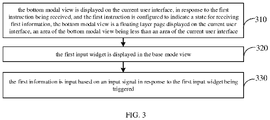
- FIG. 3 is a flow chart of an information input method according to some exemplary embodiments of the present disclosure.
- the information input method may be applied to the terminal shown in FIG. 2 .
- the information input method includes operations in the following.
- the bottom modal view is displayed in response to the first instruction being received, and the first instruction is configured to indicate the state for receiving first information.
- the bottom modal view is a floating layer page displayed on the current user interface, an area of bottom modal view being the less than an area of the current user interface.
- the terminal is generally able to initiate the application program to perform corresponding operations when executed normally.
- the terminal is also able to provide corresponding functions in the user interface such as a main page (also known as a system page), a settings page, a notification bar page, or a negative screen.
- the user interface currently displayed in the terminal is collectively referred to as the current user interface.
- the terminal When the terminal displays the current user interface, whether the first instruction is received may be monitored by the terminal, and the first instruction is configured to instruct the terminal to enter a state for receiving the first information. It should be noted that the first information is used to indicate information input into the terminal through the bottom modal view.
- the first instruction may be an instruction triggered by clicking a designated touch control in the current user interface.
- the designated touch control may be an entrance control 101.
- the touch control with a plus sign shape is clicked, the first instruction is triggered.
- the first instruction may also be an instruction triggered by a designated voice spoken by a voice assistant. For example, when the voice assistant of the terminal is in an active state and a voice of "create a contact" is heard, the voice will trigger the first instruction.
- the first instruction may also be an instruction triggered when an information carrier is selected.
- the information carrier may be at least one of multimedia files among pictures, text paragraphs, notes, or voice clips.
- the information carrier may include information such as a name, contact numbers, or a schedule and so on. For example, when a picture includes a name and contact numbers, and the terminal detects an operation of a user long-pressing the picture, the first instruction is triggered.
- the bottom modal view when the first instruction is received in the terminal, the bottom modal view will be displayed.
- the first input widget is displayed in the bottom modal view.
- the terminal is capable of displaying the first input widget in the bottom modal view.
- the first input widget is used to input the first information into the bottom modal view.
- the number of the first information may be one or multiple.
- the number of the first information is two, which are the name and the contact numbers.
- the terminal displays two first input widgets in the bottom modal view 120, one of which is used to receive an input for a name, and the other of which is used to receive an input for the contact numbers.
- the first information is input based on an input signal in response to the first input widget being triggered, the input signal being the signal input by the sensor.
- the first information is input based on an input signal in the terminal when the first input widget is triggered, the input signal being a signal input into the terminal by a sensor of the terminal.
- the input signal may be at least one of a touch signal, a voice signal, or an image signal.
- the first information may be input through a virtual keyboard.
- the input signal is a signal generated when virtual keys on the virtual keyboard is triggered.
- the terminal is capable of displaying the first information input in the first input widget based on the signal generated as the user presses the virtual keys on the virtual keyboard.
- the first information may be input through a voice button, and the input signal is voice information spoken by the user.
- the terminal is capable of performing a voice recognition process based on the voice information of the user, and displaying text data generated by the voice recognition process in the first input widget.
- the first information may be input through information provided by a specified picture, and the input signal is text data generated by an image recognition process for the specified picture.
- the terminal is capable of performing the image recognition process based on the specified picture, and displaying the text data generated in the first input widget.
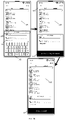
- FIG. 4 is a schematic diagram of a process of inputting information in embodiments of FIG. 3 .
- a full-screen is displayed on the terminal, that is, the current user interface 100 is displayed on the terminal.
- the bottom modal view 110 is displayed above the current user interface 100. Since a first row of the bottom modal view 110 is a first input widget 102 and the bottom modal view 110 includes a first input widget 103 at the same time, the virtual keyboard 104 may be displayed on the bottom modal view 110.
- a saving control 105 is in a non-selectable state and may be visually displayed in gray.
- the saving control 105 When the first information has been input in the first input widget 102 and the first input widget 103, the saving control 105 is in a selectable state and may be visually displayed in black or color.
- a retract button 106 may be clicked by the user.
- the retract button 106 being triggered is detected, the virtual keyboard 104 is retracted and a displaying area of the bottom modal view 110 is adjusted to display the bottom modal view 120. It should be noted that a displaying height of the bottom modal view 120 on the screen may be less than a height of the bottom modal view 110.
- the saving control 105 in the bottom modal view 120 When the saving control 105 in the bottom modal view 120 is triggered, the name information in the first input widget 102 and the number information in the first input widget 103 are saved as a new contact.
- the new contact may be a contact 107.
- the bottom modal view 110 and the bottom modal view 120 may have a more-setting button 130 to be displayed thereon.
- the user clicks the setting-more button 130 the user may input more information of a contact.
- the height of the bottom modal view 110 may be set freely. In some embodiments, the maximum height of the bottom modal view 110 may be 1962px.
- the bottom modal view is displayed when the first instruction is received.
- the first instruction is used to instruct the terminal to enter the state for receiving the first information
- the bottom modal view is the floating layer page displayed on the current user interface
- the area of the bottom modal view is less than the area of the current user interface.
- the first input widget is displayed in the bottom modal view.
- the first information is input based on the input signal when the first input widget is triggered, the input signal is the signal input into the terminal by the sensor of the terminal. Since the bottom modal view may be displayed on the current user interface, and the information may be input into the terminal by the bottom modal view, the efficiency of inputting information may be improved and users may input important information into the terminal quickly.
- the bottom modal view may be converted to other modal views under different operations, as shown in the following embodiments.
- FIG. 5 is a flow chart of an information input method according to other exemplary embodiments of the present disclosure.
- the information input method may be applied to the terminal described above.
- the information input method includes:
- first n parameters of the first information having the most historical edit times are obtained, in response to receiving an instruction for inputting the first information, n being a positive integer.
- historical edit times of the first information are obtained. It should be noted that the historical edit times may involve a privacy of the user. Therefore, the terminal is required to ask for a permission from the user when the historical edit times are to be obtained. When the user permits the terminal to use the historical edit times, the historical edit times may be obtained.
- the historical edit times may be used to indicate a sum of editing times of each parameter of a respective object in the history.
- Table 1 shows historical edit times in a case where an object is contact, and parameters of the object are a name, phone numbers, a company, and an instant messaging account.
- Table 1 Parameters names Name Phone numbers Company Instant messaging account historical edits times 320 315 180 296
- the obtained historical edit times of the name is 320
- the obtained historical edit times of the phone numbers is 315
- the obtained historical edit times of the company is 180
- the obtained historical edit times of the instant messaging account is 296.
- n two parameters of the name and the phone numbers are obtained.
- Table 2 Parameters names Name Phone numbers Company Instant messaging account historical edits times 430 390 270 396
- the bottom modal view is displayed.
- the bottom modal view will be displayed.
- an input widget corresponding to each of the first n parameters is displayed in the bottom modal view.
- the input widget corresponding to each of the n parameters is displayed in the bottom modal view. It should be noted that the n is obtained in the operation 511.
- the input widgets are an input widget corresponding to the name and an input widget corresponding to the phone numbers.
- the input widgets are an input widget corresponding to the name and an input widget corresponding to the instant messaging account.
- the input widget corresponding to each of the n parameters is displayed in the bottom modal view in response to n being less than an item number threshold, and the n parameters corresponding to the input widgets one to one.
- the bottom modal view since a purpose of designing the bottom modal view is to lighten the input information of the users, a space provided in the bottom modal view is limited.
- the bottom modal view is capable of displaying the input widgets with the number equal to an item number threshold, a determination is required.
- the input widget corresponding to each of the n parameters is displayed in the bottom modal view.
- the bottom modal view may also be adopted by applications installed in the terminal. In this way, an effect that functions with an excellent interactive performance may be shared by third-party applications may be realized.
- the bottom modal view is converted to a full-screen modal view in response to receiving a second instruction.
- an area of the full-screen modal view is the same with the area of the current user interface, and the second instruction is an instruction triggered when a specified operation is received on the bottom modal view.
- the second instruction may be generated when a distance that a top area of the bottom modal view is slid upward exceeds a pull-up threshold.
- the pull-up threshold may be a preset value in the terminal. In some embodiments, the pull-up threshold may be 150px.
- the bottom modal view is converted to the full-screen modal view when the second instruction is received.
- the bottom modal view may be converted to the full-screen modal with various animation effects.
- the animation effect may be the animation effect of sliding-upward and popping up.
- a full-screen modal button may be displayed in the bottom modal view, and the bottom modal view may be controlled to be converted to the full-screen modal view in response to the full-screen modal button being triggered.
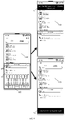
- FIG. 6 is a schematic diagram of opening a full-screen modal view according to embodiments of FIG. 5 .
- the full-screen modal button 108 in the bottom modal view 110 is clicked and triggered, the bottom modal view 110 will be converted to the full-screen modal view 130.
- FIG. 6 another method of converting the bottom modal view 110 to the full-screen modal view 130 is that the full-screen modal view 130 will be displayed in an upper layer of the current user interface 100 when a distance that a top area 109 of the bottom modal view 110 is slid upward exceeds the pull-up threshold 150px.
- the virtual keyboard in the bottom modal view 110 may be folded firstly, and the full-screen modal view 130 may be unfolded in an animation effect.
- the bottom modal view 110 is converted to the unfolded full-screen modal view 130, the first information that has been input is retained, and a corresponding part is unfolded for the user to continue inputting corresponding information.
- m second input widgets are displayed in the full-screen modal view, the second input widgets being different from the first input widget, and m being a positive integer.
- m second input widgets may be displayed in the full-screen modal view in the terminal, and the second input widgets are different from the first input widget.
- the second input widget have a function which is similar to that of the first input widgets and is for the user to input the information.
- a difference between the first input widgets and the second input widgets is that the first input widgets are displayed in the bottom modal view and the second input widgets are displayed in the full-screen modal view.
- the input widgets corresponding to the name and the phone numbers are the first input widgets
- the input widgets corresponding to a pinyin of the name, a company, a position, a job, a birthday, a social software, and an associated person are the second input widgets.
- a second information is stored in response to the second information being received on the second input widgets.
- the second information newly input in the full-screen modal view may be stored in the terminal.
- the second information includes the pinyin of the name, the company, the position, the job, the birthday, the social software, and the associated person.
- a sliding-downward instruction is received, and the sliding-downward instruction is generated in response to a dragging-downward operation on a top border of the full-screen modal view.
- the sliding-downward instruction is generated.
- the full-screen modal view is converted to the bottom modal view in response to a sliding distance corresponding to the sliding-downward instruction being greater than or equal to a first threshold and less than a second threshold.
- the full-screen modal view is converted to the bottom modal view.
- the first threshold is proportional to the second threshold.
- the second threshold may be k times the first threshold, and k is an integer greater than 1.
- the second threshold may be just required to be greater than the first threshold.
- the full-screen modal view is converted to a reduced modal view in response to the sliding distance corresponding to the sliding-downward instruction being greater than or equal to the second threshold.
- an area of the reduced modal view is less than the area of the bottom modal view.
- the reduced modal view may be the top area in the bottom modal view.
- the top area 109 in the bottom modal view 110 may be separately displayed as the reduced modal view.
- the bottom modal view is converted to the reduced modal view in response to a third instruction being received.
- the area of the reduced modal view is less than the area of the bottom modal view.
- the third instruction may be an instruction triggered when a distance that the top area of the bottom modal view is pressed and then slid down exceeds a specified distance.
- FIG. 7 is a schematic diagram of a reduced modal view according to the embodiments of FIG. 5 .
- the bottom modal view 710 may be displayed in the terminal when a creating-mail button 701 in the current user interface 700 is triggered.
- the bottom modal view 710 is converted to the reduced modal view 720.
- prompt information 721 may be displayed near the reduced modal view 720 of the current user interface 700.
- the prompt information 721 is used to prompt how to return to the bottom modal view 710 from the reduced modal view 720.
- the prompt information 721 is displayed as "pull upward to continue operation".
- the reduced modal view 720 includes a sending control 722 and a cancel control 723.
- a storage widget is displayed in the reduced modal view.
- the storage widget is displayed in the reduced modal view.
- the first information is stored in response to the storage widget being triggered.
- the first information is stored when the storage widget is triggered.
- the sending control is displayed in the reduced modal view, and when the sending control is triggered, the first information is sent.
- a sliding-upward instruction is received, and the sliding-upward instruction is generated in response to a dragging-upward operation on a top border of the reduced modal view.
- the reduced modal view is converted to the bottom modal view in response to a sliding distance corresponding to the sliding-upward instruction being greater than or equal to a third threshold and less than a fourth threshold.
- the third threshold is proportional to the fourth threshold.
- the fourth threshold may be L times the third threshold, and L is an integer greater than 1.
- the fourth threshold may be just required to be greater than the third threshold.
- the reduced modal view is converted to the full-screen modal view in response to the sliding distance corresponding to the sliding-upward instruction being greater than or equal to the fourth threshold.
- the bottom modal view may also be closed after the bottom modal view is displayed.
- FIG. 8 is a schematic diagram of closing a bottom modal view according to the embodiments of FIG. 5 .
- the bottom modal view 110 is closed in the terminal, and the current user interface 100 is returned to be displayed in full-screen.
- the bottom modal view may also be converted to other modal views in two ways, i.e. a fixed region and a flexible region.
- the other modal views include the full-screen modal view and the reduced modal view.
- FIG. 9 is a schematic diagram of conversion of the bottom modal view in a manner of a fixed region according to the embodiments of FIG. 5
- a prompt information "enter the full screen when releasing this region" is displayed in an area 191 of the current user interface 100.
- the bottom modal view 110 will be converted to the full-screen modal view.
- a prompt information "cancel when releasing this region" is displayed in an area 192 of the current user interface 100.
- the area 192 is released by fingers of a user, the bottom modal view 110 will be hided, and the current user interface 100 will be returned to be displayed in full-screen.
- FIG. 10 is a schematic diagram of conversion of the bottom modal view in a manner of a flexible region according to the embodiments of FIG. 5 .
- a cancelling distance threshold is preset in advance.
- a prompt information "continue to drag downward" is displayed in the area 192 of the current user interface 100.
- the fingers of the user release the bottom modal view 110 will be hided, and the current user interface 100 will be returned to be displayed in full-screen in the terminal.
- a prompt information "release to cancel” is displayed in the area 192 of the current user interface 100.
- the fingers of the user release the bottom modal view 110 will be returned to be displayed in the terminal.
- the following application scenarios may also be provided and include a creating-schedule scenario, a creating-note scenario, a timer setting scenario, and a target path selection scenario, which will be illustrated below in conjunction with the accompanying drawings.
- FIG. 11 is a schematic diagram of creating a schedule according to the embodiments of FIG. 5 .
- the first information is input in the bottom modal view 1110.
- the bottom modal view 1110 is converted to the full-screen modal view 1120 for the user to continue to input the second information to complete a schedule to be created.
- FIG. 12 is a schematic diagram of creating a note according to the embodiments of FIG. 5 .
- the first information is input in the bottom modal view 1210.
- the bottom modal view 1210 is converted to the full-screen modal view 1220 for the user to continue to input the second information to complete a note to be created.
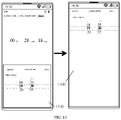
- FIG. 13 is a schematic diagram of setting a timer according to the embodiments of FIG. 5 .
- time of the timer is set in the bottom modal view 1310 in the terminal.
- the time of the timer being set in the bottom modal view 1310 may be more convenient.
- the bottom modal view may also be used for selecting a storage path of a target object.
- the first instruction is an instruction for selecting the storage path of the target object
- the target object is an object displayed in the current user interface.
- FIG. 14 is a schematic diagram of selecting a target path according to the embodiments of FIG. 5 .
- paths of files that the user intend to compress are displayed in the bottom modal view 1410 in the terminal.
- a completion button 1411 will be displayed in the bottom modal view 1410, and a prompt information "compress here" may be displayed in the completion button 1411.
- the bottom modal view may be displayed in the current user interface, and the bottom modal view may be converted to the full-screen modal view or the reduced modal view quickly, such that information inputting may be finished quickly in the terminal through conversions between various modal views without changing the current user interface. In this way, the efficiency of inputting information to the terminal or performing a setting process may be improved.
- Apparatus embodiments of the present disclosure are described in the following and may be used to implement the method embodiments of the present disclosure. For details that are not disclosed in the apparatus embodiments of the present disclosure, may refer to the method embodiments of the present disclosure.
- FIG. 15 is a structural block diagram of an apparatus for information input according to some exemplary embodiments of the present disclosure.
- the apparatus for inputting information may be all or a part of a terminal through a software, a hardware or a combination of the software and the hardware.
- the apparatus includes the following.
- a view display module 1510 is configured to display a bottom modal view in response to a first instruction being received, the first instruction configured to indicate a terminal to enter a state for receiving first information.
- the bottom modal view is a floating layer page displayed on a current user interface, an area of the bottom modal view being less than an area of the current user interface.
- a control display module 1520 is configured to display a first input widget in the bottom modal view.
- An information input module 1530 is configured to input the first information based on an input signal in response to the first input widget being triggered, the input signal being a signal input by a sensor.
- the apparatus further includes a first conversion module, configured to convert the bottom modal view to a full-screen modal view in response to a second instruction being received.
- a first conversion module configured to convert the bottom modal view to a full-screen modal view in response to a second instruction being received.
- An area of the full-screen modal view is same with the area of the current user interface, and the second instruction is an instruction triggered in response to a specified operation being received by the bottom modal view;
- a second conversion module configured to convert the bottom modal view to a reduced modal view in response to a third instruction being received.
- An area of the reduced modal view is less than the area of the bottom modal view.
- the apparatus further includes an execution module, configured to display m second input widgets in the full-screen modal view, the second input widgets being different from the first input widget, and m being a positive integer; and store a second information in the terminal in response to receiving the entered second information on the second input widgets.
- the execution module is further configured to receive a sliding-downward instruction generated in response to a dragging-downward operation on a top border of the full-screen modal view; convert the full-screen modal view to the bottom modal view in response to a sliding distance corresponding to the sliding-downward instruction being greater than or equal to a first threshold and less than a second threshold; and convert the full-screen modal view to the reduced modal view in response to the sliding distance corresponding to the sliding-downward instruction being greater than or equal to the second threshold.
- the execution module is further configured to display a storage widget in the reduced modal view; and store the first information in response to the storage widget being triggered.
- the execution module is further configured to receive a sliding-upward instruction generated in response to a dragging-upward operation on a top border of the reduced modal view; convert the reduced modal view to the bottom modal view in response to a sliding distance corresponding to the sliding-upward instruction being greater than or equal to a third threshold and less than a fourth threshold; and convert the reduced modal view to the full-screen modal view in response to the sliding distance corresponding to the sliding-upward instruction being greater than or equal to the fourth threshold.
- the first conversion module is configured to display a full-screen modal button in the bottom modal view; and convert the bottom modal view to the full-screen modal view in response to the full-screen modal button being triggered.
- the view display module 1510 is configured to obtain first n parameters of the first information having the most historical edit times, in response to an instruction to input the first information being received, and n being a positive integer; display the bottom modal view; and display an input widget corresponding to each of the n parameters in the bottom modal view.
- the view display module 1510 is configured to display the input widget corresponding to each of the n parameters in the bottom modal view in response to n being less than an item number threshold, and the n parameters corresponding to the input widgets one to one.
- the first instruction involved in the apparatus is an instruction for selecting a storage path of a target object
- the target object is an object displayed in the current user interface.
- the first information involved in the apparatus includes at least one of: contact information, schedule information, note information, timer information, path information, and mail information.
- a computer-readable storage medium is also provided and configured to store program instructions, and the program instructions are configured to implement the information input method as described in each of the above embodiments when loaded and executed by the processor.
- the operations of the above embodiments may be implemented by the hardware, or by a program instructing relevant hardware to be completed.
- the program may be stored in a computer-readable storage medium.
- the computer-readable storage medium mentioned above may be a read-only memory, a magnetic disk or an optical disk, etc.
Landscapes
- Engineering & Computer Science (AREA)
- General Engineering & Computer Science (AREA)
- Theoretical Computer Science (AREA)
- Human Computer Interaction (AREA)
- Physics & Mathematics (AREA)
- General Physics & Mathematics (AREA)
- Signal Processing (AREA)
- Business, Economics & Management (AREA)
- General Business, Economics & Management (AREA)
- Library & Information Science (AREA)
- Computer Networks & Wireless Communication (AREA)
- User Interface Of Digital Computer (AREA)
- Telephone Function (AREA)
Abstract
Description
- The present disclosure claims priority and rights of
Chinese Patent Application No. 201910815339.X, entitled "INFORMATION INPUT METHOD, DEVICE, TERMINAL, AND STORAGE MEDIUM" filed on August 30, 2019 - The present disclosure relates to the technical field of computers, in particular to an information input method, an apparatus, a terminal, and a computer-readable storage medium.
- With the increasing ability of mobile terminals to record information, it has become a common scenario for users to record valuable information for designated objects by the mobile terminals in their daily lives.
- In a manner possible to be implemented, when a terminal needs information about a new-built contact, the terminal will pop up a full-screen user interface. The user interface may include input boxes set for a name, phone numbers, an email, a company, a position, a remark, or a group, and so on.
- The present disclosure provides an information input method, an apparatus, a terminal, and a computer-readable storage medium.
- According to a first aspect of the present disclosure, an information input method is provided and includes: displaying a bottom modal view in response to receiving a first instruction configured to indicate a terminal to enter a state for receiving first information, the bottom modal view being a floating layer page displayed on a current user interface, an area of the bottom modal view being less than an area of the current user interface;
- displaying a first input widget in the bottom modal view; and
- inputting the first information based on an input signal in response to the first input widget being triggered, the input signal being a signal input by a sensor.
- According to a second aspect of the present disclosure, an apparatus for inputting information is provided and includes:
- a view display module, configured to display a bottom modal view in response to receiving a first instruction configured to indicate a terminal to enter a state for receiving first information, the bottom modal view being a floating layer page displayed on a current user interface, an area of the bottom modal view being less than an area of the current user interface;
- a control display module, configured to display a first input widget in the bottom modal view;
- an information input module, configured to input the first information based on an input signal in response to the first input widget being triggered, the input signal being a signal input by a sensor.
- According to a third aspect of the present disclosure, a terminal is provided and includes: a processor and a memory connected to the processor and storing program instructions; when the program instructions executed by the processor, causing the processor to perform the information input method described above.
- According to a fourth aspect of the present disclosure, a computer-readable storage medium is provided and configured to store program instructions, and the program instructions being configured to implement the information input method described above when executed by the processor.
- In order to more clearly describe the technical solutions in the embodiments of the present disclosure, the following will briefly introduce the drawings required in the description of the embodiments. Obviously, the drawings in the following description are only some embodiments of the present disclosure. For those skilled in the art, other drawings can be obtained based on these drawings without creative work.
-
FIG. 1 is a schematic diagram of a bottom modal view according to some embodiments of the present disclosure. -
FIG. 2 is a structural block diagram of a terminal according to some exemplary embodiments of the present disclosure. -
FIG. 3 is a flow chart of an information input method according to some exemplary embodiments of the present disclosure. -
FIG. 4 is a schematic diagram of a process of inputting information in embodiments ofFIG. 3 . -
FIG. 5 is a flow chart of an information input method according to another exemplary embodiments of the present disclosure. -
FIG. 6 is a schematic diagram of opening a full-screen modal view according to embodiments ofFIG. 5 . -
FIG. 7 is a schematic diagram of a reduced modal view according to the embodiments ofFIG. 5 . -
FIG. 8 is a schematic diagram of closing a bottom modal view according to the embodiments ofFIG. 5 . -
FIG. 9 is a schematic diagram of conversion of the bottom modal view in a manner of a fixed region according to the embodiments ofFIG. 5 . -
FIG. 10 is a schematic diagram of conversion of the bottom modal view in a manner of a flexible region according to the embodiments ofFIG. 5 . -
FIG. 11 is a schematic diagram of creating a schedule according to the embodiments ofFIG. 5 . -
FIG. 12 is a schematic diagram of creating a note according to the embodiments ofFIG. 5 . -
FIG. 13 is a schematic diagram of setting a timer according to the embodiments ofFIG. 5 . -
FIG. 14 is a schematic diagram of selecting a target path according to the embodiments ofFIG. 5 . -
FIG. 15 is a structural block diagram of an apparatus for information input according to some exemplary embodiments of the present disclosure. - In order to make the purpose, technical solutions and advantages of the present disclosure clearer, a description in detail for the embodiments of the present disclosure will be further made in the following in conjunction with the accompanying drawings.
- Where the following description relates to the accompanying drawings, unless otherwise indicated, the same numerals in different accompanying drawings indicate the same or similar elements. The implementations described in the following exemplary embodiments are not intended to represent all embodiments that are consistent with the present disclosure. On the contrary, they are only examples of the apparatus and the method that are consistent with some aspects of the present disclosure as detailed in the appended claims.
- In the description of the present disclosure, it should be understood that terms such as "first", "second", and the like, are used herein for purposes of description, and are not intended to indicate or imply relative importance or significance. In the description of the present disclosure, it should be noted that, unless specified or limited, otherwise, terms "connection", "connected" may be used in a broad sense, and may include, for example, fixed connections, detachable connections, or integral connections; may also be mechanical, electrical connections; may also be direct connections or indirect connections via intervening structures; the specific meanings of the terms above in the present disclosure can be understood by one skilled in the art depending on specific contexts. In addition, in the description of the present disclosure, it should be noted that, "a plurality of' means two or more, unless specified otherwise. The term "and/or" is used to describe the associated relationship of the associated objects, which indicates that there may exist three relationships, for example, A and/or B, may indicate three situations: A exists alone, A and B exist at the same time, and B exists alone. The character "/" generally indicates that the associated objects before and after the character "/" is an "or" relationship.
- An information input method is provided and includes the following.
- Displaying a bottom modal view in response to receiving a first instruction configured to indicate a terminal to enter a state for receiving first information, the bottom modal view being a floating layer page displayed on a current user interface, an area of the bottom modal view being less than an area of the current user interface.
- Displaying a first input widget in the bottom modal view. and
- Inputting the first information based on an input signal in response to the first input widget being triggered, the input signal being a signal input by a sensor.
- In some embodiments, after the displaying a bottom modal view in response to receiving a first instruction, the method further includes the following.
- Converting the bottom modal view to a full-screen modal view in response to receiving a second instruction, an area of the full-screen modal view being same with the area of the current user interface, and the second instruction being an instruction triggered in response to a specified operation being performed on the bottom modal view.
or - Converting the bottom modal view to a reduced modal view in response to receiving a third instruction, an area of the reduced modal view being less than the area of the bottom modal view.
- In some embodiments, after the converting the bottom modal view to a full-screen modal view, the method further includes the following.
- Displaying m second input widgets in the full-screen modal view, the second input widgets being different from the first input widget, and m being a positive integer. and
- Storing a second information in the terminal in response to receiving the second information on the second input widgets.
- In some embodiments, after the converting the bottom modal view to a full-screen modal view, the method further includes the following.
- Receiving a sliding-downward instruction generated in response to a dragging-downward operation on a top border of the full-screen modal view.
- Converting the full-screen modal view to the bottom modal view in response to a sliding distance corresponding to the sliding-downward instruction being greater than or equal to a first threshold and less than a second threshold, and
- Converting the full-screen modal view to the reduced modal view in response to the sliding distance corresponding to the sliding-downward instruction being greater than or equal to the second threshold.
- In some embodiments, after the converting the bottom modal view to a reduced modal view, the method further includes the following.
- Displaying a storage widget in the reduced modal view. and
- Storing the first information in response to the storage widget being triggered.
- In some embodiments, after the converting the bottom modal view to a reduced modal view, the method further includes the following.
- Receiving a sliding-upward instruction generated in response to a dragging-upward operation on a top border of the reduced modal view.
- Converting the reduced modal view to the bottom modal view in response to a sliding distance corresponding to the sliding-upward instruction being greater than or equal to a third threshold and less than a fourth threshold, and
- Converting the reduced modal view to the full-screen modal view in response to the sliding distance corresponding to the sliding-upward instruction being greater than or equal to the fourth threshold.
- In some embodiments, the operation of converting the bottom modal view to a full-screen modal view in response to a second instruction being received, includes the following.
- Displaying a full-screen modal button in the bottom modal view. and
- Converting the bottom modal view to the full-screen modal view in response to the full-screen modal button being triggered.
- In some embodiments, the operation of displaying a bottom modal view in response to receiving a first instruction, includes the following.
- Obtaining first n parameters of the first information having the most historical edit times in response to receiving an instruction for inputting the first information, n being a positive integer.
- Displaying the bottom modal view. and
- Displaying an input widget corresponding to each of the n parameters in the bottom modal view.
- In some embodiments, the operation of displaying the input widget corresponding to each of the n parameters in the bottom modal view, includes the following.
- Displaying the input widget corresponding to each of the n parameters in the bottom modal view in response to the n being less than an item number threshold, the n parameters corresponding to the input widgets one to one.
- In some embodiments, the first instruction is an instruction for selecting a storage path of a target object, and the target object is an object displayed in the current user interface.
- In some embodiments, the first information includes at least one of the following.
- Contact information, schedule information, note information, timer information, path information, and mail information.
- According to embodiments provided by the present disclosure, a bottom modal view is displayed when a first instruction is received. The first instruction is used to instruct a terminal to enter a state for receiving first information, the bottom modal view is a floating layer page displayed on a current user interface, and an area of the bottom modal view is less than an area of the current user interface. A first input widget is displayed in the bottom modal view. The first information is input based on an input signal when the first input widget is triggered, the input signal is a signal input into the terminal by a sensor of the terminal. Since the bottom modal view may be displayed on the current user interface, and the information may be input into the terminal by the bottom modal view, the efficiency of inputting information may be improved and users may input important information into the terminal quickly.
- In order to make the solutions provided in the embodiments of the present disclosure easy to be understood, several terms appearing in the embodiments of the present disclosure are introduced in the following.
- A bottom modal view is a floating layer page displayed on a current user interface, an area of the bottom modal view is less than an area of the current user interface. In an embodiment, the bottom modal view can be displayed when a first instruction is received in a terminal. In a possible display manner, the bottom modal view is capable of covering a bottom of the current user interface without obscuring an upper half part of the current user interface.
- For an animation effect in which the bottom modal view is displayed, the animation effect may be an animation effect of popping up or fading in from the bottom to the top.
-
FIG. 1 is a schematic diagram of a bottom modal view according to some embodiments of the present disclosure. InFIG. 1 , a bottommodal view 110 and a bottommodal view 120 are included. A bottommodal view 110 is a display state of a bottom modal view with an input keyboard, and a bottommodal view 120 is a display state of a bottom modal view without the input keyboard. InFIG. 1 , the bottommodal view 110 is a floating layer page on acurrent user interface 100, and the bottommodal view 110 obscures content of a lower half of thecurrent user interface 100. It should be noted that the bottommodal view 120 also obscures a part of content of thecurrent user interface 100. InFIG. 1 , thecurrent user interface 100 is a contact interface, also referred to as an address book interface, and both the bottommodal view 110 and the bottommodal view 120 are creating-contact interfaces. - First information refers to information input into the terminal through the bottom modal view. In an embodiment, the first information may include at least one of the following information: contact information, schedule information, note information, timer information, path information, and mail information.
- In some embodiments, when the first information is contact information, the bottom modal view can be used to create a new contact or modify a contact.
- In some embodiments, when the first information is schedule information, the bottom modal view can be used to create an itinerary or modify an itinerary, or create a schedule.
- In some embodiments, when the first information is note information, the bottom modal view can be used to create note information or modify note information.
- Exemplarily, the information input method shown in embodiments of the present disclosure can be applied to the terminal with a display, and the terminal has a function of inputting information. The terminal can be a mobile phone, a tablet computer, a digital camera, a MP4 player terminal, a MP5 player terminal, a learning machine, a point reading machine, an e-paper, an electronic dictionary, or a vehicle-mounted terminal, and the like.
-
FIG. 2 is a structural block diagram of a terminal according to some exemplary embodiments of the present disclosure. As shown inFIG. 2 , the terminal includes aprocessor 220, amemory 240, and adisplay 260. Thememory 240 is configured to store at least one instruction, and the instruction is configured to be loaded and executed by theprocessor 220 to implement the input information method as described in each of method embodiments of the present disclosure. Thedisplay 260 is used to display image data generated after a process of theprocessor 220. - In the present disclosure, a terminal 200 is an electronic apparatus with the function of inputting information. The terminal 200 is capable of displaying the bottom modal view in response to receiving the first instruction configured to indicate the terminal to enter a state for receiving the first information. The bottom modal view is the floating layer page displayed on the current user interface, an area of the bottom modal view being less than an area of the current user interface. The terminal 200 is also capable of displaying a first input widget in the bottom modal view, and inputting the first information based on an input signal in response to the first input widget being triggered, and the input signal is a signal input by a sensor of the terminal.
- The
processor 220 may include one or more processing cores. Theprocessor 220 is configured to connect each of parts inside theentire terminal 200 via various interfaces and buses. Theprocessor 220 is configured to execute various functions and process data of the terminal 200 by running or executing instructions, programs, code sets, or instruction sets stored in thememory 240 and by calling data stored in thememory 240. In some embodiments, theprocessor 220 may adopt at least one hardware form of Digital Signal Processing (DSP), Field-Programmable Gate Array (FPGA), Programmable Logic Array (PLA). Theprocessor 220 may integrate one or a combination of one or more of the Central Processing Unit (CPU), Graphics Processing Unit (GPU), modem, and the like. The CPU is primarily used to process an operating system, the user interface, and application programs, etc.; the GPU is used to render and draw for the content to be displayed on the display; the modem is used to handle wireless communication. It can be understood that the above modem may also be not integrated into theprocessor 220, but be implemented through one chip separately. - The
memory 240 may include a Random Access Memory (RAM), and may also include a Read-Only Memory (ROM). In some embodiments, thememory 240 includes a computer-readable storage medium. Thememory 240 may be used to store instructions, programs, code, code sets, or instruction sets. Thememory 240 may include a program storage area and a data storage area, the program storage area may store instructions for implementing the operating system, instructions for at least one function (such as a touch control function, a sound playback function, an image playback function, etc.), instructions for implementing each of the method embodiments described below, etc. The data storage area may store data involved in each of the method embodiments described below, etc. - The
display 260 is capable of displaying the image data that has been acquired from thememory 240 and rendered by theprocessor 220. In an embodiment, theprocessor 220 is configured to place the rendered image frames in a buffer queue, and thedisplay 260 displays the image frames therein in sequence according to the order of the image frames in the buffer queue. -
FIG. 3 is a flow chart of an information input method according to some exemplary embodiments of the present disclosure. The information input method may be applied to the terminal shown inFIG. 2 . InFIG. 3 , the information input method includes operations in the following. - In an
operation 310, the bottom modal view is displayed in response to the first instruction being received, and the first instruction is configured to indicate the state for receiving first information. The bottom modal view is a floating layer page displayed on the current user interface, an area of bottom modal view being the less than an area of the current user interface. - In embodiments of the present disclosure, the terminal is generally able to initiate the application program to perform corresponding operations when executed normally. In some embodiments, the terminal is also able to provide corresponding functions in the user interface such as a main page (also known as a system page), a settings page, a notification bar page, or a negative screen. The user interface currently displayed in the terminal is collectively referred to as the current user interface.
- When the terminal displays the current user interface, whether the first instruction is received may be monitored by the terminal, and the first instruction is configured to instruct the terminal to enter a state for receiving the first information. It should be noted that the first information is used to indicate information input into the terminal through the bottom modal view.
- In an embodiment, the first instruction may be an instruction triggered by clicking a designated touch control in the current user interface. For example, when the current user interface is the
current user interface 100 shown inFIG. 1 , the designated touch control may be anentrance control 101. When the touch control with a plus sign shape is clicked, the first instruction is triggered. - In another embodiment, the first instruction may also be an instruction triggered by a designated voice spoken by a voice assistant. For example, when the voice assistant of the terminal is in an active state and a voice of "create a contact" is heard, the voice will trigger the first instruction.
- In yet another embodiment, the first instruction may also be an instruction triggered when an information carrier is selected. It should be noted that the information carrier may be at least one of multimedia files among pictures, text paragraphs, notes, or voice clips. In an embodiment, the information carrier may include information such as a name, contact numbers, or a schedule and so on. For example, when a picture includes a name and contact numbers, and the terminal detects an operation of a user long-pressing the picture, the first instruction is triggered.
- In the embodiments of the present disclosure, when the first instruction is received in the terminal, the bottom modal view will be displayed.
- In an
operation 320, the first input widget is displayed in the bottom modal view. - In the embodiments of the present disclosure, the terminal is capable of displaying the first input widget in the bottom modal view.
- It should be noted that the first input widget is used to input the first information into the bottom modal view. The number of the first information may be one or multiple. For example, in the bottom
modal view 120 shown inFIG. 1 , the number of the first information is two, which are the name and the contact numbers. Correspondingly, the terminal displays two first input widgets in the bottommodal view 120, one of which is used to receive an input for a name, and the other of which is used to receive an input for the contact numbers. - In an
operation 330, the first information is input based on an input signal in response to the first input widget being triggered, the input signal being the signal input by the sensor. - In the embodiments of the present disclosure, the first information is input based on an input signal in the terminal when the first input widget is triggered, the input signal being a signal input into the terminal by a sensor of the terminal. In some embodiments, the input signal may be at least one of a touch signal, a voice signal, or an image signal.
- In an embodiment, the first information may be input through a virtual keyboard. The input signal is a signal generated when virtual keys on the virtual keyboard is triggered. The terminal is capable of displaying the first information input in the first input widget based on the signal generated as the user presses the virtual keys on the virtual keyboard.
- In another embodiment, the first information may be input through a voice button, and the input signal is voice information spoken by the user. The terminal is capable of performing a voice recognition process based on the voice information of the user, and displaying text data generated by the voice recognition process in the first input widget.
- In yet another embodiment, the first information may be input through information provided by a specified picture, and the input signal is text data generated by an image recognition process for the specified picture. The terminal is capable of performing the image recognition process based on the specified picture, and displaying the text data generated in the first input widget.
- For example,
FIG. 4 is a schematic diagram of a process of inputting information in embodiments ofFIG. 3 . InFIG. 4 , a full-screen is displayed on the terminal, that is, thecurrent user interface 100 is displayed on the terminal. When theentrance control 101 is clicked, the bottommodal view 110 is displayed above thecurrent user interface 100. Since a first row of the bottommodal view 110 is afirst input widget 102 and the bottommodal view 110 includes afirst input widget 103 at the same time, thevirtual keyboard 104 may be displayed on the bottommodal view 110. When there is no input information in thefirst input widget 102 and thefirst input widget 103, a savingcontrol 105 is in a non-selectable state and may be visually displayed in gray. When the first information has been input in thefirst input widget 102 and thefirst input widget 103, the savingcontrol 105 is in a selectable state and may be visually displayed in black or color. When there is no need for the user to have thevirtual keyboard 104 displayed any more, a retractbutton 106 may be clicked by the user. When the retractbutton 106 being triggered is detected, thevirtual keyboard 104 is retracted and a displaying area of the bottommodal view 110 is adjusted to display the bottommodal view 120. It should be noted that a displaying height of the bottommodal view 120 on the screen may be less than a height of the bottommodal view 110. When the savingcontrol 105 in the bottommodal view 120 is triggered, the name information in thefirst input widget 102 and the number information in thefirst input widget 103 are saved as a new contact. For example, inFIG. 4 , the new contact may be acontact 107. - In an embodiment, the bottom
modal view 110 and the bottommodal view 120 may have a more-setting button 130 to be displayed thereon. When the user clicks the setting-more button 130, the user may input more information of a contact. - In an embodiment, the height of the bottom
modal view 110 may be set freely. In some embodiments, the maximum height of the bottommodal view 110 may be 1962px. - According to the information input method provided in embodiments of the present disclosure, the bottom modal view is displayed when the first instruction is received. The first instruction is used to instruct the terminal to enter the state for receiving the first information, the bottom modal view is the floating layer page displayed on the current user interface, and the area of the bottom modal view is less than the area of the current user interface. The first input widget is displayed in the bottom modal view. The first information is input based on the input signal when the first input widget is triggered, the input signal is the signal input into the terminal by the sensor of the terminal. Since the bottom modal view may be displayed on the current user interface, and the information may be input into the terminal by the bottom modal view, the efficiency of inputting information may be improved and users may input important information into the terminal quickly.
- Based on solutions disclosed in the previous embodiments, the bottom modal view may be converted to other modal views under different operations, as shown in the following embodiments.
-
FIG. 5 is a flow chart of an information input method according to other exemplary embodiments of the present disclosure. The information input method may be applied to the terminal described above. InFIG. 5 , the information input method includes: - In an
operation 511, first n parameters of the first information having the most historical edit times are obtained, in response to receiving an instruction for inputting the first information, n being a positive integer. - In an embodiment, when the instruction for inputting the first information is received, historical edit times of the first information are obtained. It should be noted that the historical edit times may involve a privacy of the user. Therefore, the terminal is required to ask for a permission from the user when the historical edit times are to be obtained. When the user permits the terminal to use the historical edit times, the historical edit times may be obtained.
- In an embodiment, the historical edit times may be used to indicate a sum of editing times of each parameter of a respective object in the history. In some embodiments, Table 1 shows historical edit times in a case where an object is contact, and parameters of the object are a name, phone numbers, a company, and an instant messaging account.
Table 1 Parameters names Name Phone numbers Company Instant messaging account historical edits times 320 315 180 296 - In a scenario where the contact is created in Table 1, the obtained historical edit times of the name is 320, the obtained historical edit times of the phone numbers is 315, the obtained historical edit times of the company is 180, and the obtained historical edit times of the instant messaging account is 296. When n is 2, two parameters of the name and the phone numbers are obtained.
- Based on data shown in Table 1, when the terminal continues to be used, historical edit times are obtained again at a certain subsequent moment, and shown in Table 2.
Table 2 Parameters names Name Phone numbers Company Instant messaging account historical edits times 430 390 270 396 - It can be seen from the data shown in Table 2 that during a continuing use of the terminal, when creating a contact, the user tends to bind the name with the instant messaging account. Therefore, according to the historical edit times shown in Table 2, the first 2 parameters with the most historical edit times are the name and the instant messaging account.
- In an
operation 512, the bottom modal view is displayed. - In the embodiments of the present disclosure, the bottom modal view will be displayed.
- In an operation 513, an input widget corresponding to each of the first n parameters is displayed in the bottom modal view.
- In embodiments of the present disclosure, the input widget corresponding to each of the n parameters is displayed in the bottom modal view. It should be noted that the n is obtained in the
operation 511. - For example, when the n parameters are parameters obtained according to the data shown in Table 1 in the
operation 511, the input widgets are an input widget corresponding to the name and an input widget corresponding to the phone numbers. - For example, when the n parameters are parameters obtained according to the data shown in Table 2 in the
operation 511, the input widgets are an input widget corresponding to the name and an input widget corresponding to the instant messaging account. - In an embodiment, the input widget corresponding to each of the n parameters is displayed in the bottom modal view in response to n being less than an item number threshold, and the n parameters corresponding to the input widgets one to one.
- It should be noted that, since a purpose of designing the bottom modal view is to lighten the input information of the users, a space provided in the bottom modal view is limited. When the bottom modal view is capable of displaying the input widgets with the number equal to an item number threshold, a determination is required. When the number n of parameters to be input is less than the item number threshold, the input widget corresponding to each of the n parameters is displayed in the bottom modal view.
- Based on the solution that the input widget corresponding to each of the n parameters is displayed in the bottom modal view in the present disclosure, the bottom modal view may also be adopted by applications installed in the terminal. In this way, an effect that functions with an excellent interactive performance may be shared by third-party applications may be realized.
- In an
operation 520, the bottom modal view is converted to a full-screen modal view in response to receiving a second instruction. - In the embodiments of the present disclosure, an area of the full-screen modal view is the same with the area of the current user interface, and the second instruction is an instruction triggered when a specified operation is received on the bottom modal view.
- In an embodiment, the second instruction may be generated when a distance that a top area of the bottom modal view is slid upward exceeds a pull-up threshold. The pull-up threshold may be a preset value in the terminal. In some embodiments, the pull-up threshold may be 150px.
- It should be noted that the bottom modal view is converted to the full-screen modal view when the second instruction is received. During a conversion process, the bottom modal view may be converted to the full-screen modal with various animation effects. For example, the animation effect may be the animation effect of sliding-upward and popping up.
- In another embodiment, a full-screen modal button may be displayed in the bottom modal view, and the bottom modal view may be controlled to be converted to the full-screen modal view in response to the full-screen modal button being triggered.
-
FIG. 6 is a schematic diagram of opening a full-screen modal view according to embodiments ofFIG. 5 . InFIG. 6 , when the full-screen modal button 108 in the bottommodal view 110 is clicked and triggered, the bottommodal view 110 will be converted to the full-screenmodal view 130. - In
FIG. 6 , another method of converting the bottommodal view 110 to the full-screenmodal view 130 is that the full-screenmodal view 130 will be displayed in an upper layer of thecurrent user interface 100 when a distance that atop area 109 of the bottommodal view 110 is slid upward exceeds the pull-up threshold 150px. - In the embodiments of the present disclosure, when the distance that the
top area 109 of the bottommodal view 110 is slid upward exceeds the pull-up threshold 150px, the virtual keyboard in the bottommodal view 110 may be folded firstly, and the full-screenmodal view 130 may be unfolded in an animation effect. When the bottommodal view 110 is converted to the unfolded full-screenmodal view 130, the first information that has been input is retained, and a corresponding part is unfolded for the user to continue inputting corresponding information. - In an
operation 521, m second input widgets are displayed in the full-screen modal view, the second input widgets being different from the first input widget, and m being a positive integer. - In the embodiments of the present disclosure, m second input widgets may be displayed in the full-screen modal view in the terminal, and the second input widgets are different from the first input widget. In an embodiment, the second input widget have a function which is similar to that of the first input widgets and is for the user to input the information. A difference between the first input widgets and the second input widgets is that the first input widgets are displayed in the bottom modal view and the second input widgets are displayed in the full-screen modal view.
- In an example of
FIG. 6 , the input widgets corresponding to the name and the phone numbers are the first input widgets, and the input widgets corresponding to a pinyin of the name, a company, a position, a job, a birthday, a social software, and an associated person are the second input widgets. - In an
operation 522, a second information is stored in response to the second information being received on the second input widgets. - In the embodiments of the present disclosure, the second information newly input in the full-screen modal view may be stored in the terminal. In an example of
FIG. 6 , the second information includes the pinyin of the name, the company, the position, the job, the birthday, the social software, and the associated person. - In an
operation 523, a sliding-downward instruction is received, and the sliding-downward instruction is generated in response to a dragging-downward operation on a top border of the full-screen modal view. - In the embodiments of the present disclosure, when the top border of the full-screen modal view is subjected to a dragging-downward operation, the sliding-downward instruction is generated.
- In an
operation 524, the full-screen modal view is converted to the bottom modal view in response to a sliding distance corresponding to the sliding-downward instruction being greater than or equal to a first threshold and less than a second threshold. - In the embodiments of the present disclosure, when the sliding distance corresponding to the sliding-downward instruction is greater than or equal to the first threshold and less than the second threshold, the full-screen modal view is converted to the bottom modal view.
- In an embodiment, the first threshold is proportional to the second threshold. For example, the second threshold may be k times the first threshold, and k is an integer greater than 1.
- In another embodiment, the second threshold may be just required to be greater than the first threshold.
- In an
operation 525, the full-screen modal view is converted to a reduced modal view in response to the sliding distance corresponding to the sliding-downward instruction being greater than or equal to the second threshold. - In the embodiments shown in the present disclosure, an area of the reduced modal view is less than the area of the bottom modal view. In an embodiment, the reduced modal view may be the top area in the bottom modal view. For example, in an example of
FIG. 6 , thetop area 109 in the bottommodal view 110 may be separately displayed as the reduced modal view. - In an
operation 530, the bottom modal view is converted to the reduced modal view in response to a third instruction being received. - In the embodiments shown in the present disclosure, the area of the reduced modal view is less than the area of the bottom modal view.
- In some embodiments, the third instruction may be an instruction triggered when a distance that the top area of the bottom modal view is pressed and then slid down exceeds a specified distance.
-
FIG. 7 is a schematic diagram of a reduced modal view according to the embodiments ofFIG. 5 . InFIG. 7 , the bottommodal view 710 may be displayed in the terminal when a creating-mail button 701 in thecurrent user interface 700 is triggered. When a distance that thetop area 711 of the bottommodal view 710 is pressed and dragged downward exceeds 150px, the bottommodal view 710 is converted to the reducedmodal view 720. - In some embodiments, when the reduced
modal view 720 is displayed in thecurrent user interface 700 for the first time,prompt information 721 may be displayed near the reducedmodal view 720 of thecurrent user interface 700. Theprompt information 721 is used to prompt how to return to the bottommodal view 710 from the reducedmodal view 720. For example, in the bottommodal view 710, theprompt information 721 is displayed as "pull upward to continue operation". The reducedmodal view 720 includes a sendingcontrol 722 and a cancelcontrol 723. - In an
operation 531, a storage widget is displayed in the reduced modal view. - In the embodiments shown in the present disclosure, the storage widget is displayed in the reduced modal view.
- In an
operation 532, the first information is stored in response to the storage widget being triggered. - In the embodiments shown in the present disclosure, the first information is stored when the storage widget is triggered.
- In another embodiment, the sending control is displayed in the reduced modal view, and when the sending control is triggered, the first information is sent.
- In an
operation 533, a sliding-upward instruction is received, and the sliding-upward instruction is generated in response to a dragging-upward operation on a top border of the reduced modal view. - In an
operation 534, the reduced modal view is converted to the bottom modal view in response to a sliding distance corresponding to the sliding-upward instruction being greater than or equal to a third threshold and less than a fourth threshold. - In an embodiment, the third threshold is proportional to the fourth threshold. For example, the fourth threshold may be L times the third threshold, and L is an integer greater than 1.
- In another embodiment, the fourth threshold may be just required to be greater than the third threshold.
- In an
operation 535, the reduced modal view is converted to the full-screen modal view in response to the sliding distance corresponding to the sliding-upward instruction being greater than or equal to the fourth threshold. - Based on embodiments above in the present disclosure, the bottom modal view may also be closed after the bottom modal view is displayed.
FIG. 8 is a schematic diagram of closing a bottom modal view according to the embodiments ofFIG. 5 . InFIG. 8 , when a distance that thetop area 109 of the bottommodal view 110 is pressed and dragged downward exceeds 150px, the bottommodal view 110 is closed in the terminal, and thecurrent user interface 100 is returned to be displayed in full-screen. - Based on embodiments above, in the present disclosure, the bottom modal view may also be converted to other modal views in two ways, i.e. a fixed region and a flexible region. The other modal views include the full-screen modal view and the reduced modal view.
-
FIG. 9 is a schematic diagram of conversion of the bottom modal view in a manner of a fixed region according to the embodiments ofFIG. 5 - In an embodiment of
FIG. 9 , when a distance that thetop area 109 of the bottommodal view 110 is dragged upward exceeds 150px, a prompt information "enter the full screen when releasing this region" is displayed in anarea 191 of thecurrent user interface 100. When thearea 191 is released by fingers of a user, the bottommodal view 110 will be converted to the full-screen modal view. - In another embodiment of
FIG. 9 , when a distance that thetop area 109 of the bottommodal view 110 is dragged downward exceeds 150px, a prompt information "cancel when releasing this region" is displayed in anarea 192 of thecurrent user interface 100. When thearea 192 is released by fingers of a user, the bottommodal view 110 will be hided, and thecurrent user interface 100 will be returned to be displayed in full-screen. -
FIG. 10 is a schematic diagram of conversion of the bottom modal view in a manner of a flexible region according to the embodiments ofFIG. 5 . In the flexible cancelling way shown inFIG. 10 , a cancelling distance threshold is preset in advance. - When the distance that the
top area 109 of the bottommodal view 110 is dragged downward is less than the cancelling distance threshold, a prompt information "continue to drag downward" is displayed in thearea 192 of thecurrent user interface 100. In this case, when the fingers of the user release, the bottommodal view 110 will be hided, and thecurrent user interface 100 will be returned to be displayed in full-screen in the terminal. - When the distance that the
top area 109 of the bottommodal view 110 is dragged downward is greater than or equal to the cancelling distance threshold, a prompt information "release to cancel" is displayed in thearea 192 of thecurrent user interface 100. In this case, when the fingers of the user release, the bottommodal view 110 will be returned to be displayed in the terminal. - Based on the embodiment provided in
FIG. 5 , the following application scenarios may also be provided and include a creating-schedule scenario, a creating-note scenario, a timer setting scenario, and a target path selection scenario, which will be illustrated below in conjunction with the accompanying drawings. -
FIG. 11 is a schematic diagram of creating a schedule according to the embodiments ofFIG. 5 . InFIG. 11 , the first information is input in thebottom modal view 1110. When the setting-more button 1111 in thebottom modal view 1110 is triggered, thebottom modal view 1110 is converted to the full-screen modal view 1120 for the user to continue to input the second information to complete a schedule to be created. -
FIG. 12 is a schematic diagram of creating a note according to the embodiments ofFIG. 5 . InFIG. 12 , the first information is input in thebottom modal view 1210. When abutton 1211 for setting time and location in thebottom modal view 1210 is triggered, thebottom modal view 1210 is converted to the full-screen modal view 1220 for the user to continue to input the second information to complete a note to be created. -
FIG. 13 is a schematic diagram of setting a timer according to the embodiments ofFIG. 5 . InFIG. 13 , time of the timer is set in thebottom modal view 1310 in the terminal. Compared to a full-screen user interface 1320 in which the timer is set, the time of the timer being set in thebottom modal view 1310 may be more convenient. - In an application scenario of the bottom modal view provided in the present disclosure, the bottom modal view may also be used for selecting a storage path of a target object. In the application scenario, the first instruction is an instruction for selecting the storage path of the target object, and the target object is an object displayed in the current user interface.
-
FIG. 14 is a schematic diagram of selecting a target path according to the embodiments ofFIG. 5 . InFIG. 14 , paths of files that the user intend to compress are displayed in thebottom modal view 1410 in the terminal. When levels selected by the user meet requirements of the paths, acompletion button 1411 will be displayed in thebottom modal view 1410, and a prompt information "compress here" may be displayed in thecompletion button 1411. - In conclusion, in the present disclosure, the bottom modal view may be displayed in the current user interface, and the bottom modal view may be converted to the full-screen modal view or the reduced modal view quickly, such that information inputting may be finished quickly in the terminal through conversions between various modal views without changing the current user interface. In this way, the efficiency of inputting information to the terminal or performing a setting process may be improved.
- Apparatus embodiments of the present disclosure are described in the following and may be used to implement the method embodiments of the present disclosure. For details that are not disclosed in the apparatus embodiments of the present disclosure, may refer to the method embodiments of the present disclosure.
-
FIG. 15 is a structural block diagram of an apparatus for information input according to some exemplary embodiments of the present disclosure. The apparatus for inputting information may be all or a part of a terminal through a software, a hardware or a combination of the software and the hardware. The apparatus includes the following. - A
view display module 1510 is configured to display a bottom modal view in response to a first instruction being received, the first instruction configured to indicate a terminal to enter a state for receiving first information. The bottom modal view is a floating layer page displayed on a current user interface, an area of the bottom modal view being less than an area of the current user interface. - A
control display module 1520 is configured to display a first input widget in the bottom modal view. - An
information input module 1530 is configured to input the first information based on an input signal in response to the first input widget being triggered, the input signal being a signal input by a sensor. - In an embodiment, the apparatus further includes a first conversion module, configured to convert the bottom modal view to a full-screen modal view in response to a second instruction being received. An area of the full-screen modal view is same with the area of the current user interface, and the second instruction is an instruction triggered in response to a specified operation being received by the bottom modal view; and
- a second conversion module, configured to convert the bottom modal view to a reduced modal view in response to a third instruction being received. An area of the reduced modal view is less than the area of the bottom modal view.
- In an embodiment, the apparatus further includes an execution module, configured to display m second input widgets in the full-screen modal view, the second input widgets being different from the first input widget, and m being a positive integer; and store a second information in the terminal in response to receiving the entered second information on the second input widgets.
- In an embodiment, the execution module is further configured to receive a sliding-downward instruction generated in response to a dragging-downward operation on a top border of the full-screen modal view; convert the full-screen modal view to the bottom modal view in response to a sliding distance corresponding to the sliding-downward instruction being greater than or equal to a first threshold and less than a second threshold; and convert the full-screen modal view to the reduced modal view in response to the sliding distance corresponding to the sliding-downward instruction being greater than or equal to the second threshold.
- In an embodiment, the execution module is further configured to display a storage widget in the reduced modal view; and store the first information in response to the storage widget being triggered.
- In an embodiment, the execution module is further configured to receive a sliding-upward instruction generated in response to a dragging-upward operation on a top border of the reduced modal view; convert the reduced modal view to the bottom modal view in response to a sliding distance corresponding to the sliding-upward instruction being greater than or equal to a third threshold and less than a fourth threshold; and convert the reduced modal view to the full-screen modal view in response to the sliding distance corresponding to the sliding-upward instruction being greater than or equal to the fourth threshold.
- In an embodiment, the first conversion module is configured to display a full-screen modal button in the bottom modal view; and convert the bottom modal view to the full-screen modal view in response to the full-screen modal button being triggered.
- In an embodiment, the
view display module 1510 is configured to obtain first n parameters of the first information having the most historical edit times, in response to an instruction to input the first information being received, and n being a positive integer; display the bottom modal view; and display an input widget corresponding to each of the n parameters in the bottom modal view. - In an embodiment, the
view display module 1510 is configured to display the input widget corresponding to each of the n parameters in the bottom modal view in response to n being less than an item number threshold, and the n parameters corresponding to the input widgets one to one. - In an embodiment, the first instruction involved in the apparatus is an instruction for selecting a storage path of a target object, and the target object is an object displayed in the current user interface.
- In an embodiment, the first information involved in the apparatus includes at least one of: contact information, schedule information, note information, timer information, path information, and mail information.
- In the present embodiment, a computer-readable storage medium is also provided and configured to store program instructions, and the program instructions are configured to implement the information input method as described in each of the above embodiments when loaded and executed by the processor.
- It should be noted that when the information input apparatus provided in the above embodiments executes the information input method, a division of each of the above function modules is only taken as an example for illustration. In practical applications, the above functions corresponding to each of the above function modules may be assigned to different function modules to complete according to needs. That is, an internal structure of the apparatus is divided into different function modules to complete all or part of the functions described above. In addition, the information input apparatus and the information input method provided in the above embodiments belong to the same concept, and a specific implementation process is detailed in the method embodiments, which will not be repeated here.
- Serial numbers of the embodiments of the present disclosure are only for description, and do not represent the superiority or inferiority of the embodiments.
- Those of ordinary skill in the art can understand that all or part of the operations of the above embodiments may be implemented by the hardware, or by a program instructing relevant hardware to be completed. The program may be stored in a computer-readable storage medium. The computer-readable storage medium mentioned above may be a read-only memory, a magnetic disk or an optical disk, etc.
- The description above are only exemplary embodiments that can be implemented of the present disclosure, and are not intended to limit the present disclosure. Any modification, equivalent replacement, improvement, etc. made within a spirit and a principle of the present disclosure shall be included in a protection scope of the present disclosure.
Claims (20)
- An information input method, comprising:displaying a bottom modal view in response to receiving a first instruction configured to indicate a terminal to enter a state for receiving first information, the bottom modal view being a floating layer page displayed on a current user interface, an area of the bottom modal view being less than an area of the current user interface;displaying a first input widget in the bottom modal view; andinputting the first information based on an input signal in response to the first input widget being triggered, the input signal being a signal input by a sensor.
- The method as claimed in claim 1, after the displaying a bottom modal view in response to receiving a first instruction, the method further comprising:converting the bottom modal view to a full-screen modal view in response to receiving a second instruction, an area of the full-screen modal view being same with the area of the current user interface, and the second instruction being an instruction triggered in response to a specified operation being performed on the bottom modal view; orconverting the bottom modal view to a reduced modal view in response to receiving a third instruction, an area of the reduced modal view being less than the area of the bottom modal view.
- The method as claimed in claim 2, after the converting the bottom modal view to a full-screen modal view, the method further comprising:displaying m second input widgets in the full-screen modal view, the second input widgets being different from the first input widget, and m being a positive integer; andstoring a second information in the terminal in response to receiving the second information on the second input widgets.
- The method as claimed in claim 3, after the converting the bottom modal view to a full-screen modal view, the method further comprising:receiving a sliding-downward instruction generated in response to a dragging-downward operation on a top border of the full-screen modal view;converting the full-screen modal view to the bottom modal view in response to a sliding distance corresponding to the sliding-downward instruction being greater than or equal to a first threshold and less than a second threshold; andconverting the full-screen modal view to the reduced modal view in response to the sliding distance corresponding to the sliding-downward instruction being greater than or equal to the second threshold.
- The method as claimed in claim 2, after the converting the bottom modal view to a reduced modal view, the method further comprising:displaying a storage widget in the reduced modal view; andstoring the first information in response to the storage widget being triggered.
- The method as claimed in claim 5, after the converting the bottom modal view to a reduced modal view, the method further comprising:receiving a sliding-upward instruction generated in response to a dragging-upward operation on a top border of the reduced modal view;converting the reduced modal view to the bottom modal view in response to a sliding distance corresponding to the sliding-upward instruction being greater than or equal to a third threshold and less than a fourth threshold; andconverting the reduced modal view to the full-screen modal view in response to the sliding distance corresponding to the sliding-upward instruction being greater than or equal to the fourth threshold.
- The method as claimed in claim 2, wherein the converting the bottom modal view to a full-screen modal view in response to receiving a second instruction, comprises:displaying a full-screen modal button in the bottom modal view; andconverting the bottom modal view to the full-screen modal view in response to the full-screen modal button being triggered.
- The method as claimed in any one of claims 1 to 7, wherein the displaying a bottom modal view in response to receiving a first instruction, comprises:obtaining first n parameters of the first information having the most historical edit times in response to receiving an instruction for inputting the first information, wherein n is a positive integer;displaying the bottom modal view; anddisplaying an input widget corresponding to each of the n parameters in the bottom modal view.
- The method as claimed in claim 8, wherein the displaying the input widget corresponding to each of the n parameters in the bottom modal view, comprises:
displaying the input widget corresponding to each of the n parameters in the bottom modal view in response to the n being less than an item number threshold, the n parameters corresponding to the input widgets one to one. - The method as claimed in claim 1, wherein the first instruction is an instruction for selecting a storage path of a target object, and the target object is an object displayed in the current user interface.
- The method as claimed in claim 1, wherein the first information comprises at least one of:
contact information, schedule information, note information, timer information, path information, and mail information. - An apparatus for inputting information, comprising:a view display module, configured to display a bottom modal view in response to receiving a first instruction configured for indicating a terminal to enter a state for receiving first information, the bottom modal view being a floating layer page displayed on a current user interface, and an area of the bottom modal view being less than an area of the current user interface;a control display module, configured to display a first input widget in the bottom modal view; andan information input module, configured to input the first information based on an input signal in response to the first input widget being triggered, the input signal being a signal input by a sensor.
- The apparatus as claimed in claim 12, further comprising:a first conversion module, configured to convert the bottom modal view to a full-screen modal view in response to receiving a second instruction, an area of the full-screen modal view being same with the area of the current user interface, and the second instruction being an instruction triggered in response to a specified operation being performed on the bottom modal view; anda second conversion module, configured to convert the bottom modal view to a reduced modal view in response to receiving a third instruction, an area of the reduced modal view being less than the area of the bottom modal view.
- The apparatus as claimed in claim 13, further comprising an execution module, configured to:display m second input widgets in the full-screen modal view, the second input widgets being different from the first input widget, and m being a positive integer; andstore a second information in the terminal in response to receiving the entered second information on the second input widgets.
- The apparatus as claimed in claim 14, wherein the execution module is further configured to:receive a sliding-downward instruction generated in response to a dragging-downward operation on a top border of the full-screen modal view;convert the full-screen modal view to the bottom modal view in response to a sliding distance corresponding to the sliding-downward instruction being greater than or equal to a first threshold and less than a second threshold; andconvert the full-screen modal view to the reduced modal view in response to the sliding distance corresponding to the sliding-downward instruction being greater than or equal to the second threshold.
- The apparatus as claimed in claim 13, wherein the execution module is further configured to:display a storage widget in the reduced modal view; andstore the first information in response to the storage widget being triggered.
- The apparatus as claimed in claim 16, wherein the execution module is further configured to:receive a sliding-upward instruction generated in response to a dragging-upward operation on a top border of the reduced modal view;convert the reduced modal view to the bottom modal view in response to a sliding distance corresponding to the sliding-upward instruction being greater than or equal to a third threshold and less than a fourth threshold; andconvert the reduced modal view to the full-screen modal view in response to the sliding distance corresponding to the sliding-upward instruction being greater than or equal to the fourth threshold.
- The apparatus as claimed in claim 13, wherein the first conversion module is configured to:display a full-screen modal button in the bottom modal view; andconvert the bottom modal view to the full-screen modal view in response to the full-screen modal button being triggered.
- A terminal, comprising:a processor; anda memory connected to the processor and storing program instructions, when the program instructions executed by the processor, causing the processor to perform the information input method according to any one of claims 1 to 11.
- A computer-readable storage medium, configured to store program instructions, wherein when the program instructions are executed by a processor, performing the information input method according to any one of claims 1 to 11.
Applications Claiming Priority (2)
| Application Number | Priority Date | Filing Date | Title |
|---|---|---|---|
| CN201910815339.XA CN110515524B (en) | 2019-08-30 | 2019-08-30 | Method, device, terminal and storage medium for inputting information |
| PCT/CN2020/109857 WO2021036871A1 (en) | 2019-08-30 | 2020-08-18 | Information input method, device, terminal, and storage medium |
Publications (3)
| Publication Number | Publication Date |
|---|---|
| EP4024185A1 true EP4024185A1 (en) | 2022-07-06 |
| EP4024185A4 EP4024185A4 (en) | 2022-10-26 |
| EP4024185B1 EP4024185B1 (en) | 2025-10-01 |
Family
ID=68628559
Family Applications (1)
| Application Number | Title | Priority Date | Filing Date |
|---|---|---|---|
| EP20859065.3A Active EP4024185B1 (en) | 2019-08-30 | 2020-08-18 | Information input method, terminal, and non-transitory computer-readable storage medium |
Country Status (6)
| Country | Link |
|---|---|
| US (1) | US12107988B2 (en) |
| EP (1) | EP4024185B1 (en) |
| JP (1) | JP2022546080A (en) |
| KR (1) | KR20220054373A (en) |
| CN (2) | CN110515524B (en) |
| WO (1) | WO2021036871A1 (en) |
Families Citing this family (4)
| Publication number | Priority date | Publication date | Assignee | Title |
|---|---|---|---|---|
| CN110515524B (en) | 2019-08-30 | 2021-02-02 | Oppo广东移动通信有限公司 | Method, device, terminal and storage medium for inputting information |
| US11960716B2 (en) * | 2021-07-22 | 2024-04-16 | Hulu, LLC | Modeless interaction model for video interface |
| CN113778580B (en) * | 2021-07-28 | 2023-12-08 | 赤子城网络技术(北京)有限公司 | Modal user interface display method, electronic device and storage medium |
| CN117472220B (en) * | 2023-09-15 | 2024-11-19 | 荣耀终端有限公司 | Operation identification method and device |
Family Cites Families (29)
| Publication number | Priority date | Publication date | Assignee | Title |
|---|---|---|---|---|
| US7761800B2 (en) * | 2004-06-25 | 2010-07-20 | Apple Inc. | Unified interest layer for user interface |
| JP4752584B2 (en) * | 2006-04-11 | 2011-08-17 | ソニー株式会社 | Indicator light control program, information processing apparatus, and indicator light control method |
| US20080172208A1 (en) * | 2006-12-28 | 2008-07-17 | Dassault Systems | Method and computer program product of computer aided design of a product comprising a set of constrained objects |
| US9081471B2 (en) * | 2008-09-19 | 2015-07-14 | Oracle International Corporation | Providing modal window views for widgets on web pages |
| US8434003B2 (en) * | 2009-05-21 | 2013-04-30 | Sony Computer Entertainment Inc. | Touch control with dynamically determined buffer region and active perimeter |
| CN103477304A (en) * | 2011-02-10 | 2013-12-25 | 三星电子株式会社 | Portable device including touch screen display and method of controlling it |
| US20130091156A1 (en) * | 2011-10-06 | 2013-04-11 | Samuel B. Raiche | Time and location data appended to contact information |
| JP5793054B2 (en) * | 2011-10-20 | 2015-10-14 | 京セラ株式会社 | Portable terminal device, program, and execution suppression method |
| TW201327345A (en) * | 2011-12-16 | 2013-07-01 | Fih Hong Kong Ltd | System and method for moving files of an electronic device |
| CN103051768B (en) * | 2012-12-28 | 2016-08-17 | 东莞宇龙通信科技有限公司 | Method and system for updating contact information in address list |
| US9916072B2 (en) * | 2013-02-20 | 2018-03-13 | Lg Electronics Inc. | Application and notification window display management in a mobile terminal |
| US9552138B2 (en) * | 2013-05-10 | 2017-01-24 | Lg Electronics Inc. | Mobile terminal and method for controlling the same |
| CN103823621B (en) * | 2014-03-17 | 2017-11-03 | 联想(北京)有限公司 | The method and apparatus for creating contact head image |
| US9483179B2 (en) * | 2014-04-15 | 2016-11-01 | International Business Machines Corporation | Memory-area property storage including data fetch width indicator |
| US9811250B2 (en) * | 2014-05-31 | 2017-11-07 | Apple Inc. | Device, method, and graphical user interface for displaying widgets |
| CN105607816B (en) * | 2015-09-23 | 2018-12-25 | 宇龙计算机通信科技(深圳)有限公司 | Method and device for displaying chat list |
| CN106855796A (en) * | 2015-12-09 | 2017-06-16 | 阿里巴巴集团控股有限公司 | A kind of data processing method, device and intelligent terminal |
| CN106210916A (en) * | 2016-06-29 | 2016-12-07 | 乐视控股(北京)有限公司 | Video calling interface control method and device |
| CN106293473A (en) * | 2016-08-15 | 2017-01-04 | 珠海市魅族科技有限公司 | Page display method and device |
| CN106406739B (en) * | 2016-09-28 | 2019-10-15 | 维沃移动通信有限公司 | Method for generating note and mobile terminal |
| EP3333688B1 (en) * | 2016-12-08 | 2020-09-02 | LG Electronics Inc. | Mobile terminal and method for controlling the same |
| CN107066174A (en) * | 2017-04-13 | 2017-08-18 | 广州神马移动信息科技有限公司 | Floating layer display methods, device and user terminal |
| CN108052356A (en) * | 2017-11-27 | 2018-05-18 | 深圳市金立通信设备有限公司 | A kind of method and terminal device for starting calculator |
| CN108427588A (en) * | 2018-01-26 | 2018-08-21 | 阿里巴巴集团控股有限公司 | A kind of method, apparatus and equipment at display session interface |
| CN109830233A (en) * | 2019-01-22 | 2019-05-31 | Oppo广东移动通信有限公司 | Voice assistant interaction method, device, storage medium and terminal |
| CN110062105B (en) * | 2019-03-19 | 2021-11-23 | 维沃移动通信(深圳)有限公司 | Interface display method and terminal equipment |
| CN110119296B (en) * | 2019-04-30 | 2021-09-14 | 华为技术有限公司 | Method for switching parent page and child page and related device |
| CN110231910A (en) * | 2019-05-20 | 2019-09-13 | 维沃移动通信有限公司 | A kind of control method and terminal device |
| CN110515524B (en) * | 2019-08-30 | 2021-02-02 | Oppo广东移动通信有限公司 | Method, device, terminal and storage medium for inputting information |
-
2019
- 2019-08-30 CN CN201910815339.XA patent/CN110515524B/en active Active
- 2019-08-30 CN CN202011408896.9A patent/CN112486370B/en active Active
-
2020
- 2020-08-18 EP EP20859065.3A patent/EP4024185B1/en active Active
- 2020-08-18 WO PCT/CN2020/109857 patent/WO2021036871A1/en not_active Ceased
- 2020-08-18 JP JP2022513472A patent/JP2022546080A/en active Pending
- 2020-08-18 KR KR1020227010364A patent/KR20220054373A/en not_active Withdrawn
-
2022
- 2022-02-28 US US17/682,824 patent/US12107988B2/en active Active
Also Published As
| Publication number | Publication date |
|---|---|
| EP4024185B1 (en) | 2025-10-01 |
| KR20220054373A (en) | 2022-05-02 |
| JP2022546080A (en) | 2022-11-02 |
| US20220272188A1 (en) | 2022-08-25 |
| CN110515524B (en) | 2021-02-02 |
| WO2021036871A1 (en) | 2021-03-04 |
| CN112486370B (en) | 2022-04-15 |
| EP4024185A4 (en) | 2022-10-26 |
| US12107988B2 (en) | 2024-10-01 |
| CN110515524A (en) | 2019-11-29 |
| CN112486370A (en) | 2021-03-12 |
Similar Documents
| Publication | Publication Date | Title |
|---|---|---|
| US12107988B2 (en) | Information input method, terminal, and non-transitory computer-readable storage medium | |
| US11868586B2 (en) | Floating window user interface display method and apparatus, device, and storage medium | |
| US10963007B2 (en) | Presentation of a virtual keyboard on a multiple display device | |
| CN108491127B (en) | Input method interface display method, device, terminal and storage medium | |
| US20230153274A1 (en) | File sharing method and apparatus, terminal, and storage medium | |
| CN106164856B (en) | Adaptive User Interaction Pane Manager | |
| US9207837B2 (en) | Method, apparatus and computer program product for providing multiple levels of interaction with a program | |
| US20100211872A1 (en) | User-application interface | |
| US20160004425A1 (en) | Method of displaying graphic user interface and electronic device implementing same | |
| CN103034396B (en) | A kind of moving icon is to the method and apparatus of android system desktop | |
| EP4174627A1 (en) | Page display method and apparatus, storage medium, and electronic device | |
| US20130249832A1 (en) | Mobile terminal | |
| WO2019233337A1 (en) | Floating action button display method and device, terminal, and storage medium | |
| CN108984093B (en) | Touch operation method, device, storage medium and electronic device | |
| CN107273111A (en) | A kind of multi-screen display method and terminal | |
| JP2022546080A5 (en) | ||
| US20130155112A1 (en) | Method, apparatus and computer program product for graphically transitioning between multiple program interface levels of a program | |
| CN117555459A (en) | Application group processing method and device, storage medium and electronic equipment | |
| CN112925457A (en) | Application program control method and device, storage medium and terminal | |
| US20260056652A1 (en) | Resource integration method, electronic device, and storage medium | |
| CN114327181A (en) | Service card searching method and device, storage medium and electronic equipment |
Legal Events
| Date | Code | Title | Description |
|---|---|---|---|
| STAA | Information on the status of an ep patent application or granted ep patent |
Free format text: STATUS: THE INTERNATIONAL PUBLICATION HAS BEEN MADE |
|
| PUAI | Public reference made under article 153(3) epc to a published international application that has entered the european phase |
Free format text: ORIGINAL CODE: 0009012 |
|
| STAA | Information on the status of an ep patent application or granted ep patent |
Free format text: STATUS: REQUEST FOR EXAMINATION WAS MADE |
|
| 17P | Request for examination filed |
Effective date: 20220329 |
|
| AK | Designated contracting states |
Kind code of ref document: A1 Designated state(s): AL AT BE BG CH CY CZ DE DK EE ES FI FR GB GR HR HU IE IS IT LI LT LU LV MC MK MT NL NO PL PT RO RS SE SI SK SM TR |
|
| A4 | Supplementary search report drawn up and despatched |
Effective date: 20220927 |
|
| RIC1 | Information provided on ipc code assigned before grant |
Ipc: G06F 3/04842 20220101ALI20220921BHEP Ipc: G06F 3/04886 20220101ALI20220921BHEP Ipc: G06F 3/04883 20220101ALI20220921BHEP Ipc: G06F 3/0482 20130101ALI20220921BHEP Ipc: G06F 3/0481 20220101ALI20220921BHEP Ipc: G06F 3/0484 20220101AFI20220921BHEP |
|
| DAV | Request for validation of the european patent (deleted) | ||
| DAX | Request for extension of the european patent (deleted) | ||
| GRAP | Despatch of communication of intention to grant a patent |
Free format text: ORIGINAL CODE: EPIDOSNIGR1 |
|
| STAA | Information on the status of an ep patent application or granted ep patent |
Free format text: STATUS: GRANT OF PATENT IS INTENDED |
|
| INTG | Intention to grant announced |
Effective date: 20250320 |
|
| GRAS | Grant fee paid |
Free format text: ORIGINAL CODE: EPIDOSNIGR3 |
|
| GRAA | (expected) grant |
Free format text: ORIGINAL CODE: 0009210 |
|
| STAA | Information on the status of an ep patent application or granted ep patent |
Free format text: STATUS: THE PATENT HAS BEEN GRANTED |
|
| AK | Designated contracting states |
Kind code of ref document: B1 Designated state(s): AL AT BE BG CH CY CZ DE DK EE ES FI FR GB GR HR HU IE IS IT LI LT LU LV MC MK MT NL NO PL PT RO RS SE SI SK SM TR |
|
| REG | Reference to a national code |
Ref country code: GB Ref legal event code: FG4D Ref country code: CH Ref legal event code: F10 Free format text: ST27 STATUS EVENT CODE: U-0-0-F10-F00 (AS PROVIDED BY THE NATIONAL OFFICE) Effective date: 20251001 |
|
| REG | Reference to a national code |
Ref country code: IE Ref legal event code: FG4D |
|
| REG | Reference to a national code |
Ref country code: DE Ref legal event code: R096 Ref document number: 602020059880 Country of ref document: DE |
|
| REG | Reference to a national code |
Ref country code: NL Ref legal event code: MP Effective date: 20251001 |
|
| P01 | Opt-out of the competence of the unified patent court (upc) registered |
Free format text: CASE NUMBER: UPC_APP_0002011_4024185/2026 Effective date: 20260120 |
|
| REG | Reference to a national code |
Ref country code: AT Ref legal event code: MK05 Ref document number: 1843158 Country of ref document: AT Kind code of ref document: T Effective date: 20251001 |
|
| PG25 | Lapsed in a contracting state [announced via postgrant information from national office to epo] |
Ref country code: NL Free format text: LAPSE BECAUSE OF FAILURE TO SUBMIT A TRANSLATION OF THE DESCRIPTION OR TO PAY THE FEE WITHIN THE PRESCRIBED TIME-LIMIT Effective date: 20251001 |
|
| PG25 | Lapsed in a contracting state [announced via postgrant information from national office to epo] |
Ref country code: ES Free format text: LAPSE BECAUSE OF FAILURE TO SUBMIT A TRANSLATION OF THE DESCRIPTION OR TO PAY THE FEE WITHIN THE PRESCRIBED TIME-LIMIT Effective date: 20251001 |
|
| REG | Reference to a national code |
Ref country code: LT Ref legal event code: MG9D |
|
| PG25 | Lapsed in a contracting state [announced via postgrant information from national office to epo] |
Ref country code: NO Free format text: LAPSE BECAUSE OF FAILURE TO SUBMIT A TRANSLATION OF THE DESCRIPTION OR TO PAY THE FEE WITHIN THE PRESCRIBED TIME-LIMIT Effective date: 20260101 |
|
| PG25 | Lapsed in a contracting state [announced via postgrant information from national office to epo] |
Ref country code: HR Free format text: LAPSE BECAUSE OF FAILURE TO SUBMIT A TRANSLATION OF THE DESCRIPTION OR TO PAY THE FEE WITHIN THE PRESCRIBED TIME-LIMIT Effective date: 20251001 Ref country code: FI Free format text: LAPSE BECAUSE OF FAILURE TO SUBMIT A TRANSLATION OF THE DESCRIPTION OR TO PAY THE FEE WITHIN THE PRESCRIBED TIME-LIMIT Effective date: 20251001 Ref country code: AT Free format text: LAPSE BECAUSE OF FAILURE TO SUBMIT A TRANSLATION OF THE DESCRIPTION OR TO PAY THE FEE WITHIN THE PRESCRIBED TIME-LIMIT Effective date: 20251001 |
|
| PG25 | Lapsed in a contracting state [announced via postgrant information from national office to epo] |
Ref country code: RS Free format text: LAPSE BECAUSE OF FAILURE TO SUBMIT A TRANSLATION OF THE DESCRIPTION OR TO PAY THE FEE WITHIN THE PRESCRIBED TIME-LIMIT Effective date: 20260101 |
|
| PG25 | Lapsed in a contracting state [announced via postgrant information from national office to epo] |
Ref country code: IS Free format text: LAPSE BECAUSE OF FAILURE TO SUBMIT A TRANSLATION OF THE DESCRIPTION OR TO PAY THE FEE WITHIN THE PRESCRIBED TIME-LIMIT Effective date: 20260201 |
|
| PG25 | Lapsed in a contracting state [announced via postgrant information from national office to epo] |
Ref country code: CZ Free format text: LAPSE BECAUSE OF FAILURE TO SUBMIT A TRANSLATION OF THE DESCRIPTION OR TO PAY THE FEE WITHIN THE PRESCRIBED TIME-LIMIT Effective date: 20251001 Ref country code: PT Free format text: LAPSE BECAUSE OF FAILURE TO SUBMIT A TRANSLATION OF THE DESCRIPTION OR TO PAY THE FEE WITHIN THE PRESCRIBED TIME-LIMIT Effective date: 20260202 |
|
| PG25 | Lapsed in a contracting state [announced via postgrant information from national office to epo] |
Ref country code: PL Free format text: LAPSE BECAUSE OF FAILURE TO SUBMIT A TRANSLATION OF THE DESCRIPTION OR TO PAY THE FEE WITHIN THE PRESCRIBED TIME-LIMIT Effective date: 20251001 |
|
| PG25 | Lapsed in a contracting state [announced via postgrant information from national office to epo] |
Ref country code: LV Free format text: LAPSE BECAUSE OF FAILURE TO SUBMIT A TRANSLATION OF THE DESCRIPTION OR TO PAY THE FEE WITHIN THE PRESCRIBED TIME-LIMIT Effective date: 20251001 |