EP3955194A1 - Business document presenting device, business document presenting method, and business document presenting program - Google Patents
Business document presenting device, business document presenting method, and business document presenting program Download PDFInfo
- Publication number
- EP3955194A1 EP3955194A1 EP19929014.9A EP19929014A EP3955194A1 EP 3955194 A1 EP3955194 A1 EP 3955194A1 EP 19929014 A EP19929014 A EP 19929014A EP 3955194 A1 EP3955194 A1 EP 3955194A1
- Authority
- EP
- European Patent Office
- Prior art keywords
- text information
- business
- storage unit
- document presenting
- keywords
- Prior art date
- Legal status (The legal status is an assumption and is not a legal conclusion. Google has not performed a legal analysis and makes no representation as to the accuracy of the status listed.)
- Granted
Links
Images





Classifications
-
- G—PHYSICS
- G06—COMPUTING OR CALCULATING; COUNTING
- G06F—ELECTRIC DIGITAL DATA PROCESSING
- G06F16/00—Information retrieval; Database structures therefor; File system structures therefor
- G06F16/90—Details of database functions independent of the retrieved data types
- G06F16/93—Document management systems
-
- G—PHYSICS
- G06—COMPUTING OR CALCULATING; COUNTING
- G06Q—INFORMATION AND COMMUNICATION TECHNOLOGY [ICT] SPECIALLY ADAPTED FOR ADMINISTRATIVE, COMMERCIAL, FINANCIAL, MANAGERIAL OR SUPERVISORY PURPOSES; SYSTEMS OR METHODS SPECIALLY ADAPTED FOR ADMINISTRATIVE, COMMERCIAL, FINANCIAL, MANAGERIAL OR SUPERVISORY PURPOSES, NOT OTHERWISE PROVIDED FOR
- G06Q10/00—Administration; Management
- G06Q10/10—Office automation; Time management
Definitions
- the present invention relates to a business-document presenting device, a business-document presenting method, and a business-document presenting program.
- operation knowledge is shared as business documents to achieve smooth operations because operators have to deal with various factors including customer requests, facilities, and service.
- Business documents are stored in various locations including a shared server and an internal site of a company, and many items of information on various topics are prepared as business documents as well as information on a target task. This leads to difficulty in finding a business document written concerning a task being handled by an operator.
- NPL 1 a technique of searching for relevant business documents based on inputted keywords is disclosed. Furthermore, a technique is proposed to extract relevant business documents and present the documents to an operator by comparing all the words in text information displayed on an operated screen and words in business documents without the need for a keyword setting or keyword search by the operator (see NPL 2).
- NPL 3 discloses IDF (Inverse Document Frequency) that indicates the characteristics of words in documents.
- NPL 4 discloses DOM (Document Object Model) for modeling a web page as an object.
- NPL 5 discloses MSAA (Microsoft Active Accessibility) for controlling Web accessibility.
- NPL 6 discloses Office XML SDK.
- NPL 7 discloses UIA (UI Automation) for automation of a screen operation.
- NPL 8 discloses MeCab for dividing Japanese text information into words.
- NPL 9 discloses open-source full-text search server Fess.
- NPL 10 discloses a topic model of document sorting.
- business documents including frequently appearing words from among words displayed in an operation screen are extracted as relevant documents.
- business documents including consistent information such as "customer name” and "address” on a screen and universal information irrespective of variations of handled tasks are mainly extracted.
- Such business documents include an operation manual and a business-system operation manual.
- An object of the present invention is to present business documents to a user according to variations of handled tasks.
- a business-document presenting device includes: a storage unit configured to store text information displayed on a terminal screen during processing of a task in a past; an acquisition unit configured to acquire text information displayed on the terminal screen; and an extraction unit configured to compare the acquired text information and the text information stored in the storage unit and extract different items of text information among tasks as keywords for searching for business documents.
- the present invention can present business documents to a user according to variations of handled tasks.
- FIG. 1 is an explanatory drawing illustrating the outline of processing of a business-document presenting device according to the present embodiment. For example, if an operator indicates the occurrence of an obscure point during an operation of a business system, the business-document presenting device extracts, as target information, text information displayed on a terminal screen being operated and compares the information with the information of an information storage unit. In the information storage unit, text information displayed in the past on the terminal screen during the operations of the business system is accumulated. The business-document presenting device extracts, as keywords from target information, different items of text information according to tasks. Thereafter, the business-document presenting device searches business documents by using the extracted keywords, thereby presenting business documents to an operator according to variations of handled tasks during processing by the operator.
- Fig. 1 illustrates that an operator indicates the occurrence of an obscure point during an input to, for example, a service application screen in a business system A.
- extracted target information includes consistent text information such as names, addresses, cities, and service of tasks and text information such as Denden, Taro, FLET'S Hikari, two-year, and discount that are different among tasks.
- text information extracted from a displayed screen is accumulated. The text information is extracted periodically or at a proper time, for example, at a transition of screens in the past normal operations of the business system A.
- the business-document presenting device specifies different items of text information among tasks by comparing target information and the text information of the information storage unit and extracts the specified items of information as keywords for searching for business documents.
- the business-document presenting device extracts Denden, Taro, FLET'S Hikari, two-year, and discount, which are different among tasks, as keywords from the target information.
- the business-document presenting device searches for business documents including the extracted keywords by using, for example, a crawling technique and presents business documents including Denden, Taro, FLET'S Hikari, two-year, and discount to the operator.
- the operator can refer to the business documents according to variations of handled tasks.
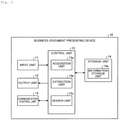
- FIG. 2 is a schematic diagram illustrating a schematic configuration of the business-document presenting device according to the present embodiment.
- a business-document presenting device 10 of the present embodiment is implemented by a general purpose computer, e.g., a personal computer and includes an input unit 11, an output unit 12, a communication control unit 13, a storage unit 14, and a control unit 15.
- the input unit 11 is implemented by using an input device, e.g., a keyboard or a mouse and inputs a variety of instruction information including processing start into the control unit 15 in response to an input operation by an operator.
- the output unit 12 is implemented by a display device, e.g., a liquid crystal display or a printing device, e.g., a printer. For example, business documents to be presented to a user are displayed on the output unit 12 as a result of business document presentation, which will be described later.
- the communication control unit 13 is implemented by, for example, an NIC (Network Interface Card) and controls communications between an external device and the control unit 15 via a telecommunication line, for example, an LAN (Local Area Network) or the Internet.
- a telecommunication line for example, an LAN (Local Area Network) or the Internet.
- the communication control unit 13 controls communications between the control unit 15 and a shared server or the like for managing business documents including inter-office emails and various reports.
- the storage unit 14 is implemented by semiconductor memory devices such as RAM (Random Access Memory) and flash memory or storage devices such as a hard disk and an optical disc.
- RAM Random Access Memory
- flash memory or storage devices such as a hard disk and an optical disc.
- a processing program for operating the business-document presenting device 10 and data used in the execution of the processing program are stored in advance or are temporarily stored each time processing is performed.
- the storage unit 14 may be configured to communicate with the control unit 15 via the communication control unit 13.
- the storage unit 14 stores text information displayed on a terminal screen during the processing of tasks in the past.
- the storage unit 14 includes an information storage unit 14a.
- Fig. 3 illustrates the data configuration of the information storage unit 14a.
- the information of the information storage unit 14a includes IDs, an operated window, and text.
- An ID is information for identifying the information and is issued each time the information is stored in the information storage unit 14a.
- An operated window indicates a window being operated during the processing of a task in the past.
- Text is text information displayed on the terminal screen. For example, text is divided into words and is stored in the information storage unit 14a.
- the information is acquired by an acquisition unit 15a, which will be described later, periodically or at a proper time, for example, at a transition of screens or at the indication of search from a user prior to the business document presentation, which will be described later, and then the information is stored in the information storage unit 14a.
- the text information includes, for example, a name, AA corporation, and an address.
- the control unit 15 is implemented by using a CPU (Central Processing Unit) or the like and executes the processing program stored in the memory.
- the control unit 15 acts as the acquisition unit 15a, an extraction unit 15b, and a search unit 15c. At least some of these functional units may be included in different pieces of hardware.
- the search unit 15c may be included in a different piece of hardware from the acquisition unit 15a and the extraction unit 15b.
- the control unit 15 may include other functional units.
- the acquisition unit 15a acquires text information displayed on the terminal screen during the processing of tasks in the past and stores the text information in the information storage unit 14a of the storage unit 14.
- the acquisition unit 15a acquires the text information displayed on the terminal screen periodically or at a proper time, for example, at a transition of screens or at the indication of search from a user during a past operation of the business system A.
- the acquisition unit 15a acquires text information displayed on the terminal screen. For example, when the occurrence of an obscure point during an operation of the business system is indicated by an operator via a GUI (Graphical User Interface), the acquisition unit 15a acquires text information displayed on the terminal screen being operated by the operator.
- GUI Graphic User Interface
- the acquisition unit 15a acquires text information displayed on an operation screen for all windows including active and inactive windows. For example, when detecting a change of an OS event or the GUI state of UIA (see NPL 7), the acquisition unit 15a acquires text information. In this case, by using the techniques of DOM (see NPL 4), MSAA (see NPL 5), Office XML SDK (see NPL 6), and UIA (see NPL 7), the acquisition unit 15a acquires text information displayed on the operation screen. Moreover, the acquisition unit 15a divides the acquired text information into words by using the technique of, for example, MeCab (see NPL 8) .
- the extraction unit 15b compares the acquired text information and text information stored in the storage unit 14 and extracts different items of text information among tasks as keywords for searching for business documents.
- the extraction unit 15b can compare the acquired text information only with text information acquired during an operation of the same window as an active window serving as the source of the text information or can be compared with all the pieces of information stored in the storage unit 14.
- Figs. 4 and 5 are explanatory drawings of the processing of the extraction unit 15b.
- the extraction unit 15b extracts text information not included in the text information stored in the information storage unit 14a of the storage unit 14.
- acquired target information and information d 1 , d 2 , ... d N stored in the information storage unit 14a are compared with each other, and NTT, Yokosuka, Kanagawa, and condominium discount, which have not been found in the past, are extracted.
- the extraction unit 15b extracts text information not included in the information storage unit 14a, as different items of text information among tasks from the target information. This allows the extraction unit 15b to extract keywords indicating variations of handled tasks except for words expressing a target task, for example, words frequently appearing on a terminal screen or consistent words.
- the extraction unit 15b extracts text information appearing with a lower frequency than a predetermined threshold value in the text information stored in the information storage unit 14a of the storage unit 14.
- the extraction unit 15b calculates the degree of a reduction in the occurrence frequency of words t i of the target information in the information storage unit 14a by using IDF values as expressed in Formula (1) below.
- the IDF value indicates the degree of a reduction in the occurrence frequency of a word.
- the IDF value increases as the occurrence frequency decreases.
- the extraction unit 15b extracts, as a keyword, a word with an IDF value larger than a predetermined value in the target information.
- the acquired target information and the information d 1 , d 2 , ... d N stored in the information storage unit 14a are compared with each other, and NTT, Kanagawa, prefecture, Yokosuka, city, condominium, FLET'S Hikari, and discount are extracted.
- the extraction unit 15b extracts text information with a lower occurrence frequency than the predetermined threshold value in the information storage unit 14a as different items of text information among tasks.
- keywords indicating variations of handled tasks can be extracted except for words expressing a target task, for example, words frequently appearing on the terminal screen or consistent words.
- the extraction unit 15b may extract text information having a weight that increases with a reduction in occurrence frequency in the text information stored in the information storage unit 14a of the storage unit 14. For example, the extraction unit 15b may assign weights to keywords according to the IDF values of the words t i of the target information, the IDF values being calculated according to Formula (1). In the example of Fig. 5 , for example, the weight of "NTT" is 1, and the weight of "FLET'S Hikari" is 0.48. Hence, keywords indicating variations of handled tasks can be more properly extracted.
- the extraction unit 15b sets a degree of 0 for the low frequency of consistent text information of tasks, for example, "customer name” and "address" that always appear on the same window of the information storage unit 14a as indicated by italic letters in Fig. 5 .
- the extraction unit 15b can exclude consistent text information of tasks as stop words from extracted keywords.
- the search unit 15c searches for business documents including the extracted keywords and presents the keywords to a user.
- the search unit 15c searches for business documents including the extracted keywords by using, for example, an existing crawling technique via the communication control unit 13.
- the search unit 15c searches for business documents according to a technique of, for example, Fess (see NPL 9) while assigning priorities to the keywords in descending order of weight according to weights provided for the keywords by the extraction unit 15b.
- the search unit 15c presents the business documents as a search result to the output unit 12 or another device via the communication control unit 13, and an operator as a user.
- the search unit 15c can present business documents to the user according to variations of handled tasks.
- the search unit 15c may classify business documents according to the probability of occurrence of text information in the business documents.
- the search unit 15c may specify the classification of business documents by using common text information of tasks from acquired text information except for extracted keywords and search for business documents including the extracted keywords from business documents in the specified classification.
- the search unit 15c classifies business documents according to topics based on the probability of occurrence of words in business documents by using, for example, document classification techniques such as a topic model (see NPL 10) and extracts words relevant to the topics. Moreover, the search unit 15c extracts words indicating a target task. The words are extracted by excluding, from the words of target information, words that are extracted as keywords and indicate variations of handled tasks. The search unit 15c then compares words relevant to the topics and the words indicating the target task in the target information and specifies the topic having many word matches as the topic of the target information.
- document classification techniques such as a topic model (see NPL 10)
- the search unit 15c searches for business documents including the extracted keywords from business documents in the specified topic.
- the business-document presenting device 10 can present more proper business documents to a user while limiting the business documents to a target task.
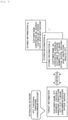
- FIG. 6 is a flowchart indicating the steps of business document presentation. The flowchart of Fig. 6 is started in response to, for example, an input for indicating the occurrence of an obscure point by an operator.
- the acquisition unit 15a acquires text information displayed on a terminal screen being operated by an operator (step S1).
- the extraction unit 15b compares the acquired text information and text information stored in the storage unit 14 and extracts different items of text information among tasks as keywords for searching for business documents (step S2).
- the extraction unit 15b extracts text information not included in the text information stored in the information storage unit 14a of the storage unit 14.
- the extraction unit 15b extracts text information appearing with a lower frequency than the predetermined threshold value in the text information stored in the information storage unit 14a of the storage unit 14.
- the extraction unit 15b may extract text information having a weight that increases with a reduction in occurrence frequency in the text information stored in the information storage unit 14a of the storage unit 14.
- the search unit 15e searches for business documents including the extracted keywords and presents the business documents as a search result to an operator as a user (step S3) .
- the search unit 15c may classify the business documents into topics according to the probability of occurrence of text information in the business documents.
- the search unit 15c may specify the topic by using common text information of tasks from acquired text information except for extracted keywords and search for business documents including the extracted keywords from business documents in the specified topic. This completes the series of business document presentation.
- the storage unit 14 stores text information displayed on the terminal screen during the processing of tasks in the past. Moreover, the acquisition unit 15a acquires text information displayed on the terminal screen. The extraction unit 15b compares the acquired text information and text information stored in the storage unit 14 and extracts different items of text information among tasks as keywords for searching for business documents.
- the business-document presenting device 10 can extract keywords indicating variations of tasks handled by a user, thereby searching for business documents including the extracted keywords and presenting the business documents to the user according to variations of the handled tasks.
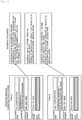
- Figs. 7 and 8 are explanatory drawings showing the effect of business document presentation.
- an operator is referring to business documents such as inter-office emails and various reports in order to input a delivery date into a shaded area on an input screen for task A during an operation of a construction system for infrastructure development.
- business documents including frequently appearing words are extracted as relevant business documents, so that business documents surrounded by a broken line are presented to the operator, the business documents including universal information such as "customer name”, "address”, and "contact number” that are italicized in Fig. 7 . Since most of the business documents presented to the operator include universal information irrespective of variations of tasks, the operator has difficulty in reaching business documents matching a handled task.
- business documents including a number of items of information such as "AA corporation” and “Hikarinooka 2, Yokosuka-shi, Kanagawa", which are different among tasks, are presented to an operator.
- business documents including "Hikarinooka 2, Yokosuka-shi, Kanagawa” that is information specific to task A are presented to the operator.
- business documents including "Kurokawa-hondori 1, Kita-ku, Nagoya-shi, Aichi” that is information specific to task B are presented to the operator.
- the operator can input a due date of a construction for infrastructure development with reference to business documents indicating the scheduled dates of road and waterworks constructions in each region.
- the business document presentation presents proper business documents to the operator.
- the business-document presenting device 10 preferentially extracts business documents dependent on tasks by using different items of text information among tasks as important keywords.
- the business-document presenting device 10 can present proper business documents to a user according to variations of tasks handled by the user without the need for a keyword setting or keyword search by the user. This achieves a smooth operation.
- a program can be created in a language such that a computer can perform the processing of the business-document presenting device 10 according to the embodiment.
- the business-document presenting device 10 can be implemented by installing, on a desired computer, a business-document presenting program for performing the business document presentation as package software or online software.
- the business-document presenting program is executed by an information processor, so that the information processor can act as the business-document presenting device 10.
- Such information processors include a desktop or laptop personal computer. Additionally, such information processors include mobile communication terminals such as a smartphone, a mobile phone, and a PHS (Personal Handyphone System) and slate terminals such as a PDA (Personal Digital Assistant).
- the functions of the business-document presenting device 10 may be implemented in a cloud server.
- FIG. 9 illustrates an example of a computer for executing the business-document presenting program.
- a computer 1000 includes, for example, a memory 1010, a CPU 1020, a hard disk drive interface 1030, a disk drive interface 1040, a serial port interface 1050, a video adapter 1060, and a network interface 1070. These units are connected to one another via a bus 1080.
- the memory 1010 includes a ROM (Read Only Memory)1011 and a RAM 1012.
- the ROM 1011 stores, for example, boot programs such as a BIOS (Basic Input Output) .
- BIOS Basic Input Output
- the hard disk drive interface 1030 is connected to a hard disk drive 1031.
- the disk drive interface 1040 is connected to a disk drive 1041.
- a detachable storage medium e.g., a magnetic disk or an optical disc is inserted.
- To the serial port interface 1050 for example, a mouse 1051 and a keyboard 1052 are connected.
- To the video adapter 1060 for example, a display 1061 is connected.
- the hard disk drive 1031 for example, an OS 1091, an application program 1092, a program module 1093, and program data 1094 are stored.
- the information described in the embodiment is stored in, for example, the hard disk drive 1031 or the memory 1010.
- the business-document presenting program is stored in the hard disk drive 1031 as, for example, the program module 1093 describing commands executed by the computer 1000.
- the program module 1093 describing processing performed by the business-document presenting device 10 as described in the embodiment is stored in the hard disk drive 1031.
- data used for information processing by the business-document presenting program is stored as the program data 1094 in, for example, the hard disk drive 1031.
- the CPU 1020 then performs the foregoing steps by optionally reading the program module 1093 and the program data 1094, which are stored in the hard disk drive 1031, into the RAM 1012.
- the program module 1093 and the program data 1094 for the business-document presenting program are not always stored in the hard disk drive 1031 and may be stored in, for example, a detachable storage medium and read by the CPU 1020 via the disk drive 1041 or the like.
- the program module 1093 and the program data 1094 for the business-document presenting program may be stored in another computer connected via networks such as a LAN and a WAN (Wide Area Network) and read by the CPU 1020 via the network interface 1070.
Landscapes
- Engineering & Computer Science (AREA)
- Business, Economics & Management (AREA)
- Theoretical Computer Science (AREA)
- Databases & Information Systems (AREA)
- Data Mining & Analysis (AREA)
- General Business, Economics & Management (AREA)
- Physics & Mathematics (AREA)
- General Physics & Mathematics (AREA)
- Strategic Management (AREA)
- Entrepreneurship & Innovation (AREA)
- Human Resources & Organizations (AREA)
- General Engineering & Computer Science (AREA)
- Economics (AREA)
- Marketing (AREA)
- Operations Research (AREA)
- Quality & Reliability (AREA)
- Tourism & Hospitality (AREA)
- Information Retrieval, Db Structures And Fs Structures Therefor (AREA)
- Management, Administration, Business Operations System, And Electronic Commerce (AREA)
Abstract
Description
- The present invention relates to a business-document presenting device, a business-document presenting method, and a business-document presenting program.
- Generally, in a company operation such as operators' input and manipulation to active windows on computer screen, operation knowledge is shared as business documents to achieve smooth operations because operators have to deal with various factors including customer requests, facilities, and service.
- Business documents are stored in various locations including a shared server and an internal site of a company, and many items of information on various topics are prepared as business documents as well as information on a target task. This leads to difficulty in finding a business document written concerning a task being handled by an operator.
- Hence, in order to facilitate a search for business documents for operators, a technique of searching for relevant business documents based on inputted keywords is disclosed (see NPL 1). Furthermore, a technique is proposed to extract relevant business documents and present the documents to an operator by comparing all the words in text information displayed on an operated screen and words in business documents without the need for a keyword setting or keyword search by the operator (see NPL 2).
- NPL 3 discloses IDF (Inverse Document Frequency) that indicates the characteristics of words in documents. NPL 4 discloses DOM (Document Object Model) for modeling a web page as an object. NPL 5 discloses MSAA (Microsoft Active Accessibility) for controlling Web accessibility. NPL 6 discloses Office XML SDK. NPL 7 discloses UIA (UI Automation) for automation of a screen operation. NPL 8 discloses MeCab for dividing Japanese text information into words. NPL 9 discloses open-source full-text search server Fess. NPL 10 discloses a topic model of document sorting.
-
- [NPL 1] "QuickSolution", [online], Sumitomo Electric Information Systems Co., Ltd., [search on April 3, 2019], Internet URL:https://www.sei-info.co.jp/quicksolution/
- [NPL 2] "Document Recommendation Method based on the Content of Enterprise Documents for OSS Screen", URABE Yuki, OGASAWARA Shiro, HOTTA Kentaro, INOUE Akira, IEICE technical report, March 8, 2018, 117 (491), pp.25-30
- [NPL 3] K. Sparck Jones, "A Statistical Interpretation of Term Specificity and its Application in Retrieval", Journal of Documentation, 1972, Vol. 28, pp.11-21
- [NPL 4] "Document Object Model (DOM)", [online], 2005, W3C, [Search on April 3, 2019], Internet <URL:https://www.w3.org/DOM/>
- [NPL 5] "Microsoft Active Accessibility (MSAA)", [online], Microsoft Docs, [Search on April 3, 2019], Internet <URL:https://docs.microsoft.com/en-us/windows/desktop/winauto/ microsoft-active-accessibility>
- [NPL 6] "Open XML SDK", [online], GitHub, [Search on April 3, 2019], Internet <URL:https://github.com/OfficeDev/Open-XML-SDK>
- [NPL 7] "UI Automation", [online], Microsoft Docs, [Search on April 3, 2019], Internet <URL:https://docs.microsoft.com/en-us/windows/desktop/winauto/ entry-uiauto-win32>
- [NPL 8] "MeCab: Yet Another Part-of-Speech and Morphological Analyzer", [online], 2013, [Search on April 3, 2019], Internet <URL:http://taku910.github.io/mecab/>
- [NPL 9] "Open-source full-text search server Fess", [online], [Search on April 3, 2019], Internet <URL:https://fess.codelibs.org/ja/>
- [NPL 10] D.M.Blei, A.Y.Ng, M.I.Jordan, "Latent Dirichlet Allocation", The Journal of Machine Learning Research, 2003, Vol. 3, pp.993-1022
- However, in the related art, business documents including frequently appearing words from among words displayed in an operation screen are extracted as relevant documents. In this case, for a target task, business documents including consistent information such as "customer name" and "address" on a screen and universal information irrespective of variations of handled tasks are mainly extracted. Such business documents include an operation manual and a business-system operation manual. Thus, it is difficult to present business documents according to variations of handled tasks such that an operator, that is, a user of a business system can easily refer to the documents so as to clear obscure points in a task handled by the operator skilled in a universal operation method.
- The present invention has been devised in view of the problem. An object of the present invention is to present business documents to a user according to variations of handled tasks.
- In order to solve the problem and attain the object, a business-document presenting device according to the present invention includes: a storage unit configured to store text information displayed on a terminal screen during processing of a task in a past; an acquisition unit configured to acquire text information displayed on the terminal screen; and an extraction unit configured to compare the acquired text information and the text information stored in the storage unit and extract different items of text information among tasks as keywords for searching for business documents.
- The present invention can present business documents to a user according to variations of handled tasks.
-
- [
Fig. 1 ]
Fig. 1 is an explanatory drawing illustrating the outline of processing of a business-document presenting device according to the present embodiment. - [
Fig. 2 ]
Fig. 2 is a schematic diagram illustrating a schematic configuration of the business-document presenting device according to the present embodiment. - [
Fig. 3 ]
Fig. 3 illustrates the data configuration of an information storage unit. - [
Fig. 4 ]
Fig. 4 is an explanatory drawing of the processing of an extraction unit. - [
Fig. 5 ]
Fig. 5 is an explanatory drawing of the processing of the extraction unit. - [
Fig. 6 ]
Fig. 6 is a flowchart indicating the steps of business document presentation. - [
Fig. 7 ]
Fig. 7 is an explanatory drawing showing the effect of business document presentation. - [
Fig. 8 ]
Fig. 8 is an explanatory drawing showing the effect of business document presentation. - [
Fig. 9 ]
Fig. 9 illustrates an example of a computer for executing a business-document presenting program. - An embodiment of the present invention will be described in detail with reference to the accompanying drawings. The present invention is not limited by the embodiment. In the drawings, the same parts are indicated by the same reference numerals.
- [Outline of processing of a business-document presenting device]
Fig. 1 is an explanatory drawing illustrating the outline of processing of a business-document presenting device according to the present embodiment. For example, if an operator indicates the occurrence of an obscure point during an operation of a business system, the business-document presenting device extracts, as target information, text information displayed on a terminal screen being operated and compares the information with the information of an information storage unit. In the information storage unit, text information displayed in the past on the terminal screen during the operations of the business system is accumulated. The business-document presenting device extracts, as keywords from target information, different items of text information according to tasks. Thereafter, the business-document presenting device searches business documents by using the extracted keywords, thereby presenting business documents to an operator according to variations of handled tasks during processing by the operator. -
Fig. 1 illustrates that an operator indicates the occurrence of an obscure point during an input to, for example, a service application screen in a business system A. In this case, extracted target information includes consistent text information such as names, addresses, cities, and service of tasks and text information such as Denden, Taro, FLET'S Hikari, two-year, and discount that are different among tasks. Moreover, in the information storage unit, text information extracted from a displayed screen is accumulated. The text information is extracted periodically or at a proper time, for example, at a transition of screens in the past normal operations of the business system A. - The business-document presenting device specifies different items of text information among tasks by comparing target information and the text information of the information storage unit and extracts the specified items of information as keywords for searching for business documents. Thus, in the example of
Fig. 1 , the business-document presenting device extracts Denden, Taro, FLET'S Hikari, two-year, and discount, which are different among tasks, as keywords from the target information. - The business-document presenting device then searches for business documents including the extracted keywords by using, for example, a crawling technique and presents business documents including Denden, Taro, FLET'S Hikari, two-year, and discount to the operator. Thus, the operator can refer to the business documents according to variations of handled tasks.
- [Configuration of the business-document presenting device]
Fig. 2 is a schematic diagram illustrating a schematic configuration of the business-document presenting device according to the present embodiment. As illustrated inFig. 2 , a business-document presenting device 10 of the present embodiment is implemented by a general purpose computer, e.g., a personal computer and includes aninput unit 11, anoutput unit 12, acommunication control unit 13, astorage unit 14, and acontrol unit 15. - The
input unit 11 is implemented by using an input device, e.g., a keyboard or a mouse and inputs a variety of instruction information including processing start into thecontrol unit 15 in response to an input operation by an operator. Theoutput unit 12 is implemented by a display device, e.g., a liquid crystal display or a printing device, e.g., a printer. For example, business documents to be presented to a user are displayed on theoutput unit 12 as a result of business document presentation, which will be described later. - The
communication control unit 13 is implemented by, for example, an NIC (Network Interface Card) and controls communications between an external device and thecontrol unit 15 via a telecommunication line, for example, an LAN (Local Area Network) or the Internet. For example, thecommunication control unit 13 controls communications between thecontrol unit 15 and a shared server or the like for managing business documents including inter-office emails and various reports. - The
storage unit 14 is implemented by semiconductor memory devices such as RAM (Random Access Memory) and flash memory or storage devices such as a hard disk and an optical disc. In thestorage unit 14, a processing program for operating the business-document presenting device 10 and data used in the execution of the processing program are stored in advance or are temporarily stored each time processing is performed. Thestorage unit 14 may be configured to communicate with thecontrol unit 15 via thecommunication control unit 13. - In the present embodiment, the
storage unit 14 stores text information displayed on a terminal screen during the processing of tasks in the past. Specifically, thestorage unit 14 includes aninformation storage unit 14a.Fig. 3 illustrates the data configuration of theinformation storage unit 14a. As indicated inFig. 3 , the information of theinformation storage unit 14a includes IDs, an operated window, and text. An ID is information for identifying the information and is issued each time the information is stored in theinformation storage unit 14a. An operated window indicates a window being operated during the processing of a task in the past. Text is text information displayed on the terminal screen. For example, text is divided into words and is stored in theinformation storage unit 14a. - The information is acquired by an
acquisition unit 15a, which will be described later, periodically or at a proper time, for example, at a transition of screens or at the indication of search from a user prior to the business document presentation, which will be described later, and then the information is stored in theinformation storage unit 14a. - In
Fig. 3 , for example, the information of ID = 1 is acquired at the above-mentioned time during the operation of a business system A. The text information includes, for example, a name, AA corporation, and an address. -
Fig. 2 will be referred to again. Thecontrol unit 15 is implemented by using a CPU (Central Processing Unit) or the like and executes the processing program stored in the memory. Thus, as illustrated inFig. 2 , thecontrol unit 15 acts as theacquisition unit 15a, anextraction unit 15b, and a search unit 15c. At least some of these functional units may be included in different pieces of hardware. For example, the search unit 15c may be included in a different piece of hardware from theacquisition unit 15a and theextraction unit 15b. Alternatively, thecontrol unit 15 may include other functional units. - The
acquisition unit 15a acquires text information displayed on the terminal screen during the processing of tasks in the past and stores the text information in theinformation storage unit 14a of thestorage unit 14. Theacquisition unit 15a acquires the text information displayed on the terminal screen periodically or at a proper time, for example, at a transition of screens or at the indication of search from a user during a past operation of the business system A. - Moreover, the
acquisition unit 15a acquires text information displayed on the terminal screen. For example, when the occurrence of an obscure point during an operation of the business system is indicated by an operator via a GUI (Graphical User Interface), theacquisition unit 15a acquires text information displayed on the terminal screen being operated by the operator. - The
acquisition unit 15a acquires text information displayed on an operation screen for all windows including active and inactive windows. For example, when detecting a change of an OS event or the GUI state of UIA (see NPL 7), theacquisition unit 15a acquires text information. In this case, by using the techniques of DOM (see NPL 4), MSAA (see NPL 5), Office XML SDK (see NPL 6), and UIA (see NPL 7), theacquisition unit 15a acquires text information displayed on the operation screen. Moreover, theacquisition unit 15a divides the acquired text information into words by using the technique of, for example, MeCab (see NPL 8) . - The
extraction unit 15b compares the acquired text information and text information stored in thestorage unit 14 and extracts different items of text information among tasks as keywords for searching for business documents. Theextraction unit 15b can compare the acquired text information only with text information acquired during an operation of the same window as an active window serving as the source of the text information or can be compared with all the pieces of information stored in thestorage unit 14.Figs. 4 and5 are explanatory drawings of the processing of theextraction unit 15b. - For example, as keywords from the acquired text information, the
extraction unit 15b extracts text information not included in the text information stored in theinformation storage unit 14a of thestorage unit 14. In the example ofFig. 4 , acquired target information and information d1, d2, ... dN stored in theinformation storage unit 14a are compared with each other, and NTT, Yokosuka, Kanagawa, and condominium discount, which have not been found in the past, are extracted. - In this way, the
extraction unit 15b extracts text information not included in theinformation storage unit 14a, as different items of text information among tasks from the target information. This allows theextraction unit 15b to extract keywords indicating variations of handled tasks except for words expressing a target task, for example, words frequently appearing on a terminal screen or consistent words. - Alternatively, as keywords from the acquired text information, the
extraction unit 15b extracts text information appearing with a lower frequency than a predetermined threshold value in the text information stored in theinformation storage unit 14a of thestorage unit 14. - For example, the
extraction unit 15b calculates the degree of a reduction in the occurrence frequency of words ti of the target information in theinformation storage unit 14a by using IDF values as expressed in Formula (1) below. The IDF value indicates the degree of a reduction in the occurrence frequency of a word. The IDF value increases as the occurrence frequency decreases. Thus, theextraction unit 15b extracts, as a keyword, a word with an IDF value larger than a predetermined value in the target information. - [Formula 1]

- |D| is the total number of stored information items, and
- |{d:d∋ti}| is the number of information items including
- the word ti in the stored information. I
- In the example of
Fig. 5 , the acquired target information and the information d1, d2, ... dN stored in theinformation storage unit 14a are compared with each other, and NTT, Kanagawa, prefecture, Yokosuka, city, condominium, FLET'S Hikari, and discount are extracted. In this way, from the words of the target information, theextraction unit 15b extracts text information with a lower occurrence frequency than the predetermined threshold value in theinformation storage unit 14a as different items of text information among tasks. Thus, keywords indicating variations of handled tasks can be extracted except for words expressing a target task, for example, words frequently appearing on the terminal screen or consistent words. - Alternatively, as keywords from the acquired text information, the
extraction unit 15b may extract text information having a weight that increases with a reduction in occurrence frequency in the text information stored in theinformation storage unit 14a of thestorage unit 14. For example, theextraction unit 15b may assign weights to keywords according to the IDF values of the words ti of the target information, the IDF values being calculated according to Formula (1). In the example ofFig. 5 , for example, the weight of "NTT" is 1, and the weight of "FLET'S Hikari" is 0.48. Hence, keywords indicating variations of handled tasks can be more properly extracted. - Furthermore, the
extraction unit 15b sets a degree of 0 for the low frequency of consistent text information of tasks, for example, "customer name" and "address" that always appear on the same window of theinformation storage unit 14a as indicated by italic letters inFig. 5 . Thus, theextraction unit 15b can exclude consistent text information of tasks as stop words from extracted keywords. -
Fig. 2 will be referred to again. The search unit 15c searches for business documents including the extracted keywords and presents the keywords to a user. The search unit 15c searches for business documents including the extracted keywords by using, for example, an existing crawling technique via thecommunication control unit 13. Moreover, by using keywords weighted by IDF values, the search unit 15c searches for business documents according to a technique of, for example, Fess (see NPL 9) while assigning priorities to the keywords in descending order of weight according to weights provided for the keywords by theextraction unit 15b. - Furthermore, the search unit 15c presents the business documents as a search result to the
output unit 12 or another device via thecommunication control unit 13, and an operator as a user. Thus, the search unit 15c can present business documents to the user according to variations of handled tasks. - Alternatively, the search unit 15c may classify business documents according to the probability of occurrence of text information in the business documents. In this case, the search unit 15c may specify the classification of business documents by using common text information of tasks from acquired text information except for extracted keywords and search for business documents including the extracted keywords from business documents in the specified classification.
- The search unit 15c classifies business documents according to topics based on the probability of occurrence of words in business documents by using, for example, document classification techniques such as a topic model (see NPL 10) and extracts words relevant to the topics. Moreover, the search unit 15c extracts words indicating a target task. The words are extracted by excluding, from the words of target information, words that are extracted as keywords and indicate variations of handled tasks. The search unit 15c then compares words relevant to the topics and the words indicating the target task in the target information and specifies the topic having many word matches as the topic of the target information.
- Moreover, the search unit 15c searches for business documents including the extracted keywords from business documents in the specified topic. Thus, the business-
document presenting device 10 can present more proper business documents to a user while limiting the business documents to a target task. - [Business document presentation] Referring to
Fig. 6 , business document presentation by the business-document presenting device 10 according to the present embodiment will be described below.Fig. 6 is a flowchart indicating the steps of business document presentation. The flowchart ofFig. 6 is started in response to, for example, an input for indicating the occurrence of an obscure point by an operator. - First, the
acquisition unit 15a acquires text information displayed on a terminal screen being operated by an operator (step S1). - The
extraction unit 15b then compares the acquired text information and text information stored in thestorage unit 14 and extracts different items of text information among tasks as keywords for searching for business documents (step S2). - For example, as keywords from the acquired text information, the
extraction unit 15b extracts text information not included in the text information stored in theinformation storage unit 14a of thestorage unit 14. - Alternatively, as keywords from the acquired text information, the
extraction unit 15b extracts text information appearing with a lower frequency than the predetermined threshold value in the text information stored in theinformation storage unit 14a of thestorage unit 14. In this case, as keywords from the acquired text information, theextraction unit 15b may extract text information having a weight that increases with a reduction in occurrence frequency in the text information stored in theinformation storage unit 14a of thestorage unit 14. - The search unit 15e then searches for business documents including the extracted keywords and presents the business documents as a search result to an operator as a user (step S3) .
- The search unit 15c may classify the business documents into topics according to the probability of occurrence of text information in the business documents. In this case, the search unit 15c may specify the topic by using common text information of tasks from acquired text information except for extracted keywords and search for business documents including the extracted keywords from business documents in the specified topic. This completes the series of business document presentation.
- As described above, in the business-
document presenting device 10 of the present embodiment, thestorage unit 14 stores text information displayed on the terminal screen during the processing of tasks in the past. Moreover, theacquisition unit 15a acquires text information displayed on the terminal screen. Theextraction unit 15b compares the acquired text information and text information stored in thestorage unit 14 and extracts different items of text information among tasks as keywords for searching for business documents. - Thus, the business-
document presenting device 10 can extract keywords indicating variations of tasks handled by a user, thereby searching for business documents including the extracted keywords and presenting the business documents to the user according to variations of the handled tasks. -
Figs. 7 and8 are explanatory drawings showing the effect of business document presentation. In the example ofFig. 7 , an operator is referring to business documents such as inter-office emails and various reports in order to input a delivery date into a shaded area on an input screen for task A during an operation of a construction system for infrastructure development. - In the case of conventional information, business documents including frequently appearing words are extracted as relevant business documents, so that business documents surrounded by a broken line are presented to the operator, the business documents including universal information such as "customer name", "address", and "contact number" that are italicized in
Fig. 7 . Since most of the business documents presented to the operator include universal information irrespective of variations of tasks, the operator has difficulty in reaching business documents matching a handled task. - In contrast, according to the present invention, business documents including a number of items of information such as "AA corporation" and "
Hikarinooka 2, Yokosuka-shi, Kanagawa", which are different among tasks, are presented to an operator. - As indicated in
Fig. 8 , in particular, when the due date of a construction for infrastructure development is being inputted with reference to business documents in each region, business documents indicating the scheduled dates of road and waterworks constructions in each region are presented. - For example, when an operator is referring to business documents in order to input a due date indicated in a shaded area on the input screen for task A, business documents including "
Hikarinooka 2, Yokosuka-shi, Kanagawa" that is information specific to task A are presented to the operator. When an operator is referring to business documents in order to input a due date indicated in a shaded area on an input screen for task B, business documents including "Kurokawa-hondori 1, Kita-ku, Nagoya-shi, Aichi" that is information specific to task B are presented to the operator. - Thus, the operator can input a due date of a construction for infrastructure development with reference to business documents indicating the scheduled dates of road and waterworks constructions in each region. In this way, even if different business documents are to be referred to for respective regions, the business document presentation presents proper business documents to the operator.
- As described above, the business-
document presenting device 10 preferentially extracts business documents dependent on tasks by using different items of text information among tasks as important keywords. Thus, the business-document presenting device 10 can present proper business documents to a user according to variations of tasks handled by the user without the need for a keyword setting or keyword search by the user. This achieves a smooth operation. - A program can be created in a language such that a computer can perform the processing of the business-
document presenting device 10 according to the embodiment. As one embodiment, the business-document presenting device 10 can be implemented by installing, on a desired computer, a business-document presenting program for performing the business document presentation as package software or online software. For example, the business-document presenting program is executed by an information processor, so that the information processor can act as the business-document presenting device 10. Such information processors include a desktop or laptop personal computer. Additionally, such information processors include mobile communication terminals such as a smartphone, a mobile phone, and a PHS (Personal Handyphone System) and slate terminals such as a PDA (Personal Digital Assistant). The functions of the business-document presenting device 10 may be implemented in a cloud server. -
Fig. 9 illustrates an example of a computer for executing the business-document presenting program. Acomputer 1000 includes, for example, amemory 1010, aCPU 1020, a harddisk drive interface 1030, adisk drive interface 1040, aserial port interface 1050, avideo adapter 1060, and anetwork interface 1070. These units are connected to one another via abus 1080. - The
memory 1010 includes a ROM (Read Only Memory)1011 and aRAM 1012. TheROM 1011 stores, for example, boot programs such as a BIOS (Basic Input Output) . The harddisk drive interface 1030 is connected to ahard disk drive 1031. Thedisk drive interface 1040 is connected to a disk drive 1041. In the disk drive 1041, a detachable storage medium, e.g., a magnetic disk or an optical disc is inserted. To theserial port interface 1050, for example, amouse 1051 and akeyboard 1052 are connected. To thevideo adapter 1060, for example, adisplay 1061 is connected. - In the
hard disk drive 1031, for example, anOS 1091, anapplication program 1092, aprogram module 1093, and program data 1094 are stored. The information described in the embodiment is stored in, for example, thehard disk drive 1031 or thememory 1010. - Moreover, the business-document presenting program is stored in the
hard disk drive 1031 as, for example, theprogram module 1093 describing commands executed by thecomputer 1000. Specifically, theprogram module 1093 describing processing performed by the business-document presenting device 10 as described in the embodiment is stored in thehard disk drive 1031. - Furthermore, data used for information processing by the business-document presenting program is stored as the program data 1094 in, for example, the
hard disk drive 1031. TheCPU 1020 then performs the foregoing steps by optionally reading theprogram module 1093 and the program data 1094, which are stored in thehard disk drive 1031, into theRAM 1012. - The
program module 1093 and the program data 1094 for the business-document presenting program are not always stored in thehard disk drive 1031 and may be stored in, for example, a detachable storage medium and read by theCPU 1020 via the disk drive 1041 or the like. Alternatively, theprogram module 1093 and the program data 1094 for the business-document presenting program may be stored in another computer connected via networks such as a LAN and a WAN (Wide Area Network) and read by theCPU 1020 via thenetwork interface 1070. - The invention made by the present inventors is applied to the foregoing embodiment. The present invention is not limited by a description of the present embodiment, that is, a part of the disclosure of the present invention and the drawings. In other words, other embodiments, examples, and operation techniques that are implemented by a person skilled in the art based on the present embodiment are all included in the scope of the present invention.
-
- 10
- Business-document presenting device
- 11
- Input unit
- 12
- Output unit
- 13
- Communication control unit
- 14
- Storage unit
- 14a
- Information storage unit
- 15
- Control unit
- 15a
- Acquisition unit
- 15b
- Extraction unit
- 15c
- Search unit
Claims (7)
- A business-document presenting device comprising:a storage unit configured to store text information displayed on a terminal screen during processing of a task in a past;an acquisition unit configured to acquire text information displayed on the terminal screen; andan extraction unit configured to compare the acquired text information and the text information stored in the storage unit and extract different items of text information among tasks as keywords for searching for business documents.
- The business-document presenting device according to claim 1, wherein from the acquired text information, the extraction unit extracts, as the keywords, text information excluded from the text information stored in the storage unit.
- The business-document presenting device according to claim 1, wherein from the acquired text information, the extraction unit extracts, as the keywords, text information appearing with a lower frequency than a predetermined threshold value in the text information stored in the storage unit.
- The business-document presenting device according to claim 3, wherein from the acquired text information, the extraction unit extracts, as the keywords, text information having a weight that increases with a reduction in occurrence frequency in the text information stored in the storage unit.
- The business-document presenting device according to claim 1, further including a search unit configured to classify business documents according to probability of occurrence of text information in the business documents, specify classification of the business documents by using common text information of tasks except for the extracted keywords in the acquired text information, and search for business documents including the extracted keywords from business documents in the specified classification.
- A business-document presenting method performed by a business-document presenting device, the business-document presenting device including a storage unit configured to store text information displayed on a terminal screen during processing of a task in a past, the business-document presenting method comprising:an acquisition step of acquiring text information displayed on the terminal screen; andan extraction step of comparing the acquired text information and the text information stored in the storage unit and extracting different items of text information among tasks as keywords for searching for business documents.
- A business-document presenting program that causes a computer to execute:an acquisition step of acquiring text information displayed on a terminal screen; anda determination step of referring to a storage unit configured to store text information displayed on the terminal screen during processing of a task in a past, comparing the acquired text information and the text information stored in the storage unit, and extracting different items of text information among tasks as keywords for searching for business documents.
Applications Claiming Priority (1)
| Application Number | Priority Date | Filing Date | Title |
|---|---|---|---|
| PCT/JP2019/019401 WO2020230309A1 (en) | 2019-05-15 | 2019-05-15 | Business document presenting device, business document presenting method, and business document presenting program |
Publications (3)
| Publication Number | Publication Date |
|---|---|
| EP3955194A1 true EP3955194A1 (en) | 2022-02-16 |
| EP3955194A4 EP3955194A4 (en) | 2022-11-30 |
| EP3955194B1 EP3955194B1 (en) | 2024-04-17 |
Family
ID=73289842
Family Applications (1)
| Application Number | Title | Priority Date | Filing Date |
|---|---|---|---|
| EP19929014.9A Active EP3955194B1 (en) | 2019-05-15 | 2019-05-15 | Business document presenting device, business document presenting method, and business document presenting program |
Country Status (6)
| Country | Link |
|---|---|
| US (1) | US11874881B2 (en) |
| EP (1) | EP3955194B1 (en) |
| JP (1) | JP7338679B2 (en) |
| CN (1) | CN113892120B (en) |
| ES (1) | ES2984333T3 (en) |
| WO (1) | WO2020230309A1 (en) |
Family Cites Families (16)
| Publication number | Priority date | Publication date | Assignee | Title |
|---|---|---|---|---|
| JPH0561912A (en) * | 1991-09-02 | 1993-03-12 | Toshiba Corp | Information filing device |
| JP3502553B2 (en) | 1998-11-18 | 2004-03-02 | 日本電信電話株式会社 | Distributed document retrieval device |
| JP2003242176A (en) | 2001-12-13 | 2003-08-29 | Sony Corp | Information processing apparatus and method, recording medium, and program |
| CN100419753C (en) * | 2005-12-19 | 2008-09-17 | 株式会社理光 | Method and device for digital data central searching target file according to classified information |
| KR100810999B1 (en) | 2006-06-30 | 2008-03-11 | 엔에이치엔(주) | Online email service system and its method |
| JP5022319B2 (en) | 2008-08-04 | 2012-09-12 | 日本電信電話株式会社 | Text mining apparatus, method, program, and recording medium thereof |
| US8612205B2 (en) | 2010-06-14 | 2013-12-17 | Xerox Corporation | Word alignment method and system for improved vocabulary coverage in statistical machine translation |
| US8316030B2 (en) * | 2010-11-05 | 2012-11-20 | Nextgen Datacom, Inc. | Method and system for document classification or search using discrete words |
| JP5624970B2 (en) * | 2011-10-31 | 2014-11-12 | 京セラドキュメントソリューションズ株式会社 | Image reading apparatus, image forming apparatus, and image processing method |
| CN103020164B (en) * | 2012-11-26 | 2015-06-10 | 华北电力大学 | Semantic search method based on multi-semantic analysis and personalized sequencing |
| CN103020213B (en) * | 2012-12-07 | 2015-07-22 | 福建亿榕信息技术有限公司 | Method and system for searching non-structural electronic document with obvious category classification |
| US9047488B2 (en) | 2013-03-15 | 2015-06-02 | International Business Machines Corporation | Anonymizing sensitive identifying information based on relational context across a group |
| JP6200602B2 (en) * | 2014-12-26 | 2017-09-20 | 株式会社日立製作所 | Related information acquisition method and apparatus, and storage medium |
| CN106570075A (en) * | 2016-10-11 | 2017-04-19 | 深圳大学 | Computer-based classified feature selection method for text retrieval |
| US20180150555A1 (en) * | 2016-11-28 | 2018-05-31 | Wipro Limited | Method and system for providing resolution to tickets in an incident management system |
| CN108920454A (en) * | 2018-06-13 | 2018-11-30 | 北京信息科技大学 | A kind of theme phrase extraction method |
-
2019
- 2019-05-15 EP EP19929014.9A patent/EP3955194B1/en active Active
- 2019-05-15 CN CN201980096367.9A patent/CN113892120B/en active Active
- 2019-05-15 WO PCT/JP2019/019401 patent/WO2020230309A1/en not_active Ceased
- 2019-05-15 ES ES19929014T patent/ES2984333T3/en active Active
- 2019-05-15 JP JP2021519219A patent/JP7338679B2/en active Active
- 2019-05-15 US US17/610,889 patent/US11874881B2/en active Active
Also Published As
| Publication number | Publication date |
|---|---|
| WO2020230309A1 (en) | 2020-11-19 |
| JPWO2020230309A1 (en) | 2020-11-19 |
| US11874881B2 (en) | 2024-01-16 |
| EP3955194A4 (en) | 2022-11-30 |
| CN113892120A (en) | 2022-01-04 |
| EP3955194B1 (en) | 2024-04-17 |
| CN113892120B (en) | 2025-09-16 |
| ES2984333T3 (en) | 2024-10-29 |
| US20220207091A1 (en) | 2022-06-30 |
| JP7338679B2 (en) | 2023-09-05 |
Similar Documents
| Publication | Publication Date | Title |
|---|---|---|
| US11625406B2 (en) | Website scoring system | |
| US9098532B2 (en) | Generating alternative descriptions for images | |
| AU2019202750A1 (en) | Automatic analysis of a technical capability | |
| US9720912B2 (en) | Document management system, document management method, and document management program | |
| CN111125343A (en) | Text analysis method and device suitable for human-sentry matching recommendation system | |
| US8949243B1 (en) | Systems and methods for determining a rating for an item from user reviews | |
| EP3683695A1 (en) | Synonym dictionary creation device, synonym dictionary creation program, and synonym dictionary creation method | |
| US20130246520A1 (en) | Recognizing Social Media Posts, Comments, or other Texts as Business Recommendations or Referrals | |
| CN112508432B (en) | Advertisement potential risk detection method and device, electronic equipment, medium and product | |
| CN112541329B (en) | Resume creation method, device, and electronic device | |
| US20190228315A1 (en) | Auto-solution help desk advisor | |
| CN111177319A (en) | Risk event determination method and device, electronic equipment and storage medium | |
| US20150242470A1 (en) | Systems and methods for recommending software applications | |
| US20170076296A1 (en) | Prioritizing and planning issues in automation | |
| JP2002117019A (en) | Apparatus and method for segmenting documents based on semantic unity | |
| WO2018171295A1 (en) | Method and apparatus for tagging article, terminal, and computer readable storage medium | |
| CN105468506A (en) | Application management method, device and terminal | |
| US12373497B1 (en) | Dynamic generation of performance state tree | |
| US20170103059A1 (en) | Method and system for preserving sensitive information in a confidential document | |
| EP3955194B1 (en) | Business document presenting device, business document presenting method, and business document presenting program | |
| CN111259259B (en) | College student news recommendation method, device, equipment and storage medium | |
| US20130183652A1 (en) | Method and system for providing sets of user comments as answers to a question | |
| CN112231696A (en) | Malicious sample identification method and device, computing equipment and medium | |
| EP3500942A1 (en) | Identifying attributes associated with an entity using natural language processing | |
| KR102155854B1 (en) | Keyword management method and apparatus for collecting various sentences |
Legal Events
| Date | Code | Title | Description |
|---|---|---|---|
| STAA | Information on the status of an ep patent application or granted ep patent |
Free format text: STATUS: THE INTERNATIONAL PUBLICATION HAS BEEN MADE |
|
| PUAI | Public reference made under article 153(3) epc to a published international application that has entered the european phase |
Free format text: ORIGINAL CODE: 0009012 |
|
| STAA | Information on the status of an ep patent application or granted ep patent |
Free format text: STATUS: REQUEST FOR EXAMINATION WAS MADE |
|
| 17P | Request for examination filed |
Effective date: 20211110 |
|
| AK | Designated contracting states |
Kind code of ref document: A1 Designated state(s): AL AT BE BG CH CY CZ DE DK EE ES FI FR GB GR HR HU IE IS IT LI LT LU LV MC MK MT NL NO PL PT RO RS SE SI SK SM TR |
|
| DAV | Request for validation of the european patent (deleted) | ||
| DAX | Request for extension of the european patent (deleted) | ||
| A4 | Supplementary search report drawn up and despatched |
Effective date: 20221028 |
|
| RIC1 | Information provided on ipc code assigned before grant |
Ipc: G06Q 10/10 20120101AFI20221024BHEP |
|
| STAA | Information on the status of an ep patent application or granted ep patent |
Free format text: STATUS: EXAMINATION IS IN PROGRESS |
|
| 17Q | First examination report despatched |
Effective date: 20230623 |
|
| GRAP | Despatch of communication of intention to grant a patent |
Free format text: ORIGINAL CODE: EPIDOSNIGR1 |
|
| STAA | Information on the status of an ep patent application or granted ep patent |
Free format text: STATUS: GRANT OF PATENT IS INTENDED |
|
| INTG | Intention to grant announced |
Effective date: 20231218 |
|
| GRAS | Grant fee paid |
Free format text: ORIGINAL CODE: EPIDOSNIGR3 |
|
| GRAA | (expected) grant |
Free format text: ORIGINAL CODE: 0009210 |
|
| STAA | Information on the status of an ep patent application or granted ep patent |
Free format text: STATUS: THE PATENT HAS BEEN GRANTED |
|
| AK | Designated contracting states |
Kind code of ref document: B1 Designated state(s): AL AT BE BG CH CY CZ DE DK EE ES FI FR GB GR HR HU IE IS IT LI LT LU LV MC MK MT NL NO PL PT RO RS SE SI SK SM TR |
|
| REG | Reference to a national code |
Ref country code: GB Ref legal event code: FG4D |
|
| REG | Reference to a national code |
Ref country code: CH Ref legal event code: EP |
|
| REG | Reference to a national code |
Ref country code: DE Ref legal event code: R096 Ref document number: 602019050680 Country of ref document: DE |
|
| REG | Reference to a national code |
Ref country code: IE Ref legal event code: FG4D |
|
| REG | Reference to a national code |
Ref country code: LT Ref legal event code: MG9D |
|
| REG | Reference to a national code |
Ref country code: NL Ref legal event code: MP Effective date: 20240417 |
|
| REG | Reference to a national code |
Ref country code: AT Ref legal event code: MK05 Ref document number: 1677959 Country of ref document: AT Kind code of ref document: T Effective date: 20240417 |
|
| PG25 | Lapsed in a contracting state [announced via postgrant information from national office to epo] |
Ref country code: NL Free format text: LAPSE BECAUSE OF FAILURE TO SUBMIT A TRANSLATION OF THE DESCRIPTION OR TO PAY THE FEE WITHIN THE PRESCRIBED TIME-LIMIT Effective date: 20240417 |
|
| PG25 | Lapsed in a contracting state [announced via postgrant information from national office to epo] |
Ref country code: NL Free format text: LAPSE BECAUSE OF FAILURE TO SUBMIT A TRANSLATION OF THE DESCRIPTION OR TO PAY THE FEE WITHIN THE PRESCRIBED TIME-LIMIT Effective date: 20240417 |
|
| PG25 | Lapsed in a contracting state [announced via postgrant information from national office to epo] |
Ref country code: IS Free format text: LAPSE BECAUSE OF FAILURE TO SUBMIT A TRANSLATION OF THE DESCRIPTION OR TO PAY THE FEE WITHIN THE PRESCRIBED TIME-LIMIT Effective date: 20240817 |
|
| PG25 | Lapsed in a contracting state [announced via postgrant information from national office to epo] |
Ref country code: BG Free format text: LAPSE BECAUSE OF FAILURE TO SUBMIT A TRANSLATION OF THE DESCRIPTION OR TO PAY THE FEE WITHIN THE PRESCRIBED TIME-LIMIT Effective date: 20240417 |
|
| PG25 | Lapsed in a contracting state [announced via postgrant information from national office to epo] |
Ref country code: HR Free format text: LAPSE BECAUSE OF FAILURE TO SUBMIT A TRANSLATION OF THE DESCRIPTION OR TO PAY THE FEE WITHIN THE PRESCRIBED TIME-LIMIT Effective date: 20240417 Ref country code: FI Free format text: LAPSE BECAUSE OF FAILURE TO SUBMIT A TRANSLATION OF THE DESCRIPTION OR TO PAY THE FEE WITHIN THE PRESCRIBED TIME-LIMIT Effective date: 20240417 |
|
| PG25 | Lapsed in a contracting state [announced via postgrant information from national office to epo] |
Ref country code: GR Free format text: LAPSE BECAUSE OF FAILURE TO SUBMIT A TRANSLATION OF THE DESCRIPTION OR TO PAY THE FEE WITHIN THE PRESCRIBED TIME-LIMIT Effective date: 20240718 |
|
| PG25 | Lapsed in a contracting state [announced via postgrant information from national office to epo] |
Ref country code: PT Free format text: LAPSE BECAUSE OF FAILURE TO SUBMIT A TRANSLATION OF THE DESCRIPTION OR TO PAY THE FEE WITHIN THE PRESCRIBED TIME-LIMIT Effective date: 20240819 |
|
| PG25 | Lapsed in a contracting state [announced via postgrant information from national office to epo] |
Ref country code: AT Free format text: LAPSE BECAUSE OF FAILURE TO SUBMIT A TRANSLATION OF THE DESCRIPTION OR TO PAY THE FEE WITHIN THE PRESCRIBED TIME-LIMIT Effective date: 20240417 |
|
| PG25 | Lapsed in a contracting state [announced via postgrant information from national office to epo] |
Ref country code: PL Free format text: LAPSE BECAUSE OF FAILURE TO SUBMIT A TRANSLATION OF THE DESCRIPTION OR TO PAY THE FEE WITHIN THE PRESCRIBED TIME-LIMIT Effective date: 20240417 |
|
| REG | Reference to a national code |
Ref country code: ES Ref legal event code: FG2A Ref document number: 2984333 Country of ref document: ES Kind code of ref document: T3 Effective date: 20241029 |
|
| PG25 | Lapsed in a contracting state [announced via postgrant information from national office to epo] |
Ref country code: LV Free format text: LAPSE BECAUSE OF FAILURE TO SUBMIT A TRANSLATION OF THE DESCRIPTION OR TO PAY THE FEE WITHIN THE PRESCRIBED TIME-LIMIT Effective date: 20240417 |
|
| PG25 | Lapsed in a contracting state [announced via postgrant information from national office to epo] |
Ref country code: PT Free format text: LAPSE BECAUSE OF FAILURE TO SUBMIT A TRANSLATION OF THE DESCRIPTION OR TO PAY THE FEE WITHIN THE PRESCRIBED TIME-LIMIT Effective date: 20240819 Ref country code: PL Free format text: LAPSE BECAUSE OF FAILURE TO SUBMIT A TRANSLATION OF THE DESCRIPTION OR TO PAY THE FEE WITHIN THE PRESCRIBED TIME-LIMIT Effective date: 20240417 Ref country code: NO Free format text: LAPSE BECAUSE OF FAILURE TO SUBMIT A TRANSLATION OF THE DESCRIPTION OR TO PAY THE FEE WITHIN THE PRESCRIBED TIME-LIMIT Effective date: 20240717 Ref country code: LV Free format text: LAPSE BECAUSE OF FAILURE TO SUBMIT A TRANSLATION OF THE DESCRIPTION OR TO PAY THE FEE WITHIN THE PRESCRIBED TIME-LIMIT Effective date: 20240417 Ref country code: IS Free format text: LAPSE BECAUSE OF FAILURE TO SUBMIT A TRANSLATION OF THE DESCRIPTION OR TO PAY THE FEE WITHIN THE PRESCRIBED TIME-LIMIT Effective date: 20240817 Ref country code: HR Free format text: LAPSE BECAUSE OF FAILURE TO SUBMIT A TRANSLATION OF THE DESCRIPTION OR TO PAY THE FEE WITHIN THE PRESCRIBED TIME-LIMIT Effective date: 20240417 Ref country code: GR Free format text: LAPSE BECAUSE OF FAILURE TO SUBMIT A TRANSLATION OF THE DESCRIPTION OR TO PAY THE FEE WITHIN THE PRESCRIBED TIME-LIMIT Effective date: 20240718 Ref country code: FI Free format text: LAPSE BECAUSE OF FAILURE TO SUBMIT A TRANSLATION OF THE DESCRIPTION OR TO PAY THE FEE WITHIN THE PRESCRIBED TIME-LIMIT Effective date: 20240417 Ref country code: BG Free format text: LAPSE BECAUSE OF FAILURE TO SUBMIT A TRANSLATION OF THE DESCRIPTION OR TO PAY THE FEE WITHIN THE PRESCRIBED TIME-LIMIT Effective date: 20240417 Ref country code: AT Free format text: LAPSE BECAUSE OF FAILURE TO SUBMIT A TRANSLATION OF THE DESCRIPTION OR TO PAY THE FEE WITHIN THE PRESCRIBED TIME-LIMIT Effective date: 20240417 Ref country code: RS Free format text: LAPSE BECAUSE OF FAILURE TO SUBMIT A TRANSLATION OF THE DESCRIPTION OR TO PAY THE FEE WITHIN THE PRESCRIBED TIME-LIMIT Effective date: 20240717 |
|
| REG | Reference to a national code |
Ref country code: CH Ref legal event code: PL |
|
| PG25 | Lapsed in a contracting state [announced via postgrant information from national office to epo] |
Ref country code: DK Free format text: LAPSE BECAUSE OF FAILURE TO SUBMIT A TRANSLATION OF THE DESCRIPTION OR TO PAY THE FEE WITHIN THE PRESCRIBED TIME-LIMIT Effective date: 20240417 |
|
| PG25 | Lapsed in a contracting state [announced via postgrant information from national office to epo] |
Ref country code: LU Free format text: LAPSE BECAUSE OF NON-PAYMENT OF DUE FEES Effective date: 20240515 |
|
| REG | Reference to a national code |
Ref country code: DE Ref legal event code: R097 Ref document number: 602019050680 Country of ref document: DE |
|
| PG25 | Lapsed in a contracting state [announced via postgrant information from national office to epo] |
Ref country code: EE Free format text: LAPSE BECAUSE OF FAILURE TO SUBMIT A TRANSLATION OF THE DESCRIPTION OR TO PAY THE FEE WITHIN THE PRESCRIBED TIME-LIMIT Effective date: 20240417 |
|
| PG25 | Lapsed in a contracting state [announced via postgrant information from national office to epo] |
Ref country code: CZ Free format text: LAPSE BECAUSE OF FAILURE TO SUBMIT A TRANSLATION OF THE DESCRIPTION OR TO PAY THE FEE WITHIN THE PRESCRIBED TIME-LIMIT Effective date: 20240417 |
|
| PG25 | Lapsed in a contracting state [announced via postgrant information from national office to epo] |
Ref country code: SK Free format text: LAPSE BECAUSE OF FAILURE TO SUBMIT A TRANSLATION OF THE DESCRIPTION OR TO PAY THE FEE WITHIN THE PRESCRIBED TIME-LIMIT Effective date: 20240417 Ref country code: RO Free format text: LAPSE BECAUSE OF FAILURE TO SUBMIT A TRANSLATION OF THE DESCRIPTION OR TO PAY THE FEE WITHIN THE PRESCRIBED TIME-LIMIT Effective date: 20240417 |
|
| PG25 | Lapsed in a contracting state [announced via postgrant information from national office to epo] |
Ref country code: SM Free format text: LAPSE BECAUSE OF FAILURE TO SUBMIT A TRANSLATION OF THE DESCRIPTION OR TO PAY THE FEE WITHIN THE PRESCRIBED TIME-LIMIT Effective date: 20240417 |
|
| PG25 | Lapsed in a contracting state [announced via postgrant information from national office to epo] |
Ref country code: SM Free format text: LAPSE BECAUSE OF FAILURE TO SUBMIT A TRANSLATION OF THE DESCRIPTION OR TO PAY THE FEE WITHIN THE PRESCRIBED TIME-LIMIT Effective date: 20240417 Ref country code: SK Free format text: LAPSE BECAUSE OF FAILURE TO SUBMIT A TRANSLATION OF THE DESCRIPTION OR TO PAY THE FEE WITHIN THE PRESCRIBED TIME-LIMIT Effective date: 20240417 Ref country code: RO Free format text: LAPSE BECAUSE OF FAILURE TO SUBMIT A TRANSLATION OF THE DESCRIPTION OR TO PAY THE FEE WITHIN THE PRESCRIBED TIME-LIMIT Effective date: 20240417 Ref country code: LU Free format text: LAPSE BECAUSE OF NON-PAYMENT OF DUE FEES Effective date: 20240515 Ref country code: EE Free format text: LAPSE BECAUSE OF FAILURE TO SUBMIT A TRANSLATION OF THE DESCRIPTION OR TO PAY THE FEE WITHIN THE PRESCRIBED TIME-LIMIT Effective date: 20240417 Ref country code: DK Free format text: LAPSE BECAUSE OF FAILURE TO SUBMIT A TRANSLATION OF THE DESCRIPTION OR TO PAY THE FEE WITHIN THE PRESCRIBED TIME-LIMIT Effective date: 20240417 Ref country code: CZ Free format text: LAPSE BECAUSE OF FAILURE TO SUBMIT A TRANSLATION OF THE DESCRIPTION OR TO PAY THE FEE WITHIN THE PRESCRIBED TIME-LIMIT Effective date: 20240417 Ref country code: MC Free format text: LAPSE BECAUSE OF FAILURE TO SUBMIT A TRANSLATION OF THE DESCRIPTION OR TO PAY THE FEE WITHIN THE PRESCRIBED TIME-LIMIT Effective date: 20240417 Ref country code: CH Free format text: LAPSE BECAUSE OF NON-PAYMENT OF DUE FEES Effective date: 20240531 |
|
| PLBE | No opposition filed within time limit |
Free format text: ORIGINAL CODE: 0009261 |
|
| REG | Reference to a national code |
Ref country code: BE Ref legal event code: MM Effective date: 20240531 |
|
| STAA | Information on the status of an ep patent application or granted ep patent |
Free format text: STATUS: NO OPPOSITION FILED WITHIN TIME LIMIT |
|
| 26N | No opposition filed |
Effective date: 20250120 |
|
| PG25 | Lapsed in a contracting state [announced via postgrant information from national office to epo] |
Ref country code: IE Free format text: LAPSE BECAUSE OF NON-PAYMENT OF DUE FEES Effective date: 20240515 |
|
| PG25 | Lapsed in a contracting state [announced via postgrant information from national office to epo] |
Ref country code: BE Free format text: LAPSE BECAUSE OF NON-PAYMENT OF DUE FEES Effective date: 20240531 Ref country code: SI Free format text: LAPSE BECAUSE OF FAILURE TO SUBMIT A TRANSLATION OF THE DESCRIPTION OR TO PAY THE FEE WITHIN THE PRESCRIBED TIME-LIMIT Effective date: 20240417 |
|
| PGFP | Annual fee paid to national office [announced via postgrant information from national office to epo] |
Ref country code: DE Payment date: 20250521 Year of fee payment: 7 |
|
| PGFP | Annual fee paid to national office [announced via postgrant information from national office to epo] |
Ref country code: GB Payment date: 20250527 Year of fee payment: 7 |
|
| PGFP | Annual fee paid to national office [announced via postgrant information from national office to epo] |
Ref country code: IT Payment date: 20250527 Year of fee payment: 7 |
|
| PGFP | Annual fee paid to national office [announced via postgrant information from national office to epo] |
Ref country code: FR Payment date: 20250528 Year of fee payment: 7 |
|
| PG25 | Lapsed in a contracting state [announced via postgrant information from national office to epo] |
Ref country code: CY Free format text: LAPSE BECAUSE OF FAILURE TO SUBMIT A TRANSLATION OF THE DESCRIPTION OR TO PAY THE FEE WITHIN THE PRESCRIBED TIME-LIMIT; INVALID AB INITIO Effective date: 20190515 |
|
| PG25 | Lapsed in a contracting state [announced via postgrant information from national office to epo] |
Ref country code: HU Free format text: LAPSE BECAUSE OF FAILURE TO SUBMIT A TRANSLATION OF THE DESCRIPTION OR TO PAY THE FEE WITHIN THE PRESCRIBED TIME-LIMIT; INVALID AB INITIO Effective date: 20190515 |
|
| PG25 | Lapsed in a contracting state [announced via postgrant information from national office to epo] |
Ref country code: SE Free format text: LAPSE BECAUSE OF FAILURE TO SUBMIT A TRANSLATION OF THE DESCRIPTION OR TO PAY THE FEE WITHIN THE PRESCRIBED TIME-LIMIT Effective date: 20240417 |
|
| PGFP | Annual fee paid to national office [announced via postgrant information from national office to epo] |
Ref country code: ES Payment date: 20250630 Year of fee payment: 7 |
|
| REG | Reference to a national code |
Ref country code: DE Ref legal event code: R081 Ref document number: 602019050680 Country of ref document: DE Owner name: NTT, INC., JP Free format text: FORMER OWNER: NIPPON TELEGRAPH AND TELEPHONE CORPORATION, TOKYO, JP Ref country code: DE Ref legal event code: R082 Ref document number: 602019050680 Country of ref document: DE Representative=s name: DENNEMEYER & ASSOCIATES RECHTSANWALTSGESELLSCH, DE |