EP3901751A1 - Method, apparatus, device, and storage medium for controlling display of floating window - Google Patents
Method, apparatus, device, and storage medium for controlling display of floating window Download PDFInfo
- Publication number
- EP3901751A1 EP3901751A1 EP21165905.7A EP21165905A EP3901751A1 EP 3901751 A1 EP3901751 A1 EP 3901751A1 EP 21165905 A EP21165905 A EP 21165905A EP 3901751 A1 EP3901751 A1 EP 3901751A1
- Authority
- EP
- European Patent Office
- Prior art keywords
- floating window
- area
- touch
- display
- display area
- Prior art date
- Legal status (The legal status is an assumption and is not a legal conclusion. Google has not performed a legal analysis and makes no representation as to the accuracy of the status listed.)
- Pending
Links
Images



Classifications
-
- G—PHYSICS
- G06—COMPUTING OR CALCULATING; COUNTING
- G06F—ELECTRIC DIGITAL DATA PROCESSING
- G06F3/00—Input arrangements for transferring data to be processed into a form capable of being handled by the computer; Output arrangements for transferring data from processing unit to output unit, e.g. interface arrangements
- G06F3/01—Input arrangements or combined input and output arrangements for interaction between user and computer
- G06F3/048—Interaction techniques based on graphical user interfaces [GUI]
- G06F3/0484—Interaction techniques based on graphical user interfaces [GUI] for the control of specific functions or operations, e.g. selecting or manipulating an object, an image or a displayed text element, setting a parameter value or selecting a range
-
- G—PHYSICS
- G06—COMPUTING OR CALCULATING; COUNTING
- G06F—ELECTRIC DIGITAL DATA PROCESSING
- G06F3/00—Input arrangements for transferring data to be processed into a form capable of being handled by the computer; Output arrangements for transferring data from processing unit to output unit, e.g. interface arrangements
- G06F3/01—Input arrangements or combined input and output arrangements for interaction between user and computer
- G06F3/048—Interaction techniques based on graphical user interfaces [GUI]
- G06F3/0481—Interaction techniques based on graphical user interfaces [GUI] based on specific properties of the displayed interaction object or a metaphor-based environment, e.g. interaction with desktop elements like windows or icons, or assisted by a cursor's changing behaviour or appearance
-
- G—PHYSICS
- G06—COMPUTING OR CALCULATING; COUNTING
- G06F—ELECTRIC DIGITAL DATA PROCESSING
- G06F3/00—Input arrangements for transferring data to be processed into a form capable of being handled by the computer; Output arrangements for transferring data from processing unit to output unit, e.g. interface arrangements
- G06F3/01—Input arrangements or combined input and output arrangements for interaction between user and computer
- G06F3/048—Interaction techniques based on graphical user interfaces [GUI]
- G06F3/0484—Interaction techniques based on graphical user interfaces [GUI] for the control of specific functions or operations, e.g. selecting or manipulating an object, an image or a displayed text element, setting a parameter value or selecting a range
- G06F3/04845—Interaction techniques based on graphical user interfaces [GUI] for the control of specific functions or operations, e.g. selecting or manipulating an object, an image or a displayed text element, setting a parameter value or selecting a range for image manipulation, e.g. dragging, rotation, expansion or change of colour
-
- G—PHYSICS
- G06—COMPUTING OR CALCULATING; COUNTING
- G06F—ELECTRIC DIGITAL DATA PROCESSING
- G06F3/00—Input arrangements for transferring data to be processed into a form capable of being handled by the computer; Output arrangements for transferring data from processing unit to output unit, e.g. interface arrangements
- G06F3/01—Input arrangements or combined input and output arrangements for interaction between user and computer
- G06F3/048—Interaction techniques based on graphical user interfaces [GUI]
- G06F3/0487—Interaction techniques based on graphical user interfaces [GUI] using specific features provided by the input device, e.g. functions controlled by the rotation of a mouse with dual sensing arrangements, or of the nature of the input device, e.g. tap gestures based on pressure sensed by a digitiser
- G06F3/0488—Interaction techniques based on graphical user interfaces [GUI] using specific features provided by the input device, e.g. functions controlled by the rotation of a mouse with dual sensing arrangements, or of the nature of the input device, e.g. tap gestures based on pressure sensed by a digitiser using a touch-screen or digitiser, e.g. input of commands through traced gestures
-
- G—PHYSICS
- G06—COMPUTING OR CALCULATING; COUNTING
- G06F—ELECTRIC DIGITAL DATA PROCESSING
- G06F3/00—Input arrangements for transferring data to be processed into a form capable of being handled by the computer; Output arrangements for transferring data from processing unit to output unit, e.g. interface arrangements
- G06F3/01—Input arrangements or combined input and output arrangements for interaction between user and computer
- G06F3/048—Interaction techniques based on graphical user interfaces [GUI]
- G06F3/0487—Interaction techniques based on graphical user interfaces [GUI] using specific features provided by the input device, e.g. functions controlled by the rotation of a mouse with dual sensing arrangements, or of the nature of the input device, e.g. tap gestures based on pressure sensed by a digitiser
- G06F3/0488—Interaction techniques based on graphical user interfaces [GUI] using specific features provided by the input device, e.g. functions controlled by the rotation of a mouse with dual sensing arrangements, or of the nature of the input device, e.g. tap gestures based on pressure sensed by a digitiser using a touch-screen or digitiser, e.g. input of commands through traced gestures
- G06F3/04886—Interaction techniques based on graphical user interfaces [GUI] using specific features provided by the input device, e.g. functions controlled by the rotation of a mouse with dual sensing arrangements, or of the nature of the input device, e.g. tap gestures based on pressure sensed by a digitiser using a touch-screen or digitiser, e.g. input of commands through traced gestures by partitioning the display area of the touch-screen or the surface of the digitising tablet into independently controllable areas, e.g. virtual keyboards or menus
-
- G—PHYSICS
- G06—COMPUTING OR CALCULATING; COUNTING
- G06F—ELECTRIC DIGITAL DATA PROCESSING
- G06F2203/00—Indexing scheme relating to G06F3/00 - G06F3/048
- G06F2203/048—Indexing scheme relating to G06F3/048
- G06F2203/04804—Transparency, e.g. transparent or translucent windows
-
- G—PHYSICS
- G06—COMPUTING OR CALCULATING; COUNTING
- G06F—ELECTRIC DIGITAL DATA PROCESSING
- G06F2203/00—Indexing scheme relating to G06F3/00 - G06F3/048
- G06F2203/048—Indexing scheme relating to G06F3/048
- G06F2203/04806—Zoom, i.e. interaction techniques or interactors for controlling the zooming operation
Definitions
- This invention generally relates to data processing technologies of mobile terminals, and, more particularly, to a method for controlling display of a floating window, an apparatus for controlling display of a floating window, a device for controlling display of a floating window, and a storage medium.
- Applications may be displayed as floating windows (also known as small windows) to enable users to view information about these applications.
- a floating window is a window which appears above other applications. This can be used in case a user wants to show content of an application above another application (i.e. not in full-screen mode).
- the invention provides a method for controlling display of a floating window, an apparatus for controlling display of a floating window, a device for controlling display of a small window, and a storage medium.
- a method for controlling display of a floating window on a touch screen including: receiving a touch signal in a display area of the floating window; determining a sub-area located by an initial touch position of the touch signal; and controlling display of the floating window based on a touch function type corresponding to the sub-area and a movement track of the touch signal.
- controlling the display includes: when the touch function type corresponding to the sub-area is a drag operation type, acquiring a display interface of the floating window, calculating a direction vector of a current touch position and the initial touch position based on the movement track of the touch signal in real time, determining an update display area of the floating window based on the direction vector, and displaying the display interface in the update display area, in which a size of the update display area is the same as a size of an original display area of the floating window.
- the method further includes: when the update display area of the floating window determined based on the direction vector exceeds a side edge of a display area of a touch screen, determining the update display area being located in the display area of the touch screen, and a distance between a corresponding same side edge of the update display area and the side edge of the display area of the touch screen being less than or equal to a preset distance.
- the method further includes: after controlling the floating window to perform animation effect display, determining the update display area being located in the display area of the touch screen, and a distance between a corresponding same side edge of the update display area and the side edge of the display area of the touch screen being less than or equal to a preset distance.
- the method further includes: displaying a first identifier on the display interface of the floating window, the first identifier being located on the sub-area where the touch function type is the drag operation type, and the first identifier being configured to prompt a user to perform a drag operation.
- controlling the display includes: when the touch function type corresponding to the sub-area is a closing operation type, determining a movement direction of the touch signal, and when the movement direction is a first direction, performing at least one of (a) closing the floating window, and (b) closing the floating window after a first rendering processing is performed on the floating window.
- controlling the display includes: when the touch function type corresponding to the sub-area is a closing operation type, determining a movement direction of the touch signal, when the movement direction is a first direction, performing and recording a first rendering processing on the floating window during a maintaining process of the touch signal, and detecting a sliding length of the touch signal, closing the floating window when the sliding length is greater than or equal to a preset length, and performing the first rendering processing in reverse when the touch signal ends and the sliding length is less than the preset length.
- controlling the display includes: when the touch function type corresponding to the sub-area is a full-screen operation type, determining a movement direction of the touch signal, when the movement direction is a second direction, performing at least one of performing a second rendering processing on the floating window and displaying content of the floating window in a full-screen mode, and displaying content of the floating window in a full-screen mode after performing a second rendering processing on the floating window.
- controlling the display includes: when the touch function type corresponding to the sub-area is a zoom operation type, acquiring a display interface of the floating window, calculating a direction vector of a current touch position and the initial touch position based on the movement track of the touch signal in real time, determining an update size of the floating window based on the direction vector, determining an update display area based on the update size while keeping a reference point of the floating window unchanged, and displaying the display interface in the update display area, in which the reference point is at least one of (a) a vertex of a position in the floating window opposite to a vertex corresponding to the touch signal in the floating window, and (b) a center point of the floating window.
- the method further includes: performing a third rendering processing on a frame of the floating window while displaying the display interface in the update display area, the third rendering processing comprising at least one of: colorization, bold, superimposing a zoom logo.
- a sub-area where the touch function type is a drag operation type is located in a first area of the floating window, in which the first area is located in top of the floating window and configured to display a title item
- a sub-area where the touch function type is a closing operation type and a sub-area where the touch function type is a full-screen operation type are located in middle of a second area of the floating window
- a sub-area where the touch function type is a zoom operation type is located in top of the second area of the floating window, in which the second area is located in bottom of the floating window and configured to display inputting tools.
- an apparatus for controlling display of a floating window including: a receiving module configured to receive a touch signal in a display area of the floating window; a determining module configured to determine a sub-area located by an initial touch position of the touch signal; and a controlling module configured to control the display of the floating window based on a touch function type corresponding to the sub-area and a movement track of the touch signal.
- a device for controlling display of a floating window including: a processor; and a memory for storing instructions executable by the processor.
- the processor is configured to execute the instructions in the memory to perform the method in any one of the above embodiments.
- a computer-readable storage medium having stored therein instructions that, when executed by a processor, causes the processor to perform the method in any one of the above embodiments.
- the invention is especially advantageous for devices having a touch screen, e.g. a mobile phone, a computer, a digital broadcast terminal, a messaging device, a gaming console, a tablet, a medical device, exercise equipment, a personal digital assistant, and the like.
- a touch screen e.g. a mobile phone, a computer, a digital broadcast terminal, a messaging device, a gaming console, a tablet, a medical device, exercise equipment, a personal digital assistant, and the like.
- Applications may be displayed as floating windows (also known as small windows) to enable users to view information about these applications.
- an operation bar may be generally added outside the corresponding window, and function buttons such as closing, full-screen, and drag may be set in the operation bar.
- the fill color of the operation bar may not completely match the overall color of the window, resulting in poor color matching between the operation bar and the window, and affecting the video experience.
- the function buttons are small, which may make click operations inconvenient.
- the function buttons may be set in the same area, which may be prone to accidental click operations.
- Embodiments of the invention may provide a method for controlling display of a floating window.
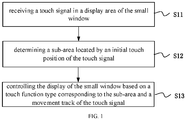
- FIG. 1 is a flow chart of a method for controlling display of a floating window, according to some embodiments of the invention. As illustrated in FIG. 1 , the method may include the following.
- a touch signal in a display area of the floating window is received.
- a sub-area located by an initial touch position of the touch signal is determined.
- the display of the floating window is controlled based on a touch function type corresponding to the sub-area and a movement track of the touch signal.
- a plurality of sub-areas of different touch function types may be set in the display area of the floating window. Different touch operations inputted by the user may be received in different sub-areas. Different corresponding touch controls may be performed on the floating window. Therefore, the overall interface beauty of the floating window may be kept, and it is easy for the user to operate.
- Embodiments of the invention may further provide a method for controlling display of a floating window.
- This method may realize a function of dragging the floating window.
- This method may include the actions illustrated in FIG. 1 .
- Controlling the display of the floating window based on the touch function type corresponding to the sub-area and the movement track of the touch signal at block S13 may include: when the touch function type corresponding to the sub-area is a drag operation type, acquiring a display interface of the floating window, calculating a direction vector of a current touch position and the initial touch position based on the movement track of the touch signal in real time, determining an update display area of the floating window based on the direction vector, and displaying the display interface in the update display area.
- a size of the update display area is the same as a size of an original display area of the floating window.
- the floating window may include three areas.
- the first area is located in top of the floating window and configured to display a title item.
- the second area is located in bottom of the floating window and configured to display inputting tools.
- the third area is located in middle of the floating window and configured to display interactive content.
- a sub-area where the touch function type is a drag operation type is located in middle of the first area.
- a first identifier is displayed on the display interface of the floating window. This first identifier is located on the sub-area where the touch function type is the drag operation type. This first identifier is configured to prompt the user to perform a drag operation.
- the graph of the first identifier is a crossbar, a logo including a four-direction arrow, a hand logo, or a custom-shaped logo for dragging.
- the user clicks the crossbar in top of the floating window and performs a downward sliding touch to move the floating window from the upper part of the screen to the lower part of the screen.
- a circular icon is displayed at the corresponding initial touch position to indicate that the click operation is received.
- the floating window may not exceed the display area of the touch screen when the floating window moves with the touch signal.
- the touch signal ends, that is, when the user's finger leaves the touch screen, the current update display area of the floating window is recorded.
- the method further includes: when the update display area of the floating window determined based on the direction vector exceeds a side edge of a display area of a touch screen, determining that the update display area is located in the display area of the touch screen, and that a distance between a corresponding same side edge of the update display area and the side edge of the display area of the touch screen is less than or equal to a preset distance, or after controlling the floating window to perform animation effect display, determining that the update display area is located in the display area of the touch screen, and that a distance between a corresponding same side edge of the update display area and the side edge of the display area of the touch screen is less than or equal to a preset distance.
- an animation layer (such as a leash layer) is created for the interface rendering structure of the floating window, preparing for the subsequent interface rendering.
- the animation layer is rendered by displacement to show the interface display effect when the floating window moves with the touch signal.
- the update display area of the floating window determined based on the direction vector exceeds the side edge of the display area of the touch screen, for example, the determined update display area of the floating window exceeds the side edge of the display area of the touch screen when the user's finger leaves the touch screen. In this case, it needs the floating window to be kept within the display area of the touch screen.
- an animation class such as class SpringAnimation
- Embodiments of the invention may further provide a method for controlling display of a floating window.
- This method may realize a function of closing the floating window.
- This method may include the actions illustrated in FIG. 1 .
- Controlling the display of the floating window based on the touch function type corresponding to the sub-area and the movement track of the touch signal at block S13 may include: when the touch function type corresponding to the sub-area is a closing operation type, determining a movement direction of the touch signal, and when the movement direction is a first direction, closing the floating window, or after a first rendering processing is performed on the floating window, closing the floating window.
- a sub-area where the touch function type is a closing operation type is located in middle of the second area.
- a second identifier is displayed on the display interface of the floating window. This second identifier is located on the sub-area where the touch function type is the closing operation type. This second identifier is configured to prompt the user to perform a closing operation.
- the graph of the second identifier is a crossbar, cross, a circle, or a custom-shaped logo for closing.
- the first direction is a set direction based on the positive placement of the touch screen, for example, the set direction is a direction from bottom to top.
- the first rendering processing may include at least one of: decreasing a size of the floating window, increasing a transparency of the floating window, decreasing a contrast of the floating window, and increasing a lightness of the floating window.
- controlling the display of the floating window based on the touch function type corresponding to the sub-area and the movement track of the touch signal at block S13 may include: when the touch function type corresponding to the sub-area is a closing operation type, determining a movement direction of the touch signal, when the movement direction is a first direction, performing and recording a first rendering processing on the floating window during a maintaining process of the touch signal, and detecting a sliding length of the touch signal, closing the floating window when the sliding length is greater than or equal to a preset length, and performing the first rendering processing in reverse when the touch signal ends and the sliding length is less than the preset length, such that the floating window restores the display before receiving the touch signal.
- an animation layer (such as a leash layer) is created for the interface rendering structure of the floating window, preparing for the subsequent interface rendering.
- an animation class such as class SpringAnimation
- the animation layer is rendered corresponding to the effect, so that the floating window displays the animation display effect corresponding to the reverse first rendering processing, showing the restoration animation effect of the first rendering processing.
- an animation class such as class SpringAnimation
- Embodiments of the invention may further provide a method for controlling display of a floating window.
- This method may realize a function of full-screen.
- This method may include the actions illustrated in FIG. 1 .
- Controlling the display of the floating window based on the touch function type corresponding to the sub-area and the movement track of the touch signal at block S13 may include: when the touch function type corresponding to the sub-area is a full-screen operation type, determining a movement direction of the touch signal, when the movement direction is a second direction, displaying content of the floating window in a full-screen mode, or after performing a second rendering processing on the floating window, displaying content of the floating window in a full-screen mode.
- the second direction is a set direction based on the positive placement of the touch screen, for example, the set direction is a direction from top to bottom.
- the second rendering processing includes increasing a size of the floating window based on a screen ratio of a touch screen.
- controlling the display of the floating window based on the touch function type corresponding to the sub-area and the movement track of the touch signal at block S13 may include: when the touch function type corresponding to the sub-area is a full-screen operation type, determining a movement direction of the touch signal, when the movement direction is a second direction, performing and recording a second rendering processing on the floating window during a maintaining process of the touch signal, and detecting a sliding length of the touch signal, displaying content of the floating window in a full-screen mode when the sliding length is greater than or equal to a preset length, and performing the second rendering processing in reverse when the touch signal ends and the sliding length is less than the preset length, such that the floating window restores the display before receiving the touch signal.
- an animation layer (such as a leash layer) is created for the interface rendering structure of the floating window, preparing for the subsequent interface rendering.
- an animation class such as class SpringAnimation
- the animation layer is rendered corresponding to the effect, so that the floating window displays the animation display effect corresponding to the reverse second rendering processing, showing the restoration animation effect of the second rendering processing.
- an animation class such as class SpringAnimation
- a sub-area where the touch function type is a full-screen operation type is located in middle of a second area of the floating window.
- a third identifier is displayed on the display interface of the floating window. This third identifier is located on the sub-area where the touch function type is the full-screen operation type. This third identifier is configured to prompt the user to perform a full-screen operation.
- the graph of the third identifier is a crossbar, a rectangle including a diagonally outward arrow, or a custom-shaped logo for representing the full-screen operation.
- a sub-area where the touch function type is a closing operation type and a sub-area where the touch function type is a full-screen operation type may be separate areas. They may be arranged side by side in middle of the second area. Alternatively, a sub-area where the touch function type is a closing operation type and a sub-area where the touch function type is a full-screen operation type may be a common area, as illustrated in FIGS. 3 and 4 .
- the floating window is made as a full-screen display.
- Embodiments of the invention may further provide a method for controlling display of a floating window.
- This method may realize a function of zooming the floating window.
- This method may include the actions illustrated in FIG. 1 .
- Controlling the display of the floating window based on the touch function type corresponding to the sub-area and the movement track of the touch signal at block S13 may include: when the touch function type corresponding to the sub-area is a zoom operation type, acquiring a display interface of the floating window, calculating a direction vector of a current touch position and the initial touch position based on the movement track of the touch signal in real time, determining an update size of the floating window based on the direction vector, determining an update display area based on the update size while keeping a reference point of the floating window unchanged, and displaying the display interface in the update display area.
- the current update display area of the floating window is recorded, and this update display area is regarded as the latest display area of the floating window.
- the maximum size and the minimum size of the floating window are set.
- the update display area is maintained and remains unchanged under a case that the update display area is smaller than the minimum size so that the floating window is fixed at the minimum size; and the update display area is maintained and remains unchanged under a case that the update display area is larger than the maximum size, so that the floating window is fixed at the maximum size.
- determining the update size of the floating window based on the direction vector includes: determining the update size of the floating window based on an aspect ratio of the floating window and the direction vector.
- the detail may be as follows.
- the aspect ratio corresponding to the update size of the floating window is the same as the aspect ratio when the floating window is not zoomed.
- the corresponding diagonal line of the floating window is the diagonal line between the upper left corner and the lower right corner.
- the corresponding diagonal line of the floating window is the diagonal line between the upper right corner and the lower left corner.
- the direction vector faces the inside of the floating window, and when the direction vector is within the angle range between the corresponding diagonal line and the corresponding long side, the aspect ratio corresponding to the update size of the floating window is smaller than the aspect ratio when the floating window is not zoomed, and gradually becomes smaller as the length of the direction vector increases.
- the aspect ratio corresponding to the update size of the floating window is greater than the aspect ratio when the floating window is not zoomed, and gradually becomes greater as the length of the direction vector increases.
- the direction vector faces the outside of the floating window, and when the direction vector is within the angle range between the extension of the corresponding diagonal line and the extension of the corresponding long side, the aspect ratio corresponding to the update size of the floating window is greater than the aspect ratio when the floating window is not zoomed, and gradually becomes greater as the length of the direction vector increases.
- the aspect ratio corresponding to the update size of the floating window is smaller than the aspect ratio when the floating window is not zoomed, and gradually becomes smaller as the length of the direction vector increases.
- the reference point is a vertex of a position in the floating window opposite to a vertex corresponding to the touch signal in the floating window, or a center point of the floating window. For example: when the vertex corresponding to the touch signal is the lower right vertex of the floating window, the reference point is the upper left vertex of the floating window. When the vertex corresponding to the touch signal is the lower left vertex of the floating window, the reference point is the upper right vertex of the floating window.
- a sub-area where the touch function type is a zoom operation type is located in top of the second area of the floating window, in which the second area is located in bottom of the floating window and configured to display inputting tools.
- the method may further include: performing a third rendering processing on a frame of the floating window while displaying the display interface in the update display area, the third rendering processing including at least one of: colorization, bold, superimposing a zoom logo.
- a border rendering effect is added to the overall view of the interface of the floating window (such as decorationcaptionView), for example, a border prompt effect of the floating window is added through the foreground.
- the duration of the border rendering effect is a set duration, for example, 2 seconds.
- the update size and the update display area of the floating window may be determined based on the direction vector.
- the size of the update display area is determined.
- the floating window is controlled to perform animation effect display and to restore the display before the touch signal is received.
- the first preset size is greater than the second preset size.
- an animation layer (such as a leash layer) is created for the interface rendering structure of the floating window, preparing for the subsequent interface rendering.
- an animation class such as class SpringAnimation
- the damping animation effect is displayed;
- the touch signal ends by calling an animation class (such as class SpringAnimation) in the above animation layer, the rebound animation effect is displayed.
- Embodiments of the invention may provide an apparatus for controlling display of a floating window.
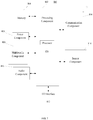
- FIG. 6 is a block diagram of an apparatus for controlling display of a floating window, according to some embodiments of the invention. As illustrated in FIG. 6 , the apparatus includes a receiving module 701, a determining module 702, and a controlling module 703.
- the receiving module 701 is configured to receive a touch signal in a display area of the floating window.
- the determining module 702 is configured to determine a sub-area located by an initial touch position of the touch signal.
- the controlling module 703 is configured to control the display of the floating window based on a touch function type corresponding to the sub-area and a movement track of the touch signal.
- Embodiments of the invention may provide an apparatus for controlling display of a floating window.
- the apparatus includes modules in FIG. 6 .
- the controlling module 703 includes a drag processing module.
- the drag processing module is configured to: when the touch function type corresponding to the sub-area is a drag operation type, acquire a display interface of the floating window, calculate a direction vector of a current touch position and the initial touch position based on the movement track of the touch signal in real time, determine an update display area of the floating window based on the direction vector, and display the display interface in the update display area.
- a size of the update display area is the same as a size of an original display area of the floating window.
- the drag processing module is further configured to: when the update display area of the floating window determined based on the direction vector exceeds a side edge of a display area of a touch screen, determine that the update display area is located in the display area of the touch screen, and that a distance between a corresponding same side edge of the update display area and the side edge of the display area of the touch screen is less than or equal to a preset distance, or after controlling the floating window to perform animation effect display, determine that the update display area is located in the display area of the touch screen, and that a distance between a corresponding same side edge of the update display area and the side edge of the display area of the touch screen is less than or equal to a preset distance.
- the drag processing module is further configured to: display a first identifier on the display interface of the floating window, the first identifier being located on the sub-area where the touch function type is the drag operation type, and the first identifier being configured to prompt a user to perform a drag operation.
- Embodiments of the invention may provide an apparatus for controlling display of a floating window.
- the apparatus includes modules in FIG. 6 .
- the controlling module 703 includes a closing processing module.
- the closing processing module is configured to: when the touch function type corresponding to the sub-area is a closing operation type, determine a movement direction of the touch signal, and when the movement direction is a first direction, close the floating window, or after a first rendering processing is performed on the floating window, close the floating window.
- the closing processing module is configured to: when the touch function type corresponding to the sub-area is a closing operation type, determine a movement direction of the touch signal, when the movement direction is a first direction, perform and record a first rendering processing on the floating window during a maintaining process of the touch signal, and detect a sliding length of the touch signal, close the floating window when the sliding length is greater than or equal to a preset length, and perform the first rendering processing in reverse when the touch signal ends and the sliding length is less than the preset length.
- the first rendering processing includes at least one of: decreasing a size of the floating window, increasing a transparency of the floating window, decreasing a contrast of the floating window, and increasing a lightness of the floating window.
- Embodiments of the invention may provide an apparatus for controlling display of a floating window.
- the apparatus includes modules in FIG. 6 .
- the controlling module 703 includes a full-screen processing module.
- the full-screen processing module is configured to: when the touch function type corresponding to the sub-area is a full-screen operation type, determine a movement direction of the touch signal, when the movement direction is a second direction, perform a second rendering processing on the floating window and display content of the floating window in a full-screen mode, or after performing a second rendering processing on the floating window, display content of the floating window in a full-screen mode.
- the second rendering processing includes increasing a size of the floating window based on a screen ratio of a touch screen.
- Embodiments of the invention may provide an apparatus for controlling display of a floating window.
- the apparatus includes modules in FIG. 6 .
- the controlling module 703 includes a zoom processing module.
- the zoom processing module is further configured to: when the touch function type corresponding to the sub-area is a zoom operation type, acquire a display interface of the floating window, calculate a direction vector of a current touch position and the initial touch position based on the movement track of the touch signal in real time, determine an update size of the floating window based on the direction vector, determine an update display area based on the update size while keeping a reference point of the floating window unchanged, and display the display interface in the update display area.
- the reference point is a vertex of a position in the floating window opposite to a vertex corresponding to the touch signal in the floating window, or a center point of the floating window.
- the zoom processing module is further configured to: perform a third rendering processing on a frame of the floating window while displaying the display interface in the update display area, the third rendering processing comprising at least one of: colorization, bold, superimposing a zoom logo.
- a sub-area where the touch function type is a drag operation type is located in a first area of the floating window, in which the first area is located in top of the floating window and configured to display a title item
- a sub-area where the touch function type is a closing operation type and a sub-area where the touch function type is a full-screen operation type are located in middle of a second area of the floating window
- a sub-area where the touch function type is a zoom operation type is located in top of the second area of the floating window, in which the second area is located in bottom of the floating window and configured to display inputting tools.
- Embodiments of the invention may provide a device for controlling display of a floating window, including: a processor; and a memory for storing instructions executable by the processor.
- the processor is configured to execute the instructions in the memory to perform the method in any one of the above embodiments.
- Embodiments of the invention may provide a non-transitory computer-readable storage medium.
- the storage medium may have stored instructions.
- the processor When the instructions are executed by a processor, the processor may be caused to perform the method in any one of the above embodiments.
- FIG. 7 is a block diagram of a device for controlling display of a floating window.
- the device 800 may be a mobile phone, a computer, a digital broadcast terminal, a messaging device, a gaming console, a tablet, a medical device, exercise equipment, a personal digital assistant, and the like.
- the device 800 may include one or more of the following components: a processing component 802, a memory 804, a power component 806, a multimedia component 808, an audio component 810, an input/output (I/O) interface 812, a sensor component 814, and a communication component 816.
- a processing component 802 a memory 804, a power component 806, a multimedia component 808, an audio component 810, an input/output (I/O) interface 812, a sensor component 814, and a communication component 816.
- the processing component 802 typically controls overall operations of the device 800, such as the operations associated with display, telephone calls, data communications, camera operations, and recording operations.
- the processing component 802 may include one or more processors 820 to execute instructions to perform all or part of the steps in the above described methods.
- the processing component 802 may include one or more modules which facilitate the interaction between the processing component 802 and other components.
- the processing component 802 may include a multimedia module to facilitate the interaction between the multimedia component 808 and the processing component 802.
- the memory 804 is configured to store various types of data to support the operation of the device 800. Examples of such data include instructions for any applications or methods operated on the device 800, contact data, phonebook data, messages, pictures, video, etc.
- the memory 804 may be implemented using any type of volatile or non-volatile memory devices, or a combination of any type of volatile and non-volatile memory devices, such as a static random access memory (SRAM), an electrically erasable programmable read-only memory (EEPROM), an erasable programmable read-only memory (EPROM), a programmable read-only memory (PROM), a read-only memory (ROM), a magnetic memory, a flash memory, a magnetic or optical disk.
- SRAM static random access memory
- EEPROM electrically erasable programmable read-only memory
- EPROM erasable programmable read-only memory
- PROM programmable read-only memory
- ROM read-only memory
- magnetic memory a magnetic memory
- flash memory a magnetic
- the power component 806 provides power to various components of the device 800.
- the power component 806 may include a power management system, one or more power sources, and any other components associated with the generation, management, and distribution of power in the device 800.
- the multimedia component 808 includes a screen providing an output interface between the device 800 and the user.
- the screen may include a liquid crystal display (LCD) and a touch panel (TP). If the screen includes the touch panel, the screen may be implemented as a touch screen to receive input signals from the user.
- the touch panel includes one or more touch sensors to sense touches, swipes, and gestures on the touch panel. The touch sensors may not only sense a boundary of a touch or swipe action, but also sense a period of time and a pressure associated with the touch or swipe action.
- the multimedia component 808 includes a front camera and/or a rear camera. The front camera and the rear camera may receive an external multimedia datum while the device 800 is in an operation mode, such as a photographing mode or a video mode. Each of the front camera and the rear camera may be a fixed optical lens system or have focus and optical zoom capability.
- the audio component 810 is configured to output and/or input audio signals.
- the audio component 810 includes a microphone ("MIC") configured to receive an external audio signal when the device 800 is in an operation mode, such as a call mode, a recording mode, and a voice recognition mode.
- the received audio signal may be further stored in the memory 804 or transmitted via the communication component 816.
- the audio component 810 further includes a speaker to output audio signals.
- the I/O interface 812 provides an interface between the processing component 802 and peripheral interface modules, such as a keyboard, a click wheel, buttons, and the like.
- the buttons may include, but are not limited to, a home button, a volume button, a starting button, and a locking button.
- the sensor component 814 includes one or more sensors to provide status assessments of various aspects of the device 800. For instance, the sensor component 814 may detect an open/closed status of the device 800, relative positioning of components, e.g., the display and the keypad, of the device 800, a change in position of the device 800 or a component of the device 800, a presence or absence of user contact with the device 800, an orientation or an acceleration/deceleration of the device 800, and a change in temperature of the device 800.
- the sensor component 814 may include a proximity sensor configured to detect the presence of nearby objects without any physical contact.
- the sensor component 814 may also include a light sensor, such as a CMOS or CCD image sensor, for use in imaging applications.
- the sensor component 814 may also include an accelerometer sensor, a gyroscope sensor, a magnetic sensor, a pressure sensor, or a temperature sensor.
- the communication component 816 is configured to facilitate communication, wired or wirelessly, between the device 800 and other devices.
- the device 800 can access a wireless network based on a communication standard, such as WiFi, 2G, or 3G, or a combination thereof.
- the communication component 816 receives a broadcast signal or broadcast associated information from an external broadcast management system via a broadcast channel.
- the communication component 816 further includes a near field communication (NFC) module to facilitate short-range communications.
- the NFC module may be implemented based on a radio frequency identification (RFID) technology, an infrared data association (IrDA) technology, an ultra-wideband (UWB) technology, a Bluetooth (BT) technology, and other technologies.
- RFID radio frequency identification
- IrDA infrared data association
- UWB ultra-wideband
- BT Bluetooth
- the device 800 may be implemented with one or more application specific integrated circuits (ASICs), digital signal processors (DSPs), digital signal processing devices (DSPDs), programmable logic devices (PLDs), field programmable gate arrays (FPGAs), controllers, micro-controllers, microprocessors, or other electronic components, for performing the above described methods.
- ASICs application specific integrated circuits
- DSPs digital signal processors
- DSPDs digital signal processing devices
- PLDs programmable logic devices
- FPGAs field programmable gate arrays
- controllers micro-controllers, microprocessors, or other electronic components, for performing the above described methods.
Landscapes
- Engineering & Computer Science (AREA)
- General Engineering & Computer Science (AREA)
- Theoretical Computer Science (AREA)
- Human Computer Interaction (AREA)
- Physics & Mathematics (AREA)
- General Physics & Mathematics (AREA)
- User Interface Of Digital Computer (AREA)
Abstract
Description
- This invention generally relates to data processing technologies of mobile terminals, and, more particularly, to a method for controlling display of a floating window, an apparatus for controlling display of a floating window, a device for controlling display of a floating window, and a storage medium.
- Applications may be displayed as floating windows (also known as small windows) to enable users to view information about these applications. A floating window is a window which appears above other applications. This can be used in case a user wants to show content of an application above another application (i.e. not in full-screen mode).
- To overcome problems in the related art, the invention provides a method for controlling display of a floating window, an apparatus for controlling display of a floating window, a device for controlling display of a small window, and a storage medium.
- According to a first aspect of the invention, there is provided a method for controlling display of a floating window on a touch screen, including: receiving a touch signal in a display area of the floating window; determining a sub-area located by an initial touch position of the touch signal; and controlling display of the floating window based on a touch function type corresponding to the sub-area and a movement track of the touch signal.
- Optionally, controlling the display includes: when the touch function type corresponding to the sub-area is a drag operation type, acquiring a display interface of the floating window, calculating a direction vector of a current touch position and the initial touch position based on the movement track of the touch signal in real time, determining an update display area of the floating window based on the direction vector, and displaying the display interface in the update display area, in which a size of the update display area is the same as a size of an original display area of the floating window.
- Optionally, the method further includes: when the update display area of the floating window determined based on the direction vector exceeds a side edge of a display area of a touch screen, determining the update display area being located in the display area of the touch screen, and a distance between a corresponding same side edge of the update display area and the side edge of the display area of the touch screen being less than or equal to a preset distance.
- Optionally, the method further includes: after controlling the floating window to perform animation effect display, determining the update display area being located in the display area of the touch screen, and a distance between a corresponding same side edge of the update display area and the side edge of the display area of the touch screen being less than or equal to a preset distance.
- Optionally, the method further includes: displaying a first identifier on the display interface of the floating window, the first identifier being located on the sub-area where the touch function type is the drag operation type, and the first identifier being configured to prompt a user to perform a drag operation.
- Optionally, controlling the display includes: when the touch function type corresponding to the sub-area is a closing operation type, determining a movement direction of the touch signal, and when the movement direction is a first direction, performing at least one of (a) closing the floating window, and (b) closing the floating window after a first rendering processing is performed on the floating window.
- Optionally, controlling the display includes: when the touch function type corresponding to the sub-area is a closing operation type, determining a movement direction of the touch signal, when the movement direction is a first direction, performing and recording a first rendering processing on the floating window during a maintaining process of the touch signal, and detecting a sliding length of the touch signal, closing the floating window when the sliding length is greater than or equal to a preset length, and performing the first rendering processing in reverse when the touch signal ends and the sliding length is less than the preset length.
- Optionally, controlling the display includes: when the touch function type corresponding to the sub-area is a full-screen operation type, determining a movement direction of the touch signal, when the movement direction is a second direction, performing at least one of performing a second rendering processing on the floating window and displaying content of the floating window in a full-screen mode, and displaying content of the floating window in a full-screen mode after performing a second rendering processing on the floating window.
- Optionally, controlling the display includes: when the touch function type corresponding to the sub-area is a zoom operation type, acquiring a display interface of the floating window, calculating a direction vector of a current touch position and the initial touch position based on the movement track of the touch signal in real time, determining an update size of the floating window based on the direction vector, determining an update display area based on the update size while keeping a reference point of the floating window unchanged, and displaying the display interface in the update display area, in which the reference point is at least one of (a) a vertex of a position in the floating window opposite to a vertex corresponding to the touch signal in the floating window, and (b) a center point of the floating window.
- Optionally, the method further includes: performing a third rendering processing on a frame of the floating window while displaying the display interface in the update display area, the third rendering processing comprising at least one of: colorization, bold, superimposing a zoom logo.
- Optionally, a sub-area where the touch function type is a drag operation type is located in a first area of the floating window, in which the first area is located in top of the floating window and configured to display a title item, and a sub-area where the touch function type is a closing operation type and a sub-area where the touch function type is a full-screen operation type, are located in middle of a second area of the floating window, and a sub-area where the touch function type is a zoom operation type is located in top of the second area of the floating window, in which the second area is located in bottom of the floating window and configured to display inputting tools.
- According to a second aspect of the invention, there is provided an apparatus for controlling display of a floating window, including: a receiving module configured to receive a touch signal in a display area of the floating window; a determining module configured to determine a sub-area located by an initial touch position of the touch signal; and a controlling module configured to control the display of the floating window based on a touch function type corresponding to the sub-area and a movement track of the touch signal.
- According to a third aspect of the invention, there is provided a device for controlling display of a floating window, including: a processor; and a memory for storing instructions executable by the processor. The processor is configured to execute the instructions in the memory to perform the method in any one of the above embodiments.
- According to a fourth aspect of the invention, there is provided a computer-readable storage medium having stored therein instructions that, when executed by a processor, causes the processor to perform the method in any one of the above embodiments.
- It is to be understood that both the foregoing general description and the following detailed description are exemplary and explanatory only and are not restrictive of the invention, as claimed.
- The invention is especially advantageous for devices having a touch screen, e.g. a mobile phone, a computer, a digital broadcast terminal, a messaging device, a gaming console, a tablet, a medical device, exercise equipment, a personal digital assistant, and the like.
- The accompanying drawings, which are incorporated in and constitute a part of this specification, illustrate embodiments consistent with the invention and, together with the description, serve to explain the principles of the invention.
-
FIG. 1 is a flow chart of a method for controlling display of a floating window, according to some embodiments of the invention. -
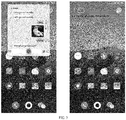
FIG. 2 is a schematic diagram illustrating an effect of dragging a floating window, according to some embodiments of the invention. -
FIG. 3 is a schematic diagram illustrating an effect of closing a floating window, according to some embodiments of the invention. -
FIG. 4 is a schematic diagram illustrating an effect of performing full-screen on a floating window, according to some embodiments of the invention. -
FIG. 5 is a schematic diagram illustrating an effect of zooming a floating window, according to some embodiments of the invention. -
FIG. 6 is a block diagram of an apparatus for controlling display of a floating window, according to some embodiments of the invention. -
FIG. 7 is a block diagram of a device for controlling display of a floating window, according to some embodiments of the invention. - Reference will now be made in detail to some embodiments, examples of which are illustrated in the accompanying drawings. The following description refers to the accompanying drawings in which the same numbers in different drawings represent the same or similar elements unless otherwise represented. The implementations set forth in the following description of some embodiments do not represent all implementations consistent with the invention. Instead, they are merely examples of apparatuses and methods consistent with aspects related to the invention as recited in the appended claims.
- Applications may be displayed as floating windows (also known as small windows) to enable users to view information about these applications. To control these windows, an operation bar may be generally added outside the corresponding window, and function buttons such as closing, full-screen, and drag may be set in the operation bar. However, the fill color of the operation bar may not completely match the overall color of the window, resulting in poor color matching between the operation bar and the window, and affecting the video experience. Furthermore, the function buttons are small, which may make click operations inconvenient. In addition, the function buttons may be set in the same area, which may be prone to accidental click operations.
- Embodiments of the invention may provide a method for controlling display of a floating window. Referring to
FIG. 1, FIG. 1 is a flow chart of a method for controlling display of a floating window, according to some embodiments of the invention. As illustrated inFIG. 1 , the method may include the following. - At block S11, a touch signal in a display area of the floating window is received.
- At block S12, a sub-area located by an initial touch position of the touch signal is determined.
- At block S13, the display of the floating window is controlled based on a touch function type corresponding to the sub-area and a movement track of the touch signal.
- In some embodiments, a plurality of sub-areas of different touch function types may be set in the display area of the floating window. Different touch operations inputted by the user may be received in different sub-areas. Different corresponding touch controls may be performed on the floating window. Therefore, the overall interface beauty of the floating window may be kept, and it is easy for the user to operate.
- Embodiments of the invention may further provide a method for controlling display of a floating window. This method may realize a function of dragging the floating window. This method may include the actions illustrated in
FIG. 1 . Controlling the display of the floating window based on the touch function type corresponding to the sub-area and the movement track of the touch signal at block S13 may include: when the touch function type corresponding to the sub-area is a drag operation type, acquiring a display interface of the floating window, calculating a direction vector of a current touch position and the initial touch position based on the movement track of the touch signal in real time, determining an update display area of the floating window based on the direction vector, and displaying the display interface in the update display area. A size of the update display area is the same as a size of an original display area of the floating window. - In some embodiments, the floating window may include three areas. The first area is located in top of the floating window and configured to display a title item. The second area is located in bottom of the floating window and configured to display inputting tools. The third area is located in middle of the floating window and configured to display interactive content.
- In some embodiments, a sub-area where the touch function type is a drag operation type is located in middle of the first area. To make the user know the location of this sub-area, a first identifier is displayed on the display interface of the floating window. This first identifier is located on the sub-area where the touch function type is the drag operation type. This first identifier is configured to prompt the user to perform a drag operation. The graph of the first identifier is a crossbar, a logo including a four-direction arrow, a hand logo, or a custom-shaped logo for dragging.
- For example, as illustrated in
FIG. 2 , the user clicks the crossbar in top of the floating window and performs a downward sliding touch to move the floating window from the upper part of the screen to the lower part of the screen. In order to provide a good interactive and response effect, after receiving a click operation on the crossbar in top of the floating window, a circular icon is displayed at the corresponding initial touch position to indicate that the click operation is received. - In some embodiments, the floating window may not exceed the display area of the touch screen when the floating window moves with the touch signal. When the touch signal ends, that is, when the user's finger leaves the touch screen, the current update display area of the floating window is recorded.
- In some embodiments, in order to prevent the floating window from exceeding the display area of the touch screen, the method further includes: when the update display area of the floating window determined based on the direction vector exceeds a side edge of a display area of a touch screen, determining that the update display area is located in the display area of the touch screen, and that a distance between a corresponding same side edge of the update display area and the side edge of the display area of the touch screen is less than or equal to a preset distance, or after controlling the floating window to perform animation effect display, determining that the update display area is located in the display area of the touch screen, and that a distance between a corresponding same side edge of the update display area and the side edge of the display area of the touch screen is less than or equal to a preset distance.
- During the rendering processing of the interface display effect, when it is detected that the received touch signal includes a sliding touch event (corresponding to a moment when the user starts a sliding touch after tapping the touch screen), an animation layer (such as a leash layer) is created for the interface rendering structure of the floating window, preparing for the subsequent interface rendering. During the duration of the sliding touch event (corresponding to the process of user's sliding touch), the animation layer is rendered by displacement to show the interface display effect when the floating window moves with the touch signal.
- The update display area of the floating window determined based on the direction vector exceeds the side edge of the display area of the touch screen, for example, the determined update display area of the floating window exceeds the side edge of the display area of the touch screen when the user's finger leaves the touch screen. In this case, it needs the floating window to be kept within the display area of the touch screen. By calling an animation class (such as class SpringAnimation) in the above animation layer, it shows the animation display effect that the floating window returns to the display area of the touch screen in the display area of the touch screen, and the update display area corresponding to the latest position of the floating window may be saved.
- Embodiments of the invention may further provide a method for controlling display of a floating window. This method may realize a function of closing the floating window. This method may include the actions illustrated in
FIG. 1 . Controlling the display of the floating window based on the touch function type corresponding to the sub-area and the movement track of the touch signal at block S13 may include: when the touch function type corresponding to the sub-area is a closing operation type, determining a movement direction of the touch signal, and when the movement direction is a first direction, closing the floating window, or after a first rendering processing is performed on the floating window, closing the floating window. - In some embodiments, a sub-area where the touch function type is a closing operation type is located in middle of the second area. To make the user know the location of this sub-area, a second identifier is displayed on the display interface of the floating window. This second identifier is located on the sub-area where the touch function type is the closing operation type. This second identifier is configured to prompt the user to perform a closing operation. The graph of the second identifier is a crossbar, cross, a circle, or a custom-shaped logo for closing.
- The first direction is a set direction based on the positive placement of the touch screen, for example, the set direction is a direction from bottom to top.
- The first rendering processing may include at least one of: decreasing a size of the floating window, increasing a transparency of the floating window, decreasing a contrast of the floating window, and increasing a lightness of the floating window.
- In some embodiments, controlling the display of the floating window based on the touch function type corresponding to the sub-area and the movement track of the touch signal at block S13 may include: when the touch function type corresponding to the sub-area is a closing operation type, determining a movement direction of the touch signal, when the movement direction is a first direction, performing and recording a first rendering processing on the floating window during a maintaining process of the touch signal, and detecting a sliding length of the touch signal, closing the floating window when the sliding length is greater than or equal to a preset length, and performing the first rendering processing in reverse when the touch signal ends and the sliding length is less than the preset length, such that the floating window restores the display before receiving the touch signal.
- During the rendering processing of the interface display effect, when it is detected that the received touch signal includes a sliding touch event (corresponding to a moment when the user starts a sliding touch after tapping the touch screen), an animation layer (such as a leash layer) is created for the interface rendering structure of the floating window, preparing for the subsequent interface rendering. When the first rendering processing is performed, by calling an animation class (such as class SpringAnimation) in the above animation layer, the animation layer is rendered corresponding to the effect, so that the floating window displays the interface display effect corresponding to the first rendering processing until it disappears completely, and then close the floating window. When it needs to perform the reverse first rendering processing, by calling an animation class (such as class SpringAnimation) in the above animation layer, the animation layer is rendered corresponding to the effect, so that the floating window displays the animation display effect corresponding to the reverse first rendering processing, showing the restoration animation effect of the first rendering processing.
- Embodiments of the invention may further provide a method for controlling display of a floating window. This method may realize a function of full-screen. This method may include the actions illustrated in
FIG. 1 . Controlling the display of the floating window based on the touch function type corresponding to the sub-area and the movement track of the touch signal at block S13 may include: when the touch function type corresponding to the sub-area is a full-screen operation type, determining a movement direction of the touch signal, when the movement direction is a second direction, displaying content of the floating window in a full-screen mode, or after performing a second rendering processing on the floating window, displaying content of the floating window in a full-screen mode. - The second direction is a set direction based on the positive placement of the touch screen, for example, the set direction is a direction from top to bottom.
- The second rendering processing includes increasing a size of the floating window based on a screen ratio of a touch screen.
- In some embodiments, controlling the display of the floating window based on the touch function type corresponding to the sub-area and the movement track of the touch signal at block S13 may include: when the touch function type corresponding to the sub-area is a full-screen operation type, determining a movement direction of the touch signal, when the movement direction is a second direction, performing and recording a second rendering processing on the floating window during a maintaining process of the touch signal, and detecting a sliding length of the touch signal, displaying content of the floating window in a full-screen mode when the sliding length is greater than or equal to a preset length, and performing the second rendering processing in reverse when the touch signal ends and the sliding length is less than the preset length, such that the floating window restores the display before receiving the touch signal.
- During the rendering processing of the interface display effect, when it is detected that the received touch signal includes a sliding touch event (corresponding to a moment when the user starts a sliding touch after tapping the touch screen), an animation layer (such as a leash layer) is created for the interface rendering structure of the floating window, preparing for the subsequent interface rendering. When the second rendering processing is required, by calling an animation class (such as class SpringAnimation) in the above animation layer, the animation layer is rendered corresponding to the effect, so that the floating window displays the interface display effect corresponding to the second rendering processing until it disappears completely, and then close the floating window. When it needs to perform the reverse second rendering processing, by calling an animation class (such as class SpringAnimation) in the above animation layer, the animation layer is rendered corresponding to the effect, so that the floating window displays the animation display effect corresponding to the reverse second rendering processing, showing the restoration animation effect of the second rendering processing.
- In some embodiments, a sub-area where the touch function type is a full-screen operation type, is located in middle of a second area of the floating window. To make the user know the location of this sub-area, a third identifier is displayed on the display interface of the floating window. This third identifier is located on the sub-area where the touch function type is the full-screen operation type. This third identifier is configured to prompt the user to perform a full-screen operation. The graph of the third identifier is a crossbar, a rectangle including a diagonally outward arrow, or a custom-shaped logo for representing the full-screen operation.
- A sub-area where the touch function type is a closing operation type and a sub-area where the touch function type is a full-screen operation type may be separate areas. They may be arranged side by side in middle of the second area. Alternatively, a sub-area where the touch function type is a closing operation type and a sub-area where the touch function type is a full-screen operation type may be a common area, as illustrated in
FIGS. 3 and4 . - As illustrated in
FIG. 3 , when the user clicks on the crossbar in bottom of the floating window and performs a downward sliding touch to close the floating window, the floating window is closed. In order to provide a good interactive and response effect, after receiving a click operation on the crossbar in bottom of the floating window, a circular icon is displayed at the corresponding initial touch position to indicate that the click operation is received. - As illustrated in
FIG. 4 , when the user clicks on the crossbar in bottom of the floating window and performs a downward sliding touch to close the floating window, the floating window is made as a full-screen display. - Embodiments of the invention may further provide a method for controlling display of a floating window. This method may realize a function of zooming the floating window. This method may include the actions illustrated in
FIG. 1 . Controlling the display of the floating window based on the touch function type corresponding to the sub-area and the movement track of the touch signal at block S13 may include: when the touch function type corresponding to the sub-area is a zoom operation type, acquiring a display interface of the floating window, calculating a direction vector of a current touch position and the initial touch position based on the movement track of the touch signal in real time, determining an update size of the floating window based on the direction vector, determining an update display area based on the update size while keeping a reference point of the floating window unchanged, and displaying the display interface in the update display area. - In some embodiments, when the touch signal ends, the current update display area of the floating window is recorded, and this update display area is regarded as the latest display area of the floating window.
- In some embodiments, the maximum size and the minimum size of the floating window are set. In the process of responding to the touch signal, when the update display area is determined based on the update size, the update display area is maintained and remains unchanged under a case that the update display area is smaller than the minimum size so that the floating window is fixed at the minimum size; and the update display area is maintained and remains unchanged under a case that the update display area is larger than the maximum size, so that the floating window is fixed at the maximum size.
- In some embodiments, determining the update size of the floating window based on the direction vector includes: determining the update size of the floating window based on an aspect ratio of the floating window and the direction vector. The detail may be as follows.
- When the angle between the direction vector and the corresponding diagonal line of the floating window is 0, the aspect ratio corresponding to the update size of the floating window is the same as the aspect ratio when the floating window is not zoomed. For example, when the touch signal for zooming is sliding along the lower right corner of the floating window toward the inside or outside of the floating window, the corresponding diagonal line of the floating window is the diagonal line between the upper left corner and the lower right corner. When the touch signal for zooming is sliding along the lower left corner of the floating window toward the inside or outside of the floating window, the corresponding diagonal line of the floating window is the diagonal line between the upper right corner and the lower left corner.
- When the angle between the direction vector and the corresponding diagonal line of the floating window is greater than 0, the direction vector faces the inside of the floating window, and when the direction vector is within the angle range between the corresponding diagonal line and the corresponding long side, the aspect ratio corresponding to the update size of the floating window is smaller than the aspect ratio when the floating window is not zoomed, and gradually becomes smaller as the length of the direction vector increases. When the direction vector is within the angle range between the corresponding diagonal line and the corresponding short side, the aspect ratio corresponding to the update size of the floating window is greater than the aspect ratio when the floating window is not zoomed, and gradually becomes greater as the length of the direction vector increases.
- When the angle between the direction vector and the corresponding diagonal line of the floating window is greater than 0, the direction vector faces the outside of the floating window, and when the direction vector is within the angle range between the extension of the corresponding diagonal line and the extension of the corresponding long side, the aspect ratio corresponding to the update size of the floating window is greater than the aspect ratio when the floating window is not zoomed, and gradually becomes greater as the length of the direction vector increases. When direction vector is within the angle range between the extension of the corresponding diagonal line and the extension of the corresponding short side, the aspect ratio corresponding to the update size of the floating window is smaller than the aspect ratio when the floating window is not zoomed, and gradually becomes smaller as the length of the direction vector increases.
- The reference point is a vertex of a position in the floating window opposite to a vertex corresponding to the touch signal in the floating window, or a center point of the floating window. For example: when the vertex corresponding to the touch signal is the lower right vertex of the floating window, the reference point is the upper left vertex of the floating window. When the vertex corresponding to the touch signal is the lower left vertex of the floating window, the reference point is the upper right vertex of the floating window.
- A sub-area where the touch function type is a zoom operation type is located in top of the second area of the floating window, in which the second area is located in bottom of the floating window and configured to display inputting tools.
- As illustrated in
FIG. 5 , when the user clicks on the end in bottom of the floating window and performs a sliding touch in the upper left oblique direction to shrink the floating window. In order to enhance the visual effect of zooming, the method may further include: performing a third rendering processing on a frame of the floating window while displaying the display interface in the update display area, the third rendering processing including at least one of: colorization, bold, superimposing a zoom logo. - During the rendering processing of the interface display effect, after the zoom operation type is determined, a border rendering effect is added to the overall view of the interface of the floating window (such as decorationcaptionView), for example, a border prompt effect of the floating window is added through the foreground. The duration of the border rendering effect is a set duration, for example, 2 seconds.
- In some embodiments, the update size and the update display area of the floating window may be determined based on the direction vector. When the display interface is displayed in the update display area, the size of the update display area is determined. When the size is greater than the first preset size and the touch signal ends, or the size is smaller than the second preset size and the touch signal ends, the floating window is controlled to perform animation effect display and to restore the display before the touch signal is received. The first preset size is greater than the second preset size.
- During the rendering processing of the interface display effect, when it is detected that the received touch signal includes a sliding touch event (corresponding to a moment when the user starts a sliding touch after tapping the touch screen), an animation layer (such as a leash layer) is created for the interface rendering structure of the floating window, preparing for the subsequent interface rendering. When the floating window reaches the minimum size during the zooning in process and when the floating window reaches the maximum size during the zooming out process, by calling an animation class (such as class SpringAnimation) in the above animation layer, the damping animation effect is displayed; when the touch signal ends, by calling an animation class (such as class SpringAnimation) in the above animation layer, the rebound animation effect is displayed.
- Embodiments of the invention may provide an apparatus for controlling display of a floating window. Referring to
FIG. 6, FIG. 6 is a block diagram of an apparatus for controlling display of a floating window, according to some embodiments of the invention. As illustrated inFIG. 6 , the apparatus includes a receivingmodule 701, a determiningmodule 702, and a controllingmodule 703. - The receiving
module 701 is configured to receive a touch signal in a display area of the floating window. - The determining
module 702 is configured to determine a sub-area located by an initial touch position of the touch signal. - The controlling
module 703 is configured to control the display of the floating window based on a touch function type corresponding to the sub-area and a movement track of the touch signal. - Embodiments of the invention may provide an apparatus for controlling display of a floating window. The apparatus includes modules in
FIG. 6 . The controllingmodule 703 includes a drag processing module. The drag processing module is configured to: when the touch function type corresponding to the sub-area is a drag operation type, acquire a display interface of the floating window, calculate a direction vector of a current touch position and the initial touch position based on the movement track of the touch signal in real time, determine an update display area of the floating window based on the direction vector, and display the display interface in the update display area. - A size of the update display area is the same as a size of an original display area of the floating window.
- In some embodiments, the drag processing module is further configured to: when the update display area of the floating window determined based on the direction vector exceeds a side edge of a display area of a touch screen, determine that the update display area is located in the display area of the touch screen, and that a distance between a corresponding same side edge of the update display area and the side edge of the display area of the touch screen is less than or equal to a preset distance, or after controlling the floating window to perform animation effect display, determine that the update display area is located in the display area of the touch screen, and that a distance between a corresponding same side edge of the update display area and the side edge of the display area of the touch screen is less than or equal to a preset distance.
- In some embodiments, the drag processing module is further configured to: display a first identifier on the display interface of the floating window, the first identifier being located on the sub-area where the touch function type is the drag operation type, and the first identifier being configured to prompt a user to perform a drag operation.
- Embodiments of the invention may provide an apparatus for controlling display of a floating window. The apparatus includes modules in
FIG. 6 . The controllingmodule 703 includes a closing processing module. The closing processing module is configured to: when the touch function type corresponding to the sub-area is a closing operation type, determine a movement direction of the touch signal, and when the movement direction is a first direction, close the floating window, or after a first rendering processing is performed on the floating window, close the floating window. - In some embodiments, The closing processing module is configured to: when the touch function type corresponding to the sub-area is a closing operation type, determine a movement direction of the touch signal, when the movement direction is a first direction, perform and record a first rendering processing on the floating window during a maintaining process of the touch signal, and detect a sliding length of the touch signal, close the floating window when the sliding length is greater than or equal to a preset length, and perform the first rendering processing in reverse when the touch signal ends and the sliding length is less than the preset length.
- In some embodiments, the first rendering processing includes at least one of: decreasing a size of the floating window, increasing a transparency of the floating window, decreasing a contrast of the floating window, and increasing a lightness of the floating window.
- Embodiments of the invention may provide an apparatus for controlling display of a floating window. The apparatus includes modules in
FIG. 6 . The controllingmodule 703 includes a full-screen processing module. The full-screen processing module is configured to: when the touch function type corresponding to the sub-area is a full-screen operation type, determine a movement direction of the touch signal, when the movement direction is a second direction, perform a second rendering processing on the floating window and display content of the floating window in a full-screen mode, or after performing a second rendering processing on the floating window, display content of the floating window in a full-screen mode. - In some embodiments, the second rendering processing includes increasing a size of the floating window based on a screen ratio of a touch screen.
- Embodiments of the invention may provide an apparatus for controlling display of a floating window. The apparatus includes modules in
FIG. 6 . The controllingmodule 703 includes a zoom processing module. The zoom processing module is further configured to: when the touch function type corresponding to the sub-area is a zoom operation type, acquire a display interface of the floating window, calculate a direction vector of a current touch position and the initial touch position based on the movement track of the touch signal in real time, determine an update size of the floating window based on the direction vector, determine an update display area based on the update size while keeping a reference point of the floating window unchanged, and display the display interface in the update display area. - The reference point is a vertex of a position in the floating window opposite to a vertex corresponding to the touch signal in the floating window, or a center point of the floating window.
- In some embodiments, the zoom processing module is further configured to: perform a third rendering processing on a frame of the floating window while displaying the display interface in the update display area, the third rendering processing comprising at least one of: colorization, bold, superimposing a zoom logo.
- In some embodiments, a sub-area where the touch function type is a drag operation type, is located in a first area of the floating window, in which the first area is located in top of the floating window and configured to display a title item, and a sub-area where the touch function type is a closing operation type and a sub-area where the touch function type is a full-screen operation type, are located in middle of a second area of the floating window, and a sub-area where the touch function type is a zoom operation type is located in top of the second area of the floating window, in which the second area is located in bottom of the floating window and configured to display inputting tools.
- Embodiments of the invention may provide a device for controlling display of a floating window, including: a processor; and a memory for storing instructions executable by the processor. The processor is configured to execute the instructions in the memory to perform the method in any one of the above embodiments.
- Embodiments of the invention may provide a non-transitory computer-readable storage medium. The storage medium may have stored instructions. When the instructions are executed by a processor, the processor may be caused to perform the method in any one of the above embodiments.
-
FIG. 7 is a block diagram of a device for controlling display of a floating window. For example, thedevice 800 may be a mobile phone, a computer, a digital broadcast terminal, a messaging device, a gaming console, a tablet, a medical device, exercise equipment, a personal digital assistant, and the like. - Referring to
Fig. 7 , thedevice 800 may include one or more of the following components: aprocessing component 802, amemory 804, apower component 806, amultimedia component 808, anaudio component 810, an input/output (I/O)interface 812, asensor component 814, and acommunication component 816. - The
processing component 802 typically controls overall operations of thedevice 800, such as the operations associated with display, telephone calls, data communications, camera operations, and recording operations. Theprocessing component 802 may include one ormore processors 820 to execute instructions to perform all or part of the steps in the above described methods. Moreover, theprocessing component 802 may include one or more modules which facilitate the interaction between theprocessing component 802 and other components. For instance, theprocessing component 802 may include a multimedia module to facilitate the interaction between themultimedia component 808 and theprocessing component 802. - The
memory 804 is configured to store various types of data to support the operation of thedevice 800. Examples of such data include instructions for any applications or methods operated on thedevice 800, contact data, phonebook data, messages, pictures, video, etc. Thememory 804 may be implemented using any type of volatile or non-volatile memory devices, or a combination of any type of volatile and non-volatile memory devices, such as a static random access memory (SRAM), an electrically erasable programmable read-only memory (EEPROM), an erasable programmable read-only memory (EPROM), a programmable read-only memory (PROM), a read-only memory (ROM), a magnetic memory, a flash memory, a magnetic or optical disk. - The
power component 806 provides power to various components of thedevice 800. Thepower component 806 may include a power management system, one or more power sources, and any other components associated with the generation, management, and distribution of power in thedevice 800. - The
multimedia component 808 includes a screen providing an output interface between thedevice 800 and the user. In some embodiments, the screen may include a liquid crystal display (LCD) and a touch panel (TP). If the screen includes the touch panel, the screen may be implemented as a touch screen to receive input signals from the user. The touch panel includes one or more touch sensors to sense touches, swipes, and gestures on the touch panel. The touch sensors may not only sense a boundary of a touch or swipe action, but also sense a period of time and a pressure associated with the touch or swipe action. In some embodiments, themultimedia component 808 includes a front camera and/or a rear camera. The front camera and the rear camera may receive an external multimedia datum while thedevice 800 is in an operation mode, such as a photographing mode or a video mode. Each of the front camera and the rear camera may be a fixed optical lens system or have focus and optical zoom capability. - The
audio component 810 is configured to output and/or input audio signals. For example, theaudio component 810 includes a microphone ("MIC") configured to receive an external audio signal when thedevice 800 is in an operation mode, such as a call mode, a recording mode, and a voice recognition mode. The received audio signal may be further stored in thememory 804 or transmitted via thecommunication component 816. In some embodiments, theaudio component 810 further includes a speaker to output audio signals. - The I/
O interface 812 provides an interface between theprocessing component 802 and peripheral interface modules, such as a keyboard, a click wheel, buttons, and the like. The buttons may include, but are not limited to, a home button, a volume button, a starting button, and a locking button. - The
sensor component 814 includes one or more sensors to provide status assessments of various aspects of thedevice 800. For instance, thesensor component 814 may detect an open/closed status of thedevice 800, relative positioning of components, e.g., the display and the keypad, of thedevice 800, a change in position of thedevice 800 or a component of thedevice 800, a presence or absence of user contact with thedevice 800, an orientation or an acceleration/deceleration of thedevice 800, and a change in temperature of thedevice 800. Thesensor component 814 may include a proximity sensor configured to detect the presence of nearby objects without any physical contact. Thesensor component 814 may also include a light sensor, such as a CMOS or CCD image sensor, for use in imaging applications. In some embodiments, thesensor component 814 may also include an accelerometer sensor, a gyroscope sensor, a magnetic sensor, a pressure sensor, or a temperature sensor. - The
communication component 816 is configured to facilitate communication, wired or wirelessly, between thedevice 800 and other devices. Thedevice 800 can access a wireless network based on a communication standard, such as WiFi, 2G, or 3G, or a combination thereof. In one exemplary embodiment, thecommunication component 816 receives a broadcast signal or broadcast associated information from an external broadcast management system via a broadcast channel. In one exemplary embodiment, thecommunication component 816 further includes a near field communication (NFC) module to facilitate short-range communications. For example, the NFC module may be implemented based on a radio frequency identification (RFID) technology, an infrared data association (IrDA) technology, an ultra-wideband (UWB) technology, a Bluetooth (BT) technology, and other technologies. - In some embodiments, the
device 800 may be implemented with one or more application specific integrated circuits (ASICs), digital signal processors (DSPs), digital signal processing devices (DSPDs), programmable logic devices (PLDs), field programmable gate arrays (FPGAs), controllers, micro-controllers, microprocessors, or other electronic components, for performing the above described methods.
Claims (15)
- A method for controlling display of a floating window, comprising:receiving (S11) a touch signal in a display area of the floating window;determining (S12) a sub-area located by an initial touch position of the touch signal; andcontrolling (S13) the display of the floating window based on a touch function type corresponding to the sub-area and a movement track of the touch signal.
- The method of claim 1, wherein controlling (S13) the display comprises:when the touch function type corresponding to the sub-area is a drag operation type, acquiring a display interface of the floating window,calculating a direction vector of a current touch position and the initial touch position based on the movement track of the touch signal in real time,determining an update display area of the floating window based on the direction vector, anddisplaying the display interface in the update display area,wherein, a size of the update display area is the same as a size of an original display area of the floating window.
- The method of claim 2, further comprising:
when the update display area of the floating window determined based on the direction vector exceeds a side edge of a display area of a touch screen, determining the update display area being located in the display area of the touch screen, and a distance between a corresponding same side edge of the update display area and the side edge of the display area of the touch screen being less than or equal to a preset distance. - The method of claim 2 or 3, further comprising:
after controlling the floating window to perform animation effect display, determining the update display area being located in the display area of the touch screen, and a distance between a corresponding same side edge of the update display area and the side edge of the display area of the touch screen being less than or equal to a preset distance. - The method of any one of claims 2 to 4, further comprising:
displaying a first identifier on the display interface of the floating window, the first identifier being located on the sub-area where the touch function type is the drag operation type, and the first identifier being configured to prompt a user to perform a drag operation. - The method of any one of claims 1 to 5, wherein controlling the display (S13) comprises:when the touch function type corresponding to the sub-area is a closing operation type, determining a movement direction of the touch signal, andwhen the movement direction is a first direction, performing at least one of (a) closing the floating window, and (b) closing the floating window after a first rendering processing is performed on the floating window.
- The method of any one of claims 1 to 6, wherein controlling the display (S13) comprises:when the touch function type corresponding to the sub-area is a closing operation type, determining a movement direction of the touch signal,when the movement direction is a first direction, performing and recording a first rendering processing on the floating window during a maintaining process of the touch signal, and detecting a sliding length of the touch signal,closing the floating window when the sliding length is greater than or equal to a preset length, andperforming the first rendering processing in reverse when the touch signal ends and the sliding length is less than the preset length.
- The method of any one of claims 1 to 7, wherein controlling the display (S13) comprises:when the touch function type corresponding to the sub-area is a full-screen operation type, determining a movement direction of the touch signal,when the movement direction is a second direction, performing at least one of performing a second rendering processing on the floating window and displaying content of the floating window in a full-screen mode, and displaying content of the floating window in a full-screen mode after performing a second rendering processing on the floating window.
- The method of any one of claims 1 to 8, wherein controlling the display (S13) comprises:when the touch function type corresponding to the sub-area is a zoom operation type, acquiring a display interface of the floating window,calculating a direction vector of a current touch position and the initial touch position based on the movement track of the touch signal in real time,determining an update size of the floating window based on the direction vector,determining an update display area based on the update size while keeping a reference point of the floating window unchanged, anddisplaying the display interface in the update display area,wherein the reference point is at least one of (a) a vertex of a position in the floating window opposite to a vertex corresponding to the touch signal in the floating window, and (b) a center point of the floating window.
- The method of claim 9, further comprising:
performing a third rendering processing on a frame of the floating window while displaying the display interface in the update display area, the third rendering processing comprising at least one of: colorization, bold, superimposing a zoom logo. - The method of any one of claims 1 to 10, wherein:a sub-area where the touch function type is a drag operation type is located in a first area of the floating window, in which the first area is located in top of the floating window and configured to display a title item, anda sub-area where the touch function type is a closing operation type and a sub-area where the touch function type is a full-screen operation type, are located in middle of a second area of the floating window, and a sub-area where the touch function type is a zoom operation type is located in top of the second area of the floating window, in which the second area is located in bottom of the floating window and configured to display inputting tools.
- An apparatus for controlling display of a floating window, comprising:a receiving module (701) configured to receive a touch signal in a display area of the floating window;a determining module (702) configured to determine a sub-area located by an initial touch position of the touch signal; anda controlling module (703) configured to control the display of the floating window based on a touch function type corresponding to the sub-area and a movement track of the touch signal.
- The apparatus of claim 12, wherein the controlling module (703) comprises:a drag processing module configured to: when the touch function type corresponding to the sub-area is a drag operation type, acquire a display interface of the floating window, calculate a direction vector of a current touch position and the initial touch position based on the movement track of the touch signal in real time, determine an update display area of the floating window based on the direction vector, and display the display interface in the update display area,wherein a size of the update display area is the same as a size of an original display area of the floating window.
- A device for controlling display of a floating window, comprising:a processor; anda memory for storing instructions executable by the processor;wherein the processor is configured to execute the instructions to perform the method according to any one of claims 1 to 11.
- A computer-readable storage medium having stored therein instructions that, when executed by a processor, causes the processor to perform the method according to any one of claims 1 to 11.
Applications Claiming Priority (1)
| Application Number | Priority Date | Filing Date | Title |
|---|---|---|---|
| CN202010335298.7A CN111552425A (en) | 2020-04-24 | 2020-04-24 | Method and device for controlling small window display and storage medium |
Publications (1)
| Publication Number | Publication Date |
|---|---|
| EP3901751A1 true EP3901751A1 (en) | 2021-10-27 |
Family
ID=72003111
Family Applications (1)
| Application Number | Title | Priority Date | Filing Date |
|---|---|---|---|
| EP21165905.7A Pending EP3901751A1 (en) | 2020-04-24 | 2021-03-30 | Method, apparatus, device, and storage medium for controlling display of floating window |
Country Status (3)
| Country | Link |
|---|---|
| US (1) | US11372516B2 (en) |
| EP (1) | EP3901751A1 (en) |
| CN (1) | CN111552425A (en) |
Families Citing this family (7)
| Publication number | Priority date | Publication date | Assignee | Title |
|---|---|---|---|---|
| US10261672B1 (en) * | 2014-09-16 | 2019-04-16 | Amazon Technologies, Inc. | Contextual launch interfaces |
| CN115113770A (en) * | 2021-03-17 | 2022-09-27 | 北京有竹居网络技术有限公司 | Terminal control method and device, terminal and storage medium |
| CN115145447A (en) | 2021-03-30 | 2022-10-04 | 华为技术有限公司 | A window display method and related device |
| CN114995929B (en) * | 2021-11-17 | 2023-04-21 | 荣耀终端有限公司 | Popup window display method and device |
| CN116339597A (en) * | 2021-12-24 | 2023-06-27 | 北京小米移动软件有限公司 | Interface display method, device, equipment and storage medium |
| CN117472220B (en) * | 2023-09-15 | 2024-11-19 | 荣耀终端有限公司 | Operation identification method and device |
| CN119556820B (en) * | 2025-02-05 | 2025-11-11 | 北京蓝色创想网络科技有限责任公司 | Method, system, equipment and medium for detecting floating window of terminal |
Citations (4)
| Publication number | Priority date | Publication date | Assignee | Title |
|---|---|---|---|---|
| US20140033119A1 (en) * | 2012-07-27 | 2014-01-30 | Samsung Electronics Co. Ltd. | Display device and control method thereof |
| US20150007100A1 (en) * | 2013-06-28 | 2015-01-01 | Insyde Software Corp. | Electronic device and method for identifying window control command in a multi-window system |
| US20170372678A1 (en) * | 2015-12-15 | 2017-12-28 | Tencent Technology (Shenzhen) Company Limited | Floating window processing method and apparatus |
| US20200045375A1 (en) * | 2018-07-31 | 2020-02-06 | Salesforce.Com, Inc. | Video playback in a web-application using a resizable and repositionable window |
Family Cites Families (10)
| Publication number | Priority date | Publication date | Assignee | Title |
|---|---|---|---|---|
| WO2010029619A1 (en) * | 2008-09-10 | 2010-03-18 | 株式会社東芝 | Portable terminal |
| EP3182261A1 (en) * | 2012-09-17 | 2017-06-21 | Huawei Device Co., Ltd. | Touch operation processing method and terminal device |
| CN102929535B (en) * | 2012-10-09 | 2018-05-01 | 中兴通讯股份有限公司 | A kind of method and terminal of the control of suspension window position |
| KR102057629B1 (en) * | 2013-02-19 | 2020-01-22 | 엘지전자 주식회사 | Mobile terminal and method for controlling of the same |
| US9916072B2 (en) * | 2013-02-20 | 2018-03-13 | Lg Electronics Inc. | Application and notification window display management in a mobile terminal |
| CN103412751B (en) * | 2013-08-05 | 2017-12-01 | 北京奇虎科技有限公司 | The information displaying method and device of a kind of locking screen interface |
| US10551995B1 (en) * | 2013-09-26 | 2020-02-04 | Twitter, Inc. | Overlay user interface |
| US10007406B1 (en) * | 2014-11-24 | 2018-06-26 | Evernote Corporation | Adaptive writing interface |
| DK180317B1 (en) * | 2019-04-15 | 2020-11-09 | Apple Inc | Systems, methods, and user interfaces for interacting with multiple application windows |
| CN110609655B (en) * | 2019-09-24 | 2021-04-06 | 北京小米移动软件有限公司 | Method and device for changing equipment firmware parameters |
-
2020
- 2020-04-24 CN CN202010335298.7A patent/CN111552425A/en active Pending
-
2021
- 2021-03-18 US US17/206,004 patent/US11372516B2/en active Active
- 2021-03-30 EP EP21165905.7A patent/EP3901751A1/en active Pending
Patent Citations (4)
| Publication number | Priority date | Publication date | Assignee | Title |
|---|---|---|---|---|
| US20140033119A1 (en) * | 2012-07-27 | 2014-01-30 | Samsung Electronics Co. Ltd. | Display device and control method thereof |
| US20150007100A1 (en) * | 2013-06-28 | 2015-01-01 | Insyde Software Corp. | Electronic device and method for identifying window control command in a multi-window system |
| US20170372678A1 (en) * | 2015-12-15 | 2017-12-28 | Tencent Technology (Shenzhen) Company Limited | Floating window processing method and apparatus |
| US20200045375A1 (en) * | 2018-07-31 | 2020-02-06 | Salesforce.Com, Inc. | Video playback in a web-application using a resizable and repositionable window |
Also Published As
| Publication number | Publication date |
|---|---|
| US20210333948A1 (en) | 2021-10-28 |
| US11372516B2 (en) | 2022-06-28 |
| CN111552425A (en) | 2020-08-18 |
Similar Documents
| Publication | Publication Date | Title |
|---|---|---|
| US11372516B2 (en) | Method, device, and storage medium for controlling display of floating window | |
| CN110662095B (en) | Screen projection processing method and device, terminal and storage medium | |
| US10788978B2 (en) | Method and apparatus for displaying interface and storage medium | |
| US20170344192A1 (en) | Method and device for playing live videos | |
| EP3182716A1 (en) | Method and device for video display | |
| EP3099040B1 (en) | Button operation processing method in single-hand mode, apparatus and electronic device | |
| EP3232340A1 (en) | Method for operating a display device and display device for displaying pages of an application program | |
| CN107515715A (en) | Screen capture method, device and storage medium | |
| US20150113475A1 (en) | Method and device for providing an image preview | |
| EP3145164A1 (en) | Method and device for displaying answer extension function | |
| EP3176686A1 (en) | Method and device for operating user interface object | |
| CN112929561B (en) | Multimedia data processing method and device, electronic equipment and storage medium | |
| CN107229411B (en) | Method and device for controlling split screen state | |
| US20170052693A1 (en) | Method and device for displaying a target object | |
| US10705729B2 (en) | Touch control method and apparatus for function key, and storage medium | |
| EP3249505A1 (en) | Method and device for controlling state of touch screen, electronic device | |
| CN106598429A (en) | Method and device for adjusting window of mobile terminal | |
| CN104216525B (en) | Method and device for mode control of camera application | |
| CN105094539B (en) | Reference information display methods and device | |
| US11783525B2 (en) | Method, device and storage medium form playing animation of a captured image | |
| EP3015968B1 (en) | Method for image deletion and device thereof | |
| CN108124058A (en) | information display control method and device | |
| EP3301888A1 (en) | Call processing method and device for call notes | |
| CN106919302B (en) | Operation control method and device of mobile terminal | |
| CN112269525A (en) | Small screen window display method and device and storage medium |
Legal Events
| Date | Code | Title | Description |
|---|---|---|---|
| PUAI | Public reference made under article 153(3) epc to a published international application that has entered the european phase |
Free format text: ORIGINAL CODE: 0009012 |
|
| STAA | Information on the status of an ep patent application or granted ep patent |
Free format text: STATUS: THE APPLICATION HAS BEEN PUBLISHED |
|
| AK | Designated contracting states |
Kind code of ref document: A1 Designated state(s): AL AT BE BG CH CY CZ DE DK EE ES FI FR GB GR HR HU IE IS IT LI LT LU LV MC MK MT NL NO PL PT RO RS SE SI SK SM TR |
|
| B565 | Issuance of search results under rule 164(2) epc |
Effective date: 20210928 |
|
| STAA | Information on the status of an ep patent application or granted ep patent |
Free format text: STATUS: REQUEST FOR EXAMINATION WAS MADE |
|
| 17P | Request for examination filed |
Effective date: 20220203 |
|
| RBV | Designated contracting states (corrected) |
Designated state(s): AL AT BE BG CH CY CZ DE DK EE ES FI FR GB GR HR HU IE IS IT LI LT LU LV MC MK MT NL NO PL PT RO RS SE SI SK SM TR |
|
| STAA | Information on the status of an ep patent application or granted ep patent |
Free format text: STATUS: EXAMINATION IS IN PROGRESS |
|
| 17Q | First examination report despatched |
Effective date: 20230127 |