EP3901576B1 - Laser receiver and target with lighted indicators - Google Patents
Laser receiver and target with lighted indicators Download PDFInfo
- Publication number
- EP3901576B1 EP3901576B1 EP21169552.3A EP21169552A EP3901576B1 EP 3901576 B1 EP3901576 B1 EP 3901576B1 EP 21169552 A EP21169552 A EP 21169552A EP 3901576 B1 EP3901576 B1 EP 3901576B1
- Authority
- EP
- European Patent Office
- Prior art keywords
- laser light
- laser
- accessory
- vertical plane
- circuit
- Prior art date
- Legal status (The legal status is an assumption and is not a legal conclusion. Google has not performed a legal analysis and makes no representation as to the accuracy of the status listed.)
- Active
Links
Images
















Classifications
-
- G—PHYSICS
- G01—MEASURING; TESTING
- G01C—MEASURING DISTANCES, LEVELS OR BEARINGS; SURVEYING; NAVIGATION; GYROSCOPIC INSTRUMENTS; PHOTOGRAMMETRY OR VIDEOGRAMMETRY
- G01C15/00—Surveying instruments or accessories not provided for in groups G01C1/00 - G01C13/00
- G01C15/02—Means for marking measuring points
-
- G—PHYSICS
- G01—MEASURING; TESTING
- G01C—MEASURING DISTANCES, LEVELS OR BEARINGS; SURVEYING; NAVIGATION; GYROSCOPIC INSTRUMENTS; PHOTOGRAMMETRY OR VIDEOGRAMMETRY
- G01C15/00—Surveying instruments or accessories not provided for in groups G01C1/00 - G01C13/00
- G01C15/02—Means for marking measuring points
- G01C15/06—Surveyors' staffs; Movable markers
-
- G—PHYSICS
- G01—MEASURING; TESTING
- G01S—RADIO DIRECTION-FINDING; RADIO NAVIGATION; DETERMINING DISTANCE OR VELOCITY BY USE OF RADIO WAVES; LOCATING OR PRESENCE-DETECTING BY USE OF THE REFLECTION OR RERADIATION OF RADIO WAVES; ANALOGOUS ARRANGEMENTS USING OTHER WAVES
- G01S17/00—Systems using the reflection or reradiation of electromagnetic waves other than radio waves, e.g. lidar systems
- G01S17/02—Systems using the reflection of electromagnetic waves other than radio waves
- G01S17/06—Systems determining position data of a target
- G01S17/42—Simultaneous measurement of distance and other co-ordinates
Definitions
- the technology disclosed herein relates generally to layout "surveying" equipment and is particularly directed to a laser receiver and movable target accessory for a two-dimension layout system of the type which identifies points and their coordinates, and transfers identified points on a surface to other surfaces in a vertical direction.
- This point layout system uses a laser controller that emits a laser plane of visible light to point or aim at a particular point of interest.
- the typical action of a user will be to view a laser light line on the jobsite floor (produced by the laser plane) and to follow that laser light line with the movable target, while monitoring the distance between the laser controller and the movable target.
- the laser light line may not be clearly visible all the way to the point of interest.
- a common method in the conventional art for locating a point of interest on a jobsite is through the use of a "total station” or a “robotic total station.”
- a total station is an electronic/optical instrument with the ability to precisely orient itself in rotation and provide distance measurements. Once the instrument is set up and oriented to a jobsite work area, through the use of several known coordinates on the jobsite, any point of interest can be located.
- a user sets up points of interest by programming their coordinates into the total station. Then the user selects a point, and the total station broadcasts a laser beam in the direction of that point. Next, the user must visually track the laser beam and also follow a controller to find that specific point of interest at the jobsite. This can be a difficult process, due to objects in the way, an uneven job surface, or, in the case of an outdoor site, bright lights interfering with the visibility of the laser beam.
- the total station requires exact positioning when marking the point of interest. This is not easy or quick to achieve.
- US 2012/198711 A1 discloses a three-dimensional layout and point transfer system.
- the system includes first and second vertical laser plane transmitters and a horizontal laser plane transmitter.
- the first and second vertical laser plane transmitters are configured to emit first and second vertical laser planes, respectively, that are each rotatable about rotational axes.
- the horizontal laser plane transmitter has a fixed position relative to the rotational axis of the second vertical laser plane transmitter and emits a horizontal laser plane that is rotatable to position the horizontal laser plane at a pitch angle.
- the system is configured to translate between a three dimensional coordinate and positions of the first and second vertical laser transmitters and the horizontal laser transmitter, respectively, that will cause the first and second vertical laser planes and the horizontal laser plane to intersect at a the three dimensional coordinate.
- the present invention provides for a movable accessory for a layout and point transfer system according to claim 1, and for a method for finding a position on a jobsite according to claim 10.
- a product has moving parts that rely on magnetic fields, or somehow detects a change in a magnetic field, or if data is passed from one electronic device to another by use of a magnetic field, then one could refer to those situations as items that are "in magnetic communication with” each other, in which one end of the "communication” may induce a magnetic field, and the other end may receive that magnetic field, and be acted on (or otherwise affected) by that magnetic field.
- circuit can represent an actual electronic circuit, such as an integrated circuit chip (or a portion thereof), or it can represent a function that is performed by a processing circuit, such as a microprocessor or an ASIC that includes a logic state machine or another form of processing element (including a sequential processing circuit).
- a processing circuit such as a microprocessor or an ASIC that includes a logic state machine or another form of processing element (including a sequential processing circuit).
- a specific type of circuit could be an analog circuit or a digital circuit of some type, although such a circuit possibly could be implemented in software by a logic state machine or a sequential processor.
- IR infrared
- FIGS. 2 and 3 provides a solution for such conditions and, while an IR laser light line that impacts the target screen 12 may not be visible to the human eye, the ease of use of the accessory 10 nevertheless makes it easy for the user to "find" the correct azimuth angle that leads to the point of interest that is being "aimed at” by the laser controller 820. If the jobsite floor has some small obstructions, the laser receiver will still be able to detect the non-visible laser light, so long as the floor obstructions are not too large in vertical size. Moreover, the electronic distance sensor would continue to operate in the same manner as described above, in reference to FIGS. 8 and 17 .
- a keypad driver circuit 350 is in communication with I/O circuit 318. Keypad driver circuit 350 controls the signals that interface to an input sensing device 352, such as a keypad, as depicted on FIG. 4 . Again, if the display 342 is of a touch screen type, then there may not be a separate keypad on remote controller 300, because most of the command or data input functions will be available by touching the display itself. There may be some type of power on/off switch, but that would not necessarily be considered a true keypad (and typically would not be used for entering data).
- the laser light source is a fan beam laser or an equivalent, so that either (i) a continuous plane of laser light is being emitted by laser controller 820, or (ii) a moving beam of laser light (i.e., a stream of photons in a line that moves its aiming angle over time) is emitted by laser controller 820 in a manner so as to create a "plane" of laser light that emulates a fan beam.
- a moving beam of laser light i.e., a stream of photons in a line that moves its aiming angle over time
- An electronic distance measuring instrument is included in the laser controller 820.
- the distance measurer 480 communicates with the microprocessor 410 through the input/output circuit 416. If the distance measurer 480 uses laser light as its distance sensing means, then it can also be referred to as a "laser distance meter” or “LDM.” Other types of distance measuring instruments also could be used, such as a sound-based device. This instrument can also be referred to as a “DMD” or “Distance Measuring Device” 480.
- the LDM 480 When in use, the LDM 480 has the ability to measure the distance from the transmitter rotor spin axis to a target screen 12, which typically is located near the user 38.
- the LDM 480 thus can provide an accurate distance measurement in real time to the laser controller 20, which in turn can provide that information to a tablet computer 300, which is the remote controller that is visible to the user.
- the target screen 12 must be at least partially reflective to the distance-measuring energy, so that a portion of the laser light emitted by the LDM 480 will be returned to the photosensor 488 of the LDM.
- FIG. 9 a flow chart is provided to show some of the important steps in a point layout procedure using the laser controller, after it has been placed on a physical jobsite floor and setup to the floor plan for that jobsite.
- the flow chart of FIG. 9 involves some of the layout functions as illustrated in FIG. 8 , using the movable target 10.
- both of these controllers 300 and 820 are designed to work in conjunction with one another. Otherwise, everything probably would have to be built into a single device and placed into the laser controller. While such a unitary device would have the capability to perform its functions without any significant design problems, it would be less user friendly, because the user would have to keep moving back to that unitary laser controller to perform the point layout tasks.
- the preferred approach is to separate the functions so the user can carry (or roll on the floor) the remote controller around to each point of interest as it is being laid out on the jobsite floor, and never have to move back to the location of the laser controller, until the entire point list has been laid out.
- the use of wireless communications between the RC and the LC facilitates these tasks, as noted above.
- the LC will now perform periodic distance measurements, at a step 662, using its distance measuring instrument 480 (e.g., an LDM).
- the sample rate should be quite fast, at least in human terms, so the user feels that he is receiving almost continuous updates of the distance reading.
- the measured distances can be transmitted to the RC; in addition, if the LC was informed by the RC of the sought-after distance for this POI, then the LC can also send messages to the RC of the current distance status.
- the RC will then translate that data into informational operational (status) instructions, such as TOO LONG, TOO SHORT, or ON POINT.
- informational operational (status) instructions such as TOO LONG, TOO SHORT, or ON POINT.
- the LC and/or the RC can have an indicator that visually flashes light or produces an audible beep (or other sound), and the flashing rate (or beeping rate) can change, as the distance status (TOO LONG, TOO SHORT, or ON POINT) changes.
- An audible tone or beep may not be the best indicator on a busy (and perhaps noisy) jobsite.
- the system hardware could provide an indication to the user of the current distance status is to flash (or modulate) the laser transmitter output fan beam itself.
- the laser light transmitter 472 of the laser controller 820 could be commanded to turn its optical output beam on and off, repetitively, as an indication of TOO LONG, TOO SHORT, or ON POINT.
- the display monitor 342 can display a message to inform the user that he should now mark this position on the jobsite floor.
- the RC 300 can store this status, so as to prepare for moving on to the next point of interest.
- the user only needs to move the target accessory 10 until the laser light line 712 intersects any portion of the laser receiver's photosensor 32. At that moment, at least one LED of the array 20 will turn on, thereby informing the user of the correct point of interest azimuth.
- the RC will select the next point of interest, and will send a command to aim the laser fan beam of the LC at that next POI, just like in step 610.
- the LC receives this command for the next POI at a step 670, and rotates its laser transmitter 472 accordingly, just like in step 660.
- the LC will now repeat the other functions involving step 662, and at a step 622, the RC will now repeat the functions of steps 614 and 616, and so on, for each POI on the point list.
- an exemplary laser controller 820 is illustrated in a top, plan view and a side, elevational cross-section view.
- the electronic distance instrument 480 is placed near the top of the laser controller package, so that its distance measuring laser beam output is directed at an elevation of approximately six inches (152 mm) above floor level, once the laser controller 820 is placed on a jobsite floor surface.
- the exemplary laser controller 820 has proposed dimensions "D1" and "D2;” the proposed overall outer dimension "D1" is about 6.28 inches (160 mm) in diameter, while the proposed overall outer dimension "D2" is about 6.89 inches (175 mm) in height.
- the laser transmitter 472 which has an associated circuit board 474 and a laser fan cylinder lens 476.
- the cylinder lens 476 receives a focused laser beam, and converts that optical energy into a fan beam that is spread into a laser plane by the cylinder lens, as illustrated at 734, for example.
- the entire top portion of the laser controller assembly is able to rotate completely around its circumference at a 360 degree angle, so that any desired heading can become the "aiming angle" of interest for the fan beam laser plane, and for the electronic distance instrument directional output of this laser controller 820.
- An azimuth drive subassembly is provided that controls the heading of the "aiming angle,” which includes the azimuth drive motor 462, an azimuth drive disk 464, and an angle encoder 450.
- a self-leveling platform which includes the leveling motor 442, a level sensor 444 (not shown on FIGS. 6 and 7 ), and a leveling platform pivot at 446.
- a battery pack 402 is included at the bottom portion of the laser controller 820, so that replacement of the batteries will be easily done, using an access cover on the bottom of the enclosure.
- a power switch is included at 404, and a charging jack at 406.
- a main circuit board is located near the bottom of the laser controller, at 408.
- an antenna 428 is included inside the enclosure for receiving and transmitting wireless signals.
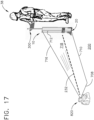
- the user can easily find a point of interest on the jobsite floor 200 by maneuvering the accessory 10 so that the target screen 12 intercepts the distance meter laser line 232 at any distance from the laser controller 820, and along the heading provided by a laser light fan beam 734.
- the laser fan beam 734 will extend all the way between its uppermost edge 736 and its lowermost edge 730. Therefore, the laser fan beam 734 will produce a visible vertical laser light line 712 on the target screen surface 12. This is a highly visible vertical line that the user will easily see while using the accessory 10, and all that the user needs to do is move the accessory back and forth-while keeping the accessory 10 within the visible laser fan beam 734-until finding the correct distance.
- the LDM 480 of the laser controller 820 will measure that distance at 232 between the target screen 12 and the laser transmitter 472, and display the distance on the tablet's display monitor 342. In addition, an indication can be provided as to whether the user should move closer in toward the transmitter, or to move farther out from the transmitter, or to stand still if the user is "on point".
- the accessory is easily moved forward and back along the heading indicated. As noted above, while correcting the distance, the user only needs to keep the accessory 10 within the correct heading, which is visibly indicated in a manner that is quite difficult to miss. And once the correct distance from the laser controller 820 is attained along the appropriate heading, the point of interest at 240 can then be marked on the floor 200 at the bottom edge of the target screen 12 (see FIG. 8 ). The point of interest 240 is easily found by looking for the LED that is turned on 766, which indicates the received path of the laser beam 712 at the photosensor(s) of the laser receiver 30.
- the accessory 10 offers certain advantages, including a structure that mounts the useful elements of the target screen 12 and tablet-remote controller 300 on one easy-to-maneuver frame.
- a handle can be folded flat against the frame of the accessory, for easy stowing when not in use.
- the accessory 10 allows the user to search and find the point of interest while standing, thus saving wear and tear on his knees, hips and back, which otherwise could result with the alternative of crawling around on all fours, or bending low over and over.
- the intersection of the horizontal laser light line 710 and the vertical laser light line 712 directly and visually indicates the location of the current point of interest to the user.
- These two laser light lines provide a type of L-shaped mark (or "L-mark") on the jobsite surface and movable target surface.
- the elbow point of that lighted "L-mark" (at, or near, the bottom of the visible vertical light line, for example) will be directly at the point of interest.
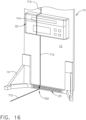
- the movable accessory 10 one of the LEDs in the array 20 will also be illuminated; see LED 750 on FIG. 16 .
- the laser light line 712 will "aim" directly down toward the desired point of interest, once the accessory 10 has been placed at the correct distance from the electronic distance measuring instrument 480 of the laser controller 820. In this situation, the user may not literally see an "L-mark” right at the point of interest, but the vertical laser light line 712 on the target screen 12 will nevertheless provide an accurate location for marking the point of interest on the jobsite floor surface. Moreover, one of the LEDs of the array 20 will be illuminated, which provides a close reference for where the POI should be marked on the floor.
- a control line 224 is depicted as being offset from a centerline 214 between two vertical I-beams 210 and 212.
- a first control point CP1 is designated at 220, along the offset control line 224, which is offset by a distance dimension at 225.
- the laser controller 820 is positioned at a pair of X-Y centerlines 226 and 228, which are offset from parallel lines 216 and 218, which themselves intersect the I-beams 210 and 212 along the jobsite floor 200.
- the correct heading from the laser controller 820 to the point of interest 240 diverges from the parallel line 226 by an angle ⁇ .
- the vertical position where the laser receiver is mounted on the panel 12 is another important factor. The higher it is positioned, the more "clutter" on the jobsite floor that can be accommodated while using this point layout system. For example, it could be mounted 18 inches (457 mm) the bottom edge of the panel 12 (where the LEDs are located); in that instance, the laser plane from the laser transmitter would still reach the laser receiver 30, even if a floor obstruction of just under 18 inches in height was resting on the floor at a position that was directly between the laser controller 820 and the movable accessory 10. Such a configuration could also overcome a situation where the floor level stepped down by just under 18 inches where the movable accessory 10 was positioned during measurements. (Strictly speaking, it is the photosensor 32 that must be positioned high enough to receive the laser plane 734 emitted by the laser transmitter 820.)
- the laser distance meter's (LDM) laser beam output 232 could be arranged so that it was about six (6) inches (152 mm) above floor level If that dimension is indeed designed into a particular laser controller 820, then it would be recommended that the laser receiver 30 that is mounted on the panel 12 should not be mounted at that same six-inch vertical dimension from the bottom edge of the panel. It is preferred that the LDM have a smooth, non-obstructed target to "aim" at on the panel 12. And, it should be noted that this six-inch height of the LDM laser beam becomes the true limitation of just how much "clutter" can be overcome by this system.
- a jobsite floor will have 12-inch (305 mm) obstructions that need to be overcome during layout measurements, then one either needs to design a laser controller 820 that is at least twelve (12) inches tall (for the LDM beam 232, and for the laser plane output 734), or one must mount the laser controller 820 on a pedestal.
- the photoemitters could comprise a set of fiber optic cables that terminate proximal to the bottom portion of the movable accessory 10.
- the other end of the fiber optic cables could connect to one or more LEDs (or other type of light source) that is/are located much higher on the panel 12, if desired.
- the light signals themselves could be multiplexed, if desired.
- Other arrangements of light sources and optic cables could further be used that have not yet been invented, without departing from the principles of this present technology.
- FIG. 18 a first version of a first embodiment of the movable accessory 10 is depicted.
- a vertical laser light line 110 is illustrated crossing the laser receiver 30, and its photosensor 32.
- This laser light 110 does not extend all the way down to the bottom of panel 12 in this example, because that portion is either blocked by an object or the fan beam did not extend all the way to the floor surface (as seen in FIG. 8 ).
- a corresponding LED is turned on at 112, indicating to a user where to mark the point of interest on the jobsite floor.
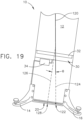
- FIG. 19 the movable accessory 10 is depicted in a tilted orientation.
- a vertical laser light line 120 is illustrated which does not extend all the way down to the bottom of panel 12.
- the laser light line 120 would continue as a dashed line 124, to illustrate the effect the tilted accessory 10 has on the true location of where the POI exists on the floor.
- Dashed laser line 126 depicts the direction of where the laser light line intersects the photosensors 32.
- the laser light line 120 intersects the LED array 20 at an LED located at 128.
- the tilt compensator adjusts for this "slanted laser line", and the compensated LED located at 122 will instead be turned on.
- FIGS. 10-14 are flow charts illustrating various alternative versions of how the movable accessory 10 functions in operation. In general, these flow charts will correspond to the alternative versions that were described above, in connection with FIGS. 18-23 .
- FIG. 10 involves logic steps to be performed by the movable accessory 10.
- the first step at the beginning of this flow chart is an initialization step 500.
- the laser receiver checks if it is presently in a fan beam, at a decision step 502. If it is not, then the LED strip (the array of LEDs) is left turned off at a step 504. However, if it is in a fan beam, then the laser receiver inspects the angle sensor, and corrects for tilt angle, if necessary, at a step 510.
- the operation of the logical steps in the flow chart of FIG. 10 remain the same, except the math will work out to have a different result.
- the LED to be illuminated is not at the same location as where the photosensor 32, if uncompensated for tilt angle, would indicate. Instead of the LED at 128 being illuminated, the correct LED at 122 would be illuminated.
- the flow chart of FIG. 10 would correctly calculate that result at the step 510, and would command the LED at 122 to turn on (instead of LED at 128), at the next logic step 512.
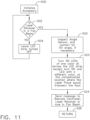
- the accessory must be initialized at a step 500.
- the laser receiver determines if it is presently in a fan beam at a decision step 502. If not, then the LED strip is left turned off at a step 504. However, if it is in a fan beam, then the angle sensor inspects the tilt angle, and corrects if necessary, at a step 520.
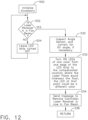
- the first step is to initialize the accessory at a step 500.
- the laser receiver determines if it is presently in a fan beam at a decision step 502. If it is not, then the LED strip is left turned off at a step 504. However, if it is in a fan beam, then the system inspects the angle sensor, and corrects for tilt angle, if necessary, at a step 530.
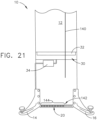
- step 532 LEDs are turned on in one color from one edge of the LED strip to the compensated location where the laser plane would intersect the floor. At that compensated point, the LED could be illuminated in a second, different color.
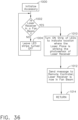
- step 534 a message is sent to the remote controller that the laser receiver is in a fan beam.
- the system returns to executing other functions.
- the accessory is initialized at a step 550. Then the laser receiver determines if it is presently in a fan beam at a decision step 552. If it is not, then the LED strip is left turned off at a step 554. However, if it is in a fan beam, then the system inspects the angle sensor, and corrects for tilt angle, if necessary, at a step 560. Then, at a step 562, one LED is turned in on one color at the compensated location where the first laser plane would intersect the floor.
- the accessory is initialized at a step 550. Then the laser receiver determines if it is presently in a fan beam at a decision step 552. If it is not, then the LED strip is left turned off at a step 554. However, if it is in a fan beam, then the system inspects the angle sensor, and corrects for tilt angle, if necessary, at a step 580. Then, at a step 582, all LEDs from the compensated location of the first laser plane to the nearest edge of the LED strip are turned on, at a first color.
- the accessory 810 has a pole 816 in which an LED strip 822 is mounted near the bottom point 818.
- a slideable target subassembly 814 which includes a reflective surface 812 and a laser receiver 830, is mounted near the top of the pole 816. Note that the surface 812 extends along a longitudinal axis that is parallel to the length of the pole.
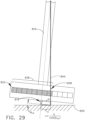
- the accessory 810 When a laser light line 842 projected by a fan beam from a laser controller 820 (not shown in this view) crosses the reflective surface at an area 840, yet is partially blocked by an object on the job floor (as depicted by the dashed line 844) the accessory 810 will still be able to determine a location for that laser light line 842. Because the slideable target subassembly 814 is mounted above the floor obstruction, the laser light line 842 still crosses the laser receiver 830. The location of the laser line impact will translate to the LED strip 822, in which either a single LED 834 will illuminate, or several LEDs 832 will turn on; in either instance the point of interest will be easily visible to a user. Note that in this view the pole 816 is vertical compared to a ground level 805. Note also that a distance L1 from the laser receiver 830 to the ground level 805 is a known constant value.
- the movable target accessory 810 is depicted again, but the pole 816 is not vertical compared to the ground level 805.
- the laser light line 842 crosses the laser receiver 830 at a non-zero angle compared to the vertical. This is depicted as a "roll angle" ⁇ roll .
- a distance between the pole centerline and a laser strike on the laser receiver 830 is depicted as “a,” along a "centerline” of the strip of LEDs, which is perpendicular to the angle ⁇ roll .
- a distance between the pole centerline and the projected laser strike on the ground is depicted as "b" (again, along that same angle, but near the floor).
- the accessory 810 must compensate for the tilt angle in order to illuminate the correct LED.
- This compensation is depicted as a single illuminated LED 838, or several illuminated LEDs 836; in either case, the last illuminated LED or only sole LED indicates the point of interest on the job surface.
- the LEDs may be provided, or configured, in a single color, or in multiple colors.
- c b / cos ⁇ roll
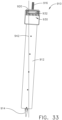
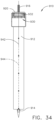
- the spike 914 will physically be directly at the point of interest. It should be noted that, as seen on FIG. 34 , the entire laser fan beam does not need to reach the accessory 910 to be useful; if jobsite "clutter" blocks the lower portion of the fan beam, then the laser light line at the dashed positions indicated by the reference numeral 944 will not truly exist, but that portion of the laser light line 942 is not required.
- the LDM emits its distance measuring laser beam along the correct azimuth, at a step 1102.
- the LDM determines whether or not it has received a return signal, at a decision step 1110. If not, the logic flow is directed back to step 1102. If so, the detected distance value measured from the return signal is sent wirelessly to other system devices, at a step 1112.
- a decision step 1122 determines whether or not the remote controller has received a distance valve (measured by the LDM), at a step 1122. If not, then the remote controller should indicate a "No Signal" symbol on the display 342 of the remote controller, at a step 1124. The system logic flow is then directed back to the beginning of this flow chart, at step 1102. On the other hand, if a distance value has been received, as determined at step 1122, then a step 1126 will cause the received distance value to be displayed on the remote controller's display 342.
- FIGS. 38-49 A fourth embodiment of the movable accessory is illustrated in FIGS. 38-49 , and described in detail below.
- This fourth embodiment is for use with a two-laser controller point layout system, and does not require the use of a laser distance meter (LDM).
- LDM laser distance meter
- the accessory 1210 is depicted without a bipod 1222 and illustrating the magnetic strip 1218 more clearly. Note that portions of each laser light plane potentially could be obstructed by jobsite clutter. However, due to the height of the accessory 1210, this jobsite clutter obstruction can be overcome, as the higher portions of the vertical laser planes can still be detectable by the laser receiver 1230.
- At least one other LED may light up in blue, for example, to match that second laser controller's (blue) color code.
- the LEDs will illuminate in the respective colors to indicate to the user how close or far he or she is from the laser plane intersection point (at the point of interest).
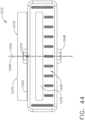
- the accessory 1210 is depicted with a first laser light line 1240 and a second laser light line 1242 impacting the laser receiver 1230.
- a first color at 1270 preferably green in this example
- some of the other LEDs are illuminated in a second, different color at 1272 (preferably blue in this example).
- the LEDs enable a variety of colors, and that the colors described herein are for illustrative purposes only.
- the user is too far from the intersection point and needs to move closer.
- reference numeral 1274 could be at any point along the LED array, but in order to correctly stake the point of interest, this "intersecting LED" 1274 needs to be in the middle of the laser receiver 1230, so that the user can then plumb the pole 1216 and stake the point of interest using the spike portion 1214 as a guide.
- the user has moved the accessory too close to the laser controllers 820 and 860, and the intersection of the laser light lines 1240 and 1242 is now behind the laser receiver 1230.
- the first laser light line 1240 is now striking near the right side (in this view) of the laser receiver 1230, and corresponding LEDs 1270 are illuminating in that same first color (preferably green).
- the second laser light line 1242 is now striking near the left side (in this view) of the laser receiver 1230, and corresponding LEDs 1272 are illuminating in the same second, different color (preferably blue). Since the colors have switched sides, that visually signals the user to "back up" (move farther away from the laser controllers) in order to find the laser light line intersection.
- the two-laser controller point and layout system is depicted, with the accessory placed exactly at the intersection point of the two laser light planes.
- the user has entered the coordinates of a floor point designated by the reference numeral 1252 on FIG. 46 .
- the enclosed space (or room) is generally designated at the reference numeral 1260.
- the laser transmitters have been aimed so that their fan beams each produce a plane of laser light that is vertical, and both of these planes of laser light intersect exactly at the point 1252 along the floor surface 1264. There will also exist a spatial or "implied" vertical line of intersection between the two laser planes at the reference numeral 1250.
- This implied line 1250 will be a plumb line, as described before, so long as the laser base units (or laser controllers) 820 and 860 have been correctly leveled. More importantly, the two laser transmitters need to output laser planes that are substantially vertical with respect to gravity; if that correctly takes place, then the implied line 1250 will also be substantially vertical with respect to gravity.
- the plumb line 1250 exists as a vertical line directly above the floor point 1252, there will also be visible to the user a ceiling transfer point that is designated by the reference numeral 1254 (assuming this building space actually has a ceiling at the time of use).
- the user will see a pair of intersecting lines at point 1254, which are produced by the two upper edges of the laser planes from the laser transmitters of laser controllers 820 and 860. These are the upper edge lines of the fan laser beams along the line segments 1286 and 1296, which follow along the surface of the ceiling 1262.
- This provides the user with a virtually instantaneous transfer point along the ceiling surface, every time the user first designates a floor point of interest.
- the ceiling transfer point 1254 is automatically plumb above the floor point 1252, since the implied line 1250 is truly plumb. This system allows the building designer to layout devices that are to be installed in the ceiling by using the coordinates on a two-dimensional floor plan, if desired.
- the technology disclosed herein automatically can take floor points and transfer those coordinates to the ceiling; furthermore, if the building plan was a three-dimensional plan, then a ceiling set of coordinates could first be entered instead of a floor set of coordinates.
- the two laser transmitters of base units 820 and 860 will still be able to slew automatically so that their laser fan beams will intersect the ceiling set of coordinates instead of the floor set of coordinates.
- the final appearance will be the same, just like what is illustrated in FIG. 46 .
- the only difference will be that the ceiling point was determined first, instead of the floor point. There will still exist a plumb line 1250 after the ceiling point has been laid out.
- the laser controllers 820 and 860 are depicted emitting specific modulation frequencies so that the laser receiver 1230 can sense which fan beam is striking at a given position on the photosensor, which then is used to generate a green and a blue LED illumination, respectively, on the accessory 1210.
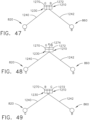
- laser light line 1240 impacts the laser receiver 1230
- at least one corresponding LED illuminates in the color green (corresponding to the modulation frequency emitted by the first laser controller 820).
- laser light line 1242 impacts the laser receiver 1230, at least one corresponding LED illuminates in the color blue (corresponding to the modulation frequency emitted by the second laser controller 860). In this view the user is too close to the laser controllers.
- the user has moved the front surface of accessory 1210 into the laser light line intersection, and centered that intersecting point on the laser receiver 1230.
- the middle LED 1274 is illuminated in red (as depicted by the letter "R"), visually indicating to the user where the laser light lines have intersected.
- the user could then plumb the pole and stake the point of interest on the jobsite floor.
- FIG. 49 the user has moved the accessory 1210 past the intersection point. Note that the LEDs have “switched” colors from FIG. 47 (when the user had not yet reached the intersection point in a forward direction); the letters “B” and “G” on FIG. 49 are reversed, compared to FIG. 47 . This visual indication quickly signals to the user that they have moved past the intersection point, and now need to move "backward” again to find it.
- This fourth embodiment of the accessory includes a laser receiver that can simultaneously detect two different laser fan beams; one fan beam would modulate at a first modulation frequency, and the second fan beam would modulate at a second modulation frequency. Both fan beams would be of the same color of laser light.
- the LEDs on the side of the LED array where the fan beam first crosses impacts the laser receiver
- this first color matches the color of the first laser controller (i.e., its beacon light color).
- several LEDs would light up; for example, they would light up from the left end of the LED array all the way to the single LED that would indicate the position of the first laser plane impact on the laser receiver.
- a single (green) LED would illuminate, to indicate that first laser plane impact position.
- LEDs used in an actual product is strictly up to the product design engineer. There are many, many types of LEDs available that could be used for this purpose. Multiple individual LED with filtered lenses could be packaged on printed circuit boards, or they could be packaged as integrated circuits. Furthermore, an X-Y array of LEDs could be used, either as a series of small integrated circuits, or as an elongated LED display of tiny individual "dot" LEDs, similar to what is used in flat panel televisions or computer displays. The elongated display could also be constructed almost like a narrow "light bar” of two-dimensional LEDs in an array. Finally, the photoemitters used with this accessory do not necessarily need to be LEDs at all. Instead, LCDs (liquid crystal display) elements could be used, or even tiny incandescent lights, if desired by the product designer.
- LCDs liquid crystal display
- the LEDs on the other side of the LED array where that second beam first crosses (impacts the laser receiver) turn on in a second, different color (e.g., blue).
- this second color matches the color of the second laser controller (again, its beacon light color).
- several LEDs would light up; for example, they would light up from the right end of the LED array all the way to the single LED that would indicate the position of the second laser plane impact on the laser receiver.
- a single (blue) LED would illuminate, to indicate that second laser plane impact position.
- a single LED changes to a third, different color (e.g., red).
- red e.g., red
- This third color indicates the point of interest. For example, if the user keeps moving closer to the laser transmitters, and the laser fan beams "cross,” that action causes the LED colors to "cross" as well. In other words, the colors will now be on the opposite side of the array from where they were originally. This is a visual indication to the user that he or she has come too close to the laser transmitters, and must move backwards to find the point of interest.
- This fourth embodiment system is very intuitive to operate, and jobsite point layout users will quickly master using the accessory, so that the green and blue LED indicators will easily and efficiently lead those users quickly to the desired positions on the jobsite floor, so they can layout and stake the points of interest.
- Still another patent document discloses more advanced features that can be used with the technology disclosed herein, including patent application Serial No. 15/591,213, filed on May 10, 2017 , titled “AUTOMATIC POINT LAYOUT AND STAKING SYSTEM.” This patent document is assigned to Trimble, Inc.
- processing circuit will be provided, whether it is based on a microprocessor, a microcomputer, a microcontroller, a logic state machine, by using discrete logic elements to accomplish these tasks, or perhaps by a type of computation device not yet invented; moreover, some type of memory circuit will be provided, whether it is based on typical RAM chips, EEROM chips (including Flash memory), by using discrete logic elements to store data and other operating information, or perhaps by a type of memory device not yet invented.
- the memory circuit of a particular electronic product will contain instructions that are executable by the processing circuit of that same particular electronic product.
- any type of product described herein that has moving parts, or that performs functions should be considered a “machine,” and not merely as some inanimate apparatus.
- Such “machine” devices should automatically include power tools, printers, electronic locks, and the like, as those example devices each have certain moving parts.
- a computerized device that performs useful functions should also be considered a machine, and such terminology is often used to describe many such devices; for example, a solid-state telephone answering machine may have no moving parts, yet it is commonly called a "machine” because it performs well-known useful functions.
- a computing product that includes a display to show information to a human user, and that also includes a "user operated input circuit" so the human user is able to enter commands or data, can be provided with a single device that is known as a "touchscreen display.”
- a touchscreen display usually includes a virtual keypad, and therefore, a "user operated input circuit” typically comprises a virtual keypad, particularly on smart phones and on tablet computers.
- the word “virtual” means that it is not a hardware keypad; more specifically, “virtual” means that it is formed (i.e., “created”) on the display screen because of software being executed by a processing circuit.
- proximal can have a meaning of closely positioning one physical object with a second physical object, such that the two objects are perhaps adjacent to one another, although it is not necessarily required that there be no third object positioned therebetween.
- a "male locating structure” is to be positioned “proximal” to a “female locating structure.”
- this could mean that the two male and female structures are to be physically abutting one another, or this could mean that they are "mated” to one another by way of a particular size and shape that essentially keeps one structure oriented in a predetermined direction and at an X-Y (e.g., horizontal and vertical) position with respect to one another, regardless as to whether the two male and female structures actually touch one another along a continuous surface.
- two structures of any size and shape may be located somewhat near one another, regardless if they physically abut one another or not; such a relationship could still be termed "proximal.”
- two or more possible locations for a particular point can be specified in relation to a precise attribute of a physical object, such as being “near” or “at” the end of a stick; all of those possible near/at locations could be deemed “proximal” to the end of that stick.
Landscapes
- Physics & Mathematics (AREA)
- Engineering & Computer Science (AREA)
- General Physics & Mathematics (AREA)
- Radar, Positioning & Navigation (AREA)
- Remote Sensing (AREA)
- Optical Communication System (AREA)
- Optical Radar Systems And Details Thereof (AREA)
Description
- The technology disclosed herein relates generally to layout "surveying" equipment and is particularly directed to a laser receiver and movable target accessory for a two-dimension layout system of the type which identifies points and their coordinates, and transfers identified points on a surface to other surfaces in a vertical direction. This point layout system uses a laser controller that emits a laser plane of visible light to point or aim at a particular point of interest. The typical action of a user will be to view a laser light line on the jobsite floor (produced by the laser plane) and to follow that laser light line with the movable target, while monitoring the distance between the laser controller and the movable target. However, in bright lighting conditions, or if there is an object on the floor that blocks the laser light line, then the laser light line may not be clearly visible all the way to the point of interest.
- A common method in the conventional art for locating a point of interest on a jobsite is through the use of a "total station" or a "robotic total station." A total station is an electronic/optical instrument with the ability to precisely orient itself in rotation and provide distance measurements. Once the instrument is set up and oriented to a jobsite work area, through the use of several known coordinates on the jobsite, any point of interest can be located.
- A user sets up points of interest by programming their coordinates into the total station. Then the user selects a point, and the total station broadcasts a laser beam in the direction of that point. Next, the user must visually track the laser beam and also follow a controller to find that specific point of interest at the jobsite. This can be a difficult process, due to objects in the way, an uneven job surface, or, in the case of an outdoor site, bright lights interfering with the visibility of the laser beam.
- Once the user finds the location on the jobsite, the total station requires exact positioning when marking the point of interest. This is not easy or quick to achieve.
-
US 2012/198711 A1 discloses a three-dimensional layout and point transfer system. The system includes first and second vertical laser plane transmitters and a horizontal laser plane transmitter. The first and second vertical laser plane transmitters are configured to emit first and second vertical laser planes, respectively, that are each rotatable about rotational axes. The horizontal laser plane transmitter has a fixed position relative to the rotational axis of the second vertical laser plane transmitter and emits a horizontal laser plane that is rotatable to position the horizontal laser plane at a pitch angle. The system is configured to translate between a three dimensional coordinate and positions of the first and second vertical laser transmitters and the horizontal laser transmitter, respectively, that will cause the first and second vertical laser planes and the horizontal laser plane to intersect at a the three dimensional coordinate. - The present invention provides for a movable accessory for a layout and point transfer system according to
claim 1, and for a method for finding a position on a jobsite according toclaim 10. - Still other advantages will become apparent to those skilled in this art from the following description and drawings wherein there is described and shown a preferred embodiment in one of the best modes contemplated for carrying out the technology. The drawings and descriptions will be regarded as illustrative in nature and not as restrictive.
- The accompanying drawings incorporated in and forming a part of the specification illustrate several aspects of the technology disclosed herein, and together with the description and claims serve to explain the principles of the technology. In the drawings:
-
FIG. 1 is a front view of the laser receiver and movable target accessory for use with a layout and point transfer system, as constructed according to the principles of the technology disclosed herein. -
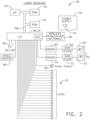
FIG. 2 is a block diagram of the major components of a laser receiver that is used in the exemplary movable target accessory ofFIG. 1 . -
FIG. 3 is a block diagram of the major components of a laser receiver that is used in the alternative exemplary movable target accessory ofFIG. 1 . -
FIG. 4 is a block diagram of the major components of a remote controller that is used in the system ofFIG. 1 . -
FIG. 5 is a block diagram of the major components of a laser controller that is used in the system ofFIG. 1 . -
FIG. 6 is a plan view of an exemplary laser controller that is used in the system ofFIG. 1 . -
FIG. 7 is an elevational view in cross-section of the exemplary laser controller ofFIG. 6 . -
FIG. 8 is a diagrammatic view of how a human user would use the movable target accessory ofFIG. 1 as part of a layout and point transfer system, as constructed according the principles of the technology disclosed herein, used for finding the location of a point of interest on a jobsite floor, after a laser controller has been set up (registered) on the floor plan. -
FIG. 9 is a flow chart of certain steps performed during a point layout routine, used in the system depicted inFIG. 8 . -
FIG. 10 is a flow chart of certain steps performed by the laser receiver sensing a single laser light line of a first version of a first embodiment of the movable target accessory ofFIG. 1 . -
FIG. 11 is a flow chart of certain steps performed by the laser receiver sensing a single laser light line of a second version of a first embodiment of the movable target accessory ofFIG. 1 . -
FIG. 12 is a flow chart of certain steps performed by the laser receiver sensing a single laser light line of a third version of a first embodiment of the movable target accessory ofFIG. 1 . -
FIG. 13 is a flow chart of certain steps performed by the laser receiver sensing two laser light lines of a fourth version of a first embodiment of the movable target accessory ofFIG. 1 . -
FIG. 14 is a flow chart of certain steps performed by the laser receiver sensing two laser light lines of a fifth version of a first embodiment of the movable target accessory ofFIG. 1 . -
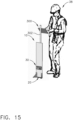
FIG. 15 is a diagrammatic view of the movable target accessory ofFIG. 1 next to a human user. -
FIG. 16 is a front perspective view of a laser light line crossing the floor and the laser receiver of the movable target accessory ofFIG. 1 , and illuminating a corresponding LED to indicate where the laser light line intersects the floor. -
FIG. 17 is a diagrammatic view of a human user operating the movable target accessory ofFIG. 1 and interacting with a laser controller and remote controller to constitute a layout and point transfer system. -
FIG. 18 is a front view of a laser light line crossing the laser receiver of the movable target accessory ofFIG. 1 , and illuminating a corresponding LED to indicate where the laser light line intersects the floor. -
FIG. 19 is a front view of a laser light line crossing the laser receiver of the movable target accessory ofFIG. 1 , while the movable target accessory is tilted somewhat askew, and illuminating a corresponding LED to indicate where the laser light line intersects the floor at a position that is corrected for the tilt angle. -
FIG. 20 is a front view of a laser light line crossing the laser receiver of the movable target accessory ofFIG. 1 , depicting all the LEDs being illuminated in one color, but the corresponding LED that indicates where the laser light line intersects the floor is illuminated in a different color. -
FIG. 21 is a front view of a laser light line crossing the laser receiver of the movable target accessory ofFIG. 1 , depicting all the LEDs being illuminated in one color from one side of the accessory to the position where the laser light line crosses, and the other LEDs are not lighted. -
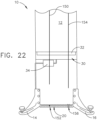
FIG. 22 is a front view of two laser light lines crossing the laser receiver of the movable target accessory ofFIG. 1 , in which one LED is illuminated in one color to indicate the position of a first laser light line, and a second LED is illuminated in a second color to indicate the position of a second laser light line. -
FIG. 23 is a front view of two laser light lines crossing the laser receiver of the movable target accessory ofFIG. 1 , in which all the LEDs are illuminated in one color from the left side of the accessory to the position where the first laser light line crosses, and all the LEDs are illuminated in a second color from the right side of the accessory to the position where the second laser light line crosses. -
FIG. 24 is a flow chart of certain steps performed by the laser receiver sensing two laser light lines of a sixth version of a first embodiment of the movable target accessory ofFIG. 1 . -
FIG. 25 is a front view of two last light lines crossing the laser receiver of a sixth version of a first embodiment of the movable target accessory ofFIG. 1 , in which all the LEDs are illuminated on a first LED strip in one color from the left side of the accessory to the position where the first laser light line crosses, and all the LEDs are illuminated on a second LED strip in a second color from the right side of the accessory to the position where the second laser light line crosses. -
FIG. 26 is a front view of a single laser light line crossing the laser receiver of the movable target accessory ofFIG. 1 , in which two LEDs are illuminated immediately next to one another, signifying that the point of interest is exactly between the two illuminated LEDs. -
FIG. 27 is a front view of a single laser light line crossing the laser receiver of a second embodiment of a movable target accessory similar to that ofFIG. 1 , in which the photosensors and laser light receiver are mounted higher on the pole, and the LED strip is mounted near the job surface, i.e., at the bottom portion of the accessory. -
FIG. 28 is a front view of a single laser light line crossing the laser receiver of the second embodiment of the movable target accessory ofFIG. 27 , in which the accessory is at an angle with the job surface, and the LED strip is illuminated at a compensated position based on that angle. -
FIG. 29 is a front view of the LED strip of the second embodiment of the movable target accessory ofFIG. 27 , depicting the angle between the job surface and the accessory, and the compensated illuminated LED. -
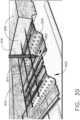
FIG. 30 is a perspective view of the mounting pole used in a third embodiment of the movable target accessory ofFIG. 32 , depicting the accessory's pole below the surface of a floor, in which the accessory (not shown in this figure) is mounted higher than the floor's surface. -
FIG. 31 is a perspective view of a laser controller mounted on a tripod in order to project a laser light plane above a floor surface so that the movable target accessory ofFIG. 30 may receive a laser light line on the accessory's laser receiver. -
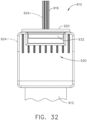
FIG. 32 is a front view of a laser receiver used in a third embodiment of a movable target accessory similar to that ofFIG. 1 , in which the photosensors and laser light receiver are mounted higher on the pole, and the LED strip is mounted near the top portion of the laser receiver's enclosure. -
FIG. 33 is a front elevational view of the movable target accessory ofFIG. 30 (tilted). -
FIG. 34 is a front elevational view of the movable target accessory ofFIG. 30 (plumbed). -
FIG. 35 is a side view of the movable target accessory ofFIG. 30 . -
FIG. 36 is a flow chart of certain steps performed by the laser receiver sensing a laser light line for a third embodiment of the movable target accessory ofFIG. 32 . -
FIG. 37 is a flow chart of certain steps performed by the various hardware components in all embodiments of the layout and point transfer system using the plurality of movable target accessories described hereinbelow, specifically for functions involving the laser distance meter operations at the various controllers and operator visible displays. -
FIG. 38 is a front view of a fourth embodiment of the movable target accessory similar to that ofFIG. 1 . -
FIG. 39 is a front perspective view of the movable target accessory ofFIG. 38 . -
FIG. 40 is a side view of the movable target accessory ofFIG. 38 . -
FIG. 41 is a perspective view of the movable target accessory ofFIG. 38 , including a pole and an attached bipod. -
FIG. 42 is a perspective view of the movable target accessory ofFIG. 38 , in which a magnetic mounting strip is depicted. -
FIG. 43 is a front view of the movable target accessory ofFIG. 38 , in which two laser light lines are impacting the accessory. -
FIG. 44 is a front view of the movable target accessory ofFIG. 38 , in which two laser light lines are intersecting as they impact the accessory. -
FIG. 45 is a front view of the movable target accessory ofFIG. 38 , in which two laser light lines have intersected and are now on the opposite side of the accessory, when compared toFIG. 43 . -
FIG. 46 is a perspective view of the movable target accessory ofFIG. 38 , placed at the intersection of two laser light planes generated from two laser controllers in a room. -
FIG. 47 is a top, plan view of the movable target accessory ofFIG. 38 on a jobsite floor, in which two laser controllers are emitting two vertical laser light planes that are impacting the accessory. -
FIG. 48 is a top, plan view of the movable target accessory ofFIG. 38 on a jobsite floor, in which the accessory has been moved into the intersection point of two vertical laser light planes being emitted from two laser controllers. -
FIG. 49 is a top, plan view of the movable target accessory ofFIG. 38 on a jobsite floor, in which the accessory has been moved past the intersection point, and the two vertical laser light planes are now impacting on opposite sides of the accessory as compared toFIG. 47 . -
FIG. 50 is a perspective view of the movable target accessory ofFIG. 38 on a jobsite floor, in which the accessory has not yet moved to the intersection point, and the two vertical fan beams are impacting the accessory. - Reference will now be made in detail to the present preferred embodiment, an example of which is illustrated in the accompanying drawings, wherein like numerals indicate the same elements throughout the views.
- It is to be understood that the technology disclosed herein is not limited in its application to the details of construction and the arrangement of components set forth in the following description or illustrated in the drawings. The technology disclosed herein is capable of other embodiments and of being practiced or of being carried out in various ways. Also, it is to be understood that the phraseology and terminology used herein is for the purpose of description and should not be regarded as limiting. The use of "including," "comprising," or "having" and variations thereof herein is meant to encompass the items listed thereafter and equivalents thereof as well as additional items. Unless limited otherwise, the terms "connected," "coupled," or "mounted," and variations thereof herein are used broadly and encompass direct and indirect connections, couplings, or mountings. In addition, the terms "connected" or "coupled" and variations thereof are not restricted to physical or mechanical connections or couplings. Furthermore, the terms "communicating with" or "in communications with" refer to two different physical or virtual elements that somehow pass signals or information between each other, whether that transfer of signals or information is direct or whether there are additional physical or virtual elements therebetween that are also involved in that passing of signals or information. Moreover, the term "in communication with" can also refer to a mechanical, hydraulic, or pneumatic system in which one end (a "first end") of the "communication" may be the "cause" of a certain impetus to occur (such as a mechanical movement, or a hydraulic or pneumatic change of state) and the other end (a "second end") of the "communication" may receive the "effect" of that movement/change of state, whether there are intermediate components between the "first end" and the "second end," or not. If a product has moving parts that rely on magnetic fields, or somehow detects a change in a magnetic field, or if data is passed from one electronic device to another by use of a magnetic field, then one could refer to those situations as items that are "in magnetic communication with" each other, in which one end of the "communication" may induce a magnetic field, and the other end may receive that magnetic field, and be acted on (or otherwise affected) by that magnetic field.
- The terms "first" or "second" preceding an element name, e.g., first inlet, second inlet, etc., are used for identification purposes to distinguish between similar or related elements, results or concepts, and are not intended to necessarily imply order, nor are the terms "first" or "second" intended to preclude the inclusion of additional similar or related elements, results or concepts, unless otherwise indicated.
- In addition, it should be understood that embodiments disclosed herein include both hardware and electronic components or modules that, for purposes of discussion, may be illustrated and described as if the majority of the components were implemented solely in hardware.
- However, one of ordinary skill in the art, and based on a reading of this detailed description, would recognize that, in at least one embodiment, the electronic based aspects of the technology disclosed herein may be implemented in software. As such, it should be noted that a plurality of hardware and software-based devices, as well as a plurality of different structural components may be utilized to implement the technology disclosed herein. Furthermore, if software is utilized, then the processing circuit that executes such software can be of a general purpose computer, while fulfilling all the functions that otherwise might be executed by a special purpose computer that could be designed for specifically implementing this technology.
- It will be understood that the term "circuit" as used herein can represent an actual electronic circuit, such as an integrated circuit chip (or a portion thereof), or it can represent a function that is performed by a processing circuit, such as a microprocessor or an ASIC that includes a logic state machine or another form of processing element (including a sequential processing circuit). A specific type of circuit could be an analog circuit or a digital circuit of some type, although such a circuit possibly could be implemented in software by a logic state machine or a sequential processor. In other words, if a processing circuit is used to perform a desired function used in the technology disclosed herein (such as a demodulation function), then there might not be a specific "circuit" that could be called a "demodulation circuit;" however, there would be a demodulation "function" that is performed by the software. All of these possibilities are contemplated by the inventors, and are within the principles of the technology when discussing a "circuit."
- Referring now to
FIG. 1 , a laser receiver movable target accessory is generally designated by thereference numeral 10. Theaccessory 10 includes a reflecting panel having afront surface 12. Alaser receiver 30 is mounted on the reflectingpanel 12 in a generally horizontal orientation (in this view), and the receiver includes aphotosensor subassembly 32. Note that thepanel 12 extends along a longitudinal axis. A high currentLED driver circuit 34 is mounted below (in this view) and thelaser receiver 30. At the base of theaccessory 10 is a leftfront leg 14 and a rightfront leg 16, which are used to stabilize the accessory upright. Between the legs is a bank ofLEDs 20. - The
movable accessory 10 is shown more to scale as compared to ahuman user 38 inFIG. 15 . As can be seen in that view, themovable accessory 10 has the bank ofLEDs 20 at its base, and above thoseLEDs 20 is the laser receiver (shown horizontally mounted in this view). Aremote controller 300 is mounted to the top of ahandle 302. Thehandle 302 is attached to the rear of themovable accessory 10 for ease of access to the remote controller as the user is moving the accessory on a jobsite. - Referring now to
FIGS. 2 and3 , theaccessory 10 includes one of thelaser receivers processing circuit 50, with associatedRAM 52,ROM 54, an input/output ("I/O") circuit 56, and a high currentLED driver circuit 34. These circuits are all in communication with theprocessing circuit 50 via asignal bus 58, which normally would carry data signals and address signals, and other types of microprocessor signals, such as interrupts. Since the laser receiver will be handling analog signals, there likely will be an analog-to-digital converter ("ADC") somewhere in this hardware circuitry, and a typical place for such ADC circuit could be with the signal conditioning I/O circuit 56. The ADC circuit could be multiplexed, or there could be more than one ADC circuit for the plurality of analog signals coming from thephotosensor 32. Anoptional wireless transceiver 90 could be used that is in communication with the I/O circuit 56. - An
angle sensor 84 is provided to calculate the tilt angle of theaccessory 10. Thisangle sensor 84 communicates with theprocessing circuit 50, and together calculates whichLED 20 to illuminate when alaser light line 712 crosses thephotosensor 32 of thelaser receiver - It should be noted that a single microcontroller circuit could potentially contain all the hardware circuits described in the previous paragraph. Moreover, an ASIC could potentially contain all those hardware circuits, as well as additional memory elements for a computer program that is used to execute commands on the processing circuit. In addition to the above hardware components, some type of communications port could be included in the
laser receiver - The heart of the
laser receiver FIGS. 2 and3 , is depicted as a pair of photocells that are mounted back-to-back atreference numerals FIG. 2 ), although it probably represents the minimum level of sophistication for such photocells that are to be used to detect the position of a laser beam that is striking the laser receiver. Any desired arrangement of photocells can be used to make up thephotosensor 32, whether as a simple pair of diagonal split cells (seeFIG. 2 ), a pair of photocells on the ends of a "rod sensor" (seeFIG. 3 ), or a much more complex set of multiple individual photocells that are multiplexed and amplified at different gains to achieve a desired effect for quickly and accurately detecting the position of a laser light strike. Several different exemplary schemes have been disclosed in patents owned by Trimble, includingU.S. Patents 5,486,690 ,6,133,991 , and7,012,237 . - On
FIGS. 2 and3 , it is assumed that there are twophotocells photosensor 32 for thelaser receiver gain amplifier stage laser light source 472 is not modulated, then a demodulation stage is not necessary. OnFIGS. 2 and3 , the final analog signals from the demodulation stages are directed to the I/O circuit 56, where they can be digitized by an A/D converter (the ADC). Please note that some microcontrollers contain an internal ADC, and in that situation, the analog signals can pass through the I/O circuit 56 unprocessed, and then be directed to the microcontroller ormicroprocessor 50. - The
laser receiver FIGS. 18-23 ) are described in further detail below. - Finally,
FIGS. 2 and3 depict a user-controlled power (ON-OFF) switch at 82. An electrical power supply is depicted at 40, which uses a set ofbatteries 42. Most standard laser receivers include a timing circuit, and if it detects no user activity for a predetermined time interval (such as 30 minutes), then a "battery saver" circuit will turn off the electronics automatically. - The use of an IR (infrared) laser light source can be beneficial under certain jobsite conditions. The alternative versions depicted in
FIGS. 2 and3 provides a solution for such conditions and, while an IR laser light line that impacts thetarget screen 12 may not be visible to the human eye, the ease of use of the accessory 10 nevertheless makes it easy for the user to "find" the correct azimuth angle that leads to the point of interest that is being "aimed at" by thelaser controller 820. If the jobsite floor has some small obstructions, the laser receiver will still be able to detect the non-visible laser light, so long as the floor obstructions are not too large in vertical size. Moreover, the electronic distance sensor would continue to operate in the same manner as described above, in reference toFIGS. 8 and17 . - It will be understood that the versions of
FIGS. 2 and3 could be used with any wavelength of laser light, including invisible wavelengths, if desired. The addition of thelaser receiver - Referring now to
FIG. 4 , a block diagram is provided for a remote controller, which is generally designated by thereference numeral 300.Remote controller 300 includes aprocessing circuit 310, with associatedRAM 312,ROM 314, some type of bulk memory orexternal memory 316, and an input/output circuit 318. These circuits are all in communication with theprocessing circuit 310 via abus 315, which normally would carry data signals and address signals, and other types of microprocessor signals, such as interrupts. - The
bulk memory 316 could be a disk drive, or perhaps some type of flash memory. If in the form of flash memory, it could be an external memory device (such as a "portable memory device") that can plug into the remote controller, via a USB port, for example. In that situation, there would be a USB interface port between thebulk memory device 316 and thebus 315. - The I/
O circuit 318 will be in communication with afirst communications port 320, which is designated as communications port "X" onFIG. 4 .Communications port 320 includes atransmitter circuit 322, and areceiver circuit 324.Communications port 320 is designed to communicate with thelaser controller 820, typically using a wireless signal via a wireless pathway 326 (as noted onFIG. 4 ). As described in greater detail below, in this point layout system, thelaser controller 820 will communicate distance information and azimuth angle information with theremote controller 300, and that information arrives via thewireless path 326 to and fromcommunications port 320. - An optional
second communications port 330 can be included inremote controller 300, and this is designated as communications port "Y" onFIG. 4 . Thecommunications port 330 includes atransmitter circuit 332 andreceiver circuit 334. If installed,communications port 330 can be used to exchange information with anarchitect computer 850, via acommunication link 336. OnFIG. 4 , thecommunication link 336 is depicted as a wireless link, although it certainly could be constructed by use of an electrical cable or an optical cable, if desired. If used,communications port 330 will be able to exchange floor layout data with thearchitect computer 850; more specifically, it can receive a virtual jobsite floor plan and store it in thebulk memory circuit 316. In addition, if theremote controller 300 receives information about a new or "unknown" point of interest in the jobsite floor plan, then that information not only can be saved in thebulk memory circuit 316, but could also be communicated back to the architect computer 850 (via the communications port 330) to be placed in the original floor plan. Or, a revised virtual jobsite floor plan (which includes the new point of interest) can be saved as a file inbulk memory circuit 316, and that entire file could be transferred to thearchitect computer 850. - It will be understood that the
architect computer 850 could comprise a "fixed" unit that essentially remains in the architect's office, and passes data to theremote controller 300 while the remote controller is physically at the office, or perhaps they may remotely communicate with one another via a wide area network, such as the Internet. Alternatively, thearchitect computer 850 could comprise a "portable" unit that is transported to the jobsite, and communicates withportable unit 300 while on site. Finally, as portable computers become even smaller in physical size, it is possible that a portable remote controller and the architect computer will eventually become merged into a single device. On the other hand, a tablet computer is much more durable than many other forms of portable computers, and for the rigors that theremote controller 300 will be subjected to, it does not seem highly probably that it would merge functions with the architect'scomputer 850. That being said, aportable architect computer 850 could be in the form of a high-capability tablet computer. - A
display driver circuit 340 is in communication with the I/O circuit 318.Display driver circuit 340 provides the correct interface and data signals for adisplay 342 that is part ofremote controller 300. Ifremote controller 300 is a laptop computer, for example, then this would be the standard display seen in most laptop computers. Or, perhaps theremote controller 300 is a calculator-sized computing device, such as a tablet portable computer or a smart phone, in which case the display would be a much smaller physical device.Display 342 could be a touch screen display, if desired, such as found on many tablet computers. - One example of a type of remote controller that could work in this system (with some modification) is the portable "layout manager," which is an existing hand-held computer sold by Trimble, Inc. (formerly, Trimble Navigation Limited), Model Number LM80. It should be noted that one cannot simply take the LM80 and immediately use it as a remote controller in the present system; the software must be modified to perform the necessary calculations. In addition, the input/output circuits must be modified to be able to communicate commands and data both to and from the
laser controller 820. - A
keypad driver circuit 350 is in communication with I/O circuit 318.Keypad driver circuit 350 controls the signals that interface to aninput sensing device 352, such as a keypad, as depicted onFIG. 4 . Again, if thedisplay 342 is of a touch screen type, then there may not be a separate keypad onremote controller 300, because most of the command or data input functions will be available by touching the display itself. There may be some type of power on/off switch, but that would not necessarily be considered a true keypad (and typically would not be used for entering data). - Referring now to
FIG. 5 , a block diagram of a laser controller used in the present system is illustrated, and is generally designated by thereference numeral 820.Laser controller 820 includes aprocessing circuit 410, which will have associated random access memory (RAM) at 412, associated read only memory (ROM) at 414, and at least one input/output circuit at 416. Thesememory circuits 412, 414, and I/O circuit 416 communicate with theprocessing circuit 410 by use of abus 418, which typically is referred to as an address bus or a data bus, and can also contain other types of signals, such as interrupts and perhaps other types of timing signals. - The input/
output circuit 416 will sometimes also be referred to herein as an "I/O" circuit. This I/O circuit 416 is a primary interface between the real world devices and theprocessing circuit 410. The I/O circuit 416 is in communication with various communications devices and also various types of motor drive circuits and sensor circuits. - The input/
output circuit 416 is in communication with a communications port A, which is generally designated by thereference numeral 420.Communications port 420 includes atransmitter circuit 422 and receiver circuit 424.Communications port 420 is provided to exchange data information with theremote controller 300. The communication link betweenremote controller 300 andcommunications port 420 is designated by thereference numeral 426. In a preferred mode of this system, thecommunication link 426 will be wireless, although a cable could be connected between thecommunications port 420 and theremote controller 300, if desired. - An optional second communications port, referred to as port B, is generally designated by the reference numeral 430 on
FIG. 5 . This port 430 comprises a data interface with an input circuit at 432 and output circuit at 434. If used, this communications port 430 can transfer data to and from an optional null-position photosensor, generally designated by thereference numeral 438, using a communication path 436. While it would be possible for communication link 436 to be wireless, there is no particular need for that to be so. This optional equipment is found on other laser transmitters sold by Trimble, Inc. (formerly known as Trimble Navigation Limited), but it is not necessary for the primary functions that are described herein. One possible reason to provide this optional equipment would be to use thelaser controller 820 as a substitute for other equipment in Trimble QuickMark Layout systems. -
Laser controller 820 also includes a self-leveling motor drive circuit, generally designated by thereference numeral 440. This drive circuit provides the voltage and current for a levelingmotor 442. In addition, it receives signals from alevel sensor 444, and these input signals will determine what types of commands will be sent to themotor 442 from thedrive circuit 440. If desired, this can be a self-contained system that may not need to communicate with theprocessing circuit 410. However, thelaser controller 820 will typically desire knowledge of whether or not the laser controller has actually finished its leveling function before thelaser controller 820 begins to function in its normal mode of operation. In addition, theprocessing circuit 410 may well desire to control the levelingmotor drive circuit 440, essentially to keep it de-energized at times when it is not critical for the laser controller to actually be attempting to level itself with respect to gravity. - It will be understood that an automatic leveling function is desired, but it is not a requirement for using this technology. If it is not used, then each time the
laser controller 820 is moved to a new position on the jobsite surface, the user must manually level that laser controller. In that type of embodiment, the laser controller would likely be provided with leveling screws and at least one bubble vial. -
Laser controller 820 also includes anangle encoder 450, in a preferred embodiment of this control system.Angle encoder 450 will provide input signals to theprocessing circuit 410, so that it knows exactly where the laser transmitter is being pointed with respect to the azimuth direction. Measuring the azimuth could be a wholly manual operation, if desired to reduce system cost by eliminating the encoder. However, for a fully automated system, theangle encoder 450 will be necessary. Certainly the frequent changes in the azimuth direction of the laser transmitter that tend to occur in this point layout control system would make a decision to delete the angle encoder seem later like a horrible idea. An electronic angle encoder will provide an electrical or optical output signal that is related to the angle (or "heading") that has been measured by the encoder subassembly. In thelaser controller 820, that angle encoder output signal is directed to the I/O interface circuit 416. -
Laser controller 820 preferably will also include an azimuth motor drive, generally designated by thereference numeral 460.Motor drive 460 will provide the proper current and voltage to drive theazimuth motor 462, which is the motive force to aim the laser transmitter. This could be part of a self-contained system, working with theangle encoder 450. However, onFIG. 5 , it is illustrated as being controlled by theprocessing circuit 410, which is necessary to perform the functions that are specified in the logic flow charts that are provided herewith. It will also be understood that, as an option, a manually-adjusted azimuth instrument could be provided on the laser controller, rather than including an azimuth motor drive as described above. - The leveling motor system includes a leveling platform for the
azimuth motor 442, which has output shaft and a pinion gear that meshes with a spur gear. The spur gear has an output shaft that is vertical, which runs through an encoder disc subassembly and up to a second wheel or disc that includes a pair of butt cell photosensors. The encoder disc subassembly typically has some type of visible markings that can be detected by an encoder readhead, which is located along the outer perimeter of the encoder disc. The overallangle encoder subassembly 450 includes both the encoder disc subassembly and the encoder readhead. Typical optical encoders have a fixed portion and a rotatable portion. -
Laser controller 820 also includes a laser lightsource driver circuit 470, which provides the current and voltage to drive alaser light source 472. This typically will be a laser diode, although it could be some other type of laser light beam emitter, if desired. As described above, the laser light source will typically be emitting visible wavelength light, although a non-visible wavelength light source could be desirable for certain applications, and a laser light source emitting infrared light could be used in that situation. Thelaser source driver 470 is controlled by processingcircuit 410 in the configuration illustrated onFIG. 5 . - The
laser controller 820 will typically include a "fan beam"laser transmitter 472. However, it will be understood that other types of laser light sources could be used, including a rotating laser beam (such as a dithering laser beam), if desired. There must be some minimum amount of divergence to create a laser light "plane" so that the laser light will at least intersect the floor surface of a jobsite, and perhaps also intersect a ceiling surface for interior spaces on jobsites. Thelaser controller 820 will have many uses, even if the laser light source only is pointing at a floor surface. In this description, it will be assumed that the laser light source is a fan beam laser or an equivalent, so that either (i) a continuous plane of laser light is being emitted bylaser controller 820, or (ii) a moving beam of laser light (i.e., a stream of photons in a line that moves its aiming angle over time) is emitted bylaser controller 820 in a manner so as to create a "plane" of laser light that emulates a fan beam. - An electronic distance measuring instrument, generally designated by the
reference numeral 480, is included in thelaser controller 820. Thedistance measurer 480 communicates with themicroprocessor 410 through the input/output circuit 416. If thedistance measurer 480 uses laser light as its distance sensing means, then it can also be referred to as a "laser distance meter" or "LDM." Other types of distance measuring instruments also could be used, such as a sound-based device. This instrument can also be referred to as a "DMD" or "Distance Measuring Device" 480. - Assuming the
distance measurer 480 is an LDM, it will include alaser driver circuit 482 and a laser beamreceiver interface circuit 484. Thelaser driver 482 provides current for alaser light source 486, which emits a laser light beam, such as the laser light beam 730 (as shown onFIG. 8 ). Aphotosensor 488 receives the reflected laser light (from light beam 730), and the current signal that is output by thephotosensor 488 is directed to the laserreceiver interface circuit 484. After appropriate amplification and possible demodulation, that signal is sent through the I/O circuit 416 to themicroprocessor 410. In this manner, theDMD 480 can determine an accurate distance between thelaser controller 820 and a target thatlight beam 730 is reflected from, back to thephotosensor 488. - An indicating
lamp 490 can be included in thelaser controller 820 to provide visual signals to a human user. Certain flashing signals could indicate a particular status, such as being TOO LONG, or TOO SHORT, with regard to the distance measurement between theDMD 480 and the target screen being manipulated by the user. Or, as described in greater detail below, the laser light source could be flashed at different rates to provide an indication as to the current distance status, which would provide an easily visible indication to the user on the jobsite floor as to whether that user should hold still, or move toward or away from the laser controller. - To indicate status, an audible output could be used as well, or instead of a visible lamp. Such an audible output could beep at certain rates (instead of flashing, for example), or if the audible output device acts like a speaker, it could change pitches to signal a change in status. (Note that such an audible output could be provided on the Remote Controller instead of, or in addition to, an audible output at the laser controller. See below.)
- The basic system concept is generally illustrated in
FIG. 5 . There is asingle laser controller 820 that uses a laser transmitter 472 (seeFIG. 8 ) which outputs avertical laser plane 734 that, when incident on the floor, produces a visible laserlight line 730 on thework surface 200. After completion of a setup procedure thelaser controller 820 is able to rotate a pivotable rotor portion on its pivot axis, so as to direct the verticallaser light plane 734 through a point ofinterest 240 on the jobsite'swork surface 200. This action directly provides a visible heading for the user and allows him to know that the location he is interested in falls somewhere along thatlaser light line 730 above thejobsite floor 200. - The system also has the capability of measuring the distance between the transmitter and a movable "target screen" located at the user, and handled by the user. In the illustrated embodiment, an electronic distance measuring instrument is provided on the rotating rotor portion of the laser controller such that it will always "aim" in the same azimuth direction (or "heading") as the vertical laser plane is aiming. In a preferred embodiment, the electronic distance measuring instrument comprises a laser distance meter (also known as an "LDM") that emits a narrow laser beam toward an intended target, and receives back some of that emitted laser beam energy-this is a well-known device. Also, in a preferred embodiment, the LDM is mounted on the
laser controller 820 such that it emits its laser beam in a substantially horizontal direction, about six inches (152 mm) above the floor level. - In the illustrated embodiment of
FIG. 8 , the laser distance meter ("LDM") 480 aims its measuringlaser beam 232 along the same azimuth as the vertical laser light plane (also referred to as a laser "fan beam") 734. As noted above, both theLDM 480 and thelaser plane transmitter 472 are mounted on the same pivotable portion of thelaser controller 820, and the distance measuring module is intended to be located within the laser transmitter fan beam, and not only rotates with thevertical laser plane 734, but has thelaser 486 used for the distance measurement aligned and coincident with the output laser plane used for the visual heading direction. Therefore, these laser light-producing emitters are always aimed along the same azimuth (or "heading"). - To be more precise, the term "heading" can be relative; if the laser controller is placed on a surface without knowing any setup information about how it is oriented to a jobsite floor plan coordinate system, or how it is oriented to the earth, still that laser controller will know the "heading" that its
laser plane transmitter 472 is aimed at, because of its angle encoder 450 (seeFIG. 8 ). However, that exact heading may or may not be equivalent to an azimuth; it depends on whether or not the laser controller has yet been leveled. (Note: "azimuth" is an angle in the horizontal plane.) Once leveled, the heading of thelaser plane transmitter 472 will be equivalent to an azimuth, but again, that can be a relative quantity that may not match up to the earth, or to a jobsite floor plan. Finally, once the laser controller has been set up with a jobsite floor plan coordinate system, then the heading of the laser plane transmitter should match up to a true azimuth direction. (For example, a "relative" heading of 20 degrees for the laser controller 820-i.e., according to its own angle encoder 450-may end up corresponding to an azimuth direction of 15.5 degrees with respect to the CAD model coordinate system at the jobsite. Once that angular relationship becomes known, during setup, the processing circuit of the laser controller will know how to operate, knowing that information.) - It will be understood that, as used in this description, the phrase "laser fan beam" includes other types of laser light producing products that are capable of creating a "laser plane" output. This specifically includes a transmitter that outputs a rotating laser beam, which effectively creates a laser light "plane" of multiple rotations of a laser beam.
- When in use, the
LDM 480 has the ability to measure the distance from the transmitter rotor spin axis to atarget screen 12, which typically is located near theuser 38. TheLDM 480 thus can provide an accurate distance measurement in real time to thelaser controller 20, which in turn can provide that information to atablet computer 300, which is the remote controller that is visible to the user. Thetarget screen 12 must be at least partially reflective to the distance-measuring energy, so that a portion of the laser light emitted by theLDM 480 will be returned to thephotosensor 488 of the LDM. - It will be understood that a different type of distance measuring device (DMD) could be used, rather than a laser distance meter. For example, a sonic emitter or an ultrasonic emitter could be directed at the target screen, which would reflect a portion of the sonic energy, and a distance could be determined, much like SONAR devices. A certain amount of accuracy would be lost, of course, compared to a light-energy based distance measuring instrument, such as an LDM.
- If an indicating
lamp 490 is provided on thelaser controller 820, then it can provide a flashing indication as to whether the user has moved thetarget screen 12 to a position that is too short, too long, or just at the correct distance ("on point"). By use of a wireless communications link 426 between thelaser controller 820 and theremote controller 300, the measured distance between theLDM 480 and thetarget screen 12 can be transmitted and then displayed on the monitor screen 342 (seeFIG. 4 ) of thetablet 300. Alternatively, as described in greater detail below, the laser light source could be flashed at different rates to provide an indication as to the current distance status, which would provide an easily visible indication to the user on the jobsite floor as to whether that user should hold still, or move toward or away from the laser controller. - As described above, there are two major components in this system: a
laser controller 820 and aremote controller 300. The laser controller includes alaser transmitter 472 that produces a rotatable visible vertical laser plane to indicate heading, and includes an electronicdistance measuring instrument 480, which provides a distance measuring capability within the laser controller. As noted above, it is preferred that the electronicdistance measuring instrument 480 comprise a laser distance meter (or "LDM"), and that the LDM also be mounted on the same rotatable rotor portion of thelaser controller 820 as is thelaser transmitter 472. - Referring now to
FIG. 9 , a flow chart is provided to show some of the important steps in a point layout procedure using the laser controller, after it has been placed on a physical jobsite floor and setup to the floor plan for that jobsite. The flow chart ofFIG. 9 involves some of the layout functions as illustrated inFIG. 8 , using themovable target 10. -
FIG. 9 involves logic steps to be performed by both the remote controller 300 (or "RC") and the laser controller 820 (or "LC"). Both controllers have an initial condition at the beginning of the flow chart ofFIG. 9 : the RC has a "point list" already stored in its memory, which is called up when this routine is initialized at astep 600; the LC is already registered on the jobsite floor when this routine is initialized at astep 650. - It will be understood that each controller-i.e., the
remote controller 300 and the laser controller 820-has its own operating software that is executed on its own processing circuit. However, it will also be understood that both of thesecontrollers - On
FIG. 9 , the first task after initializing this routine is for the human user to select a point of interest at astep 610. (Note: as discussed above, the actual choice of which point of interest to select can be automated by the software, if desired.) The RC now sends a command to the LC, still atstep 610, to aim the laser fan beam at the correct heading, so that a laser light line will be visually indicated on the jobsite floor surface. Note, however, the laser fan beam does not necessarily have to reach the floor (as inFIG. 8 ); in that situation, the user can approximate the correct heading by looking at the rotating turret head of the laser controller, and then move thetarget accessory 10 into that direction until the fan beam impacts thetarget surface 12, at which time, avertical laser light 712 will appear on that target surface. - At a
step 660, the LC receives the POI coordinates, or it receives a command to aim at a specific azimuth angle-this is a matter of design choice by the system design engineer. Either way, the LC now rotates itslaser transmitter 472 to emit a fan beam (such as thelaser plane 734, as seen inFIG. 8 ) along the correct heading. The RC can now display a message to the user, at astep 612, that the user should now move along the laser fan beam with the target screen. - The human user 38 (of
FIG. 8 ) will now move the target to the correct heading, while attempting to place the target screen at the correct distance from the LC. It should be noted that, if the RC actually displays the sought after distance on itsdisplay monitor 342, then an experienced user will likely move quickly to a spot along thefan beam 734 ofFIG. 8 that is very close to the correct actual distance to the POI. After that, the remaining "back and forth" movements to close in on the exact distance for each point of interest should be accomplished very quickly. - The LC will now perform periodic distance measurements, at a
step 662, using its distance measuring instrument 480 (e.g., an LDM). The sample rate should be quite fast, at least in human terms, so the user feels that he is receiving almost continuous updates of the distance reading. The measured distances can be transmitted to the RC; in addition, if the LC was informed by the RC of the sought-after distance for this POI, then the LC can also send messages to the RC of the current distance status. The RC will then translate that data into informational operational (status) instructions, such as TOO LONG, TOO SHORT, or ON POINT. Moreover, the LC and/or the RC, optionally, can have an indicator that visually flashes light or produces an audible beep (or other sound), and the flashing rate (or beeping rate) can change, as the distance status (TOO LONG, TOO SHORT, or ON POINT) changes. An audible tone or beep may not be the best indicator on a busy (and perhaps noisy) jobsite. - Additionally, if there are LEDs of more than one color on the LC, then a different color could be flashed to indicate which distance status is currently operative; for example, "green" could have the meaning of ON POINT, while "yellow" and "red" could have the meanings TOO LONG or TOO SHORT, for example. Furthermore, the yellow and/or red lamps could also flash at different rates, as the user approaches the correct distance to the POI.
- As the measured distance data is received by the RC, that distance can be displayed to the user at a
step 614. Moreover, the display monitor 342 could noticeably display a bright message (perhaps in color) to the user that indicates the TOO LONG, TOO SHORT, or ON POINT current distance status. As noted above for the LC, the display on the RC could either flash or show different colors as the distance status changes, and/or if the correct (sought after) distance is being approached by the user. Additionally, an audible tone or beep could be output on the tablet (RC) 300, if desired, although a busy jobsite may not be conducive to hearing such audible signals. The audible tone could "beep" at faster or slower rates, to indicate TOO LONG or TOO SHORT, for example; a steady "on-tone" could represent an ON POINT current distance status. Another exemplary way to indicate the current distance status using the display monitor 342 could be to show "arrow" symbols, much like are used on laser receivers that show elevation (as ABOVE GRADE, BELOW GRADE, and ON GRADE). One arrow could be illuminated (or could flash) to show TOO LONG, while a second arrow could be illuminated (or could flash) to show TOO SHORT, status states. - Another helpful way that the system hardware could provide an indication to the user of the current distance status is to flash (or modulate) the laser transmitter output fan beam itself. In greater detail, the
laser light transmitter 472 of thelaser controller 820 could be commanded to turn its optical output beam on and off, repetitively, as an indication of TOO LONG, TOO SHORT, or ON POINT. For example, if the current distance status is TOO LONG, then the frequency of the light flashing could be relatively fast, such as three flashes (on and off) per second; and if the current distance status is TOO SHORT, then the frequency of the light flashing could be relatively slow, such as only one flash (on and off) per second; finally, if the current distance status is ON POINT, the frequency of the light flashing could be zero, which would be a constant "on" light beam. - Such laser light flashing would be eminently visible by the human user on the jobsite, because the laser light lines that run across the target screen 12 (and any other surfaces that are impacted by the laser light plane) will brightly "shine on", and then "shine off"-either quickly or slowly-as the correct distance is finally reached by the user who is manipulating the target screen. Another refinement could be to vary the duty cycle of the on and off flashing light beams. In other words, if the flash rate is three cycles per second, the duty cycle could be 50%, and the user would have a "good signal" to visibly see the laser light lines being created by the laser light plane. However, if the flash rate is only one cycle per second, or perhaps even slower, then the system designer may wish to increase the duty cycle to 70% or 80%, for example, so the user will still have "good signal" to visibly see those laser light lines, instead of being required to wait for a longer "off time" that would be created by use of a smaller duty cycle.
- After the user has discovered the correct location for the current point of interest-i.e., the target screen is now ON POINT-the display monitor 342 at a
step 616 can display a message to inform the user that he should now mark this position on the jobsite floor. TheRC 300 can store this status, so as to prepare for moving on to the next point of interest. As described below in greater detail, the user only needs to move thetarget accessory 10 until thelaser light line 712 intersects any portion of the laser receiver'sphotosensor 32. At that moment, at least one LED of thearray 20 will turn on, thereby informing the user of the correct point of interest azimuth. - At a
step 620, the RC will select the next point of interest, and will send a command to aim the laser fan beam of the LC at that next POI, just like instep 610. The LC receives this command for the next POI at astep 670, and rotates itslaser transmitter 472 accordingly, just like instep 660. The LC will now repeat the otherfunctions involving step 662, and at astep 622, the RC will now repeat the functions ofsteps - Once the entire point list has been laid out, this portion of the jobsite floor plan will be completed. The
laser controller 820 will now likely be moved to a different portion of the same jobsite, or to a new jobsite altogether. - Referring now to
FIGS. 6 and 7 , anexemplary laser controller 820 is illustrated in a top, plan view and a side, elevational cross-section view. Theelectronic distance instrument 480 is placed near the top of the laser controller package, so that its distance measuring laser beam output is directed at an elevation of approximately six inches (152 mm) above floor level, once thelaser controller 820 is placed on a jobsite floor surface. Theexemplary laser controller 820 has proposed dimensions "D1" and "D2;" the proposed overall outer dimension "D1" is about 6.28 inches (160 mm) in diameter, while the proposed overall outer dimension "D2" is about 6.89 inches (175 mm) in height. - Also placed near the top of the
laser controller assembly 820 is thelaser transmitter 472, which has an associatedcircuit board 474 and a laserfan cylinder lens 476. Thecylinder lens 476 receives a focused laser beam, and converts that optical energy into a fan beam that is spread into a laser plane by the cylinder lens, as illustrated at 734, for example. - The entire top portion of the laser controller assembly, generally designated by the
reference numeral 490, is able to rotate completely around its circumference at a 360 degree angle, so that any desired heading can become the "aiming angle" of interest for the fan beam laser plane, and for the electronic distance instrument directional output of thislaser controller 820. An azimuth drive subassembly is provided that controls the heading of the "aiming angle," which includes theazimuth drive motor 462, anazimuth drive disk 464, and anangle encoder 450. - To make the
laser controller 820 fully automatic, it is preferred to include a self-leveling platform, which includes the levelingmotor 442, a level sensor 444 (not shown onFIGS. 6 and 7 ), and a leveling platform pivot at 446. - A
battery pack 402 is included at the bottom portion of thelaser controller 820, so that replacement of the batteries will be easily done, using an access cover on the bottom of the enclosure. A power switch is included at 404, and a charging jack at 406. A main circuit board is located near the bottom of the laser controller, at 408. In addition, anantenna 428 is included inside the enclosure for receiving and transmitting wireless signals. - Referring now to
FIG. 8 , the user can easily find a point of interest on thejobsite floor 200 by maneuvering theaccessory 10 so that thetarget screen 12 intercepts the distancemeter laser line 232 at any distance from thelaser controller 820, and along the heading provided by a laserlight fan beam 734. It should be noted that thelaser fan beam 734 will extend all the way between itsuppermost edge 736 and itslowermost edge 730. Therefore, thelaser fan beam 734 will produce a visible verticallaser light line 712 on thetarget screen surface 12. This is a highly visible vertical line that the user will easily see while using theaccessory 10, and all that the user needs to do is move the accessory back and forth-while keeping theaccessory 10 within the visible laser fan beam 734-until finding the correct distance. - The
LDM 480 of thelaser controller 820 will measure that distance at 232 between thetarget screen 12 and thelaser transmitter 472, and display the distance on the tablet'sdisplay monitor 342. In addition, an indication can be provided as to whether the user should move closer in toward the transmitter, or to move farther out from the transmitter, or to stand still if the user is "on point". - If a distance correction from the
laser distance meter 480 to the accessory 10 must be made, the accessory is easily moved forward and back along the heading indicated. As noted above, while correcting the distance, the user only needs to keep the accessory 10 within the correct heading, which is visibly indicated in a manner that is quite difficult to miss. And once the correct distance from thelaser controller 820 is attained along the appropriate heading, the point of interest at 240 can then be marked on thefloor 200 at the bottom edge of the target screen 12 (seeFIG. 8 ). The point ofinterest 240 is easily found by looking for the LED that is turned on 766, which indicates the received path of thelaser beam 712 at the photosensor(s) of thelaser receiver 30. - The accessory 10 offers certain advantages, including a structure that mounts the useful elements of the
target screen 12 and tablet-remote controller 300 on one easy-to-maneuver frame. A handle can be folded flat against the frame of the accessory, for easy stowing when not in use. Theaccessory 10 allows the user to search and find the point of interest while standing, thus saving wear and tear on his knees, hips and back, which otherwise could result with the alternative of crawling around on all fours, or bending low over and over. - Once the
target screen 12 has been moved to the correct position on the jobsite surface, if the fan beam extends down to the floor surface, as inFIG. 17 , the intersection of the horizontal laserlight line 710 and the verticallaser light line 712 directly and visually indicates the location of the current point of interest to the user. These two laser light lines provide a type of L-shaped mark (or "L-mark") on the jobsite surface and movable target surface. The elbow point of that lighted "L-mark" (at, or near, the bottom of the visible vertical light line, for example) will be directly at the point of interest. In this new equipment, i.e., themovable accessory 10, one of the LEDs in thearray 20 will also be illuminated; seeLED 750 onFIG. 16 . - It should be noted that the visible horizontal laser
light line 730 does not necessarily need to extend all the way down to the floor level at the point ofinterest 240. For example, if the jobsite floor surface is uneven (a common occurrence), then thelaser plane 734 might not reach the floor surface by the time it crosses the point to be marked (i.e., at the point of interest 240). However, the new system will work just fine anyway, because thebottom edge 730 of the verticallaser light plane 734 will continue along the same heading, just at a slightly higher altitude just off the floor surface. So long as the vertical laser light plane impactslaser receiver 30, mounted on thetarget screen 12, it will impart a highly visible vertical line on thattarget screen 12. If thetarget screen 12 is plumb (i.e., vertical), as designed, then thelaser light line 712 will "aim" directly down toward the desired point of interest, once the accessory 10 has been placed at the correct distance from the electronicdistance measuring instrument 480 of thelaser controller 820. In this situation, the user may not literally see an "L-mark" right at the point of interest, but the verticallaser light line 712 on thetarget screen 12 will nevertheless provide an accurate location for marking the point of interest on the jobsite floor surface. Moreover, one of the LEDs of thearray 20 will be illuminated, which provides a close reference for where the POI should be marked on the floor. - In addition to the variation discussed in the previous paragraph, in an alternative embodiment the laser plane could emanate in a manner such that the bottom edge of the laser plane never touches the jobsite floor surface. In this arrangement, there would be no visible laser light line running horizontally across the floor, however, the user could easily find the visible wavelength laser plane merely by walking across the jobsite floor with the target screen in hand, while moving in a non-radial direction with respect to the laser controller. Once the target screen intercepted the laser plane, a vertical line of visible laser light would become very noticeable and the user would know that the desired radial direction had been found. The user could then move in that now-visible radial direction until reaching the correct distance from the laser controller; that circumstance of course would then indicate that the desired point of interest had been found.
- On
FIG. 8 , acontrol line 224 is depicted as being offset from acenterline 214 between two vertical I-beams control line 224, which is offset by a distance dimension at 225. Thelaser controller 820 is positioned at a pair ofX-Y centerlines parallel lines beams jobsite floor 200. The correct heading from thelaser controller 820 to the point ofinterest 240 diverges from theparallel line 226 by an angle θ. - The drawings generally depict the
laser receiver 30 as being mounted in a horizontal orientation on thepanel 12, and this horizontal orientation is the preferred embodiment. However, it will be understood that the orientation of the laser receiver does not necessarily need to be strictly horizontal. In general, the laser receiver must be mounted in a non-vertical orientation, but that is its main limitation. (If it was mounted vertically, then it would be impossible for that laser receiver to determine a "horizontal" position of a change in azimuth angle from thelaser transmitter 472.) - For example, if the laser receiver was mounted at an orientation that is 10 degrees from the horizontal, then the math involved would be somewhat more complex, but the trigonometry for calculating the "horizontal" position of a vertical laser plane "hit" on the laser receiver is well known. That extra triangular relationship (i.e., a triangular with one side horizontal, one side vertical where the laser line exists from the laser plane, and the hypotenuse along that 10 degree orientation of the laser receiver) would be used to establish the horizontal position along the array of
LEDs 20 where the vertical laser plane would impact one of those LEDs if the laser plane is able to reach that far down on thepanel 12. - Furthermore, the vertical position where the laser receiver is mounted on the
panel 12 is another important factor. The higher it is positioned, the more "clutter" on the jobsite floor that can be accommodated while using this point layout system. For example, it could be mounted 18 inches (457 mm) the bottom edge of the panel 12 (where the LEDs are located); in that instance, the laser plane from the laser transmitter would still reach thelaser receiver 30, even if a floor obstruction of just under 18 inches in height was resting on the floor at a position that was directly between thelaser controller 820 and themovable accessory 10. Such a configuration could also overcome a situation where the floor level stepped down by just under 18 inches where themovable accessory 10 was positioned during measurements. (Strictly speaking, it is the photosensor 32 that must be positioned high enough to receive thelaser plane 734 emitted by thelaser transmitter 820.) - In the above description, it was noted that the laser distance meter's (LDM)
laser beam output 232 could be arranged so that it was about six (6) inches (152 mm) above floor level If that dimension is indeed designed into aparticular laser controller 820, then it would be recommended that thelaser receiver 30 that is mounted on thepanel 12 should not be mounted at that same six-inch vertical dimension from the bottom edge of the panel. It is preferred that the LDM have a smooth, non-obstructed target to "aim" at on thepanel 12. And, it should be noted that this six-inch height of the LDM laser beam becomes the true limitation of just how much "clutter" can be overcome by this system. If one knows that a jobsite floor will have 12-inch (305 mm) obstructions that need to be overcome during layout measurements, then one either needs to design alaser controller 820 that is at least twelve (12) inches tall (for theLDM beam 232, and for the laser plane output 734), or one must mount thelaser controller 820 on a pedestal. - The drawings also generally depict the array of
LEDs 20 as being mounted in a horizontal orientation on thepanel 12, and this horizontal orientation is again the preferred embodiment. However, it will be understood that the orientation of the array of LEDs does not necessarily need to be horizontal, nor does it even need to be linear. The LEDs should be mounted in relatively close proximity to the bottom edge of thepanel 12, and the closer the LEDs are to that bottom edge, the easier it will be for the user on the jobsite floor to see exactly where to mark the point of interest (POI) on that jobsite floor. But a linear, and horizontal orientation of the LED array is not strictly required. - The true requirement is that the
LEDs 20 be arranged so as to have the ability to indicate a plurality of different azimuth positions along the bottom edge of thepanel 12. Of course, those different azimuth positions are perceived as being at different horizontal positions, in terms of the Earth's surface and how the user will view things on the jobsite. The general requirement is that there be a plurality of indicating lights that are located at different horizontal positions, and that those indicated lights be mounted proximal to the bottom edge portion of themovable accessory 10. - It will also be understood that the "array of LEDs" 20 can comprise other types of light-emitted devices other than LEDs, and that the so-called "array" need not be an actual array of electronic devices. As a minimum requirement, there does need to be a plurality of light-emitting devices that are spaced-apart from one another, and they need to cover at least a modicum of horizontal distance (to make the overall accessory useful to the user on the jobsite). This plurality of light-emitting devices (or "photoemitters") should be placed proximal to the bottom portion of the
movable accessory 10, for ease of use in visually showing the user where to literally mark the floor surface, to indicate that point of interest. But again, the plurality of photoemitters does not need to be in a straight line, or strictly horizontally-oriented. - Finally: the photoemitters could comprise a set of fiber optic cables that terminate proximal to the bottom portion of the
movable accessory 10. The other end of the fiber optic cables could connect to one or more LEDs (or other type of light source) that is/are located much higher on thepanel 12, if desired. The light signals themselves could be multiplexed, if desired. Other arrangements of light sources and optic cables could further be used that have not yet been invented, without departing from the principles of this present technology. -
FIGS. 18-23 illustrate various versions of how the LEDs may turn on when the accessory is in a fan beam (or in multiple fan beams). This is not an exhaustive set of versions, and it should be noted that other combinations not illustrated herein are still included in the technology disclosed herein. - Referring now to
FIG. 18 , a first version of a first embodiment of themovable accessory 10 is depicted. A verticallaser light line 110 is illustrated crossing thelaser receiver 30, and itsphotosensor 32. Thislaser light 110 does not extend all the way down to the bottom ofpanel 12 in this example, because that portion is either blocked by an object or the fan beam did not extend all the way to the floor surface (as seen inFIG. 8 ). A corresponding LED is turned on at 112, indicating to a user where to mark the point of interest on the jobsite floor. - Referring now to
FIG. 19 , themovable accessory 10 is depicted in a tilted orientation. A verticallaser light line 120 is illustrated which does not extend all the way down to the bottom ofpanel 12. Thelaser light line 120 would continue as a dashedline 124, to illustrate the effect the tiltedaccessory 10 has on the true location of where the POI exists on the floor. Dashedlaser line 126 depicts the direction of where the laser light line intersects thephotosensors 32. Thelaser light line 120 intersects theLED array 20 at an LED located at 128. However, the tilt compensator adjusts for this "slanted laser line", and the compensated LED located at 122 will instead be turned on. - Referring now to
FIG. 20 , a second version of the first embodiment of themovable accessory 10 is depicted. A verticallaser light line 130 is depicted crossing thelaser receiver 30 of thephotosensors 32, but does not extend down to the bottom ofpanel 12. In this version, the entire bank of LEDs is turned on in a first color at 134, except a single LED at 132 is turned on in a second, different color. This single LED at 132 is indicating the compensated laser light line position where the user should mark the jobsite floor as the desired point of interest. - Referring now to
FIG. 21 , a third version of the first embodiment of themovable accessory 10 is depicted. A verticallaser light line 140 is depicted crossing thephotosensors 32 of thelaser receiver 30, but does not extend down to the bottom ofpanel 12. Several of the LEDs are turned on at 144, indicating that the laser fan beam has impacted onpanel 12, indicating which side ofpanel 12 thelaser line 140 first crossed thefront surface 12 of theaccessory 10. The last LED to turn on, at 142, indicates the compensated laser light line position, thus indicating where the user should mark the jobsite floor as the desired point of interest. Note, that the LEDs will turn on if the laser light line first crosses from the left side of the accessory 10 (as in this view), or if it first crosses from the right side of the accessory, the right portion of theLED array 20 would be illuminated. - Referring now to
FIG. 22 , a fourth version of the first embodiment of themovable accessory 10 is depicted. A first verticallaser light line 150 is depicted, as is a second verticallaser light line 154. Bothlaser light lines photosensor 32 of thelaser receiver 30, but do not extend down to the bottom of thepanel 12. In this version, each of theLEDs 20 are able to display multiple colors. The first compensated laser light line is indicated on the LEDs at 152, illuminated in a first color. The second compensated laser light line is indicated on the LEDs at 156, illuminated in a second, different color. Note, that the entire bank of LEDs is capable of displaying both colors, to indicate either, or both, laser lines. - Referring now to
FIG. 23 , a fifth version of the first embodiment of themovable accessory 10 is depicted. A first verticallaser light line 160 is depicted, as is a second verticallaser light line 170. Bothlaser light lines photosensor 32 of thelaser receiver 30, but do not extend down to the bottom of thepanel 12. Similar toFIG. 22 , each of theLEDs 20 are capable of displaying multiple colors. However, multiple LEDs are set to turn on when a laser line crosses the accessory, similar to the version ofFIG. 21 . Accordingly, the LEDs at 164 are turned on in one color to indicate where the firstlaser light line 160 initially crossed thefront surface 12 of theaccessory 10. Thefinal LED 162 is turned on in the same color as the LEDs of 164, which indicates the compensated "bottom" position of the firstlaser light line 160. The same steps occur for the secondlaser light line 170. The LEDs at 174 are turned on in a second, different color to indicate where the secondlaser light line 170 first crossed thefront surface 12 of theaccessory 10. Thefinal LED 172 is turned on in the same second, different color as the LEDs at 174, which indicates the compensated "bottom" position of the secondlaser light line 170. -
FIGS. 10-14 are flow charts illustrating various alternative versions of how themovable accessory 10 functions in operation. In general, these flow charts will correspond to the alternative versions that were described above, in connection withFIGS. 18-23 . - Referring now to
FIG. 10 , a flow chart is provided to show some of the important steps for using theaccessory 10 with alaser controller 820. The flow chart ofFIG. 10 involves the accessory functions for the accessory illustrated inFIGS. 18 and19 . -
FIG. 10 involves logic steps to be performed by themovable accessory 10. The first step at the beginning of this flow chart is aninitialization step 500. Next, the laser receiver checks if it is presently in a fan beam, at adecision step 502. If it is not, then the LED strip (the array of LEDs) is left turned off at astep 504. However, if it is in a fan beam, then the laser receiver inspects the angle sensor, and corrects for tilt angle, if necessary, at astep 510. - Next, at a
step 512, an LED is turned on at the compensated (or corresponding) location where the laser plane would intersect the floor. Then, at astep 514, the laser receiver sends a message to the remote controller that it is now in a fan beam. Lastly, the system returns to other functions at astep 516. - It will be understood that the tilt angle of the accessory 10 that is depicted in
FIG. 18 was zero degrees from the vertical. In that situation, the "compensated" location of the laser fan beam's projected intersection at the bottom of thepanel 12 would be exactly the same as the "non-compensated" location of that projected intersection. OnFIG. 18 , that single location is indicated at theLED 112. However, onFIG. 19 , the illustrated tilt angle of theaccessory 10 is not zero. - If the tilt angle is other than zero (as depicted in
FIG. 19 ), then the operation of the logical steps in the flow chart ofFIG. 10 remain the same, except the math will work out to have a different result. As seen onFIG. 19 , the LED to be illuminated is not at the same location as where thephotosensor 32, if uncompensated for tilt angle, would indicate. Instead of the LED at 128 being illuminated, the correct LED at 122 would be illuminated. The flow chart ofFIG. 10 would correctly calculate that result at thestep 510, and would command the LED at 122 to turn on (instead of LED at 128), at thenext logic step 512. - The remaining flow charts of
FIGS. 11-14 will operate in the same manner, with respect to tilt angle compensation. However, the example diagrams of the versions inFIGS. 20-23 all show a zero tilt angle, for ease of discussion herein. - Referring now to
FIG. 11 , a flow chart is provided that involves the accessory functions for the accessory illustrated inFIG. 20 . First, the accessory must be initialized at astep 500. Next, the laser receiver determines if it is presently in a fan beam at adecision step 502. If not, then the LED strip is left turned off at astep 504. However, if it is in a fan beam, then the angle sensor inspects the tilt angle, and corrects if necessary, at astep 520. - At a
step 522, all the LEDs are turned on one color, except for the compensated location where the laser plane would intersect the floor. That LED is turned on using a second, different color. Then a message is sent to the remote controller that the laser receiver is in a fan beam at astep 524. Last, the system returns to other functions at astep 526. - Referring now to
FIG. 12 , a flow chart is provided that involves the accessory functions for the accessory illustrated inFIG. 21 . Similar toFIGS. 10 and11 , the first step is to initialize the accessory at astep 500. Next, the laser receiver determines if it is presently in a fan beam at adecision step 502. If it is not, then the LED strip is left turned off at astep 504. However, if it is in a fan beam, then the system inspects the angle sensor, and corrects for tilt angle, if necessary, at astep 530. - At a
step 532, LEDs are turned on in one color from one edge of the LED strip to the compensated location where the laser plane would intersect the floor. At that compensated point, the LED could be illuminated in a second, different color. At astep 534, a message is sent to the remote controller that the laser receiver is in a fan beam. Last, at astep 536, the system returns to executing other functions. -
FIGS. 10-12 illustrate flow charts of versions involving a single laser beam. However,FIGS. 13 and14 , discussed below, illustrate versions involving up to two laser beams that are being emitted by two different laser controllers on the same jobsite floor. - Referring now to
FIG. 13 , a flow chart is provided that involves the accessory functions for the accessory illustrated inFIG. 22 . First, the accessory is initialized at astep 550. Then the laser receiver determines if it is presently in a fan beam at adecision step 552. If it is not, then the LED strip is left turned off at astep 554. However, if it is in a fan beam, then the system inspects the angle sensor, and corrects for tilt angle, if necessary, at astep 560. Then, at astep 562, one LED is turned in on one color at the compensated location where the first laser plane would intersect the floor. - Next, the laser receiver checks if it is in two fan beams at a
decision step 564. If it is not, then atstep 566, a message is sent to the remote controller that the laser receiver is now in one fan beam. However, if the laser receiver is presently in two fan beams, then, at astep 570, the system inspects the angle sensor, and corrects for tilt angle, if necessary. (This is with respect to the second laser fan beam.) Next, at astep 572, a second LED is turned on in a second, different color, where the compensated location of the second laser plane would intersect the floor. Then, at astep 574, a message is sent to the remote controller that the laser receiver is now in two fan beams. Last, at astep 576, the system returns to executing other functions. - Referring now to
FIG. 14 , a flow chart is provided that involves the accessory functions for the accessory illustrated inFIG. 23 . First, the accessory is initialized at astep 550. Then the laser receiver determines if it is presently in a fan beam at adecision step 552. If it is not, then the LED strip is left turned off at astep 554. However, if it is in a fan beam, then the system inspects the angle sensor, and corrects for tilt angle, if necessary, at astep 580. Then, at astep 582, all LEDs from the compensated location of the first laser plane to the nearest edge of the LED strip are turned on, at a first color. - Next, the laser receiver checks if it is in two fan beams at a
decision step 584. If it is not, then at astep 586, a message is sent to the remote controller that the laser receiver is now in one fan beam. However, if the laser receiver is presently in two fan beams, then, at astep 590, the system inspects the angle sensor, and corrects for tilt angle, if necessary. (This is with respect to the second laser fan beam.) Next, at astep 592, all LEDs from the compensated location of the second laser plane to the nearest edge of the LED strip are turned on at a second, different, color. Then, at astep 594, a message is sent to the remote controller that the laser receiver is now in two fan beams. Last, at astep 596, the system returns to executing other functions. - Referring now to
FIG. 16 , this view illustrates the accessory 10 sitting on a jobsite floor (also depicted inFIG. 17 ). InFIG. 16 , one can see thelaser light line 712 on thetarget surface 12. This laserlight line 712 vertically crosses the photosensors (at laser line segment 714), the horizontally mountedlaser receiver 30, and the bank ofLEDs 20. Since this is a fan beam (seeFIG. 17 ), thelaser light line 712 not only crosses thetarget surface 12, but in this example, also reflects on the floor as alaser light line 710. An LED is illuminated at 750, indicating the tilt-angle compensated location of the laser plane, with respect to thelaser receiver 30. - Referring now to
FIG. 17 , the same view of themovable accessory 10 shown inFIG. 16 is presented, but in a "zoomed out" viewpoint of thejobsite 200, illustrating both theaccessory 10, thehuman user 38, and thelaser controller 820. Thelaser controller 820 is depicted emitting a laser plane (or fan beam) 718. Proximal to thelaser controller 820 is alaser light line 708, which is the lower edge of the fan beam before striking the floor. Thelaser plane 718 includes an upper edge of thefan beam 716, and the lower edge of the fan beam running across the floor, at 710. Where thefan beam 718 impacts theaccessory 10 is depicted as thelaser light line 712. Theremote controller 300 is mounted at a height comfortable for the user 38 (this is adjustable by the user). It should be noted that theremote controller 300 can also be detached from theaccessory 10, if desired. - Referring now to
FIG. 24 , a flow chart is illustrated for a sixth version of the first embodiment of themovable target accessory 10. First, at astep 550, the accessory is initialized. Then, at adecision step 552, the accessory checks if the laser receiver is in a fan beam. If the laser receiver is not in a fan beam, then the logic flow is directed to astep 554 in which the LED strips are left turned off, and then the system returns to step 552 again. If the laser receiver is in a fan beam, then the logic flow is directed to astep 581 in which the angle sensor is checked, which corrects for any tilt angle (from the vertical), if necessary. Next, at astep 583, all the LEDs of the first LED strip are turned on from the compensated location of the first laser plane to the nearest edge of the first LED strip. (SeeFIG. 25 .) - Then, at a
decision step 585, the accessory checks if the laser receiver is in a second fan beam. If not, then at a step 587 a message is sent to the remote controller that the laser receiver is in a single fan beam, and the system returns to step 552. On the other hand, if the laser receiver is in two fan beams atdecision step 585, then at astep 591 the angle sensor is checked, which corrects for any tilt angle (from the vertical), if necessary. Next, at astep 593, all the LEDs of the second LED strip are turned on from the compensated location of the second laser plane to the nearest edge of the second LED strip. Then at astep 595, a message is sent to the laser controller that the laser receiver is in two fan beams and then, at astep 597, the system returns to performing other functions. - Referring now to
FIG. 25 , the sixth version of the first embodiment of themovable target accessory 10 is depicted. Twolaser light lines laser receiver 30. Note that in this version, two LED strips are mounted at the base of the accessory: thefirst LED strip 20, and asecond LED strip 22. Thefirst LED strip 20 has several LEDs illuminated, visually depicting the compensated location of the firstlaser light line 160 by illuminating all LEDs from that location (at 162) to the nearest edge. Thesecond LED strip 22 also has several LEDs illuminated, visually depicting the compensated location of the secondlaser light line 170 by illuminating all LEDs from that location (at 176) to the nearest edge. In this configuration, LED strips 20 and 22 may illuminate in the same colors, or different colors, depending on the configuration of the LEDs and user or designer preference. In order to find a point of interest, a user would move the accessory forwards or backwards until LEDs on both strips were illuminated to indicate the same horizontal position. (One indication would be directly above the other.) This vertical illumination would signal the user that the laser light lines are crossing right at the position of thetarget screen 12, thereby visually depicting the point of interest. - It will be understood that any combination of LED colors could be utilized to provide indications to the user. Moreover, a single LED could not be illuminated to indicate where the laser plane is striking the laser receiver on one, or both, LED strips 20 and 22, as desired by the system designer.
- Referring now to
FIG. 26 , themovable target accessory 10 is depicted in which two LEDs are illuminated directly next to one another. This condition would indicate to a user that the point of interest is exactly in the middle of the two illuminated LEDs. This would provide a very precise positioned indication of that point of interest. - Referring now to
FIG. 27 , a second embodiment of amovable target accessory 810 is depicted. Theaccessory 810 has apole 816 in which anLED strip 822 is mounted near thebottom point 818. Aslideable target subassembly 814, which includes areflective surface 812 and alaser receiver 830, is mounted near the top of thepole 816. Note that thesurface 812 extends along a longitudinal axis that is parallel to the length of the pole. When alaser light line 842 projected by a fan beam from a laser controller 820 (not shown in this view) crosses the reflective surface at anarea 840, yet is partially blocked by an object on the job floor (as depicted by the dashed line 844) theaccessory 810 will still be able to determine a location for thatlaser light line 842. Because theslideable target subassembly 814 is mounted above the floor obstruction, thelaser light line 842 still crosses thelaser receiver 830. The location of the laser line impact will translate to theLED strip 822, in which either asingle LED 834 will illuminate, orseveral LEDs 832 will turn on; in either instance the point of interest will be easily visible to a user. Note that in this view thepole 816 is vertical compared to aground level 805. Note also that a distance L1 from thelaser receiver 830 to theground level 805 is a known constant value. - Referring now to
FIG. 28 , themovable target accessory 810 is depicted again, but thepole 816 is not vertical compared to theground level 805. In this view, thelaser light line 842 crosses thelaser receiver 830 at a non-zero angle compared to the vertical. This is depicted as a "roll angle" θroll. A distance between the pole centerline and a laser strike on thelaser receiver 830 is depicted as "a," along a "centerline" of the strip of LEDs, which is perpendicular to the angle θroll. A distance between the pole centerline and the projected laser strike on the ground is depicted as "b" (again, along that same angle, but near the floor). Note that at this roll angle, theaccessory 810 must compensate for the tilt angle in order to illuminate the correct LED. This compensation is depicted as a singleilluminated LED 838, or severalilluminated LEDs 836; in either case, the last illuminated LED or only sole LED indicates the point of interest on the job surface. Note also that the LEDs may be provided, or configured, in a single color, or in multiple colors. - In order to calculate the roll angle to illuminate the correct LED, the distance between the
laser receiver 830 and theground level 805 must be calculated. Note that inFIG. 27 , this distance was L1, a known value. However, here the accessory must calculate distances L2 and L3:


- Referring now to
FIG. 29 , the angle between thepole 816 and theground level 805 is more clearly depicted. The tilted distance b corresponds to a horizontal distance along the ground of tilt correction "c." In this view, c may be calculated as:
- Once "c" is calculated, the laser receiver system can then determine which of the LEDs in the
LED array 822 should be illuminated, which of course, is the LED directly above that distance "c" from the bottom spikedpoint 818 of the pole. - Referring now to
FIG. 30 , a third embodiment of amovable target accessory 910 is partially depicted. Apole 916 of theaccessory 910 is shown marking a point ofinterest 960 on the surface of apan decking 950. Thepole 916 must be able to mark between reinforcement bars ("rebar") 952, acorrugated sheet 954, and potentially concrete 956. Note that thecorrugated sheet 954 has peaks and valleys, making it difficult if not impossible for any part of theaccessory 910, other than the bottom point of thepole 916, to be placed directly at the point ofinterest 960. Note also that thelaser transmitter 820 must also be placed a sufficient distance above the floor in order to project a laser fan beam high enough for alaser receiver 930 to detect a laser light line 942 (seeFIGS. 31-34 ). In order to accomplish this, thelaser receiver 820 is mounted to atripod 824, as illustrated inFIG. 31 . - Referring now to
FIG. 32 , an upper portion of the third embodiment of themovable target accessory 910 is depicted. Theaccessory 910 includes aspike portion 914 at the bottom of the pole 916 (seeFIG. 33 ), a bipod attachment 922 (seeFIG. 34 ), and atarget screen 912. Mounted near the top of thetarget screen 912 is alaser light receiver 930, and above that is an array ofLEDs 920. Thelaser light receiver 930 includes aphotosensor subassembly 932. Note that thephotosensor subassembly 932 of thelaser receiver 930 is mounted in a non-vertical orientation. - The operation of the
accessory 910 is described as follows: the user moves theaccessory 910 into a vertical laser light plane that creates alaser light line 942 when the laser plane (typically a fan beam) impacts against thereflective surface 912. As thelaser line 942 crosses the screen 912 (seeFIG. 33 ), the laser will impact aphotosensor 932 of thelaser receiver 930. The electronic controller will translate the position of that impact on thephotosensor 932 and illuminate acorresponding LED 920. This visual indication represents where thelaser line 942 is crossing theaccessory 910. - As the user moves within the
laser plane 942, an ON POINT indicator will signal the user once the correct distance is reached for the point of interest. An ON POINT signal means that the LDM (laser distance meter) 480 of thelaser controller 820 is impacting thetarget screen 912, and that theaccessory 910 is at the correct distance for indicating the point of interest on the jobsite floor. Once ON POINT, the user stakes thepole 916 using the position of thespike portion 914, while plumbing theaccessory 910 by using thebipod 922. In a preferred embodiment, theaccessory 910 includes a set oflevel vials 924 on the rear side, so that the user can see them when manipulating the bipod. The level vials may alternatively be mounted to the pole, as an alternate example. (Both example locations are depicted onFIG. 32 .) The user will also need to manipulate thepole 916 so that the illuminated LED is centered over the pole 916 (which is considered the ON AZIMUTH position). Note that a level vial may be a mechanical device (such as a bubble indicator), or it could be an electrical device-perhaps including a MEMS sensor-that provides a virtual indication of level for the users (essentially in real time). - Once the
accessory 910 is staked and plumbed, the user then marks the point of interest (i.e., where thespike portion 914 touches the jobsite floor). Note that any of the previously mentioned LED illumination techniques may be also used with this third embodiment, as examples illustrated inFIGS. 10-12 . - Referring now to
FIG. 33 , themovable accessory 910 is depicted with alaser light line 942 impacting thetarget screen 912. Note that thespike portion 914 sticks out slightly toward the plane of the target screen 912-see the side view ofFIG. 35 . This is to allow the user to accurately mark a point of interest using the exact position of thespike portion 914. Note also that thescreen 912 extends along a longitudinal axis that is parallel to the length of thepole 916. - The accessory and the target screen may have magnetized strips on their rear sides, and alternatively the pole may have a magnetized strip on its front, for example. In this manner, the accessory and the screen may be attached magnetically, for example. In another example, the target screen and the accessory may be attached with mechanical fasteners. In this manner, the laser receiver portion and/or the target screen can be moved up or down, relative to the pole. This would allow for a smaller target screen, if that is desired.
- Referring now to
FIG. 34 , themovable accessory 910 is depicted again with alaser light line 942 impacting thetarget screen 912. In this view, theentire accessory 910 has been plumbed so that the pole and target screen are substantially vertical (within the appropriate tolerance for such jobsite point layout procedures). In addition, the accessory has been moved into a position in which the laser fan beam is producing alaser light line 942 that is directly crossing the null (center) position of the photosensor of thelaser receiver 930, which means that the pole and itsbottom spike 914 are directly at the appropriate ON AZIMUTH angle, with respect to the laser transmitter that is producing the fan beam. In this configuration, once the user on the jobsite moves theaccessory 910 so that itstarget screen 912 becomes positioned at the ON POINT distance, then thespike 914 will physically be directly at the point of interest. It should be noted that, as seen onFIG. 34 , the entire laser fan beam does not need to reach theaccessory 910 to be useful; if jobsite "clutter" blocks the lower portion of the fan beam, then the laser light line at the dashed positions indicated by thereference numeral 944 will not truly exist, but that portion of thelaser light line 942 is not required. - The appropriate tolerance for the measuring accuracy of point layout procedures can vary, but when such equipment is provided by Trimble, Inc., the desired recommended tolerance is about 30 arc-seconds. However, for short range measurements, a larger error in position measurements can be tolerated, but it will be understood that about 10-11 arc-minutes is the maximum useful value.
- Referring now to
FIG. 35 , themovable accessory 910 is depicted with abipod 912 attached, which will allow the pole to be free standing. As described above, thebipod 912 may also be used to plumb theaccessory 910 in combination with a set of level vials. Note again that thespike portion 914 sticks outward toward the plane of thetarget screen 912, as seen in this view. - Referring now to
FIG. 36 , a flow chart is provided that involves the accessory functions for the accessory illustrated inFIG. 33 . The first step is to initialize the accessory at astep 1000. Next, the laser receiver determines if it is presently in a fan beam at adecision step 1002. If it is not, then the LED strip is left turned off at astep 1004. - However, if it is in a fan beam, then at a
step 1010 the LEDs are turned on in one color from one edge of the LED strip to the location where the laser plane strikes the photosensor. At that position, the LED could be illuminated in a second, different color. At astep 1012, a message is sent to the remote controller that the laser receiver is now in a fan beam. Last, at astep 1014, the system returns to executing other functions. Note that, as the user on the jobsite moves theaccessory 910 around on the jobsite surface, the specific position of where the laser fan beam is striking thelaser receiver 930 will change in real time, and the appropriate LED that indicates this laser light striking position will also change in near-real time (as quickly as the electronic controller can make the calculations). - Referring now to
FIG. 37 , a flow chart is provided that involves the electronic distance measuring instrument (an "EDM") which, in this description, will be referred to more specifically as a laser distance meter (an "LDM"), which is a preferred embodiment of an EDM. Starting at an "initial condition"step 1100, all three devices must be turned on and ready to work on the jobsite. Thelaser controller 820 must be setup on the jobsite floor, and must have its laser fan beam aimed at the correct azimuth for the point of interest to be laid out and staked. (The LDM will also automatically be aimed along the same vertical laser plane azimuth.) Theremote controller 300 must be "talking" to the laser controller by the wireless link (as described above); it is the remote controller that typically will be commanding the laser controller where to aim its laser transmitter fan beam. (The remote controller contains the jobsite floor plan in its memory.) Finally, theaccessory 10 must be turned on, ready to receive the laser fan beam at its laser receiver 30 (or 31), so that when its photosensor(s) detects the fan beam, the laser receiver can illuminate one or more of its photoemitters (e.g., the LEDs 20). - The LDM emits its distance measuring laser beam along the correct azimuth, at a
step 1102. The LDM then determines whether or not it has received a return signal, at adecision step 1110. If not, the logic flow is directed back tostep 1102. If so, the detected distance value measured from the return signal is sent wirelessly to other system devices, at astep 1112. - The system control logic now concentrates on the
remote controller 300, beginning at astep 1120. Adecision step 1122 determines whether or not the remote controller has received a distance valve (measured by the LDM), at astep 1122. If not, then the remote controller should indicate a "No Signal" symbol on thedisplay 342 of the remote controller, at astep 1124. The system logic flow is then directed back to the beginning of this flow chart, atstep 1102. On the other hand, if a distance value has been received, as determined atstep 1122, then astep 1126 will cause the received distance value to be displayed on the remote controller'sdisplay 342. Such an indication could be a numerical value in distance units, or perhaps it could be symbolically indicated in other ways, such as using concentric circles or a "hockey puck" symbol when the correct distance is just about achieved by the user's actions. The logic flow now returns to other functions at astep 1128. - The system control logic now concentrates on an optional feature that involves the
accessory 10, beginning at astep 1130. Note that, if the user is paying attention only to the remote controller (which likely is a smart phone, or a portable tablet computer), then this optional mode would probably never be used. However, there could be a second person working on the jobsite who is handling theaccessory 10, while the first person on the jobsite is handling theremote controller 300. This second person could directly "find" the correct distance by himself, without any instructions from the first person, if the accessory 10 included a display indicates the LDM-measured distance, and the second person could view that displayed distance value. - At
step 1130, it is assumed that a person is viewing a display on the accessory 10 that indicates the LDM-indicated distance. Similarly to the description above, adecision step 1132 determines whether or not the remote controller has received a distance valve (measured by the LDM), at astep 1132. If not, then the remote controller should indicate a "No Signal" symbol on thedisplay 342 of the remote controller, at astep 1134. The system logic flow is then directed back to the beginning of this flow chart, atstep 1102. On the other hand, if distance value has been received, as determined atstep 1132, then astep 1136 will cause the received distance value to be displayed on the remote controller'sdisplay 342. Again, such indication could be a numerical value in distance units, or perhaps it could be symbolically indicated in other ways, such as using concentric circles or a "hockey puck" symbol when the correct distance is just about achieved by the user's actions. The logic flow now returns to other functions at astep 1138. - It will be understood that the LDM distance readings by themselves are not sufficient information to make this third embodiment work accurately, for the flow chart of
FIG. 37 . The accessory'spole 916 must also be held in a plumb orientation while these distance measurements are being taken by the LDM. To that end, it is desired that a set of level vials be provided on either (or both) the accessory pole and/or the laser receiver enclosure, as noted above. In that manner, the user on the jobsite floor can quickly plumb the pole while the azimuth and distance readings are being observed by that user. This user could be that "second person" discussed above, in relation to the flow chart steps 1130-1138, or if only one person is working that jobsite, then of course that single person would be performing all the human functions required. This movable (portable) accessory system is designed so that only a single person is required for all of these operations for laying out and staking points of interest. - It will be understood that the operations in this flow chart of
FIG. 37 are required for all embodiments described herein. Each of the movable accessory embodiments includes a target screen that must be partially reflective so that the LDM output laser beam will be at least partially reflected back to the LDM's laser sensor, so as to determine the distance measurement. These operations regarding the LDM's functions can be self-controlled by the LDM itself, so far as how the LDM shoots a laser beams and "sees" its return signal to determine a distance. However, the laser controller's executable software must command the LDM "when" to operate (and when to shut off), and that software must also inspect the LDM's current distance readings at the appropriate times, so that the laser controller can send that data (wirelessly) to the remote controller while that measurement is relevant. Then the remote controller's executable software must periodically inspect its input data registers to discover the current distance reading numeric value (from the LDM), and then post that information on the remote controller's display (in the engineering units of distance that was selected by the human user). Finally, if the accessory is to also display that distance measurement information, then its executable software must periodically inspect its input data and perform the same types of functions for displaying that data that the remote controller performs. Finally, all three devices (the laser controller, remote controller, and optionally the accessory) must perform these functions in real time (or near-real time), and thus, these executable functions will probably be performed in a multi-tasking computer operating system, such that all the other important functions being performed by those very devices can also occur in real time (or near-real time), so that the human user is not literally "waiting" for the hardware to proceed to the next "other" function. This type of operating system is well known in today's computer programming environment. - A fourth embodiment of the movable accessory is illustrated in
FIGS. 38-49 , and described in detail below. This fourth embodiment is for use with a two-laser controller point layout system, and does not require the use of a laser distance meter (LDM). - Referring now to
FIG. 46 , this illustrates a basic configuration of laser transmitters that output vertical laser planes for a system that was previously set-up on a jobsite floor plan. The vertical laser light planes emitted by the baseunit laser transmitters - The laser planes emanate from the two laser transmitters mounted on rotors, which have the capability of rotation about the vertical instrument axis. This allows each laser transmitter the ability to position its visible vertical laser plane at any angle about its rotation axis, and then to hold static at that position. The laser transmitters are located at a distance (not, before setup, necessarily known) from each other; in this example, they are positioned near each corner of the room. As can be seen from
FIG. 46 , afirst point 1252 is indicated on the floor at the intersection of the two laser planes. In addition, asecond point 1254 is indicated on the ceiling, above the first point on the floor. If the two laser planes are truly vertical with respect to gravity, then the point on the ceiling is in a location that is plumb over the point on the floor. Another interesting aspect is the formation of an implied plumb line where the two laser planes intersect. - When the system is set up on a jobsite, the laser transmitters can be commanded to rotate into position so that the intersection identifies any point of interest (on the floor or ceiling) that the user chooses. This is accomplished via the remote unit (using, for example, a wireless radio link or an IR link) that communicates with the two base unit laser controllers, thereby allowing the user mobility throughout the room and enabling him/her to be at the physical location where the layout work is being performed.
- Once the set-up is completed the user may enter coordinates of interest into the handheld remote unit. When this occurs each vertical laser plane can be commanded to slew into position so that the visible intersection of their laser light lines will reveal the physical location for the coordinates of interest (e.g., a point of interest). Points of interest may also be downloaded from other support software so that the user can simply choose various points of interest from a listing. Floor layout can proceed accordingly. Because there exists a "second" intersection on the ceiling that is continuously plumb over the "first" intersection on the floor, point transfer from floor to ceiling can proceed simultaneously. This is of use in laying out sprinkler systems and the like. In addition, there is a vertical implied plumb line at the intersection of the two vertical laser planes (i.e., the line between the two floor and ceiling intersection points).
- Referring now to
FIG. 38 , theaccessory 1210 is shown in close detail. The accessory includes alaser light receiver 1230,photosensors 1232, an array of LEDs (photoemitters) 1220 above the photosensors, level vials 1224 (not visible in this view), and a mountingportion 1248 on the rear of the accessory. Thelaser light receiver 1230 and thephotosensors 1232 are mounted on the front of theaccessory 1210. Note thatFIG. 39 illustrates the same parts of theaccessory 1210 shown inFIG. 38 , but at a slight angle, to illustrate the depth of thelaser receiver 1230. (Note that thelaser receiver 1230 is much wider than it is thick in this embodiment.) - It should be noted that the LEDs may be mounted at any location on the accessory, so long as they are visible to a human user, and the user is able to adjust the "intersecting point LED" into a centered position. The photosensors need to be mounted so that they can detect a laser fan beam, preferably high enough off the jobsite floor to overcome any clutter between the
laser transmitters laser receiver 1230. - Referring now to
FIG. 40 , theaccessory 1210 is depicted such that the mountingportion 1248 is more clearly shown. Note that the mountingportion 1248 has open areas for a user to grip with his or her hands. Theaccessory 1210 preferably includes magnets or a magnetic strip on the back so as to mount to a metal pole; alternatively, the pole could have mounting magnets 1218 (seeFIGS. 41 and42 ). The open gripable sections would assist in moving theaccessory 1210 up or down the pole, or even completely off in order to perform possible maintenance or to replace/recharge the batteries. - Referring now to
FIG. 41 , theaccessory 1210 is depicted mounted to apole 1216. A bipod 1222 may be optionally used to allow the accessory to free-stand (as shown here), and may assist a user in plumbing the accessory. Note that the bottom of thepole 1216 includes aspike portion 1214 that sticks outward in the same direction, and distance, as the thickness (the depth) of thelaser receiver 1230. Thepole 1216 has amagnetic strip 1218 mounted on its front portion. This allows a user to easily attach, detach, or vertically move the laser receiver. Of course, many suitable attachment methods are viable besides a magnet, such as quick-release fasteners, or perhaps Velcro. - Referring now to
FIG. 42 , theaccessory 1210 is depicted without a bipod 1222 and illustrating themagnetic strip 1218 more clearly. Note that portions of each laser light plane potentially could be obstructed by jobsite clutter. However, due to the height of theaccessory 1210, this jobsite clutter obstruction can be overcome, as the higher portions of the vertical laser planes can still be detectable by thelaser receiver 1230. - In order to operate the accessory, a user must place the accessory within the path of the two laser light planes (see
FIG. 46 ). Each laser controller may be configured with a specific "color code;" for example, the first laser controller might be coded green, and the second laser controller might be coded blue. These color "codes" are visible on the laser controllers' beacons, respectively. The user or the designer can then program the accessory to match those color codings for the LED array. When a user moves the accessory into the first laser controller's fan beam, at least one LED may light up green, for example, to match that first laser controller's (green) color code. The user should then follow that fan beam with the accessory until the user finds the second laser fan beam, as indicated by the LED array. Then, after the user had moved the accessory into the second laser controller's fan beam, at least one other LED may light up in blue, for example, to match that second laser controller's (blue) color code. In this way, as the user moves in and out of the two laser fan planes, the LEDs will illuminate in the respective colors to indicate to the user how close or far he or she is from the laser plane intersection point (at the point of interest). - As the user moves close to the fan beams' intersection point, the two LED colors will move closer to the middle of the accessory. Once that intersection point has been reached, the LED array will illuminate that intersection in a third color (yellow, for example). This visual indication signals to the user that the intersection point has been reached. All that the user needs to do now is to slightly move the accessory until that yellow LED position on the LED array moves toward a centering indicia (e.g., a mark or indentation on the housing), and when the laser plane intersection point reaches that indicia, the corresponding LED will turn into yet another color (e.g., red); and finally, to plumb the pole (either by hand, or with the bipod). Level vials may be provided either on the accessory or the pole (or both) in order to assist the user with this plumbing step. Once plumb, the user can then mark the point of interest on the jobsite floor using the outward facing
stake 1214 at the bottom of the pole. - Referring now to
FIG. 43 , theaccessory 1210 is depicted with a firstlaser light line 1240 and a secondlaser light line 1242 impacting thelaser receiver 1230. Note that some of the LEDs are illuminated in a first color at 1270 (preferably green in this example), and that some of the other LEDs are illuminated in a second, different color at 1272 (preferably blue in this example). (Note that the LEDs enable a variety of colors, and that the colors described herein are for illustrative purposes only.) In this view, the user is too far from the intersection point and needs to move closer. - Referring now to
FIG. 44 , the user has moved theaccessory 1210 into the intersection of the twolaser light lines FIG. 48 ).) Note that the LEDs at 1270 are still illuminated in a first color (preferably green), and that the LEDs at 1272 are illuminated in a second, different color (preferably blue). However, since the user has moved the accessory into the laser light line intersection, the LED at 1274 is illuminated in a third, different color (preferably red). Note that the exact position ofreference numeral 1274 could be at any point along the LED array, but in order to correctly stake the point of interest, this "intersecting LED" 1274 needs to be in the middle of thelaser receiver 1230, so that the user can then plumb thepole 1216 and stake the point of interest using thespike portion 1214 as a guide. - Referring now to
FIG. 45 , the user has moved the accessory too close to thelaser controllers laser light lines laser receiver 1230. In this situation, note that the firstlaser light line 1240 is now striking near the right side (in this view) of thelaser receiver 1230, andcorresponding LEDs 1270 are illuminating in that same first color (preferably green). Note also that the secondlaser light line 1242 is now striking near the left side (in this view) of thelaser receiver 1230, andcorresponding LEDs 1272 are illuminating in the same second, different color (preferably blue). Since the colors have switched sides, that visually signals the user to "back up" (move farther away from the laser controllers) in order to find the laser light line intersection. - Referring again to
FIG. 46 , the two-laser controller point and layout system is depicted, with the accessory placed exactly at the intersection point of the two laser light planes. The user has entered the coordinates of a floor point designated by thereference numeral 1252 onFIG. 46 . The enclosed space (or room) is generally designated at thereference numeral 1260. The laser transmitters have been aimed so that their fan beams each produce a plane of laser light that is vertical, and both of these planes of laser light intersect exactly at thepoint 1252 along thefloor surface 1264. There will also exist a spatial or "implied" vertical line of intersection between the two laser planes at thereference numeral 1250. Thisimplied line 1250 will be a plumb line, as described before, so long as the laser base units (or laser controllers) 820 and 860 have been correctly leveled. More importantly, the two laser transmitters need to output laser planes that are substantially vertical with respect to gravity; if that correctly takes place, then the impliedline 1250 will also be substantially vertical with respect to gravity. - Since the plumb
line 1250 exists as a vertical line directly above thefloor point 1252, there will also be visible to the user a ceiling transfer point that is designated by the reference numeral 1254 (assuming this building space actually has a ceiling at the time of use). The user will see a pair of intersecting lines atpoint 1254, which are produced by the two upper edges of the laser planes from the laser transmitters oflaser controllers line segments 1286 and 1296, which follow along the surface of theceiling 1262. This provides the user with a virtually instantaneous transfer point along the ceiling surface, every time the user first designates a floor point of interest. Theceiling transfer point 1254 is automatically plumb above thefloor point 1252, since the impliedline 1250 is truly plumb. This system allows the building designer to layout devices that are to be installed in the ceiling by using the coordinates on a two-dimensional floor plan, if desired. - Note that the laser transmitter at
laser controller 820 emits a laser fan beam, which has an upper angular limit line at 1282 and a lower angular limit line at 1284. The other laser transmitter atlaser controller 860 also emits a fan beam of laser light, and has an upper angular limit line at 1292 and a lower angular limit line at 1294. The laser plane from the fan beam laser transmitter oflaser controller 820 will also produce a visible line along the ceiling at 1286, and a similar visible line along the floor surface at 1288. In a similar manner, the laser transmitter producing the fan beam fromlaser controller 860 also produces an upper visible line along the ceiling at 1296 and a lower visible line along the floor surface at 1298. - The technology disclosed herein automatically can take floor points and transfer those coordinates to the ceiling; furthermore, if the building plan was a three-dimensional plan, then a ceiling set of coordinates could first be entered instead of a floor set of coordinates. In that mode of operation, the two laser transmitters of
base units FIG. 46 . The only difference will be that the ceiling point was determined first, instead of the floor point. There will still exist a plumbline 1250 after the ceiling point has been laid out. - Referring now to
FIG. 47 , thelaser controllers laser receiver 1230 can sense which fan beam is striking at a given position on the photosensor, which then is used to generate a green and a blue LED illumination, respectively, on theaccessory 1210. Aslaser light line 1240 impacts thelaser receiver 1230, at least one corresponding LED illuminates in the color green (corresponding to the modulation frequency emitted by the first laser controller 820). Similarly, whenlaser light line 1242 impacts thelaser receiver 1230, at least one corresponding LED illuminates in the color blue (corresponding to the modulation frequency emitted by the second laser controller 860). In this view the user is too close to the laser controllers. It will be understood that any form of encoding could be used to differentiate between the first and second laser fan beams, as those fan beams are received and detected by the photosensor of the accessory; in other words, a pure "modulation frequency" scheme is not necessary to achieve that purpose. - Referring now to
FIG. 48 , the user has moved the front surface ofaccessory 1210 into the laser light line intersection, and centered that intersecting point on thelaser receiver 1230. Note that themiddle LED 1274 is illuminated in red (as depicted by the letter "R"), visually indicating to the user where the laser light lines have intersected. At this stage, the user could then plumb the pole and stake the point of interest on the jobsite floor. - Referring now to
FIG. 49 , the user has moved theaccessory 1210 past the intersection point. Note that the LEDs have "switched" colors fromFIG. 47 (when the user had not yet reached the intersection point in a forward direction); the letters "B" and "G" onFIG. 49 are reversed, compared toFIG. 47 . This visual indication quickly signals to the user that they have moved past the intersection point, and now need to move "backward" again to find it. - Referring now to
FIG. 50 , a jobsite floor is presented in a partial view, showing how thelaser controllers movable accessory 1210. Note that thelaser light lines - To operate the accessory, the user first places the accessory within at least one of the two laser fan beams generated from the two laser controllers. This fourth embodiment of the accessory includes a laser receiver that can simultaneously detect two different laser fan beams; one fan beam would modulate at a first modulation frequency, and the second fan beam would modulate at a second modulation frequency. Both fan beams would be of the same color of laser light.
- When the accessory moves within at least one fan beam, the LEDs on the side of the LED array where the fan beam first crosses (impacts the laser receiver) will turn on in one color (e.g., green). Preferably, this first color matches the color of the first laser controller (i.e., its beacon light color). In one operating mode, several LEDs would light up; for example, they would light up from the left end of the LED array all the way to the single LED that would indicate the position of the first laser plane impact on the laser receiver. In an alternative operating mode, a single (green) LED would illuminate, to indicate that first laser plane impact position.
- It will be understood that the type of LEDs used in an actual product is strictly up to the product design engineer. There are many, many types of LEDs available that could be used for this purpose. Multiple individual LED with filtered lenses could be packaged on printed circuit boards, or they could be packaged as integrated circuits. Furthermore, an X-Y array of LEDs could be used, either as a series of small integrated circuits, or as an elongated LED display of tiny individual "dot" LEDs, similar to what is used in flat panel televisions or computer displays. The elongated display could also be constructed almost like a narrow "light bar" of two-dimensional LEDs in an array. Finally, the photoemitters used with this accessory do not necessarily need to be LEDs at all. Instead, LCDs (liquid crystal display) elements could be used, or even tiny incandescent lights, if desired by the product designer.
- As the user moves the accessory into the second fan beam, the LEDs on the other side of the LED array where that second beam first crosses (impacts the laser receiver) turn on in a second, different color (e.g., blue). Preferably, this second color matches the color of the second laser controller (again, its beacon light color). As before, in one mode, several LEDs would light up; for example, they would light up from the right end of the LED array all the way to the single LED that would indicate the position of the second laser plane impact on the laser receiver. In an alternative mode, a single (blue) LED would illuminate, to indicate that second laser plane impact position.
- As the user moves closer to where the two laser planes (or light lines) cross, the lighted positions of the two different color LEDs move closer as well. When the user finds the point of interest (i.e., where the beams intersect) a single LED changes to a third, different color (e.g., red). This third color indicates the point of interest. For example, if the user keeps moving closer to the laser transmitters, and the laser fan beams "cross," that action causes the LED colors to "cross" as well. In other words, the colors will now be on the opposite side of the array from where they were originally. This is a visual indication to the user that he or she has come too close to the laser transmitters, and must move backwards to find the point of interest.
- This fourth embodiment system is very intuitive to operate, and jobsite point layout users will quickly master using the accessory, so that the green and blue LED indicators will easily and efficiently lead those users quickly to the desired positions on the jobsite floor, so they can layout and stake the points of interest.
- Two earlier patent documents are related to the technology disclosed herein. These patent documents are:
U.S. Patent No. 8,087,176 , titled "TWO DIMENSION LAYOUT AND POINT TRANSFER SYSTEM;" andU.S. Patent No. 8,943,701 , titled "AUTOMATED LAYOUT AND POINT TRANSFER SYSTEM." Both of these patent documents are assigned to Trimble Navigation Limited of Sunnyvale, California (now known as Trimble, Inc.). These patent documents disclose in detail the types of laser controllers and remote controllers that can be used to implement the technology disclosed herein, including a fan-beam laser controller forlaser controller 820 and a hand-held wireless tablet computer for theremote controller 300. - Other earlier patent documents disclose yet more advanced features that can be used with the technology disclosed herein, including
U.S. Patent No. 9,880,022 15/869,255, filed on January 12, 2018 - Still another patent document discloses more advanced features that can be used with the technology disclosed herein, including patent application Serial No.
15/591,213, filed on May 10, 2017 - Yet more patent documents disclose Total Stations and Total Tracking Stations, including
U.S. Patent Nos. 5,313,409 and6,175,328 . These patent documents are owned by Trimble Navigation Limited of Sunnyvale, California (now known as Trimble, Inc.). (They are assigned to Spectra Precision AB or its predecessor company name, Geotronics. Spectra Precision AB is now owned by Trimble.) - It will be understood that the logical operations described in relation to the flow charts of
FIGS. 9-14 ,24 , and36-37 can be implemented using sequential logic (such as by using microprocessor technology), or using a logic state machine, or perhaps by discrete logic; it even could be implemented using parallel processors. One embodiment may use a microprocessor or microcontroller (e.g., microprocessor 50) to execute software instructions that are stored in memory cells within an ASIC. In fact, the entire microprocessor 50 (or microcontroller, for that matter), along with RAM and executable ROM, may be contained within a single ASIC, in one mode of the technology disclosed herein. Of course, other types of circuitry could be used to implement these logical operations depicted in the drawings without departing from the principles of the technology disclosed herein. In any event, some type of processing circuit will be provided, whether it is based on a microprocessor, a microcomputer, a microcontroller, a logic state machine, by using discrete logic elements to accomplish these tasks, or perhaps by a type of computation device not yet invented; moreover, some type of memory circuit will be provided, whether it is based on typical RAM chips, EEROM chips (including Flash memory), by using discrete logic elements to store data and other operating information, or perhaps by a type of memory device not yet invented. In general, the memory circuit of a particular electronic product will contain instructions that are executable by the processing circuit of that same particular electronic product. - It will also be understood that the precise logical operations depicted in the flow charts of
FIGS. 9-14 ,24 , and36-37 and discussed above, could be somewhat modified to perform similar, although perhaps not exact, functions without departing from the principles of the technology disclosed herein. The exact nature of some of the decision steps and other commands in these flow charts are directed toward specific future models of sensing and control system devices used with earthmoving equipment (those involving laser receivers sold by Trimble Navigation Limited, for example) and certainly similar, but somewhat different, steps would be taken for use with other models or brands of sensing or control systems in many instances, with the overall inventive results being the same. - It will be further understood that any type of product described herein that has moving parts, or that performs functions (such as computers with processing circuits and memory circuits), should be considered a "machine," and not merely as some inanimate apparatus. Such "machine" devices should automatically include power tools, printers, electronic locks, and the like, as those example devices each have certain moving parts. Moreover, a computerized device that performs useful functions should also be considered a machine, and such terminology is often used to describe many such devices; for example, a solid-state telephone answering machine may have no moving parts, yet it is commonly called a "machine" because it performs well-known useful functions.
- Additionally, it will be understood that a computing product that includes a display to show information to a human user, and that also includes a "user operated input circuit" so the human user is able to enter commands or data, can be provided with a single device that is known as a "touchscreen display." In other words, if a patent claim recites a "display" and a "user operated input circuit" as two separate elements, then a single touchscreen display, in actually, is exactly the same thing. It should be noted that a touchscreen display usually includes a virtual keypad, and therefore, a "user operated input circuit" typically comprises a virtual keypad, particularly on smart phones and on tablet computers. Moreover, in this situation, the word "virtual" means that it is not a hardware keypad; more specifically, "virtual" means that it is formed (i.e., "created") on the display screen because of software being executed by a processing circuit.
- As used herein, the term "proximal" can have a meaning of closely positioning one physical object with a second physical object, such that the two objects are perhaps adjacent to one another, although it is not necessarily required that there be no third object positioned therebetween. In the technology disclosed herein, there may be instances in which a "male locating structure" is to be positioned "proximal" to a "female locating structure." In general, this could mean that the two male and female structures are to be physically abutting one another, or this could mean that they are "mated" to one another by way of a particular size and shape that essentially keeps one structure oriented in a predetermined direction and at an X-Y (e.g., horizontal and vertical) position with respect to one another, regardless as to whether the two male and female structures actually touch one another along a continuous surface. Or, two structures of any size and shape (whether male, female, or otherwise in shape) may be located somewhat near one another, regardless if they physically abut one another or not; such a relationship could still be termed "proximal." Or, two or more possible locations for a particular point can be specified in relation to a precise attribute of a physical object, such as being "near" or "at" the end of a stick; all of those possible near/at locations could be deemed "proximal" to the end of that stick. Moreover, the term "proximal" can also have a meaning that relates strictly to a single object, in which the single object may have two ends, and the "distal end" is the end that is positioned somewhat farther away from a subject point (or area) of reference, and the "proximal end" is the other end, which would be positioned somewhat closer to that same subject point (or area) of reference.
- It will be understood that the various components that are described and/or illustrated herein can be fabricated in various ways, including in multiple parts or as a unitary part for each of these components, without departing from the principles of the technology disclosed herein. For example, a component that is included as a recited element of a claim hereinbelow may be fabricated as a unitary part; or that component may be fabricated as a combined structure of several individual parts that are assembled together. But that "multipart component" will still fall within the scope of the claimed, recited element for infringement purposes of claim interpretation, even if it appears that the claimed, recited element is described and illustrated herein only as a unitary structure.
- The foregoing description of a preferred embodiment has been presented for purposes of illustration and description. This application is intended to cover such departures from the present disclosure as come within known or customary practice in the art to which this technology disclosed herein pertains and which fall within the limits of the appended claims.
Claims (11)
- A movable accessory (10) for a layout and point transfer system, the accessory comprising:a laser light receiver (30) comprising: a processing circuit, a memory circuit including instructions executable by said processing circuit, an input/output interface circuit, and at least one photosensor (32) that detects at least one wavelength of laser light emitted by at least one laser light transmitter (820, 472), said at least one photosensor being oriented in a non-vertical position;a plurality of photoemitters (20) that are controlled by at least one output signal that is generated by said input/output interface circuit, at least two of the individual photoemitters of said plurality being mounted at different horizontal positions;wherein:said processing circuit is configured:to monitor a position of where a first vertical plane of laser light (150, 160) strikes said at least one photosensor of the laser light receiver, as said accessory is moved by a user;to monitor a position of where a second vertical plane of laser light (154, 170) strikes said at least one photosensor of the laser light receiver, as said accessory is moved by a user; andto provide a visual indication produced by said plurality of photoemitters to indicate the positions of where said laser light receiver has received the first and second vertical planes of laser lightcharacterized in that said plurality of photoemitters comprise multi-color light emitting diodes, LEDs, and emit visible light; and in thatif said first vertical plane of laser light strikes said at least one photosensor of the laser light receiver, then at least one corresponding first LED (152, 162, 164) is illuminated in a first color, thereby providing said visual indication of where said laser light receiver has received the first vertical plane of laser light;if said second vertical plane of laser light strikes said at least one photosensor of the laser light receiver, then at least one corresponding second LED (156, 172, 174) is illuminated in a second, different color, thereby providing said visual indication of where said laser light receiver has received the second vertical plane of laser light; andif said first vertical plane of laser light and said second vertical plane of laser light both strike the same photosensor, then at least one corresponding LED is illuminated in a third, different color, thereby providing said visual indication of where said laser light receiver has received both the first and second vertical planes of laser light.
- The movable accessory of claim 1, wherein:said plurality of photoemitters are mounted proximal to a top portion of the movable accessory; andsaid laser light receiver is mounted below said plurality of photoemitters.
- The movable accessory of claim 1 or 2, further comprising:a first magnetized strip on a rear side of said movable accessory, a front side of said accessory including said laser light receiver;an elongated metal pole, said elongated pole extending in a direction that is perpendicular to the orientation of said at least one photosensor; andsaid first magnetized strip on said movable accessory is used to attach said accessory to said metal pole at a position along the pole that is desired by a user.
- The movable accessory of claim 1 or 2, further comprising:an elongated pole to which said accessory is attached, said elongated pole extending in a direction that is perpendicular to the orientation of said at least one photosensor; andat least one level vial mounted to at least one of said pole and said movable accessory.
- The movable accessory of claim 4, wherein:said pole is configured to be held plumb in order to accurately determine a point of interest for a jobsite surface; andsaid accessory is configured to be moved to a position where the laser light receiver is indicating that both of said first and second vertical planes of laser light are simultaneously striking the laser light receiver at a central position of said at least one photosensor, in order to accurately determine a point of interest for a jobsite surface.
- The movable accessory of claim 5, wherein: if said accessory is moved so that the third color of illuminated LED moves toward a central position, along said at least one photosensor of the laser light receiver, its color changes to a fourth, different color, thereby indicating a location of a point of interest.
- A layout and point transfer system, comprising:a first laser controller, including:a first laser light transmitter that emits a first substantially vertical plane of laser light, said laser light transmitter being rotatable about a substantially vertical axis;a first electronic angle measuring instrument; anda first processing circuit, a first memory circuit including instructions executable by said first processing circuit, a first communications circuit, and a first input/output interface circuit;a second laser controller, including:a second laser light transmitter that emits a second substantially vertical plane of laser light, said laser light transmitter being rotatable about a substantially vertical axis;a second electronic angle measuring instrument; anda second processing circuit, a second memory circuit including instructions executable by said second processing circuit, a second communications circuit, and a second input/output interface circuit;a movable accessory according to any one of the preceding claims, wherein the processing circuit is a third processing circuit, the memory circuit is a third memory circuit, and the input/output interface circuit is a third input/output interface circuit; anda remote controller, including:
a fourth processing circuit, a fourth memory circuit including instructions executable by said fourth processing circuit, a fourth communications circuit, a display monitor, a user-operated input circuit, and a fourth input/output interface circuit, wherein said first and second laser controllers and said remote controller communicate with one another by use of said first, second, and fourth communications circuits;wherein:said first processing circuit is configured, using said first laser light transmitter, to emit, using a first encoding pattern, said first substantially vertical plane of laser light at a first predetermined azimuth; andsaid second processing circuit is configured, using said second laser light transmitter, to emit, using a second encoding pattern, said second substantially vertical plane of laser light at a second predetermined azimuth. - The system of claim 7, wherein:said first encoding pattern of the first substantially vertical plane of laser light comprises a first modulation frequency; andsaid second encoding pattern of the second substantially vertical plane of laser light comprises a second modulation frequency.
- The system of claim 7 or 8, wherein:
if said first substantially vertical plane of laser light and said second substantially vertical plane of laser light both strike said laser light receiver at a central position of said plurality of photoemitters, then:
said visual indication produced by said plurality of photoemitters comprises visible light of a fourth color to visually indicate said central position to a human user. - A method for finding a position on a jobsite, said method comprising:providing a first laser controller (820) including:a first laser light transmitter that emits a first substantially vertical plane of laser light, said laser light transmitter being rotatable about a substantially vertical axis;a first electronic angle measuring instrument; anda first processing circuit, a first memory circuit including instructions executable by said first processing circuit, a first communications circuit, and a first input/output interface circuit;providing a second first laser controller (860), including:a second laser light transmitter that emits a second substantially vertical plane of laser light, said laser light transmitter being rotatable about a substantially vertical axis;a second electronic angle measuring instrument; anda second processing circuit, a second memory circuit including instructions executable by said second processing circuit, a second communications circuit, and a second input/output interface circuit; andproviding a movable accessory (10), including:a laser light receiver (30) comprising: a third processing circuit, a third memory circuit including instructions executable by said third processing circuit, a third input/output interface circuit, and at least one photosensor that detects at least one wavelength emitted by the first and second laser light transmitters, said at least one photosensor of the laser light receiver being mounted in a non-vertical orientation; anda plurality of photoemitters (20) that are controlled by at least one output signal that is generated by said third input/output interface circuit, at least two of the individual photoemitters of said plurality of photoemitters being mounted at different horizontal positions;wherein the method further comprises:moving said accessory and, by use of said third processing circuit, monitoring a position of where said first vertical plane of laser light (150, 160) strikes said at least one photosensor of the laser light receiver;moving said accessory and, by use of said third processing circuit, monitoring a position of where said second vertical plane of laser light (154, 170) strikes said at least one photosensor of the laser light receiver; andby use of said third processing circuit, providing a visual indication produced by said plurality of photoemitters to indicate positions of where said laser light receiver has received the first vertical plane of laser light and the second vertical plane of laser light;characterized in thatsaid step of providing a visual indication comprises:providing said visual indication of where said laser light receiver has received the first vertical plane of laser light by illuminating a corresponding light emitting diode, LED, (152, 162, 164) in a first color, if the first vertical plane of laser light strikes said at least one photosensor of the laser light receiver; andproviding said visual indication of where said laser light receiver has received the second vertical plane of laser light by illuminating a corresponding LED (156, 172, 174) in a second, different color, if the second vertical plane of laser light strikes said at least one photosensor of the laser light receiver; andif the first vertical plane of laser light and the second vertical plane of laser light both strike the same photosensor, then providing said visual indication by illuminating a corresponding LED in a third, different color.
- The method of claim 10, wherein if the first vertical plane of laser light and the second vertical plane of laser light both strike said laser light receiver at a central position of said plurality of photoemitters, then providing said visual indication by illuminating a corresponding LED in a fourth, different color to visually indicate said central position to a human user.
Applications Claiming Priority (1)
| Application Number | Priority Date | Filing Date | Title |
|---|---|---|---|
| US16/856,217 US11435445B2 (en) | 2019-12-20 | 2020-04-23 | Laser receiver and target with lighted indicators |
Publications (2)
| Publication Number | Publication Date |
|---|---|
| EP3901576A1 EP3901576A1 (en) | 2021-10-27 |
| EP3901576B1 true EP3901576B1 (en) | 2024-07-03 |
Family
ID=75625433
Family Applications (1)
| Application Number | Title | Priority Date | Filing Date |
|---|---|---|---|
| EP21169552.3A Active EP3901576B1 (en) | 2020-04-23 | 2021-04-21 | Laser receiver and target with lighted indicators |
Country Status (1)
| Country | Link |
|---|---|
| EP (1) | EP3901576B1 (en) |
Families Citing this family (2)
| Publication number | Priority date | Publication date | Assignee | Title |
|---|---|---|---|---|
| CN114952861B (en) * | 2022-06-27 | 2024-05-03 | 西南交通大学 | Robot kinematics parameter error accurate identification method based on pose measurement data |
| US20240159532A1 (en) * | 2022-11-10 | 2024-05-16 | Milwaukee Electric Tool Corporation | Laser Level with Adjustable Direct Projection to Targets |
Family Cites Families (11)
| Publication number | Priority date | Publication date | Assignee | Title |
|---|---|---|---|---|
| US4240208A (en) * | 1979-10-01 | 1980-12-23 | John V. Pehrson | Hand-held laser surveying rod |
| SE500856C2 (en) | 1989-04-06 | 1994-09-19 | Geotronics Ab | Arrangements for use in surveying and / or launching work |
| US5486690A (en) | 1994-08-29 | 1996-01-23 | Apache Technologies, Inc. | Method and apparatus for detecting laser light |
| SE509530C2 (en) | 1997-04-01 | 1999-02-08 | Spectra Precision Ab | Surveying method and surveying apparatus comprising a radio navigation unit |
| US6133991A (en) | 1998-11-16 | 2000-10-17 | Apache Technologies, Inc. | Multi-segment composite photocell device |
| US7012237B1 (en) | 2003-10-29 | 2006-03-14 | Apache Technologies, Inc. | Modulated laser light detector |
| US8087176B1 (en) | 2010-06-28 | 2012-01-03 | Trimble Navigation Ltd | Two dimension layout and point transfer system |
| US8943701B2 (en) | 2010-06-28 | 2015-02-03 | Trimble Navigation Limited | Automated layout and point transfer system |
| US8745884B2 (en) * | 2010-06-28 | 2014-06-10 | Trimble Navigation Limited | Three dimensional layout and point transfer system |
| US9880022B1 (en) | 2016-11-14 | 2018-01-30 | Trimble Navigation Limited | Point layout system with third transmitter |
| US11435182B2 (en) * | 2019-12-20 | 2022-09-06 | Trimble, Inc. | Laser receiver and target with lighted indicators |
-
2021
- 2021-04-21 EP EP21169552.3A patent/EP3901576B1/en active Active
Also Published As
| Publication number | Publication date |
|---|---|
| EP3901576A1 (en) | 2021-10-27 |
Similar Documents
| Publication | Publication Date | Title |
|---|---|---|
| EP3839432B1 (en) | Laser receiver and target with lighted indicators | |
| US11435445B2 (en) | Laser receiver and target with lighted indicators | |
| EP3571469B1 (en) | Point layout system using single laser transmitter | |
| US10935369B2 (en) | Automated layout and point transfer system | |
| US8281495B2 (en) | Two dimension layout and point transfer system | |
| US8745884B2 (en) | Three dimensional layout and point transfer system | |
| US7081606B2 (en) | Position measuring system | |
| EP1434029B1 (en) | Position measuring system comprising a rotary laser | |
| US9880022B1 (en) | Point layout system with third transmitter | |
| CN103376097B (en) | Autoplacement and point converting system | |
| EP3901576B1 (en) | Laser receiver and target with lighted indicators | |
| JP7634679B2 (en) | Target and plume surveying system for transferring points of interest onto a work site surface | |
| CN109112928A (en) | A kind of device and construction method of movement place of production construction cloth benchmark | |
| JPH08278131A (en) | 3D measuring system |
Legal Events
| Date | Code | Title | Description |
|---|---|---|---|
| PUAI | Public reference made under article 153(3) epc to a published international application that has entered the european phase |
Free format text: ORIGINAL CODE: 0009012 |
|
| STAA | Information on the status of an ep patent application or granted ep patent |
Free format text: STATUS: THE APPLICATION HAS BEEN PUBLISHED |
|
| AK | Designated contracting states |
Kind code of ref document: A1 Designated state(s): AL AT BE BG CH CY CZ DE DK EE ES FI FR GB GR HR HU IE IS IT LI LT LU LV MC MK MT NL NO PL PT RO RS SE SI SK SM TR |
|
| B565 | Issuance of search results under rule 164(2) epc |
Effective date: 20210921 |
|
| STAA | Information on the status of an ep patent application or granted ep patent |
Free format text: STATUS: REQUEST FOR EXAMINATION WAS MADE |
|
| 17P | Request for examination filed |
Effective date: 20220426 |
|
| RBV | Designated contracting states (corrected) |
Designated state(s): AL AT BE BG CH CY CZ DE DK EE ES FI FR GB GR HR HU IE IS IT LI LT LU LV MC MK MT NL NO PL PT RO RS SE SI SK SM TR |
|
| GRAP | Despatch of communication of intention to grant a patent |
Free format text: ORIGINAL CODE: EPIDOSNIGR1 |
|
| STAA | Information on the status of an ep patent application or granted ep patent |
Free format text: STATUS: GRANT OF PATENT IS INTENDED |
|
| INTG | Intention to grant announced |
Effective date: 20240215 |
|
| GRAS | Grant fee paid |
Free format text: ORIGINAL CODE: EPIDOSNIGR3 |
|
| GRAA | (expected) grant |
Free format text: ORIGINAL CODE: 0009210 |
|
| STAA | Information on the status of an ep patent application or granted ep patent |
Free format text: STATUS: THE PATENT HAS BEEN GRANTED |
|
| AK | Designated contracting states |
Kind code of ref document: B1 Designated state(s): AL AT BE BG CH CY CZ DE DK EE ES FI FR GB GR HR HU IE IS IT LI LT LU LV MC MK MT NL NO PL PT RO RS SE SI SK SM TR |
|
| REG | Reference to a national code |
Ref country code: CH Ref legal event code: EP |
|
| REG | Reference to a national code |
Ref country code: DE Ref legal event code: R096 Ref document number: 602021015006 Country of ref document: DE |
|
| REG | Reference to a national code |
Ref country code: LT Ref legal event code: MG9D |
|
| REG | Reference to a national code |
Ref country code: NL Ref legal event code: MP Effective date: 20240703 |
|
| PG25 | Lapsed in a contracting state [announced via postgrant information from national office to epo] |
Ref country code: PT Free format text: LAPSE BECAUSE OF FAILURE TO SUBMIT A TRANSLATION OF THE DESCRIPTION OR TO PAY THE FEE WITHIN THE PRESCRIBED TIME-LIMIT Effective date: 20241104 |
|
| REG | Reference to a national code |
Ref country code: AT Ref legal event code: MK05 Ref document number: 1700227 Country of ref document: AT Kind code of ref document: T Effective date: 20240703 |
|
| PG25 | Lapsed in a contracting state [announced via postgrant information from national office to epo] |
Ref country code: NL Free format text: LAPSE BECAUSE OF FAILURE TO SUBMIT A TRANSLATION OF THE DESCRIPTION OR TO PAY THE FEE WITHIN THE PRESCRIBED TIME-LIMIT Effective date: 20240703 |
|
| PG25 | Lapsed in a contracting state [announced via postgrant information from national office to epo] |
Ref country code: PT Free format text: LAPSE BECAUSE OF FAILURE TO SUBMIT A TRANSLATION OF THE DESCRIPTION OR TO PAY THE FEE WITHIN THE PRESCRIBED TIME-LIMIT Effective date: 20241104 Ref country code: NL Free format text: LAPSE BECAUSE OF FAILURE TO SUBMIT A TRANSLATION OF THE DESCRIPTION OR TO PAY THE FEE WITHIN THE PRESCRIBED TIME-LIMIT Effective date: 20240703 |
|
| PG25 | Lapsed in a contracting state [announced via postgrant information from national office to epo] |
Ref country code: NO Free format text: LAPSE BECAUSE OF FAILURE TO SUBMIT A TRANSLATION OF THE DESCRIPTION OR TO PAY THE FEE WITHIN THE PRESCRIBED TIME-LIMIT Effective date: 20241003 |
|
| PG25 | Lapsed in a contracting state [announced via postgrant information from national office to epo] |
Ref country code: FI Free format text: LAPSE BECAUSE OF FAILURE TO SUBMIT A TRANSLATION OF THE DESCRIPTION OR TO PAY THE FEE WITHIN THE PRESCRIBED TIME-LIMIT Effective date: 20240703 Ref country code: GR Free format text: LAPSE BECAUSE OF FAILURE TO SUBMIT A TRANSLATION OF THE DESCRIPTION OR TO PAY THE FEE WITHIN THE PRESCRIBED TIME-LIMIT Effective date: 20241004 Ref country code: PL Free format text: LAPSE BECAUSE OF FAILURE TO SUBMIT A TRANSLATION OF THE DESCRIPTION OR TO PAY THE FEE WITHIN THE PRESCRIBED TIME-LIMIT Effective date: 20240703 |
|
| PG25 | Lapsed in a contracting state [announced via postgrant information from national office to epo] |
Ref country code: BG Free format text: LAPSE BECAUSE OF FAILURE TO SUBMIT A TRANSLATION OF THE DESCRIPTION OR TO PAY THE FEE WITHIN THE PRESCRIBED TIME-LIMIT Effective date: 20240703 |
|
| PG25 | Lapsed in a contracting state [announced via postgrant information from national office to epo] |
Ref country code: LV Free format text: LAPSE BECAUSE OF FAILURE TO SUBMIT A TRANSLATION OF THE DESCRIPTION OR TO PAY THE FEE WITHIN THE PRESCRIBED TIME-LIMIT Effective date: 20240703 |
|
| PG25 | Lapsed in a contracting state [announced via postgrant information from national office to epo] |
Ref country code: AT Free format text: LAPSE BECAUSE OF FAILURE TO SUBMIT A TRANSLATION OF THE DESCRIPTION OR TO PAY THE FEE WITHIN THE PRESCRIBED TIME-LIMIT Effective date: 20240703 Ref country code: IS Free format text: LAPSE BECAUSE OF FAILURE TO SUBMIT A TRANSLATION OF THE DESCRIPTION OR TO PAY THE FEE WITHIN THE PRESCRIBED TIME-LIMIT Effective date: 20241103 |
|
| PG25 | Lapsed in a contracting state [announced via postgrant information from national office to epo] |
Ref country code: HR Free format text: LAPSE BECAUSE OF FAILURE TO SUBMIT A TRANSLATION OF THE DESCRIPTION OR TO PAY THE FEE WITHIN THE PRESCRIBED TIME-LIMIT Effective date: 20240703 Ref country code: CZ Free format text: LAPSE BECAUSE OF FAILURE TO SUBMIT A TRANSLATION OF THE DESCRIPTION OR TO PAY THE FEE WITHIN THE PRESCRIBED TIME-LIMIT Effective date: 20240703 |
|
| PG25 | Lapsed in a contracting state [announced via postgrant information from national office to epo] |
Ref country code: RS Free format text: LAPSE BECAUSE OF FAILURE TO SUBMIT A TRANSLATION OF THE DESCRIPTION OR TO PAY THE FEE WITHIN THE PRESCRIBED TIME-LIMIT Effective date: 20241003 Ref country code: ES Free format text: LAPSE BECAUSE OF FAILURE TO SUBMIT A TRANSLATION OF THE DESCRIPTION OR TO PAY THE FEE WITHIN THE PRESCRIBED TIME-LIMIT Effective date: 20240703 |
|
| PG25 | Lapsed in a contracting state [announced via postgrant information from national office to epo] |
Ref country code: RS Free format text: LAPSE BECAUSE OF FAILURE TO SUBMIT A TRANSLATION OF THE DESCRIPTION OR TO PAY THE FEE WITHIN THE PRESCRIBED TIME-LIMIT Effective date: 20241003 Ref country code: PL Free format text: LAPSE BECAUSE OF FAILURE TO SUBMIT A TRANSLATION OF THE DESCRIPTION OR TO PAY THE FEE WITHIN THE PRESCRIBED TIME-LIMIT Effective date: 20240703 Ref country code: NO Free format text: LAPSE BECAUSE OF FAILURE TO SUBMIT A TRANSLATION OF THE DESCRIPTION OR TO PAY THE FEE WITHIN THE PRESCRIBED TIME-LIMIT Effective date: 20241003 Ref country code: LV Free format text: LAPSE BECAUSE OF FAILURE TO SUBMIT A TRANSLATION OF THE DESCRIPTION OR TO PAY THE FEE WITHIN THE PRESCRIBED TIME-LIMIT Effective date: 20240703 Ref country code: IS Free format text: LAPSE BECAUSE OF FAILURE TO SUBMIT A TRANSLATION OF THE DESCRIPTION OR TO PAY THE FEE WITHIN THE PRESCRIBED TIME-LIMIT Effective date: 20241103 Ref country code: HR Free format text: LAPSE BECAUSE OF FAILURE TO SUBMIT A TRANSLATION OF THE DESCRIPTION OR TO PAY THE FEE WITHIN THE PRESCRIBED TIME-LIMIT Effective date: 20240703 Ref country code: GR Free format text: LAPSE BECAUSE OF FAILURE TO SUBMIT A TRANSLATION OF THE DESCRIPTION OR TO PAY THE FEE WITHIN THE PRESCRIBED TIME-LIMIT Effective date: 20241004 Ref country code: FI Free format text: LAPSE BECAUSE OF FAILURE TO SUBMIT A TRANSLATION OF THE DESCRIPTION OR TO PAY THE FEE WITHIN THE PRESCRIBED TIME-LIMIT Effective date: 20240703 Ref country code: ES Free format text: LAPSE BECAUSE OF FAILURE TO SUBMIT A TRANSLATION OF THE DESCRIPTION OR TO PAY THE FEE WITHIN THE PRESCRIBED TIME-LIMIT Effective date: 20240703 Ref country code: CZ Free format text: LAPSE BECAUSE OF FAILURE TO SUBMIT A TRANSLATION OF THE DESCRIPTION OR TO PAY THE FEE WITHIN THE PRESCRIBED TIME-LIMIT Effective date: 20240703 Ref country code: BG Free format text: LAPSE BECAUSE OF FAILURE TO SUBMIT A TRANSLATION OF THE DESCRIPTION OR TO PAY THE FEE WITHIN THE PRESCRIBED TIME-LIMIT Effective date: 20240703 Ref country code: AT Free format text: LAPSE BECAUSE OF FAILURE TO SUBMIT A TRANSLATION OF THE DESCRIPTION OR TO PAY THE FEE WITHIN THE PRESCRIBED TIME-LIMIT Effective date: 20240703 |
|
| REG | Reference to a national code |
Ref country code: DE Ref legal event code: R097 Ref document number: 602021015006 Country of ref document: DE |
|
| PG25 | Lapsed in a contracting state [announced via postgrant information from national office to epo] |
Ref country code: RO Free format text: LAPSE BECAUSE OF FAILURE TO SUBMIT A TRANSLATION OF THE DESCRIPTION OR TO PAY THE FEE WITHIN THE PRESCRIBED TIME-LIMIT Effective date: 20240703 Ref country code: DK Free format text: LAPSE BECAUSE OF FAILURE TO SUBMIT A TRANSLATION OF THE DESCRIPTION OR TO PAY THE FEE WITHIN THE PRESCRIBED TIME-LIMIT Effective date: 20240703 Ref country code: SM Free format text: LAPSE BECAUSE OF FAILURE TO SUBMIT A TRANSLATION OF THE DESCRIPTION OR TO PAY THE FEE WITHIN THE PRESCRIBED TIME-LIMIT Effective date: 20240703 |
|
| PG25 | Lapsed in a contracting state [announced via postgrant information from national office to epo] |
Ref country code: EE Free format text: LAPSE BECAUSE OF FAILURE TO SUBMIT A TRANSLATION OF THE DESCRIPTION OR TO PAY THE FEE WITHIN THE PRESCRIBED TIME-LIMIT Effective date: 20240703 |
|
| PG25 | Lapsed in a contracting state [announced via postgrant information from national office to epo] |
Ref country code: SK Free format text: LAPSE BECAUSE OF FAILURE TO SUBMIT A TRANSLATION OF THE DESCRIPTION OR TO PAY THE FEE WITHIN THE PRESCRIBED TIME-LIMIT Effective date: 20240703 Ref country code: IT Free format text: LAPSE BECAUSE OF FAILURE TO SUBMIT A TRANSLATION OF THE DESCRIPTION OR TO PAY THE FEE WITHIN THE PRESCRIBED TIME-LIMIT Effective date: 20240703 |
|
| PLBE | No opposition filed within time limit |
Free format text: ORIGINAL CODE: 0009261 |
|
| STAA | Information on the status of an ep patent application or granted ep patent |
Free format text: STATUS: NO OPPOSITION FILED WITHIN TIME LIMIT |
|
| 26N | No opposition filed |
Effective date: 20250404 |
|
| PGFP | Annual fee paid to national office [announced via postgrant information from national office to epo] |
Ref country code: DE Payment date: 20250428 Year of fee payment: 5 |
|
| PGFP | Annual fee paid to national office [announced via postgrant information from national office to epo] |
Ref country code: GB Payment date: 20250422 Year of fee payment: 5 |
|
| PGFP | Annual fee paid to national office [announced via postgrant information from national office to epo] |
Ref country code: FR Payment date: 20250424 Year of fee payment: 5 |
|
| PG25 | Lapsed in a contracting state [announced via postgrant information from national office to epo] |
Ref country code: SE Free format text: LAPSE BECAUSE OF FAILURE TO SUBMIT A TRANSLATION OF THE DESCRIPTION OR TO PAY THE FEE WITHIN THE PRESCRIBED TIME-LIMIT Effective date: 20240703 |
|
| REG | Reference to a national code |
Ref country code: CH Ref legal event code: H13 Free format text: ST27 STATUS EVENT CODE: U-0-0-H10-H13 (AS PROVIDED BY THE NATIONAL OFFICE) Effective date: 20251125 |
|
| PG25 | Lapsed in a contracting state [announced via postgrant information from national office to epo] |
Ref country code: LU Free format text: LAPSE BECAUSE OF NON-PAYMENT OF DUE FEES Effective date: 20250421 |
|
| PG25 | Lapsed in a contracting state [announced via postgrant information from national office to epo] |
Ref country code: MC Free format text: LAPSE BECAUSE OF FAILURE TO SUBMIT A TRANSLATION OF THE DESCRIPTION OR TO PAY THE FEE WITHIN THE PRESCRIBED TIME-LIMIT Effective date: 20240703 |
|
| REG | Reference to a national code |
Ref country code: BE Ref legal event code: MM Effective date: 20250430 |
|
| PG25 | Lapsed in a contracting state [announced via postgrant information from national office to epo] |
Ref country code: BE Free format text: LAPSE BECAUSE OF NON-PAYMENT OF DUE FEES Effective date: 20250430 |
|
| PG25 | Lapsed in a contracting state [announced via postgrant information from national office to epo] |
Ref country code: CH Free format text: LAPSE BECAUSE OF NON-PAYMENT OF DUE FEES Effective date: 20250430 |
|
| PG25 | Lapsed in a contracting state [announced via postgrant information from national office to epo] |
Ref country code: IE Free format text: LAPSE BECAUSE OF NON-PAYMENT OF DUE FEES Effective date: 20250421 |