EP3822834A1 - Verfahren zur sicheren inbetriebnahme eines geräts - Google Patents
Verfahren zur sicheren inbetriebnahme eines geräts Download PDFInfo
- Publication number
- EP3822834A1 EP3822834A1 EP20205370.8A EP20205370A EP3822834A1 EP 3822834 A1 EP3822834 A1 EP 3822834A1 EP 20205370 A EP20205370 A EP 20205370A EP 3822834 A1 EP3822834 A1 EP 3822834A1
- Authority
- EP
- European Patent Office
- Prior art keywords
- key
- certificate
- configuration software
- mobile device
- entered
- Prior art date
- Legal status (The legal status is an assumption and is not a legal conclusion. Google has not performed a legal analysis and makes no representation as to the accuracy of the status listed.)
- Withdrawn
Links
Images
Classifications
-
- G—PHYSICS
- G06—COMPUTING OR CALCULATING; COUNTING
- G06F—ELECTRIC DIGITAL DATA PROCESSING
- G06F21/00—Security arrangements for protecting computers, components thereof, programs or data against unauthorised activity
- G06F21/30—Authentication, i.e. establishing the identity or authorisation of security principals
- G06F21/44—Program or device authentication
-
- H—ELECTRICITY
- H04—ELECTRIC COMMUNICATION TECHNIQUE
- H04L—TRANSMISSION OF DIGITAL INFORMATION, e.g. TELEGRAPHIC COMMUNICATION
- H04L63/00—Network architectures or network communication protocols for network security
- H04L63/08—Network architectures or network communication protocols for network security for authentication of entities
- H04L63/0823—Network architectures or network communication protocols for network security for authentication of entities using certificates
-
- H—ELECTRICITY
- H04—ELECTRIC COMMUNICATION TECHNIQUE
- H04W—WIRELESS COMMUNICATION NETWORKS
- H04W12/00—Security arrangements; Authentication; Protecting privacy or anonymity
- H04W12/50—Secure pairing of devices
Definitions
- the invention relates to a method for the secure commissioning of a device, namely a KNX (brand) secure device, in particular a KNX (brand) secure device in building technology, which is generated using a device certificate and / or at least one key, which or which is entered in a configuration software, is put into operation.
- a KNX (brand) secure device in particular a KNX (brand) secure device in building technology, which is generated using a device certificate and / or at least one key, which or which is entered in a configuration software, is put into operation.
- KNX (brand) secure devices are used in building technology, for example to control lights, the air conditioning, switches and shutters.
- KNX (brand) has also become known from bus technology as a field bus for building automation.
- KNX (brand) secure devices can encrypt and decrypt KNX (brand) telegrams.
- a device certificate consists of the device-specific manufacturer key or factory key, the so-called FDSK (Factory Default Setup Key), and a serial number, namely a KNX (brand) serial number.
- the manufacturer key is usually a number.
- the device certificate is usually physically available as a string or as a code, in particular as a QR code, on the respective device and can be typed or scanned.
- the KNX (brand) Secure devices are put into operation using the device certificate.
- a device certificate can so far either by means of a keyboard, that is to say by means of manual input, by means of a scanner, in particular a hand scanner, or via a webcam to a configuration software.
- a scan process and a camera are controlled directly by the configuration software.
- the configuration software provides special input windows for this. The entry of the device certificate into the configuration software is bound to this itself.
- KNX brand secure devices
- ETS Engineing Tool Software
- the configuration software particularly requests an individual device certificate for each device during commissioning.
- the configuration software creates at least one or more keys, namely numbers, for each device.
- the configuration software creates a specific key, namely the so-called tool key.
- the KNX (brand) secure device which KNX (brand ) Telegrams encrypted and decrypted, not put into operation.
- the devices In order to record the device certificate, the devices might have to be removed and / or moved to the location where the configuration software is operated. Conversely, the hardware on which the configuration software runs could also be brought to the location of the device. However, this is a considerable effort for connected to the commissioning parties.
- the invention is therefore based on the object of expanding the handling and administration of device certificates and of generated keys and of making it easier to enter them into or to transfer them to configuration software.
- the above object is achieved by a method having the features of claim 1. Thereafter, a mobile device that is physically or physically independent of the KNX (brand) -secure device is used, on which the device certificate and / or at least one key is or are stored, the device certificate and / or the key being displayed or output by the mobile device or and the device certificate and / or the key being transmitted to or entered into the configuration software for commissioning the device.
- KNX brand
- copies of device certificates and / or keys are stored in a mobile device.
- the device certificate and / or key management takes place solely in the configuration software. If a configuration project, i.e. a file, is lost or no current backup copies of the assigned device certificates and / or keys are available, devices can no longer be adapted to customer requirements without completely resetting the devices. In this case, all configurations previously saved in a device will be lost.
- the device certificates and / or keys stored in the mobile device can therefore be used as additional security storage. Devices that are already in operation have a newly assigned specific key (tool key) and also various other keys that were assigned by the configuration software. If these are saved in the mobile device, configuration projects can be reconstructed again relatively easily.
- Device certificates can no longer be available on the devices, for example because they have been removed for security reasons. If a so-called ETS project, namely a file, is the only source in which the device certificates are still saved, but the ETS project is also lost, it is no longer possible to commission the devices with KNX Secure. This is due to the fact that device certificates are no longer available. However, if the device certificates are available as security storage in the mobile device, they can be reinserted into a new ETS project.
- Device certificates and / or keys are saved directly in the configuration project. In larger systems in particular, more than one configuration project may be used to commission parts of systems. When this happens, it is difficult to manage all device certificates and / or keys as these may be stored in different sub-projects.
- An app or application on the mobile device preferably manages all device certificates and / or keys centrally and can access any required device certificate and / or key at any time.
- All device certificates and / or keys are preferably available in the app, e.g. a convenient transfer of a device certificate or key between two installations can take place without the person commissioning the device having to remove the device, for example if the device certificate is printed on the device.
- the aforementioned app or application is preferably made available on the mobile device, in particular a cell phone, a smartphone or a tablet.
- the app can preferably read in the device certificates of the devices, either via the keyboard or by accessing an integrated camera of the mobile device.
- the device certificate and / or a key is advantageously transmitted or entered to or into the configuration software at a location that is different from the location where the device is installed.
- devices can be installed in a building at several different locations, in particular in different distribution cabinets or living rooms, and commissioning can take place in a server room or technical room.
- the device certificate is advantageously available in printed form on the device for the commissioning person. In this way, the device certificate can be read directly from a device before it is installed and is then difficult to access.
- the device certificates and / or keys that have been read or entered are advantageously sorted directly when they are read in or entered, optionally by being assigned to a project, an installation, an installation location and / or a customer. This assignment is preferably made by swiping gestures on the mobile device, in particular a cell phone, smartphone or tablet, or by previous settings that are then valid for a defined number of reading or input processes.
- the device certificate and / or a key is also advantageously stored digitally after reading in or input in the mobile device and retrieved again on the mobile device.
- the mobile device screen is used to display the device certificate in a QR code.
- the type of coding of the representation can be set in the app itself in order to enable the greatest possible compatibility between the configuration software and the mobile device.
- the device certificate is advantageously read in once at the installation site of the device by the person commissioning the device using the mobile device, if this is printed on the device or otherwise visibly applied.
- the device certificates read in this way can then be integrated into the configuration software in one operation during commissioning.
- the app can also present the device certificates in a slide show so that the configuration software can read in all device certificates one after the other.
- a direct export of a device certificate and / or a key from the app into the configuration software is also advantageously supported by an app on the mobile device.
- a direct export from the app into the configuration software, in particular via radio or wired, and into a possibly manufacturer-specific extension within the configuration software is conceivable.
- the device certificates and / or keys saved in the app can be exported and saved externally for safekeeping.
- An app of the mobile device advantageously supports the import of a device certificate exported by the configuration software and / or a key exported by the latter.
- the app supports importing the device certificates and / or keys exported by the configuration software so that the mobile device can be used as additional security storage. This makes it possible to manage the device certificates and / or keys required for commissioning centrally in a mobile device. Configuration projects, i.e. files, can be easily reconstructed using the stored keys.
- KNX (brand) secure device is used as the device. Specifically, KNX (brand) secure devices are put into operation with the procedure described here. KNX (brand) secure devices can encrypt and decrypt KNX (brand) telegrams.
- ETS Engineing Tool Software
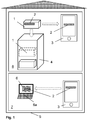
- Fig. 1 shows that a KNX (brand) secure device 1 for controlling roller shutters has a device certificate 2 which includes a manufacturer key and a KNX (brand) serial number.
- the device 1 is a KNX (brand) secure device.
- a person commissioning the device reads in the device certificate 2 once using a mobile device 3, because this is printed on the device 1.
- device certificate 2 is available as a string and QR code.
- the mobile device 3 is designed as a cell phone or smartphone. An integrated camera of the mobile device 3 is preferably used for reading.
- the device certificate 2 is digitally stored after it has been read in or entered in the mobile device 3 and retrieved again on the mobile device 3.
- the device 1 is then installed in a distribution box 4 in a building 5, so that its device certificate 2 is no longer visually accessible, or only with great effort.
- the method for the safe commissioning of the device 1 of the building technology is carried out.
- the device 1 is put into operation using the device certificate 2, which is entered into a configuration software 6.
- the mobile device 3 which is physically or physically independent of the device 1 and on which the device certificate 2 is stored as a copy is used.
- the device certificate 2 is displayed and output by the mobile device 3, the device certificate 2 being transmitted to the configuration software 6 for commissioning the device 1.
- the device certificate 2 is transmitted to the configuration software 6 at a location 7 which is remote from the location, namely the installation location 8, at which the device 1 is installed.
- the transmission can take place via an intranet or the Internet.
- the configuration software 6 runs on hardware 6a.
- the hardware 6a is used to commission the device 1.
- a direct export of the device certificate 2 from the app into the configuration software 6 is supported by an app on the mobile device 3.
- the app also supports importing the device keys exported by the configuration software 6.
- Device certificates 2 that have been read in or entered are sorted directly when they are read in or entered, optionally through an assignment to a project, an installation, an installation location 8, and / or a customer.
- Various devices 1 are used in building technology, for example to control lights, the air conditioning, switches and shutters.
- the method described here is therefore not limited to a device 1 for controlling roller shutters. Sensors or other devices can also be put into operation safely.
Landscapes
- Engineering & Computer Science (AREA)
- Computer Security & Cryptography (AREA)
- Computer Hardware Design (AREA)
- General Engineering & Computer Science (AREA)
- Theoretical Computer Science (AREA)
- Computer Networks & Wireless Communication (AREA)
- Signal Processing (AREA)
- Software Systems (AREA)
- Physics & Mathematics (AREA)
- General Physics & Mathematics (AREA)
- Computing Systems (AREA)
- Telephonic Communication Services (AREA)
Abstract
Description
- Die Erfindung betrifft ein Verfahren zur sicheren Inbetriebnahme eines Geräts, nämlich eines KNX (Marke)-Secure-Geräts, insbesondere eines KNX (Marke)-Secure-Geräts der Gebäudetechnik, das unter Verwendung eines Gerätezertifikats und/ oder mindestens eines Schlüssels, welches bzw. welcher in eine Konfigurationssoftware eingegeben wird, in Betrieb genommen wird.
- In der Gebäudetechnik werden verschiedene KNX (Marke)-Secure-Geräte verwendet, beispielsweise zur Steuerung von Leuchten, dem Klima, von Schaltern und von Rollläden. Weiter ist aus der Bustechnologie KNX (Marke) als ein Feldbus zur Gebäudeautomation bekannt geworden. KNX (Marke)-Secure-Geräte können KNX (Marke)-Telegramme verschlüsseln und entschlüsseln.
- Vor diesem Hintergrund existieren für die KNX (Marke)-Secure-Geräte sogenannte Gerätezertifikate. Ein Gerätezertifikat besteht aus dem gerätespezifischen Herstellerschlüssel oder Fabrikschlüssel, dem sogenannten FDSK (Factory Default Setup Key), und einer Seriennummer, nämlich einer KNX (Marke)-Seriennummer. Der Herstellerschlüssel ist in der Regel eine Nummer. Das Gerätezertifikat liegt gewöhnlich als String oder als Code, insbesondere als QR-Code auf dem jeweiligen Gerät physisch vor und kann abgetippt oder eingescannt werden.
- Die KNX (Marke)-Secure-Geräte werden unter Verwendung des Gerätezertifikats in Betrieb genommen. Wie bereits erwähnt kann ein Gerätezertifikat bisher entweder durch eine Tastatur, also mittels manueller Eingabe, durch einen Scanner, insbesondere einen Hand Scanner, oder über eine Webcam an eine Konfigurationssoftware übertragen werden. Ein Scanvorgang und eine Kamera werden direkt von der Konfigurationssoftware gesteuert. Hierbei stellt die Konfigurationssoftware spezielle Eingabefenster zur Verfügung. Die Eingabe des Gerätezertifikats in die Konfigurationssoftware ist an diese selbst gebunden.
- In der Gebäudetechnik können mehrere der genannten KNX (Marke)-Secure-Geräte, die an verschiedenen Positionen angeordnet und sogar bereits verbaut sind, mittels der Konfigurationssoftware, insbesondere der ETS ("Engineering Tool Software") in Betrieb genommen werden.
- Die Konfigurationssoftware fordert bei der Inbetriebnahme für jedes Gerät insbesondere ein individuelles Gerätezertifikat an. Die Konfigurationssoftware erstellt zu jedem Gerät mindestens einen oder mehrere Schlüssel, nämlich Nummern. Insbesondere erstellt die Konfigurationssoftware einen bestimmten Schlüssel, nämlich den sogenannten Tool Key.
- Wenn allerdings das Gerätezertifikat eines KNX (Marke)-Secure-Geräts, das in Betrieb genommen werden soll, nicht an der Stelle verfügbar ist, an der die Gerätezertifikateingabe erfolgen soll, kann das KNX (Marke)-Secure-Gerät, welches KNX (Marke)-Telegramme verschlüsselt und entschlüsselt, nicht in Betrieb genommen werden.
- Dies kann insbesondere damit einhergehen, dass diese Geräte häufig bereits in einen Verteiler oder Verteilerkasten eingebaut sind und optisch zum Teil nicht mehr zugänglich sind.
- Um das Gerätezertifikat zu erfassen, müssten die Geräte unter Umständen ausgebaut und/ oder an den Ort des Betriebs der Konfigurationssoftware verbracht werden. Umgekehrt könnte auch die Hardware, auf der die Konfigurationssoftware läuft, zum Ort des Geräts verbracht werden. Hiermit ist allerdings ein erheblicher Aufwand für den Inbetriebnehmenden verbunden.
- Der Erfindung liegt daher die Aufgabe zugrunde, die Handhabung und Verwaltung von Gerätezertifikaten und von erzeugten Schlüsseln zu erweitern und deren Eingabe in oder deren Übertragung an eine Konfigurationssoftware zu erleichtern.
- Erfindungsgemäß wird die voranstehende Aufgabe durch ein Verfahren mit den Merkmalen des Patentanspruchs 1 gelöst. Danach wird ein vom KNX (Marke)-Secure-Gerät physisch oder körperlich unabhängiges Mobilgerät verwendet, auf welchem das Gerätezertifikat und/ oder mindestens ein Schlüssel gespeichert ist bzw. sind, wobei das Gerätezertifikat und/ oder der Schlüssel vom Mobilgerät angezeigt oder ausgegeben wird bzw. werden und wobei das Gerätezertifikat und/ oder der Schlüssel an die Konfigurationssoftware zum Inbetriebnehmen des Geräts übertragen oder in diese eingegeben wird bzw. werden.
- Erfindungsgemäß werden Kopien von Gerätezertifikaten und/ oder Schlüsseln in einem Mobilgerät gespeichert. Erfindungsgemäß ist zunächst erkannt worden, dass die Gerätezertifikats- und/ oder Schlüsselverwaltung allein in der Konfigurationssoftware erfolgt. Sofern ein Konfigurationsprojekt, also eine Datei, verloren geht, oder keine aktuellen Sicherungskopien der vergebenen Gerätezertifikate und/ oder Schlüssel zur Verfügung stehen, können Geräte nicht mehr an die Kundenwünsche adaptiert werden, ohne die Geräte komplett zurückzusetzen. In diesem Fall gehen alle bisher in einem Gerät gespeicherten Konfigurationen verloren. Die gespeicherten Gerätezertifikate und/ oder Schlüssel im Mobilgerät können daher als zusätzliche Sicherheitsspeicherungen genutzt werden. Geräte, die schon in Betrieb sind, haben einen neu vergebenen bestimmten Schlüssel (Tool Key) und auch verschiedene andere Schlüssel, der bzw. die von der Konfigurationssoftware vergeben wurden. Sofern diese im Mobilgerät abgespeichert sind, können Konfigurationsprojekte relativ problemlos wieder rekonstruiert werden.
- Gerätezertifikate können nicht mehr auf den Geräten verfügbar sein, beispielsweise weil sie aus Sicherheitsgründen entfernt wurden. Wenn ein sogenanntes ETS-Projekt, nämlich eine Datei, dann die einzige Quelle ist, in dem die Gerätezertifikate noch gespeichert sind, das ETS-Projekt aber auch verloren geht, ist es nicht mehr möglich, die Geräte mit KNX Secure in Betrieb zu nehmen. Dies hängt damit zusammen, dass keine Gerätezertifikate mehr verfügbar sind. Sind die Gerätezertifikate allerdings als Sicherheitsspeicherung im Mobilgerät vorhanden, können sie erneut wieder in ein neues ETS-Projekt eingefügt werden.
- Gerätezertifikate und/ oder Schlüssel werden direkt im Konfigurationsprojekt gespeichert. Insbesondere in größeren Anlagen werden unter Umständen mehr als ein Konfigurationsprojekt verwendet, um Teile von Anlagen in Betrieb zu nehmen. Wenn dies geschieht, ist es schwierig, alle Gerätezertifikate und/ oder Schlüssel zu verwalten, da diese unter Umständen in verschiedenen Teilprojekten gespeichert sind. Bevorzugt verwaltet eine App oder Applikation auf dem Mobilgerät alle Gerätezertifikate und/ oder Schlüssel zentral und kann auf jedes benötigte Gerätezertifikat und/ oder jeden Schlüssel jederzeit zugreifen.
- Der Transfer eines Gerätezertifikates und/ oder Schlüssels zwischen zwei Konfigurationsprojekten erfordert immer Zugriff auf ein Gerätezertifikat oder einen Schlüssel. In der App sind bevorzugt alle Gerätezertifikate und/ oder Schlüssel verfügbar, so kann auch z.B. ein komfortabler Transfer eines Gerätezertifikats oder Schlüssels zwischen zwei Installationen erfolgen, ohne dass der Inbetriebnehmende das Gerät ausbauen muss, beispielsweise wenn das Gerätezertifikat auf das Gerät aufgedruckt ist.
- Bevorzugt wird die vorgenannte App oder Anwendung auf dem Mobilgerät, insbesondere einem Handy, einem Smartphone oder einem Tablet, zur Verfügung gestellt. Bevorzugt kann die App die Gerätezertifikate der Geräte einlesen, entweder per Tastatur oder per Zugriff auf eine integrierte Kamera des Mobilgeräts.
- Vorteilhaft erfolgt die Übertragung oder Eingabe des Gerätezertifikats und/ oder eines Schlüssels an oder in die Konfigurationssoftware an einem Ort, der von dem Ort entfernt ist, an dem das Gerät installiert ist. Hierdurch können in einem Gebäude an mehreren unterschiedlichen Orten, insbesondere in verschiedenen Verteilerschränken oder Wohnräumen, Geräte installiert sein, und die Inbetriebnahme kann in einem Serverraum oder Technikraum erfolgen.
- Vorteilhaft steht das Gerätezertifikat auf dem Gerät für den Inbetriebnehmenden in gedruckter Form zur Verfügung. So kann das Gerätezertifikat direkt von einem Gerät abgelesen werden, bevor dieses verbaut wird und nur noch schwer zugänglich ist.
- Vorteilhaft werden die eingelesenen oder eingegebenen Gerätezertifikate und/ oder Schlüssel direkt bei dem Einlesen oder der Eingabe sortiert, wahlweise durch eine Zuordnung zu einem Projekt, einer Installation, einem Installationsort, und/ oder einem Kunden. Diese Zuordnung erfolgt bevorzugt durch Wisch-Gesten auf dem Mobilgerät, insbesondere einem Handy, Smartphone oder Tablet, oder durch vorhergehende Einstellungen, die dann für eine definierte Anzahl an Einlese- oder Eingabevorgängen gültig sind.
- Auch eine zusätzliche Verwendung von integrierten Hardwarekomponenten des Mobilgeräts, insbesondere GPS, ist denkbar um weitere nützliche Informationen, wie beispielsweise den Installationsort eines Geräts, zu ermitteln.
- Weiter vorteilhaft wird das Gerätezertifikat und/ oder ein Schlüssel nach dem Einlesen oder der Eingabe im Mobilgerät digital gespeichert und auf dem Mobilgerät wieder abgerufen. Dabei wird der Bildschirm des Mobilgeräts verwendet, um das Gerätezertifikat in einem QR-Code anzuzeigen. Die Kodierungsart der Darstellung kann in der App selbst eingestellt werden, um die größtmögliche Kompatibilität zwischen der Konfigurationssoftware und dem Mobilgerät zu ermöglichen.
- Vorteilhaft wird am Installationsort des Geräts durch den Inbetriebnehmenden unter Verwendung des Mobilgeräts das Gerätezertifikat einmalig eingelesen, wenn dieses auf das Gerät aufgedruckt oder in anderer Weise sichtbar aufgebracht ist. Die so eingelesenen Gerätezertifikate können anschließend bei der Inbetriebnahme in einem Arbeitsvorgang in die Konfigurationssoftware integriert werden. Dazu kann die App die Gerätezertifikate auch in einer Dia Show präsentieren, so dass die Konfigurationssoftware alle Gerätezertifikate direkt hintereinander einlesen kann.
- Weiter vorteilhaft wird durch eine App des Mobilgeräts ein direkter Export eines Gerätezertifikats und/ oder eines Schlüssels aus der App in die Konfigurationssoftware unterstützt. Denkbar ist insoweit ein direkter Export aus der App in die Konfigurationssoftware, insbesondere über Funk oder kabelgebunden, und in eine möglicherweise herstellerspezifische Erweiterung innerhalb der Konfigurationssoftware. Die in der App gespeicherten Gerätezertifikate und/ oder Schlüssel sind exportierbar und können auch extern zur sicheren Verwahrung gespeichert werden.
- Vorteilhaft wird durch eine App des Mobilgeräts ein Import eines von der Konfigurationssoftware exportierten Gerätezertifikats und/ oder eines von dieser exportierten Schlüssels unterstützt. Die App unterstützt einen Import der von der Konfigurationssoftware exportierten Gerätezertifikate und/ oder Schlüssel, damit das Mobilgerät als zusätzlicher Sicherheitsspeicher verwendet werden kann. Damit ist es möglich, die zur Inbetriebnahme benötigten Gerätezertifikate und/ oder Schlüssel zentral in einem Mobilgerät zu verwalten. Durch die abgespeicherten Schlüssel können Konfigurationsprojekte, also Dateien, in einfacher Weise rekonstruiert werden.
- Als Gerät wird ein KNX (Marke) - Secure-Gerät verwendet. Konkret werden mit dem hier beschriebenen Verfahren KNX (Marke)-Secure-Geräte in Betrieb genommen. KNX (Marke)-Secure-Geräte können KNX(Marke)-Telegramme verschlüsseln und entschlüsseln.
- In der Gebäudetechnik können mehrere Geräte, die an verschiedenen Positionen angeordnet sind, mittels der Konfigurationssoftware, einer sogenannten ETS ("Engineering Tool Software") in Betrieb genommen werden. Das Verfahren wird insbesondere in der Gebäudesystemtechnik oder auf dem Gebiet der Gebäudeautomation ausgeführt.
- In der Zeichnung zeigt
- Fig. 1
- schematisch eine Durchführung des Verfahrens zum Inbetriebnehmen eines Geräts der Gebäudetechnik, welches zur Ansteuerung von Rollläden verwendet wird.
-
Fig. 1 zeigt, dass ein KNX (Marke)-Secure-Gerät 1 zum Ansteuern von Rollläden ein Gerätezertifikat 2 aufweist, welches einen Herstellerschlüssel und eine KNX (Marke)-Seriennummer umfasst. Bei dem Gerät 1 handelt es sich insoweit um ein KNX (Marke)-Secure-Gerät. - Am Installationsort 8 des Geräts 1 wird durch einen nicht dargestellten Inbetriebnehmenden unter Verwendung eines Mobilgeräts 3 das Gerätezertifikat 2 einmalig eingelesen, weil dieses auf das Gerät 1 aufgedruckt ist. Konkret liegt das Gerätezertifikat 2 als String und QR-Code vor. Das Mobilgerät 3 ist als Handy oder Smartphone ausgestaltet. Bevorzugt wird eine integrierte Kamera des Mobilgeräts 3 für das Einlesen verwendet.
- Das Gerätezertifikat 2 wird nach dem Einlesen oder der Eingabe im Mobilgerät 3 digital gespeichert und auf dem Mobilgerät 3 wieder abgerufen.
- Darauf wird das Gerät 1 in einen Verteilerkasten 4 in einem Gebäude 5 verbaut, so dass dessen Gerätezertifikat 2 nicht mehr oder nur noch unter Aufwand optisch zugänglich ist.
- In einem vom Gerät 1 entfernten und baulich abgetrennten Raum des Gebäudes 5, aber auch in einem anderen, baulich getrennten Gebäude im Rahmen einer Fernwartung, wird das Verfahren zur sicheren Inbetriebnahme des Geräts 1 der Gebäudetechnik durchgeführt. Unter Verwendung des Gerätezertifikats 2, welches in eine Konfigurationssoftware 6 eingegeben wird, wird das Gerät 1 in Betrieb genommen.
- Es wird das vom Gerät 1 physisch oder körperlich unabhängige Mobilgerät 3 verwendet, auf welchem das Gerätezertifikat 2 als Kopie gespeichert ist. Das Gerätezertifikat 2 wird vom Mobilgerät 3 angezeigt und ausgegeben, wobei das Gerätezertifikat 2 an die Konfigurationssoftware 6 zum Inbetriebnehmen des Geräts 1 übertragen wird.
- Die Übertragung des Gerätezertifikats 2 an die Konfigurationssoftware 6 erfolgt an einem Ort 7, der von dem Ort, nämlich dem Installationsort 8, entfernt ist, an dem das Gerät 1 installiert ist. Die Übertragung kann über ein Intranet oder das Internet erfolgen.
- Die Konfigurationssoftware 6 läuft auf einer Hardware 6a. Die Hardware 6a wird zum Inbetriebnehmen des Geräts 1 bedient.
- Durch eine App des Mobilgeräts 3 wird ein direkter Export des Gerätezertifikats 2 aus der App in die Konfigurationssoftware 6 unterstützt. Durch die App wird auch ein Import der von der Konfigurationssoftware 6 exportierten Geräteschlüssel unterstützt.
- Eingelesene oder eingegebene Gerätezertifikate 2 werden direkt bei dem Einlesen oder der Eingabe sortiert, wahlweise durch eine Zuordnung zu einem Projekt, einer Installation, einem Installationsort 8, und/ oder einem Kunden.
- In der Gebäudetechnik werden verschiedene Geräte 1 verwendet, beispielsweise zur Steuerung von Leuchten, dem Klima, von Schaltern und von Rollläden.
- Das hier beschriebene Verfahren ist daher nicht auf ein Gerät 1 zum Steuern von Rollläden beschränkt. Es können auch Sensoren oder andere Geräte sicher in Betrieb genommen werden.
-
1 Gerät 2 Gerätezertifikat von 1 3 Mobilgerät 4 Verteilerkasten 5 Gebäude 6 Konfigurationssoftware 6a Hardware, auf der die Konfigurationssoftware läuft 7 Ort der Vornahme der Konfigurierung 8 Installationsort von 1
Claims (8)
- Verfahren zur sicheren Inbetriebnahme eines Geräts (1), nämlich eines KNX (Marke)-Secure-Geräts, insbesondere eines Geräts (1) der Gebäudetechnik, das unter Verwendung eines Gerätezertifikats (2) und/ oder mindestens eines Schlüssels, welches bzw. welcher in eine Konfigurationssoftware (6) eingegeben wird, in Betrieb genommen wird,
dadurch gekennzeichnet, dass
ein vom Gerät (1) physisch oder körperlich unabhängiges Mobilgerät (3) verwendet wird, auf welchem das Gerätezertifikat (2) und/ oder der Schlüssel gespeichert ist, wobei das Gerätezertifikat (2) und/ oder der Schlüssel vom Mobilgerät (3) angezeigt oder ausgegeben wird und wobei das Gerätezertifikat (2) und/ oder der Schlüssel an die Konfigurationssoftware (6) zum Inbetriebnehmen des Geräts (1) übertragen oder in diese eingegeben wird. - Verfahren nach Anspruch 1, dadurch gekennzeichnet, dass die Übertragung oder Eingabe des Gerätezertifikats (2) und/ oder Schlüssels an oder in die Konfigurationssoftware (6) an einem Ort (7) erfolgt, der von dem Ort entfernt ist, an dem das Gerät (1) installiert ist.
- Verfahren nach Anspruch 1 oder 2, dadurch gekennzeichnet, dass eingelesene oder eingegebene Gerätezertifikate (2) und/ oder Schlüssel direkt bei dem Einlesen oder der Eingabe sortiert werden, wahlweise durch eine Zuordnung zu einem Projekt, einer Installation, einem Installationsort (8), und/ oder einem Kunden.
- Verfahren nach einem der voranstehenden Ansprüche, dadurch gekennzeichnet, dass das Gerätezertifikat (2) und/ oder der Schlüssel nach dem Einlesen oder der Eingabe im Mobilgerät (3) digital gespeichert wird und auf dem Mobilgerät (3) wieder abgerufen wird.
- Verfahren nach einem der voranstehenden Ansprüche, dadurch gekennzeichnet, dass am Installationsort (8) des Geräts (1) durch den Inbetriebnehmenden unter Verwendung des Mobilgeräts (3) das Gerätezertifikat (2) einmalig eingelesen wird, wenn dieses auf das Gerät (1) aufgedruckt oder in anderer Weise sichtbar aufgebracht ist.
- Verfahren nach einem der voranstehenden Ansprüche, dadurch gekennzeichnet, dass durch eine App des Mobilgeräts (3) ein direkter Export eines Gerätezertifikats (2) und/ oder eines Schlüssels aus der App in die Konfigurationssoftware (6) unterstützt wird.
- Verfahren nach einem der voranstehenden Ansprüche, dadurch gekennzeichnet, dass durch eine App des Mobilgeräts (3) ein Import des von der Konfigurationssoftware (6) exportierten Gerätezertifikats (2) und/ oder eines exportierten Schlüssels unterstützt wird.
- Verfahren nach einem der voranstehenden Ansprüche, welches in einem Gebäude (5) durchgeführt wird.
Applications Claiming Priority (1)
| Application Number | Priority Date | Filing Date | Title |
|---|---|---|---|
| DE102019130794.5A DE102019130794A1 (de) | 2019-11-14 | 2019-11-14 | Verfahren zur sicheren Inbetriebnahme eines Geräts |
Publications (1)
| Publication Number | Publication Date |
|---|---|
| EP3822834A1 true EP3822834A1 (de) | 2021-05-19 |
Family
ID=73059524
Family Applications (1)
| Application Number | Title | Priority Date | Filing Date |
|---|---|---|---|
| EP20205370.8A Withdrawn EP3822834A1 (de) | 2019-11-14 | 2020-11-03 | Verfahren zur sicheren inbetriebnahme eines geräts |
Country Status (2)
| Country | Link |
|---|---|
| EP (1) | EP3822834A1 (de) |
| DE (1) | DE102019130794A1 (de) |
Cited By (1)
| Publication number | Priority date | Publication date | Assignee | Title |
|---|---|---|---|---|
| DE102022112799A1 (de) | 2022-05-20 | 2023-11-23 | Schneider Electric Industries Sas | Verfahren zum Kommissionieren eines elektrischen Geräts, elektrisches Gerät, mobiles Kommissionierungsgerät, Kommissionierungsvorrichtung und Kommissionierungssystem |
Citations (3)
| Publication number | Priority date | Publication date | Assignee | Title |
|---|---|---|---|---|
| EP3088975A1 (de) * | 2015-04-27 | 2016-11-02 | Siemens Schweiz AG | Kanalbezogene geräteparametrierung |
| EP3208953A1 (de) * | 2016-02-18 | 2017-08-23 | Abb Ag | Anordnung zur drahtlosen datenübertragung in einem haus- oder gebäudeinstallationssystem |
| US20180069719A1 (en) * | 2016-09-08 | 2018-03-08 | Siemens Schweiz Ag | Method for Provisioning of Room Automation Components of a Building Automation |
Family Cites Families (1)
| Publication number | Priority date | Publication date | Assignee | Title |
|---|---|---|---|---|
| ES2981557T3 (es) * | 2017-01-31 | 2024-10-09 | Abb Schweiz Ag | Aparato incorporado en serie de instalación eléctrica y disposición |
-
2019
- 2019-11-14 DE DE102019130794.5A patent/DE102019130794A1/de not_active Withdrawn
-
2020
- 2020-11-03 EP EP20205370.8A patent/EP3822834A1/de not_active Withdrawn
Patent Citations (3)
| Publication number | Priority date | Publication date | Assignee | Title |
|---|---|---|---|---|
| EP3088975A1 (de) * | 2015-04-27 | 2016-11-02 | Siemens Schweiz AG | Kanalbezogene geräteparametrierung |
| EP3208953A1 (de) * | 2016-02-18 | 2017-08-23 | Abb Ag | Anordnung zur drahtlosen datenübertragung in einem haus- oder gebäudeinstallationssystem |
| US20180069719A1 (en) * | 2016-09-08 | 2018-03-08 | Siemens Schweiz Ag | Method for Provisioning of Room Automation Components of a Building Automation |
Non-Patent Citations (3)
| Title |
|---|
| JESUS MOLINA: "LEARN HOW TO CONTROL EVERY ROOM AT A LUXURY HOTEL REMOTELY: THE DANGERS OF INSECURE HOME AUTOMATION DEPLOYMENT", 9 August 2014 (2014-08-09), XP055750134, Retrieved from the Internet <URL:https://www.defcon.org/images/defcon-22/dc-22-presentations/Molina/DEFCON-22-Jesus-Molina-Learn-how-to-control-every-room.pdf> [retrieved on 20201113] * |
| JUNG: "KNX Secure Apps", 25 June 2020 (2020-06-25), pages 1, XP054981237, Retrieved from the Internet <URL:https://www.youtube.com/watch?v=fIqGtSm0-DU> [retrieved on 20201218] * |
| THORSTEN REIBEL ET AL: "Webinar "KNX Secure and ABB IP Router Secure IPR/S 3.5.1"", 7 August 2019 (2019-08-07), XP055761453, Retrieved from the Internet <URL:https://library.e.abb.com/public/caec42031c0a46fa94ad737ad462140d/Webinar-KNX-Secure-and-ABB-IP-RouterSecureIPRS-March2019_PR_EN_V1-1_9AKK107492A2065.pdf> [retrieved on 20201218] * |
Cited By (2)
| Publication number | Priority date | Publication date | Assignee | Title |
|---|---|---|---|---|
| DE102022112799A1 (de) | 2022-05-20 | 2023-11-23 | Schneider Electric Industries Sas | Verfahren zum Kommissionieren eines elektrischen Geräts, elektrisches Gerät, mobiles Kommissionierungsgerät, Kommissionierungsvorrichtung und Kommissionierungssystem |
| WO2023222780A1 (de) | 2022-05-20 | 2023-11-23 | Schneider Electric Industries Sas | Verfahren zum kommissionieren eines elektrischen geräts, elektrisches gerät, mobiles kommissionierungsgerät, kommissionierungsvorrichtung und kommissionierungssystem |
Also Published As
| Publication number | Publication date |
|---|---|
| DE102019130794A1 (de) | 2021-05-20 |
Similar Documents
| Publication | Publication Date | Title |
|---|---|---|
| EP3891642B1 (de) | Verfahren zur sicherung der vertrauenswürdigkeit von quellcodes | |
| EP2595341B1 (de) | Benutzerrechteverwaltung und Zugangskontrollsystem mit Zeitbeschränkung | |
| DE102008026409A1 (de) | Bedienungstrainingsystem und Bedienungstrainingverfahren | |
| EP3822834A1 (de) | Verfahren zur sicheren inbetriebnahme eines geräts | |
| EP2491466B1 (de) | Diagnose- und wartungseinrichtung für eine schaltanlage sowie demgemässe schaltanlage | |
| DE102016220566B4 (de) | Verfahren zum Starten einer Steuerungskomponente eines Automatisierungssystems, Steuerungskomponente und Automatisierungssystem | |
| DE102022104113A1 (de) | Verfahren zum Bereitstellen eines Datenzugriffs auf eine technische Einrichtung und technische Einrichtung | |
| WO2009135569A1 (de) | Verfahren und vorrichtung zur korrektur von digital übertragenen informationen | |
| DE102018202626A1 (de) | Verfahren zur rechnergestützten Parametrierung eines technischen Systems | |
| DE10358019A1 (de) | Verfahren zur Aktualisierung eines Automatisierungssystems | |
| AT503783B1 (de) | System zur kontrolle von berechtigungen von personen, zu autorisierende tätigkeiten durchzuführen | |
| DE102016006809A1 (de) | Steuersystem für einen Klimaschrank | |
| DE102014116768A1 (de) | Verfahren zum Betreiben eines ersten und zumindest eines zweiten Feldgerätes | |
| DE102013111228A1 (de) | Verfahren für eine elektronische Auditierung | |
| BE1030391B1 (de) | Dienstleister-Kunden-Kommunikationssystem mit zentraler Datenspeicherung und -verwaltung, integriertem-synchronisiertem Zeiterfassungssystem sowie lokalen Terminals | |
| DE10252277A1 (de) | Verfahren zur Bedienung von Feldgeräten | |
| EP4336341A1 (de) | Gerät mit e-ink display | |
| DE102017108555A1 (de) | Verfahren zur Abwicklung von Daten-Übertragungsvorgängen in Industrieanlagen | |
| DE202017104514U1 (de) | Vorrichtung zur drahtlosen Vergabe von Netzwerkadressen | |
| DE102016204395B4 (de) | Toolfreier Gerätetausch von Busgeräten | |
| EP4141459A1 (de) | Instrument zur autarken ausführung von prüfsequenzen nach jtag-standard | |
| EP3028814B1 (de) | Verfahren zur zuordnung von einer einen schraubvorgang beschreibenden schaubkurve zu einem die schraubkurve steuernden schraubprogramm | |
| DE102014008654A1 (de) | Temporäre Berechtigung | |
| DE102022131254A1 (de) | Verfahren zum Verschlüsseln eines Quelltextes, Verfahren zum Entschlüsseln eines Quelltextes und Entwicklungssystem | |
| EP4212975A1 (de) | Verfahren zur konfiguration eines steuerungsnetzwerkes, sowie steuerungsnetzwerk, computerprogramm und computer-lesbares medium |
Legal Events
| Date | Code | Title | Description |
|---|---|---|---|
| PUAI | Public reference made under article 153(3) epc to a published international application that has entered the european phase |
Free format text: ORIGINAL CODE: 0009012 |
|
| STAA | Information on the status of an ep patent application or granted ep patent |
Free format text: STATUS: THE APPLICATION HAS BEEN PUBLISHED |
|
| AK | Designated contracting states |
Kind code of ref document: A1 Designated state(s): AL AT BE BG CH CY CZ DE DK EE ES FI FR GB GR HR HU IE IS IT LI LT LU LV MC MK MT NL NO PL PT RO RS SE SI SK SM TR |
|
| STAA | Information on the status of an ep patent application or granted ep patent |
Free format text: STATUS: REQUEST FOR EXAMINATION WAS MADE |
|
| 17P | Request for examination filed |
Effective date: 20210903 |
|
| RBV | Designated contracting states (corrected) |
Designated state(s): AL AT BE BG CH CY CZ DE DK EE ES FI FR GB GR HR HU IE IS IT LI LT LU LV MC MK MT NL NO PL PT RO RS SE SI SK SM TR |
|
| STAA | Information on the status of an ep patent application or granted ep patent |
Free format text: STATUS: THE APPLICATION HAS BEEN WITHDRAWN |
|
| 18W | Application withdrawn |
Effective date: 20221024 |