EP3786771A1 - Message management method and terminal - Google Patents
Message management method and terminal Download PDFInfo
- Publication number
- EP3786771A1 EP3786771A1 EP19791451.8A EP19791451A EP3786771A1 EP 3786771 A1 EP3786771 A1 EP 3786771A1 EP 19791451 A EP19791451 A EP 19791451A EP 3786771 A1 EP3786771 A1 EP 3786771A1
- Authority
- EP
- European Patent Office
- Prior art keywords
- message
- target
- input
- display
- management control
- Prior art date
- Legal status (The legal status is an assumption and is not a legal conclusion. Google has not performed a legal analysis and makes no representation as to the accuracy of the status listed.)
- Granted
Links
Images







Classifications
-
- G—PHYSICS
- G06—COMPUTING OR CALCULATING; COUNTING
- G06F—ELECTRIC DIGITAL DATA PROCESSING
- G06F3/00—Input arrangements for transferring data to be processed into a form capable of being handled by the computer; Output arrangements for transferring data from processing unit to output unit, e.g. interface arrangements
- G06F3/01—Input arrangements or combined input and output arrangements for interaction between user and computer
- G06F3/048—Interaction techniques based on graphical user interfaces [GUI]
- G06F3/0481—Interaction techniques based on graphical user interfaces [GUI] based on specific properties of the displayed interaction object or a metaphor-based environment, e.g. interaction with desktop elements like windows or icons, or assisted by a cursor's changing behaviour or appearance
-
- H—ELECTRICITY
- H04—ELECTRIC COMMUNICATION TECHNIQUE
- H04L—TRANSMISSION OF DIGITAL INFORMATION, e.g. TELEGRAPHIC COMMUNICATION
- H04L51/00—User-to-user messaging in packet-switching networks, transmitted according to store-and-forward or real-time protocols, e.g. e-mail
- H04L51/04—Real-time or near real-time messaging, e.g. instant messaging [IM]
- H04L51/046—Interoperability with other network applications or services
-
- H—ELECTRICITY
- H04—ELECTRIC COMMUNICATION TECHNIQUE
- H04L—TRANSMISSION OF DIGITAL INFORMATION, e.g. TELEGRAPHIC COMMUNICATION
- H04L51/00—User-to-user messaging in packet-switching networks, transmitted according to store-and-forward or real-time protocols, e.g. e-mail
- H04L51/42—Mailbox-related aspects, e.g. synchronisation of mailboxes
-
- G—PHYSICS
- G06—COMPUTING OR CALCULATING; COUNTING
- G06F—ELECTRIC DIGITAL DATA PROCESSING
- G06F3/00—Input arrangements for transferring data to be processed into a form capable of being handled by the computer; Output arrangements for transferring data from processing unit to output unit, e.g. interface arrangements
- G06F3/01—Input arrangements or combined input and output arrangements for interaction between user and computer
- G06F3/048—Interaction techniques based on graphical user interfaces [GUI]
- G06F3/0484—Interaction techniques based on graphical user interfaces [GUI] for the control of specific functions or operations, e.g. selecting or manipulating an object, an image or a displayed text element, setting a parameter value or selecting a range
- G06F3/04842—Selection of displayed objects or displayed text elements
-
- G—PHYSICS
- G06—COMPUTING OR CALCULATING; COUNTING
- G06F—ELECTRIC DIGITAL DATA PROCESSING
- G06F3/00—Input arrangements for transferring data to be processed into a form capable of being handled by the computer; Output arrangements for transferring data from processing unit to output unit, e.g. interface arrangements
- G06F3/01—Input arrangements or combined input and output arrangements for interaction between user and computer
- G06F3/048—Interaction techniques based on graphical user interfaces [GUI]
- G06F3/0484—Interaction techniques based on graphical user interfaces [GUI] for the control of specific functions or operations, e.g. selecting or manipulating an object, an image or a displayed text element, setting a parameter value or selecting a range
- G06F3/04847—Interaction techniques to control parameter settings, e.g. interaction with sliders or dials
-
- G—PHYSICS
- G06—COMPUTING OR CALCULATING; COUNTING
- G06F—ELECTRIC DIGITAL DATA PROCESSING
- G06F3/00—Input arrangements for transferring data to be processed into a form capable of being handled by the computer; Output arrangements for transferring data from processing unit to output unit, e.g. interface arrangements
- G06F3/01—Input arrangements or combined input and output arrangements for interaction between user and computer
- G06F3/048—Interaction techniques based on graphical user interfaces [GUI]
- G06F3/0487—Interaction techniques based on graphical user interfaces [GUI] using specific features provided by the input device, e.g. functions controlled by the rotation of a mouse with dual sensing arrangements, or of the nature of the input device, e.g. tap gestures based on pressure sensed by a digitiser
- G06F3/0488—Interaction techniques based on graphical user interfaces [GUI] using specific features provided by the input device, e.g. functions controlled by the rotation of a mouse with dual sensing arrangements, or of the nature of the input device, e.g. tap gestures based on pressure sensed by a digitiser using a touch-screen or digitiser, e.g. input of commands through traced gestures
Definitions
- the user can drag, on the group communication interface, an avatar of one or more communication accounts to a preset position, which indicates that an object corresponding to the dragged communication account is used as the message receiving object corresponding to the target message.
- a user can freely and flexibly select, through the first input, the message receiving object corresponding to the target message, so that the user's need for message management can be met better.
- the terminal can display a message management control 14 on the current group communication interface 11.
- the message management control 14 is displayed in an area in which the group identifier 12 of the group communication interface 11 is located.
- the terminal can receive the processing feedback message of the message receiving object for the target message, and update the display content of the message management control.
- the message receiving object processes the target message, including at least one of the following (but is not limited to this):
- the message processing progress of the target message is reflected by updating the display content of the message management control, so that the user can more intuitively learn the message processing progress of the target message.
- the message management control 14 may be a tag control.
- the message management control 14 may include a first sub-tag 143 and a second sub-tag 144.
- the first sub-tag 143 displays a first quantity X of a message receiving object that has processed the target message
- the second sub-tag 144 displays a second quantity Y of a message receiving object that has not processed the target message.
- the method further includes:
- the fourth input may be a touch operation of long-pressing the second progress segment 142 of the message management control 14 and sliding upwards (as shown by an arrow 16 in FIG. 10 ).
- the fourth input may be a touch operation of dragging the message selection control 13 to the second progress segment 142 (as shown by an arrow 18 in FIG. 11 ).
- the method further includes: when a display interface is switched from a first display interface to a second display interface, displaying the message management control on the second display interface.
- the user can view the message processing progress of the target message on any display interface of the terminal, so that the user can conveniently learn the message processing progress of the target message at any time, and the user's need for message management can be met better.
- the message management control can also be displayed in a display area of a wearable device associated with the terminal. In this way, the user does not need to carry the terminal, and can learn the processing progress of the target message through the wearable device associated with the terminal, so that the user's need for message management can be met better.
- the terminal can also determine a display position of the message management control based on the user's operation (such as a drag operation or a slide operation).
- the processing progress of the target message in addition to displaying the processing progress of the target message through the message management control, the processing progress of the target message can also be displayed through a message management window.
- a message management window in addition to displaying the processing progress of the target message through the message management control, the processing progress of the target message can also be displayed through a message management window.
- the message management window can display object identifiers of all message receiving objects, or only object identifiers of message receiving objects that have processed the target message, or only object identifiers of message receiving objects that have not processed the target message. For example, when a quantity of a message receiving object that has processed the target message is less than a quantity of a message receiving object that has not processed the target message, the message management window can display only an object identifier of the message receiving object that has processed the target message.
- the fifth input may be a touch operation on the target object identifier, for example, a tap operation, a double-tap operation, a long-press operation, or a slide operation.
- a tap operation for example, a tap operation, a double-tap operation, a long-press operation, or a slide operation.
- the message processing progress of the target message is managed through the floating message management window, and centralized management of the message processing progress is facilitated.
- the message processing progress of the target message is reflected by updating display content of the message management window, so that the user can more intuitively learn the message processing progress of the target message.
- the first input that is performed on the target message on the group communication interface by the operator is received; the message management control is displayed in response to the first input, where the message management control includes the information about the processing progress of the target message; and the display content of the message management control is updated in the case of receiving a processing feedback message of the at least one message receiving object for the target message.
- the update module 203 is configured to update display content of the message management control in the case of receiving a processing feedback message of at least one message receiving object for the target message.
- the terminal further includes:
- the message management control includes a progress bar control or a tag control.
- the processor 1610 is configured to:
- a display area of the message management control includes at least one of the following:
- the radio frequency unit 1601 can be configured to receive and transmit information, or receive and transmit signals during a call. Specifically, the radio frequency unit 1601 receives downlink data from a base station, and transmits the downlink data to the processor 1610 for processing; and in addition, transmits uplink data to the base station.
- the radio frequency unit 1601 includes but is not limited to an antenna, at least one amplifier, a transceiver, a coupler, a low noise amplifier, a duplexer, and the like.
- the radio frequency unit 1601 can also communicate with another device through a wireless communications system and network.
- the input unit 1604 is configured to receive an audio signal or a video signal.
- the input unit 1604 may include a graphics processing unit (Graphics Processing Unit, GPU) 16041 and a microphone 16042.
- the graphics processing unit 16041 is configured to process image data of a static picture or a video obtained by an image capture apparatus (for example, a camera) in video capture mode or image capture mode.
- a processed image frame can be displayed on the display unit 1606.
- the image frame processed by the graphics processing unit 16041 can be stored in the memory 1609 (or another storage medium) or sent via the radio frequency unit 1601 or the network module 1602.
- the microphone 16042 can receive sound and can process such sound into audio data. Processed audio data can be converted, in telephone call mode, into a format that can be sent to a mobile communication base station via the radio frequency unit 1601 for output.
- the display unit 1606 is configured to display information input by the user or information provided to the user.
- the display unit 1606 may include the display panel 16061, and the display panel 16061 may be configured in a form of a liquid crystal display (Liquid Crystal Display, LCD), an organic light-emitting diode (Organic Light-Emitting Diode, OLED), or the like.
- LCD Liquid Crystal Display
- OLED Organic Light-Emitting Diode
- the touch controller receives touch information from the touch detection apparatus, converts the touch information into contact coordinates, transmits the contact coordinates to the processor 1610, receives a command sent by the processor 1610, and executes the command.
- the touch panel 16071 can be implemented in various types such as resistive, capacitive, infrared, and surface acoustic wave.
- the user input unit 1607 may further include the another input device 16072.
- the another input device 16072 may include but is not limited to a physical keyboard, function keys (such as a volume control key and a switch key), a trackball, a mouse, and a joystick. Details are not described herein.
Landscapes
- Engineering & Computer Science (AREA)
- General Engineering & Computer Science (AREA)
- Theoretical Computer Science (AREA)
- Human Computer Interaction (AREA)
- Physics & Mathematics (AREA)
- General Physics & Mathematics (AREA)
- Computer Networks & Wireless Communication (AREA)
- Signal Processing (AREA)
- User Interface Of Digital Computer (AREA)
- Information Transfer Between Computers (AREA)
Abstract
Description
- This application claims priority to Chinese Patent No.
201810380005.X - Embodiments of the present disclosure relate to the field of communications technologies, and in particular, to a message management method and terminal.
- With popularization of terminals such as mobile phones and tablets, contact between people relies more and more on social communication software in the terminals, and people join more and more communication groups. When a user sends, to a communication group, a message that needs to be processed by other users, the user needs to learn processing progress of the message in time. However, as the communication group has numerous messages, the user often needs to constantly pay attention to messages in a group communication interface, or search related messages from the numerous messages one by one. Otherwise, the user may not be able to learn in time or even miss some processing progress of the message. It can be learned that the problem of relatively complicated and cumbersome operation exists when the user learns the processing progress of the message in the communication group in related technologies.
- Embodiments of the present disclosure provide a message management method and terminal, to resolve the problem of relatively complicated and cumbersome operation when a user learns processing progress of a message in a communication group in related technologies.
- To resolve the foregoing technical problem, the present disclosure is implemented as follows.
- According to a first aspect, an embodiment of the present disclosure provides a message management method applied to a terminal, where the method includes:
- receiving a first input that is performed on a target message on a group communication interface by an operator;
- displaying a message management control in response to the first input, where the message management control includes information about processing progress of the target message; and
- updating display content of the message management control in the case of receiving a processing feedback message of at least one message receiving object for the target message.
- According to a second aspect, an embodiment of the present disclosure provides a terminal, including:
- a first receiving module, configured to receive a first input that is performed on a target message on a group communication interface by an operator;
- a first display module, configured to display a message management control in response to the first input, where the message management control includes information about processing progress of the target message; and
- an update module, configured to update display content of the message management control in the case of receiving a processing feedback message of at least one message receiving object for the target message.
- According to a third aspect, an embodiment of the present disclosure further provides another terminal, including: a processor, a memory, and a computer program stored in the memory and executable on the processor, where the computer program, when executed by the processor, implements steps of the foregoing message management method.
- According to a fourth aspect, an embodiment of the present disclosure further provides a computer readable storage medium, storing a computer program, where the computer program, when executed by a processor, implements steps of the foregoing message management method.
- In the embodiments of the present disclosure, a first input that is performed on a target message on a group communication interface by an operator is received; a message management control is displayed in response to the first input, where the message management control includes information about processing progress of the target message; and display content of the message management control is updated in the case of receiving a processing feedback message of at least one message receiving object for the target message. In this way, when a message receiving object processes the target message in a communication group, the information about the processing progress of the target message can be displayed through the message management control. Therefore, a user can quickly learn the processing progress of the target message through the message management control. It can be learned that compared with the related technologies, the embodiments of the present disclosure can manage the processing progress of the target message in the communication group more simply and conveniently.
-
-
FIG. 1 is a flowchart of a message management method according to an embodiment of the present disclosure; -
FIG. 2 is a first schematic diagram of a display interface according to an embodiment of the present disclosure; -
FIG. 3 is a second schematic diagram of a display interface according to an embodiment of the present disclosure; -
FIG. 4 is a third schematic diagram of a display interface according to an embodiment of the present disclosure; -
FIG. 5 is a fourth schematic diagram of a display interface according to an embodiment of the present disclosure; -
FIG. 6 is a fifth schematic diagram of a display interface according to an embodiment of the present disclosure; -
FIG. 7 is a sixth schematic diagram of a display interface according to an embodiment of the present disclosure; -
FIG. 8 is a seventh schematic diagram of a display interface according to an embodiment of the present disclosure; -
FIG. 9 is an eighth schematic diagram of a display interface according to an embodiment of the present disclosure; -
FIG. 10 is a ninth schematic diagram of a display interface according to an embodiment of the present disclosure; -
FIG. 11 is a tenth schematic diagram of a display interface according to an embodiment of the present disclosure; -
FIG. 12 is an eleventh schematic diagram of a display interface according to an embodiment of the present disclosure; -
FIG. 13 is a twelfth schematic diagram of a display interface according to an embodiment of the present disclosure; -
FIG. 14 is a thirteenth schematic diagram of a display interface according to an embodiment of the present disclosure; -
FIG. 15 is a fourteenth schematic diagram of a display interface according to an embodiment of the present disclosure; -
FIG. 16 is a structural diagram of a terminal according to an embodiment of the present disclosure; and -
FIG. 17 is a structural diagram of another terminal according to an embodiment of the present disclosure. - The following clearly and completely describes the technical solutions in the embodiments of the present disclosure with reference to the accompanying drawings in the embodiments of the present disclosure. Apparently, the described embodiments are some but not all of the embodiments of the present disclosure. All other embodiments obtained by a person of ordinary skill in the art based on the embodiments of the present disclosure without creative efforts shall fall within the protection scope of the present disclosure.
- Referring to
FIG. 1, FIG. 1 is a flowchart of a message management method according to an embodiment of the present disclosure. As shown inFIG. 1 , the message management method is applied to a terminal, and is used to manage a target message in a group communication interface, and specifically, used to manage processing progress of the target message. The method includes the following steps: - Step 101: Receive a first input that is performed on the target message on the group communication interface by an operator.
- In this embodiment of the present disclosure, the target message may be a message that has been sent or a message to be sent. The group communication interface is a dialogue interface of a communication group or a chat interface of a communication group, where the communication group is a group including at least three communication accounts. In specific implementation, a
group communication interface 11 of aterminal 10 is shown inFIG. 2 , but is not limited to this. - The target message selected by the first input may be one message, or two or more messages, which is not limited in this embodiment of the present disclosure.
- In this way, a user can freely and flexibly select, through the first input, the target message that needs to be managed, so that the user's need for message management can be met.
- The first input may be the user's voice input, or the user's motion-sensing input, or a touch input by an operator such as the user, a touch pen, or a stylus on a touch panel of the terminal. The touch input may include: a tap operation, a double-tap operation, a multi-tap operation, a long-press operation, a touch and hold operation, a slide operation, and the like. When a display of the terminal is a special-shaped screen, the first input may be a double-finger touch operation that is performed on two "ear areas" of the special-shaped screen by the user's two fingers simultaneously, for example, a double-finger tap operation or a double-finger slide operation.
- Optionally, before
Step 101, the method further includes: - receiving a second input that is performed on the group communication interface by the operator; and
- displaying a message selection control on a preset side of the target message on the group communication interface in response to the second input.
- The second input may be a touch operation of the operator on the group communication interface, for example, tapping, double-tapping, or long-pressing a group identifier (such as a group name or a group image) on the group communication interface. After the terminal receives the second input, it can trigger the terminal to display the message selection control on the side of the message sent by the user, where the message selection control is configured for the user to select the target message that needs to be added to a message management task.
- The first input in
Step 101 acts on the message selection control corresponding to the target message, for example, tapping, double-tapping, or long-pressing the message selection control corresponding to the target message. - In this way, by displaying the message selection control, the user can more intuitively select the target message that needs to be managed, so as to improve operability of selecting the target message.
- In specific implementation, corresponding display interfaces are shown in
FIG. 3 andFIG. 4 , but are not limited to these. InFIG. 3 , a user taps, double-taps, or long-presses agroup identifier 12 of thegroup communication interface 11. As shown inFIG. 4 , amessage selection control 13 is displayed on a left side of a message sent by the user. InFIG. 4 , themessage selection control 13 is indicated as "+". The current user can tap, double-tap, or long-press message selection controls 13 of one or more messages, to add one or more target messages to a message management task. Colors of the message selection controls 13 may be different, so as to indicate whether a message is selected by the user. For example, a color of amessage selection control 13 corresponding to a target message that is selected by the user is black, and a color of amessage selection control 13 corresponding to a message that is not selected by the user is gray. In addition, when the user needs to remove a target message from the message management task, the user can tap, double-tap, or long-press message selection controls 13 of one or more messages again. In this case, the color of themessage selection control 13 can change from black to gray. - Generally, every message sent by the user will be sent to every communication account in the communication group. If there is an "@" indicator in the message, it indicates that the message is a message that is sent to a specific message receiving object, and the message may need to be accordingly processed by the specific message receiving object. For example, if there is an "@ All people" indicator in the message, it indicates that the message receiving objects of the message are all members (except the message sender). If there is an "@ one or more users" indicator in the message, it indicates that the message receiving object of the message is one or more users after the "@" indicator. If there is no "@" indicator in the message, it indicates that the message receiving objects of the message are all members by default.
- In addition to the foregoing case in which the target message has corresponding default message receiving objects, the user can also select message receiving objects corresponding to the target message through the first input. In other words, the first input further includes a selection operation of selecting message receiving objects corresponding to the target message. For example, when there is no "@" indicator in the target message, the user can select the message receiving objects corresponding to the target message through the first input.
- In specific implementation, after selecting the target message, the user can drag, on the group communication interface, an avatar of one or more communication accounts to a preset position, which indicates that an object corresponding to the dragged communication account is used as the message receiving object corresponding to the target message.
- In this way, a user can freely and flexibly select, through the first input, the message receiving object corresponding to the target message, so that the user's need for message management can be met better.
- Step 102: Display a message management control in response to the first input, where the message management control includes information about processing progress of the target message.
- In this embodiment of the present disclosure, a quantity of message management controls may be related to a quantity of target messages. For example, when the quantity of the target message is 1, the quantity of the message management control may also be 1; and when the quantity of the target messages is 2, the quantity of the message management controls may also be 2.
- When there are a plurality of message management controls, the plurality of message management controls may be arranged side by side in a vertical direction or displayed side by side in a horizontal direction. When there are a plurality of message management controls, a corresponding number can be displayed on each message management control. When the user performs a tap operation, a double-tap operation, a long-press operation, or a slide operation on the numbers, the terminal can display content of the target message corresponding to the message management control or content of the message processing progress corresponding to the target message.
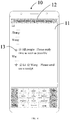
- In specific implementation, as shown in
FIG. 5 , after the user selects the target message, the terminal can display amessage management control 14 on the currentgroup communication interface 11. Themessage management control 14 is displayed in an area in which thegroup identifier 12 of thegroup communication interface 11 is located. - In this embodiment of the present disclosure, by displaying the message management control, the user can view the message processing progress or detailed message processing information at any time by operating the message management control. In addition, by using the message management control, centralized management of the message processing progress is facilitated.
- Step 103: Update display content of the message management control in the case of receiving a processing feedback message of at least one message receiving object for the target message.
- In this embodiment of the present disclosure, if a message receiving object processes the target message, the terminal can receive the processing feedback message of the message receiving object for the target message, and update the display content of the message management control.
- The message receiving object processes the target message, including at least one of the following (but is not limited to this):
- The message receiving object views the target message.
- The message receiving object replies the target message.
- The message receiving object forwards the target message.
- The message receiving object shares the target message.
- In this embodiment of the present disclosure, the message processing progress of the target message is reflected by updating the display content of the message management control, so that the user can more intuitively learn the message processing progress of the target message.
- Optionally, the method further includes:
outputting prompt information when all message receiving objects have processed the target message. - The prompt information is used to prompt that the processing progress of the target message is fully completed. The prompt information may be voice prompt information (such as voice broadcast or ringtone), character or icon prompt information displayed on the display of the terminal, or the like.
- In specific implementation, when all the message receiving objects have processed the target message, display the prompt information (for example, a " V " mark) on the message management control or at the edge of the message management control.
- In this way, through the foregoing solution, the user can learn the message processing progress of the target message in time, so that the user's need for message management can be met better.
- The message management control may include a progress bar control or a tag control.
- The
message management control 14 may be a progress bar control, and may include afirst progress segment 141 and asecond progress segment 142. Thefirst progress segment 141 may indicate a first type of a message receiving object, and the first type of the message receiving object is a message receiving object that has processed the target message; and thesecond progress segment 142 may indicate a second type of a message receiving object, and the second type of the message receiving object is a message receiving object that has not processed the target message. A first ratio of a first length of thefirst progress segment 141 to a second length of thesecond progress segment 142 may be equal to a second ratio of a first quantity of the first type of the message receiving object to a second quantity of the second type of the message receiving object. - In this way, by segmenting the progress bar control, the user can conveniently distinguish the two types of message receiving objects.
- In addition, to enhance visual effects, colors of the
first progress section 141 and thesecond progress section 142 may be different. For example, the color of thefirst progress section 141 may be green, and the color of thesecond progress section 142 may be red; or the color of thefirst progress segment 141 may be black, and the color of thesecond progress segment 142 may be white; or the like. - As a quantity of a message receiving object that processes the target message increases, a display status of the message management control is also updated. In this way, the user can more intuitively learn the message processing progress of the target message. In addition, the message management control is set as the progress bar control. Because an area occupied by the progress bar control is small, normal display of other content is not affected.
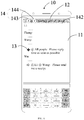
- As shown in
FIG. 6 , themessage management control 14 may be a tag control. Themessage management control 14 may include afirst sub-tag 143 and asecond sub-tag 144. Thefirst sub-tag 143 displays a first quantity X of a message receiving object that has processed the target message, and thesecond sub-tag 144 displays a second quantity Y of a message receiving object that has not processed the target message. - In this way, by segmenting the tag control into two sub-controls, the user can conveniently distinguish two types of message receiving objects.
- In addition, to enhance visual effects, colors of the
first sub-tag 143 and thesecond sub-tag 144 may be different. For example, thefirst sub-tag 143 is indicated by green, and thesecond sub-tag 144 is indicated by red. - As a quantity of a message receiving object that processes the target message increases, the first quantity displayed on the
first sub-tag 143 increases, and the second quantity displayed on thesecond sub-tag 144 decreases. In this way, the quantity of the message receiving object is represented by the quantities on the sub-tags, so that the user can more intuitively learn the message processing progress of the target message, and the user's need for message management can be met better. In addition, the message management control is set as the tag control. Because an area occupied by the tag control is small, normal display of other content is not affected. - Optionally, after the displaying a message management control, the method further includes:
- receiving a third input that is performed on the message management control by the operator; and
- displaying a floating window in response to the third input, where the floating window includes detailed message processing information of a message receiving object corresponding to the third input.
- The third input may be a touch operation on the message management control, for example, a tap operation, a double-tap operation, a long-press operation, or a slide operation.
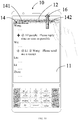
- In specific implementation, as shown in
FIG. 7 , the user can slide down at the position where themessage management control 14 is located. In an area below themessage management control 14, a floatingwindow 15 is displayed. Content of the target message is displayed in the floatingwindow 15. If there are a plurality of target messages, content of the plurality of target messages are displayed. As shown inFIG. 8 , when the user taps one of the target messages, message processing progress corresponding to the target message is displayed in the floatingwindow 15. Specifically, detailed message processing information of a message receiving object for the target message can be displayed. - When there are more processing information of the message receiving object for the target message, the floating
window 15 cannot display all the processing information. Then, the user can slide on the floatingwindow 15 to turn pages on the floating window to display the detailed message processing information of the message receiving object for the target message. - Using that the message management control is the progress bar control as an example, the receiving a third input that is performed on the message management control by the operator includes:
- receiving the third input by the operator by sliding along the first progress segment of the progress bar control; and
- respectively displaying, in the floating window, detailed message processing information of message receiving objects, corresponding to different positions in the first progress segment, for the target message.
- Generally, different positions in the first progress segment indicate different message receiving objects, and the different message receiving objects are generally arranged from left to right in sequence in the first progress segment based on a time sequence of processing the target messages. Therefore, the user can slide along the first progress segment of the progress bar control, to learn specific detailed message processing information of the message receiving object for the target message.
- In specific implementation, the user can use a stylus or a touch pen to slide along the first progress segment of the progress bar control. Through the stylus or the touch pen, at least one of an object identifier of a specific message receiving object and detailed message processing information of the message receiving object for the target message can be selected or displayed more accurately. For example, as shown in
FIG. 9 , when the stylus or the touch pen slides to a position A of the first progress segment, the terminal displays an object identifier of a message receiving object B "Xiao Wang" corresponding to the position A or detailed message processing information of a message receiving object B "Xiao Wang" for the target message. - When there are more content of the detailed message processing information of the message receiving object B for the target message, for example, when the message receiving object B replies the target message, the terminal may display only the object identifier of the message receiving object B and corresponding message processing prompt information. If the user needs to view detailed reply of the message receiving object B for the target message, the user can use the stylus or the touch pen to drag from the position A to a main display area or a main operation area of the terminal, to expand and display the detailed reply of the message receiving object B for the target message in the main display area or the main operation area.
- In this way, through the third input that is performed on the message management control, the user can learn the detailed message processing information of the message receiving object for the target message, so that the user's need for message management can be met better.
- Optionally, after the displaying a message management control, the method further includes:
- receiving a fourth input that is performed on the message management control by the operator; and
- sending, in response to the fourth input, the target message to a message receiving object corresponding to the target area.
- The target area is associated with at least one message receiving object. The fourth input may be a touch operation on the message management control, for example, a tap operation, a double-tap operation, a long-press operation, or a slide operation.
- In this embodiment of the present disclosure, after the message management task is established for a period of time, if there are still message receiving objects that have not processed the target message, then the user can separately send the target message to these message receiving objects again through the fourth input, so as to avoid affecting the message processing progress of the target message. In addition, the user can directly operate in the target area on the message management control without entering a message program to copy and paste a message that has been sent, which is convenient to operate.
- In specific implementation, using that the message management control is the progress bar control as an example, as shown in
FIG. 10 , the fourth input may be a touch operation of long-pressing thesecond progress segment 142 of themessage management control 14 and sliding upwards (as shown by anarrow 16 inFIG. 10 ). As shown inFIG. 11 , the fourth input may be a touch operation of dragging themessage selection control 13 to the second progress segment 142 (as shown by anarrow 18 inFIG. 11 ). - In specific implementation, using that the message management control is the tag control as an example, the fourth input may be a touch operation of long-pressing the second sub-tag and sliding upwards.
- In this way, through the fourth input that is performed on the message management control, the user can send the target message again to promote that the message processing progress is completed as soon as possible, so that the user's need for message management can be met better.
- Optionally, the method further includes:
when a display interface is switched from a first display interface to a second display interface, displaying the message management control on the second display interface. - For example, when the current display interface is the group communication interface, the message management control can be displayed on the group communication interface. When the user exits the current group communication interface to a main application interface, the message management control can be displayed on the main application interface. When the user exits the current group communication interface to a
desktop 17 of the terminal, themessage management control 14 can be displayed on thedesktop 17 of the terminal (as shown inFIG. 12 ). - In this way, the user can view the message processing progress of the target message on any display interface of the terminal, so that the user can conveniently learn the message processing progress of the target message at any time, and the user's need for message management can be met better.
- Optionally, when the user performs a tap operation, a double-tap operation, a long-press operation, or a slide operation on the message management control, or drags the message management control to a specific position at a specific track or at a specific speed, the message management control may be hidden.
- Optionally, a display area of the message management control includes at least one of the following (but is not limited to this):
- an area in which a group identifier of the group communication interface is located;
- ear areas of a special-shaped screen;
- curved areas of a curved screen;
- a foldable area of a flexible foldable screen;
- a back screen area of the terminal; and
- a display area of a wearable device associated with the terminal.
-
FIG. 5 shows an implementation in which the message management control is displayed in the area in which the group identifier of the group communication interface is located. - The terminal can automatically display a message management control based on a type of a display. For example, as shown in
FIG. 13 , if the display is a curved screen, the terminal can automatically display themessage management control 14 in acurved area 19 on either side of the curved screen. For example, as shown inFIG. 14 , if the display is a special-shaped screen, the terminal can automatically display themessage management control 14 in at least one of twoear areas 20 of the special-shaped screen. InFIG. 14 , the special-shaped screen may be referred to as a display having abang area 21. Thebang area 21 is specifically a non-display area concaved at the top of the display and configured to set a camera and the like. Areas on two sides of thebang area 21 are usually referred to as theear areas 20. For example, as shown inFIG. 15 , if the display is a flexible foldable screen, the terminal can display themessage management control 14 in afoldable area 22 of the flexible foldable screen. In addition, when the position of thefoldable area 22 changes, themessage management control 14 also moves accordingly, so that themessage management control 14 is always located at the edge of a normal visual field without affecting use and view of a normal window. - The message management control can also be displayed in a back screen area of the terminal. In this way, the message management control does not occupy display space of the main screen and does not affect use and view of a normal window.
- The message management control can also be displayed in a display area of a wearable device associated with the terminal. In this way, the user does not need to carry the terminal, and can learn the processing progress of the target message through the wearable device associated with the terminal, so that the user's need for message management can be met better.
- In addition, the terminal can also determine a display position of the message management control based on the user's operation (such as a drag operation or a slide operation).
- In this embodiment of the present disclosure, in addition to displaying the processing progress of the target message through the message management control, the processing progress of the target message can also be displayed through a message management window. The following briefly describes a specific implementation of the message management window.
- The message management window can be displayed on the display of the terminal in a form of a floating window. In this way, the user can leave a social application for other operations. When the user needs to view the message processing progress of the target message, the user can view and operate the message management window without opening the social application. The message management window may also be a semi-transparent floating window. In this way, display of the message management window cannot completely cover other display content in an area covered by the message management window.
- Optionally, the message management window displays an object identifier of a message receiving object. In this way, the user can quickly position a specific user through the message management window.
- The message management window can display object identifiers of all message receiving objects, or only object identifiers of message receiving objects that have processed the target message, or only object identifiers of message receiving objects that have not processed the target message. For example, when a quantity of a message receiving object that has processed the target message is less than a quantity of a message receiving object that has not processed the target message, the message management window can display only an object identifier of the message receiving object that has processed the target message.
- When the message management window can display only the object identifier of the message receiving object that has processed the target message, each time a new message receiving object processes the target message, an object identifier of the new message receiving object can be displayed in the message management window in a manner such as highlighting, blinking, enlarging, or changing color.
- Optionally, the method further includes:
- receiving a fifth input that is performed on a target object identifier by the operator; and
- displaying detailed message processing information of a message receiving object corresponding to the target object identifier.
- The fifth input may be a touch operation on the target object identifier, for example, a tap operation, a double-tap operation, a long-press operation, or a slide operation. In this way, through the sixth input that is performed on the target object identifier, the user can learn the detailed processing information of the message receiving object for the target message, so that the user's need for message management can be met better.
- In this implementation, the message processing progress of the target message is managed through the floating message management window, and centralized management of the message processing progress is facilitated. In addition, the message processing progress of the target message is reflected by updating display content of the message management window, so that the user can more intuitively learn the message processing progress of the target message.
- Optionally, message processing progress of a plurality of target messages can be managed simultaneously in the message management window. The message management window can be triggered and generated when the user selects a first target message. After that, when adding another target message, the user can directly add the another target message to the message management window to manage the message processing progress.
- It should be noted that in this embodiment of the present disclosure, the implementation related to the message management control can also be applied to the message management window, and the same beneficial effects can be achieved. To avoid repetition, details are not described herein again.
- In this embodiment of the present disclosure, the foregoing terminal may be any device having a communication function, such as: a computer (Computer), a mobile phone, a tablet personal computer (Tablet Personal Computer), a laptop computer (Laptop Computer), a personal digital assistant (personal digital assistant, PDA for short), a mobile Internet device (Mobile Internet Device, MID), or a wearable device (Wearable Device).
- In this embodiment of the present disclosure, the first input that is performed on the target message on the group communication interface by the operator is received; the message management control is displayed in response to the first input, where the message management control includes the information about the processing progress of the target message; and the display content of the message management control is updated in the case of receiving a processing feedback message of the at least one message receiving object for the target message. In this way, when a message receiving object processes the target message in a communication group, the information about the processing progress of the target message can be displayed through the message management control. Therefore, the user can quickly learn the processing progress of the target message through the message management control. It can be learned that compared with the related technologies, this embodiment of the present disclosure can manage the processing progress of the target message in the communication group more simply and conveniently.
- Referring to
FIG. 16, FIG. 16 is a structural diagram of a terminal according to an embodiment of the present disclosure. As shown inFIG. 16 , the terminal 200 includes afirst receiving module 201, afirst display module 202, and anupdate module 203. - The
first receiving module 201 is configured to receive a first input that is performed on a target message on a group communication interface by an operator. - The
first display module 202 is configured to display a message management control in response to the first input, where the message management control includes information about processing progress of the target message. - The
update module 203 is configured to update display content of the message management control in the case of receiving a processing feedback message of at least one message receiving object for the target message. - Optionally, the terminal further includes:
- a second receiving module, configured to receive a second input that is performed on the group communication interface by the operator; and
- a second display module, configured to display a message selection control on a preset side of the target message on the group communication interface in response to the second input, where
- the first input acts on the message selection control corresponding to the target message.
- Optionally, the terminal further includes:
- a third receiving module, configured to receive a third input that is performed on the message management control by the operator; and
- a third display module, configured to display a floating window in response to the third input, where the floating window includes detailed message processing information of a message receiving object corresponding to the third input.
- Optionally, the terminal further includes:
- a fourth receiving module, configured to receive a fourth input that is performed on the message management control by the operator; and
- a sending module, configured to send, in response to the fourth input, the target message to a message receiving object corresponding to the target area, where
- the target area is associated with at least one message receiving object.
- Optionally, the terminal further includes:
a switch module, configured to, when a display interface is switched from a first display interface to a second display interface, display the message management control on the second display interface. - Optionally, a display area of the message management control includes at least one of the following:
- an area in which a group identifier of the group communication interface is located;
- ear areas of a special-shaped screen;
- curved areas of a curved screen;
- a foldable area of a flexible foldable screen;
- a back screen area of the terminal; and
- a display area of a wearable device associated with the terminal.
- Optionally, the message management control includes a progress bar control or a tag control.
- Optionally, the message management control is a progress bar control, and the progress bar control includes a first progress segment and a second progress segment; and
a first ratio of a first length of the first progress segment to a second length of the second progress segment is equal to a second ratio of a first quantity of a first type of a message receiving object to a second quantity of a second type of a message receiving object, where
the first type of the message receiving object is a message receiving object that has processed the target message, and the second type of the message receiving object is a message receiving object that has not processed the target message. - Optionally, the message management window is a tag control, and the tag control includes a first sub-tag and a second sub-tag;
the first sub-tag displays a first quantity of a message receiving object that has processed the target message; and
the second sub-tag displays a second quantity of a message receiving object that has not processed the target message. - Optionally, the first input further includes a selection operation of selecting message receiving objects corresponding to the target message.
- The terminal 200 can implement the processes implemented by the terminal in the method embodiments of
FIG. 1 to FIG. 15 . To avoid repetition, details are not described herein again. - The terminal 200 in this embodiment of the present disclosure receives the first input that is performed on the target message on the group communication interface by the operator; displays the message management control in response to the first input, where the message management control includes the information about the processing progress of the target message; and updates the display content of the message management control in the case of receiving a processing feedback message of the at least one message receiving object for the target message. In this way, when a message receiving object processes the target message in a communication group, the processing progress of the target message can be displayed through the message management control. Therefore, a user can quickly learn the processing progress of the target message through the message management control. It can be learned that compared with the related technologies, this embodiment of the present disclosure can manage the processing progress of the target message in the communication group more simply and conveniently.
-
FIG. 17 is a schematic structural diagram of hardware of a terminal implementing embodiments of the present disclosure. The terminal 1600 includes but is not limited to: aradio frequency unit 1601, anetwork module 1602, anaudio output unit 1603, aninput unit 1604, asensor 1605, adisplay unit 1606, auser input unit 1607, an interface unit 16016, amemory 1609, aprocessor 1610, apower supply 1611, and other components. A person skilled in the art can understand that the structure of the terminal shown inFIG. 17 does not constitute a limitation to the terminal. The terminal may include more or fewer components than that shown in the figure, or a combination of some components, or an arrangement of different components. In this embodiment of the present disclosure, the terminal includes but is not limited to a mobile phone, a tablet personal computer, a notebook computer, a palmtop computer, a vehicle-mounted terminal, a wearable device, a pedometer, or the like. - The
processor 1610 is configured to: - receive a first input that is performed on a target message on a group communication interface by an operator;
- display a message management control in response to the first input, where the message management control includes information about processing progress of the target message; and
- update display content of the message management control in the case of receiving a processing feedback message of at least one message receiving object for the target message.
- Optionally, the
processor 1610 is further configured to: - receive a second input that is performed on the group communication interface by the operator; and
- display a message selection control on a preset side of the target message on the group communication interface in response to the second input, where
- the first input acts on the message selection control corresponding to the target message.
- Optionally, the
processor 1610 is further configured to: - receive a third input that is performed on the message management control by the operator; and
- display a floating window in response to the third input, where the floating window includes detailed message processing information of a message receiving object corresponding to the third input.
- Optionally, the
processor 1610 is further configured to: - receive a fourth input that is performed on the message management control by the operator; and
- send, in response to the fourth input, the target message to a message receiving object corresponding to the target area, where
- the target area is associated with at least one message receiving object.
- Optionally, the
processor 1610 is further configured to:
when a display interface is switched from a first display interface to a second display interface, display the message management control on the second display interface. - Optionally, a display area of the message management control includes at least one of the following:
- an area in which a group identifier of the group communication interface is located;
- ear areas of a special-shaped screen;
- curved areas of a curved screen;
- a foldable area of a flexible foldable screen;
- a back screen area of the terminal; and
- a display area of a wearable device associated with the terminal.
- Optionally, the message management control includes a progress bar control or a tag control.
- Optionally, the message management control is a progress bar control, and the progress bar control includes a first progress segment and a second progress segment; and
a first ratio of a first length of the first progress segment to a second length of the second progress segment is equal to a second ratio of a first quantity of a first type of a message receiving object to a second quantity of a second type of a message receiving object, where
the first type of the message receiving object is a message receiving object that has processed the target message, and the second type of the message receiving object is a message receiving object that has not processed the target message. - Optionally, the message management window is a tag control, and the tag control includes a first sub-tag and a second sub-tag;
the first sub-tag displays a first quantity of a message receiving object that has processed the target message; and
the second sub-tag displays a second quantity of a message receiving object that has not processed the target message. - Optionally, the first input further includes a selection operation of selecting message receiving objects corresponding to the target message.
- In this embodiment of the present disclosure, the first input that is performed on the target message on the group communication interface by the operator is received; the message management control is displayed in response to the first input, where the message management control includes the information about the processing progress of the target message; and the display content of the message management control is updated in the case of receiving a processing feedback message of the at least one message receiving object for the target message. In this way, when a message receiving object processes the target message in a communication group, the information about the processing progress of the target message can be displayed through the message management control. Therefore, a user can quickly learn the processing progress of the target message through the message management control. It can be learned that compared with the related technologies, this embodiment of the present disclosure can manage the processing progress of the target message in the communication group more simply and conveniently.
- It should be understood that, in this embodiment of the present disclosure, the
radio frequency unit 1601 can be configured to receive and transmit information, or receive and transmit signals during a call. Specifically, theradio frequency unit 1601 receives downlink data from a base station, and transmits the downlink data to theprocessor 1610 for processing; and in addition, transmits uplink data to the base station. Generally, theradio frequency unit 1601 includes but is not limited to an antenna, at least one amplifier, a transceiver, a coupler, a low noise amplifier, a duplexer, and the like. In addition, theradio frequency unit 1601 can also communicate with another device through a wireless communications system and network. - The terminal provides a user with wireless broadband Internet access through the
network module 1602, for example, helps the user send and receive emails, browse web pages, and access streaming media. - The
audio output unit 1603 can convert audio data received by theradio frequency unit 1601 or thenetwork module 1602 or stored in thememory 1609 into an audio signal, and output the audio signal into sound. In addition, theaudio output unit 1603 can also provide audio output related to a specific function performed by the terminal 1600 (for example, call signal receiving sound and message receiving sound). Theaudio output unit 1603 includes a speaker, a buzzer, a receiver, and the like. - The
input unit 1604 is configured to receive an audio signal or a video signal. Theinput unit 1604 may include a graphics processing unit (Graphics Processing Unit, GPU) 16041 and amicrophone 16042. Thegraphics processing unit 16041 is configured to process image data of a static picture or a video obtained by an image capture apparatus (for example, a camera) in video capture mode or image capture mode. A processed image frame can be displayed on thedisplay unit 1606. The image frame processed by thegraphics processing unit 16041 can be stored in the memory 1609 (or another storage medium) or sent via theradio frequency unit 1601 or thenetwork module 1602. Themicrophone 16042 can receive sound and can process such sound into audio data. Processed audio data can be converted, in telephone call mode, into a format that can be sent to a mobile communication base station via theradio frequency unit 1601 for output. - The terminal 1600 further includes at least one
sensor 1605, for example, a light sensor, a motion sensor, and other sensors. Specifically, the light sensor includes an ambient light sensor and a proximity sensor. The ambient light sensor can adjust a brightness of adisplay panel 16061 based on a brightness of ambient light. The proximity sensor can close thedisplay panel 16061 and/or backlight when the terminal 1600 moves to an ear. As a motion sensor, an accelerometer sensor can detect magnitude of acceleration in various directions (usually three axes), can detect magnitude and the direction of gravity when stationary, and can be configured for identification of terminal postures (such as horizontal and vertical screen switch, related games, and magnetometer posture calibration), vibration identification of related functions (such as the pedometer and percussion), and the like. Thesensor 1605 may further include a fingerprint sensor, a pressure sensor, an iris sensor, a molecular sensor, a gyroscope, a barometer, a hygrometer, a thermometer, an infrared sensor, or the like. Details are not described herein. - The
display unit 1606 is configured to display information input by the user or information provided to the user. Thedisplay unit 1606 may include thedisplay panel 16061, and thedisplay panel 16061 may be configured in a form of a liquid crystal display (Liquid Crystal Display, LCD), an organic light-emitting diode (Organic Light-Emitting Diode, OLED), or the like. - The
user input unit 1607 can be configured to receive input numeric or character information, and generate key signal inputs related to user settings and function control of the terminal. Specifically, theuser input unit 1607 includes atouch panel 16071 and anotherinput device 16072. Thetouch panel 16071, also called a touch screen, can collect a touch operation of the user on or near the touch panel 16071 (For example, the user uses any suitable object or accessory such as a finger or a stylus to operate on or near the touch panel 16071). Thetouch panel 16071 may include two parts: a touch detection apparatus and a touch controller. The touch detection apparatus detects a touch position of the user, detects a signal brought by the touch operation, and transmits the signal to the touch controller. The touch controller receives touch information from the touch detection apparatus, converts the touch information into contact coordinates, transmits the contact coordinates to theprocessor 1610, receives a command sent by theprocessor 1610, and executes the command. In addition, thetouch panel 16071 can be implemented in various types such as resistive, capacitive, infrared, and surface acoustic wave. In addition to thetouch panel 16071, theuser input unit 1607 may further include the anotherinput device 16072. Specifically, the anotherinput device 16072 may include but is not limited to a physical keyboard, function keys (such as a volume control key and a switch key), a trackball, a mouse, and a joystick. Details are not described herein. - Further, the
touch panel 16071 can cover thedisplay panel 16061. When detecting a touch operation on or near thetouch panel 16071, thetouch panel 16071 transmits the touch operation to theprocessor 1610 to determine a type of a touch event. Then theprocessor 1610 provides corresponding visual output on thedisplay panel 16061 based on the type of the touch event. Although inFIG. 16 , thetouch panel 16071 and thedisplay panel 16061 are configured as two independent components to implement input and output functions of the terminal, in some embodiments, thetouch panel 16071 and thedisplay panel 16061 can be integrated to implement the input and output functions of the terminal. Details are not limited herein. - The
interface unit 1608 is an interface for connecting an external apparatus to theterminal 1600. For example, the external apparatus may include a wired or wireless headphone port, an external power supply (or a battery charger) port, a wired or wireless data port, a storage card port, a port for connecting an apparatus having an identification module, an audio input/output (1/0) port, avideo 1/0 port, a headphone port, or the like. Theinterface unit 1608 can be configured to receive an input (for example, data information and power) from the external apparatus and transmit the received input to one or more elements in the terminal 1600, or transmit data between the terminal 1600 and the external apparatus. - The
memory 1609 can be configured to store software programs and various data. Thememory 1609 may mainly include a program storage area and a data storage area. The program storage area may store an operating system, an application program required by at least one function (such as a sound playback function and an image playback function), and the like. The data storage area may store data (such as audio data and a phone book) created based on the use of the mobile phone, and the like. In addition, thememory 1609 may include a high-speed random access memory or a nonvolatile memory, for example, at least one disk storage device, a flash memory, or another volatile solid-state storage device. - The
processor 1610 is a control center of the terminal, connects various parts of the entire terminal by using various interfaces and circuits, and performs various functions of the terminal and processes data by running or executing software programs and/or modules stored in thememory 1609 and invoking data stored in thememory 1609, so as to monitor the terminal as a whole. Theprocessor 1610 may include one or more processing units. Preferably, theprocessor 1610 may integrate an application processor with a modem processor. The application processor mainly processes the operating system, a user interface, the application program, and the like, and the modem processor mainly processes wireless communication. It can be understood that the foregoing modem processor may not be integrated into theprocessor 1610. - The terminal 1600 may further include the power supply 1611 (for example, a battery) configured to supply power to various components. Preferably, the
power supply 1611 may be logically connected to theprocessor 1610 through a power management system, so as to implement functions such as managing charging, discharging, and power consumption through the power management system. - In addition, the terminal 1600 includes some function modules not shown. Details are not described herein.
- Preferably, an embodiment of the present disclosure further provides a terminal, including the
processor 1610, thememory 1609, and a computer program stored in thememory 1609 and executable on theprocessor 1610, where the computer program, when executed by theprocessor 1610, implements the processes of the foregoing embodiments of the message management method, and the same technical effects can be achieved. To avoid repetition, details are not described herein again. - An embodiment of the present disclosure further provides a computer readable storage medium, storing a computer program, where the computer program, when executed by a processor, implements the processes of the foregoing embodiments of the video capture method, and the same technical effects can be achieved. To avoid repetition, details are not described herein again.
- The computer readable storage medium may be a read-only memory (Read-Only Memory, ROM for short), a random access memory (Random Access Memory, RAM for short), a magnetic disk, a compact disc, or the like.
- It should be noted that in this specification, the terms "comprise", "include" and any other variants thereof are intended to cover non-exclusive inclusion, so that a process, a method, an article, or an apparatus that includes a series of elements not only includes these very elements, but may also include other elements not expressly listed, or also include elements inherent to this process, method, article, or apparatus. Without being subject to further limitations, an element defined by a phrase "including a ......" does not exclude presence of other identical elements in the process, method, article, or apparatus that includes the very element.
- By means of the foregoing description of the embodiments, a person skilled in the art may clearly understand that the method in the foregoing embodiments may be implemented by software with a necessary general hardware platform. Certainly, the method in the foregoing embodiments may also be implemented by hardware. However, in many cases, the former is a preferred embodiment. Based on such an understanding, the technical solutions of the present disclosure essentially, or the part contributing to the related technologies may be implemented in a form of a software product. The computer software product is stored in a storage medium (for example, a ROM/RAM, a magnetic disk, or a compact disc), and includes a plurality of instructions for instructing a terminal (which may be a mobile phone, a computer, a server, an air conditioner, a network device, or the like) to perform the method described in the embodiments of the present disclosure.
- The foregoing descriptions are merely specific implementations of the present disclosure, but are not intended to limit the protection scope of the present disclosure. Any variation or replacement readily figured out by a person skilled in the art within the technical scope disclosed in the present disclosure shall fall within the protection scope of the present disclosure. Therefore, the protection scope of the present disclosure shall be subject to the protection scope of the claims.
Claims (20)
- A message management method applied to a terminal, comprising:receiving a first input that is performed on a target message on a group communication interface by an operator;displaying a message management control in response to the first input, wherein the message management control comprises information about processing progress of the target message; andupdating display content of the message management control in the case of receiving a processing feedback message of at least one message receiving object for the target message.
- The method according to claim 1, wherein before the receiving a first input that is performed on a target message on a group communication interface by an operator, the method further comprises:receiving a second input that is performed on the group communication interface by the operator; anddisplaying a message selection control on a preset side of the target message on the group communication interface in response to the second input, wherethe first input acts on the message selection control corresponding to the target message.
- The method according to claim 1, wherein after the displaying a message management control, the method further comprises:receiving a third input that is performed on the message management control by the operator; anddisplaying a floating window in response to the third input, wherein the floating window comprises detailed message processing information of a message receiving object corresponding to the third input.
- The method according to claim 1, wherein after the displaying a message management control, the method further comprises:receiving a fourth input that is performed on the message management control by the operator; andsending, in response to the fourth input, the target message to a message receiving object corresponding to the target area, whereinthe target area is associated with at least one message receiving object.
- The method according to claim 1, further comprising:
when a display interface is switched from a first display interface to a second display interface, displaying the message management control on the second display interface. - The method according to claim 1, wherein a display area of the message management control comprises at least one of the following:an area in which a group identifier of the group communication interface is located;ear areas of a special-shaped screen;curved areas of a curved screen;a foldable area of a flexible foldable screen;a back screen area of the terminal; anda display area of a wearable device associated with the terminal.
- The method according to claim 1, wherein the message management control comprises a progress bar control or a tag control.
- The method according to claim 1, wherein the message management control is a progress bar control, and the progress bar control comprises a first progress segment and a second progress segment; and
a first ratio of a first length of the first progress segment to a second length of the second progress segment is equal to a second ratio of a first quantity of a first type of a message receiving object to a second quantity of a second type of a message receiving object, wherein
the first type of the message receiving object is a message receiving object that has processed the target message, and the second type of the message receiving object is a message receiving object that has not processed the target message. - The method according to claim 1, wherein the message management window is a tag control, and the tag control comprises a first sub-tag and a second sub-tag;
the first sub-tag displays a first quantity of a message receiving object that has processed the target message; and
the second sub-tag displays a second quantity of a message receiving object that has not processed the target message. - The method according to claim 1, wherein the first input further comprises a selection operation of selecting message receiving objects corresponding to the target message.
- A terminal, comprising:a first receiving module, configured to receive a first input that is performed on a target message on a group communication interface by an operator;a first display module, configured to display a message management control in response to the first input, wherein the message management control comprises information about processing progress of the target message; andan update module, configured to update display content of the message management control in the case of receiving a processing feedback message of at least one message receiving object for the target message.
- The terminal according to claim 11, further comprising:a second receiving module, configured to receive a second input that is performed on the group communication interface by the operator; and a second display module, configured to display a message selection control on a preset side of the target message on the group communication interface in response to the second input, whereinthe first input acts on the message selection control corresponding to the target message.
- The terminal according to claim 11, further comprising:a third receiving module, configured to receive a third input that is performed on the message management control by the operator; anda third display module, configured to display a floating window in response to the third input, wherein the floating window comprises detailed message processing information of a message receiving object corresponding to the third input.
- The terminal according to claim 11, further comprising:a fourth receiving module, configured to receive a fourth input that is performed on the message management control by the operator; anda sending module, configured to send, in response to the fourth input, the target message to a message receiving object corresponding to the target area, whereinthe target area is associated with at least one message receiving object.
- The terminal according to claim 11, further comprising:
a switch module, configured to, when a display interface is switched from a first display interface to a second display interface, display the message management control on the second display interface. - The terminal according to claim 11, wherein a display area of the message management control comprises at least one of the following:an area in which a group identifier of the group communication interface is located;ear areas of a special-shaped screen;curved areas of a curved screen;a foldable area of a flexible foldable screen;a back screen area of the terminal; anda display area of a wearable device associated with the terminal.
- The terminal according to claim 11, wherein the message management control comprises a progress bar control or a tag control.
- The terminal according to claim 11, wherein the message management control is a progress bar control, and the progress bar control comprises a first progress segment and a second progress segment; and
a first ratio of a first length of the first progress segment to a second length of the second progress segment is equal to a second ratio of a first quantity of a first type of a message receiving object to a second quantity of a second type of a message receiving object, wherein
the first type of the message receiving object is a message receiving object that has processed the target message, and the second type of the message receiving object is a message receiving object that has not processed the target message. - The terminal according to claim 11, wherein the message management window is a tag control, and the tag control comprises a first sub-tag and a second sub-tag;
the first sub-tag displays a first quantity of a message receiving object that has processed the target message; and
the second sub-tag displays a second quantity of a message receiving object that has not processed the target message. - The terminal according to claim 11, wherein the first input further comprises a selection operation of selecting message receiving objects corresponding to the target message.
Applications Claiming Priority (2)
| Application Number | Priority Date | Filing Date | Title |
|---|---|---|---|
| CN201810380005.XA CN108563378B (en) | 2018-04-25 | 2018-04-25 | Message management method and terminal |
| PCT/CN2019/083431 WO2019206036A1 (en) | 2018-04-25 | 2019-04-19 | Message management method and terminal |
Publications (3)
| Publication Number | Publication Date |
|---|---|
| EP3786771A1 true EP3786771A1 (en) | 2021-03-03 |
| EP3786771A4 EP3786771A4 (en) | 2021-06-23 |
| EP3786771B1 EP3786771B1 (en) | 2024-08-21 |
Family
ID=63536558
Family Applications (1)
| Application Number | Title | Priority Date | Filing Date |
|---|---|---|---|
| EP19791451.8A Active EP3786771B1 (en) | 2018-04-25 | 2019-04-19 | Message management method and terminal |
Country Status (5)
| Country | Link |
|---|---|
| US (1) | US11575636B2 (en) |
| EP (1) | EP3786771B1 (en) |
| CN (1) | CN108563378B (en) |
| ES (1) | ES2987063T3 (en) |
| WO (1) | WO2019206036A1 (en) |
Families Citing this family (12)
| Publication number | Priority date | Publication date | Assignee | Title |
|---|---|---|---|---|
| CN108563378B (en) | 2018-04-25 | 2020-06-16 | 维沃移动通信有限公司 | Message management method and terminal |
| CN109582158A (en) * | 2018-12-17 | 2019-04-05 | 北京金山安全软件有限公司 | Method and device for terminal input display and terminal |
| CN110052022A (en) * | 2019-04-22 | 2019-07-26 | 网易(杭州)网络有限公司 | Processing method, processing unit, storage medium and the processor of message |
| CN110213729B (en) * | 2019-05-30 | 2022-06-24 | 维沃移动通信有限公司 | Message sending method and terminal |
| CN110609723B (en) * | 2019-08-21 | 2021-08-24 | 维沃移动通信有限公司 | A display control method and terminal device |
| CN110543329B (en) * | 2019-08-27 | 2023-05-05 | 维沃移动通信有限公司 | Method and mobile terminal for managing application version |
| CN115314456B (en) | 2021-04-20 | 2023-11-28 | 北京字跳网络技术有限公司 | Interaction method and device and electronic equipment |
| CN113204298B (en) * | 2021-04-30 | 2023-09-22 | 北京达佳互联信息技术有限公司 | Method and device for displaying release progress, electronic equipment and storage medium |
| CN113660506A (en) * | 2021-08-31 | 2021-11-16 | 五八同城信息技术有限公司 | Information display method, device, electronic device and storage medium |
| CN113872849B (en) * | 2021-09-26 | 2023-04-18 | 维沃移动通信有限公司 | Message interaction method and device and electronic equipment |
| CN113902411B (en) * | 2021-10-11 | 2025-09-16 | 国网河北省电力有限公司衡水供电分公司 | Project time progress display method, device, terminal and storage medium |
| CN114625295A (en) * | 2022-01-27 | 2022-06-14 | 深圳传音控股股份有限公司 | Interface display method, intelligent terminal and storage medium |
Family Cites Families (33)
| Publication number | Priority date | Publication date | Assignee | Title |
|---|---|---|---|---|
| US20080209417A1 (en) * | 2007-02-22 | 2008-08-28 | Gabriel Jakobson | Method and system of project management and task collaboration over instant messenger |
| US20090016504A1 (en) * | 2007-07-10 | 2009-01-15 | Stephen Mantell | System and Method for Providing Communications to a Group of Recipients Across Multiple Communication Platform Types |
| US20100287023A1 (en) * | 2009-05-05 | 2010-11-11 | Microsoft Corporation | Collaborative view for a group participation plan |
| US8738665B2 (en) * | 2012-04-02 | 2014-05-27 | Apple Inc. | Smart progress indicator |
| JP6124204B2 (en) * | 2012-06-25 | 2017-05-10 | 株式会社コナミデジタルエンタテインメント | Message management apparatus, message management method, and program |
| US20140280603A1 (en) * | 2013-03-14 | 2014-09-18 | Endemic Mobile Inc. | User attention and activity in chat systems |
| US20170124531A1 (en) * | 2014-04-04 | 2017-05-04 | Mark Jonathon Joseph McCormack | Scheduling System and Method |
| US9846527B2 (en) * | 2014-04-30 | 2017-12-19 | Microsoft Technology Licensing, Llc | Task management from within a data feed |
| US20150363092A1 (en) * | 2014-05-30 | 2015-12-17 | Contatta, Inc. | Systems and methods for collaborative electronic communications |
| CN105323147B (en) * | 2014-08-01 | 2019-05-07 | 掌赢信息科技(上海)有限公司 | Group's message reads feedback method and its server and client side's device |
| KR102308645B1 (en) * | 2014-12-29 | 2021-10-05 | 삼성전자주식회사 | User termincal device and methods for controlling the user termincal device thereof |
| US10860958B2 (en) * | 2015-04-24 | 2020-12-08 | Delta Pds Co., Ltd | Apparatus for processing work object and method performing the same |
| KR102481687B1 (en) * | 2015-10-02 | 2022-12-28 | 삼성전자주식회사 | Job information processing method and electronic device supporting the same |
| CN105591881A (en) * | 2015-12-11 | 2016-05-18 | 中青冠岳科技(北京)有限公司 | Communication method having notice reading feedback function |
| US20170168692A1 (en) * | 2015-12-14 | 2017-06-15 | Microsoft Technology Licensing, Llc | Dual-Modality Client Application |
| CN107368995A (en) * | 2016-05-13 | 2017-11-21 | 阿里巴巴集团控股有限公司 | Task processing method and device |
| CN106100972B (en) * | 2016-06-02 | 2019-02-01 | 腾讯科技(深圳)有限公司 | A message processing method, system, first terminal and second terminal |
| CN107465592B (en) * | 2016-06-03 | 2020-08-21 | 苏宁云计算有限公司 | Message interaction method and system |
| US10785175B2 (en) * | 2016-06-12 | 2020-09-22 | Apple Inc. | Polling extension application for interacting with a messaging application |
| CN106354504B (en) * | 2016-08-29 | 2020-08-11 | 北京小米移动软件有限公司 | Message display method and device |
| CN107800862B (en) * | 2016-09-05 | 2023-10-17 | 钉钉控股(开曼)有限公司 | Communication methods and devices |
| CN107809372A (en) * | 2016-09-08 | 2018-03-16 | 阿里巴巴集团控股有限公司 | The generation method of activity reminder message, movable based reminding method and device |
| US10085143B2 (en) * | 2016-09-30 | 2018-09-25 | Qnexis Inc. | System for managing organizational emergencies and coordinating emergency responses |
| US11042256B2 (en) * | 2016-10-05 | 2021-06-22 | Fuji Xerox Co., Ltd. | Systems and methods for chat message management and document generation on devices |
| CN106571999B (en) * | 2016-10-21 | 2018-01-05 | 北京三快在线科技有限公司 | Task management method, client and server based on instant communication information |
| US20180152407A1 (en) * | 2016-11-30 | 2018-05-31 | Microsoft Technology Licensing, Llc | Task delegation manager and interface |
| CN106789586B (en) | 2016-12-27 | 2020-11-06 | Tcl科技集团股份有限公司 | Message prompting method and system based on multi-user chat environment and mobile terminal |
| CN106951139A (en) * | 2017-03-13 | 2017-07-14 | 海信集团有限公司 | Message notifying frame display methods and device |
| CN107508691A (en) * | 2017-10-09 | 2017-12-22 | 林碧琴 | A method of sending and confirming a group message to a specific user |
| JP6263668B1 (en) * | 2017-10-13 | 2018-01-17 | 株式会社Cueworks | Chat type task management system |
| US10728352B2 (en) * | 2017-10-27 | 2020-07-28 | Facebook, Inc. | Managing digital forums and networking groups utilizing a group activity indicator |
| CN107682254A (en) | 2017-11-08 | 2018-02-09 | 林碧琴 | It is a kind of quickly to show the method for having confirmed that member |
| CN108563378B (en) | 2018-04-25 | 2020-06-16 | 维沃移动通信有限公司 | Message management method and terminal |
-
2018
- 2018-04-25 CN CN201810380005.XA patent/CN108563378B/en active Active
-
2019
- 2019-04-19 WO PCT/CN2019/083431 patent/WO2019206036A1/en not_active Ceased
- 2019-04-19 ES ES19791451T patent/ES2987063T3/en active Active
- 2019-04-19 EP EP19791451.8A patent/EP3786771B1/en active Active
-
2020
- 2020-10-23 US US17/079,203 patent/US11575636B2/en active Active
Also Published As
| Publication number | Publication date |
|---|---|
| US20210044556A1 (en) | 2021-02-11 |
| CN108563378B (en) | 2020-06-16 |
| US11575636B2 (en) | 2023-02-07 |
| EP3786771B1 (en) | 2024-08-21 |
| CN108563378A (en) | 2018-09-21 |
| WO2019206036A1 (en) | 2019-10-31 |
| ES2987063T3 (en) | 2024-11-13 |
| EP3786771A4 (en) | 2021-06-23 |
Similar Documents
| Publication | Publication Date | Title |
|---|---|---|
| US11575636B2 (en) | Method of managing processing progress of a message in a group communication interface and terminal | |
| WO2021104365A1 (en) | Object sharing method and electronic device | |
| US12340234B2 (en) | Application sharing method and electronic device | |
| CN108200289A (en) | A kind of unread message processing method and mobile terminal | |
| CN108646958B (en) | Application program starting method and terminal | |
| CN107734175A (en) | Method for prompting notification message and mobile terminal | |
| US12028476B2 (en) | Conversation creating method and terminal device | |
| CN107992263A (en) | A kind of information sharing method and mobile terminal | |
| CN108897486B (en) | A display method and terminal device | |
| CN108491149A (en) | A kind of multi-screen display method and terminal | |
| CN110209313A (en) | Icon moving method and terminal device | |
| CN110196668B (en) | Information processing method and terminal device | |
| WO2021083092A1 (en) | Notification message processing method and apparatus, and electronic device and storage medium | |
| EP3979674A1 (en) | Message sending method and terminal | |
| CN107613095B (en) | Incoming call processing method and mobile terminal | |
| CN110531904A (en) | Background task display method and terminal | |
| CN109901976B (en) | Application program management method and terminal equipment | |
| CN108509105A (en) | A kind of application management method and terminal | |
| WO2021036603A1 (en) | Application program control method and terminal | |
| WO2020001358A1 (en) | Icon sorting method and terminal device | |
| WO2020211612A1 (en) | Information display method and terminal device | |
| KR102768544B1 (en) | Icon display method and terminal | |
| WO2021129721A1 (en) | Icon arrangement method, electronic apparatus, and computer readable storage medium | |
| WO2020192297A1 (en) | Screen interface switching method and terminal device | |
| WO2021238788A1 (en) | Icon arrangement method, electronic device, and storage medium |
Legal Events
| Date | Code | Title | Description |
|---|---|---|---|
| STAA | Information on the status of an ep patent application or granted ep patent |
Free format text: STATUS: THE INTERNATIONAL PUBLICATION HAS BEEN MADE |
|
| PUAI | Public reference made under article 153(3) epc to a published international application that has entered the european phase |
Free format text: ORIGINAL CODE: 0009012 |
|
| STAA | Information on the status of an ep patent application or granted ep patent |
Free format text: STATUS: REQUEST FOR EXAMINATION WAS MADE |
|
| 17P | Request for examination filed |
Effective date: 20201125 |
|
| AK | Designated contracting states |
Kind code of ref document: A1 Designated state(s): AL AT BE BG CH CY CZ DE DK EE ES FI FR GB GR HR HU IE IS IT LI LT LU LV MC MK MT NL NO PL PT RO RS SE SI SK SM TR |
|
| AX | Request for extension of the european patent |
Extension state: BA ME |
|
| A4 | Supplementary search report drawn up and despatched |
Effective date: 20210520 |
|
| RIC1 | Information provided on ipc code assigned before grant |
Ipc: G06F 3/0481 20130101AFI20210514BHEP Ipc: G06F 3/0488 20130101ALI20210514BHEP Ipc: G06F 3/0484 20130101ALI20210514BHEP Ipc: H04L 12/58 20060101ALI20210514BHEP |
|
| DAV | Request for validation of the european patent (deleted) | ||
| DAX | Request for extension of the european patent (deleted) | ||
| STAA | Information on the status of an ep patent application or granted ep patent |
Free format text: STATUS: EXAMINATION IS IN PROGRESS |
|
| 17Q | First examination report despatched |
Effective date: 20230201 |
|
| REG | Reference to a national code |
Ref country code: DE Ref legal event code: R079 Free format text: PREVIOUS MAIN CLASS: G06F0003048100 Ipc: H04L0051046000 Ref country code: DE Ref legal event code: R079 Ref document number: 602019057473 Country of ref document: DE Free format text: PREVIOUS MAIN CLASS: G06F0003048100 Ipc: H04L0051046000 |
|
| GRAP | Despatch of communication of intention to grant a patent |
Free format text: ORIGINAL CODE: EPIDOSNIGR1 |
|
| STAA | Information on the status of an ep patent application or granted ep patent |
Free format text: STATUS: GRANT OF PATENT IS INTENDED |
|
| RIC1 | Information provided on ipc code assigned before grant |
Ipc: H04L 51/046 20220101AFI20240515BHEP |
|
| INTG | Intention to grant announced |
Effective date: 20240531 |
|
| GRAS | Grant fee paid |
Free format text: ORIGINAL CODE: EPIDOSNIGR3 |
|
| GRAA | (expected) grant |
Free format text: ORIGINAL CODE: 0009210 |
|
| STAA | Information on the status of an ep patent application or granted ep patent |
Free format text: STATUS: THE PATENT HAS BEEN GRANTED |
|
| AK | Designated contracting states |
Kind code of ref document: B1 Designated state(s): AL AT BE BG CH CY CZ DE DK EE ES FI FR GB GR HR HU IE IS IT LI LT LU LV MC MK MT NL NO PL PT RO RS SE SI SK SM TR |
|
| REG | Reference to a national code |
Ref country code: GB Ref legal event code: FG4D |
|
| REG | Reference to a national code |
Ref country code: CH Ref legal event code: EP |
|
| REG | Reference to a national code |
Ref country code: DE Ref legal event code: R096 Ref document number: 602019057473 Country of ref document: DE |
|
| REG | Reference to a national code |
Ref country code: IE Ref legal event code: FG4D |
|
| REG | Reference to a national code |
Ref country code: NL Ref legal event code: FP |
|
| REG | Reference to a national code |
Ref country code: ES Ref legal event code: FG2A Ref document number: 2987063 Country of ref document: ES Kind code of ref document: T3 Effective date: 20241113 |
|
| REG | Reference to a national code |
Ref country code: LT Ref legal event code: MG9D |
|
| PG25 | Lapsed in a contracting state [announced via postgrant information from national office to epo] |
Ref country code: NO Free format text: LAPSE BECAUSE OF FAILURE TO SUBMIT A TRANSLATION OF THE DESCRIPTION OR TO PAY THE FEE WITHIN THE PRESCRIBED TIME-LIMIT Effective date: 20241121 |
|
| REG | Reference to a national code |
Ref country code: AT Ref legal event code: MK05 Ref document number: 1716661 Country of ref document: AT Kind code of ref document: T Effective date: 20240821 |
|
| PG25 | Lapsed in a contracting state [announced via postgrant information from national office to epo] |
Ref country code: FI Free format text: LAPSE BECAUSE OF FAILURE TO SUBMIT A TRANSLATION OF THE DESCRIPTION OR TO PAY THE FEE WITHIN THE PRESCRIBED TIME-LIMIT Effective date: 20240821 Ref country code: GR Free format text: LAPSE BECAUSE OF FAILURE TO SUBMIT A TRANSLATION OF THE DESCRIPTION OR TO PAY THE FEE WITHIN THE PRESCRIBED TIME-LIMIT Effective date: 20241122 Ref country code: PL Free format text: LAPSE BECAUSE OF FAILURE TO SUBMIT A TRANSLATION OF THE DESCRIPTION OR TO PAY THE FEE WITHIN THE PRESCRIBED TIME-LIMIT Effective date: 20240821 Ref country code: PT Free format text: LAPSE BECAUSE OF FAILURE TO SUBMIT A TRANSLATION OF THE DESCRIPTION OR TO PAY THE FEE WITHIN THE PRESCRIBED TIME-LIMIT Effective date: 20241223 |
|
| PG25 | Lapsed in a contracting state [announced via postgrant information from national office to epo] |
Ref country code: BG Free format text: LAPSE BECAUSE OF FAILURE TO SUBMIT A TRANSLATION OF THE DESCRIPTION OR TO PAY THE FEE WITHIN THE PRESCRIBED TIME-LIMIT Effective date: 20240821 |
|
| PG25 | Lapsed in a contracting state [announced via postgrant information from national office to epo] |
Ref country code: LV Free format text: LAPSE BECAUSE OF FAILURE TO SUBMIT A TRANSLATION OF THE DESCRIPTION OR TO PAY THE FEE WITHIN THE PRESCRIBED TIME-LIMIT Effective date: 20240821 |
|
| PG25 | Lapsed in a contracting state [announced via postgrant information from national office to epo] |
Ref country code: AT Free format text: LAPSE BECAUSE OF FAILURE TO SUBMIT A TRANSLATION OF THE DESCRIPTION OR TO PAY THE FEE WITHIN THE PRESCRIBED TIME-LIMIT Effective date: 20240821 Ref country code: IS Free format text: LAPSE BECAUSE OF FAILURE TO SUBMIT A TRANSLATION OF THE DESCRIPTION OR TO PAY THE FEE WITHIN THE PRESCRIBED TIME-LIMIT Effective date: 20241221 |
|
| PG25 | Lapsed in a contracting state [announced via postgrant information from national office to epo] |
Ref country code: HR Free format text: LAPSE BECAUSE OF FAILURE TO SUBMIT A TRANSLATION OF THE DESCRIPTION OR TO PAY THE FEE WITHIN THE PRESCRIBED TIME-LIMIT Effective date: 20240821 |
|
| PG25 | Lapsed in a contracting state [announced via postgrant information from national office to epo] |
Ref country code: RS Free format text: LAPSE BECAUSE OF FAILURE TO SUBMIT A TRANSLATION OF THE DESCRIPTION OR TO PAY THE FEE WITHIN THE PRESCRIBED TIME-LIMIT Effective date: 20241121 |
|
| PG25 | Lapsed in a contracting state [announced via postgrant information from national office to epo] |
Ref country code: RS Free format text: LAPSE BECAUSE OF FAILURE TO SUBMIT A TRANSLATION OF THE DESCRIPTION OR TO PAY THE FEE WITHIN THE PRESCRIBED TIME-LIMIT Effective date: 20241121 Ref country code: PT Free format text: LAPSE BECAUSE OF FAILURE TO SUBMIT A TRANSLATION OF THE DESCRIPTION OR TO PAY THE FEE WITHIN THE PRESCRIBED TIME-LIMIT Effective date: 20241223 Ref country code: PL Free format text: LAPSE BECAUSE OF FAILURE TO SUBMIT A TRANSLATION OF THE DESCRIPTION OR TO PAY THE FEE WITHIN THE PRESCRIBED TIME-LIMIT Effective date: 20240821 Ref country code: NO Free format text: LAPSE BECAUSE OF FAILURE TO SUBMIT A TRANSLATION OF THE DESCRIPTION OR TO PAY THE FEE WITHIN THE PRESCRIBED TIME-LIMIT Effective date: 20241121 Ref country code: LV Free format text: LAPSE BECAUSE OF FAILURE TO SUBMIT A TRANSLATION OF THE DESCRIPTION OR TO PAY THE FEE WITHIN THE PRESCRIBED TIME-LIMIT Effective date: 20240821 Ref country code: IS Free format text: LAPSE BECAUSE OF FAILURE TO SUBMIT A TRANSLATION OF THE DESCRIPTION OR TO PAY THE FEE WITHIN THE PRESCRIBED TIME-LIMIT Effective date: 20241221 Ref country code: HR Free format text: LAPSE BECAUSE OF FAILURE TO SUBMIT A TRANSLATION OF THE DESCRIPTION OR TO PAY THE FEE WITHIN THE PRESCRIBED TIME-LIMIT Effective date: 20240821 Ref country code: GR Free format text: LAPSE BECAUSE OF FAILURE TO SUBMIT A TRANSLATION OF THE DESCRIPTION OR TO PAY THE FEE WITHIN THE PRESCRIBED TIME-LIMIT Effective date: 20241122 Ref country code: FI Free format text: LAPSE BECAUSE OF FAILURE TO SUBMIT A TRANSLATION OF THE DESCRIPTION OR TO PAY THE FEE WITHIN THE PRESCRIBED TIME-LIMIT Effective date: 20240821 Ref country code: BG Free format text: LAPSE BECAUSE OF FAILURE TO SUBMIT A TRANSLATION OF THE DESCRIPTION OR TO PAY THE FEE WITHIN THE PRESCRIBED TIME-LIMIT Effective date: 20240821 Ref country code: AT Free format text: LAPSE BECAUSE OF FAILURE TO SUBMIT A TRANSLATION OF THE DESCRIPTION OR TO PAY THE FEE WITHIN THE PRESCRIBED TIME-LIMIT Effective date: 20240821 |
|
| PG25 | Lapsed in a contracting state [announced via postgrant information from national office to epo] |
Ref country code: DK Free format text: LAPSE BECAUSE OF FAILURE TO SUBMIT A TRANSLATION OF THE DESCRIPTION OR TO PAY THE FEE WITHIN THE PRESCRIBED TIME-LIMIT Effective date: 20240821 Ref country code: SM Free format text: LAPSE BECAUSE OF FAILURE TO SUBMIT A TRANSLATION OF THE DESCRIPTION OR TO PAY THE FEE WITHIN THE PRESCRIBED TIME-LIMIT Effective date: 20240821 Ref country code: RO Free format text: LAPSE BECAUSE OF FAILURE TO SUBMIT A TRANSLATION OF THE DESCRIPTION OR TO PAY THE FEE WITHIN THE PRESCRIBED TIME-LIMIT Effective date: 20240821 |
|
| PG25 | Lapsed in a contracting state [announced via postgrant information from national office to epo] |
Ref country code: EE Free format text: LAPSE BECAUSE OF FAILURE TO SUBMIT A TRANSLATION OF THE DESCRIPTION OR TO PAY THE FEE WITHIN THE PRESCRIBED TIME-LIMIT Effective date: 20240821 |
|
| PG25 | Lapsed in a contracting state [announced via postgrant information from national office to epo] |
Ref country code: CZ Free format text: LAPSE BECAUSE OF FAILURE TO SUBMIT A TRANSLATION OF THE DESCRIPTION OR TO PAY THE FEE WITHIN THE PRESCRIBED TIME-LIMIT Effective date: 20240821 |
|
| PG25 | Lapsed in a contracting state [announced via postgrant information from national office to epo] |
Ref country code: SK Free format text: LAPSE BECAUSE OF FAILURE TO SUBMIT A TRANSLATION OF THE DESCRIPTION OR TO PAY THE FEE WITHIN THE PRESCRIBED TIME-LIMIT Effective date: 20240821 |
|
| REG | Reference to a national code |
Ref country code: DE Ref legal event code: R097 Ref document number: 602019057473 Country of ref document: DE |
|
| PLBE | No opposition filed within time limit |
Free format text: ORIGINAL CODE: 0009261 |
|
| STAA | Information on the status of an ep patent application or granted ep patent |
Free format text: STATUS: NO OPPOSITION FILED WITHIN TIME LIMIT |
|
| PGFP | Annual fee paid to national office [announced via postgrant information from national office to epo] |
Ref country code: DE Payment date: 20250305 Year of fee payment: 7 |
|
| PGFP | Annual fee paid to national office [announced via postgrant information from national office to epo] |
Ref country code: ES Payment date: 20250509 Year of fee payment: 7 |
|
| 26N | No opposition filed |
Effective date: 20250522 |
|
| PG25 | Lapsed in a contracting state [announced via postgrant information from national office to epo] |
Ref country code: SE Free format text: LAPSE BECAUSE OF FAILURE TO SUBMIT A TRANSLATION OF THE DESCRIPTION OR TO PAY THE FEE WITHIN THE PRESCRIBED TIME-LIMIT Effective date: 20240821 |
|
| REG | Reference to a national code |
Ref country code: CH Ref legal event code: H13 Free format text: ST27 STATUS EVENT CODE: U-0-0-H10-H13 (AS PROVIDED BY THE NATIONAL OFFICE) Effective date: 20251125 |
|
| PG25 | Lapsed in a contracting state [announced via postgrant information from national office to epo] |
Ref country code: LU Free format text: LAPSE BECAUSE OF NON-PAYMENT OF DUE FEES Effective date: 20250419 |
|
| PG25 | Lapsed in a contracting state [announced via postgrant information from national office to epo] |
Ref country code: MC Free format text: LAPSE BECAUSE OF FAILURE TO SUBMIT A TRANSLATION OF THE DESCRIPTION OR TO PAY THE FEE WITHIN THE PRESCRIBED TIME-LIMIT Effective date: 20240821 |
|
| REG | Reference to a national code |
Ref country code: BE Ref legal event code: MM Effective date: 20250430 |
|
| PG25 | Lapsed in a contracting state [announced via postgrant information from national office to epo] |
Ref country code: BE Free format text: LAPSE BECAUSE OF NON-PAYMENT OF DUE FEES Effective date: 20250430 |
|
| PG25 | Lapsed in a contracting state [announced via postgrant information from national office to epo] |
Ref country code: CH Free format text: LAPSE BECAUSE OF NON-PAYMENT OF DUE FEES Effective date: 20250430 |
|
| PGFP | Annual fee paid to national office [announced via postgrant information from national office to epo] |
Ref country code: GB Payment date: 20260303 Year of fee payment: 8 |
|
| PG25 | Lapsed in a contracting state [announced via postgrant information from national office to epo] |
Ref country code: IE Free format text: LAPSE BECAUSE OF NON-PAYMENT OF DUE FEES Effective date: 20250419 |
|
| PGFP | Annual fee paid to national office [announced via postgrant information from national office to epo] |
Ref country code: IT Payment date: 20260320 Year of fee payment: 8 |
|
| PGFP | Annual fee paid to national office [announced via postgrant information from national office to epo] |
Ref country code: NL Payment date: 20260317 Year of fee payment: 8 |
|
| PGFP | Annual fee paid to national office [announced via postgrant information from national office to epo] |
Ref country code: FR Payment date: 20260309 Year of fee payment: 8 |