EP3779072B1 - Shovel - Google Patents
Shovel Download PDFInfo
- Publication number
- EP3779072B1 EP3779072B1 EP19777664.4A EP19777664A EP3779072B1 EP 3779072 B1 EP3779072 B1 EP 3779072B1 EP 19777664 A EP19777664 A EP 19777664A EP 3779072 B1 EP3779072 B1 EP 3779072B1
- Authority
- EP
- European Patent Office
- Prior art keywords
- image
- shovel
- displayed
- screen
- display area
- Prior art date
- Legal status (The legal status is an assumption and is not a legal conclusion. Google has not performed a legal analysis and makes no representation as to the accuracy of the status listed.)
- Active
Links
Images



Classifications
-
- B—PERFORMING OPERATIONS; TRANSPORTING
- B60—VEHICLES IN GENERAL
- B60Q—ARRANGEMENT OF SIGNALLING OR LIGHTING DEVICES, THE MOUNTING OR SUPPORTING THEREOF OR CIRCUITS THEREFOR, FOR VEHICLES IN GENERAL
- B60Q9/00—Arrangement or adaptation of signal devices not provided for in one of main groups B60Q1/00 - B60Q7/00, e.g. haptic signalling
- B60Q9/008—Arrangement or adaptation of signal devices not provided for in one of main groups B60Q1/00 - B60Q7/00, e.g. haptic signalling for anti-collision purposes
-
- E—FIXED CONSTRUCTIONS
- E02—HYDRAULIC ENGINEERING; FOUNDATIONS; SOIL SHIFTING
- E02F—DREDGING; SOIL-SHIFTING
- E02F9/00—Component parts of dredgers or soil-shifting machines, not restricted to one of the kinds covered by groups E02F3/00 - E02F7/00
- E02F9/26—Indicating devices
-
- B—PERFORMING OPERATIONS; TRANSPORTING
- B60—VEHICLES IN GENERAL
- B60Q—ARRANGEMENT OF SIGNALLING OR LIGHTING DEVICES, THE MOUNTING OR SUPPORTING THEREOF OR CIRCUITS THEREFOR, FOR VEHICLES IN GENERAL
- B60Q5/00—Arrangement or adaptation of acoustic signal devices
- B60Q5/005—Arrangement or adaptation of acoustic signal devices automatically actuated
- B60Q5/006—Arrangement or adaptation of acoustic signal devices automatically actuated indicating risk of collision between vehicles or with pedestrians
-
- B—PERFORMING OPERATIONS; TRANSPORTING
- B60—VEHICLES IN GENERAL
- B60R—VEHICLES, VEHICLE FITTINGS, OR VEHICLE PARTS, NOT OTHERWISE PROVIDED FOR
- B60R1/00—Optical viewing arrangements; Real-time viewing arrangements for drivers or passengers using optical image capturing systems, e.g. cameras or video systems specially adapted for use in or on vehicles
- B60R1/20—Real-time viewing arrangements for drivers or passengers using optical image capturing systems, e.g. cameras or video systems specially adapted for use in or on vehicles
- B60R1/22—Real-time viewing arrangements for drivers or passengers using optical image capturing systems, e.g. cameras or video systems specially adapted for use in or on vehicles for viewing an area outside the vehicle, e.g. the exterior of the vehicle
- B60R1/23—Real-time viewing arrangements for drivers or passengers using optical image capturing systems, e.g. cameras or video systems specially adapted for use in or on vehicles for viewing an area outside the vehicle, e.g. the exterior of the vehicle with a predetermined field of view
-
- B—PERFORMING OPERATIONS; TRANSPORTING
- B60—VEHICLES IN GENERAL
- B60R—VEHICLES, VEHICLE FITTINGS, OR VEHICLE PARTS, NOT OTHERWISE PROVIDED FOR
- B60R1/00—Optical viewing arrangements; Real-time viewing arrangements for drivers or passengers using optical image capturing systems, e.g. cameras or video systems specially adapted for use in or on vehicles
- B60R1/20—Real-time viewing arrangements for drivers or passengers using optical image capturing systems, e.g. cameras or video systems specially adapted for use in or on vehicles
- B60R1/22—Real-time viewing arrangements for drivers or passengers using optical image capturing systems, e.g. cameras or video systems specially adapted for use in or on vehicles for viewing an area outside the vehicle, e.g. the exterior of the vehicle
- B60R1/28—Real-time viewing arrangements for drivers or passengers using optical image capturing systems, e.g. cameras or video systems specially adapted for use in or on vehicles for viewing an area outside the vehicle, e.g. the exterior of the vehicle with an adjustable field of view
-
- E—FIXED CONSTRUCTIONS
- E02—HYDRAULIC ENGINEERING; FOUNDATIONS; SOIL SHIFTING
- E02F—DREDGING; SOIL-SHIFTING
- E02F9/00—Component parts of dredgers or soil-shifting machines, not restricted to one of the kinds covered by groups E02F3/00 - E02F7/00
- E02F9/16—Cabins, platforms, or the like, for drivers
-
- E—FIXED CONSTRUCTIONS
- E02—HYDRAULIC ENGINEERING; FOUNDATIONS; SOIL SHIFTING
- E02F—DREDGING; SOIL-SHIFTING
- E02F9/00—Component parts of dredgers or soil-shifting machines, not restricted to one of the kinds covered by groups E02F3/00 - E02F7/00
- E02F9/20—Drives; Control devices
- E02F9/2004—Control mechanisms, e.g. control levers
-
- E—FIXED CONSTRUCTIONS
- E02—HYDRAULIC ENGINEERING; FOUNDATIONS; SOIL SHIFTING
- E02F—DREDGING; SOIL-SHIFTING
- E02F9/00—Component parts of dredgers or soil-shifting machines, not restricted to one of the kinds covered by groups E02F3/00 - E02F7/00
- E02F9/24—Safety devices, e.g. for preventing overload
-
- E—FIXED CONSTRUCTIONS
- E02—HYDRAULIC ENGINEERING; FOUNDATIONS; SOIL SHIFTING
- E02F—DREDGING; SOIL-SHIFTING
- E02F9/00—Component parts of dredgers or soil-shifting machines, not restricted to one of the kinds covered by groups E02F3/00 - E02F7/00
- E02F9/26—Indicating devices
- E02F9/261—Surveying the work-site to be treated
-
- H—ELECTRICITY
- H04—ELECTRIC COMMUNICATION TECHNIQUE
- H04N—PICTORIAL COMMUNICATION, e.g. TELEVISION
- H04N7/00—Television systems
- H04N7/18—Closed-circuit television [CCTV] systems, i.e. systems in which the video signal is not broadcast
-
- B—PERFORMING OPERATIONS; TRANSPORTING
- B60—VEHICLES IN GENERAL
- B60Q—ARRANGEMENT OF SIGNALLING OR LIGHTING DEVICES, THE MOUNTING OR SUPPORTING THEREOF OR CIRCUITS THEREFOR, FOR VEHICLES IN GENERAL
- B60Q2800/00—Features related to particular types of vehicles not otherwise provided for
- B60Q2800/20—Utility vehicles, e.g. for agriculture, construction work
-
- B—PERFORMING OPERATIONS; TRANSPORTING
- B60—VEHICLES IN GENERAL
- B60R—VEHICLES, VEHICLE FITTINGS, OR VEHICLE PARTS, NOT OTHERWISE PROVIDED FOR
- B60R2300/00—Details of viewing arrangements using cameras and displays, specially adapted for use in a vehicle
- B60R2300/10—Details of viewing arrangements using cameras and displays, specially adapted for use in a vehicle characterised by the type of camera system used
- B60R2300/105—Details of viewing arrangements using cameras and displays, specially adapted for use in a vehicle characterised by the type of camera system used using multiple cameras
-
- B—PERFORMING OPERATIONS; TRANSPORTING
- B60—VEHICLES IN GENERAL
- B60R—VEHICLES, VEHICLE FITTINGS, OR VEHICLE PARTS, NOT OTHERWISE PROVIDED FOR
- B60R2300/00—Details of viewing arrangements using cameras and displays, specially adapted for use in a vehicle
- B60R2300/20—Details of viewing arrangements using cameras and displays, specially adapted for use in a vehicle characterised by the type of display used
- B60R2300/207—Details of viewing arrangements using cameras and displays, specially adapted for use in a vehicle characterised by the type of display used using multi-purpose displays, e.g. camera image and navigation or video on same display
-
- B—PERFORMING OPERATIONS; TRANSPORTING
- B60—VEHICLES IN GENERAL
- B60R—VEHICLES, VEHICLE FITTINGS, OR VEHICLE PARTS, NOT OTHERWISE PROVIDED FOR
- B60R2300/00—Details of viewing arrangements using cameras and displays, specially adapted for use in a vehicle
- B60R2300/30—Details of viewing arrangements using cameras and displays, specially adapted for use in a vehicle characterised by the type of image processing
- B60R2300/306—Details of viewing arrangements using cameras and displays, specially adapted for use in a vehicle characterised by the type of image processing using a re-scaling of images
-
- B—PERFORMING OPERATIONS; TRANSPORTING
- B60—VEHICLES IN GENERAL
- B60R—VEHICLES, VEHICLE FITTINGS, OR VEHICLE PARTS, NOT OTHERWISE PROVIDED FOR
- B60R2300/00—Details of viewing arrangements using cameras and displays, specially adapted for use in a vehicle
- B60R2300/80—Details of viewing arrangements using cameras and displays, specially adapted for use in a vehicle characterised by the intended use of the viewing arrangement
- B60R2300/8093—Details of viewing arrangements using cameras and displays, specially adapted for use in a vehicle characterised by the intended use of the viewing arrangement for obstacle warning
-
- E—FIXED CONSTRUCTIONS
- E02—HYDRAULIC ENGINEERING; FOUNDATIONS; SOIL SHIFTING
- E02F—DREDGING; SOIL-SHIFTING
- E02F3/00—Dredgers; Soil-shifting machines
- E02F3/04—Dredgers; Soil-shifting machines mechanically-driven
- E02F3/28—Dredgers; Soil-shifting machines mechanically-driven with digging tools mounted on a dipper- or bucket-arm, i.e. there is either one arm or a pair of arms, e.g. dippers, buckets
- E02F3/30—Dredgers; Soil-shifting machines mechanically-driven with digging tools mounted on a dipper- or bucket-arm, i.e. there is either one arm or a pair of arms, e.g. dippers, buckets with a dipper-arm pivoted on a cantilever beam, i.e. boom
- E02F3/32—Dredgers; Soil-shifting machines mechanically-driven with digging tools mounted on a dipper- or bucket-arm, i.e. there is either one arm or a pair of arms, e.g. dippers, buckets with a dipper-arm pivoted on a cantilever beam, i.e. boom working downwardly and towards the machine, e.g. with backhoes
-
- E—FIXED CONSTRUCTIONS
- E02—HYDRAULIC ENGINEERING; FOUNDATIONS; SOIL SHIFTING
- E02F—DREDGING; SOIL-SHIFTING
- E02F9/00—Component parts of dredgers or soil-shifting machines, not restricted to one of the kinds covered by groups E02F3/00 - E02F7/00
- E02F9/20—Drives; Control devices
- E02F9/22—Hydraulic or pneumatic drives
- E02F9/2221—Control of flow rate; Load sensing arrangements
- E02F9/2225—Control of flow rate; Load sensing arrangements using pressure-compensating valves
- E02F9/2228—Control of flow rate; Load sensing arrangements using pressure-compensating valves including an electronic controller
-
- E—FIXED CONSTRUCTIONS
- E02—HYDRAULIC ENGINEERING; FOUNDATIONS; SOIL SHIFTING
- E02F—DREDGING; SOIL-SHIFTING
- E02F9/00—Component parts of dredgers or soil-shifting machines, not restricted to one of the kinds covered by groups E02F3/00 - E02F7/00
- E02F9/20—Drives; Control devices
- E02F9/22—Hydraulic or pneumatic drives
- E02F9/2221—Control of flow rate; Load sensing arrangements
- E02F9/2232—Control of flow rate; Load sensing arrangements using one or more variable displacement pumps
- E02F9/2235—Control of flow rate; Load sensing arrangements using one or more variable displacement pumps including an electronic controller
-
- E—FIXED CONSTRUCTIONS
- E02—HYDRAULIC ENGINEERING; FOUNDATIONS; SOIL SHIFTING
- E02F—DREDGING; SOIL-SHIFTING
- E02F9/00—Component parts of dredgers or soil-shifting machines, not restricted to one of the kinds covered by groups E02F3/00 - E02F7/00
- E02F9/20—Drives; Control devices
- E02F9/22—Hydraulic or pneumatic drives
- E02F9/2278—Hydraulic circuits
- E02F9/2285—Pilot-operated systems
-
- E—FIXED CONSTRUCTIONS
- E02—HYDRAULIC ENGINEERING; FOUNDATIONS; SOIL SHIFTING
- E02F—DREDGING; SOIL-SHIFTING
- E02F9/00—Component parts of dredgers or soil-shifting machines, not restricted to one of the kinds covered by groups E02F3/00 - E02F7/00
- E02F9/20—Drives; Control devices
- E02F9/22—Hydraulic or pneumatic drives
- E02F9/2278—Hydraulic circuits
- E02F9/2292—Systems with two or more pumps
-
- E—FIXED CONSTRUCTIONS
- E02—HYDRAULIC ENGINEERING; FOUNDATIONS; SOIL SHIFTING
- E02F—DREDGING; SOIL-SHIFTING
- E02F9/00—Component parts of dredgers or soil-shifting machines, not restricted to one of the kinds covered by groups E02F3/00 - E02F7/00
- E02F9/20—Drives; Control devices
- E02F9/22—Hydraulic or pneumatic drives
- E02F9/2278—Hydraulic circuits
- E02F9/2296—Systems with a variable displacement pump
Definitions
- the present invention relates to shovels.
- a shovel including a display device that displays a menu screen for checking various kinds of information on and changing various settings of the shovel has been known. (See, for example, Patent Document 1).
- Patent Document 2 a working machine display system is known that is configured to display various kinds of information on different screens.
- the menu screen switches to an image for understanding the surroundings of the shovel, such as an overhead view image, which prevents an operator from operating the shovel while looking at the menu screen.
- an object is to provide a shovel that an operator can operate while looking at a menu screen.
- a shovel includes a lower traveling body, an upper turning body turnably mounted on the lower traveling body, a cab mounted on the upper turning body, multiple image capturing devices mounted on the upper turning body, a display device provided in the cab, and an operation part provided in the cab.
- the display device includes an image display part configured to display a captured image captured by at least one of the image capturing devices and a menu screen.
- the image display part is configured to display the menu screen while displaying the captured image, in response to the operation part being operated.
- an operator can operate a shovel while looking at a menu screen.
- FIG. 1 is a diagram illustrating an example configuration of the shovel according to the embodiment of the present invention.
- FIG. 2 is a plan view of the shovel of FIG. 1 .
- an upper turning body 3 is turnably mounted on a crawler-type lower traveling body 1 via a turning mechanism 2.
- a boom 4 serving as a work element is attached to the upper turning body 3.
- An arm 5 serving as a work element is attached to the distal end of the boom 4.
- a bucket 6 serving as a work element and an end attachment is attached to the distal end of the arm 5.
- the boom 4 is driven by a boom cylinder 7.
- the arm 5 is driven by an arm cylinder 8.
- the bucket 6 is driven by a bucket cylinder 9.
- a cabin 10 serving as a cab is provided and a power source such as an engine 11 is mounted on the upper turning body 3. Furthermore, a turning hydraulic motor, a controller 30, an image capturing device 80, etc., are attached to the upper turning body 3.
- the turning hydraulic motor may alternatively be a turning motor generator.
- An operating apparatus 26, a display device 40, an alarm device 49, etc., are provided in the cabin 10.
- the side of the upper turning body 3 on which the work elements such as the boom 4 are attached is defined as the front
- the side of the upper turning body 3 on which a counterweight is attached is defined as the back.
- the controller 30 is configured to be able to control the shovel 100.
- the controller 30 is constituted of a computer including a CPU, a RAM, an NVRAM, and a ROM.
- the controller 30 reads programs corresponding to functional elements from the ROM, loads the programs into the RAM, and causes the CPU to execute corresponding processes.
- the functional elements may also be constituted of hardware or constituted of a combination of software and hardware.
- the image capturing device 80 is configured to capture an image of an area surrounding the shovel 100.
- Examples of the image capturing device 80 include a monocular camera, a stereo camera, a distance image camera, an infrared camera, and a LiDAR.
- the image capturing device 80 includes a back camera 80B attached to the back end of the upper surface of the upper turning body 3, a left camera 80L attached to the left end of the upper surface of the upper turning body 3, and a right camera 80R attached to the right end of the upper surface of the upper turning body 3.
- the back camera 80B, the left camera 80L, and the right camera 80R are attached to the upper turning body 3 such that their respective optical axes point obliquely downward and their respective imaging ranges include part of the upper turning body 3. Therefore, the imaging range of each of the back camera 80B, the left camera 80L, and the right camera 80R has, for example, an angle of view of approximately 180 degrees in a plan view.
- an imaging range AB represents an example of the imaging range of the back camera 80B
- an imaging range AL represents an example of the imaging range of the left camera 80L
- an imaging range AR represents an example of the imaging range of the right camera 80R.
- the image capturing device 80 may also operate as an object detector that detects a predetermined object in a predetermined area in an area surrounding the shovel 100.
- the image capturing device 80 may include an image processor.
- the image processor performs known image processing on an image captured by the image capturing device 80 (input image) to detect an image of a predetermined object included in the input image.
- the image capturing device 80 outputs an object detection signal to the controller 30.
- the predetermined object is, for example, a person, an animal, a vehicle, a machine or the like.
- the image processor may also be configured to detect a moving body.
- the image processor may be integrated with the controller 30.
- the object detector may also be a LIDAR, an ultrasonic sensor, a millimeter wave sensor, a laser radar sensor, an infrared sensor, or the like.
- the shovel 100 may be configured to be provided with an objector detector (a LIDAR, a millimeter wave radar, a stereo camera, or the like) serving as object detecting means, aside from the image capturing device 80 (the back camera 80B, the left camera 80L, and the right camera 80R).
- an objector detector a LIDAR, a millimeter wave radar, a stereo camera, or the like
- the shovel 100 may display information on an object detected by the object detector on the display device 40.
- FIG. 3 illustrates an example configuration of the basic system installed in the shovel 100 of FIG. 1 .
- a mechanical power transmission line, a hydraulic oil line, a pilot line, an electric power line, and an electric control line are indicated by a double line, a thick solid line, a dashed line, a thin solid line, and a one-dot chain line, respectively.
- the basic system mainly includes the engine 11, a main pump 14, a pilot pump 15, a control valve 17, the operating apparatus 26, an operating pressure sensor 29, the controller 30, a selector valve 35, the display device 40, the alarm device 49, an engine rotational speed adjustment dial 75, and an output characteristic change switch 76.
- the engine 11 is a diesel engine that adopts isochronous control to maintain a constant engine rotational speed irrespective of an increase or decrease in a load.
- the amount of fuel injection, the timing of fuel injection, boost pressure, etc., in the engine 11 are controlled by an engine control unit (ECU 74).
- the engine 11 is connected to each of the main pump 14 and the pilot pump 15 serving as hydraulic pumps.
- the main pump 14 is connected to the control valve 17 via a hydraulic oil line.
- the control valve 17 is a hydraulic control device that controls the hydraulic system of the shovel 100.
- the control valve 17 is connected to hydraulic actuators such as a left travel hydraulic motor, a right travel hydraulic motor, the boom cylinder 7, the arm cylinder 8, the bucket cylinder 9, and the turning hydraulic motor.
- control valve 17 includes spool valves corresponding to the hydraulic actuators.
- Each spool valve is configured to be able to change its position according to a pilot pressure so as to be able to increase and decrease the opening area of a PC port and the opening area of a CT port.
- the PC port is a port that causes the main pump 14 to communicate with a hydraulic actuator.
- the CT port is a port that causes a hydraulic actuator to communicate with a hydraulic oil tank.
- the pilot pump 15 is connected to the operating apparatus 26 via a pilot line.
- the operating apparatus 26 includes, for example, a left operating lever, a right operating lever, and a travel operating apparatus.
- the travel operating apparatus includes, for example, a travel lever and a travel pedal.
- each operating apparatus 26 is a hydraulic operating apparatus and is connected to the pilot ports of a corresponding spool valve in the control valve 17 via a pilot line.
- the operating apparatus 26 may alternatively be an electric operating apparatus.
- the operating pressure sensor 29 detects the details of the operation of the operating apparatus 26 in the form of pressure.
- the operating pressure sensor 29 outputs a detection value to the controller 30.
- the details of the operation of the operating apparatus 26 may also be electrically detected.
- the selector valve 35 is configured to be able to switch the enabled state and the disabled state of the operating apparatus 26.
- the enabled state of the operating apparatus 26 is a state where an operator can operate hydraulic actuators using the operating apparatus 26.
- the disabled state of the operating apparatus 26 is a state where the operator cannot operate hydraulic actuators using the operating apparatus 26.
- the selector valve 35 is a gate lock valve configured to operate in accordance with a command from the controller 30.
- the selector valve 35 is placed in a pilot line connecting the pilot pump 15 and the operating apparatus 26, and is configured to be able to switch the closing and opening of the pilot line in response to a command from the controller 30.
- the operating apparatus 26 is enabled when a gate lock lever D4 is pulled up to open the selector valve 35 (gate lock valve), and is disabled when the gate lock lever D4 is pushed down to close the selector valve 35 (gate lock valve).
- the display device 40 is configured to display various kinds of information.
- the display device 40 may be connected to the controller 30 via a communications network such as a CAN or may be connected to the controller 30 via a dedicated line.
- the display device 40 is configured to be able to display one or more captured images captured by the image capturing device 80 and a menu screen.
- the display device 40 is supplied with electric power from a rechargeable battery 70 to operate.
- the display device 40 includes a control part 40a, an image display part 41, and an operation part 42.
- the control part 40a controls an image displayed on the image display part 41.
- the control part 40a is constituted of a computer including a CPU, a RAM, an NVRAM, and a ROM.
- the control part 40a reads programs corresponding to functional elements from the ROM, loads the programs into the RAM, and causes the CPU to execute corresponding processes.
- the functional elements may also be constituted of hardware or constituted of a combination of software and hardware.
- An image displayed on the image display part 41 may also be controlled by the controller 30 or the image capturing device 80.
- the image display part 41 displays a captured image captured by at least one image capturing device 80 and a menu screen.
- the captured image may be, for example, a backward image captured by the back camera 80B, a leftward image captured by the left camera 80L, or a rightward image captured by the right camera 80R.
- the captured image may also be, for example, an overhead view image into which captured images captured by the back camera 80B, the left camera 80L, and the right camera 80R, respectively, are combined.
- the captured image may be two or more selected from the backward image, the leftward image, the rightward image, and the overhead view image.
- the menu screen includes a condition screen showing the condition of the shovel 100 and a settings screen showing the various settings of the shovel 100.
- the operation part 42 is a switch panel including hardware switches.
- the operation part 42 may be a touchscreen.
- the operation part 42 is placed below the image display part 41 and includes a switch (for example, a menu switch) for changing images displayed on the image display part 41.
- the placement of the operation part 42 is not limited to the above-described example, and the operation part 42 may be placed at an operating lever or may be placed on a seat left side console on the left side or a seat right side console on the right side of an operator seat.
- an operator seat side operation part 50 having the same functions as the operation part 42 may be placed on at least one of an operating lever, the seat left side console, and the seat right side console.
- the image display part 41 displays the menu screen when the menu switch of the operation part 42 is operated during display of an overhead view image FV and a backward image CBT captured by the image capturing device 80.
- the image display part 41 reduces the size of the backward image CBT and displays a screen for selecting a menu specific item without changing the size of the overhead view image FV before and after the operation of the menu switch of the operation part 42.
- the image display part 41 switches the backward image CBT to the menu screen such as a condition screen showing the condition of the shovel 100, a settings screen showing the various settings of the shovel 100, or the like.
- the image display part 41 displays the overhead view image FV while making no change in and keeping the size of the overhead view image.
- the image display part 41 may be configured to display the menu screen in response to the operation of the menu switch of the operation part 42 irrespective of whether the shovel 100 is operable or inoperable. Furthermore, the image display part 41 may also be configured to display the menu screen in response to the operation of the menu switch of the operation part 42 only when the shovel 100 is inoperable. Furthermore, these may be switched with switching means such as a selector switch, for example.
- the shovel 100 is operable, for example, when the operating apparatus 26 is enabled with the gate lock lever D4 being pulled up to open the selector valve 35.
- the shovel 100 is inoperable, for example, when the operating apparatus 26 is disabled with the gate lock lever D4 being pushed down to close the selector valve 35.
- the rechargeable battery 70 is, for example, charged with electricity generated in an alternator 11a.
- the electric power of the rechargeable battery 70 is also supplied to the controller 30, etc.
- a starter 11b of the engine 11 is driven with electric power from the rechargeable battery 70 to start the engine 11.
- the ECU 74 transmits data on the condition of the engine 11, such as coolant water temperature, to the controller 30.
- a regulator 14a of the main pump 14 transmits data on a swash plate tilt angle to the controller 30.
- a discharge pressure sensor 14b transmits data on the discharge pressure of the main pump 14 to the controller 30.
- An oil temperature sensor 14c provided in a conduit between the hydraulic oil tank and the main pump 14 transmits data on the temperature of hydraulic oil flowing through the conduit to the controller 30.
- the operating pressure sensor 29 transmits data on a pilot pressure generated in response to the operation of the operating apparatus 26 to the controller 30.
- the controller 30 stores these data in a temporary storage part (memory) and can transmit these data to the display device 40 when needed.
- the engine rotational speed adjustment dial 75 is a dial for adjusting the rotational speed of the engine 11.
- the engine rotational speed adjustment dial 75 transmits data on the setting of the engine rotational speed to the controller 30.
- the engine rotational speed adjustment dial 75 is configured to allow the engine rotational speed to be selected from among the four levels of SP mode, H mode, A mode, and IDLE mode.
- the SP mode is a rotational speed mode selected when it is desired to prioritize workload, and uses the highest engine rotational speed.
- the H mode is a rotational speed mode selected when it is desired to balance workload and fuel efficiency, and uses the second highest engine rotational speed.
- the A mode is a rotational speed mode selected when it is desired to operate the shovel at low noise while prioritizing fuel efficiency, and uses the third highest engine rotational speed.
- the IDLE mode is a rotational speed mode selected when it is desired to idle the engine 11, and uses the lowest engine rotational speed.
- the engine 11 is controlled to a constant rotational speed corresponding to a rotational speed mode set by the engine rotational speed adjustment dial 75.
- the engine rotational speed adjustment dial 75 is provided with the output characteristic change switch 76.
- the output characteristic of the shovel 100 can be changed by depressing the output characteristic change switch 76. For example, an engine output torque diagram may be changed or the engine rotational speed may be reduced by a predetermined value at each level of the engine rotational speed adjustment dial 75 with the output characteristic change switch 76.
- the alarm device 49 is a device for calling the attention of a person engaged in the work of the shovel 100.
- the alarm device 49 is constituted of, for example, a combination of an interior alarm device and an exterior alarm device.
- the interior alarm device is a device for calling the attention of the operator of the shovel 100 in the cabin 10, and includes, for example, at least one of an audio output device, a vibration generator, and a light emitter provided in the cabin 10.
- the interior alarm device may also be the display device 40.
- the exterior alarm device is a device for calling the attention of a worker who works in an area surrounding the shovel 100, and includes, for example, at least one of an audio output device and a light emitter provided outside the cabin 10.
- An audio output device serving as the exterior alarm device includes, for example, a travel alarm device attached to the bottom surface of the upper turning body 3. Furthermore, the exterior alarm device may also be a light emitter provided on the upper turning body 3. The exterior alarm device may be omitted. For example, when the image capturing device 80 operating as an object detector detects a predetermined object, the alarm device 49 may so notify a person engaged in the work of the shovel 100.
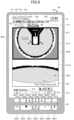
- FIG. 4 is a diagram illustrating an example configuration of the image display part 41 and the operation part 42 of the display device 40.
- the example of FIG. 4 illustrates that an overhead view image and a backward image are displayed on the image display part 41 as images before the operation of the menu switch of the operation part 42.
- the image display part 41 includes a date and time display area 41a, a travel mode display area 41b, an attachment display area 41c, a fuel efficiency display area 41d, an engine control status display area 41e, an engine operating time display area 41f, a coolant water temperature display area 41g, a remaining fuel amount display area 41h, a rotational speed mode display area 41i, a remaining aqueous urea solution amount display area 41j, a hydraulic oil temperature display area 41k, an air conditioner operating condition display area 41m, an image display area 41n, and a menu display area 41p.
- a date and time display area 41a includes a date and time display area 41a, a travel mode display area 41b, an attachment display area 41c, a fuel efficiency display area 41d, an engine control status display area 41e, an engine operating time display area 41f, a coolant water temperature display area 41g, a remaining fuel amount display area 41h, a rotational speed mode display area 41i, a remaining aqueous urea solution amount display
- the travel mode display area 41b, the attachment display area 41c, the engine control status display area 41e, the rotational speed mode display area 41i, and the air conditioner operating condition display area 41m are areas for displaying settings information that is information on the settings of the shovel 100.
- the fuel efficiency display area 41d, the engine operating time display area 41f, the coolant water temperature display area 41g, the remaining fuel amount display area 41h, the remaining aqueous urea solution amount display area 41j, and the hydraulic oil temperature display area 41k are areas for displaying operating condition information that is information on the operating condition of the shovel 100.
- the date and time display area 41a is an area for displaying a current date and time.
- the travel mode display area 41b is an area for displaying a current travel mode.
- the attachment display area 41c is an area for displaying an image that represents a currently attached attachment.
- the fuel efficiency display area 41d is an area for displaying fuel efficiency information calculated by the controller 30.
- the fuel efficiency display area 41d includes an average fuel efficiency display area 41d1 for displaying a lifelong average fuel efficiency or section average fuel efficiency and an instantaneous fuel efficiency display area 41d2 for displaying instantaneous fuel efficiency.
- the engine control status display area 41e is an area for displaying the control status of the engine 11.
- the engine operating time display area 41f is an area for displaying the cumulative operating time of the engine 11.
- the coolant water temperature display area 41g is an area for displaying a current temperature condition of engine coolant water.
- the remaining fuel amount display area 41h is an area for displaying the state of the remaining amount of fuel stored in a fuel tank.
- the rotational speed mode display area 41i is an area for displaying, as an image, a current rotational speed mode set with the engine rotational speed adjustment dial 75.
- the remaining aqueous urea solution amount display area 41j is an area for displaying, as an image, the state of the remaining amount of an aqueous urea solution stored in an aqueous urea solution tank.
- the hydraulic oil temperature display area 41k is an area for displaying the state of the temperature of hydraulic oil in the hydraulic oil tank.
- the air conditioner operating condition display area 41m includes a vent display area 41m1 for displaying the position of a current vent, an operating mode display area 41m2 for displaying a current operating mode, a temperature display area 41m3 for displaying a current set temperature, and an air volume display area 41m4 for displaying a current set air volume.
- the image display area 41n is an area for displaying an image captured by the image capturing device 80. According to the example of FIG. 4 , the image display area 41n displays the overhead view image FV and the backward image CBT.
- the overhead view image FV is a virtual viewpoint image generated by the control part 40a, and is generated based on the respective captured images of the back camera 80B, the left camera 80L, and the right camera 80R.
- a shovel graphic GE corresponding to the shovel 100 is centered in the overhead view image FV in order to cause the operator to more intuitively understand the positional relationship between the shovel 100 and an object present in an area surrounding the shovel 100.
- the backward image CBT is an image showing a space behind the shovel 100 and includes a counterweight image GC.
- the backward image CBT is an actual viewpoint image generated by the control part 40a, and is generated based on an image captured by the back camera 80B.
- the image display area 41n includes a first image display area 41n1 at an upper position and a second image display area 41n2 at a lower position.
- the overhead view image FV is placed in the first image display area 41n1, and the backward image CBT is placed in the second image display area 41n2.
- the overhead view image FV may be placed in the second image display area 41n2 and the backward image CBT may be placed in the first image display area 41n1.
- the overhead view image FV and the backward image CBT which are vertically arranged next to each other according to the example of FIG. 4 , may be vertically spaced apart from each other.
- the image display area 41n which is a vertically elongated area according to the example of FIG. 4 , may be a laterally elongated area.
- the overhead view image FV may be placed as the first image display area 41n1 on the left side and the backward image CBT may be placed as the second image display area 41n2 on the right side in the image display area 41n.
- the overhead view image FV and the backward image CBT may be laterally spaced apart from each other or their positions may be interchanged.
- the menu display area 41p includes tabs 41p1 through 41p7. According to the example of FIG. 4 , the 41p1 through 41p7 are laterally spaced apart from each other at the bottom of the image display part 41. Icons for displaying various kinds of information are displayed on the tabs 41p1 through 41p7.
- a menu specific item icon for displaying menu specific items is displayed on the tab 41p1.
- the icons displayed on the tabs 41p2 through 41p7 switch to icons associated with menu specific items.
- An icon for displaying information on a digital level is displayed on the tab 41p4.
- the backward image CBT switches to a screen showing information on a digital level.
- the screen showing information on a digital level may also be displayed, however, by being superimposed on the backward image CBT or through reduction in the size of the backward image CBT.
- the overhead view image FV may be switched to the screen showing information on a digital level, or the screen showing information on a digital level may be displayed by being superimposed on the overhead view image FV or through reduction in the size of the overhead view image FV.
- An icon for displaying information on intelligent construction is displayed on the tab 41p6.
- the backward image CBT switches to a screen showing information on intelligent construction.
- the screen showing information on intelligent construction may also be displayed, however, by being superimposed on the backward image CBT or through reduction in the size of the backward image CBT.
- the overhead view image FV may be switched to the screen showing information on intelligent construction, or the screen showing information on intelligent construction may be displayed by being superimposed on the overhead view image FV or through reduction in the size of the overhead view image FV.
- An icon for displaying information on crane mode is displayed on the tab 41p7.
- the backward image CBT switches to a screen showing information on crane mode.
- the screen showing information on crane mode may also be displayed, however, by being superimposed on the backward image CBT or through reduction in the size of the backward image CBT.
- the overhead view image FV may be switched to the screen showing information on crane mode, or the screen showing information on crane mode may be displayed by being superimposed on the overhead view image FV or through reduction in the size of the overhead view image FV.
- the icons displayed on the tabs 41p1 through 41p7 are not limited to the above-described examples, and icons for showing other information may also be displayed.
- the operation part 42 includes one or more button switches with which the operator makes a selection from among the tabs 41p1 through 41p7, inputs settings, etc.
- the operation part 42 includes seven switches 42a1 through 42a7 placed in the upper row and seven switches 42b1 through 42b7 placed in the lower row.
- the switches 42b1 through 42b7 are placed below the switches 42a1 through 42a7, respectively.
- the number, form, and arrangement of switches of the operation part 42 are not limited to the above-described example.
- the functions of multiple button switches may be integrated in the form of a jog wheel, a jog switch, or the like, or the operation part 42 may be separated from the display device 40.
- the tabs 41p1 through 41p7 may be directly operated on a touchscreen into which the image display part 41 and the operation part 42 are integrated.
- the switches 42a1 through 42a7 are placed below the tabs 41p1 through 41p7 to correspond to the tabs 41p1 through 41p7, respectively, and operate as switches for selecting the tabs 41p1 through 41p7, respectively.
- the switches 42a1 through 42a7 are placed below the tabs 41p1 through 41p7 to correspond to the tabs 41p1 through 41p7, respectively, the operator can intuitively select the tabs 41p1 through 41p7.
- FIG. 4 for example, when the switch 42a1 is operated, the tab 41p1 is selected, so that the menu display area 41p is changed from single-row display to two-row display to display icons corresponding to a first menu are displayed on the tabs 41p2 through 41p7 as illustrated in FIG.
- the switch 42b1 is a switch for switching captured images displayed in the image display area 41n.
- the captured image displayed in the first image display area 41n1 of the image display area 41n is switched from the backward image to the leftward image, to the rightward image, and to the overhead view image, for example.
- the captured image displayed in the second image display area 41n2 of the image display area 41n may be switched from the backward image to the leftward image, to the rightward image, and to the overhead view image, for example.
- the switch 42b1 serving as the operation part 42 may switch a screen displayed in the first image display area 41n1 or the second image display area 41n2 or may switch screens displayed in the first image display area 41n1 and the second image display area 41n2. Furthermore, a switch for switching a screen displayed in the second image display area 41n2 may be separately provided.
- the switches 42b2 and 42b3 are switches for controlling the air volume of an air conditioner. According to the example of FIG. 4 , when the switch 42b2 is operated, the air volume of the air conditioner decreases, and when the switch 42b3 is operated, the air volume of the air conditioner increases.
- the switch 42b4 is a switch for turning ON and OFF a cooling/heating function. According to the example of FIG. 4 , each time the switch 42b4 is operated, the cooling/heating function is switched between ON and OFF.
- the switches 42b5 and 42b6 are switches for controlling the set temperature of the air conditioner. According to the example of FIG. 4 , when the switch 42b5 is operated, the set temperature decreases, and when the switch 42b6 is operated, the set temperature increases.
- the switch 42b7 is a switch that can change the display of the engine operating time display area 41f.
- each of the switches 42a2 through 42a6 and 42b2 through 42b6 is configured to be able to input a number shown on or near the switch. Furthermore, the switches 42a3, 42a4, 42a5, and 42b4 are configured to be able to move a cursor left, up, right, and down, respectively, when the cursor is displayed on the menu screen.
- the functions assigned to the switches 42a1 through 42a7 and 42b1 through 42b7 are examples, and the switches 42a1 through 42a7 and 42b1 through 42b7 may be configured to execute other functions.
- first menu specific items are displayed on the tabs 41p2 through 41p7 with the overhead view image FV and the backward image CBT being displayed. Therefore, the operator can check the first menu specific items while looking at the overhead view image FV and the backward image CBT.
- the overhead view image FV is displayed without a change in size before and after the selection of the tab 41p1. There is no decrease in visibility when the operator checks an area surrounding the shovel 100.
- FIG. 5 is a diagram illustrating another configuration of the image display part 41 and the operation part 42 of the display device 40.
- the screen displayed in the image display part 41 of FIG. 5 is displayed, for example, when the tab 41p1 showing the menu specific item icon displayed in the image display part 41 of FIG. 4 is selected.
- a tab 41p0 and the tabs 41p1 through 41p7 for calling a condition screen showing the condition of the shovel 100, a settings screen showing the various settings of the shovel 100, or the like are displayed in two rows of an upper row and a lower row in the menu display area 41p.
- the arrangement of the tabs 41p0 through 41p7 is not limited to the two-row arrangement illustrated in FIG. 5 , and may be other arrangement.
- a first menu specific item icon that is an icon showing currently selected menu specific items is displayed on the tab 41p0.
- a second menu specific item icon for displaying second menu specific items is displayed on the tab 41p1.
- the icons associated with the first menu specific items displayed on the tabs 41p2 through 41p7 switch to icons associated with the second menu specific items.
- a fuel efficiency information icon for displaying various kinds of fuel efficiency information is displayed on the tab 41p2.
- the backward image CBT switches to a screen showing fuel efficiency information.
- the screen showing fuel efficiency information may be displayed by being superimposed on the backward image CBT or through reduction in the size of the backward image CBT.
- the overhead view image FV may be switched to the screen showing fuel efficiency information, or the screen showing fuel efficiency information may be displayed by being superimposed on the overhead view image FV or through reduction in the size of the overhead view image FV.
- a machine information icon for displaying machine information is displayed on the tab 41p3.
- the backward image CBT switches to a screen showing machine information.
- the screen showing machine information may be displayed by being superimposed on the backward image CBT or through reduction in the size of the backward image CBT.
- the overhead view image FV may be switched to the screen showing machine information, or the screen showing machine information may be displayed by being superimposed on the overhead view image FV or through reduction in the size of the overhead view image FV.
- a maintenance information icon for displaying maintenance information is displayed on the tab 41p4.
- the backward image CBT switches to a screen showing maintenance information.
- the screen showing maintenance information may be displayed by being superimposed on the backward image CBT or through reduction in the size of the backward image CBT.
- the overhead view image FV may be switched to the screen showing maintenance information, or the screen showing maintenance information may be displayed by being superimposed on the overhead view image FV or through reduction in the size of the overhead view image FV.
- a date and time setting icon for setting the date and time including the date and the time is displayed on the tab 41p5.
- the backward image CBT switches to a screen for setting the date and time.
- the screen for setting the date and time may be displayed by being superimposed on the backward image CBT or through reduction in the size of the backward image CBT.
- the overhead view image FV may be switched to the screen for setting the date and time, or the screen for setting the date and time may be displayed by being superimposed on the overhead view image FV or through reduction in the size of the overhead view image FV.
- An attachment information icon for displaying attachment information is displayed on the tab 41p6.
- the backward image CBT switches to a screen showing attachment information.
- the screen showing attachment information may be displayed by being superimposed on the backward image CBT or through reduction in the size of the backward image CBT.
- the overhead view image FV may be switched to the screen showing attachment information, or the screen showing attachment information may be displayed by being superimposed on the overhead view image FV or through reduction in the size of the overhead view image FV.
- An engine control information icon for displaying the control information of the engine 11 is displayed on the tab 41p7.
- the backward image CBT switches to a screen showing engine control information.
- the screen showing engine control information may be displayed by being superimposed on the backward image CBT or through reduction in the size of the backward image CBT.
- the overhead view image FV may be switched to the screen showing engine control information, or the screen showing engine control information may be displayed by being superimposed on the overhead view image FV or through reduction in the size of the overhead view image FV.
- the screen showing fuel efficiency information, the screen showing machine information, the screen showing maintenance information, the screen for setting the date and time, the screen showing attachment information, and the screen showing engine control information are examples of the menu screen.
- the backward image CBT switches to a menu screen showing information corresponding to the selected one of the tabs 41p2 through 41p7.
- the menu screen is displayed with the overhead view image FV being displayed, it is possible to ensure a peripheral view even with the menu screen being displayed. Therefore, it is possible to operate the shovel 100 with the menu screen being displayed.
- FIG. 6A is a diagram illustrating another example configuration of the image display part 41 and the operation part 42 of the display device 40.
- the screen displayed on the image display part 41 of FIG. 6A is displayed, for example, when the tab 41p3 showing the machine information icon displayed in the image display part 41 of FIG. 5 is selected.
- the image display part 41 displays the overhead view image FV, a screen 41q showing machine information, and the tabs 41p0 through 41p7.
- the overhead view image FV is an image whose size does not change before and after the selection of the tab 41p3 showing the machine information icon.
- the size of the overhead view image FV does not change before and after the selection of the tab 41p3. Therefore, there is no decrease in visibility when the operator checks an area surrounding the shovel 100.
- the machine information of the shovel 100 is displayed on the screen 41q showing machine information.
- an engine rotational speed, a pump P1 pressure, a pump P2 pressure, and a battery voltage are displayed on the screen 41q showing machine information.
- the machine information of the shovel 100 is not limited to the example of FIG. 5 , and may include other information.
- a first machine information icon that is an icon showing currently selected machine information is displayed on the tab 41p0.
- a first operability setting icon for displaying a first operability setting is displayed on the tab 41p1.
- the icons associated with first machine information displayed on the tabs 41p2 through 41p7 switch to icons associated with the first operability setting.
- a second machine information icon for displaying second machine information may be displayed on the tab 41p1.
- Icons for performing selection, movement, and cancellation with respect to the items displayed on the screen 41q showing machine information are displayed on the tabs 41p2 through 41p6.
- selection, movement, or cancellation is performed.
- a home icon for displaying a preset home screen (for example, a default screen) is displayed on the tab 41p7.
- the preset home screen is displayed.
- the screen illustrated in FIG. 4 is displayed as the home screen.
- the screen 41q showing machine information is an example of the menu screen.
- the backward image CBT switches to a menu screen showing machine information corresponding to the selected tab 41p3.
- the menu screen showing machine information is displayed with the overhead view image FV being displayed. Therefore, the operator can operate the shovel 100 to perform troubleshooting and check the operation of functions of the shovel 100 while checking various sensor values and the ON/OFF states of various functions.
- FIG. 6B is a diagram illustrating another example configuration of the image display part 41 and the operation part 42 of the display device 40.
- the screen displayed on the image display part 41 of FIG. 6B is displayed, for example, when the tab 41p1 showing an operability setting icon is selected in response to depression of the switch 42a1 in FIG. 6A .
- the image display part 41 displays the overhead view image FV, a screen 41r showing an operability setting, and the tabs 41p0 through 41p7.
- the overhead view image FV is an image whose size does not change before and after the selection of the tab showing the operability setting icon.
- the size of the overhead view image FV does not change before and after the selection of the showing the operability setting icon. Therefore, there is no decrease in visibility when the operator checks an area surrounding the shovel 100.
- the operability setting of the shovel 100 is displayed on the screen 41r showing an operability setting.
- a shovel icon image 41r1 and a bar graph 41r2 representing the current set value of the speed balance between an arm closing motion and a boom raising motion for setting the speed balance between an arm closing motion responsive to a lever operation to close the arm 5 and a boom raising motion responsive to a lever operation to raise the boom 4 are displayed.
- the screen showing the operability setting of the shovel 100 is not limited to the example of FIG. 6 , and may include other information.
- a shovel icon image and a bar graph representing the current set value of the speed balance between a turning motion and a boom raising motion for setting the speed balance between a turning motion responsive to the operation of turning the upper turning body 3 and a boom raising motion responsive to a lever operation to raise the boom 4 may be displayed.
- a bar graph representing the set value of the speed balance between attachments is used to set the speed balance between attachments according to the above-described configuration, it may also be possible to set the distribution of hydraulic oil flowing to attachments.
- the first operability setting icon that is an icon showing a currently selected operability setting is displayed on the tab 41p0.
- the first machine information icon for displaying the first machine information is displayed on the tab 41p1.
- the icons associated with the first operability setting displayed on the tab 41p2 through 41p7 switch to the icons associated with the first machine information.
- a second operability setting icon for displaying a second operability setting may be displayed on the tab 41p1.
- Icons for performing selection, movement, and cancellation with respect to the items displayed on the screen 41r showing an operability setting are displayed on the tabs 41p2 through 41p6.
- selection, movement, or cancellation is performed.
- the switch 42a2 through 42a6 and 42b2 through 42b6 the set value of a selected item is changed.
- a home icon for displaying a preset home screen (for example, a default screen) is displayed on the tab 41p7.
- the preset home screen is displayed.
- the screen illustrated in FIG. 4 is displayed as the home screen.
- the screen 41r showing an operability setting is an example of the menu screen.
- the backward image CBT switches to a menu screen showing an operability setting corresponding to the selected tab.
- the menu screen showing an operability setting is displayed with the overhead view image FV being displayed. Therefore, the operator can check the operation of the shovel 100 while finely tuning various setting values.
- FIGS. 7 and 8 illustrate example configurations of a screen displayed on the image display part 41 when the image capturing device 80 detects a person behind the shovel 100.
- the screen displayed on the image display part 41 of FIG. 7 is different from the screen displayed on the image display part 41 of FIG. 4 in that images GP1 and GP2 of persons are displayed and images of frames surrounding the images GP1 and GP2, respectively, (frame images FR0a and FR0b) are displayed in the first image display area 41n1 and the second image display area 41n2, respectively, but otherwise is equal to the screen displayed on the image display part 41 of FIG. 4 .
- the screen displayed on the image display part 41 of FIG. 8 is different from the screen displayed on the image display part 41 of FIG. 4 in that an image of a frame highlighting the outer edge of the first image display area 41n1 and the second image display area 41n2 (a frame image FR1) is displayed, but otherwise is equal to the screen displayed on the image display part 41 of FIG. 4 .
- the frame image FR1 of FIG. 8 is larger than the frame images FROa and FR0b of FIG. 7 .
- FIGS. 9 and 10 illustrate example configurations of a screen displayed on the image display part 41 when the image capturing device 80 detects a person to the left of the shovel 100.
- the screen displayed on the image display part 41 of FIG. 9 is different from the screen displayed on the image display part 41 of FIG. 4 in that an image GP3 of a person is displayed in the first image display area 41n1 and that an image of a frame highlighting the outer edge of the first image display area 41n1 (a frame image FR2) is displayed, but otherwise is equal to the screen displayed on the image display part 41 of FIG. 4 .
- a frame image FR2 an image of a frame highlighting the outer edge of the first image display area 41n1
- the outer edge of the second image display area 41n2 is not displayed in a highlighted manner.
- the screen displayed on the image display part 41 of FIG. 10 is different from the screen displayed on the image display part 41 of FIG. 9 in that an image of a frame surrounding the image GP3 (a frame image FR3) is displayed, but otherwise is equal to the screen displayed on the image display part 41 of FIG. 9 .
- the frame image FR3 may be an image of a frame surrounding the entirety of an area including the image GP3 (a left area according to the example of FIG. 10 ) or may be an image of a frame surrounding only the image GP3.
- the shovel 100 is configured to change the color of the frame image FR1 according to the distance between the shovel 100 and a detected person calculated based on the output of the object detector. Specifically, the shovel 100 causes the color of the frame image FR1 to be green when the distance is less than or equal to a first threshold, causes the color of the frame image FR1 to be yellow when the distance is less than or equal to a second threshold smaller than the first threshold, and causes the color of the frame image FR1 to be red when the distance is less than or equal to a third threshold smaller than the second threshold. The same applies to the frame image FR0a, the frame image FR0b, the frame image FR2, and the frame image FR3.
- the shovel 100 can further ensure that the operator of the shovel 100 is aware of the presence of a person in an area surrounding the shovel 100.
- the image display part 41 is configured to display a menu screen in response to the operation of the menu switch of the operation part 42 whether the shovel 100 is operable or inoperable.
- the image display part 41 may be configured to be able to set screen display such that a peripheral image is forcibly displayed when the shovel 100 becomes operable (or the shovel 100 is operated) while the menu screen is displayed. For example, when the shovel 100 becomes operable (or the shovel 100 is operated) while an overhead view image and a menu screen are displayed as illustrated in FIG. 6A or 6B , switching to a screen displaying an overhead view image and a menu screen as illustrated in FIG. 4 is forced.
- the images GP1 through GP 3 of persons and the frame images FR0a, FR0b and FR1 through FR3 as illustrated in FIGS. 7 through 10 may be displayed (person detection display may be performed) during display of a menu screen showing machine information while displaying the overhead view image FV ( FIG. 6A ) or during display of a menu screen showing an operability setting while displaying the overhead view image FV ( FIG. 6A ) .
- the shovel 100 is configured to notify a person engaged in the work of the shovel 100 of detection of a predetermined object, using the alarm device 49, when the image capturing device 80 detects the predetermined object.
- the shovel 100 may also be configured to include an automatic stop function to automatically stop the movement of the shovel 100 when the distance between the predetermined object detected by the image capturing device 80 and the shovel 100 is less than or equal to a fourth threshold.
- the alarm device 49 issues an alarm.
- This alarm may be, for example, canceled by the operation part 42 (for example, the switches 42a1 through 42a7 and the switches 42b1 through 42b7).
- the operation part 42 (for example, the switches 42a1 through 42a7 and the switches 42b1 through 42b7) is configured to be able to switch the enabled state and the disabled state of the function of detecting a predetermined object and the function of notifying a person engaged in the work of the shovel 100 of detection of a predetermined object.
- the cancellation of the alarm responsive to the detection of the predetermined object is not limited to the above-described example, and, for example, may be performed with a switch provided on an operating lever or may be performed with a switch placed on the seat left side console on the left side or the seat right side console on the right side of the operator seat.
- the switching of the enabled state and the disabled state of the function of detecting a predetermined object and the function of notifying a person engaged in the work of the shovel 100 of detection of a predetermined object is not limited to the above-described example, and, for example, may be performed with a switch provided on an operating lever or may be performed with a switch placed on the seat left side console on the left side or the seat right side console on the right side of the operator seat.
Landscapes
- Engineering & Computer Science (AREA)
- Multimedia (AREA)
- Mechanical Engineering (AREA)
- Mining & Mineral Resources (AREA)
- Civil Engineering (AREA)
- General Engineering & Computer Science (AREA)
- Structural Engineering (AREA)
- Physics & Mathematics (AREA)
- Acoustics & Sound (AREA)
- Human Computer Interaction (AREA)
- Signal Processing (AREA)
- Component Parts Of Construction Machinery (AREA)
- Closed-Circuit Television Systems (AREA)
Description
- The present invention relates to shovels.
- A shovel including a display device that displays a menu screen for checking various kinds of information on and changing various settings of the shovel has been known. (See, for example, Patent Document 1).
- Moreover, a working machine display system is known that is configured to display various kinds of information on different screens. (See, for example, Patent Document 2).
-
- Patent Document 1:
Japanese Unexamined Patent Publication No. 2013-67626 - Patent Document 2: German
Patent Document DE 11 2015 000292 T5 - According to the display device that displays a menu screen, when the shovel is operated during the display of the menu screen, the menu screen switches to an image for understanding the surroundings of the shovel, such as an overhead view image, which prevents an operator from operating the shovel while looking at the menu screen.
- In view of the above-described problem, an object is to provide a shovel that an operator can operate while looking at a menu screen.
- The aforementioned objective is achieved by a shovel according to
claim 1. - A shovel according to an embodiment of the present invention includes a lower traveling body, an upper turning body turnably mounted on the lower traveling body, a cab mounted on the upper turning body, multiple image capturing devices mounted on the upper turning body, a display device provided in the cab, and an operation part provided in the cab. The display device includes an image display part configured to display a captured image captured by at least one of the image capturing devices and a menu screen. The image display part is configured to display the menu screen while displaying the captured image, in response to the operation part being operated.
- According to an embodiment of the present invention, an operator can operate a shovel while looking at a menu screen.
-
-
FIG. 1 is a diagram illustrating an example configuration of a shovel according to an embodiment of the present invention. -
FIG. 2 is a plan view of the shovel ofFIG. 1 . -
FIG. 3 is a diagram illustrating an example configuration of a basic system installed in the shovel ofFIG. 1 . -
FIG. 4 is a diagram (1) illustrating an example configuration of an image display part and an operation part of a display device. -
FIG. 5 is a diagram (2) illustrating an example configuration of the image display part and the operation part of the display device. -
FIG. 6A is a diagram (3) illustrating an example configuration of the image display part and the operation part of the display device. -
FIG. 6B is a diagram (4) illustrating an example configuration of the image display part and the operation part of the display device. -
FIG. 7 is a diagram (5) illustrating an example configuration of the image display part and the operation part of the display device. -
FIG. 8 is a diagram (6) illustrating an example configuration of the image display part and the operation part of the display device. -
FIG. 9 is a diagram (7) illustrating an example configuration of the image display part and the operation part of the display device. -
FIG. 10 is a diagram (8) illustrating an example configuration of the image display part and the operation part of the display device. - An embodiment of the invention is described below with reference to the drawings. In the drawings, the same elements are referred to using the same reference numeral, and duplicate description thereof may be omitted.
- First, a shovel as an excavator according to an embodiment of the present invention is described with reference to
FIGS. 1 and2 .FIG. 1 is a diagram illustrating an example configuration of the shovel according to the embodiment of the present invention.FIG. 2 is a plan view of the shovel ofFIG. 1 . - As illustrated in
FIG. 1 , according to ashovel 100, an upper turningbody 3 is turnably mounted on a crawler-type lower travelingbody 1 via aturning mechanism 2. Aboom 4 serving as a work element is attached to the upper turningbody 3. Anarm 5 serving as a work element is attached to the distal end of theboom 4. Abucket 6 serving as a work element and an end attachment is attached to the distal end of thearm 5. Theboom 4 is driven by aboom cylinder 7. Thearm 5 is driven by anarm cylinder 8. Thebucket 6 is driven by abucket cylinder 9. - A
cabin 10 serving as a cab is provided and a power source such as anengine 11 is mounted on the upper turningbody 3. Furthermore, a turning hydraulic motor, acontroller 30, an image capturingdevice 80, etc., are attached to the upper turningbody 3. The turning hydraulic motor may alternatively be a turning motor generator. - An
operating apparatus 26, adisplay device 40, analarm device 49, etc., are provided in thecabin 10. In this specification, for convenience, the side of the upper turningbody 3 on which the work elements such as theboom 4 are attached is defined as the front, and the side of the upper turningbody 3 on which a counterweight is attached is defined as the back. - The
controller 30 is configured to be able to control theshovel 100. According to the example ofFIG. 1 , thecontroller 30 is constituted of a computer including a CPU, a RAM, an NVRAM, and a ROM. In this case, thecontroller 30 reads programs corresponding to functional elements from the ROM, loads the programs into the RAM, and causes the CPU to execute corresponding processes. The functional elements may also be constituted of hardware or constituted of a combination of software and hardware. - The image capturing
device 80 is configured to capture an image of an area surrounding theshovel 100. Examples of theimage capturing device 80 include a monocular camera, a stereo camera, a distance image camera, an infrared camera, and a LiDAR. According to the example ofFIG. 1 , theimage capturing device 80 includes aback camera 80B attached to the back end of the upper surface of the upper turningbody 3, aleft camera 80L attached to the left end of the upper surface of the upper turningbody 3, and aright camera 80R attached to the right end of the upper surface of the upper turningbody 3. - The
back camera 80B, theleft camera 80L, and theright camera 80R are attached to the upper turningbody 3 such that their respective optical axes point obliquely downward and their respective imaging ranges include part of the upper turningbody 3. Therefore, the imaging range of each of theback camera 80B, theleft camera 80L, and theright camera 80R has, for example, an angle of view of approximately 180 degrees in a plan view. According to the example ofFIG. 2 , an imaging range AB represents an example of the imaging range of theback camera 80B, an imaging range AL represents an example of the imaging range of theleft camera 80L, and an imaging range AR represents an example of the imaging range of theright camera 80R. - The image capturing
device 80 may also operate as an object detector that detects a predetermined object in a predetermined area in an area surrounding theshovel 100. In this case, theimage capturing device 80 may include an image processor. The image processor performs known image processing on an image captured by the image capturing device 80 (input image) to detect an image of a predetermined object included in the input image. In response to detecting an image of the predetermined object, theimage capturing device 80 outputs an object detection signal to thecontroller 30. The predetermined object is, for example, a person, an animal, a vehicle, a machine or the like. The image processor may also be configured to detect a moving body. The image processor may be integrated with thecontroller 30. The object detector may also be a LIDAR, an ultrasonic sensor, a millimeter wave sensor, a laser radar sensor, an infrared sensor, or the like. - Furthermore, the
shovel 100 may be configured to be provided with an objector detector (a LIDAR, a millimeter wave radar, a stereo camera, or the like) serving as object detecting means, aside from the image capturing device 80 (theback camera 80B, theleft camera 80L, and theright camera 80R). In this case, theshovel 100 may display information on an object detected by the object detector on thedisplay device 40. - Next, a basic system installed in the
shovel 100 ofFIG. 1 is described with reference toFIG. 3. FIG. 3 illustrates an example configuration of the basic system installed in theshovel 100 ofFIG. 1 . InFIG. 3 , a mechanical power transmission line, a hydraulic oil line, a pilot line, an electric power line, and an electric control line are indicated by a double line, a thick solid line, a dashed line, a thin solid line, and a one-dot chain line, respectively. - As illustrated in
FIG. 3 , the basic system mainly includes theengine 11, amain pump 14, apilot pump 15, acontrol valve 17, the operatingapparatus 26, anoperating pressure sensor 29, thecontroller 30, aselector valve 35, thedisplay device 40, thealarm device 49, an engine rotationalspeed adjustment dial 75, and an outputcharacteristic change switch 76. - The
engine 11 is a diesel engine that adopts isochronous control to maintain a constant engine rotational speed irrespective of an increase or decrease in a load. The amount of fuel injection, the timing of fuel injection, boost pressure, etc., in theengine 11 are controlled by an engine control unit (ECU 74). - The
engine 11 is connected to each of themain pump 14 and thepilot pump 15 serving as hydraulic pumps. Themain pump 14 is connected to thecontrol valve 17 via a hydraulic oil line. - The
control valve 17 is a hydraulic control device that controls the hydraulic system of theshovel 100. Thecontrol valve 17 is connected to hydraulic actuators such as a left travel hydraulic motor, a right travel hydraulic motor, theboom cylinder 7, thearm cylinder 8, thebucket cylinder 9, and the turning hydraulic motor. - Specifically, the
control valve 17 includes spool valves corresponding to the hydraulic actuators. Each spool valve is configured to be able to change its position according to a pilot pressure so as to be able to increase and decrease the opening area of a PC port and the opening area of a CT port. The PC port is a port that causes themain pump 14 to communicate with a hydraulic actuator. The CT port is a port that causes a hydraulic actuator to communicate with a hydraulic oil tank. - The
pilot pump 15 is connected to theoperating apparatus 26 via a pilot line. Theoperating apparatus 26 includes, for example, a left operating lever, a right operating lever, and a travel operating apparatus. The travel operating apparatus includes, for example, a travel lever and a travel pedal. According to this embodiment, each operatingapparatus 26 is a hydraulic operating apparatus and is connected to the pilot ports of a corresponding spool valve in thecontrol valve 17 via a pilot line. Theoperating apparatus 26 may alternatively be an electric operating apparatus. - The operating
pressure sensor 29 detects the details of the operation of theoperating apparatus 26 in the form of pressure. The operatingpressure sensor 29 outputs a detection value to thecontroller 30. The details of the operation of theoperating apparatus 26 may also be electrically detected. - The
selector valve 35 is configured to be able to switch the enabled state and the disabled state of theoperating apparatus 26. The enabled state of theoperating apparatus 26 is a state where an operator can operate hydraulic actuators using theoperating apparatus 26. The disabled state of theoperating apparatus 26 is a state where the operator cannot operate hydraulic actuators using theoperating apparatus 26. According to this embodiment, theselector valve 35 is a gate lock valve configured to operate in accordance with a command from thecontroller 30. Specifically, theselector valve 35 is placed in a pilot line connecting thepilot pump 15 and theoperating apparatus 26, and is configured to be able to switch the closing and opening of the pilot line in response to a command from thecontroller 30. For example, the operatingapparatus 26 is enabled when a gate lock lever D4 is pulled up to open the selector valve 35 (gate lock valve), and is disabled when the gate lock lever D4 is pushed down to close the selector valve 35 (gate lock valve). - The
display device 40 is configured to display various kinds of information. Thedisplay device 40 may be connected to thecontroller 30 via a communications network such as a CAN or may be connected to thecontroller 30 via a dedicated line. According to this embodiment, thedisplay device 40 is configured to be able to display one or more captured images captured by theimage capturing device 80 and a menu screen. Thedisplay device 40 is supplied with electric power from arechargeable battery 70 to operate. Thedisplay device 40 includes acontrol part 40a, animage display part 41, and anoperation part 42. - The
control part 40a controls an image displayed on theimage display part 41. According to this embodiment, thecontrol part 40a is constituted of a computer including a CPU, a RAM, an NVRAM, and a ROM. In this case, thecontrol part 40a reads programs corresponding to functional elements from the ROM, loads the programs into the RAM, and causes the CPU to execute corresponding processes. The functional elements may also be constituted of hardware or constituted of a combination of software and hardware. An image displayed on theimage display part 41 may also be controlled by thecontroller 30 or theimage capturing device 80. - The
image display part 41 displays a captured image captured by at least oneimage capturing device 80 and a menu screen. The captured image may be, for example, a backward image captured by theback camera 80B, a leftward image captured by theleft camera 80L, or a rightward image captured by theright camera 80R. The captured image may also be, for example, an overhead view image into which captured images captured by theback camera 80B, theleft camera 80L, and theright camera 80R, respectively, are combined. The captured image may be two or more selected from the backward image, the leftward image, the rightward image, and the overhead view image. The menu screen includes a condition screen showing the condition of theshovel 100 and a settings screen showing the various settings of theshovel 100. - The
operation part 42 is a switch panel including hardware switches. Theoperation part 42 may be a touchscreen. According to this embodiment, theoperation part 42 is placed below theimage display part 41 and includes a switch (for example, a menu switch) for changing images displayed on theimage display part 41. The placement of theoperation part 42 is not limited to the above-described example, and theoperation part 42 may be placed at an operating lever or may be placed on a seat left side console on the left side or a seat right side console on the right side of an operator seat. Here, in addition to theoperation part 42 provided on thedisplay device 40, an operator seatside operation part 50 having the same functions as theoperation part 42 may be placed on at least one of an operating lever, the seat left side console, and the seat right side console. - According to this embodiment, the
image display part 41 displays the menu screen when the menu switch of theoperation part 42 is operated during display of an overhead view image FV and a backward image CBT captured by theimage capturing device 80. For example, theimage display part 41 reduces the size of the backward image CBT and displays a screen for selecting a menu specific item without changing the size of the overhead view image FV before and after the operation of the menu switch of theoperation part 42. When a predetermined switch of theoperation part 42 is operated with the screen for selecting a menu specific item being displayed, theimage display part 41 switches the backward image CBT to the menu screen such as a condition screen showing the condition of theshovel 100, a settings screen showing the various settings of theshovel 100, or the like. At this point, theimage display part 41 displays the overhead view image FV while making no change in and keeping the size of the overhead view image. - Furthermore, the
image display part 41 may be configured to display the menu screen in response to the operation of the menu switch of theoperation part 42 irrespective of whether theshovel 100 is operable or inoperable. Furthermore, theimage display part 41 may also be configured to display the menu screen in response to the operation of the menu switch of theoperation part 42 only when theshovel 100 is inoperable. Furthermore, these may be switched with switching means such as a selector switch, for example. Theshovel 100 is operable, for example, when theoperating apparatus 26 is enabled with the gate lock lever D4 being pulled up to open theselector valve 35. Theshovel 100 is inoperable, for example, when theoperating apparatus 26 is disabled with the gate lock lever D4 being pushed down to close theselector valve 35. - The
rechargeable battery 70 is, for example, charged with electricity generated in analternator 11a. The electric power of therechargeable battery 70 is also supplied to thecontroller 30, etc. For example, astarter 11b of theengine 11 is driven with electric power from therechargeable battery 70 to start theengine 11. - The
ECU 74 transmits data on the condition of theengine 11, such as coolant water temperature, to thecontroller 30. Aregulator 14a of themain pump 14 transmits data on a swash plate tilt angle to thecontroller 30. Adischarge pressure sensor 14b transmits data on the discharge pressure of themain pump 14 to thecontroller 30. Anoil temperature sensor 14c provided in a conduit between the hydraulic oil tank and themain pump 14 transmits data on the temperature of hydraulic oil flowing through the conduit to thecontroller 30. The operatingpressure sensor 29 transmits data on a pilot pressure generated in response to the operation of theoperating apparatus 26 to thecontroller 30. Thecontroller 30 stores these data in a temporary storage part (memory) and can transmit these data to thedisplay device 40 when needed. - The engine rotational
speed adjustment dial 75 is a dial for adjusting the rotational speed of theengine 11. The engine rotationalspeed adjustment dial 75 transmits data on the setting of the engine rotational speed to thecontroller 30. The engine rotationalspeed adjustment dial 75 is configured to allow the engine rotational speed to be selected from among the four levels of SP mode, H mode, A mode, and IDLE mode. The SP mode is a rotational speed mode selected when it is desired to prioritize workload, and uses the highest engine rotational speed. The H mode is a rotational speed mode selected when it is desired to balance workload and fuel efficiency, and uses the second highest engine rotational speed. The A mode is a rotational speed mode selected when it is desired to operate the shovel at low noise while prioritizing fuel efficiency, and uses the third highest engine rotational speed. The IDLE mode is a rotational speed mode selected when it is desired to idle theengine 11, and uses the lowest engine rotational speed. Theengine 11 is controlled to a constant rotational speed corresponding to a rotational speed mode set by the engine rotationalspeed adjustment dial 75. The engine rotationalspeed adjustment dial 75 is provided with the outputcharacteristic change switch 76. The output characteristic of theshovel 100 can be changed by depressing the outputcharacteristic change switch 76. For example, an engine output torque diagram may be changed or the engine rotational speed may be reduced by a predetermined value at each level of the engine rotationalspeed adjustment dial 75 with the outputcharacteristic change switch 76. - The
alarm device 49 is a device for calling the attention of a person engaged in the work of theshovel 100. Thealarm device 49 is constituted of, for example, a combination of an interior alarm device and an exterior alarm device. The interior alarm device is a device for calling the attention of the operator of theshovel 100 in thecabin 10, and includes, for example, at least one of an audio output device, a vibration generator, and a light emitter provided in thecabin 10. The interior alarm device may also be thedisplay device 40. The exterior alarm device is a device for calling the attention of a worker who works in an area surrounding theshovel 100, and includes, for example, at least one of an audio output device and a light emitter provided outside thecabin 10. An audio output device serving as the exterior alarm device includes, for example, a travel alarm device attached to the bottom surface of theupper turning body 3. Furthermore, the exterior alarm device may also be a light emitter provided on theupper turning body 3. The exterior alarm device may be omitted. For example, when theimage capturing device 80 operating as an object detector detects a predetermined object, thealarm device 49 may so notify a person engaged in the work of theshovel 100. - Next, an example configuration of the
image display part 41 and theoperation part 42 of thedisplay device 40 is described with reference toFIG. 4. FIG. 4 is a diagram illustrating an example configuration of theimage display part 41 and theoperation part 42 of thedisplay device 40. The example ofFIG. 4 illustrates that an overhead view image and a backward image are displayed on theimage display part 41 as images before the operation of the menu switch of theoperation part 42. - First, the
image display part 41 is described. As illustrated inFIG. 4 , theimage display part 41 includes a date andtime display area 41a, a travelmode display area 41b, anattachment display area 41c, a fuelefficiency display area 41d, an engine controlstatus display area 41e, an engine operatingtime display area 41f, a coolant watertemperature display area 41g, a remaining fuelamount display area 41h, a rotational speedmode display area 41i, a remaining aqueous urea solutionamount display area 41j, a hydraulic oiltemperature display area 41k, an air conditioner operatingcondition display area 41m, animage display area 41n, and amenu display area 41p. - The travel
mode display area 41b, theattachment display area 41c, the engine controlstatus display area 41e, the rotational speedmode display area 41i, and the air conditioner operatingcondition display area 41m are areas for displaying settings information that is information on the settings of theshovel 100. The fuelefficiency display area 41d, the engine operatingtime display area 41f, the coolant watertemperature display area 41g, the remaining fuelamount display area 41h, the remaining aqueous urea solutionamount display area 41j, and the hydraulic oiltemperature display area 41k are areas for displaying operating condition information that is information on the operating condition of theshovel 100. - Specifically, the date and
time display area 41a is an area for displaying a current date and time. The travelmode display area 41b is an area for displaying a current travel mode. Theattachment display area 41c is an area for displaying an image that represents a currently attached attachment. The fuelefficiency display area 41d is an area for displaying fuel efficiency information calculated by thecontroller 30. The fuelefficiency display area 41d includes an average fuel efficiency display area 41d1 for displaying a lifelong average fuel efficiency or section average fuel efficiency and an instantaneous fuel efficiency display area 41d2 for displaying instantaneous fuel efficiency. - The engine control
status display area 41e is an area for displaying the control status of theengine 11. The engine operatingtime display area 41f is an area for displaying the cumulative operating time of theengine 11. The coolant watertemperature display area 41g is an area for displaying a current temperature condition of engine coolant water. The remaining fuelamount display area 41h is an area for displaying the state of the remaining amount of fuel stored in a fuel tank. The rotational speedmode display area 41i is an area for displaying, as an image, a current rotational speed mode set with the engine rotationalspeed adjustment dial 75. The remaining aqueous urea solutionamount display area 41j is an area for displaying, as an image, the state of the remaining amount of an aqueous urea solution stored in an aqueous urea solution tank. The hydraulic oiltemperature display area 41k is an area for displaying the state of the temperature of hydraulic oil in the hydraulic oil tank. - The air conditioner operating
condition display area 41m includes a vent display area 41m1 for displaying the position of a current vent, an operating mode display area 41m2 for displaying a current operating mode, a temperature display area 41m3 for displaying a current set temperature, and an air volume display area 41m4 for displaying a current set air volume. - The
image display area 41n is an area for displaying an image captured by theimage capturing device 80. According to the example ofFIG. 4 , theimage display area 41n displays the overhead view image FV and the backward image CBT. The overhead view image FV is a virtual viewpoint image generated by thecontrol part 40a, and is generated based on the respective captured images of theback camera 80B, theleft camera 80L, and theright camera 80R. A shovel graphic GE corresponding to theshovel 100 is centered in the overhead view image FV in order to cause the operator to more intuitively understand the positional relationship between theshovel 100 and an object present in an area surrounding theshovel 100. The backward image CBT is an image showing a space behind theshovel 100 and includes a counterweight image GC. The backward image CBT is an actual viewpoint image generated by thecontrol part 40a, and is generated based on an image captured by theback camera 80B. - Furthermore, the
image display area 41n includes a first image display area 41n1 at an upper position and a second image display area 41n2 at a lower position. According to the example ofFIG. 4 , the overhead view image FV is placed in the first image display area 41n1, and the backward image CBT is placed in the second image display area 41n2. According to theimage display area 41n, however, the overhead view image FV may be placed in the second image display area 41n2 and the backward image CBT may be placed in the first image display area 41n1. Furthermore, the overhead view image FV and the backward image CBT, which are vertically arranged next to each other according to the example ofFIG. 4 , may be vertically spaced apart from each other. Furthermore, theimage display area 41n, which is a vertically elongated area according to the example ofFIG. 4 , may be a laterally elongated area. When theimage display area 41n is a laterally elongated area, the overhead view image FV may be placed as the first image display area 41n1 on the left side and the backward image CBT may be placed as the second image display area 41n2 on the right side in theimage display area 41n. In this case, the overhead view image FV and the backward image CBT may be laterally spaced apart from each other or their positions may be interchanged. - The
menu display area 41p includes tabs 41p1 through 41p7. According to the example ofFIG. 4 , the 41p1 through 41p7 are laterally spaced apart from each other at the bottom of theimage display part 41. Icons for displaying various kinds of information are displayed on the tabs 41p1 through 41p7. - A menu specific item icon for displaying menu specific items is displayed on the tab 41p1. When the operator selects the tab 41p1, the icons displayed on the tabs 41p2 through 41p7 switch to icons associated with menu specific items.
- An icon for displaying information on a digital level is displayed on the tab 41p4. When the operator selects the tab 41p4, the backward image CBT switches to a screen showing information on a digital level. The screen showing information on a digital level may also be displayed, however, by being superimposed on the backward image CBT or through reduction in the size of the backward image CBT. Furthermore, the overhead view image FV may be switched to the screen showing information on a digital level, or the screen showing information on a digital level may be displayed by being superimposed on the overhead view image FV or through reduction in the size of the overhead view image FV.
- An icon for displaying information on intelligent construction is displayed on the tab 41p6. When the operator selects the tab 41p6, the backward image CBT switches to a screen showing information on intelligent construction. The screen showing information on intelligent construction may also be displayed, however, by being superimposed on the backward image CBT or through reduction in the size of the backward image CBT. Furthermore, the overhead view image FV may be switched to the screen showing information on intelligent construction, or the screen showing information on intelligent construction may be displayed by being superimposed on the overhead view image FV or through reduction in the size of the overhead view image FV.
- An icon for displaying information on crane mode is displayed on the tab 41p7. When the operator selects the tab 41p7, the backward image CBT switches to a screen showing information on crane mode. The screen showing information on crane mode may also be displayed, however, by being superimposed on the backward image CBT or through reduction in the size of the backward image CBT. Furthermore, the overhead view image FV may be switched to the screen showing information on crane mode, or the screen showing information on crane mode may be displayed by being superimposed on the overhead view image FV or through reduction in the size of the overhead view image FV.
- No icons are displayed on the tabs 41p2, 41p3, and 41p5. Therefore, even when the operator operates the tab 41p2, 41p3, or 41p5, the image displayed on the
image display part 41 does not change. - The icons displayed on the tabs 41p1 through 41p7 are not limited to the above-described examples, and icons for showing other information may also be displayed.
- Next, the
operation part 42 is described. As illustrated inFIG. 4 , theoperation part 42 includes one or more button switches with which the operator makes a selection from among the tabs 41p1 through 41p7, inputs settings, etc. According to the example ofFIG. 4 , theoperation part 42 includes seven switches 42a1 through 42a7 placed in the upper row and seven switches 42b1 through 42b7 placed in the lower row. The switches 42b1 through 42b7 are placed below the switches 42a1 through 42a7, respectively. The number, form, and arrangement of switches of theoperation part 42, however, are not limited to the above-described example. For example, the functions of multiple button switches may be integrated in the form of a jog wheel, a jog switch, or the like, or theoperation part 42 may be separated from thedisplay device 40. The tabs 41p1 through 41p7 may be directly operated on a touchscreen into which theimage display part 41 and theoperation part 42 are integrated. - The switches 42a1 through 42a7 are placed below the tabs 41p1 through 41p7 to correspond to the tabs 41p1 through 41p7, respectively, and operate as switches for selecting the tabs 41p1 through 41p7, respectively. As the switches 42a1 through 42a7 are placed below the tabs 41p1 through 41p7 to correspond to the tabs 41p1 through 41p7, respectively, the operator can intuitively select the tabs 41p1 through 41p7. According to the example of
FIG. 4 , for example, when the switch 42a1 is operated, the tab 41p1 is selected, so that themenu display area 41p is changed from single-row display to two-row display to display icons corresponding to a first menu are displayed on the tabs 41p2 through 41p7 as illustrated inFIG. 5 . Furthermore, in response to the change of themenu display area 41p from single-row display to two-row display, the size of the backward image CBT is reduced. At this point, the size of the overhead view image FV is not changed and is maintained. Therefore, there is no decrease in visibility when the operator checks an area surrounding theshovel 100. - The switch 42b1 is a switch for switching captured images displayed in the
image display area 41n. Each time the switch 42b1 is operated, the captured image displayed in the first image display area 41n1 of theimage display area 41n is switched from the backward image to the leftward image, to the rightward image, and to the overhead view image, for example. Furthermore, each time the switch 42b1 is operated, the captured image displayed in the second image display area 41n2 of theimage display area 41n may be switched from the backward image to the leftward image, to the rightward image, and to the overhead view image, for example. Furthermore, each time the switch 42b1 is operated, a captured image displayed in the first image display area 41n1 and a captured image displayed in the second image display area 41n2 of theimage display area 41n may be interchanged. Thus, the switch 42b1 serving as theoperation part 42 may switch a screen displayed in the first image display area 41n1 or the second image display area 41n2 or may switch screens displayed in the first image display area 41n1 and the second image display area 41n2. Furthermore, a switch for switching a screen displayed in the second image display area 41n2 may be separately provided. - The switches 42b2 and 42b3 are switches for controlling the air volume of an air conditioner. According to the example of
FIG. 4 , when the switch 42b2 is operated, the air volume of the air conditioner decreases, and when the switch 42b3 is operated, the air volume of the air conditioner increases. - The switch 42b4 is a switch for turning ON and OFF a cooling/heating function. According to the example of
FIG. 4 , each time the switch 42b4 is operated, the cooling/heating function is switched between ON and OFF. - The switches 42b5 and 42b6 are switches for controlling the set temperature of the air conditioner. According to the example of
FIG. 4 , when the switch 42b5 is operated, the set temperature decreases, and when the switch 42b6 is operated, the set temperature increases. - The switch 42b7 is a switch that can change the display of the engine operating
time display area 41f. - Furthermore, each of the switches 42a2 through 42a6 and 42b2 through 42b6 is configured to be able to input a number shown on or near the switch. Furthermore, the switches 42a3, 42a4, 42a5, and 42b4 are configured to be able to move a cursor left, up, right, and down, respectively, when the cursor is displayed on the menu screen.
- The functions assigned to the switches 42a1 through 42a7 and 42b1 through 42b7 are examples, and the switches 42a1 through 42a7 and 42b1 through 42b7 may be configured to execute other functions.
- As described above, when the tab 41p1 is selected while the overhead view image FV and the backward image CBT are displayed in the
image display area 41n, first menu specific items are displayed on the tabs 41p2 through 41p7 with the overhead view image FV and the backward image CBT being displayed. Therefore, the operator can check the first menu specific items while looking at the overhead view image FV and the backward image CBT. - Furthermore, in the
image display area 41n, the overhead view image FV is displayed without a change in size before and after the selection of the tab 41p1. There is no decrease in visibility when the operator checks an area surrounding theshovel 100. - Next, another configuration of the
image display part 41 and theoperation part 42 of thedisplay device 40 is described with reference toFIG. 5. FIG. 5 is a diagram illustrating another configuration of theimage display part 41 and theoperation part 42 of thedisplay device 40. The screen displayed in theimage display part 41 ofFIG. 5 is displayed, for example, when the tab 41p1 showing the menu specific item icon displayed in theimage display part 41 ofFIG. 4 is selected. - According to the example of
FIG. 5 , a tab 41p0 and the tabs 41p1 through 41p7 for calling a condition screen showing the condition of theshovel 100, a settings screen showing the various settings of theshovel 100, or the like are displayed in two rows of an upper row and a lower row in themenu display area 41p. The arrangement of the tabs 41p0 through 41p7, however, is not limited to the two-row arrangement illustrated inFIG. 5 , and may be other arrangement. - A first menu specific item icon that is an icon showing currently selected menu specific items is displayed on the tab 41p0.
- A second menu specific item icon for displaying second menu specific items is displayed on the tab 41p1. When the operator selects the tab 41p1, the icons associated with the first menu specific items displayed on the tabs 41p2 through 41p7 switch to icons associated with the second menu specific items.
- A fuel efficiency information icon for displaying various kinds of fuel efficiency information is displayed on the tab 41p2. When the operator selects the tab 41p2, the backward image CBT switches to a screen showing fuel efficiency information. The screen showing fuel efficiency information may be displayed by being superimposed on the backward image CBT or through reduction in the size of the backward image CBT. Furthermore, the overhead view image FV may be switched to the screen showing fuel efficiency information, or the screen showing fuel efficiency information may be displayed by being superimposed on the overhead view image FV or through reduction in the size of the overhead view image FV.
- A machine information icon for displaying machine information is displayed on the tab 41p3. When the operator selects the tab 41p3, the backward image CBT switches to a screen showing machine information. The screen showing machine information may be displayed by being superimposed on the backward image CBT or through reduction in the size of the backward image CBT. Furthermore, the overhead view image FV may be switched to the screen showing machine information, or the screen showing machine information may be displayed by being superimposed on the overhead view image FV or through reduction in the size of the overhead view image FV.
- A maintenance information icon for displaying maintenance information is displayed on the tab 41p4. When the operator selects the tab 41p4, the backward image CBT switches to a screen showing maintenance information. The screen showing maintenance information may be displayed by being superimposed on the backward image CBT or through reduction in the size of the backward image CBT. Furthermore, the overhead view image FV may be switched to the screen showing maintenance information, or the screen showing maintenance information may be displayed by being superimposed on the overhead view image FV or through reduction in the size of the overhead view image FV.
- A date and time setting icon for setting the date and time including the date and the time is displayed on the tab 41p5. When the operator selects the tab 41p5, the backward image CBT switches to a screen for setting the date and time. The screen for setting the date and time may be displayed by being superimposed on the backward image CBT or through reduction in the size of the backward image CBT. Furthermore, the overhead view image FV may be switched to the screen for setting the date and time, or the screen for setting the date and time may be displayed by being superimposed on the overhead view image FV or through reduction in the size of the overhead view image FV.
- An attachment information icon for displaying attachment information is displayed on the tab 41p6. When the operator selects the tab 41p6, the backward image CBT switches to a screen showing attachment information. The screen showing attachment information may be displayed by being superimposed on the backward image CBT or through reduction in the size of the backward image CBT. Furthermore, the overhead view image FV may be switched to the screen showing attachment information, or the screen showing attachment information may be displayed by being superimposed on the overhead view image FV or through reduction in the size of the overhead view image FV.
- An engine control information icon for displaying the control information of the
engine 11 is displayed on the tab 41p7. When the operator selects the tab 41p7, the backward image CBT switches to a screen showing engine control information. The screen showing engine control information may be displayed by being superimposed on the backward image CBT or through reduction in the size of the backward image CBT. Furthermore, the overhead view image FV may be switched to the screen showing engine control information, or the screen showing engine control information may be displayed by being superimposed on the overhead view image FV or through reduction in the size of the overhead view image FV. - According to the example of
FIG. 5 , the screen showing fuel efficiency information, the screen showing machine information, the screen showing maintenance information, the screen for setting the date and time, the screen showing attachment information, and the screen showing engine control information are examples of the menu screen. - As described above, when one of the tabs 41p2 through 41p7 is selected with the overhead view image FV and the backward image CBT being displayed in the
image display area 41n, the backward image CBT switches to a menu screen showing information corresponding to the selected one of the tabs 41p2 through 41p7. At this point, there is no change in the display of the overhead view image FV. Thus, because the menu screen is displayed with the overhead view image FV being displayed, it is possible to ensure a peripheral view even with the menu screen being displayed. Therefore, it is possible to operate theshovel 100 with the menu screen being displayed. - Next, another example configuration of the
image display part 41 and theoperation part 42 of thedisplay device 40 is described with reference toFIG. 6A. FIG. 6A is a diagram illustrating another example configuration of theimage display part 41 and theoperation part 42 of thedisplay device 40. The screen displayed on theimage display part 41 ofFIG. 6A is displayed, for example, when the tab 41p3 showing the machine information icon displayed in theimage display part 41 ofFIG. 5 is selected. - According to the example of
FIG. 6A , theimage display part 41 displays the overhead view image FV, ascreen 41q showing machine information, and the tabs 41p0 through 41p7. - The overhead view image FV is an image whose size does not change before and after the selection of the tab 41p3 showing the machine information icon. Thus, the size of the overhead view image FV does not change before and after the selection of the tab 41p3. Therefore, there is no decrease in visibility when the operator checks an area surrounding the
shovel 100. - The machine information of the
shovel 100 is displayed on thescreen 41q showing machine information. According to the example ofFIG. 6A , an engine rotational speed, a pump P1 pressure, a pump P2 pressure, and a battery voltage are displayed on thescreen 41q showing machine information. The machine information of theshovel 100, however, is not limited to the example ofFIG. 5 , and may include other information. - A first machine information icon that is an icon showing currently selected machine information is displayed on the tab 41p0.
- A first operability setting icon for displaying a first operability setting is displayed on the tab 41p1. When the operator selects the tab 41p1, the icons associated with first machine information displayed on the tabs 41p2 through 41p7 switch to icons associated with the first operability setting. Here, a second machine information icon for displaying second machine information may be displayed on the tab 41p1.
- Icons for performing selection, movement, and cancellation with respect to the items displayed on the
screen 41q showing machine information are displayed on the tabs 41p2 through 41p6. When the operator makes a selection from among the tabs 41p2 through 41p6, selection, movement, or cancellation is performed. - A home icon for displaying a preset home screen (for example, a default screen) is displayed on the tab 41p7. When the operator selects the tab 41p7, the preset home screen is displayed. For example, the screen illustrated in
FIG. 4 is displayed as the home screen. - According to the example of
FIG. 6A , thescreen 41q showing machine information is an example of the menu screen. - As described above, when the tab 41p3 is selected with the overhead view image FV and the backward image CBT being displayed in the
image display area 41n, the backward image CBT switches to a menu screen showing machine information corresponding to the selected tab 41p3. Thus, the menu screen showing machine information is displayed with the overhead view image FV being displayed. Therefore, the operator can operate theshovel 100 to perform troubleshooting and check the operation of functions of theshovel 100 while checking various sensor values and the ON/OFF states of various functions. - Next, another example configuration of the
image display part 41 and theoperation part 42 of thedisplay device 40 is described with reference toFIG. 6B. FIG. 6B is a diagram illustrating another example configuration of theimage display part 41 and theoperation part 42 of thedisplay device 40. The screen displayed on theimage display part 41 ofFIG. 6B is displayed, for example, when the tab 41p1 showing an operability setting icon is selected in response to depression of the switch 42a1 inFIG. 6A . - According to the example of
FIG. 6B , theimage display part 41 displays the overhead view image FV, ascreen 41r showing an operability setting, and the tabs 41p0 through 41p7. - The overhead view image FV is an image whose size does not change before and after the selection of the tab showing the operability setting icon. Thus, the size of the overhead view image FV does not change before and after the selection of the showing the operability setting icon. Therefore, there is no decrease in visibility when the operator checks an area surrounding the
shovel 100. - The operability setting of the
shovel 100 is displayed on thescreen 41r showing an operability setting. According to the example ofFIG. 6B , on thescreen 41r showing an operability setting, a shovel icon image 41r1 and a bar graph 41r2 representing the current set value of the speed balance between an arm closing motion and a boom raising motion for setting the speed balance between an arm closing motion responsive to a lever operation to close thearm 5 and a boom raising motion responsive to a lever operation to raise theboom 4 are displayed. The screen showing the operability setting of theshovel 100, however, is not limited to the example ofFIG. 6 , and may include other information. For example, on thescreen 41r showing an operability setting, a shovel icon image and a bar graph representing the current set value of the speed balance between a turning motion and a boom raising motion for setting the speed balance between a turning motion responsive to the operation of turning theupper turning body 3 and a boom raising motion responsive to a lever operation to raise theboom 4 may be displayed. While a bar graph representing the set value of the speed balance between attachments is used to set the speed balance between attachments according to the above-described configuration, it may also be possible to set the distribution of hydraulic oil flowing to attachments. - The first operability setting icon that is an icon showing a currently selected operability setting is displayed on the tab 41p0.
- The first machine information icon for displaying the first machine information is displayed on the tab 41p1. When the operator selects the tab 41p1, the icons associated with the first operability setting displayed on the tab 41p2 through 41p7 switch to the icons associated with the first machine information. Here, a second operability setting icon for displaying a second operability setting may be displayed on the tab 41p1.
- Icons for performing selection, movement, and cancellation with respect to the items displayed on the
screen 41r showing an operability setting are displayed on the tabs 41p2 through 41p6. When the operator makes a selection from among the tabs 41p2 through 41p6, selection, movement, or cancellation is performed. Furthermore, when the operator operates the switches 42a2 through 42a6 and 42b2 through 42b6, the set value of a selected item is changed. - A home icon for displaying a preset home screen (for example, a default screen) is displayed on the tab 41p7. When the operator selects the tab 41p7, the preset home screen is displayed. For example, the screen illustrated in
FIG. 4 is displayed as the home screen. - According to the example of
FIG. 6B , thescreen 41r showing an operability setting is an example of the menu screen. - As described above, when the tab showing the operability setting icon is selected with the overhead view image FV and the backward image CBT being displayed in the
image display area 41n, the backward image CBT switches to a menu screen showing an operability setting corresponding to the selected tab. Thus, the menu screen showing an operability setting is displayed with the overhead view image FV being displayed. Therefore, the operator can check the operation of theshovel 100 while finely tuning various setting values. - Next, yet other example configurations of the
image display part 41 and theoperation part 42 of thedisplay device 40 are described with reference toFIGS. 7 through 10 . -
FIGS. 7 and8 illustrate example configurations of a screen displayed on theimage display part 41 when theimage capturing device 80 detects a person behind theshovel 100. - The screen displayed on the
image display part 41 ofFIG. 7 is different from the screen displayed on theimage display part 41 ofFIG. 4 in that images GP1 and GP2 of persons are displayed and images of frames surrounding the images GP1 and GP2, respectively, (frame images FR0a and FR0b) are displayed in the first image display area 41n1 and the second image display area 41n2, respectively, but otherwise is equal to the screen displayed on theimage display part 41 ofFIG. 4 . - The screen displayed on the
image display part 41 ofFIG. 8 is different from the screen displayed on theimage display part 41 ofFIG. 4 in that an image of a frame highlighting the outer edge of the first image display area 41n1 and the second image display area 41n2 (a frame image FR1) is displayed, but otherwise is equal to the screen displayed on theimage display part 41 ofFIG. 4 . The frame image FR1 ofFIG. 8 is larger than the frame images FROa and FR0b ofFIG. 7 . -
FIGS. 9 and10 illustrate example configurations of a screen displayed on theimage display part 41 when theimage capturing device 80 detects a person to the left of theshovel 100. - The screen displayed on the
image display part 41 ofFIG. 9 is different from the screen displayed on theimage display part 41 ofFIG. 4 in that an image GP3 of a person is displayed in the first image display area 41n1 and that an image of a frame highlighting the outer edge of the first image display area 41n1 (a frame image FR2) is displayed, but otherwise is equal to the screen displayed on theimage display part 41 ofFIG. 4 . According to the example ofFIG. 9 , as no person image is displayed in the second image display area 41n2, the outer edge of the second image display area 41n2 is not displayed in a highlighted manner. - The screen displayed on the
image display part 41 ofFIG. 10 is different from the screen displayed on theimage display part 41 ofFIG. 9 in that an image of a frame surrounding the image GP3 (a frame image FR3) is displayed, but otherwise is equal to the screen displayed on theimage display part 41 ofFIG. 9 . The frame image FR3 may be an image of a frame surrounding the entirety of an area including the image GP3 (a left area according to the example ofFIG. 10 ) or may be an image of a frame surrounding only the image GP3. - Furthermore, the
shovel 100 is configured to change the color of the frame image FR1 according to the distance between theshovel 100 and a detected person calculated based on the output of the object detector. Specifically, theshovel 100 causes the color of the frame image FR1 to be green when the distance is less than or equal to a first threshold, causes the color of the frame image FR1 to be yellow when the distance is less than or equal to a second threshold smaller than the first threshold, and causes the color of the frame image FR1 to be red when the distance is less than or equal to a third threshold smaller than the second threshold. The same applies to the frame image FR0a, the frame image FR0b, the frame image FR2, and the frame image FR3. - According to this configuration, the
shovel 100 can further ensure that the operator of theshovel 100 is aware of the presence of a person in an area surrounding theshovel 100. - An embodiment of the present invention is described above. The above description, however, does not limit the subject matter of the invention, and various variations and improvements may be made without departing from the scope of the present invention.
- According to the above-described embodiment, the
image display part 41 is configured to display a menu screen in response to the operation of the menu switch of theoperation part 42 whether theshovel 100 is operable or inoperable. Here, theimage display part 41 may be configured to be able to set screen display such that a peripheral image is forcibly displayed when theshovel 100 becomes operable (or theshovel 100 is operated) while the menu screen is displayed. For example, when theshovel 100 becomes operable (or theshovel 100 is operated) while an overhead view image and a menu screen are displayed as illustrated inFIG. 6A or6B , switching to a screen displaying an overhead view image and a menu screen as illustrated inFIG. 4 is forced. - Furthermore, for example, the images GP1 through
GP 3 of persons and the frame images FR0a, FR0b and FR1 through FR3 as illustrated inFIGS. 7 through 10 may be displayed (person detection display may be performed) during display of a menu screen showing machine information while displaying the overhead view image FV (FIG. 6A ) or during display of a menu screen showing an operability setting while displaying the overhead view image FV (FIG. 6A ) . - Furthermore, for example, according to the above-described embodiment, the
shovel 100 is configured to notify a person engaged in the work of theshovel 100 of detection of a predetermined object, using thealarm device 49, when theimage capturing device 80 detects the predetermined object. Theshovel 100 may also be configured to include an automatic stop function to automatically stop the movement of theshovel 100 when the distance between the predetermined object detected by theimage capturing device 80 and theshovel 100 is less than or equal to a fourth threshold. - Furthermore, in response to detecting a predetermined object, the
alarm device 49 issues an alarm. This alarm may be, for example, canceled by the operation part 42 (for example, the switches 42a1 through 42a7 and the switches 42b1 through 42b7). Furthermore, for example, the operation part 42 (for example, the switches 42a1 through 42a7 and the switches 42b1 through 42b7) is configured to be able to switch the enabled state and the disabled state of the function of detecting a predetermined object and the function of notifying a person engaged in the work of theshovel 100 of detection of a predetermined object. The cancellation of the alarm responsive to the detection of the predetermined object, however, is not limited to the above-described example, and, for example, may be performed with a switch provided on an operating lever or may be performed with a switch placed on the seat left side console on the left side or the seat right side console on the right side of the operator seat. Furthermore, the switching of the enabled state and the disabled state of the function of detecting a predetermined object and the function of notifying a person engaged in the work of theshovel 100 of detection of a predetermined object is not limited to the above-described example, and, for example, may be performed with a switch provided on an operating lever or may be performed with a switch placed on the seat left side console on the left side or the seat right side console on the right side of the operator seat. - The present international application is based on and claims priority to
Japanese patent application No. 2018-067931, filed on March 30, 2018 -
- 1
- lower traveling body
- 3
- upper turning body
- 10
- cabin
- 40
- display device
- 41
- image display part
- 42
- operation part
- 80
- image capturing device
- 100
- shovel
Claims (10)
- A shovel (100) comprising:a lower traveling body (1);an upper turning body (3) turnably mounted on the lower traveling body (1);a cab (10) mounted on the upper turning body (3);a plurality of image capturing devices (80) mounted on the upper turning body (3);a display device (40) provided in the cab (10); andan operation part (42) provided in the cab (10),wherein the display device (40) includes an image display part (41) configured to display a captured image captured by at least one of the plurality of image capturing devices (80) and a menu screen, andcharacterized in that the image display part (41) is configured to display the menu screen while displaying the captured image and operating condition information, in response to the operation part (42) being operated, the operating condition information being information on operating condition of the shovel (100).
- The shovel (100) as claimed in claim 1, wherein the image display part (41) is configured to display the captured image without changing a size of the captured image before and after the operation part (42) being operated.
- The shovel (100) as claimed in claim 1, whereinthe captured image includes an overhead view image (FV) and a backward image (CBT), andthe image display part (41) is configured to display the overhead view image (FV) or the backward image (CBT) with a change in a size of the overhead view image (FV) or the backward image (CBT) before and after the operation part (42) being operated.
- The shovel (100) as claimed in claim 1, wherein the image display part (41) is configured to display the menu screen while displaying the captured image, in response to the operation part (42) being operated while the shovel (100) is operable.
- The shovel (100) as claimed in claim 1, wherein the menu screen includes a condition screen showing a condition of the shovel (100).
- The shovel (100) as claimed in claim 1, wherein the menu screen includes an operability setting screen showing various settings of the shovel (100).
- The shovel (100) as claimed in claim 1, wherein the operation part (42) is provided on the display device (40).
- The shovel (100) as claimed in claim 1, wherein the operation part (42) is provided on at least one of an operating lever, a seat left side console, and a seat right side console that are provided in the cab (10).
- The shovel (100) as claimed in claim 1, wherein an alarm is issued in response to detection of an object in an area surrounding the shovel (100) while the menu screen is displayed.
- The shovel (100) as claimed in claim 9, wherein the alarm includes a sound, light, and highlighting on a screen.
Applications Claiming Priority (2)
| Application Number | Priority Date | Filing Date | Title |
|---|---|---|---|
| JP2018067931 | 2018-03-30 | ||
| PCT/JP2019/013258 WO2019189399A1 (en) | 2018-03-30 | 2019-03-27 | Shovel |
Publications (3)
| Publication Number | Publication Date |
|---|---|
| EP3779072A1 EP3779072A1 (en) | 2021-02-17 |
| EP3779072A4 EP3779072A4 (en) | 2021-06-09 |
| EP3779072B1 true EP3779072B1 (en) | 2023-08-02 |
Family
ID=68061991
Family Applications (1)
| Application Number | Title | Priority Date | Filing Date |
|---|---|---|---|
| EP19777664.4A Active EP3779072B1 (en) | 2018-03-30 | 2019-03-27 | Shovel |
Country Status (6)
| Country | Link |
|---|---|
| US (1) | US11987180B2 (en) |
| EP (1) | EP3779072B1 (en) |
| JP (1) | JP7416685B2 (en) |
| KR (1) | KR102652955B1 (en) |
| CN (1) | CN111601935A (en) |
| WO (1) | WO2019189399A1 (en) |
Families Citing this family (15)
| Publication number | Priority date | Publication date | Assignee | Title |
|---|---|---|---|---|
| KR102735341B1 (en) * | 2018-07-31 | 2024-11-27 | 스미토모 겐키 가부시키가이샤 | Shovel |
| EP3951085A4 (en) * | 2019-03-28 | 2022-08-24 | Sumitomo Construction Machinery Co., Ltd. | EXCAVATOR AND CONSTRUCTION SYSTEM |
| JP7379866B2 (en) * | 2019-05-21 | 2023-11-15 | コベルコ建機株式会社 | working machine |
| JP7797092B2 (en) | 2019-09-13 | 2026-01-13 | 株式会社小松製作所 | Work machine display system and work machine display method |
| JP7217691B2 (en) * | 2019-10-31 | 2023-02-03 | 日立建機株式会社 | construction machinery |
| JP7478590B2 (en) * | 2020-05-20 | 2024-05-07 | 住友重機械工業株式会社 | Excavator |
| JP7438999B2 (en) | 2021-02-12 | 2024-02-27 | ヤンマーホールディングス株式会社 | Work machine display control system, work machine display system, work machine, work machine display control method, and work machine display control program |
| JP7510895B2 (en) * | 2021-02-16 | 2024-07-04 | 株式会社小松製作所 | Display system for work machines |
| JPWO2022202855A1 (en) * | 2021-03-22 | 2022-09-29 | ||
| GB2610428A (en) * | 2021-09-06 | 2023-03-08 | Bamford Excavators Ltd | A working machine |
| JP7827431B2 (en) * | 2021-09-30 | 2026-03-10 | 株式会社小松製作所 | Display system for a work machine and display method for a work machine |
| JP7845606B2 (en) * | 2021-10-19 | 2026-04-14 | 住友建機株式会社 | Shovels, shovel logic, shovel control devices |
| JP2024042407A (en) * | 2022-09-15 | 2024-03-28 | 株式会社小松製作所 | Work machine display system, work machine, and work machine display method |
| KR20250125795A (en) * | 2024-02-15 | 2025-08-22 | 에이치디현대인프라코어 주식회사 | Radar sensor system for construction machine, construction machine including the system, and method for controlling the construction machine |
| WO2025187318A1 (en) * | 2024-03-07 | 2025-09-12 | 株式会社クボタ | Overhead image output device, overhead image display system, and work machine |
Family Cites Families (17)
| Publication number | Priority date | Publication date | Assignee | Title |
|---|---|---|---|---|
| US5854988A (en) * | 1996-06-05 | 1998-12-29 | Topcon Laser Systems, Inc. | Method for controlling an excavator |
| WO2002040783A1 (en) * | 2000-11-17 | 2002-05-23 | Hitachi Construction Machinery Co., Ltd. | Display device and display controller of construction machinery |
| JP2003128386A (en) * | 2001-10-26 | 2003-05-08 | Hitachi Constr Mach Co Ltd | Multi-function display device of construction machine |
| JP2005163370A (en) * | 2003-12-02 | 2005-06-23 | Hitachi Constr Mach Co Ltd | Image display device for construction machinery |
| US20070021433A1 (en) | 2005-06-03 | 2007-01-25 | Jian-Qiang Fan | Pharmacological chaperones for treating obesity |
| JP2007040971A (en) * | 2005-07-08 | 2007-02-15 | Nissan Motor Co Ltd | Screen display device and screen display method |
| JP5367665B2 (en) * | 2010-09-17 | 2013-12-11 | 日立建機株式会社 | Work machine display system |
| EP2631374B1 (en) | 2010-10-22 | 2020-09-30 | Hitachi Construction Machinery Co., Ltd. | Work machine peripheral monitoring device |
| KR20130107697A (en) * | 2012-03-23 | 2013-10-02 | (주)휴맥스 | Apparatus and method for displaying background screen of navigation device |
| CN105075292B (en) | 2013-03-28 | 2017-07-25 | 杜比实验室特许公司 | Method and apparatus for authoring and rendering audio reproduction data |
| JP6366989B2 (en) | 2014-04-25 | 2018-08-01 | 住友建機株式会社 | Construction machinery |
| EP3135826B1 (en) * | 2014-04-25 | 2018-10-17 | Sumitomo (S.H.I.) Construction Machinery Co., Ltd. | Construction machine and method for controlling construction machine |
| JPWO2015125979A1 (en) * | 2015-04-28 | 2018-02-15 | 株式会社小松製作所 | Work machine periphery monitoring device and work machine periphery monitoring method |
| JPWO2016174754A1 (en) | 2015-04-28 | 2018-02-15 | 株式会社小松製作所 | Work machine periphery monitoring device and work machine periphery monitoring method |
| DE112015000292B4 (en) * | 2015-07-31 | 2021-02-11 | Komatsu Ltd. | Work machine display system, work machine display device, and work machine display method |
| WO2016047806A1 (en) * | 2015-09-30 | 2016-03-31 | 株式会社小松製作所 | Periphery monitoring device for crawler-type working machine |
| CN108028911B (en) * | 2017-06-28 | 2021-09-28 | 株式会社小松制作所 | Display device and display system for work machine |
-
2019
- 2019-03-27 CN CN201980008321.7A patent/CN111601935A/en active Pending
- 2019-03-27 KR KR1020207019442A patent/KR102652955B1/en active Active
- 2019-03-27 EP EP19777664.4A patent/EP3779072B1/en active Active
- 2019-03-27 JP JP2020509212A patent/JP7416685B2/en active Active
- 2019-03-27 WO PCT/JP2019/013258 patent/WO2019189399A1/en not_active Ceased
-
2020
- 2020-09-28 US US17/034,520 patent/US11987180B2/en active Active
Also Published As
| Publication number | Publication date |
|---|---|
| US20210010243A1 (en) | 2021-01-14 |
| EP3779072A1 (en) | 2021-02-17 |
| KR102652955B1 (en) | 2024-03-28 |
| CN111601935A (en) | 2020-08-28 |
| KR20200133720A (en) | 2020-11-30 |
| JPWO2019189399A1 (en) | 2021-04-15 |
| WO2019189399A1 (en) | 2019-10-03 |
| US11987180B2 (en) | 2024-05-21 |
| EP3779072A4 (en) | 2021-06-09 |
| JP7416685B2 (en) | 2024-01-17 |
Similar Documents
| Publication | Publication Date | Title |
|---|---|---|
| EP3779072B1 (en) | Shovel | |
| US11913197B2 (en) | Shovel and system for shovel | |
| EP3351692B1 (en) | Shovel | |
| EP3733982B1 (en) | Shovel and output device of shovel | |
| US10337174B2 (en) | Working machine display system, working machine display device, and working machine display for prompt screen transition even when abnormal processing occurs | |
| CN106414859B (en) | Construction machinery and construction machinery control method | |
| EP3770344B1 (en) | Excavator | |
| EP3276089A1 (en) | Shovel | |
| EP3831764A1 (en) | Work machine | |
| EP3438356B1 (en) | Shovel | |
| US20180295357A1 (en) | Display system of working machine and display method of working machine | |
| US12553217B2 (en) | Shovel and display device for shovel | |
| JP7768481B2 (en) | Work machinery | |
| EP4502296A1 (en) | Excavator | |
| JP2024094558A (en) | Excavator | |
| JP2024094060A (en) | Work Machine | |
| JP2024089985A (en) | Work machine management system - Patents.com | |
| JP2024152818A (en) | Excavator | |
| JP2025104958A (en) | Shovels and Shovel Systems | |
| JP2024094009A (en) | Excavator |
Legal Events
| Date | Code | Title | Description |
|---|---|---|---|
| STAA | Information on the status of an ep patent application or granted ep patent |
Free format text: STATUS: THE INTERNATIONAL PUBLICATION HAS BEEN MADE |
|
| PUAI | Public reference made under article 153(3) epc to a published international application that has entered the european phase |
Free format text: ORIGINAL CODE: 0009012 |
|
| STAA | Information on the status of an ep patent application or granted ep patent |
Free format text: STATUS: REQUEST FOR EXAMINATION WAS MADE |
|
| 17P | Request for examination filed |
Effective date: 20200929 |
|
| AK | Designated contracting states |
Kind code of ref document: A1 Designated state(s): AL AT BE BG CH CY CZ DE DK EE ES FI FR GB GR HR HU IE IS IT LI LT LU LV MC MK MT NL NO PL PT RO RS SE SI SK SM TR |
|
| AX | Request for extension of the european patent |
Extension state: BA ME |
|
| STAA | Information on the status of an ep patent application or granted ep patent |
Free format text: STATUS: EXAMINATION IS IN PROGRESS |
|
| A4 | Supplementary search report drawn up and despatched |
Effective date: 20210511 |
|
| RIC1 | Information provided on ipc code assigned before grant |
Ipc: E02F 9/26 20060101AFI20210504BHEP Ipc: B60R 1/00 20060101ALI20210504BHEP Ipc: H04N 7/18 20060101ALI20210504BHEP |
|
| 17Q | First examination report despatched |
Effective date: 20210520 |
|
| DAV | Request for validation of the european patent (deleted) | ||
| DAX | Request for extension of the european patent (deleted) | ||
| GRAP | Despatch of communication of intention to grant a patent |
Free format text: ORIGINAL CODE: EPIDOSNIGR1 |
|
| STAA | Information on the status of an ep patent application or granted ep patent |
Free format text: STATUS: GRANT OF PATENT IS INTENDED |
|
| INTG | Intention to grant announced |
Effective date: 20230314 |
|
| GRAS | Grant fee paid |
Free format text: ORIGINAL CODE: EPIDOSNIGR3 |
|
| GRAA | (expected) grant |
Free format text: ORIGINAL CODE: 0009210 |
|
| STAA | Information on the status of an ep patent application or granted ep patent |
Free format text: STATUS: THE PATENT HAS BEEN GRANTED |
|
| AK | Designated contracting states |
Kind code of ref document: B1 Designated state(s): AL AT BE BG CH CY CZ DE DK EE ES FI FR GB GR HR HU IE IS IT LI LT LU LV MC MK MT NL NO PL PT RO RS SE SI SK SM TR |
|
| REG | Reference to a national code |
Ref country code: GB Ref legal event code: FG4D |
|
| REG | Reference to a national code |
Ref country code: CH Ref legal event code: EP |
|
| REG | Reference to a national code |
Ref country code: DE Ref legal event code: R096 Ref document number: 602019034119 Country of ref document: DE |
|
| REG | Reference to a national code |
Ref country code: IE Ref legal event code: FG4D |
|
| REG | Reference to a national code |
Ref country code: LT Ref legal event code: MG9D |
|
| REG | Reference to a national code |
Ref country code: NL Ref legal event code: MP Effective date: 20230802 |
|
| REG | Reference to a national code |
Ref country code: AT Ref legal event code: MK05 Ref document number: 1594896 Country of ref document: AT Kind code of ref document: T Effective date: 20230802 |
|
| PG25 | Lapsed in a contracting state [announced via postgrant information from national office to epo] |
Ref country code: GR Free format text: LAPSE BECAUSE OF FAILURE TO SUBMIT A TRANSLATION OF THE DESCRIPTION OR TO PAY THE FEE WITHIN THE PRESCRIBED TIME-LIMIT Effective date: 20231103 |
|
| PG25 | Lapsed in a contracting state [announced via postgrant information from national office to epo] |
Ref country code: IS Free format text: LAPSE BECAUSE OF FAILURE TO SUBMIT A TRANSLATION OF THE DESCRIPTION OR TO PAY THE FEE WITHIN THE PRESCRIBED TIME-LIMIT Effective date: 20231202 |
|
| PG25 | Lapsed in a contracting state [announced via postgrant information from national office to epo] |
Ref country code: SE Free format text: LAPSE BECAUSE OF FAILURE TO SUBMIT A TRANSLATION OF THE DESCRIPTION OR TO PAY THE FEE WITHIN THE PRESCRIBED TIME-LIMIT Effective date: 20230802 Ref country code: RS Free format text: LAPSE BECAUSE OF FAILURE TO SUBMIT A TRANSLATION OF THE DESCRIPTION OR TO PAY THE FEE WITHIN THE PRESCRIBED TIME-LIMIT Effective date: 20230802 Ref country code: PT Free format text: LAPSE BECAUSE OF FAILURE TO SUBMIT A TRANSLATION OF THE DESCRIPTION OR TO PAY THE FEE WITHIN THE PRESCRIBED TIME-LIMIT Effective date: 20231204 Ref country code: NO Free format text: LAPSE BECAUSE OF FAILURE TO SUBMIT A TRANSLATION OF THE DESCRIPTION OR TO PAY THE FEE WITHIN THE PRESCRIBED TIME-LIMIT Effective date: 20231102 Ref country code: NL Free format text: LAPSE BECAUSE OF FAILURE TO SUBMIT A TRANSLATION OF THE DESCRIPTION OR TO PAY THE FEE WITHIN THE PRESCRIBED TIME-LIMIT Effective date: 20230802 Ref country code: LV Free format text: LAPSE BECAUSE OF FAILURE TO SUBMIT A TRANSLATION OF THE DESCRIPTION OR TO PAY THE FEE WITHIN THE PRESCRIBED TIME-LIMIT Effective date: 20230802 Ref country code: LT Free format text: LAPSE BECAUSE OF FAILURE TO SUBMIT A TRANSLATION OF THE DESCRIPTION OR TO PAY THE FEE WITHIN THE PRESCRIBED TIME-LIMIT Effective date: 20230802 Ref country code: IS Free format text: LAPSE BECAUSE OF FAILURE TO SUBMIT A TRANSLATION OF THE DESCRIPTION OR TO PAY THE FEE WITHIN THE PRESCRIBED TIME-LIMIT Effective date: 20231202 Ref country code: HR Free format text: LAPSE BECAUSE OF FAILURE TO SUBMIT A TRANSLATION OF THE DESCRIPTION OR TO PAY THE FEE WITHIN THE PRESCRIBED TIME-LIMIT Effective date: 20230802 Ref country code: GR Free format text: LAPSE BECAUSE OF FAILURE TO SUBMIT A TRANSLATION OF THE DESCRIPTION OR TO PAY THE FEE WITHIN THE PRESCRIBED TIME-LIMIT Effective date: 20231103 Ref country code: FI Free format text: LAPSE BECAUSE OF FAILURE TO SUBMIT A TRANSLATION OF THE DESCRIPTION OR TO PAY THE FEE WITHIN THE PRESCRIBED TIME-LIMIT Effective date: 20230802 Ref country code: AT Free format text: LAPSE BECAUSE OF FAILURE TO SUBMIT A TRANSLATION OF THE DESCRIPTION OR TO PAY THE FEE WITHIN THE PRESCRIBED TIME-LIMIT Effective date: 20230802 |
|
| PG25 | Lapsed in a contracting state [announced via postgrant information from national office to epo] |
Ref country code: PL Free format text: LAPSE BECAUSE OF FAILURE TO SUBMIT A TRANSLATION OF THE DESCRIPTION OR TO PAY THE FEE WITHIN THE PRESCRIBED TIME-LIMIT Effective date: 20230802 |
|
| PG25 | Lapsed in a contracting state [announced via postgrant information from national office to epo] |
Ref country code: ES Free format text: LAPSE BECAUSE OF FAILURE TO SUBMIT A TRANSLATION OF THE DESCRIPTION OR TO PAY THE FEE WITHIN THE PRESCRIBED TIME-LIMIT Effective date: 20230802 |
|
| PG25 | Lapsed in a contracting state [announced via postgrant information from national office to epo] |
Ref country code: SM Free format text: LAPSE BECAUSE OF FAILURE TO SUBMIT A TRANSLATION OF THE DESCRIPTION OR TO PAY THE FEE WITHIN THE PRESCRIBED TIME-LIMIT Effective date: 20230802 Ref country code: RO Free format text: LAPSE BECAUSE OF FAILURE TO SUBMIT A TRANSLATION OF THE DESCRIPTION OR TO PAY THE FEE WITHIN THE PRESCRIBED TIME-LIMIT Effective date: 20230802 Ref country code: ES Free format text: LAPSE BECAUSE OF FAILURE TO SUBMIT A TRANSLATION OF THE DESCRIPTION OR TO PAY THE FEE WITHIN THE PRESCRIBED TIME-LIMIT Effective date: 20230802 Ref country code: EE Free format text: LAPSE BECAUSE OF FAILURE TO SUBMIT A TRANSLATION OF THE DESCRIPTION OR TO PAY THE FEE WITHIN THE PRESCRIBED TIME-LIMIT Effective date: 20230802 Ref country code: DK Free format text: LAPSE BECAUSE OF FAILURE TO SUBMIT A TRANSLATION OF THE DESCRIPTION OR TO PAY THE FEE WITHIN THE PRESCRIBED TIME-LIMIT Effective date: 20230802 Ref country code: CZ Free format text: LAPSE BECAUSE OF FAILURE TO SUBMIT A TRANSLATION OF THE DESCRIPTION OR TO PAY THE FEE WITHIN THE PRESCRIBED TIME-LIMIT Effective date: 20230802 Ref country code: SK Free format text: LAPSE BECAUSE OF FAILURE TO SUBMIT A TRANSLATION OF THE DESCRIPTION OR TO PAY THE FEE WITHIN THE PRESCRIBED TIME-LIMIT Effective date: 20230802 |
|
| REG | Reference to a national code |
Ref country code: DE Ref legal event code: R097 Ref document number: 602019034119 Country of ref document: DE |
|
| PLBE | No opposition filed within time limit |
Free format text: ORIGINAL CODE: 0009261 |
|
| STAA | Information on the status of an ep patent application or granted ep patent |
Free format text: STATUS: NO OPPOSITION FILED WITHIN TIME LIMIT |
|
| 26N | No opposition filed |
Effective date: 20240503 |
|
| PG25 | Lapsed in a contracting state [announced via postgrant information from national office to epo] |
Ref country code: SI Free format text: LAPSE BECAUSE OF FAILURE TO SUBMIT A TRANSLATION OF THE DESCRIPTION OR TO PAY THE FEE WITHIN THE PRESCRIBED TIME-LIMIT Effective date: 20230802 |
|
| REG | Reference to a national code |
Ref country code: CH Ref legal event code: PL |
|
| PG25 | Lapsed in a contracting state [announced via postgrant information from national office to epo] |
Ref country code: BG Free format text: LAPSE BECAUSE OF FAILURE TO SUBMIT A TRANSLATION OF THE DESCRIPTION OR TO PAY THE FEE WITHIN THE PRESCRIBED TIME-LIMIT Effective date: 20230802 |
|
| PG25 | Lapsed in a contracting state [announced via postgrant information from national office to epo] |
Ref country code: LU Free format text: LAPSE BECAUSE OF NON-PAYMENT OF DUE FEES Effective date: 20240327 |
|
| PG25 | Lapsed in a contracting state [announced via postgrant information from national office to epo] |
Ref country code: MC Free format text: LAPSE BECAUSE OF FAILURE TO SUBMIT A TRANSLATION OF THE DESCRIPTION OR TO PAY THE FEE WITHIN THE PRESCRIBED TIME-LIMIT Effective date: 20230802 |
|
| PG25 | Lapsed in a contracting state [announced via postgrant information from national office to epo] |
Ref country code: MC Free format text: LAPSE BECAUSE OF FAILURE TO SUBMIT A TRANSLATION OF THE DESCRIPTION OR TO PAY THE FEE WITHIN THE PRESCRIBED TIME-LIMIT Effective date: 20230802 Ref country code: LU Free format text: LAPSE BECAUSE OF NON-PAYMENT OF DUE FEES Effective date: 20240327 Ref country code: BG Free format text: LAPSE BECAUSE OF FAILURE TO SUBMIT A TRANSLATION OF THE DESCRIPTION OR TO PAY THE FEE WITHIN THE PRESCRIBED TIME-LIMIT Effective date: 20230802 |
|
| REG | Reference to a national code |
Ref country code: BE Ref legal event code: MM Effective date: 20240331 |
|
| PG25 | Lapsed in a contracting state [announced via postgrant information from national office to epo] |
Ref country code: BE Free format text: LAPSE BECAUSE OF NON-PAYMENT OF DUE FEES Effective date: 20240331 |
|
| PG25 | Lapsed in a contracting state [announced via postgrant information from national office to epo] |
Ref country code: FR Free format text: LAPSE BECAUSE OF NON-PAYMENT OF DUE FEES Effective date: 20240331 |
|
| PG25 | Lapsed in a contracting state [announced via postgrant information from national office to epo] |
Ref country code: IE Free format text: LAPSE BECAUSE OF NON-PAYMENT OF DUE FEES Effective date: 20240327 |
|
| PG25 | Lapsed in a contracting state [announced via postgrant information from national office to epo] |
Ref country code: IE Free format text: LAPSE BECAUSE OF NON-PAYMENT OF DUE FEES Effective date: 20240327 Ref country code: FR Free format text: LAPSE BECAUSE OF NON-PAYMENT OF DUE FEES Effective date: 20240331 Ref country code: BE Free format text: LAPSE BECAUSE OF NON-PAYMENT OF DUE FEES Effective date: 20240331 Ref country code: CH Free format text: LAPSE BECAUSE OF NON-PAYMENT OF DUE FEES Effective date: 20240331 |
|
| PG25 | Lapsed in a contracting state [announced via postgrant information from national office to epo] |
Ref country code: CY Free format text: LAPSE BECAUSE OF FAILURE TO SUBMIT A TRANSLATION OF THE DESCRIPTION OR TO PAY THE FEE WITHIN THE PRESCRIBED TIME-LIMIT; INVALID AB INITIO Effective date: 20190327 |
|
| PG25 | Lapsed in a contracting state [announced via postgrant information from national office to epo] |
Ref country code: HU Free format text: LAPSE BECAUSE OF FAILURE TO SUBMIT A TRANSLATION OF THE DESCRIPTION OR TO PAY THE FEE WITHIN THE PRESCRIBED TIME-LIMIT; INVALID AB INITIO Effective date: 20190327 |
|
| PG25 | Lapsed in a contracting state [announced via postgrant information from national office to epo] |
Ref country code: TR Free format text: LAPSE BECAUSE OF FAILURE TO SUBMIT A TRANSLATION OF THE DESCRIPTION OR TO PAY THE FEE WITHIN THE PRESCRIBED TIME-LIMIT Effective date: 20230802 |
|
| PGFP | Annual fee paid to national office [announced via postgrant information from national office to epo] |
Ref country code: GB Payment date: 20260209 Year of fee payment: 8 |
|
| PGFP | Annual fee paid to national office [announced via postgrant information from national office to epo] |
Ref country code: DE Payment date: 20260128 Year of fee payment: 8 |
|
| PGFP | Annual fee paid to national office [announced via postgrant information from national office to epo] |
Ref country code: IT Payment date: 20260220 Year of fee payment: 8 |