EP3757751A1 - Program, control method, and control apparatus - Google Patents
Program, control method, and control apparatus Download PDFInfo
- Publication number
- EP3757751A1 EP3757751A1 EP20179741.2A EP20179741A EP3757751A1 EP 3757751 A1 EP3757751 A1 EP 3757751A1 EP 20179741 A EP20179741 A EP 20179741A EP 3757751 A1 EP3757751 A1 EP 3757751A1
- Authority
- EP
- European Patent Office
- Prior art keywords
- setting
- setting item
- multiple pages
- display
- sheet region
- Prior art date
- Legal status (The legal status is an assumption and is not a legal conclusion. Google has not performed a legal analysis and makes no representation as to the accuracy of the status listed.)
- Granted
Links
Images



Classifications
-
- G—PHYSICS
- G06—COMPUTING OR CALCULATING; COUNTING
- G06F—ELECTRIC DIGITAL DATA PROCESSING
- G06F3/00—Input arrangements for transferring data to be processed into a form capable of being handled by the computer; Output arrangements for transferring data from processing unit to output unit, e.g. interface arrangements
- G06F3/12—Digital output to print unit, e.g. line printer, chain printer
- G06F3/1201—Dedicated interfaces to print systems
- G06F3/1223—Dedicated interfaces to print systems specifically adapted to use a particular technique
- G06F3/1237—Print job management
- G06F3/1253—Configuration of print job parameters, e.g. using UI at the client
- G06F3/1256—User feedback, e.g. print preview, test print, proofing, pre-flight checks
-
- G—PHYSICS
- G06—COMPUTING OR CALCULATING; COUNTING
- G06F—ELECTRIC DIGITAL DATA PROCESSING
- G06F3/00—Input arrangements for transferring data to be processed into a form capable of being handled by the computer; Output arrangements for transferring data from processing unit to output unit, e.g. interface arrangements
- G06F3/12—Digital output to print unit, e.g. line printer, chain printer
- G06F3/1201—Dedicated interfaces to print systems
- G06F3/1202—Dedicated interfaces to print systems specifically adapted to achieve a particular effect
- G06F3/1203—Improving or facilitating administration, e.g. print management
- G06F3/1208—Improving or facilitating administration, e.g. print management resulting in improved quality of the output result, e.g. print layout, colours, workflows, print preview
-
- G—PHYSICS
- G06—COMPUTING OR CALCULATING; COUNTING
- G06F—ELECTRIC DIGITAL DATA PROCESSING
- G06F3/00—Input arrangements for transferring data to be processed into a form capable of being handled by the computer; Output arrangements for transferring data from processing unit to output unit, e.g. interface arrangements
- G06F3/12—Digital output to print unit, e.g. line printer, chain printer
- G06F3/1201—Dedicated interfaces to print systems
- G06F3/1202—Dedicated interfaces to print systems specifically adapted to achieve a particular effect
- G06F3/1203—Improving or facilitating administration, e.g. print management
- G06F3/1205—Improving or facilitating administration, e.g. print management resulting in increased flexibility in print job configuration, e.g. job settings, print requirements, job tickets
-
- G—PHYSICS
- G06—COMPUTING OR CALCULATING; COUNTING
- G06F—ELECTRIC DIGITAL DATA PROCESSING
- G06F3/00—Input arrangements for transferring data to be processed into a form capable of being handled by the computer; Output arrangements for transferring data from processing unit to output unit, e.g. interface arrangements
- G06F3/12—Digital output to print unit, e.g. line printer, chain printer
- G06F3/1201—Dedicated interfaces to print systems
- G06F3/1223—Dedicated interfaces to print systems specifically adapted to use a particular technique
- G06F3/1237—Print job management
- G06F3/125—Page layout or assigning input pages onto output media, e.g. imposition
-
- G—PHYSICS
- G06—COMPUTING OR CALCULATING; COUNTING
- G06F—ELECTRIC DIGITAL DATA PROCESSING
- G06F3/00—Input arrangements for transferring data to be processed into a form capable of being handled by the computer; Output arrangements for transferring data from processing unit to output unit, e.g. interface arrangements
- G06F3/12—Digital output to print unit, e.g. line printer, chain printer
- G06F3/1201—Dedicated interfaces to print systems
- G06F3/1223—Dedicated interfaces to print systems specifically adapted to use a particular technique
- G06F3/1237—Print job management
- G06F3/125—Page layout or assigning input pages onto output media, e.g. imposition
- G06F3/1251—Page layout or assigning input pages onto output media, e.g. imposition for continuous media, e.g. web media, rolls
Definitions
- the layout software 104 Upon the start of the present processing, the layout software 104 first obtains page shape information in S101.
- the page shape information is information indicating whether a page to be laid out in the sheet region 303 has a vertically long shape (portrait) or a horizontally long shape (landscape).
- the layout software 104 may use, as page shape information, the shape of the first page of multiple pages stored in the spool file 103 or may obtain the individual shapes of the multiple pages and then use, as page shape information, a vertically long shape or a horizontally long shape, whichever is larger in number.
- the page shape information may be set to either of the vertically long shape and the horizontally long shape.
Landscapes
- Engineering & Computer Science (AREA)
- Theoretical Computer Science (AREA)
- Human Computer Interaction (AREA)
- Physics & Mathematics (AREA)
- General Engineering & Computer Science (AREA)
- General Physics & Mathematics (AREA)
- Quality & Reliability (AREA)
- Record Information Processing For Printing (AREA)
- Facsimiles In General (AREA)
- Editing Of Facsimile Originals (AREA)
Abstract
Description
- The present invention relates to a program, control method and a control apparatus for performing a page layout printing.
- As one of the functions of a printer driver, there is a page layout printing function of collectively printing, on one sheet, the images of multiple pages generated with an application. In using the page layout printing function, a user can check how multiple pages are allocated to a sheet on a preview screen of a printer driver.
- In a print system disclosed in Japanese Patent Laid-Open No.
H05-185687 (1993 - In a case where multiple pages are allocated as described above, it is assumed that the user can set a relationship regarding page order of the multiple pages and their allocation positions. It is also assumed that on a print preview screen, the orientation of a region to which a page is allocated differs depending on print setting conditions. At this time, there is a case where the setting content (the setting of the relationship regarding page order and allocation positions) is not identical to the relationship regarding page order and allocation positions on the print preview screen.
- In this case, there is a possibility that the user cannot appropriately grasp the setting content of the relationship regarding page order and page arrangement positions.
- The present invention has been made to solve the above problem. Thus, an object of the present invention is to enable the user to easily recognize the setting content of the relationship regarding page order and page arrangement positions.
- The present invention in its first aspect provides a program as specified in
claims 1 to 9. - The present invention in its second aspect provides a control method as specified in claims 10 to 18.
- The present invention in its third aspect provides a control apparatus as specified in claims 19.
- Further features of the present invention will become apparent from the following description of exemplary embodiments with reference to the attached drawings.
-
-
Fig. 1 is a configuration diagram of a print system; -
Fig. 2 is a block diagram for explaining a hardware configuration; -
Fig. 3 shows an example of a preview screen; -
Fig. 4 shows another example of the preview screen; -
Fig. 5 is a flowchart for explaining settings for the default display form of the preview screen; -
Fig. 6 shows setting values and default layouts; -
Fig. 7 shows still another example of the preview screen; and -
Figs. 8A to 8D each show a page layout example. - In the present embodiment, a description will be given of a case where multiple pages having images generated with an application are subjected to page layout printing on a roll sheet by using layout software and printer drivers.
-
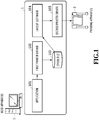
Fig. 1 is a configuration diagram of a print system used in the present embodiment. The print system according to the present embodiment includes ahost apparatus 1 and aprinting apparatus 2 on which a roll sheet can be mounted. Thehost apparatus 1 is a personal computer or the like, and on thehost apparatus 1, anapplication 101 capable of generating a printing target image, afirst printer driver 102,layout software 104, and asecond printer driver 105 are installed. - In a case where a user prints an image generated with the
application 101, the user selects one printer driver (the first printer driver 102) and provides instructions to print an image via the selected printer driver. Upon transmission of a print command, thefirst printer driver 102 generates pieces of intermediate data respectively corresponding to multiple pages based on image data generated with theapplication 101 and stores the pieces of data as aspool file 103. Incidentally, thefirst printer driver 102 is a virtual printer driver that does not actually provide print instructions to the printing apparatus in an example shown inFig. 1 . However, thefirst printer driver 102 is installed on thehost apparatus 1 as with a printer driver that actually controls a printing apparatus like thesecond printer driver 105 to be described later. Thus, even without issuing any special command or the like for the virtual printer driver, theapplication 101 provides print instructions as in a case of providing print instructions to thesecond printer driver 105. As a result, theapplication 101 issues a normal command to thereby provide print instructions to thefirst printer driver 102, so that the application can provide instructions to generate intermediate data and store the intermediate data (spool file 103). Thus, as theapplication 101, it is possible to use a general application capable of providing print instructions to a printer driver. - A storage region and a format of the
spool file 103 are not particularly limited as long as the file has a form that can be read and processed by thelayout software 104 to be described later. As the storage region, a Temp folder or AppData, for example, can be useful. Additionally, as the format, an XML paper specification (XPS), an enhanced metafile (EMF), and the like can be mentioned. - The
layout software 104 is software for laying out image data on each page to be printed on a roll sheet placed in theprinting apparatus 2. The user can check and change the layout of multiple pages to be printed on a sheet by using thelayout software 104. - Under the check and instructions made by the user, the
layout software 104 reads thespool file 103, displays each page image, and edits and sets the layout of each page. Thelayout software 104 then determines the page layout based on set information, generates image data corresponding to the page layout, and outputs the image data to thesecond printer driver 105. - The
layout software 104 may be activated at a timing that a print command is issued in thefirst printer driver 102 or at a timing that thespool file 103 is created. Additionally, thelayout software 104 may be activated by thefirst printer driver 102. - In addition, the
first printer driver 102 may be selected in an automatic manner, not by the user. For example, as plug-in software for theapplication 101, a module that activates thelayout software 104 may be incorporated. Additionally, upon pressing of a button provided by the module on a menu screen of theapplication 101, the module selects thefirst printer driver 102 in the background. Subsequently, the module causes theapplication 101 to output print data to thefirst printer driver 102. Further, the module may activate thelayout software 104, and theactivated layout software 104 may read out intermediate data from thespool file 103. - Alternatively, the user may perform operation (for example, operation for an OS) to activate the
layout software 104 and also perform operation for theactivated layout software 104, thereby loading printing target data generated with theapplication 101. Additionally, in response to the loading of the data, thelayout software 104 may output the data to thefirst printer driver 102 under the user's instructions or in an automatic manner. - The
second printer driver 105 performs predetermined image processing on the image data generated by thelayout software 104, that is, the image data that is in a state where each page is laid out. This generates print data that can be printed by a printing apparatus. The generated print data is transferred to theprinting apparatus 2, which then prints an image on a roll sheet in accordance with the received print data. -
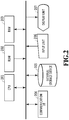
Fig. 2 is a block diagram for explaining the hardware configuration of thehost apparatus 1. In accordance with a program stored in aROM 202 or anexternal storage device 205, aCPU 201 uses aRAM 203 as a work area to control theentire host apparatus 1. - The
ROM 202 stores initialization programs to be executed by theCPU 201 in activation of thehost apparatus 1 and various types of data. TheRAM 203 is used as a main memory or a work area for theCPU 201. Theexternal storage device 205 includes a hard disk (HDD), for example, and stores theapplication 101, thefirst printer driver 102 and thesecond printer driver 105, thelayout software 104, and other various programs. These programs are loaded from theexternal storage device 205, stored in theRAM 203, and used by theCPU 201. The individual functions included in thehost apparatus 1 described with reference toFig. 1 are also achieved by theCPU 201 using theRAM 203 as a work area in accordance with the programs stored in theexternal storage device 205. - An
input unit 206 is a unit including a keyboard and a mouse, for example. The user inputs, via theinput unit 206, various commands and settings to theCPU 201. Adisplay unit 207 includes an LCD and a CRT, for example. Thedisplay unit 207 displays the states of the various commands and the settings to the user under the control of theCPU 201. A preview screen to be described later is for receiving, via theinput unit 206, instructions from the user who has checked the preview screen displayed on thedisplay unit 207 through theCPU 201. A communication interface (I/F) 204 performs information communication with various devices externally connected, such as theprinting apparatus 2, under the control of theCPU 201. -
Fig. 3 shows an example of a preview screen displayed by thelayout software 104 on the display unit 207 (seeFig. 1 ) in issuance of a command for page layout printing. Thelayout software 104 obtains thespool file 103, then lays out image data on each page to be printed in accordance with designated setting values or default setting values, and displays a preview screen as shown inFig. 3 . Subsequently, thelayout software 104 receives change instructions and print instructions from the user while displaying the current setting values on such a preview screen. - A
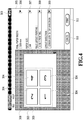
preview screen 300 includes adisplay region 301 on the left side and aninstruction region 305 on the right side. Thedisplay region 301 schematically shows the layout state of each page. Thedisplay region 301 shows aroll sheet region 302 representing a roll sheet to be used in theprinting apparatus 2, asheet region 303 which is within theroll sheet region 302 and in which pages are actually laid out, and apage region 304 corresponding to each of the regions of multiple pages. In this figure, a number shown in theindividual page region 304 indicates which page number the page corresponds to. - A page layout shown in the
display region 301 can be changed by using individual setting parts shown in theinstruction region 305. A roll paperwidth setting part 306 is a combo box for setting the width size of roll paper to be used by theprinting apparatus 2. Upon a click of the roll paperwidth setting part 306 by the user, the multiple width sizes of paper that can be placed in theprinting apparatus 2 are displayed in a list box, and the user can select, from these multiple width sizes, the width size of roll paper to be actually used in printing. In theprinting apparatus 2 according to the present embodiment, it is possible to place roll paper with a width of 250 mm and roll paper with a width of 500 mm.Fig. 3 shows a case where roll paper with a width of 250 mm is set. Incidentally, options for the width size of roll paper and information on the width size of roll paper actually placed at the current moment can be obtained by thesecond printer driver 105 using an API such as PrintCapabilities. - A paper
size setting part 307 is a combo box for setting the size of a region for collectively printing a predetermined number of pages (the above sheet region 303). Theprinting apparatus 2 according to the present embodiment is a relatively large printing apparatus having a roll sheet placed therein, and a roll sheet after printing is cut for eachsheet region 303. That is, products outputted by theprinting apparatus 2 are one or more sheets having a size set by the papersize setting part 307. Upon a click of the papersize setting part 307 by the user, multiple paper sizes including standard sizes such as A4 size and JIS-B4 size are displayed in a list box, and the user can select the desired size of paper to be outputted from these multiple sizes. Options displayed in the list box can be obtained by thesecond printer driver 105 using an API such as PrintCapabilities. - In the present embodiment, the
roll sheet region 302 is displayed so that the roll sheet conveying direction corresponds to the upward direction of the preview screen regardless of the size and type of roll paper, and then thesheet region 303 is set by default so that its orientation can be adjusted and changed depending on a combination of a roll paper width set by the roll paperwidth setting part 306 and a paper size set by the papersize setting part 307. - For example, in a case where the length of a paper size in the longitudinal direction (in a case of A4, a longitudinal length of 297 mm) is longer than the roll paper width (for example, 250 mm), the
sheet region 303 is displayed by default so that the longitudinal direction of the sheet region 303 (the longitudinal direction of A4) is identical to the roll sheet conveying direction as shown inFig. 3 . Meanwhile, in a case where the length of a paper size in the longitudinal direction (the longitudinal length of A4) is shorter than the roll paper width (500 mm), thesheet region 303 is displayed by default so that the longitudinal direction of the sheet region 303 (the longitudinal direction of A4) is identical to the width direction of the roll sheet as shown inFig. 4 . - That is, the
layout software 104 determines the printing direction of thesheet region 303 with respect to the roll sheet based on the roll paper width set by the roll paperwidth setting part 306 and the paper size set by the papersize setting part 307. In other words, the printing direction of each of the allocation target pages with respect to the roll sheet is automatically determined. Specifically, thelayout software 104 performs automatic switching as to whether or not thesheet region 303 is to be rotated 90 degrees with respect to the roll sheet depending on whether or not the longitudinal-direction length of the sheet region 303 (the longitudinal-direction length of the set paper size) is longer than the set roll paper width. Subsequently, the 90-degree rotation is reflected in theroll sheet region 302 of the print preview screen. - This aims to reduce the consumed amount of roll paper and the amount of waste roll paper after a cutting process to the smallest possible degree. As a matter of course, the above-described direction is a default, and the user can also make a change so that the longitudinal direction of the
sheet region 303 is identical to the conveying direction according to the user's preference. - A page layout
printing setting part 308 is a combo box for setting the number of pages to be allocated to thesheet region 303. Upon a click of the page layoutprinting setting part 308 by the user, the types of page layout printing, such as OFF (1-in-1 printing), 2-in-1 printing, 4-in-1 printing, 6-in-1 printing, and 9-in-1 printing, are displayed in a list box. The user can select one desired type from these multiple types of page layout printing. By setting the type of page layout printing, the number of pages to be allocated to thesheet region 303 and the size of each page are determined. In the present embodiment, at the time that the above-described roll paper width, paper size, and type of page layout printing are set, a layout direction default to be described below is determined, and a page layout based on the default is displayed.Fig. 3 shows a default preview screen in a case where 4-in-1 printing is selected in the page layoutprinting setting part 308. In thesheet region 303, four pages are uniformly subjected to size adjustment and then laid out. - A layout
direction setting part 309 is a combo box for setting a direction in which each ofmultiple page regions 304 is arranged in page order in thesheet region 303. The layoutdirection setting part 309 is enabled in a case where the setting of the page layoutprinting setting part 308 is a setting other than OFF (1-in-1 printing). Upon a click of the layoutdirection setting part 309 by the user, the following layout directions are displayed in a list box: a direction from upper left to right, a direction from upper left to bottom, a direction from upper right to left, a direction from upper right to bottom, a direction from lower left to right, a direction from lower left to top, a direction from lower right to left, and a direction from lower right to top. The user can select one desired direction from these multiple layout directions.Fig. 3 shows a case where "4-in-1 printing" is set in the page layoutprinting setting part 308 and the "direction from upper left to right" is set in the layoutdirection setting part 309. In thesheet region 303, first to fourth pages are laid out in the following order: the upper left, the upper right, the lower left, and the lower right. - Incidentally, for example, in a case where "2-in-1 printing" is set in the page layout
printing setting part 308, options displayed in the list box of the layoutdirection setting part 309 may be a direction from left to right, a direction from right to left, a direction from top to bottom, a direction from bottom to top, and the like. - A cancel
button 310 is set in theinstruction region 305 at the current moment and is a button for canceling a page layout shown in thedisplay region 301. Upon a click of the cancelbutton 310 by the user, individual items shown in theinstruction region 305 and the layout shown in thedisplay region 301 are canceled and reset to defaults. - A
print button 311 is set in theinstruction region 305 at the current moment and is a button for causing theprinting apparatus 2 to execute printing operation in accordance with the page layout shown in thedisplay region 301. Upon a click of theprint button 311 by the user, thesecond printer driver 105 generates print data, and in accordance with the generated print data, theprinting apparatus 2 executes printing operation. By this execution, an image of the page layout shown in thedisplay region 301 is outputted. -
Fig. 4 shows a different setting example of thesame preview screen 300 as inFig. 3 . As compared withFig. 3 , the setting content in the roll paperwidth setting part 306 is changed from 250 mm to 500 mm. In this case, the length of the paper size in the longitudinal direction (the longitudinal length of A4) is shorter than the roll paper width (500 mm), and thus, a page layout as shown inFig. 4 is displayed by default. - Here, the
display regions 301 inFigs. 3 and4 will be compared. In a case where the upward direction of eachpage region 304 is referred to as "the upward direction," first to fourth pages in bothFig. 3 andFig. 4 are laid out in thesheet region 303 in the following order: the upper left, the upper right, the lower left, and the lower right. That is, the arrangement positions of the pages are not changed in thesheet region 303 in either state ofFigs. 3 and4 . - However, on the print preview screen, the
entire sheet region 303 inFig. 4 is laid out so as to be rotated from the state inFig. 3 . Thus, on the print preview screen, the top, bottom, left, and right relationship of the arrangement positions among multiple pages is different between the states ofFigs. 3 and4 . For example, in a case where the upward direction of theactual preview screen 300 is referred to as "the upward direction," the above layout order is different between the cases ofFigs. 3 and4 . That is, inFig. 3 , the first to fourth pages are laid out in the following order: the upper left, the upper right, the lower left, and the lower right. Meanwhile, inFig. 4 , the first to fourth pages are laid out in the following order: the lower left, the upper left, the lower right, and the upper right. In other words, inFig. 3 , the first to fourth pages are laid out in the "direction from upper left to right," whereas inFig. 4 , the first to fourth pages are laid out in the "direction from lower left to top." - Assuming that a setting value is determined as a currently set layout direction based on page allocation positions in the
sheet region 303,Fig. 3 andFig. 4 both show the setting value "direction from upper left to right." However, assuming a case where the "direction from upper left to right" is set inFig. 4 , a relationship regarding page order and arrangement positions that is visually recognized by the user on thepreview screen 300 is the "direction from lower left to top" and thus, this direction is not identical to the setting value "direction from upper left to right." Therefore, there is a possibility that the user cannot appropriately recognize the setting content of the page allocation positions. That is, there is a possibility that the user cannot easily recognize how pages are laid out in a case of what settings being made. As a result, there is a possibility that in a case where the user changes the setting content, the user cannot appropriately recognize setting content for providing desired arrangement positions. - Thus, in the present embodiment, the currently set layout direction and layout directions listed in the list box of the layout
direction setting part 309 are displayed so as to be consistent with the vertical and horizontal directions of thepreview screen 300 visually seen by the user in actuality. That is, the layout direction in the case ofFig. 3 is displayed as the "direction from upper left to right," whereas the layout direction in the case ofFig. 4 is displayed as the "direction from lower left to top." -
Fig. 5 is a flowchart for explaining processing which is executed by thelayout software 104 according to the present embodiment and which is for determining the default display form of the layout direction on the preview screen. This processing is executed at the time that thelayout software 104 is activated or at the time that setting content displayed in theinstruction region 305 is changed. - Upon the start of the present processing, the
layout software 104 first obtains page shape information in S101. The page shape information is information indicating whether a page to be laid out in thesheet region 303 has a vertically long shape (portrait) or a horizontally long shape (landscape). Thelayout software 104 may use, as page shape information, the shape of the first page of multiple pages stored in thespool file 103 or may obtain the individual shapes of the multiple pages and then use, as page shape information, a vertically long shape or a horizontally long shape, whichever is larger in number. Incidentally, in a case where the page shape is a square, the page shape information may be set to either of the vertically long shape and the horizontally long shape. - In S102, the
layout software 104 obtains orientation information on thesheet region 303 in thedisplay region 301. The orientation information in the case ofFig. 3 is a portrait orientation, and the orientation information in the case ofFig. 4 is a landscape orientation. The orientation of thesheet region 303 as described above is set according to the setting content of the roll paperwidth setting part 306, the setting content of the papersize setting part 307, and the user's instructions. For example, thelayout software 104 compares a roll paper width indicated by a setting of the roll paperwidth setting part 306 with the transverse-direction length and longitudinal-direction length of a paper size indicated by a setting of the papersize setting part 307. Subsequently, in a case where the roll paper width is longer than the transverse-direction length of the paper size and shorter than the longitudinal-direction length of the paper size, it is determined that the orientation of thesheet region 303 is the "portrait orientation" (orientation shown inFig. 3 ). Additionally, in a case where the roll paper width is longer than the longitudinal-direction length of the paper size, it is determined that the orientation of thesheet region 303 is the "landscape orientation" (orientation shown inFig. 4 ). Incidentally, in a case where thesheet region 303 has a square shape, the orientation information on thesheet region 303 may be set to either of the portrait orientation and the landscape orientation. Additionally, in a case where the roll paper width is shorter than the transverse-direction length of the paper size, thelayout software 104 may display an error screen. Alternatively, to prevent such a setting from being made, settings of the roll paperwidth setting part 306 and the papersize setting part 307 may be controlled. - In S103, the
layout software 104 determines, in thesheet region 303 of the preview screen, whether the number of thepage regions 304 arranged in the longitudinal direction is identical to the number of thepage regions 304 arranged in the transverse direction or is not identical thereto. The number of the regions arranged in the longitudinal direction and the number of the regions arranged in the transverse direction are determined depending on a combination of the setting content of the papersize setting part 307 and the setting content of the page layoutprinting setting part 308. For example, in a case where "6-in-1 printing" is set in the page layoutprinting setting part 308, thepage regions 304 are laid out incolumn 3 ×row 2 orcolumn 2 ×row 3, and thus, it is determined in S103 that the numbers are "not identical." Additionally, for example, in a case where "4-in-1 printing" is set in the page layoutprinting setting part 308, the regions may be laid out incolumn 2 ×row 2 as shown inFigs. 3 and4 , but in a case where an elongate sheet is set in the papersize setting part 307, the regions may be laid out incolumn 1 ×row 4 orcolumn 4 ×row 1. In the former case, it is determined in S103 that the numbers are identical, and in the latter case, it is determined that the numbers are not identical. - In S104, the
layout software 104 determines the default display form of a layout direction as either the "direction from upper left to right" or the "direction from lower left to top" based on the information obtained in S101 to S103. -
Fig. 6 shows a correspondence between the default display form of a layout direction and the obtained information in S101 to S103, which is referred to by thelayout software 104 in S104 ofFig. 5 , and either the "direction from upper left to right" or the "direction from lower left to top" is determined in association with each of combinations of the page shape information obtained in S101, the sheet orientation information obtained in S102, and the information on identicalness/non-identicalness obtained in S103. - In the present embodiment, even in any combination of the pieces of information obtained in S101 to S103, the default layout is a layout in which individual pages are arranged in the "direction from upper left to right" in a state where the upward direction of the
page region 304 is identical to the upward direction of thesheet region 303. This is a normal layout direction in general page layout printing. -
Figs. 8A to 8D show layout examples ofpage regions 304 with respect to asheet region 303 in a case where three pieces of information described above are various pieces of information.Fig. 8A shows a page layout example in a case where the page shape information is a vertically long shape, the sheet orientation information is a portrait orientation, and the number of the regions arranged in the longitudinal direction is identical to the number of the regions arranged in the transverse direction.Fig. 8B shows a page layout example in a case where the page shape information is a horizontally long shape, the sheet orientation information is a landscape orientation, and the number of the regions arranged in the longitudinal direction is identical to the number of the regions arranged in the transverse direction.Fig. 8C shows a page layout example in a case where the page shape information is a vertically long shape, the sheet orientation information is a landscape orientation, and the number of the regions arranged in the longitudinal direction is not identical to the number of the regions arranged in the transverse direction.Fig. 8D shows a page layout example in a case where the page shape information is a horizontally long shape, the sheet orientation information is a portrait orientation, and the number of the regions arranged in the longitudinal direction is not identical to the number of the regions arranged in the transverse direction. Even in any case shown inFigs. 8A to 8D , the default in the present embodiment is a layout in which themultiple page regions 304 are arranged with respect to thesheet region 303 in page order in the "direction from upper left to right." - In addition, in a case where the upward direction of the
sheet region 303 is identical to the roll sheet conveying direction, a page layout is displayed in an orientation as shown inFigs. 8A to 8D also on the preview screen. Thus, the "layout direction" default is also set to the "direction from upper left to right." Meanwhile, in a case where the upward direction of thesheet region 303 is not identical to the roll sheet conveying direction, a page layout is displayed so that the upward direction of thesheet region 303 is identical to the left direction of the roll sheet, that is, in the orientation of a page layout inFigs. 8A to 8D rotated 90 degrees counterclockwise. Thus, the "layout direction" default is set to the "direction from lower left to top." That is, in the present embodiment, the layout direction default is determined based on the information obtained in S101 to S103 so as to be the "direction from upper left to right" in a case where the upward direction of thesheet region 303 is identical to the roll sheet conveying direction and so as to be the "direction from lower left to top" in a case where the directions are not identical. Through the above steps, processing for determining the default display form of a layout direction described usingFig. 5 is ended. - Subsequently, the above processing is performed each time the user changes the setting content of the roll paper
width setting part 306, the papersize setting part 307, and the page layoutprinting setting part 308. The default display form in the layoutdirection setting part 309 is then changed based on a new setting. - As described above, in the present embodiment, a layout direction indicated by the layout
direction setting part 309 is represented on a preview screen in a case of performing page layout printing so as to be consistent with the vertical and horizontal directions of the preview screen. This enables the user to correctly grasp and appropriately customize the page layout default in page layout printing. - In the above description, although an embodiment as an example has been described, the content of the above embodiment can be variously changed and applied as necessary.
- For example, a default in the above embodiment is a state where pages are laid out in page order in the direction from upper left to right with respect to the
sheet region 303 in line with general page layout printing, but the default layout direction is not limited to this. For example, another direction such as a direction from upper left to bottom with respect to thesheet region 303 may be a default. - Additionally, in S102 of
Fig. 5 , one piece of orientation information common to multiple pages stored as thespool file 103 is obtained, but the page orientation information may be set for eachsheet region 303. For example, four initial pages are each processed as a vertically long image as shown inFig. 8A and four subsequent pages are each processed as a horizontally long image as shown inFig. 8B ; that is, the orientation information may be changed for each sheet region. In this case, the layout direction is selected as "custom," and the layout direction may be set for each sheet region. - Additionally, as shown in
Figs. 3 and4 , a number is added to the inside of eachpage region 304 so that the page number and orientation can be understood for explanatory convenience, but on an actual preview screen, actual images stored in thespool file 103 are displayed. In this case, even on a preview screen displayed as shown inFigs. 3 and4 , it is difficult for the user to correctly grasp the orientation of each page and a correspondence between the representation of the layoutdirection setting part 309 and the page layout in thedisplay region 301. In such a case, by adding the page number of each page to eachpage region 304 according to the orientation of each page in the top-to-bottom direction as shown, for example, inFig. 7 , the user can correctly grasp a correspondence between the page numbers and the layout direction. Additionally, in place of the page numbers or in addition to the page numbers, an arrow representing page order (arrows provided for the sake of explanation inFigs. 8A to 8D ) may be displayed in thesheet region 303 on the preview screen. - Additionally, as with the "upward direction" in the case of
Fig. 3 and the "left direction" in the case ofFig. 4 , information on the "direction of each page" may be displayed in an instruction region. In this case, the information on the "direction of each page" is also information on a layout direction displayed in a state where the direction of each page is consistent with the vertical and horizontal directions of the preview screen, like the layout direction in the above embodiment. - In the embodiment described above, descriptions have been given on the premise that the printing apparatus performs printing on a roll sheet (continuous sheet), but the above embodiment is applicable also to a case where the printing apparatus performs printing on a cut sheet. For example, in a case where the orientation of the sheet region is set to a landscape orientation in a printing apparatus capable of conveying a standard cut sheet only in the longitudinal direction, the upward direction of the sheet region is not identical to the conveying direction. In such a case, the layout direction indicated by the layout direction setting part is made consistent with the vertical and horizontal directions of the preview screen, thereby enabling the user to correctly grasp the page layout default in page layout printing.
- Incidentally, in the above embodiment, descriptions have been given of a method for determining a page layout and a value that is being set in the layout
direction setting part 309 in a print preview in a case where thelayout software 104 is activated. However, the embodiment is not limited to this, and it is possible to determine a page layout in a print preview in a case where various settings are changed in accordance with instructions provided by the user in theinstruction region 305. Also in this case, as shown inFigs. 3 and4 , the relationship of arrangement positions among pages as indicated by the layoutdirection setting part 309 is made identical to the relationship of arrangement positions among pages in the print preview. As processing therefor, thelayout software 104 executes processing for determining page arrangement in a case where the user changes the setting content of any of the setting items of the roll paperwidth setting part 306, the papersize setting part 307, the page layoutprinting setting part 308, and the layoutdirection setting part 309. Specifically, thelayout software 104 determines, based on a combination of setting content in those setting items after change, the number of pages and the orientation, size, and arrangement position of each page region in the print preview and print data arranged in each page region. Subsequently, thelayout software 104 displays the print preview based on data that is an actual printing target in accordance with the determination. - Incidentally, as processing for determining the number of pages and the orientation, size, and arrangement position of each page in the print preview, first, processing as shown in S101 to S103 of
Fig. 5 is performed. Subsequently, based on the results and a setting in the layoutdirection setting part 309, the number of pages and the orientation, size, and arrangement position of each page region in the print preview are determined. Additionally, in accordance with a setting value in the layoutdirection setting part 309, printing target data to be arranged in each page region is determined. As such processing for determining the number of pages and the orientation, size, and arrangement position of each page in the print preview, it is possible to prepare a table showing the position, size, and orientation of each page region and data to be arranged in the page region that correspond to various settings. In this case, the table shows page layouts in the print preview that correspond to all combinations of setting values of multiple setting items. Additionally, regarding any of the page layouts, the table is prepared so that the relationship of arrangement positions among pages as indicated by the layoutdirection setting part 309 is identical to the relationship of arrangement positions among pages in the print preview. Incidentally, in the above embodiment, descriptions have been given of the content in which thelayout software 104 is activated by creation of thespool file 103 and thelayout software 104 uses thespool file 103 to prepare a preview screen, but the present invention is not limited to this. For example, in performing page layout printing, the user may activate the layout software and then provide, to the layout software, image data such as a bitmap or TIFF prepared preliminarily. In this case, the layout software uses the image data such as a bitmap or TIFF provided by the user to prepare a preview screen, and creation of a spool file as intermediate data is not an essential requisite. - In the above embodiment, the
second printer driver 105 can be set by various methods. For example, a field for setting the second printer driver may be added to the preview screens shown inFigs. 3 and4 , or the embodiment may be designed so as to enable the second printer driver to be set on a UI screen of thefirst printer driver 102. Additionally, inFig. 1 , thefirst printer driver 102 and thesecond printer driver 105 have been described as distinct printer drivers having different functions, but these can also be the same printer drivers each of which can achieve two functions. In this case, setting thesecond printer driver 105 is not needed. - Additionally, in the above embodiment, the setting content of each of various setting items is displayed as the
instruction region 305 within the print preview screen. However, the embodiment is not limited to this, and it is also possible to display the setting content of each of the setting items on another setting screen not shown. - The object of the present invention can be achieved also by preparing a storage medium storing software program code that achieves the functions of the embodiments described above. That is, the program code stored in the storage medium is provided to a system or apparatus, and the computer (or CPU or MPU) of the system or apparatus reads out and executes the program code stored in the storage medium, thereby achieving the object. In this case, the program code read out from the storage medium achieves the functions of the embodiments described above, and the storage medium storing the program code constitutes the present invention.
- As a storage medium for providing program code, it is possible to use, for example, a flexible disk, a hard disk, an optical disk, a magnetic optical disc, a CD-ROM, a CD-R, magnetic tape, a nonvolatile memory card, a ROM, and a DVD. The invention also includes a case where on the basis of the instructions of the program code read out by the computer, an operating system or the like that runs on the computer performs part or the whole of actual processing and the functions of the embodiments described above are achieved by the processing.
- It is also possible to interpose a step in which the program code read out from the storage medium is written onto a memory included in a function expansion board inserted into the computer or a function expansion unit connected to the computer. In this case, based on the instructions of the program code, a CPU or the like included in the function expansion board or function expansion unit performs part or the whole of actual processing, and the functions of the embodiments described above are achieved by the processing.
- Embodiment of the present invention can also be realized by a computer of a system or apparatus that reads out and executes computer executable instructions (e.g., one or more programs) recorded on a storage medium (which may also be referred to more fully as a 'non-transitory computer-readable storage medium') to perform the functions of one or more of the above-described embodiment(s) and/or that includes one or more circuits (e.g., application specific integrated circuit (ASIC)) for performing the functions of one or more of the above-described embodiment(s), and by a method performed by the computer of the system or apparatus by, for example, reading out and executing the computer executable instructions from the storage medium to perform the functions of one or more of the above-described embodiment(s) and/or controlling the one or more circuits to perform the functions of one or more of the above-described embodiment(s). The computer may comprise one or more processors (e.g., central processing unit (CPU), micro processing unit (MPU)) and may include a network of separate computers or separate processors to read out and execute the computer executable instructions. The computer executable instructions may be provided to the computer, for example, from a network or the storage medium. The storage medium may include, for example, one or more of a hard disk, a random-access memory (RAM), a read only memory (ROM), a storage of distributed computing systems, an optical disk (such as a compact disc (CD), digital versatile disc (DVD), or Blu-ray Disc (BD)™), a flash memory device, a memory card, and the like.
- While the present invention has been described with reference to exemplary embodiments, it is to be understood that the invention is not limited to the disclosed exemplary embodiments. The scope of the following claims is to be accorded the broadest interpretation so as to encompass all such modifications and equivalent structures and functions.
Claims (19)
- A program for causing one or more computer to function as each unit of a control apparatus (1), the control apparatus (1) comprising:a display unit configured to display, on a display device (207), a print preview showing a print medium (302) on which a sheet region (303) corresponding to a predetermined paper size is provided;a first changing unit configured to change, based on a setting in a first setting item being changed, an orientation of the sheet region (303) with respect to a predetermined direction of the print medium (302) in the print preview displayed by the display unit; anda second changing unit configured to change, in a case where multiple pages (304) are arranged in the sheet region (303), a positional relationship among the multiple pages (304) on the print medium (302) shown by the print preview based on a setting in a second setting item (306-309) being changed by a user,
characterized in thatorientations of the multiple pages (304) and the positional relationship among the multiple pages (304) on the print medium (302) and the setting in the second setting item (306-309) are changed based on the change, by the first changing unit, of the orientation of the sheet region (303) having the multiple pages (304) arranged therein with respect to the predetermined direction of the print medium (302). - The program according to claim 1, wherein
the display unit displays, among multiple display items representing setting content of the second setting item, a display item corresponding to setting content in the second setting item, and
the setting content in the second setting item is changed based on the change by the first changing unit, and a display item corresponding to setting content of the second setting item after the change is displayed by the display unit. - The program according to claim 1 or 2, wherein
the display unit displays a display item including text representing arrangement order of the multiple pages in the print preview. - The program according to any one of claims 1 to 3, wherein
the first setting item is a setting item relating to a size of the sheet region. - The program according to any one of claims 1 to 3, wherein
the first setting item is a setting item relating to a size of the print medium. - The program according to any one of claims 1 to 3, wherein
the print medium is roll paper, and
the first setting item is a setting item relating to a width of the roll paper. - The program according to any one of claims 1 to 6, wherein
the setting in the second setting item is changed based further on a change of at least one of the number of the multiple pages included in the sheet region and the orientation of each of the multiple pages with respect to the sheet region. - The program according to any one of claims 1 to 7, wherein
the display unit performs displaying so that the predetermined direction is a predetermined conveying direction of the print medium. - The program according to any one of claims 1 to 8, wherein
the display unit displays a print preview in which a page number is added to each of the multiple pages. - A control method compri sing:a display step of displaying, on a display device (207), a print preview showing a print medium (302) on which a sheet region (303) corresponding to a predetermined paper size is provided;a first changing step of changing, based on a setting in a first setting item being changed, an orientation of the sheet region (303) with respect to a predetermined direction of the print medium (302) in the print preview displayed by the display step; anda second changing step of changing, in a case where multiple pages (304) are arranged in the sheet region (303), a positional relationship among the multiple pages (304) on the print medium (302) shown by the print preview based on a setting in a second setting item (306-309) being changed by a user,
characterized in thatorientations of the multiple pages (304) and the positional relationship among the multiple pages (304) on the print medium (302) and the setting in the second setting item (308-309) are changed based on the change, by the first changing step, of the orientation of the sheet region (303) having the multiple pages (304) arranged therein with respect to the predetermined direction of the print medium (302). - The control method according to claim 10, wherein
in the display step, among multiple display items representing setting content of the second setting item, a display item corresponding to setting content in the second setting item is displayed, and
the setting content in the second setting item is changed based on the change by the first changing step, and a display item corresponding to setting content of the second setting item after the change is displayed by the display step. - The control method according to claim 10, or 11 wherein
in the display step, a display item including text representing arrangement order of the multiple pages in the print preview is displayed. - The control method according to any one of claims 10 to 12, wherein
the first setting item is a setting item relating to a size of the sheet region. - The control method according to any one of claims 10 to 12, wherein
the first setting item is a setting item relating to a size of the print medium. - The control method according to any one of claims 10 to 12, wherein
the print medium is roll paper, and
the first setting item is a setting item relating to a width of the roll paper. - The control method according to any one of claims 10 to 15, wherein
the setting in the second setting item is changed based further on a change of at least one of the number of the multiple pages included in the sheet region and the orientation of each of the multiple pages with respect to the sheet region. - The control method according to any one of claims 10 to 16, wherein
in the display step, the predetermined direction is a predetermined conveying direction of the print medium. - The control method according to any one of claims 10 to 17, wherein
in the display step, a print preview in which a page number is added to each of the multiple pages is displayed. - A control apparatus (1) comprising:a display unit configured to display, on a display device (207), a print preview showing a print medium (302) on which a sheet region (303) corresponding to a predetermined paper size is provided;a first changing unit configured to change, based on a setting in a first setting item being changed, an orientation of the sheet region (303) with respect to a predetermined direction of the print medium (302) in the print preview displayed by the display unit; anda second changing unit configured to change, in a case where multiple pages (304) are arranged in the sheet region (303), a positional relationship among the multiple pages (304) on the print medium (302) shown by the print preview based on a setting in a second setting item (306-309) being changed by a user,
characterized in thatorientations of the multiple pages (304) and the positional relationship among the multiple pages (304) on the print medium (302) and the setting in the second setting item (306-309) are changed based on the change, by the first changing unit, of the orientation of the sheet region (303) having the multiple pages (304) arranged therein with respect to the predetermined direction of the print medium (302).
Applications Claiming Priority (1)
| Application Number | Priority Date | Filing Date | Title |
|---|---|---|---|
| JP2019121706A JP7301630B2 (en) | 2019-06-28 | 2019-06-28 | Program, control device and control method |
Publications (2)
| Publication Number | Publication Date |
|---|---|
| EP3757751A1 true EP3757751A1 (en) | 2020-12-30 |
| EP3757751B1 EP3757751B1 (en) | 2023-08-09 |
Family
ID=71094195
Family Applications (1)
| Application Number | Title | Priority Date | Filing Date |
|---|---|---|---|
| EP20179741.2A Active EP3757751B1 (en) | 2019-06-28 | 2020-06-12 | Program, control method, and control apparatus |
Country Status (4)
| Country | Link |
|---|---|
| US (1) | US11461063B2 (en) |
| EP (1) | EP3757751B1 (en) |
| JP (1) | JP7301630B2 (en) |
| CN (1) | CN112148237B (en) |
Families Citing this family (4)
| Publication number | Priority date | Publication date | Assignee | Title |
|---|---|---|---|---|
| EP3869321B1 (en) * | 2020-02-20 | 2026-04-15 | Canon Production Printing Holding B.V. | Flatbed printer and a method of media-relative image positioning for the flatbed printer |
| US11709640B2 (en) | 2021-05-25 | 2023-07-25 | Toshiba Tec Kabushiki Kaisha | Method and system for managing pages of documents on a multi-function printer |
| JP7731630B2 (en) | 2021-07-07 | 2025-09-01 | キヤノン株式会社 | Image processing device, image processing method, and program |
| WO2025244828A1 (en) * | 2024-05-23 | 2025-11-27 | Eastman Kodak Company | Printing data layout method |
Citations (2)
| Publication number | Priority date | Publication date | Assignee | Title |
|---|---|---|---|---|
| JPH05185687A (en) | 1992-01-13 | 1993-07-27 | Nec Off Syst Ltd | Document creation device |
| JP2006202112A (en) * | 2005-01-21 | 2006-08-03 | Canon Inc | Information processing apparatus, control method therefor, storage medium, and program |
Family Cites Families (15)
| Publication number | Priority date | Publication date | Assignee | Title |
|---|---|---|---|---|
| JPH11314422A (en) * | 1998-05-06 | 1999-11-16 | Seiko Epson Corp | Print control method and apparatus, recording medium |
| JP2004070868A (en) * | 2002-08-09 | 2004-03-04 | Seiko Epson Corp | Image data transmission device and image data transmission / reception system |
| US7463370B2 (en) * | 2002-10-01 | 2008-12-09 | Seiko Epson Corporation | Recording apparatus |
| JP2005084898A (en) * | 2003-09-08 | 2005-03-31 | Brother Ind Ltd | Print data processing system and program for the system |
| JP2007152801A (en) * | 2005-12-06 | 2007-06-21 | Ricoh Co Ltd | PRINT DATA PROCESSING DEVICE, PRINTING DEVICE, PRINTING SYSTEM, ITS PROGRAM, AND RECORDING MEDIUM RECORDING THE PROGRAM |
| JP4475672B2 (en) | 2006-02-15 | 2010-06-09 | キヤノン株式会社 | Host device and image editing method |
| JP4891216B2 (en) * | 2007-12-27 | 2012-03-07 | キヤノン株式会社 | Recording system, recording apparatus, and recording system preview method |
| JP5398584B2 (en) * | 2010-02-26 | 2014-01-29 | キヤノン株式会社 | Printing control apparatus, method and program |
| JP5161280B2 (en) * | 2010-09-27 | 2013-03-13 | シャープ株式会社 | Image display operation device and image forming apparatus having the same |
| JP5921111B2 (en) * | 2011-08-16 | 2016-05-24 | キヤノン株式会社 | Printing control apparatus, printing method, and program |
| JP6738219B2 (en) * | 2016-06-30 | 2020-08-12 | シャープ株式会社 | Preview screen display device, preview screen display method, and preview screen display program |
| JP6769255B2 (en) * | 2016-11-18 | 2020-10-14 | セイコーエプソン株式会社 | Printing device and control method of printing device |
| JP2018126891A (en) * | 2017-02-07 | 2018-08-16 | コニカミノルタ株式会社 | Image processing device, image formation device, program for controlling image processing device and program for controlling image formation device |
| JP2019012418A (en) * | 2017-06-30 | 2019-01-24 | 株式会社沖データ | Print control apparatus, print control method, print control program, and image forming system |
| JP6977661B2 (en) * | 2018-05-14 | 2021-12-08 | コニカミノルタ株式会社 | Print control device, print control program and print control method |
-
2019
- 2019-06-28 JP JP2019121706A patent/JP7301630B2/en active Active
-
2020
- 2020-06-04 US US16/892,432 patent/US11461063B2/en active Active
- 2020-06-12 EP EP20179741.2A patent/EP3757751B1/en active Active
- 2020-06-28 CN CN202010599462.5A patent/CN112148237B/en active Active
Patent Citations (2)
| Publication number | Priority date | Publication date | Assignee | Title |
|---|---|---|---|---|
| JPH05185687A (en) | 1992-01-13 | 1993-07-27 | Nec Off Syst Ltd | Document creation device |
| JP2006202112A (en) * | 2005-01-21 | 2006-08-03 | Canon Inc | Information processing apparatus, control method therefor, storage medium, and program |
Also Published As
| Publication number | Publication date |
|---|---|
| US11461063B2 (en) | 2022-10-04 |
| EP3757751B1 (en) | 2023-08-09 |
| US20200409637A1 (en) | 2020-12-31 |
| CN112148237A (en) | 2020-12-29 |
| JP7301630B2 (en) | 2023-07-03 |
| JP2021010061A (en) | 2021-01-28 |
| CN112148237B (en) | 2024-04-12 |
Similar Documents
| Publication | Publication Date | Title |
|---|---|---|
| EP3757751B1 (en) | Program, control method, and control apparatus | |
| US11157221B2 (en) | Control apparatus, control method, and storage medium for displaying a preview screen | |
| US20230078388A1 (en) | Information processing apparatus, controlling method of information processing apparatus, and storage medium | |
| US11064082B2 (en) | Method of controlling image processing apparatus | |
| US12153834B2 (en) | Non-transitory storage medium storing supporting program for printing program of operation system executable by computer of information processing apparatus | |
| US12039207B2 (en) | Information processing apparatus, method of controlling information processing apparatus, and storage medium for processing flow of manual double-sided printing function | |
| JP2019205096A (en) | Control unit, control method, and program | |
| US20150169271A1 (en) | Information processing apparatus and sheet size setting method | |
| US10795617B2 (en) | Information processing apparatus and control method | |
| US11336784B2 (en) | Information processing apparatus and control method | |
| US11675556B2 (en) | Apparatus for processing setting for punching rows of holes in sheet, method therefor and storage medium | |
| US20140153045A1 (en) | Information processing apparatus, data editing method, and computer program product | |
| US20220137901A1 (en) | Information processing apparatus and method of controlling same | |
| US10346110B2 (en) | Information processing apparatus, method and storage medium performing prohibition processing for print settings | |
| WO2004021164A1 (en) | Printing controller, printing control method, printing control program, medium on which printing control program is recorded, image processor, and image processing computer | |
| US11140287B2 (en) | Information processing apparatus, control method, and storage medium | |
| US11822839B2 (en) | Storage medium, image processing apparatus, and control method | |
| JP2015130072A (en) | Information processing apparatus, print control method, and program | |
| US11775229B2 (en) | Information processing apparatus, information processing method, and storage medium to set a layout pattern for a perforation process on paper | |
| US12554511B2 (en) | Storage medium, information processing method, and information processing apparatus | |
| US12155807B2 (en) | Information processing method, information processing apparatus, and storage medium | |
| US20260064327A1 (en) | Storage medium and control method of information processing apparatus | |
| US20240354131A1 (en) | Information processing apparatus and storage medium |
Legal Events
| Date | Code | Title | Description |
|---|---|---|---|
| PUAI | Public reference made under article 153(3) epc to a published international application that has entered the european phase |
Free format text: ORIGINAL CODE: 0009012 |
|
| STAA | Information on the status of an ep patent application or granted ep patent |
Free format text: STATUS: THE APPLICATION HAS BEEN PUBLISHED |
|
| AK | Designated contracting states |
Kind code of ref document: A1 Designated state(s): AL AT BE BG CH CY CZ DE DK EE ES FI FR GB GR HR HU IE IS IT LI LT LU LV MC MK MT NL NO PL PT RO RS SE SI SK SM TR |
|
| AX | Request for extension of the european patent |
Extension state: BA ME |
|
| STAA | Information on the status of an ep patent application or granted ep patent |
Free format text: STATUS: REQUEST FOR EXAMINATION WAS MADE |
|
| 17P | Request for examination filed |
Effective date: 20210630 |
|
| RBV | Designated contracting states (corrected) |
Designated state(s): AL AT BE BG CH CY CZ DE DK EE ES FI FR GB GR HR HU IE IS IT LI LT LU LV MC MK MT NL NO PL PT RO RS SE SI SK SM TR |
|
| GRAP | Despatch of communication of intention to grant a patent |
Free format text: ORIGINAL CODE: EPIDOSNIGR1 |
|
| STAA | Information on the status of an ep patent application or granted ep patent |
Free format text: STATUS: GRANT OF PATENT IS INTENDED |
|
| RIC1 | Information provided on ipc code assigned before grant |
Ipc: G06F 3/12 20060101AFI20221221BHEP |
|
| INTG | Intention to grant announced |
Effective date: 20230111 |
|
| GRAS | Grant fee paid |
Free format text: ORIGINAL CODE: EPIDOSNIGR3 |
|
| GRAA | (expected) grant |
Free format text: ORIGINAL CODE: 0009210 |
|
| STAA | Information on the status of an ep patent application or granted ep patent |
Free format text: STATUS: THE PATENT HAS BEEN GRANTED |
|
| AK | Designated contracting states |
Kind code of ref document: B1 Designated state(s): AL AT BE BG CH CY CZ DE DK EE ES FI FR GB GR HR HU IE IS IT LI LT LU LV MC MK MT NL NO PL PT RO RS SE SI SK SM TR |
|
| REG | Reference to a national code |
Ref country code: GB Ref legal event code: FG4D |
|
| REG | Reference to a national code |
Ref country code: CH Ref legal event code: EP |
|
| REG | Reference to a national code |
Ref country code: IE Ref legal event code: FG4D |
|
| REG | Reference to a national code |
Ref country code: DE Ref legal event code: R096 Ref document number: 602020015267 Country of ref document: DE |
|
| REG | Reference to a national code |
Ref country code: LT Ref legal event code: MG9D |
|
| REG | Reference to a national code |
Ref country code: NL Ref legal event code: MP Effective date: 20230809 |
|
| REG | Reference to a national code |
Ref country code: AT Ref legal event code: MK05 Ref document number: 1598284 Country of ref document: AT Kind code of ref document: T Effective date: 20230809 |
|
| PG25 | Lapsed in a contracting state [announced via postgrant information from national office to epo] |
Ref country code: GR Free format text: LAPSE BECAUSE OF FAILURE TO SUBMIT A TRANSLATION OF THE DESCRIPTION OR TO PAY THE FEE WITHIN THE PRESCRIBED TIME-LIMIT Effective date: 20231110 |
|
| PG25 | Lapsed in a contracting state [announced via postgrant information from national office to epo] |
Ref country code: IS Free format text: LAPSE BECAUSE OF FAILURE TO SUBMIT A TRANSLATION OF THE DESCRIPTION OR TO PAY THE FEE WITHIN THE PRESCRIBED TIME-LIMIT Effective date: 20231209 |
|
| PG25 | Lapsed in a contracting state [announced via postgrant information from national office to epo] |
Ref country code: SE Free format text: LAPSE BECAUSE OF FAILURE TO SUBMIT A TRANSLATION OF THE DESCRIPTION OR TO PAY THE FEE WITHIN THE PRESCRIBED TIME-LIMIT Effective date: 20230809 Ref country code: RS Free format text: LAPSE BECAUSE OF FAILURE TO SUBMIT A TRANSLATION OF THE DESCRIPTION OR TO PAY THE FEE WITHIN THE PRESCRIBED TIME-LIMIT Effective date: 20230809 Ref country code: PT Free format text: LAPSE BECAUSE OF FAILURE TO SUBMIT A TRANSLATION OF THE DESCRIPTION OR TO PAY THE FEE WITHIN THE PRESCRIBED TIME-LIMIT Effective date: 20231211 Ref country code: NO Free format text: LAPSE BECAUSE OF FAILURE TO SUBMIT A TRANSLATION OF THE DESCRIPTION OR TO PAY THE FEE WITHIN THE PRESCRIBED TIME-LIMIT Effective date: 20231109 Ref country code: NL Free format text: LAPSE BECAUSE OF FAILURE TO SUBMIT A TRANSLATION OF THE DESCRIPTION OR TO PAY THE FEE WITHIN THE PRESCRIBED TIME-LIMIT Effective date: 20230809 Ref country code: LV Free format text: LAPSE BECAUSE OF FAILURE TO SUBMIT A TRANSLATION OF THE DESCRIPTION OR TO PAY THE FEE WITHIN THE PRESCRIBED TIME-LIMIT Effective date: 20230809 Ref country code: LT Free format text: LAPSE BECAUSE OF FAILURE TO SUBMIT A TRANSLATION OF THE DESCRIPTION OR TO PAY THE FEE WITHIN THE PRESCRIBED TIME-LIMIT Effective date: 20230809 Ref country code: IS Free format text: LAPSE BECAUSE OF FAILURE TO SUBMIT A TRANSLATION OF THE DESCRIPTION OR TO PAY THE FEE WITHIN THE PRESCRIBED TIME-LIMIT Effective date: 20231209 Ref country code: HR Free format text: LAPSE BECAUSE OF FAILURE TO SUBMIT A TRANSLATION OF THE DESCRIPTION OR TO PAY THE FEE WITHIN THE PRESCRIBED TIME-LIMIT Effective date: 20230809 Ref country code: GR Free format text: LAPSE BECAUSE OF FAILURE TO SUBMIT A TRANSLATION OF THE DESCRIPTION OR TO PAY THE FEE WITHIN THE PRESCRIBED TIME-LIMIT Effective date: 20231110 Ref country code: FI Free format text: LAPSE BECAUSE OF FAILURE TO SUBMIT A TRANSLATION OF THE DESCRIPTION OR TO PAY THE FEE WITHIN THE PRESCRIBED TIME-LIMIT Effective date: 20230809 Ref country code: AT Free format text: LAPSE BECAUSE OF FAILURE TO SUBMIT A TRANSLATION OF THE DESCRIPTION OR TO PAY THE FEE WITHIN THE PRESCRIBED TIME-LIMIT Effective date: 20230809 |
|
| PG25 | Lapsed in a contracting state [announced via postgrant information from national office to epo] |
Ref country code: PL Free format text: LAPSE BECAUSE OF FAILURE TO SUBMIT A TRANSLATION OF THE DESCRIPTION OR TO PAY THE FEE WITHIN THE PRESCRIBED TIME-LIMIT Effective date: 20230809 |
|
| PG25 | Lapsed in a contracting state [announced via postgrant information from national office to epo] |
Ref country code: ES Free format text: LAPSE BECAUSE OF FAILURE TO SUBMIT A TRANSLATION OF THE DESCRIPTION OR TO PAY THE FEE WITHIN THE PRESCRIBED TIME-LIMIT Effective date: 20230809 |
|
| PG25 | Lapsed in a contracting state [announced via postgrant information from national office to epo] |
Ref country code: SM Free format text: LAPSE BECAUSE OF FAILURE TO SUBMIT A TRANSLATION OF THE DESCRIPTION OR TO PAY THE FEE WITHIN THE PRESCRIBED TIME-LIMIT Effective date: 20230809 Ref country code: RO Free format text: LAPSE BECAUSE OF FAILURE TO SUBMIT A TRANSLATION OF THE DESCRIPTION OR TO PAY THE FEE WITHIN THE PRESCRIBED TIME-LIMIT Effective date: 20230809 Ref country code: ES Free format text: LAPSE BECAUSE OF FAILURE TO SUBMIT A TRANSLATION OF THE DESCRIPTION OR TO PAY THE FEE WITHIN THE PRESCRIBED TIME-LIMIT Effective date: 20230809 Ref country code: EE Free format text: LAPSE BECAUSE OF FAILURE TO SUBMIT A TRANSLATION OF THE DESCRIPTION OR TO PAY THE FEE WITHIN THE PRESCRIBED TIME-LIMIT Effective date: 20230809 Ref country code: DK Free format text: LAPSE BECAUSE OF FAILURE TO SUBMIT A TRANSLATION OF THE DESCRIPTION OR TO PAY THE FEE WITHIN THE PRESCRIBED TIME-LIMIT Effective date: 20230809 Ref country code: CZ Free format text: LAPSE BECAUSE OF FAILURE TO SUBMIT A TRANSLATION OF THE DESCRIPTION OR TO PAY THE FEE WITHIN THE PRESCRIBED TIME-LIMIT Effective date: 20230809 Ref country code: SK Free format text: LAPSE BECAUSE OF FAILURE TO SUBMIT A TRANSLATION OF THE DESCRIPTION OR TO PAY THE FEE WITHIN THE PRESCRIBED TIME-LIMIT Effective date: 20230809 |
|
| REG | Reference to a national code |
Ref country code: DE Ref legal event code: R097 Ref document number: 602020015267 Country of ref document: DE |
|
| PG25 | Lapsed in a contracting state [announced via postgrant information from national office to epo] |
Ref country code: IT Free format text: LAPSE BECAUSE OF FAILURE TO SUBMIT A TRANSLATION OF THE DESCRIPTION OR TO PAY THE FEE WITHIN THE PRESCRIBED TIME-LIMIT Effective date: 20230809 |
|
| PLBE | No opposition filed within time limit |
Free format text: ORIGINAL CODE: 0009261 |
|
| STAA | Information on the status of an ep patent application or granted ep patent |
Free format text: STATUS: NO OPPOSITION FILED WITHIN TIME LIMIT |
|
| 26N | No opposition filed |
Effective date: 20240513 |
|
| PG25 | Lapsed in a contracting state [announced via postgrant information from national office to epo] |
Ref country code: SI Free format text: LAPSE BECAUSE OF FAILURE TO SUBMIT A TRANSLATION OF THE DESCRIPTION OR TO PAY THE FEE WITHIN THE PRESCRIBED TIME-LIMIT Effective date: 20230809 |
|
| PG25 | Lapsed in a contracting state [announced via postgrant information from national office to epo] |
Ref country code: BG Free format text: LAPSE BECAUSE OF FAILURE TO SUBMIT A TRANSLATION OF THE DESCRIPTION OR TO PAY THE FEE WITHIN THE PRESCRIBED TIME-LIMIT Effective date: 20230809 |
|
| PG25 | Lapsed in a contracting state [announced via postgrant information from national office to epo] |
Ref country code: BG Free format text: LAPSE BECAUSE OF FAILURE TO SUBMIT A TRANSLATION OF THE DESCRIPTION OR TO PAY THE FEE WITHIN THE PRESCRIBED TIME-LIMIT Effective date: 20230809 |
|
| PG25 | Lapsed in a contracting state [announced via postgrant information from national office to epo] |
Ref country code: MC Free format text: LAPSE BECAUSE OF FAILURE TO SUBMIT A TRANSLATION OF THE DESCRIPTION OR TO PAY THE FEE WITHIN THE PRESCRIBED TIME-LIMIT Effective date: 20230809 |
|
| REG | Reference to a national code |
Ref country code: CH Ref legal event code: PL |
|
| PG25 | Lapsed in a contracting state [announced via postgrant information from national office to epo] |
Ref country code: LU Free format text: LAPSE BECAUSE OF NON-PAYMENT OF DUE FEES Effective date: 20240612 |
|
| GBPC | Gb: european patent ceased through non-payment of renewal fee |
Effective date: 20240612 |
|
| PG25 | Lapsed in a contracting state [announced via postgrant information from national office to epo] |
Ref country code: IE Free format text: LAPSE BECAUSE OF NON-PAYMENT OF DUE FEES Effective date: 20240612 |
|
| PG25 | Lapsed in a contracting state [announced via postgrant information from national office to epo] |
Ref country code: CH Free format text: LAPSE BECAUSE OF NON-PAYMENT OF DUE FEES Effective date: 20240630 Ref country code: BE Free format text: LAPSE BECAUSE OF NON-PAYMENT OF DUE FEES Effective date: 20240630 |
|
| PG25 | Lapsed in a contracting state [announced via postgrant information from national office to epo] |
Ref country code: FR Free format text: LAPSE BECAUSE OF NON-PAYMENT OF DUE FEES Effective date: 20240630 |
|
| PG25 | Lapsed in a contracting state [announced via postgrant information from national office to epo] |
Ref country code: GB Free format text: LAPSE BECAUSE OF NON-PAYMENT OF DUE FEES Effective date: 20240612 |
|
| REG | Reference to a national code |
Ref country code: BE Ref legal event code: MM Effective date: 20240630 |
|
| PGFP | Annual fee paid to national office [announced via postgrant information from national office to epo] |
Ref country code: DE Payment date: 20250520 Year of fee payment: 6 |
|
| PG25 | Lapsed in a contracting state [announced via postgrant information from national office to epo] |
Ref country code: CY Free format text: LAPSE BECAUSE OF FAILURE TO SUBMIT A TRANSLATION OF THE DESCRIPTION OR TO PAY THE FEE WITHIN THE PRESCRIBED TIME-LIMIT; INVALID AB INITIO Effective date: 20200612 |
|
| PG25 | Lapsed in a contracting state [announced via postgrant information from national office to epo] |
Ref country code: HU Free format text: LAPSE BECAUSE OF FAILURE TO SUBMIT A TRANSLATION OF THE DESCRIPTION OR TO PAY THE FEE WITHIN THE PRESCRIBED TIME-LIMIT; INVALID AB INITIO Effective date: 20200612 |