EP3709138A1 - Character input device, character input method, and character input program - Google Patents
Character input device, character input method, and character input program Download PDFInfo
- Publication number
- EP3709138A1 EP3709138A1 EP20156551.2A EP20156551A EP3709138A1 EP 3709138 A1 EP3709138 A1 EP 3709138A1 EP 20156551 A EP20156551 A EP 20156551A EP 3709138 A1 EP3709138 A1 EP 3709138A1
- Authority
- EP
- European Patent Office
- Prior art keywords
- suggestion
- divisional
- display area
- suggestion display
- management unit
- Prior art date
- Legal status (The legal status is an assumption and is not a legal conclusion. Google has not performed a legal analysis and makes no representation as to the accuracy of the status listed.)
- Granted
Links
Images





Classifications
-
- G—PHYSICS
- G06—COMPUTING OR CALCULATING; COUNTING
- G06F—ELECTRIC DIGITAL DATA PROCESSING
- G06F3/00—Input arrangements for transferring data to be processed into a form capable of being handled by the computer; Output arrangements for transferring data from processing unit to output unit, e.g. interface arrangements
- G06F3/01—Input arrangements or combined input and output arrangements for interaction between user and computer
- G06F3/048—Interaction techniques based on graphical user interfaces [GUI]
- G06F3/0487—Interaction techniques based on graphical user interfaces [GUI] using specific features provided by the input device, e.g. functions controlled by the rotation of a mouse with dual sensing arrangements, or of the nature of the input device, e.g. tap gestures based on pressure sensed by a digitiser
- G06F3/0488—Interaction techniques based on graphical user interfaces [GUI] using specific features provided by the input device, e.g. functions controlled by the rotation of a mouse with dual sensing arrangements, or of the nature of the input device, e.g. tap gestures based on pressure sensed by a digitiser using a touch-screen or digitiser, e.g. input of commands through traced gestures
- G06F3/04886—Interaction techniques based on graphical user interfaces [GUI] using specific features provided by the input device, e.g. functions controlled by the rotation of a mouse with dual sensing arrangements, or of the nature of the input device, e.g. tap gestures based on pressure sensed by a digitiser using a touch-screen or digitiser, e.g. input of commands through traced gestures by partitioning the display area of the touch-screen or the surface of the digitising tablet into independently controllable areas, e.g. virtual keyboards or menus
-
- G—PHYSICS
- G06—COMPUTING OR CALCULATING; COUNTING
- G06F—ELECTRIC DIGITAL DATA PROCESSING
- G06F3/00—Input arrangements for transferring data to be processed into a form capable of being handled by the computer; Output arrangements for transferring data from processing unit to output unit, e.g. interface arrangements
- G06F3/01—Input arrangements or combined input and output arrangements for interaction between user and computer
- G06F3/048—Interaction techniques based on graphical user interfaces [GUI]
- G06F3/0481—Interaction techniques based on graphical user interfaces [GUI] based on specific properties of the displayed interaction object or a metaphor-based environment, e.g. interaction with desktop elements like windows or icons, or assisted by a cursor's changing behaviour or appearance
- G06F3/0482—Interaction with lists of selectable items, e.g. menus
-
- G—PHYSICS
- G06—COMPUTING OR CALCULATING; COUNTING
- G06F—ELECTRIC DIGITAL DATA PROCESSING
- G06F3/00—Input arrangements for transferring data to be processed into a form capable of being handled by the computer; Output arrangements for transferring data from processing unit to output unit, e.g. interface arrangements
- G06F3/01—Input arrangements or combined input and output arrangements for interaction between user and computer
- G06F3/02—Input arrangements using manually operated switches, e.g. using keyboards or dials
- G06F3/023—Arrangements for converting discrete items of information into a coded form, e.g. arrangements for interpreting keyboard generated codes as alphanumeric codes, operand codes or instruction codes
- G06F3/0233—Character input methods
-
- G—PHYSICS
- G06—COMPUTING OR CALCULATING; COUNTING
- G06F—ELECTRIC DIGITAL DATA PROCESSING
- G06F3/00—Input arrangements for transferring data to be processed into a form capable of being handled by the computer; Output arrangements for transferring data from processing unit to output unit, e.g. interface arrangements
- G06F3/01—Input arrangements or combined input and output arrangements for interaction between user and computer
- G06F3/02—Input arrangements using manually operated switches, e.g. using keyboards or dials
- G06F3/023—Arrangements for converting discrete items of information into a coded form, e.g. arrangements for interpreting keyboard generated codes as alphanumeric codes, operand codes or instruction codes
- G06F3/0233—Character input methods
- G06F3/0236—Character input methods using selection techniques to select from displayed items
-
- G—PHYSICS
- G06—COMPUTING OR CALCULATING; COUNTING
- G06F—ELECTRIC DIGITAL DATA PROCESSING
- G06F3/00—Input arrangements for transferring data to be processed into a form capable of being handled by the computer; Output arrangements for transferring data from processing unit to output unit, e.g. interface arrangements
- G06F3/01—Input arrangements or combined input and output arrangements for interaction between user and computer
- G06F3/048—Interaction techniques based on graphical user interfaces [GUI]
- G06F3/0484—Interaction techniques based on graphical user interfaces [GUI] for the control of specific functions or operations, e.g. selecting or manipulating an object, an image or a displayed text element, setting a parameter value or selecting a range
- G06F3/04845—Interaction techniques based on graphical user interfaces [GUI] for the control of specific functions or operations, e.g. selecting or manipulating an object, an image or a displayed text element, setting a parameter value or selecting a range for image manipulation, e.g. dragging, rotation, expansion or change of colour
Definitions
- Patent Literature 1 displays conversion suggestions corresponding to input characters and outputs characters selected from the conversion suggestions.
- the controller 500 outputs the character string li to the suggestion management unit 200.
- the suggestion management unit 200 outputs the character string li to the suggestion list management unit 400.
- the suggestion division management unit 101 dissociates the character string Kanji 2 from the divisional-suggestion display area 802.
- the suggestion division management unit 101 associates the character string Kanji 2 with the divisional-suggestion display area 803.
- the suggestion division management unit 101 included in the suggestion display management unit 100 stores the selection count for a conversion suggestion into the dynamic adjustment information DB 260. This allows storage of statistical results about the count for a conversion suggestion selection in a divisional-suggestion display area.
- the suggestion size adjuster 102 outputs the size of each divisional-suggestion display area to the suggestion management unit 200.
- the suggestion management unit 200 outputs the size of each divisional-suggestion display area to the controller 500.
- the controller 500 changes the size of each divisional-suggestion display area appearing on the suggestion display 810 (S316).
- the above structure can determine the size of a divisional-suggestion display area in accordance with the count for the conversion suggestion selected by the user. More specifically, a character input device 10C with this structure reflects the use situation of the user.
- the size of the divisional-suggestion display area refers to the width in the example structure described above, the size may be changed in the height direction of the suggestion display 810.
Landscapes
- Engineering & Computer Science (AREA)
- General Engineering & Computer Science (AREA)
- Theoretical Computer Science (AREA)
- Human Computer Interaction (AREA)
- Physics & Mathematics (AREA)
- General Physics & Mathematics (AREA)
- User Interface Of Digital Computer (AREA)
- Document Processing Apparatus (AREA)
Abstract
Description
- This application claims priority to Japanese Patent Application No.
2019-046953 filed on March 14, 2019 - The present invention relates to a technique for inputting characters on a touchscreen input device.
- A structure described in
Patent Literature 1 displays conversion suggestions corresponding to input characters and outputs characters selected from the conversion suggestions. - Patent Literature 1: Japanese Unexamined Patent Application Publication No.
2015-185144 - However, the structure described in
Patent Literature 1 displays the conversion suggestions in a one-dimensional list arranged in the order of priority calculated in accordance with a predetermined rule. More specifically, the conversion suggestions appear one-dimensionally and thus in the order determined based on a single evaluation criterion. This structure cannot respond to a user who may intend to input characters from conversion suggestions based on multiple evaluation criteria. - One or more aspects of the present invention are directed to a technique for outputting conversion suggestions based on multiple evaluation criteria and enabling highly usable character input.
- A character input device includes a character input unit that receives an input character, a suggestion list management unit that converts the input character, a suggestion list generator that generates a conversion suggestion list through conversion of the input character, a suggestion display including a standard-suggestion display area for displaying the conversion suggestion list, an operation detector that detects movement of a divisional suggestion included in the conversion suggestion list, and a suggestion division management unit that generates a divisional-suggestion display area different from the standard-suggestion display area in the suggestion display in response to the movement of the divisional suggestion. The suggestion division management unit associates the divisional suggestion with the divisional-suggestion display area, and outputs the divisional suggestion to the divisional-suggestion display area.
- This structure can divide the area for displaying the conversion suggestion list as intended by the user, and thus improves usability for the user.
- The suggestion list management unit included in the character input device may output, when a suggestion relevant to the divisional suggestion is available, the relevant suggestion to the divisional-suggestion display area.
- This structure can display the suggestions relevant to the divided conversion suggestion, and thus improves usability for the user further.
- In response to the operation detector included in the character input device detecting the divisional suggestion moved from the divisional-suggestion display area, the suggestion division management unit may dissociate the divisional suggestion from the divisional-suggestion display area.
- This structure can reset the divided conversion suggestion.
- The character input device may further include a suggestion size adjuster that adjusts a size of the divisional-suggestion display area.
- This structure allows customization of the size of the area for displaying the divided conversion suggestion.
- The character input device may further include an area selection detector that counts a number of times the divisional-suggestion display area is selected. The suggestion size adjuster may adjust the size of the divisional-suggestion display area in accordance with the selection count.
- This structure can adjust the size of the area for displaying the divided conversion suggestion in accordance with the selection count for the area for displaying the divided conversion suggestion, thus providing an environment reflecting the operating situation of the user.
- The character input device may further include an effective suggestion number detector that computes a number of effective suggestions based on a suggestion relevant to the input character and a degree of relevance of the suggestion to the input character. The suggestion size adjuster may adjust the size of the divisional-suggestion display area in accordance with the number of effective suggestions.
- This structure can adjust the size of the area for displaying the divided conversion suggestion in accordance with a suggestion relevant to the input character and the degree of relevance of the suggestion to the input character, thus providing an environment reflecting the operating situation of the user.
- The above aspects of the present invention allow output of conversion suggestions based on multiple evaluation criteria and enable highly usable character input.
-
-
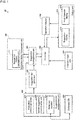
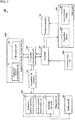
Fig. 1 is a block diagram of a character input device according to a first embodiment of the present invention. -
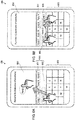
Figs. 2A and 2B are schematic diagrams of the character input device according to the first embodiment of the present invention. -
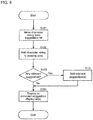
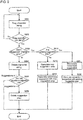
Fig. 3 is a flowchart showing an operation of the character input device according to the first embodiment of the present invention. -
Fig. 4 is a flowchart showing an operation of the character input device according to the first embodiment of the present invention. -
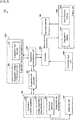
Fig. 5 is a block diagram of a character input device according to a second embodiment of the present invention. -
Fig. 6 is a schematic diagram of the character input device according to the second embodiment of the present invention. -
Fig. 7 is a block diagram of a character input device according to a third embodiment of the present invention. -
Figs. 8A and 8B are schematic diagrams of the character input device according to the third embodiment of the present invention. -
Fig. 9 is a flowchart showing an operation of the character input device according to the third embodiment of the present invention. -
Fig. 10 is a block diagram of a character input device according to a fourth embodiment of the present invention. -
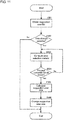
Fig. 11 is a flowchart showing an operation of the character input device according to the fourth embodiment of the present invention. -
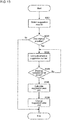
Fig. 12 is a flowchart showing an operation of the character input device according to the fourth embodiment of the present invention. -
Fig. 13 is a flowchart showing an operation of the character input device according to the fourth embodiment of the present invention. - Embodiments of the present invention will now be described with reference to the drawings.
- An example use of the present invention will be described first with reference to
Fig. 1. Fig. 1 is a block diagram of acharacter input device 10 according to a first embodiment of the present invention. Thecharacter input device 10 is included in, for example, a mobile communication terminal such as a smartphone, and allows a user to input characters by performing an operation on a touchscreen display. - The
character input device 10 includes a suggestiondisplay management unit 100, asuggestion management unit 200, a suggestionlist management unit 400, a dictionary database (DB) 450, acontroller 500, acharacter input unit 600, anoperation detector 700, and anoutput unit 800. - The suggestion
display management unit 100 includes a suggestiondivision management unit 101. The suggestionlist management unit 400 includes anevaluation criterion generator 401, a similarsuggestion determination unit 402, and adictionary searcher 403. Theoutput unit 800 includes asuggestion display 810 and aninput character display 850. Thesuggestion display 810 includes a standard-suggestion display area and a divisional-suggestion display area. - A character input operation is performed through the
character input unit 600. More specifically, thecharacter input unit 600 includes a software keyboard with a touchscreen display. Although Japanese characters are input in the example below, the technique described herein is also applicable to inputting alphabetical characters. - The
character input unit 600 receives a character input from a user. For example, the user inputs Japanese hiragana characters li through thecharacter input unit 600. Thecharacter input unit 600 outputs the character string li to thecontroller 500. - The
controller 500 outputs the character string li to thesuggestion management unit 200. Thesuggestion management unit 200 outputs the character string li to the suggestionlist management unit 400. - The
dictionary searcher 403 included in the suggestionlist management unit 400 uses the character string li to search thedictionary DB 450 for conversion suggestions. Thedictionary searcher 403 outputs, for example, a list of conversion suggestions including different sets of kanji (Chinese) characters (e.g.,Kanji 1,Kanji 2,Kanji 3, or Kanji 4) for the character string li (hereafter,Kanji 1 andKanji 3 are used for example). Thedictionary searcher 403 outputs a list ofconversion suggestions Kanji 1 andKanji 3 to asuggestion list generator 300. - The
suggestion list generator 300 outputs the list ofconversion suggestions Kanji 1 andKanji 3 to thesuggestion management unit 200. Thesuggestion management unit 200 outputs the list ofconversion suggestions Kanji 1 andKanji 3 to thecontroller 500. - The
controller 500 outputs the list ofconversion suggestions Kanji 1 andKanji 3 to the standard-suggestion display area in thesuggestion display 810. The standard-suggestion display area is a default display area used for conversion of input characters. The standard-suggestion display area is a two-dimensional planar area. - The user selects
Kanji 3 from the list ofconversion suggestions Kanji 1 andKanji 3 output to the standard-suggestion display area in thesuggestion display 810. For the selection, the user moves thecharacter string Kanji 3 out of the standard-suggestion display area in thesuggestion display 810. More specifically, the user selects thecharacter string Kanji 3 in thesuggestion display 810 and drags thecharacter string Kanji 3 out of the standard-suggestion display area in thesuggestion display 810. - The
operation detector 700 detects the movement of thecharacter string Kanji 3. Theoperation detector 700 outputs information indicating the movement of thecharacter string Kanji 3 to thecontroller 500. Thecontroller 500 then outputs the information indicating the movement of thecharacter string Kanji 3 to thesuggestion management unit 200. - The
suggestion management unit 200 first outputs the information indicating the movement of thecharacter string Kanji 3 to the suggestiondisplay management unit 100. The suggestiondivision management unit 101 in the suggestiondisplay management unit 100 generates a divisional-suggestion display area different from the standard-suggestion display area. The suggestiondivision management unit 101 associates thecharacter string Kanji 3 with the generated divisional-suggestion display area. - The divisional-suggestion display area different from the standard-suggestion display area is a two-dimensional planar area. The divisional-suggestion display area may appear at selected coordinates on the
suggestion display 810 or at the position on thesuggestion display 810 to which the character string is moved by the user. - The
suggestion management unit 200 then searches for any character string relevant to thecharacter string Kanji 3. Thesuggestion management unit 200 outputs thecharacter string Kanji 3 to thesuggestion list generator 300. Thesuggestion list generator 300 outputs thecharacter string Kanji 3 to the suggestionlist management unit 400. - The similar
suggestion determination unit 402 performs determination about thecharacter string Kanji 3, or determines that thecharacter string Kanji 3 is relevant to a person's name (family name). Theevaluation criterion generator 401 then generates an evaluation criterion to be a person's name. The similarsuggestion determination unit 402 instructs thedictionary searcher 403 to search thedictionary DB 450 using thecharacter string Kanji 3 and the evaluation criterion for a person's name as search conditions. - The
dictionary searcher 403 searches thedictionary DB 450 based on thecharacter string Kanji 3 and the evaluation criterion for a person's name. Thedictionary searcher 403 outputsrelevant suggestions Kanji 5 andKanji 4 to thesuggestion list generator 300 as a search result. - The
dictionary DB 450 has categories corresponding to evaluation criteria. More specifically, theevaluation criterion generator 401 generates categories in accordance with the evaluation criteria registered with thedictionary DB 450. This allows thedictionary searcher 403 to easily perform a search using thecharacter string Kanji 3 and the evaluation criterion for a person's name. - The
suggestion list generator 300 outputs a list ofrelevant suggestions Kanji 5 andKanji 4 to thesuggestion management unit 200. Thesuggestion management unit 200 outputs thecharacter string Kanji 3, information indicating a divisional-suggestion display area, and therelevant suggestions Kanji 5 andKanji 4 to thecontroller 500. - The
controller 500 generates the divisional-suggestion display area in thesuggestion display 810. Thecontroller 500 further outputs thecharacter string Kanji 3 and therelevant suggestions Kanji 5 andKanji 4 to the divisional-suggestion display area. - The above structure can divide the area for displaying conversion suggestions as intended by the user, and can further display any character string relevant to the character string selected by the user. This enables highly usable character input.
-
Fig. 1 is a block diagram of acharacter input device 10 according to a first embodiment of the present invention.Figs. 2A and 2B are schematic diagrams of thecharacter input device 10 according to the first embodiment of the present invention.Fig. 3 is a flowchart showing an operation of thecharacter input device 10 according to the first embodiment of the present invention. - An example structure will be described in more detail with reference to
Figs. 2A and 2B based on the structure of thecharacter input device 10 shown inFig. 1 .Fig. 2B is a partially enlarged view of thecharacter input device 10 inFig. 2A . - As shown in
Figs. 1 and2A , thecharacter input device 10 includes thecharacter input unit 600, thesuggestion display 810, and theinput character display 850. Thesuggestion display 810 includes a standard-suggestion display area 801 and a divisional-suggestion display area 802. - As shown in
Fig. 2A , the user inputs characters li. Thecharacter input unit 600 outputs the character string li to thecontroller 500. - The
controller 500 outputs the character string li to thesuggestion management unit 200. Thesuggestion management unit 200 outputs the character string li to the suggestionlist management unit 400. - The
dictionary searcher 403 included in the suggestionlist management unit 400 uses the character string li to search thedictionary DB 450 for conversion suggestions. Thedictionary searcher 403 outputs, for example, a list ofconversion suggestions Kanji 1,Kanji 2,Kanji 3, andKanji 4. Thedictionary searcher 403 outputs the list ofconversion suggestions Kanji 1,Kanji 2,Kanji 3, andKanji 4 to thesuggestion list generator 300. - The
suggestion list generator 300 outputs the list ofconversion suggestions Kanji 1,Kanji 2,Kanji 3, andKanji 4 to thesuggestion management unit 200. Thesuggestion management unit 200 outputs the list ofconversion suggestions Kanji 1,Kanji 2,Kanji 3, andKanji 4 to thecontroller 500. - The
controller 500 outputs the list ofconversion suggestions Kanji 1,Kanji 2,Kanji 3, andKanji 4 to the standard-suggestion display area 801. - The user selects the
character string Kanji 3 from the list ofconversion suggestions Kanji 1,Kanji 2,Kanji 3, andKanji 4 output to the standard-suggestion display area 801. For the selection, the user moves thecharacter string Kanji 3 out of the standard-suggestion display area 801. - The
operation detector 700 detects the movement of thecharacter string Kanji 3. Theoperation detector 700 outputs information indicating the movement of thecharacter string Kanji 3 to thecontroller 500. Thecontroller 500 then outputs the information indicating the movement of thecharacter string Kanji 3 to thesuggestion management unit 200. - The
suggestion management unit 200 first outputs the information indicating the movement of thecharacter string Kanji 3 to the suggestiondisplay management unit 100. The suggestiondivision management unit 101 included in the suggestiondisplay management unit 100 generates the divisional-suggestion display area 802. The suggestiondivision management unit 101 associates thecharacter string Kanji 3 with the divisional-suggestion display area 802. - The
suggestion management unit 200 then searches for any character string relevant to thecharacter string Kanji 3. Thesuggestion management unit 200 outputs thecharacter string Kanji 3 to thesuggestion list generator 300. Thesuggestion list generator 300 outputs thecharacter string Kanji 3 to the suggestionlist management unit 400. - The similar
suggestion determination unit 402 performs determination about thecharacter string Kanji 3, or determines that thecharacter string Kanji 3 is relevant to a person's name (family name). - The
evaluation criterion generator 401 then generates an evaluation criterion to be a person's name. The similarsuggestion determination unit 402 instructs thedictionary searcher 403 to search thedictionary DB 450 using thecharacter string Kanji 3 and the evaluation criterion for a person's name as search conditions. - The
dictionary searcher 403 searches thedictionary DB 450 based on thecharacter string Kanji 3 and the evaluation criterion for a person's name. The evaluation criterion is used to search for any suggestion relevant to the character string Kanji 3 (hereafter, a relevant suggestion). More specifically, the relevant suggestion refers to, for example, a suggestion with a high co-occurrence frequency, a suggestion in the same category, and a suggestion defined as relevant by the user. The relevant suggestion may also include a suggestion determined to be relevant through machine learning. - The
dictionary searcher 403 outputsrelevant suggestions Kanji 5 andKanji 4 to thesuggestion list generator 300 as a search result. - The
suggestion list generator 300 outputs a list ofrelevant suggestions Kanji 5 andKanji 4 to thesuggestion management unit 200. Thesuggestion management unit 200 outputs thecharacter string Kanji 3 and therelevant suggestions Kanji 5 andKanji 4 to thecontroller 500. - As shown in
Fig. 2B , thecontroller 500 generates the divisional-suggestion display area 802, and outputs thecharacter string Kanji 3 and therelevant suggestions Kanji 5 andKanji 4 to the divisional-suggestion display area 802. Thecharacter string Kanji 3 is deleted from the standard-suggestion display area 801. - The divisional-
suggestion display area 802 may include a scrollbar when many relevant suggestions are available. This removes the limitation on the number of relevant suggestions output to the divisional-suggestion display area 802. Additionally, scrolling the scrollbar allows a quick selection from relevant suggestions. - A process performed by the
character input device 10 for displaying the divisional-suggestion display area will now be described with reference to the flowchart inFig. 3 . - The user selects a character string from a list of suggestions appearing in the standard-
suggestion display area 801, and moves the selected character string from the standard-suggestion display area 801. Theoperation detector 700 detects the movement of the character string (S101). - The suggestion
division management unit 101 generates the divisional-suggestion display area 802 (S102). - The suggestion
list management unit 400 searches for any relevant suggestion (S103). - The suggestion
list management unit 400 determines whether any relevant suggestion is available (S104). When the suggestionlist management unit 400 determines that no relevant suggestion is available (No in S104), thecontroller 500 displays the character string in the divisional-suggestion display area 802 (S105). - When the suggestion
list management unit 400 determines that one or more relevant suggestions are available (Yes in S104), the relevant suggestion(s) are output in addition to the character string (S111). Thecontroller 500 displays the character string and the relevant suggestion(s) in the divisional-suggestion display area 802 (S105). - A process performed when any existing divisional-suggestion display area is already available will now be described with reference to the flowchart in
Fig. 4 . - The user selects a character string from a list of suggestions appearing in the standard-
suggestion display area 801, and moves the selected character string from the standard-suggestion display area 801. Theoperation detector 700 detects the movement of the character string (S121). - The suggestion
division management unit 101 adds the character string to an existing divisional-suggestion display area 802 (S122). - The suggestion
list management unit 400 determines whether any relevant suggestion is available (S123). When the suggestionlist management unit 400 determines that no relevant suggestion is available (No in S123), thecontroller 500 displays the character string in the divisional-suggestion display area 802 (S124). - When the suggestion
list management unit 400 determines that one or more relevant suggestions are available (Yes in S123), the relevant suggestion(s) are output in addition to the character string (S131). Thecontroller 500 displays the character string and the relevant suggestion(s) in the divisional-suggestion display area 802 (S124). - The above structure can divide the area for displaying conversion suggestions as intended by the user, and can also display any available suggestion relevant to the character string selected by the user. This enables highly usable character input.
- The structure described above uses a single divisional-
suggestion display area 802. However, multiple divisional-suggestion display areas 802 may be provided either in response to multiple evaluation criteria generated by theevaluation criterion generator 401 or by default. This enables more highly usable character input. - An operation for adjusting a divisional-suggestion display area will now be described in detail with reference to
Figs. 5 and6 .Fig. 5 is a block diagram of acharacter input device 10A according to a second embodiment of the present invention.Fig. 6 is a schematic diagram of thecharacter input device 10A according to the second embodiment of the present invention. - The second embodiment differs from the first embodiment in that a suggestion
display management unit 100A includes asuggestion size adjuster 102. The other components and processes are the same as those in the first embodiment, and will not be described. - As shown in
Figs. 5 and6 , the user changes the display size of the divisional-suggestion display area 802. More specifically, the user selects and drags one end of the divisional-suggestion display area 802 to change the display size. Theoperation detector 700 detects the change in the display size (hereafter, a display size change) of the divisional-suggestion display area 802. - The
operation detector 700 outputs information indicating the display size change to thecontroller 500. Thecontroller 500 outputs the information indicating the display size change to thesuggestion management unit 200. - The
suggestion management unit 200 outputs the information indicating the display size change to thesuggestion size adjuster 102. Thesuggestion size adjuster 102 determines whether the display size change is possible. When possible, thesuggestion size adjuster 102 stores the display size. - The
suggestion size adjuster 102 outputs, to thesuggestion management unit 200, information indicating that the display size change is possible. Thesuggestion management unit 200 outputs, to thecontroller 500, the information indicating that the display size change is possible. - The
controller 500 accepts the display size change of the divisional-suggestion display area 802. - A
character input device 10A with this structure provides visual usability intended by the user. - When the
suggestion size adjuster 102 determines that the display size change is impossible, a pop-up notification may appear to indicate that the change is impossible. - An operation for adjusting a divisional-suggestion display area will now be described in detail with reference to
Figs. 7 to 9 .Fig. 7 is a block diagram of acharacter input device 10B according to a third embodiment of the present invention.Figs. 8A and 8B are schematic diagrams of thecharacter input device 10B according to the third embodiment of the present invention.Fig. 9 is a flowchart showing an operation of thecharacter input device 10B according to the third embodiment of the present invention. - The third embodiment differs from the first embodiment in that a suggestion
display management unit 100B includes amovement unit 103. The other components and processes are the same as those in the first embodiment, and will not be described. - Referring to
Figs. 7 and8A , deletion of the divisional-suggestion display area 802 will be described. The user selects thecharacter string Kanji 2 appearing in the divisional-suggestion display area 802, and drags the character string out of thesuggestion display 810. Theoperation detector 700 detects the movement of thecharacter string Kanji 2. - The
operation detector 700 outputs information indicating the movement of thecharacter string Kanji 2 to thecontroller 500. Thecontroller 500 outputs the information indicating the movement of thecharacter string Kanji 2 to thesuggestion management unit 200. - The
suggestion management unit 200 outputs the information indicating the movement of thecharacter string Kanji 2 to themovement unit 103. Themovement unit 103 determines that the position of thecharacter string Kanji 2 is outside the area of thesuggestion display 810. Themovement unit 103 outputs, to the suggestiondivision management unit 101, information indicating that thecharacter string Kanji 2 is moved out of the area of thesuggestion display 810. The suggestiondivision management unit 101 dissociates thecharacter string Kanji 2 from the divisional-suggestion display area 802. - The suggestion
division management unit 101 outputs an instruction for deleting thecharacter string Kanji 2 to thesuggestion management unit 200. Thesuggestion management unit 200 outputs the instruction for deleting thecharacter string Kanji 2 to thecontroller 500. Thecontroller 500 deletes thecharacter string Kanji 2 from a divisional-suggestion display area 802. - The suggestion
division management unit 101 determines whether any suggestion other than thecharacter string Kanji 2 appears in the divisional-suggestion display area 802. When determining that no character string other than thecharacter string Kanji 2 is registered, the suggestiondivision management unit 101 outputs, to thesuggestion management unit 200, an instruction for deleting thecharacter string Kanji 2 and the divisional-suggestion display area 802. - The
suggestion management unit 200 outputs the instruction for deleting the divisional-suggestion display area 802 to thecontroller 500. Thecontroller 500 deletes the divisional-suggestion display area 802 from thesuggestion display 810. - Referring to
Figs. 7 and8B , moving a character string from the divisional-suggestion display area 802 will now be described. Thesuggestion display 810 includes a divisional-suggestion display area 802 and a divisional-suggestion display area 803. In the example described below, a character string is moved from the divisional-suggestion display area 802 to the divisional-suggestion display area 803. - The user selects the
character string Kanji 2 appearing in the divisional-suggestion display area 802, and drags the character string to the divisional-suggestion display area 803 from the divisional-suggestion display area 802. Theoperation detector 700 detects the movement of thecharacter string Kanji 2. - The
operation detector 700 outputs information indicating the movement of thecharacter string Kanji 2 to thecontroller 500. Thecontroller 500 outputs the information indicating the movement of thecharacter string Kanji 2 to thesuggestion management unit 200. - The
suggestion management unit 200 outputs the information indicating the movement of thecharacter string Kanji 2 to themovement unit 103. Themovement unit 103 determines that the position of thecharacter string Kanji 2 is changed from the divisional-suggestion display area 802 to the divisional-suggestion display area 803. Themovement unit 103 outputs, to the suggestiondivision management unit 101, information indicating that the position of thecharacter string Kanji 2 is changed from the divisional-suggestion display area 802 to the divisional-suggestion display area 803. - The suggestion
division management unit 101 dissociates thecharacter string Kanji 2 from the divisional-suggestion display area 802. The suggestiondivision management unit 101 associates thecharacter string Kanji 2 with the divisional-suggestion display area 803. - The suggestion
division management unit 101 outputs, to thesuggestion management unit 200, an instruction for associating thecharacter string Kanji 2 with the divisional-suggestion display area 803. - The
suggestion management unit 200 outputs, to thecontroller 500, the instruction for associating thecharacter string Kanji 2 with the divisional-suggestion display area 803. Thecontroller 500 displays thecharacter string Kanji 2 on the divisional-suggestion display area 803. - A
character input device 10B with this structure provides usability intended by the user. When a character string is moved, any suggestion relevant to the moved character string may also be displayed. - A process for deleting a divisional-suggestion display area and moving a character string will now be described with reference to the flowchart in
Fig. 9 . - The user drags a character string (S201). The
operation detector 700 determines whether the drag operation is complete (S202). - When the drag operation is incomplete (No in S202), the process returns to step S201.
- When the drag operation is complete (Yes in S202), the
operation detector 700 determines whether the dragged character string is moved within the area of the suggestion display 810 (S203). - When the
operation detector 700 determines that the character string is outside the suggestion display 810 (No in S203), thecontroller 500 deletes the character string (S204). - The
suggestion management unit 200 determines whether any other suggestion remains in the divisional-suggestion display area (S205). When thesuggestion management unit 200 determines that no suggestion remains in the divisional-suggestion display area (suggestions = 0 in S205), the divisional-suggestion display area is deleted (S206). - When the
suggestion management unit 200 determines that one or more suggestions remain in the divisional-suggestion display area (one or more suggestions in S205), the process ends. - When the
operation detector 700 determines that the dragged character string is within the area of the suggestion display 810 (Yes in S203), the suggestiondivision management unit 101 determines whether any existing divisional-suggestion display area is available (S211). - When determining that no existing divisional-suggestion display area is available (No in S211), the suggestion
division management unit 101 generates a new divisional-suggestion display area (S212). The suggestiondivision management unit 101 associates the dragged character string with the new divisional-suggestion display area for display (S213). - When determining that an existing divisional-suggestion display area is available (Yes in S211), the suggestion
division management unit 101 dissociates the dragged character string from the divisional-suggestion display area from which the character string is dragged (S221). The suggestiondivision management unit 101 associates the dragged character string with the existing divisional-suggestion display area for display (S222). - An operation for adjusting a divisional-suggestion display area will now be described in detail with reference to
Figs. 10 to 13 .Fig. 10 is a block diagram of acharacter input device 10C according to a fourth embodiment of the present invention.Fig. 11 is a flowchart showing an operation of thecharacter input device 10C according to the fourth embodiment of the present invention.Fig. 12 is a flowchart showing an operation of thecharacter input device 10C according to the fourth embodiment of the present invention.Fig. 13 is a flowchart showing an operation of thecharacter input device 10C according to the fourth embodiment of the present invention. - The fourth embodiment differs from the combination of the first, second, and third embodiments in including a dynamic adjuster and a dynamic adjustment information DB. The other components and processes are the same as those in the first, second, and third embodiments, and will not be described.
- As shown in
Fig. 10 , adynamic adjuster 250 includes anarea selection detector 251, asituation fitness detector 252, and an effectivesuggestion number detector 253. Thearea selection detector 251 statistically determines the number of times a divisional-suggestion display area has been selected (selection count) by the user. Thesituation fitness detector 252 statistically determines the number of times a conversion suggestion has been selected (selection count) by the user from, for example, context. The effectivesuggestion number detector 253 statistically determines the number of suggestions relevant to a conversion suggestion or the number of relevant suggestions having a high degree of relevance (hereafter, the number of effective suggestions) appearing in a divisional-suggestion display area. - The
area selection detector 251, thesituation fitness detector 252, and the effectivesuggestion number detector 253 store their determination results into a dynamicadjustment information DB 260. - The
dynamic adjuster 250 dynamically determines the size of a divisional-suggestion display area using the determination results obtained with thearea selection detector 251, thesituation fitness detector 252, and the effectivesuggestion number detector 253. A process performed with thearea selection detector 251, thesituation fitness detector 252, or the effectivesuggestion number detector 253 will now be described in detail. - A method used by the
area selection detector 251 for adjusting the size of a divisional-suggestion display area will now be described with reference toFigs. 10 and11 . The suggestiondivision management unit 101 included in the suggestiondisplay management unit 100 stores the selection count for a divisional-suggestion display area into the dynamicadjustment information DB 260. This allows storage of statistical results about the selection of a divisional-suggestion display area. - The
controller 500 obtains a list of divisional-suggestion display areas from the suggestion display 810 (S301). - The
controller 500 outputs the list of divisional-suggestion display areas to thesuggestion management unit 200. Thesuggestion management unit 200 outputs the list of divisional-suggestion display areas to the suggestiondivision management unit 101. The suggestiondivision management unit 101 retrieves the number of divisional-suggestion display areas and the size of each divisional-suggestion display area, and determines whether a size change is possible (S302). - When determining that the size change is possible for the divisional-suggestion display areas (Yes in S302), the suggestion
division management unit 101 outputs, to thearea selection detector 251, information indicating that the size change is possible. - The
area selection detector 251 refers to the dynamicadjustment information DB 260 and computes a statistic of the selection count for each area (S303). - The
area selection detector 251 determines whether the determination about the area selection is complete for all the divisional-suggestion display areas included in the suggestion display 810 (S304). - When determining that the area selection determination is complete for all the divisional-suggestion display areas included in the suggestion display 810 (Yes in S304), the
area selection detector 251 outputs the determination result to thesuggestion size adjuster 102. Thesuggestion size adjuster 102 calculates the size of each divisional-suggestion display area from the determination result (S305). - The
suggestion size adjuster 102 outputs the size of each divisional-suggestion display area to thesuggestion management unit 200. Thesuggestion management unit 200 outputs the size of each divisional-suggestion display area to thecontroller 500. Thecontroller 500 changes the size of each divisional-suggestion display area appearing on the suggestion display 810 (S306). - In step S302, when the suggestion
division management unit 101 determines that the size change is impossible for the divisional-suggestion display areas (No in S302), the process ends. - In step S304, when the
area selection detector 251 determines that area selection determination is incomplete for any of the divisional-suggestion display areas included in the suggestion display 810 (No in S304), the process returns to step S303. - The above structure can determine the size of a divisional-suggestion display area in accordance with the count for the divisional-suggestion display area selected by the user. More specifically, a
character input device 10C with this structure reflects the use situation of the user. - A method used by the
situation fitness detector 252 for adjusting the size of a divisional-suggestion display area will now be described with reference toFigs. 10 and12 . The suggestiondivision management unit 101 included in the suggestiondisplay management unit 100 stores the selection count for a conversion suggestion into the dynamicadjustment information DB 260. This allows storage of statistical results about the count for a conversion suggestion selection in a divisional-suggestion display area. - The
controller 500 obtains a list of divisional-suggestion display areas from the suggestion display 810 (S311). - The
controller 500 outputs the list of divisional-suggestion display areas to thesuggestion management unit 200. Thesuggestion management unit 200 outputs the list of divisional-suggestion display areas to the suggestiondivision management unit 101. The suggestiondivision management unit 101 retrieves the number of divisional-suggestion display areas and the size of each divisional-suggestion display area, and determines whether a size change is possible (S312). - When determining that the size change is possible for the divisional-suggestion display areas (Yes in S312), the suggestion
division management unit 101 outputs, to thesituation fitness detector 252, information indicating that the size change is possible. - The
situation fitness detector 252 refers to the dynamicadjustment information DB 260 and computes a statistic of situation fitness based on the output history, or specifically based on the selection count for the conversion suggestion (S313). - The
situation fitness detector 252 determines whether the determination about the situation fitness is complete for all the divisional-suggestion display areas included in the suggestion display 810 (S314). - When determining that the determination about the situation fitness is complete for all the divisional-suggestion display areas included in the suggestion display 810 (Yes in S314), the
situation fitness detector 252 outputs the determination result to thesuggestion size adjuster 102. Thesuggestion size adjuster 102 calculates the size of each divisional-suggestion display area from the determination result (S315). - The
suggestion size adjuster 102 outputs the size of each divisional-suggestion display area to thesuggestion management unit 200. Thesuggestion management unit 200 outputs the size of each divisional-suggestion display area to thecontroller 500. Thecontroller 500 changes the size of each divisional-suggestion display area appearing on the suggestion display 810 (S316). - In step S312, when the suggestion
division management unit 101 determines that the size change is impossible for the divisional-suggestion display areas (No in S312), the process ends. - In step S314, when the
situation fitness detector 252 determines that the determination about the situation fitness is incomplete for any of the divisional-suggestion display areas included in the suggestion display 810 (No in S314), the process returns to step S313. - The above structure can determine the size of a divisional-suggestion display area in accordance with the count for the conversion suggestion selected by the user. More specifically, a
character input device 10C with this structure reflects the use situation of the user. - A method used by the effective
suggestion number detector 253 for adjusting the size of a divisional-suggestion display area will now be described with reference toFigs. 10 and13 . The suggestiondivision management unit 101 included in the suggestiondisplay management unit 100 stores the number of effective suggestions into the dynamicadjustment information DB 260. This statistically stores the number of effective suggestions in a divisional-suggestion display area. - The
controller 500 obtains a list of divisional-suggestion display areas included in the suggestion display 810 (S321). - The
controller 500 outputs the list of divisional-suggestion display areas to thesuggestion management unit 200. Thesuggestion management unit 200 outputs the list of divisional-suggestion display areas to the suggestiondivision management unit 101. The suggestiondivision management unit 101 retrieves the number of divisional-suggestion display areas and the size of each divisional-suggestion display area, and determines whether a size change is possible (S322). - When determining that the size change is possible for the divisional-suggestion display areas (Yes in S322), the suggestion
division management unit 101 outputs, to the effectivesuggestion number detector 253, information indicating that the size change is possible. - The effective
suggestion number detector 253 refers to the dynamicadjustment information DB 260 and computes a statistic of the number of effective suggestions (S323). - The effective
suggestion number detector 253 determines whether the determination about the number of effective suggestions is complete for all the divisional-suggestion display areas included in the suggestion display 810 (S324). - When determining that the determination about the number of effective suggestions is complete for all the divisional-suggestion display areas included in the suggestion display 810 (Yes in S324), the effective
suggestion number detector 253 outputs the determination result to thesuggestion size adjuster 102. Thesuggestion size adjuster 102 calculates the size of each divisional-suggestion display area from the determination result (S325). - The
suggestion size adjuster 102 outputs the size of each divisional-suggestion display area to thesuggestion management unit 200. Thesuggestion management unit 200 outputs the size of each divisional-suggestion display area to thecontroller 500. Thecontroller 500 changes the size of each divisional-suggestion display area appearing on the suggestion display 810 (S326). - In step S322, when the suggestion
division management unit 101 determines that the size change is impossible for the divisional-suggestion display areas (No in S322), the process ends. - In step S324, when the effective
suggestion number detector 253 determines that the determination about the number of effective suggestions is incomplete for any of the divisional-suggestion display areas included in the suggestion display 810 (No in S324), the process returns to step S323. - The above structure can determine the size of a divisional-suggestion display area in accordance with the number of effective suggestions. More specifically, a
character input device 10C with this structure reflects the use situation of the user. - Although the structure described above performs the processes shown in
Figs. 11 to 13 separately, the structure may perform these determinations in a single process. In this case, thecharacter input device 10C both performs conversion and displays conversion suggestions in a manner more precisely reflecting the use situation of the user. The structure may perform two or more of the processes in combination, instead of performing the processes inFigs. 11 to 13 altogether. - Although the size of the divisional-suggestion display area refers to the width in the example structure described above, the size may be changed in the height direction of the
suggestion display 810. - The correspondence between the structures of the claimed invention and the structures in the above embodiments may be expressed as specified in the appendix below.
- A character input device (10), comprising:
- a character input unit (600) configured to receive an input character;
- a suggestion list management unit (400) configured to convert the input character;
- a suggestion list generator (300) configured to generate a conversion suggestion list through conversion of the input character;
- a suggestion display (810) including a standard-suggestion display area for displaying the conversion suggestion list;
- an operation detector (700) configured to detect movement of a divisional suggestion included in the conversion suggestion list; and
- a suggestion division management unit (101) configured to generate a divisional-suggestion display area (802) different from the standard-suggestion display area in the suggestion display (810) in response to the movement of the divisional suggestion,
- wherein the suggestion division management unit (101) associates the divisional suggestion with the divisional-suggestion display area (802), and outputs the divisional suggestion to the divisional-suggestion display area (802).
-
- 10, 10A, 10B, 10C character input device
- 100, 100A, 100B suggestion display management unit
- 101 suggestion division management unit
- 102 suggestion size adjuster
- 103 movement unit
- 200 suggestion management unit
- 250 dynamic adjuster
- 251 area selection detector
- 252 situation fitness detector
- 253 effective suggestion number detector
- 260 dynamic adjustment information DB
- 300 suggestion list generator
- 400 suggestion list management unit
- 401 evaluation criterion generator
- 402 similar suggestion determination unit
- 450 dictionary DB
- 500 controller
- 600 character input unit
- 700 operation detector
- 800 output unit
- 801 standard-suggestion display area
- 802, 803divisional-suggestion display area
- 810 suggestion display
- 850 input character display
Claims (8)
- A character input device (10; 10A; 10B; 10C), comprising:a character input unit (600) configured to receive an input character;a suggestion list management unit (400) configured to convert the input character;a suggestion list generator (300) configured to generate a conversion suggestion list through conversion of the input character;a suggestion display (810) including a standard-suggestion display area (801) for displaying the conversion suggestion list;an operation detector (700) configured to detect movement of a divisional suggestion included in the conversion suggestion list; anda suggestion division management unit (101) configured to generate a divisional-suggestion display area (802, 803) different from the standard-suggestion display area (801) in the suggestion display (810) in response to the movement of the divisional suggestion,wherein the suggestion division management unit (101) associates the divisional suggestion with the divisional-suggestion display area (802, 803), and outputs the divisional suggestion to the divisional-suggestion display area (802, 803).
- The character input device (10; 10A; 10B; 10C) according to claim 1, wherein when a suggestion relevant to the divisional suggestion is available, the suggestion list management unit (400) outputs the relevant suggestion to the divisional-suggestion display area (802, 803).
- The character input device (10; 10A; 10B; 10C) according to claim 1, wherein in response to the operation detector (700) detecting the divisional suggestion moved from the divisional-suggestion display area (802, 803),
the suggestion division management unit (101) dissociates the divisional suggestion from the divisional-suggestion display area (802, 803). - The character input device (10; 10A; 10B; 10C) according to claim 1, further comprising:
a suggestion size adjuster (102) configured to adjust a size of the divisional-suggestion display area (802, 803). - The character input device (10; 10A; 10B; 10C) according to claim 4, further comprising:an area selection detector (251) configured to count a number of times the divisional-suggestion display area (802, 803) is selected,wherein the suggestion size adjuster (102) adjusts the size of the divisional-suggestion display area (802, 803) in accordance with the selection count.
- The character input device (10; 10A; 10B; 10C) according to claim 4, further comprising:an effective suggestion number detector (253) configured to compute a number of effective suggestions based on a suggestion relevant to the input character and a degree of relevance of the suggestion to the input character,wherein the suggestion size adjuster (102) adjusts the size of the divisional-suggestion display area (802, 803) in accordance with the number of effective suggestions.
- A character input method implementable by a computer, the method comprising:receiving an input character;converting the input character;generating a conversion suggestion list through conversion of the input character;displaying the conversion suggestion list in a standard-suggestion display area (801);detecting movement of a divisional suggestion included in the conversion suggestion list;generating a divisional-suggestion display area (802, 803) different from the standard-suggestion display area (801) and associating the divisional suggestion with the divisional-suggestion display area (802, 803); andoutputting the divisional suggestion to the divisional-suggestion display area (802, 803).
- A character input program causing a computer to implement:receiving an input character;converting the input character;generating a conversion suggestion list through conversion of the input character;displaying the conversion suggestion list in a standard-suggestion display area (801);detecting movement of a divisional suggestion included in the conversion suggestion list;generating a divisional-suggestion display area (802, 803) different from the standard-suggestion display area (801) and associating the divisional suggestion with the divisional-suggestion display area (802, 803); andoutputting the divisional suggestion to the divisional-suggestion display area (802, 803).
Applications Claiming Priority (1)
| Application Number | Priority Date | Filing Date | Title |
|---|---|---|---|
| JP2019046953A JP7147640B2 (en) | 2019-03-14 | 2019-03-14 | Character input device, character input method, and character input program |
Publications (2)
| Publication Number | Publication Date |
|---|---|
| EP3709138A1 true EP3709138A1 (en) | 2020-09-16 |
| EP3709138B1 EP3709138B1 (en) | 2022-08-24 |
Family
ID=69571791
Family Applications (1)
| Application Number | Title | Priority Date | Filing Date |
|---|---|---|---|
| EP20156551.2A Active EP3709138B1 (en) | 2019-03-14 | 2020-02-11 | Character input device, character input method, and character input program |
Country Status (3)
| Country | Link |
|---|---|
| US (1) | US10915228B2 (en) |
| EP (1) | EP3709138B1 (en) |
| JP (1) | JP7147640B2 (en) |
Families Citing this family (1)
| Publication number | Priority date | Publication date | Assignee | Title |
|---|---|---|---|---|
| JP7797880B2 (en) * | 2022-01-07 | 2026-01-14 | オムロン株式会社 | Character input device, character input method, and character input program |
Citations (4)
| Publication number | Priority date | Publication date | Assignee | Title |
|---|---|---|---|---|
| EP2312459A1 (en) * | 2008-07-25 | 2011-04-20 | Sharp Kabushiki Kaisha | Information processing device and information processing method |
| US20130305178A1 (en) * | 2011-01-25 | 2013-11-14 | Sony Computer Entertainment Inc. | Input device, input method, and computer program for inputting characters, numbers, or symbols by using an on-screen keyboard |
| US20140237356A1 (en) * | 2013-01-21 | 2014-08-21 | Keypoint Technologies (Uk) Limited | Text input method and device |
| JP2015185144A (en) | 2014-03-26 | 2015-10-22 | Kddi株式会社 | INPUT CONTROL DEVICE, INPUT CONTROL METHOD, AND PROGRAM |
Family Cites Families (10)
| Publication number | Priority date | Publication date | Assignee | Title |
|---|---|---|---|---|
| JP2004038797A (en) | 2002-07-05 | 2004-02-05 | Just Syst Corp | Character string conversion device, character string conversion method, and program for causing computer to execute the method |
| JP5512379B2 (en) | 2010-04-28 | 2014-06-04 | 株式会社ジャストシステム | Input device, input method, and input program |
| CN103370705B (en) | 2011-01-05 | 2018-01-02 | 谷歌公司 | For facilitating the method and system of text input |
| CN103080893A (en) | 2011-03-31 | 2013-05-01 | 株式会社Ntt都科摩 | Mobile terminal |
| US20140201681A1 (en) * | 2013-01-16 | 2014-07-17 | Lookout, Inc. | Method and system for managing and displaying activity icons on a mobile device |
| JP5850014B2 (en) | 2013-09-13 | 2016-02-03 | カシオ計算機株式会社 | Character input device and program |
| JP6459640B2 (en) | 2015-03-03 | 2019-01-30 | オムロン株式会社 | Program and information processing apparatus for character input system |
| US9952764B2 (en) * | 2015-08-20 | 2018-04-24 | Google Llc | Apparatus and method for touchscreen keyboard suggestion word generation and display |
| RU2632140C2 (en) * | 2015-09-29 | 2017-10-02 | Общество С Ограниченной Ответственностью "Яндекс" | Method and server for clustering sentences for search queries |
| RU2677379C2 (en) * | 2016-12-06 | 2019-01-16 | Общество С Ограниченной Ответственностью "Яндекс" | Method of forming a user query |
-
2019
- 2019-03-14 JP JP2019046953A patent/JP7147640B2/en active Active
-
2020
- 2020-02-11 EP EP20156551.2A patent/EP3709138B1/en active Active
- 2020-02-18 US US16/792,923 patent/US10915228B2/en active Active
Patent Citations (4)
| Publication number | Priority date | Publication date | Assignee | Title |
|---|---|---|---|---|
| EP2312459A1 (en) * | 2008-07-25 | 2011-04-20 | Sharp Kabushiki Kaisha | Information processing device and information processing method |
| US20130305178A1 (en) * | 2011-01-25 | 2013-11-14 | Sony Computer Entertainment Inc. | Input device, input method, and computer program for inputting characters, numbers, or symbols by using an on-screen keyboard |
| US20140237356A1 (en) * | 2013-01-21 | 2014-08-21 | Keypoint Technologies (Uk) Limited | Text input method and device |
| JP2015185144A (en) | 2014-03-26 | 2015-10-22 | Kddi株式会社 | INPUT CONTROL DEVICE, INPUT CONTROL METHOD, AND PROGRAM |
Also Published As
| Publication number | Publication date |
|---|---|
| EP3709138B1 (en) | 2022-08-24 |
| US20200293158A1 (en) | 2020-09-17 |
| US10915228B2 (en) | 2021-02-09 |
| JP2020149417A (en) | 2020-09-17 |
| JP7147640B2 (en) | 2022-10-05 |
Similar Documents
| Publication | Publication Date | Title |
|---|---|---|
| US8423897B2 (en) | Onscreen keyboard assistance method and system | |
| US10049091B2 (en) | Method, device, and terminal equipment for enabling intelligent association in input method | |
| JP6593066B2 (en) | Information processing apparatus, information processing method, and program | |
| EP3623923A1 (en) | Method and corresponding apparatus for displaying arc menu index | |
| US10372310B2 (en) | Suppression of input images | |
| JP2018163688A (en) | Operation detection system and method in binary option transaction | |
| JP5225004B2 (en) | Content visualization apparatus and content visualization method | |
| JP2001350793A (en) | Related information display control device and related information display method | |
| KR20110109551A (en) | Touch screen device and input processing method of touch screen device | |
| EP3683744A1 (en) | Computer system and method of presenting information useful for achieving purposes related to object | |
| US9378193B2 (en) | Web management device, web management method, web management program, computer readable recording medium for recording said program, and web system | |
| US20220358931A1 (en) | Task information management | |
| CN102314314A (en) | Method and system for converting cursor when in document reading | |
| EP3709138B1 (en) | Character input device, character input method, and character input program | |
| JPH07129597A (en) | Database retrieving device | |
| CN113110905A (en) | Control method, device, equipment and computer readable storage medium | |
| JP6996618B2 (en) | Adaptive interface providing device, adaptive interface providing method, and program | |
| CN115080828A (en) | Searching method, device and system based on configurable searching component and storage medium | |
| EP3298761B1 (en) | Multi-switch option scanning | |
| JP2017208047A (en) | Information search method, information search apparatus, and program | |
| WO2020214348A1 (en) | Visual representation of directional correlation of service health | |
| KR101458554B1 (en) | Apparatus and method for controling output data based emr system | |
| JP7626440B2 (en) | Information processing system, information processing method, and program | |
| KR20170093862A (en) | Hierarchical navigation apparatus and method | |
| JPWO2020085374A1 (en) | Proficiency index providing device, proficiency index providing method, and program |
Legal Events
| Date | Code | Title | Description |
|---|---|---|---|
| PUAI | Public reference made under article 153(3) epc to a published international application that has entered the european phase |
Free format text: ORIGINAL CODE: 0009012 |
|
| STAA | Information on the status of an ep patent application or granted ep patent |
Free format text: STATUS: REQUEST FOR EXAMINATION WAS MADE |
|
| 17P | Request for examination filed |
Effective date: 20200304 |
|
| AK | Designated contracting states |
Kind code of ref document: A1 Designated state(s): AL AT BE BG CH CY CZ DE DK EE ES FI FR GB GR HR HU IE IS IT LI LT LU LV MC MK MT NL NO PL PT RO RS SE SI SK SM TR |
|
| AX | Request for extension of the european patent |
Extension state: BA ME |
|
| RBV | Designated contracting states (corrected) |
Designated state(s): AL AT BE BG CH CY CZ DE DK EE ES FI FR GB GR HR HU IE IS IT LI LT LU LV MC MK MT NL NO PL PT RO RS SE SI SK SM TR |
|
| REG | Reference to a national code |
Ref country code: DE Ref legal event code: R079 Ref document number: 602020004620 Country of ref document: DE Free format text: PREVIOUS MAIN CLASS: G06F0003023000 Ipc: G06F0003048860 |
|
| GRAP | Despatch of communication of intention to grant a patent |
Free format text: ORIGINAL CODE: EPIDOSNIGR1 |
|
| STAA | Information on the status of an ep patent application or granted ep patent |
Free format text: STATUS: GRANT OF PATENT IS INTENDED |
|
| RIC1 | Information provided on ipc code assigned before grant |
Ipc: G06F 3/023 20060101ALI20220211BHEP Ipc: G06F 3/04886 20220101AFI20220211BHEP |
|
| INTG | Intention to grant announced |
Effective date: 20220309 |
|
| GRAS | Grant fee paid |
Free format text: ORIGINAL CODE: EPIDOSNIGR3 |
|
| GRAA | (expected) grant |
Free format text: ORIGINAL CODE: 0009210 |
|
| STAA | Information on the status of an ep patent application or granted ep patent |
Free format text: STATUS: THE PATENT HAS BEEN GRANTED |
|
| AK | Designated contracting states |
Kind code of ref document: B1 Designated state(s): AL AT BE BG CH CY CZ DE DK EE ES FI FR GB GR HR HU IE IS IT LI LT LU LV MC MK MT NL NO PL PT RO RS SE SI SK SM TR |
|
| REG | Reference to a national code |
Ref country code: CH Ref legal event code: EP |
|
| REG | Reference to a national code |
Ref country code: IE Ref legal event code: FG4D |
|
| REG | Reference to a national code |
Ref country code: AT Ref legal event code: REF Ref document number: 1514105 Country of ref document: AT Kind code of ref document: T Effective date: 20220915 Ref country code: DE Ref legal event code: R096 Ref document number: 602020004620 Country of ref document: DE |
|
| REG | Reference to a national code |
Ref country code: LT Ref legal event code: MG9D |
|
| REG | Reference to a national code |
Ref country code: NL Ref legal event code: MP Effective date: 20220824 |
|
| PG25 | Lapsed in a contracting state [announced via postgrant information from national office to epo] |
Ref country code: SE Free format text: LAPSE BECAUSE OF FAILURE TO SUBMIT A TRANSLATION OF THE DESCRIPTION OR TO PAY THE FEE WITHIN THE PRESCRIBED TIME-LIMIT Effective date: 20220824 Ref country code: RS Free format text: LAPSE BECAUSE OF FAILURE TO SUBMIT A TRANSLATION OF THE DESCRIPTION OR TO PAY THE FEE WITHIN THE PRESCRIBED TIME-LIMIT Effective date: 20220824 Ref country code: PT Free format text: LAPSE BECAUSE OF FAILURE TO SUBMIT A TRANSLATION OF THE DESCRIPTION OR TO PAY THE FEE WITHIN THE PRESCRIBED TIME-LIMIT Effective date: 20221226 Ref country code: NO Free format text: LAPSE BECAUSE OF FAILURE TO SUBMIT A TRANSLATION OF THE DESCRIPTION OR TO PAY THE FEE WITHIN THE PRESCRIBED TIME-LIMIT Effective date: 20221124 Ref country code: NL Free format text: LAPSE BECAUSE OF FAILURE TO SUBMIT A TRANSLATION OF THE DESCRIPTION OR TO PAY THE FEE WITHIN THE PRESCRIBED TIME-LIMIT Effective date: 20220824 Ref country code: LV Free format text: LAPSE BECAUSE OF FAILURE TO SUBMIT A TRANSLATION OF THE DESCRIPTION OR TO PAY THE FEE WITHIN THE PRESCRIBED TIME-LIMIT Effective date: 20220824 Ref country code: LT Free format text: LAPSE BECAUSE OF FAILURE TO SUBMIT A TRANSLATION OF THE DESCRIPTION OR TO PAY THE FEE WITHIN THE PRESCRIBED TIME-LIMIT Effective date: 20220824 Ref country code: FI Free format text: LAPSE BECAUSE OF FAILURE TO SUBMIT A TRANSLATION OF THE DESCRIPTION OR TO PAY THE FEE WITHIN THE PRESCRIBED TIME-LIMIT Effective date: 20220824 |
|
| REG | Reference to a national code |
Ref country code: AT Ref legal event code: MK05 Ref document number: 1514105 Country of ref document: AT Kind code of ref document: T Effective date: 20220824 |
|
| PG25 | Lapsed in a contracting state [announced via postgrant information from national office to epo] |
Ref country code: PL Free format text: LAPSE BECAUSE OF FAILURE TO SUBMIT A TRANSLATION OF THE DESCRIPTION OR TO PAY THE FEE WITHIN THE PRESCRIBED TIME-LIMIT Effective date: 20220824 Ref country code: IS Free format text: LAPSE BECAUSE OF FAILURE TO SUBMIT A TRANSLATION OF THE DESCRIPTION OR TO PAY THE FEE WITHIN THE PRESCRIBED TIME-LIMIT Effective date: 20221224 Ref country code: HR Free format text: LAPSE BECAUSE OF FAILURE TO SUBMIT A TRANSLATION OF THE DESCRIPTION OR TO PAY THE FEE WITHIN THE PRESCRIBED TIME-LIMIT Effective date: 20220824 Ref country code: GR Free format text: LAPSE BECAUSE OF FAILURE TO SUBMIT A TRANSLATION OF THE DESCRIPTION OR TO PAY THE FEE WITHIN THE PRESCRIBED TIME-LIMIT Effective date: 20221125 |
|
| PG25 | Lapsed in a contracting state [announced via postgrant information from national office to epo] |
Ref country code: SM Free format text: LAPSE BECAUSE OF FAILURE TO SUBMIT A TRANSLATION OF THE DESCRIPTION OR TO PAY THE FEE WITHIN THE PRESCRIBED TIME-LIMIT Effective date: 20220824 Ref country code: RO Free format text: LAPSE BECAUSE OF FAILURE TO SUBMIT A TRANSLATION OF THE DESCRIPTION OR TO PAY THE FEE WITHIN THE PRESCRIBED TIME-LIMIT Effective date: 20220824 Ref country code: ES Free format text: LAPSE BECAUSE OF FAILURE TO SUBMIT A TRANSLATION OF THE DESCRIPTION OR TO PAY THE FEE WITHIN THE PRESCRIBED TIME-LIMIT Effective date: 20220824 Ref country code: DK Free format text: LAPSE BECAUSE OF FAILURE TO SUBMIT A TRANSLATION OF THE DESCRIPTION OR TO PAY THE FEE WITHIN THE PRESCRIBED TIME-LIMIT Effective date: 20220824 Ref country code: CZ Free format text: LAPSE BECAUSE OF FAILURE TO SUBMIT A TRANSLATION OF THE DESCRIPTION OR TO PAY THE FEE WITHIN THE PRESCRIBED TIME-LIMIT Effective date: 20220824 Ref country code: AT Free format text: LAPSE BECAUSE OF FAILURE TO SUBMIT A TRANSLATION OF THE DESCRIPTION OR TO PAY THE FEE WITHIN THE PRESCRIBED TIME-LIMIT Effective date: 20220824 |
|
| REG | Reference to a national code |
Ref country code: DE Ref legal event code: R097 Ref document number: 602020004620 Country of ref document: DE |
|
| PG25 | Lapsed in a contracting state [announced via postgrant information from national office to epo] |
Ref country code: SK Free format text: LAPSE BECAUSE OF FAILURE TO SUBMIT A TRANSLATION OF THE DESCRIPTION OR TO PAY THE FEE WITHIN THE PRESCRIBED TIME-LIMIT Effective date: 20220824 Ref country code: EE Free format text: LAPSE BECAUSE OF FAILURE TO SUBMIT A TRANSLATION OF THE DESCRIPTION OR TO PAY THE FEE WITHIN THE PRESCRIBED TIME-LIMIT Effective date: 20220824 |
|
| PG25 | Lapsed in a contracting state [announced via postgrant information from national office to epo] |
Ref country code: AL Free format text: LAPSE BECAUSE OF FAILURE TO SUBMIT A TRANSLATION OF THE DESCRIPTION OR TO PAY THE FEE WITHIN THE PRESCRIBED TIME-LIMIT Effective date: 20220824 |
|
| PLBE | No opposition filed within time limit |
Free format text: ORIGINAL CODE: 0009261 |
|
| STAA | Information on the status of an ep patent application or granted ep patent |
Free format text: STATUS: NO OPPOSITION FILED WITHIN TIME LIMIT |
|
| 26N | No opposition filed |
Effective date: 20230525 |
|
| PG25 | Lapsed in a contracting state [announced via postgrant information from national office to epo] |
Ref country code: SI Free format text: LAPSE BECAUSE OF FAILURE TO SUBMIT A TRANSLATION OF THE DESCRIPTION OR TO PAY THE FEE WITHIN THE PRESCRIBED TIME-LIMIT Effective date: 20220824 |
|
| PG25 | Lapsed in a contracting state [announced via postgrant information from national office to epo] |
Ref country code: MC Free format text: LAPSE BECAUSE OF FAILURE TO SUBMIT A TRANSLATION OF THE DESCRIPTION OR TO PAY THE FEE WITHIN THE PRESCRIBED TIME-LIMIT Effective date: 20220824 |
|
| REG | Reference to a national code |
Ref country code: CH Ref legal event code: PL |
|
| REG | Reference to a national code |
Ref country code: BE Ref legal event code: MM Effective date: 20230228 |
|
| PG25 | Lapsed in a contracting state [announced via postgrant information from national office to epo] |
Ref country code: LU Free format text: LAPSE BECAUSE OF NON-PAYMENT OF DUE FEES Effective date: 20230211 Ref country code: LI Free format text: LAPSE BECAUSE OF NON-PAYMENT OF DUE FEES Effective date: 20230228 Ref country code: CH Free format text: LAPSE BECAUSE OF NON-PAYMENT OF DUE FEES Effective date: 20230228 |
|
| REG | Reference to a national code |
Ref country code: IE Ref legal event code: MM4A |
|
| PG25 | Lapsed in a contracting state [announced via postgrant information from national office to epo] |
Ref country code: IE Free format text: LAPSE BECAUSE OF NON-PAYMENT OF DUE FEES Effective date: 20230211 |
|
| PG25 | Lapsed in a contracting state [announced via postgrant information from national office to epo] |
Ref country code: BE Free format text: LAPSE BECAUSE OF NON-PAYMENT OF DUE FEES Effective date: 20230228 |
|
| PG25 | Lapsed in a contracting state [announced via postgrant information from national office to epo] |
Ref country code: BG Free format text: LAPSE BECAUSE OF FAILURE TO SUBMIT A TRANSLATION OF THE DESCRIPTION OR TO PAY THE FEE WITHIN THE PRESCRIBED TIME-LIMIT Effective date: 20220824 |
|
| PG25 | Lapsed in a contracting state [announced via postgrant information from national office to epo] |
Ref country code: BG Free format text: LAPSE BECAUSE OF FAILURE TO SUBMIT A TRANSLATION OF THE DESCRIPTION OR TO PAY THE FEE WITHIN THE PRESCRIBED TIME-LIMIT Effective date: 20220824 |
|
| PGFP | Annual fee paid to national office [announced via postgrant information from national office to epo] |
Ref country code: DE Payment date: 20250218 Year of fee payment: 6 |
|
| PGFP | Annual fee paid to national office [announced via postgrant information from national office to epo] |
Ref country code: FR Payment date: 20250219 Year of fee payment: 6 |
|
| PGFP | Annual fee paid to national office [announced via postgrant information from national office to epo] |
Ref country code: IT Payment date: 20250228 Year of fee payment: 6 Ref country code: GB Payment date: 20250220 Year of fee payment: 6 |
|
| PG25 | Lapsed in a contracting state [announced via postgrant information from national office to epo] |
Ref country code: CY Free format text: LAPSE BECAUSE OF FAILURE TO SUBMIT A TRANSLATION OF THE DESCRIPTION OR TO PAY THE FEE WITHIN THE PRESCRIBED TIME-LIMIT; INVALID AB INITIO Effective date: 20200211 |
|
| PG25 | Lapsed in a contracting state [announced via postgrant information from national office to epo] |
Ref country code: HU Free format text: LAPSE BECAUSE OF FAILURE TO SUBMIT A TRANSLATION OF THE DESCRIPTION OR TO PAY THE FEE WITHIN THE PRESCRIBED TIME-LIMIT; INVALID AB INITIO Effective date: 20200211 |
|
| PG25 | Lapsed in a contracting state [announced via postgrant information from national office to epo] |
Ref country code: TR Free format text: LAPSE BECAUSE OF FAILURE TO SUBMIT A TRANSLATION OF THE DESCRIPTION OR TO PAY THE FEE WITHIN THE PRESCRIBED TIME-LIMIT Effective date: 20220824 |