EP3709137A1 - Character input device, character input method, and character input program - Google Patents
Character input device, character input method, and character input program Download PDFInfo
- Publication number
- EP3709137A1 EP3709137A1 EP20156542.1A EP20156542A EP3709137A1 EP 3709137 A1 EP3709137 A1 EP 3709137A1 EP 20156542 A EP20156542 A EP 20156542A EP 3709137 A1 EP3709137 A1 EP 3709137A1
- Authority
- EP
- European Patent Office
- Prior art keywords
- suggestion
- character string
- character
- input
- entered
- Prior art date
- Legal status (The legal status is an assumption and is not a legal conclusion. Google has not performed a legal analysis and makes no representation as to the accuracy of the status listed.)
- Ceased
Links
Images



Classifications
-
- G—PHYSICS
- G06—COMPUTING OR CALCULATING; COUNTING
- G06F—ELECTRIC DIGITAL DATA PROCESSING
- G06F3/00—Input arrangements for transferring data to be processed into a form capable of being handled by the computer; Output arrangements for transferring data from processing unit to output unit, e.g. interface arrangements
- G06F3/01—Input arrangements or combined input and output arrangements for interaction between user and computer
- G06F3/048—Interaction techniques based on graphical user interfaces [GUI]
- G06F3/0481—Interaction techniques based on graphical user interfaces [GUI] based on specific properties of the displayed interaction object or a metaphor-based environment, e.g. interaction with desktop elements like windows or icons, or assisted by a cursor's changing behaviour or appearance
- G06F3/0482—Interaction with lists of selectable items, e.g. menus
-
- G—PHYSICS
- G06—COMPUTING OR CALCULATING; COUNTING
- G06F—ELECTRIC DIGITAL DATA PROCESSING
- G06F3/00—Input arrangements for transferring data to be processed into a form capable of being handled by the computer; Output arrangements for transferring data from processing unit to output unit, e.g. interface arrangements
- G06F3/01—Input arrangements or combined input and output arrangements for interaction between user and computer
- G06F3/02—Input arrangements using manually operated switches, e.g. using keyboards or dials
- G06F3/023—Arrangements for converting discrete items of information into a coded form, e.g. arrangements for interpreting keyboard generated codes as alphanumeric codes, operand codes or instruction codes
- G06F3/0233—Character input methods
-
- G—PHYSICS
- G06—COMPUTING OR CALCULATING; COUNTING
- G06F—ELECTRIC DIGITAL DATA PROCESSING
- G06F3/00—Input arrangements for transferring data to be processed into a form capable of being handled by the computer; Output arrangements for transferring data from processing unit to output unit, e.g. interface arrangements
- G06F3/01—Input arrangements or combined input and output arrangements for interaction between user and computer
- G06F3/02—Input arrangements using manually operated switches, e.g. using keyboards or dials
- G06F3/023—Arrangements for converting discrete items of information into a coded form, e.g. arrangements for interpreting keyboard generated codes as alphanumeric codes, operand codes or instruction codes
- G06F3/0233—Character input methods
- G06F3/0237—Character input methods using prediction or retrieval techniques
-
- G—PHYSICS
- G06—COMPUTING OR CALCULATING; COUNTING
- G06F—ELECTRIC DIGITAL DATA PROCESSING
- G06F3/00—Input arrangements for transferring data to be processed into a form capable of being handled by the computer; Output arrangements for transferring data from processing unit to output unit, e.g. interface arrangements
- G06F3/01—Input arrangements or combined input and output arrangements for interaction between user and computer
- G06F3/048—Interaction techniques based on graphical user interfaces [GUI]
- G06F3/0487—Interaction techniques based on graphical user interfaces [GUI] using specific features provided by the input device, e.g. functions controlled by the rotation of a mouse with dual sensing arrangements, or of the nature of the input device, e.g. tap gestures based on pressure sensed by a digitiser
- G06F3/0488—Interaction techniques based on graphical user interfaces [GUI] using specific features provided by the input device, e.g. functions controlled by the rotation of a mouse with dual sensing arrangements, or of the nature of the input device, e.g. tap gestures based on pressure sensed by a digitiser using a touch-screen or digitiser, e.g. input of commands through traced gestures
- G06F3/04886—Interaction techniques based on graphical user interfaces [GUI] using specific features provided by the input device, e.g. functions controlled by the rotation of a mouse with dual sensing arrangements, or of the nature of the input device, e.g. tap gestures based on pressure sensed by a digitiser using a touch-screen or digitiser, e.g. input of commands through traced gestures by partitioning the display area of the touch-screen or the surface of the digitising tablet into independently controllable areas, e.g. virtual keyboards or menus
-
- G—PHYSICS
- G06—COMPUTING OR CALCULATING; COUNTING
- G06F—ELECTRIC DIGITAL DATA PROCESSING
- G06F40/00—Handling natural language data
- G06F40/20—Natural language analysis
- G06F40/237—Lexical tools
- G06F40/242—Dictionaries
Definitions
- the present invention relates to a character input technique for learning conversion suggestions for an input character.
- Patent Literature 1 learns a combination of a first phrase and a second phrase when the characters of the first phrase are input, followed by no operation including cursor movement or deletion, and then the second phrase is input.
- the combination of the first phrase and the second phrase is registered with a suggestion dictionary database when this combination appears frequently in inputting characters.
- Patent Literature 1 Japanese Unexamined Patent Application Publication No. 2009-288888
- Patent Literature 1 cannot learn a character input accompanied by cursor movement or character deletion, and may decrease usability.
- One or more aspects of the present invention are directed to efficient learning of conversion suggestions for input characters.
- a character input device includes an input operation unit that receives an input of a character string, an operation detector that detects a change from a state in which the character string is output, a character string entry detector that enters the character string based on the change and generates an entered suggestion, and a storage that stores the entered suggestion as a conversion suggestion.
- This structure detects a state change during character input and learns an input character as a conversion suggestion based on the state change, and improves usability for the user.
- a controller may delete the entered suggestion from the storage when the character string entry detector included in the character input device detects deletion of the entered suggestion after the change.
- This structure does not learn a character string as a conversion suggestion when a delete key is pressed to delete the character string. This structure thus does not learn an erroneous conversion suggestion, and thus further improves usability for the user.
- the controller included in the character input device may analyze a tendency for generating the entered suggestion, and associate the tendency and the entered suggestion with each other.
- This structure provides a conversion suggestion in accordance with the tendency of the user.
- the character input device may further include a suggestion display that displays one or more of the conversion suggestions.
- the controller may determine an order of the conversion suggestions to appear on the suggestion display based on the tendency.
- This structure displays the conversion suggestions in an order determined in accordance with the tendency of the user, and improves usability.
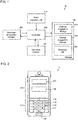
- Fig. 1 is a block diagram of a character input device 10 according to a first embodiment of the present invention.
- the character input device 10 is included in, for example, a mobile communication terminal such as a smartphone including a character input keyboard that is used to input characters.
- the character input device 10 includes an input operation unit 110, an operation detector 130, a controller 200, a character string entry detector 300, and a storage 400.
- the storage 400 includes an entered suggestion storage 410, a normal suggestion storage 420, and a dictionary database (DB) 430.
- the dictionary DB 430 stores conversion suggestions including typical character strings.
- the input operation unit 110 is, for example, a software keyboard on a touchscreen display in a smartphone (smart device) that displays keys and receives character inputs.
- the input operation unit 110 further includes an enter button for entering a character string, a delete button for deleting a character string, and a suggestion display for displaying conversion suggestions for a character string.
- the normal suggestion storage 420 stores a character string (hereafter, a normal suggestion) entered by explicitly pressing, for example, the enter button (hereafter, normal entry) after conversion from a character string input by the user. Normal entry may be performed by selecting a suggestion appearing as a conversion suggestion, rather than pressing the enter button.
- a character string hereafter, a normal suggestion
- the enter button hereafter, normal entry
- the entered suggestion storage 410 stores a character string (hereafter, an entered suggestion) entered by a change in the suspend state (hereafter, a state change).
- a state change may be movement of an input focus from where a character string is currently being input.
- a state change is not limited to movement of the input focus.
- a state change may also include an operation other than normal entry, or more specifically, for example, pressing a button on the smartphone to return to a previous processing step, an interrupt of a conversion operation by an incoming call to the smartphone, and an interrupt of a conversion operation by reception of an email.
- the input focus represents the location at which an input or operation is enabled in a system using multiple windows.
- the input focus indicates a character input field that can receive an input, and the input focus can move from the character input field (this is referred to as movement of the input focus).
- the user activates an email application and touches the character input field.
- a character input field provided by the email application then receives a user input of a character string.
- the controller 200 then activates a character input keyboard included in the input operation unit 110.
- an email application is used as an application having a character input field, an example application is not limited to an email application.
- the user inputs a character string on the character input keyboard.
- the input operation unit 110 outputs a character string conversion operation to the controller 200.
- the controller 200 searches the dictionary DB 430 for conversion suggestions for the character string.
- the controller 200 outputs the conversion suggestions on the suggestion display included in the input operation unit 110.
- the user selects an intended conversion suggestion to be a conversion-suspended state from the conversion suggestions output to the suggestion display by pressing a convert button any number of times.
- the input operation unit 110 outputs the selected conversion suggestion to the controller 200.
- the controller 200 causes the conversion suggestion to appear in the character input field.
- the conversion suggestion has yet to be entered.
- a process performed by the user for entering a character string by moving the input focus in the input operation unit 110 will be described.
- the user moves the input focus from the character input field.
- the operation detector 130 detects the movement of the input focus, and outputs information indicating the movement to the controller 200.
- the controller 200 outputs information indicating the movement of the input focus to the character string entry detector 300.
- the character string entry detector 300 In response to the movement of the input focus, the character string entry detector 300 generates an entered suggestion based on the conversion suggestion.
- the character string entry detector 300 outputs the entered suggestion to the controller 200.
- the controller 200 stores the entered suggestion into the entered suggestion storage 410.
- a process performed by the user pressing the enter button included in the input operation unit 110 will be described. The same processing is performed as described above from when the user selects an intended conversion suggestion from conversion suggestions output to the suggestion display to when a character string appears in the character input field.
- the user presses the enter button in the input operation unit 110.
- the input operation unit 110 then outputs, to the controller 200, information indicating that the enter button has been pressed.
- the controller 200 outputs, to the character string entry detector 300, information indicating that the enter button has been pressed. In response to the enter button being pressed, the character string entry detector 300 generates a normal suggestion based on the conversion suggestion. The character string entry detector 300 outputs the normal suggestion to the controller 200. The controller 200 stores the normal suggestion into the normal suggestion storage 420.
- This structure can learn conversion suggestions when the input focus is moved, in addition to when the user explicitly presses the enter button, and improves usability for the user.
- Fig. 1 is a block diagram of a character input device 10 according to a first embodiment of the present invention.
- Fig. 2 is a schematic diagram of the character input device 10 according to the first embodiment of the present invention.
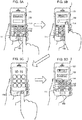
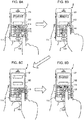
- Figs. 3A to 3C are schematic diagrams of the character input device 10 according to the first embodiment of the present invention.
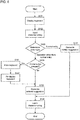
- Fig. 4 is a flowchart showing an operation of the character input device 10 according to the first embodiment of the present invention.
- a smartphone 1 includes the character input device 10 and a home button 150.
- the home button 150 is used to display, for example, a standby screen of a smartphone. When the home button 150 is pressed with some applications running, all the applications running are suspended, and the standby screen appears.
- a smartphone without the home button 150 may simply have a function equivalent to displaying of the standby screen.
- a smartphone is used herein, the same applies to another smart device with functions similar to the functions of a smartphone, such as a tablet.
- the input operation unit 110 includes a character input keyboard 111, an enter button 112, a delete button 113, and a suggestion display 114.
- the user activates an email application.
- the email application includes character input fields 121 and 122.
- the user selects (touches) the character input field 121 provided by the email application.
- the operation detector 130 outputs, to the controller 200, information indicating that the character input field 121 has the input focus.
- the controller 200 activates the input operation unit 110.
- the user uses the character input keyboard 111 to input the Japanese hiragana characters Koushou.
- the input operation unit 110 outputs the character string Koushou to the controller 200.
- the controller 200 searches the dictionary DB 430 for conversion suggestions relevant to the character string Koushou.
- the controller 200 outputs the corresponding different sets of kanji (Chinese) characters (hereafter, Kanji 1 and Kanji 2) for the character string Koushou to the suggestion display 114.
- Kanji 1 and Kanji 2 kanji
- the user selects the character string Kanji 1 in the suggestion display 114 as a conversion-suspended suggestion.
- the input operation unit 110 outputs, to the controller 200, information indicating the selection of the characters Kanji 1.
- the controller 200 outputs the character string Kanji 1 to the character input field 121. Selecting a character string herein refers to changing the character string into a conversion-suspended state, but is not entering the character string.
- the operation detector 130 thus detects movement of the input focus.
- the operation detector 130 outputs, to the controller 200, information indicating the movement of the input focus.
- the controller 200 outputs, to the character string entry detector 300, information indicating entry of the character string Kanji 1 in response to the movement of the input focus.
- the character string entry detector 300 generates an entered suggestion (character string Kanji 1) based on the conversion suggestion.
- the character string entry detector 300 outputs the entered suggestion Kanji 1 to the controller 200.
- the controller 200 stores the entered suggestion Kanji 1 into the entered suggestion storage 410.
- the user inputs the hiragana characters Koushou in the character input field 122.
- the input operation unit 110 outputs the hiragana character string Koushou to the controller 200.
- the controller 200 first searches the entered suggestion storage 410 for character strings relevant to the hiragana character string Koushou.
- the controller 200 searches the normal suggestion storage 420 and the dictionary DB 430.
- the suggestion display 114 displays the different sets of characters Kanji 1 and Kanji 2 in the stated order.
- the input operation unit 110 outputs, to the controller 200, information indicating that the enter button 112 has been pressed.
- the controller 200 outputs, to the character string entry detector 300, information indicating that the enter button 112 has been pressed.
- the character string entry detector 300 generates a normal suggestion based on the conversion suggestion.
- the character string entry detector 300 outputs the normal suggestion to the controller 200.
- the controller 200 stores the normal suggestion into the normal suggestion storage 420.
- the character input device 10 In response to the selection of the character input field 121 provided by the email application, the character input device 10 displays the character input keyboard 111 (S101).
- the character input field 121 receives an input of a character string.
- the controller 200 then outputs conversion suggestions for the character string to the suggestion display 114 (S102).
- the type of entry for the character string is determined (S103).
- the operation detector 130 detects movement of the input focus from the character input field 121 (input focus movement in S103)
- the character string entry detector 300 generates an entered suggestion (S104).
- the controller 200 stores the entered suggestion into the entered suggestion storage 410, and learns the character string (S105).
- the operation detector 130 detects the enter button 112 being pressed (normal entry in S103)
- the character string entry detector 300 generates a normal suggestion (S111).
- the controller 200 stores the normal suggestion into the normal suggestion storage 420, and learns the character string (S105).
- This structure can learn conversion suggestions when the input focus is moved, in addition to when, for example, the user explicitly presses the enter button, and thus improves the usability for character input.
- the structure described above displays the entered suggestion with priority.
- the structure may analyze the tendency of the user to enter character strings either by moving the input focus or by pressing the enter button, and may statistically obtain the information.
- the structure may associate each character string with the tendency, and may determine the order of the suggestions to appear, or specifically, whether to output, to the suggestion display 114, the entered suggestion or the normal suggestion with priority.
- the entered suggestion storage 410 and the normal suggestion storage 420 may be integral with each other. In this case, a flag may be used to indicate either the entered suggestion or the normal suggestion.
- Figs. 5A to 5D are schematic diagrams of a character input device 10 according to a modification of the first embodiment of the present invention.
- Fig. 6 is a flowchart showing an operation of the character input device 10 according to the modification of the first embodiment of the present invention.
- the modification of the first embodiment differs from the first embodiment in that the home button 150 is pressed.
- the other components and processes are the same as those in the first embodiment, and will not be described.
- the corresponding different sets of kanji characters (hereafter, Kanji 1 and Kanji 2) for the character string Koushou are output to the suggestion display 114.
- the user selects the character string Kanji 1 in the suggestion display 114 as a conversion-suspended suggestion.
- the input operation unit 110 outputs, to the controller 200, information indicating the selection of the character string Kanji 1.
- the operation detector 130 thus outputs, to the controller 200, information indicating that the character string Kanji 1 has been entered.
- the controller 200 outputs, to the character string entry detector 300, information indicating that the selected character string Kanji 1 has been entered.
- the character string entry detector 300 outputs the character string Kanji 1 to the controller 200 as an entered suggestion.
- the controller 200 stores the character string Kanji 1 into the entered suggestion storage 410.
- the user presses the home button 150 to display the standby screen of the character input device 10. This interrupts the operation on the character input fields 121 and 122.
- the user reactivates the character input fields 121 and 122.
- the user inputs the hiragana characters Koushou in the character input field 122.
- the input operation unit 110 outputs the character string Koushou to the operation detector 130.
- the operation detector 130 outputs the character string Koushou to the controller 200.
- the controller 200 first searches the entered suggestion storage 410 for character strings relevant to the hiragana character string Koushou.
- the controller 200 searches the normal suggestion storage 420 and the dictionary DB 430.
- the suggestion display 114 displays the different sets of characters Kanji 1 and Kanji 2 in the stated order.
- the character input device 10 In response to the selection of the character input field 121, the character input device 10 displays the character input keyboard 111 (S121).
- the character input field 121 receives an input of a character string.
- the controller 200 thus outputs conversion suggestions for the character string to the suggestion display 114 (S122).
- the operation detector 130 determines the type of entry for the character string (S123). When the operation detector 130 detects an operation other than normal entry in the character input field 121 (operation other than normal entry in S123), the character input device 10 determines whether the home button 150 is pressed (S124).
- the character input device 10 hides the character input keyboard 111 (S141).
- the character input keyboard 111 receives an operation for re-display (S142).
- the character string entry detector 300 generates an entered suggestion, and stores the entered suggestion into the entered suggestion storage 410 (S125).
- the character string entry detector 300 When the home button 150 is not pressed (No in S124), the character string entry detector 300 generates an entered suggestion, and stores the entered suggestion into the entered suggestion storage 410 (S125).
- the controller 200 learns the character string (S126).
- the operation detector 130 detects, for example, the enter button 112 being pressed (normal entry in S123)
- the character string entry detector 300 When the operation detector 130 detects, for example, the enter button 112 being pressed (normal entry in S123), the character string entry detector 300 generates a normal suggestion, and stores the normal suggestion into the normal suggestion storage 420 (S131).
- the controller 200 learns the character string (S126).
- the structure described above performs the processing in steps S141 and S142 after the home button 150 is pressed in step S124, followed by the processing for generating the entered suggestion in step S125. However, after the home button 150 is pressed in step S124, the processing for generating the entered suggestion in step S125 may be performed, and then the processing in steps S141 and S142 may be performed.
- This structure can also learn character strings when any processing is interrupted by pressing the home button 150, in addition to when the user explicitly presses the enter button 112, and improves the usability for character input further.
- the home button 150 is pressed in the above structure, the same structure is also applicable to when any processing is interrupted by an incoming call or by reception of an email.
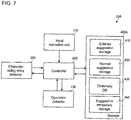
- FIG. 7 is a block diagram of a character input device 10A according to a second embodiment of the present invention.
- Figs. 8A to 8D are schematic diagrams of the character input device 10A according to the second embodiment of the present invention.
- Fig. 9 is a flowchart showing an operation of the character input device 10A according to the second embodiment of the present invention.
- the second embodiment differs from the first embodiment in including a suggestion temporary storage 440.
- the other components and processes are the same as those in the first embodiment, and will not be described.
- a storage 400A includes the entered suggestion storage 410, the normal suggestion storage 420, the dictionary DB 430, and the suggestion temporary storage 440.
- the suggestion temporary storage 440 has the function of temporarily storing an entered suggestion to be stored into the entered suggestion storage 410.
- the user inputs characters with a character input device 10A.
- the user activates an email application to display the character input fields 121 and 122.
- the operation detector 130 in response to the user selecting (touching) the character input field 121, the operation detector 130 outputs, to the controller 200, information indicating that the character input field 121 has the input focus.
- the controller 200 activates the input operation unit 110.
- the user uses the character input keyboard 111 to input the Japanese hiragana characters Koushou.
- the input operation unit 110 outputs the hiragana character string Koushou to the controller 200.
- the controller 200 searches the dictionary DB 430 for conversion suggestions relevant to the hiragana character string Koushou.
- the controller 200 outputs the corresponding different sets of kanji characters (hereafter, Kanji 1 and Kanji 2) for the character string Koushou to the suggestion display 114.
- the input operation unit 110 outputs, to the controller 200, information indicating the character string Kanji 1 as a conversion-suspended suggestion.
- the user then moves the input focus from the character input field 121 to the character input field 122.
- the operation detector 130 thus detects movement of the input focus.
- the operation detector 130 outputs, to the controller 200, information indicating the movement of the input focus.
- the operation detector 130 outputs, to the controller 200, information indicating entry of the character string Kanji 1 in response to the movement of the input focus.
- the controller 200 outputs, to the character string entry detector 300, information indicating that the character string Kanji 1 has been entered.
- the character string entry detector 300 outputs the character string Kanji 1 to the controller 200 as an entered suggestion.
- the controller 200 stores the character string Kanji 1 into the suggestion temporary storage 440.
- the user presses the delete button 113 to delete the character string Kanji 1 in the character input field 121.
- the operation detector 130 outputs, to the controller 200, information indicating that the character string Kanji 1 has been deleted.
- the controller 200 deletes the character string Kanji 1 from the suggestion temporary storage 440.
- the user inputs the hiragana characters Koushou in the character input field 121.
- the suggestion display 114 displays the corresponding different sets of kanji characters for the character string Koushou, Kanji 2, Kanji 1, and Kanji 3, in, for example, the stated order, without displaying the character string Kanji 1 with priority. More specifically, the entered suggestion storage 410 does not store the character string Kanji 1.
- the controller 200 moves the character string Kanji 1 from the suggestion temporary storage 440 to the entered suggestion storage 410.
- the character string Kanji 1 is stored as an entered suggestion.
- the character input field 121 is selected to display the character input keyboard 111 (S201).
- the character input field 121 receives an input of a character string.
- the controller 200 thus outputs conversion suggestions for the character string to the suggestion display 114 (S202).
- the operation detector 130 determines the type of entry for the character string (S203). When the operation detector 130 detects movement of the input focus from the character input field 121 (input focus movement in S203), the character string entry detector 300 generates a temporary suggestion (S204).
- the operation detector 130 determines whether the delete key is pressed (S205). When the input focus is moved again to the character input field 121 and the delete key is pressed (Yes in S205), the temporary suggestion is deleted (S221). The character input field 121 again receives an input of a character string (S202).
- step S205 When the delete key is not pressed in step S205 (No in S205), the controller 200 stores the temporary suggestion into the entered suggestion storage 410 as an entered suggestion (S206), and learns the character string (S207).
- the operation detector 130 detects, for example, the enter button 112 being pressed in step S203 (normal entry in S203), the character string entry detector 300 generates a normal suggestion (S211), and learns the character string (S207).
- the delete key not being pressed in step S205 corresponds to, for example, another character string being entered after the input focus is moved to the character input field 122.
- This structure can also learn conversion suggestions when the input focus is moved, in addition to when the user explicitly presses the enter button. Further, this structure does not learn the character string when the input focus is moved erroneously, and thus improves the usability for character input.
Landscapes
- Engineering & Computer Science (AREA)
- Theoretical Computer Science (AREA)
- General Engineering & Computer Science (AREA)
- Physics & Mathematics (AREA)
- General Physics & Mathematics (AREA)
- Human Computer Interaction (AREA)
- Health & Medical Sciences (AREA)
- Artificial Intelligence (AREA)
- Audiology, Speech & Language Pathology (AREA)
- Computational Linguistics (AREA)
- General Health & Medical Sciences (AREA)
- User Interface Of Digital Computer (AREA)
- Input From Keyboards Or The Like (AREA)
- Document Processing Apparatus (AREA)
- Telephone Function (AREA)
Abstract
Description
- This application claims priority to Japanese Patent Application No.
2019-046946 filed on March 14, 2019 - The present invention relates to a character input technique for learning conversion suggestions for an input character.
- A structure described in
Patent Literature 1 learns a combination of a first phrase and a second phrase when the characters of the first phrase are input, followed by no operation including cursor movement or deletion, and then the second phrase is input. The combination of the first phrase and the second phrase is registered with a suggestion dictionary database when this combination appears frequently in inputting characters. - Patent Literature 1: Japanese Unexamined Patent Application Publication No.
2009-288888 - However, the structure described in
Patent Literature 1 cannot learn a character input accompanied by cursor movement or character deletion, and may decrease usability. - One or more aspects of the present invention are directed to efficient learning of conversion suggestions for input characters.
- A character input device includes an input operation unit that receives an input of a character string, an operation detector that detects a change from a state in which the character string is output, a character string entry detector that enters the character string based on the change and generates an entered suggestion, and a storage that stores the entered suggestion as a conversion suggestion.
- This structure detects a state change during character input and learns an input character as a conversion suggestion based on the state change, and improves usability for the user.
- A controller may delete the entered suggestion from the storage when the character string entry detector included in the character input device detects deletion of the entered suggestion after the change.
- This structure does not learn a character string as a conversion suggestion when a delete key is pressed to delete the character string. This structure thus does not learn an erroneous conversion suggestion, and thus further improves usability for the user.
- The controller included in the character input device may analyze a tendency for generating the entered suggestion, and associate the tendency and the entered suggestion with each other.
- This structure provides a conversion suggestion in accordance with the tendency of the user.
- The character input device may further include a suggestion display that displays one or more of the conversion suggestions. The controller may determine an order of the conversion suggestions to appear on the suggestion display based on the tendency.
- This structure displays the conversion suggestions in an order determined in accordance with the tendency of the user, and improves usability.
- The above aspects of the present invention allow efficient learning of conversion suggestions for input characters.
-
-
Fig. 1 is a block diagram of a character input device according to a first embodiment of the present invention. -
Fig. 2 is a schematic diagram of the character input device according to the first embodiment of the present invention. -
Figs. 3A to 3C are schematic diagrams of the character input device according to the first embodiment of the present invention. -
Fig. 4 is a flowchart showing an operation of the character input device according to the first embodiment of the present invention. -
Figs. 5A to 5D are schematic diagrams of a character input device according to a modification of the first embodiment of the present invention. -
Fig. 6 is a flowchart showing an operation of the character input device according to the modification of the first embodiment of the present invention. -
Fig. 7 is a block diagram of a character input device according to a second embodiment of the present invention. -
Figs. 8A to 8D are schematic diagrams of the character input device according to the second embodiment of the present invention. -
Fig. 9 is a flowchart showing an operation of the character input device according to the second embodiment of the present invention. - Embodiments of the present invention will now be described with reference to the drawings.
- An example use of the present invention will be described first with reference to
Fig. 1. Fig. 1 is a block diagram of acharacter input device 10 according to a first embodiment of the present invention. Thecharacter input device 10 is included in, for example, a mobile communication terminal such as a smartphone including a character input keyboard that is used to input characters. - The
character input device 10 includes aninput operation unit 110, anoperation detector 130, acontroller 200, a characterstring entry detector 300, and astorage 400. Thestorage 400 includes an enteredsuggestion storage 410, anormal suggestion storage 420, and a dictionary database (DB) 430. The dictionary DB 430 stores conversion suggestions including typical character strings. - The
input operation unit 110 is, for example, a software keyboard on a touchscreen display in a smartphone (smart device) that displays keys and receives character inputs. Theinput operation unit 110 further includes an enter button for entering a character string, a delete button for deleting a character string, and a suggestion display for displaying conversion suggestions for a character string. - The entered
suggestion storage 410 and thenormal suggestion storage 420 will be described first. For example, thenormal suggestion storage 420 stores a character string (hereafter, a normal suggestion) entered by explicitly pressing, for example, the enter button (hereafter, normal entry) after conversion from a character string input by the user. Normal entry may be performed by selecting a suggestion appearing as a conversion suggestion, rather than pressing the enter button. - While a character string input by the user is being suspended (hereafter, in a suspend state), the entered
suggestion storage 410 stores a character string (hereafter, an entered suggestion) entered by a change in the suspend state (hereafter, a state change). A state change may be movement of an input focus from where a character string is currently being input. - A state change is not limited to movement of the input focus. A state change may also include an operation other than normal entry, or more specifically, for example, pressing a button on the smartphone to return to a previous processing step, an interrupt of a conversion operation by an incoming call to the smartphone, and an interrupt of a conversion operation by reception of an email.
- The input focus represents the location at which an input or operation is enabled in a system using multiple windows. In the examples described below, the input focus indicates a character input field that can receive an input, and the input focus can move from the character input field (this is referred to as movement of the input focus).
- For example, the user activates an email application and touches the character input field. A character input field provided by the email application then receives a user input of a character string. The
controller 200 then activates a character input keyboard included in theinput operation unit 110. Although an email application is used as an application having a character input field, an example application is not limited to an email application. - The user inputs a character string on the character input keyboard. The
input operation unit 110 outputs a character string conversion operation to thecontroller 200. Thecontroller 200 searches the dictionary DB 430 for conversion suggestions for the character string. Thecontroller 200 outputs the conversion suggestions on the suggestion display included in theinput operation unit 110. - The user selects an intended conversion suggestion to be a conversion-suspended state from the conversion suggestions output to the suggestion display by pressing a convert button any number of times. The
input operation unit 110 outputs the selected conversion suggestion to thecontroller 200. Thecontroller 200 causes the conversion suggestion to appear in the character input field. The conversion suggestion has yet to be entered. - A process performed by the user for entering a character string by moving the input focus in the
input operation unit 110 will be described. To enter an intended conversion suggestion, the user moves the input focus from the character input field. Theoperation detector 130 detects the movement of the input focus, and outputs information indicating the movement to thecontroller 200. - The
controller 200 outputs information indicating the movement of the input focus to the characterstring entry detector 300. In response to the movement of the input focus, the characterstring entry detector 300 generates an entered suggestion based on the conversion suggestion. The characterstring entry detector 300 outputs the entered suggestion to thecontroller 200. Thecontroller 200 stores the entered suggestion into the enteredsuggestion storage 410. - A process performed by the user pressing the enter button included in the
input operation unit 110 will be described. The same processing is performed as described above from when the user selects an intended conversion suggestion from conversion suggestions output to the suggestion display to when a character string appears in the character input field. - To enter the conversion suggestion, the user presses the enter button in the
input operation unit 110. Theinput operation unit 110 then outputs, to thecontroller 200, information indicating that the enter button has been pressed. - The
controller 200 outputs, to the characterstring entry detector 300, information indicating that the enter button has been pressed. In response to the enter button being pressed, the characterstring entry detector 300 generates a normal suggestion based on the conversion suggestion. The characterstring entry detector 300 outputs the normal suggestion to thecontroller 200. Thecontroller 200 stores the normal suggestion into thenormal suggestion storage 420. - This structure can learn conversion suggestions when the input focus is moved, in addition to when the user explicitly presses the enter button, and improves usability for the user.
-
Fig. 1 is a block diagram of acharacter input device 10 according to a first embodiment of the present invention.Fig. 2 is a schematic diagram of thecharacter input device 10 according to the first embodiment of the present invention.Figs. 3A to 3C are schematic diagrams of thecharacter input device 10 according to the first embodiment of the present invention.Fig. 4 is a flowchart showing an operation of thecharacter input device 10 according to the first embodiment of the present invention. - An example structure will be described in more detail with reference to
Figs. 2 and3A to 3C based on the structure of thecharacter input device 10 shown inFig. 1 . - As shown in
Fig. 2 , asmartphone 1 includes thecharacter input device 10 and ahome button 150. Thehome button 150 is used to display, for example, a standby screen of a smartphone. When thehome button 150 is pressed with some applications running, all the applications running are suspended, and the standby screen appears. A smartphone without thehome button 150 may simply have a function equivalent to displaying of the standby screen. Although a smartphone is used herein, the same applies to another smart device with functions similar to the functions of a smartphone, such as a tablet. - The
input operation unit 110 includes acharacter input keyboard 111, anenter button 112, adelete button 113, and asuggestion display 114. - A more specific process will be described with reference to
Figs. 3A to 3C . - The user activates an email application. The email application includes character input fields 121 and 122.
- As shown in
Fig. 3A , the user selects (touches) thecharacter input field 121 provided by the email application. Theoperation detector 130 outputs, to thecontroller 200, information indicating that thecharacter input field 121 has the input focus. - The
controller 200 activates theinput operation unit 110. The user uses thecharacter input keyboard 111 to input the Japanese hiragana characters Koushou. Theinput operation unit 110 outputs the character string Koushou to thecontroller 200. Thecontroller 200 searches thedictionary DB 430 for conversion suggestions relevant to the character string Koushou. Thecontroller 200 outputs the corresponding different sets of kanji (Chinese) characters (hereafter,Kanji 1 and Kanji 2) for the character string Koushou to thesuggestion display 114. - As shown in
Fig. 3B , the user selects thecharacter string Kanji 1 in thesuggestion display 114 as a conversion-suspended suggestion. Theinput operation unit 110 outputs, to thecontroller 200, information indicating the selection of thecharacters Kanji 1. Thecontroller 200 outputs thecharacter string Kanji 1 to thecharacter input field 121. Selecting a character string herein refers to changing the character string into a conversion-suspended state, but is not entering the character string. - The user then moves the input focus from the
character input field 121 to thecharacter input field 122. Theoperation detector 130 thus detects movement of the input focus. Theoperation detector 130 outputs, to thecontroller 200, information indicating the movement of the input focus. Thecontroller 200 outputs, to the characterstring entry detector 300, information indicating entry of thecharacter string Kanji 1 in response to the movement of the input focus. - The character
string entry detector 300 generates an entered suggestion (character string Kanji 1) based on the conversion suggestion. The characterstring entry detector 300 outputs the enteredsuggestion Kanji 1 to thecontroller 200. Thecontroller 200 stores the enteredsuggestion Kanji 1 into the enteredsuggestion storage 410. - As shown in
Fig. 3C , the user inputs the hiragana characters Koushou in thecharacter input field 122. Theinput operation unit 110 outputs the hiragana character string Koushou to thecontroller 200. Thecontroller 200 first searches the enteredsuggestion storage 410 for character strings relevant to the hiragana character string Koushou. Thecontroller 200 then searches thenormal suggestion storage 420 and thedictionary DB 430. Thesuggestion display 114 displays the different sets ofcharacters Kanji 1 and Kanji 2 in the stated order. - Referring back to
Fig. 3B , when thecharacter string Kanji 1 is entered in thecharacter input field 121 by pressing theenter button 112 in theinput operation unit 110, theinput operation unit 110 outputs, to thecontroller 200, information indicating that theenter button 112 has been pressed. - The
controller 200 outputs, to the characterstring entry detector 300, information indicating that theenter button 112 has been pressed. The characterstring entry detector 300 generates a normal suggestion based on the conversion suggestion. The characterstring entry detector 300 outputs the normal suggestion to thecontroller 200. Thecontroller 200 stores the normal suggestion into thenormal suggestion storage 420. - A process performed by the
character input device 10 will be described with reference to the flowchart inFig. 4 . - In response to the selection of the
character input field 121 provided by the email application, thecharacter input device 10 displays the character input keyboard 111 (S101). - The
character input field 121 receives an input of a character string. Thecontroller 200 then outputs conversion suggestions for the character string to the suggestion display 114 (S102). - The type of entry for the character string is determined (S103). When the
operation detector 130 detects movement of the input focus from the character input field 121 (input focus movement in S103), the characterstring entry detector 300 generates an entered suggestion (S104). - The
controller 200 stores the entered suggestion into the enteredsuggestion storage 410, and learns the character string (S105). - When the
operation detector 130 detects theenter button 112 being pressed (normal entry in S103), the characterstring entry detector 300 generates a normal suggestion (S111). - The
controller 200 stores the normal suggestion into thenormal suggestion storage 420, and learns the character string (S105). - This structure can learn conversion suggestions when the input focus is moved, in addition to when, for example, the user explicitly presses the enter button, and thus improves the usability for character input.
- The structure described above displays the entered suggestion with priority. However, the structure may analyze the tendency of the user to enter character strings either by moving the input focus or by pressing the enter button, and may statistically obtain the information.
- Also, the structure may associate each character string with the tendency, and may determine the order of the suggestions to appear, or specifically, whether to output, to the
suggestion display 114, the entered suggestion or the normal suggestion with priority. - The entered
suggestion storage 410 and thenormal suggestion storage 420 may be integral with each other. In this case, a flag may be used to indicate either the entered suggestion or the normal suggestion. - A specific structure of a
character input device 10 will now be described with reference toFigs. 5A to 5D. Figs. 5A to 5D are schematic diagrams of acharacter input device 10 according to a modification of the first embodiment of the present invention.Fig. 6 is a flowchart showing an operation of thecharacter input device 10 according to the modification of the first embodiment of the present invention. - The modification of the first embodiment differs from the first embodiment in that the
home button 150 is pressed. The other components and processes are the same as those in the first embodiment, and will not be described. - As shown in
Fig. 5A , in response to the hiragana characters Koushou input by the user in thecharacter input field 121 provided by the email application, the corresponding different sets of kanji characters (hereafter,Kanji 1 and Kanji 2) for the character string Koushou are output to thesuggestion display 114. - As shown in
Fig. 5B , the user selects thecharacter string Kanji 1 in thesuggestion display 114 as a conversion-suspended suggestion. Theinput operation unit 110 outputs, to thecontroller 200, information indicating the selection of thecharacter string Kanji 1. - The user then moves the input focus from the
character input field 121 to thecharacter input field 122. Theoperation detector 130 thus outputs, to thecontroller 200, information indicating that thecharacter string Kanji 1 has been entered. - The
controller 200 outputs, to the characterstring entry detector 300, information indicating that the selectedcharacter string Kanji 1 has been entered. - The character
string entry detector 300 outputs thecharacter string Kanji 1 to thecontroller 200 as an entered suggestion. Thecontroller 200 stores thecharacter string Kanji 1 into the enteredsuggestion storage 410. - As shown in
Fig. 5C , the user presses thehome button 150 to display the standby screen of thecharacter input device 10. This interrupts the operation on the character input fields 121 and 122. - As shown in
Fig. 5D , the user reactivates the character input fields 121 and 122. The user inputs the hiragana characters Koushou in thecharacter input field 122. Theinput operation unit 110 outputs the character string Koushou to theoperation detector 130. Theoperation detector 130 outputs the character string Koushou to thecontroller 200. Thecontroller 200 first searches the enteredsuggestion storage 410 for character strings relevant to the hiragana character string Koushou. Thecontroller 200 then searches thenormal suggestion storage 420 and thedictionary DB 430. Thesuggestion display 114 displays the different sets ofcharacters Kanji 1 and Kanji 2 in the stated order. - A process performed by the
character input device 10 will be described with reference to the flowchart inFig. 6 . - In response to the selection of the
character input field 121, thecharacter input device 10 displays the character input keyboard 111 (S121). - The
character input field 121 receives an input of a character string. Thecontroller 200 thus outputs conversion suggestions for the character string to the suggestion display 114 (S122). - The
operation detector 130 determines the type of entry for the character string (S123). When theoperation detector 130 detects an operation other than normal entry in the character input field 121 (operation other than normal entry in S123), thecharacter input device 10 determines whether thehome button 150 is pressed (S124). - When the
home button 150 is pressed (Yes in S124), thecharacter input device 10 hides the character input keyboard 111 (S141). Thecharacter input keyboard 111 receives an operation for re-display (S142). The characterstring entry detector 300 generates an entered suggestion, and stores the entered suggestion into the entered suggestion storage 410 (S125). - When the
home button 150 is not pressed (No in S124), the characterstring entry detector 300 generates an entered suggestion, and stores the entered suggestion into the entered suggestion storage 410 (S125). - The
controller 200 learns the character string (S126). - When the
operation detector 130 detects, for example, theenter button 112 being pressed (normal entry in S123), the characterstring entry detector 300 generates a normal suggestion, and stores the normal suggestion into the normal suggestion storage 420 (S131). Thecontroller 200 learns the character string (S126). - The structure described above performs the processing in steps S141 and S142 after the
home button 150 is pressed in step S124, followed by the processing for generating the entered suggestion in step S125. However, after thehome button 150 is pressed in step S124, the processing for generating the entered suggestion in step S125 may be performed, and then the processing in steps S141 and S142 may be performed. - This structure can also learn character strings when any processing is interrupted by pressing the
home button 150, in addition to when the user explicitly presses theenter button 112, and improves the usability for character input further. - Although the
home button 150 is pressed in the above structure, the same structure is also applicable to when any processing is interrupted by an incoming call or by reception of an email. - A specific structure of a
character input device 10A will now be described with reference toFigs. 7 and8A to 8D .Fig. 7 is a block diagram of acharacter input device 10A according to a second embodiment of the present invention.Figs. 8A to 8D are schematic diagrams of thecharacter input device 10A according to the second embodiment of the present invention.Fig. 9 is a flowchart showing an operation of thecharacter input device 10A according to the second embodiment of the present invention. - The second embodiment differs from the first embodiment in including a suggestion
temporary storage 440. The other components and processes are the same as those in the first embodiment, and will not be described. - As shown in
Fig. 7 , astorage 400A includes the enteredsuggestion storage 410, thenormal suggestion storage 420, thedictionary DB 430, and the suggestiontemporary storage 440. The suggestiontemporary storage 440 has the function of temporarily storing an entered suggestion to be stored into the enteredsuggestion storage 410. - A more specific process will be described with reference to
Figs. 8A to 8D . - The user inputs characters with a
character input device 10A. The user activates an email application to display the character input fields 121 and 122. - As shown in
Fig. 8A , in response to the user selecting (touching) thecharacter input field 121, theoperation detector 130 outputs, to thecontroller 200, information indicating that thecharacter input field 121 has the input focus. - The
controller 200 activates theinput operation unit 110. The user uses thecharacter input keyboard 111 to input the Japanese hiragana characters Koushou. Theinput operation unit 110 outputs the hiragana character string Koushou to thecontroller 200. Thecontroller 200 searches thedictionary DB 430 for conversion suggestions relevant to the hiragana character string Koushou. Thecontroller 200 outputs the corresponding different sets of kanji characters (hereafter,Kanji 1 and Kanji 2) for the character string Koushou to thesuggestion display 114. - As shown in
Fig. 8B , theinput operation unit 110 outputs, to thecontroller 200, information indicating thecharacter string Kanji 1 as a conversion-suspended suggestion. The user then moves the input focus from thecharacter input field 121 to thecharacter input field 122. Theoperation detector 130 thus detects movement of the input focus. Theoperation detector 130 outputs, to thecontroller 200, information indicating the movement of the input focus. - The
operation detector 130 outputs, to thecontroller 200, information indicating entry of thecharacter string Kanji 1 in response to the movement of the input focus. Thecontroller 200 outputs, to the characterstring entry detector 300, information indicating that thecharacter string Kanji 1 has been entered. - The character
string entry detector 300 outputs thecharacter string Kanji 1 to thecontroller 200 as an entered suggestion. Thecontroller 200 stores thecharacter string Kanji 1 into the suggestiontemporary storage 440. - As shown in
Fig. 8C , the user presses thedelete button 113 to delete thecharacter string Kanji 1 in thecharacter input field 121. Theoperation detector 130 outputs, to thecontroller 200, information indicating that thecharacter string Kanji 1 has been deleted. - The
controller 200 deletes thecharacter string Kanji 1 from the suggestiontemporary storage 440. - As shown in
Fig. 8D , the user inputs the hiragana characters Koushou in thecharacter input field 121. Thesuggestion display 114 then displays the corresponding different sets of kanji characters for the character string Koushou, Kanji 2,Kanji 1, andKanji 3, in, for example, the stated order, without displaying thecharacter string Kanji 1 with priority. More specifically, the enteredsuggestion storage 410 does not store thecharacter string Kanji 1. - In the above structure, when the user starts inputting the next character before pressing the
delete button 113, thecontroller 200 moves thecharacter string Kanji 1 from the suggestiontemporary storage 440 to the enteredsuggestion storage 410. As a result, thecharacter string Kanji 1 is stored as an entered suggestion. - A process performed by the
character input device 10A will be described with reference to the flowchart inFig. 9 . - The
character input field 121 is selected to display the character input keyboard 111 (S201). - The
character input field 121 receives an input of a character string. Thecontroller 200 thus outputs conversion suggestions for the character string to the suggestion display 114 (S202). - The
operation detector 130 determines the type of entry for the character string (S203). When theoperation detector 130 detects movement of the input focus from the character input field 121 (input focus movement in S203), the characterstring entry detector 300 generates a temporary suggestion (S204). - The
operation detector 130 determines whether the delete key is pressed (S205). When the input focus is moved again to thecharacter input field 121 and the delete key is pressed (Yes in S205), the temporary suggestion is deleted (S221). Thecharacter input field 121 again receives an input of a character string (S202). - When the delete key is not pressed in step S205 (No in S205), the
controller 200 stores the temporary suggestion into the enteredsuggestion storage 410 as an entered suggestion (S206), and learns the character string (S207). - When the
operation detector 130 detects, for example, theenter button 112 being pressed in step S203 (normal entry in S203), the characterstring entry detector 300 generates a normal suggestion (S211), and learns the character string (S207). - The delete key not being pressed in step S205 corresponds to, for example, another character string being entered after the input focus is moved to the
character input field 122. - This structure can also learn conversion suggestions when the input focus is moved, in addition to when the user explicitly presses the enter button. Further, this structure does not learn the character string when the input focus is moved erroneously, and thus improves the usability for character input.
- The correspondence between the structures of the claimed invention and the structures in the above embodiments may be expressed as specified in the appendix below.
- A character input device (10), comprising:
- an input operation unit (110) configured to receive an input of a character string;
- an operation detector (130) configured to detect a change from a state in which the character string is output;
- a character string entry detector (300) configured to enter the character string based on the change and generate an entered suggestion; and
- a storage (400) configured to store the entered suggestion as a conversion suggestion.
-
- 1
- smartphone
- 10, 10A
- character input device
- 110
- input operation unit
- 111
- character input keyboard
- 112
- enter button
- 113
- delete button
- 114
- suggestion display
- 121, 122
- character input field
- 130
- operation detector
- 150
- home button
- 200
- controller
- 300
- character string entry detector
- 400, 400A
- storage
- 400A
- storage
- 410
- entered suggestion storage
- 420
- normal suggestion storage
- 430
- dictionary DB
- 440
- suggestion temporary storage
Claims (6)
- A character input device (10; 10A), comprising:an input operation unit (110) configured to receive an input of a character string;an operation detector (130) configured to detect a change from a state in which the character string is output;a character string entry detector (300) configured to enter the character string based on the change and generate an entered suggestion; anda storage (400; 400A) configured to store the entered suggestion as a conversion suggestion.
- The character input device (10; 10A) according to claim 1, further comprising:
a controller (200) configured to delete the entered suggestion from the storage (400; 400A) when the character string entry detector (300) detects deletion of the entered suggestion after the change. - The character input device (10; 10A) according to claim 1 or claim 2, wherein
the controller (200) analyzes a tendency for generating the entered suggestion, and associates the tendency and the entered suggestion with each other. - The character input device (10; 10A) according to claim 3, further comprising:a suggestion display (114) configured to display one or more of the conversion suggestions,wherein the controller (200) determines an order of the conversion suggestions to appear on the suggestion display (114) based on the tendency.
- A character input method implementable by a computer, the method comprising:receiving an input of a character string;detecting a change from a state in which the character string is output;entering the character string based on the change and generating an entered suggestion; andstoring the entered suggestion as a conversion suggestion.
- A character input program for causing a computer to implement:receiving an input of a character string;detecting a change from a state in which the character string is output;entering the character string based on the change and generating an entered suggestion; andstoring the entered suggestion as a conversion suggestion.
Applications Claiming Priority (1)
| Application Number | Priority Date | Filing Date | Title |
|---|---|---|---|
| JP2019046946A JP7263857B2 (en) | 2019-03-14 | 2019-03-14 | Character input device, character input method, and character input program |
Publications (1)
| Publication Number | Publication Date |
|---|---|
| EP3709137A1 true EP3709137A1 (en) | 2020-09-16 |
Family
ID=69571786
Family Applications (1)
| Application Number | Title | Priority Date | Filing Date |
|---|---|---|---|
| EP20156542.1A Ceased EP3709137A1 (en) | 2019-03-14 | 2020-02-11 | Character input device, character input method, and character input program |
Country Status (3)
| Country | Link |
|---|---|
| US (1) | US11347377B2 (en) |
| EP (1) | EP3709137A1 (en) |
| JP (1) | JP7263857B2 (en) |
Families Citing this family (1)
| Publication number | Priority date | Publication date | Assignee | Title |
|---|---|---|---|---|
| JP7797880B2 (en) * | 2022-01-07 | 2026-01-14 | オムロン株式会社 | Character input device, character input method, and character input program |
Citations (4)
| Publication number | Priority date | Publication date | Assignee | Title |
|---|---|---|---|---|
| EP2128749A2 (en) * | 2008-05-27 | 2009-12-02 | NTT DoCoMo Inc. | Mobile terminal and information display method |
| JP2009288888A (en) | 2008-05-27 | 2009-12-10 | Sony Ericsson Mobilecommunications Japan Inc | Character input device, character input learning method and program |
| US20160282956A1 (en) * | 2015-03-24 | 2016-09-29 | Google Inc. | Unlearning techniques for adaptive language models in text entry |
| US20170255598A1 (en) * | 2016-03-03 | 2017-09-07 | Fujitsu Limited | Character input device and non-transitory computer-readable recording medium for character input |
Family Cites Families (17)
| Publication number | Priority date | Publication date | Assignee | Title |
|---|---|---|---|---|
| JPH0816313A (en) * | 1994-07-04 | 1996-01-19 | Sanyo Electric Co Ltd | Handwriting input method and device |
| JPH11212967A (en) * | 1998-01-21 | 1999-08-06 | Teguretto Gijutsu Kaihatsu:Kk | Prediction input device and method |
| US20090193334A1 (en) * | 2005-05-18 | 2009-07-30 | Exb Asset Management Gmbh | Predictive text input system and method involving two concurrent ranking means |
| US8793620B2 (en) * | 2011-04-21 | 2014-07-29 | Sony Computer Entertainment Inc. | Gaze-assisted computer interface |
| JP2006216079A (en) | 2006-04-17 | 2006-08-17 | Sony Corp | Character string data processing apparatus and method |
| JP2008250708A (en) | 2007-03-30 | 2008-10-16 | Sanyo Electric Co Ltd | Input character string prediction apparatus and input character string prediction program |
| US8019390B2 (en) * | 2009-06-17 | 2011-09-13 | Pradeep Sindhu | Statically oriented on-screen transluscent keyboard |
| EP2545426A4 (en) * | 2010-03-12 | 2017-05-17 | Nuance Communications, Inc. | Multimodal text input system, such as for use with touch screens on mobile phones |
| JP5575578B2 (en) * | 2010-08-10 | 2014-08-20 | Kddi株式会社 | Route search application program, apparatus and method for predictive conversion of input characters |
| JP2013041567A (en) * | 2011-07-21 | 2013-02-28 | Sharp Corp | Character input device |
| JP6031764B2 (en) | 2012-01-13 | 2016-11-24 | オムロン株式会社 | CHARACTER INPUT PROGRAM, INFORMATION PROCESSING DEVICE, AND CHARACTER INPUT OPERATION SETTING METHOD |
| US20140278349A1 (en) * | 2013-03-14 | 2014-09-18 | Microsoft Corporation | Language Model Dictionaries for Text Predictions |
| JP2014191355A (en) | 2013-03-26 | 2014-10-06 | Oki Data Corp | Character input device, and character input method |
| US9672818B2 (en) * | 2013-04-18 | 2017-06-06 | Nuance Communications, Inc. | Updating population language models based on changes made by user clusters |
| KR102313353B1 (en) * | 2013-07-29 | 2021-10-18 | 삼성전자주식회사 | Character inputting method and display apparatus |
| US9678664B2 (en) * | 2015-04-10 | 2017-06-13 | Google Inc. | Neural network for keyboard input decoding |
| US10140017B2 (en) * | 2016-04-20 | 2018-11-27 | Google Llc | Graphical keyboard application with integrated search |
-
2019
- 2019-03-14 JP JP2019046946A patent/JP7263857B2/en active Active
-
2020
- 2020-02-11 EP EP20156542.1A patent/EP3709137A1/en not_active Ceased
- 2020-02-20 US US16/795,648 patent/US11347377B2/en not_active Expired - Fee Related
Patent Citations (4)
| Publication number | Priority date | Publication date | Assignee | Title |
|---|---|---|---|---|
| EP2128749A2 (en) * | 2008-05-27 | 2009-12-02 | NTT DoCoMo Inc. | Mobile terminal and information display method |
| JP2009288888A (en) | 2008-05-27 | 2009-12-10 | Sony Ericsson Mobilecommunications Japan Inc | Character input device, character input learning method and program |
| US20160282956A1 (en) * | 2015-03-24 | 2016-09-29 | Google Inc. | Unlearning techniques for adaptive language models in text entry |
| US20170255598A1 (en) * | 2016-03-03 | 2017-09-07 | Fujitsu Limited | Character input device and non-transitory computer-readable recording medium for character input |
Also Published As
| Publication number | Publication date |
|---|---|
| US20200293159A1 (en) | 2020-09-17 |
| US11347377B2 (en) | 2022-05-31 |
| JP2020149416A (en) | 2020-09-17 |
| JP7263857B2 (en) | 2023-04-25 |
Similar Documents
| Publication | Publication Date | Title |
|---|---|---|
| KR101750968B1 (en) | Consistent text suggestion output | |
| EP2987055B1 (en) | Text suggestion output using past interaction data | |
| EP3005066B1 (en) | Multiple graphical keyboards for continuous gesture input | |
| US10503398B2 (en) | Portable electronic device and method of controlling display of selectable elements | |
| US20170308247A1 (en) | Graphical keyboard application with integrated search | |
| CN103220430B (en) | A kind of method that mobile phone first line of a couplet people from system is searched and device | |
| CN104541239A (en) | Text select and enter | |
| CN105468256A (en) | Input method keyboard switching method and device | |
| US8766937B2 (en) | Method of facilitating input at an electronic device | |
| EP2273347B1 (en) | System and method for disambiguation of stroke input | |
| US11347377B2 (en) | Character input device, character input method, and character input program | |
| CN103631436A (en) | Handwriting input method and terminal | |
| JP2014530423A (en) | Character input device and character input method in portable terminal | |
| CN105589570A (en) | Input error processing method and apparatus | |
| EP2568370B1 (en) | Method of facilitating input at an electronic device | |
| CN112346643B (en) | Text processing method and device, electronic equipment and readable storage medium | |
| US9645656B2 (en) | Method for text input, apparatus, and computer program | |
| CN118132183A (en) | Guidance information display method, program control method, device, equipment and medium | |
| KR20240118587A (en) | Character input device implemented in software | |
| CN112925469A (en) | Content display method, content display device, storage medium and electronic equipment | |
| JP2015022734A (en) | Electronic apparatus, dictionary retrieval program, and dictionary retrieval system | |
| WO2013033809A1 (en) | Touch-typing disambiguation based on distance between delimiting characters |
Legal Events
| Date | Code | Title | Description |
|---|---|---|---|
| PUAI | Public reference made under article 153(3) epc to a published international application that has entered the european phase |
Free format text: ORIGINAL CODE: 0009012 |
|
| STAA | Information on the status of an ep patent application or granted ep patent |
Free format text: STATUS: REQUEST FOR EXAMINATION WAS MADE |
|
| 17P | Request for examination filed |
Effective date: 20200304 |
|
| AK | Designated contracting states |
Kind code of ref document: A1 Designated state(s): AL AT BE BG CH CY CZ DE DK EE ES FI FR GB GR HR HU IE IS IT LI LT LU LV MC MK MT NL NO PL PT RO RS SE SI SK SM TR |
|
| AX | Request for extension of the european patent |
Extension state: BA ME |
|
| RBV | Designated contracting states (corrected) |
Designated state(s): AL AT BE BG CH CY CZ DE DK EE ES FI FR GB GR HR HU IE IS IT LI LT LU LV MC MK MT NL NO PL PT RO RS SE SI SK SM TR |
|
| STAA | Information on the status of an ep patent application or granted ep patent |
Free format text: STATUS: EXAMINATION IS IN PROGRESS |
|
| 17Q | First examination report despatched |
Effective date: 20221005 |
|
| STAA | Information on the status of an ep patent application or granted ep patent |
Free format text: STATUS: THE APPLICATION HAS BEEN REFUSED |
|
| 18R | Application refused |
Effective date: 20231207 |