EP3696667A1 - Method of controlling a dynamic user interface - Google Patents
Method of controlling a dynamic user interface Download PDFInfo
- Publication number
- EP3696667A1 EP3696667A1 EP19157445.8A EP19157445A EP3696667A1 EP 3696667 A1 EP3696667 A1 EP 3696667A1 EP 19157445 A EP19157445 A EP 19157445A EP 3696667 A1 EP3696667 A1 EP 3696667A1
- Authority
- EP
- European Patent Office
- Prior art keywords
- frame
- user
- computer system
- item
- data
- Prior art date
- Legal status (The legal status is an assumption and is not a legal conclusion. Google has not performed a legal analysis and makes no representation as to the accuracy of the status listed.)
- Ceased
Links
Images



Classifications
-
- G—PHYSICS
- G06—COMPUTING OR CALCULATING; COUNTING
- G06F—ELECTRIC DIGITAL DATA PROCESSING
- G06F9/00—Arrangements for program control, e.g. control units
- G06F9/06—Arrangements for program control, e.g. control units using stored programs, i.e. using an internal store of processing equipment to receive or retain programs
- G06F9/44—Arrangements for executing specific programs
- G06F9/451—Execution arrangements for user interfaces
-
- G—PHYSICS
- G06—COMPUTING OR CALCULATING; COUNTING
- G06F—ELECTRIC DIGITAL DATA PROCESSING
- G06F3/00—Input arrangements for transferring data to be processed into a form capable of being handled by the computer; Output arrangements for transferring data from processing unit to output unit, e.g. interface arrangements
- G06F3/12—Digital output to print unit, e.g. line printer, chain printer
- G06F3/1201—Dedicated interfaces to print systems
- G06F3/1202—Dedicated interfaces to print systems specifically adapted to achieve a particular effect
- G06F3/1203—Improving or facilitating administration, e.g. print management
- G06F3/1204—Improving or facilitating administration, e.g. print management resulting in reduced user or operator actions, e.g. presetting, automatic actions, using hardware token storing data
-
- G—PHYSICS
- G06—COMPUTING OR CALCULATING; COUNTING
- G06F—ELECTRIC DIGITAL DATA PROCESSING
- G06F3/00—Input arrangements for transferring data to be processed into a form capable of being handled by the computer; Output arrangements for transferring data from processing unit to output unit, e.g. interface arrangements
- G06F3/12—Digital output to print unit, e.g. line printer, chain printer
- G06F3/1201—Dedicated interfaces to print systems
- G06F3/1223—Dedicated interfaces to print systems specifically adapted to use a particular technique
- G06F3/1237—Print job management
- G06F3/1253—Configuration of print job parameters, e.g. using UI at the client
- G06F3/1256—User feedback, e.g. print preview, test print, proofing, pre-flight checks
-
- G—PHYSICS
- G06—COMPUTING OR CALCULATING; COUNTING
- G06F—ELECTRIC DIGITAL DATA PROCESSING
- G06F3/00—Input arrangements for transferring data to be processed into a form capable of being handled by the computer; Output arrangements for transferring data from processing unit to output unit, e.g. interface arrangements
- G06F3/12—Digital output to print unit, e.g. line printer, chain printer
- G06F3/1201—Dedicated interfaces to print systems
- G06F3/1202—Dedicated interfaces to print systems specifically adapted to achieve a particular effect
- G06F3/1203—Improving or facilitating administration, e.g. print management
- G06F3/1208—Improving or facilitating administration, e.g. print management resulting in improved quality of the output result, e.g. print layout, colours, workflows, print preview
-
- G—PHYSICS
- G06—COMPUTING OR CALCULATING; COUNTING
- G06F—ELECTRIC DIGITAL DATA PROCESSING
- G06F3/00—Input arrangements for transferring data to be processed into a form capable of being handled by the computer; Output arrangements for transferring data from processing unit to output unit, e.g. interface arrangements
- G06F3/12—Digital output to print unit, e.g. line printer, chain printer
- G06F3/1201—Dedicated interfaces to print systems
- G06F3/1278—Dedicated interfaces to print systems specifically adapted to adopt a particular infrastructure
- G06F3/1282—High volume printer device
Definitions
- the invention relates to a method of controlling at least one user interface screen by means of a computer system, said at least one user interface screen being arranged to display a plurality of frames for displaying frame content.
- Screen-based graphic user interfaces are frequently used for operating electronically controlled apparatus or systems such as, for example, a document processing system or a printing system.
- the user interface may be utilized by a plurality of users who may have different functions and responsibilities, different needs, different skills and/or different authorizations. It is therefore convenient to customize the layout of the graphical user interface in accordance with the needs of individual users or groups of users.
- Single or multi display software applications comprise at least one graphical user interface (GUI) with a number of UI components.
- GUI graphical user interface
- a production printing software application may have a multi-screen GUI comprising a first frame and a second frame for a preview application.
- the first frame may comprise a job list, a job scheduler, a job content browser, a document pre-flight component or a properties component.
- the method comprises the steps of
- a user is able to bind the second frame only to the first frame and not to other frames of the plurality of frames.
- the linking of the frames on the at least one user interface screen is done by the user based on his own needs.
- the method comprises the step of receiving an output type of the first data from memory of the computer system and displaying the first data as second frame content on the second frame according to the received output type.
- the method comprises the step of determining if there is an output adapter available for use on the at least one user interface screen, the output adapter being configured to adapt the first data in order to make the first data suitable as second frame content.
- the method comprises the step of providing the first user actionable link item together with a unique identifier item, and providing the second user actionable link item with a same unique identifier item such that the combination of the first user actionable link item and the second user actionable link item is uniquely identifiable.
- the selected one frame comprises a representation of a print job list for a printer and the other frame comprises a document browser for browsing documents of print jobs in the print job list for the printer.
- a document of a print job in the print job list is a multi-layer document and the method comprises the steps of providing a set of output adapters for browsing the multi-layer document and receiving a user selection for one output adapter out of the set of output adapters.
- the method comprises a step of removing the digital link between the first frame and the second frame from the memory of the computer system by de-selecting the first user actionable link item on the first frame and de-selecting the second user actionable link item on the second frame.
- the method comprises the step of providing for the first frame at least two user actionable link items on the first frame, each of the at least two user actionable link items forming a unique combination with a user actionable link item on another frame of the plurality of frames.
- the invention also relates to a computer system controlling at least one user interface screen, said at least one user interface screen being arranged to display a plurality of frames for displaying frame content and the computer system being configured to execute any of the methods according to the invention.
- the computer system comprises a print controller for a printing system, wherein the print controller is configured to apply any of the embodiments of the method according to the invention.
- the invention also relates to a non-transitory computer-readable medium, comprising program code which, when executed on a computer, causes the computer to perform the steps of the method according to the invention.
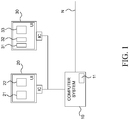
- the user interface screens 20, 30 are controlled by the interface controller IC which is configured for wireless or wired communication with electronic controllers of various components of the computer system 10.
- the computer system 10 may be for example a print controller of a printing system.
- the display area of the UI screens 20, 30 is divided into a plurality of frames 21, 22, 31, 32, 33 which is reserved for displaying frame content.
- the frame content is data retrieved from memory of the computer system 10.
- the retrieved data may comprise for example general information on the computer system 10, status information of the computer system 10, information on available print options for a printer connected to the computer system 10, a list of print jobs presently waiting for being processed in a printer connected to the computer system 10, possibly with more detailed information on each print job, a job scheduler, a job content browser, a document pre-flight component, a print job properties component or a document preview application.
- the frames 21, 22, 31, 32, 33 are distributed over the two UI screens 20, 30, but frames on one or more than two UI screens may be envisioned.
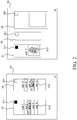
- FIG. 2 shows the UI screens 20, 30 in more detail.
- the UI screen 20 comprises a first frame 21 and a second frame 22.
- the first frame 21 comprises user selectable frame content in the form of a print job list 212 containing the print job names "Job 1", “Job 2", “Job 3", “Job 4", "Job 5" of print jobs.
- the print jobs may be printed by a printing system coupled to the computer system 10.
- the second frame 22 comprises user selectable frame content in the form of a print job queue 222 containing the print job names "Job A", "Job B", “Job C", “Job D”, “Job E” of print jobs that are queued in the print job queue 222.
- the print jobs in the print job queue 222 are scheduled for printing by the printing system coupled to the computer system 10.
- a print job in the print job list 212 in the first frame 21 may for example be dragged to the print job queue 222 in the second frame 22 in order to be printed.
- the first frame 21 also comprises a first user actionable link item 211 according to the invention.
- the first user actionable link item 211 is activated, i.e. the first user actionable link item 211 has received an activation trigger by means of a touch or a mouse click on the first user actionable link item 211 in the first frame 21.
- the activation of the first user actionable link item 211 is visualized by accentuating the first user actionable link item 211 as a black square in the first frame 21.
- the second frame 22 also comprises a second user actionable link item 221 according to the invention.
- the second user actionable link item 221 is not activated, i.e. the second user actionable link item 221 has not received an activation trigger by means of a touch or a mouse click.
- the non-activation of the second user actionable link item 221 is visualized by displaying the second user actionable link item 221 as a white square in the second frame 22.
- the UI screen 30 comprises a third frame 31, a fourth frame 32 and a fifth frame 33.
- the third frame 31 comprises frame content in the form of a preview image area 312.
- a viewer application residing in the computer system 10 is facilitating the function of displaying frame content in the third frame 31.
- the third frame 31 also comprises a third user actionable link item 311 according to the invention.
- the third user actionable link item 311 is activated, i.e. the third user actionable link item 311 has received an activation trigger by means of a touch or a mouse click on the third user actionable link item 311 in the third frame 31.
- the activation of the third user actionable link item 311 is visualized by accentuating the third user actionable link item 311 as a black square in the first frame 31.
- the third frame 31 is now permitted to display data retrieved from memory 11 of the computer system 10 which data is a detailing dependent on a real subset of the selectable first frame content of the first frame 21.
- the selectable first frame content is the print job list 212.
- a real subset of the print job list 212 may be in principle every real subset of selected print jobs from the print job list 212.
- the print job named "Job 3” is selected by a user action - touch or mouse click on the UI screen 201 - and a detail of the print job "Job 3", i.e. a preview of an image in the print job "Job 3" is becoming the frame content of the third frame 31.
- the preview image of the print job "Job 3" is residing in an image viewer area 312 in the third frame 31.
- the digital link between the first frame 21 and the third frame 31 is also prohibiting the third frame 31 to display data retrieved from memory 11 of the computer system 10 which data is a detailing dependent on a real subset of frame content from another frame 22 of the plurality of frames 22, 32, 33 than the first frame 31.
- data is a detailing dependent on a real subset of frame content from another frame 22 of the plurality of frames 22, 32, 33 than the first frame 31.
- a print job "Job D" is selected from the print job queue 222 in the second frame 22 .
- a preview of an image of the print job "Job D" is prohibited to be shown in the image viewer area 312 in the third frame 31.
- the second user actionable link item 221 of the second frame 22 is not activated, there is no link between the second frame 22 and any other frame which might comprise an image viewer area. So actually, an image of the selected print job "Job D" cannot be previewed on the UI screens 20, 30.
- the latter situation can be avoided, for example as shown in FIG. 3 , by linking the second frame 22 with the fifth frame 33 which also comprises an image viewer area 332.
- the user may activate a second user actionable link item 221 in the second frame 22 and a fifth user actionable link item 331 in the fifth frame 33 in order to establish such a link.
- the image viewer area 332 in the fifth frame 33 will display an image of the selected print job "Job D" of the print job queue 222 in the second frame 22.
- FIG. 3 the first, second, third and fifth user actionable link items 221, 221, 311, 331 in the first, second, third and fifth frame 21, 22, 31, 33 are activated respectively.
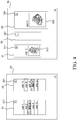
- FIG. 4 another embodiment of the present invention is shown in FIG. 4 .
- the first user actionable link item 221 is provided with a unique identifier item "a”
- the third user actionable link item 311 is also provided with a same unique identifier item "a”. Due to the same unique identifier the combination of the first user actionable link item 211 and the third user actionable link item 311 is uniquely identifiable.
- FIG. 4 shows the digital link between the second frame 22 and the fifth frame 33 which is now recognizable by looking at same identifier items "b" at the corresponding user actionable link items 221, 331.
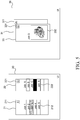
- FIG. 5 shows another embodiment of the present invention.
- the third frame 31 and the fifth frame 33 are implemented as overlapping frames in order to save UI screen space.
- the last selected item is print job "Job D"- as indicated by the black selected item in the print job queue 222 in the second frame 22 on the UI screen 20. Therefore the fifth frame 33 is displayed on top of the third frame 31 in the UI screen 30.
- the fifth frame 33 displays an image of the last selected print job "Job D". By selecting the print job "Job 3" again in the print job list 212, the third frame 31 will be displayed on top of the fifth frame 33 as shown in FIG. 6 .
- the applications related to the image viewer area 312 and the image viewer area 332 may be configured to receive an output type of the data to be displayed.
- the data in FIG. 2 - 6 are images from print jobs which may have an image format like JPEG, PNG, BMP, etc.
- Data in a print job may be in a document format PDF, AFP or PCL.
- a viewer application usually converts data in a document format like PDF, AFP or PCL to an image format like JPEG, PNG, BMP, etc. in order to show the corresponding image in the image viewer area 332.
- the applications may be configured to display the images from the print jobs in the image viewer area 312 and the image viewer area 332 according to the received output type.
- the computer system 10 may be configured to determine if there is an output adapter available for use on the UI screen 20, 30 such that the output adapter can adapt the detailed data to be displayed in order to make the detailed data suitable for displaying as frame content in the image viewer areas 312, 332.
- Such output adapters may reside in the memory 11 of the computer system 10.
- the output adapter allows the two incompatible interfaces of for example the print job list 212 and the viewer application related to the third frame 31 to work together.
- the output adapter has the capability of converting an "output" of the print job list 212 to the expected "input" of the application related to the third frame 31.
- output adapters is in particular useful when the underlying applications are renewed or replaced by a new release of the corresponding application software or when an image with a deviating image format is comprised in a print job.
- Output adaptors may act like a filter for product formats, but the output adapter could also have its own logic, for example with some hard processing in the background of memory 11 of the computer system 10, in order to produce totally different output like for example a list of text objects contained in a document of a print job in the print job list 212.
- the user may be notified, for example by a message box, a pop up box, or another visual or auditory signal, when trying to establish the digital link between the first frame 21 and the third frame 31.
- the selection of print job "Job 3" in the print job list 212 results in two digital products, for example the preview image displayed in the image viewer area 312 and a preflight report for the print job "Job 3" in PDF format.
- the preflight report may for example be displayed on the fourth frame 32 shown in FIG. 2 .
- the fourth frame 32 may be associated with a word processor application and also a digital link according to the present invention may be established between the first frame 21 and the fourth frame 32 by activating the fourth user actionable link item 321 shown in FIG. 2 . Identifying items for the user actionable link items as shown in FIG. 4 - 6 would help in order to discern connected user actionable link items.
- FIG. 7 is a flow diagram of a first embodiment of the method according to the present invention. The method starts in a starting point A which leads to a first step S1.
- the at least one user interface screen 20, 30 simultaneously displaying a first frame 21 provided with user selectable first frame content 212 and a first user actionable link item 211, and a third frame 31 provided with a third user actionable link item 311.
- a second step S2 an activation of the first user actionable link item 211 is received by the computer system 10.
- a third step S3 the first user actionable link item 211 is accentuated on the first frame 21.
- a fourth step S4 an activation of the third user actionable link item 311 is received by the computer system 10.
- a fifth step S5 the third user actionable input link item 311 is accentuated on the third frame 31.
- a digital link between the first frame 21 and the third frame 31 is stored in memory 11 of the computer system 10.
- a seventh step S7 the computer system 10 is permitting the third frame 31 to display data retrieved from memory 11 of the computer system 10 which data is a detailing dependent on a real subset of the selectable first frame content 212 of the first frame 21.
- step S8 the computer system 10 is prohibiting the third frame 31 to display data retrieved from memory 11 of the computer system 10 which data is a detailing dependent on a real subset of frame content from another frame of the plurality of frames than the first frame 21.
- the method ends in an end point B.
- FIG. 8 is a flow diagram of a second embodiment of the method according to the present invention. The method starts in a starting point C which leads to a first step T1.
- a content item of the first frame 21 content is selected on the first frame 21, i.e. a selection of the content item is received by the computer system 10.
- first data is retrieved from memory 11 of the computer system 10 which first data is a detailing dependent on the selected content item.
- a third step T3 the first data is displayed as third frame content on the third frame 31.
- the method ends in an end point D.
Landscapes
- Engineering & Computer Science (AREA)
- Theoretical Computer Science (AREA)
- Human Computer Interaction (AREA)
- Software Systems (AREA)
- Physics & Mathematics (AREA)
- General Engineering & Computer Science (AREA)
- General Physics & Mathematics (AREA)
- User Interface Of Digital Computer (AREA)
Abstract
Description
- The invention relates to a method of controlling at least one user interface screen by means of a computer system, said at least one user interface screen being arranged to display a plurality of frames for displaying frame content.
- Screen-based graphic user interfaces are frequently used for operating electronically controlled apparatus or systems such as, for example, a document processing system or a printing system. Depending upon the complexity of the system, the user interface may be utilized by a plurality of users who may have different functions and responsibilities, different needs, different skills and/or different authorizations. It is therefore convenient to customize the layout of the graphical user interface in accordance with the needs of individual users or groups of users.
- Single or multi display software applications comprise at least one graphical user interface (GUI) with a number of UI components. For example, a production printing software application may have a multi-screen GUI comprising a first frame and a second frame for a preview application. The first frame may comprise a job list, a job scheduler, a job content browser, a document pre-flight component or a properties component.
- A linking and interaction between frames is static in a sense that it is coded into a so-called "Business Logic" software layer or glueware code that defines how said components interact with each other according to an application workflow.
- Due to the many frames on the multi/screen GUI, the user may become puzzled which UI frame corresponds with which preview frame.
- Another problem arises since the preview component listens for "activeDocumentChanged" events independent from their source and so if - besides the first frame - another frame, for example a document browser of a second printer - produces such a event type, the view on the second frame is updated independent of the user of the first frame.
- It is an object of the invention to provide a method by which the problems described here-above are mitigated.
- In order to achieve that object, the method comprises the steps of
- the at least one user interface screen (12) simultaneously displaying out of the plurality of frames (20), a first frame provided with user selectable first frame content and a first user actionable link item, and
a second frame provided with a second user actionable link item, - receiving an activation of the first user actionable link item,
- accentuating the first user actionable link item on the first frame,
- receiving an activation of the second user actionable link item,
- accentuating the second user actionable input link item on the second frame,
- storing a digital link between the first frame and the second frame in memory of the computer system,
- permitting the second frame to display data retrieved from memory of the computer system which data is a detailing dependent on a real subset of the selectable first frame content of the first frame, and
- prohibiting the second frame to display data retrieved from memory of the computer system which data is a detailing dependent on a real subset of frame content from another frame of the plurality of frames than the first frame.
- By doing so, a user is able to bind the second frame only to the first frame and not to other frames of the plurality of frames. The linking of the frames on the at least one user interface screen is done by the user based on his own needs.
- According to an embodiment the method comprising the steps of
- selecting a content item of the first frame content on the first frame,
- retrieving first data from memory of the computer system which first data is a detailing dependent on the selected content item, and
- displaying the first data as second frame content on the second frame.
- According to an embodiment the method comprises the steps of
- determining if the second frame is capable of displaying the first data, before accentuating the second user actionable link item on the second frame and establishing the digital link; and
- upon a negative determination, providing a user warning on the at least one user interface screen.
- According to an embodiment the method comprises the step of receiving an output type of the first data from memory of the computer system and displaying the first data as second frame content on the second frame according to the received output type.
- According to an embodiment the method comprises the step of determining if there is an output adapter available for use on the at least one user interface screen, the output adapter being configured to adapt the first data in order to make the first data suitable as second frame content.
- According to an embodiment the method comprises the step of providing the first user actionable link item together with a unique identifier item, and providing the second user actionable link item with a same unique identifier item such that the combination of the first user actionable link item and the second user actionable link item is uniquely identifiable.
- According to an embodiment the selected one frame comprises a representation of a print job list for a printer and the other frame comprises a document browser for browsing documents of print jobs in the print job list for the printer.
- According to an embodiment the print job list comprises a print job queue of the printer.
- According to an embodiment a document of a print job in the print job list is a multi-layer document and the method comprises the steps of providing a set of output adapters for browsing the multi-layer document and receiving a user selection for one output adapter out of the set of output adapters.
- According to an embodiment the method comprises a step of removing the digital link between the first frame and the second frame from the memory of the computer system by de-selecting the first user actionable link item on the first frame and de-selecting the second user actionable link item on the second frame.
- According to an embodiment the method comprises the step of providing for the first frame at least two user actionable link items on the first frame, each of the at least two user actionable link items forming a unique combination with a user actionable link item on another frame of the plurality of frames.
- The invention also relates to a computer system controlling at least one user interface screen, said at least one user interface screen being arranged to display a plurality of frames for displaying frame content and the computer system being configured to execute any of the methods according to the invention.
- According to an embodiment the computer system comprises a print controller for a printing system, wherein the print controller is configured to apply any of the embodiments of the method according to the invention.
- The invention also relates to a non-transitory computer-readable medium, comprising program code which, when executed on a computer, causes the computer to perform the steps of the method according to the invention.
- Embodiment examples will now be described in conjunction with the drawings, wherein:
- FIG. 1
- is a block diagram of a system to be controlled and an associated user interface according to the present invention;
- FIG. 2
- are detailed views of UI screens according to the present invention;
- FIG. 3
- is another example of linked UI frames according to the present invention;
- FIG. 4
- is another example of linked UI frames with a link identification according to the present invention;
- FIG. 5 - 6
- are UI screens with overlapping frames according to the present invention;
- FIG. 7
- is a flow diagram of a first embodiment of the method according to the present invention; and
- FIG. 8
- is a flow diagram of a second embodiment of the method according to the present invention.
-
FIG. 1 is a block diagram in which acomputer system 10 has been represented by a single block. Thecomputer system 10 comprises amemory 11 for storing digital data.User interface screens computer system 10 comprise an interface controller IC in connection with thecomputer system 10. Theuser interface screens FIG. 1 two user interface screens 20, 30 are present, but one or three or more user interface screens may be envisioned. - The user interface screens 20, 30 are controlled by the interface controller IC which is configured for wireless or wired communication with electronic controllers of various components of the
computer system 10. - The
user interface screen computer system 10. - The
computer system 10 may be for example a print controller of a printing system. - In the example shown in
FIG. 1 , the display area of the UI screens 20, 30 is divided into a plurality offrames computer system 10. The retrieved data may comprise for example general information on thecomputer system 10, status information of thecomputer system 10, information on available print options for a printer connected to thecomputer system 10, a list of print jobs presently waiting for being processed in a printer connected to thecomputer system 10, possibly with more detailed information on each print job, a job scheduler, a job content browser, a document pre-flight component, a print job properties component or a document preview application. - In
FIG. 1 theframes UI screens -
FIG. 2 shows the UI screens 20, 30 in more detail. For example, theUI screen 20 comprises afirst frame 21 and asecond frame 22.
Thefirst frame 21 comprises user selectable frame content in the form of aprint job list 212 containing the print job names "Job 1", "Job 2", "Job 3", "Job 4", "Job 5" of print jobs. The print jobs may be printed by a printing system coupled to thecomputer system 10.
Thesecond frame 22 comprises user selectable frame content in the form of aprint job queue 222 containing the print job names "Job A", "Job B", "Job C", "Job D", "Job E" of print jobs that are queued in theprint job queue 222. The print jobs in theprint job queue 222 are scheduled for printing by the printing system coupled to thecomputer system 10. A print job in theprint job list 212 in thefirst frame 21 may for example be dragged to theprint job queue 222 in thesecond frame 22 in order to be printed. - The
first frame 21 also comprises a first useractionable link item 211 according to the invention. The first useractionable link item 211 is activated, i.e. the first useractionable link item 211 has received an activation trigger by means of a touch or a mouse click on the first useractionable link item 211 in thefirst frame 21. The activation of the first useractionable link item 211 is visualized by accentuating the first useractionable link item 211 as a black square in thefirst frame 21. - The
second frame 22 also comprises a second useractionable link item 221 according to the invention. The second useractionable link item 221 is not activated, i.e. the second useractionable link item 221 has not received an activation trigger by means of a touch or a mouse click. The non-activation of the second useractionable link item 221 is visualized by displaying the second useractionable link item 221 as a white square in thesecond frame 22. - For example, the
UI screen 30 comprises athird frame 31, afourth frame 32 and afifth frame 33.
Thethird frame 31 comprises frame content in the form of apreview image area 312. A viewer application residing in thecomputer system 10 is facilitating the function of displaying frame content in thethird frame 31.
Thethird frame 31 also comprises a third useractionable link item 311 according to the invention. The third useractionable link item 311 is activated, i.e. the third useractionable link item 311 has received an activation trigger by means of a touch or a mouse click on the third useractionable link item 311 in thethird frame 31. The activation of the third useractionable link item 311 is visualized by accentuating the third useractionable link item 311 as a black square in thefirst frame 31. - By activating the first user
actionable link item 211 and the third user actionable link 311 a digital link between thefirst frame 21 and thethird frame 31 is stored inmemory 11 of thecomputer system 10. Thethird frame 31 is now permitted to display data retrieved frommemory 11 of thecomputer system 10 which data is a detailing dependent on a real subset of the selectable first frame content of thefirst frame 21. The selectable first frame content is theprint job list 212. A real subset of theprint job list 212 may be in principle every real subset of selected print jobs from theprint job list 212. InFIG. 2 the print job named "Job 3" is selected by a user action - touch or mouse click on the UI screen 201 - and a detail of the print job "Job 3", i.e. a preview of an image in the print job "Job 3" is becoming the frame content of thethird frame 31. The preview image of the print job "Job 3" is residing in animage viewer area 312 in thethird frame 31. - The digital link between the
first frame 21 and thethird frame 31 is also prohibiting thethird frame 31 to display data retrieved frommemory 11 of thecomputer system 10 which data is a detailing dependent on a real subset of frame content from anotherframe 22 of the plurality offrames first frame 31.
For example, from theprint job queue 222 in the second frame 22 a print job "Job D" is selected. A preview of an image of the print job "Job D" is prohibited to be shown in theimage viewer area 312 in thethird frame 31. Moreover, since the second useractionable link item 221 of thesecond frame 22 is not activated, there is no link between thesecond frame 22 and any other frame which might comprise an image viewer area. So actually, an image of the selected print job "Job D" cannot be previewed on the UI screens 20, 30. - The latter situation can be avoided, for example as shown in
FIG. 3 , by linking thesecond frame 22 with thefifth frame 33 which also comprises animage viewer area 332. The user may activate a second useractionable link item 221 in thesecond frame 22 and a fifth useractionable link item 331 in thefifth frame 33 in order to establish such a link. After doing so, theimage viewer area 332 in thefifth frame 33 will display an image of the selected print job "Job D" of theprint job queue 222 in thesecond frame 22. - In
FIG. 3 the first, second, third and fifth useractionable link items fifth frame
In order to distinguish the link between thefirst frame 21 and thethird frame 31 from the link between thesecond frame 22 and thefifth frame 33, another embodiment of the present invention is shown inFIG. 4 .
InFIG. 4 the first useractionable link item 221 is provided with a unique identifier item "a", the third useractionable link item 311 is also provided with a same unique identifier item "a". Due to the same unique identifier the combination of the first useractionable link item 211 and the third useractionable link item 311 is uniquely identifiable. In other words, the digital link between thefirst frame 21 and thethird frame 31 is recognizable by looking at the same identifier items "a" at the corresponding useractionable link items
In the same way,FIG. 4 shows the digital link between thesecond frame 22 and thefifth frame 33 which is now recognizable by looking at same identifier items "b" at the corresponding useractionable link items -
FIG. 5 shows another embodiment of the present invention. Thethird frame 31 and thefifth frame 33 are implemented as overlapping frames in order to save UI screen space. Dependent on the last selected item in theprint job list 212 or in theprint job queue 222, one frame of theframes FIG. 5 the last selected item is print job "Job D"- as indicated by the black selected item in theprint job queue 222 in thesecond frame 22 on theUI screen 20. Therefore thefifth frame 33 is displayed on top of thethird frame 31 in theUI screen 30. Thefifth frame 33 displays an image of the last selected print job "Job D".
By selecting the print job "Job 3" again in theprint job list 212, thethird frame 31 will be displayed on top of thefifth frame 33 as shown inFIG. 6 . - The applications related to the
image viewer area 312 and theimage viewer area 332 may be configured to receive an output type of the data to be displayed. The data inFIG. 2 - 6 are images from print jobs which may have an image format like JPEG, PNG, BMP, etc. Data in a print job may be in a document format PDF, AFP or PCL. A viewer application usually converts data in a document format like PDF, AFP or PCL to an image format like JPEG, PNG, BMP, etc. in order to show the corresponding image in theimage viewer area 332. The applications may be configured to display the images from the print jobs in theimage viewer area 312 and theimage viewer area 332 according to the received output type. - The
computer system 10 may be configured to determine if there is an output adapter available for use on theUI screen image viewer areas memory 11 of thecomputer system 10. The output adapter allows the two incompatible interfaces of for example theprint job list 212 and the viewer application related to thethird frame 31 to work together. The output adapter has the capability of converting an "output" of theprint job list 212 to the expected "input" of the application related to thethird frame 31. The use of output adapters is in particular useful when the underlying applications are renewed or replaced by a new release of the corresponding application software or when an image with a deviating image format is comprised in a print job. Output adaptors may act like a filter for product formats, but the output adapter could also have its own logic, for example with some hard processing in the background ofmemory 11 of thecomputer system 10, in order to produce totally different output like for example a list of text objects contained in a document of a print job in theprint job list 212. - If despite all available adapter an image from a print job in the
print job list 212 cannot be displayed in theimage viewer area 312 in thethird frame 31, the user may be notified, for example by a message box, a pop up box, or another visual or auditory signal, when trying to establish the digital link between thefirst frame 21 and thethird frame 31. - According to another embodiment the selection of print job "
Job 3" in theprint job list 212 results in two digital products, for example the preview image displayed in theimage viewer area 312 and a preflight report for the print job "Job 3" in PDF format. The preflight report may for example be displayed on thefourth frame 32 shown inFIG. 2 . Thereto thefourth frame 32 may be associated with a word processor application and also a digital link according to the present invention may be established between thefirst frame 21 and thefourth frame 32 by activating the fourth useractionable link item 321 shown inFIG. 2 . Identifying items for the user actionable link items as shown inFIG. 4 - 6 would help in order to discern connected user actionable link items. -
FIG. 7 is a flow diagram of a first embodiment of the method according to the present invention. The method starts in a starting point A which leads to a first step S1. - In the first step S1 the at least one
user interface screen first frame 21 provided with user selectablefirst frame content 212 and a first useractionable link item 211, and athird frame 31 provided with a third useractionable link item 311. - In a second step S2 an activation of the first user
actionable link item 211 is received by thecomputer system 10. - In a third step S3 the first user
actionable link item 211 is accentuated on thefirst frame 21. - In a fourth step S4 an activation of the third user
actionable link item 311 is received by thecomputer system 10. - In a fifth step S5 the third user actionable
input link item 311 is accentuated on thethird frame 31. - In a sixth step S6 a digital link between the
first frame 21 and thethird frame 31 is stored inmemory 11 of thecomputer system 10. - In a seventh step S7 the
computer system 10 is permitting thethird frame 31 to display data retrieved frommemory 11 of thecomputer system 10 which data is a detailing dependent on a real subset of the selectablefirst frame content 212 of thefirst frame 21. - In an eighth step S8 the
computer system 10 is prohibiting thethird frame 31 to display data retrieved frommemory 11 of thecomputer system 10 which data is a detailing dependent on a real subset of frame content from another frame of the plurality of frames than thefirst frame 21. - The method ends in an end point B.
-
FIG. 8 is a flow diagram of a second embodiment of the method according to the present invention. The method starts in a starting point C which leads to a first step T1. - In the first step T1 a content item of the
first frame 21 content is selected on thefirst frame 21, i.e. a selection of the content item is received by thecomputer system 10. - In a second step T2 first data is retrieved from
memory 11 of thecomputer system 10 which first data is a detailing dependent on the selected content item. - In a third step T3 the first data is displayed as third frame content on the
third frame 31. - The method ends in an end point D.
Claims (14)
- A method of controlling at least one user interface screen (12) by means of a computer system, said at least one user interface screen (12) being arranged to display a plurality of frames (20) for displaying frame content, the method comprises the steps of:- the at least one user interface screen (12) simultaneously displaying out of the plurality of frames (20),
a first frame provided with user selectable first frame content and a first user actionable link item, and
a second frame provided with a second user actionable link item,- receiving an activation of the first user actionable link item,- accentuating the first user actionable link item on the first frame,- receiving an activation of the second user actionable link item,- accentuating the second user actionable input link item on the second frame,- storing a digital link between the first frame and the second frame in memory of the computer system,- permitting the second frame to display data retrieved from memory of the computer system which data is a detailing dependent on a real subset of the selectable first frame content of the first frame, and- prohibiting the second frame to display data retrieved from memory of the computer system which data is a detailing dependent on a real subset of frame content from another frame of the plurality of frames than the first frame. - Method according to claim 1, the method comprising the steps of- selecting a content item of the first frame content on the first frame,- retrieving first data from memory of the computer system which first data is a detailing dependent on the selected content item, and- displaying the first data as second frame content on the second frame.
- Method according to claim 2, wherein the method comprises the steps of- determining if the second frame is capable of displaying the first data, before accentuating the second user actionable link item on the second frame and establishing the digital link; and- upon a negative determination, providing a user warning on the at least one user interface screen.
- The method according to any of the preceding claims, wherein the method comprises the step of receiving an output type of the first data from memory of the computer system and displaying the first data as second frame content on the second frame according to the received output type.
- The method according to any of the preceding claims, wherein the method comprises the step of determining if there is an output adapter available for use on the at least one user interface screen, the output adapter being configured to adapt the first data in order to make the first data suitable as second frame content.
- The method according to any of the preceding claims, wherein the method comprises the step of providing the first user actionable link item together with a unique identifier item, and providing the second user actionable link item with a same unique identifier item such that the combination of the first user actionable link item and the second user actionable link item is uniquely identifiable.
- The method according to any of the preceding claims, wherein the selected one frame comprises a representation of a print job list for a printer and the other frame comprises a document browser for browsing documents of print jobs in the print job list for the printer.
- The method according to claim 7, wherein the print job list comprises a print job queue of the printer.
- The method according to any of the claims 7 - 8, wherein a document of a print job in the print job list is a multi-layer document and the method comprises the steps of providing a set of output adapters for browsing the multi-layer document and receiving a user selection for one output adapter out of the set of output adapters.
- The method according to any of the preceding claims, comprising a step of removing the digital link between the first frame and the second frame from the memory of the computer system by de-selecting the first user actionable link item on the first frame and de-selecting the second user actionable link item on the second frame.
- The method according to any of the preceding claims, wherein the method comprises the step of providing for the first frame at least two user actionable link items on the first frame, each of the at least two user actionable link items forming a unique combination with a user actionable link item on another frame of the plurality of frames.
- A computer system controlling at least one user interface screen (12), said at least one user interface screen (12) being arranged to display a plurality of frames (20) for displaying frame content and the computer system being configured to execute any of the methods according to claims 1 - 11.
- A computer system according to claim 12, wherein the computer system comprises a print controller for a printing system, wherein the print controller is configured to apply any of the methods according to claims 7 - 9.
- A non-transitory computer-readable medium, comprising program code which, when executed on a computer, causes the computer to perform the steps of the method according to any of the claims 1 to 11.
Priority Applications (1)
| Application Number | Priority Date | Filing Date | Title |
|---|---|---|---|
| EP19157445.8A EP3696667A1 (en) | 2019-02-15 | 2019-02-15 | Method of controlling a dynamic user interface |
Applications Claiming Priority (1)
| Application Number | Priority Date | Filing Date | Title |
|---|---|---|---|
| EP19157445.8A EP3696667A1 (en) | 2019-02-15 | 2019-02-15 | Method of controlling a dynamic user interface |
Publications (1)
| Publication Number | Publication Date |
|---|---|
| EP3696667A1 true EP3696667A1 (en) | 2020-08-19 |
Family
ID=65635412
Family Applications (1)
| Application Number | Title | Priority Date | Filing Date |
|---|---|---|---|
| EP19157445.8A Ceased EP3696667A1 (en) | 2019-02-15 | 2019-02-15 | Method of controlling a dynamic user interface |
Country Status (1)
| Country | Link |
|---|---|
| EP (1) | EP3696667A1 (en) |
Citations (2)
| Publication number | Priority date | Publication date | Assignee | Title |
|---|---|---|---|---|
| US7689933B1 (en) * | 2005-11-14 | 2010-03-30 | Adobe Systems Inc. | Methods and apparatus to preview content |
| US20110096361A1 (en) * | 2008-05-19 | 2011-04-28 | Canon Kabushiki Kaisha | Print control method and print control apparatus for controlling printing of structured document |
-
2019
- 2019-02-15 EP EP19157445.8A patent/EP3696667A1/en not_active Ceased
Patent Citations (2)
| Publication number | Priority date | Publication date | Assignee | Title |
|---|---|---|---|---|
| US7689933B1 (en) * | 2005-11-14 | 2010-03-30 | Adobe Systems Inc. | Methods and apparatus to preview content |
| US20110096361A1 (en) * | 2008-05-19 | 2011-04-28 | Canon Kabushiki Kaisha | Print control method and print control apparatus for controlling printing of structured document |
Similar Documents
| Publication | Publication Date | Title |
|---|---|---|
| CN101206555B (en) | Information processing apparatus, control method therefor | |
| US6831752B1 (en) | Setting method for device driver | |
| JP2005141729A (en) | Method, device, and program for peripheral apparatus and control and method, device, and program for display control | |
| US20060209329A1 (en) | A print control unit, a control method thereof, a print control program, and a recording medium | |
| CN101807141B (en) | Controlling apparatus of image forming apparatus and image forming system | |
| US20120050778A1 (en) | Information processing apparatus, output control method, and storage medium | |
| WO2011116795A1 (en) | Method of generating an electronic report | |
| CN107545534B (en) | Image processing apparatus, control method thereof, and storage medium | |
| EP3141999A1 (en) | A printing system comprising a raster image processor unit and a method for printing by means of said printing system | |
| CN104346045A (en) | Image forming apparatus, processing device and image forming method | |
| EP2648088A2 (en) | Information processing apparatus, storage medium, and control method therefor | |
| US20070291319A1 (en) | System and method of printing a watermark | |
| JP2018195192A (en) | Information processing apparatus and program | |
| JP6091195B2 (en) | Image processing apparatus, image processing apparatus control method, and program | |
| US9384173B2 (en) | Information processing apparatus having page preview function, method of controlling the same, and storage medium | |
| US8319997B2 (en) | Information processing apparatus to display information about progress of print processing, information processing method, and storage medium | |
| US20190286398A1 (en) | Information processing device, information processing method, and recording medium | |
| JP6938877B2 (en) | Image forming device and program | |
| US20230306190A1 (en) | Information processing system, non-transitory computer readable medium storing program, and information processing method | |
| EP3142000A1 (en) | A printing system comprising a raster image processor unit and a method of printing by means of said printing system | |
| JP5171220B2 (en) | Recording system, recording method, and host device | |
| CN107015770B (en) | Information processing apparatus and print data generation method | |
| US9588942B2 (en) | Information processing apparatus and information processing method | |
| JP5167886B2 (en) | Image processing apparatus, display method, and program | |
| US10191704B2 (en) | Information processing apparatus reading data created by render filter for image formation from storage area and saving the data in temporary storage area |
Legal Events
| Date | Code | Title | Description |
|---|---|---|---|
| PUAI | Public reference made under article 153(3) epc to a published international application that has entered the european phase |
Free format text: ORIGINAL CODE: 0009012 |
|
| STAA | Information on the status of an ep patent application or granted ep patent |
Free format text: STATUS: THE APPLICATION HAS BEEN PUBLISHED |
|
| AK | Designated contracting states |
Kind code of ref document: A1 Designated state(s): AL AT BE BG CH CY CZ DE DK EE ES FI FR GB GR HR HU IE IS IT LI LT LU LV MC MK MT NL NO PL PT RO RS SE SI SK SM TR |
|
| AX | Request for extension of the european patent |
Extension state: BA ME |
|
| RAP1 | Party data changed (applicant data changed or rights of an application transferred) |
Owner name: CANON PRODUCTION PRINTING HOLDING B.V. |
|
| STAA | Information on the status of an ep patent application or granted ep patent |
Free format text: STATUS: REQUEST FOR EXAMINATION WAS MADE |
|
| 17P | Request for examination filed |
Effective date: 20210219 |
|
| RBV | Designated contracting states (corrected) |
Designated state(s): AL AT BE BG CH CY CZ DE DK EE ES FI FR GB GR HR HU IE IS IT LI LT LU LV MC MK MT NL NO PL PT RO RS SE SI SK SM TR |
|
| STAA | Information on the status of an ep patent application or granted ep patent |
Free format text: STATUS: EXAMINATION IS IN PROGRESS |
|
| 17Q | First examination report despatched |
Effective date: 20220706 |
|
| STAA | Information on the status of an ep patent application or granted ep patent |
Free format text: STATUS: THE APPLICATION HAS BEEN REFUSED |
|
| 18R | Application refused |
Effective date: 20250521 |