EP3637679A1 - Creation of enterprise group - Google Patents
Creation of enterprise group Download PDFInfo
- Publication number
- EP3637679A1 EP3637679A1 EP17914610.5A EP17914610A EP3637679A1 EP 3637679 A1 EP3637679 A1 EP 3637679A1 EP 17914610 A EP17914610 A EP 17914610A EP 3637679 A1 EP3637679 A1 EP 3637679A1
- Authority
- EP
- European Patent Office
- Prior art keywords
- group
- enterprise
- user
- inter
- identity information
- Prior art date
- Legal status (The legal status is an assumption and is not a legal conclusion. Google has not performed a legal analysis and makes no representation as to the accuracy of the status listed.)
- Withdrawn
Links
Images




Classifications
-
- H—ELECTRICITY
- H04—ELECTRIC COMMUNICATION TECHNIQUE
- H04L—TRANSMISSION OF DIGITAL INFORMATION, e.g. TELEGRAPHIC COMMUNICATION
- H04L12/00—Data switching networks
- H04L12/02—Details
- H04L12/16—Arrangements for providing special services to substations
- H04L12/18—Arrangements for providing special services to substations for broadcast or conference, e.g. multicast
- H04L12/1813—Arrangements for providing special services to substations for broadcast or conference, e.g. multicast for computer conferences, e.g. chat rooms
- H04L12/1822—Conducting the conference, e.g. admission, detection, selection or grouping of participants, correlating users to one or more conference sessions, prioritising transmission
-
- H—ELECTRICITY
- H04—ELECTRIC COMMUNICATION TECHNIQUE
- H04L—TRANSMISSION OF DIGITAL INFORMATION, e.g. TELEGRAPHIC COMMUNICATION
- H04L12/00—Data switching networks
- H04L12/02—Details
- H04L12/16—Arrangements for providing special services to substations
- H04L12/18—Arrangements for providing special services to substations for broadcast or conference, e.g. multicast
- H04L12/185—Arrangements for providing special services to substations for broadcast or conference, e.g. multicast with management of multicast group membership
-
- H—ELECTRICITY
- H04—ELECTRIC COMMUNICATION TECHNIQUE
- H04L—TRANSMISSION OF DIGITAL INFORMATION, e.g. TELEGRAPHIC COMMUNICATION
- H04L51/00—User-to-user messaging in packet-switching networks, transmitted according to store-and-forward or real-time protocols, e.g. e-mail
- H04L51/04—Real-time or near real-time messaging, e.g. instant messaging [IM]
Definitions
- Embodiments of the present invention relate to establishing an enterprise group in an instant messaging (IM) application.
- IM instant messaging
- An enterprise instant messaging is an online communication tool service for users of enterprise terminals. For enterprise employees, two or more people may communicate in real time by using terminals installed with IM.
- An EIM service may be used to establish an intra-enterprise group for communication of employees of the same enterprise or an inter-enterprise group for communication of employees of different enterprises.
- the present invention provides a method for establishing an enterprise group and a corresponding apparatus, to simplify operations of adding a large number of employees of outside enterprises.
- a method for establishing an enterprise group on a server side includes: receiving, by a server, a first join-group request for adding a first user to an inside group, where the first join-group request includes identity information of the first user; and if the identity information of the first user does not match attribute information of the inside group, creating, by the server, an inter-enterprise group according to identity information of at least one member of the inside group and the identity information of the first user.
- a method for establishing an enterprise group on a client side includes: receiving, by a client, a first join-group instruction for adding a first user to an inside group; generating, by the client, a first join-group request including identity information of the first user according to the first join-group instruction; and sending, by the client, the first join-group request to a server, so that if the identity information of the first user does not match attribute information of the inside group, the server creates an inter-enterprise group for the first user and at least one member of the inside group.
- an apparatus for establishing an enterprise group on a server side includes: a first receiving module, configured to receive a first join-group request for adding a first user to an inside group, where the first join-group request includes identity information of the first user; and a first creation module, configured to: if the identity information of the first user does not match attribute information of the inside group, create an inter-enterprise group according to identity information of at least one member of the inside group and the identity information of the first user.
- an apparatus for establishing an enterprise group on a client side includes: a second receiving module, configured to receive a first join-group instruction for adding a first user to an inside group; and a second creation module, configured to: generate a first join-group request including identity information of the first user according to the first join-group instruction, and send the first join-group request to a server, so that if the identity information of the first user does not match attribute information of the inside group, the server creates an inter-enterprise group for the first user and at least one member of the inside group.
- an IM application server includes: one or more processors; and one or more machine readable media storing instructions.
- the processors execute the instructions in the machine readable medium, the processor performs the method for establishing an enterprise group on a server side.
- a readable storage medium where when instructions in the storage medium are executed by a processor in an IM application server, the processor can perform the method for establishing an enterprise group on a server side.
- an IM application client includes: one or more processors; and one or more machine readable media storing instructions.
- the processors execute the instructions in the machine readable medium, the processor performs the method for establishing an enterprise group on a client side.
- a readable storage medium where when instructions in the storage medium are executed by a processor in an IM application client, the processor can perform the method for establishing an enterprise group on a client side.
- identity information of the first user matches attribute information of a current inside group. If the identity information of the first user matches the attribute information of the current inside group, the first user is added to the inside group. If the identity information of the first user does not match the attribute information of the current inside group, an inter-enterprise group including the first user and all users in the inside group is created.
- a method for establishing an enterprise group provided in an embodiment of the present invention is based on an EIM technology.
- EMI is an online communication tool service for users of enterprise terminals. For the users, two or more people may communicate in real time by using terminals installed with IM.
- the content of communication may include exchanged text, interfaces, speech, videos, files, and the like.
- an EIM tool requires that a user should provide genuine identity information for the purpose of work-related communication, nearly all data documents transmitted in the system are related to services or even secrets of an enterprise. Therefore, a top priority of an EIM system is to safeguard privacy and company business information. Therefore, such a system is usually deployed on a server possessed by an enterprise, and employees may log in to the server to perform work-related communication within a particular range.
- an enterprise may set one general server and set several corresponding databases according to the division of an inside sub-server and an outside sub-server.
- An IM system is deployed for each sub-server.
- An IM client installed by an employee may log in to the sub-servers to perform work-related communication within the range of the inside sub-server or the outside sub-server.
- IM systems of the inside sub-server and the outside sub-server require authorization before instant communication.
- a general database may store the name of an inside/trusted company, an organization code, a business scope, an address, a rank, an affiliation relationship, and the like.
- Each database covers the information of all employees of an enterprise.
- Each piece of employee information may include, for example, a division, a post, a name, a phone number, an email address, a position type, and a service type.
- FIG. 1 is a flowchart of steps of a method for establishing an enterprise group on a server side. The method may specifically include the following steps.
- Step 110 Receive a first join-group request for adding a first user to an inside group, where the first join-group request includes identity information of the first user.
- Step 120 If the identity information of the first user does not match attribute information of the inside group, create an inter-enterprise group according to identity information of at least one member of the inside group and the identity information of the first user.
- a server may determine whether the identity information of the first user matches the attribute information of the inside group. If the identity information of the first user matches the attribute information of the inside group, the first user is added to the inside group. If the identity information of the first user does not match the attribute information of the inside group, the identity information of the at least one member of the inside group and the identity information of the first user are retrieved, and the inter-enterprise group is created according to the retrieved identity information.
- an inside group of an enterprise is established to ensure security.
- the inside group of the enterprise is somewhat closed, for example, only supports communication of employees of a current enterprise.
- an employee of the current enterprise often needs to collaborate with an employee (which may be referred to as an employee of an outside enterprise for short below) of another enterprise such as a trusted enterprise (an enterprise that reaches a mutual trust agreement with the current company).
- An inter-enterprise group may be created, and permissions may be set for an employee of an outside enterprise in the inter-enterprise group.
- the identity information of the first user is determined.
- identity data of the first user is retrieved, and an inter-enterprise group is created according to the retrieved identity data.
- an employee of the current enterprise and an employee of an outside enterprise can communicate with each other, and an employee of an outside enterprise can be prevented from accessing private data of the current enterprise in the inside group.
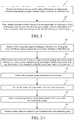
- FIG. 2-1 is a flowchart of steps of a method for establishing an enterprise group on a server side. The method may include the following steps.
- Step 210 Receive a first join-group request for adding a first user to an inside group, where the first join-group request includes identity information of the first user.
- the first join-group request may include the identity information of the first user, for example, an enterprise, a division, a post, a name, a phone number, an email address, a position type, and a service type of the first user.
- the identity information of the first user included in the request may be parsed from the join-group request.
- first join-group request may be a join-group request sent by a terminal of the first user for the inside group, or may be a join-group recommendation request sent by a terminal of a member of the inside group for the first user.
- Step 220 If the identity information of the first user does not match attribute information of the inside group, create an inter-enterprise group according to identity information of at least one member of the inside group and the identity information of the first user.
- the server may compare the received identity information of the first user with information of a member of the inside group, to determine whether the first user is an employee of the current enterprise that has permissions for the inside group.
- an EIM application when receiving a request sent by a client of a new user to request to join the inside group, an EIM application automatically performs determination according to the request and feeds back a processing result to the client of the new user and a client of an administrator. If the new user is an employee of the current enterprise, the processing result is admission. If the new user is an employee of an outside enterprise, the processing result is admission, and an inter-enterprise group is created. If an employee A of an outside enterprise needs to join the inside group of the current enterprise to collaborate on a project, the employee A of the outside enterprise may use the EIM application to find the inside group and submit a join-group request.
- the server may create an inter-enterprise group according to identity information of the employee A of the outside enterprise, and add the employee A of the outside enterprise to the inter-enterprise group.
- the administrator of the inside group receives detailed information of the current addition.
- the first user may be added to the inside group, and the first user and another member of the inside group have the same group permissions, including the permission to access historical data in the inside group.
- the identity information of the first user does not match attribute information of the inside group, it is determined that currently the first user is an employee of an outside enterprise.
- all data of the inside group and the identity information of the first user are retrieved, and a new, separate inter-enterprise group is created according to the retrieved data.
- the inter-enterprise group may store all previous data of the inside group to facilitate the collaborative communication between employees of the current enterprise and other employees of outside enterprises. It should be noted that, after the inter-enterprise group is created, the original inside group is kept instead of being deleted, so that the employee of the current enterprise may use the inside group for inside communication.
- Step 230 Add an inter-enterprise group permission to the first user.
- the inter-enterprise group permission is used to prohibit the first user from accessing data of the inside group stored in the inter-enterprise group.
- the newly added first user does not have the permission to access the data of the inside group stored in the inter-enterprise group.
- an employee of an outside enterprise in the group cannot access historical chat records, files, and the like of the inside group that are stored in the group, and cannot use some group functions such as adding a member, removing a member, and creating a video conference.
- Step 240 Add an inter-enterprise group label to the inter-enterprise group.
- each group established by the EIM application corresponds to one group label, for example, an inside group, an inter-enterprise group, and a high management group. Only the administrator can change or delete the group label.
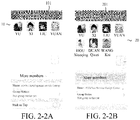
- the server may automatically change an inside group label 101 of an inside group on an original interface 10 shown in FIG. 2-2A to an inter-enterprise group label 201 on an interface 20 shown in FIG. 2-2B , to remind members of the inside group that employees of outside enterprises have joined the current group, thereby preventing an employee of a current enterprise from leaking company data unwittingly.
- Step 250 Add corresponding identity information labels to all users in the inter-enterprise group.
- the identity information label is, for example, an enterprise, a division, a post, a name, a phone number, an email address, a position type, and a service type.
- An enterprise to which a member belongs is preferentially displayed, so that the members of the inter-enterprise group are distinguished.
- Step 260 Release an inter-enterprise employee join broadcast in the inter-enterprise group.
- the system releases notice information on a group noticeboard or a chat interface.
- the notice information is, for example, "XXX from an outside enterprise has joined the group.
- the group is now upgraded to an inter-enterprise group.” used to remind members of the inside group that an employee of an outside enterprise has joined the current group, thereby preventing an employee of a current enterprise from leaking company data unwittingly.
- step 230 to step 260 may be appropriately adjusted or a step may be correspondingly added or removed as required. Any method variant that can be easily derived by those skilled in the art should fall within the protection scope of the present invention. Therefore, details are not described again.
- An inter-enterprise group label is added to an inter-enterprise group, an outside-enterprise employee join broadcast is released, and corresponding identity information labels are added to all users in the inter-enterprise group.
- FIG. 3-1 is a flowchart of steps of a method for establishing an enterprise group on a server side. The method may include the following steps.
- Step 301 Receive a first join-group request for adding a first user to an inside group, where the first join-group request includes identity information of the first user.
- Step 302 If the identity information of the first user does not match attribute information of the inside group, create an inter-enterprise group according to identity information of at least one member of the inside group, the identity information of the first user, and data of the inside group.
- Step 303 Add an inter-enterprise group permission to the first user.
- Step 304 Add an inter-enterprise group label to the inter-enterprise group.
- Step 305 Add a corresponding identity information label to at least one user in the inter-enterprise group.
- Step 306 Release an inter-enterprise employee join broadcast in the inter-enterprise group.
- step 301 to step 306 refer to step 210 to step 260. Details are not described herein again.
- Step 307 Receive a second join-group request for adding a second user to the inter-enterprise group.
- a join-group request sent by a terminal of the second user for the inter-enterprise group may be received.
- the second join-group request may be a join-group request sent by the terminal of the second user for the inter-enterprise group, or may be a join-group recommendation request sent by a terminal of a member of the inter-enterprise group for the second user.
- Step 308 If it is determined that the second user is an employee of an outside enterprise, add a corresponding identity information label to the second user, and add an inter-enterprise group permission to the second user.
- the inter-enterprise group permission is used to prohibit the second user from accessing the data of the inside group stored in the inter-enterprise group.
- the second user is neither an employee of a trusted enterprise nor an employee of the current enterprise, it may be concluded that the second user is a potentially malicious person that has entered by exploiting a loophole, and a join-group request of the second user is rejected to safeguard the inter-enterprise group more adequately.
- Step 309 Add the second user to the inter-enterprise group.
- the second user When the second user is either an employee of the current enterprise or an employee of an outside enterprise, the second user may be added to the inter-enterprise group.
- the identity information of the first user and identity information of the second user in the inter-enterprise group may be deleted.
- inter-enterprise group label may be changed back to the inside group label, so that users of the current enterprise can continue to use the inside group to perform inside communication.
- step 303 to step 306 may be appropriately adjusted or a step may be correspondingly added or removed as required. Any method variant that can be easily derived by those skilled in the art should fall within the protection scope of the present invention. Therefore, details are not described again.
- an enterprise A uses an EIM application to establish an inside group 10 named "Alumni association for inside communication".
- An enterprise B needs to collaborate with the company A on a project, and dispatches collaborators named HOU Xiaoqing and WANG Kai.
- an IM application server of the enterprise A receives a join-group request.
- the join-group request may be sent by YUAN from the enterprise A or may be sent by HOU Xiaoqing and WANG Kai from the trusted enterprise B.
- the server may invoke enterprise member identity information in a database to determine identity information of a member corresponding to the join-group request. If it is determined that the member corresponding to the join-group request is YUAN from the current enterprise A, as shown in FIG. 3-3 , YUAN may be directly added to the inside group, and an inside group label 30 is kept unchanged. If it is determined, according to step 302, as shown in FIG. 3-4 , that the member corresponding to the join-group request is HOU Xiaoqing from the trusted enterprise B, an inter-enterprise group including YU, XI, LIU, and HOU Xiaoqing is created. Next, according to step 303 to step 306, the inside group label 30 shown in FIG.
- inter-enterprise group label 40 shown in FIG. 3-4 an inter-enterprise group permission is added to HOU Xiaoqing, and corresponding identity information labels are added to all members of the inter-enterprise group.
- the identity information label is, for example, an enterprise, a division, a post, a name, a phone number, an email address, a position type, and a service type of a member.
- an inter-enterprise employee join broadcast concerning HOU Xiaoqing may be released on the group noticeboard.
- step 307 if the server continues to receive a join-group request, it may be determined that the member corresponding to the join-group request is YUAN from the current enterprise A or WANG Kai from the trusted enterprise B, as shown in FIG. 3-5 . If according to step 309, it is determined that the member corresponding to the join-group request is WANG Kai from the trusted enterprise B, WANG Kai is added to the inter-enterprise group, and step 308 is performed to add a corresponding identity information label and an inter-enterprise group permission to WANG Kai and release a join broadcast.
- YUAN is directly added to the inter-enterprise group. If the member corresponding to the join-group request is neither an employee from the trusted enterprise B nor an employee from the current enterprise, the member may be rejected from joining the inter-enterprise group.
- identity information of HOU Xiaoqing and identity information of WANG Kai may be deleted from the group, and an inter-enterprise group label is changed to an inside group label.
- a specific interface may be shown in FIG. 3-3 .
- FIG. 4 is a flowchart of steps of a method for establishing an enterprise group on a client side. The method may include the following steps.
- Step 401 Receive a first join-group instruction for adding a first user to an inside group.
- the first join-group instruction may be a join-group instruction from a terminal of the first user for the inside group, or may be a join-group recommendation instruction from a terminal of a member of the inside group for the first user.
- Step 402 Generate a first join-group request according to the first join-group instruction, and send the first join-group request to a server.
- identity information of the first user does not match attribute information of the inside group, it may represent that the first user is not an employee of an enterprise corresponding to the inside group, the server may create an inter-enterprise group for the first user and at least one member of the inside group.
- the inter-enterprise group is created. Moreover, the first user and the at least one member of the original inside group are displayed in the inter-enterprise group. Certainly, during actual application, the first user and all members of the original inside group may be displayed.
- the client may generate the first join-group request including the identity information of the first user according to the first join-group instruction. For example, the client may retrieve the identity information of the first user according to the received first join-group instruction, generate the first join-group request according to the retrieved identity information, and send the first join-group request to the server.
- the first join-group request is used by the server to determine whether the identity information of the first user matches the attribute information of the inside group. If the identity information of the first user matches the attribute information of the inside group, the server may add the first user to the inside group, and return a first notification message to the client, to notify the client that the first user has joined the inside group. If the identity information of the first user does not match the attribute information of the inside group, the server may create the inter-enterprise group according to identity information of the at least one member of the inside group and the identity information of the first user, and return a second notification message to the client, to notify the client that the first user has joined the inter-enterprise group. For a specific execution process of the server side, refer to the foregoing. Details are not described herein again.
- Step 403 Receive a notification message sent by the server in response to the first join-group request, and display the inside group or the inter-enterprise group including the first user according to the received message.
- the client may display the inside group including the first user. For example, the client may display the inside group including the first user on a group menu of an EIM application of the client according to the first notification message, including adding an icon, a name or the like of the first user to a user list interface of the EIM application.
- the client may display a newly created inter-enterprise group including the first user. For example, the client may display the newly created inter-enterprise group on a group menu of an EIM application of the client according to the second notification message.
- the inter-enterprise group may store all previous data of the inside group, and display a distinguishing label for the inter-enterprise group, to satisfy collaborative communication between employees of the current enterprise and employees of outside enterprises.
- the client may further receive a second join-group instruction.
- the second join-group instruction is used to add a second user to the inter-enterprise group.
- the second join-group instruction may be a join-group instruction sent by a terminal of the second user for the inter-enterprise group, or may be a join-group recommendation instruction sent by a terminal of a member of the inter-enterprise group for the second user.
- the client may generate a second join-group request including identity information of the second user according to the second join-group instruction. For example, the client may retrieve the identity information of the second user according to the received second join-group instruction, generate the second join-group request according to the retrieved identity information, and send the second join-group request to the server.
- the server may reject the second user from joining the inter-enterprise group. If determining that the second user is an employee of a trusted enterprise instead of an employee of the current enterprise, the server may add the second user to the inter-enterprise group, and send a third notification message to the client, to notify the client that the second user has joined the inter-enterprise group.
- the client may display the second user in the inter-enterprise group according to the third notification message, and display an identity information label of the second user and an inter-enterprise group permission label of the second user, to prompt that the second user is prohibited from accessing data of the inside group stored in the inter-enterprise group.
- a first join-group request including identity information of a first user is generated according to a first join-group instruction for adding the first user to the inside group, and the first join-group request is sent to a server, so that the server can automatically identify an identity of an added user and automatically create an inter-enterprise group, thereby effectively simplifying operations of adding a large number of employees of outside enterprises.
- FIG. 5 is a flowchart of steps of a method for establishing an enterprise group on a client side.
- the method may specifically include the following steps: Step 501: Receive a first join-group instruction for adding a first user to an inside group.
- Step 502 Generate a first join-group request according to the first join-group instruction, and send the first join-group request to a server.
- the server may create an inter-enterprise group for the first user and at least one member of the inside group as discussed above.
- step 501 to step 502 refer to the description of step 401 and step 402. Details are not described herein again.
- Step 503 If the first user is an employee of an outside enterprise, receive a first notification message sent by the server in response to the first join-group request, and display an inter-enterprise group label of the inter-enterprise group according to the first notification message.
- the inter-enterprise group label may be a sub-label 201 on an EIM application interface 20 of a client.
- the sub-label 201 is used to remind members of the inside group that an employee of an outside enterprise has joined the current group, thereby preventing an employee of a current enterprise from leaking company data unwittingly.
- Step 504 Display an identity information label of the at least one member of the inter-enterprise group.
- the server may add an identity information label to each member of the inter-enterprise group.
- the identity information label is, for example, an enterprise, a division, a post, a name, a phone number, an email address, a position type, and a service type.
- the client may display an identity information label of each member of the inter-enterprise group on a local EIM application interface.
- an enterprise to which a member belongs may be preferentially displayed, so that the members of the inter-enterprise group are distinguished.
- the foregoing information is displayed when an icon of a user on the interface is touched.
- Step 505 Display an inter-enterprise employee join broadcast in the inter-enterprise group.
- the server releases notice information on a group noticeboard or a chat interface.
- the notice information is, for example, "XXX from an outside enterprise has joined the group.
- the group is now upgraded to an inter-enterprise group.”, to remind members of the inside group that an employee of an outside enterprise has joined the current group, thereby preventing an employee of a current enterprise from leaking company data unwittingly.
- the client may display the inter-enterprise employee join broadcast on the local EIM application interface.
- Step 506 Display an inter-enterprise group permission label of the first user.
- the inter-enterprise group permission label is used to prompt that the first user is prohibited from accessing data of the inside group stored in the inter-enterprise group.
- step 503 to step 506 may be appropriately adjusted or a step may be correspondingly added or removed as required. Any method variant that can be easily derived by those skilled in the art should fall within the protection scope of the present invention. Therefore, details are not described again.
- An inter-enterprise group label is displayed, an inter-enterprise employee join broadcast released by a server is displayed, and identity information labels of all members of an inter-enterprise group are displayed, so that an employee of a current enterprise can be prevented from leaking company data unwittingly.
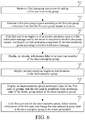
- FIG. 6 is a flowchart of steps of a method for establishing an enterprise group on a client side. The method may specifically include the following steps.
- Step 601 Receive a first join-group instruction for adding a first user to an inside group.
- Step 602 Generate a first join-group request according to the first join-group instruction, and send the first join-group request to a server.
- the server may create an inter-enterprise group for the first user and at least one user in the inside group as discussed above.
- Step 603 If the first user is an employee of an outside enterprise, receive a first notification message sent by the server in response to the first join-group request, and display an inter-enterprise group label of the inter-enterprise group according to the first notification message.
- Step 604 Display an identity information label of at least one member of the inter-enterprise group.
- Step 605 Display an inter-enterprise employee join broadcast in the inter-enterprise group.
- Step 606 Display an inter-enterprise group permission label of the first user.
- the inter-enterprise group permission label is used to prompt that the first user is prohibited from accessing data of the inside group stored in the inter-enterprise group.
- step 601 to step 606 refer to the description of step 501 to step 506. Details are not described herein again.
- a client may further receive a second join-group instruction.
- the second join-group instruction is used to add a second user to the inter-enterprise group.
- the second join-group instruction may be a join-group instruction sent by a terminal of the second user for the inter-enterprise group, or may be a join-group recommendation instruction sent by a terminal of a member of the inter-enterprise group for the second user.
- the client may generate a second join-group request including identity information of the second user according to the second join-group instruction. For example, the client may retrieve the identity information of the second user according to the received second join-group instruction, generate the second join-group request according to the retrieved identity information, and send the second join-group request to the server.
- the server may reject the second user from joining the inter-enterprise group. If determining that the second user is an employee of a trusted enterprise instead of an employee of the current enterprise, the server may add the second user to the inter-enterprise group, and send a third notification message to the client, to notify the client that the second user has joined the inter-enterprise group.
- the client may display an identity information label of the second user and an inter-enterprise group permission label of the second user in the inter-enterprise group according to the third notification message, to prompt that the second user is prohibited from accessing the data of the inside group stored in the inter-enterprise group.
- Step 607 If the first user that is an employee of an outside enterprise has left the inter-enterprise group, delete identity information of the first user in the inter-enterprise group, and replace the inter-enterprise group label of the inter-enterprise group with the inside group label.
- the client of the member of the inside group may display the inter-enterprise group as an inside group, and delete identity information of the employees of the outside enterprises that have left.
- the client is a client of an employee of an outside enterprise, if in this case, the employee of the outside enterprise has left the inter-enterprise group, the inter-enterprise group may be directly deleted.
- FIG. 7 is a structural block diagram of an apparatus for establishing an enterprise group on a server side.
- the apparatus may include a first receiving module 701 and a first creation module 702.
- the first receiving module 701 may be configured to receive a first join-group request for adding a first user to an inside group, where the first join-group request includes identity information of the first user.
- the first creation module 702 may be configured to: if the identity information of the first user does not match attribute information of the inside group, create an inter-enterprise group according to identity information of at least one member of the inside group and the identity information of the first user.
- the apparatus for establishing an enterprise group on a server side may further include a first addition module, configured to add an inter-enterprise group permission to the first user.
- the inter-enterprise group permission is used to prohibit the first user from accessing data of the inside group stored in the inter-enterprise group.
- the first addition module may further be configured to add an inter-enterprise group label to the inter-enterprise group.
- the first addition module may further be configured to add a corresponding identity information label to the at least one member of the inter-enterprise group.
- the apparatus for establishing an enterprise group on a server side may further include a broadcast releasing module, configured to release an inter-enterprise employee join broadcast in the inter-enterprise group.
- the first receiving module may further be configured to receive a second join-group request for adding a second user to the inter-enterprise group.
- the apparatus for establishing an enterprise group on a server side may further include a rejection module and an admission module.
- the rejection module is configured to: when the second user is neither an employee of a trusted enterprise nor an employee of the current enterprise, reject the second user from joining the inter-enterprise group.
- the admission module is configured to: when the second user is an employee of a trusted enterprise instead of an employee of the current enterprise, add the second user to the inter-enterprise group.
- the first addition module may further be configured to: when the second user is an employee of a trusted enterprise instead of an employee of the current enterprise, add an identity information label to the second user, and add an inter-enterprise group permission to the second user to prohibit the second user from accessing the data of the inside group stored in the inter-enterprise group.
- the apparatus for establishing an enterprise group on a server side may further include a restoration module, configured to: if both the first user and the second user that are employees of an outside enterprise have left the inter-enterprise group, delete the identity information of the first user and identity information of the second user in the inter-enterprise group, and replace the inter-enterprise group label of the inter-enterprise group with the inside group label.
- a restoration module configured to: if both the first user and the second user that are employees of an outside enterprise have left the inter-enterprise group, delete the identity information of the first user and identity information of the second user in the inter-enterprise group, and replace the inter-enterprise group label of the inter-enterprise group with the inside group label.
- An embodiment of the present invention further provides an IM application server, including one or more processors and one or more machine readable media storing instructions.
- the one or more processors execute the instructions to enable the IM application server performs the method for establishing an enterprise group on a server side.
- An embodiment of the present invention further provides a readable storage medium, where instructions in the storage medium are executed by a processor in an IM application server to enable the IM application server to perform the method for establishing an enterprise group on a server side.
- the apparatus for establishing an enterprise group on a server side can automatically identify an identity of an added user and automatically create an inter-enterprise group, thereby effectively simplifying operations of adding a large number of employees of outside enterprises.
- an inter-enterprise group label is added to the created inter-enterprise group, an inter-enterprise employee join broadcast is released, and corresponding identity information labels are added to all members in the inter-enterprise group, so that an employee of a current enterprise can be effectively prevented from leaking company data unwittingly.
- FIG. 8 shows an apparatus for establishing an enterprise group on a client side.
- the apparatus may specifically include a second receiving module 801 and a second creation module 802.
- the second receiving module 801 may be configured to receive a first join-group instruction for adding a first user to an inside group.
- the second creation module 802 may be configured to: generate a first join-group request according to the first join-group instruction, and send the first join-group request to a server. In this way, if the first user is an employee of an outside enterprise, the server may create an inter-enterprise group for the first user and at least one member of the inside group.
- the apparatus for establishing an enterprise group on a client side may further include a display module, configured to display an inter-enterprise group permission label of the first user.
- the inter-enterprise group permission label is used to prompt that the first user is prohibited from accessing data of the inside group stored in the inter-enterprise group.
- the display module may further be configured to display an inter-enterprise group label of the inter-enterprise group.
- the display module may further be configured to display an identity information label of the at least one member of the inter-enterprise group.
- the display module may further be configured to display an inter-enterprise employee join broadcast in the inter-enterprise group.
- the second receiving module 801 may further be configured to receive a second join-group instruction, where the second join-group instruction is used to add a second user to the inter-enterprise group.
- the second creation module may further be configured to: generate a second join-group request including identity information of the second user according to the second join-group instruction, and send the second join-group request to the server.
- the display module may further be configured to display the inter-enterprise group including the second user according to a third notification message returned when the server adds the second user to the inter-enterprise group.
- the apparatus for establishing an enterprise group on a client side may further include a restoration display module, configured to: if both the first user and the second user that are employees of an outside enterprise have left the inter-enterprise group, delete the identity information of the first user and the identity information of the second user in the inter-enterprise group and the inter-enterprise group label of the inter-enterprise group, and replace the inter-enterprise group label of the inter-enterprise group with the inside group label.
- a restoration display module configured to: if both the first user and the second user that are employees of an outside enterprise have left the inter-enterprise group, delete the identity information of the first user and the identity information of the second user in the inter-enterprise group and the inter-enterprise group label of the inter-enterprise group, and replace the inter-enterprise group label of the inter-enterprise group with the inside group label.
- a first join-group request including identity information of a first user is generated according to a first join-group instruction for adding the first user to the inside group, and the first join-group request is sent to a server, so that the server can automatically identify an identity of an added user and automatically create an inter-enterprise group.
- An embodiment of the present invention further provides an IM application client, including one or more processors and one or more machine readable media storing instructions.
- the one or more processors execute the instructions to enable the IM application client to perform the method for establishing an enterprise group on a client side.
- An embodiment of the present invention further provides a readable storage medium, where instructions in the storage medium are executed by a processor in an IM application client to enable the IM application client to perform the method for establishing an enterprise group on a client side.
- an embodiment of the present invention further provides a system for establishing an enterprise group, including an apparatus 90 for establishing an enterprise group on a server side and an apparatus 100 for establishing an enterprise group on a client side.
- the apparatus 90 for establishing an enterprise group on a server side may include a first receiving module 901 and a first creation module 902.
- the apparatus 100 for establishing an enterprise group on a client side may include a second receiving module 1001 and a second display module 1002.
- the second receiving module 1001 may generate a first join-group request including identity information of a first user according to a first join-group instruction for adding the first user to the inside group, and send the first join-group request to the first receiving module 901 of the apparatus 90 for establishing an enterprise group on a server side.
- the first receiving module 901 may determine, according to the first join-group request, whether the identity information of the first user matches attribute information of the inside group. If the identity information of the first user matches the attribute information of the inside group, the first user is added to the inside group, and a first notification message is returned to the second display module 1002 of the apparatus 100 for establishing an enterprise group on a client side, so that the second display module 1002 displays the inside group including the first user according to the first notification message.
- the first creation module 902 creates an inter-enterprise group, and return a second notification message to the second display module 1002 of the apparatus 100 for establishing an enterprise group on a client side, so that the second display module 1002 displays the inter-enterprise group including the first user according to the second notification message.
- an enterprise group it is determined, according to a join-group request sent by a first user, whether identity information of the first user matches attribute information of a current inside group. If the identity information of the first user matches the attribute information of the current inside group, the first user is added to the inside group. If the identity information of the first user does not match the attribute information of the current inside group, an inter-enterprise group including the first user and all users in the inside group is created. An identity of an added user is automatically identified, and an inter-enterprise group is automatically created, thereby resolving the problem that addition operations are complex when a large number of employees of outside enterprises need to be added.
- the apparatus embodiments are substantially similar to the method embodiments and therefore are only briefly described, and reference may be made to the description of the parts of the method embodiments for the associated parts.
- modules in devices in the embodiments may be adaptively changed and arranged in one or more devices different from those in the embodiments.
- the modules or units or components in the embodiments may be combined into one module or unit or component, and in addition, they may also be divided into a plurality of submodules or subunits or subcomponents. At least some of the characteristics and/or processes or units are mutually excluded, all the characteristics disclosed in this specification (including the appended Claims, Abstract, and Drawings) and all the processes or units of any method or device disclosed herein may be freely combined. Unless noted clearly otherwise, each characteristic disclosed in this specification (including the appended Claims, Abstract, and Drawings) may be replaced with an alternative characteristic providing the same, equivalent or similar purposes.
- Various component embodiments of the present invention may be implemented by hardware or by software modules running on one or more processors, or implemented by their combination.
- a microprocessor or a digital signal processor (DSP) may be used to implement some or all functions of some or all components of the apparatus for establishing an enterprise group according to the embodiments of the present invention.
- the present invention may also be implemented as a device or an apparatus program (for example, a computer program and a computer program product) for implementing a part or all of the method described herein.
- Such a program for implementing the present invention may be stored on a computer readable medium, or may have a form of one or more signals. Such signals may be downloaded from an Internet website, or provided on a carrier signal, or provided in any other form.
Landscapes
- Engineering & Computer Science (AREA)
- Computer Networks & Wireless Communication (AREA)
- Signal Processing (AREA)
- General Engineering & Computer Science (AREA)
- Multimedia (AREA)
- Management, Administration, Business Operations System, And Electronic Commerce (AREA)
- Information Transfer Between Computers (AREA)
- Telephonic Communication Services (AREA)
- Computer And Data Communications (AREA)
Abstract
Description
- This application claims priority to Chinese Patent Application No.
201710485010.2, filed on June 22, 2017 - Embodiments of the present invention relate to establishing an enterprise group in an instant messaging (IM) application.
- An enterprise instant messaging (EIM) is an online communication tool service for users of enterprise terminals. For enterprise employees, two or more people may communicate in real time by using terminals installed with IM. An EIM service may be used to establish an intra-enterprise group for communication of employees of the same enterprise or an inter-enterprise group for communication of employees of different enterprises.
- When an inside group of an enterprise needs to include employees of other enterprises, a new group may be established, and all the employees that need to be added are added to the new group. However, when a large number of employees of other enterprises need to be added to an inside group of the enterprise, groups need to be established over and over again, resulting in a complex procedure.
- The present invention provides a method for establishing an enterprise group and a corresponding apparatus, to simplify operations of adding a large number of employees of outside enterprises.
- According to a first aspect of the present invention, a method for establishing an enterprise group on a server side is provided and includes: receiving, by a server, a first join-group request for adding a first user to an inside group, where the first join-group request includes identity information of the first user; and if the identity information of the first user does not match attribute information of the inside group, creating, by the server, an inter-enterprise group according to identity information of at least one member of the inside group and the identity information of the first user.
- According to a second aspect of the present invention, a method for establishing an enterprise group on a client side is provided and includes: receiving, by a client, a first join-group instruction for adding a first user to an inside group; generating, by the client, a first join-group request including identity information of the first user according to the first join-group instruction; and sending, by the client, the first join-group request to a server, so that if the identity information of the first user does not match attribute information of the inside group, the server creates an inter-enterprise group for the first user and at least one member of the inside group.
- According to a third aspect of the present invention, an apparatus for establishing an enterprise group on a server side is provided and includes: a first receiving module, configured to receive a first join-group request for adding a first user to an inside group, where the first join-group request includes identity information of the first user; and a first creation module, configured to: if the identity information of the first user does not match attribute information of the inside group, create an inter-enterprise group according to identity information of at least one member of the inside group and the identity information of the first user.
- According to a fourth aspect of the present invention, an apparatus for establishing an enterprise group on a client side is provided and includes: a second receiving module, configured to receive a first join-group instruction for adding a first user to an inside group; and a second creation module, configured to: generate a first join-group request including identity information of the first user according to the first join-group instruction, and send the first join-group request to a server, so that if the identity information of the first user does not match attribute information of the inside group, the server creates an inter-enterprise group for the first user and at least one member of the inside group.
- According to a fifth aspect of the present invention, an IM application server is provided and includes: one or more processors; and one or more machine readable media storing instructions. When the one or more processors execute the instructions in the machine readable medium, the processor performs the method for establishing an enterprise group on a server side.
- According to a sixth aspect of the present invention, a readable storage medium is provided, where when instructions in the storage medium are executed by a processor in an IM application server, the processor can perform the method for establishing an enterprise group on a server side.
- According to a seventh aspect of the present invention, an IM application client is provided and includes: one or more processors; and one or more machine readable media storing instructions. When the one or more processors execute the instructions in the machine readable medium, the processor performs the method for establishing an enterprise group on a client side.
- According to an eighth aspect of the present invention, a readable storage medium is provided, where when instructions in the storage medium are executed by a processor in an IM application client, the processor can perform the method for establishing an enterprise group on a client side.
- It is determined, according to a join-group request from a first user, whether identity information of the first user matches attribute information of a current inside group. If the identity information of the first user matches the attribute information of the current inside group, the first user is added to the inside group. If the identity information of the first user does not match the attribute information of the current inside group, an inter-enterprise group including the first user and all users in the inside group is created. By means of the method for establishing an enterprise group according to the embodiments of the present invention, an identity of an added user can be automatically identified and an inter-enterprise group can be automatically created, thereby effectively simplifying operations of adding a large number of employees of outside enterprises.
- To describe the technical solutions of the embodiments of the present invention more clearly, the following briefly introduces the accompanying drawings required for describing the embodiments of the present invention. Apparently, the accompanying drawings in the following description show only some embodiments of the present invention, and a person of ordinary skill in the art may still derive other drawings from these accompanying drawings without creative efforts.
-
FIG. 1 is a flowchart of steps of a method for establishing an enterprise group on a server side according to an embodiment of the present invention. -
FIG. 2-1 is a flowchart of steps of a method for establishing an enterprise group on a server side according to another embodiment of the present invention. -
FIG. 2-2 is an application interface view of a method for establishing an enterprise group according to another embodiment of the present invention. -
FIG. 3-1 is a flowchart of steps of a method for establishing an enterprise group on a server side according to an embodiment of the present invention. -
FIG. 3-2 is an application interface view of a method for establishing an enterprise group according to an embodiment of the present invention. -
FIG. 3-3 is an application interface view of a method for establishing an enterprise group according to an embodiment of the present invention. -
FIG. 3-4 is an application interface view of a method for establishing an enterprise group according to an embodiment of the present invention. -
FIG. 3-5 is an application interface view of a method for establishing an enterprise group according to an embodiment of the present invention. -
FIG. 4 is a flowchart of steps of a method for establishing an enterprise group on a client side according to an embodiment of the present invention. -
FIG. 5 is a flowchart of steps of a method for establishing an enterprise group on a client side according to an embodiment of the present invention. -
FIG. 6 is a flowchart of steps of a method for establishing an enterprise group on a client side according to an embodiment of the present invention. -
FIG. 7 is a structural diagram of an apparatus for establishing an enterprise group on a server side according to an embodiment of the present invention. -
FIG. 8 is a structural diagram of an apparatus for establishing an enterprise group on a client side according to an embodiment of the present invention. -
FIG. 9 is a structural diagram of a system for establishing an enterprise group according to an embodiment of the present invention. - The following clearly and completely describes the technical solutions in the embodiments of the present invention with reference to the accompanying drawings in the embodiments of the present invention. The described embodiments are some of the embodiments of the present invention rather than all of the embodiments. All other embodiments obtained by a person of ordinary skill in the art based on the embodiments of the present invention without creative efforts shall fall within the protection scope of the present disclosure.
- A method for establishing an enterprise group provided in an embodiment of the present invention is based on an EIM technology. EMI is an online communication tool service for users of enterprise terminals. For the users, two or more people may communicate in real time by using terminals installed with IM. The content of communication may include exchanged text, interfaces, speech, videos, files, and the like.
- Different from a personal IM tool, an EIM tool requires that a user should provide genuine identity information for the purpose of work-related communication, nearly all data documents transmitted in the system are related to services or even secrets of an enterprise. Therefore, a top priority of an EIM system is to safeguard privacy and company business information. Therefore, such a system is usually deployed on a server possessed by an enterprise, and employees may log in to the server to perform work-related communication within a particular range.
- In a network architecture of an EIM tool, an enterprise may set one general server and set several corresponding databases according to the division of an inside sub-server and an outside sub-server. An IM system is deployed for each sub-server. An IM client installed by an employee may log in to the sub-servers to perform work-related communication within the range of the inside sub-server or the outside sub-server. However, IM systems of the inside sub-server and the outside sub-server require authorization before instant communication. For example, a general database may store the name of an inside/trusted company, an organization code, a business scope, an address, a rank, an affiliation relationship, and the like. Each database covers the information of all employees of an enterprise. Each piece of employee information may include, for example, a division, a post, a name, a phone number, an email address, a position type, and a service type.
-
FIG. 1 is a flowchart of steps of a method for establishing an enterprise group on a server side. The method may specifically include the following steps. - Step 110: Receive a first join-group request for adding a first user to an inside group, where the first join-group request includes identity information of the first user.
- Step 120: If the identity information of the first user does not match attribute information of the inside group, create an inter-enterprise group according to identity information of at least one member of the inside group and the identity information of the first user.
- A server may determine whether the identity information of the first user matches the attribute information of the inside group. If the identity information of the first user matches the attribute information of the inside group, the first user is added to the inside group. If the identity information of the first user does not match the attribute information of the inside group, the identity information of the at least one member of the inside group and the identity information of the first user are retrieved, and the inter-enterprise group is created according to the retrieved identity information.
- In EIM, an inside group of an enterprise is established to ensure security. The inside group of the enterprise is somewhat closed, for example, only supports communication of employees of a current enterprise. However, during working, an employee of the current enterprise often needs to collaborate with an employee (which may be referred to as an employee of an outside enterprise for short below) of another enterprise such as a trusted enterprise (an enterprise that reaches a mutual trust agreement with the current company). An inter-enterprise group may be created, and permissions may be set for an employee of an outside enterprise in the inter-enterprise group.
- When a join-group request for adding the first user to the inside group is received, the identity information of the first user is determined. When the first user is an employee of an outside enterprise, identity data of the first user is retrieved, and an inter-enterprise group is created according to the retrieved identity data. In this way, an employee of the current enterprise and an employee of an outside enterprise can communicate with each other, and an employee of an outside enterprise can be prevented from accessing private data of the current enterprise in the inside group. Moreover, when a large number of employees of outside enterprises need to be added, it is not necessary to establish groups over and over again.
- It is determined, according to a join-group request for adding a first user to an inside group, whether identity information of the first user matches attribute information of a current inside group. If the identity information of the first user matches the attribute information of the current inside group, the first user is added to the inside group. If the identity information of the first user does not match the attribute information of the current inside group, an inter-enterprise group including the first user and all users in the inside group is created. By means of the method for establishing an enterprise group on a server side, an identity of an added user can be automatically identified and an inter-enterprise group can be automatically created, thereby effectively simplifying operations of adding a large number of employees of outside enterprises.
-
FIG. 2-1 is a flowchart of steps of a method for establishing an enterprise group on a server side. The method may include the following steps. - Step 210: Receive a first join-group request for adding a first user to an inside group, where the first join-group request includes identity information of the first user.
- The first join-group request may include the identity information of the first user, for example, an enterprise, a division, a post, a name, a phone number, an email address, a position type, and a service type of the first user. When a server receives a join-group request, the identity information of the first user included in the request may be parsed from the join-group request.
- It should be noted that the first join-group request may be a join-group request sent by a terminal of the first user for the inside group, or may be a join-group recommendation request sent by a terminal of a member of the inside group for the first user.
- Step 220: If the identity information of the first user does not match attribute information of the inside group, create an inter-enterprise group according to identity information of at least one member of the inside group and the identity information of the first user.
- The server may compare the received identity information of the first user with information of a member of the inside group, to determine whether the first user is an employee of the current enterprise that has permissions for the inside group.
- For example, when receiving a request sent by a client of a new user to request to join the inside group, an EIM application automatically performs determination according to the request and feeds back a processing result to the client of the new user and a client of an administrator. If the new user is an employee of the current enterprise, the processing result is admission. If the new user is an employee of an outside enterprise, the processing result is admission, and an inter-enterprise group is created. If an employee A of an outside enterprise needs to join the inside group of the current enterprise to collaborate on a project, the employee A of the outside enterprise may use the EIM application to find the inside group and submit a join-group request. In this case, the server may create an inter-enterprise group according to identity information of the employee A of the outside enterprise, and add the employee A of the outside enterprise to the inter-enterprise group. In this case, the administrator of the inside group receives detailed information of the current addition.
- If the identity information of the first user matches the attribute information of the inside group, the first user may be added to the inside group, and the first user and another member of the inside group have the same group permissions, including the permission to access historical data in the inside group.
- If the identity information of the first user does not match attribute information of the inside group, it is determined that currently the first user is an employee of an outside enterprise. In this case, all data of the inside group and the identity information of the first user are retrieved, and a new, separate inter-enterprise group is created according to the retrieved data. For example, the inter-enterprise group may store all previous data of the inside group to facilitate the collaborative communication between employees of the current enterprise and other employees of outside enterprises. It should be noted that, after the inter-enterprise group is created, the original inside group is kept instead of being deleted, so that the employee of the current enterprise may use the inside group for inside communication.
- Step 230: Add an inter-enterprise group permission to the first user.
- The inter-enterprise group permission is used to prohibit the first user from accessing data of the inside group stored in the inter-enterprise group. To be specific, the newly added first user does not have the permission to access the data of the inside group stored in the inter-enterprise group. For example, after the inter-enterprise group is created, an employee of an outside enterprise in the group cannot access historical chat records, files, and the like of the inside group that are stored in the group, and cannot use some group functions such as adding a member, removing a member, and creating a video conference.
- Step 240: Add an inter-enterprise group label to the inter-enterprise group.
- As shown in
FIG. 2-2A and FIG. 2-2B , each group established by the EIM application corresponds to one group label, for example, an inside group, an inter-enterprise group, and a high management group. Only the administrator can change or delete the group label. After the inter-enterprise group is created, the server may automatically change aninside group label 101 of an inside group on anoriginal interface 10 shown inFIG. 2-2A to aninter-enterprise group label 201 on aninterface 20 shown inFIG. 2-2B , to remind members of the inside group that employees of outside enterprises have joined the current group, thereby preventing an employee of a current enterprise from leaking company data unwittingly. - Step 250: Add corresponding identity information labels to all users in the inter-enterprise group.
- After the inter-enterprise group is created, corresponding identity information labels are added to members of the inter-enterprise group. The identity information label is, for example, an enterprise, a division, a post, a name, a phone number, an email address, a position type, and a service type. An enterprise to which a member belongs is preferentially displayed, so that the members of the inter-enterprise group are distinguished.
- Step 260: Release an inter-enterprise employee join broadcast in the inter-enterprise group.
- After the inter-enterprise group is created, the system releases notice information on a group noticeboard or a chat interface. The notice information is, for example, "XXX from an outside enterprise has joined the group. The group is now upgraded to an inter-enterprise group." used to remind members of the inside group that an employee of an outside enterprise has joined the current group, thereby preventing an employee of a current enterprise from leaking company data unwittingly.
- It should be noted that, the sequence of
step 230 to step 260 may be appropriately adjusted or a step may be correspondingly added or removed as required. Any method variant that can be easily derived by those skilled in the art should fall within the protection scope of the present invention. Therefore, details are not described again. - An inter-enterprise group label is added to an inter-enterprise group, an outside-enterprise employee join broadcast is released, and corresponding identity information labels are added to all users in the inter-enterprise group. By means of the method for establishing an enterprise group on a server side, an employee of a current enterprise can be effectively prevented from leaking company data unwittingly.
-
FIG. 3-1 is a flowchart of steps of a method for establishing an enterprise group on a server side. The method may include the following steps. - Step 301: Receive a first join-group request for adding a first user to an inside group, where the first join-group request includes identity information of the first user.
- Step 302: If the identity information of the first user does not match attribute information of the inside group, create an inter-enterprise group according to identity information of at least one member of the inside group, the identity information of the first user, and data of the inside group.
- Step 303: Add an inter-enterprise group permission to the first user.
- Step 304: Add an inter-enterprise group label to the inter-enterprise group.
- Step 305: Add a corresponding identity information label to at least one user in the inter-enterprise group.
- Step 306: Release an inter-enterprise employee join broadcast in the inter-enterprise group.
- For
step 301 to step 306, refer to step 210 to step 260. Details are not described herein again. - Step 307: Receive a second join-group request for adding a second user to the inter-enterprise group.
- After the inter-enterprise group is established, a join-group request sent by a terminal of the second user for the inter-enterprise group may be received. It should be noted that the second join-group request may be a join-group request sent by the terminal of the second user for the inter-enterprise group, or may be a join-group recommendation request sent by a terminal of a member of the inter-enterprise group for the second user.
- Step 308: If it is determined that the second user is an employee of an outside enterprise, add a corresponding identity information label to the second user, and add an inter-enterprise group permission to the second user. The inter-enterprise group permission is used to prohibit the second user from accessing the data of the inside group stored in the inter-enterprise group.
- If the second user is neither an employee of a trusted enterprise nor an employee of the current enterprise, it may be concluded that the second user is a potentially malicious person that has entered by exploiting a loophole, and a join-group request of the second user is rejected to safeguard the inter-enterprise group more adequately.
- Step 309: Add the second user to the inter-enterprise group.
- When the second user is either an employee of the current enterprise or an employee of an outside enterprise, the second user may be added to the inter-enterprise group.
- If the first user and the second user have left the inter-enterprise group, the identity information of the first user and identity information of the second user in the inter-enterprise group may be deleted.
- If all employees of outside enterprises in one the inter-enterprise group have left the group, it may be determined that the current collaborative communication has ended, and the inter-enterprise group label may be changed back to the inside group label, so that users of the current enterprise can continue to use the inside group to perform inside communication.
- It should be noted that, the sequence of
step 303 to step 306 may be appropriately adjusted or a step may be correspondingly added or removed as required. Any method variant that can be easily derived by those skilled in the art should fall within the protection scope of the present invention. Therefore, details are not described again. - For example, as shown in
FIG. 3-2 , it is assumed that an enterprise A uses an EIM application to establish aninside group 10 named "Alumni association for inside communication". There are employees of the enterprise A whose names are YU, XI, and LIU in the inside group. An enterprise B needs to collaborate with the company A on a project, and dispatches collaborators named HOU Xiaoqing and WANG Kai. According to step 301, an IM application server of the enterprise A receives a join-group request. The join-group request may be sent by YUAN from the enterprise A or may be sent by HOU Xiaoqing and WANG Kai from the trusted enterprise B. In this case, the server may invoke enterprise member identity information in a database to determine identity information of a member corresponding to the join-group request. If it is determined that the member corresponding to the join-group request is YUAN from the current enterprise A, as shown inFIG. 3-3 , YUAN may be directly added to the inside group, and aninside group label 30 is kept unchanged. If it is determined, according tostep 302, as shown inFIG. 3-4 , that the member corresponding to the join-group request is HOU Xiaoqing from the trusted enterprise B, an inter-enterprise group including YU, XI, LIU, and HOU Xiaoqing is created. Next, according to step 303 to step 306, theinside group label 30 shown inFIG. 3-3 is changed to aninter-enterprise group label 40 shown inFIG. 3-4 , an inter-enterprise group permission is added to HOU Xiaoqing, and corresponding identity information labels are added to all members of the inter-enterprise group. The identity information label is, for example, an enterprise, a division, a post, a name, a phone number, an email address, a position type, and a service type of a member. Finally, an inter-enterprise employee join broadcast concerning HOU Xiaoqing may be released on the group noticeboard. - After the inter-enterprise group including YU, XI, LIU, and HOU Xiaoqing shown in
FIG. 3-4 is established, according tostep 307, if the server continues to receive a join-group request, it may be determined that the member corresponding to the join-group request is YUAN from the current enterprise A or WANG Kai from the trusted enterprise B, as shown inFIG. 3-5 . If according to step 309, it is determined that the member corresponding to the join-group request is WANG Kai from the trusted enterprise B, WANG Kai is added to the inter-enterprise group, and step 308 is performed to add a corresponding identity information label and an inter-enterprise group permission to WANG Kai and release a join broadcast. If the member corresponding to the join-group request is YUAN from the current enterprise A, YUAN is directly added to the inter-enterprise group. If the member corresponding to the join-group request is neither an employee from the trusted enterprise B nor an employee from the current enterprise, the member may be rejected from joining the inter-enterprise group. After the collaboration on a project has ended and both the employees HOU Xiaoqing and WANG Kai of the trusted enterprise in the inter-enterprise group have left the group, identity information of HOU Xiaoqing and identity information of WANG Kai may be deleted from the group, and an inter-enterprise group label is changed to an inside group label. A specific interface may be shown inFIG. 3-3 . -
FIG. 4 is a flowchart of steps of a method for establishing an enterprise group on a client side. The method may include the following steps. - Step 401: Receive a first join-group instruction for adding a first user to an inside group.
- The first join-group instruction may be a join-group instruction from a terminal of the first user for the inside group, or may be a join-group recommendation instruction from a terminal of a member of the inside group for the first user.
- Step 402: Generate a first join-group request according to the first join-group instruction, and send the first join-group request to a server. In this way, if identity information of the first user does not match attribute information of the inside group, it may represent that the first user is not an employee of an enterprise corresponding to the inside group, the server may create an inter-enterprise group for the first user and at least one member of the inside group.
- After a client receives the first join-group instruction, if the first user is an employee of an outside enterprise, the inter-enterprise group is created. Moreover, the first user and the at least one member of the original inside group are displayed in the inter-enterprise group. Certainly, during actual application, the first user and all members of the original inside group may be displayed.
- After the first join-group instruction is received, the client may generate the first join-group request including the identity information of the first user according to the first join-group instruction. For example, the client may retrieve the identity information of the first user according to the received first join-group instruction, generate the first join-group request according to the retrieved identity information, and send the first join-group request to the server.
- The first join-group request is used by the server to determine whether the identity information of the first user matches the attribute information of the inside group. If the identity information of the first user matches the attribute information of the inside group, the server may add the first user to the inside group, and return a first notification message to the client, to notify the client that the first user has joined the inside group. If the identity information of the first user does not match the attribute information of the inside group, the server may create the inter-enterprise group according to identity information of the at least one member of the inside group and the identity information of the first user, and return a second notification message to the client, to notify the client that the first user has joined the inter-enterprise group. For a specific execution process of the server side, refer to the foregoing. Details are not described herein again.
- Step 403: Receive a notification message sent by the server in response to the first join-group request, and display the inside group or the inter-enterprise group including the first user according to the received message.
- If the first notification message sent by the server is received, the client may display the inside group including the first user. For example, the client may display the inside group including the first user on a group menu of an EIM application of the client according to the first notification message, including adding an icon, a name or the like of the first user to a user list interface of the EIM application.
- If the second notification message sent by the server is received, the client may display a newly created inter-enterprise group including the first user. For example, the client may display the newly created inter-enterprise group on a group menu of an EIM application of the client according to the second notification message. The inter-enterprise group may store all previous data of the inside group, and display a distinguishing label for the inter-enterprise group, to satisfy collaborative communication between employees of the current enterprise and employees of outside enterprises.
- The client may further receive a second join-group instruction. The second join-group instruction is used to add a second user to the inter-enterprise group. It should be noted that, the second join-group instruction may be a join-group instruction sent by a terminal of the second user for the inter-enterprise group, or may be a join-group recommendation instruction sent by a terminal of a member of the inter-enterprise group for the second user.
- The client may generate a second join-group request including identity information of the second user according to the second join-group instruction. For example, the client may retrieve the identity information of the second user according to the received second join-group instruction, generate the second join-group request according to the retrieved identity information, and send the second join-group request to the server.
- In this case, if determining that the second user is neither an employee of a trusted enterprise nor an employee of the current enterprise, the server may reject the second user from joining the inter-enterprise group. If determining that the second user is an employee of a trusted enterprise instead of an employee of the current enterprise, the server may add the second user to the inter-enterprise group, and send a third notification message to the client, to notify the client that the second user has joined the inter-enterprise group.
- The client may display the second user in the inter-enterprise group according to the third notification message, and display an identity information label of the second user and an inter-enterprise group permission label of the second user, to prompt that the second user is prohibited from accessing data of the inside group stored in the inter-enterprise group.
- A first join-group request including identity information of a first user is generated according to a first join-group instruction for adding the first user to the inside group, and the first join-group request is sent to a server, so that the server can automatically identify an identity of an added user and automatically create an inter-enterprise group, thereby effectively simplifying operations of adding a large number of employees of outside enterprises.
-
FIG. 5 is a flowchart of steps of a method for establishing an enterprise group on a client side. The method may specifically include the following steps:
Step 501: Receive a first join-group instruction for adding a first user to an inside group. - Step 502: Generate a first join-group request according to the first join-group instruction, and send the first join-group request to a server. In this way, if the first user is an employee of an outside enterprise, the server may create an inter-enterprise group for the first user and at least one member of the inside group as discussed above.
- For
step 501 to step 502, refer to the description ofstep 401 andstep 402. Details are not described herein again. - Step 503: If the first user is an employee of an outside enterprise, receive a first notification message sent by the server in response to the first join-group request, and display an inter-enterprise group label of the inter-enterprise group according to the first notification message.
- Referring to
FIG. 2-2B , the inter-enterprise group label may be a sub-label 201 on anEIM application interface 20 of a client. The sub-label 201 is used to remind members of the inside group that an employee of an outside enterprise has joined the current group, thereby preventing an employee of a current enterprise from leaking company data unwittingly. - Step 504: Display an identity information label of the at least one member of the inter-enterprise group.
- After the inter-enterprise group is created, the server may add an identity information label to each member of the inter-enterprise group. The identity information label is, for example, an enterprise, a division, a post, a name, a phone number, an email address, a position type, and a service type. Correspondingly, the client may display an identity information label of each member of the inter-enterprise group on a local EIM application interface. For example, an enterprise to which a member belongs may be preferentially displayed, so that the members of the inter-enterprise group are distinguished. According to an example, on an application interface of the client, the foregoing information is displayed when an icon of a user on the interface is touched.
- Step 505: Display an inter-enterprise employee join broadcast in the inter-enterprise group.
- After the inter-enterprise group is created, the server releases notice information on a group noticeboard or a chat interface. The notice information is, for example, "XXX from an outside enterprise has joined the group. The group is now upgraded to an inter-enterprise group.", to remind members of the inside group that an employee of an outside enterprise has joined the current group, thereby preventing an employee of a current enterprise from leaking company data unwittingly. Correspondingly, the client may display the inter-enterprise employee join broadcast on the local EIM application interface.
- Step 506: Display an inter-enterprise group permission label of the first user. The inter-enterprise group permission label is used to prompt that the first user is prohibited from accessing data of the inside group stored in the inter-enterprise group.
- It should be noted that, the sequence of
step 503 to step 506 may be appropriately adjusted or a step may be correspondingly added or removed as required. Any method variant that can be easily derived by those skilled in the art should fall within the protection scope of the present invention. Therefore, details are not described again. - An inter-enterprise group label is displayed, an inter-enterprise employee join broadcast released by a server is displayed, and identity information labels of all members of an inter-enterprise group are displayed, so that an employee of a current enterprise can be prevented from leaking company data unwittingly.
-
FIG. 6 is a flowchart of steps of a method for establishing an enterprise group on a client side. The method may specifically include the following steps. - Step 601: Receive a first join-group instruction for adding a first user to an inside group.
- Step 602: Generate a first join-group request according to the first join-group instruction, and send the first join-group request to a server. In this way, if the first user is an employee of an outside enterprise, the server may create an inter-enterprise group for the first user and at least one user in the inside group as discussed above.
- Step 603: If the first user is an employee of an outside enterprise, receive a first notification message sent by the server in response to the first join-group request, and display an inter-enterprise group label of the inter-enterprise group according to the first notification message.
- Step 604: Display an identity information label of at least one member of the inter-enterprise group.
- Step 605: Display an inter-enterprise employee join broadcast in the inter-enterprise group.
- Step 606: Display an inter-enterprise group permission label of the first user. The inter-enterprise group permission label is used to prompt that the first user is prohibited from accessing data of the inside group stored in the inter-enterprise group.
- It should be noted that, for
step 601 to step 606, refer to the description ofstep 501 to step 506. Details are not described herein again. - In addition, a client may further receive a second join-group instruction. The second join-group instruction is used to add a second user to the inter-enterprise group. The second join-group instruction may be a join-group instruction sent by a terminal of the second user for the inter-enterprise group, or may be a join-group recommendation instruction sent by a terminal of a member of the inter-enterprise group for the second user.
- Further, the client may generate a second join-group request including identity information of the second user according to the second join-group instruction. For example, the client may retrieve the identity information of the second user according to the received second join-group instruction, generate the second join-group request according to the retrieved identity information, and send the second join-group request to the server.
- In this case, if determining that the second user is neither an employee of a trusted enterprise nor an employee of the current enterprise, the server may reject the second user from joining the inter-enterprise group. If determining that the second user is an employee of a trusted enterprise instead of an employee of the current enterprise, the server may add the second user to the inter-enterprise group, and send a third notification message to the client, to notify the client that the second user has joined the inter-enterprise group. Correspondingly, after receiving the third notification message sent by the server, the client may display an identity information label of the second user and an inter-enterprise group permission label of the second user in the inter-enterprise group according to the third notification message, to prompt that the second user is prohibited from accessing the data of the inside group stored in the inter-enterprise group.
- Step 607: If the first user that is an employee of an outside enterprise has left the inter-enterprise group, delete identity information of the first user in the inter-enterprise group, and replace the inter-enterprise group label of the inter-enterprise group with the inside group label.
- When the client is a client of a member of the inside group, if in this case, all employees of outside enterprises in the inter-enterprise group have left, the client of the member of the inside group may display the inter-enterprise group as an inside group, and delete identity information of the employees of the outside enterprises that have left. When the client is a client of an employee of an outside enterprise, if in this case, the employee of the outside enterprise has left the inter-enterprise group, the inter-enterprise group may be directly deleted.
-
FIG. 7 is a structural block diagram of an apparatus for establishing an enterprise group on a server side. The apparatus may include a first receiving module 701 and afirst creation module 702. The first receiving module 701 may be configured to receive a first join-group request for adding a first user to an inside group, where the first join-group request includes identity information of the first user. Thefirst creation module 702 may be configured to: if the identity information of the first user does not match attribute information of the inside group, create an inter-enterprise group according to identity information of at least one member of the inside group and the identity information of the first user. - Optionally, the apparatus for establishing an enterprise group on a server side may further include a first addition module, configured to add an inter-enterprise group permission to the first user. The inter-enterprise group permission is used to prohibit the first user from accessing data of the inside group stored in the inter-enterprise group. Optionally, the first addition module may further be configured to add an inter-enterprise group label to the inter-enterprise group. Optionally, the first addition module may further be configured to add a corresponding identity information label to the at least one member of the inter-enterprise group.
- Optionally, the apparatus for establishing an enterprise group on a server side may further include a broadcast releasing module, configured to release an inter-enterprise employee join broadcast in the inter-enterprise group.
- Optionally, the first receiving module may further be configured to receive a second join-group request for adding a second user to the inter-enterprise group. In this case, the apparatus for establishing an enterprise group on a server side may further include a rejection module and an admission module. The rejection module is configured to: when the second user is neither an employee of a trusted enterprise nor an employee of the current enterprise, reject the second user from joining the inter-enterprise group. The admission module is configured to: when the second user is an employee of a trusted enterprise instead of an employee of the current enterprise, add the second user to the inter-enterprise group.
- Optionally, the first addition module may further be configured to: when the second user is an employee of a trusted enterprise instead of an employee of the current enterprise, add an identity information label to the second user, and add an inter-enterprise group permission to the second user to prohibit the second user from accessing the data of the inside group stored in the inter-enterprise group.
- Optionally, the apparatus for establishing an enterprise group on a server side may further include a restoration module, configured to: if both the first user and the second user that are employees of an outside enterprise have left the inter-enterprise group, delete the identity information of the first user and identity information of the second user in the inter-enterprise group, and replace the inter-enterprise group label of the inter-enterprise group with the inside group label.
- An embodiment of the present invention further provides an IM application server, including one or more processors and one or more machine readable media storing instructions. The one or more processors execute the instructions to enable the IM application server performs the method for establishing an enterprise group on a server side.
- An embodiment of the present invention further provides a readable storage medium, where instructions in the storage medium are executed by a processor in an IM application server to enable the IM application server to perform the method for establishing an enterprise group on a server side.
- It is determined, according to a join-group request for adding a first user to an inside group, whether identity information of the first user matches attribute information of the inside group. If the identity information of the first user matches the attribute information of the inside group, the first user is added to the inside group. If the identity information of the first user does not match the attribute information of the inside group, an inter-enterprise group including the first user and all members of the inside group is created. The apparatus for establishing an enterprise group on a server side can automatically identify an identity of an added user and automatically create an inter-enterprise group, thereby effectively simplifying operations of adding a large number of employees of outside enterprises. In addition, an inter-enterprise group label is added to the created inter-enterprise group, an inter-enterprise employee join broadcast is released, and corresponding identity information labels are added to all members in the inter-enterprise group, so that an employee of a current enterprise can be effectively prevented from leaking company data unwittingly.
-
FIG. 8 shows an apparatus for establishing an enterprise group on a client side. The apparatus may specifically include asecond receiving module 801 and asecond creation module 802. Thesecond receiving module 801 may be configured to receive a first join-group instruction for adding a first user to an inside group. Thesecond creation module 802 may be configured to: generate a first join-group request according to the first join-group instruction, and send the first join-group request to a server. In this way, if the first user is an employee of an outside enterprise, the server may create an inter-enterprise group for the first user and at least one member of the inside group. - Optionally, the apparatus for establishing an enterprise group on a client side may further include a display module, configured to display an inter-enterprise group permission label of the first user. The inter-enterprise group permission label is used to prompt that the first user is prohibited from accessing data of the inside group stored in the inter-enterprise group.
- Optionally, the display module may further be configured to display an inter-enterprise group label of the inter-enterprise group.
- Optionally, the display module may further be configured to display an identity information label of the at least one member of the inter-enterprise group.
- Optionally, the display module may further be configured to display an inter-enterprise employee join broadcast in the inter-enterprise group.
- Optionally, the
second receiving module 801 may further be configured to receive a second join-group instruction, where the second join-group instruction is used to add a second user to the inter-enterprise group. In this case, the second creation module may further be configured to: generate a second join-group request including identity information of the second user according to the second join-group instruction, and send the second join-group request to the server. In addition, the display module may further be configured to display the inter-enterprise group including the second user according to a third notification message returned when the server adds the second user to the inter-enterprise group. - Optionally, the apparatus for establishing an enterprise group on a client side may further include a restoration display module, configured to: if both the first user and the second user that are employees of an outside enterprise have left the inter-enterprise group, delete the identity information of the first user and the identity information of the second user in the inter-enterprise group and the inter-enterprise group label of the inter-enterprise group, and replace the inter-enterprise group label of the inter-enterprise group with the inside group label.
- A first join-group request including identity information of a first user is generated according to a first join-group instruction for adding the first user to the inside group, and the first join-group request is sent to a server, so that the server can automatically identify an identity of an added user and automatically create an inter-enterprise group. By means of the apparatus for establishing an enterprise group on a client side, operations of adding a large number of employees of outside enterprises can be effectively simplified.
- An embodiment of the present invention further provides an IM application client, including one or more processors and one or more machine readable media storing instructions. The one or more processors execute the instructions to enable the IM application client to perform the method for establishing an enterprise group on a client side.
- An embodiment of the present invention further provides a readable storage medium, where instructions in the storage medium are executed by a processor in an IM application client to enable the IM application client to perform the method for establishing an enterprise group on a client side.
- Referring to
FIG. 9 , an embodiment of the present invention further provides a system for establishing an enterprise group, including anapparatus 90 for establishing an enterprise group on a server side and anapparatus 100 for establishing an enterprise group on a client side. Theapparatus 90 for establishing an enterprise group on a server side may include afirst receiving module 901 and afirst creation module 902. Theapparatus 100 for establishing an enterprise group on a client side may include asecond receiving module 1001 and asecond display module 1002. - The
second receiving module 1001 may generate a first join-group request including identity information of a first user according to a first join-group instruction for adding the first user to the inside group, and send the first join-group request to thefirst receiving module 901 of theapparatus 90 for establishing an enterprise group on a server side. - After receiving the first join-group request, the
first receiving module 901 may determine, according to the first join-group request, whether the identity information of the first user matches attribute information of the inside group. If the identity information of the first user matches the attribute information of the inside group, the first user is added to the inside group, and a first notification message is returned to thesecond display module 1002 of theapparatus 100 for establishing an enterprise group on a client side, so that thesecond display module 1002 displays the inside group including the first user according to the first notification message. If the identity information of the first user does not match the attribute information of the inside group, thefirst creation module 902 creates an inter-enterprise group, and return a second notification message to thesecond display module 1002 of theapparatus 100 for establishing an enterprise group on a client side, so that thesecond display module 1002 displays the inter-enterprise group including the first user according to the second notification message. - In conclusion, by means of the system for establishing an enterprise group provided in this embodiment of the present invention, it is determined, according to a join-group request sent by a first user, whether identity information of the first user matches attribute information of a current inside group. If the identity information of the first user matches the attribute information of the current inside group, the first user is added to the inside group. If the identity information of the first user does not match the attribute information of the current inside group, an inter-enterprise group including the first user and all users in the inside group is created. An identity of an added user is automatically identified, and an inter-enterprise group is automatically created, thereby resolving the problem that addition operations are complex when a large number of employees of outside enterprises need to be added.
- The apparatus embodiments are substantially similar to the method embodiments and therefore are only briefly described, and reference may be made to the description of the parts of the method embodiments for the associated parts.
- The algorithms and displays provided herein are not inherently related to any specific computer, virtual system or other apparatuses. Various general-purpose systems may also be used with the teachings herein. According to the above description, the structure required for constructing such systems is obvious. In addition, the present invention is not directed to any specific programming language. It should be understood that the content of the present invention described herein may be carried out by using various programming languages, and that the above description for a specific language is for the sake of disclosing optimal embodiments of the present invention.
- Numerous specific details are described in the specification provided herein. However, it can be understood that the embodiments of the present invention may be practiced without these specific details. In some examples, well-known methods, structures, and technologies have not been described in detail so as not to obscure this specification.
- Those skilled in the art may understand that the modules in devices in the embodiments may be adaptively changed and arranged in one or more devices different from those in the embodiments. The modules or units or components in the embodiments may be combined into one module or unit or component, and in addition, they may also be divided into a plurality of submodules or subunits or subcomponents. At least some of the characteristics and/or processes or units are mutually excluded, all the characteristics disclosed in this specification (including the appended Claims, Abstract, and Drawings) and all the processes or units of any method or device disclosed herein may be freely combined. Unless noted clearly otherwise, each characteristic disclosed in this specification (including the appended Claims, Abstract, and Drawings) may be replaced with an alternative characteristic providing the same, equivalent or similar purposes.
- Various component embodiments of the present invention may be implemented by hardware or by software modules running on one or more processors, or implemented by their combination. Those skilled in the art should understand that in practice, a microprocessor or a digital signal processor (DSP) may be used to implement some or all functions of some or all components of the apparatus for establishing an enterprise group according to the embodiments of the present invention. The present invention may also be implemented as a device or an apparatus program (for example, a computer program and a computer program product) for implementing a part or all of the method described herein. Such a program for implementing the present invention may be stored on a computer readable medium, or may have a form of one or more signals. Such signals may be downloaded from an Internet website, or provided on a carrier signal, or provided in any other form.
- It should be noted that the embodiments above are intended to describe the present invention rather than to limit the present invention. Moreover, without departing from the scope of the appended claims, those skilled in the art may design alternative embodiments. In the claims, no reference numerals included within parentheses should constitute a limitation to the claims. The word "comprise" does not exclude elements or steps not stated in the claims. Wording like "a" or "an" before an element does not exclude the existence of a plurality of such elements. The present invention may be implemented by hardware including a plurality of different elements and an appropriately programmed computer. In a unit claim listing several apparatuses, several of such apparatuses may be embodied through the same hardware item. Use of words such as first, second, and third does not indicate any sequence. These words may be explained as names.
- The above descriptions are merely specific embodiments of the present invention, but not intended to limit the scope of the present invention. Any variations or replacement that can be easily derived by those skilled in the art should fall within the scope of the present invention. Therefore, the protection scope of the present invention is subject to the appended claims.
Claims (20)
- A method for establishing an enterprise group, the method comprising:receiving, by a server, a first join-group request for adding a first user to an inside group, wherein the first join-group request comprises identity information of the first user; andif the identity information of the first user does not match attribute information of the inside group, creating, by the server, an inter-enterprise group according to identity information of at least one member of the inside group and the identity information of the first user.
- The method according to claim 1, wherein the creating an inter-enterprise group according to identity information of at least one member of the inside group and the identity information of the first user comprises:retrieving, by the server, the identity information of the at least one member of the inside group;retrieving, by the server, the identity information of the first user;retrieving, by the server, data of the inside group; andcreating, by the server, the inter-enterprise group according to the retrieved identity information and the data of the inside group.
- The method according to claim 2, further comprising:
adding, by the server, an inter-enterprise group permission to the first user in the inter-enterprise group, to prohibit the first user from accessing the data of the inside group stored in the inter-enterprise group. - The method according to claim 1, further comprising:
adding, by the server, an inter-enterprise group label to the inter-enterprise group. - The method according to claim 1, further comprising:
adding, by the server, a corresponding identity information label to the at least one member of the inter-enterprise group. - The method according to claim 1, further comprising:
releasing, by the server, an inter-enterprise employee join broadcast in the inter-enterprise group. - The method according to claim 1, further comprising:receiving, by the server, a second join-group request for adding a second user to the inter-enterprise group;if identity information of the second user does not match the attribute information of the inside group, adding, by the server, a corresponding identity information label to the second user, and adding an inter-enterprise group permission to the second user to prohibit the second user from accessing the data of the inside group stored in the inter-enterprise group; andadding, by the server, the second user to the inter-enterprise group.
- The method according to claim 7, further comprising:
if both the first user and the second user have left the inter-enterprise group, deleting, by the server, the identity information of the first user and the identity information of the second user in the inter-enterprise group, and replacing the inter-enterprise group label of the inter-enterprise group with the inside group label. - A method for establishing an enterprise group, comprising:receiving, by a client, a first join-group instruction for adding a first user to an inside group;generating, by the client, a first join-group request comprising identity information of the first user according to the first join-group instruction; andsending, by the client, the first join-group request to a server, so that if the identity information of the first user does not match attribute information of the inside group, the server creates an inter-enterprise group for the first user and at least one member of the inside group.
- The method according to claim 9, further comprising:
displaying, by the client, an inter-enterprise group permission label of the first user, to prompt that the first user is prohibited from accessing data of the inside group stored in the inter-enterprise group. - The method according to claim 9, further comprising:
displaying, by the client, an inter-enterprise group label of the inter-enterprise group. - The method according to claims 9, further comprising:
displaying, by the client, an identity information label corresponding to the at least one member of the inter-enterprise group. - The method according to claims 9, further comprising:
displaying, by the client, an inter-enterprise employee join broadcast in the inter-enterprise group. - The method according to claim 10, further comprising:
if the first user has left the inter-enterprise group, deleting, by the client, the identity information of the first user in the inter-enterprise group, and replacing the inter-enterprise group label of the inter-enterprise group with the inside group label. - An apparatus for establishing an enterprise group on a server side, comprising:a first receiving module, configured to receive a first join-group request for adding a first user to an inside group, wherein the first join-group request includes identity information of the first user; anda first creation module, configured to: if the identity information of the first user does not match attribute information of the inside group, create an inter-enterprise group according to identity information of at least one member of the inside group and the identity information of the first user.
- An apparatus for establishing an enterprise group on a client side, comprising:a second receiving module, configured to receive a first join-group instruction for adding a first user to an inside group; anda second creation module, configured to: generate a first join-group request including identity information of the first user according to the first join-group instruction, and send the first join-group request to a server, so that if the identity information of the first user does not match attribute information of the inside group, the server creates an inter-enterprise group for the first user and at least one member of the inside group.
- A server, comprising:one or more processors; andone or more machine readable media storing instructions, whereinthe one or more processors execute the instructions to enable the server to perform the method for establishing an enterprise group according to any one of claims 1 to 8.
- A computer readable medium, wherein when computer program stored in the computer readable medium is executed by a processor of a server, the server performs the method for establishing an enterprise group according to any one of claims 1 to 8.
- A client comprising:one or more processors, anda computer readable medium storing computer readable code,wherein when the one or more processors executes the computer readable code, the client performs the method for establishing an enterprise group according to any one of claims 9 to 14.
- A computer readable medium, wherein when computer program stored in the computer readable medium is executed by a processor of a server of a client, the server performs the method for establishing an enterprise group according to any one of claims 9 to 14.
Applications Claiming Priority (2)
| Application Number | Priority Date | Filing Date | Title |
|---|---|---|---|
| CN201710485010.2A CN107276775A (en) | 2017-06-22 | 2017-06-22 | A kind of enterprise group sets up cube method and device |
| PCT/CN2017/116987 WO2018233245A1 (en) | 2017-06-22 | 2017-12-18 | CREATION OF AN ENTERPRISE GROUP |
Publications (2)
| Publication Number | Publication Date |
|---|---|
| EP3637679A1 true EP3637679A1 (en) | 2020-04-15 |
| EP3637679A4 EP3637679A4 (en) | 2021-01-20 |
Family
ID=60069618
Family Applications (1)
| Application Number | Title | Priority Date | Filing Date |
|---|---|---|---|
| EP17914610.5A Withdrawn EP3637679A4 (en) | 2017-06-22 | 2017-12-18 | CREATION OF A CORPORATE GROUP |
Country Status (6)
| Country | Link |
|---|---|
| US (1) | US11343113B2 (en) |
| EP (1) | EP3637679A4 (en) |
| JP (1) | JP6915092B2 (en) |
| CN (1) | CN107276775A (en) |
| CA (1) | CA3062580C (en) |
| WO (1) | WO2018233245A1 (en) |
Families Citing this family (17)
| Publication number | Priority date | Publication date | Assignee | Title |
|---|---|---|---|---|
| CN107276775A (en) * | 2017-06-22 | 2017-10-20 | 北京三快在线科技有限公司 | A kind of enterprise group sets up cube method and device |
| CN109873746A (en) * | 2017-12-01 | 2019-06-11 | 腾讯科技(深圳)有限公司 | A kind of group management, terminal, server and storage medium, computer equipment |
| CN110365572A (en) * | 2018-04-08 | 2019-10-22 | 深圳凯茜微想科技有限公司 | An interactive method, device and system |
| CN110798430A (en) * | 2018-08-02 | 2020-02-14 | 北京京东尚科信息技术有限公司 | Account service management method and device, electronic equipment and computer readable medium |
| CN109040284B (en) * | 2018-08-23 | 2020-12-01 | 腾讯科技(深圳)有限公司 | Information display and information push method, device, device and storage medium |
| CN110310081A (en) * | 2019-05-30 | 2019-10-08 | 苏宁云计算有限公司 | Flow management method and system across enterprise |
| CN112152819B (en) * | 2019-06-26 | 2022-04-29 | 腾讯科技(深圳)有限公司 | A data processing method and device |
| CN112398719B (en) * | 2019-08-12 | 2022-09-23 | 腾讯科技(深圳)有限公司 | User management method, device, computer equipment and medium |
| CN110766378A (en) * | 2019-09-27 | 2020-02-07 | 北京字节跳动网络技术有限公司 | Group construction method, device, medium and electronic equipment |
| CN113079028B (en) * | 2020-01-03 | 2023-11-17 | 阿尔派株式会社 | Electronic device and message notification control method |
| CN112187620B (en) * | 2020-09-15 | 2021-11-23 | 珠海格力电器股份有限公司 | Information push method, control method, equipment and system of terminal and storage medium |
| US11153377B1 (en) * | 2020-12-10 | 2021-10-19 | Slack Technologies, Llc | Shared channel invitation paths |
| CN113449203A (en) * | 2021-07-08 | 2021-09-28 | 易儒网络科技有限公司 | Method and device for establishing social group based on common characteristics |
| CN115913803B (en) * | 2021-08-06 | 2026-05-05 | 北京字跳网络技术有限公司 | Information interaction methods, devices and electronic devices |
| US11593410B1 (en) * | 2021-09-30 | 2023-02-28 | Lucid Software, Inc. | User-defined groups of graphical objects |
| CN113986090B (en) * | 2021-10-25 | 2023-11-21 | 重庆允丰科技有限公司 | Method for issuing bulletin across enterprises |
| CN115086267B (en) * | 2022-06-13 | 2023-08-15 | 重庆回形针信息技术有限公司 | Group message-based topic exchange system, method and storage medium |
Family Cites Families (18)
| Publication number | Priority date | Publication date | Assignee | Title |
|---|---|---|---|---|
| US8335994B2 (en) * | 2000-02-25 | 2012-12-18 | Salmon Alagnak Llc | Method and apparatus for providing content to a computing device |
| US8316128B2 (en) * | 2004-01-26 | 2012-11-20 | Forte Internet Software, Inc. | Methods and system for creating and managing identity oriented networked communication |
| US7876714B2 (en) * | 2004-09-01 | 2011-01-25 | Cisco Technology, Inc. | Techniques for managing conference schedules using groups |
| CN100553198C (en) * | 2005-06-09 | 2009-10-21 | 腾讯科技(深圳)有限公司 | Method of Realizing Virtual Discussion Group in Group Communication System |
| US9183596B2 (en) * | 2007-10-12 | 2015-11-10 | International Business Machines Corporation | System and method for managing access rights to a project team area for a community development asset |
| US8245141B1 (en) * | 2008-10-29 | 2012-08-14 | Cisco Technology, Inc. | Hierarchical collaboration policies in a shared workspace environment |
| CN104301359B (en) * | 2013-07-19 | 2017-12-29 | 深圳市友福同享信息科技有限公司 | A kind of method and system of the customer relationship shown by group in Web Community |
| US10171400B2 (en) * | 2014-04-28 | 2019-01-01 | International Business Machines Corporation | Using organizational rank to facilitate electronic communication |
| US9973552B2 (en) * | 2014-08-04 | 2018-05-15 | Candex Technologies Ltd. | Systems and methods for organizational collaboration |
| WO2016149338A1 (en) * | 2015-03-16 | 2016-09-22 | Kennesaw State University Research And Service Foundation, Inc. | Unified enterprise mobile data collaboration |
| KR101630793B1 (en) * | 2015-05-08 | 2016-06-15 | 네이버 주식회사 | Apparatus, method, and computer program for providing chat service |
| CN108540370A (en) * | 2015-06-26 | 2018-09-14 | 阿里巴巴集团控股有限公司 | Maintaining method, the device of instant messaging group |
| CN105610681B (en) * | 2015-10-23 | 2019-08-09 | 阿里巴巴集团控股有限公司 | Information processing method and device based on instant messaging |
| CN105897704B (en) * | 2016-03-31 | 2019-02-01 | 腾讯科技(深圳)有限公司 | Permission addition, method, device and system for permission addition request |
| US10812539B2 (en) * | 2017-06-09 | 2020-10-20 | International Business Machines Corporation | Enhanced group communications with external participants |
| CN107276775A (en) * | 2017-06-22 | 2017-10-20 | 北京三快在线科技有限公司 | A kind of enterprise group sets up cube method and device |
| US11005793B2 (en) * | 2017-12-15 | 2021-05-11 | Slack Technologies, Inc. | Method, apparatus, and computer program product for determining access control parameter discrepancies in group-based communication channels with a group-based communication system |
| US20200259779A1 (en) * | 2019-02-12 | 2020-08-13 | Global Elmeast Inc. | Super chat |
-
2017
- 2017-06-22 CN CN201710485010.2A patent/CN107276775A/en active Pending
- 2017-12-18 WO PCT/CN2017/116987 patent/WO2018233245A1/en not_active Ceased
- 2017-12-18 CA CA3062580A patent/CA3062580C/en active Active
- 2017-12-18 JP JP2019563764A patent/JP6915092B2/en active Active
- 2017-12-18 EP EP17914610.5A patent/EP3637679A4/en not_active Withdrawn
-
2019
- 2019-12-13 US US16/713,662 patent/US11343113B2/en active Active
Also Published As
| Publication number | Publication date |
|---|---|
| JP6915092B2 (en) | 2021-08-04 |
| JP2020520523A (en) | 2020-07-09 |
| EP3637679A4 (en) | 2021-01-20 |
| CA3062580C (en) | 2025-03-11 |
| WO2018233245A1 (en) | 2018-12-27 |
| CN107276775A (en) | 2017-10-20 |
| US20200195459A1 (en) | 2020-06-18 |
| US11343113B2 (en) | 2022-05-24 |
| CA3062580A1 (en) | 2019-11-06 |
Similar Documents
| Publication | Publication Date | Title |
|---|---|---|
| US11343113B2 (en) | Creation of enterprise group | |
| EP4123965B1 (en) | Apparatus, method, and computing device for selectively granting permissions to group-based objects in a group-based communication system | |
| JP7101314B2 (en) | Devices and methods for managing external permission provision and external messaging communication requests in a group-based communication system | |
| US10193844B1 (en) | Secure cloud-based messaging and storage | |
| US9058590B2 (en) | Content upload safety tool | |
| US20190020687A1 (en) | Systems and methods for protecting contents and accounts | |
| US8855281B2 (en) | Systems for retrieving content in a unified communications environment | |
| CN104660562A (en) | Method, related device and system for information viewing | |
| JP6437972B2 (en) | Social networking service method and system | |
| EP3655879A1 (en) | Digital content auditing and retention in a group based repository | |
| US10783208B1 (en) | Server-side and client-side unfurling of resource locators | |
| US9740850B2 (en) | Controlling which users from an organization are to be part of a community space in an easy and error-free manner | |
| Reisinger et al. | Unified Communication: What do Digital Activists need? | |
| JP2002044124A (en) | Electronic mail management system and method, and recording medium | |
| JP2019139334A (en) | Internal report management system and internal report management method | |
| KR20140072362A (en) | Method and system for providing closed type group messaging services | |
| US11153111B1 (en) | Renaming of web conference emails based on corresponding calendar entries |
Legal Events
| Date | Code | Title | Description |
|---|---|---|---|
| STAA | Information on the status of an ep patent application or granted ep patent |
Free format text: STATUS: THE INTERNATIONAL PUBLICATION HAS BEEN MADE |
|
| PUAI | Public reference made under article 153(3) epc to a published international application that has entered the european phase |
Free format text: ORIGINAL CODE: 0009012 |
|
| STAA | Information on the status of an ep patent application or granted ep patent |
Free format text: STATUS: REQUEST FOR EXAMINATION WAS MADE |
|
| 17P | Request for examination filed |
Effective date: 20191206 |
|
| AK | Designated contracting states |
Kind code of ref document: A1 Designated state(s): AL AT BE BG CH CY CZ DE DK EE ES FI FR GB GR HR HU IE IS IT LI LT LU LV MC MK MT NL NO PL PT RO RS SE SI SK SM TR |
|
| AX | Request for extension of the european patent |
Extension state: BA ME |
|
| DAV | Request for validation of the european patent (deleted) | ||
| DAX | Request for extension of the european patent (deleted) | ||
| A4 | Supplementary search report drawn up and despatched |
Effective date: 20201218 |
|
| RIC1 | Information provided on ipc code assigned before grant |
Ipc: H04L 12/58 20060101ALN20201214BHEP Ipc: H04L 12/18 20060101AFI20201214BHEP |
|
| STAA | Information on the status of an ep patent application or granted ep patent |
Free format text: STATUS: EXAMINATION IS IN PROGRESS |
|
| 17Q | First examination report despatched |
Effective date: 20230105 |
|
| STAA | Information on the status of an ep patent application or granted ep patent |
Free format text: STATUS: THE APPLICATION IS DEEMED TO BE WITHDRAWN |
|
| 18D | Application deemed to be withdrawn |
Effective date: 20230316 |