EP3623928A1 - Page browsing method and device, and electronic apparatus - Google Patents
Page browsing method and device, and electronic apparatus Download PDFInfo
- Publication number
- EP3623928A1 EP3623928A1 EP17927773.6A EP17927773A EP3623928A1 EP 3623928 A1 EP3623928 A1 EP 3623928A1 EP 17927773 A EP17927773 A EP 17927773A EP 3623928 A1 EP3623928 A1 EP 3623928A1
- Authority
- EP
- European Patent Office
- Prior art keywords
- browsing
- configuration
- page
- user
- mode configuration
- Prior art date
- Legal status (The legal status is an assumption and is not a legal conclusion. Google has not performed a legal analysis and makes no representation as to the accuracy of the status listed.)
- Withdrawn
Links
Images



Classifications
-
- G—PHYSICS
- G06—COMPUTING OR CALCULATING; COUNTING
- G06F—ELECTRIC DIGITAL DATA PROCESSING
- G06F3/00—Input arrangements for transferring data to be processed into a form capable of being handled by the computer; Output arrangements for transferring data from processing unit to output unit, e.g. interface arrangements
- G06F3/01—Input arrangements or combined input and output arrangements for interaction between user and computer
- G06F3/048—Interaction techniques based on graphical user interfaces [GUI]
- G06F3/0484—Interaction techniques based on graphical user interfaces [GUI] for the control of specific functions or operations, e.g. selecting or manipulating an object, an image or a displayed text element, setting a parameter value or selecting a range
- G06F3/0485—Scrolling or panning
-
- G—PHYSICS
- G06—COMPUTING OR CALCULATING; COUNTING
- G06F—ELECTRIC DIGITAL DATA PROCESSING
- G06F3/00—Input arrangements for transferring data to be processed into a form capable of being handled by the computer; Output arrangements for transferring data from processing unit to output unit, e.g. interface arrangements
- G06F3/01—Input arrangements or combined input and output arrangements for interaction between user and computer
- G06F3/048—Interaction techniques based on graphical user interfaces [GUI]
- G06F3/0487—Interaction techniques based on graphical user interfaces [GUI] using specific features provided by the input device, e.g. functions controlled by the rotation of a mouse with dual sensing arrangements, or of the nature of the input device, e.g. tap gestures based on pressure sensed by a digitiser
- G06F3/0488—Interaction techniques based on graphical user interfaces [GUI] using specific features provided by the input device, e.g. functions controlled by the rotation of a mouse with dual sensing arrangements, or of the nature of the input device, e.g. tap gestures based on pressure sensed by a digitiser using a touch-screen or digitiser, e.g. input of commands through traced gestures
-
- G—PHYSICS
- G06—COMPUTING OR CALCULATING; COUNTING
- G06F—ELECTRIC DIGITAL DATA PROCESSING
- G06F3/00—Input arrangements for transferring data to be processed into a form capable of being handled by the computer; Output arrangements for transferring data from processing unit to output unit, e.g. interface arrangements
- G06F3/01—Input arrangements or combined input and output arrangements for interaction between user and computer
- G06F3/048—Interaction techniques based on graphical user interfaces [GUI]
- G06F3/0481—Interaction techniques based on graphical user interfaces [GUI] based on specific properties of the displayed interaction object or a metaphor-based environment, e.g. interaction with desktop elements like windows or icons, or assisted by a cursor's changing behaviour or appearance
-
- G—PHYSICS
- G06—COMPUTING OR CALCULATING; COUNTING
- G06F—ELECTRIC DIGITAL DATA PROCESSING
- G06F3/00—Input arrangements for transferring data to be processed into a form capable of being handled by the computer; Output arrangements for transferring data from processing unit to output unit, e.g. interface arrangements
- G06F3/01—Input arrangements or combined input and output arrangements for interaction between user and computer
- G06F3/048—Interaction techniques based on graphical user interfaces [GUI]
- G06F3/0481—Interaction techniques based on graphical user interfaces [GUI] based on specific properties of the displayed interaction object or a metaphor-based environment, e.g. interaction with desktop elements like windows or icons, or assisted by a cursor's changing behaviour or appearance
- G06F3/0482—Interaction with lists of selectable items, e.g. menus
-
- G—PHYSICS
- G06—COMPUTING OR CALCULATING; COUNTING
- G06F—ELECTRIC DIGITAL DATA PROCESSING
- G06F3/00—Input arrangements for transferring data to be processed into a form capable of being handled by the computer; Output arrangements for transferring data from processing unit to output unit, e.g. interface arrangements
- G06F3/01—Input arrangements or combined input and output arrangements for interaction between user and computer
- G06F3/048—Interaction techniques based on graphical user interfaces [GUI]
- G06F3/0484—Interaction techniques based on graphical user interfaces [GUI] for the control of specific functions or operations, e.g. selecting or manipulating an object, an image or a displayed text element, setting a parameter value or selecting a range
- G06F3/04847—Interaction techniques to control parameter settings, e.g. interaction with sliders or dials
-
- G—PHYSICS
- G06—COMPUTING OR CALCULATING; COUNTING
- G06F—ELECTRIC DIGITAL DATA PROCESSING
- G06F3/00—Input arrangements for transferring data to be processed into a form capable of being handled by the computer; Output arrangements for transferring data from processing unit to output unit, e.g. interface arrangements
- G06F3/01—Input arrangements or combined input and output arrangements for interaction between user and computer
- G06F3/048—Interaction techniques based on graphical user interfaces [GUI]
- G06F3/0487—Interaction techniques based on graphical user interfaces [GUI] using specific features provided by the input device, e.g. functions controlled by the rotation of a mouse with dual sensing arrangements, or of the nature of the input device, e.g. tap gestures based on pressure sensed by a digitiser
- G06F3/0488—Interaction techniques based on graphical user interfaces [GUI] using specific features provided by the input device, e.g. functions controlled by the rotation of a mouse with dual sensing arrangements, or of the nature of the input device, e.g. tap gestures based on pressure sensed by a digitiser using a touch-screen or digitiser, e.g. input of commands through traced gestures
- G06F3/04883—Interaction techniques based on graphical user interfaces [GUI] using specific features provided by the input device, e.g. functions controlled by the rotation of a mouse with dual sensing arrangements, or of the nature of the input device, e.g. tap gestures based on pressure sensed by a digitiser using a touch-screen or digitiser, e.g. input of commands through traced gestures for inputting data by handwriting, e.g. gesture or text
-
- H—ELECTRICITY
- H04—ELECTRIC COMMUNICATION TECHNIQUE
- H04M—TELEPHONIC COMMUNICATION
- H04M1/00—Substation equipment, e.g. for use by subscribers
- H04M1/72—Mobile telephones; Cordless telephones, i.e. devices for establishing wireless links to base stations without route selection
- H04M1/724—User interfaces specially adapted for cordless or mobile telephones
- H04M1/72403—User interfaces specially adapted for cordless or mobile telephones with means for local support of applications that increase the functionality
- H04M1/7243—User interfaces specially adapted for cordless or mobile telephones with means for local support of applications that increase the functionality with interactive means for internal management of messages
-
- H—ELECTRICITY
- H04—ELECTRIC COMMUNICATION TECHNIQUE
- H04M—TELEPHONIC COMMUNICATION
- H04M1/00—Substation equipment, e.g. for use by subscribers
- H04M1/72—Mobile telephones; Cordless telephones, i.e. devices for establishing wireless links to base stations without route selection
- H04M1/724—User interfaces specially adapted for cordless or mobile telephones
- H04M1/72403—User interfaces specially adapted for cordless or mobile telephones with means for local support of applications that increase the functionality
- H04M1/72445—User interfaces specially adapted for cordless or mobile telephones with means for local support of applications that increase the functionality for supporting Internet browser applications
-
- H—ELECTRICITY
- H04—ELECTRIC COMMUNICATION TECHNIQUE
- H04M—TELEPHONIC COMMUNICATION
- H04M1/00—Substation equipment, e.g. for use by subscribers
- H04M1/72—Mobile telephones; Cordless telephones, i.e. devices for establishing wireless links to base stations without route selection
- H04M1/724—User interfaces specially adapted for cordless or mobile telephones
- H04M1/72448—User interfaces specially adapted for cordless or mobile telephones with means for adapting the functionality of the device according to specific conditions
-
- G—PHYSICS
- G06—COMPUTING OR CALCULATING; COUNTING
- G06F—ELECTRIC DIGITAL DATA PROCESSING
- G06F2203/00—Indexing scheme relating to G06F3/00 - G06F3/048
- G06F2203/048—Indexing scheme relating to G06F3/048
- G06F2203/04802—3D-info-object: information is displayed on the internal or external surface of a three dimensional manipulable object, e.g. on the faces of a cube that can be rotated by the user
-
- G—PHYSICS
- G06—COMPUTING OR CALCULATING; COUNTING
- G06F—ELECTRIC DIGITAL DATA PROCESSING
- G06F2203/00—Indexing scheme relating to G06F3/00 - G06F3/048
- G06F2203/048—Indexing scheme relating to G06F3/048
- G06F2203/04808—Several contacts: gestures triggering a specific function, e.g. scrolling, zooming, right-click, when the user establishes several contacts with the surface simultaneously; e.g. using several fingers or a combination of fingers and pen
-
- H—ELECTRICITY
- H04—ELECTRIC COMMUNICATION TECHNIQUE
- H04M—TELEPHONIC COMMUNICATION
- H04M2250/00—Details of telephonic subscriber devices
- H04M2250/22—Details of telephonic subscriber devices including a touch pad, a touch sensor or a touch detector
Definitions
- the present disclosure generally relates to the field of touch technologies.
- the present disclosure provides a page browsing method, apparatus, electronic device, and a machine readable medium, to resolve the foregoing technical problems.
- a page browsing method including:
- the performing browsing mode configuration in response to the user input includes:
- the performing browsing mode configuration in response to the user input includes:
- the method further includes: stopping automatic browsing of the consecutive pages when it is detected that the browsing has reached the end of the consecutive pages.
- the method further includes: stopping automatic browsing of the consecutive pages when a third touch operation by the user is detected.
- the first touch operation is used as an operation performed by the user on a configuration enabling response area in the scenario of sliding for browsing the page.
- the enabling the browsing mode configuration includes: entering a configuration page, the configuration page being in a translucent state.
- the method is applicable to a 3D touch screen.
- a page browsing apparatus including:
- an electronic device including: a processor; a non-transitory storage medium storing a machine executable instruction, where the processor is caused, by reading and executing the machine executable instruction, to perform the foregoing method.
- a machine readable medium on which a machine executable instruction is stored, the machine executable instruction being configured to implement the foregoing method when executed by a processor.
- the consecutive page configuration is browsed in response to the user input, and then the consecutive pages are automatically browsed according to the result of the configuration, that is, consecutive pages are automatically loaded without needing constant manual touch operations, thereby improving an experience of user interaction.
- the configuration of browsing consecutive pages can be implemented only relying on the 3D Touch technology built in the mobile phone, and no extra icons are added on the interface, so that interface space is saved.
- a hovering button may be added on a browsed page, the hovering button includes an upper sliding button and a lower sliding button, and a long press of the upper sliding button or the lower sliding button for swiping upward or downward the page to automatically browse the consecutive pages.
- Buttons in up, down, left, and right directions may be set to automatically browse the consecutive pages in different directions, but a window needs to be added in the interface to set the hovering button, which occupies interface space, has certain limitation, can only be limited to a certain application.
- a third-party tool such as adding an external mouse or an external touchpad
- a disadvantage is that there is no additional device and portability is poor.
- the browsing mode configuration is performed based on the 3D touch technology.
- the 3D Touch technology is adding two press detection methods of Peek (tap) and Pop (touch and hold) in vertical directions based on the original tapping operation from a physical level, so that an operation performed on the touch screen is changed from the "tapping" to three operations of the "tapping", “light pressing”, and “touching and holding”, to achieve the purpose of stereoscopic touch, thereby achieving the goal in fewer steps, so that interaction is faster and more convenient.
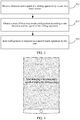
- FIG. 1 is a flowchart of a method for browsing consecutive pages according to an embodiment of the present disclosure. The method may be applied to a 3D touch screen, and include the following steps.
- browsing mode configuration may be enabled using a first touch operation received from a user.
- browsing mode configuration may be performed in response to the user input.
- step S130 consecutive pages may be automatically browsed according to a result of the browsing mode configuration.
- the scenario of sliding for browsing a page may include, but is not limited to, scenarios that need to be continuously loaded in a WeChat Moments, TouTiao news, and the like.
- the consecutive pages may include a page of Moments, or news pages of TouTiao, or other pages that cannot be completely displayed on the screen of the mobile phone and that need to be swiped to display the remaining content.
- FIG. 2 is a schematic diagram of a scenario of sliding for browsing a page in this embodiment, including a plurality of information items that may be continuously loaded.
- a manual operation is required, that is, swiping up or down the page to implement continuous loading of the page.
- a browsing mode may be configured. Once the configuration is completed, the page can be automatically slid without needing manual intervention in the automatic sliding process, and consecutive pages may be automatically browsed depending on a direction and a speed of the configuration.
- a first touch operation is performed in a "configuration enabling response area" in the scenario of sliding for browsing a page, so that browsing mode configuration may be enabled, to enter the configuration page, and the configuration page is in a translucent state.
- the "configuration enabling response area” is used as a response area for enabling the browsing mode configuration, which may be a non-image area such as a text area or a blank area. Because an operation of tapping an image on a mobile terminal device such as a mobile phone is usually opening an image by default, that is, the image is displayed on an interface in a large image mode. Therefore, in order to avoid conflict with the user's existing operating habits, the browsing mode configuration is enabled using a first trigger operation in the non-image area.
- the first touch operation may be a tap operation in a 3D touch operation.
- FIG. 3 is a flowchart of step S120 in this embodiment, including the following steps.
- step S31 a direction and a speed of a sliding operation by a user on a touch screen may be obtained.
- step S32 the result of the browsing mode configuration is obtained according to the direction and the speed of the sliding operation.
- the result of the browsing mode configuration includes the direction and the speed of automatically browsing the consecutive pages.
- step S33 configuration may end in response to a second touch operation by the user.
- the second touch operation may be a touch-and-hold operation in a 3D touch operation.
- the direction and the speed of sliding by the user's finger are detected using the touch screen, and are used as the result of the browsing mode configuration, that is, the detected direction in which the finger slides is the direction in which the consecutive pages are automatically browsed, and the detected speed at which the finger slides is the speed at which the consecutive pages are automatically browsed.
- the automatic browsing of the consecutive pages according to the configured direction and the speed can completely simulate the operation of manually sliding the page, so as to achieve an effect that is of automatically browsing the consecutive pages and that meets expectations of the user.
- step S31 the direction and the speed of sliding by the user's finger on the touch screen are obtained, to obtain the result of browsing mode configuration in step S32.
- FIG. 4 is a schematic diagram of a configuration page in Embodiment 1.
- the configuration page in FIG. 4 is formed.
- the configuration page is in a translucent state, that is, a page displayed with "start detecting the direction and the speed of the sliding for turning a page" is added to the page shown in FIG. 2 to prompt the user to slide the finger on the touch screen for configuration.
- the 3D Touch touch-and-hold operation is used to complete the configuration.
- the consecutive pages start to be automatically browsed according to the direction and the speed of the configured browsing mode to load more information items, and the user can browse without manual intervention. Automatically browsing consecutive pages is stopped when it is detected that the end of consecutive pages has been reached, or automatically browsing consecutive pages is manually stopped when a third touch operation is detected.
- the third touch operation may be a tap operation in a 3D touch operation.
- a user-defined mode is used to configure the direction and the speed of automatically browsing the consecutive pages, and the consecutive pages are automatically browsed according to the configuration result, so that automatic browsing can be implemented to provide users with a good interactive experience.
- the browsing mode configuration may be performed based on 3D Touch and user-defined input, and then the consecutive pages are automatically browsed according to the result of the configuration, that is, consecutive pages are automatically loaded without needing constant manual touch operations, thereby improving an experience of user interaction.
- the configuration of the browsing mode can be implemented only relying on the 3D Touch technology built in the mobile phone, and no extra icons are added on the interface, so that interface space is saved.
- the method can be implemented only relying on the 3D Touch built in the mobile phone without depending on any third-party tool for support, which is simple and convenient to use.
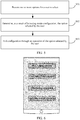
- FIG. 5 is a flowchart of step S120 in this embodiment, including the following steps.
- step S51 one or more options for a user to select are presented, the one or more options being configured to indicate different modes of automatically sliding for browsing, for example, including fast swiping upward, uniformly swiping upward, uniformly swiping downward, and fast swiping downward.
- modes of automatically sliding for browsing for example, including fast swiping upward, uniformly swiping upward, uniformly swiping downward, and fast swiping downward.
- fast swiping upward for example, including fast swiping upward, uniformly swiping upward, uniformly swiping downward, and fast swiping downward.
- the option selected by the user may be determined as the result of the browsing mode configuration.
- the result of the browsing mode configuration includes the direction and the speed of automatically browsing the consecutive pages.
- the mode of browsing desired by the user includes the direction and the speed of automatically browsing the consecutive pages, that is, the direction indicating swiping upward or swiping downward, the speed indicating fast swiping, swiping at a uniform speed or at a slow speed, to achieve the effect that is of automatically browsing the consecutive pages and that meets expectations of the user.
- step S53 the configuration is completed using an operation of selecting any option by the user.
- the user's finger completes the selection operation of the option by clicking a corresponding option, to end the configuration.
- step S53 the option selected by the user is obtained using the user's finger to click on a button of any of a plurality of options are obtained, to obtain the result of browsing mode configuration in step S52, and then the configuration ends.
- FIG. 6 is a schematic diagram of a configuration page. After the configuration of browsing consecutive pages is enabled in step S110, the configuration page in FIG. 6 is formed. As shown in FIG. 6 , the configuration page is in a translucent state, that is, a page displayed with a plurality of options is added to the page shown in FIG. 2 .
- Four modes of automatically browsing consecutive pages of fast swiping upward, uniformly swiping upward, uniformly swiping downward, and fast swiping downward are used as an example.
- FIG. 6 shows four options of "fast swiping upward", “uniformly swiping upward”, “uniformly swiping downward", and "fast swiping downward". The user moves the finger to any of the options and selects the option, the selection is completed and the configuration is completed without requiring the 3D Touch touch-and-hold operation.
- the consecutive pages start to be automatically browsed according to the direction and the speed of automatically browsing the consecutive pages in the configuration to load more information items, and the user can browse without manual intervention.
- Automatically browsing consecutive pages is stopped when it is detected that the end of consecutive pages has been reached, or automatically browsing consecutive pages is manually stopped when a third touch operation is detected.
- the third touch operation may be a tap operation in a 3D touch operation.
- an option mode may be used to configure the direction and the speed of automatically browsing the consecutive pages, and the consecutive pages are automatically browsed according to the configuration result, so that automatic browsing can be implemented to provide users with a good interactive experience.
- the browsing mode configuration in the scenario of sliding for browsing the page may be performed based on 3D Touch and the option selected by the user, and then the consecutive pages are automatically browsed according to the result of the configuration, that is, consecutive pages are automatically loaded without needing constant manual touch operations, thereby improving an experience of user interaction.
- the configuration of the browsing mode can be implemented only relying on the 3D Touch technology built in the mobile phone, and no extra icons are added on the interface, so that interface space is saved.
- the method can be implemented only relying on the 3D Touch built in the mobile phone without depending on any third-party tool for support, which is simple and convenient to use.
- the present disclosure provides a mode of performing browsing mode configuration via customization and the option mode.
- a more diversified configuration mode may further be used to complete the configuration of automatically browsing the consecutive pages in the direction and the speed.
- the direction of automatically sliding for browsing is set to be constantly upward or downward by default, and a speed of browsing is selected through a slider to achieve configuration of the direction and the speed for browsing.
- the configuration methods that are of automatically browsing consecutive pages based on the 3D Touch technology and that can be thought of by those skilled in the art fall within the protection scope of the method provided by the present disclosure.
- FIG. 7 is a schematic diagram of a page browsing apparatus according to another embodiment of the present disclosure.
- the apparatus is used in a 3D touch screen.
- the apparatus 700 includes: an enabling module 710, a configuration module 720, and an automatic browsing module 730.
- the enabling module 710 is configured to enable, using a first touch operation, browsing mode configuration in a scenario of sliding for browsing a page to enter a configuration page
- the configuration module 720 is configured to perform browsing mode configuration in response to user input in the configuration page
- the automatic browsing module 730 is configured to automatically browse, according to a result of the browsing mode configuration, consecutive pages in the scenario of sliding for browsing a page.
- the enabling module 710 enables, through a tapping operation, the browsing mode configuration in a configuration enabling response area in the scenario of sliding for browsing a page, to enter a configuration page, the configuration page being in a translucent state.
- the "configuration enabling response area” is used as a response area for enabling the browsing mode configuration, which may be a non-image area such as a text area or a blank area. Because an operation of tapping an image on a mobile terminal device such as a mobile phone is usually opening an image by default, that is, the image is displayed on an interface in a large image mode. Therefore, in order to avoid conflict with the user's existing operating habits, the browsing mode configuration is started using a tapping operation in the non-image area.
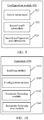
- FIG. 8 is a schematic diagram of a configuration module in this embodiment.
- a configuration module 820 includes: a customized submodule 821, a first result submodule 822, and a first configuration end submodule 823.
- the customized submodule 821 is configured to obtain, from a configuration page, a direction and a speed of sliding by a user on a touch screen.
- the second result submodule 822 is configured to obtain a result of browsing mode configuration according to a direction and a speed of sliding by a finger, and the result of the browsing mode configuration includes a direction and a speed of automatically browsing consecutive pages.
- the second configuration end submodule 823 is configured to end configuration using a second touch operation.
- the second touch operation may be a touch-and-hold operation in a 3D touch operation.
- FIG. 4 For a schematic diagram of a page that is configured based on the configuration module shown in FIG. 8 , refer to FIG. 4 .
- a user-defined mode is used to configure the direction and the speed of automatically browsing the consecutive pages, and the consecutive pages are automatically browsed according to the configuration result, so that automatic browsing can be implemented to provide users with a good interactive experience.
- FIG. 9 is a schematic diagram of another configuration module in this embodiment.
- a configuration module 920 includes: an option submodule 921, a second result submodule 922, and a second configuration end submodule 923.
- the option submodule 921 is configured to present one or more options for a user to select in a configuration page, the one or more options being configured to indicate different modes of automatically sliding for browsing, for example, including fast swiping upward, uniformly swiping upward, uniformly swiping downward, and fast swiping downward.
- the first result submodule 922 is configured to determine, as a result of browsing mode configuration, the result of the browsing mode configuration including a direction and a speed of automatically browsing consecutive pages.
- the first configuration end submodule 923 is configured to end configuration using an operation of the option selected by the user. The user's finger completes selecting the option of the option by clicking a corresponding option, and ends the configuration.
- FIG. 9 For a schematic diagram of a page that is configured based on the configuration module shown in FIG. 9 , refer to FIG. 6 .
- an option mode is used to configure the direction and the speed of automatically browsing the consecutive pages, and the consecutive pages are automatically browsed according to the configuration result, so that automatic browsing can be implemented to provide users with a good interactive experience.
- FIG. 10 is a schematic diagram of a page browsing apparatus.
- the page browsing apparatus further includes: an automatic browsing stop module 1040 configured to stop automatically browsing consecutive pages when it is detected that the browsing has reached the end of the page, or when a third touch operation is detected, manually stop automatically browsing the consecutive pages.
- the third touch operation may be a tap operation in a 3D touch operation.
- the page browsing apparatus provided by this embodiment can achieve the same technical effects as the foregoing page browsing method, and details are not described herein again.
- the present disclosure further provides an electronic device including a processor and a storage medium storing an operation instruction for the processor to control the following method: enabling, using a first touch operation, browsing mode configuration in a scenario of sliding for browsing a page to enter a configuration page; performing browsing mode configuration in response to user input in the configuration page; and automatically browsing, according to a result of the browsing mode configuration, consecutive pages in the scenario of sliding for browsing a page.
- FIG. 11 is a schematic structural diagram of an electronic device 1100 to which the foregoing page browsing method is applicable.
- the electronic device shown in FIG. 11 is only an example, and should not impose any limitation on the functions and the scope of use of the embodiments of the present disclosure.
- the electronic device 1100 includes a central processing unit (CPU) 1101. It can perform various proper actions and processing based on a program stored in a read-only memory (ROM) 1102 or a program loaded from a storage part 1107 into a random access memory (RAM) 1103.
- the RAM 1103 also stores various programs and data required to operate the electronic device 1100.
- the CPU 1101, the ROM 1102, and the RAM 1103 are connected to each other through a bus 1104.
- An input/output (I/O) interface 1105 is also connected to the bus 1104.
- the following parts are connected to the I/O interface 1105: an input part 1106 including a keyboard, a mouse, or the like; an output part 1107 including a cathode ray tube (CRT), a liquid crystal display (LCD), a speaker, or the like; a storage part 1108 including a hard disk; and a communication part 1109 including a network interface card such as a LAN card or a modem.
- the communication part 1109 performs communication processing by using a network such as the Internet.
- a driver 1110 is also connected to the I/O interface 1105 as required.
- a removable medium 1111 such as a magnetic disk, an optical disc, a magneto-optical disk, or a semiconductor memory is mounted on the driver 1110 as required, so that a computer program read from the removable medium 1111 is installed into the storage part 1108 as required.
- an embodiment of the present disclosure includes a computer program product, and the computer program product includes a computer program stored in a computer readable medium.
- the computer program includes program code used for performing the methods shown in the flowcharts.
- the computer program may be downloaded and installed from a network, and/or installed from the removable medium 1111.
- the computer program is executed by a CPU 1101, the foregoing functions defined in the system of the present application are executed.
- the machine readable medium in the present disclosure may be a machine readable signal medium or a machine readable storage medium or any combination thereof.
- the machine readable medium may be, for example, but not limited to, an electric, magnetic, optical, electromagnetic, infrared, or semi-conductive system, apparatus, or device, or any combination thereof. More specific examples of the machine readable medium may include but are not limited to: an electrical connection having one or more wires, a portable computer magnetic disk, a hard disk, a random access memory (RAM), a read-only memory (ROM), an erasable programmable read-only memory (EPROM or flash memory), an optical fiber, a compact disk read-only memory (CD-ROM), an optical storage device, a magnetic storage device, or any appropriate combination thereof.
- the machine readable medium may be any tangible medium including or storing a program, and the program may be used by or in combination with an instruction execution system, apparatus, or device.
- the machine readable signal medium may include a data signal transmitted in a baseband or as part of a carrier, and stores computer readable program code.
- the propagated data signal may be in a plurality of forms, including, but not limited to, an electromagnetic signal, an optical signal, or any appropriate combination thereof.
- the machine readable signal medium may alternatively be any machine readable medium other than the computer readable medium.
- the machine readable medium may be configured to send, propagate, or transmit a program configured to be used by or in combination with an instruction execution system, apparatus, or device.
- the instruction code included in the machine readable medium may be transmitted by using any suitable medium, including but not limited to, via wireless transmission, a wire, a cable, radio frequency (RF) or the like, or any suitable combination of thereof.
- RF radio frequency
- each box in a flowchart or a block diagram may represent a module, a program segment, or a part of code.
- the module, the program segment, or the part of code includes one or more executable instructions used for implementing specified logic functions.
- functions annotated in boxes may alternatively be occur in a sequence different from that annotated in an accompanying drawing. For example, actually two boxes shown in succession may be performed basically in parallel, and sometimes the two boxes may be performed in a reverse sequence. This is determined by a related function.
- each box in a block diagram or a flowchart and a combination of boxes in the block diagram or the flowchart may be implemented by using a dedicated hardware-based system configured to perform a specified function or operation, or may be implemented by using a combination of dedicated hardware and a machine instruction.
- a related unit described in the embodiments of the present disclosure may be implemented in a software manner, or may be implemented in a hardware manner.
- the units described may alternatively be disposed in a processor, for example, as in the following description: a processor including a sending unit, an obtaining unit, a determining unit, and a first processing unit.
- names of these units do not constitute a limitation on the units.
- the sending unit may also be described as "a unit configured to send an image acquisition request to a connected server".
- the present disclosure further provides a machine readable medium.
- the machine readable medium may be included in the device described in the foregoing embodiments, or may exist alone and is not disposed in the device.
- the machine readable medium carries machine readable instructions. When executed by a device, the machine readable instructions cause the device to perform the following method steps: in a scenario of sliding for browsing a page, enabling browsing mode configuration according to a first touch operation received from a user; performing the browsing mode configuration in response to the user input; and automatically browsing consecutive pages according to a result of the browsing mode configuration.
Landscapes
- Engineering & Computer Science (AREA)
- General Engineering & Computer Science (AREA)
- Theoretical Computer Science (AREA)
- Human Computer Interaction (AREA)
- Physics & Mathematics (AREA)
- General Physics & Mathematics (AREA)
- Computer Networks & Wireless Communication (AREA)
- Signal Processing (AREA)
- Business, Economics & Management (AREA)
- General Business, Economics & Management (AREA)
- User Interface Of Digital Computer (AREA)
Abstract
Description
- This application claims the priority to Chinese Patent Application No.
201710889357.3 - The present disclosure generally relates to the field of touch technologies.
- When people browse news and social applications on their mobile phones, they usually just want to browse the summary and don't want to know the details. However, because a limited amount of content the touch screen of the mobile phone may be displayed in a single time, a user needs to constantly use a finger to flip a page by swiping upward or swiping downward on a touch screen to load more content while browsing.
- Therefore, according to the technical solution in the prior art, consecutive pages cannot be automatically browsed, and a manual operation is required to slide the page, which still needs to be improved.
- The foregoing information disclosed in the background is only used to enhance understanding of the background of the present disclosure, and therefore the information may include information that does not constitute the prior art known to those of ordinary skill in the art.
- The present disclosure provides a page browsing method, apparatus, electronic device, and a machine readable medium, to resolve the foregoing technical problems.
- Other features and advantages of the present disclosure will be apparent from the following detailed description, or partially acquired through practice of the present disclosure.
- According to an aspect of the present disclosure, a page browsing method is provided, including:
- in a scenario of sliding for browsing a page, enabling browsing mode configuration according to a first touch operation received from a user;
- performing browsing mode configuration in response to the user input; and
- automatically browsing consecutive pages according to a result of the browsing mode configuration.
- In one embodiment of the present disclosure, the performing browsing mode configuration in response to the user input includes:
- obtaining a direction and a speed of a sliding operation by the user on a touch screen;
- obtaining the result of the browsing mode configuration according to the direction and the speed of the sliding operation; and
- ending the browsing mode configuration in response to a second touch operation by the user.
- In one embodiment of the present disclosure, the performing browsing mode configuration in response to the user input includes:
- presenting one or more options for the user to select, the one or more options being configured to indicate different modes of automatically sliding for browsing;
- ending the browsing mode configuration according to an operation of one of the options selected by the user; and
- determining, as the result of the browsing mode configuration, the option selected by the user.
- In one embodiment of the present disclosure, the method further includes: stopping automatic browsing of the consecutive pages when it is detected that the browsing has reached the end of the consecutive pages.
- In one embodiment of the present disclosure, the method further includes: stopping automatic browsing of the consecutive pages when a third touch operation by the user is detected.
- In one embodiment of the present disclosure, the first touch operation is used as an operation performed by the user on a configuration enabling response area in the scenario of sliding for browsing the page.
- In one embodiment of the present disclosure, the enabling the browsing mode configuration includes:
entering a configuration page, the configuration page being in a translucent state. - In one embodiment of the present disclosure, the method is applicable to a 3D touch screen.
- According to yet another aspect of the present disclosure, a page browsing apparatus is provided, including:
- an enabling module configured to: in a scenario of sliding for browsing a page, enable browsing mode configuration according to a first touch operation received from a user;
- a configuration module configured to perform the browsing mode configuration in response to the user input; and
- an automatic browsing module configured to automatically browse consecutive pages according to a result of the browsing mode configuration.
- According to still another aspect of the present disclosure, an electronic device is provided, including: a processor; a non-transitory storage medium storing a machine executable instruction, where the processor is caused, by reading and executing the machine executable instruction, to perform the foregoing method.
- According to another aspect of the present disclosure, a machine readable medium is provided, on which a machine executable instruction is stored, the machine executable instruction being configured to implement the foregoing method when executed by a processor.
- According to the page browsing method and apparatus, the electronic device, and the machine readable medium provided in the embodiments of the present disclosure, in the scenario of sliding for browsing the page, the consecutive page configuration is browsed in response to the user input, and then the consecutive pages are automatically browsed according to the result of the configuration, that is, consecutive pages are automatically loaded without needing constant manual touch operations, thereby improving an experience of user interaction. In addition, the configuration of browsing consecutive pages can be implemented only relying on the 3D Touch technology built in the mobile phone, and no extra icons are added on the interface, so that interface space is saved.
- It should be understood that the above general descriptions and the following detailed descriptions are merely exemplary, and cannot limit the present disclosure.
- The above and other objectives, features, and advantages of the present disclosure will become more apparent from the detailed description of exemplary embodiments of the present disclosure with reference to the accompanying drawings.
-
FIG. 1 is a flowchart of a page browsing method according to an embodiment of the present disclosure. -
FIG. 2 is a schematic diagram of a scenario of sliding for browsing a page according to an embodiment of the present disclosure. -
FIG. 3 is a flowchart of step S120 according to an embodiment of the present disclosure. -
FIG. 4 is a schematic diagram of a configuration page according to an embodiment of the present disclosure. -
FIG. 5 is a flowchart of step S120 according to an embodiment of the present disclosure. -
FIG. 6 is a schematic diagram of a configuration page according to an embodiment of the present disclosure. -
FIG. 7 is a schematic diagram of a page browsing apparatus according to another embodiment of the present disclosure. -
FIG. 8 is a schematic diagram of a configuration module according to another embodiment of the present disclosure. -
FIG. 9 is a schematic diagram of another configuration module according to another embodiment of the present disclosure. -
FIG. 10 is a schematic diagram of another page browsing apparatus according to another embodiment of the present disclosure. -
FIG. 11 is a schematic structural diagram of an electronic device to which a page browsing method is applicable according to yet another embodiment of the present disclosure. - The examples of implementations are described comprehensively with reference to the accompanying drawings. However, the examples of implementations may be implemented in multiple forms, and it should not be understood as being limited to the examples of examples described herein. Conversely, the implementations are provided to make the present disclosure more comprehensive and complete, and comprehensively convey the idea of the examples of the implementations to a person skilled in the art. The accompanying drawings are merely exemplary illustrations of the present disclosure and are not necessarily drawn to scale. A same reference numeral in the accompanying drawings represents same or similar components, and therefore repeated descriptions of the components or units are omitted.
- In addition, the described features, structures, or characteristics may be combined in one or more implementations in any appropriate manner. In the following descriptions, a lot of specific details are provided to give a comprehensive understanding of the implementations of the present disclosure. However, a person skilled in the art should be aware that, the technical solutions in the present disclosure may be implemented without one or more of the particular details, or another method, component, device, or step may be used. In other cases, known structures, methods, apparatuses, implementations, materials, or operations are not shown or described in detail to avoid obscuring aspects of the present disclosure.
- Some block diagrams shown in the accompany drawings are functional entities and do not necessarily correspond to physically or logically independent entities. Such functional entities may be implemented in the form of software, or implemented in one or more hardware modules or integrated circuits, or implemented in different networks and/or processor apparatuses and/or microcontroller apparatuses.
- In order to make the objectives, technical solutions, and advantages of the present disclosure more comprehensible, the present disclosure is described in further detail below with reference to specific embodiments and the accompanying drawings.
- In a related embodiment, a hovering button may be added on a browsed page, the hovering button includes an upper sliding button and a lower sliding button, and a long press of the upper sliding button or the lower sliding button for swiping upward or downward the page to automatically browse the consecutive pages. Buttons in up, down, left, and right directions may be set to automatically browse the consecutive pages in different directions, but a window needs to be added in the interface to set the hovering button, which occupies interface space, has certain limitation, can only be limited to a certain application. Alternatively, a third-party tool (such as adding an external mouse or an external touchpad) is required to achieve automatic page loading, but a disadvantage is that there is no additional device and portability is poor.
- It may be learned that sliding for browsing consecutive pages in the related embodiment requires manual operations, even if a finger does not slide directly on the page, a manual operation is required, and automatic browsing of the consecutive pages is not implemented without the manual operation.
- Based on the above, in the present disclosure, the browsing mode configuration is performed based on the 3D touch technology. The 3D Touch technology is adding two press detection methods of Peek (tap) and Pop (touch and hold) in vertical directions based on the original tapping operation from a physical level, so that an operation performed on the touch screen is changed from the "tapping" to three operations of the "tapping", "light pressing", and "touching and holding", to achieve the purpose of stereoscopic touch, thereby achieving the goal in fewer steps, so that interaction is faster and more convenient.
-
FIG. 1 is a flowchart of a method for browsing consecutive pages according to an embodiment of the present disclosure. The method may be applied to a 3D touch screen, and include the following steps. - As shown in
FIG. 1 , in step S110, in a scenario of sliding for browsing a page, browsing mode configuration may be enabled using a first touch operation received from a user. - As shown in
FIG. 1 , in step S120, browsing mode configuration may be performed in response to the user input. - As shown in
FIG. 1 , in step S130, consecutive pages may be automatically browsed according to a result of the browsing mode configuration. - In this embodiment, the scenario of sliding for browsing a page may include, but is not limited to, scenarios that need to be continuously loaded in a WeChat Moments, TouTiao news, and the like. Correspondingly, the consecutive pages may include a page of Moments, or news pages of TouTiao, or other pages that cannot be completely displayed on the screen of the mobile phone and that need to be swiped to display the remaining content.
-
FIG. 2 is a schematic diagram of a scenario of sliding for browsing a page in this embodiment, including a plurality of information items that may be continuously loaded. According to the description of the foregoing related embodiments, a manual operation is required, that is, swiping up or down the page to implement continuous loading of the page. In the scenario shown inFIG. 2 in this embodiment, a browsing mode may be configured. Once the configuration is completed, the page can be automatically slid without needing manual intervention in the automatic sliding process, and consecutive pages may be automatically browsed depending on a direction and a speed of the configuration. - In this embodiment, in step S110, a first touch operation is performed in a "configuration enabling response area" in the scenario of sliding for browsing a page, so that browsing mode configuration may be enabled, to enter the configuration page, and the configuration page is in a translucent state. The "configuration enabling response area" is used as a response area for enabling the browsing mode configuration, which may be a non-image area such as a text area or a blank area. Because an operation of tapping an image on a mobile terminal device such as a mobile phone is usually opening an image by default, that is, the image is displayed on an interface in a large image mode. Therefore, in order to avoid conflict with the user's existing operating habits, the browsing mode configuration is enabled using a first trigger operation in the non-image area. In this embodiment, the first touch operation may be a tap operation in a 3D touch operation.
- It should be noted that there may be a plurality of ways to perform the browsing mode configuration in response to the user input in step S120. The following embodiments are respectively given in this embodiment for description.
-
FIG. 3 is a flowchart of step S120 in this embodiment, including the following steps. - As shown in
FIG. 3 , in step S31, a direction and a speed of a sliding operation by a user on a touch screen may be obtained. - As shown in
FIG. 3 , in step S32, the result of the browsing mode configuration is obtained according to the direction and the speed of the sliding operation. In this embodiment, the result of the browsing mode configuration includes the direction and the speed of automatically browsing the consecutive pages. - As shown in
FIG. 3 , in step S33, configuration may end in response to a second touch operation by the user. In this embodiment, the second touch operation may be a touch-and-hold operation in a 3D touch operation. - The direction and the speed of sliding by the user's finger are detected using the touch screen, and are used as the result of the browsing mode configuration, that is, the detected direction in which the finger slides is the direction in which the consecutive pages are automatically browsed, and the detected speed at which the finger slides is the speed at which the consecutive pages are automatically browsed. In this way, after the configuration, the automatic browsing of the consecutive pages according to the configured direction and the speed can completely simulate the operation of manually sliding the page, so as to achieve an effect that is of automatically browsing the consecutive pages and that meets expectations of the user.
- It should be noted that the steps in this embodiment are only for convenience of describing the implementation process, and do not indicate that a sequence in which the steps are performed is limited. For example, in step S31, the direction and the speed of sliding by the user's finger on the touch screen are obtained, to obtain the result of browsing mode configuration in step S32.
-
FIG. 4 is a schematic diagram of a configuration page in Embodiment 1. After the browsing mode configuration is enabled in step S110, the configuration page inFIG. 4 is formed. As shown inFIG. 4 , the configuration page is in a translucent state, that is, a page displayed with "start detecting the direction and the speed of the sliding for turning a page" is added to the page shown inFIG. 2 to prompt the user to slide the finger on the touch screen for configuration. After the result of the browsing mode configuration is obtained through obtaining the direction and the speed of sliding by the user's finger, the 3D Touch touch-and-hold operation is used to complete the configuration. - Afterwards, in the page shown in
FIG. 2 , the consecutive pages start to be automatically browsed according to the direction and the speed of the configured browsing mode to load more information items, and the user can browse without manual intervention. Automatically browsing consecutive pages is stopped when it is detected that the end of consecutive pages has been reached, or automatically browsing consecutive pages is manually stopped when a third touch operation is detected. In this embodiment, the third touch operation may be a tap operation in a 3D touch operation. - Based on the flowchart of
FIG. 3 and the schematic diagram shown inFIG. 4 , in this embodiment, a user-defined mode is used to configure the direction and the speed of automatically browsing the consecutive pages, and the consecutive pages are automatically browsed according to the configuration result, so that automatic browsing can be implemented to provide users with a good interactive experience. - Based on the above, in an example, in the scenario of sliding for browsing the page, the browsing mode configuration may be performed based on 3D Touch and user-defined input, and then the consecutive pages are automatically browsed according to the result of the configuration, that is, consecutive pages are automatically loaded without needing constant manual touch operations, thereby improving an experience of user interaction. In addition, the configuration of the browsing mode can be implemented only relying on the 3D Touch technology built in the mobile phone, and no extra icons are added on the interface, so that interface space is saved. Moreover, the method can be implemented only relying on the 3D Touch built in the mobile phone without depending on any third-party tool for support, which is simple and convenient to use.
- In still another example,
FIG. 5 is a flowchart of step S120 in this embodiment, including the following steps. - As shown in
FIG. 5 , in step S51, one or more options for a user to select are presented, the one or more options being configured to indicate different modes of automatically sliding for browsing, for example, including fast swiping upward, uniformly swiping upward, uniformly swiping downward, and fast swiping downward. It should be noted that, in this embodiment, only four commonly used automatic modes of sliding for browsing are used as an example. In addition to the four modes of automatically browsing consecutive pages in an actual application, more types of options may be provided according to user requirements, for example, swiping upward at a slow speed, swiping downward at a slow speed, or the like, which is not specifically limited in the present disclosure. - As shown in
FIG. 5 , in step S52, the option selected by the user may be determined as the result of the browsing mode configuration. The result of the browsing mode configuration includes the direction and the speed of automatically browsing the consecutive pages. - In this embodiment, it may be learned from an option selected by the user from the several options provided in the foregoing step S31, that the mode of browsing desired by the user includes the direction and the speed of automatically browsing the consecutive pages, that is, the direction indicating swiping upward or swiping downward, the speed indicating fast swiping, swiping at a uniform speed or at a slow speed, to achieve the effect that is of automatically browsing the consecutive pages and that meets expectations of the user.
- As shown in
FIG. 5 , in step S53, the configuration is completed using an operation of selecting any option by the user. In step S52, the user's finger completes the selection operation of the option by clicking a corresponding option, to end the configuration. - It should be noted that the steps in this embodiment are only for convenience of describing the implementation process, and do not indicate that a sequence in which the steps are performed is limited. For example, in the foregoing step S53, the option selected by the user is obtained using the user's finger to click on a button of any of a plurality of options are obtained, to obtain the result of browsing mode configuration in step S52, and then the configuration ends.
-
FIG. 6 is a schematic diagram of a configuration page. After the configuration of browsing consecutive pages is enabled in step S110, the configuration page inFIG. 6 is formed. As shown inFIG. 6 , the configuration page is in a translucent state, that is, a page displayed with a plurality of options is added to the page shown inFIG. 2 . Four modes of automatically browsing consecutive pages of fast swiping upward, uniformly swiping upward, uniformly swiping downward, and fast swiping downward are used as an example.FIG. 6 shows four options of "fast swiping upward", "uniformly swiping upward", "uniformly swiping downward", and "fast swiping downward". The user moves the finger to any of the options and selects the option, the selection is completed and the configuration is completed without requiring the 3D Touch touch-and-hold operation. - After that, in the page shown in
FIG. 2 , the consecutive pages start to be automatically browsed according to the direction and the speed of automatically browsing the consecutive pages in the configuration to load more information items, and the user can browse without manual intervention. Automatically browsing consecutive pages is stopped when it is detected that the end of consecutive pages has been reached, or automatically browsing consecutive pages is manually stopped when a third touch operation is detected. In this embodiment, the third touch operation may be a tap operation in a 3D touch operation. - Based on the flowchart of
FIG. 5 and the schematic diagram shown inFIG. 6 , in this embodiment, an option mode may be used to configure the direction and the speed of automatically browsing the consecutive pages, and the consecutive pages are automatically browsed according to the configuration result, so that automatic browsing can be implemented to provide users with a good interactive experience. - Based on the above, the browsing mode configuration in the scenario of sliding for browsing the page may be performed based on 3D Touch and the option selected by the user, and then the consecutive pages are automatically browsed according to the result of the configuration, that is, consecutive pages are automatically loaded without needing constant manual touch operations, thereby improving an experience of user interaction. In addition, the configuration of the browsing mode can be implemented only relying on the 3D Touch technology built in the mobile phone, and no extra icons are added on the interface, so that interface space is saved. Moreover, the method can be implemented only relying on the 3D Touch built in the mobile phone without depending on any third-party tool for support, which is simple and convenient to use.
- Based on the foregoing embodiments and as shown in
FIG. 3 andFIG. 6 , the present disclosure provides a mode of performing browsing mode configuration via customization and the option mode. Definitely, in other embodiments of the present disclosure, a more diversified configuration mode may further be used to complete the configuration of automatically browsing the consecutive pages in the direction and the speed. For example, the direction of automatically sliding for browsing is set to be constantly upward or downward by default, and a speed of browsing is selected through a slider to achieve configuration of the direction and the speed for browsing. There are many similar ways, which are not listed one by one. The configuration methods that are of automatically browsing consecutive pages based on the 3D Touch technology and that can be thought of by those skilled in the art fall within the protection scope of the method provided by the present disclosure. -
FIG. 7 is a schematic diagram of a page browsing apparatus according to another embodiment of the present disclosure. The apparatus is used in a 3D touch screen. As shown inFIG. 7 , the apparatus 700 includes: an enablingmodule 710, aconfiguration module 720, and anautomatic browsing module 730. - The enabling
module 710 is configured to enable, using a first touch operation, browsing mode configuration in a scenario of sliding for browsing a page to enter a configuration page, and theconfiguration module 720 is configured to perform browsing mode configuration in response to user input in the configuration page, and theautomatic browsing module 730 is configured to automatically browse, according to a result of the browsing mode configuration, consecutive pages in the scenario of sliding for browsing a page. - In this embodiment, the enabling
module 710 enables, through a tapping operation, the browsing mode configuration in a configuration enabling response area in the scenario of sliding for browsing a page, to enter a configuration page, the configuration page being in a translucent state. The "configuration enabling response area" is used as a response area for enabling the browsing mode configuration, which may be a non-image area such as a text area or a blank area. Because an operation of tapping an image on a mobile terminal device such as a mobile phone is usually opening an image by default, that is, the image is displayed on an interface in a large image mode. Therefore, in order to avoid conflict with the user's existing operating habits, the browsing mode configuration is started using a tapping operation in the non-image area. - Corresponding to the method provided by the foregoing embodiment,
FIG. 8 is a schematic diagram of a configuration module in this embodiment. A configuration module 820 includes: a customizedsubmodule 821, afirst result submodule 822, and a firstconfiguration end submodule 823. - The customized
submodule 821 is configured to obtain, from a configuration page, a direction and a speed of sliding by a user on a touch screen. Thesecond result submodule 822 is configured to obtain a result of browsing mode configuration according to a direction and a speed of sliding by a finger, and the result of the browsing mode configuration includes a direction and a speed of automatically browsing consecutive pages. The secondconfiguration end submodule 823 is configured to end configuration using a second touch operation. In this embodiment, the second touch operation may be a touch-and-hold operation in a 3D touch operation. - For a schematic diagram of a page that is configured based on the configuration module shown in
FIG. 8 , refer toFIG. 4 . Through the configuration module shown inFIG. 8 , a user-defined mode is used to configure the direction and the speed of automatically browsing the consecutive pages, and the consecutive pages are automatically browsed according to the configuration result, so that automatic browsing can be implemented to provide users with a good interactive experience. - Corresponding to the method provided by the foregoing embodiment,
FIG. 9 is a schematic diagram of another configuration module in this embodiment. A configuration module 920 includes: anoption submodule 921, asecond result submodule 922, and a secondconfiguration end submodule 923. - The
option submodule 921 is configured to present one or more options for a user to select in a configuration page, the one or more options being configured to indicate different modes of automatically sliding for browsing, for example, including fast swiping upward, uniformly swiping upward, uniformly swiping downward, and fast swiping downward. Thefirst result submodule 922 is configured to determine, as a result of browsing mode configuration, the result of the browsing mode configuration including a direction and a speed of automatically browsing consecutive pages. The firstconfiguration end submodule 923 is configured to end configuration using an operation of the option selected by the user. The user's finger completes selecting the option of the option by clicking a corresponding option, and ends the configuration. - For a schematic diagram of a page that is configured based on the configuration module shown in
FIG. 9 , refer toFIG. 6 . Through the configuration module shown inFIG. 9 , an option mode is used to configure the direction and the speed of automatically browsing the consecutive pages, and the consecutive pages are automatically browsed according to the configuration result, so that automatic browsing can be implemented to provide users with a good interactive experience. -
FIG. 10 is a schematic diagram of a page browsing apparatus. In addition to an enablingmodule 1010, aconfiguration module 1020, and anautomatic browsing module 1030, the page browsing apparatus further includes: an automaticbrowsing stop module 1040 configured to stop automatically browsing consecutive pages when it is detected that the browsing has reached the end of the page, or when a third touch operation is detected, manually stop automatically browsing the consecutive pages. In this embodiment, the third touch operation may be a tap operation in a 3D touch operation. - For the functions of each module in the apparatus shown in
FIG. 7 andFIG. 10 , refer to the related description in the foregoing method embodiments, and details are not described herein again. - The page browsing apparatus provided by this embodiment can achieve the same technical effects as the foregoing page browsing method, and details are not described herein again.
- According to another aspect, the present disclosure further provides an electronic device including a processor and a storage medium storing an operation instruction for the processor to control the following method:
enabling, using a first touch operation, browsing mode configuration in a scenario of sliding for browsing a page to enter a configuration page; performing browsing mode configuration in response to user input in the configuration page; and automatically browsing, according to a result of the browsing mode configuration, consecutive pages in the scenario of sliding for browsing a page. -
FIG. 11 is a schematic structural diagram of anelectronic device 1100 to which the foregoing page browsing method is applicable. The electronic device shown inFIG. 11 is only an example, and should not impose any limitation on the functions and the scope of use of the embodiments of the present disclosure. - As shown in
FIG. 11 , theelectronic device 1100 includes a central processing unit (CPU) 1101. It can perform various proper actions and processing based on a program stored in a read-only memory (ROM) 1102 or a program loaded from astorage part 1107 into a random access memory (RAM) 1103. TheRAM 1103 also stores various programs and data required to operate theelectronic device 1100. TheCPU 1101, theROM 1102, and theRAM 1103 are connected to each other through abus 1104. An input/output (I/O)interface 1105 is also connected to thebus 1104. - The following parts are connected to the I/O interface 1105: an
input part 1106 including a keyboard, a mouse, or the like; anoutput part 1107 including a cathode ray tube (CRT), a liquid crystal display (LCD), a speaker, or the like; astorage part 1108 including a hard disk; and acommunication part 1109 including a network interface card such as a LAN card or a modem. Thecommunication part 1109 performs communication processing by using a network such as the Internet. Adriver 1110 is also connected to the I/O interface 1105 as required. A removable medium 1111 such as a magnetic disk, an optical disc, a magneto-optical disk, or a semiconductor memory is mounted on thedriver 1110 as required, so that a computer program read from the removable medium 1111 is installed into thestorage part 1108 as required. - Particularly, according to an embodiment of this disclosure, the processes described in the foregoing by referring to the flowcharts may be implemented as computer software programs. For example, an embodiment of the present disclosure includes a computer program product, and the computer program product includes a computer program stored in a computer readable medium. The computer program includes program code used for performing the methods shown in the flowcharts. In such an embodiment, by using the
communication part 1109, the computer program may be downloaded and installed from a network, and/or installed from theremovable medium 1111. When the computer program is executed by aCPU 1101, the foregoing functions defined in the system of the present application are executed. - It should be noted that the machine readable medium in the present disclosure may be a machine readable signal medium or a machine readable storage medium or any combination thereof. The machine readable medium may be, for example, but not limited to, an electric, magnetic, optical, electromagnetic, infrared, or semi-conductive system, apparatus, or device, or any combination thereof. More specific examples of the machine readable medium may include but are not limited to: an electrical connection having one or more wires, a portable computer magnetic disk, a hard disk, a random access memory (RAM), a read-only memory (ROM), an erasable programmable read-only memory (EPROM or flash memory), an optical fiber, a compact disk read-only memory (CD-ROM), an optical storage device, a magnetic storage device, or any appropriate combination thereof. In the present disclosure, the machine readable medium may be any tangible medium including or storing a program, and the program may be used by or in combination with an instruction execution system, apparatus, or device. In the present disclosure, the machine readable signal medium may include a data signal transmitted in a baseband or as part of a carrier, and stores computer readable program code. The propagated data signal may be in a plurality of forms, including, but not limited to, an electromagnetic signal, an optical signal, or any appropriate combination thereof. The machine readable signal medium may alternatively be any machine readable medium other than the computer readable medium. The machine readable medium may be configured to send, propagate, or transmit a program configured to be used by or in combination with an instruction execution system, apparatus, or device. The instruction code included in the machine readable medium may be transmitted by using any suitable medium, including but not limited to, via wireless transmission, a wire, a cable, radio frequency (RF) or the like, or any suitable combination of thereof.
- The flowcharts and block diagrams in the accompanying drawings show architectures, functions, and operations that may be implemented for the system, the method, and the computer program product according to the embodiments of the present disclosure. In this regard, each box in a flowchart or a block diagram may represent a module, a program segment, or a part of code. The module, the program segment, or the part of code includes one or more executable instructions used for implementing specified logic functions. It should also be noted that, in some implementations used as substitutes, functions annotated in boxes may alternatively be occur in a sequence different from that annotated in an accompanying drawing. For example, actually two boxes shown in succession may be performed basically in parallel, and sometimes the two boxes may be performed in a reverse sequence. This is determined by a related function. It should also be noted that, each box in a block diagram or a flowchart and a combination of boxes in the block diagram or the flowchart may be implemented by using a dedicated hardware-based system configured to perform a specified function or operation, or may be implemented by using a combination of dedicated hardware and a machine instruction.
- A related unit described in the embodiments of the present disclosure may be implemented in a software manner, or may be implemented in a hardware manner. The units described may alternatively be disposed in a processor, for example, as in the following description: a processor including a sending unit, an obtaining unit, a determining unit, and a first processing unit. In some cases, names of these units do not constitute a limitation on the units. For example, the sending unit may also be described as "a unit configured to send an image acquisition request to a connected server".
- According to another aspect, the present disclosure further provides a machine readable medium. The machine readable medium may be included in the device described in the foregoing embodiments, or may exist alone and is not disposed in the device. The machine readable medium carries machine readable instructions. When executed by a device, the machine readable instructions cause the device to perform the following method steps:
in a scenario of sliding for browsing a page, enabling browsing mode configuration according to a first touch operation received from a user; performing the browsing mode configuration in response to the user input; and automatically browsing consecutive pages according to a result of the browsing mode configuration. - It should be clearly understood that the present disclosure describes how to make and use specific examples, but the principles of the present disclosure are not limited to any details of these examples. On the contrary, these principles can be applied to many other implementations based on the teachings of the content disclosed in the present disclosure.
- The exemplary implementations of the present disclosure have been specifically shown and described above. It should be understood that the present disclosure is not limited to the detailed structures, configurations or implementation methods described herein. On the contrary, the present disclosure is intended to cover various modifications and equivalent configurations within the spirit and scope of the appended claims.
Claims (11)
- A page browsing method, comprising:in a scenario of sliding for browsing a page, enabling browsing mode configuration according to a first touch operation received from a user;performing the browsing mode configuration in response to the user input; andautomatically browsing consecutive pages according to a result of the browsing mode configuration.
- The method according to claim 1, wherein the performing the browsing mode configuration in response to the user input comprises:obtaining a direction and a speed of a sliding operation of the user on a touch screen;obtaining the result of the browsing mode configuration according to the direction and the speed of the sliding operation; andending the browsing mode configuration in response to a second touch operation by the user.
- The method according to claim 1, wherein the performing the browsing mode configuration in response to the user input comprises:presenting one or more options for the user to select, the one or more options being configured to indicate different modes of automatically sliding for browsing;ending the browsing mode configuration according to an operation of one of the options selected by the user; anddetermining, as the result of the browsing mode configuration, the option selected by the user.
- The method according to claim 1, further comprising:
stopping automatic browsing of the consecutive pages when it is detected that the browsing has reached the end of the consecutive pages. - The method according to claim 1, further comprising:
stopping automatic browsing of the consecutive pages when a third touch operation by the user is detected. - The method according to claim 1, wherein
the first touch operation is used as an operation performed by the user on a configuration enabling response area in the scenario of sliding for browsing the page. - The method according to claim 1, wherein the enabling the browsing mode configuration comprises:
entering a configuration page, the configuration page being in a translucent state. - The method according to any of claims 1 to 7, wherein the method is applicable to a 3D touch screen.
- A page browsing apparatus, comprising:an enabling module configured to: in a scenario of sliding for browsing a page, enable browsing mode configuration according to a first touch operation received from a user;a configuration module configured to perform the browsing mode configuration in response to the user input; andan automatic browsing module configured to automatically browse consecutive pages according to a result of the browsing mode configuration.
- An electronic device, comprising:a processor; anda non-transitory storage medium storing a machine executable instruction executable by the processor, wherein the processor is caused, by reading and executing the machine executable instruction, to perform the method according to any of claims 1 to 8.
- A machine readable medium on which a machine executable instruction is stored, wherein the machine executable instruction is configured to implement the method according to any of claims 1 to 8 when executed by a processor.
Applications Claiming Priority (2)
| Application Number | Priority Date | Filing Date | Title |
|---|---|---|---|
| CN201710889357.3A CN107728918A (en) | 2017-09-27 | 2017-09-27 | Browse the method, apparatus and electronic equipment of continuous page |
| PCT/CN2017/119461 WO2019061916A1 (en) | 2017-09-27 | 2017-12-28 | Page browsing method and device, and electronic apparatus |
Publications (2)
| Publication Number | Publication Date |
|---|---|
| EP3623928A1 true EP3623928A1 (en) | 2020-03-18 |
| EP3623928A4 EP3623928A4 (en) | 2021-03-31 |
Family
ID=61207023
Family Applications (1)
| Application Number | Title | Priority Date | Filing Date |
|---|---|---|---|
| EP17927773.6A Withdrawn EP3623928A4 (en) | 2017-09-27 | 2017-12-28 | Page browsing method and device, and electronic apparatus |
Country Status (6)
| Country | Link |
|---|---|
| US (1) | US11397522B2 (en) |
| EP (1) | EP3623928A4 (en) |
| JP (1) | JP2020523692A (en) |
| CN (1) | CN107728918A (en) |
| CA (1) | CA3070615A1 (en) |
| WO (1) | WO2019061916A1 (en) |
Families Citing this family (7)
| Publication number | Priority date | Publication date | Assignee | Title |
|---|---|---|---|---|
| CN111290691A (en) * | 2020-01-16 | 2020-06-16 | 北京京东振世信息技术有限公司 | Method, apparatus, computer device, and readable storage medium for operating a page |
| CN111290694A (en) * | 2020-01-19 | 2020-06-16 | 北京无限光场科技有限公司 | A method, device and electronic device for turning pages |
| CN112527175A (en) * | 2020-10-30 | 2021-03-19 | 百果园技术(新加坡)有限公司 | Animation implementation method, device, equipment and storage medium |
| CN112579932A (en) * | 2020-12-08 | 2021-03-30 | 广州博冠信息科技有限公司 | Page display method and device, electronic equipment and computer readable medium |
| CN113760150B (en) * | 2021-09-22 | 2023-05-30 | 北京字跳网络技术有限公司 | Page processing method, device, equipment and storage medium |
| CN114281460A (en) * | 2021-12-23 | 2022-04-05 | 上海哔哩哔哩科技有限公司 | Page display method and system |
| CN116170623A (en) * | 2022-12-29 | 2023-05-26 | 北京五八信息技术有限公司 | Page display method, device, electronic device and readable storage medium |
Family Cites Families (67)
| Publication number | Priority date | Publication date | Assignee | Title |
|---|---|---|---|---|
| US7911456B2 (en) * | 1992-06-08 | 2011-03-22 | Synaptics Incorporated | Object position detector with edge motion feature and gesture recognition |
| US9292111B2 (en) * | 1998-01-26 | 2016-03-22 | Apple Inc. | Gesturing with a multipoint sensing device |
| CA2415372A1 (en) * | 2000-07-14 | 2002-01-24 | E-Book Systems Pte. Ltd. | A novel book-like internet browser for electronic information |
| US6496803B1 (en) * | 2000-10-12 | 2002-12-17 | E-Book Systems Pte Ltd | Method and system for advertisement using internet browser with book-like interface |
| US6690365B2 (en) * | 2001-08-29 | 2004-02-10 | Microsoft Corporation | Automatic scrolling |
| JP2005308411A (en) * | 2004-04-16 | 2005-11-04 | Xanavi Informatics Corp | In-vehicle information terminal, and road map display method |
| US20060199616A1 (en) * | 2005-03-03 | 2006-09-07 | Agere Systems Inc. | Mobile communication device having automatic scrolling capability and method of operation thereof |
| US20100045705A1 (en) * | 2006-03-30 | 2010-02-25 | Roel Vertegaal | Interaction techniques for flexible displays |
| US8169421B2 (en) * | 2006-06-19 | 2012-05-01 | Cypress Semiconductor Corporation | Apparatus and method for detecting a touch-sensor pad gesture |
| US20080077492A1 (en) * | 2006-06-30 | 2008-03-27 | E-Book Systems Pte Ltd | Method, system, and computer-readable instructions for advertisement using a multi-flipbook system |
| KR101415296B1 (en) * | 2007-05-29 | 2014-07-04 | 삼성전자주식회사 | Device and method for executing menu in portable terminal |
| US9086791B2 (en) * | 2007-08-22 | 2015-07-21 | The Trustees Of Columbia University In The City Of New York | Methods, systems, and media for providing content-aware scrolling |
| US8375336B2 (en) * | 2008-05-23 | 2013-02-12 | Microsoft Corporation | Panning content utilizing a drag operation |
| US20120010995A1 (en) * | 2008-10-23 | 2012-01-12 | Savnor Technologies | Web content capturing, packaging, distribution |
| JP4522475B1 (en) * | 2009-03-19 | 2010-08-11 | Smk株式会社 | Operation input device, control method, and program |
| US9009612B2 (en) * | 2009-06-07 | 2015-04-14 | Apple Inc. | Devices, methods, and graphical user interfaces for accessibility using a touch-sensitive surface |
| US20110035700A1 (en) * | 2009-08-05 | 2011-02-10 | Brian Meaney | Multi-Operation User Interface Tool |
| US8624933B2 (en) * | 2009-09-25 | 2014-01-07 | Apple Inc. | Device, method, and graphical user interface for scrolling a multi-section document |
| US20120066638A1 (en) * | 2010-09-09 | 2012-03-15 | Microsoft Corporation | Multi-dimensional auto-scrolling |
| US20120105367A1 (en) * | 2010-11-01 | 2012-05-03 | Impress Inc. | Methods of using tactile force sensing for intuitive user interface |
| KR101724000B1 (en) | 2010-11-22 | 2017-04-06 | 삼성전자주식회사 | The method for scrolling touch screen in touch screen terminal and device thereto |
| US9239674B2 (en) * | 2010-12-17 | 2016-01-19 | Nokia Technologies Oy | Method and apparatus for providing different user interface effects for different implementation characteristics of a touch event |
| US9671825B2 (en) * | 2011-01-24 | 2017-06-06 | Apple Inc. | Device, method, and graphical user interface for navigating through an electronic document |
| US20130024364A1 (en) * | 2011-02-22 | 2013-01-24 | Abhinav Shrivastava | Consumer transaction leash control apparatuses, methods and systems |
| US8713473B2 (en) * | 2011-04-26 | 2014-04-29 | Google Inc. | Mobile browser context switching |
| KR101794000B1 (en) * | 2011-06-13 | 2017-11-06 | 삼성전자주식회사 | Apparatus and method for scrolling in portable terminal |
| JP2013003718A (en) * | 2011-06-14 | 2013-01-07 | Mitsubishi Electric Information Systems Corp | Information processing device, scroll display method of information processing device, and scroll display program |
| CN102508573B (en) * | 2011-10-28 | 2015-04-22 | Tcl通讯科技(成都)有限公司 | Method and equipment for realizing rapid positioning through swiping |
| US20150012426A1 (en) * | 2013-01-04 | 2015-01-08 | Visa International Service Association | Multi disparate gesture actions and transactions apparatuses, methods and systems |
| US20130262445A1 (en) * | 2012-04-02 | 2013-10-03 | Pomian & Corella, Llc | Browsing real-time search results reliably on a mobile computing device |
| US9507512B1 (en) * | 2012-04-25 | 2016-11-29 | Amazon Technologies, Inc. | Using gestures to deliver content to predefined destinations |
| US20130346302A1 (en) * | 2012-06-20 | 2013-12-26 | Visa International Service Association | Remote Portal Bill Payment Platform Apparatuses, Methods and Systems |
| US10437454B2 (en) * | 2012-07-09 | 2019-10-08 | Facebook, Inc. | Dynamically scaled navigation system for social network data |
| US9658746B2 (en) * | 2012-07-20 | 2017-05-23 | Nook Digital, Llc | Accessible reading mode techniques for electronic devices |
| US20140028554A1 (en) * | 2012-07-26 | 2014-01-30 | Google Inc. | Recognizing gesture on tactile input device |
| US20140075394A1 (en) * | 2012-09-07 | 2014-03-13 | Samsung Electronics Co., Ltd. | Method and apparatus to facilitate interoperability of applications in a device |
| US9497509B2 (en) * | 2012-11-29 | 2016-11-15 | Echostar Uk Holdings Limited | Navigation techniques for electronic programming guides and video |
| US9141270B1 (en) * | 2012-12-01 | 2015-09-22 | Allscipts Software, Llc | Smart scroller user interface element |
| KR102064965B1 (en) * | 2013-01-04 | 2020-01-10 | 엘지전자 주식회사 | Method for controlling using double touch jesture and the terminal thereof |
| CN103970431A (en) * | 2013-01-25 | 2014-08-06 | 腾讯科技(深圳)有限公司 | Electronic document display method and device supporting automatic reading |
| US9619131B2 (en) * | 2013-02-22 | 2017-04-11 | Blackberry Limited | Methods and devices for displaying content |
| US20140282224A1 (en) * | 2013-03-15 | 2014-09-18 | Qualcomm Incorporated | Detection of a scrolling gesture |
| US10346021B2 (en) * | 2013-05-29 | 2019-07-09 | Rakuten, Inc. | Automatic list scrolling apparatus, method and program based on a selected item |
| US9864507B2 (en) * | 2013-09-26 | 2018-01-09 | Synaptics Incorporated | Methods and apparatus for click detection on a force pad using dynamic thresholds |
| KR20150071130A (en) * | 2013-12-18 | 2015-06-26 | 삼성전자주식회사 | Method and apparatus for controlling scroll in portable device |
| US20160328108A1 (en) * | 2014-05-10 | 2016-11-10 | Chian Chiu Li | Systems And Methods for Displaying Information |
| US9569062B2 (en) * | 2014-05-21 | 2017-02-14 | Facebook, Inc. | Asynchronous execution of animation tasks for a GUI |
| TWI537827B (en) * | 2014-10-06 | 2016-06-11 | 第五代虛擬科技股份有限公司 | Application software trial system, method, server and user device thereof |
| US9600594B2 (en) * | 2014-10-09 | 2017-03-21 | Wrap Media, LLC | Card based package for distributing electronic media and services |
| CN104636048A (en) * | 2015-01-26 | 2015-05-20 | 上海天奕达电子科技有限公司 | Page content rolling display method and device |
| KR101685105B1 (en) * | 2015-01-27 | 2016-12-20 | 네이버 주식회사 | Cartoon displaying method and cartoon displaying device |
| US10311066B1 (en) * | 2015-02-10 | 2019-06-04 | Answerdash Inc. | Identifying reasons for web site abandonment |
| US10503387B2 (en) * | 2015-06-07 | 2019-12-10 | Apple Inc. | Intelligent scrolling of electronic document |
| US20170038856A1 (en) * | 2015-08-04 | 2017-02-09 | Apple Inc. | User interface for a touch screen device in communication with a physical keyboard |
| US9880735B2 (en) * | 2015-08-10 | 2018-01-30 | Apple Inc. | Devices, methods, and graphical user interfaces for manipulating user interface objects with visual and/or haptic feedback |
| US11182068B2 (en) * | 2015-10-27 | 2021-11-23 | Verizon Patent And Licensing Inc. | Method and system for interacting with a touch screen |
| CN105607857B (en) * | 2015-12-29 | 2018-11-23 | 小米科技有限责任公司 | page selection method and device |
| CN105677164A (en) * | 2015-12-30 | 2016-06-15 | 小米科技有限责任公司 | Page selection method and device |
| JP6590726B2 (en) * | 2016-02-17 | 2019-10-16 | 株式会社キーエンス | Programmable display and programmable system including the same, programmable display design apparatus, programmable display design method, programmable display operation method, programmable display design program, computer-readable recording medium, and stored device |
| JP6766375B2 (en) * | 2016-02-26 | 2020-10-14 | ブラザー工業株式会社 | Programs and terminals |
| CN105892872A (en) * | 2016-04-06 | 2016-08-24 | 惠州Tcl移动通信有限公司 | Touch screen-based automatic screen scrolling control method for electronic books, and mobile terminal |
| DK201670574A1 (en) * | 2016-06-12 | 2018-01-02 | Apple Inc | Accelerated scrolling |
| DK179411B1 (en) * | 2016-09-06 | 2018-06-06 | Apple Inc | Devices and methods for processing and rendering touch inputs unambiguous using intensity thresholds based on a prior input intensity |
| US10891044B1 (en) * | 2016-10-25 | 2021-01-12 | Twitter, Inc. | Automatic positioning of content items in a scrolling display for optimal viewing of the items |
| CN107015637B (en) * | 2016-10-27 | 2020-05-05 | 阿里巴巴集团控股有限公司 | Input method and device in virtual reality scene |
| US10866719B1 (en) * | 2016-11-29 | 2020-12-15 | Amazon Technologies, Inc. | Content-specific auto-scrolling devices and methods |
| US10838573B2 (en) * | 2018-12-04 | 2020-11-17 | GE Sensing & Inspection Technologies, GmbH | Precise value selection within large value ranges |
-
2017
- 2017-09-27 CN CN201710889357.3A patent/CN107728918A/en active Pending
- 2017-12-28 EP EP17927773.6A patent/EP3623928A4/en not_active Withdrawn
- 2017-12-28 CA CA3070615A patent/CA3070615A1/en active Pending
- 2017-12-28 WO PCT/CN2017/119461 patent/WO2019061916A1/en not_active Ceased
- 2017-12-28 JP JP2019568164A patent/JP2020523692A/en active Pending
-
2019
- 2019-12-13 US US16/714,034 patent/US11397522B2/en active Active
Also Published As
| Publication number | Publication date |
|---|---|
| US11397522B2 (en) | 2022-07-26 |
| EP3623928A4 (en) | 2021-03-31 |
| CA3070615A1 (en) | 2019-04-04 |
| US20200192537A1 (en) | 2020-06-18 |
| CN107728918A (en) | 2018-02-23 |
| WO2019061916A1 (en) | 2019-04-04 |
| JP2020523692A (en) | 2020-08-06 |
Similar Documents
| Publication | Publication Date | Title |
|---|---|---|
| US11397522B2 (en) | Page browsing | |
| US11079908B2 (en) | Method and apparatus for adding icon to interface of android system, and mobile terminal | |
| KR101972924B1 (en) | Method and apparatus for designating enire area using partial area touch in a portable equipment | |
| EP3951578A1 (en) | Processing method, device and apparatus for split-screen display, and storage medium | |
| US9857940B2 (en) | Method and apparatus for managing screens in a portable terminal | |
| US8832578B1 (en) | Visual clipboard on soft keyboard | |
| CN106708496B (en) | Processing method and device for label page in graphical interface | |
| RU2706951C2 (en) | Method and device for providing a graphical user interface | |
| CN108089795A (en) | Touch operation method and device, storage medium and electronic equipment | |
| EP2579152A1 (en) | Method and system to provide a user interface with respect to a plurality of applications | |
| US9495203B2 (en) | Apparatus for selecting and displaying an operation user interface and method and non-transitory computer readable medium for controlling the same | |
| CA2922060A1 (en) | Swipe toolbar to switch tabs | |
| CN103677629A (en) | System supporting manual user interface based control of electronic device | |
| CN103596027A (en) | Method and device for retrieving keyboards under different scenes of intelligent television | |
| CN105573644A (en) | A method and device for opening an application | |
| US20210096728A1 (en) | Control Method and Electronic Device | |
| CN106020698A (en) | Mobile terminal and realization method of single-hand mode | |
| CN108415657B (en) | Message sending method, device, medium and electronic equipment | |
| CN113648649A (en) | Game interface control method and device, computer readable medium and terminal equipment | |
| KR20150095523A (en) | Electronic apparatus and method for extracting color in electronic apparatus | |
| US20220382423A1 (en) | Notification Message Processing Method, and Electronic Device, and Non-Transitory Storage Medium | |
| CN107291235A (en) | control method and device | |
| US20250225699A1 (en) | Information display method and apparatus, and electronic device and storage medium | |
| US20150234546A1 (en) | Method for Quickly Displaying a Skype Contacts List and Computer Program Thereof and Portable Electronic Device for Using the Same | |
| CN108089792A (en) | A kind of application icon lookup method and relevant device |
Legal Events
| Date | Code | Title | Description |
|---|---|---|---|
| STAA | Information on the status of an ep patent application or granted ep patent |
Free format text: STATUS: THE INTERNATIONAL PUBLICATION HAS BEEN MADE |
|
| PUAI | Public reference made under article 153(3) epc to a published international application that has entered the european phase |
Free format text: ORIGINAL CODE: 0009012 |
|
| STAA | Information on the status of an ep patent application or granted ep patent |
Free format text: STATUS: REQUEST FOR EXAMINATION WAS MADE |
|
| 17P | Request for examination filed |
Effective date: 20191213 |
|
| AK | Designated contracting states |
Kind code of ref document: A1 Designated state(s): AL AT BE BG CH CY CZ DE DK EE ES FI FR GB GR HR HU IE IS IT LI LT LU LV MC MK MT NL NO PL PT RO RS SE SI SK SM TR |
|
| AX | Request for extension of the european patent |
Extension state: BA ME |
|
| DAV | Request for validation of the european patent (deleted) | ||
| DAX | Request for extension of the european patent (deleted) | ||
| A4 | Supplementary search report drawn up and despatched |
Effective date: 20210303 |
|
| RIC1 | Information provided on ipc code assigned before grant |
Ipc: G06F 3/0485 20130101AFI20210225BHEP Ipc: G06F 3/0482 20130101ALI20210225BHEP Ipc: G06F 3/0488 20130101ALI20210225BHEP Ipc: H04M 1/7243 20210101ALI20210225BHEP |
|
| STAA | Information on the status of an ep patent application or granted ep patent |
Free format text: STATUS: EXAMINATION IS IN PROGRESS |
|
| 17Q | First examination report despatched |
Effective date: 20220615 |
|
| STAA | Information on the status of an ep patent application or granted ep patent |
Free format text: STATUS: THE APPLICATION HAS BEEN WITHDRAWN |
|
| 18W | Application withdrawn |
Effective date: 20221017 |