EP3605298A1 - Method for adjusting scrolling speed of interface, related device, and computer program product - Google Patents
Method for adjusting scrolling speed of interface, related device, and computer program product Download PDFInfo
- Publication number
- EP3605298A1 EP3605298A1 EP17902983.0A EP17902983A EP3605298A1 EP 3605298 A1 EP3605298 A1 EP 3605298A1 EP 17902983 A EP17902983 A EP 17902983A EP 3605298 A1 EP3605298 A1 EP 3605298A1
- Authority
- EP
- European Patent Office
- Prior art keywords
- speed
- scrolling speed
- interface
- interface scrolling
- user
- Prior art date
- Legal status (The legal status is an assumption and is not a legal conclusion. Google has not performed a legal analysis and makes no representation as to the accuracy of the status listed.)
- Granted
Links
Images




Classifications
-
- G—PHYSICS
- G06—COMPUTING OR CALCULATING; COUNTING
- G06F—ELECTRIC DIGITAL DATA PROCESSING
- G06F3/00—Input arrangements for transferring data to be processed into a form capable of being handled by the computer; Output arrangements for transferring data from processing unit to output unit, e.g. interface arrangements
- G06F3/01—Input arrangements or combined input and output arrangements for interaction between user and computer
- G06F3/048—Interaction techniques based on graphical user interfaces [GUI]
- G06F3/0484—Interaction techniques based on graphical user interfaces [GUI] for the control of specific functions or operations, e.g. selecting or manipulating an object, an image or a displayed text element, setting a parameter value or selecting a range
- G06F3/04847—Interaction techniques to control parameter settings, e.g. interaction with sliders or dials
-
- G—PHYSICS
- G06—COMPUTING OR CALCULATING; COUNTING
- G06F—ELECTRIC DIGITAL DATA PROCESSING
- G06F3/00—Input arrangements for transferring data to be processed into a form capable of being handled by the computer; Output arrangements for transferring data from processing unit to output unit, e.g. interface arrangements
- G06F3/01—Input arrangements or combined input and output arrangements for interaction between user and computer
- G06F3/048—Interaction techniques based on graphical user interfaces [GUI]
- G06F3/0484—Interaction techniques based on graphical user interfaces [GUI] for the control of specific functions or operations, e.g. selecting or manipulating an object, an image or a displayed text element, setting a parameter value or selecting a range
- G06F3/0485—Scrolling or panning
-
- G—PHYSICS
- G06—COMPUTING OR CALCULATING; COUNTING
- G06F—ELECTRIC DIGITAL DATA PROCESSING
- G06F3/00—Input arrangements for transferring data to be processed into a form capable of being handled by the computer; Output arrangements for transferring data from processing unit to output unit, e.g. interface arrangements
- G06F3/01—Input arrangements or combined input and output arrangements for interaction between user and computer
- G06F3/048—Interaction techniques based on graphical user interfaces [GUI]
- G06F3/0487—Interaction techniques based on graphical user interfaces [GUI] using specific features provided by the input device, e.g. functions controlled by the rotation of a mouse with dual sensing arrangements, or of the nature of the input device, e.g. tap gestures based on pressure sensed by a digitiser
- G06F3/0488—Interaction techniques based on graphical user interfaces [GUI] using specific features provided by the input device, e.g. functions controlled by the rotation of a mouse with dual sensing arrangements, or of the nature of the input device, e.g. tap gestures based on pressure sensed by a digitiser using a touch-screen or digitiser, e.g. input of commands through traced gestures
-
- G—PHYSICS
- G06—COMPUTING OR CALCULATING; COUNTING
- G06F—ELECTRIC DIGITAL DATA PROCESSING
- G06F3/00—Input arrangements for transferring data to be processed into a form capable of being handled by the computer; Output arrangements for transferring data from processing unit to output unit, e.g. interface arrangements
- G06F3/01—Input arrangements or combined input and output arrangements for interaction between user and computer
- G06F3/048—Interaction techniques based on graphical user interfaces [GUI]
- G06F3/0487—Interaction techniques based on graphical user interfaces [GUI] using specific features provided by the input device, e.g. functions controlled by the rotation of a mouse with dual sensing arrangements, or of the nature of the input device, e.g. tap gestures based on pressure sensed by a digitiser
- G06F3/0488—Interaction techniques based on graphical user interfaces [GUI] using specific features provided by the input device, e.g. functions controlled by the rotation of a mouse with dual sensing arrangements, or of the nature of the input device, e.g. tap gestures based on pressure sensed by a digitiser using a touch-screen or digitiser, e.g. input of commands through traced gestures
- G06F3/04883—Interaction techniques based on graphical user interfaces [GUI] using specific features provided by the input device, e.g. functions controlled by the rotation of a mouse with dual sensing arrangements, or of the nature of the input device, e.g. tap gestures based on pressure sensed by a digitiser using a touch-screen or digitiser, e.g. input of commands through traced gestures for inputting data by handwriting, e.g. gesture or text
-
- H—ELECTRICITY
- H04—ELECTRIC COMMUNICATION TECHNIQUE
- H04M—TELEPHONIC COMMUNICATION
- H04M1/00—Substation equipment, e.g. for use by subscribers
- H04M1/72—Mobile telephones; Cordless telephones, i.e. devices for establishing wireless links to base stations without route selection
- H04M1/724—User interfaces specially adapted for cordless or mobile telephones
- H04M1/72448—User interfaces specially adapted for cordless or mobile telephones with means for adapting the functionality of the device according to specific conditions
- H04M1/72454—User interfaces specially adapted for cordless or mobile telephones with means for adapting the functionality of the device according to specific conditions according to context-related or environment-related conditions
-
- H—ELECTRICITY
- H04—ELECTRIC COMMUNICATION TECHNIQUE
- H04M—TELEPHONIC COMMUNICATION
- H04M2201/00—Electronic components, circuits, software, systems or apparatus used in telephone systems
- H04M2201/42—Graphical user interfaces
-
- H—ELECTRICITY
- H04—ELECTRIC COMMUNICATION TECHNIQUE
- H04M—TELEPHONIC COMMUNICATION
- H04M2250/00—Details of telephonic subscriber devices
- H04M2250/12—Details of telephonic subscriber devices including a sensor for measuring a physical value, e.g. temperature or motion
Definitions
- the present invention belongs to the field of terminal technologies, and specifically relates to a method for adjusting an interface scrolling speed, a related device, and a computer program product.
- interface scrolling display When a user uses a terminal device including a touchscreen, interface scrolling display may be triggered by performing a sliding operation on the touchscreen or in another manner.
- a sliding speed of a user there is a fixed association relationship between a sliding speed of a user and a scrolling speed of an interface.
- Interface scrolling sensitivity is considered by users as one manifestation of terminal performance. Different groups of users have different requirements on an interface scrolling speed.
- an interface scrolling speed cannot be adjusted based on a user requirement.
- Embodiments of this application provide a method for adjusting an interface scrolling speed, to resolve a prior-art technical problem in which an interface scrolling speed cannot be adjusted based on a user requirement.
- the embodiments of this application further provide a corresponding terminal, a storage medium, and a computer program product.
- a first aspect of this application provides a method for adjusting an interface scrolling speed, and the method includes: obtaining a user operation, determining an interface scrolling speed parameter based on the user operation, and adjusting a scrolling speed of an interface based on the interface scrolling speed parameter. It can be learned from the first aspect that, according to the method for adjusting an interface scrolling speed provided in the first aspect of this application, the user operation can be obtained, the interface scrolling speed parameter is determined based on the user operation, and the scrolling speed of the interface is further adjusted based on the interface scrolling speed parameter, so that the interface scrolling speed parameter and the interface scrolling speed can be adjusted based on the user operation. Further, different users can determine appropriate interface scrolling speeds through different user operations, so that the user can adjust an interface scrolling speed as required.
- the user operation is a sliding operation performed by a user on a touchscreen
- the determining an interface scrolling speed parameter based on the user operation includes: obtaining a reference user sliding speed, a reference interface scrolling speed, and a sliding speed of the sliding operation, where the reference user sliding speed and the reference interface scrolling speed are preset; and determining the interface scrolling speed parameter based on the sliding speed and the reference user sliding speed.
- the interface scrolling speed parameter can be dynamically determined based on the sliding speed of the user on the touchscreen during sliding of the user on the touchscreen.
- the user operation is selection from interface scrolling speed options
- the determining an interface scrolling speed parameter based on the user operation includes: obtaining an interface scrolling speed option selected by a user, determining a reference user sliding speed and a reference interface scrolling speed that correspond to the interface scrolling speed option selected by the user, and using a ratio of the reference interface scrolling speed to the reference user sliding speed as the interface scrolling speed parameter. It can be learned from the second possible implementation of the first aspect that, the user can actively select a required interface scrolling speed by using the interface scrolling speed option, so that different requirements of the user are met.
- the adjusting a scrolling speed of an interface based on the interface scrolling speed parameter includes: obtaining a sliding speed of a sliding operation performed by the user on a touchscreen, multiplying the sliding speed by the interface scrolling speed parameter to obtain an adjusted interface scrolling speed, and adjusting the scrolling speed of the interface based on the adjusted interface scrolling speed. It can be learned from the third possible implementation of the first aspect that, an interface scrolling speed can be adjusted based on a dynamically adjusted interface scrolling speed parameter, in other words, the interface scrolling speed can be dynamically adjusted based on the sliding operation of the user.
- the user operation is a sliding operation performed on a touchscreen after selection from interface scrolling speed options
- the determining an interface scrolling speed parameter based on the user operation includes: obtaining an interface scrolling speed option selected by a user, determining a reference user sliding speed and a reference interface scrolling speed that correspond to the interface scrolling speed option selected by the user, obtaining a sliding speed of the sliding operation, and determining the interface scrolling speed parameter based on the sliding speed and the reference user sliding speed.
- the user can perform selection based on a requirement on an interface scrolling speed, and then the interface scrolling speed parameter can be dynamically adjusted based on the sliding speed of the user, so that the interface scrolling speed can be adaptively adjusted better.
- the determining the interface scrolling speed parameter based on the sliding speed and the reference user sliding speed includes: determining a ratio of the sliding speed to a reference sliding speed as a correction coefficient, calculating a central value of the correction coefficient, and determining the central value of the correction coefficient as the interface scrolling speed parameter. It can be learned from the fifth possible implementation of the first aspect that, the interface scrolling speed parameter can be determined through a plurality of sliding operations, thereby improving accuracy of determining the interface scrolling speed parameter.
- the adjusting a scrolling speed of an interface based on the interface scrolling speed parameter includes: multiplying the interface scrolling speed parameter by the reference interface scrolling speed to obtain an adjusted interface scrolling speed, and adjusting the scrolling speed of the interface based on the adjusted interface scrolling speed. It can be learned from the sixth possible implementation of the first aspect that, the adjusted interface scrolling speed can be determined based on the scrolling speed parameter, so that user requirements for different interface scrolling speeds can be met.
- the interface scrolling speed options include an option of identifying an interface scrolling speed by using text and/or an option of identifying an interface scrolling speed by using an interface scrolling effect. It can be learned from the seventh possible implementation of the first aspect that, the interface scrolling speed options can be displayed in different forms, so that the user can more intuitively select a required interface scrolling speed.
- a second aspect of this application provides a terminal, and the terminal includes:
- the user operation is a sliding operation performed by a user on a touchscreen
- the determining unit is specifically configured to:
- the user operation is selection from interface scrolling speed options
- the determining unit is specifically configured to:
- the adjustment unit is specifically configured to:
- the user operation is a sliding operation performed on a touchscreen after selection from interface scrolling speed options
- the determining unit is specifically configured to:
- the determining unit is further configured to: determine a ratio of the sliding speed to a reference sliding speed as a correction coefficient, calculate a central value of the correction coefficient, and determine the central value of the correction coefficient as the interface scrolling speed parameter.
- the adjustment unit is specifically configured to:
- the interface scrolling speed options include an option of identifying an interface scrolling speed by using text and/or an option of identifying an interface scrolling speed by using an interface scrolling effect.
- a third aspect of this application provides a terminal, and the terminal includes: a processor and a memory, where the memory stores a computer instruction, and when the computer instruction in the memory is executed, the processor is configured to perform the following steps:
- the user operation is a sliding operation performed by a user on a touchscreen
- the determining an interface scrolling speed parameter based on the user operation includes:
- the user operation is selection from interface scrolling speed options
- the determining an interface scrolling speed parameter based on the user operation includes:
- the adjusting a scrolling speed of an interface based on the interface scrolling speed parameter includes:
- the user operation is a sliding operation performed on a touchscreen after selection from interface scrolling speed options
- the determining an interface scrolling speed parameter based on the user operation includes:
- the determining the interface scrolling speed parameter based on the sliding speed and the reference user sliding speed includes:
- the adjusting a scrolling speed of an interface based on the interface scrolling speed parameter includes:
- the interface scrolling speed options include an option of identifying an interface scrolling speed by using text and/or an option of identifying an interface scrolling speed by using an interface scrolling effect.
- a fourth aspect of this application provides a computer readable storage medium including an instruction, and when the instruction is run on a terminal, the terminal is enabled to perform the method for adjusting an interface scrolling speed in the first aspect or any optional implementation of the first aspect.
- a fifth aspect of this application provides a computer program product including an instruction, and when the computer program product is run on a terminal, the terminal is enabled to perform the method for adjusting an interface scrolling speed in the first aspect or any optional implementation of the first aspect.
- the user operation can be obtained, the interface scrolling speed parameter is determined based on the user operation, and the scrolling speed of the interface is further adjusted based on the interface scrolling speed parameter, so that the user can adjust an interface scrolling speed as required.
- interface scrolling display When a user uses a terminal device including a touchscreen, interface scrolling display may be triggered by performing a sliding operation on the touchscreen or in another manner.
- a sliding speed of the user there is a fixed association relationship between a sliding speed of the user and a scrolling speed of an interface.
- the interface scrolls at an interface scrolling speed there is a fixed proportional relationship between the interface scrolling speed and the sliding speed of the user.
- different groups of users have different requirements on an interface scrolling speed.
- the elderly may feel that the interface scrolling speed is very fast, in other words, interface scrolling sensitivity is very high, but the young may feel that the interface scrolling speed is very slow, in other words, the interface scrolling sensitivity is low. Therefore, in the prior art, there is a technical problem that the interface scrolling speed cannot be adjusted based on a user requirement.
- embodiments of this application provide a method for adjusting an interface scrolling speed and a corresponding device, so that an interface scrolling speed parameter can be dynamically adjusted based on a user operation, and a scrolling speed of an interface can be adjusted based on the interface scrolling speed parameter, thereby adjusting an interface scrolling speed based on a user requirement.
- FIG. 1 is a schematic diagram of an application scenario according to an embodiment of this application.
- an interface displayed in a terminal is a list interface.
- the list interface is, for example, a contacts list or a conversation list.
- a contacts list is shown in the figure.
- a user may trigger scrolling of the list interface through up-and-down sliding on a touchscreen.
- a scrolling speed of the interface may be adjusted by using the method provided in the embodiments of this application.
- FIG. 2 is a schematic diagram of another application scenario according to an embodiment of this application.
- an interface displayed in a terminal is an interface in which a plurality of pages are switched. A user may trigger scrolling of a switching interface through left-and-right sliding on a touchscreen to display different pages.
- a scrolling speed of the interface may be adjusted by using the method provided in the embodiments of this application.
- the foregoing descriptions are merely example descriptions of the application scenarios in the embodiments of this application.
- an interface scrolling speed may be adjusted by using the method provided in the embodiments of this application.
- a manifestation form of the interface is not limited in the embodiments of this application.
- the method for adjusting an interface scrolling speed may be applied to a terminal.
- the terminal may be specifically a smartphone, a tablet computer, an ebook reader, a moving picture experts group audio layer-3 (moving picture experts group audio layer III, MP3) player, a moving picture experts group audio layer-4 (moving picture experts group audio layer IV, MP4) player, a laptop computer, a desktop computer, or the like.
- FIG. 3 is a flowchart of an embodiment of a method for adjusting an interface scrolling speed according to embodiments of this application. This embodiment may include the following steps.
- Step 301 Obtain a user operation.
- the user operation may be a sliding operation performed on a touchscreen, or may be selection from interface scrolling speed options, or may be a combination of the foregoing two operations.
- the user operation may be alternatively a sliding operation performed on a touchscreen after selection from interface scrolling speed options.
- the user operation may be obtained by detecting a trigger action of a user on the touchscreen.
- Step 302 Determine an interface scrolling speed parameter based on the user operation.
- the interface scrolling speed parameter may be dynamically determined based on the user operation.
- the interface scrolling speed parameter may be used to determine an interface scrolling speed. For example, when the user operation is the sliding operation performed on the touchscreen, the interface scrolling speed parameter may be determined based on a sliding speed of the sliding operation. When the user operation is the selection from the interface scrolling speed options, the interface scrolling speed parameter may be determined based on an interface scrolling speed option selected by the user. When the user operation is the sliding operation performed on the touchscreen after the selection from the interface scrolling speed options, the interface scrolling speed parameter may be determined based on an interface scrolling speed option selected by the user and a sliding speed of the sliding operation.
- Step 303 Adjust a scrolling speed of an interface based on the interface scrolling speed parameter.
- the user operation can be obtained, the interface scrolling speed parameter is determined based on the user operation, and the scrolling speed of the interface is further adjusted based on the interface scrolling speed parameter, so that the interface scrolling speed parameter and the interface scrolling speed can be adjusted based on the user operation.
- different users can determine appropriate interface scrolling speeds through different user operations, so that the user can adjust an interface scrolling speed as required.
- FIG. 4 is a flowchart of another embodiment of a method for adjusting an interface scrolling speed according to embodiments of this application.
- a first user operation to be specific, when a user operation is a sliding operation performed on a touchscreen, an interface scrolling speed may be adjusted based on a sliding speed of a sliding operation performed by a user.
- This embodiment may include the following steps.
- Step 401 Obtain a sliding operation performed by a user on a touchscreen.
- a terminal may obtain the sliding operation through detection.
- a sliding direction of the sliding operation is consistent with a scrolling direction of the interface. For example, if the scrolling direction of the interface is an up-and-down direction, the sliding operation of the user performed on the touchscreen should also be in the up-and-down direction. If the scrolling direction of the interface is a left-and-right direction, the sliding operation performed by the user on the touchscreen should also be in the left-and-right direction. It may be understood that, in this embodiment, only a sliding operation performed in a direction consistent with the scrolling direction of the interface may be obtained.
- Step 402 Obtain a reference user sliding speed, a reference interface scrolling speed, and a sliding speed of the sliding operation, where the reference user sliding speed and the reference interface scrolling speed are preset.
- the sliding speed of the sliding operation may be obtained through calculation based on a sliding distance and a sliding time of the sliding operation.
- the sliding distance is a distance by which the sliding operation performed by the user acts on the touchscreen.
- the sliding time is a time during which the sliding operation performed by the user acts on the touchscreen.
- the preset reference user sliding speed and the preset reference interface scrolling speed may be obtained.
- the reference user sliding speed may be used as a reference speed for determining whether the sliding speed of the user is relatively fast or relatively slow.
- a sliding habit of the user may be determined by comparing the sliding speed of the sliding operation with the reference user sliding speed, to further determine a sliding speed of the interface.
- the reference user sliding speed may be preset in an operating system and/or in an application program with an interface scrolling scenario.
- the reference interface scrolling speed is a reference speed for adjusting an interface scrolling speed.
- the reference interface scrolling speed may be preset in an operating system and/or an application program with an interface scrolling scenario, so that the sliding speed of the interface is increased or decreased based on the reference interface scrolling speed.
- Step 403 Determine an interface scrolling speed parameter based on the sliding speed and the reference user sliding speed.
- the interface scrolling speed parameter may be determined by comparing the sliding speed with the reference user sliding speed. How to adjust an interface scrolling speed may be further determined based on the interface scrolling speed parameter.
- a specific implementation of determining the interface scrolling speed parameter based on the sliding speed and the reference user sliding speed may include: determining a ratio of the sliding speed to a reference sliding speed as a correction coefficient, calculating a central value of the correction coefficient, and determining the central value of the correction coefficient as the interface scrolling speed parameter.
- the correction coefficient is the ratio of the sliding speed to the reference sliding speed. When the sliding speed is greater than the reference sliding speed, the correction coefficient is greater than 1. When the sliding speed is less than the reference sliding speed, the correction coefficient is less than 1. Because the sliding speed of the user may change in real time, the correction coefficient may vary with the change of the sliding speed, so that a group of correction coefficients is obtained. A central value of this group of correction coefficients may be calculated based on correction coefficients obtained in real time. The central value may be an average value, a median, a mode, or the like.
- Using the central value of the correction coefficient as the interface scrolling speed parameter can reflect an overall status of the sliding speed of the user, and avoid a case in which a user requirement cannot be truly reflected by adjusting an interface scrolling speed when the sliding speed of the user is very fast or very slow.
- Step 404 Multiply the interface scrolling speed parameter by the reference interface scrolling speed to obtain an adjusted interface scrolling speed.
- the interface scrolling speed parameter is multiplied by the reference interface scrolling speed to obtain the adjusted interface scrolling speed.
- the central value of the correction coefficient is greater than 1, it indicates that the user is a user that operates a terminal relatively fast, and the sliding speed of the interface may be increased, in other words, the reference interface scrolling speed may be increased.
- the central value of the correction coefficient is less than 1, it indicates that the user is a user that operates a terminal relatively slowly, and the sliding speed of the interface may be decreased, in other words, the reference interface scrolling speed may be decreased.
- Step 405 Adjust a scrolling speed of an interface based on the adjusted interface scrolling speed.
- the scrolling speed of the interface may be dynamically adjusted based on the sliding speed of the sliding operation of the user.
- a type of the user is intelligently identified based on the sliding speed of the user. For example, when the sliding speed of the user is relatively fast overall, the scrolling speed of the interface is increased. When the sliding speed of the user is relatively slow overall, the scrolling speed of the interface is decreased. In this way, a requirement of the user on an interface scrolling speed can be better met.
- FIG. 5 is a flowchart of another embodiment of a method for adjusting an interface scrolling speed according to embodiments of this application.
- a user operation is a sliding operation performed on a touchscreen
- an implementation process in an actual application scenario in which an interface scrolling speed is adjusted based on a sliding speed of a sliding operation performed by a user may include the following steps.
- Step 501 Obtain a sliding operation performed by a user on a touchscreen.
- Step 502 Determine a type of the user based on a sliding speed of the sliding operation.
- a ratio of the sliding speed to a reference sliding speed may be calculated and determined as a correction coefficient, a central value of the correction coefficient is calculated, and the central value of the correction coefficient is determined as an interface scrolling speed parameter.
- the type of the user may be determined based on the interface scrolling speed parameter. When the interface scrolling speed parameter is greater than 1, it indicates that the user is a user that operates a terminal relatively fast, and a sliding speed of an interface may be increased. When the interface scrolling speed parameter is less than 1, it indicates that the user is a user that operates a terminal relatively slowly, and a sliding speed of an interface may be decreased.
- a process of calculating the interface scrolling speed parameter may continue as the sliding operation of the user continues.
- Step 503 When the user is a user that operates a mobile phone relatively fast, an interface scrolling speed needs to be increased.
- Step 504 When the user is a user that operates a mobile phone relatively slowly, an interface scrolling speed needs to be decreased.
- Step 505 Record an interface scrolling speed parameter, go back to step 502, and proceed to step 506.
- the interface scrolling speed parameter may be recorded in a control for controlling interface scrolling, to adjust the interface scrolling speed during the interface scrolling.
- Step 506 Adjust a scrolling speed of an interface based on the interface scrolling speed parameter.
- the interface scrolling speed parameter may be multiplied by a reference interface scrolling speed to obtain an adjusted interface scrolling speed, and the scrolling speed of the interface may be adjusted based on the adjusted interface scrolling speed. In this way, requirements of different users on a list scrolling speed are met.
- FIG. 6 is a flowchart of another embodiment of a method for adjusting an interface scrolling speed according to embodiments of this application.
- an interface scrolling speed may be adjusted based on selection by a user. This embodiment may include the following steps.
- Step 601 Detect an operation of selection from interface scrolling speed options by a user.
- a selection interface including a plurality of interface scrolling speed options is provided for the user.
- the interface scrolling speed option may be an option of identifying an interface scrolling speed by using text, or may be an option of identifying an interface scrolling speed by using an interface scrolling effect, or may be an option of identifying an interface scrolling speed by using text and an interface scrolling effect jointly.
- FIG. 7 is a schematic diagram of a selection interface including a plurality of interface scrolling speed options according to an embodiment of this application. For example, different interface scrolling speeds are identified by using text options: fast, normal, and slow, for a user to select. The interface scrolling speed options are simple to implement, and the user may directly perform selection as required. FIG.
- FIG. 8 is a schematic diagram of another selection interface including a plurality of interface scrolling speed options according to an embodiment of this application.
- the interface scrolling speed options may be formed by using different scrolling speed effects.
- the interface scrolling speed options enable a user to more directly see the scrolling speed effects and to perform selection as required.
- FIG. 9 is a schematic diagram of another selection interface including a plurality of interface scrolling speed options according to an embodiment of this application.
- the interface scrolling speed options may be formed by using different scrolling speed effects and corresponding text jointly, so that a user not only can see an interface scrolling speed effect, but also can learn whether a scrolling speed corresponding to the effect is fast, normal, or slow, thereby more accurately completing selection.
- a terminal may detect a trigger operation of the user on any interface scrolling speed option.
- the trigger operation may be a click operation on any interface scrolling speed option.
- Step 602 Obtain an interface scrolling speed option selected by the user.
- Step 603 Determine a reference user sliding speed and a reference interface scrolling speed that correspond to the interface scrolling speed option selected by the user.
- the interface scrolling speed option selected by the user may be determined based on a trigger position and a position of each interface scrolling speed option.
- Each interface scrolling speed option corresponds to a reference user sliding speed and a reference interface scrolling speed in pair.
- the reference user sliding speed and the reference interface scrolling speed may be jointly used to determine an interface scrolling speed parameter.
- the reference user sliding speed and the reference interface scrolling speed in pair that correspond to each interface scrolling speed option may be preset in an operating system and/or an application program with an interface scrolling scenario.
- Step 604 Use a ratio of the reference interface scrolling speed to the reference user sliding speed as an interface scrolling speed parameter.
- the ratio of the reference interface scrolling speed to the reference user sliding speed may be used as a scrolling speed parameter.
- a different interface scrolling speed parameter may be determined based on the option selected by the user.
- a value of the scrolling speed parameter may be used to determine whether to increase or decrease the reference interface scrolling speed. For example, an interface scrolling speed parameter obtained when the user selects a fast interface scrolling speed is greater than an interface scrolling speed parameter obtained when the user selects a slow interface scrolling speed.
- the interface scrolling speed parameter may be recorded in a control for controlling interface scrolling, to adjust the interface scrolling speed during the interface scrolling.
- Step 605 Obtain a sliding speed of a sliding operation performed by the user on a touchscreen.
- the interface scrolling speed parameter when the user performs a sliding operation on an interface that needs to be scrolled, the interface scrolling speed may be adjusted based on the interface scrolling speed parameter.
- the terminal may obtain the sliding operation through detection.
- a sliding direction of the sliding operation is consistent with a scrolling direction of the interface.
- the sliding speed of the sliding operation may be obtained through calculation based on a sliding distance and a sliding time of the sliding operation.
- Step 606 Multiply the sliding speed by the interface scrolling speed parameter to obtain an adjusted interface scrolling speed.
- the ratio of the reference interface scrolling speed to the reference user sliding speed may be the same as a ratio of the adjusted interface scrolling speed to the sliding speed, and the ratio of the reference interface scrolling speed to the reference user sliding speed is the interface scrolling speed parameter. Therefore, the adjusted interface scrolling speed may be obtained by multiplying the sliding speed by the interface scrolling speed parameter.
- Step 607 Adjust a scrolling speed of an interface based on the adjusted interface scrolling speed.
- the user may select the interface scrolling speed option based on a requirement on the scrolling speed of the interface, and the interface scrolling speed is then determined based on the interface scrolling speed option selected by the user. For example, when the user chooses to scroll the interface at a relatively fast speed, the scrolling speed of the interface is increased. When the user chooses to scroll the interface at a relatively slow speed, the scrolling speed of the interface is decreased. In this way, the requirement of the user on the interface scrolling speed can be better met.
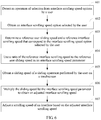
- FIG. 10 is a flowchart of another embodiment of a method for adjusting an interface scrolling speed according to embodiments of this application.
- a reference user sliding speed and a reference interface scrolling speed may be determined based on selection by a user, and then a final interface scrolling speed is determined based on a sliding speed of a sliding operation of the user.
- This embodiment may include the following steps.
- Step 1001 Detect an operation of selection from interface scrolling speed options by a user.
- a selection interface including a plurality of interface scrolling speed options is provided for the user.
- the interface scrolling speed option may be an option of identifying an interface scrolling speed by using text, or may be an option of identifying an interface scrolling speed by using an interface scrolling effect, or may be an option of identifying an interface scrolling speed by using text and an interface scrolling effect jointly.
- FIG. 7 is a schematic diagram of a selection interface including a plurality of interface scrolling speed options according to an embodiment of this application. For example, different interface scrolling speeds are identified by using text options: fast, normal, and slow, for a user to select. The interface scrolling speed options are simple to implement, and the user may directly perform selection as required. FIG.
- FIG. 8 is a schematic diagram of another selection interface including a plurality of interface scrolling speed options according to an embodiment of this application.
- the interface scrolling speed options may be formed by using different scrolling speed effects.
- the interface scrolling speed options enable a user to more directly see the scrolling speed effects and to perform selection as required.
- FIG. 9 is a schematic diagram of another selection interface including a plurality of interface scrolling speed options according to an embodiment of this application.
- the interface scrolling speed options may be formed by using different scrolling speed effects and corresponding text jointly, so that a user not only can see an interface scrolling speed effect, but also can learn whether a scrolling speed corresponding to the effect is fast, normal, or slow, thereby more accurately completing selection.
- a terminal may detect a trigger operation of the user on any interface scrolling speed option.
- the trigger operation may be a click operation on any interface scrolling speed option.
- Step 1002 Obtain an interface scrolling speed option selected by the user.
- Step 1003 Determine a reference user sliding speed and a reference interface scrolling speed that correspond to the interface scrolling speed option selected by the user.
- the interface scrolling speed option selected by the user may be determined based on a trigger position and a position of each interface scrolling speed option.
- Each interface scrolling speed option corresponds to a reference user sliding speed and a reference interface scrolling speed in pair. For example, if the user selects a fast interface scrolling speed, the reference user sliding speed and the reference interface scrolling speed may be relatively fast. If the user selects a slow interface scrolling speed, the reference user sliding speed and the reference interface scrolling speed may be relatively slow. In addition, a proportion of the reference user sliding speed to the reference interface scrolling speed when the user selects the fast interface scrolling speed is greater than a proportion of the reference user sliding speed to the reference interface scrolling speed when the user selects the slow interface scrolling speed.
- the reference user sliding speed and the reference interface scrolling speed in pair that correspond to each interface scrolling speed option may be preset in an operating system and/or an application program with an interface scrolling scenario.
- the scrolling speed may be further adjusted based on a sliding operation of the user.
- the reference user sliding speed may be used as a reference speed for determining whether a sliding speed of the user is relatively fast or relatively slow
- the reference interface scrolling speed is a reference speed for adjusting an interface scrolling speed. For example, if the sliding speed of the user is faster than a selected reference user sliding speed, a scrolling speed of an interface is further increased. If the sliding speed of the user is slower than a selected reference user sliding speed, a scrolling speed of an interface is appropriately decreased, so that an actual scrolling speed of the interface can better meet a user requirement based on the selection by the user.
- Step 1004 Obtain a sliding speed of a sliding operation performed by the user on a touchscreen.
- the sliding operation may be obtained through detection.
- a sliding direction of the sliding operation is consistent with a scrolling direction of the interface.
- the sliding speed of the sliding operation may be obtained through calculation based on a sliding distance and a sliding time of the sliding operation.
- Step 1005 Determine an interface scrolling speed parameter based on the sliding speed and the reference user sliding speed.
- the interface scrolling speed parameter may be determined by comparing the sliding speed with the reference user sliding speed. How to adjust an interface scrolling speed may be further determined based on the interface scrolling speed parameter.
- a specific implementation of determining the interface scrolling speed parameter based on the sliding speed and the reference user sliding speed may include: determining a ratio of the sliding speed to a reference sliding speed as a correction coefficient, calculating a central value of the correction coefficient, and determining the central value of the correction coefficient as the interface scrolling speed parameter.
- the correction coefficient is the ratio of the sliding speed to the reference sliding speed. When the sliding speed is greater than the reference sliding speed, the correction coefficient is greater than 1. When the sliding speed is less than the reference sliding speed, the correction coefficient is less than 1. Because the sliding speed of the user may change in real time, the correction coefficient may vary with the change of the sliding speed, so that a group of correction coefficients is obtained. A central value of this group of correction coefficients may be calculated based on correction coefficients obtained in real time. The central value may be an average value, a median, a mode, or the like.
- Using the central value of the correction coefficient as the interface scrolling speed parameter can reflect an overall status of the sliding speed of the user, and avoid a case in which a user requirement cannot be truly reflected by adjusting an interface scrolling speed when the sliding speed of the user is very fast or very slow.
- the interface scrolling speed parameter may be recorded in a control for controlling interface scrolling, to adjust the interface scrolling speed during the interface scrolling.
- Step 1006 Multiply the interface scrolling speed parameter by the reference interface scrolling speed to obtain an adjusted interface scrolling speed.
- the interface scrolling speed parameter is multiplied by the reference interface scrolling speed to obtain the adjusted interface scrolling speed.
- the central value of the correction coefficient is greater than 1, it indicates that a sliding speed of the interface may be further increased, in other words, the reference interface scrolling speed may be increased.
- the central value of the correction coefficient is less than 1, it indicates that a sliding speed of the interface needs to be decreased, in other words, the reference interface scrolling speed may be decreased.
- Step 1007 Adjust a scrolling speed of an interface based on the adjusted interface scrolling speed.
- the user may select an interface scrolling speed option based on a requirement on the scrolling speed of the interface.
- the scrolling speed may be further adjusted based on a sliding operation of the user, to better meet the requirement of the user on the interface scrolling speed.
- the embodiments of the method for adjusting an interface scrolling speed provided in the embodiments of this application are described by using the foregoing embodiments.
- the embodiments of the method for adjusting an interface scrolling speed provided in the embodiments of this application may be applied to operating system software, or may be applied to application program software.
- a same interface scrolling speed may be set for an operating system and each application program, or different interface scrolling speeds may be set for different application programs and different scenarios.
- an interface scrolling speed is adjusted by using the method in the embodiments of this application, a user may be further notified that the interface scrolling speed is being dynamically adjusted currently.
- the user may alternatively choose not to use the method in the embodiments of this application, but use only a fixed program scrolling speed.
- FIG. 11 shows an embodiment of a terminal 110 according to embodiments of this application.
- the terminal may include:
- the determining unit 1102 may be specifically configured to:
- the determining the interface scrolling speed parameter based on the sliding speed and the reference user sliding speed may include: determining a ratio of the sliding speed to a reference sliding speed as a correction coefficient, calculating a central value of the correction coefficient, and determining the central value of the correction coefficient as the interface scrolling speed parameter.
- the determining unit may be further configured to: determine the ratio of the sliding speed to the reference sliding speed as the correction coefficient, calculate the central value of the correction coefficient, and determine the central value of the correction coefficient as the interface scrolling speed parameter.
- the determining unit 1102 may be specifically configured to:
- the adjustment unit 1103 may be specifically configured to:
- the user operation is a sliding operation performed on a touchscreen after selection from interface scrolling speed options
- the determining unit 1102 may be specifically configured to:
- the determining the interface scrolling speed parameter based on the sliding speed and the reference user sliding speed may include: determining a ratio of the sliding speed to a reference sliding speed as a correction coefficient, calculating a central value of the correction coefficient, and determining the central value of the correction coefficient as the interface scrolling speed parameter.
- the determining unit may be further configured to: determine the ratio of the sliding speed to the reference sliding speed as the correction coefficient, calculate the central value of the correction coefficient, and determine the central value of the correction coefficient as the interface scrolling speed parameter.
- the user operation is a sliding operation performed on a touchscreen after selection from interface scrolling speed options
- the adjustment unit 1103 may be specifically configured to:
- the interface scrolling speed options may include an option of identifying an interface scrolling speed by using text and/or an option of identifying an interface scrolling speed by using an interface scrolling effect.
- the user operation can be obtained, the interface scrolling speed parameter is determined based on the user operation, and the scrolling speed of the interface is further adjusted based on the interface scrolling speed parameter, so that the user can adjust an interface scrolling speed as required.
- FIG. 12 is a block diagram of a partial structure of the terminal 110 according to the embodiments of the present invention.
- the terminal includes components such as a radio frequency (Radio Frequency, RF) circuit 1210, a memory 1220, an input unit 1230, a display unit 1240, a sensor 1250, an audio circuit 1260, a Wi-Fi module 1270, a processor 1280, and a power supply 1290.
- RF Radio Frequency
- the terminal structure shown in FIG. 12 does not constitute any limitation on the terminal, and the terminal may include more or fewer components than those shown in the figure, or combine some components, or have different component arrangements.
- the components of the terminal are specifically described below with reference to FIG. 12 .
- the RF circuit 1210 may be configured to transmit or receive data.
- the memory 1220 may be configured to store a software program and a module.
- the processor 1280 runs the software program and the module stored in the memory 1220, to perform various function applications of the terminal and data processing.
- the memory 1220 may mainly include a program storage area and a data storage area.
- the program storage area may store an operating system, an application program required by at least one function (such as a sound play function and an image play function), and the like.
- the data storage area may store data (such as audio data or a phone book) created based on use of the terminal, and the like.
- the memory 1220 may include a high-speed random access memory, and may further include a non-volatile memory, such as at least one magnetic disk storage device, a flash memory device, or another volatile solid-state storage device.
- the input unit 1230 may be configured to: receive an operation instruction of a user, and generate a key signal input related to a user setting and function control of the terminal 110.
- the input unit 1230 may include a touch panel 1231 and another input device 1232.
- the touch panel 1231 also be referred to as a touchscreen, may collect a touch or non-touch operation or a touch operation of the user on or near the touch panel 1231 (such as an operation of the user on or near the touch panel 1231 by using any appropriate object or accessory such as a finger or a stylus), and drive a corresponding connection terminal based on a preset program.
- the touch panel 1231 may include two parts: a touch detection terminal and a touch controller.
- the touch detection terminal detects a touch position of the user, detects a signal generated by the touch operation, and transfers the signal to the touch controller.
- the touch controller receives touch information from the touch detection terminal, converts the touch information into touch point coordinates, and then sends the touch point coordinates to the processor 1280.
- the touch controller can receive and execute a command sent by the processor 1280.
- the touch panel 1231 may be implemented by using a plurality of types such as a resistive type, a capacitive type, an infrared ray, and a surface acoustic wave.
- the input unit 1230 may further include the another input device 1232.
- the another input device 1232 may include but is not limited to one or more of a physical keyboard, a function button (such as a volume control button or a power button), a trackball, a mouse, and a joystick.
- the display unit 1240 may be configured to display an interface.
- the display unit 1240 may include a display panel 1241.
- the display panel 1241 may be configured in a form of a liquid crystal display (Liquid Crystal Display, LCD), an organic light-emitting diode (Organic Light-Emitting Diode, OLED), or the like.
- the touch panel 1231 may cover the display panel 1241. After detecting a touch operation on or near the touch panel 1231, the touch panel 1231 transfers the touch operation to the processor 1280 to determine a type of a touch event. Subsequently, the processor 1280 provides a corresponding visual output on the display panel 1241 based on the type of the touch event.
- the touch panel 1231 and the display panel 1241 are used as two independent components to implement input and input functions of the terminal, in some embodiments, the touch panel 1231 and the display panel 1241 may be integrated to implement the input and output functions of the terminal.
- the terminal 110 may further include at least one sensor 1250.
- the audio circuit 1260, a speaker 1261, and a microphone 1262 may provide an audio interface between the user and the terminal.
- the audio circuit 1260 may convert received audio data into an electrical signal and transmit the electrical signal to the speaker 1261.
- the speaker 1261 converts the electrical signal into a sound signal for output.
- the microphone 1262 converts a collected sound signal into an electrical signal.
- the audio circuit 1260 receives the electrical signal, converts the electrical signal into audio data, and then outputs the audio data to the processor 1280.
- the processor 1280 processes the audio data and then sends the processed audio data to, for example, another terminal through the camera 1210, or outputs the processed audio data to the memory 1220 for further processing.
- the Wi-Fi module 1270 may be configured to perform communication.
- the processor 1280 is a control center of the terminal, and connects all parts of the entire terminal by using various interfaces and lines. By running or executing a software program and/or a module stored in the memory 1220 and invoking data stored in the memory 1220, the processor 1280 performs various functions of the terminal and data processing, to perform overall monitoring on the terminal.
- the processor 1280 may include one or more processing units.
- the processor 1280 may integrate an application processor and a modem processor.
- the application processor mainly processes an operating system, a user interface, an application program, and the like.
- the modem processor mainly processes wireless communication. It may be understood that, the modem processor may not be integrated into the processor 1280.
- the processor 1280 may further include a function module such as a display control module.
- the terminal 110 further includes a power supply 1290 (such as a battery) for supplying power to each component.
- a power supply 1290 such as a battery
- the power supply may be logically connected to the processor 1280 by using a power supply management system, thereby implementing functions such as charging, discharging, and power consumption management by using the power supply management system.
- the terminal 110 may further include a camera, a Bluetooth module, and the like. Details are not described herein.
- the processor 1280 included in the terminal further has the following functions:
- the user operation is a sliding operation performed by the user on the touchscreen
- the determining an interface scrolling speed parameter based on the user operation may include:
- the user operation is selection from interface scrolling speed options
- the determining an interface scrolling speed parameter based on the user operation includes:
- the adjusting a scrolling speed of an interface based on the interface scrolling speed parameter includes:
- the user operation is a sliding operation performed on the touchscreen after selection from interface scrolling speed options, and the determining an interface scrolling speed parameter based on the user operation includes:
- the determining the interface scrolling speed parameter based on the sliding speed and the reference user sliding speed includes:
- the adjusting a scrolling speed of an interface based on the interface scrolling speed parameter includes:
- the interface scrolling speed options displayed by the display unit may include an option of identifying an interface scrolling speed by using text and/or an option of identifying an interface scrolling speed by using an interface scrolling effect.
- the obtaining unit 1101 in the terminal 110 may be implemented by the input unit 1230 and/or the processor 1280; the determining unit 1102 may be implemented by the processor 1280, or may be implemented by the input unit 1230 and the processor 1280; and the adjustment unit 1103 may be implemented by the processor 1280, or may be implemented by the processor 1280 and the display unit 1240, or may be implemented by the input unit 1230, the display unit 1240, and the processor 1280.
- All or some of the foregoing embodiments may be implemented by software, hardware, firmware, or any combination thereof.
- software is used to implement the embodiments, all or some of the embodiments may be implemented in a form of a computer program product.
- the computer program product includes one or more computer instructions.
- the computer may be a general-purpose computer, a dedicated computer, a computer network, or another programmable apparatus.
- the computer instructions may be stored in a computer readable storage medium or may be transmitted from a computer readable storage medium to another computer readable storage medium.
- the computer instructions may be transmitted from a website, computer, server, or data center to another website, computer, server, or data center in a wired manner (for example, by using a coaxial cable, an optical fiber, or a digital subscriber line (DSL)) or in a wireless (for example, infrared, radio, and microwave) manner.
- a wired manner for example, by using a coaxial cable, an optical fiber, or a digital subscriber line (DSL)
- DSL digital subscriber line
- the computer readable storage medium may be any usable medium accessible by the computer, or a data storage device, such as a server or a data center, integrating one or more usable media.
- the usable medium may be a magnetic medium (for example, a floppy disk, a hard disk, or a magnetic tape), an optical medium (for example, a DVD), a semiconductor medium (for example, a solid state disk (solid state disk, SSD)), or the like.
- An embodiment of this application further provides a computer readable storage medium including an instruction.
- the terminal may be enabled to perform the method for adjusting an interface scrolling speed provided in the embodiments of this application.
- An embodiment of this application further provides a computer program product including an instruction.
- the terminal may be enabled to perform the method for adjusting an interface scrolling speed provided in the embodiments of this application.
- the disclosed system, apparatus, and method may be implemented in other manners.
- the described apparatus embodiment is merely an example.
- the unit division is merely logical function division and may be other division during actual implementation.
- a plurality of units or components may be combined or integrated into another system, or some features may be ignored or not performed.
- the displayed or discussed mutual couplings or direct couplings or communication connections may be implemented by using some interfaces.
- the indirect couplings or communication connections between the apparatuses or units may be implemented in electrical, mechanical, or other forms.
- the units described as separate parts may or may not be physically separate, and parts displayed as units may or may not be physical units, may be located in one position, or may be distributed on a plurality of network units. Some or all of the units may be selected based on actual requirements to achieve the objectives of the solutions of the embodiments.
- functional units in the embodiments of this application may be integrated into one processing unit, or each of the units may exist alone physically, or two or more units are integrated into one unit.
- the integrated unit may be implemented in a form of hardware, or may be implemented in a form of a software functional unit.
- the integrated unit When the integrated unit is implemented in the form of a software functional unit and sold or used as an independent product, the integrated unit may be stored in a computer readable storage medium. Based on such an understanding, the technical solutions of this application essentially, or the part contributing to the prior art, or all or some of the technical solutions may be implemented in the form of a software product.
- the computer software product is stored in a storage medium and includes several instructions for instructing a computer device (which may be a personal computer, a server, a network device, or the like) to perform all or some of the steps of the methods described in the embodiments of this application.
- the foregoing storage medium includes: any medium that can store program code, such as a USB flash drive, a removable hard disk, a read-only memory (ROM, Read-Only Memory), a random access memory (RAM, Random Access Memory), a magnetic disk, or an optical disc.
- program code such as a USB flash drive, a removable hard disk, a read-only memory (ROM, Read-Only Memory), a random access memory (RAM, Random Access Memory), a magnetic disk, or an optical disc.
Landscapes
- Engineering & Computer Science (AREA)
- General Engineering & Computer Science (AREA)
- Theoretical Computer Science (AREA)
- Human Computer Interaction (AREA)
- Physics & Mathematics (AREA)
- General Physics & Mathematics (AREA)
- Environmental & Geological Engineering (AREA)
- Computer Networks & Wireless Communication (AREA)
- Signal Processing (AREA)
- User Interface Of Digital Computer (AREA)
Abstract
Description
- This application claims priority to Chinese Patent Application No.
201710198380.8 - The present invention belongs to the field of terminal technologies, and specifically relates to a method for adjusting an interface scrolling speed, a related device, and a computer program product.
- When a user uses a terminal device including a touchscreen, interface scrolling display may be triggered by performing a sliding operation on the touchscreen or in another manner. In the prior art, there is a fixed association relationship between a sliding speed of a user and a scrolling speed of an interface. Interface scrolling sensitivity is considered by users as one manifestation of terminal performance. Different groups of users have different requirements on an interface scrolling speed. However, in the prior art, an interface scrolling speed cannot be adjusted based on a user requirement.
- Embodiments of this application provide a method for adjusting an interface scrolling speed, to resolve a prior-art technical problem in which an interface scrolling speed cannot be adjusted based on a user requirement. The embodiments of this application further provide a corresponding terminal, a storage medium, and a computer program product.
- A first aspect of this application provides a method for adjusting an interface scrolling speed, and the method includes:
obtaining a user operation, determining an interface scrolling speed parameter based on the user operation, and adjusting a scrolling speed of an interface based on the interface scrolling speed parameter. It can be learned from the first aspect that, according to the method for adjusting an interface scrolling speed provided in the first aspect of this application, the user operation can be obtained, the interface scrolling speed parameter is determined based on the user operation, and the scrolling speed of the interface is further adjusted based on the interface scrolling speed parameter, so that the interface scrolling speed parameter and the interface scrolling speed can be adjusted based on the user operation. Further, different users can determine appropriate interface scrolling speeds through different user operations, so that the user can adjust an interface scrolling speed as required. - With reference to the first aspect, in a first possible implementation, the user operation is a sliding operation performed by a user on a touchscreen, and the determining an interface scrolling speed parameter based on the user operation includes:
obtaining a reference user sliding speed, a reference interface scrolling speed, and a sliding speed of the sliding operation, where the reference user sliding speed and the reference interface scrolling speed are preset; and determining the interface scrolling speed parameter based on the sliding speed and the reference user sliding speed. It can be learned from the first possible implementation of the first aspect that, the interface scrolling speed parameter can be dynamically determined based on the sliding speed of the user on the touchscreen during sliding of the user on the touchscreen. - With reference to the first aspect, in a second possible implementation, the user operation is selection from interface scrolling speed options, and the determining an interface scrolling speed parameter based on the user operation includes:
obtaining an interface scrolling speed option selected by a user, determining a reference user sliding speed and a reference interface scrolling speed that correspond to the interface scrolling speed option selected by the user, and using a ratio of the reference interface scrolling speed to the reference user sliding speed as the interface scrolling speed parameter. It can be learned from the second possible implementation of the first aspect that, the user can actively select a required interface scrolling speed by using the interface scrolling speed option, so that different requirements of the user are met. - With reference to the second possible implementation of the first aspect, in a third possible implementation, the adjusting a scrolling speed of an interface based on the interface scrolling speed parameter includes:
obtaining a sliding speed of a sliding operation performed by the user on a touchscreen, multiplying the sliding speed by the interface scrolling speed parameter to obtain an adjusted interface scrolling speed, and adjusting the scrolling speed of the interface based on the adjusted interface scrolling speed. It can be learned from the third possible implementation of the first aspect that, an interface scrolling speed can be adjusted based on a dynamically adjusted interface scrolling speed parameter, in other words, the interface scrolling speed can be dynamically adjusted based on the sliding operation of the user. - With reference to the first aspect, in a fourth possible implementation, the user operation is a sliding operation performed on a touchscreen after selection from interface scrolling speed options, and the determining an interface scrolling speed parameter based on the user operation includes:
obtaining an interface scrolling speed option selected by a user, determining a reference user sliding speed and a reference interface scrolling speed that correspond to the interface scrolling speed option selected by the user, obtaining a sliding speed of the sliding operation, and determining the interface scrolling speed parameter based on the sliding speed and the reference user sliding speed. It can be learned from the fourth possible implementation of the first aspect that, the user can perform selection based on a requirement on an interface scrolling speed, and then the interface scrolling speed parameter can be dynamically adjusted based on the sliding speed of the user, so that the interface scrolling speed can be adaptively adjusted better. - With reference to the first possible implementation of the first aspect or the fourth possible implementation of the first aspect, in a fifth possible implementation, the determining the interface scrolling speed parameter based on the sliding speed and the reference user sliding speed includes:
determining a ratio of the sliding speed to a reference sliding speed as a correction coefficient, calculating a central value of the correction coefficient, and determining the central value of the correction coefficient as the interface scrolling speed parameter. It can be learned from the fifth possible implementation of the first aspect that, the interface scrolling speed parameter can be determined through a plurality of sliding operations, thereby improving accuracy of determining the interface scrolling speed parameter. - With reference to the fifth possible implementation of the first aspect, in a sixth possible implementation, the adjusting a scrolling speed of an interface based on the interface scrolling speed parameter includes:
multiplying the interface scrolling speed parameter by the reference interface scrolling speed to obtain an adjusted interface scrolling speed, and adjusting the scrolling speed of the interface based on the adjusted interface scrolling speed. It can be learned from the sixth possible implementation of the first aspect that, the adjusted interface scrolling speed can be determined based on the scrolling speed parameter, so that user requirements for different interface scrolling speeds can be met. - With reference to the second possible implementation of the first aspect or the fourth possible implementation of the first aspect, in a seventh possible implementation, the interface scrolling speed options include an option of identifying an interface scrolling speed by using text and/or an option of identifying an interface scrolling speed by using an interface scrolling effect. It can be learned from the seventh possible implementation of the first aspect that, the interface scrolling speed options can be displayed in different forms, so that the user can more intuitively select a required interface scrolling speed.
- A second aspect of this application provides a terminal, and the terminal includes:
- an obtaining unit, configured to obtain a user operation;
- a determining unit, configured to determine an interface scrolling speed parameter based on the user operation; and
- an adjustment unit, configured to adjust a scrolling speed of an interface based on the interface scrolling speed parameter.
- With reference to the second aspect, in a first possible implementation, the user operation is a sliding operation performed by a user on a touchscreen, and the determining unit is specifically configured to:
- obtain a reference user sliding speed, a reference interface scrolling speed, and a sliding speed of the sliding operation, where the reference user sliding speed and the reference interface scrolling speed are preset; and
- determine the interface scrolling speed parameter based on the sliding speed and the reference user sliding speed.
- With reference to the second aspect, in a second possible implementation, the user operation is selection from interface scrolling speed options, and the determining unit is specifically configured to:
- obtain an interface scrolling speed option selected by a user; and
- determine a reference user sliding speed and a reference interface scrolling speed that correspond to the interface scrolling speed option selected by the user, and use a ratio of the reference interface scrolling speed to the reference user sliding speed as the interface scrolling speed parameter.
- With reference to the second possible implementation of the second aspect, in a third possible implementation, the adjustment unit is specifically configured to:
- obtain a sliding speed of a sliding operation performed by the user on a touchscreen;
- multiply the sliding speed by the interface scrolling speed parameter to obtain an adjusted interface scrolling speed; and
- adjust the scrolling speed of the interface based on the adjusted interface scrolling speed.
- With reference to the second aspect, in a fourth possible implementation, the user operation is a sliding operation performed on a touchscreen after selection from interface scrolling speed options, and the determining unit is specifically configured to:
- obtain an interface scrolling speed option selected by a user;
- determine a reference user sliding speed and a reference interface scrolling speed that correspond to the interface scrolling speed option selected by the user;
- obtain a sliding speed of the sliding operation; and
- determine the interface scrolling speed parameter based on the sliding speed and the reference user sliding speed.
- With reference to the first possible implementation of the second aspect or the fourth possible implementation of the second aspect, in a fifth possible implementation, the determining unit is further configured to:
determine a ratio of the sliding speed to a reference sliding speed as a correction coefficient, calculate a central value of the correction coefficient, and determine the central value of the correction coefficient as the interface scrolling speed parameter. - With reference to the fifth possible implementation of the second aspect, in a sixth possible implementation, the adjustment unit is specifically configured to:
- multiply the interface scrolling speed parameter by the reference interface scrolling speed to obtain an adjusted interface scrolling speed; and
- adjust the scrolling speed of the interface based on the adjusted interface scrolling speed.
- With reference to the second possible implementation of the second aspect or the fourth possible implementation of the second aspect, in a seventh possible implementation, the interface scrolling speed options include an option of identifying an interface scrolling speed by using text and/or an option of identifying an interface scrolling speed by using an interface scrolling effect.
- For beneficial effects of all parts of the second aspect, refer to descriptions in the first aspect. Details are not described herein again.
- A third aspect of this application provides a terminal, and the terminal includes:
a processor and a memory, where the memory stores a computer instruction, and when the computer instruction in the memory is executed, the processor is configured to perform the following steps: - obtaining a user operation;
- determining an interface scrolling speed parameter based on the user operation; and
- adjusting a scrolling speed of an interface based on the interface scrolling speed parameter.
- With reference to the third aspect, in a first possible implementation, the user operation is a sliding operation performed by a user on a touchscreen, and the determining an interface scrolling speed parameter based on the user operation includes:
- obtaining a reference user sliding speed, a reference interface scrolling speed, and a sliding speed of the sliding operation, where the reference user sliding speed and the reference interface scrolling speed are preset; and
- determining the interface scrolling speed parameter based on the sliding speed and the reference user sliding speed.
- With reference to the third aspect, in a second possible implementation, the user operation is selection from interface scrolling speed options, and the determining an interface scrolling speed parameter based on the user operation includes:
- obtaining an interface scrolling speed option selected by a user;
- determining a reference user sliding speed and a reference interface scrolling speed that correspond to the interface scrolling speed option selected by the user; and
- using a ratio of the reference interface scrolling speed to the reference user sliding speed as the interface scrolling speed parameter.
- With reference to the second possible implementation of the third aspect, in a third possible implementation, the adjusting a scrolling speed of an interface based on the interface scrolling speed parameter includes:
- obtaining a sliding speed of a sliding operation performed by the user on a touchscreen;
- multiplying the sliding speed by the interface scrolling speed parameter to obtain an adjusted interface scrolling speed; and
- adjusting the scrolling speed of the interface based on the adjusted interface scrolling speed.
- With reference to the third aspect, in a fourth possible implementation, the user operation is a sliding operation performed on a touchscreen after selection from interface scrolling speed options, and the determining an interface scrolling speed parameter based on the user operation includes:
- obtaining an interface scrolling speed option selected by a user;
- determining a reference user sliding speed and a reference interface scrolling speed that correspond to the interface scrolling speed option selected by the user;
- obtaining a sliding speed of the sliding operation; and
- determining the interface scrolling speed parameter based on the sliding speed and the reference user sliding speed.
- With reference to the first possible implementation of the third aspect or the fourth possible implementation of the third aspect, in a fifth possible implementation, the determining the interface scrolling speed parameter based on the sliding speed and the reference user sliding speed includes:
- determining a ratio of the sliding speed to a reference sliding speed as a correction coefficient;
- calculating a central value of the correction coefficient; and
- determining the central value of the correction coefficient as the interface scrolling speed parameter.
- With reference to the fifth possible implementation of the third aspect, in a sixth possible implementation, the adjusting a scrolling speed of an interface based on the interface scrolling speed parameter includes:
- multiplying the interface scrolling speed parameter by the reference interface scrolling speed to obtain an adjusted interface scrolling speed; and
- adjusting the scrolling speed of the interface based on the adjusted interface scrolling speed.
- With reference to the second possible implementation of the third aspect or the fourth possible implementation of the third aspect, in a seventh possible implementation, the interface scrolling speed options include an option of identifying an interface scrolling speed by using text and/or an option of identifying an interface scrolling speed by using an interface scrolling effect.
- For beneficial effects of all parts of the third aspect, refer to descriptions in the first aspect. Details are not described herein again.
- A fourth aspect of this application provides a computer readable storage medium including an instruction, and when the instruction is run on a terminal, the terminal is enabled to perform the method for adjusting an interface scrolling speed in the first aspect or any optional implementation of the first aspect.
- A fifth aspect of this application provides a computer program product including an instruction, and when the computer program product is run on a terminal, the terminal is enabled to perform the method for adjusting an interface scrolling speed in the first aspect or any optional implementation of the first aspect.
- In the embodiments of this application, the user operation can be obtained, the interface scrolling speed parameter is determined based on the user operation, and the scrolling speed of the interface is further adjusted based on the interface scrolling speed parameter, so that the user can adjust an interface scrolling speed as required.
-
-
FIG. 1 is a schematic diagram of an application scenario according to an embodiment of this application; -
FIG. 2 is a schematic diagram of another application scenario according to an embodiment of this application; -
FIG. 3 is a flowchart of an embodiment of a method for adjusting an interface scrolling speed according to embodiments of this application; -
FIG. 4 is a flowchart of another embodiment of a method for adjusting an interface scrolling speed according to embodiments of this application; -
FIG. 5 is a flowchart of another embodiment of a method for adjusting an interface scrolling speed according to embodiments of this application; -
FIG. 6 is a flowchart of another embodiment of a method for adjusting an interface scrolling speed according to embodiments of this application; -
FIG. 7 is a schematic diagram of an interface scrolling speed option according to an embodiment of this application; -
FIG. 8 is another schematic diagram of an interface scrolling speed option according to an embodiment of this application; -
FIG. 9 is another schematic diagram of an interface scrolling speed option according to an embodiment of this application; -
FIG. 10 is a flowchart of another embodiment of a method for adjusting an interface scrolling speed according to embodiments of this application; -
FIG. 11 is a schematic diagram of an embodiment of a terminal according to embodiments of this application; and -
FIG. 12 is a schematic diagram of another embodiment of a terminal according to embodiments of this application. - When a user uses a terminal device including a touchscreen, interface scrolling display may be triggered by performing a sliding operation on the touchscreen or in another manner. In the prior art, there is a fixed association relationship between a sliding speed of the user and a scrolling speed of an interface. To be specific, in a scrollable interface, when the user slides the touchscreen at a sliding speed, the interface scrolls at an interface scrolling speed, and there is a fixed proportional relationship between the interface scrolling speed and the sliding speed of the user. However, different groups of users have different requirements on an interface scrolling speed. For example, the elderly may feel that the interface scrolling speed is very fast, in other words, interface scrolling sensitivity is very high, but the young may feel that the interface scrolling speed is very slow, in other words, the interface scrolling sensitivity is low. Therefore, in the prior art, there is a technical problem that the interface scrolling speed cannot be adjusted based on a user requirement.
- In view of the above, embodiments of this application provide a method for adjusting an interface scrolling speed and a corresponding device, so that an interface scrolling speed parameter can be dynamically adjusted based on a user operation, and a scrolling speed of an interface can be adjusted based on the interface scrolling speed parameter, thereby adjusting an interface scrolling speed based on a user requirement.
-
FIG. 1 is a schematic diagram of an application scenario according to an embodiment of this application. For example, an interface displayed in a terminal is a list interface. The list interface is, for example, a contacts list or a conversation list. A contacts list is shown in the figure. A user may trigger scrolling of the list interface through up-and-down sliding on a touchscreen. A scrolling speed of the interface may be adjusted by using the method provided in the embodiments of this application.FIG. 2 is a schematic diagram of another application scenario according to an embodiment of this application. For example, an interface displayed in a terminal is an interface in which a plurality of pages are switched. A user may trigger scrolling of a switching interface through left-and-right sliding on a touchscreen to display different pages. A scrolling speed of the interface may be adjusted by using the method provided in the embodiments of this application. The foregoing descriptions are merely example descriptions of the application scenarios in the embodiments of this application. During actual application, for any interface with a scrolling effect, an interface scrolling speed may be adjusted by using the method provided in the embodiments of this application. A manifestation form of the interface is not limited in the embodiments of this application. - The method for adjusting an interface scrolling speed provided in the embodiments of this application may be applied to a terminal. The terminal may be specifically a smartphone, a tablet computer, an ebook reader, a moving picture experts group audio layer-3 (moving picture experts group audio layer III, MP3) player, a moving picture experts group audio layer-4 (moving picture experts group audio layer IV, MP4) player, a laptop computer, a desktop computer, or the like.
-
FIG. 3 is a flowchart of an embodiment of a method for adjusting an interface scrolling speed according to embodiments of this application. This embodiment may include the following steps. - Step 301: Obtain a user operation.
- In this embodiment of this application, the user operation may be a sliding operation performed on a touchscreen, or may be selection from interface scrolling speed options, or may be a combination of the foregoing two operations. In other words, the user operation may be alternatively a sliding operation performed on a touchscreen after selection from interface scrolling speed options. The user operation may be obtained by detecting a trigger action of a user on the touchscreen.
- Step 302: Determine an interface scrolling speed parameter based on the user operation.
- After the user operation is obtained, the interface scrolling speed parameter may be dynamically determined based on the user operation. The interface scrolling speed parameter may be used to determine an interface scrolling speed. For example, when the user operation is the sliding operation performed on the touchscreen, the interface scrolling speed parameter may be determined based on a sliding speed of the sliding operation. When the user operation is the selection from the interface scrolling speed options, the interface scrolling speed parameter may be determined based on an interface scrolling speed option selected by the user. When the user operation is the sliding operation performed on the touchscreen after the selection from the interface scrolling speed options, the interface scrolling speed parameter may be determined based on an interface scrolling speed option selected by the user and a sliding speed of the sliding operation.
- Step 303: Adjust a scrolling speed of an interface based on the interface scrolling speed parameter.
- In this embodiment of this application, the user operation can be obtained, the interface scrolling speed parameter is determined based on the user operation, and the scrolling speed of the interface is further adjusted based on the interface scrolling speed parameter, so that the interface scrolling speed parameter and the interface scrolling speed can be adjusted based on the user operation. Further, different users can determine appropriate interface scrolling speeds through different user operations, so that the user can adjust an interface scrolling speed as required.
- The following separately describes a process of adjusting an interface scrolling speed through different user operations.
-
FIG. 4 is a flowchart of another embodiment of a method for adjusting an interface scrolling speed according to embodiments of this application. For a first user operation, to be specific, when a user operation is a sliding operation performed on a touchscreen, an interface scrolling speed may be adjusted based on a sliding speed of a sliding operation performed by a user. This embodiment may include the following steps. - Step 401: Obtain a sliding operation performed by a user on a touchscreen.
- When the user performs a sliding operation on an interface displayed on the touchscreen to trigger scrolling display of the interface, a terminal may obtain the sliding operation through detection. A sliding direction of the sliding operation is consistent with a scrolling direction of the interface. For example, if the scrolling direction of the interface is an up-and-down direction, the sliding operation of the user performed on the touchscreen should also be in the up-and-down direction. If the scrolling direction of the interface is a left-and-right direction, the sliding operation performed by the user on the touchscreen should also be in the left-and-right direction. It may be understood that, in this embodiment, only a sliding operation performed in a direction consistent with the scrolling direction of the interface may be obtained.
- Step 402: Obtain a reference user sliding speed, a reference interface scrolling speed, and a sliding speed of the sliding operation, where the reference user sliding speed and the reference interface scrolling speed are preset.
- When the sliding operation performed by the user on the touchscreen is being obtained, the sliding speed of the sliding operation may be obtained through calculation based on a sliding distance and a sliding time of the sliding operation. The sliding distance is a distance by which the sliding operation performed by the user acts on the touchscreen. The sliding time is a time during which the sliding operation performed by the user acts on the touchscreen. In addition, the preset reference user sliding speed and the preset reference interface scrolling speed may be obtained. The reference user sliding speed may be used as a reference speed for determining whether the sliding speed of the user is relatively fast or relatively slow. To be specific, a sliding habit of the user may be determined by comparing the sliding speed of the sliding operation with the reference user sliding speed, to further determine a sliding speed of the interface. For example, when the sliding speed of the sliding operation of the user is greater than the reference user sliding speed, it indicates that the sliding speed of the user is relatively fast. When the sliding speed of the sliding operation of the user is less than the reference user sliding speed, it indicates that the sliding speed of the user is relatively slow. The reference user sliding speed may be preset in an operating system and/or in an application program with an interface scrolling scenario. The reference interface scrolling speed is a reference speed for adjusting an interface scrolling speed. The reference interface scrolling speed may be preset in an operating system and/or an application program with an interface scrolling scenario, so that the sliding speed of the interface is increased or decreased based on the reference interface scrolling speed.
- Step 403: Determine an interface scrolling speed parameter based on the sliding speed and the reference user sliding speed.
- In this embodiment of this application, the interface scrolling speed parameter may be determined by comparing the sliding speed with the reference user sliding speed. How to adjust an interface scrolling speed may be further determined based on the interface scrolling speed parameter.
- In some possible implementations of this embodiment of this application, a specific implementation of determining the interface scrolling speed parameter based on the sliding speed and the reference user sliding speed may include:
determining a ratio of the sliding speed to a reference sliding speed as a correction coefficient, calculating a central value of the correction coefficient, and determining the central value of the correction coefficient as the interface scrolling speed parameter. - The correction coefficient is the ratio of the sliding speed to the reference sliding speed. When the sliding speed is greater than the reference sliding speed, the correction coefficient is greater than 1. When the sliding speed is less than the reference sliding speed, the correction coefficient is less than 1. Because the sliding speed of the user may change in real time, the correction coefficient may vary with the change of the sliding speed, so that a group of correction coefficients is obtained. A central value of this group of correction coefficients may be calculated based on correction coefficients obtained in real time. The central value may be an average value, a median, a mode, or the like. Using the central value of the correction coefficient as the interface scrolling speed parameter can reflect an overall status of the sliding speed of the user, and avoid a case in which a user requirement cannot be truly reflected by adjusting an interface scrolling speed when the sliding speed of the user is very fast or very slow.
- Step 404: Multiply the interface scrolling speed parameter by the reference interface scrolling speed to obtain an adjusted interface scrolling speed.
- The interface scrolling speed parameter is multiplied by the reference interface scrolling speed to obtain the adjusted interface scrolling speed. When the central value of the correction coefficient is greater than 1, it indicates that the user is a user that operates a terminal relatively fast, and the sliding speed of the interface may be increased, in other words, the reference interface scrolling speed may be increased. When the central value of the correction coefficient is less than 1, it indicates that the user is a user that operates a terminal relatively slowly, and the sliding speed of the interface may be decreased, in other words, the reference interface scrolling speed may be decreased.
- Step 405: Adjust a scrolling speed of an interface based on the adjusted interface scrolling speed.
- In this embodiment of this application, the scrolling speed of the interface may be dynamically adjusted based on the sliding speed of the sliding operation of the user. A type of the user is intelligently identified based on the sliding speed of the user. For example, when the sliding speed of the user is relatively fast overall, the scrolling speed of the interface is increased. When the sliding speed of the user is relatively slow overall, the scrolling speed of the interface is decreased. In this way, a requirement of the user on an interface scrolling speed can be better met.
-
FIG. 5 is a flowchart of another embodiment of a method for adjusting an interface scrolling speed according to embodiments of this application. For a first user operation, to be specific, when a user operation is a sliding operation performed on a touchscreen, an implementation process in an actual application scenario in which an interface scrolling speed is adjusted based on a sliding speed of a sliding operation performed by a user may include the following steps. - Step 501: Obtain a sliding operation performed by a user on a touchscreen.
- Step 502: Determine a type of the user based on a sliding speed of the sliding operation.
- In this embodiment of this application, a ratio of the sliding speed to a reference sliding speed may be calculated and determined as a correction coefficient, a central value of the correction coefficient is calculated, and the central value of the correction coefficient is determined as an interface scrolling speed parameter. In addition, the type of the user may be determined based on the interface scrolling speed parameter. When the interface scrolling speed parameter is greater than 1, it indicates that the user is a user that operates a terminal relatively fast, and a sliding speed of an interface may be increased. When the interface scrolling speed parameter is less than 1, it indicates that the user is a user that operates a terminal relatively slowly, and a sliding speed of an interface may be decreased. A process of calculating the interface scrolling speed parameter may continue as the sliding operation of the user continues.
- Step 503: When the user is a user that operates a mobile phone relatively fast, an interface scrolling speed needs to be increased.
- Step 504: When the user is a user that operates a mobile phone relatively slowly, an interface scrolling speed needs to be decreased.
- Step 505: Record an interface scrolling speed parameter, go back to step 502, and proceed to step 506.
- The interface scrolling speed parameter may be recorded in a control for controlling interface scrolling, to adjust the interface scrolling speed during the interface scrolling.
- Step 506: Adjust a scrolling speed of an interface based on the interface scrolling speed parameter.
- The interface scrolling speed parameter may be multiplied by a reference interface scrolling speed to obtain an adjusted interface scrolling speed, and the scrolling speed of the interface may be adjusted based on the adjusted interface scrolling speed. In this way, requirements of different users on a list scrolling speed are met.
-
FIG. 6 is a flowchart of another embodiment of a method for adjusting an interface scrolling speed according to embodiments of this application. For a second user operation, to be specific, when a user operation is selection from interface scrolling speed options, an interface scrolling speed may be adjusted based on selection by a user. This embodiment may include the following steps. - Step 601: Detect an operation of selection from interface scrolling speed options by a user.
- In this embodiment of this application, first, a selection interface including a plurality of interface scrolling speed options is provided for the user. The interface scrolling speed option may be an option of identifying an interface scrolling speed by using text, or may be an option of identifying an interface scrolling speed by using an interface scrolling effect, or may be an option of identifying an interface scrolling speed by using text and an interface scrolling effect jointly.
FIG. 7 is a schematic diagram of a selection interface including a plurality of interface scrolling speed options according to an embodiment of this application. For example, different interface scrolling speeds are identified by using text options: fast, normal, and slow, for a user to select. The interface scrolling speed options are simple to implement, and the user may directly perform selection as required.FIG. 8 is a schematic diagram of another selection interface including a plurality of interface scrolling speed options according to an embodiment of this application. For example, the interface scrolling speed options may be formed by using different scrolling speed effects. The interface scrolling speed options enable a user to more directly see the scrolling speed effects and to perform selection as required.FIG. 9 is a schematic diagram of another selection interface including a plurality of interface scrolling speed options according to an embodiment of this application. For example, the interface scrolling speed options may be formed by using different scrolling speed effects and corresponding text jointly, so that a user not only can see an interface scrolling speed effect, but also can learn whether a scrolling speed corresponding to the effect is fast, normal, or slow, thereby more accurately completing selection. - After displaying the selection interface including the plurality of interface scrolling speed options, a terminal may detect a trigger operation of the user on any interface scrolling speed option. The trigger operation may be a click operation on any interface scrolling speed option.
- Step 602: Obtain an interface scrolling speed option selected by the user.
- Step 603: Determine a reference user sliding speed and a reference interface scrolling speed that correspond to the interface scrolling speed option selected by the user.
- After the user performs a trigger operation on an interface scrolling speed option, the interface scrolling speed option selected by the user may be determined based on a trigger position and a position of each interface scrolling speed option. Each interface scrolling speed option corresponds to a reference user sliding speed and a reference interface scrolling speed in pair. In this embodiment, the reference user sliding speed and the reference interface scrolling speed may be jointly used to determine an interface scrolling speed parameter. The reference user sliding speed and the reference interface scrolling speed in pair that correspond to each interface scrolling speed option may be preset in an operating system and/or an application program with an interface scrolling scenario.
- Step 604: Use a ratio of the reference interface scrolling speed to the reference user sliding speed as an interface scrolling speed parameter.
- The ratio of the reference interface scrolling speed to the reference user sliding speed may be used as a scrolling speed parameter. A different interface scrolling speed parameter may be determined based on the option selected by the user. A value of the scrolling speed parameter may be used to determine whether to increase or decrease the reference interface scrolling speed. For example, an interface scrolling speed parameter obtained when the user selects a fast interface scrolling speed is greater than an interface scrolling speed parameter obtained when the user selects a slow interface scrolling speed.
- The interface scrolling speed parameter may be recorded in a control for controlling interface scrolling, to adjust the interface scrolling speed during the interface scrolling.
- Step 605: Obtain a sliding speed of a sliding operation performed by the user on a touchscreen.
- After the interface scrolling speed parameter is determined, when the user performs a sliding operation on an interface that needs to be scrolled, the interface scrolling speed may be adjusted based on the interface scrolling speed parameter. When the user performs a sliding operation on an interface displayed on the touchscreen to trigger scrolling display of the interface, the terminal may obtain the sliding operation through detection. A sliding direction of the sliding operation is consistent with a scrolling direction of the interface. When the sliding operation performed by the user on the touchscreen is being obtained, the sliding speed of the sliding operation may be obtained through calculation based on a sliding distance and a sliding time of the sliding operation.
- Step 606: Multiply the sliding speed by the interface scrolling speed parameter to obtain an adjusted interface scrolling speed.
- The ratio of the reference interface scrolling speed to the reference user sliding speed may be the same as a ratio of the adjusted interface scrolling speed to the sliding speed, and the ratio of the reference interface scrolling speed to the reference user sliding speed is the interface scrolling speed parameter. Therefore, the adjusted interface scrolling speed may be obtained by multiplying the sliding speed by the interface scrolling speed parameter.
- Step 607: Adjust a scrolling speed of an interface based on the adjusted interface scrolling speed.
- In this embodiment of this application, the user may select the interface scrolling speed option based on a requirement on the scrolling speed of the interface, and the interface scrolling speed is then determined based on the interface scrolling speed option selected by the user. For example, when the user chooses to scroll the interface at a relatively fast speed, the scrolling speed of the interface is increased. When the user chooses to scroll the interface at a relatively slow speed, the scrolling speed of the interface is decreased. In this way, the requirement of the user on the interface scrolling speed can be better met.
-
FIG. 10 is a flowchart of another embodiment of a method for adjusting an interface scrolling speed according to embodiments of this application. For a third user operation, to be specific, when a user operation is a sliding operation performed on a touchscreen after selection from interface scrolling speed options, a reference user sliding speed and a reference interface scrolling speed may be determined based on selection by a user, and then a final interface scrolling speed is determined based on a sliding speed of a sliding operation of the user. This embodiment may include the following steps. - Step 1001: Detect an operation of selection from interface scrolling speed options by a user.
- In this embodiment of this application, first, a selection interface including a plurality of interface scrolling speed options is provided for the user. The interface scrolling speed option may be an option of identifying an interface scrolling speed by using text, or may be an option of identifying an interface scrolling speed by using an interface scrolling effect, or may be an option of identifying an interface scrolling speed by using text and an interface scrolling effect jointly.
FIG. 7 is a schematic diagram of a selection interface including a plurality of interface scrolling speed options according to an embodiment of this application. For example, different interface scrolling speeds are identified by using text options: fast, normal, and slow, for a user to select. The interface scrolling speed options are simple to implement, and the user may directly perform selection as required.FIG. 8 is a schematic diagram of another selection interface including a plurality of interface scrolling speed options according to an embodiment of this application. For example, the interface scrolling speed options may be formed by using different scrolling speed effects. The interface scrolling speed options enable a user to more directly see the scrolling speed effects and to perform selection as required.FIG. 9 is a schematic diagram of another selection interface including a plurality of interface scrolling speed options according to an embodiment of this application. For example, the interface scrolling speed options may be formed by using different scrolling speed effects and corresponding text jointly, so that a user not only can see an interface scrolling speed effect, but also can learn whether a scrolling speed corresponding to the effect is fast, normal, or slow, thereby more accurately completing selection. - After displaying the selection interface including the plurality of interface scrolling speed options, a terminal may detect a trigger operation of the user on any interface scrolling speed option. The trigger operation may be a click operation on any interface scrolling speed option.
- Step 1002: Obtain an interface scrolling speed option selected by the user.
- Step 1003: Determine a reference user sliding speed and a reference interface scrolling speed that correspond to the interface scrolling speed option selected by the user.
- After the user performs a trigger operation on an interface scrolling speed option, the interface scrolling speed option selected by the user may be determined based on a trigger position and a position of each interface scrolling speed option. Each interface scrolling speed option corresponds to a reference user sliding speed and a reference interface scrolling speed in pair. For example, if the user selects a fast interface scrolling speed, the reference user sliding speed and the reference interface scrolling speed may be relatively fast. If the user selects a slow interface scrolling speed, the reference user sliding speed and the reference interface scrolling speed may be relatively slow. In addition, a proportion of the reference user sliding speed to the reference interface scrolling speed when the user selects the fast interface scrolling speed is greater than a proportion of the reference user sliding speed to the reference interface scrolling speed when the user selects the slow interface scrolling speed.
- The reference user sliding speed and the reference interface scrolling speed in pair that correspond to each interface scrolling speed option may be preset in an operating system and/or an application program with an interface scrolling scenario.
- After the user performs the selection, the scrolling speed may be further adjusted based on a sliding operation of the user. In this case, the reference user sliding speed may be used as a reference speed for determining whether a sliding speed of the user is relatively fast or relatively slow, and the reference interface scrolling speed is a reference speed for adjusting an interface scrolling speed. For example, if the sliding speed of the user is faster than a selected reference user sliding speed, a scrolling speed of an interface is further increased. If the sliding speed of the user is slower than a selected reference user sliding speed, a scrolling speed of an interface is appropriately decreased, so that an actual scrolling speed of the interface can better meet a user requirement based on the selection by the user.
- Step 1004: Obtain a sliding speed of a sliding operation performed by the user on a touchscreen.
- After the reference user sliding speed and the reference interface scrolling speed are determined, when the user performs a sliding operation on an interface that needs to be scrolled, the sliding operation may be obtained through detection. A sliding direction of the sliding operation is consistent with a scrolling direction of the interface. When the sliding operation performed by the user on the touchscreen is being obtained, the sliding speed of the sliding operation may be obtained through calculation based on a sliding distance and a sliding time of the sliding operation.
- Step 1005: Determine an interface scrolling speed parameter based on the sliding speed and the reference user sliding speed.
- In this embodiment of this application, the interface scrolling speed parameter may be determined by comparing the sliding speed with the reference user sliding speed. How to adjust an interface scrolling speed may be further determined based on the interface scrolling speed parameter.
- In some possible implementations of this embodiment of this application, a specific implementation of determining the interface scrolling speed parameter based on the sliding speed and the reference user sliding speed may include:
determining a ratio of the sliding speed to a reference sliding speed as a correction coefficient, calculating a central value of the correction coefficient, and determining the central value of the correction coefficient as the interface scrolling speed parameter. - The correction coefficient is the ratio of the sliding speed to the reference sliding speed. When the sliding speed is greater than the reference sliding speed, the correction coefficient is greater than 1. When the sliding speed is less than the reference sliding speed, the correction coefficient is less than 1. Because the sliding speed of the user may change in real time, the correction coefficient may vary with the change of the sliding speed, so that a group of correction coefficients is obtained. A central value of this group of correction coefficients may be calculated based on correction coefficients obtained in real time. The central value may be an average value, a median, a mode, or the like. Using the central value of the correction coefficient as the interface scrolling speed parameter can reflect an overall status of the sliding speed of the user, and avoid a case in which a user requirement cannot be truly reflected by adjusting an interface scrolling speed when the sliding speed of the user is very fast or very slow.
- The interface scrolling speed parameter may be recorded in a control for controlling interface scrolling, to adjust the interface scrolling speed during the interface scrolling.
- Step 1006: Multiply the interface scrolling speed parameter by the reference interface scrolling speed to obtain an adjusted interface scrolling speed.
- The interface scrolling speed parameter is multiplied by the reference interface scrolling speed to obtain the adjusted interface scrolling speed. When the central value of the correction coefficient is greater than 1, it indicates that a sliding speed of the interface may be further increased, in other words, the reference interface scrolling speed may be increased. When the central value of the correction coefficient is less than 1, it indicates that a sliding speed of the interface needs to be decreased, in other words, the reference interface scrolling speed may be decreased.
- Step 1007: Adjust a scrolling speed of an interface based on the adjusted interface scrolling speed.
- In this embodiment of this application, the user may select an interface scrolling speed option based on a requirement on the scrolling speed of the interface. After the user performs the selection, the scrolling speed may be further adjusted based on a sliding operation of the user, to better meet the requirement of the user on the interface scrolling speed.
- The embodiments of the method for adjusting an interface scrolling speed provided in the embodiments of this application are described by using the foregoing embodiments. The embodiments of the method for adjusting an interface scrolling speed provided in the embodiments of this application may be applied to operating system software, or may be applied to application program software. To be specific, a same interface scrolling speed may be set for an operating system and each application program, or different interface scrolling speeds may be set for different application programs and different scenarios.
- In addition, when an interface scrolling speed is adjusted by using the method in the embodiments of this application, a user may be further notified that the interface scrolling speed is being dynamically adjusted currently. In addition, the user may alternatively choose not to use the method in the embodiments of this application, but use only a fixed program scrolling speed.
-
FIG. 11 shows an embodiment of a terminal 110 according to embodiments of this application. The terminal may include: - an obtaining
unit 1101, configured to obtain a user operation; - a determining
unit 1102, configured to determine an interface scrolling speed parameter based on the user operation; and - an
adjustment unit 1103, configured to adjust a scrolling speed of an interface based on the interface scrolling speed parameter. - Optionally, when the user operation may be a sliding operation performed by a user on a touchscreen, the determining
unit 1102 may be specifically configured to: - obtain a reference user sliding speed, a reference interface scrolling speed, and a sliding speed of the sliding operation, where the reference user sliding speed and the reference interface scrolling speed are preset; and
- determine the interface scrolling speed parameter based on the sliding speed and the reference user sliding speed.
- Optionally, the determining the interface scrolling speed parameter based on the sliding speed and the reference user sliding speed may include: determining a ratio of the sliding speed to a reference sliding speed as a correction coefficient, calculating a central value of the correction coefficient, and determining the central value of the correction coefficient as the interface scrolling speed parameter. In other words, the determining unit may be further configured to: determine the ratio of the sliding speed to the reference sliding speed as the correction coefficient, calculate the central value of the correction coefficient, and determine the central value of the correction coefficient as the interface scrolling speed parameter.
- Optionally, when the user operation is selection from interface scrolling speed options, the determining
unit 1102 may be specifically configured to: - obtain an interface scrolling speed option selected by a user; and
- determine a reference user sliding speed and a reference interface scrolling speed that correspond to the interface scrolling speed option selected by the user, and use a ratio of the reference interface scrolling speed to the reference user sliding speed as the interface scrolling speed parameter.
- Optionally, when the user operation is selection from interface scrolling speed options, the
adjustment unit 1103 may be specifically configured to: - obtain a sliding speed of a sliding operation performed by the user on a touchscreen;
- multiply the sliding speed by the interface scrolling speed parameter to obtain an adjusted interface scrolling speed; and
- adjust the scrolling speed of the interface based on the adjusted interface scrolling speed.
- Optionally, the user operation is a sliding operation performed on a touchscreen after selection from interface scrolling speed options, and the determining
unit 1102 may be specifically configured to: - obtain an interface scrolling speed option selected by a user;
- determine a reference user sliding speed and a reference interface scrolling speed that correspond to the interface scrolling speed option selected by the user;
- obtain a sliding speed of the sliding operation; and
- determine the interface scrolling speed parameter based on the sliding speed and the reference user sliding speed.
- Optionally, the determining the interface scrolling speed parameter based on the sliding speed and the reference user sliding speed may include: determining a ratio of the sliding speed to a reference sliding speed as a correction coefficient, calculating a central value of the correction coefficient, and determining the central value of the correction coefficient as the interface scrolling speed parameter. In other words, the determining unit may be further configured to: determine the ratio of the sliding speed to the reference sliding speed as the correction coefficient, calculate the central value of the correction coefficient, and determine the central value of the correction coefficient as the interface scrolling speed parameter.
- Optionally, the user operation is a sliding operation performed on a touchscreen after selection from interface scrolling speed options, and the
adjustment unit 1103 may be specifically configured to: - multiply the interface scrolling speed parameter by the reference interface scrolling speed to obtain an adjusted interface scrolling speed; and
- adjust the scrolling speed of the interface based on the adjusted interface scrolling speed.
- Optionally, the interface scrolling speed options may include an option of identifying an interface scrolling speed by using text and/or an option of identifying an interface scrolling speed by using an interface scrolling effect.
- In this embodiment, for related functions implemented by the obtaining
unit 1101, the determiningunit 1102, and theadjustment unit 1103, refer to descriptions in the embodiments of the method for adjusting an interface scrolling speed for understanding. Details are not described herein again. - In this embodiment of this application, the user operation can be obtained, the interface scrolling speed parameter is determined based on the user operation, and the scrolling speed of the interface is further adjusted based on the interface scrolling speed parameter, so that the user can adjust an interface scrolling speed as required.
-
FIG. 12 is a block diagram of a partial structure of the terminal 110 according to the embodiments of the present invention. Referring toFIG. 12 , the terminal includes components such as a radio frequency (Radio Frequency, RF)circuit 1210, amemory 1220, aninput unit 1230, adisplay unit 1240, asensor 1250, anaudio circuit 1260, a Wi-Fi module 1270, aprocessor 1280, and apower supply 1290. It may be understood by persons skilled in the art that, the terminal structure shown inFIG. 12 does not constitute any limitation on the terminal, and the terminal may include more or fewer components than those shown in the figure, or combine some components, or have different component arrangements. - The components of the terminal are specifically described below with reference to
FIG. 12 . - The
RF circuit 1210 may be configured to transmit or receive data. - The
memory 1220 may be configured to store a software program and a module. Theprocessor 1280 runs the software program and the module stored in thememory 1220, to perform various function applications of the terminal and data processing. Thememory 1220 may mainly include a program storage area and a data storage area. The program storage area may store an operating system, an application program required by at least one function (such as a sound play function and an image play function), and the like. The data storage area may store data (such as audio data or a phone book) created based on use of the terminal, and the like. In addition, thememory 1220 may include a high-speed random access memory, and may further include a non-volatile memory, such as at least one magnetic disk storage device, a flash memory device, or another volatile solid-state storage device. - The
input unit 1230 may be configured to: receive an operation instruction of a user, and generate a key signal input related to a user setting and function control of the terminal 110. Specifically, theinput unit 1230 may include atouch panel 1231 and anotherinput device 1232. Thetouch panel 1231, also be referred to as a touchscreen, may collect a touch or non-touch operation or a touch operation of the user on or near the touch panel 1231 (such as an operation of the user on or near thetouch panel 1231 by using any appropriate object or accessory such as a finger or a stylus), and drive a corresponding connection terminal based on a preset program. Optionally, thetouch panel 1231 may include two parts: a touch detection terminal and a touch controller. The touch detection terminal detects a touch position of the user, detects a signal generated by the touch operation, and transfers the signal to the touch controller. The touch controller receives touch information from the touch detection terminal, converts the touch information into touch point coordinates, and then sends the touch point coordinates to theprocessor 1280. In addition, the touch controller can receive and execute a command sent by theprocessor 1280. In addition, thetouch panel 1231 may be implemented by using a plurality of types such as a resistive type, a capacitive type, an infrared ray, and a surface acoustic wave. Optionally, theinput unit 1230 may further include the anotherinput device 1232. The anotherinput device 1232 may include but is not limited to one or more of a physical keyboard, a function button (such as a volume control button or a power button), a trackball, a mouse, and a joystick. - The
display unit 1240 may be configured to display an interface. Thedisplay unit 1240 may include adisplay panel 1241. Optionally, thedisplay panel 1241 may be configured in a form of a liquid crystal display (Liquid Crystal Display, LCD), an organic light-emitting diode (Organic Light-Emitting Diode, OLED), or the like. Further, thetouch panel 1231 may cover thedisplay panel 1241. After detecting a touch operation on or near thetouch panel 1231, thetouch panel 1231 transfers the touch operation to theprocessor 1280 to determine a type of a touch event. Subsequently, theprocessor 1280 provides a corresponding visual output on thedisplay panel 1241 based on the type of the touch event. Although inFIG. 12 , thetouch panel 1231 and thedisplay panel 1241 are used as two independent components to implement input and input functions of the terminal, in some embodiments, thetouch panel 1231 and thedisplay panel 1241 may be integrated to implement the input and output functions of the terminal. - The terminal 110 may further include at least one
sensor 1250. - The
audio circuit 1260, aspeaker 1261, and amicrophone 1262 may provide an audio interface between the user and the terminal. Theaudio circuit 1260 may convert received audio data into an electrical signal and transmit the electrical signal to thespeaker 1261. Thespeaker 1261 converts the electrical signal into a sound signal for output. In addition, themicrophone 1262 converts a collected sound signal into an electrical signal. Theaudio circuit 1260 receives the electrical signal, converts the electrical signal into audio data, and then outputs the audio data to theprocessor 1280. Theprocessor 1280 processes the audio data and then sends the processed audio data to, for example, another terminal through thecamera 1210, or outputs the processed audio data to thememory 1220 for further processing. - The Wi-
Fi module 1270 may be configured to perform communication. - The
processor 1280 is a control center of the terminal, and connects all parts of the entire terminal by using various interfaces and lines. By running or executing a software program and/or a module stored in thememory 1220 and invoking data stored in thememory 1220, theprocessor 1280 performs various functions of the terminal and data processing, to perform overall monitoring on the terminal. Optionally, theprocessor 1280 may include one or more processing units. Preferably, theprocessor 1280 may integrate an application processor and a modem processor. The application processor mainly processes an operating system, a user interface, an application program, and the like. The modem processor mainly processes wireless communication. It may be understood that, the modem processor may not be integrated into theprocessor 1280. Optionally, theprocessor 1280 may further include a function module such as a display control module. - The terminal 110 further includes a power supply 1290 (such as a battery) for supplying power to each component. Preferably, the power supply may be logically connected to the
processor 1280 by using a power supply management system, thereby implementing functions such as charging, discharging, and power consumption management by using the power supply management system. - Although not shown, the terminal 110 may further include a camera, a Bluetooth module, and the like. Details are not described herein.
- In this embodiment of the present invention, the
processor 1280 included in the terminal further has the following functions: - obtaining a user operation by using the input unit;
- determining an interface scrolling speed parameter based on the user operation; and
- adjusting, based on the interface scrolling speed parameter, a scrolling speed of an interface displayed by the display unit.
- Optionally, the user operation is a sliding operation performed by the user on the touchscreen, and the determining an interface scrolling speed parameter based on the user operation may include:
- obtaining a reference user sliding speed and a reference interface scrolling speed, and obtaining a sliding speed of the sliding operation by using the input unit, where the reference user sliding speed and the reference interface scrolling speed are preset; and
- determining the interface scrolling speed parameter based on the sliding speed and the reference user sliding speed.
- Optionally, the user operation is selection from interface scrolling speed options, and the determining an interface scrolling speed parameter based on the user operation includes:
- obtaining, by using the input unit, an interface scrolling speed option selected by the user;
- determining a reference user sliding speed and a reference interface scrolling speed that correspond to the interface scrolling speed option selected by the user;
- using a ratio of the reference interface scrolling speed to the reference user sliding speed as the interface scrolling speed parameter.
- Optionally, the adjusting a scrolling speed of an interface based on the interface scrolling speed parameter includes:
- obtaining, by using the input unit, a sliding speed of a sliding operation performed by the user on the touchscreen;
- multiplying the sliding speed by the interface scrolling speed parameter to obtain an adjusted interface scrolling speed; and
- adjusting, based on the adjusted interface scrolling speed, the scrolling speed of the interface displayed by the display unit.
- Optionally, the user operation is a sliding operation performed on the touchscreen after selection from interface scrolling speed options, and the determining an interface scrolling speed parameter based on the user operation includes:
- obtaining, by using the input unit, an interface scrolling speed option selected by the user;
- determining a reference user sliding speed and a reference interface scrolling speed that correspond to the interface scrolling speed option selected by the user;
- obtaining a sliding speed of the sliding operation by using the input unit; and
- determining the interface scrolling speed parameter based on the sliding speed and the reference user sliding speed.
- Optionally, the determining the interface scrolling speed parameter based on the sliding speed and the reference user sliding speed includes:
- determining a ratio of the sliding speed to a reference sliding speed as a correction coefficient;
- calculating a central value of the correction coefficient; and
- determining the central value of the correction coefficient as the interface scrolling speed parameter.
- Optionally, the adjusting a scrolling speed of an interface based on the interface scrolling speed parameter includes:
- multiplying the interface scrolling speed parameter by the reference interface scrolling speed to obtain an adjusted interface scrolling speed; and
- adjusting, based on the adjusted interface scrolling speed, the scrolling speed of the interface displayed by the display unit.
- Optionally, the interface scrolling speed options displayed by the display unit may include an option of identifying an interface scrolling speed by using text and/or an option of identifying an interface scrolling speed by using an interface scrolling effect.
- With reference to
FIG. 11 and FIG. 12 , the obtainingunit 1101 in the terminal 110 may be implemented by theinput unit 1230 and/or theprocessor 1280; the determiningunit 1102 may be implemented by theprocessor 1280, or may be implemented by theinput unit 1230 and theprocessor 1280; and theadjustment unit 1103 may be implemented by theprocessor 1280, or may be implemented by theprocessor 1280 and thedisplay unit 1240, or may be implemented by theinput unit 1230, thedisplay unit 1240, and theprocessor 1280. - In this embodiment, for related descriptions of the terminal 110, refer to descriptions in the embodiments of the method for adjusting an interface scrolling speed for understanding. Details are not described herein again.
- All or some of the foregoing embodiments may be implemented by software, hardware, firmware, or any combination thereof. When software is used to implement the embodiments, all or some of the embodiments may be implemented in a form of a computer program product.
- The computer program product includes one or more computer instructions. When the computer program instructions are loaded and executed on a computer, the procedures or functions according to the embodiments of this application are all or partially generated. The computer may be a general-purpose computer, a dedicated computer, a computer network, or another programmable apparatus. The computer instructions may be stored in a computer readable storage medium or may be transmitted from a computer readable storage medium to another computer readable storage medium. For example, the computer instructions may be transmitted from a website, computer, server, or data center to another website, computer, server, or data center in a wired manner (for example, by using a coaxial cable, an optical fiber, or a digital subscriber line (DSL)) or in a wireless (for example, infrared, radio, and microwave) manner. The computer readable storage medium may be any usable medium accessible by the computer, or a data storage device, such as a server or a data center, integrating one or more usable media. The usable medium may be a magnetic medium (for example, a floppy disk, a hard disk, or a magnetic tape), an optical medium (for example, a DVD), a semiconductor medium (for example, a solid state disk (solid state disk, SSD)), or the like.
- An embodiment of this application further provides a computer readable storage medium including an instruction. When the instruction is run on a terminal, the terminal may be enabled to perform the method for adjusting an interface scrolling speed provided in the embodiments of this application.
- An embodiment of this application further provides a computer program product including an instruction. When the computer program product is run on a terminal, the terminal may be enabled to perform the method for adjusting an interface scrolling speed provided in the embodiments of this application.
- It may be clearly understood by persons skilled in the art that, for the purpose of convenient and brief description, for a detailed working process of the foregoing system, apparatus, and unit, refer to a corresponding process in the foregoing method embodiments. Details are not described herein again.
- In the several embodiments provided in this application, it should be understood that the disclosed system, apparatus, and method may be implemented in other manners. For example, the described apparatus embodiment is merely an example. For example, the unit division is merely logical function division and may be other division during actual implementation. For example, a plurality of units or components may be combined or integrated into another system, or some features may be ignored or not performed. In addition, the displayed or discussed mutual couplings or direct couplings or communication connections may be implemented by using some interfaces. The indirect couplings or communication connections between the apparatuses or units may be implemented in electrical, mechanical, or other forms.
- The units described as separate parts may or may not be physically separate, and parts displayed as units may or may not be physical units, may be located in one position, or may be distributed on a plurality of network units. Some or all of the units may be selected based on actual requirements to achieve the objectives of the solutions of the embodiments.
- In addition, functional units in the embodiments of this application may be integrated into one processing unit, or each of the units may exist alone physically, or two or more units are integrated into one unit. The integrated unit may be implemented in a form of hardware, or may be implemented in a form of a software functional unit.
- When the integrated unit is implemented in the form of a software functional unit and sold or used as an independent product, the integrated unit may be stored in a computer readable storage medium. Based on such an understanding, the technical solutions of this application essentially, or the part contributing to the prior art, or all or some of the technical solutions may be implemented in the form of a software product. The computer software product is stored in a storage medium and includes several instructions for instructing a computer device (which may be a personal computer, a server, a network device, or the like) to perform all or some of the steps of the methods described in the embodiments of this application. The foregoing storage medium includes: any medium that can store program code, such as a USB flash drive, a removable hard disk, a read-only memory (ROM, Read-Only Memory), a random access memory (RAM, Random Access Memory), a magnetic disk, or an optical disc.
- The foregoing embodiments are merely intended for describing the technical solutions of this application, but not for limiting this application. Although this application is described in detail with reference to the foregoing embodiments, persons of ordinary skill in the art should understand that they may still make modifications to the technical solutions described in the foregoing embodiments or make equivalent replacements to some technical features thereof, without departing from the spirit and scope of the technical solutions of the embodiments of this application.
Claims (26)
- A method for adjusting an interface scrolling speed, wherein the method comprises:obtaining a user operation;determining an interface scrolling speed parameter based on the user operation; andadjusting a scrolling speed of an interface based on the interface scrolling speed parameter.
- The method according to claim 1, wherein the user operation is a sliding operation performed by a user on a touchscreen, and the determining an interface scrolling speed parameter based on the user operation comprises:obtaining a reference user sliding speed, a reference interface scrolling speed, and a sliding speed of the sliding operation, wherein the reference user sliding speed and the reference interface scrolling speed are preset; anddetermining the interface scrolling speed parameter based on the sliding speed and the reference user sliding speed.
- The method according to claim 1, wherein the user operation is selection from interface scrolling speed options, and the determining an interface scrolling speed parameter based on the user operation comprises:obtaining an interface scrolling speed option selected by a user;determining a reference user sliding speed and a reference interface scrolling speed that correspond to the interface scrolling speed option selected by the user; andusing a ratio of the reference interface scrolling speed to the reference user sliding speed as the interface scrolling speed parameter.
- The method according to claim 3, wherein the adjusting a scrolling speed of an interface based on the interface scrolling speed parameter comprises:obtaining a sliding speed of a sliding operation performed by the user on a touchscreen;multiplying the sliding speed by the interface scrolling speed parameter to obtain an adjusted interface scrolling speed; andadjusting the scrolling speed of the interface based on the adjusted interface scrolling speed.
- The method according to claim 1, wherein the user operation is a sliding operation performed on a touchscreen after selection from interface scrolling speed options, and the determining an interface scrolling speed parameter based on the user operation comprises:obtaining an interface scrolling speed option selected by a user;determining a reference user sliding speed and a reference interface scrolling speed that correspond to the interface scrolling speed option selected by the user;obtaining a sliding speed of the sliding operation; anddetermining the interface scrolling speed parameter based on the sliding speed and the reference user sliding speed.
- The method according to claim 2 or 5, wherein the determining the interface scrolling speed parameter based on the sliding speed and the reference user sliding speed comprises:determining a ratio of the sliding speed to a reference sliding speed as a correction coefficient;calculating a central value of the correction coefficient; anddetermining the central value of the correction coefficient as the interface scrolling speed parameter.
- The method according to claim 6, wherein the adjusting a scrolling speed of an interface based on the interface scrolling speed parameter comprises:multiplying the interface scrolling speed parameter by the reference interface scrolling speed to obtain an adjusted interface scrolling speed; andadjusting the scrolling speed of the interface based on the adjusted interface scrolling speed.
- The method according to claim 3 or 5, wherein the interface scrolling speed options comprise an option of identifying an interface scrolling speed by using text and/or an option of identifying an interface scrolling speed by using an interface scrolling effect.
- A terminal, wherein the terminal comprises:an obtaining unit, configured to obtain a user operation;a determining unit, configured to determine an interface scrolling speed parameter based on the user operation; andan adjustment unit, configured to adjust a scrolling speed of an interface based on the interface scrolling speed parameter.
- The terminal according to claim 9, wherein the user operation is a sliding operation performed by a user on a touchscreen, and the determining unit is specifically configured to:obtain a reference user sliding speed, a reference interface scrolling speed, and a sliding speed of the sliding operation, wherein the reference user sliding speed and the reference interface scrolling speed are preset; anddetermine the interface scrolling speed parameter based on the sliding speed and the reference user sliding speed.
- The terminal according to claim 9, wherein the user operation is selection from interface scrolling speed options, and the determining unit is specifically configured to:obtain an interface scrolling speed option selected by a user; anddetermine a reference user sliding speed and a reference interface scrolling speed that correspond to the interface scrolling speed option selected by the user, and use a ratio of the reference interface scrolling speed to the reference user sliding speed as the interface scrolling speed parameter.
- The terminal according to claim 11, wherein the adjustment unit is specifically configured to:obtain a sliding speed of a sliding operation performed by the user on a touchscreen;multiply the sliding speed by the interface scrolling speed parameter to obtain an adjusted interface scrolling speed; andadjust the scrolling speed of the interface based on the adjusted interface scrolling speed.
- The terminal according to claim 9, wherein the user operation is a sliding operation performed on a touchscreen after selection from interface scrolling speed options, and the determining unit is specifically configured to:obtain an interface scrolling speed option selected by a user;determine a reference user sliding speed and a reference interface scrolling speed that correspond to the interface scrolling speed option selected by the user;obtain a sliding speed of the sliding operation; anddetermine the interface scrolling speed parameter based on the sliding speed and the reference user sliding speed.
- The terminal according to claim 10 or 13, wherein the determining unit is further configured to:
determine a ratio of the sliding speed to a reference sliding speed as a correction coefficient, calculate a central value of the correction coefficient, and determine the central value of the correction coefficient as the interface scrolling speed parameter. - The terminal according to claim 14, wherein the adjustment unit is specifically configured to:multiply the interface scrolling speed parameter by the reference interface scrolling speed to obtain an adjusted interface scrolling speed; andadjust the scrolling speed of the interface based on the adjusted interface scrolling speed.
- The terminal according to claim 11 or 13, wherein the interface scrolling speed options comprise an option of identifying an interface scrolling speed by using text and/or an option of identifying an interface scrolling speed by using an interface scrolling effect.
- A terminal, wherein the terminal comprises:
a processor and a memory, wherein the memory stores a computer instruction, and when the computer instruction in the memory is executed, the processor is configured to perform the following steps:obtaining a user operation;determining an interface scrolling speed parameter based on the user operation; andadjusting a scrolling speed of an interface based on the interface scrolling speed parameter. - The terminal according to claim 17, wherein the user operation is a sliding operation performed by a user on a touchscreen, and the determining an interface scrolling speed parameter based on the user operation comprises:obtaining a reference user sliding speed, a reference interface scrolling speed, and a sliding speed of the sliding operation, wherein the reference user sliding speed and the reference interface scrolling speed are preset; anddetermining the interface scrolling speed parameter based on the sliding speed and the reference user sliding speed.
- The terminal according to claim 17, wherein the user operation is selection from interface scrolling speed options, and the determining an interface scrolling speed parameter based on the user operation comprises:obtaining an interface scrolling speed option selected by a user;determining a reference user sliding speed and a reference interface scrolling speed that correspond to the interface scrolling speed option selected by the user; andusing a ratio of the reference interface scrolling speed to the reference user sliding speed as the interface scrolling speed parameter.
- The terminal according to claim 19, wherein the adjusting a scrolling speed of an interface based on the interface scrolling speed parameter comprises:obtaining a sliding speed of a sliding operation performed by the user on a touchscreen;multiplying the sliding speed by the interface scrolling speed parameter to obtain an adjusted interface scrolling speed; andadjusting the scrolling speed of the interface based on the adjusted interface scrolling speed.
- The terminal according to claim 17, wherein the user operation is a sliding operation performed on a touchscreen after selection from interface scrolling speed options, and the determining an interface scrolling speed parameter based on the user operation comprises:obtaining an interface scrolling speed option selected by a user;determining a reference user sliding speed and a reference interface scrolling speed that correspond to the interface scrolling speed option selected by the user;obtaining a sliding speed of the sliding operation; anddetermining the interface scrolling speed parameter based on the sliding speed and the reference user sliding speed.
- The terminal according to claim 18 or 21, wherein the determining the interface scrolling speed parameter based on the sliding speed and the reference user sliding speed comprises:determining a ratio of the sliding speed to a reference sliding speed as a correction coefficient;calculating a central value of the correction coefficient; anddetermining the central value of the correction coefficient as the interface scrolling speed parameter.
- The terminal according to claim 22, wherein the adjusting a scrolling speed of an interface based on the interface scrolling speed parameter comprises:multiplying the interface scrolling speed parameter by the reference interface scrolling speed to obtain an adjusted interface scrolling speed; andadjusting the scrolling speed of the interface based on the adjusted interface scrolling speed.
- The terminal according to claim 19 or 21, wherein the interface scrolling speed options comprise an option of identifying an interface scrolling speed by using text and/or an option of identifying an interface scrolling speed by using an interface scrolling effect.
- A computer readable storage medium comprising an instruction, wherein when the instruction is run on a terminal, the terminal is enabled to perform the method for adjusting an interface scrolling speed according to any one of claims 1 to 8.
- A computer program product comprising an instruction, wherein when the computer program product is run on a terminal, the terminal is enabled to perform the method for adjusting an interface scrolling speed according to any one of claims 1 to 8.
Applications Claiming Priority (2)
| Application Number | Priority Date | Filing Date | Title |
|---|---|---|---|
| CN201710198380 | 2017-03-29 | ||
| PCT/CN2017/095634 WO2018176711A1 (en) | 2017-03-29 | 2017-08-02 | Method for adjusting scrolling speed of interface, related device, and computer program product |
Publications (3)
| Publication Number | Publication Date |
|---|---|
| EP3605298A1 true EP3605298A1 (en) | 2020-02-05 |
| EP3605298A4 EP3605298A4 (en) | 2020-05-13 |
| EP3605298B1 EP3605298B1 (en) | 2025-04-23 |
Family
ID=63674075
Family Applications (1)
| Application Number | Title | Priority Date | Filing Date |
|---|---|---|---|
| EP17902983.0A Active EP3605298B1 (en) | 2017-03-29 | 2017-08-02 | Method for adjusting scrolling speed of interface, related device, and computer program product |
Country Status (5)
| Country | Link |
|---|---|
| US (1) | US10901598B2 (en) |
| EP (1) | EP3605298B1 (en) |
| CN (1) | CN109074211B (en) |
| AU (1) | AU2017407719B2 (en) |
| WO (1) | WO2018176711A1 (en) |
Families Citing this family (3)
| Publication number | Priority date | Publication date | Assignee | Title |
|---|---|---|---|---|
| CN112783338A (en) * | 2019-11-08 | 2021-05-11 | 致伸科技股份有限公司 | Mouse device and method for controlling by using same |
| CN111625178B (en) * | 2020-05-29 | 2021-12-31 | 深圳传音控股股份有限公司 | Control method of mobile terminal, terminal device and storage medium |
| CN115237304B (en) * | 2021-04-22 | 2025-11-04 | 华为技术有限公司 | Interface display methods, electronic devices, and computer-readable media |
Family Cites Families (14)
| Publication number | Priority date | Publication date | Assignee | Title |
|---|---|---|---|---|
| US8686944B1 (en) | 2006-08-23 | 2014-04-01 | Logitech Europe S.A. | Software for input devices with application-specific scrolling and highlighted text searching |
| US8839155B2 (en) * | 2009-03-16 | 2014-09-16 | Apple Inc. | Accelerated scrolling for a multifunction device |
| US20110265039A1 (en) | 2010-04-22 | 2011-10-27 | Palm, Inc. | Category-based list navigation on touch sensitive screen |
| US9812091B2 (en) * | 2011-02-18 | 2017-11-07 | Kyocera Corporation | Automatic scrolling speed control by tracking user's eye |
| US8643680B2 (en) * | 2011-04-08 | 2014-02-04 | Amazon Technologies, Inc. | Gaze-based content display |
| CN103365577A (en) * | 2012-03-28 | 2013-10-23 | 联想(北京)有限公司 | Control method and electronic device with touch screen |
| CN103809891B (en) * | 2012-11-13 | 2016-04-13 | 腾讯科技(深圳)有限公司 | Page switching method and device |
| KR102062310B1 (en) * | 2013-01-04 | 2020-02-11 | 삼성전자주식회사 | Method and apparatus for prividing control service using head tracking in an electronic device |
| US20160110046A1 (en) | 2013-03-29 | 2016-04-21 | Hewlett-Packard Development Company, L.P. | Adjustable timeline user interface |
| CN104216625A (en) * | 2013-05-31 | 2014-12-17 | 华为技术有限公司 | Display object display position adjusting method and terminal equipment |
| CN103838510A (en) * | 2014-02-27 | 2014-06-04 | 北京六间房科技有限公司 | Interface control device |
| CN104038834A (en) | 2014-05-19 | 2014-09-10 | 乐视网信息技术(北京)股份有限公司 | Video positioning method and device |
| CN104636048A (en) | 2015-01-26 | 2015-05-20 | 上海天奕达电子科技有限公司 | Page content rolling display method and device |
| CN105718173B (en) * | 2016-01-19 | 2019-12-10 | 宇龙计算机通信科技(深圳)有限公司 | Terminal control method, terminal control device and terminal |
-
2017
- 2017-08-02 EP EP17902983.0A patent/EP3605298B1/en active Active
- 2017-08-02 US US16/499,071 patent/US10901598B2/en active Active
- 2017-08-02 CN CN201780009423.1A patent/CN109074211B/en active Active
- 2017-08-02 AU AU2017407719A patent/AU2017407719B2/en active Active
- 2017-08-02 WO PCT/CN2017/095634 patent/WO2018176711A1/en not_active Ceased
Also Published As
| Publication number | Publication date |
|---|---|
| CN109074211B (en) | 2021-08-31 |
| US20200042162A1 (en) | 2020-02-06 |
| WO2018176711A1 (en) | 2018-10-04 |
| AU2017407719B2 (en) | 2021-01-28 |
| AU2017407719A1 (en) | 2019-11-14 |
| EP3605298A4 (en) | 2020-05-13 |
| US10901598B2 (en) | 2021-01-26 |
| EP3605298B1 (en) | 2025-04-23 |
| CN109074211A (en) | 2018-12-21 |
Similar Documents
| Publication | Publication Date | Title |
|---|---|---|
| US12346553B2 (en) | Widget processing method and related apparatus | |
| US9965074B2 (en) | Device, method, and graphical user interface for transitioning between touch input to display output relationships | |
| CN103210366B (en) | For apparatus and method based on neighbouring input | |
| US8531417B2 (en) | Location of a touch-sensitive control method and apparatus | |
| US10423264B2 (en) | Screen enabling method and apparatus, and electronic device | |
| US20210149534A1 (en) | Display Control Method and Terminal | |
| US11567725B2 (en) | Data processing method and mobile device | |
| WO2013135169A1 (en) | Method for adjusting input-method keyboard and mobile terminal thereof | |
| CN105183282B (en) | A kind of address list control method and device | |
| US8810529B2 (en) | Electronic device and method of controlling same | |
| AU2017407719B2 (en) | Method for adjusting scrolling speed of interface, related device, and computer program product | |
| CN106230069B (en) | A charging method and terminal | |
| US20120206381A1 (en) | Electronic device and method of controlling same | |
| CN115840513A (en) | Touch screen point reporting rate adjusting method and device, terminal equipment and storage medium | |
| EP3674867B1 (en) | Human-computer interaction method and electronic device | |
| CA2767707C (en) | Electronic device and method of controlling same | |
| CN116419019A (en) | Interaction method, device, electronic equipment and storage medium of smart TV | |
| CN105320255B (en) | Data loading method and device | |
| CA2747036A1 (en) | Electronic device and method of controlling same |
Legal Events
| Date | Code | Title | Description |
|---|---|---|---|
| STAA | Information on the status of an ep patent application or granted ep patent |
Free format text: STATUS: THE INTERNATIONAL PUBLICATION HAS BEEN MADE |
|
| PUAI | Public reference made under article 153(3) epc to a published international application that has entered the european phase |
Free format text: ORIGINAL CODE: 0009012 |
|
| STAA | Information on the status of an ep patent application or granted ep patent |
Free format text: STATUS: REQUEST FOR EXAMINATION WAS MADE |
|
| 17P | Request for examination filed |
Effective date: 20191029 |
|
| AK | Designated contracting states |
Kind code of ref document: A1 Designated state(s): AL AT BE BG CH CY CZ DE DK EE ES FI FR GB GR HR HU IE IS IT LI LT LU LV MC MK MT NL NO PL PT RO RS SE SI SK SM TR |
|
| AX | Request for extension of the european patent |
Extension state: BA ME |
|
| REG | Reference to a national code |
Ref country code: DE Ref legal event code: R079 Free format text: PREVIOUS MAIN CLASS: G06F0003048400 Ipc: G06F0003048500 |
|
| A4 | Supplementary search report drawn up and despatched |
Effective date: 20200415 |
|
| RIC1 | Information provided on ipc code assigned before grant |
Ipc: G06F 3/0488 20130101ALI20200407BHEP Ipc: G06F 3/0485 20130101AFI20200407BHEP |
|
| DAV | Request for validation of the european patent (deleted) | ||
| DAX | Request for extension of the european patent (deleted) | ||
| RAP1 | Party data changed (applicant data changed or rights of an application transferred) |
Owner name: HONOR DEVICE CO., LTD. |
|
| STAA | Information on the status of an ep patent application or granted ep patent |
Free format text: STATUS: EXAMINATION IS IN PROGRESS |
|
| 17Q | First examination report despatched |
Effective date: 20210917 |
|
| GRAP | Despatch of communication of intention to grant a patent |
Free format text: ORIGINAL CODE: EPIDOSNIGR1 |
|
| STAA | Information on the status of an ep patent application or granted ep patent |
Free format text: STATUS: GRANT OF PATENT IS INTENDED |
|
| INTG | Intention to grant announced |
Effective date: 20241120 |
|
| GRAS | Grant fee paid |
Free format text: ORIGINAL CODE: EPIDOSNIGR3 |
|
| GRAA | (expected) grant |
Free format text: ORIGINAL CODE: 0009210 |
|
| STAA | Information on the status of an ep patent application or granted ep patent |
Free format text: STATUS: THE PATENT HAS BEEN GRANTED |
|
| AK | Designated contracting states |
Kind code of ref document: B1 Designated state(s): AL AT BE BG CH CY CZ DE DK EE ES FI FR GB GR HR HU IE IS IT LI LT LU LV MC MK MT NL NO PL PT RO RS SE SI SK SM TR |
|
| REG | Reference to a national code |
Ref country code: GB Ref legal event code: FG4D |
|
| REG | Reference to a national code |
Ref country code: CH Ref legal event code: EP |
|
| REG | Reference to a national code |
Ref country code: DE Ref legal event code: R096 Ref document number: 602017089112 Country of ref document: DE |
|
| REG | Reference to a national code |
Ref country code: IE Ref legal event code: FG4D |
|
| REG | Reference to a national code |
Ref country code: NL Ref legal event code: FP |
|
| PGFP | Annual fee paid to national office [announced via postgrant information from national office to epo] |
Ref country code: NL Payment date: 20250704 Year of fee payment: 9 |
|
| REG | Reference to a national code |
Ref country code: AT Ref legal event code: MK05 Ref document number: 1788412 Country of ref document: AT Kind code of ref document: T Effective date: 20250423 |
|
| PG25 | Lapsed in a contracting state [announced via postgrant information from national office to epo] |
Ref country code: PT Free format text: LAPSE BECAUSE OF FAILURE TO SUBMIT A TRANSLATION OF THE DESCRIPTION OR TO PAY THE FEE WITHIN THE PRESCRIBED TIME-LIMIT Effective date: 20250825 Ref country code: FI Free format text: LAPSE BECAUSE OF FAILURE TO SUBMIT A TRANSLATION OF THE DESCRIPTION OR TO PAY THE FEE WITHIN THE PRESCRIBED TIME-LIMIT Effective date: 20250423 Ref country code: ES Free format text: LAPSE BECAUSE OF FAILURE TO SUBMIT A TRANSLATION OF THE DESCRIPTION OR TO PAY THE FEE WITHIN THE PRESCRIBED TIME-LIMIT Effective date: 20250423 |
|
| PGFP | Annual fee paid to national office [announced via postgrant information from national office to epo] |
Ref country code: DE Payment date: 20250702 Year of fee payment: 9 |
|
| REG | Reference to a national code |
Ref country code: LT Ref legal event code: MG9D |
|
| PG25 | Lapsed in a contracting state [announced via postgrant information from national office to epo] |
Ref country code: NO Free format text: LAPSE BECAUSE OF FAILURE TO SUBMIT A TRANSLATION OF THE DESCRIPTION OR TO PAY THE FEE WITHIN THE PRESCRIBED TIME-LIMIT Effective date: 20250723 Ref country code: GR Free format text: LAPSE BECAUSE OF FAILURE TO SUBMIT A TRANSLATION OF THE DESCRIPTION OR TO PAY THE FEE WITHIN THE PRESCRIBED TIME-LIMIT Effective date: 20250724 |
|
| PG25 | Lapsed in a contracting state [announced via postgrant information from national office to epo] |
Ref country code: PL Free format text: LAPSE BECAUSE OF FAILURE TO SUBMIT A TRANSLATION OF THE DESCRIPTION OR TO PAY THE FEE WITHIN THE PRESCRIBED TIME-LIMIT Effective date: 20250423 |
|
| PG25 | Lapsed in a contracting state [announced via postgrant information from national office to epo] |
Ref country code: BG Free format text: LAPSE BECAUSE OF FAILURE TO SUBMIT A TRANSLATION OF THE DESCRIPTION OR TO PAY THE FEE WITHIN THE PRESCRIBED TIME-LIMIT Effective date: 20250423 |
|
| PGFP | Annual fee paid to national office [announced via postgrant information from national office to epo] |
Ref country code: GB Payment date: 20250703 Year of fee payment: 9 |
|
| PG25 | Lapsed in a contracting state [announced via postgrant information from national office to epo] |
Ref country code: HR Free format text: LAPSE BECAUSE OF FAILURE TO SUBMIT A TRANSLATION OF THE DESCRIPTION OR TO PAY THE FEE WITHIN THE PRESCRIBED TIME-LIMIT Effective date: 20250423 |
|
| PG25 | Lapsed in a contracting state [announced via postgrant information from national office to epo] |
Ref country code: AT Free format text: LAPSE BECAUSE OF FAILURE TO SUBMIT A TRANSLATION OF THE DESCRIPTION OR TO PAY THE FEE WITHIN THE PRESCRIBED TIME-LIMIT Effective date: 20250423 |
|
| PG25 | Lapsed in a contracting state [announced via postgrant information from national office to epo] |
Ref country code: RS Free format text: LAPSE BECAUSE OF FAILURE TO SUBMIT A TRANSLATION OF THE DESCRIPTION OR TO PAY THE FEE WITHIN THE PRESCRIBED TIME-LIMIT Effective date: 20250723 |
|
| PG25 | Lapsed in a contracting state [announced via postgrant information from national office to epo] |
Ref country code: IS Free format text: LAPSE BECAUSE OF FAILURE TO SUBMIT A TRANSLATION OF THE DESCRIPTION OR TO PAY THE FEE WITHIN THE PRESCRIBED TIME-LIMIT Effective date: 20250823 |
|
| PG25 | Lapsed in a contracting state [announced via postgrant information from national office to epo] |
Ref country code: LV Free format text: LAPSE BECAUSE OF FAILURE TO SUBMIT A TRANSLATION OF THE DESCRIPTION OR TO PAY THE FEE WITHIN THE PRESCRIBED TIME-LIMIT Effective date: 20250423 |
|
| PG25 | Lapsed in a contracting state [announced via postgrant information from national office to epo] |
Ref country code: SM Free format text: LAPSE BECAUSE OF FAILURE TO SUBMIT A TRANSLATION OF THE DESCRIPTION OR TO PAY THE FEE WITHIN THE PRESCRIBED TIME-LIMIT Effective date: 20250423 Ref country code: DK Free format text: LAPSE BECAUSE OF FAILURE TO SUBMIT A TRANSLATION OF THE DESCRIPTION OR TO PAY THE FEE WITHIN THE PRESCRIBED TIME-LIMIT Effective date: 20250423 |
|
| PG25 | Lapsed in a contracting state [announced via postgrant information from national office to epo] |
Ref country code: CZ Free format text: LAPSE BECAUSE OF FAILURE TO SUBMIT A TRANSLATION OF THE DESCRIPTION OR TO PAY THE FEE WITHIN THE PRESCRIBED TIME-LIMIT Effective date: 20250423 |
|
| PG25 | Lapsed in a contracting state [announced via postgrant information from national office to epo] |
Ref country code: EE Free format text: LAPSE BECAUSE OF FAILURE TO SUBMIT A TRANSLATION OF THE DESCRIPTION OR TO PAY THE FEE WITHIN THE PRESCRIBED TIME-LIMIT Effective date: 20250423 |
|
| REG | Reference to a national code |
Ref country code: DE Ref legal event code: R097 Ref document number: 602017089112 Country of ref document: DE |
|
| PG25 | Lapsed in a contracting state [announced via postgrant information from national office to epo] |
Ref country code: RO Free format text: LAPSE BECAUSE OF FAILURE TO SUBMIT A TRANSLATION OF THE DESCRIPTION OR TO PAY THE FEE WITHIN THE PRESCRIBED TIME-LIMIT Effective date: 20250423 Ref country code: SK Free format text: LAPSE BECAUSE OF FAILURE TO SUBMIT A TRANSLATION OF THE DESCRIPTION OR TO PAY THE FEE WITHIN THE PRESCRIBED TIME-LIMIT Effective date: 20250423 |
|
| PG25 | Lapsed in a contracting state [announced via postgrant information from national office to epo] |
Ref country code: IT Free format text: LAPSE BECAUSE OF FAILURE TO SUBMIT A TRANSLATION OF THE DESCRIPTION OR TO PAY THE FEE WITHIN THE PRESCRIBED TIME-LIMIT Effective date: 20250423 |
|
| PLBE | No opposition filed within time limit |
Free format text: ORIGINAL CODE: 0009261 |
|
| STAA | Information on the status of an ep patent application or granted ep patent |
Free format text: STATUS: NO OPPOSITION FILED WITHIN TIME LIMIT |
|
| REG | Reference to a national code |
Ref country code: CH Ref legal event code: L10 Free format text: ST27 STATUS EVENT CODE: U-0-0-L10-L00 (AS PROVIDED BY THE NATIONAL OFFICE) Effective date: 20260304 |
|
| REG | Reference to a national code |
Ref country code: CH Ref legal event code: H13 Free format text: ST27 STATUS EVENT CODE: U-0-0-H10-H13 (AS PROVIDED BY THE NATIONAL OFFICE) Effective date: 20260324 |
|
| PG25 | Lapsed in a contracting state [announced via postgrant information from national office to epo] |
Ref country code: MC Free format text: LAPSE BECAUSE OF FAILURE TO SUBMIT A TRANSLATION OF THE DESCRIPTION OR TO PAY THE FEE WITHIN THE PRESCRIBED TIME-LIMIT Effective date: 20250423 |
|
| 26N | No opposition filed |
Effective date: 20260126 |
|
| PG25 | Lapsed in a contracting state [announced via postgrant information from national office to epo] |
Ref country code: LU Free format text: LAPSE BECAUSE OF NON-PAYMENT OF DUE FEES Effective date: 20250802 |
|
| PG25 | Lapsed in a contracting state [announced via postgrant information from national office to epo] |
Ref country code: CH Free format text: LAPSE BECAUSE OF NON-PAYMENT OF DUE FEES Effective date: 20250831 |