EP3528106A1 - Print control apparatus, control method, and non-transitory computer-readable storage medium storing program - Google Patents
Print control apparatus, control method, and non-transitory computer-readable storage medium storing program Download PDFInfo
- Publication number
- EP3528106A1 EP3528106A1 EP19152552.6A EP19152552A EP3528106A1 EP 3528106 A1 EP3528106 A1 EP 3528106A1 EP 19152552 A EP19152552 A EP 19152552A EP 3528106 A1 EP3528106 A1 EP 3528106A1
- Authority
- EP
- European Patent Office
- Prior art keywords
- setting content
- printing
- printing apparatus
- function
- printer
- Prior art date
- Legal status (The legal status is an assumption and is not a legal conclusion. Google has not performed a legal analysis and makes no representation as to the accuracy of the status listed.)
- Granted
Links
Images





Classifications
-
- G—PHYSICS
- G06—COMPUTING OR CALCULATING; COUNTING
- G06F—ELECTRIC DIGITAL DATA PROCESSING
- G06F3/00—Input arrangements for transferring data to be processed into a form capable of being handled by the computer; Output arrangements for transferring data from processing unit to output unit, e.g. interface arrangements
- G06F3/12—Digital output to print unit, e.g. line printer, chain printer
- G06F3/1201—Dedicated interfaces to print systems
- G06F3/1223—Dedicated interfaces to print systems specifically adapted to use a particular technique
- G06F3/1224—Client or server resources management
- G06F3/1228—Printing driverless or using generic drivers
-
- G—PHYSICS
- G06—COMPUTING OR CALCULATING; COUNTING
- G06F—ELECTRIC DIGITAL DATA PROCESSING
- G06F3/00—Input arrangements for transferring data to be processed into a form capable of being handled by the computer; Output arrangements for transferring data from processing unit to output unit, e.g. interface arrangements
- G06F3/12—Digital output to print unit, e.g. line printer, chain printer
- G06F3/1201—Dedicated interfaces to print systems
- G06F3/1223—Dedicated interfaces to print systems specifically adapted to use a particular technique
- G06F3/1275—Print workflow management, e.g. defining or changing a workflow, cross publishing
-
- G—PHYSICS
- G06—COMPUTING OR CALCULATING; COUNTING
- G06F—ELECTRIC DIGITAL DATA PROCESSING
- G06F3/00—Input arrangements for transferring data to be processed into a form capable of being handled by the computer; Output arrangements for transferring data from processing unit to output unit, e.g. interface arrangements
- G06F3/12—Digital output to print unit, e.g. line printer, chain printer
- G06F3/1201—Dedicated interfaces to print systems
- G06F3/1202—Dedicated interfaces to print systems specifically adapted to achieve a particular effect
- G06F3/1203—Improving or facilitating administration, e.g. print management
- G06F3/1204—Improving or facilitating administration, e.g. print management resulting in reduced user or operator actions, e.g. presetting, automatic actions, using hardware token storing data
-
- G—PHYSICS
- G06—COMPUTING OR CALCULATING; COUNTING
- G06F—ELECTRIC DIGITAL DATA PROCESSING
- G06F3/00—Input arrangements for transferring data to be processed into a form capable of being handled by the computer; Output arrangements for transferring data from processing unit to output unit, e.g. interface arrangements
- G06F3/12—Digital output to print unit, e.g. line printer, chain printer
- G06F3/1201—Dedicated interfaces to print systems
- G06F3/1223—Dedicated interfaces to print systems specifically adapted to use a particular technique
- G06F3/1224—Client or server resources management
-
- G—PHYSICS
- G06—COMPUTING OR CALCULATING; COUNTING
- G06F—ELECTRIC DIGITAL DATA PROCESSING
- G06F3/00—Input arrangements for transferring data to be processed into a form capable of being handled by the computer; Output arrangements for transferring data from processing unit to output unit, e.g. interface arrangements
- G06F3/12—Digital output to print unit, e.g. line printer, chain printer
- G06F3/1201—Dedicated interfaces to print systems
- G06F3/1223—Dedicated interfaces to print systems specifically adapted to use a particular technique
- G06F3/1229—Printer resources management or printer maintenance, e.g. device status, power levels
- G06F3/1231—Device related settings, e.g. IP address, Name, Identification
-
- G—PHYSICS
- G06—COMPUTING OR CALCULATING; COUNTING
- G06F—ELECTRIC DIGITAL DATA PROCESSING
- G06F3/00—Input arrangements for transferring data to be processed into a form capable of being handled by the computer; Output arrangements for transferring data from processing unit to output unit, e.g. interface arrangements
- G06F3/12—Digital output to print unit, e.g. line printer, chain printer
- G06F3/1201—Dedicated interfaces to print systems
- G06F3/1278—Dedicated interfaces to print systems specifically adapted to adopt a particular infrastructure
- G06F3/1279—Controller construction, e.g. aspects of the interface hardware
-
- G—PHYSICS
- G06—COMPUTING OR CALCULATING; COUNTING
- G06F—ELECTRIC DIGITAL DATA PROCESSING
- G06F3/00—Input arrangements for transferring data to be processed into a form capable of being handled by the computer; Output arrangements for transferring data from processing unit to output unit, e.g. interface arrangements
- G06F3/12—Digital output to print unit, e.g. line printer, chain printer
- G06F3/1201—Dedicated interfaces to print systems
- G06F3/1278—Dedicated interfaces to print systems specifically adapted to adopt a particular infrastructure
- G06F3/1285—Remote printer device, e.g. being remote from client or server
-
- G—PHYSICS
- G06—COMPUTING OR CALCULATING; COUNTING
- G06F—ELECTRIC DIGITAL DATA PROCESSING
- G06F3/00—Input arrangements for transferring data to be processed into a form capable of being handled by the computer; Output arrangements for transferring data from processing unit to output unit, e.g. interface arrangements
- G06F3/12—Digital output to print unit, e.g. line printer, chain printer
- G06F3/1201—Dedicated interfaces to print systems
- G06F3/1278—Dedicated interfaces to print systems specifically adapted to adopt a particular infrastructure
- G06F3/1285—Remote printer device, e.g. being remote from client or server
- G06F3/1286—Remote printer device, e.g. being remote from client or server via local network
-
- G—PHYSICS
- G06—COMPUTING OR CALCULATING; COUNTING
- G06F—ELECTRIC DIGITAL DATA PROCESSING
- G06F9/00—Arrangements for program control, e.g. control units
- G06F9/06—Arrangements for program control, e.g. control units using stored programs, i.e. using an internal store of processing equipment to receive or retain programs
- G06F9/44—Arrangements for executing specific programs
- G06F9/4401—Bootstrapping
- G06F9/4411—Configuring for operating with peripheral devices; Loading of device drivers
-
- Y—GENERAL TAGGING OF NEW TECHNOLOGICAL DEVELOPMENTS; GENERAL TAGGING OF CROSS-SECTIONAL TECHNOLOGIES SPANNING OVER SEVERAL SECTIONS OF THE IPC; TECHNICAL SUBJECTS COVERED BY FORMER USPC CROSS-REFERENCE ART COLLECTIONS [XRACs] AND DIGESTS
- Y02—TECHNOLOGIES OR APPLICATIONS FOR MITIGATION OR ADAPTATION AGAINST CLIMATE CHANGE
- Y02D—CLIMATE CHANGE MITIGATION TECHNOLOGIES IN INFORMATION AND COMMUNICATION TECHNOLOGIES [ICT], I.E. INFORMATION AND COMMUNICATION TECHNOLOGIES AIMING AT THE REDUCTION OF THEIR OWN ENERGY USE
- Y02D10/00—Energy efficient computing, e.g. low power processors, power management or thermal management
Definitions
- the present invention relates to a print control apparatus for controlling a printing apparatus, a control method, and a non-transitory computer-readable storage medium storing a program.
- a printer When executing printing from software having a printing function, to determine a printing apparatus (to be referred to as a "printer” hereinafter) from which printing is to be executed, a printer (or a printer icon associated with a printer) is selected. There is conventionally provided a function of presetting, as a defined printing apparatus (to be referred to as a "default printer” hereinafter), a printer which is frequently used. This allows printing without the selection of a printer icon (Japanese Patent No. 4311440 ).
- a function of "managing a printer normally used in Windows” is added. This function is a function (to be referred to as a “printing default printer designation function” hereinafter) in which an operating system (to be referred to as an "OS” hereinafter) automatically sets, as a default printer, a printer used last for printing.
- OS operating system
- An aspect of the present invention is to eliminate the above-mentioned problems with the conventional technology.
- the present invention provides a print control apparatus for appropriately setting a printing apparatus used by default, a control method, and a non-transitory computer-readable storage medium storing a program.
- the present invention in its first aspect provides a print control apparatus as specified in claims 1 to 5.
- the present invention in its second aspect provides a control method as specified in claims 6 to 10.
- the present invention in its third aspect provides a non-transitory computer-readable storage medium as specified in claims 11 to 15.
- Fig. 1 is a block diagram showing the configuration of a print system including a PC 100, a printer A 110, and a printer B 130.
- the PC 100 operates as a print control apparatus for controlling a printer (printing apparatus).
- the PC 100 includes a CPU 101, a ROM 102, a RAM 103, a display device 104, and an input interface (I/F) 105.
- the PC 100 also includes a USB I/F 106 and a network I/F 107. However, the PC 100 may be configured to include one of the USB I/F 106 and the network I/F 107.
- the ROM 102 stores a program 108 such as a printer driver and an installer (both of which will be described later).
- the PC 100 can communicate with the printer A 110 via a USB cable 150.
- the PC 100 can also be connected to a LAN 152 via a network connection 151 implemented by an Ethernet cable or Wi-Fi.
- the printer B 130 can be connected to the LAN 152 via a network connection 153, the PC 100 and the printer B 130 can communicate with each other in the environment of the same LAN 152. If a plurality of USB I/Fs 106 are mounted on the PC 100 or a USB hub (not shown) is used, the PC 100 can be connected to a plurality of printers simultaneously. The PC 100 can be connected to a plurality of printers simultaneously via the LAN 152. In this way, a plurality of printers can be connected to the PC 100 to perform communication. Therefore, printers connected to the PC 100 in Fig. 1 are not limited to the printer A 110 and the printer B 130, and three or more printers may be connected.
- the printer A 110 includes a CPU 111, a ROM 112, a RAM 113, a display device 114, an input I/F 115, a printing unit 116, a USB I/F 117, and a network I/F 118.
- the printer A 110 can be connected to the PC 100 via the USB I/F 117 by the USB cable 150, and communicate with the PC 100.
- the internal arrangement of the printer B 130 is not shown in Fig. 1 but is the same as that of the printer A 110.
- the printer B 130 is connected to the LAN 152 via the network connection 153 connected to a network I/F (not shown), and can communicate with the PC 100 connected to the same LAN.
- each of the PC 100 and the printers includes both the USB I/F and the network I/F as connection I/Fs but may include one of the connection I/Fs.
- the USB I/F and the network I/F are exemplified as connection I/Fs connectable to the printer (printer A 110 or printer B 130) but communication complying with the Centronics, Bluetooth®, or IrDA standard may be used.
- the printer A 110 will be described as a representative example of the printer A 110 and printer B 130 unless otherwise specified.
- the installer is software that is mounted on the PC 100, and installs a printer driver (not shown) to register the printer A 110 in the PC 100.
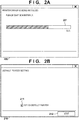
- Fig. 2A shows an installation screen 200 of the installer, and shows a state in which the installer installs the printer driver to register the printer A 110 in the PC 100.
- a progress bar 201 shows the progress status of installation of the printer driver and a registration operation of the printer A 110.
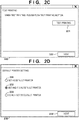
- Fig. 2B shows a default printer setting screen 210 of the installer.
- a checkbox 211 accepts selection of whether to register, as a default printer (default printing apparatus) that is normally used, the printer A 110 registered in Fig. 2A .
- a state in which the checkbox 211 is checked indicates that the user has set the printer A 110 as a default printer.
- the installer displays a next screen.
- Fig. 2C shows a test printing screen 220 of the installer.
- the installer executes test printing in the registered printer A 110. Test printing is executed to confirm that the registered printer A 110 is in a printable state.
- a button 222 is pressed, the installer displays a next screen.
- the processing shown in Fig. 3 is implemented when, for example, the CPU 101 reads out the program stored in the ROM 102 into the RAM and executes it.
- the installer determines whether the printing default printer designation function exists in the OS (step S301).
- the printing default printer designation function is a function in which the OS automatically sets, as a default printer, a printer used last for printing.
- the presence/absence of the printing default printer designation function is determined in step S301 based on, for example, an API, registry information, or whether the printing default printer designation function is supported by the version of the OS. If it is determined in step S301 that the printing default printer designation function exists, the installer determines whether the setting state of the printing default printer designation function is an enabled or disabled state (step S302). The setting state of the printing default printer designation function is determined in step S302 based on, for example, an API or registry information.
- step S302 If it is determined in step S302 that the printing default printer designation function is in the enabled state, the installer decides not to display the default printer setting screen 210 (step S303). After step S303, the installer ends the processing shown in Fig. 3 . On the other hand, if it is determined in step S301 that no printing default printer designation function exists or it is determined in step S302 that the printing default printer designation function is in the disabled state, the installer decides to display the default printer setting screen 210 (step S305). After step S305, the installer ends the processing shown in Fig. 3 .
- a screen to be displayed is not limited to that shown in Fig. 2B .
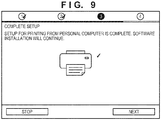
- a screen for accepting an instruction to execute test printing may be displayed first, as shown in Fig. 8A , and then a screen shown in Fig. 8B or 9 may be displayed. If it is determined in step S302 that the printing default printer designation function is in the disabled state, the screen of Fig. 8B including "set as printer normally used” is displayed. On the other hand, if it is determined in step S302 that the printing default printer designation function is in the enabled state, the screen of Fig. 9 including no "set as printer normally used” is displayed. In this example, "set as printer normally used” has the same meaning as "set as default printer” described above.
- the default printer setting screen 210 is displayed.
- the setting function of the default printer setting screen 210 is restricted by not displaying the default printer setting screen 210. This can prevent a situation in which although the user designates not to change the default printer by turning off the checkbox 211, the default printer is unwantedly changed by executing test printing.
- the printing default printer designation function does not work (that is, NO in step S301 or disabled state in step S302), the default printer setting screen 210 can be displayed.
- a default printer setting screen 230 shown in Fig. 2D is used instead of the default printer setting screen 210 shown in Fig. 2B .
- the default printer setting screen 230 shown in Fig. 2D will be described.
- Radio buttons 231, 232, and 233 can be selectively accepted from the user.
- Fig. 2D shows a state in which the radio button 232 is selected. If the radio button 231 is selected, a printer A 110 registered in Fig. 2A is registered as a default printer. If the radio button 232 is selected, the printer A 110 registered in Fig. 2A is registered as a default printer, and the printing default printer designation function is disabled. If the radio button 233 is selected, the printer A 110 registered in Fig. 2A is not registered as a default printer. When a button 234 is pressed, the installer displays a next screen.
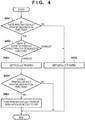
- the processing of disabling the default printer designation function will be described with reference to Fig. 4 .
- the processing shown in Fig. 4 is implemented when, for example, a CPU 101 reads out a program stored in a ROM 102 into a RAM and executes it.
- the installer starts the processing shown in Fig. 4 .
- the installer determines whether the printing default printer designation function exists in an OS (step S401).
- the presence/absence of the printing default printer designation function is determined in step S401 based on, for example, an API, registry information, or whether the printing default printer designation function is supported by the version of the OS.
- step S401 determines whether the setting state of the printing default printer designation function is an enabled or disabled state (step S402).
- the setting state of the printing default printer designation function is determined in step S402 based on, for example, an API or registry information. If it is determined in step S402 that the printing default printer designation function is in the enabled state, the installer performs default printer setting processing (step S403).
- the default printer setting processing in step S403 is implemented when, for example, the installer executes the SetDefaultPrinter API or issues, to the printer A 110, a dummy job that executes no printing.
- step S404 the installer determines whether to disable the printing default printer designation function. If it is determined in step S404 to disable the printing default printer designation function, that is, if the radio button 232 shown in Fig. 2D has been selected, the printing default printer designation function is turned off (step S405).
- the processing of turning off the printing default printer designation function in step S405 is implemented by, for example, executing the API or rewriting the registry information.
- step S405 the installer ends the processing shown in Fig. 4 . If it is determined in step S404 not to disable the printing default printer designation function, that is, if the radio button 231 shown in Fig. 2D has been selected, the installer ends the processing shown in Fig. 4 .
- step S405 the processing of turning off the printing default printer designation function in step S405 cannot be executed. In this case, the processing shown in Fig. 4 ends without executing the processes in steps S404 and S405.
- step S401 If it is determined in step S401 that no printing default printer designation function exists or it is determined in step S402 that the printing default printer designation function is in the disabled state, default printer setting processing is performed (step S406).
- the default printer setting processing in step S406 is implemented when, for example, the installer executes the SetDefaultPrinter API. After step S407, the installer ends the processing shown in Fig. 4 .
- the radio button 232 shown in Fig. 2D restricts the printing default printer designation function.
- This arrangement can prevent the default printer setting from being changed without intention when, for example, the printer A 110 is set as a default printer and then printing is executed in another different printer (for example, the printer B 130).
- the default printer setting screen 210 may be displayed.
- This arrangement can provide a function of setting a default printer to the user who executes no test printing button 221 in the first embodiment.
- the default printer setting screen 230 has a function of disabling the printing default printer designation function.
- the default printer setting screen 230 may be displayed instead of the default printer setting screen 210 to execute the processing shown in Fig. 4 .
- This arrangement can provide a function of setting a default printer to the user who executes no test printing button 221 in the first embodiment, and a function of disabling the printing default printer designation function.
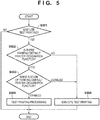
- Fig. 5 is a flowchart illustrating processing of disabling the default printer designation function, which is performed when the user wants to exclude a printer A 110 from a default printer setting.
- the processing shown in Fig. 5 is implemented when, for example, a CPU 101 reads out a program stored in a ROM 102 into a RAM and executes it.
- the installer starts the processing shown in Fig. 5 when displaying a test printing screen 220.
- the installer determines whether the user presses a test printing button 221 (step S501). If it is determined in step S501 that a button 222 is pressed without pressing the button 221, the processing shown in Fig. 5 ends.
- step S501 the installer determines whether the printing default printer designation function exists in an OS (step S502).
- the presence/absence of the printing default printer designation function is determined in step S502 based on, for example, an API, registry information, or whether the printing default printer designation function is supported by the version of the OS.
- step S503 the installer determines whether the setting state of the printing default printer designation function is an enabled or disabled state (step S503).
- the setting state of the printing default printer designation function is determined in step S503 based on, for example, an API or registry information.
- step S504 If it is determined in step S503 that the printing default printer designation function is in the enabled state, the installer performs test printing processing (step S504).
- the test printing processing in step S504 will be described in detail later with reference to Figs. 6A and 6B .
- step S504 the installer ends the processing shown in Fig. 5 .
- step S506 the installer executes test printing (step S506). After step S506, the installer ends the processing shown in Fig. 5 .
- step S504 The test printing processing in step S504 will be described with reference to Fig. 6A .
- the installer acquires the name of a printer icon currently assigned to the default printer (step S601).
- the installer executes test printing (step S602).
- the printing default printer designation function works, and the OS sets, as a default printer, the printer A 110 used for printing.
- the installer sets, as a default printer, the printer icon acquired in step S601 (step S603).
- the default printer setting processing in step S603 is implemented when, for example, the installer executes the SetDefaultPrinter API or issues, to the printer, with the acquired printer icon, a dummy job that executes no printing in the printer.
- the installer ends the processing shown in Fig. 6A .
- the timing of acquiring the name of the printer icon assigned to the original default printer in step S601 may be before installation of the printer driver. Since there exists a printer driver of a type of setting, as a default printer, the printer corresponding to the printer icon at a timing when the printer icon is generated, the original default printer may be acquired before installation of the printer driver.
- test printing processing different from that shown in Fig. 6A will be described next with reference to Fig. 6B .
- the installer turns off the printing default printer designation function (step S611).
- the operation of turning off the printing default printer designation function in step S611 is implemented by, for example, executing the API or rewriting the registry information.
- the installer executes test printing (step S612).
- the installer turns on the printing default printer designation function (step S613).
- the operation of turning on the printing default printer designation function in step S613 is implemented by, for example, executing the API or rewriting the registry information.
- the processing shown in Fig. 6B ends.
- Figs. 6A and 6B may be switched between Figs. 6A and 6B in accordance with user authority. For example, if the user has no registry operation authority, Fig. 6A is adopted. If the user has no default printer setting authority, Fig. 6B is adopted.
- the processing shown in Fig. 6A or 6B restricts the printing default printer designation function.
- the default printer setting can remain the same.
- the difference from the first to third embodiments will be described below.
- either the default printer setting screen 210 in Fig. 2B or the default printer setting screen 230 in Fig. 2D may be used.
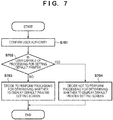
- Fig. 7 is a flowchart illustrating processing of switching processing in accordance with user authority.
- the processing shown in Fig. 7 is implemented when, for example, a program stored in a ROM 102 is read out into a RAM and executed.
- An installer starts the processing shown in Fig. 7 before the default printer setting screen 210 or 230 or a test printing screen 220 is displayed.
- the installer confirms user authority (step S701), and determines whether the user has authority capable of setting a default printer (step S702). If it is determined that the user has no authority capable of setting a default printer, it is decided to perform processing shown in Fig. 3 (step S703), and then the processing shown in Fig. 7 ends.
- step S702 If it is determined in step S702 that the user has authority capable of setting a default printer, the installer decides not to perform the processing shown in Fig. 3 (step S704), and then ends the processing shown in Fig. 7 . If the processing in step S704 is performed, the installer displays the default printer setting screen 210 or 230.
- a procedure may display, first, the default printer setting screen 210 or 230 or the test printing screen 220 of the installer described in each embodiment. Furthermore, the default printer setting function and the test printing function may be formed by the same screen.
- Each embodiment has exemplified the installer.
- any software having the test printing function and the default printer setting function may be adopted, and the same effect can be obtained.
- software of repairing the registered state of the printer icon (printing port), or printer icon control software having a function of switching the printer icon (printing port) may be adopted.
- Fig. 9 is displayed. For example, if it is determined in step S302 of Fig. 3 that the function is in the disabled state, a screen of Fig. 10A including "set as printer normally used" is displayed. If it is determined in step S302 that the function is in the enabled state, a screen of Fig. 10B including no "set as printer normally used” is displayed.
- Embodiment(s) of the present invention can also be realized by a computer of a system or apparatus that reads out and executes computer executable instructions (e.g., one or more programs) recorded on a storage medium (which may also be referred to more fully as a 'non-transitory computer-readable storage medium') to perform the functions of one or more of the above-described embodiment(s) and/or that includes one or more circuits (e.g., application specific integrated circuit (ASIC)) for performing the functions of one or more of the above-described embodiment(s), and by a method performed by the computer of the system or apparatus by, for example, reading out and executing the computer executable instructions from the storage medium to perform the functions of one or more of the above-described embodiment(s) and/or controlling the one or more circuits to perform the functions of one or more of the above-described embodiment(s).
- computer executable instructions e.g., one or more programs
- a storage medium which may also be referred to more fully as
- the computer may comprise one or more processors (e.g., central processing unit (CPU), micro processing unit (MPU)) and may include a network of separate computers or separate processors to read out and execute the computer executable instructions.
- the computer executable instructions may be provided to the computer, for example, from a network or the storage medium.
- the storage medium may include, for example, one or more of a hard disk, a random-access memory (RAM), a read only memory (ROM), a storage of distributed computing systems, an optical disk (such as a compact disc (CD), digital versatile disc (DVD), or Blu-ray Disc (BD)TM), a flash memory device, a memory card, and the like.
Landscapes
- Engineering & Computer Science (AREA)
- Theoretical Computer Science (AREA)
- Human Computer Interaction (AREA)
- Physics & Mathematics (AREA)
- General Engineering & Computer Science (AREA)
- General Physics & Mathematics (AREA)
- Accessory Devices And Overall Control Thereof (AREA)
Abstract
Description
- The present invention relates to a print control apparatus for controlling a printing apparatus, a control method, and a non-transitory computer-readable storage medium storing a program.
- When executing printing from software having a printing function, to determine a printing apparatus (to be referred to as a "printer" hereinafter) from which printing is to be executed, a printer (or a printer icon associated with a printer) is selected. There is conventionally provided a function of presetting, as a defined printing apparatus (to be referred to as a "default printer" hereinafter), a printer which is frequently used. This allows printing without the selection of a printer icon (Japanese Patent No.
4311440 - In Windows 10®, a function of "managing a printer normally used in Windows" is added. This function is a function (to be referred to as a "printing default printer designation function" hereinafter) in which an operating system (to be referred to as an "OS" hereinafter) automatically sets, as a default printer, a printer used last for printing.
- However, even if a user wants to execute only test printing without registering a printer as a default printer, if this function is in an enabled state, the printer is unwantedly registered as a default printer.
- An aspect of the present invention is to eliminate the above-mentioned problems with the conventional technology. The present invention provides a print control apparatus for appropriately setting a printing apparatus used by default, a control method, and a non-transitory computer-readable storage medium storing a program.
- The present invention in its first aspect provides a print control apparatus as specified in
claims 1 to 5. - The present invention in its second aspect provides a control method as specified in claims 6 to 10.
- The present invention in its third aspect provides a non-transitory computer-readable storage medium as specified in claims 11 to 15.
- According to the present invention, it is possible to appropriately set a printing apparatus used by default.
- Further features of the present invention will become apparent from the following description of exemplary embodiments with reference to the attached drawings.
-
-
Fig. 1 is a block diagram showing a system configuration; -
Figs. 2A to 2D are views each showing a screen of an installer; -
Fig. 3 is a flowchart illustrating display control processing of a default printer setting screen; -
Fig. 4 is a flowchart illustrating processing of disabling the default printer designation function; -
Fig. 5 is a flowchart illustrating processing of disabling a default printer designation function; -
Figs. 6A and 6B are flowcharts each illustrating the processing of disabling the default printer designation function; -
Fig. 7 is a flowchart illustrating switching of processing in accordance with user authority; -
Figs. 8A and 8B are views each showing a screen of the installer; -
Fig. 9 is a view showing a screen of the installer; and -
Figs. 10A and 10B are views each showing a screen of software other than an installer. - Preferred embodiments of the present invention will now be described hereinafter in detail, with reference to the accompanying drawings. It is to be understood that the following embodiments are not intended to limit the claims of the present invention, and that not all of the combinations of the aspects that are described according to the following embodiments are necessarily required with respect to the means to solve the problems according to the present invention. Note that the same reference numerals denote the same components and a description thereof will be omitted.
-
Fig. 1 is a block diagram showing the configuration of a print system including aPC 100, aprinter A 110, and aprinter B 130. The PC 100 operates as a print control apparatus for controlling a printer (printing apparatus). The PC 100 includes aCPU 101, aROM 102, aRAM 103, adisplay device 104, and an input interface (I/F) 105. The PC 100 also includes a USB I/F 106 and a network I/F 107. However, the PC 100 may be configured to include one of the USB I/F 106 and the network I/F 107. TheROM 102 stores aprogram 108 such as a printer driver and an installer (both of which will be described later). The PC 100 can communicate with the printer A 110 via aUSB cable 150. The PC 100 can also be connected to aLAN 152 via anetwork connection 151 implemented by an Ethernet cable or Wi-Fi. - If the
printer B 130 can be connected to theLAN 152 via anetwork connection 153, the PC 100 and theprinter B 130 can communicate with each other in the environment of thesame LAN 152. If a plurality of USB I/Fs 106 are mounted on the PC 100 or a USB hub (not shown) is used, the PC 100 can be connected to a plurality of printers simultaneously. The PC 100 can be connected to a plurality of printers simultaneously via theLAN 152. In this way, a plurality of printers can be connected to the PC 100 to perform communication. Therefore, printers connected to the PC 100 inFig. 1 are not limited to theprinter A 110 and theprinter B 130, and three or more printers may be connected. - The printer A 110 includes a
CPU 111, aROM 112, aRAM 113, adisplay device 114, an input I/F 115, aprinting unit 116, a USB I/F 117, and a network I/F 118. The printer A 110 can be connected to the PC 100 via the USB I/F 117 by theUSB cable 150, and communicate with the PC 100. The internal arrangement of theprinter B 130 is not shown inFig. 1 but is the same as that of theprinter A 110. Theprinter B 130 is connected to the LAN 152 via thenetwork connection 153 connected to a network I/F (not shown), and can communicate with the PC 100 connected to the same LAN. - In
Fig. 1 , as an example, each of thePC 100 and the printers (printer A 110 and printer B 130) includes both the USB I/F and the network I/F as connection I/Fs but may include one of the connection I/Fs. Furthermore, the USB I/F and the network I/F are exemplified as connection I/Fs connectable to the printer (printer A 110 or printer B 130) but communication complying with the Centronics, Bluetooth®, or IrDA standard may be used. Theprinter A 110 will be described as a representative example of theprinter A 110 andprinter B 130 unless otherwise specified. - Screens of an installer will be described with reference to
Figs. 2A to 2C . The installer is software that is mounted on the PC 100, and installs a printer driver (not shown) to register the printer A 110 in the PC 100.Fig. 2A shows aninstallation screen 200 of the installer, and shows a state in which the installer installs the printer driver to register theprinter A 110 in the PC 100. Aprogress bar 201 shows the progress status of installation of the printer driver and a registration operation of theprinter A 110. -
Fig. 2B shows a defaultprinter setting screen 210 of the installer. Acheckbox 211 accepts selection of whether to register, as a default printer (default printing apparatus) that is normally used, theprinter A 110 registered inFig. 2A . A state in which thecheckbox 211 is checked indicates that the user has set theprinter A 110 as a default printer. When abutton 212 is pressed, the installer displays a next screen. -
Fig. 2C shows atest printing screen 220 of the installer. When the user presses abutton 221, the installer executes test printing in the registeredprinter A 110. Test printing is executed to confirm that the registeredprinter A 110 is in a printable state. When abutton 222 is pressed, the installer displays a next screen. - Processing of controlling display of the default
printer setting screen 210 of the installer will be described with reference toFig. 3 . The processing shown inFig. 3 is implemented when, for example, theCPU 101 reads out the program stored in theROM 102 into the RAM and executes it. When the processing shown inFig. 3 starts, the installer determines whether the printing default printer designation function exists in the OS (step S301). The printing default printer designation function is a function in which the OS automatically sets, as a default printer, a printer used last for printing. - The presence/absence of the printing default printer designation function is determined in step S301 based on, for example, an API, registry information, or whether the printing default printer designation function is supported by the version of the OS. If it is determined in step S301 that the printing default printer designation function exists, the installer determines whether the setting state of the printing default printer designation function is an enabled or disabled state (step S302). The setting state of the printing default printer designation function is determined in step S302 based on, for example, an API or registry information.
- If it is determined in step S302 that the printing default printer designation function is in the enabled state, the installer decides not to display the default printer setting screen 210 (step S303). After step S303, the installer ends the processing shown in
Fig. 3 . On the other hand, if it is determined in step S301 that no printing default printer designation function exists or it is determined in step S302 that the printing default printer designation function is in the disabled state, the installer decides to display the default printer setting screen 210 (step S305). After step S305, the installer ends the processing shown inFig. 3 . - Note that a screen to be displayed is not limited to that shown in
Fig. 2B . For example, after completion of installation of the printer driver, a screen for accepting an instruction to execute test printing may be displayed first, as shown inFig. 8A , and then a screen shown inFig. 8B or9 may be displayed. If it is determined in step S302 that the printing default printer designation function is in the disabled state, the screen ofFig. 8B including "set as printer normally used" is displayed. On the other hand, if it is determined in step S302 that the printing default printer designation function is in the enabled state, the screen ofFig. 9 including no "set as printer normally used" is displayed. In this example, "set as printer normally used" has the same meaning as "set as default printer" described above. - As described above, according to this embodiment, only if the printing default printer designation function is in the disabled state, the default
printer setting screen 210 is displayed. On the other hand, if the printing default printer designation function is in the enabled state, the setting function of the defaultprinter setting screen 210 is restricted by not displaying the defaultprinter setting screen 210. This can prevent a situation in which although the user designates not to change the default printer by turning off thecheckbox 211, the default printer is unwantedly changed by executing test printing. Furthermore, only when the printing default printer designation function does not work (that is, NO in step S301 or disabled state in step S302), the defaultprinter setting screen 210 can be displayed. - In the second embodiment, the difference from the first embodiment will be described below. In this embodiment, a default
printer setting screen 230 shown inFig. 2D is used instead of the defaultprinter setting screen 210 shown inFig. 2B . - The default
printer setting screen 230 shown inFig. 2D will be described.Radio buttons Fig. 2D shows a state in which theradio button 232 is selected. If theradio button 231 is selected, aprinter A 110 registered inFig. 2A is registered as a default printer. If theradio button 232 is selected, theprinter A 110 registered inFig. 2A is registered as a default printer, and the printing default printer designation function is disabled. If theradio button 233 is selected, theprinter A 110 registered inFig. 2A is not registered as a default printer. When abutton 234 is pressed, the installer displays a next screen. - The processing of disabling the default printer designation function will be described with reference to
Fig. 4 . The processing shown inFig. 4 is implemented when, for example, aCPU 101 reads out a program stored in aROM 102 into a RAM and executes it. When one of theradio buttons Fig. 2D is selected and thebutton 234 is pressed, the installer starts the processing shown inFig. 4 . When the processing shown inFig. 4 starts, the installer determines whether the printing default printer designation function exists in an OS (step S401). The presence/absence of the printing default printer designation function is determined in step S401 based on, for example, an API, registry information, or whether the printing default printer designation function is supported by the version of the OS. - If it is determined in step S401 that the printing default printer designation function exists, the installer determines whether the setting state of the printing default printer designation function is an enabled or disabled state (step S402). The setting state of the printing default printer designation function is determined in step S402 based on, for example, an API or registry information. If it is determined in step S402 that the printing default printer designation function is in the enabled state, the installer performs default printer setting processing (step S403). The default printer setting processing in step S403 is implemented when, for example, the installer executes the SetDefaultPrinter API or issues, to the
printer A 110, a dummy job that executes no printing. - After step S403, the installer determines whether to disable the printing default printer designation function (step S404). If it is determined in step S404 to disable the printing default printer designation function, that is, if the
radio button 232 shown inFig. 2D has been selected, the printing default printer designation function is turned off (step S405). The processing of turning off the printing default printer designation function in step S405 is implemented by, for example, executing the API or rewriting the registry information. After step S405, the installer ends the processing shown inFig. 4 . If it is determined in step S404 not to disable the printing default printer designation function, that is, if theradio button 231 shown inFig. 2D has been selected, the installer ends the processing shown inFig. 4 . - Depending on user authority, the processing of turning off the printing default printer designation function in step S405 cannot be executed. In this case, the processing shown in
Fig. 4 ends without executing the processes in steps S404 and S405. - If it is determined in step S401 that no printing default printer designation function exists or it is determined in step S402 that the printing default printer designation function is in the disabled state, default printer setting processing is performed (step S406). The default printer setting processing in step S406 is implemented when, for example, the installer executes the SetDefaultPrinter API. After step S407, the installer ends the processing shown in
Fig. 4 . - As described above, according to this embodiment, the
radio button 232 shown inFig. 2D restricts the printing default printer designation function. This arrangement can prevent the default printer setting from being changed without intention when, for example, theprinter A 110 is set as a default printer and then printing is executed in another different printer (for example, the printer B 130). - In the first embodiment, if it is decided not to display the default printer setting screen 210 (step S303) and the
button 222 is pressed without executing thetest printing button 221 in thetest printing screen 220, the defaultprinter setting screen 210 may be displayed. This arrangement can provide a function of setting a default printer to the user who executes notest printing button 221 in the first embodiment. The defaultprinter setting screen 230 has a function of disabling the printing default printer designation function. In the above operation of the first embodiment, the defaultprinter setting screen 230 may be displayed instead of the defaultprinter setting screen 210 to execute the processing shown inFig. 4 . This arrangement can provide a function of setting a default printer to the user who executes notest printing button 221 in the first embodiment, and a function of disabling the printing default printer designation function. - In the third embodiment, the difference from the first and second embodiments will be described below. In this embodiment, either a default
printer setting screen -
Fig. 5 is a flowchart illustrating processing of disabling the default printer designation function, which is performed when the user wants to exclude aprinter A 110 from a default printer setting. The processing shown inFig. 5 is implemented when, for example, aCPU 101 reads out a program stored in aROM 102 into a RAM and executes it. By turning off acheckbox 211 inFig. 2B or selecting aradio button 233 inFig. 2D , the installer starts the processing shown inFig. 5 when displaying atest printing screen 220. When the processing shown inFig. 5 starts, the installer determines whether the user presses a test printing button 221 (step S501). If it is determined in step S501 that abutton 222 is pressed without pressing thebutton 221, the processing shown inFig. 5 ends. - If it is determined in step S501 that the
button 221 is pressed, the installer determines whether the printing default printer designation function exists in an OS (step S502). The presence/absence of the printing default printer designation function is determined in step S502 based on, for example, an API, registry information, or whether the printing default printer designation function is supported by the version of the OS. If it is determined in step S502 that the printing default printer designation function exists, the installer determines whether the setting state of the printing default printer designation function is an enabled or disabled state (step S503). The setting state of the printing default printer designation function is determined in step S503 based on, for example, an API or registry information. If it is determined in step S503 that the printing default printer designation function is in the enabled state, the installer performs test printing processing (step S504). The test printing processing in step S504 will be described in detail later with reference toFigs. 6A and 6B . After step S504, the installer ends the processing shown inFig. 5 . On the other hand, if it is determined in the determination processing (step S502) that no printing default printer designation function exists or it is determined in step S503 that the printing default printer designation function is in the disabled state, the installer executes test printing (step S506). After step S506, the installer ends the processing shown inFig. 5 . - The test printing processing in step S504 will be described with reference to
Fig. 6A . When the processing shown inFig. 6A starts, the installer acquires the name of a printer icon currently assigned to the default printer (step S601). Then, the installer executes test printing (step S602). At this time, the printing default printer designation function works, and the OS sets, as a default printer, theprinter A 110 used for printing. The installer sets, as a default printer, the printer icon acquired in step S601 (step S603). The default printer setting processing in step S603 is implemented when, for example, the installer executes the SetDefaultPrinter API or issues, to the printer, with the acquired printer icon, a dummy job that executes no printing in the printer. After step S603, the installer ends the processing shown inFig. 6A . - Note that the timing of acquiring the name of the printer icon assigned to the original default printer in step S601 may be before installation of the printer driver. Since there exists a printer driver of a type of setting, as a default printer, the printer corresponding to the printer icon at a timing when the printer icon is generated, the original default printer may be acquired before installation of the printer driver.
- Test printing processing different from that shown in
Fig. 6A will be described next with reference toFig. 6B . When the test printing processing shown inFig. 6B starts, the installer turns off the printing default printer designation function (step S611). The operation of turning off the printing default printer designation function in step S611 is implemented by, for example, executing the API or rewriting the registry information. Then, the installer executes test printing (step S612). The installer turns on the printing default printer designation function (step S613). The operation of turning on the printing default printer designation function in step S613 is implemented by, for example, executing the API or rewriting the registry information. After step S613, the processing shown inFig. 6B ends. - Note that the processing to be adopted may be switched between
Figs. 6A and 6B in accordance with user authority. For example, if the user has no registry operation authority,Fig. 6A is adopted. If the user has no default printer setting authority,Fig. 6B is adopted. - As described above, according to this embodiment, the processing shown in
Fig. 6A or 6B restricts the printing default printer designation function. With this arrangement, even in an environment in which the printing default printer designation function is in the enabled state, when no default printer is designated and test printing is executed, the default printer setting can remain the same. - In the fourth embodiment, the difference from the first to third embodiments will be described below. In this embodiment, either the default
printer setting screen 210 inFig. 2B or the defaultprinter setting screen 230 inFig. 2D may be used. -
Fig. 7 is a flowchart illustrating processing of switching processing in accordance with user authority. The processing shown inFig. 7 is implemented when, for example, a program stored in aROM 102 is read out into a RAM and executed. An installer starts the processing shown inFig. 7 before the defaultprinter setting screen test printing screen 220 is displayed. The installer confirms user authority (step S701), and determines whether the user has authority capable of setting a default printer (step S702). If it is determined that the user has no authority capable of setting a default printer, it is decided to perform processing shown inFig. 3 (step S703), and then the processing shown inFig. 7 ends. If it is determined in step S702 that the user has authority capable of setting a default printer, the installer decides not to perform the processing shown inFig. 3 (step S704), and then ends the processing shown inFig. 7 . If the processing in step S704 is performed, the installer displays the defaultprinter setting screen - As described above, according to this embodiment, it is possible to switch, in accordance with user authority, whether to execute the processing shown in
Fig. 3 . For example, if the user cannot perform a default printer designation operation, the processing shown inFig. 3 is executed. - A procedure may display, first, the default
printer setting screen test printing screen 220 of the installer described in each embodiment. Furthermore, the default printer setting function and the test printing function may be formed by the same screen. - Each embodiment has exemplified the installer. However, any software having the test printing function and the default printer setting function may be adopted, and the same effect can be obtained. For example, software of repairing the registered state of the printer icon (printing port), or printer icon control software having a function of switching the printer icon (printing port) may be adopted.
- Note that as a result of diagnosing the connection state between an information processing apparatus (corresponding to the
PC 100 shown inFig. 1 ) and a printer using the software of repairing the registered state of the printer icon (printing port), and repairing the registered state,Fig. 9 is displayed. For example, if it is determined in step S302 ofFig. 3 that the function is in the disabled state, a screen ofFig. 10A including "set as printer normally used" is displayed. If it is determined in step S302 that the function is in the enabled state, a screen ofFig. 10B including no "set as printer normally used" is displayed. - Embodiment(s) of the present invention can also be realized by a computer of a system or apparatus that reads out and executes computer executable instructions (e.g., one or more programs) recorded on a storage medium (which may also be referred to more fully as a 'non-transitory computer-readable storage medium') to perform the functions of one or more of the above-described embodiment(s) and/or that includes one or more circuits (e.g., application specific integrated circuit (ASIC)) for performing the functions of one or more of the above-described embodiment(s), and by a method performed by the computer of the system or apparatus by, for example, reading out and executing the computer executable instructions from the storage medium to perform the functions of one or more of the above-described embodiment(s) and/or controlling the one or more circuits to perform the functions of one or more of the above-described embodiment(s). The computer may comprise one or more processors (e.g., central processing unit (CPU), micro processing unit (MPU)) and may include a network of separate computers or separate processors to read out and execute the computer executable instructions. The computer executable instructions may be provided to the computer, for example, from a network or the storage medium. The storage medium may include, for example, one or more of a hard disk, a random-access memory (RAM), a read only memory (ROM), a storage of distributed computing systems, an optical disk (such as a compact disc (CD), digital versatile disc (DVD), or Blu-ray Disc (BD)™), a flash memory device, a memory card, and the like.
- While the present invention has been described with reference to exemplary embodiments, it is to be understood that the invention is not limited to the disclosed exemplary embodiments. The scope of the following claims is to be accorded the broadest interpretation so as to encompass all such modifications and equivalent structures and functions.
Claims (15)
- A print control apparatus (100) for controlling a printing apparatus, comprising:display control means for displaying, on a display unit (104), a setting content associated with setting processing of a default printing apparatus that can be used without accepting a selection operation by a user;acquisition means for acquiring information about a function of setting, as the default printing apparatus, a printing apparatus (110, 130) instructed to execute printing; anda restriction means for restricting, if the acquired information indicates enabling of the function, display processing of the setting content so the setting content is not operated.
- The apparatus according to claim 1, wherein if the acquired information indicates enabling of the function, the restriction means prevents the setting content from being displayed on the display unit.
- The apparatus according to claim 1, wherein after a printer driver of the printing apparatus is installed, the restriction means restricts the display processing of the setting content so the setting content is not operated.
- The apparatus according to claim 1, wherein after a printer driver of the printing apparatus is installed and before test printing for the printing apparatus is instructed, the restriction means restricts, based on enabling of the function, the display processing of the setting content so the setting content is not operated.
- The apparatus according to claim 1, wherein after a printer driver of the printing apparatus is installed and after test printing for the printing apparatus is instructed, the restriction means restricts, based on enabling of the function, the display processing of the setting content so the setting content is not operated.
- A control method executed in a print control apparatus (100) for controlling a printing apparatus (110, 130), comprising:displaying, on a display unit (104), a setting content associated with setting processing of a default printing apparatus that can be used without accepting a selection operation by a user;acquiring information about a function of setting, as the default printing apparatus, a printing apparatus instructed to execute printing; andrestricting, if the acquired information indicates enabling of the function, display processing of the setting content so the setting content is not operated.
- The method according to claim 6, wherein if the acquired information indicates enabling of the function, the setting content is prevented from being displayed on the display unit.
- The method according to claim 6, wherein after a printer driver of the printing apparatus is installed, the display processing of the setting content is restricted so the setting content is not operated.
- The method according to claim 6, wherein after a printer driver of the printing apparatus is installed and before test printing for the printing apparatus is instructed, the display processing of the setting content is restricted, based on enabling of the function, so the setting content is not operated.
- The method according to claim 6, wherein after a printer driver of the printing apparatus is installed and after test printing for the printing apparatus is instructed, the display processing of the setting content is restricted, based on enabling of the function, so the setting content is not operated.
- A non-transitory computer-readable storage medium storing a program for causing a computer to execute:displaying, on a display unit (104), a setting content associated with setting processing of a default printing apparatus that can be used without accepting a selection operation by a user;acquiring information about a function of setting, as the default printing apparatus, a printing apparatus (110, 130) instructed to execute printing; andrestricting, if the acquired information indicates enabling of the function, display processing of the setting content so the setting content is not operated.
- The storage medium according to claim 11, wherein if the acquired information indicates enabling of the function, the setting content is prevented from being displayed on the display unit.
- The storage medium according to claim 11, wherein after a printer driver of the printing apparatus is installed, the display processing of the setting content is restricted so the setting content is not operated.
- The storage medium according to claim 11, wherein after a printer driver of the printing apparatus is installed and before test printing for the printing apparatus is instructed, the display processing of the setting content is restricted, based on enabling of the function, so the setting content is not operated.
- The storage medium according to claim 11, wherein after a printer driver of the printing apparatus is installed and after test printing for the printing apparatus is instructed, the display processing of the setting content is restricted, based on enabling of the function, so the setting content is not operated.
Applications Claiming Priority (1)
| Application Number | Priority Date | Filing Date | Title |
|---|---|---|---|
| JP2018027250A JP7112206B2 (en) | 2018-02-19 | 2018-02-19 | PRINT CONTROL DEVICE, CONTROL METHOD AND PROGRAM |
Publications (2)
| Publication Number | Publication Date |
|---|---|
| EP3528106A1 true EP3528106A1 (en) | 2019-08-21 |
| EP3528106B1 EP3528106B1 (en) | 2025-01-01 |
Family
ID=65199304
Family Applications (1)
| Application Number | Title | Priority Date | Filing Date |
|---|---|---|---|
| EP19152552.6A Active EP3528106B1 (en) | 2018-02-19 | 2019-01-18 | Print control apparatus, control method, and non-transitory computer-readable storage medium storing program |
Country Status (4)
| Country | Link |
|---|---|
| US (2) | US10761797B2 (en) |
| EP (1) | EP3528106B1 (en) |
| JP (2) | JP7112206B2 (en) |
| CN (1) | CN110175004B (en) |
Families Citing this family (3)
| Publication number | Priority date | Publication date | Assignee | Title |
|---|---|---|---|---|
| WO2021120025A1 (en) * | 2019-12-18 | 2021-06-24 | Luxcreo (Beijing) Inc. | Systems and methods for treating a printed model |
| JP7534882B2 (en) * | 2020-07-29 | 2024-08-15 | キヤノン株式会社 | Information processing device, control method, program, and storage medium |
| JP7599899B2 (en) * | 2020-10-20 | 2024-12-16 | キヤノン株式会社 | Information processing device, method for controlling information processing device, and program |
Citations (2)
| Publication number | Priority date | Publication date | Assignee | Title |
|---|---|---|---|---|
| EP1956751A2 (en) * | 2007-02-09 | 2008-08-13 | Brother Kogyo Kabushiki Kaisha | Information processing device, method and computer readable medium for printer connection setting |
| JP4311440B2 (en) | 2006-12-01 | 2009-08-12 | コニカミノルタビジネステクノロジーズ株式会社 | Printing system, printing apparatus, terminal apparatus, print setting method, and print setting program |
Family Cites Families (11)
| Publication number | Priority date | Publication date | Assignee | Title |
|---|---|---|---|---|
| JP2004295680A (en) * | 2003-03-27 | 2004-10-21 | Brother Ind Ltd | Image forming control device and program |
| JP3944133B2 (en) | 2003-07-25 | 2007-07-11 | キヤノン株式会社 | Information processing apparatus, information processing method, program, and computer-readable storage medium |
| JP4623461B2 (en) * | 2004-11-30 | 2011-02-02 | キヤノンマーケティングジャパン株式会社 | Information processing apparatus, print control method, printer driver program, and recording medium |
| JP2006178846A (en) | 2004-12-24 | 2006-07-06 | Canon Inc | Printer system |
| JP4870621B2 (en) * | 2006-09-15 | 2012-02-08 | 株式会社リコー | Information processing apparatus, method, system, program, and recording medium thereof |
| JP5283969B2 (en) * | 2007-05-31 | 2013-09-04 | キヤノン株式会社 | Information processing apparatus and information processing apparatus control method |
| JP4889776B2 (en) | 2009-09-29 | 2012-03-07 | シャープ株式会社 | Printer control apparatus, printer control method, printing system, program, and recording medium |
| JP5451352B2 (en) | 2009-12-09 | 2014-03-26 | キヤノン株式会社 | Print server, print setting screen providing method and program |
| JP5458909B2 (en) * | 2010-01-27 | 2014-04-02 | 株式会社リコー | Information processing apparatus, print control program, computer-readable storage medium, image processing apparatus, and print system |
| EP2402860B1 (en) * | 2010-06-29 | 2020-10-07 | Brother Kogyo Kabushiki Kaisha | Data processing apparatus |
| JP6812802B2 (en) * | 2017-01-11 | 2021-01-13 | コニカミノルタ株式会社 | Control unit, control method and printer driver program |
-
2018
- 2018-02-19 JP JP2018027250A patent/JP7112206B2/en active Active
-
2019
- 2019-01-18 EP EP19152552.6A patent/EP3528106B1/en active Active
- 2019-02-05 US US16/267,876 patent/US10761797B2/en active Active
- 2019-02-19 CN CN201910122022.8A patent/CN110175004B/en active Active
-
2020
- 2020-07-31 US US16/944,327 patent/US11567720B2/en active Active
-
2022
- 2022-07-22 JP JP2022117426A patent/JP7361848B2/en active Active
Patent Citations (2)
| Publication number | Priority date | Publication date | Assignee | Title |
|---|---|---|---|---|
| JP4311440B2 (en) | 2006-12-01 | 2009-08-12 | コニカミノルタビジネステクノロジーズ株式会社 | Printing system, printing apparatus, terminal apparatus, print setting method, and print setting program |
| EP1956751A2 (en) * | 2007-02-09 | 2008-08-13 | Brother Kogyo Kabushiki Kaisha | Information processing device, method and computer readable medium for printer connection setting |
Also Published As
| Publication number | Publication date |
|---|---|
| US10761797B2 (en) | 2020-09-01 |
| US11567720B2 (en) | 2023-01-31 |
| US20190258440A1 (en) | 2019-08-22 |
| CN110175004B (en) | 2024-07-19 |
| JP2022140561A (en) | 2022-09-26 |
| US20200364016A1 (en) | 2020-11-19 |
| EP3528106B1 (en) | 2025-01-01 |
| JP7112206B2 (en) | 2022-08-03 |
| CN110175004A (en) | 2019-08-27 |
| JP7361848B2 (en) | 2023-10-16 |
| JP2019144766A (en) | 2019-08-29 |
Similar Documents
| Publication | Publication Date | Title |
|---|---|---|
| CN108292198B (en) | Information processing apparatus, setting method, and information processing system | |
| US10126990B2 (en) | Suppressing a competing error message from an operating system or print driver | |
| JP7361848B2 (en) | Printing control device, control method and program | |
| US10082991B2 (en) | Information processing apparatus, control method of information processing apparatus, and non-transitory computer-readable storage medium | |
| US20200050411A1 (en) | Printing apparatus, control method, and storage medium | |
| US20190260904A1 (en) | Image forming apparatus, and method and program for controlling image forming apparatus | |
| JP7622187B2 (en) | IMAGE PROCESSING APPARATUS, INFORMATION PROCESSING METHOD, AND PROGRAM | |
| US9930208B2 (en) | Printing apparatus capable of performing direct wireless communication, method of controlling direct wireless communication of the printing apparatus, and storage medium | |
| EP4180940B1 (en) | Information processing apparatus, method of controlling information processing apparatus, and non-transitory computer-readable storage medium | |
| JP2017091099A (en) | Information processing device, display control method, and program | |
| US10346102B2 (en) | Information processing apparatus that controls install of a device driver in accordance with capability of an operating system, installation method, and storage medium | |
| US11614906B2 (en) | Information processing apparatus, control method of information processing apparatus, and program | |
| EP3247097B1 (en) | Printing apparatus, method of controlling the same, and storage medium | |
| US20250004676A1 (en) | Storage medium, information processing apparatus, and control method for the same | |
| US11977799B2 (en) | Control method capable of switching between image output apparatuses, non-transitory computer-readable storage medium, and information processing apparatus | |
| US9521275B2 (en) | Electronic device and recording medium that support operation of users | |
| US11385848B2 (en) | Information processing apparatus and control method | |
| US20190258436A1 (en) | Information processing apparatus, control method of information processing apparatus, and program | |
| US10735624B2 (en) | Information processing apparatus that can be set by a user operation to limit functions provided to an external apparatus so as to include a printing function but exclude a file sharing function, method for controlling the same, and storage medium | |
| WO2017086460A1 (en) | Information processing device, setting method, and information processing system |
Legal Events
| Date | Code | Title | Description |
|---|---|---|---|
| PUAI | Public reference made under article 153(3) epc to a published international application that has entered the european phase |
Free format text: ORIGINAL CODE: 0009012 |
|
| STAA | Information on the status of an ep patent application or granted ep patent |
Free format text: STATUS: THE APPLICATION HAS BEEN PUBLISHED |
|
| AK | Designated contracting states |
Kind code of ref document: A1 Designated state(s): AL AT BE BG CH CY CZ DE DK EE ES FI FR GB GR HR HU IE IS IT LI LT LU LV MC MK MT NL NO PL PT RO RS SE SI SK SM TR |
|
| AX | Request for extension of the european patent |
Extension state: BA ME |
|
| STAA | Information on the status of an ep patent application or granted ep patent |
Free format text: STATUS: REQUEST FOR EXAMINATION WAS MADE |
|
| 17P | Request for examination filed |
Effective date: 20200221 |
|
| RBV | Designated contracting states (corrected) |
Designated state(s): AL AT BE BG CH CY CZ DE DK EE ES FI FR GB GR HR HU IE IS IT LI LT LU LV MC MK MT NL NO PL PT RO RS SE SI SK SM TR |
|
| STAA | Information on the status of an ep patent application or granted ep patent |
Free format text: STATUS: EXAMINATION IS IN PROGRESS |
|
| 17Q | First examination report despatched |
Effective date: 20210426 |
|
| GRAP | Despatch of communication of intention to grant a patent |
Free format text: ORIGINAL CODE: EPIDOSNIGR1 |
|
| STAA | Information on the status of an ep patent application or granted ep patent |
Free format text: STATUS: GRANT OF PATENT IS INTENDED |
|
| INTG | Intention to grant announced |
Effective date: 20240814 |
|
| GRAS | Grant fee paid |
Free format text: ORIGINAL CODE: EPIDOSNIGR3 |
|
| GRAA | (expected) grant |
Free format text: ORIGINAL CODE: 0009210 |
|
| STAA | Information on the status of an ep patent application or granted ep patent |
Free format text: STATUS: THE PATENT HAS BEEN GRANTED |
|
| AK | Designated contracting states |
Kind code of ref document: B1 Designated state(s): AL AT BE BG CH CY CZ DE DK EE ES FI FR GB GR HR HU IE IS IT LI LT LU LV MC MK MT NL NO PL PT RO RS SE SI SK SM TR |
|
| REG | Reference to a national code |
Ref country code: GB Ref legal event code: FG4D |
|
| REG | Reference to a national code |
Ref country code: DE Ref legal event code: R096 Ref document number: 602019064144 Country of ref document: DE |
|
| REG | Reference to a national code |
Ref country code: CH Ref legal event code: EP |
|
| REG | Reference to a national code |
Ref country code: IE Ref legal event code: FG4D |
|
| REG | Reference to a national code |
Ref country code: LT Ref legal event code: MG9D |
|
| REG | Reference to a national code |
Ref country code: NL Ref legal event code: MP Effective date: 20250101 |
|
| REG | Reference to a national code |
Ref country code: AT Ref legal event code: MK05 Ref document number: 1756944 Country of ref document: AT Kind code of ref document: T Effective date: 20250101 |
|
| PG25 | Lapsed in a contracting state [announced via postgrant information from national office to epo] |
Ref country code: NL Free format text: LAPSE BECAUSE OF FAILURE TO SUBMIT A TRANSLATION OF THE DESCRIPTION OR TO PAY THE FEE WITHIN THE PRESCRIBED TIME-LIMIT Effective date: 20250101 |
|
| PG25 | Lapsed in a contracting state [announced via postgrant information from national office to epo] |
Ref country code: FI Free format text: LAPSE BECAUSE OF FAILURE TO SUBMIT A TRANSLATION OF THE DESCRIPTION OR TO PAY THE FEE WITHIN THE PRESCRIBED TIME-LIMIT Effective date: 20250101 |
|
| PG25 | Lapsed in a contracting state [announced via postgrant information from national office to epo] |
Ref country code: PL Free format text: LAPSE BECAUSE OF FAILURE TO SUBMIT A TRANSLATION OF THE DESCRIPTION OR TO PAY THE FEE WITHIN THE PRESCRIBED TIME-LIMIT Effective date: 20250101 |
|
| PG25 | Lapsed in a contracting state [announced via postgrant information from national office to epo] |
Ref country code: ES Free format text: LAPSE BECAUSE OF FAILURE TO SUBMIT A TRANSLATION OF THE DESCRIPTION OR TO PAY THE FEE WITHIN THE PRESCRIBED TIME-LIMIT Effective date: 20250101 |
|
| PG25 | Lapsed in a contracting state [announced via postgrant information from national office to epo] |
Ref country code: IS Free format text: LAPSE BECAUSE OF FAILURE TO SUBMIT A TRANSLATION OF THE DESCRIPTION OR TO PAY THE FEE WITHIN THE PRESCRIBED TIME-LIMIT Effective date: 20250501 Ref country code: NO Free format text: LAPSE BECAUSE OF FAILURE TO SUBMIT A TRANSLATION OF THE DESCRIPTION OR TO PAY THE FEE WITHIN THE PRESCRIBED TIME-LIMIT Effective date: 20250401 |
|
| PG25 | Lapsed in a contracting state [announced via postgrant information from national office to epo] |
Ref country code: HR Free format text: LAPSE BECAUSE OF FAILURE TO SUBMIT A TRANSLATION OF THE DESCRIPTION OR TO PAY THE FEE WITHIN THE PRESCRIBED TIME-LIMIT Effective date: 20250101 |
|
| PG25 | Lapsed in a contracting state [announced via postgrant information from national office to epo] |
Ref country code: PT Free format text: LAPSE BECAUSE OF FAILURE TO SUBMIT A TRANSLATION OF THE DESCRIPTION OR TO PAY THE FEE WITHIN THE PRESCRIBED TIME-LIMIT Effective date: 20250502 Ref country code: LV Free format text: LAPSE BECAUSE OF FAILURE TO SUBMIT A TRANSLATION OF THE DESCRIPTION OR TO PAY THE FEE WITHIN THE PRESCRIBED TIME-LIMIT Effective date: 20250101 |
|
| PG25 | Lapsed in a contracting state [announced via postgrant information from national office to epo] |
Ref country code: BG Free format text: LAPSE BECAUSE OF FAILURE TO SUBMIT A TRANSLATION OF THE DESCRIPTION OR TO PAY THE FEE WITHIN THE PRESCRIBED TIME-LIMIT Effective date: 20250101 Ref country code: GR Free format text: LAPSE BECAUSE OF FAILURE TO SUBMIT A TRANSLATION OF THE DESCRIPTION OR TO PAY THE FEE WITHIN THE PRESCRIBED TIME-LIMIT Effective date: 20250402 |
|
| PG25 | Lapsed in a contracting state [announced via postgrant information from national office to epo] |
Ref country code: AT Free format text: LAPSE BECAUSE OF FAILURE TO SUBMIT A TRANSLATION OF THE DESCRIPTION OR TO PAY THE FEE WITHIN THE PRESCRIBED TIME-LIMIT Effective date: 20250101 |
|
| PG25 | Lapsed in a contracting state [announced via postgrant information from national office to epo] |
Ref country code: CZ Free format text: LAPSE BECAUSE OF FAILURE TO SUBMIT A TRANSLATION OF THE DESCRIPTION OR TO PAY THE FEE WITHIN THE PRESCRIBED TIME-LIMIT Effective date: 20250101 |
|
| REG | Reference to a national code |
Ref country code: CH Ref legal event code: PL |
|
| PG25 | Lapsed in a contracting state [announced via postgrant information from national office to epo] |
Ref country code: SE Free format text: LAPSE BECAUSE OF FAILURE TO SUBMIT A TRANSLATION OF THE DESCRIPTION OR TO PAY THE FEE WITHIN THE PRESCRIBED TIME-LIMIT Effective date: 20250101 |
|
| PG25 | Lapsed in a contracting state [announced via postgrant information from national office to epo] |
Ref country code: LU Free format text: LAPSE BECAUSE OF NON-PAYMENT OF DUE FEES Effective date: 20250118 |
|
| REG | Reference to a national code |
Ref country code: DE Ref legal event code: R097 Ref document number: 602019064144 Country of ref document: DE |
|
| PG25 | Lapsed in a contracting state [announced via postgrant information from national office to epo] |
Ref country code: SM Free format text: LAPSE BECAUSE OF FAILURE TO SUBMIT A TRANSLATION OF THE DESCRIPTION OR TO PAY THE FEE WITHIN THE PRESCRIBED TIME-LIMIT Effective date: 20250101 |
|
| PG25 | Lapsed in a contracting state [announced via postgrant information from national office to epo] |
Ref country code: DK Free format text: LAPSE BECAUSE OF FAILURE TO SUBMIT A TRANSLATION OF THE DESCRIPTION OR TO PAY THE FEE WITHIN THE PRESCRIBED TIME-LIMIT Effective date: 20250101 |
|
| PG25 | Lapsed in a contracting state [announced via postgrant information from national office to epo] |
Ref country code: MC Free format text: LAPSE BECAUSE OF FAILURE TO SUBMIT A TRANSLATION OF THE DESCRIPTION OR TO PAY THE FEE WITHIN THE PRESCRIBED TIME-LIMIT Effective date: 20250101 |
|
| PG25 | Lapsed in a contracting state [announced via postgrant information from national office to epo] |
Ref country code: IT Free format text: LAPSE BECAUSE OF FAILURE TO SUBMIT A TRANSLATION OF THE DESCRIPTION OR TO PAY THE FEE WITHIN THE PRESCRIBED TIME-LIMIT Effective date: 20250101 |
|
| PG25 | Lapsed in a contracting state [announced via postgrant information from national office to epo] |
Ref country code: BE Free format text: LAPSE BECAUSE OF NON-PAYMENT OF DUE FEES Effective date: 20250131 |
|
| PG25 | Lapsed in a contracting state [announced via postgrant information from national office to epo] |
Ref country code: CH Free format text: LAPSE BECAUSE OF NON-PAYMENT OF DUE FEES Effective date: 20250131 |
|
| PG25 | Lapsed in a contracting state [announced via postgrant information from national office to epo] |
Ref country code: EE Free format text: LAPSE BECAUSE OF FAILURE TO SUBMIT A TRANSLATION OF THE DESCRIPTION OR TO PAY THE FEE WITHIN THE PRESCRIBED TIME-LIMIT Effective date: 20250101 |
|
| REG | Reference to a national code |
Ref country code: BE Ref legal event code: MM Effective date: 20250131 |
|
| PG25 | Lapsed in a contracting state [announced via postgrant information from national office to epo] |
Ref country code: RO Free format text: LAPSE BECAUSE OF FAILURE TO SUBMIT A TRANSLATION OF THE DESCRIPTION OR TO PAY THE FEE WITHIN THE PRESCRIBED TIME-LIMIT Effective date: 20250101 |
|
| PG25 | Lapsed in a contracting state [announced via postgrant information from national office to epo] |
Ref country code: SK Free format text: LAPSE BECAUSE OF FAILURE TO SUBMIT A TRANSLATION OF THE DESCRIPTION OR TO PAY THE FEE WITHIN THE PRESCRIBED TIME-LIMIT Effective date: 20250101 |
|
| PLBE | No opposition filed within time limit |
Free format text: ORIGINAL CODE: 0009261 |
|
| STAA | Information on the status of an ep patent application or granted ep patent |
Free format text: STATUS: NO OPPOSITION FILED WITHIN TIME LIMIT |
|
| 26N | No opposition filed |
Effective date: 20251002 |
|
| GBPC | Gb: european patent ceased through non-payment of renewal fee |
Effective date: 20250401 |
|
| PG25 | Lapsed in a contracting state [announced via postgrant information from national office to epo] |
Ref country code: GB Free format text: LAPSE BECAUSE OF NON-PAYMENT OF DUE FEES Effective date: 20250401 |
|
| PG25 | Lapsed in a contracting state [announced via postgrant information from national office to epo] |
Ref country code: FR Free format text: LAPSE BECAUSE OF NON-PAYMENT OF DUE FEES Effective date: 20250301 |
|
| PG25 | Lapsed in a contracting state [announced via postgrant information from national office to epo] |
Ref country code: IE Free format text: LAPSE BECAUSE OF NON-PAYMENT OF DUE FEES Effective date: 20250118 |
|
| PGFP | Annual fee paid to national office [announced via postgrant information from national office to epo] |
Ref country code: DE Payment date: 20251217 Year of fee payment: 8 |