EP3506073B1 - Information input method and apparatus - Google Patents
Information input method and apparatus Download PDFInfo
- Publication number
- EP3506073B1 EP3506073B1 EP17842813.2A EP17842813A EP3506073B1 EP 3506073 B1 EP3506073 B1 EP 3506073B1 EP 17842813 A EP17842813 A EP 17842813A EP 3506073 B1 EP3506073 B1 EP 3506073B1
- Authority
- EP
- European Patent Office
- Prior art keywords
- input box
- input
- native
- page
- information
- Prior art date
- Legal status (The legal status is an assumption and is not a legal conclusion. Google has not performed a legal analysis and makes no representation as to the accuracy of the status listed.)
- Active
Links
Images


Classifications
-
- G—PHYSICS
- G06—COMPUTING OR CALCULATING; COUNTING
- G06F—ELECTRIC DIGITAL DATA PROCESSING
- G06F3/00—Input arrangements for transferring data to be processed into a form capable of being handled by the computer; Output arrangements for transferring data from processing unit to output unit, e.g. interface arrangements
- G06F3/01—Input arrangements or combined input and output arrangements for interaction between user and computer
- G06F3/048—Interaction techniques based on graphical user interfaces [GUI]
- G06F3/0481—Interaction techniques based on graphical user interfaces [GUI] based on specific properties of the displayed interaction object or a metaphor-based environment, e.g. interaction with desktop elements like windows or icons, or assisted by a cursor's changing behaviour or appearance
- G06F3/0483—Interaction with page-structured environments, e.g. book metaphor
-
- G—PHYSICS
- G06—COMPUTING OR CALCULATING; COUNTING
- G06F—ELECTRIC DIGITAL DATA PROCESSING
- G06F3/00—Input arrangements for transferring data to be processed into a form capable of being handled by the computer; Output arrangements for transferring data from processing unit to output unit, e.g. interface arrangements
- G06F3/01—Input arrangements or combined input and output arrangements for interaction between user and computer
- G06F3/048—Interaction techniques based on graphical user interfaces [GUI]
- G06F3/0487—Interaction techniques based on graphical user interfaces [GUI] using specific features provided by the input device, e.g. functions controlled by the rotation of a mouse with dual sensing arrangements, or of the nature of the input device, e.g. tap gestures based on pressure sensed by a digitiser
- G06F3/0488—Interaction techniques based on graphical user interfaces [GUI] using specific features provided by the input device, e.g. functions controlled by the rotation of a mouse with dual sensing arrangements, or of the nature of the input device, e.g. tap gestures based on pressure sensed by a digitiser using a touch-screen or digitiser, e.g. input of commands through traced gestures
- G06F3/04886—Interaction techniques based on graphical user interfaces [GUI] using specific features provided by the input device, e.g. functions controlled by the rotation of a mouse with dual sensing arrangements, or of the nature of the input device, e.g. tap gestures based on pressure sensed by a digitiser using a touch-screen or digitiser, e.g. input of commands through traced gestures by partitioning the display area of the touch-screen or the surface of the digitising tablet into independently controllable areas, e.g. virtual keyboards or menus
-
- G—PHYSICS
- G06—COMPUTING OR CALCULATING; COUNTING
- G06F—ELECTRIC DIGITAL DATA PROCESSING
- G06F16/00—Information retrieval; Database structures therefor; File system structures therefor
- G06F16/90—Details of database functions independent of the retrieved data types
- G06F16/95—Retrieval from the web
- G06F16/957—Browsing optimisation, e.g. caching or content distillation
-
- G—PHYSICS
- G06—COMPUTING OR CALCULATING; COUNTING
- G06F—ELECTRIC DIGITAL DATA PROCESSING
- G06F21/00—Security arrangements for protecting computers, components thereof, programs or data against unauthorised activity
- G06F21/30—Authentication, i.e. establishing the identity or authorisation of security principals
- G06F21/45—Structures or tools for the administration of authentication
- G06F21/46—Structures or tools for the administration of authentication by designing passwords or checking the strength of passwords
-
- G—PHYSICS
- G06—COMPUTING OR CALCULATING; COUNTING
- G06F—ELECTRIC DIGITAL DATA PROCESSING
- G06F3/00—Input arrangements for transferring data to be processed into a form capable of being handled by the computer; Output arrangements for transferring data from processing unit to output unit, e.g. interface arrangements
- G06F3/01—Input arrangements or combined input and output arrangements for interaction between user and computer
- G06F3/02—Input arrangements using manually operated switches, e.g. using keyboards or dials
- G06F3/023—Arrangements for converting discrete items of information into a coded form, e.g. arrangements for interpreting keyboard generated codes as alphanumeric codes, operand codes or instruction codes
- G06F3/0238—Programmable keyboards
-
- G—PHYSICS
- G06—COMPUTING OR CALCULATING; COUNTING
- G06F—ELECTRIC DIGITAL DATA PROCESSING
- G06F3/00—Input arrangements for transferring data to be processed into a form capable of being handled by the computer; Output arrangements for transferring data from processing unit to output unit, e.g. interface arrangements
- G06F3/01—Input arrangements or combined input and output arrangements for interaction between user and computer
- G06F3/048—Interaction techniques based on graphical user interfaces [GUI]
- G06F3/0481—Interaction techniques based on graphical user interfaces [GUI] based on specific properties of the displayed interaction object or a metaphor-based environment, e.g. interaction with desktop elements like windows or icons, or assisted by a cursor's changing behaviour or appearance
-
- G—PHYSICS
- G06—COMPUTING OR CALCULATING; COUNTING
- G06F—ELECTRIC DIGITAL DATA PROCESSING
- G06F3/00—Input arrangements for transferring data to be processed into a form capable of being handled by the computer; Output arrangements for transferring data from processing unit to output unit, e.g. interface arrangements
- G06F3/01—Input arrangements or combined input and output arrangements for interaction between user and computer
- G06F3/048—Interaction techniques based on graphical user interfaces [GUI]
- G06F3/0487—Interaction techniques based on graphical user interfaces [GUI] using specific features provided by the input device, e.g. functions controlled by the rotation of a mouse with dual sensing arrangements, or of the nature of the input device, e.g. tap gestures based on pressure sensed by a digitiser
- G06F3/0489—Interaction techniques based on graphical user interfaces [GUI] using specific features provided by the input device, e.g. functions controlled by the rotation of a mouse with dual sensing arrangements, or of the nature of the input device, e.g. tap gestures based on pressure sensed by a digitiser using dedicated keyboard keys or combinations thereof
- G06F3/04895—Guidance during keyboard input operation, e.g. prompting
-
- G—PHYSICS
- G06—COMPUTING OR CALCULATING; COUNTING
- G06F—ELECTRIC DIGITAL DATA PROCESSING
- G06F9/00—Arrangements for program control, e.g. control units
- G06F9/06—Arrangements for program control, e.g. control units using stored programs, i.e. using an internal store of processing equipment to receive or retain programs
- G06F9/44—Arrangements for executing specific programs
- G06F9/451—Execution arrangements for user interfaces
-
- G—PHYSICS
- G06—COMPUTING OR CALCULATING; COUNTING
- G06F—ELECTRIC DIGITAL DATA PROCESSING
- G06F21/00—Security arrangements for protecting computers, components thereof, programs or data against unauthorised activity
- G06F21/60—Protecting data
- G06F21/602—Providing cryptographic facilities or services
-
- G—PHYSICS
- G06—COMPUTING OR CALCULATING; COUNTING
- G06F—ELECTRIC DIGITAL DATA PROCESSING
- G06F2203/00—Indexing scheme relating to G06F3/00 - G06F3/048
- G06F2203/048—Indexing scheme relating to G06F3/048
- G06F2203/04803—Split screen, i.e. subdividing the display area or the window area into separate subareas
-
- G—PHYSICS
- G06—COMPUTING OR CALCULATING; COUNTING
- G06F—ELECTRIC DIGITAL DATA PROCESSING
- G06F3/00—Input arrangements for transferring data to be processed into a form capable of being handled by the computer; Output arrangements for transferring data from processing unit to output unit, e.g. interface arrangements
- G06F3/01—Input arrangements or combined input and output arrangements for interaction between user and computer
- G06F3/048—Interaction techniques based on graphical user interfaces [GUI]
- G06F3/0484—Interaction techniques based on graphical user interfaces [GUI] for the control of specific functions or operations, e.g. selecting or manipulating an object, an image or a displayed text element, setting a parameter value or selecting a range
- G06F3/04842—Selection of displayed objects or displayed text elements
-
- H—ELECTRICITY
- H04—ELECTRIC COMMUNICATION TECHNIQUE
- H04L—TRANSMISSION OF DIGITAL INFORMATION, e.g. TELEGRAPHIC COMMUNICATION
- H04L63/00—Network architectures or network communication protocols for network security
- H04L63/08—Network architectures or network communication protocols for network security for authentication of entities
- H04L63/083—Network architectures or network communication protocols for network security for authentication of entities using passwords
Definitions
- the present invention relates to computer technology, particularly to an information input method and apparatus.
- Mobile terminal APP often sets some input boxes at application pages, such as an input box instructing the user to input a password, or an input box for input of a transfer amount.
- an input keyboard self-defined by the APP may be adopted.
- the APP may monitor the focus event of an input box and displays this input keyboard when the event occurs, so that the user can input information by clicking this keyboard.
- the APP may synchronize information to an input box. This method for inputting information to an input box is prone to focus confusion when the application page is complex. For example, when information is input to an input box at a web page, if the input box is clicked with a mouse, a flashing cursor will appear in the input box. It is equivalent to a focus.
- a cursor When a cursor flashes, it means information may be input to the input box. However, sometimes the focus may disappear suddenly when information is input to the input box, resulting in failure of input to the input box, i.e., no information is input to the input box and the input operation needs to be repeated several times. For example, the input box may be clicked once again to make the appearance of the focus until the input is completed.
- EP2518616 A1 discloses a method and device for localizing Java edit boxes.
- the method includes: when a user selects a Java edit box from a Java Platform 2 Micro Edition (J2ME) client interface, a Java virtual machine creates a local edit box for the Java edit box and presents the local edit box to the user; and the Java virtual machine replaces any new Java edit box which is selected by the user with the local edit box and presents the local edit box to the user.
- J2ME Java Platform 2 Micro Edition
- CN105630187 A discloses a method and apparatus for an HTML page to call a local keyboard in a user terminal device.
- the method comprises: carrying out analysis on the HTML page when the HTML page is loaded on the user terminal device, and if there is a page input box with an identification mark requiring to call the local keyboard, generating a local input box in each page input box with the identification mark, setting a type of the local keyboard required to call by each local input box and transmitting input information received by the local input box through a corresponding local keyboard to a current HTML page.
- US2014/298161 A1 discloses a method and apparatus for displaying multiple input boxes in a webpage.
- Mobile-terminal apps typically include many application pages, one type of which are web pages displayed through webview control (may also be referred to as front-end pages); in web pages, some input boxes may sometimes be set based on service needs, such as an input box for input of a password, or an input box for input of a transfer amount. Such input box may be obtained through webkit rendering.
- this method for inputting information to an input box is prone to focus confusion, affecting input efficiency, and unable to input information rapidly and effectively. Based on this, the embodiments of the present application provide an information input method to solve the foregoing problems.
- FIG. 1 shows a flow chart of an information input method according to an embodiment not covered by the claimed invention; which may comprise: In step 101, obtaining attribute information of a page input box, wherein the page input box is located at a page, for example, a front-end page, of a mobile application.
- the input box located at the webview page may be referred to as a page input box, and the user may input information needed for processing service in the page input box; for example, the user may input a password needed during transfer in the password input box, or input a transfer amount needed during transfer in the amount input box.
- the attribute information of an input box may include: display location of the input box at the front-end page, or the appearance parameters of the input box.
- the appearance parameters may include: width, height and color of the input box, defined box input fonts, etc.
- the obtained attribute information of an input box may be all or part of the attributes of the page input box.
- step 102 according to the attribute information, creating a native input box having the attribute information.
- a native input box may be drawn according to the attribute information obtained in step 101.
- the native input box has the attribute information.
- the drawn native input box and the page input box at the front-end page have the same width and height, and the native input box and the page input box may have the same box type, for example, both may be password input boxes.
- the native input box is created at a native layer, which is a program created at the native layer based on a local operating system of a smart phone, such as iOS and Android, written and run with a native program language. For example, in iOS, objective-C is used to create the native input box.
- step 103 filling information input by a user through the native input box, back to the page input box.
- a corresponding data filling-back event such as keyup and keydown may be invoked, to fill in the information input in a native input box back to the page input box, so that input information is filled back to the front-end page, thus completing information input.
- this example may have no limitation to the way to input information to a native input box, for example, information may be input via a keyboard or voice.
- information is input through a native input box created at a native layer, and then filled back to a front-end page.
- a native input box created at a native layer
- this manner avoids focus confusion at the web page during input of information to the input box (e.g., the problem of the confusion may be caused by webkit defects or complex page logic at the web page), thus ensuring that the information is input rapidly and effectively.
- the embodiments of the present application ensure the consistency of the native input box and the page input box when creating a native input box.
- FIG. 2 which may comprise: In step 201, obtaining attribute information of a page input box.
- the attribute information obtained in this step may include: display location of the page input box at the front-end page and appearance parameters, for example, the appearance parameters may include: width and height of the page input box, and font and font color of the page input box, etc.
- step 202 based on the attribute information, creating a native input box having the same attribute information.
- the created native input box and the page input box have the same width and height and may have the same font and font color as the input information.
- step 203 covering the input display of the corresponding page box with the native input box.
- the native input box may also be displayed at the display location of the page input box. In this way, the user will think information is input in a page input box and will not perceive a native input box.
- step 204 filling information input by the user through the native input box, back to the page input box.
- the native input box created at a native layer has an important feature, which is that it may be controlled.
- the format of the information input in the native input box may be controlled, and the information input in the native input box can be encrypted; however, the input box rendered by webkit at a web page is not controllable.
- the input box rendered by webkit at a web page is not controllable.
- only the default system keyboard of the operating system can be used to input information, and the input process is not controllable.
- the embodiments of the present application make the best use of the foregoing features of a native input box, design the format of information input to ensure that information is input effectively, and encrypt the input information to improve the security of information input.
- the embodiment shown in FIG. 3 below describes the information input method of an embodiment covered by the claimed invention. Both limitation to information input format and information encryption, are applied in the native input box. The embodiment of FIG. 3 describes an application of these two items at the same time.
- step 301 obtaining attribute information of a page input box, including the type of the input box.
- the box type is used to indicate the information type to be received by the page input box. For example, if the box type is an amount input box for input of a transfer amount, then the input information may allow figures only rather than a, b, c and other letters.
- step 302 according to the attribute information, creating a native input box having the attribute information, wherein the native input box and the page input box are in the same box type.
- the correspondingly created native input box is an amount input box, too; if the page input box is a password input box for input of a transfer password, the correspondingly created native input box is also a password input box.
- step 303 when it is detected that the user has clicked to input into the native input box, providing an input keyboard corresponding to the box type, and receiving information input through the input keyboard.
- a few types of input keyboards corresponding to the box types may be defined.
- the box type is a password input box
- a password input keyboard is provided accordingly, and the password input keyboard allows inputting a password only
- the box type is an amount input box
- an amount input keyboard is provided accordingly, and the input keyboard allows inputting an amount only and a, b, c and other letters cannot be input.
- the format of the information input to the input box can be effectively limited to ensure that information is input effectively.
- step 304 encrypting the information input by the user to the native input box through an input keyboard.
- the information type is a password
- the input keyboard is a password keyboard
- the information input by the user through the input keyboard may be encrypted.
- whether to encrypt input information or not may be set according to service requirements.
- step 305 filling encrypted input information back to the page input box.
- the page may be a webview page
- the input boxes instructing the user to input "transfer amount” and "transaction password”
- the input boxes may be input boxes obtained through webkit rendering.
- These two input boxes may be called page input boxes.
- corresponding information such as transfer amount and password, will be input in these two page input boxes using the method described in this example.
- this method may be executed by an information input apparatus which may monitor operation of the application and execute this method, the method comprising: In step 501, obtaining attribute information of a page input box when it is detected that the front-end page where the page input box is located is open.
- a user opens APP and clicks and enters an APP page, which may be a front-end page including amount, password and other page input boxes as shown in FIG. 4 .
- the information input apparatus may obtain attribute information of the page input box, which, for example, may include: display location of the input box, and width, height, color and other appearance parameters of the input box.
- attribute information of a page input box may also include: type of page input box.
- the box type is used to indicate the information type to be received by the page input box.
- the box types of the two page input boxes include: amount type and password type.
- the amount type input box can receive input amount information such as "100" and "200” only and cannot receive non-amount information such as " ⁇ #" and "abc".
- the password type of input box can only receive information that can be used as a password.
- this embodiment not only collects information about location, width and height but also collects the foregoing box-type information.
- step 502 according to the attribute information, creating a native input box having the attribute information, and covering the display of the corresponding page input box with the native input box.
- this embodiment creates native input boxes corresponding to page input boxes.
- box 21 corresponds to the "transfer amount” native input box at the original APP page
- box 22 corresponds to the "transaction password” native input box at the original APP page.
- each of the native input boxes has the same box type as the corresponding page input box and may cover the display of the corresponding page input box.
- a native input box is overlapped on a page input box so that the user sees the native input box rather than the page input box and can see the native input box only when the user clicks input.
- step 503 when it is detected that a user has clicked a native input box, an input keyboard corresponding to the box type of the native input box pops up so that the user may input information.
- the input keyboard is a keyboard corresponding to the box type of the native input box clicked by the user.
- an amount keyboard corresponding to box type "amount” may pop up; or when the native input box is an input box corresponding to "transaction password", a password keyboard corresponding to box type "password” may pop up; or, in other application scenarios, a numeric keyboard, character keyboard, etc. may also pop up.
- This example may define various types of keyboards, which pop up when corresponding types of native input boxes are clicked.
- Providing an input keyboard corresponding to a box type for a user to input information may be used to limit input information to the information type allowed by the box, so that the user is not allowed to arbitrarily input any format of information other than the valid information limited by the input box, thus effectively controlling the validity of the input data.
- step 504 filling information input by a user through the native input box back to the page input box.
- native input boxes and input keyboards developed at the native end are adopted to input information to page input boxes at the front-end page so that the input of information through native input boxes and input keyboards will not affect the APP page, thus avoiding focus confusion and other problems and ensuring that information is input effectively.
- native input boxes and input keyboards developed at the native layer are highly controllable, for example, native input boxes are controls developed at the native end and may control encryption of information in the native input boxes to further enhance the security of information input.
- FIG. 6 shows an information input apparatus, which may execute the method in the embodiments of the present application.
- the apparatus comprises: an attribute obtaining module 61, an input processing module 62 and an information synchronizing module 63.
- the attribute obtaining module 61 is configured to obtain attribute information of a page input box when the front-end page where the page input box is located is detected to be open.
- the input processing module 62 is configured to create the native input box according to the display location and appearance parameters of the page input box and covering the display of the corresponding page input box with the native input box.
- the attribute information includes: type of the page input box, the native input box corresponding to the page input box with the same box type.
- the input processing module 62 is also configured to provide an input keyboard corresponding to the box type according to the type of the native input box. The input keyboard allows inputting information of the information type.
- the information synchronizing module 63 is also configured to: fill the information input by a user through the input keyboard back to the page input box after encryption, for example, when the type of the information is password and the input keyboard is a password keyboard.
- the apparatus When the apparatus achieves its functions in the form of software function unit and is sold or used as a stand-alone product, it may be stored in a computer-readable storage medium. Based on this understanding, the technical solution in the present application or the part making contribution to current technologies or part of the technical solution may in essence be reflected in the form of a software product.
- the computer software product is stored in a storage medium and includes a number of instructions for enabling a device to proceed to all or some of the steps of the method in the embodiments of the present invention.
- the foregoing storage media include all kinds of media that may store program codes, such as USB disk, mobile hard disk, ROM (Read-Only Memory), RAM (Random Access Memory), diskettes and compact discs.
Landscapes
- Engineering & Computer Science (AREA)
- Theoretical Computer Science (AREA)
- General Engineering & Computer Science (AREA)
- Physics & Mathematics (AREA)
- General Physics & Mathematics (AREA)
- Human Computer Interaction (AREA)
- Databases & Information Systems (AREA)
- Software Systems (AREA)
- Computer Security & Cryptography (AREA)
- Data Mining & Analysis (AREA)
- Computer Hardware Design (AREA)
- User Interface Of Digital Computer (AREA)
- Digital Computer Display Output (AREA)
- Document Processing Apparatus (AREA)
Description
- The present invention relates to computer technology, particularly to an information input method and apparatus.
- Mobile terminal APP often sets some input boxes at application pages, such as an input box instructing the user to input a password, or an input box for input of a transfer amount. When information is input into an input box, an input keyboard self-defined by the APP may be adopted. For example, the APP may monitor the focus event of an input box and displays this input keyboard when the event occurs, so that the user can input information by clicking this keyboard. The APP may synchronize information to an input box. This method for inputting information to an input box is prone to focus confusion when the application page is complex. For example, when information is input to an input box at a web page, if the input box is clicked with a mouse, a flashing cursor will appear in the input box. It is equivalent to a focus. When a cursor flashes, it means information may be input to the input box. However, sometimes the focus may disappear suddenly when information is input to the input box, resulting in failure of input to the input box, i.e., no information is input to the input box and the input operation needs to be repeated several times. For example, the input box may be clicked once again to make the appearance of the focus until the input is completed.
-
EP2518616 A1 discloses a method and device for localizing Java edit boxes. The method includes: when a user selects a Java edit box from a Java Platform 2 Micro Edition (J2ME) client interface, a Java virtual machine creates a local edit box for the Java edit box and presents the local edit box to the user; and the Java virtual machine replaces any new Java edit box which is selected by the user with the local edit box and presents the local edit box to the user. -
CN105630187 A discloses a method and apparatus for an HTML page to call a local keyboard in a user terminal device. The method comprises: carrying out analysis on the HTML page when the HTML page is loaded on the user terminal device, and if there is a page input box with an identification mark requiring to call the local keyboard, generating a local input box in each page input box with the identification mark, setting a type of the local keyboard required to call by each local input box and transmitting input information received by the local input box through a corresponding local keyboard to a current HTML page. -
US2014/298161 A1 discloses a method and apparatus for displaying multiple input boxes in a webpage. - Aspects of the invention provide an information input method and apparatus as defined in appended claims 1 and 5 respectively. Various embodiments are defined in the dependent claims.
-
-
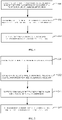
FIG. 1 is a flow chart of an information input method according to an embodiment not covered by the claimed invention; -
FIG. 2 is a flow chart of an alternative information input method; -
FIG. 3 is a flow chart of an information input method according to the embodiment covered by the claimed invention; -
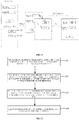
FIG. 4 is a schematic diagram of an information input process according to an example useful for understanding the present invention; -
FIG. 5 is a flow chart of an alternative information input method according to an embodiment not covered by the claimed invention; -
FIG. 6 is a schematic diagram of the structure of an information input apparatus according to the embodiments of the present invention. - Mobile-terminal apps typically include many application pages, one type of which are web pages displayed through webview control (may also be referred to as front-end pages); in web pages, some input boxes may sometimes be set based on service needs, such as an input box for input of a password, or an input box for input of a transfer amount. Such input box may be obtained through webkit rendering. However, this method for inputting information to an input box is prone to focus confusion, affecting input efficiency, and unable to input information rapidly and effectively. Based on this, the embodiments of the present application provide an information input method to solve the foregoing problems.
-
FIG. 1 shows a flow chart of an information input method according to an embodiment not covered by the claimed invention; which may comprise:
Instep 101, obtaining attribute information of a page input box, wherein the page input box is located at a page, for example, a front-end page, of a mobile application. - In this example, the input box located at the webview page may be referred to as a page input box, and the user may input information needed for processing service in the page input box; for example, the user may input a password needed during transfer in the password input box, or input a transfer amount needed during transfer in the amount input box.
- The attribute information of an input box, for example, may include: display location of the input box at the front-end page, or the appearance parameters of the input box. The appearance parameters may include: width, height and color of the input box, defined box input fonts, etc. The obtained attribute information of an input box may be all or part of the attributes of the page input box.
- In
step 102, according to the attribute information, creating a native input box having the attribute information. - In this step, a native input box may be drawn according to the attribute information obtained in
step 101. The native input box has the attribute information. For example, the drawn native input box and the page input box at the front-end page have the same width and height, and the native input box and the page input box may have the same box type, for example, both may be password input boxes. The native input box is created at a native layer, which is a program created at the native layer based on a local operating system of a smart phone, such as iOS and Android, written and run with a native program language. For example, in iOS, objective-C is used to create the native input box. - In
step 103, filling information input by a user through the native input box, back to the page input box. - In this step, a corresponding data filling-back event, such as keyup and keydown may be invoked, to fill in the information input in a native input box back to the page input box, so that input information is filled back to the front-end page, thus completing information input. Further, this example may have no limitation to the way to input information to a native input box, for example, information may be input via a keyboard or voice.
- In the information input method of this example, information is input through a native input box created at a native layer, and then filled back to a front-end page. As the input box for input of information is created at a native layer, this manner avoids focus confusion at the web page during input of information to the input box (e.g., the problem of the confusion may be caused by webkit defects or complex page logic at the web page), thus ensuring that the information is input rapidly and effectively.
- In order that the user does not perceive a native input box and still feels like using the input box at the original front-end page to input information, thus improving user's usage experience, the embodiments of the present application ensure the consistency of the native input box and the page input box when creating a native input box. Refer to the flow of information input as shown in
FIG. 2 , which may comprise:
Instep 201, obtaining attribute information of a page input box. - For example, the attribute information obtained in this step may include: display location of the page input box at the front-end page and appearance parameters, for example, the appearance parameters may include: width and height of the page input box, and font and font color of the page input box, etc.
- In step 202, based on the attribute information, creating a native input box having the same attribute information.
- For example, the created native input box and the page input box have the same width and height and may have the same font and font color as the input information.
- In
step 203, covering the input display of the corresponding page box with the native input box. - For example, the native input box may also be displayed at the display location of the page input box. In this way, the user will think information is input in a page input box and will not perceive a native input box.
- In
step 204, filling information input by the user through the native input box, back to the page input box. - In another example, the native input box created at a native layer has an important feature, which is that it may be controlled. For example, the format of the information input in the native input box may be controlled, and the information input in the native input box can be encrypted; however, the input box rendered by webkit at a web page is not controllable. For example, only the default system keyboard of the operating system can be used to input information, and the input process is not controllable. The embodiments of the present application make the best use of the foregoing features of a native input box, design the format of information input to ensure that information is input effectively, and encrypt the input information to improve the security of information input. The embodiment shown in
FIG. 3 below describes the information input method of an embodiment covered by the claimed invention. Both limitation to information input format and information encryption, are applied in the native input box. The embodiment ofFIG. 3 describes an application of these two items at the same time. - In
step 301, obtaining attribute information of a page input box, including the type of the input box. - Here, the box type is used to indicate the information type to be received by the page input box. For example, if the box type is an amount input box for input of a transfer amount, then the input information may allow figures only rather than a, b, c and other letters.
- In
step 302, according to the attribute information, creating a native input box having the attribute information, wherein the native input box and the page input box are in the same box type. - For example, if the page input box is an amount input box for input of a transfer amount, the correspondingly created native input box is an amount input box, too; if the page input box is a password input box for input of a transfer password, the correspondingly created native input box is also a password input box.
- In
step 303, when it is detected that the user has clicked to input into the native input box, providing an input keyboard corresponding to the box type, and receiving information input through the input keyboard. - In this example, a few types of input keyboards corresponding to the box types may be defined. For example, if the box type is a password input box, a password input keyboard is provided accordingly, and the password input keyboard allows inputting a password only; if the box type is an amount input box, an amount input keyboard is provided accordingly, and the input keyboard allows inputting an amount only and a, b, c and other letters cannot be input. In this way, the format of the information input to the input box can be effectively limited to ensure that information is input effectively.
- In
step 304, encrypting the information input by the user to the native input box through an input keyboard. - For example, when the information type is a password, and the input keyboard is a password keyboard, the information input by the user through the input keyboard may be encrypted. Of course, for other types of keyboards, whether to encrypt input information or not may be set according to service requirements.
- In
step 305, filling encrypted input information back to the page input box. - Below an example useful for understanding the invention is described:
As shown inFIG. 4 , at the front-end page (e.g., the page may be a webview page) there are two input boxes instructing the user to input "transfer amount" and "transaction password" (for example, the input boxes may be input boxes obtained through webkit rendering). These two input boxes may be called page input boxes. In the subsequent process, corresponding information, such as transfer amount and password, will be input in these two page input boxes using the method described in this example. Referring toFIG. 5 , which shows the flow of an information input method, this method may be executed by an information input apparatus which may monitor operation of the application and execute this method, the method comprising:
Instep 501, obtaining attribute information of a page input box when it is detected that the front-end page where the page input box is located is open. - For example, a user opens APP and clicks and enters an APP page, which may be a front-end page including amount, password and other page input boxes as shown in
FIG. 4 . When the information input apparatus according to this embodiment detects that the page is open, it may obtain attribute information of the page input box, which, for example, may include: display location of the input box, and width, height, color and other appearance parameters of the input box. - In this example, attribute information of a page input box may also include: type of page input box. The box type is used to indicate the information type to be received by the page input box. Still taking
FIG. 4 as an example, the box types of the two page input boxes include: amount type and password type. The amount type input box can receive input amount information such as "100" and "200" only and cannot receive non-amount information such as "∗#" and "abc". The password type of input box can only receive information that can be used as a password. When collecting attribute information of a page input box, this embodiment not only collects information about location, width and height but also collects the foregoing box-type information. - In
step 502, according to the attribute information, creating a native input box having the attribute information, and covering the display of the corresponding page input box with the native input box. - As shown in
FIG. 4 , this embodiment creates native input boxes corresponding to page input boxes. For example,box 21 corresponds to the "transfer amount" native input box at the original APP page, andbox 22 corresponds to the "transaction password" native input box at the original APP page. When being created, each of the native input boxes has the same box type as the corresponding page input box and may cover the display of the corresponding page input box. For example, as shown inFIG. 4 , a native input box is overlapped on a page input box so that the user sees the native input box rather than the page input box and can see the native input box only when the user clicks input. - In
step 503, when it is detected that a user has clicked a native input box, an input keyboard corresponding to the box type of the native input box pops up so that the user may input information. - In this example, when the information input apparatus detects that a user has clicked a native input box, suggesting that the user wants to input information at the moment, a keyboard will pop up. Here, the input keyboard is a keyboard corresponding to the box type of the native input box clicked by the user.
- For example, supposing that the native input box is an input box corresponding to "transfer amount", an amount keyboard corresponding to box type "amount" may pop up; or when the native input box is an input box corresponding to "transaction password", a password keyboard corresponding to box type "password" may pop up; or, in other application scenarios, a numeric keyboard, character keyboard, etc. may also pop up. This example may define various types of keyboards, which pop up when corresponding types of native input boxes are clicked.
- Providing an input keyboard corresponding to a box type for a user to input information may be used to limit input information to the information type allowed by the box, so that the user is not allowed to arbitrarily input any format of information other than the valid information limited by the input box, thus effectively controlling the validity of the input data.
- In
step 504, filling information input by a user through the native input box back to the page input box. - For example, when information synchronously input in the native input box is filled back to a page input box, play back of the corresponding events maybe simulated, such as keydown and keyup, so that information is filled back to the page input box. Here, when the information type is a password and the input keyboard is a password keyboard, the information obtained by the user through a keyboard (e.g., if the user types in abc123 through a keyboard as a password, abcl23 is the information obtained through a keyboard) may be encrypted before being filled back to the page input box to ensure the security of password input.
- In the information input method of this example, native input boxes and input keyboards developed at the native end are adopted to input information to page input boxes at the front-end page so that the input of information through native input boxes and input keyboards will not affect the APP page, thus avoiding focus confusion and other problems and ensuring that information is input effectively. Furthermore, native input boxes and input keyboards developed at the native layer are highly controllable, for example, native input boxes are controls developed at the native end and may control encryption of information in the native input boxes to further enhance the security of information input.
-
FIG. 6 shows an information input apparatus, which may execute the method in the embodiments of the present application. As shown inFIG. 6 , the apparatus comprises: an
attribute obtainingmodule 61, aninput processing module 62 and an information synchronizing module 63. Here: - The
attribute obtaining module 61 is configured to obtain attribute information of a page input box, wherein the page input box is located at a front-end page of a mobile application; - The
input processing module 62 is configured to create a native input box having the attribute information according to the attribute information, wherein the native input box is created at a native layer; and - The information synchronizing module 63 is configured to fill information input by a user through the native input box back to the page input box.
- In one example, the
attribute obtaining module 61 is configured to obtain attribute information of a page input box when the front-end page where the page input box is located is detected to be open. - In one example, the
input processing module 62 is configured to create the native input box according to the display location and appearance parameters of the page input box and covering the display of the corresponding page input box with the native input box. - In an embodiment covered by the claimed invention; the attribute information includes: type of the page input box, the native input box corresponding to the page input box with the same box type. The
input processing module 62 is also configured to provide an input keyboard corresponding to the box type according to the type of the native input box. The input keyboard allows inputting information of the information type. - In an embodiment covered by the claimed invention; the information synchronizing module 63 is also configured to: fill the information input by a user through the input keyboard back to the page input box after encryption, for example, when the type of the information is password and the input keyboard is a password keyboard.
- When the apparatus achieves its functions in the form of software function unit and is sold or used as a stand-alone product, it may be stored in a computer-readable storage medium. Based on this understanding, the technical solution in the present application or the part making contribution to current technologies or part of the technical solution may in essence be reflected in the form of a software product. The computer software product is stored in a storage medium and includes a number of instructions for enabling a device to proceed to all or some of the steps of the method in the embodiments of the present invention. The foregoing storage media include all kinds of media that may store program codes, such as USB disk, mobile hard disk, ROM (Read-Only Memory), RAM (Random Access Memory), diskettes and compact discs.
Claims (8)
- An information input method, wherein the method comprises:obtaining attribute information of a page input box, wherein the page input box is located at a displayed page of a mobile application, wherein the obtained attribute information comprises a type of the page input box (301);according to the attribute information, creating a native input box having the attribute information, wherein the native input box is created at a native layer of a host operating system and in a native programming language of the operating system, wherein the native input box and the page input box are the same box type (302);when it is detected that the native input box is clicked by a user, providing an input keyboard corresponding to the type of the native input box (303), wherein the native input keyboard allows inputting, into the native input box, information of a type corresponding to the type of the native input box;determining whether inputs in the native input box are to be encrypted based on the information type of inputs allowed in the page input box;in response to determining that the inputs in the native input box are to be encrypted, encrypting information input through the native input box (304); andfilling the encrypted information to the page input box (305).
- The method according to claim 1, wherein obtaining attribute information of a page input box comprises:
performing the step of obtaining attribute information of a page input box when it is detected that the displayed page where the page input box is located is open. - The method according to claim 1, wherein, according to the attribute information, creating a native input box having the attribute information comprises:
creating the native input box according to display location and appearance parameters of the page input box and covering the display of the corresponding page input box with the native input box. - The method according to claim 1, wherein the information type is a password and the input keyboard is a password keyboard.
- An information input apparatus, wherein the apparatus comprises:an attribute obtaining module (61) configured to obtain attribute information of a page input box, wherein the page input box is located at a displayed page of a mobile application, wherein the obtained attribute information comprises type of the page input box; andan input processing module (62) configured to create a native input box having the attribute
information according to the attribute information, wherein the native input box is created at a native layer of a host operating system and in a native programming language of the operating system, wherein the native input box and the page input box are the same box type;wherein, the apparatus is further configured tcwhen it is detected that the native input box is clicked by a user, provide an input keyboard corresponding to the type of the native input box, wherein the native input keyboard allows inputting, into the native input box, information of a type corresponding to the type of the native input box;determine whether inputs in the native input box are to be encrypted based on the information type of inputs allowed in the page input box; andin response to
determining that the inputs in the native input box are to be encrypted, encrypting information input through the native input box;wherein the apparatus further comprises an information synchronizing module (63) configured to fill the encrypted information back to the page input box. - The apparatus according to claim 5, wherein the attribute obtaining module (61) is configured to obtain attribute information of the page
input box when it is detected that the displayed page where the page input box is located is open. - The apparatus according to claim 5, wherein the input processing module (62) is configured to create the native input box according to
display location and appearance parameters of the page input box and cover the display of the corresponding page input box with the native input box. - The apparatus according to claim 5, wherein
the information type is password and the input keyboard is a password keyboard.
Applications Claiming Priority (2)
| Application Number | Priority Date | Filing Date | Title |
|---|---|---|---|
| CN201610710394.9A CN106873862A (en) | 2016-08-23 | 2016-08-23 | A kind of data inputting method and device |
| PCT/CN2017/096991 WO2018036390A1 (en) | 2016-08-23 | 2017-08-11 | Information input method and apparatus |
Publications (3)
| Publication Number | Publication Date |
|---|---|
| EP3506073A1 EP3506073A1 (en) | 2019-07-03 |
| EP3506073A4 EP3506073A4 (en) | 2020-04-01 |
| EP3506073B1 true EP3506073B1 (en) | 2022-06-15 |
Family
ID=59238925
Family Applications (1)
| Application Number | Title | Priority Date | Filing Date |
|---|---|---|---|
| EP17842813.2A Active EP3506073B1 (en) | 2016-08-23 | 2017-08-11 | Information input method and apparatus |
Country Status (10)
| Country | Link |
|---|---|
| US (1) | US10860164B2 (en) |
| EP (1) | EP3506073B1 (en) |
| JP (1) | JP6909367B2 (en) |
| KR (1) | KR102368902B1 (en) |
| CN (1) | CN106873862A (en) |
| MY (1) | MY188680A (en) |
| PH (1) | PH12019500387A1 (en) |
| SG (1) | SG11201901503QA (en) |
| TW (1) | TW201807559A (en) |
| WO (1) | WO2018036390A1 (en) |
Families Citing this family (8)
| Publication number | Priority date | Publication date | Assignee | Title |
|---|---|---|---|---|
| CN106873862A (en) * | 2016-08-23 | 2017-06-20 | 阿里巴巴集团控股有限公司 | A kind of data inputting method and device |
| CN108132755A (en) * | 2018-01-18 | 2018-06-08 | 北京网信云服信息科技有限公司 | A kind of digital input method, device and mobile equipment |
| CN109460360B (en) * | 2018-10-29 | 2021-10-15 | 北京云测信息技术有限公司 | A Method to Enhance Input Stability and Compatibility of IOS Automated Test |
| US20200186623A1 (en) * | 2018-12-11 | 2020-06-11 | Microsoft Technology Licensing, Llc | Performant retrieval and presentation of content |
| CN110445768B (en) * | 2019-07-18 | 2021-11-09 | 创新先进技术有限公司 | Login method and device and electronic equipment |
| CN111143867B (en) * | 2019-12-28 | 2023-01-17 | 飞天诚信科技股份有限公司 | A kind of safe input method and system applied to Mac platform |
| CN113138704B (en) * | 2020-01-19 | 2022-07-05 | 福建天泉教育科技有限公司 | Text box display method and terminal |
| CN111414219B (en) * | 2020-03-18 | 2023-10-24 | 北京有竹居网络技术有限公司 | Page input box control method and device, electronic equipment and medium |
Family Cites Families (31)
| Publication number | Priority date | Publication date | Assignee | Title |
|---|---|---|---|---|
| JPH11149452A (en) * | 1997-11-14 | 1999-06-02 | Pfu Ltd | Security method and recording medium in network system |
| US20020112078A1 (en) | 1999-12-03 | 2002-08-15 | David Yach | Virtual machine web browser |
| JP3690237B2 (en) * | 2000-04-03 | 2005-08-31 | 三菱電機株式会社 | Authentication method, recording medium, authentication system, terminal device, and authentication recording medium creation device |
| US7490295B2 (en) | 2004-06-25 | 2009-02-10 | Apple Inc. | Layer for accessing user interface elements |
| US7509649B2 (en) | 2005-03-03 | 2009-03-24 | Research In Motion Limited | System and method for conversion of generic services' applications into component based applications for devices |
| US8365203B2 (en) | 2008-03-20 | 2013-01-29 | Willflow Limited | Method for creating a native application for mobile communications device in real-time |
| KR101057474B1 (en) * | 2009-06-26 | 2011-08-17 | (주)비이소프트 | How to prevent user information leak by screen hack |
| JP5383376B2 (en) * | 2009-08-07 | 2014-01-08 | キヤノン株式会社 | Image processing apparatus and control method thereof |
| CN101882082B (en) * | 2010-06-23 | 2015-08-12 | 中兴通讯股份有限公司 | The method and apparatus of a kind of Java edit box localization |
| KR20120067858A (en) | 2010-12-16 | 2012-06-26 | 한국전자통신연구원 | Methods of converting mobile web application into native-application and apparatuses using the same |
| CN103051516B (en) | 2011-10-17 | 2016-04-13 | 腾讯科技(深圳)有限公司 | A kind of message prompt method of instant communication client and device |
| US9293008B2 (en) | 2012-03-16 | 2016-03-22 | Bally Gaming, Inc. | Layout elements as rendering placeholders for native wagering game applications |
| US9454303B2 (en) | 2012-05-16 | 2016-09-27 | Google Inc. | Gesture touch inputs for controlling video on a touchscreen |
| US9910833B2 (en) | 2012-11-13 | 2018-03-06 | International Business Machines Corporation | Automatically rendering web and/or hybrid applications natively in parallel |
| US9916291B2 (en) * | 2013-03-28 | 2018-03-13 | Tencent Technology (Shenzhen) Company Limited | Method, apparatus, and terminal device for displaying multiple input boxes in a web page where display space is limited |
| CN104077313B (en) * | 2013-03-28 | 2018-02-27 | 腾讯科技(深圳)有限公司 | The display methods of multi input frame, device and terminal device in a kind of Webpage |
| CN104102418B (en) | 2013-04-03 | 2015-08-26 | 腾讯科技(深圳)有限公司 | Input frame target location localization method and device in a kind of browser of mobile terminal |
| CN104142911B (en) * | 2013-05-08 | 2017-11-03 | 腾讯科技(深圳)有限公司 | A kind of text information input method and device |
| US20140337788A1 (en) * | 2013-05-08 | 2014-11-13 | Tencent Technology (Shenzhen) Company Limited | Method and device for text message input |
| US10331765B2 (en) | 2013-05-24 | 2019-06-25 | Sourcecode Technology Holdings, Inc. | Methods and apparatus for translating forms to native mobile applications |
| CN104238763B (en) * | 2013-06-20 | 2018-01-09 | 腾讯科技(深圳)有限公司 | The controlling information input and device of input frame |
| CN103383629B (en) * | 2013-06-27 | 2017-05-31 | 广州爱九游信息技术有限公司 | A kind of input method and device based on HTML5 |
| CN103902057B (en) * | 2014-03-31 | 2017-02-08 | 北京搜狗科技发展有限公司 | Webpage input method and device for mobile terminal device |
| US20150281869A1 (en) | 2014-03-31 | 2015-10-01 | Google Inc. | Native web-based application |
| CN105630187B (en) * | 2014-11-07 | 2018-11-06 | 阿里巴巴集团控股有限公司 | Html page calls the method and its device of local keyboard in subscriber terminal equipment |
| CN105786338A (en) | 2014-12-19 | 2016-07-20 | 珠海金山办公软件有限公司 | Textbox editing method and apparatus |
| CN105808222A (en) * | 2014-12-31 | 2016-07-27 | 中兴通讯股份有限公司 | Character input method and device |
| US9448776B1 (en) | 2015-01-08 | 2016-09-20 | AppNotch LLC | Method and apparatus for converting a website into a native mobile application |
| CN106406687A (en) | 2015-07-31 | 2017-02-15 | 东莞酷派软件技术有限公司 | Input control method and device |
| CN106101849B (en) | 2016-06-21 | 2019-10-25 | 武汉斗鱼网络科技有限公司 | A barrage input method and device |
| CN106873862A (en) * | 2016-08-23 | 2017-06-20 | 阿里巴巴集团控股有限公司 | A kind of data inputting method and device |
-
2016
- 2016-08-23 CN CN201610710394.9A patent/CN106873862A/en active Pending
-
2017
- 2017-06-13 TW TW106119678A patent/TW201807559A/en unknown
- 2017-08-11 SG SG11201901503QA patent/SG11201901503QA/en unknown
- 2017-08-11 WO PCT/CN2017/096991 patent/WO2018036390A1/en not_active Ceased
- 2017-08-11 JP JP2019510941A patent/JP6909367B2/en active Active
- 2017-08-11 KR KR1020197008134A patent/KR102368902B1/en active Active
- 2017-08-11 MY MYPI2019000895A patent/MY188680A/en unknown
- 2017-08-11 EP EP17842813.2A patent/EP3506073B1/en active Active
-
2019
- 2019-02-21 US US16/281,331 patent/US10860164B2/en active Active
- 2019-02-22 PH PH12019500387A patent/PH12019500387A1/en unknown
Also Published As
| Publication number | Publication date |
|---|---|
| EP3506073A1 (en) | 2019-07-03 |
| JP2019533223A (en) | 2019-11-14 |
| KR20190040045A (en) | 2019-04-16 |
| JP6909367B2 (en) | 2021-07-28 |
| TW201807559A (en) | 2018-03-01 |
| SG11201901503QA (en) | 2019-03-28 |
| WO2018036390A1 (en) | 2018-03-01 |
| US20190187860A1 (en) | 2019-06-20 |
| PH12019500387A1 (en) | 2019-10-21 |
| EP3506073A4 (en) | 2020-04-01 |
| MY188680A (en) | 2021-12-22 |
| KR102368902B1 (en) | 2022-02-28 |
| CN106873862A (en) | 2017-06-20 |
| US10860164B2 (en) | 2020-12-08 |
Similar Documents
| Publication | Publication Date | Title |
|---|---|---|
| EP3506073A1 (en) | Information input method and apparatus | |
| US11012740B2 (en) | Method, device, and storage medium for displaying a dynamic special effect | |
| CN110750255B (en) | Applet rendering method and device | |
| US10671357B2 (en) | Preview changes to mobile applications at different display resolutions | |
| CN108924622B (en) | Video processing method and device, storage medium and electronic device | |
| US10033835B2 (en) | System, method, and device for remotely operating a server | |
| CN109375914B (en) | Information remote interaction method and system | |
| US20130305187A1 (en) | User-resizable icons | |
| CN108228288A (en) | A kind of component system and its call method and device | |
| US10402470B2 (en) | Effecting multi-step operations in an application in response to direct manipulation of a selected object | |
| US20160316020A1 (en) | Web page information presentation method and system | |
| CN105824742B (en) | Operating user interface method for recording and device | |
| CN104102495B (en) | A kind of window display method and device | |
| CN110968991A (en) | Method and related device for editing characters | |
| CN105373575A (en) | Information processing terminal and control method therefor | |
| CN107818000B (en) | Operation method and device of page table | |
| JP2008210394A (en) | Communication system for control, and computer-readable recording medium with communication program for control recorded thereon | |
| CN113791856B (en) | Method and device for long screen capture annotation | |
| CN106126031A (en) | The method of a kind of word input and terminal | |
| US11599599B1 (en) | Emulating a transparency effect for a display element | |
| CN117311795A (en) | APP visual development method and device and electronic equipment | |
| US10496241B2 (en) | Cloud-based inter-application interchange of style information | |
| CN109254712B (en) | Information processing method and electronic equipment | |
| CN105700862B (en) | Graphics image processing method and device | |
| CN105653359B (en) | Method and application system for generating operation instruction |
Legal Events
| Date | Code | Title | Description |
|---|---|---|---|
| STAA | Information on the status of an ep patent application or granted ep patent |
Free format text: STATUS: THE INTERNATIONAL PUBLICATION HAS BEEN MADE |
|
| PUAI | Public reference made under article 153(3) epc to a published international application that has entered the european phase |
Free format text: ORIGINAL CODE: 0009012 |
|
| STAA | Information on the status of an ep patent application or granted ep patent |
Free format text: STATUS: REQUEST FOR EXAMINATION WAS MADE |
|
| 17P | Request for examination filed |
Effective date: 20190220 |
|
| AK | Designated contracting states |
Kind code of ref document: A1 Designated state(s): AL AT BE BG CH CY CZ DE DK EE ES FI FR GB GR HR HU IE IS IT LI LT LU LV MC MK MT NL NO PL PT RO RS SE SI SK SM TR |
|
| AX | Request for extension of the european patent |
Extension state: BA ME |
|
| DAV | Request for validation of the european patent (deleted) | ||
| DAX | Request for extension of the european patent (deleted) | ||
| A4 | Supplementary search report drawn up and despatched |
Effective date: 20200228 |
|
| RIC1 | Information provided on ipc code assigned before grant |
Ipc: G06F 3/0483 20130101AFI20200224BHEP Ipc: G06F 3/0481 20130101ALI20200224BHEP Ipc: G06F 3/0489 20130101ALI20200224BHEP Ipc: G06F 3/0488 20130101ALI20200224BHEP Ipc: G06F 9/451 20180101ALI20200224BHEP |
|
| RAP1 | Party data changed (applicant data changed or rights of an application transferred) |
Owner name: ADVANCED NEW TECHNOLOGIES CO., LTD. |
|
| GRAP | Despatch of communication of intention to grant a patent |
Free format text: ORIGINAL CODE: EPIDOSNIGR1 |
|
| STAA | Information on the status of an ep patent application or granted ep patent |
Free format text: STATUS: GRANT OF PATENT IS INTENDED |
|
| INTG | Intention to grant announced |
Effective date: 20220114 |
|
| GRAS | Grant fee paid |
Free format text: ORIGINAL CODE: EPIDOSNIGR3 |
|
| GRAA | (expected) grant |
Free format text: ORIGINAL CODE: 0009210 |
|
| STAA | Information on the status of an ep patent application or granted ep patent |
Free format text: STATUS: THE PATENT HAS BEEN GRANTED |
|
| AK | Designated contracting states |
Kind code of ref document: B1 Designated state(s): AL AT BE BG CH CY CZ DE DK EE ES FI FR GB GR HR HU IE IS IT LI LT LU LV MC MK MT NL NO PL PT RO RS SE SI SK SM TR |
|
| REG | Reference to a national code |
Ref country code: CH Ref legal event code: EP Ref country code: GB Ref legal event code: FG4D |
|
| REG | Reference to a national code |
Ref country code: IE Ref legal event code: FG4D |
|
| REG | Reference to a national code |
Ref country code: DE Ref legal event code: R096 Ref document number: 602017058610 Country of ref document: DE |
|
| REG | Reference to a national code |
Ref country code: AT Ref legal event code: REF Ref document number: 1498776 Country of ref document: AT Kind code of ref document: T Effective date: 20220715 |
|
| REG | Reference to a national code |
Ref country code: LT Ref legal event code: MG9D |
|
| REG | Reference to a national code |
Ref country code: NL Ref legal event code: MP Effective date: 20220615 |
|
| PG25 | Lapsed in a contracting state [announced via postgrant information from national office to epo] |
Ref country code: SE Free format text: LAPSE BECAUSE OF FAILURE TO SUBMIT A TRANSLATION OF THE DESCRIPTION OR TO PAY THE FEE WITHIN THE PRESCRIBED TIME-LIMIT Effective date: 20220615 Ref country code: NO Free format text: LAPSE BECAUSE OF FAILURE TO SUBMIT A TRANSLATION OF THE DESCRIPTION OR TO PAY THE FEE WITHIN THE PRESCRIBED TIME-LIMIT Effective date: 20220915 Ref country code: LT Free format text: LAPSE BECAUSE OF FAILURE TO SUBMIT A TRANSLATION OF THE DESCRIPTION OR TO PAY THE FEE WITHIN THE PRESCRIBED TIME-LIMIT Effective date: 20220615 Ref country code: HR Free format text: LAPSE BECAUSE OF FAILURE TO SUBMIT A TRANSLATION OF THE DESCRIPTION OR TO PAY THE FEE WITHIN THE PRESCRIBED TIME-LIMIT Effective date: 20220615 Ref country code: GR Free format text: LAPSE BECAUSE OF FAILURE TO SUBMIT A TRANSLATION OF THE DESCRIPTION OR TO PAY THE FEE WITHIN THE PRESCRIBED TIME-LIMIT Effective date: 20220916 Ref country code: FI Free format text: LAPSE BECAUSE OF FAILURE TO SUBMIT A TRANSLATION OF THE DESCRIPTION OR TO PAY THE FEE WITHIN THE PRESCRIBED TIME-LIMIT Effective date: 20220615 Ref country code: BG Free format text: LAPSE BECAUSE OF FAILURE TO SUBMIT A TRANSLATION OF THE DESCRIPTION OR TO PAY THE FEE WITHIN THE PRESCRIBED TIME-LIMIT Effective date: 20220915 |
|
| REG | Reference to a national code |
Ref country code: AT Ref legal event code: MK05 Ref document number: 1498776 Country of ref document: AT Kind code of ref document: T Effective date: 20220615 |
|
| PG25 | Lapsed in a contracting state [announced via postgrant information from national office to epo] |
Ref country code: RS Free format text: LAPSE BECAUSE OF FAILURE TO SUBMIT A TRANSLATION OF THE DESCRIPTION OR TO PAY THE FEE WITHIN THE PRESCRIBED TIME-LIMIT Effective date: 20220615 Ref country code: LV Free format text: LAPSE BECAUSE OF FAILURE TO SUBMIT A TRANSLATION OF THE DESCRIPTION OR TO PAY THE FEE WITHIN THE PRESCRIBED TIME-LIMIT Effective date: 20220615 |
|
| PG25 | Lapsed in a contracting state [announced via postgrant information from national office to epo] |
Ref country code: NL Free format text: LAPSE BECAUSE OF FAILURE TO SUBMIT A TRANSLATION OF THE DESCRIPTION OR TO PAY THE FEE WITHIN THE PRESCRIBED TIME-LIMIT Effective date: 20220615 |
|
| PG25 | Lapsed in a contracting state [announced via postgrant information from national office to epo] |
Ref country code: SM Free format text: LAPSE BECAUSE OF FAILURE TO SUBMIT A TRANSLATION OF THE DESCRIPTION OR TO PAY THE FEE WITHIN THE PRESCRIBED TIME-LIMIT Effective date: 20220615 Ref country code: SK Free format text: LAPSE BECAUSE OF FAILURE TO SUBMIT A TRANSLATION OF THE DESCRIPTION OR TO PAY THE FEE WITHIN THE PRESCRIBED TIME-LIMIT Effective date: 20220615 Ref country code: RO Free format text: LAPSE BECAUSE OF FAILURE TO SUBMIT A TRANSLATION OF THE DESCRIPTION OR TO PAY THE FEE WITHIN THE PRESCRIBED TIME-LIMIT Effective date: 20220615 Ref country code: PT Free format text: LAPSE BECAUSE OF FAILURE TO SUBMIT A TRANSLATION OF THE DESCRIPTION OR TO PAY THE FEE WITHIN THE PRESCRIBED TIME-LIMIT Effective date: 20221017 Ref country code: ES Free format text: LAPSE BECAUSE OF FAILURE TO SUBMIT A TRANSLATION OF THE DESCRIPTION OR TO PAY THE FEE WITHIN THE PRESCRIBED TIME-LIMIT Effective date: 20220615 Ref country code: EE Free format text: LAPSE BECAUSE OF FAILURE TO SUBMIT A TRANSLATION OF THE DESCRIPTION OR TO PAY THE FEE WITHIN THE PRESCRIBED TIME-LIMIT Effective date: 20220615 Ref country code: CZ Free format text: LAPSE BECAUSE OF FAILURE TO SUBMIT A TRANSLATION OF THE DESCRIPTION OR TO PAY THE FEE WITHIN THE PRESCRIBED TIME-LIMIT Effective date: 20220615 Ref country code: AT Free format text: LAPSE BECAUSE OF FAILURE TO SUBMIT A TRANSLATION OF THE DESCRIPTION OR TO PAY THE FEE WITHIN THE PRESCRIBED TIME-LIMIT Effective date: 20220615 |
|
| PG25 | Lapsed in a contracting state [announced via postgrant information from national office to epo] |
Ref country code: PL Free format text: LAPSE BECAUSE OF FAILURE TO SUBMIT A TRANSLATION OF THE DESCRIPTION OR TO PAY THE FEE WITHIN THE PRESCRIBED TIME-LIMIT Effective date: 20220615 Ref country code: IS Free format text: LAPSE BECAUSE OF FAILURE TO SUBMIT A TRANSLATION OF THE DESCRIPTION OR TO PAY THE FEE WITHIN THE PRESCRIBED TIME-LIMIT Effective date: 20221015 |
|
| REG | Reference to a national code |
Ref country code: DE Ref legal event code: R097 Ref document number: 602017058610 Country of ref document: DE |
|
| PG25 | Lapsed in a contracting state [announced via postgrant information from national office to epo] |
Ref country code: MC Free format text: LAPSE BECAUSE OF FAILURE TO SUBMIT A TRANSLATION OF THE DESCRIPTION OR TO PAY THE FEE WITHIN THE PRESCRIBED TIME-LIMIT Effective date: 20220615 Ref country code: AL Free format text: LAPSE BECAUSE OF FAILURE TO SUBMIT A TRANSLATION OF THE DESCRIPTION OR TO PAY THE FEE WITHIN THE PRESCRIBED TIME-LIMIT Effective date: 20220615 |
|
| REG | Reference to a national code |
Ref country code: CH Ref legal event code: PL |
|
| PLBE | No opposition filed within time limit |
Free format text: ORIGINAL CODE: 0009261 |
|
| STAA | Information on the status of an ep patent application or granted ep patent |
Free format text: STATUS: NO OPPOSITION FILED WITHIN TIME LIMIT |
|
| PG25 | Lapsed in a contracting state [announced via postgrant information from national office to epo] |
Ref country code: LU Free format text: LAPSE BECAUSE OF NON-PAYMENT OF DUE FEES Effective date: 20220811 Ref country code: LI Free format text: LAPSE BECAUSE OF NON-PAYMENT OF DUE FEES Effective date: 20220831 Ref country code: DK Free format text: LAPSE BECAUSE OF FAILURE TO SUBMIT A TRANSLATION OF THE DESCRIPTION OR TO PAY THE FEE WITHIN THE PRESCRIBED TIME-LIMIT Effective date: 20220615 Ref country code: CH Free format text: LAPSE BECAUSE OF NON-PAYMENT OF DUE FEES Effective date: 20220831 |
|
| REG | Reference to a national code |
Ref country code: BE Ref legal event code: MM Effective date: 20220831 |
|
| 26N | No opposition filed |
Effective date: 20230316 |
|
| PG25 | Lapsed in a contracting state [announced via postgrant information from national office to epo] |
Ref country code: SI Free format text: LAPSE BECAUSE OF FAILURE TO SUBMIT A TRANSLATION OF THE DESCRIPTION OR TO PAY THE FEE WITHIN THE PRESCRIBED TIME-LIMIT Effective date: 20220615 |
|
| PG25 | Lapsed in a contracting state [announced via postgrant information from national office to epo] |
Ref country code: IE Free format text: LAPSE BECAUSE OF NON-PAYMENT OF DUE FEES Effective date: 20220811 |
|
| PG25 | Lapsed in a contracting state [announced via postgrant information from national office to epo] |
Ref country code: BE Free format text: LAPSE BECAUSE OF NON-PAYMENT OF DUE FEES Effective date: 20220831 |
|
| PG25 | Lapsed in a contracting state [announced via postgrant information from national office to epo] |
Ref country code: IT Free format text: LAPSE BECAUSE OF FAILURE TO SUBMIT A TRANSLATION OF THE DESCRIPTION OR TO PAY THE FEE WITHIN THE PRESCRIBED TIME-LIMIT Effective date: 20220615 |
|
| PG25 | Lapsed in a contracting state [announced via postgrant information from national office to epo] |
Ref country code: HU Free format text: LAPSE BECAUSE OF FAILURE TO SUBMIT A TRANSLATION OF THE DESCRIPTION OR TO PAY THE FEE WITHIN THE PRESCRIBED TIME-LIMIT; INVALID AB INITIO Effective date: 20170811 |
|
| PG25 | Lapsed in a contracting state [announced via postgrant information from national office to epo] |
Ref country code: CY Free format text: LAPSE BECAUSE OF FAILURE TO SUBMIT A TRANSLATION OF THE DESCRIPTION OR TO PAY THE FEE WITHIN THE PRESCRIBED TIME-LIMIT Effective date: 20220615 |
|
| PG25 | Lapsed in a contracting state [announced via postgrant information from national office to epo] |
Ref country code: MK Free format text: LAPSE BECAUSE OF FAILURE TO SUBMIT A TRANSLATION OF THE DESCRIPTION OR TO PAY THE FEE WITHIN THE PRESCRIBED TIME-LIMIT Effective date: 20220615 |
|
| PG25 | Lapsed in a contracting state [announced via postgrant information from national office to epo] |
Ref country code: TR Free format text: LAPSE BECAUSE OF FAILURE TO SUBMIT A TRANSLATION OF THE DESCRIPTION OR TO PAY THE FEE WITHIN THE PRESCRIBED TIME-LIMIT Effective date: 20220615 |
|
| PG25 | Lapsed in a contracting state [announced via postgrant information from national office to epo] |
Ref country code: MT Free format text: LAPSE BECAUSE OF FAILURE TO SUBMIT A TRANSLATION OF THE DESCRIPTION OR TO PAY THE FEE WITHIN THE PRESCRIBED TIME-LIMIT Effective date: 20220615 |
|
| PG25 | Lapsed in a contracting state [announced via postgrant information from national office to epo] |
Ref country code: BG Free format text: LAPSE BECAUSE OF FAILURE TO SUBMIT A TRANSLATION OF THE DESCRIPTION OR TO PAY THE FEE WITHIN THE PRESCRIBED TIME-LIMIT Effective date: 20220615 |
|
| PG25 | Lapsed in a contracting state [announced via postgrant information from national office to epo] |
Ref country code: BG Free format text: LAPSE BECAUSE OF FAILURE TO SUBMIT A TRANSLATION OF THE DESCRIPTION OR TO PAY THE FEE WITHIN THE PRESCRIBED TIME-LIMIT Effective date: 20220615 |
|
| PGFP | Annual fee paid to national office [announced via postgrant information from national office to epo] |
Ref country code: GB Payment date: 20250619 Year of fee payment: 9 |
|
| PGFP | Annual fee paid to national office [announced via postgrant information from national office to epo] |
Ref country code: FR Payment date: 20250610 Year of fee payment: 9 |
|
| PGFP | Annual fee paid to national office [announced via postgrant information from national office to epo] |
Ref country code: DE Payment date: 20250618 Year of fee payment: 9 |