EP3494467B1 - Performing a context-dependent task in a program - Google Patents
Performing a context-dependent task in a program Download PDFInfo
- Publication number
- EP3494467B1 EP3494467B1 EP17745363.6A EP17745363A EP3494467B1 EP 3494467 B1 EP3494467 B1 EP 3494467B1 EP 17745363 A EP17745363 A EP 17745363A EP 3494467 B1 EP3494467 B1 EP 3494467B1
- Authority
- EP
- European Patent Office
- Prior art keywords
- program
- application
- context
- context information
- information
- Prior art date
- Legal status (The legal status is an assumption and is not a legal conclusion. Google has not performed a legal analysis and makes no representation as to the accuracy of the status listed.)
- Active
Links
Images


Classifications
-
- G—PHYSICS
- G06—COMPUTING OR CALCULATING; COUNTING
- G06F—ELECTRIC DIGITAL DATA PROCESSING
- G06F9/00—Arrangements for program control, e.g. control units
- G06F9/06—Arrangements for program control, e.g. control units using stored programs, i.e. using an internal store of processing equipment to receive or retain programs
- G06F9/44—Arrangements for executing specific programs
- G06F9/451—Execution arrangements for user interfaces
-
- G—PHYSICS
- G06—COMPUTING OR CALCULATING; COUNTING
- G06F—ELECTRIC DIGITAL DATA PROCESSING
- G06F8/00—Arrangements for software engineering
- G06F8/30—Creation or generation of source code
- G06F8/38—Creation or generation of source code for implementing user interfaces
-
- G—PHYSICS
- G06—COMPUTING OR CALCULATING; COUNTING
- G06F—ELECTRIC DIGITAL DATA PROCESSING
- G06F9/00—Arrangements for program control, e.g. control units
- G06F9/06—Arrangements for program control, e.g. control units using stored programs, i.e. using an internal store of processing equipment to receive or retain programs
- G06F9/44—Arrangements for executing specific programs
- G06F9/445—Program loading or initiating
-
- G—PHYSICS
- G06—COMPUTING OR CALCULATING; COUNTING
- G06F—ELECTRIC DIGITAL DATA PROCESSING
- G06F9/00—Arrangements for program control, e.g. control units
- G06F9/06—Arrangements for program control, e.g. control units using stored programs, i.e. using an internal store of processing equipment to receive or retain programs
- G06F9/46—Multiprogramming arrangements
- G06F9/48—Program initiating; Program switching, e.g. by interrupt
-
- G—PHYSICS
- G06—COMPUTING OR CALCULATING; COUNTING
- G06F—ELECTRIC DIGITAL DATA PROCESSING
- G06F9/00—Arrangements for program control, e.g. control units
- G06F9/06—Arrangements for program control, e.g. control units using stored programs, i.e. using an internal store of processing equipment to receive or retain programs
- G06F9/46—Multiprogramming arrangements
- G06F9/54—Interprogram communication
Definitions
- the present disclosure relates to a system and method for performing a task in an application in dependence on context information, where the context information can be provided by way of communication between applications.
- An application or program can provide many functionalities to a user of a computing device.
- the functionalities of an application or program are accessible through, for example, a menu or other options within the application.
- applications are generally self-contained.
- the pages, menu options or content of an application are statically organized. A user therefore has to browse through menu options whenever they want to perform a specific action, reach specific content or see a particular application page.
- Improved functionality of an application can be achieved by improving the performance of tasks or functions within said program or application.
- a system for and method for sending context information for carrying out a context-dependent task is disclosed.
- a task is performed in a primary program in dependence on a context, where both the primary program and the context are selectable, for example by a user.
- Information related to the selected context is provided to the primary program.
- information associated with the selected context is combined with information from the selected primary program such that the primary program carries out a task in dependence on the provided context information, thereby improving the functionality of the primary program. For example, a user can see different information or content, or perform different actions, within the primary program; the provided content or available actions are dependent on the particular context selected.
- a method comprises a method of sending context information for carrying out a context-dependent task.
- the method comprises displaying a user interface comprising a plurality of selectable elements.
- the plurality of selectable elements may be program or application icons on a hand held device (such as a cellular device or smartphone, or a tablet).
- the selectable elements may be links or icons on a web browser.
- the selectable elements may be program or application icons on a persona! computer, for example.
- the selectable elements can be any other form of selectable element.
- the method further comprises receiving a selection of a first element and a selection of a second element from the plurality of selectable elements.
- the first element may be associated with, or correspond to, a first program.
- the second element may be associated with or correspond to a context.
- the second element may be associated with, or correspond to, a second program.
- the first program may be a primary program and the second program may be a context program or a context menu.
- the context program can be configured to provide context information to the primary program.
- the method further comprises launching the first program and performing a task in the first program in dependence on the second element that has been selected.
- the task can be performed in the primary program using context information which is related to the particular context, or provided from the particular context program, associated with the selected second element.
- the disclosed method may be more efficient (since, for example, only one program needs to be accessed by a user whilst still providing the user with information related to the desired context) and use fewer computer resources.
- selection of the first element may be made and then the selection may be maintained until selection of the second element.
- Selection of the second element may be made and then the selection may be maintained until selection of the first element.
- the selection of the first and second elements is simultaneous.
- it may be ordered in such a way that a primary program and a context program or context can be distinguished by the device, for example where both the first and second elements are selected within a pre-determined period of time or in a pre-determined order. As such, the user can quickly and easily specify which context information is required or which context should be used upon launch of the primary program (if any).
- the user may select the primary program and then subsequently select the second element depending on which context information they wish to incorporate within the primary program associated with the selected first element.
- a user may maintain a selection of the second element until an indication of context appears on elements of the plurality of selectable elements.
- the indication of context may indicate that inter-application communication can occur between a context program or menu associated with the second element and other programs associated with those elements of the plurality of selectable elements which comprise the indication of context.
- the indication of context may indicate that a task can be performed in the programs associated with those elements of the plurality of selectable elements which comprise the indication of context in dependence on a context associated with the second element.
- a user may maintain selection of the second element until an indication of context appears on the second element.
- the user may then select a first element associated with a first program in order to launch the first program; the selection of the first element may be made whilst selection of the second element is maintained or after the second element is released.
- the step of displaying may comprise displaying at least one of the plurality of the selectable elements after receiving the selection of the first element.
- selection of the first element may be maintained until one or more of the plurality of selectable elements are displayed, in any suitable selection layout, on a user interface. All of the selectable elements may be displayed after receiving the selection of the first element, or only a subset of the selectable elements may be displayed in the selection layout. For example, all of the plurality of selectable elements except the first element may be displayed, or those selectable elements associated with a program or application which cannot be used in a context dependent task may not be displayed. Selection of the second element may be made from the selectable elements displayed after receiving the selection of the first element.
- the first element may be displayed in the middle left of the user interface and a subset of elements displayed to the right of the first element. For example, each of the elements in the subset of the plurality of elements may be displayed on a different line, one element per line. A user may then release the first element and select a second element from the displayed subset of elements. A user may scroll through the list of elements if not all of the elements can be displayed on the user interface at once. Scrolling may be achieved by swiping a display screen vertically down or up, in embodiments where the computing device is a mobile handheld device. Alternatively, scrolling may be achieved by using the scroll button on a mouse, where the computing device is a personal computer.
- selection of the second element may be maintained until all, or a subset of, the plurality of selectable elements are displayed in a selection layout in any suitable layout.
- selection of the first element may then be made from a displayed subset of the plurality of selectable elements.
- the second element may be displayed in the middle left of the user interface and the subset of elements displayed to the right of the second element.
- the initially selected element (whether that is the first or second element) may be displayed in any position on the user interface and all, or a subset of, the plurality of selectable elements may be displayed in any suitable arrangement around, above, below, to the left, or to the right of the initially selected element in any suitable selection layout.
- the step of performing a task in the first program in dependence on the second element that has been selected may comprise the first program sending a request for data to a second program associated with, or corresponding to, the second element.
- the second program then sends data to the first program in response to the request.
- the first program receives the data and performs the task in dependence on the received data.
- the first, primary, program may be a "MAP" application and the second, context, program may be a "WEATHER" application.
- the first program sends a request for weather data at a given location (for example, a location entered by a user) to the second program.
- the first program receives the weather data and performs the desired task, for example, the task may be displaying the location on a map whilst incorporating the weather data sent by the second program.
- the map may show Paris and simultaneously show the weather in Paris within the primary "MAP” application.
- the "WEATHER” application can run in the background and can be stopped once the information requested by the first program has been retrieved from it.
- the step of performing a task in the first program in dependence on the second element that has been selected may comprise a second program associated with the second element sending data to the first program in the absence of a request from the first program; for example, the selection of the second program by constitute a request for data.
- the above method can enable a primary program to get background information, or other metadata, from another, context, program, or to get information relating to a desired context.
- an application can be any program or piece of software designed to perform a group of coordinated functions or tasks on a computing device.
- Application is not limited to mobile applications (or "apps"), for example, those downloaded to a mobile device or other hand held electronic device (e.g., a smartphone or a tablet).
- context information is implemented as metadata, i.e. as information and/or data contained in, provided by, or related to, the context application or context.
- context information can be weather information, location information, email or bank account password information (for example where the context application is an application for secure password storage), or other data.
- the context information is used to implement the idea of performing actions or tasks in an application in accordance with a general context, where the context can be "location”, “weather”, “travel”, “shopping” and the like.
- inter-application communication can occur between the first, primary, application (associated with the first element) and a second, context, application (associated with the second element).
- the primary and context applications can communicate with one another in a controlled manner and without compromising the separation of the two applications, since that data (such as context information) which is accessible for use in the inter-application communication can be clearly defined and ring-fenced.
- Such inter-application communication can improve the use of a device, since a user can obtain information more quickly and efficiently.
- fewer computer resources are required since a user does not have to start both the primary and context applications to obtain ail of the desired information; one or both of the primary and context applications can perform the tasks necessary for inter-application communication and the provision of context-based information whilst running in the device background. In this way, specific information from the context application can be used in the primary application without the need to successively and separately run the two applications.
- fewer computer resources can be used since the context application does not necessarily have to run in full; predetermined or specific information can be provided to the primary application whilst the context application runs in the background.
- the inter-application communication or context dependent tasks described herein can facilitate the employment of metadata in the primary application to perform a task in dependence on an overall context.
- the context information may be the locations of the shops.
- the primary application is a "MAP” application
- performing a task in the "MAP” application in dependence on the second element could therefore be to display the locations of specific shops on a map, where the locations are provided to the first application by the second, context, application.
- the context may be "shopping” and the metadata exchanged between the context application and the primary application may be "the address of a shopping centre near me", where the nearest shops are then displayed within the "MAP” application.
- a user may select the "MAP” application as a "location” context and then launch a "BANKING” application to see the location of their bank, for example.
- a context application can be a "TRAVEL” application, which provides the context of "travel" to the first application.
- the first application may be the "SETTI NGS” application.
- the "SETTINGS” application may receive context information indicating that the context is "travel”. Performing a task in the "SETTINGS” application in dependence on the context "travel” may comprise, for example, displaying the specific settings page of the "TRAVEL” application itself or displaying a page indicating the roaming functionality of the device.
- the 'TRAVEL" application (or other context application) may have other metadata associated with it that is not recognised by the "SETTINGS" application (or other primary application).
- the unrecognised metadata may then be ignored by the first, primary, application.
- such metadata may not be provided to the primary application by the context application.
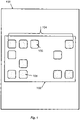
- a device 100 comprises a user interface 102.
- the user interface is displayed within the environment of a hand held device.
- device 100 can be a smartphone and user interface 102 is a graphical user interface displayed to the smartphone user.
- Context information can be sent within the smartphone environment.
- device 100 can be a tablet or any other hand held device.
- the user interface 102 comprises a plurality of selectable elements 104.
- the plurality of selectable elements 104 comprises a first element 106 and a second element 108.
- the first element 106 is associated with a first application.
- the first element 106 is a selectable application icon.
- the second element 108 is associated with a second application.
- the second element 108 is also a selectable application icon.
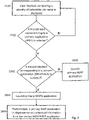
- the user interface 102 displays a plurality of selectable elements.
- a first element 106 corresponding to, or associated with, a primary application is selected.
- the first element 106 may be selected by a user.
- the primary application is a "MAP" application. If the first element 106 is not selected, the method returns to step 2100 and the user interface 102 continues to display the plurality of selectable elements.
- step 2200 if the first element 106 is selected, the method moves to step 2300.
- the second element 108 corresponding to, or associated with, a context application is selected.
- the second element 108 may be selected by a user.
- the context application is a "WEATHER" application. If the second element 108 is not selected, the primary "MAP" application is launched at step 2400 without any context information and tasks are performed within the primary "MAP" application without any dependence on the context application associated with the second element 108.
- the "MAP" application is launched.
- a task is performed in the primary application in dependence on the second element.
- the task is performed in dependence on context information associated with the context "WEATHER" application. For example, weather is shown for the location displayed in the map function of the primary application. In this embodiment, the weather at the location is the context information.
- the first element 106 may be selected (by a user or otherwise) before selection of the second element 108.
- the first element 106 may remain selected until the second element 108 is selected, at which time both elements may be released.
- the primary application may then launch.
- the first element may be selected and then released and the second element may be selected within a predefined time period after the first element is selected in order to launch the primary application with context information from the context application.
- the first element 106 and the second element 108 are selected simultaneously.
- the user interface 102 displays a plurality of selectable elements.
- the second element 108 corresponding to, or associated with, a context application is selected.
- the second element 108 may be selected by a user.
- the context application is a "WEATHER" application. If the second element 108 is not selected, the method returns to step 3100 and the user interface 102 continues to display the plurality of selectable elements.
- the method moves to step 3300.
- a first element 106 corresponding to, or associated with, a primary application is selected.
- the first element 106 may be selected by a user.
- the primary application is a "MAP" application. If the first element 106 is not selected, the method returns to step 3100 and the user interface 102 continues to display the plurality of selectable elements.
- the "MAP" application Is launched.
- a task is performed in the primary application in dependence on the second element. In particular, the task is performed in dependence on context information associated with the context "WEATHER" application. For example, weather is shown for the location displayed in the map function of the primary application. In this embodiment, the weather at the location is the context information
- the second element 108 may be selected (by a user or otherwise) before selection of the first element 106.
- the second element 108 may remain selected until the first element 106 is selected.
- the first element associated with the primary application may then be released and then the second element associated with the context application may then be released.
- the first, primary, application may then launch.
- the second element 108 may be selected and then released and the first element 106 may be selected within a predefined time period after the second element 108 is selected (or released) in order to launch the primary application with context information from the second, context, application.
- the first element 106 and the second element 108 are selected simultaneously.
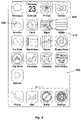
- Figure 4 illustrates a graphical user interface 402 within a smartphone or tablet environment, or within the environment of another hand held device.
- the graphical user interface 402 is an example not part of the invention of user interface 102.
- a second element 408 associated with the desired context application may be selected and the selection maintained (for example, the icon held down by a user) until a badge or context icon 410 (an indication of context) is displayed on the second element 406.
- the indication of context may alternatively or additionally be a blinking selectable element, for example.
- a first element 406 associated with the desired primary application may then be selected.
- the context application is the "MAP" application and the primary application is the "WEATHER" application.
- Figure 5 illustrates a graphical user interface 502 within a smartphone or tablet environment, or within the environment of another hand held device.
- the graphical user interface 502 is an example not part of the invention of user interface 102.
- a second element 508 associated with the desired context application may be selected (for example the icon held down by a user) and the selection maintained until a badge or context icon 510 (an indication of context) appears on elements of the plurality of selectable elements which can engage in inter-application communication with the selected context application.
- the indication of context may additionally or alternatively be a blinking selectable element, for example.
- a first element 506 associated with the desired primary application may then be selected.
- the context application is the "WEATHER" application and the primary application Is the "MAP" application, as described with reference to Figure 3 .
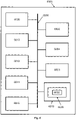
- FIG. 6 illustrates a block diagram of one implementation of a computing device 6000 within which a set of instructions, for causing the computing device to perform any one or more of the methodologies discussed herein, may be executed.
- Computing device 6000 may be an example of device 100 described with reference to Figure 1 .
- the computing device may be connected (e.g., networked) to other machines in a Local Area Network (LAN), an intranet, an extranet, or the Internet.
- the computing device may operate in the capacity of a server or a client machine in a client- server network environment, or as a peer machine in a peer-to-peer (or distributed) network environment.
- the computing device may be a persona!
- PC personal computer
- PDA Persona! Digital Assistant
- STB set-top box
- PDA Persona! Digital Assistant
- web appliance a web appliance
- server a network router, switch or bridge
- any machine capable of executing a set of instructions (sequential or otherwise) that specify actions to be taken by that machine.
- computing device shall also be taken to include any collection of machines (e.g., computers) that individually or jointly execute a set (or multiple sets) of instructions to perform any one or more of the methodologies discussed herein.
- the example computing device 6000 includes a processing device 6002, a main memory 6004 (e.g., read-only memory (ROM), flash memory, dynamic random access memory (DRAM) such as synchronous DRAM (SDRAM) or Rambus DRAM (RDRAM), etc.), a static memory 6006 (e.g., flash memory, static random access memory (SRAM), etc.), and a secondary memory (e.g., a data storage device 6018), which communicate with each other via a bus 6030.
- main memory 6004 e.g., read-only memory (ROM), flash memory, dynamic random access memory (DRAM) such as synchronous DRAM (SDRAM) or Rambus DRAM (RDRAM), etc.
- DRAM dynamic random access memory
- SDRAM synchronous DRAM
- RDRAM Rambus DRAM
- static memory 6006 e.g., flash memory, static random access memory (SRAM), etc.
- secondary memory e.g., a data storage device 6018
- Processing device 6002 represents one or more general-purpose processors such as a microprocessor, central processing unit, or the like. More particularly, the processing device 6002 may be a complex instruction set computing (CISC) microprocessor, reduced instruction set computing (RISC) microprocessor, very long instruction word (VLIW) microprocessor, processor implementing other instruction sets, or processors implementing a combination of instruction sets. Processing device 6002 may also be one or more special-purpose processing devices such as an application specific integrated circuit (ASIC), a field programmable gate array (FPGA), a digital signal processor (DSP), network processor, or the like. Processing device 6002 is configured to execute the processing logic (instructions 6022) for performing the operations and steps discussed herein.
- CISC complex instruction set computing
- RISC reduced instruction set computing
- VLIW very long instruction word
- Processing device 6002 may also be one or more special-purpose processing devices such as an application specific integrated circuit (ASIC), a field programmable gate array (FPGA), a digital signal processor (DS
- the computing device 6000 may further include a network interface device 6008.
- the computing device 6000 also may include a video display unit 6010 (e.g., a liquid crystal display (LCD) or a cathode ray tube (CRT)), an alphanumeric input device 6012 (e.g., a keyboard or touchscreen), a cursor control device 6014 (e.g., a mouse or touchscreen), and an audio device 6016 (e.g., a speaker).
- a video display unit 6010 e.g., a liquid crystal display (LCD) or a cathode ray tube (CRT)
- an alphanumeric input device 6012 e.g., a keyboard or touchscreen
- a cursor control device 6014 e.g., a mouse or touchscreen
- an audio device 6016 e.g., a speaker
- the data storage device 6018 may include one or more machine-readable storage media (or more specifically one or more non-transitory computer-readable storage media) 6028 on which is stored one or more sets of instructions 6022 embodying any one or more of the methodologies or functions described herein.
- the instructions 6022 may also reside, completely or at least partially, within the main memory 6004 and/or within the processing device 6002 during execution thereof by the computer system 6000, the main memory 10 6004 and the processing device 6002 also constituting computer-readable storage media.
- the various methods described above may be implemented by a computer program.
- the computer program may include computer code arranged to instruct a computer to perform the functions of one or more of the various methods described above.
- the computer program and/or the code for performing such methods may be provided to an apparatus, such as a computer, on one or more computer readable media or, more generally, a computer program product.
- the computer readable media may be transitory or non- transitory.
- the one or more computer readable media could be, for example, an electronic, magnetic, optical, electromagnetic, infrared, or semiconductor system, or a propagation medium for data transmission, for example for downloading the code over the Internet.
- the one or more computer readable media could take the form of one or more physical computer readable media such as semiconductor or solid state memory, magnetic tape, a removable computer diskette, a random access memory (RAM), a read-only memory (ROM), a rigid magnetic disc, and an optical disk, such as a CD-ROM, CD-R/W or DVD.
- physical computer readable media such as semiconductor or solid state memory, magnetic tape, a removable computer diskette, a random access memory (RAM), a read-only memory (ROM), a rigid magnetic disc, and an optical disk, such as a CD-ROM, CD-R/W or DVD.
- modules, components and other features described herein can be implemented as discrete components or integrated in the functionality of hardware components such as ASICS, FPGAs, DSPs or similar devices as part of an individualization server.
- a “hardware component” is a tangible (e.g., non-transitory) physical component (e.g., a set of one or more processors) capable of performing certain operations and may be configured or arranged in a certain physical manner.
- a hardware component may include dedicated circuitry or logic that is permanently configured to perform certain operations.
- a hardware component may be or include a special-purpose processor, such as a field programmable gate array (FPGA) or an ASIC.
- FPGA field programmable gate array
- a hardware component may also include programmable logic or circuitry that is temporarily configured by software to perform certain operations.
- the phrase "hardware component” should be understood to encompass a tangible entity that may be physically constructed, permanently configured (e.g., hardwired), or temporarily configured (e.g., programmed) to operate in a certain manner or to perform certain operations described herein.
- modules and components can be implemented as firmware or functional circuitry within hardware devices. Further, the modules and components can be implemented in any combination of hardware devices and software components, or only in software (e.g., code stored or otherwise embodied in a machine-readable medium or in a transmission medium).
- the primary application includes a dedicated function associated with the context application.
- this function can be started by the underlying operating system, where the function is parameterised with parameters received from the context application.
- the context application provides predetermined parameters to the primary application.
- the context application can be started in the background to deliver the predetermined parameters to the primary application.
- the primary application requests specific and predetermined context information from the context application in accordance with the function, and the context application provides the predetermined context information in response to the request.
- the context information is not requested by the primary application. Instead, the operating system can load the context information from the context application and push it to the launched primary application automatically.
- the information requested by the primary application may not be predetermined, and the primary application may access other information from the context application.
- the levels of access between the primary and context applications may preferably be predetermined such that inter-application communication (such as the sending of context information) occurs in a controlled, secure and well-defined manner.
- a primary application may be an "EMAIL” application.
- a second, context, application may be a "PASSWORD MANAGER” application.
- the dedicated function of the "EMAIL” application requires password and log-in information to enable e-mail access.
- the "PASSWORD MANAGER” application is configured to return parameters to the "EMAIL” application in the form of a password or log-in information.
- an indication of context may be shown on the second selectable element associated with, or corresponding to, the context application "PASSWORD MANAGER”. If the user uses a second finger to select the second selectable element, then the operating system launches "PASSWORD MANAGER" in the background.
- the operating system then launches the "EMAIL” application and executes the dedicated function.
- the "PASSWORD MANAGER” application then returns a list of passwords as parameters into the dedicated function to enable access to e-mails via the "EMAIL” application.
- the "EMAIL” application will be launched using the password returned by the "PASSWORD MANAGER” application.
- the "EMAIL” application will display a message asking the user to select the appropriate log-on information to use out of the list of returned passwords.
- the function of the "EMAIL” application can be parameterised using parameters from the context application "BIN".
- the operating system is configured to remove all emails in the deleted email folder when the "BIN" application is selected as the context application.
- the user can select the first selectable element corresponding to the primary "EMAIL” application, while simultaneously selecting the "BIN” application as a context application when an indication of context is provided.
- ail of the emails in the deleted email folder are deleted.
- the "EMAIL” application is not started; rather, it works in the background to remove the method.
- the first application is launched (or started) in the foreground and the context application, or second application, runs in the background. In other embodiments, the first application also runs in the background. In other embodiments, the first and second applications run in the background. In some embodiments, the first application and/or second application are stopped once the task has been performed in the first application.
- Table 1 illustrates some further examples of inter-application functionality.
- the functionalities of the primary application which are underlined are those tasks which can be performed in dependence on the context.
- TABLE 1 Primary application Functionality of primary application Context application Context based action Travel Book a trip, see the weather at booked destinations , see trip timings, etc.
- Weather Find weather information Shopping store Show products, show open hours , promotions, etc.
Landscapes
- Engineering & Computer Science (AREA)
- Software Systems (AREA)
- Theoretical Computer Science (AREA)
- General Engineering & Computer Science (AREA)
- Physics & Mathematics (AREA)
- General Physics & Mathematics (AREA)
- Human Computer Interaction (AREA)
- User Interface Of Digital Computer (AREA)
Description
- The present disclosure relates to a system and method for performing a task in an application in dependence on context information, where the context information can be provided by way of communication between applications.
- An application or program can provide many functionalities to a user of a computing device. The functionalities of an application or program are accessible through, for example, a menu or other options within the application. However, applications are generally self-contained. Furthermore, the pages, menu options or content of an application are statically organized. A user therefore has to browse through menu options whenever they want to perform a specific action, reach specific content or see a particular application page.
- Improved functionality of an application can be achieved by improving the performance of tasks or functions within said program or application.
- The paper by Steven Kendall et al., "Multifunction GPS embedded wrist device for runners", Consumer Electronics (ISCE), 2012 IEEE 16th International Symposium on, IEEE, 4 June 2012 (2012-06-04), pages 1-4, discloses a wearable wrist device for runners that is equipped with a GPS chip and programmable features wherein localization data are used by default.
-
-
Figure 1 illustrates a hardware infrastructure for implementing an embodiment; -
Figure 2 illustrates a flowchart of a method of inter-application communication according to one embodiment; -
Figure 3 illustrates a flowchart of a method of inter-application communication according to a second embodiment; -
Figure 4 illustrates an interface for implementation of an embodiment; -
Figure 5 illustrates an interface for implementation of another embodiment; and -
Figure 6 illustrates a black diagram of one implementation of a computing device. - In overview, a system for and method for sending context information for carrying out a context-dependent task is disclosed. A task is performed in a primary program in dependence on a context, where both the primary program and the context are selectable, for example by a user. Information related to the selected context is provided to the primary program. In this way, information associated with the selected context is combined with information from the selected primary program such that the primary program carries out a task in dependence on the provided context information, thereby improving the functionality of the primary program. For example, a user can see different information or content, or perform different actions, within the primary program; the provided content or available actions are dependent on the particular context selected.
- In some aspects of the disclosure a method comprises a method of sending context information for carrying out a context-dependent task. The method comprises displaying a user interface comprising a plurality of selectable elements. The plurality of selectable elements may be program or application icons on a hand held device (such as a cellular device or smartphone, or a tablet). Alternatively, the selectable elements may be links or icons on a web browser. Alternatively, the selectable elements may be program or application icons on a persona! computer, for example. Alternatively, the selectable elements can be any other form of selectable element. The method further comprises receiving a selection of a first element and a selection of a second element from the plurality of selectable elements. The first element may be associated with, or correspond to, a first program. The second element may be associated with or correspond to a context. Alternatively, the second element may be associated with, or correspond to, a second program. The first program may be a primary program and the second program may be a context program or a context menu. The context program can be configured to provide context information to the primary program.
- The method further comprises launching the first program and performing a task in the first program in dependence on the second element that has been selected. In this way, the task can be performed in the primary program using context information which is related to the particular context, or provided from the particular context program, associated with the selected second element. Thus, the disclosed method may be more efficient (since, for example, only one program needs to be accessed by a user whilst still providing the user with information related to the desired context) and use fewer computer resources.
- According to examples not part of the invention, selection of the first element may be made and then the selection may be maintained until selection of the second element. Selection of the second element may be made and then the selection may be maintained until selection of the first element. Alternatively, according to the invention the selection of the first and second elements is simultaneous. In other examples not part of the invention, it may be ordered in such a way that a primary program and a context program or context can be distinguished by the device, for example where both the first and second elements are selected within a pre-determined period of time or in a pre-determined order. As such, the user can quickly and easily specify which context information is required or which context should be used upon launch of the primary program (if any).
- If selection of the first element is made before selection of the second element, the user may select the primary program and then subsequently select the second element depending on which context information they wish to incorporate within the primary program associated with the selected first element. Alternatively, if the second, contextual, element is selected before the first element, a user may maintain a selection of the second element until an indication of context appears on elements of the plurality of selectable elements. The indication of context may indicate that inter-application communication can occur between a context program or menu associated with the second element and other programs associated with those elements of the plurality of selectable elements which comprise the indication of context. Alternatively, the indication of context may indicate that a task can be performed in the programs associated with those elements of the plurality of selectable elements which comprise the indication of context in dependence on a context associated with the second element.
- In examples not part of the invention where the second, contextual, element is selected before the first element, a user may maintain selection of the second element until an indication of context appears on the second element. The user may then select a first element associated with a first program in order to launch the first program; the selection of the first element may be made whilst selection of the second element is maintained or after the second element is released.
- In examples not part of the invention, the step of displaying may comprise displaying at least one of the plurality of the selectable elements after receiving the selection of the first element. For example, selection of the first element may be maintained until one or more of the plurality of selectable elements are displayed, in any suitable selection layout, on a user interface. All of the selectable elements may be displayed after receiving the selection of the first element, or only a subset of the selectable elements may be displayed in the selection layout. For example, all of the plurality of selectable elements except the first element may be displayed, or those selectable elements associated with a program or application which cannot be used in a context dependent task may not be displayed. Selection of the second element may be made from the selectable elements displayed after receiving the selection of the first element. In one embodiment, the first element may be displayed in the middle left of the user interface and a subset of elements displayed to the right of the first element. For example, each of the elements in the subset of the plurality of elements may be displayed on a different line, one element per line. A user may then release the first element and select a second element from the displayed subset of elements. A user may scroll through the list of elements if not all of the elements can be displayed on the user interface at once. Scrolling may be achieved by swiping a display screen vertically down or up, in embodiments where the computing device is a mobile handheld device. Alternatively, scrolling may be achieved by using the scroll button on a mouse, where the computing device is a personal computer.
- Alternatively, selection of the second element may be maintained until all, or a subset of, the plurality of selectable elements are displayed in a selection layout in any suitable layout. In one example, selection of the first element may then be made from a displayed subset of the plurality of selectable elements. In one embodiment, the second element may be displayed in the middle left of the user interface and the subset of elements displayed to the right of the second element.
- Alternatively, the initially selected element (whether that is the first or second element) may be displayed in any position on the user interface and all, or a subset of, the plurality of selectable elements may be displayed in any suitable arrangement around, above, below, to the left, or to the right of the initially selected element in any suitable selection layout.
- The step of performing a task in the first program in dependence on the second element that has been selected may comprise the first program sending a request for data to a second program associated with, or corresponding to, the second element. The second program then sends data to the first program in response to the request. The first program receives the data and performs the task in dependence on the received data. For example, the first, primary, program may be a "MAP" application and the second, context, program may be a "WEATHER" application. The first program sends a request for weather data at a given location (for example, a location entered by a user) to the second program. The first program receives the weather data and performs the desired task, for example, the task may be displaying the location on a map whilst incorporating the weather data sent by the second program. For example, the map may show Paris and simultaneously show the weather in Paris within the primary "MAP" application. In this way, computer resources are used more efficiently since only the "MAP" application needs to be running in the foreground; the "WEATHER" application can run in the background and can be stopped once the information requested by the first program has been retrieved from it.
- Alternatively, the step of performing a task in the first program in dependence on the second element that has been selected may comprise a second program associated with the second element sending data to the first program in the absence of a request from the first program; for example, the selection of the second program by constitute a request for data. Regardless of the specific implementation, the above method can enable a primary program to get background information, or other metadata, from another, context, program, or to get information relating to a desired context.
- Further aspects of the disclosure relate to a system and non-transitory computer readable storage media for carrying out the method described above. In the following description, programs will be referred to as applications (e.g. the first program is termed the first application, and the second program is termed the second application). In any of the embodiments, application is to be interpreted as application software. For example, an application can be any program or piece of software designed to perform a group of coordinated functions or tasks on a computing device. Application is not limited to mobile applications (or "apps"), for example, those downloaded to a mobile device or other hand held electronic device (e.g., a smartphone or a tablet).
- In any of the embodiments, context information is implemented as metadata, i.e. as information and/or data contained in, provided by, or related to, the context application or context. For example, context information can be weather information, location information, email or bank account password information (for example where the context application is an application for secure password storage), or other data. The context information is used to implement the idea of performing actions or tasks in an application in accordance with a general context, where the context can be "location", "weather", "travel", "shopping" and the like.
- In embodiments where the second element is associated with an application, inter-application communication can occur between the first, primary, application (associated with the first element) and a second, context, application (associated with the second element). When selected, the primary and context applications can communicate with one another in a controlled manner and without compromising the separation of the two applications, since that data (such as context information) which is accessible for use in the inter-application communication can be clearly defined and ring-fenced. Such inter-application communication can improve the use of a device, since a user can obtain information more quickly and efficiently. Furthermore, fewer computer resources are required since a user does not have to start both the primary and context applications to obtain ail of the desired information; one or both of the primary and context applications can perform the tasks necessary for inter-application communication and the provision of context-based information whilst running in the device background. In this way, specific information from the context application can be used in the primary application without the need to successively and separately run the two applications. Furthermore, fewer computer resources can be used since the context application does not necessarily have to run in full; predetermined or specific information can be provided to the primary application whilst the context application runs in the background.
- The inter-application communication or context dependent tasks described herein can facilitate the employment of metadata in the primary application to perform a task in dependence on an overall context. For example, if the second application is a "SHOPPING" application, the context information may be the locations of the shops. When the primary application is a "MAP" application, performing a task in the "MAP" application in dependence on the second element could therefore be to display the locations of specific shops on a map, where the locations are provided to the first application by the second, context, application. Alternatively, the context may be "shopping" and the metadata exchanged between the context application and the primary application may be "the address of a shopping centre near me", where the nearest shops are then displayed within the "MAP" application. Alternatively, a user may select the "MAP" application as a "location" context and then launch a "BANKING" application to see the location of their bank, for example.
- In another example, a context application can be a "TRAVEL" application, which provides the context of "travel" to the first application. The first application may be the "SETTI NGS" application. The "SETTINGS" application may receive context information indicating that the context is "travel". Performing a task in the "SETTINGS" application in dependence on the context "travel" may comprise, for example, displaying the specific settings page of the "TRAVEL" application itself or displaying a page indicating the roaming functionality of the
device. - The 'TRAVEL" application (or other context application) may have other metadata associated with it that is not recognised by the "SETTINGS" application (or other primary application). The unrecognised metadata may then be ignored by the first, primary, application. Alternatively, such metadata may not be provided to the primary application by the context application.
- Some specific embodiments are now described by way of illustration with reference to the accompanying drawings in which like reference numerals refer to like features. With reference to
Figure 1 , adevice 100 comprises auser interface 102. In the preferred embodiment, the user interface is displayed within the environment of a hand held device. For example,device 100 can be a smartphone anduser interface 102 is a graphical user interface displayed to the smartphone user. Context information can be sent within the smartphone environment. Alternativelydevice 100 can be a tablet or any other hand held device. Theuser interface 102 comprises a plurality ofselectable elements 104. The plurality ofselectable elements 104 comprises afirst element 106 and asecond element 108. Thefirst element 106 is associated with a first application. In a preferred embodiment, thefirst element 106 is a selectable application icon. Thesecond element 108 is associated with a second application. In the preferred embodiment, thesecond element 108 is also a selectable application icon. - With reference to
Figure 2 , a method implemented by thedevice 100 in one embodiment is now described. Atstep 2100 theuser interface 102 displays a plurality of selectable elements. Atstep 2200, afirst element 106 corresponding to, or associated with, a primary application is selected. Thefirst element 106 may be selected by a user. In this embodiment, the primary application is a "MAP" application. If thefirst element 106 is not selected, the method returns to step 2100 and theuser interface 102 continues to display the plurality of selectable elements. - At
step 2200, if thefirst element 106 is selected, the method moves to step 2300. Atstep 2300, thesecond element 108 corresponding to, or associated with, a context application is selected. Thesecond element 108 may be selected by a user. In this embodiment, the context application is a "WEATHER" application. If thesecond element 108 is not selected, the primary "MAP" application is launched atstep 2400 without any context information and tasks are performed within the primary "MAP" application without any dependence on the context application associated with thesecond element 108. - At
step 2500, if thesecond element 108 is selected, the "MAP" application is launched. Atstep 2600, a task is performed in the primary application in dependence on the second element. In particular, the task is performed in dependence on context information associated with the context "WEATHER" application. For example, weather is shown for the location displayed in the map function of the primary application. In this embodiment, the weather at the location is the context information. - With reference to the embodiment shown in
Figure 2 , in some examples not part of the invention, thefirst element 106 may be selected (by a user or otherwise) before selection of thesecond element 108. Thefirst element 106 may remain selected until thesecond element 108 is selected, at which time both elements may be released. The primary application may then launch. Alternatively, in some examples not part of the invention, the first element may be selected and then released and the second element may be selected within a predefined time period after the first element is selected in order to launch the primary application with context information from the context application. Alternatively, according to the invention thefirst element 106 and thesecond element 108 are selected simultaneously. - With reference to
Figure 3 , a method implemented by thedevice 100 in a second embodiment is now described. Atstep 3100 theuser interface 102 displays a plurality of selectable elements. Atstep 3200, thesecond element 108 corresponding to, or associated with, a context application is selected. Thesecond element 108 may be selected by a user. In this embodiment, the context application is a "WEATHER" application. If thesecond element 108 is not selected, the method returns to step 3100 and theuser interface 102 continues to display the plurality of selectable elements. Atstep 3200, if thesecond element 108 is selected (or released), the method moves to step 3300. - At
step 3300, afirst element 106 corresponding to, or associated with, a primary application is selected. Thefirst element 106 may be selected by a user. In this embodiment, the primary application is a "MAP" application. If thefirst element 106 is not selected, the method returns to step 3100 and theuser interface 102 continues to display the plurality of selectable elements. Atstep 3400, if thefirst element 106 is selected, the "MAP" application Is launched. Atstep 3500, a task is performed in the primary application in dependence on the second element. In particular, the task is performed in dependence on context information associated with the context "WEATHER" application. For example, weather is shown for the location displayed in the map function of the primary application. In this embodiment, the weather at the location is the context information - With reference to the embodiment shown in
Figure 3 , in some examples not part of the invention, thesecond element 108 may be selected (by a user or otherwise) before selection of thefirst element 106. Thesecond element 108 may remain selected until thefirst element 106 is selected. The first element associated with the primary application may then be released and then the second element associated with the context application may then be released. The first, primary, application may then launch. Alternatively, in some examples not part of the invention, thesecond element 108 may be selected and then released and thefirst element 106 may be selected within a predefined time period after thesecond element 108 is selected (or released) in order to launch the primary application with context information from the second, context, application. Alternatively, according to the invention thefirst element 106 and thesecond element 108 are selected simultaneously. -
Figure 4 illustrates agraphical user interface 402 within a smartphone or tablet environment, or within the environment of another hand held device. Thegraphical user interface 402 is an example not part of the invention ofuser interface 102. Asecond element 408 associated with the desired context application may be selected and the selection maintained (for example, the icon held down by a user) until a badge or context icon 410 (an indication of context) is displayed on thesecond element 406. The indication of context may alternatively or additionally be a blinking selectable element, for example. Afirst element 406 associated with the desired primary application may then be selected. In the embodiment described with reference toFigure 4 , the context application is the "MAP" application and the primary application is the "WEATHER" application. -
Figure 5 illustrates agraphical user interface 502 within a smartphone or tablet environment, or within the environment of another hand held device. Thegraphical user interface 502 is an example not part of the invention ofuser interface 102. Asecond element 508 associated with the desired context application may be selected (for example the icon held down by a user) and the selection maintained until a badge or context icon 510 (an indication of context) appears on elements of the plurality of selectable elements which can engage in inter-application communication with the selected context application. The indication of context may additionally or alternatively be a blinking selectable element, for example. Afirst element 506 associated with the desired primary application may then be selected. In the embodiment described with reference toFigure 5 , the context application is the "WEATHER" application and the primary application Is the "MAP" application, as described with reference toFigure 3 . -
Figure 6 illustrates a block diagram of one implementation of acomputing device 6000 within which a set of instructions, for causing the computing device to perform any one or more of the methodologies discussed herein, may be executed.Computing device 6000 may be an example ofdevice 100 described with reference toFigure 1 . In alternative implementations, the computing device may be connected (e.g., networked) to other machines in a Local Area Network (LAN), an intranet, an extranet, or the Internet. The computing device may operate in the capacity of a server or a client machine in a client- server network environment, or as a peer machine in a peer-to-peer (or distributed) network environment. The computing device may be a persona! computer (PC), a tablet computer, a set-top box (STB), a Persona! Digital Assistant (PDA), a cellular telephone or smartphone, a web appliance, a server, a network router, switch or bridge, or any machine capable of executing a set of instructions (sequential or otherwise) that specify actions to be taken by that machine. Further, while only a single computing device is illustrated, the term "computing device" shall also be taken to include any collection of machines (e.g., computers) that individually or jointly execute a set (or multiple sets) of instructions to perform any one or more of the methodologies discussed herein. - The
example computing device 6000 includes aprocessing device 6002, a main memory 6004 (e.g., read-only memory (ROM), flash memory, dynamic random access memory (DRAM) such as synchronous DRAM (SDRAM) or Rambus DRAM (RDRAM), etc.), a static memory 6006 (e.g., flash memory, static random access memory (SRAM), etc.), and a secondary memory (e.g., a data storage device 6018), which communicate with each other via abus 6030. -
Processing device 6002 represents one or more general-purpose processors such as a microprocessor, central processing unit, or the like. More particularly, theprocessing device 6002 may be a complex instruction set computing (CISC) microprocessor, reduced instruction set computing (RISC) microprocessor, very long instruction word (VLIW) microprocessor, processor implementing other instruction sets, or processors implementing a combination of instruction sets.Processing device 6002 may also be one or more special-purpose processing devices such as an application specific integrated circuit (ASIC), a field programmable gate array (FPGA), a digital signal processor (DSP), network processor, or the like.Processing device 6002 is configured to execute the processing logic (instructions 6022) for performing the operations and steps discussed herein. - The
computing device 6000 may further include anetwork interface device 6008. Thecomputing device 6000 also may include a video display unit 6010 (e.g., a liquid crystal display (LCD) or a cathode ray tube (CRT)), an alphanumeric input device 6012 (e.g., a keyboard or touchscreen), a cursor control device 6014 (e.g., a mouse or touchscreen), and an audio device 6016 (e.g., a speaker). - The
data storage device 6018 may include one or more machine-readable storage media (or more specifically one or more non-transitory computer-readable storage media) 6028 on which is stored one or more sets ofinstructions 6022 embodying any one or more of the methodologies or functions described herein. Theinstructions 6022 may also reside, completely or at least partially, within themain memory 6004 and/or within theprocessing device 6002 during execution thereof by thecomputer system 6000, themain memory 10 6004 and theprocessing device 6002 also constituting computer-readable storage media. - The various methods described above may be implemented by a computer program. The computer program may include computer code arranged to instruct a computer to perform the functions of one or more of the various methods described above. The computer program and/or the code for performing such methods may be provided to an apparatus, such as a computer, on one or more computer readable media or, more generally, a computer program product. The computer readable media may be transitory or non- transitory. The one or more computer readable media could be, for example, an electronic, magnetic, optical, electromagnetic, infrared, or semiconductor system, or a propagation medium for data transmission, for example for downloading the code over the Internet. Alternatively, the one or more computer readable media could take the form of one or more physical computer readable media such as semiconductor or solid state memory, magnetic tape, a removable computer diskette, a random access memory (RAM), a read-only memory (ROM), a rigid magnetic disc, and an optical disk, such as a CD-ROM, CD-R/W or DVD.
- In an implementation, the modules, components and other features described herein (for
example device 100 in relation toFigure 1 ) can be implemented as discrete components or integrated in the functionality of hardware components such as ASICS, FPGAs, DSPs or similar devices as part of an individualization server. - A "hardware component" is a tangible (e.g., non-transitory) physical component (e.g., a set of one or more processors) capable of performing certain operations and may be configured or arranged in a certain physical manner. A hardware component may include dedicated circuitry or logic that is permanently configured to perform certain operations. A hardware component may be or include a special-purpose processor, such as a field programmable gate array (FPGA) or an ASIC. A hardware component may also include programmable logic or circuitry that is temporarily configured by software to perform certain operations.
- Accordingly, the phrase "hardware component" should be understood to encompass a tangible entity that may be physically constructed, permanently configured (e.g., hardwired), or temporarily configured (e.g., programmed) to operate in a certain manner or to perform certain operations described herein.
- In addition, the modules and components can be implemented as firmware or functional circuitry within hardware devices. Further, the modules and components can be implemented in any combination of hardware devices and software components, or only in software (e.g., code stored or otherwise embodied in a machine-readable medium or in a transmission medium).
- In some examples, the primary application includes a dedicated function associated with the context application. When the primary and context applications are selected, this function can be started by the underlying operating system, where the function is parameterised with parameters received from the context application. In this example, the context application provides predetermined parameters to the primary application. The context application can be started in the background to deliver the predetermined parameters to the primary application. In this example, the primary application requests specific and predetermined context information from the context application in accordance with the function, and the context application provides the predetermined context information in response to the request.
- In some examples, the context information is not requested by the primary application. Instead, the operating system can load the context information from the context application and push it to the launched primary application automatically.
- In other examples, the information requested by the primary application may not be predetermined, and the primary application may access other information from the context application. The levels of access between the primary and context applications may preferably be predetermined such that inter-application communication (such as the sending of context information) occurs in a controlled, secure and well-defined manner.
- In an example, a primary application may be an "EMAIL" application. A second, context, application may be a "PASSWORD MANAGER" application. The dedicated function of the "EMAIL" application requires password and log-in information to enable e-mail access. The "PASSWORD MANAGER" application is configured to return parameters to the "EMAIL" application in the form of a password or log-in information. When the user selects the "EMAIL" application with one finger, an indication of context may be shown on the second selectable element associated with, or corresponding to, the context application "PASSWORD MANAGER". If the user uses a second finger to select the second selectable element, then the operating system launches "PASSWORD MANAGER" in the background. The operating system then launches the "EMAIL" application and executes the dedicated function. The "PASSWORD MANAGER" application then returns a list of passwords as parameters into the dedicated function to enable access to e-mails via the "EMAIL" application. In the case where only a single password is required to log on, the "EMAIL" application will be launched using the password returned by the "PASSWORD MANAGER" application. In the case that multiple passwords are returned, the "EMAIL" application will display a message asking the user to select the appropriate log-on information to use out of the list of returned passwords.
- In another example, the function of the "EMAIL" application can be parameterised using parameters from the context application "BIN". In this example, the operating system is configured to remove all emails in the deleted email folder when the "BIN" application is selected as the context application. The user can select the first selectable element corresponding to the primary "EMAIL" application, while simultaneously selecting the "BIN" application as a context application when an indication of context is provided. Upon selection of the "BIN" application, ail of the emails in the deleted email folder are deleted. The "EMAIL" application is not started; rather, it works in the background to remove the method.
- In some embodiments the first application is launched (or started) in the foreground and the context application, or second application, runs in the background. In other embodiments, the first application also runs in the background. In other embodiments, the first and second applications run in the background. In some embodiments, the first application and/or second application are stopped once the task has been performed in the first application.
- Table 1 illustrates some further examples of inter-application functionality. The functionalities of the primary application which are underlined are those tasks which can be performed in dependence on the context.
TABLE 1 Primary application Functionality of primary application Context application Context based action Travel Book a trip, see the weather at booked destinations, see trip timings, etc. Weather Find weather information Shopping store Show products, show open hours, promotions, etc. Clock Look at the time Bank Show available credit, show transactions, show location of the bank, etc. Map Look for a location Insurance Show offers, show contact information, show account information, etc. Phone Make a call GPS Navigator Show roads, application settings, etc. Settings Change settings - Unless specifically stated otherwise, as apparent from the following discussion, it is appreciated that throughout the description, discussions utilizing terms such as "displaying", "receiving", "launching", "running", "starting", "performing", "sending", "pushing", or the like, refer to the actions and processes of a computer system, or similar electronic computing device, that manipulates and transforms data represented as physical (electronic) quantities within the computer system's registers and memories into other data similarly represented as physical quantities within the computer system memories or registers or other such information storage, transmission or display devices.
Claims (13)
- A computer implemented method for sending information between programs, comprising:displaying (2100, 3100) a graphical user interface comprising a plurality of selectable application icons (104);receiving (2200, 2300, 3200, 3300) a simultaneous selection of a first icon (106, 406, 506) and a second icon (108, 408, 508) from the plurality of selectable application icons;responsive to receiving the simultaneous selection of the first and second icons:launching (2500, 3400) a first program associated with the first icon;launching a second program associated with the second icon;sending, from the second program to the first program, information, named context information, relating to the applicative scope of the second program and used to implement performing actions or tasks in the first application in accordance with a general applicative context of the second program; andperforming a task in the first program in dependence on the received context information by combining said context information with information from the second program thereby improving the functionality of the first program.
- The method of claim 1, wherein the step of sending context information comprises the first program sending a request for context information to the second program.
- The method of claim 2, wherein the step of sending context information comprises the second program sending the context information to the first program in response to the request.
- The method of claim 3, further comprising receiving the context information in the first program.
- The method of any preceding claim, wherein launching the second program comprises launching the second program in the background.
- The method of any preceding claim, wherein launching the first program comprises launching the first program in the background.
- The method of claim 1, wherein sending context information comprises pushing predefined data to the first program from the second program.
- One or more non-transitory computer readable media having computer-executable instructions to cause one or more computer systems to perform the method of any of claims 1 to 7.
- A system (100, 6000) for sending information between programs, the system comprising a processor (6002) arranged to:cause display of a graphical user interface comprising a plurality of selectable application icons (104);receive a simultaneous selection of a first icon (106) and a second icon (108) from the plurality of selectable application icons;responsive to receiving the simultaneous selection of the first and second icons:launch a first program associated with the first icon;launch a second program associated with the second icon; andsend, from the second program to the first program, information, named context information, relating to the applicative scope of the second program and used to implement performing actions or tasks in the first application in accordance with a general applicative context of the second program; andperform a task in the first program in dependence on the received context information by combining said context information with information from the second program thereby improving the functionality of the first program.
- The system of claim 9, wherein the processor is arranged to send a request for context information from the first program to the second program.
- The system of claim 10, wherein the processor is arranged to send context information from the second program to the first program in response to the request.
- The system of claim 11, wherein the processor is arranged to receive the context information in the first program.
- The system of claim 9, wherein the processor is arranged to perform the method of any of claims 5 to 7.
Applications Claiming Priority (2)
| Application Number | Priority Date | Filing Date | Title |
|---|---|---|---|
| EP16182645.8A EP3279792A1 (en) | 2016-08-03 | 2016-08-03 | Performing a context-dependent task in a program |
| PCT/EP2017/069719 WO2018024845A1 (en) | 2016-08-03 | 2017-08-03 | Performing a context-dependent task in a program |
Publications (2)
| Publication Number | Publication Date |
|---|---|
| EP3494467A1 EP3494467A1 (en) | 2019-06-12 |
| EP3494467B1 true EP3494467B1 (en) | 2022-12-28 |
Family
ID=56611200
Family Applications (2)
| Application Number | Title | Priority Date | Filing Date |
|---|---|---|---|
| EP16182645.8A Withdrawn EP3279792A1 (en) | 2016-08-03 | 2016-08-03 | Performing a context-dependent task in a program |
| EP17745363.6A Active EP3494467B1 (en) | 2016-08-03 | 2017-08-03 | Performing a context-dependent task in a program |
Family Applications Before (1)
| Application Number | Title | Priority Date | Filing Date |
|---|---|---|---|
| EP16182645.8A Withdrawn EP3279792A1 (en) | 2016-08-03 | 2016-08-03 | Performing a context-dependent task in a program |
Country Status (3)
| Country | Link |
|---|---|
| US (3) | US10908932B2 (en) |
| EP (2) | EP3279792A1 (en) |
| WO (1) | WO2018024845A1 (en) |
Families Citing this family (1)
| Publication number | Priority date | Publication date | Assignee | Title |
|---|---|---|---|---|
| WO2024215064A1 (en) | 2023-04-10 | 2024-10-17 | 주식회사 엘지화학 | Positive electrode material, and positive electrode and lithium secondary battery comprising same |
Family Cites Families (7)
| Publication number | Priority date | Publication date | Assignee | Title |
|---|---|---|---|---|
| US7249048B1 (en) * | 2000-06-30 | 2007-07-24 | Ncr Corporation | Incorporating predicrive models within interactive business analysis processes |
| JP4762070B2 (en) * | 2006-07-19 | 2011-08-31 | 富士通株式会社 | Handwriting input device, handwriting input method, and computer program |
| US20140189597A1 (en) * | 2012-12-28 | 2014-07-03 | Samsung Electronics Co., Ltd. | Method and electronic device for presenting icons |
| US20140218372A1 (en) * | 2013-02-05 | 2014-08-07 | Apple Inc. | Intelligent digital assistant in a desktop environment |
| EP2767896B1 (en) * | 2013-02-14 | 2019-01-16 | LG Electronics Inc. | Mobile terminal and method of controlling the mobile terminal |
| CN104951329A (en) * | 2014-03-31 | 2015-09-30 | 青岛海信移动通信技术股份有限公司 | Configuration and start method of application template and mobile terminal |
| US10627987B2 (en) * | 2015-05-19 | 2020-04-21 | Samsung Electronics Co., Ltd. | Method for launching a second application using a first application icon in an electronic device |
-
2016
- 2016-08-03 EP EP16182645.8A patent/EP3279792A1/en not_active Withdrawn
-
2017
- 2017-08-03 EP EP17745363.6A patent/EP3494467B1/en active Active
- 2017-08-03 US US16/322,585 patent/US10908932B2/en active Active
- 2017-08-03 WO PCT/EP2017/069719 patent/WO2018024845A1/en not_active Ceased
-
2020
- 2020-12-29 US US17/136,613 patent/US11544086B2/en active Active
-
2022
- 2022-12-01 US US18/073,101 patent/US11947980B2/en active Active
Non-Patent Citations (1)
| Title |
|---|
| PETER HUTCHISON: "The Complete Amiga 1200 User Guide", 31 December 2010 (2010-12-31), XP055759743, Retrieved from the Internet <URL:https://ftp.fau.de/aminet/docs/help/A1200UserGuide.pdf> [retrieved on 20201214] * |
Also Published As
| Publication number | Publication date |
|---|---|
| EP3279792A1 (en) | 2018-02-07 |
| US11544086B2 (en) | 2023-01-03 |
| US11947980B2 (en) | 2024-04-02 |
| EP3494467A1 (en) | 2019-06-12 |
| US10908932B2 (en) | 2021-02-02 |
| US20230168908A1 (en) | 2023-06-01 |
| US20190171468A1 (en) | 2019-06-06 |
| WO2018024845A1 (en) | 2018-02-08 |
| US20210117212A1 (en) | 2021-04-22 |
Similar Documents
| Publication | Publication Date | Title |
|---|---|---|
| US12218896B2 (en) | Conversion of text relating to media content and media extension apps | |
| US12120585B2 (en) | Messaging system interacting with dynamic extension app | |
| JP6169590B2 (en) | Adaptive input language switching | |
| US8788947B2 (en) | Object transfer method using gesture-based computing device | |
| US9930167B2 (en) | Messaging application with in-application search functionality | |
| US10254928B1 (en) | Contextual card generation and delivery | |
| US9720557B2 (en) | Method and apparatus for providing always-on-top user interface for mobile application | |
| CN113055525A (en) | File sharing method, device, equipment and storage medium | |
| RU2643486C2 (en) | Method and device for information accumulation | |
| CN112182446B (en) | Page display method, device, terminal equipment and computer-readable storage medium | |
| TW201411467A (en) | Data processing method and device | |
| KR20260035266A (en) | Methods, devices, electronic devices and storage media for creating media content | |
| WO2014206037A1 (en) | Apparatuses and methods for web page sharing | |
| US20210271491A1 (en) | Application processing method, device, electronic device and storage medium | |
| CN114385049A (en) | Message processing method, device, equipment and storage medium | |
| EP4668087A1 (en) | Interaction method and apparatus, electronic device, and storage medium | |
| US11947980B2 (en) | Performing a context-dependent task in a program | |
| US9880716B2 (en) | User-selectable quasi-permanent partial overlap of user interface display | |
| WO2022161243A1 (en) | Information display method and apparatus, and electronic device | |
| CN114547395A (en) | Searching method and device | |
| WO2019168648A2 (en) | Systems and methods for generating a dynamically adjustable dial pad | |
| CN113127760A (en) | Application method and device of position information | |
| CN108427527B (en) | Information selection method and device and mobile terminal | |
| CN117676007A (en) | Information processing methods, devices, electronic equipment and readable storage media | |
| WO2017190477A1 (en) | Target object searching method and apparatus |
Legal Events
| Date | Code | Title | Description |
|---|---|---|---|
| STAA | Information on the status of an ep patent application or granted ep patent |
Free format text: STATUS: UNKNOWN |
|
| STAA | Information on the status of an ep patent application or granted ep patent |
Free format text: STATUS: THE INTERNATIONAL PUBLICATION HAS BEEN MADE |
|
| PUAI | Public reference made under article 153(3) epc to a published international application that has entered the european phase |
Free format text: ORIGINAL CODE: 0009012 |
|
| STAA | Information on the status of an ep patent application or granted ep patent |
Free format text: STATUS: REQUEST FOR EXAMINATION WAS MADE |
|
| 17P | Request for examination filed |
Effective date: 20190219 |
|
| AK | Designated contracting states |
Kind code of ref document: A1 Designated state(s): AL AT BE BG CH CY CZ DE DK EE ES FI FR GB GR HR HU IE IS IT LI LT LU LV MC MK MT NL NO PL PT RO RS SE SI SK SM TR |
|
| AX | Request for extension of the european patent |
Extension state: BA ME |
|
| DAV | Request for validation of the european patent (deleted) | ||
| DAX | Request for extension of the european patent (deleted) | ||
| STAA | Information on the status of an ep patent application or granted ep patent |
Free format text: STATUS: EXAMINATION IS IN PROGRESS |
|
| 17Q | First examination report despatched |
Effective date: 20191119 |
|
| REG | Reference to a national code |
Ref country code: DE Ref legal event code: R079 Ref document number: 602017065023 Country of ref document: DE Free format text: PREVIOUS MAIN CLASS: G06F0009440000 Ipc: G06F0008380000 |
|
| RIC1 | Information provided on ipc code assigned before grant |
Ipc: G06F 9/445 20180101ALI20220509BHEP Ipc: G06F 8/38 20180101AFI20220509BHEP |
|
| GRAP | Despatch of communication of intention to grant a patent |
Free format text: ORIGINAL CODE: EPIDOSNIGR1 |
|
| STAA | Information on the status of an ep patent application or granted ep patent |
Free format text: STATUS: GRANT OF PATENT IS INTENDED |
|
| INTG | Intention to grant announced |
Effective date: 20220708 |
|
| GRAS | Grant fee paid |
Free format text: ORIGINAL CODE: EPIDOSNIGR3 |
|
| GRAA | (expected) grant |
Free format text: ORIGINAL CODE: 0009210 |
|
| STAA | Information on the status of an ep patent application or granted ep patent |
Free format text: STATUS: THE PATENT HAS BEEN GRANTED |
|
| AK | Designated contracting states |
Kind code of ref document: B1 Designated state(s): AL AT BE BG CH CY CZ DE DK EE ES FI FR GB GR HR HU IE IS IT LI LT LU LV MC MK MT NL NO PL PT RO RS SE SI SK SM TR |
|
| RAP3 | Party data changed (applicant data changed or rights of an application transferred) |
Owner name: NAGRAVISION SARL |
|
| REG | Reference to a national code |
Ref country code: GB Ref legal event code: FG4D |
|
| REG | Reference to a national code |
Ref country code: CH Ref legal event code: EP |
|
| REG | Reference to a national code |
Ref country code: DE Ref legal event code: R096 Ref document number: 602017065023 Country of ref document: DE |
|
| REG | Reference to a national code |
Ref country code: AT Ref legal event code: REF Ref document number: 1540910 Country of ref document: AT Kind code of ref document: T Effective date: 20230115 |
|
| REG | Reference to a national code |
Ref country code: IE Ref legal event code: FG4D |
|
| REG | Reference to a national code |
Ref country code: LT Ref legal event code: MG9D |
|
| PG25 | Lapsed in a contracting state [announced via postgrant information from national office to epo] |
Ref country code: SE Free format text: LAPSE BECAUSE OF FAILURE TO SUBMIT A TRANSLATION OF THE DESCRIPTION OR TO PAY THE FEE WITHIN THE PRESCRIBED TIME-LIMIT Effective date: 20221228 Ref country code: NO Free format text: LAPSE BECAUSE OF FAILURE TO SUBMIT A TRANSLATION OF THE DESCRIPTION OR TO PAY THE FEE WITHIN THE PRESCRIBED TIME-LIMIT Effective date: 20230328 Ref country code: LT Free format text: LAPSE BECAUSE OF FAILURE TO SUBMIT A TRANSLATION OF THE DESCRIPTION OR TO PAY THE FEE WITHIN THE PRESCRIBED TIME-LIMIT Effective date: 20221228 Ref country code: FI Free format text: LAPSE BECAUSE OF FAILURE TO SUBMIT A TRANSLATION OF THE DESCRIPTION OR TO PAY THE FEE WITHIN THE PRESCRIBED TIME-LIMIT Effective date: 20221228 |
|
| REG | Reference to a national code |
Ref country code: NL Ref legal event code: MP Effective date: 20221228 |
|
| REG | Reference to a national code |
Ref country code: AT Ref legal event code: MK05 Ref document number: 1540910 Country of ref document: AT Kind code of ref document: T Effective date: 20221228 |
|
| PG25 | Lapsed in a contracting state [announced via postgrant information from national office to epo] |
Ref country code: RS Free format text: LAPSE BECAUSE OF FAILURE TO SUBMIT A TRANSLATION OF THE DESCRIPTION OR TO PAY THE FEE WITHIN THE PRESCRIBED TIME-LIMIT Effective date: 20221228 Ref country code: LV Free format text: LAPSE BECAUSE OF FAILURE TO SUBMIT A TRANSLATION OF THE DESCRIPTION OR TO PAY THE FEE WITHIN THE PRESCRIBED TIME-LIMIT Effective date: 20221228 Ref country code: HR Free format text: LAPSE BECAUSE OF FAILURE TO SUBMIT A TRANSLATION OF THE DESCRIPTION OR TO PAY THE FEE WITHIN THE PRESCRIBED TIME-LIMIT Effective date: 20221228 Ref country code: GR Free format text: LAPSE BECAUSE OF FAILURE TO SUBMIT A TRANSLATION OF THE DESCRIPTION OR TO PAY THE FEE WITHIN THE PRESCRIBED TIME-LIMIT Effective date: 20230329 |
|
| PG25 | Lapsed in a contracting state [announced via postgrant information from national office to epo] |
Ref country code: NL Free format text: LAPSE BECAUSE OF FAILURE TO SUBMIT A TRANSLATION OF THE DESCRIPTION OR TO PAY THE FEE WITHIN THE PRESCRIBED TIME-LIMIT Effective date: 20221228 |
|
| PG25 | Lapsed in a contracting state [announced via postgrant information from national office to epo] |
Ref country code: SM Free format text: LAPSE BECAUSE OF FAILURE TO SUBMIT A TRANSLATION OF THE DESCRIPTION OR TO PAY THE FEE WITHIN THE PRESCRIBED TIME-LIMIT Effective date: 20221228 Ref country code: RO Free format text: LAPSE BECAUSE OF FAILURE TO SUBMIT A TRANSLATION OF THE DESCRIPTION OR TO PAY THE FEE WITHIN THE PRESCRIBED TIME-LIMIT Effective date: 20221228 Ref country code: PT Free format text: LAPSE BECAUSE OF FAILURE TO SUBMIT A TRANSLATION OF THE DESCRIPTION OR TO PAY THE FEE WITHIN THE PRESCRIBED TIME-LIMIT Effective date: 20230428 Ref country code: ES Free format text: LAPSE BECAUSE OF FAILURE TO SUBMIT A TRANSLATION OF THE DESCRIPTION OR TO PAY THE FEE WITHIN THE PRESCRIBED TIME-LIMIT Effective date: 20221228 Ref country code: EE Free format text: LAPSE BECAUSE OF FAILURE TO SUBMIT A TRANSLATION OF THE DESCRIPTION OR TO PAY THE FEE WITHIN THE PRESCRIBED TIME-LIMIT Effective date: 20221228 Ref country code: CZ Free format text: LAPSE BECAUSE OF FAILURE TO SUBMIT A TRANSLATION OF THE DESCRIPTION OR TO PAY THE FEE WITHIN THE PRESCRIBED TIME-LIMIT Effective date: 20221228 Ref country code: AT Free format text: LAPSE BECAUSE OF FAILURE TO SUBMIT A TRANSLATION OF THE DESCRIPTION OR TO PAY THE FEE WITHIN THE PRESCRIBED TIME-LIMIT Effective date: 20221228 |
|
| PG25 | Lapsed in a contracting state [announced via postgrant information from national office to epo] |
Ref country code: SK Free format text: LAPSE BECAUSE OF FAILURE TO SUBMIT A TRANSLATION OF THE DESCRIPTION OR TO PAY THE FEE WITHIN THE PRESCRIBED TIME-LIMIT Effective date: 20221228 Ref country code: PL Free format text: LAPSE BECAUSE OF FAILURE TO SUBMIT A TRANSLATION OF THE DESCRIPTION OR TO PAY THE FEE WITHIN THE PRESCRIBED TIME-LIMIT Effective date: 20221228 Ref country code: IS Free format text: LAPSE BECAUSE OF FAILURE TO SUBMIT A TRANSLATION OF THE DESCRIPTION OR TO PAY THE FEE WITHIN THE PRESCRIBED TIME-LIMIT Effective date: 20230428 Ref country code: AL Free format text: LAPSE BECAUSE OF FAILURE TO SUBMIT A TRANSLATION OF THE DESCRIPTION OR TO PAY THE FEE WITHIN THE PRESCRIBED TIME-LIMIT Effective date: 20221228 |
|
| REG | Reference to a national code |
Ref country code: DE Ref legal event code: R097 Ref document number: 602017065023 Country of ref document: DE |
|
| PG25 | Lapsed in a contracting state [announced via postgrant information from national office to epo] |
Ref country code: DK Free format text: LAPSE BECAUSE OF FAILURE TO SUBMIT A TRANSLATION OF THE DESCRIPTION OR TO PAY THE FEE WITHIN THE PRESCRIBED TIME-LIMIT Effective date: 20221228 |
|
| PLBE | No opposition filed within time limit |
Free format text: ORIGINAL CODE: 0009261 |
|
| STAA | Information on the status of an ep patent application or granted ep patent |
Free format text: STATUS: NO OPPOSITION FILED WITHIN TIME LIMIT |
|
| 26N | No opposition filed |
Effective date: 20230929 |
|
| PG25 | Lapsed in a contracting state [announced via postgrant information from national office to epo] |
Ref country code: SI Free format text: LAPSE BECAUSE OF FAILURE TO SUBMIT A TRANSLATION OF THE DESCRIPTION OR TO PAY THE FEE WITHIN THE PRESCRIBED TIME-LIMIT Effective date: 20221228 |
|
| PG25 | Lapsed in a contracting state [announced via postgrant information from national office to epo] |
Ref country code: MC Free format text: LAPSE BECAUSE OF FAILURE TO SUBMIT A TRANSLATION OF THE DESCRIPTION OR TO PAY THE FEE WITHIN THE PRESCRIBED TIME-LIMIT Effective date: 20221228 |
|
| REG | Reference to a national code |
Ref country code: CH Ref legal event code: PL |
|
| PG25 | Lapsed in a contracting state [announced via postgrant information from national office to epo] |
Ref country code: MC Free format text: LAPSE BECAUSE OF FAILURE TO SUBMIT A TRANSLATION OF THE DESCRIPTION OR TO PAY THE FEE WITHIN THE PRESCRIBED TIME-LIMIT Effective date: 20221228 |
|
| PG25 | Lapsed in a contracting state [announced via postgrant information from national office to epo] |
Ref country code: LU Free format text: LAPSE BECAUSE OF NON-PAYMENT OF DUE FEES Effective date: 20230803 |
|
| PG25 | Lapsed in a contracting state [announced via postgrant information from national office to epo] |
Ref country code: LU Free format text: LAPSE BECAUSE OF NON-PAYMENT OF DUE FEES Effective date: 20230803 Ref country code: CH Free format text: LAPSE BECAUSE OF NON-PAYMENT OF DUE FEES Effective date: 20230831 |
|
| REG | Reference to a national code |
Ref country code: BE Ref legal event code: MM Effective date: 20230831 |
|
| REG | Reference to a national code |
Ref country code: IE Ref legal event code: MM4A |
|
| PG25 | Lapsed in a contracting state [announced via postgrant information from national office to epo] |
Ref country code: IT Free format text: LAPSE BECAUSE OF FAILURE TO SUBMIT A TRANSLATION OF THE DESCRIPTION OR TO PAY THE FEE WITHIN THE PRESCRIBED TIME-LIMIT Effective date: 20221228 |
|
| PG25 | Lapsed in a contracting state [announced via postgrant information from national office to epo] |
Ref country code: IE Free format text: LAPSE BECAUSE OF NON-PAYMENT OF DUE FEES Effective date: 20230803 |
|
| PG25 | Lapsed in a contracting state [announced via postgrant information from national office to epo] |
Ref country code: IE Free format text: LAPSE BECAUSE OF NON-PAYMENT OF DUE FEES Effective date: 20230803 Ref country code: FR Free format text: LAPSE BECAUSE OF NON-PAYMENT OF DUE FEES Effective date: 20230831 |
|
| PG25 | Lapsed in a contracting state [announced via postgrant information from national office to epo] |
Ref country code: BE Free format text: LAPSE BECAUSE OF NON-PAYMENT OF DUE FEES Effective date: 20230831 |
|
| PG25 | Lapsed in a contracting state [announced via postgrant information from national office to epo] |
Ref country code: BG Free format text: LAPSE BECAUSE OF FAILURE TO SUBMIT A TRANSLATION OF THE DESCRIPTION OR TO PAY THE FEE WITHIN THE PRESCRIBED TIME-LIMIT Effective date: 20221228 |
|
| PG25 | Lapsed in a contracting state [announced via postgrant information from national office to epo] |
Ref country code: BG Free format text: LAPSE BECAUSE OF FAILURE TO SUBMIT A TRANSLATION OF THE DESCRIPTION OR TO PAY THE FEE WITHIN THE PRESCRIBED TIME-LIMIT Effective date: 20221228 |
|
| PG25 | Lapsed in a contracting state [announced via postgrant information from national office to epo] |
Ref country code: CY Free format text: LAPSE BECAUSE OF FAILURE TO SUBMIT A TRANSLATION OF THE DESCRIPTION OR TO PAY THE FEE WITHIN THE PRESCRIBED TIME-LIMIT; INVALID AB INITIO Effective date: 20170803 |
|
| PG25 | Lapsed in a contracting state [announced via postgrant information from national office to epo] |
Ref country code: HU Free format text: LAPSE BECAUSE OF FAILURE TO SUBMIT A TRANSLATION OF THE DESCRIPTION OR TO PAY THE FEE WITHIN THE PRESCRIBED TIME-LIMIT; INVALID AB INITIO Effective date: 20170803 |
|
| PGFP | Annual fee paid to national office [announced via postgrant information from national office to epo] |
Ref country code: DE Payment date: 20250724 Year of fee payment: 9 |
|
| PGFP | Annual fee paid to national office [announced via postgrant information from national office to epo] |
Ref country code: GB Payment date: 20250725 Year of fee payment: 9 |
|
| PG25 | Lapsed in a contracting state [announced via postgrant information from national office to epo] |
Ref country code: TR Free format text: LAPSE BECAUSE OF FAILURE TO SUBMIT A TRANSLATION OF THE DESCRIPTION OR TO PAY THE FEE WITHIN THE PRESCRIBED TIME-LIMIT Effective date: 20221228 |